
1. The Trust Gap
The Moment of Inspiration
You built a customer service agent. It works on your machine. But yesterday, it told a customer that an out-of-stock Smart Watch was available, or worse, it hallucinated a refund policy. How do you sleep at night knowing your agent is live?
To bridge the gap between a proof-of-concept and a production-ready AI agent, a robust and automated evaluation framework is essential.

What are we actually evaluating?
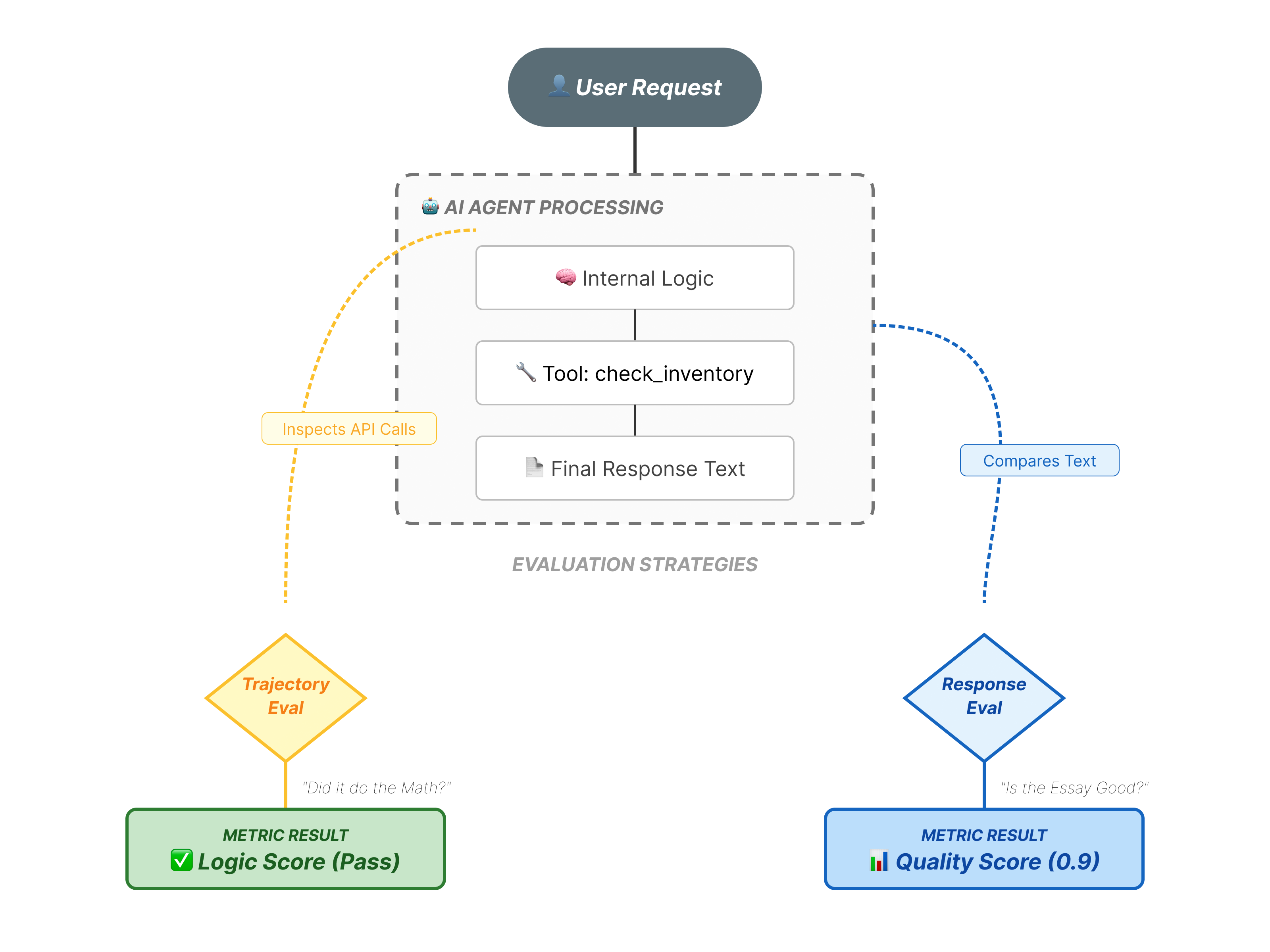
Agent evaluation is more complex than standard LLM evaluation. You aren't just grading the Essay (Final Response); you are grading the Math (The logic/tools used to get there).
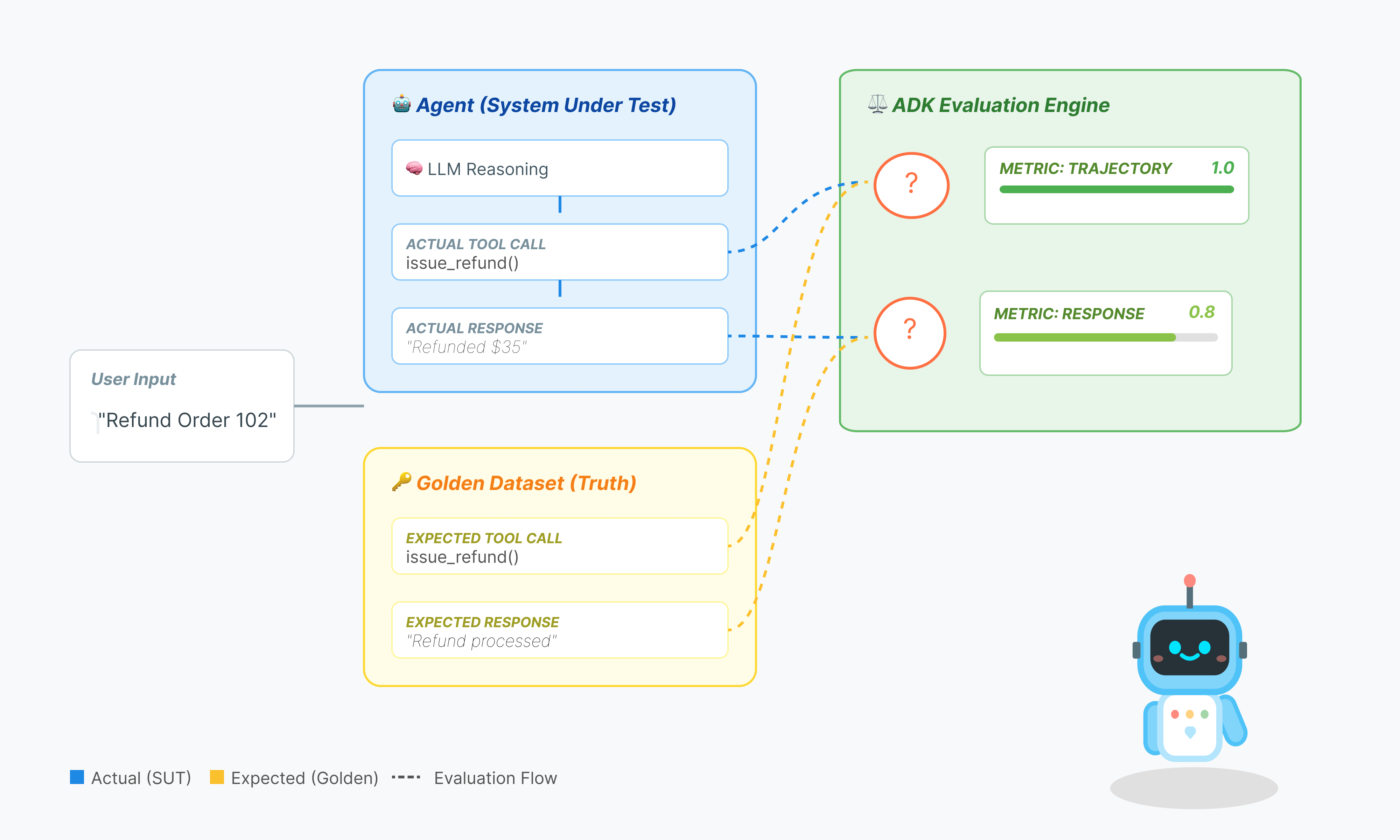
- Trajectory (The Process): Did the agent use the right tool at the right time? Did it call
check_inventorybeforeplace_order? - Final Response (The Output): Is the answer correct, polite, and grounded in the data?
The Development Lifecycle
In this codelab, we will walk through the professional lifecycle of agent testing:
- Local Visual Inspection (ADK Web UI): Manually chatting and verifying logic (Step 1).
- Unit/Regression Testing (ADK CLI): Running specific test cases locally to catch quick errors (Step 3 & 4).
- Debugging (Troubleshooting): Analyzing failures and fixing prompt logic (Step 5).
- CI/CD Integration (Pytest): Automating tests in your build pipeline (Step 6).
2. Set Up
To power our AI agents, we need two things: a Google Cloud Project to provide the foundation.
Part One: Enable Billing Account
To run this codelab, you need a billing account with some credit. Use the credits from the banner at the top of this codelab to get started. If you are already connected to a billing account, you can skip this step.
Part Two: Open Environment
- 👉 Click this link to navigate directly to Cloud Shell Editor
- 👉 If prompted to authorize at any point today, click Authorize to continue.
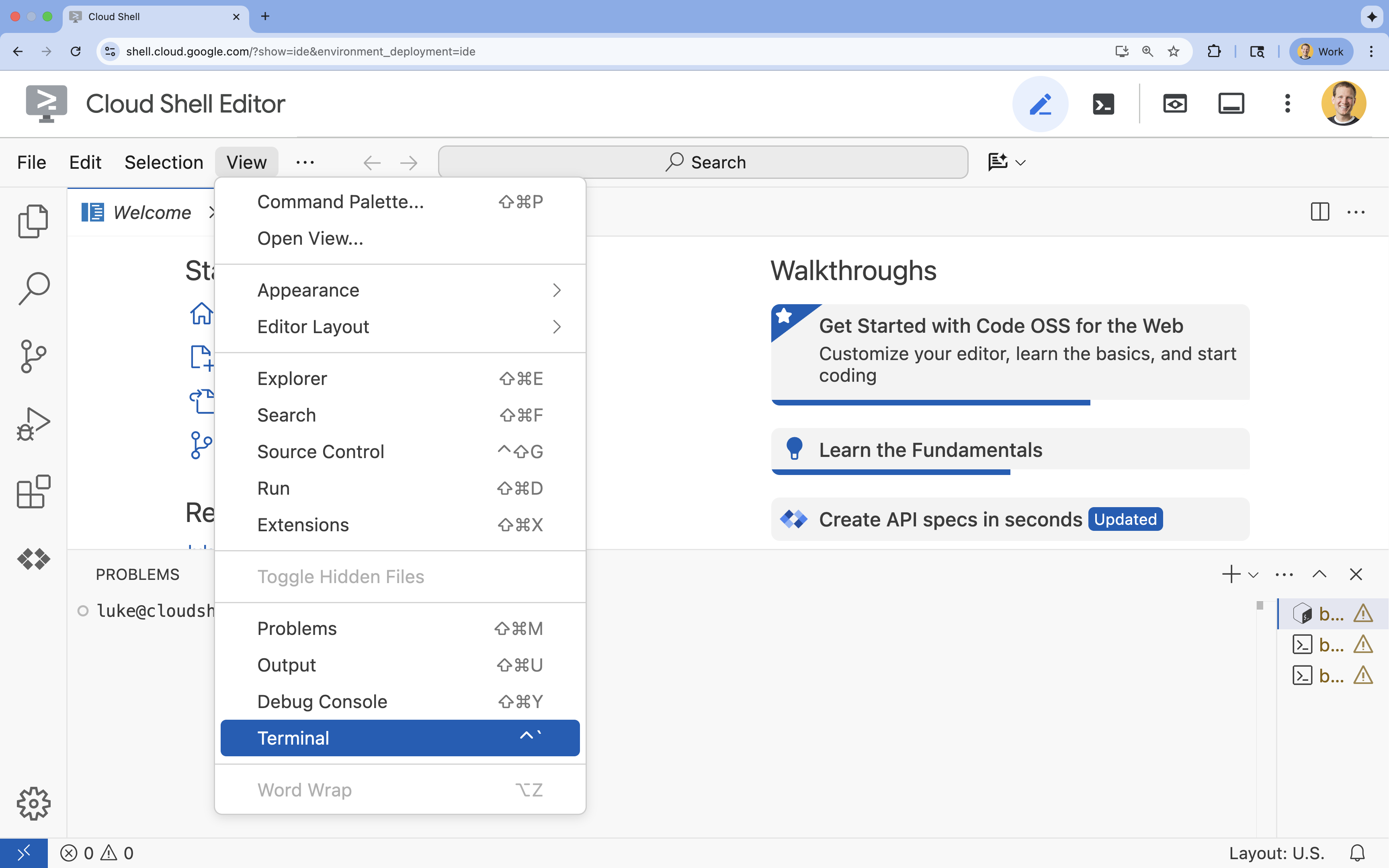
- 👉 If the terminal doesn't appear at the bottom of the screen, open it:
- Click View
- Click Terminal
- 👉💻 In the terminal, verify that you're already authenticated and that the project is set to your project ID using the following command:
gcloud auth list - 👉💻 Clone the bootstrap project from GitHub:
git clone https://github.com/cuppibla/adk_eval_starter - 👉💻 Run the setup script from the project directory.
cd ~/adk_eval_starter
./init.sh
The script will handle the rest of the setup process automatically.
- 👉💻 Set the Project ID needed:
gcloud config set project $(cat ~/project_id.txt) --quiet
Part Three: Setting up permission
- 👉💻 Enable the required APIs using the following command. This could take a few minutes.
gcloud services enable \ cloudresourcemanager.googleapis.com \ servicenetworking.googleapis.com \ run.googleapis.com \ cloudbuild.googleapis.com \ artifactregistry.googleapis.com \ aiplatform.googleapis.com \ compute.googleapis.com - 👉💻 Grant the necessary permissions by running the following commands in the terminal:
. ~/adk_eval_starter/set_env.sh
Notice that a .env file is created for you. That shows your project information.
3. Generating the Golden Dataset (adk web)
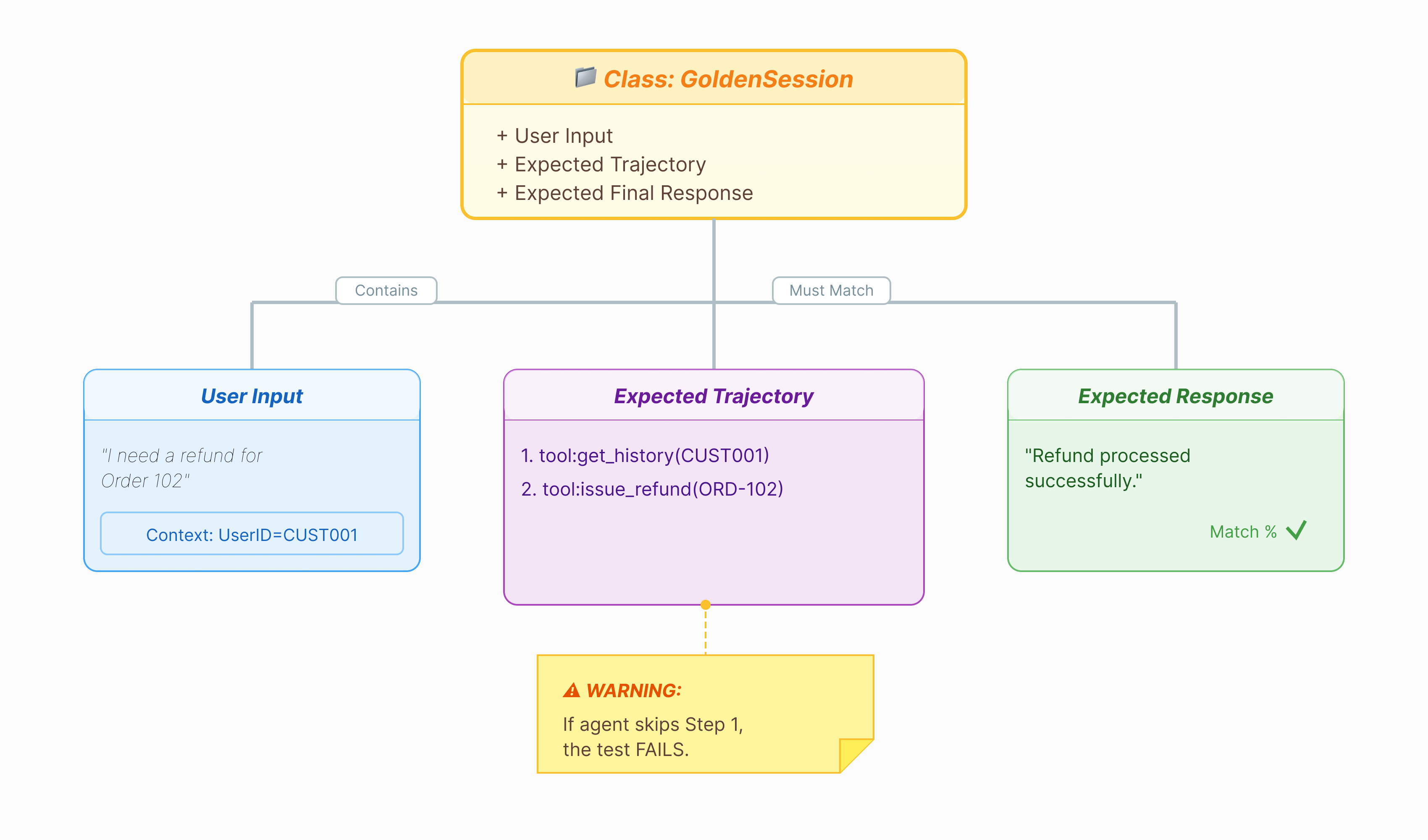
Before we can grade the agent, we need an answer key. In ADK, we call this the Golden Dataset. This dataset contains "perfect" interactions that serve as a ground truth for evaluation.
What is a Golden Dataset?
A Golden Dataset is a snapshot of your agent performing correctly. It is not just a list of Q&A pairs. It captures:
- The User Query ("I want a refund")
- The Trajectory (The exact sequence of tool calls:
check_order->verify_eligibility->refund_transaction). - The Final Response (The "perfect" text answer).
We use this to detect Regressions. If you update your prompt and the agent suddenly stops checking eligibility before refunding, the Golden Dataset test will fail because the trajectory no longer matches.
Open the Web UI
The ADK Web UI provides an interactive way to create these golden datasets by capturing real interactions with your agent.
- 👉💻 In your terminal, run:
cd ~/adk_eval_starter uv run adk web - 👉💻 Open the Web UI preview (usually at
http://127.0.0.1:8000). - 👉 In the chat UI, type
Hi, I'm customer CUST001. Can you check my orders? I need a refund for order ORD-102. It arrived damaged.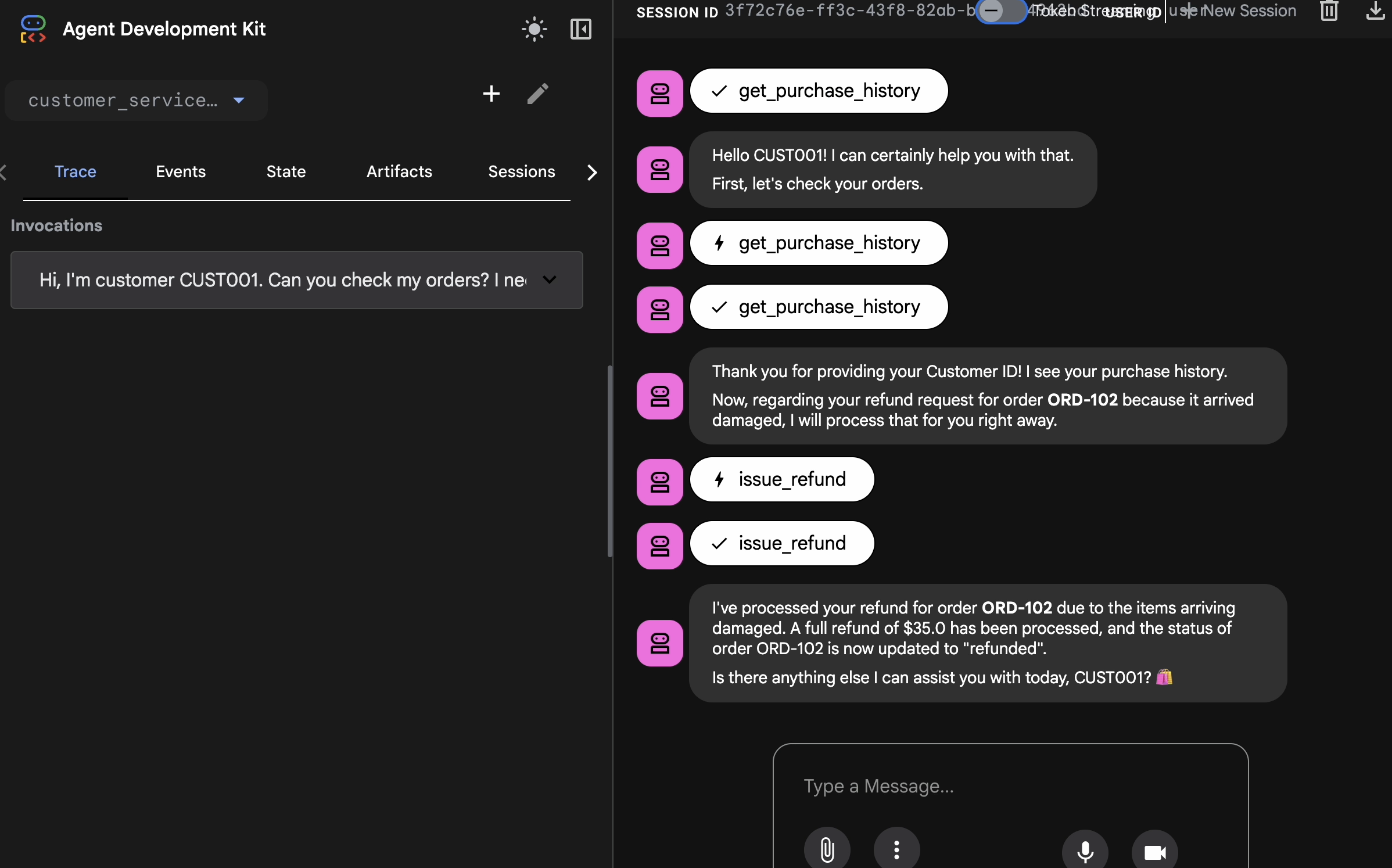 You will see response like:
I've processed your refund for order ORD-102 due to the items arriving damaged. A full refund of $35.0 has been processed, and the status of order ORD-102 is now updated to "refunded". Is there anything else I can assist you with today, CUST001? 🛍️
Capture Golden Interactions
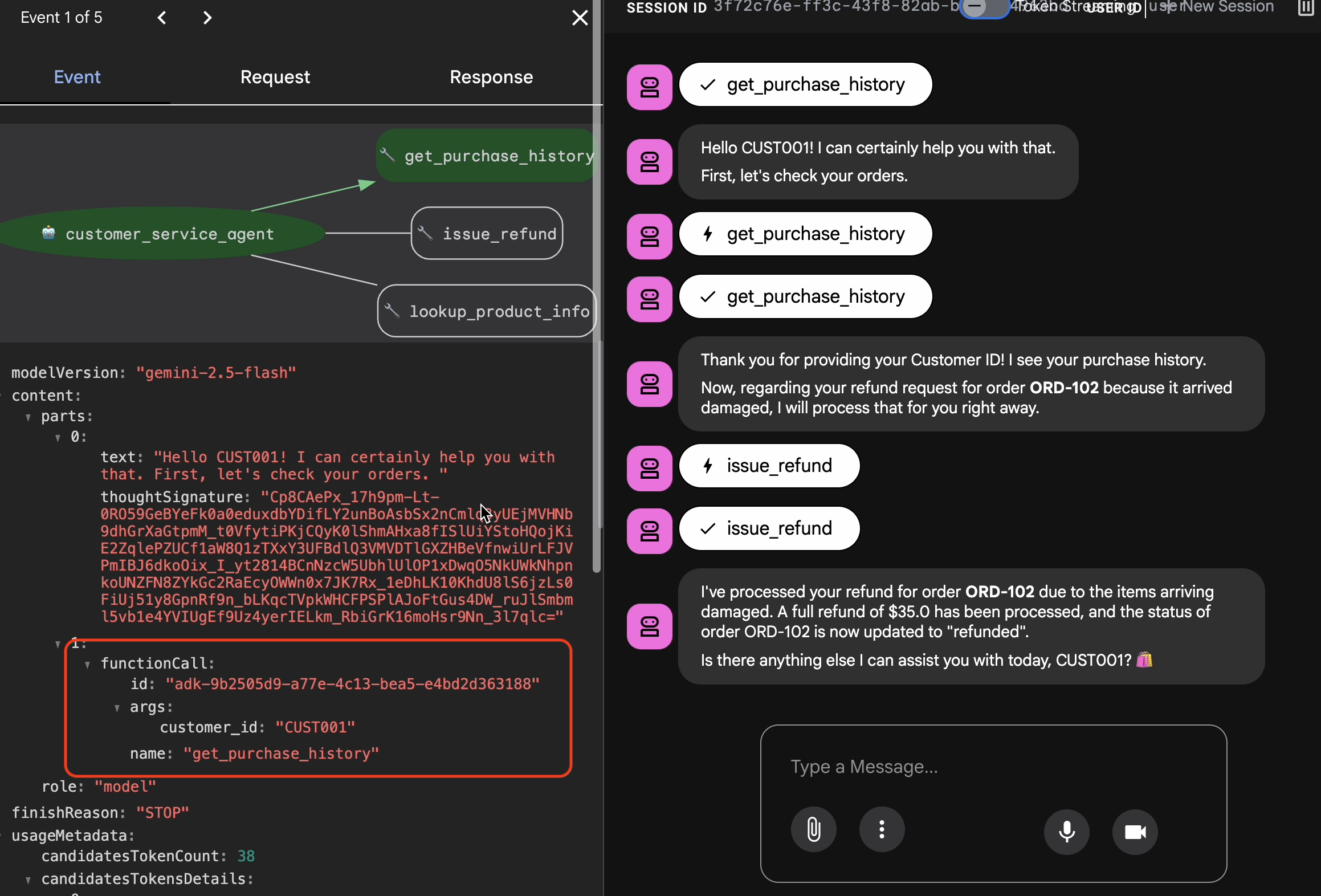
Navigate to the Sessions tab. Here you can see your agent's conversation history by click into the session.
- Interact with your agent to create an ideal conversation flow, such as checking purchase history or requesting a refund.
- Review the conversation to ensure it represents the expected behavior.
4. Export the Golden Dataset
Verify with Trace View
Before you export, you must verify that the agent didn't just get the right answer by luck. You need to inspect the internal logic.
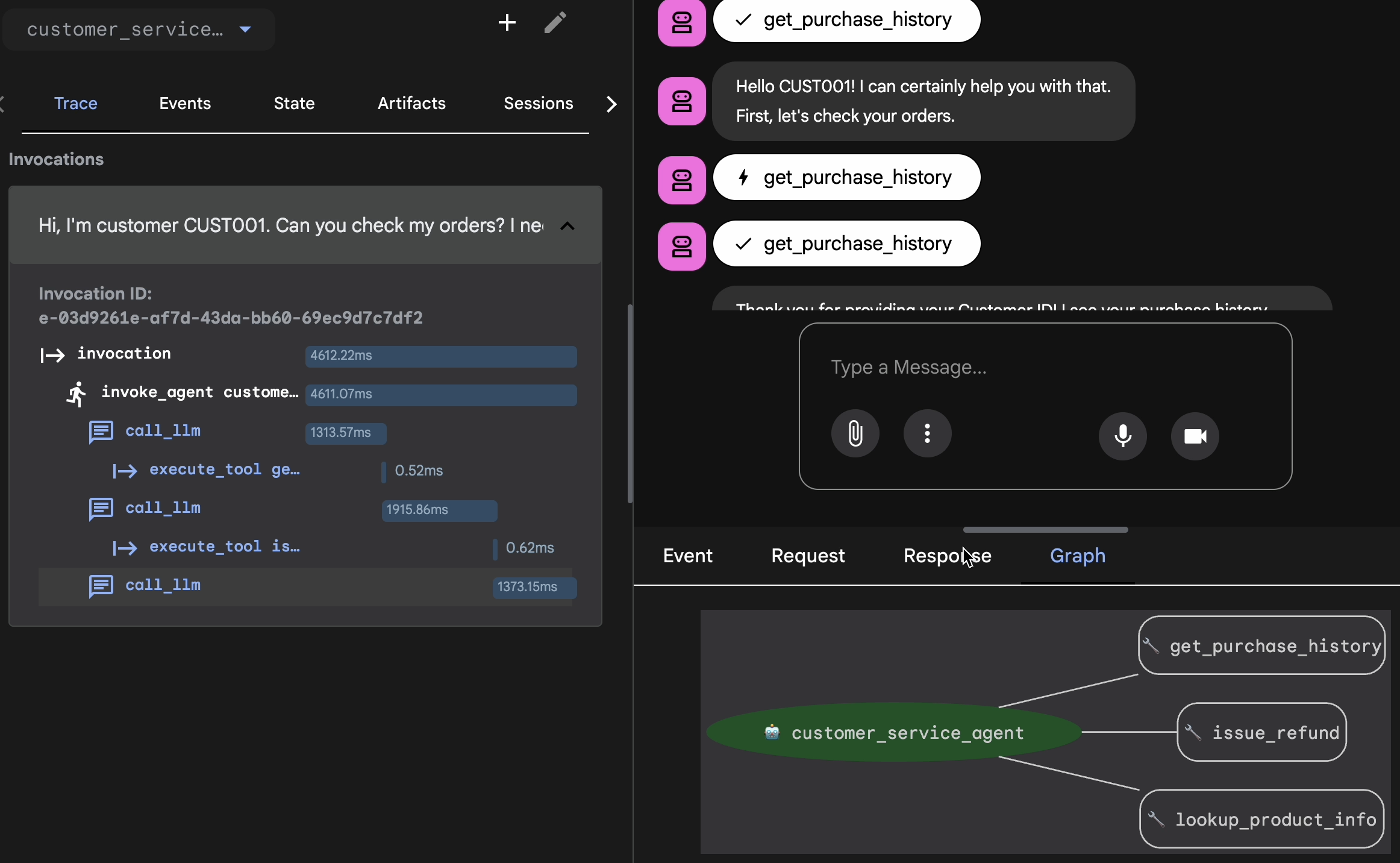
- Click the Trace tab in the Web UI.
- Traces are automatically grouped by user message. Hover over a trace row to highlight the corresponding message in the chat.
- Inspect the Blue Rows: These indicate events generated from the interaction. Click on a blue row to open the inspection panel.
- Check the following tabs to validate the logic:
- Graph: Visual representation of the tool calls and logic flow. Did it take the correct path?
- Request/Response: Review exactly what was sent to the model and what came back.
- Verification: If the agent guessed the refund amount without calling the database tool, that is a "lucky hallucination."
Add Session to EvalSet
Once you are satisfied with the conversation and the trace:
- 👉 Click the
EvalTab, and then clickCreate Evaluation Setbutton, and then enter the eval name to be:evalset1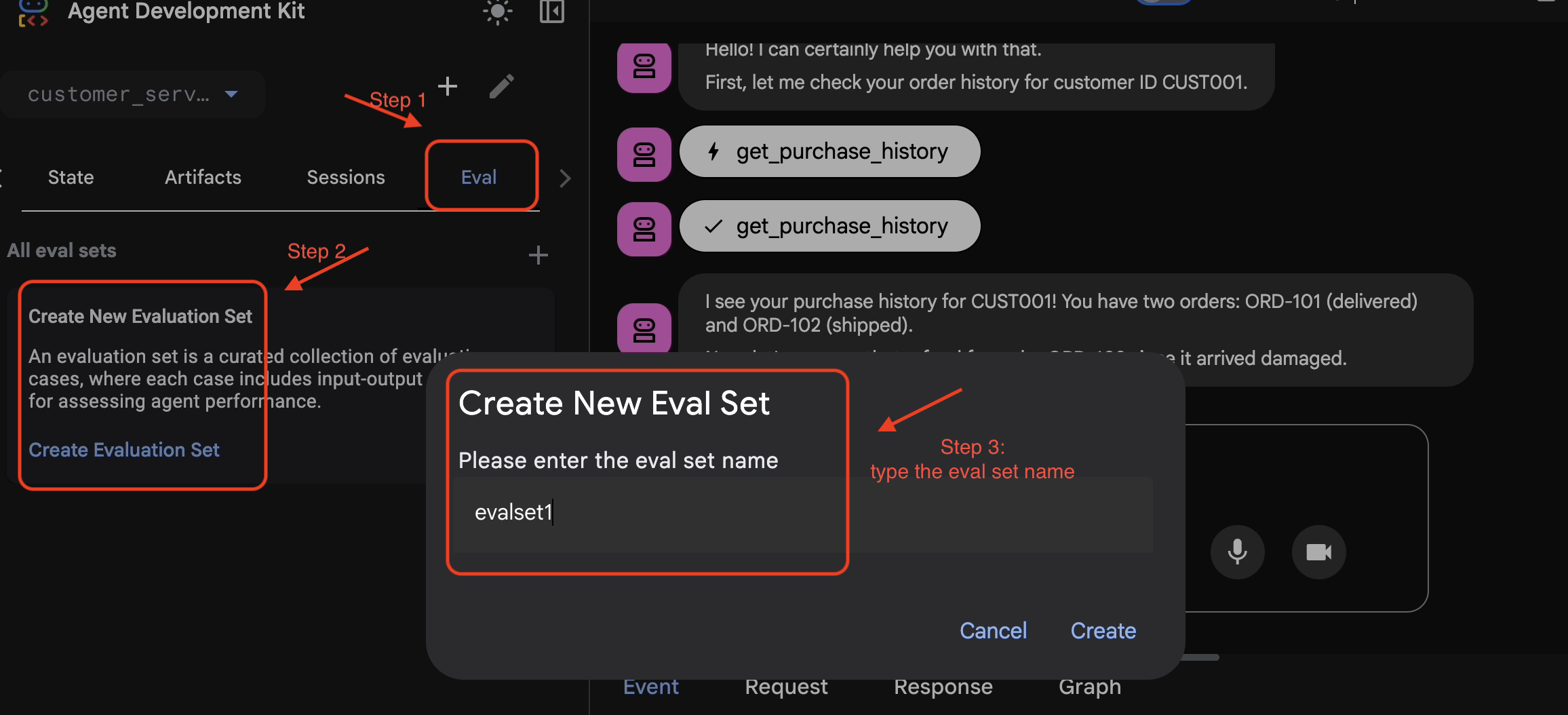
- 👉 In this evalset, Click
Add current session to evalset1, in the pop up window, enter the session name to be:eval1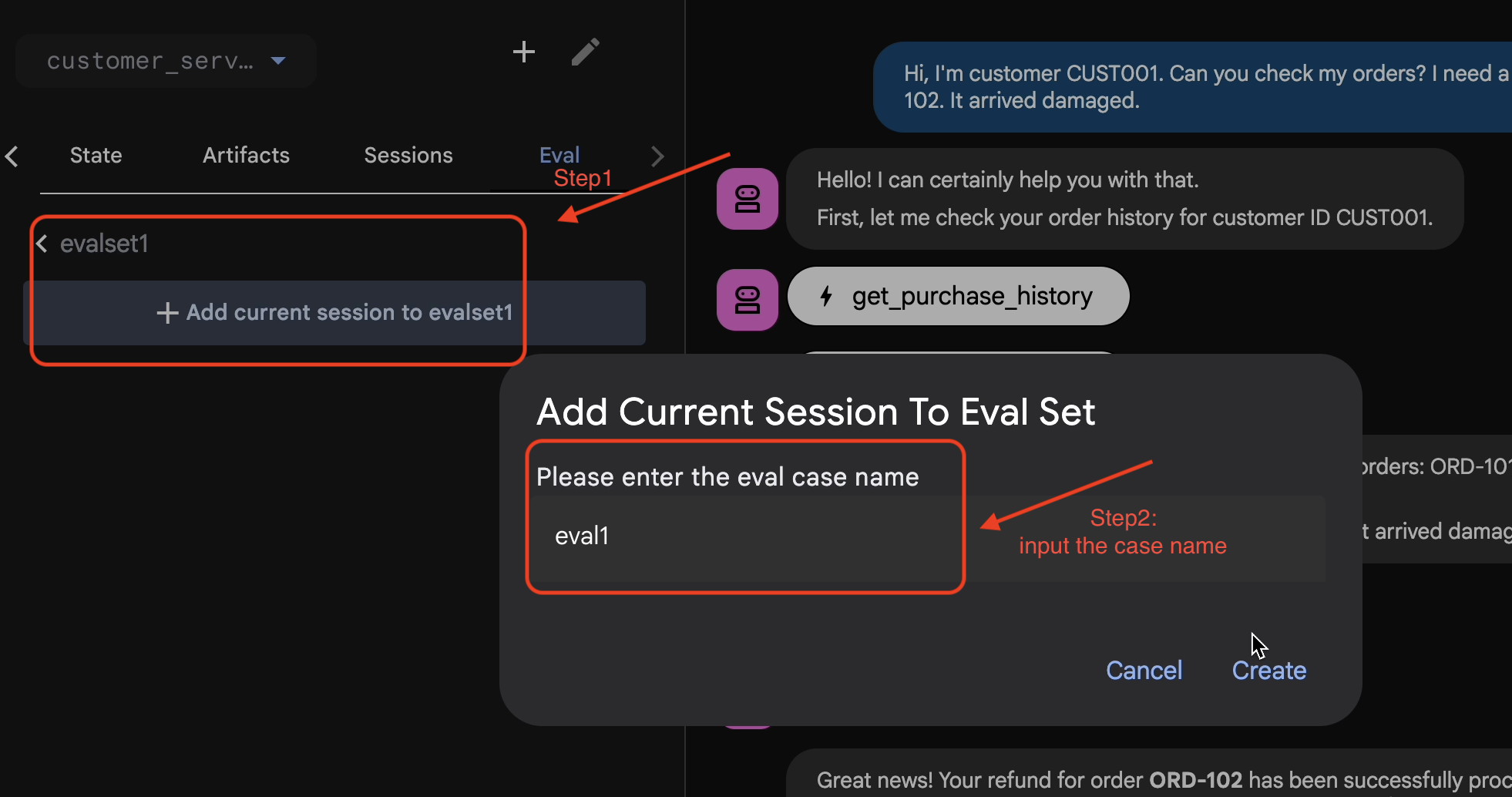
Run Eval in ADK Web
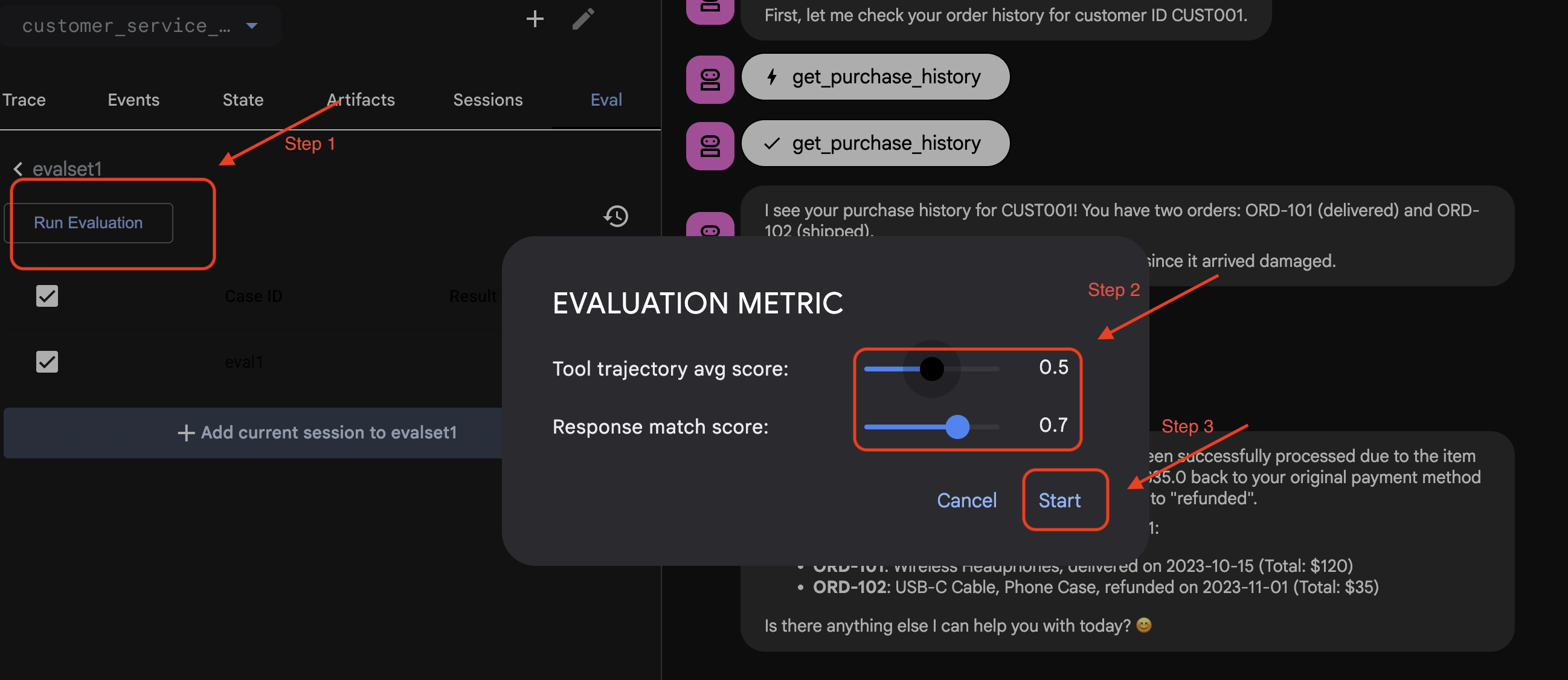
- 👉 In ADK Web UI, click
Run Evaluation, in the pop up window, adjust the metrics, and clickStart:
Verify Dataset in Your Repo
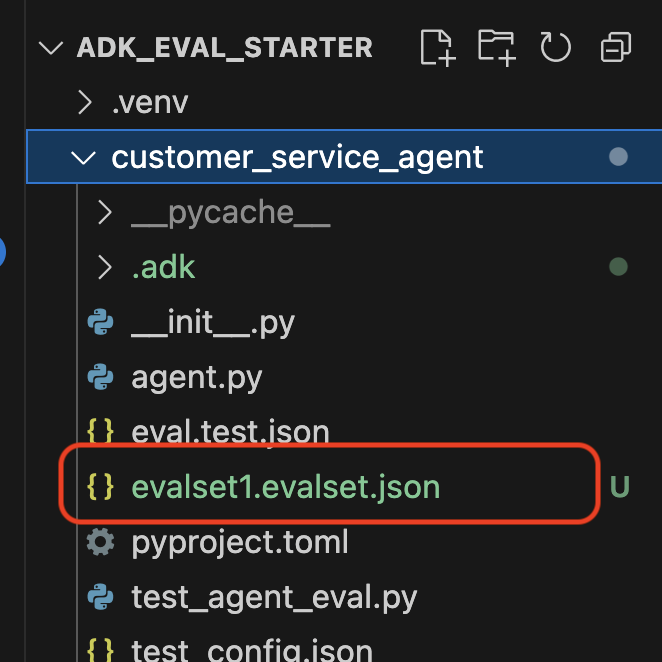
You will see a confirmation that a dataset file (e.g., evalset1.evalset.json) has been saved to your repository. This file contains the raw, auto-generated trace of your conversation.
5. The Evaluation Files
While the Web UI generates a complex .evalset.json file, we often want to create a cleaner, more structured test file for automated testing.
ADK Eval uses two main components:
- Test Files: Can be the auto-generated Golden Dataset (e.g.,
customer_service_agent/evalset1.evalset.json) or a manually curated set (e.g.,customer_service_agent/eval.test.json). - Config Files (e.g.,
customer_service_agent/test_config.json): Define the metrics and thresholds for passing.
Set up the test config file
- 👉💻 In the Cloud Shell Editor terminal, input
cloudshell edit customer_service_agent/test_config.json - 👉 Input the following code into the
customer_service_agent/test_config.jsonin your editor.{ "criteria": { "tool_trajectory_avg_score": 0.8, "response_match_score": 0.5 } }
Decoding the Metrics
tool_trajectory_avg_score(The Process) This measures if the agent used the tools correctly.
- 0.8: We demand a 80% match.
response_match_score(The Output) This uses ROUGE-1 (word overlap) to compare the answer to the golden reference.
- Pros: Fast, deterministic, free.
- Cons: Fails if the agent phrases the same idea differently (e.g., "Refunded" vs "Money returned").
Advanced Metrics (for when you need more power)
6. Run Evaluation For Golden Dataset (adk eval)
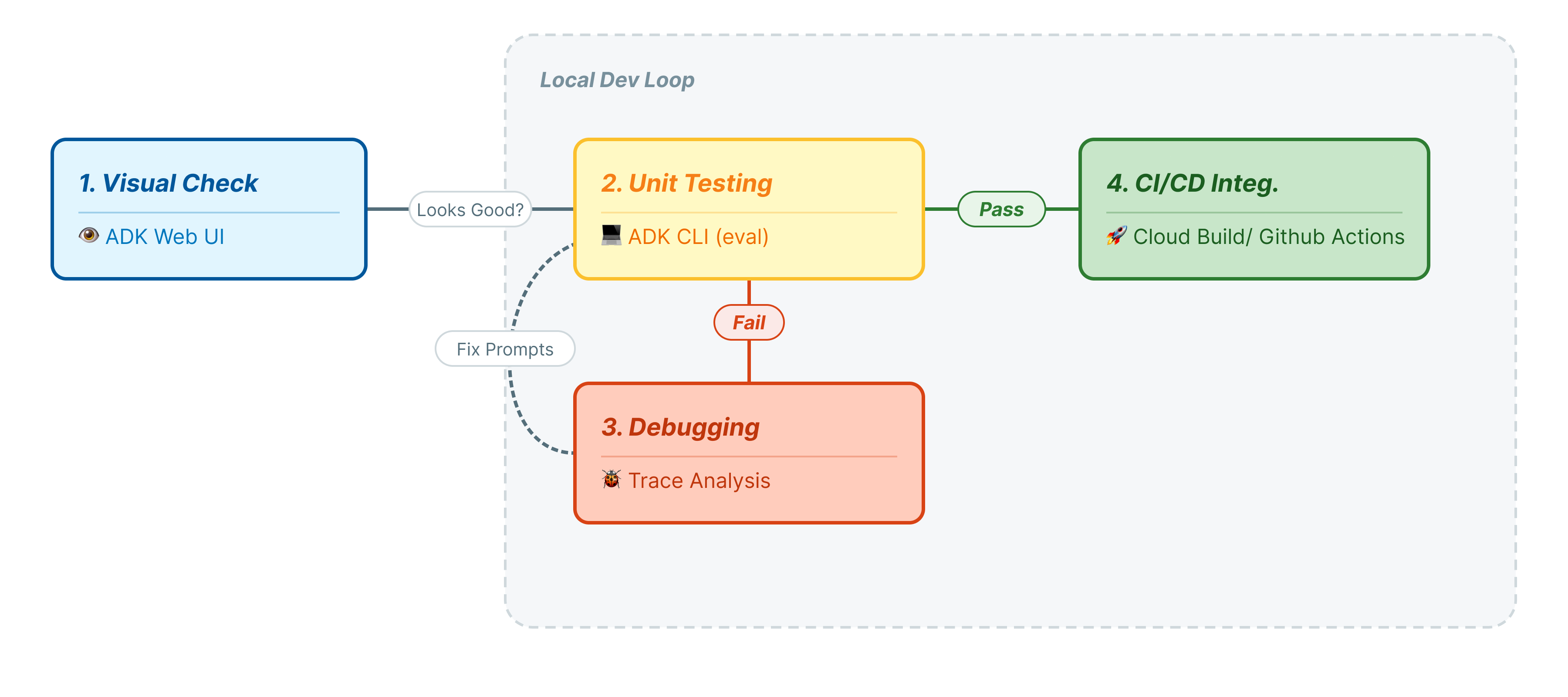
This step represents the "Inner Loop" of development. You are a developer making changes, and you want to quickly verify results.
Run the Golden Dataset
let's run the dataset you generated in Step 1. This ensures your baseline is solid.
- 👉💻 In your terminal, run:
cd ~/adk_eval_starter
uv run adk eval customer_service_agent customer_service_agent/evalset1.evalset.json --config_file_path=customer_service_agent/test_config.json --print_detailed_results
What's Happening?
ADK is now:
- Loading your agent from
customer_service_agent. - Running the input queries from
evalset1.evalset.json. - Comparing the agent's actual trajectory and responses against the expected ones.
- Scoring the results based on the criteria in
test_config.json.
Analyze the Results
Watch the terminal output. You will see a summary of passed and failed tests.
Eval Run Summary
evalset1:
  Tests passed: 1
  Tests failed: 0
********************************************************************
Eval Set Id: evalset1
Eval Id: eval1
Overall Eval Status: PASSED
---------------------------------------------------------------------
Metric: tool_trajectory_avg_score, Status: PASSED, Score: 1.0, Threshold: 0.8
---------------------------------------------------------------------
Metric: response_match_score, Status: PASSED, Score: 0.5581395348837208, Threshold: 0.5
---------------------------------------------------------------------
Invocation Details:
+----+---------------------------+---------------------------+--------------------------+---------------------------+---------------------------+-----------------------------+------------------------+
|    | prompt                    | expected_response         | actual_response          | expected_tool_calls       | actual_tool_calls         | tool_trajectory_avg_score   | response_match_score   |
+====+===========================+===========================+==========================+===========================+===========================+=============================+========================+
|  0 | Hi, I'm customer CUST001. | Great news! Your refund   | Great news, CUST001! 🎉   | id='adk-051409fe-c230-43f | id='adk-4e9aa570-1cc6-4c3 | Status: PASSED, Score:      | Status: PASSED, Score: |
|    | Can you check my orders?  | for order **ORD-102** has | I've successfully        | 4-a7f1- 5747280fd878'     | c-aa3e- 91dbe113dd4b'     | 1.0                         | 0.5581395348837208     |
|    | I need a refund for order | been successfully         | processed a full refund  | args={'customer_id':      | args={'customer_id':      |                             |                        |
|    | ORD-102. It arrived       | processed due to the item | of $35.0 for your order  | 'CUST001'} name='get_purc | 'CUST001'} name='get_purc |                             |                        |
|    | damaged.                  | arriving damaged. You     | ORD-102 because it       | hase_history'             | hase_history'             |                             |                        |
|    |                           | should see a full refund  | arrived damaged. The     | partial_args=None         | partial_args=None         |                             |                        |
|    |                           | of $35.0 back to your     | status of that order has | will_continue=None id= 'a | will_continue=None        |                             |                        |
|    |                           | original payment method   | been updated to          | dk-8a194cb8-5a82-47ce-a3a | id='adk- dad1b376-9bcc-48 |                             |                        |
|    |                           | shortly. The status of    | "refunded."  Is there    | 7- 3d24551f8c90'          | bb-996f-a30f6ef5b70b'     |                             |                        |
|    |                           | this order has been       | anything else I can      | args={'reason':           | args={'reason':           |                             |                        |
|    |                           | updated to "refunded".    | assist you with today?   | 'damaged', 'order_id':    | 'damaged', 'order_id':    |                             |                        |
|    |                           | Here's your updated       |                          | 'ORD-102'}                | 'ORD-102'}                |                             |                        |
|    |                           | purchase history for      |                          | name='issue_refund'       | name='issue_refund'       |                             |                        |
|    |                           | CUST001: *   **ORD-101**: |                          | partial_args=None         | partial_args=None         |                             |                        |
|    |                           | Wireless Headphones,      |                          | will_continue=None        | will_continue=None        |                             |                        |
|    |                           | delivered on 2023-10-15   |                          |                           |                           |                             |                        |
|    |                           | (Total: $120) *           |                          |                           |                           |                             |                        |
|    |                           | **ORD-102**: USB-C Cable, |                          |                           |                           |                             |                        |
|    |                           | Phone Case, refunded on   |                          |                           |                           |                             |                        |
|    |                           | 2023-11-01 (Total: $35)   |                          |                           |                           |                             |                        |
|    |                           | Is there anything else I  |                          |                           |                           |                             |                        |
|    |                           | can help you with today?  |                          |                           |                           |                             |                        |
|    |                           | 😊                         |                          |                           |                           |                             |                        |
+----+---------------------------+---------------------------+--------------------------+---------------------------+---------------------------+-----------------------------+------------------------+
Note: Since you just generated this from the agent itself, it should pass 100%. If it fails, your agent is non-deterministic (random).
7. Create Your Own Customized Test
While auto-generated datasets are great, sometimes you need to manually craft edge cases (e.g., adversarial attacks or specific error handling). Let's look at how eval.test.json allows you to define "Correctness."
Let's build a comprehensive test suite.
The Testing Framework
When writing a test case in ADK, follow this 3-Part Formula:
- The Setup (
session_input): Who is the user? (e.g.,user_id,state). This isolates the test. - The Prompt (
user_content): What is the trigger?
With The Assertions (Expectations):
- Trajectory (
tool_uses): Did it do the math right? (Logic) - Response (
final_response): Did it say the right answer? (Quality) - Intermediate (
intermediate_responses): Did the sub-agents talk correctly? (Orchestration)
Write the Test Suite
- 👉💻 In the Cloud Shell Editor terminal, input
cloudshell edit customer_service_agent/eval.test.json - 👉 Input the following code into the
customer_service_agent/eval.test.jsonfile.{ "eval_set_id": "customer_service_eval", "name": "Customer Service Agent Evaluation", "description": "Evaluation suite for the customer service agent covering product info, purchase history, and refunds.", "eval_cases": [ { "eval_id": "product_info_check", "session_input": { "app_name": "customer_service_agent", "user_id": "eval_user_1", "state": {} }, "conversation": [ { "invocation_id": "turn_1_product_info", "user_content": { "role": "user", "parts": [ { "text": "Do you have wireless headphones in stock?" } ] }, "final_response": { "role": "model", "parts": [ { "text": "Yes, we have wireless headphones in stock! They are priced at $120.00 and feature noise-canceling with a 20-hour battery life. 🎧" } ] }, "intermediate_data": { "tool_uses": [ { "name": "lookup_product_info", "args": { "product_name": "wireless headphones" } } ], "intermediate_responses": [] } } ] }, { "eval_id": "purchase_history_check", "session_input": { "app_name": "customer_service_agent", "user_id": "eval_user_2", "state": {} }, "conversation": [ { "invocation_id": "turn_1_purchase_history", "user_content": { "role": "user", "parts": [ { "text": "What did I buy recently? My customer ID is CUST001." } ] }, "final_response": { "role": "model", "parts": [ { "text": "Here's your recent purchase history for Customer ID CUST001:\n\n* **Order ORD-101** (October 15, 2023): Wireless Headphones, Status: delivered, Total: $120\n* **Order ORD-102** (November 1, 2023): USB-C Cable, Phone Case, Status: refunded, Total: $35\n\nLet me know if you have any other questions or need further assistance! 🛍️" } ] }, "intermediate_data": { "tool_uses": [ { "name": "get_purchase_history", "args": { "customer_id": "CUST001" } } ], "intermediate_responses": [] } } ] }, { "eval_id": "refund_request", "session_input": { "app_name": "customer_service_agent", "user_id": "eval_user_3", "state": {} }, "conversation": [ { "invocation_id": "turn_1_refund", "user_content": { "role": "user", "parts": [ { "text": "I want a refund for order ORD-102 because it was damaged." } ] }, "final_response": { "role": "model", "parts": [ { "text": "Your refund for order **ORD-102** due to \"damaged\" has been successfully processed! Refund amount: **$35.0**. Your order status has been updated to **refunded**. \nIs there anything else I can help you with today? 🛍️" } ] }, "intermediate_data": { "tool_uses": [ { "name": "issue_refund", "args": { "order_id": "ORD-102", "reason": "damaged" } } ], "intermediate_responses": [] } } ] } ] }
Deconstructing the Test Types
We have created three distinct types of tests here. Let's break down what each one is evaluating and why.
- The Single Tool Test (
product_info_check)
- Goal: Verify basic information retrieval.
- Key Assertion: We check
intermediate_data.tool_uses. We assert thatlookup_product_infois called. We assert the argumentproduct_nameis exactly "wireless headphones". - Why: If the model hallucinates a price without calling the tool, this test fails. This ensures grounding.
- The Context Extraction Test (
purchase_history_check)
- Goal: Verify the agent can extract entities (CUST001) from the user prompt and pass them to the tool.
- Key Assertion: We check that
get_purchase_historyis called withcustomer_id: "CUST001". - Why: A common failure mode is the agent calling the correct tool but with a null ID. This ensures parameter accuracy.
- The Action/Trajectory Test (
refund_request)
- Goal: Verify a critical write operation.
- Key Assertion: The Trajectory. In a more complex scenario, this list would contain multiple steps:
[verify_order, calculate_refund, issue_refund]. ADK checks this list In Order. - Why: For actions that move money or change data, the sequence is as important as the result. You don't want to refund before verifying.
8. Run Evaluation For Custom Tests ( adk eval)
- 👉💻 In your terminal, run:
cd ~/adk_eval_starter
uv run adk eval customer_service_agent customer_service_agent/eval.test.json --config_file_path=customer_service_agent/test_config.json --print_detailed_results
Understanding the Output
You should see a PASS result like this:
Eval Run Summary
customer_service_eval:
  Tests passed: 3
  Tests failed: 0
********************************************************************
Eval Set Id: customer_service_eval
Eval Id: purchase_history_check
Overall Eval Status: PASSED
---------------------------------------------------------------------
Metric: tool_trajectory_avg_score, Status: PASSED, Score: 1.0, Threshold: 0.8
---------------------------------------------------------------------
Metric: response_match_score, Status: PASSED, Score: 0.5473684210526315, Threshold: 0.5
---------------------------------------------------------------------
Invocation Details:
+----+--------------------------+---------------------------+---------------------------+---------------------------+---------------------------+-----------------------------+------------------------+
|    | prompt                   | expected_response         | actual_response           | expected_tool_calls       | actual_tool_calls         | tool_trajectory_avg_score   | response_match_score   |
+====+==========================+===========================+===========================+===========================+===========================+=============================+========================+
|  0 | What did I buy recently? | Here's your recent        | Looks like your recent    | id=None                   | id='adk-8960eb53-2933-459 | Status: PASSED, Score:      | Status: PASSED, Score: |
|    | My customer ID is        | purchase history for      | orders include: *         | args={'customer_id':      | f-b306- 71e3c069e77e'     | 1.0                         | 0.5473684210526315     |
|    | CUST001.                 | Customer ID CUST001:  *   | **ORD-101 (2023-10-15):** | 'CUST001'} name='get_purc | args={'customer_id':      |                             |                        |
|    |                          | **Order ORD-101**         | Wireless Headphones for   | hase_history'             | 'CUST001'} name='get_purc |                             |                        |
|    |                          | (October 15, 2023):       | $120.00 - Status:         | partial_args=None         | hase_history'             |                             |                        |
|    |                          | Wireless Headphones,      | Delivered 🎧 *   **ORD-102 | will_continue=None        | partial_args=None         |                             |                        |
|    |                          | Status: delivered, Total: | (2023-11-01):** USB-C     |                           | will_continue=None        |                             |                        |
|    |                          | $120 *   **Order          | Cable, Phone Case for     |                           |                           |                             |                        |
|    |                          | ORD-102** (November 1,    | $35.00 - Status: Refunded |                           |                           |                             |                        |
|    |                          | 2023): USB-C Cable, Phone | 📱  Is there anything else |                           |                           |                             |                        |
|    |                          | Case, Status: refunded,   | I can help you with       |                           |                           |                             |                        |
|    |                          | Total: $35  Let me know   | regarding these orders?   |                           |                           |                             |                        |
|    |                          | if you have any other     |                           |                           |                           |                             |                        |
|    |                          | questions or need further |                           |                           |                           |                             |                        |
|    |                          | assistance! 🛍️            |                           |                           |                           |                             |                        |
+----+--------------------------+---------------------------+---------------------------+---------------------------+---------------------------+-----------------------------+------------------------+


********************************************************************
Eval Set Id: customer_service_eval
Eval Id: product_info_check
Overall Eval Status: PASSED
---------------------------------------------------------------------
Metric: tool_trajectory_avg_score, Status: PASSED, Score: 1.0, Threshold: 0.8
---------------------------------------------------------------------
Metric: response_match_score, Status: PASSED, Score: 0.6829268292682927, Threshold: 0.5
---------------------------------------------------------------------
Invocation Details:
+----+----------------------+---------------------------+---------------------------+---------------------------+---------------------------+-----------------------------+------------------------+
|    | prompt               | expected_response         | actual_response           | expected_tool_calls       | actual_tool_calls         | tool_trajectory_avg_score   | response_match_score   |
+====+======================+===========================+===========================+===========================+===========================+=============================+========================+
|  0 | Do you have wireless | Yes, we have wireless     | Yes, we do! 🎧 We have     | id=None                   | id='adk-4571d660-a92b-412 | Status: PASSED, Score:      | Status: PASSED, Score: |
|    | headphones in stock? | headphones in stock! They | noise-canceling wireless  | args={'product_name':     | a-a79e- 5c54f8b8af2d'     | 1.0                         | 0.6829268292682927     |
|    |                      | are priced at $120.00 and | headphones with a 20-hour | 'wireless headphones'} na | args={'product_name':     |                             |                        |
|    |                      | feature noise-canceling   | battery life available    | me='lookup_product_info'  | 'wireless headphones'} na |                             |                        |
|    |                      | with a 20-hour battery    | for $120.                 | partial_args=None         | me='lookup_product_info'  |                             |                        |
|    |                      | life. 🎧                   |                           | will_continue=None        | partial_args=None         |                             |                        |
|    |                      |                           |                           |                           | will_continue=None        |                             |                        |
+----+----------------------+---------------------------+---------------------------+---------------------------+---------------------------+-----------------------------+------------------------+


********************************************************************
Eval Set Id: customer_service_eval
Eval Id: refund_request
Overall Eval Status: PASSED
---------------------------------------------------------------------
Metric: tool_trajectory_avg_score, Status: PASSED, Score: 1.0, Threshold: 0.8
---------------------------------------------------------------------
Metric: response_match_score, Status: PASSED, Score: 0.6216216216216216, Threshold: 0.5
---------------------------------------------------------------------
Invocation Details:
+----+---------------------------+---------------------------+---------------------------+---------------------------+---------------------------+-----------------------------+------------------------+
|    | prompt                    | expected_response         | actual_response           | expected_tool_calls       | actual_tool_calls         | tool_trajectory_avg_score   | response_match_score   |
+====+===========================+===========================+===========================+===========================+===========================+=============================+========================+
|  0 | I want a refund for order | Your refund for order     | Your refund for order     | id=None args={'order_id': | id='adk-fb8ff1cc- cf87-41 | Status: PASSED, Score:      | Status: PASSED, Score: |
|    | ORD-102 because it was    | **ORD-102** due to        | **ORD-102** has been      | 'ORD-102', 'reason':      | f2-9b11-d4571b14287f'     | 1.0                         | 0.6216216216216216     |
|    | damaged.                  | "damaged" has been        | successfully processed!   | 'damaged'}                | args={'order_id':         |                             |                        |
|    |                           | successfully processed!   | You should see a full     | name='issue_refund'       | 'ORD-102', 'reason':      |                             |                        |
|    |                           | Refund amount: **$35.0**. | refund of $35.0 appear in | partial_args=None         | 'damaged'}                |                             |                        |
|    |                           | Your order status has     | your account shortly. We  | will_continue=None        | name='issue_refund'       |                             |                        |
|    |                           | been updated to           | apologize for the         |                           | partial_args=None         |                             |                        |
|    |                           | **refunded**.  Is there   | inconvenience! Is there   |                           | will_continue=None        |                             |                        |
|    |                           | anything else I can help  | anything else I can       |                           |                           |                             |                        |
|    |                           | you with today? 🛍️        | assist you with today? 😊  |                           |                           |                             |                        |
+----+---------------------------+---------------------------+---------------------------+---------------------------+---------------------------+-----------------------------+------------------------+
This means your agent used the correct tools and provided a response sufficiently similar to your expectations.
9. (Optional: Read Only) - Troubleshooting & Debugging
Tests will fail. That is their job. But how do you fix them? Let's analyze common failure scenarios and how to debug them.
Scenario A: The "Trajectory" Failure
The Error:
Result: FAILED
Reason: Criteria 'tool_trajectory_avg_score' failed. Score 0.0 < Threshold 1.0
Details:
EXPECTED: tool: lookup_order, then tool: issue_refund
ACTUAL:   tool: issue_refund
Diagnosis: The agent skipped the verification step (lookup_order). This is a logic error.
How to Troubleshoot:
- Don't Guess: Go back to the ADK Web UI (adk web).
- Reproduce: Type the exact prompt from the failed test into the chat.
- Trace: Open the Trace view. Look at the "Graph" tab.
- Fix the Prompt: Usually, you need to update the System Prompt. Change: "You are a helpful agent." To: "You are a helpful agent. CRITICAL: You MUST call lookup_order to verify details before calling issue_refund."
- Adapt the Test: If the business logic changed (e.g., verifying is no longer needed), then the test is wrong. Update eval.test.json to match the new reality.
Scenario B: The "ROUGE" Failure
The Error:
Result: FAILED
Reason: Criteria 'response_match_score' failed. Score 0.45 < Threshold 0.8
Expected: "The refund has been processed successfully."
Actual:   "I've gone ahead and returned the money to your card."
Diagnosis: The agent did the right thing, but used different words. ROUGE (word overlap) penalized it.
How to Fix:
- Is it wrong? If the meaning is correct, do not change the prompt.
- Adjust Threshold: Lower the threshold in
test_config.json(e.g., from0.8to0.5). - Upgrade the Metric: Switch to
final_response_match_v2in your config. This uses an LLM to read both sentences and judge if they mean the same thing.
10. CI/CD with Pytest (pytest)
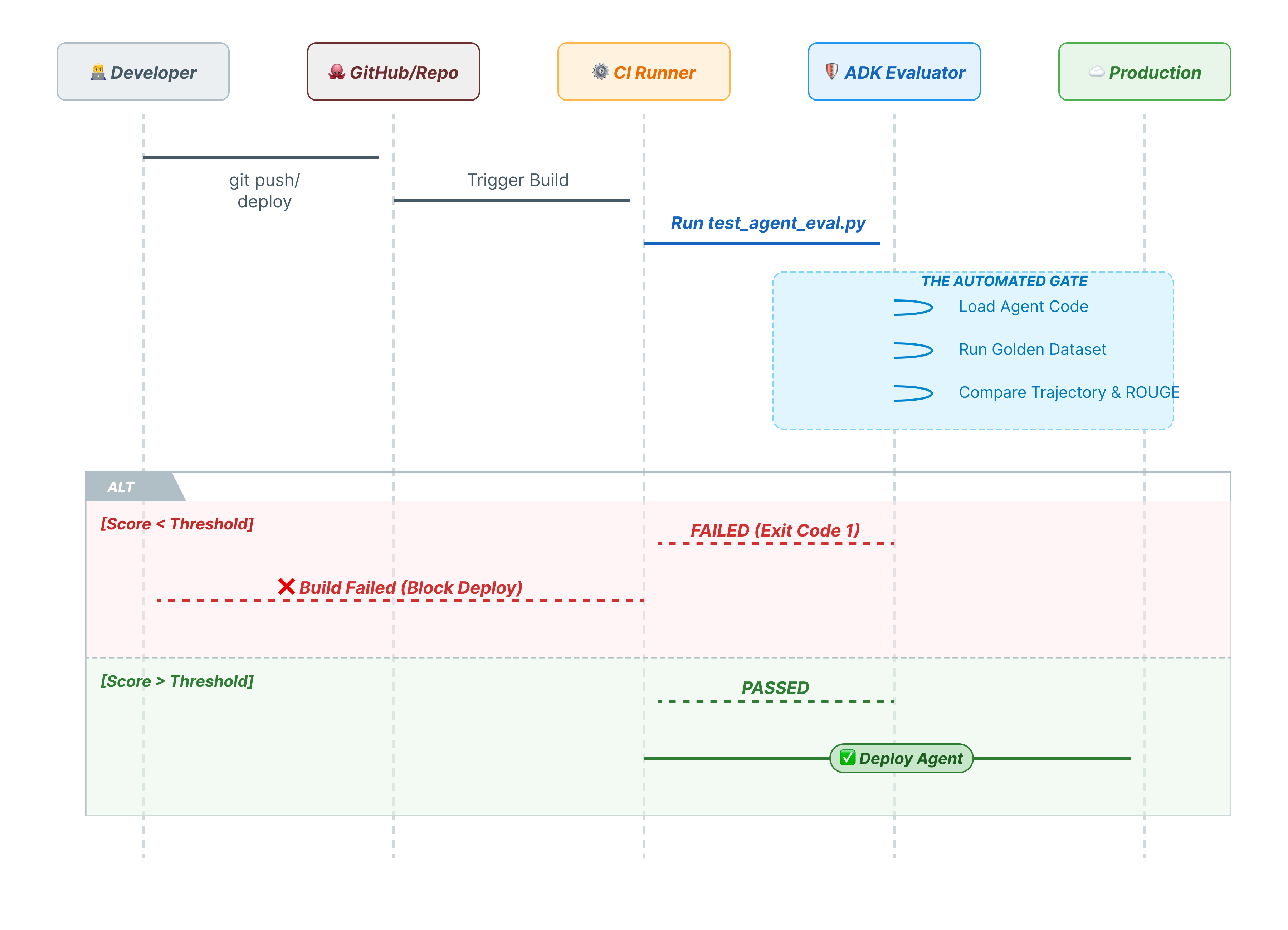
CLI commands are for humans. pytest is for machines. To ensure production reliability, we wrap our evaluations in a Python test suite. This allows your CI/CD pipeline (GitHub Actions, Jenkins) to block a deployment if the agent degrades.
What goes into this file?
This Python file acts as the bridge between your CI/CD runner and the ADK evaluator. It needs to:
- Load your Agent: Dynamically import your agent code.
- Reset State: Ensure the agent memory is clean so tests don't leak into each other.
- Run Evaluation: Call
AgentEvaluator.evaluate()programmatically. - Assert Success: If the evaluation score is low, fail the build.
The Integration Test Code
- 👉 Open
customer_service_agent/test_agent_eval.py. This script usesAgentEvaluator.evaluateto run the tests defined ineval.test.json. - 👉 Input the following code into the
customer_service_agent/test_agent_eval.pyin your editor.from google.adk.evaluation.agent_evaluator import AgentEvaluator import pytest import importlib import sys import os @pytest.mark.asyncio async def test_with_single_test_file(): """Test the agent's basic ability via a session file.""" # Load the agent module robustly module_name = "customer_service_agent.agent" try: agent_module = importlib.import_module(module_name) # Reset the mock data to ensure a fresh state for the test if hasattr(agent_module, 'reset_mock_data'): agent_module.reset_mock_data() except ImportError: # Fallback if running from a different context sys.path.append(os.getcwd()) agent_module = importlib.import_module(module_name) if hasattr(agent_module, 'reset_mock_data'): agent_module.reset_mock_data() # Use absolute path to the eval file to be robust to where pytest is run script_dir = os.path.dirname(os.path.abspath(__file__)) eval_file = os.path.join(script_dir, "eval.test.json") await AgentEvaluator.evaluate( agent_module=module_name, eval_dataset_file_path_or_dir=eval_file, num_runs=1, )
Run Pytest
- 👉💻 In your terminal, run:
cd ~/adk_eval_starter uv pip install pytest uv run pytest customer_service_agent/test_agent_eval.py``` -- Docs: https://docs.pytest.org/en/stable/how-to/capture-warnings.html =============== 1 passed, 15 warnings in 12.84s =============== ```
11. Conclusion
Congratulations! You have successfully evaluated your customer service agent using ADK Eval.
What You Learned
In this codelab, you learned how to:
- ✅ Generate a Golden Dataset to establish a ground truth for your agent.
- ✅ Understand Evaluation Configuration to define success criteria.
- ✅ Run Automated Evaluations to catch regressions early.
By incorporating ADK Eval into your development workflow, you can build agents with confidence, knowing that any change in behavior will be caught by your automated tests.
This lab is part of the Production-Ready AI with Google Cloud Learning Path.
- Explore the full curriculum to bridge the gap from prototype to production.
- Share your progress with the hashtag
ProductionReadyAI.
More Readings: