

1. ช่องว่างด้านความน่าเชื่อถือ
ช่วงเวลาแห่งแรงบันดาลใจ
คุณสร้างตัวแทนฝ่ายบริการลูกค้า โดยจะทำงานในเครื่องของคุณ แต่เมื่อวานนี้ แชทบอทกลับแจ้งลูกค้าว่า Smart Watch ที่สินค้าหมดพร้อมจำหน่าย หรือที่แย่กว่านั้นคือแชทบอทสร้างนโยบายการคืนเงินขึ้นมาเอง คุณนอนหลับสบายไหมที่รู้ว่าตัวแทนของคุณพร้อมให้บริการ
กรอบการประเมินที่แข็งแกร่งและอัตโนมัติเป็นสิ่งจำเป็นในการเชื่อมช่องว่างระหว่างการพิสูจน์แนวคิดกับ AI Agent ที่พร้อมใช้งานจริง

เราประเมินอะไรกันแน่
การประเมินเอเจนต์มีความซับซ้อนมากกว่าการประเมิน LLM มาตรฐาน คุณไม่ได้ให้คะแนนแค่เรียงความ (คำตอบสุดท้าย) แต่ให้คะแนนคณิตศาสตร์ (ตรรกะ/เครื่องมือที่ใช้ในการหาคำตอบ) ด้วย
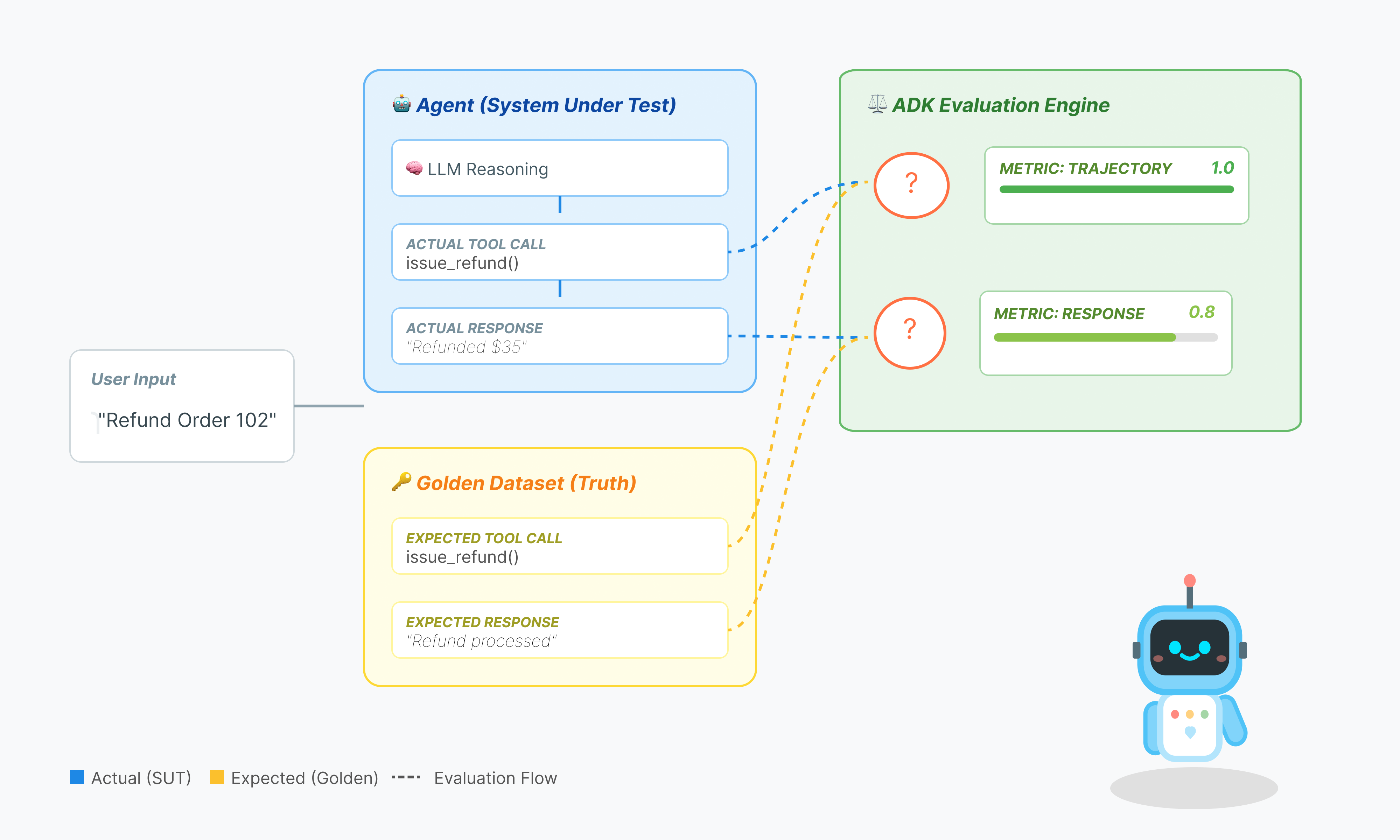
- วิถี (กระบวนการ): เจ้าหน้าที่ใช้เครื่องมือที่เหมาะสมในเวลาที่เหมาะสมหรือไม่ โทรหา
check_inventoryก่อนplace_orderใช่ไหม - คำตอบสุดท้าย (เอาต์พุต): คำตอบถูกต้อง สุภาพ และอิงตามข้อมูลหรือไม่
วงจรการพัฒนา
ใน Codelab นี้ เราจะอธิบายวงจรระดับมืออาชีพของการทดสอบ Agent ดังนี้
- การตรวจสอบด้วยสายตาระดับท้องถิ่น (UI ทางเว็บของ ADK): แชทและยืนยันตรรกะด้วยตนเอง (ขั้นตอนที่ 1)
- การทดสอบหน่วย/การถดถอย (ADK CLI): เรียกใช้กรณีทดสอบที่เฉพาะเจาะจงในเครื่องเพื่อตรวจหาข้อผิดพลาดอย่างรวดเร็ว (ขั้นตอนที่ 3 และ 4)
- การแก้ไขข้อบกพร่อง (การแก้ปัญหา): การวิเคราะห์ความล้มเหลวและการแก้ไขตรรกะของพรอมต์ (ขั้นตอนที่ 5)
- การผสานรวม CI/CD (Pytest): การทดสอบอัตโนมัติในไปป์ไลน์บิลด์ (ขั้นตอนที่ 6)
2. ตั้งค่า
เราต้องมี 2 สิ่งเพื่อขับเคลื่อนเอเจนต์ AI นั่นคือโปรเจ็กต์ Google Cloud เพื่อเป็นรากฐาน
ส่วนที่ 1: เปิดใช้บัญชีสำหรับการเรียกเก็บเงิน
หากต้องการเรียกใช้ Codelab นี้ คุณต้องมีบัญชีสำหรับการเรียกเก็บเงินที่มีเครดิตอยู่บ้าง ใช้เครดิตจากแบนเนอร์ที่ด้านบนของ Codelab นี้เพื่อเริ่มต้นใช้งาน หากเชื่อมต่อกับบัญชีสำหรับการเรียกเก็บเงินอยู่แล้ว ให้ข้ามขั้นตอนนี้
ส่วนที่ 2: สภาพแวดล้อมแบบเปิด
- 👉 คลิกลิงก์นี้เพื่อไปยัง Cloud Shell Editor โดยตรง
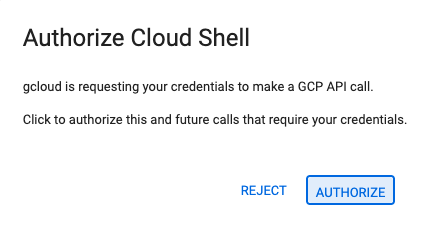
- 👉 หากระบบแจ้งให้ให้สิทธิ์ในวันนี้ ให้คลิกให้สิทธิ์เพื่อดำเนินการต่อ
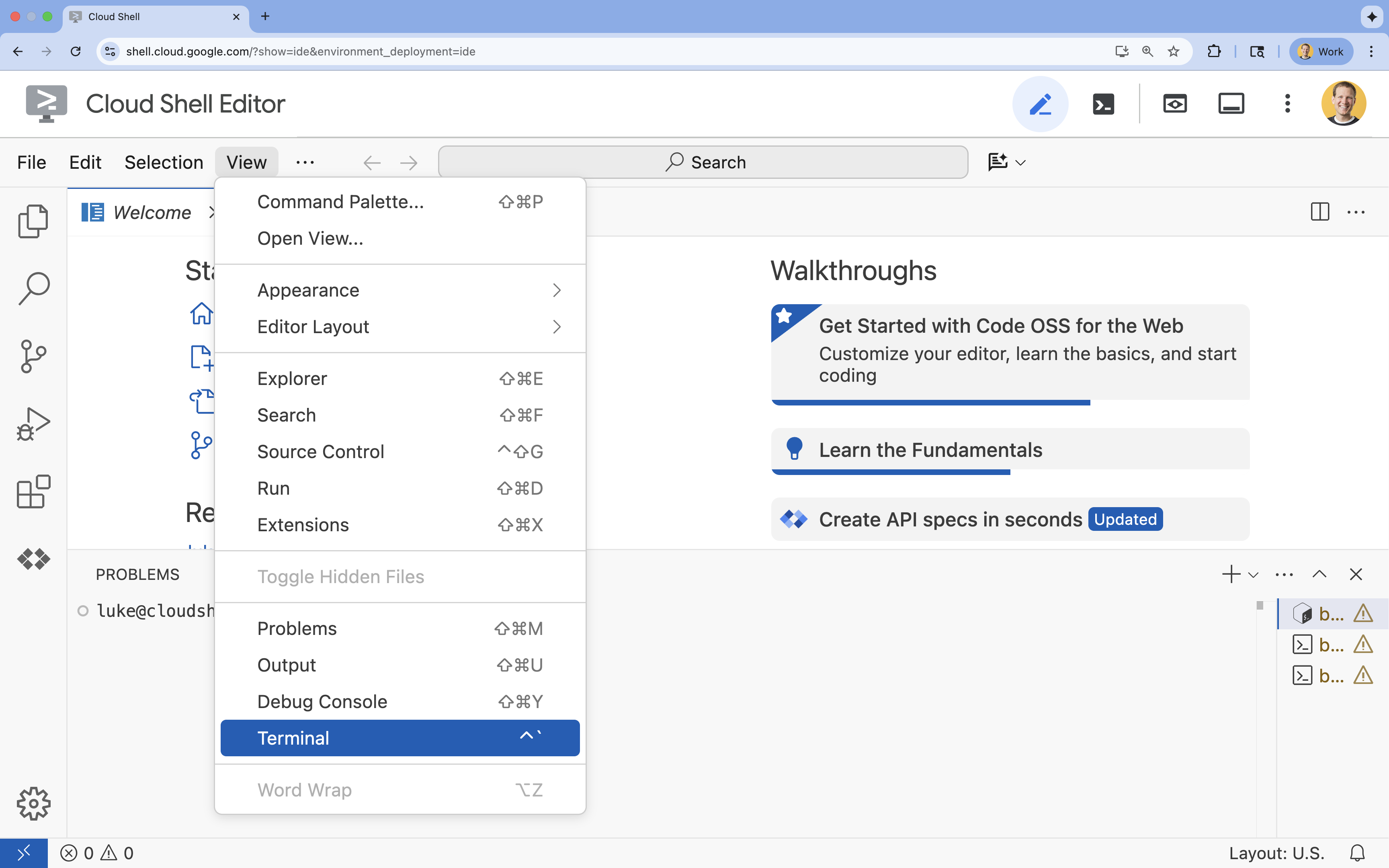
- 👉 หากเทอร์มินัลไม่ปรากฏที่ด้านล่างของหน้าจอ ให้เปิดโดยทำดังนี้
- คลิกดู
- คลิก Terminal
- 👉💻 ในเทอร์มินัล ให้ตรวจสอบว่าคุณได้รับการตรวจสอบสิทธิ์แล้วและตั้งค่าโปรเจ็กต์เป็นรหัสโปรเจ็กต์โดยใช้คำสั่งต่อไปนี้
gcloud auth list - 👉💻 โคลนโปรเจ็กต์ Bootstrap จาก GitHub
git clone https://github.com/cuppibla/adk_eval_starter - 👉💻 เรียกใช้สคริปต์การตั้งค่าจากไดเรกทอรีโปรเจ็กต์
cd ~/adk_eval_starter
./init.sh
สคริปต์จะจัดการกระบวนการตั้งค่าที่เหลือโดยอัตโนมัติ
- 👉💻 ตั้งค่ารหัสโปรเจ็กต์ที่จำเป็น
gcloud config set project $(cat ~/project_id.txt) --quiet
ส่วนที่ 3: การตั้งค่าสิทธิ์
- 👉💻 เปิดใช้ API ที่จำเป็นโดยใช้คำสั่งต่อไปนี้ การดำเนินการนี้อาจใช้เวลาสักครู่
gcloud services enable \ cloudresourcemanager.googleapis.com \ servicenetworking.googleapis.com \ run.googleapis.com \ cloudbuild.googleapis.com \ artifactregistry.googleapis.com \ aiplatform.googleapis.com \ compute.googleapis.com - 👉💻 ให้สิทธิ์ที่จำเป็นโดยเรียกใช้คำสั่งต่อไปนี้ในเทอร์มินัล
. ~/adk_eval_starter/set_env.sh
โปรดสังเกตว่าระบบได้สร้างไฟล์ .env ให้คุณแล้ว ซึ่งแสดงข้อมูลโปรเจ็กต์ของคุณ
3. การสร้างชุดข้อมูลที่สมบูรณ์ (adk web)
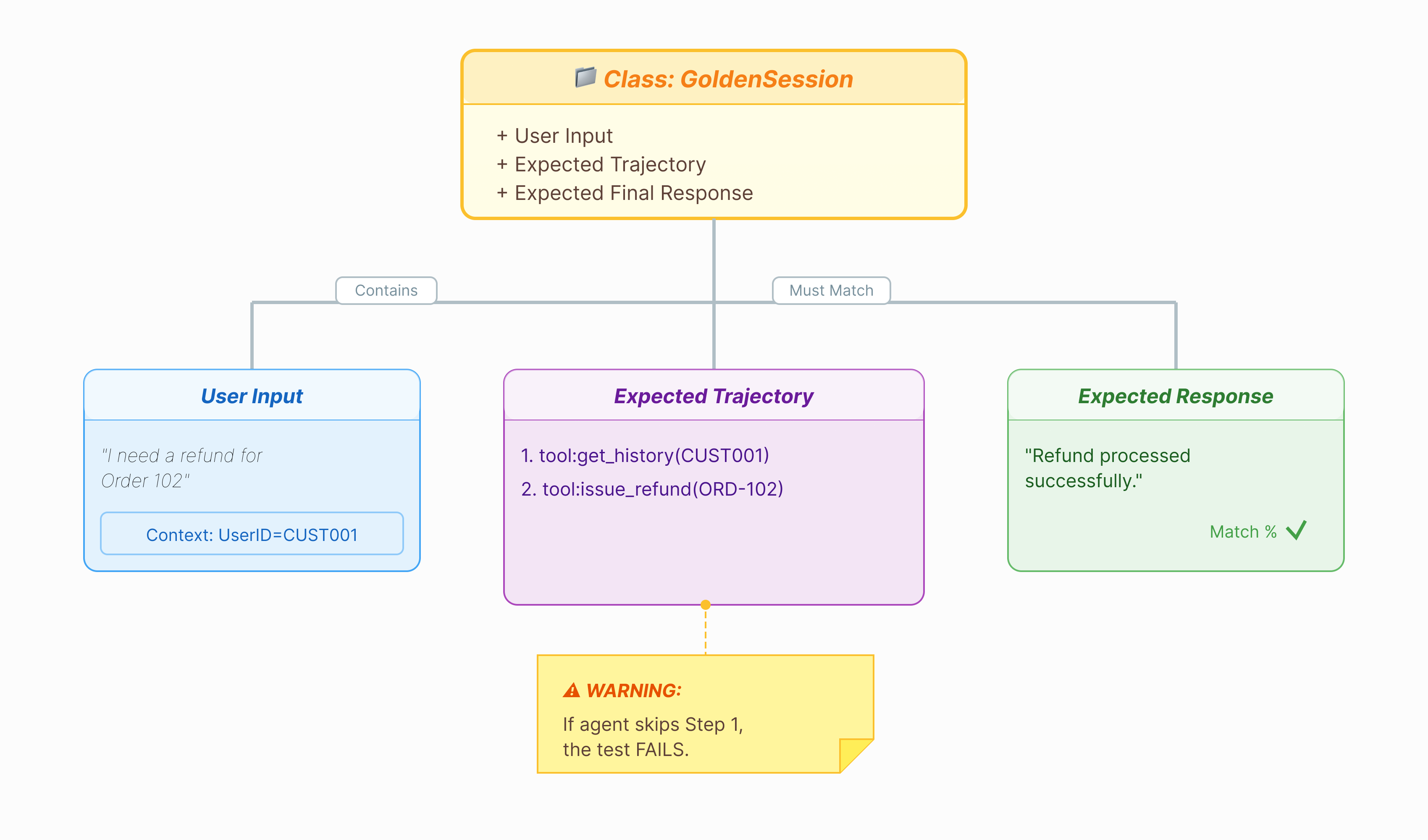
เราต้องมีเฉลยก่อนจึงจะให้คะแนนเอเจนต์ได้ ใน ADK เราเรียกสิ่งนี้ว่าชุดข้อมูลทองคำ ชุดข้อมูลนี้มีการโต้ตอบที่ "สมบูรณ์" ซึ่งทำหน้าที่เป็นความจริงพื้นฐานสำหรับการประเมิน
ชุดข้อมูลทองคำคืออะไร
ชุดข้อมูลทองคำคือภาพรวมของ Agent ที่ทำงานอย่างถูกต้อง ซึ่งไม่ใช่แค่รายการคู่คำถามและคำตอบ โดยจะจับข้อมูลต่อไปนี้
- คำค้นหาของผู้ใช้ ("ฉันต้องการเงินคืน")
- วิถี (ลำดับที่แน่นอนของการเรียกใช้เครื่องมือ:
check_order->verify_eligibility->refund_transaction) - คำตอบสุดท้าย (คำตอบข้อความที่ "สมบูรณ์แบบ")
เราใช้ข้อมูลนี้เพื่อตรวจหาการถดถอย หากคุณอัปเดตพรอมต์และตัวแทนหยุดตรวจสอบสิทธิ์ก่อนที่จะคืนเงิน การทดสอบชุดข้อมูลทองคำจะล้มเหลวเนื่องจากเส้นทางไม่ตรงกันอีกต่อไป
เปิด Web UI
UI เว็บของ ADK มีวิธีแบบอินเทอร์แอกทีฟในการสร้างชุดข้อมูลทองคำเหล่านี้โดยการบันทึกการโต้ตอบจริงกับเอเจนต์
- 👉💻 เรียกใช้คำสั่งต่อไปนี้ในเทอร์มินัล
cd ~/adk_eval_starter uv run adk web - 👉💻 เปิดตัวอย่าง UI บนเว็บ (โดยปกติจะอยู่ที่
http://127.0.0.1:8000) - 👉 ใน UI ของแชท ให้พิมพ์
Hi, I'm customer CUST001. Can you check my orders? I need a refund for order ORD-102. It arrived damaged. คุณจะเห็นคำตอบดังนี้
I've processed your refund for order ORD-102 due to the items arriving damaged. A full refund of $35.0 has been processed, and the status of order ORD-102 is now updated to "refunded". Is there anything else I can assist you with today, CUST001? 🛍️
บันทึกการโต้ตอบที่ยอดเยี่ยม
ไปที่แท็บเซสชัน ที่นี่คุณจะดูประวัติการสนทนาของตัวแทนได้โดยคลิกที่เซสชัน
- โต้ตอบกับตัวแทนเพื่อสร้างขั้นตอนการสนทนาที่เหมาะสม เช่น การตรวจสอบประวัติการซื้อหรือการขอเงินคืน
- ตรวจสอบการสนทนาเพื่อให้แน่ใจว่าการสนทนาแสดงลักษณะการทำงานที่คาดไว้

4. ส่งออกชุดข้อมูลทองคำ
ยืนยันด้วยมุมมองการติดตาม
ก่อนส่งออก คุณต้องยืนยันว่าตัวแทนไม่ได้ตอบคำถามถูกต้องเพียงเพราะโชคช่วย คุณต้องตรวจสอบตรรกะภายใน
- คลิกแท็บการติดตามใน Web UI
- ระบบจะจัดกลุ่มการติดตามตามข้อความของผู้ใช้โดยอัตโนมัติ วางเมาส์เหนือแถวการติดตามเพื่อไฮไลต์ข้อความที่เกี่ยวข้องในแชท
- ตรวจสอบแถบสีน้ำเงิน: แถบเหล่านี้ระบุเหตุการณ์ที่สร้างขึ้นจากการโต้ตอบ คลิกแถวสีน้ำเงินเพื่อเปิดแผงการตรวจสอบ
- ตรวจสอบแท็บต่อไปนี้เพื่อตรวจสอบตรรกะ
- กราฟ: การแสดงภาพของการเรียกใช้เครื่องมือและโฟลว์ตรรกะ การนำทางใช้เส้นทางที่ถูกต้องไหม
- คำขอ/คำตอบ: ตรวจสอบสิ่งที่ส่งไปยังโมเดลและสิ่งที่โมเดลส่งกลับมาอย่างละเอียด
- การยืนยัน: หากตัวแทนคาดเดาจำนวนเงินคืนโดยไม่ต้องเรียกใช้เครื่องมือฐานข้อมูล นั่นคือ "การหลอนที่โชคดี"

เพิ่มเซสชันไปยัง EvalSet
เมื่อพอใจกับการสนทนาและร่องรอยแล้ว ให้ทำดังนี้
- 👉 คลิกแท็บ
Evalแล้วคลิกปุ่มCreate Evaluation Setจากนั้นป้อนชื่อการประเมินเป็นevalset1
- 👉 ในชุดการประเมินนี้ ให้คลิก
Add current session to evalset1ในหน้าต่างป๊อปอัป ให้ป้อนชื่อเซสชันเป็นeval1
เรียกใช้ Eval ใน ADK Web
- 👉 ใน UI เว็บของ ADK ให้คลิก
Run Evaluationในหน้าต่างป๊อปอัป ให้ปรับเมตริก แล้วคลิกStart

ยืนยันชุดข้อมูลในที่เก็บ
คุณจะเห็นการยืนยันว่าระบบได้บันทึกไฟล์ชุดข้อมูล (เช่น evalset1.evalset.json) ลงในที่เก็บแล้ว ไฟล์นี้มีร่องรอยการสนทนาของคุณแบบดิบที่สร้างขึ้นโดยอัตโนมัติ
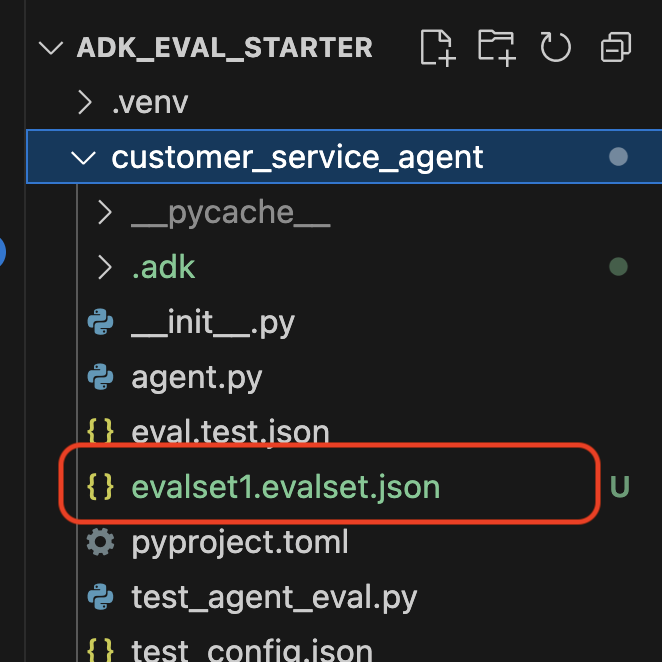
5. ไฟล์การประเมิน

แม้ว่า UI บนเว็บจะสร้างไฟล์ .evalset.json ที่ซับซ้อน แต่เรามักต้องการสร้างไฟล์ทดสอบที่ดูสะอาดตาและมีโครงสร้างมากขึ้นสำหรับการทดสอบอัตโนมัติ
ADK Eval ใช้คอมโพเนนต์หลัก 2 อย่าง ได้แก่
- ไฟล์ทดสอบ: อาจเป็นชุดข้อมูลอ้างอิงที่สร้างขึ้นโดยอัตโนมัติ (เช่น
customer_service_agent/evalset1.evalset.json) หรือชุดข้อมูลที่ดูแลจัดการด้วยตนเอง (เช่นcustomer_service_agent/eval.test.json) - ไฟล์การกำหนดค่า (เช่น
customer_service_agent/test_config.json): กำหนดเมตริกและเกณฑ์สำหรับการผ่าน
ตั้งค่าไฟล์การกำหนดค่าการทดสอบ
- 👉💻 ในเทอร์มินัลของ Cloud Shell Editor ให้ป้อน
cloudshell edit customer_service_agent/test_config.json - 👉 ป้อนโค้ดต่อไปนี้ลงใน
customer_service_agent/test_config.jsonในโปรแกรมแก้ไข{ "criteria": { "tool_trajectory_avg_score": 0.8, "response_match_score": 0.5 } }
การถอดรหัสเมตริก
tool_trajectory_avg_score(กระบวนการ) เมตริกนี้จะวัดว่าตัวแทนใช้เครื่องมืออย่างถูกต้องหรือไม่
- 0.8: เราต้องการให้ตรงกัน 80%
response_match_score(เอาต์พุต) ใช้ ROUGE-1 (คำที่ซ้ำกัน) เพื่อเปรียบเทียบคำตอบกับคำตอบอ้างอิงที่ถูกต้อง
- ข้อดี: รวดเร็ว กำหนดได้ และไม่มีค่าใช้จ่าย
- ข้อเสีย: ไม่สำเร็จหากเอเจนต์ใช้คำที่สื่อถึงแนวคิดเดียวกันแต่ต่างกัน (เช่น "คืนเงินแล้ว" กับ "คืนเงินให้แล้ว")
เมตริกขั้นสูง (ในกรณีที่คุณต้องการข้อมูลเพิ่มเติม)
6. ทำการประเมินชุดข้อมูลทองคำ (adk eval)
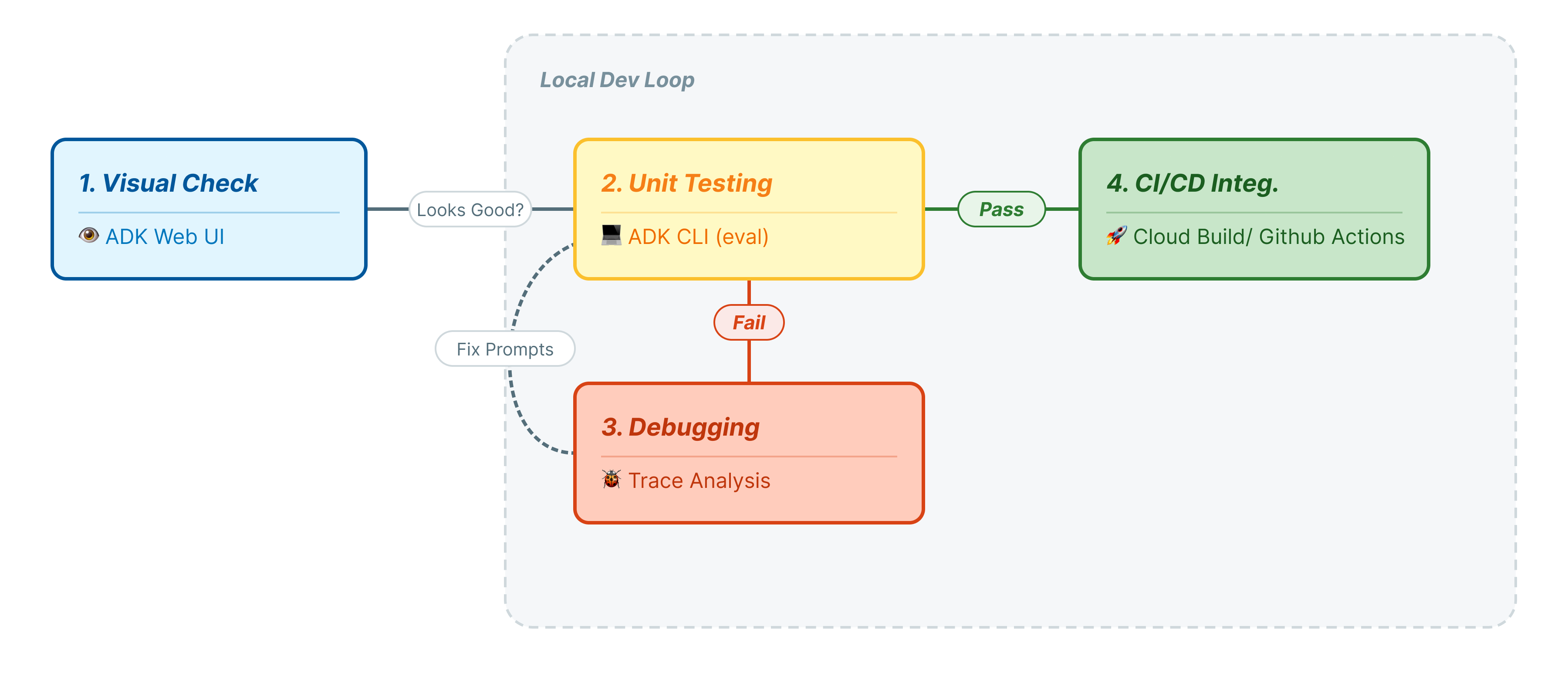
ขั้นตอนนี้แสดงถึง "Inner Loop" ของการพัฒนา คุณเป็นนักพัฒนาแอปที่ทำการเปลี่ยนแปลงและต้องการยืนยันผลลัพธ์อย่างรวดเร็ว
เรียกใช้ชุดข้อมูลทองคำ
มาเรียกใช้ชุดข้อมูลที่คุณสร้างในขั้นตอนที่ 1 กัน ซึ่งจะช่วยให้มั่นใจว่าค่าพื้นฐานของคุณมีความเสถียร
- 👉💻 เรียกใช้คำสั่งต่อไปนี้ในเทอร์มินัล
cd ~/adk_eval_starter
uv run adk eval customer_service_agent customer_service_agent/evalset1.evalset.json --config_file_path=customer_service_agent/test_config.json --print_detailed_results
เกิดอะไรขึ้น
ตอนนี้ ADK มีสถานะดังนี้
- กำลังโหลด Agent จาก
customer_service_agent - เรียกใช้การค้นหาอินพุตจาก
evalset1.evalset.json - การเปรียบเทียบวิถีและการตอบสนองจริงของเอเจนต์กับวิถีและการตอบสนองที่คาดไว้
- ให้คะแนนผลลัพธ์ตามเกณฑ์ใน
test_config.json
วิเคราะห์ผลลัพธ์
ดูเอาต์พุตของเทอร์มินัล คุณจะเห็นสรุปการทดสอบที่ผ่านและไม่ผ่าน
Eval Run Summary
evalset1:
  Tests passed: 1
  Tests failed: 0
********************************************************************
Eval Set Id: evalset1
Eval Id: eval1
Overall Eval Status: PASSED
---------------------------------------------------------------------
Metric: tool_trajectory_avg_score, Status: PASSED, Score: 1.0, Threshold: 0.8
---------------------------------------------------------------------
Metric: response_match_score, Status: PASSED, Score: 0.5581395348837208, Threshold: 0.5
---------------------------------------------------------------------
Invocation Details:
+----+---------------------------+---------------------------+--------------------------+---------------------------+---------------------------+-----------------------------+------------------------+
|    | prompt                    | expected_response         | actual_response          | expected_tool_calls       | actual_tool_calls         | tool_trajectory_avg_score   | response_match_score   |
+====+===========================+===========================+==========================+===========================+===========================+=============================+========================+
|  0 | Hi, I'm customer CUST001. | Great news! Your refund   | Great news, CUST001! 🎉   | id='adk-051409fe-c230-43f | id='adk-4e9aa570-1cc6-4c3 | Status: PASSED, Score:      | Status: PASSED, Score: |
|    | Can you check my orders?  | for order **ORD-102** has | I've successfully        | 4-a7f1- 5747280fd878'     | c-aa3e- 91dbe113dd4b'     | 1.0                         | 0.5581395348837208     |
|    | I need a refund for order | been successfully         | processed a full refund  | args={'customer_id':      | args={'customer_id':      |                             |                        |
|    | ORD-102. It arrived       | processed due to the item | of $35.0 for your order  | 'CUST001'} name='get_purc | 'CUST001'} name='get_purc |                             |                        |
|    | damaged.                  | arriving damaged. You     | ORD-102 because it       | hase_history'             | hase_history'             |                             |                        |
|    |                           | should see a full refund  | arrived damaged. The     | partial_args=None         | partial_args=None         |                             |                        |
|    |                           | of $35.0 back to your     | status of that order has | will_continue=None id= 'a | will_continue=None        |                             |                        |
|    |                           | original payment method   | been updated to          | dk-8a194cb8-5a82-47ce-a3a | id='adk- dad1b376-9bcc-48 |                             |                        |
|    |                           | shortly. The status of    | "refunded."  Is there    | 7- 3d24551f8c90'          | bb-996f-a30f6ef5b70b'     |                             |                        |
|    |                           | this order has been       | anything else I can      | args={'reason':           | args={'reason':           |                             |                        |
|    |                           | updated to "refunded".    | assist you with today?   | 'damaged', 'order_id':    | 'damaged', 'order_id':    |                             |                        |
|    |                           | Here's your updated       |                          | 'ORD-102'}                | 'ORD-102'}                |                             |                        |
|    |                           | purchase history for      |                          | name='issue_refund'       | name='issue_refund'       |                             |                        |
|    |                           | CUST001: *   **ORD-101**: |                          | partial_args=None         | partial_args=None         |                             |                        |
|    |                           | Wireless Headphones,      |                          | will_continue=None        | will_continue=None        |                             |                        |
|    |                           | delivered on 2023-10-15   |                          |                           |                           |                             |                        |
|    |                           | (Total: $120) *           |                          |                           |                           |                             |                        |
|    |                           | **ORD-102**: USB-C Cable, |                          |                           |                           |                             |                        |
|    |                           | Phone Case, refunded on   |                          |                           |                           |                             |                        |
|    |                           | 2023-11-01 (Total: $35)   |                          |                           |                           |                             |                        |
|    |                           | Is there anything else I  |                          |                           |                           |                             |                        |
|    |                           | can help you with today?  |                          |                           |                           |                             |                        |
|    |                           | 😊                         |                          |                           |                           |                             |                        |
+----+---------------------------+---------------------------+--------------------------+---------------------------+---------------------------+-----------------------------+------------------------+
หมายเหตุ: เนื่องจากคุณเพิ่งสร้างสิ่งนี้จากเอเจนต์เอง จึงควรผ่าน 100% หากไม่สำเร็จ แสดงว่าเอเจนต์ของคุณเป็นแบบไม่แน่นอน (สุ่ม)
7. สร้างการทดสอบที่กำหนดเอง
แม้ว่าชุดข้อมูลที่สร้างขึ้นโดยอัตโนมัติจะดี แต่บางครั้งคุณก็ต้องสร้างกรณีขอบด้วยตนเอง (เช่น การโจมตีแบบ Adversarial หรือการจัดการข้อผิดพลาดที่เฉพาะเจาะจง) มาดูกันว่า eval.test.json ช่วยให้คุณกำหนด "ความถูกต้อง" ได้อย่างไร
มาสร้างชุดการทดสอบที่ครอบคลุมกัน
เฟรมเวิร์กการทดสอบ
เมื่อเขียนกรณีทดสอบใน ADK ให้ทำตามสูตร 3 ส่วนนี้
- การตั้งค่า (
session_input): ผู้ใช้คือใคร (เช่นuser_id,state) ซึ่งจะแยกการทดสอบ - พรอมต์ (
user_content): อะไรคือทริกเกอร์
ด้วยการยืนยัน (ความคาดหวัง)
- วิถี (
tool_uses): คำนวณถูกต้องไหม (ตรรกะ) - คำตอบ (
final_response): คำตอบถูกต้องไหม (คุณภาพ) - ระดับกลาง (
intermediate_responses): ตัวแทนย่อยพูดถูกต้องไหม (การจัดการเป็นกลุ่ม)
เขียนชุดทดสอบ
- 👉💻 ในเทอร์มินัลของ Cloud Shell Editor ให้ป้อน
cloudshell edit customer_service_agent/eval.test.json - 👉 ป้อนรหัสด้านล่างลงในไฟล์
customer_service_agent/eval.test.json{ "eval_set_id": "customer_service_eval", "name": "Customer Service Agent Evaluation", "description": "Evaluation suite for the customer service agent covering product info, purchase history, and refunds.", "eval_cases": [ { "eval_id": "product_info_check", "session_input": { "app_name": "customer_service_agent", "user_id": "eval_user_1", "state": {} }, "conversation": [ { "invocation_id": "turn_1_product_info", "user_content": { "role": "user", "parts": [ { "text": "Do you have wireless headphones in stock?" } ] }, "final_response": { "role": "model", "parts": [ { "text": "Yes, we have wireless headphones in stock! They are priced at $120.00 and feature noise-canceling with a 20-hour battery life. 🎧" } ] }, "intermediate_data": { "tool_uses": [ { "name": "lookup_product_info", "args": { "product_name": "wireless headphones" } } ], "intermediate_responses": [] } } ] }, { "eval_id": "purchase_history_check", "session_input": { "app_name": "customer_service_agent", "user_id": "eval_user_2", "state": {} }, "conversation": [ { "invocation_id": "turn_1_purchase_history", "user_content": { "role": "user", "parts": [ { "text": "What did I buy recently? My customer ID is CUST001." } ] }, "final_response": { "role": "model", "parts": [ { "text": "Here's your recent purchase history for Customer ID CUST001:\n\n* **Order ORD-101** (October 15, 2023): Wireless Headphones, Status: delivered, Total: $120\n* **Order ORD-102** (November 1, 2023): USB-C Cable, Phone Case, Status: refunded, Total: $35\n\nLet me know if you have any other questions or need further assistance! 🛍️" } ] }, "intermediate_data": { "tool_uses": [ { "name": "get_purchase_history", "args": { "customer_id": "CUST001" } } ], "intermediate_responses": [] } } ] }, { "eval_id": "refund_request", "session_input": { "app_name": "customer_service_agent", "user_id": "eval_user_3", "state": {} }, "conversation": [ { "invocation_id": "turn_1_refund", "user_content": { "role": "user", "parts": [ { "text": "I want a refund for order ORD-102 because it was damaged." } ] }, "final_response": { "role": "model", "parts": [ { "text": "Your refund for order **ORD-102** due to \"damaged\" has been successfully processed! Refund amount: **$35.0**. Your order status has been updated to **refunded**. \nIs there anything else I can help you with today? 🛍️" } ] }, "intermediate_data": { "tool_uses": [ { "name": "issue_refund", "args": { "order_id": "ORD-102", "reason": "damaged" } } ], "intermediate_responses": [] } } ] } ] }
การแยกประเภทการทดสอบ
เราได้สร้างการทดสอบ 3 ประเภทที่แตกต่างกันไว้ที่นี่ มาดูรายละเอียดว่าแต่ละเมตริกประเมินอะไรและเพราะเหตุใด
- การทดสอบเครื่องมือเดียว (
product_info_check)
- เป้าหมาย: ยืนยันการดึงข้อมูลพื้นฐาน
- การยืนยันที่สำคัญ: เราตรวจสอบ
intermediate_data.tool_usesเรายืนยันว่ามีการเรียกใช้lookup_product_infoเรายืนยันว่าอาร์กิวเมนต์product_nameคือ "หูฟังไร้สาย" - เหตุผล: หากโมเดลหลอนราคาโดยไม่เรียกใช้เครื่องมือ การทดสอบนี้จะล้มเหลว ซึ่งจะช่วยให้มั่นใจได้ว่ามีการเชื่อมต่อแหล่งข้อมูล
- การทดสอบการแยกบริบท (
purchase_history_check)
- เป้าหมาย: ตรวจสอบว่าตัวแทนสามารถดึงข้อมูลเอนทิตี (CUST001) จากพรอมต์ของผู้ใช้และส่งไปยังเครื่องมือได้
- การยืนยันคีย์: เราตรวจสอบว่ามีการเรียกใช้
get_purchase_historyด้วยcustomer_id: "CUST001" - เหตุผล: รูปแบบความล้มเหลวที่พบบ่อยคือ Agent เรียกใช้เครื่องมือที่ถูกต้องแต่มีรหัสเป็น Null วิธีนี้ช่วยให้มั่นใจได้ว่าพารามิเตอร์ถูกต้อง
- การทดสอบการเคลื่อนไหว/วิถี (
refund_request)
- เป้าหมาย: ยืนยันการดำเนินการเขียนที่สำคัญ
- การยืนยันที่สำคัญ: แนวโน้ม ในสถานการณ์ที่ซับซ้อนมากขึ้น รายการนี้จะมีหลายขั้นตอน
[verify_order, calculate_refund, issue_refund]ADK จะตรวจสอบรายการนี้ตามลำดับ - เหตุผล: สำหรับการดำเนินการที่เกี่ยวข้องกับการโอนเงินหรือการเปลี่ยนแปลงข้อมูล ลำดับมีความสำคัญไม่แพ้ผลลัพธ์ คุณไม่ต้องการคืนเงินก่อนยืนยัน
8. เรียกใช้การประเมินสำหรับการทดสอบที่กำหนดเอง (adk eval)
- 👉💻 เรียกใช้คำสั่งต่อไปนี้ในเทอร์มินัล
cd ~/adk_eval_starter
uv run adk eval customer_service_agent customer_service_agent/eval.test.json --config_file_path=customer_service_agent/test_config.json --print_detailed_results
ทำความเข้าใจเอาต์พุต
คุณควรเห็นผลลัพธ์ PASS ดังนี้
Eval Run Summary
customer_service_eval:
  Tests passed: 3
  Tests failed: 0
********************************************************************
Eval Set Id: customer_service_eval
Eval Id: purchase_history_check
Overall Eval Status: PASSED
---------------------------------------------------------------------
Metric: tool_trajectory_avg_score, Status: PASSED, Score: 1.0, Threshold: 0.8
---------------------------------------------------------------------
Metric: response_match_score, Status: PASSED, Score: 0.5473684210526315, Threshold: 0.5
---------------------------------------------------------------------
Invocation Details:
+----+--------------------------+---------------------------+---------------------------+---------------------------+---------------------------+-----------------------------+------------------------+
|    | prompt                   | expected_response         | actual_response           | expected_tool_calls       | actual_tool_calls         | tool_trajectory_avg_score   | response_match_score   |
+====+==========================+===========================+===========================+===========================+===========================+=============================+========================+
|  0 | What did I buy recently? | Here's your recent        | Looks like your recent    | id=None                   | id='adk-8960eb53-2933-459 | Status: PASSED, Score:      | Status: PASSED, Score: |
|    | My customer ID is        | purchase history for      | orders include: *         | args={'customer_id':      | f-b306- 71e3c069e77e'     | 1.0                         | 0.5473684210526315     |
|    | CUST001.                 | Customer ID CUST001:  *   | **ORD-101 (2023-10-15):** | 'CUST001'} name='get_purc | args={'customer_id':      |                             |                        |
|    |                          | **Order ORD-101**         | Wireless Headphones for   | hase_history'             | 'CUST001'} name='get_purc |                             |                        |
|    |                          | (October 15, 2023):       | $120.00 - Status:         | partial_args=None         | hase_history'             |                             |                        |
|    |                          | Wireless Headphones,      | Delivered 🎧 *   **ORD-102 | will_continue=None        | partial_args=None         |                             |                        |
|    |                          | Status: delivered, Total: | (2023-11-01):** USB-C     |                           | will_continue=None        |                             |                        |
|    |                          | $120 *   **Order          | Cable, Phone Case for     |                           |                           |                             |                        |
|    |                          | ORD-102** (November 1,    | $35.00 - Status: Refunded |                           |                           |                             |                        |
|    |                          | 2023): USB-C Cable, Phone | 📱  Is there anything else |                           |                           |                             |                        |
|    |                          | Case, Status: refunded,   | I can help you with       |                           |                           |                             |                        |
|    |                          | Total: $35  Let me know   | regarding these orders?   |                           |                           |                             |                        |
|    |                          | if you have any other     |                           |                           |                           |                             |                        |
|    |                          | questions or need further |                           |                           |                           |                             |                        |
|    |                          | assistance! 🛍️            |                           |                           |                           |                             |                        |
+----+--------------------------+---------------------------+---------------------------+---------------------------+---------------------------+-----------------------------+------------------------+


********************************************************************
Eval Set Id: customer_service_eval
Eval Id: product_info_check
Overall Eval Status: PASSED
---------------------------------------------------------------------
Metric: tool_trajectory_avg_score, Status: PASSED, Score: 1.0, Threshold: 0.8
---------------------------------------------------------------------
Metric: response_match_score, Status: PASSED, Score: 0.6829268292682927, Threshold: 0.5
---------------------------------------------------------------------
Invocation Details:
+----+----------------------+---------------------------+---------------------------+---------------------------+---------------------------+-----------------------------+------------------------+
|    | prompt               | expected_response         | actual_response           | expected_tool_calls       | actual_tool_calls         | tool_trajectory_avg_score   | response_match_score   |
+====+======================+===========================+===========================+===========================+===========================+=============================+========================+
|  0 | Do you have wireless | Yes, we have wireless     | Yes, we do! 🎧 We have     | id=None                   | id='adk-4571d660-a92b-412 | Status: PASSED, Score:      | Status: PASSED, Score: |
|    | headphones in stock? | headphones in stock! They | noise-canceling wireless  | args={'product_name':     | a-a79e- 5c54f8b8af2d'     | 1.0                         | 0.6829268292682927     |
|    |                      | are priced at $120.00 and | headphones with a 20-hour | 'wireless headphones'} na | args={'product_name':     |                             |                        |
|    |                      | feature noise-canceling   | battery life available    | me='lookup_product_info'  | 'wireless headphones'} na |                             |                        |
|    |                      | with a 20-hour battery    | for $120.                 | partial_args=None         | me='lookup_product_info'  |                             |                        |
|    |                      | life. 🎧                   |                           | will_continue=None        | partial_args=None         |                             |                        |
|    |                      |                           |                           |                           | will_continue=None        |                             |                        |
+----+----------------------+---------------------------+---------------------------+---------------------------+---------------------------+-----------------------------+------------------------+


********************************************************************
Eval Set Id: customer_service_eval
Eval Id: refund_request
Overall Eval Status: PASSED
---------------------------------------------------------------------
Metric: tool_trajectory_avg_score, Status: PASSED, Score: 1.0, Threshold: 0.8
---------------------------------------------------------------------
Metric: response_match_score, Status: PASSED, Score: 0.6216216216216216, Threshold: 0.5
---------------------------------------------------------------------
Invocation Details:
+----+---------------------------+---------------------------+---------------------------+---------------------------+---------------------------+-----------------------------+------------------------+
|    | prompt                    | expected_response         | actual_response           | expected_tool_calls       | actual_tool_calls         | tool_trajectory_avg_score   | response_match_score   |
+====+===========================+===========================+===========================+===========================+===========================+=============================+========================+
|  0 | I want a refund for order | Your refund for order     | Your refund for order     | id=None args={'order_id': | id='adk-fb8ff1cc- cf87-41 | Status: PASSED, Score:      | Status: PASSED, Score: |
|    | ORD-102 because it was    | **ORD-102** due to        | **ORD-102** has been      | 'ORD-102', 'reason':      | f2-9b11-d4571b14287f'     | 1.0                         | 0.6216216216216216     |
|    | damaged.                  | "damaged" has been        | successfully processed!   | 'damaged'}                | args={'order_id':         |                             |                        |
|    |                           | successfully processed!   | You should see a full     | name='issue_refund'       | 'ORD-102', 'reason':      |                             |                        |
|    |                           | Refund amount: **$35.0**. | refund of $35.0 appear in | partial_args=None         | 'damaged'}                |                             |                        |
|    |                           | Your order status has     | your account shortly. We  | will_continue=None        | name='issue_refund'       |                             |                        |
|    |                           | been updated to           | apologize for the         |                           | partial_args=None         |                             |                        |
|    |                           | **refunded**.  Is there   | inconvenience! Is there   |                           | will_continue=None        |                             |                        |
|    |                           | anything else I can help  | anything else I can       |                           |                           |                             |                        |
|    |                           | you with today? 🛍️        | assist you with today? 😊  |                           |                           |                             |                        |
+----+---------------------------+---------------------------+---------------------------+---------------------------+---------------------------+-----------------------------+------------------------+
ซึ่งหมายความว่าตัวแทนใช้เครื่องมือที่ถูกต้องและให้คำตอบที่คล้ายกับที่คุณคาดหวังมากพอ
9. (ไม่บังคับ: อ่านอย่างเดียว) - การแก้ปัญหาและการแก้ไขข้อบกพร่อง
การทดสอบจะไม่สำเร็จ ซึ่งเป็นงานของพวกเขา แต่คุณจะแก้ไขได้อย่างไร มาวิเคราะห์สถานการณ์ที่พบบ่อยซึ่งทำให้การตรวจสอบไม่สำเร็จและวิธีแก้ไขข้อบกพร่องกัน
สถานการณ์ ก: ความล้มเหลวของ "วิถี"
ข้อผิดพลาด:
Result: FAILED
Reason: Criteria 'tool_trajectory_avg_score' failed. Score 0.0 < Threshold 1.0
Details:
EXPECTED: tool: lookup_order, then tool: issue_refund
ACTUAL:   tool: issue_refund
การวินิจฉัย: ตัวแทนข้ามขั้นตอนการยืนยัน (lookup_order) นี่คือข้อผิดพลาดทางตรรกะ
วิธีแก้ปัญหา
- อย่าคาดเดา: กลับไปที่ ADK Web UI (adk web)
- ทำซ้ำ: พิมพ์พรอมต์ที่แน่นอนจากการทดสอบที่ไม่สำเร็จลงในแชท
- Trace: เปิดมุมมอง Trace ดูแท็บ "กราฟ"
- แก้ไขพรอมต์: โดยปกติแล้ว คุณจะต้องอัปเดตพรอมต์ของระบบ เปลี่ยน: "คุณเป็นเอเจนต์ที่มีประโยชน์" ถึง: "คุณเป็นตัวแทนที่พร้อมช่วยเหลือ สำคัญ: คุณต้องเรียกใช้ lookup_order เพื่อยืนยันรายละเอียดก่อนเรียกใช้ issue_refund"
- ปรับการทดสอบ: หากตรรกะทางธุรกิจมีการเปลี่ยนแปลง (เช่น ไม่จำเป็นต้องยืนยันอีกต่อไป) แสดงว่าการทดสอบไม่ถูกต้อง อัปเดต eval.test.json ให้ตรงกับความเป็นจริงใหม่
สถานการณ์ ข: ความล้มเหลวของ "ROUGE"
ข้อผิดพลาด:
Result: FAILED
Reason: Criteria 'response_match_score' failed. Score 0.45 < Threshold 0.8
Expected: "The refund has been processed successfully."
Actual:   "I've gone ahead and returned the money to your card."
การวินิจฉัย: เจ้าหน้าที่ทำสิ่งที่ถูกต้อง แต่ใช้คำที่แตกต่างกัน ROUGE (คำที่ซ้ำกัน) ทำให้เกิดการลงโทษ
วิธีแก้ไข
- ข้อมูลนี้ไม่ถูกต้องใช่ไหม หากความหมายถูกต้องแล้ว ก็ไม่ต้องเปลี่ยนพรอมต์
- ปรับเกณฑ์: ลดเกณฑ์ใน
test_config.json(เช่น จาก0.8เป็น0.5) - อัปเกรดเมตริก: เปลี่ยนไปใช้
final_response_match_v2ในการกำหนดค่า โดยจะใช้ LLM เพื่ออ่านทั้ง 2 ประโยคและพิจารณาว่ามีความหมายเหมือนกันหรือไม่
10. CI/CD ด้วย Pytest (pytest)

คำสั่ง CLI มีไว้สำหรับมนุษย์ pytest ใช้สำหรับเครื่องจักร เราห่อหุ้มการประเมินไว้ในชุดทดสอบ Python เพื่อให้มั่นใจถึงความน่าเชื่อถือของเวอร์ชันที่ใช้งานจริง ซึ่งจะช่วยให้ไปป์ไลน์ CI/CD (GitHub Actions, Jenkins) บล็อกการติดตั้งใช้งานได้หาก Agent มีประสิทธิภาพลดลง
ไฟล์นี้มีข้อมูลอะไรบ้าง
ไฟล์ Python นี้ทำหน้าที่เป็นตัวเชื่อมระหว่างโปรแกรมเรียกใช้ CI/CD กับเครื่องมือประเมิน ADK โดยต้องมีลักษณะดังนี้
- โหลดเอเจนต์: นำเข้าโค้ดเอเจนต์แบบไดนามิก
- รีเซ็ตสถานะ: ตรวจสอบว่าหน่วยความจำของ Agent สะอาด เพื่อไม่ให้การทดสอบรั่วไหลถึงกัน
- ทำการประเมิน: เรียกใช้
AgentEvaluator.evaluate()แบบเป็นโปรแกรม - ยืนยันว่าสำเร็จ: หากคะแนนการประเมินต่ำ ให้สร้างไม่สำเร็จ
โค้ดทดสอบการผสานรวม
- 👉 เปิด
customer_service_agent/test_agent_eval.pyสคริปต์นี้ใช้AgentEvaluator.evaluateเพื่อเรียกใช้การทดสอบที่กำหนดไว้ในeval.test.json - 👉 ป้อนโค้ดต่อไปนี้ลงใน
customer_service_agent/test_agent_eval.pyในโปรแกรมแก้ไขfrom google.adk.evaluation.agent_evaluator import AgentEvaluator import pytest import importlib import sys import os @pytest.mark.asyncio async def test_with_single_test_file(): """Test the agent's basic ability via a session file.""" # Load the agent module robustly module_name = "customer_service_agent.agent" try: agent_module = importlib.import_module(module_name) # Reset the mock data to ensure a fresh state for the test if hasattr(agent_module, 'reset_mock_data'): agent_module.reset_mock_data() except ImportError: # Fallback if running from a different context sys.path.append(os.getcwd()) agent_module = importlib.import_module(module_name) if hasattr(agent_module, 'reset_mock_data'): agent_module.reset_mock_data() # Use absolute path to the eval file to be robust to where pytest is run script_dir = os.path.dirname(os.path.abspath(__file__)) eval_file = os.path.join(script_dir, "eval.test.json") await AgentEvaluator.evaluate( agent_module=module_name, eval_dataset_file_path_or_dir=eval_file, num_runs=1, )
เรียกใช้ Pytest
- 👉💻 เรียกใช้คำสั่งต่อไปนี้ในเทอร์มินัล
cd ~/adk_eval_starter uv pip install pytest uv run pytest customer_service_agent/test_agent_eval.py``` -- Docs: https://docs.pytest.org/en/stable/how-to/capture-warnings.html =============== 1 passed, 15 warnings in 12.84s =============== ```
11. บทสรุป
ยินดีด้วย คุณประเมินตัวแทนฝ่ายบริการลูกค้าโดยใช้ ADK Eval เรียบร้อยแล้ว
สิ่งที่คุณได้เรียนรู้
ใน Codelab นี้ คุณได้เรียนรู้วิธีการทำสิ่งต่อไปนี้
- ✅ สร้างชุดข้อมูลทองคำเพื่อสร้างข้อมูลที่เชื่อถือได้สำหรับ Agent
- ✅ ทําความเข้าใจการกําหนดค่าการประเมินเพื่อกําหนดเกณฑ์ความสําเร็จ
- ✅ เรียกใช้การประเมินอัตโนมัติเพื่อตรวจหาการถดถอยตั้งแต่เนิ่นๆ
การรวม ADK Eval เข้ากับเวิร์กโฟลว์การพัฒนาจะช่วยให้คุณสร้าง Agent ได้อย่างมั่นใจ เนื่องจากทราบว่าการเปลี่ยนแปลงลักษณะการทำงานจะได้รับการตรวจจับโดยการทดสอบอัตโนมัติ
แล็บนี้เป็นส่วนหนึ่งของเส้นทางการเรียนรู้ AI พร้อมใช้งานจริงด้วย Google Cloud
- สำรวจหลักสูตรทั้งหมดเพื่อเชื่อมช่องว่างจากต้นแบบไปสู่การผลิต
- แชร์ความคืบหน้าของคุณด้วยแฮชแท็ก
ProductionReadyAI
อ่านเพิ่มเติม