
1. Overview
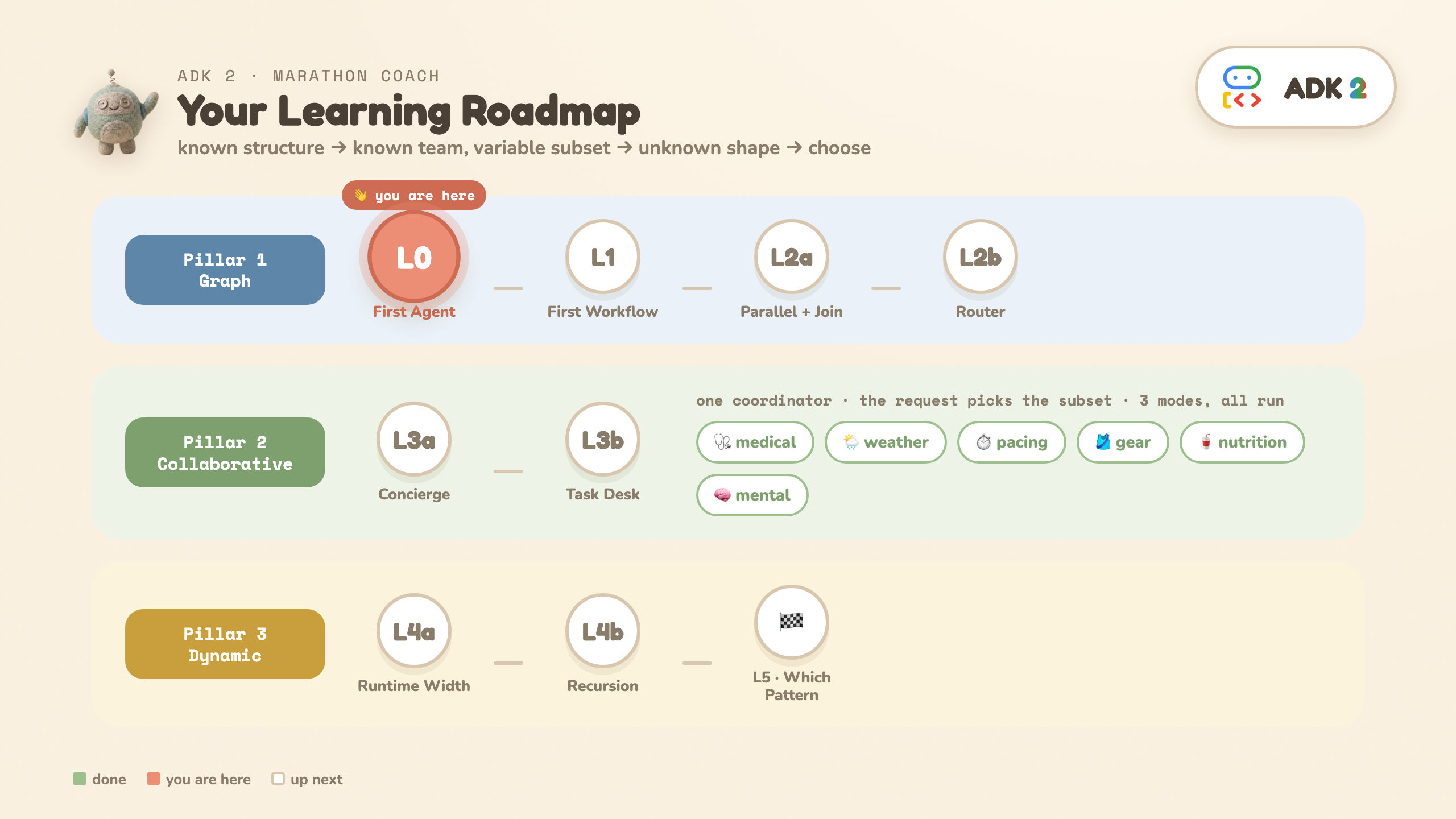
ADK 2's headline is three orchestration patterns. This codelab teaches all three by building one app — a Marathon Race Day Coach — one runnable rung at a time. Each level answers a single question, adds one idea, and runs on its own.
What you'll learn
- Graph workflows (Pillar 1) — when you can draw the flow before the input arrives.
- Collaborative agents (Pillar 2) — when you know the team but the request picks the subset — and all three collaboration modes (
chat/task/single_turn), each run live. - Dynamic workflows (Pillar 3) — when the shape of the work itself depends on the input.
- How to choose — a one-question decision tree, and how the patterns compose.
The through-line
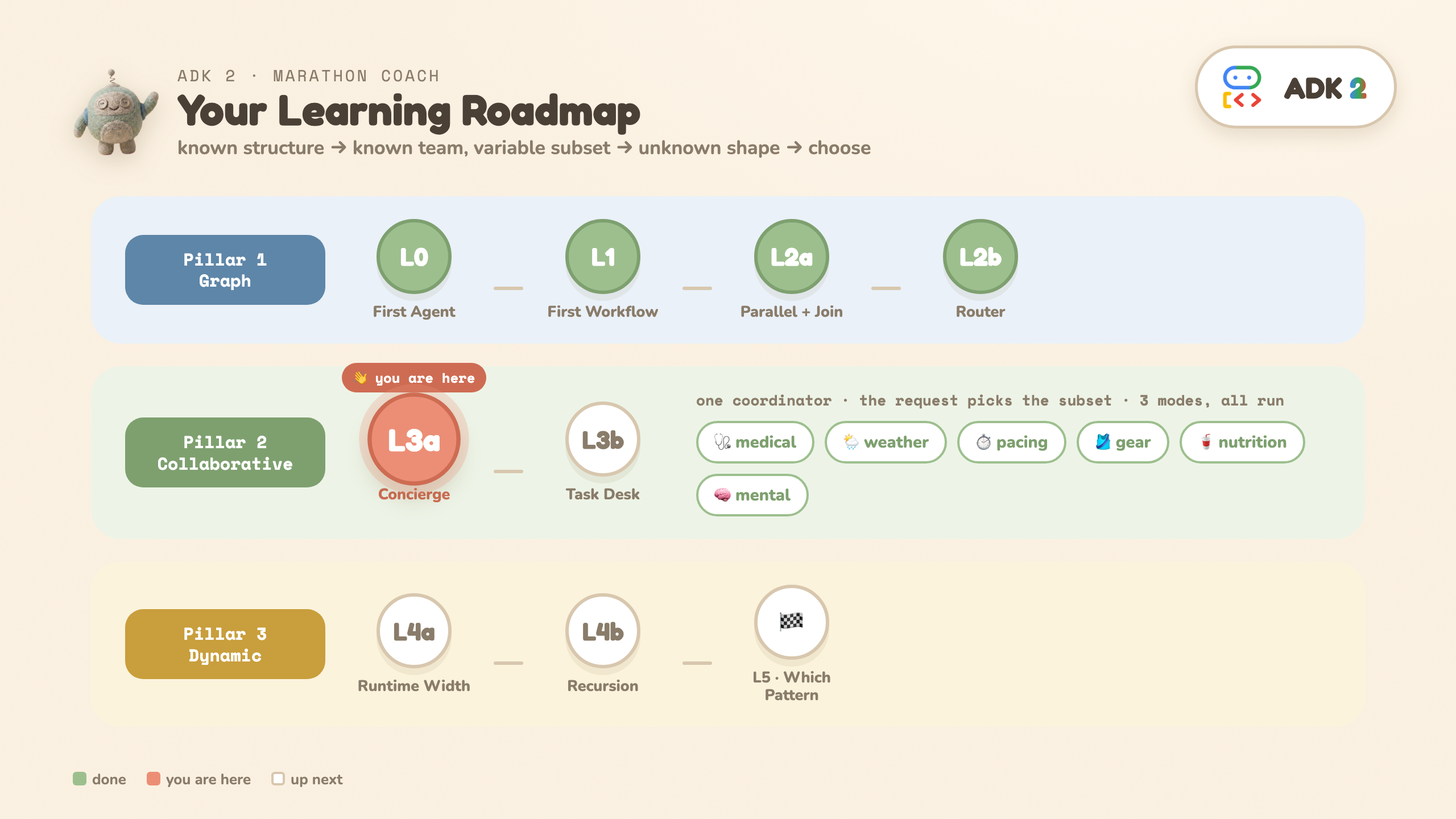
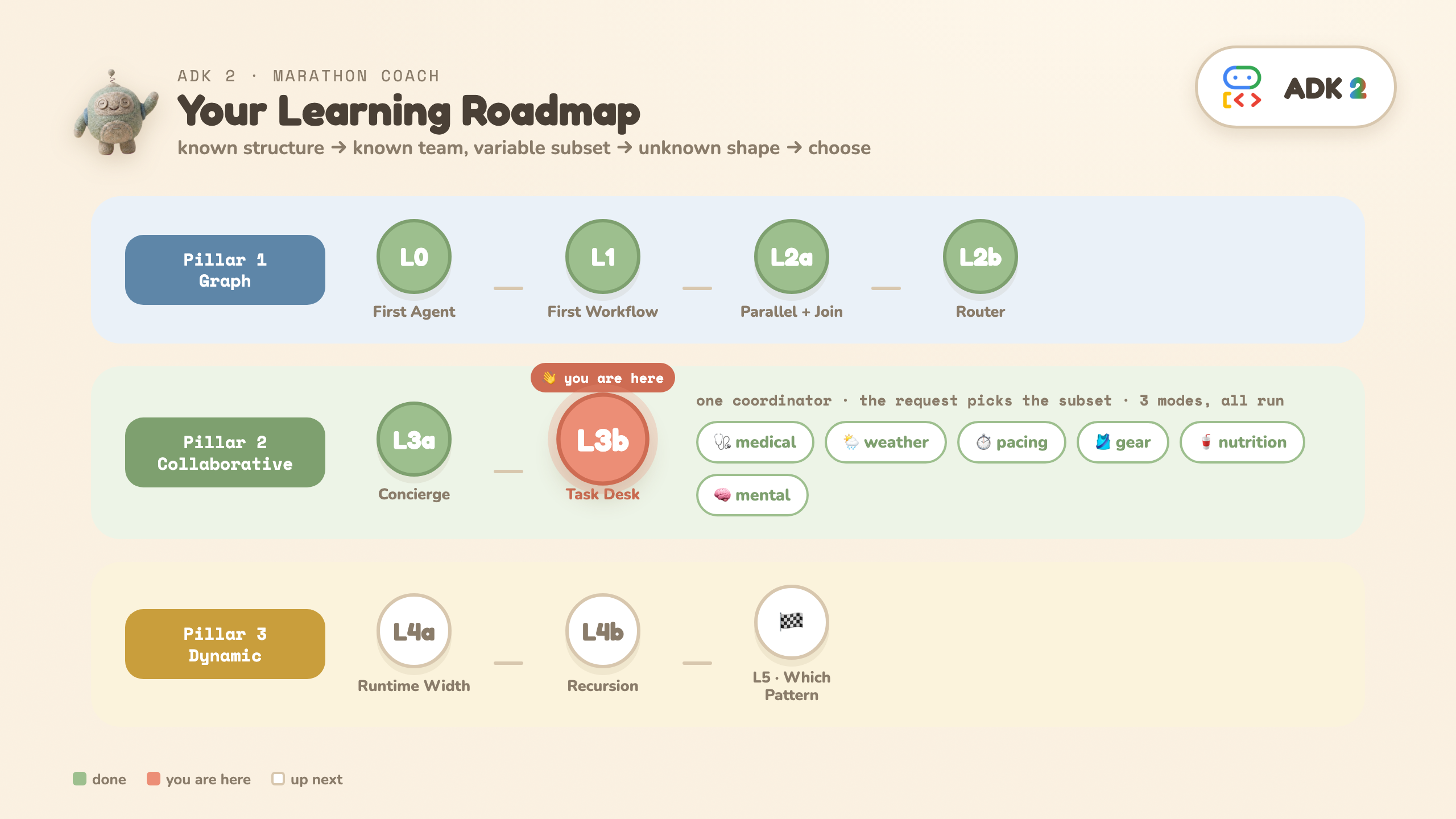
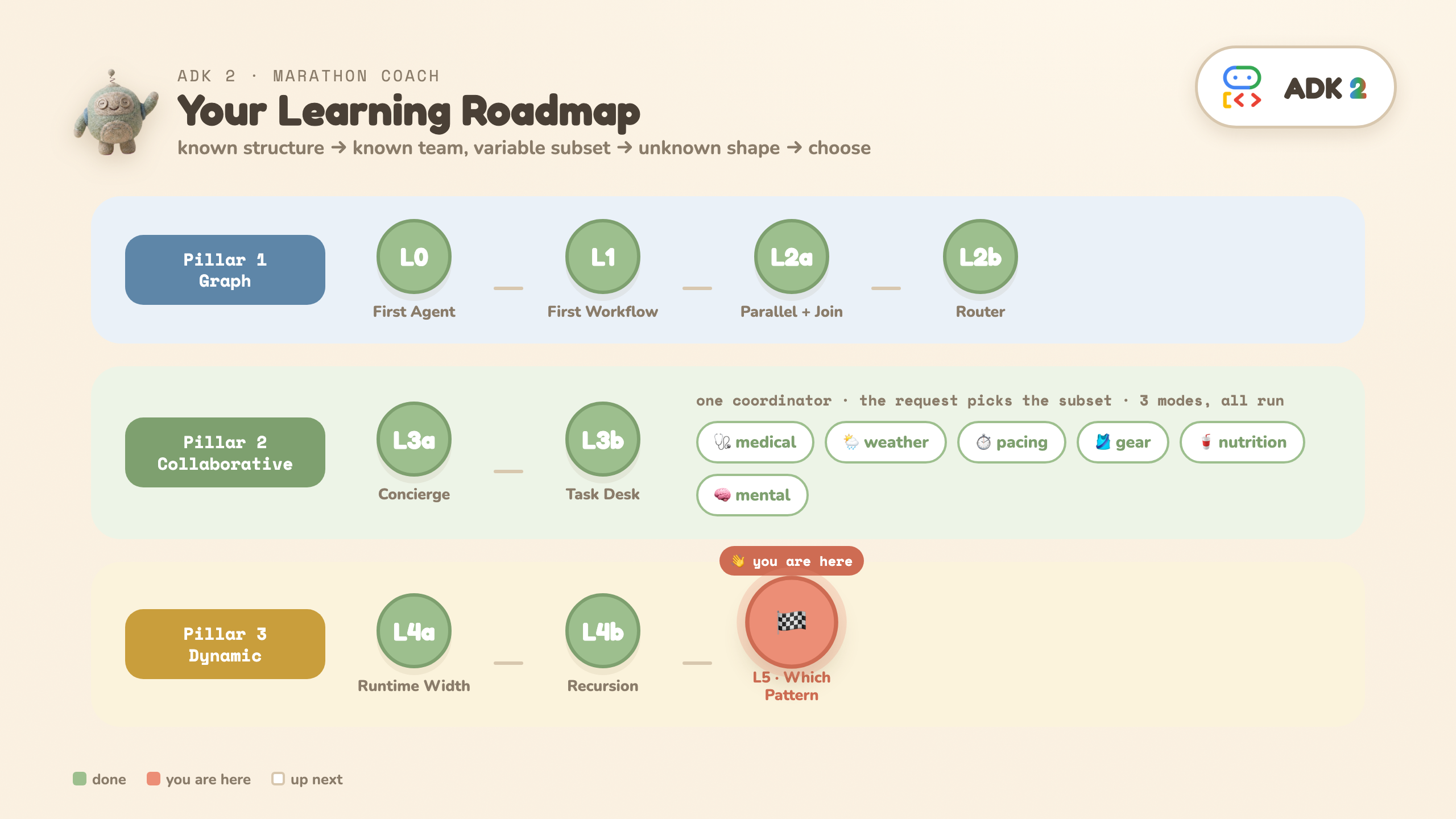
known structure → known team / variable subset → unknown shape → choose the right one
What you'll build
One app — a Marathon Race Day Coach — assembled one runnable level at a time. Every level is a plain Python module you run from the terminal; by L5 the pieces below are all yours.
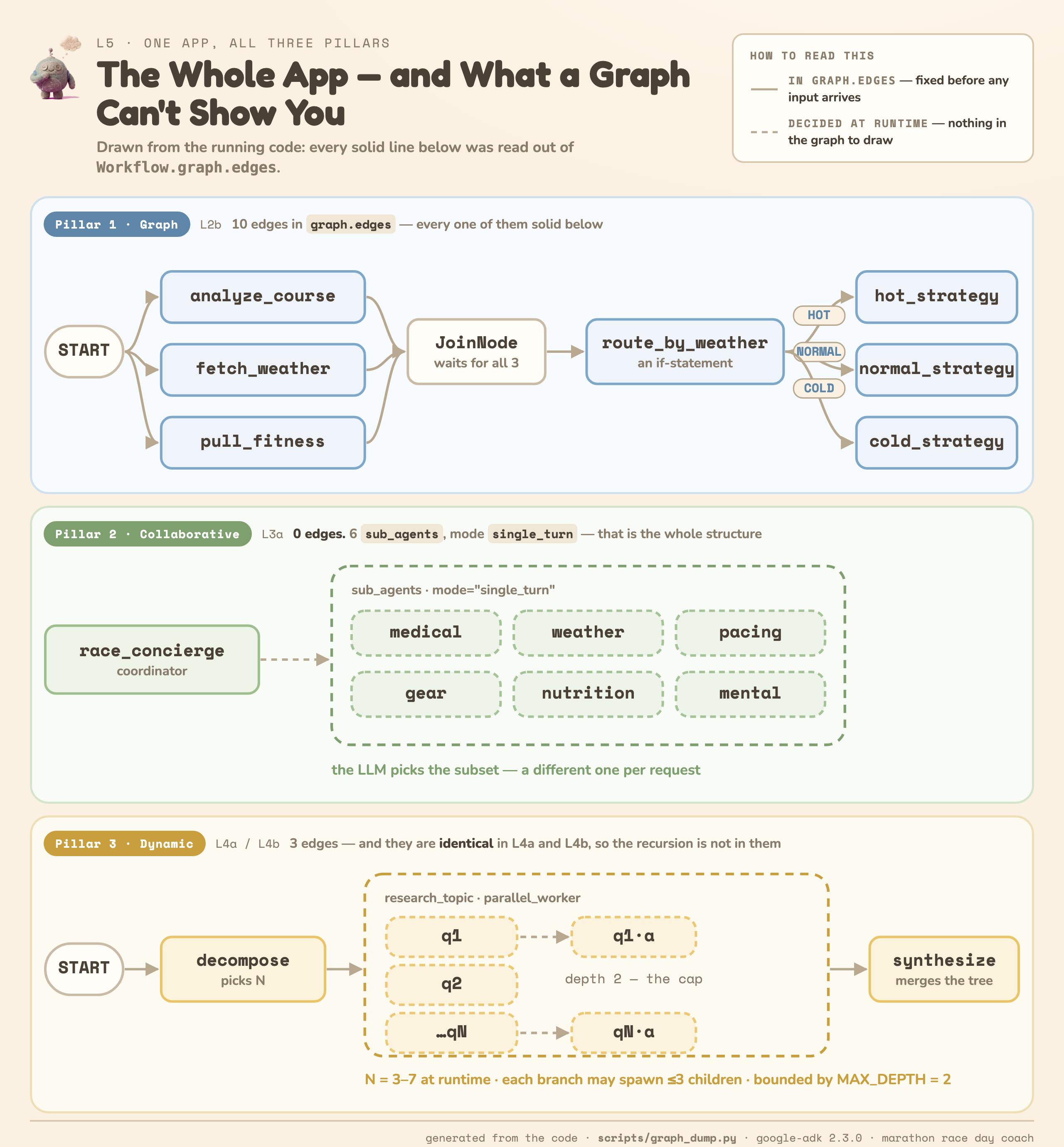
The picture is drawn from the running code: every solid line was read out of Workflow.graph.edges. Which is the first lesson — the parts that can be drawn ahead of time are exactly Pillar 1, and the parts that can't are why Pillars 2 and 3 exist.
What you'll need
- A Google account (for Colab) — no local setup required.
- ~50 minutes (the two L4 levels are the long ones — budget them).
- One of two ways to reach a Gemini model. Pick your lane — you run one setup step and skip the other:
🎓 Workshop | 🏠 Take-home | |
Who | You're at a live workshop and the instructor gave you a credit claim link | Everyone else — including workshop attendees, afterwards |
You need | The claim link, and a Google account that can create a Cloud project | A free AI Studio API key |
Runs on | Vertex AI, in a project billed to your workshop credit | Google AI Studio |
Cost | Covered by the credit | Free tier |
Setup step | Workshop setup (next step) | Take-home setup (the step after) |
Everything from the Prologue onward is identical either way — the lane only decides which model endpoint the notebook talks to.
Two ways to follow along
Every step below maps to one cell in the Colab notebook and one folder in the GitHub repo. Pick either:
- ▶ Colab (recommended): Open the notebook → run cells top to bottom.
- 💻 Local:
git clonethe repo,./setup_venv.sh, then run each level as a module (python -m ...) or browse them all with./run.sh(adk web).
2. Workshop setup · Claim your credit and switch to Vertex AI
At the workshop you're given Google Cloud credit. You'll claim it, create a project billed to it, and point the notebook at Vertex AI instead of AI Studio. One cell does everything after the claim.
1 · Claim your credit (~1 min)
- Open the claim link your instructor shared. It looks like
https://me.developers.google.com/benefits/claim/your-workshop-name. - Sign in and follow the page through to accept the credit.
- Note which Google account you used. Every step below has to run as that same account.
2 · Open the notebook and install ADK 2 (~1 min)
Click Open in Colab ▶, then run the first code cell. It pins the exact ADK 2 version this codelab was verified on and prints ✓ installed.
3 · Run the "Workshop setup" cell (~3 min)
This is the cell titled 🎓 Path A · Workshop. Run it and Colab will ask you to authorize — choose the same Google account you just claimed the credit with, and allow access.
It does four things: creates a project called adk-2-tutorial-XXXX on your credit, enables the Vertex AI API on it, sets the four environment variables every later cell reads, and then makes a test call to Vertex and waits until it answers — so setup either finishes working or tells you why, rather than failing later inside a level.
Expected output — the last line is what matters:
Signed in as: you@example.com
...
Successfully created GCP project 'adk-2-tutorial-4817'.
Successfully linked 'adk-2-tutorial-4817' to billing account '01ABCD-...'.
   waiting for Vertex AI to come up on the new project... (10s)
   waiting for Vertex AI to come up on the new project... (20s)

✅ Vertex AI on adk-2-tutorial-4817 · us-central1 · gemini-2.5-flash — answered a test call
4 · Skip the "Take-home setup" step
Do not run the AI Studio key cell — it would switch the notebook back to AI Studio and undo what you just did. (The cell guards against this and will refuse to run, but the tidier move is simply to skip it.) Go straight from here to the Shared building blocks cell.
5 · Run the "Shared building blocks" cell
Run it once. It defines the Pydantic schemas + canned marathon scenarios that every level from L2 onward reuses. You'll see ✓ schemas + scenarios ready.
After the workshop
Your credit and the project it created won't last forever. To keep re-running these levels for free once the workshop is over, run the Take-home setup step instead — a free AI Studio key, no Cloud project, no billing. That one cell is the only thing that changes.
To clean up sooner: open the Cloud console, select adk-2-tutorial-XXXX, and delete it. Nothing else in this codelab creates billable resources.
3. Take-home setup · AI Studio API key
Everything on this path runs on a free Google AI Studio API key — no Google Cloud project, no billing, no local install. This whole step is ~3 minutes.
1 · Open the notebook
Click Open in Colab ▶. You'll land on the notebook — a markdown intro, then one runnable cell per level. You run cells top to bottom; each prints its own output right below it.
2 · Install ADK 2 (~1 min)
Run the first code cell. It pins the exact version this codelab was verified on:
%pip install -q "google-adk==2.3.0" python-dotenv pydantic nest_asyncio
Wait for it to finish — you'll see ✓ installed. (The install takes ~30–60s the first time; it's cached after that.)
3 · Get your Gemini API key from AI Studio (~1 min)
- Open aistudio.google.com/app/apikey in a new browser tab.
- Sign in with your Google account.
- Click Create API key (top-right).
- Pick an existing Google project or let it create one.
- Copy the key — it starts with
AIza...and is ~40 characters.
4 · Add your key to Colab (~1 min)
Option A — Colab Secrets (recommended; the key stays hidden):
- Click the 🔑 key icon in the Colab left sidebar.
- Click + Add new secret.
- Set Name to exactly
GOOGLE_API_KEY. - Paste your key into Value.
- Toggle Notebook access to ON.
Option B — paste when prompted (quick): skip the secret; when you run the next cell it shows a hidden prompt 🔑 Enter your Google AI Studio API key: — paste and press Enter.
5 · Run the key cell
It reads the secret (or falls back to the paste prompt), then points ADK at AI Studio (not Vertex AI):
import os

# 🏠 TAKE-HOME ONLY — if you ran the Workshop setup cell, skip this one.
if os.environ.get("GOOGLE_GENAI_USE_VERTEXAI") == "True":
    raise SystemExit("✋ You're set up on the workshop path (Vertex AI). Skip this cell.")

# Google AI Studio API key — add GOOGLE_API_KEY in the 🔑 Secrets panel (or paste when prompted).
try:
    from google.colab import userdata
    key = userdata.get("GOOGLE_API_KEY")
except Exception:
    import getpass
    key = getpass.getpass("Enter your Google AI Studio API key: ")

os.environ["GOOGLE_API_KEY"] = "".join(key.split())    # drop any stray whitespace/newlines
os.environ["GOOGLE_GENAI_USE_VERTEXAI"] = "False"      # use AI Studio, not Vertex AI
print("✅ API key set — using Google AI Studio.")
Expected output: ✅ API key set — using Google AI Studio.
6 · Run the "Shared building blocks" cell
Run the Shared building blocks cell once. It defines the Pydantic schemas + canned marathon scenarios that every level from L2 onward reuses. You'll see ✓ schemas + scenarios ready.
You're set up! 🎽 One quick detour before L0 — the version everyone builds first.
4. Prologue · Why not one big prompt?
⚡ Before you run it, lock in the ONE thing to watch: where does every specific number come from? That's the entire exercise — everything else is decoration.
Before the ladder, run the thing the ladder replaces: one agent whose prompt promises everything — fetch the weather, analyze the course, read the training log, route by conditions, output the plan.
What you'll see: a confident, specific, well-formatted strategy... whose numbers are invented. In one live run it opened with "I have pulled today's weather metrics" and reported 52°F, a 9 mph wind, and an analysis of a training log it has never seen. There is no weather API here, no course data, no log — one opaque model call either fabricates its inputs or hedges them into uselessness.
That's the disease, and it has four symptoms worth naming:
- You can't trust it — the data is made up, fluently.
- You can't test it — step 4's routing lives inside prose; there's no
ifto unit-test. - You can't swap a step — no seam where a real weather API could plug in.
- You pay for everything, every time — five steps, one giant call, no caching a deterministic part.
Hold that feeling. The next nine levels take those steps out of the prompt, one at a time: functions fetch (L1–L2a), an if-statement routes (L2b), specialists divide the work (L3a–L3b), and code bounds the shape (L4a–L4b).

💻 Local: python -m shared.prologue
5. L0 · Your first ADK 2 agent
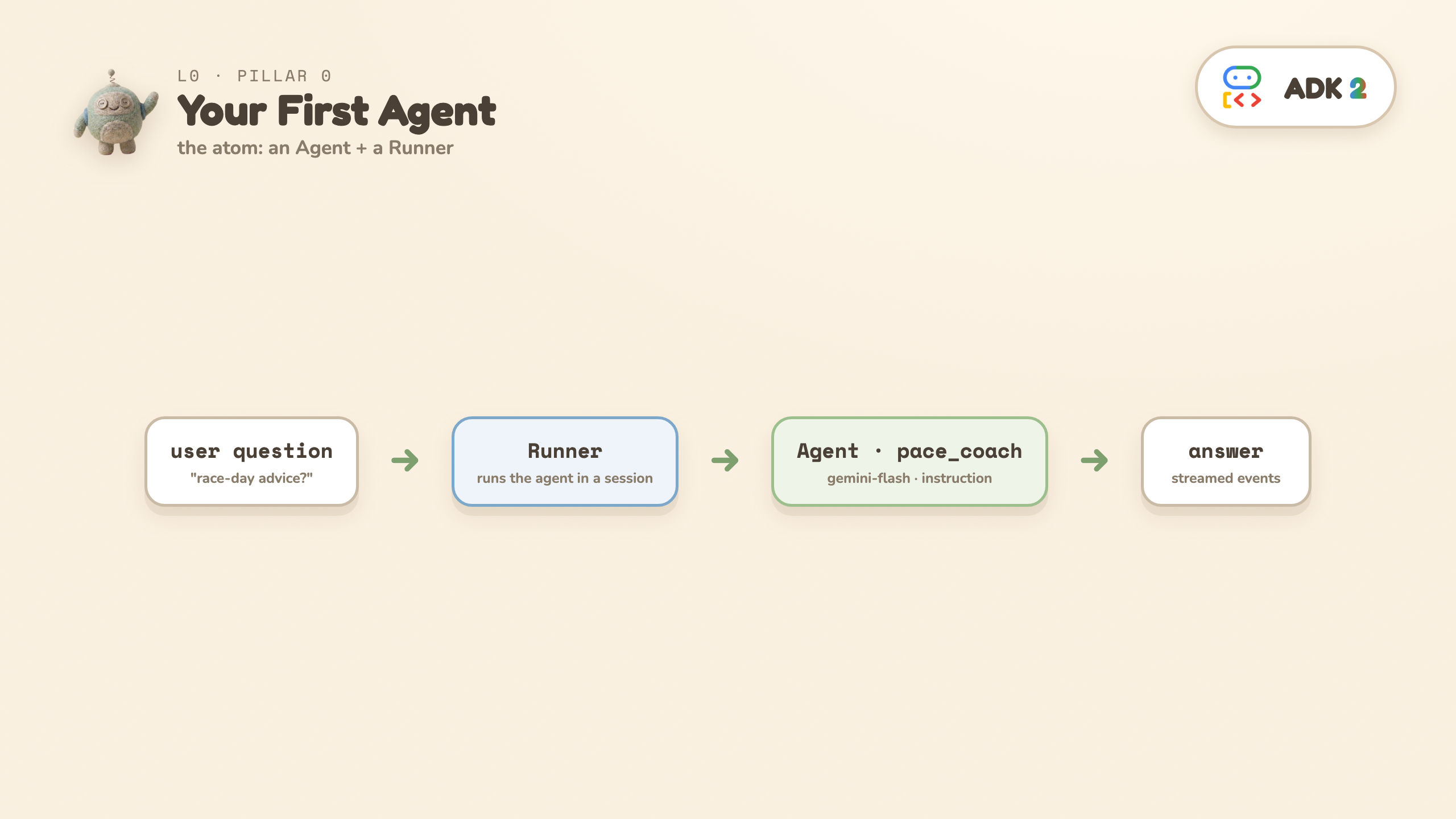
⚡ TL;DR: an agent is a model + an instruction + tools it may call; a Runner executes it. Everything after this level is just more agents, arranged in better shapes.
The question: can you get a model to answer — and to reach for real code when arithmetic matters?
The one idea — three parts:
Agent— the thing that reasons (a Gemini model + an instruction).Runner— the thing that executes an agent inside a session and streams events.- a tool — a plain Python function (
pace_splits) the model decides to call. ADK reads the signature + docstring and hands the model a declaration; no schema-writing.
After the prologue this is the first repair: an LLM doing pace arithmetic in its head will happily be wrong — pace_splits is deterministic Python, so the numbers in the answer are computed, not improvised.
▶ Colab: run the L0 cell · 📁 GitHub: L0_first_agent/ · 💻 Local: python -m L0_first_agent.agent
def pace_splits(target_finish: str) -> dict:
    """Convert a goal time like '3:30:00' into exact per-mile / per-km paces."""
    ...                                  # deterministic Python — no LLM

pace_coach = Agent(
    name="pace_coach", model=MODEL,
    tools=[pace_splits],                 # the model may call it; ADK reads the signature
    instruction="You are a friendly, concise marathon coach. ... If the runner "
                "mentions a goal time, call pace_splits — never do arithmetic yourself.",
)
runner = Runner(node=pace_coach, session_service=InMemorySessionService(), auto_create_session=True)
async for event in runner.run_async(user_id="u1", session_id="s1", new_message=msg):
    ...  # events carry the model's text
🔍 The markers: Agent(...) · tools=[pace_splits] · Runner(...). And in the output, the 🔧 line — that's the model deciding, mid-answer, to call your code.
What you'll see:
   🔧 model called tool → pace_splits({'target_finish': '3:30:00'})
   🔧 tool returned     → {'per_mile': '8:00', 'per_km': '4:58', ...}
🧠 Coach: To finish in 3:30:00, you need an average pace of 8:00 per mile...
The 🔧 lines are the lesson: mid-answer, the model chose to call your function, and the exact 8:00/mile in its reply came from your code — not from token statistics.
❓ You might be wondering: does the model always call the tool? No — it decides, per question. Ask something with no numbers in it and the 🔧 lines vanish (the playground has you try exactly this).
👀 Read: pace_splits (a plain function) and the tools=[pace_splits] line. · ▶ Run it. · ✏️ Change: ask the general question (no goal time) — notice the 🔧 lines disappear: the model decides when a tool is worth calling. Then rewrite the instruction and re-run — the instruction is the rest of the program.
6. L1 · Your first Workflow
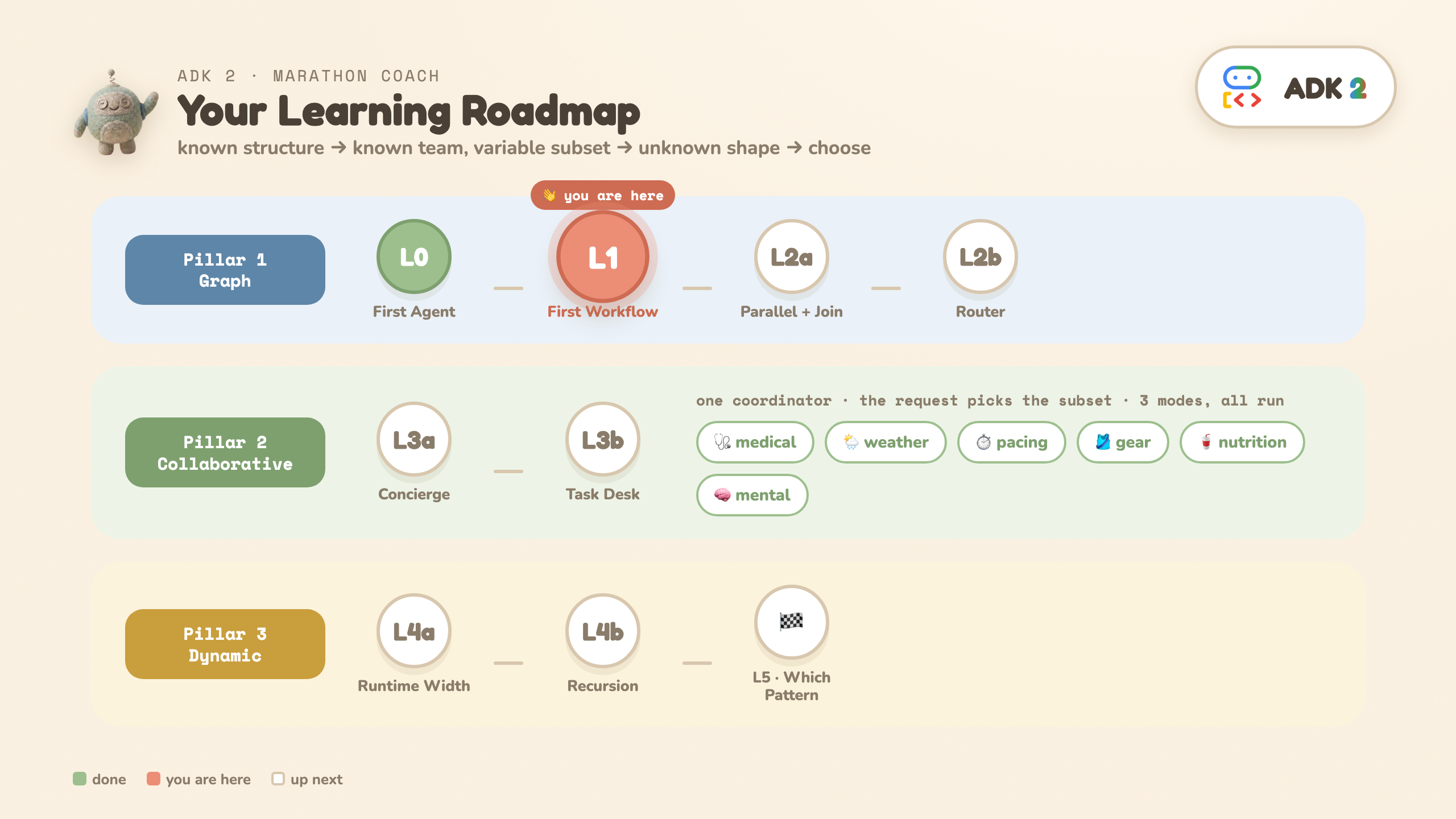
⚡ TL;DR: a plain function and an LLM agent are the same kind of node. Predictable work → function (0 LLM, deterministic); reasoning → agent.
The question: how do you mix plain code and an LLM in one flow, without paying for a model call on the parts that are just code?
The one idea: in a Workflow, a plain Python function and an LLM agent are both just nodes in the same edges list.
START ──► fetch_conditions (function, 0 LLM) ──► advise (agent, 1 LLM)
▶ Colab: run the L1 cell · 📁 GitHub: L1_graph_basics/ · 💻 Local: python -m L1_graph_basics.workflow
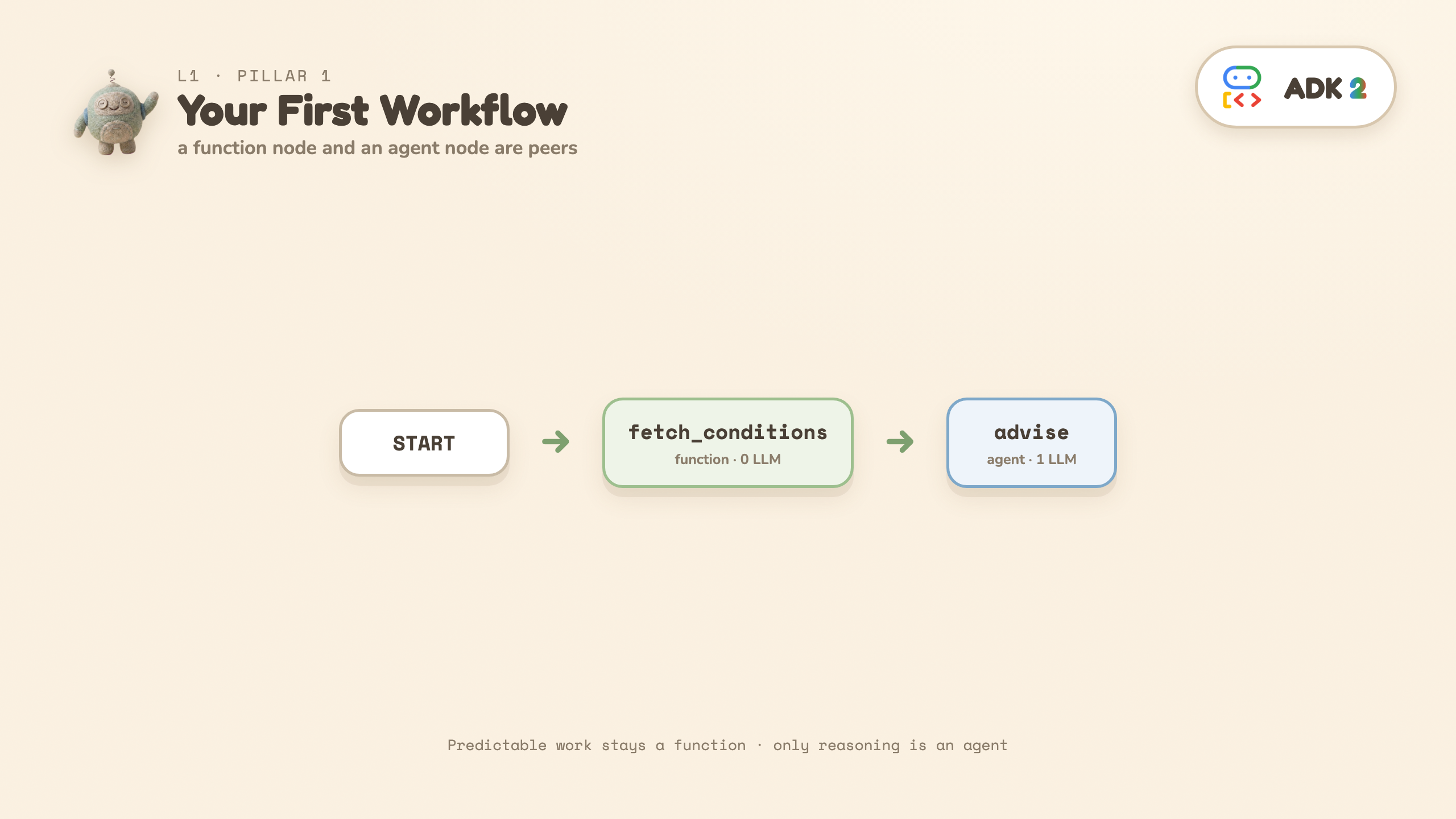
The function node prints the data it produced (no model call), then the agent gives advice that references the actual temperature and wind it received:
def fetch_conditions(node_input):                # function node — 0 LLM
    return Event(output=Conditions(temp_f=78, wind_mph=12, conditions="sunny").model_dump())

advise = Agent(name="advise", model=MODEL, mode="single_turn",
               input_schema=Conditions, instruction="...give pacing + gear advice...")

workflow = Workflow(edges=[(START, fetch_conditions, advise)])
🔍 The markers: one edge tuple — (START, fetch_conditions, advise) — with a bare Python function sitting in the middle of it, and input_schema= validating the hand-off.
What's new vs L0: Workflow(edges=[...]), START (where input enters), a function node returning Event(output=...), and input_schema=Conditions so the function's output is validated against that schema before the agent sees it (as JSON text — input_schema validates the boundary, it does not hand the agent a Python object).
❓ You might be wondering: is function-then-agent the required order? No — any order, any mix, any count. advise runs second only because it needs fetch_conditions' data. The lesson is the peerage, not the sequence.
👀 Read: fetch_conditions returns data with no model call; advise has input_schema=Conditions. · ▶ Run it. · ✏️ Change: set temp_f=30 in the function and re-run — the advice flips, and the function still cost 0 LLM calls.
7. L2a · Parallel fan-out + JoinNode (Pillar 1a)
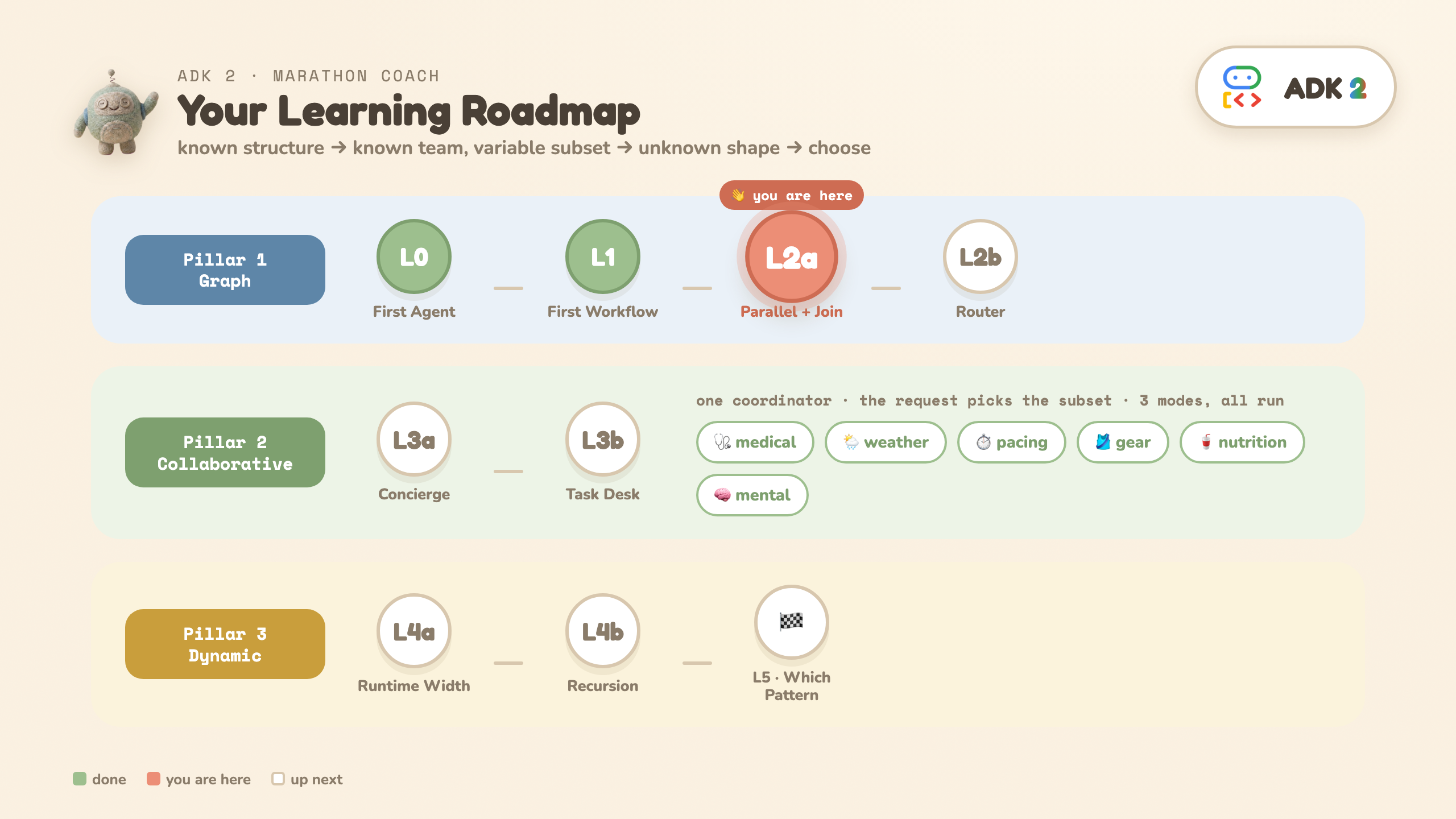
⚡ TL;DR: fan out in parallel (free), wait for all, bundle, hand one agent the complete picture.
The question: you can draw the flow before the input arrives. Start with the skeleton: gather data in parallel, bundle it, hand it to one agent.
The shape:
START ──► fetch_weather ──┐
START ──► analyze_course ─┼─► JoinNode ─► strategy (1 agent)
START ──► pull_fitness ───┘   (bundles)
▶ Colab: run the L2a cell · 📁 GitHub: L2a_parallel_join/ · 💻 Local: python -m L2a_parallel_join.workflow
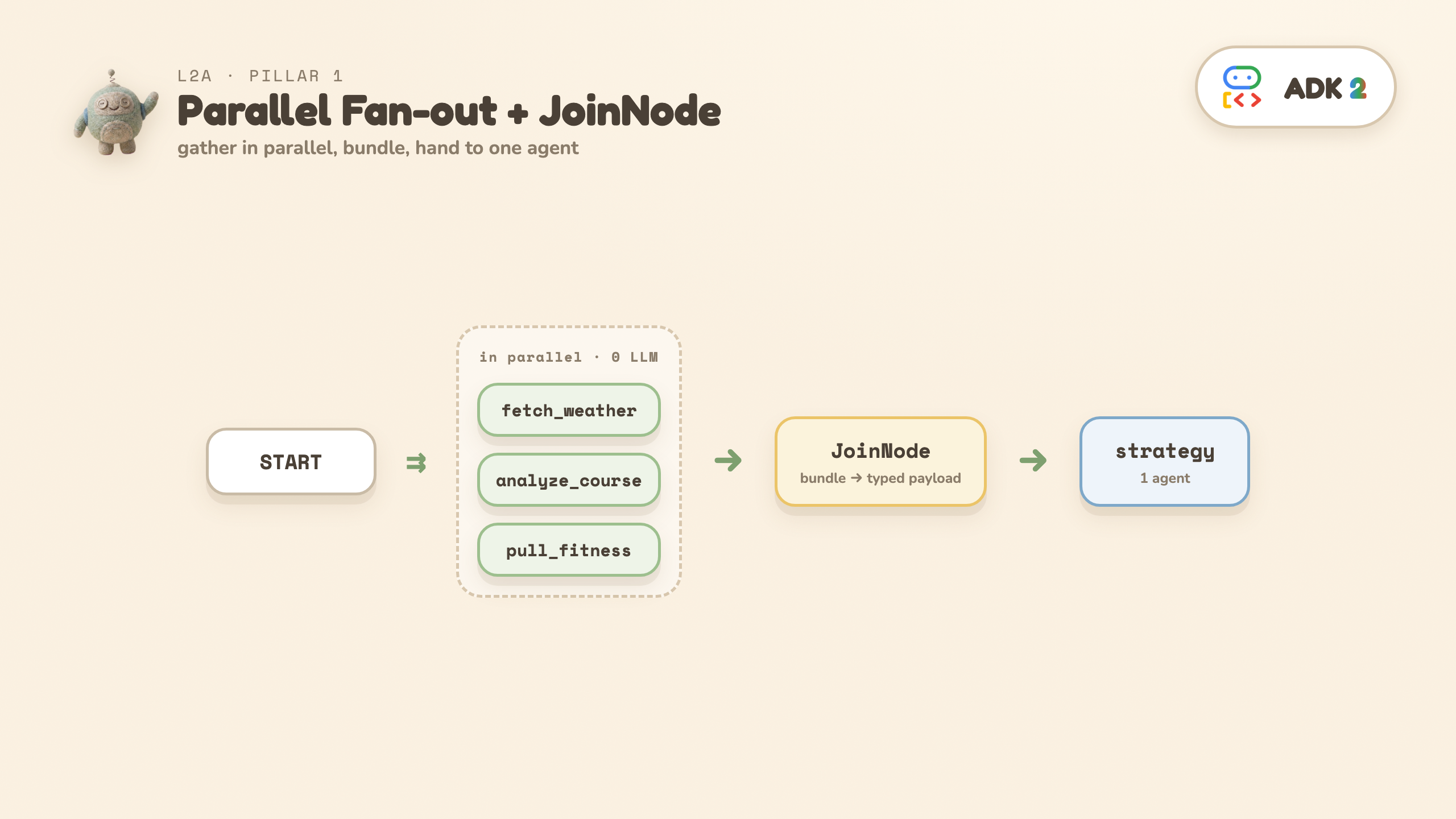
🔍 The markers: three edges that all start at START — that is the fan-out — and JoinNode, the meeting point.
- The three fetches are functions — they run in parallel, 0 LLM calls.
JoinNodewaits for all three and bundles them into one typed payload (BundledRunData), keyed by function name.- One
strategyagent reads the bundle and writes aRaceStrategy.
What you'll see: each fetch prints a started / finished timestamp. All three start at 0.0s and the fan-out ends at 2.0s — the slowest fetch, not the 4.5s their durations would sum to. That overlap is the parallelism. (The total wall time printed at the end is ~8s because it also contains the strategy agent's LLM call — read the fetch timestamps for the parallel claim, not the total.)
💡 Prologue callback: the mega-prompt invented its weather. Here the temperature comes out of a fetch function — real code, real seam. Swap the canned dict for an actual weather API and nothing else changes.
❓ You might be wondering: how much
JoinNode
do I need to understand? One sentence: it waits until every parallel branch lands, packs the outputs into one dict keyed by the upstream function's name, and computes nothing itself. That dict is exactly why L2b's router can write node_input["fetch_weather"]["temp_f"].
👀 Read: three edges fan out from START; JoinNode bundles them for one agent. · ▶ Run it and read the timestamps, not the total. · ✏️ Change: make one fetch sleep 3.0 — predict the new fan-out end time first, then verify.
8. L2b · Add the deterministic router (Pillar 1b)
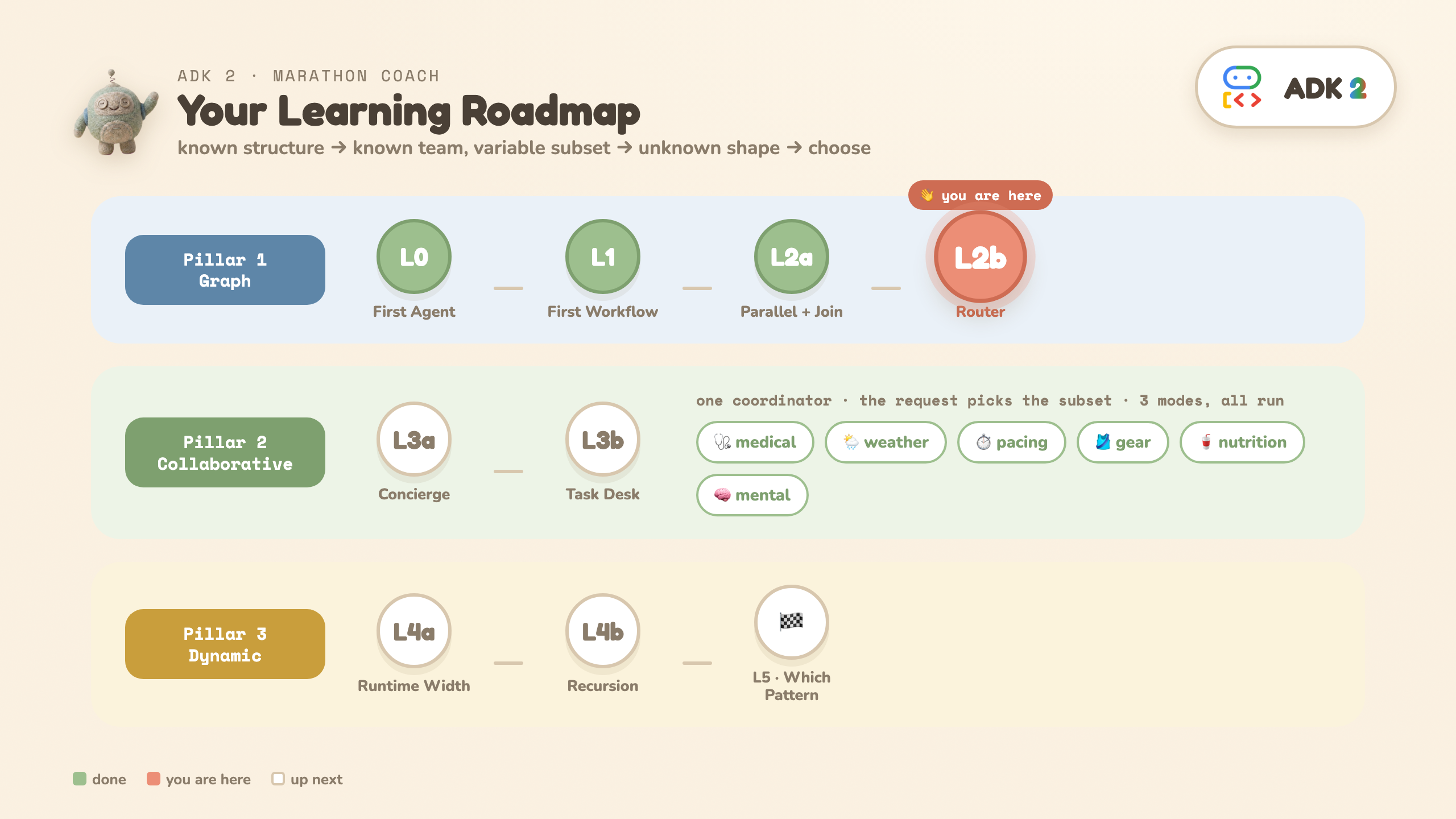
⚡ TL;DR: L2a untouched + a plain if decides which one agent runs. Branching, without asking the model.
The question: the plan should differ for hot vs cold weather. How do you branch — without asking the model to decide?
The shape (L2a + a router):
... JoinNode ─► route_by_weather ─► hot_strategy
               (if-statement)   ─► normal_strategy
                                ─► cold_strategy
▶ Colab: run the L2b cell — try run("NORMAL") / run("COLD") · 📁 GitHub: L2b_router/ · 💻 Local: python -m L2b_router.workflow COLD
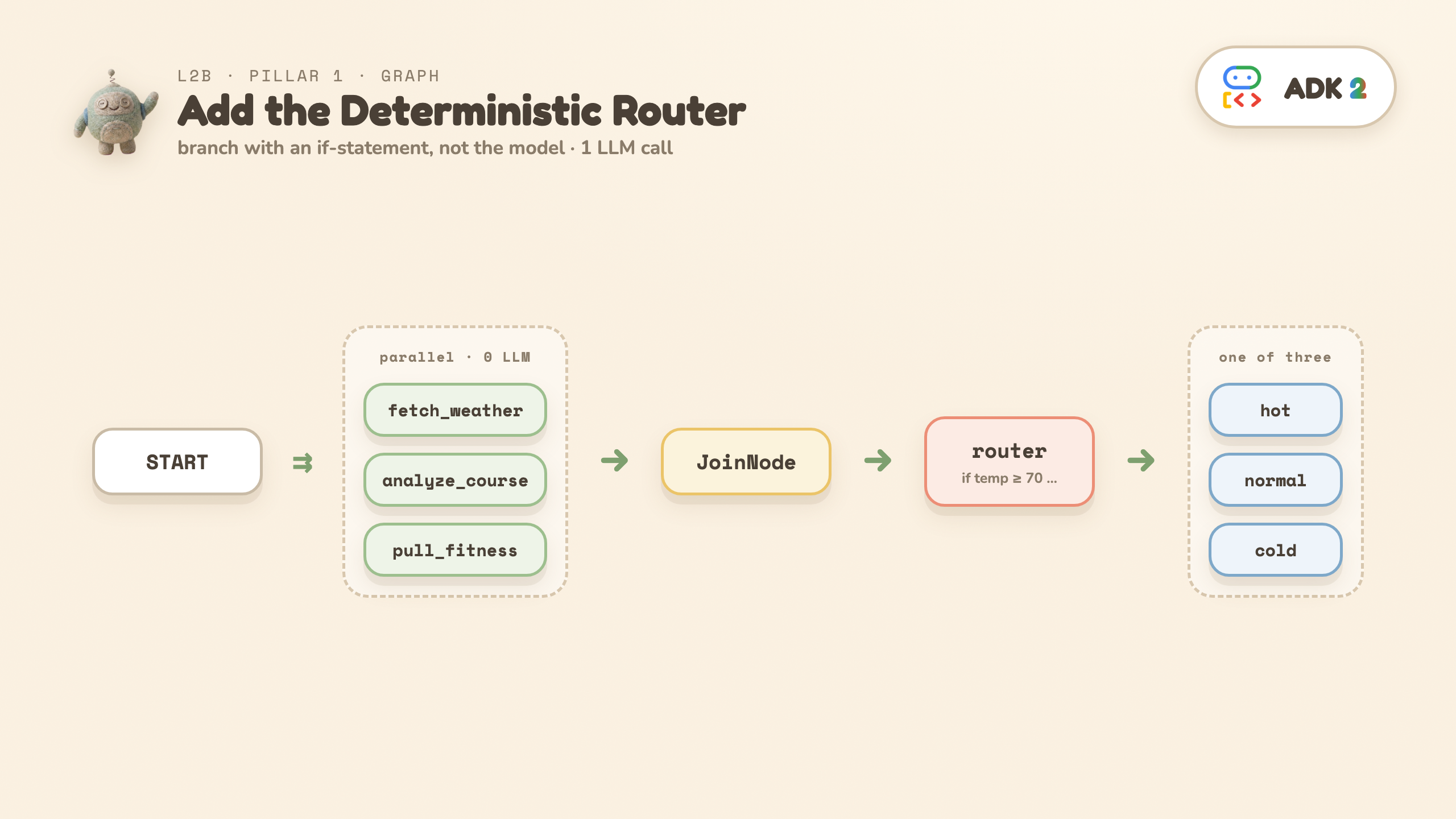
def route_by_weather(node_input):                        # an if-statement, 0 LLM
    temp = node_input["fetch_weather"]["temp_f"]
    route = "HOT" if temp >= 70 else "COLD" if temp <= 40 else "NORMAL"
    return Event(output=node_input, route=route)

(route_by_weather, {"HOT": hot_strategy, "NORMAL": normal_strategy, "COLD": cold_strategy})
🔍 The markers: Event(output=..., route=...) — a function node naming the path — and the dict-edge {"HOT": ..., "NORMAL": ..., "COLD": ...} that maps names to nodes.
The takeaway — three kinds of work, three homes:
- Predictable work → functions (the 3 parallel fetches)
- A clear rule → explicit routing (
route_by_weatheris anif-statement, not a model decision) - Reasoning → the model (exactly one strategy agent runs)
What you'll see: temp=78F -> route=HOT, then a structured RaceStrategy. Net cost: 1 LLM call.
⚠️ If you add a fourth branch, give the route-dict a DEFAULT_ROUTE entry too. A route the dict doesn't match isn't an error — the branch simply ends, and the program exits 0 with no output, which is a confusing dead end to debug.
❓ You might be wondering: so L2b is literally L2a plus a router? Yes — the fetches and the join are untouched, and it's still exactly 1 LLM call. What changed: "always the same agent" became "one of three, chosen by data".
👀 Read: route_by_weather — the router is an if-statement, not an agent. · ▶ Run run("COLD") too. · ✏️ Change: add a WINDY branch with a fourth agent — and read the DEFAULT_ROUTE warning above before you do.
9. L3a · Collaborative agents: one flag, two worlds — Pillar 2
⚡ TL;DR: same team, one flag. chat hands the whole conversation to one specialist and never comes back; single_turn turns each specialist into a tool — parallel subset, auto-return, one synthesis.
The question: you know the team, but the request decides which members should answer. How do you let an LLM pick the subset — and run them concurrently?
The shape: a coordinator over six specialists (medical, weather, pacing, gear, nutrition, mental). This level runs the same team twice — same coordinator prompt, same six specialists. The only difference is one flag on the subagents. The contrast is the lesson.
▶ Colab: run the L3a cell · 📁 GitHub: L3a_collaborative/ · 💻 Local: python -m L3a_collaborative.concierge --mode chat "What about fueling?"
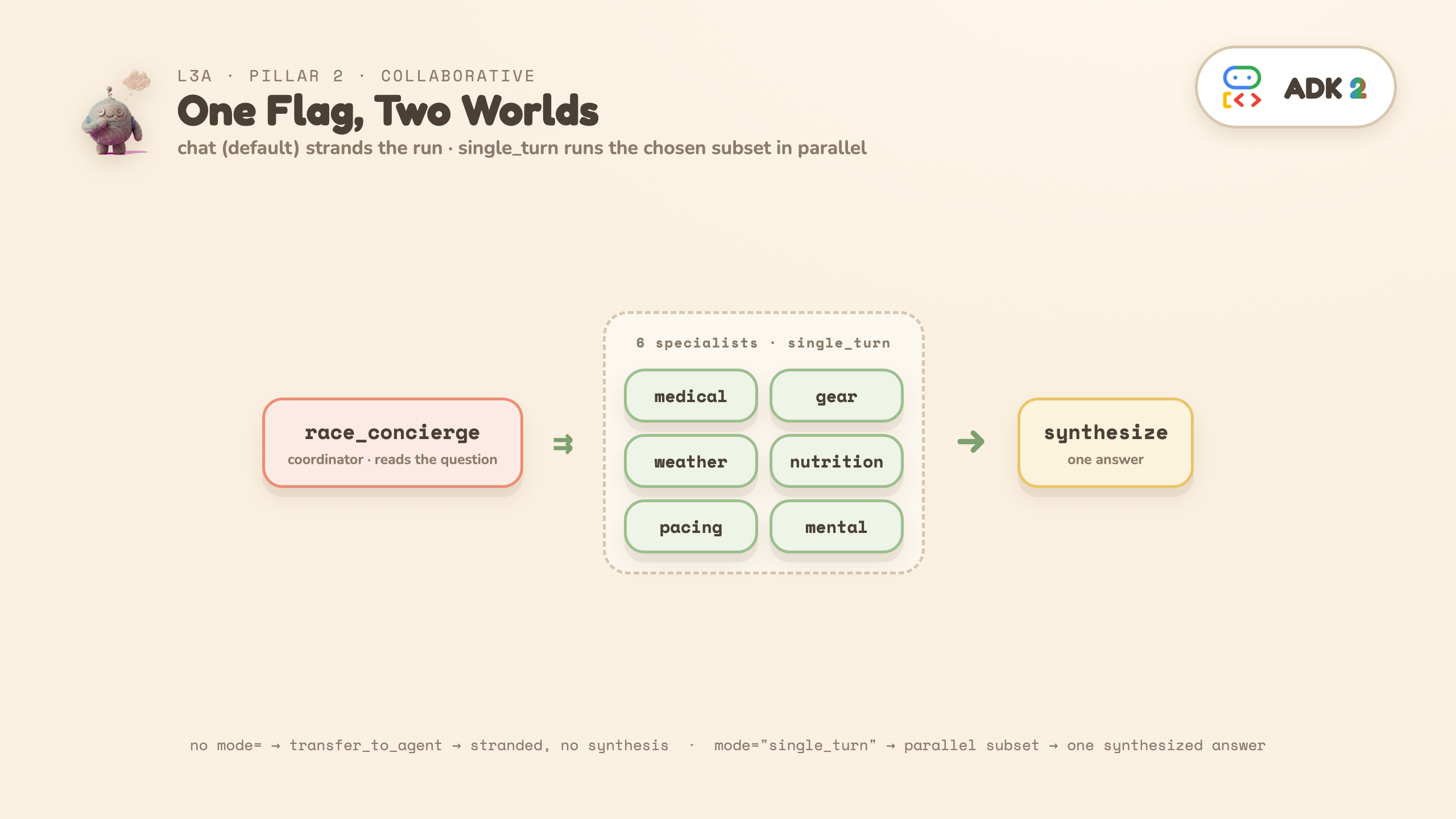
🔍 The markers: mode="single_turn" in the factory — and in the output, TRANSFER → (beat 1) versus a burst of DISPATCH → lines sharing one timestamp (beat 2).
Beat 1 · Run the default first — and watch it fail the job
No mode= written → subagents default to chat. What you'll see:
TRANSFER → nutrition_specialist   (transfer_to_agent — the only tool chat subagents provide)
Final speaker: nutrition_specialist
The coordinator got no delegation tools — chat subagents only give it transfer_to_agent, a serial handoff of the whole conversation to one specialist. That specialist answers the user directly, and the run ends there. No parallel dispatch. No return. No synthesis. Ask the broad question and it gets worse: six specialists, one transfer.
That's not a bug — it's chat mode doing its job. The conversation belongs to whoever holds it, until someone explicitly transfers away. Right for an open-ended assistant; wrong for a pipeline step.
Beat 2 · One flag, two worlds
The only diff: mode="single_turn" on each specialist. Same question, run again:
[t= 7.8s] DISPATCH → medical_specialist      ← same timestamp =
[t= 7.8s] DISPATCH → weather_specialist         one turn, many calls
[t=14.5s]   ↩ medical_specialist replied     ← replies land inside
[t=14.5s]   ↩ weather_specialist replied        one short window
🧠 Concierge (synthesized): <one answer>
Now ADK injects one delegation tool per specialist — named after the subagent, described by its description= (that text is what the coordinator reads when choosing the subset; skip it and you're routing on names alone). The coordinator emits several calls in one turn, ADK runs them in parallel, each auto-returns its result, and the coordinator synthesizes.
Question | Specialists that fire |
"What about fueling?" | nutrition only |
"My knee hurts at mile 18" | medical only |
"Should I race today?" | medical + weather + pacing |
"Anything I should worry about?" | all 6 |
Why each specialist gets handed the whole briefing: each single_turn subagent runs in its own isolated session branch — it cannot see the conversation or its peers. Nothing is ambient: the coordinator must forward the entire SpecialistInput (question + strategy + runner data) separately into every parallel call.
💡 Where ADK 2 gives this a direct home: an LLM picks a per-request subset AND runs it in parallel — declared via sub_agents + mode="single_turn". You could assemble the same shape in 1.x by wrapping each specialist in AgentTool; what changes is that it is now a declaration rather than plumbing. (ParallelAgent is always-all and transfer_to_agent is serial.)
⚠️ Two honest caveats: (1) the model picks the subset, so it's less deterministic than L2's hard-coded router — the exact subset can vary run to run. (2) Occasionally you'll see an Error validating input: ... line for one specialist. It is almost never the specialist's output — output_schema makes Gemini enforce that server-side. It's the input: the coordinator has to reproduce the whole nested SpecialistInput verbatim for every parallel call, and sometimes it fumbles one. ADK returns the error as that tool's result, the coordinator recovers, and the synthesis still lands.
❓ You might be wondering: is
chat
just 1.x-style delegation — one agent at a time? Essentially yes: it's the 1.x default behavior, now with a name. The gap to single_turn is three-dimensional: what the coordinator holds (one transfer_to_agent vs one tool per specialist) · how many can work (one, owning the conversation vs N in parallel) · whether control returns (never vs automatically, with results). And about the code: the factory's if mode == branch exists only so one team can be built both ways for this contrast — a real app hardcodes one mode and the if disappears.
👀 Read: the _specialist factory — the mode parameter is the whole level. · ▶ Run both beats. · ✏️ Change: ask "my knee hurts at mile 18" — predict the subset first, then check the DISPATCH lines.
# The factory's mode parameter is THE variable this level teaches:
def _specialist(name, domain, focus, mode):
    kwargs = {}
    if mode == "single_turn":   # the structured contract only makes sense for a TOOL
        kwargs = dict(mode="single_turn",
                      input_schema=SpecialistInput, output_schema=SpecialistResponse)
    return Agent(name=name, model=MODEL,
                 description=f"Marathon {domain} specialist. Consult for: {focus}.",
                 instruction=..., **kwargs)

race_concierge = Agent(name="race_concierge", model=MODEL,
                       sub_agents=[...six specialists...],   # NOTE: no `mode` on the coordinator
                       instruction="...DECIDE which specialists are relevant... call them IN PARALLEL... SYNTHESIZE...")
10. L3b · Task mode: a conversation with a finish line — Pillar 2
⚡ TL;DR: the middle mode — talk to the user until the fields are collected, then auto-return with a validated object.
The question: L3a left a gap. chat owns the whole conversation; single_turn never talks to the user at all. But real intake work sits in between: "talk to the user UNTIL you've collected X — then come back with a validated object." Which mode is that?
The shape:
race_desk (coordinator)
  └─ gear_fitter (mode="task", output_schema=GearOrder)
▶ Colab: run the L3b cell · 📁 GitHub: L3b_task_desk/ · 💻 Local: python -m L3b_task_desk.desk
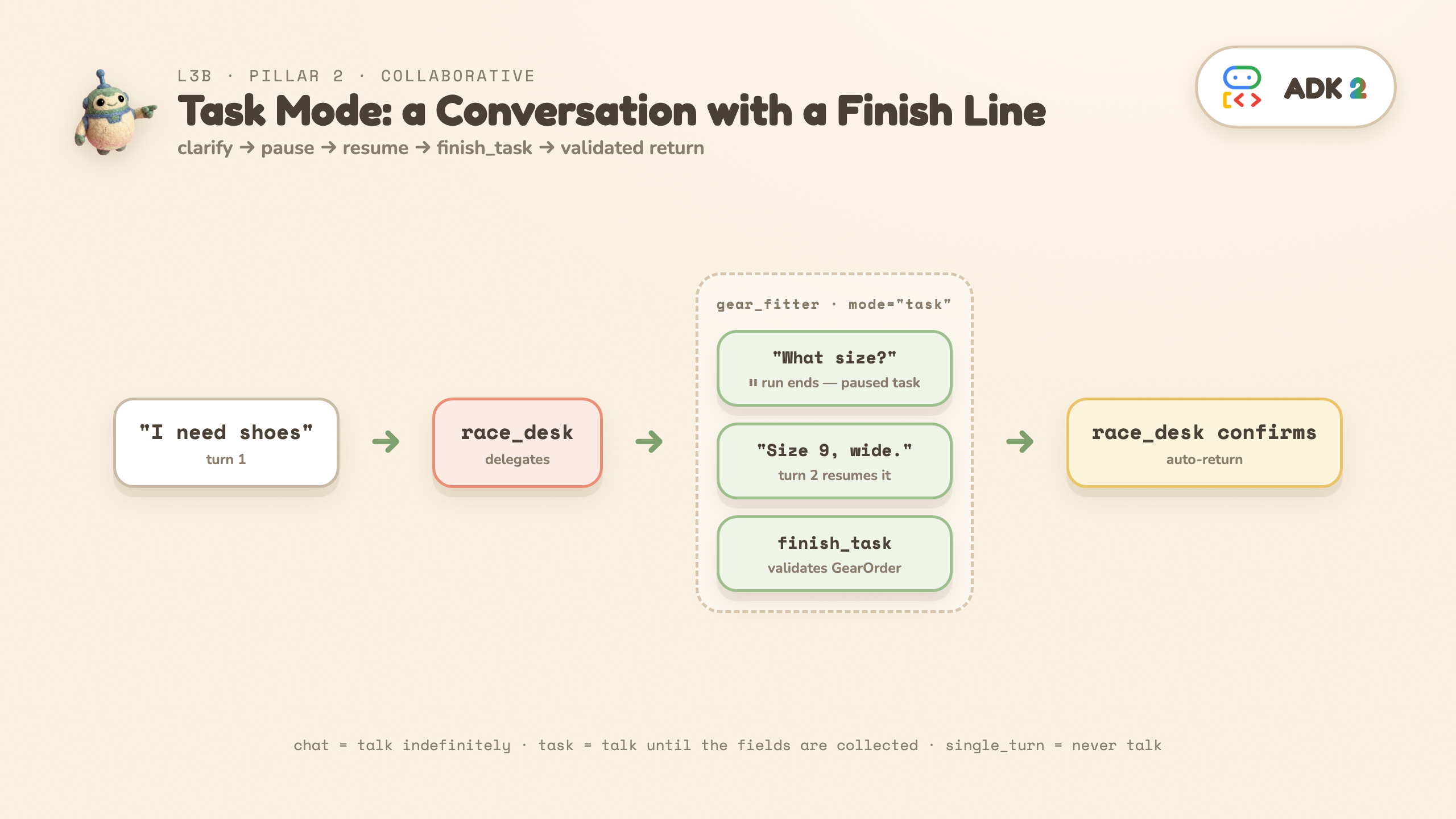

🔍 The markers: mode="task" + output_schema= on the same agent — and in the output, the ⏸ pause and the finish_task call.
What you'll see:
━━ TURN 1 ━━  user: 'I need shoes for the marathon.'
  race_desk → delegate: gear_fitter
  gear_fitter: What is your shoe size?
  ⏸  The run ENDED — but nothing failed. This is a PAUSED task.

━━ TURN 2 ━━  user: 'Size 9, wide.'   (same session → resumes the task)
  gear_fitter → finish_task   (payload validates as GearOrder)
  race_desk: Your order ... in size 9 Wide has been confirmed.
Three things happened that neither L3a mode can do:
- The run genuinely stopped mid-task — a paused task, not a hang and not a failure. The agent asked its clarifying question and is holding the task open. (In
adk webyou'd just type the answer; the harness scripts it as a second message on the same session.) - The next message resumed the SAME task agent — no re-routing, no re-delegation. The session knows who was waiting.
finish_taskended it — a tool ADK injected because ofmode="task". The agent must call it to finish, and its payload must validate againstoutput_schema. A conversation with a typed finish line — then control auto-returns to the coordinator, result attached.
The one-question rule for picking a mode
💡 "Does the user need to talk to it — and until WHEN?" chat = indefinitely · task = until the fields are collected · single_turn = never.
Mode | Human in the loop | Parallel? | Returns to parent |
| full conversation | no | manual (via transfer) |
| clarifying questions only | no | automatic (via |
| none | yes | automatic (with its result) |
mode goes on subagents only — never on the coordinator. And workflow nodes default to single_turn (which is why L1–L2b never wrote it), while subagents default to chat (which is why L3a had to).
⚠️ Two version notes before you build on this: (1) task
as a static graph node is version-dependent — on 2.0.0b1–2.3.0 (this codelab's pin), Workflow(...) raises at construction; use exactly what this level does (a chat coordinator with task sub-agents) or dispatch via ctx.run_node. Lifted in 2.5.0. (2) "Task agents must be leaf agents" (no subagents of their own) is a documented ADK limitation — but a contract, not a runtime guard: neither 2.3.0 nor 2.5.0 will stop you. Don't read the absence of an error as permission.
💡 Go deeper: a task agent embedded in a graph workflow (the 2.5.0+ shape), with routing that can loop the conversation back for a retry: companion repo 22_agent_in_workflow · full mode guide: docs/agent-modes.md.
❓ You might be wondering: what does
task
buy me that the other two can't? Three things: auto-return (chat carries the conversation away instead) · a typed finish line (finish_task's payload must validate against the schema — you get data back, not a transcript) · pause/resume (the ⏸ is a held task waiting for a human, not a hang).
👀 Read: gear_fitter — mode="task" + output_schema is the entire contract. · ▶ Run it. · ✏️ Change: run_desk("I need a hydration vest", "2 liters, medium") — the clarifying question adapts, the finish line stays typed.
11. L4a · Runtime-sized parallel fan-out (Pillar 3a)
⚡ TL;DR: the skeleton is still three static steps — dynamic hides inside the middle one, where the width is decided by data at runtime.
⚠️ Heads-up: this is the steepest step of the ladder. The previous level was 44 lines; this one is ~120 — three agents and two workflow nodes, and none of it is padding. Budget ~15 minutes, and lean on the Read/Run/Change line at the end: you don't need to absorb every line on the first pass.
The question: the shape of the work depends on the input. You can't draw the graph ahead of time. Start with runtime width: let the LLM decide how many sub-questions.
The shape (one level deep):
START ─► decompose ─► research_topic (parallel_worker) ─► synthesize
                             │  │  │
                             └──┴──┴─ (flat: no children yet)
An open-ended question is decomposed into N sub-questions — N is chosen by the LLM at runtime (3–7) — each researched in parallel, then synthesized into one briefing.
▶ Colab: run the L4a cell · 📁 GitHub: L4a_flat_research/ · 💻 Local: python -m L4a_flat_research.deep_research
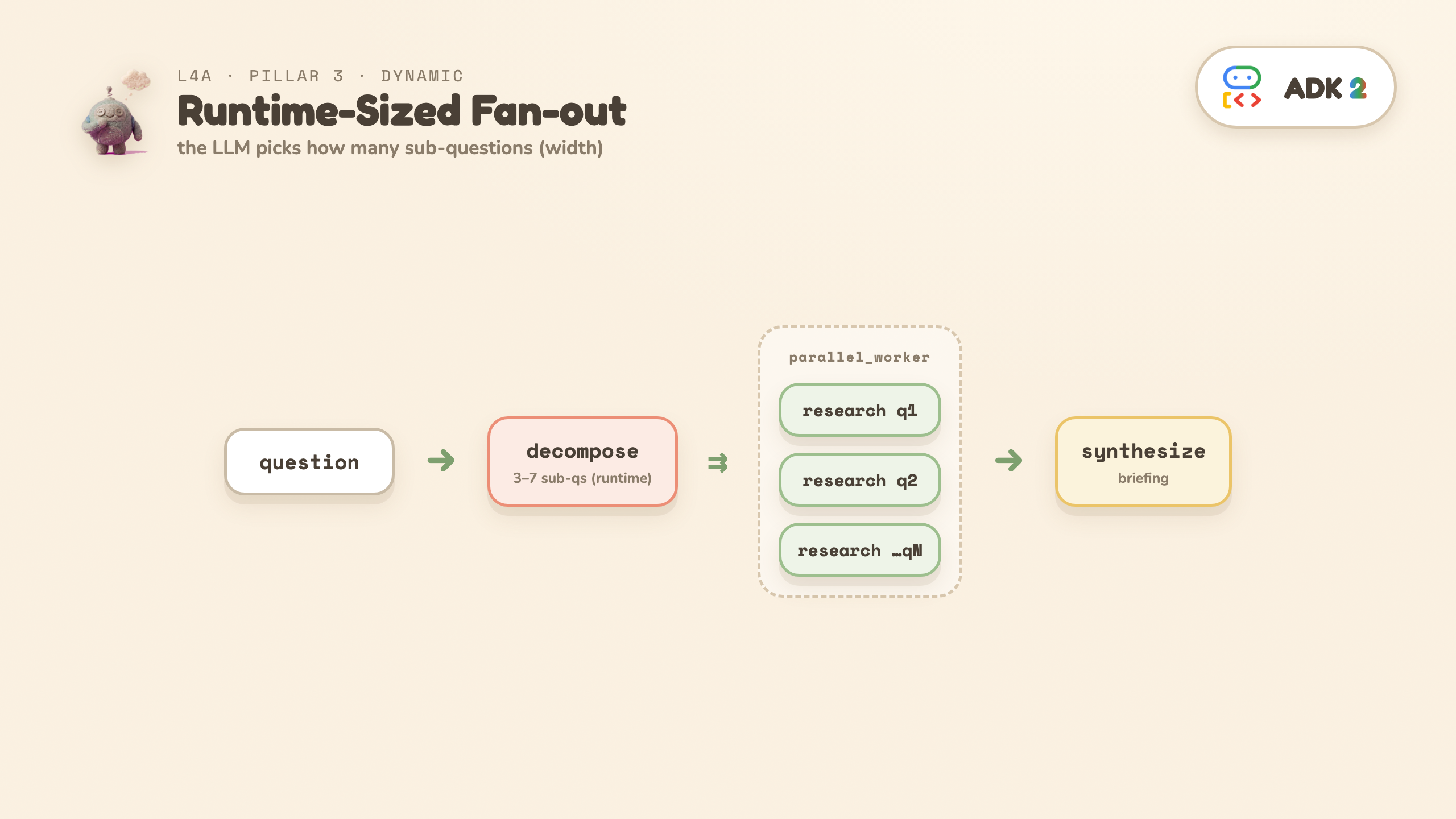
🔍 The markers — there is no
dynamic=True
switch. Dynamic is a way of writing, not a config. Two markers and only two: @node(parallel_worker=True) (takes a runtime-sized list, runs one worker per item) and ctx.run_node(...) (code scheduling nodes directly). See either one → you're in dynamic.
What you'll see: the decomposer prints e.g. 5 sub-questions, they research in parallel, then a synthesized briefing. The number differs on every run — the fixed graph couldn't do that.
Two flags on the worker worth understanding:
rerun_on_resume=Trueis mandatory on any node that callsctx.run_node— ADK raises aValueErrorwithout it. On resume it must re-execute the dispatching node to rebuild the children it spawned, since those aren't in the static graph.retry_config=bounds how this FAILS. A parallel worker cancels every sibling and re-raises the instant one child fails — so without a retry, a single transient 429 discards the whole run, including every call already paid for. The retry lands on the inner per-item node, so each branch retries independently.
❓ You might be wondering: where does ADK "know" this is dynamic? It doesn't need to — nothing is declared anywhere. The decomposer produces a list at runtime; the parallel worker sizes itself to whatever arrives. The dynamism is a property of the data flow you wrote, not a mode you switched on.
👀 Read: the two flags on research_topic — parallel_worker and rerun_on_resume. · ▶ Run it. · ✏️ Change: swap in your own open question — N changes because the input decided the width.
12. L4b · Add recursive spawning (Pillar 3b)
⚡ TL;DR: recursion is written, not given — the worker calls itself through ctx.run_node, ordinary Python — so the brake must be written too. That's MAX_DEPTH.
The question: one research finding sometimes surfaces a narrow sub-topic worth its own investigation. How do you let a branch spawn more parallel work — and keep it bounded?
The shape (now recursive):
START ─► decompose ─► research_topic (parallel_worker, recursive) ─► synthesize
                             │  │  │
                             │  │  └─ research(q3) ─► maybe spawn children
                             │  └─── research(q2) ─► maybe spawn children
                             └────── research(q1) ─► maybe spawn children
▶ Colab: run the L4b cell · 📁 GitHub: L4b_recursion/ · 💻 Local: python -m L4b_recursion.deep_research
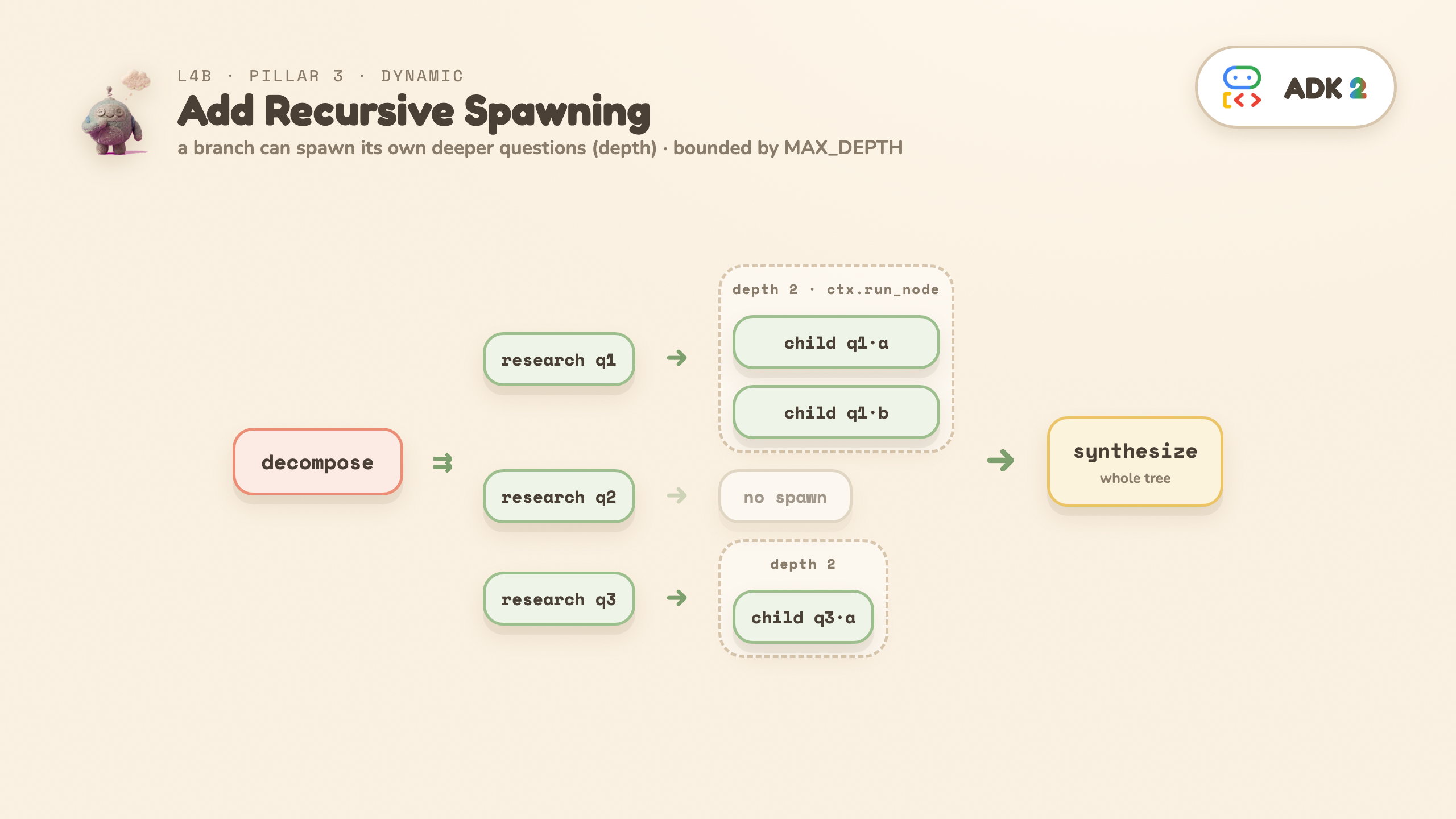
@node(parallel_worker=True, rerun_on_resume=True)
async def research_topic(ctx, node_input):
    finding = coerce(await ctx.run_node(research_agent, node_input=...), ResearchFinding)
    if finding.needs_deeper and finding.deeper_questions and depth < MAX_DEPTH:   # boundary in CODE
        children = await ctx.run_node(research_topic, node_input=deeper)          # recursive fan-out
    yield Event(output={..., "children": children})
🔍 The markers: ctx.run_node(research_topic, ...) inside research_topic itself — self-reference is the recursion — and the guard depth < MAX_DEPTH one line above it.
What you'll see: research nodes printing spawning N deeper — recursion happening live — then a runtime tree shape (e.g. 5 top-level + 10 recursive children). The tree differs on every run.
⚠️ Before you raise the knob: the ceiling grows fast — MAX_DEPTH=3 takes the worst case from ~30 calls to ~93. And at the very end of a run you may see a cancelling N leftover tasks log line: that's ADK tearing down its parallel task group after the result is already complete. Harmless — and depending on your logging config you may never see it.
❓ You might be wondering: isn't dynamic recursive by default? No — L4a is fully dynamic with zero recursion. Dynamic only hands you ordinary Python control flow; L4b chooses to write recursion with it. And because you wrote the recursion, you must write its boundary — this is where "let the LLM shape the work, keep the boundaries in code" stops being a slogan.
👀 Read: the guard: if finding.needs_deeper and depth < MAX_DEPTH. · ▶ Run it. · ✏️ Change: set MAX_DEPTH = 1 and re-run — the tree flattens (and the run gets cheaper). The boundary is YOURS, in code.
13. L5 · Which pattern should you use?
⚡ TL;DR: one axis decides everything — who picks the next step: the graph you drew, the LLM, or your code.
You've built all three. This is the model that makes them useful: match the pattern to the shape of your problem.
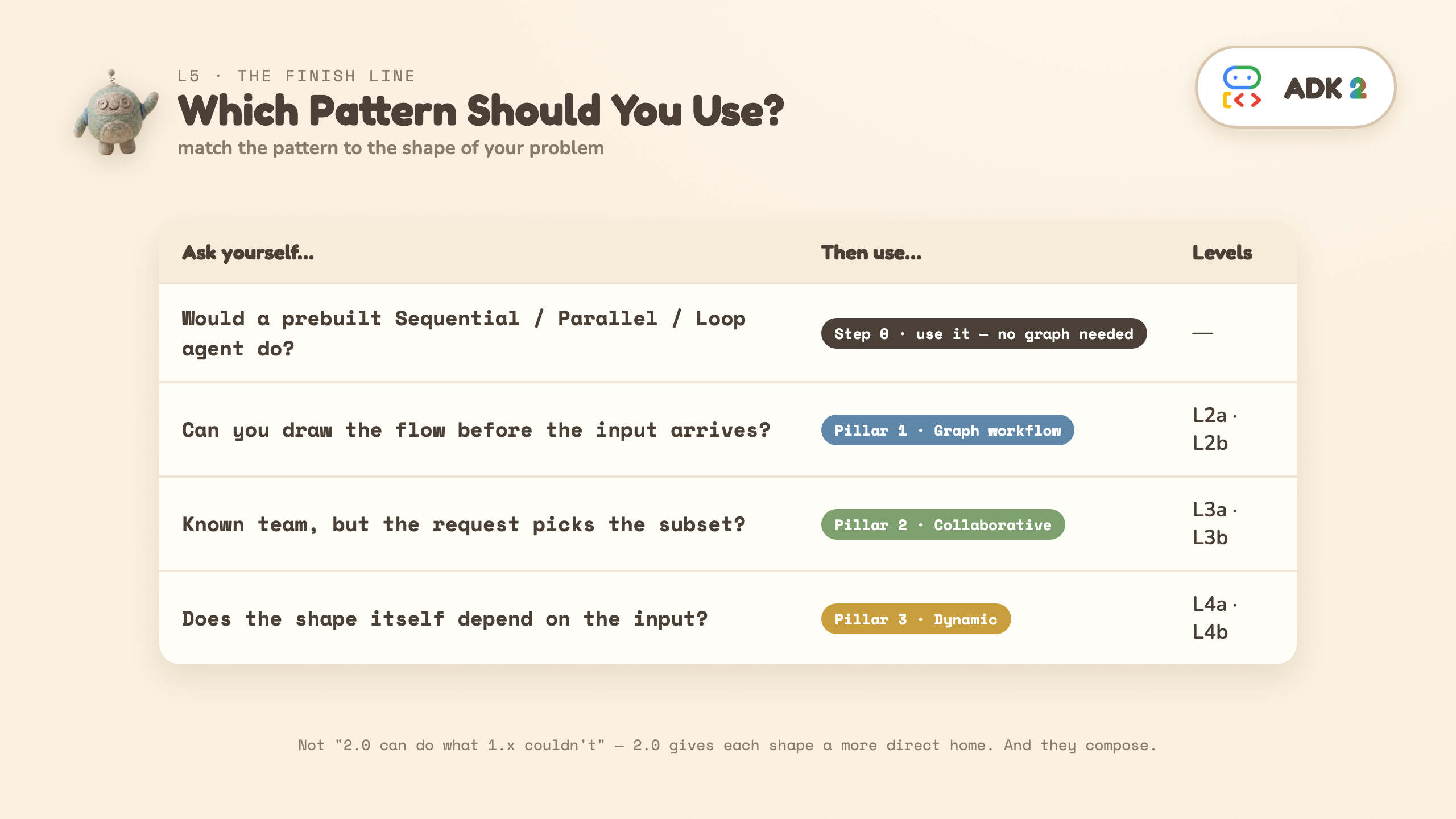
The axis: who decides what runs next?
Pillar | Who decides what runs next | Built in |
1 · Graph | the graph you drew | L2a / L2b |
2 · Collaborative | the LLM | L3a / L3b |
3 · Dynamic | your Python code, at runtime | L4a / L4b |
Step 0: do you even need a graph?
ADK ships prebuilt workflow agents — SequentialAgent, ParallelAgent, LoopAgent. For a plain chain of agents, those are the cheapest correct answer and there's no graph to assemble. Reach past them when you need explicit routing (L2b's router), a join (L2a's JoinNode), or nodes that aren't agents (a plain function, zero LLM calls) — that last one is usually the reason.
Would a prebuilt SequentialAgent / ParallelAgent / LoopAgent do?
│
├─ YES ──────────────────────────────► use it; stop here
│
└─ NO — I need routing, a join, or non-agent nodes
   │
   Can you draw the workflow before the input arrives?
   │
   ├─ YES ───────────────────────────► Pillar 1 · Graph workflow    (L2a/L2b)
   │
   └─ NO
      ├─ Known team, request picks the subset? ─► Pillar 2 · Collaborative  (L3a/L3b)
      └─ Does the shape depend on the input?  ──► Pillar 3 · Dynamic        (L4a/L4b)
The honest 1.x-vs-2 framing
This is not "2.0 can do things 1.x couldn't" — 1.x could build all of it. The shift is that 2.0 gives each shape a more direct home, so known control flow leaves the prompt and becomes structure you can see and test.
Pattern | The 1.x cost | The ADK 2 home |
Graph | 4 LLM calls in the common build; routing hidden in a prompt | function + agent nodes as peers → 1 call, |
Collaborative | buildable via | a declared team: |
Dynamic | recursion drops you out of the framework |
|
The whole app, and what a graph can't show you
You have now built every piece below. Workflow exposes its structure at graph.edges, so this picture is generated from the code rather than drawn by hand — and what the introspection finds is the summary of this lab:
Pillar | What | Why |
1 · Graph (L2b) | 10 edges, routes and all | you drew it before any input arrived |
2 · Collaborative (L3a) | 0 edges — only | the LLM picks the subset per request |
3 · Dynamic (L4a/L4b) | 3 edges — identical in both | the recursion is written in Python, not wired in the graph |
That last row is the proof for the question L4b answers: L4a and L4b have the same graph, and only one of them recurses.
What you can build now
Each pattern you just ran is a real product shape:
You practiced | In the wild, that's | Start from |
Graph + router (L2a/L2b) | document pipelines, ETL-with-LLM-steps, review/approval chains, eval harnesses | this repo's L2b |
Coordinator + | a support copilot with specialist teams, triage desks, multi-lens review | marathon demo mode 2 |
| intake forms, booking flows, onboarding, KYC — any "collect then act" | |
Dynamic width/depth (L4a/L4b) | research agents, report generators, audit sweeps over unknown-sized inputs | marathon demo mode 3 |
They compose
The three patterns are not mutually exclusive. A graph node can call a collaborative coordinator; a specialist can launch a dynamic workflow. Choose the right pattern per part of the problem — that's how you avoid turning every agent system into one giant prompt.
💡 Try it on your own workflow: the script that drew this is scripts/graph_dump.py. Point it at any Workflow and it will print the real edges — a free structural diagram of anything you build.
14. Congratulations

You built a Marathon Race Day Coach and, along the way, all three of ADK 2's orchestration patterns.
What you learned
- Prologue — the mega-prompt that invented its own weather: why structure exists at all.
- L0–L1 —
Agent,Runner, a real tool the model chooses to call, and your firstWorkflow(function nodes + agent nodes as peers). - L2a / L2b — graph workflows: parallel fan-out +
JoinNode, then deterministic routing — one LLM call. - L3a — collaborative agents: the same team run in
chat(stranded) thensingle_turn(parallel subset + synthesis) — one flag, two worlds. - L3b —
taskmode: a paused clarifying question, a scripted resume,finish_taskreturning a validated object. - L4a / L4b — dynamic workflows: runtime width (fan-out), then runtime depth (recursion) with boundaries in code.
- L5 — the decision tree, and how the patterns compose.
Lines worth keeping
Functions prepare the context. Edges define the workflow. The router chooses the path. The model writes the answer.
Let the LLM shape the work, but keep the boundaries in code.
Match the pattern to the shape of your problem.
Next steps
- Run the full app these levels were distilled from — the Marathon Race Day Coach, a FastAPI + SSE build with a browser UI showing all three modes live: github.com/cuppibla/adk-2-marathon-demo.
- Go wider: adk-workflows-compared — all 23 official ADK 2 workflow samples, each with a 1.x port and when-to-use guidance. Start with
docs/three-pillars.md, then the things this codelab skipped:07_loop,17_request_input,22_agent_in_workflow. - Port your own problem: which parts are known-structure (L2), known-team (L3a/L3b), unknown-shape (L4)?
- Explore the code: github.com/cuppibla/adk2-tutorial.
- Came through the workshop? Your credit — and the project it created — won't last forever. To keep re-running these levels for free, do the Take-home setup step instead: a free AI Studio key, no Cloud project, no billing. Swapping that one cell is the only change.