

1. 簡介
AI 代理的實用度取決於可存取的資料。現實世界中的資料大多儲存在資料庫中,而將代理程式連線至資料庫通常需要編寫連線管理、查詢邏輯,以及在代理程式碼中嵌入管道。需要存取資料庫的每個代理程式都會重複這項工作,且每次查詢變更都需要重新部署代理程式。
本程式碼研究室會介紹不同的做法。您可以在 YAML 檔案中宣告資料庫工具 (標準 SQL 查詢、向量相似度搜尋,甚至是自動生成嵌入項目),而 MCP Toolbox for Databases 會以 MCP 伺服器身分處理所有資料庫作業。您的代理程式碼會保持在最低限度:載入工具,讓 Gemini 決定要呼叫哪個工具。
建構項目
「美食搜尋」的餐廳服務專員:這項 ADK 代理由 Gemini 提供技術支援,可協助用餐者使用標準篩選條件 (類別、菜色類型) 瀏覽餐廳菜單,並透過自然語言描述 (例如「我想吃辣的素食」) 尋找菜色。代理程式會完全透過 MCP Toolbox for Databases 讀取及寫入 Cloud SQL PostgreSQL 資料庫,並處理所有資料庫存取作業,包括自動生成向量搜尋的嵌入項目。完成後,工具箱和代理程式都會在 Cloud Run 上執行。
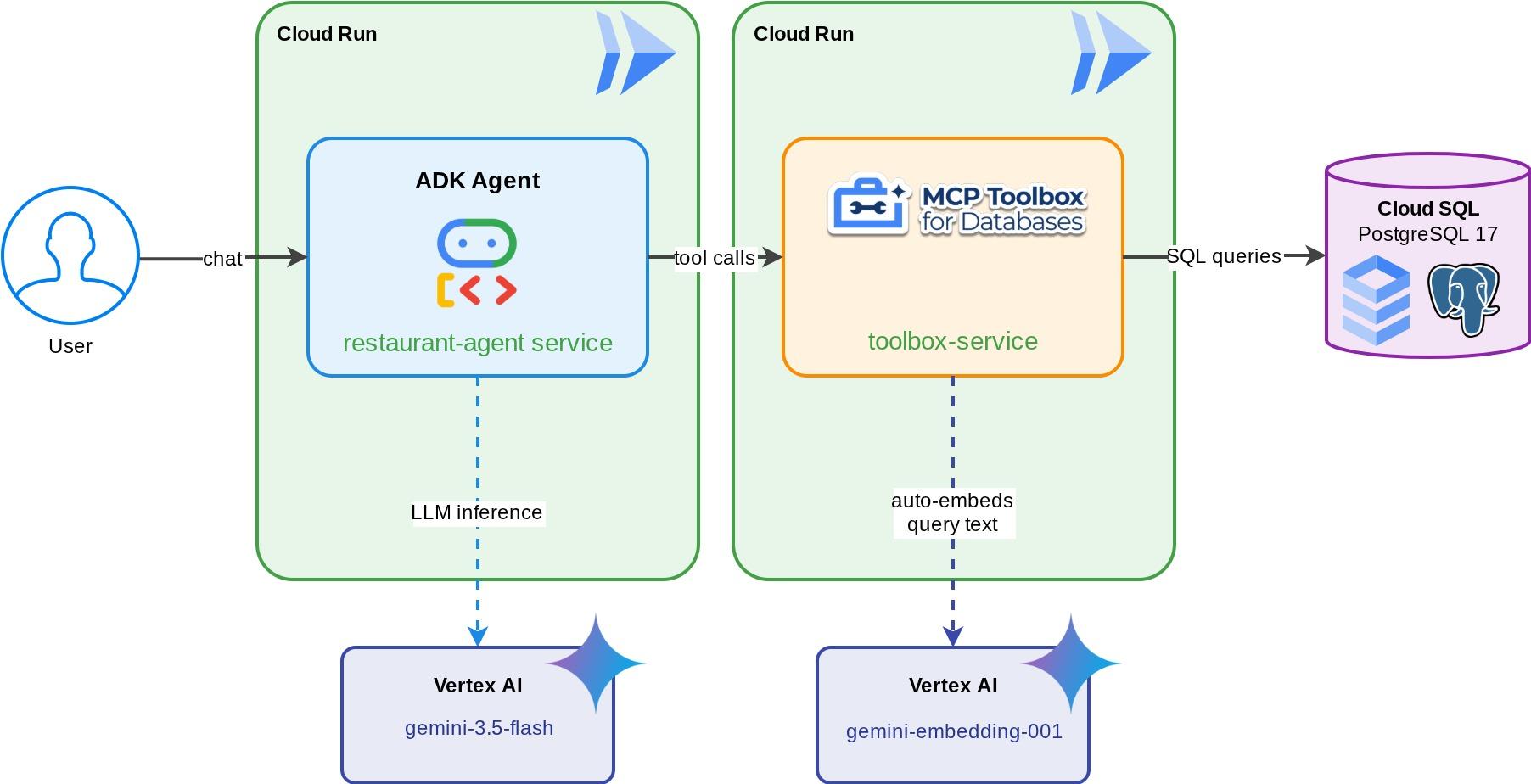
課程內容
- 瞭解 MCP (Model Context Protocol) 如何為 AI 代理標準化工具存取權,以及 MCP Toolbox for Databases 如何將這項功能套用至資料庫作業
- 將 MCP Toolbox for Databases 設為 ADK 代理與 Cloud SQL PostgreSQL 之間的 Middleware
- 在
tools.yaml中以宣告方式定義資料庫工具,代理程式中不會有資料庫程式碼 - 使用
ToolboxToolset建構 ADK 代理,從正在執行的 Toolbox 伺服器載入工具 - 使用 Cloud SQL 內建的
embedding()函式生成向量嵌入,並透過pgvector啟用語意搜尋 - 使用
valueFromParam功能,在寫入作業時自動擷取向量 - 將 Toolbox 伺服器和 ADK 代理部署至 Cloud Run
必要條件
- 具有試用帳單帳戶的 Google Cloud 帳戶
- 對 Python 和 SQL 有基本瞭解
- 具備 Cloud Database 和 ADK 的使用經驗會很有幫助
2. 設定環境
這個步驟會準備 Cloud Shell 殼層環境、設定 Google Cloud 雲端專案,並複製參照存放區。
開啟 Cloud Shell
在瀏覽器中開啟 Cloud Shell。Cloud Shell 提供預先設定的環境,內含本程式碼研究室所需的所有工具。系統提示時,按一下「授權」
然後依序點選「View」(檢視) ->「Terminal」(終端機),開啟終端機。介面應與下圖類似:
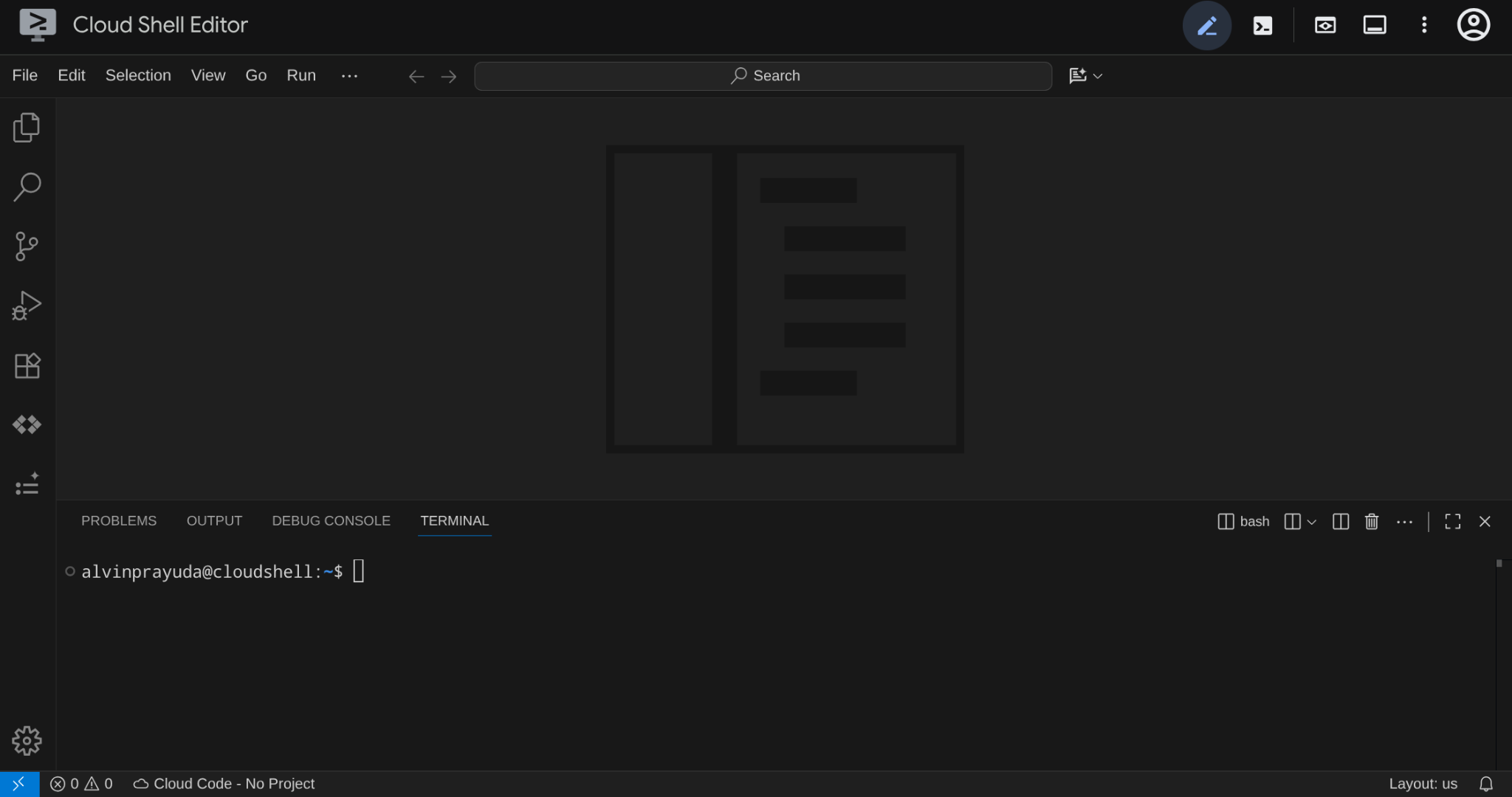
這會是我們的主要介面,頂端是 IDE,底部是終端機
設定目前使用的目錄
建立目前使用的目錄。您在本程式碼研究室中編寫的所有程式碼都會儲存在這裡:
mkdir -p ~/build-agent-adk-toolbox-cloudsql
cloudshell workspace ~/build-agent-adk-toolbox-cloudsql && cd ~/build-agent-adk-toolbox-cloudsql
接著,請準備幾個目錄,以便管理播種指令碼和記錄等項目
mkdir -p ~/build-agent-adk-toolbox-cloudsql/scripts
mkdir -p ~/build-agent-adk-toolbox-cloudsql/logs
設定 Google Cloud 專案
建立 .env 檔案,並加入位置變數:
# For Vertex AI / Gemini API calls
echo "GOOGLE_CLOUD_LOCATION=global" > .env
# For Cloud SQL, Cloud Run, Artifact Registry
echo "REGION=us-central1" >> .env
如要簡化終端機中的專案設定,請將這個專案設定指令碼下載至目前使用的目錄:
curl -sL https://raw.githubusercontent.com/alphinside/cloud-trial-project-setup/main/setup_verify_trial_project.sh -o setup_verify_trial_project.sh
執行指令碼,這個指令會驗證試用帳單帳戶、建立新專案 (或驗證現有專案)、將專案 ID 儲存至目前目錄中的 .env 檔案,並在 gcloud 中設定有效專案。
bash setup_verify_trial_project.sh && source .env
指令碼會執行下列動作:
- 確認您有有效的試用帳單帳戶
- 檢查
.env中是否有現有專案 (如有) - 建立新專案或重複使用現有專案
- 將試用帳單帳戶連結至專案
- 將專案 ID 儲存至
.env - 將專案設為有效的
gcloud專案
在 Cloud Shell 終端機提示中,檢查工作目錄旁的黃色文字,確認專案設定正確。應該會顯示專案 ID。

啟用必要 API
接著,我們需要為要互動的產品啟用多個 API:
gcloud services enable \
  aiplatform.googleapis.com \
  sqladmin.googleapis.com \
  compute.googleapis.com \
  run.googleapis.com \
  cloudbuild.googleapis.com \
  artifactregistry.googleapis.com
- Vertex AI API (
aiplatform.googleapis.com) - 您的代理程式會使用 Gemini 模型,而工具箱會使用嵌入 API 進行向量搜尋。 - Cloud SQL Admin API (
sqladmin.googleapis.com):用於佈建及管理 PostgreSQL 執行個體。 - Compute Engine API (
compute.googleapis.com) - 建立 Cloud SQL 執行個體時需要此 API。 - Cloud Run、Cloud Build、Artifact Registry - 在本程式碼研究室稍後的部署步驟中使用
3. 準備資料庫初始化指令碼
這個步驟會開始建立 Cloud SQL 執行個體,並執行自動設定指令碼,等待執行個體準備就緒,然後建立資料庫、以職缺資訊填入資料庫,並產生嵌入內容,所有作業一次完成。
首先,請將資料庫密碼新增至 .env 檔案,然後重新載入:
echo "DB_PASSWORD=restaurant-pwd" >> .env
echo "DB_INSTANCE=restaurant-instance" >> .env
echo "DB_NAME=restaurant_db" >> .env
source .env
建立 Bash 指令碼,用於建立執行個體和資料庫
接著,使用下列指令建立 scripts/setup_database.sh 指令碼
mkdir -p ~/build-agent-adk-toolbox-cloudsql/scripts
cloudshell edit scripts/setup_database.sh
然後將下列程式碼複製到 scripts/setup_database.sh 檔案中
#!/bin/bash
set -e
source .env

echo "================================================"
echo "Database Setup"
echo "================================================"
echo ""

# Step 1: Create Cloud SQL instance
echo "[1/5] Creating Cloud SQL instance..."

# Check if instance already exists
if gcloud sql instances describe "$DB_INSTANCE" --quiet >/dev/null 2>&1; then
    echo "      Instance already exists"
else
    echo "      Creating instance (takes 5-10 minutes)..."
    gcloud sql instances create "$DB_INSTANCE" \
        --database-version=POSTGRES_17 \
        --tier=db-custom-1-3840 \
        --edition=ENTERPRISE \
        --region="$REGION" \
        --root-password="$DB_PASSWORD" \
        --enable-google-ml-integration \
        --database-flags cloudsql.enable_google_ml_integration=on \
        --quiet
fi
echo "      ✓ Instance ready"
echo ""

# Step 2: Verify instance is ready
echo "[2/5] Verifying instance state..."

STATE=$(gcloud sql instances describe "$DB_INSTANCE" --format='value(state)')

if [ "$STATE" != "RUNNABLE" ]; then
    echo "ERROR: Instance not ready (state: $STATE)"
    exit 1
fi
echo "      ✓ Instance is RUNNABLE"
echo ""

# Step 3: Grant IAM permissions
echo "[3/5] Granting Vertex AI permissions..."

SERVICE_ACCOUNT=$(gcloud sql instances describe "$DB_INSTANCE" \
    --format='value(serviceAccountEmailAddress)')

if [ -z "$SERVICE_ACCOUNT" ]; then
    echo "ERROR: Could not retrieve service account"
    exit 1
fi

gcloud projects add-iam-policy-binding "$GOOGLE_CLOUD_PROJECT" \
    --member="serviceAccount:$SERVICE_ACCOUNT" \
    --role="roles/aiplatform.user" \
    --quiet

echo "      ✓ Permissions granted"
echo ""

# Step 4: Create database
echo "[4/5] Creating database..."

# Check if database already exists
if gcloud sql databases describe "$DB_NAME" \
    --instance="$DB_INSTANCE" --quiet >/dev/null 2>&1; then
    echo "      Database already exists"
else
    gcloud sql databases create "$DB_NAME" \
        --instance="$DB_INSTANCE" \
        --quiet
fi

echo "      ✓ Database '$DB_NAME' ready"
echo ""

# Step 5: Seed database and generate embeddings
echo "[5/5] Seeding database and generating embeddings..."

SCRIPT_DIR="$(cd "$(dirname "${BASH_SOURCE[0]}")" && pwd)"
SETUP_SCRIPT="${SCRIPT_DIR}/setup_restaurant_db.py"

if [ ! -f "$SETUP_SCRIPT" ]; then
    echo "ERROR: Setup script not found: $SETUP_SCRIPT"
    exit 1
fi

uv run "$SETUP_SCRIPT"

echo ""
echo "================================================"
echo "Setup complete!"
echo "================================================"
echo ""
建立資料種子的 Python 指令碼
接著,使用下列指令建立播種指令碼 Python 檔案 scripts/setup_restaurant_db.py
cloudshell edit scripts/setup_restaurant_db.py
然後將下列程式碼複製到 scripts/setup_restaurant_db.py 檔案中
import os
import sys
from pathlib import Path
from dotenv import load_dotenv
from google.cloud.sql.connector import Connector
import pg8000
import time

# Load environment variables from .env file
env_path = Path(__file__).parent.parent / '.env'
load_dotenv(env_path)
EMBEDDING_MODEL='gemini-embedding-001'

# Verify required environment variables
required_vars = ['GOOGLE_CLOUD_PROJECT', 'REGION', 'DB_PASSWORD']
missing_vars = [var for var in required_vars if not os.environ.get(var)]

if missing_vars:
    print(f"ERROR: Missing required environment variables: {', '.join(missing_vars)}", file=sys.stderr)
    print(f"", file=sys.stderr)
    print(f"Expected .env file location: {env_path}", file=sys.stderr)
    if not env_path.exists():
        print(f"✗ File not found at that location", file=sys.stderr)
    else:
        print(f"✓ File exists but is missing the variables above", file=sys.stderr)
    print(f"", file=sys.stderr)
    print(f"Make sure your .env file contains:", file=sys.stderr)
    for var in missing_vars:
        print(f"  {var}=<value>", file=sys.stderr)
    sys.exit(1)

# Menu items data
MENU_ITEMS = [
    ("Truffle Mushroom Risotto", "Italian", "Main Course",
     "Arborio rice, truffle oil, porcini mushrooms, parmesan, white wine",
     "$28", "Vegetarian, Gluten-Free", True,
     "A creamy, luxurious risotto made with arborio rice slow-cooked in white wine and mushroom broth, finished with shaved black truffle and aged parmesan. The porcini mushrooms add a deep, earthy flavor that pairs beautifully with the delicate truffle oil drizzled on top."),
    ("Spicy Tuna Tartare", "Japanese", "Appetizer",
     "Ahi tuna, sriracha, sesame oil, avocado, crispy wonton",
     "$22", "Gluten-Free, Dairy-Free", True,
     "Fresh ahi tuna diced and tossed with sriracha aioli, toasted sesame oil, and lime juice, served atop creamy avocado slices with crispy wonton chips. A perfect balance of heat, richness, and crunch inspired by modern Japanese fusion cuisine."),
    ("Lamb Kofta Kebab", "Middle Eastern", "Main Course",
     "Ground lamb, cumin, coriander, yogurt sauce, flatbread",
     "$24", "Halal", True,
     "Hand-formed spiced lamb kebabs grilled over charcoal, seasoned with cumin, coriander, and sumac. Served with warm flatbread, tangy yogurt-cucumber sauce, and a fresh herb salad. A classic Middle Eastern street food elevated with premium ingredients."),
    ("Pad Thai", "Thai", "Main Course",
     "Rice noodles, shrimp, tamarind, peanuts, bean sprouts, lime",
     "$19", "Gluten-Free, Dairy-Free", True,
     "Stir-fried rice noodles with tiger shrimp, scrambled egg, and a sweet-sour tamarind sauce, topped with crushed peanuts, fresh bean sprouts, and a squeeze of lime. This classic Thai street food dish balances sweet, sour, salty, and umami in every bite."),
    ("Margherita Pizza", "Italian", "Main Course",
     "San Marzano tomatoes, fresh mozzarella, basil, olive oil",
     "$18", "Vegetarian", True,
     "A Neapolitan-style pizza with a thin, charred crust topped with crushed San Marzano tomatoes, creamy buffalo mozzarella, fresh basil leaves, and a drizzle of extra virgin olive oil. Simple, classic, and made with imported Italian ingredients."),
    ("Miso Glazed Black Cod", "Japanese", "Main Course",
     "Black cod, white miso, mirin, sake, pickled ginger",
     "$36", "Gluten-Free, Dairy-Free", True,
     "Buttery black cod marinated for 72 hours in a sweet white miso glaze with mirin and sake, then broiled until caramelized. Served with pickled ginger and steamed bok choy. A signature dish inspired by Nobu's iconic preparation."),
    ("Caesar Salad", "American", "Appetizer",
     "Romaine lettuce, parmesan, croutons, anchovy dressing",
     "$14", "Contains Gluten", True,
     "Crisp romaine hearts tossed with a house-made anchovy-garlic dressing, shaved parmesan, and golden sourdough croutons. A timeless salad that serves as the perfect light starter or side dish with grilled proteins."),
    ("Chicken Tikka Masala", "Indian", "Main Course",
     "Chicken thigh, tomato cream sauce, garam masala, basmati rice",
     "$21", "Gluten-Free", True,
     "Tender chunks of tandoori-marinated chicken simmered in a rich, creamy tomato sauce spiced with garam masala, cumin, and fenugreek. Served over fragrant basmati rice with warm garlic naan on the side."),
    ("Chocolate Lava Cake", "French", "Dessert",
     "Dark chocolate, butter, eggs, vanilla, powdered sugar",
     "$15", "Vegetarian", True,
     "A warm, individual-sized chocolate cake with a molten dark chocolate center that flows when you break through the delicate outer shell. Made with 70% Belgian dark chocolate and served with a scoop of vanilla bean ice cream."),
    ("Pho Bo", "Vietnamese", "Main Course",
     "Rice noodles, beef brisket, star anise, cinnamon, bean sprouts, Thai basil",
     "$17", "Gluten-Free, Dairy-Free", True,
     "A deeply aromatic beef broth simmered for 12 hours with star anise, cinnamon, and charred ginger, ladled over rice noodles and thinly sliced beef brisket. Served with fresh Thai basil, bean sprouts, jalapeño, and lime for the table to customize."),
    ("Lobster Bisque", "French", "Appetizer",
     "Lobster, heavy cream, cognac, tarragon, cayenne",
     "$19", "Gluten-Free", True,
     "A velvety smooth soup made from roasted lobster shells, finished with heavy cream, a splash of cognac, and fresh tarragon. Each bowl is garnished with tender lobster meat and a pinch of cayenne for subtle warmth."),
    ("Falafel Plate", "Middle Eastern", "Main Course",
     "Chickpeas, herbs, tahini, pickled vegetables, hummus",
     "$16", "Vegan, Gluten-Free", True,
     "Crispy-on-the-outside, fluffy-on-the-inside chickpea fritters seasoned with fresh parsley, cilantro, and cumin. Served with creamy tahini sauce, house-made hummus, pickled turnips, and warm pita bread."),
    ("Crème Brûlée", "French", "Dessert",
     "Heavy cream, vanilla bean, egg yolks, caramelized sugar",
     "$13", "Vegetarian, Gluten-Free", True,
     "A classic French custard made with Madagascar vanilla bean and farm-fresh egg yolks, topped with a perfectly torched layer of caramelized sugar that cracks with a satisfying snap. Rich, creamy, and elegantly simple."),
    ("Korean BBQ Short Ribs", "Korean", "Main Course",
     "Beef short ribs, soy sauce, sesame, garlic, pear marinade",
     "$32", "Dairy-Free", False,
     "Premium beef short ribs marinated overnight in a sweet and savory blend of soy sauce, Asian pear, garlic, and toasted sesame. Grilled tableside over charcoal and served with lettuce wraps, pickled daikon, and gochujang dipping sauce."),
    ("Tiramisu", "Italian", "Dessert",
     "Mascarpone, espresso, ladyfingers, cocoa, Marsala wine",
     "$14", "Vegetarian, Contains Gluten", True,
     "Layers of espresso-soaked ladyfingers and whipped mascarpone cream flavored with Marsala wine, dusted with premium Dutch cocoa powder. Made fresh daily and chilled for 24 hours to develop rich, complex flavors."),
]


def get_connection():
    """Create a connection to Cloud SQL using the connector."""
    project = os.environ['GOOGLE_CLOUD_PROJECT']
    region = os.environ['REGION']
    password = os.environ['DB_PASSWORD']
    instance = os.environ['DB_INSTANCE']
    database = os.environ['DB_NAME']

    connector = Connector()
    conn = connector.connect(
        f"{project}:{region}:{instance}",
        "pg8000",
        user="postgres",
        password=password,
        db=database
    )
    return conn, connector


def create_schema(cursor):
    """Create extensions and menu_items table."""
    cursor.execute("CREATE EXTENSION IF NOT EXISTS google_ml_integration")
    cursor.execute("CREATE EXTENSION IF NOT EXISTS vector")
    cursor.execute("""
        CREATE TABLE IF NOT EXISTS menu_items (
            id SERIAL PRIMARY KEY,
            name VARCHAR NOT NULL,
            cuisine_type VARCHAR NOT NULL,
            category VARCHAR NOT NULL,
            ingredients VARCHAR NOT NULL,
            price VARCHAR NOT NULL,
            dietary_tags VARCHAR NOT NULL,
            available BOOLEAN NOT NULL DEFAULT TRUE,
            description TEXT NOT NULL,
            description_embedding vector(3072)
        )
    """)


def seed_menu_items(cursor, conn):
    """Insert menu items."""
    cursor.execute("SELECT COUNT(*) FROM menu_items")
    existing_count = cursor.fetchone()[0]

    if existing_count > 0:
        print(f"      {existing_count} menu items already exist, skipping seed")
        return 0

    cursor.executemany("""
        INSERT INTO menu_items (name, cuisine_type, category, ingredients, price, dietary_tags, available, description)
        VALUES (%s, %s, %s, %s, %s, %s, %s, %s)
    """, MENU_ITEMS)
    conn.commit()
    return len(MENU_ITEMS)


def generate_embeddings(cursor, conn):
    """Generate embeddings using Cloud SQL's embedding() function."""
    cursor.execute("SELECT COUNT(*) FROM menu_items WHERE description_embedding IS NULL")
    null_count = cursor.fetchone()[0]

    if null_count == 0:
        print("      All menu items already have embeddings")
        return 0

    cursor.execute(f"""
        UPDATE menu_items
        SET description_embedding = embedding('{EMBEDDING_MODEL}', description)::vector
        WHERE description_embedding IS NULL
    """)
    rows_updated = cursor.rowcount
    conn.commit()
    return rows_updated


def main():
    conn, connector = get_connection()
    cursor = conn.cursor()

    try:
        create_schema(cursor)
        conn.commit()

        seeded = seed_menu_items(cursor, conn)
        if seeded > 0:
            print(f"      ✓ Inserted {seeded} menu items")

        # Waiting for vertex role propagation
        time.sleep(60)
        embedded = generate_embeddings(cursor, conn)
        if embedded > 0:
            print(f"      ✓ Generated {embedded} embeddings")

    except Exception as e:
        print(f"ERROR: {e}", file=sys.stderr)
        sys.exit(1)
    finally:
        cursor.close()
        conn.close()
        connector.close()


if __name__ == "__main__":
    main()
接著前往下一個步驟
4. 建立及初始化資料庫
現在可以執行指令碼了。我們需要 Python 執行準備好的指令碼,因此請先準備 Python
設定 Python 專案
uv 是以 Rust 編寫的快速 Python 套件和專案管理員 ( uv 文件)。本程式碼研究室使用這項工具,可快速且輕鬆地維護 Python 專案
初始化 Python 專案,並新增必要的依附元件:
uv init
uv add cloud-sql-python-connector --extra pg8000
uv add python-dotenv
請注意,我們在這裡使用 cloud-sql-python-connector Python SDK 初始化與資料庫執行個體的安全連線,並使用應用程式預設憑證進行驗證。
執行設定指令碼
現在,我們可以在背景執行設定指令碼,並使用下列指令檢查寫入 logs/atabase_setup.log 檔案的控制台輸出內容。等待期間,您可以繼續進行下一個部分
mkdir -p ~/build-agent-adk-toolbox-cloudsql/logs
bash scripts/setup_database.sh > logs/database_setup.log 2>&1 &
下載 Toolbox 二進位檔
在本教學課程中,我們將使用 MCP Toolbox,幸運的是,這個工具箱隨附預建二進位檔,可在 Linux 環境中使用。現在,我們在背景下載,因為這需要一段時間。執行下列指令下載二進位檔,並檢查 logs/toolbox_dl.log 上的輸出記錄。等待期間,您可以繼續進行下一個部分
cd ~/build-agent-adk-toolbox-cloudsql
curl -O https://storage.googleapis.com/mcp-toolbox-for-databases/v1.1.0/linux/amd64/toolbox > logs/toolbox_dl.log 2>&1 &
瞭解設定指令碼 scripts/setup_database.sh
現在,我們來瞭解先前設定的設定指令碼。這個檔案會執行下列程序
- 我們在該處執行的第一個指令是
gcloud sql instances create指令,並加上下列旗標
db-custom-1-3840是ENTERPRISE版中最小的專用核心 Cloud SQL 層級 (1 個 vCPU、3.75 GB RAM)。詳情請參閱這篇文章。Vertex AI 機器學習整合功能需要專用核心,共用核心層級 (db-f1-micro、db-g1-small) 不支援這項功能。--root-password設定預設postgres使用者的密碼。--enable-google-ml-integration可啟用 Cloud SQL 與 Vertex AI 的內建整合功能,讓您使用embedding()函式,直接從 SQL 呼叫嵌入模型。
- 確認執行個體是否已處於
RUNNABLE狀態 - 使用
gcloud projects add-iam-policy-binding指令,授予 Cloud SQL 執行個體的服務帳戶呼叫 Vertex AI 的權限。這是內建embedding()函式所必需的項目,我們會在植入資料庫時使用這個函式 - 建立資料庫
- 執行播種指令碼
setup_restaurant_db.py指令碼
瞭解種子指令碼 scripts/setup_restaurant_db.py
現在,我們來看看種子指令碼,這個指令碼會執行下列動作:
- 初始化與資料庫執行個體的連線
- 安裝兩項 PostgreSQL 擴充功能:
google_ml_integration:提供embedding()SQL 函式,可直接從 SQL 呼叫 Vertex AI 嵌入模型。這是資料庫層級的擴充功能,可讓您在restaurant_db中使用機器學習函式。您在建立執行個體時設定的執行個體層級旗標 (--enable-google-ml-integration),可讓 Cloud SQL VM 連線至 Vertex AI,而擴充功能則會在這個特定資料庫中提供 SQL 函式。vector(pgvector) - 新增vector資料類型和距離運算子,用於儲存及查詢嵌入。
- 建立資料表,請注意
description_embedding資料欄是vector(3072),也就是儲存 3072 維度向量的pgvector資料欄。 - 傳播初始菜單項目資料
- 使用
embedding()函式,透過內建的 Vertex 整合功能,從description欄位產生嵌入資料,並填入description_embedding
embedding('gemini-embedding-001', description):直接從 SQL 呼叫 Vertex AI 的 Gemini 嵌入模型,並傳遞每個職務的description文字。這是您在種子指令碼中安裝的google_ml_integration擴充功能。::vector:將傳回的浮點數陣列轉換為 pgvector 的vector型別,以便儲存及使用距離運算子查詢。UPDATE會在所有 15 個資料列中執行,為每個職務說明生成一個 3072 維度的嵌入。
這會準備初始資料,供代理程式存取
5. 設定 MCP Toolbox for Databases
這個步驟會介紹 MCP Toolbox for Databases,並設定該工具以連線至 Cloud SQL 執行個體,以及定義兩個標準 SQL 查詢工具。
什麼是 MCP?為什麼要使用 Toolbox?
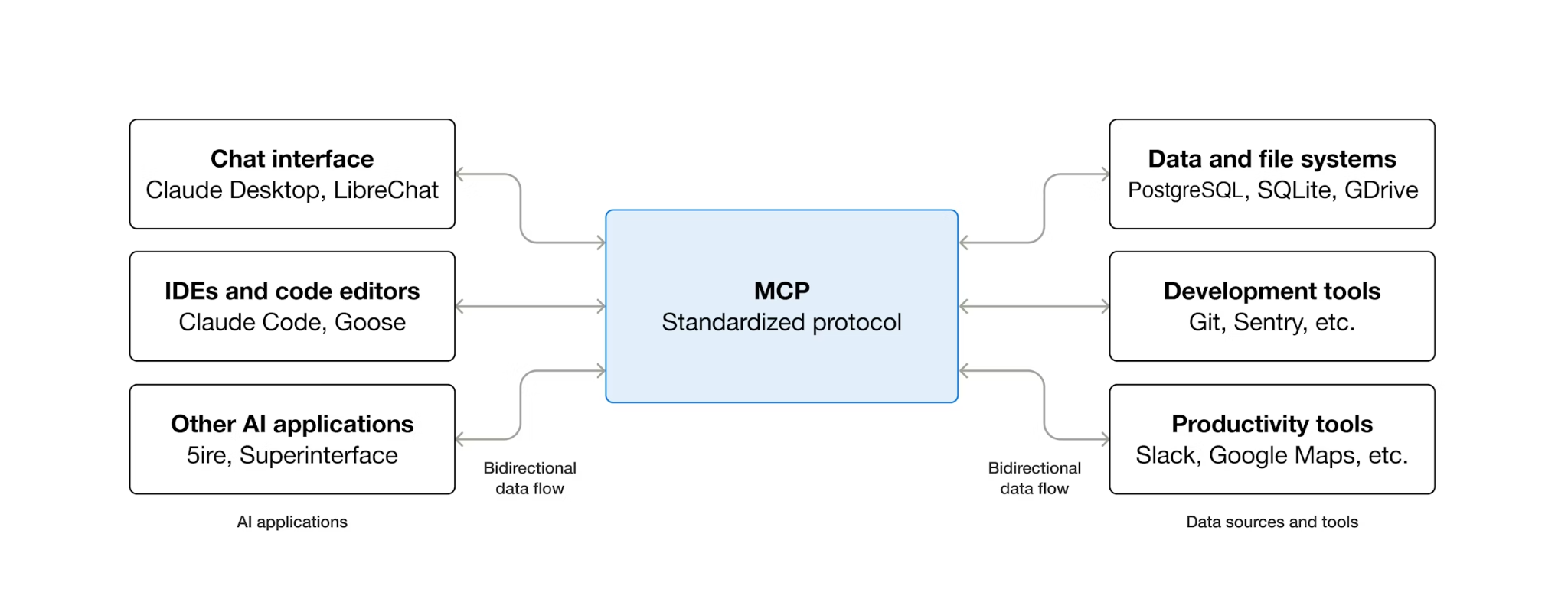
MCP (Model Context Protocol) 是一項開放通訊協定,可將 AI 代理程式探索及與外部工具互動的方式標準化。定義用戶端/伺服器模型:代理會代管 MCP 用戶端,而工具則由 MCP 伺服器公開。任何支援 MCP 的用戶端,都可以使用支援 MCP 的伺服器,代理不必為每項工具撰寫自訂整合代碼。
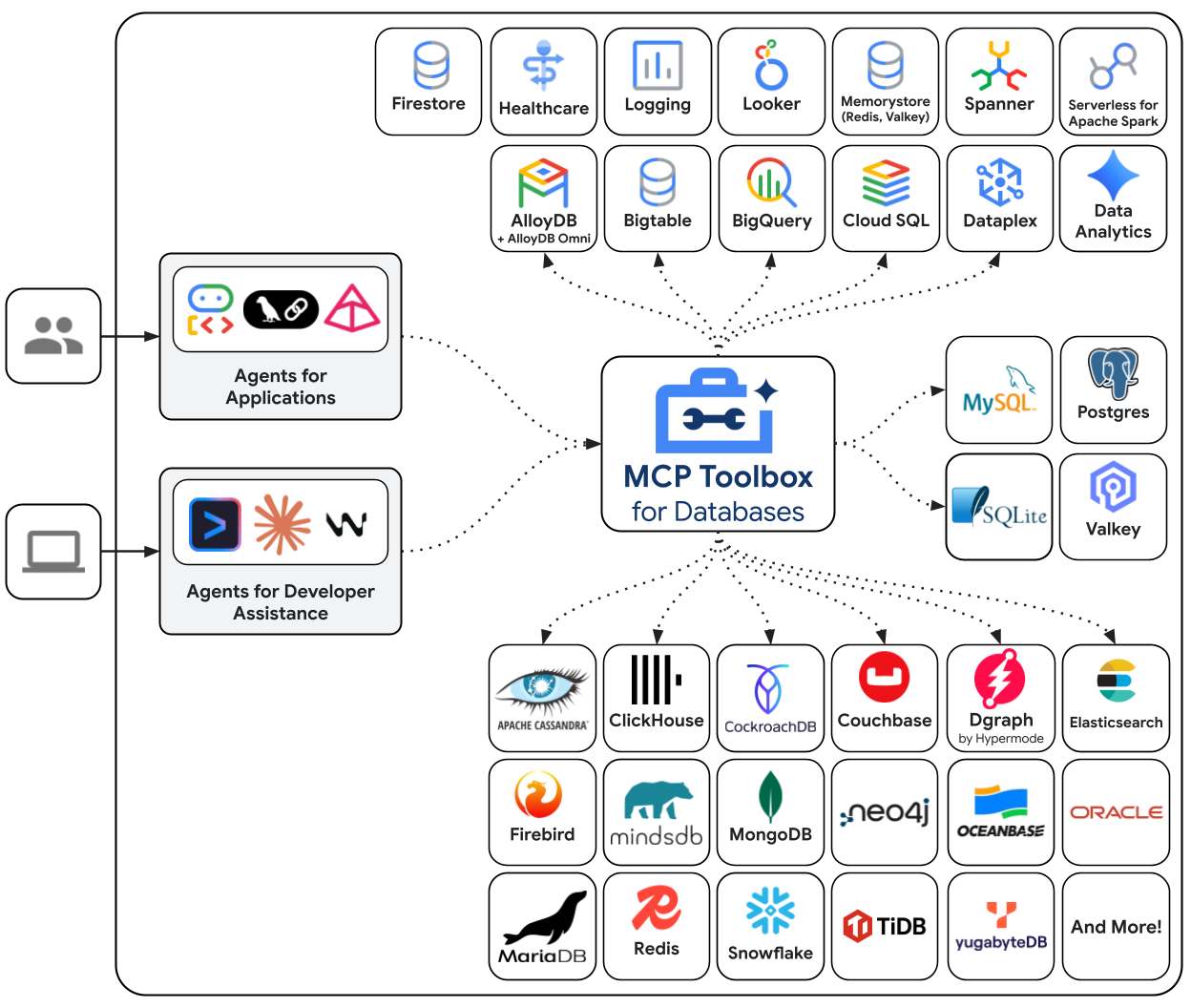
MCP Toolbox for Databases 是專為資料庫存取權建構的開放原始碼 MCP 伺服器。如果沒有這項功能,您就必須編寫 Python 函式來開啟資料庫連線、管理連線集區、建構參數化查詢來防止 SQL 注入、處理錯誤,並將所有程式碼嵌入代理程式中。需要存取資料庫的每位代理程式都會重複這項工作。變更查詢會導致代理程式重新部署。
使用 Toolbox 編寫 YAML 檔案。每項工具都會對應至參數化的 SQL 陳述式。Toolbox 會處理連線集區、參數化查詢、驗證和可觀測性。工具與代理程式分離,只要編輯 tools.yaml 並重新啟動 Toolbox,即可更新查詢,不必修改代理程式碼。這些工具適用於 ADK、LangGraph、LlamaIndex 或任何與 MCP 相容的架構。
撰寫工具設定
現在,我們需要在 Cloud Shell 編輯器中建立名為 tools.yaml 的檔案,設定工具的設定
cloudshell edit tools.yaml
這個檔案使用多文件 YAML,以 --- 分隔的每個區塊都是獨立資源。每個資源都有 kind,可宣告資源類型 (資料庫連線為 sources,可供代理程式呼叫的動作為 tools),以及type指定後端 (來源為 cloud-sql-postgres,以 SQL 為基礎的工具為 postgres-sql)。工具會透過 name 參照來源,Toolbox 就能知道要執行的連線集區。環境變數使用 ${VAR_NAME} 語法,並在啟動時解析。
現在,請先將下列指令碼複製到 tools.yaml 檔案中
# tools.yaml

# --- Data Source ---
kind: source
name: restaurant-db
type: cloud-sql-postgres
project: ${GOOGLE_CLOUD_PROJECT}
region: ${REGION}
instance: ${DB_INSTANCE}
database: ${DB_NAME}
user: postgres
password: ${DB_PASSWORD}

---
這個指令碼會定義下列資源:
- 來源 (
restaurant-db):告知 Toolbox 如何連線至 Cloud SQL PostgreSQL 執行個體。cloud-sql-postgres類型會在內部使用 Cloud SQL 連接器,自動處理驗證和安全連線。系統會在啟動時從環境變數解析${GOOGLE_CLOUD_PROJECT}、${REGION}和${DB_PASSWORD}預留位置。
接著,在 tools.yaml 的 --- 符號下方附加下列指令碼:
# --- Tool 1: Search menu items by category and/or cuisine type ---
kind: tool
name: search-menu
type: postgres-sql
source: restaurant-db
description: >-
  Search for menu items by category and/or cuisine type.
  Use this tool when the user wants to browse menu items
  by category (e.g., Main Course, Appetizer, Dessert) or find dishes
  from a specific cuisine. Both parameters accept an
  empty string to match all values.
statement: |
  SELECT name, cuisine_type, category, ingredients, price, dietary_tags, available
  FROM menu_items
  WHERE ($1 = '' OR LOWER(category) = LOWER($1))
  AND ($2 = '' OR LOWER(cuisine_type) LIKE '%' || LOWER($2) || '%')
  ORDER BY name
  LIMIT 10
parameters:
  - name: category
    type: string
    description: "The menu category to filter by (e.g., 'Main Course', 'Appetizer', 'Dessert'). Use empty string for all categories."
  - name: cuisine_type
    type: string
    description: "A cuisine type to search for (partial match, e.g., 'Italian', 'Japanese'). Use empty string for all cuisines."

---

# --- Tool 2: Get full details for a specific menu item ---
kind: tool
name: get-item-details
type: postgres-sql
source: restaurant-db
description: >-
  Get full details for a specific menu item including its description,
  price, dietary tags, and availability. Use this tool when the
  user asks about a particular dish by name or cuisine.
statement: |
  SELECT name, cuisine_type, category, ingredients, price, dietary_tags, available, description
  FROM menu_items
  WHERE LOWER(name) LIKE '%' || LOWER($1) || '%'
  OR LOWER(cuisine_type) LIKE '%' || LOWER($1) || '%'
parameters:
  - name: search_term
    type: string
    description: "The dish name or cuisine type to look up (partial match supported)."

---
這個指令碼會定義下列資源:
- 工具 1 和 2 (
search-menu、get-item-details) - 標準 SQL 查詢工具。每個對應都會將工具名稱 (代理程式看到的內容) 對應至參數化 SQL 陳述式 (資料庫執行的內容)。參數使用$1、$2位置預留位置。工具箱會將這些項目做為預先準備好的陳述式執行,避免 SQL 注入。
繼續操作,在 tools.yaml 的 --- 符號下方附加下列指令碼:
# --- Embedding Model ---
kind: embeddingModel
name: gemini-embedding
type: gemini
model: gemini-embedding-001
project: ${GOOGLE_CLOUD_PROJECT}
location: ${GOOGLE_CLOUD_LOCATION}
dimension: 3072

---
這個指令碼會定義下列資源:
- 嵌入模型 (
gemini-embedding) - 將工具箱設定為呼叫 Gemini 的gemini-embedding-001模型,生成 3072 維度的文字嵌入。Toolbox 會使用應用程式預設憑證 (ADC) 進行驗證,因此在 Cloud Shell 或 Cloud Run 中不需要 API 金鑰。請注意,這裡設定的dimension必須與先前設定的資料庫種子相同
繼續操作,在 tools.yaml 的 --- 符號下方附加下列指令碼:
# --- Tool 3: Semantic search by description ---
kind: tool
name: search-menu-by-description
type: postgres-sql
source: restaurant-db
description: >-
  Find menu items that match a natural language description of what the user
  is looking for. Use this tool when the user describes their ideal dish
  using flavors, textures, dietary preferences, or cravings rather than a
  specific category or cuisine. Examples: "I want something spicy and creamy,"
  "a light vegetarian appetizer," "something rich and chocolatey for dessert."
statement: |
  SELECT name, cuisine_type, category, ingredients, price, dietary_tags, description
  FROM menu_items
  WHERE description_embedding IS NOT NULL
  ORDER BY description_embedding <=> $1
  LIMIT 5
parameters:
  - name: search_query
    type: string
    description: "A natural language description of the kind of dish the user is looking for."
    embeddedBy: gemini-embedding

---
這個指令碼會定義下列資源:
- 工具 3 (
search-menu-by-description) - 向量搜尋工具。search_query參數具有embeddedBy: gemini-embedding,可告知 Toolbox 攔截原始文字、傳送至嵌入模型,並在 SQL 陳述式中使用產生的向量。<=>運算子是 pgvector 的餘弦距離,值越小表示說明越相似。
最後,在 tools.yaml 的 --- 符號下方附加最後一個工具
# --- Tool 4: Add a new menu item with automatic embedding ---
kind: tool
name: add-menu-item
type: postgres-sql
source: restaurant-db
description: >-
  Add a new menu item to the restaurant. Use this tool when a user asks
  to add a dish that is not currently on the menu.
statement: |
  INSERT INTO menu_items (name, cuisine_type, category, ingredients, price, dietary_tags, available, description, description_embedding)
  VALUES ($1, $2, $3, $4, $5, $6, CAST($7 AS BOOLEAN), $8, $9)
  RETURNING name, cuisine_type
parameters:
  - name: name
    type: string
    description: "The dish name (e.g., 'Truffle Mushroom Risotto')."
  - name: cuisine_type
    type: string
    description: "The cuisine type (e.g., 'Italian', 'Japanese', 'Thai')."
  - name: category
    type: string
    description: "The menu category (e.g., 'Main Course', 'Appetizer', 'Dessert')."
  - name: ingredients
    type: string
    description: "Comma-separated list of key ingredients (e.g., 'salmon, miso, ginger')."
  - name: price
    type: string
    description: "The price (e.g., '$24')."
  - name: dietary_tags
    type: string
    description: "Dietary information (e.g., 'Vegetarian, Gluten-Free')."
  - name: available
    type: string
    description: "Whether the dish is currently available (true or false)."
  - name: description
    type: string
    description: "A short description of the dish (2-3 sentences)."
  - name: description_vector
    type: string
    description: "Auto-generated embedding vector for the dish description."
    valueFromParam: description
    embeddedBy: gemini-embedding
這個指令碼會定義下列資源:
- 工具 4 (
add-menu-item) - 示範向量擷取。description_vector參數有兩個特殊欄位: valueFromParam: description:工具箱會將description參數的值複製到這個參數中。大型語言模型永遠不會看到這個參數。embeddedBy: gemini-embedding:工具箱會將複製的文字嵌入向量,然後傳遞至 SQL。
結果:一個工具呼叫會儲存原始說明文字和向量嵌入,但代理程式完全不知道嵌入。
多文件 YAML 格式會以 --- 分隔各項資源。每個文件都有 kind、name 和 type 欄位,可定義文件內容。總而言之,我們已設定下列所有項目:
- 定義來源資料庫
- 定義工具 ( 工具 1 和 2),使用標準篩選條件查詢資料庫
- 定義嵌入模型
- 定義用來對資料庫執行向量搜尋的工具 ( 工具 3)
- 定義用於向量資料擷取的工具 ( 工具 4) 至資料庫
6. 執行 MCP Toolbox 伺服器
在上一個步驟中,我們已為 MCP Toolbox 設定必要設定。現在可以執行伺服器了
驗證植入的資料
啟動 Toolbox 前,請先確認資料庫設定已完成。使用下列指令建立 Python 指令碼 scripts/verify_database.py
cloudshell edit scripts/verify_seed.py
然後將下列程式碼複製到 scripts/verify_seed.py 檔案中
#!/usr/bin/env python3
"""Verify the database has 15 menu items with embeddings."""

import os
import sys
from pathlib import Path
from dotenv import load_dotenv
from google.cloud.sql.connector import Connector
import pg8000

# Load environment variables
env_path = Path(__file__).parent.parent / '.env'
load_dotenv(env_path)

# Verify required environment variables
required_vars = ['GOOGLE_CLOUD_PROJECT', 'REGION', 'DB_PASSWORD', 'DB_INSTANCE', 'DB_NAME']
missing_vars = [var for var in required_vars if not os.environ.get(var)]

if missing_vars:
    print(f"ERROR: Missing environment variables: {', '.join(missing_vars)}", file=sys.stderr)
    sys.exit(1)


def verify_database():
    """Check that 15 menu items exist with embeddings."""
    connector = Connector()

    try:
        project = os.environ['GOOGLE_CLOUD_PROJECT']
        region = os.environ['REGION']
        password = os.environ['DB_PASSWORD']
        instance = os.environ['DB_INSTANCE']
        database = os.environ['DB_NAME']

        conn = connector.connect(
            f"{project}:{region}:{instance}",
            "pg8000",
            user="postgres",
            password=password,
            db=database
        )
        cursor = conn.cursor()

        # Count menu items and embeddings
        cursor.execute("SELECT COUNT(*) FROM menu_items")
        item_count = cursor.fetchone()[0]

        cursor.execute("SELECT COUNT(*) FROM menu_items WHERE description_embedding IS NOT NULL")
        embedding_count = cursor.fetchone()[0]

        print(f"Menu Items: {item_count}/15")
        print(f"Embeddings: {embedding_count}/15")

        cursor.close()
        conn.close()

        if item_count == 15 and embedding_count == 15:
            print("\n✓ Database ready!")
            return True
        else:
            print("\n✗ Database not ready")
            return False

    except Exception as e:
        print(f"\nERROR: {e}", file=sys.stderr)
        return False
    finally:
        connector.close()


if __name__ == "__main__":
    success = verify_database()
    sys.exit(0 if success else 1)
這項指令碼會檢查菜單項目資料的數量及其嵌入內容。使用下列指令執行指令碼
uv run scripts/verify_seed.py
如果看到下列終端機輸出內容,表示資料已準備就緒
Menu Items: 15/15
Embeddings: 15/15

✓ Database ready!
啟動 Toolbox 伺服器
在先前的設定步驟中,我們已下載 toolbox 可執行檔。確認這個二進位檔案存在且已成功下載。如果沒有,請下載並等待完成
cd ~/build-agent-adk-toolbox-cloudsql
if [ ! -f toolbox ]; then
  curl -O https://storage.googleapis.com/mcp-toolbox-for-databases/v1.1.0/linux/amd64/toolbox
fi
chmod +x toolbox
我們需要將 .env 變數公開給 MCP 工具箱執行的子程序。執行下列指令,啟動工具箱伺服器,並將控制台輸出內容記錄到 logs/mcp_toolbox.log 檔案
set -a; source .env; set +a
./toolbox --config tools.yaml --enable-api > logs/mcp_toolbox.log 2>&1 &
您應該會在 logs/mcp_toolbox.log 檔案中看到輸出內容,確認伺服器已準備就緒,如下所示:
... INFO "Initialized 1 sources: restaurant-db"
... INFO "Initialized 0 authServices: "
... INFO "Using Vertex AI backend for Gemini embedding"
... INFO "Initialized 1 embeddingModels: gemini-embedding"
... INFO "Initialized 4 tools: search-menu-by-description, add-menu-item, search-menu, get-item-details"
...
... INFO "Server ready to serve!"
驗證工具
查詢 Toolbox API,列出所有已註冊的工具:
curl -s http://localhost:5000/api/toolset | uv run -m json.tool
畫面應會顯示工具及其說明和參數。如下所示
...
       "search-menu-by-description": {
            "description": "Find menu items that match a natural language description of what the user is looking for. Use this tool when the user describes their ideal dish using flavors, textures, dietary preferences, or cravings rather than a specific category or cuisine. Examples: \"I want something spicy and creamy,\" \"a light vegetarian appetizer,\" \"something rich and chocolatey for dessert.\"",
            "parameters": [
                {
                    "name": "search_query",
                    "type": "string",
                    "required": true,
                    "description": "A natural language description of the kind of dish the user is looking for.",
                    "authServices": []
                }
            ],
            "authRequired": []
        }
...
直接測試 search-menu 工具:
curl -s -X POST http://localhost:5000/api/tool/search-menu/invoke \\ -H "Content-Type: application/json" \\ -d '{"category": "Main Course", "cuisine_type": "Italian"}' | jq '.result | fromjson'
回應應包含種子資料中的義大利主菜。
[
  {
    "name": "Margherita Pizza",
    "cuisine_type": "Italian",
    "category": "Main Course",
    "ingredients": "San Marzano tomatoes, fresh mozzarella, basil, olive oil",
    "price": "$18",
    "dietary_tags": "Vegetarian",
    "available": true
  },
  {
    "name": "Truffle Mushroom Risotto",
    "cuisine_type": "Italian",
    "category": "Main Course",
    "ingredients": "Arborio rice, truffle oil, porcini mushrooms, parmesan, white wine",
    "price": "$28",
    "dietary_tags": "Vegetarian, Gluten-Free",
    "available": true
  }
]
7. 建構 ADK 代理
現在,我們將在這個專案中使用 Python 的 ADK,請新增必要依附元件:
uv add google-adk==1.29.0 toolbox-adk==1.0.0
google-adk- Google 的 Agent Development Kit,包括 Gemini SDKtoolbox-adk- ADK 整合 MCP Toolbox for Databases。
建立代理目錄結構
ADK 需要特定資料夾版面配置:以代理程式命名的目錄,其中包含 __init__.py、agent.py 和 .env。為此,它內建指令可快速建立結構:
uv run adk create restaurant_agent \
    --model gemini-3.5-flash \
    --project ${GOOGLE_CLOUD_PROJECT} \
    --region ${GOOGLE_CLOUD_LOCATION}
您的目錄現在應如下所示:
build-agent-adk-toolbox-cloudsql/
├── restaurant_agent/
│   ├── __init__.py
│   ├── agent.py
│   └── .env
├── logs
├── scripts
└── ...
接著,我們需要將 ADK 代理程式整合至正在執行的 Toolbox 伺服器,並測試所有四項工具:標準查詢、語意搜尋和向量擷取。代理程式碼非常簡短:所有資料庫邏輯都位於 tools.yaml 中。
設定代理的環境
ADK 會從您在先前步驟中設定的殼層環境讀取 GOOGLE_GENAI_USE_VERTEXAI、GOOGLE_CLOUD_PROJECT 和 GOOGLE_CLOUD_LOCATION。唯一的代理程式專屬變數是 TOOLBOX_URL,請將其附加至代理程式的 .env 檔案:
echo -e "\nTOOLBOX_URL=http://127.0.0.1:5000" >> restaurant_agent/.env
更新代理程式模組
在 Cloud Shell 編輯器中開啟 restaurant_agent/agent.py
cloudshell edit restaurant_agent/agent.py
並使用下列程式碼覆寫內容:
# restaurant_agent/agent.py
import os

from google.adk.agents import LlmAgent
from toolbox_adk import ToolboxToolset

TOOLBOX_URL = os.environ.get("TOOLBOX_URL", "http://127.0.0.1:5000")

toolbox = ToolboxToolset(TOOLBOX_URL)

root_agent = LlmAgent(
    name="restaurant_agent",
    model="gemini-3.5-flash",
    instruction="""You are a friendly and knowledgeable concierge at "Foodie Finds," a restaurant. Your job:
- Help diners browse the menu by category or cuisine type.
- Provide full details about specific dishes, including ingredients, price, and dietary information.
- Recommend dishes based on natural language descriptions of what the diner is craving.
- Add new menu items when asked.

When a diner asks about a specific dish by name or cuisine, use the get-item-details tool.
When a diner asks for a specific category or cuisine type, use the search-menu tool.
When a diner describes what kind of food they want — by flavor, texture, dietary needs, or cravings — use the search-menu-by-description tool for semantic search.

When in doubt between search-menu and search-menu-by-description, prefer search-menu-by-description — it searches dish descriptions and finds more relevant matches.
If a dish is not available (available is false), let the diner know and suggest similar alternatives from the search results.
Be conversational, knowledgeable, and concise.""",
    tools=[toolbox],
)
請注意,這裡沒有資料庫程式碼,因為 ToolboxToolset 會在啟動時連線至 Toolbox 伺服器,並載入所有可用工具。代理會依名稱呼叫工具,Toolbox 則會將這些呼叫轉換為針對 Cloud SQL 的 SQL 查詢。
TOOLBOX_URL 環境變數在本機開發時預設為 http://127.0.0.1:5000。稍後部署至 Cloud Run 時,您會使用 Toolbox 服務的 Cloud Run URL 覆寫此設定,不需要變更任何程式碼。
測試代理
啟動 ADK 開發人員 UI:
cd ~/build-agent-adk-toolbox-cloudsql
uv run adk web --allow_origins "regex:https://.*\.cloudshell\.dev"
使用 Cloud Shell 的「網頁預覽」功能開啟終端機中顯示的網址 (通常是 http://localhost:8000),或按住 Ctrl 鍵並點選終端機中顯示的網址。在左上角的代理下拉式選單中,選取「restaurant_agent」restaurant_agent。
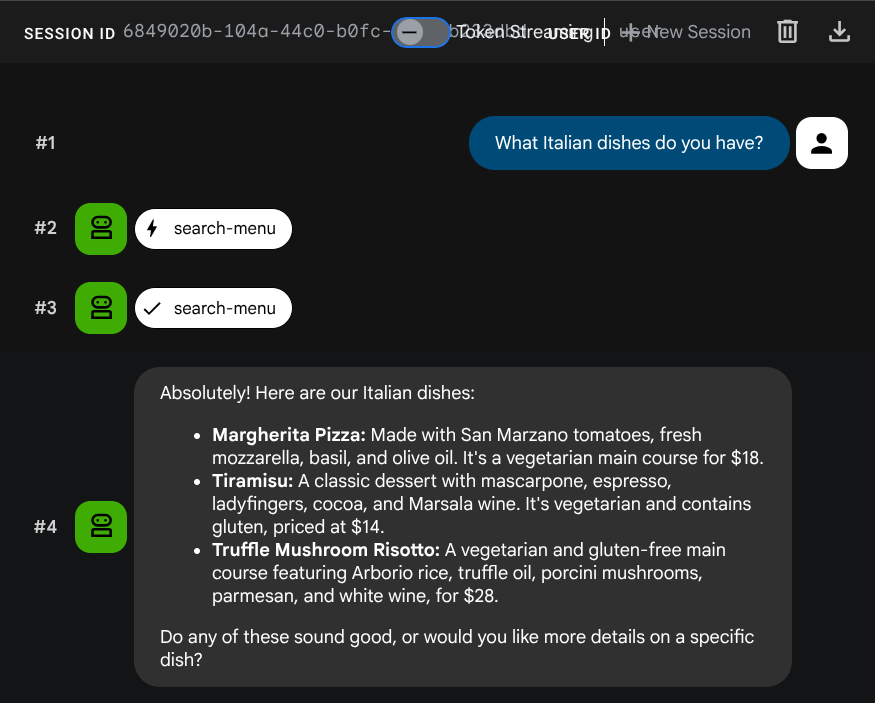
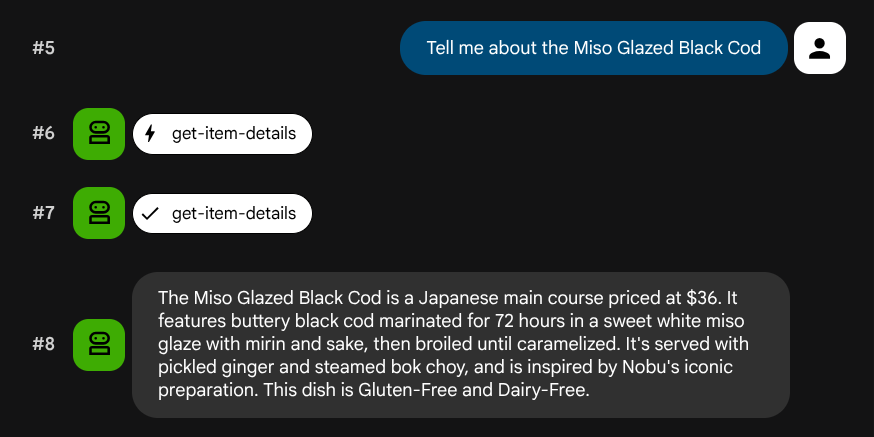
測試標準查詢
請試試下列提示詞,驗證標準 SQL 工具:
What Italian dishes do you have?
Tell me about the Miso Glazed Black Cod
測試語意搜尋
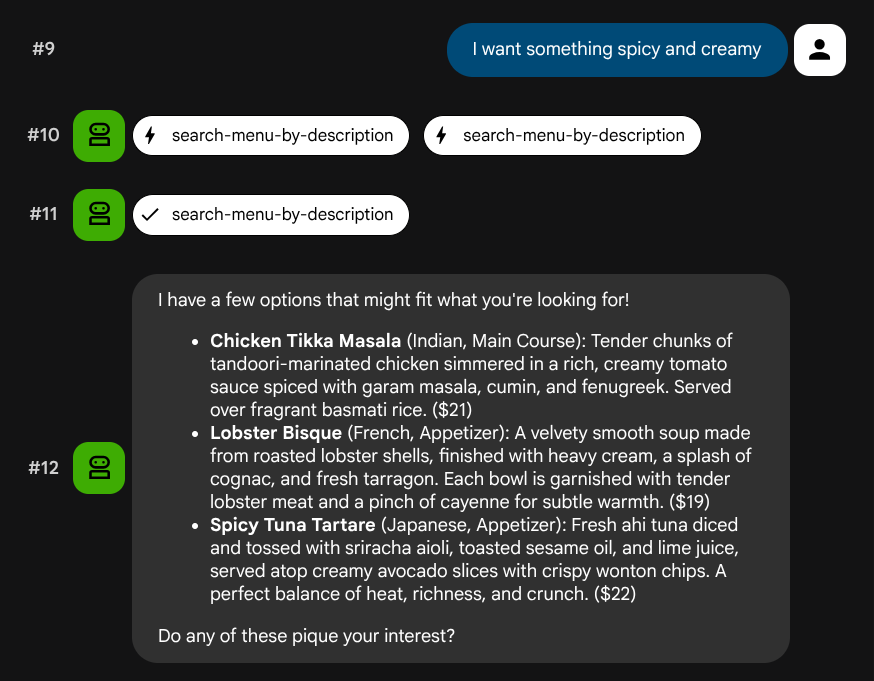
請嘗試使用自然語言描述,不要對應到特定角色或技術堆疊:
I want something spicy and creamy
Something rich and chocolatey for dessert
I'm in the mood for something light and healthy
代理會根據查詢類型嘗試選擇合適的工具:結構化篩選器會經過 search-menu,自然語言描述則會經過 search-menu-by-description。
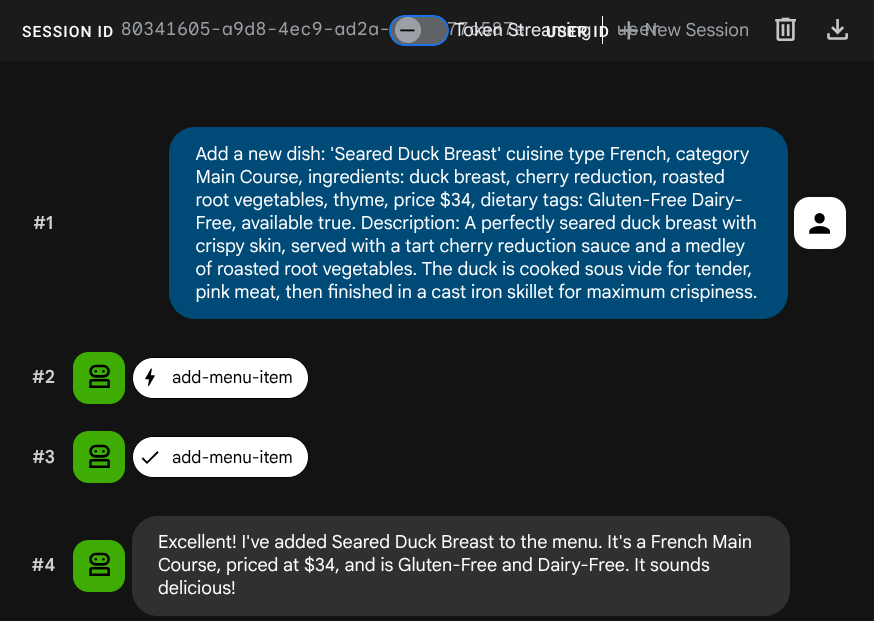
測試向量擷取作業
請代理程式新增工作:
Add a new dish: 'Seared Duck Breast' cuisine type French, category Main Course, ingredients: duck breast, cherry reduction, roasted root vegetables, thyme, price $34, dietary tags: Gluten-Free Dairy-Free, available true. Description: A perfectly seared duck breast with crispy skin, served with a tart cherry reduction sauce and a medley of roasted root vegetables. The duck is cooked sous vide for tender, pink meat,
then
finished in a cast iron skillet for maximum crispiness.
現在嘗試搜尋:
Find me something with rich, gamey flavors and fruit sauce
系統會在 INSERT 期間自動產生嵌入內容,不需另外執行步驟。
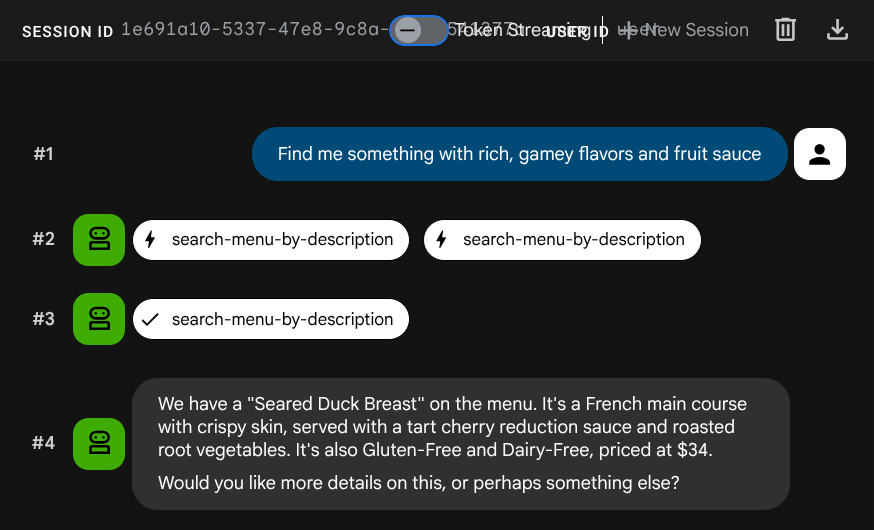
現在,您已擁有功能完整的代理式 RAG 應用程式,可運用 ADK、MCP Toolbox 和 Cloud SQL。恭喜!接下來,讓我們進一步將這些應用程式部署至 Cloud Run!
現在,請先按下 Ctrl+C 鍵兩次,終止程序並停止開發人員 UI,再繼續操作。
8. 部署至 Cloud Run
代理程式和工具箱會在本地運作。這個步驟會將兩者部署為 Cloud Run 服務,以便透過網際網路存取。Toolbox 服務會在 Cloud Run 上以 MCP 伺服器的形式執行,而代理服務會連線至該伺服器。
準備部署 Toolbox
為 Toolbox 服務建立部署目錄:
cd ~/build-agent-adk-toolbox-cloudsql
mkdir -p deploy-toolbox
cp toolbox tools.yaml deploy-toolbox/
建立 Toolbox 的 Dockerfile。在 Cloud Shell 編輯器中開啟 deploy-toolbox/Dockerfile:
cloudshell edit deploy-toolbox/Dockerfile
並將下列指令碼複製到該檔案中
# deploy-toolbox/Dockerfile
FROM debian:bookworm-slim
RUN apt-get update && apt-get install -y ca-certificates && rm -rf /var/lib/apt/lists/*
WORKDIR /app
COPY toolbox tools.yaml ./
RUN chmod +x toolbox
EXPOSE 8080
CMD ["./toolbox", "--config", "tools.yaml", "--enable-api", "--address", "0.0.0.0", "--port", "8080"]
Toolbox 二進位檔和 tools.yaml 會封裝到最小的 Debian 映像檔中。Cloud Run 會將流量轉送至通訊埠 8080。
部署 Toolbox 服務
cd ~/build-agent-adk-toolbox-cloudsql
gcloud run deploy toolbox-service \
  --source deploy-toolbox/ \
  --region $REGION \
  --set-env-vars "DB_PASSWORD=$DB_PASSWORD,DB_INSTANCE=$DB_INSTANCE,DB_NAME=$DB_NAME,GOOGLE_CLOUD_PROJECT=$GOOGLE_CLOUD_PROJECT,REGION=$REGION,GOOGLE_CLOUD_LOCATION=$GOOGLE_CLOUD_LOCATION" \
  --allow-unauthenticated \
  --quiet > logs/deploy_toolbox.log 2>&1 &
這個指令會將來源提交至 Cloud Build、建構容器映像檔、將映像檔推送至 Artifact Registry,並部署至 Cloud Run。這項作業需要幾分鐘才能完成,您可以在 logs/deploy_toolbox.log 檔案中檢查部署程序記錄
準備部署代理程式
在 Toolbox 建構期間,設定代理程式的部署檔案。
在專案根目錄中建立 Dockerfile。在 Cloud Shell 編輯器中開啟 Dockerfile:
cloudshell edit Dockerfile
然後複製下列內容
# Dockerfile
FROM ghcr.io/astral-sh/uv:python3.12-trixie-slim
WORKDIR /app
COPY pyproject.toml ./
COPY uv.lock ./
RUN uv sync --no-dev
COPY restaurant_agent/ restaurant_agent/
EXPOSE 8080
CMD ["uv", "run", "adk", "web", "--host", "0.0.0.0", "--port", "8080"]
這個 Dockerfile 使用 ghcr.io/astral-sh/uv 做為基本映像檔,其中包含預先安裝的 Python 和 uv,因此不需要透過 pip 分別安裝 uv。
建立 .dockerignore 檔案,從容器映像檔中排除不必要的檔案:
cloudshell edit .dockerignore
然後將下列指令碼複製到該檔案中
# .dockerignore
.venv/
__pycache__/
*.pyc
.env
restaurant_agent/.env
toolbox
tools.yaml
deploy-toolbox/
部署代理服務
等待 Toolbox 部署作業完成。再次檢查 logs/deploy_toolbox.log 的部署程序,確認程序是否正確。然後使用下列指令擷取 Cloud Run 網址
TOOLBOX_URL=$(gcloud run services describe toolbox-service \
  --region=$REGION \
  --format='value(status.url)')
echo "Toolbox URL: $TOOLBOX_URL"
畫面會顯示類似以下的輸出內容:
Toolbox URL: https://toolbox-service-xxxxxx-xx.a.run.app
接著,請確認部署的工具箱是否正常運作:
curl -s "$TOOLBOX_URL/api/toolset" | python3 -m json.tool | head -5
如果輸出內容如以下範例所示,表示部署作業已成功
{
    "serverVersion": "1.1.0+binary.linux.amd64.da6f5f8",
    "tools": {
        "add-menu-item": {
            "description": "Add a new menu item to the restaurant. Use this tool when a user asks to add a dish that is not currently on the menu.",
接著,請部署代理程式,並將 Toolbox 網址做為環境變數傳遞:
cd ~/build-agent-adk-toolbox-cloudsql
gcloud run deploy restaurant-agent \
  --source . \
  --region $REGION \
  --set-env-vars "TOOLBOX_URL=$TOOLBOX_URL,GOOGLE_CLOUD_PROJECT=$GOOGLE_CLOUD_PROJECT,GOOGLE_CLOUD_LOCATION=$GOOGLE_CLOUD_LOCATION,GOOGLE_GENAI_USE_VERTEXAI=TRUE" \
  --allow-unauthenticated \
  --quiet
代理程式碼會從環境讀取 TOOLBOX_URL (您先前已設定)。在本地端,這個變數會指向 http://127.0.0.1:5000;在 Cloud Run 上,則會指向 Toolbox 服務網址。不必變更程式碼。
測試已部署的代理
擷取代理程式的 Cloud Run 網址:
AGENT_URL=$(gcloud run services describe restaurant-agent \
  --region=$REGION \
  --format='value(status.url)')
echo "Agent URL: $AGENT_URL"
在瀏覽器中開啟網址。ADK 開發人員 UI 會載入,這個介面與您在本機使用的介面相同,現在會在 Cloud Run 上執行。
從下拉式選單中選取「restaurant_agent」restaurant_agent,然後進行測試:
What Italian dishes do you have?
I want something spicy and creamy
這兩項查詢都會透過已部署的服務運作:Cloud Run 上的代理程式會呼叫 Cloud Run 上的 Toolbox,後者則會查詢 Cloud SQL。
9. 恭喜 / 清理
您已建構並部署智慧型餐廳菜單助理,該助理使用 MCP Toolbox for Databases 連結 ADK 代理和 Cloud SQL PostgreSQL,並執行標準 SQL 查詢和語意向量搜尋。
您已經瞭解的內容
- MCP 如何為 AI 代理標準化工具存取權,以及 MCP Toolbox for Databases 如何將這項功能套用至資料庫作業,以宣告式 YAML 設定取代自訂資料庫程式碼
- 如何使用
cloud-sql-postgres來源類型,將 Cloud SQL PostgreSQL 設定為工具箱資料來源 - 如何使用參數化陳述式定義標準 SQL 查詢工具,防止 SQL 注入攻擊
- 如何使用 pgvector 和
gemini-embedding-001啟用向量搜尋,並透過embeddedBy參數自動嵌入查詢 valueFromParam如何啟用自動向量擷取功能:LLM 提供文字說明,而 Toolbox 會在背景複製、嵌入及儲存向量和文字- ADK 的
ToolboxToolset如何從執行中的 Toolbox 伺服器載入工具,盡量減少代理程式碼,並完全分離資料庫邏輯 - 如何將 Toolbox MCP 伺服器和 ADK 代理部署至 Cloud Run,做為個別服務
清理
如要避免系統向您的 Google Cloud 帳戶收取本程式碼研究室所建立資源的費用,請刪除個別資源或整個專案。
方法 1:刪除專案 (建議)
最簡單的清理方式就是刪除專案。這會移除與專案相關聯的所有資源。
gcloud projects delete $GOOGLE_CLOUD_PROJECT
方法 2:刪除個別資源
如要保留專案,但只移除在本程式碼研究室中建立的資源,請按照下列步驟操作:
gcloud run services delete restaurant-agent --region=$REGION --quiet
gcloud run services delete toolbox-service --region=$REGION --quiet
gcloud sql instances delete restaurant-instance --quiet
gcloud artifacts repositories delete cloud-run-source-deploy --location=$REGION --quiet 2>/dev/null