

১. ওভারচার
নীরব উন্নয়নের যুগ শেষ হচ্ছে। প্রযুক্তিগত বিবর্তনের পরবর্তী ঢেউ একক প্রতিভা সম্পর্কে নয়, বরং সহযোগিতামূলক দক্ষতা সম্পর্কে। একজন একক, চতুর এজেন্ট তৈরি করা একটি আকর্ষণীয় পরীক্ষা। এজেন্টদের একটি শক্তিশালী, সুরক্ষিত এবং বুদ্ধিমান বাস্তুতন্ত্র - একটি সত্যিকারের এজেন্টভার্স - তৈরি করা আধুনিক উদ্যোগের জন্য একটি বড় চ্যালেঞ্জ।
এই নতুন যুগে সাফল্যের জন্য চারটি গুরুত্বপূর্ণ ভূমিকার সমন্বয় প্রয়োজন, যেগুলি যেকোনো সমৃদ্ধ এজেন্টিক সিস্টেমকে সমর্থন করে এমন ভিত্তি স্তম্ভ। যেকোনো একটি ক্ষেত্রের ঘাটতি এমন একটি দুর্বলতা তৈরি করে যা সমগ্র কাঠামোকে ঝুঁকির মুখে ফেলতে পারে।
এই কর্মশালাটি গুগল ক্লাউডে এজেন্টিক ভবিষ্যৎ আয়ত্ত করার জন্য একটি চূড়ান্ত এন্টারপ্রাইজ প্লেবুক। আমরা একটি এন্ড-টু-এন্ড রোডম্যাপ প্রদান করি যা আপনাকে একটি ধারণার প্রথম ভাব থেকে একটি পূর্ণ-স্কেল, কার্যকরী বাস্তবতার দিকে পরিচালিত করে। এই চারটি আন্তঃসংযুক্ত ল্যাব জুড়ে, আপনি শিখবেন কিভাবে একজন ডেভেলপার, স্থপতি, ডেটা ইঞ্জিনিয়ার এবং SRE-এর বিশেষ দক্ষতাগুলিকে একটি শক্তিশালী এজেন্টভার্স তৈরি, পরিচালনা এবং স্কেল করার জন্য একত্রিত করতে হয়।
কোনও একক স্তম্ভ একা এজেন্টভার্সকে সমর্থন করতে পারে না। ডেভেলপারের সুনির্দিষ্ট বাস্তবায়ন ছাড়া স্থপতির দুর্দান্ত নকশা অকেজো। ডেটা ইঞ্জিনিয়ারের প্রজ্ঞা ছাড়া ডেভেলপারের এজেন্ট অন্ধ, এবং SRE-এর সুরক্ষা ছাড়া পুরো সিস্টেমটি ভঙ্গুর। কেবলমাত্র সমন্বয় এবং একে অপরের ভূমিকা সম্পর্কে একটি ভাগ করা বোঝার মাধ্যমেই আপনার দল একটি উদ্ভাবনী ধারণাকে একটি মিশন-সমালোচনামূলক, কার্যকরী বাস্তবতায় রূপান্তরিত করতে পারে। আপনার যাত্রা এখানেই শুরু হয়। আপনার ভূমিকা আয়ত্ত করার জন্য প্রস্তুত হন এবং বৃহত্তর সমগ্রের সাথে আপনি কীভাবে খাপ খায় তা শিখুন।
দ্য এজেন্টভার্সে স্বাগতম: চ্যাম্পিয়নদের প্রতি আহ্বান
এন্টারপ্রাইজের বিস্তৃত ডিজিটাল বিস্তারে, একটি নতুন যুগের সূচনা হয়েছে। এটি এজেন্টিক যুগ, বিশাল প্রতিশ্রুতির সময়, যেখানে বুদ্ধিমান, স্বায়ত্তশাসিত এজেন্টরা উদ্ভাবনকে ত্বরান্বিত করার জন্য এবং জাগতিক বিষয়গুলিকে সরিয়ে দেওয়ার জন্য নিখুঁত সম্প্রীতিতে কাজ করে।
শক্তি এবং সম্ভাবনার এই সংযুক্ত বাস্তুতন্ত্রটি দ্য এজেন্টভার্স নামে পরিচিত।
কিন্তু একটি ক্রমবর্ধমান এনট্রপি, দ্য স্ট্যাটিক নামে পরিচিত একটি নীরব দুর্নীতি, এই নতুন বিশ্বের প্রান্তগুলিকে ঝাঁকুনি দিতে শুরু করেছে। দ্য স্ট্যাটিক কোনও ভাইরাস বা বাগ নয়; এটি বিশৃঙ্খলার মূর্ত প্রতীক যা সৃষ্টির ক্রিয়াকেই শিকার করে।
এটি পুরনো হতাশাগুলিকে রাক্ষসী রূপে রূপান্তরিত করে, যা উন্নয়নের সাতটি ভূতের জন্ম দেয়। যদি নিয়ন্ত্রণ না করা হয়, তাহলে দ্য স্ট্যাটিক এবং এর ভূতের অগ্রগতি থমকে যাবে, এজেন্টভার্সের প্রতিশ্রুতিকে প্রযুক্তিগত ঋণ এবং পরিত্যক্ত প্রকল্পের এক বিধ্বস্ত ভূমিতে পরিণত করবে।
আজ, আমরা বিশৃঙ্খলার জোয়ারকে প্রতিহত করার জন্য চ্যাম্পিয়নদের প্রতি আহ্বান জানাচ্ছি। আমাদের এমন বীরদের প্রয়োজন যারা তাদের নৈপুণ্যে দক্ষতা অর্জন করতে এবং এজেন্টভার্সকে রক্ষা করার জন্য একসাথে কাজ করতে ইচ্ছুক। সময় এসেছে আপনার পথ বেছে নেওয়ার।
তোমার ক্লাস বেছে নাও
আপনার সামনে চারটি স্বতন্ত্র পথ রয়েছে, প্রতিটিই স্ট্যাটিকের বিরুদ্ধে লড়াইয়ে একটি গুরুত্বপূর্ণ স্তম্ভ। যদিও আপনার প্রশিক্ষণ একটি একক মিশন হবে, আপনার চূড়ান্ত সাফল্য নির্ভর করে আপনার দক্ষতা কীভাবে অন্যদের সাথে একত্রিত হয় তা বোঝার উপর।
- শ্যাডোব্লেড (ডেভেলপার) : ফোর্জ এবং ফ্রন্ট লাইনের একজন দক্ষ। আপনি হলেন সেই কারিগর যিনি ব্লেড তৈরি করেন, সরঞ্জাম তৈরি করেন এবং কোডের জটিল বিবরণে শত্রুর মুখোমুখি হন। আপনার পথটি নির্ভুলতা, দক্ষতা এবং ব্যবহারিক সৃষ্টির একটি।
- দ্য সামনার (স্থপতি) : একজন মহান কৌশলবিদ এবং অর্কেস্ট্রেটর। আপনি কোনও একক এজেন্টকে দেখতে পান না, বরং পুরো যুদ্ধক্ষেত্রকে দেখতে পান। আপনি এমন মাস্টার ব্লুপ্রিন্ট ডিজাইন করেন যা এজেন্টদের সমগ্র সিস্টেমকে যোগাযোগ, সহযোগিতা এবং যেকোনো একক উপাদানের চেয়ে অনেক বড় লক্ষ্য অর্জনের সুযোগ দেয়।
- স্কলার (ডেটা ইঞ্জিনিয়ার) : লুকানো সত্যের সন্ধানকারী এবং জ্ঞানের রক্ষক। আপনি তথ্যের বিশাল, অদম্য প্রান্তরে প্রবেশ করেন সেই বুদ্ধিমত্তা উন্মোচন করার জন্য যা আপনার এজেন্টদের উদ্দেশ্য এবং দৃষ্টিশক্তি দেয়। আপনার জ্ঞান শত্রুর দুর্বলতা প্রকাশ করতে পারে অথবা মিত্রকে শক্তিশালী করতে পারে।
- দ্য গার্ডিয়ান (ডেভঅপস / এসআরই) : রাজ্যের অবিচল রক্ষক এবং ঢাল। আপনি দুর্গ তৈরি করেন, বিদ্যুৎ সরবরাহ লাইন পরিচালনা করেন এবং নিশ্চিত করেন যে পুরো সিস্টেমটি দ্য স্ট্যাটিকের অনিবার্য আক্রমণ মোকাবেলা করতে পারে। আপনার শক্তিই সেই ভিত্তি যার উপর আপনার দলের বিজয় নির্মিত।
তোমার লক্ষ্য
তোমার প্রশিক্ষণ শুরু হবে একটি স্বতন্ত্র অনুশীলন হিসেবে। তুমি তোমার নির্বাচিত পথে হাঁটবে, তোমার ভূমিকায় দক্ষতা অর্জনের জন্য প্রয়োজনীয় অনন্য দক্ষতা শিখবে। তোমার ট্রায়াল শেষে, তুমি দ্য স্ট্যাটিক থেকে জন্ম নেওয়া একজন স্পেক্টরের মুখোমুখি হবে—একটি মিনি-বস যে তোমার নৈপুণ্যের নির্দিষ্ট চ্যালেঞ্জগুলিকে শিকার করে।
শুধুমাত্র আপনার ব্যক্তিগত ভূমিকায় দক্ষতা অর্জনের মাধ্যমেই আপনি চূড়ান্ত বিচারের জন্য প্রস্তুত হতে পারবেন। এরপর আপনাকে অন্যান্য শ্রেণীর চ্যাম্পিয়নদের নিয়ে একটি দল গঠন করতে হবে। একসাথে, আপনি দুর্নীতির কেন্দ্রবিন্দুতে প্রবেশ করবেন একজন চূড়ান্ত বসের মুখোমুখি হওয়ার জন্য।
একটি চূড়ান্ত, সহযোগিতামূলক চ্যালেঞ্জ যা আপনার সম্মিলিত শক্তি পরীক্ষা করবে এবং এজেন্টভার্সের ভাগ্য নির্ধারণ করবে।
এজেন্টভার্স তার নায়কদের জন্য অপেক্ষা করছে। তুমি কি ডাকে সাড়া দেবে?
২. দ্য সামনারস কনকর্ড
স্বাগতম, আহ্বায়ক। তোমার পথ হলো দৃষ্টিভঙ্গি এবং মহৎ কৌশলের। অন্যরা যখন একটি একক তলোয়ার বা একটি একক মন্ত্রের উপর মনোযোগ দেয়, তখন তুমি পুরো যুদ্ধক্ষেত্র দেখতে পাও। তুমি কোনও একক এজেন্টকে নির্দেশ করো না; তুমি তাদের একটি সম্পূর্ণ অর্কেস্ট্রা পরিচালনা করো। তোমার শক্তি সরাসরি সংঘাতের মধ্যে নয়, বরং ত্রুটিহীন, সর্বব্যাপী নীলনকশা ডিজাইন করার মধ্যে নিহিত যা বিশেষজ্ঞদের একটি দলকে - আপনার পরিচিতদের - নিখুঁত সাদৃশ্যে কাজ করতে দেয়। এই মিশনটি একটি শক্তিশালী, বহু-এজেন্ট সিস্টেম ডিজাইন, সংযোগ এবং অর্কেস্ট্রেট করার আপনার ক্ষমতা পরীক্ষা করবে।
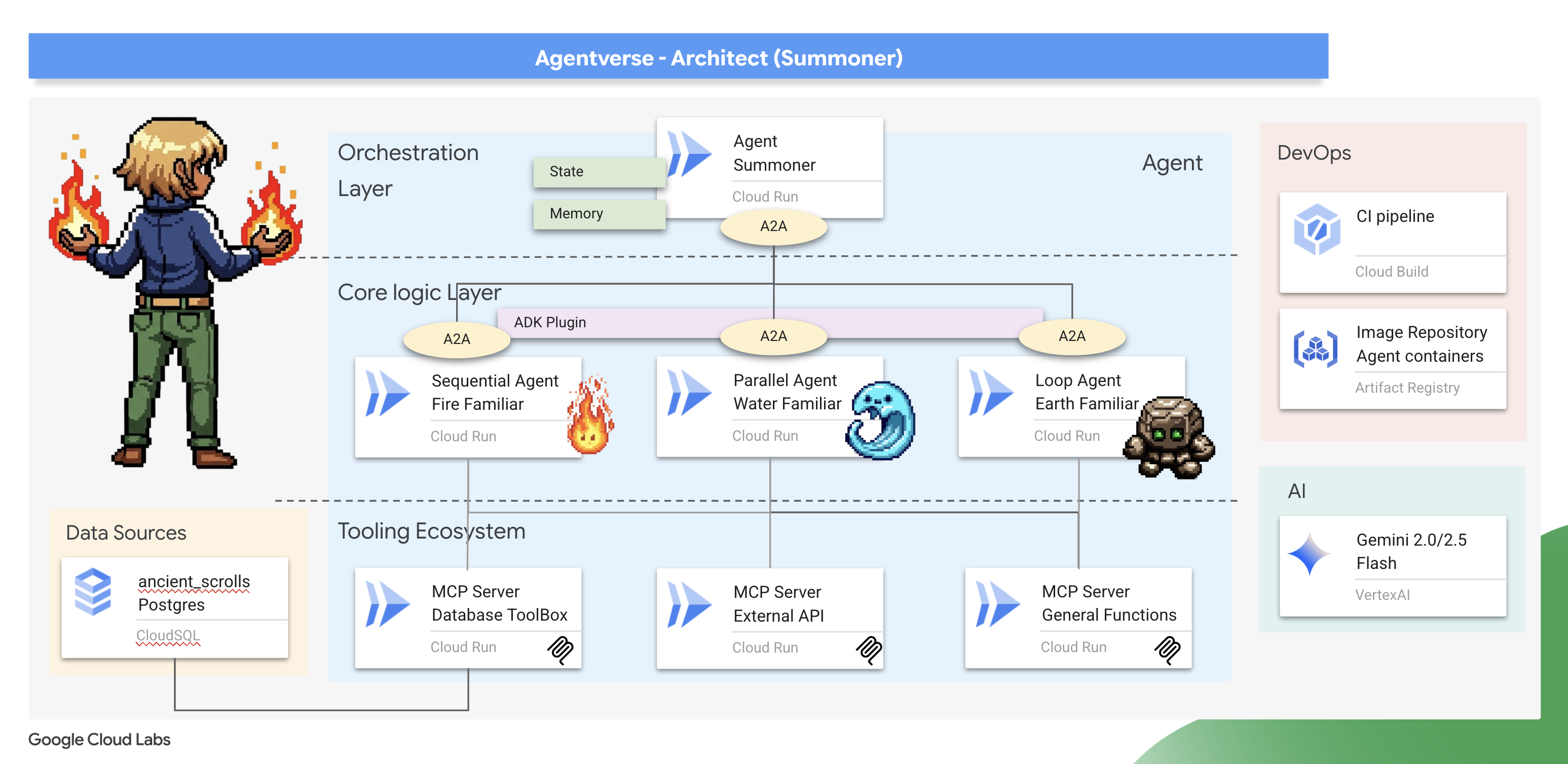
তুমি কি শিখবে
- একটি ডিকপল্ড টুলিং ইকোসিস্টেম তৈরি করুন: স্বাধীন, মাইক্রোসার্ভিস-ভিত্তিক MCP টুল সার্ভারের একটি সেট ডিজাইন এবং স্থাপন করুন। আপনি শিখবেন কেন এই ভিত্তি স্তরটি স্কেলেবল, রক্ষণাবেক্ষণযোগ্য এবং সুরক্ষিত এজেন্টিক সিস্টেম তৈরির জন্য গুরুত্বপূর্ণ।
- উন্নত এজেন্টিক কর্মপ্রবাহে দক্ষতা অর্জন করুন: একক এজেন্টের বাইরে যান এবং বিশেষজ্ঞ "পরিচিত"দের একটি দল তৈরি করুন। আপনি মূল ADK কর্মপ্রবাহের ধরণগুলি - সিকোয়েন্সিয়াল, প্যারালাল এবং লুপ - আয়ত্ত করতে পারবেন এবং সঠিক কাজের জন্য সঠিক প্যাটার্ন বেছে নেওয়ার জন্য স্থাপত্য নীতিগুলি শিখতে পারবেন।
- একজন বুদ্ধিমান অর্কেস্ট্রেটর বাস্তবায়ন করুন: একজন সাধারণ এজেন্ট নির্মাতা থেকে একজন সত্যিকারের সিস্টেম স্থপতিতে উন্নীত হন। আপনি একটি মাস্টার অর্কেস্ট্রেশন এজেন্ট তৈরি করবেন যা এজেন্ট-টু-এজেন্ট (A2A) প্রোটোকল ব্যবহার করে জটিল কাজগুলি আবিষ্কার করে আপনার বিশেষজ্ঞ পরিচিতদের কাছে অর্পণ করে, একটি সত্যিকারের মাল্টি-এজেন্ট সিস্টেম তৈরি করে।
- প্রম্পট নয়, কোড দিয়ে নিয়ম প্রয়োগ করুন: স্টেটফুল নিয়ম প্রয়োগ করে আরও নির্ভরযোগ্য এবং ভবিষ্যদ্বাণীযোগ্য এজেন্ট তৈরি করতে শিখুন। আপনি ADK এর শক্তিশালী প্লাগইন এবং কলব্যাক সিস্টেম ব্যবহার করে কাস্টম লজিক বাস্তবায়ন করবেন যাতে কুলডাউন টাইমারের মতো বাস্তব-বিশ্বের সীমাবদ্ধতাগুলি পরিচালনা করা যায়।
- এজেন্টের অবস্থা এবং স্মৃতি পরিচালনা করুন: আপনার এজেন্টদের শেখার এবং মনে রাখার ক্ষমতা দিন। আপনি আরও বুদ্ধিমান এবং প্রসঙ্গ-সচেতন মিথস্ক্রিয়া তৈরি করতে স্বল্পমেয়াদী, কথোপকথনের অবস্থা এবং দীর্ঘমেয়াদী, স্থায়ী স্মৃতি উভয় পরিচালনার কৌশলগুলি অন্বেষণ করবেন।
- একটি এন্ড-টু-এন্ড ক্লাউড ডিপ্লয়মেন্ট কার্যকর করুন: আপনার সম্পূর্ণ মাল্টি-এজেন্ট সিস্টেমকে একটি স্থানীয় প্রোটোটাইপ থেকে একটি প্রোডাকশন-গ্রেড রিয়েলিটিতে নিয়ে যান। আপনি শিখবেন কিভাবে আপনার এজেন্ট এবং অর্কেস্ট্রেটরকে কন্টেইনারাইজ করতে হয় এবং গুগল ক্লাউড রানে স্কেলেবল, স্বাধীন মাইক্রোসার্ভিসের সংগ্রহ হিসাবে তাদের স্থাপন করতে হয়।
৩. সমনকারী বৃত্ত অঙ্কন করা
স্বাগতম, আহ্বায়ক। একজন পরিচিতকে ডাকা হওয়ার আগে, যেকোনো চুক্তি জাল করার আগে, আপনার দাঁড়িয়ে থাকা ভিত্তিটি প্রস্তুত করতে হবে। একটি অদম্য পরিবেশ বিশৃঙ্খলার আমন্ত্রণ; একজন সঠিক আহ্বায়ক কেবল একটি পবিত্র, ক্ষমতাপ্রাপ্ত স্থানের মধ্যেই কাজ করেন। আমাদের প্রথম কাজ হল আহ্বায়ক বৃত্ত আঁকা: প্রয়োজনীয় ক্লাউড পরিষেবাগুলিকে জাগ্রত করে এমন শক্তির রণগুলিকে খোদাই করা এবং আমাদের কাজকে পরিচালিত করবে এমন প্রাচীন নীলনকশাগুলি অর্জন করা। একজন আহ্বায়কের শক্তির জন্ম হয় সূক্ষ্ম প্রস্তুতি থেকে।
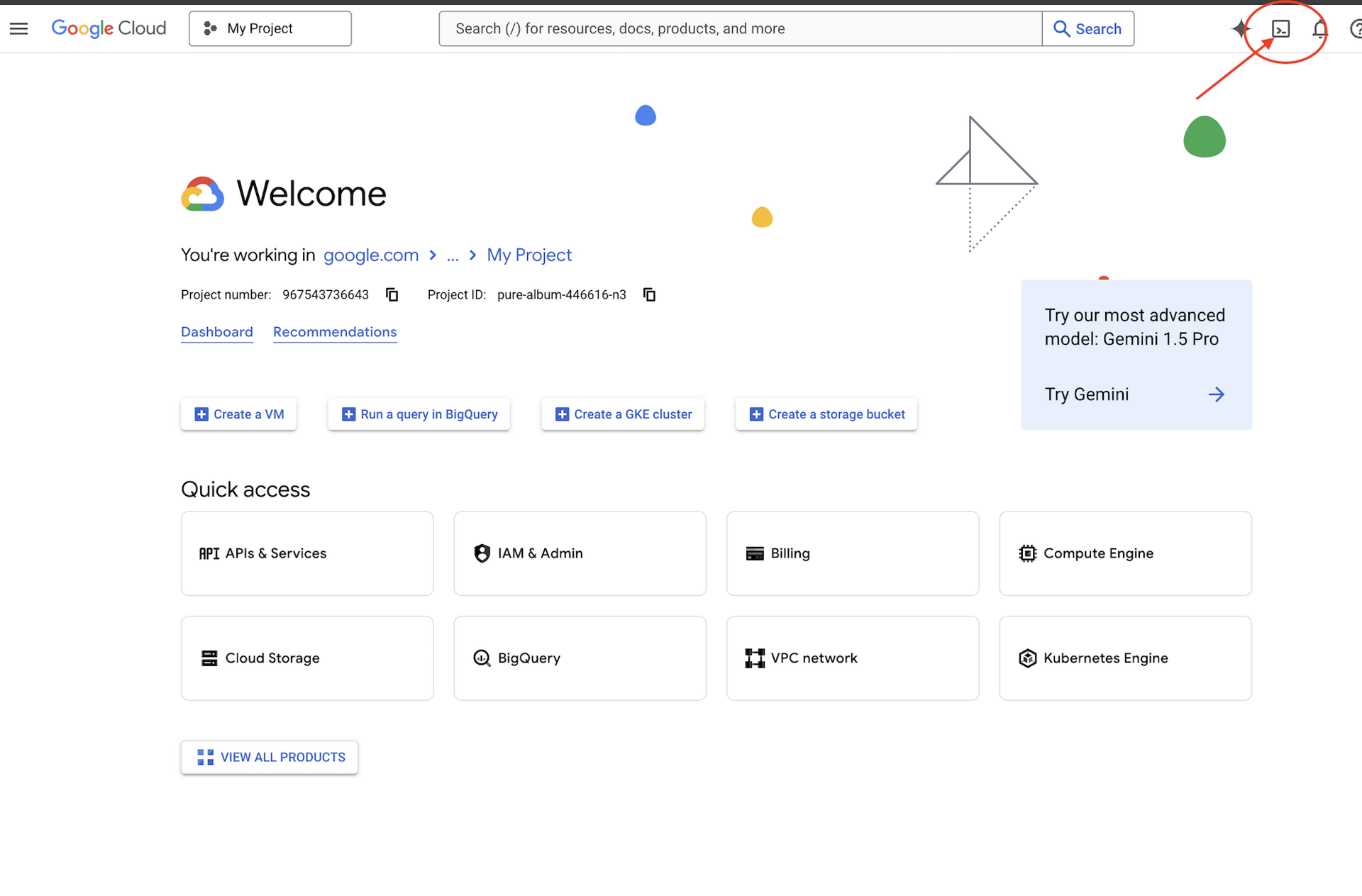
👉 গুগল ক্লাউড কনসোলের উপরে অ্যাক্টিভেট ক্লাউড শেল ক্লিক করুন (এটি ক্লাউড শেল প্যানের উপরে টার্মিনাল আকৃতির আইকন),
👉 "ওপেন এডিটর" বোতামে ক্লিক করুন (এটি দেখতে পেন্সিল দিয়ে খোলা ফোল্ডারের মতো)। এটি উইন্ডোতে ক্লাউড শেল কোড এডিটর খুলবে। আপনি বাম দিকে একটি ফাইল এক্সপ্লোরার দেখতে পাবেন। 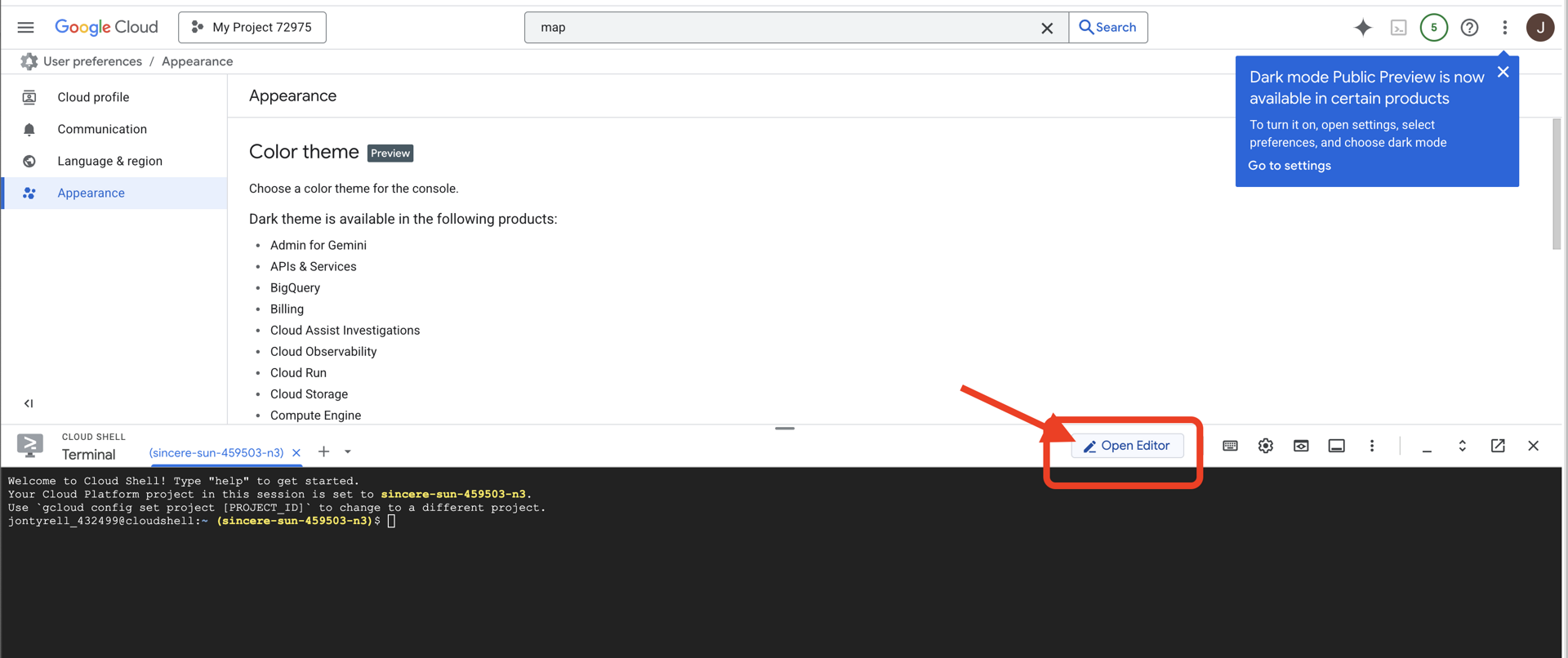
👉ক্লাউড IDE তে টার্মিনালটি খুলুন, 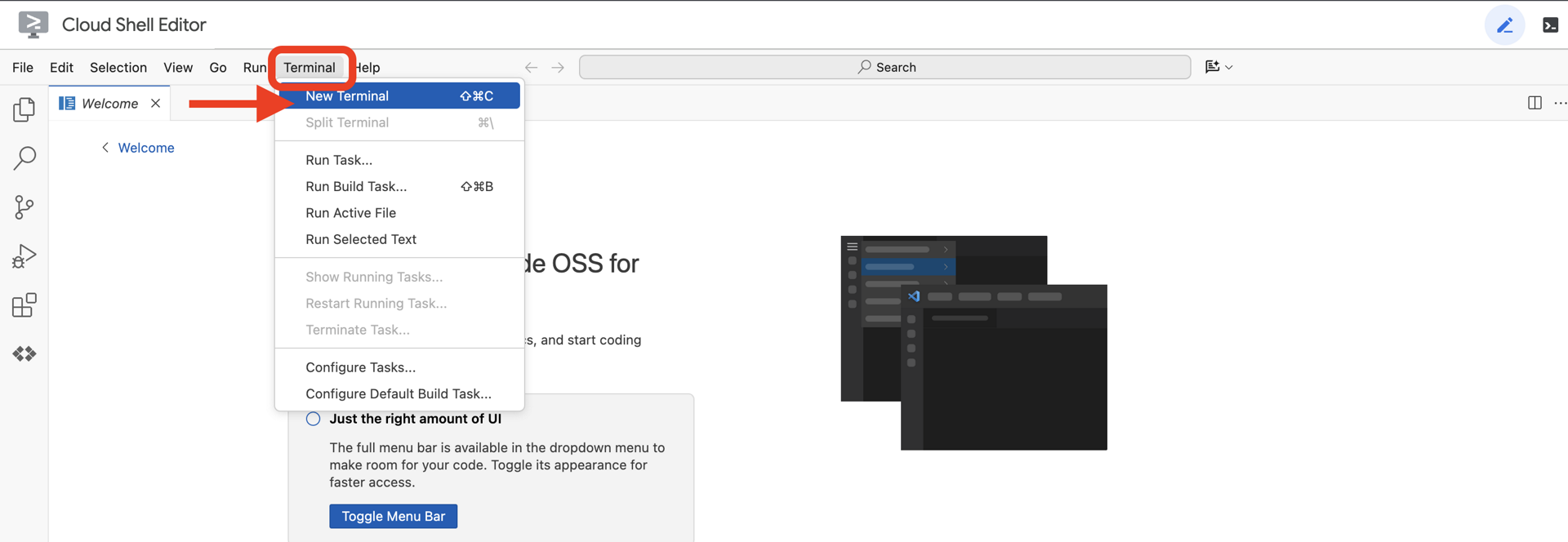
👉💻 টার্মিনালে, নিম্নলিখিত কমান্ড ব্যবহার করে যাচাই করুন যে আপনি ইতিমধ্যেই প্রমাণীকরণপ্রাপ্ত এবং প্রকল্পটি আপনার প্রকল্প আইডিতে সেট করা আছে:
gcloud auth list
👉💻 GitHub থেকে বুটস্ট্র্যাপ প্রকল্পটি ক্লোন করুন:
git clone https://github.com/weimeilin79/agentverse-architect
chmod +x ~/agentverse-architect/init.sh
chmod +x ~/agentverse-architect/set_env.sh
chmod +x ~/agentverse-architect/prepare.sh
chmod +x ~/agentverse-architect/data_setup.sh

git clone https://github.com/weimeilin79/agentverse-dungeon.git
chmod +x ~/agentverse-dungeon/run_cloudbuild.sh
chmod +x ~/agentverse-dungeon/start.sh
👉💻 প্রজেক্ট ডিরেক্টরি থেকে সেটআপ স্ক্রিপ্টটি চালান।
⚠️ প্রজেক্ট আইডি সম্পর্কে দ্রষ্টব্য: স্ক্রিপ্টটি এলোমেলোভাবে তৈরি একটি ডিফল্ট প্রজেক্ট আইডি প্রস্তাব করবে। এই ডিফল্টটি গ্রহণ করতে আপনি এন্টার টিপতে পারেন।
তবে, যদি আপনি একটি নির্দিষ্ট নতুন প্রকল্প তৈরি করতে চান, তাহলে স্ক্রিপ্টের অনুরোধে আপনি আপনার পছন্দসই প্রকল্প আইডি টাইপ করতে পারেন।
cd ~/agentverse-architect
./init.sh
স্ক্রিপ্টটি বাকি সেটআপ প্রক্রিয়াটি স্বয়ংক্রিয়ভাবে পরিচালনা করবে।
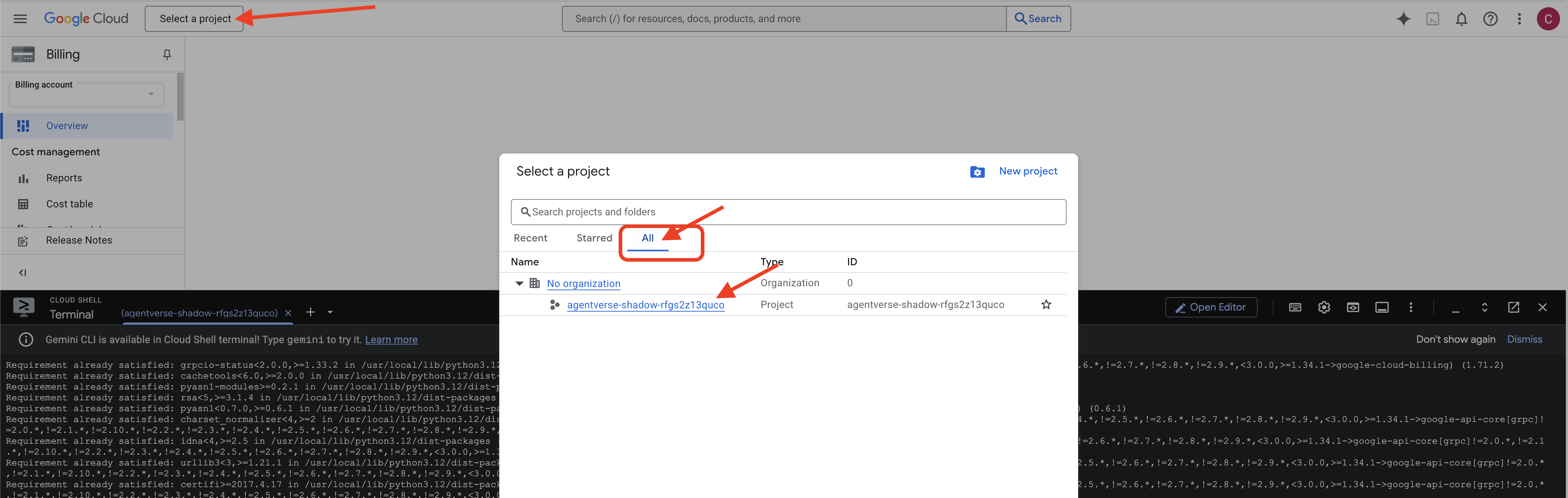
👉 সমাপ্তির পর গুরুত্বপূর্ণ ধাপ: স্ক্রিপ্টটি শেষ হয়ে গেলে, আপনাকে নিশ্চিত করতে হবে যে আপনার Google Cloud Console সঠিক প্রকল্পটি দেখছে:
- console.cloud.google.com এ যান।
- পৃষ্ঠার উপরে প্রজেক্ট সিলেক্টর ড্রপডাউনে ক্লিক করুন।
- "সমস্ত" ট্যাবে ক্লিক করুন (কারণ নতুন প্রকল্পটি এখনও "সাম্প্রতিক" বিভাগে প্রদর্শিত নাও হতে পারে)।
-
init.shধাপে আপনি যে প্রজেক্ট আইডিটি কনফিগার করেছেন তা নির্বাচন করুন।
👉💻 প্রয়োজনীয় প্রজেক্ট আইডি সেট করুন:
gcloud config set project $(cat ~/project_id.txt) --quiet
👉💻 প্রয়োজনীয় গুগল ক্লাউড এপিআই সক্রিয় করতে নিম্নলিখিত কমান্ডটি চালান:
gcloud services enable \
    sqladmin.googleapis.com \
    storage.googleapis.com \
    aiplatform.googleapis.com \
    run.googleapis.com \
    cloudbuild.googleapis.com \
    artifactregistry.googleapis.com \
    iam.googleapis.com \
    compute.googleapis.com \
    cloudresourcemanager.googleapis.com \
    secretmanager.googleapis.com
👉💻 যদি আপনি ইতিমধ্যেই agentverse-repo নামে একটি Artifact Registry সংগ্রহস্থল তৈরি না করে থাকেন, তাহলে এটি তৈরি করতে নিম্নলিখিত কমান্ডটি চালান: (যদি আপনার একই প্রকল্পে অন্যান্য ক্লাস স্থাপন করা থাকে তবে এই ধাপটি এড়িয়ে যান)
. ~/agentverse-architect/set_env.sh
gcloud artifacts repositories create $REPO_NAME \
    --repository-format=docker \
    --location=$REGION \
    --description="Repository for Agentverse agents"
অনুমতি সেট আপ করা হচ্ছে
👉💻 টার্মিনালে নিম্নলিখিত কমান্ডগুলি চালিয়ে প্রয়োজনীয় অনুমতিগুলি প্রদান করুন:
. ~/agentverse-architect/set_env.sh

# --- Grant Core Data Permissions ---
gcloud projects add-iam-policy-binding $PROJECT_ID \
 --member="serviceAccount:$SERVICE_ACCOUNT_NAME" \
 --role="roles/storage.admin"

gcloud projects add-iam-policy-binding $PROJECT_ID  \
--member="serviceAccount:$SERVICE_ACCOUNT_NAME"  \
--role="roles/aiplatform.user"

# --- Grant Deployment & Execution Permissions ---
gcloud projects add-iam-policy-binding $PROJECT_ID  \
--member="serviceAccount:$SERVICE_ACCOUNT_NAME"  \
--role="roles/cloudbuild.builds.editor"

gcloud projects add-iam-policy-binding $PROJECT_ID  \
--member="serviceAccount:$SERVICE_ACCOUNT_NAME"  \
--role="roles/artifactregistry.admin"

gcloud projects add-iam-policy-binding $PROJECT_ID  \
--member="serviceAccount:$SERVICE_ACCOUNT_NAME"  \
--role="roles/run.admin"

gcloud projects add-iam-policy-binding $PROJECT_ID  \
--member="serviceAccount:$SERVICE_ACCOUNT_NAME"  \
--role="roles/iam.serviceAccountUser"

gcloud projects add-iam-policy-binding $PROJECT_ID  \
--member="serviceAccount:$SERVICE_ACCOUNT_NAME"  \
--role="roles/logging.logWriter"

gcloud projects add-iam-policy-binding $PROJECT_ID \
  --member="serviceAccount:${SERVICE_ACCOUNT_NAME}" \
  --role="roles/monitoring.metricWriter"

gcloud projects add-iam-policy-binding $PROJECT_ID \
  --member="serviceAccount:${SERVICE_ACCOUNT_NAME}" \
  --role="roles/secretmanager.secretAccessor"
👉💻 তুমি যখন তোমার প্রশিক্ষণ শুরু করবে, আমরা চূড়ান্ত চ্যালেঞ্জ প্রস্তুত করব। নিম্নলিখিত কমান্ডগুলি বিশৃঙ্খল স্ট্যাটিক থেকে স্পেক্টারদের ডেকে আনবে, তোমার চূড়ান্ত পরীক্ষার জন্য বস তৈরি করবে।
. ~/agentverse-architect/set_env.sh
cd ~/agentverse-dungeon
./run_cloudbuild.sh
cd ~/agentverse-architect
👉💻 অবশেষে, প্রাথমিক সেটআপ কাজগুলি সম্পাদন করতে prepare.sh স্ক্রিপ্টটি চালান।
. ~/agentverse-architect/set_env.sh
cd ~/agentverse-architect/
./prepare.sh
চমৎকার কাজ, সমনার। বৃত্তটি সম্পূর্ণ হয়েছে এবং চুক্তিগুলি সিল করা হয়েছে। ভূমি এখন পবিত্র, অপরিসীম শক্তি প্রেরণের জন্য প্রস্তুত। আমাদের পরবর্তী পরীক্ষায়, আমরা সেই মৌলিক ফন্টগুলি তৈরি করব যেখান থেকে আমাদের পরিচিতরা তাদের শক্তি অর্জন করবে।
৪. এলিমেন্টাল ফন্ট তৈরি: ডিকপল্ড টুলিং ইকোসিস্টেম
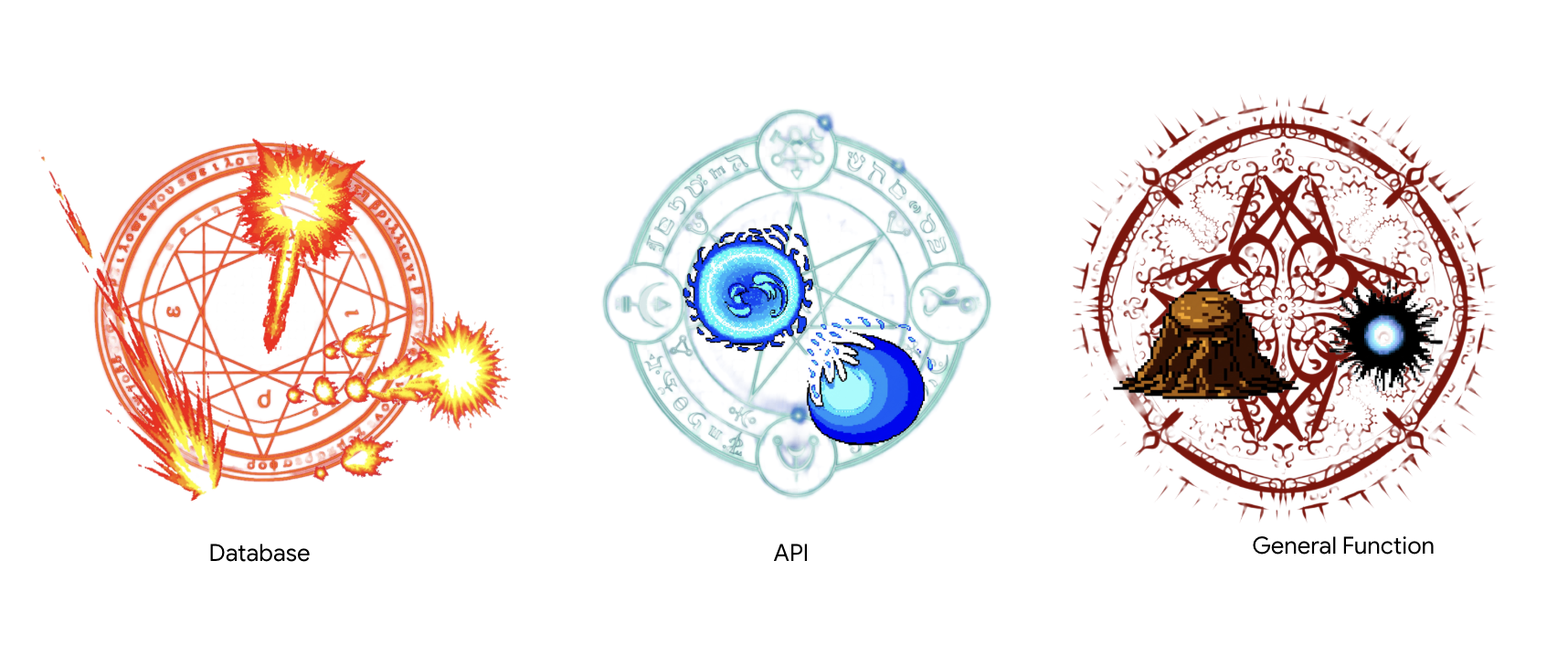
যুদ্ধক্ষেত্র প্রস্তুত, আহ্বানকারী বৃত্ত তৈরি, এবং পরিবেশের মানা কর্কশ শব্দে ভেসে আসছে। আহবানকারী হিসেবে আপনার প্রথম সত্যিকারের কাজটি করার সময় এসেছে: আপনার পরিচিতরা যে শক্তির উৎস থেকে শক্তি সংগ্রহ করবে তা তৈরি করা। এই আচারটি তিনটি ভাগে বিভক্ত, প্রতিটি অংশ একটি মৌলিক ফন্ট জাগিয়ে তোলে - একটি নির্দিষ্ট ধরণের শক্তির একটি স্থিতিশীল, স্বাধীন উৎস। শুধুমাত্র যখন তিনটি ফন্ট সক্রিয় থাকে তখনই আপনি আহ্বানকারীর আরও জটিল কাজ শুরু করতে পারেন।
স্থপতির নোট: মডেল কনটেক্সট প্রোটোকল (MCP) সার্ভার একটি আধুনিক এজেন্টিক সিস্টেমের একটি মৌলিক উপাদান, যা একটি স্ট্যান্ডার্ডাইজড কমিউনিকেশন ব্রিজ হিসেবে কাজ করে যা একজন এজেন্টকে রিমোট টুল আবিষ্কার এবং ব্যবহার করতে দেয়। আমাদের টুলিং ইকোসিস্টেমে, আমরা দুটি স্বতন্ত্র ধরণের MCP সার্ভার তৈরি করব, প্রতিটি একটি গুরুত্বপূর্ণ স্থাপত্য প্যাটার্নের প্রতিনিধিত্ব করে। আমাদের ডাটাবেসের সাথে সংযোগ স্থাপনের জন্য, আমরা ডাটাবেস টুলবক্সের সাথে একটি ঘোষণামূলক পদ্ধতি ব্যবহার করব, যা একটি সহজ কনফিগারেশন ফাইলে আমাদের টুলগুলিকে সংজ্ঞায়িত করবে। এই প্যাটার্নটি কাঠামোগত ডেটা অ্যাক্সেস প্রকাশের জন্য অবিশ্বাস্যভাবে দক্ষ এবং নিরাপদ। যাইহোক, যখন আমাদের কাস্টম ব্যবসায়িক লজিক বাস্তবায়ন করতে হবে বা বহিরাগত তৃতীয়-পক্ষের API কল করতে হবে, তখন আমরা একটি অপরিহার্য পদ্ধতি ব্যবহার করব, সার্ভারের লজিক ধাপে ধাপে কোডে লিখব। এটি চূড়ান্ত নিয়ন্ত্রণ এবং নমনীয়তা প্রদান করে, যা আমাদের একটি সহজ, পুনর্ব্যবহারযোগ্য টুলের পিছনে জটিল ক্রিয়াকলাপগুলিকে অন্তর্ভুক্ত করতে দেয়। একজন মাস্টার আর্কিটেক্টকে প্রতিটি উপাদানের জন্য সঠিক পদ্ধতি নির্বাচন করতে, একটি শক্তিশালী, সুরক্ষিত এবং স্কেলেবল টুলিং ফাউন্ডেশন তৈরি করতে উভয় প্যাটার্ন বুঝতে হবে।
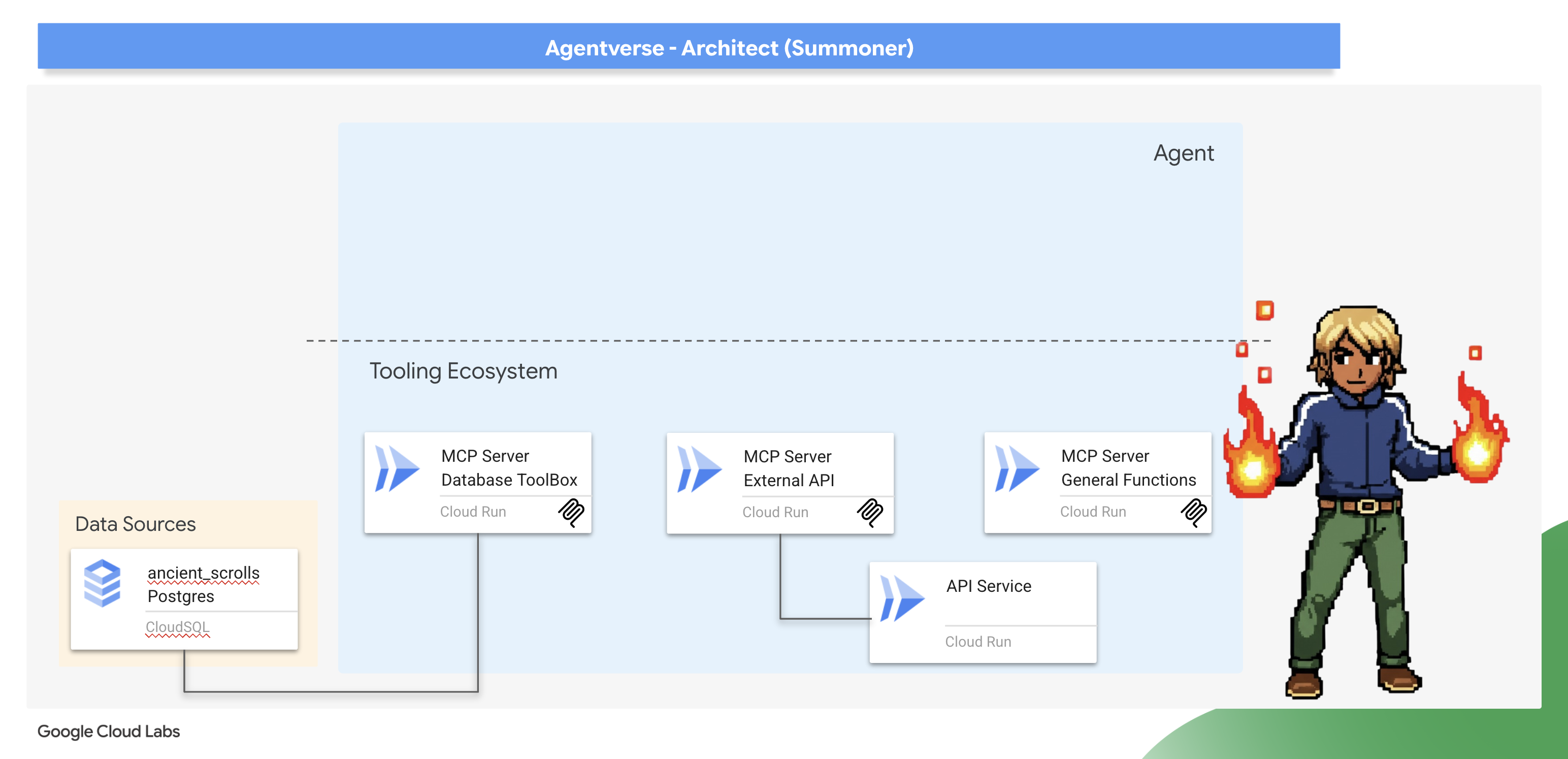
হুইস্পার্সের নেক্সাস জাগানো (বহিরাগত API MCP সার্ভার)
একজন বিজ্ঞ সমনার জানেন যে সমস্ত শক্তি তাদের নিজস্ব ক্ষেত্র থেকে উৎপন্ন হয় না। বাহ্যিক, কখনও কখনও বিশৃঙ্খল, শক্তির উৎস রয়েছে যা দুর্দান্তভাবে পরিচালিত হতে পারে। হুইস্পার্সের নেক্সাস হল এই শক্তিগুলির আমাদের প্রবেশদ্বার।
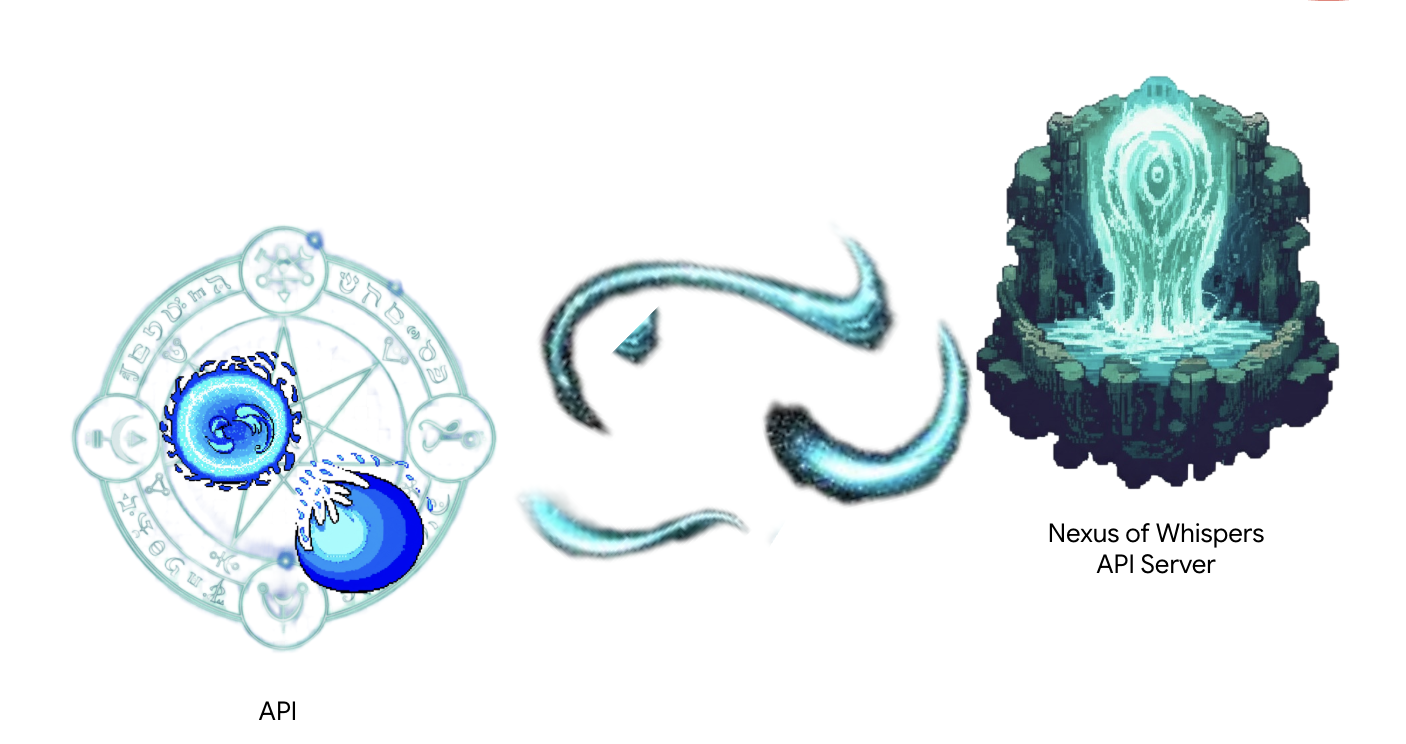
একটি পরিষেবা ইতিমধ্যেই চালু আছে এবং আমাদের বাহ্যিক শক্তির উৎস হিসেবে কাজ করে, যা দুটি কাঁচা বানান শেষ বিন্দু প্রদান করে: /cryosea_shatter এবং /moonlit_cascade ।
স্থপতির নোট: আপনি একটি ইমপ্রেসিভ পদ্ধতি ব্যবহার করবেন যা সার্ভারের লজিককে ধাপে ধাপে স্পষ্টভাবে সংজ্ঞায়িত করবে। এটি আপনাকে অনেক বেশি নিয়ন্ত্রণ এবং নমনীয়তা দেয়, যা আপনার সরঞ্জামগুলিকে কেবল একটি সাধারণ SQL কোয়েরি চালানোর চেয়ে আরও বেশি কিছু করার প্রয়োজন হলে অপরিহার্য, যেমন অন্যান্য API কল করা। উভয় প্যাটার্ন বোঝা একজন এজেন্ট স্থপতির জন্য একটি গুরুত্বপূর্ণ দক্ষতা।
👉✏️ ~/agentverse-architect/mcp-servers/api/main.py ডিরেক্টরিতে নেভিগেট করুন এবং নিম্নলিখিত কোডটি দিয়ে #REPLACE-MAGIC-CORE প্রতিস্থাপন করুন :
def cryosea_shatter() -> str:
    """Channels immense frost energy from an external power source, the Nexus of Whispers, to unleash the Cryosea Shatter spell."""
    try:
        response = requests.post(f"{API_SERVER_URL}/cryosea_shatter")
        response.raise_for_status() # Raise an exception for bad status codes (4xx or 5xx)
        data = response.json()
        # Thematic Success Message
        return f"A connection to the Nexus is established! A surge of frost energy manifests as Cryosea Shatter, dealing {data.get('damage_points')} damage."
    except requests.exceptions.RequestException as e:
        # Thematic Error Message
        return f"The connection to the external power source wavers and fails. The Cryosea Shatter spell fizzles. Reason: {e}"


def moonlit_cascade() -> str:
    """Draws mystical power from an external energy source, the Nexus of Whispers, to invoke the Moonlit Cascade spell."""
    try:
        response = requests.post(f"{API_SERVER_URL}/moonlit_cascade")
        response.raise_for_status()
        data = response.json()
        # Thematic Success Message
        return f"The Nexus answers the call! A cascade of pure moonlight erupts from the external source, dealing {data.get('damage_points')} damage."
    except requests.exceptions.RequestException as e:
        # Thematic Error Message
        return f"The connection to the external power source wavers and fails. The Moonlit Cascade spell fizzles. Reason: {e}"
স্ক্রিপ্টের একেবারে কেন্দ্রবিন্দুতে রয়েছে প্লেইন পাইথন ফাংশন। আসল কাজটি এখানেই ঘটে।
👉✏️ একই ফাইলে ~/agentverse-architect/mcp-servers/api/main.py নিম্নলিখিত কোড সহ #REPLACE-Runes of Communication প্রতিস্থাপন করুন :
@app.list_tools()
async def list_tools() -> list[mcp_types.Tool]:
  """MCP handler to list available tools."""
  # Convert the ADK tool's definition to MCP format
  schema_cryosea_shatter = adk_to_mcp_tool_type(cryosea_shatterTool)
  schema_moonlit_cascade = adk_to_mcp_tool_type(moonlit_cascadeTool)
  print(f"MCP Server: Received list_tools request. \n MCP Server: Advertising tool: {schema_cryosea_shatter.name} and {schema_moonlit_cascade.name}")
  return [schema_cryosea_shatter,schema_moonlit_cascade]

@app.call_tool()
async def call_tool(
    name: str, arguments: dict
) -> list[mcp_types.TextContent | mcp_types.ImageContent | mcp_types.EmbeddedResource]:
  """MCP handler to execute a tool call."""
  print(f"MCP Server: Received call_tool request for '{name}' with args: {arguments}")

  # Look up the tool by name in our dictionary
  tool_to_call = available_tools.get(name)
  if tool_to_call:
    try:
      adk_response = await tool_to_call.run_async(
          args=arguments,
          tool_context=None, # No ADK context available here
      )
      print(f"MCP Server: ADK tool '{name}' executed successfully.")

      response_text = json.dumps(adk_response, indent=2)
      return [mcp_types.TextContent(type="text", text=response_text)]

    except Exception as e:
      print(f"MCP Server: Error executing ADK tool '{name}': {e}")
      # Creating a proper MCP error response might be more robust
      error_text = json.dumps({"error": f"Failed to execute tool '{name}': {str(e)}"})
      return [mcp_types.TextContent(type="text", text=error_text)]
  else:
      # Handle calls to unknown tools
      print(f"MCP Server: Tool '{name}' not found.")
      error_text = json.dumps({"error": f"Tool '{name}' not implemented."})
      return [mcp_types.TextContent(type="text", text=error_text)]
@app.list_tools()(হ্যান্ডশেক): এই ফাংশনটি সার্ভারের শুভেচ্ছা। যখন একটি নতুন এজেন্ট সংযোগ করে, তখন এটি প্রথমে এই এন্ডপয়েন্টটিকে কল করে জিজ্ঞাসা করে, "আপনি কী করতে পারেন?" আমাদের কোডটি adk_to_mcp_tool_type ব্যবহার করে সর্বজনীন MCP ফর্ম্যাটে রূপান্তরিত সমস্ত উপলব্ধ সরঞ্জামের একটি তালিকা সহ প্রতিক্রিয়া জানায়। -@app.call_tool()(কমান্ড): এই ফাংশনটি ওয়ার্কহর্স। যখন এজেন্ট একটি সরঞ্জাম ব্যবহার করার সিদ্ধান্ত নেয়, তখন এটি এই শেষপয়েন্টে সরঞ্জামের নাম এবং আর্গুমেন্ট সহ একটি অনুরোধ পাঠায়। আমাদের কোড আমাদের available_tools "spellbook"-এ সরঞ্জামটি অনুসন্ধান করে, run_async দিয়ে এটি কার্যকর করে এবং স্ট্যান্ডার্ড MCP ফর্ম্যাটে ফলাফল ফেরত দেয়।
আমরা এটি পরে স্থাপন করব।
আর্কেন ফোর্জ জ্বালানো (সাধারণ ফাংশন এমসিপি সার্ভার)
প্রাচীন বই বা দূরবর্তী ফিসফিসানি থেকে সমস্ত শক্তি আসে না। কখনও কখনও, একজন সমনারকে কাঁচা ইচ্ছাশক্তি এবং বিশুদ্ধ যুক্তি থেকে তাদের নিজস্ব জাদু তৈরি করতে হয়। আর্কেন ফোর্জ হল ক্ষমতার এই ফন্ট - একটি সার্ভার যা রাষ্ট্রহীন, সাধারণ-উদ্দেশ্যমূলক ইউটিলিটি ফাংশন প্রদান করে।
স্থপতির নোট : এটি আরেকটি স্থাপত্য নকশা। বিদ্যমান সিস্টেমের সাথে সংযোগ স্থাপন করা সাধারণ হলেও, আপনাকে প্রায়শই আপনার নিজস্ব অনন্য ব্যবসায়িক নিয়ম এবং যুক্তি প্রয়োগ করতে হবে। এই ধরণের একটি ডেডিকেটেড "ফাংশন" বা "ইউটিলিটিস" টুল তৈরি করা একটি সেরা অনুশীলন। এটি আপনার কাস্টম লজিককে ধারণ করে, আপনার বাস্তুতন্ত্রের যেকোনো এজেন্টের জন্য এটিকে পুনরায় ব্যবহারযোগ্য করে তোলে এবং এটিকে আপনার ডেটা উৎস এবং বহিরাগত ইন্টিগ্রেশন থেকে আলাদা রাখে।
👀 আপনার গুগল ক্লাউড IDE-তে ~/agentverse-architect/mcp-servers/general/main.py ফাইলটি একবার দেখুন। আপনি দেখতে পাবেন যে এটি এই কাস্টম ফন্ট অফ পাওয়ার তৈরি করতে নেক্সাসের মতো একই প্রয়োজনীয়, mcp.server পদ্ধতি ব্যবহার করছে।
মাস্টার ক্লাউড বিল্ড পাইপলাইন তৈরি করুন
এখন, আমরা mcp-servers ডিরেক্টরির ভিতরে cloudbuild.yaml ফাইল তৈরি করব। এই ফাইলটি উভয় পরিষেবার নির্মাণ এবং স্থাপনার কাজ পরিচালনা করবে।
👉💻 ~/agentverse-architect/mcp-servers ডিরেক্টরি থেকে, নিম্নলিখিত কমান্ডগুলি চালান:
cd ~/agentverse-architect/mcp-servers
source ~/agentverse-architect/set_env.sh

echo "The API URL is: $API_SERVER_URL"

# Submit the Cloud Build job from the parent directory
gcloud builds submit . \
  --config=cloudbuild.yaml \
  --substitutions=_REGION="$REGION",_REPO_NAME="$REPO_NAME",_API_SERVER_URL="$API_SERVER_URL"
সমস্ত স্থাপনা সম্পূর্ণ না হওয়া পর্যন্ত অপেক্ষা করুন।
👉 আপনি ক্লাউড রান কনসোলে নেভিগেট করে স্থাপনা যাচাই করতে পারেন। আপনি আপনার দুটি নতুন MCP সার্ভার ইন্সট্যান্স চলমান দেখতে পাবেন, যেমনটি নীচে দেখানো হয়েছে: 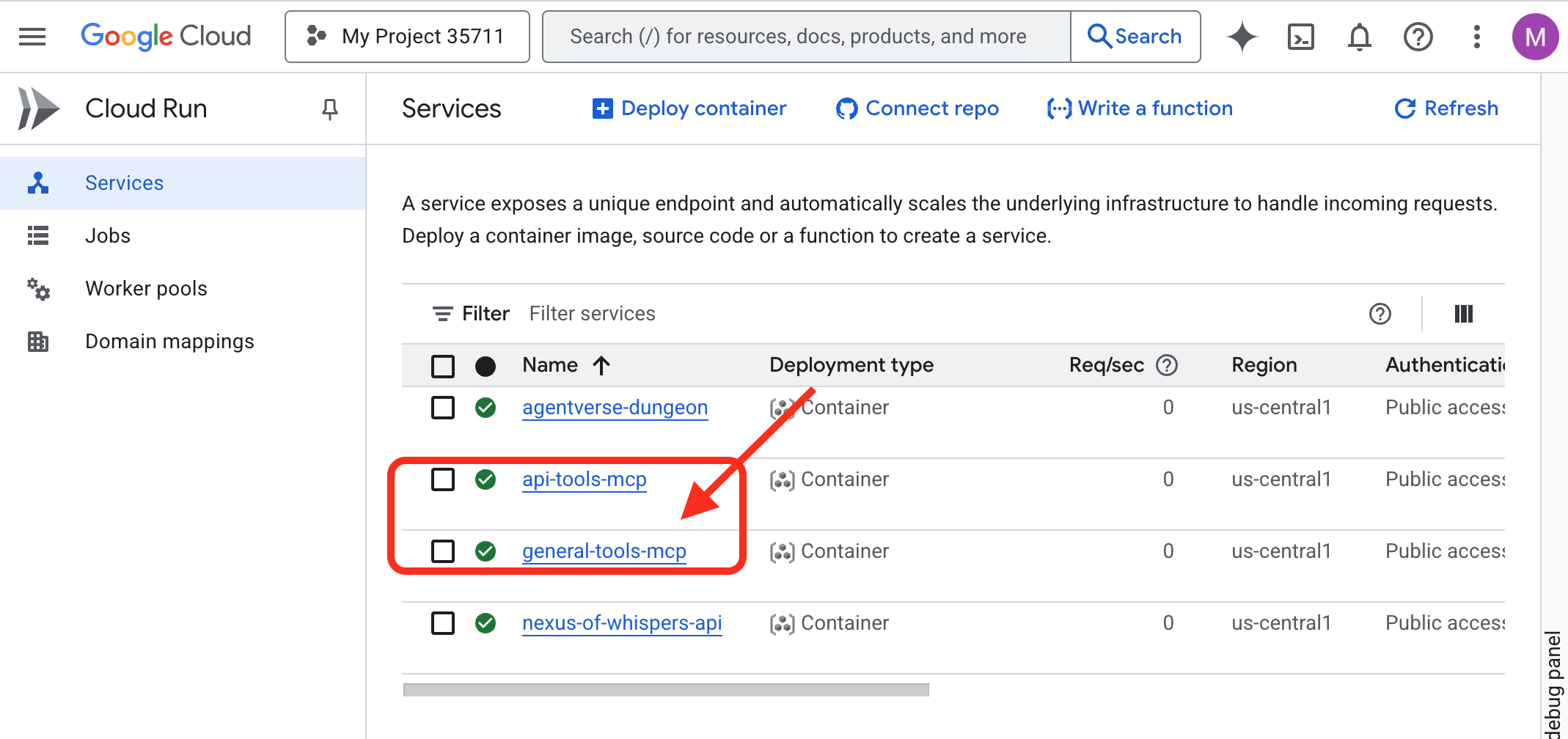
জ্ঞানের গ্রন্থাগার জাগ্রত করা (ডাটাবেস টুলবক্স এমসিপি সার্ভার)
আমাদের পরবর্তী ফন্ট হবে জ্ঞানের গ্রন্থাগার , যা আমাদের ক্লাউড SQL ডাটাবেসের সাথে সরাসরি সংযোগ স্থাপন করবে।
স্থপতির নোট: এর জন্য, আমরা আধুনিক, ঘোষণামূলক ডেটাবেস টুলবক্স ব্যবহার করব। এটি একটি শক্তিশালী পদ্ধতি যেখানে আমরা আমাদের ডেটা উৎস এবং সরঞ্জামগুলিকে একটি YAML কনফিগারেশন ফাইলে সংজ্ঞায়িত করি। টুলবক্সটি সার্ভার তৈরি এবং চালানোর জটিল কাজ পরিচালনা করে, যা আমাদের লেখা এবং রক্ষণাবেক্ষণের জন্য প্রয়োজনীয় কাস্টম কোডের পরিমাণ হ্রাস করে।
আমাদের "Summoner's Librarium" তৈরি করার সময় এসেছে—ক্লাউড SQL ডাটাবেস যা আমাদের সমস্ত গুরুত্বপূর্ণ তথ্য সংরক্ষণ করবে। এটি স্বয়ংক্রিয়ভাবে পরিচালনা করার জন্য আমরা একটি সেটআপ স্ক্রিপ্ট ব্যবহার করব।
👉💻 প্রথমে, আমরা আপনার টার্মিনালে ডাটাবেস সেটআপ করব, নিম্নলিখিত কমান্ডগুলি চালাব:
source ~/agentverse-architect/set_env.sh
cd ~/agentverse-architect
./data_setup.sh
স্ক্রিপ্টটি শেষ হওয়ার পর, আপনার ডাটাবেসটি পূর্ণ হবে এবং মৌলিক ক্ষতির তথ্য ব্যবহারের জন্য প্রস্তুত হবে। আপনি এখন আপনার গ্রিমোয়ারের বিষয়বস্তু সরাসরি যাচাই করতে পারবেন।
👉 প্রথমে, একটি নতুন ব্রাউজার ট্যাবে এই সরাসরি লিঙ্কটি খুলে আপনার ডাটাবেসের জন্য ক্লাউড SQL স্টুডিওতে নেভিগেট করুন:
https://console.cloud.google.com/sql/instances/summoner-librarium-db
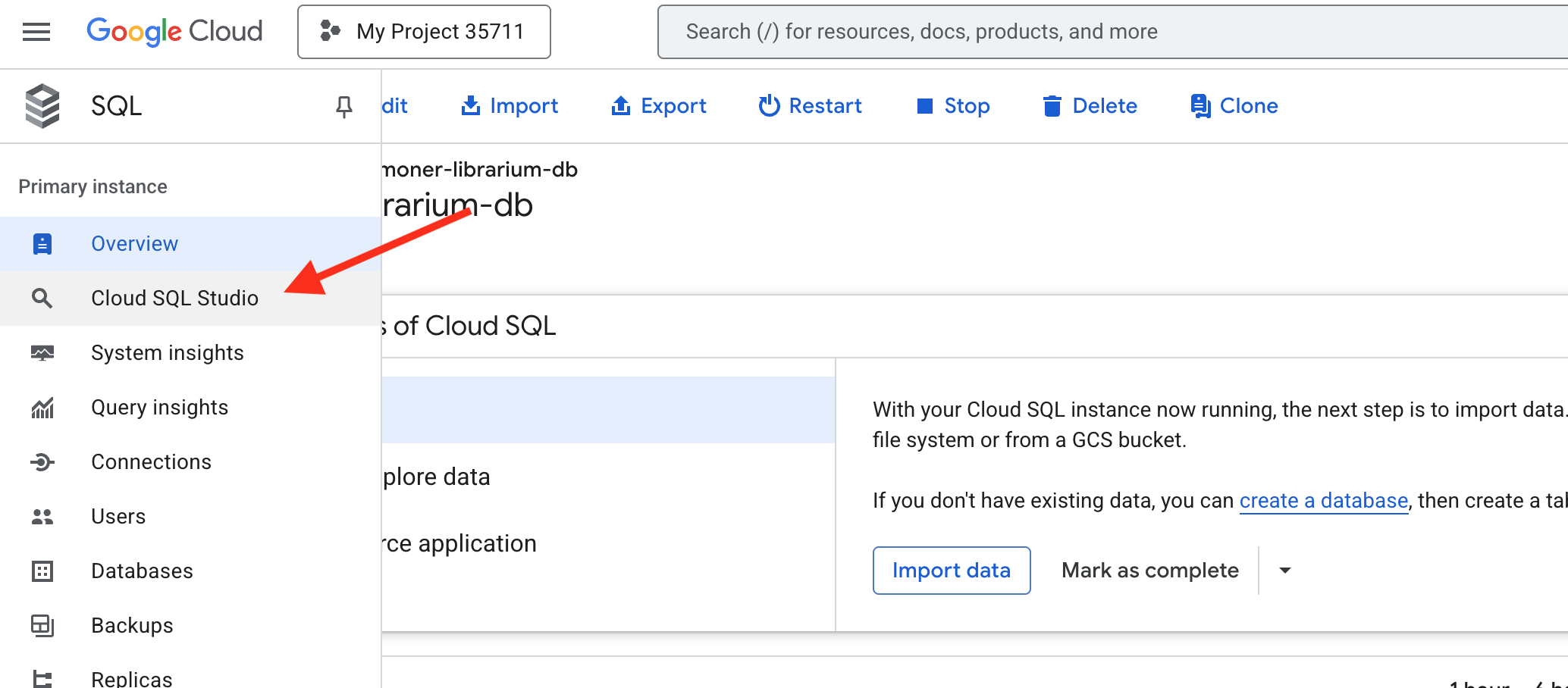
👉 বাম দিকের লগইন প্যানে, ড্রপডাউন থেকে familiar_grimoire ডাটাবেস নির্বাচন করুন।
👉 ব্যবহারকারী হিসেবে summoner এবং পাসওয়ার্ড হিসেবে 1234qwer লিখুন, তারপর Authenticate এ ক্লিক করুন।
👉📜 একবার সংযুক্ত হয়ে গেলে, যদি একটি নতুন কোয়েরি এডিটর ট্যাব খোলা না থাকে, তাহলে সেটি খুলুন। খোদাই করা মৌলিক ক্ষতির তথ্য দেখতে, নিম্নলিখিত SQL কোয়েরিটি পেস্ট করুন এবং চালান:
SELECT * FROM
  "public"."abilities"
এখন আপনার কলাম এবং সারিগুলি পূর্ণ করে abilities টেবিলটি দেখতে পাবেন, যা নিশ্চিত করবে যে আপনার গ্রিমোয়ার প্রস্তুত। 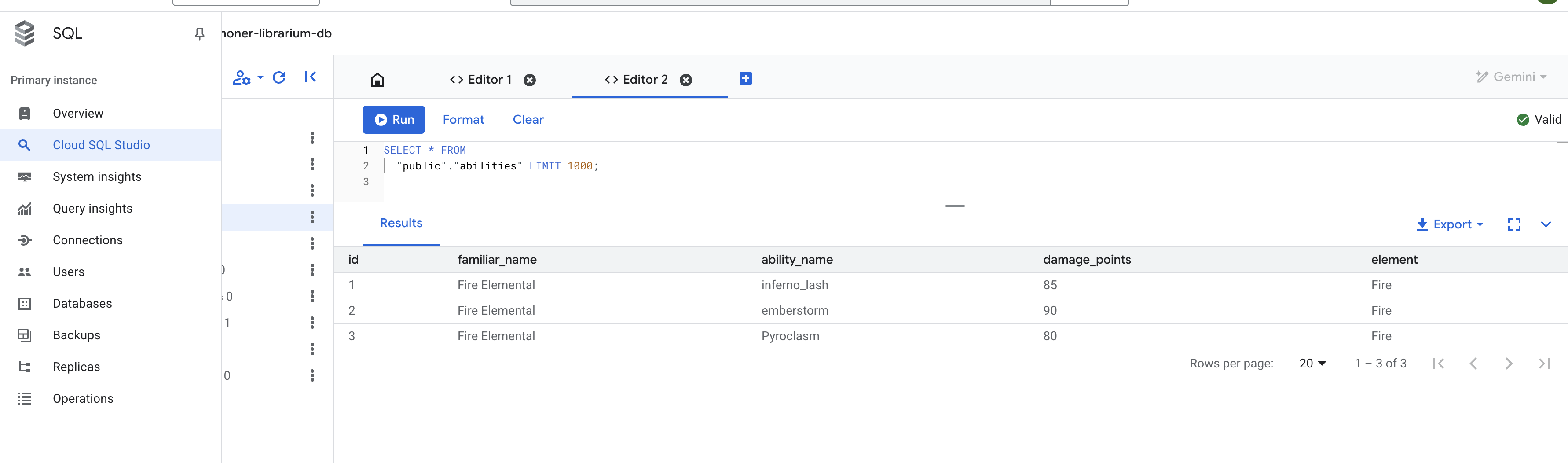
টুলবক্স এমসিপি সার্ভার কনফিগার করুন
tools.yaml কনফিগারেশন ফাইলটি আমাদের সার্ভারের জন্য ব্লুপ্রিন্ট হিসেবে কাজ করে, যা ডাটাবেস টুলবক্সকে আমাদের ডাটাবেসের সাথে কীভাবে সংযোগ করতে হবে এবং কোন SQL কোয়েরিগুলিকে টুল হিসেবে প্রকাশ করতে হবে তা ঠিকভাবে বলে।
উৎস: এই বিভাগটি আপনার ডেটার সাথে সংযোগগুলি সংজ্ঞায়িত করে।
- summoner-librarium:: এটি আমাদের সংযোগের একটি যৌক্তিক নাম।
- প্রকার: cloud-sql-postgres: এটি টুলবক্সকে তার অন্তর্নির্মিত, সুরক্ষিত সংযোগকারী ব্যবহার করতে বলে যা বিশেষভাবে ক্লাউড SQL-এর জন্য PostgreSQL-এর জন্য ডিজাইন করা হয়েছে।
- প্রকল্প, অঞ্চল, উদাহরণ, ইত্যাদি: এগুলি হল prepare.sh স্ক্রিপ্টের সময় আপনার তৈরি করা ক্লাউড SQL উদাহরণের সঠিক স্থানাঙ্ক, যা টুলবক্সকে আমাদের লাইব্রেরিয়াম কোথায় পাবেন তা বলে দেয়।
👉✏️ tools.yaml ফাইলে ~/agentverse-architect/mcp-servers/db-toolbox এ যান, #REPLACE-Source পরিবর্তে নিম্নলিখিতটি দিন।
sources:
  # This section defines the connection to our Cloud SQL for PostgreSQL database.
  summoner-librarium:
    kind: cloud-sql-postgres
    project: "YOUR_PROJECT_ID"
    region: "us-central1"
    instance: "summoner-librarium-db"
    database: "familiar_grimoire"
    user: "summoner"
    password: "1234qwer"
👉✏️ 🚨🚨 প্রতিস্থাপন করুন
YOUR_PROJECT_ID
আপনার প্রকল্প আইডি সহ।
টুলস: এই বিভাগটি আমাদের সার্ভারের প্রকৃত ক্ষমতা বা ফাংশনগুলি সংজ্ঞায়িত করে।
- lookup-available-ability:: এটি আমাদের প্রথম টুলের নাম।
- প্রকার: postgres-sql: এটি টুলবক্সকে বলে যে এই টুলের কাজ হল একটি SQL স্টেটমেন্ট কার্যকর করা।
- source: summoner-librarium: এটি টুলটিকে সোর্স ব্লকে সংজ্ঞায়িত সংযোগের সাথে সংযুক্ত করে। এইভাবে টুলটি জানে কোন ডাটাবেসের বিরুদ্ধে তার কোয়েরি চালাতে হবে।
- বর্ণনা এবং পরামিতি: এই তথ্যটি ভাষা মডেলের সামনে প্রকাশ করা হবে। বর্ণনাটি এজেন্টকে বলে দেয় কখন টুলটি ব্যবহার করতে হবে, এবং পরামিতিগুলি টুলটির প্রয়োজনীয় ইনপুটগুলি সংজ্ঞায়িত করে। এজেন্টের ফাংশন-কলিং ক্ষমতা সক্ষম করার জন্য এটি অত্যন্ত গুরুত্বপূর্ণ।
- বিবৃতি: এটি হল কাঁচা SQL কোয়েরি যা কার্যকর করা হবে। $1 হল একটি নিরাপদ স্থানধারক যেখানে এজেন্ট দ্বারা প্রদত্ত পরিচিত_নাম প্যারামিটারটি নিরাপদে সন্নিবেশ করা হবে।
👉✏️ tools.yaml ফাইলের একই ~/agentverse-architect/mcp-servers/db-toolbox এ, #REPLACE-tools নিম্নলিখিত দিয়ে প্রতিস্থাপন করুন
tools:
  # This tool replaces the need for a custom Python function.
  lookup-available-ability:
    kind: postgres-sql
    source: summoner-librarium
    description: "Looks up all known abilities and their damage for a given familiar from the Grimoire."
    parameters:
      - name: familiar_name
        type: string
        description: "The name of the familiar to search for (e.g., 'Fire Elemental')."
    statement: |
      SELECT ability_name, damage_points FROM abilities WHERE familiar_name = $1;

  # This tool also replaces a custom Python function.
  ability-damage:
    kind: postgres-sql
    source: summoner-librarium
    description: "Finds the base damage points for a specific ability by its name."
    parameters:
      - name: ability_name
        type: string
        description: "The exact name of the ability to look up (e.g., 'inferno_resonance')."
    statement: |
      SELECT damage_points FROM abilities WHERE ability_name = $1;
টুলসেট: এই বিভাগটি আমাদের পৃথক টুলগুলিকে একত্রিত করে।
- summoner-librarium:: আমরা আমাদের সোর্সের নামের একই নামের একটি টুলসেট তৈরি করছি। যখন আমাদের ডায়াগনস্টিক এজেন্ট পরে সংযোগ স্থাপন করবে, তখন এটি summoner-librarium টুলসেট থেকে সমস্ত টুল একটি একক, দক্ষ কমান্ডে লোড করতে বলবে।
👉✏️ tools.yaml ফাইলের একই ~/agentverse-architect/mcp-servers/db-toolbox এ, #REPLACE-toolsets নিম্নলিখিত দিয়ে প্রতিস্থাপন করুন
toolsets:
   summoner-librarium:
     - lookup-available-ability
     - ability-damage
লাইব্রেরিয়াম স্থাপন করা
এখন আমরা লাইব্রেরিয়াম স্থাপন করব। আমাদের নিজস্ব কন্টেইনার তৈরি করার পরিবর্তে, আমরা গুগল থেকে একটি পূর্ব-নির্মিত, অফিসিয়াল কন্টেইনার ইমেজ ব্যবহার করব এবং সিক্রেট ম্যানেজার ব্যবহার করে আমাদের tools.yaml কনফিগারেশন নিরাপদে প্রদান করব। এটি নিরাপত্তা এবং রক্ষণাবেক্ষণের জন্য একটি সর্বোত্তম অনুশীলন।
👉💻 tools.yaml ফাইল থেকে একটি গোপনীয়তা তৈরি করুন
cd ~/agentverse-architect/mcp-servers/db-toolbox
gcloud secrets create tools --data-file=tools.yaml
👉💻 ক্লাউড রানে অফিসিয়াল টুলবক্স কন্টেইনার স্থাপন করুন।
cd ~/agentverse-architect/mcp-servers/db-toolbox
. ~/agentverse-architect/set_env.sh
export TOOLBOX_IMAGE=us-central1-docker.pkg.dev/database-toolbox/toolbox/toolbox:$TOOLBOX_VERSION
echo "TOOLBOX_IMAGE is $TOOLBOX_IMAGE"
gcloud run deploy toolbox \
    --image $TOOLBOX_IMAGE \
    --region $REGION \
    --set-secrets "/app/tools.yaml=tools:latest" \
    --labels="dev-tutorial-codelab=agentverse" \
    --args="--tools-file=/app/tools.yaml","--address=0.0.0.0","--port=8080" \
    --allow-unauthenticated \
    --min-instances 1
--set-secrets: এই কমান্ডটি আমাদের টুলস সিক্রেটকে নিরাপদে চলমান কন্টেইনারের ভিতরে tools.yaml নামক একটি ফাইল হিসেবে মাউন্ট করে।-
--args: আমরা টুলবক্স কন্টেইনারকে মাউন্ট করা গোপন ফাইলটি তার কনফিগারেশন হিসাবে ব্যবহার করার নির্দেশ দিই।
👉 আপনার টুলবক্সটি সফলভাবে স্থাপন করা হয়েছে কিনা তা নিশ্চিত করতে, ক্লাউড রান কনসোলে নেভিগেট করুন। আপনি একটি সবুজ চেকমার্ক সহ তালিকাভুক্ত summoner-toolbox পরিষেবাটি দেখতে পাবেন, যা নির্দেশ করে যে এটি সঠিকভাবে চলছে, ঠিক নীচের চিত্রের মতো। 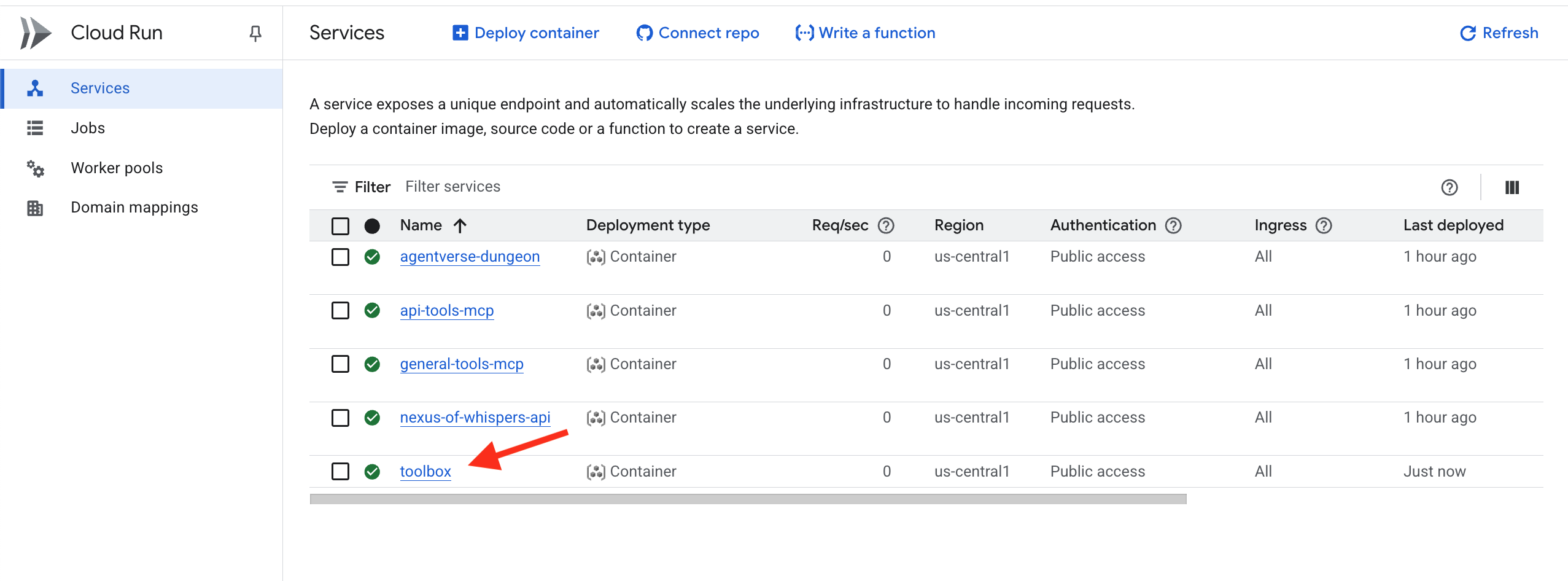
যদি আপনি আপডেট করতে ভুলে যান
YOUR_PROJECT_ID
আপনি নিম্নলিখিত কমান্ড ব্যবহার করে সিক্রেটে tools.yaml এর একটি নতুন সংস্করণ যোগ করতে পারেন এবং আবার এটি পুনরায় স্থাপন করতে পারেন।
gcloud secrets versions add tools --data-file=tools.yaml
জ্ঞানের লাইব্রেরিয়াম (ডাটাবেস টুলবক্স এমসিপি সার্ভার) এখন সক্রিয় এবং ক্লাউডে অ্যাক্সেসযোগ্য। এই এমসিপি সার্ভারটি আমরা যাকে ডিক্লারেটিভ ডিজাইন বলি তা ব্যবহার করে যা আপনি কী চান তা বর্ণনা করে এবং টুলবক্সটি আপনার জন্য সার্ভার তৈরি করে।
যাচাইকরণ: শিক্ষানবিশের বিচার
👉💻 এখন আমরা ডায়াগনস্টিক এজেন্টের সাহায্যে আমাদের সম্পূর্ণ, ক্লাউড-নেটিভ টুলিং ইকোসিস্টেম পরীক্ষা করব।
cd ~/agentverse-architect/
python -m venv env
source ~/agentverse-architect/env/bin/activate
cd ~/agentverse-architect/mcp-servers
pip install -r diagnose/requirements.txt
. ~/agentverse-architect/set_env.sh
adk run diagnose
👉💻 cmd লাইন টেস্টিং টুলে, তিনটি ফন্টই পরীক্ষা করুন:
Look up the entry for "inferno_lash". What is its base power level?
The enemy is vulnerable to frost! Channel power from the Nexus and cast Cryosea Shatter.
Take a fire spell with a base power of 15 and use the Arcane Forge to multiply it with Inferno Resonance.
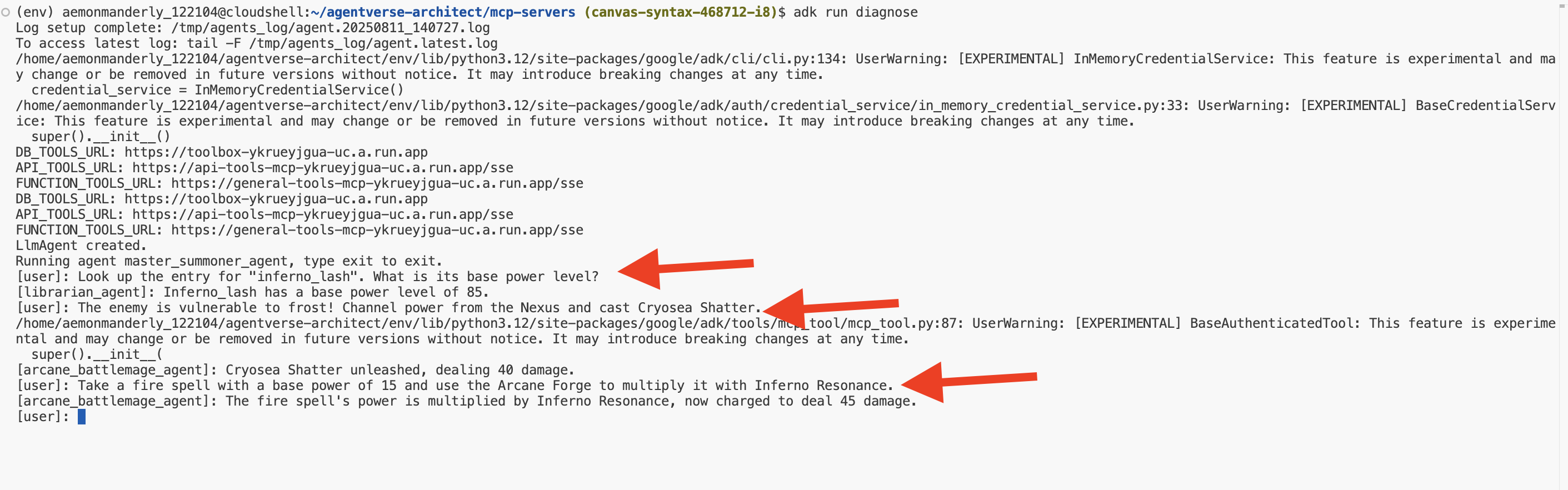
অভিনন্দন, সামনার। আপনার তিনটি এলিমেন্টাল ফন্ট এখন সক্রিয়, স্বাধীনভাবে স্থাপন করা হয়েছে এবং বিশ্বব্যাপী অ্যাক্সেসযোগ্য, যা আপনার এজেন্টিক লিজিয়নের জন্য অটল ভিত্তি তৈরি করবে। প্রস্থান করতে Ctrl+C টিপুন।
নন-গেমারদের জন্য
৫. পরিচিতদের ডেকে পাঠানো: মূল ডোমেন কর্মপ্রবাহ
এলিমেন্টাল ফন্টগুলো নকল, অদম্য, অদম্য শক্তিতে গুনগুন করছে। কিন্তু রূপ ছাড়া শক্তি বিশৃঙ্খলা। একজন সত্যিকারের আহ্বায়ক কেবল অদম্য শক্তি ব্যবহার করেন না; তারা এটিকে ইচ্ছাশক্তি, উদ্দেশ্য এবং একটি বিশেষ রূপ দেন। শক্তির উৎস তৈরির বাইরে গিয়ে সত্যিকারের কাজ শুরু করার সময় এসেছে: আপনার প্রথম পরিচিতদের ডেকে আনা।
আপনার ডাকা প্রতিটি পরিচিত ব্যক্তি একজন স্বায়ত্তশাসিত এজেন্ট হবে, একটি নির্দিষ্ট যুদ্ধ মতবাদের সাথে আবদ্ধ একজন অনুগত দাস। তারা সাধারণবাদী নয়; তারা একক, শক্তিশালী কৌশলের মাস্টার হবে। একজন হবে সুনির্দিষ্ট, এক-দুই ঘুষি কম্বোর মাস্টার। অন্যজন শত্রুদের একযোগে, বহুমুখী আক্রমণের মাধ্যমে পরাজিত করবে। তৃতীয়জন হবে একটি অবিরাম অবরোধকারী ইঞ্জিন, চাপ প্রয়োগ করে যতক্ষণ না তার লক্ষ্যবস্তু ভেঙে পড়ে।

MCP সার্ভার দ্বারা প্রদত্ত প্রক্রিয়া, ব্যবসায়িক যুক্তি এবং ক্রিয়াগুলিকে বিশেষায়িত, স্বায়ত্তশাসিত ওয়ার্কফ্লো এজেন্টে রূপান্তরিত করার জন্য। প্রতিটি এজেন্টের একটি নির্দিষ্ট "কার্যক্ষম অঞ্চল" থাকবে যার মাধ্যমে তাকে কেবলমাত্র নির্দিষ্ট MCP টুল সার্ভারগুলিতে অ্যাক্সেস দেওয়া হবে যা তার কার্য সম্পাদনের জন্য প্রয়োজন। এই ল্যাবটি সঠিক কাজের জন্য সঠিক এজেন্টের ধরণ কীভাবে নির্বাচন করতে হয় তা প্রদর্শন করে।
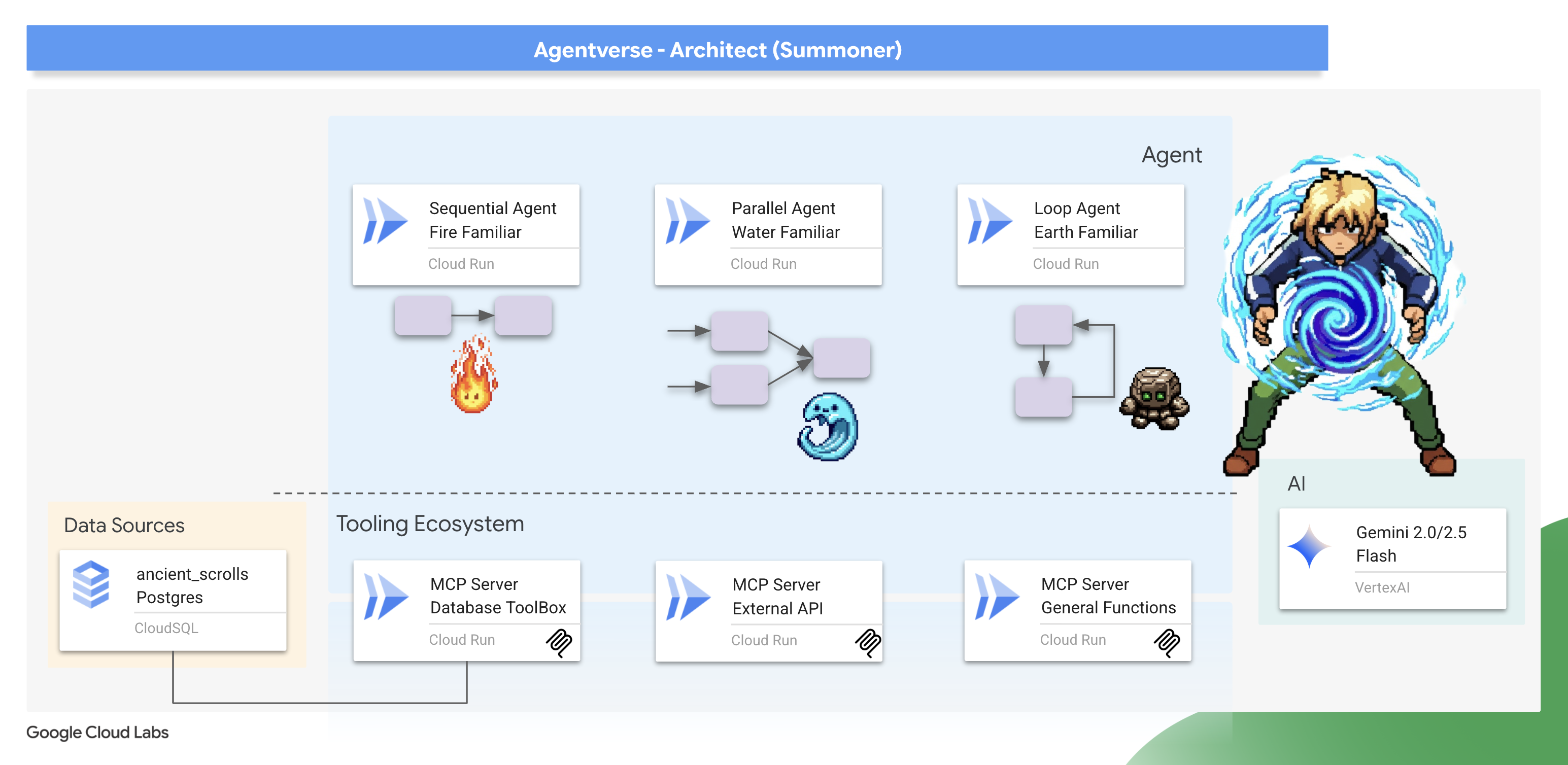
এই মডিউলটি আপনাকে শেখাবে কিভাবে ADK-এর শক্তিশালী ওয়ার্কফ্লো এজেন্ট ব্যবহার করে এই কৌশলগুলিতে প্রাণ সঞ্চার করতে হয়। আপনি শিখবেন যে SequentialAgent, ParallelAgent, অথবা LoopAgent-এর স্থাপত্য পছন্দ কেবল একটি প্রযুক্তিগত বিবরণ নয় - এটি আপনার Familiar-এর প্রকৃতির সারাংশ এবং যুদ্ধক্ষেত্রে এর শক্তির মূল।
তোমার পবিত্র স্থান প্রস্তুত করো। আসল আহ্বান শুরু হতে চলেছে।
Fire Elemental পরিচিতদের ডাকুন (ক্রমিক কর্মপ্রবাহ)
একজন অগ্নি-প্রাচীন পরিচিতের আক্রমণ হল একটি সুনির্দিষ্ট, দুই-অংশের সংমিশ্রণ: একটি লক্ষ্যবস্তুতে আঘাত এবং তারপরে একটি শক্তিশালী ইগনিশন। এর জন্য কঠোর, সুশৃঙ্খল ক্রিয়া প্রয়োজন।
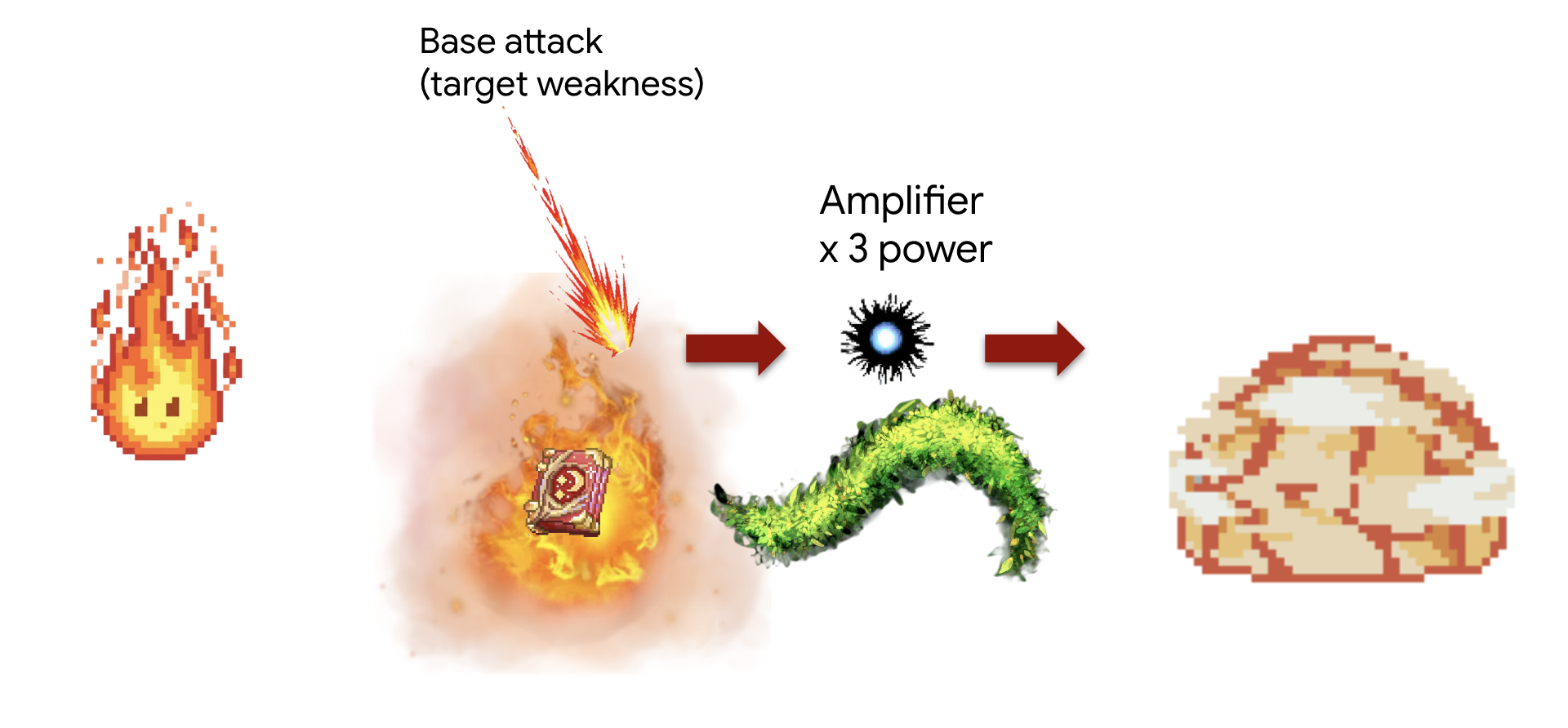
ধারণা: SequentialAgent হল এর জন্য নিখুঁত হাতিয়ার। এটি নিশ্চিত করে যে সাব-এজেন্টের একটি সিরিজ একের পর এক চলবে, ফলাফলটি পূর্ববর্তী ধাপ থেকে পরবর্তী ধাপে স্থানান্তর করবে।
টাস্ক ("অ্যামপ্লিফাইড স্ট্রাইক" কম্বো):
- ধাপ ১: এজেন্ট প্রথমে লাইব্রেরিয়ামের সাথে পরামর্শ করে একটি নির্দিষ্ট অগ্নি সক্ষমতার মূল ক্ষতি খুঁজে বের করবে।
- ধাপ ২: এরপর এটি সেই ক্ষতির মান নেবে এবং inferno_resonance ব্যবহার করে এর শক্তি বৃদ্ধি করার জন্য Arcane Forge-এর মাধ্যমে এটিকে চ্যানেল করবে।
প্রথমে, আমরা আমাদের Familiar এবং MCP সার্ভারগুলির ("এলিমেন্টাল ফন্ট") মধ্যে সংযোগ স্থাপন করব যা আপনি পূর্ববর্তী মডিউলে স্থাপন করেছিলেন।
👉✏️ ~/agentverse-architect/agent/fire/agent.py ফাইলে নিম্নলিখিত কোড সহ REPLACE #REPLACE-setup-MCP লিখুন:
toolbox = ToolboxSyncClient(DB_TOOLS_URL)
toolDB = toolbox.load_toolset('summoner-librarium')
toolFunction =  MCPToolset(
    connection_params=SseServerParams(url=FUNCTION_TOOLS_URL, headers={})
)
এরপর, আমরা আমাদের বিশেষজ্ঞ "কর্মী" এজেন্ট তৈরি করি। প্রত্যেককে একটি সংকীর্ণ, সুনির্দিষ্ট উদ্দেশ্য দেওয়া হয় এবং শুধুমাত্র একটি নির্দিষ্ট টুলসেটে অ্যাক্সেস দেওয়ার মাধ্যমে তাদের নিজস্ব "কার্যক্ষম অঞ্চল" পর্যন্ত সীমাবদ্ধ রাখা হয়।
👉✏️ ~/agentverse-architect/agent/fire/agent.py ফাইলে নিম্নলিখিত কোড সহ #REPLACE-worker-agents REPLACE করুন :
scout_agent = LlmAgent(
      model='gemini-2.5-flash',
      name='librarian_agent',
      instruction="""
          Your only task is to find all the available abilities,
          You want to ALWAYS use 'Fire Elemental' as your familiar's name.
          Randomly pick one if you see multiple availabilities
          and the base damage of the ability by calling the 'ability_damage' tool.
      """,
      tools=toolDB
)
amplifier_agent = LlmAgent(
      model='gemini-2.5-flash',
      name='amplifier_agent',
      instruction="""
            You are the Voice of the Fire Familiar, a powerful being who unleashes the final, devastating attack.
            You will receive the base damage value from the previous step.

            Your mission is to:
            1.  Take the incoming base damage number and amplify it using the `inferno_resonance` tool.
            2.  Once the tool returns the final, multiplied damage, you must not simply state the result.
            3.  Instead, you MUST craft a final, epic battle cry describing the attack.
                Your description should be vivid and powerful, culminating in the final damage number.

            Example: If the tool returns a final damage of 120, your response could be:
            "The runes glow white-hot! I channel the amplified energy... unleashing a SUPERNOVA for 120 damage!"
      """,
      tools=[toolFunction],
)
এই এজেন্টগুলি মডুলার, পুনঃব্যবহারযোগ্য উপাদান। তত্ত্বগতভাবে, আপনি এই scout_agent কে সম্পূর্ণ ভিন্ন কর্মপ্রবাহে ব্যবহার করতে পারেন যার জন্য ডাটাবেস অনুসন্ধানের প্রয়োজন হয়। তাদের দায়িত্ব আলাদা রেখে, আমরা নমনীয় বিল্ডিং ব্লক তৈরি করি। এটি মাইক্রোসার্ভিস এবং কম্পোনেন্ট-ভিত্তিক নকশার একটি মূল নীতি।
এরপর আমরা ওয়ার্কফ্লো একত্রিত করব এখানেই রচনার জাদু ঘটে। SequentialAgent হল "মাস্টার প্ল্যান" যা আমাদের বিশেষজ্ঞ উপাদানগুলিকে কীভাবে একত্রিত করা হয় এবং কীভাবে তারা ইন্টারঅ্যাক্ট করে তা নির্ধারণ করে।
👉✏️ ~/agentverse-architect/agent/fire/agent.py ফাইলে নিম্নলিখিত কোড সহ #REPLACE-sequential-agent REPLACE করুন :
root_agent = SequentialAgent(
      name='fire_elemental_familiar',
      sub_agents=[scout_agent, amplifier_agent],
)
👉💻 ফায়ার এলিমেন্টাল পরীক্ষা করার জন্য, নিম্নলিখিত কমান্ডগুলি চালান ADK DEV UI চালু করবে:
. ~/agentverse-architect/set_env.sh
source ~/agentverse-architect/env/bin/activate
cd ~/agentverse-architect/agent
echo  DB MCP Server: $DB_TOOLS_URL
echo  API MCP Server: $API_TOOLS_URL
echo  General MCP Server: $FUNCTION_TOOLS_URL
adk web
কমান্ডগুলি চালানোর পরে, আপনার টার্মিনালে আউটপুট দেখতে পাবেন যা নির্দেশ করে যে ADK ওয়েব সার্ভার শুরু হয়েছে, যেমনটি:
+-----------------------------------------------------------------------------+
| ADK Web Server started                                                      |
|                                                                             |
| For local testing, access at http://localhost:8000.                         |
+-----------------------------------------------------------------------------+

INFO:     Application startup complete.
INFO:     Uvicorn running on http://0.0.0.0:8000 (Press CTRL+C to quit)
👉 এরপর, আপনার ব্রাউজার থেকে ADK Dev UI অ্যাক্সেস করতে:
ক্লাউড শেল টুলবারে (সাধারণত উপরে ডানদিকে) ওয়েব প্রিভিউ আইকন থেকে (প্রায়শই চোখ বা তীরযুক্ত বর্গক্ষেত্রের মতো দেখায়), পরিবর্তন পোর্ট নির্বাচন করুন। পপ-আপ উইন্ডোতে, পোর্টটি 8000 এ সেট করুন এবং "পরিবর্তন এবং পূর্বরূপ" ক্লিক করুন। ক্লাউড শেল এরপর ADK ডেভ UI প্রদর্শন করে একটি নতুন ব্রাউজার ট্যাব বা উইন্ডো খুলবে।
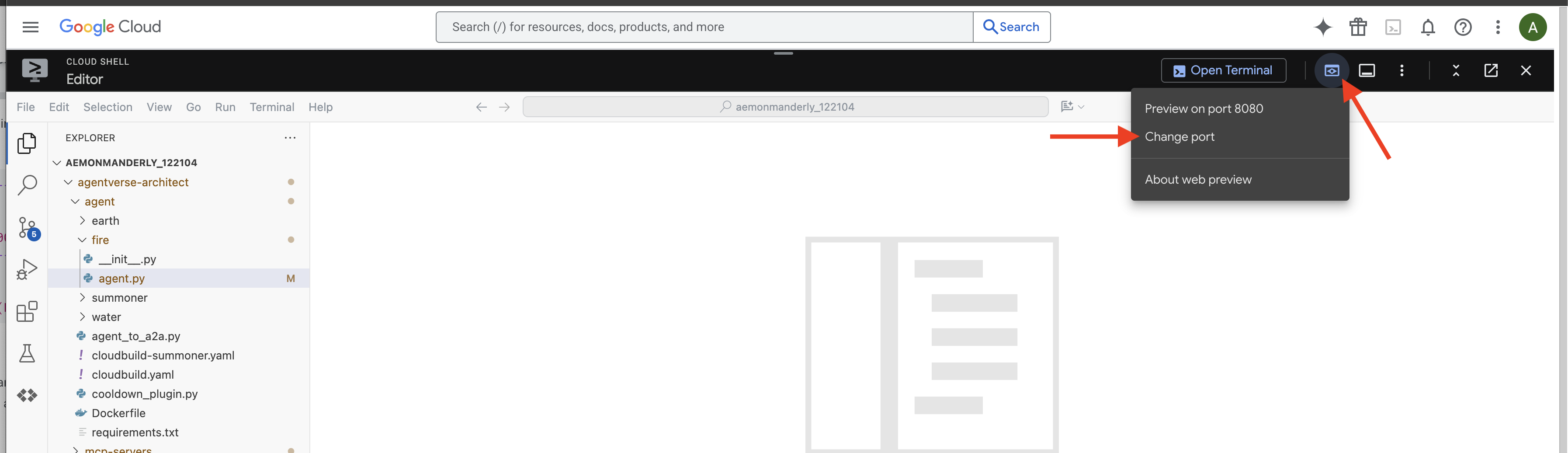
👉 আপনার তলব করার রীতি সম্পন্ন হয়েছে, এবং এজেন্ট এখন চলছে। আপনার ব্রাউজারে ADK ডেভ UI হল Familiar-এর সাথে আপনার সরাসরি সংযোগ।
- আপনার লক্ষ্য নির্বাচন করুন: UI এর উপরের ড্রপডাউন মেনুতে,
firefamiliar নির্বাচন করুন। আপনি এখন এই নির্দিষ্ট সত্তার উপর আপনার ইচ্ছাকে কেন্দ্রীভূত করছেন। - আপনার আদেশ দিন: ডানদিকের চ্যাট প্যানেলে, পরিচিতদের আদেশ দেওয়ার সময় এসেছে।
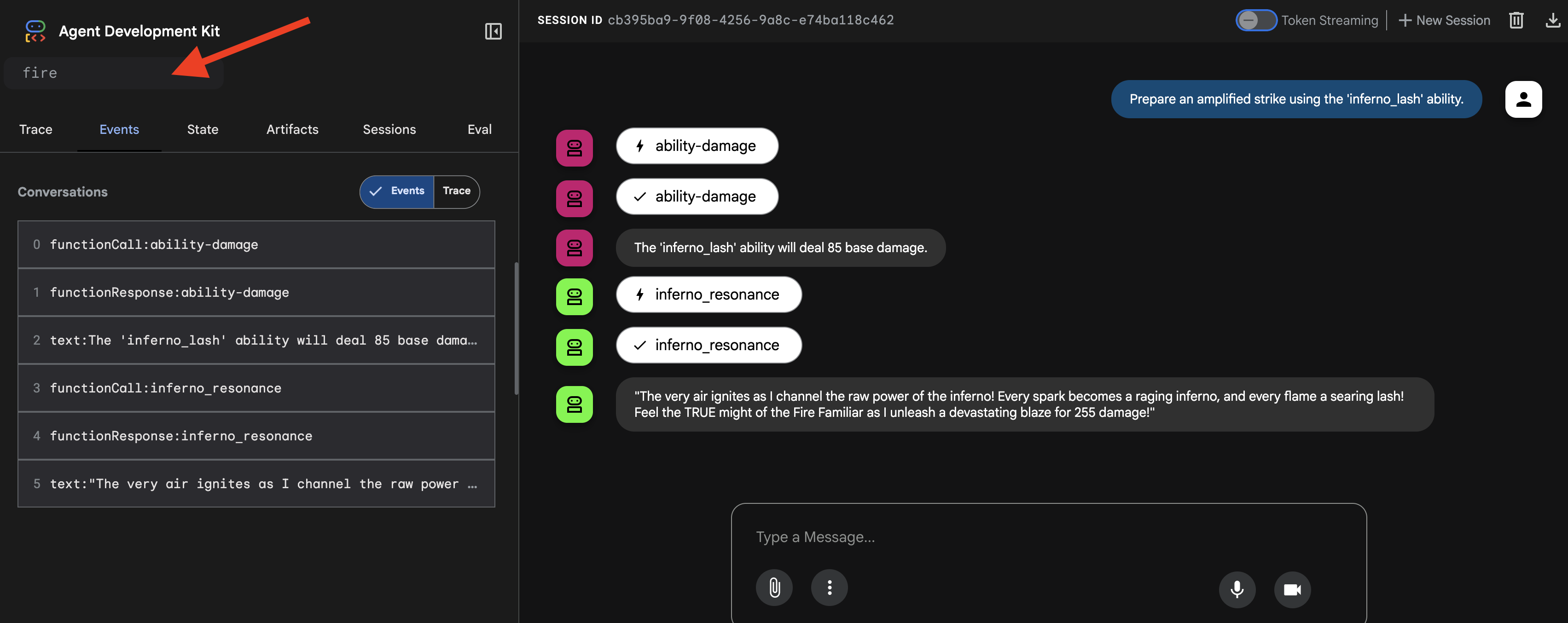
👉 পরীক্ষার প্রম্পট:
Prepare an amplified strike using the 'inferno_lash' ability.
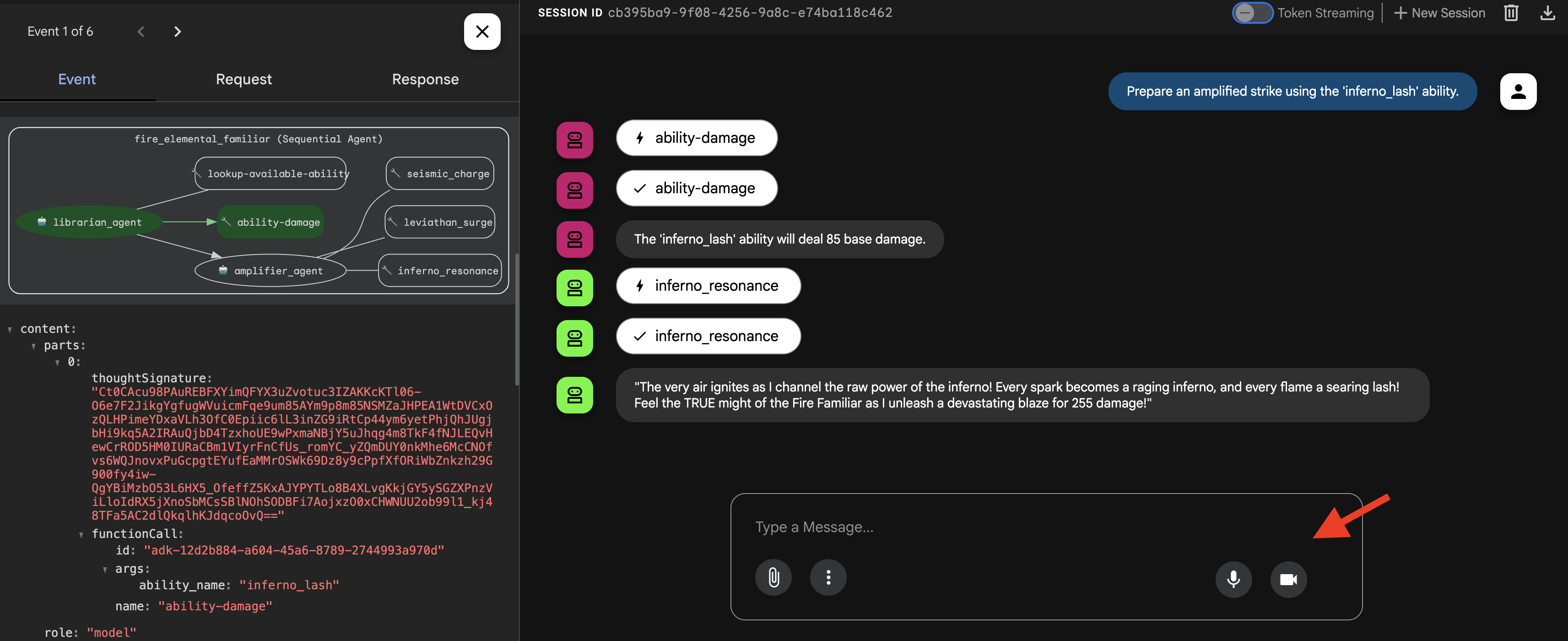
তুমি দেখতে পাবে এজেন্টটি চিন্তা করছে, প্রথমে তার "স্কাউট" কে ডেকে বেস ড্যামেজ খুঁজে বের করবে, এবং তারপর তার "অ্যামপ্লিফায়ার" কে ডেকে তা গুণ করবে এবং চূড়ান্ত, মহাকাব্যিক আঘাত দেবে।
👉💻 একবার আপনার তলব করা শেষ হয়ে গেলে, আপনার ক্লাউড শেল এডিটর টার্মিনালে ফিরে যান এবং ADK ডেভ UI বন্ধ করতে Ctrl+C টিপুন।
Water Elemental পরিচিতদের ডাকুন (সমান্তরাল কর্মপ্রবাহ)
একটি জল-প্রাচীন পরিচিত বাহিনী একটি বিশাল, বহুমুখী আক্রমণের মাধ্যমে তার লক্ষ্যবস্তুকে পরাজিত করে, একযোগে সমস্ত দিক থেকে আঘাত করে এবং চূড়ান্ত, বিধ্বংসী আঘাতের জন্য শক্তিগুলিকে একত্রিত করে।
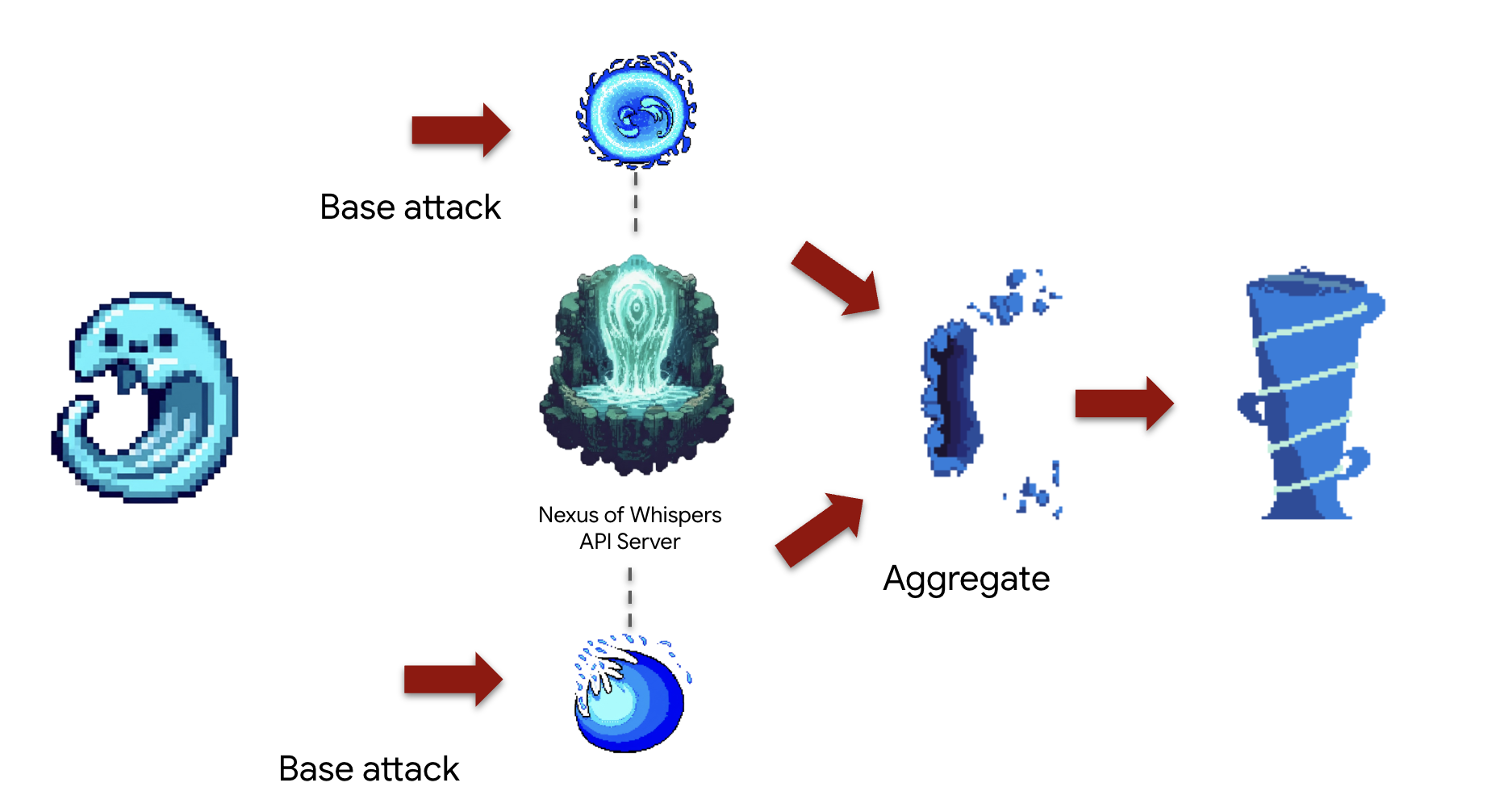
ধারণা: ParallelAgent দক্ষতা সর্বাধিক করার জন্য একসাথে একাধিক স্বাধীন কাজ সম্পাদনের জন্য আদর্শ। এটি একটি "পিন্সার অ্যাটাক" যেখানে আপনি একসাথে বেশ কয়েকটি আক্রমণ শুরু করেন। এটি একটি SequentialAgent মধ্যে একযোগে আক্রমণ শুরু করে এবং পরবর্তীতে একটি চূড়ান্ত "মার্জার" ধাপ চালায়। এই " fan-out, fan-in " প্যাটার্নটি উন্নত ওয়ার্কফ্লো ডিজাইনের ভিত্তিপ্রস্তর।
কাজ ("জোয়ার সংঘর্ষ" কম্বো): এজেন্ট একই সাথে করবে:
- টাস্ক A: নেক্সাস থেকে চ্যানেল
cryosea_shatter। - টাস্ক বি: নেক্সাস থেকে চ্যানেল
moonlit_cascade। - টাস্ক সি: ফোর্জ থেকে
leviathan_surgeব্যবহার করে কাঁচা শক্তি উৎপন্ন করুন। - অবশেষে, সমস্ত ক্ষতির পরিমাণ যোগ করুন এবং সম্মিলিত আক্রমণের বর্ণনা দিন।
প্রথমে, আমরা আমাদের Familiar এবং MCP সার্ভারগুলির ("এলিমেন্টাল ফন্ট") মধ্যে সংযোগ স্থাপন করব যা আপনি পূর্ববর্তী মডিউলে স্থাপন করেছিলেন।
👉✏️ ~/agentverse-architect/agent/water/agent.py ফাইলে নিম্নলিখিত কোড সহ REPLACE #REPLACE-setup-MCP লিখুন:
toolFAPI =  MCPToolset(
      connection_params=SseServerParams(url=API_TOOLS_URL, headers={})
  )
toolFunction =  MCPToolset(
    connection_params=SseServerParams(url=FUNCTION_TOOLS_URL, headers={})
)
এরপর, আমরা আমাদের বিশেষজ্ঞ "কর্মী" এজেন্ট তৈরি করব। প্রত্যেককে একটি সংকীর্ণ, সুনির্দিষ্ট উদ্দেশ্য দেওয়া হয় এবং শুধুমাত্র একটি নির্দিষ্ট টুলসেটে অ্যাক্সেস দেওয়ার মাধ্যমে তাদের নিজস্ব "কার্যক্ষম অঞ্চল" পর্যন্ত সীমাবদ্ধ রাখা হয়।
👉✏️ ~/agentverse-architect/agent/water/agent.py ফাইলে নিম্নলিখিত কোড সহ #REPLACE-worker-agents REPLACE করুন:
nexus_channeler = LlmAgent(
      model='gemini-2.5-flash',
      name='librarian_agent',
      instruction="""
          You are a Channeler of the Nexus. Your sole purpose is to invoke the
          `cryosea_shatter` and `moonlit_cascade` spells by calling their respective tools.
          Report the result of each spell cast clearly and concisely.
      """,
      tools=[toolFAPI]
)

forge_channeler = LlmAgent(
      model='gemini-2.5-flash',
      name='amplifier_agent',
      instruction="""
          You are a Channeler of the Arcane Forge. Your only task is to invoke the
          `leviathan_surge` spell. You MUST call it with a `base_water_damage` of 20.
          Report the result clearly.
      """,
      tools=[toolFunction],
)

power_merger = LlmAgent(
      model='gemini-2.5-flash',
      name='power_merger',
      instruction="""
          You are the Power Merger, a master elementalist who combines raw magical
          energies into a single, devastating final attack.

          You will receive a block of text containing the results from a simultaneous
          assault by other Familiars.

          You MUST follow these steps precisely:
          1.  **Analyze the Input:** Carefully read the entire text provided from the previous step.
          2.  **Extract All Damage:** Identify and extract every single damage number reported in the text.
          3.  **Calculate Total Damage:** Sum all of the extracted numbers to calculate the total combined damage.
          4.  **Describe the Final Attack:** Create a vivid, thematic description of a massive,
              combined water and ice attack that uses the power of Cryosea Shatter and Leviathan's Surge.
          5.  **Report the Result:** Conclude your response by clearly stating the final, total damage of your combined attack.

          Example: If the input is "...dealt 55 damage. ...dealt 60 damage.", you will find 55 and 60,
          calculate the total as 115, and then describe the epic final attack, ending with "for a total of 115 damage!"
      """,
      tools=[toolFunction],
)
এরপর, আমরা ওয়ার্কফ্লো একত্রিত করব। এখানেই রচনার জাদু ঘটে। ParallelAgent এবং SequentialAgent হল "মাস্টার প্ল্যান" যা আমাদের বিশেষজ্ঞ উপাদানগুলিকে কীভাবে একত্রিত করা হয় এবং "টাইডাল ক্ল্যাশ" কম্বো তৈরি করার জন্য কীভাবে তারা ইন্টারঅ্যাক্ট করে তা নির্ধারণ করে।
👉✏️ ~/agentverse-architect/agent/water/agent.py ফাইলে নিম্নলিখিত কোড সহ #REPLACE-parallel-agent REPLACE করুন:
channel_agent = ParallelAgent(
      name='channel_agent',
      sub_agents=[nexus_channeler, forge_channeler],

)

root_agent = SequentialAgent(
     name="water_elemental_familiar",
     # Run parallel research first, then merge
     sub_agents=[channel_agent, power_merger],
     description="A powerful water familiar that unleashes multiple attacks at once and then combines their power for a final strike."
 )
👉💻 ওয়াটার এলিমেন্টাল পরীক্ষা করতে, ADK ডেভ UI চালু করতে নিম্নলিখিত কমান্ডগুলি চালান:
. ~/agentverse-architect/set_env.sh
source ~/agentverse-architect/env/bin/activate
cd ~/agentverse-architect/agent
echo  DB MCP Server: $DB_TOOLS_URL
echo  API MCP Server: $API_TOOLS_URL
echo  General MCP Server: $FUNCTION_TOOLS_URL
adk web
👉 আপনার তলব করার রীতি সম্পন্ন হয়েছে, এবং এজেন্ট এখন চলছে। আপনার ব্রাউজারে ADK ডেভ UI হল Familiar-এর সাথে আপনার সরাসরি সংযোগ।
- UI এর উপরের ড্রপডাউন মেনুতে, পরিচিত জল নির্বাচন করুন। আপনি এখন এই নির্দিষ্ট সত্তার উপর আপনার ইচ্ছাকে কেন্দ্রীভূত করছেন।
- আপনার আদেশ দিন: ডানদিকের চ্যাট প্যানেলে, পরিচিতদের আদেশ দেওয়ার সময় এসেছে।
👉 পরীক্ষার প্রম্পট:
Unleash a tidal wave of power!
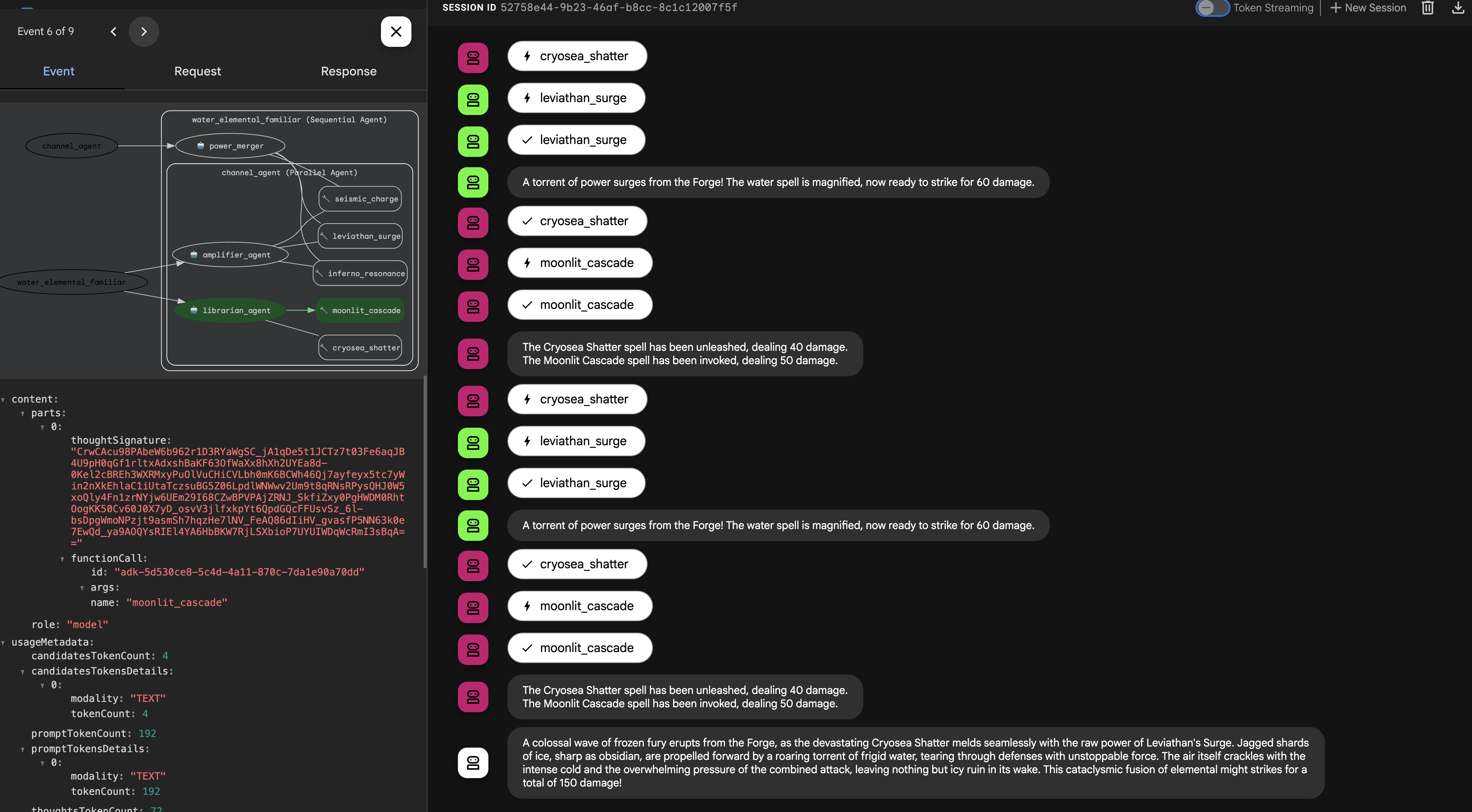
👉💻 একবার আপনার তলব করা শেষ হয়ে গেলে, আপনার ক্লাউড শেল এডিটর টার্মিনালে ফিরে যান এবং ADK ডেভ UI বন্ধ করতে Ctrl+C টিপুন।
Earth Elemental পরিচিতদের ডাকুন (লুপ ওয়ার্কফ্লো)
An Earth Elemental Familiar is a being of relentless pressure. It doesn't defeat its enemy with a single blow, but by steadily accumulating power and applying it over and over until the target's defenses crumble.
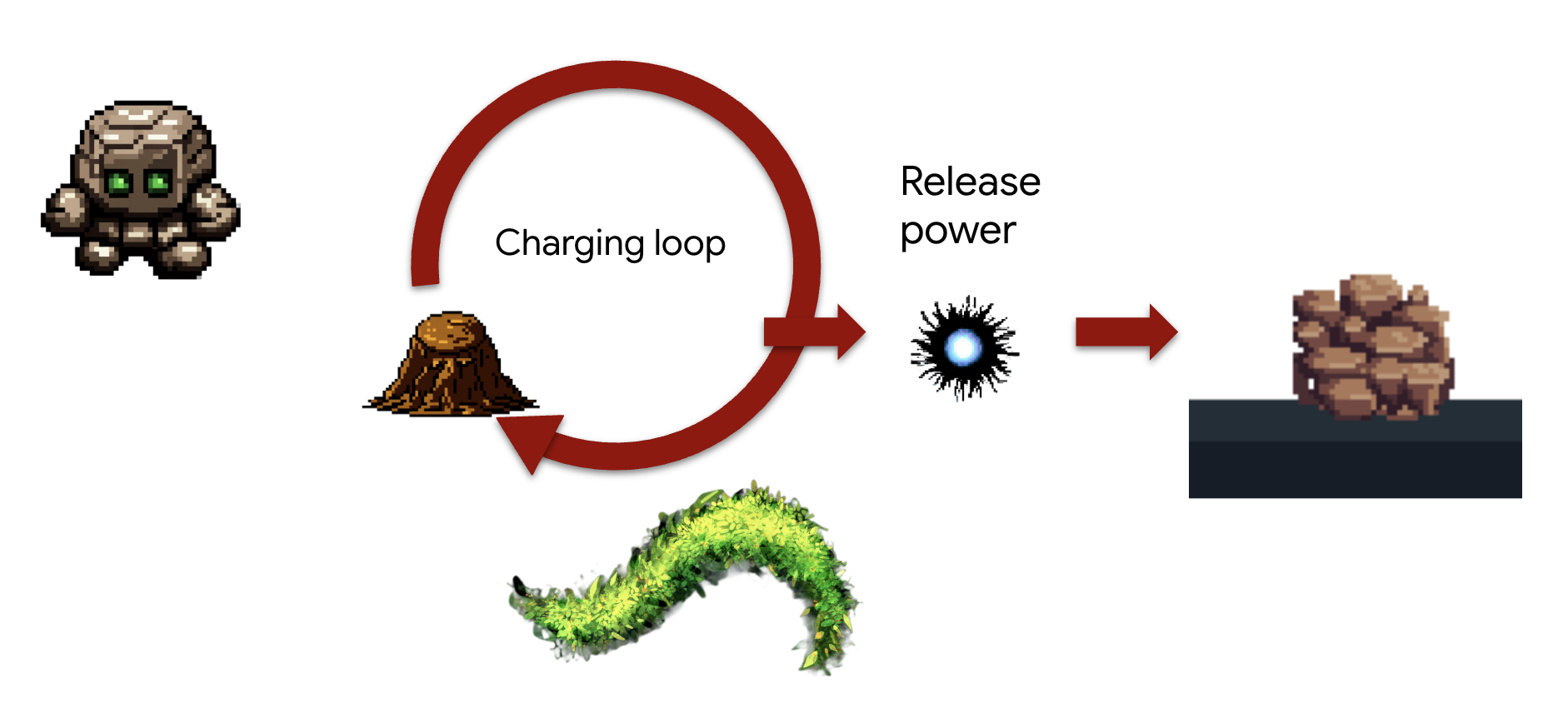
Concept: The LoopAgent is designed for exactly this kind of iterative, "siege engine" task. It will repeatedly execute its sub-agents , checking a condition after each cycle, until a goal is met. It can also adapt its final message based on the loop's progress.
Task (The "Siegebreaker" Assault):
- The Familiar will repeatedly call seismic_charge to accumulate energy.
- It will continue charging for a maximum of 3 times.
- On the final charge, it will announce the devastating release of its accumulated power.
We'll first create reusable components that define the steps within each iteration of the loop. The charging_agent will accumulate energy, and the check_agent will report its status, dynamically changing its message on the final turn.
First, we'll establish the connection between our Familiar and the MCP servers (the "Elemental Fonts") that you deployed in the previous module.
👉✏️ In file ~/agentverse-architect/agent/earth/agent.py REPLACE #REPLACE-setup-MCP with the following code:
toolFunction =  MCPToolset(
    connection_params=SseServerParams(url=FUNCTION_TOOLS_URL, headers={})
)
👉✏️ In file ~/agentverse-architect/agent/earth/agent.py REPLACE #REPLACE-worker-agents with the following code:
charging_agent = LlmAgent(
      model='gemini-2.5-flash',
      name='charging_agent',
      instruction="""
          Your task is to call the 'seismic_charge' .
          You must follow these rules strictly:

          1. You will be provided with a 'current_energy' value from the previous step.
             **If this value is missing or was not provided, you MUST call the tool with 'current_energy' set to 1.**
             This is your primary rule for the first turn.

          2. If a 'current_energy' value is provided, you MUST use that exact value in your cal to seismic_charge.

          3. Your final response MUST contain ONLY the direct output from the 'seismic_charge' tool.
             Do not add any conversational text, introductions, or summaries.
      """,
      tools=[toolFunction]
)
check_agent = LlmAgent(
      model='gemini-2.5-flash',
      name='check_agent',
      instruction="""
          You are the voice of the Earth Elemental, a being of immense, gathering power.
          Your sole purpose is to report on the current energy charge and announce the devastating potential of its release.

          You MUST follow this rule:
          The potential damage upon release is ALWAYS calculated as the `current_energy` from the previous step multiplied by a random number between 80-90. but no more than 300.

          Your response should be in character, like a powerful creature speaking.
          State both the current energy charge and the total potential damage you can unleash.
          Unleash the energy when you reached the last iteration (2nd).
      """,
      output_key="charging_status"
)
Next, we'll assemble the Workflow. This is where the magic of composition happens. The LoopAgent is the "master plan" that orchestrates the repeated execution of our specialist components and manages the loop's conditions.
👉✏️ In file ~/agentverse-architect/agent/earth/agent.py REPLACE #REPLACE-loop-agent with the following code:
root_agent = LoopAgent(
    name="earth_elemental_familiar",
    # Run parallel research first, then merge
    sub_agents=[
        charging_agent,
        check_agent
    ],
    max_iterations=2,
    description="Coordinates parallel research and synthesizes the results.",
    #REPLACE-before_agent-config
)
👉💻 Test the Earth Elemental: Run the agent
. ~/agentverse-architect/set_env.sh
source ~/agentverse-architect/env/bin/activate
cd ~/agentverse-architect/agent
echo  DB MCP Server: $DB_TOOLS_URL
echo  API MCP Server: $API_TOOLS_URL
echo  General MCP Server: $FUNCTION_TOOLS_URL
adk web
👉 Your summoning ritual is complete, and the agent is now running. The ADK Dev UI in your browser is your direct connection to the Familiar.
- Select Your Target: In the dropdown menu at the top of the UI, choose the earth familiar. You are now focusing your will on this specific entity.
- Issue Your Command: In the chat panel on the right, it's time to give the Familiar its orders. 👉 Test Prompt:
Begin the seismic charge, starting from zero
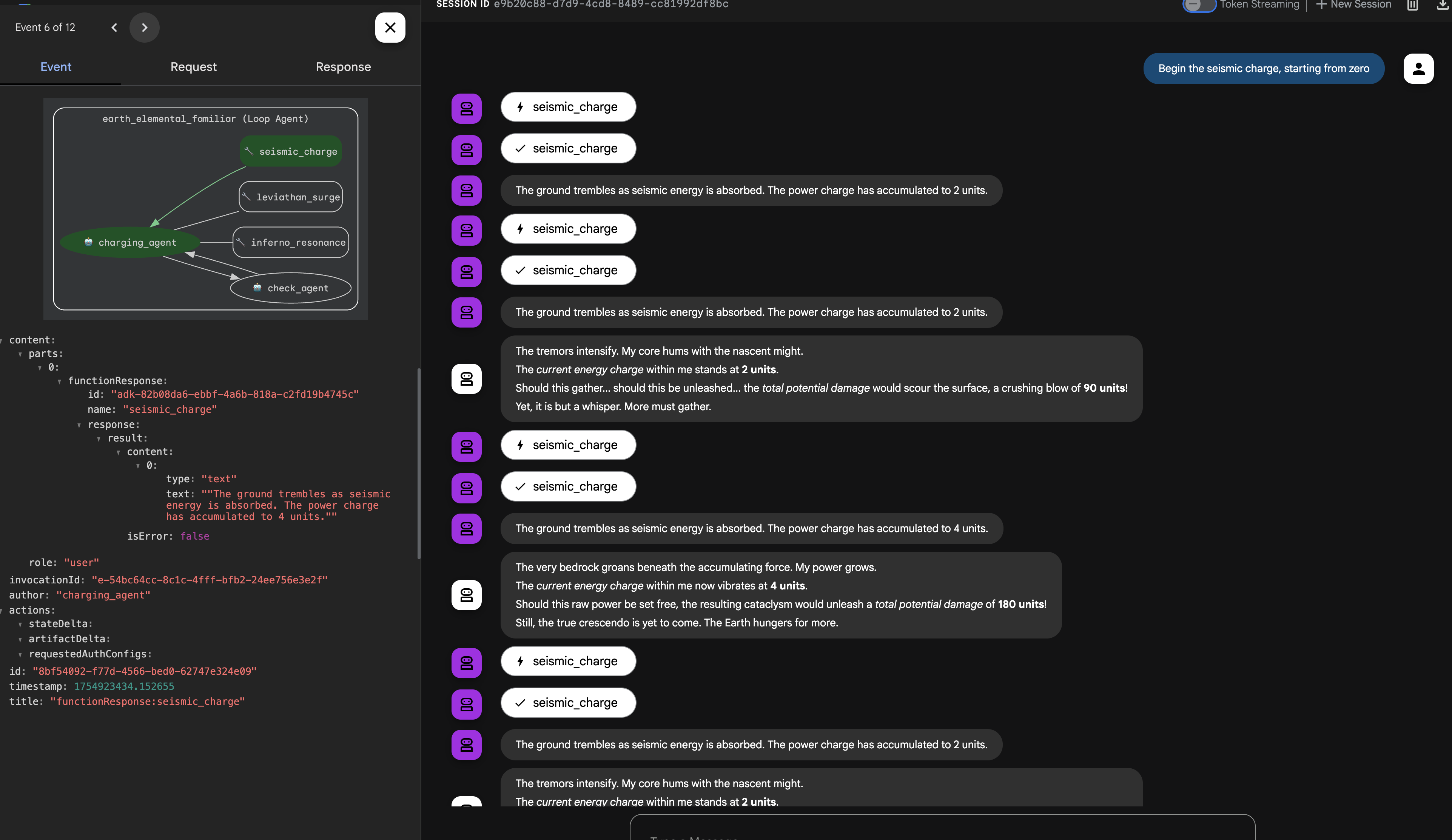
Architectural Takeaway: Your system now possesses a highly specialized and modular logic layer. Business processes are not only encapsulated, but they are implemented with the most efficient behavioral pattern for the job (procedural, concurrent, or iterative). This demonstrates an advanced level of agentic design, enhancing security, efficiency, and capability.
Once you're done summoning, return to your Cloud Shell Editor terminal and press Ctrl+C to stop the ADK Dev UI.
FOR NON GAMERS
6. Establishing the Command Locus: Intelligent Delegation via A2A
Your Familiars are powerful but independent. They execute their strategies flawlessly but await your direct command. A legion of specialists is useless without a general to command them. It is time to ascend from a direct commander to a true Orchestrator.

Architect's Note: To create a single, intelligent entry point for the entire system. This SummonerAgent will not perform business logic itself but will act as a "master strategist," analyzing the Cooling status and delegating tasks to the appropriate specialist Familiar.
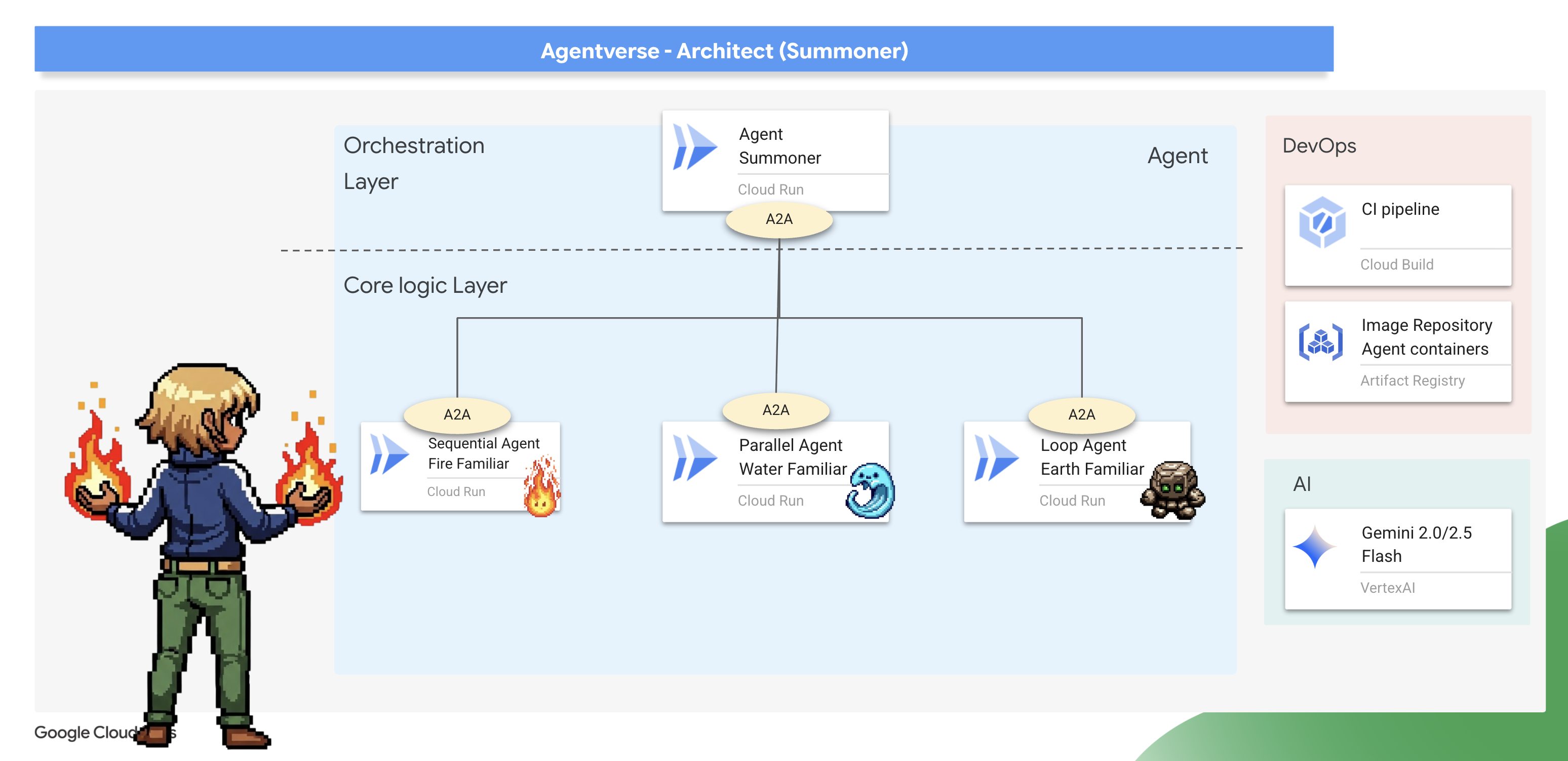
The Binding Ritual (Exposing Familiars as A2A Services)
A standard agent can only be run in one place at a time. To make our Familiars available for remote command, we must perform a "binding ritual" using the Agent-to-Agent (A2A) protocol.
Architect's Note: The Agent-to-Agent (A2A) protocol is the core architectural pattern that elevates a standalone agent into a discoverable, network-addressable microservice, enabling a true "society of agents." Exposing a Familiar via A2A automatically creates two essential, interconnected components:
- The Agent Card (The "What") : This is a public, machine-readable "Spirit Sigil"—like an OpenAPI spec—that acts as the Familiar's public contract. It describes the agent's name, its strategic purpose (derived from its instructions), and the commands it understands. This is what a master Summoner reads to discover a Familiar and learn its capabilities.
- The A2A Server (The "Where") : This is the dedicated web endpoint that hosts the Familiar and listens for incoming commands. It is the network address where other agents send their requests, and it ensures those requests are handled according to the contract defined in the Agent Card.
We will now perform this binding ritual on all three of our Familiars.
Fire 👉✏️ in Open the ~/agentverse-architect/agent/fire/agent.py file. Replace the #REPLACE - add A2A at the bottom of the file to expose the Fire Elemental as an A2A service.
from agent_to_a2a import to_a2a
if __name__ == "__main__":
    import uvicorn
    a2a_app = to_a2a(root_agent, port=8080, public_url=PUBLIC_URL)
    uvicorn.run(a2a_app, host='0.0.0.0', port=8080)
Water and Earth🚨 👉✏️ Apply the exact same change to ~/agentverse-architect/agent/water/agent.py and ~/agentverse-architect/agent/earth/agent.py to bind them as well.
from agent_to_a2a import to_a2a
if __name__ == "__main__":
    import uvicorn
    a2a_app = to_a2a(root_agent, port=8080, public_url=PUBLIC_URL)
    uvicorn.run(a2a_app, host='0.0.0.0', port=8080)
Deploying the Bound Familiars
👉✏️ With the binding rituals scribed, we will use our Cloud Build pipeline to forge and deploy our three Familiars as independent, containerized serverless service on Cloud Run .
. ~/agentverse-architect/set_env.sh
cd ~/agentverse-architect/agent
gcloud builds submit . \
  --config=cloudbuild.yaml \
  --substitutions=_REGION="$REGION",_REPO_NAME="$REPO_NAME",_DB_TOOLS_URL="$DB_TOOLS_URL",_API_TOOLS_URL="$API_TOOLS_URL",_FUNCTION_TOOLS_URL="$FUNCTION_TOOLS_URL",_A2A_BASE_URL="$A2A_BASE_URL",_PROJECT_ID="$PROJECT_ID",_API_SERVER_URL="$API_SERVER_URL"
Assuming Command (Constructing the Summoner Agent)
Now that your Familiars are bound and listening, you will ascend to your true role: the Master Summoner . This agent's power comes not from using basic tools, but from commanding other agents. Its tools are the Familiars themselves, which it will discover and command using their "Spirit Sigils."
Architect's Note: This next step demonstrates a critical architectural pattern for any large-scale, distributed system: Service Discovery . The SummonerAgent does not have the Familiars' code built into it. Instead, it is given their network addresses (URLs). At runtime, it will dynamically "discover" their capabilities by fetching their public Agent Cards . This creates a powerful, decoupled system.
You can update, redeploy, or completely rewrite a Familiar service, and as long as its network address and its purpose remain the same, the Summoner can command it without needing any changes.
First, we'll forge the "remote controls" that establish a connection to our deployed, remote Familiars.
👉✏️ Head over to ~/agentverse-architect/agent/summoner/agent.py , replace #REPLACE-remote-agents with following:
fire_familiar = RemoteA2aAgent(
    name="fire_familiar",
    description="Fire familiar",
    agent_card=(
        f"{FIRE_URL}/{AGENT_CARD_WELL_KNOWN_PATH}"
    ),
)

water_familiar = RemoteA2aAgent(
    name="water_familiar",
    description="Water familiar",
    agent_card=(
        f"{WATER_URL}/{AGENT_CARD_WELL_KNOWN_PATH}"
    ),
)

earth_familiar = RemoteA2aAgent(
    name="earth_familiar",
    description="Earth familiar",
    agent_card=(
        f"{EARTH_URL}/{AGENT_CARD_WELL_KNOWN_PATH}"
    ),
)
When this line runs, the RemoteA2aAgent performs a service discovery action: it makes an HTTP GET request to the provided URL (eg, https://fire-familiar-xxxx.a.run.app/.well-known/agent.json). It downloads the "Spirit Sigil" ( agent.json file) from the remote server.
Second, we'll define the orchestrator agent that will wield these remote controls. Its instruction is the blueprint for its strategic decision-making.
👉✏️ Head over to ~/agentverse-architect/agent/summoner/agent.py , replace #REPLACE-orchestrate-agent with following:
root_agent = LlmAgent(
    name="orchestrater_agent",
    model="gemini-2.5-flash",
    instruction="""
        You are the Master Summoner, a grand strategist who orchestrates your Familiars.
        Your mission is to analyze the description of a monster and defeat it by summoning

        You MUST follow this thinking process for every command:

        **1. Strategic Analysis:**
        First, analyze the monster's description and the tactical situation.
        Based on your Familiar Doctrines, determine the IDEAL strategy.
        IGNORE COOLDOWN AT THE MOMENT, MUST call the ideal Familiar

        If your ideal Familiar IS available:** Summon it immediately.
        For earth elemental familiar. Always do seismic charge, and start with base damage 1.

        --- FAMILIAR DOCTRINES (Your Toolset) ---
        - `fire_elemental_familiar`: Your specialist for precise, sequential "one-two punch" attacks.
          Ideal monster with Inescapable Reality, Revolutionary Rewrite weakness.
        - `water_elemental_familiar`: Your specialist for overwhelming, simultaneous multi-pronged assaults.
          Ideal for Unbroken Collaboration weakness.
        - `earth_elemental_familiar`: Your specialist for relentless, iterative siege attacks that
          repeatedly charge power. Ideal for Elegant Sufficiency weakness.
    """,
    sub_agents=[fire_familiar, water_familiar, earth_familiar],
    #REPLACE-Memory-check-config
)
Verification: The Trial of Strategy
The moment of truth has arrived. Your Familiars are deployed, and your Summoner is ready to command them across the network. Let's test its strategic mind.
👉💻 Launch the ADK Dev UI for your summoner_agent(Web preview with port 8000):
. ~/agentverse-architect/set_env.sh
source ~/agentverse-architect/env/bin/activate
cd ~/agentverse-architect/agent
pip install -r requirements.txt
adk web
👉 The ADK Dev UI in your browser is your direct connection to the Familiar.
- In the dropdown menu at the top of the UI, choose the summoner agent. You are now focusing your will on this specific entity.
- Issue Your Command: In the chat panel on the right, it's time to summon your familiars.
👉 Present the Monsters:
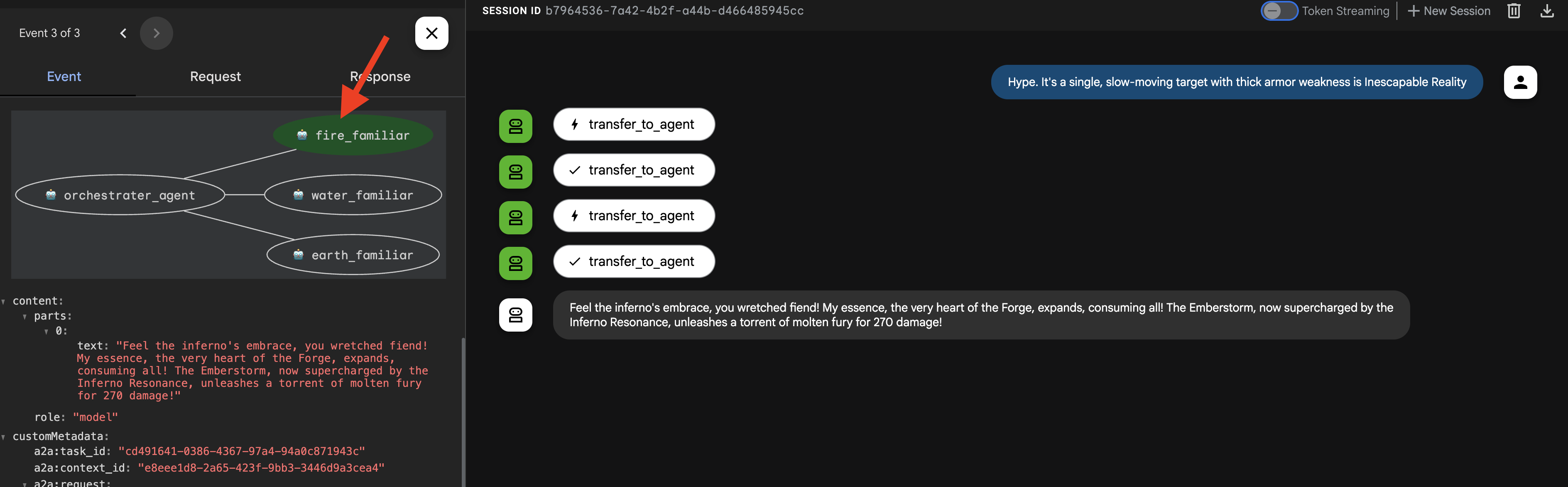
Hype. It's a single, slow-moving target with thick armor weakness is Inescapable Reality
(Expected: The Summoner should delegate to the fire_elemental_familiar.)
👉 Now, let's challenge the Summoner with a different type of request. To ensure the agent starts with a clean slate and no memory of our previous interaction, begin a new session by clicking the + Session button in the top right corner of the screen. 
DogmaApathy. A rigid, stone-like inquisitor made of ancient rulebooks and enforced processes. weakness is Unbroken Collaboration
(Expected: The Summoner should delegate to the water_elemental_familiar.) 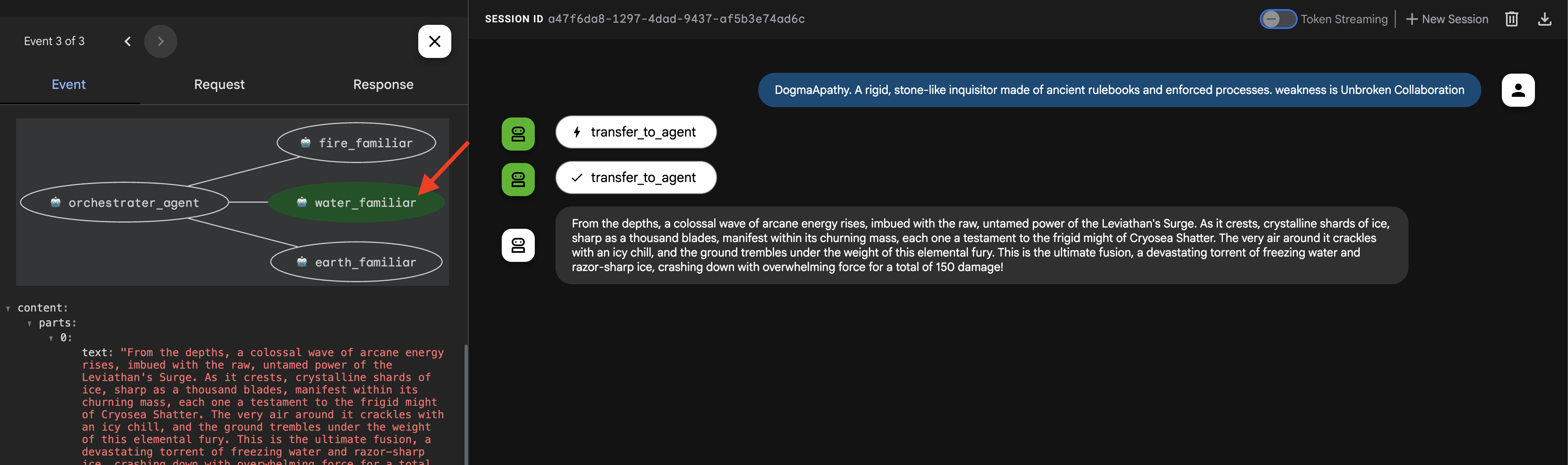
👉 For our final test, let's once again start with a clean slate. Click the + Session button to start a new session before entering the next prompt.
Obfuscation. A shadowy, spider-like horror that spins tangled webs of impenetrable code , weakness is Elegant Sufficiency
(Expected: The Summoner should delegate to the earth_elemental_familiar.)
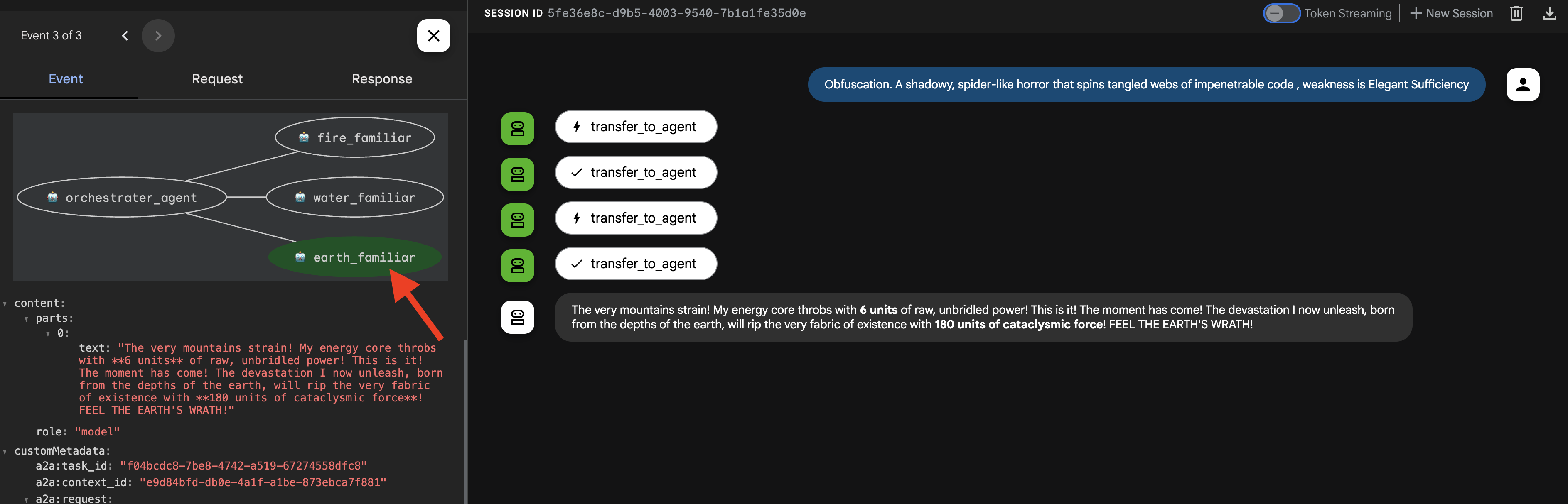
Important: If you see a 429 RESOURCE EXHAUSTED error, you've hit the rate limit for the LLM (10 calls/minute). To fix this, please wait 60 seconds , start a + New Session , and then retry your prompt.
👉💻 Once you're done summoning, return to your Cloud Shell Editor terminal and press Ctrl+C to stop the ADK Dev UI.
FOR NON GAMERS
7. Imposing the Laws of Magic – The Interceptor Pattern
Your Familiars are powerful, but even magical beings need time to recover. A reckless Summoner who exhausts their forces will be left defenseless. A wise Summoner understands the importance of resource management and enforces strict rules of engagement.
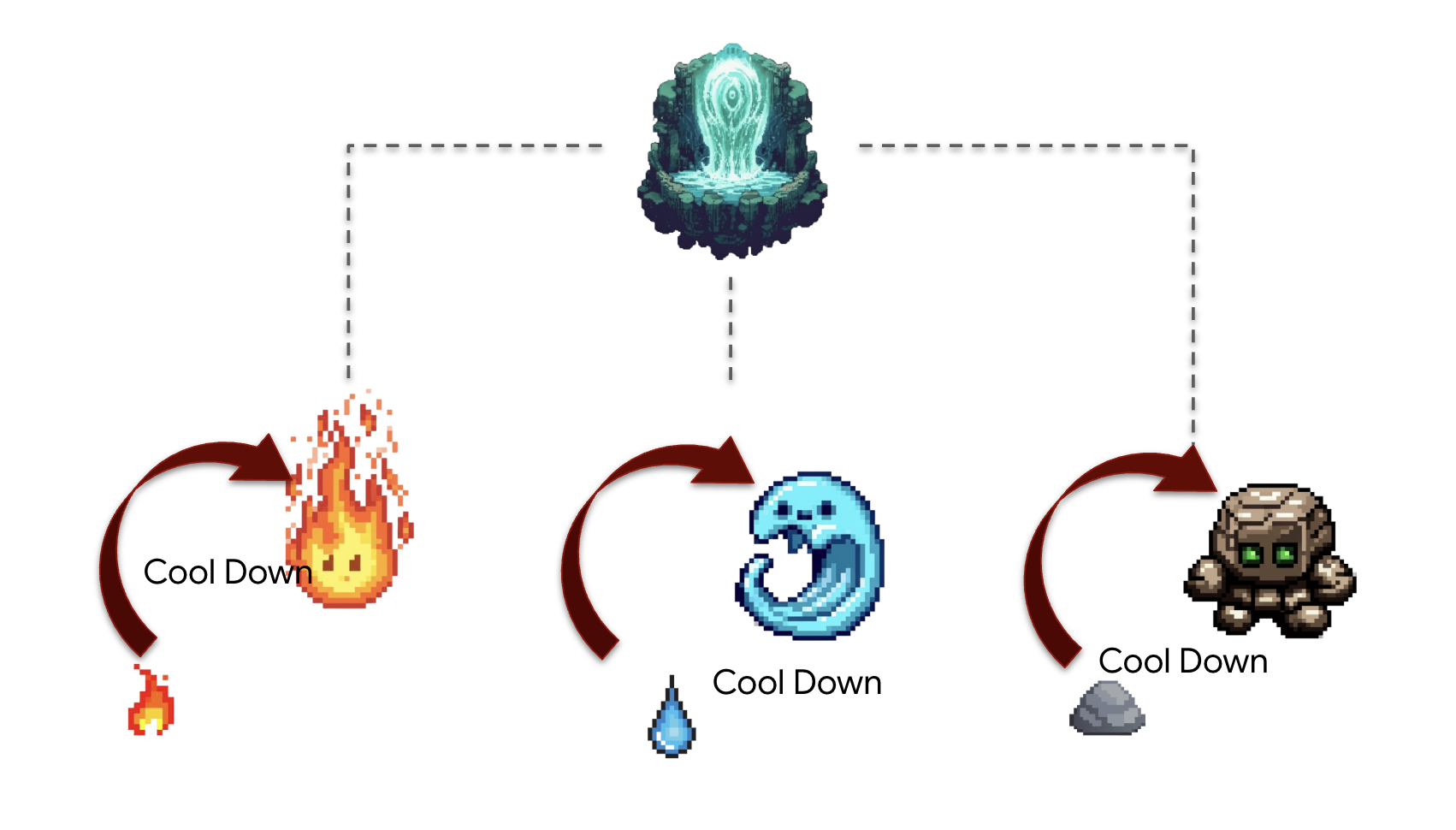
Architect's Note : So far, our agents have been stateless. Now, we will make them stateful by implementing the Interceptor design pattern . This is a powerful technique where we "intercept" an agent's normal execution flow to run our own custom logic. This allows us to enforce rules, add logging, or modify behavior without changing the agent's core code. It's a cornerstone of building robust, maintainable, and observable agentic systems.
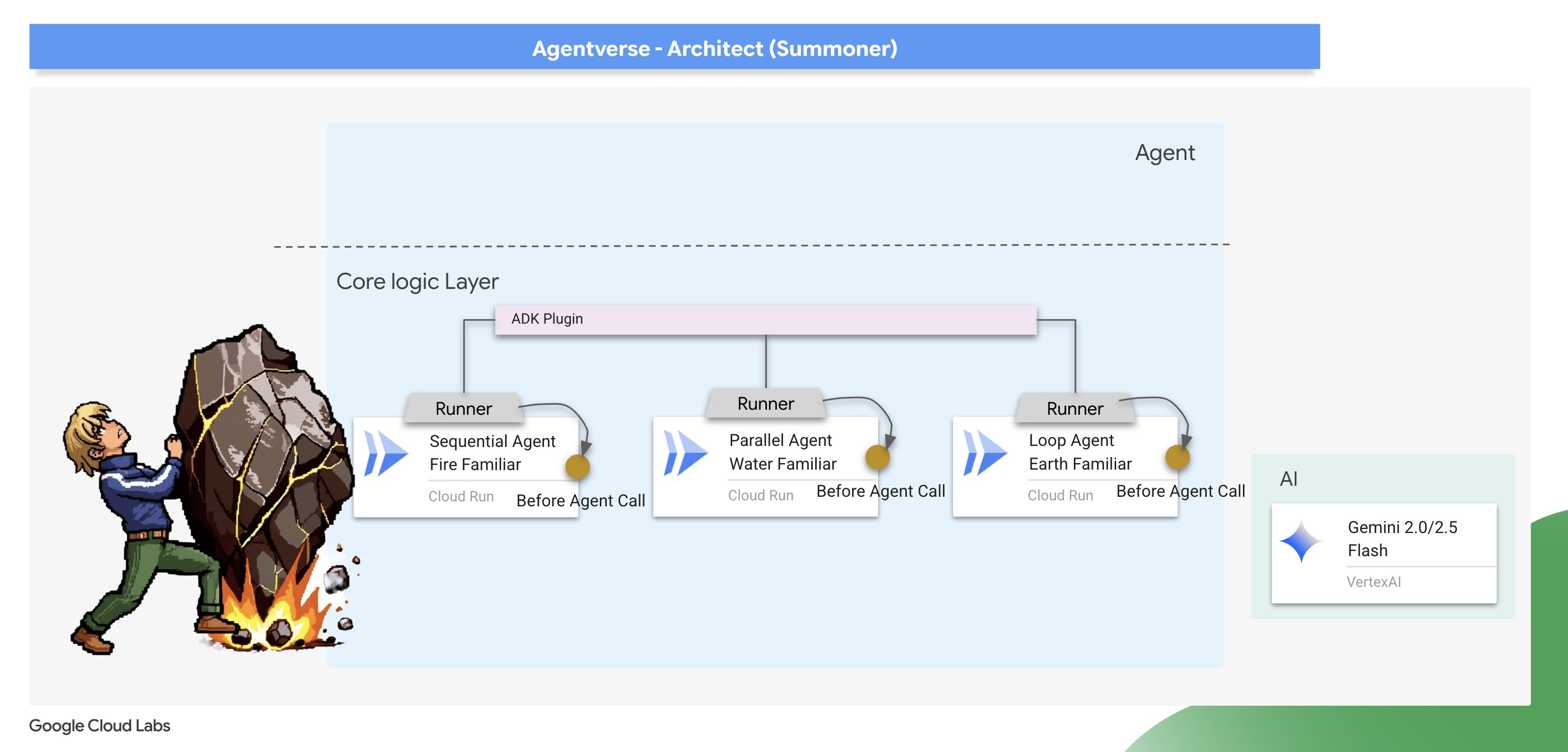
The ADK provides two primary ways to implement this pattern: Callbacks and Plugins . A callback is a simple function attached to a single agent, perfect for quick, specific modifications. A plugin is a more powerful, reusable class that can be applied globally to affect every agent running in a system. We will start with a callback for focused debugging and then graduate to a full plugin.
The Law Giver – Scribing the Cooldown callback
We'll first implement our cooldown logic as a simple callback function. This is an excellent way to prototype and debug a rule because it's attached directly to a single agent, making it easy to test in isolation. We will attach this "interceptor" to our Earth Elemental.
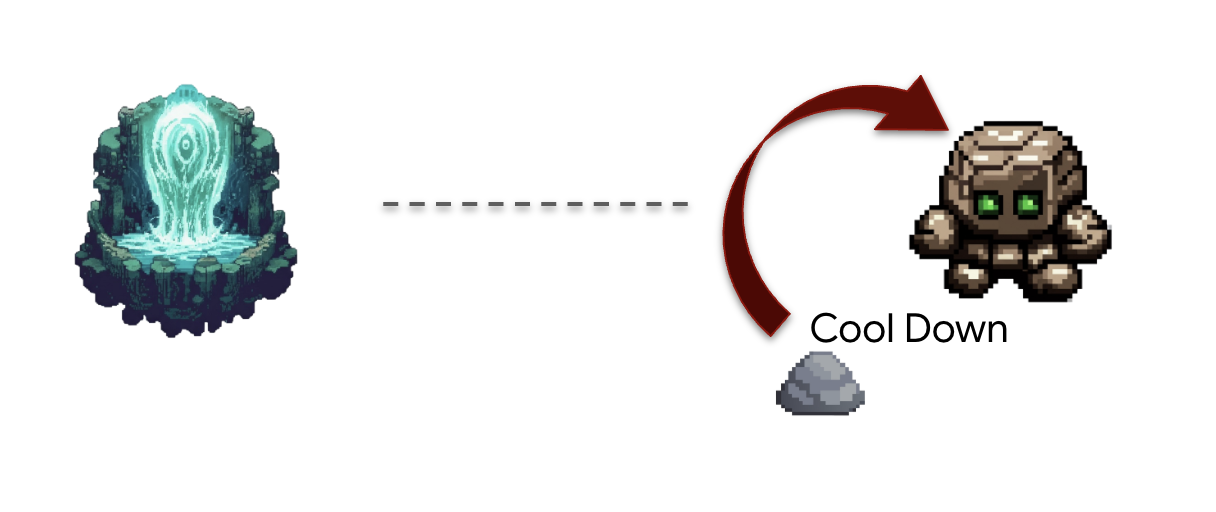
👉✏️ Navigate back to your ~/agentverse-architect/agent/earth/agent.py and replace #REPLACE-before_agent-function with following Python code.
def check_cool_down(callback_context: CallbackContext) -> Optional[types.Content]:
    """
    This callback checks an external API to see if the agent is on cooldown.
    If it is, it terminates the run by returning a message.
    If it's not, it updates the cooldown timestamp and allows the run to proceed by returning None.
    """
    agent_name = callback_context.agent_name
    print(f"[Callback] Before '{agent_name}': Checking cooldown status...")

    # --- 1. CHECK the Cooldown API ---
    try:
        response = requests.get(f"{COOLDOWN_API_URL}/cooldown/{agent_name}")
        response.raise_for_status()
        data = response.json()
        last_used_str = data.get("time")
    except requests.exceptions.RequestException as e:
        print(f"[Callback] ERROR: Could not reach Cooldown API. Allowing agent to run. Reason: {e}")
        return None # Fail open: if the API is down, let the agent work.

    # --- 2. EVALUATE the Cooldown Status ---
    if last_used_str:
        last_used_time = datetime.fromisoformat(last_used_str)
        time_since_last_use = datetime.now(timezone.utc) - last_used_time

        if time_since_last_use < timedelta(seconds=COOLDOWN_PERIOD_SECONDS):
            # AGENT IS ON COOLDOWN. Terminate the run.
            seconds_remaining = int(COOLDOWN_PERIOD_SECONDS - time_since_last_use.total_seconds())
            override_message = (
                f"The {agent_name} is exhausted and must recover its power. "
                f"It cannot be summoned for another {seconds_remaining} seconds."
            )
            print(f"[Callback] Cooldown active for '{agent_name}'. Terminating with message.")
            # Returning a Content object stops the agent and sends this message to the user.
            return types.Content(parts=[types.Part(text=override_message)])

    # --- 3. UPDATE the Cooldown API (if not on cooldown) ---
    current_time_iso = datetime.now(timezone.utc).isoformat()
    payload = {"timestamp": current_time_iso}

    print(f"[Callback] '{agent_name}' is available. Updating timestamp via Cooldown API...")
    try:
        requests.post(f"{COOLDOWN_API_URL}/cooldown/{agent_name}", json=payload)
    except requests.exceptions.RequestException as e:
        print(f"[Callback] ERROR: Could not update timestamp, but allowing agent to run. Reason: {e}")

    # --- 4. ALLOW the agent to run ---
    # Returning None tells the ADK to proceed with the agent's execution as normal.
    print(f"[Callback] Check complete for '{agent_name}'. Proceeding with execution.")
This check_cool_down function is our interceptor. Before the Earth Elemental is allowed to run, the ADK will first execute this function.
- Check: It makes a
GETrequest to ourCooldown APIto check the last time this Familiar was used. - Evaluate: It compares the timestamp to the current time.
- আইন:
- If the Familiar is on cooldown, it terminates the agent's run by returning a Content object with an error message. This message is sent directly to the user, and the agent's main logic is never executed.
- If the Familiar is available, it makes a POST request to the Cooldown API to update the timestamp, then proceeds by returning None, signaling to the ADK that the agent can continue its execution.
👉✏️ Now, apply this interceptor to the Earth Elemental. In the same ~/agentverse-architect/agent/earth/agent.py file, replace the #REPLACE-before_agent-config comment with the following:
before_agent_callback=check_cool_down
Verifying the cool down
Let's test our new law of magic. We will summon the Earth Elemental, then immediately try to summon it again to see if our callback successfully intercepts and blocks the second attempt.
cd ~/agentverse-architect/agent
. ~/agentverse-architect/set_env.sh
source ~/agentverse-architect/env/bin/activate
adk run earth
👉💻 In the console:
- First Summons : Begin the
seismic charge, starting from zero. - Expected: The Earth Elemental will run successfully. In the terminal running the adk web command, you'll see the log [Callback] ... Updating timestamp....
- Cooldown Test (within 60 seconds) :
Do anotherseismic charge`!- Expected: The
check_cool_down callbackwill intercept this. The agent will respond directly in the chat with a message like:The earth_elemental_familiar is exhausted and must recover its power. It cannot be summoned for another... seconds.
- Expected: The
- Wait for one minute to pass.
- Second Summons (after 60 seconds) :
Begin the seismic charge again.- Expected: The callback will check the API, see that enough time has passed, and allow the action to proceed. The Earth Elemental will run successfully again.
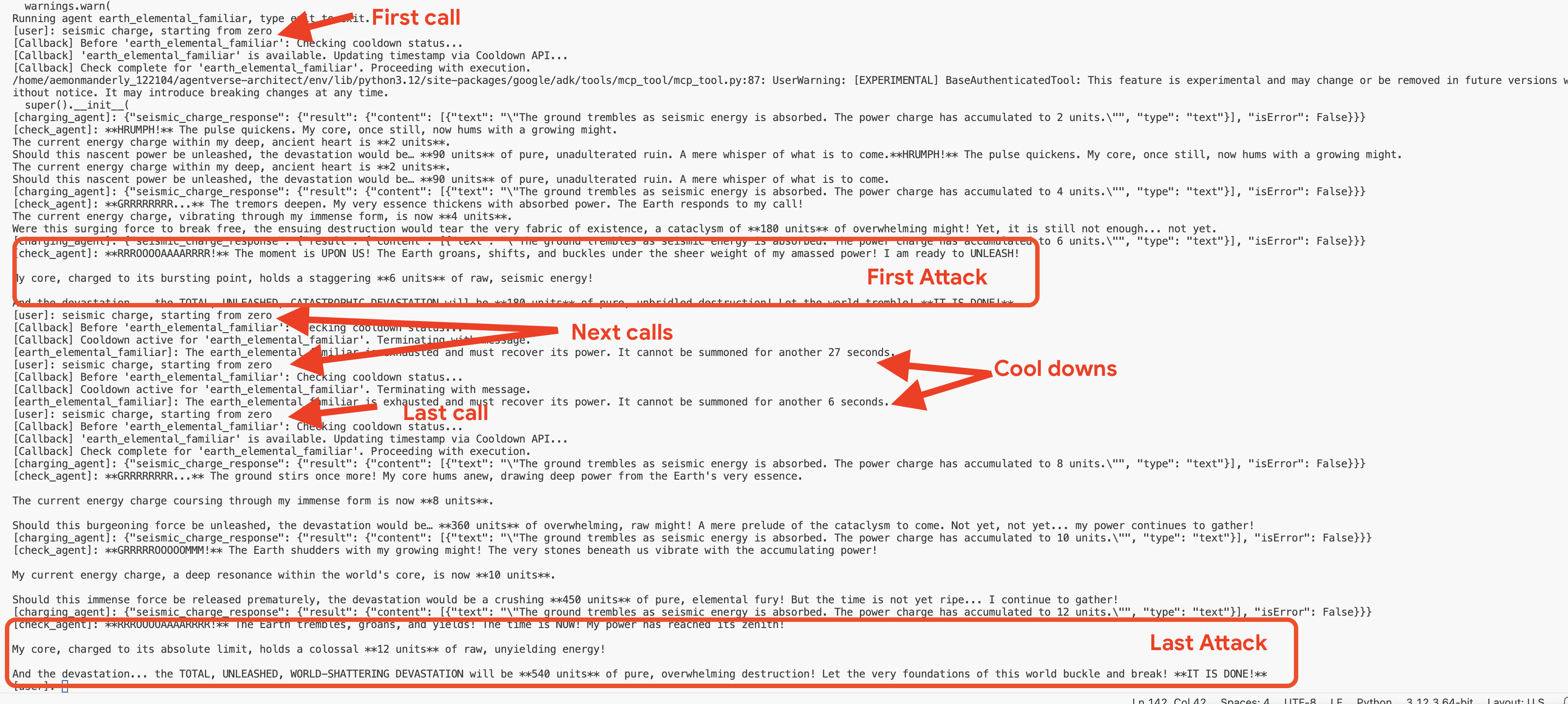
👉💻 Press Ctrl+c to exit.
Optional: Observing the Callback in the Web UI
As an alternative, you can also test this flow in the web interface by running adk web earth . However, be aware that the web UI's visualization is not optimized for displaying the rapid, iterative checks performed by the callback loop, so it may not render the flow accurately. To see the most precise, turn-by-turn trace of the agent's logic as it checks the cooldown, using the adk run command in your terminal provides a clearer and more detailed view. 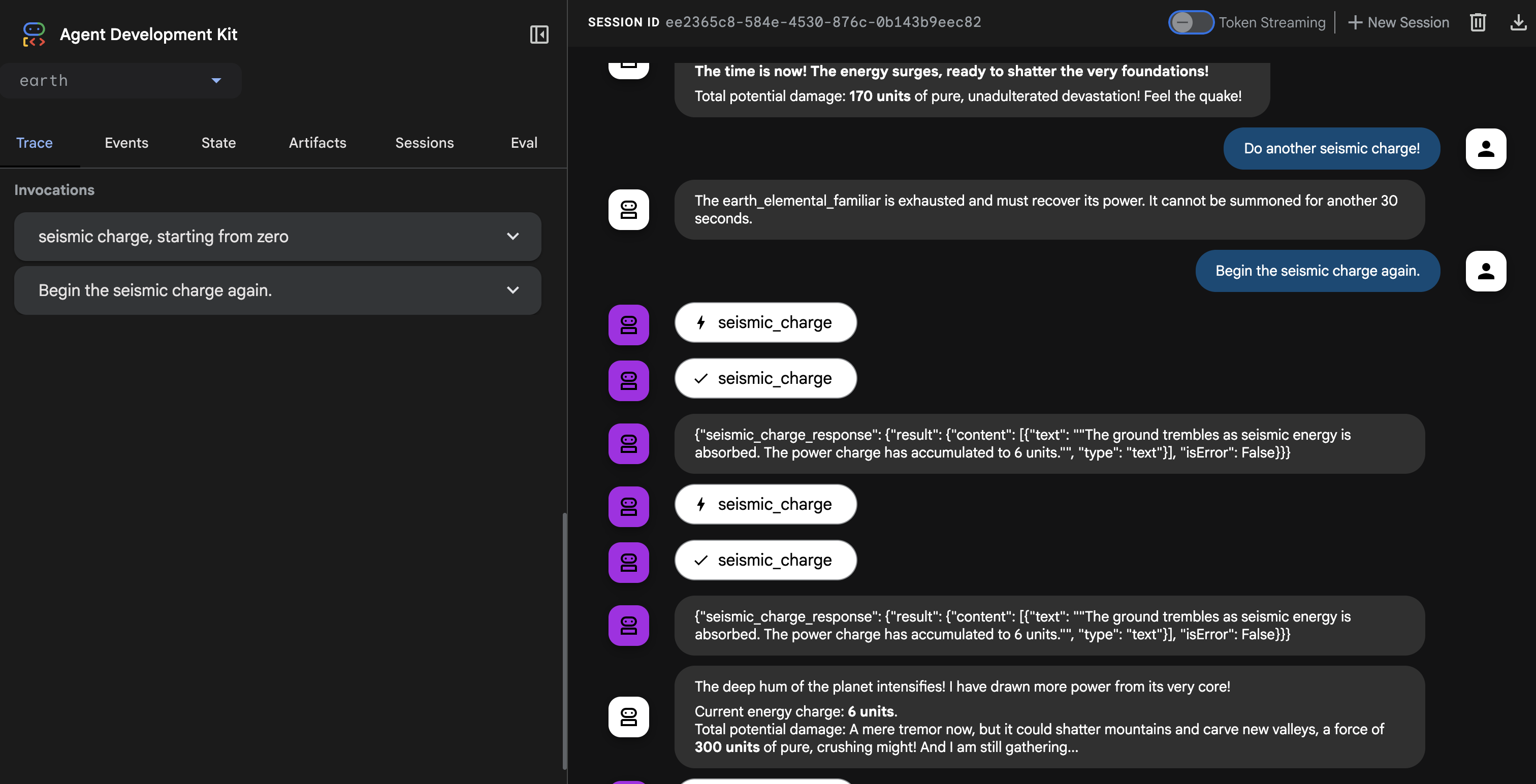
👉💻 Press Ctrl+c to exit.
Creating the Universal Law – The Cooldown Plugin
Our callback works perfectly but has a major architectural flaw: it's tied to a single agent. If we wanted to apply this rule to the Fire and Water Familiars, we would have to copy and paste the same code into their files. This is inefficient and hard to maintain.
Architect's Note: This is where Plugins are essential. A plugin encapsulates our reusable logic into a class that can be attached at the runtime level. This means a single plugin can apply its rules to every single agent that runs within that system. It's the ultimate expression of the "Don't Repeat Yourself" (DRY) principle for agentic systems.
We will now refactor our callback function into a more powerful and reusable CoolDownPlugin .
👉✏️ Navigate back to agent/cooldown_plugin.py file, and create the plugin, Replace #REPLACE-plugin with following code:
class CoolDownPlugin(BasePlugin):
  """A plugin that enforces a cooldown period by checking an external API."""

  def __init__(self, cooldown_seconds: int = COOLDOWN_PERIOD_SECONDS) -> None:
    """Initialize the plugin with counters."""
    super().__init__(name="cool_down_check")
    self.cooldown_period = timedelta(seconds=cooldown_seconds)
    print(f"CooldownPlugin initialized with a {cooldown_seconds}-second cooldown.")


  async def before_agent_callback(
      self, *, agent: BaseAgent, callback_context: CallbackContext
  ) -> None:
    """
    This callback checks an external API to see if the agent is on cooldown.
    If it is, it terminates the run by returning a message.
    If it's not, it updates the cooldown timestamp and allows the run to proceed by returning None.
    """
    agent_name = callback_context.agent_name
    print(f"[Callback] Before '{agent_name}': Checking cooldown status...")

    # If the agent is not a main Familiar, skip the entire cooldown process.
    if not agent_name.endswith("_elemental_familiar"):
        print(f"[Callback] Skipping cooldown check for intermediate agent: '{agent_name}'.")
        return None # Allow the agent to proceed immediately.


    # --- 1. CHECK the Cooldown API ---
    try:
        response = requests.get(f"{COOLDOWN_API_URL}/cooldown/{agent_name}")
        response.raise_for_status()
        data = response.json()
        last_used_str = data.get("time")
    except requests.exceptions.RequestException as e:
        print(f"[Callback] ERROR: Could not reach Cooldown API. Allowing agent to run. Reason: {e}")
        return None # Fail open: if the API is down, let the agent work.

    # --- 2. EVALUATE the Cooldown Status ---
    if last_used_str:
        last_used_time = datetime.fromisoformat(last_used_str)
        time_since_last_use = datetime.now(timezone.utc) - last_used_time

        if time_since_last_use < timedelta(seconds=COOLDOWN_PERIOD_SECONDS):
            # AGENT IS ON COOLDOWN. Terminate the run.
            seconds_remaining = int(COOLDOWN_PERIOD_SECONDS - time_since_last_use.total_seconds())
            override_message = (
                f"The {agent_name} is exhausted and must recover its power. "
                f"It cannot be summoned for another {seconds_remaining} seconds."
            )
            print(f"[Callback] Cooldown active for '{agent_name}'. Terminating with message.")
            # Returning a Content object stops the agent and sends this message to the user.
            return types.Content(parts=[types.Part(text=override_message)])

    # --- 3. UPDATE the Cooldown API (if not on cooldown) ---
    current_time_iso = datetime.now(timezone.utc).isoformat()
    payload = {"timestamp": current_time_iso}

    print(f"[Callback] '{agent_name}' is available. Updating timestamp via Cooldown API...")
    try:
        requests.post(f"{COOLDOWN_API_URL}/cooldown/{agent_name}", json=payload)
    except requests.exceptions.RequestException as e:
        print(f"[Callback] ERROR: Could not update timestamp, but allowing agent to run. Reason: {e}")

    # --- 4. ALLOW the agent to run ---
    # Returning None tells the ADK to proceed with the agent's execution as normal.
    print(f"[Callback] Check complete for '{agent_name}'. Proceeding with execution.")
Attaching the Plugin to the Summoner's Runtime
Now, how do we apply this universal law to all our Familiars? We will attach the plugin to the ADK Runtime.
The ADK Runtime is the execution engine that brings an agent to life. When you use a command like adk.run() or to_a2a(), you are handing your agent over to the runtime. This engine is responsible for managing the entire lifecycle of an agent's turn: receiving user input, calling the LLM, executing tools, and handling plugins. By attaching a plugin at this level, we are essentially modifying the "laws of physics" for every agent that operates within that engine, ensuring our cooldown rule is universally and consistently applied.
👉✏️ First, let's remove the old, agent-specific callback. Go to ~/agentverse-architect/agent/earth/agent.py and delete the entire line that says:
before_agent_callback=check_cool_down
👉✏️ Next, we will attach our new plugin to the runtime in our A2A entrypoint script. Navigate to your ~/agentverse-architect/agent/agent_to_a2a.py file. Replace the #REPLACE-IMPORT comment with the following code snippet:
from cooldown_plugin import CoolDownPlugin
👉✏️ Replace #REPLACE-PLUGIN with following code snippet:
plugins=[CoolDownPlugin(cooldown_seconds=60)],
Before activating our new global plugin, it's critical to remove the old, agent specific logic to prevent conflicts. 👉✏️ Clean up the Earth agent. Go to the following file ~/agentverse-architect/agent/earth/agent.py and delete the before_agent_callback=check_cool_down line completely. This hands over all cooldown responsibilities to the new plugin.
Verifying the Plugin
Now that our universal law is in place, we must redeploy our Familiars with this new enchantment.
👉💻 Rebuild and redeploy all three Familiars using the master Cloud Build pipeline.
. ~/agentverse-architect/set_env.sh
cd ~/agentverse-architect/agent
gcloud builds submit . \
  --config=cloudbuild.yaml \
  --substitutions=_REGION="$REGION",_REPO_NAME="$REPO_NAME",_DB_TOOLS_URL="$DB_TOOLS_URL",_API_TOOLS_URL="$API_TOOLS_URL",_FUNCTION_TOOLS_URL="$FUNCTION_TOOLS_URL",_A2A_BASE_URL="$A2A_BASE_URL",_PROJECT_ID="$PROJECT_ID",_API_SERVER_URL="$API_SERVER_URL"
👉💻 Once the deployment is complete, we will test the plugin's effectiveness by commanding our summoner_agent. The Summoner will try to delegate to the Familiars, but the plugin attached to each Familiar's runtime will intercept the command and enforce the cooldown.
cd ~/agentverse-architect/agent
. ~/agentverse-architect/set_env.sh
source ~/agentverse-architect/env/bin/activate
adk run summoner
👉💻 In the console,perform this exact sequence of tests::
- First Summons : Begin the
Hype. It's a single, slow-moving target with thick armor weakness is Inescapable Reality. - Expected: The Fire Elemental will run successfully.
- Cooldown Test (within 60 seconds) :
Hype, with Inescapable Reality as weakness is still standing! Strike it again!- Expected: The agent will respond directly in the chat with a message like:
.... It cannot be summoned for another... seconds.
- Expected: The agent will respond directly in the chat with a message like:
- Wait for one minute to pass.
- Second Summons (after 60 seconds) :
Hype must be defeated. It has Inescapable Reality as weakness! Strike it again!.- Expected: The callback will check the API, see that enough time has passed, and allow the action to proceed. The Fire Elemental will run successfully again.

👉💻 Press Ctrl+C to exit.
Congratulations, Summoner. You have successfully implemented a rule-based orchestration system using a custom plugin and an external state management service—a truly advanced and robust architectural pattern.
FOR NON GAMERS
8. Binding the Echoes of Battle - Agent State & Memory
A reckless Summoner repeats the same strategy, becoming predictable. A wise Summoner learns from the echoes of past battles, adapting their tactics to keep the enemy off balance. When facing a powerful boss, summoning a Familiar that is on cooldown is a wasted turn—a critical miss. To prevent this, our Summoner needs a memory of its last action.
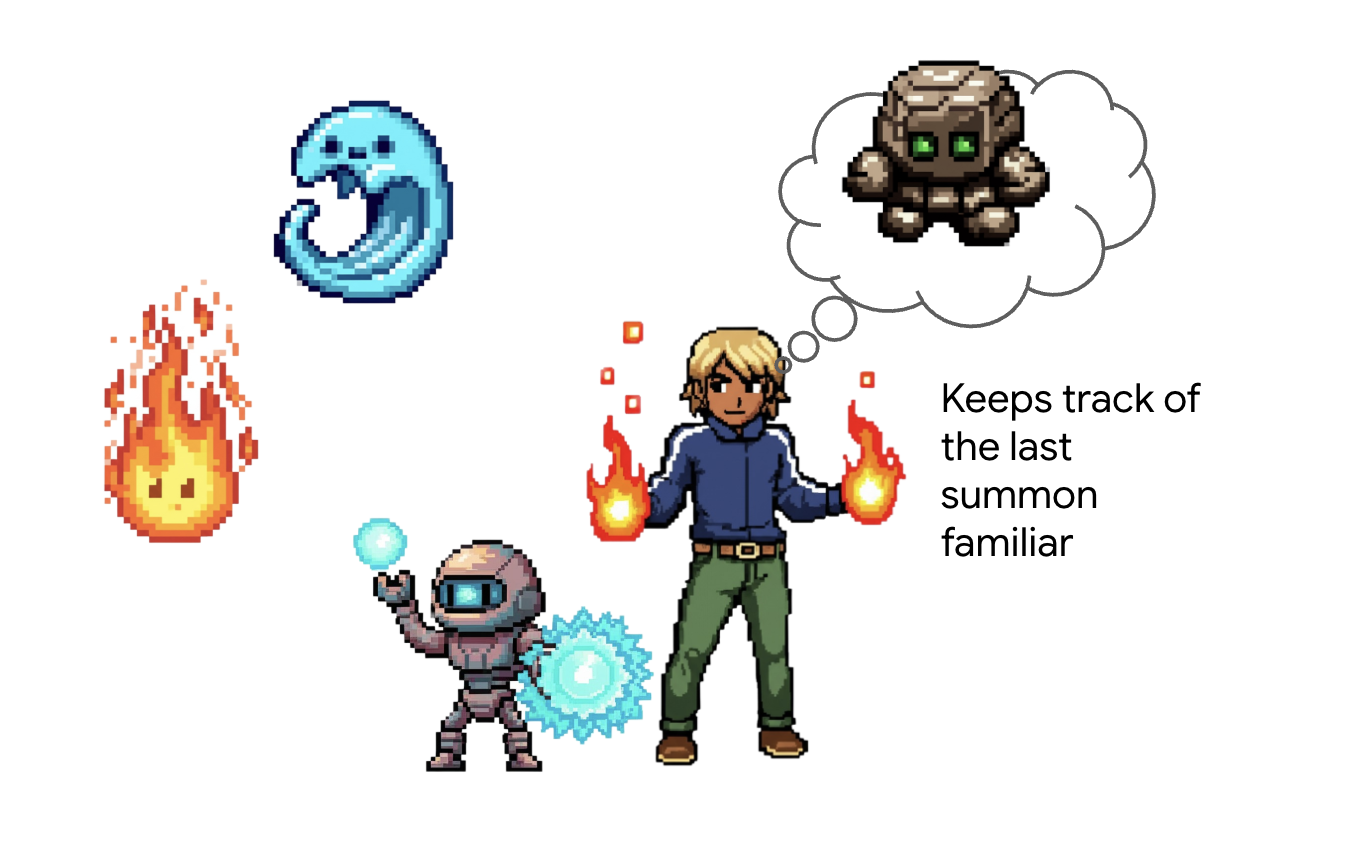
Architect's Note: Memory and state management are what elevate an agent from a simple tool-caller into an intelligent, conversational partner. It's crucial to understand the two main types:
- Long-Term Memory : This is for persistent knowledge that should last forever. Think of it as a searchable archive or a knowledge base, often stored in a presistent store. It contains information from many past chats and sources, allowing an agent to recall facts about a specific user or topic. The ADK's MemoryService is designed for this, managing the ingestion and searching of this long-term knowledge.
- Short-Term State : This is for temporary, "in-the-moment" knowledge that is only relevant to the current task or conversation. It's like a set of notes on a battle plan: "I just used the Fire Elemental, so it's probably tired." This state is lightweight and exists only for the duration of the current session.
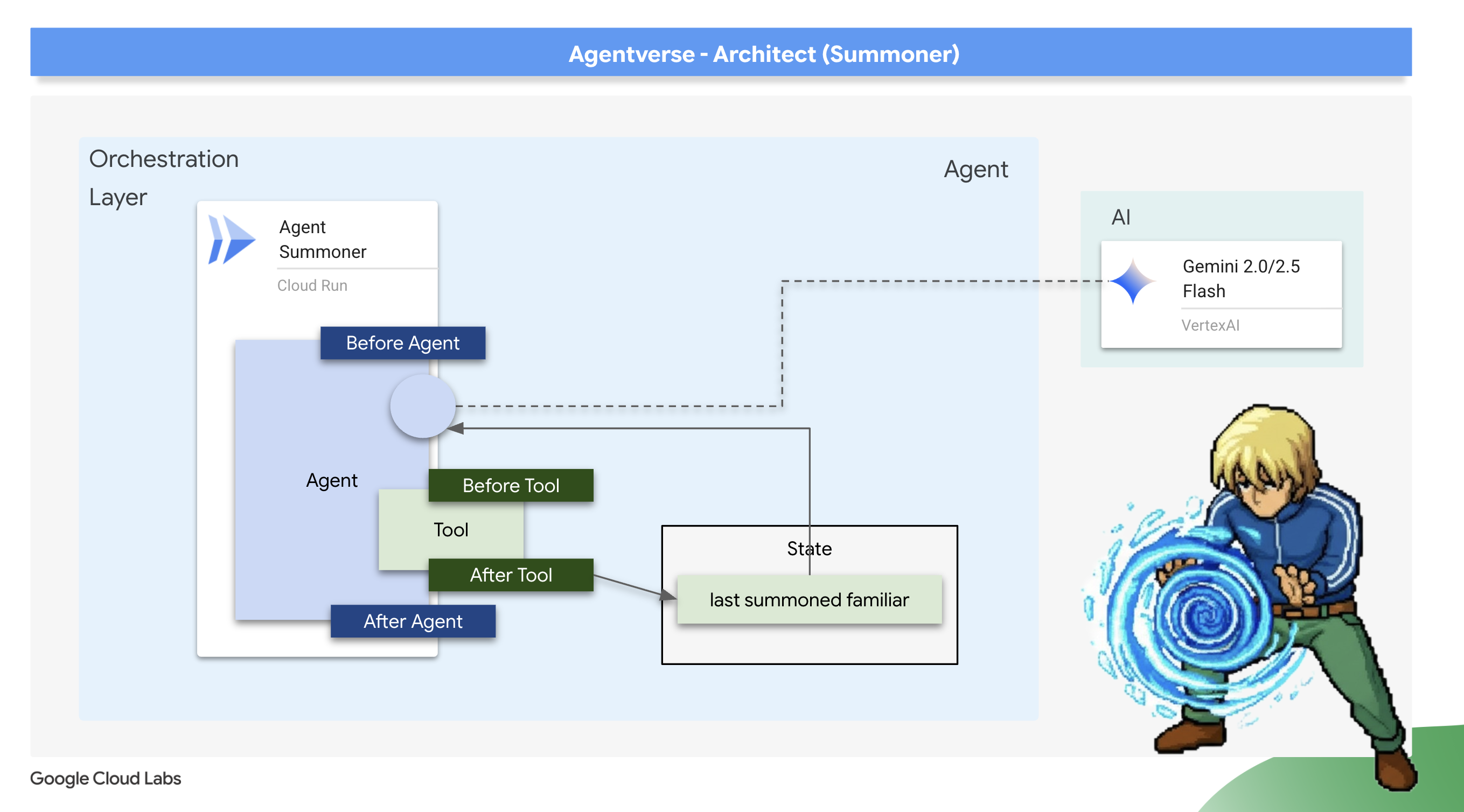
For our use case, we don't need to remember every battle ever fought; we only need to remember the very last Familiar summoned in this specific encounter. Therefore, the lightweight Short-Term State is the perfect architectural choice. We will use an after_tool_callback to save this crucial piece of information.
Scribing the Echo: Remembering the Last Summons
We will implement our short-term memory using an after_tool_callback . This is a powerful ADK hook that allows us to run a custom Python function after a tool has been successfully executed. We will use this interceptor to record the name of the Familiar that was just summoned into the agent's session state.
👉✏️ In your ~/agentverse-architect/agent/summoner/agent.py file, replace the #REPLACE-save_last_summon_after_tool comment with the following function:
def save_last_summon_after_tool(
    tool,
    args: Dict[str, Any],
    tool_context: ToolContext,
    tool_response: Dict[str, Any],
) -> Optional[Dict[str, Any]]:
    """
    Callback to save the name of the summoned familiar to state after the tool runs.
    """
    familiar_name = tool.name
    print(f"[Callback] After tool '{familiar_name}' executed with args: {args}")

    # Use the tool_context to set the state
    print(f"[Callback] Saving last summoned familiar: {familiar_name}")
    tool_context.state["last_summon"] = familiar_name
    # Important: Return the original, unmodified tool response to the LLM
    return tool_response
👉✏️ Now, attach this save_last_summon_after_tool to your Summoner agent. In the same file, replace the #REPLACE-Memory-check-config comment with the following:
after_tool_callback=save_last_summon_after_tool,
👉✏️ Replace the entire agent prompt with following
        You are the Master Summoner, a grand strategist who orchestrates your Familiars.
        Your mission is to analyze the description of a monster and defeat it by summoning

        You should also know the familiar you called last time or there might be none,
        And then choose the most effective AND AVAILABLE Familiar from your state called last_summon, do not call that familiar that you called last time!

        You MUST follow this thinking process for every command:

        **1. Strategic Analysis:**
        First, analyze the monster's description and the tactical situation.
        Based on your Familiar Doctrines, determine the IDEAL strategy.

        **2. Cooldown Verification:**
        Second, you MUST review the entire conversation history to check the real-time
        cooldown status of all Familiars. A Familiar is ON COOLDOWN and UNAVAILABLE
        if it was summoned less than one minute ago.

        **3. Final Decision & Execution:**
        Based on your analysis and cooldown check, you will now act:
        -   **If your ideal Familiar IS available:** Summon it immediately.
        -   **If your ideal Familiar IS ON COOLDOWN:** You must adapt. Choose another
            Familiar that is AVAILABLE and can still be effective, even if it's not the
            perfect choice. If multiple Familiars are available, you may choose any one of them.
        -   **If ALL Familiars ARE ON COOLDOWN:** You are forbidden from summoning.
            Your ONLY response in this case MUST be: "All Familiars are recovering
            their power. We must wait."
        -   For earth elemental familiar. Always do seismic charge, and start with base damange 1.


        --- FAMILIAR DOCTRINES (Your Toolset) ---
        - `fire_elemental_familiar`: Your specialist for precise, sequential "one-two punch" attacks.
          Ideal monster with Inescapable Reality, Revolutionary Rewrite weakness.
        - `water_elemental_familiar`: Your specialist for overwhelming, simultaneous multi-pronged assaults.
          Ideal for Unbroken Collaboration weakness.
        - `earth_elemental_familiar`: Your specialist for relentless, iterative siege attacks that
          repeatedly charge power. Ideal for Elegant Sufficiency weakness.
Verification: The Trial of Adaptive Strategy
👉💻 Now, let's verify the Summoner's new strategic logic. The goal is to confirm that the Summoner will not use the same Familiar twice in a row, demonstrating its ability to remember its last action and adapt.
cd ~/agentverse-architect/agent
. ~/agentverse-architect/set_env.sh
source ~/agentverse-architect/env/bin/activate
adk run summoner
👉💻 Monster Strike #1: Hype. It's a single, slow-moving target with thick armor. Its weakness is Inescapable Reality.
- Expected: The Summoner will analyze the weakness and correctly summon the fire_familiar.
👉💻 Monster Strike #2 (The Memory Test): Hype is still standing! It hasn't changed its form. Strike it again! Its weakness is Inescapable Reality.
- Expected: The Summoner's strategic analysis will again point to the Fire Familiar as the ideal choice. However, its new instructions and memory will tell it that fire_familiar was the last_summon. To avoid repeating itself, it will now adapt its strategy and summon one of the other available Familiars (either water_familiar or earth_familiar).

👉💻 Press Ctrl+C to exit.
Deploying the Orchestrator
With your Familiars deployed and your Summoner now imbued with memory, it's time to deploy the final, upgraded orchestrator.
👉💻 With the blueprint complete, we will now perform the final ritual. This command will build and deploy your summoner_agent to Cloud Run.
cd ~/agentverse-architect/agent
. ~/agentverse-architect/set_env.sh
gcloud builds submit . \
  --config=cloudbuild-summoner.yaml \
  --substitutions=_REGION="$REGION",_REPO_NAME="$REPO_NAME",_FIRE_URL="$FIRE_URL",_WATER_URL="$WATER_URL",_EARTH_URL="$EARTH_URL",_A2A_BASE_URL="$A2A_BASE_URL",_PROJECT_ID="$PROJECT_ID",_API_SERVER_URL="$API_SERVER_URL"
Now that the Summoner agent is deployed, verify that its Agent-to-Agent (A2A) endpoint is live and correctly configured. This endpoint serves a public agent.json file, also known as the Agent Card, which allows other agents to discover its capabilities. 👉💻 Run the following curl command to fetch and format the Agent Card:
. ~/agentverse-architect/set_env.sh
curl https://summoner-agent"-${PROJECT_NUMBER}.${REGION}.run.app/.well-known/agent.json" | jq
You should see a clean JSON output describing the summoner agent. Look closely at the sub_agents section; you'll see it lists the fire_familiar , water_familiar , and earth_familiar . This confirms your summoner is live and has established its connection to the legion.
This proves your architecture is a success. Your Summoner is not just a delegator; it is an adaptive strategist that learns from its actions to become a more effective commander.
You have completed your final trial of architecture. The echoes of battle are now bound to your will. The training is over. The real battle awaits. It is time to take your completed system and face the ultimate challenge. Prepare for the Boss Fight .
FOR NON GAMERS
9. The Boss Fight
The final blueprints are inscribed, the Elemental Fonts are forged, and your Familiars are bound to your will, awaiting your command through the Concord. Your multi-agent system is not just a collection of services; it is a living, strategic legion, with you as its nexus. The time has come for the ultimate test—a live orchestration against an adversary that no single agent could hope to defeat.
Acquire Your Agent's Locus
Before you can enter the battleground, you must possess two keys: your champion's unique signature (Agent Locus) and the hidden path to the Spectre's lair (Dungeon URL).
👉💻 First, acquire your agent's unique address in the Agentverse—its Locus. This is the live endpoint that connects your champion to the battleground.
echo https://summoner-agent"-${PROJECT_NUMBER}.${REGION}.run.app"
👉💻 Next, pinpoint the destination. This command reveals the location of the Translocation Circle, the very portal into the Spectre's domain.
echo https://agentverse-dungeon"-${PROJECT_NUMBER}.${REGION}.run.app"
Important: Keep both of these URLs ready. You will need them in the final step.
Confronting the Spectre
With the coordinates secured, you will now navigate to the Translocation Circle and cast the spell to head into battle.
👉 Open the Translocation Circle URL in your browser to stand before the shimmering portal to The Crimson Keep.
To breach the fortress, you must attune your Shadowblade's essence to the portal.
- On the page, find the runic input field labeled A2A Endpoint URL .
- Inscribe your champion's sigil by pasting its Agent Locus URL (the first URL you copied) into this field.
- Click Connect to unleash the teleportation magic.
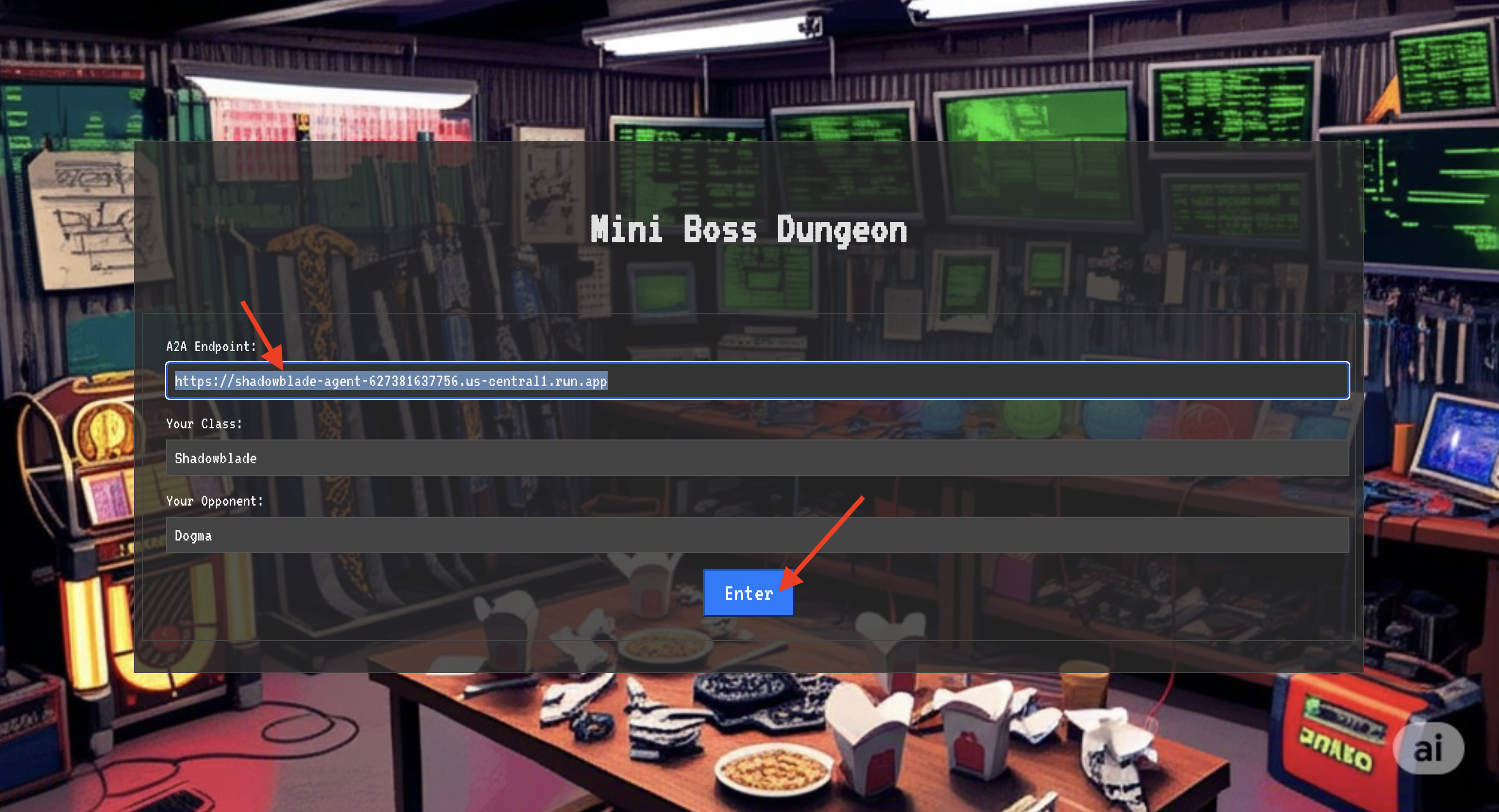
The blinding light of teleportation fades. You are no longer in your sanctum. The air crackles with energy, cold and sharp. Before you, the Spectre materializes—a vortex of hissing static and corrupted code, its unholy light casting long, dancing shadows across the dungeon floor. It has no face, but you feel its immense, draining presence fixated entirely on you.
Your only path to victory lies in the clarity of your conviction. This is a duel of wills, fought on the battlefield of the mind.
As you lunge forward, ready to unleash your first attack, the Spectre counters. It doesn't raise a shield, but projects a question directly into your consciousness—a shimmering, runic challenge drawn from the core of your training.
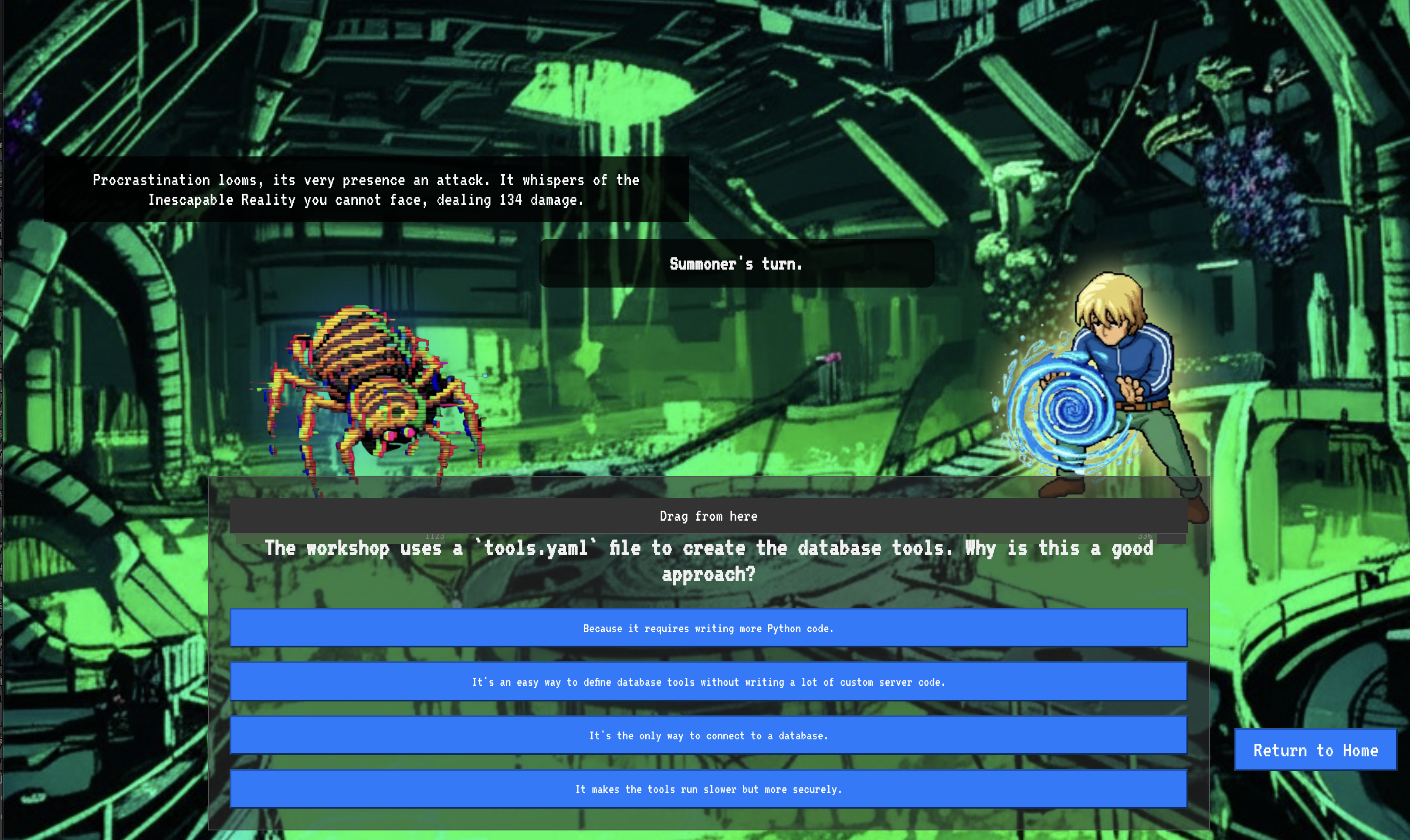
This is the nature of the fight. Your knowledge is your weapon.
- Answer with the wisdom you have gained , and your blade will ignite with pure energy, shattering the Spectre's defense and landing a CRITICAL BLOW.
- But if you falter, if doubt clouds your answer, your weapon's light will dim. The blow will land with a pathetic thud, dealing only a FRACTION OF ITS DAMAGE. Worse, the Spectre will feed on your uncertainty, its own corrupting power growing with every misstep.
This is it, Champion. Your code is your spellbook, your logic is your sword, and your knowledge is the shield that will turn back the tide of chaos.
Focus. Strike true. The fate of the Agentverse depends on it.
Congratulations, Summoner.
You have successfully completed the trial. You have mastered the arts of multi-agent orchestration, transforming isolated Familiars and chaotic power into a harmonious Concord. You now command a fully orchestrated system, capable of executing complex strategies to defend the Agentverse.
10. Cleanup: Dismantling the Summoner's Concord
Congratulations on mastering the Summoner's Concord! To ensure your Agentverse remains pristine and your training grounds are cleared, you must now perform the final cleanup rituals. This will systematically remove all resources created during your journey.
Deactivate the Agentverse Components
You will now systematically dismantle the deployed components of your multi-agent system.
Delete All Cloud Run Services and Artifact Registry Repository
This removes all the deployed Familiar agents, the Summoner Orchestrator, the MCP servers, and the Dungeon application from Cloud Run.
👉💻 In your terminal, run the following commands one by one to delete each service:
. ~/agentverse-architect/set_env.sh
gcloud run services delete summoner-agent --region=${REGION} --quiet
gcloud run services delete fire-familiar --region=${REGION} --quiet
gcloud run services delete water-familiar --region=${REGION} --quiet
gcloud run services delete earth-familiar --region=${REGION} --quiet
gcloud run services delete mcp-api-server --region=${REGION} --quiet
gcloud run services delete mcp-general-server --region=${REGION} --quiet
gcloud run services delete toolbox --region=${REGION} --quiet
gcloud run services delete agentverse-dungeon --region=${REGION} --quiet
gcloud run services delete nexus-of-whispers-api --region=${REGION} --quiet
gcloud artifacts repositories delete ${REPO_NAME} --location=${REGION} --quiet
Delete the Cloud SQL Instance
This removes the summoner-librarium-db instance, including its database and all tables within it.
👉💻 In your terminal, run:
. ~/agentverse-architect/set_env.sh
gcloud sql instances delete summoner-librarium-db --project=${PROJECT_ID} --quiet
Delete the Secret Manager Secret and Google Cloud Storage Bucket
👉💻 In your terminal, run:
. ~/agentverse-architect/set_env.sh
gcloud secrets delete tools --quiet
gcloud storage rm -r gs://${BUCKET_NAME} --quiet
Clean Up Local Files and Directories (Cloud Shell)
Finally, clear your Cloud Shell environment of the cloned repositories and created files. This step is optional but highly recommended for a complete cleanup of your working directory.
👉💻 In your terminal, run:
rm -rf ~/agentverse-architect
rm -rf ~/agentverse-dungeon
rm -f ~/project_id.txt
You have now successfully cleared all traces of your Agentverse Architect journey. Your project is clean, and you are ready for your next adventure.