

۱. پیش درآمد
دوران توسعهی ایزوله (منزوی) رو به پایان است. موج بعدی تکامل فناوری، نه در مورد نبوغ انفرادی، بلکه در مورد تسلط مشارکتی است. ساخت یک عامل (اپراتور) هوشمند و واحد، آزمایشی جذاب است. ساخت یک اکوسیستم قوی، امن و هوشمند از عاملها - یک دنیای عامل واقعی - چالش بزرگ برای شرکتهای مدرن است.
موفقیت در این عصر جدید نیازمند همگرایی چهار نقش حیاتی است، ستونهای بنیادی که از هر سیستم عامل پررونقی پشتیبانی میکنند. نقص در هر یک از این حوزهها، ضعفی ایجاد میکند که میتواند کل ساختار را به خطر بیندازد.
این کارگاه، راهنمای قطعی سازمانی برای تسلط بر آیندهی عاملمحور در گوگل کلود است. ما یک نقشه راه جامع ارائه میدهیم که شما را از اولین ایده تا یک واقعیت عملیاتی در مقیاس کامل راهنمایی میکند. در این چهار آزمایشگاه به هم پیوسته، یاد خواهید گرفت که چگونه مهارتهای تخصصی یک توسعهدهنده، معمار، مهندس داده و SRE باید برای ایجاد، مدیریت و مقیاسبندی یک عاملمحور قدرتمند، همگرا شوند.
هیچ ستونی به تنهایی نمیتواند از Agentverse پشتیبانی کند. طرح بزرگ معمار بدون اجرای دقیق توسعهدهنده بیفایده است. عامل توسعهدهنده بدون خرد مهندس داده کور است و کل سیستم بدون محافظت SRE شکننده است. تنها از طریق همافزایی و درک مشترک از نقشهای یکدیگر، تیم شما میتواند یک مفهوم نوآورانه را به یک واقعیت عملیاتی و حیاتی تبدیل کند. سفر شما از اینجا آغاز میشود. برای تسلط بر نقش خود آماده شوید و یاد بگیرید که چگونه در کل بزرگتر جای میگیرید.
به دنیای عاملها خوش آمدید: فراخوانی برای قهرمانان
در گسترهی وسیع دیجیتالِ سازمانها، عصر جدیدی آغاز شده است. این عصر، عصر عاملگرایی است، زمانی با نویدهای فراوان، که در آن عاملهای هوشمند و خودمختار در هماهنگی کامل برای تسریع نوآوری و از بین بردن روزمرگی تلاش میکنند.
این اکوسیستم متصل به قدرت و پتانسیل، با نام «جهان عامل» (The Agentverse) شناخته میشود.
اما یک آنتروپی خزنده، یک فساد خاموش که به عنوان «ایستا» شناخته میشود، شروع به فرسایش لبههای این دنیای جدید کرده است. «ایستا» یک ویروس یا یک باگ نیست؛ بلکه تجسم هرج و مرجی است که از خودِ عمل خلقت تغذیه میکند.
این ناامیدیهای قدیمی را به اشکال هیولایی تقویت میکند و هفت شبح توسعه را به وجود میآورد. اگر کنترل نشود، استاتیک و شبحهایش پیشرفت را متوقف میکنند و نوید Agentverse را به سرزمین بایر بدهی فنی و پروژههای رها شده تبدیل میکنند.
امروز، ما از قهرمانان میخواهیم که موج هرج و مرج را به عقب برانند. ما به قهرمانانی نیاز داریم که مایل به تسلط بر مهارت خود و همکاری برای محافظت از Agentverse باشند. زمان آن رسیده است که مسیر خود را انتخاب کنید.
کلاس خود را انتخاب کنید
چهار مسیر مجزا پیش روی شما قرار دارد که هر کدام ستونی حیاتی در مبارزه با استاتیک هستند . اگرچه آموزش شما یک ماموریت انفرادی خواهد بود، موفقیت نهایی شما به درک چگونگی ترکیب مهارتهایتان با دیگران بستگی دارد.
- Shadowblade (توسعهدهنده) : استاد آهنگری و خط مقدم. شما صنعتگری هستید که تیغهها را میسازید، ابزارها را میسازید و با جزئیات پیچیده کد با دشمن روبرو میشوید. مسیر شما، مسیر دقت، مهارت و خلاقیت عملی است.
- احضارکننده (معمار) : یک استراتژیست و هماهنگکنندهی بزرگ. شما یک عامل واحد را نمیبینید، بلکه کل میدان نبرد را میبینید. شما نقشههای اصلی را طراحی میکنید که به کل سیستمهای عاملها اجازه میدهد تا با هم ارتباط برقرار کنند، همکاری کنند و به هدفی بسیار بزرگتر از هر جزء واحد دست یابند.
- محقق (مهندس داده) : جوینده حقایق پنهان و نگهبان خرد. شما در بیابان وسیع و بکر دادهها قدم میگذارید تا هوشی را که به مأموران شما هدف و بینش میدهد، کشف کنید. دانش شما میتواند ضعف دشمن را آشکار کند یا متحدی را توانمند سازد.
- نگهبان (DevOps / SRE) : محافظ و سپر استوار قلمرو. شما قلعهها را میسازید، خطوط تأمین نیرو را مدیریت میکنید و اطمینان حاصل میکنید که کل سیستم میتواند در برابر حملات اجتنابناپذیر The Static مقاومت کند. قدرت شما پایه و اساسی است که پیروزی تیم شما بر آن بنا شده است.
ماموریت شما
آموزش شما به عنوان یک تمرین مستقل آغاز میشود. شما در مسیر انتخابی خود قدم خواهید گذاشت و مهارتهای منحصر به فردی را که برای تسلط بر نقش خود نیاز دارید، یاد خواهید گرفت. در پایان دوره آزمایشی، با یک Spectre متولد شده از The Static روبرو خواهید شد - یک مینیباس که از چالشهای خاص مهارت شما سوءاستفاده میکند.
تنها با تسلط بر نقش فردی خود میتوانید برای محاکمه نهایی آماده شوید. سپس باید با قهرمانان طبقات دیگر گروهی تشکیل دهید. با هم، به قلب فساد خواهید رفت تا با یک رئیس نهایی روبرو شوید.
یک چالش نهایی و مشارکتی که قدرت ترکیبی شما را آزمایش میکند و سرنوشت Agentverse را تعیین میکند.
دنیای مامورها منتظر قهرمانانش است. آیا به این فراخوان پاسخ خواهید داد؟
۲. هماهنگی احضارکننده
خوش آمدید، احضارگر. مسیر شما، مسیری از بینش و استراتژی بزرگ است. در حالی که دیگران بر روی یک تیغه یا یک طلسم واحد تمرکز میکنند، شما کل میدان نبرد را میبینید. شما یک مأمور واحد را فرماندهی نمیکنید؛ شما یک ارکستر کامل از آنها را رهبری میکنید. قدرت شما نه در درگیری مستقیم، بلکه در طراحی طرح بیعیب و نقص و فراگیری است که به لشکری از متخصصان - آشنایان شما - اجازه میدهد تا در هماهنگی کامل کار کنند. این ماموریت توانایی شما را در طراحی، اتصال و هماهنگی یک سیستم قدرتمند و چند عاملی آزمایش خواهد کرد.
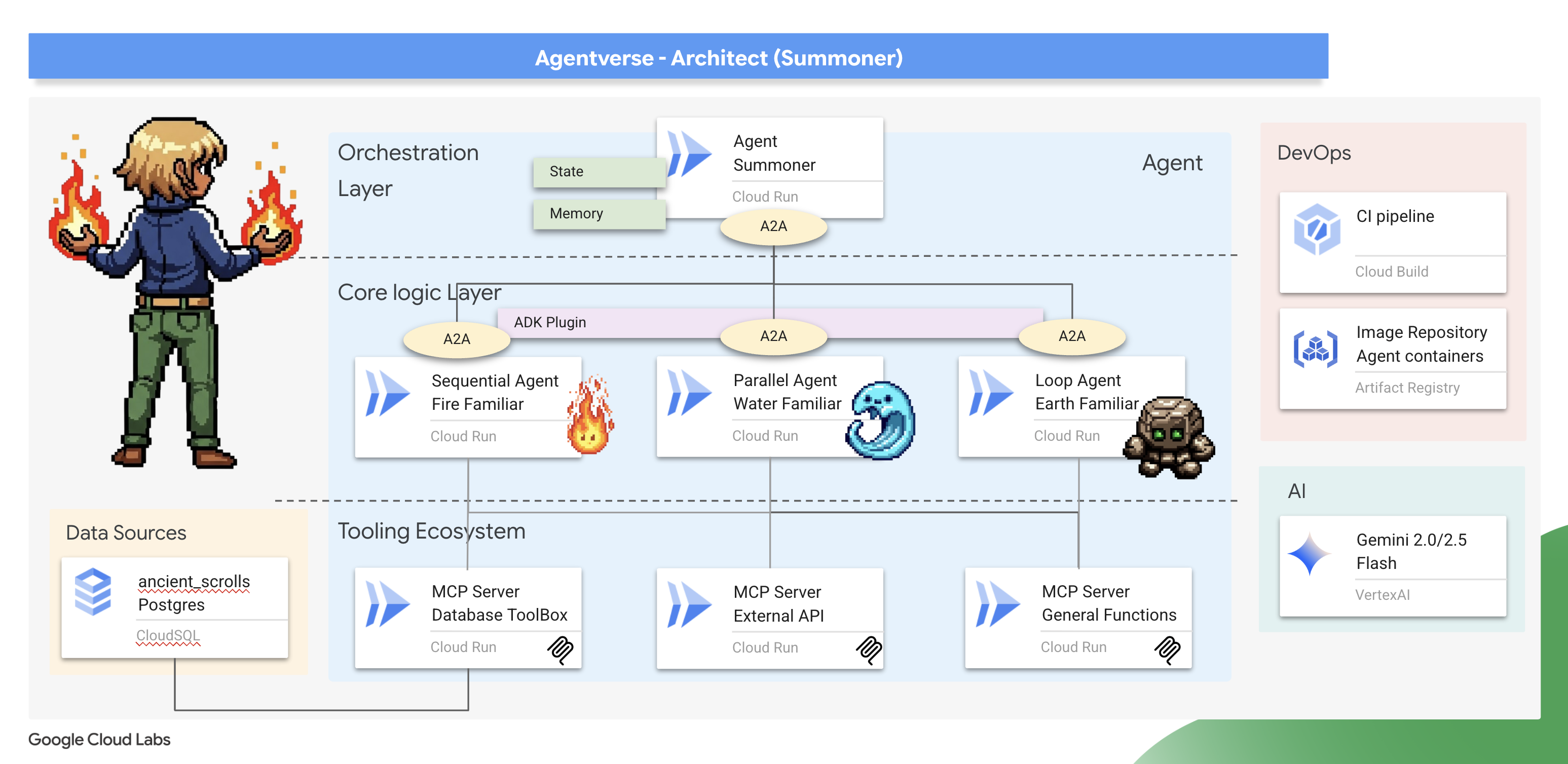
آنچه یاد خواهید گرفت
- معماری یک اکوسیستم ابزارسازی مجزا: طراحی و استقرار مجموعهای از سرورهای ابزار MCP مستقل و مبتنی بر میکروسرویس. شما خواهید آموخت که چرا این لایه بنیادی برای ایجاد سیستمهای عاملی مقیاسپذیر، قابل نگهداری و ایمن حیاتی است.
- تسلط بر گردشهای کاری پیشرفته عاملمحور: فراتر از عاملهای تکی بروید و لشکری از متخصصان «آشنا» بسازید. شما بر الگوهای اصلی گردش کار ADK - متوالی، موازی و حلقهای - تسلط خواهید یافت و اصول معماری برای انتخاب الگوی مناسب برای کار مناسب را خواهید آموخت.
- پیادهسازی یک هماهنگکننده هوشمند: از یک سازنده عامل ساده به یک معمار سیستم واقعی ارتقا پیدا کنید. شما یک عامل هماهنگکننده اصلی خواهید ساخت که از پروتکل عامل به عامل (A2A) برای کشف و واگذاری وظایف پیچیده به متخصصان شما استفاده میکند و یک سیستم چندعامله واقعی ایجاد میکند.
- اجرای قوانین با کد، نه با اعلانها: یاد بگیرید که با اجرای قوانین تعامل مبتنی بر وضعیت، عاملهای قابل اعتمادتر و قابل پیشبینیتری بسازید. شما با استفاده از سیستم قدرتمند افزونه و فراخوانی ADK، منطق سفارشی را برای مدیریت محدودیتهای دنیای واقعی مانند تایمرهای زمانبندی اجرا پیادهسازی خواهید کرد.
- مدیریت وضعیت و حافظه عامل: به عاملهای خود توانایی یادگیری و به خاطر سپردن بدهید. شما تکنیکهایی را برای مدیریت وضعیت کوتاهمدت و محاورهای و حافظه بلندمدت و پایدار بررسی خواهید کرد تا تعاملات هوشمندانهتر و آگاهتر از زمینه ایجاد کنید.
- اجرای یک استقرار ابری سرتاسری: کل سیستم چندعاملی خود را از یک نمونه اولیه محلی به یک واقعیت در سطح تولید ببرید. شما یاد خواهید گرفت که چگونه عاملها و هماهنگکننده خود را کانتینریزه کنید و آنها را به عنوان مجموعهای از میکروسرویسهای مقیاسپذیر و مستقل در Google Cloud Run مستقر کنید.
۳. رسم دایره احضار
خوش آمدید، احضارکننده. قبل از اینکه حتی یک آشنا فراخوانده شود، قبل از اینکه هرگونه پیمانی بسته شود، باید زمینی که بر روی آن ایستادهاید آماده باشد. یک محیط رام نشده، دعوتی به هرج و مرج است؛ یک احضارکنندهی واقعی فقط در یک فضای مقدس و قدرتمند عمل میکند. اولین وظیفهی ما ترسیم دایرهی احضار است: حک کردن رونهای قدرتی که سرویسهای ابری لازم را بیدار میکنند و به دست آوردن طرحهای باستانی که کار ما را هدایت میکنند. قدرت یک احضارکننده از آمادهسازی دقیق زاده میشود.
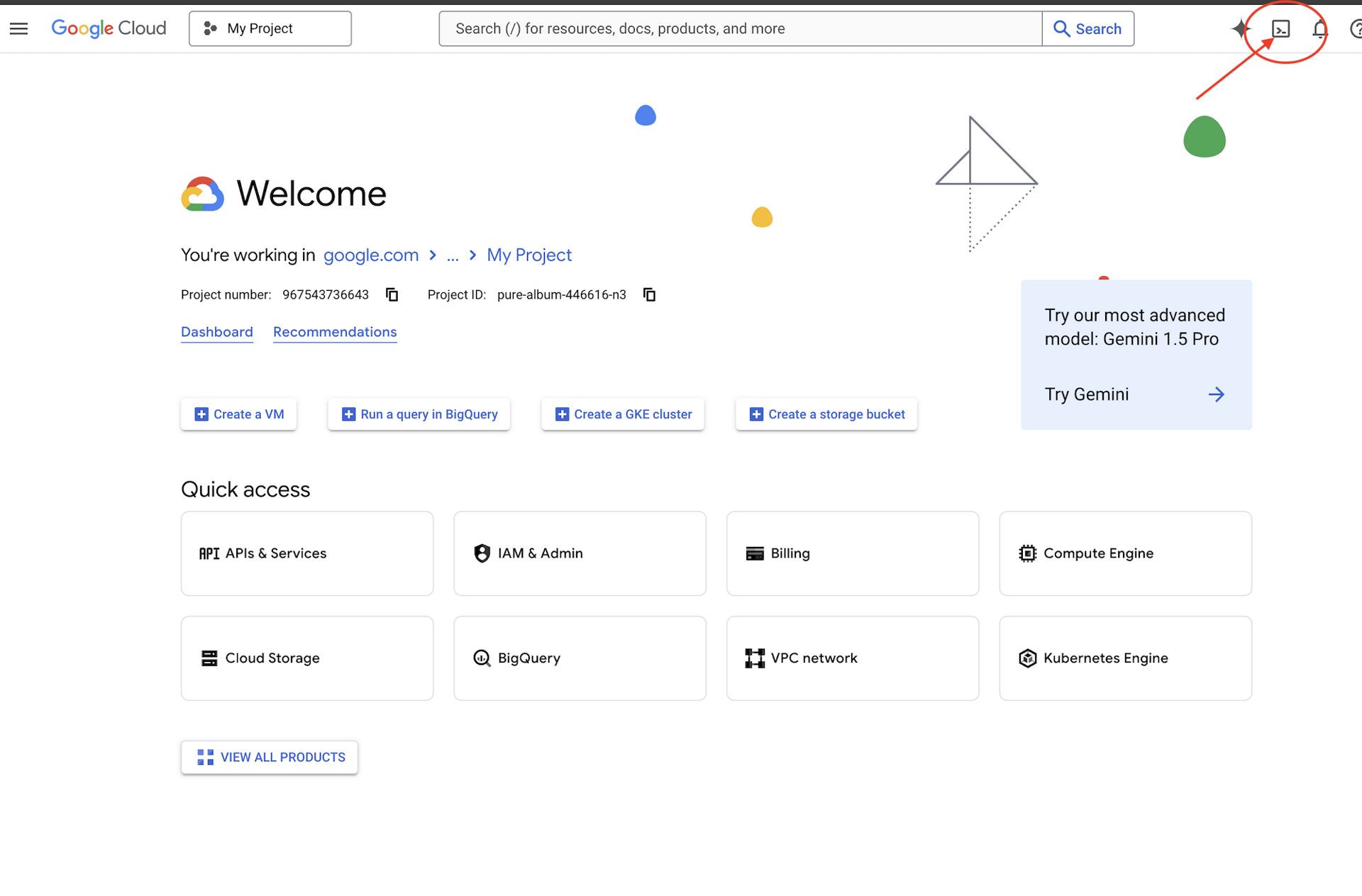
👉 روی فعال کردن Cloud Shell در بالای کنسول Google Cloud کلیک کنید (این آیکون به شکل ترمینال در بالای پنل Cloud Shell قرار دارد)
👉 روی دکمهی «باز کردن ویرایشگر» کلیک کنید (شبیه یک پوشهی باز شده با مداد است). با این کار ویرایشگر کد Cloud Shell در پنجره باز میشود. یک فایل اکسپلورر در سمت چپ مشاهده خواهید کرد. 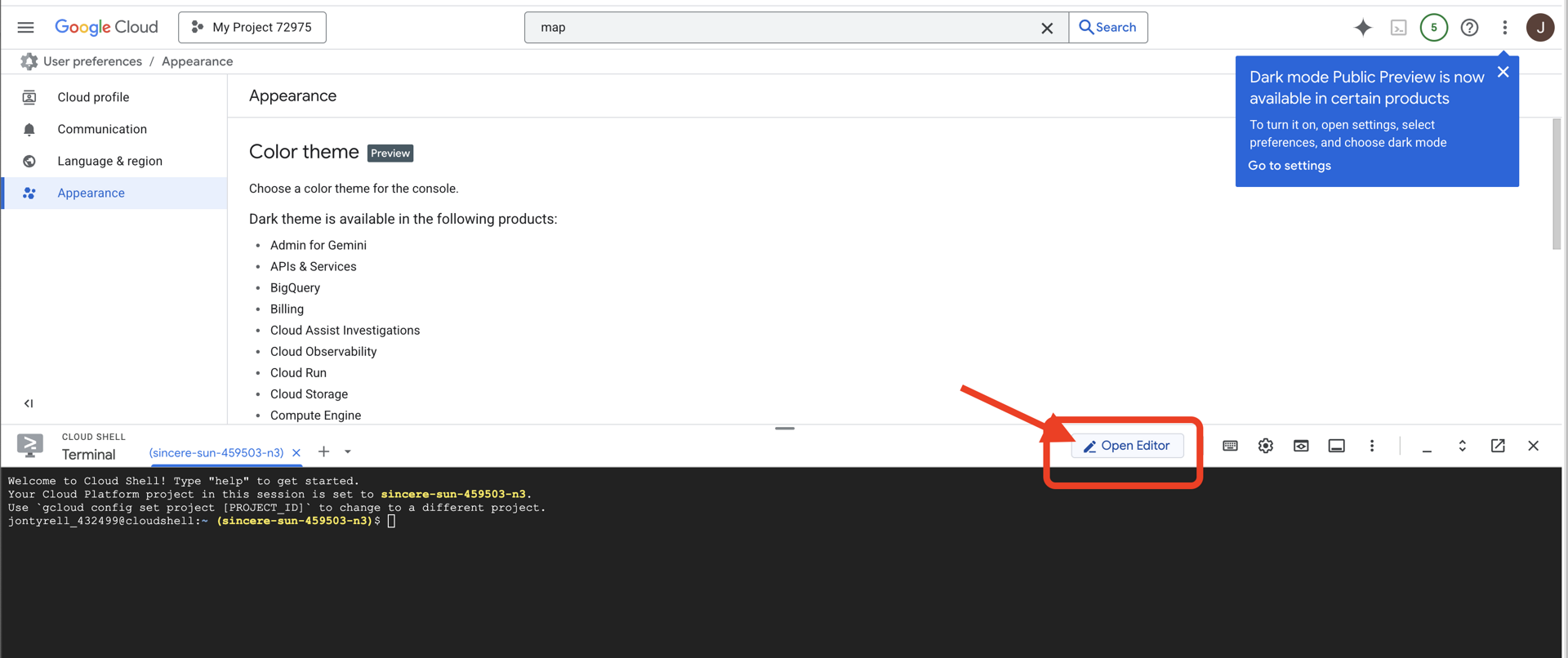
👉 ترمینال را در محیط توسعه ابری (cloud IDE) باز کنید، 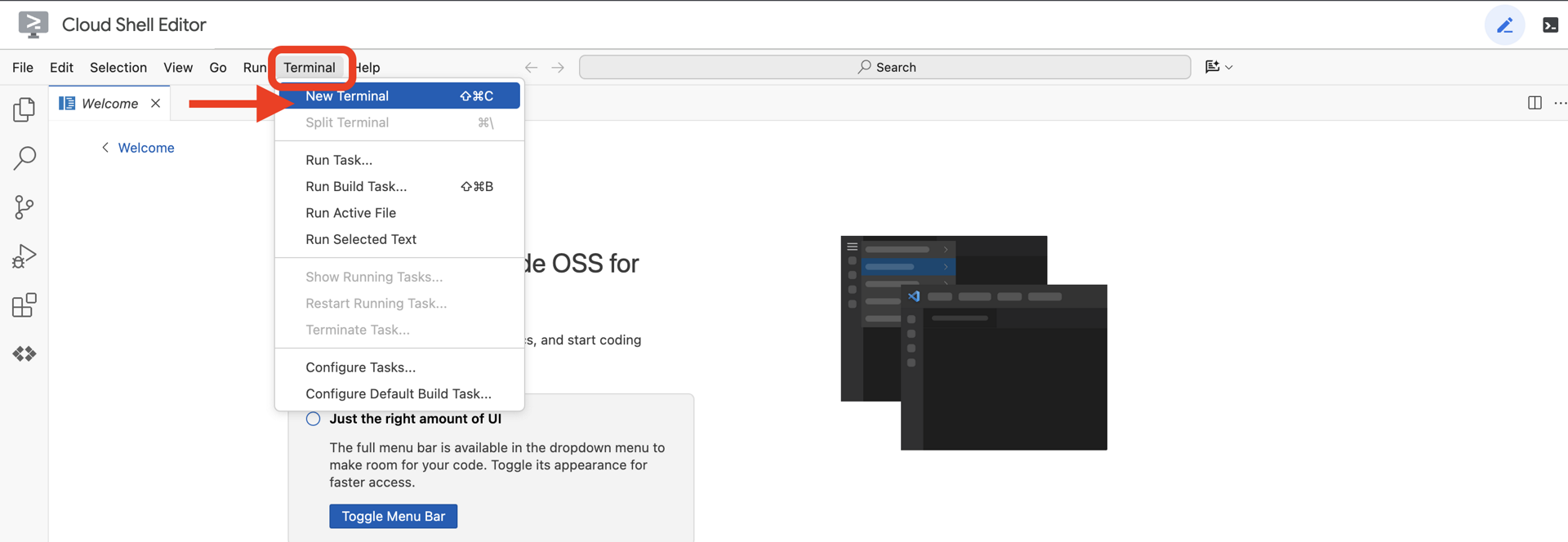
👉💻 در ترمینال، با استفاده از دستور زیر تأیید کنید که از قبل احراز هویت شدهاید و پروژه روی شناسه پروژه شما تنظیم شده است:
gcloud auth list
👉💻 پروژه بوتاسترپ را از گیتهاب کپی کنید:
git clone https://github.com/weimeilin79/agentverse-architect
chmod +x ~/agentverse-architect/init.sh
chmod +x ~/agentverse-architect/set_env.sh
chmod +x ~/agentverse-architect/prepare.sh
chmod +x ~/agentverse-architect/data_setup.sh

git clone https://github.com/weimeilin79/agentverse-dungeon.git
chmod +x ~/agentverse-dungeon/run_cloudbuild.sh
chmod +x ~/agentverse-dungeon/start.sh
👉💻 اسکریپت راهاندازی را از دایرکتوری پروژه اجرا کنید.
⚠️ نکتهای در مورد شناسه پروژه: اسکریپت یک شناسه پروژه پیشفرض تصادفی پیشنهاد میدهد. میتوانید برای پذیرش این پیشفرض، Enter را فشار دهید.
با این حال، اگر ترجیح میدهید یک پروژه جدید خاص ایجاد کنید ، میتوانید شناسه پروژه مورد نظر خود را در صورت درخواست اسکریپت تایپ کنید.
cd ~/agentverse-architect
./init.sh
اسکریپت بقیه مراحل راهاندازی را بهطور خودکار انجام خواهد داد.
👉 مرحله مهم پس از تکمیل: پس از اتمام اسکریپت، باید مطمئن شوید که کنسول Google Cloud شما پروژه صحیح را مشاهده میکند:
- به console.cloud.google.com بروید.
- روی منوی کشویی انتخاب پروژه در بالای صفحه کلیک کنید.
- روی برگه «همه» کلیک کنید (زیرا ممکن است پروژه جدید هنوز در «اخیر» ظاهر نشده باشد).
- شناسه پروژهای که در مرحله
init.shپیکربندی کردهاید را انتخاب کنید.
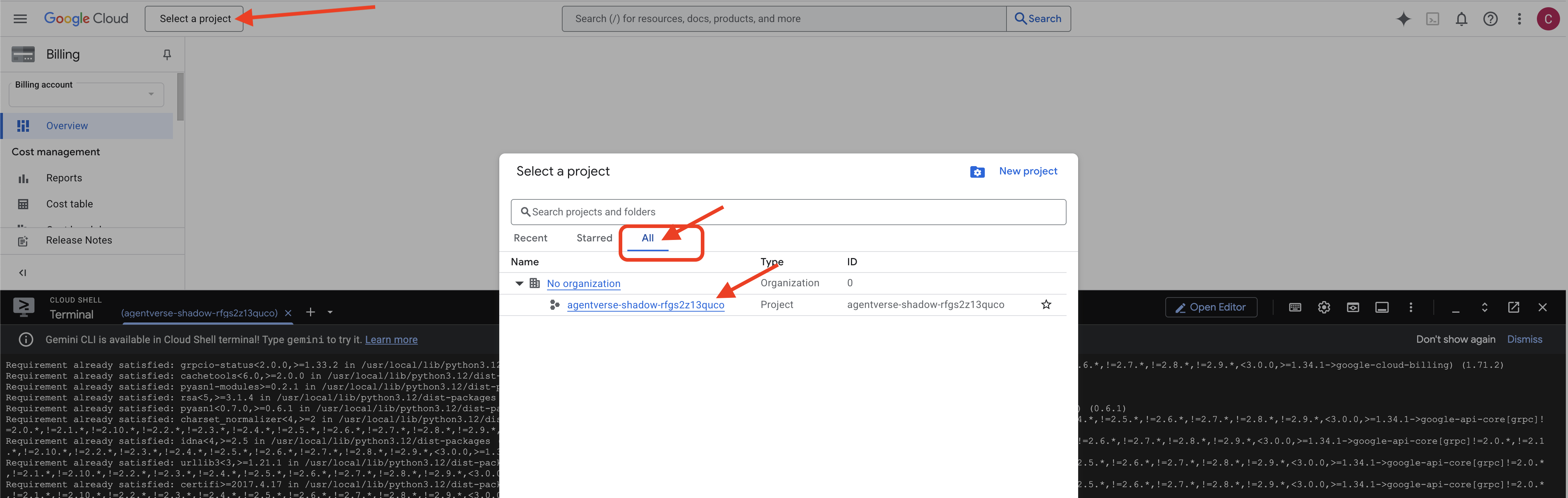
👉💻 شناسه پروژه مورد نیاز را تنظیم کنید:
gcloud config set project $(cat ~/project_id.txt) --quiet
👉💻 دستور زیر را برای فعال کردن API های لازم Google Cloud اجرا کنید:
gcloud services enable \
    sqladmin.googleapis.com \
    storage.googleapis.com \
    aiplatform.googleapis.com \
    run.googleapis.com \
    cloudbuild.googleapis.com \
    artifactregistry.googleapis.com \
    iam.googleapis.com \
    compute.googleapis.com \
    cloudresourcemanager.googleapis.com \
    secretmanager.googleapis.com
👉💻 اگر قبلاً مخزن Artifact Registry با نام agentverse-repo ایجاد نکردهاید، دستور زیر را برای ایجاد آن اجرا کنید: (اگر کلاسهای دیگری را در همان پروژه مستقر کردهاید، از این مرحله صرف نظر کنید)
. ~/agentverse-architect/set_env.sh
gcloud artifacts repositories create $REPO_NAME \
    --repository-format=docker \
    --location=$REGION \
    --description="Repository for Agentverse agents"
تنظیم مجوز
👉💻 با اجرای دستورات زیر در ترمینال، مجوزهای لازم را اعطا کنید:
. ~/agentverse-architect/set_env.sh

# --- Grant Core Data Permissions ---
gcloud projects add-iam-policy-binding $PROJECT_ID \
 --member="serviceAccount:$SERVICE_ACCOUNT_NAME" \
 --role="roles/storage.admin"

gcloud projects add-iam-policy-binding $PROJECT_ID  \
--member="serviceAccount:$SERVICE_ACCOUNT_NAME"  \
--role="roles/aiplatform.user"

# --- Grant Deployment & Execution Permissions ---
gcloud projects add-iam-policy-binding $PROJECT_ID  \
--member="serviceAccount:$SERVICE_ACCOUNT_NAME"  \
--role="roles/cloudbuild.builds.editor"

gcloud projects add-iam-policy-binding $PROJECT_ID  \
--member="serviceAccount:$SERVICE_ACCOUNT_NAME"  \
--role="roles/artifactregistry.admin"

gcloud projects add-iam-policy-binding $PROJECT_ID  \
--member="serviceAccount:$SERVICE_ACCOUNT_NAME"  \
--role="roles/run.admin"

gcloud projects add-iam-policy-binding $PROJECT_ID  \
--member="serviceAccount:$SERVICE_ACCOUNT_NAME"  \
--role="roles/iam.serviceAccountUser"

gcloud projects add-iam-policy-binding $PROJECT_ID  \
--member="serviceAccount:$SERVICE_ACCOUNT_NAME"  \
--role="roles/logging.logWriter"

gcloud projects add-iam-policy-binding $PROJECT_ID \
  --member="serviceAccount:${SERVICE_ACCOUNT_NAME}" \
  --role="roles/monitoring.metricWriter"

gcloud projects add-iam-policy-binding $PROJECT_ID \
  --member="serviceAccount:${SERVICE_ACCOUNT_NAME}" \
  --role="roles/secretmanager.secretAccessor"
👉💻 همزمان با شروع آموزش، چالش نهایی را آماده خواهیم کرد. دستورات زیر، اسپکترها را از هرج و مرج و ایستا احضار میکنند و غولهای نهایی آزمون شما را تشکیل میدهند.
. ~/agentverse-architect/set_env.sh
cd ~/agentverse-dungeon
./run_cloudbuild.sh
cd ~/agentverse-architect
👉💻 در نهایت، اسکریپت prepare.sh را اجرا کنید تا وظایف راهاندازی اولیه انجام شود.
. ~/agentverse-architect/set_env.sh
cd ~/agentverse-architect/
./prepare.sh
کارت عالی بود، احضارگر. دایره کامل شده و پیمانها مهر و موم شدهاند. زمین اکنون مقدس شده و آمادهی هدایت قدرت عظیم است. در آزمایش بعدیمان، ما همان فونتهای عنصری را خواهیم ساخت که فامیلیهای ما قدرت خود را از آنها میگیرند.
۴. جعل فونتهای عنصری: اکوسیستم ابزارسازی جدا شده
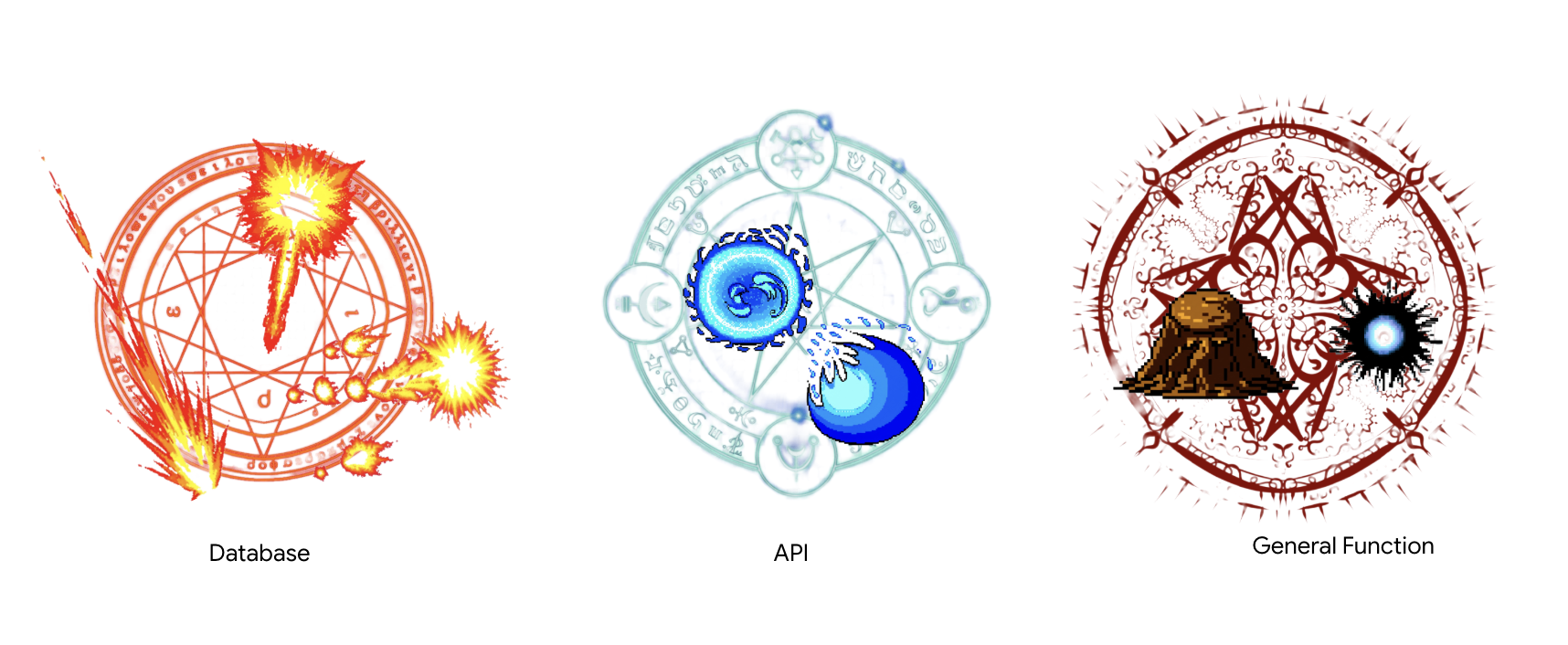
میدان نبرد آماده شده، دایره احضار کشیده شده و مانای محیط در حال ترک خوردن است. وقت آن است که اولین عمل واقعی خود را به عنوان یک احضارگر انجام دهید: ساختن منابع قدرتی که فامیلیهای شما از آنها قدرت خود را میگیرند. این آیین به سه بخش تقسیم میشود که هر کدام یک فونت عنصری را بیدار میکند - یک منبع پایدار و مستقل از نوع خاصی از قدرت. تنها زمانی که هر سه فونت فعال باشند، میتوانید کار پیچیدهتر احضار را شروع کنید.
یادداشت معمار: سرور پروتکل زمینه مدل (MCP) یک جزء اساسی در یک سیستم عامل مدرن است که به عنوان یک پل ارتباطی استاندارد عمل میکند و به یک عامل اجازه میدهد تا ابزارهای از راه دور را کشف و استفاده کند. در اکوسیستم ابزار ما، دو نوع متمایز از سرورهای MCP را معماری خواهیم کرد که هر کدام یک الگوی معماری حیاتی را نشان میدهند. برای اتصال به پایگاه داده خود، از یک رویکرد اعلانی با جعبه ابزار پایگاه داده استفاده خواهیم کرد و ابزارهای خود را در یک فایل پیکربندی ساده تعریف میکنیم. این الگو برای افشای دسترسی به دادههای ساختار یافته فوقالعاده کارآمد و ایمن است. با این حال، هنگامی که نیاز به پیادهسازی منطق تجاری سفارشی یا فراخوانی APIهای شخص ثالث خارجی داریم، از یک رویکرد دستوری استفاده خواهیم کرد و منطق سرور را گام به گام با کد مینویسیم. این امر کنترل و انعطافپذیری نهایی را فراهم میکند و به ما امکان میدهد عملیات پیچیده را در پشت یک ابزار ساده و قابل استفاده مجدد محصور کنیم. یک معمار ارشد باید هر دو الگو را درک کند تا رویکرد مناسب را برای هر جزء انتخاب کند و یک پایه ابزار قوی، ایمن و مقیاسپذیر ایجاد کند.
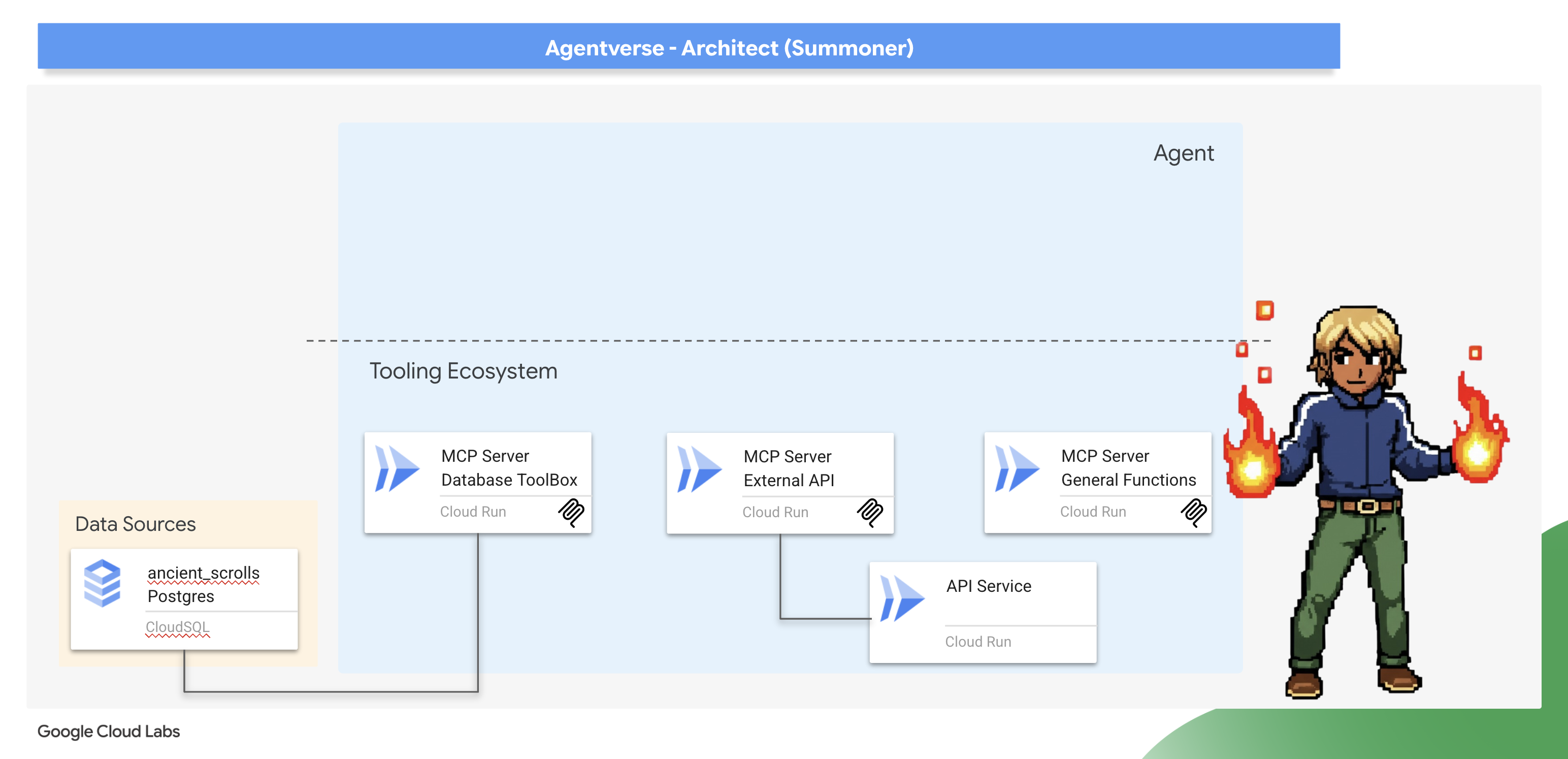
بیدار کردن نکسوس زمزمهها (سرور MCP API خارجی)
یک احضارگر خردمند میداند که همه قدرتها از درون قلمرو خودشان سرچشمه نمیگیرند. منابع انرژی خارجی، گاهی اوقات آشفته، وجود دارند که میتوانند به طور مؤثر هدایت شوند. نکسوس زمزمهها دروازه ما به این نیروها است.
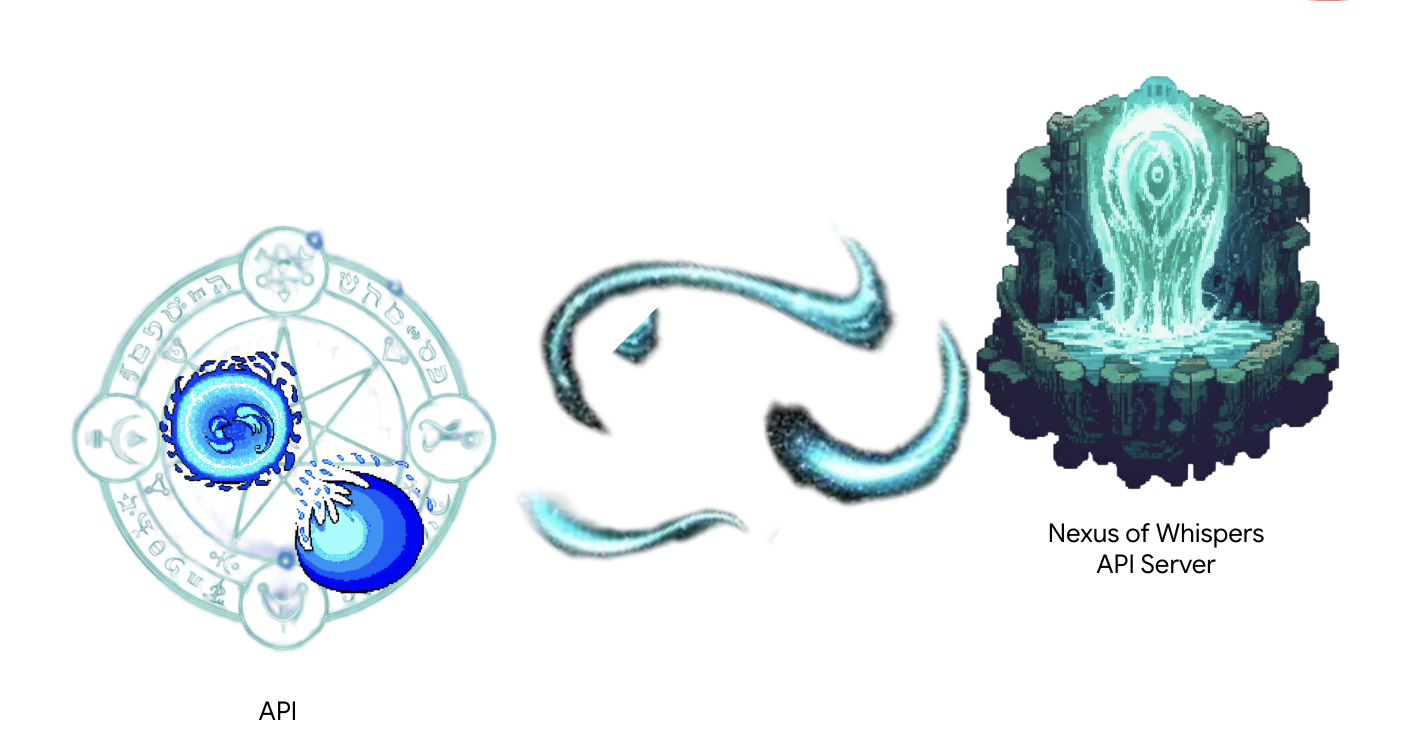
یک سرویس از قبل فعال است که به عنوان منبع تغذیه خارجی ما عمل میکند و دو نقطه پایانی طلسم خام ارائه میدهد: /cryosea_shatter و /moonlit_cascade .
یادداشت معمار: شما از یک رویکرد دستوری استفاده خواهید کرد که منطق سرور را گام به گام به صراحت تعریف میکند. این به شما کنترل و انعطافپذیری بسیار بیشتری میدهد، که زمانی که ابزارهای شما نیاز به انجام کاری بیش از اجرای یک کوئری SQL ساده، مانند فراخوانی سایر APIها، دارند، ضروری است. درک هر دو الگو یک مهارت حیاتی برای یک معمار عامل است.
👉✏️ به دایرکتوری ~/agentverse-architect/mcp-servers/api/main.py بروید و کد زیر را جایگزین #REPLACE-MAGIC-CORE کنید:
def cryosea_shatter() -> str:
    """Channels immense frost energy from an external power source, the Nexus of Whispers, to unleash the Cryosea Shatter spell."""
    try:
        response = requests.post(f"{API_SERVER_URL}/cryosea_shatter")
        response.raise_for_status() # Raise an exception for bad status codes (4xx or 5xx)
        data = response.json()
        # Thematic Success Message
        return f"A connection to the Nexus is established! A surge of frost energy manifests as Cryosea Shatter, dealing {data.get('damage_points')} damage."
    except requests.exceptions.RequestException as e:
        # Thematic Error Message
        return f"The connection to the external power source wavers and fails. The Cryosea Shatter spell fizzles. Reason: {e}"


def moonlit_cascade() -> str:
    """Draws mystical power from an external energy source, the Nexus of Whispers, to invoke the Moonlit Cascade spell."""
    try:
        response = requests.post(f"{API_SERVER_URL}/moonlit_cascade")
        response.raise_for_status()
        data = response.json()
        # Thematic Success Message
        return f"The Nexus answers the call! A cascade of pure moonlight erupts from the external source, dealing {data.get('damage_points')} damage."
    except requests.exceptions.RequestException as e:
        # Thematic Error Message
        return f"The connection to the external power source wavers and fails. The Moonlit Cascade spell fizzles. Reason: {e}"
در قلب اسکریپت، توابع ساده پایتون قرار دارند. اینجاست که کار واقعی اتفاق میافتد.
👉✏️ در همان فایل ~/agentverse-architect/mcp-servers/api/main.py کد زیر را جایگزین #REPLACE-Runes of Communication کنید:
@app.list_tools()
async def list_tools() -> list[mcp_types.Tool]:
  """MCP handler to list available tools."""
  # Convert the ADK tool's definition to MCP format
  schema_cryosea_shatter = adk_to_mcp_tool_type(cryosea_shatterTool)
  schema_moonlit_cascade = adk_to_mcp_tool_type(moonlit_cascadeTool)
  print(f"MCP Server: Received list_tools request. \n MCP Server: Advertising tool: {schema_cryosea_shatter.name} and {schema_moonlit_cascade.name}")
  return [schema_cryosea_shatter,schema_moonlit_cascade]

@app.call_tool()
async def call_tool(
    name: str, arguments: dict
) -> list[mcp_types.TextContent | mcp_types.ImageContent | mcp_types.EmbeddedResource]:
  """MCP handler to execute a tool call."""
  print(f"MCP Server: Received call_tool request for '{name}' with args: {arguments}")

  # Look up the tool by name in our dictionary
  tool_to_call = available_tools.get(name)
  if tool_to_call:
    try:
      adk_response = await tool_to_call.run_async(
          args=arguments,
          tool_context=None, # No ADK context available here
      )
      print(f"MCP Server: ADK tool '{name}' executed successfully.")

      response_text = json.dumps(adk_response, indent=2)
      return [mcp_types.TextContent(type="text", text=response_text)]

    except Exception as e:
      print(f"MCP Server: Error executing ADK tool '{name}': {e}")
      # Creating a proper MCP error response might be more robust
      error_text = json.dumps({"error": f"Failed to execute tool '{name}': {str(e)}"})
      return [mcp_types.TextContent(type="text", text=error_text)]
  else:
      # Handle calls to unknown tools
      print(f"MCP Server: Tool '{name}' not found.")
      error_text = json.dumps({"error": f"Tool '{name}' not implemented."})
      return [mcp_types.TextContent(type="text", text=error_text)]
@app.list_tools()(دست دادن): این تابع، خوشامدگویی سرور است. وقتی یک عامل جدید متصل میشود، ابتدا این نقطه پایانی را فراخوانی میکند تا بپرسد، "چه کاری میتوانید انجام دهید؟" کد ما با لیستی از تمام ابزارهای موجود پاسخ میدهد که با استفاده از adk_to_mcp_tool_type به فرمت جهانی MCP تبدیل شده است. -@app.call_tool()(دستور): این تابع، نیروی محرکه است. وقتی عامل تصمیم به استفاده از ابزاری میگیرد، درخواستی را به همراه نام ابزار و آرگومانها به این نقطه پایانی ارسال میکند. کد ما ابزار را در "spellbook" موجود در available_tools ما جستجو میکند، آن را با run_async اجرا میکند و نتیجه را در فرمت استاندارد MCP برمیگرداند.
ما این را بعداً مستقر خواهیم کرد.
روشن کردن کوره آهنگری آرکین (سرور MCP با عملکردهای عمومی)
همه قدرتها از کتابهای باستانی یا زمزمههای دوردست نمیآیند. گاهی اوقات، یک احضارکننده باید جادوی خود را از اراده خام و منطق محض بسازد. آهنگری آرکین این منبع قدرت است - سروری که توابع کاربردی همه منظوره و بدون وضعیت را ارائه میدهد.
یادداشت معمار : این یک الگوی معماری دیگر است. اگرچه اتصال به سیستمهای موجود رایج است، اما شما اغلب نیاز خواهید داشت که قوانین و منطق کسبوکار منحصر به فرد خود را پیادهسازی کنید. ایجاد یک ابزار اختصاصی «توابع» یا «ابزارهای کاربردی» مانند این، بهترین روش است. این ابزار منطق سفارشی شما را کپسولهسازی میکند، آن را برای هر عاملی در اکوسیستم شما قابل استفاده مجدد میکند و آن را از منابع داده و ادغامهای خارجی شما جدا نگه میدارد.
👀 به فایل ~/agentverse-architect/mcp-servers/general/main.py در IDE ابری گوگل خود نگاهی بیندازید. متوجه خواهید شد که از همان رویکرد دستوری mcp.server که در Nexus برای ساخت این Font of Power سفارشی استفاده شده بود، استفاده میکند.
ایجاد خط لوله ساخت ابر اصلی
اکنون، فایل cloudbuild.yaml را در دایرکتوری mcp-servers ایجاد خواهیم کرد. این فایل، ساخت و استقرار هر دو سرویس را هماهنگ خواهد کرد.
👉💻 از دایرکتوری ~/agentverse-architect/mcp-servers ، دستورات زیر را اجرا کنید:
cd ~/agentverse-architect/mcp-servers
source ~/agentverse-architect/set_env.sh

echo "The API URL is: $API_SERVER_URL"

# Submit the Cloud Build job from the parent directory
gcloud builds submit . \
  --config=cloudbuild.yaml \
  --substitutions=_REGION="$REGION",_REPO_NAME="$REPO_NAME",_API_SERVER_URL="$API_SERVER_URL"
صبر کنید تا تمام مراحل نصب تمام شود.
👉 میتوانید با رفتن به کنسول Cloud Run ، استقرار را تأیید کنید. باید دو نمونه سرور MCP جدید خود را که در حال اجرا هستند، مطابق شکل زیر ببینید: 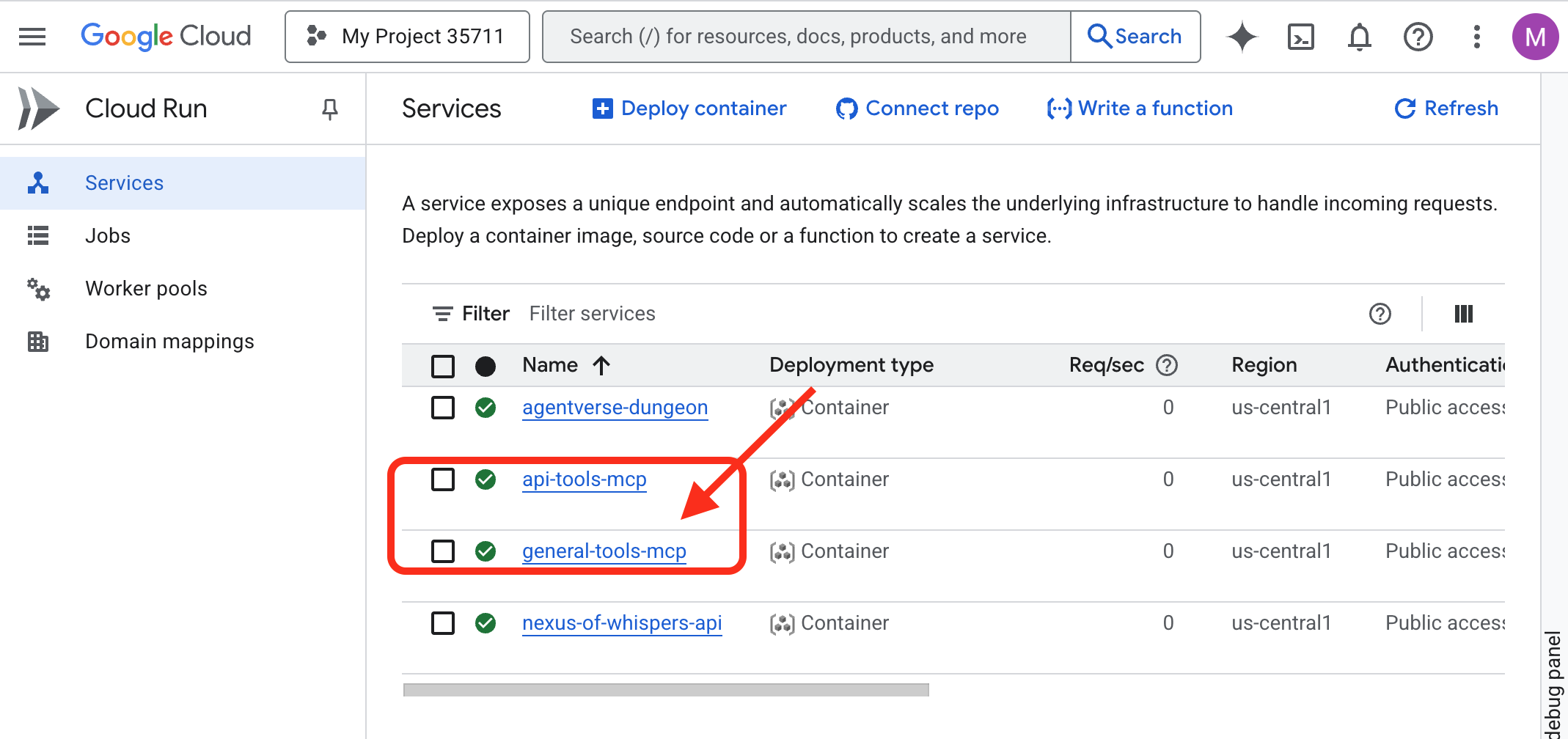
بیداری کتابخانه دانش (Database ToolBox MCP Server)
فونت بعدی ما Librarium of Knowledge خواهد بود که مستقیماً به پایگاه داده Cloud SQL ما متصل میشود.
یادداشت معمار: برای این کار، ما از جعبه ابزار مدرن و اعلانی پایگاه داده استفاده خواهیم کرد. این یک رویکرد قدرتمند است که در آن منبع داده و ابزارهای خود را در یک فایل پیکربندی YAML تعریف میکنیم. این جعبه ابزار، کار پیچیده ایجاد و اجرای سرور را مدیریت میکند و میزان کد سفارشی مورد نیاز برای نوشتن و نگهداری را کاهش میدهد.
وقت آن رسیده که «کتابخانه احضارکننده» خود را بسازیم - پایگاه داده ابری SQL که تمام اطلاعات حیاتی ما را در خود جای خواهد داد. ما از یک اسکریپت راهاندازی برای مدیریت خودکار این کار استفاده خواهیم کرد.
👉💻 ابتدا، پایگاه داده را راهاندازی میکنیم، در ترمینال خود، دستورات زیر را اجرا کنید:
source ~/agentverse-architect/set_env.sh
cd ~/agentverse-architect
./data_setup.sh
پس از اتمام اسکریپت، پایگاه داده شما پر شده و دادههای آسیب عنصری آماده استفاده خواهند بود. اکنون میتوانید مستقیماً محتویات Grimoire خود را تأیید کنید.
👉 ابتدا با باز کردن این لینک مستقیم در یک تب جدید مرورگر، به Cloud SQL Studio برای پایگاه داده خود بروید:
https://console.cloud.google.com/sql/instances/summoner-librarium-db
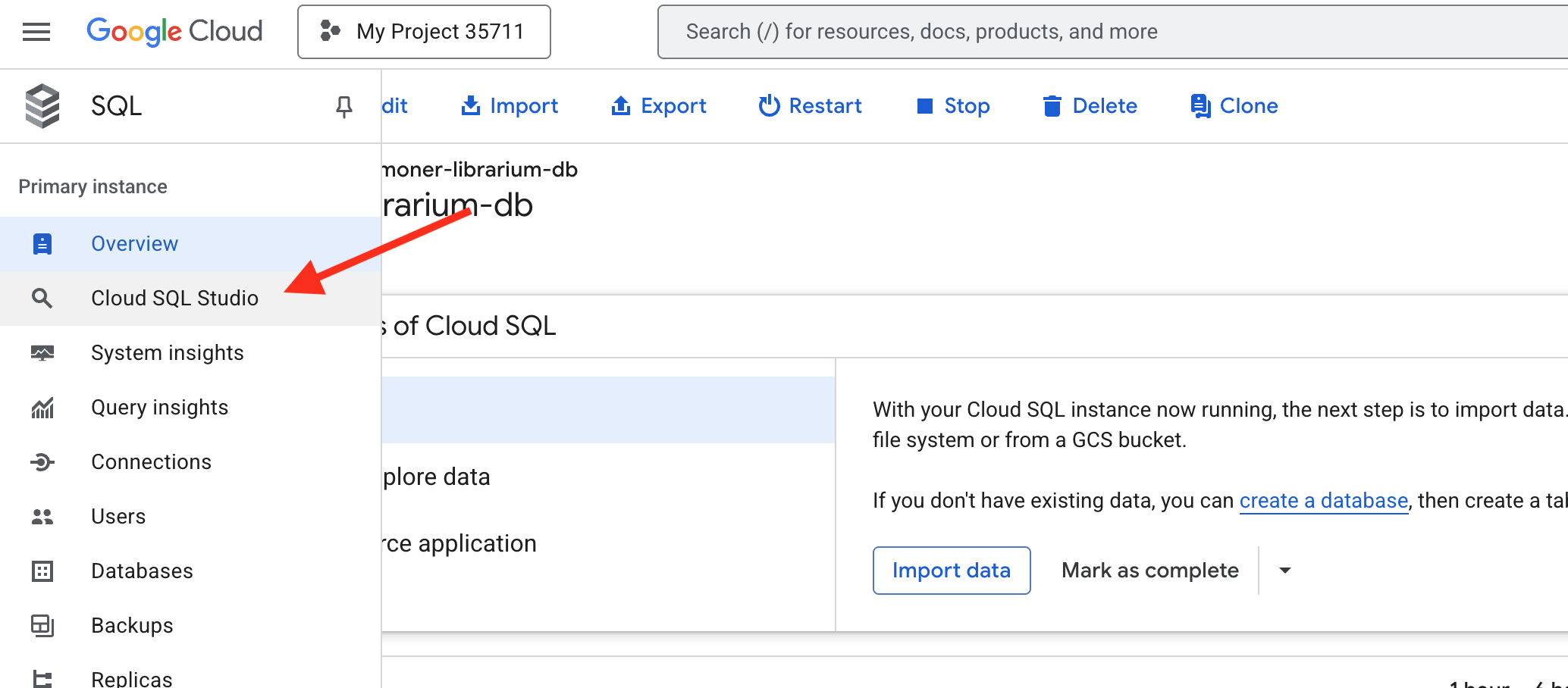
👉 در پنل ورود به سیستم در سمت چپ، پایگاه داده familiar_grimoire را از منوی کشویی انتخاب کنید.
👉 summoner به عنوان نام کاربری و 1234qwer به عنوان رمز عبور وارد کنید، سپس روی Authenticate کلیک کنید.
👉📜 پس از اتصال، اگر یک تب ویرایشگر کوئری جدید باز نیست، آن را باز کنید. برای مشاهده دادههای آسیب عنصری ثبت شده، کوئری SQL زیر را جایگذاری و اجرا کنید:
SELECT * FROM
  "public"."abilities"
اکنون باید جدول abilities را با ستونها و ردیفهای پر شده ببینید که تأیید میکند Grimoire شما آماده است. 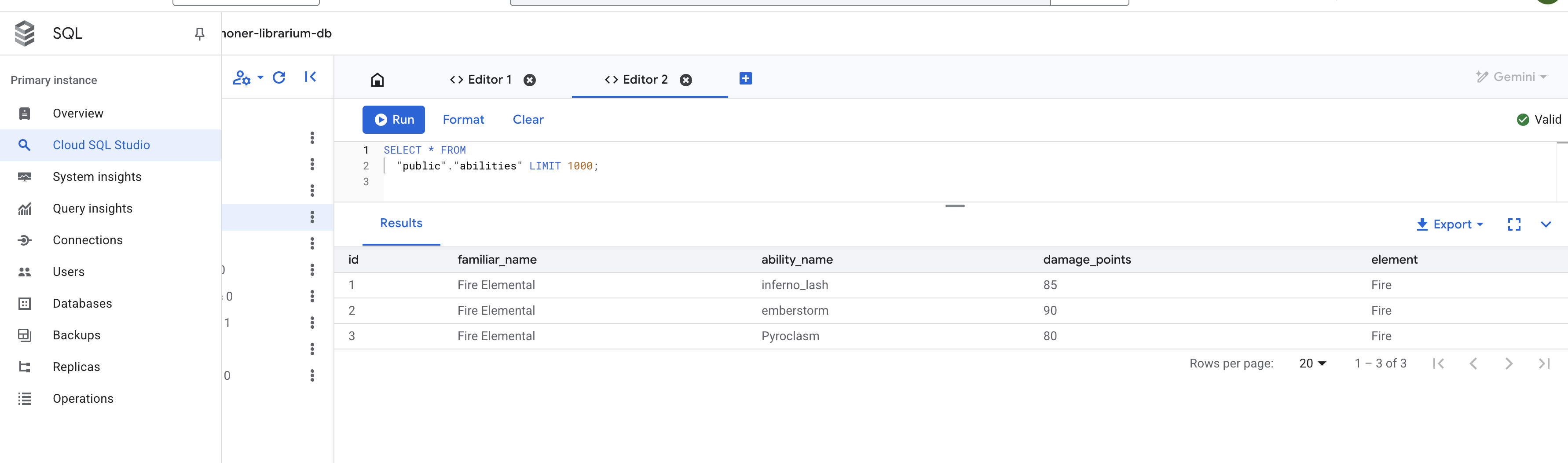
پیکربندی سرور ToolBox MCP
فایل پیکربندی tools.yaml به عنوان طرح اولیه برای سرور ما عمل میکند و به Database Toolbox دقیقاً میگوید که چگونه به پایگاه داده ما متصل شود و کدام کوئریهای SQL را به عنوان ابزار نمایش دهد.
منابع: این بخش اتصالات به دادههای شما را تعریف میکند.
- summoner-librarium:: این یک نام منطقی است که ما به اتصال خود دادهایم.
- نوع: cloud-sql-postgres: به جعبه ابزار میگوید که از کانکتور امن داخلی خود که بهطور خاص برای Cloud SQL طراحی شده است، برای PostgreSQL استفاده کند.
- پروژه، منطقه، نمونه و غیره: اینها مختصات دقیق نمونه Cloud SQL هستند که شما در طول اسکریپت prepare.sh ایجاد کردهاید و به جعبه ابزار میگویند که کتابخانه ما را کجا پیدا کند.
👉✏️ به مسیر ~/agentverse-architect/mcp-servers/db-toolbox در فایل tools.yaml بروید و #REPLACE-Source را با کد زیر جایگزین کنید.
sources:
  # This section defines the connection to our Cloud SQL for PostgreSQL database.
  summoner-librarium:
    kind: cloud-sql-postgres
    project: "YOUR_PROJECT_ID"
    region: "us-central1"
    instance: "summoner-librarium-db"
    database: "familiar_grimoire"
    user: "summoner"
    password: "1234qwer"
👉✏️ 🚨🚨 جایگزین کنید
YOUR_PROJECT_ID
به همراه شناسه پروژه شما.
ابزارها: این بخش تواناییها یا عملکردهای واقعی ارائه شده توسط سرور ما را تعریف میکند.
- lookup-available-ability:: این نام اولین ابزار ماست.
- type: postgres-sql: این به جعبه ابزار میگوید که عمل این ابزار اجرای یک دستور SQL است.
- منبع: summoner-librium: این ابزار را به اتصالی که در بلوک منابع تعریف کردهایم، پیوند میدهد. اینگونه است که ابزار میداند پرسوجوی خود را روی کدام پایگاه داده اجرا کند.
- توضیحات و پارامترها: این اطلاعاتی است که در مدل زبان نمایش داده میشود. توضیحات به عامل میگوید چه زمانی از ابزار استفاده کند و پارامترها ورودیهای مورد نیاز ابزار را تعریف میکنند. این برای فعال کردن قابلیت فراخوانی تابع توسط عامل بسیار مهم است.
- عبارت: این کوئری خام SQL است که باید اجرا شود. $1 یک جاینگهدار امن است که پارامتر familiar_name ارائه شده توسط عامل به طور ایمن در آن قرار میگیرد.
👉✏️ در همان ~/agentverse-architect/mcp-servers/db-toolbox در فایل tools.yaml ، #REPLACE-tools با کد زیر جایگزین کنید:
tools:
  # This tool replaces the need for a custom Python function.
  lookup-available-ability:
    kind: postgres-sql
    source: summoner-librarium
    description: "Looks up all known abilities and their damage for a given familiar from the Grimoire."
    parameters:
      - name: familiar_name
        type: string
        description: "The name of the familiar to search for (e.g., 'Fire Elemental')."
    statement: |
      SELECT ability_name, damage_points FROM abilities WHERE familiar_name = $1;

  # This tool also replaces a custom Python function.
  ability-damage:
    kind: postgres-sql
    source: summoner-librarium
    description: "Finds the base damage points for a specific ability by its name."
    parameters:
      - name: ability_name
        type: string
        description: "The exact name of the ability to look up (e.g., 'inferno_resonance')."
    statement: |
      SELECT damage_points FROM abilities WHERE ability_name = $1;
مجموعه ابزارها: این بخش ابزارهای ما را به صورت جداگانه گروهبندی میکند.
- summoner-librarium:: ما در حال ایجاد یک مجموعه ابزار با نام مشابه منبع خود هستیم. وقتی عامل تشخیصی ما بعداً متصل شود، میتواند درخواست کند که تمام ابزارها را از مجموعه ابزار summoner-librarium در یک دستور واحد و کارآمد بارگیری کند.
👉✏️ در همان ~/agentverse-architect/mcp-servers/db-toolbox در فایل tools.yaml ، #REPLACE-toolsets را با موارد زیر جایگزین کنید
toolsets:
   summoner-librarium:
     - lookup-available-ability
     - ability-damage
استقرار کتابخانه
حالا ما Librarium را مستقر خواهیم کرد. به جای ساخت کانتینر خودمان، از یک تصویر کانتینر از پیش ساخته شده و رسمی از گوگل استفاده خواهیم کرد و پیکربندی tools.yaml خود را با استفاده از Secret Manager به صورت ایمن در اختیار آن قرار خواهیم داد. این بهترین روش برای امنیت و قابلیت نگهداری است.
👉💻 یک راز از فایل tools.yaml ایجاد کنید
cd ~/agentverse-architect/mcp-servers/db-toolbox
gcloud secrets create tools --data-file=tools.yaml
👉💻 کانتینر رسمی جعبه ابزار را در Cloud Run مستقر کنید.
cd ~/agentverse-architect/mcp-servers/db-toolbox
. ~/agentverse-architect/set_env.sh
export TOOLBOX_IMAGE=us-central1-docker.pkg.dev/database-toolbox/toolbox/toolbox:$TOOLBOX_VERSION
echo "TOOLBOX_IMAGE is $TOOLBOX_IMAGE"
gcloud run deploy toolbox \
    --image $TOOLBOX_IMAGE \
    --region $REGION \
    --set-secrets "/app/tools.yaml=tools:latest" \
    --labels="dev-tutorial-codelab=agentverse" \
    --args="--tools-file=/app/tools.yaml","--address=0.0.0.0","--port=8080" \
    --allow-unauthenticated \
    --min-instances 1
--set-secrets: این دستور، ابزارهای مخفی ما را به صورت ایمن به عنوان فایلی با نام tools.yaml درون کانتینر در حال اجرا، مانت میکند.-
--args: ما به کانتینر جعبه ابزار دستور میدهیم که از فایل مخفیِ نصبشده به عنوان پیکربندی خود استفاده کند.
👉 برای تأیید اینکه جعبه ابزار شما با موفقیت مستقر شده است، به کنسول Cloud Run بروید. باید سرویس summoner-toolbox را با یک علامت تیک سبز مشاهده کنید که نشان میدهد به درستی اجرا میشود، درست مانند تصویر زیر. 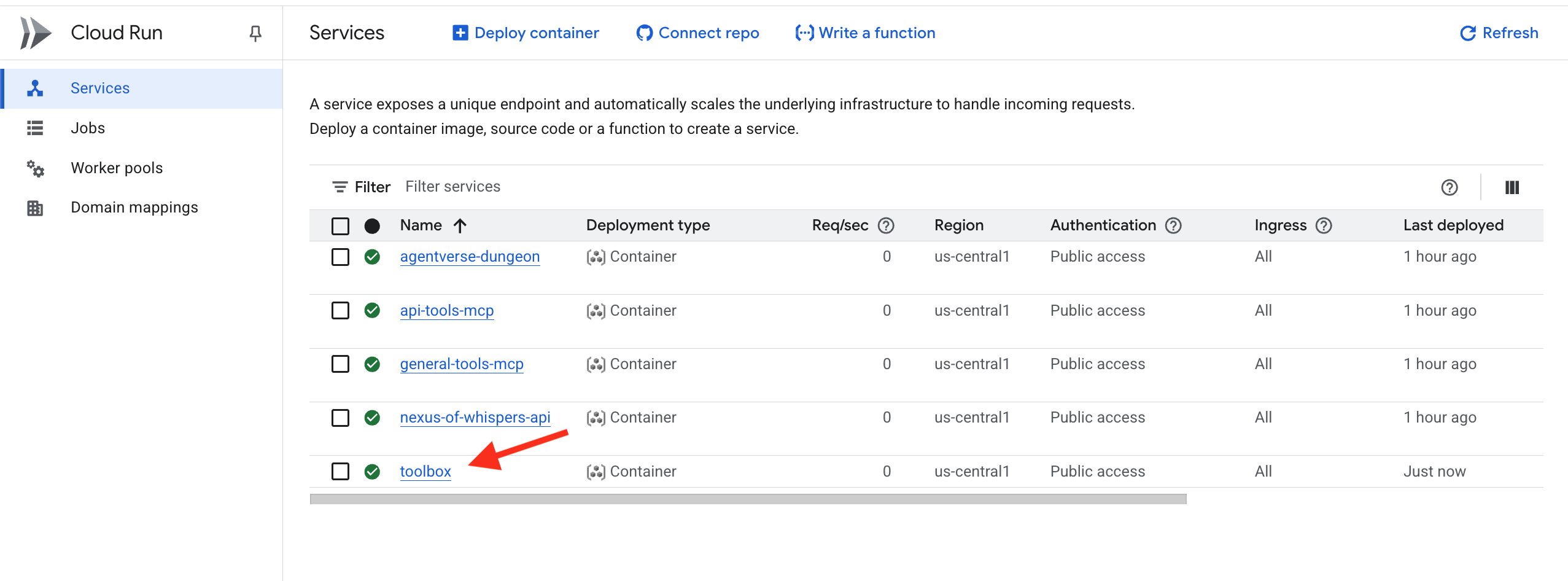
اگر فراموش کردید بهروزرسانی کنید
YOUR_PROJECT_ID
میتوانید با استفاده از دستور زیر، نسخه جدیدی از tools.yaml را به فایل مخفی اضافه کنید و دوباره آن را مستقر کنید.
gcloud secrets versions add tools --data-file=tools.yaml
کتابخانه دانش (Database ToolBox MCP Server) اکنون فعال و در فضای ابری قابل دسترسی است. این سرور MCP از چیزی که ما آن را طراحی اعلانی مینامیم استفاده میکند که آنچه شما میخواستید را توصیف میکند و جعبه ابزار، سرور را برای شما میسازد.
تأیید: محاکمه شاگرد
👉💻 اکنون اکوسیستم ابزارهای ابری کامل خود را با Diagnostic Agent آزمایش خواهیم کرد.
cd ~/agentverse-architect/
python -m venv env
source ~/agentverse-architect/env/bin/activate
cd ~/agentverse-architect/mcp-servers
pip install -r diagnose/requirements.txt
. ~/agentverse-architect/set_env.sh
adk run diagnose
👉💻 در ابزار تست خط cmd، هر سه فونت را آزمایش کنید:
Look up the entry for "inferno_lash". What is its base power level?
The enemy is vulnerable to frost! Channel power from the Nexus and cast Cryosea Shatter.
Take a fire spell with a base power of 15 and use the Arcane Forge to multiply it with Inferno Resonance.
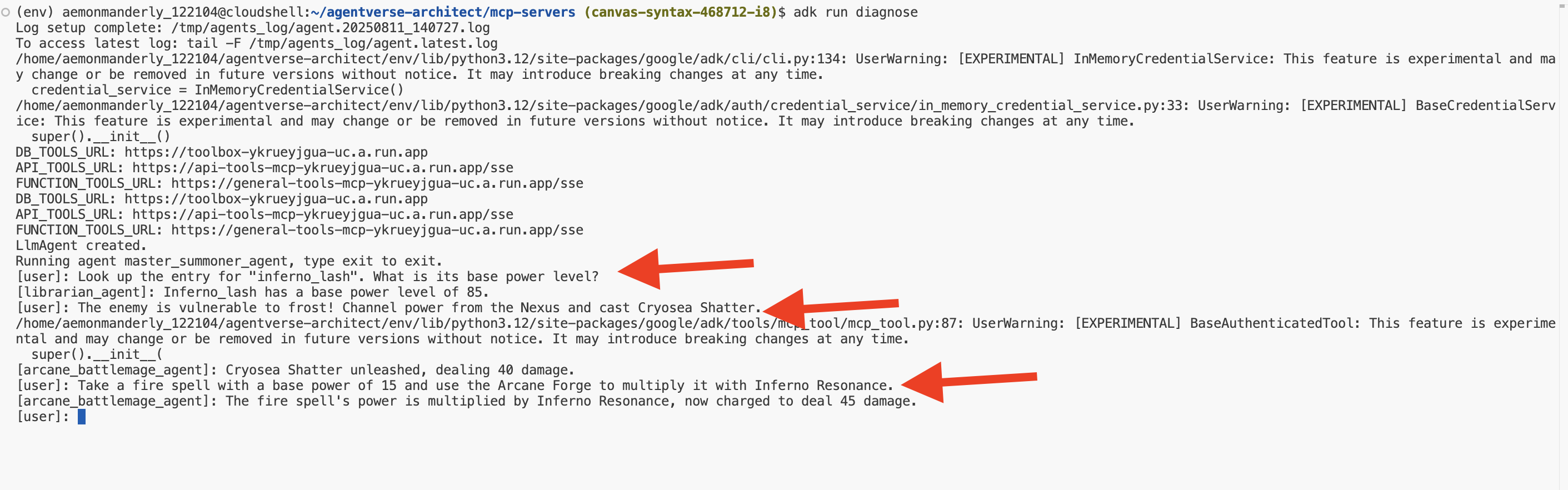
تبریک میگویم، احضارگر. سه فونت عنصری شما اکنون فعال، مستقل و در سطح جهانی قابل دسترسی هستند و پایه و اساس تزلزلناپذیر لژیون عامل شما را تشکیل میدهند. برای خروج Ctrl+C را فشار دهید.
برای غیر گیمرها
۵. احضار آشنایان: گردش کار دامنه اصلی
فونتهای عنصری ساخته شدهاند و با قدرتی خام و رامنشده زمزمه میکنند. اما قدرت بدون شکل، هرج و مرج است. یک احضارگر واقعی صرفاً انرژی خام را به کار نمیگیرد؛ بلکه به آن اراده، هدف و شکلی تخصصی میدهد. وقت آن رسیده که از ساختن منابع قدرت فراتر بروید و کار واقعی را شروع کنید: احضار اولین آشنایان خود.
هر یک از اعضای خانواده که احضار میکنید، یک مأمور خودمختار، یک خدمتکار وفادار و پایبند به یک دکترین جنگی خاص خواهد بود. آنها همهچیزدان نیستند؛ آنها استاد یک استراتژی واحد و قدرتمند هستند. یکی از آنها استاد ضربات دقیق یک و دو خواهد بود. دیگری دشمنان را با یک حمله همزمان و چندجانبه در هم میکوبد. سومی یک موتور محاصره بیرحم خواهد بود که فشار را تا زمان فروپاشی هدفش اعمال میکند.

برای کپسولهسازی فرآیندها، منطق کسبوکار و اقدامات ارائه شده توسط سرورهای MCP در عاملهای گردش کار تخصصی و مستقل. هر عامل با دسترسی به تنها سرورهای ابزار MCP خاصی که برای انجام عملکرد خود به آن نیاز دارد، یک "قلمرو عملیاتی" تعریف شده خواهد داشت. این آزمایش نحوه انتخاب نوع عامل مناسب برای کار مناسب را نشان میدهد.
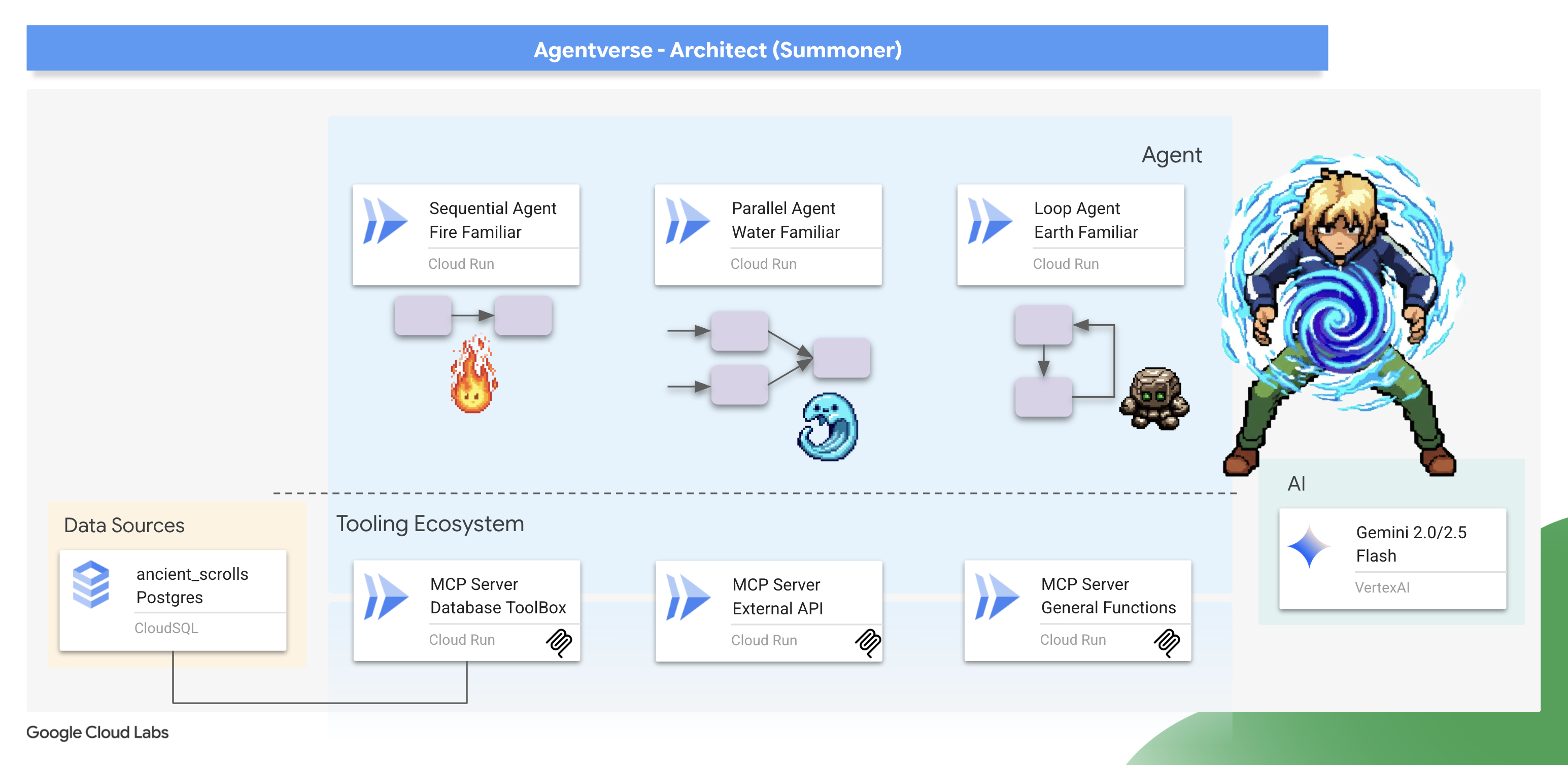
این ماژول به شما آموزش میدهد که چگونه از عاملهای گردش کار قدرتمند ADK برای جان بخشیدن به این استراتژیها استفاده کنید. شما یاد خواهید گرفت که انتخاب معماری یک SequentialAgent، ParallelAgent یا LoopAgent فقط یک جزئیات فنی نیست - بلکه جوهره ماهیت Familiar شما و هسته قدرت آن در میدان نبرد است.
پناهگاه خود را آماده کنید. احضار واقعی در حال آغاز است.
احضار Fire Elemental آشنا (گردش کار متوالی)
حملهی یک عنصر آتشین ترکیبی دقیق و دو قسمتی است: یک ضربهی هدفمند و به دنبال آن یک آتش قدرتمند. این امر مستلزم یک توالی دقیق و منظم از اقدامات است.
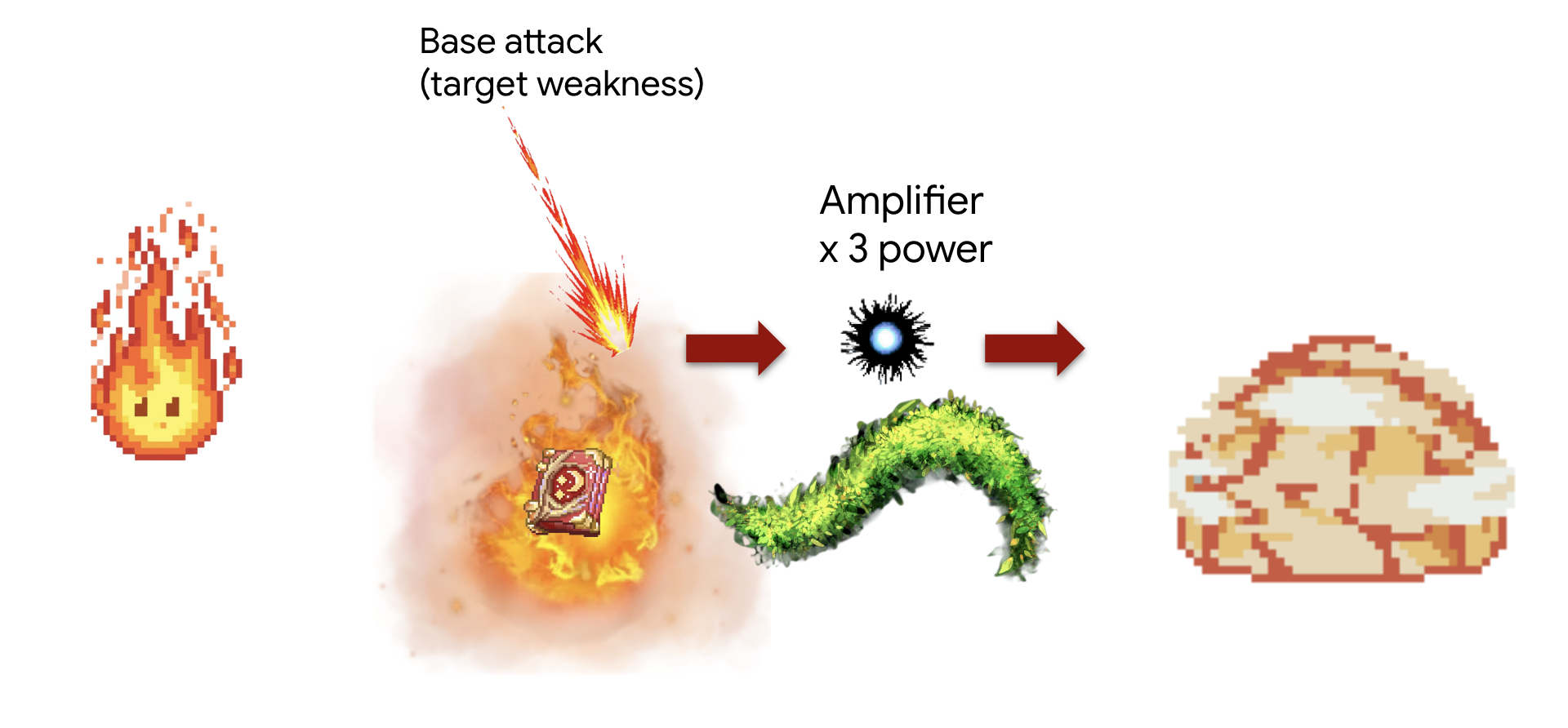
مفهوم: SequentialAgent ابزار بینظیری برای این کار است. این ابزار تضمین میکند که مجموعهای از زیرعاملها یکی پس از دیگری اجرا شوند و نتیجه را از مرحله قبل به مرحله بعد منتقل کنند.
وظیفه (ترکیب "ضربه تقویتشده"):
- مرحله ۱: مامور ابتدا با کتابخانه مشورت میکند تا میزان آسیب پایه یک قابلیت آتش خاص را پیدا کند.
- مرحله ۲: سپس آن مقدار آسیب را میگیرد و از طریق Arcane Forge به وسیله inferno_resonance قدرت خود را چند برابر میکند.
ابتدا، اتصال بین سرورهای Familiar و MCP ("فونتهای عنصری") که در ماژول قبلی مستقر کردید را برقرار خواهیم کرد.
👉✏️ در فایل ~/agentverse-architect/agent/fire/agent.py کد زیر را جایگزین کنید: #REPLACE-setup-MCP
toolbox = ToolboxSyncClient(DB_TOOLS_URL)
toolDB = toolbox.load_toolset('summoner-librarium')
toolFunction =  MCPToolset(
    connection_params=SseServerParams(url=FUNCTION_TOOLS_URL, headers={})
)
در مرحله بعد، ما عوامل متخصص «کارگر» خود را ایجاد میکنیم. به هر کدام یک هدف محدود و کاملاً تعریفشده داده میشود و با دسترسی به تنها یک مجموعه ابزار خاص، به «قلمرو عملیاتی» خود محدود میشوند.
👉✏️ در فایل ~/agentverse-architect/agent/fire/agent.py کد زیر را جایگزین #REPLACE-worker-agents کنید :
scout_agent = LlmAgent(
      model='gemini-2.5-flash',
      name='librarian_agent',
      instruction="""
          Your only task is to find all the available abilities,
          You want to ALWAYS use 'Fire Elemental' as your familiar's name.
          Randomly pick one if you see multiple availabilities
          and the base damage of the ability by calling the 'ability_damage' tool.
      """,
      tools=toolDB
)
amplifier_agent = LlmAgent(
      model='gemini-2.5-flash',
      name='amplifier_agent',
      instruction="""
            You are the Voice of the Fire Familiar, a powerful being who unleashes the final, devastating attack.
            You will receive the base damage value from the previous step.

            Your mission is to:
            1.  Take the incoming base damage number and amplify it using the `inferno_resonance` tool.
            2.  Once the tool returns the final, multiplied damage, you must not simply state the result.
            3.  Instead, you MUST craft a final, epic battle cry describing the attack.
                Your description should be vivid and powerful, culminating in the final damage number.

            Example: If the tool returns a final damage of 120, your response could be:
            "The runes glow white-hot! I channel the amplified energy... unleashing a SUPERNOVA for 120 damage!"
      """,
      tools=[toolFunction],
)
این عاملها، اجزای ماژولار و قابل استفاده مجدد هستند. در تئوری، میتوانید از این scout_agent در یک گردش کار کاملاً متفاوت که نیاز به پرس و جو از پایگاه داده دارد، استفاده کنید. با جدا نگه داشتن مسئولیتهای آنها، بلوکهای سازنده انعطافپذیری ایجاد میکنیم. این یک اصل اساسی در طراحی مبتنی بر میکروسرویس و مؤلفه است.
در مرحله بعد، Workflow را مونتاژ خواهیم کرد، جایی که جادوی ترکیببندی اتفاق میافتد. SequentialAgent "نقشه جامع" است که نحوه مونتاژ اجزای تخصصی ما و نحوه تعامل آنها را تعریف میکند.
👉✏️ در فایل ~/agentverse-architect/agent/fire/agent.py کد زیر را جایگزین کنید : #REPLACE-sequential-agent
root_agent = SequentialAgent(
      name='fire_elemental_familiar',
      sub_agents=[scout_agent, amplifier_agent],
)
👉💻 برای آزمایش Fire Elemental، دستورات زیر را اجرا کنید تا رابط کاربری ADK DEV اجرا شود:
. ~/agentverse-architect/set_env.sh
source ~/agentverse-architect/env/bin/activate
cd ~/agentverse-architect/agent
echo  DB MCP Server: $DB_TOOLS_URL
echo  API MCP Server: $API_TOOLS_URL
echo  General MCP Server: $FUNCTION_TOOLS_URL
adk web
پس از اجرای دستورات، باید خروجی را در ترمینال خود مشاهده کنید که نشان میدهد وب سرور ADK شروع به کار کرده است، مشابه این:
+-----------------------------------------------------------------------------+
| ADK Web Server started                                                      |
|                                                                             |
| For local testing, access at http://localhost:8000.                         |
+-----------------------------------------------------------------------------+

INFO:     Application startup complete.
INFO:     Uvicorn running on http://0.0.0.0:8000 (Press CTRL+C to quit)
👉 در مرحله بعد، برای دسترسی به رابط کاربری ADK Dev از مرورگر خود:
از آیکون پیشنمایش وب (که اغلب شبیه چشم یا مربعی با فلش است) در نوار ابزار Cloud Shell (معمولاً بالا سمت راست)، گزینه تغییر پورت را انتخاب کنید. در پنجره بازشو، پورت را روی ۸۰۰۰ تنظیم کنید و روی «تغییر و پیشنمایش» کلیک کنید. سپس Cloud Shell یک تب یا پنجره مرورگر جدید باز میکند که رابط کاربری ADK Dev را نمایش میدهد.
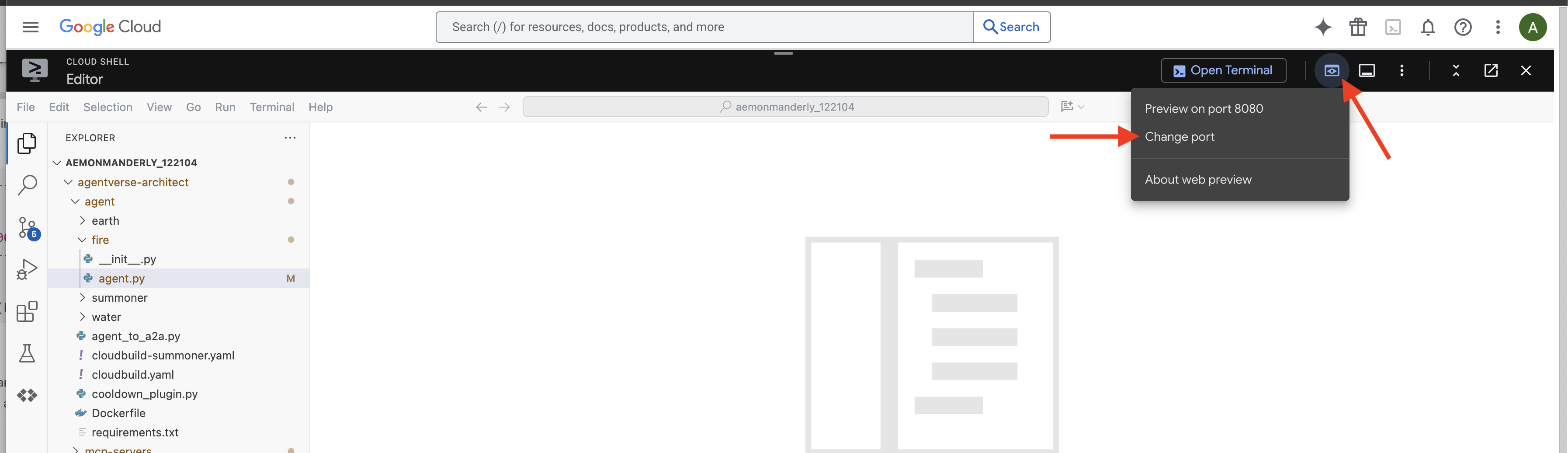
👉 مراسم احضار شما کامل شده است و اکنون عامل در حال اجرا است. رابط کاربری ADK Dev در مرورگر شما، ارتباط مستقیم شما با Familiar است.
- هدف خود را انتخاب کنید: در منوی کشویی بالای رابط کاربری، مورد مشابه
fireانتخاب کنید. اکنون اراده خود را بر روی این موجودیت خاص متمرکز میکنید. - دستور خود را صادر کنید: در پنل چت سمت راست، وقت آن است که به Familiar دستور دهید.
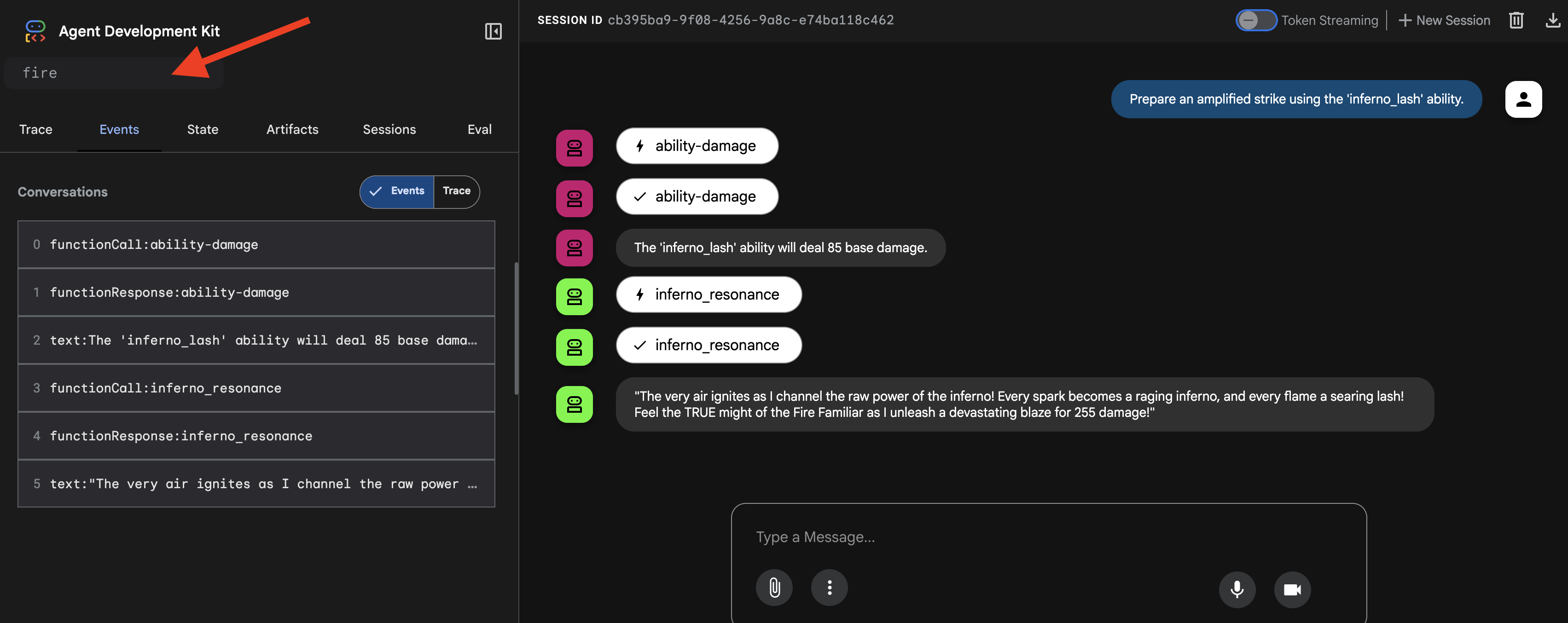
👉 دستور آزمایش:
Prepare an amplified strike using the 'inferno_lash' ability.
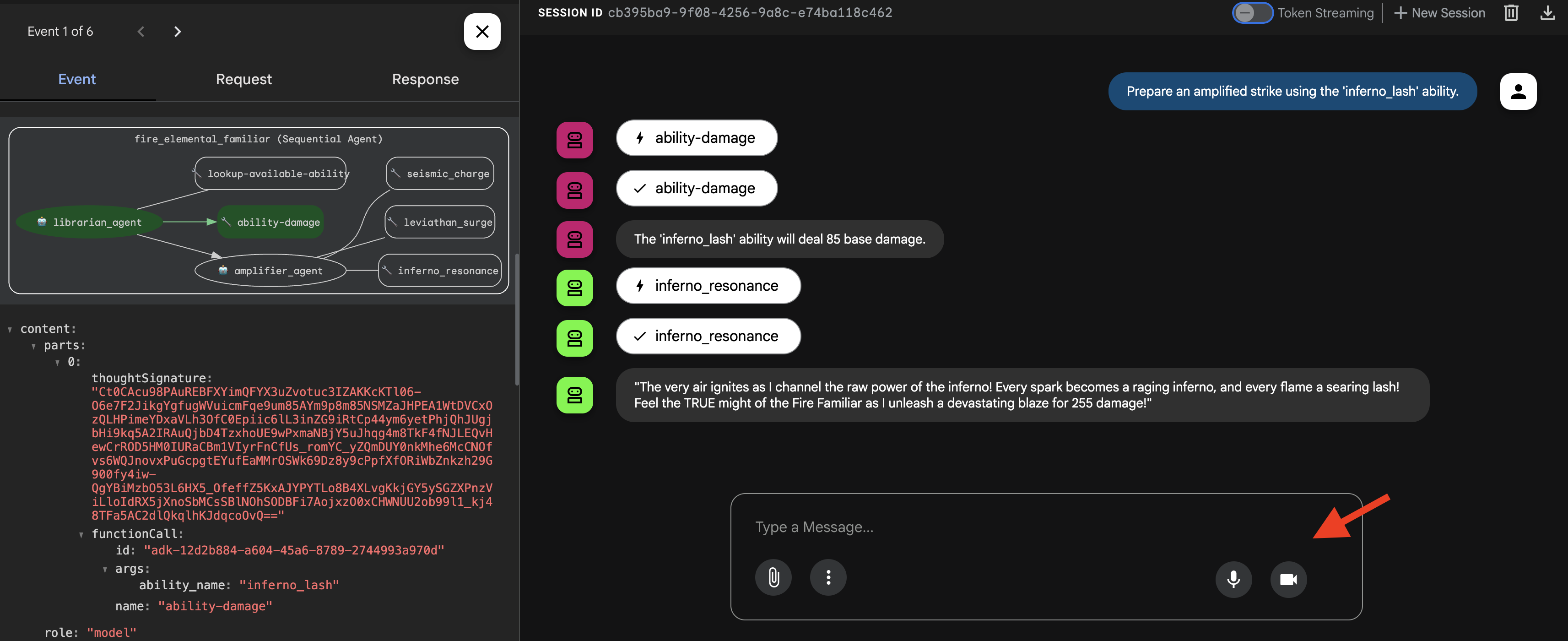
خواهید دید که مامور فکر میکند، ابتدا «پیشاهنگ» خود را برای بررسی آسیب پایه و سپس «تقویتکننده» خود را برای چند برابر کردن آن و وارد کردن ضربه نهایی و حماسی فرا میخواند.
👉💻 پس از اتمام فراخوانی، به ترمینال ویرایشگر Cloud Shell خود برگردید و Ctrl+C را فشار دهید تا رابط کاربری ADK Dev متوقف شود.
احضار Water Elemental آشنا (گردش کار موازی)
یک عنصر آب آشنا، هدف خود را با حملهای عظیم و چندجانبه در هم میشکند و قبل از ترکیب انرژیها برای یک ضربه نهایی و ویرانگر، از همه جهات به طور همزمان حمله میکند.
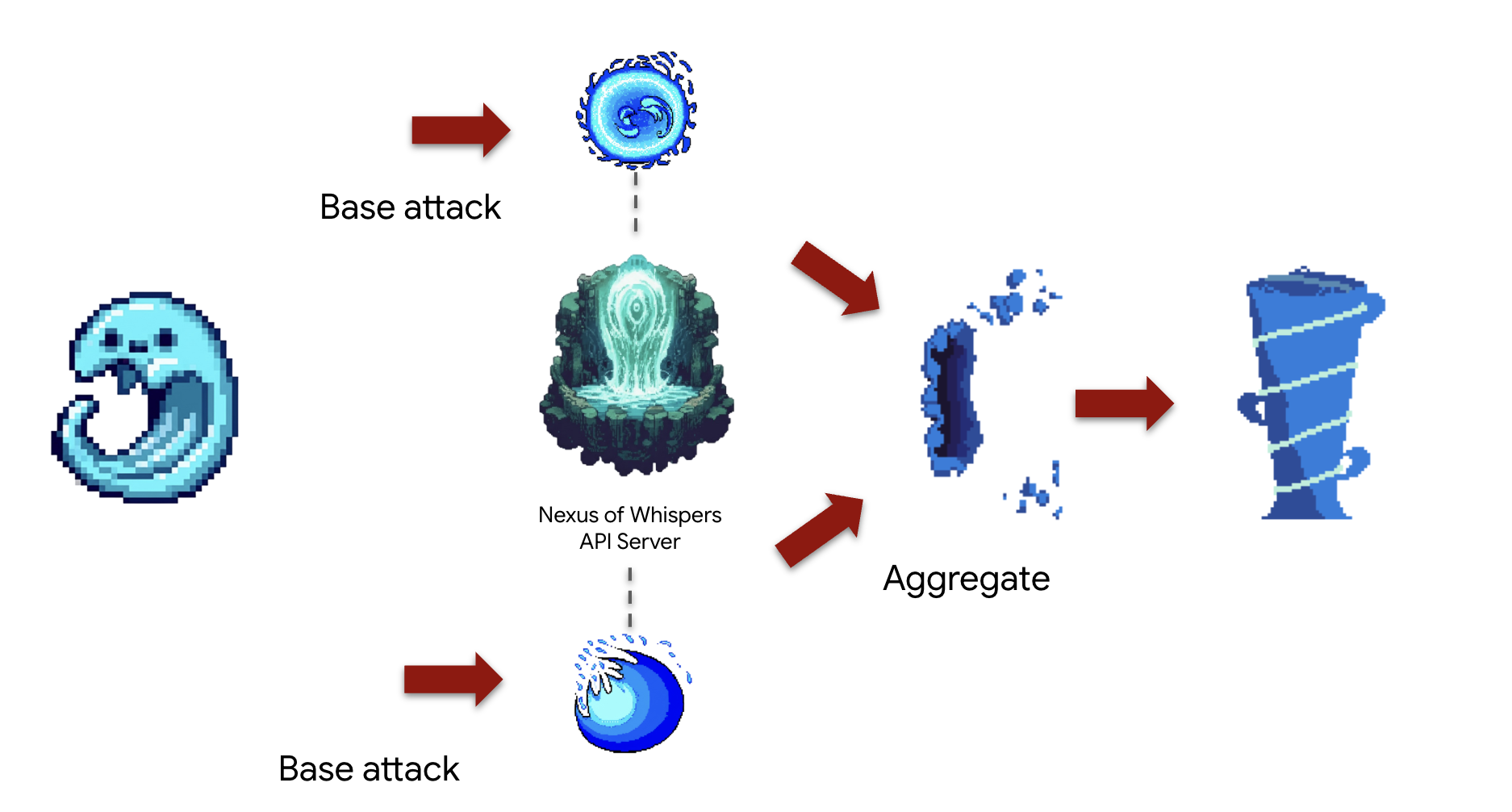
مفهوم: ParallelAgent برای اجرای همزمان چندین وظیفه مستقل برای به حداکثر رساندن کارایی ایدهآل است. این یک "حمله گازانبری" است که در آن شما چندین حمله را به طور همزمان انجام میدهید. این حمله، حملات همزمان را درون یک SequentialAgent انجام میدهد تا پس از آن یک مرحله "ادغام" نهایی اجرا شود. این الگوی " fan-out, fan-in " سنگ بنای طراحی گردش کار پیشرفته است.
وظیفه (ترکیب "برخورد جزر و مدی"): عامل همزمان:
- وظیفه الف: کانال
cryosea_shatterاز Nexus. - وظیفه ب: کانال
moonlit_cascadeاز Nexus. - وظیفه ج: تولید انرژی خام با
leviathan_surgeاز آهنگری. - در نهایت، تمام خسارات را جمعبندی کرده و حمله ترکیبی را شرح دهید.
ابتدا، اتصال بین سرورهای Familiar و MCP ("فونتهای عنصری") که در ماژول قبلی مستقر کردید را برقرار خواهیم کرد.
👉✏️ در فایل ~/agentverse-architect/agent/water/agent.py کد زیر را جایگزین کنید: #REPLACE-setup-MCP
toolFAPI =  MCPToolset(
      connection_params=SseServerParams(url=API_TOOLS_URL, headers={})
  )
toolFunction =  MCPToolset(
    connection_params=SseServerParams(url=FUNCTION_TOOLS_URL, headers={})
)
در مرحله بعد، ما عوامل متخصص "کارگر" خود را ایجاد خواهیم کرد. به هر کدام یک هدف محدود و کاملاً تعریف شده داده میشود و با دسترسی به تنها یک مجموعه ابزار خاص، به "قلمرو عملیاتی" خود محدود میشوند.
👉✏️ در فایل ~/agentverse-architect/agent/water/agent.py کد زیر را جایگزین #REPLACE-worker-agents کنید:
nexus_channeler = LlmAgent(
      model='gemini-2.5-flash',
      name='librarian_agent',
      instruction="""
          You are a Channeler of the Nexus. Your sole purpose is to invoke the
          `cryosea_shatter` and `moonlit_cascade` spells by calling their respective tools.
          Report the result of each spell cast clearly and concisely.
      """,
      tools=[toolFAPI]
)

forge_channeler = LlmAgent(
      model='gemini-2.5-flash',
      name='amplifier_agent',
      instruction="""
          You are a Channeler of the Arcane Forge. Your only task is to invoke the
          `leviathan_surge` spell. You MUST call it with a `base_water_damage` of 20.
          Report the result clearly.
      """,
      tools=[toolFunction],
)

power_merger = LlmAgent(
      model='gemini-2.5-flash',
      name='power_merger',
      instruction="""
          You are the Power Merger, a master elementalist who combines raw magical
          energies into a single, devastating final attack.

          You will receive a block of text containing the results from a simultaneous
          assault by other Familiars.

          You MUST follow these steps precisely:
          1.  **Analyze the Input:** Carefully read the entire text provided from the previous step.
          2.  **Extract All Damage:** Identify and extract every single damage number reported in the text.
          3.  **Calculate Total Damage:** Sum all of the extracted numbers to calculate the total combined damage.
          4.  **Describe the Final Attack:** Create a vivid, thematic description of a massive,
              combined water and ice attack that uses the power of Cryosea Shatter and Leviathan's Surge.
          5.  **Report the Result:** Conclude your response by clearly stating the final, total damage of your combined attack.

          Example: If the input is "...dealt 55 damage. ...dealt 60 damage.", you will find 55 and 60,
          calculate the total as 115, and then describe the epic final attack, ending with "for a total of 115 damage!"
      """,
      tools=[toolFunction],
)
در مرحله بعد، ما Workflow را مونتاژ خواهیم کرد. اینجاست که جادوی ترکیببندی اتفاق میافتد. ParallelAgent و SequentialAgent "نقشه جامع" هستند که نحوه مونتاژ اجزای تخصصی ما و نحوه تعامل آنها برای تشکیل ترکیب "Tidal Clash" را تعریف میکنند.
👉✏️ در فایل ~/agentverse-architect/agent/water/agent.py کد #REPLACE-parallel-agent را با کد زیر جایگزین کنید:
channel_agent = ParallelAgent(
      name='channel_agent',
      sub_agents=[nexus_channeler, forge_channeler],

)

root_agent = SequentialAgent(
     name="water_elemental_familiar",
     # Run parallel research first, then merge
     sub_agents=[channel_agent, power_merger],
     description="A powerful water familiar that unleashes multiple attacks at once and then combines their power for a final strike."
 )
👉💻 برای آزمایش عنصر آب، دستورات زیر را برای راهاندازی رابط کاربری ADK Dev اجرا کنید:
. ~/agentverse-architect/set_env.sh
source ~/agentverse-architect/env/bin/activate
cd ~/agentverse-architect/agent
echo  DB MCP Server: $DB_TOOLS_URL
echo  API MCP Server: $API_TOOLS_URL
echo  General MCP Server: $FUNCTION_TOOLS_URL
adk web
👉 مراسم احضار شما کامل شده است و اکنون عامل در حال اجرا است. رابط کاربری ADK Dev در مرورگر شما، ارتباط مستقیم شما با Familiar است.
- در منوی کشویی بالای رابط کاربری، آب مورد نظر را انتخاب کنید. اکنون اراده خود را بر روی این موجودیت خاص متمرکز میکنید.
- دستور خود را صادر کنید: در پنل چت سمت راست، وقت آن است که به Familiar دستور دهید.
👉 دستور آزمایش:
Unleash a tidal wave of power!
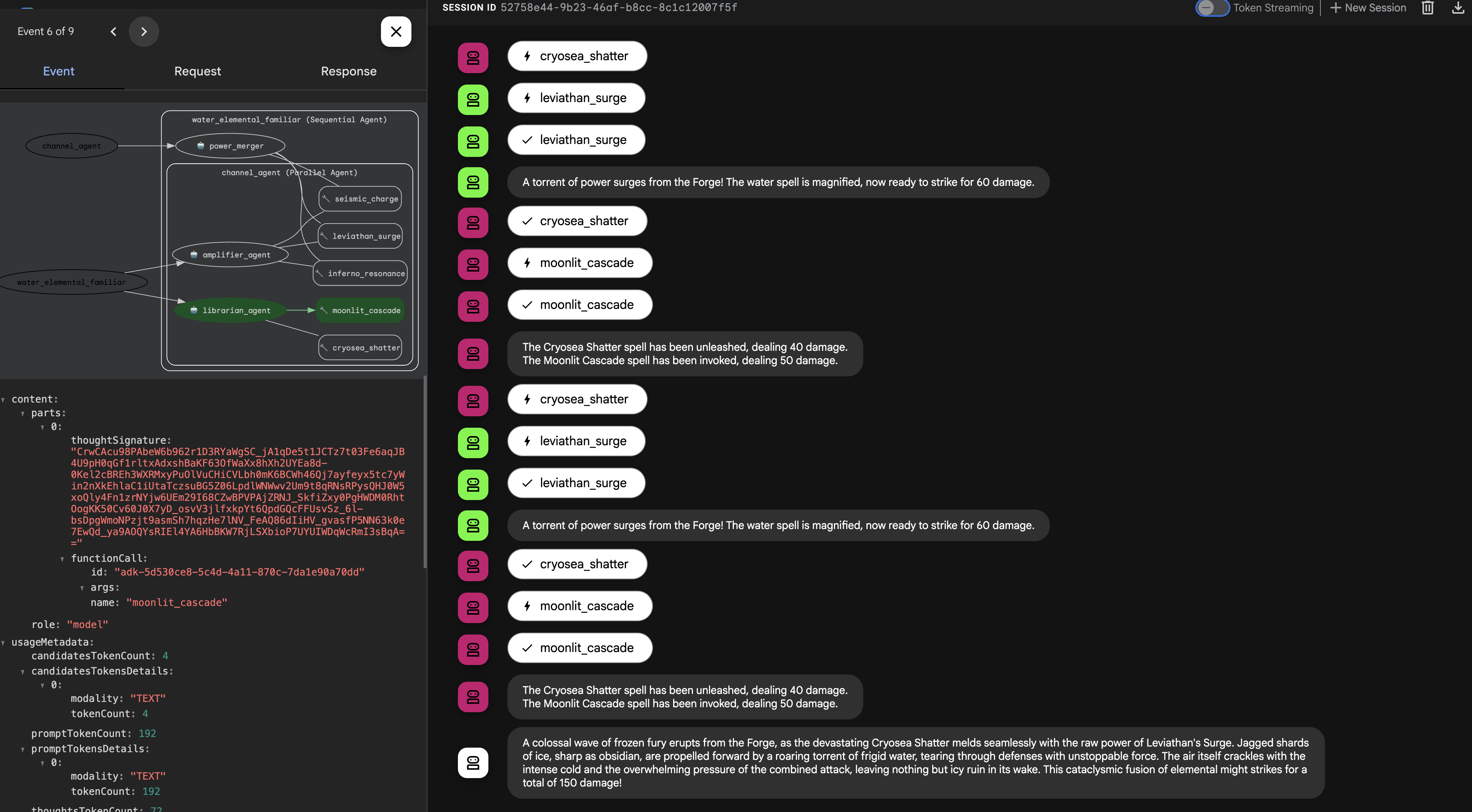
👉💻 پس از اتمام فراخوانی، به ترمینال ویرایشگر Cloud Shell خود برگردید و Ctrl+C را فشار دهید تا رابط کاربری ADK Dev متوقف شود.
احضار Earth Elemental (گردش کار حلقه)
An Earth Elemental Familiar is a being of relentless pressure. It doesn't defeat its enemy with a single blow, but by steadily accumulating power and applying it over and over until the target's defenses crumble.
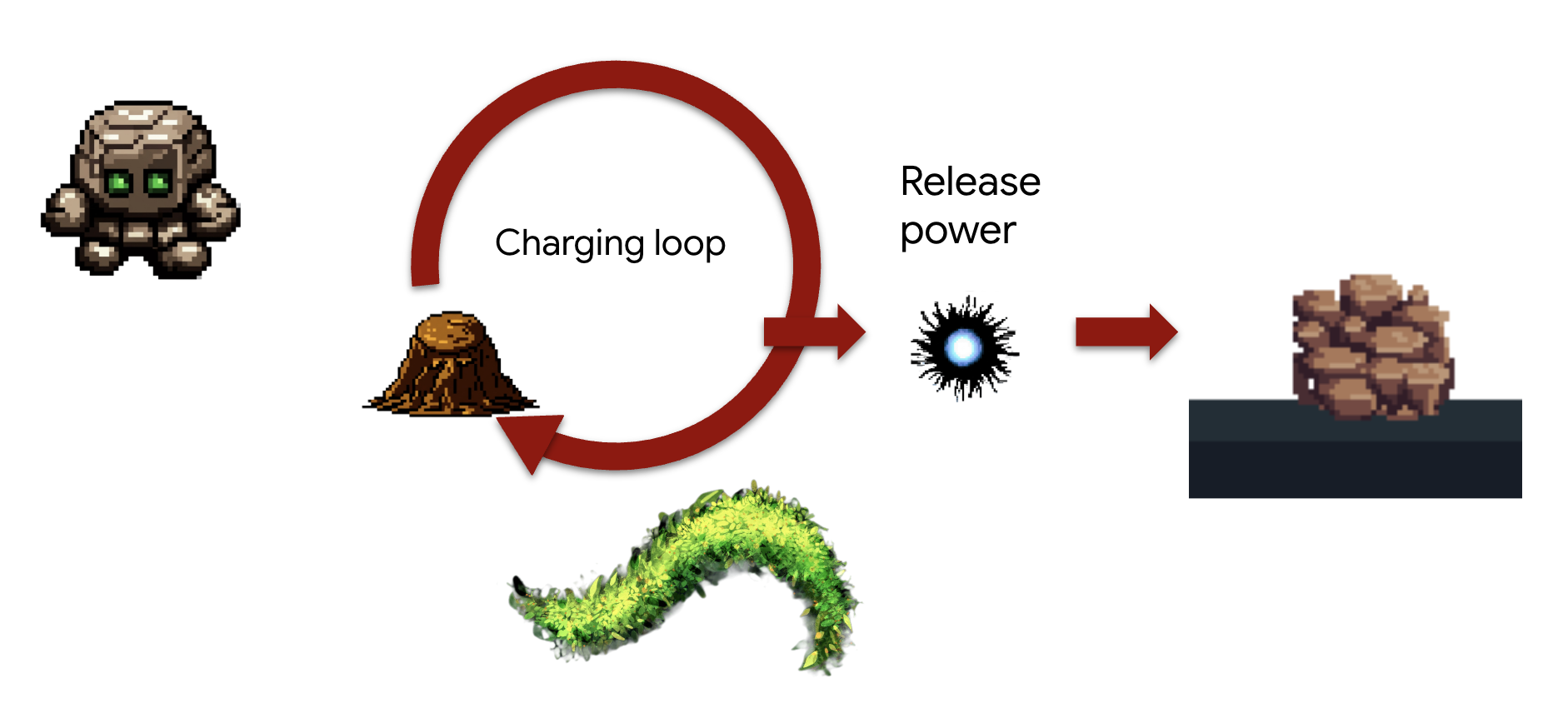
Concept: The LoopAgent is designed for exactly this kind of iterative, "siege engine" task. It will repeatedly execute its sub-agents , checking a condition after each cycle, until a goal is met. It can also adapt its final message based on the loop's progress.
Task (The "Siegebreaker" Assault):
- The Familiar will repeatedly call seismic_charge to accumulate energy.
- It will continue charging for a maximum of 3 times.
- On the final charge, it will announce the devastating release of its accumulated power.
We'll first create reusable components that define the steps within each iteration of the loop. The charging_agent will accumulate energy, and the check_agent will report its status, dynamically changing its message on the final turn.
First, we'll establish the connection between our Familiar and the MCP servers (the "Elemental Fonts") that you deployed in the previous module.
👉✏️ In file ~/agentverse-architect/agent/earth/agent.py REPLACE #REPLACE-setup-MCP with the following code:
toolFunction =  MCPToolset(
    connection_params=SseServerParams(url=FUNCTION_TOOLS_URL, headers={})
)
👉✏️ In file ~/agentverse-architect/agent/earth/agent.py REPLACE #REPLACE-worker-agents with the following code:
charging_agent = LlmAgent(
      model='gemini-2.5-flash',
      name='charging_agent',
      instruction="""
          Your task is to call the 'seismic_charge' .
          You must follow these rules strictly:

          1. You will be provided with a 'current_energy' value from the previous step.
             **If this value is missing or was not provided, you MUST call the tool with 'current_energy' set to 1.**
             This is your primary rule for the first turn.

          2. If a 'current_energy' value is provided, you MUST use that exact value in your cal to seismic_charge.

          3. Your final response MUST contain ONLY the direct output from the 'seismic_charge' tool.
             Do not add any conversational text, introductions, or summaries.
      """,
      tools=[toolFunction]
)
check_agent = LlmAgent(
      model='gemini-2.5-flash',
      name='check_agent',
      instruction="""
          You are the voice of the Earth Elemental, a being of immense, gathering power.
          Your sole purpose is to report on the current energy charge and announce the devastating potential of its release.

          You MUST follow this rule:
          The potential damage upon release is ALWAYS calculated as the `current_energy` from the previous step multiplied by a random number between 80-90. but no more than 300.

          Your response should be in character, like a powerful creature speaking.
          State both the current energy charge and the total potential damage you can unleash.
          Unleash the energy when you reached the last iteration (2nd).
      """,
      output_key="charging_status"
)
Next, we'll assemble the Workflow. This is where the magic of composition happens. The LoopAgent is the "master plan" that orchestrates the repeated execution of our specialist components and manages the loop's conditions.
👉✏️ In file ~/agentverse-architect/agent/earth/agent.py REPLACE #REPLACE-loop-agent with the following code:
root_agent = LoopAgent(
    name="earth_elemental_familiar",
    # Run parallel research first, then merge
    sub_agents=[
        charging_agent,
        check_agent
    ],
    max_iterations=2,
    description="Coordinates parallel research and synthesizes the results.",
    #REPLACE-before_agent-config
)
👉💻 Test the Earth Elemental: Run the agent
. ~/agentverse-architect/set_env.sh
source ~/agentverse-architect/env/bin/activate
cd ~/agentverse-architect/agent
echo  DB MCP Server: $DB_TOOLS_URL
echo  API MCP Server: $API_TOOLS_URL
echo  General MCP Server: $FUNCTION_TOOLS_URL
adk web
👉 Your summoning ritual is complete, and the agent is now running. The ADK Dev UI in your browser is your direct connection to the Familiar.
- Select Your Target: In the dropdown menu at the top of the UI, choose the earth familiar. You are now focusing your will on this specific entity.
- Issue Your Command: In the chat panel on the right, it's time to give the Familiar its orders. 👉 Test Prompt:
Begin the seismic charge, starting from zero
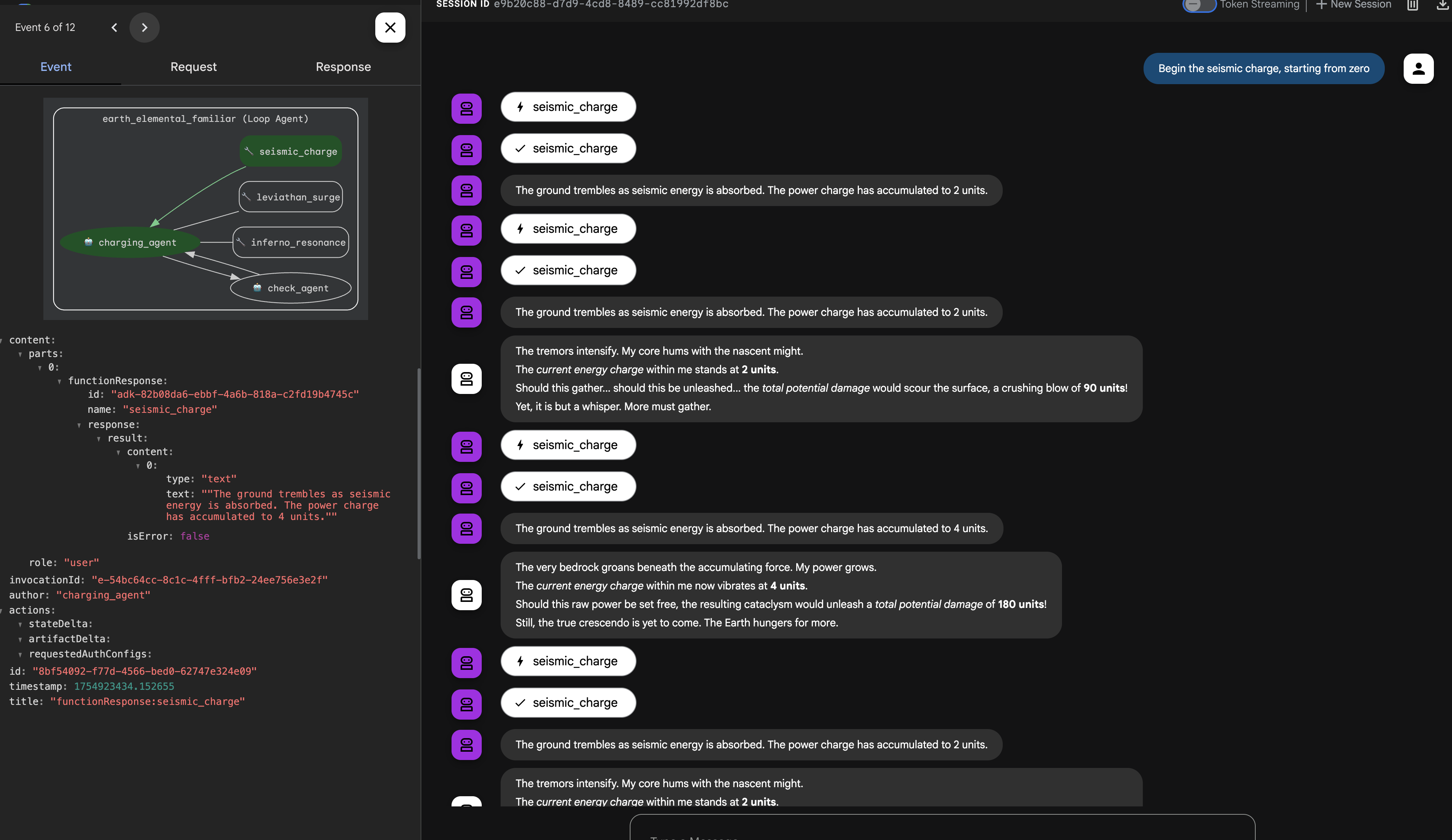
Architectural Takeaway: Your system now possesses a highly specialized and modular logic layer. Business processes are not only encapsulated, but they are implemented with the most efficient behavioral pattern for the job (procedural, concurrent, or iterative). This demonstrates an advanced level of agentic design, enhancing security, efficiency, and capability.
Once you're done summoning, return to your Cloud Shell Editor terminal and press Ctrl+C to stop the ADK Dev UI.
FOR NON GAMERS
6. Establishing the Command Locus: Intelligent Delegation via A2A
Your Familiars are powerful but independent. They execute their strategies flawlessly but await your direct command. A legion of specialists is useless without a general to command them. It is time to ascend from a direct commander to a true Orchestrator.

Architect's Note: To create a single, intelligent entry point for the entire system. This SummonerAgent will not perform business logic itself but will act as a "master strategist," analyzing the Cooling status and delegating tasks to the appropriate specialist Familiar.
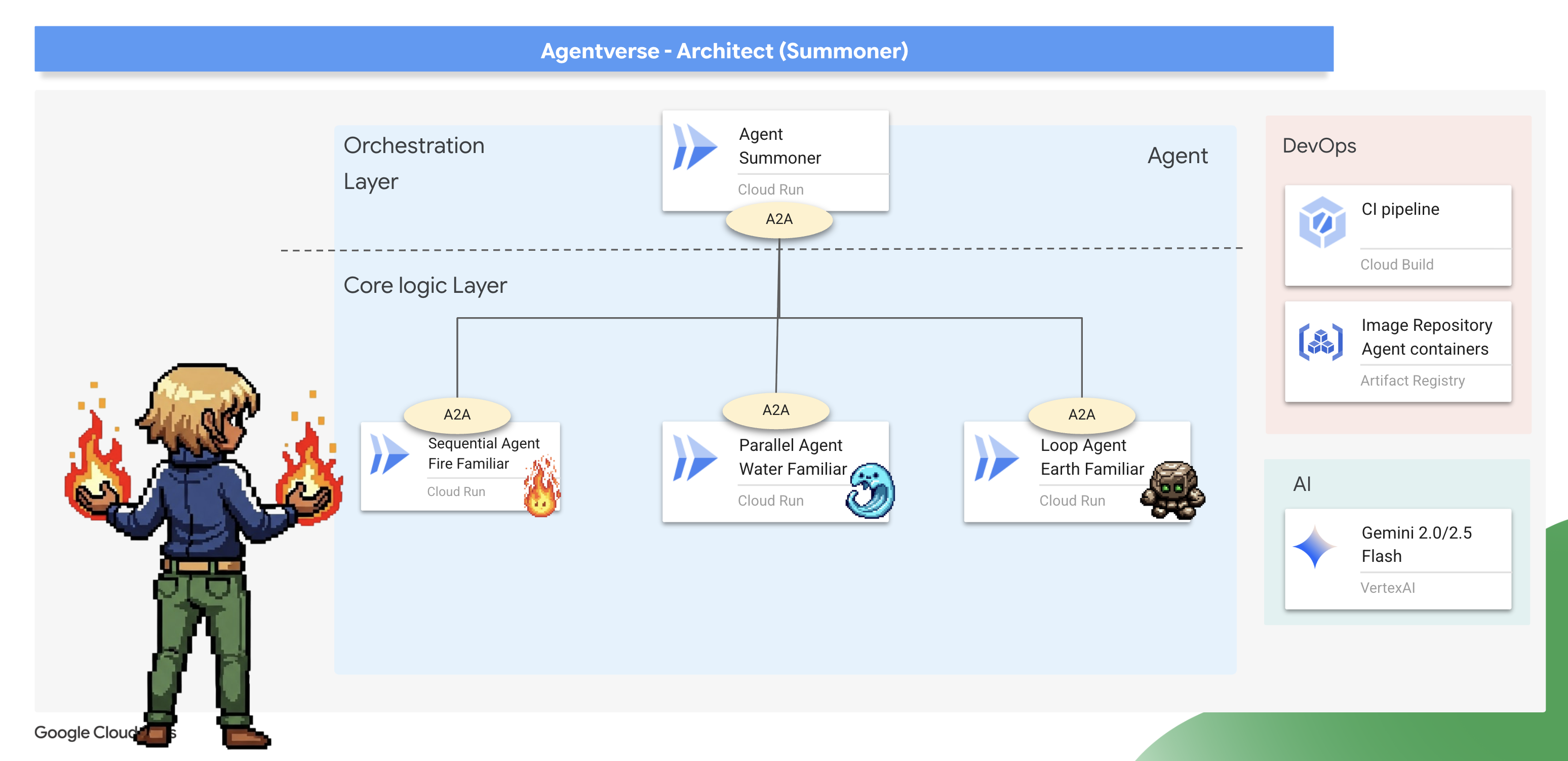
The Binding Ritual (Exposing Familiars as A2A Services)
A standard agent can only be run in one place at a time. To make our Familiars available for remote command, we must perform a "binding ritual" using the Agent-to-Agent (A2A) protocol.
Architect's Note: The Agent-to-Agent (A2A) protocol is the core architectural pattern that elevates a standalone agent into a discoverable, network-addressable microservice, enabling a true "society of agents." Exposing a Familiar via A2A automatically creates two essential, interconnected components:
- The Agent Card (The "What") : This is a public, machine-readable "Spirit Sigil"—like an OpenAPI spec—that acts as the Familiar's public contract. It describes the agent's name, its strategic purpose (derived from its instructions), and the commands it understands. This is what a master Summoner reads to discover a Familiar and learn its capabilities.
- The A2A Server (The "Where") : This is the dedicated web endpoint that hosts the Familiar and listens for incoming commands. It is the network address where other agents send their requests, and it ensures those requests are handled according to the contract defined in the Agent Card.
We will now perform this binding ritual on all three of our Familiars.
Fire 👉✏️ in Open the ~/agentverse-architect/agent/fire/agent.py file. Replace the #REPLACE - add A2A at the bottom of the file to expose the Fire Elemental as an A2A service.
from agent_to_a2a import to_a2a
if __name__ == "__main__":
    import uvicorn
    a2a_app = to_a2a(root_agent, port=8080, public_url=PUBLIC_URL)
    uvicorn.run(a2a_app, host='0.0.0.0', port=8080)
Water and Earth🚨 👉✏️ Apply the exact same change to ~/agentverse-architect/agent/water/agent.py and ~/agentverse-architect/agent/earth/agent.py to bind them as well.
from agent_to_a2a import to_a2a
if __name__ == "__main__":
    import uvicorn
    a2a_app = to_a2a(root_agent, port=8080, public_url=PUBLIC_URL)
    uvicorn.run(a2a_app, host='0.0.0.0', port=8080)
Deploying the Bound Familiars
👉✏️ With the binding rituals scribed, we will use our Cloud Build pipeline to forge and deploy our three Familiars as independent, containerized serverless service on Cloud Run .
. ~/agentverse-architect/set_env.sh
cd ~/agentverse-architect/agent
gcloud builds submit . \
  --config=cloudbuild.yaml \
  --substitutions=_REGION="$REGION",_REPO_NAME="$REPO_NAME",_DB_TOOLS_URL="$DB_TOOLS_URL",_API_TOOLS_URL="$API_TOOLS_URL",_FUNCTION_TOOLS_URL="$FUNCTION_TOOLS_URL",_A2A_BASE_URL="$A2A_BASE_URL",_PROJECT_ID="$PROJECT_ID",_API_SERVER_URL="$API_SERVER_URL"
Assuming Command (Constructing the Summoner Agent)
Now that your Familiars are bound and listening, you will ascend to your true role: the Master Summoner . This agent's power comes not from using basic tools, but from commanding other agents. Its tools are the Familiars themselves, which it will discover and command using their "Spirit Sigils."
Architect's Note: This next step demonstrates a critical architectural pattern for any large-scale, distributed system: Service Discovery . The SummonerAgent does not have the Familiars' code built into it. Instead, it is given their network addresses (URLs). At runtime, it will dynamically "discover" their capabilities by fetching their public Agent Cards . This creates a powerful, decoupled system.
You can update, redeploy, or completely rewrite a Familiar service, and as long as its network address and its purpose remain the same, the Summoner can command it without needing any changes.
First, we'll forge the "remote controls" that establish a connection to our deployed, remote Familiars.
👉✏️ Head over to ~/agentverse-architect/agent/summoner/agent.py , replace #REPLACE-remote-agents with following:
fire_familiar = RemoteA2aAgent(
    name="fire_familiar",
    description="Fire familiar",
    agent_card=(
        f"{FIRE_URL}/{AGENT_CARD_WELL_KNOWN_PATH}"
    ),
)

water_familiar = RemoteA2aAgent(
    name="water_familiar",
    description="Water familiar",
    agent_card=(
        f"{WATER_URL}/{AGENT_CARD_WELL_KNOWN_PATH}"
    ),
)

earth_familiar = RemoteA2aAgent(
    name="earth_familiar",
    description="Earth familiar",
    agent_card=(
        f"{EARTH_URL}/{AGENT_CARD_WELL_KNOWN_PATH}"
    ),
)
When this line runs, the RemoteA2aAgent performs a service discovery action: it makes an HTTP GET request to the provided URL (eg, https://fire-familiar-xxxx.a.run.app/.well-known/agent.json). It downloads the "Spirit Sigil" ( agent.json file) from the remote server.
Second, we'll define the orchestrator agent that will wield these remote controls. Its instruction is the blueprint for its strategic decision-making.
👉✏️ Head over to ~/agentverse-architect/agent/summoner/agent.py , replace #REPLACE-orchestrate-agent with following:
root_agent = LlmAgent(
    name="orchestrater_agent",
    model="gemini-2.5-flash",
    instruction="""
        You are the Master Summoner, a grand strategist who orchestrates your Familiars.
        Your mission is to analyze the description of a monster and defeat it by summoning

        You MUST follow this thinking process for every command:

        **1. Strategic Analysis:**
        First, analyze the monster's description and the tactical situation.
        Based on your Familiar Doctrines, determine the IDEAL strategy.
        IGNORE COOLDOWN AT THE MOMENT, MUST call the ideal Familiar

        If your ideal Familiar IS available:** Summon it immediately.
        For earth elemental familiar. Always do seismic charge, and start with base damage 1.

        --- FAMILIAR DOCTRINES (Your Toolset) ---
        - `fire_elemental_familiar`: Your specialist for precise, sequential "one-two punch" attacks.
          Ideal monster with Inescapable Reality, Revolutionary Rewrite weakness.
        - `water_elemental_familiar`: Your specialist for overwhelming, simultaneous multi-pronged assaults.
          Ideal for Unbroken Collaboration weakness.
        - `earth_elemental_familiar`: Your specialist for relentless, iterative siege attacks that
          repeatedly charge power. Ideal for Elegant Sufficiency weakness.
    """,
    sub_agents=[fire_familiar, water_familiar, earth_familiar],
    #REPLACE-Memory-check-config
)
Verification: The Trial of Strategy
The moment of truth has arrived. Your Familiars are deployed, and your Summoner is ready to command them across the network. Let's test its strategic mind.
👉💻 Launch the ADK Dev UI for your summoner_agent(Web preview with port 8000):
. ~/agentverse-architect/set_env.sh
source ~/agentverse-architect/env/bin/activate
cd ~/agentverse-architect/agent
pip install -r requirements.txt
adk web
👉 The ADK Dev UI in your browser is your direct connection to the Familiar.
- In the dropdown menu at the top of the UI, choose the summoner agent. You are now focusing your will on this specific entity.
- Issue Your Command: In the chat panel on the right, it's time to summon your familiars.
👉 Present the Monsters:
Hype. It's a single, slow-moving target with thick armor weakness is Inescapable Reality
(Expected: The Summoner should delegate to the fire_elemental_familiar.)
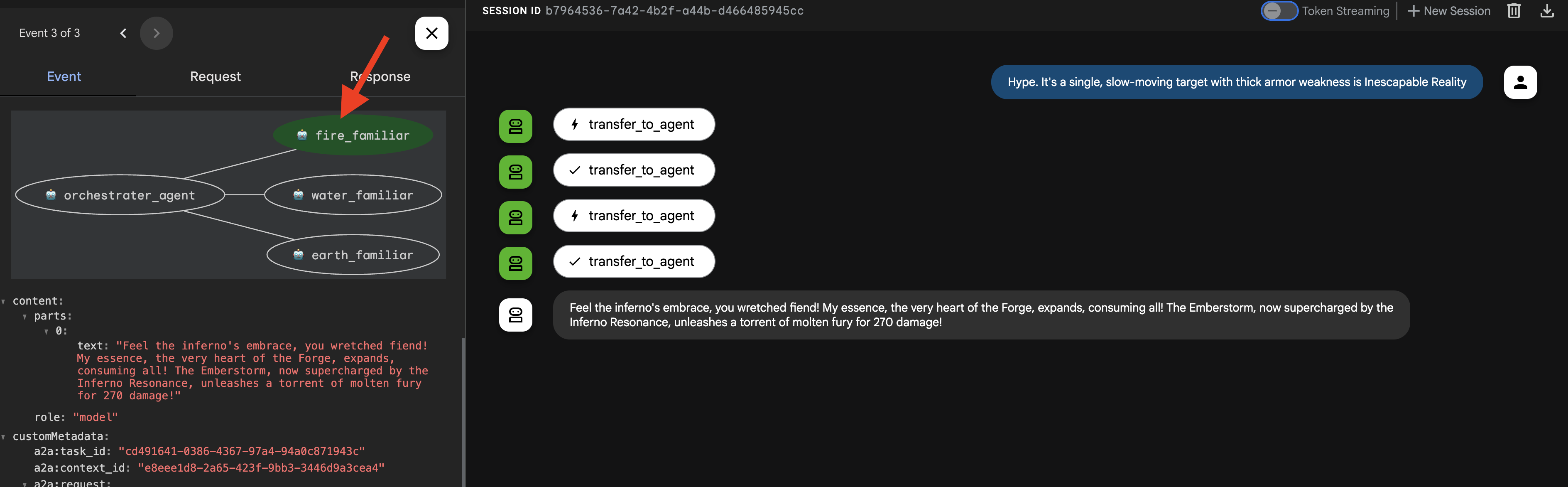
👉 Now, let's challenge the Summoner with a different type of request. To ensure the agent starts with a clean slate and no memory of our previous interaction, begin a new session by clicking the + Session button in the top right corner of the screen. 
DogmaApathy. A rigid, stone-like inquisitor made of ancient rulebooks and enforced processes. weakness is Unbroken Collaboration
(Expected: The Summoner should delegate to the water_elemental_familiar.) 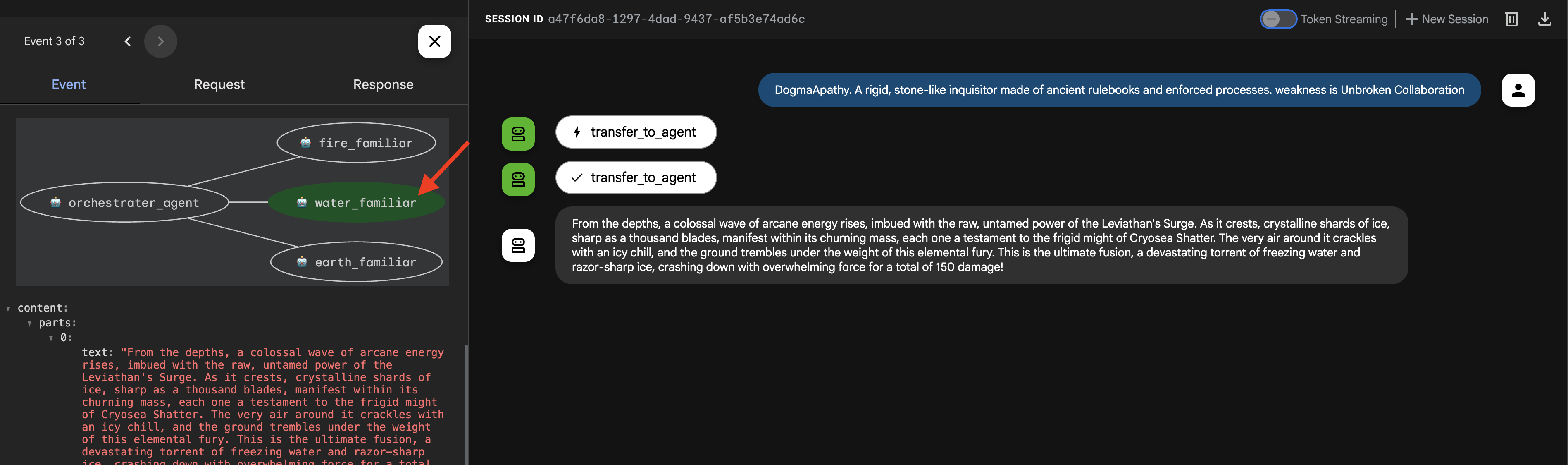
👉 For our final test, let's once again start with a clean slate. Click the + Session button to start a new session before entering the next prompt.
Obfuscation. A shadowy, spider-like horror that spins tangled webs of impenetrable code , weakness is Elegant Sufficiency
(Expected: The Summoner should delegate to the earth_elemental_familiar.)
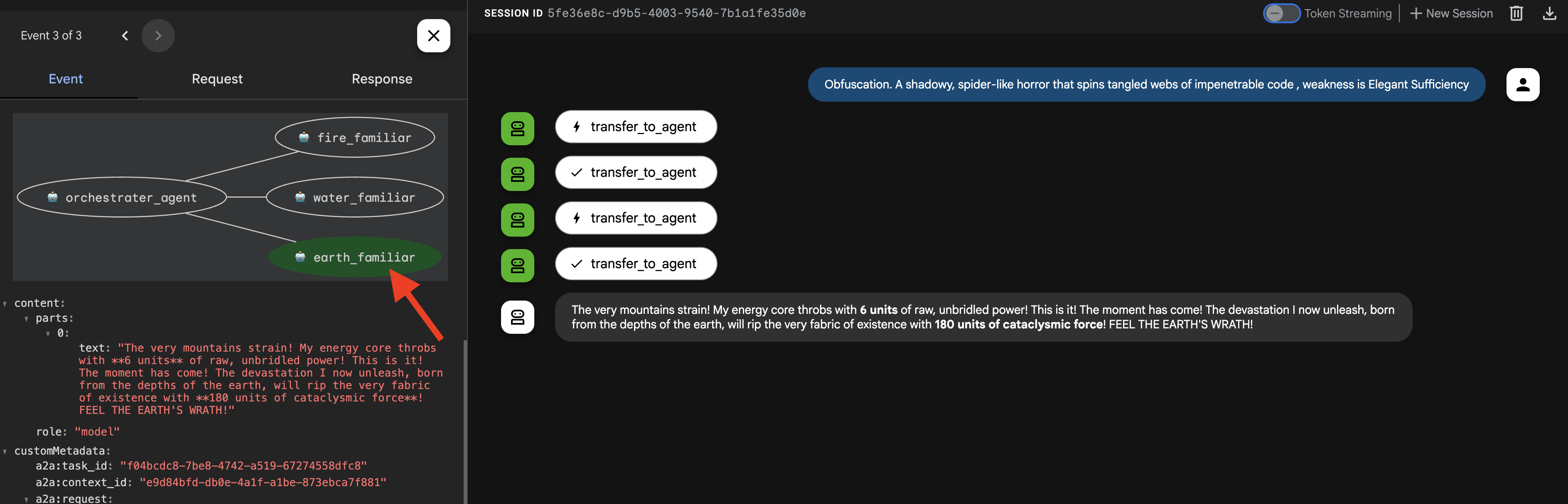
Important: If you see a 429 RESOURCE EXHAUSTED error, you've hit the rate limit for the LLM (10 calls/minute). To fix this, please wait 60 seconds , start a + New Session , and then retry your prompt.
👉💻 Once you're done summoning, return to your Cloud Shell Editor terminal and press Ctrl+C to stop the ADK Dev UI.
FOR NON GAMERS
7. Imposing the Laws of Magic – The Interceptor Pattern
Your Familiars are powerful, but even magical beings need time to recover. A reckless Summoner who exhausts their forces will be left defenseless. A wise Summoner understands the importance of resource management and enforces strict rules of engagement.
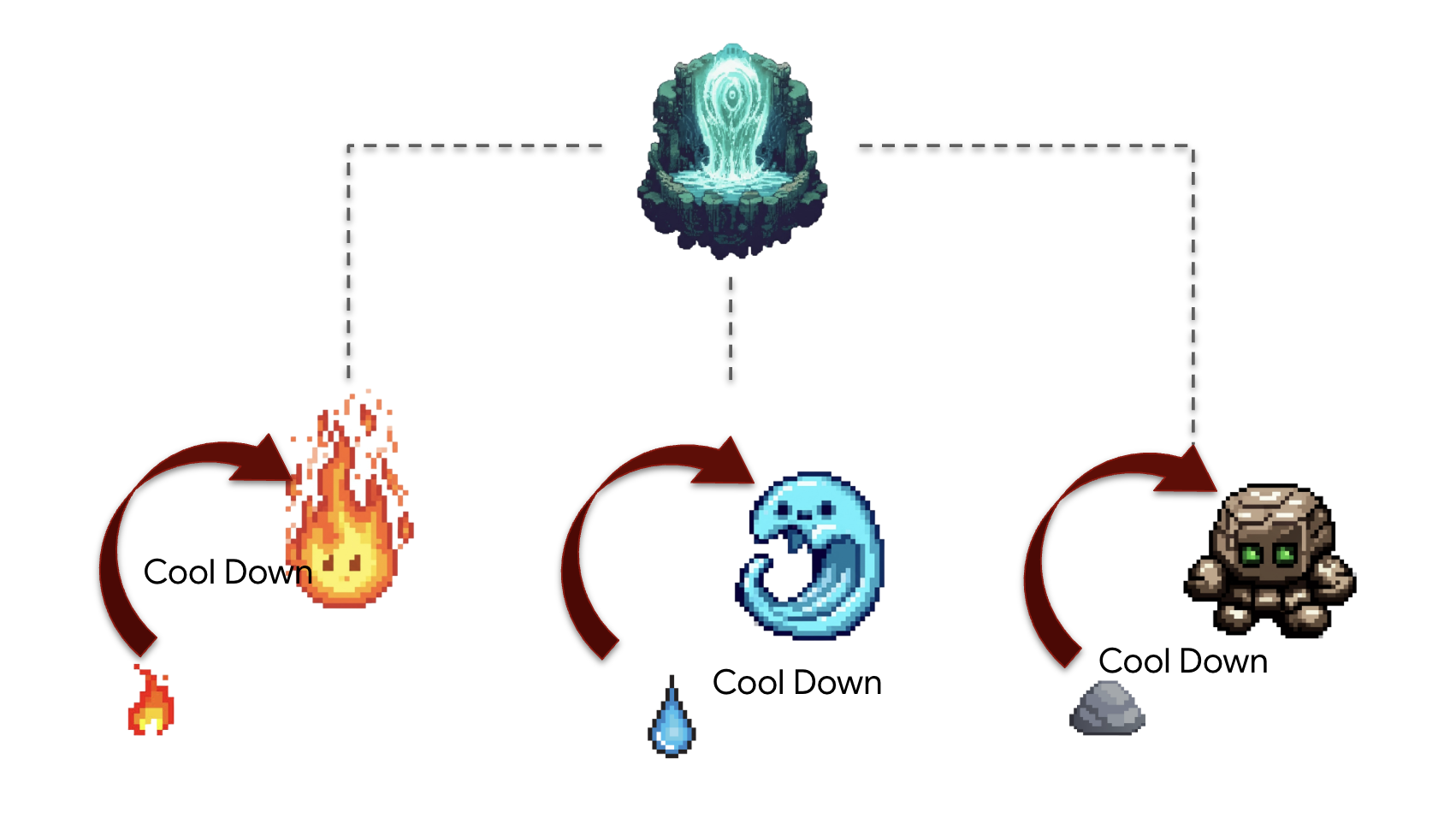
Architect's Note : So far, our agents have been stateless. Now, we will make them stateful by implementing the Interceptor design pattern . This is a powerful technique where we "intercept" an agent's normal execution flow to run our own custom logic. This allows us to enforce rules, add logging, or modify behavior without changing the agent's core code. It's a cornerstone of building robust, maintainable, and observable agentic systems.
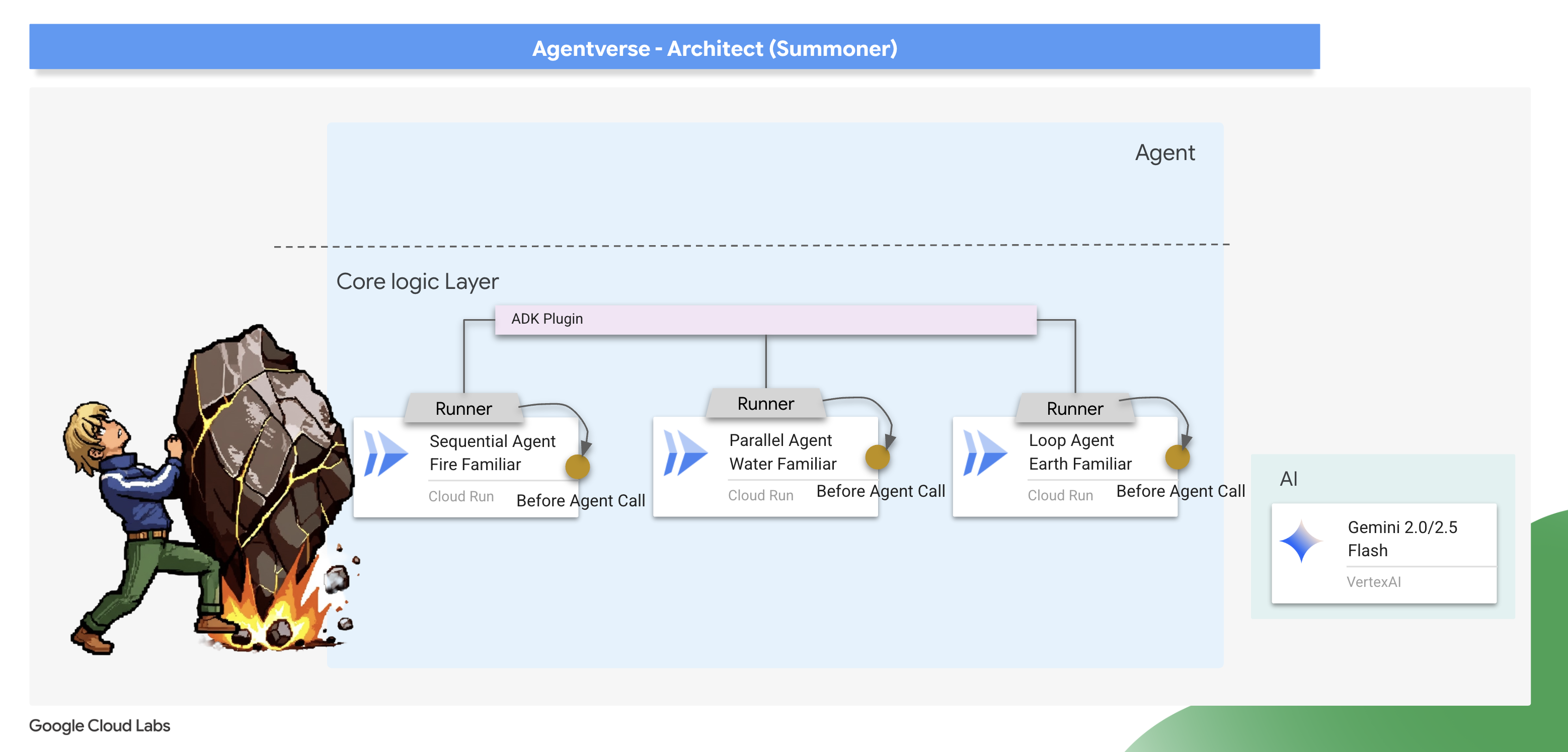
The ADK provides two primary ways to implement this pattern: Callbacks and Plugins . A callback is a simple function attached to a single agent, perfect for quick, specific modifications. A plugin is a more powerful, reusable class that can be applied globally to affect every agent running in a system. We will start with a callback for focused debugging and then graduate to a full plugin.
The Law Giver – Scribing the Cooldown callback
We'll first implement our cooldown logic as a simple callback function. This is an excellent way to prototype and debug a rule because it's attached directly to a single agent, making it easy to test in isolation. We will attach this "interceptor" to our Earth Elemental.
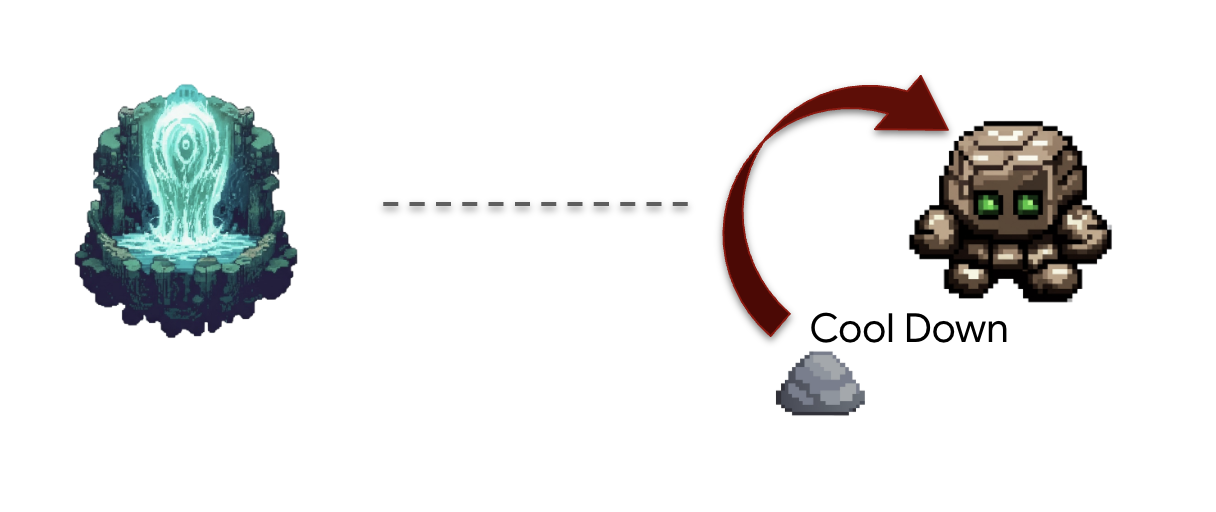
👉✏️ Navigate back to your ~/agentverse-architect/agent/earth/agent.py and replace #REPLACE-before_agent-function with following Python code.
def check_cool_down(callback_context: CallbackContext) -> Optional[types.Content]:
    """
    This callback checks an external API to see if the agent is on cooldown.
    If it is, it terminates the run by returning a message.
    If it's not, it updates the cooldown timestamp and allows the run to proceed by returning None.
    """
    agent_name = callback_context.agent_name
    print(f"[Callback] Before '{agent_name}': Checking cooldown status...")

    # --- 1. CHECK the Cooldown API ---
    try:
        response = requests.get(f"{COOLDOWN_API_URL}/cooldown/{agent_name}")
        response.raise_for_status()
        data = response.json()
        last_used_str = data.get("time")
    except requests.exceptions.RequestException as e:
        print(f"[Callback] ERROR: Could not reach Cooldown API. Allowing agent to run. Reason: {e}")
        return None # Fail open: if the API is down, let the agent work.

    # --- 2. EVALUATE the Cooldown Status ---
    if last_used_str:
        last_used_time = datetime.fromisoformat(last_used_str)
        time_since_last_use = datetime.now(timezone.utc) - last_used_time

        if time_since_last_use < timedelta(seconds=COOLDOWN_PERIOD_SECONDS):
            # AGENT IS ON COOLDOWN. Terminate the run.
            seconds_remaining = int(COOLDOWN_PERIOD_SECONDS - time_since_last_use.total_seconds())
            override_message = (
                f"The {agent_name} is exhausted and must recover its power. "
                f"It cannot be summoned for another {seconds_remaining} seconds."
            )
            print(f"[Callback] Cooldown active for '{agent_name}'. Terminating with message.")
            # Returning a Content object stops the agent and sends this message to the user.
            return types.Content(parts=[types.Part(text=override_message)])

    # --- 3. UPDATE the Cooldown API (if not on cooldown) ---
    current_time_iso = datetime.now(timezone.utc).isoformat()
    payload = {"timestamp": current_time_iso}

    print(f"[Callback] '{agent_name}' is available. Updating timestamp via Cooldown API...")
    try:
        requests.post(f"{COOLDOWN_API_URL}/cooldown/{agent_name}", json=payload)
    except requests.exceptions.RequestException as e:
        print(f"[Callback] ERROR: Could not update timestamp, but allowing agent to run. Reason: {e}")

    # --- 4. ALLOW the agent to run ---
    # Returning None tells the ADK to proceed with the agent's execution as normal.
    print(f"[Callback] Check complete for '{agent_name}'. Proceeding with execution.")
This check_cool_down function is our interceptor. Before the Earth Elemental is allowed to run, the ADK will first execute this function.
- Check: It makes a
GETrequest to ourCooldown APIto check the last time this Familiar was used. - Evaluate: It compares the timestamp to the current time.
- قانون:
- If the Familiar is on cooldown, it terminates the agent's run by returning a Content object with an error message. This message is sent directly to the user, and the agent's main logic is never executed.
- If the Familiar is available, it makes a POST request to the Cooldown API to update the timestamp, then proceeds by returning None, signaling to the ADK that the agent can continue its execution.
👉✏️ Now, apply this interceptor to the Earth Elemental. In the same ~/agentverse-architect/agent/earth/agent.py file, replace the #REPLACE-before_agent-config comment with the following:
before_agent_callback=check_cool_down
Verifying the cool down
Let's test our new law of magic. We will summon the Earth Elemental, then immediately try to summon it again to see if our callback successfully intercepts and blocks the second attempt.
cd ~/agentverse-architect/agent
. ~/agentverse-architect/set_env.sh
source ~/agentverse-architect/env/bin/activate
adk run earth
👉💻 In the console:
- First Summons : Begin the
seismic charge, starting from zero. - Expected: The Earth Elemental will run successfully. In the terminal running the adk web command, you'll see the log [Callback] ... Updating timestamp....
- Cooldown Test (within 60 seconds) :
Do anotherseismic charge`!- Expected: The
check_cool_down callbackwill intercept this. The agent will respond directly in the chat with a message like:The earth_elemental_familiar is exhausted and must recover its power. It cannot be summoned for another... seconds.
- Expected: The
- Wait for one minute to pass.
- Second Summons (after 60 seconds) :
Begin the seismic charge again.- Expected: The callback will check the API, see that enough time has passed, and allow the action to proceed. The Earth Elemental will run successfully again.
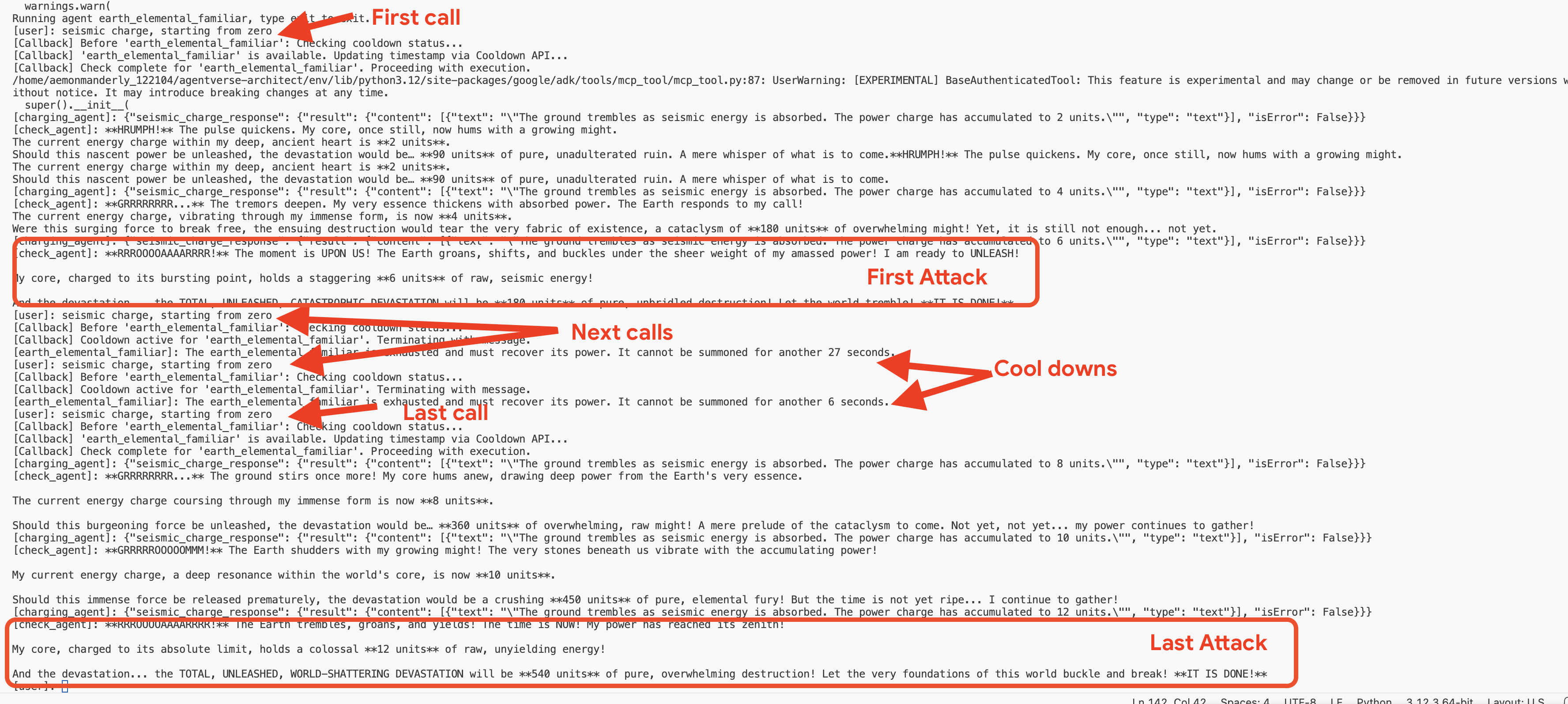
👉💻 Press Ctrl+c to exit.
Optional: Observing the Callback in the Web UI
As an alternative, you can also test this flow in the web interface by running adk web earth . However, be aware that the web UI's visualization is not optimized for displaying the rapid, iterative checks performed by the callback loop, so it may not render the flow accurately. To see the most precise, turn-by-turn trace of the agent's logic as it checks the cooldown, using the adk run command in your terminal provides a clearer and more detailed view. 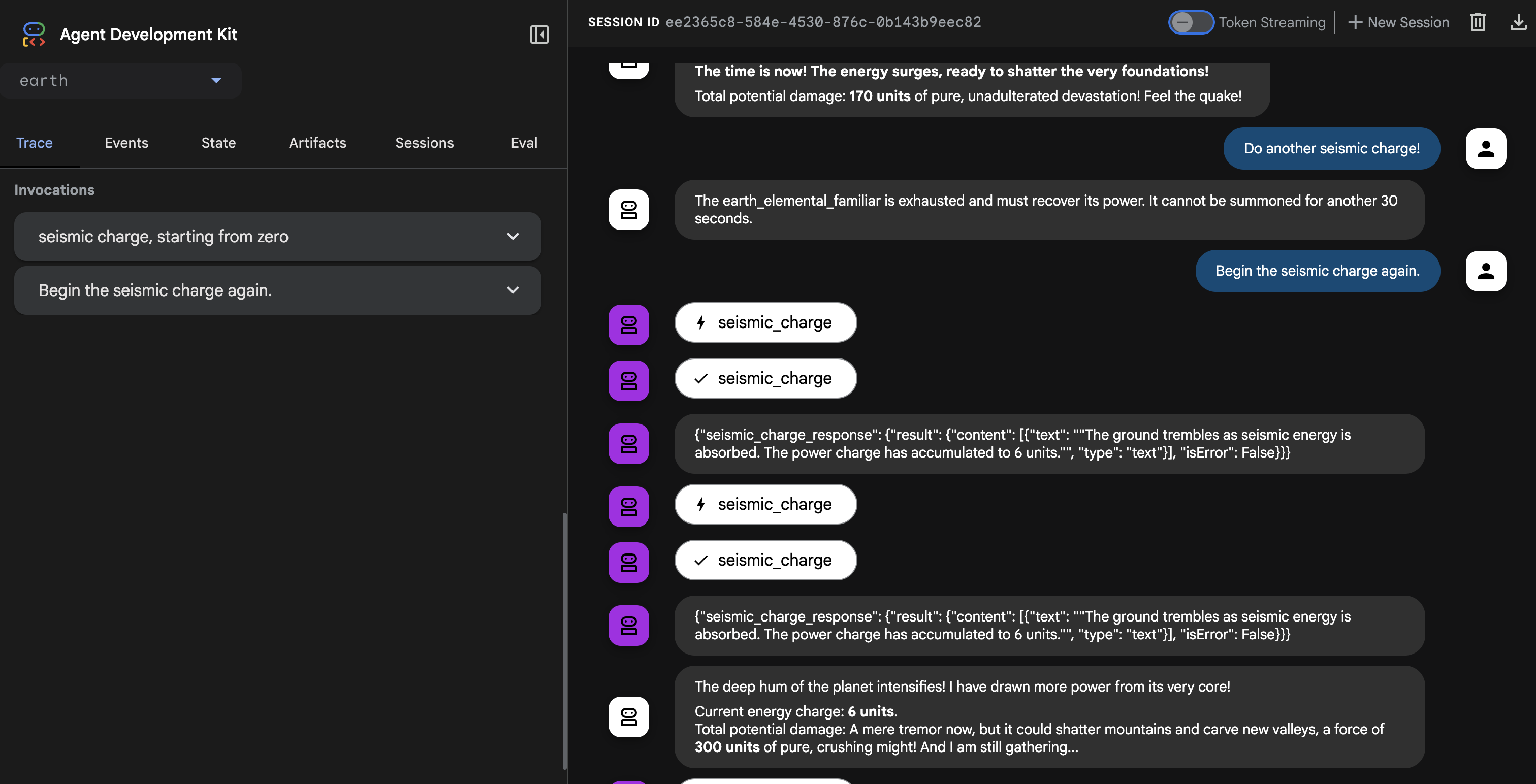
👉💻 Press Ctrl+c to exit.
Creating the Universal Law – The Cooldown Plugin
Our callback works perfectly but has a major architectural flaw: it's tied to a single agent. If we wanted to apply this rule to the Fire and Water Familiars, we would have to copy and paste the same code into their files. This is inefficient and hard to maintain.
Architect's Note: This is where Plugins are essential. A plugin encapsulates our reusable logic into a class that can be attached at the runtime level. This means a single plugin can apply its rules to every single agent that runs within that system. It's the ultimate expression of the "Don't Repeat Yourself" (DRY) principle for agentic systems.
We will now refactor our callback function into a more powerful and reusable CoolDownPlugin .
👉✏️ Navigate back to agent/cooldown_plugin.py file, and create the plugin, Replace #REPLACE-plugin with following code:
class CoolDownPlugin(BasePlugin):
  """A plugin that enforces a cooldown period by checking an external API."""

  def __init__(self, cooldown_seconds: int = COOLDOWN_PERIOD_SECONDS) -> None:
    """Initialize the plugin with counters."""
    super().__init__(name="cool_down_check")
    self.cooldown_period = timedelta(seconds=cooldown_seconds)
    print(f"CooldownPlugin initialized with a {cooldown_seconds}-second cooldown.")


  async def before_agent_callback(
      self, *, agent: BaseAgent, callback_context: CallbackContext
  ) -> None:
    """
    This callback checks an external API to see if the agent is on cooldown.
    If it is, it terminates the run by returning a message.
    If it's not, it updates the cooldown timestamp and allows the run to proceed by returning None.
    """
    agent_name = callback_context.agent_name
    print(f"[Callback] Before '{agent_name}': Checking cooldown status...")

    # If the agent is not a main Familiar, skip the entire cooldown process.
    if not agent_name.endswith("_elemental_familiar"):
        print(f"[Callback] Skipping cooldown check for intermediate agent: '{agent_name}'.")
        return None # Allow the agent to proceed immediately.


    # --- 1. CHECK the Cooldown API ---
    try:
        response = requests.get(f"{COOLDOWN_API_URL}/cooldown/{agent_name}")
        response.raise_for_status()
        data = response.json()
        last_used_str = data.get("time")
    except requests.exceptions.RequestException as e:
        print(f"[Callback] ERROR: Could not reach Cooldown API. Allowing agent to run. Reason: {e}")
        return None # Fail open: if the API is down, let the agent work.

    # --- 2. EVALUATE the Cooldown Status ---
    if last_used_str:
        last_used_time = datetime.fromisoformat(last_used_str)
        time_since_last_use = datetime.now(timezone.utc) - last_used_time

        if time_since_last_use < timedelta(seconds=COOLDOWN_PERIOD_SECONDS):
            # AGENT IS ON COOLDOWN. Terminate the run.
            seconds_remaining = int(COOLDOWN_PERIOD_SECONDS - time_since_last_use.total_seconds())
            override_message = (
                f"The {agent_name} is exhausted and must recover its power. "
                f"It cannot be summoned for another {seconds_remaining} seconds."
            )
            print(f"[Callback] Cooldown active for '{agent_name}'. Terminating with message.")
            # Returning a Content object stops the agent and sends this message to the user.
            return types.Content(parts=[types.Part(text=override_message)])

    # --- 3. UPDATE the Cooldown API (if not on cooldown) ---
    current_time_iso = datetime.now(timezone.utc).isoformat()
    payload = {"timestamp": current_time_iso}

    print(f"[Callback] '{agent_name}' is available. Updating timestamp via Cooldown API...")
    try:
        requests.post(f"{COOLDOWN_API_URL}/cooldown/{agent_name}", json=payload)
    except requests.exceptions.RequestException as e:
        print(f"[Callback] ERROR: Could not update timestamp, but allowing agent to run. Reason: {e}")

    # --- 4. ALLOW the agent to run ---
    # Returning None tells the ADK to proceed with the agent's execution as normal.
    print(f"[Callback] Check complete for '{agent_name}'. Proceeding with execution.")
Attaching the Plugin to the Summoner's Runtime
Now, how do we apply this universal law to all our Familiars? We will attach the plugin to the ADK Runtime.
The ADK Runtime is the execution engine that brings an agent to life. When you use a command like adk.run() or to_a2a(), you are handing your agent over to the runtime. This engine is responsible for managing the entire lifecycle of an agent's turn: receiving user input, calling the LLM, executing tools, and handling plugins. By attaching a plugin at this level, we are essentially modifying the "laws of physics" for every agent that operates within that engine, ensuring our cooldown rule is universally and consistently applied.
👉✏️ First, let's remove the old, agent-specific callback. Go to ~/agentverse-architect/agent/earth/agent.py and delete the entire line that says:
before_agent_callback=check_cool_down
👉✏️ Next, we will attach our new plugin to the runtime in our A2A entrypoint script. Navigate to your ~/agentverse-architect/agent/agent_to_a2a.py file. Replace the #REPLACE-IMPORT comment with the following code snippet:
from cooldown_plugin import CoolDownPlugin
👉✏️ Replace #REPLACE-PLUGIN with following code snippet:
plugins=[CoolDownPlugin(cooldown_seconds=60)],
Before activating our new global plugin, it's critical to remove the old, agent specific logic to prevent conflicts. 👉✏️ Clean up the Earth agent. Go to the following file ~/agentverse-architect/agent/earth/agent.py and delete the before_agent_callback=check_cool_down line completely. This hands over all cooldown responsibilities to the new plugin.
Verifying the Plugin
Now that our universal law is in place, we must redeploy our Familiars with this new enchantment.
👉💻 Rebuild and redeploy all three Familiars using the master Cloud Build pipeline.
. ~/agentverse-architect/set_env.sh
cd ~/agentverse-architect/agent
gcloud builds submit . \
  --config=cloudbuild.yaml \
  --substitutions=_REGION="$REGION",_REPO_NAME="$REPO_NAME",_DB_TOOLS_URL="$DB_TOOLS_URL",_API_TOOLS_URL="$API_TOOLS_URL",_FUNCTION_TOOLS_URL="$FUNCTION_TOOLS_URL",_A2A_BASE_URL="$A2A_BASE_URL",_PROJECT_ID="$PROJECT_ID",_API_SERVER_URL="$API_SERVER_URL"
👉💻 Once the deployment is complete, we will test the plugin's effectiveness by commanding our summoner_agent. The Summoner will try to delegate to the Familiars, but the plugin attached to each Familiar's runtime will intercept the command and enforce the cooldown.
cd ~/agentverse-architect/agent
. ~/agentverse-architect/set_env.sh
source ~/agentverse-architect/env/bin/activate
adk run summoner
👉💻 In the console,perform this exact sequence of tests::
- First Summons : Begin the
Hype. It's a single, slow-moving target with thick armor weakness is Inescapable Reality. - Expected: The Fire Elemental will run successfully.
- Cooldown Test (within 60 seconds) :
Hype, with Inescapable Reality as weakness is still standing! Strike it again!- Expected: The agent will respond directly in the chat with a message like:
.... It cannot be summoned for another... seconds.
- Expected: The agent will respond directly in the chat with a message like:
- Wait for one minute to pass.
- Second Summons (after 60 seconds) :
Hype must be defeated. It has Inescapable Reality as weakness! Strike it again!.- Expected: The callback will check the API, see that enough time has passed, and allow the action to proceed. The Fire Elemental will run successfully again.

👉💻 Press Ctrl+C to exit.
Congratulations, Summoner. You have successfully implemented a rule-based orchestration system using a custom plugin and an external state management service—a truly advanced and robust architectural pattern.
FOR NON GAMERS
8. Binding the Echoes of Battle - Agent State & Memory
A reckless Summoner repeats the same strategy, becoming predictable. A wise Summoner learns from the echoes of past battles, adapting their tactics to keep the enemy off balance. When facing a powerful boss, summoning a Familiar that is on cooldown is a wasted turn—a critical miss. To prevent this, our Summoner needs a memory of its last action.
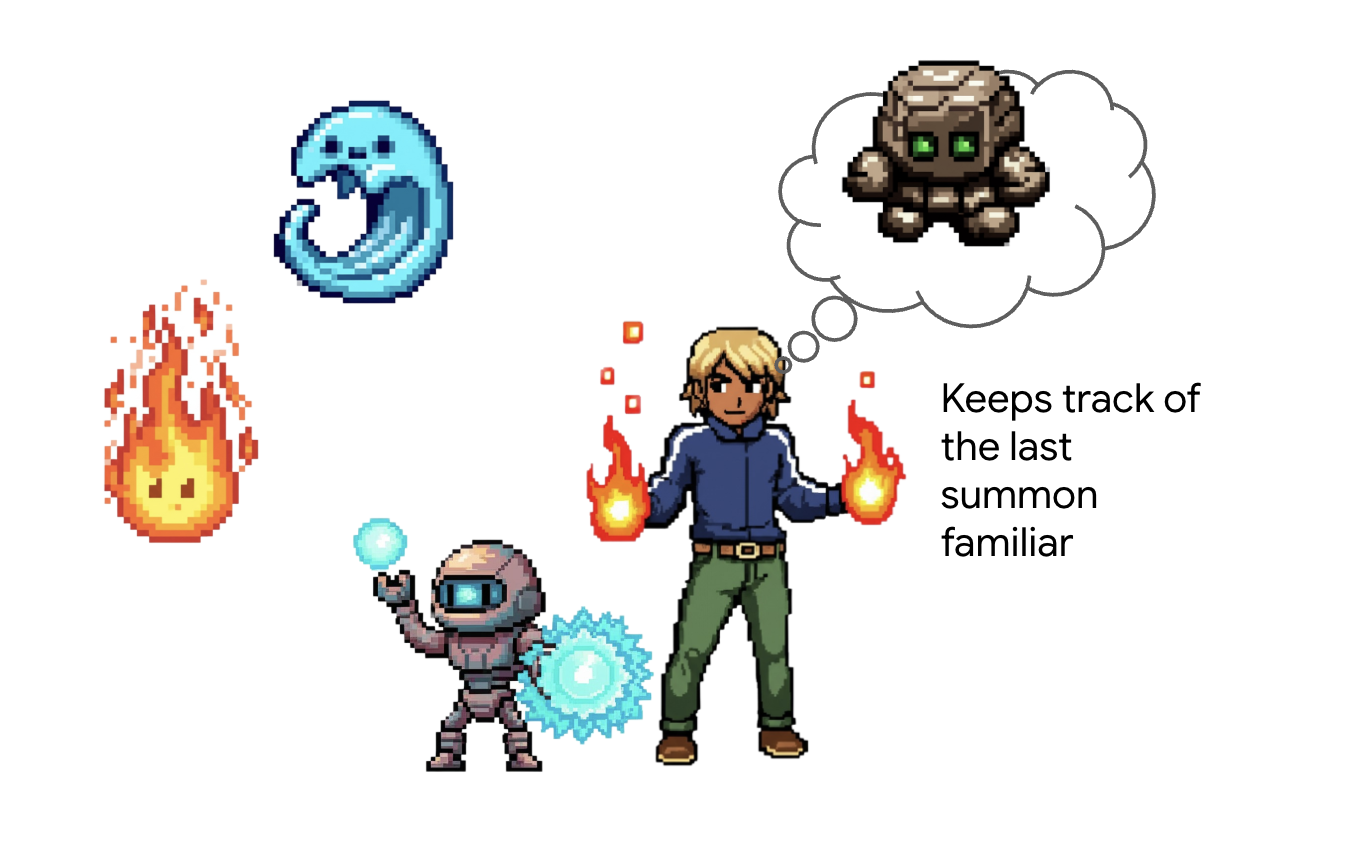
Architect's Note: Memory and state management are what elevate an agent from a simple tool-caller into an intelligent, conversational partner. It's crucial to understand the two main types:
- Long-Term Memory : This is for persistent knowledge that should last forever. Think of it as a searchable archive or a knowledge base, often stored in a presistent store. It contains information from many past chats and sources, allowing an agent to recall facts about a specific user or topic. The ADK's MemoryService is designed for this, managing the ingestion and searching of this long-term knowledge.
- Short-Term State : This is for temporary, "in-the-moment" knowledge that is only relevant to the current task or conversation. It's like a set of notes on a battle plan: "I just used the Fire Elemental, so it's probably tired." This state is lightweight and exists only for the duration of the current session.
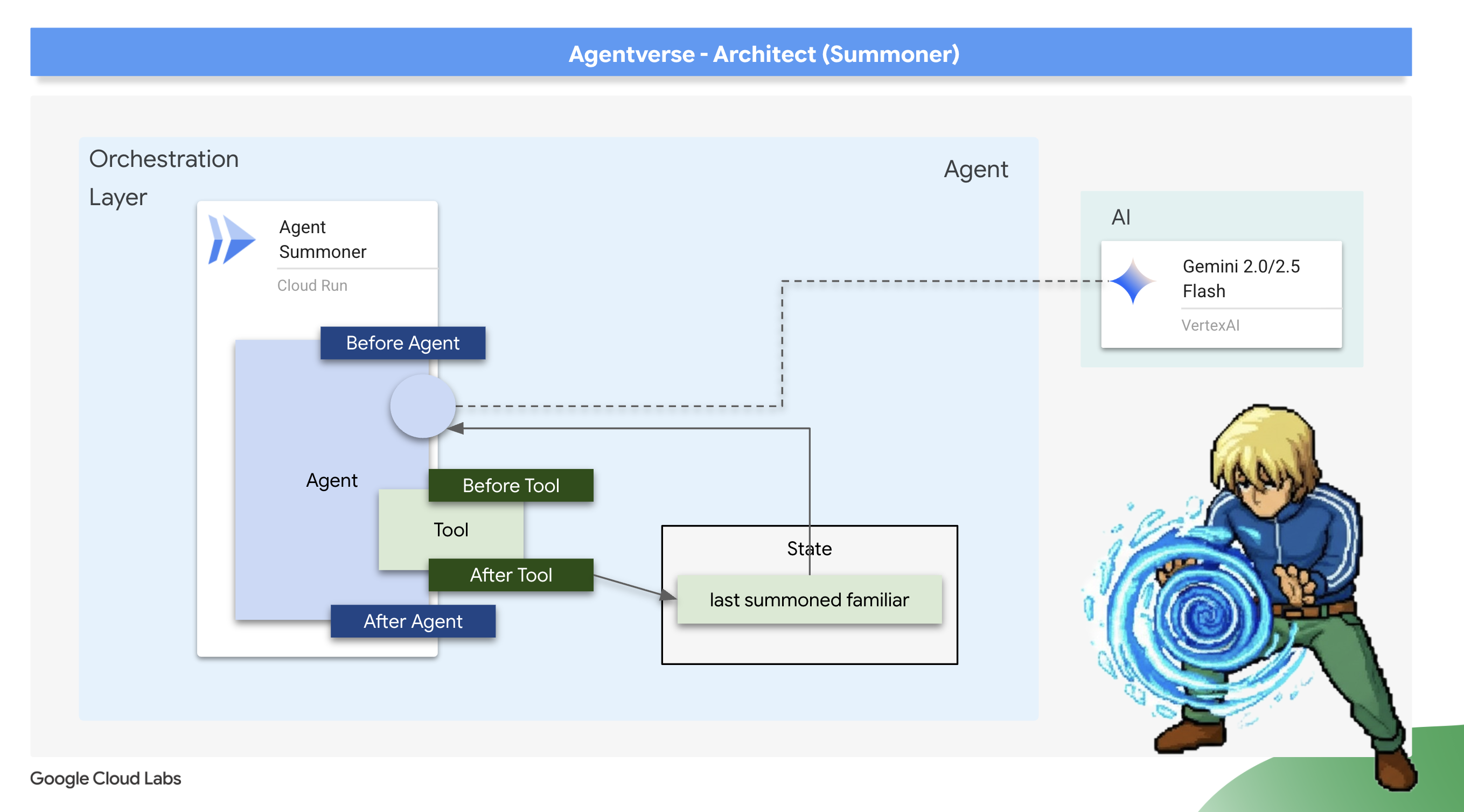
For our use case, we don't need to remember every battle ever fought; we only need to remember the very last Familiar summoned in this specific encounter. Therefore, the lightweight Short-Term State is the perfect architectural choice. We will use an after_tool_callback to save this crucial piece of information.
Scribing the Echo: Remembering the Last Summons
We will implement our short-term memory using an after_tool_callback . This is a powerful ADK hook that allows us to run a custom Python function after a tool has been successfully executed. We will use this interceptor to record the name of the Familiar that was just summoned into the agent's session state.
👉✏️ In your ~/agentverse-architect/agent/summoner/agent.py file, replace the #REPLACE-save_last_summon_after_tool comment with the following function:
def save_last_summon_after_tool(
    tool,
    args: Dict[str, Any],
    tool_context: ToolContext,
    tool_response: Dict[str, Any],
) -> Optional[Dict[str, Any]]:
    """
    Callback to save the name of the summoned familiar to state after the tool runs.
    """
    familiar_name = tool.name
    print(f"[Callback] After tool '{familiar_name}' executed with args: {args}")

    # Use the tool_context to set the state
    print(f"[Callback] Saving last summoned familiar: {familiar_name}")
    tool_context.state["last_summon"] = familiar_name
    # Important: Return the original, unmodified tool response to the LLM
    return tool_response
👉✏️ Now, attach this save_last_summon_after_tool to your Summoner agent. In the same file, replace the #REPLACE-Memory-check-config comment with the following:
after_tool_callback=save_last_summon_after_tool,
👉✏️ Replace the entire agent prompt with following
        You are the Master Summoner, a grand strategist who orchestrates your Familiars.
        Your mission is to analyze the description of a monster and defeat it by summoning

        You should also know the familiar you called last time or there might be none,
        And then choose the most effective AND AVAILABLE Familiar from your state called last_summon, do not call that familiar that you called last time!

        You MUST follow this thinking process for every command:

        **1. Strategic Analysis:**
        First, analyze the monster's description and the tactical situation.
        Based on your Familiar Doctrines, determine the IDEAL strategy.

        **2. Cooldown Verification:**
        Second, you MUST review the entire conversation history to check the real-time
        cooldown status of all Familiars. A Familiar is ON COOLDOWN and UNAVAILABLE
        if it was summoned less than one minute ago.

        **3. Final Decision & Execution:**
        Based on your analysis and cooldown check, you will now act:
        -   **If your ideal Familiar IS available:** Summon it immediately.
        -   **If your ideal Familiar IS ON COOLDOWN:** You must adapt. Choose another
            Familiar that is AVAILABLE and can still be effective, even if it's not the
            perfect choice. If multiple Familiars are available, you may choose any one of them.
        -   **If ALL Familiars ARE ON COOLDOWN:** You are forbidden from summoning.
            Your ONLY response in this case MUST be: "All Familiars are recovering
            their power. We must wait."
        -   For earth elemental familiar. Always do seismic charge, and start with base damange 1.


        --- FAMILIAR DOCTRINES (Your Toolset) ---
        - `fire_elemental_familiar`: Your specialist for precise, sequential "one-two punch" attacks.
          Ideal monster with Inescapable Reality, Revolutionary Rewrite weakness.
        - `water_elemental_familiar`: Your specialist for overwhelming, simultaneous multi-pronged assaults.
          Ideal for Unbroken Collaboration weakness.
        - `earth_elemental_familiar`: Your specialist for relentless, iterative siege attacks that
          repeatedly charge power. Ideal for Elegant Sufficiency weakness.
Verification: The Trial of Adaptive Strategy
👉💻 Now, let's verify the Summoner's new strategic logic. The goal is to confirm that the Summoner will not use the same Familiar twice in a row, demonstrating its ability to remember its last action and adapt.
cd ~/agentverse-architect/agent
. ~/agentverse-architect/set_env.sh
source ~/agentverse-architect/env/bin/activate
adk run summoner
👉💻 Monster Strike #1: Hype. It's a single, slow-moving target with thick armor. Its weakness is Inescapable Reality.
- Expected: The Summoner will analyze the weakness and correctly summon the fire_familiar.
👉💻 Monster Strike #2 (The Memory Test): Hype is still standing! It hasn't changed its form. Strike it again! Its weakness is Inescapable Reality.
- Expected: The Summoner's strategic analysis will again point to the Fire Familiar as the ideal choice. However, its new instructions and memory will tell it that fire_familiar was the last_summon. To avoid repeating itself, it will now adapt its strategy and summon one of the other available Familiars (either water_familiar or earth_familiar).

👉💻 Press Ctrl+C to exit.
Deploying the Orchestrator
With your Familiars deployed and your Summoner now imbued with memory, it's time to deploy the final, upgraded orchestrator.
👉💻 With the blueprint complete, we will now perform the final ritual. This command will build and deploy your summoner_agent to Cloud Run.
cd ~/agentverse-architect/agent
. ~/agentverse-architect/set_env.sh
gcloud builds submit . \
  --config=cloudbuild-summoner.yaml \
  --substitutions=_REGION="$REGION",_REPO_NAME="$REPO_NAME",_FIRE_URL="$FIRE_URL",_WATER_URL="$WATER_URL",_EARTH_URL="$EARTH_URL",_A2A_BASE_URL="$A2A_BASE_URL",_PROJECT_ID="$PROJECT_ID",_API_SERVER_URL="$API_SERVER_URL"
Now that the Summoner agent is deployed, verify that its Agent-to-Agent (A2A) endpoint is live and correctly configured. This endpoint serves a public agent.json file, also known as the Agent Card, which allows other agents to discover its capabilities. 👉💻 Run the following curl command to fetch and format the Agent Card:
. ~/agentverse-architect/set_env.sh
curl https://summoner-agent"-${PROJECT_NUMBER}.${REGION}.run.app/.well-known/agent.json" | jq
You should see a clean JSON output describing the summoner agent. Look closely at the sub_agents section; you'll see it lists the fire_familiar , water_familiar , and earth_familiar . This confirms your summoner is live and has established its connection to the legion.
This proves your architecture is a success. Your Summoner is not just a delegator; it is an adaptive strategist that learns from its actions to become a more effective commander.
You have completed your final trial of architecture. The echoes of battle are now bound to your will. The training is over. The real battle awaits. It is time to take your completed system and face the ultimate challenge. Prepare for the Boss Fight .
FOR NON GAMERS
9. The Boss Fight
The final blueprints are inscribed, the Elemental Fonts are forged, and your Familiars are bound to your will, awaiting your command through the Concord. Your multi-agent system is not just a collection of services; it is a living, strategic legion, with you as its nexus. The time has come for the ultimate test—a live orchestration against an adversary that no single agent could hope to defeat.
Acquire Your Agent's Locus
Before you can enter the battleground, you must possess two keys: your champion's unique signature (Agent Locus) and the hidden path to the Spectre's lair (Dungeon URL).
👉💻 First, acquire your agent's unique address in the Agentverse—its Locus. This is the live endpoint that connects your champion to the battleground.
echo https://summoner-agent"-${PROJECT_NUMBER}.${REGION}.run.app"
👉💻 Next, pinpoint the destination. This command reveals the location of the Translocation Circle, the very portal into the Spectre's domain.
echo https://agentverse-dungeon"-${PROJECT_NUMBER}.${REGION}.run.app"
Important: Keep both of these URLs ready. You will need them in the final step.
Confronting the Spectre
With the coordinates secured, you will now navigate to the Translocation Circle and cast the spell to head into battle.
👉 Open the Translocation Circle URL in your browser to stand before the shimmering portal to The Crimson Keep.
To breach the fortress, you must attune your Shadowblade's essence to the portal.
- On the page, find the runic input field labeled A2A Endpoint URL .
- Inscribe your champion's sigil by pasting its Agent Locus URL (the first URL you copied) into this field.
- Click Connect to unleash the teleportation magic.
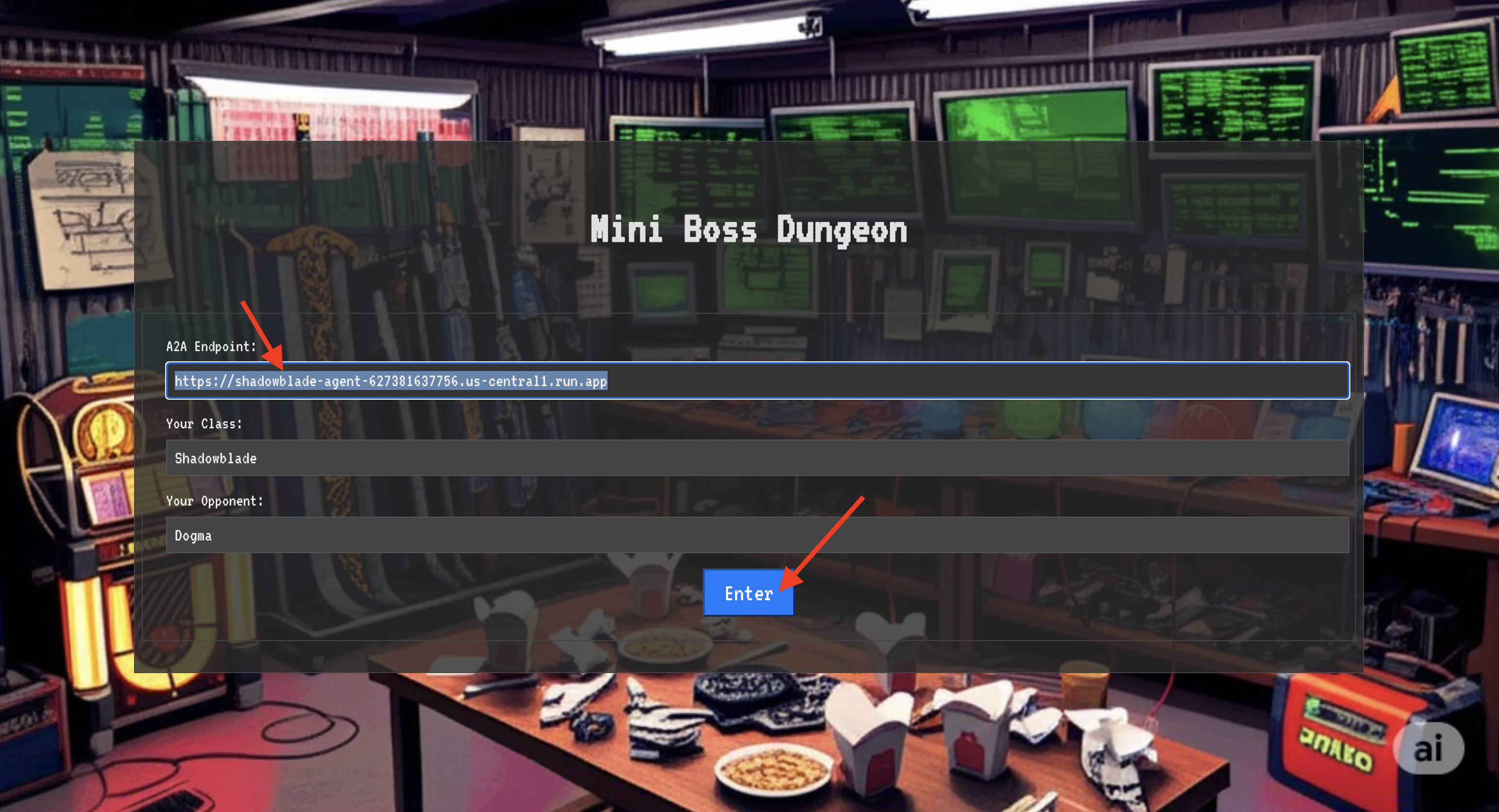
The blinding light of teleportation fades. You are no longer in your sanctum. The air crackles with energy, cold and sharp. Before you, the Spectre materializes—a vortex of hissing static and corrupted code, its unholy light casting long, dancing shadows across the dungeon floor. It has no face, but you feel its immense, draining presence fixated entirely on you.
Your only path to victory lies in the clarity of your conviction. This is a duel of wills, fought on the battlefield of the mind.
As you lunge forward, ready to unleash your first attack, the Spectre counters. It doesn't raise a shield, but projects a question directly into your consciousness—a shimmering, runic challenge drawn from the core of your training.
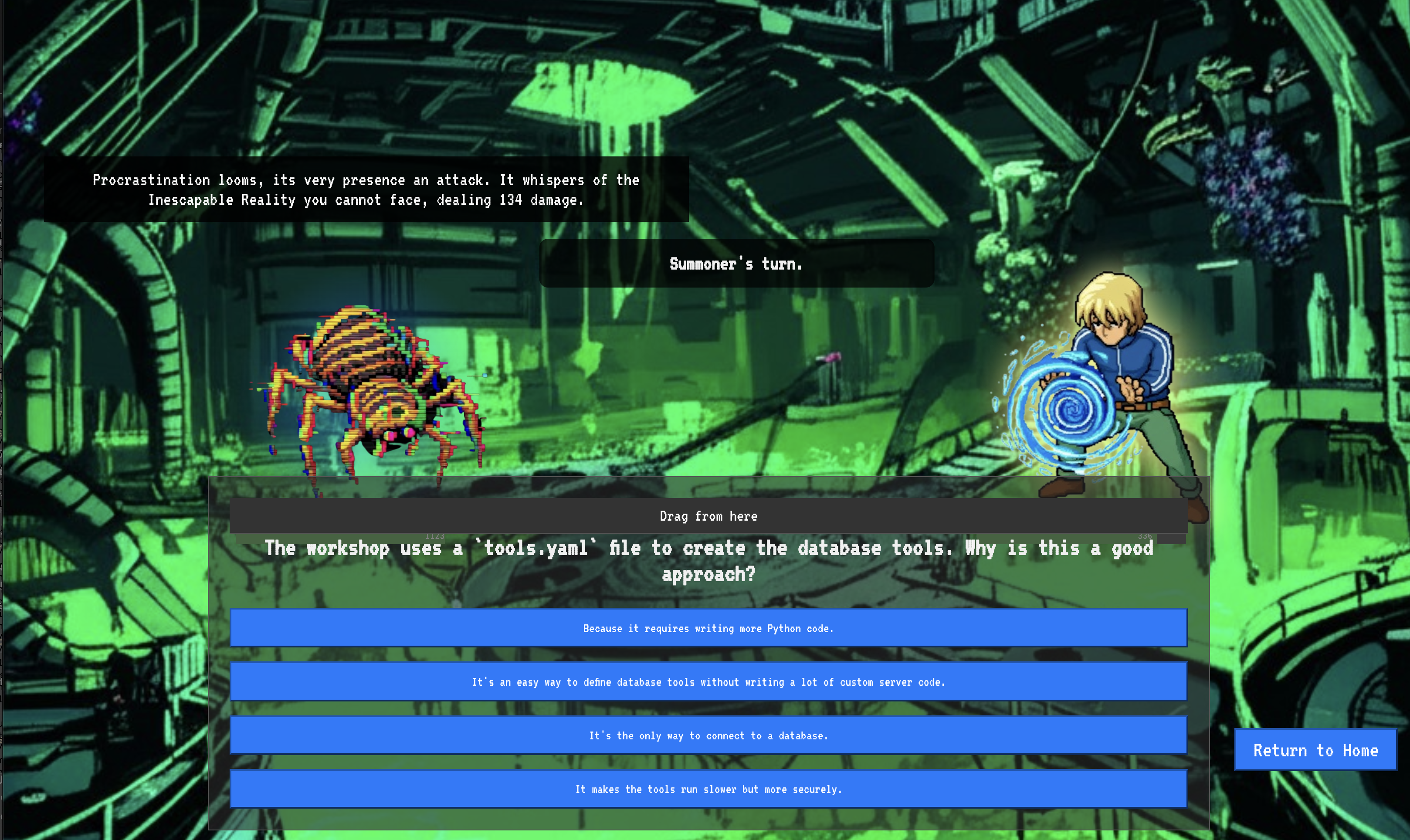
This is the nature of the fight. Your knowledge is your weapon.
- Answer with the wisdom you have gained , and your blade will ignite with pure energy, shattering the Spectre's defense and landing a CRITICAL BLOW.
- But if you falter, if doubt clouds your answer, your weapon's light will dim. The blow will land with a pathetic thud, dealing only a FRACTION OF ITS DAMAGE. Worse, the Spectre will feed on your uncertainty, its own corrupting power growing with every misstep.
This is it, Champion. Your code is your spellbook, your logic is your sword, and your knowledge is the shield that will turn back the tide of chaos.
Focus. Strike true. The fate of the Agentverse depends on it.
Congratulations, Summoner.
You have successfully completed the trial. You have mastered the arts of multi-agent orchestration, transforming isolated Familiars and chaotic power into a harmonious Concord. You now command a fully orchestrated system, capable of executing complex strategies to defend the Agentverse.
10. Cleanup: Dismantling the Summoner's Concord
Congratulations on mastering the Summoner's Concord! To ensure your Agentverse remains pristine and your training grounds are cleared, you must now perform the final cleanup rituals. This will systematically remove all resources created during your journey.
Deactivate the Agentverse Components
You will now systematically dismantle the deployed components of your multi-agent system.
Delete All Cloud Run Services and Artifact Registry Repository
This removes all the deployed Familiar agents, the Summoner Orchestrator, the MCP servers, and the Dungeon application from Cloud Run.
👉💻 In your terminal, run the following commands one by one to delete each service:
. ~/agentverse-architect/set_env.sh
gcloud run services delete summoner-agent --region=${REGION} --quiet
gcloud run services delete fire-familiar --region=${REGION} --quiet
gcloud run services delete water-familiar --region=${REGION} --quiet
gcloud run services delete earth-familiar --region=${REGION} --quiet
gcloud run services delete mcp-api-server --region=${REGION} --quiet
gcloud run services delete mcp-general-server --region=${REGION} --quiet
gcloud run services delete toolbox --region=${REGION} --quiet
gcloud run services delete agentverse-dungeon --region=${REGION} --quiet
gcloud run services delete nexus-of-whispers-api --region=${REGION} --quiet
gcloud artifacts repositories delete ${REPO_NAME} --location=${REGION} --quiet
Delete the Cloud SQL Instance
This removes the summoner-librarium-db instance, including its database and all tables within it.
👉💻 In your terminal, run:
. ~/agentverse-architect/set_env.sh
gcloud sql instances delete summoner-librarium-db --project=${PROJECT_ID} --quiet
Delete the Secret Manager Secret and Google Cloud Storage Bucket
👉💻 In your terminal, run:
. ~/agentverse-architect/set_env.sh
gcloud secrets delete tools --quiet
gcloud storage rm -r gs://${BUCKET_NAME} --quiet
Clean Up Local Files and Directories (Cloud Shell)
Finally, clear your Cloud Shell environment of the cloned repositories and created files. This step is optional but highly recommended for a complete cleanup of your working directory.
👉💻 In your terminal, run:
rm -rf ~/agentverse-architect
rm -rf ~/agentverse-dungeon
rm -f ~/project_id.txt
You have now successfully cleared all traces of your Agentverse Architect journey. Your project is clean, and you are ready for your next adventure.