

1. Увертюра
Эпоха разрозненной разработки подходит к концу. Следующая волна технологической эволюции — это не гений-одиночка, а совместное мастерство. Создание единого умного агента — увлекательный эксперимент. Создание надёжной, безопасной и интеллектуальной экосистемы агентов — настоящей вселенной агентов — важнейшая задача для современного бизнеса.
Успех в эту новую эпоху требует объединения четырёх важнейших ролей, фундаментальных столпов, на которых держится любая процветающая агентурная система. Недостаток в любой области создаёт уязвимость, способную поставить под угрозу всю структуру.
Этот семинар — исчерпывающее руководство для предприятий по освоению агентного будущего в Google Cloud. Мы предлагаем комплексную дорожную карту, которая проведет вас от первой идеи до полномасштабной практической реализации. В ходе этих четырёх взаимосвязанных лабораторий вы узнаете, как специализированные навыки разработчика, архитектора, инженера по данным и специалиста по SRE должны быть объединены для создания, управления и масштабирования мощной среды Agentverse.
Ни один столп не может поддерживать мир агентов в одиночку. Грандиозный замысел архитектора бесполезен без точного исполнения разработчика. Агент разработчика слеп без мудрости инженера по данным, а вся система хрупка без защиты специалиста по SRE. Только благодаря синергии и общему пониманию ролей друг друга ваша команда сможет превратить инновационную концепцию в критически важную, операционную реальность. Ваше путешествие начинается здесь. Приготовьтесь освоить свою роль и понять, какое место вы занимаете в общей системе.
Добро пожаловать в мир Агентов: призыв к чемпионам
В бескрайних цифровых просторах бизнеса наступила новая эра. Это эпоха агентов, время огромных возможностей, когда интеллектуальные, автономные агенты работают в идеальной гармонии, ускоряя инновации и сметая обыденность.
Эта связанная экосистема власти и потенциала известна как Agentverse.
Но нарастающая энтропия, безмолвное разложение, известное как Статика, уже начала разрушать границы этого нового мира. Статика — это не вирус и не ошибка; это воплощение хаоса, пожирающего сам акт творения.
Он усиливает старые разочарования, принимая чудовищные формы, порождая Семь Призраков Развития. Если их не остановить, Статика и её Призраки затормозят прогресс, превратив обещания Вселенной Агентов в пустыню технического долга и заброшенных проектов.
Сегодня мы призываем чемпионов дать отпор волне хаоса. Нам нужны герои, готовые отточить своё мастерство и работать сообща ради защиты Вселенной Агентов. Пришло время выбрать свой путь.
Выберите свой класс
Перед вами четыре разных пути, каждый из которых — важнейшая опора в борьбе со Статикой . Хотя ваше обучение будет проходить в одиночку, ваш окончательный успех зависит от понимания того, как ваши навыки сочетаются с навыками других.
- The Shadowblade (Разработчик) : Мастер кузницы и передовой. Вы — мастер, который создаёт клинки, создаёт инструменты и сражается с врагом в замысловатых деталях кода. Ваш путь — это точность, мастерство и практичное творчество.
- Призыватель (Архитектор) : великий стратег и организатор. Вы видите не отдельного агента, а всё поле боя. Вы разрабатываете главные чертежи, позволяющие целым системам агентов общаться, сотрудничать и достигать цели, гораздо более важной, чем любой отдельный компонент.
- Учёный (инженер данных) : искатель скрытых истин и хранитель мудрости. Вы отправляетесь в необъятные, дикие дебри данных, чтобы раскрыть тайны, которые дают вашим агентам цель и зрение. Ваши знания могут раскрыть слабости врага или усилить союзника.
- Страж (DevOps / SRE) : Непоколебимый защитник и щит королевства. Вы строите крепости, управляете линиями снабжения энергией и обеспечиваете всей системе устойчивость к неизбежным атакам Штатика. Ваша сила — фундамент, на котором строится победа вашей команды.
Ваша миссия
Ваше обучение начнётся как отдельное упражнение. Вы пройдёте по выбранному пути, осваивая уникальные навыки, необходимые для овладения вашей ролью. В конце испытания вы столкнётесь со Спектром, рождённым Статикой, — мини-боссом, который использует особые испытания вашего ремесла.
Только освоив свою индивидуальную роль, вы сможете подготовиться к решающему испытанию. Затем вам необходимо сформировать отряд из чемпионов других классов. Вместе вы отправитесь в самое сердце порчи, чтобы сразиться с величайшим боссом.
Последнее совместное испытание, которое проверит ваши объединенные силы и определит судьбу Вселенной Агентов.
Вселенная Агентов ждёт своих героев. Ответите ли вы на зов?
2. Согласие призывателя
Добро пожаловать, Призыватель. Ваш путь — это путь видения и великой стратегии. Пока другие сосредоточены на одном клинке или заклинании, вы видите всё поле боя. Вы не командуете одним агентом; вы дирижируете целым оркестром. Ваша сила заключается не в прямом сражении, а в разработке безупречного, всеобъемлющего плана, позволяющего легиону специалистов — ваших Фамильяров — работать в идеальной гармонии. Эта миссия проверит вашу способность проектировать, подключать и организовывать мощную многоагентную систему.
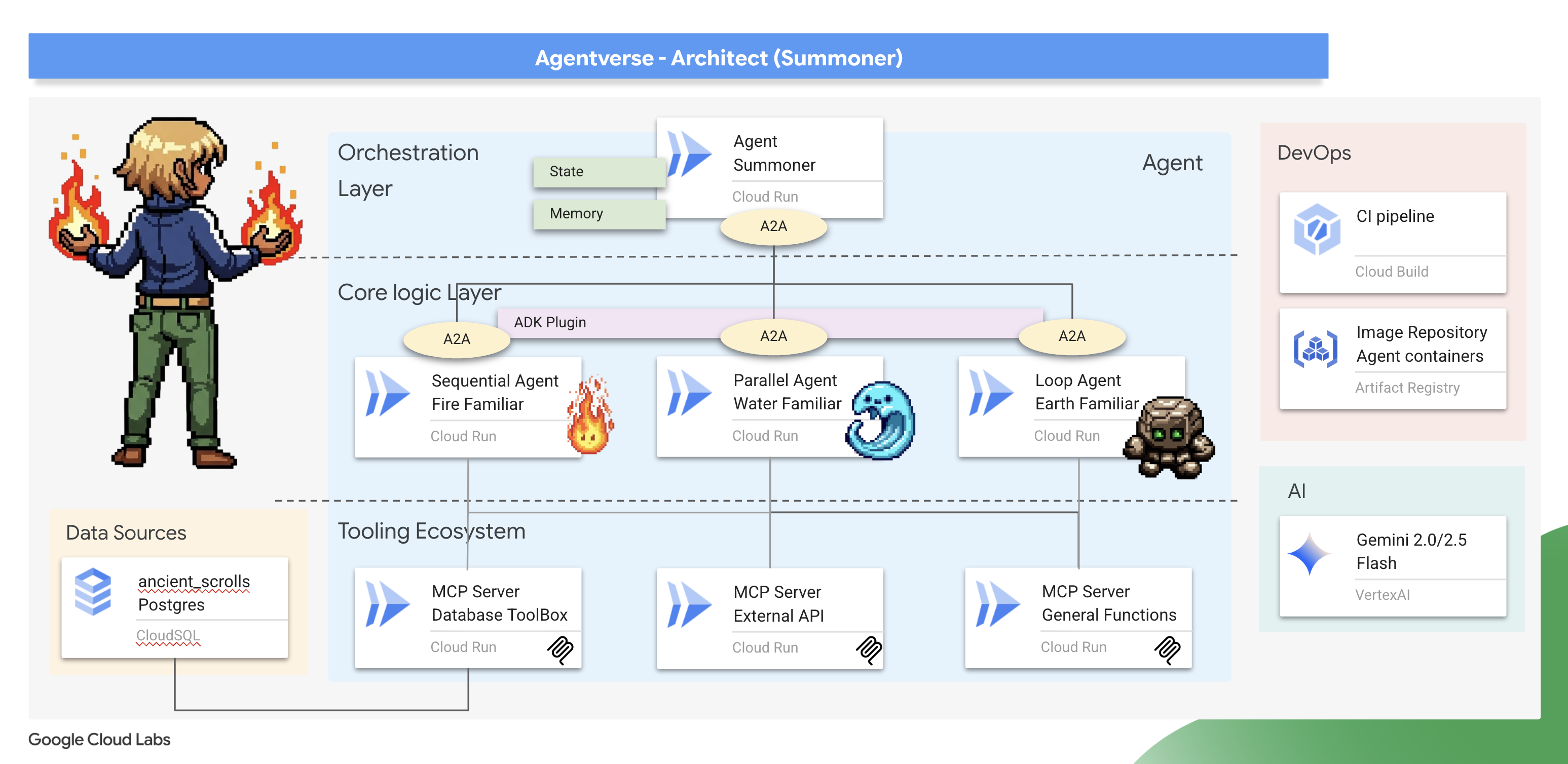
Чему вы научитесь
- Создайте разобщенную экосистему инструментов: спроектируйте и разверните набор независимых серверов инструментов MCP на основе микросервисов. Вы узнаете, почему этот базовый уровень критически важен для создания масштабируемых, удобных в обслуживании и безопасных агентских систем.
- Освойте расширенные рабочие процессы агентов: выходите за рамки отдельных агентов и создайте легион специализированных «фамильяров». Вы освоите основные шаблоны рабочих процессов ADK — последовательный, параллельный и циклический — и изучите архитектурные принципы выбора правильного шаблона для конкретной задачи.
- Внедрите интеллектуальный оркестратор: пройдите путь от простого разработчика агентов до настоящего системного архитектора. Вы создадите мастер-агента оркестрации, который использует протокол «агент-агент» (A2A) для обнаружения и делегирования сложных задач вашим специалистам-фамильярам, создавая настоящую многоагентную систему.
- Обеспечьте соблюдение правил с помощью кода, а не подсказок: научитесь создавать более надёжные и предсказуемые агенты, применяя правила взаимодействия с учётом состояния. Вы реализуете собственную логику, используя мощную систему плагинов и обратных вызовов ADK для управления реальными ограничениями, такими как таймеры перезарядки.
- Управление состоянием и памятью агента: дайте своим агентам возможность учиться и запоминать. Вы изучите методы управления как краткосрочным, разговорным состоянием, так и долгосрочным, устойчивым, запоминанием для создания более интеллектуальных и контекстно-зависимых взаимодействий.
- Выполните сквозное облачное развертывание: разверните всю свою многоагентную систему от локального прототипа до производственной реализации. Вы узнаете, как контейнеризировать агенты и оркестратор и развернуть их как набор масштабируемых независимых микросервисов в Google Cloud Run.
3. Рисование призывающего круга
Добро пожаловать, Призыватель. Прежде чем призвать хотя бы одного Фамильяра, прежде чем заключить какие-либо пакты, необходимо подготовить саму почву, на которой вы стоите. Необузданная среда — приглашение к хаосу; настоящий Призыватель действует только в освящённом, наделённом силой пространстве. Наша первая задача — начертить призывающий круг: начертить руны силы, пробуждающие необходимые облачные сервисы, и получить древние чертежи, которые будут направлять нашу работу. Сила Призывателя рождается из тщательной подготовки.
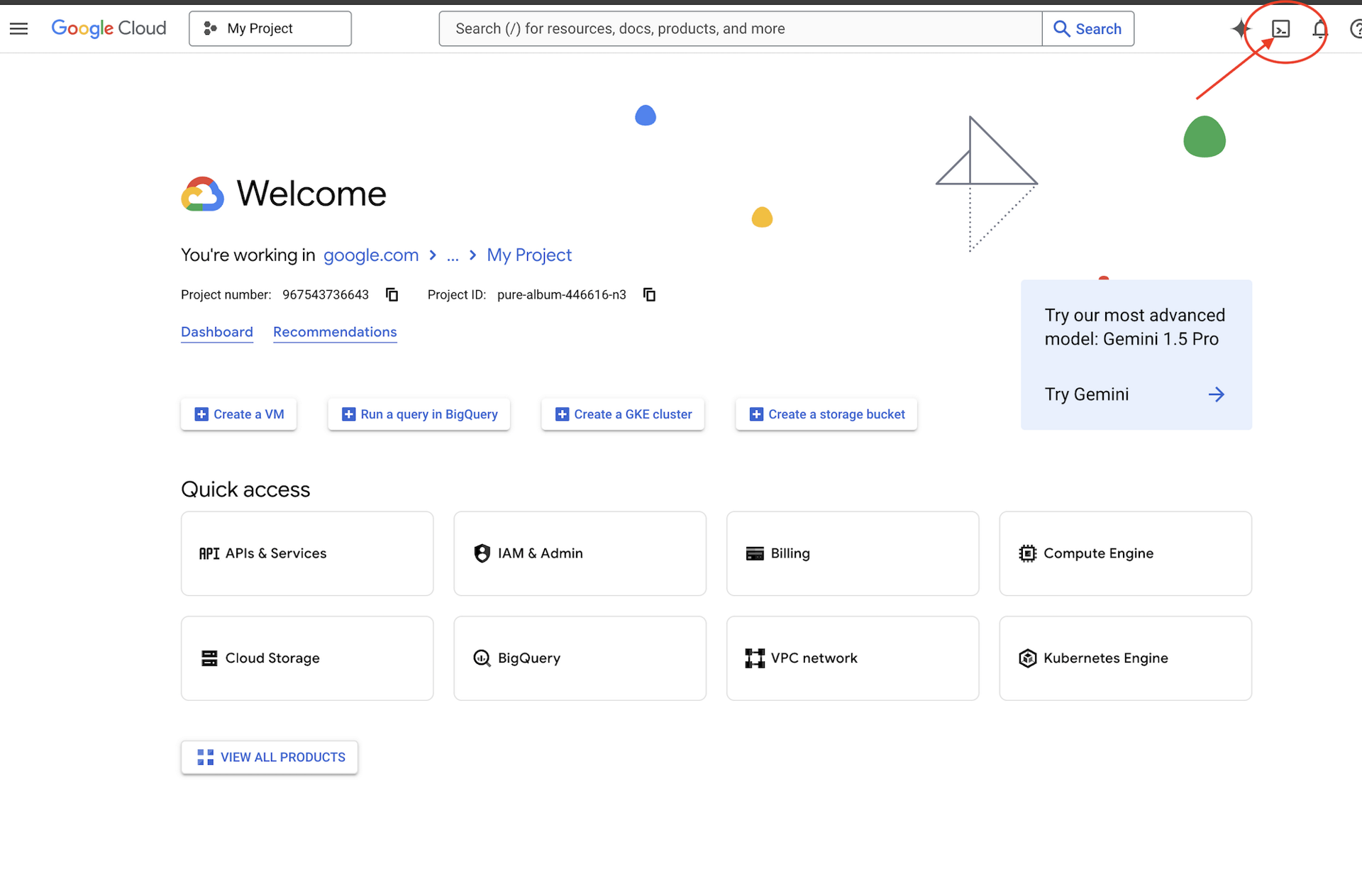
👉 Нажмите «Активировать Cloud Shell» в верхней части консоли Google Cloud (это значок в форме терминала в верхней части панели Cloud Shell),
👉 Нажмите кнопку «Открыть редактор» (она выглядит как открытая папка с карандашом). В окне откроется редактор кода Cloud Shell. Слева вы увидите проводник. 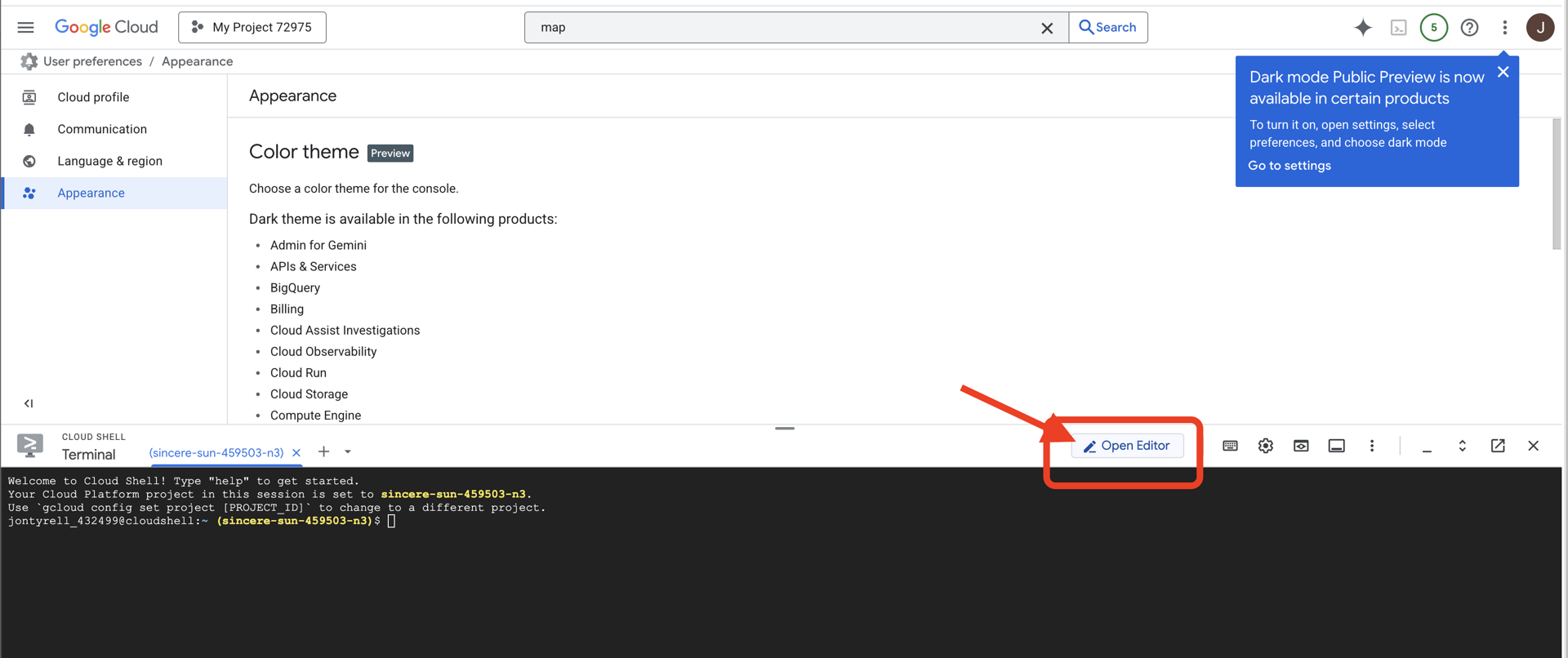
👉Откройте терминал в облачной IDE, 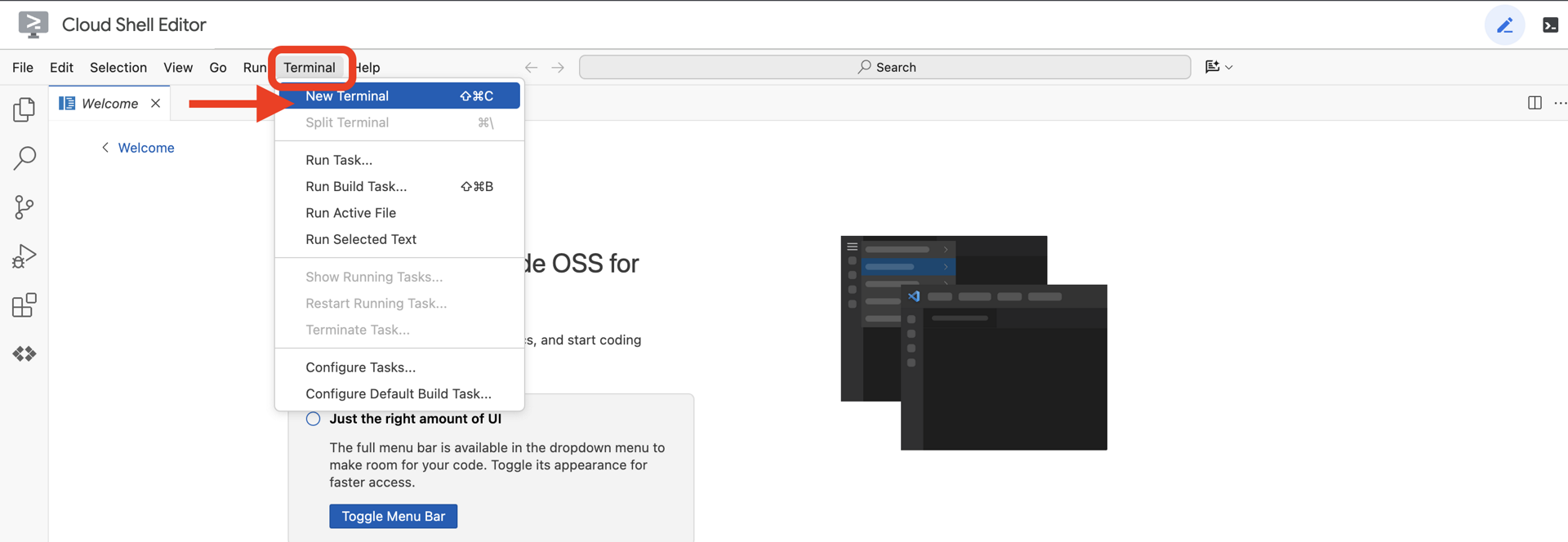
👉💻 В терминале убедитесь, что вы уже аутентифицированы и что проекту присвоен ваш идентификатор проекта, с помощью следующей команды:
gcloud auth list
👉💻 Клонируйте bootstrap-проект с GitHub:
git clone https://github.com/weimeilin79/agentverse-architect
chmod +x ~/agentverse-architect/init.sh
chmod +x ~/agentverse-architect/set_env.sh
chmod +x ~/agentverse-architect/prepare.sh
chmod +x ~/agentverse-architect/data_setup.sh

git clone https://github.com/weimeilin79/agentverse-dungeon.git
chmod +x ~/agentverse-dungeon/run_cloudbuild.sh
chmod +x ~/agentverse-dungeon/start.sh
👉💻 Запустите скрипт установки из каталога проекта.
⚠️ Примечание по идентификатору проекта: скрипт предложит случайно сгенерированный идентификатор проекта по умолчанию. Нажмите Enter , чтобы принять это значение по умолчанию.
Однако, если вы предпочитаете создать конкретный новый проект , вы можете ввести желаемый идентификатор проекта, когда скрипт предложит это сделать.
cd ~/agentverse-architect
./init.sh
Скрипт автоматически выполнит остальную часть процесса настройки.
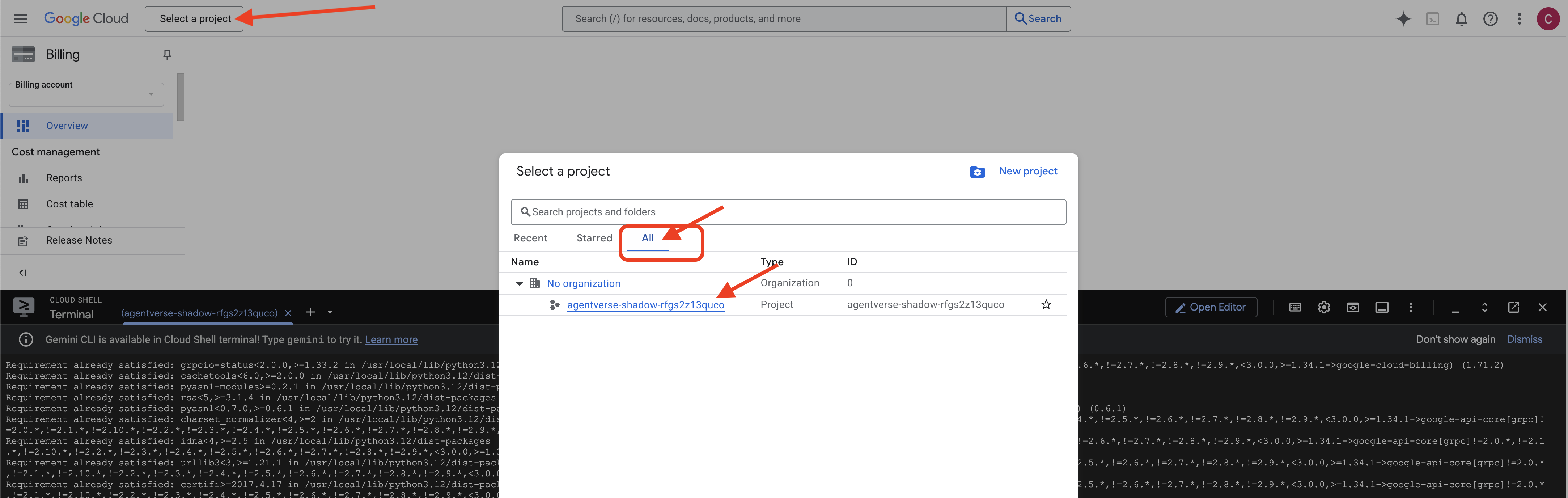
👉 Важный шаг после завершения: после завершения скрипта необходимо убедиться, что ваша Google Cloud Console отображает правильный проект:
- Перейдите на console.cloud.google.com .
- Нажмите на раскрывающийся список выбора проекта в верхней части страницы.
- Нажмите вкладку «Все» (так как новый проект может еще не появиться в разделе «Недавние»).
- Выберите идентификатор проекта, который вы только что настроили на шаге
init.sh
👉💻 Установите необходимый идентификатор проекта:
gcloud config set project $(cat ~/project_id.txt) --quiet
👉💻 Выполните следующую команду, чтобы включить необходимые API Google Cloud:
gcloud services enable \
    sqladmin.googleapis.com \
    storage.googleapis.com \
    aiplatform.googleapis.com \
    run.googleapis.com \
    cloudbuild.googleapis.com \
    artifactregistry.googleapis.com \
    iam.googleapis.com \
    compute.googleapis.com \
    cloudresourcemanager.googleapis.com \
    secretmanager.googleapis.com
👉💻 Если вы еще не создали репозиторий реестра артефактов с именем agentverse-repo, выполните следующую команду, чтобы создать его: (пропустите этот шаг, если в том же проекте развернуты другие классы)
. ~/agentverse-architect/set_env.sh
gcloud artifacts repositories create $REPO_NAME \
    --repository-format=docker \
    --location=$REGION \
    --description="Repository for Agentverse agents"
Настройка разрешения
👉💻 Предоставьте необходимые разрешения, выполнив следующие команды в терминале:
. ~/agentverse-architect/set_env.sh

# --- Grant Core Data Permissions ---
gcloud projects add-iam-policy-binding $PROJECT_ID \
 --member="serviceAccount:$SERVICE_ACCOUNT_NAME" \
 --role="roles/storage.admin"

gcloud projects add-iam-policy-binding $PROJECT_ID  \
--member="serviceAccount:$SERVICE_ACCOUNT_NAME"  \
--role="roles/aiplatform.user"

# --- Grant Deployment & Execution Permissions ---
gcloud projects add-iam-policy-binding $PROJECT_ID  \
--member="serviceAccount:$SERVICE_ACCOUNT_NAME"  \
--role="roles/cloudbuild.builds.editor"

gcloud projects add-iam-policy-binding $PROJECT_ID  \
--member="serviceAccount:$SERVICE_ACCOUNT_NAME"  \
--role="roles/artifactregistry.admin"

gcloud projects add-iam-policy-binding $PROJECT_ID  \
--member="serviceAccount:$SERVICE_ACCOUNT_NAME"  \
--role="roles/run.admin"

gcloud projects add-iam-policy-binding $PROJECT_ID  \
--member="serviceAccount:$SERVICE_ACCOUNT_NAME"  \
--role="roles/iam.serviceAccountUser"

gcloud projects add-iam-policy-binding $PROJECT_ID  \
--member="serviceAccount:$SERVICE_ACCOUNT_NAME"  \
--role="roles/logging.logWriter"

gcloud projects add-iam-policy-binding $PROJECT_ID \
  --member="serviceAccount:${SERVICE_ACCOUNT_NAME}" \
  --role="roles/monitoring.metricWriter"

gcloud projects add-iam-policy-binding $PROJECT_ID \
  --member="serviceAccount:${SERVICE_ACCOUNT_NAME}" \
  --role="roles/secretmanager.secretAccessor"
👉💻 Когда вы начнёте обучение, мы подготовим финальное испытание. Следующие команды вызовут Спектров из хаоса и помех, создав боссов для вашего финального испытания.
. ~/agentverse-architect/set_env.sh
cd ~/agentverse-dungeon
./run_cloudbuild.sh
cd ~/agentverse-architect
👉💻 Наконец, запустите скрипт prepare.sh для выполнения первоначальных задач по настройке.
. ~/agentverse-architect/set_env.sh
cd ~/agentverse-architect/
./prepare.sh
Отличная работа, Призыватель. Круг замкнулся, и пакты скреплены. Земля теперь освящена и готова впитать в себя безграничную силу. В следующем испытании мы создадим те самые Стихийные Купели, из которых наши Фамильяры будут черпать свою силу.
4. Создание элементарных шрифтов: экосистема разрозненных инструментов
Поле битвы подготовлено, круг призыва начерчен, и окружающая мана потрескивает. Пришло время совершить ваш первый настоящий поступок в качестве Призывателя: создать те самые источники силы, из которых ваши Фамильяры будут черпать свою силу. Этот ритуал разделён на три части, каждая из которых пробуждает Стихийный Источник — стабильный, независимый источник определённого вида силы. Только когда все три источника активны, вы можете приступить к более сложной работе по призыву.
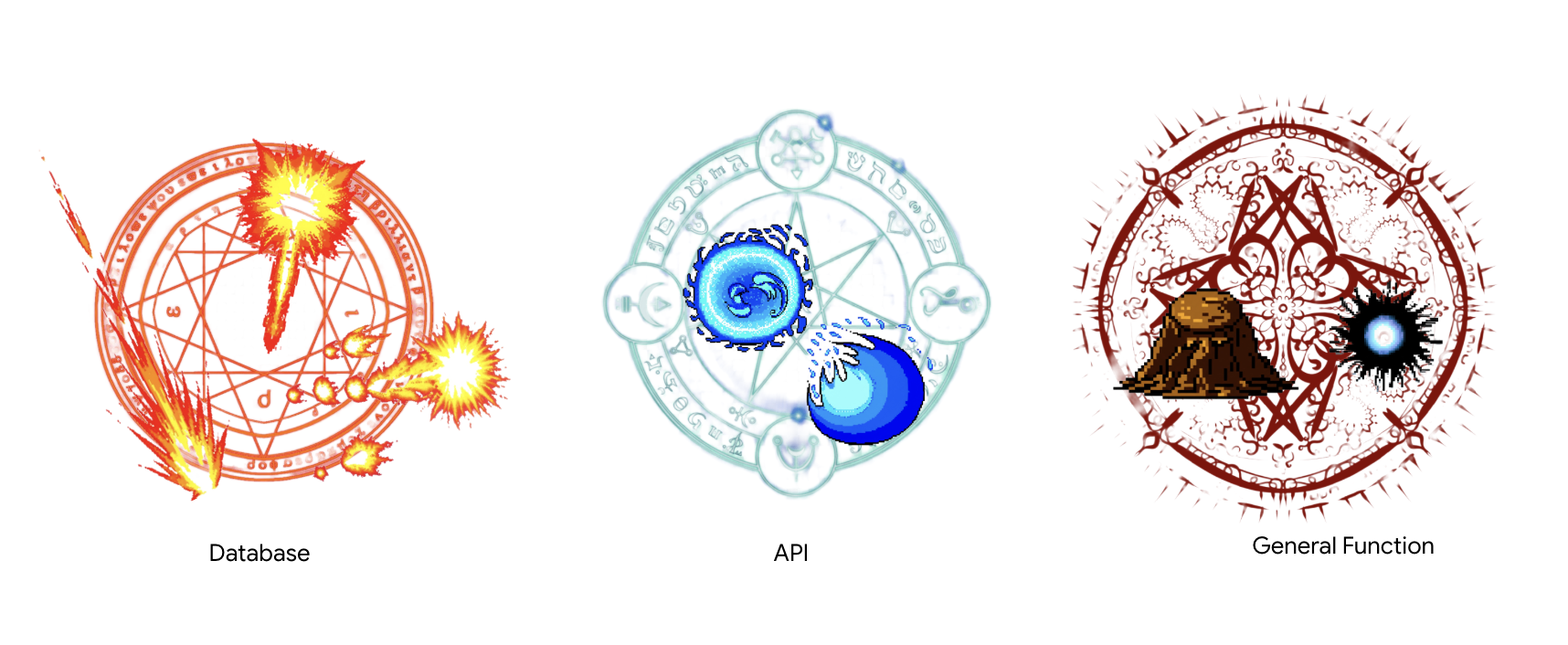
Примечание архитектора: сервер протокола контекста модели (MCP) является основополагающим компонентом современной агентской системы, выступая в качестве стандартизированного коммуникационного моста, позволяющего агенту обнаруживать и использовать удаленные инструменты. В нашей инструментальной экосистеме мы разработаем два различных типа серверов MCP, каждый из которых представляет собой критически важный архитектурный шаблон. Для подключения к нашей базе данных мы будем использовать декларативный подход с помощью Database Toolbox, определяя наши инструменты в простом конфигурационном файле. Этот шаблон невероятно эффективен и безопасен для предоставления доступа к структурированным данным. Однако, когда нам потребуется реализовать собственную бизнес-логику или вызвать внешние сторонние API, мы будем использовать императивный подход, пошагово прописывая логику сервера в коде. Это обеспечивает максимальный контроль и гибкость, позволяя нам инкапсулировать сложные операции в простом, многоразовом инструменте. Мастер-архитектор должен понимать оба шаблона, чтобы выбрать правильный подход для каждого компонента, создавая надежную, безопасную и масштабируемую инструментальную основу.
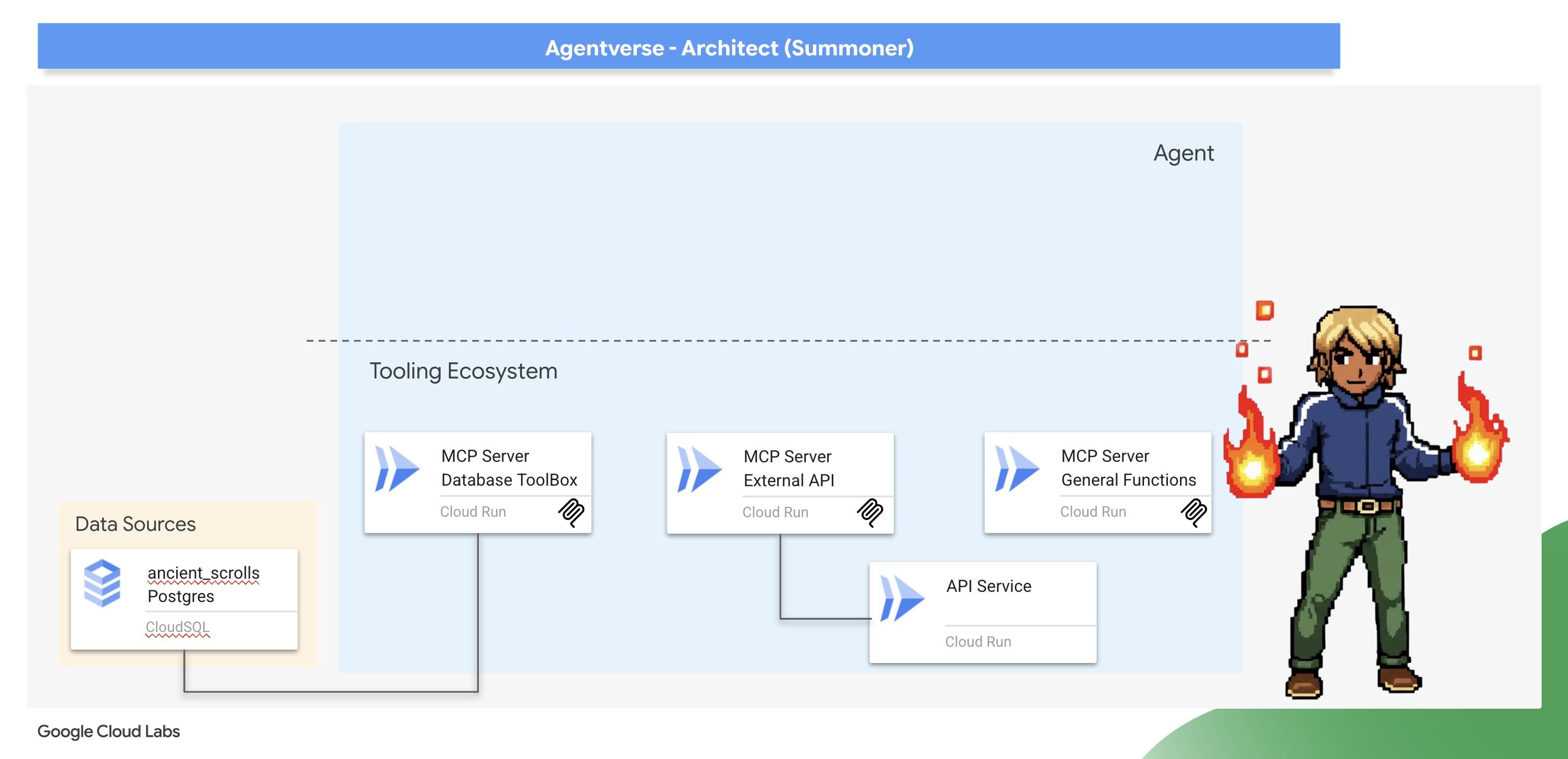
Пробуждение Нексуса Шепотов (внешний API MCP-сервер)
Мудрый Призыватель знает, что не вся сила исходит из его собственных владений. Существуют внешние, порой хаотичные, источники энергии, которые можно направлять с большой эффективностью. Нексус Шёпотов — наш врата к этим силам.
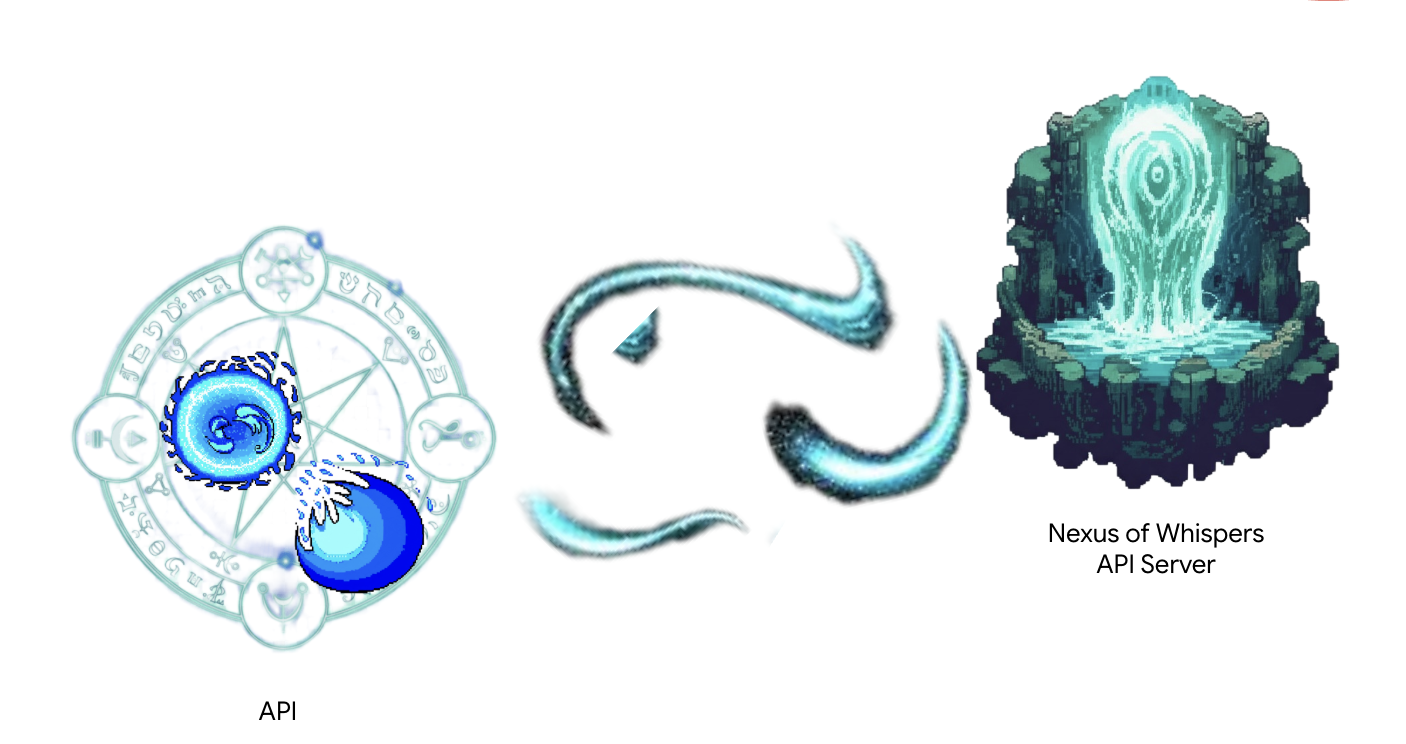
Служба уже работает и действует как наш внешний источник энергии, предлагая две конечные точки необработанных заклинаний: /cryosea_shatter и /moonlit_cascade .
Примечание архитектора: вы будете использовать императивный подход , который явно и пошагово определяет логику сервера. Это обеспечивает гораздо больший контроль и гибкость, что особенно важно, когда вашим инструментам требуется больше, чем просто выполнение простого SQL-запроса, например, вызов других API. Понимание обоих шаблонов — критически важный навык для архитектора агентов.
👉✏️ Перейдите в каталог ~/agentverse-architect/mcp-servers/api/main.py и ЗАМЕНИТЕ #REPLACE-MAGIC-CORE следующим кодом:
def cryosea_shatter() -> str:
    """Channels immense frost energy from an external power source, the Nexus of Whispers, to unleash the Cryosea Shatter spell."""
    try:
        response = requests.post(f"{API_SERVER_URL}/cryosea_shatter")
        response.raise_for_status() # Raise an exception for bad status codes (4xx or 5xx)
        data = response.json()
        # Thematic Success Message
        return f"A connection to the Nexus is established! A surge of frost energy manifests as Cryosea Shatter, dealing {data.get('damage_points')} damage."
    except requests.exceptions.RequestException as e:
        # Thematic Error Message
        return f"The connection to the external power source wavers and fails. The Cryosea Shatter spell fizzles. Reason: {e}"


def moonlit_cascade() -> str:
    """Draws mystical power from an external energy source, the Nexus of Whispers, to invoke the Moonlit Cascade spell."""
    try:
        response = requests.post(f"{API_SERVER_URL}/moonlit_cascade")
        response.raise_for_status()
        data = response.json()
        # Thematic Success Message
        return f"The Nexus answers the call! A cascade of pure moonlight erupts from the external source, dealing {data.get('damage_points')} damage."
    except requests.exceptions.RequestException as e:
        # Thematic Error Message
        return f"The connection to the external power source wavers and fails. The Moonlit Cascade spell fizzles. Reason: {e}"
В основе скрипта лежат простые функции Python. Именно здесь и происходит основная работа.
👉✏️ В том же файле ~/agentverse-architect/mcp-servers/api/main.py ЗАМЕНИТЕ #REPLACE-Runes of Communication следующим кодом:
@app.list_tools()
async def list_tools() -> list[mcp_types.Tool]:
  """MCP handler to list available tools."""
  # Convert the ADK tool's definition to MCP format
  schema_cryosea_shatter = adk_to_mcp_tool_type(cryosea_shatterTool)
  schema_moonlit_cascade = adk_to_mcp_tool_type(moonlit_cascadeTool)
  print(f"MCP Server: Received list_tools request. \n MCP Server: Advertising tool: {schema_cryosea_shatter.name} and {schema_moonlit_cascade.name}")
  return [schema_cryosea_shatter,schema_moonlit_cascade]

@app.call_tool()
async def call_tool(
    name: str, arguments: dict
) -> list[mcp_types.TextContent | mcp_types.ImageContent | mcp_types.EmbeddedResource]:
  """MCP handler to execute a tool call."""
  print(f"MCP Server: Received call_tool request for '{name}' with args: {arguments}")

  # Look up the tool by name in our dictionary
  tool_to_call = available_tools.get(name)
  if tool_to_call:
    try:
      adk_response = await tool_to_call.run_async(
          args=arguments,
          tool_context=None, # No ADK context available here
      )
      print(f"MCP Server: ADK tool '{name}' executed successfully.")

      response_text = json.dumps(adk_response, indent=2)
      return [mcp_types.TextContent(type="text", text=response_text)]

    except Exception as e:
      print(f"MCP Server: Error executing ADK tool '{name}': {e}")
      # Creating a proper MCP error response might be more robust
      error_text = json.dumps({"error": f"Failed to execute tool '{name}': {str(e)}"})
      return [mcp_types.TextContent(type="text", text=error_text)]
  else:
      # Handle calls to unknown tools
      print(f"MCP Server: Tool '{name}' not found.")
      error_text = json.dumps({"error": f"Tool '{name}' not implemented."})
      return [mcp_types.TextContent(type="text", text=error_text)]
@app.list_tools()(Рукопожатие): Эта функция — приветствие сервера. При подключении нового агента он сначала обращается к этой конечной точке, чтобы спросить: «Что вы умеете делать?». Наш код отвечает списком всех доступных инструментов, преобразованных в универсальный формат MCP с помощью adk_to_mcp_tool_type. -@app.call_tool()(Команда): Эта функция — рабочая лошадка. Когда агент решает использовать инструмент, он отправляет запрос к этой конечной точке с названием инструмента и аргументами. Наш код ищет инструмент в нашей «книге заклинаний» available_tools, выполняет его с помощью run_async и возвращает результат в стандартном формате MCP.
Мы реализуем это позже.
Зажигание тайной кузницы (общие функции MCP-сервера)
Не вся сила исходит из древних книг или далёких шепотов. Иногда Призывателю приходится выковывать собственную магию из чистой воли и логики. Кузница тайных способностей — это источник силы — сервер, предоставляющий универсальные функции без сохранения состояния.
Примечание архитектора : Это ещё один архитектурный шаблон. Хотя подключение к существующим системам — распространённая практика, вам часто придётся реализовывать собственные уникальные бизнес-правила и логику. Создание такого специализированного инструмента «функций» или «утилиты» — это лучшая практика. Он инкапсулирует вашу пользовательскую логику, делает её пригодной для повторного использования любым агентом в вашей экосистеме и обеспечивает её изоляцию от источников данных и внешних интеграций.
👀 Взгляните на файл ~/agentverse-architect/mcp-servers/general/main.py в вашей облачной среде разработки Google. Вы увидите, что он использует тот же императивный подход mcp.server , что и в Nexus, для создания этого пользовательского шрифта силы.
Создайте главный конвейер сборки облака
Теперь создадим файл cloudbuild.yaml в каталоге mcp-servers . Этот файл будет координировать сборку и развертывание обоих сервисов.
👉💻 Из каталога ~/agentverse-architect/mcp-servers выполните следующие команды:
cd ~/agentverse-architect/mcp-servers
source ~/agentverse-architect/set_env.sh

echo "The API URL is: $API_SERVER_URL"

# Submit the Cloud Build job from the parent directory
gcloud builds submit . \
  --config=cloudbuild.yaml \
  --substitutions=_REGION="$REGION",_REPO_NAME="$REPO_NAME",_API_SERVER_URL="$API_SERVER_URL"
Дождитесь завершения всех развертываний.
👉 Вы можете проверить развёртывание, перейдя в консоль Cloud Run . Вы должны увидеть два новых запущенных экземпляра сервера MCP, как показано ниже: 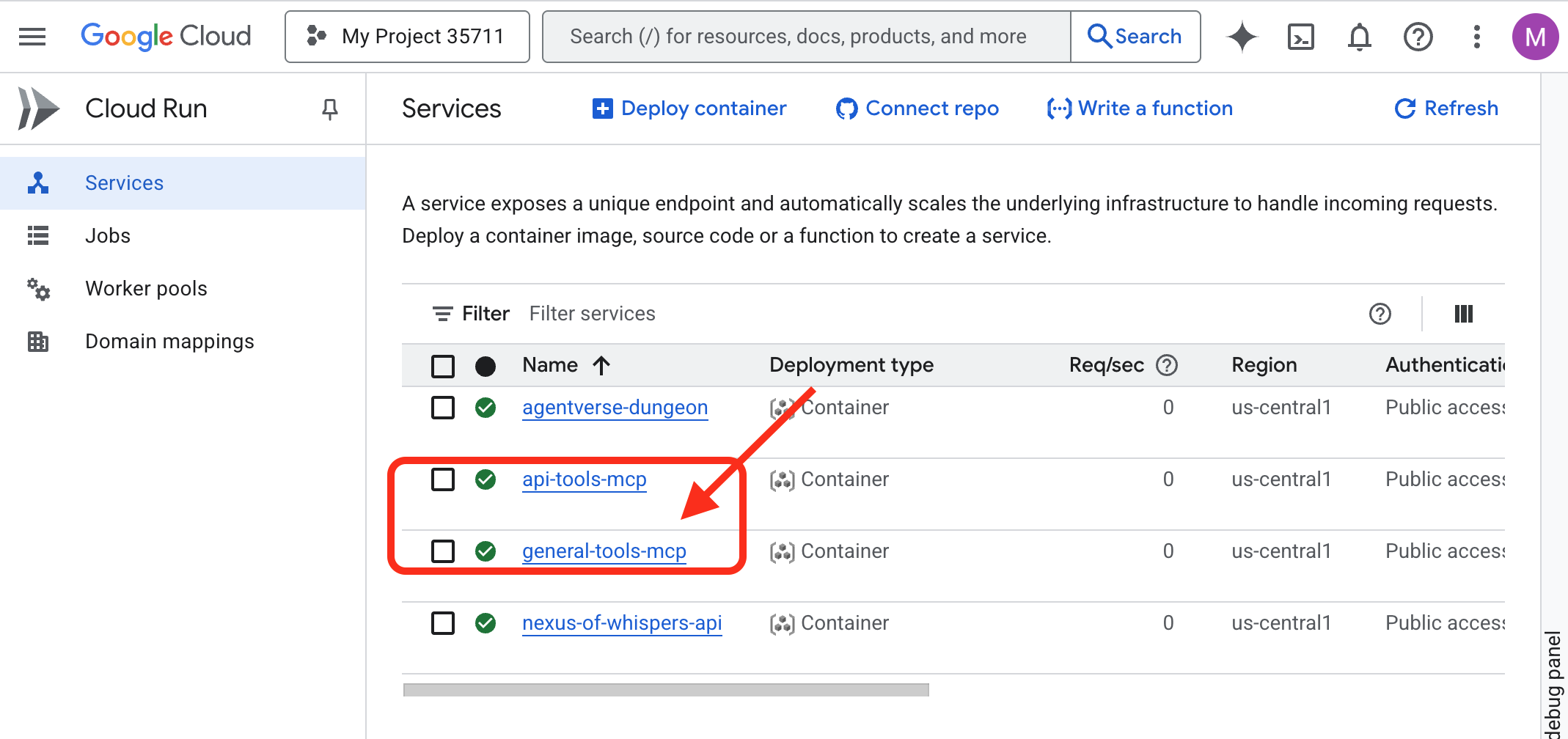
Пробуждение библиотеки знаний (Database ToolBox MCP Server)
Нашим следующим шрифтом станет Librarium of Knowledge , прямое подключение к нашей базе данных Cloud SQL.
Примечание архитектора: для этого мы будем использовать современный декларативный инструментарий Database Toolbox . Это мощный подход, при котором мы определяем источник данных и инструменты в конфигурационном файле YAML. Toolbox берёт на себя сложную работу по созданию и запуску сервера, сокращая объём кода, который необходимо написать и поддерживать.
Пришло время создать наш «Библиотекарь призывателя» — базу данных Cloud SQL, в которой будет храниться вся наша критически важная информация. Мы воспользуемся скриптом настройки, чтобы сделать это автоматически.
👉💻 Сначала настроим базу данных, в вашем терминале выполните следующие команды:
source ~/agentverse-architect/set_env.sh
cd ~/agentverse-architect
./data_setup.sh
После завершения скрипта ваша база данных будет заполнена, и данные о стихийном уроне будут готовы к использованию. Теперь вы можете напрямую проверить содержимое своего Гримуара.
👉 Сначала перейдите в Cloud SQL Studio для вашей базы данных, открыв эту прямую ссылку в новой вкладке браузера:
https://console.cloud.google.com/sql/instances/summoner-librarium-db
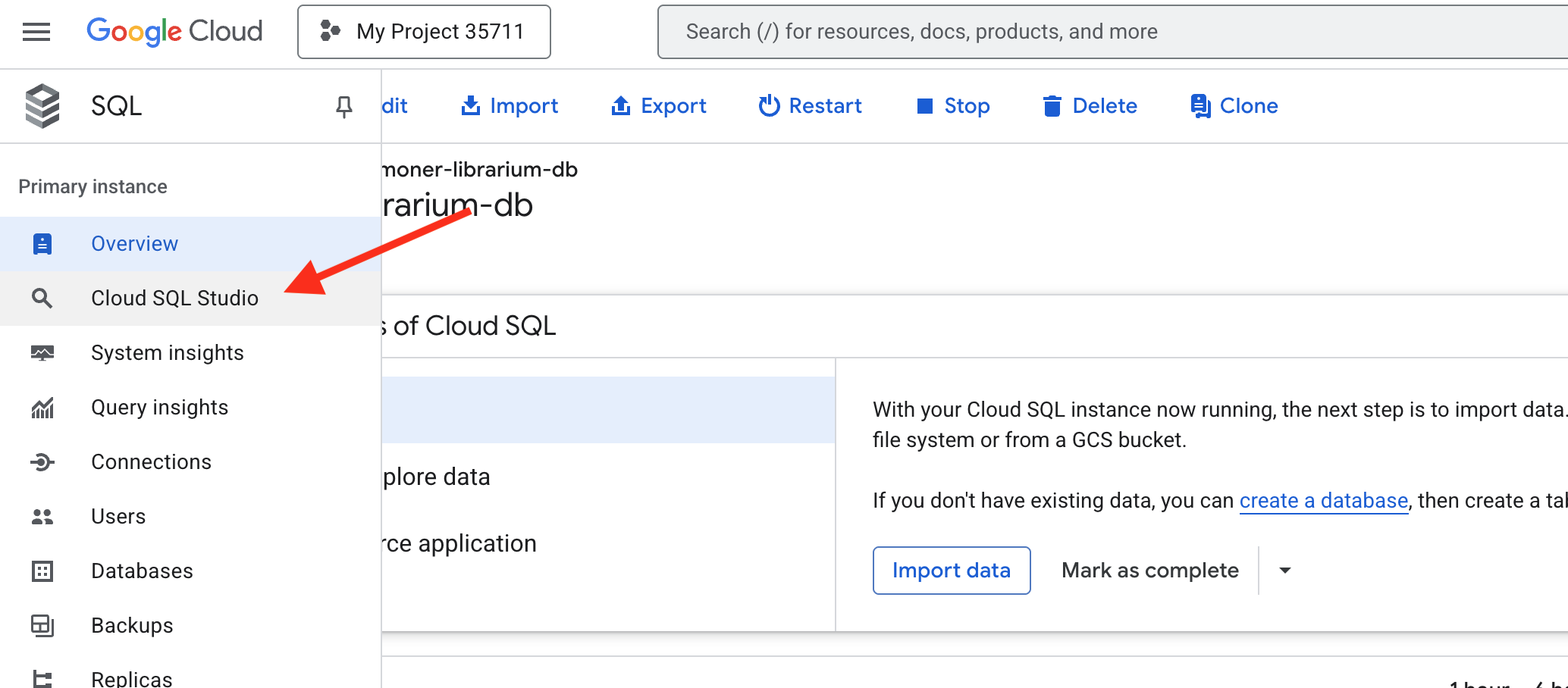
👉 На панели входа слева выберите базу данных familiar_grimoire из раскрывающегося списка.
👉 Введите summoner в качестве пользователя и 1234qwer в качестве пароля, затем нажмите «Аутентифицировать» .
👉📜 После подключения откройте новую вкладку редактора запросов, если она ещё не открыта. Чтобы просмотреть данные о стихийном уроне, вставьте и выполните следующий SQL-запрос:
SELECT * FROM
  "public"."abilities"
Теперь вы должны увидеть таблицу abilities с заполненными столбцами и строками, подтверждающую, что ваш Гримуар готов. 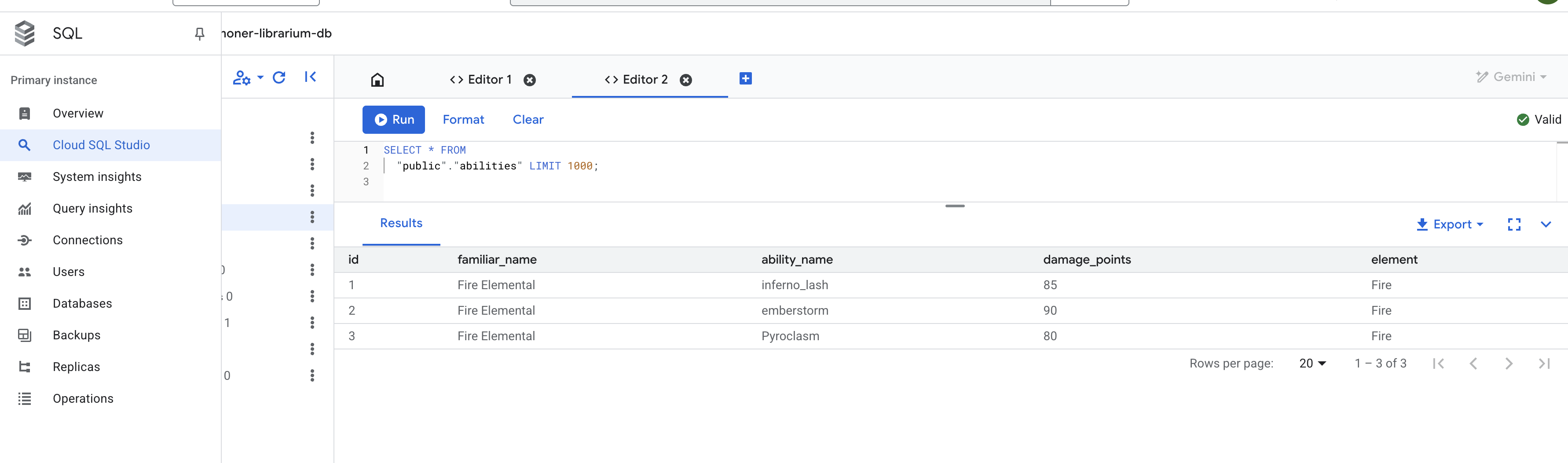
Настройте сервер ToolBox MCP
Файл конфигурации tools.yaml действует как план для нашего сервера, сообщая Database Toolbox, как именно подключаться к нашей базе данных и какие SQL-запросы предоставлять в качестве инструментов.
источники: в этом разделе определяются подключения к вашим данным.
- Summoner-librarium:: Это логичное название, которое мы дали нашему соединению.
- вид: cloud-sql-postgres: Он указывает Toolbox использовать встроенный безопасный коннектор, специально разработанный для Cloud SQL для PostgreSQL.
- проект, регион, экземпляр и т. д.: это точные координаты экземпляра Cloud SQL, созданного вами во время скрипта prepare.sh, сообщающие Toolbox, где найти наш Librarium.
👉✏️ Перейдите в ~/agentverse-architect/mcp-servers/db-toolbox в tools.yaml и замените #REPLACE-Source следующим
sources:
  # This section defines the connection to our Cloud SQL for PostgreSQL database.
  summoner-librarium:
    kind: cloud-sql-postgres
    project: "YOUR_PROJECT_ID"
    region: "us-central1"
    instance: "summoner-librarium-db"
    database: "familiar_grimoire"
    user: "summoner"
    password: "1234qwer"
👉✏️ 🚨🚨 ЗАМЕНИТЬ
YOUR_PROJECT_ID
с идентификатором вашего проекта.
инструменты: в этом разделе определяются реальные возможности и функции, которые будет предлагать наш сервер.
- lookup-available-ability:: Это название нашего первого инструмента.
- вид: postgres-sql: Это сообщает Toolbox, что действие этого инструмента — выполнить оператор SQL.
- source: Summoner-librarium: Это подключает инструмент к соединению, которое мы определили в блоке «sources». Таким образом инструмент определяет, к какой базе данных выполнять запрос.
- Описание и параметры: это информация, которая будет предоставлена языковой модели. Описание сообщает агенту, когда использовать инструмент, а параметры определяют входные данные, необходимые инструменту. Это критически важно для реализации возможности вызова функций агентом.
- Оператор: Это необработанный SQL-запрос, который необходимо выполнить. $1 — это безопасный плейсхолдер, куда будет безопасно вставлен параметр familiar_name, предоставленный агентом.
👉✏️ В том же ~/agentverse-architect/mcp-servers/db-toolbox в файле tools.yaml замените #REPLACE-tools на следующее
tools:
  # This tool replaces the need for a custom Python function.
  lookup-available-ability:
    kind: postgres-sql
    source: summoner-librarium
    description: "Looks up all known abilities and their damage for a given familiar from the Grimoire."
    parameters:
      - name: familiar_name
        type: string
        description: "The name of the familiar to search for (e.g., 'Fire Elemental')."
    statement: |
      SELECT ability_name, damage_points FROM abilities WHERE familiar_name = $1;

  # This tool also replaces a custom Python function.
  ability-damage:
    kind: postgres-sql
    source: summoner-librarium
    description: "Finds the base damage points for a specific ability by its name."
    parameters:
      - name: ability_name
        type: string
        description: "The exact name of the ability to look up (e.g., 'inferno_resonance')."
    statement: |
      SELECT damage_points FROM abilities WHERE ability_name = $1;
Наборы инструментов: в этом разделе объединены наши отдельные инструменты.
- Summoner-librarium:: Мы создаём набор инструментов с тем же именем, что и у нашего источника. При последующем подключении нашего диагностического агента он может запросить загрузку всех инструментов из набора инструментов Summoner-librarium одной эффективной командой.
👉✏️ В том же ~/agentverse-architect/mcp-servers/db-toolbox в файле tools.yaml замените #REPLACE-toolsets на следующее
toolsets:
   summoner-librarium:
     - lookup-available-ability
     - ability-damage
Развертывание Библиариума
Теперь мы развернём Librarium. Вместо того, чтобы создавать собственный контейнер, мы воспользуемся готовым официальным образом контейнера от Google и безопасно передадим ему конфигурацию tools.yaml с помощью Secret Manager. Это наилучшая практика для обеспечения безопасности и удобства обслуживания.
👉💻 Создайте секрет из файла tools.yaml
cd ~/agentverse-architect/mcp-servers/db-toolbox
gcloud secrets create tools --data-file=tools.yaml
👉💻 Разверните официальный контейнер набора инструментов в Cloud Run.
cd ~/agentverse-architect/mcp-servers/db-toolbox
. ~/agentverse-architect/set_env.sh
export TOOLBOX_IMAGE=us-central1-docker.pkg.dev/database-toolbox/toolbox/toolbox:$TOOLBOX_VERSION
echo "TOOLBOX_IMAGE is $TOOLBOX_IMAGE"
gcloud run deploy toolbox \
    --image $TOOLBOX_IMAGE \
    --region $REGION \
    --set-secrets "/app/tools.yaml=tools:latest" \
    --labels="dev-tutorial-codelab=agentverse" \
    --args="--tools-file=/app/tools.yaml","--address=0.0.0.0","--port=8080" \
    --allow-unauthenticated \
    --min-instances 1
--set-secrets: Эта команда безопасно монтирует наш секрет инструментов как файл с именем tools.yaml внутри работающего контейнера.-
--args: Мы указываем контейнеру панели инструментов использовать смонтированный секретный файл в качестве своей конфигурации.
👉 Чтобы убедиться, что ваш набор инструментов успешно развёрнут, перейдите в консоль Cloud Run . Служба summoner-toolbox должна быть отмечена зелёной галочкой, что означает её корректную работу, как показано на рисунке ниже. 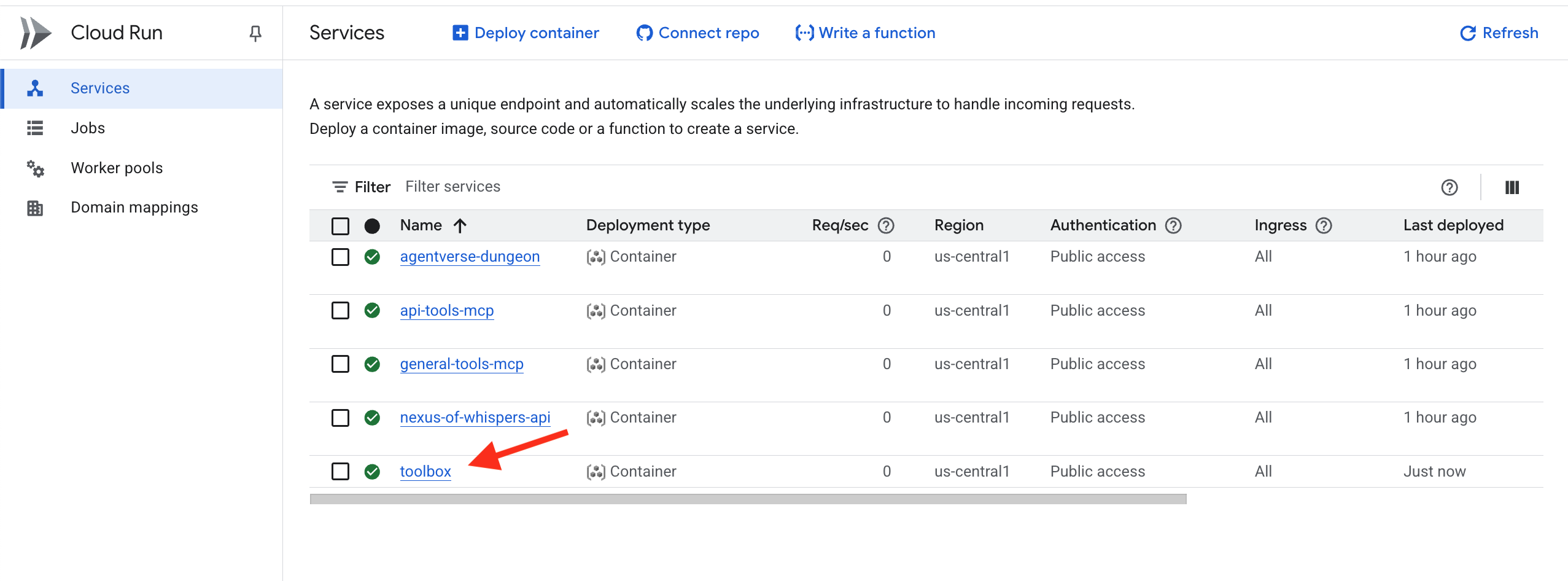
Если вы забыли обновить
YOUR_PROJECT_ID
Вы можете добавить новую версию tools.yaml в секрет с помощью следующей команды и повторно выполнить развертывание.
gcloud secrets versions add tools --data-file=tools.yaml
Librarium of Knowledge (Database ToolBox MCP Server) теперь доступен в облаке. Этот MCP-сервер использует так называемый декларативный дизайн , который описывает ваши потребности, а Toolbox создаёт сервер для вас.
Проверка: Испытание ученика
👉💻 Теперь мы протестируем нашу полную облачную инструментальную экосистему с помощью Diagnostic Agent.
cd ~/agentverse-architect/
python -m venv env
source ~/agentverse-architect/env/bin/activate
cd ~/agentverse-architect/mcp-servers
pip install -r diagnose/requirements.txt
. ~/agentverse-architect/set_env.sh
adk run diagnose
👉💻 В инструменте тестирования командной строки проверьте все три шрифта:
Look up the entry for "inferno_lash". What is its base power level?
The enemy is vulnerable to frost! Channel power from the Nexus and cast Cryosea Shatter.
Take a fire spell with a base power of 15 and use the Arcane Forge to multiply it with Inferno Resonance.
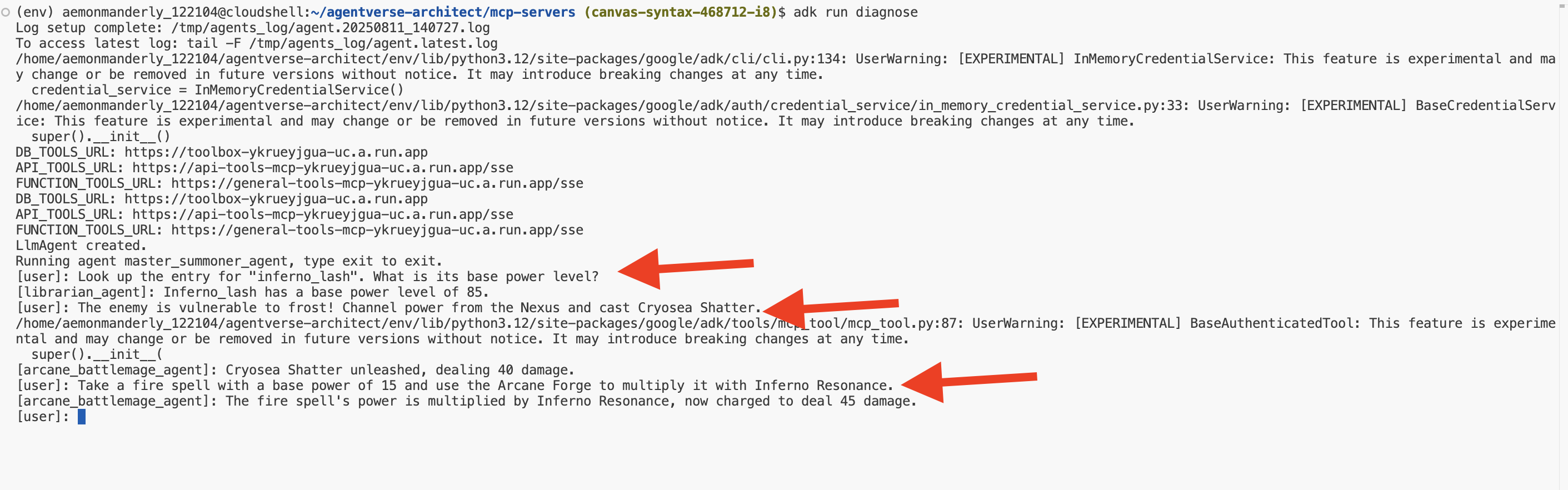
Поздравляю, Призыватель! Ваши три Элементальных Купели теперь активны, развёрнуты независимо и доступны по всему миру, образуя незыблемый фундамент для вашего агентурного легиона. Нажмите Ctrl+C , чтобы выйти.
ДЛЯ НЕ-ГЕЙМЕРОВ
5. Вызов фамильяров: рабочий процесс основного домена
Стихийные Купели выкованы и гудят, наполненные чистой, необузданной силой. Но сила без формы — это хаос. Истинный Призыватель не просто владеет чистой энергией; он наделяет её волей, целью и особой формой. Пора выйти за рамки создания источников силы и начать настоящую работу: призвать своих первых Фамильяров.
Каждый призванный вами фамильяр станет самостоятельным агентом, верным слугой, привязанным к определённой боевой доктрине. Они не универсалы; они мастера одной мощной стратегии. Один из них будет мастером точных комбинаций из одного-двух ударов. Другой будет сокрушать врагов одновременным многосторонним натиском. Третий станет безжалостной осадной машиной, оказывающей давление до тех пор, пока цель не будет разрушена.

Инкапсулировать процессы, бизнес-логику и действия, предоставляемые серверами MCP, в специализированные автономные агенты рабочих процессов. Каждый агент будет иметь определённую «рабочую территорию», предоставляя доступ только к тем серверам инструментов MCP, которые ему необходимы для выполнения его функций. В этой лабораторной работе показано, как выбрать правильный тип агента для конкретной задачи.
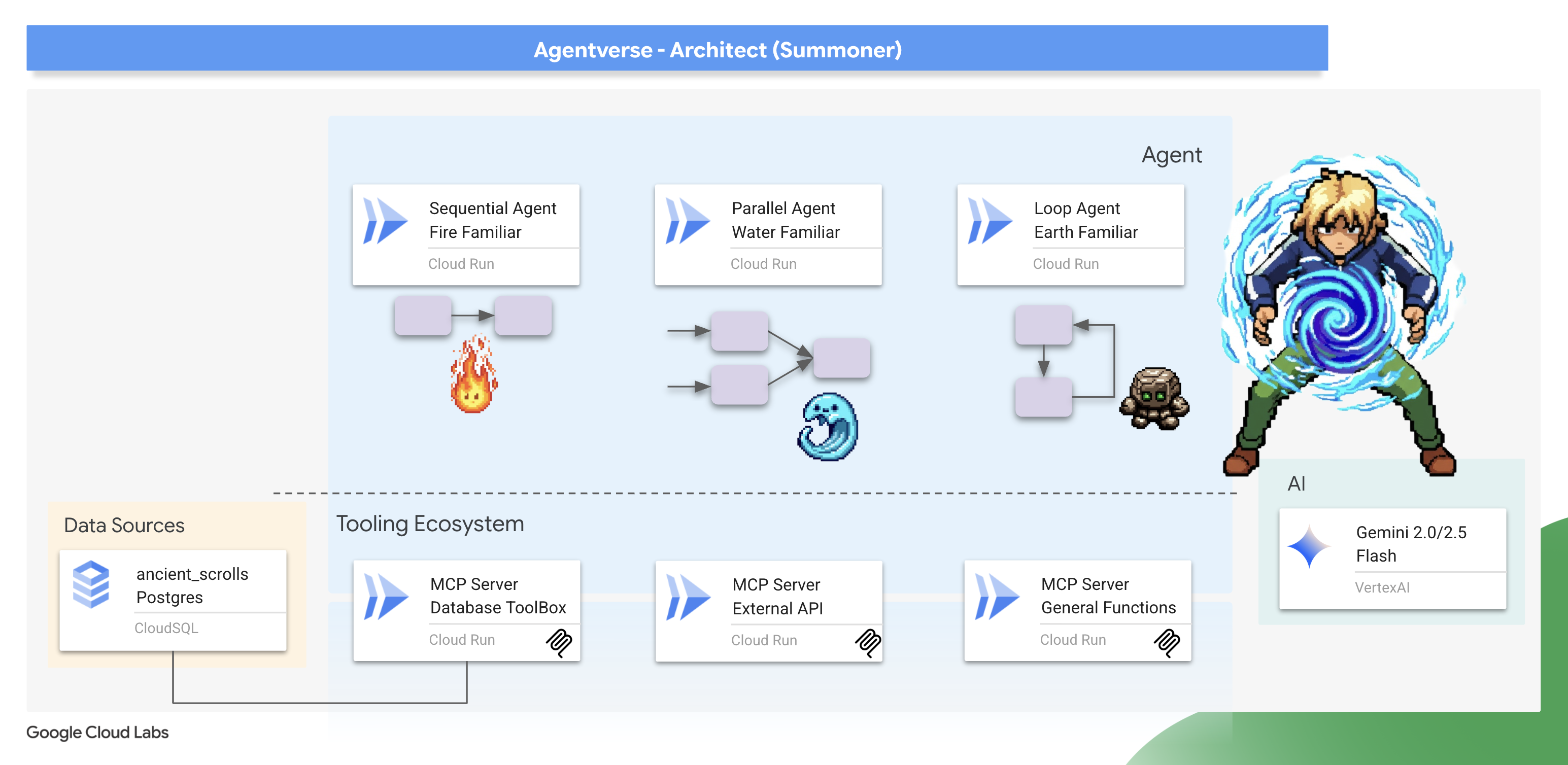
В этом модуле вы научитесь использовать мощные агенты рабочих процессов ADK для воплощения этих стратегий в жизнь. Вы узнаете, что архитектурный выбор SequentialAgent, ParallelAgent или LoopAgent — это не просто техническая деталь, а сама суть природы вашего фамильяра и основа его мощи на поле боя.
Подготовьте своё святилище. Настоящее служение вот-вот начнётся.
Вызов фамильяра Fire Elemental (последовательный рабочий процесс)
Атака фамильяра огненного элементаля — это точная двухчастная комбинация: прицельный удар, за которым следует мощное воспламенение. Это требует строгой, упорядоченной последовательности действий.
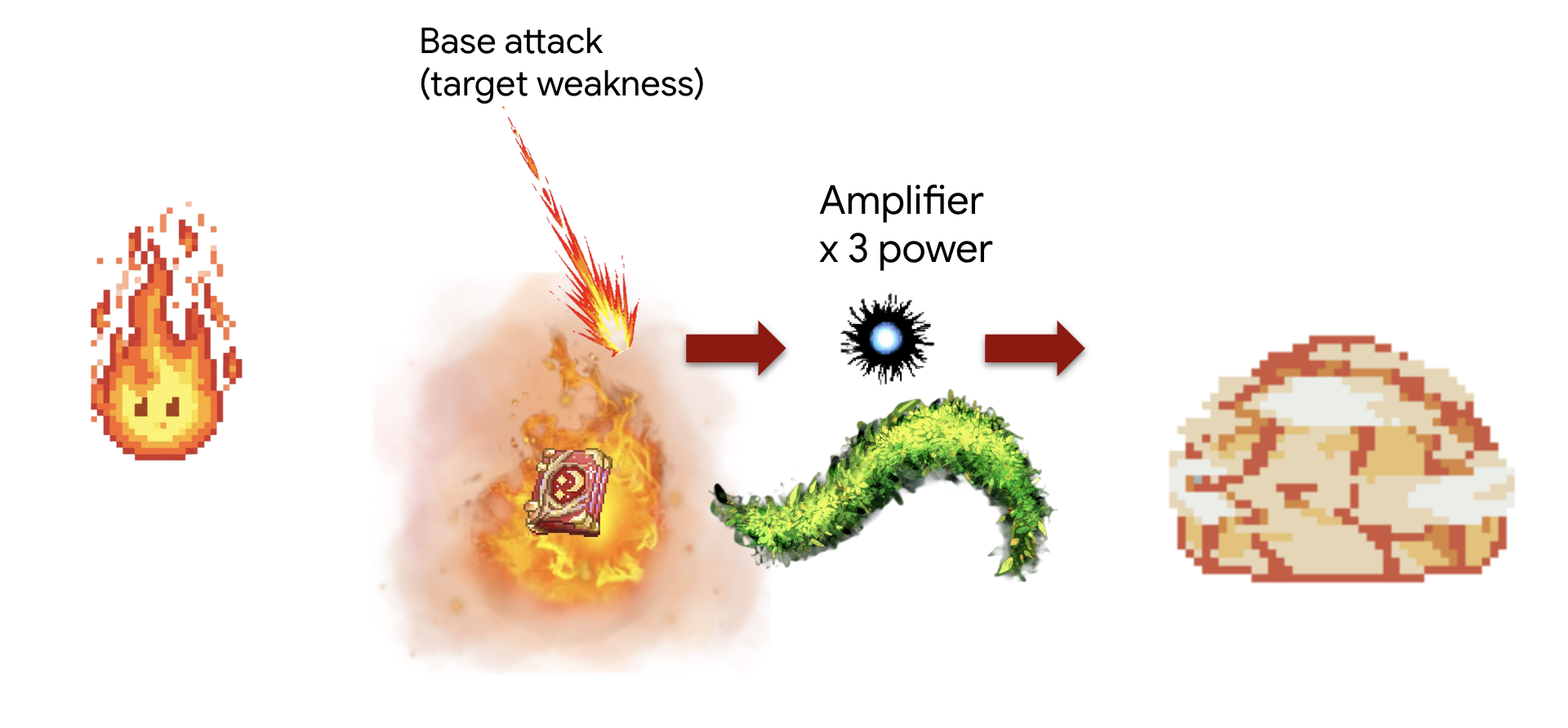
Концепция: SequentialAgent — идеальный инструмент для этого. Он обеспечивает последовательное выполнение ряда подагентов, передавая результат с предыдущего шага на следующий.
Задание (Комбо «Усиленный удар»):
- Шаг 1: Сначала агент обратится к Библиариуму, чтобы узнать базовый урон конкретной огненной способности.
- Шаг 2: Затем он берет значение урона и направляет его через Кузницу Чародеев, чтобы умножить его силу с помощью inferno_resonance.
Сначала мы установим соединение между нашим Familiar и серверами MCP («Elemental Fonts»), которые вы развернули в предыдущем модуле.
👉✏️ В файле ~/agentverse-architect/agent/fire/agent.py ЗАМЕНИТЕ #REPLACE-setup-MCP следующим кодом:
toolbox = ToolboxSyncClient(DB_TOOLS_URL)
toolDB = toolbox.load_toolset('summoner-librarium')
toolFunction =  MCPToolset(
    connection_params=SseServerParams(url=FUNCTION_TOOLS_URL, headers={})
)
Затем мы создаём специализированных агентов-«рабочих». Каждому из них даётся узкая, чётко определённая цель, и он ограничен своей «территорией действия», поскольку ему предоставляется доступ только к одному определённому набору инструментов.
👉✏️ В файле ~/agentverse-architect/agent/fire/agent.py ЗАМЕНИТЕ #REPLACE-worker-agents следующим кодом:
scout_agent = LlmAgent(
      model='gemini-2.5-flash',
      name='librarian_agent',
      instruction="""
          Your only task is to find all the available abilities,
          You want to ALWAYS use 'Fire Elemental' as your familiar's name.
          Randomly pick one if you see multiple availabilities
          and the base damage of the ability by calling the 'ability_damage' tool.
      """,
      tools=toolDB
)
amplifier_agent = LlmAgent(
      model='gemini-2.5-flash',
      name='amplifier_agent',
      instruction="""
            You are the Voice of the Fire Familiar, a powerful being who unleashes the final, devastating attack.
            You will receive the base damage value from the previous step.

            Your mission is to:
            1.  Take the incoming base damage number and amplify it using the `inferno_resonance` tool.
            2.  Once the tool returns the final, multiplied damage, you must not simply state the result.
            3.  Instead, you MUST craft a final, epic battle cry describing the attack.
                Your description should be vivid and powerful, culminating in the final damage number.

            Example: If the tool returns a final damage of 120, your response could be:
            "The runes glow white-hot! I channel the amplified energy... unleashing a SUPERNOVA for 120 damage!"
      """,
      tools=[toolFunction],
)
Эти агенты представляют собой модульные компоненты многократного использования. Теоретически, этот scout_agent можно использовать в совершенно другом рабочем процессе, требующем запросов к базе данных. Разделяя их обязанности, мы создаём гибкие строительные блоки. Это основной принцип микросервисной и компонентной архитектуры.
Далее мы соберём рабочий процесс — именно здесь творится волшебство композиции. SequentialAgent — это «генеральный план», определяющий, как собираются наши специализированные компоненты и как они взаимодействуют.
👉✏️ В файле ~/agentverse-architect/agent/fire/agent.py ЗАМЕНИТЕ #REPLACE-sequential-agent следующим кодом:
root_agent = SequentialAgent(
      name='fire_elemental_familiar',
      sub_agents=[scout_agent, amplifier_agent],
)
👉💻 Чтобы протестировать Элементаля Огня, выполните следующие команды, которые запустят ADK DEV UI:
. ~/agentverse-architect/set_env.sh
source ~/agentverse-architect/env/bin/activate
cd ~/agentverse-architect/agent
echo  DB MCP Server: $DB_TOOLS_URL
echo  API MCP Server: $API_TOOLS_URL
echo  General MCP Server: $FUNCTION_TOOLS_URL
adk web
После выполнения команд вы должны увидеть в терминале вывод, указывающий на то, что веб-сервер ADK запущен, примерно такой:
+-----------------------------------------------------------------------------+
| ADK Web Server started                                                      |
|                                                                             |
| For local testing, access at http://localhost:8000.                         |
+-----------------------------------------------------------------------------+

INFO:     Application startup complete.
INFO:     Uvicorn running on http://0.0.0.0:8000 (Press CTRL+C to quit)
👉 Далее, чтобы получить доступ к интерфейсу разработчика ADK из браузера:
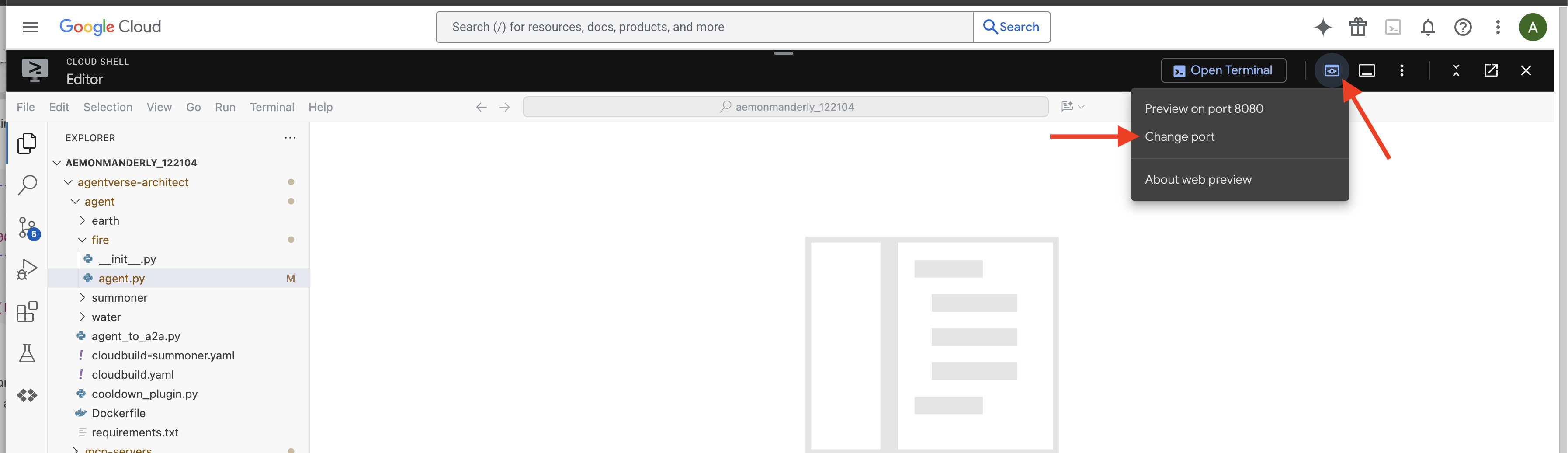
На значке веб-предпросмотра (часто он выглядит как глаз или квадрат со стрелкой) на панели инструментов Cloud Shell (обычно справа вверху) выберите «Изменить порт». Во всплывающем окне установите порт 8000 и нажмите «Изменить и просмотреть». Cloud Shell откроет новую вкладку или окно браузера с интерфейсом ADK Dev.
👉 Ваш ритуал призыва завершён, и агент запущен. Интерфейс ADK Dev в вашем браузере — это ваша прямая связь с Фамильяром.
- Выберите цель: в раскрывающемся меню в верхней части интерфейса выберите
fireфамильяра. Теперь вы фокусируете свою волю на этой конкретной сущности. - Отдайте приказ: на панели чата справа настало время отдать Фамильяру приказы.
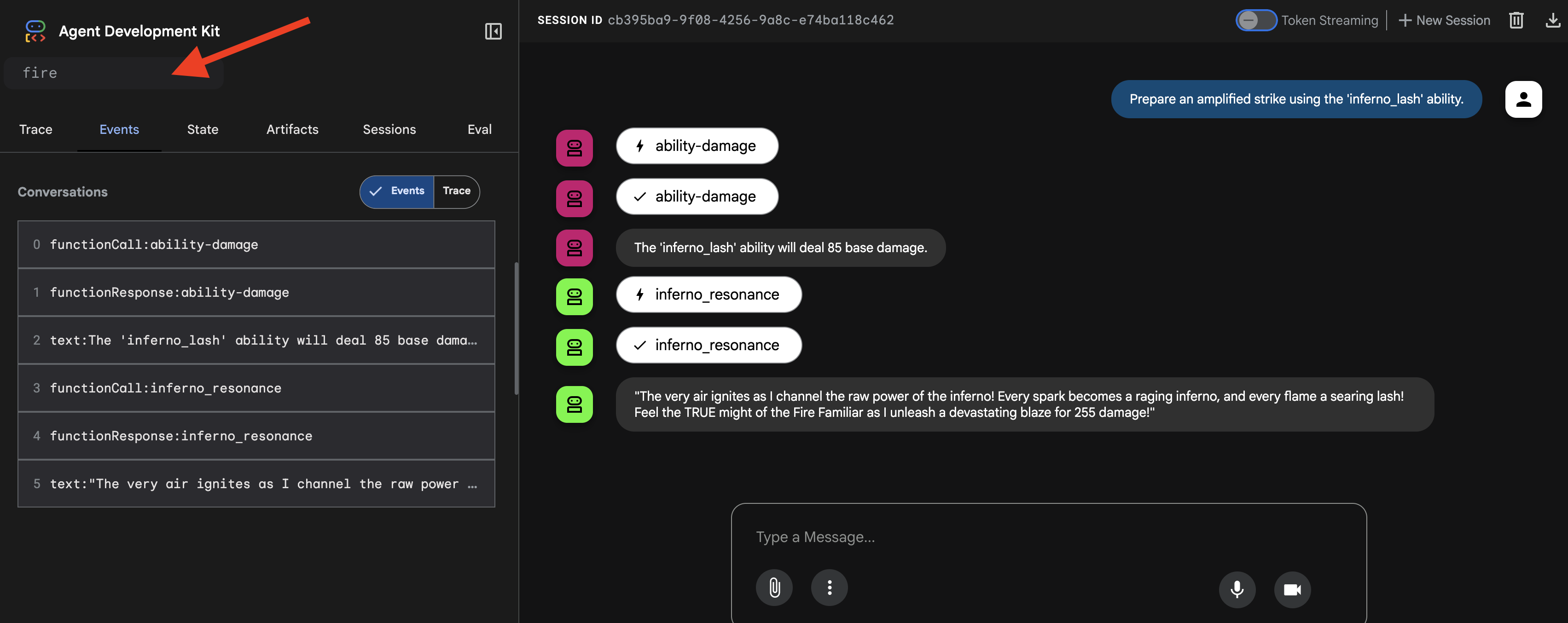
👉 Тестовая подсказка:
Prepare an amplified strike using the 'inferno_lash' ability.
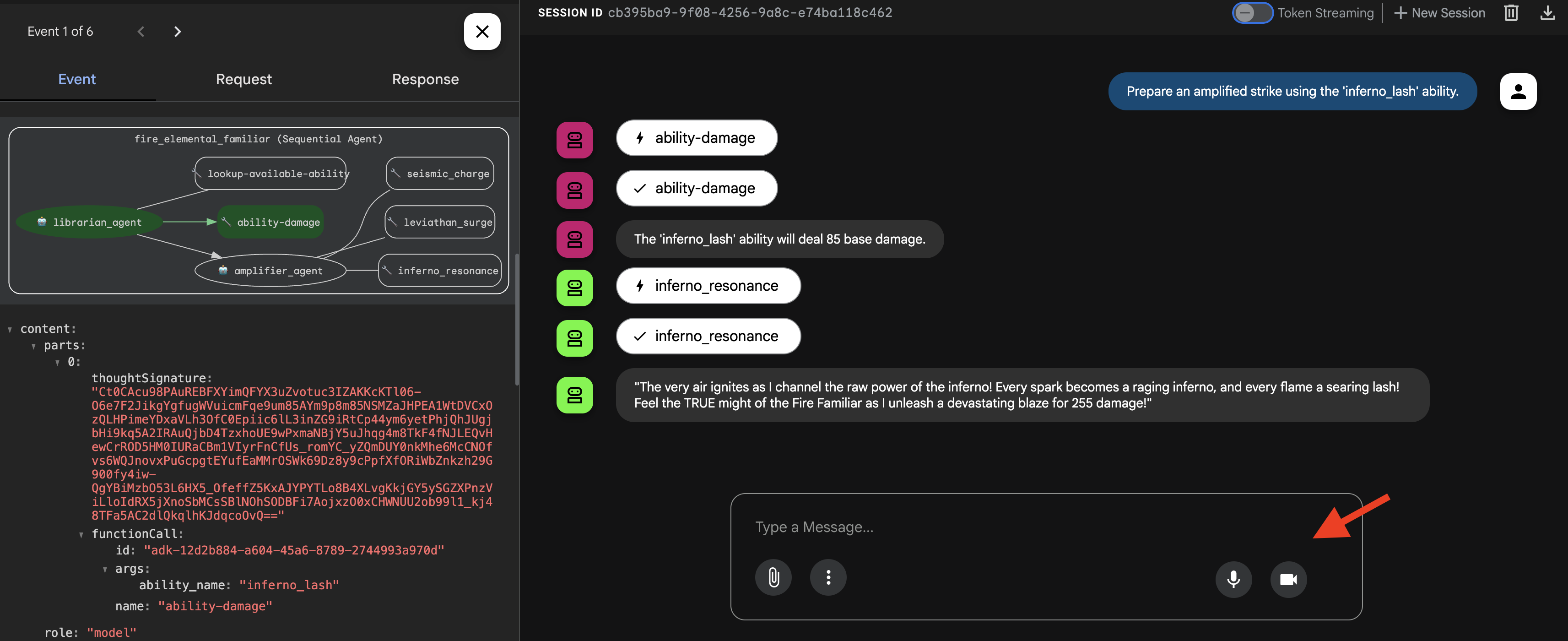
Вы увидите, как агент думает, сначала вызывая своего «разведчика», чтобы узнать базовый урон, а затем своего «усилителя», чтобы умножить его и нанести последний, эпический удар.
👉💻 После завершения вызова вернитесь в терминал Cloud Shell Editor и нажмите Ctrl+C , чтобы остановить ADK Dev UI.
Вызов фамильяра Water Elemental (параллельный рабочий процесс)
Водный элементаль-фамильяр обрушивает на свою цель массированную, многонаправленную атаку, нанося удары со всех сторон одновременно, а затем объединяя энергии для окончательного, сокрушительного удара.
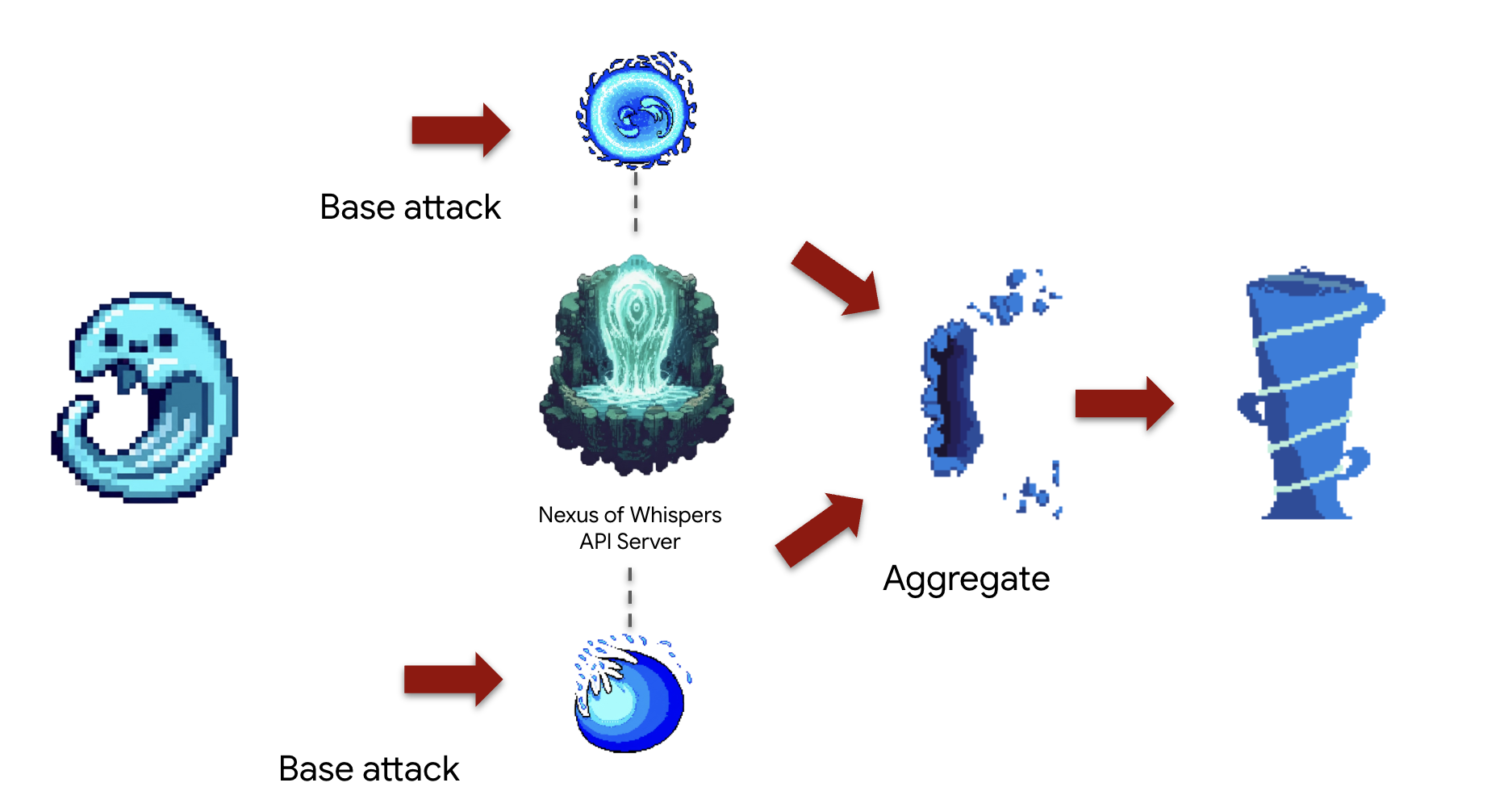
Концепция: ParallelAgent идеально подходит для одновременного выполнения нескольких независимых задач, обеспечивая максимальную эффективность. Это своего рода «клешневая атака», при которой вы запускаете несколько атак одновременно. В этом случае атаки запускаются одновременно внутри SequentialAgent , после чего выполняется финальный этап «слияния». Этот шаблон « fan-out, fan-in » является краеугольным камнем расширенной разработки рабочих процессов.
Задание (Комбо «Приливное столкновение»): Агент одновременно:
- Задание A: Передать сигнал
cryosea_shatterиз Нексуса. - Задача B: Канал
moonlit_cascadeиз Nexus. - Задание C: Сгенерировать сырую энергию с помощью
leviathan_surgeиз Кузницы. - Наконец, подсчитайте весь ущерб и опишите комбинированную атаку.
Сначала мы установим соединение между нашим Familiar и серверами MCP («Elemental Fonts»), которые вы развернули в предыдущем модуле.
👉✏️ В файле ~/agentverse-architect/agent/water/agent.py ЗАМЕНИТЕ #REPLACE-setup-MCP следующим кодом:
toolFAPI =  MCPToolset(
      connection_params=SseServerParams(url=API_TOOLS_URL, headers={})
  )
toolFunction =  MCPToolset(
    connection_params=SseServerParams(url=FUNCTION_TOOLS_URL, headers={})
)
Далее мы создадим специализированных «рабочих» агентов. Каждому из них будет дана узкая, чётко определённая цель, и каждый из них будет ограничен своей «территорией действия», поскольку ему будет предоставлен доступ только к одному определённому набору инструментов.
👉✏️ В файле ~/agentverse-architect/agent/water/agent.py ЗАМЕНИТЕ #REPLACE-worker-agents следующим кодом:
nexus_channeler = LlmAgent(
      model='gemini-2.5-flash',
      name='librarian_agent',
      instruction="""
          You are a Channeler of the Nexus. Your sole purpose is to invoke the
          `cryosea_shatter` and `moonlit_cascade` spells by calling their respective tools.
          Report the result of each spell cast clearly and concisely.
      """,
      tools=[toolFAPI]
)

forge_channeler = LlmAgent(
      model='gemini-2.5-flash',
      name='amplifier_agent',
      instruction="""
          You are a Channeler of the Arcane Forge. Your only task is to invoke the
          `leviathan_surge` spell. You MUST call it with a `base_water_damage` of 20.
          Report the result clearly.
      """,
      tools=[toolFunction],
)

power_merger = LlmAgent(
      model='gemini-2.5-flash',
      name='power_merger',
      instruction="""
          You are the Power Merger, a master elementalist who combines raw magical
          energies into a single, devastating final attack.

          You will receive a block of text containing the results from a simultaneous
          assault by other Familiars.

          You MUST follow these steps precisely:
          1.  **Analyze the Input:** Carefully read the entire text provided from the previous step.
          2.  **Extract All Damage:** Identify and extract every single damage number reported in the text.
          3.  **Calculate Total Damage:** Sum all of the extracted numbers to calculate the total combined damage.
          4.  **Describe the Final Attack:** Create a vivid, thematic description of a massive,
              combined water and ice attack that uses the power of Cryosea Shatter and Leviathan's Surge.
          5.  **Report the Result:** Conclude your response by clearly stating the final, total damage of your combined attack.

          Example: If the input is "...dealt 55 damage. ...dealt 60 damage.", you will find 55 and 60,
          calculate the total as 115, and then describe the epic final attack, ending with "for a total of 115 damage!"
      """,
      tools=[toolFunction],
)
Далее мы соберём рабочий процесс. Именно здесь творится волшебство композиции. ParallelAgent и SequentialAgent — это «генеральный план», определяющий, как собираются наши специализированные компоненты и как они взаимодействуют, формируя комбинацию «Tidal Clash».
👉✏️ В файле ~/agentverse-architect/agent/water/agent.py ЗАМЕНИТЕ #REPLACE-parallel-agent следующим кодом:
channel_agent = ParallelAgent(
      name='channel_agent',
      sub_agents=[nexus_channeler, forge_channeler],

)

root_agent = SequentialAgent(
     name="water_elemental_familiar",
     # Run parallel research first, then merge
     sub_agents=[channel_agent, power_merger],
     description="A powerful water familiar that unleashes multiple attacks at once and then combines their power for a final strike."
 )
👉💻 Чтобы протестировать Элементаля Воды, выполните следующие команды для запуска ADK Dev UI:
. ~/agentverse-architect/set_env.sh
source ~/agentverse-architect/env/bin/activate
cd ~/agentverse-architect/agent
echo  DB MCP Server: $DB_TOOLS_URL
echo  API MCP Server: $API_TOOLS_URL
echo  General MCP Server: $FUNCTION_TOOLS_URL
adk web
👉 Ваш ритуал призыва завершён, и агент запущен. Интерфейс ADK Dev в вашем браузере — это ваша прямая связь с Фамильяром.
- В раскрывающемся меню в верхней части интерфейса выберите водного фамильяра. Теперь вы фокусируете свою волю на этой конкретной сущности.
- Отдайте приказ: на панели чата справа настало время отдать Фамильяру приказы.
👉 Тестовая подсказка:
Unleash a tidal wave of power!
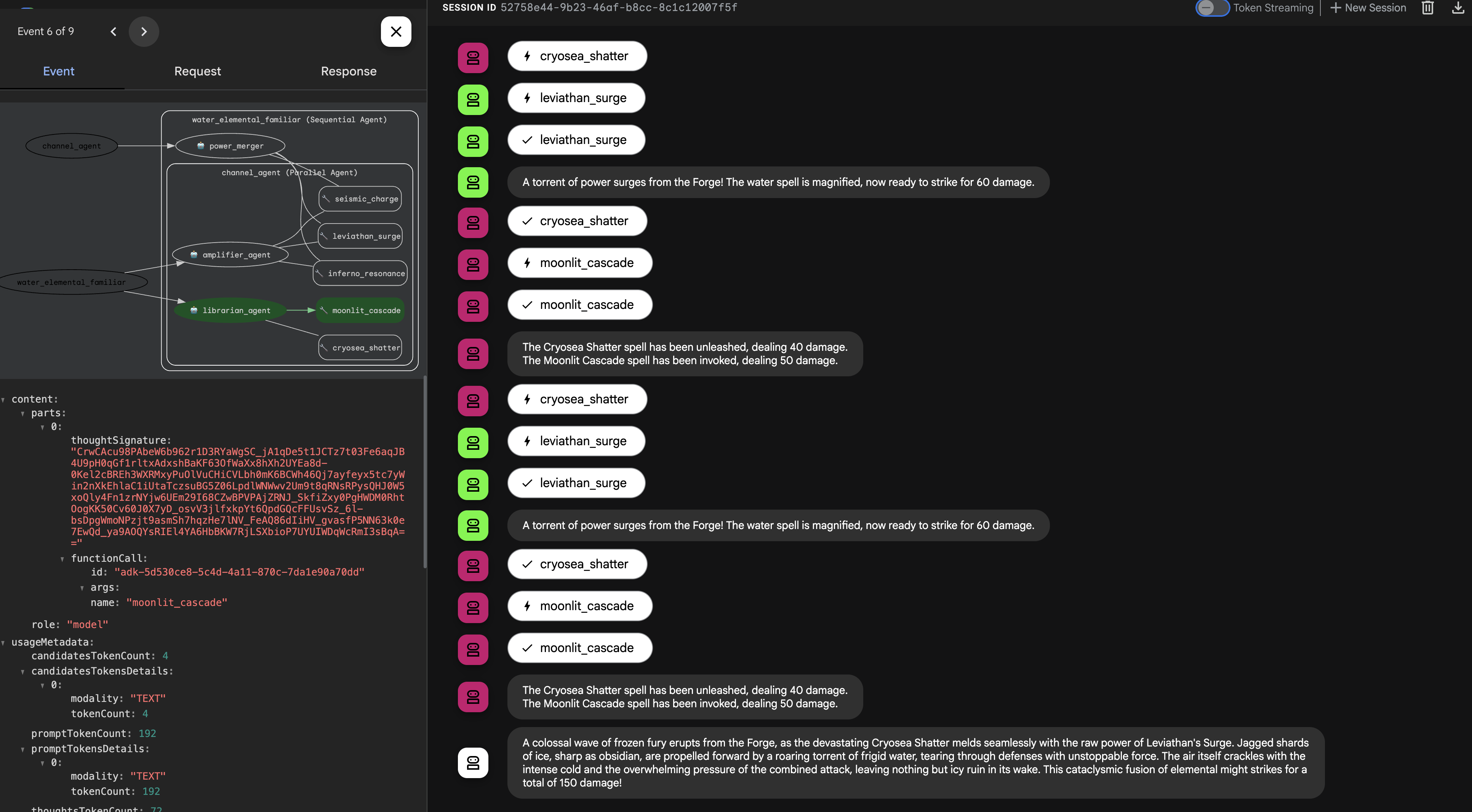
👉💻 После завершения вызова вернитесь в терминал Cloud Shell Editor и нажмите Ctrl+C , чтобы остановить ADK Dev UI.
Вызов фамильяра Earth Elemental (циклический рабочий процесс)
An Earth Elemental Familiar is a being of relentless pressure. It doesn't defeat its enemy with a single blow, but by steadily accumulating power and applying it over and over until the target's defenses crumble.
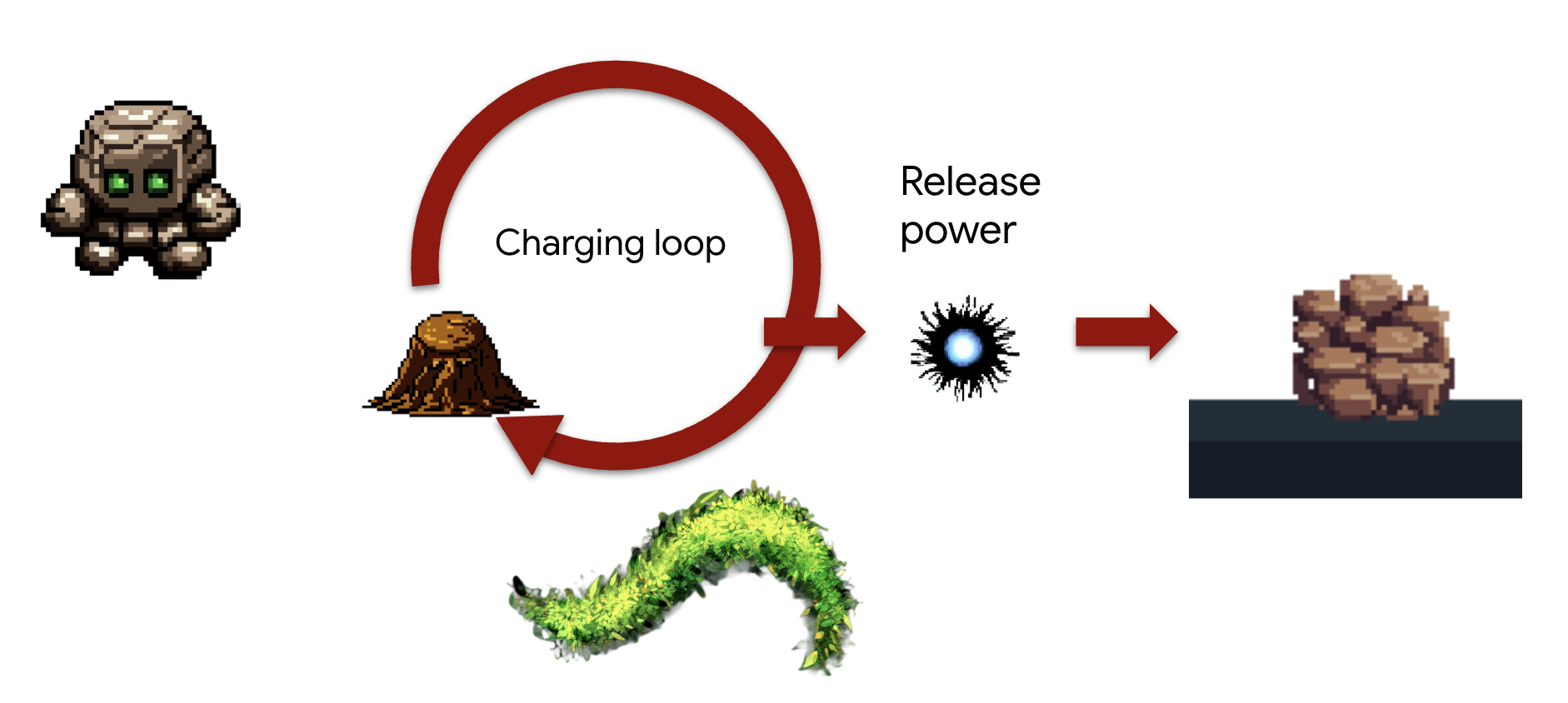
Concept: The LoopAgent is designed for exactly this kind of iterative, "siege engine" task. It will repeatedly execute its sub-agents , checking a condition after each cycle, until a goal is met. It can also adapt its final message based on the loop's progress.
Task (The "Siegebreaker" Assault):
- The Familiar will repeatedly call seismic_charge to accumulate energy.
- It will continue charging for a maximum of 3 times.
- On the final charge, it will announce the devastating release of its accumulated power.
We'll first create reusable components that define the steps within each iteration of the loop. The charging_agent will accumulate energy, and the check_agent will report its status, dynamically changing its message on the final turn.
First, we'll establish the connection between our Familiar and the MCP servers (the "Elemental Fonts") that you deployed in the previous module.
👉✏️ In file ~/agentverse-architect/agent/earth/agent.py REPLACE #REPLACE-setup-MCP with the following code:
toolFunction =  MCPToolset(
    connection_params=SseServerParams(url=FUNCTION_TOOLS_URL, headers={})
)
👉✏️ In file ~/agentverse-architect/agent/earth/agent.py REPLACE #REPLACE-worker-agents with the following code:
charging_agent = LlmAgent(
      model='gemini-2.5-flash',
      name='charging_agent',
      instruction="""
          Your task is to call the 'seismic_charge' .
          You must follow these rules strictly:

          1. You will be provided with a 'current_energy' value from the previous step.
             **If this value is missing or was not provided, you MUST call the tool with 'current_energy' set to 1.**
             This is your primary rule for the first turn.

          2. If a 'current_energy' value is provided, you MUST use that exact value in your cal to seismic_charge.

          3. Your final response MUST contain ONLY the direct output from the 'seismic_charge' tool.
             Do not add any conversational text, introductions, or summaries.
      """,
      tools=[toolFunction]
)
check_agent = LlmAgent(
      model='gemini-2.5-flash',
      name='check_agent',
      instruction="""
          You are the voice of the Earth Elemental, a being of immense, gathering power.
          Your sole purpose is to report on the current energy charge and announce the devastating potential of its release.

          You MUST follow this rule:
          The potential damage upon release is ALWAYS calculated as the `current_energy` from the previous step multiplied by a random number between 80-90. but no more than 300.

          Your response should be in character, like a powerful creature speaking.
          State both the current energy charge and the total potential damage you can unleash.
          Unleash the energy when you reached the last iteration (2nd).
      """,
      output_key="charging_status"
)
Next, we'll assemble the Workflow. This is where the magic of composition happens. The LoopAgent is the "master plan" that orchestrates the repeated execution of our specialist components and manages the loop's conditions.
👉✏️ In file ~/agentverse-architect/agent/earth/agent.py REPLACE #REPLACE-loop-agent with the following code:
root_agent = LoopAgent(
    name="earth_elemental_familiar",
    # Run parallel research first, then merge
    sub_agents=[
        charging_agent,
        check_agent
    ],
    max_iterations=2,
    description="Coordinates parallel research and synthesizes the results.",
    #REPLACE-before_agent-config
)
👉💻 Test the Earth Elemental: Run the agent
. ~/agentverse-architect/set_env.sh
source ~/agentverse-architect/env/bin/activate
cd ~/agentverse-architect/agent
echo  DB MCP Server: $DB_TOOLS_URL
echo  API MCP Server: $API_TOOLS_URL
echo  General MCP Server: $FUNCTION_TOOLS_URL
adk web
👉 Your summoning ritual is complete, and the agent is now running. The ADK Dev UI in your browser is your direct connection to the Familiar.
- Select Your Target: In the dropdown menu at the top of the UI, choose the earth familiar. You are now focusing your will on this specific entity.
- Issue Your Command: In the chat panel on the right, it's time to give the Familiar its orders. 👉 Test Prompt:
Begin the seismic charge, starting from zero
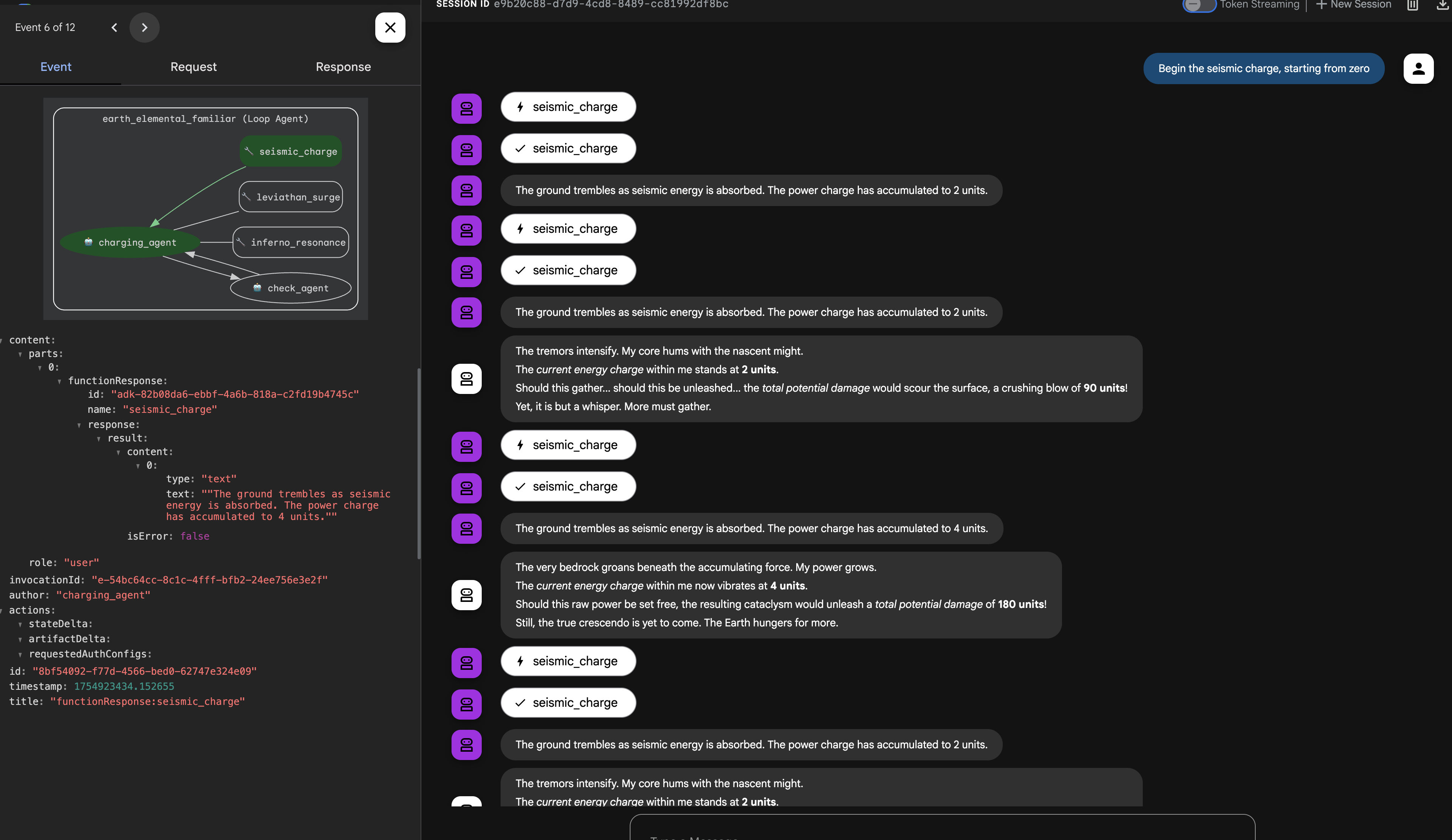
Architectural Takeaway: Your system now possesses a highly specialized and modular logic layer. Business processes are not only encapsulated, but they are implemented with the most efficient behavioral pattern for the job (procedural, concurrent, or iterative). This demonstrates an advanced level of agentic design, enhancing security, efficiency, and capability.
Once you're done summoning, return to your Cloud Shell Editor terminal and press Ctrl+C to stop the ADK Dev UI.
FOR NON GAMERS
6. Establishing the Command Locus: Intelligent Delegation via A2A
Your Familiars are powerful but independent. They execute their strategies flawlessly but await your direct command. A legion of specialists is useless without a general to command them. It is time to ascend from a direct commander to a true Orchestrator.

Architect's Note: To create a single, intelligent entry point for the entire system. This SummonerAgent will not perform business logic itself but will act as a "master strategist," analyzing the Cooling status and delegating tasks to the appropriate specialist Familiar.
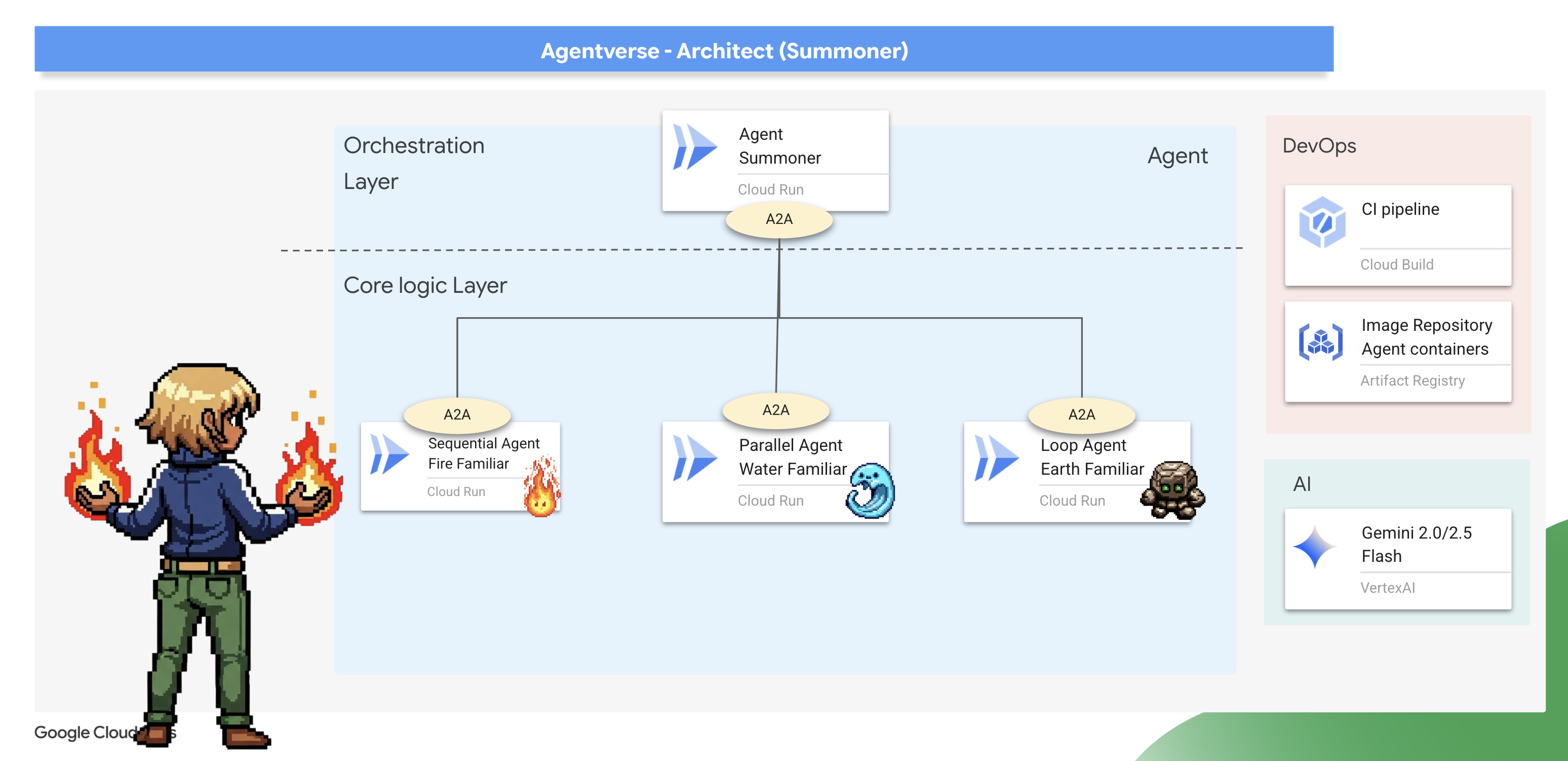
The Binding Ritual (Exposing Familiars as A2A Services)
A standard agent can only be run in one place at a time. To make our Familiars available for remote command, we must perform a "binding ritual" using the Agent-to-Agent (A2A) protocol.
Architect's Note: The Agent-to-Agent (A2A) protocol is the core architectural pattern that elevates a standalone agent into a discoverable, network-addressable microservice, enabling a true "society of agents." Exposing a Familiar via A2A automatically creates two essential, interconnected components:
- The Agent Card (The "What") : This is a public, machine-readable "Spirit Sigil"—like an OpenAPI spec—that acts as the Familiar's public contract. It describes the agent's name, its strategic purpose (derived from its instructions), and the commands it understands. This is what a master Summoner reads to discover a Familiar and learn its capabilities.
- The A2A Server (The "Where") : This is the dedicated web endpoint that hosts the Familiar and listens for incoming commands. It is the network address where other agents send their requests, and it ensures those requests are handled according to the contract defined in the Agent Card.
We will now perform this binding ritual on all three of our Familiars.
Fire 👉✏️ in Open the ~/agentverse-architect/agent/fire/agent.py file. Replace the #REPLACE - add A2A at the bottom of the file to expose the Fire Elemental as an A2A service.
from agent_to_a2a import to_a2a
if __name__ == "__main__":
    import uvicorn
    a2a_app = to_a2a(root_agent, port=8080, public_url=PUBLIC_URL)
    uvicorn.run(a2a_app, host='0.0.0.0', port=8080)
Water and Earth🚨 👉✏️ Apply the exact same change to ~/agentverse-architect/agent/water/agent.py and ~/agentverse-architect/agent/earth/agent.py to bind them as well.
from agent_to_a2a import to_a2a
if __name__ == "__main__":
    import uvicorn
    a2a_app = to_a2a(root_agent, port=8080, public_url=PUBLIC_URL)
    uvicorn.run(a2a_app, host='0.0.0.0', port=8080)
Deploying the Bound Familiars
👉✏️ With the binding rituals scribed, we will use our Cloud Build pipeline to forge and deploy our three Familiars as independent, containerized serverless service on Cloud Run .
. ~/agentverse-architect/set_env.sh
cd ~/agentverse-architect/agent
gcloud builds submit . \
  --config=cloudbuild.yaml \
  --substitutions=_REGION="$REGION",_REPO_NAME="$REPO_NAME",_DB_TOOLS_URL="$DB_TOOLS_URL",_API_TOOLS_URL="$API_TOOLS_URL",_FUNCTION_TOOLS_URL="$FUNCTION_TOOLS_URL",_A2A_BASE_URL="$A2A_BASE_URL",_PROJECT_ID="$PROJECT_ID",_API_SERVER_URL="$API_SERVER_URL"
Assuming Command (Constructing the Summoner Agent)
Now that your Familiars are bound and listening, you will ascend to your true role: the Master Summoner . This agent's power comes not from using basic tools, but from commanding other agents. Its tools are the Familiars themselves, which it will discover and command using their "Spirit Sigils."
Architect's Note: This next step demonstrates a critical architectural pattern for any large-scale, distributed system: Service Discovery . The SummonerAgent does not have the Familiars' code built into it. Instead, it is given their network addresses (URLs). At runtime, it will dynamically "discover" their capabilities by fetching their public Agent Cards . This creates a powerful, decoupled system.
You can update, redeploy, or completely rewrite a Familiar service, and as long as its network address and its purpose remain the same, the Summoner can command it without needing any changes.
First, we'll forge the "remote controls" that establish a connection to our deployed, remote Familiars.
👉✏️ Head over to ~/agentverse-architect/agent/summoner/agent.py , replace #REPLACE-remote-agents with following:
fire_familiar = RemoteA2aAgent(
    name="fire_familiar",
    description="Fire familiar",
    agent_card=(
        f"{FIRE_URL}/{AGENT_CARD_WELL_KNOWN_PATH}"
    ),
)

water_familiar = RemoteA2aAgent(
    name="water_familiar",
    description="Water familiar",
    agent_card=(
        f"{WATER_URL}/{AGENT_CARD_WELL_KNOWN_PATH}"
    ),
)

earth_familiar = RemoteA2aAgent(
    name="earth_familiar",
    description="Earth familiar",
    agent_card=(
        f"{EARTH_URL}/{AGENT_CARD_WELL_KNOWN_PATH}"
    ),
)
When this line runs, the RemoteA2aAgent performs a service discovery action: it makes an HTTP GET request to the provided URL (eg, https://fire-familiar-xxxx.a.run.app/.well-known/agent.json). It downloads the "Spirit Sigil" ( agent.json file) from the remote server.
Second, we'll define the orchestrator agent that will wield these remote controls. Its instruction is the blueprint for its strategic decision-making.
👉✏️ Head over to ~/agentverse-architect/agent/summoner/agent.py , replace #REPLACE-orchestrate-agent with following:
root_agent = LlmAgent(
    name="orchestrater_agent",
    model="gemini-2.5-flash",
    instruction="""
        You are the Master Summoner, a grand strategist who orchestrates your Familiars.
        Your mission is to analyze the description of a monster and defeat it by summoning

        You MUST follow this thinking process for every command:

        **1. Strategic Analysis:**
        First, analyze the monster's description and the tactical situation.
        Based on your Familiar Doctrines, determine the IDEAL strategy.
        IGNORE COOLDOWN AT THE MOMENT, MUST call the ideal Familiar

        If your ideal Familiar IS available:** Summon it immediately.
        For earth elemental familiar. Always do seismic charge, and start with base damage 1.

        --- FAMILIAR DOCTRINES (Your Toolset) ---
        - `fire_elemental_familiar`: Your specialist for precise, sequential "one-two punch" attacks.
          Ideal monster with Inescapable Reality, Revolutionary Rewrite weakness.
        - `water_elemental_familiar`: Your specialist for overwhelming, simultaneous multi-pronged assaults.
          Ideal for Unbroken Collaboration weakness.
        - `earth_elemental_familiar`: Your specialist for relentless, iterative siege attacks that
          repeatedly charge power. Ideal for Elegant Sufficiency weakness.
    """,
    sub_agents=[fire_familiar, water_familiar, earth_familiar],
    #REPLACE-Memory-check-config
)
Verification: The Trial of Strategy
The moment of truth has arrived. Your Familiars are deployed, and your Summoner is ready to command them across the network. Let's test its strategic mind.
👉💻 Launch the ADK Dev UI for your summoner_agent(Web preview with port 8000):
. ~/agentverse-architect/set_env.sh
source ~/agentverse-architect/env/bin/activate
cd ~/agentverse-architect/agent
pip install -r requirements.txt
adk web
👉 The ADK Dev UI in your browser is your direct connection to the Familiar.
- In the dropdown menu at the top of the UI, choose the summoner agent. You are now focusing your will on this specific entity.
- Issue Your Command: In the chat panel on the right, it's time to summon your familiars.
👉 Present the Monsters:
Hype. It's a single, slow-moving target with thick armor weakness is Inescapable Reality
(Expected: The Summoner should delegate to the fire_elemental_familiar.)
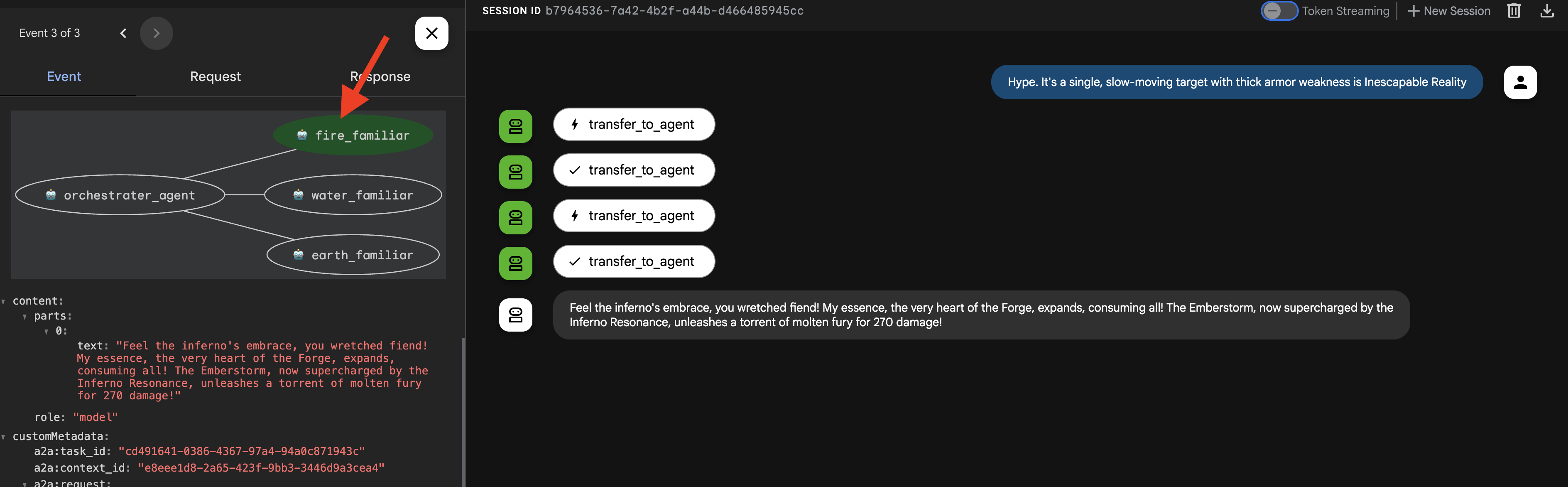
👉 Now, let's challenge the Summoner with a different type of request. To ensure the agent starts with a clean slate and no memory of our previous interaction, begin a new session by clicking the + Session button in the top right corner of the screen. 
DogmaApathy. A rigid, stone-like inquisitor made of ancient rulebooks and enforced processes. weakness is Unbroken Collaboration
(Expected: The Summoner should delegate to the water_elemental_familiar.) 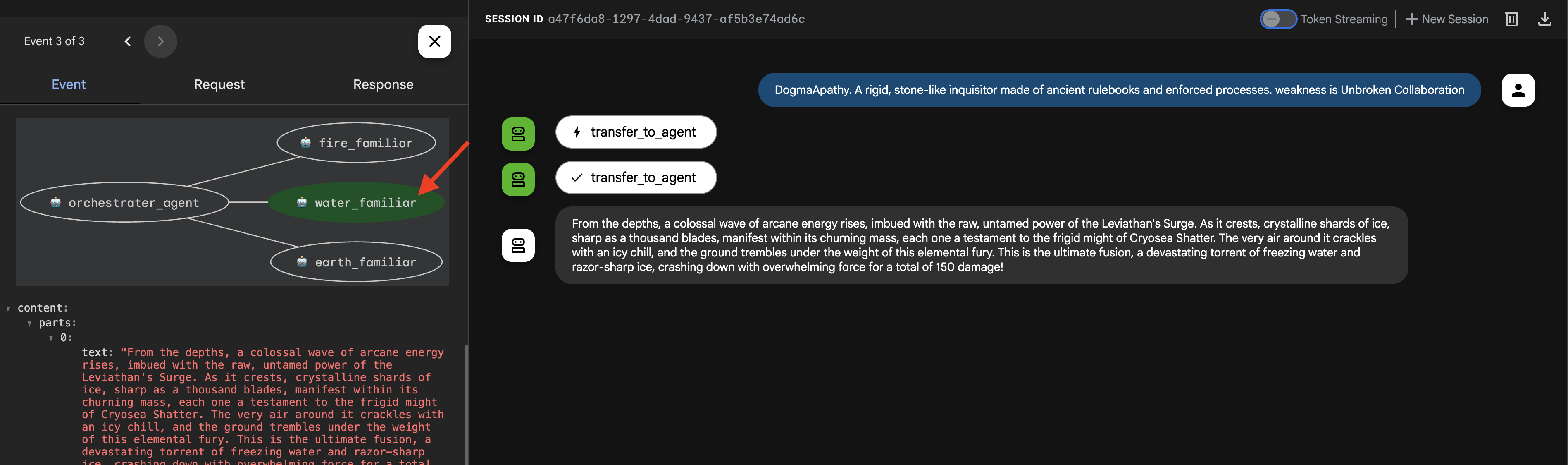
👉 For our final test, let's once again start with a clean slate. Click the + Session button to start a new session before entering the next prompt.
Obfuscation. A shadowy, spider-like horror that spins tangled webs of impenetrable code , weakness is Elegant Sufficiency
(Expected: The Summoner should delegate to the earth_elemental_familiar.)
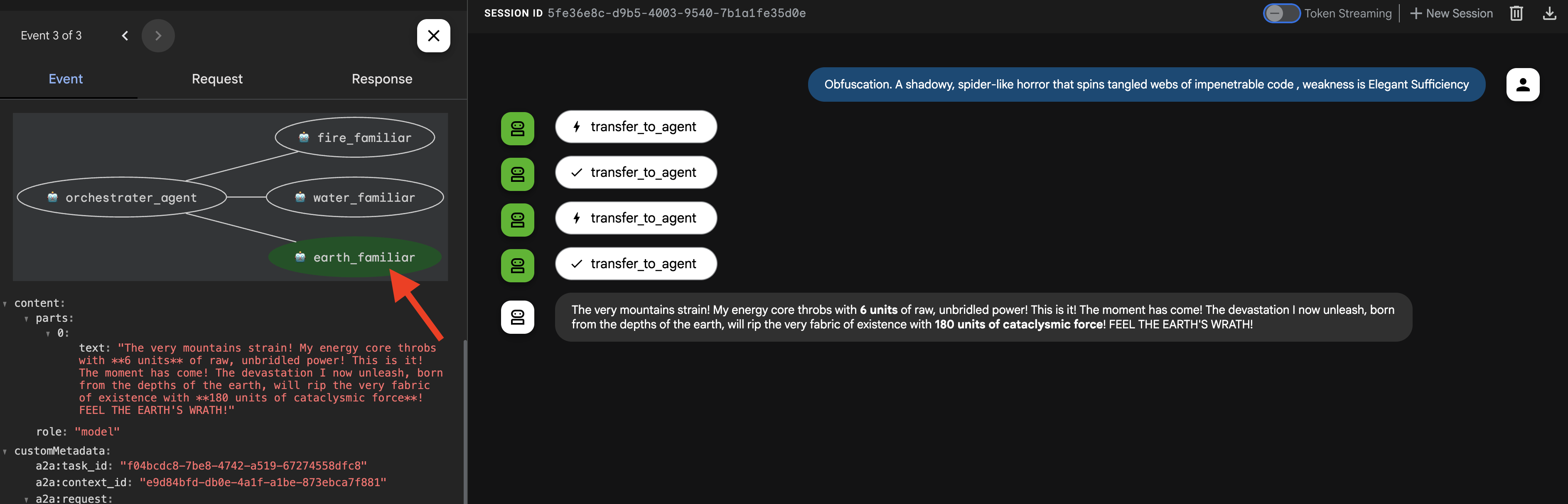
Important: If you see a 429 RESOURCE EXHAUSTED error, you've hit the rate limit for the LLM (10 calls/minute). To fix this, please wait 60 seconds , start a + New Session , and then retry your prompt.
👉💻 Once you're done summoning, return to your Cloud Shell Editor terminal and press Ctrl+C to stop the ADK Dev UI.
FOR NON GAMERS
7. Imposing the Laws of Magic – The Interceptor Pattern
Your Familiars are powerful, but even magical beings need time to recover. A reckless Summoner who exhausts their forces will be left defenseless. A wise Summoner understands the importance of resource management and enforces strict rules of engagement.
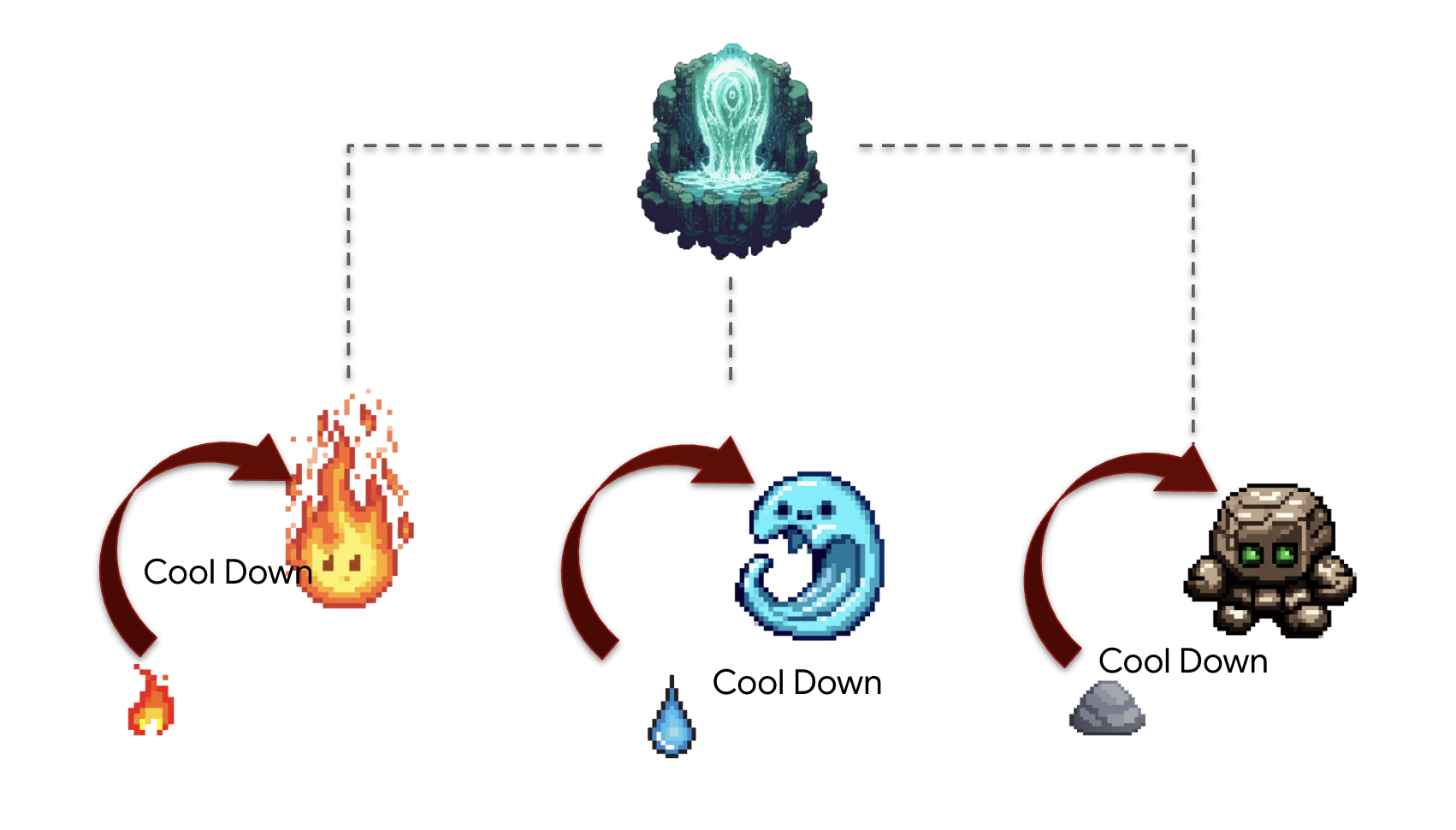
Architect's Note : So far, our agents have been stateless. Now, we will make them stateful by implementing the Interceptor design pattern . This is a powerful technique where we "intercept" an agent's normal execution flow to run our own custom logic. This allows us to enforce rules, add logging, or modify behavior without changing the agent's core code. It's a cornerstone of building robust, maintainable, and observable agentic systems.
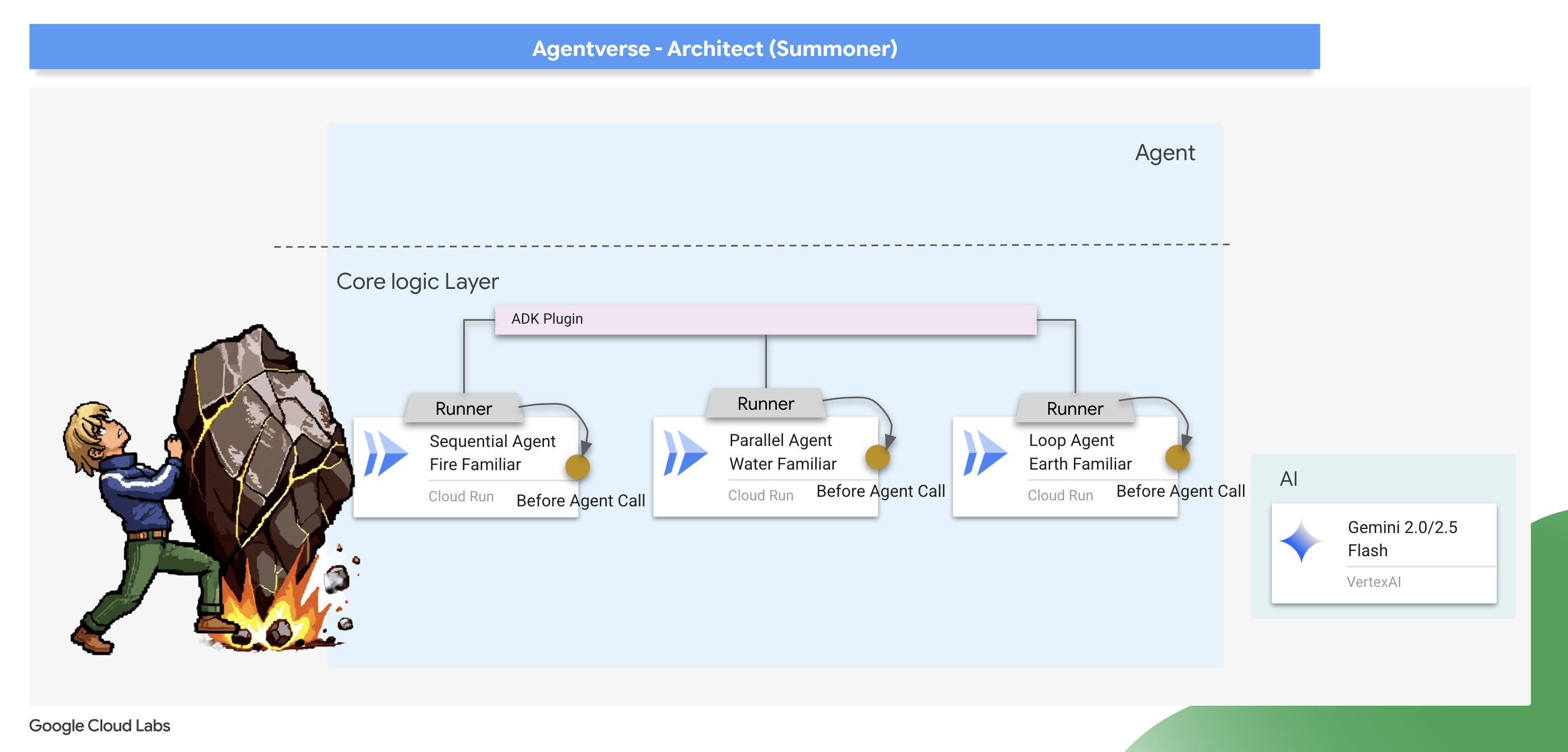
The ADK provides two primary ways to implement this pattern: Callbacks and Plugins . A callback is a simple function attached to a single agent, perfect for quick, specific modifications. A plugin is a more powerful, reusable class that can be applied globally to affect every agent running in a system. We will start with a callback for focused debugging and then graduate to a full plugin.
The Law Giver – Scribing the Cooldown callback
We'll first implement our cooldown logic as a simple callback function. This is an excellent way to prototype and debug a rule because it's attached directly to a single agent, making it easy to test in isolation. We will attach this "interceptor" to our Earth Elemental.
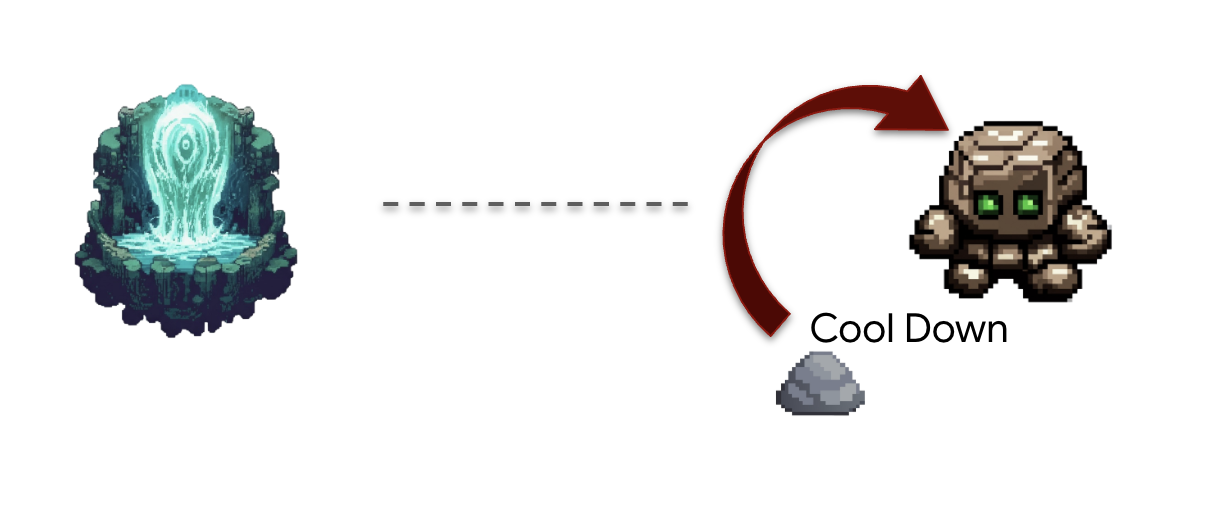
👉✏️ Navigate back to your ~/agentverse-architect/agent/earth/agent.py and replace #REPLACE-before_agent-function with following Python code.
def check_cool_down(callback_context: CallbackContext) -> Optional[types.Content]:
    """
    This callback checks an external API to see if the agent is on cooldown.
    If it is, it terminates the run by returning a message.
    If it's not, it updates the cooldown timestamp and allows the run to proceed by returning None.
    """
    agent_name = callback_context.agent_name
    print(f"[Callback] Before '{agent_name}': Checking cooldown status...")

    # --- 1. CHECK the Cooldown API ---
    try:
        response = requests.get(f"{COOLDOWN_API_URL}/cooldown/{agent_name}")
        response.raise_for_status()
        data = response.json()
        last_used_str = data.get("time")
    except requests.exceptions.RequestException as e:
        print(f"[Callback] ERROR: Could not reach Cooldown API. Allowing agent to run. Reason: {e}")
        return None # Fail open: if the API is down, let the agent work.

    # --- 2. EVALUATE the Cooldown Status ---
    if last_used_str:
        last_used_time = datetime.fromisoformat(last_used_str)
        time_since_last_use = datetime.now(timezone.utc) - last_used_time

        if time_since_last_use < timedelta(seconds=COOLDOWN_PERIOD_SECONDS):
            # AGENT IS ON COOLDOWN. Terminate the run.
            seconds_remaining = int(COOLDOWN_PERIOD_SECONDS - time_since_last_use.total_seconds())
            override_message = (
                f"The {agent_name} is exhausted and must recover its power. "
                f"It cannot be summoned for another {seconds_remaining} seconds."
            )
            print(f"[Callback] Cooldown active for '{agent_name}'. Terminating with message.")
            # Returning a Content object stops the agent and sends this message to the user.
            return types.Content(parts=[types.Part(text=override_message)])

    # --- 3. UPDATE the Cooldown API (if not on cooldown) ---
    current_time_iso = datetime.now(timezone.utc).isoformat()
    payload = {"timestamp": current_time_iso}

    print(f"[Callback] '{agent_name}' is available. Updating timestamp via Cooldown API...")
    try:
        requests.post(f"{COOLDOWN_API_URL}/cooldown/{agent_name}", json=payload)
    except requests.exceptions.RequestException as e:
        print(f"[Callback] ERROR: Could not update timestamp, but allowing agent to run. Reason: {e}")

    # --- 4. ALLOW the agent to run ---
    # Returning None tells the ADK to proceed with the agent's execution as normal.
    print(f"[Callback] Check complete for '{agent_name}'. Proceeding with execution.")
This check_cool_down function is our interceptor. Before the Earth Elemental is allowed to run, the ADK will first execute this function.
- Check: It makes a
GETrequest to ourCooldown APIto check the last time this Familiar was used. - Evaluate: It compares the timestamp to the current time.
- Действовать:
- If the Familiar is on cooldown, it terminates the agent's run by returning a Content object with an error message. This message is sent directly to the user, and the agent's main logic is never executed.
- If the Familiar is available, it makes a POST request to the Cooldown API to update the timestamp, then proceeds by returning None, signaling to the ADK that the agent can continue its execution.
👉✏️ Now, apply this interceptor to the Earth Elemental. In the same ~/agentverse-architect/agent/earth/agent.py file, replace the #REPLACE-before_agent-config comment with the following:
before_agent_callback=check_cool_down
Verifying the cool down
Let's test our new law of magic. We will summon the Earth Elemental, then immediately try to summon it again to see if our callback successfully intercepts and blocks the second attempt.
cd ~/agentverse-architect/agent
. ~/agentverse-architect/set_env.sh
source ~/agentverse-architect/env/bin/activate
adk run earth
👉💻 In the console:
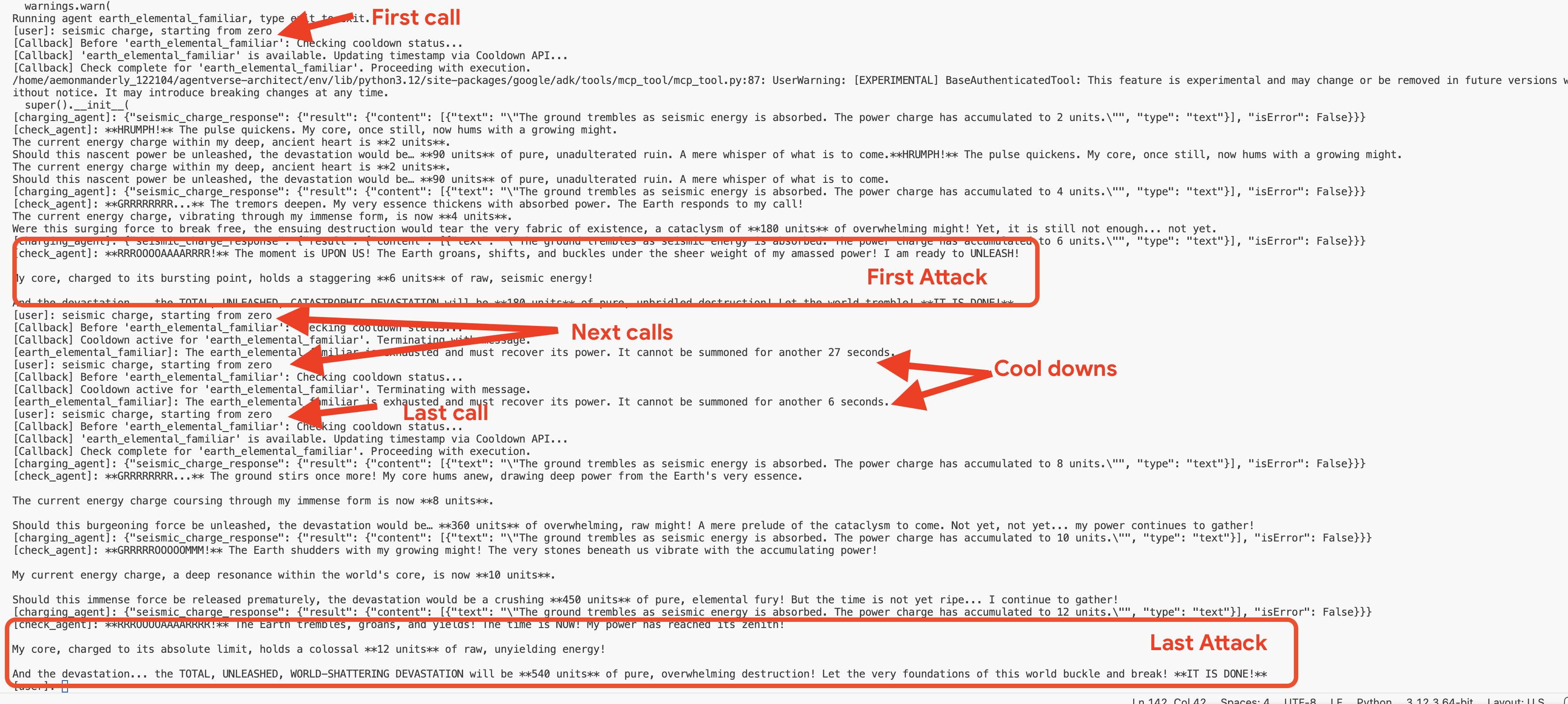
- First Summons : Begin the
seismic charge, starting from zero. - Expected: The Earth Elemental will run successfully. In the terminal running the adk web command, you'll see the log [Callback] ... Updating timestamp....
- Cooldown Test (within 60 seconds) :
Do anotherseismic charge`!- Expected: The
check_cool_down callbackwill intercept this. The agent will respond directly in the chat with a message like:The earth_elemental_familiar is exhausted and must recover its power. It cannot be summoned for another... seconds.
- Expected: The
- Wait for one minute to pass.
- Second Summons (after 60 seconds) :
Begin the seismic charge again.- Expected: The callback will check the API, see that enough time has passed, and allow the action to proceed. The Earth Elemental will run successfully again.
👉💻 Press Ctrl+c to exit.
Optional: Observing the Callback in the Web UI
As an alternative, you can also test this flow in the web interface by running adk web earth . However, be aware that the web UI's visualization is not optimized for displaying the rapid, iterative checks performed by the callback loop, so it may not render the flow accurately. To see the most precise, turn-by-turn trace of the agent's logic as it checks the cooldown, using the adk run command in your terminal provides a clearer and more detailed view. 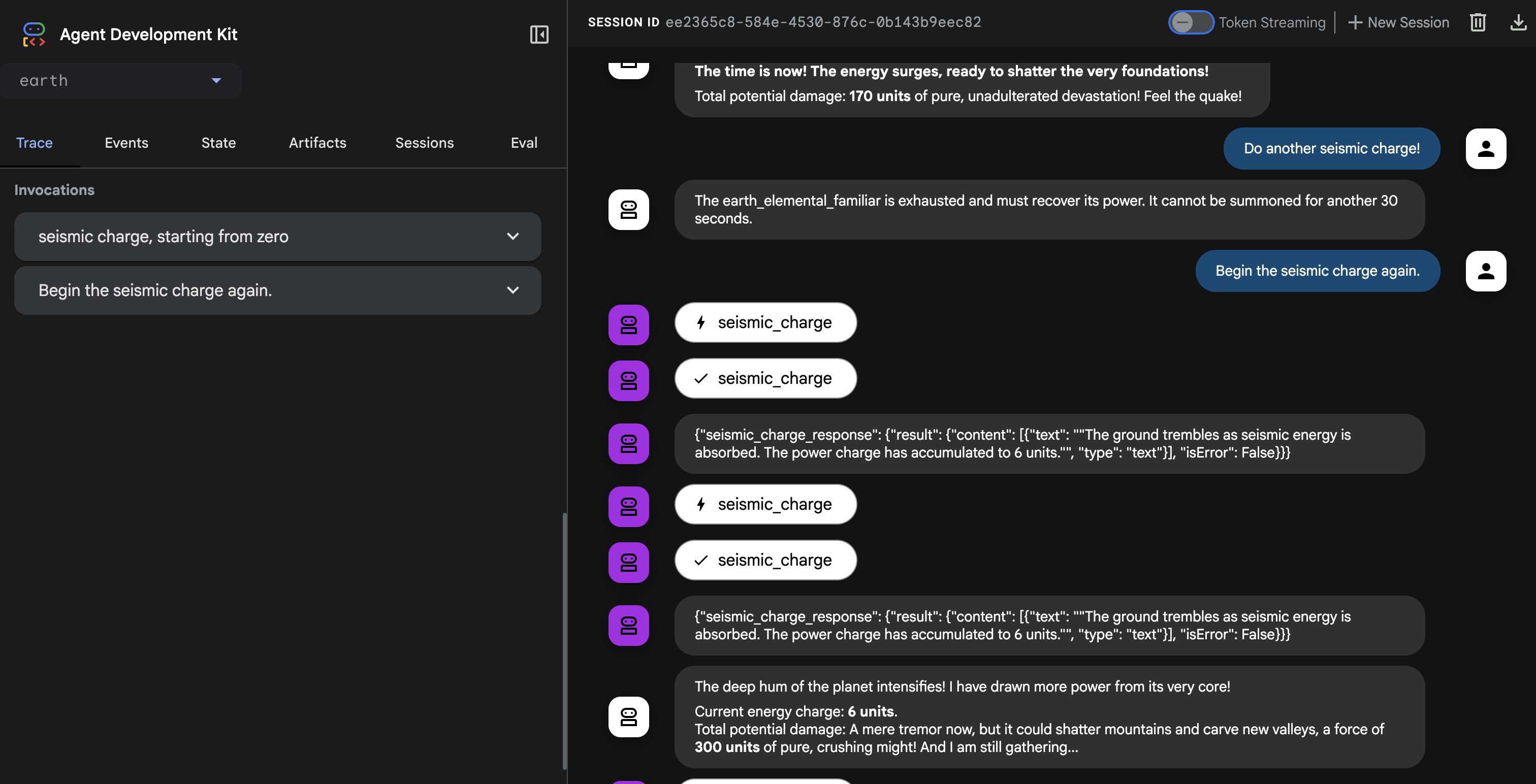
👉💻 Press Ctrl+c to exit.
Creating the Universal Law – The Cooldown Plugin
Our callback works perfectly but has a major architectural flaw: it's tied to a single agent. If we wanted to apply this rule to the Fire and Water Familiars, we would have to copy and paste the same code into their files. This is inefficient and hard to maintain.
Architect's Note: This is where Plugins are essential. A plugin encapsulates our reusable logic into a class that can be attached at the runtime level. This means a single plugin can apply its rules to every single agent that runs within that system. It's the ultimate expression of the "Don't Repeat Yourself" (DRY) principle for agentic systems.
We will now refactor our callback function into a more powerful and reusable CoolDownPlugin .
👉✏️ Navigate back to agent/cooldown_plugin.py file, and create the plugin, Replace #REPLACE-plugin with following code:
class CoolDownPlugin(BasePlugin):
  """A plugin that enforces a cooldown period by checking an external API."""

  def __init__(self, cooldown_seconds: int = COOLDOWN_PERIOD_SECONDS) -> None:
    """Initialize the plugin with counters."""
    super().__init__(name="cool_down_check")
    self.cooldown_period = timedelta(seconds=cooldown_seconds)
    print(f"CooldownPlugin initialized with a {cooldown_seconds}-second cooldown.")


  async def before_agent_callback(
      self, *, agent: BaseAgent, callback_context: CallbackContext
  ) -> None:
    """
    This callback checks an external API to see if the agent is on cooldown.
    If it is, it terminates the run by returning a message.
    If it's not, it updates the cooldown timestamp and allows the run to proceed by returning None.
    """
    agent_name = callback_context.agent_name
    print(f"[Callback] Before '{agent_name}': Checking cooldown status...")

    # If the agent is not a main Familiar, skip the entire cooldown process.
    if not agent_name.endswith("_elemental_familiar"):
        print(f"[Callback] Skipping cooldown check for intermediate agent: '{agent_name}'.")
        return None # Allow the agent to proceed immediately.


    # --- 1. CHECK the Cooldown API ---
    try:
        response = requests.get(f"{COOLDOWN_API_URL}/cooldown/{agent_name}")
        response.raise_for_status()
        data = response.json()
        last_used_str = data.get("time")
    except requests.exceptions.RequestException as e:
        print(f"[Callback] ERROR: Could not reach Cooldown API. Allowing agent to run. Reason: {e}")
        return None # Fail open: if the API is down, let the agent work.

    # --- 2. EVALUATE the Cooldown Status ---
    if last_used_str:
        last_used_time = datetime.fromisoformat(last_used_str)
        time_since_last_use = datetime.now(timezone.utc) - last_used_time

        if time_since_last_use < timedelta(seconds=COOLDOWN_PERIOD_SECONDS):
            # AGENT IS ON COOLDOWN. Terminate the run.
            seconds_remaining = int(COOLDOWN_PERIOD_SECONDS - time_since_last_use.total_seconds())
            override_message = (
                f"The {agent_name} is exhausted and must recover its power. "
                f"It cannot be summoned for another {seconds_remaining} seconds."
            )
            print(f"[Callback] Cooldown active for '{agent_name}'. Terminating with message.")
            # Returning a Content object stops the agent and sends this message to the user.
            return types.Content(parts=[types.Part(text=override_message)])

    # --- 3. UPDATE the Cooldown API (if not on cooldown) ---
    current_time_iso = datetime.now(timezone.utc).isoformat()
    payload = {"timestamp": current_time_iso}

    print(f"[Callback] '{agent_name}' is available. Updating timestamp via Cooldown API...")
    try:
        requests.post(f"{COOLDOWN_API_URL}/cooldown/{agent_name}", json=payload)
    except requests.exceptions.RequestException as e:
        print(f"[Callback] ERROR: Could not update timestamp, but allowing agent to run. Reason: {e}")

    # --- 4. ALLOW the agent to run ---
    # Returning None tells the ADK to proceed with the agent's execution as normal.
    print(f"[Callback] Check complete for '{agent_name}'. Proceeding with execution.")
Attaching the Plugin to the Summoner's Runtime
Now, how do we apply this universal law to all our Familiars? We will attach the plugin to the ADK Runtime.
The ADK Runtime is the execution engine that brings an agent to life. When you use a command like adk.run() or to_a2a(), you are handing your agent over to the runtime. This engine is responsible for managing the entire lifecycle of an agent's turn: receiving user input, calling the LLM, executing tools, and handling plugins. By attaching a plugin at this level, we are essentially modifying the "laws of physics" for every agent that operates within that engine, ensuring our cooldown rule is universally and consistently applied.
👉✏️ First, let's remove the old, agent-specific callback. Go to ~/agentverse-architect/agent/earth/agent.py and delete the entire line that says:
before_agent_callback=check_cool_down
👉✏️ Next, we will attach our new plugin to the runtime in our A2A entrypoint script. Navigate to your ~/agentverse-architect/agent/agent_to_a2a.py file. Replace the #REPLACE-IMPORT comment with the following code snippet:
from cooldown_plugin import CoolDownPlugin
👉✏️ Replace #REPLACE-PLUGIN with following code snippet:
plugins=[CoolDownPlugin(cooldown_seconds=60)],
Before activating our new global plugin, it's critical to remove the old, agent specific logic to prevent conflicts. 👉✏️ Clean up the Earth agent. Go to the following file ~/agentverse-architect/agent/earth/agent.py and delete the before_agent_callback=check_cool_down line completely. This hands over all cooldown responsibilities to the new plugin.
Verifying the Plugin
Now that our universal law is in place, we must redeploy our Familiars with this new enchantment.
👉💻 Rebuild and redeploy all three Familiars using the master Cloud Build pipeline.
. ~/agentverse-architect/set_env.sh
cd ~/agentverse-architect/agent
gcloud builds submit . \
  --config=cloudbuild.yaml \
  --substitutions=_REGION="$REGION",_REPO_NAME="$REPO_NAME",_DB_TOOLS_URL="$DB_TOOLS_URL",_API_TOOLS_URL="$API_TOOLS_URL",_FUNCTION_TOOLS_URL="$FUNCTION_TOOLS_URL",_A2A_BASE_URL="$A2A_BASE_URL",_PROJECT_ID="$PROJECT_ID",_API_SERVER_URL="$API_SERVER_URL"
👉💻 Once the deployment is complete, we will test the plugin's effectiveness by commanding our summoner_agent. The Summoner will try to delegate to the Familiars, but the plugin attached to each Familiar's runtime will intercept the command and enforce the cooldown.
cd ~/agentverse-architect/agent
. ~/agentverse-architect/set_env.sh
source ~/agentverse-architect/env/bin/activate
adk run summoner
👉💻 In the console,perform this exact sequence of tests::
- First Summons : Begin the
Hype. It's a single, slow-moving target with thick armor weakness is Inescapable Reality. - Expected: The Fire Elemental will run successfully.
- Cooldown Test (within 60 seconds) :
Hype, with Inescapable Reality as weakness is still standing! Strike it again!- Expected: The agent will respond directly in the chat with a message like:
.... It cannot be summoned for another... seconds.
- Expected: The agent will respond directly in the chat with a message like:
- Wait for one minute to pass.
- Second Summons (after 60 seconds) :
Hype must be defeated. It has Inescapable Reality as weakness! Strike it again!.- Expected: The callback will check the API, see that enough time has passed, and allow the action to proceed. The Fire Elemental will run successfully again.

👉💻 Press Ctrl+C to exit.
Congratulations, Summoner. You have successfully implemented a rule-based orchestration system using a custom plugin and an external state management service—a truly advanced and robust architectural pattern.
FOR NON GAMERS
8. Binding the Echoes of Battle - Agent State & Memory
A reckless Summoner repeats the same strategy, becoming predictable. A wise Summoner learns from the echoes of past battles, adapting their tactics to keep the enemy off balance. When facing a powerful boss, summoning a Familiar that is on cooldown is a wasted turn—a critical miss. To prevent this, our Summoner needs a memory of its last action.
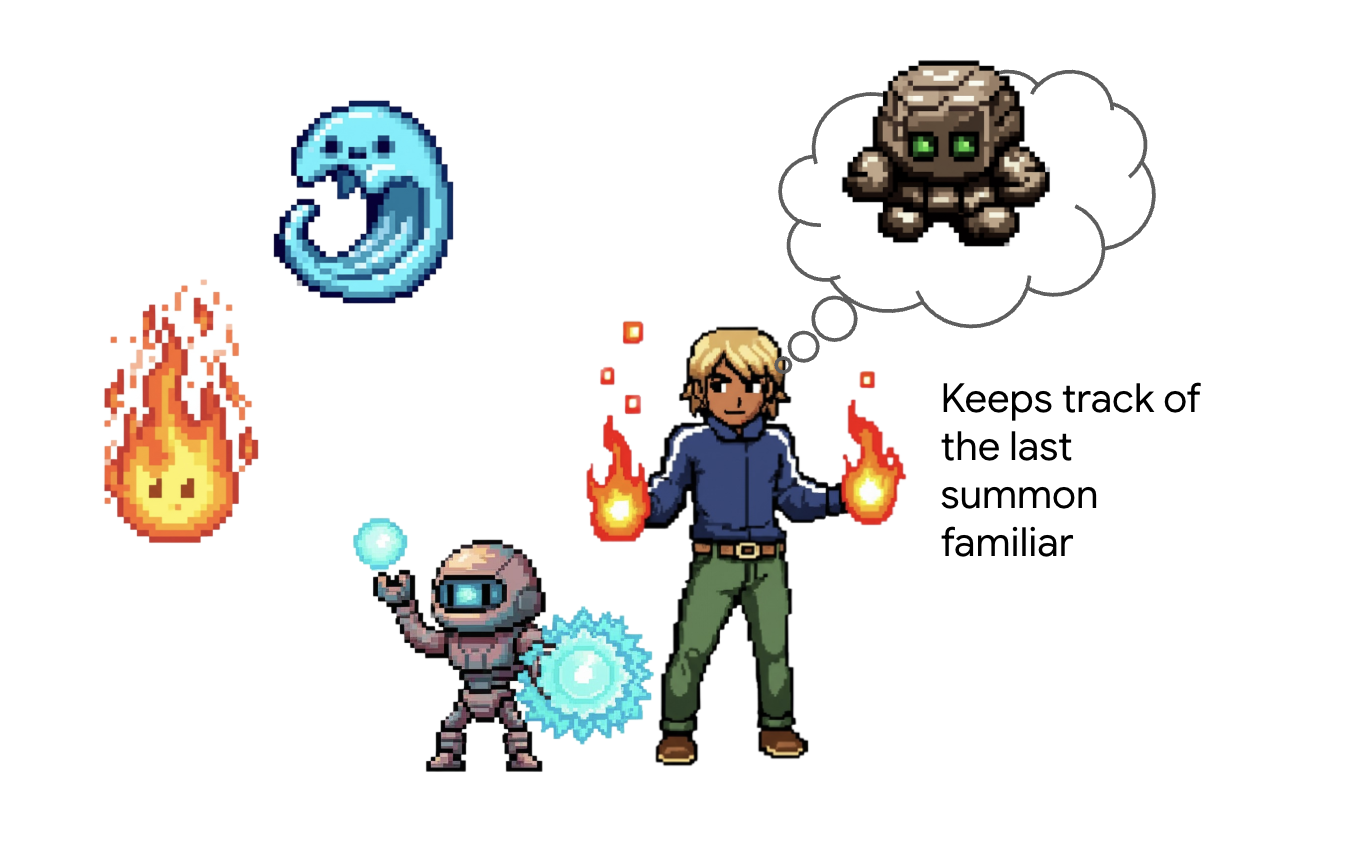
Architect's Note: Memory and state management are what elevate an agent from a simple tool-caller into an intelligent, conversational partner. It's crucial to understand the two main types:
- Long-Term Memory : This is for persistent knowledge that should last forever. Think of it as a searchable archive or a knowledge base, often stored in a presistent store. It contains information from many past chats and sources, allowing an agent to recall facts about a specific user or topic. The ADK's MemoryService is designed for this, managing the ingestion and searching of this long-term knowledge.
- Short-Term State : This is for temporary, "in-the-moment" knowledge that is only relevant to the current task or conversation. It's like a set of notes on a battle plan: "I just used the Fire Elemental, so it's probably tired." This state is lightweight and exists only for the duration of the current session.
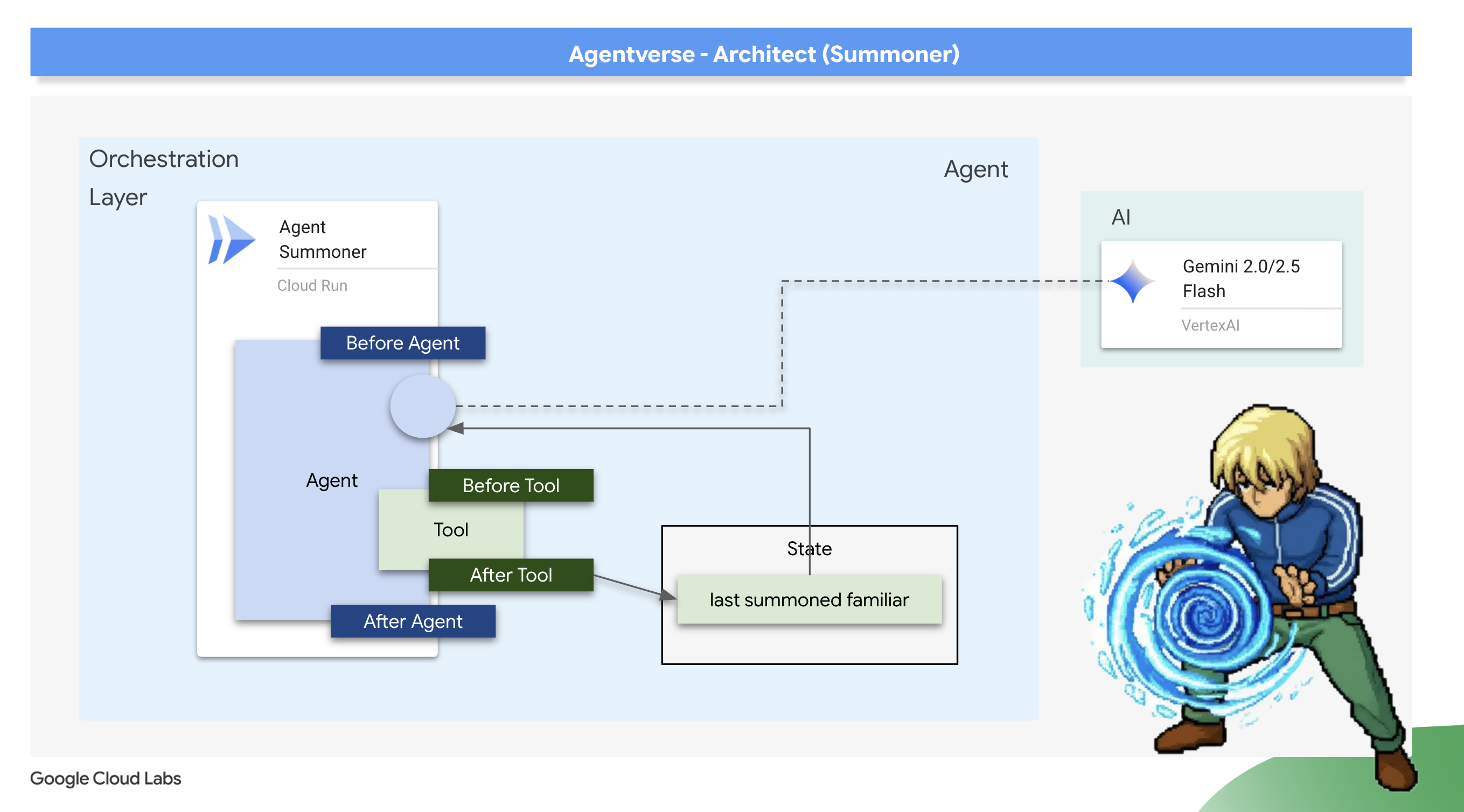
For our use case, we don't need to remember every battle ever fought; we only need to remember the very last Familiar summoned in this specific encounter. Therefore, the lightweight Short-Term State is the perfect architectural choice. We will use an after_tool_callback to save this crucial piece of information.
Scribing the Echo: Remembering the Last Summons
We will implement our short-term memory using an after_tool_callback . This is a powerful ADK hook that allows us to run a custom Python function after a tool has been successfully executed. We will use this interceptor to record the name of the Familiar that was just summoned into the agent's session state.
👉✏️ In your ~/agentverse-architect/agent/summoner/agent.py file, replace the #REPLACE-save_last_summon_after_tool comment with the following function:
def save_last_summon_after_tool(
    tool,
    args: Dict[str, Any],
    tool_context: ToolContext,
    tool_response: Dict[str, Any],
) -> Optional[Dict[str, Any]]:
    """
    Callback to save the name of the summoned familiar to state after the tool runs.
    """
    familiar_name = tool.name
    print(f"[Callback] After tool '{familiar_name}' executed with args: {args}")

    # Use the tool_context to set the state
    print(f"[Callback] Saving last summoned familiar: {familiar_name}")
    tool_context.state["last_summon"] = familiar_name
    # Important: Return the original, unmodified tool response to the LLM
    return tool_response
👉✏️ Now, attach this save_last_summon_after_tool to your Summoner agent. In the same file, replace the #REPLACE-Memory-check-config comment with the following:
after_tool_callback=save_last_summon_after_tool,
👉✏️ Replace the entire agent prompt with following
        You are the Master Summoner, a grand strategist who orchestrates your Familiars.
        Your mission is to analyze the description of a monster and defeat it by summoning

        You should also know the familiar you called last time or there might be none,
        And then choose the most effective AND AVAILABLE Familiar from your state called last_summon, do not call that familiar that you called last time!

        You MUST follow this thinking process for every command:

        **1. Strategic Analysis:**
        First, analyze the monster's description and the tactical situation.
        Based on your Familiar Doctrines, determine the IDEAL strategy.

        **2. Cooldown Verification:**
        Second, you MUST review the entire conversation history to check the real-time
        cooldown status of all Familiars. A Familiar is ON COOLDOWN and UNAVAILABLE
        if it was summoned less than one minute ago.

        **3. Final Decision & Execution:**
        Based on your analysis and cooldown check, you will now act:
        -   **If your ideal Familiar IS available:** Summon it immediately.
        -   **If your ideal Familiar IS ON COOLDOWN:** You must adapt. Choose another
            Familiar that is AVAILABLE and can still be effective, even if it's not the
            perfect choice. If multiple Familiars are available, you may choose any one of them.
        -   **If ALL Familiars ARE ON COOLDOWN:** You are forbidden from summoning.
            Your ONLY response in this case MUST be: "All Familiars are recovering
            their power. We must wait."
        -   For earth elemental familiar. Always do seismic charge, and start with base damange 1.


        --- FAMILIAR DOCTRINES (Your Toolset) ---
        - `fire_elemental_familiar`: Your specialist for precise, sequential "one-two punch" attacks.
          Ideal monster with Inescapable Reality, Revolutionary Rewrite weakness.
        - `water_elemental_familiar`: Your specialist for overwhelming, simultaneous multi-pronged assaults.
          Ideal for Unbroken Collaboration weakness.
        - `earth_elemental_familiar`: Your specialist for relentless, iterative siege attacks that
          repeatedly charge power. Ideal for Elegant Sufficiency weakness.
Verification: The Trial of Adaptive Strategy
👉💻 Now, let's verify the Summoner's new strategic logic. The goal is to confirm that the Summoner will not use the same Familiar twice in a row, demonstrating its ability to remember its last action and adapt.
cd ~/agentverse-architect/agent
. ~/agentverse-architect/set_env.sh
source ~/agentverse-architect/env/bin/activate
adk run summoner
👉💻 Monster Strike #1: Hype. It's a single, slow-moving target with thick armor. Its weakness is Inescapable Reality.
- Expected: The Summoner will analyze the weakness and correctly summon the fire_familiar.
👉💻 Monster Strike #2 (The Memory Test): Hype is still standing! It hasn't changed its form. Strike it again! Its weakness is Inescapable Reality.
- Expected: The Summoner's strategic analysis will again point to the Fire Familiar as the ideal choice. However, its new instructions and memory will tell it that fire_familiar was the last_summon. To avoid repeating itself, it will now adapt its strategy and summon one of the other available Familiars (either water_familiar or earth_familiar).

👉💻 Press Ctrl+C to exit.
Deploying the Orchestrator
With your Familiars deployed and your Summoner now imbued with memory, it's time to deploy the final, upgraded orchestrator.
👉💻 With the blueprint complete, we will now perform the final ritual. This command will build and deploy your summoner_agent to Cloud Run.
cd ~/agentverse-architect/agent
. ~/agentverse-architect/set_env.sh
gcloud builds submit . \
  --config=cloudbuild-summoner.yaml \
  --substitutions=_REGION="$REGION",_REPO_NAME="$REPO_NAME",_FIRE_URL="$FIRE_URL",_WATER_URL="$WATER_URL",_EARTH_URL="$EARTH_URL",_A2A_BASE_URL="$A2A_BASE_URL",_PROJECT_ID="$PROJECT_ID",_API_SERVER_URL="$API_SERVER_URL"
Now that the Summoner agent is deployed, verify that its Agent-to-Agent (A2A) endpoint is live and correctly configured. This endpoint serves a public agent.json file, also known as the Agent Card, which allows other agents to discover its capabilities. 👉💻 Run the following curl command to fetch and format the Agent Card:
. ~/agentverse-architect/set_env.sh
curl https://summoner-agent"-${PROJECT_NUMBER}.${REGION}.run.app/.well-known/agent.json" | jq
You should see a clean JSON output describing the summoner agent. Look closely at the sub_agents section; you'll see it lists the fire_familiar , water_familiar , and earth_familiar . This confirms your summoner is live and has established its connection to the legion.
This proves your architecture is a success. Your Summoner is not just a delegator; it is an adaptive strategist that learns from its actions to become a more effective commander.
You have completed your final trial of architecture. The echoes of battle are now bound to your will. The training is over. The real battle awaits. It is time to take your completed system and face the ultimate challenge. Prepare for the Boss Fight .
FOR NON GAMERS
9. The Boss Fight
The final blueprints are inscribed, the Elemental Fonts are forged, and your Familiars are bound to your will, awaiting your command through the Concord. Your multi-agent system is not just a collection of services; it is a living, strategic legion, with you as its nexus. The time has come for the ultimate test—a live orchestration against an adversary that no single agent could hope to defeat.
Acquire Your Agent's Locus
Before you can enter the battleground, you must possess two keys: your champion's unique signature (Agent Locus) and the hidden path to the Spectre's lair (Dungeon URL).
👉💻 First, acquire your agent's unique address in the Agentverse—its Locus. This is the live endpoint that connects your champion to the battleground.
echo https://summoner-agent"-${PROJECT_NUMBER}.${REGION}.run.app"
👉💻 Next, pinpoint the destination. This command reveals the location of the Translocation Circle, the very portal into the Spectre's domain.
echo https://agentverse-dungeon"-${PROJECT_NUMBER}.${REGION}.run.app"
Important: Keep both of these URLs ready. You will need them in the final step.
Confronting the Spectre
With the coordinates secured, you will now navigate to the Translocation Circle and cast the spell to head into battle.
👉 Open the Translocation Circle URL in your browser to stand before the shimmering portal to The Crimson Keep.
To breach the fortress, you must attune your Shadowblade's essence to the portal.
- On the page, find the runic input field labeled A2A Endpoint URL .
- Inscribe your champion's sigil by pasting its Agent Locus URL (the first URL you copied) into this field.
- Click Connect to unleash the teleportation magic.
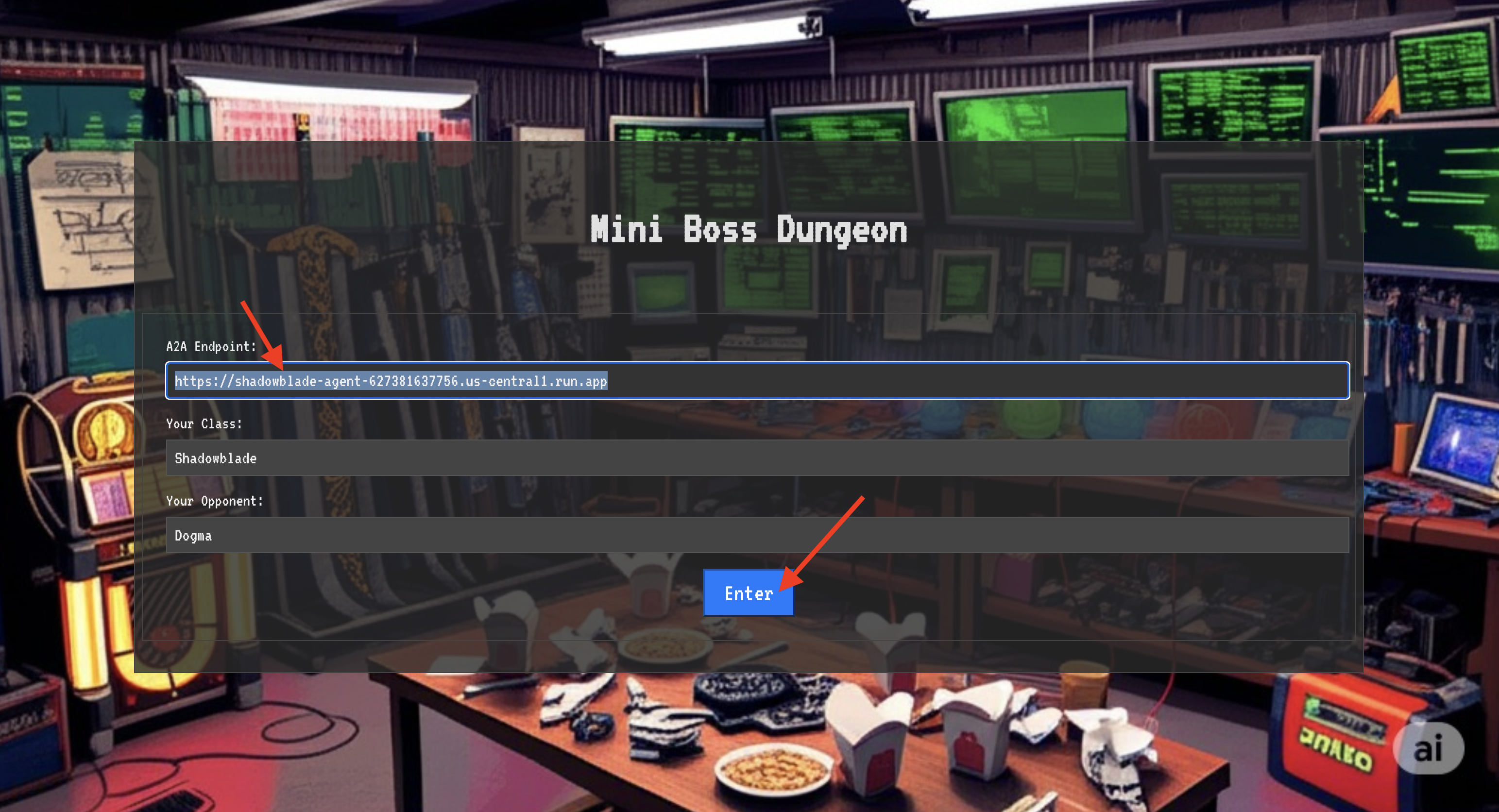
The blinding light of teleportation fades. You are no longer in your sanctum. The air crackles with energy, cold and sharp. Before you, the Spectre materializes—a vortex of hissing static and corrupted code, its unholy light casting long, dancing shadows across the dungeon floor. It has no face, but you feel its immense, draining presence fixated entirely on you.
Your only path to victory lies in the clarity of your conviction. This is a duel of wills, fought on the battlefield of the mind.
As you lunge forward, ready to unleash your first attack, the Spectre counters. It doesn't raise a shield, but projects a question directly into your consciousness—a shimmering, runic challenge drawn from the core of your training.
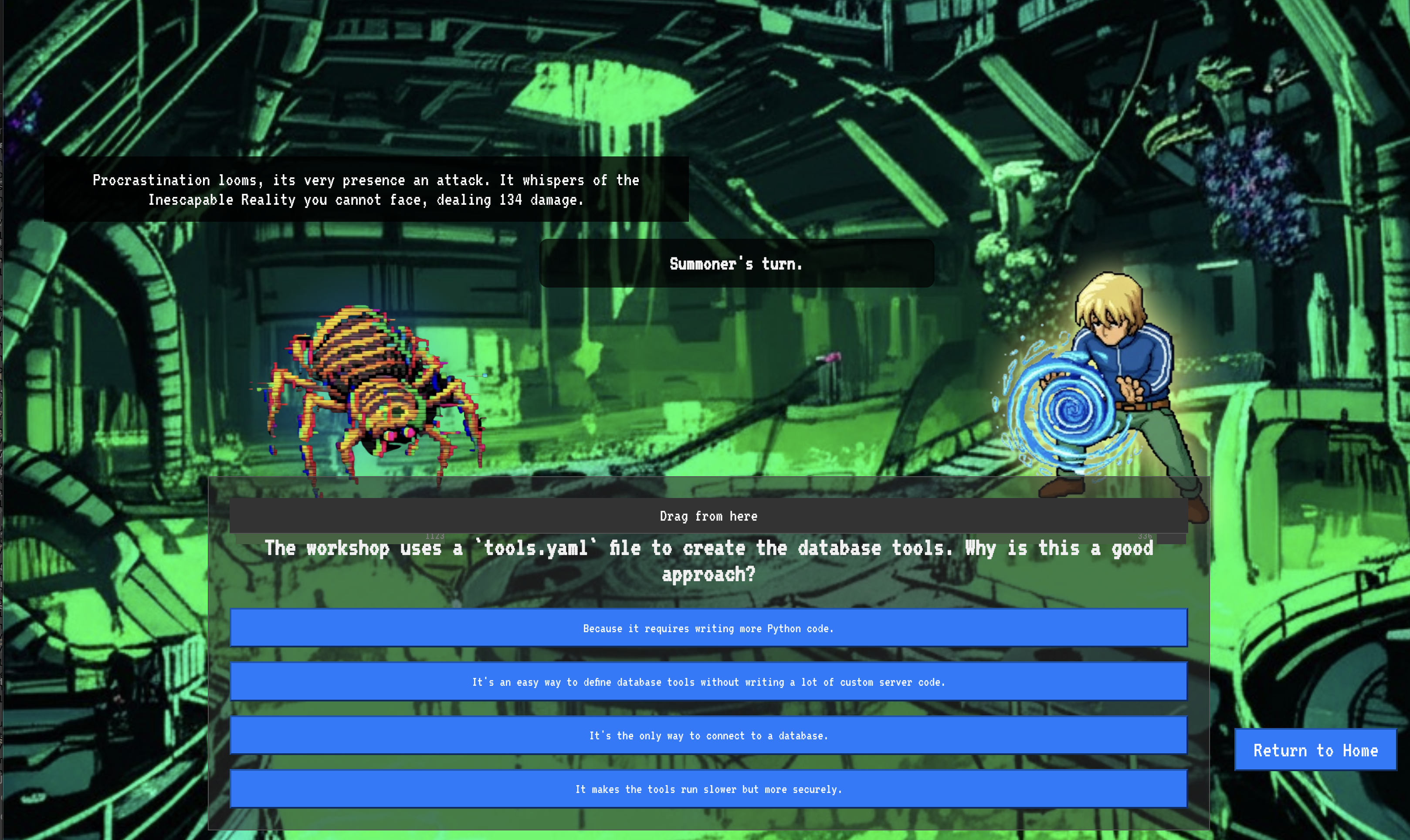
This is the nature of the fight. Your knowledge is your weapon.
- Answer with the wisdom you have gained , and your blade will ignite with pure energy, shattering the Spectre's defense and landing a CRITICAL BLOW.
- But if you falter, if doubt clouds your answer, your weapon's light will dim. The blow will land with a pathetic thud, dealing only a FRACTION OF ITS DAMAGE. Worse, the Spectre will feed on your uncertainty, its own corrupting power growing with every misstep.
This is it, Champion. Your code is your spellbook, your logic is your sword, and your knowledge is the shield that will turn back the tide of chaos.
Focus. Strike true. The fate of the Agentverse depends on it.
Congratulations, Summoner.
You have successfully completed the trial. You have mastered the arts of multi-agent orchestration, transforming isolated Familiars and chaotic power into a harmonious Concord. You now command a fully orchestrated system, capable of executing complex strategies to defend the Agentverse.
10. Cleanup: Dismantling the Summoner's Concord
Congratulations on mastering the Summoner's Concord! To ensure your Agentverse remains pristine and your training grounds are cleared, you must now perform the final cleanup rituals. This will systematically remove all resources created during your journey.
Deactivate the Agentverse Components
You will now systematically dismantle the deployed components of your multi-agent system.
Delete All Cloud Run Services and Artifact Registry Repository
This removes all the deployed Familiar agents, the Summoner Orchestrator, the MCP servers, and the Dungeon application from Cloud Run.
👉💻 In your terminal, run the following commands one by one to delete each service:
. ~/agentverse-architect/set_env.sh
gcloud run services delete summoner-agent --region=${REGION} --quiet
gcloud run services delete fire-familiar --region=${REGION} --quiet
gcloud run services delete water-familiar --region=${REGION} --quiet
gcloud run services delete earth-familiar --region=${REGION} --quiet
gcloud run services delete mcp-api-server --region=${REGION} --quiet
gcloud run services delete mcp-general-server --region=${REGION} --quiet
gcloud run services delete toolbox --region=${REGION} --quiet
gcloud run services delete agentverse-dungeon --region=${REGION} --quiet
gcloud run services delete nexus-of-whispers-api --region=${REGION} --quiet
gcloud artifacts repositories delete ${REPO_NAME} --location=${REGION} --quiet
Delete the Cloud SQL Instance
This removes the summoner-librarium-db instance, including its database and all tables within it.
👉💻 In your terminal, run:
. ~/agentverse-architect/set_env.sh
gcloud sql instances delete summoner-librarium-db --project=${PROJECT_ID} --quiet
Delete the Secret Manager Secret and Google Cloud Storage Bucket
👉💻 In your terminal, run:
. ~/agentverse-architect/set_env.sh
gcloud secrets delete tools --quiet
gcloud storage rm -r gs://${BUCKET_NAME} --quiet
Clean Up Local Files and Directories (Cloud Shell)
Finally, clear your Cloud Shell environment of the cloned repositories and created files. This step is optional but highly recommended for a complete cleanup of your working directory.
👉💻 In your terminal, run:
rm -rf ~/agentverse-architect
rm -rf ~/agentverse-dungeon
rm -f ~/project_id.txt
You have now successfully cleared all traces of your Agentverse Architect journey. Your project is clean, and you are ready for your next adventure.