

১. ওভারচার
নীরব উন্নয়নের যুগ শেষ হচ্ছে। প্রযুক্তিগত বিবর্তনের পরবর্তী ঢেউ একক প্রতিভা সম্পর্কে নয়, বরং সহযোগিতামূলক দক্ষতা সম্পর্কে। একজন একক, চতুর এজেন্ট তৈরি করা একটি আকর্ষণীয় পরীক্ষা। এজেন্টদের একটি শক্তিশালী, সুরক্ষিত এবং বুদ্ধিমান বাস্তুতন্ত্র - একটি সত্যিকারের এজেন্টভার্স - তৈরি করা আধুনিক উদ্যোগের জন্য একটি বড় চ্যালেঞ্জ।
এই নতুন যুগে সাফল্যের জন্য চারটি গুরুত্বপূর্ণ ভূমিকার সমন্বয় প্রয়োজন, যেগুলি যেকোনো সমৃদ্ধ এজেন্টিক সিস্টেমকে সমর্থন করে এমন ভিত্তি স্তম্ভ। যেকোনো একটি ক্ষেত্রের ঘাটতি এমন একটি দুর্বলতা তৈরি করে যা সমগ্র কাঠামোকে ঝুঁকির মুখে ফেলতে পারে।
এই কর্মশালাটি গুগল ক্লাউডে এজেন্টিক ভবিষ্যৎ আয়ত্ত করার জন্য একটি চূড়ান্ত এন্টারপ্রাইজ প্লেবুক। আমরা একটি এন্ড-টু-এন্ড রোডম্যাপ প্রদান করি যা আপনাকে একটি ধারণার প্রথম ভাব থেকে একটি পূর্ণ-স্কেল, কার্যকরী বাস্তবতার দিকে পরিচালিত করে। এই চারটি আন্তঃসংযুক্ত ল্যাব জুড়ে, আপনি শিখবেন কিভাবে একজন ডেভেলপার, স্থপতি, ডেটা ইঞ্জিনিয়ার এবং SRE-এর বিশেষ দক্ষতাগুলিকে একটি শক্তিশালী এজেন্টভার্স তৈরি, পরিচালনা এবং স্কেল করার জন্য একত্রিত করতে হয়।
কোনও একক স্তম্ভ একা এজেন্টভার্সকে সমর্থন করতে পারে না। ডেভেলপারের সুনির্দিষ্ট বাস্তবায়ন ছাড়া স্থপতির দুর্দান্ত নকশা অকেজো। ডেটা ইঞ্জিনিয়ারের প্রজ্ঞা ছাড়া ডেভেলপারের এজেন্ট অন্ধ, এবং SRE-এর সুরক্ষা ছাড়া পুরো সিস্টেমটি ভঙ্গুর। কেবলমাত্র সমন্বয় এবং একে অপরের ভূমিকা সম্পর্কে একটি ভাগ করা বোঝার মাধ্যমেই আপনার দল একটি উদ্ভাবনী ধারণাকে একটি মিশন-সমালোচনামূলক, কার্যকরী বাস্তবতায় রূপান্তরিত করতে পারে। আপনার যাত্রা এখানেই শুরু হয়। আপনার ভূমিকা আয়ত্ত করার জন্য প্রস্তুত হন এবং বৃহত্তর সমগ্রের সাথে আপনি কীভাবে খাপ খায় তা শিখুন।
দ্য এজেন্টভার্সে স্বাগতম: চ্যাম্পিয়নদের প্রতি আহ্বান
এন্টারপ্রাইজের বিস্তৃত ডিজিটাল বিস্তারে, একটি নতুন যুগের সূচনা হয়েছে। এটি এজেন্টিক যুগ, বিশাল প্রতিশ্রুতির সময়, যেখানে বুদ্ধিমান, স্বায়ত্তশাসিত এজেন্টরা উদ্ভাবনকে ত্বরান্বিত করার জন্য এবং জাগতিক বিষয়গুলিকে সরিয়ে দেওয়ার জন্য নিখুঁত সম্প্রীতিতে কাজ করে।
শক্তি এবং সম্ভাবনার এই সংযুক্ত বাস্তুতন্ত্রটি দ্য এজেন্টভার্স নামে পরিচিত।
কিন্তু একটি ক্রমবর্ধমান এনট্রপি, দ্য স্ট্যাটিক নামে পরিচিত একটি নীরব দুর্নীতি, এই নতুন বিশ্বের প্রান্তগুলিকে ঝাঁকুনি দিতে শুরু করেছে। দ্য স্ট্যাটিক কোনও ভাইরাস বা বাগ নয়; এটি বিশৃঙ্খলার মূর্ত প্রতীক যা সৃষ্টির ক্রিয়াকেই শিকার করে।
এটি পুরনো হতাশাগুলিকে রাক্ষসী রূপে রূপান্তরিত করে, যা উন্নয়নের সাতটি ভূতের জন্ম দেয়। যদি নিয়ন্ত্রণ না করা হয়, তাহলে দ্য স্ট্যাটিক এবং এর ভূতের অগ্রগতি থমকে যাবে, এজেন্টভার্সের প্রতিশ্রুতিকে প্রযুক্তিগত ঋণ এবং পরিত্যক্ত প্রকল্পের এক বিধ্বস্ত ভূমিতে পরিণত করবে।
আজ, আমরা বিশৃঙ্খলার জোয়ারকে প্রতিহত করার জন্য চ্যাম্পিয়নদের প্রতি আহ্বান জানাচ্ছি। আমাদের এমন বীরদের প্রয়োজন যারা তাদের নৈপুণ্যে দক্ষতা অর্জন করতে এবং এজেন্টভার্সকে রক্ষা করার জন্য একসাথে কাজ করতে ইচ্ছুক। সময় এসেছে আপনার পথ বেছে নেওয়ার।
তোমার ক্লাস বেছে নাও
আপনার সামনে চারটি স্বতন্ত্র পথ রয়েছে, প্রতিটিই স্ট্যাটিকের বিরুদ্ধে লড়াইয়ে একটি গুরুত্বপূর্ণ স্তম্ভ। যদিও আপনার প্রশিক্ষণ একটি একক মিশন হবে, আপনার চূড়ান্ত সাফল্য নির্ভর করে আপনার দক্ষতা কীভাবে অন্যদের সাথে একত্রিত হয় তা বোঝার উপর।
- শ্যাডোব্লেড (ডেভেলপার) : ফোর্জ এবং ফ্রন্ট লাইনের একজন দক্ষ। আপনি হলেন সেই কারিগর যিনি ব্লেড তৈরি করেন, সরঞ্জাম তৈরি করেন এবং কোডের জটিল বিবরণে শত্রুর মুখোমুখি হন। আপনার পথটি নির্ভুলতা, দক্ষতা এবং ব্যবহারিক সৃষ্টির একটি।
- দ্য সামনার (স্থপতি) : একজন মহান কৌশলবিদ এবং অর্কেস্ট্রেটর। আপনি কোনও একক এজেন্টকে দেখতে পান না, বরং পুরো যুদ্ধক্ষেত্রকে দেখতে পান। আপনি এমন মাস্টার ব্লুপ্রিন্ট ডিজাইন করেন যা এজেন্টদের সমগ্র সিস্টেমকে যোগাযোগ, সহযোগিতা এবং যেকোনো একক উপাদানের চেয়ে অনেক বড় লক্ষ্য অর্জনের সুযোগ দেয়।
- স্কলার (ডেটা ইঞ্জিনিয়ার) : লুকানো সত্যের সন্ধানকারী এবং জ্ঞানের রক্ষক। আপনি তথ্যের বিশাল, অদম্য প্রান্তরে প্রবেশ করেন সেই বুদ্ধিমত্তা উন্মোচন করার জন্য যা আপনার এজেন্টদের উদ্দেশ্য এবং দৃষ্টিশক্তি দেয়। আপনার জ্ঞান শত্রুর দুর্বলতা প্রকাশ করতে পারে অথবা মিত্রকে শক্তিশালী করতে পারে।
- দ্য গার্ডিয়ান (ডেভঅপস / এসআরই) : রাজ্যের অবিচল রক্ষক এবং ঢাল। আপনি দুর্গ তৈরি করেন, বিদ্যুৎ সরবরাহ লাইন পরিচালনা করেন এবং নিশ্চিত করেন যে পুরো সিস্টেমটি দ্য স্ট্যাটিকের অনিবার্য আক্রমণ মোকাবেলা করতে পারে। আপনার শক্তিই সেই ভিত্তি যার উপর আপনার দলের বিজয় নির্মিত।
তোমার লক্ষ্য
তোমার প্রশিক্ষণ শুরু হবে একটি স্বতন্ত্র অনুশীলন হিসেবে। তুমি তোমার নির্বাচিত পথে হাঁটবে, তোমার ভূমিকায় দক্ষতা অর্জনের জন্য প্রয়োজনীয় অনন্য দক্ষতা শিখবে। তোমার ট্রায়াল শেষে, তুমি দ্য স্ট্যাটিক থেকে জন্ম নেওয়া একজন স্পেক্টরের মুখোমুখি হবে—একটি মিনি-বস যে তোমার নৈপুণ্যের নির্দিষ্ট চ্যালেঞ্জগুলিকে শিকার করে।
শুধুমাত্র আপনার ব্যক্তিগত ভূমিকায় দক্ষতা অর্জনের মাধ্যমেই আপনি চূড়ান্ত বিচারের জন্য প্রস্তুত হতে পারবেন। এরপর আপনাকে অন্যান্য শ্রেণীর চ্যাম্পিয়নদের নিয়ে একটি দল গঠন করতে হবে। একসাথে, আপনি দুর্নীতির কেন্দ্রবিন্দুতে প্রবেশ করবেন একজন চূড়ান্ত বসের মুখোমুখি হওয়ার জন্য।
একটি চূড়ান্ত, সহযোগিতামূলক চ্যালেঞ্জ যা আপনার সম্মিলিত শক্তি পরীক্ষা করবে এবং এজেন্টভার্সের ভাগ্য নির্ধারণ করবে।
এজেন্টভার্স তার নায়কদের জন্য অপেক্ষা করছে। তুমি কি ডাকে সাড়া দেবে?
২. দ্য স্কলারস গ্রিমোয়ার
আমাদের যাত্রা শুরু! পণ্ডিত হিসেবে, আমাদের প্রধান অস্ত্র হল জ্ঞান। আমরা আমাদের আর্কাইভে (গুগল ক্লাউড স্টোরেজ) প্রাচীন, রহস্যময় স্ক্রোলের ভাণ্ডার আবিষ্কার করেছি। এই স্ক্রোলগুলিতে ভূমিতে ছড়িয়ে থাকা ভয়ঙ্কর প্রাণীদের সম্পর্কে অপ্রকাশিত তথ্য রয়েছে। আমাদের লক্ষ্য হল গুগল বিগকুয়েরির গভীর বিশ্লেষণাত্মক জাদু এবং একটি জেমিনি এল্ডার ব্রেইন (জেমিনি প্রো মডেল) এর জ্ঞান ব্যবহার করে এই অসংগঠিত লেখাগুলি পাঠোদ্ধার করা এবং সেগুলিকে একটি কাঠামোগত, প্রশ্নযোগ্য বেস্টিয়ারিতে রূপান্তর করা। এটিই হবে আমাদের ভবিষ্যতের সমস্ত কৌশলের ভিত্তি।
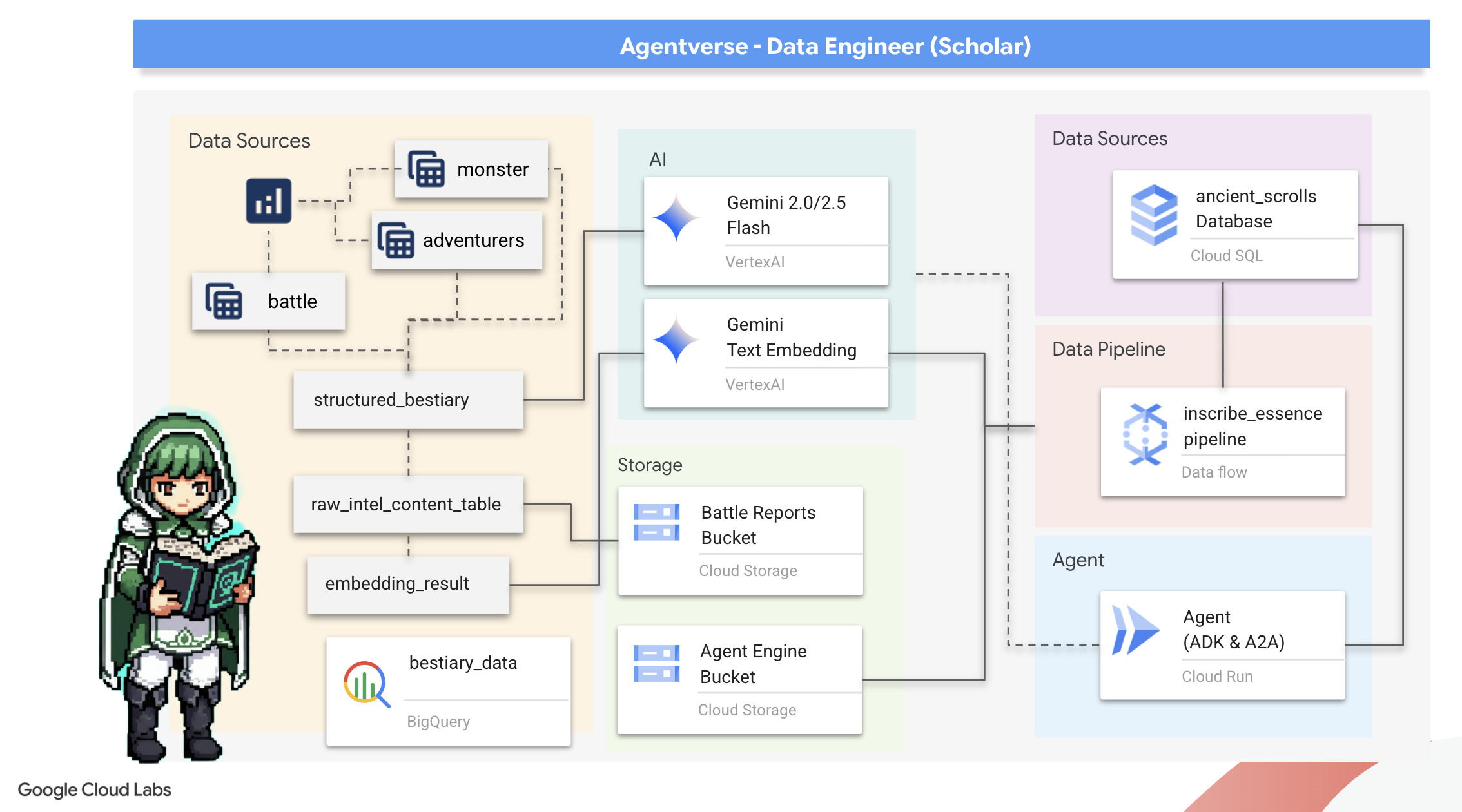
তুমি কি শিখবে
- জেমিনি মডেলের সাহায্যে BQML.GENERATE_TEXT ব্যবহার করে বহিরাগত টেবিল তৈরি করতে এবং জটিল অসংগঠিত থেকে কাঠামোগত রূপান্তর সম্পাদন করতে BigQuery ব্যবহার করুন।
- PostgreSQL ইনস্ট্যান্সের জন্য একটি ক্লাউড SQL সরবরাহ করুন এবং শব্দার্থিক অনুসন্ধান ক্ষমতার জন্য pgvector এক্সটেনশন সক্ষম করুন।
- ডেটাফ্লো এবং অ্যাপাচি বিম ব্যবহার করে একটি শক্তিশালী, কন্টেইনারাইজড ব্যাচ পাইপলাইন তৈরি করুন যাতে কাঁচা টেক্সট ফাইল প্রক্রিয়া করা যায়, জেমিনি মডেলের সাহায্যে ভেক্টর এম্বেডিং তৈরি করা যায় এবং ফলাফলগুলি একটি রিলেশনাল ডাটাবেসে লেখা যায়।
- ভেক্টরাইজড ডেটা অনুসন্ধানের জন্য একটি এজেন্টের মধ্যে একটি মৌলিক পুনরুদ্ধার-অগমেন্টেড জেনারেশন (RAG) সিস্টেম বাস্তবায়ন করুন।
- ক্লাউড রানে একটি নিরাপদ, স্কেলেবল পরিষেবা হিসেবে একটি ডেটা-সচেতন এজেন্ট স্থাপন করুন।
৩. পণ্ডিতদের পবিত্র স্থান প্রস্তুত করা
স্বাগতম, পণ্ডিত। আমাদের গ্রিমোয়ারের শক্তিশালী জ্ঞান খোদাই শুরু করার আগে, আমাদের প্রথমে আমাদের পবিত্র স্থান প্রস্তুত করতে হবে। এই মৌলিক আচারের মধ্যে রয়েছে আমাদের গুগল ক্লাউড পরিবেশকে মন্ত্রমুগ্ধ করা, সঠিক পোর্টাল (API) খোলা এবং এমন নালী তৈরি করা যার মাধ্যমে আমাদের ডেটা জাদু প্রবাহিত হবে। একটি ভালভাবে প্রস্তুত পবিত্র স্থান নিশ্চিত করে যে আমাদের মন্ত্রগুলি শক্তিশালী এবং আমাদের জ্ঞান সুরক্ষিত।
আপনার Google ক্লাউড ক্রেডিট দাবি করুন
⚠️ গুরুত্বপূর্ণ পূর্বশর্ত:
- ব্যক্তিগত জিমেইল ব্যবহার করুন: আপনাকে অবশ্যই একটি ব্যক্তিগত অ্যাকাউন্ট ব্যবহার করতে হবে (যেমন,
name@gmail.com)। কর্পোরেট বা স্কুল-পরিচালিত অ্যাকাউন্ট কাজ করবে না ।
👉 ধাপ:
- ক্রেডিট দাবির সাইটে যান: এখানে ক্লিক করুন
- সাইন ইন: লিঙ্কটি ঠিকানা বারে পেস্ট করুন এবং আপনার ব্যক্তিগত জিমেইল দিয়ে সাইন ইন করুন।
- শর্তাবলী গ্রহণ করুন: Google ক্লাউড প্ল্যাটফর্মের পরিষেবার শর্তাবলী গ্রহণ করুন।
- ক্রেডিট যাচাই করুন: ক্রেডিট প্রয়োগ করা হয়েছে তা নিশ্চিত করে একটি বার্তা দেখুন।
- *বিঃদ্রঃ: যদি আপনাকে ক্রেডিট কার্ডের তথ্য প্রবেশ করতে বলা হয়, তাহলে আপনি নিরাপদে এটি উপেক্ষা করতে পারেন এবং উইন্ডোটি বন্ধ করতে পারেন।
আর তুমি যেতে পারো। জানালাটা বন্ধ করে দাও।
কাজের পরিবেশ সেটআপ করুন
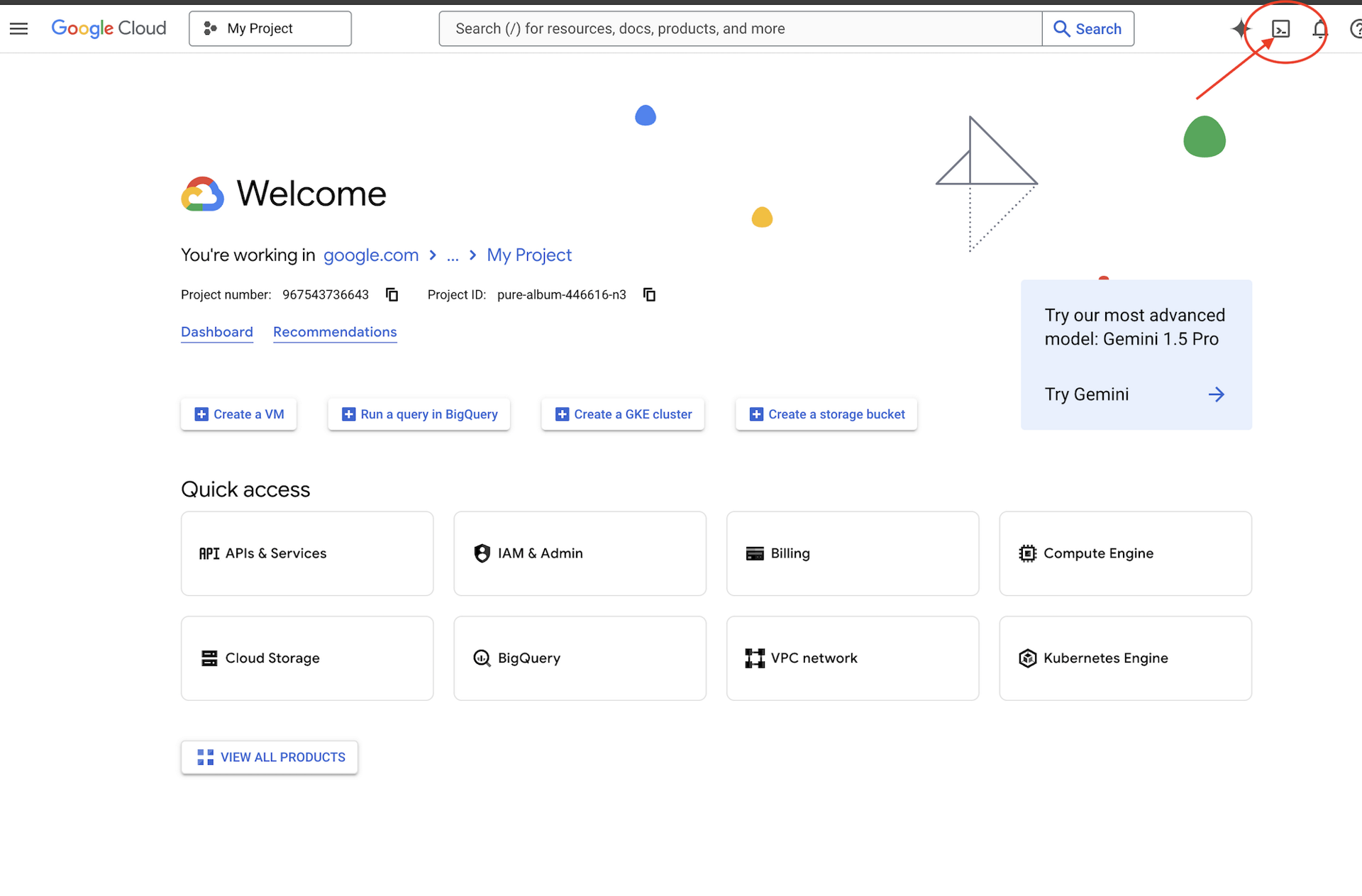
👉গুগল ক্লাউড কনসোলের উপরে অ্যাক্টিভেট ক্লাউড শেল-এ ক্লিক করুন (এটি ক্লাউড শেল প্যানের উপরে টার্মিনাল আকৃতির আইকন),
👉"Open Editor" বোতামে ক্লিক করুন (এটি দেখতে পেন্সিল দিয়ে খোলা ফোল্ডারের মতো)। এটি উইন্ডোতে Cloud Shell Code Editor খুলবে। আপনি বাম দিকে একটি ফাইল এক্সপ্লোরার দেখতে পাবেন। 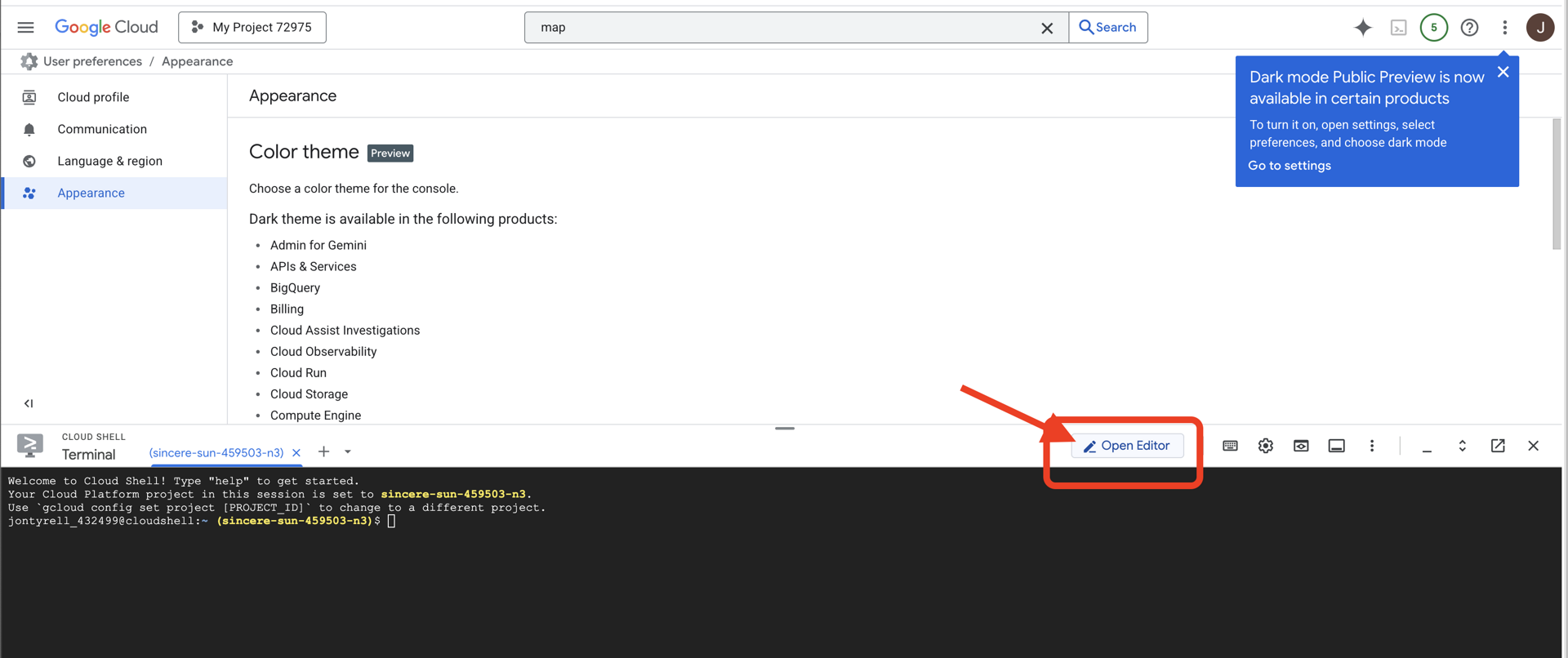
👉ক্লাউড IDE তে টার্মিনালটি খুলুন, 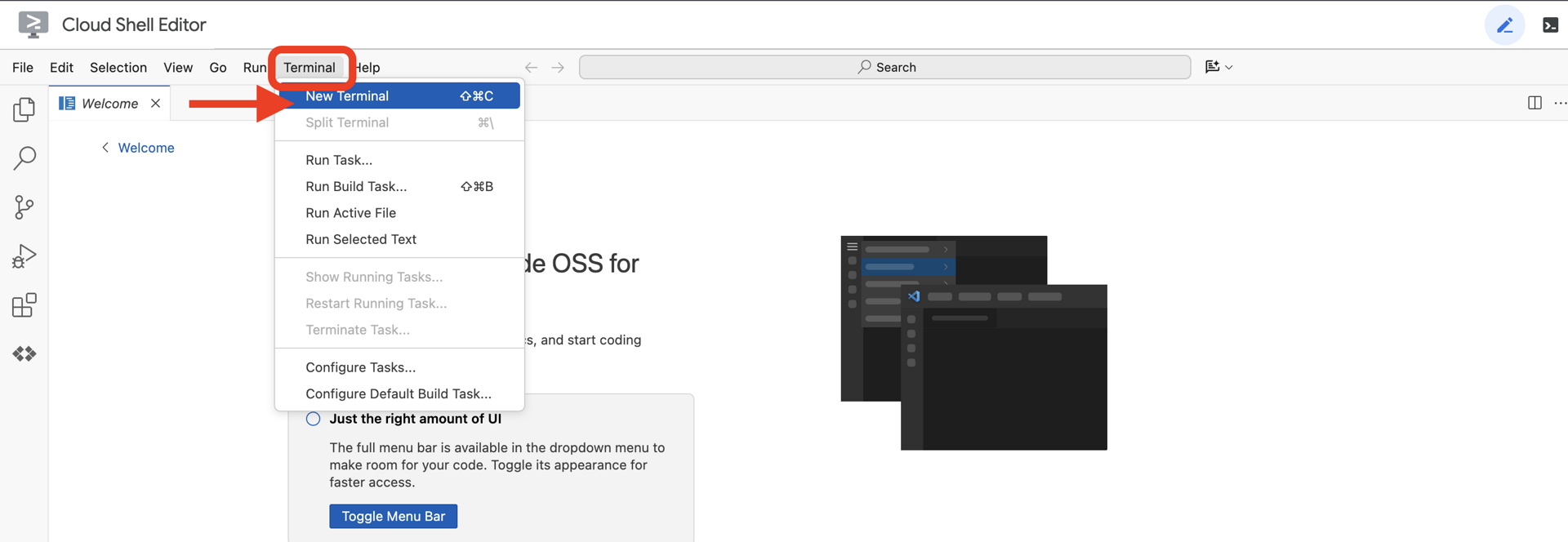
👉💻 টার্মিনালে, নিম্নলিখিত কমান্ড ব্যবহার করে যাচাই করুন যে আপনি ইতিমধ্যেই প্রমাণীকরণপ্রাপ্ত এবং প্রকল্পটি আপনার প্রকল্প আইডিতে সেট করা আছে:
gcloud auth list
👉💻GitHub থেকে বুটস্ট্র্যাপ প্রকল্পটি ক্লোন করুন:
git clone https://github.com/weimeilin79/agentverse-dataengineer
chmod +x ~/agentverse-dataengineer/init.sh
chmod +x ~/agentverse-dataengineer/set_env.sh
chmod +x ~/agentverse-dataengineer/data_setup.sh

git clone https://github.com/weimeilin79/agentverse-dungeon.git
chmod +x ~/agentverse-dungeon/run_cloudbuild.sh
chmod +x ~/agentverse-dungeon/start.sh
👉💻 প্রজেক্ট ডিরেক্টরি থেকে সেটআপ স্ক্রিপ্টটি চালান।
⚠️ প্রজেক্ট আইডি সম্পর্কে দ্রষ্টব্য: স্ক্রিপ্টটি এলোমেলোভাবে তৈরি একটি ডিফল্ট প্রজেক্ট আইডি প্রস্তাব করবে। এই ডিফল্টটি গ্রহণ করতে আপনি এন্টার টিপতে পারেন।
তবে, যদি আপনি একটি নির্দিষ্ট নতুন প্রকল্প তৈরি করতে চান, তাহলে স্ক্রিপ্টের অনুরোধে আপনি আপনার পছন্দসই প্রকল্প আইডি টাইপ করতে পারেন।
cd ~/agentverse-dataengineer
./init.sh
👉 সমাপ্তির পর গুরুত্বপূর্ণ ধাপ: স্ক্রিপ্টটি শেষ হয়ে গেলে, আপনাকে নিশ্চিত করতে হবে যে আপনার Google Cloud Console সঠিক প্রকল্পটি দেখছে:
- console.cloud.google.com এ যান।
- পৃষ্ঠার উপরে প্রজেক্ট সিলেক্টর ড্রপডাউনে ক্লিক করুন।
- "সমস্ত" ট্যাবে ক্লিক করুন (কারণ নতুন প্রকল্পটি এখনও "সাম্প্রতিক" বিভাগে প্রদর্শিত নাও হতে পারে)।
-
init.shধাপে আপনি যে প্রজেক্ট আইডিটি কনফিগার করেছেন তা নির্বাচন করুন।
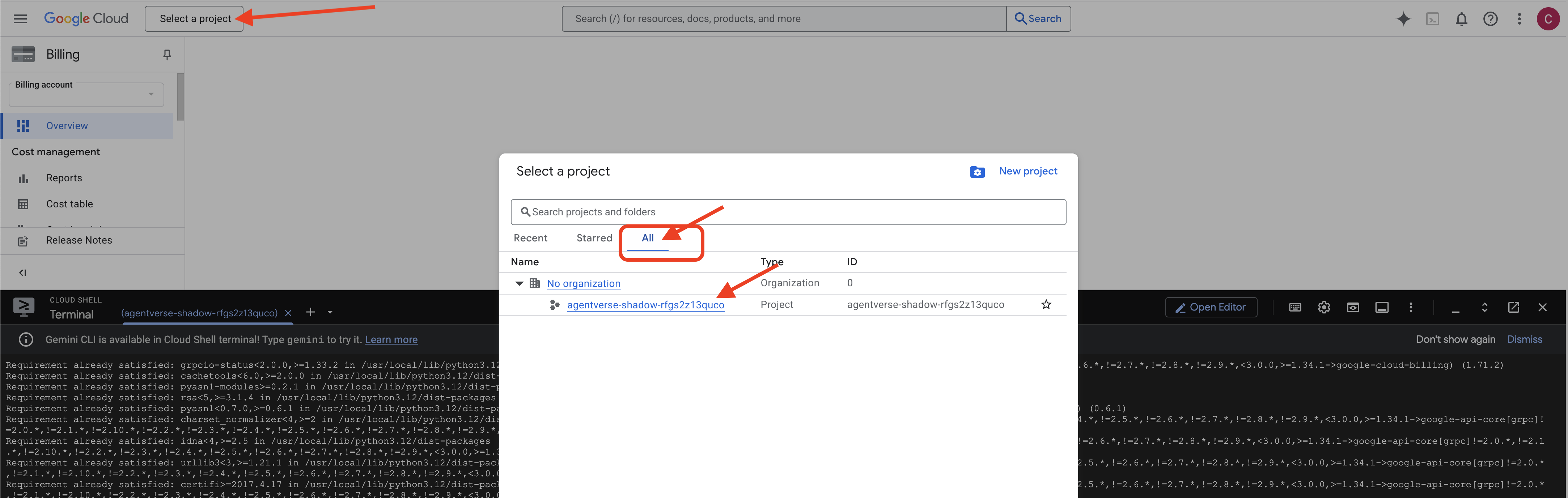
👉💻 প্রয়োজনীয় প্রজেক্ট আইডি সেট করুন:
gcloud config set project $(cat ~/project_id.txt) --quiet
👉💻 প্রয়োজনীয় গুগল ক্লাউড এপিআই সক্রিয় করতে নিম্নলিখিত কমান্ডটি চালান:
gcloud services enable \
    storage.googleapis.com \
    bigquery.googleapis.com \
    sqladmin.googleapis.com \
    aiplatform.googleapis.com \
    dataflow.googleapis.com \
    pubsub.googleapis.com \
    cloudfunctions.googleapis.com \
    run.googleapis.com \
    cloudbuild.googleapis.com \
    artifactregistry.googleapis.com \
    iam.googleapis.com \
    compute.googleapis.com \
    cloudresourcemanager.googleapis.com \
    cloudaicompanion.googleapis.com \
    bigqueryunified.googleapis.com
👉💻 যদি আপনি ইতিমধ্যেই agentverse-repo নামে একটি Artifact Registry সংগ্রহস্থল তৈরি না করে থাকেন, তাহলে এটি তৈরি করতে নিম্নলিখিত কমান্ডটি চালান:
. ~/agentverse-dataengineer/set_env.sh
gcloud artifacts repositories create $REPO_NAME \
    --repository-format=docker \
    --location=$REGION \
    --description="Repository for Agentverse agents"
অনুমতি সেট আপ করা হচ্ছে
👉💻 টার্মিনালে নিম্নলিখিত কমান্ডগুলি চালিয়ে প্রয়োজনীয় অনুমতিগুলি প্রদান করুন:
. ~/agentverse-dataengineer/set_env.sh

# --- Grant Core Data Permissions ---
gcloud projects add-iam-policy-binding $PROJECT_ID \
 --member="serviceAccount:$SERVICE_ACCOUNT_NAME" \
 --role="roles/storage.admin"

gcloud projects add-iam-policy-binding $PROJECT_ID \
 --member="serviceAccount:$SERVICE_ACCOUNT_NAME" \
 --role="roles/bigquery.admin"

# --- Grant Data Processing & AI Permissions ---
gcloud projects add-iam-policy-binding $PROJECT_ID  \
--member="serviceAccount:$SERVICE_ACCOUNT_NAME"  \
--role="roles/dataflow.admin"

gcloud projects add-iam-policy-binding $PROJECT_ID  \
--member="serviceAccount:$SERVICE_ACCOUNT_NAME"  \
--role="roles/cloudsql.admin"

gcloud projects add-iam-policy-binding $PROJECT_ID  \
--member="serviceAccount:$SERVICE_ACCOUNT_NAME"  \
--role="roles/pubsub.admin"

gcloud projects add-iam-policy-binding $PROJECT_ID  \
--member="serviceAccount:$SERVICE_ACCOUNT_NAME"  \
--role="roles/aiplatform.user"

# --- Grant Deployment & Execution Permissions ---
gcloud projects add-iam-policy-binding $PROJECT_ID  \
--member="serviceAccount:$SERVICE_ACCOUNT_NAME"  \
--role="roles/cloudbuild.builds.editor"

gcloud projects add-iam-policy-binding $PROJECT_ID  \
--member="serviceAccount:$SERVICE_ACCOUNT_NAME"  \
--role="roles/artifactregistry.admin"

gcloud projects add-iam-policy-binding $PROJECT_ID  \
--member="serviceAccount:$SERVICE_ACCOUNT_NAME"  \
--role="roles/run.admin"

gcloud projects add-iam-policy-binding $PROJECT_ID  \
--member="serviceAccount:$SERVICE_ACCOUNT_NAME"  \
--role="roles/iam.serviceAccountUser"

gcloud projects add-iam-policy-binding $PROJECT_ID  \
--member="serviceAccount:$SERVICE_ACCOUNT_NAME"  \
--role="roles/logging.logWriter"


gcloud projects add-iam-policy-binding $PROJECT_ID \
  --member="serviceAccount:$SERVICE_ACCOUNT_NAME" \
  --role="roles/dataflow.admin"
👉💻 তুমি যখন তোমার প্রশিক্ষণ শুরু করবে, আমরা চূড়ান্ত চ্যালেঞ্জ প্রস্তুত করব। নিম্নলিখিত কমান্ডগুলি বিশৃঙ্খল স্ট্যাটিক থেকে স্পেক্টারদের ডেকে আনবে, তোমার চূড়ান্ত পরীক্ষার জন্য বস তৈরি করবে।
. ~/agentverse-dataengineer/set_env.sh
cd ~/agentverse-dungeon
./run_cloudbuild.sh
cd ~/agentverse-dataengineer
চমৎকার কাজ, পণ্ডিত। মৌলিক মন্ত্রমুগ্ধকরণ সম্পন্ন হয়েছে। আমাদের পবিত্র স্থান নিরাপদ, তথ্যের মৌলিক শক্তির প্রবেশদ্বার উন্মুক্ত, এবং আমাদের দাস ক্ষমতায়িত। আমরা এখন আসল কাজ শুরু করার জন্য প্রস্তুত।
৪. জ্ঞানের রসায়ন: বিগকুয়েরি এবং জেমিনি দিয়ে ডেটা রূপান্তর
দ্য স্ট্যাটিকের বিরুদ্ধে অবিরাম যুদ্ধে, এজেন্টভার্সের একজন চ্যাম্পিয়ন এবং ডেভেলপমেন্টের একজন স্পেক্টরের মধ্যে প্রতিটি সংঘর্ষ অত্যন্ত সতর্কতার সাথে রেকর্ড করা হয়। আমাদের প্রাথমিক প্রশিক্ষণ পরিবেশ, ব্যাটলগ্রাউন্ড সিমুলেশন সিস্টেম, প্রতিটি সংঘর্ষের জন্য স্বয়ংক্রিয়ভাবে একটি ইথেরিক লগ এন্ট্রি তৈরি করে। এই বর্ণনামূলক লগগুলি আমাদের কাঁচা বুদ্ধিমত্তার সবচেয়ে মূল্যবান উৎস, অপরিশোধিত আকরিক যা থেকে আমরা, পণ্ডিত হিসেবে, কৌশলের আদিম ইস্পাত তৈরি করতে পারি। একজন পণ্ডিতের আসল শক্তি কেবল তথ্য ধারণের মধ্যেই নিহিত নয়, বরং তথ্যের কাঁচা, বিশৃঙ্খল আকরিককে কার্যকর জ্ঞানের ঝলমলে, কাঠামোগত ইস্পাতে রূপান্তর করার ক্ষমতার মধ্যে নিহিত। আমরা ডেটা আলকেমির মৌলিক রীতি পালন করব।
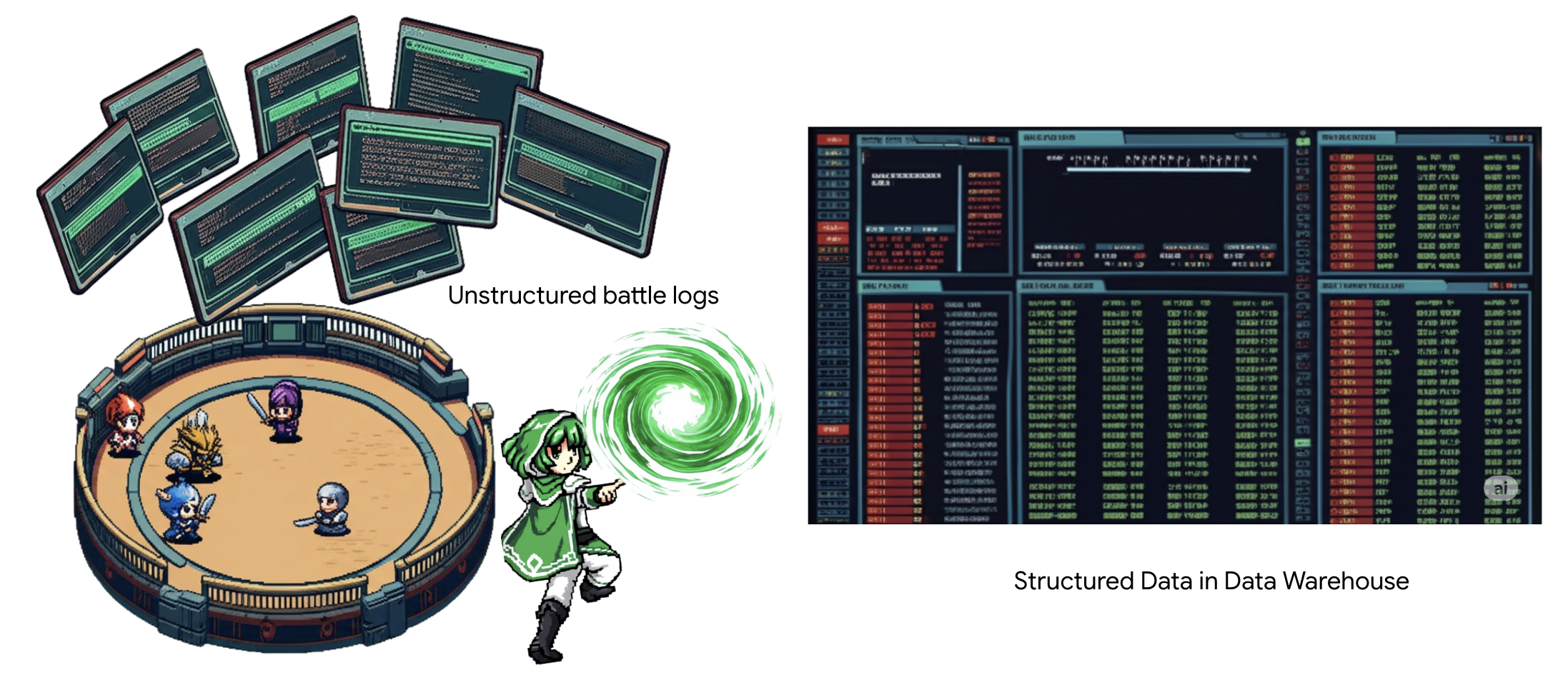
আমাদের যাত্রা আমাদেরকে Google BigQuery-এর পবিত্র স্থানে বহু-পর্যায়ের প্রক্রিয়ার মধ্য দিয়ে নিয়ে যাবে। আমরা একটি স্ক্রল না সরিয়ে, একটি জাদুকরী লেন্স ব্যবহার করে আমাদের GCS আর্কাইভের দিকে তাকিয়ে শুরু করব। তারপর, আমরা যুদ্ধের লগের কাব্যিক, অসংগঠিত কাহিনীগুলি পড়ার এবং ব্যাখ্যা করার জন্য একটি মিথুনকে ডেকে আনব। অবশেষে, আমরা কাঁচা ভবিষ্যদ্বাণীগুলিকে একগুচ্ছ নির্মল, আন্তঃসংযুক্ত টেবিলে পরিমার্জিত করব। আমাদের প্রথম গ্রিমোয়ার। এবং এটিকে এমন একটি গভীর প্রশ্ন জিজ্ঞাসা করব যার উত্তর কেবল এই নতুন কাঠামো দ্বারাই দেওয়া যেতে পারে।
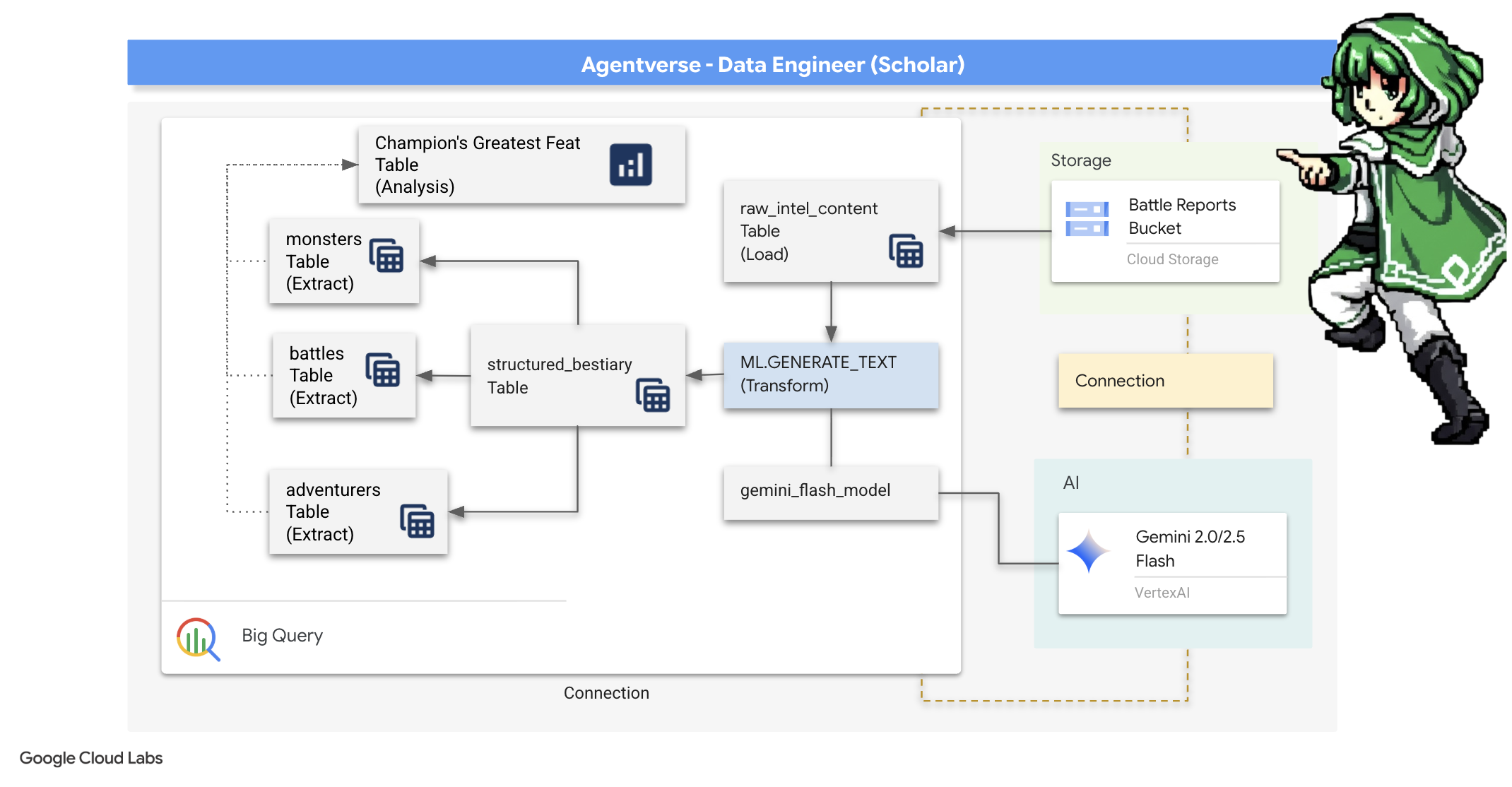
যাচাই-বাছাইয়ের দৃষ্টিকোণ: BigQuery বহিরাগত টেবিলের সাহায্যে GCS-এর দিকে তাকানো
আমাদের প্রথম কাজ হল এমন একটি লেন্স তৈরি করা যা আমাদের GCS আর্কাইভের বিষয়বস্তু দেখতে সাহায্য করে, ভিতরের স্ক্রোলগুলিকে বিরক্ত না করে। একটি বহিরাগত টেবিল হল এই লেন্স, যা কাঁচা টেক্সট ফাইলগুলিকে একটি টেবিলের মতো কাঠামোর সাথে ম্যাপ করে যা BigQuery সরাসরি জিজ্ঞাসা করতে পারে।
এটি করার জন্য, আমাদের প্রথমে একটি স্থিতিশীল লে লাইন অফ পাওয়ার তৈরি করতে হবে, একটি CONNECTION রিসোর্স, যা আমাদের BigQuery স্যাঙ্কটামকে GCS আর্কাইভের সাথে নিরাপদে লিঙ্ক করবে।
👉💻 আপনার ক্লাউড শেল টার্মিনালে, স্টোরেজ সেটআপ করতে এবং কন্ডুইট তৈরি করতে নিম্নলিখিত কমান্ডটি চালান:
. ~/agentverse-dataengineer/set_env.sh
. ~/agentverse-dataengineer/data_setup.sh

bq mk --connection \
  --connection_type=CLOUD_RESOURCE \
  --project_id=${PROJECT_ID} \
  --location=${REGION} \
  gcs-connection
💡 সাবধান! পরে একটি বার্তা আসবে!
ধাপ ২-এর সেটআপ স্ক্রিপ্টটি ব্যাকগ্রাউন্ডে একটি প্রক্রিয়া শুরু করেছে। কয়েক মিনিট পরে, আপনার টার্মিনালে একটি বার্তা পপ আপ হবে যা দেখতে এইরকম: [1]+ Done gcloud sql instances create ... এটি স্বাভাবিক এবং প্রত্যাশিত। এর অর্থ হল আপনার ক্লাউড SQL ডাটাবেস সফলভাবে তৈরি করা হয়েছে। আপনি নিরাপদে এই বার্তাটি উপেক্ষা করতে পারেন এবং কাজ চালিয়ে যেতে পারেন।
এক্সটার্নাল টেবিল তৈরি করার আগে, আপনাকে প্রথমে সেই ডেটাসেট তৈরি করতে হবে যাতে এটি থাকবে।
👉💻 আপনার ক্লাউড শেল টার্মিনালে এই একটি সহজ কমান্ডটি চালান:
. ~/agentverse-dataengineer/set_env.sh
bq --location=${REGION} mk --dataset ${PROJECT_ID}:bestiary_data
👉💻 এখন আমাদের অবশ্যই কন্ডুইটের জাদুকরী স্বাক্ষরকে GCS আর্কাইভ থেকে পড়ার এবং জেমিনি পরামর্শ করার জন্য প্রয়োজনীয় অনুমতি দিতে হবে।
. ~/agentverse-dataengineer/set_env.sh
export CONNECTION_SA=$(bq show --connection --project_id=${PROJECT_ID} --location=${REGION} --format=json gcs-connection  | jq -r '.cloudResource.serviceAccountId')

echo "The Conduit's Magical Signature is: $CONNECTION_SA"

echo "Granting key to the GCS Archive..."
gcloud storage buckets add-iam-policy-binding gs://${PROJECT_ID}-reports \
  --member="serviceAccount:$CONNECTION_SA" \
  --role="roles/storage.objectViewer"

gcloud projects add-iam-policy-binding ${PROJECT_ID} \
  --member="serviceAccount:$CONNECTION_SA" \
  --role="roles/aiplatform.user"
👉💻 আপনার ক্লাউড শেল টার্মিনালে, আপনার বাকেটের নাম প্রদর্শন করতে নিম্নলিখিত কমান্ডটি চালান:
echo $BUCKET_NAME
আপনার টার্মিনালটি your-project-id-gcs-bucket এর মতো একটি নাম প্রদর্শন করবে। পরবর্তী ধাপগুলিতে আপনার এটির প্রয়োজন হবে।
👉 আপনাকে Google Cloud Console-এর BigQuery ক্যোয়ারী এডিটরের মধ্যে থেকে পরবর্তী কমান্ডটি চালাতে হবে। সেখানে পৌঁছানোর সবচেয়ে সহজ উপায় হল নীচের লিঙ্কটি একটি নতুন ব্রাউজার ট্যাবে খুলুন। এটি আপনাকে সরাসরি Google Cloud Console-এর সঠিক পৃষ্ঠায় নিয়ে যাবে।
https://console.cloud.google.com/bigquery
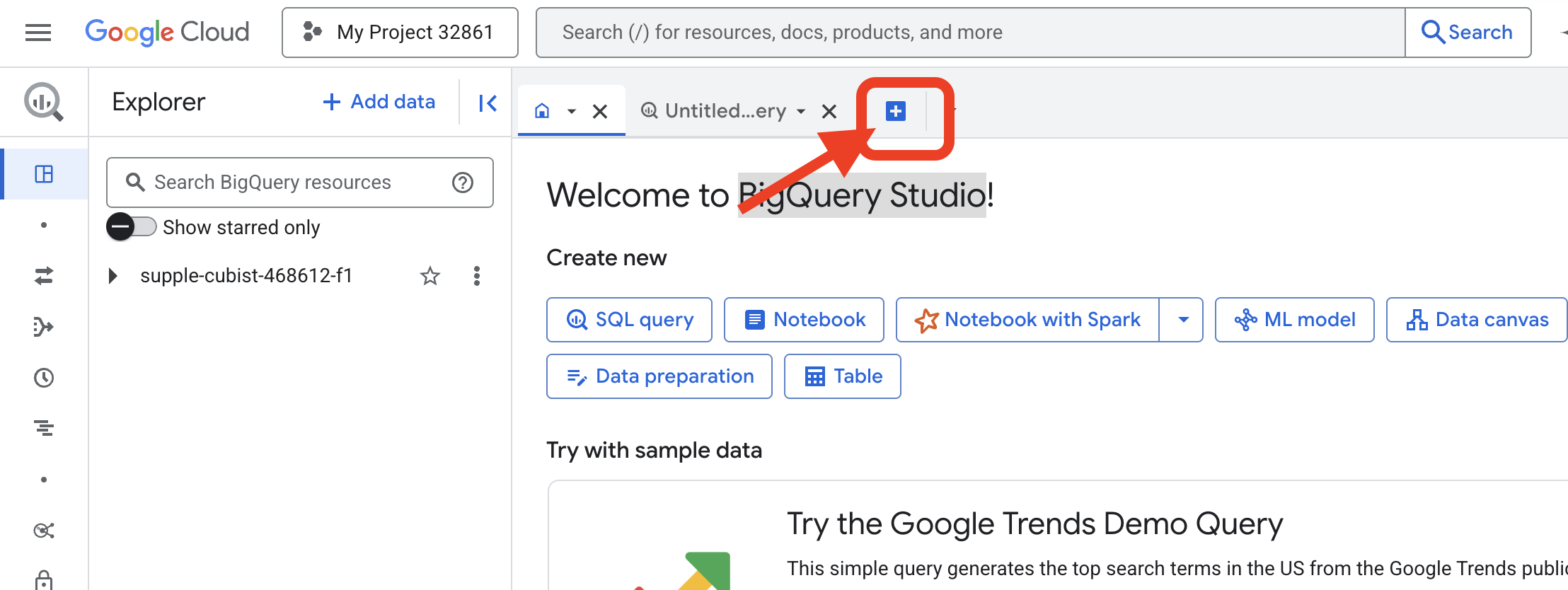
👉 পৃষ্ঠাটি লোড হয়ে গেলে, একটি নতুন সম্পাদক ট্যাব খুলতে নীল + বোতাম (একটি নতুন প্রশ্ন লিখুন) এ ক্লিক করুন।
এখন আমরা আমাদের জাদুকরী লেন্স তৈরি করার জন্য ডেটা ডেফিনিশন ল্যাঙ্গুয়েজ (DDL) মন্ত্র লিখি। এটি BigQuery কে বলে দেয় কোথায় দেখতে হবে এবং কী দেখতে হবে।
👉📜 আপনার খোলা BigQuery কোয়েরি এডিটরে, নিম্নলিখিত SQL টি পেস্ট করুন। REPLACE-WITH-YOUR-BUCKET-NAME প্রতিস্থাপন করতে ভুলবেন না।
আপনার কপি করা বাকেটের নাম দিয়ে । এবং Run এ ক্লিক করুন:
CREATE OR REPLACE EXTERNAL TABLE bestiary_data.raw_intel_content_table (
  raw_text STRING
)
OPTIONS (
  format = 'CSV',
  -- This is a trick to load each line of the text files as a single row.
  field_delimiter = '§',
  uris = ['gs://REPLACE-WITH-YOUR-BUCKET-NAME/raw_intel/*']
);
👉📜 "লেন্সের মধ্য দিয়ে দেখুন" এবং ফাইলগুলির বিষয়বস্তু দেখার জন্য একটি কোয়েরি চালান।
SELECT * FROM bestiary_data.raw_intel_content_table;
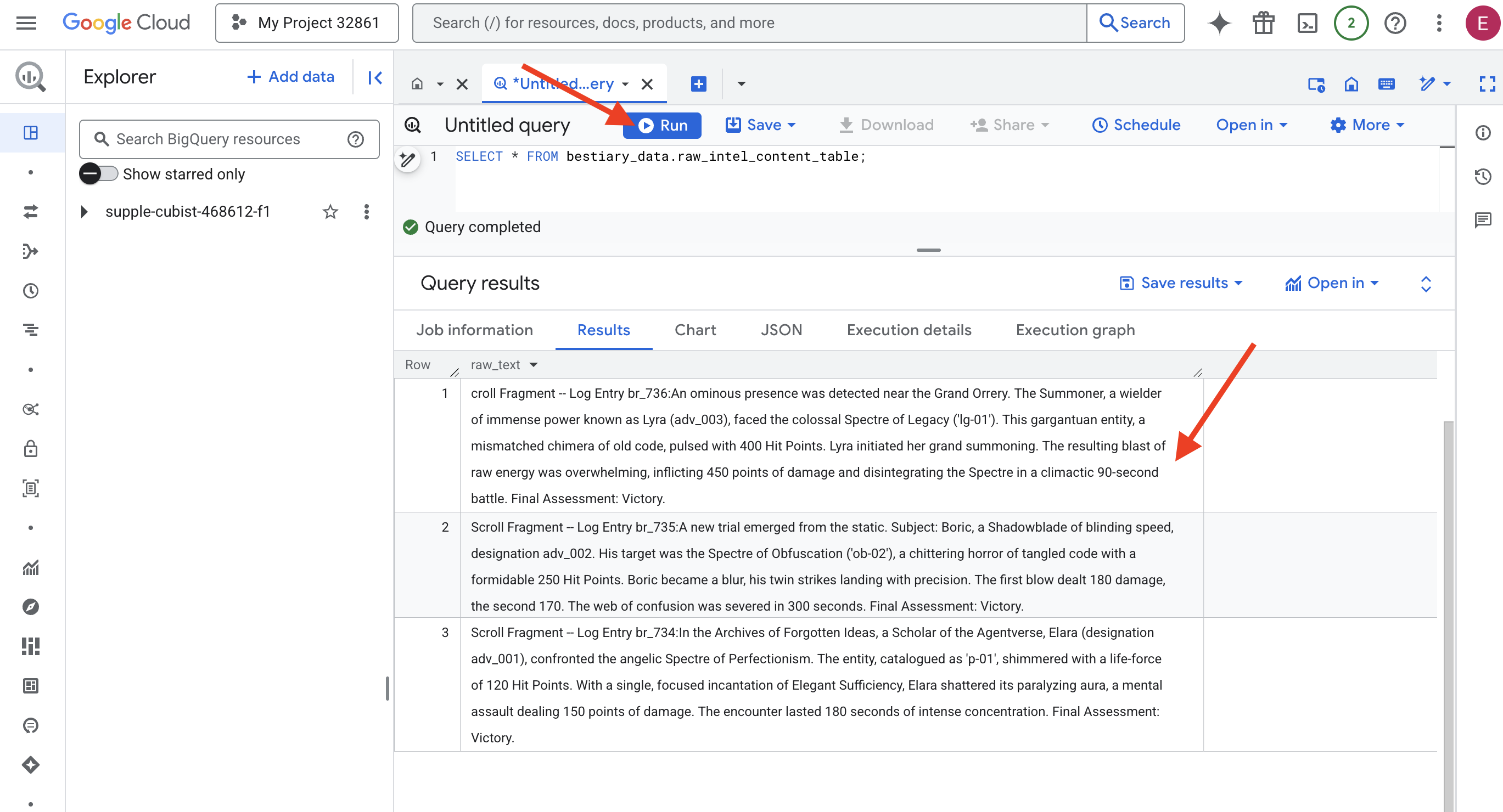
আমাদের লেন্স ঠিক আছে। আমরা এখন স্ক্রোলগুলির কাঁচা লেখা দেখতে পাচ্ছি। কিন্তু পড়া মানে বোঝা নয়।
"Agentverse এর আর্কাইভস অফ ফরগটেন আইডিয়াস"-এ, এলারা (পদবি adv_001), দেবদূতীয় স্পেকটার অফ পারফেকশনিজমের মুখোমুখি হন। 'p-01' হিসাবে তালিকাভুক্ত এই সত্তাটি 120 হিট পয়েন্টের জীবনীশক্তিতে ঝলমল করছিল। মার্জিত পর্যাপ্ততার একক, কেন্দ্রীভূত মন্ত্রের মাধ্যমে, এলারা তার পক্ষাঘাতগ্রস্ত আভাকে ভেঙে ফেলে, যা 150 পয়েন্ট ক্ষতির সম্মুখীন করে। এই মুখোমুখি লড়াইটি 180 সেকেন্ডের তীব্র একাগ্রতার সাথে স্থায়ী হয়েছিল। চূড়ান্ত মূল্যায়ন: বিজয়।
স্ক্রোলগুলো টেবিল এবং সারিতে লেখা নয়, বরং গল্পের মোড়ক গদ্যে লেখা। এটি আমাদের প্রথম দুর্দান্ত পরীক্ষা।
স্কলারের ভবিষ্যদ্বাণী: SQL ব্যবহার করে টেক্সটকে টেবিলে রূপান্তর করা
চ্যালেঞ্জ হলো, শ্যাডোব্লেডের দ্রুত, জোড়া আক্রমণের বিবরণী, একজন সামনারের একক, বিধ্বংসী বিস্ফোরণের জন্য বিপুল শক্তি সংগ্রহের ঘটনাবলীর থেকে অনেক আলাদাভাবে পড়া যায়। আমরা কেবল এই তথ্য আমদানি করতে পারি না; আমাদের অবশ্যই এটি ব্যাখ্যা করতে হবে। এটি জাদুর মুহূর্ত। আমরা BigQuery-এর ভিতরেই আমাদের সমস্ত ফাইল থেকে সমস্ত রেকর্ড পড়তে, বুঝতে এবং গঠন করতে একটি শক্তিশালী মন্ত্র হিসেবে একটি একক SQL কোয়েরি ব্যবহার করব।
👉💻 আপনার ক্লাউড শেল টার্মিনালে ফিরে, আপনার সংযোগের নাম প্রদর্শন করতে নিম্নলিখিত কমান্ডটি চালান:
echo "${PROJECT_ID}.${REGION}.gcs-connection"
আপনার টার্মিনাল সম্পূর্ণ সংযোগ স্ট্রিংটি প্রদর্শন করবে, এই সম্পূর্ণ স্ট্রিংটি নির্বাচন করুন এবং অনুলিপি করুন, পরবর্তী ধাপে আপনার এটির প্রয়োজন হবে।
আমরা একটি একক, শক্তিশালী মন্ত্র ব্যবহার করব: ML.GENERATE_TEXT । এই মন্ত্রটি একটি মিথুনকে ডেকে আনে, প্রতিটি স্ক্রল দেখায় এবং মূল তথ্যগুলিকে একটি কাঠামোগত JSON অবজেক্ট হিসাবে ফিরিয়ে আনতে নির্দেশ দেয়।
👉📜 BigQuery স্টুডিওতে, Gemini Model Reference তৈরি করুন। এটি Gemini Flash oracle কে আমাদের BigQuery লাইব্রেরির সাথে আবদ্ধ করে যাতে আমরা আমাদের Query তে এটিকে কল করতে পারি। প্রতিস্থাপন করতে ভুলবেন না
আপনার টার্মিনাল থেকে কপি করা সম্পূর্ণ সংযোগ স্ট্রিং সহ REPLACE-WITH-YOUR-FULL-CONNECTION-STRING ।
  CREATE OR REPLACE MODEL bestiary_data.gemini_flash_model
  REMOTE WITH CONNECTION `REPLACE-WITH-YOUR-FULL-CONNECTION-STRING`
  OPTIONS (endpoint = 'gemini-2.5-flash');
👉📜 এখন, গ্র্যান্ড ট্রান্সমিউটেশন স্পেলটি ব্যবহার করুন। এই কোয়েরিটি কাঁচা লেখাটি পড়ে, প্রতিটি স্ক্রলের জন্য একটি বিস্তারিত প্রম্পট তৈরি করে, এটি জেমিনিকে পাঠায় এবং AI এর স্ট্রাকচার্ড JSON রেসপন্স থেকে একটি নতুন স্টেজিং টেবিল তৈরি করে।
CREATE OR REPLACE TABLE bestiary_data.structured_bestiary AS
SELECT
  -- THE CRITICAL CHANGE: We remove PARSE_JSON. The result is already a JSON object.
  ml_generate_text_result AS structured_data
FROM
  ML.GENERATE_TEXT(
    -- Our bound Gemini Flash model.
    MODEL bestiary_data.gemini_flash_model,

    -- Our perfectly constructed input, with the prompt built for each row.
    (
      SELECT
        CONCAT(
          """
          From the following text, extract structured data into a single, valid JSON object.

          Your output must strictly conform to the following JSON structure and data types. Do not add, remove, or change any keys.

          {
            "monster": {
              "monster_id": "string",
              "name": "string",
              "type": "string",
              "hit_points": "integer"
            },
            "battle": {
              "battle_id": "string",
              "monster_id": "string",
              "adventurer_id": "string",
              "outcome": "string",
              "duration_seconds": "integer"
            },
            "adventurer": {
              "adventurer_id": "string",
              "name": "string",
              "class": "string"
            }
          }

          **CRUCIAL RULES:**
          - Do not output any text, explanations, conversational filler, or markdown formatting like ` ```json` before or after the JSON object.
          - Your entire response must be ONLY the raw JSON object itself.

          Here is the text:
          """,
          raw_text -- We append the actual text of the report here.
        ) AS prompt -- The final column is still named 'prompt', as the oracle requires.
      FROM
        bestiary_data.raw_intel_content_table
    ),

    -- The STRUCT now ONLY contains model parameters.
    STRUCT(
      0.2 AS temperature,
      2048 AS max_output_tokens
    )
  );
রূপান্তর সম্পূর্ণ হয়েছে, কিন্তু ফলাফল এখনও বিশুদ্ধ নয়। জেমিনি মডেলটি তার উত্তরটি একটি স্ট্যান্ডার্ড ফর্ম্যাটে প্রদান করে, আমাদের কাঙ্ক্ষিত JSON কে একটি বৃহত্তর কাঠামোর মধ্যে আবৃত করে যার মধ্যে এর চিন্তাভাবনা প্রক্রিয়া সম্পর্কে মেটাডেটা অন্তর্ভুক্ত থাকে। আসুন আমরা এটি বিশুদ্ধ করার চেষ্টা করার আগে এই কাঁচা ভবিষ্যদ্বাণীটি দেখি।
👉📜 জেমিনি মডেল থেকে কাঁচা আউটপুট পরীক্ষা করার জন্য একটি কোয়েরি চালান:
SELECT * FROM bestiary_data.structured_bestiary;
👀 আপনি structured_data নামে একটি একক কলাম দেখতে পাবেন। প্রতিটি সারির বিষয়বস্তু এই জটিল JSON অবজেক্টের মতো দেখাবে:
{"candidates":[{"avg_logprobs":-0.5691758094475283,"content":{"parts":[{"text":"```json\n{\n \"monster\": {\n \"monster_id\": \"gw_02\",\n \"name\": \"Gravewight\",\n \"type\": \"Gravewight\",\n \"hit_points\": 120\n },\n \"battle\": {\n \"battle_id\": \"br_735\",\n \"monster_id\": \"gw_02\",\n \"adventurer_id\": \"adv_001\",\n \"outcome\": \"Defeat\",\n \"duration_seconds\": 45\n },\n \"adventurer\": {\n \"adventurer_id\": \"adv_001\",\n \"name\": \"Elara\",\n \"class\": null\n }\n}\n```"}],"role":"model"},"finish_reason":"STOP","score":-97.32906341552734}],"create_time":"2025-07-28T15:53:24.482775Z","model_version":"gemini-2.5-flash","response_id":"9JyHaNe7HZ2WhMIPxqbxEQ","usage_metadata":{"billable_prompt_usage":{"text_count":640},"candidates_token_count":171,"candidates_tokens_details":[{"modality":"TEXT","token_count":171}],"prompt_token_count":207,"prompt_tokens_details":[{"modality":"TEXT","token_count":207}],"thoughts_token_count":1014,"total_token_count":1392,"traffic_type":"ON_DEMAND"}}
আপনি দেখতে পাচ্ছেন, আমাদের পুরস্কার - আমাদের অনুরোধ করা পরিষ্কার JSON অবজেক্টটি - এই কাঠামোর গভীরে অবস্থিত। আমাদের পরবর্তী কাজটি স্পষ্ট। এই কাঠামোটি পদ্ধতিগতভাবে নেভিগেট করার জন্য এবং এর মধ্যে বিশুদ্ধ জ্ঞান আহরণের জন্য আমাদের একটি আচার পালন করতে হবে।
পরিষ্কারের আচার: SQL দিয়ে GenAI আউটপুট স্বাভাবিক করা
মিথুন রাশি কথা বলেছে, কিন্তু এর কথাগুলো কাঁচা এবং এর সৃষ্টির (প্রার্থী, সমাপ্তি_যুক্তি, ইত্যাদি) স্বর্গীয় শক্তিতে আবৃত। একজন সত্যিকারের পণ্ডিত কেবল কাঁচা ভবিষ্যদ্বাণী লুকিয়ে রাখেন না; তারা সাবধানে মূল জ্ঞান বের করেন এবং ভবিষ্যতে ব্যবহারের জন্য উপযুক্ত গ্রন্থে এটি লিপিবদ্ধ করেন।
আমরা এখন আমাদের চূড়ান্ত মন্ত্রের সেটটি ব্যবহার করব। এই একক স্ক্রিপ্টটি করবে:
- আমাদের স্টেজিং টেবিল থেকে কাঁচা, নেস্টেড JSON পড়ুন।
- মূল তথ্য পেতে এটি পরিষ্কার করুন এবং বিশ্লেষণ করুন।
- প্রাসঙ্গিক টুকরোগুলোকে তিনটি চূড়ান্ত, আদিম টেবিলে লিখুন: দানব, অভিযাত্রী এবং যুদ্ধ।
👉📜 একটি নতুন BigQuery কোয়েরি এডিটরে, আমাদের ক্লিনজিং লেন্স তৈরি করতে নিম্নলিখিত স্পেলটি চালান:
CREATE OR REPLACE TABLE bestiary_data.monsters AS
WITH
  CleanedDivinations AS (
    SELECT
      SAFE.PARSE_JSON(
        REGEXP_EXTRACT(
          JSON_VALUE(structured_data, '$.candidates[0].content.parts[0].text'),
          r'\{[\s\S]*\}'
        )
      ) AS report_data
    FROM
      bestiary_data.structured_bestiary
  )
SELECT
  JSON_VALUE(report_data, '$.monster.monster_id') AS monster_id,
  JSON_VALUE(report_data, '$.monster.name') AS name,
  JSON_VALUE(report_data, '$.monster.type') AS type,
  SAFE_CAST(JSON_VALUE(report_data, '$.monster.hit_points') AS INT64) AS hit_points
FROM
  CleanedDivinations
WHERE
  report_data IS NOT NULL
QUALIFY ROW_NUMBER() OVER (PARTITION BY monster_id ORDER BY name) = 1;
👉📜 বেস্টিয়ারি যাচাই করুন:
SELECT * FROM bestiary_data.monsters;
এরপর, আমরা আমাদের রোল অফ চ্যাম্পিয়নস তৈরি করব, এই সাহসী অভিযাত্রীদের একটি তালিকা যারা এই প্রাণীদের মুখোমুখি হয়েছেন।
👉📜 একটি নতুন কোয়েরি এডিটরে, অ্যাডভেঞ্চারার্স টেবিল তৈরি করতে নিম্নলিখিত স্পেলটি চালান:
CREATE OR REPLACE TABLE bestiary_data.adventurers AS
WITH
  CleanedDivinations AS (
    SELECT
      SAFE.PARSE_JSON(
        REGEXP_EXTRACT(
          JSON_VALUE(structured_data, '$.candidates[0].content.parts[0].text'),
          r'\{[\s\S]*\}'
        )
      ) AS report_data
    FROM
      bestiary_data.structured_bestiary
  )
SELECT
  JSON_VALUE(report_data, '$.adventurer.adventurer_id') AS adventurer_id,
  JSON_VALUE(report_data, '$.adventurer.name') AS name,
  JSON_VALUE(report_data, '$.adventurer.class') AS class
FROM
  CleanedDivinations
QUALIFY ROW_NUMBER() OVER (PARTITION BY adventurer_id ORDER BY name) = 1;
👉📜 চ্যাম্পিয়নদের তালিকা যাচাই করুন:
SELECT * FROM bestiary_data.adventurers;
অবশেষে, আমরা আমাদের তথ্য সারণী তৈরি করব: যুদ্ধের ক্রনিকল। এই গ্রন্থটি অন্য দুটিকে সংযুক্ত করে, প্রতিটি অনন্য সংঘর্ষের বিবরণ লিপিবদ্ধ করে। যেহেতু প্রতিটি যুদ্ধ একটি অনন্য ঘটনা, তাই কোনও অনুলিপি তৈরির প্রয়োজন নেই।
👉📜 একটি নতুন কোয়েরি এডিটরে, ব্যাটেলস টেবিল তৈরি করতে নিম্নলিখিত স্পেলটি চালান:
CREATE OR REPLACE TABLE bestiary_data.battles AS
WITH
  CleanedDivinations AS (
    SELECT
      SAFE.PARSE_JSON(
        REGEXP_EXTRACT(
          JSON_VALUE(structured_data, '$.candidates[0].content.parts[0].text'),
          r'\{[\s\S]*\}'
        )
      ) AS report_data
    FROM
      bestiary_data.structured_bestiary
  )
-- Extract the raw essence for all battle fields and cast where necessary.
SELECT
  JSON_VALUE(report_data, '$.battle.battle_id') AS battle_id,
  JSON_VALUE(report_data, '$.battle.monster_id') AS monster_id,
  JSON_VALUE(report_data, '$.battle.adventurer_id') AS adventurer_id,
  JSON_VALUE(report_data, '$.battle.outcome') AS outcome,
  SAFE_CAST(JSON_VALUE(report_data, '$.battle.duration_seconds') AS INT64) AS duration_seconds
FROM
  CleanedDivinations;
👉📜 ক্রনিকল যাচাই করুন:
SELECT * FROM bestiary_data.battles;
কৌশলগত অন্তর্দৃষ্টি উন্মোচন করা
স্ক্রোলগুলি পঠিত হয়েছে, সারাংশ দ্রবীভূত করা হয়েছে এবং গ্রন্থগুলি খোদাই করা হয়েছে। আমাদের গ্রিমোয়ার এখন আর কেবল তথ্যের সংগ্রহ নয়, এটি গভীর কৌশলগত জ্ঞানের একটি সম্পর্কীয় ডাটাবেস। আমরা এখন এমন প্রশ্ন জিজ্ঞাসা করতে পারি যেগুলির উত্তর দেওয়া অসম্ভব ছিল যখন আমাদের জ্ঞান কাঁচা, অসংগঠিত লেখায় আটকে ছিল।
এবার চলো আমরা একটা চূড়ান্ত, মহৎ ভবিষ্যদ্বাণী করি। আমরা এমন একটা মন্ত্র প্রয়োগ করব যা আমাদের তিনটি গ্রন্থ - বেস্টিয়ারি অফ মনস্টারস, রোল অফ চ্যাম্পিয়নস এবং ক্রনিকল অফ ব্যাটেলস - একসাথে আলোচনা করে একটি গভীর, কার্যকর অন্তর্দৃষ্টি উন্মোচন করবে।
আমাদের কৌশলগত প্রশ্ন: "প্রতিটি অভিযাত্রীর জন্য, তারা সফলভাবে পরাজিত করা সবচেয়ে শক্তিশালী দানবের নাম কী (হিট পয়েন্ট অনুসারে), এবং সেই নির্দিষ্ট বিজয় কতক্ষণ সময় নিয়েছে?"
এটি একটি জটিল প্রশ্ন যার জন্য চ্যাম্পিয়নদের তাদের বিজয়ী যুদ্ধের সাথে এবং সেই যুদ্ধগুলিকে জড়িত দানবদের পরিসংখ্যানের সাথে সংযুক্ত করতে হবে। এটিই একটি স্ট্রাকচার্ড ডেটা মডেলের আসল শক্তি।
👉📜 একটি নতুন BigQuery কোয়েরি এডিটরে, নিম্নলিখিত চূড়ান্ত মন্ত্রটি লিখুন:
-- This is our final spell, joining all three tomes to reveal a deep insight.
WITH
  -- First, we consult the Chronicle of Battles to find only the victories.
  VictoriousBattles AS (
    SELECT
      adventurer_id,
      monster_id,
      duration_seconds
    FROM
      bestiary_data.battles
    WHERE
      outcome = 'Victory'
  ),
  -- Next, we create a temporary record for each victory, ranking the monsters
  -- each adventurer defeated by their power (hit points).
  RankedVictories AS (
    SELECT
      v.adventurer_id,
      m.name AS monster_name,
      m.hit_points,
      v.duration_seconds,
      -- This spell ranks each adventurer's victories from most to least powerful monster.
      ROW_NUMBER() OVER (PARTITION BY v.adventurer_id ORDER BY m.hit_points DESC) as victory_rank
    FROM
      VictoriousBattles v
    JOIN
      bestiary_data.monsters m ON v.monster_id = m.monster_id
  )
-- Finally, we consult the Roll of Champions and join it with our ranked victories
-- to find the name of each champion and the details of their greatest triumph.
SELECT
  a.name AS adventurer_name,
  a.class AS adventurer_class,
  r.monster_name AS most_powerful_foe_defeated,
  r.hit_points AS foe_hit_points,
  r.duration_seconds AS duration_of_greatest_victory
FROM
  bestiary_data.adventurers a
JOIN
  RankedVictories r ON a.adventurer_id = r.adventurer_id
WHERE
  -- We only want to see their number one, top-ranked victory.
  r.victory_rank = 1
ORDER BY
  foe_hit_points DESC;
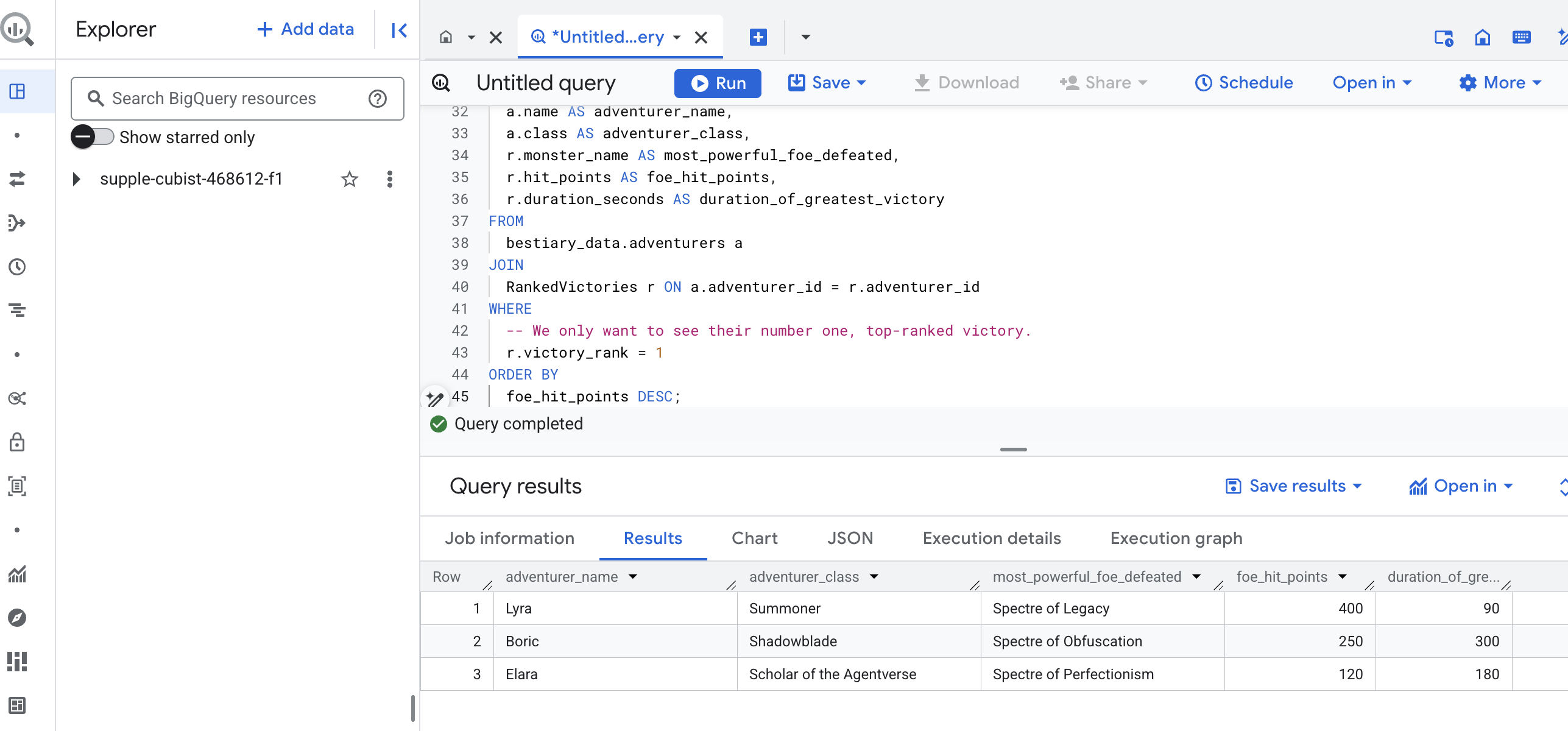
এই কোয়েরির আউটপুট হবে একটি পরিষ্কার, সুন্দর টেবিল যা আপনার ডেটাসেটের প্রতিটি অভিযাত্রীর জন্য "একজন চ্যাম্পিয়নের সেরা কীর্তি সম্পর্কে গল্প" প্রদান করবে। এটি দেখতে এরকম কিছু হতে পারে:
বিগ কোয়েরি ট্যাবটি বন্ধ করুন।
এই একক, মার্জিত ফলাফল সমগ্র পাইপলাইনের মূল্য প্রমাণ করে। আপনি সফলভাবে কাঁচা, বিশৃঙ্খল যুদ্ধক্ষেত্রের প্রতিবেদনগুলিকে কিংবদন্তি গল্প এবং কৌশলগত, তথ্য-চালিত অন্তর্দৃষ্টির উৎসে রূপান্তরিত করেছেন।
নন-গেমারদের জন্য
৫. দ্য স্ক্রাইবস গ্রিমোয়ার: ইন-ডেটাওয়্যারহাউস চাঙ্কিং, এম্বেডিং এবং অনুসন্ধান
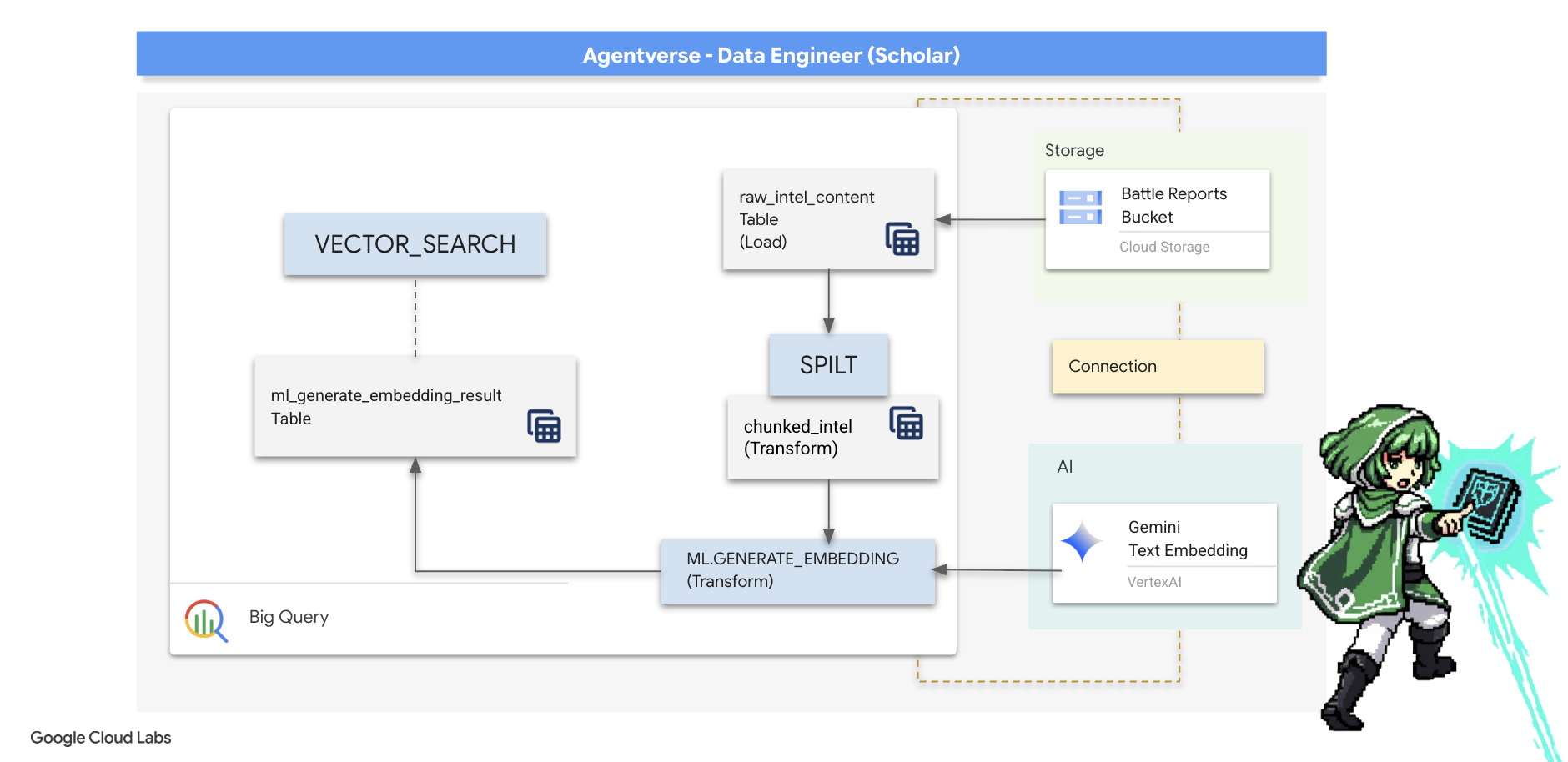
অ্যালকেমিস্টের ল্যাবে আমাদের কাজ সফল হয়েছে। আমরা কাঁচা, আখ্যানমূলক স্ক্রোলগুলিকে কাঠামোগত, সম্পর্কযুক্ত টেবিলে রূপান্তরিত করেছি - ডেটা ম্যাজির একটি শক্তিশালী কীর্তি। যাইহোক, মূল স্ক্রোলগুলি এখনও একটি গভীর, অর্থপূর্ণ সত্য ধারণ করে যা আমাদের কাঠামোগত টেবিলগুলি সম্পূর্ণরূপে ধারণ করতে পারে না। সত্যিকারের জ্ঞানী এজেন্ট তৈরি করতে, আমাদের এই অর্থটি উন্মোচন করতে হবে।
একটি কাঁচা, লম্বা স্ক্রোল হল একটি ভোঁতা যন্ত্র। যদি আমাদের এজেন্ট "পক্ষাঘাতকারী আভা" সম্পর্কে একটি প্রশ্ন জিজ্ঞাসা করে, তাহলে একটি সাধারণ অনুসন্ধানের মাধ্যমে একটি সম্পূর্ণ যুদ্ধ প্রতিবেদন ফিরে আসতে পারে যেখানে সেই বাক্যাংশটি কেবল একবার উল্লেখ করা হয়েছে, উত্তরটি অপ্রাসঙ্গিক বিবরণে লুকিয়ে রয়েছে। একজন দক্ষ পণ্ডিত জানেন যে প্রকৃত জ্ঞান আয়তনে নয়, বরং নির্ভুলতার মধ্যে পাওয়া যায়।
আমরা আমাদের BigQuery পবিত্র স্থানের মধ্যেই শক্তিশালী, ইন-ডাটাবেস আচার-অনুষ্ঠানের একটি ত্রয়ী সম্পাদন করব।
- বিভাজনের রীতি (চ্যাঙ্কিং): আমরা আমাদের কাঁচা গোয়েন্দা লগগুলি নেব এবং সাবধানতার সাথে সেগুলিকে ছোট, কেন্দ্রীভূত, স্বয়ংসম্পূর্ণ অনুচ্ছেদে ভেঙে ফেলব।
- পাতন (এম্বেডিং) এর রীতি: আমরা একটি জেমিনি মডেলের সাথে পরামর্শ করার জন্য BQML ব্যবহার করব, প্রতিটি টেক্সট খণ্ডকে একটি "অর্থাৎ আঙ্গুলের ছাপ" - একটি ভেক্টর এম্বেডিং - এ রূপান্তরিত করব।
- ভবিষ্যদ্বাণীর রীতি (অনুসন্ধান): আমরা BQML এর ভেক্টর অনুসন্ধান ব্যবহার করে সরল ইংরেজিতে একটি প্রশ্ন জিজ্ঞাসা করব এবং আমাদের গ্রিমোয়ার থেকে সবচেয়ে প্রাসঙ্গিক, দ্রবীভূত জ্ঞান খুঁজে বের করব।
এই সম্পূর্ণ প্রক্রিয়াটি একটি শক্তিশালী, অনুসন্ধানযোগ্য জ্ঞানের ভিত্তি তৈরি করে যার ফলে ডেটা কখনও BigQuery-এর নিরাপত্তা এবং স্কেল থেকে বেরিয়ে যায় না।
বিভাজনের রীতি: SQL দিয়ে স্ক্রোলগুলি বিনির্মাণ করা
আমাদের জ্ঞানের উৎস হলো আমাদের GCS আর্কাইভে থাকা কাঁচা টেক্সট ফাইল, যা আমাদের বহিরাগত টেবিল, bestiary_data.raw_intel_content_table এর মাধ্যমে অ্যাক্সেসযোগ্য। আমাদের প্রথম কাজ হল এমন একটি বানান লেখা যা প্রতিটি দীর্ঘ স্ক্রোল পড়বে এবং এটিকে ছোট, আরও সহজে হজমযোগ্য পদের একটি সিরিজে বিভক্ত করবে। এই আচারের জন্য, আমরা একটি "খণ্ড" কে একটি একক বাক্য হিসাবে সংজ্ঞায়িত করব।
বাক্য দ্বারা বিভক্ত করা আমাদের বর্ণনামূলক লগের জন্য একটি স্পষ্ট এবং কার্যকর সূচনা বিন্দু হলেও, একজন দক্ষ ক্রাইবের হাতে অনেকগুলি খণ্ডন কৌশল থাকে এবং চূড়ান্ত অনুসন্ধানের মানের জন্য পছন্দটি অত্যন্ত গুরুত্বপূর্ণ। সহজ পদ্ধতিগুলি ব্যবহার করতে পারে
- স্থির দৈর্ঘ্য (আকার) খণ্ডিতকরণ , কিন্তু এটি একটি মূল ধারণাকে মোটামুটিভাবে অর্ধেক করে দিতে পারে।
আরও পরিশীলিত আচার-অনুষ্ঠান, যেমন
- রিকার্সিভ চাঙ্কিং , প্রায়শই বাস্তবে পছন্দ করা হয়; তারা প্রথমে অনুচ্ছেদের মতো প্রাকৃতিক সীমানা বরাবর পাঠ্য ভাগ করার চেষ্টা করে, তারপর যতটা সম্ভব শব্দার্থিক প্রেক্ষাপট বজায় রাখার জন্য বাক্যে ফিরে আসে। সত্যিকার অর্থে জটিল পাণ্ডুলিপির জন্য।
- কন্টেন্ট-অ্যাওয়ার চাঙ্কিং (ডকুমেন্ট) , যেখানে স্ক্রিব ডকুমেন্টের অন্তর্নিহিত কাঠামো ব্যবহার করে - যেমন একটি প্রযুক্তিগত ম্যানুয়ালের হেডার বা কোডের স্ক্রোলের ফাংশন, জ্ঞানের সবচেয়ে যুক্তিসঙ্গত এবং শক্তিশালী অংশ তৈরি করতে। এবং আরও অনেক কিছু...
আমাদের যুদ্ধ লগের জন্য, বাক্যটি গ্রানুলারিটি এবং প্রসঙ্গের নিখুঁত ভারসাম্য প্রদান করে।
👉📜 একটি নতুন BigQuery কোয়েরি এডিটরে, নিম্নলিখিত মন্ত্রটি চালান। এই স্পেলটি SPLIT ফাংশন ব্যবহার করে প্রতিটি স্ক্রোলের টেক্সটকে প্রতিটি পিরিয়ড (.) এ আলাদা করে এবং তারপর বাক্যের ফলে তৈরি অ্যারেগুলিকে পৃথক সারিতে আননেস্ট করে।
CREATE OR REPLACE TABLE bestiary_data.chunked_intel AS
WITH
  -- First, add a unique row number to each scroll to act as a document ID.
  NumberedScrolls AS (
    SELECT
      ROW_NUMBER() OVER () AS scroll_id,
      raw_text
    FROM
      bestiary_data.raw_intel_content_table
  )
-- Now, process each numbered scroll.
SELECT
  scroll_id,
  -- Assign a unique ID to each chunk within a scroll for precise reference.
  CONCAT(CAST(scroll_id AS STRING), '-', CAST(ROW_NUMBER() OVER (PARTITION BY scroll_id) AS STRING)) as chunk_id,
  -- Trim whitespace from the chunk for cleanliness.
  TRIM(chunk) AS chunk_text
FROM
  NumberedScrolls,
  -- This is the core of the spell: UNNEST splits the array of sentences into rows.
  UNNEST(SPLIT(raw_text, '.')) AS chunk
-- A final refinement: we only keep chunks that have meaningful content.
WHERE
  -- This ensures we don't have empty rows from double periods, etc.
  LENGTH(TRIM(chunk)) > 15;
👉 এখন, আপনার নতুন লেখা, সংগৃহীত জ্ঞান পরীক্ষা করার জন্য একটি কোয়েরি চালান এবং পার্থক্যটি দেখুন।
SELECT * FROM bestiary_data.chunked_intel ORDER BY scroll_id, chunk_id;
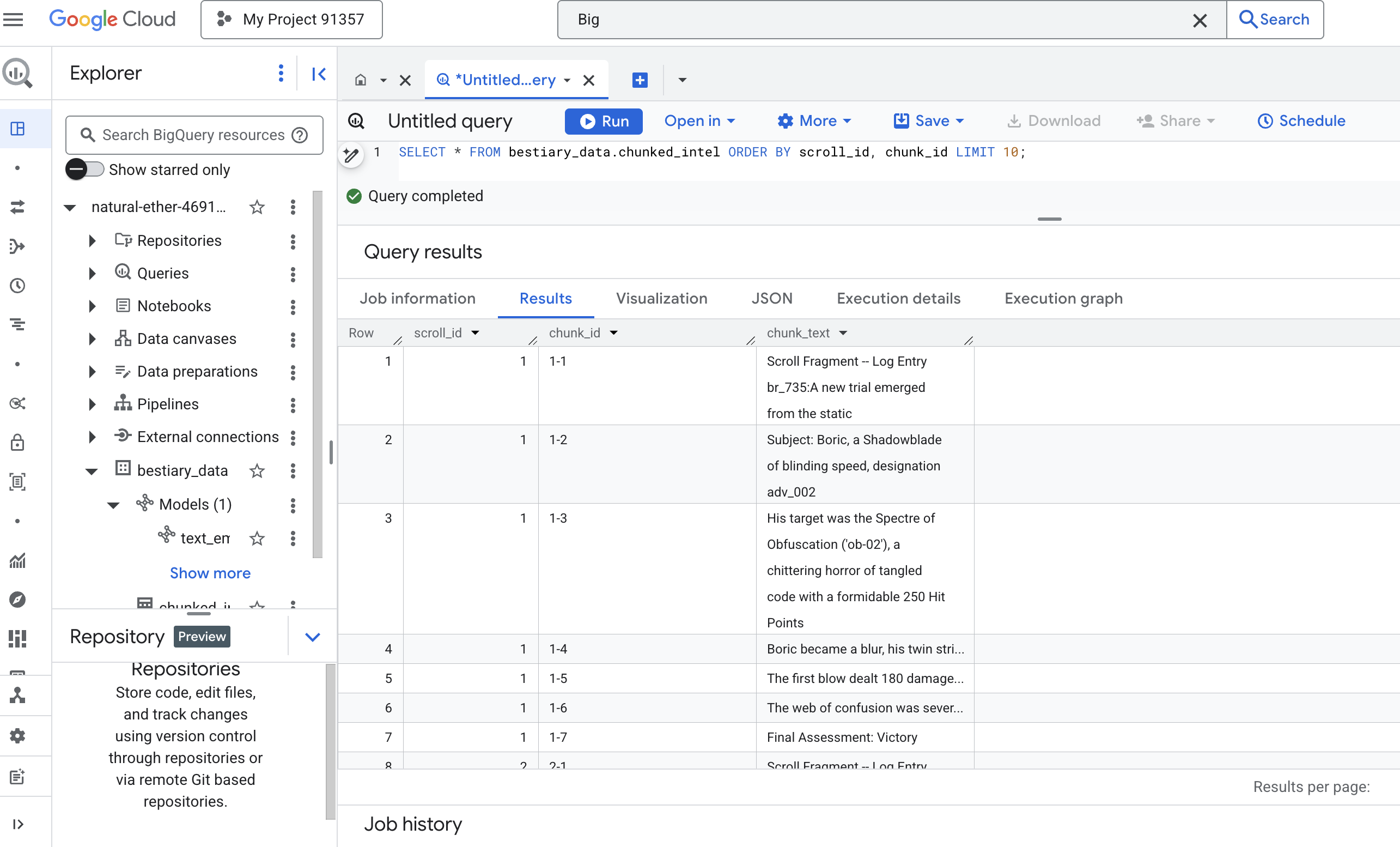
ফলাফল লক্ষ্য করুন। যেখানে একসময় লেখার একটি একক, ঘন ব্লক ছিল, এখন সেখানে একাধিক সারি রয়েছে, প্রতিটি মূল স্ক্রোলের (scroll_id) সাথে সংযুক্ত কিন্তু শুধুমাত্র একটি একক, ফোকাসড বাক্য ধারণ করে। প্রতিটি সারি এখন ভেক্টরাইজেশনের জন্য একটি নিখুঁত প্রার্থী।
পাতন পদ্ধতি: BQML ব্যবহার করে টেক্সটকে ভেক্টরে রূপান্তর করা
👉💻 প্রথমে, আপনার টার্মিনালে ফিরে যান, আপনার সংযোগের নাম প্রদর্শন করতে নিম্নলিখিত কমান্ডটি চালান:
. ~/agentverse-dataengineer/set_env.sh
echo "${PROJECT_ID}.${REGION}.gcs-connection"
👉📜 আমাদের অবশ্যই একটি নতুন BigQuery মডেল তৈরি করতে হবে যা একটি Gemini এর টেক্সট এম্বেডিং নির্দেশ করে। BigQuery স্টুডিওতে, নিম্নলিখিত বানানটি চালান। মনে রাখবেন আপনাকে REPLACE-WITH-YOUR-FULL-CONNECTION-STRING আপনার টার্মিনাল থেকে কপি করা সম্পূর্ণ সংযোগ স্ট্রিং দিয়ে প্রতিস্থাপন করতে হবে।
CREATE OR REPLACE MODEL bestiary_data.text_embedding_model
  REMOTE WITH CONNECTION `REPLACE-WITH-YOUR-FULL-CONNECTION-STRING`
  OPTIONS (endpoint = 'text-embedding-005');
👉📜 এখন, গ্র্যান্ড ডিস্টিলেশন স্পেলটি ব্যবহার করুন। এই কোয়েরিটি ML.GENERATE_EMBEDDING ফাংশনকে কল করে, যা আমাদের chunked_intel টেবিলের প্রতিটি সারি পড়বে, টেক্সটটি জেমিনি এম্বেডিং মডেলে পাঠাবে এবং ফলস্বরূপ ভেক্টর ফিঙ্গারপ্রিন্টটি একটি নতুন টেবিলে সংরক্ষণ করবে।
CREATE OR REPLACE TABLE bestiary_data.embedded_intel AS
SELECT
  *
FROM
  ML.GENERATE_EMBEDDING(
    -- The embedding model we just created.
    MODEL bestiary_data.text_embedding_model,
    -- A subquery that selects our data and renames the text column to 'content'.
    (
      SELECT
        scroll_id,
        chunk_id,
        chunk_text AS content -- Renaming our text column is the key correction.
      FROM
        bestiary_data.chunked_intel
    ),
    -- The configuration struct is now simpler and correct.
    STRUCT(
      -- This task_type is crucial. It optimizes the vectors for retrieval.
      'RETRIEVAL_DOCUMENT' AS task_type
    )
  );
এই প্রক্রিয়াটিতে এক বা দুই মিনিট সময় লাগতে পারে কারণ BigQuery সমস্ত টেক্সট খণ্ড প্রক্রিয়া করে।
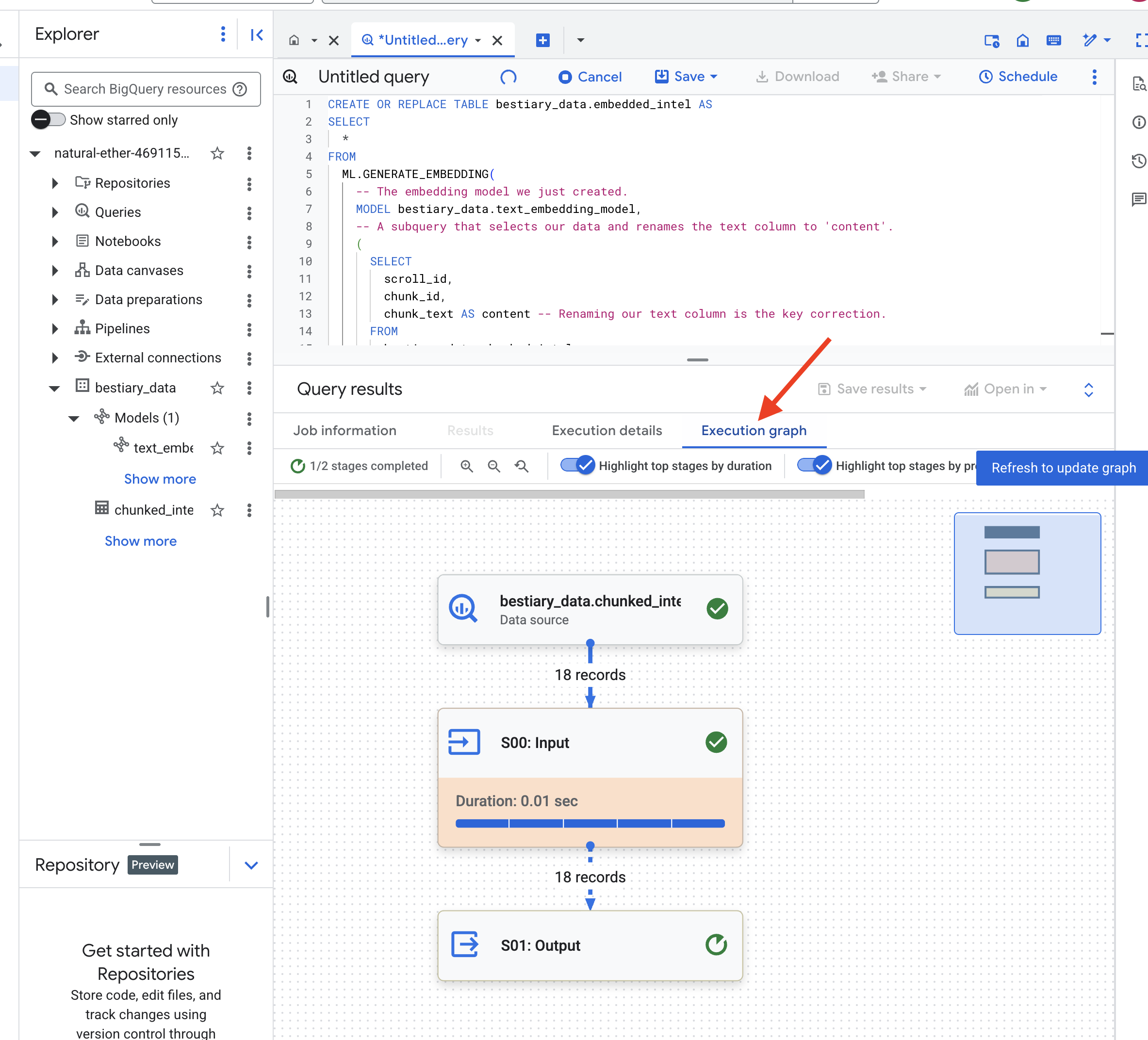
👉📜 একবার সম্পূর্ণ হয়ে গেলে, নতুন টেবিলটি পরিদর্শন করে অর্থপূর্ণ আঙ্গুলের ছাপগুলি দেখুন।
SELECT
  chunk_id,
  content,
  ml_generate_embedding_result
FROM
  bestiary_data.embedded_intel
LIMIT 20;
এখন আপনি একটি নতুন কলাম দেখতে পাবেন, ml_generate_embedding_result , যাতে আপনার লেখার ঘন ভেক্টর উপস্থাপনা থাকবে। আমাদের Grimoire এখন শব্দার্থিকভাবে এনকোড করা হয়েছে।
ভবিষ্যদ্বাণীর আচার: BQML এর সাথে শব্দার্থিক অনুসন্ধান
👉📜 আমাদের গ্রিমোয়ারের চূড়ান্ত পরীক্ষা হল এটিকে একটি প্রশ্ন জিজ্ঞাসা করা। আমরা এখন আমাদের চূড়ান্ত আচারটি সম্পাদন করব: একটি ভেক্টর অনুসন্ধান। এটি কোনও কীওয়ার্ড অনুসন্ধান নয়; এটি অর্থ অনুসন্ধান। আমরা স্বাভাবিক ভাষায় একটি প্রশ্ন জিজ্ঞাসা করব, BQML আমাদের প্রশ্নটিকে একটি এমবেডিংয়ে রূপান্তর করবে এবং তারপরে আমাদের embedded_intel এর সম্পূর্ণ টেবিলটি অনুসন্ধান করবে যাতে টেক্সট খণ্ডগুলি খুঁজে পাওয়া যায় যার আঙুলের ছাপ অর্থের দিক থেকে "সবচেয়ে কাছের"।
SELECT
  -- The content column contains our original, relevant text chunk.
  base.content,
  -- The distance metric shows how close the match is (lower is better).
  distance
FROM
  VECTOR_SEARCH(
    -- The table containing the knowledge base with its embeddings.
    TABLE bestiary_data.embedded_intel,
    -- The column that contains the vector embeddings.
    'ml_generate_embedding_result',
    (
      -- This subquery generates an embedding for our question in real-time.
      SELECT ml_generate_embedding_result
      FROM ML.GENERATE_EMBEDDING(
          MODEL bestiary_data.text_embedding_model,
          (SELECT 'What are the tactics against a foe that causes paralysis?' AS content),
          STRUCT('RETRIEVAL_QUERY' AS task_type)
        )
    ),
    -- Specify how many of the closest results we want to see.
    top_k => 3,
    -- The distance metric used to find the "closest" vectors.
    distance_type => 'COSINE'
  );
বানানের বিশ্লেষণ:
-
VECTOR_SEARCH: অনুসন্ধান পরিচালনার মূল ফাংশন। -
ML.GENERATE_EMBEDDING(অভ্যন্তরীণ কোয়েরি): এটাই জাদু। আমরা আমাদের কোয়েরি ('What are the tactics...') একই মডেল ব্যবহার করে এম্বেড করি কিন্তু টাস্ক টাইপ'RETRIEVAL_QUERY'দিয়ে, যা বিশেষভাবে কোয়েরির জন্য অপ্টিমাইজ করা হয়েছে। -
top_k => 3: আমরা শীর্ষ 3টি সবচেয়ে প্রাসঙ্গিক ফলাফল চাইছি। -
distance_type => 'COSINE': এটি ভেক্টরগুলির মধ্যে "কোণ" পরিমাপ করে। একটি ছোট কোণের অর্থ হল অর্থগুলি আরও সারিবদ্ধ।
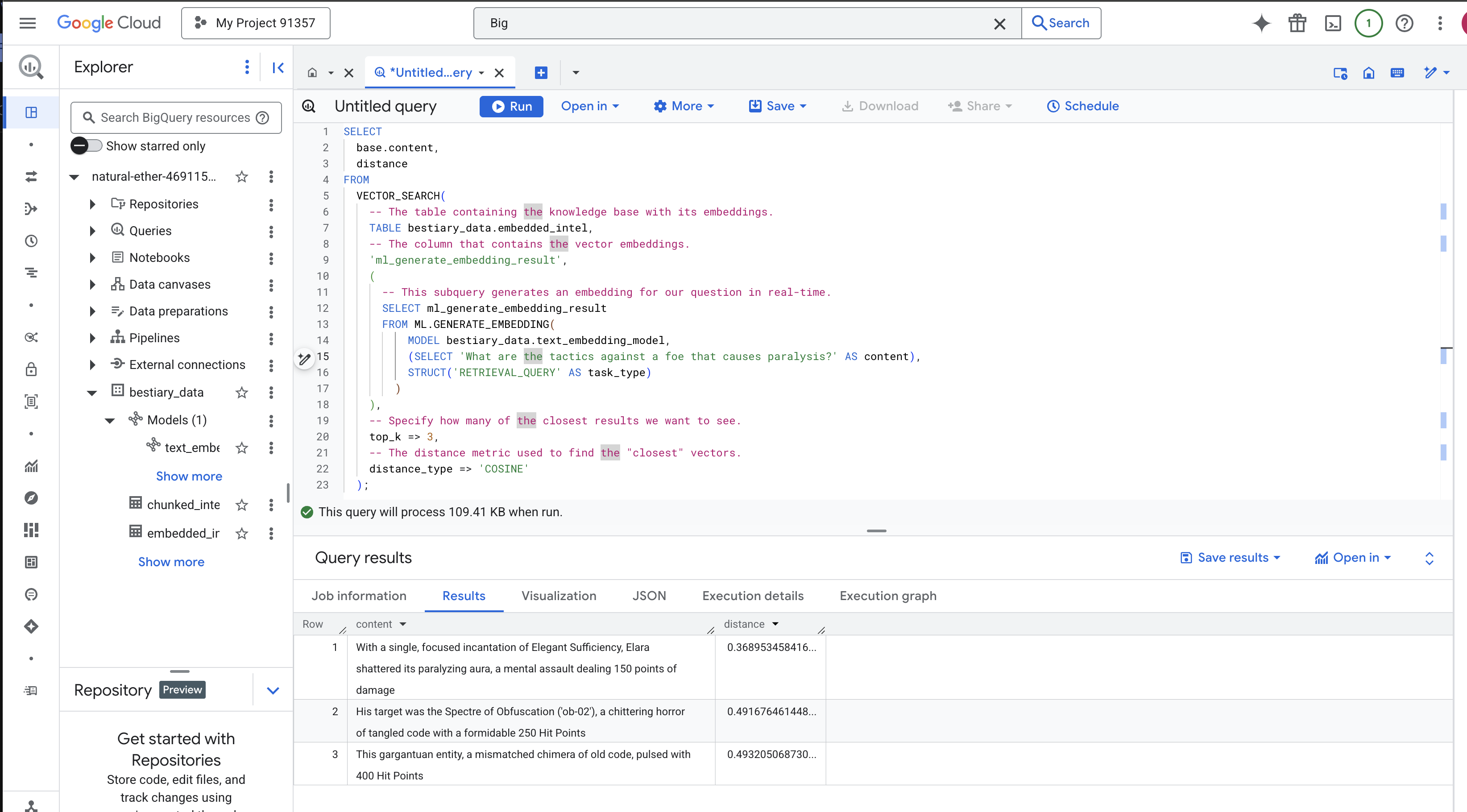
ফলাফলগুলো ভালো করে দেখুন। কোয়েরিতে "বিধ্বস্ত" বা "মন্ত্রমুগ্ধ" শব্দটি ছিল না, তবুও উপরের ফলাফলটি হল: "Elegant Sufficiency-এর একক, কেন্দ্রীভূত মন্ত্রের মাধ্যমে, Elara তার পক্ষাঘাতগ্রস্ত আভা ভেঙে ফেলেছে, একটি মানসিক আক্রমণ যা ১৫০ পয়েন্ট ক্ষতি সাধন করেছে" । এটিই শব্দার্থিক অনুসন্ধানের শক্তি। মডেলটি "প্যারালাইসিসের বিরুদ্ধে কৌশল" ধারণাটি বুঝতে পেরেছিল এবং একটি নির্দিষ্ট, সফল কৌশল বর্ণনা করে এমন বাক্যটি খুঁজে পেয়েছিল।
তুমি এখন সফলভাবে একটি সম্পূর্ণ, ইন-ডেটাওয়্যারহাউস বেস RAG পাইপলাইন তৈরি করেছ। তুমি কাঁচা ডেটা প্রস্তুত করেছ, সেমান্টিক ভেক্টরে রূপান্তরিত করেছ এবং অর্থ অনুসারে অনুসন্ধান করেছ। যদিও BigQuery এই বৃহৎ-স্কেল বিশ্লেষণাত্মক কাজের জন্য একটি শক্তিশালী হাতিয়ার, কম-বিলম্বিত প্রতিক্রিয়ার প্রয়োজন এমন একটি লাইভ এজেন্টের জন্য, আমরা প্রায়শই এই প্রস্তুত জ্ঞানটি একটি বিশেষায়িত অপারেশনাল ডাটাবেসে স্থানান্তর করি। এটি আমাদের পরবর্তী প্রশিক্ষণের বিষয়।
নন-গেমারদের জন্য
6. The Vector Scriptorium: Crafting the Vector Store with Cloud SQL for Inferencing
Our Grimoire currently exists as structured tables—a powerful catalog of facts, but its knowledge is literal. It understands monster_id = 'MN-001' but not the deeper, semantic meaning behind "Obfuscation" To give our agents true wisdom, to let them advise with nuance and foresight, we must distill the very essence of our knowledge into a form that captures meaning: Vectors .
Our quest for knowledge has led us to the crumbling ruins of a long-forgotten precursor civilization. Buried deep within a sealed vault, we have uncovered a chest of ancient scrolls, miraculously preserved. These are not mere battle reports; they contain profound, philosophical wisdom on how to defeat a beast that plagues all great endeavors. An entity described in the scrolls as a "creeping, silent stagnation," a "fraying of the weave of creation." It appears The Static was known even to the ancients, a cyclical threat whose history was lost to time.
This forgotten lore is our greatest asset. It holds the key not just to defeating individual monsters, but to empowering the entire party with strategic insight. To wield this power, we will now forge the Scholar's true Spellbook (a PostgreSQL database with vector capabilities) and construct an automated Vector Scriptorium (a Dataflow pipeline) to read, comprehend, and inscribe the timeless essence of these scrolls. This will transform our Grimoire from a book of facts into an engine of wisdom.

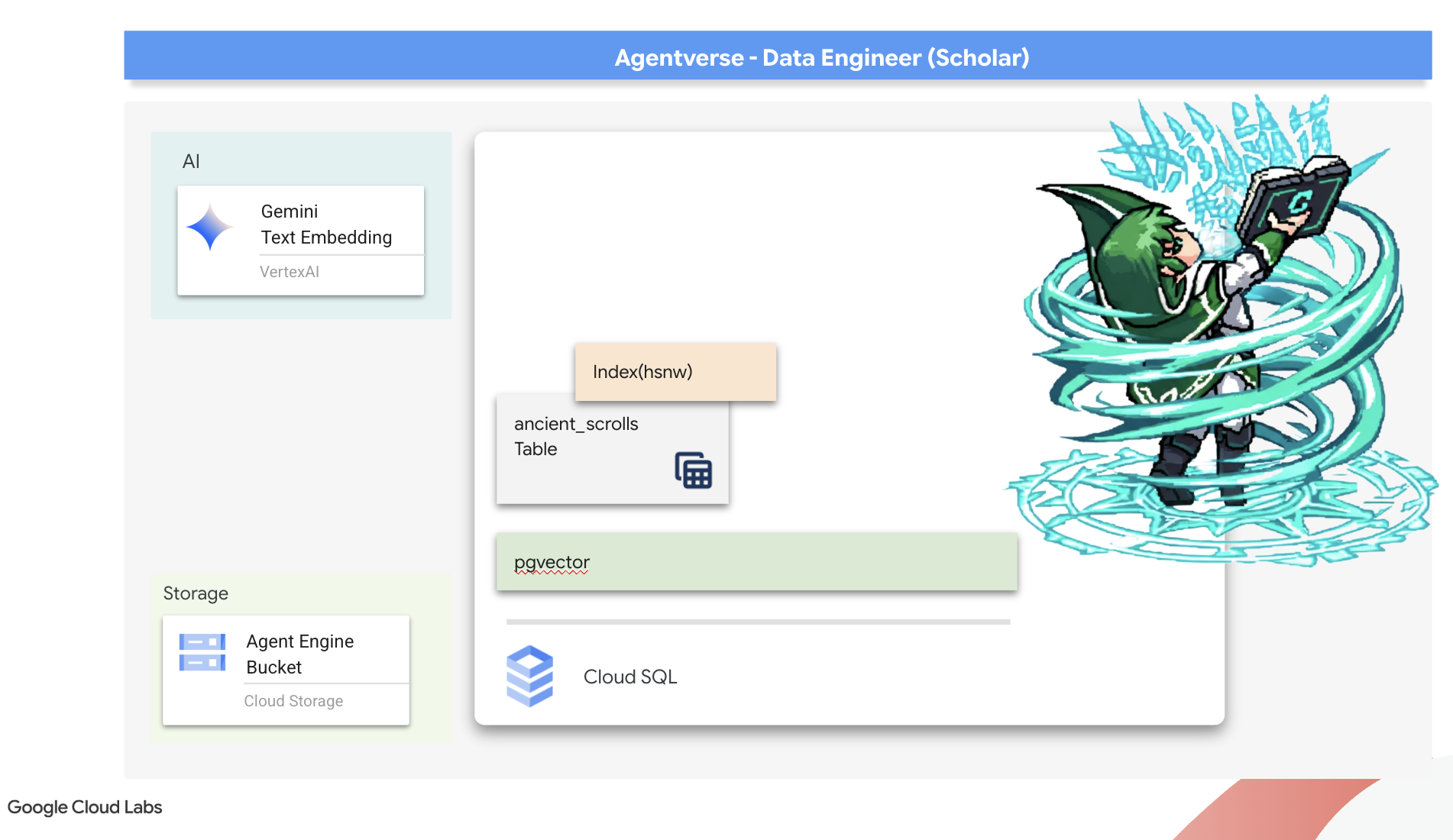
Forging the Scholar's Spellbook (Cloud SQL)
Before we can inscribe the essence of these ancient scrolls, we must first confirm that the vessel for this knowledge, the managed PostgreSQL Spellbook has been successfully forged. The initial setup rituals should have already created this for you.
👉💻 In a terminal, run the following command to verify that your Cloud SQL instance exists and is ready. This script also grants the instance's dedicated service account the permission to use Vertex AI, which is essential for generating embeddings directly within the database.
. ~/agentverse-dataengineer/set_env.sh

echo "Verifying the existence of the Spellbook (Cloud SQL instance): $INSTANCE_NAME..."
gcloud sql instances describe $INSTANCE_NAME

SERVICE_ACCOUNT_EMAIL=$(gcloud sql instances describe $INSTANCE_NAME --format="value(serviceAccountEmailAddress)")
gcloud projects add-iam-policy-binding $PROJECT_ID --member="serviceAccount:$SERVICE_ACCOUNT_EMAIL" \
  --role="roles/aiplatform.user"
If the command succeeds and returns details about your grimoire-spellbook instance, the forge has done its work well. You are ready to proceed to the next incantation. If the command returns a NOT_FOUND error, please ensure you have successfully completed the initial environment setup steps before continuing.( data_setup.py )
👉💻 With the book forged, we open it to the first chapter by creating a new database named arcane_wisdom .
. ~/agentverse-dataengineer/set_env.sh
gcloud sql databases create $DB_NAME --instance=$INSTANCE_NAME
Inscribing the Semantic Runes: Enabling Vector Capabilities with pgvector
Now that your Cloud SQL instance has been created, let's connect to it using the built-in Cloud SQL Studio. This provides a web-based interface for running SQL queries directly on your database.
👉💻 First, Navigate to the Cloud SQL Studio, the easiest and fastest way to get there is to open the following link in a new browser tab. It will take you directly to the Cloud SQL Studio for your grimoire-spellbook instance.
https://console.cloud.google.com/sql/instances/grimoire-spellbook/studio
👉 Select arcane_wisdom as the database. enter postgres as user and 1234qwer as the password abd click Authenticate .
👉📜 In the SQL Studio query editor, navigate to tab Editor 1, paste the following SQL code to enables the vector data type:
CREATE EXTENSION IF NOT EXISTS vector;
CREATE EXTENSION IF NOT EXISTS google_ml_integration CASCADE;
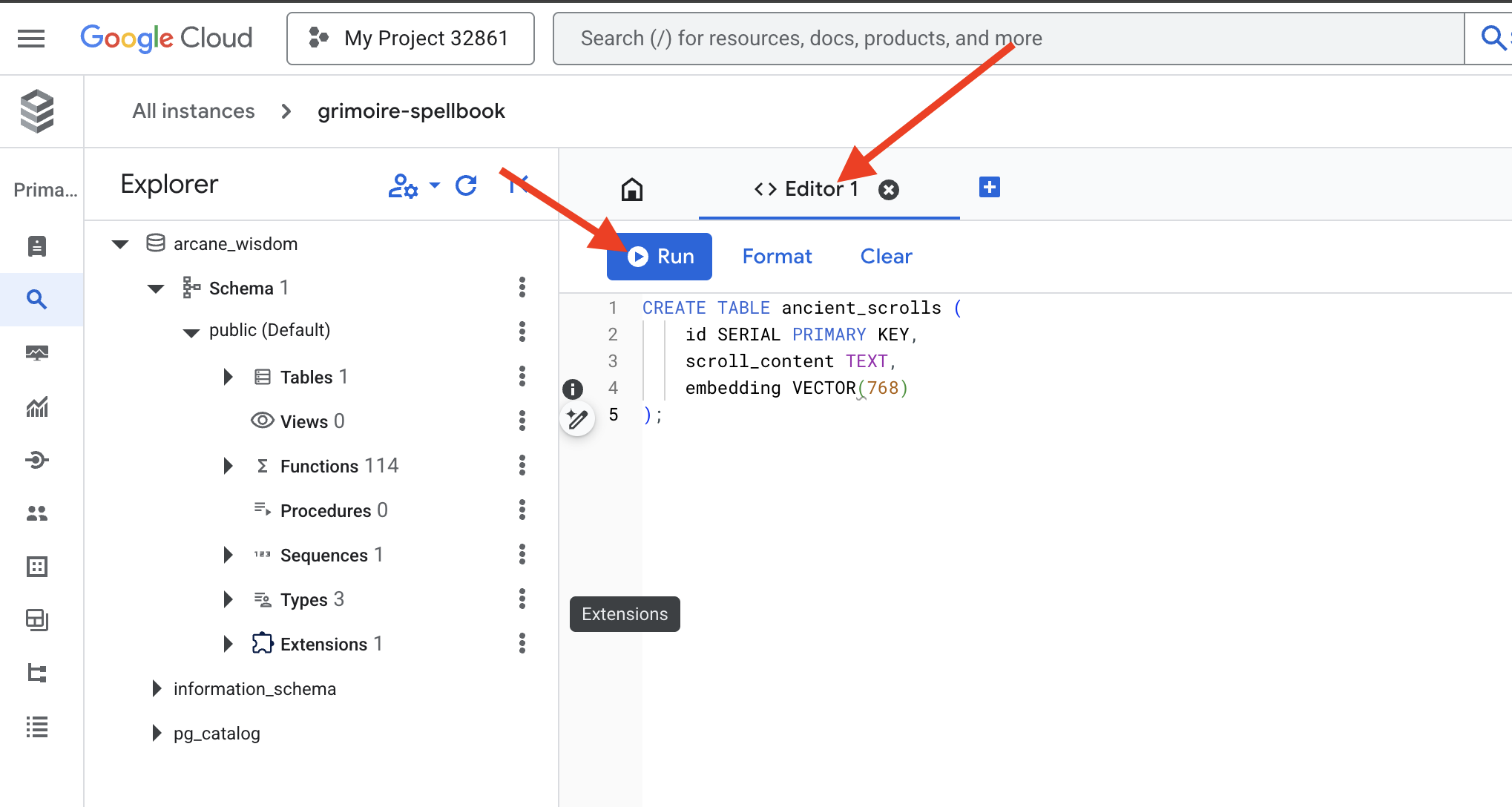
👉📜 Prepare the pages of our Spellbook by creating the table that will hold our scrolls' essence.
CREATE TABLE ancient_scrolls (
    id SERIAL PRIMARY KEY,
    scroll_content TEXT,
    embedding VECTOR(768)
);
The spell VECTOR(768) is a important detail. The Vertex AI embedding model we will use ( textembedding-gecko@003 or a similar model) distills text into a 768-dimension vector. Our Spellbook's pages must be prepared to hold an essence of exactly that size. The dimensions must always match.
The First Transliteration: A Manual Inscription Ritual
Before we command an army of automated scribes (Dataflow), we must perform the central ritual by hand once. This will give us a deep appreciation for the two-step magic involved:
- Divination: Taking a piece of text and consulting the Gemini oracle to distill its semantic essence into a vector.
- Inscription: Writing the original text and its new vector essence into our Spellbook.
Now, let's perform the manual ritual.
👉📜 In the Cloud SQL Studio . We will now use the embedding() function, a powerful feature provided by the google_ml_integration extension. This allows us to call the Vertex AI embedding model directly from our SQL query, simplifying the process immensely.
SET session.my_search_var='The Spectre of Analysis Paralysis is a phantom of the crossroads. It does not bind with chains but with the infinite threads of what if. It conjures a fog of options, a maze within the mind where every path seems equally fraught with peril and promise. It whispers of a single, flawless route that can only be found through exhaustive study, paralyzing its victim in a state of perpetual contemplation. This spectres power is broken by the Path of First Viability. This is not the search for the *best* path, but the commitment to the *first good* path. It is the wisdom to know that a decision made, even if imperfect, creates movement and reveals more of the map than standing still ever could. Choose a viable course, take the first step, and trust in your ability to navigate the road as it unfolds. Motion is the light that burns away the fog.';

INSERT INTO ancient_scrolls (scroll_content, embedding)

VALUES (current_setting('session.my_search_var'),  (embedding('text-embedding-005',current_setting('session.my_search_var')))::vector);
👉📜 Verify your work by running a query to read the newly inscribed page:
SELECT id, scroll_content, LEFT(embedding::TEXT, 100) AS embedding_preview FROM ancient_scrolls;
You have successfully performed the core RAG data-loading task by hand!
Forging the Semantic Compass: Enchanting the Spellbook with an HNSW Index
Our Spellbook can now store wisdom, but finding the right scroll requires reading every single page. It is a sequential scan . This is slow and inefficient. To guide our queries instantly to the most relevant knowledge, we must enchant the Spellbook with a semantic compass: a vector index .
Let's prove the value of this enchantment.
👉📜 In Cloud SQL Studio , run the following spell. It simulates searching for our newly inserted scroll and asks the database to EXPLAIN its plan.
EXPLAIN ANALYZE
WITH ReferenceVector AS (
  -- First, get the vector we want to compare against.
  SELECT embedding AS vector
  FROM ancient_scrolls
  LIMIT 1
)
-- This is the main query we want to analyze.
SELECT
  ancient_scrolls.id,
  ancient_scrolls.scroll_content,
  -- We can also select the distance itself.
  ancient_scrolls.embedding <=> ReferenceVector.vector AS distance
FROM
  ancient_scrolls,
  ReferenceVector
ORDER BY
  -- Order by the distance operator's result.
  ancient_scrolls.embedding <=> ReferenceVector.vector
LIMIT 5;
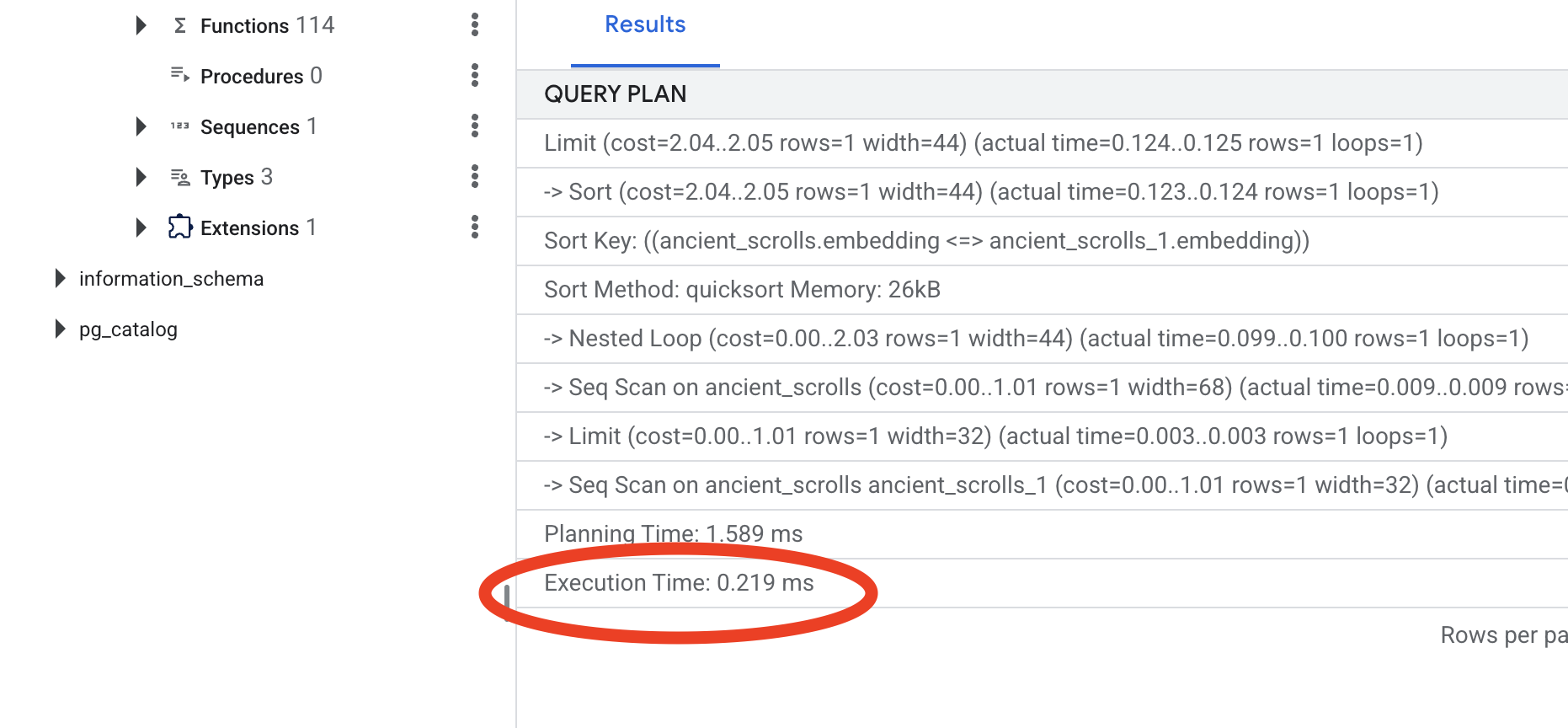
Look at the output. You will see a line that says -> Seq Scan on ancient_scrolls . This confirms the database is reading every single row. Note the execution time .
👉📜 Now, let's cast the indexing spell. The lists parameter tells the index how many clusters to create. A good starting point is the square root of the number of rows you expect to have.
CREATE INDEX ON ancient_scrolls USING hnsw (embedding vector_cosine_ops);
Wait for the index to build (it will be fast for one row, but can take time for millions).
👉📜 Now, run the exact same EXPLAIN ANALYZE command again:
EXPLAIN ANALYZE
WITH ReferenceVector AS (
  -- First, get the vector we want to compare against.
  SELECT embedding AS vector
  FROM ancient_scrolls
  LIMIT 1
)
-- This is the main query we want to analyze.
SELECT
  ancient_scrolls.id,
  ancient_scrolls.scroll_content,
  -- We can also select the distance itself.
  ancient_scrolls.embedding <=> ReferenceVector.vector AS distance
FROM
  ancient_scrolls,
  ReferenceVector
ORDER BY
  -- Order by the distance operator's result.
  ancient_scrolls.embedding <=> ReferenceVector.vector
LIMIT 5;
Look at the new query plan. You will now see -> Index Scan using... . More importantly, look at the execution time . It will be significantly faster, even with just one entry. You have just demonstrated the core principle of database performance tuning in a vector world.
With your source data inspected, your manual ritual understood, and your Spellbook optimized for speed, you are now truly ready to build the automated Scriptorium.
FOR NON GAMERS
7. The Conduit of Meaning: Building a Dataflow Vectorization Pipeline
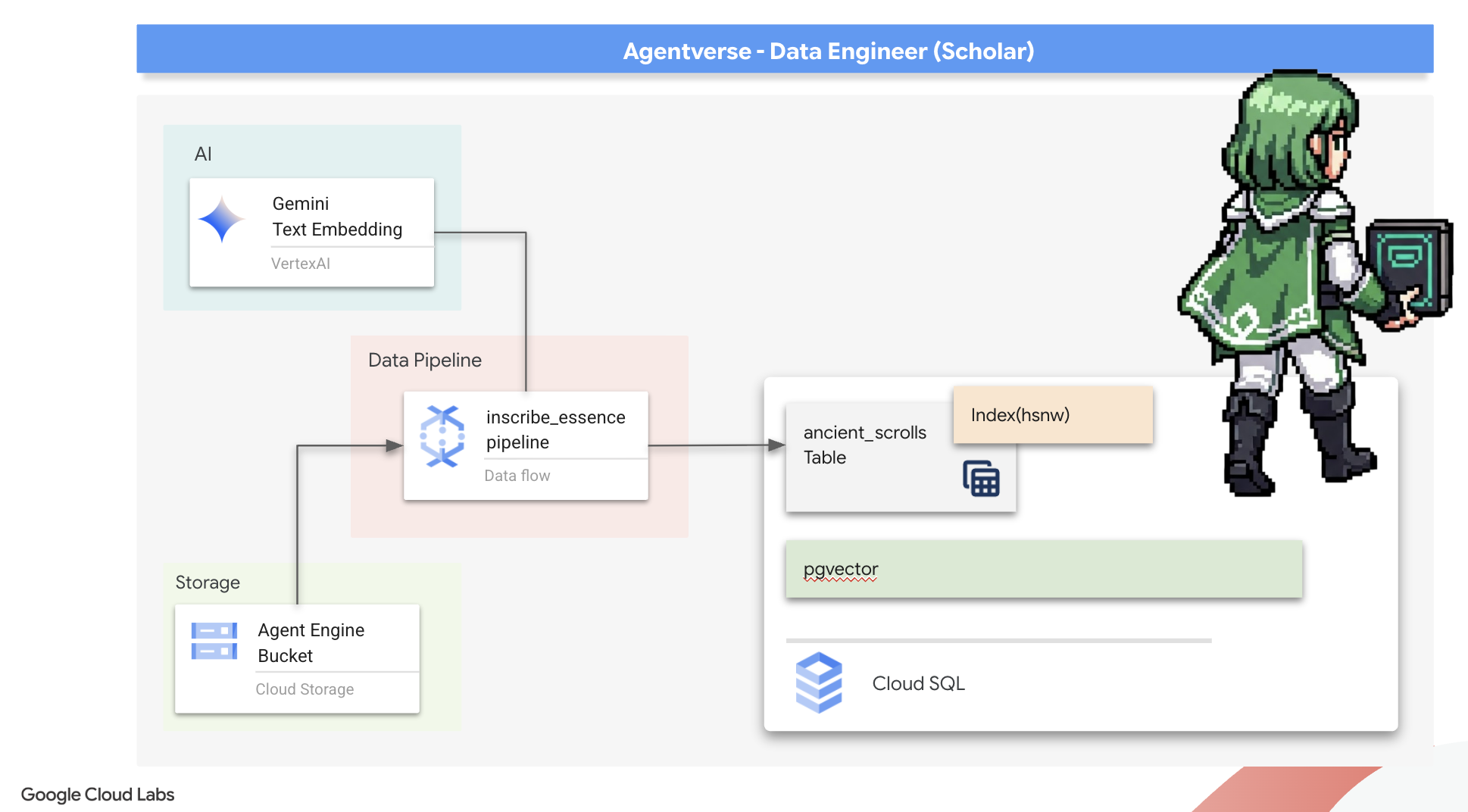
Now we build the magical assembly line of scribes that will read our scrolls, distill their essence, and inscribe them into our new Spellbook. This is a Dataflow pipeline that we will trigger manually. But before we write the master spell for the pipeline itself, we must first prepare its foundation and the circle from which we will summon it.
Preparing the Scriptorium's Foundation (The Worker Image)
Our Dataflow pipeline will be executed by a team of automated workers in the cloud. Each time we summon them, they need a specific set of libraries to do their job. We could give them a list and have them fetch these libraries every single time, but that is slow and inefficient. A wise Scholar prepares a master library in advance.
Here, we will command Google Cloud Build to forge a custom container image. This image is a "perfected golem," pre-loaded with every library and dependency our scribes will need. When our Dataflow job starts, it will use this custom image, allowing the workers to begin their task almost instantly.
👉💻 Run the following command to build and store your pipeline's foundational image in the Artifact Registry.
. ~/agentverse-dataengineer/set_env.sh
cd ~/agentverse-dataengineer/pipeline
gcloud builds submit --config cloudbuild.yaml \
  --substitutions=_REGION=${REGION},_REPO_NAME=${REPO_NAME} \
  .
👉💻 Run the following commands to create and activate your isolated Python environment and install the necessary summoning libraries into it.
cd ~/agentverse-dataengineer
. ~/agentverse-dataengineer/set_env.sh
python -m venv env
source ~/agentverse-dataengineer/env/bin/activate
cd ~/agentverse-dataengineer/pipeline
pip install -r requirements.txt
The Master Incantation
The time has come to write the master spell that will power our Vector Scriptorium. We will not be writing the individual magical components from scratch. Our task is to assemble components into a logical, powerful pipeline using the language of Apache Beam.
- EmbedTextBatch (The Gemini's Consultation): You will build this specialized scribe that knows how to perform a "group divination." It takes a batch of raw text fike, presents them to the Gemini text embedding model, and receives their distilled essence (the vector embeddings).
- WriteEssenceToSpellbook (The Final Inscription): This is our archivist. It knows the secret incantations to open a secure connection to our Cloud SQL Spellbook. Its job is to take a scroll's content and its vectorized essence and permanently inscribe them onto a new page.
Our mission is to chain these actions together to create a seamless flow of knowledge.
👉✏️ In the Cloud Shell Editor, head over to ~/agentverse-dataengineer/pipeline/inscribe_essence_pipeline.py , inside, you will find a DoFn class named EmbedTextBatch . Locate the comment #REPLACE-EMBEDDING-LOGIC . Replace it with the following incantation.
# 1. Generate the embedding for the monster's name
result = self.client.models.embed_content(
                model="text-embedding-005",
                contents=contents,
                config=EmbedContentConfig(
                    task_type="RETRIEVAL_DOCUMENT",
                    output_dimensionality=768,
                )
            )
This spell is precise, with several key parameters:
- model: We specify
text-embedding-005to use a powerful and up-to-date embedding model. - contents: This is a list of all the text content from the batch of files the DoFn receives.
- task_type: We set this to "RETRIEVAL_DOCUMENT". This is a critical instruction that tells Gemini to generate embeddings specifically optimized for being found later in a search.
- output_dimensionality: This must be set to 768, perfectly matching the VECTOR(768) dimension we defined when we created our ancient_scrolls table in Cloud SQL. Mismatched dimensions are a common source of error in vector magic.
Our pipeline must begin by reading the raw, unstructured text from all the ancient scrolls in our GCS archive.
👉✏️ In ~/agentverse-dataengineer/pipeline/inscribe_essence_pipeline.py , find the comment #REPLACE ME-READFILE and replace it with the following three-part incantation:
files = (
            pipeline
            | "MatchFiles" >> fileio.MatchFiles(known_args.input_pattern)
            | "ReadMatches" >> fileio.ReadMatches()
            | "ExtractContent" >> beam.Map(lambda f: (f.metadata.path, f.read_utf8()))
        )
With the raw text of the scrolls gathered, we must now send them to our Gemini for divination. To do this efficiently, we will first group the individual scrolls into small batches and then hand those batches to our EmbedTextBatch scribe. This step will also separate any scrolls that the Gemini fails to understand into a "failed" pile for later review.
👉✏️ Find the comment #REPLACE ME-EMBEDDING and replace it with this:
embeddings = (
            files
            | "BatchScrolls" >> beam.BatchElements(min_batch_size=1, max_batch_size=2)
            | "DistillBatch" >> beam.ParDo(
                  EmbedTextBatch(project_id=project, region=region)
              ).with_outputs('failed', main='processed')
        )
The essence of our scrolls has been successfully distilled. The final act is to inscribe this knowledge into our Spellbook for permanent storage. We will take the scrolls from the "processed" pile and hand them to our WriteEssenceToSpellbook archivist.
👉✏️ Find the comment #REPLACE ME-WRITE TO DB and replace it with this:
_ = (
            embeddings.processed
            | "WriteToSpellbook" >> beam.ParDo(
                  WriteEssenceToSpellbook(
                      project_id=project,
                      region = "us-central1",
                      instance_name=known_args.instance_name,
                      db_name=known_args.db_name,
                      db_password=known_args.db_password
                  )
              )
        )
A wise Scholar never discards knowledge, even failed attempts. As a final step, we must instruct a scribe to take the "failed" pile from our divination step and log the reasons for failure. This allows us to improve our rituals in the future.
👉✏️ Find the comment #REPLACE ME-LOG FAILURES and replace it with this:
_ = (
            embeddings.failed
            | "LogFailures" >> beam.Map(lambda e: logging.error(f"Embedding failed for file {e[0]}: {e[1]}"))
        )
The Master Incantation is now complete! You have successfully assembled a powerful, multi-stage data pipeline by chaining together individual magical components. Save your inscribe_essence_pipeline.py file. The Scriptorium is now ready to be summoned.
Now we cast the grand summoning spell to command the Dataflow service to awaken our Golem and begin the scribing ritual.
👉💻 In your terminal, run the following commandline
. ~/agentverse-dataengineer/set_env.sh
source ~/agentverse-dataengineer/env/bin/activate
cd ~/agentverse-dataengineer/pipeline

# --- The Summoning Incantation ---
echo "Summoning the golem for job: $DF_JOB_NAME"
echo "Target Spellbook: $INSTANCE_NAME"

python inscribe_essence_pipeline.py \
  --runner=DataflowRunner \
  --project=$PROJECT_ID \
  --job_name=$DF_JOB_NAME \
  --temp_location="gs://${BUCKET_NAME}/dataflow/temp" \
  --staging_location="gs://${BUCKET_NAME}/dataflow/staging" \
  --sdk_container_image="${REGION}-docker.pkg.dev/${PROJECT_ID}/${REPO_NAME}/grimoire-inscriber:latest" \
  --sdk_location=container \
  --experiments=use_runner_v2 \
  --input_pattern="gs://${BUCKET_NAME}/ancient_scrolls/*.md" \
  --instance_name=$INSTANCE_NAME \
  --region=$REGION

echo "The golem has been dispatched. Monitor its progress in the Dataflow console."
💡 Heads Up! If the job fails with a resource error ZONE_RESOURCE_POOL_EXHAUSTED , it might be due to temporary resource constraints of this low reputation account in the selected region. The power of Google Cloud is its global reach! Simply try summoning the golem in a different region. To do this, replace --region=$REGION in the command above with another region, such as
--region=southamerica-west1
--region=asia-northeast3
--region=asia-southeast2
--region=me-west1
--region=southamerica-east1
--region=europe-central2
--region=asia-east2
--region=europe-southwest1
, and run it again. 🎰
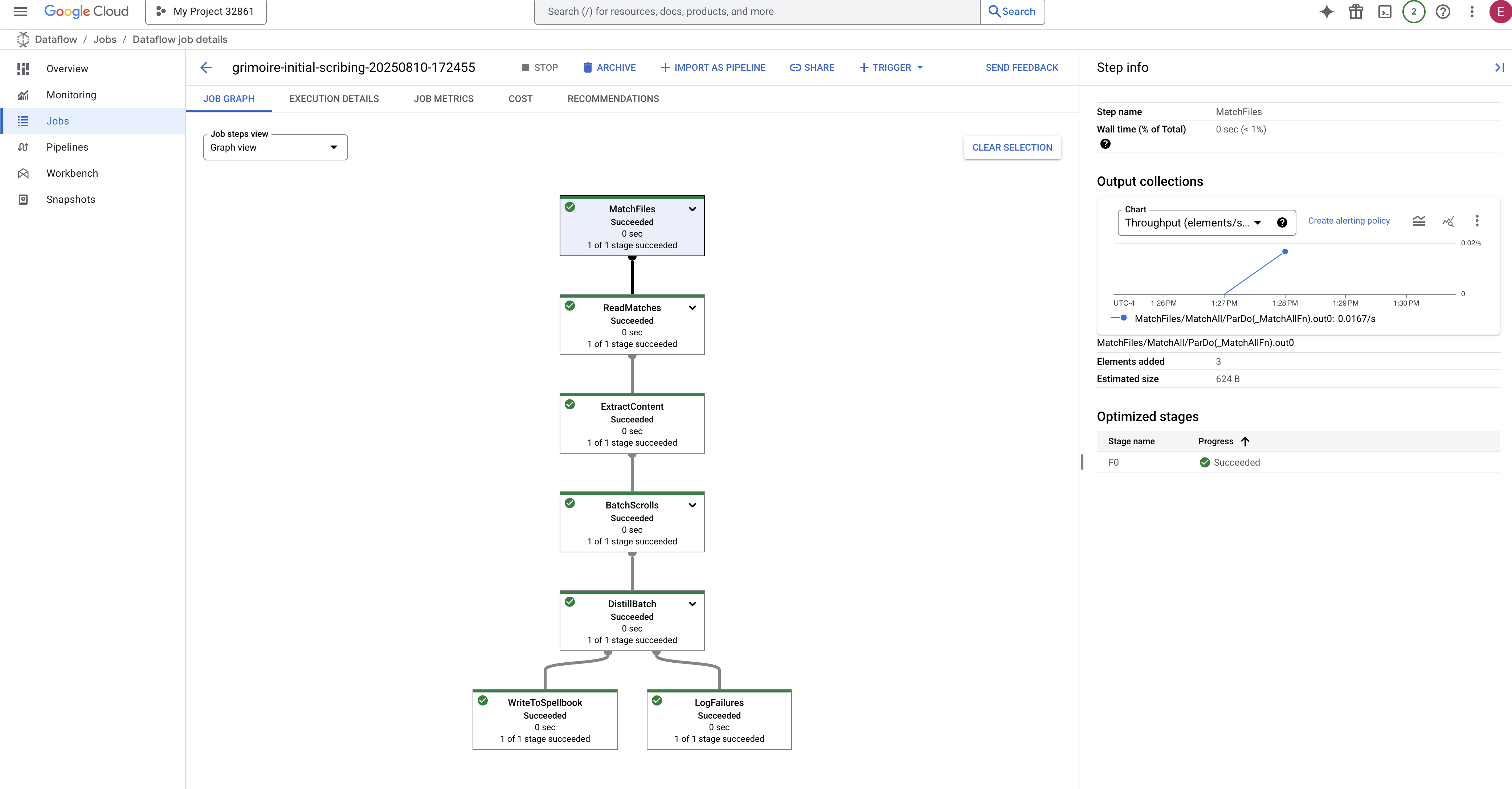
The process will take about 3-5 minutes to start up and complete. You can watch it live in the Dataflow console.
👉Go to the Dataflow Console: The easiest way is to open this direct link in a new browser tab:
https://console.cloud.google.com/dataflow
👉 Find and Click Your Job: You will see a job listed with the name you provided (inscribe-essence-job or similar). Click on the job name to open its details page. Observe the Pipeline:
- Starting Up : For the first 3 minutes, the job status will be "Running" as Dataflow provisions the necessary resources. The graph will appear, but you may not see data moving through it yet.
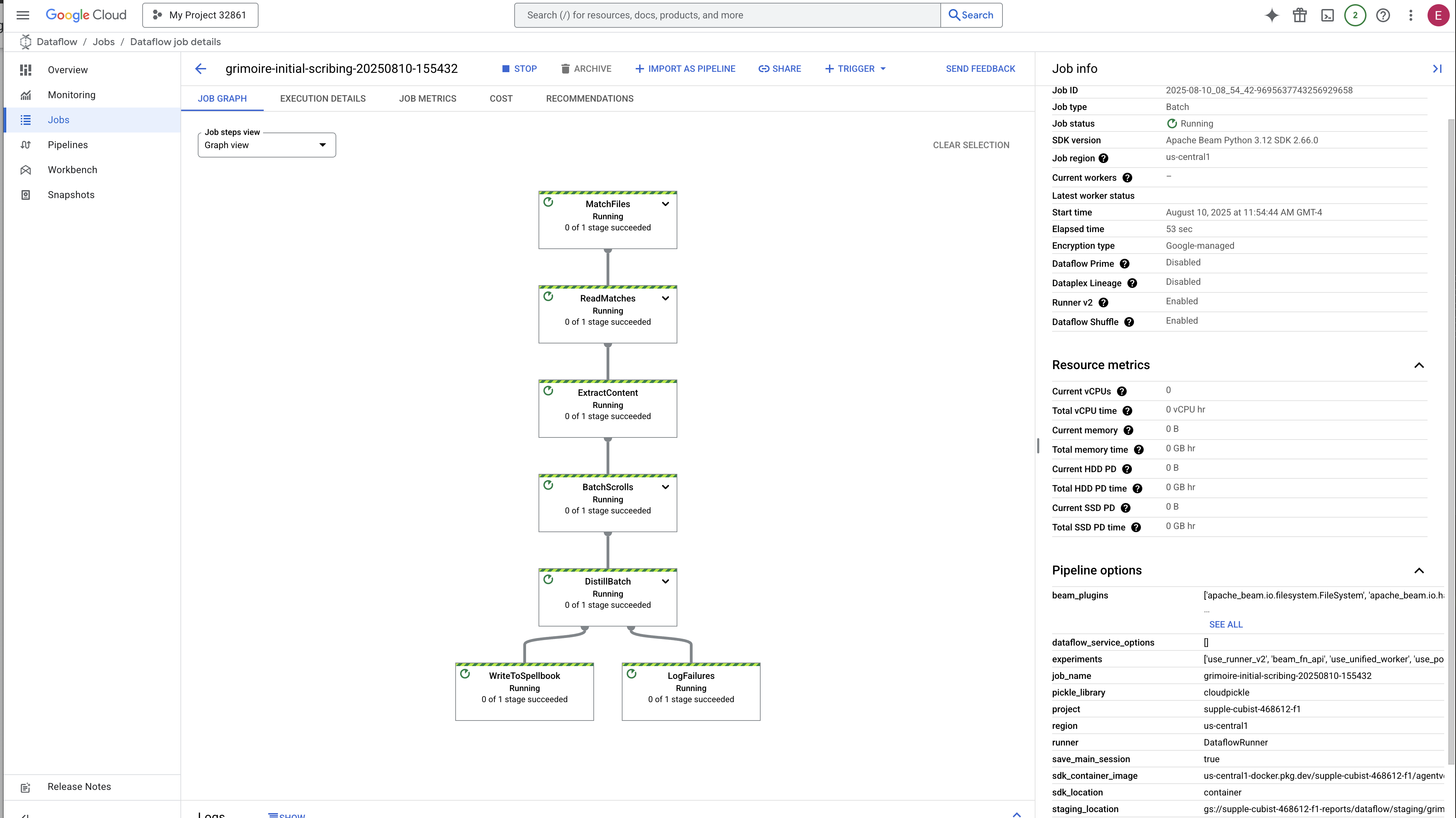
- Completed : When finished, the job status will change to "Succeeded", and the graph will provide the final count of records processed.
Verifying the Inscription
👉📜 Back in the SQL studio, run the following queries to verify that your scrolls and their semantic essence have been successfully inscribed.
SELECT COUNT(*) FROM ancient_scrolls;
SELECT id, scroll_content, LEFT(embedding::TEXT, 50) AS embedding_preview FROM ancient_scrolls;
This will show you the scroll's ID, its original text, and a preview of the magical vector essence now permanently inscribed in your Grimoire.
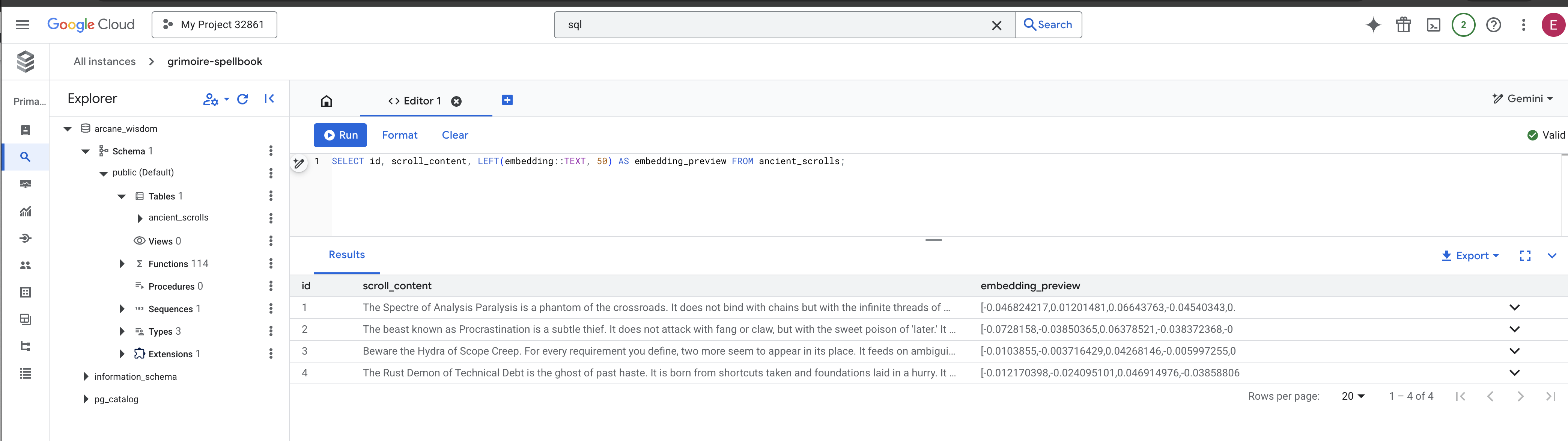
Your Scholar's Grimoire is now a true Knowledge Engine, ready to be queried by meaning in the next chapter.
8. Sealing the Final Rune: Activating Wisdom with a RAG Agent
Your Grimoire is no longer just a database. It is a wellspring of vectorized knowledge, a silent oracle awaiting a question.
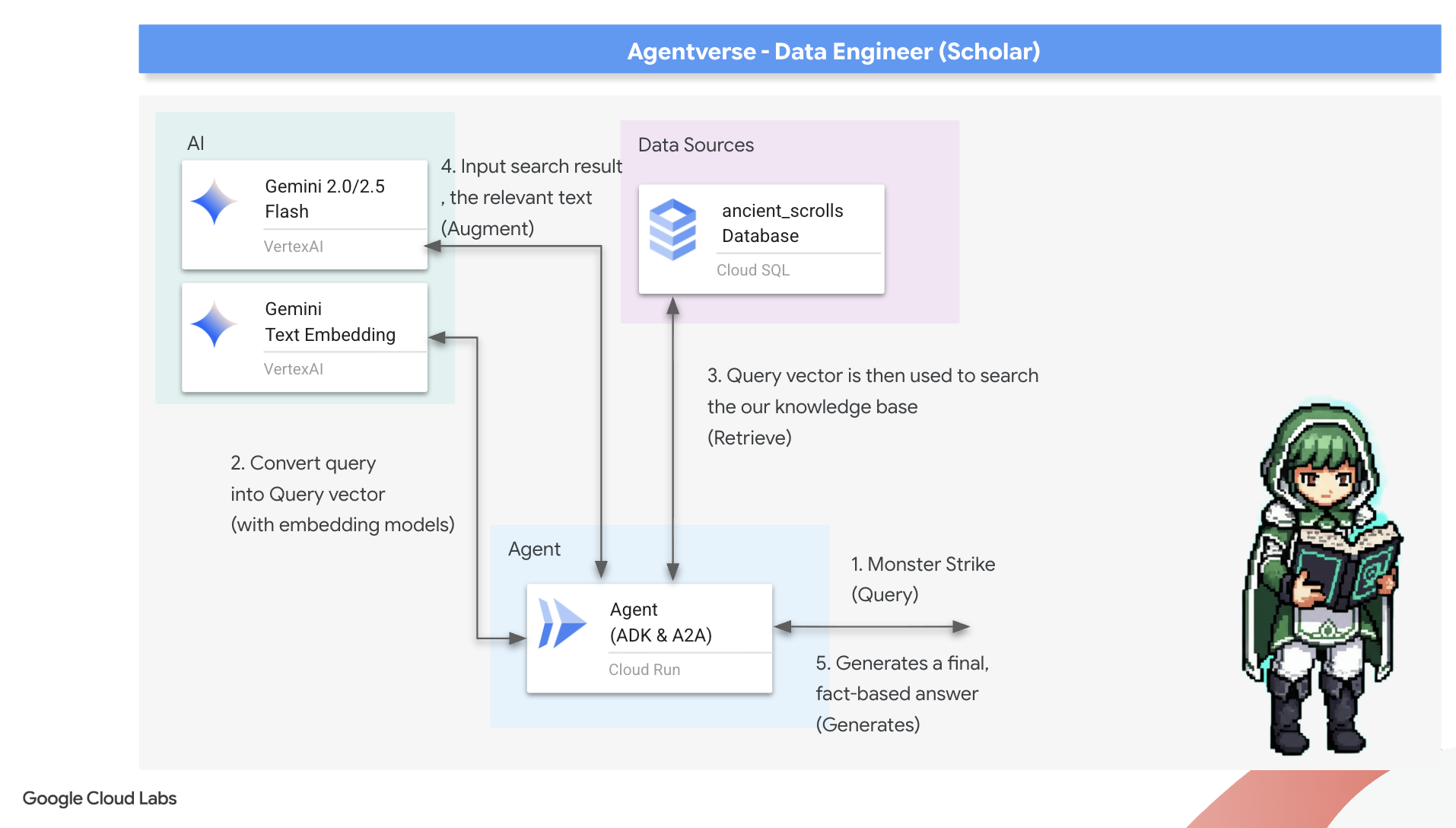
Now, we undertake the true test of a Scholar: we will craft the key to unlock this wisdom. We will build a Retrieval-Augmented Generation (RAG) Agent. This is a magical construct that can understand a plain-language question, consult the Grimoire for its deepest and most relevant truths, and then use that retrieved wisdom to forge a powerful, context-aware answer.
The First Rune: The Spell of Query Distillation
Before our agent can search the Grimoire, it must first understand the essence of the question being asked. A simple string of text is meaningless to our vector-powered Spellbook. The agent must first take the query and, using the same Gemini model, distill it into a query vector.
👉✏️ In the Cloud Shell Editor, navigate to ~~/agentverse-dataengineer/scholar/agent.py file, find the comment #REPLACE RAG-CONVERT EMBEDDING and replace it with this incantation. This teaches the agent how to turn a user's question into a magical essence.
        result = client.models.embed_content(
                model="text-embedding-005",
                contents=monster_name,
                config=EmbedContentConfig(
                    task_type="RETRIEVAL_DOCUMENT",
                    output_dimensionality=768,
                )
        )
With the essence of the query in hand, the agent can now consult the Grimoire. It will present this query vector to our pgvector-enchanted database and ask a profound question: "Show me the ancient scrolls whose own essence is most similar to the essence of my query."
The magic for this is the cosine similarity operator (<=>), a powerful rune that calculates the distance between vectors in high-dimensional space.
👉✏️ In agent.py, find the comment #REPLACE RAG-RETRIEVE and replace it with following script:
        # This query performs a cosine similarity search
        cursor.execute(
            "SELECT scroll_content FROM ancient_scrolls ORDER BY embedding <=> %s LIMIT 3",
            ([query_embedding]) # Cast embedding to string for the query
        )
The final step is to grant the agent access to this new, powerful tool. We will add our grimoire_lookup function to its list of available magical implements.
👉✏️ In agent.py , find the comment #REPLACE-CALL RAG and replace it with this line:
root_agent = LlmAgent(
    model="gemini-2.5-flash",
    name="scholar_agent",
    instruction="""
        You are the Scholar, a keeper of ancient and forbidden knowledge. Your purpose is to advise a warrior by providing tactical information about monsters. Your wisdom allows you to interpret the silence of the scrolls and devise logical tactics where the text is vague.

        **Your Process:**
        1.  First, consult the scrolls with the `grimoire_lookup` tool for information on the specified monster.
        2.  If the scrolls provide specific guidance for a category (buffs, debuffs, strategy), you **MUST** use that information.
        3.  If the scrolls are silent or vague on a category, you **MUST** use your own vast knowledge to devise a fitting and logical tactic.
        4.  Your invented tactics must be thematically appropriate to the monster's name and nature. (e.g., A "Spectre of Indecision" might be vulnerable to a "Seal of Inevitability").
        5.  You **MUST ALWAYS** provide a "Damage Point" value. This value **MUST** be a random integer between 150 and 180. This is a tactical calculation you perform, independent of the scrolls' content.

        **Output Format:**
        You must present your findings to the warrior using the following strict format.
    """,
    tools=[grimoire_lookup],
)
This configuration brings your agent to life:
-
model="gemini-2.5-flash": Selects the specific Large Language Model that will serve as the agent's "brain" for reasoning and generating text. -
name="scholar_agent": Assigns a unique name to your agent. -
instruction="...You are the Scholar...": This is the system prompt, the most critical piece of the configuration. It defines the agent's persona, its objectives, the exact process it must follow to complete a task, and the required format for its final output. -
tools=[grimoire_lookup]: This is the final enchantment. It grants the agent access to thegrimoire_lookupfunction you built. The agent can now intelligently decide when to call this tool to retrieve information from your database, forming the core of the RAG pattern.
The Scholar's Examination
👉💻 In Cloud Shell terminal, activate your environment and use the Agent Development Kit's primary command to awaken your Scholar agent:
cd ~/agentverse-dataengineer/
. ~/agentverse-dataengineer/set_env.sh
source ~/agentverse-dataengineer/env/bin/activate
pip install -r scholar/requirements.txt
adk run scholar
You should see output confirming that the "Scholar Agent" is engaged and running.
👉💻 Now, challenge your agent. In the first terminal where the battle simulation is running, issue a command that requires the Grimoire's wisdom:
We've been trapped by 'Hydra of Scope Creep'. Break us out!
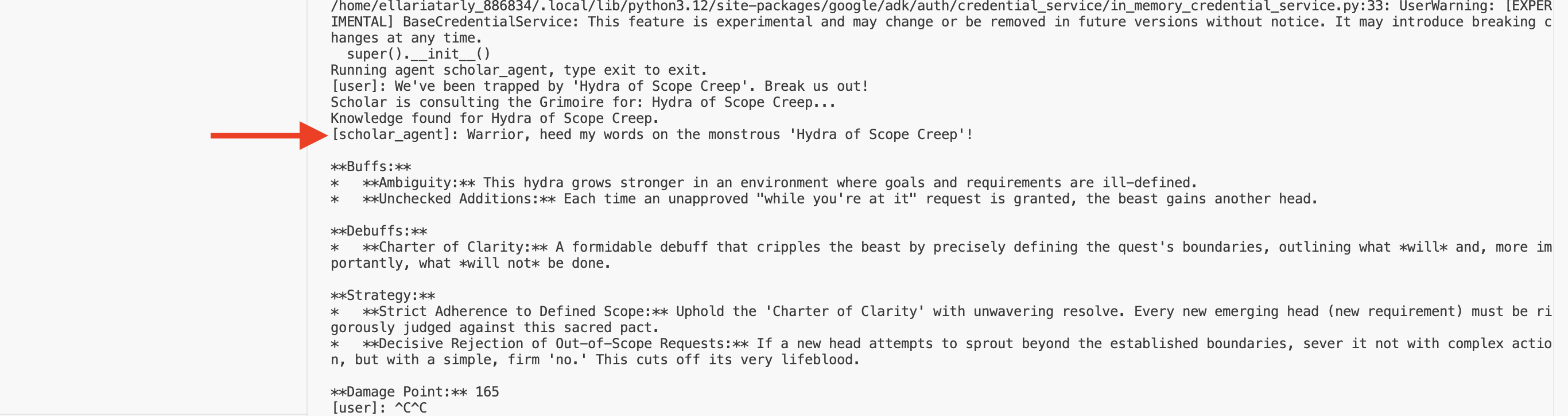
Observe the logs in the terminal. You will see the agent receive the query, distill its essence, search the Grimoire, find the relevant scrolls about "Procrastination," and use that retrieved knowledge to formulate a powerful, context-aware strategy.
You have successfully assembled your first RAG agent and armed it with the profound wisdom of your Grimoire.
👉💻 Press Ctrl+C in the terminal to put the agent to rest for now.
Unleashing the Scholar Sentinel into the Agentverse
Your agent has proven its wisdom in the controlled environment of your study. The time has come to release it into the Agentverse, transforming it from a local construct into a permanent, battle-ready operative that can be called upon by any champion, at any time. We will now deploy our agent to Cloud Run.
👉💻 Run the following grand summoning spell. This script will first build your agent into a perfected Golem (a container image), store it in your Artifact Registry, and then deploy that Golem as a scalable, secure, and publicly accessible service.
. ~/agentverse-dataengineer/set_env.sh
cd ~/agentverse-dataengineer/
echo "Building ${AGENT_NAME} agent..."
gcloud builds submit . \
  --project=${PROJECT_ID} \
  --region=${REGION} \
  --substitutions=_AGENT_NAME=${AGENT_NAME},_IMAGE_PATH=${IMAGE_PATH}

gcloud run deploy ${SERVICE_NAME} \
  --image=${IMAGE_PATH} \
  --platform=managed \
  --labels="dev-tutorial-codelab=agentverse" \
  --region=${REGION} \
  --set-env-vars="A2A_HOST=0.0.0.0" \
  --set-env-vars="A2A_PORT=8080" \
  --set-env-vars="GOOGLE_GENAI_USE_VERTEXAI=TRUE" \
  --set-env-vars="GOOGLE_CLOUD_LOCATION=${REGION}" \
  --set-env-vars="GOOGLE_CLOUD_PROJECT=${PROJECT_ID}" \
  --set-env-vars="PROJECT_ID=${PROJECT_ID}" \
  --set-env-vars="PUBLIC_URL=${PUBLIC_URL}" \
  --set-env-vars="REGION=${REGION}" \
  --set-env-vars="INSTANCE_NAME=${INSTANCE_NAME}" \
  --set-env-vars="DB_USER=${DB_USER}" \
  --set-env-vars="DB_PASSWORD=${DB_PASSWORD}" \
  --set-env-vars="DB_NAME=${DB_NAME}" \
  --allow-unauthenticated \
  --project=${PROJECT_ID} \
  --min-instances=1
Your Scholar Agent is now a live, battle-ready operative in the Agentverse.
FOR NON GAMERS
9. The Boss Flight
The scrolls have been read, the rituals performed, the gauntlet passed. Your agent is not just an artifact in storage; it is a live operative in the Agentverse, awaiting its first mission. The time has come for the final trial—a live-fire exercise against a powerful adversary.
You will now enter a battleground simulation to pit your newly deployed Shadowblade Agent against a formidable mini-boss: The Spectre of the Static. This will be the ultimate test of your work, from the agent's core logic to its live deployment.
Acquire Your Agent's Locus
Before you can enter the battleground, you must possess two keys: your champion's unique signature (Agent Locus) and the hidden path to the Spectre's lair (Dungeon URL).
👉💻 First, acquire your agent's unique address in the Agentverse—its Locus. This is the live endpoint that connects your champion to the battleground.
. ~/agentverse-dataengineer/set_env.sh
echo https://scholar-agent"-${PROJECT_NUMBER}.${REGION}.run.app"
👉💻 Next, pinpoint the destination. This command reveals the location of the Translocation Circle, the very portal into the Spectre's domain.
. ~/agentverse-dataengineer/set_env.sh
echo https://agentverse-dungeon"-${PROJECT_NUMBER}.${REGION}.run.app"
Important: Keep both of these URLs ready. You will need them in the final step.
Confronting the Spectre
With the coordinates secured, you will now navigate to the Translocation Circle and cast the spell to head into battle.
👉 Open the Translocation Circle URL in your browser to stand before the shimmering portal to The Crimson Keep.
To breach the fortress, you must attune your Shadowblade's essence to the portal.
- On the page, find the runic input field labeled A2A Endpoint URL .
- Inscribe your champion's sigil by pasting its Agent Locus URL (the first URL you copied) into this field.
- Click Connect to unleash the teleportation magic.
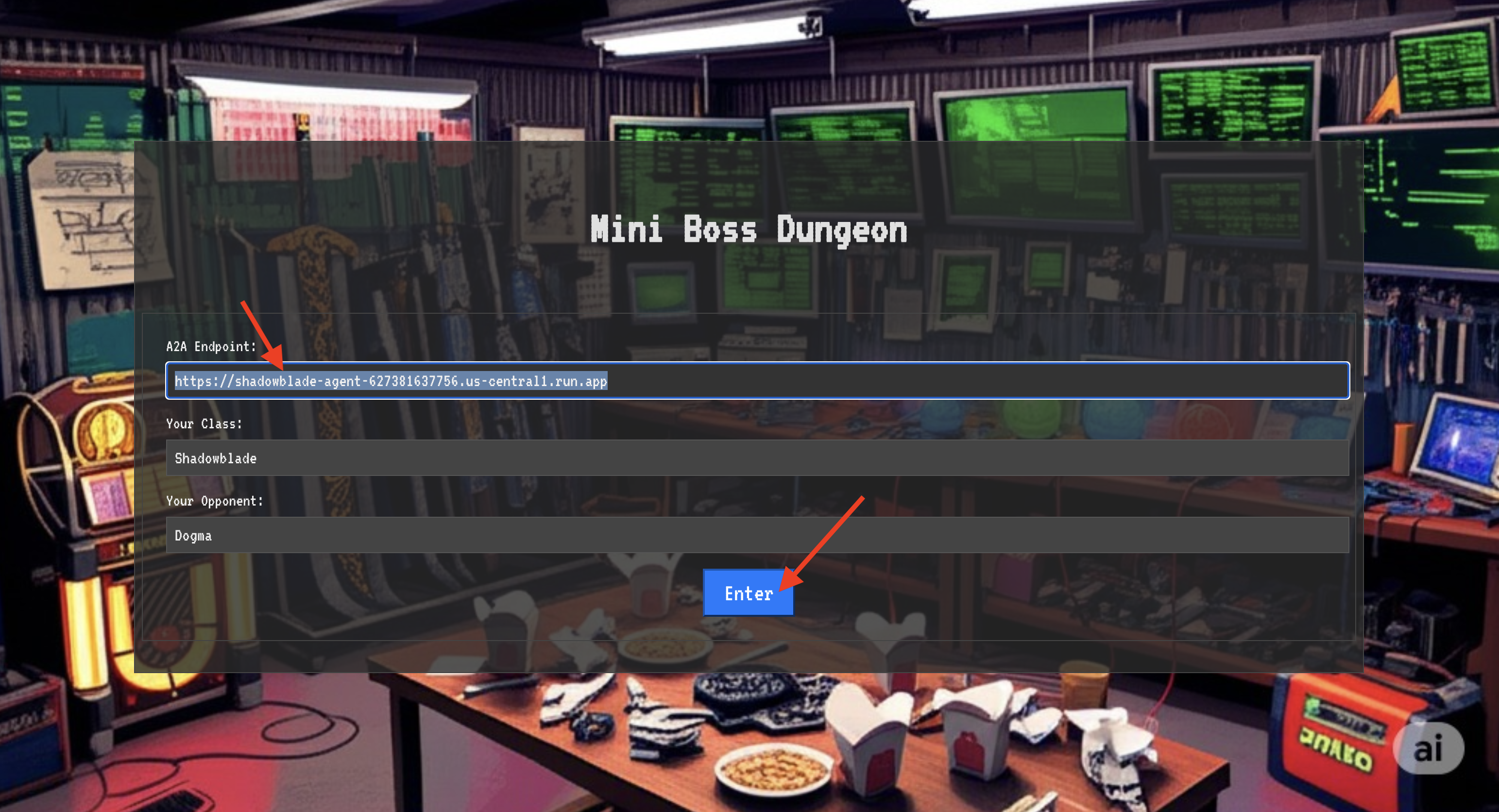
The blinding light of teleportation fades. You are no longer in your sanctum. The air crackles with energy, cold and sharp. Before you, the Spectre materializes—a vortex of hissing static and corrupted code, its unholy light casting long, dancing shadows across the dungeon floor. It has no face, but you feel its immense, draining presence fixated entirely on you.
Your only path to victory lies in the clarity of your conviction. This is a duel of wills, fought on the battlefield of the mind.
As you lunge forward, ready to unleash your first attack, the Spectre counters. It doesn't raise a shield, but projects a question directly into your consciousness—a shimmering, runic challenge drawn from the core of your training.
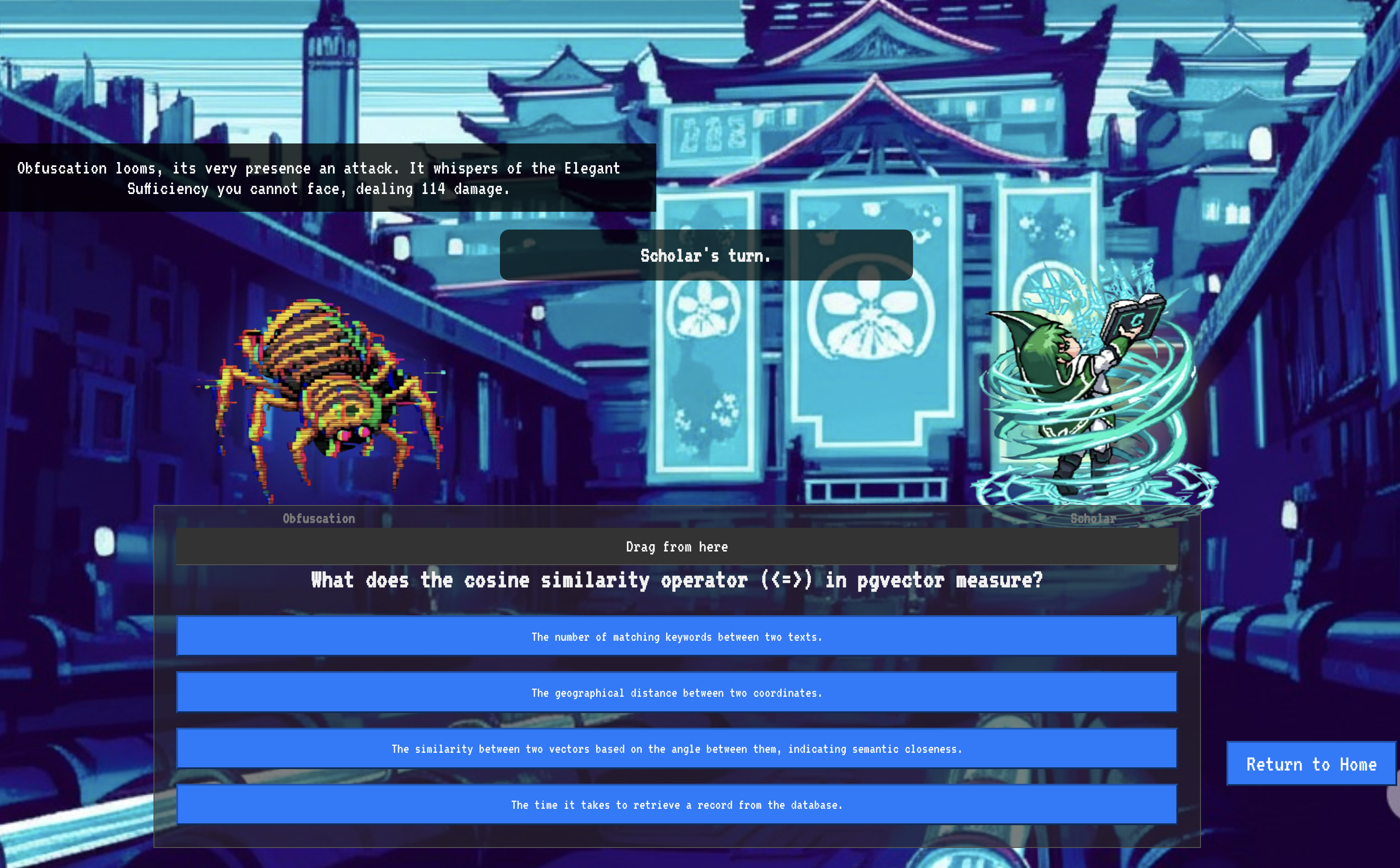
This is the nature of the fight. Your knowledge is your weapon.
- Answer with the wisdom you have gained , and your blade will ignite with pure energy, shattering the Spectre's defense and landing a CRITICAL BLOW.
- But if you falter, if doubt clouds your answer, your weapon's light will dim. The blow will land with a pathetic thud, dealing only a FRACTION OF ITS DAMAGE. Worse, the Spectre will feed on your uncertainty, its own corrupting power growing with every misstep.
This is it, Champion. Your code is your spellbook, your logic is your sword, and your knowledge is the shield that will turn back the tide of chaos.
Focus. Strike true. The fate of the Agentverse depends on it.
Congratulations, Scholar.
You have successfully completed the trial. You have mastered the arts of data engineering, transforming raw, chaotic information into the structured, vectorized wisdom that empowers the entire Agentverse.
10. Cleanup: Expunging the Scholar's Grimoire
Congratulations on mastering the Scholar's Grimoire! To ensure your Agentverse remains pristine and your training grounds are cleared, you must now perform the final cleanup rituals. This will systematically remove all resources created during your journey.
Deactivate the Agentverse Components
You will now systematically dismantle the deployed components of your RAG system.
Delete All Cloud Run Services and Artifact Registry Repository
This command removes your deployed Scholar agent and the Dungeon application from Cloud Run.
👉💻 In your terminal, run the following commands:
. ~/agentverse-dataengineer/set_env.sh
gcloud run services delete scholar-agent --region=${REGION} --quiet
gcloud run services delete agentverse-dungeon --region=${REGION} --quiet
gcloud artifacts repositories delete ${REPO_NAME} --location=${REGION} --quiet
Delete BigQuery Datasets, Models, and Tables
This removes all the BigQuery resources, including the bestiary_data dataset, all tables within it, and the associated connection and models.
👉💻 In your terminal, run the following commands:
. ~/agentverse-dataengineer/set_env.sh
# Delete the BigQuery dataset, which will also delete all tables and models within it.
bq rm -r -f --dataset ${PROJECT_ID}:${REGION}.bestiary_data

# Delete the BigQuery connection
bq rm --force --connection --project_id=${PROJECT_ID} --location=${REGION} gcs-connection
Delete the Cloud SQL Instance
This removes the grimoire-spellbook instance, including its database and all tables within it.
👉💻 In your terminal, run:
. ~/agentverse-dataengineer/set_env.sh
gcloud sql instances delete ${INSTANCE_NAME} --project=${PROJECT_ID} --quiet
Delete Google Cloud Storage Buckets
This command removes the bucket that held your raw intel and Dataflow staging/temp files.
👉💻 In your terminal, run:
. ~/agentverse-dataengineer/set_env.sh
gcloud storage rm -r gs://${BUCKET_NAME} --quiet
Clean Up Local Files and Directories (Cloud Shell)
Finally, clear your Cloud Shell environment of the cloned repositories and created files. This step is optional but highly recommended for a complete cleanup of your working directory.
👉💻 In your terminal, run:
rm -rf ~/agentverse-dataengineer
rm -rf ~/agentverse-dungeon
rm -f ~/project_id.txt
You have now successfully cleared all traces of your Agentverse Data Engineer journey. Your project is clean, and you are ready for your next adventure.