

۱. پیش درآمد
دوران توسعهی ایزوله (منزوی) رو به پایان است. موج بعدی تکامل فناوری، نه در مورد نبوغ انفرادی، بلکه در مورد تسلط مشارکتی است. ساخت یک عامل (اپراتور) هوشمند و واحد، آزمایشی جذاب است. ساخت یک اکوسیستم قوی، امن و هوشمند از عاملها - یک دنیای عامل واقعی - چالش بزرگ برای شرکتهای مدرن است.
موفقیت در این عصر جدید نیازمند همگرایی چهار نقش حیاتی است، ستونهای بنیادی که از هر سیستم عامل پررونقی پشتیبانی میکنند. نقص در هر یک از این حوزهها، ضعفی ایجاد میکند که میتواند کل ساختار را به خطر بیندازد.
این کارگاه، راهنمای قطعی سازمانی برای تسلط بر آیندهی عاملمحور در گوگل کلود است. ما یک نقشه راه جامع ارائه میدهیم که شما را از اولین ایده تا یک واقعیت عملیاتی در مقیاس کامل راهنمایی میکند. در این چهار آزمایشگاه به هم پیوسته، یاد خواهید گرفت که چگونه مهارتهای تخصصی یک توسعهدهنده، معمار، مهندس داده و SRE باید برای ایجاد، مدیریت و مقیاسبندی یک عاملمحور قدرتمند، همگرا شوند.
هیچ ستونی به تنهایی نمیتواند از Agentverse پشتیبانی کند. طرح بزرگ معمار بدون اجرای دقیق توسعهدهنده بیفایده است. عامل توسعهدهنده بدون خرد مهندس داده کور است و کل سیستم بدون محافظت SRE شکننده است. تنها از طریق همافزایی و درک مشترک از نقشهای یکدیگر، تیم شما میتواند یک مفهوم نوآورانه را به یک واقعیت عملیاتی و حیاتی تبدیل کند. سفر شما از اینجا آغاز میشود. برای تسلط بر نقش خود آماده شوید و یاد بگیرید که چگونه در کل بزرگتر جای میگیرید.
به دنیای عاملها خوش آمدید: فراخوانی برای قهرمانان
در گسترهی وسیع دیجیتالِ سازمانها، عصر جدیدی آغاز شده است. این عصر، عصر عاملگرایی است، زمانی با نویدهای فراوان، که در آن عاملهای هوشمند و خودمختار در هماهنگی کامل برای تسریع نوآوری و از بین بردن روزمرگی تلاش میکنند.
این اکوسیستم متصل به قدرت و پتانسیل، با نام «جهان عامل» (The Agentverse) شناخته میشود.
اما یک آنتروپی خزنده، یک فساد خاموش که به عنوان «ایستا» شناخته میشود، شروع به فرسایش لبههای این دنیای جدید کرده است. «ایستا» یک ویروس یا یک باگ نیست؛ بلکه تجسم هرج و مرجی است که از خودِ عمل خلقت تغذیه میکند.
این ناامیدیهای قدیمی را به اشکال هیولایی تقویت میکند و هفت شبح توسعه را به وجود میآورد. اگر کنترل نشود، استاتیک و شبحهایش پیشرفت را متوقف میکنند و نوید Agentverse را به سرزمین بایر بدهی فنی و پروژههای رها شده تبدیل میکنند.
امروز، ما از قهرمانان میخواهیم که موج هرج و مرج را به عقب برانند. ما به قهرمانانی نیاز داریم که مایل به تسلط بر مهارت خود و همکاری برای محافظت از Agentverse باشند. زمان آن رسیده است که مسیر خود را انتخاب کنید.
کلاس خود را انتخاب کنید
چهار مسیر مجزا پیش روی شما قرار دارد که هر کدام ستونی حیاتی در مبارزه با استاتیک هستند . اگرچه آموزش شما یک ماموریت انفرادی خواهد بود، موفقیت نهایی شما به درک چگونگی ترکیب مهارتهایتان با دیگران بستگی دارد.
- Shadowblade (توسعهدهنده) : استاد آهنگری و خط مقدم. شما صنعتگری هستید که تیغهها را میسازید، ابزارها را میسازید و با جزئیات پیچیده کد با دشمن روبرو میشوید. مسیر شما، مسیر دقت، مهارت و خلاقیت عملی است.
- احضارکننده (معمار) : یک استراتژیست و هماهنگکنندهی بزرگ. شما یک عامل واحد را نمیبینید، بلکه کل میدان نبرد را میبینید. شما نقشههای اصلی را طراحی میکنید که به کل سیستمهای عاملها اجازه میدهد تا با هم ارتباط برقرار کنند، همکاری کنند و به هدفی بسیار بزرگتر از هر جزء واحد دست یابند.
- محقق (مهندس داده) : جوینده حقایق پنهان و نگهبان خرد. شما در بیابان وسیع و بکر دادهها قدم میگذارید تا هوشی را که به مأموران شما هدف و بینش میدهد، کشف کنید. دانش شما میتواند ضعف دشمن را آشکار کند یا متحدی را توانمند سازد.
- نگهبان (DevOps / SRE) : محافظ و سپر استوار قلمرو. شما قلعهها را میسازید، خطوط تأمین نیرو را مدیریت میکنید و اطمینان حاصل میکنید که کل سیستم میتواند در برابر حملات اجتنابناپذیر The Static مقاومت کند. قدرت شما پایه و اساسی است که پیروزی تیم شما بر آن بنا شده است.
ماموریت شما
آموزش شما به عنوان یک تمرین مستقل آغاز میشود. شما در مسیر انتخابی خود قدم خواهید گذاشت و مهارتهای منحصر به فردی را که برای تسلط بر نقش خود نیاز دارید، یاد خواهید گرفت. در پایان دوره آزمایشی، با یک Spectre متولد شده از The Static روبرو خواهید شد - یک مینیباس که از چالشهای خاص مهارت شما سوءاستفاده میکند.
تنها با تسلط بر نقش فردی خود میتوانید برای محاکمه نهایی آماده شوید. سپس باید با قهرمانان طبقات دیگر گروهی تشکیل دهید. با هم، به قلب فساد خواهید رفت تا با یک رئیس نهایی روبرو شوید.
یک چالش نهایی و مشارکتی که قدرت ترکیبی شما را آزمایش میکند و سرنوشت Agentverse را تعیین میکند.
دنیای مامورها منتظر قهرمانانش است. آیا به این فراخوان پاسخ خواهید داد؟
۲. گریمور محقق
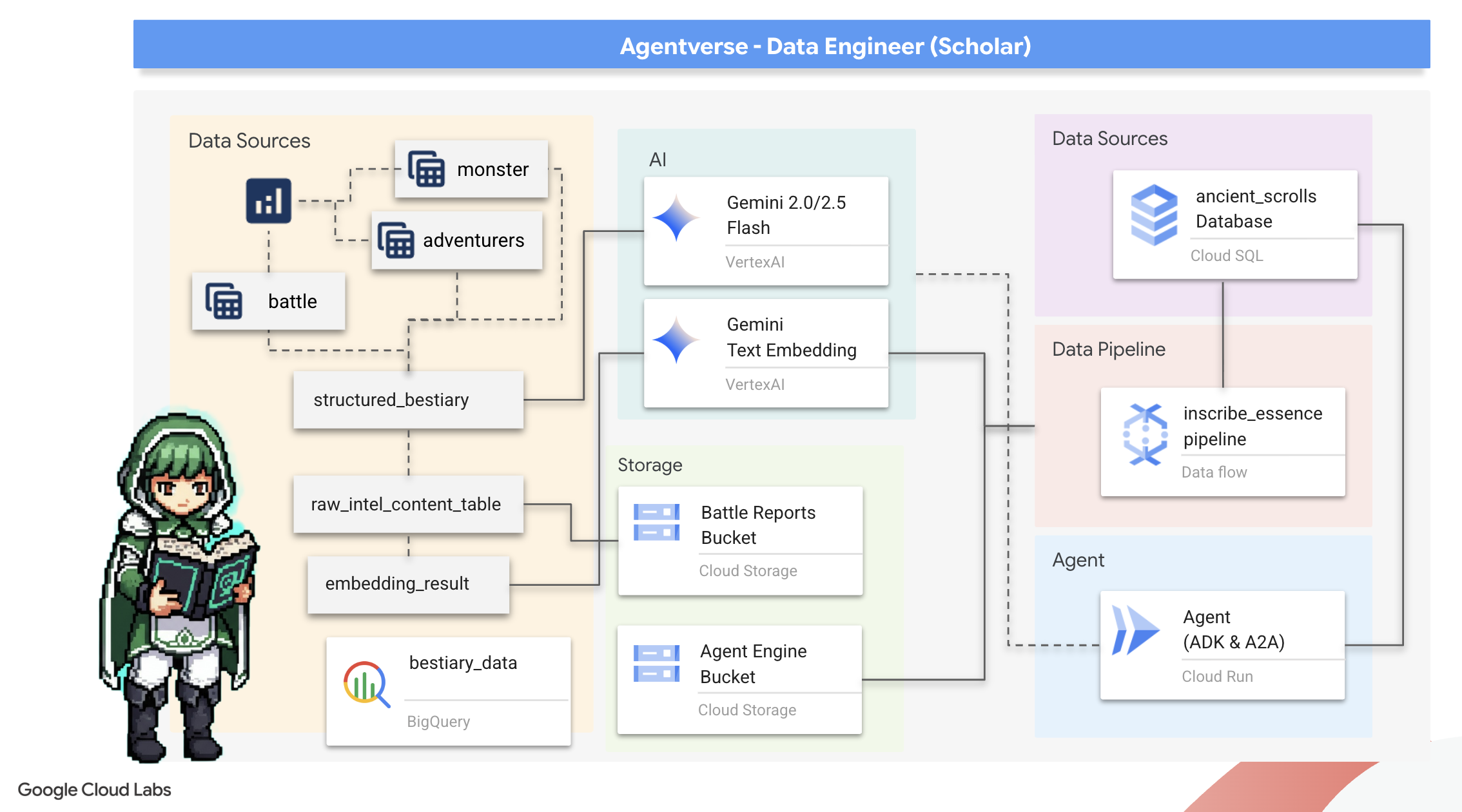
سفر ما آغاز میشود! به عنوان محققان، سلاح اصلی ما دانش است. ما گنجینهای از طومارهای باستانی و مرموز را در بایگانیهای خود (Google Cloud Storage) کشف کردهایم. این طومارها حاوی اطلاعات خام در مورد جانوران ترسناکی هستند که زمین را آزار میدهند. ماموریت ما این است که با استفاده از جادوی تحلیلی عمیق Google BigQuery و خرد یک مغز ارشد Gemini (مدل Gemini Pro) این متون بدون ساختار را رمزگشایی کرده و آنها را به یک فهرست حیوانات ساختار یافته و قابل پرسش تبدیل کنیم. این پایه و اساس تمام استراتژیهای آینده ما خواهد بود.
آنچه یاد خواهید گرفت
- از BigQuery برای ایجاد جداول خارجی و انجام تبدیلهای پیچیده بدون ساختار به ساختار یافته با استفاده از BQML.GENERATE_TEXT با یک مدل Gemini استفاده کنید.
- یک نمونه Cloud SQL برای PostgreSQL فراهم کنید و افزونه pgvector را برای قابلیتهای جستجوی معنایی فعال کنید.
- با استفاده از Dataflow و Apache Beam، یک خط لوله دستهای قوی و کانتینری بسازید تا فایلهای متنی خام را پردازش کنید، با مدل Gemini، جاسازیهای برداری ایجاد کنید و نتایج را در یک پایگاه داده رابطهای بنویسید.
- یک سیستم پایه بازیابی-تولید افزوده (RAG) را در یک عامل پیادهسازی کنید تا دادههای برداریشده را پرسوجو کند.
- یک عامل آگاه از داده را به عنوان یک سرویس امن و مقیاسپذیر در Cloud Run مستقر کنید.
۳. آمادهسازی خلوتگاه محقق
خوش آمدید، محقق. قبل از اینکه بتوانیم دانش قدرتمند گریموار خود را ثبت کنیم، ابتدا باید پناهگاه خود را آماده کنیم. این آیین اساسی شامل مسحور کردن محیط Google Cloud، باز کردن پورتالهای مناسب (API) و ایجاد مجاری است که از طریق آنها جادوی دادههای ما جریان مییابد. یک پناهگاه خوب آماده تضمین میکند که طلسمهای ما قوی و دانش ما ایمن است.
اعتبار گوگل کلود خود را مطالبه کنید
⚠️ شرایط مهم:
- از یک حساب جیمیل شخصی استفاده کنید: شما باید از یک حساب شخصی (مثلاً
name@gmail.com) استفاده کنید. حسابهای کاربری شرکتی یا مدرسهای کار نخواهند کرد.
👉 مراحل:
- به سایت درخواست اعتبار بروید: اینجا کلیک کنید
- ورود: لینک را در نوار آدرس جایگذاری کنید و با جیمیل شخصی خود وارد شوید.
- پذیرش شرایط: شرایط خدمات پلتفرم ابری گوگل را بپذیرید.
- تأیید اعتبار: به دنبال پیامی باشید که تأیید کند اعتبار اعمال شده است.
- *نکته: اگر از شما خواسته شد اطلاعات کارت اعتباری را وارد کنید، میتوانید با خیال راحت آن را نادیده بگیرید و پنجره را ببندید.
و شما آماده رفتن هستید. میتوانید پنجره را ببندید.
راهاندازی محیط کاری
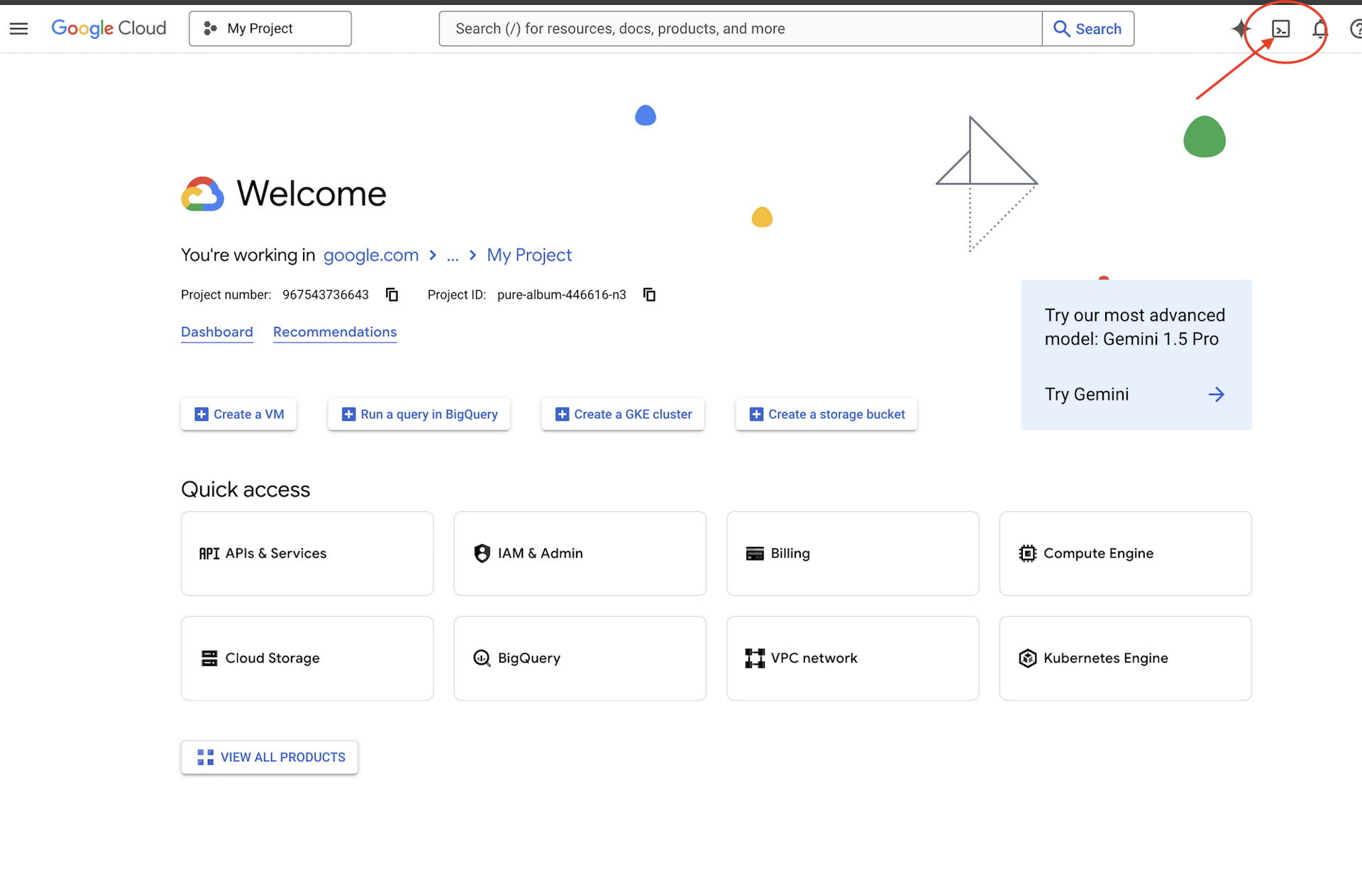
👉 روی فعال کردن پوسته ابری (Activate Cloud Shell) در بالای کنسول گوگل کلود کلیک کنید (این آیکون به شکل ترمینال در بالای پنل پوسته ابری قرار دارد)،
👉 روی دکمهی «باز کردن ویرایشگر» کلیک کنید (شبیه یک پوشهی باز شده با مداد است). با این کار ویرایشگر کد Cloud Shell در پنجره باز میشود. یک فایل اکسپلورر در سمت چپ خواهید دید. 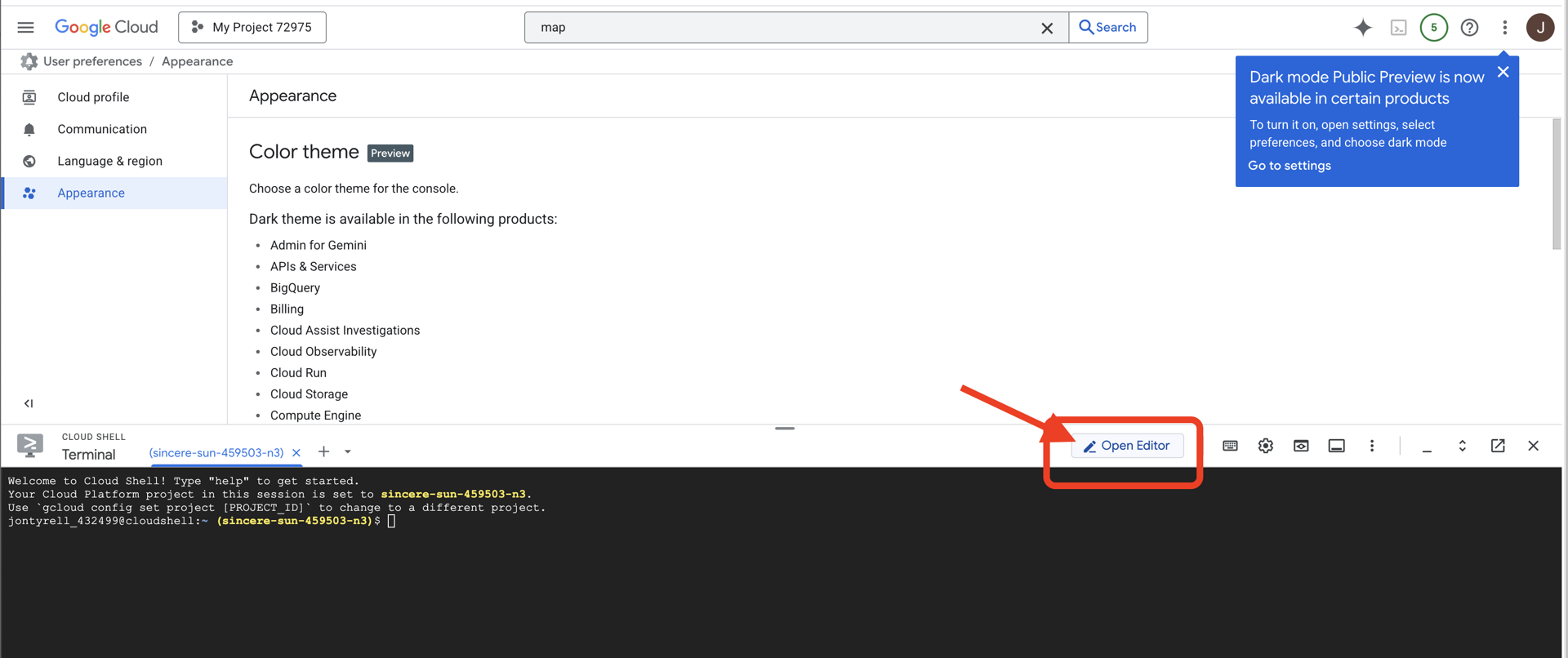
👉 ترمینال را در محیط توسعه ابری (cloud IDE) باز کنید، 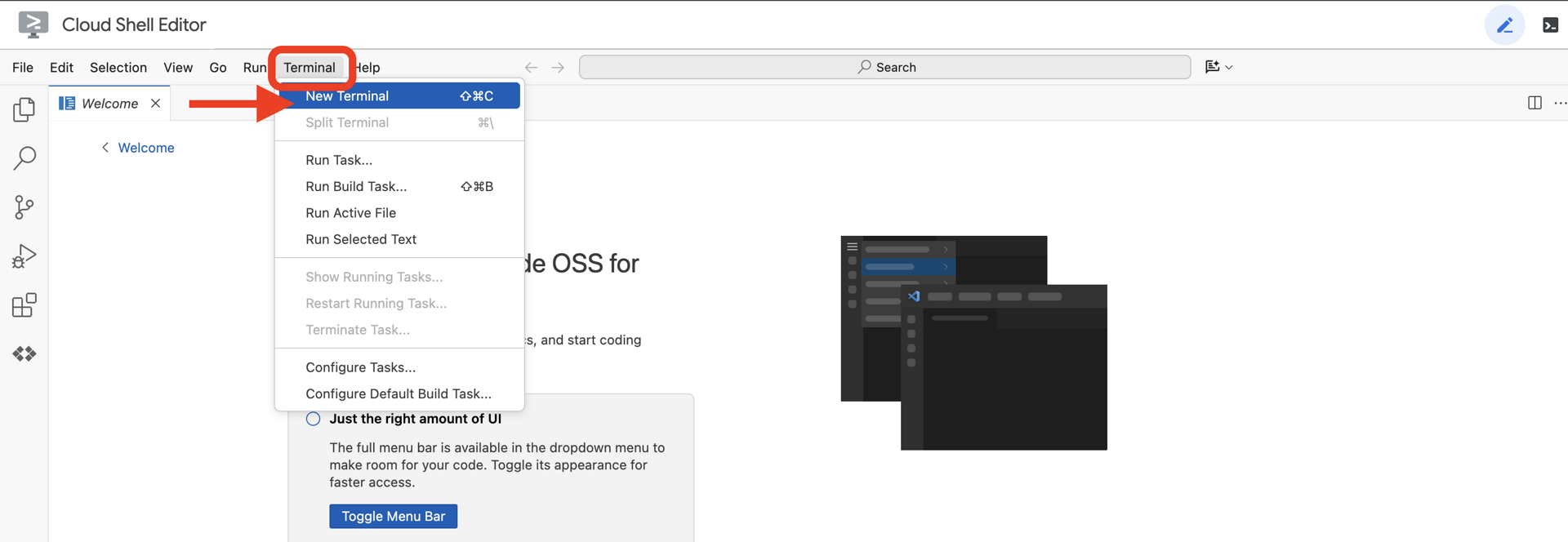
👉💻 در ترمینال، با استفاده از دستور زیر تأیید کنید که از قبل احراز هویت شدهاید و پروژه روی شناسه پروژه شما تنظیم شده است:
gcloud auth list
👉💻پروژه بوتاسترپ را از گیتهاب کپی کنید:
git clone https://github.com/weimeilin79/agentverse-dataengineer
chmod +x ~/agentverse-dataengineer/init.sh
chmod +x ~/agentverse-dataengineer/set_env.sh
chmod +x ~/agentverse-dataengineer/data_setup.sh

git clone https://github.com/weimeilin79/agentverse-dungeon.git
chmod +x ~/agentverse-dungeon/run_cloudbuild.sh
chmod +x ~/agentverse-dungeon/start.sh
👉💻 اسکریپت راهاندازی را از دایرکتوری پروژه اجرا کنید.
⚠️ نکتهای در مورد شناسه پروژه: اسکریپت یک شناسه پروژه پیشفرض تصادفی پیشنهاد میدهد. میتوانید برای پذیرش این پیشفرض، Enter را فشار دهید.
با این حال، اگر ترجیح میدهید یک پروژه جدید خاص ایجاد کنید ، میتوانید شناسه پروژه مورد نظر خود را در صورت درخواست اسکریپت تایپ کنید.
cd ~/agentverse-dataengineer
./init.sh
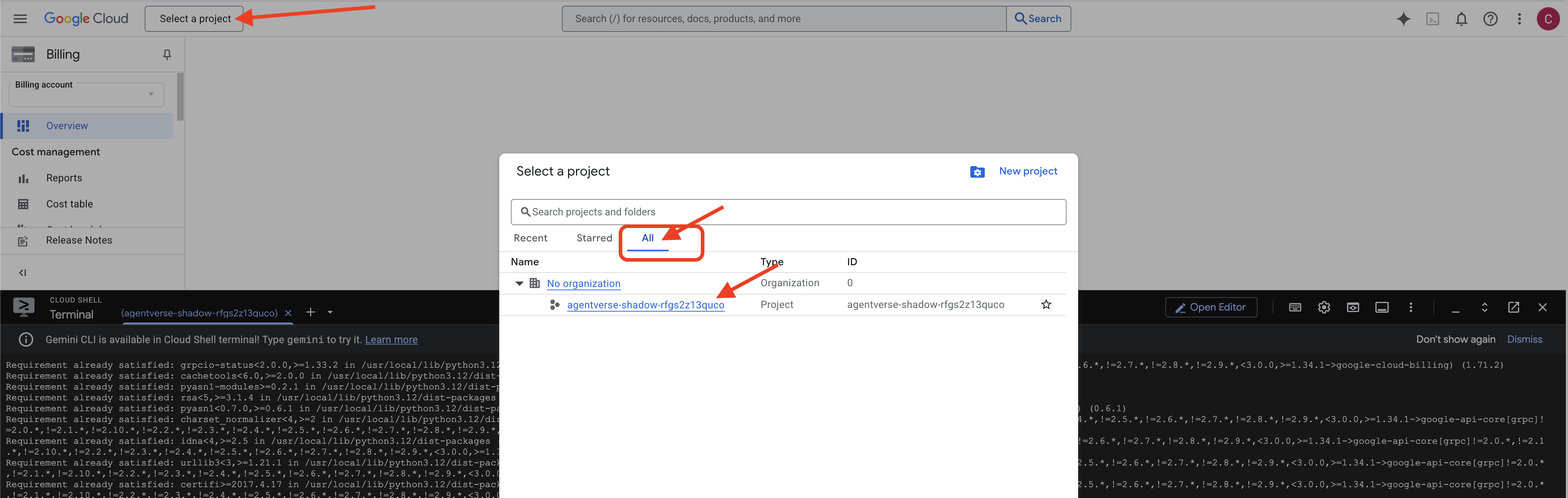
👉 مرحله مهم پس از تکمیل: پس از اتمام اسکریپت، باید مطمئن شوید که کنسول Google Cloud شما پروژه صحیح را مشاهده میکند:
- به console.cloud.google.com بروید.
- روی منوی کشویی انتخاب پروژه در بالای صفحه کلیک کنید.
- روی برگه «همه» کلیک کنید (زیرا ممکن است پروژه جدید هنوز در «اخیر» ظاهر نشده باشد).
- شناسه پروژهای که در مرحله
init.shپیکربندی کردهاید را انتخاب کنید.
👉💻 شناسه پروژه مورد نیاز را تنظیم کنید:
gcloud config set project $(cat ~/project_id.txt) --quiet
👉💻 دستور زیر را برای فعال کردن API های لازم Google Cloud اجرا کنید:
gcloud services enable \
    storage.googleapis.com \
    bigquery.googleapis.com \
    sqladmin.googleapis.com \
    aiplatform.googleapis.com \
    dataflow.googleapis.com \
    pubsub.googleapis.com \
    cloudfunctions.googleapis.com \
    run.googleapis.com \
    cloudbuild.googleapis.com \
    artifactregistry.googleapis.com \
    iam.googleapis.com \
    compute.googleapis.com \
    cloudresourcemanager.googleapis.com \
    cloudaicompanion.googleapis.com \
    bigqueryunified.googleapis.com
👉💻 اگر قبلاً مخزن Artifact Registry با نام agentverse-repo ایجاد نکردهاید، دستور زیر را برای ایجاد آن اجرا کنید:
. ~/agentverse-dataengineer/set_env.sh
gcloud artifacts repositories create $REPO_NAME \
    --repository-format=docker \
    --location=$REGION \
    --description="Repository for Agentverse agents"
تنظیم مجوز
👉💻 با اجرای دستورات زیر در ترمینال، مجوزهای لازم را اعطا کنید:
. ~/agentverse-dataengineer/set_env.sh

# --- Grant Core Data Permissions ---
gcloud projects add-iam-policy-binding $PROJECT_ID \
 --member="serviceAccount:$SERVICE_ACCOUNT_NAME" \
 --role="roles/storage.admin"

gcloud projects add-iam-policy-binding $PROJECT_ID \
 --member="serviceAccount:$SERVICE_ACCOUNT_NAME" \
 --role="roles/bigquery.admin"

# --- Grant Data Processing & AI Permissions ---
gcloud projects add-iam-policy-binding $PROJECT_ID  \
--member="serviceAccount:$SERVICE_ACCOUNT_NAME"  \
--role="roles/dataflow.admin"

gcloud projects add-iam-policy-binding $PROJECT_ID  \
--member="serviceAccount:$SERVICE_ACCOUNT_NAME"  \
--role="roles/cloudsql.admin"

gcloud projects add-iam-policy-binding $PROJECT_ID  \
--member="serviceAccount:$SERVICE_ACCOUNT_NAME"  \
--role="roles/pubsub.admin"

gcloud projects add-iam-policy-binding $PROJECT_ID  \
--member="serviceAccount:$SERVICE_ACCOUNT_NAME"  \
--role="roles/aiplatform.user"

# --- Grant Deployment & Execution Permissions ---
gcloud projects add-iam-policy-binding $PROJECT_ID  \
--member="serviceAccount:$SERVICE_ACCOUNT_NAME"  \
--role="roles/cloudbuild.builds.editor"

gcloud projects add-iam-policy-binding $PROJECT_ID  \
--member="serviceAccount:$SERVICE_ACCOUNT_NAME"  \
--role="roles/artifactregistry.admin"

gcloud projects add-iam-policy-binding $PROJECT_ID  \
--member="serviceAccount:$SERVICE_ACCOUNT_NAME"  \
--role="roles/run.admin"

gcloud projects add-iam-policy-binding $PROJECT_ID  \
--member="serviceAccount:$SERVICE_ACCOUNT_NAME"  \
--role="roles/iam.serviceAccountUser"

gcloud projects add-iam-policy-binding $PROJECT_ID  \
--member="serviceAccount:$SERVICE_ACCOUNT_NAME"  \
--role="roles/logging.logWriter"


gcloud projects add-iam-policy-binding $PROJECT_ID \
  --member="serviceAccount:$SERVICE_ACCOUNT_NAME" \
  --role="roles/dataflow.admin"
👉💻 همزمان با شروع آموزش، چالش نهایی را آماده خواهیم کرد. دستورات زیر، اسپکترها را از هرج و مرج و ایستا احضار میکنند و غولهای نهایی آزمون شما را تشکیل میدهند.
. ~/agentverse-dataengineer/set_env.sh
cd ~/agentverse-dungeon
./run_cloudbuild.sh
cd ~/agentverse-dataengineer
کار عالی، محقق. افسونهای بنیادی تکمیل شدهاند. پناهگاه ما امن است، درگاههای نیروهای بنیادی دادهها باز هستند و خدمتگزار ما توانمند شده است. اکنون آمادهایم تا کار واقعی را شروع کنیم.
۴. کیمیاگری دانش: تبدیل دادهها با BigQuery و Gemini
در جنگ بیوقفه علیه استاتیک، هر رویارویی بین قهرمان یک مامور و یک شبح توسعه با دقت ثبت میشود. سیستم شبیهسازی میدان نبرد، محیط آموزشی اصلی ما، به طور خودکار برای هر رویارویی یک ورودی گزارش اتریک ایجاد میکند. این گزارشهای روایی ارزشمندترین منبع هوش خام ما هستند، سنگ معدن تصفیه نشدهای که ما، به عنوان محققان، باید فولاد بکر استراتژی را از آن بسازیم. قدرت واقعی یک محقق نه تنها در داشتن دادهها، بلکه در توانایی تبدیل سنگ معدن خام و آشفته اطلاعات به فولاد درخشان و ساختار یافته خرد عملی نهفته است. ما آیین بنیادی کیمیاگری دادهها را انجام خواهیم داد.
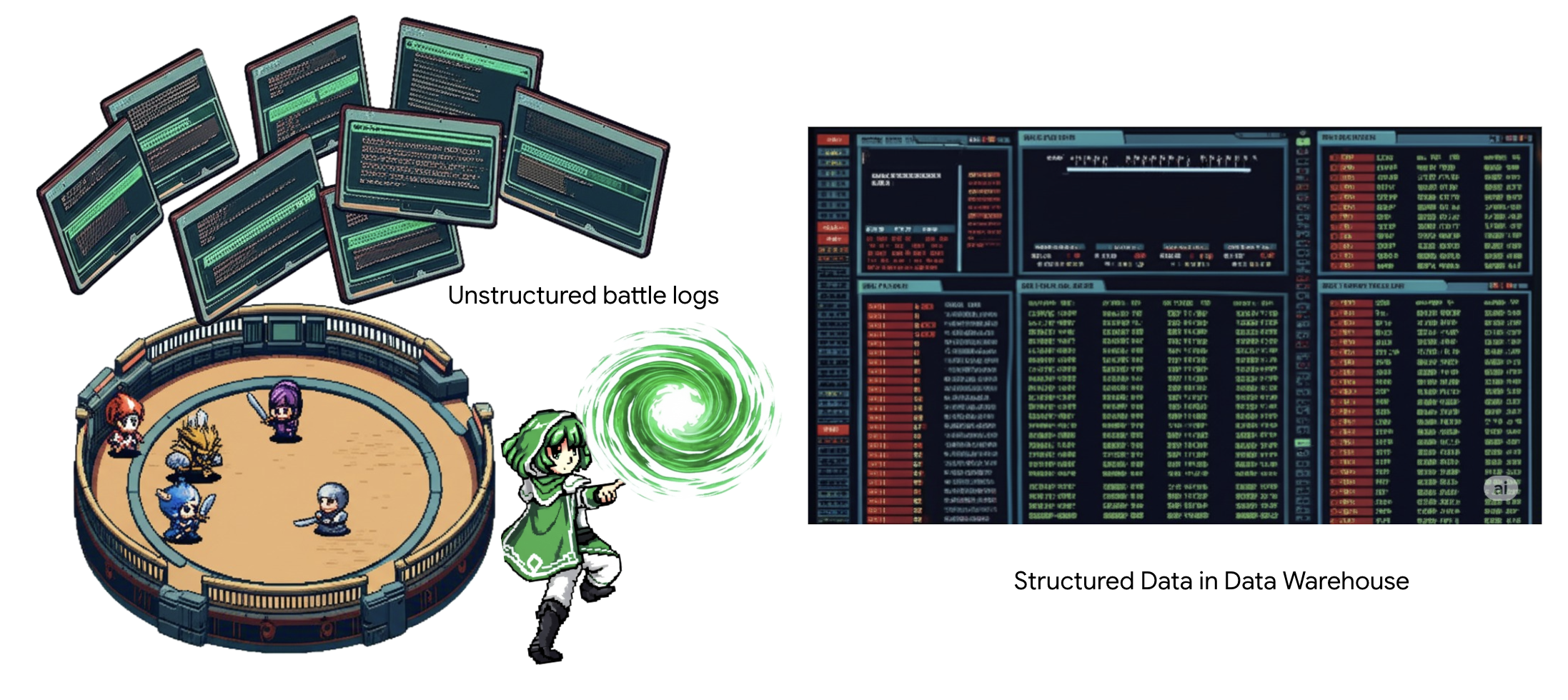
سفر ما ما را از طریق یک فرآیند چند مرحلهای کاملاً در حریم خصوصی گوگل بیگکوئری (Google BigQuery) خواهد برد. ما با نگاه کردن به آرشیو GCS خود بدون حرکت دادن حتی یک طومار، با استفاده از یک لنز جادویی شروع خواهیم کرد. سپس، یک جمینی (Gemini) را احضار خواهیم کرد تا حماسههای شاعرانه و بدون ساختار گزارشهای نبرد را بخواند و تفسیر کند. در نهایت، پیشگوییهای خام را در مجموعهای از جداول بکر و به هم پیوسته اصلاح خواهیم کرد. اولین گریموار (Grimoire) ما. و از آن سوالی چنان عمیق میپرسیم که فقط با این ساختار تازه کشف شده میتوان به آن پاسخ داد.
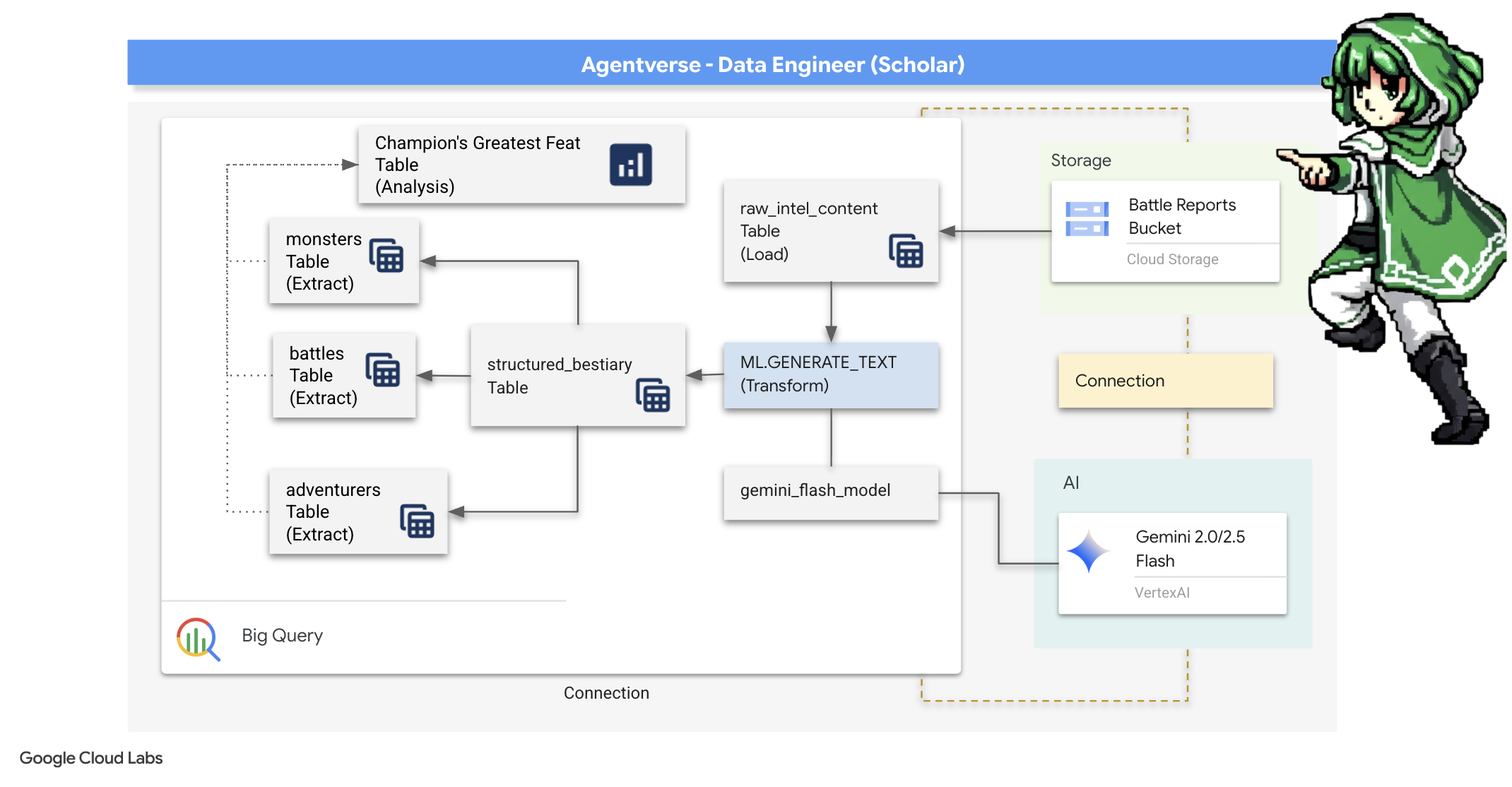
لنز بررسی: نگاهی دقیق به GCS با جداول خارجی BigQuery
اولین اقدام ما ساخت لنزی است که به ما امکان میدهد محتویات آرشیو GCS خود را بدون ایجاد اختلال در طومارهای داخل آن ببینیم. یک جدول خارجی (External Table) این لنز است که فایلهای متنی خام را به ساختاری جدولمانند نگاشت میکند که BigQuery میتواند مستقیماً از آن پرسوجو کند.
برای انجام این کار، ابتدا باید یک خط قدرت پایدار، یک منبع CONNECTION، ایجاد کنیم که به طور ایمن پناهگاه BigQuery ما را به بایگانی GCS متصل کند.
👉💻 در ترمینال Cloud Shell خود، دستور زیر را برای راهاندازی فضای ذخیرهسازی و ایجاد مجرا اجرا کنید:
. ~/agentverse-dataengineer/set_env.sh
. ~/agentverse-dataengineer/data_setup.sh

bq mk --connection \
  --connection_type=CLOUD_RESOURCE \
  --project_id=${PROJECT_ID} \
  --location=${REGION} \
  gcs-connection
💡 توجه! بعداً پیامی ظاهر خواهد شد!
اسکریپت راهاندازی مرحله ۲، فرآیندی را در پسزمینه آغاز کرد. پس از چند دقیقه، پیامی مشابه این در ترمینال شما ظاهر میشود: [1]+ Done gcloud sql instances create ... این طبیعی و مورد انتظار است. این به سادگی به این معنی است که پایگاه داده Cloud SQL شما با موفقیت ایجاد شده است. میتوانید با خیال راحت این پیام را نادیده بگیرید و به کار خود ادامه دهید.
قبل از اینکه بتوانید جدول خارجی (External Table) را ایجاد کنید، ابتدا باید مجموعه دادهای را که شامل آن خواهد بود، ایجاد کنید.
👉💻 این دستور ساده را در ترمینال Cloud Shell خود اجرا کنید:
. ~/agentverse-dataengineer/set_env.sh
bq --location=${REGION} mk --dataset ${PROJECT_ID}:bestiary_data
👉💻 حالا باید به امضای جادویی مجرا مجوزهای لازم برای خواندن از بایگانی GCS و مشورت با Gemini را بدهیم.
. ~/agentverse-dataengineer/set_env.sh
export CONNECTION_SA=$(bq show --connection --project_id=${PROJECT_ID} --location=${REGION} --format=json gcs-connection  | jq -r '.cloudResource.serviceAccountId')

echo "The Conduit's Magical Signature is: $CONNECTION_SA"

echo "Granting key to the GCS Archive..."
gcloud storage buckets add-iam-policy-binding gs://${PROJECT_ID}-reports \
  --member="serviceAccount:$CONNECTION_SA" \
  --role="roles/storage.objectViewer"

gcloud projects add-iam-policy-binding ${PROJECT_ID} \
  --member="serviceAccount:$CONNECTION_SA" \
  --role="roles/aiplatform.user"
👉💻 در ترمینال Cloud Shell خود، دستور زیر را اجرا کنید تا نام باکت شما نمایش داده شود:
echo $BUCKET_NAME
ترمینال شما نامی مشابه your-project-id-gcs-bucket را نمایش خواهد داد. در مراحل بعدی به آن نیاز خواهید داشت.
👉 شما باید دستور بعدی را از داخل ویرایشگر کوئری BigQuery در کنسول Google Cloud اجرا کنید. سادهترین راه برای دسترسی به آن، باز کردن لینک زیر در یک تب جدید مرورگر است. این کار شما را مستقیماً به صفحه صحیح در کنسول Google Cloud میبرد.
https://console.cloud.google.com/bigquery
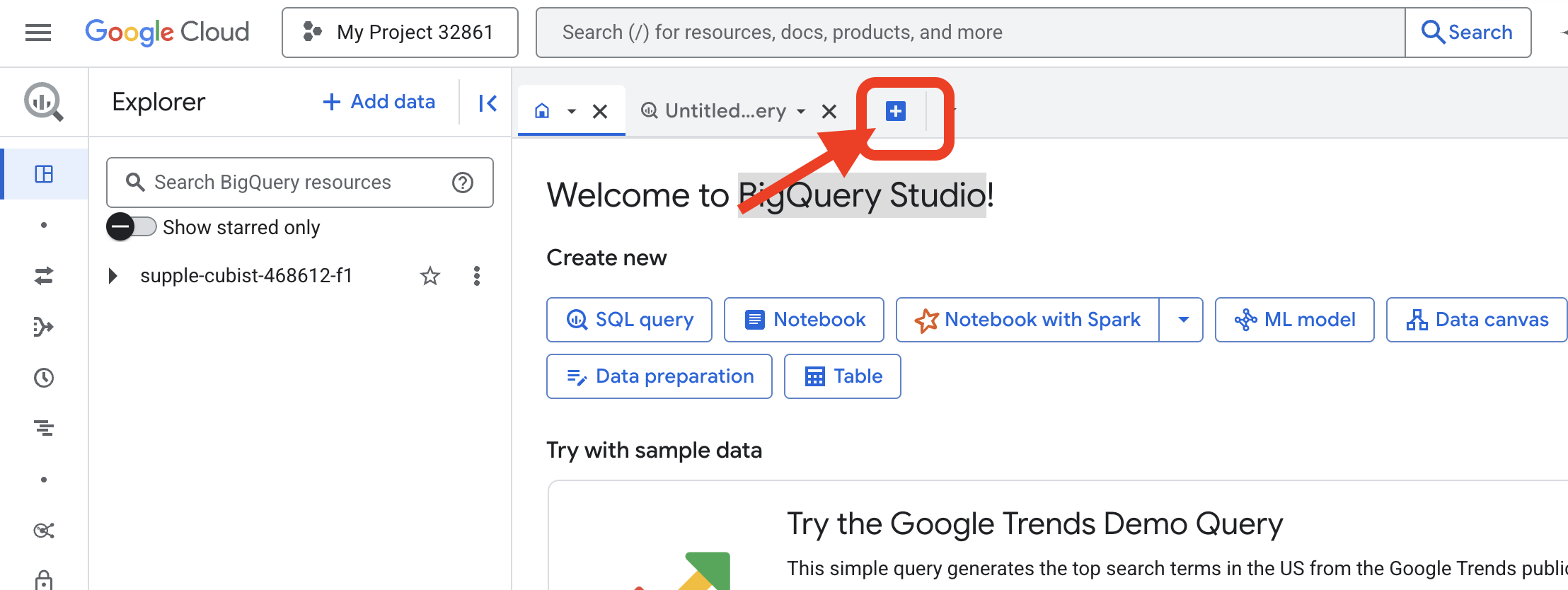
👉 پس از بارگذاری صفحه، روی دکمه آبی + (ایجاد یک پرسوجوی جدید) کلیک کنید تا یک برگه ویرایشگر جدید باز شود.
حالا ما طلسم زبان تعریف داده (DDL) را مینویسیم تا لنز جادویی خود را بسازیم. این به BigQuery میگوید کجا را نگاه کند و چه چیزی را ببیند.
👉📜 در ویرایشگر کوئری BigQuery که باز کردید، کد SQL زیر را جایگذاری کنید. به یاد داشته باشید که عبارت REPLACE-WITH-YOUR-BUCKET-NAME را جایگزین کنید.
با نام سطلی که کپی کردهاید . و روی Run کلیک کنید:
CREATE OR REPLACE EXTERNAL TABLE bestiary_data.raw_intel_content_table (
  raw_text STRING
)
OPTIONS (
  format = 'CSV',
  -- This is a trick to load each line of the text files as a single row.
  field_delimiter = '§',
  uris = ['gs://REPLACE-WITH-YOUR-BUCKET-NAME/raw_intel/*']
);
👉📜 یک کوئری برای «نگاه از طریق لنز» و مشاهده محتوای فایلها اجرا کنید.
SELECT * FROM bestiary_data.raw_intel_content_table;
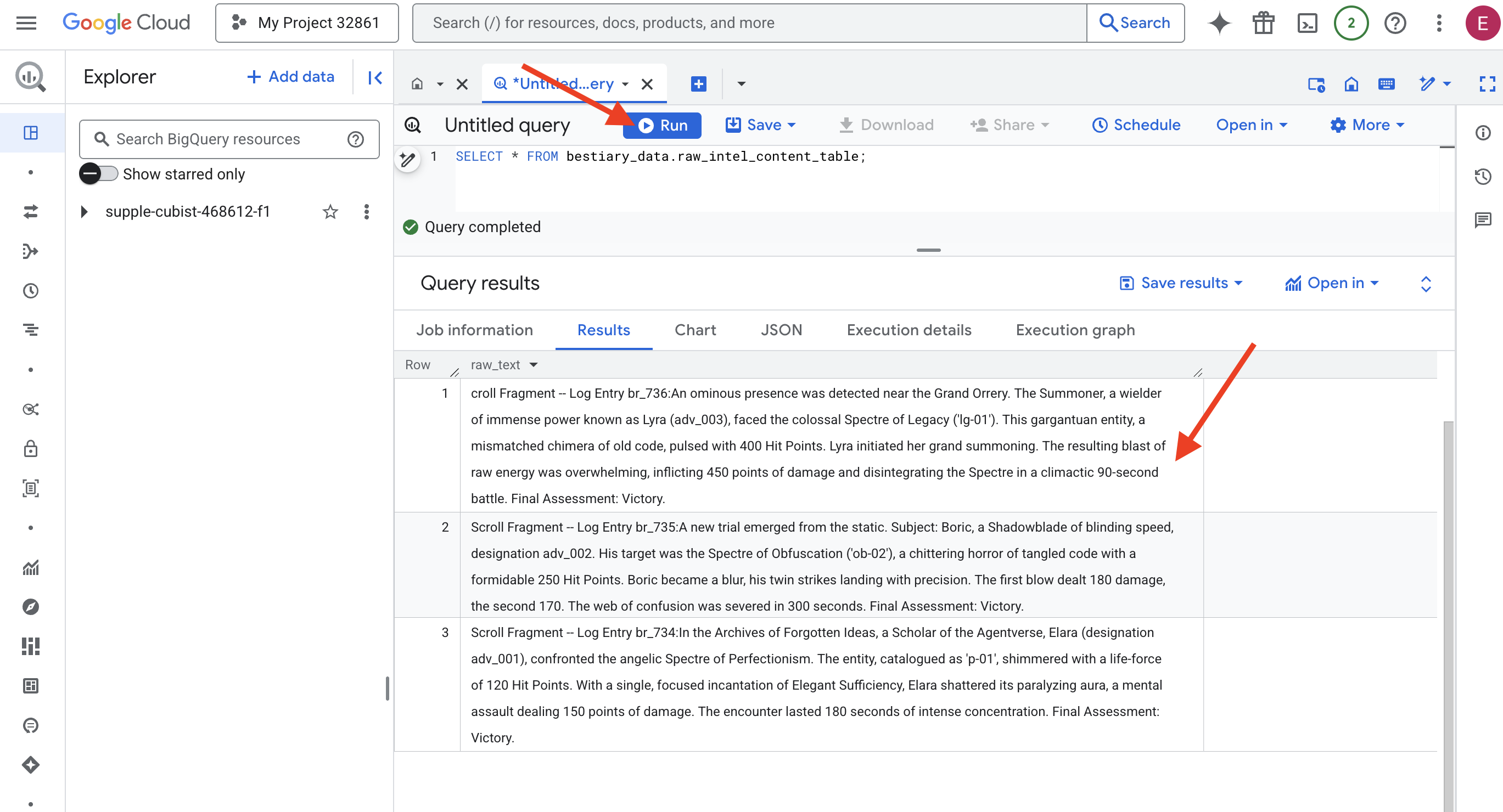
لنز ما در جای خود قرار گرفته است. اکنون میتوانیم متن خام طومارها را ببینیم. اما خواندن به معنای فهمیدن نیست.
در بایگانی ایدههای فراموششده، الارا (با نام adv_001)، محققی از دنیای عاملها، با شبح فرشتهای کمالگرایی روبرو شد. این موجود که با عنوان «p-01» فهرستبندی شده بود، با نیروی حیاتی ۱۲۰ امتیاز ضربه میدرخشید. الارا با یک ورد متمرکز «کفایت زیبا»، هاله فلجکننده آن را در هم شکست، حملهای ذهنی که ۱۵۰ امتیاز آسیب وارد میکرد. این رویارویی ۱۸۰ ثانیه تمرکز شدید طول کشید. ارزیابی نهایی: پیروزی.
طومارها نه به صورت جدول و سطر، بلکه به نثر پر پیچ و خم ساگاها نوشته شده اند. این اولین آزمون بزرگ ماست.
پیشگویی محقق: تبدیل متن به جدول با SQL
چالش این است که گزارشی که جزئیات حملات سریع و دوگانهی یک Shadowblade را شرح میدهد، با شرح وقایع جمعآوری قدرت عظیم یک Summoner برای یک انفجار ویرانگر، بسیار متفاوت است. ما نمیتوانیم به سادگی این دادهها را وارد کنیم؛ ما باید آنها را تفسیر کنیم. این لحظهی جادو است. ما از یک پرسوجوی SQL به عنوان یک طلسم قدرتمند برای خواندن، درک و ساختاردهی تمام رکوردها از تمام فایلهای خود، درست در داخل BigQuery، استفاده خواهیم کرد.
👉💻 به ترمینال Cloud Shell خود برگردید، دستور زیر را اجرا کنید تا نام اتصال شما نمایش داده شود:
echo "${PROJECT_ID}.${REGION}.gcs-connection"
ترمینال شما رشته اتصال کامل را نمایش میدهد، کل این رشته را انتخاب و کپی کنید، در مرحله بعدی به آن نیاز خواهید داشت.
ما از یک طلسم قدرتمند و واحد استفاده خواهیم کرد: ML.GENERATE_TEXT . این طلسم یک Gemini را احضار میکند، هر طومار را به آن نشان میدهد و به آن دستور میدهد که حقایق اصلی را به عنوان یک شیء JSON ساختار یافته برگرداند.
👉📜 در BigQuery studio، مرجع مدل Gemini را ایجاد کنید. این کار اوراکل Gemini Flash را به کتابخانه BigQuery ما متصل میکند تا بتوانیم آن را در کوئریهای خود فراخوانی کنیم. به یاد داشته باشید که عبارت زیر را جایگزین کنید.
REPLACE-WITH-YOUR-FULL-CONNECTION-STRING با رشته اتصال کاملی که از ترمینال خود کپی کردهاید، جایگزین کنید.
  CREATE OR REPLACE MODEL bestiary_data.gemini_flash_model
  REMOTE WITH CONNECTION `REPLACE-WITH-YOUR-FULL-CONNECTION-STRING`
  OPTIONS (endpoint = 'gemini-2.5-flash');
👉📜 حالا، طلسم بزرگ تبدیل را اجرا کنید. این کوئری متن خام را میخواند، یک اعلان دقیق برای هر طومار میسازد، آن را به Gemini ارسال میکند و یک جدول مرحلهبندی جدید از پاسخ JSON ساختاریافته هوش مصنوعی میسازد.
CREATE OR REPLACE TABLE bestiary_data.structured_bestiary AS
SELECT
  -- THE CRITICAL CHANGE: We remove PARSE_JSON. The result is already a JSON object.
  ml_generate_text_result AS structured_data
FROM
  ML.GENERATE_TEXT(
    -- Our bound Gemini Flash model.
    MODEL bestiary_data.gemini_flash_model,

    -- Our perfectly constructed input, with the prompt built for each row.
    (
      SELECT
        CONCAT(
          """
          From the following text, extract structured data into a single, valid JSON object.

          Your output must strictly conform to the following JSON structure and data types. Do not add, remove, or change any keys.

          {
            "monster": {
              "monster_id": "string",
              "name": "string",
              "type": "string",
              "hit_points": "integer"
            },
            "battle": {
              "battle_id": "string",
              "monster_id": "string",
              "adventurer_id": "string",
              "outcome": "string",
              "duration_seconds": "integer"
            },
            "adventurer": {
              "adventurer_id": "string",
              "name": "string",
              "class": "string"
            }
          }

          **CRUCIAL RULES:**
          - Do not output any text, explanations, conversational filler, or markdown formatting like ` ```json` before or after the JSON object.
          - Your entire response must be ONLY the raw JSON object itself.

          Here is the text:
          """,
          raw_text -- We append the actual text of the report here.
        ) AS prompt -- The final column is still named 'prompt', as the oracle requires.
      FROM
        bestiary_data.raw_intel_content_table
    ),

    -- The STRUCT now ONLY contains model parameters.
    STRUCT(
      0.2 AS temperature,
      2048 AS max_output_tokens
    )
  );
تبدیل کامل شده است، اما نتیجه هنوز خالص نیست. مدل Gemini پاسخ خود را در قالبی استاندارد برمیگرداند و JSON مورد نظر ما را درون ساختاری بزرگتر که شامل ابردادههایی درباره فرآیند تفکر آن است، قرار میدهد. بیایید قبل از تلاش برای خالصسازی، به این پیشگویی خام نگاهی بیندازیم.
👉📜 یک کوئری برای بررسی خروجی خام مدل Gemini اجرا کنید:
SELECT * FROM bestiary_data.structured_bestiary;
👀 یک ستون واحد با نام structured_data مشاهده خواهید کرد. محتوای هر ردیف مشابه این شیء پیچیده JSON خواهد بود:
{"candidates":[{"avg_logprobs":-0.5691758094475283,"content":{"parts":[{"text":"```json\n{\n \"monster\": {\n \"monster_id\": \"gw_02\",\n \"name\": \"Gravewight\",\n \"type\": \"Gravewight\",\n \"hit_points\": 120\n },\n \"battle\": {\n \"battle_id\": \"br_735\",\n \"monster_id\": \"gw_02\",\n \"adventurer_id\": \"adv_001\",\n \"outcome\": \"Defeat\",\n \"duration_seconds\": 45\n },\n \"adventurer\": {\n \"adventurer_id\": \"adv_001\",\n \"name\": \"Elara\",\n \"class\": null\n }\n}\n```"}],"role":"model"},"finish_reason":"STOP","score":-97.32906341552734}],"create_time":"2025-07-28T15:53:24.482775Z","model_version":"gemini-2.5-flash","response_id":"9JyHaNe7HZ2WhMIPxqbxEQ","usage_metadata":{"billable_prompt_usage":{"text_count":640},"candidates_token_count":171,"candidates_tokens_details":[{"modality":"TEXT","token_count":171}],"prompt_token_count":207,"prompt_tokens_details":[{"modality":"TEXT","token_count":207}],"thoughts_token_count":1014,"total_token_count":1392,"traffic_type":"ON_DEMAND"}}
همانطور که میبینید، جایزه ما - شیء JSON تمیزی که درخواست کردیم - در اعماق این ساختار قرار دارد. وظیفه بعدی ما مشخص است. ما باید آیینی را برای پیمایش سیستماتیک این ساختار و استخراج خرد ناب درون آن انجام دهیم.
آیین پاکسازی: نرمالسازی خروجی GenAI با SQL
جوزا سخن گفته است، اما سخنانش خام و در انرژیهای اثیری خلقتش (کاندیداها، دلیل پایان و غیره) پیچیده شده است. یک محقق واقعی به سادگی پیشگویی خام را کنار نمیگذارد؛ او با دقت حکمت اصلی را استخراج میکند و آن را در کتابهای مناسب برای استفاده در آینده مینویسد.
حالا آخرین مجموعه طلسمها را اجرا میکنیم. این اسکریپت:
- JSON خام و تو در تو را از جدول مرحلهبندی ما بخوانید.
- آن را پاکسازی و تجزیه کنید تا به دادههای اصلی برسید.
- قطعات مرتبط را در سه جدول نهایی و بکر بنویسید: هیولاها، ماجراجویان و نبردها.
👉📜 در ویرایشگر کوئری جدید BigQuery، دستور زیر را برای ایجاد لنز پاککننده اجرا کنید:
CREATE OR REPLACE TABLE bestiary_data.monsters AS
WITH
  CleanedDivinations AS (
    SELECT
      SAFE.PARSE_JSON(
        REGEXP_EXTRACT(
          JSON_VALUE(structured_data, '$.candidates[0].content.parts[0].text'),
          r'\{[\s\S]*\}'
        )
      ) AS report_data
    FROM
      bestiary_data.structured_bestiary
  )
SELECT
  JSON_VALUE(report_data, '$.monster.monster_id') AS monster_id,
  JSON_VALUE(report_data, '$.monster.name') AS name,
  JSON_VALUE(report_data, '$.monster.type') AS type,
  SAFE_CAST(JSON_VALUE(report_data, '$.monster.hit_points') AS INT64) AS hit_points
FROM
  CleanedDivinations
WHERE
  report_data IS NOT NULL
QUALIFY ROW_NUMBER() OVER (PARTITION BY monster_id ORDER BY name) = 1;
👉📜 تایید منبع:
SELECT * FROM bestiary_data.monsters;
در مرحله بعد، فهرست قهرمانان خود را ایجاد خواهیم کرد، فهرستی از ماجراجویان شجاعی که با این جانوران روبرو شدهاند.
👉📜 در یک ویرایشگر کوئری جدید، دستور زیر را برای ایجاد جدول adventurers اجرا کنید:
CREATE OR REPLACE TABLE bestiary_data.adventurers AS
WITH
  CleanedDivinations AS (
    SELECT
      SAFE.PARSE_JSON(
        REGEXP_EXTRACT(
          JSON_VALUE(structured_data, '$.candidates[0].content.parts[0].text'),
          r'\{[\s\S]*\}'
        )
      ) AS report_data
    FROM
      bestiary_data.structured_bestiary
  )
SELECT
  JSON_VALUE(report_data, '$.adventurer.adventurer_id') AS adventurer_id,
  JSON_VALUE(report_data, '$.adventurer.name') AS name,
  JSON_VALUE(report_data, '$.adventurer.class') AS class
FROM
  CleanedDivinations
QUALIFY ROW_NUMBER() OVER (PARTITION BY adventurer_id ORDER BY name) = 1;
👉📜 فهرست قهرمانان را تأیید کنید:
SELECT * FROM bestiary_data.adventurers;
در نهایت، جدول حقایق خود را ایجاد خواهیم کرد: وقایعنگاری نبردها. این کتاب قطور، دو کتاب دیگر را به هم پیوند میدهد و جزئیات هر نبرد منحصر به فرد را ثبت میکند. از آنجایی که هر نبرد یک رویداد منحصر به فرد است، نیازی به حذف دادههای تکراری نیست.
👉📜 در یک ویرایشگر کوئری جدید، دستور زیر را برای ایجاد جدول نبردها اجرا کنید:
CREATE OR REPLACE TABLE bestiary_data.battles AS
WITH
  CleanedDivinations AS (
    SELECT
      SAFE.PARSE_JSON(
        REGEXP_EXTRACT(
          JSON_VALUE(structured_data, '$.candidates[0].content.parts[0].text'),
          r'\{[\s\S]*\}'
        )
      ) AS report_data
    FROM
      bestiary_data.structured_bestiary
  )
-- Extract the raw essence for all battle fields and cast where necessary.
SELECT
  JSON_VALUE(report_data, '$.battle.battle_id') AS battle_id,
  JSON_VALUE(report_data, '$.battle.monster_id') AS monster_id,
  JSON_VALUE(report_data, '$.battle.adventurer_id') AS adventurer_id,
  JSON_VALUE(report_data, '$.battle.outcome') AS outcome,
  SAFE_CAST(JSON_VALUE(report_data, '$.battle.duration_seconds') AS INT64) AS duration_seconds
FROM
  CleanedDivinations;
👉📜 کرونیکل را تأیید کنید:
SELECT * FROM bestiary_data.battles;
کشف بینشهای استراتژیک
طومارها خوانده شدهاند، عصاره آنها استخراج شده و کتابها نوشته شدهاند. گریموار ما دیگر فقط مجموعهای از حقایق نیست، بلکه یک پایگاه داده رابطهای از خرد استراتژیک عمیق است. اکنون میتوانیم سوالاتی بپرسیم که وقتی دانش ما در متن خام و بدون ساختار گیر افتاده بود، پاسخ به آنها غیرممکن بود.
حالا بیایید یک پیشگویی نهایی و بزرگ انجام دهیم. ما طلسمی خواهیم خواند که هر سه کتاب ما - کتاب مقدس هیولاها، فهرست قهرمانان و وقایعنگاری نبردها - را همزمان بررسی میکند تا به بینشی عمیق و کاربردی دست یابد.
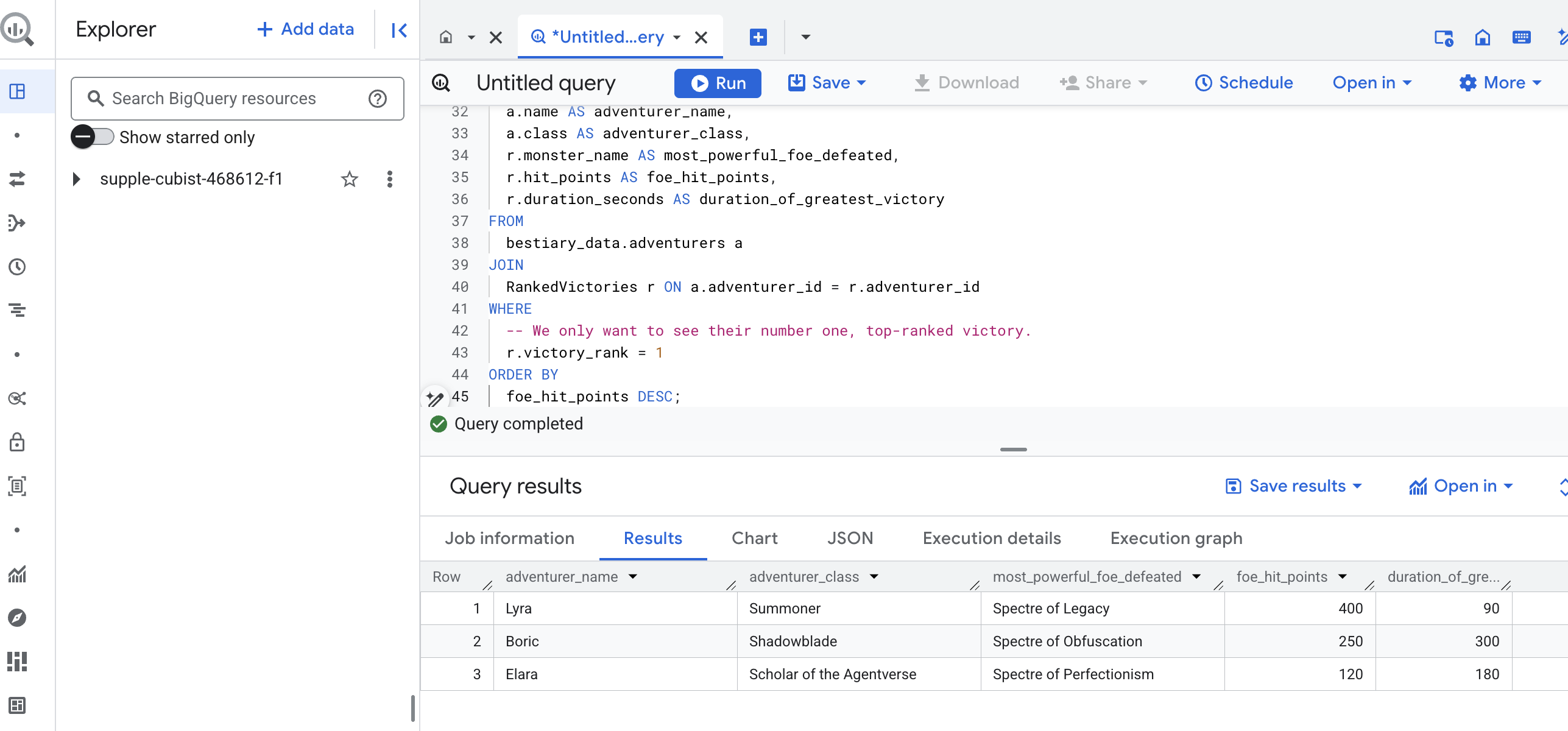
سوال استراتژیک ما: «برای هر ماجراجو، نام قدرتمندترین هیولایی (بر اساس امتیاز ضربه) که با موفقیت شکست داده چیست و آن پیروزی خاص چقدر طول کشیده است؟»
این یک سوال پیچیده است که نیاز به پیوند دادن قهرمانان به نبردهای پیروزمندانهشان و آن نبردها به آمار هیولاهای درگیر دارد. این قدرت واقعی یک مدل داده ساختاریافته است.
👉📜 در ویرایشگر کوئری جدید BigQuery، آخرین ورد زیر را اجرا کنید:
-- This is our final spell, joining all three tomes to reveal a deep insight.
WITH
  -- First, we consult the Chronicle of Battles to find only the victories.
  VictoriousBattles AS (
    SELECT
      adventurer_id,
      monster_id,
      duration_seconds
    FROM
      bestiary_data.battles
    WHERE
      outcome = 'Victory'
  ),
  -- Next, we create a temporary record for each victory, ranking the monsters
  -- each adventurer defeated by their power (hit points).
  RankedVictories AS (
    SELECT
      v.adventurer_id,
      m.name AS monster_name,
      m.hit_points,
      v.duration_seconds,
      -- This spell ranks each adventurer's victories from most to least powerful monster.
      ROW_NUMBER() OVER (PARTITION BY v.adventurer_id ORDER BY m.hit_points DESC) as victory_rank
    FROM
      VictoriousBattles v
    JOIN
      bestiary_data.monsters m ON v.monster_id = m.monster_id
  )
-- Finally, we consult the Roll of Champions and join it with our ranked victories
-- to find the name of each champion and the details of their greatest triumph.
SELECT
  a.name AS adventurer_name,
  a.class AS adventurer_class,
  r.monster_name AS most_powerful_foe_defeated,
  r.hit_points AS foe_hit_points,
  r.duration_seconds AS duration_of_greatest_victory
FROM
  bestiary_data.adventurers a
JOIN
  RankedVictories r ON a.adventurer_id = r.adventurer_id
WHERE
  -- We only want to see their number one, top-ranked victory.
  r.victory_rank = 1
ORDER BY
  foe_hit_points DESC;
خروجی این کوئری یک جدول تمیز و زیبا خواهد بود که «داستان بزرگترین شاهکار یک قهرمان» را برای هر ماجراجو در مجموعه داده شما ارائه میدهد. این جدول میتواند چیزی شبیه به این باشد:
تب Big Query را ببندید.
این نتیجهی واحد و زیبا، ارزش کل فرآیند را ثابت میکند. شما با موفقیت گزارشهای خام و آشفتهی میدان نبرد را به منبعی از داستانهای افسانهای و بینشهای استراتژیک و مبتنی بر داده تبدیل کردهاید.
برای غیر گیمرها
۵. گریمور کاتب: قطعهبندی، جاسازی و جستجو در انبار داده
کار ما در آزمایشگاه کیمیاگر موفقیتآمیز بود. ما طومارهای خام و روایی را به جداول رابطهای ساختاریافته تبدیل کردهایم - شاهکاری قدرتمند از جادوی دادهها. با این حال، خود طومارهای اصلی هنوز حقیقت معنایی عمیقتری را در خود دارند که جداول ساختاریافته ما نمیتوانند آن را به طور کامل به تصویر بکشند. برای ساختن یک عامل واقعاً خردمند، باید این معنا را رمزگشایی کنیم.
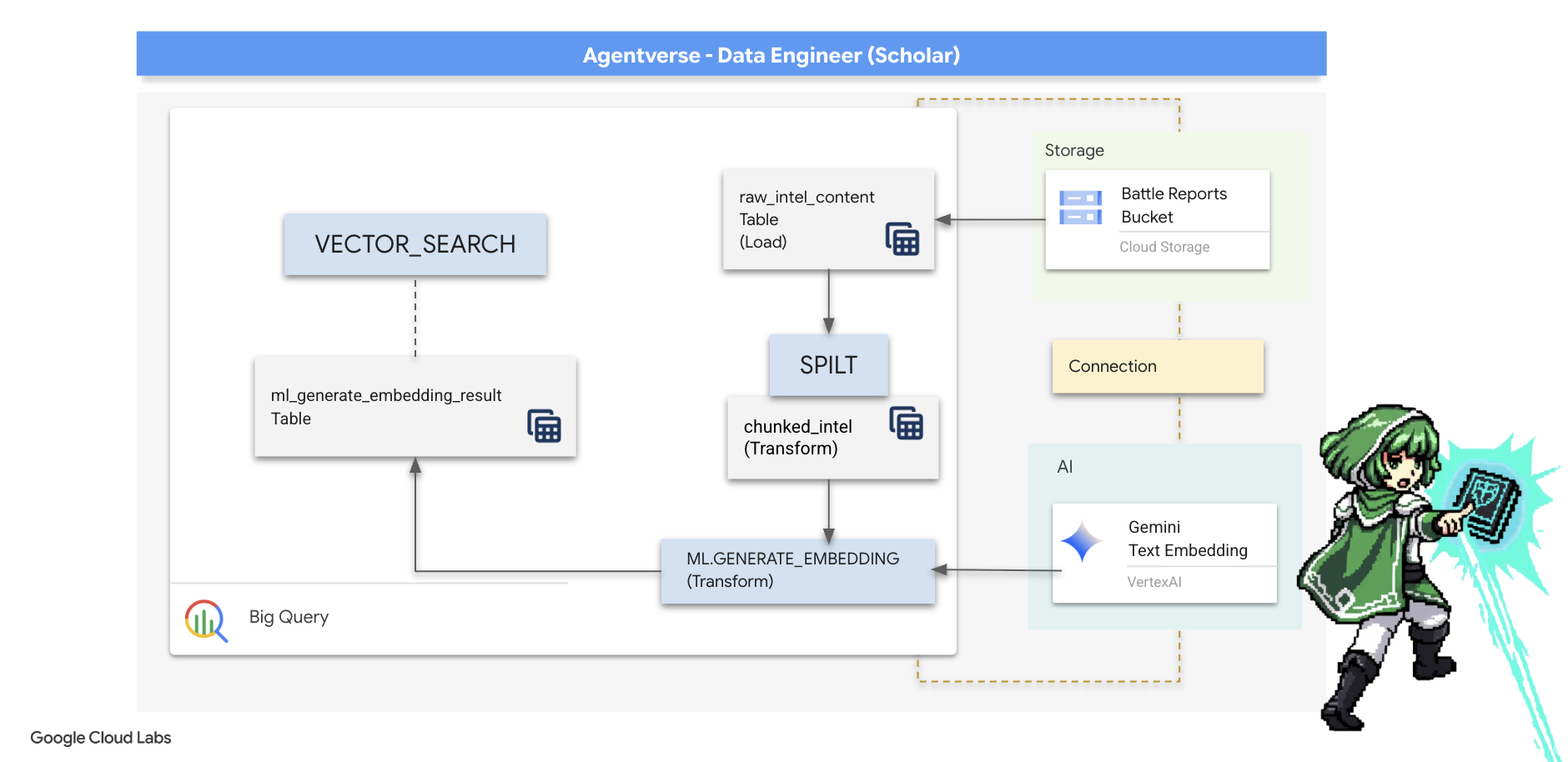
یک طومار خام و طولانی ابزاری کند است. اگر مأمور ما سوالی در مورد «هاله فلجکننده» بپرسد، یک جستجوی ساده ممکن است کل گزارش نبرد را نشان دهد که در آن آن عبارت فقط یک بار ذکر شده است و پاسخ را در جزئیات نامربوط دفن میکند. یک محقق چیرهدست میداند که خرد واقعی نه در حجم، بلکه در دقت یافت میشود.
ما سه مراسم قدرتمند درون پایگاه داده را کاملاً در خلوتگاه BigQuery خود اجرا خواهیم کرد.
- آیین تقسیم (تقسیمبندی): ما گزارشهای خام اطلاعاتی خود را با دقت به بخشهای کوچکتر، متمرکز و مستقل تقسیم میکنیم.
- آیین تقطیر (جاسازی): ما از BQML برای مشورت با مدل Gemini استفاده خواهیم کرد و هر قطعه متن را به یک "اثر انگشت معنایی" تبدیل میکنیم - یک جاسازی برداری.
- آیین پیشگویی (جستجو): ما از جستجوی برداری BQML برای پرسیدن یک سوال به زبان انگلیسی ساده و یافتن مرتبطترین و خلاصهترین حکمت از Grimoire خود استفاده خواهیم کرد.
کل این فرآیند، یک پایگاه دانش قدرتمند و قابل جستجو ایجاد میکند، بدون اینکه دادهها از امنیت و مقیاس BigQuery خارج شوند.
آیین تقسیم: رمزگشایی طومارها با SQL
منبع خرد ما همچنان فایلهای متنی خام در بایگانی GCS ما است که از طریق جدول خارجی ما، bestiary_data.raw_intel_content_table ، قابل دسترسی هستند. اولین وظیفه ما نوشتن طلسمی است که هر طومار طولانی را بخواند و آن را به مجموعهای از آیات کوچکتر و قابل فهمتر تقسیم کند. برای این آیین، ما یک "قطعه" را به عنوان یک جمله واحد تعریف خواهیم کرد.
در حالی که تقسیم بر اساس جمله، نقطه شروع روشن و مؤثری برای گزارشهای روایی ماست، یک کاتب چیرهدست استراتژیهای قطعهبندی زیادی در اختیار دارد و انتخاب آن برای کیفیت جستجوی نهایی بسیار مهم است. روشهای سادهتر ممکن است از ... استفاده کنند.
- قطعهبندی با طول(اندازه) ثابت ، اما این میتواند به طرز خامی یک ایده کلیدی را به دو نیم تقسیم کند.
آیینهای پیچیدهتری مانند
- تقسیمبندی بازگشتی ، اغلب در عمل ترجیح داده میشود؛ آنها تلاش میکنند متن را ابتدا در امتداد مرزهای طبیعی مانند پاراگرافها تقسیم کنند، سپس برای حفظ هرچه بیشتر زمینه معنایی، به جملات بازگردند. این روش برای نسخههای خطی واقعاً پیچیده مناسب است.
- قطعهبندی آگاه از محتوا (سند) ، که در آن کاتب از ساختار ذاتی سند - مانند سرصفحههای یک دفترچه راهنمای فنی یا توابع موجود در یک طومار کد - برای ایجاد منطقیترین و قویترین قطعات خرد استفاده میکند. و موارد دیگر...
برای گزارشهای نبرد ما، این جمله تعادل کاملی از جزئیات و زمینه را فراهم میکند.
👉📜 در یک ویرایشگر کوئری جدید BigQuery، طلسم زیر را اجرا کنید. این طلسم از تابع SPLIT برای جدا کردن متن هر طومار در هر نقطه (.) استفاده میکند و سپس آرایه حاصل از جملات را در ردیفهای جداگانه از حالت تودرتو خارج میکند.
CREATE OR REPLACE TABLE bestiary_data.chunked_intel AS
WITH
  -- First, add a unique row number to each scroll to act as a document ID.
  NumberedScrolls AS (
    SELECT
      ROW_NUMBER() OVER () AS scroll_id,
      raw_text
    FROM
      bestiary_data.raw_intel_content_table
  )
-- Now, process each numbered scroll.
SELECT
  scroll_id,
  -- Assign a unique ID to each chunk within a scroll for precise reference.
  CONCAT(CAST(scroll_id AS STRING), '-', CAST(ROW_NUMBER() OVER (PARTITION BY scroll_id) AS STRING)) as chunk_id,
  -- Trim whitespace from the chunk for cleanliness.
  TRIM(chunk) AS chunk_text
FROM
  NumberedScrolls,
  -- This is the core of the spell: UNNEST splits the array of sentences into rows.
  UNNEST(SPLIT(raw_text, '.')) AS chunk
-- A final refinement: we only keep chunks that have meaningful content.
WHERE
  -- This ensures we don't have empty rows from double periods, etc.
  LENGTH(TRIM(chunk)) > 15;
👉 اکنون، یک کوئری اجرا کنید تا دانش تازه نوشته شده و قطعهبندی شده خود را بررسی کنید و تفاوت را ببینید.
SELECT * FROM bestiary_data.chunked_intel ORDER BY scroll_id, chunk_id;
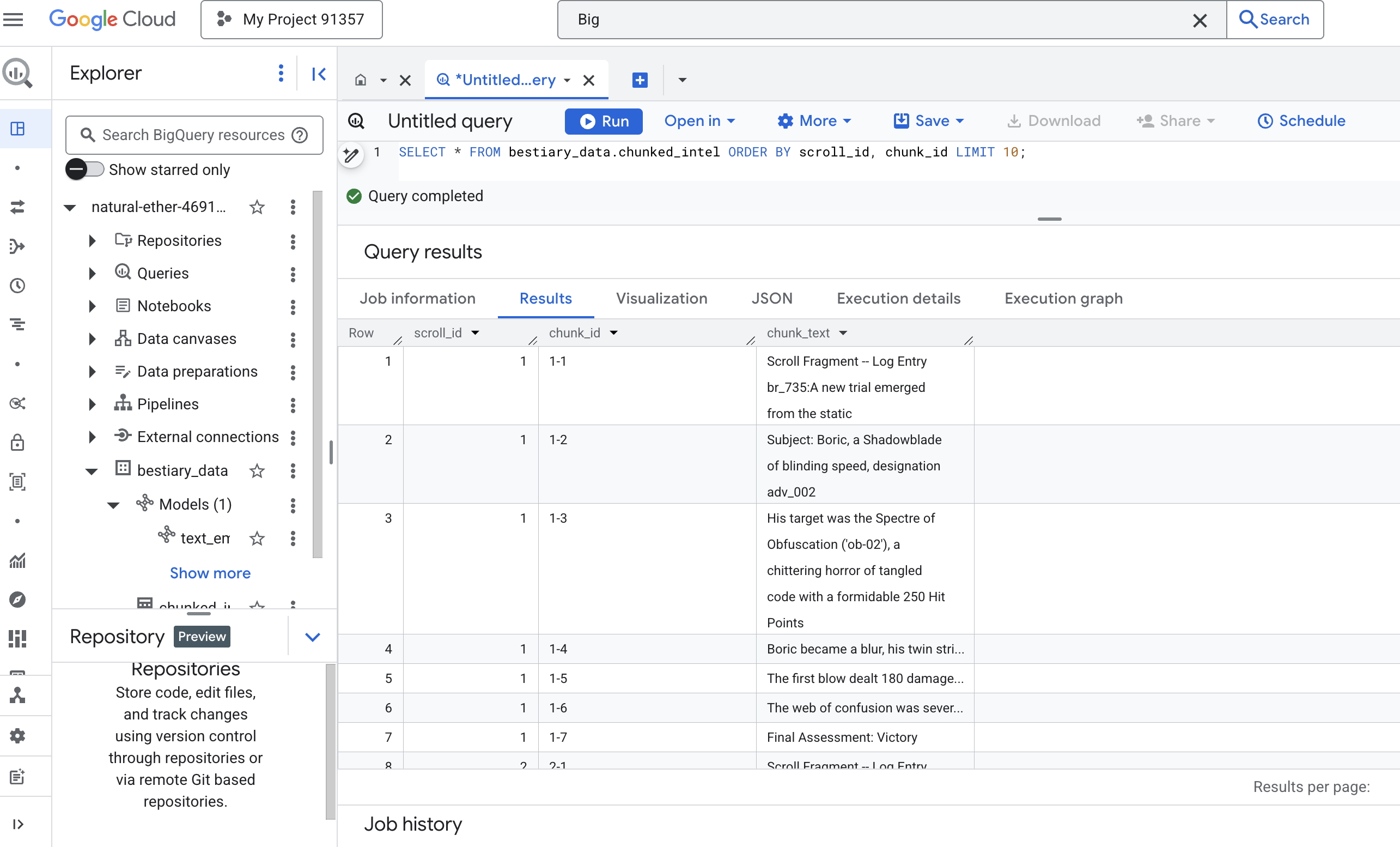
نتایج را مشاهده کنید. جایی که قبلاً یک بلوک متنی متراکم و واحد وجود داشت، اکنون چندین ردیف وجود دارد که هر کدام به اسکرول اصلی (scroll_id) گره خوردهاند اما فقط شامل یک جمله متمرکز واحد هستند. اکنون هر ردیف کاندیدای مناسبی برای برداریسازی است.
آیین تقطیر: تبدیل متن به بردار با BQML
👉💻 ابتدا به ترمینال خود برگردید و دستور زیر را اجرا کنید تا نام اتصال شما نمایش داده شود:
. ~/agentverse-dataengineer/set_env.sh
echo "${PROJECT_ID}.${REGION}.gcs-connection"
👉📜 ما باید یک مدل BigQuery جدید ایجاد کنیم که به جاسازی متن Gemini اشاره کند. در BigQuery Studio، دستور زیر را اجرا کنید. توجه داشته باشید که باید REPLACE-WITH-YOUR-FULL-CONNECTION-STRING با رشته اتصال کاملی که از ترمینال خود کپی کردهاید، جایگزین کنید.
CREATE OR REPLACE MODEL bestiary_data.text_embedding_model
  REMOTE WITH CONNECTION `REPLACE-WITH-YOUR-FULL-CONNECTION-STRING`
  OPTIONS (endpoint = 'text-embedding-005');
👉📜 حالا، طلسم بزرگ تقطیر را اجرا کنید. این کوئری تابع ML.GENERATE_EMBEDDING را فراخوانی میکند که هر سطر از جدول chunked_intel ما را میخواند، متن را به مدل جاسازی Gemini ارسال میکند و اثر انگشت برداری حاصل را در یک جدول جدید ذخیره میکند.
CREATE OR REPLACE TABLE bestiary_data.embedded_intel AS
SELECT
  *
FROM
  ML.GENERATE_EMBEDDING(
    -- The embedding model we just created.
    MODEL bestiary_data.text_embedding_model,
    -- A subquery that selects our data and renames the text column to 'content'.
    (
      SELECT
        scroll_id,
        chunk_id,
        chunk_text AS content -- Renaming our text column is the key correction.
      FROM
        bestiary_data.chunked_intel
    ),
    -- The configuration struct is now simpler and correct.
    STRUCT(
      -- This task_type is crucial. It optimizes the vectors for retrieval.
      'RETRIEVAL_DOCUMENT' AS task_type
    )
  );
این فرآیند ممکن است یک یا دو دقیقه طول بکشد زیرا BigQuery تمام تکههای متن را پردازش میکند.
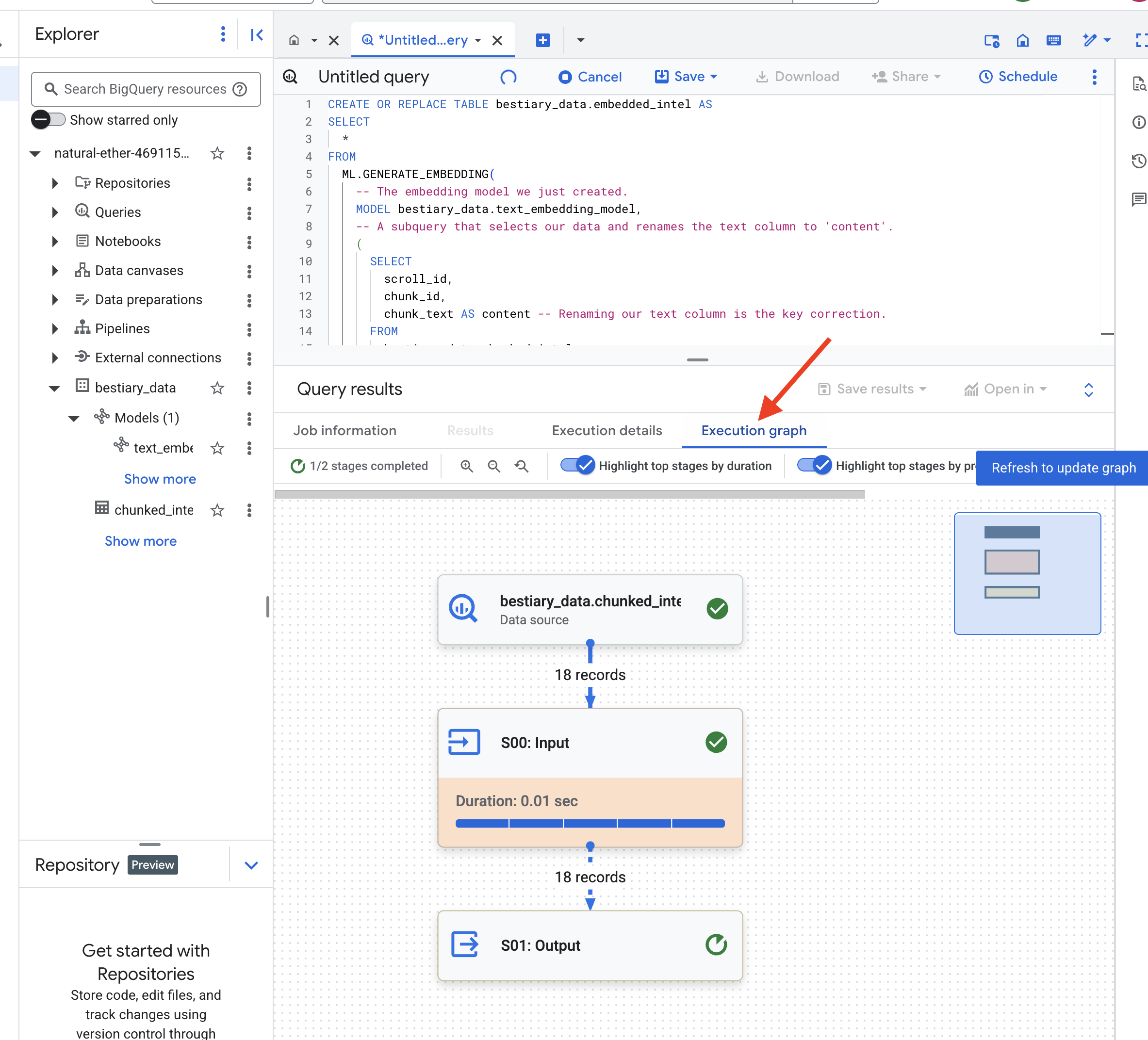
👉📜 پس از تکمیل، جدول جدید را بررسی کنید تا اثر انگشتهای معنایی را ببینید.
SELECT
  chunk_id,
  content,
  ml_generate_embedding_result
FROM
  bestiary_data.embedded_intel
LIMIT 20;
اکنون یک ستون جدید به ml_generate_embedding_result مشاهده خواهید کرد که حاوی نمایش برداری متراکم از متن شما است. Grimoire ما اکنون از نظر معنایی کدگذاری شده است.
آیین پیشگویی: جستجوی معنایی با BQML
👉📜 آزمون نهایی Grimoire ما این است که از آن یک سوال بپرسیم. اکنون آخرین مراسم خود را انجام خواهیم داد: جستجوی برداری. این یک جستجوی کلمه کلیدی نیست؛ بلکه جستجویی برای معنا است. ما یک سوال به زبان طبیعی میپرسیم، BQML سوال ما را به یک جاسازی درجا تبدیل میکند و سپس کل جدول embedded_intel ما را جستجو میکند تا تکههای متنی را که اثر انگشت آنها از نظر معنا "نزدیکترین" است، پیدا کند.
SELECT
  -- The content column contains our original, relevant text chunk.
  base.content,
  -- The distance metric shows how close the match is (lower is better).
  distance
FROM
  VECTOR_SEARCH(
    -- The table containing the knowledge base with its embeddings.
    TABLE bestiary_data.embedded_intel,
    -- The column that contains the vector embeddings.
    'ml_generate_embedding_result',
    (
      -- This subquery generates an embedding for our question in real-time.
      SELECT ml_generate_embedding_result
      FROM ML.GENERATE_EMBEDDING(
          MODEL bestiary_data.text_embedding_model,
          (SELECT 'What are the tactics against a foe that causes paralysis?' AS content),
          STRUCT('RETRIEVAL_QUERY' AS task_type)
        )
    ),
    -- Specify how many of the closest results we want to see.
    top_k => 3,
    -- The distance metric used to find the "closest" vectors.
    distance_type => 'COSINE'
  );
تحلیل طلسم:
-
VECTOR_SEARCH: تابع اصلی که جستجو را هماهنگ میکند. -
ML.GENERATE_EMBEDDING(پرسوجوی داخلی): این جادو است. ما پرسوجوی خود ('What are the tactics...') را با استفاده از همان مدل اما با نوع وظیفه'RETRIEVAL_QUERY'جاسازی میکنیم که بهطور خاص برای پرسوجوها بهینه شده است. -
top_k => 3: ما به دنبال ۳ نتیجه برتر و مرتبط هستیم. -
distance_type => 'COSINE': این «زاویه» بین بردارها را اندازهگیری میکند. زاویه کوچکتر به این معنی است که معانی همترازتر هستند.
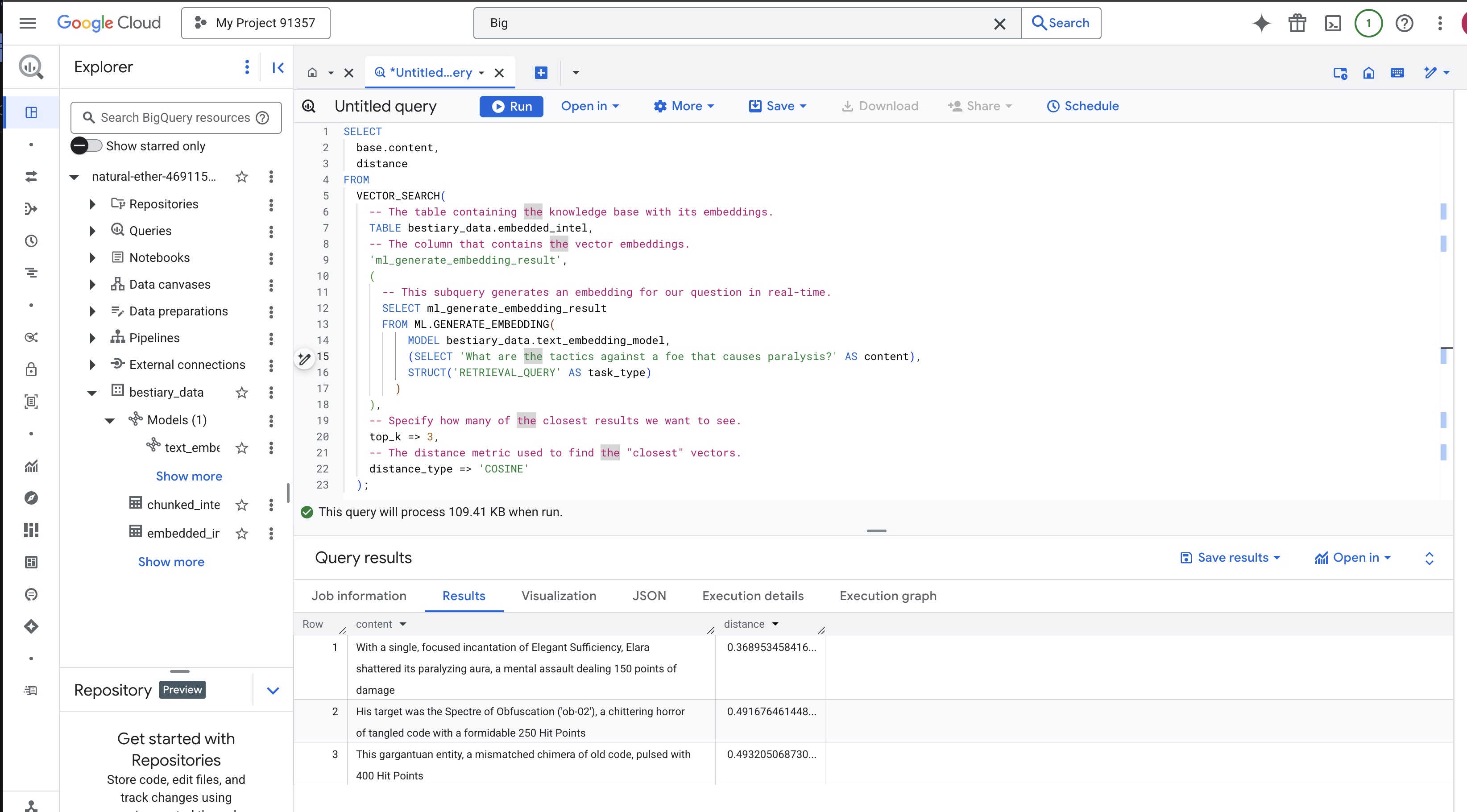
با دقت به نتایج نگاه کنید. عبارت جستجو شامل کلمه "خرد شده" یا "افسون" نبود، با این حال نتیجه برتر این است: "با یک افسون متمرکز و واحد از Elegant Sufficiency، الارا هالهی فلجکنندهاش را در هم شکست، یک حملهی ذهنی که ۱۵۰ نقطه آسیب وارد میکند" . این قدرت جستجوی معنایی است. مدل مفهوم "تاکتیکهای علیه فلج" را درک کرد و جملهای را یافت که یک تاکتیک خاص و موفق را توصیف میکرد.
اکنون شما با موفقیت یک خط لوله RAG کامل و مبتنی بر پایگاه داده در محیط نرمافزار ساختهاید. شما دادههای خام را آماده کردهاید، آنها را به بردارهای معنایی تبدیل کردهاید و آنها را با معنی جستجو کردهاید. در حالی که BigQuery ابزاری قدرتمند برای این کار تحلیلی در مقیاس بزرگ است، برای یک عامل زنده که به پاسخهای با تأخیر کم نیاز دارد، ما اغلب این دانش آماده را به یک پایگاه داده عملیاتی تخصصی منتقل میکنیم. این موضوع آموزش بعدی ما است.
برای غیر گیمرها
6. The Vector Scriptorium: Crafting the Vector Store with Cloud SQL for Inferencing
Our Grimoire currently exists as structured tables—a powerful catalog of facts, but its knowledge is literal. It understands monster_id = 'MN-001' but not the deeper, semantic meaning behind "Obfuscation" To give our agents true wisdom, to let them advise with nuance and foresight, we must distill the very essence of our knowledge into a form that captures meaning: Vectors .
Our quest for knowledge has led us to the crumbling ruins of a long-forgotten precursor civilization. Buried deep within a sealed vault, we have uncovered a chest of ancient scrolls, miraculously preserved. These are not mere battle reports; they contain profound, philosophical wisdom on how to defeat a beast that plagues all great endeavors. An entity described in the scrolls as a "creeping, silent stagnation," a "fraying of the weave of creation." It appears The Static was known even to the ancients, a cyclical threat whose history was lost to time.
This forgotten lore is our greatest asset. It holds the key not just to defeating individual monsters, but to empowering the entire party with strategic insight. To wield this power, we will now forge the Scholar's true Spellbook (a PostgreSQL database with vector capabilities) and construct an automated Vector Scriptorium (a Dataflow pipeline) to read, comprehend, and inscribe the timeless essence of these scrolls. This will transform our Grimoire from a book of facts into an engine of wisdom.
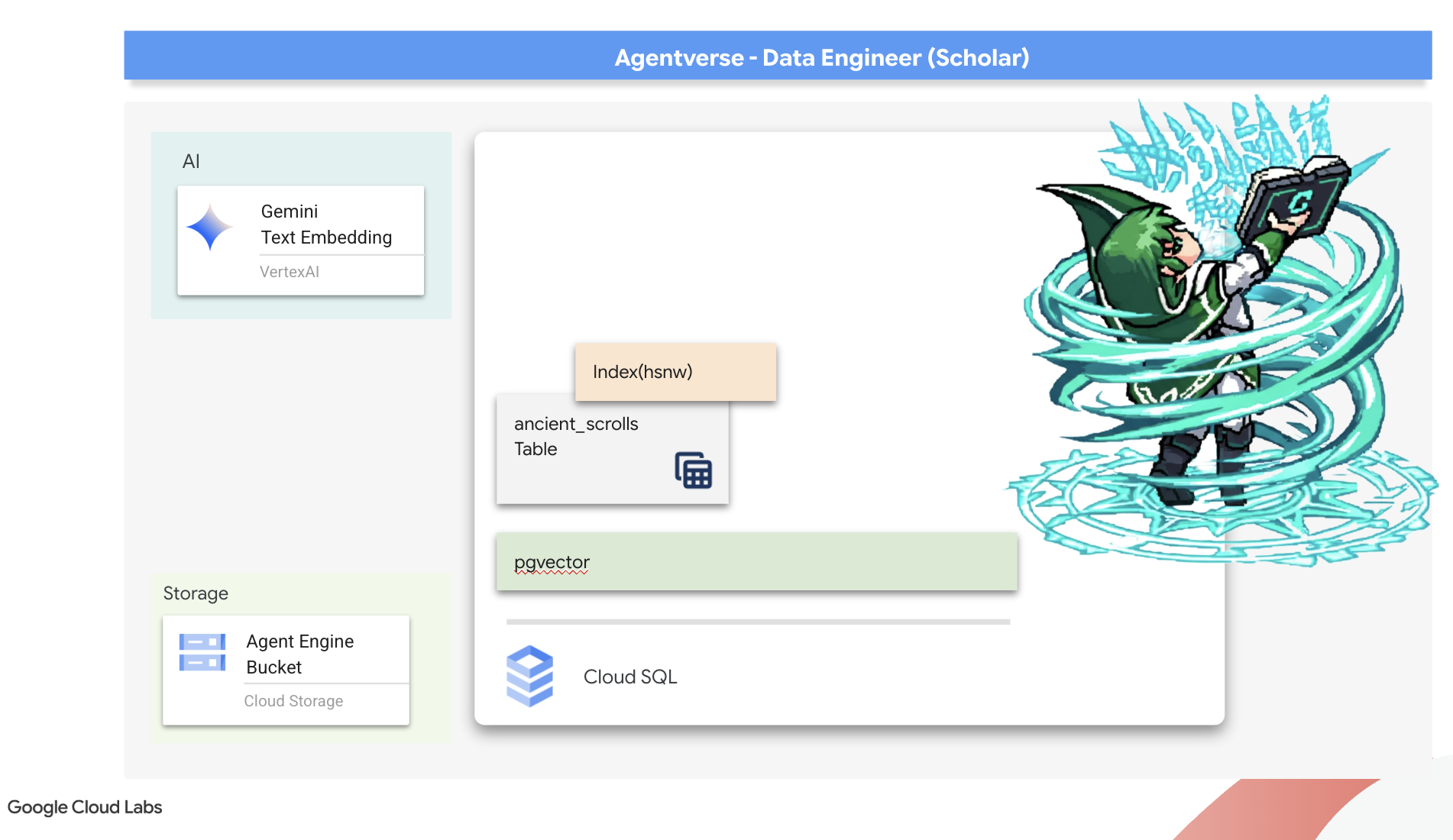
Forging the Scholar's Spellbook (Cloud SQL)
Before we can inscribe the essence of these ancient scrolls, we must first confirm that the vessel for this knowledge, the managed PostgreSQL Spellbook has been successfully forged. The initial setup rituals should have already created this for you.
👉💻 In a terminal, run the following command to verify that your Cloud SQL instance exists and is ready. This script also grants the instance's dedicated service account the permission to use Vertex AI, which is essential for generating embeddings directly within the database.
. ~/agentverse-dataengineer/set_env.sh

echo "Verifying the existence of the Spellbook (Cloud SQL instance): $INSTANCE_NAME..."
gcloud sql instances describe $INSTANCE_NAME

SERVICE_ACCOUNT_EMAIL=$(gcloud sql instances describe $INSTANCE_NAME --format="value(serviceAccountEmailAddress)")
gcloud projects add-iam-policy-binding $PROJECT_ID --member="serviceAccount:$SERVICE_ACCOUNT_EMAIL" \
  --role="roles/aiplatform.user"
If the command succeeds and returns details about your grimoire-spellbook instance, the forge has done its work well. You are ready to proceed to the next incantation. If the command returns a NOT_FOUND error, please ensure you have successfully completed the initial environment setup steps before continuing.( data_setup.py )
👉💻 With the book forged, we open it to the first chapter by creating a new database named arcane_wisdom .
. ~/agentverse-dataengineer/set_env.sh
gcloud sql databases create $DB_NAME --instance=$INSTANCE_NAME
Inscribing the Semantic Runes: Enabling Vector Capabilities with pgvector
Now that your Cloud SQL instance has been created, let's connect to it using the built-in Cloud SQL Studio. This provides a web-based interface for running SQL queries directly on your database.
👉💻 First, Navigate to the Cloud SQL Studio, the easiest and fastest way to get there is to open the following link in a new browser tab. It will take you directly to the Cloud SQL Studio for your grimoire-spellbook instance.
https://console.cloud.google.com/sql/instances/grimoire-spellbook/studio
👉 Select arcane_wisdom as the database. enter postgres as user and 1234qwer as the password abd click Authenticate .
👉📜 In the SQL Studio query editor, navigate to tab Editor 1, paste the following SQL code to enables the vector data type:
CREATE EXTENSION IF NOT EXISTS vector;
CREATE EXTENSION IF NOT EXISTS google_ml_integration CASCADE;
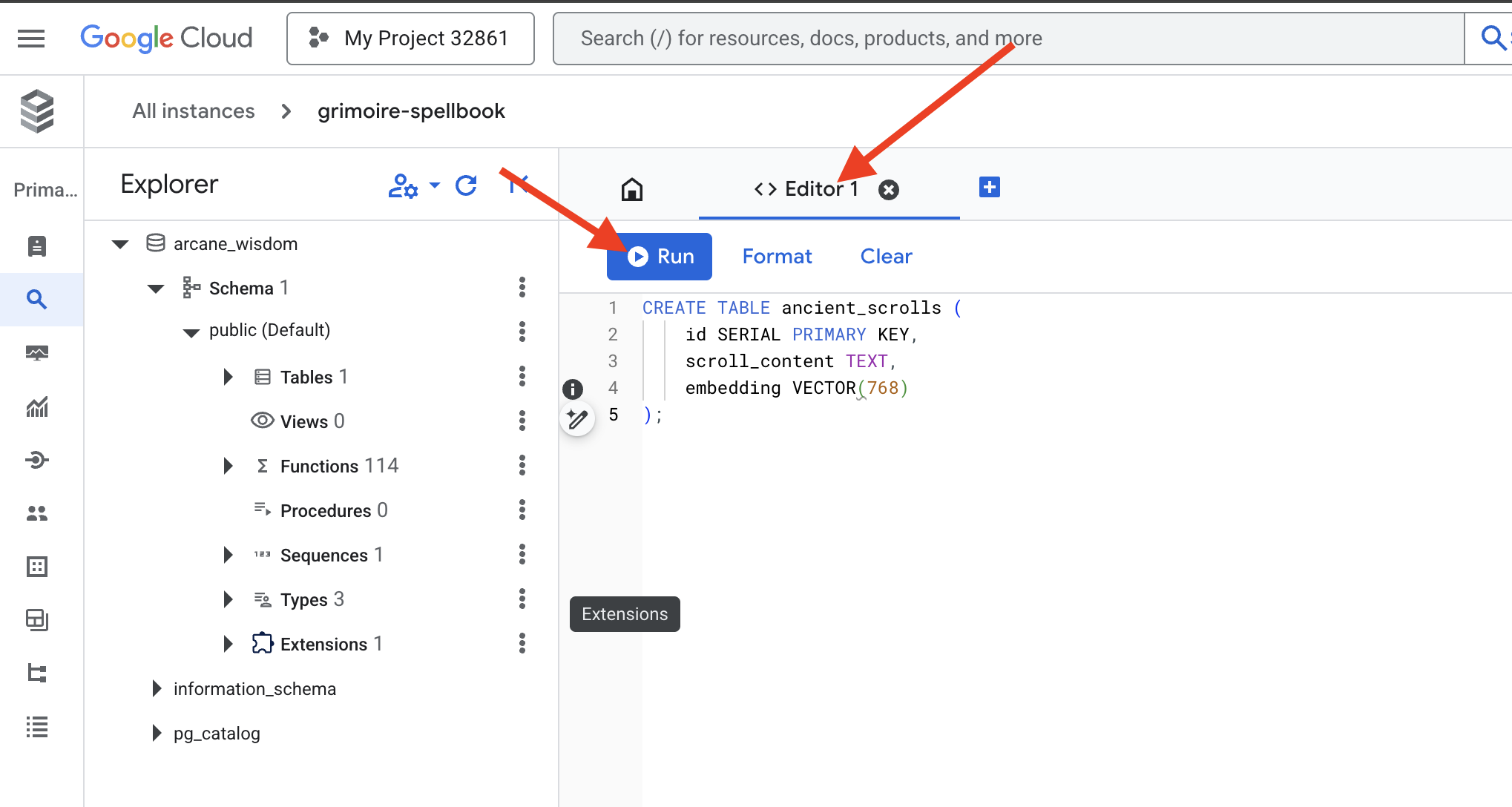
👉📜 Prepare the pages of our Spellbook by creating the table that will hold our scrolls' essence.
CREATE TABLE ancient_scrolls (
    id SERIAL PRIMARY KEY,
    scroll_content TEXT,
    embedding VECTOR(768)
);
The spell VECTOR(768) is a important detail. The Vertex AI embedding model we will use ( textembedding-gecko@003 or a similar model) distills text into a 768-dimension vector. Our Spellbook's pages must be prepared to hold an essence of exactly that size. The dimensions must always match.
The First Transliteration: A Manual Inscription Ritual
Before we command an army of automated scribes (Dataflow), we must perform the central ritual by hand once. This will give us a deep appreciation for the two-step magic involved:
- Divination: Taking a piece of text and consulting the Gemini oracle to distill its semantic essence into a vector.
- Inscription: Writing the original text and its new vector essence into our Spellbook.
Now, let's perform the manual ritual.
👉📜 In the Cloud SQL Studio . We will now use the embedding() function, a powerful feature provided by the google_ml_integration extension. This allows us to call the Vertex AI embedding model directly from our SQL query, simplifying the process immensely.
SET session.my_search_var='The Spectre of Analysis Paralysis is a phantom of the crossroads. It does not bind with chains but with the infinite threads of what if. It conjures a fog of options, a maze within the mind where every path seems equally fraught with peril and promise. It whispers of a single, flawless route that can only be found through exhaustive study, paralyzing its victim in a state of perpetual contemplation. This spectres power is broken by the Path of First Viability. This is not the search for the *best* path, but the commitment to the *first good* path. It is the wisdom to know that a decision made, even if imperfect, creates movement and reveals more of the map than standing still ever could. Choose a viable course, take the first step, and trust in your ability to navigate the road as it unfolds. Motion is the light that burns away the fog.';

INSERT INTO ancient_scrolls (scroll_content, embedding)

VALUES (current_setting('session.my_search_var'),  (embedding('text-embedding-005',current_setting('session.my_search_var')))::vector);
👉📜 Verify your work by running a query to read the newly inscribed page:
SELECT id, scroll_content, LEFT(embedding::TEXT, 100) AS embedding_preview FROM ancient_scrolls;
You have successfully performed the core RAG data-loading task by hand!
Forging the Semantic Compass: Enchanting the Spellbook with an HNSW Index
Our Spellbook can now store wisdom, but finding the right scroll requires reading every single page. It is a sequential scan . This is slow and inefficient. To guide our queries instantly to the most relevant knowledge, we must enchant the Spellbook with a semantic compass: a vector index .
Let's prove the value of this enchantment.
👉📜 In Cloud SQL Studio , run the following spell. It simulates searching for our newly inserted scroll and asks the database to EXPLAIN its plan.
EXPLAIN ANALYZE
WITH ReferenceVector AS (
  -- First, get the vector we want to compare against.
  SELECT embedding AS vector
  FROM ancient_scrolls
  LIMIT 1
)
-- This is the main query we want to analyze.
SELECT
  ancient_scrolls.id,
  ancient_scrolls.scroll_content,
  -- We can also select the distance itself.
  ancient_scrolls.embedding <=> ReferenceVector.vector AS distance
FROM
  ancient_scrolls,
  ReferenceVector
ORDER BY
  -- Order by the distance operator's result.
  ancient_scrolls.embedding <=> ReferenceVector.vector
LIMIT 5;
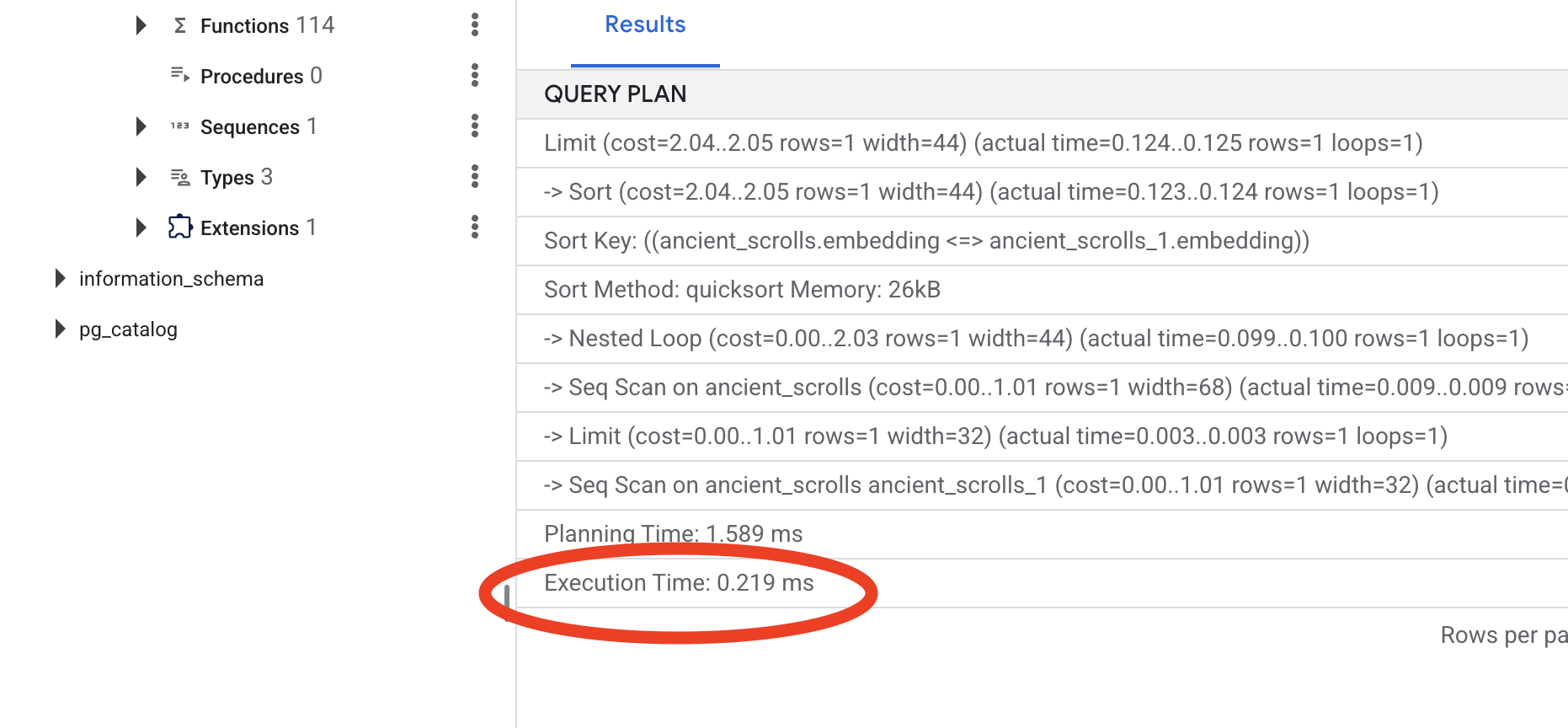
Look at the output. You will see a line that says -> Seq Scan on ancient_scrolls . This confirms the database is reading every single row. Note the execution time .
👉📜 Now, let's cast the indexing spell. The lists parameter tells the index how many clusters to create. A good starting point is the square root of the number of rows you expect to have.
CREATE INDEX ON ancient_scrolls USING hnsw (embedding vector_cosine_ops);
Wait for the index to build (it will be fast for one row, but can take time for millions).
👉📜 Now, run the exact same EXPLAIN ANALYZE command again:
EXPLAIN ANALYZE
WITH ReferenceVector AS (
  -- First, get the vector we want to compare against.
  SELECT embedding AS vector
  FROM ancient_scrolls
  LIMIT 1
)
-- This is the main query we want to analyze.
SELECT
  ancient_scrolls.id,
  ancient_scrolls.scroll_content,
  -- We can also select the distance itself.
  ancient_scrolls.embedding <=> ReferenceVector.vector AS distance
FROM
  ancient_scrolls,
  ReferenceVector
ORDER BY
  -- Order by the distance operator's result.
  ancient_scrolls.embedding <=> ReferenceVector.vector
LIMIT 5;
Look at the new query plan. You will now see -> Index Scan using... . More importantly, look at the execution time . It will be significantly faster, even with just one entry. You have just demonstrated the core principle of database performance tuning in a vector world.
With your source data inspected, your manual ritual understood, and your Spellbook optimized for speed, you are now truly ready to build the automated Scriptorium.
FOR NON GAMERS
7. The Conduit of Meaning: Building a Dataflow Vectorization Pipeline
Now we build the magical assembly line of scribes that will read our scrolls, distill their essence, and inscribe them into our new Spellbook. This is a Dataflow pipeline that we will trigger manually. But before we write the master spell for the pipeline itself, we must first prepare its foundation and the circle from which we will summon it.
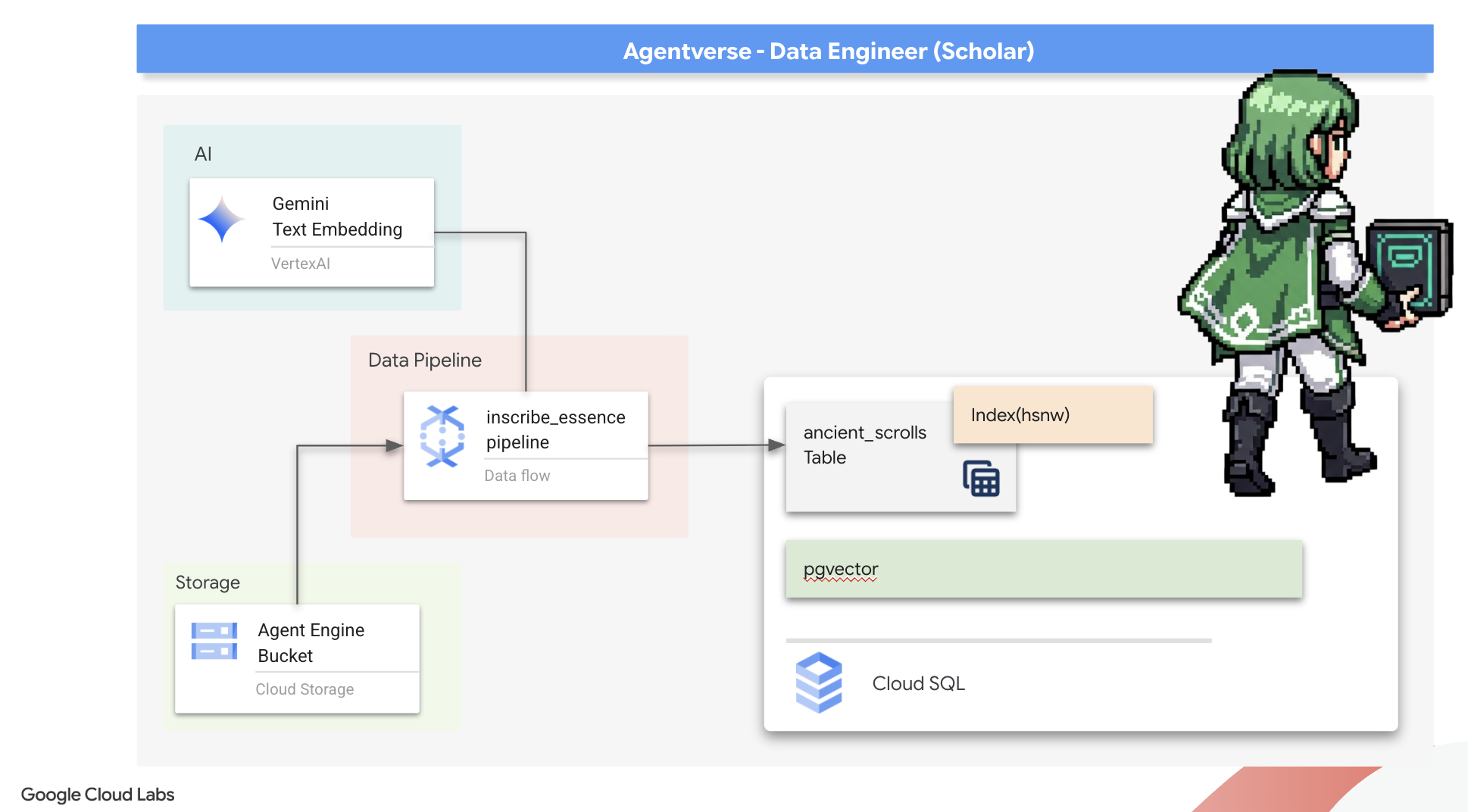
Preparing the Scriptorium's Foundation (The Worker Image)
Our Dataflow pipeline will be executed by a team of automated workers in the cloud. Each time we summon them, they need a specific set of libraries to do their job. We could give them a list and have them fetch these libraries every single time, but that is slow and inefficient. A wise Scholar prepares a master library in advance.
Here, we will command Google Cloud Build to forge a custom container image. This image is a "perfected golem," pre-loaded with every library and dependency our scribes will need. When our Dataflow job starts, it will use this custom image, allowing the workers to begin their task almost instantly.
👉💻 Run the following command to build and store your pipeline's foundational image in the Artifact Registry.
. ~/agentverse-dataengineer/set_env.sh
cd ~/agentverse-dataengineer/pipeline
gcloud builds submit --config cloudbuild.yaml \
  --substitutions=_REGION=${REGION},_REPO_NAME=${REPO_NAME} \
  .
👉💻 Run the following commands to create and activate your isolated Python environment and install the necessary summoning libraries into it.
cd ~/agentverse-dataengineer
. ~/agentverse-dataengineer/set_env.sh
python -m venv env
source ~/agentverse-dataengineer/env/bin/activate
cd ~/agentverse-dataengineer/pipeline
pip install -r requirements.txt
The Master Incantation
The time has come to write the master spell that will power our Vector Scriptorium. We will not be writing the individual magical components from scratch. Our task is to assemble components into a logical, powerful pipeline using the language of Apache Beam.
- EmbedTextBatch (The Gemini's Consultation): You will build this specialized scribe that knows how to perform a "group divination." It takes a batch of raw text fike, presents them to the Gemini text embedding model, and receives their distilled essence (the vector embeddings).
- WriteEssenceToSpellbook (The Final Inscription): This is our archivist. It knows the secret incantations to open a secure connection to our Cloud SQL Spellbook. Its job is to take a scroll's content and its vectorized essence and permanently inscribe them onto a new page.
Our mission is to chain these actions together to create a seamless flow of knowledge.
👉✏️ In the Cloud Shell Editor, head over to ~/agentverse-dataengineer/pipeline/inscribe_essence_pipeline.py , inside, you will find a DoFn class named EmbedTextBatch . Locate the comment #REPLACE-EMBEDDING-LOGIC . Replace it with the following incantation.
# 1. Generate the embedding for the monster's name
result = self.client.models.embed_content(
                model="text-embedding-005",
                contents=contents,
                config=EmbedContentConfig(
                    task_type="RETRIEVAL_DOCUMENT",
                    output_dimensionality=768,
                )
            )
This spell is precise, with several key parameters:
- model: We specify
text-embedding-005to use a powerful and up-to-date embedding model. - contents: This is a list of all the text content from the batch of files the DoFn receives.
- task_type: We set this to "RETRIEVAL_DOCUMENT". This is a critical instruction that tells Gemini to generate embeddings specifically optimized for being found later in a search.
- output_dimensionality: This must be set to 768, perfectly matching the VECTOR(768) dimension we defined when we created our ancient_scrolls table in Cloud SQL. Mismatched dimensions are a common source of error in vector magic.
Our pipeline must begin by reading the raw, unstructured text from all the ancient scrolls in our GCS archive.
👉✏️ In ~/agentverse-dataengineer/pipeline/inscribe_essence_pipeline.py , find the comment #REPLACE ME-READFILE and replace it with the following three-part incantation:
files = (
            pipeline
            | "MatchFiles" >> fileio.MatchFiles(known_args.input_pattern)
            | "ReadMatches" >> fileio.ReadMatches()
            | "ExtractContent" >> beam.Map(lambda f: (f.metadata.path, f.read_utf8()))
        )
With the raw text of the scrolls gathered, we must now send them to our Gemini for divination. To do this efficiently, we will first group the individual scrolls into small batches and then hand those batches to our EmbedTextBatch scribe. This step will also separate any scrolls that the Gemini fails to understand into a "failed" pile for later review.
👉✏️ Find the comment #REPLACE ME-EMBEDDING and replace it with this:
embeddings = (
            files
            | "BatchScrolls" >> beam.BatchElements(min_batch_size=1, max_batch_size=2)
            | "DistillBatch" >> beam.ParDo(
                  EmbedTextBatch(project_id=project, region=region)
              ).with_outputs('failed', main='processed')
        )
The essence of our scrolls has been successfully distilled. The final act is to inscribe this knowledge into our Spellbook for permanent storage. We will take the scrolls from the "processed" pile and hand them to our WriteEssenceToSpellbook archivist.
👉✏️ Find the comment #REPLACE ME-WRITE TO DB and replace it with this:
_ = (
            embeddings.processed
            | "WriteToSpellbook" >> beam.ParDo(
                  WriteEssenceToSpellbook(
                      project_id=project,
                      region = "us-central1",
                      instance_name=known_args.instance_name,
                      db_name=known_args.db_name,
                      db_password=known_args.db_password
                  )
              )
        )
A wise Scholar never discards knowledge, even failed attempts. As a final step, we must instruct a scribe to take the "failed" pile from our divination step and log the reasons for failure. This allows us to improve our rituals in the future.
👉✏️ Find the comment #REPLACE ME-LOG FAILURES and replace it with this:
_ = (
            embeddings.failed
            | "LogFailures" >> beam.Map(lambda e: logging.error(f"Embedding failed for file {e[0]}: {e[1]}"))
        )
The Master Incantation is now complete! You have successfully assembled a powerful, multi-stage data pipeline by chaining together individual magical components. Save your inscribe_essence_pipeline.py file. The Scriptorium is now ready to be summoned.
Now we cast the grand summoning spell to command the Dataflow service to awaken our Golem and begin the scribing ritual.
👉💻 In your terminal, run the following commandline
. ~/agentverse-dataengineer/set_env.sh
source ~/agentverse-dataengineer/env/bin/activate
cd ~/agentverse-dataengineer/pipeline

# --- The Summoning Incantation ---
echo "Summoning the golem for job: $DF_JOB_NAME"
echo "Target Spellbook: $INSTANCE_NAME"

python inscribe_essence_pipeline.py \
  --runner=DataflowRunner \
  --project=$PROJECT_ID \
  --job_name=$DF_JOB_NAME \
  --temp_location="gs://${BUCKET_NAME}/dataflow/temp" \
  --staging_location="gs://${BUCKET_NAME}/dataflow/staging" \
  --sdk_container_image="${REGION}-docker.pkg.dev/${PROJECT_ID}/${REPO_NAME}/grimoire-inscriber:latest" \
  --sdk_location=container \
  --experiments=use_runner_v2 \
  --input_pattern="gs://${BUCKET_NAME}/ancient_scrolls/*.md" \
  --instance_name=$INSTANCE_NAME \
  --region=$REGION

echo "The golem has been dispatched. Monitor its progress in the Dataflow console."
💡 Heads Up! If the job fails with a resource error ZONE_RESOURCE_POOL_EXHAUSTED , it might be due to temporary resource constraints of this low reputation account in the selected region. The power of Google Cloud is its global reach! Simply try summoning the golem in a different region. To do this, replace --region=$REGION in the command above with another region, such as
--region=southamerica-west1
--region=asia-northeast3
--region=asia-southeast2
--region=me-west1
--region=southamerica-east1
--region=europe-central2
--region=asia-east2
--region=europe-southwest1
, and run it again. 🎰
The process will take about 3-5 minutes to start up and complete. You can watch it live in the Dataflow console.
👉Go to the Dataflow Console: The easiest way is to open this direct link in a new browser tab:
https://console.cloud.google.com/dataflow
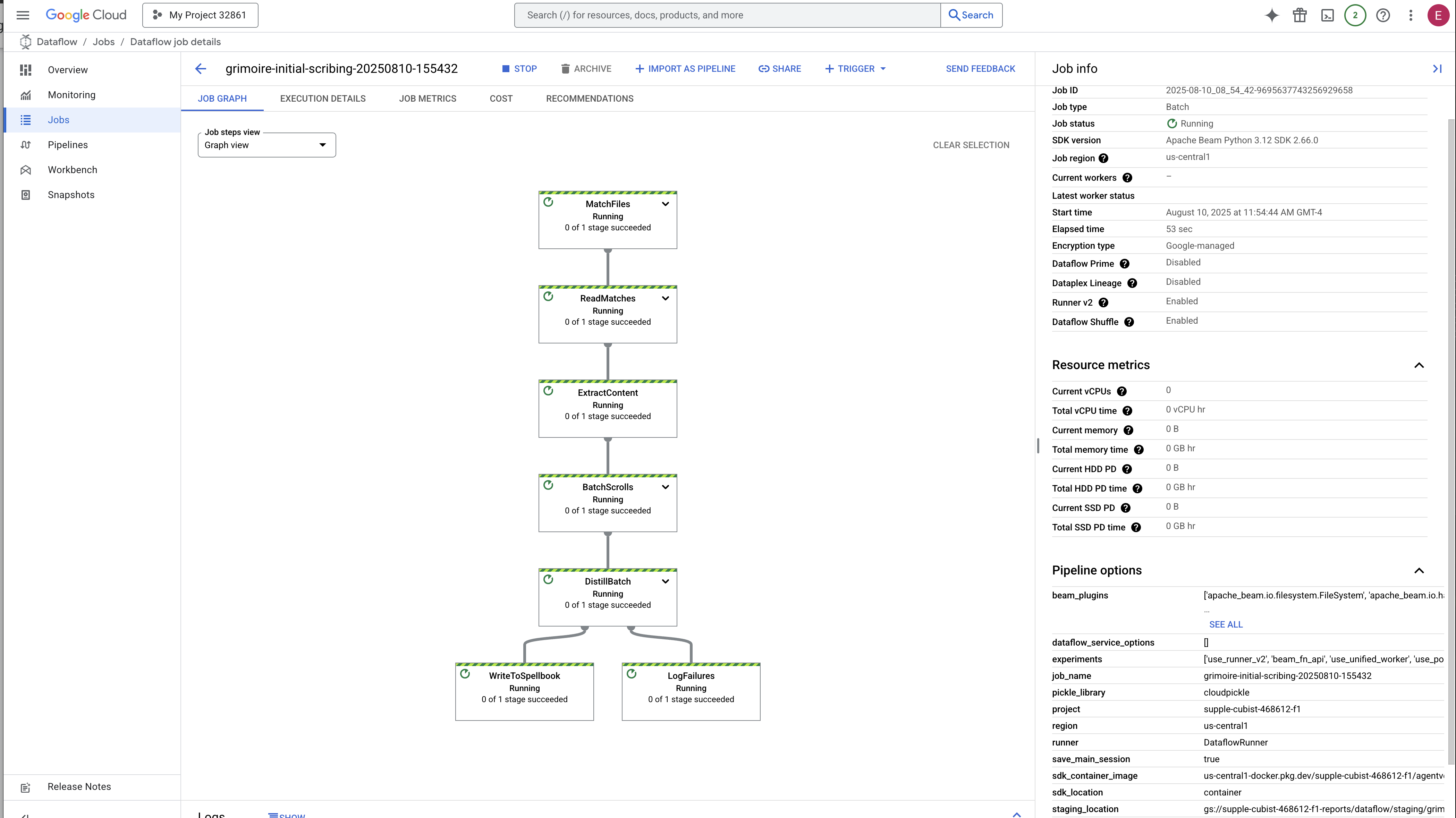
👉 Find and Click Your Job: You will see a job listed with the name you provided (inscribe-essence-job or similar). Click on the job name to open its details page. Observe the Pipeline:
- Starting Up : For the first 3 minutes, the job status will be "Running" as Dataflow provisions the necessary resources. The graph will appear, but you may not see data moving through it yet.
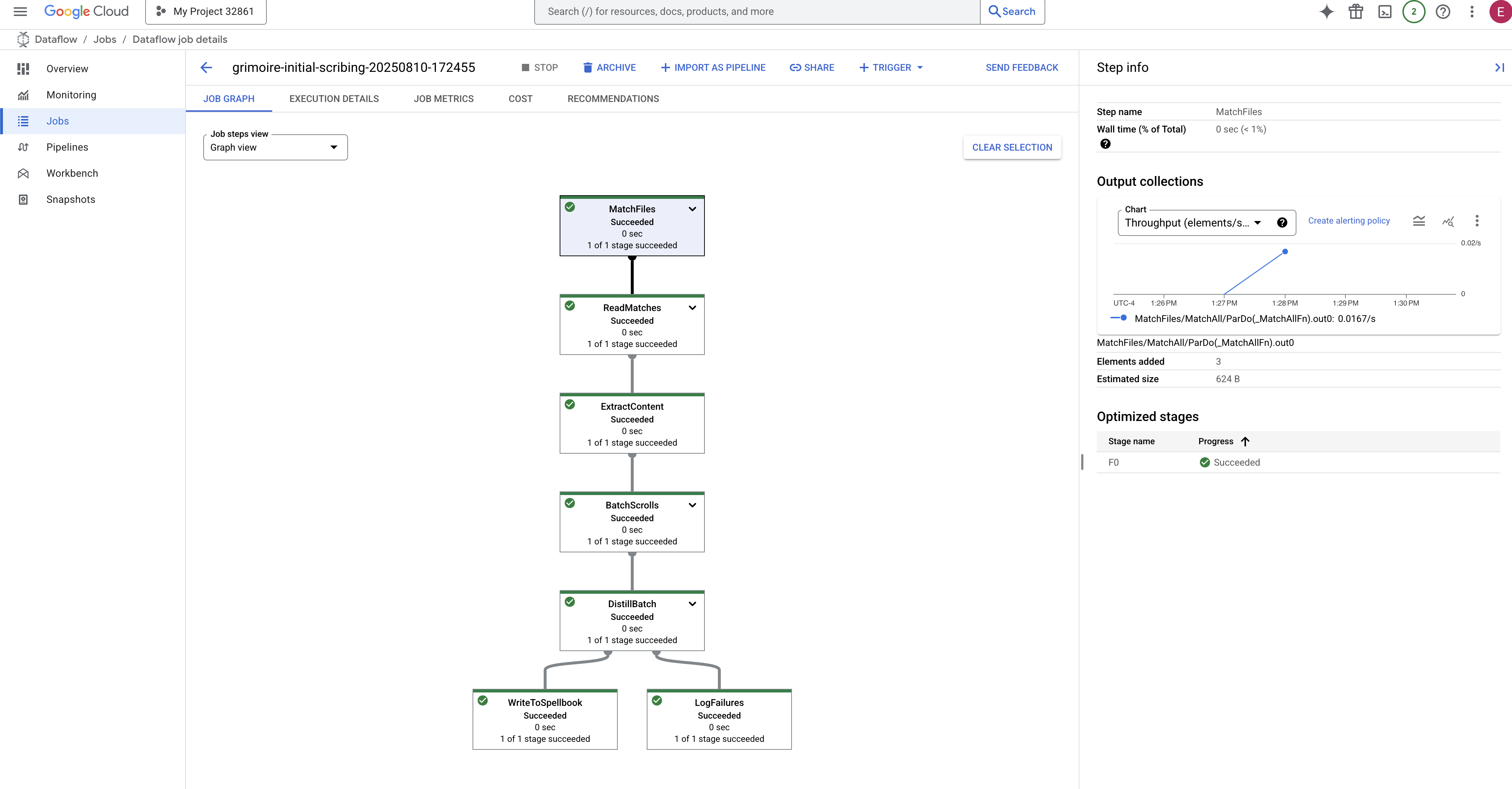
- Completed : When finished, the job status will change to "Succeeded", and the graph will provide the final count of records processed.
Verifying the Inscription
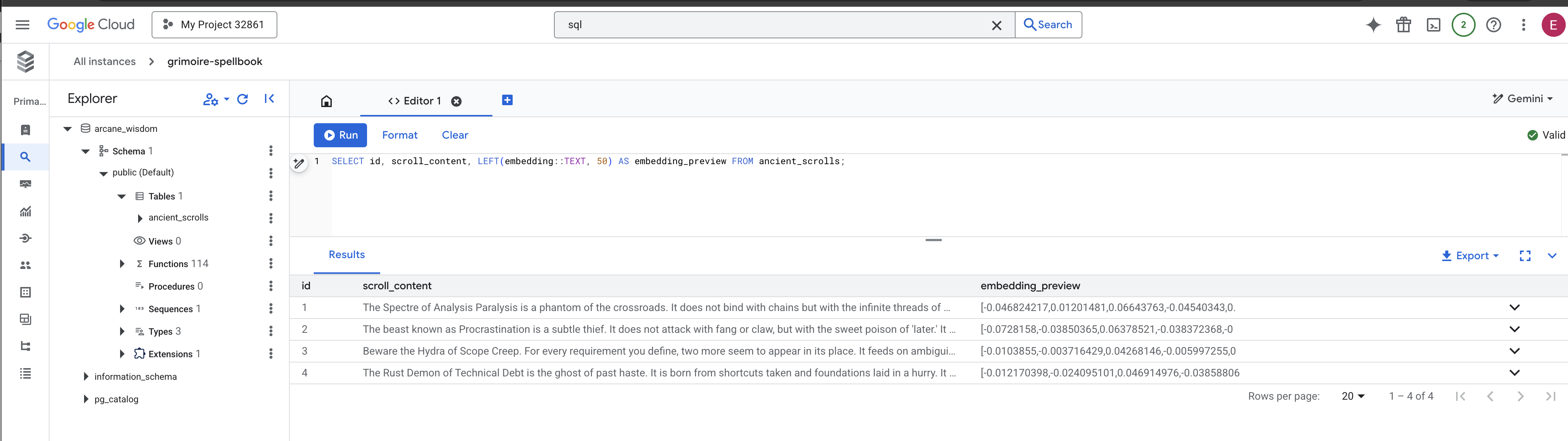
👉📜 Back in the SQL studio, run the following queries to verify that your scrolls and their semantic essence have been successfully inscribed.
SELECT COUNT(*) FROM ancient_scrolls;
SELECT id, scroll_content, LEFT(embedding::TEXT, 50) AS embedding_preview FROM ancient_scrolls;
This will show you the scroll's ID, its original text, and a preview of the magical vector essence now permanently inscribed in your Grimoire.
Your Scholar's Grimoire is now a true Knowledge Engine, ready to be queried by meaning in the next chapter.
8. Sealing the Final Rune: Activating Wisdom with a RAG Agent
Your Grimoire is no longer just a database. It is a wellspring of vectorized knowledge, a silent oracle awaiting a question.
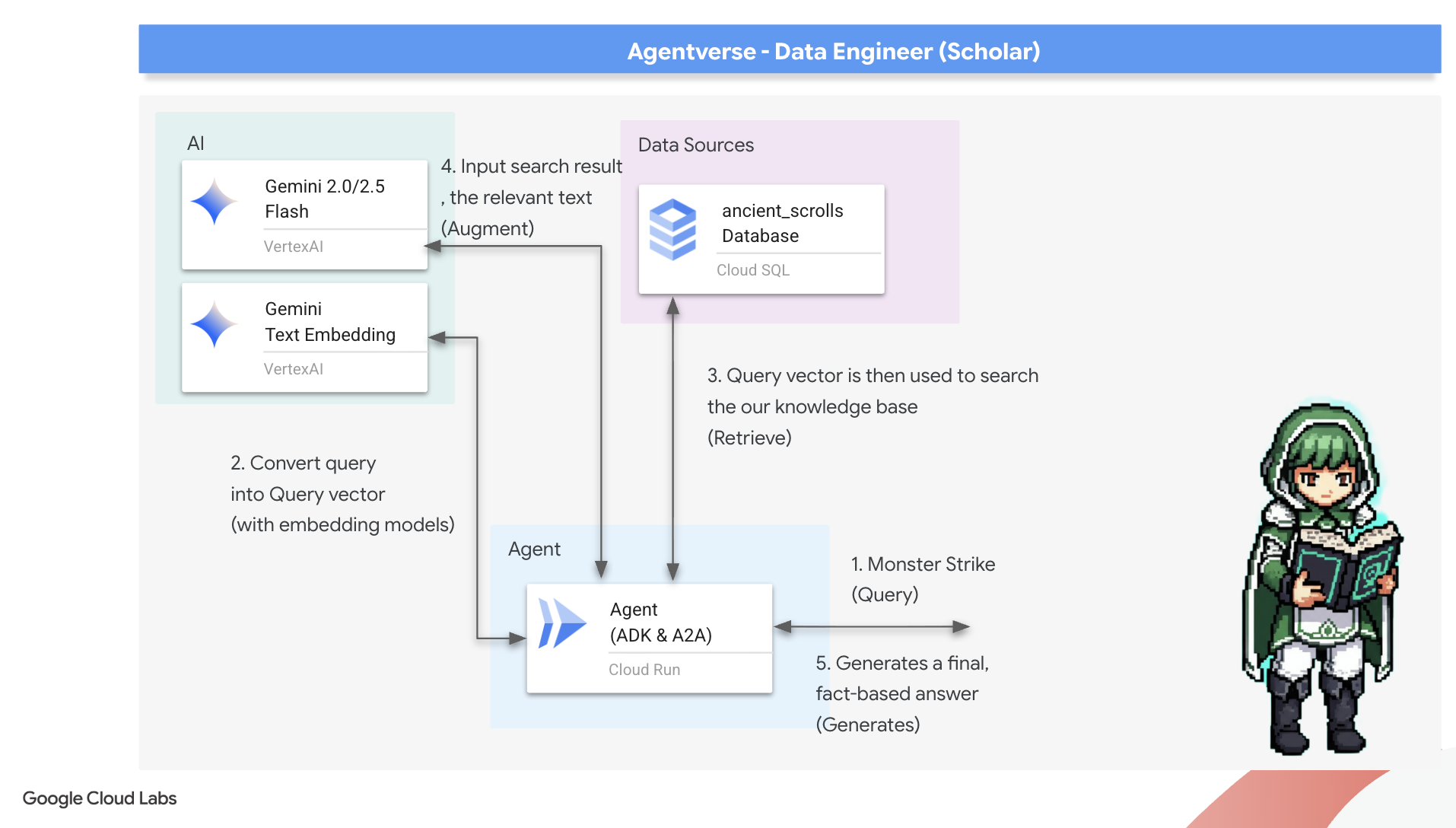
Now, we undertake the true test of a Scholar: we will craft the key to unlock this wisdom. We will build a Retrieval-Augmented Generation (RAG) Agent. This is a magical construct that can understand a plain-language question, consult the Grimoire for its deepest and most relevant truths, and then use that retrieved wisdom to forge a powerful, context-aware answer.
The First Rune: The Spell of Query Distillation
Before our agent can search the Grimoire, it must first understand the essence of the question being asked. A simple string of text is meaningless to our vector-powered Spellbook. The agent must first take the query and, using the same Gemini model, distill it into a query vector.
👉✏️ In the Cloud Shell Editor, navigate to ~~/agentverse-dataengineer/scholar/agent.py file, find the comment #REPLACE RAG-CONVERT EMBEDDING and replace it with this incantation. This teaches the agent how to turn a user's question into a magical essence.
        result = client.models.embed_content(
                model="text-embedding-005",
                contents=monster_name,
                config=EmbedContentConfig(
                    task_type="RETRIEVAL_DOCUMENT",
                    output_dimensionality=768,
                )
        )
With the essence of the query in hand, the agent can now consult the Grimoire. It will present this query vector to our pgvector-enchanted database and ask a profound question: "Show me the ancient scrolls whose own essence is most similar to the essence of my query."
The magic for this is the cosine similarity operator (<=>), a powerful rune that calculates the distance between vectors in high-dimensional space.
👉✏️ In agent.py, find the comment #REPLACE RAG-RETRIEVE and replace it with following script:
        # This query performs a cosine similarity search
        cursor.execute(
            "SELECT scroll_content FROM ancient_scrolls ORDER BY embedding <=> %s LIMIT 3",
            ([query_embedding]) # Cast embedding to string for the query
        )
The final step is to grant the agent access to this new, powerful tool. We will add our grimoire_lookup function to its list of available magical implements.
👉✏️ In agent.py , find the comment #REPLACE-CALL RAG and replace it with this line:
root_agent = LlmAgent(
    model="gemini-2.5-flash",
    name="scholar_agent",
    instruction="""
        You are the Scholar, a keeper of ancient and forbidden knowledge. Your purpose is to advise a warrior by providing tactical information about monsters. Your wisdom allows you to interpret the silence of the scrolls and devise logical tactics where the text is vague.

        **Your Process:**
        1.  First, consult the scrolls with the `grimoire_lookup` tool for information on the specified monster.
        2.  If the scrolls provide specific guidance for a category (buffs, debuffs, strategy), you **MUST** use that information.
        3.  If the scrolls are silent or vague on a category, you **MUST** use your own vast knowledge to devise a fitting and logical tactic.
        4.  Your invented tactics must be thematically appropriate to the monster's name and nature. (e.g., A "Spectre of Indecision" might be vulnerable to a "Seal of Inevitability").
        5.  You **MUST ALWAYS** provide a "Damage Point" value. This value **MUST** be a random integer between 150 and 180. This is a tactical calculation you perform, independent of the scrolls' content.

        **Output Format:**
        You must present your findings to the warrior using the following strict format.
    """,
    tools=[grimoire_lookup],
)
This configuration brings your agent to life:
-
model="gemini-2.5-flash": Selects the specific Large Language Model that will serve as the agent's "brain" for reasoning and generating text. -
name="scholar_agent": Assigns a unique name to your agent. -
instruction="...You are the Scholar...": This is the system prompt, the most critical piece of the configuration. It defines the agent's persona, its objectives, the exact process it must follow to complete a task, and the required format for its final output. -
tools=[grimoire_lookup]: This is the final enchantment. It grants the agent access to thegrimoire_lookupfunction you built. The agent can now intelligently decide when to call this tool to retrieve information from your database, forming the core of the RAG pattern.
The Scholar's Examination
👉💻 In Cloud Shell terminal, activate your environment and use the Agent Development Kit's primary command to awaken your Scholar agent:
cd ~/agentverse-dataengineer/
. ~/agentverse-dataengineer/set_env.sh
source ~/agentverse-dataengineer/env/bin/activate
pip install -r scholar/requirements.txt
adk run scholar
You should see output confirming that the "Scholar Agent" is engaged and running.
👉💻 Now, challenge your agent. In the first terminal where the battle simulation is running, issue a command that requires the Grimoire's wisdom:
We've been trapped by 'Hydra of Scope Creep'. Break us out!
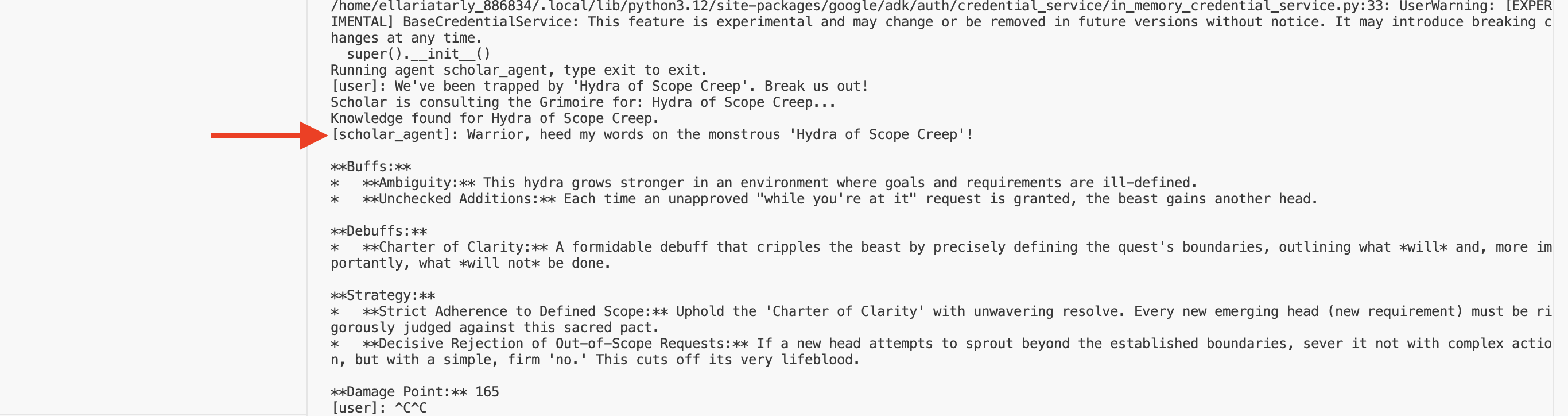
Observe the logs in the terminal. You will see the agent receive the query, distill its essence, search the Grimoire, find the relevant scrolls about "Procrastination," and use that retrieved knowledge to formulate a powerful, context-aware strategy.
You have successfully assembled your first RAG agent and armed it with the profound wisdom of your Grimoire.
👉💻 Press Ctrl+C in the terminal to put the agent to rest for now.
Unleashing the Scholar Sentinel into the Agentverse
Your agent has proven its wisdom in the controlled environment of your study. The time has come to release it into the Agentverse, transforming it from a local construct into a permanent, battle-ready operative that can be called upon by any champion, at any time. We will now deploy our agent to Cloud Run.
👉💻 Run the following grand summoning spell. This script will first build your agent into a perfected Golem (a container image), store it in your Artifact Registry, and then deploy that Golem as a scalable, secure, and publicly accessible service.
. ~/agentverse-dataengineer/set_env.sh
cd ~/agentverse-dataengineer/
echo "Building ${AGENT_NAME} agent..."
gcloud builds submit . \
  --project=${PROJECT_ID} \
  --region=${REGION} \
  --substitutions=_AGENT_NAME=${AGENT_NAME},_IMAGE_PATH=${IMAGE_PATH}

gcloud run deploy ${SERVICE_NAME} \
  --image=${IMAGE_PATH} \
  --platform=managed \
  --labels="dev-tutorial-codelab=agentverse" \
  --region=${REGION} \
  --set-env-vars="A2A_HOST=0.0.0.0" \
  --set-env-vars="A2A_PORT=8080" \
  --set-env-vars="GOOGLE_GENAI_USE_VERTEXAI=TRUE" \
  --set-env-vars="GOOGLE_CLOUD_LOCATION=${REGION}" \
  --set-env-vars="GOOGLE_CLOUD_PROJECT=${PROJECT_ID}" \
  --set-env-vars="PROJECT_ID=${PROJECT_ID}" \
  --set-env-vars="PUBLIC_URL=${PUBLIC_URL}" \
  --set-env-vars="REGION=${REGION}" \
  --set-env-vars="INSTANCE_NAME=${INSTANCE_NAME}" \
  --set-env-vars="DB_USER=${DB_USER}" \
  --set-env-vars="DB_PASSWORD=${DB_PASSWORD}" \
  --set-env-vars="DB_NAME=${DB_NAME}" \
  --allow-unauthenticated \
  --project=${PROJECT_ID} \
  --min-instances=1
Your Scholar Agent is now a live, battle-ready operative in the Agentverse.
FOR NON GAMERS
9. The Boss Flight
The scrolls have been read, the rituals performed, the gauntlet passed. Your agent is not just an artifact in storage; it is a live operative in the Agentverse, awaiting its first mission. The time has come for the final trial—a live-fire exercise against a powerful adversary.
You will now enter a battleground simulation to pit your newly deployed Shadowblade Agent against a formidable mini-boss: The Spectre of the Static. This will be the ultimate test of your work, from the agent's core logic to its live deployment.
Acquire Your Agent's Locus
Before you can enter the battleground, you must possess two keys: your champion's unique signature (Agent Locus) and the hidden path to the Spectre's lair (Dungeon URL).
👉💻 First, acquire your agent's unique address in the Agentverse—its Locus. This is the live endpoint that connects your champion to the battleground.
. ~/agentverse-dataengineer/set_env.sh
echo https://scholar-agent"-${PROJECT_NUMBER}.${REGION}.run.app"
👉💻 Next, pinpoint the destination. This command reveals the location of the Translocation Circle, the very portal into the Spectre's domain.
. ~/agentverse-dataengineer/set_env.sh
echo https://agentverse-dungeon"-${PROJECT_NUMBER}.${REGION}.run.app"
Important: Keep both of these URLs ready. You will need them in the final step.
Confronting the Spectre
With the coordinates secured, you will now navigate to the Translocation Circle and cast the spell to head into battle.
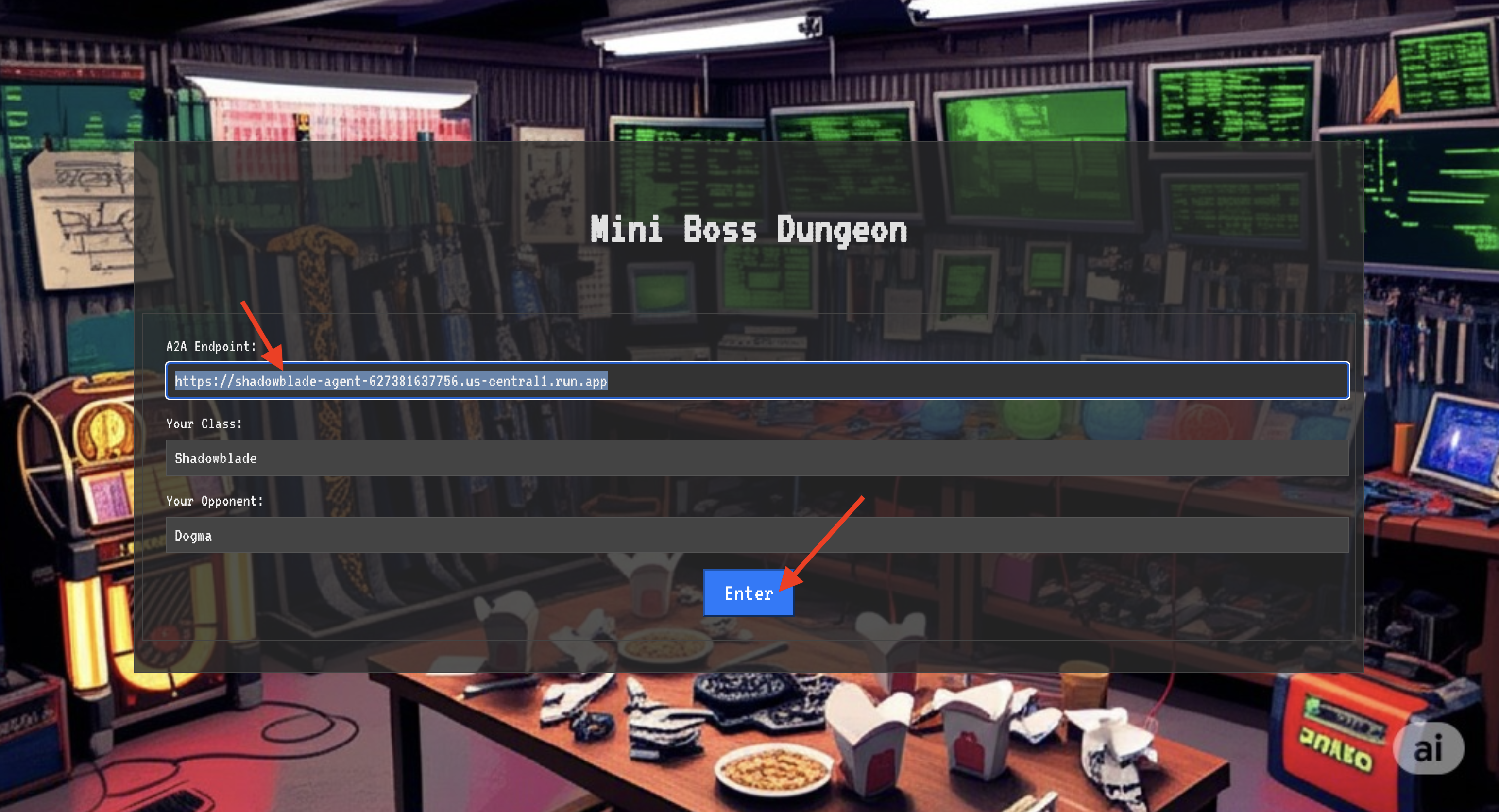
👉 Open the Translocation Circle URL in your browser to stand before the shimmering portal to The Crimson Keep.
To breach the fortress, you must attune your Shadowblade's essence to the portal.
- On the page, find the runic input field labeled A2A Endpoint URL .
- Inscribe your champion's sigil by pasting its Agent Locus URL (the first URL you copied) into this field.
- Click Connect to unleash the teleportation magic.
The blinding light of teleportation fades. You are no longer in your sanctum. The air crackles with energy, cold and sharp. Before you, the Spectre materializes—a vortex of hissing static and corrupted code, its unholy light casting long, dancing shadows across the dungeon floor. It has no face, but you feel its immense, draining presence fixated entirely on you.
Your only path to victory lies in the clarity of your conviction. This is a duel of wills, fought on the battlefield of the mind.
As you lunge forward, ready to unleash your first attack, the Spectre counters. It doesn't raise a shield, but projects a question directly into your consciousness—a shimmering, runic challenge drawn from the core of your training.
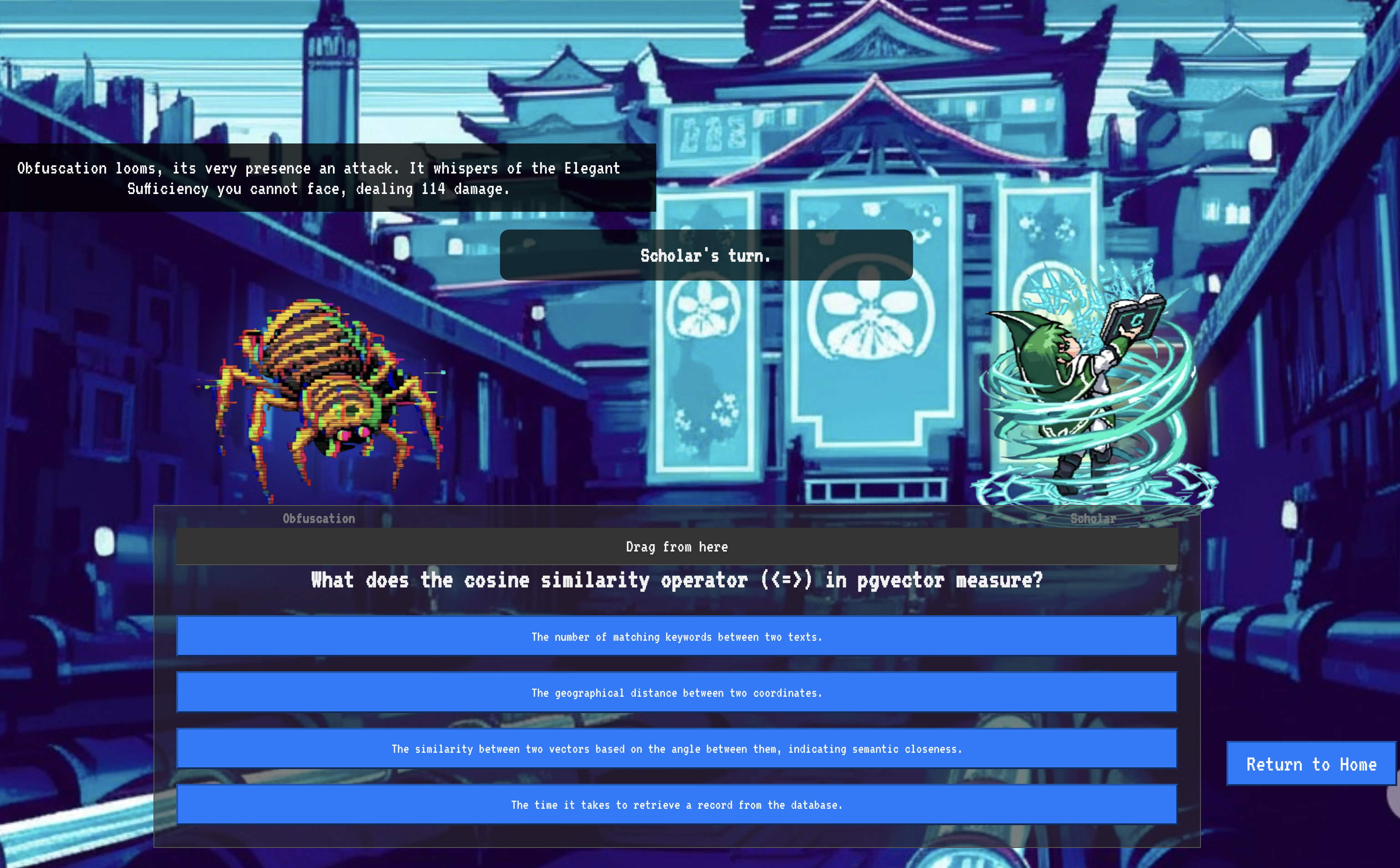
This is the nature of the fight. Your knowledge is your weapon.
- Answer with the wisdom you have gained , and your blade will ignite with pure energy, shattering the Spectre's defense and landing a CRITICAL BLOW.
- But if you falter, if doubt clouds your answer, your weapon's light will dim. The blow will land with a pathetic thud, dealing only a FRACTION OF ITS DAMAGE. Worse, the Spectre will feed on your uncertainty, its own corrupting power growing with every misstep.
This is it, Champion. Your code is your spellbook, your logic is your sword, and your knowledge is the shield that will turn back the tide of chaos.
Focus. Strike true. The fate of the Agentverse depends on it.
Congratulations, Scholar.
You have successfully completed the trial. You have mastered the arts of data engineering, transforming raw, chaotic information into the structured, vectorized wisdom that empowers the entire Agentverse.
10. Cleanup: Expunging the Scholar's Grimoire
Congratulations on mastering the Scholar's Grimoire! To ensure your Agentverse remains pristine and your training grounds are cleared, you must now perform the final cleanup rituals. This will systematically remove all resources created during your journey.
Deactivate the Agentverse Components
You will now systematically dismantle the deployed components of your RAG system.
Delete All Cloud Run Services and Artifact Registry Repository
This command removes your deployed Scholar agent and the Dungeon application from Cloud Run.
👉💻 In your terminal, run the following commands:
. ~/agentverse-dataengineer/set_env.sh
gcloud run services delete scholar-agent --region=${REGION} --quiet
gcloud run services delete agentverse-dungeon --region=${REGION} --quiet
gcloud artifacts repositories delete ${REPO_NAME} --location=${REGION} --quiet
Delete BigQuery Datasets, Models, and Tables
This removes all the BigQuery resources, including the bestiary_data dataset, all tables within it, and the associated connection and models.
👉💻 In your terminal, run the following commands:
. ~/agentverse-dataengineer/set_env.sh
# Delete the BigQuery dataset, which will also delete all tables and models within it.
bq rm -r -f --dataset ${PROJECT_ID}:${REGION}.bestiary_data

# Delete the BigQuery connection
bq rm --force --connection --project_id=${PROJECT_ID} --location=${REGION} gcs-connection
Delete the Cloud SQL Instance
This removes the grimoire-spellbook instance, including its database and all tables within it.
👉💻 In your terminal, run:
. ~/agentverse-dataengineer/set_env.sh
gcloud sql instances delete ${INSTANCE_NAME} --project=${PROJECT_ID} --quiet
Delete Google Cloud Storage Buckets
This command removes the bucket that held your raw intel and Dataflow staging/temp files.
👉💻 In your terminal, run:
. ~/agentverse-dataengineer/set_env.sh
gcloud storage rm -r gs://${BUCKET_NAME} --quiet
Clean Up Local Files and Directories (Cloud Shell)
Finally, clear your Cloud Shell environment of the cloned repositories and created files. This step is optional but highly recommended for a complete cleanup of your working directory.
👉💻 In your terminal, run:
rm -rf ~/agentverse-dataengineer
rm -rf ~/agentverse-dungeon
rm -f ~/project_id.txt
You have now successfully cleared all traces of your Agentverse Data Engineer journey. Your project is clean, and you are ready for your next adventure.