
1. Introduction
This Codelab explores Agent Gateway egress governance for AI agents accessing external Model Context Protocol (MCP) servers hosted outside of Google Cloud.
AI apps, from standalone chatbots to autonomous systems with multi-agent workflows, can dynamically invoke external tools. Providing agents with controlled access for querying databases, fetching web content, and executing actions is essential for safe and productive agents. However, in enterprise environments, securing agent tool execution is a challenge. If an agent has direct network access, prompt injection attacks or model hallucinations can cause the agent to exfiltrate sensitive data or run destructive commands.
To manage autonomous agents at scale, Agent Gateway provides a centralized, zero-trust enforcement point directly integrated into the Agent Platform architecture. Instead of relying on custom implementations unique to each application or agent code, Agent Gateway provides network routing, agent governance, and runtime security enforced at the platform level.
When Agent Gateway operates in egress (agent-to-anywhere) mode, it proxies all outbound requests from agents configured to use the gateway. Each agent workload request is authenticated using the unique Agent Identity and authorized using Identity-Aware Proxy (IAP) policies. MCP tool calls are dynamically decoded and inspected for policy enforcement. Security admins can centrally enforce fine-grained permissions to ensure agents can only invoke approved endpoints and methods.
What you build
- Agent Gateway in egress (agent-to-anywhere) mode
- Identity-Aware Proxy (IAP) authorization extension
- Agent Runtime ADK agent with agent identity
- Agent Registry with Google API and MCP endpoints
- External MCP tool connectivity to Data Commons public datasets
- Authorization policies with IAM access control
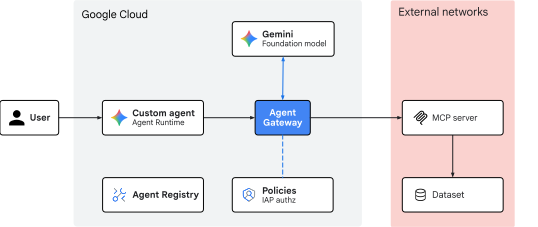
Fig 1. Codelab architecture
What you learn
- How to deploy Agent Gateway in a structured configuration sequence
- How to transition authorization policies from a dry-run to enforced mode
- How to register Google API endpoints and MCP servers in the Agent Registry
- How to use conditional authorization policies based on MCP protocol attributes
- How to audit Agent Gateway logs to validate egress governance
What you need
- A Google Cloud project with billing enabled
- IAM permissions to provision networking services and Agent Platform resources
- A POSIX-compatible shell (
bashorzsh) with Google Cloud CLI (gcloudandbqcomponents) installed - Command-line tools:
git,curl,jq(JSON processor), Python 3, anduv(Python package manager) - A free Data Commons API key for access to query test datasets
2. Concepts
Deployment sequence
This codelab follows a structured configuration sequence so agents have access to the necessary resources on initialization and connectivity can be confirmed before applying enforced access policies.
This Codelab uses the following deployment sequence:
- Start in
DRY_RUNmode: Ensure that agent requests are successfully arriving at the gateway and passing through (audit-only mode). - Register all services: Register all agentic components in Agent Registry and confirm agent tool access.
- Create authorization policies: Create and apply authorization policies to allow egress traffic from agents to MCP servers and endpoints.
- Switch to
ENFORCEDmode: Update authorization extension policy to enforce policies and block unauthorized egress traffic.

Fig 2. Deployment sequence
Egress routing topology
Agent Gateway egress (agent-to-anywhere) acts as a centralized, zero-trust outbound proxy for agentic workloads. When an agent makes a request to an external tool or API, the outbound request is intercepted by Agent Gateway and evaluated against governance policies before routing to its destination. In a Google Cloud Agent Platform architecture, Agent Gateway provides data plane connectivity to:
- Private networks (VPC): Outbound traffic targeting internal enterprise APIs, microservices, databases hosted within private VPCs, and on-premises or cross-cloud networks reachable through hybrid connectivity.
- External networks (Internet): Outbound traffic targeting third-party web services, SaaS APIs, or public endpoints.
- AI services & Agent Platform: Outbound traffic targeting managed Google Cloud APIs, foundation models, Google MCP endpoints (such as BigQuery), and platform governance services (Agent Registry and IAP policies).
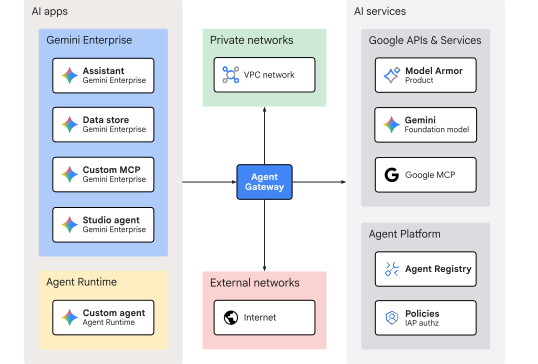
Fig 3. Agent Gateway egress routing topology
The focus of this Codelab is outbound traffic from a custom agent on Agent Runtime targeting an external third-party MCP server endpoint accessible over the Internet.
MCP protocol inspection
Agent Gateway egress (agent-to-anywhere) is able to parse the contents of MCP requests and evaluate access policies based on fine-grained protocol attributes. Agent-to-MCP server egress policies can include conditions, expressed in Common Expression Language (CEL), that are enforced at runtime on every request.
MCP calls typically use the JSON-RPC wire protocol format and HTTP transport. The details of the MCP method being invoked (eg, tools/call), the target tool name, and any arguments are contained within the JSON payload in the HTTP body.
The iap.googleapis.com/mcp.toolName attribute is extracted by Agent Gateway by parsing the JSON body to find the tool identifier specified in the request.
Attributes like iap.googleapis.com/mcp.tool.isReadOnly and mcp.tool.isDestructive are not usually sent in each request body. Instead, these are annotations (metadata) associated with the tool. So when Agent Gateway extracts the toolName from the body, it looks up the tool definition and associated properties from Agent Registry, where the toolspec.json content was registered.
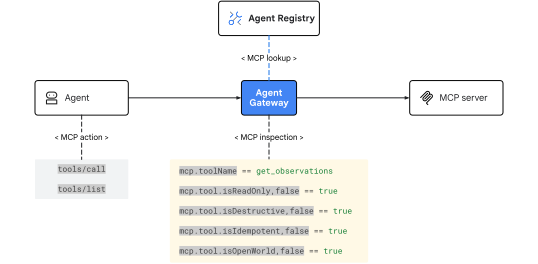
Fig 4. Agent Gateway MCP inspection
CEL expressions used in IAP IAM conditions use the standard format api.getAttribute('iap.googleapis.com/ATTRIBUTE_NAME', 'DEFAULT_VALUE')== 'DESIRED_VALUE'.
This table describes Agent Gateway egress governance attributes that can be applied to MCP server requests:
Attribute | MCP Method / Location | Description |
|
| Target tool identifier requested in the RPC payload (eg, |
| Agent Registry ( | Indicates if the tool is read-only (does not modify its environment) |
| Agent Registry ( | Indicates if calling the tool could result in non-reversible modifications or data loss |
| Agent Registry ( | Indicates if repeated tool execution with identical arguments produces the exact same state |
| Agent Registry ( | Indicates if the tool reaches beyond bounded internal systems to the unbounded public internet |
This concludes the concepts portion... next on to the Setup section.
3. Setup
Required IAM roles
The following roles are required to create the resources in this Codelab:
Category | Required IAM role (ID) | Description |
API management |
| Enable Google Cloud API services |
Networking & gateway |
| Provision Agent Gateway |
Service extensions |
| Configure routing extensions |
Network security |
| Deploy authorization policies |
Agent Registry |
| Catalog allowed hosts |
Vertex AI & agents |
| Deploy Agent Runtime workloads |
Egress policies |
| Apply |
Cloud Storage |
| Manage deployment staging buckets |
Logs & auditing |
| Inspect traces and audit logs |
Alternatively, use a broad basic role like roles/admin or legacy role roles/owner.
Access your project
This Codelab uses a single Google Cloud project. Configuration steps use gcloud CLI and Linux shell commands.
Start by accessing your Google Cloud project command line:
- Cloud Shell at
shell.cloud.google.com, or - A local terminal with
gcloudCLI installed
Set your Project ID
gcloud config set project SET_YOUR_PROJECT_ID_HERE
Authenticate session
# login to gcloud cli
gcloud auth login
# login for gcloud api
gcloud auth application-default login
Set shell environment variables
# set custom var for slug (eg, "foo") and region preference
export SLUG="foo"
export REGION="us-central1"
export MREGION="us"
echo ${SLUG}
echo ${REGION}
echo ${MREGION}
# create project vars (automatic)
export PROJ_ID=$(gcloud config list --format="value(core.project)")
export PROJ_NO=$(gcloud projects describe ${PROJ_ID} --format="value(projectNumber)")
export ORG_ID=$(gcloud projects get-ancestors ${PROJ_ID} --format="value(id)" | tail -n 1)
echo ${PROJ_ID}
echo ${PROJ_NO}
echo ${ORG_ID}
# create resource vars (automatic)
export AGW_NAME="agw-${SLUG}-${REGION}-ata"
export AGW_URI="projects/${PROJ_ID}/locations/${REGION}/agentGateways/${AGW_NAME}"
export RE_AGENT_NAME="agent-datacommons"
export RE_AGENT_ID_SET="principalSet://agents.global.org-${ORG_ID}.system.id.goog/attribute.platformContainer/aiplatform/projects/${PROJ_NO}"
export STAGING_BUCKET="agent-staging-${PROJ_NO}"
export MCP_DISPLAY_NAME="api.datacommons.org"
export MCP_RESOURCE_NAME="${REGION}-datacommons-mcp"
export MCP_URL="https://api.datacommons.org/mcp"
echo ${AGW_NAME}
echo ${AGW_URI}
echo ${RE_AGENT_NAME}
echo ${RE_AGENT_ID_SET}
echo ${STAGING_BUCKET}
echo ${MCP_DISPLAY_NAME}
echo ${MCP_RESOURCE_NAME}
echo ${MCP_URL}
# create local dir for config files
mkdir -p cfg
Update gcloud cli (recommended)
If running a self-managed install of the Google Cloud SDK (ie, outside of Cloud Shell), update the components to the latest version.
# update gcloud cli
gcloud components update
Enable API services
# enable google apis (agent platform bundle, part 1)
gcloud services enable \
  agentregistry.googleapis.com \
  aiplatform.googleapis.com \
  apphub.googleapis.com \
  apptopology.googleapis.com \
  cloudapiregistry.googleapis.com \
  cloudtrace.googleapis.com \
  compute.googleapis.com \
  dataform.googleapis.com \
  iam.googleapis.com \
  iamconnectors.googleapis.com \
  iap.googleapis.com \
  logging.googleapis.com \
  modelarmor.googleapis.com \
  monitoring.googleapis.com \
  networksecurity.googleapis.com \
  networkservices.googleapis.com \
  notebooks.googleapis.com \
  observability.googleapis.com
# enable google apis (agent platform bundle, part 2)
gcloud services enable \
  securitycenter.googleapis.com \
  saasservicemgmt.googleapis.com \
  storage.googleapis.com \
  telemetry.googleapis.com \
  texttospeech.googleapis.com
This concludes the setup portion... next on to the Gateway section.
4. Gateway
Before enforcing access controls, deploy Agent Gateway and configure its authorization extension in DRY_RUN mode. This allows outbound tool calls to succeed while logging evaluation results for audit purposes.
Here Agent Gateway uses a regional registry to support regional Agent Runtime resources.
Create gateway
# create agent gateway config file (regional registry)
cat > cfg/${AGW_NAME}.yaml << EOF
name: ${AGW_NAME}
protocols:
  - MCP
googleManaged:
  governedAccessPath: AGENT_TO_ANYWHERE
registries:
  - "//agentregistry.googleapis.com/projects/${PROJ_ID}/locations/${REGION}"
EOF
# import agent gateway config file (create gateway)
gcloud network-services agent-gateways import ${AGW_NAME} \
  --source="cfg/${AGW_NAME}.yaml" \
  --location=${REGION}
# show agent gateway details (verify deployment state)
gcloud network-services agent-gateways describe ${AGW_NAME} \
  --location=${REGION}
This concludes the gateway portion... next on to the Authorization section.
5. Authorization
The Agent Gateway authorization extension for Identity-Aware Proxy (IAP) is a type of Service Extension used to delegate authorization decisions for all Agent Platform communications.
- Delegation flow: When an agent attempts to invoke an external endpoint or MCP server, it routes the request to Agent Gateway. Instead of evaluating access locally, the gateway uses the authorization extension to send a callout to the IAP evaluation service. IAP evaluates the agent (SPIFFE-based) identity against the IAM policy of the target resource in the Agent Registry. IAP returns an
ALLOWorDENYdecision back to the gateway, which either forwards the traffic onward or blocks it with an HTTP403 Forbiddenstatus code. - Enforcement modes: In
DRY_RUNmode, IAP evaluates requests and logs decisions in Cloud Logging without blocking traffic. InENFORCEmode, any request from an unauthorized agent or to an unregistered target is immediately blocked. - Binding layer: The service extension is connected to Agent Gateway using an authorization policy configured with the
REQUEST_AUTHZprofile.
Authorization extension
Create authorization extension
# create authz extension config file (dry run mode)
cat > cfg/${AGW_NAME}-svc-ext-authz-iap-dryrun.yaml << EOF
name: ${AGW_NAME}-svc-ext-authz-iap-dryrun
service: iap.googleapis.com
failOpen: true
timeout: 1s
metadata:
  iamEnforcementMode: "DRY_RUN"
  iapPolicyVersion: "V1"
EOF
# import authz extension file (create extension)
gcloud service-extensions authz-extensions import ${AGW_NAME}-svc-ext-authz-iap-dryrun \
  --source=cfg/${AGW_NAME}-svc-ext-authz-iap-dryrun.yaml \
  --location=${REGION}
# show authz extension details (verify extension state)
gcloud service-extensions authz-extensions describe ${AGW_NAME}-svc-ext-authz-iap-dryrun \
  --location=${REGION}
Authorization policy
An authorization policy binds the security provider (IAP) to the target gateway resource and specifies the interception profile (REQUEST_AUTHZ).
Create authorization policy
# create authz policy config file (attach dry-run authz extension)
cat > cfg/${AGW_NAME}-authz-policy-profile-iap.yaml << EOF
name: ${AGW_NAME}-authz-policy-profile-iap
target:
  resources:
    - "projects/${PROJ_ID}/locations/${REGION}/agentGateways/${AGW_NAME}"
policyProfile: REQUEST_AUTHZ
action: CUSTOM
customProvider:
  authzExtension:
    resources:
      - "projects/${PROJ_ID}/locations/${REGION}/authzExtensions/${AGW_NAME}-svc-ext-authz-iap-dryrun"
EOF
# import authz policy config file (enable authz policy)
gcloud beta network-security authz-policies import ${AGW_NAME}-authz-policy-profile-iap \
  --source=cfg/${AGW_NAME}-authz-policy-profile-iap.yaml \
  --location=${REGION}
# show authz policy details (verify dry run mode)
gcloud beta network-security authz-policies describe ${AGW_NAME}-authz-policy-profile-iap \
  --location=${REGION}
This concludes the authorization portion... next on to the Codebase section.
6. Codebase
The agent code and endpoint registration script used for this Codelab are maintained in a remote Google Cloud GitHub repository. The following steps will clone the repository locally, copy the necessary files to the current working directory structure, and then cleanup temporary files.
A storage staging bucket is created for Agent Runtime to upload, build, and deploy the packaged agent application code and its dependency artifacts.
Fetch remote artifacts
# clone remote repository to temp local dir
git clone https://github.com/GoogleCloudPlatform/cloud-networking-solutions.git ./temp_agw_cuj_arun_egress_emcp
# copy agent runtime and endpoint definitions to working project dir
cp -r temp_agw_cuj_arun_egress_emcp/codelabs/agw-cuj-arun-egress-emcp/agent-datacommons ./agent-datacommons
cp -r temp_agw_cuj_arun_egress_emcp/codelabs/agw-cuj-arun-egress-emcp/endpoints ./endpoints
# remove temporary directory
rm -rf temp_agw_cuj_arun_egress_emcp
Create staging bucket
# create storage bucket for agent deployment artifacts
gcloud storage buckets create gs://${STAGING_BUCKET} --location=${REGION}
# verify staging bucket url
gcloud storage buckets list --format="value(storage_url)"
This concludes the codebase portion... next on to the Registry section.
7. Registry
The Agent Registry is a centralized inventory of all agents, MCP servers, and endpoints (APIs) in the AI ecosystem. It is also a catalog that can be used to list, search, and discover other registered tools and services for use by AI applications. Agent Gateway egress (agent-to-anywhere) mode uses the registry data model as the governance framework to enforce egress access control. IAM role grants for principal calling agents are checked against the policy bound to the registry resource.
In order to bootstrap the environment and support agents using various Google APIs and Services, a script is used to quickly register a common set of API endpoints using hostnames and locations from endpoints/googleapis.txt.
Register endpoints
# run python script to register google api endpoints
python3 endpoints/register_endpoints.py \
  --multi-region=${MREGION} \
  --region=${REGION} \
  --mtls-endpoints=include
Verify endpoints
# list registry regional endpoints (verify registration)
gcloud agent-registry endpoints list --location=${REGION} \
  --format="table(displayName, name.basename():label=ENDPOINT_ID, interfaces[0].url:label=URL)"
This concludes the registry portion... next on to the Data Commons section.
8. Data Commons
Data Commons is an initiative from Google to organize public data sets and make them available and accessible to anyone. It is a free service and can be accessed using an API key after creating an account.
Create API key
After you create an account, follow these steps to get an API key:
- Sign in to the Data Commons API Portal
- Click the "My Apps" button in the upper right corner
- Click the "+ NEW APP" button in the upper right corner under your username
- Give your app a name (e.g. "Codelab Agent MCP")
- Click the "ENABLE" button for the Data Commons API
api.datacommons.org - Click the "SAVE" button in the lower right corner
This creates an API key and secret. Click the "copy" icon next to the key value to "Copy API key". Paste the value into the terminal command to set the DC_API_KEY environment variable.
# set api key env var
 export DC_API_KEY="YOUR_API_KEY_HERE"
Create MCP server toolspec
When registering an MCP server manually, a tool specification file must be included during registration. Uploading a toolspec.json file lists all of the tools made available by the endpoint and lets other users discover them.
The test_mcp.py script, included in the agent-datacommons/ codebase, generates a toolspec.json file by connecting to the target MCP server (over SSE or HTTP) and calls list_tools() to retrieve all available tools exposed by the server.
# generate toolspec for registry ingestion
uv --directory agent-datacommons run python3 test_mcp.py --toolspec=include --token="${DC_API_KEY}"
A look at the generated toolspec output shows the MCP attributes that Agent Gateway can use for egress policy evaluation and enforcement.
# show toolspec mcp attributes
jq '.tools[] | {name, isReadOnly, isDestructive, isIdempotent, isOpenWorld}' agent-datacommons/toolspec.json
Register MCP server
# register mcp server
gcloud agent-registry services create ${MCP_RESOURCE_NAME} \
  --location=${REGION} \
  --display-name="${MCP_DISPLAY_NAME}" \
  --description="mcp server for data commons" \
  --mcp-server-spec-type=tool-spec \
  --mcp-server-spec-content=agent-datacommons/toolspec.json \
  --interfaces=url=${MCP_URL},protocolBinding=JSONRPC
# list registry regional mcp servers
gcloud agent-registry mcp-servers list --location=${REGION} --format="table(displayName, interfaces.url)"
# show mcp server registry details
gcloud agent-registry services describe ${MCP_RESOURCE_NAME} --location=${REGION}
# fetch mcp server registry id
export MCP_REGISTRY_ID=$(gcloud agent-registry services describe ${MCP_RESOURCE_NAME} \
  --location=${REGION} \
  --format="value(registryResource.basename())")
echo ${MCP_REGISTRY_ID}
This concludes the Data Commons portion... next on to the Runtime section.
9. Runtime
The agent-datacommons ADK agent deployed to Agent Runtime is configured with the following settings in the deployment script to integrate with Agent Platform:
"identity_type": types.IdentityType.AGENT_IDENTITYto provision a unique SPIFFE-based principal identity for the agent"agent_gateway_config": { "agent_to_anywhere_config": {"agent_gateway": } }to direct all outbound agent-initiated traffic to Agent Gateway for policy evaluation and enforcement
Deploy agent
# deploy agent runtime workload
uv --directory agent-datacommons run python3 deploy_agent.py \
  --project=${PROJ_ID} \
  --region=${REGION} \
  --src-dir=./agent \
  --staging-bucket=${STAGING_BUCKET} \
  --display-name="${RE_AGENT_NAME}" \
  --description="agent for data commons stats" \
  --enable-telemetry \
  --enable-agent-identity \
  --agent-gateway-egress=${AGW_URI} \
  --env-var="DC_API_KEY=${DC_API_KEY}"
Fetch deployment vitals
# fetch agent runtime resource (reasoning engine) id
export RE_ENGINE_ID=$(curl -s -X GET \
  "https://${REGION}-aiplatform.googleapis.com/v1/projects/${PROJ_ID}/locations/${REGION}/reasoningEngines" \
  -H "Authorization: Bearer $(gcloud auth application-default print-access-token)" | \
  jq -r --arg name "${RE_AGENT_NAME}" '.reasoningEngines[] | select(.displayName==$name) | .name | split("/") | last')
echo ${RE_ENGINE_ID}
# fetch agent runtime (reasoning engine) agent identity
export RE_AGENT_IDENTITY=$(gcloud agent-registry agents list \
  --location=${REGION} --filter="displayName=${RE_AGENT_NAME}" \
  --format="value(attributes.'agentregistry.googleapis.com/system/RuntimeIdentity'.principal)")
echo ${RE_AGENT_IDENTITY}
# fetch agent registry uid for agent
export RE_AGENT_REGISTRY_ID=$(gcloud agent-registry agents list \
  --location=${REGION} \
  --filter="displayName=${RE_AGENT_NAME}" \
  --format="value(uid)")
echo ${RE_AGENT_REGISTRY_ID}
Verify registry entry
# show agent resource registry details
gcloud agent-registry agents describe ${RE_AGENT_REGISTRY_ID} --location=${REGION}
10. Policies
Agent governance authorization policies permit traffic from an AI agent through Agent Gateway and on to the destination (eg, a third-party MCP server endpoint for a SaaS application). Once traffic reaches the destination, regular service-level or application-level permissions authorize data access.
IAM role grants for Agent Gateway egress enables access policies that allow the agent principal identity access to registered destination resources through Agent Gateway. Policies are enforced at the Agent Gateway level and validated using Identity-Aware Proxy (IAP) IAM policies.
Grant agent IAM roles for Agent Gateway egress
Agent Gateway checks incoming requests to validate the calling agent identity has the iap.webServiceVersions.egressViaIAP permission (granted by the role roles/iap.egressor) on the target resource.
Granting roles/iap.egressor to the agent identity or Agent Runtime principal set on the selected destination resource permits this egress traffic. In this codelab, the role is applied to the principal agent which grants permission to the specific Agent Runtime agent identity.
The IAM policies are bound to the destination resources as defined in the Agent Registry data model. The iap_web/agentRegistry resource represents a "registry-wide" level in the IAM hierarchy. Where agentRegistry serves as the parent to the individual child resources for agents, mcpServers, and endpoints. In this codelab, the IAM policy is bound to the mcpServer and endpoint levels which applies the permission to the specific child resources.
About conditional MCP filtering
The Data Commons MCP server has two tools:
search_indicators: for queries about discovering what data is available, searching for variables, or understanding data coverageget_observations: for queries to retrieve specific data points or time series
There are some standard MCP operations to be aware of when configuring conditional governance policies on MCP servers. Before an MCP client can make a tools/call for search_indicators or get_observations, it must first send protocol handshake & discovery requests:
initializenotifications/initializedtools/list
To demonstrate conditional policy filtering, the policy will be configured for these conditions:
Table. Policy evaluation for MCP requests
Request / Method |
| CEL Evaluation | Result |
|
|
| ✅ ALLOWED (200) |
|
|
| ✅ ALLOWED (200) |
|
|
| ✅ ALLOWED (200) |
|
|
| ❌ DENIED (403) |
To allow the protocol handshakes and the search_indicators tool call, the conditional policy rule includes an allow for "search_indicators" or "" (empty string).
Configure registry IAP MCP server IAM policy
# show iap iam policy for mcp server
gcloud beta iap web get-iam-policy \
  --region=${REGION} \
  --resource-type=agent-registry \
  --mcp-server=${MCP_REGISTRY_ID}
NOTE: etag: should return default ACAB since no policies have been defined yet.
# fetch active etag on policy for mcp server
export IAP_ETAG=$(gcloud beta iap web get-iam-policy \
  --resource-type=agent-registry --region=${REGION} \
  --mcp-server=${MCP_REGISTRY_ID} --format="value(etag)")
echo ${IAP_ETAG}
# create policy config file
cat > cfg/iap-policy-dc-agent-to-dc-mcp-tool-1.json << EOF
{
  "bindings": [
    {
      "role": "roles/iap.egressor",
      "members": [
        "${RE_AGENT_IDENTITY}"
      ],
      "condition": {
        "title": "allow ${RE_AGENT_NAME} to use search_indicators tool for ${MCP_DISPLAY_NAME}",
        "expression": "api.getAttribute('iap.googleapis.com/mcp.toolName', '') in ['search_indicators', '']"
      }
    }
  ],
  "etag": "${IAP_ETAG}",
  "version": 3
}
EOF
# import policy file (bind iam policy)
gcloud beta iap web set-iam-policy cfg/iap-policy-dc-agent-to-dc-mcp-tool-1.json \
  --resource-type=agent-registry \
  --mcp-server=${MCP_REGISTRY_ID} \
  --region=${REGION}
# verify iap iam policy for mcp server
gcloud beta iap web get-iam-policy \
  --region=${REGION} \
  --resource-type=agent-registry \
  --mcp-server=${MCP_REGISTRY_ID}
This concludes the policies portion... next on to the Audit section.
11. Audit
The Agent Gateway authorization extension is operating in DRY_RUN mode. Outbound requests are observed and logged but not blocked.
Test agent queries
Open a browser window to the Google Cloud console UI and navigate to:
- Agent Platform → Agents → Deployments →
agent-datacommons - Select the Playground tab
Or echo this terminal command and click the link to jump to the agent playground:
# playground
echo "https://console.cloud.google.com/agent-platform/runtimes/locations/${REGION}/agent-engines/${RE_ENGINE_ID}/playground?project=${PROJ_ID}"
Submit some test queries....
What data do you have on water quality in Zimbabwe?Compare the life expectancy, economic inequality, and GDP growth for BRICS nations
Verify the queries return valid responses.
Analyze audit logs
View logs and inspect the dry-run policy evaluations.
# list unique urls with http status and iap authorization result
gcloud logging read \
  "resource.type=\"networkservices.googleapis.com/Gateway\" \
  AND httpRequest.requestUrl:*" \
  --project=${PROJ_ID} \
  --limit=200 \
  --format="value(httpRequest.status, jsonPayload.authzPolicyInfo.result, httpRequest.requestUrl)" | sort -u
200     ALLOWED https://api.datacommons.org/mcp
200     ALLOWED https://cloudresourcemanager.googleapis.com:443/google.cloud.resourcemanager.v3.Projects/GetProject
200     ALLOWED https://telemetry.googleapis.com/v1/traces
200     ALLOWED https://${REGION}-aiplatform.googleapis.com/v1beta1/projects/${PROJ_ID}/locations/${REGION}/publishers/google/models/gemini-2.5-flash:generateContent
200     ALLOWED https://${REGION}-aiplatform.googleapis.com/v1beta1/projects/${PROJ_ID}/locations/${REGION}/reasoningEngines/${RE_ENGINE_ID}/sessions/${RE_SESSION_ID}
200     ALLOWED https://${REGION}-aiplatform.googleapis.com/v1beta1/projects/${PROJ_ID}/locations/${REGION}/reasoningEngines/${RE_ENGINE_ID}/sessions/${RE_SESSION_ID}:appendEvent
200     ALLOWED https://${REGION}-aiplatform.googleapis.com/v1beta1/projects/${PROJ_ID}/locations/${REGION}/reasoningEngines/${RE_ENGINE_ID}/sessions/${RE_SESSION_ID}/events
202     ALLOWED https://api.datacommons.org/mcp
Update registry IAP endpoints IAM policy
Grant agent egress permissions for telemetry endpoint
# set var for endpoint display name
export ENDPOINT_1_DISPLAY_NAME="telemetry.googleapis.com"
echo ${ENDPOINT_1_DISPLAY_NAME}
# fetch endpoint registry id
export ENDPOINT_1_REGISTRY_ID=$(gcloud agent-registry services list \
  --location=${REGION} \
  --filter="displayName=${ENDPOINT_1_DISPLAY_NAME}" \
  --format="value(registryResource.basename())")
echo ${ENDPOINT_1_REGISTRY_ID}
# create policy config file
cat > cfg/iap-policy-re-agent-to-ep-1.json << EOF
{
  "bindings": [
    {
      "role": "roles/iap.egressor",
      "members": [
        "${RE_AGENT_IDENTITY}"
      ]
    }
  ]
}
EOF
# import policy file (bind iam policy)
gcloud -q beta iap web set-iam-policy cfg/iap-policy-re-agent-to-ep-1.json \
  --resource-type=agent-registry \
  --endpoint=${ENDPOINT_1_REGISTRY_ID} \
  --region=${REGION}
# verify iap iam policy for telemetry endpoint
gcloud beta iap web get-iam-policy \
  --region=${REGION} \
  --resource-type=agent-registry \
  --endpoint=${ENDPOINT_1_REGISTRY_ID}
Grant agent egress permissions for aiplatform endpoint
# set var for endpoint display name
export ENDPOINT_2_DISPLAY_NAME="${REGION}-aiplatform.googleapis.com"
echo ${ENDPOINT_2_DISPLAY_NAME}
# fetch endpoint registry id
export ENDPOINT_2_REGISTRY_ID=$(gcloud agent-registry services list \
  --location=${REGION} \
  --filter="displayName=${ENDPOINT_2_DISPLAY_NAME}" \
  --format="value(registryResource.basename())")
echo ${ENDPOINT_2_REGISTRY_ID}
# create policy config file
cat > cfg/iap-policy-re-agent-to-ep-2.json << EOF
{
  "bindings": [
    {
      "role": "roles/iap.egressor",
      "members": [
        "${RE_AGENT_IDENTITY}"
      ]
    }
  ]
}
EOF
# import policy file (bind iam policy)
gcloud -q beta iap web set-iam-policy cfg/iap-policy-re-agent-to-ep-2.json \
  --resource-type=agent-registry \
  --endpoint=${ENDPOINT_2_REGISTRY_ID} \
  --region=${REGION}
# verify iap iam policy for aiplatform endpoint
gcloud beta iap web get-iam-policy \
  --region=${REGION} \
  --resource-type=agent-registry \
  --endpoint=${ENDPOINT_2_REGISTRY_ID}
Grant agent egress permissions for cloudresourcemanager endpoint
# set var for endpoint display name
export ENDPOINT_3_DISPLAY_NAME="cloudresourcemanager.googleapis.com"
echo ${ENDPOINT_3_DISPLAY_NAME}
# fetch endpoint registry id
export ENDPOINT_3_REGISTRY_ID=$(gcloud agent-registry services list \
  --location=${REGION} \
  --filter="displayName=${ENDPOINT_3_DISPLAY_NAME}" \
  --format="value(registryResource.basename())")
echo ${ENDPOINT_3_REGISTRY_ID}
# create policy config file
cat > cfg/iap-policy-re-agent-to-ep-3.json << EOF
{
  "bindings": [
    {
      "role": "roles/iap.egressor",
      "members": [
        "${RE_AGENT_IDENTITY}"
      ]
    }
  ]
}
EOF
# import policy file (bind iam policy)
gcloud -q beta iap web set-iam-policy cfg/iap-policy-re-agent-to-ep-3.json \
  --resource-type=agent-registry \
  --endpoint=${ENDPOINT_3_REGISTRY_ID} \
  --region=${REGION}
# verify iap iam policy for cloudresourcemanager endpoint
gcloud beta iap web get-iam-policy \
  --region=${REGION} \
  --resource-type=agent-registry \
  --endpoint=${ENDPOINT_3_REGISTRY_ID}
This concludes the audit portion... next on to the Enforce section.
12. Enforce
The agent was able to make successful requests through the gateway in DRY_RUN mode. Transition the Agent Gateway IAP authorization extension to ENFORCE mode by updating the authorization policy.
Update authorization extension
# create authz extension config file (enforced mode)
cat > cfg/${AGW_NAME}-svc-ext-authz-iap-enforced.yaml << EOF
name: ${AGW_NAME}-svc-ext-authz-iap-enforced
service: iap.googleapis.com
failOpen: false
timeout: 1s
metadata:
  iapPolicyVersion: "V1"
EOF
# import authz extension file (create extension)
gcloud service-extensions authz-extensions import ${AGW_NAME}-svc-ext-authz-iap-enforced \
  --source=cfg/${AGW_NAME}-svc-ext-authz-iap-enforced.yaml \
  --location=${REGION}
# list authz extensions (imported configs)
gcloud service-extensions authz-extensions list --location=${REGION}
Update authorization policy
# re-write authz policy config file (pointing to enforced authz extension)
cat > cfg/${AGW_NAME}-authz-policy-profile-iap.yaml << EOF
name: ${AGW_NAME}-authz-policy-profile-iap
target:
  resources:
    - "projects/${PROJ_ID}/locations/${REGION}/agentGateways/${AGW_NAME}"
policyProfile: REQUEST_AUTHZ
action: CUSTOM
customProvider:
  authzExtension:
    resources:
      - "projects/${PROJ_ID}/locations/${REGION}/authzExtensions/${AGW_NAME}-svc-ext-authz-iap-enforced"
EOF
# import authz policy config file (enable new authz policy)
gcloud beta network-security authz-policies import ${AGW_NAME}-authz-policy-profile-iap \
  --source=cfg/${AGW_NAME}-authz-policy-profile-iap.yaml \
  --location=${REGION}
# show authz policy details (verify enforced mode)
gcloud beta network-security authz-policies describe ${AGW_NAME}-authz-policy-profile-iap \
  --location=${REGION}
Verify conditional allow
Return to the agent Playground in the console UI.
Submit an additional test query (attempt to invoke the allowedsearch_indicators tool)...
What data topics do you have for Peru?
Observe the agent requests to the Gemini foundation model (${REGION}-aiplatform.googleapis.com/...), telemetry API (telemetry.googleapis.com/...), and the Data Commons MCP server endpoint (api.datacommons.org/mcp) are passed with HTTP 200 OK status codes.
# show gateway logs for http requests
gcloud logging read \
  "resource.type=\"networkservices.googleapis.com/Gateway\" \
  AND httpRequest.requestUrl:*" \
  --project=${PROJ_ID} \
  --limit=10 \
  --format="table(
    timestamp.date(tz=LOCAL):label=TIMESTAMP,
    httpRequest.requestMethod:label=METHOD,
    httpRequest.status:label=STATUS,
    jsonPayload.authzPolicyInfo.result:label=IAP_AUTHZ,
    jsonPayload.agentGatewayInfo.mcpInfo.method:label=MCP_METHOD,
    httpRequest.requestUrl:label=URL)"
Check there are no requests being blocked. Look for any denied egress attempts with HTTP 403 Forbidden status codes in the gateway audit logs.
# show gateway logs for authz denies
gcloud logging read \
  "resource.type=\"networkservices.googleapis.com/Gateway\" \
  AND (jsonPayload.authzPolicyInfo.result=\"DENIED\" OR httpRequest.status=403)" \
  --project=${PROJ_ID} \
  --limit=10 \
  --format="table(
    timestamp.date(tz=LOCAL):label=TIMESTAMP,
    httpRequest.requestMethod:label=METHOD,
    httpRequest.status:label=STATUS,
    jsonPayload.enforcedGatewaySecurityPolicy.serverNameIndication:label=SNI,
    jsonPayload.authzPolicyInfo.result:label=AUTHZ_RESULT,
    jsonPayload.authzPolicyInfo.policies[0].name.basename():label=DENYING_POLICY
  )"
# show gateway logs for mcp requests with method and tool name
gcloud logging read \
  "resource.type=\"networkservices.googleapis.com/Gateway\" \
  AND jsonPayload.agentGatewayInfo.mcpInfo.method:*" \
  --project=${PROJ_ID} \
  --limit=10 \
  --format="table(
    timestamp.date(tz=LOCAL):label=TIMESTAMP,
    httpRequest.status:label=STATUS,
    jsonPayload.authzPolicyInfo.result:label=IAP_AUTHZ,
    jsonPayload.agentGatewayInfo.mcpInfo.method:label=MCP_METHOD,
    jsonPayload.agentGatewayInfo.mcpInfo.parameter:label=TOOL_NAME,
    httpRequest.requestUrl:label=URL
  )"
Verify conditional deny
Submit an additional test query (attempt to invoke the deniedget_observations tool)...
What are the diabetes levels in Peru compared to Slovakia?
The agent will look at search_indicators first then attempt to use get_observations, but will fail and agent response will be left incomplete.
# show gateway logs for mcp requests with method and tool name
gcloud logging read \
  "resource.type=\"networkservices.googleapis.com/Gateway\" \
  AND jsonPayload.agentGatewayInfo.mcpInfo.method:*" \
  --project=${PROJ_ID} \
  --limit=10 \
  --format="table(
    timestamp.date(tz=LOCAL):label=TIMESTAMP,
    httpRequest.status:label=STATUS,
    jsonPayload.authzPolicyInfo.result:label=IAP_AUTHZ,
    jsonPayload.agentGatewayInfo.mcpInfo.method:label=MCP_METHOD,
    jsonPayload.agentGatewayInfo.mcpInfo.parameter:label=TOOL_NAME,
    httpRequest.requestUrl:label=URL
  )"
TIMESTAMP            STATUS  IAP_AUTHZ  MCP_METHOD                 TOOL_NAME          URL
YYYY-MM-DDTHH:MM:SS  403     DENIED     tools/call                 get_observations   https://api.datacommons.org/mcp
YYYY-MM-DDTHH:MM:SS          ALLOWED    tools/call                 get_observations   https://api.datacommons.org/mcp
YYYY-MM-DDTHH:MM:SS  403     DENIED     tools/call                 get_observations   https://api.datacommons.org/mcp
YYYY-MM-DDTHH:MM:SS  200     ALLOWED    tools/call                 search_indicators  https://api.datacommons.org/mcp
YYYY-MM-DDTHH:MM:SS  200     ALLOWED    tools/list                                    https://api.datacommons.org/mcp
YYYY-MM-DDTHH:MM:SS  202     ALLOWED    notifications/initialized                     https://api.datacommons.org/mcp
This validates the governance policy is working as expected!
Note that the second row indicating a blank status and ALLOWED is a secondary connection tear-down log event emitted by Agent Gateway when closing the socket after sending the 403 response (because connection-close events do not have response status codes, httpRequest.status is blank).
This concludes the enforce portion... next on to the Cleanup section.
13. Cleanup
# delete agent
curl -s -X DELETE "https://${REGION}-aiplatform.googleapis.com/v1/projects/${PROJ_ID}/locations/${REGION}/reasoningEngines/${RE_ENGINE_ID}?force=true" \
  -H "Authorization: Bearer $(gcloud auth application-default print-access-token)"

# next
# delete storage bucket
gcloud -q storage rm --recursive gs://${STAGING_BUCKET}

# next
# clear policy on mcp server
export IAP_ETAG=$(gcloud beta iap web get-iam-policy --resource-type=agent-registry --mcp-server=${MCP_REGISTRY_ID} --region=${REGION} --format="value(etag)")
cat > cfg/iap-policy-empty.json << EOF
{
  "bindings": [],
  "etag": "${IAP_ETAG}"
}
EOF

gcloud -q beta iap web set-iam-policy cfg/iap-policy-empty.json \
  --resource-type=agent-registry \
  --mcp-server=${MCP_REGISTRY_ID} \
  --region=${REGION}

# next
# clear policy on endpoint 1
export IAP_ETAG=$(gcloud beta iap web get-iam-policy --resource-type=agent-registry --endpoint=${ENDPOINT_1_REGISTRY_ID} --region=${REGION} --format="value(etag)")
cat > cfg/iap-policy-empty.json << EOF
{
  "bindings": [],
  "etag": "${IAP_ETAG}"
}
EOF

gcloud -q beta iap web set-iam-policy cfg/iap-policy-empty.json \
  --resource-type=agent-registry \
  --endpoint=${ENDPOINT_1_REGISTRY_ID} \
  --region=${REGION}

# next
# clear policy on endpoint 2
export IAP_ETAG=$(gcloud beta iap web get-iam-policy --resource-type=agent-registry --endpoint=${ENDPOINT_2_REGISTRY_ID} --region=${REGION} --format="value(etag)")
cat > cfg/iap-policy-empty.json << EOF
{
  "bindings": [],
  "etag": "${IAP_ETAG}"
}
EOF

gcloud -q beta iap web set-iam-policy cfg/iap-policy-empty.json \
  --resource-type=agent-registry \
  --endpoint=${ENDPOINT_2_REGISTRY_ID} \
  --region=${REGION}

# next
# clear policy on endpoint 3
export IAP_ETAG=$(gcloud beta iap web get-iam-policy --resource-type=agent-registry --endpoint=${ENDPOINT_3_REGISTRY_ID} --region=${REGION} --format="value(etag)")
cat > cfg/iap-policy-empty.json << EOF
{
  "bindings": [],
  "etag": "${IAP_ETAG}"
}
EOF

gcloud -q beta iap web set-iam-policy cfg/iap-policy-empty.json \
  --resource-type=agent-registry \
  --endpoint=${ENDPOINT_3_REGISTRY_ID} \
  --region=${REGION}

# next
# remove manual registry entry
gcloud -q agent-registry services delete ${MCP_RESOURCE_NAME} --location=${REGION}
# delete gateway resources
gcloud -q beta network-security authz-policies delete ${AGW_NAME}-authz-policy-profile-iap --location=${REGION}

gcloud -q beta service-extensions authz-extensions delete ${AGW_NAME}-svc-ext-authz-iap-dryrun --location=${REGION}

gcloud -q beta service-extensions authz-extensions delete ${AGW_NAME}-svc-ext-authz-iap-enforced --location=${REGION}

gcloud -q network-services agent-gateways delete ${AGW_NAME} --location=${REGION}

# next
# clean up local working directories and generated configs
rm -rf cfg agent-datacommons endpoints

# end
This concludes the cleanup portion... next on to the Conclusion!
14. Conclusion
Congratulations! You have successfully deployed and governed outbound communications for an agent accessing tools using Agent Gateway!

Cosmopup thinks Codelabs are the bee's knees!
What is next?
- Check out the Gemini Enterprise Agent Platform docs for advanced features and tutorials
- Configure Model Armor guardrails on Agent Gateway for additional AI safety and security
- Explore Semantic Governance Policies to enforce business rules and compliance for natural language queries
Feel free to offer any comments, questions, or corrections by using this feedback form
Thank you!