

1. 簡介
本程式碼實驗室將探討 Agent Gateway 的輸出管理功能,瞭解如何透過私人虛擬私有雲網路,控管 AI 代理程式對遠端端點的存取權。以輸出 (代理程式到任何位置) 模式運作的 Agent Gateway 支援使用 Private Service Connect (PSC) 介面,與虛擬私有雲網路建立私人連線。在這個情境中,Agent Runtime 會使用 Agent Gateway,透過虛擬私有雲網路中 Google API 的 Private Service Connect (PSC) 端點,存取 Cloud Run 上代管的遠端可串流 HTTP MCP 伺服器。
從獨立的聊天機器人到具備多代理工作流程的自治系統,AI 應用程式都能動態叫用外部工具。為代理程式提供受控存取權,讓代理程式查詢資料庫、擷取網頁內容及執行動作,是確保代理程式安全且有效率的關鍵。不過,在企業環境中,確保代理程式工具執行安全是一大挑戰。如果代理程式具有直接網路存取權,提示詞注入攻擊或模型幻覺可能會導致代理程式竊取機密資料或執行破壞性指令。
如要大規模管理自主代理,Agent Gateway 會提供集中式零信任強制執行點,直接整合至 Agent Platform 架構。Agent Gateway 不會依賴各應用程式或代理程式碼專屬的自訂實作項目,而是在平台層級強制執行網路路徑、代理程式管理和執行階段安全。
當 Agent Gateway 處於輸出 (agent-to-anywhere) 模式時,會將設定為使用閘道的所有代理傳出要求設為 Proxy。系統會使用專屬的代理程式身分驗證每個代理程式工作負載要求,並使用 Identity-Aware Proxy (IAP) 政策授權。系統會動態解碼並檢查 MCP 工具呼叫,確保政策強制執行。安全管理員可以集中強制執行精細的權限,確保代理程式只能叫用核准的端點和方法。
建構內容
- 輸出模式 (agent-to-anywhere) 的 Agent Gateway
- Identity-Aware Proxy (IAP) 授權擴充功能
- 具有代理身分的 Agent Runtime ADK 代理
- Cloud Run 可串流的 HTTP MCP 伺服器
- Agent Registry,搭配 Google API 和自訂 MCP 端點
- 使用 IAM 存取權控管的授權政策
- 虛擬私有雲網路資源、Cloud DNS 區域和 Google API 的 PSC 端點
- Agent Gateway 輸出流量的 PSC 網路連結
- Cloud Next Generation Firewall (NGFW) 防火牆政策規則
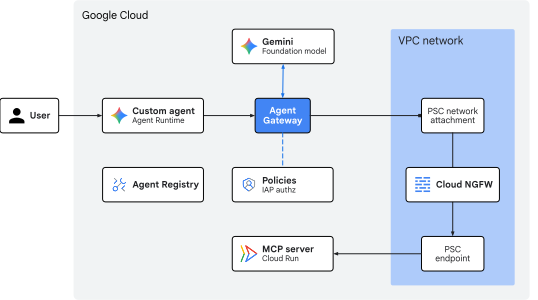
圖 1. 程式碼研究室架構
課程內容
- 如何依結構化設定順序部署 Agent Gateway
- 如何設定 Agent Gateway 與私人虛擬私有雲網路連線
- 如何將授權政策從模擬測試模式轉換為強制執行模式
- 如何在 Agent Registry 中註冊 Google API 端點和 MCP 伺服器
- 如何稽核 Agent Gateway 記錄,驗證輸出管理
- 如何使用 Cloud NGFW 記錄檔驗證 Agent Gateway 輸出流量
需求條件
- 已啟用計費功能的 Google Cloud 雲端專案
- 佈建網路服務、BigQuery 資料集和 Agent Platform 資源的 IAM 權限
- 已安裝 Google Cloud CLI (
gcloud和bq元件) 的 POSIX 相容 Shell (bash或zsh) - 指令列工具:
git、curl、jq(JSON 處理器)、Python 3 和uv(Python 套件管理工具)
2. 概念
部署順序
本程式碼研究室會依循結構化設定順序,確保代理程式在初始化時能存取必要資源,並在套用強制存取政策前確認連線。
本程式碼研究室使用下列部署順序:
- 以
DRY_RUN模式啟動:確認代理程式要求已成功送達閘道並通過 (僅限稽核模式)。 - 註冊所有服務:在 Agent Registry 註冊所有代理元件,並確認代理工具存取權。使用 Cloud Logging 和 Agent Gateway 可觀測性資訊主頁,查看對 Agent Registry 的查詢。
- 建立授權政策:建立及套用授權政策,允許代理程式將輸出流量傳送至 MCP 伺服器和端點。
- 切換至
ENFORCED模式:更新授權擴充功能政策,強制執行政策並封鎖未經授權的輸出流量。

圖 2. 部署順序
輸出路由拓撲
Agent Gateway 輸出 (agent-to-anywhere) 可做為代理工作負載的集中式零信任輸出 Proxy。當代理程式向外部工具或 API 發出要求時,Agent Gateway 會攔截傳出要求,並根據管理政策進行評估,然後再將要求轉送至目的地。在 Google Cloud Agent Platform 架構中,Agent Gateway 提供資料層連線,可連至:
- 私人網路 (VPC):以企業內部 API、微服務、私人 VPC 中代管的資料庫,以及可透過混合式連線存取的內部部署或跨雲端網路為目標的輸出流量。
- 外部網路 (網際網路):以第三方網路服務、SaaS API 或公開端點為目標的出站流量。
- AI 服務和 Agent Platform:以代管的 Google Cloud API、基礎模型、Google MCP 端點 (例如 BigQuery) 和平台控管服務 (Agent Registry 和 IAP 政策) 為目標的輸出流量。
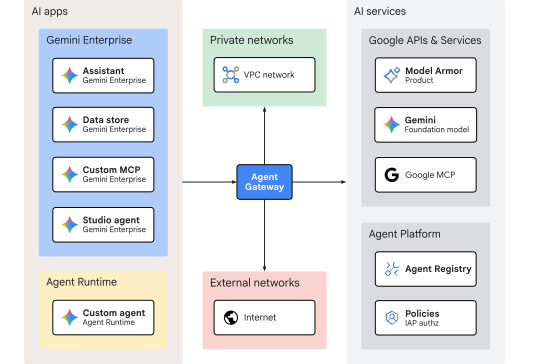
圖 3. Agent Gateway 輸出轉送拓撲
本程式碼實驗室的重點是從 Agent Runtime 的自訂代理程式輸出流量,並以部署在虛擬私有雲網路中的 Google API 端點 PSC 為目標。這個架構會使用 Agent Gateway 輸出的 PSC 網路連結,啟用對 Cloud Run 上代管 MCP 伺服器的私人存取權。
虛擬私人雲端連線能力
Agent Gateway 輸出 (agent-to-anywhere) 可透過在部署 YAML 設定檔中指定 networkConfig: egress: networkAttachment: [URI],連線至虛擬私有雲網路。這項設定會在 Agent Gateway 上設定轉送規則,透過 PSC 網路連結將解析為私人 IP 位址的流量傳送至虛擬私有雲網路。
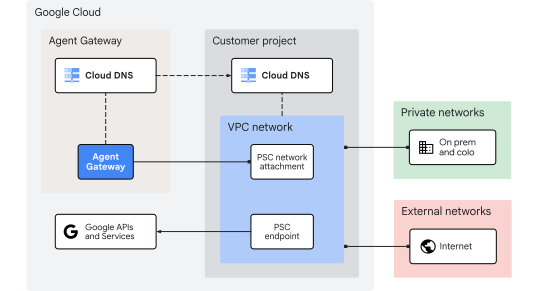
圖 4. Agent Gateway 虛擬私有雲連線
Agent Gateway 可使用 Cloud DNS 對等互連功能,將私人 DNS 主機名稱解析為指定目標專案和虛擬私有雲網路。dnsPeeringConfig: domains: [NAME] 設定中列出的任何私人區域,都會使用目標專案中的 Cloud DNS 記錄。其他 DNS 查詢則會使用預設的 VPC Cloud DNS 公開解析器。
概念部分到此結束,接下來請前往「設定」部分。
3. 設定
必要的 IAM 角色
如要在本程式碼研究室中建立資源,您必須具備下列角色:
類別 | 必要 IAM 角色 (ID) | 說明 |
API 管理 |
| 啟用 Google Cloud API 服務 |
網路和閘道 |
| 佈建 Agent Gateway |
Service Extensions |
| 設定轉送擴充功能 |
網路安全 |
| 部署授權政策 |
Agent Registry |
| 目錄允許的主機 |
Vertex AI 和代理程式 |
| 部署 Agent Runtime 工作負載 |
輸出政策 |
| 套用 |
Cloud Storage |
| 管理部署作業暫存 bucket |
記錄和稽核 |
| 檢查追蹤記錄和稽核記錄 |
Cloud Run 開發人員 |
| 部署 Cloud Run 服務 |
Artifact Registry 讀取者 |
| 提取容器映像檔 |
Compute 網路管理員 |
| 管理虛擬私有雲網路資源 |
DNS 管理員 |
| 管理 Cloud DNS 區域和記錄 |
或者,您也可以使用廣泛的基本角色 (例如 roles/admin) 或舊版角色 roles/owner。
存取專案
本程式碼研究室使用單一 Google Cloud 雲端專案。設定步驟會使用 gcloud CLI 和 Linux 殼層指令。
首先,請存取 Google Cloud 雲端專案指令列:
- Cloud Shell (
shell.cloud.google.com) 或 - 已安裝
gcloudCLI 的本機終端機
設定專案 ID
gcloud config set project SET_YOUR_PROJECT_ID_HERE
驗證工作階段
# login to gcloud cli
gcloud auth login
# login for gcloud api
gcloud auth application-default login
設定殼層環境變數
# set custom var for slug (eg, "foo") and region preference
export SLUG="foo"
export REGION="us-central1"
export MREGION="us"
echo ${SLUG}
echo ${REGION}
echo ${MREGION}
# create project vars (automatic)
export PROJ_ID=$(gcloud config list --format="value(core.project)")
export PROJ_NO=$(gcloud projects describe ${PROJ_ID} --format="value(projectNumber)")
export ORG_ID=$(gcloud projects get-ancestors ${PROJ_ID} --format="value(id)" | tail -n 1)
export USER_IDENTITY=$(gcloud config get-value account)
echo ${PROJ_ID}
echo ${PROJ_NO}
echo ${ORG_ID}
echo ${USER_IDENTITY}
# create resource vars (automatic)
export AGW_NAME="agw-${SLUG}-${REGION}-ata"
export AGW_URI="projects/${PROJ_ID}/locations/${REGION}/agentGateways/${AGW_NAME}"
export RE_AGENT_NAME="agent-weather"
export RE_AGENT_ID_SET="principalSet://agents.global.org-${ORG_ID}.system.id.goog/attribute.platformContainer/aiplatform/projects/${PROJ_NO}"
export STAGING_BUCKET="agent-staging-${PROJ_NO}"
export MCP_NAME="mcp-weather"
export MCP_DISPLAY_NAME="${MCP_NAME}-${PROJ_NO}.${REGION}.run.app"
export MCP_URL="https://${MCP_DISPLAY_NAME}/mcp"
echo ${AGW_NAME}
echo ${AGW_URI}
echo ${RE_AGENT_NAME}
echo ${RE_AGENT_ID_SET}
echo ${STAGING_BUCKET}
echo ${MCP_NAME}
echo ${MCP_DISPLAY_NAME}
echo ${MCP_URL}
# create local dir for config files
mkdir -p cfg
更新 gcloud cli (建議)
如果執行自行管理的 Google Cloud SDK 安裝作業 (即在 Cloud Shell 外部),請將元件更新至最新版本。
# update gcloud cli
gcloud components update
啟用 API 服務
# enable google apis (agent platform bundle, part 1)
gcloud services enable \
  agentregistry.googleapis.com \
  aiplatform.googleapis.com \
  apphub.googleapis.com \
  apptopology.googleapis.com \
  cloudapiregistry.googleapis.com \
  cloudtrace.googleapis.com \
  compute.googleapis.com \
  dataform.googleapis.com \
  iam.googleapis.com \
  iamconnectors.googleapis.com \
  iap.googleapis.com \
  logging.googleapis.com \
  modelarmor.googleapis.com \
  monitoring.googleapis.com \
  networksecurity.googleapis.com \
  networkservices.googleapis.com \
  notebooks.googleapis.com \
  observability.googleapis.com
# enable google apis (agent platform bundle, part 2)
gcloud services enable \
  securitycenter.googleapis.com \
  saasservicemgmt.googleapis.com \
  storage.googleapis.com \
  telemetry.googleapis.com \
  texttospeech.googleapis.com
# enable google apis (all the rest)
gcloud services enable \
  run.googleapis.com \
  artifactregistry.googleapis.com \
  cloudbuild.googleapis.com \
  dns.googleapis.com
設定部分到此結束,接下來請前往「網路」部分。
4. 網路
虛擬私有雲網路是使用自訂模式部署,以建立支援 PSC 網路連結的一般子網路,適用於 Agent Gateway 和 Cloud Run 直接虛擬私有雲輸出。
Google API 的 PSC 端點是使用單一/32全域內部 IPv4 位址部署,支援 Cloud Run 的私人內部存取權。這個 IP 位址並非從任何區域子網路指派。
建立網路
建立全球虛擬私有雲網路。
# create vpc network
gcloud compute networks create vnet-${SLUG} --subnet-mode=custom
為 Agent Gateway PSC 網路連結和 Cloud Run 直連虛擬私有雲輸出建立子網路。
# create subnet for agent gateway psc na
gcloud compute networks subnets create subnet-${REGION}-agw \
  --network=vnet-${SLUG} \
  --range=192.168.10.0/28 \
  --region=${REGION} \
  --enable-private-ip-google-access

# create subnet for cloud run dvpc egress
gcloud compute networks subnets create subnet-${REGION}-crun \
  --network=vnet-${SLUG} \
  --range=10.10.10.0/24 \
  --region=${REGION} \
  --enable-private-ip-google-access
建立防火牆規則
建立防火牆政策和規則,允許所有輸出流量並啟用記錄功能。這項指標可用於監控從 Agent Gateway 輸出至虛擬私有雲網路的流量。
# create fw policy
gcloud compute network-firewall-policies create fw-policy-${SLUG} --global
# create fw policy rule
gcloud compute network-firewall-policies rules create 1001 \
  --description="allow all out and log" \
  --firewall-policy=fw-policy-${SLUG} \
  --global-firewall-policy \
  --action=allow \
  --direction=EGRESS \
  --layer4-configs=all \
  --dest-ip-ranges=0.0.0.0/0 \
  --enable-logging
# associate fw policy to vpc network
gcloud compute network-firewall-policies associations create \
  --name=fw-policy-bind-${SLUG} \
  --firewall-policy=fw-policy-${SLUG} \
  --network=vnet-${SLUG} \
  --global-firewall-policy
建立 PSC 網路連結
建立 PSC 網路連結,並設為自動接受新的生產端連線。
# create psc network attachment
gcloud compute network-attachments create psc-na-${REGION}-agw \
  --region=${REGION} \
  --subnets=subnet-${REGION}-agw \
  --connection-preference=ACCEPT_AUTOMATIC
驗證 PSC 網路連結
# show psc network attachment details
gcloud compute network-attachments describe psc-na-${REGION}-agw --region=${REGION}
# fetch psc na uri
export PSC_NA_URI=$(gcloud compute network-attachments describe psc-na-${REGION}-agw \
  --region=${REGION} \
  --format="value(selfLink.scope(v1))")
echo ${PSC_NA_URI}
建立 PSC 端點
為全域 PSC 端點建立 IP 位址預留項目。這裡使用的位址不得來自現有子網路,也不得與現有子網路重疊。
# set env var for psc ep ip address
export PSC_EP_IP="240.0.0.10"
echo ${PSC_EP_IP}
# reserve internal global ipv4 address
gcloud compute addresses create ip-psc2gapis \
  --global \
  --purpose=PRIVATE_SERVICE_CONNECT \
  --addresses=${PSC_EP_IP} \
  --network=vnet-${SLUG}
使用 all-apis 套件為 Google API 建立 PSC 端點,其中包含 Cloud Run (run.app)。
# create psc endpoint for google apis
gcloud compute forwarding-rules create psc2gapis \
  --global \
  --network=vnet-${SLUG} \
  --address=ip-psc2gapis \
  --target-google-apis-bundle=all-apis
驗證 PSC 端點
# show psc endpoint details
gcloud compute forwarding-rules describe psc2gapis --global
建立 DNS 區域和記錄
為 run.app 網域建立私人 Cloud DNS 代管區域。
# create private dns zone
gcloud dns managed-zones create priv-zone-run \
  --description="private zone for cloud run" \
  --dns-name="run.app." \
  --visibility=private \
  --networks=vnet-${SLUG}
為 *.run.app. 建立萬用字元 DNS A 記錄,指向 PSC 端點的 IP 位址。
# create dns record
gcloud dns record-sets create *.run.app \
  --zone=priv-zone-run \
  --type=A \
  --ttl=300 \
  --rrdatas=${PSC_EP_IP}
建立 Cloud DNS 政策,啟用 DNS 查詢記錄功能。
# create dns policy (logging)
gcloud dns policies create dns-policy-${SLUG} \
  --description="dns logging for vnet-${SLUG}" \
  --networks=vnet-${SLUG} \
  --enable-logging
建立 Cloud NAT
建立 Cloud Router 和 Cloud NAT,支援 Cloud Run 直接虛擬私有雲輸出流量,讓 MCP 伺服器透過虛擬私有雲網路存取外部天氣資料。
# create router for nat
gcloud compute routers create cr-nat-${SLUG}-${REGION} \
  --network=vnet-${SLUG} \
  --asn=16550 \
  --region=${REGION}
# create nat gateway
gcloud compute routers nats create nat-${SLUG}-${REGION} \
  --router=cr-nat-${SLUG}-${REGION} \
  --region=${REGION} \
  --auto-allocate-nat-external-ips \
  --nat-all-subnet-ip-ranges
網路部分到此結束,接下來請前往「閘道」部分。
5. 閘道
強制執行存取控管前,請先部署 Agent Gateway,並在 DRY_RUN 模式中設定授權擴充功能。這樣一來,外送工具呼叫就能成功,同時記錄評估結果以供稽核。
這裡的 Agent Gateway 使用區域登錄檔,支援區域 Agent Runtime 資源,並為 VPC 網路 PSC 網路連結和 DNS 對等互連設定指定 networkConfig 欄位。
建立閘道
# create new agent gateway config file (with network settings)
cat > cfg/${AGW_NAME}-networkConfig.yaml << EOF
name: ${AGW_NAME}
protocols:
  - MCP
googleManaged:
  governedAccessPath: AGENT_TO_ANYWHERE
registries:
  - "//agentregistry.googleapis.com/projects/${PROJ_ID}/locations/${REGION}"
networkConfig:
  egress:
    networkAttachment: ${PSC_NA_URI}
  dnsPeeringConfig:
    domains:
      - run.app.
    targetProject: ${PROJ_ID}
    targetNetwork: projects/${PROJ_ID}/global/networks/vnet-${SLUG}
EOF
# import agent gateway config file (create gateway)
gcloud network-services agent-gateways import ${AGW_NAME} \
  --source="cfg/${AGW_NAME}-networkConfig.yaml" \
  --location=${REGION}
驗證閘道
# show agent gateway details
gcloud network-services agent-gateways describe ${AGW_NAME} \
  --location=${REGION}
# show psc network attachment details
gcloud compute network-attachments describe psc-na-${REGION}-agw --region=${REGION}
確認有已接受的連線端點。
connectionEndpoints:
- ipAddress: 192.168.10.2
  projectIdOrNum: '[AGW_PROJECT_NO]'
  status: ACCEPTED
  subnetwork: https://www.googleapis.com/compute/v1/projects/${PROJ_ID}/regions/${REGION}/subnetworks/subnet-${REGION}-agw
閘道部分到此結束,接下來請參閱「授權」部分。
6. 授權
Identity-Aware Proxy (IAP) 的 Agent Gateway 授權擴充功能是一種服務擴充功能,用於將所有 Agent Platform 通訊的授權決策委派出去。
- 委派流程:當代理嘗試叫用外部端點或 MCP 伺服器時,系統會將要求轉送至 Agent Gateway。閘道不會在本地評估存取權,而是使用授權擴充功能,將回呼傳送至 IAP 評估服務。IAP 會根據 Agent Registry 中目標資源的 IAM 政策,評估代理 (以 SPIFFE 為基礎) 身分。IAP 會將
ALLOW或DENY決策傳回閘道,閘道會轉送流量或以 HTTP403 Forbidden狀態碼封鎖流量。 - 強制執行模式:在
DRY_RUN模式下,IAP 會評估要求並在 Cloud Logging 中記錄決策,但不會封鎖流量。在ENFORCE模式下,系統會立即封鎖來自未經授權代理程式的要求,或傳送至未註冊目標的要求。 - 繫結層:服務擴充功能會使用透過
REQUEST_AUTHZ設定檔設定的授權政策,連線至 Agent Gateway。
授權擴充功能
授權擴充功能會指定安全供應商服務,並提供連線設定和其他參數,定義服務的運作方式,以及如何與 Agent Gateway 整合。
建立授權擴充功能
# create authz extension config file (dry run mode)
cat > cfg/${AGW_NAME}-svc-ext-authz-iap-dryrun.yaml << EOF
name: ${AGW_NAME}-svc-ext-authz-iap-dryrun
service: iap.googleapis.com
failOpen: true
timeout: 1s
metadata:
  iamEnforcementMode: "DRY_RUN"
  iapPolicyVersion: "V1"
EOF
匯入授權擴充功能
# import authz extension file (create extension)
gcloud service-extensions authz-extensions import ${AGW_NAME}-svc-ext-authz-iap-dryrun \
  --source=cfg/${AGW_NAME}-svc-ext-authz-iap-dryrun.yaml \
  --location=${REGION}
驗證授權擴充功能
# show authz extension details
gcloud service-extensions authz-extensions describe ${AGW_NAME}-svc-ext-authz-iap-dryrun \
  --location=${REGION}
授權政策
授權政策會將安全防護供應商 (IAP) 繫結至目標閘道資源,並指定攔截設定檔 (REQUEST_AUTHZ)。
建立授權政策
# create authz policy config file (attach dry-run authz extension)
cat > cfg/${AGW_NAME}-authz-policy-profile-iap.yaml << EOF
name: ${AGW_NAME}-authz-policy-profile-iap
target:
  resources:
    - "projects/${PROJ_ID}/locations/${REGION}/agentGateways/${AGW_NAME}"
policyProfile: REQUEST_AUTHZ
action: CUSTOM
customProvider:
  authzExtension:
    resources:
      - "projects/${PROJ_ID}/locations/${REGION}/authzExtensions/${AGW_NAME}-svc-ext-authz-iap-dryrun"
EOF
繫結授權政策
# import authz policy config file (enable authz policy)
gcloud beta network-security authz-policies import ${AGW_NAME}-authz-policy-profile-iap \
  --source=cfg/${AGW_NAME}-authz-policy-profile-iap.yaml \
  --location=${REGION}
驗證授權政策
# show authz policy details
gcloud beta network-security authz-policies describe ${AGW_NAME}-authz-policy-profile-iap \
  --location=${REGION}
授權部分到此結束,接下來請前往「程式碼集」部分。
7. 程式碼集
本程式碼研究室使用的代理程式、MCP 伺服器和端點註冊程式碼,都維護在遠端的 Google Cloud GitHub 存放區。下列步驟會在本機複製存放區、將必要檔案複製到目前的工作目錄結構,然後清除暫存檔案。
系統會為 Agent Runtime 建立儲存空間暫存 bucket,用於上傳、建構及部署封裝的代理程式應用程式程式碼及其依附元件構件。
擷取遠端構件
# clone remote repository to temp local dir
git clone https://github.com/GoogleCloudPlatform/cloud-networking-solutions.git ./temp_agw_cuj_arun_egress_vpc
# copy agent runtime and endpoint definitions to working project dir
cp -r temp_agw_cuj_arun_egress_vpc/codelabs/agw-cuj-arun-egress-vpc/agent-weather ./agent-weather
cp -r temp_agw_cuj_arun_egress_vpc/codelabs/agw-cuj-arun-egress-vpc/mcp-weather ./mcp-weather
# remove temporary directory
rm -rf temp_agw_cuj_arun_egress_vpc
建立暫存 bucket
# create storage bucket for agent deployment artifacts
gcloud storage buckets create gs://${STAGING_BUCKET} --location=${REGION}
# verify staging bucket url
gcloud storage buckets list --format="value(storage_url)"
程式碼集部分到此結束,接下來請前往「登錄」部分。
8. 註冊資料庫
Agent Registry 是 AI 生態系統中所有代理、MCP 伺服器和端點 (API) 的集中式清單。此外,這個目錄還可用於列出、搜尋及探索其他已註冊的工具和服務,供 AI 應用程式使用。Agent Gateway 會使用註冊資料庫 資料模型做為管理框架,強制執行輸出存取控管。系統會根據繫結至登錄資源的政策,檢查主體呼叫代理程式的 IAM 角色授權。
如要啟動環境並使用各種 Google API 和服務支援代理程式,請建立單一登錄端點服務,其中會組合本實驗室所需的核心 API 介面。這樣一來,您就能輕鬆管理大多數服務專員使用的常見工具組合的控管政策。
註冊端點
# create endpoint service (with multiple entries)
gcloud agent-registry services create core-gapi-services \
  --location=${REGION} \
  --display-name="gapi.core.services" \
  --description="core apis and services" \
  --endpoint-spec-type=no-spec \
  --interfaces=protocolBinding=JSONRPC,url=https://telemetry.googleapis.com \
  --interfaces=protocolBinding=JSONRPC,url=https://${REGION}-aiplatform.googleapis.com \
  --interfaces=protocolBinding=JSONRPC,url=https://cloudresourcemanager.googleapis.com \
  --interfaces=protocolBinding=JSONRPC,url=https://iamcredentials.googleapis.com
驗證端點註冊
# list registry regional endpoints
gcloud agent-registry endpoints list --location=${REGION} \
  --flatten="interfaces[]" \
  --format="table(displayName, name.basename():label=ENDPOINT_ID, interfaces.url:label=URL)"
註冊部分到此結束,接下來請前往 MCP 伺服器部分。
9. MCP 伺服器
授予部署作業的 IAM 權限
將權限授予預設的 Compute 服務帳戶,支援從原始碼部署 Cloud Run 服務。
# grant cloud run builder role to default compute sa
gcloud projects add-iam-policy-binding ${PROJ_ID} \
  --member="serviceAccount:${PROJ_NO}-compute@developer.gserviceaccount.com" \
  --role="roles/run.builder"
驗證 IAM 權限
# show iam policy on project for default compute sa
gcloud projects get-iam-policy ${PROJ_ID} \
  --flatten="bindings[].members" \
  --filter="bindings.members=serviceAccount:${PROJ_NO}-compute@developer.gserviceaccount.com" \
  --format="table(bindings.role:label=ROLE, bindings.members:label=PRINCIPAL_IDENTITY)"
部署 MCP 伺服器
# deploy cloud run service
gcloud -q run deploy ${MCP_NAME} \
  --source=mcp-weather/server \
  --region=${REGION} \
  --no-allow-unauthenticated \
  --min-instances=1 \
  --network=vnet-${SLUG} \
  --subnet=subnet-${REGION}-crun \
  --vpc-egress=all-traffic \
  --startup-probe=httpGet.path=/warmup
授予 Ingress 的 IAM 權限
繫結使用者存取權政策
將權限授予使用者帳戶 (自己),以便叫用 Cloud Run 代管的 MCP 伺服器。這是執行 toolspec 生成指令碼的必要條件。
# grant run invoker role to user account on cloud run service level
gcloud run services add-iam-policy-binding ${MCP_NAME} \
  --region=${REGION} \
  --member="user:${USER_IDENTITY}" \
  --role="roles/run.invoker"
驗證 IAM 權限
# show iam policy on cloud run service for invoker role
gcloud run services get-iam-policy ${MCP_NAME} \
  --region=${REGION} \
  --flatten="bindings[].members" \
  --filter="bindings.role=roles/run.invoker" \
  --format="table(bindings.members:label=PRINCIPAL_IDENTITY, bindings.role:label=ROLE)"
為 MCP 叫用建立自訂 SA
建立自訂服務帳戶,用於叫用 Cloud Run 代管的 MCP 伺服器。代理程式會使用這個服務帳戶擷取有效的 Google 簽署 OIDC ID 權杖,以存取 Cloud Run。
# create custom sa for mcp server invocation
gcloud iam service-accounts create sa-${MCP_NAME}-invoker \
  --display-name="custom sa to invoke ${MCP_NAME}"
# set env var for service account identity
export MCP_INVOKER_SA="sa-${MCP_NAME}-invoker@${PROJ_ID}.iam.gserviceaccount.com"
echo ${MCP_INVOKER_SA}
繫結服務帳戶的政策
# grant run invoker role to custom sa on cloud run service level
gcloud run services add-iam-policy-binding ${MCP_NAME} \
  --role="roles/run.invoker" \
  --member="serviceAccount:${MCP_INVOKER_SA}" \
  --region=${REGION}
驗證 IAM 權限
# show iam policy on cloud run service for invoker role
gcloud run services get-iam-policy ${MCP_NAME} \
  --region=${REGION} \
  --flatten="bindings[].members" \
  --filter="bindings.role=roles/run.invoker" \
  --format="table(bindings.members:label=PRINCIPAL_IDENTITY, bindings.role:label=ROLE)"
授予驗證用的 IAM 權限
將服務帳戶模擬角色授予預設的 Compute 服務帳戶。這樣一來,在應用程式預設憑證 (ADC) 下執行的代理程式,就能代表自訂呼叫端服務帳戶產生 Google 簽署的 OIDC ID 權杖,以驗證對 Cloud Run 的呼叫。
繫結驗證政策
# grant oidc token creator role to default compute service account
gcloud iam service-accounts add-iam-policy-binding ${MCP_INVOKER_SA} \
  --role="roles/iam.serviceAccountOpenIdTokenCreator" \
  --member="serviceAccount:${PROJ_NO}-compute@developer.gserviceaccount.com"

# grant service account token creator role to default compute service account
gcloud iam service-accounts add-iam-policy-binding ${MCP_INVOKER_SA} \
  --role="roles/iam.serviceAccountTokenCreator" \
  --member="serviceAccount:${PROJ_NO}-compute@developer.gserviceaccount.com"
驗證 IAM 權限
# show iam policy for the custom service account
gcloud iam service-accounts get-iam-policy ${MCP_INVOKER_SA} \
  --flatten="bindings[].members" \
  --format="table(bindings.role:label=ROLE, bindings.members:label=PRINCIPAL_IDENTITY)"
建立 MCP toolspec
手動註冊 MCP 伺服器時,必須加入工具規格檔案。toolspec.json 檔案會列出 MCP 伺服器提供的所有工具,註冊後其他使用者就能找到這些工具。
test_mcp.py 指令碼 (包含在 mcp-weather/ 程式碼庫中) 會連線至目標 MCP 伺服器 (透過 SSE 或 HTTP),並呼叫 list_tools() 來擷取伺服器公開的所有可用工具,藉此產生 toolspec.json 檔案。
# fetch oidc token for cloud run authentication
export OIDC_TOKEN=$(gcloud auth print-identity-token)
# generate toolspec for registry ingestion
uv --directory mcp-weather run test_mcp.py --toolspec=include --token="${OIDC_TOKEN}"
查看產生的 toolspec 輸出內容,即可瞭解代理閘道可用於輸出政策評估和強制執行的 MCP 屬性。
驗證 MCP toolspec
# show toolspec mcp attributes
jq '.tools[] | {name, isReadOnly, isDestructive, isIdempotent, isOpenWorld}' mcp-weather/toolspec.json
更新 Cloud Run 輸入
變更 Cloud Run 服務的輸入設定,只接受來自虛擬私有雲網路的傳入要求。這麼做可防止公開存取 MCP 端點,只允許內部資源存取。虛擬私有雲網路中前往 Google API 的 PSC 端點流量會視為內部傳入流量,並允許傳輸。
# update cloud run service config
gcloud run services update ${MCP_NAME} \
  --region=${REGION} \
  --ingress=internal
驗證 Cloud Run 輸入流量
# show cloud run service details
gcloud run services describe ${MCP_NAME} --region=${REGION} | grep -iE 'ingress|egress'
註冊 MCP 伺服器
現在有了 toolspec,請向區域 Agent Registry 註冊 MCP 伺服器。
# register mcp server
gcloud agent-registry services create ${MCP_NAME} \
  --location=${REGION} \
  --display-name="${MCP_DISPLAY_NAME}" \
  --description="mcp server for weather info" \
  --mcp-server-spec-type=tool-spec \
  --mcp-server-spec-content=mcp-weather/toolspec.json \
  --interfaces=url=${MCP_URL},protocolBinding=JSONRPC
驗證 MCP 註冊
# list registry regional mcp servers
gcloud agent-registry mcp-servers list --location=${REGION} --format="table(displayName, interfaces.url)"
# show mcp server registry details
gcloud agent-registry services describe ${MCP_NAME} --location=${REGION}
# fetch mcp server registry id
export MCP_REGISTRY_ID=$(gcloud agent-registry services describe ${MCP_NAME} \
  --location=${REGION} \
  --format="value(registryResource.basename())")
echo ${MCP_REGISTRY_ID}
MCP 伺服器部分到此結束,接下來請前往 ADK 代理部分。
10. ADK 代理
部署至 Agent Runtime 的 agent-weather ADK 代理程式會在部署指令碼中設定下列設定,以便與 Agent Platform 整合:
"identity_type": types.IdentityType.AGENT_IDENTITY,為代理佈建專屬的以 SPIFFE 為基礎的主體身分"agent_gateway_config": { "agent_to_anywhere_config": {"agent_gateway": } }將所有代理發起的輸出流量導向 Agent Gateway,以進行政策評估和強制執行
代理程式也已設定為使用 MCP 伺服器,方法是傳遞網址和服務帳戶,以擷取 OIDC ID 權杖。
部署代理
# deploy agent runtime workload
uv --directory agent-weather run python3 deploy_agent.py \
  --project=${PROJ_ID} \
  --region=${REGION} \
  --src-dir=./agent \
  --staging-bucket=${STAGING_BUCKET} \
  --display-name="${RE_AGENT_NAME}" \
  --description="agent for weather info" \
  --mcp-server-url="${MCP_URL}" \
  --mcp-invoker-sa="${MCP_INVOKER_SA}" \
  --enable-telemetry \
  --enable-agent-identity \
  --agent-gateway-egress=${AGW_URI} \
  --allow-token-sharing
驗證部署
擷取部署作業的 Vitals
# fetch agent runtime resource (reasoning engine) id
export RE_ENGINE_ID=$(curl -s -X GET "https://${REGION}-aiplatform.googleapis.com/v1/projects/${PROJ_ID}/locations/${REGION}/reasoningEngines" \
  -H "Authorization: Bearer $(gcloud auth application-default print-access-token)" | \
  jq -r --arg name "${RE_AGENT_NAME}" '.reasoningEngines[] | select(.displayName==$name) | .name | split("/") | last')
echo ${RE_ENGINE_ID}
# fetch agent runtime (reasoning engine) agent identity
export RE_AGENT_IDENTITY=$(gcloud agent-registry agents list \
  --location=${REGION} --filter="displayName=${RE_AGENT_NAME}" \
  --format="value(attributes.'agentregistry.googleapis.com/system/RuntimeIdentity'.principal)")
echo ${RE_AGENT_IDENTITY}
# fetch agent registry uid for agent
export RE_AGENT_REGISTRY_ID=$(gcloud agent-registry agents list \
  --location=${REGION} \
  --filter="displayName=${RE_AGENT_NAME}" \
  --format="value(uid)")
echo ${RE_AGENT_REGISTRY_ID}
驗證登錄檔項目
# show agent resource registry details
gcloud agent-registry agents describe ${RE_AGENT_REGISTRY_ID} --location=${REGION}
驗證閘道設定
# show agent config details (gateway config)
curl -s -X GET "https://${REGION}-aiplatform.googleapis.com/v1/projects/${PROJ_ID}/locations/${REGION}/reasoningEngines/${RE_ENGINE_ID}" \
  -H "Authorization: Bearer $(gcloud auth application-default print-access-token)" \
  | jq '{displayName: .displayName, name: .name, effectiveIdentity: .spec.effectiveIdentity, agentGatewayConfig: .spec.deploymentSpec.agentGatewayConfig}'
授予驗證用的 IAM 權限
如果代理程式設定為使用代理程式身分,就會從聯盟安全權杖服務 (STS) 收到權杖 (JWT-SVID 格式),並由 sts.googleapis.com (SPIFFE 身分識別提供者) 簽署。
不過,內建的 Cloud Run IAM 呼叫端檢查只會信任並驗證由主要 Google OIDC 簽發者 (accounts.google.com) 簽署的標準 OIDC ID 權杖。
因此,自訂服務帳戶會用於交換代理程式身分取得的同盟 STS 權杖 (JWT-SVID),以取得在執行階段使用服務帳戶模擬取得的標準 Google (OIDC) 權杖。
為自訂服務帳戶建立必要的角色繫結。
繫結驗證 (模擬) 政策
# grant service account token creator role to agent principal identity
gcloud iam service-accounts add-iam-policy-binding ${MCP_INVOKER_SA} \
  --role="roles/iam.serviceAccountTokenCreator" \
  --member="${RE_AGENT_IDENTITY}"

# grant service account openid token creator role to agent principal identity
gcloud iam service-accounts add-iam-policy-binding ${MCP_INVOKER_SA} \
  --role="roles/iam.serviceAccountOpenIdTokenCreator" \
  --member="${RE_AGENT_IDENTITY}"
驗證 IAM 權限
# show iam policy for custom service account
gcloud iam service-accounts get-iam-policy ${MCP_INVOKER_SA} \
  --flatten="bindings[].members" \
  --format="table(bindings.members.sub('^.*locations/', '.../locations/'):label=PRINCIPAL_IDENTITY, bindings.role:label=ROLE)"
授予執行階段的 IAM 權限
授予執行階段的 IAM 權限後,代理程式就能使用以 SPIFFE 為基礎的主體代理程式身分,存取 AI 平台服務和其他核心 Google API 和服務。這些政策會在資源層級使用 IAM 強制執行。
為代理程式身分建立必要的角色繫結。
繫結代理程式存取權政策
# grant ai platform user role
gcloud projects add-iam-policy-binding ${PROJ_ID} \
  --member="${RE_AGENT_IDENTITY}" \
  --role="roles/aiplatform.user"

# grant agent default access role
gcloud projects add-iam-policy-binding ${PROJ_ID} \
  --member="${RE_AGENT_IDENTITY}" \
  --role="roles/aiplatform.agentDefaultAccess"

# grant agent registry viewer role
gcloud projects add-iam-policy-binding ${PROJ_ID} \
  --member="${RE_AGENT_IDENTITY}" \
  --role="roles/agentregistry.viewer"
# grant cloud logging writer role
gcloud projects add-iam-policy-binding ${PROJ_ID} \
  --member="${RE_AGENT_IDENTITY}" \
  --role="roles/logging.logWriter"

# grant cloud monitoring writer role
gcloud projects add-iam-policy-binding ${PROJ_ID} \
  --member="${RE_AGENT_IDENTITY}" \
  --role="roles/monitoring.metricWriter"

# grant browser role for resource manager lookup
gcloud projects add-iam-policy-binding ${PROJ_ID} \
  --member="${RE_AGENT_IDENTITY}" \
  --role="roles/browser"
驗證 IAM 權限
# show iam policy on project for agent identity
gcloud projects get-iam-policy ${PROJ_ID} \
  --flatten="bindings[].members" \
  --filter="bindings.members:${RE_AGENT_IDENTITY}" \
  --format="table(bindings.members.sub('^.*locations/', '.../locations/'):label=PRINCIPAL_IDENTITY, bindings.role:label=ROLE)"
ADK 代理程式部分到此結束,接下來請前往「政策」一節。
11. 政策
代理管理授權政策允許流量從 AI 代理透過 Agent Gateway 傳輸,並傳輸至最終資源目的地 (例如用於擷取資料的私有 MCP 伺服器端點)。流量抵達目的地後,系統會透過一般服務層級或應用程式層級權限授權資料存取權。
授予 Agent Gateway 輸出內容的 IAM 角色,可啟用存取政策,允許代理主體身分透過 Agent Gateway 存取已註冊的目的地資源。系統會在 Agent Gateway 層級強制執行政策,並使用 Identity-Aware Proxy (IAP) IAM 政策驗證政策。
授予 Agent Gateway 輸出流量的 IAM 角色
Agent Gateway 會檢查傳入的要求,驗證呼叫代理身分是否對目標資源具有 iap.webServiceVersions.egressViaIAP 權限 (由 roles/iap.egressor 角色授予)。
在所選目標資源上,將 roles/iap.egressor 授予代理程式身分或 Agent Runtime 主體集,即可允許這項輸出流量。在本程式碼研究室中,角色會套用至主體「agent」,授予特定 Agent Runtime 代理身分權限。
IAM 政策會繫結至 Agent Registry 資料模型中定義的目的地資源。iap_web/agentRegistry 資源代表 IAM 階層中的「登錄層級」。其中 agentRegistry 是 agents、mcpServers 和 endpoints 各別子項資源的父項。在本程式碼研究室中,IAM 政策會繫結至 mcpServer 和 endpoint 層級,將權限套用至特定子項資源。
設定代理程式至 MCP 伺服器政策
為代理程式建立 MCP 伺服器政策
# fetch active etag on policy for mcp server
export IAP_ETAG=$(gcloud beta iap web get-iam-policy \
  --resource-type=agent-registry --region=${REGION} \
  --mcp-server=${MCP_REGISTRY_ID} --format="value(etag)")
echo ${IAP_ETAG}
注意: 由於尚未定義任何政策,etag: 應傳回預設的 ACAB。
# create policy config file
cat > cfg/iap-policy-agent-to-mcp.json << EOF
{
  "bindings": [
    {
      "role": "roles/iap.egressor",
      "members": [
        "${RE_AGENT_IDENTITY}"
      ]
    }
  ],
  "etag": "${IAP_ETAG}"
}
EOF
將代理的政策繫結至 MCP 伺服器
# import policy file
gcloud beta iap web set-iam-policy cfg/iap-policy-agent-to-mcp.json \
  --resource-type=agent-registry \
  --mcp-server=${MCP_REGISTRY_ID} \
  --region=${REGION}
驗證 IAM 權限
# show iap iam policy on mcp server for agent
gcloud beta iap web get-iam-policy \
  --region=${REGION} \
  --resource-type=agent-registry \
  --mcp-server=${MCP_REGISTRY_ID}
政策部分到此結束,接下來請前往「稽核」一節。
12. 稽核
Agent Gateway 授權擴充功能目前處於 DRY_RUN 模式。系統會觀察並記錄傳出要求,但不會封鎖要求。在切換至 ENFORCED 模式前分析記錄,可確認需要設定哪些政策,才能允許預期流量。
測試代理查詢
開啟瀏覽器視窗,前往 Google Cloud 控制台使用者介面,然後依序點選:
- Agent Platform → Agents → Deployments →
agent-weather - 選取「Playground」分頁標籤
或者,您也可以回應這個終端機指令,然後點選連結,跳到代理程式的 Playground:
# playground
echo "https://console.cloud.google.com/agent-platform/runtimes/locations/${REGION}/agent-engines/${RE_ENGINE_ID}/playground?project=${PROJ_ID}"
提交一些測試查詢。
What is the weather like in London?How warm is it in New York?
確認查詢會傳回有效的回應。
分析稽核記錄
查看記錄並檢查模擬測試政策評估結果。
# show gateway logs for endpoints and authz status (duplicates removed)
gcloud logging read \
  "resource.type=\"networkservices.googleapis.com/Gateway\" \
  AND httpRequest.requestUrl:*" \
  --project=${PROJ_ID} \
  --limit=50 \
  --freshness=24h \
  --format="table( \
    timestamp.date(tz=LOCAL):label=TIMESTAMP, \
    httpRequest.status:label=STATUS, \
    jsonPayload.authzPolicyInfo.result:label=AUTHZ, \
    httpRequest.requestUrl.sub('(https?://[^/:]+).*', '\1'):label=ENDPOINT \
  )" | awk 'NR==1 {print; next} ! seen[$2,$3,$4]++'
TIMESTAMP            STATUS  AUTHZ    ENDPOINT
YYYY-MM-DDTHH:MM:SS  200     ALLOWED  https://cloudresourcemanager.googleapis.com
YYYY-MM-DDTHH:MM:SS  200     ALLOWED  https://${REGION}-aiplatform.googleapis.com
YYYY-MM-DDTHH:MM:SS  200     ALLOWED  https://iamcredentials.googleapis.com
YYYY-MM-DDTHH:MM:SS  200     ALLOWED  https://mcp-weather-${PROJ_NO}.${REGION}.run.app
YYYY-MM-DDTHH:MM:SS  200     ALLOWED  https://telemetry.googleapis.com
YYYY-MM-DDTHH:MM:SS  202     ALLOWED  https://mcp-weather-${PROJ_NO}.${REGION}.run.app
設定代理程式至端點政策
由於 agent-weather 的核心 Google API 已在登錄檔 (gapi.core.services) 中註冊為集體端點服務,因此只需要單一政策,即可授予代理程式端點存取權的外送權限。
為代理程式建立端點政策
# set var for endpoint display name
export ENDPOINT_DISPLAY_NAME="gapi.core.services"
echo ${ENDPOINT_DISPLAY_NAME}
# fetch endpoint registry id
export ENDPOINT_REGISTRY_ID=$(gcloud agent-registry services list \
  --location=${REGION} \
  --filter="displayName=${ENDPOINT_DISPLAY_NAME}" \
  --format="value(registryResource.basename())")
echo ${ENDPOINT_REGISTRY_ID}
# create policy config file
cat > cfg/iap-policy-agent-to-ep.json << EOF
{
  "bindings": [
    {
      "role": "roles/iap.egressor",
      "members": [
        "${RE_AGENT_IDENTITY}"
      ]
    }
  ]
}
EOF
將代理程式政策繫結至端點
# import policy file (bind iam policy)
gcloud -q beta iap web set-iam-policy cfg/iap-policy-agent-to-ep.json \
  --resource-type=agent-registry \
  --endpoint=${ENDPOINT_REGISTRY_ID} \
  --region=${REGION}
驗證 IAM 權限
# show iap iam policy on endpoint for agent
gcloud beta iap web get-iam-policy \
  --region=${REGION} \
  --resource-type=agent-registry \
  --endpoint=${ENDPOINT_REGISTRY_ID}
稽核部分到此結束,接下來請前往「強制執行」部分。
13. 強制執行
代理程式能夠透過閘道在 DRY_RUN 模式下提出要求。我們分析了存取記錄和端點,建立一組控管政策,允許代理程式傳送必要的輸出流量。現在請更新授權政策,將 Agent Gateway IAP 授權擴充功能轉換為 ENFORCE 模式。
更新授權擴充功能
建立授權擴充功能
# create authz extension config file (enforced mode)
cat > cfg/${AGW_NAME}-svc-ext-authz-iap-enforced.yaml << EOF
name: ${AGW_NAME}-svc-ext-authz-iap-enforced
service: iap.googleapis.com
failOpen: false
timeout: 1s
metadata:
  iapPolicyVersion: "V1"
EOF
匯入授權擴充功能
# import authz extension file (create extension)
gcloud service-extensions authz-extensions import ${AGW_NAME}-svc-ext-authz-iap-enforced \
  --source=cfg/${AGW_NAME}-svc-ext-authz-iap-enforced.yaml \
  --location=${REGION}
驗證授權擴充功能
# list authz extensions (imported configs)
gcloud service-extensions authz-extensions list --location=${REGION}
更新授權政策
建立授權政策
# re-write authz policy config file (pointing to enforced authz extension)
cat > cfg/${AGW_NAME}-authz-policy-profile-iap.yaml << EOF
name: ${AGW_NAME}-authz-policy-profile-iap
target:
  resources:
    - "projects/${PROJ_ID}/locations/${REGION}/agentGateways/${AGW_NAME}"
policyProfile: REQUEST_AUTHZ
action: CUSTOM
customProvider:
  authzExtension:
    resources:
      - "projects/${PROJ_ID}/locations/${REGION}/authzExtensions/${AGW_NAME}-svc-ext-authz-iap-enforced"
EOF
繫結授權政策
# import authz policy config file (enable new authz policy)
gcloud beta network-security authz-policies import ${AGW_NAME}-authz-policy-profile-iap \
  --source=cfg/${AGW_NAME}-authz-policy-profile-iap.yaml \
  --location=${REGION}
驗證授權政策
# show authz policy details (verify enforced mode)
gcloud beta network-security authz-policies describe ${AGW_NAME}-authz-policy-profile-iap \
  --location=${REGION}
驗證強制執行
返回控制台 UI 中的代理程式遊樂場。
- 按一下「+ 新增工作階段」按鈕,建立新的即時通訊工作階段
提交其他測試查詢...
What is the current temperature in Los Angeles?
觀察傳遞至 Gemini 基礎模型 (${REGION}-aiplatform.googleapis.com/...) 和 MCP 伺服器端點 (mcp-weather-${PROJ_NO}.${REGION}.run.app/mcp) 的代理程式要求,是否都附有 HTTP 200 OK 狀態碼。
分析閘道記錄
# show gateway logs for http requests
gcloud logging read \
  "resource.type=\"networkservices.googleapis.com/Gateway\" \
  AND httpRequest.requestUrl:*" \
  --project=${PROJ_ID} \
  --limit=10 \
  --format="table(
    timestamp.date(tz=LOCAL):label=TIMESTAMP,
    httpRequest.requestMethod:label=METHOD,
    httpRequest.status:label=STATUS,
    jsonPayload.authzPolicyInfo.result:label=IAP_AUTHZ,
    jsonPayload.agentGatewayInfo.mcpInfo.method:label=MCP_METHOD,
    httpRequest.requestUrl:label=URL)"
確認沒有任何要求遭到封鎖。在閘道稽核記錄中,找出任何遭拒的輸出嘗試,並查看 HTTP 403 Forbidden 狀態碼。
# show gateway logs for authz denies
gcloud logging read \
  "resource.type=\"networkservices.googleapis.com/Gateway\" \
  AND (jsonPayload.authzPolicyInfo.result=\"DENIED\" OR httpRequest.status=403)" \
  --project=${PROJ_ID} \
  --limit=10 \
  --format="table(
    timestamp.date(tz=LOCAL):label=TIMESTAMP,
    httpRequest.requestMethod:label=METHOD,
    httpRequest.status:label=STATUS,
    jsonPayload.enforcedGatewaySecurityPolicy.serverNameIndication:label=SNI,
    jsonPayload.authzPolicyInfo.result:label=AUTHZ_RESULT,
    jsonPayload.authzPolicyInfo.policies[0].name.basename():label=DENYING_POLICY
  )"
查看 Agent Gateway MCP 記錄,並注意如何檢查 MCP 應用程式酬載 (JSON-RPC),以公開通訊協定中繼資料,包括正在執行的工具。
# show gateway logs for mcp requests with method and tool name
gcloud logging read \
  "resource.type=\"networkservices.googleapis.com/Gateway\" \
  AND jsonPayload.agentGatewayInfo.mcpInfo.method:*" \
  --project=${PROJ_ID} \
  --limit=10 \
  --format="table(
    timestamp.date(tz=LOCAL):label=TIMESTAMP,
    httpRequest.status:label=STATUS,
    jsonPayload.authzPolicyInfo.result:label=IAP_AUTHZ,
    jsonPayload.agentGatewayInfo.mcpInfo.method:label=MCP_METHOD,
    jsonPayload.agentGatewayInfo.mcpInfo.parameter:label=TOOL_NAME,
    httpRequest.requestUrl:label=URL
  )"
分析防火牆記錄檔
查看網路防火牆政策規則優先順序 1001 的記錄。
# show firewall logs for rule 1001
gcloud logging read \
  "jsonPayload.rule_details.priority=1001" \
  --project=${PROJ_ID} \
  --limit=10 \
  --format="table(
    timestamp.date(tz=LOCAL):label=TIMESTAMP,
    jsonPayload.disposition:label=ACTION,
    jsonPayload.connection.src_ip:label=SRC_IP,
    jsonPayload.connection.dest_ip:label=DEST_IP,
    jsonPayload.connection.dest_port:label=DEST_PORT,
    jsonPayload.vpc.subnetwork_name:label=SUBNET
  )"
請注意不同流量路徑的網路層級檢視畫面:
- Agent Gateway 使用
subnet-${REGION}-agw與內部虛擬私有雲網路資源通訊 - Cloud Run 代管的 MCP 伺服器使用
subnet-${REGION}-crun呼叫外部天氣 API
TIMESTAMP            ACTION   SRC_IP        DEST_IP        DEST_PORT  SUBNET
YYYY-MM-DDTHH:MM:SS  ALLOWED  10.10.10.16   188.40.99.226  443        subnet-${REGION}-crun
YYYY-MM-DDTHH:MM:SS  ALLOWED  10.10.10.16   202.61.206.6   443        subnet-${REGION}-crun
YYYY-MM-DDTHH:MM:SS  ALLOWED  10.10.10.16   188.40.99.226  443        subnet-${REGION}-crun
YYYY-MM-DDTHH:MM:SS  ALLOWED  10.10.10.16   202.61.206.6   443        subnet-${REGION}-crun
YYYY-MM-DDTHH:MM:SS  ALLOWED  10.10.10.16   202.61.206.6   443        subnet-${REGION}-crun
YYYY-MM-DDTHH:MM:SS  ALLOWED  10.10.10.16   202.61.206.6   443        subnet-${REGION}-crun
YYYY-MM-DDTHH:MM:SS  ALLOWED  192.168.10.2  240.0.0.10     443        subnet-${REGION}-agw
YYYY-MM-DDTHH:MM:SS  ALLOWED  192.168.10.2  240.0.0.10     443        subnet-${REGION}-agw
YYYY-MM-DDTHH:MM:SS  ALLOWED  192.168.10.2  240.0.0.10     443        subnet-${REGION}-agw
分析 DNS 記錄
查看私人 DNS 區域解析要求的 DNS 查詢記錄 (priv-zone-run)。
gcloud logging read \
  "resource.type=\"dns_query\" AND resource.labels.target_name=\"priv-zone-run\"" \
  --project=${PROJ_ID} \
  --limit=10 \
  --format="table(
    timestamp.date(tz=LOCAL):label=TIMESTAMP,
    jsonPayload.queryName:label=QUERY_NAME,
    jsonPayload.queryType:label=TYPE,
    jsonPayload.rdata:label=RESPONSE_RDATA,
    jsonPayload.sourceNetwork:label=NETWORK,
    resource.labels.source_type:label=SRC_TYPE
  )"
請注意,Cloud Run 服務 (mcp-weather...run.app) 的 DNS 查詢是透過 DNS 對等互連從虛擬私有雲網路發出,並成功解析為 Google API 的內部 PSC 端點 (240.0.0.10)。
TIMESTAMP            QUERY_NAME                                     TYPE  RESPONSE_RDATA                                                     NETWORK   SRC_TYPE
YYYY-MM-DDTHH:MM:SS  mcp-weather-${PROJ_NO}.${REGION}.run.app.  A     mcp-weather-${PROJ_NO}.${REGION}.run.app. 300     IN      a       240.0.0.10  vnet-${SLUG}  peering-zone
YYYY-MM-DDTHH:MM:SS  mcp-weather-${PROJ_NO}.${REGION}.run.app.  A     mcp-weather-${PROJ_NO}.${REGION}.run.app. 300     IN      a       240.0.0.10  vnet-${SLUG}  peering-zone
YYYY-MM-DDTHH:MM:SS  mcp-weather-${PROJ_NO}.${REGION}.run.app.  A     mcp-weather-${PROJ_NO}.${REGION}.run.app. 300     IN      a       240.0.0.10  vnet-${SLUG}  peering-zone
YYYY-MM-DDTHH:MM:SS  mcp-weather-${PROJ_NO}.${REGION}.run.app.  A     mcp-weather-${PROJ_NO}.${REGION}.run.app. 300     IN      a       240.0.0.10  vnet-${SLUG}  peering-zone
強制執行部分到此結束,接下來請前往「清除」部分。
14. 清除
# delete agent runtime
curl -s -X DELETE "https://${REGION}-aiplatform.googleapis.com/v1/projects/${PROJ_ID}/locations/${REGION}/reasoningEngines/${RE_ENGINE_ID}?force=true" \
  -H "Authorization: Bearer $(gcloud auth application-default print-access-token)"

# next
# delete agent resources
gcloud -q storage rm --recursive gs://${STAGING_BUCKET}

for ROLE in \
  "roles/aiplatform.user" \
  "roles/aiplatform.agentDefaultAccess" \
  "roles/agentregistry.viewer" \
  "roles/logging.logWriter" \
  "roles/monitoring.metricWriter" \
  "roles/browser"; do
  gcloud -q projects remove-iam-policy-binding ${PROJ_ID} \
    --member="${RE_AGENT_IDENTITY}" \
    --role="${ROLE}"
done

# next
# delete mcp (cloud run) resources
gcloud -q projects remove-iam-policy-binding ${PROJ_ID} \
  --member="serviceAccount:${PROJ_NO}-compute@developer.gserviceaccount.com" \
  --role="roles/run.builder"

gcloud -q run services delete ${MCP_NAME} --region=${REGION}

gcloud -q artifacts repositories delete cloud-run-source-deploy --location=${REGION}

gcloud -q iam service-accounts delete sa-${MCP_NAME}-invoker@${PROJ_ID}.iam.gserviceaccount.com

gcloud -q agent-registry services delete ${MCP_NAME} --location=${REGION}

# next
# delete gateway resources (policy binding must be deleted synchronously first)
gcloud -q beta network-security authz-policies delete ${AGW_NAME}-authz-policy-profile-iap --location=${REGION}

gcloud -q beta service-extensions authz-extensions delete ${AGW_NAME}-svc-ext-authz-iap-dryrun --location=${REGION} --async

gcloud -q beta service-extensions authz-extensions delete ${AGW_NAME}-svc-ext-authz-iap-enforced --location=${REGION} --async

gcloud -q network-services agent-gateways delete ${AGW_NAME} --location=${REGION} --async

# next
# remove policies
export IAP_ETAG=$(gcloud beta iap web get-iam-policy --resource-type=agent-registry --endpoint=${ENDPOINT_REGISTRY_ID} --region=${REGION} --format="value(etag)")
cat > cfg/iap-policy-empty.json << EOF
{
  "bindings": [],
  "etag": "${IAP_ETAG}"
}
EOF

gcloud -q beta iap web set-iam-policy cfg/iap-policy-empty.json \
  --resource-type=agent-registry \
  --endpoint=${ENDPOINT_REGISTRY_ID} \
  --region=${REGION}

# next
# delete dns resources
gcloud -q dns record-sets delete *.run.app --type=A --zone=priv-zone-run

gcloud -q dns managed-zones delete priv-zone-run

gcloud -q dns policies update dns-policy-${SLUG} --networks=""

gcloud -q dns policies delete dns-policy-${SLUG}

# next
# delete router (includes nat) and psc resources
gcloud -q compute routers delete cr-nat-${SLUG}-${REGION} --region=${REGION}

gcloud -q compute forwarding-rules delete psc2gapis --global

gcloud -q compute addresses delete ip-psc2gapis --global

# next
# delete firewall resources
gcloud -q compute network-firewall-policies associations delete --name=fw-policy-bind-${SLUG} --firewall-policy=fw-policy-${SLUG} --global-firewall-policy

gcloud -q compute network-firewall-policies rules delete 1001 --firewall-policy=fw-policy-${SLUG} --global-firewall-policy

gcloud -q compute network-firewall-policies delete fw-policy-${SLUG} --global

# next
# delete network resources
gcloud -q compute networks subnets delete subnet-${REGION}-agw --region=${REGION}

gcloud -q compute networks subnets delete subnet-${REGION}-crun --region=${REGION}

gcloud -q compute network-attachments delete psc-na-${REGION}-agw --region=${REGION}

gcloud -q compute networks delete vnet-${SLUG}

# next
# clean up local working directories and generated configs
rm -rf cfg agent-weather mcp-weather

# end
清理作業到此結束,接下來請參閱結論!
15. 結語
恭喜!您已成功部署 Agent Gateway,並控管 AI 代理的傳出流量!

Cosmopup 認為程式碼研究室是最好的學習方式!
後續步驟
- 如需進階功能和教學課程,請參閱 Gemini Enterprise Agent Platform 文件
- 在 Agent Gateway 上設定 Model Armor 防護機制,進一步確保 AI 安全
- 探索語意管理政策,針對自然語言查詢強制執行業務規則和法規遵循
歡迎使用這份意見回饋表單提出任何意見、問題或修正建議。
感謝您!