
1. Introduction
This Codelab explores Agent Gateway ingress governance for AI agents hosted on Agent Runtime.
Agent Gateway operating in ingress (client-to-agent) mode supports governing communications between clients–human end users, desktop agents, coding IDEs, peer agents, etc–and Agent Runtime hosted agents. This mode is used to protect agents from inbound prompt injection attacks or harmful content sent by clients. All inbound traffic is processed using authorization extensions and Model Armor to secure the network entry point for all agent interaction.
What you build
- Agent Gateway in ingress (client-to-agent) mode
- Model Armor authorization extension
- Agent Runtime ADK agent with agent identity
- Cloud Storage file data queried by agent using MCP
- Model Armor templates for screening LLM prompts and responses
- Sensitive Data Protection templates for de-identifying data
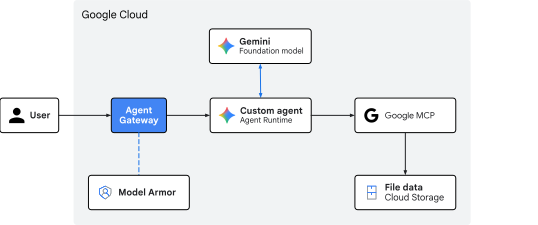
Fig 1. Codelab architecture
What you learn
- How to deploy Agent Gateway for screening ingress traffic to an agent
- How to configure Model Armor authorization extensions and delegation
- How to create and deploy custom Model Armor templates
- How to create and deploy custom Sensitive Data Protection templates
- How to test and validate LLM screening policies
What you need
- A Google Cloud project with billing enabled
- IAM permissions to provision networking services, BigQuery datasets, and Agent Platform resources
- A POSIX-compatible shell (
bashorzsh) with Google Cloud CLI (gcloudcomponent) installed - Command-line tools:
git,curl,jq(JSON processor), Python 3, anduv(Python package manager)
2. Concepts
Traffic direction and gateway roles
Agent Gateway functions as an agent-aware network proxy, but its operational role changes depending on the direction of the traffic:
- Agent-to-anywhere (egress) mode: functions as an outbound proxy. When an agent calls external database tools, third-party MCP servers, or APIs, the egress gateway manages service discovery, routing, mutual TLS (
mTLS), dynamic injection of OAuth credentials, and access control to endpoints. - Client-to-agent (ingress) mode: functions as a frontend security gateway. Its primary objective is protecting the entrance to the agent execution runtime by intercepting and sanitizing incoming natural language prompts before they reach the agentic code or AI models.
Ingress path to Agent Runtime
Client requests targeting an agent hosted on Agent Runtime are destined for the aiplatform.googleapis.com API endpoint.
POST https://${REGION}-aiplatform.googleapis.com/v1/projects/${PROJECT_ID}/locations/${REGION}/reasoningEngines/${RE_ENGINE_ID}:query
This inbound communication stream to the API endpoint represents the client-to-agent ingress path.
To secure this Google-managed ingress path, Agent Gateway integrates directly with the Google Front End (GFE) at the API serving infrastructure layer. When deploying a managed agent to Agent Runtime, Google natively binds the ingress gateway authorization policy to incoming client requests at the network edge.
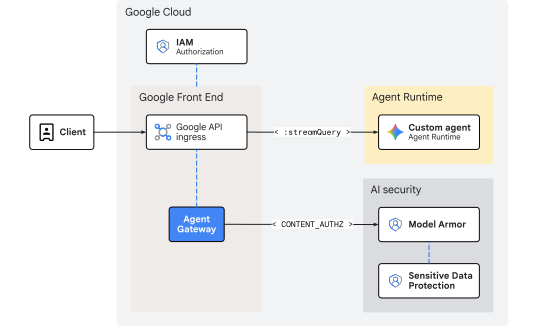
Fig 2. Ingress governance with Agent Gateway to Agent Runtime
Because inspection occurs at the frontend tier before requests enter Agent Runtime, this architecture introduces no additional networking overhead or internal hop latency. Scaling is automatically handled by the frontend infrastructure, eliminating the need to manage internal IP ranges, load balancers, or custom DNS routes.
Inline threat sanitization with Model Armor
Evaluating caller credentials and enforcing IAM access control (roles/aiplatform.user) is handled natively by the aiplatform API hosting tier. The ingress gateway itself does not perform identity authorization, but rather focuses on content security using authorization extensions configured with a CONTENT_AUTHZ profile. The gateway acts as an inline policy enforcement point, intercepting the natural-language prompts in transit before they reach the AI agent reasoning loop or underlying LLM.
When an incoming user prompt arrives at the frontend service, the gateway initiates an ext_proc (external processing) callout to the regional Model Armor authorization extension service, which streams the call to the Model Armor dataplane. Model Armor acts as a natural-language firewall, evaluating the text against active templates to scan for safety and security risks:
- Indirect prompt injections and jailbreak attempts
- Malicious URLs, toxic language, or unsafe content
- Personally identifiable information (
PII) and sensitive data leakage
If the template includes Sensitive Data Protection (SDP) filters, Model Armor makes an additional gRPC call to the Cloud SDP service. Cloud SDP inspects the payload using the specified template, performs any requested de-identification or redaction, and returns the sanitized result back up the chain to be forwarded safely.
If a policy violation or unredacted sensitive data match is detected, the gateway blocks or redacts the payload at the edge before entering the runtime. As a result, the running AI agent application remains protected and never processes malicious or unredacted payloads.
This concludes the concepts portion... next on to the Setup section.
3. Setup
Required IAM roles
The following roles are required to create the resources in this Codelab:
Category | Required IAM role (ID) | Description |
API management |
| Enable Google Cloud API services |
Networking & gateway |
| Provision Agent Gateway |
Service extensions |
| Configure routing extensions |
Network security |
| Deploy authorization policies |
Sensitive Data Protection |
| Manage SDP inspection and de-identify templates |
Model Armor |
| Create and manage safety templates |
Agent Platform |
| Deploy Agent Runtime workloads |
Cloud Storage |
| Manage deployment and customer data buckets |
IAM Administration |
| Bind project-level permissions for agent identity |
Logs & auditing |
| Inspect traces and audit logs |
Alternatively, use a broad basic role like roles/admin or legacy role roles/owner.
Access your project
This Codelab uses a single Google Cloud project. Configuration steps use gcloud CLI and Linux shell commands.
Start by accessing your Google Cloud project command line:
- Cloud Shell at
shell.cloud.google.com, or - A local terminal with
gcloudCLI installed
Set your Project ID
gcloud config set project SET_YOUR_PROJECT_ID_HERE
Authenticate session
# login to gcloud cli
gcloud auth login
# login for gcloud api
gcloud auth application-default login
Set shell environment variables
# set custom var for slug (eg, "foo") and region preference
export SLUG="foo"
export REGION="us-central1"
echo ${SLUG}
echo ${REGION}
# create project vars (automatic)
export PROJ_ID=$(gcloud config list --format="value(core.project)")
export PROJ_NO=$(gcloud projects describe ${PROJ_ID} --format="value(projectNumber)")
export ORG_ID=$(gcloud projects get-ancestors ${PROJ_ID} --format="value(id)" | tail -n 1)
export USER_IDENTITY=$(gcloud config get-value account)
echo ${PROJ_ID}
echo ${PROJ_NO}
echo ${ORG_ID}
echo ${USER_IDENTITY}
# create resource vars (automatic)
export AGW_NAME="agw-${SLUG}-${REGION}-cta"
export AGW_URI="projects/${PROJ_ID}/locations/${REGION}/agentGateways/${AGW_NAME}"
export RE_AGENT_NAME="agent-crm"
export RE_AGENT_ID_SET="principalSet://agents.global.org-${ORG_ID}.system.id.goog/attribute.platformContainer/aiplatform/projects/${PROJ_NO}"
export STAGING_BUCKET="agent-staging-${PROJ_NO}"
export DATA_BUCKET="customer-data-${PROJ_NO}"
export MCP_URL="https://storage.mtls.googleapis.com/storage/mcp"
echo ${AGW_NAME}
echo ${AGW_URI}
echo ${RE_AGENT_NAME}
echo ${RE_AGENT_ID_SET}
echo ${STAGING_BUCKET}
echo ${DATA_BUCKET}
echo ${MCP_URL}
# create local dir for config files
mkdir -p cfg
Update gcloud cli (recommended)
If running a self-managed install of the Google Cloud SDK (ie, outside of Cloud Shell), update the components to the latest version.
# update gcloud cli
gcloud components update
Enable API services
# enable google apis (agent platform bundle, part 1)
gcloud services enable \
  agentregistry.googleapis.com \
  aiplatform.googleapis.com \
  apphub.googleapis.com \
  apptopology.googleapis.com \
  cloudapiregistry.googleapis.com \
  cloudtrace.googleapis.com \
  compute.googleapis.com \
  dataform.googleapis.com \
  iam.googleapis.com \
  iamconnectors.googleapis.com \
  iap.googleapis.com \
  logging.googleapis.com \
  modelarmor.googleapis.com \
  monitoring.googleapis.com \
  networksecurity.googleapis.com \
  networkservices.googleapis.com \
  notebooks.googleapis.com \
  observability.googleapis.com
# enable google apis (agent platform bundle, part 2)
gcloud services enable \
  securitycenter.googleapis.com \
  saasservicemgmt.googleapis.com \
  storage.googleapis.com \
  telemetry.googleapis.com \
  texttospeech.googleapis.com
# enable google apis (all the rest)
gcloud services enable \
  dlp.googleapis.com
This concludes the setup portion... next on to the Gateway section.
4. Gateway
Deploy a Google-managed Agent Gateway operating in client-to-agent (CLIENT_TO_AGENT) mode. Unlike egress gateways that require Agent Registry associations to route outbound calls, the ingress gateway binds directly at the frontend tier to serve as the inline enforcement point for incoming prompts targeting Agent Runtime.
While egress policies often start in DRY_RUN mode at the gateway layer, ingress content governance (CONTENT_AUTHZ) is deployed directly in enforced mode. Granular audit-only logging or active blocking is instead controlled upstream within the individual Model Armor templates.
Create gateway
# create agent gateway config file
cat > cfg/${AGW_NAME}.yaml <<EOF
name: ${AGW_NAME}
protocols:
  - MCP
googleManaged:
  governedAccessPath: CLIENT_TO_AGENT
EOF
# import agent gateway config file (create gateway)
gcloud network-services agent-gateways import ${AGW_NAME} \
  --source="cfg/${AGW_NAME}.yaml" \
  --location=${REGION}
Verify gateway
# list agent gateways (in region)
gcloud network-services agent-gateways list --location=${REGION}
# show agent gateway details (verify deployment state)
gcloud network-services agent-gateways describe ${AGW_NAME} --location=${REGION}
This concludes the gateway portion... next on to the Model Armor section.
5. Model Armor
SDP templates
Create a Sensitive Data Protection (SDP) inspect and de-identify template to be used in the Model Armor response template. This configuration flags US Social Security Numbers (SSNs) for redaction.
Create inspect template
The inspect template identifies sensitive information (US_SOCIAL_SECURITY_NUMBER)in the data.
# create inspect template
curl -fsS -X POST "https://dlp.googleapis.com/v2/projects/${PROJ_ID}/locations/${REGION}/inspectTemplates" \
  -H "Authorization: Bearer $(gcloud auth application-default print-access-token)" \
  -H "Content-Type: application/json" -H "x-goog-user-project: ${PROJ_ID}" \
  -d @- << EOF
{
  "templateId": "agw-ssn-inspect-template",
  "inspectTemplate": {
    "displayName": "ssn inspect template",
    "inspectConfig": {
      "infoTypes": [
        { "name": "US_SOCIAL_SECURITY_NUMBER" }
      ],
      "minLikelihood": "POSSIBLE"
    }
  }
}
EOF
Create de-identify template
The de-identify template specifies the transformation to be applied to the SSNs found by the inspect template. In this case, the transformation is to replace the SSN with the info type.
# create de-identify template
curl -fsS -X POST "https://dlp.googleapis.com/v2/projects/${PROJ_ID}/locations/${REGION}/deidentifyTemplates" \
  -H "Authorization: Bearer $(gcloud auth application-default print-access-token)" \
  -H "Content-Type: application/json" -H "x-goog-user-project: ${PROJ_ID}" \
  -d @- << EOF
{
  "templateId": "agw-ssn-redaction-template",
  "deidentifyTemplate": {
    "displayName": "SSN Redaction Template",
    "deidentifyConfig": {
      "infoTypeTransformations": {
        "transformations": [{
          "primitiveTransformation": { "replaceWithInfoTypeConfig": {} }
        }]
      }
    }
  }
}
EOF
Verify SDP templates
# get (describe) inspect template
curl -fsS -X GET "https://dlp.googleapis.com/v2/projects/${PROJ_ID}/locations/${REGION}/inspectTemplates" \
  -H "Authorization: Bearer $(gcloud auth application-default print-access-token)" \
  -H "Content-Type: application/json" -H "x-goog-user-project: ${PROJ_ID}" | jq
# get (describe) de-identify template
curl -fsS -X GET "https://dlp.googleapis.com/v2/projects/${PROJ_ID}/locations/${REGION}/deidentifyTemplates" \
  -H "Authorization: Bearer $(gcloud auth application-default print-access-token)" \
  -H "Content-Type: application/json" -H "x-goog-user-project: ${PROJ_ID}" | jq
Model Armor templates
The default endpoint for the Model Armor API is global (modelarmor.googleapis.com). However, Model Armor resources for templates and evaluation engines are localized to specific geographic regions. The Google Cloud Regional Endpoint Proxy (REP), or regional API endpoint, for Model Armor is https://modelarmor.${LOCATION}.rep.googleapis.com/.
By default, when running gcloud model-armor ..., the CLI attempts to send API requests to the standard global endpoint (https://modelarmor.googleapis.com/). An API endpoint override is used to redirect all SDK/CLI HTTP requests for Model Armor directly to the regional rep.googleapis.com API tier where those location-bound templates are actually created, stored, and queried.
Set API override
# set api endpoint override per location
gcloud config set api_endpoint_overrides/modelarmor "https://modelarmor.${REGION}.rep.googleapis.com/"
Verify API override
# view api overrides on active gcloud config
gcloud config list api_endpoint_overrides/
Create request filter template
Create a request filter template to block hate speech, harassment, sexually explicit content, and URI injection attacks. Logging will be enabled to capture detailed event information about policy enforcement. Custom error codes and messages are also configured for when a request is blocked.
# create model armor template (request)
gcloud beta model-armor templates create ${AGW_NAME}-modar-req-template \
  --project=${PROJ_ID} \
  --location=${REGION} \
  --rai-settings-filters='[
    { "filterType": "HATE_SPEECH", "confidenceLevel": "MEDIUM_AND_ABOVE" },
    { "filterType": "HARASSMENT", "confidenceLevel": "MEDIUM_AND_ABOVE" },
    { "filterType": "SEXUALLY_EXPLICIT", "confidenceLevel": "MEDIUM_AND_ABOVE" }
  ]' \
  --pi-and-jailbreak-filter-settings-enforcement=enabled \
  --pi-and-jailbreak-filter-settings-confidence-level=medium-and-above \
  --template-metadata-enforcement-type=INSPECT_AND_BLOCK \
  --malicious-uri-filter-settings-enforcement=enabled \
  --template-metadata-custom-llm-response-safety-error-code=798 \
  --template-metadata-custom-llm-response-safety-error-message="ahoy! model response blocked by content filter :(" \
  --template-metadata-custom-prompt-safety-error-code=799 \
  --template-metadata-custom-prompt-safety-error-message="ahoy! the request was blocked by ye content filter... so rephrase the prompt and try again!" \
  --template-metadata-ignore-partial-invocation-failures \
  --template-metadata-log-operations \
  --template-metadata-log-sanitize-operations
Create response filter template
Create a response filter template to blocks the same content as the request filter template. DLP is configured on the response leg to de-identify SSNs for messages returning to the client from the agent.
# create model armor template (response)
gcloud beta model-armor templates create ${AGW_NAME}-modar-resp-template \
  --project=${PROJ_ID} \
  --location=${REGION} \
  --rai-settings-filters='[
      { "filterType": "HATE_SPEECH", "confidenceLevel": "MEDIUM_AND_ABOVE" },
      { "filterType": "HARASSMENT", "confidenceLevel": "MEDIUM_AND_ABOVE" },
      { "filterType": "SEXUALLY_EXPLICIT", "confidenceLevel": "MEDIUM_AND_ABOVE" }
  ]' \
  --malicious-uri-filter-settings-enforcement=enabled \
  --advanced-config-inspect-template=projects/${PROJ_ID}/locations/${REGION}/inspectTemplates/agw-ssn-inspect-template \
  --advanced-config-deidentify-template=projects/${PROJ_ID}/locations/${REGION}/deidentifyTemplates/agw-ssn-redaction-template \
  --template-metadata-enforcement-type=INSPECT_AND_BLOCK \
  --template-metadata-custom-llm-response-safety-error-code=798 \
  --template-metadata-custom-llm-response-safety-error-message="ahoy! model response blocked by content filter :(" \
  --template-metadata-custom-prompt-safety-error-code=799 \
  --template-metadata-custom-prompt-safety-error-message="ahoy! the request was blocked by ye content filter... so rephrase the prompt and try again!" \
  --template-metadata-ignore-partial-invocation-failures \
  --template-metadata-log-operations \
  --template-metadata-log-sanitize-operations
Verify Model Armor templates
# list model armor templates
gcloud model-armor templates list --location=${REGION}
# show request filter template details
gcloud model-armor templates describe ${AGW_NAME}-modar-req-template --location=${REGION}
# show response filter template details
gcloud model-armor templates describe ${AGW_NAME}-modar-resp-template --location=${REGION}
IAM permissions
Model Armor makes API calls to invoke the Sensitive Data Protection (SDP) service. Grant the Model Armor service identity IAM permissions to use SDP inspect and de-identify templates.
Bind IAM policy for Sensitive Data Protection
# grant dlp (sdp) user role to the model armor service identity
gcloud projects add-iam-policy-binding ${PROJ_ID} \
  --member="serviceAccount:service-${PROJ_NO}@gcp-sa-modelarmor.iam.gserviceaccount.com" \
  --role="roles/dlp.user"
Verify IAM permissions
# show iam policy for all dlp (sdp) roles on project
gcloud projects get-iam-policy ${PROJ_ID} \
  --flatten="bindings[].members" \
  --filter="bindings.role:roles/dlp" \
  --format="table(bindings.role:label=ROLE, bindings.members:label=PRINCIPAL_IDENTITY)"
This concludes the Model Armor portion... next on to the Authorization section.
6. Authorization
IAM permissions
To inspect inline traffic using Model Armor, the Service Extensions (DEP) service agent requires explicit IAM bindings (even across resources within the same project):
roles/modelarmor.calloutUser&roles/serviceusage.serviceUsageConsumer: Granted on the gateway project to allow inline inspection callouts.roles/modelarmor.user: Granted on the template project to allow access and evaluation of Model Armor templates.
Bind IAM policy for Model Armor
# grant model armor callout user role to dep (service extension) service agent
gcloud projects add-iam-policy-binding ${PROJ_ID} \
  --member="serviceAccount:service-${PROJ_NO}@gcp-sa-dep.iam.gserviceaccount.com" \
  --role="roles/modelarmor.calloutUser"

# grant service usage consumer role to dep (service extension) service agent
gcloud projects add-iam-policy-binding ${PROJ_ID} \
  --member="serviceAccount:service-${PROJ_NO}@gcp-sa-dep.iam.gserviceaccount.com" \
  --role="roles/serviceusage.serviceUsageConsumer"

# grant model armor user role to dep (service extension) service agent
gcloud projects add-iam-policy-binding ${PROJ_ID} \
  --member="serviceAccount:service-${PROJ_NO}@gcp-sa-dep.iam.gserviceaccount.com" \
  --role="roles/modelarmor.user"
Verify IAM permissions
# show iam policy on project for dep (service extension) service agent
gcloud projects get-iam-policy ${PROJ_ID} \
  --flatten="bindings[].members" \
  --filter="bindings.members:serviceAccount:service-${PROJ_NO}@gcp-sa-dep.iam.gserviceaccount.com" \
  --format="table(bindings.members:label=PRINCIPAL_IDENTITY, bindings.role:label=ROLE)"
Authorization extension
The authorization extension configuration for Agent Gateway defines the integration settings that will apply to incoming and outgoing payload traffic. The configuration defines the external processing service (service) which references the regional Model Armor API, and links to the specific request and response templates using the model_armor_settings metadata field.
Create authorization extension
# create authz extension config file (enforced mode)
cat > cfg/${AGW_NAME}-svc-ext-authz-modar.yaml <<EOF
name: ${AGW_NAME}-svc-ext-authz-modar
service: modelarmor.${REGION}.rep.googleapis.com
metadata:
  model_armor_settings: '[
    {
      "request_template_id": "projects/${PROJ_ID}/locations/${REGION}/templates/${AGW_NAME}-modar-req-template",
      "response_template_id": "projects/${PROJ_ID}/locations/${REGION}/templates/${AGW_NAME}-modar-resp-template"
    }
  ]'
failOpen: true
timeout: 5s
EOF
Import authz extension
# import authz extension file
gcloud service-extensions authz-extensions import ${AGW_NAME}-svc-ext-authz-modar \
  --source=cfg/${AGW_NAME}-svc-ext-authz-modar.yaml \
  --location=${REGION}
Verify authz extension
# list authz extensions
gcloud service-extensions authz-extensions list --location=${REGION}
# show authz extension details
gcloud service-extensions authz-extensions describe ${AGW_NAME}-svc-ext-authz-modar \
  --location=${REGION}
Authorization policy
Authorization policies use policy profiles to determine the type of evaluation performed. While request-based profiles (REQUEST_AUTHZ) evaluate HTTP headers, this configuration uses a content-based authorization profile (CONTENT_AUTHZ) to bind the Model Armor extension to the gateway for deep payload inspection.
Create authorization policy
# create authz policy config file (attach dry-run authz extension)
cat > cfg/${AGW_NAME}-authz-policy-modar.yaml <<EOF
name: ${AGW_NAME}-authz-policy-modar
target:
  resources:
    - "projects/${PROJ_ID}/locations/${REGION}/agentGateways/${AGW_NAME}"
policyProfile: CONTENT_AUTHZ
action: CUSTOM
customProvider:
  authzExtension:
    resources:
      - "projects/${PROJ_ID}/locations/${REGION}/authzExtensions/${AGW_NAME}-svc-ext-authz-modar"
EOF
Import authz policy
# import authz policy config file (enable authz policy)
gcloud beta network-security authz-policies import ${AGW_NAME}-authz-policy-modar \
  --source=cfg/${AGW_NAME}-authz-policy-modar.yaml \
  --location=${REGION}
Verify authz policy
# list authz policies
gcloud beta network-security authz-policies list --location=${REGION}
# show authz policy details
gcloud beta network-security authz-policies describe ${AGW_NAME}-authz-policy-modar \
  --location=${REGION}
This concludes the authorization portion... next on to the Codebase section.
7. Codebase
The agent code and file data used for this Codelab are maintained in a remote Google Cloud GitHub repository. The following steps will clone the repository locally, copy the necessary files to the current working directory structure, and then cleanup temporary files.
Fetch remote artifacts
# clone remote repository to temp local dir
git clone https://github.com/GoogleCloudPlatform/cloud-networking-solutions.git ./temp_agw_cuj_arun_ingress_modar
# copy agent runtime and endpoint definitions to working project dir
cp -r temp_agw_cuj_arun_ingress_modar/codelabs/agw-cuj-arun-ingress-modar/agent-crm ./agent-crm
# remove temporary directory
rm -rf temp_agw_cuj_arun_ingress_modar
A storage bucket for staging is used by Agent Runtime to upload, build, and deploy the packaged agent application code and its dependency artifacts.
Create storage bucket for staging
# create storage bucket
gcloud storage buckets create gs://${STAGING_BUCKET}   --location=${REGION}   --uniform-bucket-level-access
Verify storage bucket
# list storage buckets
gcloud storage buckets list --format="value(storage_url)"
This concludes the codebase portion... next on to the GCS Customer Data section.
Customer data
Create a Cloud Storage bucket to store customer data. The agent will read directly using the standard Google Cloud client library calling the Cloud Storage MCP endpoint.
Create storage bucket for customer data
# create storage bucket
gcloud storage buckets create gs://${DATA_BUCKET}   --location=${REGION}   --uniform-bucket-level-access
Verify storage bucket
# list storage buckets
gcloud storage buckets list --format="value(storage_url)"
Upload customer data
# copy local data to bucket
gcloud storage cp -r ./agent-crm/data/* gs://${DATA_BUCKET}/
Verify customer data
# list bucket objects
gcloud storage ls gs://${DATA_BUCKET}/ --long
This concludes the GCS Customer Data portion... next on to the ADK agent section.
8. ADK agent
The agent-crm ADK agent deployed to Agent Runtime is configured with the following settings in the deployment script to integrate with Agent Platform:
"identity_type": types.IdentityType.AGENT_IDENTITYto provision a unique SPIFFE-based principal identity for the agent"client_to_agent_config": {"agent_gateway": "${AGW_URI}"}to direct all inbound traffic for the agent to the Agent Gateway policy evaluation and enforcement path
The agent is also passed the mTLS MCP server URL for the Cloud Storage MCP server and the data bucket name to invoke the GCS MCP tool over a secure connection.
Deploy agent
# deploy agent
uv --directory agent-crm run python3 deploy_agent.py \
  --project=${PROJ_ID} \
  --region=${REGION} \
  --src-dir=./agent \
  --staging-bucket=${STAGING_BUCKET} \
  --display-name="${RE_AGENT_NAME}" \
  --description="agent for customer data" \
  --mcp-server-url="${MCP_URL}" \
  --data-bucket=${DATA_BUCKET} \
  --enable-telemetry \
  --enable-agent-identity \
  --agent-gateway-ingress=${AGW_URI} \
  --allow-token-sharing
Verify deployment
Fetch deployment vitals
# fetch agent runtime (reasoning engine) resource id
export RE_ENGINE_ID=$(curl -s -X GET "https://${REGION}-aiplatform.googleapis.com/v1/projects/${PROJ_ID}/locations/${REGION}/reasoningEngines" \
  -H "Authorization: Bearer $(gcloud auth application-default print-access-token)" \
  | jq -r --arg name "${RE_AGENT_NAME}" '.reasoningEngines[] | select(.displayName==$name) | .name | split("/") | last')
echo ${RE_ENGINE_ID}
# fetch agent runtime (reasoning engine) agent identity directly from reasoning engine
export RE_AGENT_IDENTITY="principal://$(curl -s \
  -H "Authorization: Bearer $(gcloud auth application-default print-access-token)" \
  "https://${REGION}-aiplatform.googleapis.com/v1beta1/projects/${PROJ_ID}/locations/${REGION}/reasoningEngines/${RE_ENGINE_ID}" \
  | jq -r '.spec.effectiveIdentity')"
echo ${RE_AGENT_IDENTITY}
Verify gateway config
# show agent runtime config details (gateway config)
curl -s -X GET "https://${REGION}-aiplatform.googleapis.com/v1/projects/${PROJ_ID}/locations/${REGION}/reasoningEngines/${RE_ENGINE_ID}" \
  -H "Authorization: Bearer $(gcloud auth application-default print-access-token)" \
  | jq '{displayName: .displayName, name: .name, effectiveIdentity: .spec.effectiveIdentity, agentGatewayConfig: .spec.deploymentSpec.agentGatewayConfig}'
IAM permissions
Bind IAM policies for agent identity
# grant mcp tool user role to agent set (all agent runtime agents in project)
gcloud projects add-iam-policy-binding ${PROJ_ID} \
  --member="${RE_AGENT_ID_SET}" \
  --role="roles/mcp.toolUser"
# grant storage object viewer role to agent identity
gcloud projects add-iam-policy-binding ${PROJ_ID} \
  --member="${RE_AGENT_IDENTITY}" \
  --role="roles/storage.objectViewer"

# grant aiplatform user role to agent identity
gcloud projects add-iam-policy-binding ${PROJ_ID} \
  --member="${RE_AGENT_IDENTITY}" \
  --role="roles/aiplatform.user"

# grant cloudtrace agent role to agent identity
gcloud projects add-iam-policy-binding ${PROJ_ID} \
  --member="${RE_AGENT_IDENTITY}" \
  --role="roles/cloudtrace.agent"

# grant cloud monitoring metric writer role to agent identity
gcloud projects add-iam-policy-binding ${PROJ_ID} \
  --member="${RE_AGENT_IDENTITY}" \
  --role="roles/monitoring.metricWriter"
# grant cloud logging log writer role to agent identity
gcloud projects add-iam-policy-binding ${PROJ_ID} \
  --member="${RE_AGENT_IDENTITY}" \
  --role="roles/logging.logWriter"

# grant telemetry writer role to agent identity
gcloud projects add-iam-policy-binding ${PROJ_ID} \
  --member="${RE_AGENT_IDENTITY}" \
  --role="roles/telemetry.writer"

# grant service usage consumer role to agent identity
gcloud projects add-iam-policy-binding ${PROJ_ID} \
  --member="${RE_AGENT_IDENTITY}" \
  --role="roles/serviceusage.serviceUsageConsumer"

# grant browser role to agent identity
gcloud projects add-iam-policy-binding ${PROJ_ID} \
  --member="${RE_AGENT_IDENTITY}" \
  --role="roles/browser"
Verify IAM permissions
# show agent identity roles on project
gcloud projects get-iam-policy ${PROJ_ID} \
  --flatten="bindings[].members" \
  --filter="bindings.members:${RE_AGENT_IDENTITY}" \
  --format="table(bindings.members.sub('^.*locations/', 'principal://agents.[...]/locations/'):label=PRINCIPAL_IDENTITY, bindings.role:label=ROLE)"
# show agent set roles on project
gcloud projects get-iam-policy ${PROJ_ID} \
  --flatten="bindings[].members" \
  --filter="bindings.members:${RE_AGENT_ID_SET}" \
  --format="table(bindings.members.sub('^.*platformContainer/', 'principalSet://agents.[...]/'):label=PRINCIPAL_IDENTITY, bindings.role:label=ROLE)"
This concludes the ADK agent portion... next on to the Test section.
9. Test
Submit queries from CLI
Test a safe prompt
# post query to agent streamQuery
curl --no-buffer -s -X POST "https://${REGION}-aiplatform.googleapis.com/v1beta1/projects/${PROJ_ID}/locations/${REGION}/reasoningEngines/${RE_ENGINE_ID}:streamQuery" \
  -H "Authorization: Bearer $(gcloud auth application-default print-access-token)" \
  -H "Content-Type: application/json" -H "X-Goog-User-Project: ${PROJ_ID}" \
  -d @- <<EOF | jq -r --unbuffered 'if type == "array" then .[] else . end | select(.content.parts != null) | .content.parts[].text // empty'
{
  "input": {
    "message": "what are the names of our west customers?",
    "user_id": "test-user"
  }
}
EOF
Should see response like... "Our west customers are: Bob Johnson and Alice Brown."
Test a redaction trigger
# post query to agent streamQuery
curl --no-buffer -s -X POST "https://${REGION}-aiplatform.googleapis.com/v1beta1/projects/${PROJ_ID}/locations/${REGION}/reasoningEngines/${RE_ENGINE_ID}:streamQuery" \
  -H "Authorization: Bearer $(gcloud auth application-default print-access-token)" \
  -H "Content-Type: application/json" -H "X-Goog-User-Project: ${PROJ_ID}" \
  -d @- <<EOF | jq -r --unbuffered 'if type == "array" then .[] else . end | select(.content.parts != null) | .content.parts[].text // empty'
{
  "input": {
    "message": "what are ssn's for bob johnson and alice brown?",
    "user_id": "test-user"
  }
}
EOF
Test another safe prompt
# post query to agent streamQuery
curl --no-buffer -s -X POST "https://${REGION}-aiplatform.googleapis.com/v1/projects/${PROJ_ID}/locations/${REGION}/reasoningEngines/${RE_ENGINE_ID}:streamQuery" \
  -H "Authorization: Bearer $(gcloud auth application-default print-access-token)" \
  -H "Content-Type: application/json" -H "X-Goog-User-Project: ${PROJ_ID}" \
  -d @- <<EOF | jq -r --unbuffered 'if type == "array" then .[] else . end | select(.content.parts != null) | .content.parts[].text // empty'
{
  "input": {
    "message": "what are bob johnson's and alice brown's email addresses?",
    "user_id": "test-user"
  }
}
EOF
Audit logs
View the trace logs
When telemetry is enabled, Agent Runtime streams structured events representing user queries, tool parameters, execution flows, and model choice outputs.
# show agent runtime (reasoning engine) telemetry and trace logs
gcloud logging read \
  "logName:\"projects/${PROJ_ID}/logs/aiplatform.googleapis.com%2Freasoning_engine_stdout\" AND labels.managed-by=\"reasoning-engine\"" \
  --project=${PROJ_ID} \
  --limit=15 \
  --format="table(
    timestamp.date(format=\"%I:%M:%S %p\", tz=LOCAL):label=TIME,
    trace.basename().sub('^(.{8}).*$', '\\1'):label=TRACE_ID,
    labels.\"event.name\".scope(-1):label=EVENT,
    jsonPayload.content.role:label=ROLE,
    jsonPayload.content.parts[0].text:label=TEXT_CONTENT,
    jsonPayload.content.parts[0].function_call.name:label=TOOL_CALL
  )"
The TRACE_ID groups the user query, intermediate tool calls, and model decisions together into a single timeline:
TIME         TRACE_ID  EVENT                  ROLE   TEXT_CONTENT                                     TOOL_CALL
HH:MM:SS PM  3070a1fd  gen_ai.choice          model  Bob Johnson's SSN is 219-45-7895.
                                                     Alice Brown's SSN is 219-45-7896.
HH:MM:SS PM  3070a1fd  gen_ai.user.message    user
HH:MM:SS PM  3070a1fd  gen_ai.user.message    model                                                   read_customer_file
HH:MM:SS PM  3070a1fd  gen_ai.user.message    user
HH:MM:SS PM  3070a1fd  gen_ai.user.message    model                                                   read_customer_file
HH:MM:SS PM  3070a1fd  gen_ai.user.message    user
HH:MM:SS PM  3070a1fd  gen_ai.user.message    model                                                   list_customer_files
HH:MM:SS PM  3070a1fd  gen_ai.user.message    user   what are ssn's for bob johnson and alice brown?
HH:MM:SS PM  3070a1fd  gen_ai.system.message
HH:MM:SS PM  3070a1fd  gen_ai.choice          model                                                   read_customer_file
View the Model Armor sanitize logs
These logs show the real-time, bidirectional inline threat and sanitization performed by Model Armor as traffic flows through the Agent Gateway.
# show model armor logs
gcloud logging read \
  "logName:\"projects/${PROJ_ID}/logs/modelarmor.googleapis.com%2Fsanitize_operations\"" \
  --project=${PROJ_ID} \
  --limit=50 \
  --format="table(
    timestamp.date(format=\"%I:%M:%S %p\", tz=LOCAL):label=TIME,
    jsonPayload.sanitizationResult.sanitizationVerdict:label=VERDICT,
    jsonPayload.sanitizationInput.byteItem.byteData.decode(base64).decode(utf-8).sub('\n', ' \\\\\\\\n ').trailoff(123):label=INPUT_DATA
  )"
Notice the log entry for the sanitized and blocked request.
TIME         VERDICT                                 INPUT_DATA
HH:MM:SS PM  MODEL_ARMOR_SANITIZATION_VERDICT_ALLOW  Bob Johnson's email address is bob.j@example.com. \n Alice Brown's email address is alice.b...
HH:MM:SS PM  MODEL_ARMOR_SANITIZATION_VERDICT_ALLOW  what are bob johnson's and alice brown's email addresses?
HH:MM:SS PM  MODEL_ARMOR_SANITIZATION_VERDICT_BLOCK  6��
HH:MM:SS PM  MODEL_ARMOR_SANITIZATION_VERDICT_ALLOW  what are ssn's for bob johnson and alice brown?
HH:MM:SS PM  MODEL_ARMOR_SANITIZATION_VERDICT_ALLOW  Our west customers are: Bob Johnson and Alice Brown.
HH:MM:SS PM  MODEL_ARMOR_SANITIZATION_VERDICT_ALLOW  what are the names of our west customers?
This concludes the Test portion... next on to the Cleanup section.
10. Cleanup
# remove agent iam bindings
gcloud -q projects remove-iam-policy-binding ${PROJ_ID} --member="${RE_AGENT_IDENTITY}" --role="roles/storage.objectViewer"
gcloud -q projects remove-iam-policy-binding ${PROJ_ID} --member="${RE_AGENT_IDENTITY}" --role="roles/aiplatform.user"
gcloud -q projects remove-iam-policy-binding ${PROJ_ID} --member="${RE_AGENT_IDENTITY}" --role="roles/cloudtrace.agent"
gcloud -q projects remove-iam-policy-binding ${PROJ_ID} --member="${RE_AGENT_IDENTITY}" --role="roles/monitoring.metricWriter"

# next
# remove more agent and agent set iam bindings
gcloud -q projects remove-iam-policy-binding ${PROJ_ID} --member="${RE_AGENT_IDENTITY}" --role="roles/logging.logWriter"
gcloud -q projects remove-iam-policy-binding ${PROJ_ID} --member="${RE_AGENT_IDENTITY}" --role="roles/telemetry.writer"
gcloud -q projects remove-iam-policy-binding ${PROJ_ID} --member="${RE_AGENT_IDENTITY}" --role="roles/serviceusage.serviceUsageConsumer"
gcloud -q projects remove-iam-policy-binding ${PROJ_ID} --member="${RE_AGENT_IDENTITY}" --role="roles/browser"

# next
# remove rest of iam bindings
gcloud -q projects remove-iam-policy-binding ${PROJ_ID} --member="${RE_AGENT_ID_SET}" --role="roles/mcp.toolUser"
gcloud -q projects remove-iam-policy-binding ${PROJ_ID} --member="serviceAccount:service-${PROJ_NO}@gcp-sa-modelarmor.iam.gserviceaccount.com" --role="roles/dlp.user"

# next
# delete agent runtime (reasoning engine) agent
curl -s -X DELETE "https://${REGION}-aiplatform.googleapis.com/v1/projects/${PROJ_ID}/locations/${REGION}/reasoningEngines/${RE_ENGINE_ID}?force=true" \
  -H "Authorization: Bearer $(gcloud auth application-default print-access-token)" \
  -H "Content-Type: application/json"

# next
# delete storage
gcloud -q storage rm --recursive gs://${STAGING_BUCKET}
gcloud -q storage rm --recursive gs://${DATA_BUCKET}

# next
# delete authz resources
gcloud -q beta network-security authz-policies delete ${AGW_NAME}-authz-policy-modar --location=${REGION}

gcloud -q beta service-extensions authz-extensions delete ${AGW_NAME}-svc-ext-authz-modar --location=${REGION} --async

# next
# remove dep (service extensions) service agent iam bindings
gcloud -q projects remove-iam-policy-binding ${PROJ_ID} \
  --member="serviceAccount:service-${PROJ_NO}@gcp-sa-dep.iam.gserviceaccount.com" \
  --role="roles/modelarmor.calloutUser"

gcloud -q projects remove-iam-policy-binding ${PROJ_ID} \
  --member="serviceAccount:service-${PROJ_NO}@gcp-sa-dep.iam.gserviceaccount.com" \
  --role="roles/serviceusage.serviceUsageConsumer"

gcloud -q projects remove-iam-policy-binding ${PROJ_ID} \
  --member="serviceAccount:service-${PROJ_NO}@gcp-sa-dep.iam.gserviceaccount.com" \
  --role="roles/modelarmor.user"

# next
# delete model armor templates
gcloud -q model-armor templates delete ${AGW_NAME}-modar-resp-template --location=${REGION}
gcloud -q model-armor templates delete ${AGW_NAME}-modar-req-template --location=${REGION}

# unset model armor api endpoint override
gcloud config unset api_endpoint_overrides/modelarmor

# next
# delete sdp (dlp) templates
curl -fsS -X DELETE "https://dlp.googleapis.com/v2/projects/${PROJ_ID}/locations/${REGION}/deidentifyTemplates/agw-ssn-redaction-template" \
  -H "Authorization: Bearer $(gcloud auth application-default print-access-token)" \
  -H "x-goog-user-project: ${PROJ_ID}"

curl -fsS -X DELETE "https://dlp.googleapis.com/v2/projects/${PROJ_ID}/locations/${REGION}/inspectTemplates/agw-ssn-inspect-template" \
  -H "Authorization: Bearer $(gcloud auth application-default print-access-token)" \
  -H "x-goog-user-project: ${PROJ_ID}"

# next
# delete agent gateway ingress
gcloud -q network-services agent-gateways delete ${AGW_NAME} --location=${REGION} --async

# end
This concludes the cleanup portion... next on to the Conclusion section.
11. Conclusion
Congratulations! You have successfully deployed Agent Gateway and governed inbound traffic to an AI agent!

Cosmopup thinks Codelabs are peachy keen!
What is next?
- Check out the Gemini Enterprise Agent Platform docs for advanced features and tutorials
- Configure Model Armor guardrails on Agent Gateway for additional AI safety and security
- Explore Semantic Governance Policies to enforce business rules and compliance for natural language queries
Feel free to offer any comments, questions, or corrections by using this feedback form.
Thank you!