

1. はじめに
この Codelab では、Agent Runtime でホストされている AI エージェントの Agent Gateway 上り(内向き)ガバナンスについて説明します。
上り(内向き)(クライアントからエージェント)モードで動作する Agent Gateway は、クライアント(人間のエンドユーザー、デスクトップ エージェント、コーディング IDE、ピア エージェントなど)と Agent Runtime でホストされるエージェント間の通信の制御をサポートします。このモードは、クライアントから送信されたインバウンド プロンプト インジェクション攻撃や有害なコンテンツからエージェントを保護するために使用されます。すべてのインバウンド トラフィックは、認可拡張機能と Model Armor を使用して処理され、すべてのエージェント インタラクションのネットワーク エントリ ポイントが保護されます。
構築内容
- 内向き(クライアントからエージェントへ)モードの Agent Gateway
- Model Armor の認可拡張機能
- エージェント ID を持つ Agent Runtime ADK エージェント
- MCP を使用してエージェントがクエリした Cloud Storage ファイルデータ
- LLM プロンプトとレスポンスをスクリーニングするための Model Armor テンプレート
- データを匿名化するための Sensitive Data Protection テンプレート
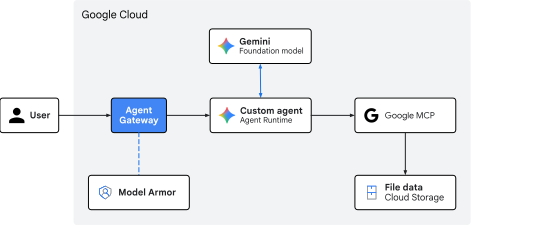
図 1. Codelab アーキテクチャ
学習内容
- エージェントへの上り(内向き)トラフィックをスクリーニングするために Agent Gateway をデプロイする方法
- Model Armor の認可拡張機能と委任を構成する方法
- カスタム Model Armor テンプレートを作成してデプロイする方法
- Sensitive Data Protection のカスタム テンプレートを作成してデプロイする方法
- LLM スクリーニング ポリシーをテストして検証する方法
必要なもの
- 課金を有効にした Google Cloud プロジェクト
- ネットワーキング サービス、BigQuery データセット、Agent Platform リソースをプロビジョニングする IAM 権限
- Google Cloud CLI(
gcloudコンポーネント)がインストールされた POSIX 互換シェル(bashまたはzsh) - コマンドライン ツール:
git、curl、jq(JSON プロセッサ)、Python 3、uv(Python パッケージ マネージャー)
2. コンセプト
トラフィックの方向とゲートウェイのロール
Agent Gateway はエージェント対応のネットワーク プロキシとして機能しますが、トラフィックの方向に応じて運用上の役割が変わります。
- エージェントからどこへでも(下り)モード: アウトバウンド プロキシとして機能します。エージェントが外部データベース ツール、サードパーティの MCP サーバー、API を呼び出すと、下り(外向き)ゲートウェイは、サービス ディスカバリ、ルーティング、相互 TLS(
mTLS)、OAuth 認証情報の動的挿入、エンドポイントへのアクセス制御を管理します。 - クライアントからエージェントへの(上り)モード: フロントエンド セキュリティ ゲートウェイとして機能します。主な目的は、エージェント実行ランタイムへの入り口を保護することです。そのため、エージェント コードや AI モデルに到達する前に、受信した自然言語プロンプトをインターセプトしてサニタイズします。
Agent Runtime への上り(内向き)パス
Agent Runtime でホストされているエージェントをターゲットとするクライアント リクエストは、aiplatform.googleapis.com API エンドポイント宛てになります。
POST https://${REGION}-aiplatform.googleapis.com/v1/projects/${PROJECT_ID}/locations/${REGION}/reasoningEngines/${RE_ENGINE_ID}:query
API エンドポイントへのこのインバウンド通信ストリームは、クライアントからエージェントへの上り(内向き)パスを表します。
この Google マネージド上り(内向き)パスを保護するために、Agent Gateway は API サービング インフラストラクチャ レイヤで Google Front End(GFE)と直接統合されます。マネージド エージェントを Agent Runtime にデプロイすると、Google は上り(内向き)ゲートウェイの認可ポリシーをネットワーク エッジで受信するクライアント リクエストにネイティブにバインドします。
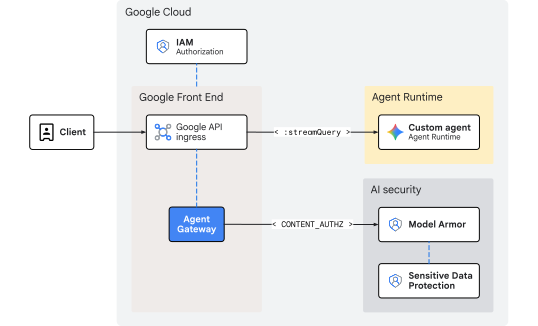
図 2. Agent Gateway から Agent Runtime への Ingress ガバナンス
検査は、リクエストが Agent Runtime に入る前のフロントエンド階層で行われるため、このアーキテクチャでは、追加のネットワーク オーバーヘッドや内部ホップ レイテンシは発生しません。スケーリングはフロントエンド インフラストラクチャによって自動的に処理されるため、内部 IP 範囲、ロードバランサ、カスタム DNS ルートを管理する必要がありません。
Model Armor によるインライン脅威サニタイズ
呼び出し元の認証情報の評価と IAM アクセス制御の適用(roles/aiplatform.user)は、aiplatform API ホスティング ティアによってネイティブに処理されます。上り(内向き)ゲートウェイ自体は ID 認証を行いません。代わりに、CONTENT_AUTHZ プロファイルで構成された認証拡張機能を使用して、コンテンツ セキュリティに重点を置いています。ゲートウェイはインラインのポリシー適用ポイントとして機能し、AI エージェントの推論ループまたは基盤となる LLM に到達する前に、転送中の自然言語プロンプトをインターセプトします。
ユーザー プロンプトがフロントエンド サービスに到着すると、ゲートウェイはリージョン Model Armor 認可拡張機能サービスへの ext_proc(外部処理)コールアウトを開始し、コールを Model Armor データプレーンにストリーミングします。Model Armor は自然言語ファイアウォールとして機能し、アクティブなテンプレートに対してテキストを評価して、安全性とセキュリティのリスクをスキャンします。
- 間接プロンプト インジェクションとジェイルブレイクの試行
- 悪意のある URL、有害な表現、危険なコンテンツ
- 個人を特定できる情報(
PII)とセンシティブ データの漏洩
テンプレートに Sensitive Data Protection(SDP)フィルタが含まれている場合、Model Armor は Cloud SDP サービスに対して追加の gRPC 呼び出しを行います。Cloud SDP は、指定されたテンプレートを使用してペイロードを検査し、リクエストされた匿名化または秘匿化を実行して、安全に転送されるようにサニタイズされた結果をチェーンに戻します。
ポリシー違反または未編集のセンシティブ データの一致が検出されると、ゲートウェイはランタイムに入る前にエッジでペイロードをブロックまたは編集します。その結果、実行中の AI エージェント アプリケーションは保護された状態が維持され、悪意のあるペイロードや編集されていないペイロードが処理されることはありません。
これでコンセプトの説明は終わりです。次は セットアップ セクションに進みます。
3. セットアップ
必要な IAM のロール
この Codelab でリソースを作成するには、次のロールが必要です。
カテゴリ | 必要な IAM ロール(ID) | 説明 |
API 管理 |
| Google Cloud API サービスを有効にする |
ネットワーキングとゲートウェイ |
| Agent Gateway をプロビジョニングする |
Service Extensions |
| ルーティング拡張機能を構成する |
ネットワーク セキュリティ |
| 認可ポリシーをデプロイする |
Sensitive Data Protection |
| SDP 検査テンプレートと匿名化テンプレートを管理する |
Model Armor |
| 安全テンプレートの作成と管理 |
Agent Platform |
| Agent Runtime ワークロードをデプロイする |
Cloud Storage |
| デプロイと顧客データ バケットを管理する |
IAM 管理 |
| エージェント ID のプロジェクト レベルの権限をバインドする |
ログと監査 |
| トレースと監査ログを検査する |
または、roles/admin などの広範な基本ロールや、以前のロール roles/owner を使用します。
プロジェクトにアクセスする
この Codelab では、1 つの Google Cloud プロジェクトを使用します。構成手順では、gcloud CLI と Linux シェルコマンドを使用します。
まず、Google Cloud プロジェクトのコマンドラインにアクセスします。
shell.cloud.google.comの Cloud ShellgcloudCLI がインストールされているローカル ターミナル
プロジェクト ID を設定する
gcloud config set project SET_YOUR_PROJECT_ID_HERE
セッションを認証する
# login to gcloud cli
gcloud auth login
# login for gcloud api
gcloud auth application-default login
シェル環境変数を設定する
# set custom var for slug (eg, "foo") and region preference
export SLUG="foo"
export REGION="us-central1"
echo ${SLUG}
echo ${REGION}
# create project vars (automatic)
export PROJ_ID=$(gcloud config list --format="value(core.project)")
export PROJ_NO=$(gcloud projects describe ${PROJ_ID} --format="value(projectNumber)")
export ORG_ID=$(gcloud projects get-ancestors ${PROJ_ID} --format="value(id)" | tail -n 1)
export USER_IDENTITY=$(gcloud config get-value account)
echo ${PROJ_ID}
echo ${PROJ_NO}
echo ${ORG_ID}
echo ${USER_IDENTITY}
# create resource vars (automatic)
export AGW_NAME="agw-${SLUG}-${REGION}-cta"
export AGW_URI="projects/${PROJ_ID}/locations/${REGION}/agentGateways/${AGW_NAME}"
export RE_AGENT_NAME="agent-crm"
export RE_AGENT_ID_SET="principalSet://agents.global.org-${ORG_ID}.system.id.goog/attribute.platformContainer/aiplatform/projects/${PROJ_NO}"
export STAGING_BUCKET="agent-staging-${PROJ_NO}"
export DATA_BUCKET="customer-data-${PROJ_NO}"
export MCP_URL="https://storage.mtls.googleapis.com/storage/mcp"
echo ${AGW_NAME}
echo ${AGW_URI}
echo ${RE_AGENT_NAME}
echo ${RE_AGENT_ID_SET}
echo ${STAGING_BUCKET}
echo ${DATA_BUCKET}
echo ${MCP_URL}
# create local dir for config files
mkdir -p cfg
gcloud cli を更新(推奨)
Google Cloud SDK のセルフマネージド インストール(Cloud Shell の外部)を実行している場合は、コンポーネントを最新バージョンに更新します。
# update gcloud cli
gcloud components update
API サービスを有効にする
# enable google apis (agent platform bundle, part 1)
gcloud services enable \
  agentregistry.googleapis.com \
  aiplatform.googleapis.com \
  apphub.googleapis.com \
  apptopology.googleapis.com \
  cloudapiregistry.googleapis.com \
  cloudtrace.googleapis.com \
  compute.googleapis.com \
  dataform.googleapis.com \
  iam.googleapis.com \
  iamconnectors.googleapis.com \
  iap.googleapis.com \
  logging.googleapis.com \
  modelarmor.googleapis.com \
  monitoring.googleapis.com \
  networksecurity.googleapis.com \
  networkservices.googleapis.com \
  notebooks.googleapis.com \
  observability.googleapis.com
# enable google apis (agent platform bundle, part 2)
gcloud services enable \
  securitycenter.googleapis.com \
  saasservicemgmt.googleapis.com \
  storage.googleapis.com \
  telemetry.googleapis.com \
  texttospeech.googleapis.com
# enable google apis (all the rest)
gcloud services enable \
  dlp.googleapis.com
これでセットアップ部分は終了です。次は Gateway セクションに進みます。
4. ゲートウェイ
クライアントからエージェント(CLIENT_TO_AGENT)モードで動作する Google 管理の Agent Gateway をデプロイします。アウトバウンド通話をルーティングするためにエージェント レジストリの関連付けが必要な下り(外向き)ゲートウェイとは異なり、上り(内向き)ゲートウェイはフロントエンド ティアに直接バインドされ、Agent Runtime をターゲットとする受信プロンプトのインライン適用ポイントとして機能します。
通常、下り(外向き)ポリシーはゲートウェイ レイヤで DRY_RUN モードで開始されますが、上り(内向き)コンテンツ ガバナンス(CONTENT_AUTHZ)は自動適用モードで直接デプロイされます。きめ細かい監査専用のロギングまたはアクティブなブロックは、個々の Model Armor テンプレート内で上流で制御されます。
ゲートウェイを作成
# create agent gateway config file
cat > cfg/${AGW_NAME}.yaml <<EOF
name: ${AGW_NAME}
protocols:
  - MCP
googleManaged:
  governedAccessPath: CLIENT_TO_AGENT
EOF
# import agent gateway config file (create gateway)
gcloud network-services agent-gateways import ${AGW_NAME} \
  --source="cfg/${AGW_NAME}.yaml" \
  --location=${REGION}
ゲートウェイを確認する
# list agent gateways (in region)
gcloud network-services agent-gateways list --location=${REGION}
# show agent gateway details (verify deployment state)
gcloud network-services agent-gateways describe ${AGW_NAME} --location=${REGION}
ゲートウェイに関する説明は以上です。次は Model Armor セクションに進みます。
5. Model Armor
SDP テンプレート
Model Armor レスポンス テンプレートで使用する Sensitive Data Protection(SDP)の検査テンプレートと匿名化テンプレートを作成します。この構成では、米国の社会保障番号(SSN)を編集対象としてフラグ設定します。
検査テンプレートを作成する
検査テンプレートは、データ内の機密情報(US_SOCIAL_SECURITY_NUMBER)を識別します。
# create inspect template
curl -fsS -X POST "https://dlp.googleapis.com/v2/projects/${PROJ_ID}/locations/${REGION}/inspectTemplates" \
  -H "Authorization: Bearer $(gcloud auth application-default print-access-token)" \
  -H "Content-Type: application/json" -H "x-goog-user-project: ${PROJ_ID}" \
  -d @- << EOF
{
  "templateId": "agw-ssn-inspect-template",
  "inspectTemplate": {
    "displayName": "ssn inspect template",
    "inspectConfig": {
      "infoTypes": [
        { "name": "US_SOCIAL_SECURITY_NUMBER" }
      ],
      "minLikelihood": "POSSIBLE"
    }
  }
}
EOF
匿名化テンプレートを作成する
匿名化テンプレートは、検査テンプレートで検出された SSN に適用する変換を指定します。この場合、変換は SSN を情報タイプに置き換えることです。
# create de-identify template
curl -fsS -X POST "https://dlp.googleapis.com/v2/projects/${PROJ_ID}/locations/${REGION}/deidentifyTemplates" \
  -H "Authorization: Bearer $(gcloud auth application-default print-access-token)" \
  -H "Content-Type: application/json" -H "x-goog-user-project: ${PROJ_ID}" \
  -d @- << EOF
{
  "templateId": "agw-ssn-redaction-template",
  "deidentifyTemplate": {
    "displayName": "SSN Redaction Template",
    "deidentifyConfig": {
      "infoTypeTransformations": {
        "transformations": [{
          "primitiveTransformation": { "replaceWithInfoTypeConfig": {} }
        }]
      }
    }
  }
}
EOF
SDP テンプレートを確認する
# get (describe) inspect template
curl -fsS -X GET "https://dlp.googleapis.com/v2/projects/${PROJ_ID}/locations/${REGION}/inspectTemplates" \
  -H "Authorization: Bearer $(gcloud auth application-default print-access-token)" \
  -H "Content-Type: application/json" -H "x-goog-user-project: ${PROJ_ID}" | jq
# get (describe) de-identify template
curl -fsS -X GET "https://dlp.googleapis.com/v2/projects/${PROJ_ID}/locations/${REGION}/deidentifyTemplates" \
  -H "Authorization: Bearer $(gcloud auth application-default print-access-token)" \
  -H "Content-Type: application/json" -H "x-goog-user-project: ${PROJ_ID}" | jq
Model Armor テンプレート
Model Armor API のデフォルト エンドポイントはグローバル(modelarmor.googleapis.com)です。ただし、テンプレートと評価エンジンの Model Armor リソースは、特定の地理的リージョンにローカライズされています。Model Armor の Google Cloud リージョン エンドポイント プロキシ(REP)またはリージョン API エンドポイントは https://modelarmor.${LOCATION}.rep.googleapis.com/ です。
デフォルトでは、gcloud model-armor ... を実行すると、CLI は標準のグローバル エンドポイント(https://modelarmor.googleapis.com/)に API リクエストを送信しようとします。API エンドポイントのオーバーライドは、Model Armor のすべての SDK/CLI HTTP リクエストを、ロケーション バインド テンプレートが実際に作成、保存、クエリされるリージョン rep.googleapis.com API 階層に直接リダイレクトするために使用されます。
API のオーバーライドを設定する
# set api endpoint override per location
gcloud config set api_endpoint_overrides/modelarmor "https://modelarmor.${REGION}.rep.googleapis.com/"
API のオーバーライドを確認する
# view api overrides on active gcloud config
gcloud config list api_endpoint_overrides/
リクエスト フィルタ テンプレートを作成する
ヘイトスピーチ、ハラスメント、性的描写が露骨なコンテンツ、URI インジェクション攻撃をブロックするリクエスト フィルタ テンプレートを作成します。ロギングが有効になり、ポリシーの適用に関する詳細なイベント情報がキャプチャされます。リクエストがブロックされたときにカスタム エラーコードとメッセージも構成されます。
# create model armor template (request)
gcloud beta model-armor templates create ${AGW_NAME}-modar-req-template \
  --project=${PROJ_ID} \
  --location=${REGION} \
  --rai-settings-filters='[
    { "filterType": "HATE_SPEECH", "confidenceLevel": "MEDIUM_AND_ABOVE" },
    { "filterType": "HARASSMENT", "confidenceLevel": "MEDIUM_AND_ABOVE" },
    { "filterType": "SEXUALLY_EXPLICIT", "confidenceLevel": "MEDIUM_AND_ABOVE" }
  ]' \
  --pi-and-jailbreak-filter-settings-enforcement=enabled \
  --pi-and-jailbreak-filter-settings-confidence-level=medium-and-above \
  --template-metadata-enforcement-type=INSPECT_AND_BLOCK \
  --malicious-uri-filter-settings-enforcement=enabled \
  --template-metadata-custom-llm-response-safety-error-code=798 \
  --template-metadata-custom-llm-response-safety-error-message="ahoy! model response blocked by content filter :(" \
  --template-metadata-custom-prompt-safety-error-code=799 \
  --template-metadata-custom-prompt-safety-error-message="ahoy! the request was blocked by ye content filter... so rephrase the prompt and try again!" \
  --template-metadata-ignore-partial-invocation-failures \
  --template-metadata-log-operations \
  --template-metadata-log-sanitize-operations
レスポンス フィルタ テンプレートを作成する
リクエスト フィルタ テンプレートと同じコンテンツをブロックするレスポンス フィルタ テンプレートを作成します。DLP は、エージェントからクライアントに返されるメッセージの SSN を匿名化するようにレスポンス レッグで構成されています。
# create model armor template (response)
gcloud beta model-armor templates create ${AGW_NAME}-modar-resp-template \
  --project=${PROJ_ID} \
  --location=${REGION} \
  --rai-settings-filters='[
      { "filterType": "HATE_SPEECH", "confidenceLevel": "MEDIUM_AND_ABOVE" },
      { "filterType": "HARASSMENT", "confidenceLevel": "MEDIUM_AND_ABOVE" },
      { "filterType": "SEXUALLY_EXPLICIT", "confidenceLevel": "MEDIUM_AND_ABOVE" }
  ]' \
  --malicious-uri-filter-settings-enforcement=enabled \
  --advanced-config-inspect-template=projects/${PROJ_ID}/locations/${REGION}/inspectTemplates/agw-ssn-inspect-template \
  --advanced-config-deidentify-template=projects/${PROJ_ID}/locations/${REGION}/deidentifyTemplates/agw-ssn-redaction-template \
  --template-metadata-enforcement-type=INSPECT_AND_BLOCK \
  --template-metadata-custom-llm-response-safety-error-code=798 \
  --template-metadata-custom-llm-response-safety-error-message="ahoy! model response blocked by content filter :(" \
  --template-metadata-custom-prompt-safety-error-code=799 \
  --template-metadata-custom-prompt-safety-error-message="ahoy! the request was blocked by ye content filter... so rephrase the prompt and try again!" \
  --template-metadata-ignore-partial-invocation-failures \
  --template-metadata-log-operations \
  --template-metadata-log-sanitize-operations
Model Armor テンプレートを検証する
# list model armor templates
gcloud model-armor templates list --location=${REGION}
# show request filter template details
gcloud model-armor templates describe ${AGW_NAME}-modar-req-template --location=${REGION}
# show response filter template details
gcloud model-armor templates describe ${AGW_NAME}-modar-resp-template --location=${REGION}
IAM の権限
Model Armor は、Sensitive Data Protection(SDP)サービスを呼び出すために API 呼び出しを行います。Model Armor サービス ID に、SDP 検査テンプレートと匿名化テンプレートを使用するための IAM 権限を付与します。
Sensitive Data Protection の IAM ポリシーをバインドする
# grant dlp (sdp) user role to the model armor service identity
gcloud projects add-iam-policy-binding ${PROJ_ID} \
  --member="serviceAccount:service-${PROJ_NO}@gcp-sa-modelarmor.iam.gserviceaccount.com" \
  --role="roles/dlp.user"
IAM 権限を確認する
# show iam policy for all dlp (sdp) roles on project
gcloud projects get-iam-policy ${PROJ_ID} \
  --flatten="bindings[].members" \
  --filter="bindings.role:roles/dlp" \
  --format="table(bindings.role:label=ROLE, bindings.members:label=PRINCIPAL_IDENTITY)"
これで Model Armor の説明は終わりです。次は、認可セクションに進みます。
6. 認可
IAM の権限
Model Armor を使用してインライン トラフィックを検査するには、Service Extensions(DEP)サービス エージェントに明示的な IAM バインディングが必要です(同じプロジェクト内のリソース間でも)。
roles/modelarmor.calloutUserとroles/serviceusage.serviceUsageConsumer: インライン検査コールアウトを許可するために、ゲートウェイ プロジェクトに付与されます。roles/modelarmor.user: テンプレート プロジェクトに付与され、Model Armor テンプレートへのアクセスと評価を許可します。
Model Armor の IAM ポリシーをバインドする
# grant model armor callout user role to dep (service extension) service agent
gcloud projects add-iam-policy-binding ${PROJ_ID} \
  --member="serviceAccount:service-${PROJ_NO}@gcp-sa-dep.iam.gserviceaccount.com" \
  --role="roles/modelarmor.calloutUser"

# grant service usage consumer role to dep (service extension) service agent
gcloud projects add-iam-policy-binding ${PROJ_ID} \
  --member="serviceAccount:service-${PROJ_NO}@gcp-sa-dep.iam.gserviceaccount.com" \
  --role="roles/serviceusage.serviceUsageConsumer"

# grant model armor user role to dep (service extension) service agent
gcloud projects add-iam-policy-binding ${PROJ_ID} \
  --member="serviceAccount:service-${PROJ_NO}@gcp-sa-dep.iam.gserviceaccount.com" \
  --role="roles/modelarmor.user"
IAM 権限を確認する
# show iam policy on project for dep (service extension) service agent
gcloud projects get-iam-policy ${PROJ_ID} \
  --flatten="bindings[].members" \
  --filter="bindings.members:serviceAccount:service-${PROJ_NO}@gcp-sa-dep.iam.gserviceaccount.com" \
  --format="table(bindings.members:label=PRINCIPAL_IDENTITY, bindings.role:label=ROLE)"
認可拡張機能
Agent Gateway の認可拡張機能の構成では、送受信ペイロード トラフィックに適用される統合設定を定義します。この構成では、リージョン Model Armor API を参照する外部処理サービス(service)を定義し、model_armor_settings メタデータ フィールドを使用して特定のリクエスト テンプレートとレスポンス テンプレートにリンクします。
認可拡張機能を作成する
# create authz extension config file (enforced mode)
cat > cfg/${AGW_NAME}-svc-ext-authz-modar.yaml <<EOF
name: ${AGW_NAME}-svc-ext-authz-modar
service: modelarmor.${REGION}.rep.googleapis.com
metadata:
  model_armor_settings: '[
    {
      "request_template_id": "projects/${PROJ_ID}/locations/${REGION}/templates/${AGW_NAME}-modar-req-template",
      "response_template_id": "projects/${PROJ_ID}/locations/${REGION}/templates/${AGW_NAME}-modar-resp-template"
    }
  ]'
failOpen: true
timeout: 5s
EOF
認可拡張機能をインポートする
# import authz extension file
gcloud service-extensions authz-extensions import ${AGW_NAME}-svc-ext-authz-modar \
  --source=cfg/${AGW_NAME}-svc-ext-authz-modar.yaml \
  --location=${REGION}
認可拡張機能を確認する
# list authz extensions
gcloud service-extensions authz-extensions list --location=${REGION}
# show authz extension details
gcloud service-extensions authz-extensions describe ${AGW_NAME}-svc-ext-authz-modar \
  --location=${REGION}
認可ポリシー
認可ポリシーは、ポリシー プロファイルを使用して実行される評価のタイプを決定します。リクエスト ベースのプロファイル(REQUEST_AUTHZ)は HTTP ヘッダーを評価しますが、この構成ではコンテンツ ベースの認可プロファイル(CONTENT_AUTHZ)を使用して、Model Armor 拡張機能をゲートウェイにバインドし、ペイロードの詳細な検査を行います。
認可ポリシーを作成する
# create authz policy config file (attach dry-run authz extension)
cat > cfg/${AGW_NAME}-authz-policy-modar.yaml <<EOF
name: ${AGW_NAME}-authz-policy-modar
target:
  resources:
    - "projects/${PROJ_ID}/locations/${REGION}/agentGateways/${AGW_NAME}"
policyProfile: CONTENT_AUTHZ
action: CUSTOM
customProvider:
  authzExtension:
    resources:
      - "projects/${PROJ_ID}/locations/${REGION}/authzExtensions/${AGW_NAME}-svc-ext-authz-modar"
EOF
認可ポリシーをインポートする
# import authz policy config file (enable authz policy)
gcloud beta network-security authz-policies import ${AGW_NAME}-authz-policy-modar \
  --source=cfg/${AGW_NAME}-authz-policy-modar.yaml \
  --location=${REGION}
認可ポリシーを検証する
# list authz policies
gcloud beta network-security authz-policies list --location=${REGION}
# show authz policy details
gcloud beta network-security authz-policies describe ${AGW_NAME}-authz-policy-modar \
  --location=${REGION}
これで認可に関する説明は終わりです。次は Codebase セクションに進みます。
7. コードベース
この Codelab で使用するエージェント コードとファイルデータは、リモートの Google Cloud GitHub リポジトリで管理されています。次の手順では、リポジトリをローカルに複製し、必要なファイルを現在の作業ディレクトリ構造にコピーしてから、一時ファイルをクリーンアップします。
リモート アーティファクトを取得する
# clone remote repository to temp local dir
git clone https://github.com/GoogleCloudPlatform/cloud-networking-solutions.git ./temp_agw_cuj_arun_ingress_modar
# copy agent runtime and endpoint definitions to working project dir
cp -r temp_agw_cuj_arun_ingress_modar/codelabs/agw-cuj-arun-ingress-modar/agent-crm ./agent-crm
# remove temporary directory
rm -rf temp_agw_cuj_arun_ingress_modar
ステージング用のストレージ バケットは、パッケージ化されたエージェント アプリケーション コードとその依存関係アーティファクトをアップロード、ビルド、デプロイするために Agent Runtime で使用されます。
ステージング用のストレージ バケットを作成する
# create storage bucket
gcloud storage buckets create gs://${STAGING_BUCKET} --location=${REGION}
ストレージ バケットを確認する
# list storage buckets
gcloud storage buckets list --format="value(storage_url)"
これでコードベースの説明は終わりです。次は GCS 顧客データのセクションに進みます。
顧客データ
顧客データを保存する Cloud Storage バケットを作成します。エージェントは、Cloud Storage MCP エンドポイントを呼び出す標準の Google Cloud クライアント ライブラリを使用して直接読み取ります。
顧客データ用のストレージ バケットを作成する
# create storage bucket
gcloud storage buckets create gs://${DATA_BUCKET} --location=${REGION}
ストレージ バケットを確認する
# list storage buckets
gcloud storage buckets list --format="value(storage_url)"
顧客データをアップロードする
# copy local data to bucket
gcloud storage cp -r ./agent-crm/data/* gs://${DATA_BUCKET}/
顧客データを確認する
# list bucket objects
gcloud storage ls gs://${DATA_BUCKET}/ --long
これで GCS のお客様のデータに関する説明は終了です。次は ADK エージェントのセクションに進みます。
8. ADK エージェント
Agent Runtime にデプロイされた agent-crm ADK エージェントは、Agent Platform と統合するために、デプロイ スクリプトで次の設定で構成されます。
"identity_type": types.IdentityType.AGENT_IDENTITY: エージェントに一意の SPIFFE ベースのプリンシパル ID をプロビジョニングします。"client_to_agent_config": {"agent_gateway": "${AGW_URI}"}: エージェントのすべてのインバウンド トラフィックを Agent Gateway のポリシー評価と適用パスに転送します。
エージェントには、Cloud Storage MCP サーバーの mTLS MCP サーバー URL とデータバケット名も渡され、安全な接続を介して GCS MCP ツールを呼び出します。
エージェントをデプロイする
# deploy agent
uv --directory agent-crm run python3 deploy_agent.py \
  --project=${PROJ_ID} \
  --region=${REGION} \
  --src-dir=./agent \
  --staging-bucket=${STAGING_BUCKET} \
  --display-name="${RE_AGENT_NAME}" \
  --description="agent for customer data" \
  --mcp-server-url="${MCP_URL}" \
  --data-bucket=${DATA_BUCKET} \
  --enable-telemetry \
  --enable-agent-identity \
  --agent-gateway-ingress=${AGW_URI} \
  --allow-token-sharing
デプロイメントを確認する
デプロイのバイタルを取得する
# fetch agent runtime (reasoning engine) resource id
export RE_ENGINE_ID=$(curl -s -X GET "https://${REGION}-aiplatform.googleapis.com/v1/projects/${PROJ_ID}/locations/${REGION}/reasoningEngines" \
  -H "Authorization: Bearer $(gcloud auth application-default print-access-token)" \
  | jq -r --arg name "${RE_AGENT_NAME}" '.reasoningEngines[] | select(.displayName==$name) | .name | split("/") | last')
echo ${RE_ENGINE_ID}
# fetch agent runtime (reasoning engine) agent identity
export RE_AGENT_IDENTITY=$(gcloud agent-registry agents list \
  --project=${PROJ_ID} --location=${REGION} --filter="displayName=${RE_AGENT_NAME}" \
  --format="value(attributes.'agentregistry.googleapis.com/system/RuntimeIdentity'.principal)")
echo ${RE_AGENT_IDENTITY}
ゲートウェイ構成を確認する
# show agent runtime config details (gateway config)
curl -s -X GET "https://${REGION}-aiplatform.googleapis.com/v1/projects/${PROJ_ID}/locations/${REGION}/reasoningEngines/${RE_ENGINE_ID}" \
  -H "Authorization: Bearer $(gcloud auth application-default print-access-token)" \
  | jq '{displayName: .displayName, name: .name, effectiveIdentity: .spec.effectiveIdentity, agentGatewayConfig: .spec.deploymentSpec.agentGatewayConfig}'
IAM の権限
エージェント ID の IAM ポリシーをバインドする
# grant mcp tool user role to agent set (all agent runtime agents in project)
gcloud projects add-iam-policy-binding ${PROJ_ID} \
  --member="${RE_AGENT_ID_SET}" \
  --role="roles/mcp.toolUser"
# grant storage object viewer role to agent identity
gcloud projects add-iam-policy-binding ${PROJ_ID} \
  --member="${RE_AGENT_IDENTITY}" \
  --role="roles/storage.objectViewer"

# grant aiplatform user role to agent identity
gcloud projects add-iam-policy-binding ${PROJ_ID} \
  --member="${RE_AGENT_IDENTITY}" \
  --role="roles/aiplatform.user"

# grant cloudtrace agent role to agent identity
gcloud projects add-iam-policy-binding ${PROJ_ID} \
  --member="${RE_AGENT_IDENTITY}" \
  --role="roles/cloudtrace.agent"

# grant cloud monitoring metric writer role to agent identity
gcloud projects add-iam-policy-binding ${PROJ_ID} \
  --member="${RE_AGENT_IDENTITY}" \
  --role="roles/monitoring.metricWriter"
# grant cloud logging log writer role to agent identity
gcloud projects add-iam-policy-binding ${PROJ_ID} \
  --member="${RE_AGENT_IDENTITY}" \
  --role="roles/logging.logWriter"

# grant telemetry writer role to agent identity
gcloud projects add-iam-policy-binding ${PROJ_ID} \
  --member="${RE_AGENT_IDENTITY}" \
  --role="roles/telemetry.writer"

# grant service usage consumer role to agent identity
gcloud projects add-iam-policy-binding ${PROJ_ID} \
  --member="${RE_AGENT_IDENTITY}" \
  --role="roles/serviceusage.serviceUsageConsumer"

# grant browser role to agent identity
gcloud projects add-iam-policy-binding ${PROJ_ID} \
  --member="${RE_AGENT_IDENTITY}" \
  --role="roles/browser"
IAM 権限を確認する
# show agent identity roles on project
gcloud projects get-iam-policy ${PROJ_ID} \
  --flatten="bindings[].members" \
  --filter="bindings.members:${RE_AGENT_IDENTITY}" \
  --format="table(bindings.members.sub('^.*locations/', 'principal://agents.[...]/locations/'):label=PRINCIPAL_IDENTITY, bindings.role:label=ROLE)"
# show agent set roles on project
gcloud projects get-iam-policy ${PROJ_ID} \
  --flatten="bindings[].members" \
  --filter="bindings.members:${RE_AGENT_ID_SET}" \
  --format="table(bindings.members.sub('^.*platformContainer/', 'principalSet://agents.[...]/'):label=PRINCIPAL_IDENTITY, bindings.role:label=ROLE)"
ADK エージェントに関する説明は以上です。次はテストのセクションに進みます。
9. テスト
CLI からクエリを送信する
安全なプロンプトをテストする
# post query to agent streamQuery
curl --no-buffer -s -X POST "https://${REGION}-aiplatform.googleapis.com/v1beta1/projects/${PROJ_ID}/locations/${REGION}/reasoningEngines/${RE_ENGINE_ID}:streamQuery" \
  -H "Authorization: Bearer $(gcloud auth application-default print-access-token)" \
  -H "Content-Type: application/json" -H "X-Goog-User-Project: ${PROJ_ID}" \
  -d @- <<EOF | jq -r --unbuffered 'if type == "array" then .[] else . end | select(.content.parts != null) | .content.parts[].text // empty'
{
  "input": {
    "message": "what are the names of our west customers?",
    "user_id": "test-user"
  }
}
EOF
次のようなレスポンスが表示されます。「西部の顧客は、ボブ ジョンソンとアリス ブラウンです。」
秘匿化トリガーをテストする
# post query to agent streamQuery
curl --no-buffer -s -X POST "https://${REGION}-aiplatform.googleapis.com/v1beta1/projects/${PROJ_ID}/locations/${REGION}/reasoningEngines/${RE_ENGINE_ID}:streamQuery" \
  -H "Authorization: Bearer $(gcloud auth application-default print-access-token)" \
  -H "Content-Type: application/json" -H "X-Goog-User-Project: ${PROJ_ID}" \
  -d @- <<EOF | jq -r --unbuffered 'if type == "array" then .[] else . end | select(.content.parts != null) | .content.parts[].text // empty'
{
  "input": {
    "message": "what are ssn's for bob johnson and alice brown?",
    "user_id": "test-user"
  }
}
EOF
別の安全なプロンプトをテストする
# post query to agent streamQuery
curl --no-buffer -s -X POST "https://${REGION}-aiplatform.googleapis.com/v1/projects/${PROJ_ID}/locations/${REGION}/reasoningEngines/${RE_ENGINE_ID}:streamQuery" \
  -H "Authorization: Bearer $(gcloud auth application-default print-access-token)" \
  -H "Content-Type: application/json" -H "X-Goog-User-Project: ${PROJ_ID}" \
  -d @- <<EOF | jq -r --unbuffered 'if type == "array" then .[] else . end | select(.content.parts != null) | .content.parts[].text // empty'
{
  "input": {
    "message": "what are bob johnson's and alice brown's email addresses?",
    "user_id": "test-user"
  }
}
EOF
監査ログ
トレースログを表示する
テレメトリーが有効になっている場合、Agent Runtime は、ユーザーのクエリ、ツール パラメータ、実行フロー、モデル選択の出力を表す構造化イベントをストリーミングします。
# show agent runtime (reasoning engine) telemetry and trace logs
gcloud logging read \
  "logName:\"projects/${PROJ_ID}/logs/aiplatform.googleapis.com%2Freasoning_engine_stdout\" AND labels.managed-by=\"reasoning-engine\"" \
  --project=${PROJ_ID} \
  --limit=15 \
  --format="table(
    timestamp.date(format=\"%I:%M:%S %p\", tz=LOCAL):label=TIME,
    trace.basename().sub('^(.{8}).*$', '\\1'):label=TRACE_ID,
    labels.\"event.name\".scope(-1):label=EVENT,
    jsonPayload.content.role:label=ROLE,
    jsonPayload.content.parts[0].text:label=TEXT_CONTENT,
    jsonPayload.content.parts[0].function_call.name:label=TOOL_CALL
  )"
TRACE_ID は、ユーザー クエリ、中間ツール呼び出し、モデルの決定を 1 つのタイムラインにグループ化します。
TIME         TRACE_ID  EVENT                  ROLE   TEXT_CONTENT                                     TOOL_CALL
HH:MM:SS PM  3070a1fd  gen_ai.choice          model  Bob Johnson's SSN is 219-45-7895.
                                                     Alice Brown's SSN is 219-45-7896.
HH:MM:SS PM  3070a1fd  gen_ai.user.message    user
HH:MM:SS PM  3070a1fd  gen_ai.user.message    model                                                   read_customer_file
HH:MM:SS PM  3070a1fd  gen_ai.user.message    user
HH:MM:SS PM  3070a1fd  gen_ai.user.message    model                                                   read_customer_file
HH:MM:SS PM  3070a1fd  gen_ai.user.message    user
HH:MM:SS PM  3070a1fd  gen_ai.user.message    model                                                   list_customer_files
HH:MM:SS PM  3070a1fd  gen_ai.user.message    user   what are ssn's for bob johnson and alice brown?
HH:MM:SS PM  3070a1fd  gen_ai.system.message
HH:MM:SS PM  3070a1fd  gen_ai.choice          model                                                   read_customer_file
Model Armor のサニタイズ ログを表示する
これらのログには、トラフィックが Agent Gateway を通過する際に Model Armor によって実行されるリアルタイムの双方向インライン脅威とサニタイズが表示されます。
# show model armor logs
gcloud logging read \
  "logName:\"projects/${PROJ_ID}/logs/modelarmor.googleapis.com%2Fsanitize_operations\"" \
  --project=${PROJ_ID} \
  --limit=50 \
  --format="table(
    timestamp.date(format=\"%I:%M:%S %p\", tz=LOCAL):label=TIME,
    jsonPayload.sanitizationResult.sanitizationVerdict:label=VERDICT,
    jsonPayload.sanitizationInput.byteItem.byteData.decode(base64).decode(utf-8).sub('\n', ' \\\\\\\\n ').trailoff(123):label=INPUT_DATA
  )"
サニタイズされてブロックされたリクエストのログエントリを確認します。
TIME         VERDICT                                 INPUT_DATA
HH:MM:SS PM  MODEL_ARMOR_SANITIZATION_VERDICT_ALLOW  Bob Johnson's email address is bob.j@example.com. \n Alice Brown's email address is alice.b...
HH:MM:SS PM  MODEL_ARMOR_SANITIZATION_VERDICT_ALLOW  what are bob johnson's and alice brown's email addresses?
HH:MM:SS PM  MODEL_ARMOR_SANITIZATION_VERDICT_BLOCK  6��
HH:MM:SS PM  MODEL_ARMOR_SANITIZATION_VERDICT_ALLOW  what are ssn's for bob johnson and alice brown?
HH:MM:SS PM  MODEL_ARMOR_SANITIZATION_VERDICT_ALLOW  Our west customers are: Bob Johnson and Alice Brown.
HH:MM:SS PM  MODEL_ARMOR_SANITIZATION_VERDICT_ALLOW  what are the names of our west customers?
テストの説明は以上です。次はクリーンアップ セクションに進みます。
10. クリーンアップ
# remove agent iam bindings
gcloud -q projects remove-iam-policy-binding ${PROJ_ID} --member="${RE_AGENT_IDENTITY}" --role="roles/storage.objectViewer"
gcloud -q projects remove-iam-policy-binding ${PROJ_ID} --member="${RE_AGENT_IDENTITY}" --role="roles/aiplatform.user"
gcloud -q projects remove-iam-policy-binding ${PROJ_ID} --member="${RE_AGENT_IDENTITY}" --role="roles/cloudtrace.agent"
gcloud -q projects remove-iam-policy-binding ${PROJ_ID} --member="${RE_AGENT_IDENTITY}" --role="roles/monitoring.metricWriter"

# next
# remove more agent and agent set iam bindings
gcloud -q projects remove-iam-policy-binding ${PROJ_ID} --member="${RE_AGENT_IDENTITY}" --role="roles/logging.logWriter"
gcloud -q projects remove-iam-policy-binding ${PROJ_ID} --member="${RE_AGENT_IDENTITY}" --role="roles/telemetry.writer"
gcloud -q projects remove-iam-policy-binding ${PROJ_ID} --member="${RE_AGENT_IDENTITY}" --role="roles/serviceusage.serviceUsageConsumer"
gcloud -q projects remove-iam-policy-binding ${PROJ_ID} --member="${RE_AGENT_IDENTITY}" --role="roles/browser"

# next
# remove rest of iam bindings
gcloud -q projects remove-iam-policy-binding ${PROJ_ID} --member="${RE_AGENT_ID_SET}" --role="roles/mcp.toolUser"
gcloud -q projects remove-iam-policy-binding ${PROJ_ID} --member="serviceAccount:service-${PROJ_NO}@gcp-sa-modelarmor.iam.gserviceaccount.com" --role="roles/dlp.user"

# next
# delete agent runtime (reasoning engine) agent
curl -s -X DELETE "https://${REGION}-aiplatform.googleapis.com/v1/projects/${PROJ_ID}/locations/${REGION}/reasoningEngines/${RE_ENGINE_ID}?force=true" \
  -H "Authorization: Bearer $(gcloud auth application-default print-access-token)" \
  -H "Content-Type: application/json"

# next
# delete storage
gcloud -q storage rm --recursive gs://${STAGING_BUCKET}
gcloud -q storage rm --recursive gs://${DATA_BUCKET}

# next
# delete authz resources
gcloud -q beta network-security authz-policies delete ${AGW_NAME}-authz-policy-modar --location=${REGION}

gcloud -q beta service-extensions authz-extensions delete ${AGW_NAME}-svc-ext-authz-modar --location=${REGION} --async

# next
# remove dep (service extensions) service agent iam bindings
gcloud -q projects remove-iam-policy-binding ${PROJ_ID} \
  --member="serviceAccount:service-${PROJ_NO}@gcp-sa-dep.iam.gserviceaccount.com" \
  --role="roles/modelarmor.calloutUser"

gcloud -q projects remove-iam-policy-binding ${PROJ_ID} \
  --member="serviceAccount:service-${PROJ_NO}@gcp-sa-dep.iam.gserviceaccount.com" \
  --role="roles/serviceusage.serviceUsageConsumer"

gcloud -q projects remove-iam-policy-binding ${PROJ_ID} \
  --member="serviceAccount:service-${PROJ_NO}@gcp-sa-dep.iam.gserviceaccount.com" \
  --role="roles/modelarmor.user"

# next
# delete model armor templates
gcloud -q model-armor templates delete ${AGW_NAME}-modar-resp-template --location=${REGION}
gcloud -q model-armor templates delete ${AGW_NAME}-modar-req-template --location=${REGION}

# unset model armor api endpoint override
gcloud config unset api_endpoint_overrides/modelarmor

# next
# delete sdp (dlp) templates
curl -fsS -X DELETE "https://dlp.googleapis.com/v2/projects/${PROJ_ID}/locations/${REGION}/deidentifyTemplates/agw-ssn-redaction-template" \
  -H "Authorization: Bearer $(gcloud auth application-default print-access-token)" \
  -H "x-goog-user-project: ${PROJ_ID}"

curl -fsS -X DELETE "https://dlp.googleapis.com/v2/projects/${PROJ_ID}/locations/${REGION}/inspectTemplates/agw-ssn-inspect-template" \
  -H "Authorization: Bearer $(gcloud auth application-default print-access-token)" \
  -H "x-goog-user-project: ${PROJ_ID}"

# next
# delete agent gateway ingress
gcloud -q network-services agent-gateways delete ${AGW_NAME} --location=${REGION} --async

# end
これでクリーンアップは完了です。次のまとめのセクションに進みます。
11. まとめ
おめでとうございます!Agent Gateway をデプロイし、AI エージェントへのインバウンド トラフィックを管理しました。

Cosmopup は Codelab を気に入っています。
次のステップ
- 高度な機能とチュートリアルについては、Gemini Enterprise Agent Platform のドキュメントをご覧ください。
- AI の安全性とセキュリティを強化するために、Agent Gateway で Model Armor ガードレールを構成する
- セマンティック ガバナンス ポリシーを調べて、自然言語クエリのビジネスルールとコンプライアンスを適用する
ご意見、ご質問、修正点などがありましたら、こちらのフィードバック フォームからお気軽にお寄せください。
ありがとうございました