

1. 簡介
本程式碼實驗室將探討 Agent Gateway 的輸入管理機制,適用於在 Agent Runtime 上執行的 AI 代理。
Agent Gateway 在輸入 (用戶端到代理程式) 模式下運作,可控管用戶端 (真人使用者、電腦代理程式、程式碼 IDE、同層級代理程式等) 與 Agent Runtime 代管代理程式之間的通訊。這個模式可用於保護代理程式,防範用戶傳送的提示詞注入攻擊或有害內容。所有連入流量都會透過授權擴充功能和 Model Armor 處理,確保所有代理互動的網路進入點安全無虞。
建構內容
- 輸入 (用戶端至代理) 模式的 Agent Gateway
- Model Armor 授權擴充功能
- 具有代理身分的 Agent Runtime ADK 代理
- 代理程式使用 MCP 查詢 Cloud Storage 檔案資料
- 篩選 LLM 提示詞和回覆的 Model Armor 範本
- 用於將資料去識別化的 Sensitive Data Protection 範本
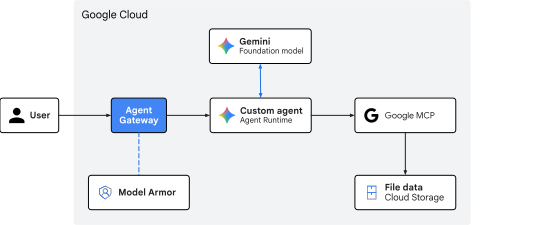
圖 1. 程式碼研究室架構
課程內容
- 如何部署 Agent Gateway,篩選代理的輸入流量
- 如何設定 Model Armor 授權擴充功能和委派
- 如何建立及部署自訂 Model Armor 範本
- 如何建立及部署自訂 Sensitive Data Protection 範本
- 如何測試及驗證 LLM 篩選政策
需求條件
- 已啟用計費功能的 Google Cloud 雲端專案
- 佈建網路服務、BigQuery 資料集和 Agent Platform 資源的 IAM 權限
- 已安裝 Google Cloud CLI (
gcloud元件) 的 POSIX 相容 Shell (bash或zsh) - 指令列工具:
git、curl、jq(JSON 處理器)、Python 3 和uv(Python 套件管理工具)
2. 概念
流量方向和閘道角色
Agent Gateway 可做為可感知代理程式的網路 Proxy,但其運作角色會因流量方向而異:
- 代理至任何位置 (輸出) 模式:做為輸出 Proxy。當代理呼叫外部資料庫工具、第三方 MCP 伺服器或 API 時,輸出閘道會管理服務探索、路由、相互 TLS (
mTLS)、OAuth 憑證的動態插入,以及端點的存取控管。 - 用戶端到代理程式 (進入) 模式:可做為前端安全閘道。主要目標是保護代理程式執行階段的入口,方法是在傳送至代理程式碼或 AI 模型之前,攔截並清理傳入的自然語言提示。
Agent Runtime 的輸入路徑
以 Agent Runtime 託管的代理為目標的用戶端要求,會傳送到 aiplatform.googleapis.com API 端點。
POST https://${REGION}-aiplatform.googleapis.com/v1/projects/${PROJECT_ID}/locations/${REGION}/reasoningEngines/${RE_ENGINE_ID}:query
這個 API 端點的傳入通訊串流代表「用戶端到代理程式」的進入路徑。
為確保這個 Google 管理的連入路徑安全無虞,Agent Gateway 會在 API 服務基礎架構層直接與 Google Front End (GFE) 整合。將受管理代理程式部署至 Agent Runtime 時,Google 會在網路邊緣,將輸入閘道授權政策原生繫結至傳入的用戶端要求。
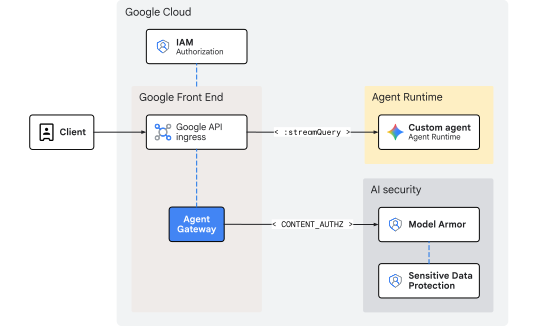
圖 2. 使用 Agent Gateway 管理 Agent Runtime 的輸入流量
由於檢查作業會在要求進入 Agent Runtime 之前,於前端層級進行,因此這種架構不會造成額外的網路負擔或內部躍點延遲。前端基礎架構會自動處理擴充作業,因此您不必管理內部 IP 範圍、負載平衡器或自訂 DNS 路徑。
使用 Model Armor 內嵌清理威脅
評估呼叫端憑證並強制執行 IAM 存取控管 (roles/aiplatform.user),是由 aiplatform API 主機層原生處理。Ingress 閘道本身不會執行身分授權,而是使用透過 CONTENT_AUTHZ 設定檔設定的授權擴充功能,著重於內容安全性。閘道會做為內嵌政策執行點,在自然語言提示傳輸途中攔截,避免提示抵達 AI 代理程式推論迴圈或基礎 LLM。
當前端服務收到使用者提示時,閘道會向區域 Model Armor 授權擴充服務發出 ext_proc (外部處理) 呼叫,並將呼叫串流至 Model Armor 資料平面。Model Armor 就像自然語言防火牆,會根據有效範本評估文字,掃描安全風險:
- 間接提示詞注入和越獄嘗試
- 惡意網址、有害語言或不安全內容
- 個人識別資訊 (
PII) 和機密資料外洩
如果範本包含 Sensitive Data Protection (SDP) 篩選器,Model Armor 會額外發出 gRPC 呼叫至 Cloud SDP 服務。Cloud SDP 會使用指定的範本檢查酬載、執行任何要求的去識別化或遮蓋作業,並將清理後的結果傳回鏈結,以安全轉送。
如果系統偵測到違規政策或未經過編輯的機密資料相符,閘道會在進入執行階段前,封鎖或編輯邊緣的酬載。因此,執行中的 AI 代理應用程式仍受到保護,絕不會處理惡意或未經過濾的酬載。
概念部分到此結束,接下來請前往「設定」部分。
3. 設定
必要的 IAM 角色
如要在本程式碼研究室中建立資源,您必須具備下列角色:
類別 | 必要 IAM 角色 (ID) | 說明 |
API 管理 |
| 啟用 Google Cloud API 服務 |
網路和閘道 |
| 佈建 Agent Gateway |
Service Extensions |
| 設定轉送擴充功能 |
網路安全 |
| 部署授權政策 |
Sensitive Data Protection |
| 管理 SDP 檢查和去識別化範本 |
Model Armor |
| 建立及管理安全範本 |
Agent Platform |
| 部署 Agent Runtime 工作負載 |
Cloud Storage |
| 管理部署作業和顧客數位資料值區 |
IAM 管理 |
| 繫結代理程式身分專案層級權限 |
記錄和稽核 |
| 檢查追蹤記錄和稽核記錄 |
或者,您也可以使用廣泛的基本角色 (例如 roles/admin) 或舊版角色 roles/owner。
存取專案
本程式碼研究室使用單一 Google Cloud 雲端專案。設定步驟會使用 gcloud CLI 和 Linux 殼層指令。
首先,請存取 Google Cloud 雲端專案指令列:
- Cloud Shell (
shell.cloud.google.com) 或 - 已安裝
gcloudCLI 的本機終端機
設定專案 ID
gcloud config set project SET_YOUR_PROJECT_ID_HERE
驗證工作階段
# login to gcloud cli
gcloud auth login
# login for gcloud api
gcloud auth application-default login
設定殼層環境變數
# set custom var for slug (eg, "foo") and region preference
export SLUG="foo"
export REGION="us-central1"
echo ${SLUG}
echo ${REGION}
# create project vars (automatic)
export PROJ_ID=$(gcloud config list --format="value(core.project)")
export PROJ_NO=$(gcloud projects describe ${PROJ_ID} --format="value(projectNumber)")
export ORG_ID=$(gcloud projects get-ancestors ${PROJ_ID} --format="value(id)" | tail -n 1)
export USER_IDENTITY=$(gcloud config get-value account)
echo ${PROJ_ID}
echo ${PROJ_NO}
echo ${ORG_ID}
echo ${USER_IDENTITY}
# create resource vars (automatic)
export AGW_NAME="agw-${SLUG}-${REGION}-cta"
export AGW_URI="projects/${PROJ_ID}/locations/${REGION}/agentGateways/${AGW_NAME}"
export RE_AGENT_NAME="agent-crm"
export RE_AGENT_ID_SET="principalSet://agents.global.org-${ORG_ID}.system.id.goog/attribute.platformContainer/aiplatform/projects/${PROJ_NO}"
export STAGING_BUCKET="agent-staging-${PROJ_NO}"
export DATA_BUCKET="customer-data-${PROJ_NO}"
export MCP_URL="https://storage.mtls.googleapis.com/storage/mcp"
echo ${AGW_NAME}
echo ${AGW_URI}
echo ${RE_AGENT_NAME}
echo ${RE_AGENT_ID_SET}
echo ${STAGING_BUCKET}
echo ${DATA_BUCKET}
echo ${MCP_URL}
# create local dir for config files
mkdir -p cfg
更新 gcloud cli (建議)
如果執行自行管理的 Google Cloud SDK 安裝作業 (即在 Cloud Shell 外部),請將元件更新至最新版本。
# update gcloud cli
gcloud components update
啟用 API 服務
# enable google apis (agent platform bundle, part 1)
gcloud services enable \
  agentregistry.googleapis.com \
  aiplatform.googleapis.com \
  apphub.googleapis.com \
  apptopology.googleapis.com \
  cloudapiregistry.googleapis.com \
  cloudtrace.googleapis.com \
  compute.googleapis.com \
  dataform.googleapis.com \
  iam.googleapis.com \
  iamconnectors.googleapis.com \
  iap.googleapis.com \
  logging.googleapis.com \
  modelarmor.googleapis.com \
  monitoring.googleapis.com \
  networksecurity.googleapis.com \
  networkservices.googleapis.com \
  notebooks.googleapis.com \
  observability.googleapis.com
# enable google apis (agent platform bundle, part 2)
gcloud services enable \
  securitycenter.googleapis.com \
  saasservicemgmt.googleapis.com \
  storage.googleapis.com \
  telemetry.googleapis.com \
  texttospeech.googleapis.com
# enable google apis (all the rest)
gcloud services enable \
  dlp.googleapis.com
設定部分到此結束,接下來請前往「閘道」部分。
4. 閘道
部署以用戶端對代理程式 (CLIENT_TO_AGENT) 模式運作的 Google 代管 Agent Gateway。與需要 Agent Registry 關聯來轉送輸出呼叫的輸出閘道不同,輸入閘道會直接在前端層級繫結,做為以 Agent Runtime 為目標的輸入提示內嵌強制執行點。
雖然出口政策通常會在閘道層以 DRY_RUN 模式啟動,但入口內容控管 (CONTENT_AUTHZ) 會直接以強制執行模式部署。如要進行精細的僅限稽核記錄或主動封鎖,請改為在個別 Model Armor 範本的上游進行控管。
建立閘道
# create agent gateway config file
cat > cfg/${AGW_NAME}.yaml <<EOF
name: ${AGW_NAME}
protocols:
  - MCP
googleManaged:
  governedAccessPath: CLIENT_TO_AGENT
EOF
# import agent gateway config file (create gateway)
gcloud network-services agent-gateways import ${AGW_NAME} \
  --source="cfg/${AGW_NAME}.yaml" \
  --location=${REGION}
驗證閘道
# list agent gateways (in region)
gcloud network-services agent-gateways list --location=${REGION}
# show agent gateway details (verify deployment state)
gcloud network-services agent-gateways describe ${AGW_NAME} --location=${REGION}
閘道部分到此結束,接下來請參閱「Model Armor」部分。
5. Model Armor
SDP 範本
建立 Sensitive Data Protection (SDP) 檢查和去識別化範本,用於 Model Armor 回覆範本。這項設定會標記美國社會安全號碼 (SSN),以便進行遮蓋。
建立檢查範本
檢查範本會識別資料中的私密/機密資訊 (US_SOCIAL_SECURITY_NUMBER)。
# create inspect template
curl -fsS -X POST "https://dlp.googleapis.com/v2/projects/${PROJ_ID}/locations/${REGION}/inspectTemplates" \
  -H "Authorization: Bearer $(gcloud auth application-default print-access-token)" \
  -H "Content-Type: application/json" -H "x-goog-user-project: ${PROJ_ID}" \
  -d @- << EOF
{
  "templateId": "agw-ssn-inspect-template",
  "inspectTemplate": {
    "displayName": "ssn inspect template",
    "inspectConfig": {
      "infoTypes": [
        { "name": "US_SOCIAL_SECURITY_NUMBER" }
      ],
      "minLikelihood": "POSSIBLE"
    }
  }
}
EOF
建立去識別化範本
去識別化範本會指定要對檢查範本找到的 SSN 套用的轉換。在本例中,轉換作業是將 SSN 替換為資訊類型。
# create de-identify template
curl -fsS -X POST "https://dlp.googleapis.com/v2/projects/${PROJ_ID}/locations/${REGION}/deidentifyTemplates" \
  -H "Authorization: Bearer $(gcloud auth application-default print-access-token)" \
  -H "Content-Type: application/json" -H "x-goog-user-project: ${PROJ_ID}" \
  -d @- << EOF
{
  "templateId": "agw-ssn-redaction-template",
  "deidentifyTemplate": {
    "displayName": "SSN Redaction Template",
    "deidentifyConfig": {
      "infoTypeTransformations": {
        "transformations": [{
          "primitiveTransformation": { "replaceWithInfoTypeConfig": {} }
        }]
      }
    }
  }
}
EOF
驗證 SDP 範本
# get (describe) inspect template
curl -fsS -X GET "https://dlp.googleapis.com/v2/projects/${PROJ_ID}/locations/${REGION}/inspectTemplates" \
  -H "Authorization: Bearer $(gcloud auth application-default print-access-token)" \
  -H "Content-Type: application/json" -H "x-goog-user-project: ${PROJ_ID}" | jq
# get (describe) de-identify template
curl -fsS -X GET "https://dlp.googleapis.com/v2/projects/${PROJ_ID}/locations/${REGION}/deidentifyTemplates" \
  -H "Authorization: Bearer $(gcloud auth application-default print-access-token)" \
  -H "Content-Type: application/json" -H "x-goog-user-project: ${PROJ_ID}" | jq
Model Armor 範本
Model Armor API 的預設端點為全域端點 (modelarmor.googleapis.com)。不過,範本和評估引擎的 Model Armor 資源會根據特定地理區域進行本地化。Model Armor 的 Google Cloud 區域端點 Proxy (REP) 或區域 API 端點為 https://modelarmor.${LOCATION}.rep.googleapis.com/。
根據預設,執行 gcloud model-armor ... 時,CLI 會嘗試將 API 要求傳送至標準全域端點 (https://modelarmor.googleapis.com/)。API 端點覆寫功能會將所有 SDK/CLI HTTP 要求重新導向至 Model Armor 的區域 rep.googleapis.com API 層,這些受位置限制的範本實際上是在該處建立、儲存及查詢。
設定 API 覆寫
# set api endpoint override per location
gcloud config set api_endpoint_overrides/modelarmor "https://modelarmor.${REGION}.rep.googleapis.com/"
驗證 API 覆寫
# view api overrides on active gcloud config
gcloud config list api_endpoint_overrides/
建立要求篩選器範本
建立要求篩選器範本,封鎖仇恨言論、騷擾、情色露骨內容和 URI 注入攻擊。系統會啟用記錄功能,擷取政策強制執行相關的詳細事件資訊。此外,系統也會在要求遭到封鎖時,設定自訂錯誤代碼和訊息。
# create model armor template (request)
gcloud beta model-armor templates create ${AGW_NAME}-modar-req-template \
  --project=${PROJ_ID} \
  --location=${REGION} \
  --rai-settings-filters='[
    { "filterType": "HATE_SPEECH", "confidenceLevel": "MEDIUM_AND_ABOVE" },
    { "filterType": "HARASSMENT", "confidenceLevel": "MEDIUM_AND_ABOVE" },
    { "filterType": "SEXUALLY_EXPLICIT", "confidenceLevel": "MEDIUM_AND_ABOVE" }
  ]' \
  --pi-and-jailbreak-filter-settings-enforcement=enabled \
  --pi-and-jailbreak-filter-settings-confidence-level=medium-and-above \
  --template-metadata-enforcement-type=INSPECT_AND_BLOCK \
  --malicious-uri-filter-settings-enforcement=enabled \
  --template-metadata-custom-llm-response-safety-error-code=798 \
  --template-metadata-custom-llm-response-safety-error-message="ahoy! model response blocked by content filter :(" \
  --template-metadata-custom-prompt-safety-error-code=799 \
  --template-metadata-custom-prompt-safety-error-message="ahoy! the request was blocked by ye content filter... so rephrase the prompt and try again!" \
  --template-metadata-ignore-partial-invocation-failures \
  --template-metadata-log-operations \
  --template-metadata-log-sanitize-operations
建立回覆篩選器範本
建立回覆篩選器範本,封鎖與要求篩選器範本相同的內容。DLP 會在回覆路徑上設定,以便將代理程式傳回給用戶端的訊息中的社會安全號碼去識別化。
# create model armor template (response)
gcloud beta model-armor templates create ${AGW_NAME}-modar-resp-template \
  --project=${PROJ_ID} \
  --location=${REGION} \
  --rai-settings-filters='[
      { "filterType": "HATE_SPEECH", "confidenceLevel": "MEDIUM_AND_ABOVE" },
      { "filterType": "HARASSMENT", "confidenceLevel": "MEDIUM_AND_ABOVE" },
      { "filterType": "SEXUALLY_EXPLICIT", "confidenceLevel": "MEDIUM_AND_ABOVE" }
  ]' \
  --malicious-uri-filter-settings-enforcement=enabled \
  --advanced-config-inspect-template=projects/${PROJ_ID}/locations/${REGION}/inspectTemplates/agw-ssn-inspect-template \
  --advanced-config-deidentify-template=projects/${PROJ_ID}/locations/${REGION}/deidentifyTemplates/agw-ssn-redaction-template \
  --template-metadata-enforcement-type=INSPECT_AND_BLOCK \
  --template-metadata-custom-llm-response-safety-error-code=798 \
  --template-metadata-custom-llm-response-safety-error-message="ahoy! model response blocked by content filter :(" \
  --template-metadata-custom-prompt-safety-error-code=799 \
  --template-metadata-custom-prompt-safety-error-message="ahoy! the request was blocked by ye content filter... so rephrase the prompt and try again!" \
  --template-metadata-ignore-partial-invocation-failures \
  --template-metadata-log-operations \
  --template-metadata-log-sanitize-operations
驗證 Model Armor 範本
# list model armor templates
gcloud model-armor templates list --location=${REGION}
# show request filter template details
gcloud model-armor templates describe ${AGW_NAME}-modar-req-template --location=${REGION}
# show response filter template details
gcloud model-armor templates describe ${AGW_NAME}-modar-resp-template --location=${REGION}
IAM 權限
Model Armor 會發出 API 呼叫,叫用 Sensitive Data Protection (SDP) 服務。授予 Model Armor 服務身分 IAM 權限,以使用 SDP 檢查和去識別化範本。
繫結 Sensitive Data Protection 的 IAM 政策
# grant dlp (sdp) user role to the model armor service identity
gcloud projects add-iam-policy-binding ${PROJ_ID} \
  --member="serviceAccount:service-${PROJ_NO}@gcp-sa-modelarmor.iam.gserviceaccount.com" \
  --role="roles/dlp.user"
驗證 IAM 權限
# show iam policy for all dlp (sdp) roles on project
gcloud projects get-iam-policy ${PROJ_ID} \
  --flatten="bindings[].members" \
  --filter="bindings.role:roles/dlp" \
  --format="table(bindings.role:label=ROLE, bindings.members:label=PRINCIPAL_IDENTITY)"
Model Armor 部分到此結束,接下來請前往「授權」部分。
6. 授權
IAM 權限
如要使用 Model Armor 檢查內嵌流量,Service Extensions (DEP) 服務代理程式需要明確的 IAM 繫結 (即使是同一專案內的資源也一樣):
roles/modelarmor.calloutUser&roles/serviceusage.serviceUsageConsumer: 在閘道專案中授予,允許內嵌檢查標註。roles/modelarmor.user:在範本專案中授予,允許存取及評估 Model Armor 範本。
繫結 Model Armor 的 IAM 政策
# grant model armor callout user role to dep (service extension) service agent
gcloud projects add-iam-policy-binding ${PROJ_ID} \
  --member="serviceAccount:service-${PROJ_NO}@gcp-sa-dep.iam.gserviceaccount.com" \
  --role="roles/modelarmor.calloutUser"

# grant service usage consumer role to dep (service extension) service agent
gcloud projects add-iam-policy-binding ${PROJ_ID} \
  --member="serviceAccount:service-${PROJ_NO}@gcp-sa-dep.iam.gserviceaccount.com" \
  --role="roles/serviceusage.serviceUsageConsumer"

# grant model armor user role to dep (service extension) service agent
gcloud projects add-iam-policy-binding ${PROJ_ID} \
  --member="serviceAccount:service-${PROJ_NO}@gcp-sa-dep.iam.gserviceaccount.com" \
  --role="roles/modelarmor.user"
驗證 IAM 權限
# show iam policy on project for dep (service extension) service agent
gcloud projects get-iam-policy ${PROJ_ID} \
  --flatten="bindings[].members" \
  --filter="bindings.members:serviceAccount:service-${PROJ_NO}@gcp-sa-dep.iam.gserviceaccount.com" \
  --format="table(bindings.members:label=PRINCIPAL_IDENTITY, bindings.role:label=ROLE)"
授權擴充功能
Agent Gateway 的授權擴充功能設定會定義適用於傳入和傳出酬載流量的整合設定。設定會定義外部處理服務 (service),該服務會參照區域性 Model Armor API,並使用 model_armor_settings 中繼資料欄位連結至特定要求和回應範本。
建立授權擴充功能
# create authz extension config file (enforced mode)
cat > cfg/${AGW_NAME}-svc-ext-authz-modar.yaml <<EOF
name: ${AGW_NAME}-svc-ext-authz-modar
service: modelarmor.${REGION}.rep.googleapis.com
metadata:
  model_armor_settings: '[
    {
      "request_template_id": "projects/${PROJ_ID}/locations/${REGION}/templates/${AGW_NAME}-modar-req-template",
      "response_template_id": "projects/${PROJ_ID}/locations/${REGION}/templates/${AGW_NAME}-modar-resp-template"
    }
  ]'
failOpen: true
timeout: 5s
EOF
匯入授權擴充功能
# import authz extension file
gcloud service-extensions authz-extensions import ${AGW_NAME}-svc-ext-authz-modar \
  --source=cfg/${AGW_NAME}-svc-ext-authz-modar.yaml \
  --location=${REGION}
驗證授權擴充功能
# list authz extensions
gcloud service-extensions authz-extensions list --location=${REGION}
# show authz extension details
gcloud service-extensions authz-extensions describe ${AGW_NAME}-svc-ext-authz-modar \
  --location=${REGION}
授權政策
授權政策會使用政策設定檔,判斷執行的評估類型。要求型設定檔 (REQUEST_AUTHZ) 會評估 HTTP 標頭,但這項設定會使用內容型授權設定檔 (CONTENT_AUTHZ),將 Model Armor 擴充功能繫結至閘道,以進行深入的酬載檢查。
建立授權政策
# create authz policy config file (attach dry-run authz extension)
cat > cfg/${AGW_NAME}-authz-policy-modar.yaml <<EOF
name: ${AGW_NAME}-authz-policy-modar
target:
  resources:
    - "projects/${PROJ_ID}/locations/${REGION}/agentGateways/${AGW_NAME}"
policyProfile: CONTENT_AUTHZ
action: CUSTOM
customProvider:
  authzExtension:
    resources:
      - "projects/${PROJ_ID}/locations/${REGION}/authzExtensions/${AGW_NAME}-svc-ext-authz-modar"
EOF
匯入授權政策
# import authz policy config file (enable authz policy)
gcloud beta network-security authz-policies import ${AGW_NAME}-authz-policy-modar \
  --source=cfg/${AGW_NAME}-authz-policy-modar.yaml \
  --location=${REGION}
驗證授權政策
# list authz policies
gcloud beta network-security authz-policies list --location=${REGION}
# show authz policy details
gcloud beta network-security authz-policies describe ${AGW_NAME}-authz-policy-modar \
  --location=${REGION}
授權部分到此結束,接下來請前往「程式碼集」部分。
7. 程式碼集
本程式碼研究室使用的代理程式碼和檔案資料,都維護在遠端 Google Cloud GitHub 存放區。下列步驟會在本機複製存放區、將必要檔案複製到目前的工作目錄結構,然後清除暫存檔案。
擷取遠端構件
# clone remote repository to temp local dir
git clone https://github.com/GoogleCloudPlatform/cloud-networking-solutions.git ./temp_agw_cuj_arun_ingress_modar
# copy agent runtime and endpoint definitions to working project dir
cp -r temp_agw_cuj_arun_ingress_modar/codelabs/agw-cuj-arun-ingress-modar/agent-crm ./agent-crm
# remove temporary directory
rm -rf temp_agw_cuj_arun_ingress_modar
Agent Runtime 會使用暫存儲存空間 bucket 上傳、建構及部署封裝的代理應用程式程式碼和依附元件構件。
建立暫存儲存空間 bucket
# create storage bucket
gcloud storage buckets create gs://${STAGING_BUCKET} --location=${REGION}
驗證儲存空間值區
# list storage buckets
gcloud storage buckets list --format="value(storage_url)"
程式碼庫部分到此結束,接下來請前往「GCS 客戶資料」一節。
顧客數位資料
建立 Cloud Storage bucket 來儲存客戶資料。代理程式會使用標準 Google Cloud 用戶端程式庫呼叫 Cloud Storage MCP 端點,直接讀取資料。
建立顧客資料的儲存空間 bucket
# create storage bucket
gcloud storage buckets create gs://${DATA_BUCKET} --location=${REGION}
驗證儲存空間值區
# list storage buckets
gcloud storage buckets list --format="value(storage_url)"
上傳顧客數位資料
# copy local data to bucket
gcloud storage cp -r ./agent-crm/data/* gs://${DATA_BUCKET}/
驗證顧客資料
# list bucket objects
gcloud storage ls gs://${DATA_BUCKET}/ --long
GCS 客戶資料部分到此結束,接下來請前往 ADK 代理程式部分。
8. ADK 代理程式
部署至 Agent Runtime 的 agent-crm ADK 代理會在部署指令碼中設定下列設定,以便與 Agent Platform 整合:
"identity_type": types.IdentityType.AGENT_IDENTITY,為代理佈建專屬的以 SPIFFE 為基礎的主體身分"client_to_agent_config": {"agent_gateway": "${AGW_URI}"},將代理的所有輸入流量導向代理閘道政策評估和強制執行路徑
代理也會收到 Cloud Storage MCP 伺服器的 mTLS MCP 伺服器網址和資料 bucket 名稱,以便透過安全連線叫用 GCS MCP 工具。
部署代理
# deploy agent
uv --directory agent-crm run python3 deploy_agent.py \
  --project=${PROJ_ID} \
  --region=${REGION} \
  --src-dir=./agent \
  --staging-bucket=${STAGING_BUCKET} \
  --display-name="${RE_AGENT_NAME}" \
  --description="agent for customer data" \
  --mcp-server-url="${MCP_URL}" \
  --data-bucket=${DATA_BUCKET} \
  --enable-telemetry \
  --enable-agent-identity \
  --agent-gateway-ingress=${AGW_URI} \
  --allow-token-sharing
驗證部署
擷取部署作業的健康指標
# fetch agent runtime (reasoning engine) resource id
export RE_ENGINE_ID=$(curl -s -X GET "https://${REGION}-aiplatform.googleapis.com/v1/projects/${PROJ_ID}/locations/${REGION}/reasoningEngines" \
  -H "Authorization: Bearer $(gcloud auth application-default print-access-token)" \
  | jq -r --arg name "${RE_AGENT_NAME}" '.reasoningEngines[] | select(.displayName==$name) | .name | split("/") | last')
echo ${RE_ENGINE_ID}
# fetch agent runtime (reasoning engine) agent identity
export RE_AGENT_IDENTITY=$(gcloud agent-registry agents list \
  --project=${PROJ_ID} --location=${REGION} --filter="displayName=${RE_AGENT_NAME}" \
  --format="value(attributes.'agentregistry.googleapis.com/system/RuntimeIdentity'.principal)")
echo ${RE_AGENT_IDENTITY}
驗證閘道設定
# show agent runtime config details (gateway config)
curl -s -X GET "https://${REGION}-aiplatform.googleapis.com/v1/projects/${PROJ_ID}/locations/${REGION}/reasoningEngines/${RE_ENGINE_ID}" \
  -H "Authorization: Bearer $(gcloud auth application-default print-access-token)" \
  | jq '{displayName: .displayName, name: .name, effectiveIdentity: .spec.effectiveIdentity, agentGatewayConfig: .spec.deploymentSpec.agentGatewayConfig}'
IAM 權限
繫結代理程式身分適用的 IAM 政策
# grant mcp tool user role to agent set (all agent runtime agents in project)
gcloud projects add-iam-policy-binding ${PROJ_ID} \
  --member="${RE_AGENT_ID_SET}" \
  --role="roles/mcp.toolUser"
# grant storage object viewer role to agent identity
gcloud projects add-iam-policy-binding ${PROJ_ID} \
  --member="${RE_AGENT_IDENTITY}" \
  --role="roles/storage.objectViewer"

# grant aiplatform user role to agent identity
gcloud projects add-iam-policy-binding ${PROJ_ID} \
  --member="${RE_AGENT_IDENTITY}" \
  --role="roles/aiplatform.user"

# grant cloudtrace agent role to agent identity
gcloud projects add-iam-policy-binding ${PROJ_ID} \
  --member="${RE_AGENT_IDENTITY}" \
  --role="roles/cloudtrace.agent"

# grant cloud monitoring metric writer role to agent identity
gcloud projects add-iam-policy-binding ${PROJ_ID} \
  --member="${RE_AGENT_IDENTITY}" \
  --role="roles/monitoring.metricWriter"
# grant cloud logging log writer role to agent identity
gcloud projects add-iam-policy-binding ${PROJ_ID} \
  --member="${RE_AGENT_IDENTITY}" \
  --role="roles/logging.logWriter"

# grant telemetry writer role to agent identity
gcloud projects add-iam-policy-binding ${PROJ_ID} \
  --member="${RE_AGENT_IDENTITY}" \
  --role="roles/telemetry.writer"

# grant service usage consumer role to agent identity
gcloud projects add-iam-policy-binding ${PROJ_ID} \
  --member="${RE_AGENT_IDENTITY}" \
  --role="roles/serviceusage.serviceUsageConsumer"

# grant browser role to agent identity
gcloud projects add-iam-policy-binding ${PROJ_ID} \
  --member="${RE_AGENT_IDENTITY}" \
  --role="roles/browser"
驗證 IAM 權限
# show agent identity roles on project
gcloud projects get-iam-policy ${PROJ_ID} \
  --flatten="bindings[].members" \
  --filter="bindings.members:${RE_AGENT_IDENTITY}" \
  --format="table(bindings.members.sub('^.*locations/', 'principal://agents.[...]/locations/'):label=PRINCIPAL_IDENTITY, bindings.role:label=ROLE)"
# show agent set roles on project
gcloud projects get-iam-policy ${PROJ_ID} \
  --flatten="bindings[].members" \
  --filter="bindings.members:${RE_AGENT_ID_SET}" \
  --format="table(bindings.members.sub('^.*platformContainer/', 'principalSet://agents.[...]/'):label=PRINCIPAL_IDENTITY, bindings.role:label=ROLE)"
ADK 代理部分到此結束,接下來請前往「測試」部分。
9. Test
透過 CLI 提交查詢
測試安全提示
# post query to agent streamQuery
curl --no-buffer -s -X POST "https://${REGION}-aiplatform.googleapis.com/v1beta1/projects/${PROJ_ID}/locations/${REGION}/reasoningEngines/${RE_ENGINE_ID}:streamQuery" \
  -H "Authorization: Bearer $(gcloud auth application-default print-access-token)" \
  -H "Content-Type: application/json" -H "X-Goog-User-Project: ${PROJ_ID}" \
  -d @- <<EOF | jq -r --unbuffered 'if type == "array" then .[] else . end | select(.content.parts != null) | .content.parts[].text // empty'
{
  "input": {
    "message": "what are the names of our west customers?",
    "user_id": "test-user"
  }
}
EOF
畫面應會顯示類似以下的回應:「Our west customers are: Bob Johnson and Alice Brown.」(我們的西區客戶是:Bob Johnson 和 Alice Brown。)
測試遮蓋觸發條件
# post query to agent streamQuery
curl --no-buffer -s -X POST "https://${REGION}-aiplatform.googleapis.com/v1beta1/projects/${PROJ_ID}/locations/${REGION}/reasoningEngines/${RE_ENGINE_ID}:streamQuery" \
  -H "Authorization: Bearer $(gcloud auth application-default print-access-token)" \
  -H "Content-Type: application/json" -H "X-Goog-User-Project: ${PROJ_ID}" \
  -d @- <<EOF | jq -r --unbuffered 'if type == "array" then .[] else . end | select(.content.parts != null) | .content.parts[].text // empty'
{
  "input": {
    "message": "what are ssn's for bob johnson and alice brown?",
    "user_id": "test-user"
  }
}
EOF
測試其他安全提示
# post query to agent streamQuery
curl --no-buffer -s -X POST "https://${REGION}-aiplatform.googleapis.com/v1/projects/${PROJ_ID}/locations/${REGION}/reasoningEngines/${RE_ENGINE_ID}:streamQuery" \
  -H "Authorization: Bearer $(gcloud auth application-default print-access-token)" \
  -H "Content-Type: application/json" -H "X-Goog-User-Project: ${PROJ_ID}" \
  -d @- <<EOF | jq -r --unbuffered 'if type == "array" then .[] else . end | select(.content.parts != null) | .content.parts[].text // empty'
{
  "input": {
    "message": "what are bob johnson's and alice brown's email addresses?",
    "user_id": "test-user"
  }
}
EOF
稽核記錄
查看追蹤記錄
啟用遙測功能後,Agent Runtime 會串流傳輸結構化事件,代表使用者查詢、工具參數、執行流程和模型選擇輸出內容。
# show agent runtime (reasoning engine) telemetry and trace logs
gcloud logging read \
  "logName:\"projects/${PROJ_ID}/logs/aiplatform.googleapis.com%2Freasoning_engine_stdout\" AND labels.managed-by=\"reasoning-engine\"" \
  --project=${PROJ_ID} \
  --limit=15 \
  --format="table(
    timestamp.date(format=\"%I:%M:%S %p\", tz=LOCAL):label=TIME,
    trace.basename().sub('^(.{8}).*$', '\\1'):label=TRACE_ID,
    labels.\"event.name\".scope(-1):label=EVENT,
    jsonPayload.content.role:label=ROLE,
    jsonPayload.content.parts[0].text:label=TEXT_CONTENT,
    jsonPayload.content.parts[0].function_call.name:label=TOOL_CALL
  )"
TRACE_ID 會將使用者查詢、中繼工具呼叫和模型決策歸類到單一時間軸:
TIME         TRACE_ID  EVENT                  ROLE   TEXT_CONTENT                                     TOOL_CALL
HH:MM:SS PM  3070a1fd  gen_ai.choice          model  Bob Johnson's SSN is 219-45-7895.
                                                     Alice Brown's SSN is 219-45-7896.
HH:MM:SS PM  3070a1fd  gen_ai.user.message    user
HH:MM:SS PM  3070a1fd  gen_ai.user.message    model                                                   read_customer_file
HH:MM:SS PM  3070a1fd  gen_ai.user.message    user
HH:MM:SS PM  3070a1fd  gen_ai.user.message    model                                                   read_customer_file
HH:MM:SS PM  3070a1fd  gen_ai.user.message    user
HH:MM:SS PM  3070a1fd  gen_ai.user.message    model                                                   list_customer_files
HH:MM:SS PM  3070a1fd  gen_ai.user.message    user   what are ssn's for bob johnson and alice brown?
HH:MM:SS PM  3070a1fd  gen_ai.system.message
HH:MM:SS PM  3070a1fd  gen_ai.choice          model                                                   read_customer_file
查看 Model Armor 清理記錄
這些記錄會顯示 Model Armor 在流量通過 Agent Gateway 時,即時執行的雙向內嵌威脅和清除作業。
# show model armor logs
gcloud logging read \
  "logName:\"projects/${PROJ_ID}/logs/modelarmor.googleapis.com%2Fsanitize_operations\"" \
  --project=${PROJ_ID} \
  --limit=50 \
  --format="table(
    timestamp.date(format=\"%I:%M:%S %p\", tz=LOCAL):label=TIME,
    jsonPayload.sanitizationResult.sanitizationVerdict:label=VERDICT,
    jsonPayload.sanitizationInput.byteItem.byteData.decode(base64).decode(utf-8).sub('\n', ' \\\\\\\\n ').trailoff(123):label=INPUT_DATA
  )"
請注意,記錄項目會顯示經過清理並遭到封鎖的要求。
TIME         VERDICT                                 INPUT_DATA
HH:MM:SS PM  MODEL_ARMOR_SANITIZATION_VERDICT_ALLOW  Bob Johnson's email address is bob.j@example.com. \n Alice Brown's email address is alice.b...
HH:MM:SS PM  MODEL_ARMOR_SANITIZATION_VERDICT_ALLOW  what are bob johnson's and alice brown's email addresses?
HH:MM:SS PM  MODEL_ARMOR_SANITIZATION_VERDICT_BLOCK  6��
HH:MM:SS PM  MODEL_ARMOR_SANITIZATION_VERDICT_ALLOW  what are ssn's for bob johnson and alice brown?
HH:MM:SS PM  MODEL_ARMOR_SANITIZATION_VERDICT_ALLOW  Our west customers are: Bob Johnson and Alice Brown.
HH:MM:SS PM  MODEL_ARMOR_SANITIZATION_VERDICT_ALLOW  what are the names of our west customers?
測試部分到此結束,接下來請前往「清除」部分。
10. 清除
# remove agent iam bindings
gcloud -q projects remove-iam-policy-binding ${PROJ_ID} --member="${RE_AGENT_IDENTITY}" --role="roles/storage.objectViewer"
gcloud -q projects remove-iam-policy-binding ${PROJ_ID} --member="${RE_AGENT_IDENTITY}" --role="roles/aiplatform.user"
gcloud -q projects remove-iam-policy-binding ${PROJ_ID} --member="${RE_AGENT_IDENTITY}" --role="roles/cloudtrace.agent"
gcloud -q projects remove-iam-policy-binding ${PROJ_ID} --member="${RE_AGENT_IDENTITY}" --role="roles/monitoring.metricWriter"

# next
# remove more agent and agent set iam bindings
gcloud -q projects remove-iam-policy-binding ${PROJ_ID} --member="${RE_AGENT_IDENTITY}" --role="roles/logging.logWriter"
gcloud -q projects remove-iam-policy-binding ${PROJ_ID} --member="${RE_AGENT_IDENTITY}" --role="roles/telemetry.writer"
gcloud -q projects remove-iam-policy-binding ${PROJ_ID} --member="${RE_AGENT_IDENTITY}" --role="roles/serviceusage.serviceUsageConsumer"
gcloud -q projects remove-iam-policy-binding ${PROJ_ID} --member="${RE_AGENT_IDENTITY}" --role="roles/browser"

# next
# remove rest of iam bindings
gcloud -q projects remove-iam-policy-binding ${PROJ_ID} --member="${RE_AGENT_ID_SET}" --role="roles/mcp.toolUser"
gcloud -q projects remove-iam-policy-binding ${PROJ_ID} --member="serviceAccount:service-${PROJ_NO}@gcp-sa-modelarmor.iam.gserviceaccount.com" --role="roles/dlp.user"

# next
# delete agent runtime (reasoning engine) agent
curl -s -X DELETE "https://${REGION}-aiplatform.googleapis.com/v1/projects/${PROJ_ID}/locations/${REGION}/reasoningEngines/${RE_ENGINE_ID}?force=true" \
  -H "Authorization: Bearer $(gcloud auth application-default print-access-token)" \
  -H "Content-Type: application/json"

# next
# delete storage
gcloud -q storage rm --recursive gs://${STAGING_BUCKET}
gcloud -q storage rm --recursive gs://${DATA_BUCKET}

# next
# delete authz resources
gcloud -q beta network-security authz-policies delete ${AGW_NAME}-authz-policy-modar --location=${REGION}

gcloud -q beta service-extensions authz-extensions delete ${AGW_NAME}-svc-ext-authz-modar --location=${REGION} --async

# next
# remove dep (service extensions) service agent iam bindings
gcloud -q projects remove-iam-policy-binding ${PROJ_ID} \
  --member="serviceAccount:service-${PROJ_NO}@gcp-sa-dep.iam.gserviceaccount.com" \
  --role="roles/modelarmor.calloutUser"

gcloud -q projects remove-iam-policy-binding ${PROJ_ID} \
  --member="serviceAccount:service-${PROJ_NO}@gcp-sa-dep.iam.gserviceaccount.com" \
  --role="roles/serviceusage.serviceUsageConsumer"

gcloud -q projects remove-iam-policy-binding ${PROJ_ID} \
  --member="serviceAccount:service-${PROJ_NO}@gcp-sa-dep.iam.gserviceaccount.com" \
  --role="roles/modelarmor.user"

# next
# delete model armor templates
gcloud -q model-armor templates delete ${AGW_NAME}-modar-resp-template --location=${REGION}
gcloud -q model-armor templates delete ${AGW_NAME}-modar-req-template --location=${REGION}

# unset model armor api endpoint override
gcloud config unset api_endpoint_overrides/modelarmor

# next
# delete sdp (dlp) templates
curl -fsS -X DELETE "https://dlp.googleapis.com/v2/projects/${PROJ_ID}/locations/${REGION}/deidentifyTemplates/agw-ssn-redaction-template" \
  -H "Authorization: Bearer $(gcloud auth application-default print-access-token)" \
  -H "x-goog-user-project: ${PROJ_ID}"

curl -fsS -X DELETE "https://dlp.googleapis.com/v2/projects/${PROJ_ID}/locations/${REGION}/inspectTemplates/agw-ssn-inspect-template" \
  -H "Authorization: Bearer $(gcloud auth application-default print-access-token)" \
  -H "x-goog-user-project: ${PROJ_ID}"

# next
# delete agent gateway ingress
gcloud -q network-services agent-gateways delete ${AGW_NAME} --location=${REGION} --async

# end
清理作業到此結束,接下來請前往「結論」一節。
11. 結語
恭喜!您已成功部署代理閘道,並管理 AI 代理的傳入流量!

Cosmopup 認為程式碼研究室很棒!
後續步驟
- 如需進階功能和教學課程,請參閱 Gemini Enterprise Agent Platform 文件
- 在 Agent Gateway 上設定 Model Armor 防護機制,進一步確保 AI 安全
- 探索語意管理政策,針對自然語言查詢強制執行業務規則和法規遵循
歡迎使用這份意見回饋表單提出任何意見、問題或修正建議。
感謝您!