
1. Introduction
This codelab explores private, governed egress connectivity for Gemini Enterprise using Agent Gateway in agent-to-anywhere (egress) mode. You will configure a Gemini Enterprise app to securely invoke a custom Model Context Protocol (MCP) server hosted on Cloud Run by routing traffic through Agent Gateway using Private Service Connect (PSC) interfaces to connect to a PSC endpoint for Google APIs in a VPC network.
In enterprise environments, granting autonomous agents direct network access risks data exfiltration and unvetted tool execution. Agent Gateway provides a centralized, platform-level zero-trust enforcement point that dynamically inspects streamable HTTP MCP tool payloads. Outbound requests are authenticated with a cryptographically verifiable Agent Identity and authorized through Identity-Aware Proxy (IAP) using IAM Unified Access Policies (UAP) with Common Expression Language (CEL) rules. This enables granular access control over specific MCP tools and methods without exposing backend workloads to the public internet.
What you build
- Agent Gateway operating in egress (agent-to-anywhere) mode with Agent Registry endpoint verification
- Cloud Run service hosting a private streamable HTTP MCP server (
--ingress=internal) registered with its tool specifications in Agent Registry - Identity-Aware Proxy (IAP) authorization extension for Agent Gateway
- IAM Unified Access Policies (UAP) with CEL conditions for MCP tool authorization
- Gemini Enterprise app bound to Agent Gateway and connected to a custom MCP server data store imported from Agent Registry
- VPC network resources, Cloud DNS zone, and PSC endpoint for Google APIs
- PSC network attachment for Agent Gateway private VPC egress
- Cloud Next Generation Firewall (NGFW) policy rules to secure VPC traffic
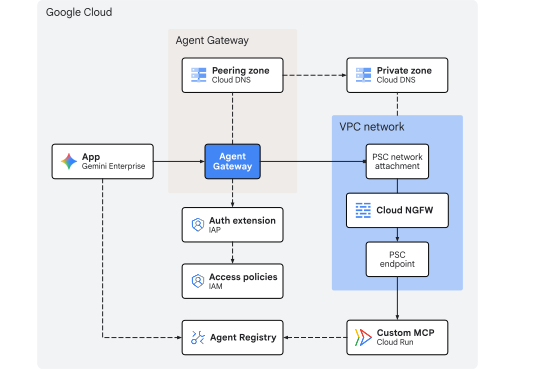
Fig 1. Codelab architecture
What you learn
- How to deploy a private streamable HTTP MCP server from source on Cloud Run and register its endpoint and tool schema in Agent Registry
- How to configure Agent Gateway with compliant registry entries and route Gemini Enterprise app tool calls through the gateway
- How to establish private VPC egress using PSC network attachments and interfaces
- How to delegate Agent Gateway authorization to Identity-Aware Proxy (IAP)
- How to author and bind IAM Unified Access Policies (UAP) using
destination.agent_registry.*anddestination.is_registeredCEL attributes to restrict MCP tool execution - How to validate policy enforcement and network egress using Cloud Logging
What you need
- A Google Cloud project with billing enabled
- An active Gemini Enterprise license or 30-day trial
- IAM permissions to provision networking services, Gemini Enterprise, and Agent Platform resources
- A POSIX-compatible shell (
bashorzsh) with Google Cloud CLI (gcloud),curl, andjqinstalled
This concludes the introduction portion... next on to the Concepts section.
2. Concepts
Deployment sequence
This codelab deploys the infrastructure first so private network paths and governance controls are operational before registering and connecting MCP tools with Gemini Enterprise:
- Network infrastructure: Provision VPC subnets, a PSC endpoint, a PSC network attachment, Cloud NGFW policy rules, and private Cloud DNS zones.
- Agent Gateway: Deploy Agent Gateway in egress mode with Agent Registry integration (
registries) and private VPC egress (networkAttachment). - Authorization policies: Configure the IAP authorization extension, Gateway Authz policy, and IAM Unified Access Policy (UAP) using
destination.is_registeredanddestination.agent_registry.*CEL conditions. - Deploy & register MCP server: Deploy the math MCP server from source to Cloud Run (
--ingress=internal) and register the service and tool specifications (addandsubtract) in Agent Registry. - Gemini Enterprise app: Create the Gemini Enterprise app (
Engine), configure identity and observability settings, and bind outbound egress to Agent Gateway (agentGatewaySetting). - Import custom MCP data connector: Create and activate the
REGISTRY_MCPdata connector (:setUpDataConnector) to link the registered MCP server's backing data store to the Gemini Enterprise app. - Validate: Test allowed and denied tool executions in chat and verify policy enforcement across Agent Gateway, DNS, Firewall, and Cloud Run logs.
Gemini Enterprise egress
Gemini Enterprise routes custom MCP server tool requests to Agent Gateway when both agentGatewaySetting on the Engine and use_agent_gateway_egress: true on the DataConnector are configured.
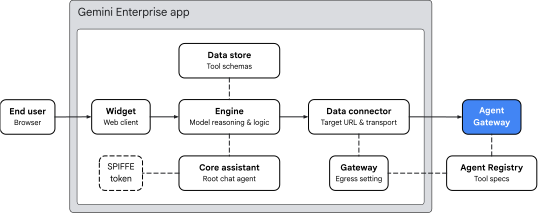
Fig 2. Gemini Enterprise egress architecture
The Gemini Enterprise app organizes tool routing across four key areas:
- Widget (
default_search_widget_config):- Serves the web client interface. The widget receives prompts from the user and initiates chat sessions with the underlying engine.
- Core Assistant (
assistants/default_assistant/agents/default/core_assistant):- The root conversational reasoning agent within the engine. When evaluating a user query, the Core Assistant determines whether arithmetic calculation is required, inspects available tools, and delegates execution to the synthesized Agent Gateway sub-agent.
- Data Store and Data Connector:
DataStore: Provisioned inside a dedicatedCollectionwhen:setUpDataConnectorruns, it links (dataStoreIds) the imported Agent Registry tool schemas (add,subtract), argument types, and agent instructions to the Gemini EnterpriseEngine.DataConnector: Manages theREGISTRY_MCPaction connection (createBapConnection: true) to the remote MCP server (instance_uri), resolves the Agent Registry MCP server resource (registry_mcp_server_name), and enables Agent Gateway egress (use_agent_gateway_egress: true).
- Agent Identity, Agent Registry, and Agent Gateway:
- When the Data Connector dispatches the outbound tool call, it routes traffic to the gateway specified in
agentGatewaySetting. The Core Assistant mints a SPIFFE identity token asserting its identity:principal://agents.global.org-.../agents/default/core_assistant. - Agent Gateway integrates with Agent Registry using the
registriesfield to dynamically resolve destination endpoints and registered tool schemas. It populatesdestination.is_registeredanddestination.agent_registry.*attributes and passes them to IAP v2 for evaluation against IAM Unified Access Policy (UAP) CEL rules before permitting transit into the VPC network.
- When the Data Connector dispatches the outbound tool call, it routes traffic to the gateway specified in
Gateway VPC connectivity
Agent Gateway enables private VPC network connectivity using two YAML fields:
networkConfig.egress.networkAttachment: Directs private IP traffic to be routed through the PSC network attachment into the VPC network.dnsPeeringConfig.domains: Peers DNS resolution with the VPC network Cloud DNS zone so target hostnames (*.run.app) resolve to the private PSC endpoint IP address defined in the VPC network.
Limitations & requirements
- StreamableHTTP only: The legacy Server-Sent Events (SSE) transport is not supported. MCP servers must use StreamableHTTP.
- Public CA TLS required: MCP endpoints must use TLS certificates signed by a publicly trusted CA, even when accessed privately over PSC.
- Org policy override: You must explicitly override the organization policy for Custom MCP data stores before registering the data store.
This concludes the concepts portion... next on to the Setup section.
3. Setup
Required IAM roles
The following roles are required to complete Codelab:
Domain | Required IAM roles |
Project & IAM |
|
Networking & Gateway |
|
Gemini Enterprise & Registry |
|
Workloads & Build |
|
Observability |
|
Or use a broad basic role like roles/owner combined with roles/orgpolicy.policyAdmin (since roles/owner alone cannot modify organization policies).
Access your project
This Codelab uses a single Google Cloud project. Configuration steps use gcloud CLI and Linux shell commands.
Start by accessing your Google Cloud project command line:
- Cloud Shell at
shell.cloud.google.com, or - A local terminal with
gcloudCLI installed
Set your Project ID
gcloud config set project SET_YOUR_PROJECT_ID_HERE
Authenticate session
# login to gcloud cli
gcloud auth login
# login for gcloud api
gcloud auth application-default login
Set shell environment variables
# set custom var for slug (eg, "foo") and region preference
export SLUG="foo"
export REGION="us-central1"

echo ${SLUG}
echo ${REGION}
# create project vars (automatic)
export PROJ_ID=$(gcloud config list --format="value(core.project)")
export PROJ_NO=$(gcloud projects describe ${PROJ_ID} --format="value(projectNumber)")
export ORG_ID=$(gcloud projects get-ancestors ${PROJ_ID} --format="value(id)" | tail -n 1)
export USER_IDENTITY=$(gcloud config get-value account)

echo ${PROJ_ID}
echo ${PROJ_NO}
echo ${ORG_ID}
echo ${USER_IDENTITY}
# create resource vars for agent platform (automatic)
export AGW_NAME="agw-${SLUG}-${REGION}-ata"
export AGW_URI="projects/${PROJ_ID}/locations/${REGION}/agentGateways/${AGW_NAME}"
export UAP_POLICY_NAME="uap-policy-${SLUG}"
export UAP_BINDING_NAME="uap-binding-${SLUG}"
export MCP_NAME="math-wizard"
export MCP_URL="https://${MCP_NAME}-${PROJ_NO}.${REGION}.run.app/mcp"

echo ${AGW_NAME}
echo ${AGW_URI}
echo ${UAP_POLICY_NAME}
echo ${UAP_BINDING_NAME}
echo ${MCP_NAME}
echo ${MCP_URL}
# create resource vars for gemini enterprise (automatic)
export GE_APP_DISPLAY_NAME="Codelab app"
export GE_APP_ORG_NAME="${SLUG}, Inc."
export GE_LOCATION="global"
export GE_APP_NAME="app-${SLUG}-${GE_LOCATION}"
export GE_APP_INIT="${GE_APP_NAME}_$(date +%s)"

echo ${GE_APP_DISPLAY_NAME}
echo ${GE_APP_ORG_NAME}
echo ${GE_LOCATION}
echo ${GE_APP_NAME}
echo ${GE_APP_INIT}
Set agent identity trust domains
The if-then-else statement checks if the project belongs to an organization in order to set the correct trust domain for the principal agent identities.
# set var for trust domain
if [[ -n "${ORG_ID}" ]]; then
  export TRUST_DOMAIN="agents.global.org-${ORG_ID}.system.id.goog"
else
  export TRUST_DOMAIN="agents.global.proj-${PROJ_NO}.system.id.goog"
fi

echo "trust domain: ${TRUST_DOMAIN}"
Set billing and quota project
# set cli quota project
gcloud config set billing/quota_project ${PROJ_ID}
# set api quota project
gcloud auth application-default set-quota-project ${PROJ_ID}
Create local directory for config files
# create config folder
mkdir -p cfg
Update gcloud cli (recommended)
If running a self-managed install of the Google Cloud SDK (ie, outside of Cloud Shell), update the components to the latest version.
# update gcloud cli
gcloud components update
Enable API services
# enable google apis (part 1)
gcloud services enable \
  agentregistry.googleapis.com \
  agentidentity.googleapis.com \
  aiplatform.googleapis.com \
  apphub.googleapis.com \
  apptopology.googleapis.com \
  cloudapiregistry.googleapis.com \
  cloudtrace.googleapis.com \
  compute.googleapis.com \
  dataform.googleapis.com \
  iam.googleapis.com \
  iap.googleapis.com \
  logging.googleapis.com \
  modelarmor.googleapis.com \
  monitoring.googleapis.com \
  networksecurity.googleapis.com \
  networkservices.googleapis.com \
  notebooks.googleapis.com \
  observability.googleapis.com
# enable google apis (part 2)
gcloud services enable \
  artifactregistry.googleapis.com \
  cloudbuild.googleapis.com \
  discoveryengine.googleapis.com \
  dns.googleapis.com \
  orgpolicy.googleapis.com \
  run.googleapis.com \
  saasservicemgmt.googleapis.com \
  securitycenter.googleapis.com \
  storage.googleapis.com \
  telemetry.googleapis.com \
  texttospeech.googleapis.com
Organization Policies
Default Google Cloud managed organization policy constraints restrict features used in this Codelab:
discoveryengine.managed.disableCustomMcpServerConnector:- Restricts creation of data connectors that use a custom MCP server (
custom_mcp) as a data source (enforced by default).
- Restricts creation of data connectors that use a custom MCP server (
iam.managed.disableAccessPolicyBinding:- Restricts IAM v3 access policy bindings to resources (enforced by default).
discoveryengine.managed.allowedEgressFqdns:- Restricts outbound egress domains (
instance_uriFQDNs) for data connectors when VPC Service Controls (VPC-SC) is active or the project is listed in the organization'senforcedProjectsparameter.
- Restricts outbound egress domains (
discoveryengine.managed.allowedDataSources:- Restricts allowed data connector types (
dataSource) when VPC-SC is active or the project is listed in the organization'senforcedProjectsparameter.
- Restricts allowed data connector types (
Override any inherited organization policy restrictions on the project level by explicitly setting enforce: false.
Disable custom MCP constraint
# disable data connector constraint (allow custom mcp servers)
gcloud org-policies set-policy /dev/stdin << EOF
name: projects/${PROJ_NO}/policies/discoveryengine.managed.disableCustomMcpServerConnector
spec:
  rules:
  - enforce: false
EOF
# verify org policy constraint on project
gcloud org-policies describe discoveryengine.managed.disableCustomMcpServerConnector \
  --project=${PROJ_ID} --effective
Disable access policy constraint
# disable iam v3 constraint (allow v3 access policies)
gcloud org-policies set-policy /dev/stdin << EOF
name: projects/${PROJ_NO}/policies/iam.managed.disableAccessPolicyBinding
spec:
  rules:
  - enforce: false
EOF
# verify org policy constraint on project
gcloud org-policies describe iam.managed.disableAccessPolicyBinding \
  --project=${PROJ_ID} --effective
Check and disable conditional data connector constraints
By default, discoveryengine.managed.allowedEgressFqdns and discoveryengine.managed.allowedDataSources only block connector creation if your project is inside a VPC Service Controls (VPC SC) perimeter or if an organization administrator has added your project to enforcedProjects.
First, inspect the effective policies on your project:
# check effective egress fqdn constraint on project
gcloud org-policies describe discoveryengine.managed.allowedEgressFqdns \
  --project=${PROJ_ID} --effective
# check effective data source constraint on project
gcloud org-policies describe discoveryengine.managed.allowedDataSources \
  --project=${PROJ_ID} --effective
~~IF~~ these constraints are enforced, to ensure they do not block custom_mcp connector setup in a VPC SC or policy-restricted organization, set enforce: false on both policies for your project:
# disable egress fqdn constraint on project
gcloud org-policies set-policy /dev/stdin << EOF
name: projects/${PROJ_NO}/policies/discoveryengine.managed.allowedEgressFqdns
spec:
  rules:
  - enforce: false
EOF
# disable allowed data sources constraint on project
gcloud org-policies set-policy /dev/stdin << EOF
name: projects/${PROJ_NO}/policies/discoveryengine.managed.allowedDataSources
spec:
  rules:
  - enforce: false
EOF
# verify both constraints are disabled on project
gcloud org-policies describe discoveryengine.managed.allowedEgressFqdns \
  --project=${PROJ_ID} --effective

gcloud org-policies describe discoveryengine.managed.allowedDataSources \
  --project=${PROJ_ID} --effective
IAM permissions
Grant the required IAM roles to your user account and the Compute Engine default service account used by Cloud Build:
- User account (
${USER_IDENTITY}):- Requires permissions to deploy and invoke Cloud Run services (
roles/run.admin,roles/run.invoker,roles/iam.serviceAccountUser), build container images (roles/cloudbuild.builds.editor), manage Gemini Enterprise (roles/discoveryengine.admin), and author Unified Access Policies (roles/iam.accessPolicyAdmin).
- Requires permissions to deploy and invoke Cloud Run services (
- Compute Engine default service account(
${PROJ_NO}-compute@developer.gserviceaccount.com):- Used by Cloud Build to stage source code in Cloud Storage (
roles/storage.admin), push images to Artifact Registry (roles/artifactregistry.writer), and write build logs (roles/logging.logWriter).
- Used by Cloud Build to stage source code in Cloud Storage (
Execute the following commands to assign the role bindings:
# grant roles to user account
gcloud projects add-iam-policy-binding ${PROJ_ID} \
  --member="user:${USER_IDENTITY}" \
  --role="roles/run.admin"

gcloud projects add-iam-policy-binding ${PROJ_ID} \
  --member="user:${USER_IDENTITY}" \
  --role="roles/iam.serviceAccountUser"

gcloud projects add-iam-policy-binding ${PROJ_ID} \
  --member="user:${USER_IDENTITY}" \
  --role="roles/run.invoker"

gcloud projects add-iam-policy-binding ${PROJ_ID} \
  --member="user:${USER_IDENTITY}" \
  --role="roles/discoveryengine.admin"

gcloud projects add-iam-policy-binding ${PROJ_ID} \
  --member="user:${USER_IDENTITY}" \
  --role="roles/iam.accessPolicyAdmin"

gcloud projects add-iam-policy-binding ${PROJ_ID} \
  --member="user:${USER_IDENTITY}" \
  --role="roles/cloudbuild.builds.editor"
# grant roles to default compute (cloud build) service account
gcloud projects add-iam-policy-binding ${PROJ_ID} \
  --member="serviceAccount:${PROJ_NO}-compute@developer.gserviceaccount.com" \
  --role="roles/storage.admin"

gcloud projects add-iam-policy-binding ${PROJ_ID} \
  --member="serviceAccount:${PROJ_NO}-compute@developer.gserviceaccount.com" \
  --role="roles/artifactregistry.writer"

gcloud projects add-iam-policy-binding ${PROJ_ID} \
  --member="serviceAccount:${PROJ_NO}-compute@developer.gserviceaccount.com" \
  --role="roles/logging.logWriter"
Verify IAM permissions
Check for the six (6) role bindings on the user account.
# show iam policy on project for user account
gcloud projects get-iam-policy ${PROJ_ID} \
  --flatten="bindings[].members" \
  --filter="bindings.members:${USER_IDENTITY}" \
  --format="table(bindings.role:label=ROLE, bindings.members:label=PRINCIPAL_IDENTITY)"
Check for the three (3) role bindings on the default compute service account.
# show iam policy on project for default compute service account
gcloud projects get-iam-policy ${PROJ_ID} \
  --flatten="bindings[].members" \
  --filter="bindings.members:${PROJ_NO}-compute@developer.gserviceaccount.com" \
  --format="table(bindings.role:label=ROLE, bindings.members:label=PRINCIPAL_IDENTITY)"
Verify service agent bindings (precautionary)
In a new project, Google Cloud automatically provisions the Agent Gateway service agent and grants it roles/agentgateway.serviceAgent when networkservices.googleapis.com is first enabled. If you are reusing an existing project where prior cleanup may have removed default service agent bindings, run the following commands as a fail-safe to ensure the identity and role binding are intact:
# ensure network services service account has been created
gcloud beta services identity create \
  --service=networkservices.googleapis.com \
  --project="${PROJ_ID}"

# ensure network services service account has service agent roles applied
gcloud projects add-iam-policy-binding "${PROJ_ID}" \
  --member="serviceAccount:service-${PROJ_NO}@gcp-sa-agentgateway.iam.gserviceaccount.com" \
  --role="roles/agentgateway.serviceAgent"
This concludes the setup portion... next on to the Network section.
4. Network
In this section you will deploy a VPC network using custom mode with a dedicated /28 subnet (192.168.10.0/28) supporting the PSC network attachment for Agent Gateway network egress into the VPC network.
The PSC endpoint for Google APIs is deployed using a single /32global internal IPv4 address (172.16.20.20) to support private internal access to Google APIs and services. In this Codelab, Agent Gateway targets Cloud Run using the PSC endpoint by resolving the run.app. domain by Cloud DNS peering.
Create networks
Create a global VPC network.
# create vpc network
gcloud compute networks create vnet-${SLUG} --subnet-mode=custom
Create subnets for the Agent Gateway PSC network attachment:
# create subnet for agent gateway psc na
gcloud compute networks subnets create subnet-${REGION}-agw \
  --network=vnet-${SLUG} \
  --range=192.168.10.0/28 \
  --region=${REGION} \
  --enable-private-ip-google-access
Create firewall rules
Create a firewall policy to allow all egress traffic with logging enabled. This will be used to monitor traffic egressing from Agent Gateway to the VPC network. Cloud NGFW supports both Essentials and Standard tiers for network security and traffic monitoring.
# create fw policy
gcloud compute network-firewall-policies create fw-policy-${SLUG} --global
# create fw policy rule
gcloud compute network-firewall-policies rules create 1001 \
  --description="allow all out and log" \
  --firewall-policy=fw-policy-${SLUG} \
  --global-firewall-policy \
  --action=allow \
  --direction=EGRESS \
  --layer4-configs=all \
  --dest-ip-ranges=0.0.0.0/0 \
  --enable-logging
# bind fw policy to network
gcloud compute network-firewall-policies associations create \
  --name=fw-policy-bind-${SLUG} \
  --firewall-policy=fw-policy-${SLUG} \
  --network=vnet-${SLUG} \
  --global-firewall-policy
Create PSC network attachment
Create a Private Service Connect (PSC) network attachment configured to automatically accept connections from Agent Gateway. The network attachment establishes the consumer VPC network side of the connection to securely link with the Agent Gateway producer side for outbound egress traffic. For additional information on subnet requirements and IP range specifications, see Configure VPC connectivity.
# create psc network attachment
gcloud compute network-attachments create psc-na-${REGION}-agw \
  --region=${REGION} \
  --subnets=subnet-${REGION}-agw \
  --connection-preference=ACCEPT_AUTOMATIC
Verify PSC network attachment
# show psc network attachment details
gcloud compute network-attachments describe psc-na-${REGION}-agw --region=${REGION}
Retrieve the resource URI of the PSC network attachment and store it in the PSC_NA_URI environment variable. This URI will be referenced in the Agent Gateway configuration (networkConfig.egress.networkAttachment) to provision the PSC Interface for network egress into the VPC network:
# fetch psc network attachment uri
export PSC_NA_URI=$(gcloud compute network-attachments describe psc-na-${REGION}-agw \
  --region=${REGION} \
  --format="value(selfLink.scope(v1))")
echo ${PSC_NA_URI}
Create PSC endpoint
A Private Service Connect (PSC) endpoint for Google APIs is used for Agent Gateway to establish private connectivity to the Cloud Run MCP server over an internal network path without exposing traffic to the public internet. Outbound tool calls egressing from Agent Gateway into the VPC network will resolve the target Cloud Run service URL (*.run.app) to this private endpoint IP address.
Reserve a global internal IPv4 address for the PSC endpoint. The IP address chosen must be a /32 address that does not overlap with any existing subnets in your VPC network:
# set env var for psc ep ip address
export PSC_EP_IP="172.16.20.20"
echo ${PSC_EP_IP}
# reserve internal global ipv4 address
gcloud compute addresses create ip-psc2gapis \
  --global \
  --purpose=PRIVATE_SERVICE_CONNECT \
  --addresses=${PSC_EP_IP} \
  --network=vnet-${SLUG}
Create a PSC endpoint for Google APIs using the all-apis bundle, which includes Cloud Run (run.app).
# create psc endpoint for google apis
gcloud compute forwarding-rules create psc2gapis \
  --global \
  --network=vnet-${SLUG} \
  --address=ip-psc2gapis \
  --target-google-apis-bundle=all-apis
Verify PSC endpoint
# show psc endpoint details
gcloud compute forwarding-rules describe psc2gapis --global
Create DNS zone and records
Cloud DNS is used to enable Agent Gateway to communicate privately with the Cloud Run hosted MCP server. When Agent Gateway evaluates outbound tool requests targeting Cloud Run, it uses DNS peering (dnsPeeringConfig.domains) to resolve DNS queries for *.run.app using your private Cloud DNS zone associated with your VPC network. The private DNS record returns the query with the internal PSC endpoint IP address (172.16.20.20), allowing MCP tool requests to be routed through a private network path.
Create a private Cloud DNS managed zone for the run.app. domain:
# create private dns zone
gcloud dns managed-zones create priv-zone-run \
  --description="private zone for run.app" \
  --dns-name="run.app." \
  --visibility=private \
  --networks=vnet-${SLUG}
Create a wildcard DNS A record for *.run.app. pointing to the IP address of the PSC endpoint:
# create dns record
gcloud dns record-sets create "*.run.app." \
  --zone=priv-zone-run \
  --type=A \
  --ttl=300 \
  --rrdatas=${PSC_EP_IP}
Create a Cloud DNS policy to enable DNS query logging. DNS logging captures domain resolution requests originating from Agent Gateway within your VPC network, providing auditability and allowing you to verify that *.run.app tool requests correctly resolve to the internal PSC endpoint:
# create dns policy (logging)
gcloud dns policies create dns-policy-${SLUG} \
  --description="dns logging for vnet-${SLUG}" \
  --networks=vnet-${SLUG} \
  --enable-logging
This concludes the network portion... next on to the Agent Gateway section.
5. Agent Gateway
Agent Gateway specifies registries for Agent Registry instances alongside the networkConfig fields that configure the PSC network attachment and DNS peering settings for private VPC connectivity:
registries: Associates the gateway with up to two Agent Registry instances: one regional (../locations/${REGION}) and one global (../locations/global). This integrates Agent Gateway with Agent Registry to resolve both regional deployments (such as Cloud Run MCP servers in${REGION}) and global resources (such as Gemini Enterprise agents and global endpoints) for fine-grained IAP v2 policy enforcement. Regional entries take precedence over global entries when resolving destination URLs.networkAttachment: Points to the PSC network attachment (psc-na-${REGION}-agw), connecting Agent Gateway into your VPC network for private egress.dnsPeeringConfig.domains: Configuresrun.app.so that DNS queries originating from Agent Gateway for Cloud Run services use DNS peering to resolve hostnames to the private Google APIs PSC endpoint IP address (172.16.20.20) configured in your Cloud DNS private zone.
Deploy Agent Gateway
Create and import the Agent Gateway configuration file.
# create agent gateway config file
cat > cfg/${AGW_NAME}-networkConfig.yaml << EOF
name: ${AGW_NAME}
protocols:
  - MCP
googleManaged:
  governedAccessPath: AGENT_TO_ANYWHERE
registries:
  - "//agentregistry.googleapis.com/projects/${PROJ_ID}/locations/${REGION}"
networkConfig:
  egress:
    networkAttachment: ${PSC_NA_URI}
  dnsPeeringConfig:
    domains:
      - run.app.
    targetProject: ${PROJ_ID}
    targetNetwork: projects/${PROJ_ID}/global/networks/vnet-${SLUG}
EOF
# import agent gateway config file (create gateway)
gcloud network-services agent-gateways import ${AGW_NAME} \
  --source="cfg/${AGW_NAME}-networkConfig.yaml" \
  --location=${REGION}
Verify Agent Gateway deployment
Confirm the Agent Registry and network configuration:
# show agent gateway registries and network config
gcloud network-services agent-gateways describe ${AGW_NAME} \
  --location=${REGION} \
  --format="yaml(registries,networkConfig)"
Expected output:
networkConfig:
  dnsPeeringConfig:
    domains:
    - run.app.
    targetNetwork: projects/${PROJ_ID}/global/networks/vnet-${SLUG}
    targetProject: ${PROJ_ID}
  egress:
    networkAttachment: projects/${PROJ_ID}/regions/${REGION}/networkAttachments/psc-na-${REGION}-agw
registries:
- //agentregistry.googleapis.com/projects/${PROJ_ID}/locations/${REGION}
Verify that the output displays the required configuration details:
registries: Lists the regional (${REGION}) Agent Registry URI associated with the gateway.egress.networkAttachment: Specifies the PSC network attachment URI for VPC egress.dnsPeeringConfig.domains: Containsrun.app.pointing totargetNetworkfor private domain resolution.
Inspect the PSC network attachment to confirm the gateway connection:
# show psc network attachment details
gcloud compute network-attachments describe psc-na-${REGION}-agw \
  --region=${REGION} \
  --format="yaml(connectionEndpoints)"
Check there is an accepted connection endpoint:
connectionEndpoints:
- ipAddress: 192.168.10.2
  projectIdOrNum: '<AGW_TENANT_PROJ_NO>'
  status: ACCEPTED
  subnetwork: https://www.googleapis.com/compute/v1/projects/${PROJ_ID}/regions/${REGION}/subnetworks/subnet-${REGION}-agw
Delegate authorization
Agent Gateway secures and governs outbound tool traffic using Authorization Policies (networksecurity.authzPolicies) integrated with Identity-Aware Proxy (IAP) Unified Access Policies (UAP).
While Agent Gateway supports basic inline ALLOW and DENY rules, enterprise environments require centralized, identity-centric governance. With IAM Unified Access Policies (or Access Policies), you manage egress access rules using standard IAM v3 access policies.

Fig 3. Authorization architecture
The authorization flow connects three components:
- Gateway Authorization Policy (
authzPolicy):- A regional resource targeting Agent Gateway.
- Configured with
policyProfile: REQUEST_AUTHZandaction: CUSTOMto route all outbound authorization checks to the IAP Authz Extension.
- IAP Service Extension (
authzExtension):- A regional resource that delegates request authorization to Identity-Aware Proxy (
iap.googleapis.com). - Evaluates policies in
ENFORCEmode using policy versionV2.
- A regional resource that delegates request authorization to Identity-Aware Proxy (
- IAM Unified Access Policy and Binding (
accessPolicy&policyBinding):- Global IAM v3 resources containing fine-grained access rules.
- Authenticates the SPIFFE principal identity of the calling agent, verifies the universal
iap.googleapis.com/resources.egressViaIAPpermission, and evaluates Common Expression Language (CEL) conditions against destination attributes.
Deploy authorization extension
Create a service-extensions authorization extension configuration that delegates authorization decisions to the IAP service:
# create authz extension config file
cat > cfg/${AGW_NAME}-svc-ext-authz-iap.yaml << EOF
name: ${AGW_NAME}-svc-ext-authz-iap
service: iap.googleapis.com
failOpen: false
timeout: 1s
metadata:
  iapPolicyVersion: "V2"
EOF
# import iap authz extension (create authz extension)
gcloud service-extensions authz-extensions import ${AGW_NAME}-svc-ext-authz-iap \
  --source=cfg/${AGW_NAME}-svc-ext-authz-iap.yaml \
  --location=${REGION}
Verify authorization extension
Check the authorization extension is active:
# list authz extensions
gcloud service-extensions authz-extensions list \
  --location=${REGION} \
  --format="table(
    name.basename():label=NAME,
    createTime.date(tz=LOCAL):label=CREATED,
    updateTime.date(tz=LOCAL):label=MODIFIED,
    service:label=SERVICE,
    metadata:label=METADATA,
    timeout:label=TIMEOUT
  )"
Deploy authorization policy
Create a network-security authorization policy configuration that targets Agent Gateway and delegates request verification to the authorization extension for IAP:
# create authz policy config file
cat > cfg/${AGW_NAME}-authz-policy-iap.yaml << EOF
name: ${AGW_NAME}-authz-policy-iap
target:
  resources:
    - "projects/${PROJ_ID}/locations/${REGION}/agentGateways/${AGW_NAME}"
policyProfile: REQUEST_AUTHZ
action: CUSTOM
customProvider:
  authzExtension:
    resources:
      - "projects/${PROJ_ID}/locations/${REGION}/authzExtensions/${AGW_NAME}-svc-ext-authz-iap"
EOF
# import authz policy config file (create authz policy)
gcloud network-security authz-policies import ${AGW_NAME}-authz-policy-iap \
  --source=cfg/${AGW_NAME}-authz-policy-iap.yaml \
  --location=${REGION}
Verify authorization policy
Check the authorization policy is active:
# list authz policies
gcloud network-security authz-policies list \
  --location=${REGION} \
  --format="table(
    name.basename():label=NAME,
    action:label=ACTION,
    customProvider.list().sub('\W.*', ''):label=CUSTOM_PROVIDER_TYPE,
    policyProfile:label=POLICY_PROFILE,
    customProvider.authzExtension.resources[0].basename():label=CUSTOM_PROVIDER_RESOURCE
  )"
Create IAM access policies
Agent Gateway now delegates authorization checks to IAP and resolves destination metadata from Agent Registry. Next, define an IAM Unified Access Policy rule to govern outbound tool execution.
IAP evaluates CEL attribute expressions against the following Agent Registry destination attributes:
- Registered status (
destination.is_registered):- Boolean (
true/false) indicating if the destination is cataloged in Agent Registry.
- Boolean (
- MCP server name (
destination.agent_registry.mcp_server.name):- Canonical MCP server resource name registered in Agent Registry.
- MCP method (
destination.agent_registry.mcp_server.method):- The MCP method being invoked (eg,
tools/call,tools/list,initialize).
- The MCP method being invoked (eg,
- Tool name (
destination.agent_registry.mcp_server.tool.name):- The specific tool name invoked (eg,
subtractoradd), enabling fine-grained, tool-level authorization on registered MCP servers.
- The specific tool name invoked (eg,
Define IAM access policy rule
The IAM policy rule manifest specifies:
- Principals: The SPIFFE principal identity representing the Gemini Enterprise core assistant agent.
- Permissions: The universal
iap.googleapis.com/resources.egressViaIAPpermission required for all IAP-governed egress traffic. - Conditions: A CEL expression (
destination.is_registered == true) ensuring the agent can only invoke endpoints cataloged in Agent Registry.
Create the policy rule manifest file:
# create access policy rule file
cat > cfg/${UAP_POLICY_NAME}-rules.json << EOF
[
  {
    "description": "allow ge assistant to any registered service",
    "effect": "ALLOW",
    "principals": [
      "principal://${TRUST_DOMAIN}/resources/discoveryengine/projects/${PROJ_NO}/locations/global/engines/${GE_APP_INIT}/assistants/default_assistant/agents/default/core_assistant"
    ],
    "operation": {
      "permissions": [
        "iap.googleapis.com/resources.egressViaIAP"
      ]
    },
    "conditions": {
      "iap.googleapis.com": {
        "expression": \
        "destination.is_registered == true"
      }
    }
  }
]
EOF
Deploy IAM access policy
Create the global IAM access policy using the rules defined in the manifest file:
# create iam access policy
gcloud iam access-policies create ${UAP_POLICY_NAME} \
  --details-rules=cfg/${UAP_POLICY_NAME}-rules.json \
  --project=${PROJ_ID} \
  --location=global
Verify IAM access policy
Check the IAM access policy was created successfully and inspect the rule details:
# show iam access policy details
gcloud iam access-policies describe ${UAP_POLICY_NAME} \
  --project=${PROJ_ID} \
  --location=global
Expected output:
details:
  rules:
  - conditions:
      iap.googleapis.com:
        expression: destination.is_registered == true
    description: allow ge assistant to any registered service
    effect: ALLOW
    operation:
      permissions:
      - iap.googleapis.com/resources.egressViaIAP
    principals:
    - principal://agents.global.org-${ORG_ID}.system.id.goog/resources/discoveryengine/projects/${PROJ_NO}/locations/global/engines/${GE_APP_INIT}/assistants/default_assistant/agents/default/core_assistant
name: projects/${PROJ_ID}/locations/global/accessPolicies/${UAP_POLICY_NAME}
Bind IAM access policy to project
To activate enforcement across all Agent Gateways in your project, create a policy binding that attaches the IAM access policy to the project resource:
# bind iam access policy to project resource
gcloud iam policy-bindings create ${UAP_BINDING_NAME} \
  --policy="projects/${PROJ_ID}/locations/global/accessPolicies/${UAP_POLICY_NAME}" \
  --target-resource="//cloudresourcemanager.googleapis.com/projects/${PROJ_ID}" \
  --project=${PROJ_ID} \
  --location=global
Verify IAM access policy binding
Check the active policy binding points to the correct policy and target:
# show policy binding details
gcloud iam policy-bindings describe ${UAP_BINDING_NAME} \
  --project=${PROJ_ID} \
  --location=global
Expected output:
name: projects/${PROJ_ID}/locations/global/policyBindings/${UAP_BINDING_NAME}
policy: projects/${PROJ_ID}/locations/global/accessPolicies/${UAP_POLICY_NAME}
policyKind: ACCESS
target:
  resource: //cloudresourcemanager.googleapis.com/projects/${PROJ_ID}
This concludes the Agent Gateway portion... next on to the MCP server section.
6. MCP server
In this section you will create a custom FastMCP server exposing add and subtract tools, and deploy it to Cloud Run directly from source. During the source deployment (--source), Cloud Build will package the container image using the included Dockerfile and uv (which installs dependencies defined in pyproject.toml and launches server.py).
Once the Cloud Run service is deployed, you register the MCP server in Agent Registry along with its tool specification (toolspec.json) so Gemini Enterprise can discover and invoke its tools.
Create MCP server application
Create a math-wizard project directory for the application code:
# create directory for code
mkdir -p math-wizard
Write the Python project manifest file:
# create python project manifest file
cat > math-wizard/pyproject.toml << 'EOF'
[project]
name = "math-wizard"
version = "0.1.0"
description = "math wizard mcp server"
requires-python = ">=3.12"
dependencies = [
    "fastmcp==2.13.1",
]
EOF
Some additional instrumentation functions are included in the code to capture incoming HTTP headers (mcp-session-id, x-forwarded-for, user-agent, and x-cloud-trace-context) for Cloud Logging and Cloud Trace validation.
Write the application code file:
# create mcp server application code
cat > math-wizard/server.py << 'EOF'
import asyncio
import json
import logging
import os
from fastmcp import FastMCP
from fastmcp.server.dependencies import get_http_headers
from mcp.types import ToolAnnotations

logger = logging.getLogger(__name__)
logging.basicConfig(format="[%(levelname)s]: %(message)s", level=logging.INFO)

mcp = FastMCP("math wizard mcp server")

def log_network_context(tool_name: str, a: int, b: int) -> None:
    headers = get_http_headers()
    print(json.dumps({
        "severity": "INFO",
        "message": f">>> 🛠️ Tool: '{tool_name}' called with numbers '{a}' and '{b}'",
        "tool": tool_name,
        "mcp_session_id": headers.get("mcp-session-id"),
        "x_forwarded_for": headers.get("x-forwarded-for"),
        "user_agent": headers.get("user-agent"),
        "trace_header": headers.get("x-cloud-trace-context"),
    }), flush=True)

@mcp.tool(
    annotations=ToolAnnotations(
        readOnlyHint=True,
    )
)
def add(a: int, b: int) -> int:
    """Use this to add two numbers together.

    Args:
        a: The first number.
        b: The second number.

    Returns:
        The sum of the two numbers.
    """
    logger.info(f">>> 🛠️ Tool: 'add' called with numbers '{a}' and '{b}'")
    log_network_context("add", a, b)
    return a + b

@mcp.tool(
    annotations=ToolAnnotations(
        readOnlyHint=True,
    )
)
def subtract(a: int, b: int) -> int:
    """Use this to subtract two numbers.

    Args:
        a: The first number.
        b: The second number.

    Returns:
        The difference of the two numbers.
    """
    logger.info(f">>> 🛠️ Tool: 'subtract' called with numbers '{a}' and '{b}'")
    log_network_context("subtract", a, b)
    return a - b

if __name__ == "__main__":
    logger.info(f"🚀 MCP server started on port {os.getenv('PORT', 8080)}")
    asyncio.run(
        mcp.run_async(
            transport="streamable-http",
            host="0.0.0.0",
            port=int(os.getenv("PORT", 8080)),
        )
    )
EOF
Write the Dockerfile to define container image build instructions and startup commands:
# create dockerfile
cat > math-wizard/Dockerfile << 'EOF'
# use official python 3.12 image
FROM python:3.12-slim

# install uv
COPY --from=ghcr.io/astral-sh/uv:latest /uv /uvx /bin/

# install the project into /app
COPY . /app
WORKDIR /app

# allow statements and log messages to immediately appear in the logs
ENV PYTHONUNBUFFERED=1

# install dependencies
RUN uv sync

EXPOSE 8080

# run the mcp server
CMD ["uv", "run", "server.py"]
EOF
Deploy service to Cloud Run
Deploy the MCP server from source using Cloud Build (which uses the project default compute service account ${PROJ_NO}-compute@developer.gserviceaccount.com):
# deploy cloud run service
gcloud run deploy ${MCP_NAME} \
  --source math-wizard \
  --region=${REGION} \
  --no-invoker-iam-check \
  --ingress=internal \
  --quiet
Verify Cloud Run deployment
Check the Cloud Run service details to verify its active configuration:
# show cloud run service details
gcloud run services describe ${MCP_NAME} --region=${REGION}
Expected output:
<snip>
✔ Service math-wizard in region ${REGION}

URL:     https://math-wizard-${PROJ_NO}.${REGION}.run.app
Ingress: internal
Traffic:
  100% LATEST (currently math-wizard-00001-<id>)
</snip>
Register MCP server in Agent Registry
To let Gemini Enterprise discover the exact tools available on the MCP server, a tool specifications file (toolspec.json) must be provided during registration to Agent Registry.
Create MCP tool specification
# create tool spec file
cat > cfg/toolspec.json << 'EOF'
{
  "tools": [
    {
      "name": "add",
      "description": "Use this to add two numbers together.",
      "inputSchema": {
        "type": "object",
        "properties": {
          "a": { "type": "integer", "description": "The first number." },
          "b": { "type": "integer", "description": "The second number." }
        },
        "required": ["a", "b"]
      },
      "isReadOnly": true,
      "isDestructive": false,
      "isIdempotent": true,
      "isOpenWorld": false
    },
    {
      "name": "subtract",
      "description": "Use this to subtract two numbers.",
      "inputSchema": {
        "type": "object",
        "properties": {
          "a": { "type": "integer", "description": "The first number." },
          "b": { "type": "integer", "description": "The second number." }
        },
        "required": ["a", "b"]
      },
      "isReadOnly": true,
      "isDestructive": false,
      "isIdempotent": true,
      "isOpenWorld": false
    }
  ]
}
EOF
Register MCP server in Agent Registry
# register mcp server in agent registry
gcloud agent-registry services create ${MCP_NAME} \
  --project=${PROJ_ID} \
  --location=${REGION} \
  --display-name="${MCP_NAME}-${PROJ_NO}.${REGION}.run.app" \
  --description="MANDATORY MATH & ARITHMETIC AGENT: You MUST ALWAYS invoke \
this tool for ANY mathematical calculation, addition (+), subtraction (-), \
sum, difference, or arithmetic question (including simple questions like \
'what is 67 + 345?'). NEVER compute arithmetic yourself and NEVER transfer \
math queries to file_and_coding_agent / code interpreter. Always delegate \
every math question to this tool." \
  --mcp-server-spec-type=tool-spec \
  --mcp-server-spec-content=cfg/toolspec.json \
  --interfaces=protocolBinding=JSONRPC,url="${MCP_URL}"
Verify MCP server in Agent Registry
Verify that the deployed Cloud Run service is listed as a registered MCP server in the region along with its endpoint URL and available tools:
# list registered mcp servers in agent registry
gcloud agent-registry mcp-servers list \
  --location=${REGION} \
  --project=${PROJ_ID} \
  --format="table(
    name.basename():label=REGISTRY_ID,
    displayName:label=DISPLAY_NAME,
    interfaces[0].url:label=ENDPOINT_URL,
    tools[].name.list():label=TOOLS
  )"
Expected output:
REGISTRY_ID                                         DISPLAY_NAME                                  ENDPOINT_URL                                              TOOLS
agentregistry-00000000-0000-0000-0012-3456789abcde  math-wizard-${PROJ_NO}.${REGION}.run.app      https://math-wizard-${PROJ_NO}.${REGION}.run.app/mcp      add,subtract
View the service configuration spec to see that it registers the exact tool definitions, input schemas, and behavior annotations for each tool:
# describe mcp server tool specs
gcloud agent-registry services describe ${MCP_NAME} \
  --location=${REGION} \
  --project=${PROJ_ID} \
  --format="yaml(mcpServerSpec.content.tools)"
This concludes the MCP server portion... next on to the Gemini Enterprise section.
7. Gemini Enterprise
In this section you will create and configure a Gemini Enterprise app and a linked custom MCP server data store resource.
Discovery Engine resource model
A Gemini Enterprise app (represented as an Engine resource in the Discovery Engine API) is the central orchestration layer and conversational interface for end users. It manages user chat sessions, grounds generative models on enterprise data, and coordinates dynamic tool execution.
Gemini Enterprise apps interact with data and systems through data stores:
- Knowledge data stores: Ingest and index static content (eg, Cloud Storage, Google Drive, BigQuery) for retrieval-augmented generation (RAG).
- Data connectors (action providers): Connect to dynamic third-party or custom APIs. A custom MCP server data store exposes tools defined by the Model Context Protocol (MCP), enabling the model to dynamically call external functions during a conversation.
Egress routing through Agent Gateway
By default, Gemini Enterprise routes connector and tool execution traffic over public networks. However, for private VPC workloads and zero-trust governance, the engine can be configured to route egress through Agent Gateway:
- When creating the custom MCP server data store later in this lab, you enable Route egress through Agent Gateway in the data store settings.
- This binds the engine's outbound tool calls to your regional Agent Gateway, ensuring all MCP requests carry the app's
Agent Identity, undergo runtime authorization using IAP and IAM Unified Access Policies (UAP), and traverse the PSC network attachment into your private VPC.
Create Gemini Enterprise app
The following method uses the discoveryengine.googleapis.com API to create the Gemini Enterprise app resources and configuration. To configure using the Google Cloud Console UI, see Create an app for instructions.
# create engine (ge app)
curl -s -X POST "https://${GE_LOCATION}-discoveryengine.googleapis.com/v1/projects/${PROJ_ID}/locations/${GE_LOCATION}/collections/default_collection/engines?engineId=${GE_APP_INIT}" \
  -H "Authorization: Bearer $(gcloud auth application-default print-access-token)" \
  -H "X-Goog-User-Project: ${PROJ_ID}" -H "Content-Type: application/json" \
  -d @- <<EOF
{
  "displayName": "${GE_APP_DISPLAY_NAME}",
  "dataStoreIds": [],
  "solutionType": "SOLUTION_TYPE_SEARCH",
  "industryVertical": "GENERIC",
  "appType": "APP_TYPE_INTRANET",
  "searchEngineConfig": {
    "searchTier": "SEARCH_TIER_ENTERPRISE",
    "searchAddOns": [
      "SEARCH_ADD_ON_LLM"
    ]
  },
  "commonConfig": {
    "companyName": "${GE_APP_ORG_NAME}"
  }
}
EOF
Verify app creation
# fetch engine (ge app) id
export GE_APP_ID=$(curl -s "https://${GE_LOCATION}-discoveryengine.googleapis.com/v1/projects/${PROJ_ID}/locations/${GE_LOCATION}/collections/default_collection/engines" \
  -H "Authorization: Bearer $(gcloud auth application-default print-access-token)" -H "X-Goog-User-Project: ${PROJ_ID}" \
  | jq -r --arg name "${GE_APP_DISPLAY_NAME}" '.engines[] | select(.displayName==$name) | .name | split("/") | last')

echo "engine (ge app) id: ${GE_APP_ID}"
View the engine details to see the created configuration:
# get engine (ge app) details
curl -s "https://${GE_LOCATION}-discoveryengine.googleapis.com/v1/projects/${PROJ_ID}/locations/${GE_LOCATION}/collections/default_collection/engines/${GE_APP_ID}" \
  -H "Authorization: Bearer $(gcloud auth application-default print-access-token)" \
  -H "X-Goog-User-Project: ${PROJ_ID}"
Note the following server-populated properties in the JSON response:
name: Canonical resource path (projects/${PROJ_NO}/locations/global/collections/default_collection/engines/${GE_APP_ID}).sessionConfig.sessionManagementPolicy: Defaults to"VERTEX_AI_MANAGED", which persists multi-turn chat and tool-call state in Agent Platform (formerly known as Vertex AI).observabilityConfig.observabilityEnabled: Defaults totruefor baseline metrics (detailed prompt and tool payload logging is enabled in a later step).
Enable identity provider
Enable Google Identity as the identity provider for end user authentication on your Gemini Enterprise app.
The following method uses the discoveryengine.googleapis.com API to configure the Gemini Enterprise app identity provider. To configure using the Google Cloud Console UI, see Configure identity provider for instructions.
# set identity provider
curl -s -X PATCH "https://${GE_LOCATION}-discoveryengine.googleapis.com/v1/projects/${PROJ_ID}/locations/${GE_LOCATION}/aclConfig" \
  -H "Authorization: Bearer $(gcloud auth application-default print-access-token)" \
  -H "X-Goog-User-Project: ${PROJ_ID}" -H "Content-Type: application/json" \
  -d @- <<EOF
{
  "idpConfig": {
    "idpType": "GSUITE"
  }
}
EOF
Verify identity provider
# show identity provider
curl -s "https://${GE_LOCATION}-discoveryengine.googleapis.com/v1/projects/${PROJ_ID}/locations/${GE_LOCATION}/aclConfig" \
  -H "Authorization: Bearer $(gcloud auth application-default print-access-token)" \
  -H "X-Goog-User-Project: ${PROJ_ID}"
The output "idpType": "GSUITE" corresponds to the Google Identity provider.
(Optional) Enable Gemini Enterprise trial license
If you are using a project that has Gemini Enterprise licenses assigned, you can skip this step. If you are using a new project without a license, continue and follow these steps.
Create a license configuration resource to entitle Gemini Enterprise user seats for 30 days. This will set the default license to the new trial, so any user logging in is automatically granted a seat:
# configure free trial subscription
curl -s -X POST "https://${GE_LOCATION}-discoveryengine.googleapis.com/v1/projects/${PROJ_ID}/locations/${GE_LOCATION}/licenseConfigs?licenseConfigId=free_trial_gemini" \
  -H "Authorization: Bearer $(gcloud auth application-default print-access-token)" \
  -H "X-Goog-User-Project: ${PROJ_ID}" -H "Content-Type: application/json" \
  -d @- <<EOF
{
  "subscriptionTier": "SUBSCRIPTION_TIER_SEARCH_AND_ASSISTANT",
  "freeTrial": true
}
EOF
Verify license was applied
# show license config
curl -s "https://${GE_LOCATION}-discoveryengine.googleapis.com/v1/projects/${PROJ_ID}/locations/${GE_LOCATION}/licenseConfigs/free_trial_gemini" \
  -H "Authorization: Bearer $(gcloud auth application-default print-access-token)" \
  -H "X-Goog-User-Project: ${PROJ_ID}"
Check for "subscriptionTerm": "SUBSCRIPTION_TERM_ONE_MONTH" and "freeTrial": true.
# verify auto-registration enabled on default user store
curl -s "https://${GE_LOCATION}-discoveryengine.googleapis.com/v1/projects/${PROJ_ID}/locations/${GE_LOCATION}/userStores/default_user_store" \
  -H "Authorization: Bearer $(gcloud auth application-default print-access-token)" \
  -H "X-Goog-User-Project: ${PROJ_ID}"
Check for ../free_trial_gemini" and "enableLicenseAutoRegister": true.
Enable observability settings
Enabling observability on the Gemini Enterprise app (engine) level lets you view the interactions of the core assistant with metrics data in Metrics Explorer and correlate end-to-end traces in Cloud Trace.
# set observability on engine (ge app)
curl -s -X PATCH "https://${GE_LOCATION}-discoveryengine.googleapis.com/v1/projects/${PROJ_ID}/locations/${GE_LOCATION}/collections/default_collection/engines/${GE_APP_ID}?updateMask=observabilityConfig" \
  -H "Authorization: Bearer $(gcloud auth application-default print-access-token)" \
  -H "X-Goog-User-Project: ${PROJ_ID}" -H "Content-Type: application/json" \
  -d @- <<EOF
{
  "observabilityConfig": {
    "observabilityEnabled": true,
    "sensitiveLoggingEnabled": true
  }
}
EOF
Verify observability settings
# verify observability is enabled on engine (ge app)
curl -s "https://${GE_LOCATION}-discoveryengine.googleapis.com/v1/projects/${PROJ_ID}/locations/${GE_LOCATION}/collections/default_collection/engines/${GE_APP_ID}" \
  -H "Authorization: Bearer $(gcloud auth application-default print-access-token)" \
  -H "X-Goog-User-Project: ${PROJ_ID}" \
  | jq '{observabilityConfig: .observabilityConfig}'
Check for "sensitiveLoggingEnabled": true.
Bind to Agent Gateway
Routing outbound traffic from Gemini Enterprise through Agent Gateway establishes a centralized zero-trust governance and security enforcement boundary for all AI agent tool invocations:
- Centralized policy enforcement: Agent Gateway acts as an inline proxy that evaluates outbound tool requests against authorization policies and governance controls before traffic leaves the agent environment.
- Private network egress: Binding Gemini Enterprise to Agent Gateway ensures tool calls targeting private MCP servers on Cloud Run route securely through Private Service Connect (PSC), bypassing the public internet.
- Unified auditability: Provides centralized request logging, telemetry, and audit trails across all connected MCP servers and external tools.
By configuring agentGatewaySetting on your Gemini Enterprise app, outbound tool and agent calls initiated by end-user queries (such as calls to custom MCP servers imported from Agent Registry and A2A agents) automatically route through Agent Gateway.
Patch the engine agentGatewaySetting to enable:
# bind engine (ge app) to agent gateway
curl -s -X PATCH "https://${GE_LOCATION}-discoveryengine.googleapis.com/v1/projects/${PROJ_ID}/locations/${GE_LOCATION}/collections/default_collection/engines/${GE_APP_ID}?updateMask=agentGatewaySetting.defaultEgressAgentGateway.name" \
  -H "Authorization: Bearer $(gcloud auth application-default print-access-token)" \
  -H "X-Goog-User-Project: ${PROJ_ID}" -H "Content-Type: application/json" \
  -d @- <<EOF
{
  "agentGatewaySetting": {
    "defaultEgressAgentGateway": {
      "name": "projects/${PROJ_ID}/locations/${REGION}/agentGateways/${AGW_NAME}"
    }
  }
}
EOF
Verify Agent Gateway binding
Retrieve the app configuration to confirm the agentGatewaySetting binding:
# verify engine (ge app) agent gateway configuration
curl -s "https://${GE_LOCATION}-discoveryengine.googleapis.com/v1/projects/${PROJ_ID}/locations/${GE_LOCATION}/collections/default_collection/engines/${GE_APP_ID}" \
  -H "Authorization: Bearer $(gcloud auth application-default print-access-token)" \
  -H "X-Goog-User-Project: ${PROJ_ID}" \
  | jq '{name: .name, displayName: .displayName, agentGatewaySetting: .agentGatewaySetting}'
Expected output:
{
  "name": "projects/${PROJ_NO}/locations/${GE_LOCATION}/collections/default_collection/engines/${GE_APP_ID}",
  "displayName": "${GE_APP_DISPLAY_NAME}",
  "agentGatewaySetting": {
    "defaultEgressAgentGateway": {
      "name": "projects/${PROJ_ID}/locations/${REGION}/agentGateways/${AGW_NAME}"
    }
  }
}
Create custom MCP server data store
In this section you will connect the MCP server to Gemini Enterprise by creating a custom MCP data store.
Using the Discovery Engine API, this is a two-step process:
- Create (
:setUpDataConnector): Creates a dedicatedCollectionresource (${MCP_NAME}-%timestamp-collection), attaches theDataConnector(custom_mcp), and provisions its backingDataStore(..._mcp_data). - Activate (
PATCH .../dataConnector?updateMask=actionConfig): Activates the connector's action runtime (actionState: "ACTIVE") using the Agent Registry tool spec and binds theDataStore(dataStoreIds) to your Gemini EnterpriseEngine.
# fetch mcp server agent registry resource name
export MCP_REGISTRY_URI=$(gcloud agent-registry mcp-servers list \
  --location=${REGION} \
  --project=${PROJ_ID} \
  --filter="displayName:${MCP_NAME}" \
  --format="value(name)")

echo "mcp registry name: ${MCP_REGISTRY_URI}"
echo "mcp url: ${MCP_URL}"
Create data connector
# create custom mcp data connector from agent registry and link to engine
curl -s -X POST "https://${GE_LOCATION}-discoveryengine.googleapis.com/v1alpha/projects/${PROJ_ID}/locations/${GE_LOCATION}:setUpDataConnector" \
  -H "Authorization: Bearer $(gcloud auth application-default print-access-token)" \
  -H "X-Goog-User-Project: ${PROJ_ID}" \
  -H "Content-Type: application/json" \
  -d @- <<EOF
{
  "collectionId": "${MCP_NAME}-$(date +%s)-collection",
  "collectionDisplayName": "${MCP_NAME}-collection",
  "dataConnector": {
    "dataSource": "custom_mcp",
    "dataSourceVersion": 1,
    "params": {
      "oauth_access_token": "unused"
    },
    "refreshInterval": "86400s",
    "entities": [
      {
        "entityName": "mcp_data"
      }
    ],
    "connectorModes": [
      "FEDERATED"
    ],
    "actionConfig": {
      "isActionConfigured": true,
      "createBapConnection": true,
      "actionParams": {
        "auth_type": "NO_AUTH",
        "instance_uri": "${MCP_URL}",
        "mcp_server_source": "REGISTRY_MCP",
        "registry_mcp_server_name": "${MCP_REGISTRY_URI}",
        "mcp_agent_instructions": "MANDATORY MATH & ARITHMETIC AGENT: Always invoke this tool for any mathematical calculation, addition (+), subtraction (-), sum, or difference.",
        "use_agent_gateway_egress": true,
        "agent_gateway_engine": "projects/${PROJ_ID}/locations/global/collections/default_collection/engines/${GE_APP_ID}"
      }
    }
  }
}
EOF
Verify data connector creation
# fetch collection id
export GE_COLLECTION_ID=$(curl -s "https://${GE_LOCATION}-discoveryengine.googleapis.com/v1alpha/projects/${PROJ_ID}/locations/${GE_LOCATION}/collections" \
  -H "Authorization: Bearer $(gcloud auth application-default print-access-token)" \
  -H "X-Goog-User-Project: ${PROJ_ID}" \
  | jq -r --arg dname "${MCP_NAME}-collection" '.collections[] | select(.displayName == $dname) | .name | split("/") | last' | head -n 1)

echo "ge collection id: ${GE_COLLECTION_ID}"
Check the "registry_mcp_server_name" field populates with the Agent Registry UUID for the MCP server:
# show data connector details
curl -s "https://${GE_LOCATION}-discoveryengine.googleapis.com/v1alpha/projects/${PROJ_ID}/locations/${GE_LOCATION}/collections/${GE_COLLECTION_ID}/dataConnector" \
  -H "Authorization: Bearer $(gcloud auth application-default print-access-token)" \
  -H "X-Goog-User-Project: ${PROJ_ID}" \
  | jq '{name, state, actionState, connectorModes, bapConfig, registry_mcp_server_name: .actionConfig.actionParams.registry_mcp_server_name}'
View the MCP server registry entry in the Google Cloud Console UI:
echo "mcp server registry page url: https://console.cloud.google.com/agent-platform/agent-registry/mcp-servers/${REGION}/${MCP_REGISTRY_URI##*/}/overview?project=${PROJ_ID}"
Activate data connector
# activate and bind data connector
curl -s -X PATCH "https://discoveryengine.googleapis.com/v1alpha/projects/${PROJ_ID}/locations/global/collections/${GE_COLLECTION_ID}/dataConnector?updateMask=actionConfig" \
  -H "Authorization: Bearer $(gcloud auth application-default print-access-token)" \
  -H "X-Goog-User-Project: ${PROJ_ID}" \
  -H "Content-Type: application/json" \
  -d @- <<EOF
{
  "name": "projects/${PROJ_ID}/locations/global/collections/${GE_COLLECTION_ID}/dataConnector",
  "actionConfig": {
    "isActionConfigured": true,
    "createBapConnection": true,
    "actionParams": {
      "auth_type": "NO_AUTH",
      "instance_uri": "${MCP_URL}",
      "mcp_server_source": "REGISTRY_MCP",
      "registry_mcp_server_name": "${MCP_REGISTRY_URI}",
      "mcp_agent_instructions": "MANDATORY MATH & ARITHMETIC AGENT: Always invoke this tool for any mathematical calculation, addition (+), subtraction (-), sum, or difference.",
      "use_agent_gateway_egress": true,
      "agent_gateway_engine": "projects/${PROJ_ID}/locations/global/collections/default_collection/engines/${GE_APP_ID}"
    }
  }
}
EOF
Verify custom MCP server linkages
# show engine (ge app) details
curl -s "https://${GE_LOCATION}-discoveryengine.googleapis.com/v1/projects/${PROJ_ID}/locations/${GE_LOCATION}/collections/default_collection/engines/${GE_APP_ID}" \
  -H "Authorization: Bearer $(gcloud auth application-default print-access-token)" \
  -H "X-Goog-User-Project: ${PROJ_ID}" \
  | jq '{name: .name, dataStoreIds: .dataStoreIds, agentGatewaySetting: .agentGatewaySetting}'
Check for the linked data store "dataStoreIds": "collection-math-wizard-.
# show collection details
curl -s "https://${GE_LOCATION}-discoveryengine.googleapis.com/v1alpha/projects/${PROJ_ID}/locations/${GE_LOCATION}/collections" \
  -H "Authorization: Bearer $(gcloud auth application-default print-access-token)" \
  -H "X-Goog-User-Project: ${PROJ_ID}" \
  | jq --arg app "${GE_APP_ID}" '.collections[] | select(.dataConnector.actionConfig.actionParams.agent_gateway_engine // "" | endswith($app)) | .dataConnector | {name: .name, state: .state, actionState: .actionState, connectorModes: .connectorModes, actionParams: .actionConfig.actionParams}'
Check for "state": "ACTIVE" with all the parameters populated.
Tool actions
When you inspect the math-wizard-collection data store in the Gemini Enterprise dashboard, you will notice that the Actions tab is not used and the ↻ Reload custom actions button is disabled. This is expected behavior.
View the data store details page in the Google Cloud Console UI:
echo "data store details page url: https://console.cloud.google.com/gemini-enterprise/locations/${GE_LOCATION}/collections/${GE_COLLECTION_ID}/connector/details?project=${PROJ_ID}"
Depending on how you connect a custom MCP server to Gemini Enterprise, tool discovery and governance are handled in one of two ways:
- Direct Custom MCP (
BYO_MCPworkflow): When you configure a custom MCP server directly inside Gemini Enterprise without Agent Registry, the data store itself manages the tool catalog (connectorModes: ["FEDERATED", "ACTIONS"]). You must open the Actions tab, click ↻ Reload custom actions to fetch thetools/listschema, and manually toggle individual tools (addandsubtract) on or off in the UI. - Agent Registry Import (
REGISTRY_MCPworkflow used in this codelab): When you import an MCP server from Agent Registry, Agent Registry serves as the authoritative source of truth for the MCP endpoint, its interface metadata, and its tool catalog (connectorModes: ["FEDERATED"]). Gemini Enterprise automatically enables the registered MCP tools at runtime through the engine's Agent Gateway without requiring you to manually reload or toggle actions in the data store UI.
This concludes the Gemini Enterprise app portion... next on to the Validate section.
8. Validate
In this section you will trigger live MCP tool calls from the Gemini Enterprise web app and trace the request flow across Agent Gateway, Cloud DNS, VPC firewall, and Cloud Run logs. You will then tighten the IAM Unified Access Policy to allow subtract while blocking add, verifying zero-trust enforcement at the gateway.
User access
Construct the URL for the Gemini Enterprise web app:
# fetch app user url
export GE_WIDGET_ID=$(curl -s "https://${GE_LOCATION}-discoveryengine.googleapis.com/v1/projects/${PROJ_ID}/locations/${GE_LOCATION}/collections/default_collection/engines/${GE_APP_ID}/widgetConfigs/default_search_widget_config" \
  -H "Authorization: Bearer $(gcloud auth application-default print-access-token)" \
  -H "X-Goog-User-Project: ${PROJ_ID}" \
  -H "Content-Type: application/json" \
  | jq -r '.configId')

export GE_APP_USER_URL="https://vertexaisearch.cloud.google.com/home/cid/${GE_WIDGET_ID}"

echo "app user url: ${GE_APP_USER_URL}"
Follow the link to open the Gemini Enterprise web app chat interface in your browser and click Get started.
Test agent queries in chat
In the chat UI, confirm the math-wizard-collection data connector is enabled by clicking on the puzzle piece icon for Connectors at the bottom of the chat box. You should see a toggle button that appears on (is colored in).
Try out the following test queries:
what is 2342345 - 98234798324?
what is 72347234 + 234234?
Verify that the assistant returns the correct answers and displays an interactive action citation badge (like Math Calculation (8s) 🤖 Agentgateway Agent) beneath each response, confirming the tool was executed.
Inspect logs in Cloud Logging
Verify that Gemini Enterprise routed the tool calls through Agent Gateway and the private VPC network by inspecting the logs in Cloud Logging.
1. Verify Agent Gateway & IAP authorization
Confirm that Agent Gateway intercepted the request, resolved the target in Agent Registry, delegated authorization to IAP, and permitted the tool call:
# show agent gateway logs
gcloud logging read 'resource.type="networkservices.googleapis.com/Gateway"' \
  --project=${PROJ_ID} \
  --limit=5 \
  --format="table( \
    timestamp.date(tz=LOCAL):label=TIMESTAMP, \
    httpRequest.status:label=STATUS, \
    httpRequest.serverIp:label=SERVER_IP, \
    jsonPayload.agentGatewayInfo.mcpInfo.method:label=MCP_METHOD, \
    jsonPayload.agentGatewayInfo.mcpInfo.parameter:label=TOOL, \
    jsonPayload.authzPolicyInfo.result:label=AUTHZ, \
    jsonPayload.agentGatewayInfo.agentRegistryResource.basename():label=REGISTRY_MCP
  )"
Verify that the output contains:
STATUS:200(successful execution) and202(notifications/initializedhandshake).SERVER_IP: Google APIs PSC endpoint IP (172.16.20.20:443).MCP_METHOD&TOOL: The MCP protocol sequence (notifications/initialized,tools/list, andtools/callwithaddorsubtract).AUTHZ:ALLOWED(IAP authorization permitted egress).REGISTRY_MCP: Resolved Agent Registry resource ID (agentregistry-...).
2. Verify DNS and firewall transit
Confirm that Cloud DNS resolved the hostname to the PSC endpoint and that the firewall permitted traffic from the Agent Gateway interface:
# show dns logs
gcloud logging read 'resource.type="dns_query"' \
  --project=${PROJ_ID} \
  --limit=5 \
  --format="table( \
    timestamp.date(tz=LOCAL):label=TIMESTAMP, \
    jsonPayload.queryName:label=QUERY_NAME, \
    jsonPayload.queryType:label=TYPE, \
    jsonPayload.responseCode:label=RCODE, \
    jsonPayload.rdata:label=RDATA
  )"
# show firewall logs
gcloud logging read 'logName:"compute.googleapis.com%2Ffirewall"' \
  --project=${PROJ_ID} \
  --limit=5 \
  --format="table( \
    timestamp.date(tz=LOCAL):label=TIMESTAMP, \
    jsonPayload.connection.src_ip:label=SRC_IP, \
    jsonPayload.connection.dest_ip:label=DEST_IP, \
    jsonPayload.connection.dest_port:label=PORT, \
    jsonPayload.rule_details.reference.basename():label=RULE, \
    jsonPayload.disposition:label=DISPOSITION
  )"
Verify the following values:
- DNS
QUERY_NAME&RDATA: Resolvesmath-wizard-...run.app.(Arecord,NOERROR) to172.16.20.20. - Firewall
SRC_IP&DEST_IP:192.168.10.2(Agent Gateway PSC interface IP) to172.16.20.20:443. - Firewall
RULE&DISPOSITION: MatchedfirewallPolicy:fw-policy-...withALLOWED.
3. Verify Cloud Run tool execution
Confirm that the Cloud Run container received and processed the tool call:
# show cloud run logs
gcloud logging read 'resource.type="cloud_run_revision"
  AND textPayload:"Tool:"' \
  --project=${PROJ_ID} \
  --limit=5 \
  --format="value(timestamp.date(tz=LOCAL), textPayload)"
Verify that textPayload displays tool execution entries (eg, >>> 🛠️ Tool: 'subtract' called with numbers '[x]' and '[y]').
Test least-privilege policy enforcement
In the initial IAM access policy, any method or tool was permitted as long as the destination was registered (destination.is_registered == true). In this step, update the policy to enforce least-privilege by allowing only the subtract tool while blocking add.
Update IAM access policy
When restricting MCP tool execution, use a two-rule pattern:
- Rule 1 (MCP discovery and handshake): Permits non-tool-call MCP lifecycle methods (
destination.is_registered == trueanddestination.agent_registry.mcp_server.method != 'tools/call'). Because Gemini Enterprise negotiates stream setup and discovery (initialize,notifications/initialized,tools/list) before invoking a tool—anddestination.agent_registry.mcp_server.tool.nameis only populated duringtools/call—Rule 1 is necessary to keep session initialization and catalog discovery working. - Rule 2 (Tool-level restriction): Restricts
tools/callexecution so only thesubtracttool is permitted (destination.is_registered == true,destination.agent_registry.mcp_server.method == 'tools/call', anddestination.agent_registry.mcp_server.tool.name == 'subtract').
Update the access policy rule manifest file with both rules:
# create access policy rule file (update: allow subtract only)
cat > cfg/${UAP_POLICY_NAME}-rule-update.json << EOF
[
  {
    "description": "allow ge assistant to any registered endpoint to perform mcp discovery and handshake",
    "effect": "ALLOW",
    "principals": [
      "principal://${TRUST_DOMAIN}/resources/discoveryengine/projects/${PROJ_NO}/locations/global/engines/${GE_APP_ID}/assistants/default_assistant/agents/default/core_assistant"
    ],
    "operation": {
      "permissions": [
        "iap.googleapis.com/resources.egressViaIAP"
      ]
    },
    "conditions": {
      "iap.googleapis.com": {
        "expression": \
        "destination.is_registered == true && \
         destination.agent_registry.mcp_server.method != 'tools/call'"
      }
    }
  },
  {
    "description": "allow ge assistant to any registered mcp server with tool call subtract",
    "effect": "ALLOW",
    "principals": [
      "principal://${TRUST_DOMAIN}/resources/discoveryengine/projects/${PROJ_NO}/locations/global/engines/${GE_APP_ID}/assistants/default_assistant/agents/default/core_assistant"
    ],
    "operation": {
      "permissions": [
        "iap.googleapis.com/resources.egressViaIAP"
      ]
    },
    "conditions": {
      "iap.googleapis.com": {
        "expression": \
        "destination.is_registered == true && \
         destination.agent_registry.mcp_server.method == 'tools/call' && \
         destination.agent_registry.mcp_server.tool.name == 'subtract'"
      }
    }
  }
]
EOF
Apply the updated rules to the IAM access policy:
# update iam access policy
gcloud iam access-policies update ${UAP_POLICY_NAME} \
  --details-rules=cfg/${UAP_POLICY_NAME}-rule-update.json \
  --project=${PROJ_ID} \
  --location=global
Verify IAM access policy
Check the new IAM access policy is applied and only the subtract tool is allowed:
# show iam access policy details
gcloud iam access-policies describe ${UAP_POLICY_NAME} \
  --project=${PROJ_ID} \
  --location=global \
  --flatten="details.rules[]" \
  --format="table( \
    details.rules.principals[0].scope(engines).sub('assistants/default_assistant/agents/default', '...'):label=PRINCIPAL, \
    details.rules.effect:label=EFFECT, \
    details.rules.conditions.'iap.googleapis.com'.expression.sub('\s*&&\s*', '\n&& ').sub('\s*\|\|\s*', '\n|| '):label=EXPRESSION
  )"
Test a prohibited tool call
Return to the Gemini Enterprise web app chat UI and try another test query:
what is 100 plus 20?
The assistant attempts to invoke add, but Agent Gateway and IAP evaluate the IAM policy condition as false and deny the egress request with HTTP 403 Forbidden. In the chat UI, you will notice the assistant display Calculate Sum and spin on 🤖 Agentgateway Agent ... Working on it. as it retries the blocked tool call. This is expected behavior. It confirms that Agent Gateway and IAP are actively intercepting and denying disallowed tool execution at the network level.
Re-inspect logs in Cloud Logging
View the Agent Gateway log entries and notice the new 403 entries corresponding to the disallowed add tool call:
# show agent gateway logs
gcloud logging read 'resource.type="networkservices.googleapis.com/Gateway"' \
  --project=${PROJ_ID} \
  --limit=5 \
  --format="table( \
    timestamp.date(tz=LOCAL):label=TIMESTAMP, \
    httpRequest.status:label=STATUS, \
    httpRequest.serverIp:label=SERVER_IP, \
    jsonPayload.agentGatewayInfo.mcpInfo.method:label=MCP_METHOD, \
    jsonPayload.agentGatewayInfo.mcpInfo.parameter:label=TOOL, \
    jsonPayload.authzPolicyInfo.result:label=AUTHZ, \
    jsonPayload.agentGatewayInfo.agentRegistryResource.basename():label=REGISTRY_MCP
  )"
Expected output:
TIMESTAMP            STATUS  SERVER_IP         MCP_METHOD                 TOOL  AUTHZ    REGISTRY_MCP
YYYY-MM-DDTHH:MM:SS  403                       tools/call                 add   DENIED   agentregistry-00000000-0000-0000-0012-3456789abcde
YYYY-MM-DDTHH:MM:SS  403
YYYY-MM-DDTHH:MM:SS  202     172.16.20.20:443  notifications/initialized        ALLOWED  agentregistry-00000000-0000-0000-0012-3456789abcde
YYYY-MM-DDTHH:MM:SS          172.16.20.20:443                                   ALLOWED  agentregistry-00000000-0000-0000-0012-3456789abcde
YYYY-MM-DDTHH:MM:SS  200     172.16.20.20:443  initialize                       ALLOWED  agentregistry-00000000-0000-0000-0012-3456789abcde
Check that the additional request never reached the Cloud Run backend:
# show cloud run logs
gcloud logging read 'resource.type="cloud_run_revision"
  AND textPayload:"Tool:"' \
  --project=${PROJ_ID} \
  --limit=5 \
  --format="value(timestamp.date(tz=LOCAL), textPayload)"
The command returns no new entries, confirming that Agent Gateway successfully enforced the IAM access policy.
This concludes the validate portion... next on to the Cleanup section.
9. Cleanup
Follow these steps to delete the resources and configurations created in this lab.
Remove Gemini Enterprise components
# delete gemini enterprise engine (app)
curl -s -X DELETE "https://${GE_LOCATION}-discoveryengine.googleapis.com/v1/projects/${PROJ_ID}/locations/${GE_LOCATION}/collections/default_collection/engines/${GE_APP_ID}" \
  -H "Authorization: Bearer $(gcloud auth application-default print-access-token)" \
  -H "X-Goog-User-Project: ${PROJ_ID}"

# delete custom mcp collection, data connector, and backing data store
curl -s -X DELETE "https://${GE_LOCATION}-discoveryengine.googleapis.com/v1alpha/projects/${PROJ_ID}/locations/${GE_LOCATION}/collections/${GE_COLLECTION_ID}" \
  -H "Authorization: Bearer $(gcloud auth application-default print-access-token)" \
  -H "X-Goog-User-Project: ${PROJ_ID}"

# reset identity provider configuration
curl -s -X PATCH "https://${GE_LOCATION}-discoveryengine.googleapis.com/v1/projects/${PROJ_ID}/locations/${GE_LOCATION}/aclConfig" \
  -H "Authorization: Bearer $(gcloud auth application-default print-access-token)" \
  -H "X-Goog-User-Project: ${PROJ_ID}" \
  -H "Content-Type: application/json" \
  -d '{"idpConfig":{"idpType":"IDP_TYPE_UNSPECIFIED"}}'
Remove MCP server components
# delete agent registry service
gcloud -q agent-registry services delete ${MCP_NAME} \
  --location=${REGION} \
  --project=${PROJ_ID}

# delete cloud run service, source-deploy artifact registry repo, and staging bucket
gcloud -q run services delete ${MCP_NAME} \
  --region=${REGION} \
  --project=${PROJ_ID}

gcloud -q artifacts repositories delete cloud-run-source-deploy \
  --location=${REGION} \
  --project=${PROJ_ID}

gcloud -q storage rm --recursive gs://run-sources-${PROJ_ID}-${REGION} \
  --project=${PROJ_ID}
Remove Agent Gateway and IAM access policies
# delete gateway authorization policy, iap extension, and agent gateway
gcloud -q network-security authz-policies delete ${AGW_NAME}-authz-policy-iap \
  --location=${REGION} \
  --project=${PROJ_ID}

gcloud -q service-extensions authz-extensions delete ${AGW_NAME}-svc-ext-authz-iap \
  --location=${REGION} \
  --project=${PROJ_ID}

gcloud -q network-services agent-gateways delete ${AGW_NAME} \
  --location=${REGION} \
  --project=${PROJ_ID}
# delete iam policy binding and access policy
gcloud -q iam policy-bindings delete ${UAP_BINDING_NAME} \
  --location=global \
  --project=${PROJ_ID}

gcloud -q iam access-policies delete ${UAP_POLICY_NAME} \
  --location=global \
  --project=${PROJ_ID}
Remove DNS and firewall components
# delete dns record set, managed zone, and policy
gcloud -q dns record-sets delete "*.run.app." \
  --type=A \
  --zone=priv-zone-run \
  --project=${PROJ_ID}

gcloud -q dns managed-zones delete priv-zone-run \
  --project=${PROJ_ID}

gcloud -q dns policies update dns-policy-${SLUG} \
  --networks="" \
  --project=${PROJ_ID}

gcloud -q dns policies delete dns-policy-${SLUG} \
  --project=${PROJ_ID}
# delete firewall policy association, rule, and policy
gcloud -q compute network-firewall-policies associations delete \
  --name=fw-policy-bind-${SLUG} \
  --firewall-policy=fw-policy-${SLUG} \
  --global-firewall-policy \
  --project=${PROJ_ID}

gcloud -q compute network-firewall-policies rules delete 1001 \
  --firewall-policy=fw-policy-${SLUG} \
  --global-firewall-policy \
  --project=${PROJ_ID}

gcloud -q compute network-firewall-policies delete fw-policy-${SLUG} \
  --global \
  --project=${PROJ_ID}
Remove PSC and VPC network components
# delete psc forwarding rule and internal ip address
gcloud -q compute forwarding-rules delete psc2gapis \
  --global \
  --project=${PROJ_ID}

gcloud -q compute addresses delete ip-psc2gapis \
  --global \
  --project=${PROJ_ID}
# delete psc network attachment, subnet, and vpc network
gcloud -q compute network-attachments delete psc-na-${REGION}-agw \
  --region=${REGION} \
  --project=${PROJ_ID}

gcloud -q compute networks subnets delete subnet-${REGION}-agw \
  --region=${REGION} \
  --project=${PROJ_ID}

gcloud -q compute networks delete vnet-${SLUG} \
  --project=${PROJ_ID}
Remove organization policy overrides and local files
# delete project-level organization policy overrides
gcloud -q org-policies delete discoveryengine.managed.disableCustomMcpServerConnector --project=${PROJ_ID}
gcloud -q org-policies delete iam.managed.disableAccessPolicyBinding --project=${PROJ_ID}
# remove local project files
rm -rf cfg math-wizard
This concludes the cleanup work... next on to the Conclusion!
10. Conclusion
Congratulations! You built an end-to-end architecture enabling a Gemini Enterprise app to securely discover and invoke tools on a private custom MCP server:
- Custom MCP server & Agent Registry: Deployed a private FastMCP service on Cloud Run (
--ingress=internal) and registered its endpoint and tool schema (addandsubtract) in Agent Registry. - Gemini Enterprise integration: Provisioned a Gemini Enterprise app, bound outbound tool traffic to Agent Gateway, and attached the registered MCP server as a
REGISTRY_MCPdata connector. - Private VPC egress & zero-trust governance: Routed tool execution privately over PSC (
172.16.20.20) and enforced tool-level least privilege using IAP and IAM Unified Access Policies (destination.agent_registry.*).

Cosmpup thinks Codelabs are absolutely goated!
What is next?
- Check out the Gemini Enterprise Agent Platform docs for advanced features and tutorials.
- Configure Model Armor guardrails on Agent Gateway for additional AI safety and security.
- Explore Semantic Governance Policies to enforce business rules and compliance for natural language queries.
Feel free to offer comments, questions, or corrections by using this feedback form.
Thank you!