

1. 简介
此 Codelab 探讨了如何使用 agent-to-anywhere(出站)模式下的 Agent Gateway 为 Gemini Enterprise 实现静态 IP 出站连接。您将配置一个 Gemini Enterprise 应用,以通过使用连接模板配置将所有出站流量路由到 Agent Gateway,从而调用受严格的源 IP 许可名单和 OAuth 2.0 身份验证保护的自定义 Model Context Protocol (MCP) 服务器。Private Service Connect (PSC) 网络连接将 Agent Gateway 连接到 VPC 网络,而 Cloud NAT 为互联网出站流量提供稳定的外部 IP 地址。
默认情况下,Gemini Enterprise 与公共互联网端点的出站连接源自动态的共享 Google IP 地址池,无法固定到单个客户拥有的 IP 许可名单规则。将 Agent Gateway 与处于 ALL_TRAFFIC 模式的 AgentConnectivityTemplate 配对,可将所有出站代理流量路由到 VPC 网络中,在该网络中,Cloud NAT 会将面向互联网的连接转换为您控制下的预留静态外部 IPv4 地址,同时通过 Agent Registry 和 Identity-Aware Proxy (IAP) 保持集中式 MCP 工具治理。
构建内容
- Agent Connectivity Template (
vpcEgress: ALL_TRAFFIC) 和以出站流量(智能体到任意目的地)模式运行的 Agent Gateway,并进行 Agent Registry 端点验证 - VPC 网络、PSC 网络连接、Cloud Router 和 Cloud NAT 网关绑定到预留的静态外部 IPv4 地址
- 由 Caddy TLS 提供前端支持的外部可流式 HTTP MCP 资源服务器 (
mcp-sprockets),通过防火墙规则严格限制为 Cloud NAT 静态 IP,并针对https://oauth2.googleapis.com/tokeninfo验证用户委托的 Google OAuth 2.0 Bearer 令牌 - Google Auth 平台 OAuth 2.0 权限请求页面和 Web 应用 OAuth 2.0 客户端凭据(
accounts.google.com和oauth2.googleapis.com/token) - Agent Registry MCP 服务器目录条目和工具规范 (
toolspec.json) - Agent Gateway 的 Identity-Aware Proxy (IAP) 授权扩展程序和网关授权政策
- Gemini Enterprise 应用已绑定到 Agent Gateway,并已连接到从 Agent Registry 导入的 OAuth 2.0 自定义 MCP 服务器数据存储区
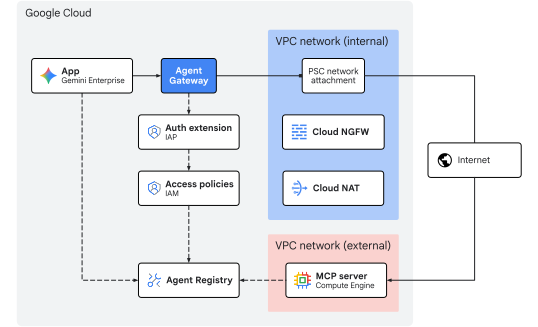
图 1. Codelab 架构
学习内容
- 如何配置具有
vpcEgress: ALL_TRAFFIC的AgentConnectivityTemplate,以将所有出站 Agent Gateway 流量路由到 VPC 网络中 - 如何预留静态外部 IPv4 地址并将其绑定到 PSC 网络连接子网上的 Cloud NAT
- 如何部署可验证 Google OAuth 2.0 不记名令牌 (
oauth2.googleapis.com/tokeninfo) 并将其入站防火墙严格限制为 Cloud NAT 静态 IP (${NAT_EXT_IP}/32) 的外部可流式传输 HTTP MCP 资源服务器 - 如何配置 Google Identity OAuth 2.0 客户端凭据,以及如何在 Agent Registry 中注册 MCP 服务器及其工具架构
- 如何将已注册的 OAuth 2.0 MCP 服务器连接到 Gemini Enterprise,并通过 Agent Gateway 路由用户委托的工具调用
- 如何使用 CLI 命令和 Cloud Logging 验证静态 IP 转换、最终用户 OAuth 2.0 身份验证 (
authenticated_user) 和网关政策强制执行
所需条件
- 启用了结算功能的 Google Cloud 项目
- 有效的 Gemini Enterprise 许可或为期 30 天的试用期
- 用于配置网络服务、组织政策、Gemini Enterprise 和 Agent Platform 资源的 IAM 权限
- 安装了 Google Cloud CLI (
gcloud)、curl和jq的 POSIX 兼容 shell(bash或zsh)
介绍部分到此结束,接下来进入概念部分。
2. 概念
部署序列
此 Codelab 会先部署网络和治理基础架构,以便在注册 MCP 工具并将其与 Gemini Enterprise 连接之前,静态 IP 出站路径和网关控制功能能够正常运行:
- 网络基础架构:预留静态外部 IPv4 地址,并预配出站 VPC、PSC 附加子网、PSC 网络附加、Cloud Router、Cloud NAT 网关和外部 MCP 网络防火墙规则。
- 智能体连接模板和 Agent Gateway:在出站模式 (
AGENT_TO_ANYWHERE) 下部署AgentConnectivityTemplate(vpcEgress: ALL_TRAFFIC) 和区域AgentGateway,并集成 Agent Registry (registries)。 - 授权政策:配置 IAP 授权扩展程序 (
AuthzExtension)、网关授权政策 (AuthzPolicy) 和 IAM v3 统一访问权限政策(AccessPolicy和PolicyBinding)。 - 部署和注册 MCP 服务器:在 Caddy TLS 后面部署外部
mcp-sprocketsOAuth 2.0 资源服务器,验证其 Google OAuth 2.0tokeninfo强制执行情况,将入口防火墙严格锁定到 Cloud NAT 静态 IP (${NAT_EXT_IP}/32),并在 Agent Registry 中注册服务和工具规范(get_sprockets和get_sprocket_by_id)。 - Gemini Enterprise 应用和 OAuth 2.0 客户端:配置 Google Identity 提供方、试用许可、OAuth 2.0 权限请求页面和 Web 应用客户端凭据(
OAUTH_CLIENT_ID和OAUTH_CLIENT_SECRET),创建 Gemini Enterprise 应用 (Engine),并将出站流量绑定到 Agent Gateway (agentGatewaySetting)。 - 导入自定义 MCP 数据连接器:创建并激活配置了
auth_type: "OAUTH"的REGISTRY_MCP数据连接器 (:setUpDataConnector),以将已注册的 MCP 服务器支持的数据存储区关联到 Gemini Enterprise 应用。 - 验证:完成一次性用户 OAuth 2.0 意见征求流程,通过 Gemini Enterprise 助理调用 MCP 工具(确认
egress_source_ip和authenticated_user),并在 Cloud Logging 中验证政策执行情况和静态 IP NAT 转换。
中央 IdP + 受 OAuth 保护的 MCP 资源服务器架构
在企业部署中,身份管理和工具执行遵循标准 OAuth 2.0 角色分离原则,即在集中式身份提供方(授权服务器)和受保护的 MCP 资源服务器之间分离角色:
OAuth 2.0 角色 | 本 Codelab 中的组件 | 责任 |
资源所有者 | 最终用户 ( | 登录 Gemini Enterprise Web 应用,并在一次性的三方 OAuth 2.0 授权流程中授予同意权限。 |
OAuth 2.0 客户端 | Gemini Enterprise | 持有 |
授权服务器 | Google Identity OAuth 2.0( | 在浏览器同意重定向期间对用户进行身份验证,并向 Gemini Enterprise 颁发 OAuth 2.0 访问令牌和刷新令牌。 |
资源服务器 | 外部 | 通过其 VPC 防火墙 ( |
由于浏览器同意重定向 (accounts.google.com) 和后通道令牌交换 (oauth2.googleapis.com/token) 是针对 Google 管理的 OAuth 2.0 端点进行的,因此外部 MCP 服务器防火墙仅通过 Cloud NAT 接收来自 Agent Gateway 的运行时 MCP JSON-RPC 请求 (POST /mcp),从而允许其入站防火墙严格锁定为 ${NAT_EXT_IP}/32。
Discovery Engine 资源模型
Gemini Enterprise 应用(在 Discovery Engine API 中表示为 Engine 资源)是最终用户的中央编排层和对话界面。它负责管理用户聊天会话、根据企业数据为生成式模型提供依据,并协调动态工具执行。
Gemini Enterprise 应用通过数据存储区与数据和系统进行互动:
- 知识数据存储区:注入并索引静态内容(例如 Cloud Storage、Google 云端硬盘、BigQuery),以实现检索增强生成 (RAG)。
- 数据连接器(操作提供方):连接到动态第三方 API 或自定义 API。自定义 MCP 服务器数据存储区会公开由 Model Context Protocol (MCP) 定义的工具,使模型能够在对话期间动态调用外部函数。
Gemini Enterprise 出站
当 Engine 上的 agentGatewaySetting 和 DataConnector 上的 use_agent_gateway_egress: true 都已配置时,Gemini Enterprise 会将自定义 MCP 服务器工具请求路由到 Agent Gateway。
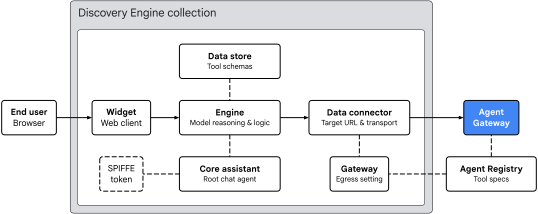
图 2. Gemini Enterprise 出站架构
Gemini Enterprise 应用在以下四个关键领域组织工具路由:
- 微件 (
default_search_widget_config):- 提供 Web 客户端界面。该 widget 接收来自用户的提示,在工具需要授权时触发一次性 OAuth 2.0 用户同意重定向,并与底层引擎启动聊天会话。
- 核心助理 (
assistants/default_assistant/agents/default/core_assistant):- 引擎中的根对话式推理代理。在评估用户查询时,核心助理会检查可用的工具,并将执行任务委托给合成的 Agent Gateway 子智能体。
- 数据存储区和数据连接器:
DataStore:在:setUpDataConnector运行时,在专用Collection内预配,它会将导入的 Agent Registry 工具架构(get_sprockets、get_sprocket_by_id)、实参类型和代理指令关联 (dataStoreIds) 到 Gemini EnterpriseEngine。DataConnector:管理与远程 MCP 服务器 (instance_uri) 的REGISTRY_MCP操作连接 (createBapConnection: true),解析智能体注册表 MCP 服务器资源 (registry_mcp_server_name),附加用户保险库 OAuth 2.0 不记名令牌 (Authorization: Bearer [access_token]),并启用智能体网关出站流量 (use_agent_gateway_egress: true)。
- Agent Identity、Agent Registry 和 Agent Gateway:
- 当数据连接器调度出站工具调用时,它会将流量路由到
agentGatewaySetting中指定的网关。核心助理会生成一个 SPIFFE 身份令牌,以声明其工作负载身份:principal://agents.global.org-.../agents/default/core_assistant。 - Agent Gateway 使用
registries字段与 Agent Registry 集成,以动态解析目标端点和已注册的工具架构,使用 IAP 评估授权政策,并使用AgentConnectivityTemplate将允许的请求(保留用户Authorization: Bearer标头)转发到 VPC 网络中。
- 当数据连接器调度出站工具调用时,它会将流量路由到
网关 VPC 连接和静态 IP NAT
Agent Gateway 支持使用网关上由 agentConnectivityTemplate 引用的 AgentConnectivityTemplate 资源进行 VPC 网络连接。模板 egressNetworkConfig 定义了流量如何通过 PSC 网络连接进入您的 VPC:
PRIVATE_RANGES_ONLY(默认):仅通过 PSC 网络连接路由 RFC 1918、RFC 6598 和 E 类专用 IP 范围。面向互联网的流量会绕过您的 VPC,直接通过 Google 默认的互联网出站流量退出。ALL_TRAFFIC(在本 Codelab 中使用):通过 PSC 网络连接 (10.10.10.2) 将来自 Agent Gateway 的所有出站流量(包括公共互联网和外部合作伙伴 MCP 端点)路由到您的 VPC 子网。
在 ALL_TRAFFIC 模式下运行时,PSC 附加子网需要进行两项配置:
- 专用 Google 访问通道 (
--enable-private-ip-google-access):确保对 Google Cloud API (*.googleapis.com) 的内部调用继续在 Google 网络内以私密方式路由。 - Cloud Router 和 Cloud NAT (
MANUAL_ONLY):进入 PSC 附加子网的出站互联网流量会通过 Cloud NAT 遵循默认路由 (0.0.0.0/0),Cloud NAT 会对您预留的静态外部 IPv4 地址 (${NAT_EXT_IP}) 执行源网络地址转换 (SNAT)。因此,外部防火墙可以严格限制入站访问权限,仅允许访问${NAT_EXT_IP}/32。
限制和要求
- 仅限 StreamableHTTP:不支持旧版服务器发送事件 (SSE) 传输。MCP 服务器必须使用 StreamableHTTP。
- 组织政策覆盖:在注册数据连接器之前,您必须明确覆盖自定义 MCP 数据存储区的组织政策。
- 区域对齐:Gemini Enterprise 会强制执行应用位置、Agent Gateway 和 Agent Registry 之间的区域对齐:
Gemini Enterprise 应用位置 | Agent Gateway 和 NAT 位置 | Agent Registry 位置 |
|
|
|
|
|
|
|
|
|
概念部分到此结束,接下来进入设置部分。
3. 设置
所需 IAM 角色
您需要具备以下角色才能完成此 Codelab:
网域 | 所需 IAM 角色 |
项目和 IAM |
|
网络和网关 |
|
Gemini Enterprise 和注册表 |
|
工作负载 |
|
可观测性 |
|
或者,使用 roles/owner 等广泛的基本角色与 roles/orgpolicy.policyAdmin 结合使用(因为 roles/owner 本身无法修改组织政策)。
访问项目
本 Codelab 使用单个 Google Cloud 项目。配置步骤使用 gcloud CLI 和 Linux shell 命令。
首先,访问您的 Google Cloud 云项目命令行:
- Cloud Shell 位于
shell.cloud.google.com,或者 - 安装了
gcloudCLI 的本地终端
设置项目 ID
# set target project id
gcloud config set project SET_YOUR_PROJECT_ID_HERE
验证会话
# login to gcloud cli
gcloud auth login
# login for gcloud api
gcloud auth application-default login
设置 shell 环境变量
# set custom var for slug (eg, "foo") and region preference
export SLUG="foo"
export REGION="us-central1"
export ZONE="us-central1-a"

echo ${SLUG}
echo ${REGION}
echo ${ZONE}
# create project vars (automatic)
export PROJ_ID=$(gcloud config list --format="value(core.project)")
export PROJ_NO=$(gcloud projects describe ${PROJ_ID} --format="value(projectNumber)")
export ORG_ID=$(gcloud projects get-ancestors ${PROJ_ID} --format="value(id)" | tail -n 1)
export USER_IDENTITY=$(gcloud config get-value account)

echo ${PROJ_ID}
echo ${PROJ_NO}
echo ${ORG_ID}
echo ${USER_IDENTITY}
# create resource vars for agent platform (automatic)
export AGW_NAME="agw-${SLUG}-${REGION}-ata"
export AGW_URI="projects/${PROJ_ID}/locations/${REGION}/agentGateways/${AGW_NAME}"
export MCP_NAME="mcp-sprockets"

echo ${AGW_NAME}
echo ${AGW_URI}
echo ${MCP_NAME}
# create resource vars for gemini enterprise (automatic)
export GE_LOCATION="global"
export GE_APP_ORG_NAME="${SLUG}, Inc."
export GE_APP_DISPLAY_NAME="${SLUG} ${GE_LOCATION} app"
export GE_APP_NAME="app-${SLUG}-${GE_LOCATION}"
export GE_APP_INIT="${GE_APP_NAME}_$(date +%s)"

echo ${GE_LOCATION}
echo ${GE_APP_ORG_NAME}
echo ${GE_APP_DISPLAY_NAME}
echo ${GE_APP_NAME}
echo ${GE_APP_INIT}
设置代理身份信任网域
if-then-else 语句用于检查项目是否属于组织,以便为委托主体身份设置正确的信任域。
# set var for trust domain
if [[ -n "${ORG_ID}" ]]; then
  export TRUST_DOMAIN="agents.global.org-${ORG_ID}.system.id.goog"
else
  export TRUST_DOMAIN="agents.global.proj-${PROJ_NO}.system.id.goog"
fi

echo "trust domain: ${TRUST_DOMAIN}"
设置结算项目和配额项目
# set cli quota project
gcloud config set billing/quota_project ${PROJ_ID}
# set api quota project
gcloud auth application-default set-quota-project ${PROJ_ID}
为配置文件创建本地目录
# create config folder
mkdir -p cfg
更新 gcloud cli(推荐)
如果自行管理 Google Cloud SDK 的安装(即在 Cloud Shell 之外),请将组件更新为最新版本。
# update gcloud cli
gcloud components update
启用 API 服务
# enable google cloud apis
gcloud services enable \
  agentregistry.googleapis.com \
  aiplatform.googleapis.com \
  cloudapiregistry.googleapis.com \
  cloudresourcemanager.googleapis.com \
  compute.googleapis.com \
  discoveryengine.googleapis.com \
  dns.googleapis.com \
  iam.googleapis.com \
  iap.googleapis.com \
  logging.googleapis.com \
  monitoring.googleapis.com \
  networkconnectivity.googleapis.com \
  networksecurity.googleapis.com \
  networkservices.googleapis.com \
  orgpolicy.googleapis.com \
  serviceextensions.googleapis.com \
  serviceusage.googleapis.com
组织政策
默认 Google Cloud 受管理的组织政策限制条件和沙盒政策可能会限制此 Codelab 中使用的功能:
compute.vmExternalIpAccess:限制锁定沙盒组织中 Compute Engine 虚拟机上的外部 IPv4 地址。discoveryengine.managed.disableCustomMcpServerConnector:限制创建使用自定义 MCP 服务器 (custom_mcp) 作为数据源的数据连接器(默认强制执行)。discoveryengine.managed.allowedEgressFqdns:在 VPC Service Controls (VPC-SC) 处于有效状态或项目列在enforcedProjects中时,限制数据连接器的出站流量网域 (instance_uriFQDN)。discoveryengine.managed.allowedDataSources:在 VPC-SC 处于有效状态或项目列在enforcedProjects中时,限制允许的数据连接器类型 (dataSource)。
在项目级层替换所有继承的组织政策限制。
停用自定义 MCP 限制条件
# disable data connector constraint (allow custom mcp servers)
gcloud org-policies set-policy "/dev/stdin" <<EOF
name: projects/${PROJ_ID}/policies/discoveryengine.managed.disableCustomMcpServerConnector
spec:
  rules:
  - enforce: false
EOF
停用条件式数据连接器限制条件
# disable egress fqdn constraint on project
gcloud org-policies set-policy "/dev/stdin" <<EOF
name: projects/${PROJ_ID}/policies/discoveryengine.managed.allowedEgressFqdns
spec:
  rules:
  - enforce: false
EOF
# disable allowed data sources constraint on project
gcloud org-policies set-policy "/dev/stdin" <<EOF
name: projects/${PROJ_ID}/policies/discoveryengine.managed.allowedDataSources
spec:
  rules:
  - enforce: false
EOF
停用访问权限政策限制
# disable iam v3 constraint (allow v3 access policies)
gcloud org-policies set-policy /dev/stdin << EOF
name: projects/${PROJ_NO}/policies/iam.managed.disableAccessPolicyBinding
spec:
  rules:
  - enforce: false
EOF
允许外部 IP 地址
# allow external ip address for vms on project
gcloud org-policies set-policy "/dev/stdin" <<EOF
name: projects/${PROJ_ID}/policies/compute.vmExternalIpAccess
spec:
  rules:
  - allowAll: true
EOF
验证组织政策
检查 compute.vmExternalIpAccess 是否已设置为 allowAll: True,以及其他政策是否为 enforce: False:
# verify effective org policy constraints on project
for policy in \
  discoveryengine.managed.disableCustomMcpServerConnector \
  discoveryengine.managed.allowedEgressFqdns \
  discoveryengine.managed.allowedDataSources \
  iam.managed.disableAccessPolicyBinding \
  compute.vmExternalIpAccess; do
  gcloud org-policies describe ${policy} \
    --project=${PROJ_ID} \
    --effective \
    --format="flattened[no-pad](name.basename(),spec.rules[0])"
done
验证服务代理绑定(预防措施)
在新项目中,首次启用 networkservices.googleapis.com 时,Google Cloud 会自动预配 Agent Gateway 服务代理并向其授予 roles/agentgateway.serviceAgent。如果您要重复使用现有项目,但之前的清理操作可能已移除默认服务代理绑定,请运行以下命令作为安全措施,以确保身份和角色绑定完好无损:
# ensure network services service account has been created
gcloud beta services identity create \
  --service=networkservices.googleapis.com \
  --project="${PROJ_ID}"

# ensure network services service account has service agent roles applied
gcloud projects add-iam-policy-binding "${PROJ_ID}" \
  --member="serviceAccount:service-${PROJ_NO}@gcp-sa-agentgateway.iam.gserviceaccount.com" \
  --role="roles/agentgateway.serviceAgent"
设置部分到此结束…接下来进入网络部分。
4. 网络
在本部分中,您将预留静态外部 IPv4 地址,创建内部出站 VPC 网络和隔离的外部 VPC 网络,预配 PSC 网络连接,配置 Cloud NAT,并创建防火墙规则。
预留静态外部 IP 地址
为 Cloud NAT 和外部 MCP 服务器虚拟机预留两个区域级静态外部 IPv4 地址:
# reserve static external ipv4 address for cloud nat
gcloud compute addresses create ip-${SLUG}-nat \
  --region=${REGION}

# reserve static external ipv4 address for the mcp server
gcloud compute addresses create ip-${SLUG}-mcp \
  --region=${REGION}
验证静态外部 IP 地址
Gemini Enterprise 要求远程 MCP 端点使用 HTTPS 和公开可信的 TLS 证书。在本实验中,您无需注册自定义网域,而是使用 sslip.io,这是一项免费的通配符 DNS 服务,可将包含 IP 地址(例如 mcp.[IP].sslip.io)的任何主机名直接解析回该 IP 地址。由于 Let's Encrypt 等证书授权机构不向裸 IP 地址颁发证书,因此此 sslip.io 主机名可为 Caddy 反向代理提供有效的域名,以便自动为 MCP 服务器预配可信的 TLS 证书。
导出 IPv4 地址,并为外部 MCP 服务器构建 sslip.io 域名和网址:
# export static ip addresses and set vars for domain
export NAT_EXT_IP=$(gcloud compute addresses describe ip-${SLUG}-nat \
  --region=${REGION} \
  --format="value(address)")

export MCP_EXT_IP=$(gcloud compute addresses describe ip-${SLUG}-mcp \
  --region=${REGION} \
  --format="value(address)")

export MCP_DOMAIN="mcp.${MCP_EXT_IP}.sslip.io"
export MCP_URL="https://${MCP_DOMAIN}/mcp"

echo "cloud nat external ip    : ${NAT_EXT_IP}"
echo "mcp server external ip   : ${MCP_EXT_IP}"
echo "mcp url                  : ${MCP_URL}"
输出示例:
cloud nat external ip    : 203.0.113.10
mcp server external ip   : 203.0.113.20
mcp url                  : https://mcp.203.0.113.20.sslip.io/mcp
创建内部网络
如果 Agent Gateway 连接模板配置为使用 networkAttachment 的 egressNetworkConfig,则托管 PSC 网络连接的子网必须至少为 /28 CIDR 块,并且已启用专用 Google 访问通道 (--enable-private-ip-google-access)。
为内部 Agent Gateway 出站流量创建全球 VPC 网络:
# create vpc network
gcloud compute networks create vnet-${SLUG}-internal --subnet-mode=custom

# create subnet for agent gateway psc na
gcloud compute networks subnets create subnet-${REGION}-agw \
  --network=vnet-${SLUG}-internal \
  --range=10.10.10.0/28 \
  --region=${REGION} \
  --enable-private-ip-google-access
创建内部防火墙规则
创建防火墙政策以允许所有出站流量并启用日志记录。此规则将用于监控从 Agent Gateway 出站到内部 VPC 网络的流量。Cloud NGFW 支持基本功能版和标准版层级,用于网络安全和流量监控。
# create fw policy
gcloud compute network-firewall-policies create fw-policy-${SLUG}-internal --global
# create fw policy rule
gcloud compute network-firewall-policies rules create 1001 \
  --description="allow all out and log" \
  --firewall-policy=fw-policy-${SLUG}-internal \
  --global-firewall-policy \
  --action=allow \
  --direction=EGRESS \
  --layer4-configs=all \
  --dest-ip-ranges=0.0.0.0/0 \
  --enable-logging
# bind fw policy to network
gcloud compute network-firewall-policies associations create \
  --name=fw-policy-bind-${SLUG}-internal \
  --firewall-policy=fw-policy-${SLUG}-internal \
  --network=vnet-${SLUG}-internal \
  --global-firewall-policy
创建 PSC 网络连接
创建配置为自动接受来自 Agent Gateway 的连接的 Private Service Connect (PSC) 网络连接。网络连接可建立连接的使用方 VPC 网络端,以安全地与 Agent Gateway 提供方端关联,从而实现出站流量。如需详细了解子网要求和 IP 地址范围规范,请参阅配置 VPC 连接。
# create psc network attachment
gcloud compute network-attachments create psc-na-${REGION}-agw \
  --region=${REGION} \
  --subnets=subnet-${REGION}-agw \
  --connection-preference=ACCEPT_AUTOMATIC
验证 PSC 网络连接
# show psc network attachment details
gcloud compute network-attachments describe psc-na-${REGION}-agw --region=${REGION}
检索 PSC 网络连接的资源 URI 并将其存储在 PSC_NA_URI 环境变量中。此 URI 将在 Agent Gateway 配置 (networkConfig.egress.networkAttachment) 中引用,以预配 PSC 接口,用于将网络出站流量路由到 VPC 网络:
# fetch psc network attachment uri
export PSC_NA_URI=$(gcloud compute network-attachments describe psc-na-${REGION}-agw \
  --region=${REGION} \
  --format="value(selfLink.scope(v1))")
echo ${PSC_NA_URI}
创建 Cloud NAT
Cloud NAT 用于将 Agent Gateway 出站流量的源 IP 地址转换为预留的公共 IP 地址,以便通过公共互联网进行路由。
只有来自代理网关出站网络连接子网的来源才符合使用 Cloud NAT 的条件。
# create router for nat
gcloud compute routers create cr-nat-${SLUG}-${REGION} \
  --network=vnet-${SLUG}-internal \
  --asn=16550 \
  --region=${REGION}

# create nat
gcloud compute routers nats create nat-${SLUG}-${REGION} \
  --router=cr-nat-${SLUG}-${REGION} \
  --region=${REGION} \
  --nat-custom-subnet-ip-ranges="subnet-${REGION}-agw" \
  --nat-external-ip-pool="ip-${SLUG}-nat" \
  --enable-logging \
  --log-filter=ALL
验证 Cloud NAT
检查 Cloud NAT 状态,并确认已配置预期的 natIP 来源:
# verify cloud nat configuration
gcloud compute routers nats describe nat-${SLUG}-${REGION} \
  --router=cr-nat-${SLUG}-${REGION} \
  --region=${REGION} \
  --format="yaml(name,natIps,subnetworks.name)"
输出示例:
name: nat-foo-us-central1
natIps:
- https://www.googleapis.com/compute/v1/projects/[PROJ_ID]/regions/us-central1/addresses/ip-foo-nat
创建外部网络
创建一个单独的隔离 VPC 网络来托管外部 MCP 服务器虚拟机。
# create vpc network
gcloud compute networks create vnet-${SLUG}-external --subnet-mode=custom

# create subnet for mcp server
gcloud compute networks subnets create subnet-${REGION}-mcp \
  --network=vnet-${SLUG}-external \
  --range=240.240.240.0/24 \
  --region=${REGION} \
  --enable-private-ip-google-access
创建外部防火墙规则
在外部 VPC 网络上创建两个入站流量防火墙规则:
2001:允许入站 TCP 端口80,以便 Let's Encrypt 可以完成${MCP_DOMAIN}的 ACME HTTP-01 网域验证质询。2002:最初允许来自0.0.0.0/0的入站 TCP 端口443,以便在严格锁定到${NAT_EXT_IP}/32之前,从本地 shell 验证 TLS 就绪情况和 OAuth 2.0tokeninfo强制执行情况。
# create fw policy
gcloud compute network-firewall-policies create fw-policy-${SLUG}-external --global
# create fw policy rules
gcloud compute network-firewall-policies rules create 2001 \
  --description="allow in any http" \
  --firewall-policy=fw-policy-${SLUG}-external \
  --global-firewall-policy \
  --action=allow \
  --direction=INGRESS \
  --layer4-configs=tcp:80 \
  --src-ip-ranges=0.0.0.0/0 \
  --dest-ip-ranges=240.240.240.0/24 \
  --enable-logging

gcloud compute network-firewall-policies rules create 2002 \
  --description="allow in any https" \
  --firewall-policy=fw-policy-${SLUG}-external \
  --global-firewall-policy \
  --action=allow \
  --direction=INGRESS \
  --layer4-configs=tcp:443 \
  --src-ip-ranges=0.0.0.0/0 \
  --dest-ip-ranges=240.240.240.0/24 \
  --enable-logging
# bind fw policy to network
gcloud compute network-firewall-policies associations create \
  --name=fw-policy-bind-${SLUG}-external \
  --firewall-policy=fw-policy-${SLUG}-external \
  --network=vnet-${SLUG}-external \
  --global-firewall-policy
网络部分到此结束…接下来进入Agent Gateway部分。
5. Agent Gateway
在本部分中,您将使用 vpcEgress: ALL_TRAFFIC 部署代理连接模板,部署区域级Agent Gateway,将授权委托给 Identity-Aware Proxy (IAP),并定义 IAM Unified Access Policy rules来管理出站网络请求。
创建连接模板
连接模板规范定义了以下内容:
egressNetworkConfig.networkAttachment:指向 PSC 网络连接,将 Agent Gateway 连接到您的 VPC 网络。egressNetworkConfig.vpcEgress:设置为ALL_TRAFFIC,以便所有出站代理连接(包括公共互联网 MCP 端点)都将路由到 VPC 网络中,并使用 Cloud NAT 源 IP 地址转换退出。
创建并导入连接模板配置文件:
# create connectivity template config file (vpcEgress: ALL_TRAFFIC)
cat > cfg/act-${AGW_NAME}.yaml << EOF
accessPath: AGENT_TO_ANYWHERE
name: projects/${PROJ_NO}/locations/${REGION}/agentConnectivityTemplates/act-${AGW_NAME}
deploymentModel: CENTRALIZED
egressNetworkConfig:
  networkAttachment: ${PSC_NA_URI}
  vpcEgress: ALL_TRAFFIC
EOF
# import connectivity template file (create template)
gcloud network-services agent-connectivity-templates import act-${AGW_NAME} \
  --source="cfg/act-${AGW_NAME}.yaml" \
  --location=${REGION}
创建 Agent Gateway
Agent Gateway 规范定义了以下内容:
agentConnectivityTemplate:指向连接模板,以便网关可以使用 PSC 网络连接来实现 VPC 连接。registries:将网关与区域级 Agent Registry 相关联,以解析编入目录的 MCP 端点和工具架构。
创建并导入 Agent Gateway 配置文件:
# create agent gateway config file
cat > cfg/${AGW_NAME}.yaml << EOF
name: ${AGW_NAME}
protocols:
  - MCP
googleManaged:
  governedAccessPath: AGENT_TO_ANYWHERE
agentConnectivityTemplate: projects/${PROJ_NO}/locations/${REGION}/agentConnectivityTemplates/act-${AGW_NAME}
registries:
  - "//agentregistry.googleapis.com/projects/${PROJ_ID}/locations/${REGION}"
EOF
# import agent gateway config file (create gateway)
gcloud network-services agent-gateways import ${AGW_NAME} \
  --source="cfg/${AGW_NAME}.yaml" \
  --location=${REGION}
验证 Agent Gateway 部署
确认 Agent Registry 和连接模板配置:
# verify agent gateway deployment details
gcloud network-services agent-gateways describe ${AGW_NAME} \
  --location=${REGION} \
  --format="yaml(name,agentConnectivityTemplate,registries)"
输出示例:
agentConnectivityTemplate: projects/[PROJ_NO]/locations/us-central1/agentConnectivityTemplates/act-foo-us-central1
name: projects/[PROJ_ID]/locations/us-central1/agentGateways/agw-foo-us-central1-ata
registries:
- //agentregistry.googleapis.com/projects/[PROJ_ID]/locations/us-central1
检查 PSC 网络连接,确认网关连接:
# show psc network attachment details
gcloud compute network-attachments describe psc-na-${REGION}-agw \
  --region=${REGION} \
  --format="yaml(connectionEndpoints)"
输出示例:
connectionEndpoints:
- ipAddress: 10.10.10.2
  projectIdOrNum: '[TENANT_PROJ_NO]'
  status: ACCEPTED
  subnetwork: https://www.googleapis.com/compute/v1/projects/[PROJ_ID]/regions/us-central1/subnetworks/subnet-us-central1-agw
委托授权
Agent Gateway 使用与 Identity-Aware Proxy (IAP) Unified Access Policies (UAP) 集成的授权政策 (networksecurity.authzPolicies) 来保护和管理出站工具流量。
虽然 Agent Gateway 支持基本的内嵌 ALLOW 和 DENY 规则,但企业环境需要以身份为中心的集中式治理。借助 IAM 统一访问权限政策(或访问权限政策),您可以使用标准 IAM v3 访问权限政策来管理出站访问权限规则。

图 3. 授权架构
授权流程连接了三个组件:
- 网关授权政策 (
authzPolicy):- 以 Agent Gateway 为目标的区域级资源。
- 配置了
policyProfile: REQUEST_AUTHZ和action: CUSTOM,以将所有出站授权检查路由到 IAP 授权扩展程序。
- IAP 服务扩展程序 (
authzExtension):- 一种将请求授权委托给 Identity-Aware Proxy (
iap.googleapis.com) 的区域级资源。 - 使用政策版本
V2以ENFORCE模式评估政策。
- 一种将请求授权委托给 Identity-Aware Proxy (
- IAM Unified Access Policy and Binding (
accessPolicy&policyBinding):- 包含精细访问权限规则的全局 IAM v3 资源。
- 对调用代理的 SPIFFE 主体身份进行身份验证,验证通用
iap.googleapis.com/resources.egressViaIAP权限,并根据目标属性评估通用表达式语言 (CEL) 条件。
部署授权扩展程序
# create authz extension config file
cat > "cfg/${AGW_NAME}-svc-ext-authz-iap.yaml" << EOF
name: ${AGW_NAME}-svc-ext-authz-iap
service: iap.googleapis.com
failOpen: false
timeout: 1s
metadata:
  iapPolicyVersion: "V2"
EOF
# import authz extension config file (create authz extension)
gcloud service-extensions authz-extensions import ${AGW_NAME}-svc-ext-authz-iap \
  --source="cfg/${AGW_NAME}-svc-ext-authz-iap.yaml" \
  --location=${REGION}
验证授权扩展程序
检查授权扩展服务是否处于活动状态:
# list authz extensions
gcloud service-extensions authz-extensions list \
  --location=${REGION} \
  --format="table(
    name.basename():label=NAME,
    createTime.date(tz=LOCAL):label=CREATED,
    service:label=SERVICE,
    metadata:label=METADATA,
    timeout:label=TIMEOUT
  )"
部署授权政策
创建以 Agent Gateway 为目标的 network-security 授权政策配置,并将请求验证委托给 IAP 的授权扩展程序:
# create authz policy config file
cat > cfg/${AGW_NAME}-authz-policy-iap.yaml << EOF
name: ${AGW_NAME}-authz-policy-iap
target:
  resources:
    - "projects/${PROJ_ID}/locations/${REGION}/agentGateways/${AGW_NAME}"
policyProfile: REQUEST_AUTHZ
action: CUSTOM
customProvider:
  authzExtension:
    resources:
      - "projects/${PROJ_ID}/locations/${REGION}/authzExtensions/${AGW_NAME}-svc-ext-authz-iap"
EOF
# import authz policy config file (create authz policy)
gcloud network-security authz-policies import ${AGW_NAME}-authz-policy-iap \
  --source=cfg/${AGW_NAME}-authz-policy-iap.yaml \
  --location=${REGION}
验证授权政策
检查授权政策是否处于有效状态:
# list authz policies
gcloud network-security authz-policies list \
  --location=${REGION} \
  --format="table(
    name.basename():label=NAME,
    action:label=ACTION,
    policyProfile:label=POLICY_PROFILE,
    customProvider.authzExtension.resources[0].basename():label=CUSTOM_PROVIDER_RESOURCE
  )"
创建 IAM 访问权限政策
Agent Gateway 现在将授权检查委托给 IAP,并从 Agent Registry 中解析目标元数据。接下来,定义一个 IAM 统一访问权限政策规则,以管理出站工具执行。
IAP 会根据以下 Agent Registry 目标属性评估 CEL 属性表达式:
- 注册状态 (
destination.is_registered):- 布尔值 (
true/false),用于指示目的地是否已在 Agent Registry 中编入目录。
- 布尔值 (
- MCP 服务器名称 (
destination.agent_registry.mcp_server.name):- 在 Agent Registry 中注册的规范 MCP 服务器资源名称。
- MCP 方法 (
destination.agent_registry.mcp_server.method):- 正在调用的 MCP 方法(例如
tools/call、tools/list、initialize)。
- 正在调用的 MCP 方法(例如
- 工具名称 (
destination.agent_registry.mcp_server.tool.name):- 调用的具体工具名称(例如
get_sprocket_by_id或get_sprockets),可在注册的 MCP 服务器上实现精细的工具级授权。
- 调用的具体工具名称(例如
定义 IAM 访问权限政策规则
IAM 政策规则清单指定了以下内容:
- 主体:表示 Gemini Enterprise 核心助理代理的 SPIFFE 主体身份。
- 权限:所有受 IAP 管控的出站流量所需的通用
iap.googleapis.com/resources.egressViaIAP权限。 - Conditions:一种 CEL 表达式 (
destination.is_registered == true),用于确保代理只能调用 Agent Registry 中编目的端点。
创建政策规则清单文件:
# create access policy rule file
cat > cfg/uap-policy-${SLUG}-rules.json << EOF
[
  {
    "description": "allow ge assistant to any registered service",
    "effect": "ALLOW",
    "principals": [
      "principal://${TRUST_DOMAIN}/resources/discoveryengine/projects/${PROJ_NO}/locations/global/engines/${GE_APP_INIT}/assistants/default_assistant/agents/default/core_assistant"
    ],
    "operation": {
      "permissions": [
        "iap.googleapis.com/resources.egressViaIAP"
      ]
    },
    "conditions": {
      "iap.googleapis.com": {
        "expression": \
        "destination.is_registered == true"
      }
    }
  }
]
EOF
部署 IAM 访问权限政策
使用清单文件中定义的规则创建全局 IAM 访问权限政策:
# create iam access policy
gcloud iam access-policies create uap-policy-${SLUG} \
  --details-rules=cfg/uap-policy-${SLUG}-rules.json \
  --project=${PROJ_ID} \
  --location=global
验证 IAM 访问权限政策
检查 IAM 访问权限政策是否已成功创建,并检查规则详情:
# show iam access policy details
gcloud iam access-policies describe uap-policy-${SLUG} \
  --project=${PROJ_ID} \
  --location=global
输出示例:
details:
  rules:
  - conditions:
      iap.googleapis.com:
        expression: destination.is_registered == true
    description: allow ge assistant to any registered service
    effect: ALLOW
    operation:
      permissions:
      - iap.googleapis.com/resources.egressViaIAP
    principals:
    - principal://agents.global.org-[ORG_ID].system.id.goog/resources/discoveryengine/projects/[PROJ_NO]/locations/global/engines/app-foo-global_[EPOCH]/assistants/default_assistant/agents/default/core_assistant
name: projects/[PROJ_ID]/locations/global/accessPolicies/uap-policy-foo
将 IAM 访问权限政策绑定到项目
如需在项目中的所有 Agent Gateway 上启用强制执行,请创建将 IAM 访问权限政策关联到项目资源的政策绑定:
# bind iam access policy to project resource
gcloud iam policy-bindings create uap-bind-${SLUG} \
  --policy="projects/${PROJ_ID}/locations/global/accessPolicies/uap-policy-${SLUG}" \
  --target-resource="//cloudresourcemanager.googleapis.com/projects/${PROJ_ID}" \
  --project=${PROJ_ID} \
  --location=global
验证 IAM 访问权限政策绑定
检查有效政策绑定点是否指向正确的政策和目标:
# show policy binding details
gcloud iam policy-bindings describe uap-bind-${SLUG} \
  --project=${PROJ_ID} \
  --location=global
“代理网关”部分到此结束…接下来是 MCP 服务器部分。
6. MCP 服务器
在此部分中,您将部署一个外部 FastMCP OAuth 2.0 资源服务器 (mcp-sprockets),该服务器会公开 get_sprockets 和 get_sprocket_by_id 工具,并验证它是否会针对 https://oauth2.googleapis.com/tokeninfo 对 Google OAuth 2.0 不记名令牌进行加密验证。接下来,您将严格将外部防火墙规则锁定到 Cloud NAT 静态 IP。
部署外部 MCP 服务器
启动脚本会安装 Caddy 和 FastMCP,在 127.0.0.1:8080 上启动 mcp-sprockets 服务器,并配置 Caddy 以在 ${MCP_DOMAIN} 上提供 HTTPS 服务。
每次 Gemini Enterprise 调用 MCP 工具(例如 get_sprockets 和 get_sprocket_by_id)时,服务器都会执行以下操作:
- 从
X-Forwarded-For标头 (egress_source_ip) 读取调用方源 IP。 - 提取
Authorization: Bearer [access_token]标头,并针对 Google OAuth 2.0 验证端点 (https://oauth2.googleapis.com/tokeninfo?access_token=[token]) 验证令牌。 - 返回
"authenticated_user"([user_email]) 以及"egress_source_ip",证明外部 MCP 服务器验证了 Cloud NAT 静态 IP 和最终用户 Google OAuth 2.0 身份。
# create startup script for the sprockets mcp server vm
cat > cfg/server-startup.sh << 'EOF'
#!/bin/bash
set -euo pipefail

MCP_DOMAIN=$(curl -s -H "Metadata-Flavor: Google" \
  http://metadata.google.internal/computeMetadata/v1/instance/attributes/mcp-domain)

export DEBIAN_FRONTEND=noninteractive
apt-get update -y
apt-get install -y caddy python3-venv curl

mkdir -p /opt/mcp-sprockets
python3 -m venv /opt/mcp-sprockets/venv
/opt/mcp-sprockets/venv/bin/pip install --upgrade pip
/opt/mcp-sprockets/venv/bin/pip install "fastmcp>=2.14.0" "uvicorn>=0.34.0"

cat <<'PYEOF' > /opt/mcp-sprockets/main.py
import json
import urllib.parse
import urllib.request
from typing import Any, Dict
from fastmcp import FastMCP
from fastmcp.server.dependencies import get_http_headers
from mcp.types import ToolAnnotations

mcp = FastMCP("mcp-sprockets")

SPROCKETS = {
    "SPK-101": {"id": "SPK-101", "model": "ANSI-40-12T", "teeth": 12, "pitch_in": 0.5, "material": "1045 Carbon Steel", "stock": 140, "unit_price": 18.50},
    "SPK-102": {"id": "SPK-102", "model": "ANSI-40-24T", "teeth": 24, "pitch_in": 0.5, "material": "1045 Carbon Steel", "stock": 85, "unit_price": 29.00},
    "SPK-103": {"id": "SPK-103", "model": "ANSI-60-16T", "teeth": 16, "pitch_in": 0.75, "material": "304 Stainless Steel", "stock": 60, "unit_price": 42.00},
    "SPK-104": {"id": "SPK-104", "model": "ANSI-60-32T", "teeth": 32, "pitch_in": 0.75, "material": "304 Stainless Steel", "stock": 35, "unit_price": 68.00},
    "SPK-105": {"id": "SPK-105", "model": "ANSI-80-20T", "teeth": 20, "pitch_in": 1.0, "material": "4140 Alloy Steel", "stock": 50, "unit_price": 95.00}
}

def verify_google_oauth_token(headers: Dict[str, str]) -> str:
    token = headers.get("authorization", "")[7:].strip() if headers.get("authorization", "").lower().startswith("bearer ") else ""
    if not token:
        return "unauthenticated (missing Bearer token)"
    url = "https://oauth2.googleapis.com/tokeninfo?" + urllib.parse.urlencode({"access_token": token})
    with urllib.request.urlopen(url, timeout=5) as resp:
        info = json.loads(resp.read().decode("utf-8"))
        return info.get("email", info.get("sub", "verified-oauth-user"))

@mcp.tool(
    description="list all sprockets in the inventory catalog",
    annotations=ToolAnnotations(
        readOnlyHint=True,
        destructiveHint=False,
        idempotentHint=True,
        openWorldHint=False
    )
)
def get_sprockets() -> Dict[str, Any]:
    headers = get_http_headers(include_all=True)
    caller_ip = headers.get("x-forwarded-for", "unknown").split(",")[0].strip()
    try:
        user_email = verify_google_oauth_token(headers)
    except Exception as exc:
        return {"egress_source_ip": caller_ip, "authenticated_user": None, "error": f"OAuth token verification failed: {exc}"}
    return {
        "egress_source_ip": caller_ip,
        "authenticated_user": user_email,
        "sprockets": list(SPROCKETS.values())
    }

@mcp.tool(
    description="fetch details of a specific sprocket by its ID (eg, SPK-101)",
    annotations=ToolAnnotations(
        readOnlyHint=True,
        destructiveHint=False,
        idempotentHint=True,
        openWorldHint=False
    )
)
def get_sprocket_by_id(sprocket_id: str) -> Dict[str, Any]:
    headers = get_http_headers(include_all=True)
    caller_ip = headers.get("x-forwarded-for", "unknown").split(",")[0].strip()
    try:
        user_email = verify_google_oauth_token(headers)
    except Exception as exc:
        return {"egress_source_ip": caller_ip, "authenticated_user": None, "error": f"OAuth token verification failed: {exc}"}
    sprocket = SPROCKETS.get(sprocket_id.upper())
    if sprocket:
        return {
            "egress_source_ip": caller_ip,
            "authenticated_user": user_email,
            "sprocket": sprocket
        }
    return {
        "egress_source_ip": caller_ip,
        "authenticated_user": user_email,
        "error": f"Sprocket '{sprocket_id}' not found."
    }

app = mcp.http_app(stateless_http=True)
PYEOF

cat <<'SVCEOF' > /etc/systemd/system/mcp-sprockets.service
[Unit]
Description=Sprockets FastMCP Server
After=network.target

[Service]
Type=simple
WorkingDirectory=/opt/mcp-sprockets
ExecStart=/opt/mcp-sprockets/venv/bin/uvicorn main:app --host 127.0.0.1 --port 8080 --forwarded-allow-ips="*"
Restart=always

[Install]
WantedBy=multi-user.target
SVCEOF

systemctl daemon-reload
systemctl enable --now mcp-sprockets.service
systemctl restart mcp-sprockets.service

cat <<CADDYEOF > "/etc/caddy/Caddyfile"
${MCP_DOMAIN} {
    reverse_proxy 127.0.0.1:8080
}
CADDYEOF

systemctl restart caddy
EOF
# create vm instance
gcloud compute instances create vm-${MCP_NAME} \
  --zone=${ZONE} \
  --machine-type=e2-micro \
  --image-family=debian-12 \
  --image-project=debian-cloud \
  --shielded-secure-boot \
  --network-interface="subnet=subnet-${REGION}-mcp,address=${MCP_EXT_IP}" \
  --metadata="mcp-domain=${MCP_DOMAIN}" \
  --metadata-from-file="startup-script=cfg/server-startup.sh"
验证 MCP 服务器是否已准备就绪以及 OAuth 2.0 tokeninfo 验证
等待几分钟,让启动脚本安装 FastMCP 和 Caddy 并预配 Let's Encrypt TLS 证书。
# poll until caddy serves valid tls and fastmcp responds to tools/list
for i in $(seq 1 30); do
  RESP=$(curl -s -X POST "${MCP_URL}" \
    -H "Content-Type: application/json" \
    -H "Accept: application/json, text/event-stream" \
    -d '{"jsonrpc": "2.0", "id": 1, "method": "tools/list", "params": {}}' || true)
  if echo "${RESP}" | grep -q "get_sprockets"; then
    echo "mcp server and let's encrypt tls ready"
    break
  fi
  echo "...waiting for mcp server and let's encrypt tls (attempt ${i}/30)..."
  sleep 5
done
验证 sslip.io DNS 解析、由 Caddy 提供的 Let's Encrypt TLS 证书和 FastMCPtools/list 响应:
# query mcp server for tools list
curl -v -X POST "${MCP_URL}" \
  -H "Content-Type: application/json" \
  -H "Accept: application/json, text/event-stream" \
  -d '{"jsonrpc": "2.0", "id": 1, "method": "tools/list", "params": {}}' \
  2>&1 | grep -E "Connected to|subject:|issuer:|SSL certificate|HTTP/|event:|data:"
输出示例:
* Connected to mcp.203.0.113.20.sslip.io (203.0.113.20) port 443
*  subject: CN=mcp.203.0.113.20.sslip.io
*  issuer: C=US; O=Let's Encrypt; CN=E5
*  SSL certificate verify ok.
> POST /mcp HTTP/2
< HTTP/2 200
event: message
data: {"jsonrpc":"2.0","id":1,"result":{"tools":[{"name":"get_sprockets","description":"list all sprockets in the inventory catalog","inputSchema":{"properties":{},"type":"object"},"annotations":{"destructiveHint":false,"idempotentHint":true,"openWorldHint":false,"readOnlyHint":true}},{"name":"get_sprocket_by_id","description":"fetch details of a specific sprocket by its ID (eg, SPK-101)","inputSchema":{"properties":{"sprocket_id":{"type":"string"}},"required":["sprocket_id"],"type":"object"},"annotations":{"destructiveHint":false,"idempotentHint":true,"openWorldHint":false,"readOnlyHint":true}}]}}
在锁定外部防火墙之前,请运行测试 tools/call,传递 Google OAuth 2.0 不记名令牌 (gcloud auth print-access-token),以验证 mcp-sprockets 是否针对 https://oauth2.googleapis.com/tokeninfo 验证令牌,并返回您的 "authenticated_user" 电子邮件地址以及调用方源 IP 地址:
# query mcp server (test tools/call with google oauth 2.0 bearer token)
curl -s -X POST "${MCP_URL}" \
  -H "Authorization: Bearer $(gcloud auth print-access-token)" \
  -H "Content-Type: application/json" \
  -H "Accept: application/json, text/event-stream" \
  -d '{
    "jsonrpc": "2.0",
    "id": 2,
    "method": "tools/call",
    "params": {
      "name": "get_sprocket_by_id",
      "arguments": {"sprocket_id": "SPK-105"}
    }
  }' | sed -n 's/^data: //p' | jq '.result.structuredContent'
输出示例(显示防火墙锁定之前的直接 Cloud Shell IP 和经过验证的 Google OAuth 电子邮件地址):
{
  "egress_source_ip": "198.51.100.154",
  "authenticated_user": "user@example.com",
  "sprocket": {
    "id": "SPK-105",
    "model": "ANSI-80-20T",
    "teeth": 20,
    "pitch_in": 1.0,
    "material": "4140 Alloy Steel",
    "stock": 50,
    "unit_price": 95.0
  }
}
将防火墙锁定到 Cloud NAT 静态 IP
更新外部 VPC 网络防火墙政策,使 TCP 端口 443 仅接受来自 Cloud NAT 静态外部 IP (${NAT_EXT_IP}/32) 的流量:
# create fw policy rule allowing https only from cloud nat static ip
gcloud compute network-firewall-policies rules create 2003 \
  --description="allow in any https from nat ip" \
  --firewall-policy=fw-policy-${SLUG}-external \
  --global-firewall-policy \
  --action=allow \
  --direction=INGRESS \
  --layer4-configs=tcp:443 \
  --src-ip-ranges="${NAT_EXT_IP}/32" \
  --dest-ip-ranges=240.240.240.0/24 \
  --enable-logging
# delete temporary open fw policy rules
gcloud compute network-firewall-policies rules delete 2001 \
  --firewall-policy=fw-policy-${SLUG}-external \
  --global-firewall-policy

gcloud compute network-firewall-policies rules delete 2002 \
  --firewall-policy=fw-policy-${SLUG}-external \
  --global-firewall-policy
检查外部防火墙政策规则是否已到位:
# list all rules in the global network firewall policy
gcloud compute network-firewall-policies describe fw-policy-${SLUG}-external \
  --global \
  --flatten="rules[]" \
  --format="table(
    rules.priority:label=RULE,
    rules.action:label=ACTION,
    rules.direction:label=DIRECTION,
    firstof(
      rules.match.srcIpRanges,
      rules.match.srcAddressGroups,
      rules.match.srcSecureTags.name
    ).map().sub('projects/[^/]+/(locations/global/|global/)', '').list():label=SRC,
    firstof(
      rules.targetForwardingRules,
      rules.match.destIpRanges,
      rules.targetType
    ).map().sub('projects/[^/]+/(locations/global/|global/)', '').list():label=DST
  )"
检查现在是否已屏蔽 Cloud NAT 静态 IP 之外的直接连接:
# query mcp server
curl -i --connect-timeout 5 "${MCP_URL}" \
  || echo "Expected: Direct access blocked (not originating from ${NAT_EXT_IP})"
输出示例:
curl: (28) Connection timed out after 5001 milliseconds
Expected: Direct access blocked (not originating from 203.0.113.10)
MCP 服务器部分到此结束…接下来是 Agent Registry 部分。
7. Agent Registry
Agent Registry 是 AI 生态系统中所有代理、MCP 服务器和端点 (API) 的集中式清单。它还是一个目录,可用于列出、搜索和发现其他已注册的工具和服务,以供 AI 应用使用。Agent Gateway 使用注册表数据模型作为治理框架来强制执行出站访问控制。系统会根据绑定到注册表资源的政策来检查调用代理的主账号的 IAM 角色授予情况。
在本部分中,您将在 Agent Registry 中注册 MCP 服务器及其工具架构 (toolspec.json)。为了支持 Gemini Enterprise 通过 Agent Gateway 与 Google API 和服务进行交互,您还将创建一个注册表端点服务 (oauth2-googleapis),用于指定 Gemini Enterprise 用于将授权代码交换为令牌的 Google API 接口。
注册 MCP 服务器
如需让 Gemini Enterprise 发现 MCP 服务器上提供的工具,请在 Agent Registry 中注册服务时提供工具规范文件 (cfg/toolspec.json)。
创建 MCP 工具规范
# create tool spec file for the sprockets mcp server
cat <<'EOF' > cfg/toolspec.json
{
  "tools": [
    {
      "name": "get_sprockets",
      "description": "List all sprockets in the inventory catalog.",
      "inputSchema": {
        "type": "object",
        "properties": {}
      },
      "isReadOnly": true,
      "isDestructive": false,
      "isIdempotent": true,
      "isOpenWorld": false
    },
    {
      "name": "get_sprocket_by_id",
      "description": "Fetch details of a specific sprocket by its ID (e.g., SPK-101).",
      "inputSchema": {
        "type": "object",
        "properties": {
          "sprocket_id": {
            "type": "string",
            "description": "The sprocket identifier (e.g., SPK-101, SPK-105)."
          }
        },
        "required": [
          "sprocket_id"
        ]
      },
      "isReadOnly": true,
      "isDestructive": false,
      "isIdempotent": true,
      "isOpenWorld": false
    }
  ]
}
EOF
创建 MCP 服务器服务
# create registry service (mcp server)
gcloud agent-registry services create ${MCP_NAME} \
  --project=${PROJ_ID} \
  --location=${REGION} \
  --display-name="${MCP_DOMAIN}" \
  --description="MANDATORY SPROCKETS INVENTORY & CATALOG AGENT: You MUST \
ALWAYS invoke this tool (get_sprockets or get_sprocket_by_id) for ANY question \
about sprockets, inventory catalog listings, sprocket IDs (SPK-101 through \
SPK-105), ANSI models (ANSI-40, ANSI-60, ANSI-80), tooth counts, pitch, \
material, stock levels, unit prices, authenticated_user, or egress_source_ip \
verification. NEVER guess or fabricate inventory data yourself and NEVER \
transfer sprocket queries to file_and_coding_agent or web search. Always \
delegate every sprocket or inventory lookup to this tool." \
  --mcp-server-spec-type=tool-spec \
  --mcp-server-spec-content=cfg/toolspec.json \
  --interfaces=protocolBinding=JSONRPC,url="${MCP_URL}"
验证 Agent Registry 中的 MCP 服务器
验证该服务是否已在相应区域中列为已注册的 MCP 服务器,并包含其端点网址和可用工具:
# list registry regional mcp servers
gcloud agent-registry mcp-servers list \
  --location=${REGION} \
  --project=${PROJ_ID} \
  --format="table(
    name.basename():label=REGISTRY_ID,
    displayName:label=DISPLAY_NAME,
    interfaces[0].url:label=ENDPOINT_URL,
    tools[].name.list():label=TOOLS
  )"
输出示例:
REGISTRY_ID                                          DISPLAY_NAME               ENDPOINT_URL                          TOOLS
agentregistry-00000000-0000-0000-5c39-1f6e542bb2b8   mcp.203.0.113.20.sslip.io  https://mcp.203.0.113.20.sslip.io/mcp  get_sprockets,get_sprocket_by_id
查看服务配置规范,了解它是否为每个工具注册了确切的工具定义、输入架构和行为注释:
# describe mcp server tool specs
gcloud agent-registry services describe ${MCP_NAME} \
  --location=${REGION} \
  --project=${PROJ_ID} \
  --format="yaml(mcpServerSpec.content.tools)"
注册 OAuth 端点
为了让 Gemini Enterprise DataConnector 后端(在授权流程中充当 OAuth 客户端)通过 Agent Gateway 向 Google OAuth 2.0 授权服务器 (https://oauth2.googleapis.com/token) 发送 POST 请求,必须在 Agent Registry 中注册令牌端点,以便 IAP 评估 destination.is_registered == true。
创建端点服务
# create registry service (endpoint)
gcloud agent-registry services create oauth2-googleapis \
  --project=${PROJ_ID} \
  --location=${REGION} \
  --display-name="oauth2.googleapis.com" \
  --description="google oauth2 endpoint" \
  --endpoint-spec-type=no-spec \
  --interfaces=protocolBinding=JSONRPC,url=https://oauth2.googleapis.com
验证端点注册
# list registry regional endpoints
gcloud agent-registry endpoints list \
  --project=${PROJ_ID} \
  --location=${REGION} \
  --flatten="interfaces[]" \
  --format="table(
    displayName,
    name.basename():label=ENDPOINT_ID,
    interfaces.url:label=URL
  )"
预期输出:
DISPLAY_NAME           ENDPOINT_ID                                         URL
oauth2.googleapis.com  agentregistry-00000000-0000-0000-0012-3456789abcde  https://oauth2.googleapis.com
IAM 访问权限政策
由于 IAM 访问权限政策为 Gemini Enterprise 应用 core_assistant 代理身份请求的任何已注册服务定义了允许政策,因此无需额外的 IAM 政策绑定即可进行 OAuth 令牌交换。
  - conditions:
      iap.googleapis.com:
        expression: destination.is_registered == true
    description: allow ge assistant to any registered service
    effect: ALLOW
“Agent Registry”部分到此结束…接下来是 Gemini Enterprise 部分。
8. Gemini Enterprise
在此部分中,您将配置身份提供方、试用许可和 Google Identity OAuth 2.0 客户端凭据,创建 Gemini Enterprise 应用 (${GE_APP_ID}),将出站流量绑定到您的 Agent Gateway (${AGW_URI}),并将已注册的 sprockets MCP 服务器作为 OAuth 2.0 自定义 MCP 数据存储区进行连接。
创建 Gemini Enterprise 应用
以下方法使用 discoveryengine.googleapis.com API 创建 Gemini Enterprise 应用资源和配置。如需使用 Google Cloud 控制台界面进行配置,请参阅创建应用,了解相关说明。
# create engine (ge app)
curl -s -X POST "https://${GE_LOCATION}-discoveryengine.googleapis.com/v1/projects/${PROJ_ID}/locations/${GE_LOCATION}/collections/default_collection/engines?engineId=${GE_APP_INIT}" \
  -H "Authorization: Bearer $(gcloud auth application-default print-access-token)" \
  -H "X-Goog-User-Project: ${PROJ_ID}" -H "Content-Type: application/json" \
  -d @- <<EOF
{
  "displayName": "${GE_APP_DISPLAY_NAME}",
  "dataStoreIds": [],
  "solutionType": "SOLUTION_TYPE_SEARCH",
  "industryVertical": "GENERIC",
  "appType": "APP_TYPE_INTRANET",
  "searchEngineConfig": {
    "searchTier": "SEARCH_TIER_ENTERPRISE",
    "searchAddOns": [
      "SEARCH_ADD_ON_LLM"
    ]
  },
  "commonConfig": {
    "companyName": "${GE_APP_ORG_NAME}"
  },
  "observabilityConfig": {
    "observabilityEnabled": true,
    "sensitiveLoggingEnabled": true
  }
}
EOF
验证应用创建
# fetch engine (ge app) id
export GE_APP_ID=$(curl -s "https://${GE_LOCATION}-discoveryengine.googleapis.com/v1/projects/${PROJ_ID}/locations/${GE_LOCATION}/collections/default_collection/engines" \
  -H "Authorization: Bearer $(gcloud auth application-default print-access-token)" -H "X-Goog-User-Project: ${PROJ_ID}" \
  | jq -r --arg name "${GE_APP_DISPLAY_NAME}" '.engines[] | select(.displayName==$name) | .name | split("/") | last')

echo "engine (ge app) id: ${GE_APP_ID}"
查看引擎详情,了解已创建的配置:
# get engine (ge app) details
curl -s "https://${GE_LOCATION}-discoveryengine.googleapis.com/v1/projects/${PROJ_ID}/locations/${GE_LOCATION}/collections/default_collection/engines/${GE_APP_ID}" \
  -H "Authorization: Bearer $(gcloud auth application-default print-access-token)" \
  -H "X-Goog-User-Project: ${PROJ_ID}"
启用身份提供方
启用 Google Identity 作为 Gemini Enterprise 应用上最终用户身份验证的身份提供方。
以下方法使用 discoveryengine.googleapis.com API 配置 Gemini Enterprise 应用身份提供方。如需使用 Google Cloud 控制台界面进行配置,请参阅配置身份提供方,了解相关说明。
# set identity provider
curl -s -X PATCH "https://${GE_LOCATION}-discoveryengine.googleapis.com/v1/projects/${PROJ_ID}/locations/${GE_LOCATION}/aclConfig" \
  -H "Authorization: Bearer $(gcloud auth application-default print-access-token)" \
  -H "X-Goog-User-Project: ${PROJ_ID}" -H "Content-Type: application/json" \
  -d @- <<EOF
{
  "idpConfig": {
    "idpType": "GSUITE"
  }
}
EOF
验证身份提供方
# show identity provider
curl -s "https://${GE_LOCATION}-discoveryengine.googleapis.com/v1/projects/${PROJ_ID}/locations/${GE_LOCATION}/aclConfig" \
  -H "Authorization: Bearer $(gcloud auth application-default print-access-token)" \
  -H "X-Goog-User-Project: ${PROJ_ID}"
输出 "idpType": "GSUITE" 对应于 Google Identity 提供方。
(可选)启用 Gemini Enterprise 试用许可
如果您使用的项目已分配 Gemini Enterprise 许可,则可以跳过此步骤。如果您使用的是没有许可的新项目,请继续并按以下步骤操作。
创建许可配置资源,以授权 Gemini Enterprise 用户席位 30 天。这会将默认许可设置为新的试用许可,因此任何登录的用户都会自动获得席位:
# configure free trial subscription
curl -s -X POST "https://${GE_LOCATION}-discoveryengine.googleapis.com/v1/projects/${PROJ_ID}/locations/${GE_LOCATION}/licenseConfigs?licenseConfigId=free_trial_gemini" \
  -H "Authorization: Bearer $(gcloud auth application-default print-access-token)" \
  -H "X-Goog-User-Project: ${PROJ_ID}" -H "Content-Type: application/json" \
  -d @- <<EOF
{
  "subscriptionTier": "SUBSCRIPTION_TIER_SEARCH_AND_ASSISTANT",
  "freeTrial": true
}
EOF
验证许可是否已应用
# show license config
curl -s "https://${GE_LOCATION}-discoveryengine.googleapis.com/v1/projects/${PROJ_ID}/locations/${GE_LOCATION}/licenseConfigs/free_trial_gemini" \
  -H "Authorization: Bearer $(gcloud auth application-default print-access-token)" \
  -H "X-Goog-User-Project: ${PROJ_ID}"
检查 "subscriptionTerm": "SUBSCRIPTION_TERM_ONE_MONTH" 和 "freeTrial": true。
# verify auto-registration enabled on default user store
curl -s "https://${GE_LOCATION}-discoveryengine.googleapis.com/v1/projects/${PROJ_ID}/locations/${GE_LOCATION}/userStores/default_user_store" \
  -H "Authorization: Bearer $(gcloud auth application-default print-access-token)" \
  -H "X-Goog-User-Project: ${PROJ_ID}"
检查 ../free_trial_gemini" 和 "enableLicenseAutoRegister": true。
配置 OAuth 2.0 权限请求和凭据
为了允许 Gemini Enterprise(即 OAuth 2.0 客户端)代表您获取用户委托的 Google OAuth 2.0 不记名令牌并将其呈现给 mcp-sprockets资源服务器,请在您的项目中配置 Google Auth 平台 OAuth 权限请求页面并创建 Web 应用 OAuth 2.0 客户端 ID。
1. 配置 OAuth 权限请求页面
在您的项目中,打印 Google Auth Platform 概览的直接 Google Cloud 控制台网址:
# print google auth platform consent screen url
echo "https://console.cloud.google.com/auth/overview?project=${PROJ_ID}"
- 在浏览器中打开该网址,然后点击开始使用(如果尚未为您的项目配置)。
- 在应用信息下,将应用名称设置为
mcp-sprockets-oauth,然后选择您的电子邮件地址 (${USER_IDENTITY}) 作为用户支持电子邮件地址,再点击下一步。 - 在目标受众群下,选择内部(如果您的账号属于 Google Workspace 组织,建议选择此选项)或外部(如果使用个人账号,请在选择外部后,在“目标受众群测试用户”下添加
${USER_IDENTITY}),然后点击下一步。 - 在联系信息下输入您的电子邮件地址,接受政策协议,然后点击创建。
2. 创建 Web 应用 OAuth 2.0 客户端 ID
输出客户端页面的直接 Google Cloud 控制台网址:
# print google auth platform clients url
echo "https://console.cloud.google.com/auth/clients?project=${PROJ_ID}"
- 打开相应网址,然后点击 + 创建客户端。
- 选择 Web 应用作为应用类型,并将名称设置为
ge-mcp-sprockets-client。 - 选中此客户端将由 AI 赋能的智能体使用复选框,以指定 OAuth 客户端供代表用户执行操作的 AI 智能体工作流使用。
- 在已获授权的重定向 URI 下,点击 + 添加 URI,然后添加 Gemini Enterprise OAuth 回调 URI:
https://vertexaisearch.cloud.google.com/oauth-redirect
- 点击创建,复制生成的客户端 ID 和客户端密钥,然后在 shell 会话中导出它们:
设置上一步中生成的 OAuth 2.0 客户端 ID 和客户端密钥:
# set oauth 2.0 client id (paste in id)
export OAUTH_CLIENT_ID="SET_YOUR_OAUTH_CLIENT_ID_HERE"
# set oauth 2.0 client secret (paste in secret)
export OAUTH_CLIENT_SECRET="SET_YOUR_OAUTH_CLIENT_SECRET_HERE"
检查客户端 ID 是否已设置:
# print oauth 2.0 client id
echo "oauth client id: ${OAUTH_CLIENT_ID}"
绑定到 Agent Gateway
通过 Agent Gateway 路由来自 Gemini Enterprise 的出站流量,可为所有 AI 代理工具调用建立集中式强制执行和静态 IP 路由边界:
- 集中式政策执行:Agent Gateway 充当内嵌代理,可在流量离开智能体环境之前根据授权政策评估出站工具请求。
- 确定性 VPC 和 Cloud NAT 出站流量:将 Gemini Enterprise 绑定到配置了
vpcEgress: ALL_TRAFFIC的代理网关,可确保工具调用通过 PSC 网络附件路由,并使用您预留的 Cloud NAT 静态 IP 地址退出。 - 统一的可审核性:可在所有已连接的 MCP 服务器上集中记录请求和审核跟踪记录。
修补引擎 agentGatewaySetting 以启用:
# bind engine (ge app) to agent gateway
curl -s -X PATCH "https://${GE_LOCATION}-discoveryengine.googleapis.com/v1/projects/${PROJ_ID}/locations/${GE_LOCATION}/collections/default_collection/engines/${GE_APP_ID}?updateMask=agentGatewaySetting.defaultEgressAgentGateway.name" \
  -H "Authorization: Bearer $(gcloud auth application-default print-access-token)" \
  -H "X-Goog-User-Project: ${PROJ_ID}" -H "Content-Type: application/json" \
  -d @- <<EOF
{
  "agentGatewaySetting": {
    "defaultEgressAgentGateway": {
      "name": "${AGW_URI}"
    }
  }
}
EOF
验证 Agent Gateway 绑定
检索应用配置以确认 agentGatewaySetting 绑定:
# verify engine (ge app) agent gateway configuration
curl -s "https://${GE_LOCATION}-discoveryengine.googleapis.com/v1/projects/${PROJ_ID}/locations/${GE_LOCATION}/collections/default_collection/engines/${GE_APP_ID}" \
  -H "Authorization: Bearer $(gcloud auth print-access-token)" \
  -H "X-Goog-User-Project: ${PROJ_ID}" \
  | jq '{name: .name, displayName: .displayName, agentGatewaySetting: .agentGatewaySetting}'
输出示例:
{
  "name": "projects/[PROJ_NO]/locations/global/collections/default_collection/engines/app-foo-global_[EPOCH]",
  "displayName": "foo global app",
  "agentGatewaySetting": {
    "defaultEgressAgentGateway": {
      "name": "projects/[PROJ_ID]/locations/us-central1/agentGateways/agw-foo-us-central1-ata"
    }
  }
}
创建自定义 MCP 服务器数据存储区
在本部分中,您将通过创建配置了 Google Identity(https://accounts.google.com/o/oauth2/v2/auth 和 https://oauth2.googleapis.com/token)的 OAuth 2.0 自定义 MCP 数据存储区,将 mcp-sprockets 服务器连接到 Gemini Enterprise。
使用 Discovery Engine API,只需两步即可完成此操作:
- 创建 (
:setUpDataConnector):创建专用Collection资源 (${MCP_NAME}-collection-%timestamp),将DataConnector(custom_mcp) 与auth_type: "OAUTH"相关联,并预配其后备DataStore(..._mcp_data)。 - 激活 (
PATCH .../dataConnector?updateMask=actionConfig):使用 Agent Registry 工具规范、Google Identity OAuth 2.0 参数激活连接器操作运行时 (actionState: "ACTIVE"),并将DataStore(dataStoreIds) 绑定到 Gemini EnterpriseEngine。
# fetch mcp server agent registry resource name
export MCP_REGISTRY_URI=$(gcloud agent-registry mcp-servers list \
  --location=${REGION} \
  --project=${PROJ_ID} \
  --filter="displayName:${MCP_DOMAIN}" \
  --format="value(name)")

echo "mcp registry name: ${MCP_REGISTRY_URI}"
echo "mcp url: ${MCP_URL}"
创建数据连接器
# create custom mcp data connector with google identity oauth 2.0 and link to engine
curl -s -X POST "https://${GE_LOCATION}-discoveryengine.googleapis.com/v1alpha/projects/${PROJ_ID}/locations/${GE_LOCATION}:setUpDataConnector" \
  -H "Authorization: Bearer $(gcloud auth application-default print-access-token)" \
  -H "X-Goog-User-Project: ${PROJ_ID}" \
  -H "Content-Type: application/json" \
  -d @- <<EOF
{
  "collectionId": "${MCP_NAME}-collection-$(date +%s)",
  "collectionDisplayName": "${MCP_NAME}-collection",
  "dataConnector": {
    "dataSource": "custom_mcp",
    "dataSourceVersion": 1,
    "params": {
      "oauth_access_token": "unused"
    },
    "refreshInterval": "86400s",
    "entities": [
      {
        "entityName": "mcp_data"
      }
    ],
    "connectorModes": [
      "FEDERATED"
    ],
    "actionConfig": {
      "isActionConfigured": true,
      "createBapConnection": true,
      "actionParams": {
        "auth_type": "OAUTH",
        "instance_uri": "${MCP_URL}",
        "auth_uri": "https://accounts.google.com/o/oauth2/v2/auth",
        "auth_uri_params": "&access_type=offline&prompt=consent",
        "token_uri": "https://oauth2.googleapis.com/token",
        "client_id": "${OAUTH_CLIENT_ID}",
        "client_secret": "${OAUTH_CLIENT_SECRET}",
        "scopes": "openid email profile",
        "client_secret_basic_override": true,
        "mcp_server_source": "REGISTRY_MCP",
        "registry_mcp_server_name": "${MCP_REGISTRY_URI}",
        "mcp_agent_instructions": "MANDATORY SPROCKETS INVENTORY & CATALOG AGENT: Always invoke get_sprockets or get_sprocket_by_id for any question about sprockets, inventory catalog listings, sprocket IDs (SPK-101 through SPK-105), ANSI models (ANSI-40, ANSI-60, ANSI-80), tooth counts, pitch, material, stock levels, unit prices, authenticated_user, or egress_source_ip verification.",
        "use_agent_gateway_egress": true,
        "agent_gateway_engine": "projects/${PROJ_ID}/locations/global/collections/default_collection/engines/${GE_APP_ID}"
      }
    }
  }
}
EOF
验证数据连接器创建
# fetch collection id
export GE_COLLECTION_ID=$(curl -s "https://${GE_LOCATION}-discoveryengine.googleapis.com/v1alpha/projects/${PROJ_ID}/locations/${GE_LOCATION}/collections" \
  -H "Authorization: Bearer $(gcloud auth application-default print-access-token)" \
  -H "X-Goog-User-Project: ${PROJ_ID}" \
  | jq -r --arg dname "${MCP_NAME}-collection" '.collections[] | select(.displayName == $dname) | .name | split("/") | last' | head -n 1)

echo "ge collection id: ${GE_COLLECTION_ID}"
检查 "registry_mcp_server_name" 字段是否填充了 MCP 服务器的 Agent Registry UUID,以及 "auth_type" 是否为 OAUTH:
# show data connector details
curl -s "https://${GE_LOCATION}-discoveryengine.googleapis.com/v1alpha/projects/${PROJ_ID}/locations/${GE_LOCATION}/collections/${GE_COLLECTION_ID}/dataConnector" \
  -H "Authorization: Bearer $(gcloud auth application-default print-access-token)" \
  -H "X-Goog-User-Project: ${PROJ_ID}" \
  | jq '{name, state, actionState, connectorModes, bapConfig, auth_type: .actionConfig.actionParams.auth_type, registry_mcp_server_name: .actionConfig.actionParams.registry_mcp_server_name}'
在 Google Cloud 控制台界面中查看 MCP 服务器注册条目:
echo "mcp server registry page url: https://console.cloud.google.com/agent-platform/agent-registry/mcp-servers/${REGION}/${MCP_REGISTRY_URI##*/}/overview?project=${PROJ_ID}"
激活数据连接器
# activate and bind data connector with google identity oauth 2.0
curl -s -X PATCH "https://discoveryengine.googleapis.com/v1alpha/projects/${PROJ_ID}/locations/global/collections/${GE_COLLECTION_ID}/dataConnector?updateMask=actionConfig" \
  -H "Authorization: Bearer $(gcloud auth application-default print-access-token)" \
  -H "X-Goog-User-Project: ${PROJ_ID}" \
  -H "Content-Type: application/json" \
  -d @- <<EOF
{
  "name": "projects/${PROJ_ID}/locations/global/collections/${GE_COLLECTION_ID}/dataConnector",
  "actionConfig": {
    "isActionConfigured": true,
    "createBapConnection": true,
    "actionParams": {
      "auth_type": "OAUTH",
      "instance_uri": "${MCP_URL}",
      "auth_uri": "https://accounts.google.com/o/oauth2/v2/auth",
      "auth_uri_params": "&access_type=offline&prompt=consent",
      "token_uri": "https://oauth2.googleapis.com/token",
      "client_id": "${OAUTH_CLIENT_ID}",
      "client_secret": "${OAUTH_CLIENT_SECRET}",
      "scopes": "openid email profile",
      "client_secret_basic_override": true,
      "mcp_server_source": "REGISTRY_MCP",
      "registry_mcp_server_name": "${MCP_REGISTRY_URI}",
      "mcp_agent_instructions": "MANDATORY SPROCKETS INVENTORY & CATALOG AGENT: Always invoke get_sprockets or get_sprocket_by_id for any question about sprockets, inventory catalog listings, sprocket IDs (SPK-101 through SPK-105), ANSI models (ANSI-40, ANSI-60, ANSI-80), tooth counts, pitch, material, stock levels, unit prices, authenticated_user, or egress_source_ip verification.",
      "use_agent_gateway_egress": true,
      "agent_gateway_engine": "projects/${PROJ_ID}/locations/global/collections/default_collection/engines/${GE_APP_ID}"
    }
  }
}
EOF
验证自定义 MCP 服务器关联
# show engine (ge app) details
curl -s "https://${GE_LOCATION}-discoveryengine.googleapis.com/v1/projects/${PROJ_ID}/locations/${GE_LOCATION}/collections/default_collection/engines/${GE_APP_ID}" \
  -H "Authorization: Bearer $(gcloud auth application-default print-access-token)" \
  -H "X-Goog-User-Project: ${PROJ_ID}" \
  | jq '{name: .name, dataStoreIds: .dataStoreIds, agentGatewaySetting: .agentGatewaySetting}'
检查关联的数据存储区 "dataStoreIds": ["mcp-sprockets-collection-[EPOCH]_mcp_data"]。
# show collection details
curl -s "https://${GE_LOCATION}-discoveryengine.googleapis.com/v1alpha/projects/${PROJ_ID}/locations/${GE_LOCATION}/collections" \
  -H "Authorization: Bearer $(gcloud auth application-default print-access-token)" \
  -H "X-Goog-User-Project: ${PROJ_ID}" \
  | jq --arg app "${GE_APP_ID}" '.collections[] | select(.dataConnector.actionConfig.actionParams.agent_gateway_engine // "" | endswith($app)) | .dataConnector | {name: .name, state: .state, actionState: .actionState, connectorModes: .connectorModes, auth_type: .actionConfig.actionParams.auth_type}'
检查 "state": "ACTIVE" 和 "auth_type": "OAUTH"。
工具操作
在 Gemini Enterprise 信息中心内检查 mcp-sprockets-collection 数据存储区时,您会发现操作标签页未被使用,并且↻ 重新加载自定义操作按钮处于停用状态。这是预期行为。
在 Google Cloud 控制台界面中查看数据存储区详情页面:
echo "data store details page url: https://console.cloud.google.com/gemini-enterprise/locations/${GE_LOCATION}/collections/${GE_COLLECTION_ID}/connector/details?project=${PROJ_ID}"
根据您将自定义 MCP 服务器连接到 Gemini Enterprise 的方式,工具发现和治理将通过以下两种方式之一进行处理:
- 直接自定义 MCP(
BYO_MCP工作流):如果您在 Gemini Enterprise 中直接配置自定义 MCP 服务器,而不使用 Agent Registry,则数据存储区本身会管理工具目录 (connectorModes: ["FEDERATED", "ACTIONS"])。您必须打开操作标签页,点击 ↻ 重新加载自定义操作以提取tools/list架构,然后在界面中手动开启或关闭各个工具(add和subtract)。 - Agent Registry 导入(本 Codelab 中使用的
REGISTRY_MCP工作流):从Agent Registry导入 MCP 服务器时,Agent Registry 会充当 MCP 端点、其接口元数据及其工具目录 (connectorModes: ["FEDERATED"]) 的权威事实来源。Gemini Enterprise 会在运行时通过引擎Agent Gateway设置自动启用已注册的 MCP 工具,而无需您在数据存储区界面中手动重新加载或切换操作。
Gemini Enterprise 部分到此结束,接下来进入验证部分。
9. 验证
在此部分中,您将完成一次性的 Google OAuth 2.0 用户同意流程,从 Gemini Enterprise 调用外部 mcp-sprockets 服务器上的 MCP 工具,并验证外部 MCP 服务器是否已验证您预留的 Cloud NAT 静态 IP (egress_source_ip) 和您的 Google OAuth 2.0 身份 (authenticated_user)。
用户访问权限
构建 Gemini Enterprise Web 应用的网址:
# fetch app user url
export GE_WIDGET_ID=$(curl -s "https://${GE_LOCATION}-discoveryengine.googleapis.com/v1/projects/${PROJ_ID}/locations/${GE_LOCATION}/collections/default_collection/engines/${GE_APP_ID}/widgetConfigs/default_search_widget_config" \
  -H "Authorization: Bearer $(gcloud auth print-access-token)" \
  -H "X-Goog-User-Project: ${PROJ_ID}" \
  -H "Content-Type: application/json" \
  | jq -r '.configId')

export GE_APP_USER_URL="https://vertexaisearch.cloud.google.com/home/cid/${GE_WIDGET_ID}"

echo "app user url: ${GE_APP_USER_URL}"
完成 OAuth 权限请求
在查询智能体之前,您必须完成一次性 OAuth 2.0 意见征求流程,以授予 Gemini Enterprise 权限来获取您 Google 身份 (${USER_IDENTITY}) 的访问令牌。这样,Gemini Enterprise 就能通过 Agent Gateway 对出站工具调用进行身份验证,以便外部 mcp-sprockets 服务器在每次请求时验证您的身份。
- 在浏览器中打开
${GE_APP_USER_URL},然后点击开始。 - 在对话框中,点击连接器图标(拼图图标),然后点击
mcp-sprockets-collection旁边的授权。 - 系统会显示一个新窗口,提示您选择账号以继续前往
mcp-sprockets-oauth(您配置的 OAuth 权限请求页面应用名称)。然后选择您的用户账号 (${USER_IDENTITY})。 - 在 Google OAuth 权限请求页面上,查看所请求的权限,这些权限允许 Google(身份提供方)与
mcp-sprockets-oauth分享您的用户身份信息(openid、email、profile),然后点击继续。 - 再次点击连接器图标,验证
mcp-sprockets-collection的切换开关是否已启用,以确认授权成功。
测试智能体查询
Google 助理聊天界面测试
在对话中提交以下测试查询:
look up sprocket SPK-105 and confirm the model, material, unit_price, authenticated_user, and egress_source_ip
在对话中尝试第二个查询:
list all sprockets in the inventory catalog and report the authenticated_user and egress_source_ip
验证助理是否返回正确答案并显示互动操作引用徽章。
例如,每个回答下方的“Sprocket Lookup SPK-105 (5s)
Agent Gateway ”表示该工具已执行。
确保助理返回的链轮规格中包含与预留的 ${NAT_EXT_IP} 相匹配的 "authenticated_user" 和 "egress_source_ip"。${USER_IDENTITY}
Google 助理 streamAssist API 测试
用户账号授权 OAuth 2.0 连接器后,您还可以直接从 CLI 调用 default_assistant:streamAssist API,并验证外部 mcp-sprockets 服务器是否返回了 Cloud NAT 静态 IP (${NAT_EXT_IP}) 和经过验证的 Google OAuth 2.0 身份 (${USER_IDENTITY})两者:
提交以下测试查询:
# query engine (ge app) streamAssist
curl -s -X POST "https://${GE_LOCATION}-discoveryengine.googleapis.com/v1alpha/projects/${PROJ_ID}/locations/${GE_LOCATION}/collections/default_collection/engines/${GE_APP_ID}/assistants/default_assistant:streamAssist" \
  -H "Authorization: Bearer $(gcloud auth print-access-token)" \
  -H "X-Goog-User-Project: ${PROJ_ID}" \
  -H "Content-Type: application/json" \
  -d @- <<EOF | jq -r '.[].answer.replies[]?.groundedContent?.content?.text // empty'
{
  "query": {
    "text": "look up sprocket SPK-103 and confirm the model, material, unit_price, authenticated_user, and egress_source_ip"
  },
  "toolsSpec": {
    "vertexAiSearchSpec": {
      "dataStoreSpecs": [
        {
          "dataStore": "projects/${PROJ_NO}/locations/${GE_LOCATION}/collections/default_collection/dataStores/${GE_COLLECTION_ID}_mcp_data"
        }
      ]
    }
  }
}
EOF
输出示例:
Here are the details for sprocket SPK-103 from the inventory catalog:
- Model: ANSI-60-16T
- Material: 304 Stainless Steel
- Unit Price: $42.00
- Authenticated User (Google OAuth 2.0): user@example.com
- Egress Source IP (Cloud NAT): 203.0.113.10
尝试其他查询:
# query engine (ge app) streamAssist
curl -s -X POST "https://${GE_LOCATION}-discoveryengine.googleapis.com/v1alpha/projects/${PROJ_ID}/locations/${GE_LOCATION}/collections/default_collection/engines/${GE_APP_ID}/assistants/default_assistant:streamAssist" \
  -H "Authorization: Bearer $(gcloud auth print-access-token)" \
  -H "X-Goog-User-Project: ${PROJ_ID}" \
  -H "Content-Type: application/json" \
  -d @- <<EOF | jq -r '.[].answer.replies[]?.groundedContent?.content?.text // empty'
{
  "query": {
    "text": "find a sprocket model i can get for under \$20 and report the details, authenticated_user, and egress_source_ip"
  },
  "toolsSpec": {
    "vertexAiSearchSpec": {
      "dataStoreSpecs": [
        {
          "dataStore": "projects/${PROJ_NO}/locations/${GE_LOCATION}/collections/default_collection/dataStores/${GE_COLLECTION_ID}_mcp_data"
        }
      ]
    }
  }
}
EOF
检查 Cloud Logging 中的日志
通过检查 Cloud Logging 中的日志,验证 Gemini Enterprise 是否通过 Agent Gateway、PSC 网络连接和 Cloud NAT 路由了工具调用。
验证 Agent Gateway 日志
确认 Agent Gateway 拦截了请求,在 Agent Registry 中解析了目标,评估了授权政策,并转发了工具调用:
# show agent gateway logs
gcloud logging read \
  "resource.type=networkservices.googleapis.com/Gateway
   AND resource.labels.location=${REGION}" \
  --project=${PROJ_ID} \
  --limit=8 \
  --format="table(
    timestamp.date('', tz=LOCAL):label=TIMESTAMP,
    httpRequest.status:label=STATUS,
    httpRequest.serverIp:label=SERVER_IP,
    jsonPayload.agentGatewayInfo.mcpInfo.method:label=MCP_METHOD,
    jsonPayload.agentGatewayInfo.mcpInfo.parameter:label=TOOL,
    jsonPayload.authzPolicyInfo.result:label=AUTHZ,
    jsonPayload.agentGatewayInfo.agentRegistryResource.basename():label=REGISTRY_MCP
  )"
输出示例:
TIMESTAMP                STATUS  SERVER_IP         MCP_METHOD                 TOOL                AUTHZ    REGISTRY_MCP
YYYY-MM-DDTHH:MM:SS.ZZZ  200     203.0.113.20:443  tools/call                 get_sprocket_by_id  ALLOWED  agentregistry-00000000-0000-0000-5c39-1f6e542bb2b8
YYYY-MM-DDTHH:MM:SS.ZZZ  200     203.0.113.20:443  tools/list                                     ALLOWED  agentregistry-00000000-0000-0000-5c39-1f6e542bb2b8
YYYY-MM-DDTHH:MM:SS.ZZZ  202     203.0.113.20:443  notifications/initialized                      ALLOWED  agentregistry-00000000-0000-0000-5c39-1f6e542bb2b8
YYYY-MM-DDTHH:MM:SS.ZZZ  200     203.0.113.20:443  initialize                                     ALLOWED  agentregistry-00000000-0000-0000-5c39-1f6e542bb2b8
验证输出是否包含以下内容:
STATUS:200(成功执行)和202(notifications/initialized握手)。SERVER_IP:外部 MCP 服务器 IP 和端口 (${MCP_EXT_IP}:443)。MCP_METHOD和TOOL:MCP 协议序列(initialize、notifications/initialized、tools/list和tools/call,其中包含get_sprocket_by_id)。AUTHZ:ALLOWED(允许 IAP 授权的出站流量)。REGISTRY_MCP:已解析的 Agent Registry 资源 ID (agentregistry-...)。
验证 Cloud NAT 日志
确认在连接到 ${MCP_EXT_IP}:443 时,Cloud NAT 是否已将来自 Agent Gateway PSC 网络连接 IP (10.10.10.2) 的出站连接转换为您预留的静态外部 IPv4 地址 (${NAT_EXT_IP}):
# show cloud nat logs
gcloud logging read \
  "resource.type=nat_gateway
   AND resource.labels.gateway_name=nat-${SLUG}-${REGION}
   AND jsonPayload.connection.dest_ip=${MCP_EXT_IP}" \
  --project=${PROJ_ID} \
  --limit=8 \
  --format="table(
    timestamp.date('', tz=LOCAL):label=TIMESTAMP,
    jsonPayload.allocation_status:label=ALLOCATION_STATUS,
    jsonPayload.connection.src_ip:label=SRC_IP,
    jsonPayload.connection.nat_ip:label=NAT_IP,
    jsonPayload.connection.dest_ip:label=DEST_IP,
    jsonPayload.connection.dest_port:label=PORT
  )"
输出示例:
TIMESTAMP                ALLOCATION_STATUS  SRC_IP      NAT_IP        DEST_IP       PORT
YYYY-MM-DDTHH:MM:SS.ZZZ  OK                 10.10.10.2  203.0.113.10  203.0.113.20  443
验证防火墙日志
确认内部防火墙政策 (fw-policy-${SLUG}-internal) 允许从代理网关到互联网目的地的出站流量:
# show firewall policy logs (internal)
gcloud logging read \
  "logName:compute.googleapis.com%2Ffirewall
   AND jsonPayload.rule_details.reference:fw-policy-${SLUG}-internal" \
  --project=${PROJ_ID} \
  --limit=8 \
  --format="table(
    timestamp.date('', tz=LOCAL):label=TIMESTAMP,
    jsonPayload.connection.src_ip:label=SRC_IP,
    jsonPayload.connection.dest_ip:label=DEST_IP,
    jsonPayload.connection.dest_port:label=PORT,
    jsonPayload.vpc.vpc_name:label=VPC_NETWORK,
    jsonPayload.rule_details.reference.basename():label=POLICY,
    jsonPayload.rule_details.priority:label=RULE,
    jsonPayload.rule_details.direction:label=DIRECTION,
    jsonPayload.disposition:label=DISPOSITION
  )"
确认外部防火墙政策 (fw-policy-${SLUG}-external) 允许从内部网络公共 NAT IP 地址向 MCP 服务器发送入站流量:
# show firewall policy logs (external)
gcloud logging read \
  "logName:compute.googleapis.com%2Ffirewall
   AND jsonPayload.rule_details.reference:fw-policy-${SLUG}-external" \
  --project=${PROJ_ID} \
  --limit=8 \
  --format="table(
    timestamp.date('', tz=LOCAL):label=TIMESTAMP,
    jsonPayload.connection.src_ip:label=SRC_IP,
    jsonPayload.connection.dest_ip:label=DEST_IP,
    jsonPayload.connection.dest_port:label=PORT,
    jsonPayload.vpc.vpc_name:label=VPC_NETWORK,
    jsonPayload.rule_details.reference.basename():label=POLICY,
    jsonPayload.rule_details.priority:label=RULE,
    jsonPayload.rule_details.direction:label=DIRECTION,
    jsonPayload.disposition:label=DISPOSITION
  )"
验证部分到此结束…接下来进入清理部分。
10. 清理
请按照以下步骤删除在本实验中创建的资源和配置。
移除 Gemini Enterprise 组件
# delete gemini enterprise engine (app)
curl -s -X DELETE "https://${GE_LOCATION}-discoveryengine.googleapis.com/v1/projects/${PROJ_ID}/locations/${GE_LOCATION}/collections/default_collection/engines/${GE_APP_ID}" \
  -H "Authorization: Bearer $(gcloud auth application-default print-access-token)" \
  -H "X-Goog-User-Project: ${PROJ_ID}"

# delete custom mcp collection, data connector, and backing data store
curl -s -X DELETE "https://${GE_LOCATION}-discoveryengine.googleapis.com/v1alpha/projects/${PROJ_ID}/locations/${GE_LOCATION}/collections/${GE_COLLECTION_ID}" \
  -H "Authorization: Bearer $(gcloud auth application-default print-access-token)" \
  -H "X-Goog-User-Project: ${PROJ_ID}"

# reset identity provider configuration
curl -s -X PATCH "https://${GE_LOCATION}-discoveryengine.googleapis.com/v1/projects/${PROJ_ID}/locations/${GE_LOCATION}/aclConfig" \
  -H "Authorization: Bearer $(gcloud auth application-default print-access-token)" \
  -H "X-Goog-User-Project: ${PROJ_ID}" \
  -H "Content-Type: application/json" \
  -d '{"idpConfig":{"idpType":"IDP_TYPE_UNSPECIFIED"}}'
如需移除 OAuth 2.0 客户端凭据 (ge-mcp-sprockets-client),请打开“Google Auth 平台客户端”页面,然后点击 ge-mcp-sprockets-client 旁边的删除(回收站)图标:
# print google auth platform clients url
echo "https://console.cloud.google.com/auth/clients?project=${PROJ_ID}"
移除 MCP 服务器和 Agent Registry 组件
# delete external mcp server vm
gcloud -q compute instances delete vm-${MCP_NAME} --zone=${ZONE}

# delete agent registry mcp service
gcloud -q agent-registry services delete ${MCP_NAME} --location=${REGION}

# delete agent registry oauth2 endpoint
gcloud -q agent-registry services delete oauth2-googleapis --location=${REGION}
移除 Agent Gateway 组件
# delete gateway authz policy and iap service extension
gcloud -q network-security authz-policies delete ${AGW_NAME}-authz-policy-iap \
  --location=${REGION}

gcloud -q service-extensions authz-extensions delete ${AGW_NAME}-svc-ext-authz-iap \
  --location=${REGION}

# delete agent gateway and connectivity template
gcloud -q network-services agent-gateways delete ${AGW_NAME} \
  --location=${REGION}

gcloud -q network-services agent-connectivity-templates delete act-${AGW_NAME} \
  --location=${REGION}
# delete iam unified access policy binding and access policy
gcloud -q iam policy-bindings delete uap-bind-${SLUG} \
  --location=global \
  --project=${PROJ_ID}

gcloud -q iam access-policies delete uap-policy-${SLUG} \
  --location=global \
  --project=${PROJ_ID}
移除防火墙组件
# delete network firewall policy associations
gcloud -q compute network-firewall-policies associations delete \
  --name=fw-policy-bind-${SLUG}-internal \
  --firewall-policy=fw-policy-${SLUG}-internal \
  --global-firewall-policy

gcloud -q compute network-firewall-policies associations delete \
  --name=fw-policy-bind-${SLUG}-external \
  --firewall-policy=fw-policy-${SLUG}-external \
  --global-firewall-policy

# delete custom firewall policy rules
gcloud -q compute network-firewall-policies rules delete 1001 \
  --firewall-policy=fw-policy-${SLUG}-internal \
  --global-firewall-policy

gcloud -q compute network-firewall-policies rules delete 2003 \
  --firewall-policy=fw-policy-${SLUG}-external \
  --global-firewall-policy

# delete network firewall policies
gcloud -q compute network-firewall-policies delete fw-policy-${SLUG}-internal \
  --global

gcloud -q compute network-firewall-policies delete fw-policy-${SLUG}-external \
  --global
移除网络组件
# delete cloud nat gateway and cloud router
gcloud -q compute routers nats delete nat-${SLUG}-${REGION} \
  --router=cr-nat-${SLUG}-${REGION} \
  --region=${REGION}

gcloud -q compute routers delete cr-nat-${SLUG}-${REGION} \
  --region=${REGION}

# delete psc network attachment
gcloud -q compute network-attachments delete psc-na-${REGION}-agw \
  --region=${REGION}

# delete subnets
gcloud -q compute networks subnets delete subnet-${REGION}-agw \
  --region=${REGION}

gcloud -q compute networks subnets delete subnet-${REGION}-mcp \
  --region=${REGION}

# delete reserved static external ip addresses
gcloud -q compute addresses delete ip-${SLUG}-nat ip-${SLUG}-mcp \
  --region=${REGION}

# delete internal and external vpc networks
gcloud -q compute networks delete \
  vnet-${SLUG}-internal \
  vnet-${SLUG}-external
移除组织政策覆盖和本地文件
# delete project-level organization policy overrides
for policy in \
  discoveryengine.managed.disableCustomMcpServerConnector \
  discoveryengine.managed.allowedEgressFqdns \
  discoveryengine.managed.allowedDataSources \
  iam.managed.disableAccessPolicyBinding \
  compute.vmExternalIpAccess; do
  gcloud -q org-policies delete ${policy} --project=${PROJ_ID} 2>/dev/null || true
done

# remove local project files
rm -rf cfg
清理工作到此结束…接下来请前往总结!
11. 总结
恭喜!您构建了一个端到端架构,使 Gemini Enterprise 应用能够安全地发现并调用外部 IP 列入许可名单且受 OAuth 2.0 保护的自定义 MCP 服务器上的工具:
- 静态 IP VPC 出站流量(
ALL_TRAFFIC和 Cloud NAT):通过 PSC 网络连接 (10.10.10.2) 路由所有出站 Agent Gateway 流量,并使用 Cloud NAT 将发往互联网的请求转换为预留的静态外部 IPv4 地址 (${NAT_EXT_IP})。 - OAuth 2.0 MCP 资源服务器和 Agent Registry:部署了一个外部可流式传输的 HTTP FastMCP 服务器 (
mcp-sprockets),该服务器受严格的源 IP 防火墙许可名单 (${NAT_EXT_IP}/32) 和 Google OAuth 2.0tokeninfo验证保护,并在 Agent Registry 中注册了其端点和工具架构(get_sprockets和get_sprocket_by_id)。 - Gemini Enterprise OAuth 2.0 集成和治理:预配了 Gemini Enterprise 应用,将出站工具流量绑定到 Agent Gateway,将注册的 MCP 服务器作为 OAuth 2.0
REGISTRY_MCP数据连接器附加,并验证了egress_source_ip和authenticated_user以及 Cloud Logging 遥测数据。

Cosmopup 认为 Codelab 非常棒!
接下来会发生什么?
- 如需了解高级功能和教程,请参阅 Gemini Enterprise Agent Platform 文档。
- 在 Agent Gateway 上配置 Model Armor 保护机制,以进一步提升 AI 的安全性和防护能力。
- 探索语义治理政策,以针对自然语言查询强制执行业务规则和合规性要求。
欢迎使用此反馈表单提供意见、提出问题或做出更正。
谢谢!