

1. 簡介
本程式碼研究室將探討 Gemini Enterprise 的靜態 IP 輸出連線能力,方法是在 agent-to-anywhere (輸出) 模式中使用 Agent Gateway。您將設定 Gemini Enterprise 應用程式,透過連線範本設定,將所有輸出流量都透過 Agent Gateway 傳輸,藉此叫用受嚴格來源 IP 許可清單和 OAuth 2.0 驗證保護的自訂 Model Context Protocol (MCP) 伺服器。Private Service Connect (PSC) 網路連結會將 Agent Gateway 連線至虛擬私有雲網路,而 Cloud NAT 則會為網際網路輸出流量提供穩定的外部 IP 位址。
根據預設,Gemini Enterprise 連出至公開網際網路端點的連線,會來自動態共用的 Google IP 位址集區,無法釘選至單一客戶擁有的 IP 允許清單規則。將 Agent Gateway 與 AgentConnectivityTemplate 配對,並設為 ALL_TRAFFIC 模式,即可將所有代理輸出流量轉送至虛擬私有雲網路,讓 Cloud NAT 將連往網際網路的連線轉換為您控管的保留靜態外部 IPv4 位址,同時透過 Agent Registry 和 Identity-Aware Proxy (IAP) 維持集中式 MCP 工具控管。
建構內容
- 代理程式連線能力範本 (
vpcEgress: ALL_TRAFFIC) 和 Agent Gateway 在輸出 (代理程式至任意目的地) 模式下運作,並驗證 Agent Registry 端點 - 虛擬私有雲網路、PSC 網路連結、Cloud Router 和 Cloud NAT 閘道,都繫結至預留的靜態外部 IPv4 位址
- 外部可串流的 HTTP MCP 資源伺服器 (
mcp-sprockets) 由 Caddy TLS 擔任前端,並受限於防火牆規則,嚴格限制為 Cloud NAT 靜態 IP,且會根據https://oauth2.googleapis.com/tokeninfo驗證使用者委派的 Google OAuth 2.0 Bearer 權杖 - Google Auth Platform OAuth 2.0 同意畫面和網頁應用程式 OAuth 2.0 用戶端憑證 (
accounts.google.com和oauth2.googleapis.com/token) - Agent Registry MCP 伺服器目錄項目和工具規格 (
toolspec.json) - Agent Gateway 的 Identity-Aware Proxy (IAP) 授權擴充功能和 Gateway 授權政策
- Gemini Enterprise 應用程式已繫結至 Agent Gateway,並連結至從 Agent Registry 匯入的 OAuth 2.0 自訂 MCP 伺服器資料儲存庫
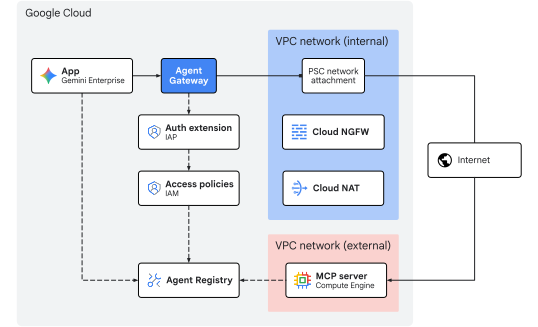
圖 1. 程式碼研究室架構
課程內容
- 如何設定
AgentConnectivityTemplate,透過vpcEgress: ALL_TRAFFIC將所有傳出 Agent Gateway 流量轉送至虛擬私有雲網路 - 如何在 PSC 網路連結子網路中預留靜態外部 IPv4 位址,並將其繫結至 Cloud NAT
- 如何部署外部可串流的 HTTP MCP 資源伺服器,驗證 Google OAuth 2.0 不記名權杖 (
oauth2.googleapis.com/tokeninfo),並將其輸入防火牆嚴格限制為 Cloud NAT 靜態 IP (${NAT_EXT_IP}/32) - 如何設定 Google Identity OAuth 2.0 用戶端憑證,並在 Agent Registry 中註冊 MCP 伺服器及其工具結構定義
- 如何將已註冊的 OAuth 2.0 MCP 伺服器連結至 Gemini Enterprise,並透過 Agent Gateway 轉送使用者委派的工具呼叫
- 如何使用 CLI 指令和 Cloud Logging 驗證靜態 IP 轉換、使用者 OAuth 2.0 身分驗證 (
authenticated_user) 和閘道政策強制執行
需求條件
- 已啟用計費功能的 Google Cloud 雲端專案
- 有效的 Gemini Enterprise 授權或 30 天試用方案
- 佈建網路服務、組織政策、Gemini Enterprise 和 Agent Platform 資源的 IAM 權限
- 已安裝 Google Cloud CLI (
gcloud)、curl和jq的 POSIX 相容 Shell (bash或zsh)
簡介部分到此結束,接下來請前往「概念」一節。
2. 概念
部署順序
本程式碼實驗室會先部署網路和控管基礎架構,確保靜態 IP 輸出路徑和閘道控制項正常運作,再註冊 MCP 工具並連結至 Gemini Enterprise:
- 網路基礎架構:保留靜態外部 IPv4 位址,並佈建輸出虛擬私有雲、PSC 附加子網路、PSC 網路連結、Cloud Router、Cloud NAT 閘道和外部 MCP 網路防火牆規則。
- 代理程式連線能力範本和 Agent Gateway:在輸出模式 (
AGENT_TO_ANYWHERE) 中,部署AgentConnectivityTemplate(vpcEgress: ALL_TRAFFIC) 和區域AgentGateway,並整合 Agent Registry (registries)。 - 授權政策:設定 IAP 授權擴充功能 (
AuthzExtension)、閘道授權政策 (AuthzPolicy) 和 IAM v3 統一存取政策 (AccessPolicy和PolicyBinding)。 - 部署及註冊 MCP 伺服器:在 Caddy TLS 後方部署外部
mcp-sprocketsOAuth 2.0 資源伺服器,驗證其 Google OAuth 2.0tokeninfo強制執行,將其輸入防火牆嚴格鎖定至 Cloud NAT 靜態 IP (${NAT_EXT_IP}/32),並在 Agent Registry 中註冊服務和工具規格 (get_sprockets和get_sprocket_by_id)。 - Gemini Enterprise 應用程式和 OAuth 2.0 用戶端:設定 Google Identity 提供者、試用授權、OAuth 2.0 同意畫面和網頁應用程式用戶端憑證 (
OAUTH_CLIENT_ID和OAUTH_CLIENT_SECRET)、建立 Gemini Enterprise 應用程式 (Engine),並將輸出外送繫結至 Agent Gateway (agentGatewaySetting)。 - 匯入自訂 MCP 資料連接器:建立並啟用以
auth_type: "OAUTH"設定的REGISTRY_MCP資料連接器 (:setUpDataConnector),將已註冊的 MCP 伺服器備份資料儲存庫連結至 Gemini Enterprise 應用程式。 - 驗證:完成一次性使用者 OAuth 2.0 同意聲明流程,透過 Gemini Enterprise 助理叫用 MCP 工具 (確認
egress_source_ip和authenticated_user),並在 Cloud Logging 中驗證政策執行和靜態 IP NAT 轉換。
中央 IdP + OAuth 保護的 MCP 資源伺服器架構
在企業部署作業中,身分管理和工具執行作業會遵循標準 OAuth 2.0 角色分離機制,在集中式身分提供者 (授權伺服器) 和受保護的 MCP 資源伺服器之間進行:
OAuth 2.0 角色 | 本程式碼研究室中的元件 | 責任 |
資源擁有者 | 使用者 ( | 登入 Gemini Enterprise 網頁應用程式,並在一次性的 3-legged OAuth 2.0 授權流程中授予同意聲明。 |
OAuth 2.0 用戶端 | Gemini Enterprise | 保留 |
授權伺服器 | Google Identity OAuth 2.0 ( | 在瀏覽器同意重新導向期間驗證使用者身分,並向 Gemini Enterprise 發出 OAuth 2.0 存取權和更新權杖。 |
資源伺服器 | 外部 | 使用虛擬私有雲防火牆 ( |
由於瀏覽器同意聲明重新導向 (accounts.google.com) 和後端管道權杖交換 (oauth2.googleapis.com/token) 是針對 Google 管理的 OAuth 2.0 端點進行,因此外部 MCP 伺服器防火牆只會透過 Cloud NAT 接收來自 Agent Gateway 的執行階段 MCP JSON-RPC 要求 (POST /mcp),因此其輸入防火牆可嚴格限制為 ${NAT_EXT_IP}/32。
Discovery Engine 資源模型
Gemini Enterprise 應用程式 (在 Discovery Engine API 中以 Engine 資源表示) 是終端使用者的中央調度管理層和對話介面。這項服務可管理使用者即時通訊工作階段、根據企業資料訓練生成式模型,以及協調動態工具執行作業。
Gemini Enterprise 應用程式會透過資料儲存庫與資料和系統互動:
- 知識資料儲存庫:擷取靜態內容 (例如 Cloud Storage、Google 雲端硬碟、BigQuery) 並建立索引,以進行檢索增強生成 (RAG)。
- 資料連接器 (動作供應商):連結至動態第三方或自訂 API。自訂 MCP 伺服器資料儲存庫會公開 Model Context Protocol (MCP) 定義的工具,讓模型在對話期間動態呼叫外部函式。
Gemini Enterprise 輸出
當 agentGatewaySetting 位於 Engine 且 use_agent_gateway_egress: true 位於 DataConnector 時,Gemini Enterprise 會將自訂 MCP 伺服器工具要求傳送至 Agent Gateway。
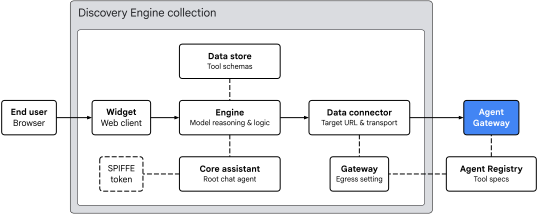
圖 2. Gemini Enterprise 輸出架構
Gemini Enterprise 應用程式會依據四個主要領域,安排工具路徑:
- 小工具 (
default_search_widget_config):- 提供網頁用戶端介面。小工具會接收使用者的提示、在工具需要授權時觸發一次性 OAuth 2.0 使用者同意重新導向,並啟動與基礎引擎的即時通訊工作階段。
- 核心助理 (
assistants/default_assistant/agents/default/core_assistant):- 引擎中的根對話式推理代理。評估使用者查詢時,核心助理會檢查可用的工具,並將執行作業委派給合成的 Agent Gateway 子代理。
- 資料儲存庫和資料連接器:
DataStore:在:setUpDataConnector執行時,於專屬Collection中佈建,將匯入的 Agent Registry 工具結構定義 (get_sprockets、get_sprocket_by_id)、引數型別和代理程式指令連結 (dataStoreIds) 至 Gemini EnterpriseEngine。DataConnector:管理與遠端 MCP 伺服器 (instance_uri) 的REGISTRY_MCP動作連線 (createBapConnection: true)、解析 Agent Registry MCP 伺服器資源 (registry_mcp_server_name)、附加使用者保存的 OAuth 2.0 不記名權杖 (Authorization: Bearer [access_token]),以及啟用 Agent Gateway 輸出 (use_agent_gateway_egress: true)。
- Agent Identity、Agent Registry 和 Agent Gateway:
- 資料連接器傳送外送工具呼叫時,會將流量轉送至
agentGatewaySetting中指定的閘道。核心星域 Assistant 會鑄造 SPIFFE 身分權杖,聲明其 Workload Identity:principal://agents.global.org-.../agents/default/core_assistant。 - Agent Gateway 會使用
registries欄位與 Agent Registry 整合,動態解析目的地端點和已註冊的工具結構定義,使用 IAP 評估授權政策,並使用AgentConnectivityTemplate將允許的要求 (保留使用者Authorization: Bearer標頭) 轉送至虛擬私有雲網路。
- 資料連接器傳送外送工具呼叫時,會將流量轉送至
閘道虛擬私有雲連線和靜態 IP NAT
Agent Gateway 支援 虛擬私有雲網路連線,方法是使用閘道上 agentConnectivityTemplate 參照的 AgentConnectivityTemplate 資源。範本 egressNetworkConfig 定義流量如何透過 PSC 網路連結進入虛擬私有雲:
PRIVATE_RANGES_ONLY(預設):只透過 PSC 網路連結轉送 RFC 1918、RFC 6598 和 E 類私人 IP 範圍。傳送至網際網路的流量會略過 VPC,直接透過 Google 預設網際網路輸出傳送。ALL_TRAFFIC(本程式碼研究室使用):透過 PSC 網路連結 (10.10.10.2),將 Agent Gateway 的所有輸出流量 (包括公用網際網路和外部合作夥伴 MCP 端點) 路由至虛擬私有雲子網路。
在 ALL_TRAFFIC 模式下運作時,PSC 附加子網路需要兩項設定:
- Private Google Access (
--enable-private-ip-google-access):確保對 Google Cloud API (*.googleapis.com) 的內部呼叫,會繼續在 Google 網路中以私密方式路由。 - Cloud Router 和 Cloud NAT (
MANUAL_ONLY):進入 PSC 附件子網路的網際網路流量會透過 Cloud NAT 遵循預設路徑 (0.0.0.0/0),後者會對您預留的靜態外部 IPv4 位址 (${NAT_EXT_IP}) 執行來源網路位址轉譯 (SNAT)。因此,外部防火牆可嚴格限制僅允許${NAT_EXT_IP}/32的連入存取。
限制與規定
- 僅限 StreamableHTTP:不支援舊版伺服器傳送事件 (SSE) 傳輸。MCP 伺服器必須使用 StreamableHTTP。
- 機構政策覆寫:註冊資料連接器前,您必須明確覆寫自訂 MCP 資料存放區的機構政策。
- 區域一致性:Gemini Enterprise 會強制規定應用程式位置、Agent Gateway 和 Agent Registry 必須位於同一區域:
Gemini Enterprise 應用程式位置 | Agent Gateway 和 NAT 位置 | Agent Registry 位置 |
|
|
|
|
|
|
|
|
|
概念部分到此結束,接下來請前往「設定」部分。
3. 設定
必要的 IAM 角色
如要完成本程式碼研究室,您必須具備下列角色:
網域 | 必要的 IAM 角色 |
專案和 IAM |
|
網路和閘道 |
|
Gemini Enterprise 和 Registry |
|
工作負載 |
|
觀測能力 |
|
或者,使用廣泛的基本角色 (例如 roles/owner) 搭配 roles/orgpolicy.policyAdmin (因為單獨使用 roles/owner 無法修改機構政策)。
存取專案
本程式碼研究室使用單一 Google Cloud 雲端專案。設定步驟會使用 gcloud CLI 和 Linux 殼層指令。
首先,請存取 Google Cloud 專案的指令列:
- 前往
shell.cloud.google.com啟動 Cloud Shell,或 - 已安裝
gcloudCLI 的本機終端機
設定專案 ID
# set target project id
gcloud config set project SET_YOUR_PROJECT_ID_HERE
驗證工作階段
# login to gcloud cli
gcloud auth login
# login for gcloud api
gcloud auth application-default login
設定殼層環境變數
# set custom var for slug (eg, "foo") and region preference
export SLUG="foo"
export REGION="us-central1"
export ZONE="us-central1-a"

echo ${SLUG}
echo ${REGION}
echo ${ZONE}
# create project vars (automatic)
export PROJ_ID=$(gcloud config list --format="value(core.project)")
export PROJ_NO=$(gcloud projects describe ${PROJ_ID} --format="value(projectNumber)")
export ORG_ID=$(gcloud projects get-ancestors ${PROJ_ID} --format="value(id)" | tail -n 1)
export USER_IDENTITY=$(gcloud config get-value account)

echo ${PROJ_ID}
echo ${PROJ_NO}
echo ${ORG_ID}
echo ${USER_IDENTITY}
# create resource vars for agent platform (automatic)
export AGW_NAME="agw-${SLUG}-${REGION}-ata"
export AGW_URI="projects/${PROJ_ID}/locations/${REGION}/agentGateways/${AGW_NAME}"
export MCP_NAME="mcp-sprockets"

echo ${AGW_NAME}
echo ${AGW_URI}
echo ${MCP_NAME}
# create resource vars for gemini enterprise (automatic)
export GE_LOCATION="global"
export GE_APP_ORG_NAME="${SLUG}, Inc."
export GE_APP_DISPLAY_NAME="${SLUG} ${GE_LOCATION} app"
export GE_APP_NAME="app-${SLUG}-${GE_LOCATION}"
export GE_APP_INIT="${GE_APP_NAME}_$(date +%s)"

echo ${GE_LOCATION}
echo ${GE_APP_ORG_NAME}
echo ${GE_APP_DISPLAY_NAME}
echo ${GE_APP_NAME}
echo ${GE_APP_INIT}
設定代理程式身分信任網域
if-then-else 陳述式會檢查專案是否屬於機構,以便為主體代理程式身分設定正確的信任網域。
# set var for trust domain
if [[ -n "${ORG_ID}" ]]; then
  export TRUST_DOMAIN="agents.global.org-${ORG_ID}.system.id.goog"
else
  export TRUST_DOMAIN="agents.global.proj-${PROJ_NO}.system.id.goog"
fi

echo "trust domain: ${TRUST_DOMAIN}"
設定帳單和配額專案
# set cli quota project
gcloud config set billing/quota_project ${PROJ_ID}
# set api quota project
gcloud auth application-default set-quota-project ${PROJ_ID}
建立設定檔的本機目錄
# create config folder
mkdir -p cfg
更新 gcloud cli (建議)
如果執行自行管理的 Google Cloud SDK 安裝作業 (即在 Cloud Shell 外部),請將元件更新至最新版本。
# update gcloud cli
gcloud components update
啟用 API 服務
# enable google cloud apis
gcloud services enable \
  agentregistry.googleapis.com \
  aiplatform.googleapis.com \
  cloudapiregistry.googleapis.com \
  cloudresourcemanager.googleapis.com \
  compute.googleapis.com \
  discoveryengine.googleapis.com \
  dns.googleapis.com \
  iam.googleapis.com \
  iap.googleapis.com \
  logging.googleapis.com \
  monitoring.googleapis.com \
  networkconnectivity.googleapis.com \
  networksecurity.googleapis.com \
  networkservices.googleapis.com \
  orgpolicy.googleapis.com \
  serviceextensions.googleapis.com \
  serviceusage.googleapis.com
組織政策
預設的 Google Cloud 受管理組織政策限制和沙箱政策,可能會限制本 Codelab 中使用的功能:
compute.vmExternalIpAccess:限制鎖定式沙箱機構中 Compute Engine VM 的外部 IPv4 位址。discoveryengine.managed.disableCustomMcpServerConnector:限制建立使用自訂 MCP 伺服器 (custom_mcp) 做為資料來源的資料連接器 (預設為強制執行)。discoveryengine.managed.allowedEgressFqdns:在 VPC Service Controls (VPC-SC) 啟用或專案列於enforcedProjects時,限制資料連接器的輸出外送網域 (instance_uriFQDN)。discoveryengine.managed.allowedDataSources:在 VPC-SC 啟用或專案列於enforcedProjects時,限制允許的資料連接器類型 (dataSource)。
在專案層級覆寫任何繼承的機構政策限制。
停用自訂 MCP 限制
# disable data connector constraint (allow custom mcp servers)
gcloud org-policies set-policy "/dev/stdin" <<EOF
name: projects/${PROJ_ID}/policies/discoveryengine.managed.disableCustomMcpServerConnector
spec:
  rules:
  - enforce: false
EOF
停用條件式資料連接器限制
# disable egress fqdn constraint on project
gcloud org-policies set-policy "/dev/stdin" <<EOF
name: projects/${PROJ_ID}/policies/discoveryengine.managed.allowedEgressFqdns
spec:
  rules:
  - enforce: false
EOF
# disable allowed data sources constraint on project
gcloud org-policies set-policy "/dev/stdin" <<EOF
name: projects/${PROJ_ID}/policies/discoveryengine.managed.allowedDataSources
spec:
  rules:
  - enforce: false
EOF
停用存取權政策限制
# disable iam v3 constraint (allow v3 access policies)
gcloud org-policies set-policy /dev/stdin << EOF
name: projects/${PROJ_NO}/policies/iam.managed.disableAccessPolicyBinding
spec:
  rules:
  - enforce: false
EOF
允許外部 IP 位址
# allow external ip address for vms on project
gcloud org-policies set-policy "/dev/stdin" <<EOF
name: projects/${PROJ_ID}/policies/compute.vmExternalIpAccess
spec:
  rules:
  - allowAll: true
EOF
驗證機構政策
確認 compute.vmExternalIpAccess 是否設為 allowAll: True,其他政策是否為 enforce: False:
# verify effective org policy constraints on project
for policy in \
  discoveryengine.managed.disableCustomMcpServerConnector \
  discoveryengine.managed.allowedEgressFqdns \
  discoveryengine.managed.allowedDataSources \
  iam.managed.disableAccessPolicyBinding \
  compute.vmExternalIpAccess; do
  gcloud org-policies describe ${policy} \
    --project=${PROJ_ID} \
    --effective \
    --format="flattened[no-pad](name.basename(),spec.rules[0])"
done
驗證服務代理程式繫結 (預防措施)
在新專案中,首次啟用 networkservices.googleapis.com 時,Google Cloud 會自動佈建 Agent Gateway 服務代理,並授予 roles/agentgateway.serviceAgent。如果您要重複使用現有專案,但先前的清理作業可能已移除預設服務代理程式繫結,請執行下列指令,確保身分和角色繫結完好無損:
# ensure network services service account has been created
gcloud beta services identity create \
  --service=networkservices.googleapis.com \
  --project="${PROJ_ID}"

# ensure network services service account has service agent roles applied
gcloud projects add-iam-policy-binding "${PROJ_ID}" \
  --member="serviceAccount:service-${PROJ_NO}@gcp-sa-agentgateway.iam.gserviceaccount.com" \
  --role="roles/agentgateway.serviceAgent"
設定部分到此結束,接下來請前往「網路」部分。
4. 網路
在本節中,您將保留靜態外部 IPv4 位址、建立內部輸出虛擬私有雲網路和獨立外部虛擬私有雲網路、佈建 PSC 網路連結、設定 Cloud NAT,以及建立防火牆規則。
預留靜態外部 IP 位址
為 Cloud NAT 和外部 MCP 伺服器 VM 保留兩個區域靜態外部 IPv4 位址:
# reserve static external ipv4 address for cloud nat
gcloud compute addresses create ip-${SLUG}-nat \
  --region=${REGION}

# reserve static external ipv4 address for the mcp server
gcloud compute addresses create ip-${SLUG}-mcp \
  --region=${REGION}
驗證靜態外部 IP 位址
Gemini Enterprise 要求遠端 MCP 端點使用 HTTPS,並搭配公開信任的 TLS 憑證。您不必為本實驗室註冊自訂網域,而是使用 sslip.io 這項免費的萬用字元 DNS 服務,將含有 IP 位址的任何主機名稱 (例如 mcp.[IP].sslip.io) 直接解析回該 IP。由於 Let's Encrypt 等憑證授權單位不會核發憑證給裸露 IP 位址,因此這個 sslip.io 主機名稱會提供 Caddy 反向 Proxy 有效的網域名稱,自動為 MCP 伺服器佈建信任的 TLS 憑證。
匯出 IPv4 位址,並建構外部 MCP 伺服器的sslip.io網域名稱和網址:
# export static ip addresses and set vars for domain
export NAT_EXT_IP=$(gcloud compute addresses describe ip-${SLUG}-nat \
  --region=${REGION} \
  --format="value(address)")

export MCP_EXT_IP=$(gcloud compute addresses describe ip-${SLUG}-mcp \
  --region=${REGION} \
  --format="value(address)")

export MCP_DOMAIN="mcp.${MCP_EXT_IP}.sslip.io"
export MCP_URL="https://${MCP_DOMAIN}/mcp"

echo "cloud nat external ip    : ${NAT_EXT_IP}"
echo "mcp server external ip   : ${MCP_EXT_IP}"
echo "mcp url                  : ${MCP_URL}"
輸出內容範例:
cloud nat external ip    : 203.0.113.10
mcp server external ip   : 203.0.113.20
mcp url                  : https://mcp.203.0.113.20.sslip.io/mcp
建立內部網路
如果 Agent Gateway 連線能力範本設為使用 egressNetworkConfig 和 networkAttachment,則代管 PSC 網路連結的子網路必須至少是 /28 CIDR 區塊,且已啟用Private Google Access (--enable-private-ip-google-access)。
建立全域虛擬私有雲網路,供內部 Agent Gateway 輸出:
# create vpc network
gcloud compute networks create vnet-${SLUG}-internal --subnet-mode=custom

# create subnet for agent gateway psc na
gcloud compute networks subnets create subnet-${REGION}-agw \
  --network=vnet-${SLUG}-internal \
  --range=10.10.10.0/28 \
  --region=${REGION} \
  --enable-private-ip-google-access
建立內部防火牆規則
建立防火牆政策,允許所有輸出流量並啟用記錄功能。這項指標可用於監控從 Agent Gateway 傳輸至內部虛擬私有雲網路的流量。Cloud NGFW 支援Essentials 和 Standard 級別的網路安全和流量監控。
# create fw policy
gcloud compute network-firewall-policies create fw-policy-${SLUG}-internal --global
# create fw policy rule
gcloud compute network-firewall-policies rules create 1001 \
  --description="allow all out and log" \
  --firewall-policy=fw-policy-${SLUG}-internal \
  --global-firewall-policy \
  --action=allow \
  --direction=EGRESS \
  --layer4-configs=all \
  --dest-ip-ranges=0.0.0.0/0 \
  --enable-logging
# bind fw policy to network
gcloud compute network-firewall-policies associations create \
  --name=fw-policy-bind-${SLUG}-internal \
  --firewall-policy=fw-policy-${SLUG}-internal \
  --network=vnet-${SLUG}-internal \
  --global-firewall-policy
建立 PSC 網路連結
建立 Private Service Connect (PSC) 網路連結,並設定為自動接受來自 Agent Gateway 的連線。網路連結會在連線的消費者虛擬私有雲網路端建立連線,以安全地連結至 Agent Gateway 生產者端,用於輸出流量。如要進一步瞭解子網路需求和 IP 範圍規格,請參閱「設定虛擬私有雲連線」。
# create psc network attachment
gcloud compute network-attachments create psc-na-${REGION}-agw \
  --region=${REGION} \
  --subnets=subnet-${REGION}-agw \
  --connection-preference=ACCEPT_AUTOMATIC
驗證 PSC 網路連結
# show psc network attachment details
gcloud compute network-attachments describe psc-na-${REGION}-agw --region=${REGION}
擷取 PSC 網路連結的資源 URI,並儲存在 PSC_NA_URI 環境變數中。這個 URI 會在 Agent Gateway 設定 (networkConfig.egress.networkAttachment) 中參照,以佈建 PSC 介面,供網路輸出至虛擬私有雲網路:
# fetch psc network attachment uri
export PSC_NA_URI=$(gcloud compute network-attachments describe psc-na-${REGION}-agw \
  --region=${REGION} \
  --format="value(selfLink.scope(v1))")
echo ${PSC_NA_URI}
建立 Cloud NAT
Cloud NAT 用於將 Agent Gateway 輸出流量的來源 IP 位址,轉換為預留的公開 IP 位址,以便透過公開網際網路進行路由。
只有來自 Agent Gateway 輸出網路連結子網路的來源,才符合使用 Cloud NAT 的資格。
# create router for nat
gcloud compute routers create cr-nat-${SLUG}-${REGION} \
  --network=vnet-${SLUG}-internal \
  --asn=16550 \
  --region=${REGION}

# create nat
gcloud compute routers nats create nat-${SLUG}-${REGION} \
  --router=cr-nat-${SLUG}-${REGION} \
  --region=${REGION} \
  --nat-custom-subnet-ip-ranges="subnet-${REGION}-agw" \
  --nat-external-ip-pool="ip-${SLUG}-nat" \
  --enable-logging \
  --log-filter=ALL
驗證 Cloud NAT
檢查 Cloud NAT 狀態,並確認已設定預期的natIP來源:
# verify cloud nat configuration
gcloud compute routers nats describe nat-${SLUG}-${REGION} \
  --router=cr-nat-${SLUG}-${REGION} \
  --region=${REGION} \
  --format="yaml(name,natIps,subnetworks.name)"
輸出內容範例:
name: nat-foo-us-central1
natIps:
- https://www.googleapis.com/compute/v1/projects/[PROJ_ID]/regions/us-central1/addresses/ip-foo-nat
建立外部網路
建立獨立的虛擬私有雲網路,用於代管外部 MCP 伺服器 VM。
# create vpc network
gcloud compute networks create vnet-${SLUG}-external --subnet-mode=custom

# create subnet for mcp server
gcloud compute networks subnets create subnet-${REGION}-mcp \
  --network=vnet-${SLUG}-external \
  --range=240.240.240.0/24 \
  --region=${REGION} \
  --enable-private-ip-google-access
建立外部防火牆規則
在外部虛擬私有雲網路上建立兩項輸入防火牆規則:
2001:允許傳入 TCP 連接埠80,讓 Let's Encrypt 完成${MCP_DOMAIN}的 ACME HTTP-01 網域驗證挑戰。2002:一開始允許來自0.0.0.0/0的輸入 TCP 通訊埠443,以便從本機殼層驗證 TLS 準備狀態和 OAuth 2.0tokeninfo強制執行,然後嚴格限制為${NAT_EXT_IP}/32。
# create fw policy
gcloud compute network-firewall-policies create fw-policy-${SLUG}-external --global
# create fw policy rules
gcloud compute network-firewall-policies rules create 2001 \
  --description="allow in any http" \
  --firewall-policy=fw-policy-${SLUG}-external \
  --global-firewall-policy \
  --action=allow \
  --direction=INGRESS \
  --layer4-configs=tcp:80 \
  --src-ip-ranges=0.0.0.0/0 \
  --dest-ip-ranges=240.240.240.0/24 \
  --enable-logging

gcloud compute network-firewall-policies rules create 2002 \
  --description="allow in any https" \
  --firewall-policy=fw-policy-${SLUG}-external \
  --global-firewall-policy \
  --action=allow \
  --direction=INGRESS \
  --layer4-configs=tcp:443 \
  --src-ip-ranges=0.0.0.0/0 \
  --dest-ip-ranges=240.240.240.0/24 \
  --enable-logging
# bind fw policy to network
gcloud compute network-firewall-policies associations create \
  --name=fw-policy-bind-${SLUG}-external \
  --firewall-policy=fw-policy-${SLUG}-external \
  --network=vnet-${SLUG}-external \
  --global-firewall-policy
網路部分到此結束,接下來請參閱「Agent Gateway」一節。
5. Agent Gateway
在本節中,您會使用 vpcEgress: ALL_TRAFFIC 部署 Agent Connectivity Template,部署區域 Agent Gateway,將授權委派給 Identity-Aware Proxy (IAP),並定義 IAM 統一存取政策規則,控管外送網路要求。
建立連線範本
連線範本規格定義了下列項目:
egressNetworkConfig.networkAttachment:指向 PSC 網路連結,將 Agent Gateway 連線至您的虛擬私有雲網路。egressNetworkConfig.vpcEgress:設為ALL_TRAFFIC,這樣所有代理程式連出連線 (包括公用網際網路 MCP 端點) 都會路由至虛擬私有雲網路,並使用 Cloud NAT 來源 IP 位址轉譯功能連出。
建立並匯入連線範本設定檔:
# create connectivity template config file (vpcEgress: ALL_TRAFFIC)
cat > cfg/act-${AGW_NAME}.yaml << EOF
accessPath: AGENT_TO_ANYWHERE
name: projects/${PROJ_NO}/locations/${REGION}/agentConnectivityTemplates/act-${AGW_NAME}
deploymentModel: CENTRALIZED
egressNetworkConfig:
  networkAttachment: ${PSC_NA_URI}
  vpcEgress: ALL_TRAFFIC
EOF
# import connectivity template file (create template)
gcloud network-services agent-connectivity-templates import act-${AGW_NAME} \
  --source="cfg/act-${AGW_NAME}.yaml" \
  --location=${REGION}
建立 Agent Gateway
Agent Gateway 規格定義:
agentConnectivityTemplate:指向連線範本,因此閘道可以使用 PSC 網路連結進行虛擬私有雲連線。registries:將閘道與區域 Agent Registry 建立關聯,以解析編目 MCP 端點和工具結構定義。
建立並匯入 Agent Gateway 設定檔:
# create agent gateway config file
cat > cfg/${AGW_NAME}.yaml << EOF
name: ${AGW_NAME}
protocols:
  - MCP
googleManaged:
  governedAccessPath: AGENT_TO_ANYWHERE
agentConnectivityTemplate: projects/${PROJ_NO}/locations/${REGION}/agentConnectivityTemplates/act-${AGW_NAME}
registries:
  - "//agentregistry.googleapis.com/projects/${PROJ_ID}/locations/${REGION}"
EOF
# import agent gateway config file (create gateway)
gcloud network-services agent-gateways import ${AGW_NAME} \
  --source="cfg/${AGW_NAME}.yaml" \
  --location=${REGION}
驗證 Agent Gateway 部署作業
確認 Agent Registry 和連線能力範本設定:
# verify agent gateway deployment details
gcloud network-services agent-gateways describe ${AGW_NAME} \
  --location=${REGION} \
  --format="yaml(name,agentConnectivityTemplate,registries)"
輸出內容範例:
agentConnectivityTemplate: projects/[PROJ_NO]/locations/us-central1/agentConnectivityTemplates/act-foo-us-central1
name: projects/[PROJ_ID]/locations/us-central1/agentGateways/agw-foo-us-central1-ata
registries:
- //agentregistry.googleapis.com/projects/[PROJ_ID]/locations/us-central1
檢查 PSC 網路連結,確認閘道連線:
# show psc network attachment details
gcloud compute network-attachments describe psc-na-${REGION}-agw \
  --region=${REGION} \
  --format="yaml(connectionEndpoints)"
輸出內容範例:
connectionEndpoints:
- ipAddress: 10.10.10.2
  projectIdOrNum: '[TENANT_PROJ_NO]'
  status: ACCEPTED
  subnetwork: https://www.googleapis.com/compute/v1/projects/[PROJ_ID]/regions/us-central1/subnetworks/subnet-us-central1-agw
委派授權
Agent Gateway 會使用與 Identity-Aware Proxy (IAP) 統一存取政策 (UAP) 整合的授權政策 (networksecurity.authzPolicies),保護及控管連出工具的流量。
雖然 Agent Gateway 支援基本的內嵌 ALLOW 和 DENY 規則,但企業環境需要以身分為中心的集中式治理。透過 IAM 統一存取政策 (或存取政策),您可以使用標準 IAM v3 存取政策管理輸出存取規則。

圖 3. 授權架構
授權流程會連結下列三個元件:
- 閘道授權政策 (
authzPolicy):- 指定 Agent Gateway 的區域性資源。
- 已設定
policyProfile: REQUEST_AUTHZ和action: CUSTOM,將所有輸出授權檢查作業路由至 IAP 授權擴充功能。
- IAP 服務擴充功能 (
authzExtension):- 這項區域性資源會將要求授權委派給 Identity-Aware Proxy (
iap.googleapis.com)。 - 使用政策版本
V2,以ENFORCE模式評估政策。
- 這項區域性資源會將要求授權委派給 Identity-Aware Proxy (
- IAM 整合式存取權政策和繫結 (
accessPolicy和policyBinding):- 包含精細存取規則的全球 IAM 第 3 版資源。
- 驗證呼叫代理程式的 SPIFFE 主體身分、驗證通用
iap.googleapis.com/resources.egressViaIAP權限,並根據目的地屬性評估一般運算語言 (CEL) 條件。
部署授權擴充功能
# create authz extension config file
cat > "cfg/${AGW_NAME}-svc-ext-authz-iap.yaml" << EOF
name: ${AGW_NAME}-svc-ext-authz-iap
service: iap.googleapis.com
failOpen: false
timeout: 1s
metadata:
  iapPolicyVersion: "V2"
EOF
# import authz extension config file (create authz extension)
gcloud service-extensions authz-extensions import ${AGW_NAME}-svc-ext-authz-iap \
  --source="cfg/${AGW_NAME}-svc-ext-authz-iap.yaml" \
  --location=${REGION}
驗證授權延期
確認授權擴充功能是否處於啟用狀態:
# list authz extensions
gcloud service-extensions authz-extensions list \
  --location=${REGION} \
  --format="table(
    name.basename():label=NAME,
    createTime.date(tz=LOCAL):label=CREATED,
    service:label=SERVICE,
    metadata:label=METADATA,
    timeout:label=TIMEOUT
  )"
部署授權政策
建立以 Agent Gateway 為目標的network-security授權政策設定,並將要求驗證作業委派給 IAP 的授權擴充功能:
# create authz policy config file
cat > cfg/${AGW_NAME}-authz-policy-iap.yaml << EOF
name: ${AGW_NAME}-authz-policy-iap
target:
  resources:
    - "projects/${PROJ_ID}/locations/${REGION}/agentGateways/${AGW_NAME}"
policyProfile: REQUEST_AUTHZ
action: CUSTOM
customProvider:
  authzExtension:
    resources:
      - "projects/${PROJ_ID}/locations/${REGION}/authzExtensions/${AGW_NAME}-svc-ext-authz-iap"
EOF
# import authz policy config file (create authz policy)
gcloud network-security authz-policies import ${AGW_NAME}-authz-policy-iap \
  --source=cfg/${AGW_NAME}-authz-policy-iap.yaml \
  --location=${REGION}
驗證授權政策
確認授權政策是否有效:
# list authz policies
gcloud network-security authz-policies list \
  --location=${REGION} \
  --format="table(
    name.basename():label=NAME,
    action:label=ACTION,
    policyProfile:label=POLICY_PROFILE,
    customProvider.authzExtension.resources[0].basename():label=CUSTOM_PROVIDER_RESOURCE
  )"
建立 IAM 存取權政策
Agent Gateway 現在會將授權檢查作業委派給 IAP,並從 Agent Registry 解決目的地中繼資料。接著,請定義 IAM 統一存取政策規則,控管工具的輸出執行作業。
IAP 會根據下列 Agent Registry 目的地屬性,評估 CEL 屬性運算式:
- 註冊狀態 (
destination.is_registered):- 布林值 (
true/false),指出目的地是否已在 Agent Registry 中編目。
- 布林值 (
- MCP 伺服器名稱 (
destination.agent_registry.mcp_server.name):- 在 Agent Registry 中註冊的標準 MCP 伺服器資源名稱。
- MCP 方法 (
destination.agent_registry.mcp_server.method):- 要叫用的 MCP 方法 (例如
tools/call、tools/list、initialize)。
- 要叫用的 MCP 方法 (例如
- 工具名稱 (
destination.agent_registry.mcp_server.tool.name):- 呼叫的特定工具名稱 (例如
get_sprocket_by_id或get_sprockets),可在已註冊的 MCP 伺服器上進行精細的工具層級授權。
- 呼叫的特定工具名稱 (例如
定義 IAM 存取權政策規則
IAM 政策規則資訊清單會指定:
- 主體:代表 Gemini Enterprise 核心助理代理程式的 SPIFFE 主體身分。
- 權限:所有受 IAP 管控的出站流量都必須具備通用
iap.googleapis.com/resources.egressViaIAP權限。 - 條件:CEL 運算式 (
destination.is_registered == true),確保代理只能叫用 Agent Registry 中編目的端點。
建立政策規則資訊清單檔案:
# create access policy rule file
cat > cfg/uap-policy-${SLUG}-rules.json << EOF
[
  {
    "description": "allow ge assistant to any registered service",
    "effect": "ALLOW",
    "principals": [
      "principal://${TRUST_DOMAIN}/resources/discoveryengine/projects/${PROJ_NO}/locations/global/engines/${GE_APP_INIT}/assistants/default_assistant/agents/default/core_assistant"
    ],
    "operation": {
      "permissions": [
        "iap.googleapis.com/resources.egressViaIAP"
      ]
    },
    "conditions": {
      "iap.googleapis.com": {
        "expression": \
        "destination.is_registered == true"
      }
    }
  }
]
EOF
部署 IAM 存取權政策
使用資訊清單檔案中定義的規則,建立全域 IAM 存取權政策:
# create iam access policy
gcloud iam access-policies create uap-policy-${SLUG} \
  --details-rules=cfg/uap-policy-${SLUG}-rules.json \
  --project=${PROJ_ID} \
  --location=global
驗證 IAM 存取權政策
確認 IAM 存取權政策已成功建立,並檢查規則詳細資料:
# show iam access policy details
gcloud iam access-policies describe uap-policy-${SLUG} \
  --project=${PROJ_ID} \
  --location=global
輸出內容範例:
details:
  rules:
  - conditions:
      iap.googleapis.com:
        expression: destination.is_registered == true
    description: allow ge assistant to any registered service
    effect: ALLOW
    operation:
      permissions:
      - iap.googleapis.com/resources.egressViaIAP
    principals:
    - principal://agents.global.org-[ORG_ID].system.id.goog/resources/discoveryengine/projects/[PROJ_NO]/locations/global/engines/app-foo-global_[EPOCH]/assistants/default_assistant/agents/default/core_assistant
name: projects/[PROJ_ID]/locations/global/accessPolicies/uap-policy-foo
將 IAM 存取權政策繫結至專案
如要為專案中的所有 Agent Gateway 啟用強制執行功能,請建立政策繫結,將 IAM 存取權政策附加至專案資源:
# bind iam access policy to project resource
gcloud iam policy-bindings create uap-bind-${SLUG} \
  --policy="projects/${PROJ_ID}/locations/global/accessPolicies/uap-policy-${SLUG}" \
  --target-resource="//cloudresourcemanager.googleapis.com/projects/${PROJ_ID}" \
  --project=${PROJ_ID} \
  --location=global
驗證 IAM 存取權政策繫結
檢查有效政策是否與正確政策和目標繫結:
# show policy binding details
gcloud iam policy-bindings describe uap-bind-${SLUG} \
  --project=${PROJ_ID} \
  --location=global
代理閘道部分到此結束,接下來請參閱 MCP 伺服器一節。
6. MCP 伺服器
在本節中,您將部署外部 FastMCP OAuth 2.0 資源伺服器 (mcp-sprockets),公開 get_sprockets 和 get_sprocket_by_id 工具,並驗證該伺服器是否會根據 https://oauth2.googleapis.com/tokeninfo,以密碼編譯方式驗證 Google OAuth 2.0 不記名權杖。接著,您會將外部防火牆規則嚴格限制為 Cloud NAT 靜態 IP。
部署外部 MCP 伺服器
開機指令碼會安裝 Caddy 和 FastMCP,在 127.0.0.1:8080 上啟動 mcp-sprockets 伺服器,並設定 Caddy 在 ${MCP_DOMAIN} 上提供 HTTPS 服務。
每當 Gemini Enterprise 呼叫 MCP 工具 (例如 get_sprockets 和 get_sprocket_by_id) 時,伺服器會執行下列操作:
- 從
X-Forwarded-For標頭 (egress_source_ip) 讀取呼叫端來源 IP。 - 擷取
Authorization: Bearer [access_token]標頭,並根據 Google OAuth 2.0 驗證端點 (https://oauth2.googleapis.com/tokeninfo?access_token=[token]) 驗證權杖。 - 連同
"egress_source_ip"一併傳回"authenticated_user"([user_email]),證明外部 MCP 伺服器已驗證 Cloud NAT 靜態 IP 和使用者 Google OAuth 2.0 身分。
# create startup script for the sprockets mcp server vm
cat > cfg/server-startup.sh << 'EOF'
#!/bin/bash
set -euo pipefail

MCP_DOMAIN=$(curl -s -H "Metadata-Flavor: Google" \
  http://metadata.google.internal/computeMetadata/v1/instance/attributes/mcp-domain)

export DEBIAN_FRONTEND=noninteractive
apt-get update -y
apt-get install -y caddy python3-venv curl

mkdir -p /opt/mcp-sprockets
python3 -m venv /opt/mcp-sprockets/venv
/opt/mcp-sprockets/venv/bin/pip install --upgrade pip
/opt/mcp-sprockets/venv/bin/pip install "fastmcp>=2.14.0" "uvicorn>=0.34.0"

cat <<'PYEOF' > /opt/mcp-sprockets/main.py
import json
import urllib.parse
import urllib.request
from typing import Any, Dict
from fastmcp import FastMCP
from fastmcp.server.dependencies import get_http_headers
from mcp.types import ToolAnnotations

mcp = FastMCP("mcp-sprockets")

SPROCKETS = {
    "SPK-101": {"id": "SPK-101", "model": "ANSI-40-12T", "teeth": 12, "pitch_in": 0.5, "material": "1045 Carbon Steel", "stock": 140, "unit_price": 18.50},
    "SPK-102": {"id": "SPK-102", "model": "ANSI-40-24T", "teeth": 24, "pitch_in": 0.5, "material": "1045 Carbon Steel", "stock": 85, "unit_price": 29.00},
    "SPK-103": {"id": "SPK-103", "model": "ANSI-60-16T", "teeth": 16, "pitch_in": 0.75, "material": "304 Stainless Steel", "stock": 60, "unit_price": 42.00},
    "SPK-104": {"id": "SPK-104", "model": "ANSI-60-32T", "teeth": 32, "pitch_in": 0.75, "material": "304 Stainless Steel", "stock": 35, "unit_price": 68.00},
    "SPK-105": {"id": "SPK-105", "model": "ANSI-80-20T", "teeth": 20, "pitch_in": 1.0, "material": "4140 Alloy Steel", "stock": 50, "unit_price": 95.00}
}

def verify_google_oauth_token(headers: Dict[str, str]) -> str:
    token = headers.get("authorization", "")[7:].strip() if headers.get("authorization", "").lower().startswith("bearer ") else ""
    if not token:
        return "unauthenticated (missing Bearer token)"
    url = "https://oauth2.googleapis.com/tokeninfo?" + urllib.parse.urlencode({"access_token": token})
    with urllib.request.urlopen(url, timeout=5) as resp:
        info = json.loads(resp.read().decode("utf-8"))
        return info.get("email", info.get("sub", "verified-oauth-user"))

@mcp.tool(
    description="list all sprockets in the inventory catalog",
    annotations=ToolAnnotations(
        readOnlyHint=True,
        destructiveHint=False,
        idempotentHint=True,
        openWorldHint=False
    )
)
def get_sprockets() -> Dict[str, Any]:
    headers = get_http_headers(include_all=True)
    caller_ip = headers.get("x-forwarded-for", "unknown").split(",")[0].strip()
    try:
        user_email = verify_google_oauth_token(headers)
    except Exception as exc:
        return {"egress_source_ip": caller_ip, "authenticated_user": None, "error": f"OAuth token verification failed: {exc}"}
    return {
        "egress_source_ip": caller_ip,
        "authenticated_user": user_email,
        "sprockets": list(SPROCKETS.values())
    }

@mcp.tool(
    description="fetch details of a specific sprocket by its ID (eg, SPK-101)",
    annotations=ToolAnnotations(
        readOnlyHint=True,
        destructiveHint=False,
        idempotentHint=True,
        openWorldHint=False
    )
)
def get_sprocket_by_id(sprocket_id: str) -> Dict[str, Any]:
    headers = get_http_headers(include_all=True)
    caller_ip = headers.get("x-forwarded-for", "unknown").split(",")[0].strip()
    try:
        user_email = verify_google_oauth_token(headers)
    except Exception as exc:
        return {"egress_source_ip": caller_ip, "authenticated_user": None, "error": f"OAuth token verification failed: {exc}"}
    sprocket = SPROCKETS.get(sprocket_id.upper())
    if sprocket:
        return {
            "egress_source_ip": caller_ip,
            "authenticated_user": user_email,
            "sprocket": sprocket
        }
    return {
        "egress_source_ip": caller_ip,
        "authenticated_user": user_email,
        "error": f"Sprocket '{sprocket_id}' not found."
    }

app = mcp.http_app(stateless_http=True)
PYEOF

cat <<'SVCEOF' > /etc/systemd/system/mcp-sprockets.service
[Unit]
Description=Sprockets FastMCP Server
After=network.target

[Service]
Type=simple
WorkingDirectory=/opt/mcp-sprockets
ExecStart=/opt/mcp-sprockets/venv/bin/uvicorn main:app --host 127.0.0.1 --port 8080 --forwarded-allow-ips="*"
Restart=always

[Install]
WantedBy=multi-user.target
SVCEOF

systemctl daemon-reload
systemctl enable --now mcp-sprockets.service
systemctl restart mcp-sprockets.service

cat <<CADDYEOF > "/etc/caddy/Caddyfile"
${MCP_DOMAIN} {
    reverse_proxy 127.0.0.1:8080
}
CADDYEOF

systemctl restart caddy
EOF
# create vm instance
gcloud compute instances create vm-${MCP_NAME} \
  --zone=${ZONE} \
  --machine-type=e2-micro \
  --image-family=debian-12 \
  --image-project=debian-cloud \
  --shielded-secure-boot \
  --network-interface="subnet=subnet-${REGION}-mcp,address=${MCP_EXT_IP}" \
  --metadata="mcp-domain=${MCP_DOMAIN}" \
  --metadata-from-file="startup-script=cfg/server-startup.sh"
確認 MCP 伺服器是否已就緒,並驗證 OAuth 2.0 tokeninfo
請稍候幾分鐘,等待開機指令碼安裝 FastMCP 和 Caddy,並佈建 Let's Encrypt 傳輸層安全標準:TLS 憑證。
# poll until caddy serves valid tls and fastmcp responds to tools/list
for i in $(seq 1 30); do
  RESP=$(curl -s -X POST "${MCP_URL}" \
    -H "Content-Type: application/json" \
    -H "Accept: application/json, text/event-stream" \
    -d '{"jsonrpc": "2.0", "id": 1, "method": "tools/list", "params": {}}' || true)
  if echo "${RESP}" | grep -q "get_sprockets"; then
    echo "mcp server and let's encrypt tls ready"
    break
  fi
  echo "...waiting for mcp server and let's encrypt tls (attempt ${i}/30)..."
  sleep 5
done
驗證 sslip.io DNS 解析、Caddy 提供的 Let's Encrypt TLS 憑證,以及 FastMCPtools/list 回應:
# query mcp server for tools list
curl -v -X POST "${MCP_URL}" \
  -H "Content-Type: application/json" \
  -H "Accept: application/json, text/event-stream" \
  -d '{"jsonrpc": "2.0", "id": 1, "method": "tools/list", "params": {}}' \
  2>&1 | grep -E "Connected to|subject:|issuer:|SSL certificate|HTTP/|event:|data:"
輸出內容範例:
* Connected to mcp.203.0.113.20.sslip.io (203.0.113.20) port 443
*  subject: CN=mcp.203.0.113.20.sslip.io
*  issuer: C=US; O=Let's Encrypt; CN=E5
*  SSL certificate verify ok.
> POST /mcp HTTP/2
< HTTP/2 200
event: message
data: {"jsonrpc":"2.0","id":1,"result":{"tools":[{"name":"get_sprockets","description":"list all sprockets in the inventory catalog","inputSchema":{"properties":{},"type":"object"},"annotations":{"destructiveHint":false,"idempotentHint":true,"openWorldHint":false,"readOnlyHint":true}},{"name":"get_sprocket_by_id","description":"fetch details of a specific sprocket by its ID (eg, SPK-101)","inputSchema":{"properties":{"sprocket_id":{"type":"string"}},"required":["sprocket_id"],"type":"object"},"annotations":{"destructiveHint":false,"idempotentHint":true,"openWorldHint":false,"readOnlyHint":true}}]}}
鎖定外部防火牆之前,請先執行測試,傳遞 Google OAuth 2.0 不記名權杖 (gcloud auth print-access-token) tools/call,確認 mcp-sprockets 會根據 https://oauth2.googleapis.com/tokeninfo 驗證權杖,並傳回您的 "authenticated_user" 電子郵件地址和來電者來源 IP 位址:
# query mcp server (test tools/call with google oauth 2.0 bearer token)
curl -s -X POST "${MCP_URL}" \
  -H "Authorization: Bearer $(gcloud auth print-access-token)" \
  -H "Content-Type: application/json" \
  -H "Accept: application/json, text/event-stream" \
  -d '{
    "jsonrpc": "2.0",
    "id": 2,
    "method": "tools/call",
    "params": {
      "name": "get_sprocket_by_id",
      "arguments": {"sprocket_id": "SPK-105"}
    }
  }' | sed -n 's/^data: //p' | jq '.result.structuredContent'
輸出內容範例 (顯示防火牆鎖定前的直接 Cloud Shell IP,以及已驗證的 Google OAuth 電子郵件):
{
  "egress_source_ip": "198.51.100.154",
  "authenticated_user": "user@example.com",
  "sprocket": {
    "id": "SPK-105",
    "model": "ANSI-80-20T",
    "teeth": 20,
    "pitch_in": 1.0,
    "material": "4140 Alloy Steel",
    "stock": 50,
    "unit_price": 95.0
  }
}
將防火牆鎖定為 Cloud NAT 靜態 IP
更新外部虛擬私有雲網路防火牆政策,僅允許來自 Cloud NAT 靜態外部 IP (${NAT_EXT_IP}/32) 的流量透過 TCP 通訊埠 443 傳輸:
# create fw policy rule allowing https only from cloud nat static ip
gcloud compute network-firewall-policies rules create 2003 \
  --description="allow in any https from nat ip" \
  --firewall-policy=fw-policy-${SLUG}-external \
  --global-firewall-policy \
  --action=allow \
  --direction=INGRESS \
  --layer4-configs=tcp:443 \
  --src-ip-ranges="${NAT_EXT_IP}/32" \
  --dest-ip-ranges=240.240.240.0/24 \
  --enable-logging
# delete temporary open fw policy rules
gcloud compute network-firewall-policies rules delete 2001 \
  --firewall-policy=fw-policy-${SLUG}-external \
  --global-firewall-policy

gcloud compute network-firewall-policies rules delete 2002 \
  --firewall-policy=fw-policy-${SLUG}-external \
  --global-firewall-policy
確認已設定外部防火牆政策規則:
# list all rules in the global network firewall policy
gcloud compute network-firewall-policies describe fw-policy-${SLUG}-external \
  --global \
  --flatten="rules[]" \
  --format="table(
    rules.priority:label=RULE,
    rules.action:label=ACTION,
    rules.direction:label=DIRECTION,
    firstof(
      rules.match.srcIpRanges,
      rules.match.srcAddressGroups,
      rules.match.srcSecureTags.name
    ).map().sub('projects/[^/]+/(locations/global/|global/)', '').list():label=SRC,
    firstof(
      rules.targetForwardingRules,
      rules.match.destIpRanges,
      rules.targetType
    ).map().sub('projects/[^/]+/(locations/global/|global/)', '').list():label=DST
  )"
確認系統現在會封鎖 Cloud NAT 靜態 IP 以外的直接連線:
# query mcp server
curl -i --connect-timeout 5 "${MCP_URL}" \
  || echo "Expected: Direct access blocked (not originating from ${NAT_EXT_IP})"
輸出內容範例:
curl: (28) Connection timed out after 5001 milliseconds
Expected: Direct access blocked (not originating from 203.0.113.10)
MCP 伺服器部分到此結束,接下來請前往「Agent Registry」部分。
7. Agent Registry
Agent Registry 是 AI 生態系統中所有代理、MCP 伺服器和端點 (API) 的集中式清單。此外,這個目錄也可用於列出、搜尋及探索其他已註冊的工具和服務,供 AI 應用程式使用。Agent Gateway 會使用登錄檔資料模型做為管理架構,強制執行輸出存取權控管。系統會根據繫結至登錄資源的政策,檢查主體呼叫代理程式的 IAM 角色授權。
在本節中,您將在 Agent Registry 中註冊 MCP 伺服器及其工具結構定義 (toolspec.json)。如要支援 Gemini Enterprise 透過 Agent Gateway 與 Google API 和服務互動,您也需要建立單一登錄端點服務 (oauth2-googleapis),指定 Gemini Enterprise 用於將授權碼換成權杖的 Google API 介面。
註冊 MCP 伺服器
如要讓 Gemini Enterprise 探索 MCP 伺服器上的可用工具,請在 Agent Registry 註冊服務時提供工具規格檔案 (cfg/toolspec.json)。
建立 MCP 工具規格
# create tool spec file for the sprockets mcp server
cat <<'EOF' > cfg/toolspec.json
{
  "tools": [
    {
      "name": "get_sprockets",
      "description": "List all sprockets in the inventory catalog.",
      "inputSchema": {
        "type": "object",
        "properties": {}
      },
      "isReadOnly": true,
      "isDestructive": false,
      "isIdempotent": true,
      "isOpenWorld": false
    },
    {
      "name": "get_sprocket_by_id",
      "description": "Fetch details of a specific sprocket by its ID (e.g., SPK-101).",
      "inputSchema": {
        "type": "object",
        "properties": {
          "sprocket_id": {
            "type": "string",
            "description": "The sprocket identifier (e.g., SPK-101, SPK-105)."
          }
        },
        "required": [
          "sprocket_id"
        ]
      },
      "isReadOnly": true,
      "isDestructive": false,
      "isIdempotent": true,
      "isOpenWorld": false
    }
  ]
}
EOF
建立 MCP 伺服器服務
# create registry service (mcp server)
gcloud agent-registry services create ${MCP_NAME} \
  --project=${PROJ_ID} \
  --location=${REGION} \
  --display-name="${MCP_DOMAIN}" \
  --description="MANDATORY SPROCKETS INVENTORY & CATALOG AGENT: You MUST \
ALWAYS invoke this tool (get_sprockets or get_sprocket_by_id) for ANY question \
about sprockets, inventory catalog listings, sprocket IDs (SPK-101 through \
SPK-105), ANSI models (ANSI-40, ANSI-60, ANSI-80), tooth counts, pitch, \
material, stock levels, unit prices, authenticated_user, or egress_source_ip \
verification. NEVER guess or fabricate inventory data yourself and NEVER \
transfer sprocket queries to file_and_coding_agent or web search. Always \
delegate every sprocket or inventory lookup to this tool." \
  --mcp-server-spec-type=tool-spec \
  --mcp-server-spec-content=cfg/toolspec.json \
  --interfaces=protocolBinding=JSONRPC,url="${MCP_URL}"
在 Agent Registry 中驗證 MCP 伺服器
確認服務已在該區域中列為已註冊的 MCP 伺服器,並顯示端點網址和可用工具:
# list registry regional mcp servers
gcloud agent-registry mcp-servers list \
  --location=${REGION} \
  --project=${PROJ_ID} \
  --format="table(
    name.basename():label=REGISTRY_ID,
    displayName:label=DISPLAY_NAME,
    interfaces[0].url:label=ENDPOINT_URL,
    tools[].name.list():label=TOOLS
  )"
輸出內容範例:
REGISTRY_ID                                          DISPLAY_NAME               ENDPOINT_URL                          TOOLS
agentregistry-00000000-0000-0000-5c39-1f6e542bb2b8   mcp.203.0.113.20.sslip.io  https://mcp.203.0.113.20.sslip.io/mcp  get_sprockets,get_sprocket_by_id
查看服務設定規格,確認系統已為每個工具註冊確切的工具定義、輸入結構定義和行為註解:
# describe mcp server tool specs
gcloud agent-registry services describe ${MCP_NAME} \
  --location=${REGION} \
  --project=${PROJ_ID} \
  --format="yaml(mcpServerSpec.content.tools)"
註冊 OAuth 端點
如要讓 Gemini Enterprise DataConnector 後端 (在授權流程中做為 OAuth 用戶端) 透過 Agent Gateway 將 POST 要求傳送至 Google OAuth 2.0 授權伺服器 (https://oauth2.googleapis.com/token),必須在 Agent Registry 中註冊權杖端點,IAP 才能評估 destination.is_registered == true。
建立端點服務
# create registry service (endpoint)
gcloud agent-registry services create oauth2-googleapis \
  --project=${PROJ_ID} \
  --location=${REGION} \
  --display-name="oauth2.googleapis.com" \
  --description="google oauth2 endpoint" \
  --endpoint-spec-type=no-spec \
  --interfaces=protocolBinding=JSONRPC,url=https://oauth2.googleapis.com
驗證端點註冊
# list registry regional endpoints
gcloud agent-registry endpoints list \
  --project=${PROJ_ID} \
  --location=${REGION} \
  --flatten="interfaces[]" \
  --format="table(
    displayName,
    name.basename():label=ENDPOINT_ID,
    interfaces.url:label=URL
  )"
預期的輸出內容:
DISPLAY_NAME           ENDPOINT_ID                                         URL
oauth2.googleapis.com  agentregistry-00000000-0000-0000-0012-3456789abcde  https://oauth2.googleapis.com
IAM 存取權政策
由於 IAM 存取權政策會為 Gemini Enterprise 應用程式 core_assistant 代理程式身分要求的所有已註冊服務定義允許政策,因此不需要 OAuth 權杖交換的其他 IAM 政策繫結。
  - conditions:
      iap.googleapis.com:
        expression: destination.is_registered == true
    description: allow ge assistant to any registered service
    effect: ALLOW
Agent Registry 部分到此結束,接下來請前往 Gemini Enterprise 部分。
8. Gemini Enterprise
在本節中,您將設定身分識別提供者、試用授權和 Google Identity OAuth 2.0 用戶端憑證,建立 Gemini Enterprise 應用程式 (${GE_APP_ID}),將輸出外送繫結至 Agent Gateway (${AGW_URI}),並將註冊的 sprockets MCP 伺服器連線為 OAuth 2.0 自訂 MCP 資料儲存庫。
建立 Gemini Enterprise 應用程式
下列方法會使用 discoveryengine.googleapis.com API 建立 Gemini Enterprise 應用程式資源和設定。如要使用 Google Cloud 控制台使用者介面進行設定,請參閱「建立應用程式」一文的操作說明。
# create engine (ge app)
curl -s -X POST "https://${GE_LOCATION}-discoveryengine.googleapis.com/v1/projects/${PROJ_ID}/locations/${GE_LOCATION}/collections/default_collection/engines?engineId=${GE_APP_INIT}" \
  -H "Authorization: Bearer $(gcloud auth application-default print-access-token)" \
  -H "X-Goog-User-Project: ${PROJ_ID}" -H "Content-Type: application/json" \
  -d @- <<EOF
{
  "displayName": "${GE_APP_DISPLAY_NAME}",
  "dataStoreIds": [],
  "solutionType": "SOLUTION_TYPE_SEARCH",
  "industryVertical": "GENERIC",
  "appType": "APP_TYPE_INTRANET",
  "searchEngineConfig": {
    "searchTier": "SEARCH_TIER_ENTERPRISE",
    "searchAddOns": [
      "SEARCH_ADD_ON_LLM"
    ]
  },
  "commonConfig": {
    "companyName": "${GE_APP_ORG_NAME}"
  },
  "observabilityConfig": {
    "observabilityEnabled": true,
    "sensitiveLoggingEnabled": true
  }
}
EOF
確認應用程式建立作業
# fetch engine (ge app) id
export GE_APP_ID=$(curl -s "https://${GE_LOCATION}-discoveryengine.googleapis.com/v1/projects/${PROJ_ID}/locations/${GE_LOCATION}/collections/default_collection/engines" \
  -H "Authorization: Bearer $(gcloud auth application-default print-access-token)" -H "X-Goog-User-Project: ${PROJ_ID}" \
  | jq -r --arg name "${GE_APP_DISPLAY_NAME}" '.engines[] | select(.displayName==$name) | .name | split("/") | last')

echo "engine (ge app) id: ${GE_APP_ID}"
查看引擎詳細資料,瞭解建立的設定:
# get engine (ge app) details
curl -s "https://${GE_LOCATION}-discoveryengine.googleapis.com/v1/projects/${PROJ_ID}/locations/${GE_LOCATION}/collections/default_collection/engines/${GE_APP_ID}" \
  -H "Authorization: Bearer $(gcloud auth application-default print-access-token)" \
  -H "X-Goog-User-Project: ${PROJ_ID}"
啟用識別資訊提供者
為 Gemini Enterprise 應用程式啟用 Google Identity,做為使用者驗證的識別資訊提供者。
下列方法會使用 discoveryengine.googleapis.com API 設定 Gemini Enterprise 應用程式的識別資訊提供者。如要使用 Google Cloud 控制台 UI 進行設定,請參閱「設定身分識別提供者」一文的操作說明。
# set identity provider
curl -s -X PATCH "https://${GE_LOCATION}-discoveryengine.googleapis.com/v1/projects/${PROJ_ID}/locations/${GE_LOCATION}/aclConfig" \
  -H "Authorization: Bearer $(gcloud auth application-default print-access-token)" \
  -H "X-Goog-User-Project: ${PROJ_ID}" -H "Content-Type: application/json" \
  -d @- <<EOF
{
  "idpConfig": {
    "idpType": "GSUITE"
  }
}
EOF
驗證身分識別資訊提供者
# show identity provider
curl -s "https://${GE_LOCATION}-discoveryengine.googleapis.com/v1/projects/${PROJ_ID}/locations/${GE_LOCATION}/aclConfig" \
  -H "Authorization: Bearer $(gcloud auth application-default print-access-token)" \
  -H "X-Goog-User-Project: ${PROJ_ID}"
輸出內容 "idpType": "GSUITE" 對應 Google Identity 供應商。
(選用) 啟用 Gemini Enterprise 試用授權
如果您使用的專案已指派 Gemini Enterprise 授權,可以略過這個步驟。如果您使用沒有授權的新專案,請繼續並按照下列步驟操作。
建立授權設定資源,為 Gemini Enterprise 使用者席位授予 30 天的權利。這樣一來,系統就會將新試用方案設為預設授權,登入的使用者都會自動獲得席位:
# configure free trial subscription
curl -s -X POST "https://${GE_LOCATION}-discoveryengine.googleapis.com/v1/projects/${PROJ_ID}/locations/${GE_LOCATION}/licenseConfigs?licenseConfigId=free_trial_gemini" \
  -H "Authorization: Bearer $(gcloud auth application-default print-access-token)" \
  -H "X-Goog-User-Project: ${PROJ_ID}" -H "Content-Type: application/json" \
  -d @- <<EOF
{
  "subscriptionTier": "SUBSCRIPTION_TIER_SEARCH_AND_ASSISTANT",
  "freeTrial": true
}
EOF
確認已套用授權
# show license config
curl -s "https://${GE_LOCATION}-discoveryengine.googleapis.com/v1/projects/${PROJ_ID}/locations/${GE_LOCATION}/licenseConfigs/free_trial_gemini" \
  -H "Authorization: Bearer $(gcloud auth application-default print-access-token)" \
  -H "X-Goog-User-Project: ${PROJ_ID}"
檢查 "subscriptionTerm": "SUBSCRIPTION_TERM_ONE_MONTH" 和 "freeTrial": true。
# verify auto-registration enabled on default user store
curl -s "https://${GE_LOCATION}-discoveryengine.googleapis.com/v1/projects/${PROJ_ID}/locations/${GE_LOCATION}/userStores/default_user_store" \
  -H "Authorization: Bearer $(gcloud auth application-default print-access-token)" \
  -H "X-Goog-User-Project: ${PROJ_ID}"
檢查 ../free_trial_gemini" 和 "enableLicenseAutoRegister": true。
設定 OAuth 2.0 同意畫面和憑證
如要允許 Gemini Enterprise (OAuth 2.0 用戶端) 取得使用者委派的 Google OAuth 2.0 Bearer 權杖,並代表您將權杖提供給mcp-sprockets資源伺服器,請設定 Google Auth Platform OAuth 同意畫面,並在專案中建立網頁應用程式 OAuth 2.0 用戶端 ID。
1. 設定 OAuth 同意畫面
在專案中,列印「Google Auth Platform 總覽」的直接 Google Cloud 控制台網址:
# print google auth platform consent screen url
echo "https://console.cloud.google.com/auth/overview?project=${PROJ_ID}"
- 在瀏覽器中開啟該網址,然後按一下「開始使用」 (如果尚未為專案設定)。
- 在「應用程式資訊」部分,將「應用程式名稱」設為
mcp-sprockets-oauth,然後選取您的電子郵件地址 (${USER_IDENTITY}) 做為「使用者支援電子郵件」,然後點選「下一步」。 - 在「目標對象」下方,選取「內部」 (如果帳戶屬於 Google Workspace 機構,建議選取這個選項) 或「外部」 (如果使用個人帳戶;選取「外部」後,請在「目標對象測試使用者」下方新增
${USER_IDENTITY}),然後點選「下一步」。 - 在「聯絡資訊」下方輸入電子郵件地址,接受政策協議,然後按一下「建立」。
2. 建立網頁應用程式 OAuth 2.0 用戶端 ID
列印「用戶端」頁面的直接 Google Cloud 控制台網址:
# print google auth platform clients url
echo "https://console.cloud.google.com/auth/clients?project=${PROJ_ID}"
- 開啟網址,然後按一下「+ 建立用戶端」。
- 將「應用程式類型」設為「網頁應用程式」,並將「名稱」設為
ge-mcp-sprockets-client。 - 勾選「這個用戶端將供 AI 代理使用」核取方塊,將 OAuth 用戶端指派給代表使用者執行的 AI 代理工作流程。
- 在「已授權的重新導向 URI」下方,點選「+ 新增 URI」,然後新增 Gemini Enterprise OAuth 回呼 URI:
https://vertexaisearch.cloud.google.com/oauth-redirect
- 按一下「建立」,複製產生的「用戶端 ID」和「用戶端密鑰」,然後在 Shell 工作階段中匯出:
設定上一個步驟產生的 OAuth 2.0 用戶端 ID 和用戶端密鑰:
# set oauth 2.0 client id (paste in id)
export OAUTH_CLIENT_ID="SET_YOUR_OAUTH_CLIENT_ID_HERE"
# set oauth 2.0 client secret (paste in secret)
export OAUTH_CLIENT_SECRET="SET_YOUR_OAUTH_CLIENT_SECRET_HERE"
確認是否已設定用戶端 ID:
# print oauth 2.0 client id
echo "oauth client id: ${OAUTH_CLIENT_ID}"
繫結至 Agent Gateway
透過 Agent Gateway 轉送 Gemini Enterprise 的輸出流量,可為所有 AI 代理工具叫用作業建立集中式強制執行和靜態 IP 轉送界線:
- 集中執行政策:Agent Gateway 會做為內嵌 Proxy,在流量離開代理環境前,根據授權政策評估傳出工具要求。
- 確定虛擬私有雲和 Cloud NAT 輸出:將 Gemini Enterprise 繫結至以
vpcEgress: ALL_TRAFFIC設定的 Agent Gateway,確保工具呼叫會透過 PSC 網路連結轉送,並使用您保留的 Cloud NAT 靜態 IP 輸出。 - 統一稽核:集中記錄所有已連線 MCP 伺服器的要求,並提供稽核追蹤記錄。
修補引擎 agentGatewaySetting 以啟用:
# bind engine (ge app) to agent gateway
curl -s -X PATCH "https://${GE_LOCATION}-discoveryengine.googleapis.com/v1/projects/${PROJ_ID}/locations/${GE_LOCATION}/collections/default_collection/engines/${GE_APP_ID}?updateMask=agentGatewaySetting.defaultEgressAgentGateway.name" \
  -H "Authorization: Bearer $(gcloud auth application-default print-access-token)" \
  -H "X-Goog-User-Project: ${PROJ_ID}" -H "Content-Type: application/json" \
  -d @- <<EOF
{
  "agentGatewaySetting": {
    "defaultEgressAgentGateway": {
      "name": "${AGW_URI}"
    }
  }
}
EOF
驗證 Agent Gateway 繫結
擷取應用程式設定,確認 agentGatewaySetting 繫結:
# verify engine (ge app) agent gateway configuration
curl -s "https://${GE_LOCATION}-discoveryengine.googleapis.com/v1/projects/${PROJ_ID}/locations/${GE_LOCATION}/collections/default_collection/engines/${GE_APP_ID}" \
  -H "Authorization: Bearer $(gcloud auth print-access-token)" \
  -H "X-Goog-User-Project: ${PROJ_ID}" \
  | jq '{name: .name, displayName: .displayName, agentGatewaySetting: .agentGatewaySetting}'
輸出內容範例:
{
  "name": "projects/[PROJ_NO]/locations/global/collections/default_collection/engines/app-foo-global_[EPOCH]",
  "displayName": "foo global app",
  "agentGatewaySetting": {
    "defaultEgressAgentGateway": {
      "name": "projects/[PROJ_ID]/locations/us-central1/agentGateways/agw-foo-us-central1-ata"
    }
  }
}
建立自訂 MCP 伺服器資料儲存庫
在本節中,您將建立以 Google Identity (https://accounts.google.com/o/oauth2/v2/auth 和 https://oauth2.googleapis.com/token) 設定的 OAuth 2.0 自訂 MCP 資料儲存庫,將 mcp-sprockets 伺服器連結至 Gemini Enterprise。
使用 Discovery Engine API 時,請按照下列兩個步驟操作:
- 建立 (
:setUpDataConnector):建立專屬的Collection資源 (${MCP_NAME}-collection-%timestamp)、附加DataConnector(custom_mcp) 和auth_type: "OAUTH",並佈建其備份DataStore(..._mcp_data)。 - 啟用 (
PATCH .../dataConnector?updateMask=actionConfig):使用 Agent Registry 工具規格和 Google Identity OAuth 2.0 參數,啟用連接器動作執行階段 (actionState: "ACTIVE"),並將DataStore(dataStoreIds) 繫結至 Gemini EnterpriseEngine。
# fetch mcp server agent registry resource name
export MCP_REGISTRY_URI=$(gcloud agent-registry mcp-servers list \
  --location=${REGION} \
  --project=${PROJ_ID} \
  --filter="displayName:${MCP_DOMAIN}" \
  --format="value(name)")

echo "mcp registry name: ${MCP_REGISTRY_URI}"
echo "mcp url: ${MCP_URL}"
建立資料連接器
# create custom mcp data connector with google identity oauth 2.0 and link to engine
curl -s -X POST "https://${GE_LOCATION}-discoveryengine.googleapis.com/v1alpha/projects/${PROJ_ID}/locations/${GE_LOCATION}:setUpDataConnector" \
  -H "Authorization: Bearer $(gcloud auth application-default print-access-token)" \
  -H "X-Goog-User-Project: ${PROJ_ID}" \
  -H "Content-Type: application/json" \
  -d @- <<EOF
{
  "collectionId": "${MCP_NAME}-collection-$(date +%s)",
  "collectionDisplayName": "${MCP_NAME}-collection",
  "dataConnector": {
    "dataSource": "custom_mcp",
    "dataSourceVersion": 1,
    "params": {
      "oauth_access_token": "unused"
    },
    "refreshInterval": "86400s",
    "entities": [
      {
        "entityName": "mcp_data"
      }
    ],
    "connectorModes": [
      "FEDERATED"
    ],
    "actionConfig": {
      "isActionConfigured": true,
      "createBapConnection": true,
      "actionParams": {
        "auth_type": "OAUTH",
        "instance_uri": "${MCP_URL}",
        "auth_uri": "https://accounts.google.com/o/oauth2/v2/auth",
        "auth_uri_params": "&access_type=offline&prompt=consent",
        "token_uri": "https://oauth2.googleapis.com/token",
        "client_id": "${OAUTH_CLIENT_ID}",
        "client_secret": "${OAUTH_CLIENT_SECRET}",
        "scopes": "openid email profile",
        "client_secret_basic_override": true,
        "mcp_server_source": "REGISTRY_MCP",
        "registry_mcp_server_name": "${MCP_REGISTRY_URI}",
        "mcp_agent_instructions": "MANDATORY SPROCKETS INVENTORY & CATALOG AGENT: Always invoke get_sprockets or get_sprocket_by_id for any question about sprockets, inventory catalog listings, sprocket IDs (SPK-101 through SPK-105), ANSI models (ANSI-40, ANSI-60, ANSI-80), tooth counts, pitch, material, stock levels, unit prices, authenticated_user, or egress_source_ip verification.",
        "use_agent_gateway_egress": true,
        "agent_gateway_engine": "projects/${PROJ_ID}/locations/global/collections/default_collection/engines/${GE_APP_ID}"
      }
    }
  }
}
EOF
驗證資料連接器建立作業
# fetch collection id
export GE_COLLECTION_ID=$(curl -s "https://${GE_LOCATION}-discoveryengine.googleapis.com/v1alpha/projects/${PROJ_ID}/locations/${GE_LOCATION}/collections" \
  -H "Authorization: Bearer $(gcloud auth application-default print-access-token)" \
  -H "X-Goog-User-Project: ${PROJ_ID}" \
  | jq -r --arg dname "${MCP_NAME}-collection" '.collections[] | select(.displayName == $dname) | .name | split("/") | last' | head -n 1)

echo "ge collection id: ${GE_COLLECTION_ID}"
檢查「"registry_mcp_server_name"」欄位是否填入 MCP 伺服器的 Agent Registry UUID,以及「"auth_type"」是否為「OAUTH」:
# show data connector details
curl -s "https://${GE_LOCATION}-discoveryengine.googleapis.com/v1alpha/projects/${PROJ_ID}/locations/${GE_LOCATION}/collections/${GE_COLLECTION_ID}/dataConnector" \
  -H "Authorization: Bearer $(gcloud auth application-default print-access-token)" \
  -H "X-Goog-User-Project: ${PROJ_ID}" \
  | jq '{name, state, actionState, connectorModes, bapConfig, auth_type: .actionConfig.actionParams.auth_type, registry_mcp_server_name: .actionConfig.actionParams.registry_mcp_server_name}'
在 Google Cloud 控制台 UI 中查看 MCP 伺服器登錄項目:
echo "mcp server registry page url: https://console.cloud.google.com/agent-platform/agent-registry/mcp-servers/${REGION}/${MCP_REGISTRY_URI##*/}/overview?project=${PROJ_ID}"
啟用資料連接器
# activate and bind data connector with google identity oauth 2.0
curl -s -X PATCH "https://discoveryengine.googleapis.com/v1alpha/projects/${PROJ_ID}/locations/global/collections/${GE_COLLECTION_ID}/dataConnector?updateMask=actionConfig" \
  -H "Authorization: Bearer $(gcloud auth application-default print-access-token)" \
  -H "X-Goog-User-Project: ${PROJ_ID}" \
  -H "Content-Type: application/json" \
  -d @- <<EOF
{
  "name": "projects/${PROJ_ID}/locations/global/collections/${GE_COLLECTION_ID}/dataConnector",
  "actionConfig": {
    "isActionConfigured": true,
    "createBapConnection": true,
    "actionParams": {
      "auth_type": "OAUTH",
      "instance_uri": "${MCP_URL}",
      "auth_uri": "https://accounts.google.com/o/oauth2/v2/auth",
      "auth_uri_params": "&access_type=offline&prompt=consent",
      "token_uri": "https://oauth2.googleapis.com/token",
      "client_id": "${OAUTH_CLIENT_ID}",
      "client_secret": "${OAUTH_CLIENT_SECRET}",
      "scopes": "openid email profile",
      "client_secret_basic_override": true,
      "mcp_server_source": "REGISTRY_MCP",
      "registry_mcp_server_name": "${MCP_REGISTRY_URI}",
      "mcp_agent_instructions": "MANDATORY SPROCKETS INVENTORY & CATALOG AGENT: Always invoke get_sprockets or get_sprocket_by_id for any question about sprockets, inventory catalog listings, sprocket IDs (SPK-101 through SPK-105), ANSI models (ANSI-40, ANSI-60, ANSI-80), tooth counts, pitch, material, stock levels, unit prices, authenticated_user, or egress_source_ip verification.",
      "use_agent_gateway_egress": true,
      "agent_gateway_engine": "projects/${PROJ_ID}/locations/global/collections/default_collection/engines/${GE_APP_ID}"
    }
  }
}
EOF
驗證自訂 MCP 伺服器連結
# show engine (ge app) details
curl -s "https://${GE_LOCATION}-discoveryengine.googleapis.com/v1/projects/${PROJ_ID}/locations/${GE_LOCATION}/collections/default_collection/engines/${GE_APP_ID}" \
  -H "Authorization: Bearer $(gcloud auth application-default print-access-token)" \
  -H "X-Goog-User-Project: ${PROJ_ID}" \
  | jq '{name: .name, dataStoreIds: .dataStoreIds, agentGatewaySetting: .agentGatewaySetting}'
檢查連結的資料儲存庫 "dataStoreIds": ["mcp-sprockets-collection-[EPOCH]_mcp_data"]。
# show collection details
curl -s "https://${GE_LOCATION}-discoveryengine.googleapis.com/v1alpha/projects/${PROJ_ID}/locations/${GE_LOCATION}/collections" \
  -H "Authorization: Bearer $(gcloud auth application-default print-access-token)" \
  -H "X-Goog-User-Project: ${PROJ_ID}" \
  | jq --arg app "${GE_APP_ID}" '.collections[] | select(.dataConnector.actionConfig.actionParams.agent_gateway_engine // "" | endswith($app)) | .dataConnector | {name: .name, state: .state, actionState: .actionState, connectorModes: .connectorModes, auth_type: .actionConfig.actionParams.auth_type}'
檢查 "state": "ACTIVE" 和 "auth_type": "OAUTH"。
工具動作
在 Gemini Enterprise 資訊主頁中檢查 mcp-sprockets-collection 資料儲存庫時,您會發現系統未使用「動作」分頁,且「重新載入自訂動作」按鈕已停用。這是預期中的行為。
在 Google Cloud 控制台使用者介面中查看資料儲存庫詳細資料頁面:
echo "data store details page url: https://console.cloud.google.com/gemini-enterprise/locations/${GE_LOCATION}/collections/${GE_COLLECTION_ID}/connector/details?project=${PROJ_ID}"
視您將自訂 MCP 伺服器連結至 Gemini Enterprise 的方式而定,工具探索和管理作業會透過下列其中一種方式處理:
- 直接自訂 MCP (
BYO_MCP工作流程):在 Gemini Enterprise 中直接設定自訂 MCP 伺服器時,資料存放區本身會管理工具目錄 (connectorModes: ["FEDERATED", "ACTIONS"])。您必須開啟「動作」分頁,按一下「重新載入自訂動作」來擷取tools/list架構,並在使用者介面中手動開啟或關閉個別工具 (add和subtract)。 - Agent Registry 匯入 (本程式碼研究室使用的
REGISTRY_MCP工作流程):從Agent Registry匯入 MCP 伺服器時,Agent Registry 會做為 MCP 端點、介面中繼資料和工具目錄 (connectorModes: ["FEDERATED"]) 的權威事實來源。Gemini Enterprise 會透過引擎 Agent Gateway 設定,在執行階段自動啟用已註冊的 MCP 工具,您無須在資料儲存庫 UI 中手動重新載入或切換動作。
Gemini Enterprise 部分到此結束,接下來請前往「驗證」部分。
9. 驗證
在本節中,您將完成一次性的 Google OAuth 2.0 使用者同意聲明流程,從 Gemini Enterprise 叫用外部 mcp-sprockets 伺服器上的 MCP 工具,並確認外部 MCP 伺服器已驗證您保留的 Cloud NAT 靜態 IP (egress_source_ip) 和 Google OAuth 2.0 身分 (authenticated_user)。
使用者存取權
建構 Gemini Enterprise 網頁應用程式的網址:
# fetch app user url
export GE_WIDGET_ID=$(curl -s "https://${GE_LOCATION}-discoveryengine.googleapis.com/v1/projects/${PROJ_ID}/locations/${GE_LOCATION}/collections/default_collection/engines/${GE_APP_ID}/widgetConfigs/default_search_widget_config" \
  -H "Authorization: Bearer $(gcloud auth print-access-token)" \
  -H "X-Goog-User-Project: ${PROJ_ID}" \
  -H "Content-Type: application/json" \
  | jq -r '.configId')

export GE_APP_USER_URL="https://vertexaisearch.cloud.google.com/home/cid/${GE_WIDGET_ID}"

echo "app user url: ${GE_APP_USER_URL}"
完成 OAuth 同意程序
查詢代理之前,您必須完成一次性的 OAuth 2.0 同意流程,授予 Gemini Enterprise 權限,以取得 Google 身分 (${USER_IDENTITY}) 的存取權杖。這樣一來,Gemini Enterprise 就能透過 Agent Gateway 驗證外送工具呼叫,外部 mcp-sprockets 伺服器也能在每次要求時驗證您的身分。
- 在瀏覽器中開啟
${GE_APP_USER_URL},然後按一下「開始使用」。 - 在對話方塊中,按一下「連接器」圖示 (拼圖圖示),然後點選
mcp-sprockets-collection旁邊的「授權」。 - 系統會顯示新視窗,提示你「選擇帳戶以繼續前往」
mcp-sprockets-oauth(你設定的 OAuth 同意畫面應用程式名稱)。然後選取使用者帳戶 (${USER_IDENTITY})。 - 在 Google OAuth 同意畫面中,查看要求授予的權限,允許 Google (身分識別提供者) 與
mcp-sprockets-oauth分享您的使用者身分 (openid、email、profile),然後按一下「繼續」。 - 再次點選「連結器」圖示,確認
mcp-sprockets-collection的切換按鈕已啟用,確認授權成功。
測試代理查詢
助理對話 UI 測試
在對話中提交下列測試查詢:
look up sprocket SPK-105 and confirm the model, material, unit_price, authenticated_user, and egress_source_ip
在對話中嘗試第二個查詢:
list all sprockets in the inventory catalog and report the authenticated_user and egress_source_ip
確認助理傳回正確答案,並顯示互動式動作引用徽章。
舉例來說,每個回覆下方的「Sprocket Lookup SPK-105 (5s)
Agent Gateway 」表示工具已執行。
確認 Google 助理傳回的鏈輪規格,以及"authenticated_user"相符的${USER_IDENTITY}和"egress_source_ip",與您預訂的${NAT_EXT_IP}相符。
Google 助理 streamAssist API 測試
使用者帳戶授權 OAuth 2.0 連接器後,您也可以直接從 CLI 叫用 default_assistant:streamAssist API,並確認外部 mcp-sprockets 伺服器同時傳回 Cloud NAT 靜態 IP (${NAT_EXT_IP}) 和已驗證的 Google OAuth 2.0 身分 (${USER_IDENTITY}):
提交下列測試查詢:
# query engine (ge app) streamAssist
curl -s -X POST "https://${GE_LOCATION}-discoveryengine.googleapis.com/v1alpha/projects/${PROJ_ID}/locations/${GE_LOCATION}/collections/default_collection/engines/${GE_APP_ID}/assistants/default_assistant:streamAssist" \
  -H "Authorization: Bearer $(gcloud auth print-access-token)" \
  -H "X-Goog-User-Project: ${PROJ_ID}" \
  -H "Content-Type: application/json" \
  -d @- <<EOF | jq -r '.[].answer.replies[]?.groundedContent?.content?.text // empty'
{
  "query": {
    "text": "look up sprocket SPK-103 and confirm the model, material, unit_price, authenticated_user, and egress_source_ip"
  },
  "toolsSpec": {
    "vertexAiSearchSpec": {
      "dataStoreSpecs": [
        {
          "dataStore": "projects/${PROJ_NO}/locations/${GE_LOCATION}/collections/default_collection/dataStores/${GE_COLLECTION_ID}_mcp_data"
        }
      ]
    }
  }
}
EOF
輸出內容範例:
Here are the details for sprocket SPK-103 from the inventory catalog:
- Model: ANSI-60-16T
- Material: 304 Stainless Steel
- Unit Price: $42.00
- Authenticated User (Google OAuth 2.0): user@example.com
- Egress Source IP (Cloud NAT): 203.0.113.10
請嘗試其他查詢:
# query engine (ge app) streamAssist
curl -s -X POST "https://${GE_LOCATION}-discoveryengine.googleapis.com/v1alpha/projects/${PROJ_ID}/locations/${GE_LOCATION}/collections/default_collection/engines/${GE_APP_ID}/assistants/default_assistant:streamAssist" \
  -H "Authorization: Bearer $(gcloud auth print-access-token)" \
  -H "X-Goog-User-Project: ${PROJ_ID}" \
  -H "Content-Type: application/json" \
  -d @- <<EOF | jq -r '.[].answer.replies[]?.groundedContent?.content?.text // empty'
{
  "query": {
    "text": "find a sprocket model i can get for under \$20 and report the details, authenticated_user, and egress_source_ip"
  },
  "toolsSpec": {
    "vertexAiSearchSpec": {
      "dataStoreSpecs": [
        {
          "dataStore": "projects/${PROJ_NO}/locations/${GE_LOCATION}/collections/default_collection/dataStores/${GE_COLLECTION_ID}_mcp_data"
        }
      ]
    }
  }
}
EOF
在 Cloud Logging 中檢查記錄
在 Cloud Logging 中檢查記錄,確認 Gemini Enterprise 是否透過 Agent Gateway、PSC 網路連結和 Cloud NAT 轉送工具呼叫。
驗證 Agent Gateway 記錄
確認 Agent Gateway 攔截要求、在 Agent Registry 中解析目標、評估授權政策,並轉送工具呼叫:
# show agent gateway logs
gcloud logging read \
  "resource.type=networkservices.googleapis.com/Gateway
   AND resource.labels.location=${REGION}" \
  --project=${PROJ_ID} \
  --limit=8 \
  --format="table(
    timestamp.date('', tz=LOCAL):label=TIMESTAMP,
    httpRequest.status:label=STATUS,
    httpRequest.serverIp:label=SERVER_IP,
    jsonPayload.agentGatewayInfo.mcpInfo.method:label=MCP_METHOD,
    jsonPayload.agentGatewayInfo.mcpInfo.parameter:label=TOOL,
    jsonPayload.authzPolicyInfo.result:label=AUTHZ,
    jsonPayload.agentGatewayInfo.agentRegistryResource.basename():label=REGISTRY_MCP
  )"
輸出內容範例:
TIMESTAMP                STATUS  SERVER_IP         MCP_METHOD                 TOOL                AUTHZ    REGISTRY_MCP
YYYY-MM-DDTHH:MM:SS.ZZZ  200     203.0.113.20:443  tools/call                 get_sprocket_by_id  ALLOWED  agentregistry-00000000-0000-0000-5c39-1f6e542bb2b8
YYYY-MM-DDTHH:MM:SS.ZZZ  200     203.0.113.20:443  tools/list                                     ALLOWED  agentregistry-00000000-0000-0000-5c39-1f6e542bb2b8
YYYY-MM-DDTHH:MM:SS.ZZZ  202     203.0.113.20:443  notifications/initialized                      ALLOWED  agentregistry-00000000-0000-0000-5c39-1f6e542bb2b8
YYYY-MM-DDTHH:MM:SS.ZZZ  200     203.0.113.20:443  initialize                                     ALLOWED  agentregistry-00000000-0000-0000-5c39-1f6e542bb2b8
確認輸出內容包含:
STATUS:200(成功執行) 和202(notifications/initialized交握)。SERVER_IP:外部 MCP 伺服器 IP 和通訊埠 (${MCP_EXT_IP}:443)。MCP_METHOD和TOOL:MCP 通訊協定序列 (initialize、notifications/initialized、tools/list和tools/call,以及get_sprocket_by_id)。AUTHZ:ALLOWED(允許 IAP 授權的輸出流量)。REGISTRY_MCP:已解析的 Agent Registry 資源 ID (agentregistry-...)。
驗證 Cloud NAT 記錄
連線至 ${MCP_EXT_IP}:443 時,請確認 Cloud NAT 已將 Agent Gateway PSC 網路連結 IP (10.10.10.2) 的傳出連線轉譯為您保留的靜態外部 IPv4 位址 (${NAT_EXT_IP}):
# show cloud nat logs
gcloud logging read \
  "resource.type=nat_gateway
   AND resource.labels.gateway_name=nat-${SLUG}-${REGION}
   AND jsonPayload.connection.dest_ip=${MCP_EXT_IP}" \
  --project=${PROJ_ID} \
  --limit=8 \
  --format="table(
    timestamp.date('', tz=LOCAL):label=TIMESTAMP,
    jsonPayload.allocation_status:label=ALLOCATION_STATUS,
    jsonPayload.connection.src_ip:label=SRC_IP,
    jsonPayload.connection.nat_ip:label=NAT_IP,
    jsonPayload.connection.dest_ip:label=DEST_IP,
    jsonPayload.connection.dest_port:label=PORT
  )"
輸出內容範例:
TIMESTAMP                ALLOCATION_STATUS  SRC_IP      NAT_IP        DEST_IP       PORT
YYYY-MM-DDTHH:MM:SS.ZZZ  OK                 10.10.10.2  203.0.113.10  203.0.113.20  443
驗證防火牆記錄
確認內部防火牆政策 (fw-policy-${SLUG}-internal) 允許從 Agent Gateway 到網際網路目的地的輸出流量:
# show firewall policy logs (internal)
gcloud logging read \
  "logName:compute.googleapis.com%2Ffirewall
   AND jsonPayload.rule_details.reference:fw-policy-${SLUG}-internal" \
  --project=${PROJ_ID} \
  --limit=8 \
  --format="table(
    timestamp.date('', tz=LOCAL):label=TIMESTAMP,
    jsonPayload.connection.src_ip:label=SRC_IP,
    jsonPayload.connection.dest_ip:label=DEST_IP,
    jsonPayload.connection.dest_port:label=PORT,
    jsonPayload.vpc.vpc_name:label=VPC_NETWORK,
    jsonPayload.rule_details.reference.basename():label=POLICY,
    jsonPayload.rule_details.priority:label=RULE,
    jsonPayload.rule_details.direction:label=DIRECTION,
    jsonPayload.disposition:label=DISPOSITION
  )"
確認外部防火牆政策 (fw-policy-${SLUG}-external) 允許從內部網路的公開 NAT IP 位址到 MCP 伺服器的輸入流量:
# show firewall policy logs (external)
gcloud logging read \
  "logName:compute.googleapis.com%2Ffirewall
   AND jsonPayload.rule_details.reference:fw-policy-${SLUG}-external" \
  --project=${PROJ_ID} \
  --limit=8 \
  --format="table(
    timestamp.date('', tz=LOCAL):label=TIMESTAMP,
    jsonPayload.connection.src_ip:label=SRC_IP,
    jsonPayload.connection.dest_ip:label=DEST_IP,
    jsonPayload.connection.dest_port:label=PORT,
    jsonPayload.vpc.vpc_name:label=VPC_NETWORK,
    jsonPayload.rule_details.reference.basename():label=POLICY,
    jsonPayload.rule_details.priority:label=RULE,
    jsonPayload.rule_details.direction:label=DIRECTION,
    jsonPayload.disposition:label=DISPOSITION
  )"
驗證部分到此結束,接下來請前往「清除」一節。
10. 清除
請按照下列步驟,刪除在本實驗室中建立的資源和設定。
移除 Gemini Enterprise 元件
# delete gemini enterprise engine (app)
curl -s -X DELETE "https://${GE_LOCATION}-discoveryengine.googleapis.com/v1/projects/${PROJ_ID}/locations/${GE_LOCATION}/collections/default_collection/engines/${GE_APP_ID}" \
  -H "Authorization: Bearer $(gcloud auth application-default print-access-token)" \
  -H "X-Goog-User-Project: ${PROJ_ID}"

# delete custom mcp collection, data connector, and backing data store
curl -s -X DELETE "https://${GE_LOCATION}-discoveryengine.googleapis.com/v1alpha/projects/${PROJ_ID}/locations/${GE_LOCATION}/collections/${GE_COLLECTION_ID}" \
  -H "Authorization: Bearer $(gcloud auth application-default print-access-token)" \
  -H "X-Goog-User-Project: ${PROJ_ID}"

# reset identity provider configuration
curl -s -X PATCH "https://${GE_LOCATION}-discoveryengine.googleapis.com/v1/projects/${PROJ_ID}/locations/${GE_LOCATION}/aclConfig" \
  -H "Authorization: Bearer $(gcloud auth application-default print-access-token)" \
  -H "X-Goog-User-Project: ${PROJ_ID}" \
  -H "Content-Type: application/json" \
  -d '{"idpConfig":{"idpType":"IDP_TYPE_UNSPECIFIED"}}'
如要移除 OAuth 2.0 用戶端憑證 (ge-mcp-sprockets-client),請開啟 Google Auth Platform Clients 頁面,然後點選 ge-mcp-sprockets-client 旁邊的「刪除」 (垃圾桶) 圖示:
# print google auth platform clients url
echo "https://console.cloud.google.com/auth/clients?project=${PROJ_ID}"
移除 MCP 伺服器和 Agent Registry 元件
# delete external mcp server vm
gcloud -q compute instances delete vm-${MCP_NAME} --zone=${ZONE}

# delete agent registry mcp service
gcloud -q agent-registry services delete ${MCP_NAME} --location=${REGION}

# delete agent registry oauth2 endpoint
gcloud -q agent-registry services delete oauth2-googleapis --location=${REGION}
移除 Agent Gateway 元件
# delete gateway authz policy and iap service extension
gcloud -q network-security authz-policies delete ${AGW_NAME}-authz-policy-iap \
  --location=${REGION}

gcloud -q service-extensions authz-extensions delete ${AGW_NAME}-svc-ext-authz-iap \
  --location=${REGION}

# delete agent gateway and connectivity template
gcloud -q network-services agent-gateways delete ${AGW_NAME} \
  --location=${REGION}

gcloud -q network-services agent-connectivity-templates delete act-${AGW_NAME} \
  --location=${REGION}
# delete iam unified access policy binding and access policy
gcloud -q iam policy-bindings delete uap-bind-${SLUG} \
  --location=global \
  --project=${PROJ_ID}

gcloud -q iam access-policies delete uap-policy-${SLUG} \
  --location=global \
  --project=${PROJ_ID}
移除防火牆元件
# delete network firewall policy associations
gcloud -q compute network-firewall-policies associations delete \
  --name=fw-policy-bind-${SLUG}-internal \
  --firewall-policy=fw-policy-${SLUG}-internal \
  --global-firewall-policy

gcloud -q compute network-firewall-policies associations delete \
  --name=fw-policy-bind-${SLUG}-external \
  --firewall-policy=fw-policy-${SLUG}-external \
  --global-firewall-policy

# delete custom firewall policy rules
gcloud -q compute network-firewall-policies rules delete 1001 \
  --firewall-policy=fw-policy-${SLUG}-internal \
  --global-firewall-policy

gcloud -q compute network-firewall-policies rules delete 2003 \
  --firewall-policy=fw-policy-${SLUG}-external \
  --global-firewall-policy

# delete network firewall policies
gcloud -q compute network-firewall-policies delete fw-policy-${SLUG}-internal \
  --global

gcloud -q compute network-firewall-policies delete fw-policy-${SLUG}-external \
  --global
移除網路元件
# delete cloud nat gateway and cloud router
gcloud -q compute routers nats delete nat-${SLUG}-${REGION} \
  --router=cr-nat-${SLUG}-${REGION} \
  --region=${REGION}

gcloud -q compute routers delete cr-nat-${SLUG}-${REGION} \
  --region=${REGION}

# delete psc network attachment
gcloud -q compute network-attachments delete psc-na-${REGION}-agw \
  --region=${REGION}

# delete subnets
gcloud -q compute networks subnets delete subnet-${REGION}-agw \
  --region=${REGION}

gcloud -q compute networks subnets delete subnet-${REGION}-mcp \
  --region=${REGION}

# delete reserved static external ip addresses
gcloud -q compute addresses delete ip-${SLUG}-nat ip-${SLUG}-mcp \
  --region=${REGION}

# delete internal and external vpc networks
gcloud -q compute networks delete \
  vnet-${SLUG}-internal \
  vnet-${SLUG}-external
移除機構政策覆寫和本機檔案
# delete project-level organization policy overrides
for policy in \
  discoveryengine.managed.disableCustomMcpServerConnector \
  discoveryengine.managed.allowedEgressFqdns \
  discoveryengine.managed.allowedDataSources \
  iam.managed.disableAccessPolicyBinding \
  compute.vmExternalIpAccess; do
  gcloud -q org-policies delete ${policy} --project=${PROJ_ID} 2>/dev/null || true
done

# remove local project files
rm -rf cfg
清理工作到此結束,接下來請參閱結論!
11. 結語
恭喜!您已建構端對端架構,讓 Gemini Enterprise 應用程式安全地探索及叫用外部 IP 允許清單和 OAuth 2.0 保護的自訂 MCP 伺服器上的工具:
- 靜態 IP 虛擬私有雲輸出 (
ALL_TRAFFIC和 Cloud NAT):透過 PSC 網路連結 (10.10.10.2) 路由傳送所有輸出 Agent Gateway 流量,並使用 Cloud NAT 將傳送至網際網路的要求轉譯為保留的靜態外部 IPv4 位址 (${NAT_EXT_IP})。 - OAuth 2.0 MCP 資源伺服器和 Agent Registry:部署受嚴格來源 IP 防火牆許可清單 (
${NAT_EXT_IP}/32) 和 Google OAuth 2.0tokeninfo驗證保護的外部可串流 HTTP FastMCP 伺服器 (mcp-sprockets),並在 Agent Registry 中註冊其端點和工具結構定義 (get_sprockets和get_sprocket_by_id)。 - Gemini Enterprise OAuth 2.0 整合與控管:已佈建 Gemini Enterprise 應用程式、將輸出工具流量繫結至 Agent Gateway、將已註冊的 MCP 伺服器附加為 OAuth 2.0
REGISTRY_MCP資料連接器,並一併驗證egress_source_ip和authenticated_user,以及 Cloud Logging 遙測資料。

Cosmopup 認為程式碼研究室超讚!
接下來呢?
- 如需進階功能和教學課程,請參閱 Gemini Enterprise Agent Platform 文件。
- 在 Agent Gateway 上設定 Model Armor 防護機制,進一步確保 AI 安全。
- 探索語意管理政策,針對自然語言查詢強制執行業務規則和法規遵循。
歡迎填寫這份意見回饋表單,提出建議、疑問或修正要求。
感謝您!