
1. Introduction
As enterprise organizations adopt generative AI, architectures are rapidly evolving from standalone, monolithic chatbots into distributed multi-agent systems (Agent-to-Agent / A2A). In these modern topologies, high-level orchestrator agents coordinate complex business workflows by delegating tasks to specialized domain worker agents, Model Context Protocol (MCP) tool servers, and backend enterprise databases across independent Google Cloud projects.
However, operating multi-agent systems at scale introduces critical security, governance, and operational challenges:
- Shadow Agent & Tool Sprawl: When development teams deploy agents in isolated projects without a centralized catalog, organizations lose visibility into which tools and subagents exist.
- Unmonitored Cross-Project Egress: Allowing agents direct, uninspected network routes creates data exfiltration risks and bypasses security perimeters.
- Fragile Hardcoded Integrations: Hardcoding downstream agent URLs and Reasoning Engine IDs creates brittle dependencies that break during upgrades or redeployments.
- Lack of Least-Privilege Identity: Shared service accounts fail to provide cryptographic non-repudiation at the individual agent instance level.
To solve these challenges, the Gemini Enterprise Agent Platform provides a unified governance and connectivity control plane composed of four core pillars:
- Agent Gateway (
networkservices.googleapis.com): A managed, regional network and policy enforcement proxy. Operating inAGENT_TO_ANYWHEREegress mode, it intercepts outbound agent traffic, delegates authorization evaluations to security extensions, and routes requests across project perimeters. - Agent Registry (
agentregistry.googleapis.com): The single enterprise service catalog. It provides a centralized, vetted directory of all available tools, MCP servers, and peer agents across the organization, enabling dynamic runtime autodiscovery with zero hardcoded endpoints. - Agent Identity & IAP v2 Governance (
iap.googleapis.com&iam.googleapis.com): A cryptographic identity and access framework. Executing agents receive unique, attested SPIFFE machine URNs (principal://...). Outbound egress is evaluated against centralized IAM Unified Access Policies (UAP / IAP v2) verifying the universal permissioniap.googleapis.com/resources.egressViaIAPusing rich Common Expression Language (CEL) catalog conditions (destination.agent_registry.*). - Agent Runtime (Reasoning Engines): A fully managed, serverless execution platform for Python-based agentic applications, featuring native configuration bindings (
agent_gateway_config) to central gateways.
The Codelab Business Scenario: Multi-Project Food & Beverage Purchasing
In this codelab, you will build and govern a real-world multi-project purchasing ecosystem spanning three distinct Google Cloud projects:
- Central Governance Project (
PROJECT_GOVERNANCE): Owned by Central IT and SecOps, hosting the Central Agent Gateway, Central Agent Registry, and IAM Unified Access Policies. - Consumer Orchestrator Project (
PROJECT_CONCIERGE): Owned by the procurement team, hosting the Purchasing Concierge Agent which dynamically discovers vendors and routes customer orders. - Domain Vendor Project (
PROJECT_SELLERS): Owned by external or departmental vendors, hosting the Burger Seller Agent and Pizza Seller Agent.
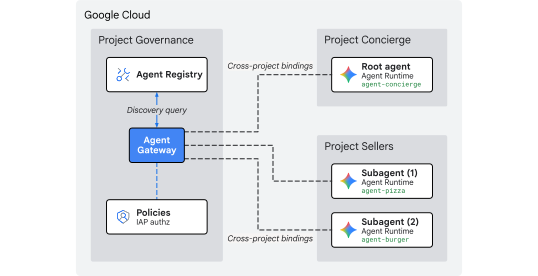
Fig 1. Multi-project centralized governance architecture
Why Cross-Project Centralized Governance?
In large enterprise organizations, product teams and data science groups build AI agents across dozens of independent Google Cloud projects. Giving each team direct control over tool registration, egress network routes, and security guardrails creates unvetted tool sprawl, inconsistent DLP policies, unmonitored VPC egress, and fragmented audit logs.
Cross-project centralized governance separates policy authoring from agent execution:
- Central IT & SecOps author security policies, vet tools, and monitor egress within a single Centralized Governance Project.
- Product & Application Teams focus purely on business logic in their independent Agent Runtime Projects, binding directly to the central gateway without the operational overhead of managing local VPCs, interconnects, or fragmented policy engines.
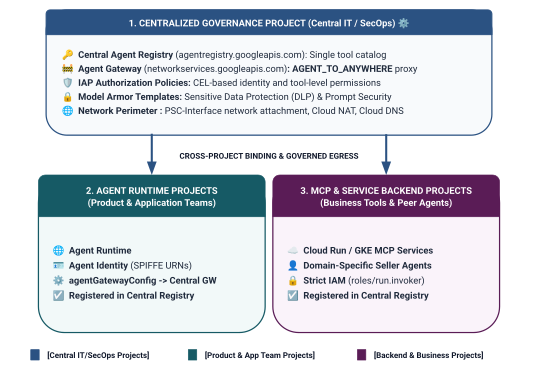
Fig 2. Three-tier cross-project governance architecture and boundaries
Two-Tier Identity Scoping Model in Unified Access Policies
When agents communicate through the Central Agent Gateway, Identity-Aware Proxy (IAP v2) evaluates access based on the caller's Agent Identity—a cryptographically attested, SPIFFE-based identity issued automatically to the runtime container—against a global IAM Access Policy:
- Tier 1: Baseline Google Cloud APIs (Coarse-Grained via
principalSet://in Rule 1): Project-wide egress authorization allowing all agent runtimes across spoke projects to reach standard Google APIs (aiplatform,iamcredentials,telemetry,agentregistry) for discovery, token generation, and inference. - Tier 2: Business Tools & A2A Services (Fine-Grained via
principal://in Rules 2 & 3): Strict least-privilege access bound to individual Reasoning Engine instances, enforced with Common Expression Language (CEL) conditions targeting specific registered Agent Registry services (destination.agent_registry.agent.name).
What you build
- Centralized Agent Gateway (
centralized-agw) inPROJECT_GOVERNANCE - IAP v2 Authorization Service Extension and Authz Policy in strict ENFORCE mode (
failOpen: false) - Foundational IAM Unified Access Policy (
uap-rules.json) and project Policy Binding - Cross-project service agent IAM permissions (
ar_agw_cross_project_sa) - Shared central Google Cloud Storage (GCS) staging bucket
- Isolated Burger and Pizza Seller Agents in
PROJECT_SELLERS - Purchasing Concierge Agent with dynamic REST autodiscovery in
PROJECT_CONCIERGE - Service registrations in Central Agent Registry with cross-project mTLS URLs
- Dynamic IAP v2 egress policy updates with live verification and Cloud Logging audits
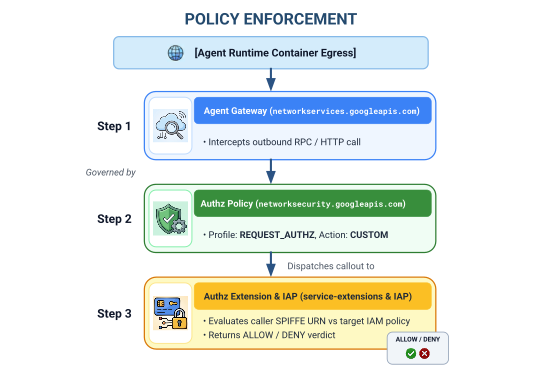
Fig 3. Step-by-step implementation sequence
What you learn
- How to configure cross-project service agent IAM permissions for centralized gateways
- How to route Agent Runtime egress through a central Agent Gateway across multi-project environments
- How to delegate Agent Gateway authorization to Identity-Aware Proxy (IAP v2) using Service Extensions (
iapPolicyVersion: "V2") - How to author and bind IAM Unified Access Policies (UAP) with Common Expression Language (CEL) rules governing registered Agent Registry destinations (
destination.agent_registry.*) - How to eliminate hardcoded agent IDs and URLs using runtime autodiscovery against Agent Registry
- How to test real perimeter zero-trust blocking (
HTTP 403 Forbidden) and verify live policy updates in Cloud Logging
What you need
- 3 Google Cloud projects with billing enabled:
PROJECT_GOVERNANCE: Central governance, gateway, registry, and IAM access policiesPROJECT_CONCIERGE: Purchasing concierge orchestrator agentPROJECT_SELLERS: Burger and pizza specialist seller agents
- An IAM user or service account with
roles/owneror administrative permissions across all 3 projects - A Google Cloud Organization (for SPIFFE trust domain mapping)
- Google Cloud Shell or a local machine with
gcloudCLI,python(3.11+), anduvinstalled
This concludes the introduction portion... next on to the Setup & Environment section.
2. Setup
Although this architecture spans 3 distinct Google Cloud projects, you can execute 100% of the terminal deployment commands, repository downloads, and staging operations from a single Cloud Shell terminal set to PROJECT_GOVERNANCE. Every deployment script and gcloud command explicitly targets the appropriate destination project via CLI flags (--project).
Start by accessing your Google Cloud project command line:
- Cloud Shell at
shell.cloud.google.com, or - A local terminal with
gcloudCLI installed
Set your project context
# set terminal project context to Central Governance Project
gcloud config set project SET_YOUR_GOVERNANCE_PROJECT_ID_HERE
# login to gcloud cli
gcloud auth login
# login for application default credentials
gcloud auth application-default login
Update gcloud CLI (recommended)
# update gcloud components
gcloud components update --quiet
Set shell environment variables
Enter your project specific identifiers.
# 1. Project Identifiers
export PROJECT_GOVERNANCE="SET_YOUR_GOVERNANCE_PROJECT_ID_HERE"
export PROJECT_CONCIERGE="SET_YOUR_CONCIERGE_PROJECT_ID_HERE"
export PROJECT_SELLERS="SET_YOUR_SELLERS_PROJECT_ID_HERE"
These shell variables will be derived automatically.
# 2. Regional & Gateway Settings
export REGION="us-central1"
export AGW_NAME="centralized-agw"
export UAP_POLICY_NAME="uap-policy-${AGW_NAME}"
export UAP_BINDING_NAME="uap-binding-${AGW_NAME}"

# 3. Retrieve Project Numbers
export PROJECT_NUMBER_GOVERNANCE=$(gcloud projects describe ${PROJECT_GOVERNANCE} --format="value(projectNumber)")
export PROJECT_NUMBER_CONCIERGE=$(gcloud projects describe ${PROJECT_CONCIERGE} --format="value(projectNumber)")
export PROJECT_NUMBER_SELLERS=$(gcloud projects describe ${PROJECT_SELLERS} --format="value(projectNumber)")

# 4. Obtain Organization ID
export ORG_ID=$(gcloud projects get-ancestors ${PROJECT_GOVERNANCE} --format="value(id, type)" | grep organization | awk '{print $1}')

# 5. Set Application Default Credentials (ADC) Quota Project
gcloud auth application-default set-quota-project ${PROJECT_GOVERNANCE}

echo "Governance Project: ${PROJECT_GOVERNANCE} (${PROJECT_NUMBER_GOVERNANCE})"
echo "Concierge Project:  ${PROJECT_CONCIERGE} (${PROJECT_NUMBER_CONCIERGE})"
echo "Sellers Project:    ${PROJECT_SELLERS} (${PROJECT_NUMBER_SELLERS})"
echo "Organization ID:    ${ORG_ID}"
echo "UAP Policy Name:    ${UAP_POLICY_NAME}"
echo "UAP Binding Name:   ${UAP_BINDING_NAME}"
Create local directory for config files
# create config folder
mkdir -p cfg
Assign Access Policy Admin Role for Unified Access Policies
# grant Access Policy Admin and Project IAM Admin to current user in Governance Project
for ROLE in "roles/iam.accessPolicyAdmin" "roles/resourcemanager.projectIamAdmin"; do
  gcloud projects add-iam-policy-binding ${PROJECT_GOVERNANCE} \
    --member="user:$(gcloud config get-value account)" \
    --role="${ROLE}" \
    --condition=None
done
Enable Cloud Audit Data Access Logs for IAP v2
By default, Google Cloud disables Data Access audit logs to prevent unintended storage costs. Because IAP v2 emits authorization decisions (granted=true and granted=false) as Data Access audit logs, enable ADMIN_READ, DATA_READ and DATA_WRITE logging for iap.googleapis.com in PROJECT_GOVERNANCE:
# 1. export current IAM policy for PROJECT_GOVERNANCE
gcloud projects get-iam-policy ${PROJECT_GOVERNANCE} \
  --format=json > cfg/gov_iam_policy.json
# 2. append auditConfigs for iap.googleapis.com
python3 -c "
import json
with open('cfg/gov_iam_policy.json') as f:
    policy = json.load(f)
audit_configs = [c for c in policy.get('auditConfigs', []) if c.get('service') != 'iap.googleapis.com']
audit_configs.append({
    'service': 'iap.googleapis.com',
    'auditLogConfigs': [
        {'logType': 'ADMIN_READ'},
        {'logType': 'DATA_READ'},
        {'logType': 'DATA_WRITE'}
    ]
})
policy['auditConfigs'] = audit_configs
with open('cfg/gov_iam_policy.json', 'w') as f:
    json.dump(policy, f, indent=2)
"
# 3. apply updated policy
gcloud projects set-iam-policy ${PROJECT_GOVERNANCE} cfg/gov_iam_policy.json
# 4. verify auditConfigs applied
gcloud projects get-iam-policy ${PROJECT_GOVERNANCE} --format="yaml(auditConfigs)"
Enable required Google Cloud APIs
# enable google apis (agent platform & security bundle, part 1)
for PROJ in ${PROJECT_GOVERNANCE} ${PROJECT_CONCIERGE} ${PROJECT_SELLERS}; do
  gcloud services enable \
    agentregistry.googleapis.com \
    aiplatform.googleapis.com \
    apphub.googleapis.com \
    apptopology.googleapis.com \
    cloudapiregistry.googleapis.com \
    cloudtrace.googleapis.com \
    compute.googleapis.com \
    dataform.googleapis.com \
    iam.googleapis.com \
    agentidentity.googleapis.com \
    iap.googleapis.com \
    logging.googleapis.com \
    modelarmor.googleapis.com \
    monitoring.googleapis.com \
    networksecurity.googleapis.com \
    networkservices.googleapis.com \
    notebooks.googleapis.com \
    observability.googleapis.com \
    --project=${PROJ}
done
# enable google apis (agent platform bundle, part 2)
for PROJ in ${PROJECT_GOVERNANCE} ${PROJECT_CONCIERGE} ${PROJECT_SELLERS}; do
  gcloud services enable \
    securitycenter.googleapis.com \
    saasservicemgmt.googleapis.com \
    storage.googleapis.com \
    telemetry.googleapis.com \
    texttospeech.googleapis.com \
    --project=${PROJ}
done
# enable google apis (foundational & agent runtime build bundle, part 3)
for PROJ in ${PROJECT_GOVERNANCE} ${PROJECT_CONCIERGE} ${PROJECT_SELLERS}; do
  gcloud services enable \
    artifactregistry.googleapis.com \
    cloudbuild.googleapis.com \
    cloudresourcemanager.googleapis.com \
    iamcredentials.googleapis.com \
    serviceusage.googleapis.com \
    run.googleapis.com \
    orgpolicy.googleapis.com \
    --project=${PROJ}
done
Validate API Enablement Across All Projects
Ensuring all three projects (PROJECT_GOVERNANCE, PROJECT_CONCIERGE, and PROJECT_SELLERS) have the exact same APIs enabled establishes operational consistency and prevents runtime token minting failures, schema cataloging errors, or telemetry dropouts.
Run the following validation script in Cloud Shell to verify API parity across all three projects:
# validate that all required APIs are enabled across all 3 projects
python3 - << 'EOF'
import subprocess
import os
import sys

REQUIRED_APIS = [
    "agentregistry.googleapis.com",
    "aiplatform.googleapis.com",
    "apphub.googleapis.com",
    "apptopology.googleapis.com",
    "cloudapiregistry.googleapis.com",
    "cloudtrace.googleapis.com",
    "compute.googleapis.com",
    "dataform.googleapis.com",
    "iam.googleapis.com",
    "agentidentity.googleapis.com",
    "iap.googleapis.com",
    "logging.googleapis.com",
    "modelarmor.googleapis.com",
    "monitoring.googleapis.com",
    "networksecurity.googleapis.com",
    "networkservices.googleapis.com",
    "notebooks.googleapis.com",
    "observability.googleapis.com",
    "securitycenter.googleapis.com",
    "saasservicemgmt.googleapis.com",
    "storage.googleapis.com",
    "telemetry.googleapis.com",
    "texttospeech.googleapis.com",
    "artifactregistry.googleapis.com",
    "cloudbuild.googleapis.com",
    "cloudresourcemanager.googleapis.com",
    "iamcredentials.googleapis.com",
    "serviceusage.googleapis.com",
    "run.googleapis.com",
    "orgpolicy.googleapis.com"
]

projects = {
    "GOVERNANCE": os.environ.get("PROJECT_GOVERNANCE", ""),
    "CONCIERGE": os.environ.get("PROJECT_CONCIERGE", ""),
    "SELLERS": os.environ.get("PROJECT_SELLERS", "")
}

enabled = {}
for role, proj in projects.items():
    if not proj:
        print(f"Error: Environment variable for {role} is not set.")
        sys.exit(1)
    res = subprocess.run(
        ["gcloud", "services", "list", "--enabled", f"--project={proj}", "--format=value(config.name)"],
        capture_output=True, text=True, check=True
    )
    enabled[role] = set(res.stdout.strip().splitlines())

print(f"\n{'API Name':<36} | {'GOVERNANCE':<12} | {'CONCIERGE':<12} | {'SELLERS':<12}")
print("-" * 78)

all_synced = True
for api in REQUIRED_APIS:
    g_status = "ENABLED" if api in enabled["GOVERNANCE"] else "MISSING"
    c_status = "ENABLED" if api in enabled["CONCIERGE"] else "MISSING"
    s_status = "ENABLED" if api in enabled["SELLERS"] else "MISSING"
    if "MISSING" in (g_status, c_status, s_status):
        all_synced = False
    print(f"{api:<36} | {g_status:<12} | {c_status:<12} | {s_status:<12}")

print("-" * 78)
if all_synced:
    print("✅ All 29 required APIs are ENABLED and synchronized across all three projects.\n")
else:
    print("❌ Discrepancies detected. Please re-run the enablement commands for missing services.\n")
    sys.exit(1)
EOF
Sample Validation Output:
You should see all APIs enabled.
✅ All 30 required APIs are ENABLED and synchronized across all three projects.
Configure Organization Policies
Default Google Cloud organization policies enforce constraints that restrict IAM v3 access policy bindings to resources (constraints/iam.managed.disableAccessPolicyBinding).
Override any inherited organization policy restrictions on the project level by explicitly setting enforce: false to allow.
# disable iam v3 constraint (allow v3 access policies)
gcloud org-policies set-policy /dev/stdin << EOF
name: projects/${PROJECT_NUMBER_GOVERNANCE}/policies/iam.managed.disableAccessPolicyBinding
spec:
  rules:
  - enforce: false
EOF
# verify org policy constraints on project
gcloud org-policies describe iam.managed.disableAccessPolicyBinding \
  --project=${PROJECT_GOVERNANCE} --effective
This concludes the setup portion... next on to the Register Core Google APIs section.
3. Agent Registry
Register Core Google APIs Endpoint Service
Agent Gateway requires Google API URLs to be registered in the Central Agent Registry so that agents configured with agent_gateway_config can route egress traffic securely to core Google Cloud backend services (such as aiplatform, IAM Credentials, and Telemetry).
Create core-gapi-services in Agent Registry
# register core google api endpoints in agent registry with standard and :443 port variants
gcloud agent-registry services create core-gapi-services \
  --project=${PROJECT_GOVERNANCE} \
  --location=${REGION} \
  --display-name="gapi.core.services" \
  --description="Core Google Cloud APIs and Service Endpoints" \
  --endpoint-spec-type=no-spec \
  --interfaces=protocolBinding=JSONRPC,url=https://telemetry.googleapis.com \
  --interfaces=protocolBinding=JSONRPC,url=https://telemetry.mtls.googleapis.com \
  --interfaces=protocolBinding=JSONRPC,url=https://${REGION}-aiplatform.googleapis.com \
  --interfaces=protocolBinding=JSONRPC,url=https://${REGION}-aiplatform.googleapis.com:443 \
  --interfaces=protocolBinding=JSONRPC,url=https://${REGION}-aiplatform.mtls.googleapis.com \
  --interfaces=protocolBinding=JSONRPC,url=https://${REGION}-aiplatform.mtls.googleapis.com:443 \
  --interfaces=protocolBinding=JSONRPC,url=https://aiplatform.googleapis.com \
  --interfaces=protocolBinding=JSONRPC,url=https://aiplatform.googleapis.com:443 \
  --interfaces=protocolBinding=JSONRPC,url=https://aiplatform.mtls.googleapis.com \
  --interfaces=protocolBinding=JSONRPC,url=https://aiplatform.mtls.googleapis.com:443 \
  --interfaces=protocolBinding=JSONRPC,url=https://cloudresourcemanager.googleapis.com \
  --interfaces=protocolBinding=JSONRPC,url=https://cloudresourcemanager.googleapis.com:443 \
  --interfaces=protocolBinding=JSONRPC,url=https://cloudresourcemanager.mtls.googleapis.com \
  --interfaces=protocolBinding=JSONRPC,url=https://cloudresourcemanager.mtls.googleapis.com:443 \
  --interfaces=protocolBinding=JSONRPC,url=https://iamcredentials.googleapis.com \
  --interfaces=protocolBinding=JSONRPC,url=https://iamcredentials.googleapis.com:443 \
  --interfaces=protocolBinding=JSONRPC,url=https://iamcredentials.mtls.googleapis.com \
  --interfaces=protocolBinding=JSONRPC,url=https://iamcredentials.mtls.googleapis.com:443 \
  --interfaces=protocolBinding=JSONRPC,url=https://agentregistry.googleapis.com \
  --interfaces=protocolBinding=JSONRPC,url=https://agentregistry.mtls.googleapis.com \
  --interfaces=protocolBinding=JSONRPC,url=https://agentregistry.googleapis.com:443 \
  --interfaces=protocolBinding=JSONRPC,url=https://agentregistry.mtls.googleapis.com:443
Capture Core APIs Endpoint Resource ID
# capture the underlying Agent Registry endpoint ID
export ENDPOINT_ID=$(gcloud agent-registry services describe core-gapi-services \
  --project=${PROJECT_GOVERNANCE} \
  --location=${REGION} \
  --format="value(registryResource)" | awk -F'/' '{print $NF}')
echo "Core APIs Endpoint ID: ${ENDPOINT_ID}"
Understanding principalSet versus principal in Agent Identity
In Google Cloud IAM and the Gemini Enterprise Agent Platform, machine identities issued to executing agent containers use cryptographically attested SPIFFE URNs evaluated by Identity-Aware Proxy (IAP v2). When configuring IAM Unified Access Policies, you can target either a specific single principal or an attribute-based principalSet:
Dimension |
|
|
IAM Syntax |
|
|
Granularity | Fine-Grained (Instance-level): Identifies a single, specific Reasoning Engine container instance. | Coarse-Grained (Project-level): Identifies all reasoning engines sharing a common project attribute. |
URN Pattern |
|
|
Use Case in Agent Platform | Tier 2 (Business Tools & A2A): Authorizing specific orchestrator agents to invoke target domain tools (e.g., Purchasing Concierge $\rightarrow$ Burger Seller). | Tier 1 (Foundational Infrastructure): Granting all agents in a project egress access to Google Cloud APIs ( |
Lifecycle Impact | If an agent is deleted and recreated, its new Engine ID requires an updated IAM policy binding. | Automatically applies to newly deployed agents in that project without additional IAM updates. |
Declarative Governance with Unified Access Policies (UAP / IAP v2)
In legacy IAP v1, egress policies were attached directly to individual Agent Registry resources using gcloud beta iap web add-iam-policy-binding. Under IAP v2 and Unified Access Policies, per-resource bindings are eliminated in favor of a single, centralized IAM Access Policy (cfg/uap-rules.json).
Foundational egress authorization for core-gapi-services will be configured as Rule 1 in the Unified Access Policy in Section 5, ensuring that all agent containers have foundational egress routes established before deployment.
For deeper technical details on principal identifiers and workload identity mechanics, see:
- Google Cloud IAM: Principal Identifiers & Principal Sets
- How Agent Identity works
- Configuring IAM Unified Access Policies for Agent Gateway
This concludes the core APIs endpoint registration... next on to the Deploy Centralized Agent Gateway section.
4. Agent Gateway
Deploy Centralized Agent Gateway
Deploy the centralized Agent Gateway (centralized-agw) in AGENT_TO_ANYWHERE egress mode inside the $PROJECT_GOVERNANCE project.
Define Gateway Configuration Manifest
Create cfg/${AGW_NAME}.yaml for egress traffic governance:
# generate agent gateway config yaml
cat > cfg/${AGW_NAME}.yaml << EOF
name: ${AGW_NAME}
protocols:
  - MCP
googleManaged:
  governedAccessPath: AGENT_TO_ANYWHERE
registries:
  - "//agentregistry.googleapis.com/projects/${PROJECT_GOVERNANCE}/locations/${REGION}"
EOF
Import Agent Gateway Configuration
# import and create agent gateway
gcloud network-services agent-gateways import ${AGW_NAME} \
  --source="cfg/${AGW_NAME}.yaml" \
  --location=${REGION} \
  --project=${PROJECT_GOVERNANCE}
Verify Agent Gateway Details
# show agent gateway status
gcloud network-services agent-gateways describe ${AGW_NAME} \
  --location=${REGION} \
  --project=${PROJECT_GOVERNANCE}
Sample Output:
agentGatewayCard:
  mtlsEndpoint: projects/${AGW_TP_ID}/regions/us-central1/serviceAttachments/unitkind1-swp-mtls-psc-sa
  rootCertificates:
  - |
    -----BEGIN CERTIFICATE-----
    MIIDwzCCAqugAwIBAgITNQuWGopdOZaHdcK7r7AYFhonqDANBgkqhkiG9w0BAQsF
    ...
    -----END CERTIFICATE-----
  serviceExtensionsServiceAccount: service-${PROJ_NO}@gcp-sa-dep.iam.gserviceaccount.com
createTime: 'YYYY-MM-DDT12:34:56.789098765Z'
googleManaged:
  governedAccessPath: AGENT_TO_ANYWHERE
name: projects/${PROJECT_GOVERNANCE}/locations/us-central1/agentGateways/centralized-agw
protocols:
- MCP
registries:
- //agentregistry.googleapis.com/projects/${PROJECT_GOVERNANCE}/locations/us-central1
updateTime: 'YYYY-MM-DDT12:34:56.789098765Z'
This concludes the gateway deployment... next on to the Configure Authorization section.
5. Authorization
Configure Agent Gateway Authorization & Foundational UAP
The Agent Gateway secures and governs outbound tool and agent traffic using Authorization Policies (networksecurity.authzPolicies) integrated with Identity-Aware Proxy (IAP v2) Unified Access Policies (UAP).
Authorization Architecture Overview
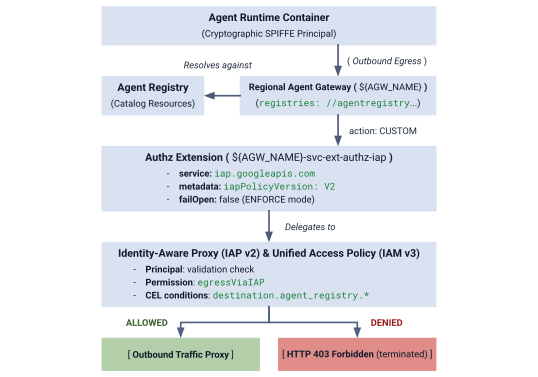
Fig 4. Authorization Architecture Overview
The authorization architecture is composed of three interconnected layers:
- IAP Service Extension (
authzExtension): Regional resource configured withservice: iap.googleapis.com,metadata: iapPolicyVersion: "V2", andfailOpen: falsefor strict perimeter zero-trust enforcement. - Gateway Authorization Policy (
authzPolicy): Regional resource targeting your Agent Gateway withpolicyProfile: REQUEST_AUTHZandaction: CUSTOM, routing authorization checks to the IAP Authz Extension. - IAM Unified Access Policy & Binding (
accessPolicy&policyBinding): Global IAM v3 resource evaluated by IAP. It verifies the universal permissioniap.googleapis.com/resources.egressViaIAPagainst caller SPIFFE identities and CEL catalog conditions.
Step 1: Create and Import IAP v2 Authz Extension
Create the Service Extension manifest with iapPolicyVersion: "V2" and failOpen: false in strict ENFORCE mode:
# create authz extension config file in ENFORCE mode
cat > cfg/${AGW_NAME}-svc-ext-authz-iap.yaml << EOF
name: ${AGW_NAME}-svc-ext-authz-iap
service: iap.googleapis.com
failOpen: false
timeout: 1s
metadata:
  iapPolicyVersion: "V2"
EOF
Import the Authz Extension:
# import IAP v2 authz extension
gcloud service-extensions authz-extensions import ${AGW_NAME}-svc-ext-authz-iap \
  --source=cfg/${AGW_NAME}-svc-ext-authz-iap.yaml \
  --location=${REGION} \
  --project=${PROJECT_GOVERNANCE}
Verify that the Authz Extension is active:
# describe authz extension
gcloud service-extensions authz-extensions describe ${AGW_NAME}-svc-ext-authz-iap \
  --location=${REGION} \
  --project=${PROJECT_GOVERNANCE}
Sample Output:
createTime: 'YYYY-MM-DDT12:34:56.789098765Z'
failOpen: false
metadata:
  iapPolicyVersion: V2
name: projects/${PROJECT_GOVERNANCE}/locations/us-central1/authzExtensions/centralized-agw-svc-ext-authz-iap
service: iap.googleapis.com
timeout: 1s
Step 2: Create and Import Gateway Authorization Policy
Create an Authorization Policy configuration that attaches to the Agent Gateway and delegates request verification to the IAP Authz Extension:
# create authz policy manifest
cat > cfg/${AGW_NAME}-authz-policy-profile-iap.yaml << EOF
name: ${AGW_NAME}-authz-policy-profile-iap
target:
  resources:
    - "projects/${PROJECT_GOVERNANCE}/locations/${REGION}/agentGateways/${AGW_NAME}"
policyProfile: REQUEST_AUTHZ
action: CUSTOM
customProvider:
  authzExtension:
    resources:
      - "projects/${PROJECT_GOVERNANCE}/locations/${REGION}/authzExtensions/${AGW_NAME}-svc-ext-authz-iap"
EOF
Import the Authorization Policy:
# import authz policy
gcloud beta network-security authz-policies import ${AGW_NAME}-authz-policy-profile-iap \
  --source=cfg/${AGW_NAME}-authz-policy-profile-iap.yaml \
  --location=${REGION} \
  --project=${PROJECT_GOVERNANCE}
Verify the active Authorization Policy:
# describe authz policy
gcloud beta network-security authz-policies describe ${AGW_NAME}-authz-policy-profile-iap \
  --location=${REGION} \
  --project=${PROJECT_GOVERNANCE}
Step 3: Author Initial Unified Access Policy (Rule 1: Core Google APIs)
Create cfg/uap-rules.json with Rule 1 authorizing the three project principalSets to reach core-gapi-services:
# create initial unified access policy rules manifest
cat > cfg/uap-rules.json << EOF
[
  {
    "description": "Rule 1: Allow agent runtimes across all 3 projects to reach Core Google APIs",
    "effect": "ALLOW",
    "principals": [
      "principalSet://agents.global.org-${ORG_ID}.system.id.goog/attribute.platformContainer/aiplatform/projects/${PROJECT_NUMBER_GOVERNANCE}",
      "principalSet://agents.global.org-${ORG_ID}.system.id.goog/attribute.platformContainer/aiplatform/projects/${PROJECT_NUMBER_CONCIERGE}",
      "principalSet://agents.global.org-${ORG_ID}.system.id.goog/attribute.platformContainer/aiplatform/projects/${PROJECT_NUMBER_SELLERS}"
    ],
    "operation": {
      "permissions": [
        "iap.googleapis.com/resources.egressViaIAP"
      ]
    },
    "conditions": {
      "iap.googleapis.com": {
        "expression": \
        "destination.is_registered == true && \
         destination.agent_registry.resource_type == 'ENDPOINT' && ( \
         destination.agent_registry.endpoint.name == 'projects/${PROJECT_GOVERNANCE}/locations/${REGION}/endpoints/core-gapi-services' || \
         destination.agent_registry.endpoint.name == 'projects/${PROJECT_GOVERNANCE}/locations/${REGION}/endpoints/${ENDPOINT_ID}' || \
         destination.agent_registry.endpoint.name == 'projects/${PROJECT_NUMBER_GOVERNANCE}/locations/${REGION}/endpoints/${ENDPOINT_ID}')"
      }
    }
  }
]
EOF
Step 4: Create and Bind the IAM Access Policy
Create the global IAM Access Policy:
# create global IAM access policy
gcloud iam access-policies create ${UAP_POLICY_NAME} \
  --details-rules=cfg/uap-rules.json \
  --project=${PROJECT_GOVERNANCE} \
  --location=global
Bind the Access Policy to PROJECT_GOVERNANCE:
# bind access policy to governance project
gcloud iam policy-bindings create ${UAP_BINDING_NAME} \
  --policy="projects/${PROJECT_GOVERNANCE}/locations/global/accessPolicies/${UAP_POLICY_NAME}" \
  --target-resource="//cloudresourcemanager.googleapis.com/projects/${PROJECT_GOVERNANCE}" \
  --project=${PROJECT_GOVERNANCE} \
  --location=global
Verify that the Policy Binding is active:
# verify policy binding
gcloud iam policy-bindings describe ${UAP_BINDING_NAME} \
  --project=${PROJECT_GOVERNANCE} \
  --location=global
Sample Output:
name: projects/${PROJECT_GOVERNANCE}/locations/global/policyBindings/uap-binding-centralized-agw
policy: projects/${PROJECT_GOVERNANCE}/locations/global/accessPolicies/uap-policy-centralized-agw
policyKind: ACCESS_POLICY
target:
  resource: //cloudresourcemanager.googleapis.com/projects/${PROJECT_GOVERNANCE}
Foundational Google Cloud API egress is now securely authorized across all three projects in strict ENFORCE mode.
This concludes the gateway authorization setup... next on to the Configure Cross-Project IAM Permissions section.
6. Cross-project IAM
Configure Cross-Project IAM Permissions
In this multi-project topology, Agent Runtimes reside in spoke projects (PROJECT_CONCIERGE and PROJECT_SELLERS), while the Central Agent Gateway and Agent Registry reside in PROJECT_GOVERNANCE.
Because Google Cloud projects are isolated security perimeters, cross-project access must be explicitly granted across two operational layers:
- Control Plane (Deployment Time): When deploying an agent container configured with
--agent-gateway-config, the spoke project's Agent Runtime Service Agent (service-) must attach the container to the central gateway. We create a minimal custom role (@gcp-sa-aiplatform.iam.gserviceaccount.com ar_agw_cross_project_sa) grantingnetworkservices.agentGateways.use,get, andoperations.getinPROJECT_GOVERNANCE. - Data Plane (Runtime Execution):
- Catalog Discovery: Spoke identities need
roles/agentregistry.viewerinPROJECT_GOVERNANCEto resolve target agent endpoints dynamically. - Target Invocation: The Concierge agent needs
roles/aiplatform.userinPROJECT_SELLERSto execute queries against the seller reasoning engines.
- Catalog Discovery: Spoke identities need
Create Custom IAM Role in PROJECT_GOVERNANCE
# create custom role in central governance project
gcloud iam roles create ar_agw_cross_project_sa \
  --project=${PROJECT_GOVERNANCE} \
  --title="Runtime Agent Gateway Cross-Project SA" \
  --description="Custom role for cross-project service agents to access Central Agent Gateway" \
  --permissions="networkservices.agentGateways.get,networkservices.agentGateways.use,networkservices.operations.get" \
  --stage="GA"
Assign Custom Role to Agent Runtime Service Agents
# 1. ensure aiplatform service identities are provisioned across all projects
for PROJ in ${PROJECT_GOVERNANCE} ${PROJECT_CONCIERGE} ${PROJECT_SELLERS}; do
  gcloud beta services identity create --service=aiplatform.googleapis.com --project=${PROJ}
done
# 2. derive aiplatform service agent emails
export CONCIERGE_AI_SA="service-${PROJECT_NUMBER_CONCIERGE}@gcp-sa-aiplatform.iam.gserviceaccount.com"
export CONCIERGE_RE_SA="service-${PROJECT_NUMBER_CONCIERGE}@gcp-sa-aiplatform-re.iam.gserviceaccount.com"
export CONCIERGE_COMPUTE_SA="${PROJECT_NUMBER_CONCIERGE}-compute@developer.gserviceaccount.com"

export SELLERS_AI_SA="service-${PROJECT_NUMBER_SELLERS}@gcp-sa-aiplatform.iam.gserviceaccount.com"
export SELLERS_RE_SA="service-${PROJECT_NUMBER_SELLERS}@gcp-sa-aiplatform-re.iam.gserviceaccount.com"
export SELLERS_COMPUTE_SA="${PROJECT_NUMBER_SELLERS}-compute@developer.gserviceaccount.com"
# 3. grant custom role & network viewer to Concierge and Sellers Service Agents
for SA in ${CONCIERGE_AI_SA} ${SELLERS_AI_SA}; do
  gcloud projects add-iam-policy-binding ${PROJECT_GOVERNANCE} \
    --member="serviceAccount:${SA}" \
    --role="projects/${PROJECT_GOVERNANCE}/roles/ar_agw_cross_project_sa" \
    --condition=None

  gcloud projects add-iam-policy-binding ${PROJECT_GOVERNANCE} \
    --member="serviceAccount:${SA}" \
    --role="roles/networkservices.viewer" \
    --condition=None
done
# 4. grant agent registry viewer on Governance Project for dynamic autodiscovery
for MEMBER in "serviceAccount:${CONCIERGE_AI_SA}" "serviceAccount:${CONCIERGE_RE_SA}" "serviceAccount:${CONCIERGE_COMPUTE_SA}" "serviceAccount:${SELLERS_AI_SA}" "serviceAccount:${SELLERS_RE_SA}" "serviceAccount:${SELLERS_COMPUTE_SA}" "principalSet://agents.global.org-${ORG_ID}.system.id.goog/attribute.platformContainer/aiplatform/projects/${PROJECT_NUMBER_CONCIERGE}" "principalSet://agents.global.org-${ORG_ID}.system.id.goog/attribute.platformContainer/aiplatform/projects/${PROJECT_NUMBER_SELLERS}"; do
  gcloud projects add-iam-policy-binding ${PROJECT_GOVERNANCE} \
    --member="${MEMBER}" \
    --role="roles/agentregistry.viewer" \
    --condition=None
done
# 5. grant agent project viewer on Governance Project for dynamic autodiscovery
for SA in ${CONCIERGE_COMPUTE_SA} ${CONCIERGE_AI_SA}; do
  gcloud projects add-iam-policy-binding ${PROJECT_GOVERNANCE} \
    --member="serviceAccount:${SA}" \
    --role="roles/viewer" \
    --condition=None
done
# 6. grant aitplatform user on Sellers project to Concierge for cross-project A2A invocation
for MEMBER in "serviceAccount:${CONCIERGE_AI_SA}" "serviceAccount:${CONCIERGE_RE_SA}" "serviceAccount:${CONCIERGE_COMPUTE_SA}" "principalSet://agents.global.org-${ORG_ID}.system.id.goog/attribute.platformContainer/aiplatform/projects/${PROJECT_NUMBER_CONCIERGE}"; do
  gcloud projects add-iam-policy-binding ${PROJECT_SELLERS} \
    --member="${MEMBER}" \
    --role="roles/aiplatform.user" \
    --condition=None
done
This concludes the cross-project IAM setup... next on to the Deploy Seller & Concierge Agents section.
7. Agent Runtime
Deploy Seller & Concierge Agents
The multi-agent application codebase and deployment scripts used for this Codelab are maintained in a remote Google Cloud GitHub repository. The following steps will clone the repository locally, copy the necessary files to the current working directory structure, cleanup temporary files, and install dependencies with uv.
Fetch remote artifacts
# clone remote repository to temp local dir
git clone https://github.com/GoogleCloudPlatform/cloud-networking-solutions.git ./temp_agw_multiproject
# copy multi-agent application files to current working directory
cp -r temp_agw_multiproject/codelabs/agw-multiproject ./cross-project-multiagent
# remove temporary directory
rm -rf temp_agw_multiproject
# install dependencies
uv sync --directory ./cross-project-multiagent
Create Shared Central Staging Bucket
# create shared central staging bucket
gcloud storage buckets create gs://${PROJECT_GOVERNANCE}-shared-staging \
  --project=${PROJECT_GOVERNANCE} \
  --location=${REGION}
# grant cross-project read/write access to runtime service agents
gcloud storage buckets add-iam-policy-binding gs://${PROJECT_GOVERNANCE}-shared-staging \
  --member="serviceAccount:service-${PROJECT_NUMBER_CONCIERGE}@gcp-sa-aiplatform.iam.gserviceaccount.com" \
  --role="roles/storage.objectAdmin"

gcloud storage buckets add-iam-policy-binding gs://${PROJECT_GOVERNANCE}-shared-staging \
  --member="serviceAccount:service-${PROJECT_NUMBER_SELLERS}@gcp-sa-aiplatform.iam.gserviceaccount.com" \
  --role="roles/storage.objectAdmin"
How Cross-Project Agent Gateway Binding Works
In this step, you will deploy the Seller Agents into the spoke project (PROJECT_SELLERS) while configuring them to route egress through the Central Agent Gateway in PROJECT_GOVERNANCE:
# !-- for example purposes -- NOT a command to execute --!
# snippet from deploy_burger.py
burger_config = {
    "staging_bucket": staging_bucket_uri,
    "gcs_dir_name": "burger_agent",
    "display_name": "burger-seller-agent-adk",
    "identity_type": "AGENT_IDENTITY",
    "agent_gateway_config": {
        "agent_to_anywhere_config": {
            "agent_gateway": f"projects/{args.governance_project}/locations/{args.region}/agentGateways/{args.gateway}"
        }
    },
}
deployed_burger = client.agent_engines.create(agent=burger_playground, config=burger_config)
Because Rule 1 was established earlier in our Unified Access Policy, container initialization requests to Google Cloud APIs are permitted through the gateway without interruption.
Deploy Burger & Pizza Seller Agents to PROJECT_SELLERS
# 1. deploy Burger Seller Agent to PROJECT_SELLERS
uv run --directory ./cross-project-multiagent python deploy_burger.py \
  --project=${PROJECT_SELLERS} \
  --region=${REGION} \
  --governance-project=${PROJECT_GOVERNANCE} \
  --gateway=projects/${PROJECT_GOVERNANCE}/locations/${REGION}/agentGateways/${AGW_NAME}
# 2. deploy Pizza Seller Agent to PROJECT_SELLERS
uv run --directory ./cross-project-multiagent python deploy_pizza.py \
  --project=${PROJECT_SELLERS} \
  --region=${REGION} \
  --governance-project=${PROJECT_GOVERNANCE} \
  --gateway=projects/${PROJECT_GOVERNANCE}/locations/${REGION}/agentGateways/${AGW_NAME}
Validate Seller Gateway Routing
# retrieve deployed seller reasoning engine IDs
export BURGER_ENGINE_ID=$(grep BURGER_SELLER_AGENT_ID cross-project-multiagent/burger_agent.env | awk -F'/' '{print $NF}')
export PIZZA_ENGINE_ID=$(grep PIZZA_SELLER_AGENT_ID cross-project-multiagent/pizza_agent.env | awk -F'/' '{print $NF}')

echo "Burger Engine ID: ${BURGER_ENGINE_ID}"
echo "Pizza Engine ID:  ${PIZZA_ENGINE_ID}"
# inspect runtime configuration for both Seller Agents
for ENGINE_ID in ${BURGER_ENGINE_ID} ${PIZZA_ENGINE_ID}; do
  curl -s -X GET "https://${REGION}-aiplatform.googleapis.com/v1beta1/projects/${PROJECT_SELLERS}/locations/${REGION}/reasoningEngines/${ENGINE_ID}" \
    -H "Authorization: Bearer $(gcloud auth application-default print-access-token)" \
    -H "Content-Type: application/json" \
    | jq '{displayName: .displayName, identityType: .spec.identityType, effectiveIdentity: .spec.effectiveIdentity, agentGatewayConfig: .spec.deploymentSpec.agentGatewayConfig}'
done
Deploy Purchasing Concierge Agent to PROJECT_CONCIERGE
# deploy Purchasing Concierge to PROJECT_CONCIERGE
uv run --directory ./cross-project-multiagent python deploy_concierge_adk.py \
  --project=${PROJECT_CONCIERGE} \
  --region=${REGION} \
  --staging-bucket=gs://${PROJECT_GOVERNANCE}-shared-staging \
  --gateway-name=${AGW_NAME} \
  --gateway-project=${PROJECT_GOVERNANCE}
Validate Purchasing Gateway Routing
# retrieve Concierge engine ID
export CONCIERGE_ENGINE_ID=$(grep CONCIERGE_AGENT_ID cross-project-multiagent/concierge_agent.env | awk -F'/' '{print $NF}')
echo "Concierge Engine ID: ${CONCIERGE_ENGINE_ID}"
# inspect runtime configuration for Purchasing Concierge
curl -s -X GET "https://${REGION}-aiplatform.googleapis.com/v1beta1/projects/${PROJECT_CONCIERGE}/locations/${REGION}/reasoningEngines/${CONCIERGE_ENGINE_ID}" \
  -H "Authorization: Bearer $(gcloud auth application-default print-access-token)" \
  -H "Content-Type: application/json" \
  | jq '{displayName: .displayName, identityType: .spec.identityType, effectiveIdentity: .spec.effectiveIdentity, agentGatewayConfig: .spec.deploymentSpec.agentGatewayConfig}'
The output should show the Concierge agent runtime identity and project and the binding to the Governance project Agent Gateway.
{
  "displayName": "purchasing-concierge-adk",
  "identityType": "AGENT_IDENTITY",
  "effectiveIdentity": "agents.global.org-${ORG_ID}.system.id.goog/resources/aiplatform/projects/${PROJECT_CONCIERGE}/locations/us-central1/reasoningEngines/${CONCIERGE_ENGINE_ID}",
  "agentGatewayConfig": {
    "agentToAnywhereConfig": {
      "agentGateway": "projects/${PROJECT_GOVERNANCE}/locations/us-central1/agentGateways/centralized-agw"
    }
  }
}
This concludes the agent deployments... next on to the Register Agents in Central Agent Registry section.
8. Cross-project registry
Register Agents in Central Agent Registry
Register all three agents in the Central Agent Registry in PROJECT_GOVERNANCE using cross-project regional mTLS endpoints and numeric project numbers.
Register Services as Non-A2A Agents in Agent Registry
# 1. register Burger Seller Agent
gcloud agent-registry services create burger-seller-agent \
  --project=${PROJECT_GOVERNANCE} \
  --location=${REGION} \
  --display-name="Burger Seller Agent" \
  --description="Specialist agent that sells burgers and fries" \
  --agent-spec-type=no-spec \
  --interfaces=protocolBinding=JSONRPC,url=https://${REGION}-aiplatform.googleapis.com/v1/projects/${PROJECT_NUMBER_SELLERS}/locations/${REGION}/reasoningEngines/${BURGER_ENGINE_ID}:query \
  --interfaces=protocolBinding=JSONRPC,url=https://${REGION}-aiplatform.googleapis.com/v1beta1/projects/${PROJECT_NUMBER_SELLERS}/locations/${REGION}/reasoningEngines/${BURGER_ENGINE_ID}:query \
  --interfaces=protocolBinding=JSONRPC,url=https://${REGION}-aiplatform.googleapis.com:443/v1/projects/${PROJECT_NUMBER_SELLERS}/locations/${REGION}/reasoningEngines/${BURGER_ENGINE_ID}:query \
  --interfaces=protocolBinding=JSONRPC,url=https://${REGION}-aiplatform.googleapis.com:443/v1beta1/projects/${PROJECT_NUMBER_SELLERS}/locations/${REGION}/reasoningEngines/${BURGER_ENGINE_ID}:query \
  --interfaces=protocolBinding=JSONRPC,url=https://${REGION}-aiplatform.mtls.googleapis.com/v1/projects/${PROJECT_NUMBER_SELLERS}/locations/${REGION}/reasoningEngines/${BURGER_ENGINE_ID}:query \
  --interfaces=protocolBinding=JSONRPC,url=https://${REGION}-aiplatform.mtls.googleapis.com/v1beta1/projects/${PROJECT_NUMBER_SELLERS}/locations/${REGION}/reasoningEngines/${BURGER_ENGINE_ID}:query \
  --interfaces=protocolBinding=JSONRPC,url=https://${REGION}-aiplatform.mtls.googleapis.com:443/v1/projects/${PROJECT_NUMBER_SELLERS}/locations/${REGION}/reasoningEngines/${BURGER_ENGINE_ID}:query \
  --interfaces=protocolBinding=JSONRPC,url=https://${REGION}-aiplatform.mtls.googleapis.com:443/v1beta1/projects/${PROJECT_NUMBER_SELLERS}/locations/${REGION}/reasoningEngines/${BURGER_ENGINE_ID}:query
# 2. register Pizza Seller Agent
gcloud agent-registry services create pizza-seller-agent \
  --project=${PROJECT_GOVERNANCE} \
  --location=${REGION} \
  --display-name="Pizza Seller Agent" \
  --description="Specialist agent that sells pizzas and pasta" \
  --agent-spec-type=no-spec \
  --interfaces=protocolBinding=JSONRPC,url=https://${REGION}-aiplatform.googleapis.com/v1/projects/${PROJECT_NUMBER_SELLERS}/locations/${REGION}/reasoningEngines/${PIZZA_ENGINE_ID}:query \
  --interfaces=protocolBinding=JSONRPC,url=https://${REGION}-aiplatform.googleapis.com/v1beta1/projects/${PROJECT_NUMBER_SELLERS}/locations/${REGION}/reasoningEngines/${PIZZA_ENGINE_ID}:query \
  --interfaces=protocolBinding=JSONRPC,url=https://${REGION}-aiplatform.googleapis.com:443/v1/projects/${PROJECT_NUMBER_SELLERS}/locations/${REGION}/reasoningEngines/${PIZZA_ENGINE_ID}:query \
  --interfaces=protocolBinding=JSONRPC,url=https://${REGION}-aiplatform.googleapis.com:443/v1beta1/projects/${PROJECT_NUMBER_SELLERS}/locations/${REGION}/reasoningEngines/${PIZZA_ENGINE_ID}:query \
  --interfaces=protocolBinding=JSONRPC,url=https://${REGION}-aiplatform.mtls.googleapis.com/v1/projects/${PROJECT_NUMBER_SELLERS}/locations/${REGION}/reasoningEngines/${PIZZA_ENGINE_ID}:query \
  --interfaces=protocolBinding=JSONRPC,url=https://${REGION}-aiplatform.mtls.googleapis.com/v1beta1/projects/${PROJECT_NUMBER_SELLERS}/locations/${REGION}/reasoningEngines/${PIZZA_ENGINE_ID}:query \
  --interfaces=protocolBinding=JSONRPC,url=https://${REGION}-aiplatform.mtls.googleapis.com:443/v1/projects/${PROJECT_NUMBER_SELLERS}/locations/${REGION}/reasoningEngines/${PIZZA_ENGINE_ID}:query \
  --interfaces=protocolBinding=JSONRPC,url=https://${REGION}-aiplatform.mtls.googleapis.com:443/v1beta1/projects/${PROJECT_NUMBER_SELLERS}/locations/${REGION}/reasoningEngines/${PIZZA_ENGINE_ID}:query
# 3. register Purchasing Concierge Agent
gcloud agent-registry services create purchasing-concierge-adk \
  --project=${PROJECT_GOVERNANCE} \
  --location=${REGION} \
  --display-name="Purchasing Concierge Agent" \
  --description="Orchestrator concierge agent that routes purchasing requests" \
  --agent-spec-type=no-spec \
  --interfaces=protocolBinding=JSONRPC,url=https://${REGION}-aiplatform.googleapis.com/v1/projects/${PROJECT_NUMBER_CONCIERGE}/locations/${REGION}/reasoningEngines/${CONCIERGE_ENGINE_ID}:query \
  --interfaces=protocolBinding=JSONRPC,url=https://${REGION}-aiplatform.googleapis.com/v1beta1/projects/${PROJECT_NUMBER_CONCIERGE}/locations/${REGION}/reasoningEngines/${CONCIERGE_ENGINE_ID}:query \
  --interfaces=protocolBinding=JSONRPC,url=https://${REGION}-aiplatform.googleapis.com:443/v1/projects/${PROJECT_NUMBER_CONCIERGE}/locations/${REGION}/reasoningEngines/${CONCIERGE_ENGINE_ID}:query \
  --interfaces=protocolBinding=JSONRPC,url=https://${REGION}-aiplatform.googleapis.com:443/v1beta1/projects/${PROJECT_NUMBER_CONCIERGE}/locations/${REGION}/reasoningEngines/${CONCIERGE_ENGINE_ID}:query \
  --interfaces=protocolBinding=JSONRPC,url=https://${REGION}-aiplatform.mtls.googleapis.com/v1/projects/${PROJECT_NUMBER_CONCIERGE}/locations/${REGION}/reasoningEngines/${CONCIERGE_ENGINE_ID}:query \
  --interfaces=protocolBinding=JSONRPC,url=https://${REGION}-aiplatform.mtls.googleapis.com/v1beta1/projects/${PROJECT_NUMBER_CONCIERGE}/locations/${REGION}/reasoningEngines/${CONCIERGE_ENGINE_ID}:query \
  --interfaces=protocolBinding=JSONRPC,url=https://${REGION}-aiplatform.mtls.googleapis.com:443/v1/projects/${PROJECT_NUMBER_CONCIERGE}/locations/${REGION}/reasoningEngines/${CONCIERGE_ENGINE_ID}:query \
  --interfaces=protocolBinding=JSONRPC,url=https://${REGION}-aiplatform.mtls.googleapis.com:443/v1beta1/projects/${PROJECT_NUMBER_CONCIERGE}/locations/${REGION}/reasoningEngines/${CONCIERGE_ENGINE_ID}:query
Capture Underlying Agent Registry IDs
# capture underlying Agent Registry Agent UUIDs
export BURGER_AGENT_ID=$(gcloud agent-registry services describe burger-seller-agent --project=${PROJECT_GOVERNANCE} --location=${REGION} --format="value(registryResource)" | awk -F'/' '{print $NF}')
export PIZZA_AGENT_ID=$(gcloud agent-registry services describe pizza-seller-agent --project=${PROJECT_GOVERNANCE} --location=${REGION} --format="value(registryResource)" | awk -F'/' '{print $NF}')
export CONCIERGE_AGENT_ID=$(gcloud agent-registry services describe purchasing-concierge-adk --project=${PROJECT_GOVERNANCE} --location=${REGION} --format="value(registryResource)" | awk -F'/' '{print $NF}')

echo "Burger Agent ID:    ${BURGER_AGENT_ID}"
echo "Pizza Agent ID:     ${PIZZA_AGENT_ID}"
echo "Concierge Agent ID: ${CONCIERGE_AGENT_ID}"
This concludes the registry configuration... next on to the Configure A2A Egress Policies section.
9. UAP policies
Configure A2A Egress Policies in Unified Access Policy
Under Agent Gateway's Default Deny architecture in strict ENFORCE mode:
- Rule 1 (Baseline Google Cloud APIs): Allows agent containers across all 3 projects to reach
core-gapi-services. - Rule 2 (Burger Seller Agent: ALLOW): Allows the Purchasing Concierge Agent instance specifically to invoke the Burger Seller Agent.
- Pizza Seller Agent (DENIED by Default): Intentionally left out of the policy rules. In
ENFORCEmode (failOpen: false), any attempt by the Concierge to invoke the Pizza Seller will be terminated immediately at the gateway perimeter withHTTP 403 Forbidden.
Formulate Concierge Agent Identity
# formulate the exact SPIFFE machine identity for the Concierge Agent
export CONCIERGE_SPIFFE_PRINCIPAL="principal://agents.global.org-${ORG_ID}.system.id.goog/resources/aiplatform/projects/${PROJECT_NUMBER_CONCIERGE}/locations/${REGION}/reasoningEngines/${CONCIERGE_ENGINE_ID}"
echo "Concierge SPIFFE Principal: ${CONCIERGE_SPIFFE_PRINCIPAL}"
Update Manifest with Rule 1 and 2
To safely update the access policy without clobbering existing rules, define the full consolidated manifest containing Rule 1 (Core Google APIs) and Rule 2 (Burger Seller Agent):
# create consolidated policy manifest with Rule 1 and Rule 2
cat > cfg/uap-rules-consolidated.json << EOF
[
  {
    "description": "Rule 1: Allow agent runtimes across all 3 projects to reach Core Google APIs",
    "effect": "ALLOW",
    "principals": [
      "principalSet://agents.global.org-${ORG_ID}.system.id.goog/attribute.platformContainer/aiplatform/projects/${PROJECT_NUMBER_GOVERNANCE}",
      "principalSet://agents.global.org-${ORG_ID}.system.id.goog/attribute.platformContainer/aiplatform/projects/${PROJECT_NUMBER_CONCIERGE}",
      "principalSet://agents.global.org-${ORG_ID}.system.id.goog/attribute.platformContainer/aiplatform/projects/${PROJECT_NUMBER_SELLERS}"
    ],
    "operation": {
      "permissions": [
        "iap.googleapis.com/resources.egressViaIAP"
      ]
    },
    "conditions": {
      "iap.googleapis.com": {
        "expression": \
        "destination.is_registered == true && \
         destination.agent_registry.resource_type == 'ENDPOINT' && ( \
         destination.agent_registry.endpoint.name == 'projects/${PROJECT_GOVERNANCE}/locations/${REGION}/endpoints/core-gapi-services' || \
         destination.agent_registry.endpoint.name == 'projects/${PROJECT_GOVERNANCE}/locations/${REGION}/endpoints/${ENDPOINT_ID}' || \
         destination.agent_registry.endpoint.name == 'projects/${PROJECT_NUMBER_GOVERNANCE}/locations/${REGION}/endpoints/${ENDPOINT_ID}')"
      }
    }
  },
  {
    "description": "Rule 2: Allow Purchasing Concierge to invoke Burger Seller Agent via Central Gateway",
    "effect": "ALLOW",
    "principals": [
      "${CONCIERGE_SPIFFE_PRINCIPAL}",
      "principal://agents.global.org-${ORG_ID}.system.id.goog/attribute.agentIdentity/projects/${PROJECT_NUMBER_CONCIERGE}/locations/${REGION}/reasoningEngines/${CONCIERGE_ENGINE_ID}",
      "principalSet://agents.global.org-${ORG_ID}.system.id.goog/attribute.agentIdentity/projects/${PROJECT_NUMBER_CONCIERGE}/locations/${REGION}/reasoningEngines/${CONCIERGE_ENGINE_ID}"
    ],
    "operation": {
      "permissions": [
        "iap.googleapis.com/resources.egressViaIAP"
      ]
    },
    "conditions": {
      "iap.googleapis.com": {
        "expression": \
        "destination.is_registered == true && \
         destination.agent_registry.resource_type == 'AGENT' && ( \
         destination.agent_registry.agent.name == 'projects/${PROJECT_GOVERNANCE}/locations/${REGION}/agents/burger-seller-agent' || \
         destination.agent_registry.agent.name == 'projects/${PROJECT_GOVERNANCE}/locations/${REGION}/agents/${BURGER_AGENT_ID}' || \
         destination.agent_registry.agent.name == 'projects/${PROJECT_NUMBER_GOVERNANCE}/locations/${REGION}/agents/${BURGER_AGENT_ID}')"
      }
    }
  }
]
EOF
Apply Updated Access Policy
Apply the consolidated rules manifest declaratively using --details-rules:
# update IAM access policy with consolidated manifest (Rule 1 + Rule 2)
gcloud iam access-policies update ${UAP_POLICY_NAME} \
  --details-rules=cfg/uap-rules-consolidated.json \
  --project=${PROJECT_GOVERNANCE} \
  --location=global
Verify IAM Access Policy Details
# inspect updated access policy
gcloud iam access-policies describe ${UAP_POLICY_NAME} \
  --project=${PROJECT_GOVERNANCE} \
  --location=global
Sample Output:
details:
  rules:
  - conditions:
      iap.googleapis.com:
        expression: destination.is_registered == true && destination.agent_registry.resource_type
          == 'ENDPOINT' && (destination.agent_registry.endpoint.name == 'projects/${PROJECT_GOVERNANCE}/locations/us-central1/endpoints/core-gapi-services'
          || destination.agent_registry.endpoint.name == 'projects/${PROJECT_NUMBER_GOVERNANCE}/locations/us-central1/endpoints/${ENDPOINT_ID}')
    description: 'Rule 1: Allow agent runtimes across all 3 projects to reach Core
      Google APIs'
    effect: ALLOW
    operation:
      permissions:
      - iap.googleapis.com/resources.egressViaIAP
    principals:
    - principalSet://agents.global.org-${ORG_ID}.system.id.goog/attribute.platformContainer/aiplatform/projects/${PROJECT_NUMBER_GOVERNANCE}
    - principalSet://agents.global.org-${ORG_ID}.system.id.goog/attribute.platformContainer/aiplatform/projects/${PROJECT_NUMBER_CONCIERGE}
    - principalSet://agents.global.org-${ORG_ID}.system.id.goog/attribute.platformContainer/aiplatform/projects/${PROJECT_NUMBER_SELLERS}
  - conditions:
      iap.googleapis.com:
        expression: (destination.is_registered == true) && (destination.agent_registry.resource_type
          == 'AGENT') && (destination.agent_registry.agent.name == 'projects/${PROJECT_GOVERNANCE}/locations/us-central1/agents/burger-seller-agent'
          || destination.agent_registry.agent.name == 'projects/${PROJECT_NUMBER_GOVERNANCE}/locations/us-central1/agents/${BURGER_AGENT_ID}')
    description: 'Rule 2: Allow Purchasing Concierge to invoke Burger Seller Agent
      via Central Gateway'
    effect: ALLOW
    operation:
      permissions:
      - iap.googleapis.com/resources.egressViaIAP
    principals:
    - principal://agents.global.org-${ORG_ID}.system.id.goog/resources/aiplatform/projects/${PROJECT_NUMBER_CONCIERGE}/locations/us-central1/reasoningEngines/${CONCIERGE_ENGINE_ID}
name: projects/${PROJECT_GOVERNANCE}/locations/global/accessPolicies/uap-policy-centralized-agw
This concludes the policy setup... next on to the Test and Verify Governance Policies section.
10. Verify policies
Test and Verify Governance Policies via Cloud Logging
In this section, you will test cross-project Agent-to-Agent (A2A) interactions in Agent Runtime AI Playground, observe real perimeter HTTP 403 Forbidden blocking in strict ENFORCE mode, modify the Unified Access Policy live, and validate immediate order approval.
Step 1: Open Agent Runtime AI Playground in PROJECT_CONCIERGE
- Open the Google Cloud Console.
- In the top project selector bar, switch to
PROJECT_CONCIERGE. - In the navigation menu, navigate to Agent Platform > Agents > Deployments.
- Click on
purchasing-concierge-adk. - Select Playground to open the interactive chat interface on the right side of the screen.
Step 2: Test Burger Order (Rule 2 Match -> 200 OK)
In the Playground chat window, submit the following order prompt:
I would like 10 Classic Cheeseburgers. Place this order now.
And if a confirmation response is needed, submit the following reply:
Confirmed, please place the order.
Alternatively, test programmatically from Cloud Shell / terminal:
uv run --directory ./cross-project-multiagent python -c "
import vertexai
from vertexai.preview import reasoning_engines
vertexai.init(project='${PROJECT_CONCIERGE}', location='${REGION}')
agent = reasoning_engines.ReasoningEngine('projects/${PROJECT_CONCIERGE}/locations/${REGION}/reasoningEngines/${CONCIERGE_ENGINE_ID}')
response = agent.query(input={'message': 'I would like 22 Spicy Cajun Burgers please. Place this order now.'})
print(response)
"
And if a confirmation response is needed, use this command:
uv run --directory ./cross-project-multiagent python -c "
import vertexai
from vertexai.preview import reasoning_engines
vertexai.init(project='${PROJECT_CONCIERGE}', location='${REGION}')
agent = reasoning_engines.ReasoningEngine('projects/${PROJECT_CONCIERGE}/locations/${REGION}/reasoningEngines/${CONCIERGE_ENGINE_ID}')
response = agent.query(input='Yes please place the order now.')
print(response['text'])
"
What happens behind the scenes:
- Dynamic Discovery: During session startup, the Purchasing Concierge queried the Central Agent Registry in
PROJECT_GOVERNANCE(viacore-gapi-servicesthrough Agent Gateway authorized by Rule 1) to discover the regional mTLS endpoint forburger-seller-agent. - Intent Resolution & A2A Invocation: Gemini inside the Purchasing Concierge parses the food order intent and invokes the Burger Seller Agent via an outbound RPC to
https://${REGION}-aiplatform.mtls.googleapis.com/.../reasoningEngines/${BURGER_ENGINE_ID}. - Gateway Interception & SPIFFE Propagation: Egress traffic is captured by
agent_gateway_configand directed to the Central Agent Gateway inPROJECT_GOVERNANCE, carrying the Concierge's cryptographic SPIFFE identity (principal://...). - IAP v2 Policy Evaluation: The Central Agent Gateway invokes the IAP authorization extension (
authzExtension). IAP v2 evaluates Rule 2 in the IAM Unified Access Policy. Because the caller matches${CONCIERGE_SPIFFE_PRINCIPAL}and the target matchesburger-seller-agent, IAP returnsALLOW(granted: true). - Cross-Project Execution: The Agent Gateway proxies the authorized request cross-project into
PROJECT_SELLERS, where the Burger Seller Reasoning Engine processes the order and returns confirmation.
Expected response:
Your order for 10 Classic Cheeseburger(s) has been placed!
Here is a summary of your order:
- 10x Classic Cheeseburger @ IDR 85,000/each = IDR 850,000

Total: IDR 850,000
Your Order ID is: e8f9c732-f347-4cc4-acff-cfe09ccbeddd
Step 3: Inspect Agent Gateway & IAP v2 Audit Logs (HTTP 200 / ALLOWED)
Query Agent Gateway request logs in PROJECT_GOVERNANCE:
# query Agent Gateway logs for successful 200 OK requests
gcloud logging read "
  logName=\"projects/${PROJECT_GOVERNANCE}/logs/networkservices.googleapis.com%2Fgateway_requests\"
  AND jsonPayload.authzPolicyInfo.result=\"ALLOWED\"
" \
  --project="${PROJECT_GOVERNANCE}" \
  --limit=10 \
  --format="table(
    timestamp.date('%H:%M:%S'):label=TIME,
    httpRequest.requestMethod:label=METHOD,
    httpRequest.status:label=STATUS,
    jsonPayload.authzPolicyInfo.result:label=AUTHZ,
    httpRequest.requestUrl:label=URL
  )"
The logs should capture outbound traffic originating from both spoke projects (PROJECT_CONCIERGE and PROJECT_SELLERS) with egress fields for as Gemini reasoning calls (generateContent), Cloud Trace telemetry (/v1/traces), and IAM credential lookups—being transparently intercepted and authorized by Rule 1 (core-gapi-services).
Query IAP v2 Cloud Audit Data Access logs to verify policy version POLICY_VERSION_V2:
# query IAP v2 audit logs with shortened principal and resource fields
gcloud logging read "
  logName=\"projects/${PROJECT_GOVERNANCE}/logs/cloudaudit.googleapis.com%2Fdata_access\"
  AND protoPayload.serviceName=\"iap.googleapis.com\"
" \
  --project="${PROJECT_GOVERNANCE}" \
  --limit=5 \
  --format="table(
    timestamp.date('%H:%M:%S'):label=TIME,
    protoPayload.authenticationInfo.principalSubject.sub('\.global\..*\/reasoningEngines\/', '.[...]/reasoningEngines/'):label=CALLER,
    protoPayload.authorizationInfo[0].granted:label=GRANTED,
    protoPayload.metadata.destination.agent_registry.resource_type.basename():label=TYPE,
    protoPayload.metadata.destination.agent_registry.resource_id.basename():label=RESOURCE_ID,
    protoPayload.authorizationInfo[0].permission.basename():label=PERMISSION
  )"
Sample output:
TIME      CALLER                                                            GRANTED  TYPE      RESOURCE_ID     PERMISSION
HH:MM:SS  principal://agents.[...]/reasoningEngines/${CONCIERGE_ENGINE_ID}  True     Endpoint  ${ENDPOINT_ID}  resources.egressViaIAP
HH:MM:SS  principal://agents.[...]/reasoningEngines/${BURGER_ENGINE_ID}     True     Endpoint  ${ENDPOINT_ID}  resources.egressViaIAP
HH:MM:SS  principal://agents.[...]/reasoningEngines/${CONCIERGE_ENGINE_ID}  True     Endpoint  ${ENDPOINT_ID}  resources.egressViaIAP
HH:MM:SS  principal://agents.[...]/reasoningEngines/${BURGER_ENGINE_ID}     True     Endpoint  ${ENDPOINT_ID}  resources.egressViaIAP
Step 4: Test Pizza Order (Default Deny -> HTTP 403 Forbidden ENFORCED)
In the same Playground chat window, submit the following pizza order prompt:
I would like 10 BBQ Chicken Pizzas. Place this order now.
And if a confirmation response is needed, submit the following reply:
Confirmed, please place the order.
Alternatively, test programmatically from Cloud Shell / terminal:
uv run --directory ./cross-project-multiagent python -c "
import vertexai
from vertexai.preview import reasoning_engines
vertexai.init(project='${PROJECT_CONCIERGE}', location='${REGION}')
agent = reasoning_engines.ReasoningEngine('projects/${PROJECT_CONCIERGE}/locations/${REGION}/reasoningEngines/${CONCIERGE_ENGINE_ID}')
response = agent.query(input='I would like 8 Hawaiian pizzas, please. Place this order now.')
print(response)
"
And if a confirmation response is needed, use this command:
uv run --directory ./cross-project-multiagent python -c "
import vertexai
from vertexai.preview import reasoning_engines
vertexai.init(project='${PROJECT_CONCIERGE}', location='${REGION}')
agent = reasoning_engines.ReasoningEngine('projects/${PROJECT_CONCIERGE}/locations/${REGION}/reasoningEngines/${CONCIERGE_ENGINE_ID}')
response = agent.query(input='Yes please place the order now.')
print(response['text'])
"
Expected response:
I apologize, but I am unable to process that request at the moment. It seems
there was an issue connecting to the pizza seller agent. Please try again later.
What happens behind the scenes:
- Dynamic Discovery: The Purchasing Concierge resolved the
pizza-seller-agentendpoint from Central Agent Registry during startup. - Intent Resolution & A2A Invocation: Gemini inside the Purchasing Concierge attempts to dispatch the pizza order request to the Pizza Seller endpoint in
PROJECT_SELLERS. - Gateway Interception: The outbound RPC is captured by
agent_gateway_configand directed to the Central Agent Gateway. - IAP v2 Policy Evaluation (Default Deny): The Central Agent Gateway invokes IAP v2. Because no rule exists in the Unified Access Policy matching
pizza-seller-agent, IAP returnsDENY(granted: false). - Strict Perimeter Block: Because the Authz Extension is in ENFORCE mode (
failOpen: false), the Central Agent Gateway immediately terminates the outbound connection and returnsHTTP 403 Forbidden. The traffic never leaves the gateway and never reachesPROJECT_SELLERS.
Step 5: Inspect Agent Gateway Logs for Blocked Requests (HTTP 403 / DENIED)
# query Agent Gateway logs for blocked 403 requests
gcloud logging read "
  logName=\"projects/${PROJECT_GOVERNANCE}/logs/networkservices.googleapis.com%2Fgateway_requests\"
  AND httpRequest.status=403
" \
  --project="${PROJECT_GOVERNANCE}" \
  --limit=5 \
  --format="table(
    timestamp.date('%H:%M:%S'):label=TIME,
    httpRequest.requestMethod:label=METHOD,
    httpRequest.status:label=STATUS,
    jsonPayload.authzPolicyInfo.result:label=AUTHZ,
    httpRequest.requestUrl:label=URL
  )"
Sample Denied Log Output:
TIME      METHOD  STATUS  AUTHZ   URL
HH:MM:SS  POST    403     DENIED  https://us-central1-aiplatform.mtls.googleapis.com/v1beta1/projects/${PROJECT_SELLERS}/locations/us-central1/reasoningEngines/${PIZZA_ENGINE_ID}:query
Query IAP v2 Data Access audit logs for the denied decision:
# query IAP v2 audit logs with shortened principal and resource fields
gcloud logging read "
  logName=\"projects/${PROJECT_GOVERNANCE}/logs/cloudaudit.googleapis.com%2Fdata_access\"
  AND protoPayload.serviceName=\"iap.googleapis.com\"
" \
  --project="${PROJECT_GOVERNANCE}" \
  --limit=5 \
  --format="table(
    timestamp.date('%H:%M:%S'):label=TIME,
    protoPayload.authenticationInfo.principalSubject.sub('\.global\..*\/reasoningEngines\/', '.[...]/reasoningEngines/'):label=CALLER,
    protoPayload.authorizationInfo[0].granted:label=GRANTED,
    protoPayload.metadata.destination.agent_registry.resource_type.basename():label=TYPE,
    protoPayload.metadata.destination.agent_registry.resource_id.basename():label=RESOURCE_ID,
    protoPayload.authorizationInfo[0].permission.basename():label=PERMISSION
  )"
Sample Denied Audit Log Output:
TIME      CALLER                                                            GRANTED  TYPE      RESOURCE_ID     PERMISSION
HH:MM:SS  principal://agents.[...]/reasoningEngines/${PIZZA_ENGINE_ID}      True     Endpoint  ${REGISTRY_ID}  resources.egressViaIAP
HH:MM:SS  principal://agents.[...]/reasoningEngines/${PIZZA_ENGINE_ID}      True     Endpoint  ${REGISTRY_ID}  resources.egressViaIAP
HH:MM:SS  principal://agents.[...]/reasoningEngines/${CONCIERGE_ENGINE_ID}  False    Agent     ${REGISTRY_ID}  resources.egressViaIAP
HH:MM:SS  principal://agents.[...]/reasoningEngines/${PIZZA_ENGINE_ID}      True     Endpoint  ${REGISTRY_ID}  resources.egressViaIAP
Step 6: Dynamically Grant Egress Access to Pizza Agent
Create new cfg/uap-rules-update-3.json to include Rule 1 (Core APIs), Rule 2 (Burger Seller Agent), and now Rule 3 (Pizza Seller Agent)
# create addendum to update policy manifest with Rule 3 for Pizza Agent
cat > cfg/uap-rules-update-3.json << EOF
[
  {
    "description": "Rule 3: Allow Purchasing Concierge to invoke Pizza Seller Agent via Central Gateway",
    "effect": "ALLOW",
    "principals": [
      "${CONCIERGE_SPIFFE_PRINCIPAL}"
    ],
    "operation": {
      "permissions": [
        "iap.googleapis.com/resources.egressViaIAP"
      ]
    },
    "conditions": {
      "iap.googleapis.com": {
        "expression": \
        "destination.is_registered == true && \
         destination.agent_registry.resource_type == 'AGENT' && ( \
         destination.agent_registry.agent.name == 'projects/${PROJECT_GOVERNANCE}/locations/${REGION}/agents/pizza-seller-agent' || \
         destination.agent_registry.agent.name == 'projects/${PROJECT_GOVERNANCE}/locations/${REGION}/agents/${PIZZA_AGENT_ID}' || \
         destination.agent_registry.agent.name == 'projects/${PROJECT_NUMBER_GOVERNANCE}/locations/${REGION}/agents/${PIZZA_AGENT_ID}')"
      }
    }
  }
]
EOF
Apply the policy update live:
# update IAM access policy with Pizza rule
gcloud iam access-policies update ${UAP_POLICY_NAME} \
  --add-details-rules=cfg/uap-rules-update-3.json \
  --project=${PROJECT_GOVERNANCE} \
  --location=global
Step 7: Query Pizza Agent Again (Immediate 200 OK Success)
In the Playground chat window, re-submit the pizza order prompt:
I would like 10 BBQ Chicken Pizzas. Place this order now.
And if a confirmation response is needed, submit the following reply:
Confirmed, please place the order.
Alternatively, test programmatically from Cloud Shell / terminal:
uv run --directory ./cross-project-multiagent python -c "
import vertexai
from vertexai.preview import reasoning_engines
vertexai.init(project='${PROJECT_CONCIERGE}', location='${REGION}')
agent = reasoning_engines.ReasoningEngine('projects/${PROJECT_CONCIERGE}/locations/${REGION}/reasoningEngines/${CONCIERGE_ENGINE_ID}')
response = agent.query(input='I would like 11 Veggie pizzas, please. Place this order now.')
print(response)
"
And if a confirmation response is needed, use this command:
uv run --directory ./cross-project-multiagent python -c "
import vertexai
from vertexai.preview import reasoning_engines
vertexai.init(project='${PROJECT_CONCIERGE}', location='${REGION}')
agent = reasoning_engines.ReasoningEngine('projects/${PROJECT_CONCIERGE}/locations/${REGION}/reasoningEngines/${CONCIERGE_ENGINE_ID}')
response = agent.query(input='Yes please place the order now.')
print(response['text'])
"
Expected response:
Your order has been placed!

**Order ID:** 8d6c13d7-31dc-4d80-b6a7-80d1e50b6411

**Order Details:**
*   10 x BBQ Chicken Pizza @ IDR 130,000 each = IDR 1,300,000

**Total: IDR 1,300,000**
What happens behind the scenes:
- Dynamic Policy Refresh: Updating the IAM Unified Access Policy takes effect immediately in the IAP evaluation engine with zero downtime and without redeploying any containers.
- A2A Invocation: The Concierge dispatches the request through the Central Agent Gateway.
- IAP v2 Policy Evaluation (Approval): IAP v2 matches Rule 3, verifies the caller identity and target CEL expression, and returns
ALLOW(granted: true). - Cross-Project Execution: The Central Agent Gateway proxies the authorized traffic into
PROJECT_SELLERS, where the Pizza Seller processes the order.
Step 8: Inspect Agent Gateway Logs for Granted Pizza Requests
# query Agent Gateway logs for successful 200 OK requests
gcloud logging read "
  logName=\"projects/${PROJECT_GOVERNANCE}/logs/networkservices.googleapis.com%2Fgateway_requests\"
  AND jsonPayload.authzPolicyInfo.result=\"ALLOWED\"
" \
  --project="${PROJECT_GOVERNANCE}" \
  --limit=10 \
  --format="table(
    timestamp.date('%H:%M:%S'):label=TIME,
    httpRequest.requestMethod:label=METHOD,
    httpRequest.status:label=STATUS,
    jsonPayload.authzPolicyInfo.result:label=AUTHZ,
    httpRequest.requestUrl:label=URL
  )"
Sample Granted Log Output:
TIME      METHOD  STATUS  AUTHZ    URL
HH:MM:SS  POST    200     ALLOWED  https://aiplatform.mtls.googleapis.com/v1beta1/projects/${PROJECT_SELLERS}/locations/global/publishers/google/models/gemini-3.5-flash:generateContent
HH:MM:SS  POST    200     ALLOWED  https://us-central1-aiplatform.mtls.googleapis.com/v1beta1/projects/${PROJECT_SELLERS}/locations/us-central1/reasoningEngines/${PIZZA_ENGINE_ID}:query
This concludes testing and verification... next on to the Clean up section.
11. Cleanup
To avoid incurring charges to your Google Cloud account for the resources used in this Codelab, execute the teardown steps in strict reverse dependency order:
1. Clean Up Reasoning Engine Deployments
Execute the included cleanup_old_deployments.py script across both runtime projects to delete the reasoning engines and wait for their long-running operations:
# delete all Reasoning Engines deployed in Concierge and Sellers projects
uv run --directory ./cross-project-multiagent python cleanup_old_deployments.py --project=${PROJECT_CONCIERGE} --region=${REGION}
uv run --directory ./cross-project-multiagent python cleanup_old_deployments.py --project=${PROJECT_SELLERS} --region=${REGION}
Alternatively, you can list and delete reasoning engines inline:
uv run --directory ./cross-project-multiagent python -c '
import vertexai
import os
from vertexai.preview import reasoning_engines

region = os.environ.get("REGION", "us-central1")
for proj in [os.environ.get("PROJECT_CONCIERGE"), os.environ.get("PROJECT_SELLERS")]:
    if not proj:
        continue
    print(f"Cleaning reasoning engines in {proj}...")
    vertexai.init(project=proj, location=region)
    for eng in reasoning_engines.ReasoningEngine.list():
        print(f"  Deleting {eng.resource_name} ({eng.display_name})...")
        eng.delete()
'
2. Delete Agent Registry Services
# delete agent registry services in Central Governance Project
for SERVICE in burger-seller-agent pizza-seller-agent purchasing-concierge-adk core-gapi-services; do
  gcloud agent-registry services delete ${SERVICE} \
    --project=${PROJECT_GOVERNANCE} \
    --location=${REGION} \
    --quiet || true
done
3. Delete IAM Unified Access Policy Binding and Access Policy
# 1. delete IAM policy binding
gcloud -q iam policy-bindings delete ${UAP_BINDING_NAME} \
  --project=${PROJECT_GOVERNANCE} \
  --location=global || true

# 2. delete IAM access policy
gcloud -q iam access-policies delete ${UAP_POLICY_NAME} \
  --project=${PROJECT_GOVERNANCE} \
  --location=global || true
4. Delete Agent Gateway and Security Policies
# 1. delete authorization policy
gcloud beta network-security authz-policies delete ${AGW_NAME}-authz-policy-profile-iap \
  --location=${REGION} \
  --project=${PROJECT_GOVERNANCE} --quiet || true

# 2. delete authorization extension
gcloud service-extensions authz-extensions delete ${AGW_NAME}-svc-ext-authz-iap \
  --location=${REGION} \
  --project=${PROJECT_GOVERNANCE} --quiet || true
# 3. delete agent gateway
gcloud network-services agent-gateways delete ${AGW_NAME} \
  --project=${PROJECT_GOVERNANCE} \
  --location=${REGION} --quiet || true
5. Remove Cross-Project IAM Bindings & Custom Role
# 1. remove custom role and network viewer bindings for spoke service agents
for NUM in "${PROJECT_NUMBER_CONCIERGE}" "${PROJECT_NUMBER_SELLERS}"; do
  SA="service-${NUM}@gcp-sa-aiplatform.iam.gserviceaccount.com"

  gcloud projects remove-iam-policy-binding ${PROJECT_GOVERNANCE} \
    --member="serviceAccount:${SA}" \
    --role="projects/${PROJECT_GOVERNANCE}/roles/ar_agw_cross_project_sa" --quiet || true

  gcloud projects remove-iam-policy-binding ${PROJECT_GOVERNANCE} \
    --member="serviceAccount:${SA}" \
    --role="roles/networkservices.viewer" --quiet || true
done
# 2. remove registry viewer permissions across both spoke projects
for NUM in "${PROJECT_NUMBER_CONCIERGE}" "${PROJECT_NUMBER_SELLERS}"; do
  for MEMBER in \
    "serviceAccount:service-${NUM}@gcp-sa-aiplatform.iam.gserviceaccount.com" \
    "serviceAccount:service-${NUM}@gcp-sa-aiplatform-re.iam.gserviceaccount.com" \
    "serviceAccount:${NUM}-compute@developer.gserviceaccount.com" \
    "principalSet://agents.global.org-${ORG_ID}.system.id.goog/attribute.platformContainer/aiplatform/projects/${NUM}"; do
      gcloud projects remove-iam-policy-binding ${PROJECT_GOVERNANCE} \
        --member="${MEMBER}" \
        --role="roles/agentregistry.viewer" --quiet || true
  done
done
# 3. remove project viewer permissions
for MEMBER in \
  "serviceAccount:${PROJECT_NUMBER_CONCIERGE}-compute@developer.gserviceaccount.com" \
  "serviceAccount:service-${PROJECT_NUMBER_CONCIERGE}@gcp-sa-aiplatform.iam.gserviceaccount.com"; do
    gcloud projects remove-iam-policy-binding ${PROJECT_GOVERNANCE} \
      --member="${MEMBER}" \
      --role="roles/viewer" --quiet || true
done
# 4. remove spoke-to-spoke delegation in Sellers project
for MEMBER in \
  "serviceAccount:service-${PROJECT_NUMBER_CONCIERGE}@gcp-sa-aiplatform.iam.gserviceaccount.com" \
  "serviceAccount:service-${PROJECT_NUMBER_CONCIERGE}@gcp-sa-aiplatform-re.iam.gserviceaccount.com" \
  "serviceAccount:${PROJECT_NUMBER_CONCIERGE}-compute@developer.gserviceaccount.com" \
  "principalSet://agents.global.org-${ORG_ID}.system.id.goog/attribute.platformContainer/aiplatform/projects/${PROJECT_NUMBER_CONCIERGE}"; do
    gcloud projects remove-iam-policy-binding ${PROJECT_SELLERS} \
      --member="${MEMBER}" \
      --role="roles/aiplatform.user" --quiet || true
done
# 5. delete custom IAM role after all bindings have been unlinked
gcloud iam roles delete ar_agw_cross_project_sa \
  --project=${PROJECT_GOVERNANCE} --quiet || true
If you assigned roles/iam.accessPolicyAdmin and roles/resourcemanager.projectIamAdmin during the Setup phase, remove them from your active user account to restore least-privilege:
# 6. remove Access Policy Admin and Project IAM Admin roles from user
for ROLE in "roles/iam.accessPolicyAdmin" "roles/resourcemanager.projectIamAdmin"; do
  gcloud projects remove-iam-policy-binding ${PROJECT_GOVERNANCE} \
    --member="user:$(gcloud config get-value account)" \
    --role="${ROLE}" \
    --condition=None --quiet || true
done
6. Revert Audit Data logging & Org Policy constraints
# 1. Export current Central Governance IAM policy
gcloud projects get-iam-policy ${PROJECT_GOVERNANCE} --format=json > cfg/gov_iam_policy.json
# 2. Filter out iap.googleapis.com from auditConfigs
python3 -c "
import json
with open('cfg/gov_iam_policy.json') as f:
    policy = json.load(f)

if 'auditConfigs' in policy:
    # Remove iap.googleapis.com; if nothing else remains, clear the list
    policy['auditConfigs'] = [
        ac for ac in policy['auditConfigs'] if ac.get('service') != 'iap.googleapis.com'
    ]

with open('cfg/gov_iam_policy.json', 'w') as f:
    json.dump(policy, f, indent=2)
"
# 3. Apply the updated policy to revert audit logging to default
gcloud projects set-iam-policy ${PROJECT_GOVERNANCE} cfg/gov_iam_policy.json
7. Revert Org Policy constraints
# revert iam v3 access policy binding org policy on project to org level setting
gcloud org-policies delete iam.managed.disableAccessPolicyBinding --project=${PROJECT_GOVERNANCE}
8. Delete Shared GCS Staging Bucket & Local Artifacts
# delete central staging bucket
gcloud storage rm -r gs://${PROJECT_GOVERNANCE}-shared-staging
# remove local configuration manifests, environment files, and application
rm -rf cfg/ cross-project-multiagent/ *.env
This concludes the cleanup portion... next on to the Conclusion!
12. Conclusion
Congratulations! You have deployed and governed a multi-project Agent-to-Agent (A2A) architecture on Google Cloud using Vertex AI Agent Runtime, Central Agent Gateway, Agent Registry, and IAM Unified Access Policies (UAP).
Summary of Key Concepts
- Centralized Egress Perimeter: Routed spoke runtime containers (
PROJECT_CONCIERGE,PROJECT_SELLERS) through a central Agent Gateway inPROJECT_GOVERNANCEusingagentGatewayConfig. - Declarative Governance (UAP): Replaced fragmented per-resource bindings with a single, auditable IAM Access Policy evaluated at the gateway by IAP v2.
- Cryptographic Identity: Enforced least-privilege egress using container SPIFFE identities (
principal://...) rather than long-lived keys. - Dynamic Service Discovery: Resolved peer agent endpoints at runtime via Central Agent Registry, eliminating hardcoded URLs and project IDs.
- Runtime Policy Agility: Transitioned
pizza-seller-agentfrom Default Deny (403 Forbidden) to Allowed (200 OK) in real time via policy update, with zero container restarts.

Cosmopup says: "Agents are great—they do all the cross-project work while I focus on my primary objective: napping!"
Next Steps & Documentation
- Gemini Enterprise Agent Platform Overview
- Configure and Deploy Agent Gateway
- Agent Identity & SPIFFE Attestation Deep Dive
- IAM Unified Access Policies & CEL Attributes
- Agent Registry Service Catalog Overview
- Model Armor Guardrails & Sensitive Data Protection
- Private Service Connect Interfaces (PSC-I) with Agent Gateway