

1. مقدمة
مع اعتماد المؤسسات على الذكاء الاصطناعي التوليدي، تتطوّر البُنى بسرعة من روبوتات دردشة مستقلة وأحادية إلى أنظمة موزّعة متعددة الوكلاء (من وكيل إلى وكيل / A2A). في هذه البُنى الحديثة، تنسّق وكلاء التنسيق عالية المستوى مهام سير العمل المعقّدة في المؤسسة من خلال تفويض المهام إلى وكلاء عاملين في نطاقات متخصّصة، وخوادم أدوات بروتوكول Model Context Protocol (MCP)، وقواعد بيانات المؤسسة في الخلفية على مستوى مشاريع Google Cloud المستقلة.
ومع ذلك، فإنّ تشغيل أنظمة الوكلاء المتعدّدين على نطاق واسع يفرض تحديات بالغة الأهمية في ما يتعلّق بالأمان والإدارة والتشغيل:
- الوكلاء الخفيون وتوسّع الأدوات: عندما تنشر فِرق التطوير وكلاء في مشاريع معزولة بدون كتالوج مركزي، تفقد المؤسسات إمكانية الاطّلاع على الأدوات والوكلاء الفرعيين المتوفّرين.
- الخروج غير الخاضع للمراقبة من مشاريع متعددة: إنّ السماح للوكلاء بمسارات شبكة مباشرة وغير خاضعة للفحص يؤدي إلى مخاطر استخراج البيانات وتجاوز حدود الأمان.
- عمليات الدمج غير المرنة المضمّنة في الرمز البرمجي: يؤدي تضمين عناوين URL الخاصة بالوكلاء اللاحقين ومعرّفات Reasoning Engine في الرمز البرمجي إلى إنشاء تبعيات غير مرنة تتعطّل أثناء الترقيات أو عمليات إعادة النشر.
- عدم توفّر هوية الحد الأدنى من الامتيازات: لا توفّر حسابات الخدمة المشتركة إمكانية عدم الإنكار باستخدام التشفير على مستوى مثيل الوكيل الفردي.
لحلّ هذه التحديات، توفّر منصة وكيل Gemini Enterprise مستوى تحكّم موحّدًا في الإدارة وإمكانية الاتصال يتألف من أربع ركائز أساسية:
- Agent Gateway (
networkservices.googleapis.com): هو خادم وكيل مُدار لتنفيذ السياسات والشبكات الإقليمية. يعمل هذا الوكيل في وضع الخروجAGENT_TO_ANYWHERE، ويعترض حركة بيانات الوكيل الصادرة، ويفوّض تقييمات التفويض إلى إضافات الأمان، ويوجّه الطلبات عبر حدود المشروع. - Agent Registry (
agentregistry.googleapis.com): هو كتالوج خدمات المؤسسة الموحّد. ويوفّر دليلاً مركزيًا ومُدقَّقًا لجميع الأدوات المتاحة وخوادم MCP والوكلاء النظراء في المؤسسة، ما يتيح الاكتشاف التلقائي الديناميكي في وقت التشغيل بدون نقاط نهاية مضمّنة في الرمز البرمجي. - Agent Identity & IAP v2 Governance (
iap.googleapis.com&iam.googleapis.com): إطار عمل تشفير للهوية والوصول. تتلقّى وكلاء التنفيذ أسماء موارد موحّدة (URN) فريدة وموثوقة لأجهزة SPIFFE (principal://...). يتم تقييم حركة البيانات الصادرة وفقًا لسياسات الوصول الموحّدة (UAP / IAP v2) المركزية في "إدارة الهوية وإمكانية الوصول" (IAM) للتحقّق من الإذن العامiap.googleapis.com/resources.egressViaIAPباستخدام شروط كتالوج لغة التعبير الشائعة (CEL) الغنية (destination.agent_registry.*). - بيئة تشغيل الوكيل (محركات الاستدلال): هي منصة تنفيذ مُدارة بالكامل بدون خادم للتطبيقات المستندة إلى الوكلاء والمكتوبة بلغة Python، وتتضمّن عمليات ربط إعدادات أصلية (
agent_gateway_config) بالبوابات المركزية.
سيناريو Codelab للأعمال: شراء الأطعمة والمشروبات لمشاريع متعددة
في هذا الدرس التطبيقي حول الترميز، ستنشئ منظومة متكاملة للشراء متعددة المشاريع في العالم الحقيقي وتديرها، وتمتد على ثلاثة مشاريع مختلفة على Google Cloud:
- مشروع الإدارة المركزية (
PROJECT_GOVERNANCE): يملكه فريق تكنولوجيا المعلومات المركزي وفريق عمليات الأمان، ويستضيف "بوابة الوكيل المركزي" و"سجلّ الوكيل المركزي" و"سياسات الوصول الموحّد لإدارة الهوية وإمكانية الوصول". - مشروع Consumer Orchestrator (
PROJECT_CONCIERGE): يملكه فريق المشتريات، ويستضيف وكيل الشراء (Concierge) الذي يكتشف المورّدين ديناميكيًا ويوجه طلبات العملاء. - مشروع المورّد الخاص بالنطاق (
PROJECT_SELLERS): يملكه مورّدون خارجيون أو مورّدون تابعون لأقسام معيّنة، ويستضيف وكيل بائع البرغر ووكيل بائع البيتزا.
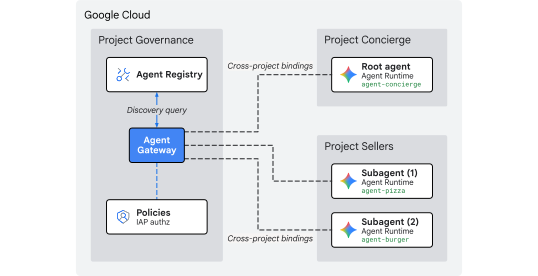
الشكل 1: بنية إدارة مركزية متعددة المشاريع
لماذا نستخدم الإدارة المركزية على مستوى المشاريع؟
في المؤسسات الكبيرة، تنشئ فِرق المنتجات ومجموعات علوم البيانات وكلاء الذكاء الاصطناعي في عشرات المشاريع المستقلة على Google Cloud. إنّ منح كل فريق تحكّمًا مباشرًا في تسجيل الأدوات ومسارات شبكة الخروج وإجراءات الأمان يؤدي إلى انتشار أدوات غير معتمَدة وسياسات غير متّسقة لمنع فقدان البيانات وخروج غير مراقَب من شبكة VPC وسجلّات تدقيق مجزّأة.
تفصل الحوكمة المركزية على مستوى المشاريع بين إنشاء السياسات وتنفيذ الوكلاء:
- يضع فريق تكنولوجيا المعلومات المركزي وفريق عمليات الأمان سياسات الأمان ويفحصان الأدوات ويراقبان البيانات الصادرة ضمن مشروع إدارة مركزية واحد.
- تركّز فِرق المنتجات والتطبيقات بشكل كامل على منطق النشاط التجاري في مشاريع وقت تشغيل الوكيل المستقلة، وترتبط مباشرةً بالبوابة المركزية بدون الأعباء التشغيلية لإدارة شبكات VPC المحلية أو الاتصالات المتبادلة أو محرّكات السياسات المجزّأة.
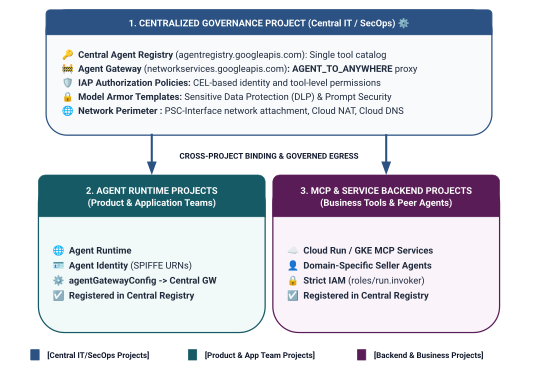
الشكل 2: بنية حوكمة المشاريع المشتركة ذات المستويات الثلاثة وحدودها
نموذج تحديد نطاق الهوية من مستويين في "سياسات الوصول الموحّدة"
عندما يتواصل الوكلاء من خلال Central Agent Gateway، يقيّم Identity-Aware Proxy (الإصدار 2 من IAP) إمكانية الوصول استنادًا إلى هوية الوكيل، وهي هوية مستندة إلى SPIFFE وموثَّقة بالتشفير يتم إصدارها تلقائيًا لحاوية وقت التشغيل، مقارنةً بسياسة وصول عالمية في "إدارة الهوية وإمكانية الوصول" (IAM):
- المستوى 1: واجهات Google Cloud API الأساسية (الوصول العام من خلال
principalSet://في القاعدة 1): إذن خروج على مستوى المشروع يسمح لجميع بيئات تشغيل الوكلاء في المشاريع الفرعية بالوصول إلى واجهات Google API العادية (aiplatformوiamcredentialsوtelemetryوagentregistry) لأغراض الاكتشاف وإنشاء الرموز المميّزة والاستدلال. - المستوى 2: أدوات النشاط التجاري وخدمات A2A (دقيقة من خلال
principal://في القاعدتَين 2 و3): وصول صارم بأقل امتيازات مرتبط بمثيلات Reasoning Engine الفردية، ويتم فرضه باستخدام شروط لغة التعبير الشائعة (CEL) التي تستهدف خدمات Agent Registry مسجَّلة معيّنة (destination.agent_registry.agent.name).
ما يمكنك إنشاؤه
- Centralized Agent Gateway (
centralized-agw) فيPROJECT_GOVERNANCE - إضافة خدمة التفويض وسياسة Authz في الإصدار الثاني من IAP في وضع ENFORCE الصارم (
failOpen: false) - سياسة الوصول الموحّد الأساسية في "إدارة الهوية وإمكانية الوصول" (
uap-rules.json) وربط السياسات على مستوى المشروع - أذونات "إدارة الهوية وإمكانية الوصول" (IAM) لوكيل الخدمة في مشاريع متعددة (
ar_agw_cross_project_sa) - حزمة تخزين مؤقت مركزية مشتركة في Google Cloud Storage (GCS)
- وكلاء بيع البرغر والبيتزا المعزولون في
PROJECT_SELLERS - وكيل شراء (Concierge) مع ميزة الاكتشاف التلقائي الديناميكي لـ REST في
PROJECT_CONCIERGE - تسجيلات الخدمات في Central Agent Registry باستخدام عناوين URL لبروتوكول mTLS على مستوى المشاريع
- تعديلات ديناميكية على سياسة الخروج في الإصدار الثاني من IAP مع عمليات تحقّق مباشرة وتدقيق في Cloud Logging
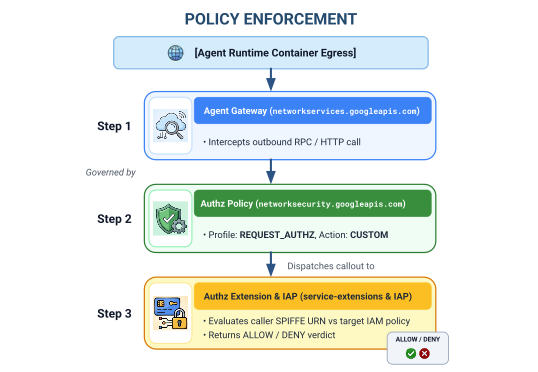
الشكل رقم 3: تسلسل التنفيذ خطوة بخطوة
ما ستتعرّف عليه
- كيفية ضبط أذونات "إدارة الهوية وإمكانية الوصول" لوكيل الخدمة في مشاريع متعددة للبوابات المركزية
- كيفية توجيه حركة البيانات الصادرة من بيئة تشغيل الوكيل عبر "بوابة وكيل" مركزية في بيئات متعدّدة المشاريع
- كيفية تفويض مصادقة Agent Gateway إلى Identity-Aware Proxy (الإصدار 2 من IAP) باستخدام "إضافات الخدمة" (
iapPolicyVersion: "V2") - كيفية إنشاء "سياسات الوصول الموحَّدة" (UAP) في "إدارة الهوية وإمكانية الوصول" (IAM) وربطها بقواعد "لغة التعبير العادي" (CEL) التي تحكم وجهات "سجلّ الوكلاء" المسجَّلة (
destination.agent_registry.*) - كيفية التخلص من أرقام تعريف الوكلاء وعناوين URL المضمّنة في الرموز البرمجية باستخدام ميزة الاكتشاف التلقائي في وقت التشغيل من خلال "سجلّ الوكلاء" (Agent Registry)
- كيفية اختبار الحظر الفعلي لنموذج "الثقة المعدومة" في المحيط (
HTTP 403 Forbidden) والتحقّق من تعديلات السياسات المباشرة في Cloud Logging
المتطلبات
- 3 مشاريع على Google Cloud تم تفعيل الفوترة فيها:
PROJECT_GOVERNANCE: الحوكمة المركزية والبوابة والسجلّ وسياسات الوصول إلى "إدارة الهوية وإمكانية الوصول"-
PROJECT_CONCIERGE: وكيل تنسيق المساعد الشخصي للشراء -
PROJECT_SELLERS: وكلاء بائعين متخصصين في البرغر والبيتزا
- مستخدم أو حساب خدمة في "إدارة الهوية وإمكانية الوصول" (IAM) لديه إذن
roles/ownerأو أذونات إدارية في جميع المشاريع الثلاثة - مؤسسة على Google Cloud (لربط نطاق الثقة في SPIFFE)
- Google Cloud Shell أو جهاز محلي مثبَّت عليه
gcloudCLI وpython(الإصدار 3.11 أو إصدار أحدث) وuv
بهذا نكون قد انتهينا من الجزء التمهيدي... لننتقل بعد ذلك إلى قسم الإعداد والبيئة.
2. الإعداد
على الرغم من أنّ هذه البنية تشمل 3 مشاريع مختلفة على Google Cloud، يمكنك تنفيذ %100 من أوامر نشر الوحدة الطرفية وعمليات تنزيل المستودعات وعمليات التقسيم المرحلي من وحدة طرفية واحدة في Cloud Shell تم ضبطها على PROJECT_GOVERNANCE. يستهدف كل نص برمجي للنشر وأمر gcloud صراحةً المشروع الوجهة المناسب من خلال علامات واجهة سطر الأوامر (--project).
ابدأ بالوصول إلى سطر أوامر مشروع على السحابة الإلكترونية في Google Cloud:
- Cloud Shell على
shell.cloud.google.comأو - جهاز محلي مثبَّت عليه
gcloudCLI
تحديد سياق مشروعك
# set terminal project context to Central Governance Project
gcloud config set project SET_YOUR_GOVERNANCE_PROJECT_ID_HERE
# login to gcloud cli
gcloud auth login
# login for application default credentials
gcloud auth application-default login
تحديث واجهة سطر الأوامر (CLI) في "gcloud" (يُنصح به)
# update gcloud components
gcloud components update --quiet
ضبط متغيرات بيئة واجهة الأوامر
أدخِل المعرّفات الخاصة بمشروعك.
# 1. Project Identifiers
export PROJECT_GOVERNANCE="SET_YOUR_GOVERNANCE_PROJECT_ID_HERE"
export PROJECT_CONCIERGE="SET_YOUR_CONCIERGE_PROJECT_ID_HERE"
export PROJECT_SELLERS="SET_YOUR_SELLERS_PROJECT_ID_HERE"
سيتم اشتقاق متغيرات shell هذه تلقائيًا.
# 2. Regional & Gateway Settings
export REGION="us-central1"
export AGW_NAME="centralized-agw"
export UAP_POLICY_NAME="uap-policy-${AGW_NAME}"
export UAP_BINDING_NAME="uap-binding-${AGW_NAME}"

# 3. Retrieve Project Numbers
export PROJECT_NUMBER_GOVERNANCE=$(gcloud projects describe ${PROJECT_GOVERNANCE} --format="value(projectNumber)")
export PROJECT_NUMBER_CONCIERGE=$(gcloud projects describe ${PROJECT_CONCIERGE} --format="value(projectNumber)")
export PROJECT_NUMBER_SELLERS=$(gcloud projects describe ${PROJECT_SELLERS} --format="value(projectNumber)")

# 4. Obtain Organization ID
export ORG_ID=$(gcloud projects get-ancestors ${PROJECT_GOVERNANCE} --format="value(id, type)" | grep organization | awk '{print $1}')

# 5. Set Application Default Credentials (ADC) Quota Project
gcloud auth application-default set-quota-project ${PROJECT_GOVERNANCE}

echo "Governance Project: ${PROJECT_GOVERNANCE} (${PROJECT_NUMBER_GOVERNANCE})"
echo "Concierge Project:  ${PROJECT_CONCIERGE} (${PROJECT_NUMBER_CONCIERGE})"
echo "Sellers Project:    ${PROJECT_SELLERS} (${PROJECT_NUMBER_SELLERS})"
echo "Organization ID:    ${ORG_ID}"
echo "UAP Policy Name:    ${UAP_POLICY_NAME}"
echo "UAP Binding Name:   ${UAP_BINDING_NAME}"
إنشاء دليل محلي لملفات الإعداد
# create config folder
mkdir -p cfg
إسناد دور مشرف سياسات الوصول إلى سياسات الوصول الموحّدة
# grant Access Policy Admin and Project IAM Admin to current user in Governance Project
for ROLE in "roles/iam.accessPolicyAdmin" "roles/resourcemanager.projectIamAdmin"; do
  gcloud projects add-iam-policy-binding ${PROJECT_GOVERNANCE} \
    --member="user:$(gcloud config get-value account)" \
    --role="${ROLE}" \
    --condition=None
done
تفعيل سجلّات الوصول إلى البيانات في Cloud Audit للإصدار 2 من IAP
توقِف Google Cloud تلقائيًا سجلّات تدقيق الوصول إلى البيانات لتجنُّب تكاليف التخزين غير المقصودة. بما أنّ الإصدار الثاني من IAP يصدر قرارات التفويض (granted=true وgranted=false) كسجلّات تدقيق في الوصول إلى المعلومات، فعِّل تسجيل ADMIN_READ وDATA_READ وDATA_WRITE لـ iap.googleapis.com في PROJECT_GOVERNANCE:
# 1. export current IAM policy for PROJECT_GOVERNANCE
gcloud projects get-iam-policy ${PROJECT_GOVERNANCE} \
  --format=json > cfg/gov_iam_policy.json
# 2. append auditConfigs for iap.googleapis.com
python3 -c "
import json
with open('cfg/gov_iam_policy.json') as f:
    policy = json.load(f)
audit_configs = [c for c in policy.get('auditConfigs', []) if c.get('service') != 'iap.googleapis.com']
audit_configs.append({
    'service': 'iap.googleapis.com',
    'auditLogConfigs': [
        {'logType': 'ADMIN_READ'},
        {'logType': 'DATA_READ'},
        {'logType': 'DATA_WRITE'}
    ]
})
policy['auditConfigs'] = audit_configs
with open('cfg/gov_iam_policy.json', 'w') as f:
    json.dump(policy, f, indent=2)
"
# 3. apply updated policy
gcloud projects set-iam-policy ${PROJECT_GOVERNANCE} cfg/gov_iam_policy.json
# 4. verify auditConfigs applied
gcloud projects get-iam-policy ${PROJECT_GOVERNANCE} --format="yaml(auditConfigs)"
تفعيل واجهات Google Cloud APIs المطلوبة
# enable google apis (agent platform & security bundle, part 1)
for PROJ in ${PROJECT_GOVERNANCE} ${PROJECT_CONCIERGE} ${PROJECT_SELLERS}; do
  gcloud services enable \
    agentregistry.googleapis.com \
    aiplatform.googleapis.com \
    apphub.googleapis.com \
    apptopology.googleapis.com \
    cloudapiregistry.googleapis.com \
    cloudtrace.googleapis.com \
    compute.googleapis.com \
    dataform.googleapis.com \
    iam.googleapis.com \
    agentidentity.googleapis.com \
    iap.googleapis.com \
    logging.googleapis.com \
    modelarmor.googleapis.com \
    monitoring.googleapis.com \
    networksecurity.googleapis.com \
    networkservices.googleapis.com \
    notebooks.googleapis.com \
    observability.googleapis.com \
    --project=${PROJ}
done
# enable google apis (agent platform bundle, part 2)
for PROJ in ${PROJECT_GOVERNANCE} ${PROJECT_CONCIERGE} ${PROJECT_SELLERS}; do
  gcloud services enable \
    securitycenter.googleapis.com \
    saasservicemgmt.googleapis.com \
    storage.googleapis.com \
    telemetry.googleapis.com \
    texttospeech.googleapis.com \
    --project=${PROJ}
done
# enable google apis (foundational & agent runtime build bundle, part 3)
for PROJ in ${PROJECT_GOVERNANCE} ${PROJECT_CONCIERGE} ${PROJECT_SELLERS}; do
  gcloud services enable \
    artifactregistry.googleapis.com \
    cloudbuild.googleapis.com \
    cloudresourcemanager.googleapis.com \
    iamcredentials.googleapis.com \
    serviceusage.googleapis.com \
    run.googleapis.com \
    orgpolicy.googleapis.com \
    --project=${PROJ}
done
التحقّق من تفعيل واجهات برمجة التطبيقات في جميع المشاريع
يضمن تفعيل واجهات برمجة التطبيقات نفسها في المشاريع الثلاثة (PROJECT_GOVERNANCE وPROJECT_CONCIERGE وPROJECT_SELLERS) اتساق العمليات ويمنع حدوث أخطاء في إنشاء الرموز المميّزة أثناء التشغيل أو أخطاء في فهرسة المخططات أو انقطاع في بيانات القياس عن بُعد.
شغِّل نص التحقّق التالي في Cloud Shell للتأكّد من تكافؤ واجهة برمجة التطبيقات في المشاريع الثلاثة:
# validate that all required APIs are enabled across all 3 projects
python3 - << 'EOF'
import subprocess
import os
import sys

REQUIRED_APIS = [
    "agentregistry.googleapis.com",
    "aiplatform.googleapis.com",
    "apphub.googleapis.com",
    "apptopology.googleapis.com",
    "cloudapiregistry.googleapis.com",
    "cloudtrace.googleapis.com",
    "compute.googleapis.com",
    "dataform.googleapis.com",
    "iam.googleapis.com",
    "agentidentity.googleapis.com",
    "iap.googleapis.com",
    "logging.googleapis.com",
    "modelarmor.googleapis.com",
    "monitoring.googleapis.com",
    "networksecurity.googleapis.com",
    "networkservices.googleapis.com",
    "notebooks.googleapis.com",
    "observability.googleapis.com",
    "securitycenter.googleapis.com",
    "saasservicemgmt.googleapis.com",
    "storage.googleapis.com",
    "telemetry.googleapis.com",
    "texttospeech.googleapis.com",
    "artifactregistry.googleapis.com",
    "cloudbuild.googleapis.com",
    "cloudresourcemanager.googleapis.com",
    "iamcredentials.googleapis.com",
    "serviceusage.googleapis.com",
    "run.googleapis.com",
    "orgpolicy.googleapis.com"
]

projects = {
    "GOVERNANCE": os.environ.get("PROJECT_GOVERNANCE", ""),
    "CONCIERGE": os.environ.get("PROJECT_CONCIERGE", ""),
    "SELLERS": os.environ.get("PROJECT_SELLERS", "")
}

enabled = {}
for role, proj in projects.items():
    if not proj:
        print(f"Error: Environment variable for {role} is not set.")
        sys.exit(1)
    res = subprocess.run(
        ["gcloud", "services", "list", "--enabled", f"--project={proj}", "--format=value(config.name)"],
        capture_output=True, text=True, check=True
    )
    enabled[role] = set(res.stdout.strip().splitlines())

print(f"\n{'API Name':<36} | {'GOVERNANCE':<12} | {'CONCIERGE':<12} | {'SELLERS':<12}")
print("-" * 78)

all_synced = True
for api in REQUIRED_APIS:
    g_status = "ENABLED" if api in enabled["GOVERNANCE"] else "MISSING"
    c_status = "ENABLED" if api in enabled["CONCIERGE"] else "MISSING"
    s_status = "ENABLED" if api in enabled["SELLERS"] else "MISSING"
    if "MISSING" in (g_status, c_status, s_status):
        all_synced = False
    print(f"{api:<36} | {g_status:<12} | {c_status:<12} | {s_status:<12}")

print("-" * 78)
if all_synced:
    print("✅ All 29 required APIs are ENABLED and synchronized across all three projects.\n")
else:
    print("❌ Discrepancies detected. Please re-run the enablement commands for missing services.\n")
    sys.exit(1)
EOF
مثال على ناتج التحقّق:
من المفترض أن تظهر جميع واجهات برمجة التطبيقات مفعَّلة.
✅ All 30 required APIs are ENABLED and synchronized across all three projects.
ضبط سياسات المؤسسة
تفرض سياسات مؤسسة Google Cloud التلقائية قيودًا على عمليات ربط سياسات الوصول في الإصدار 3 من "إدارة الهوية وإمكانية الوصول" (IAM) بالموارد (constraints/iam.managed.disableAccessPolicyBinding).
يمكنك إلغاء أي قيود مفروضة على سياسة المؤسسة المكتسبة على مستوى المشروع من خلال ضبط enforce: false صراحةً على "السماح".
# disable iam v3 constraint (allow v3 access policies)
gcloud org-policies set-policy /dev/stdin << EOF
name: projects/${PROJECT_NUMBER_GOVERNANCE}/policies/iam.managed.disableAccessPolicyBinding
spec:
  rules:
  - enforce: false
EOF
# verify org policy constraints on project
gcloud org-policies describe iam.managed.disableAccessPolicyBinding \
  --project=${PROJECT_GOVERNANCE} --effective
بهذا نكون قد انتهينا من عملية الإعداد... لننتقل الآن إلى قسم تسجيل واجهات Google APIs الأساسية.
3- Agent Registry
تسجيل خدمة نقطة نهاية Google APIs الأساسية
تتطلّب Agent Gateway تسجيل عناوين URL الخاصة بـ Google API في Central Agent Registry ليتمكّن الوكلاء الذين تم ضبطهم باستخدام agent_gateway_config من توجيه حركة البيانات الصادرة بأمان إلى خدمات الخلفية الأساسية في Google Cloud (مثل aiplatform و"بيانات اعتماد إدارة الهوية وإمكانية الوصول" و"القياس عن بُعد").
إنشاء "core-gapi-services" في قاعدة بيانات الوكلاء
# register core google api endpoints in agent registry with standard and :443 port variants
gcloud agent-registry services create core-gapi-services \
  --project=${PROJECT_GOVERNANCE} \
  --location=${REGION} \
  --display-name="gapi.core.services" \
  --description="Core Google Cloud APIs and Service Endpoints" \
  --endpoint-spec-type=no-spec \
  --interfaces=protocolBinding=JSONRPC,url=https://telemetry.googleapis.com \
  --interfaces=protocolBinding=JSONRPC,url=https://telemetry.mtls.googleapis.com \
  --interfaces=protocolBinding=JSONRPC,url=https://${REGION}-aiplatform.googleapis.com \
  --interfaces=protocolBinding=JSONRPC,url=https://${REGION}-aiplatform.googleapis.com:443 \
  --interfaces=protocolBinding=JSONRPC,url=https://${REGION}-aiplatform.mtls.googleapis.com \
  --interfaces=protocolBinding=JSONRPC,url=https://${REGION}-aiplatform.mtls.googleapis.com:443 \
  --interfaces=protocolBinding=JSONRPC,url=https://aiplatform.googleapis.com \
  --interfaces=protocolBinding=JSONRPC,url=https://aiplatform.googleapis.com:443 \
  --interfaces=protocolBinding=JSONRPC,url=https://aiplatform.mtls.googleapis.com \
  --interfaces=protocolBinding=JSONRPC,url=https://aiplatform.mtls.googleapis.com:443 \
  --interfaces=protocolBinding=JSONRPC,url=https://cloudresourcemanager.googleapis.com \
  --interfaces=protocolBinding=JSONRPC,url=https://cloudresourcemanager.googleapis.com:443 \
  --interfaces=protocolBinding=JSONRPC,url=https://cloudresourcemanager.mtls.googleapis.com \
  --interfaces=protocolBinding=JSONRPC,url=https://cloudresourcemanager.mtls.googleapis.com:443 \
  --interfaces=protocolBinding=JSONRPC,url=https://iamcredentials.googleapis.com \
  --interfaces=protocolBinding=JSONRPC,url=https://iamcredentials.googleapis.com:443 \
  --interfaces=protocolBinding=JSONRPC,url=https://iamcredentials.mtls.googleapis.com \
  --interfaces=protocolBinding=JSONRPC,url=https://iamcredentials.mtls.googleapis.com:443 \
  --interfaces=protocolBinding=JSONRPC,url=https://agentregistry.googleapis.com \
  --interfaces=protocolBinding=JSONRPC,url=https://agentregistry.mtls.googleapis.com \
  --interfaces=protocolBinding=JSONRPC,url=https://agentregistry.googleapis.com:443 \
  --interfaces=protocolBinding=JSONRPC,url=https://agentregistry.mtls.googleapis.com:443
رقم تعريف مورد نقطة نهاية Capture Core APIs
# capture the underlying Agent Registry endpoint ID
export ENDPOINT_ID=$(gcloud agent-registry services describe core-gapi-services \
  --project=${PROJECT_GOVERNANCE} \
  --location=${REGION} \
  --format="value(registryResource)" | awk -F'/' '{print $NF}')
echo "Core APIs Endpoint ID: ${ENDPOINT_ID}"
الفرق بين principalSet وprincipal في "هوية الوكيل"
في Google Cloud IAM وGemini Enterprise Agent Platform، تستخدم هويات الأجهزة الصادرة لحاويات الوكلاء المنفّذة أسماء موارد موحّدة (URN) لـ SPIFFE تم التحقّق منها بشكل مشفّر ويتم تقييمها بواسطة Identity-Aware Proxy (الإصدار 2 من IAP). عند ضبط "سياسات الوصول الموحّد" في "إدارة الهوية وإمكانية الوصول"، يمكنك استهداف principal محدّد واحد أو principalSet مستند إلى السمات:
السمة |
| |
بنية "إدارة الهوية وإمكانية الوصول" |
|
|
الدقة | دقيق (على مستوى المثيل): يحدّد مثيل حاوية واحدًا ومحدّدًا في Reasoning Engine. | التقسيم التقريبي (على مستوى المشروع): يحدّد جميع محرّكات الاستدلال التي تشترك في سمة مشروع مشتركة. |
نمط اسم المرجع الموحّد (URN) |
|
|
حالة الاستخدام في منصة الوكلاء | المستوى 2 (أدوات الأعمال وA2A): تفويض وكلاء تنسيق محدّدين لاستدعاء أدوات النطاق المستهدَف (مثلاً، وكيل الشراء Concierge $ ightarrow$ بائع البرغر). | المستوى 1 (البنية الأساسية): منح جميع الوكلاء في مشروع إمكانية الوصول إلى واجهات برمجة تطبيقات Google Cloud ( |
التأثير في دورة الحياة | إذا تم حذف وكيل وإعادة إنشائه، يتطلّب معرّف المحرّك الجديد ربط سياسة "إدارة الهوية وإمكانية الوصول" المعدَّلة. | يتم تطبيقها تلقائيًا على الوكلاء الذين تم نشرهم حديثًا في هذا المشروع بدون تعديلات إضافية على "إدارة الهوية وإمكانية الوصول". |
الحوكمة التعريفية باستخدام "سياسات الوصول الموحّدة" (UAP / IAP v2)
في الإصدار القديم من IAP v1، كانت سياسات الخروج تُرفَق مباشرةً بموارد Agent Registry الفردية باستخدام gcloud beta iap web add-iam-policy-binding. في الإصدار الثاني من IAP وسياسات الوصول الموحّدة، يتم إلغاء عمليات الربط لكل مورد لصالح سياسة وصول واحدة مركزية لإدارة الهوية وإمكانية الوصول (cfg/uap-rules.json).
سيتم ضبط إذن الخروج الأساسي لـ "core-gapi-services" على أنّه القاعدة 1 في "سياسة الوصول الموحّدة" في القسم 5، ما يضمن إنشاء جميع حاويات الوكلاء لمسارات الخروج الأساسية قبل النشر.
للحصول على تفاصيل فنية أكثر تعمقًا حول المعرّفات الرئيسية وآليات Workload Identity، يُرجى الاطّلاع على:
- Google Cloud IAM: معرّفات ومجموعات المستخدمين الأساسيين
- طريقة عمل "هوية الوكيل"
- ضبط سياسات الوصول الموحّدة في "إدارة الهوية وإمكانية الوصول" لـ Agent Gateway
بهذا نكون قد انتهينا من تسجيل نقاط نهاية واجهات برمجة التطبيقات الأساسية... لننتقل الآن إلى قسم نشر "بوابة الوكيل المركزية".
4. Agent Gateway
نشر Centralized Agent Gateway
انشر Agent Gateway المركزي (centralized-agw) في وضع الخروج AGENT_TO_ANYWHERE داخل مشروع $PROJECT_GOVERNANCE.
تحديد بيان إعدادات البوابة
أنشئ cfg/${AGW_NAME}.yaml لإدارة الزيارات الصادرة:
# generate agent gateway config yaml
cat > cfg/${AGW_NAME}.yaml << EOF
name: ${AGW_NAME}
protocols:
  - MCP
googleManaged:
  governedAccessPath: AGENT_TO_ANYWHERE
registries:
  - "//agentregistry.googleapis.com/projects/${PROJECT_GOVERNANCE}/locations/${REGION}"
EOF
استيراد إعدادات بوابة الوكيل
# import and create agent gateway
gcloud network-services agent-gateways import ${AGW_NAME} \
  --source="cfg/${AGW_NAME}.yaml" \
  --location=${REGION} \
  --project=${PROJECT_GOVERNANCE}
التحقّق من تفاصيل بوابة الوكيل
# show agent gateway status
gcloud network-services agent-gateways describe ${AGW_NAME} \
  --location=${REGION} \
  --project=${PROJECT_GOVERNANCE}
مثال على الناتج:
agentGatewayCard:
  mtlsEndpoint: projects/${AGW_TP_ID}/regions/us-central1/serviceAttachments/unitkind1-swp-mtls-psc-sa
  rootCertificates:
  - |
    -----BEGIN CERTIFICATE-----
    MIIDwzCCAqugAwIBAgITNQuWGopdOZaHdcK7r7AYFhonqDANBgkqhkiG9w0BAQsF
    ...
    -----END CERTIFICATE-----
  serviceExtensionsServiceAccount: service-${PROJ_NO}@gcp-sa-dep.iam.gserviceaccount.com
createTime: 'YYYY-MM-DDT12:34:56.789098765Z'
googleManaged:
  governedAccessPath: AGENT_TO_ANYWHERE
name: projects/${PROJECT_GOVERNANCE}/locations/us-central1/agentGateways/centralized-agw
protocols:
- MCP
registries:
- //agentregistry.googleapis.com/projects/${PROJECT_GOVERNANCE}/locations/us-central1
updateTime: 'YYYY-MM-DDT12:34:56.789098765Z'
بهذا نكون قد انتهينا من نشر المدخل... لننتقل الآن إلى قسم ضبط التفويض.
5- التفويض
ضبط تفويض Agent Gateway وUAP الأساسي
يؤمّن Agent Gateway حركة بيانات الأدوات والوكلاء الصادرة ويتحكّم فيها باستخدام سياسات التفويض (networksecurity.authzPolicies) المدمجة مع سياسات الوصول الموحّدة (UAP) في Identity-Aware Proxy (الإصدار 2 من IAP).
نظرة عامة على بنية التفويض
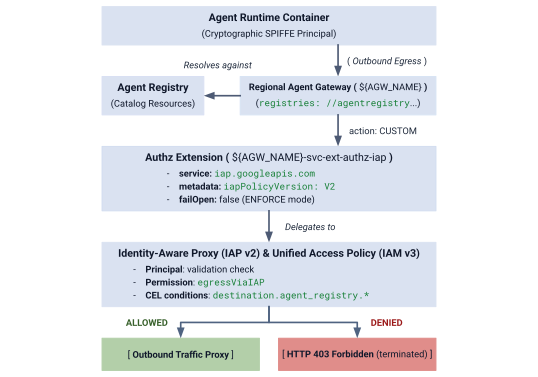
الشكل 4: نظرة عامة على بنية التفويض
تتكوّن بنية التفويض من ثلاث طبقات مترابطة:
- إضافة خدمة IAP (
authzExtension): مورد إقليمي تم ضبطه باستخدامservice: iap.googleapis.comوmetadata: iapPolicyVersion: "V2"وfailOpen: falseلتطبيق نموذج الثقة المعدومة الصارم في المحيط. - سياسة تفويض Gateway (
authzPolicy): مورد إقليمي يستهدف Agent Gateway باستخدامpolicyProfile: REQUEST_AUTHZوaction: CUSTOM، ويوجّه عمليات التحقّق من التفويض إلى إضافة IAP Authz. - سياسة الوصول الموحّد والربط في "إدارة الهوية وإمكانية الوصول" (
accessPolicyوpolicyBinding): مورد الإصدار الثالث من "إدارة الهوية وإمكانية الوصول" العالمي الذي يقيّمه "الوكيل المستند إلى الهوية". وتتحقّق من الإذن العامiap.googleapis.com/resources.egressViaIAPمقابل هويات SPIFFE للمتصل وشروط كتالوج CEL.
الخطوة 1: إنشاء إضافة IAP v2 Authz واستيرادها
أنشئ بيان إضافة الخدمة باستخدام iapPolicyVersion: "V2" وfailOpen: false في وضع ENFORCE الصارم:
# create authz extension config file in ENFORCE mode
cat > cfg/${AGW_NAME}-svc-ext-authz-iap.yaml << EOF
name: ${AGW_NAME}-svc-ext-authz-iap
service: iap.googleapis.com
failOpen: false
timeout: 1s
metadata:
  iapPolicyVersion: "V2"
EOF
استيراد إضافة Authz:
# import IAP v2 authz extension
gcloud service-extensions authz-extensions import ${AGW_NAME}-svc-ext-authz-iap \
  --source=cfg/${AGW_NAME}-svc-ext-authz-iap.yaml \
  --location=${REGION} \
  --project=${PROJECT_GOVERNANCE}
تأكَّد من أنّ إضافة Authz نشطة:
# describe authz extension
gcloud service-extensions authz-extensions describe ${AGW_NAME}-svc-ext-authz-iap \
  --location=${REGION} \
  --project=${PROJECT_GOVERNANCE}
مثال على الناتج:
createTime: 'YYYY-MM-DDT12:34:56.789098765Z'
failOpen: false
metadata:
  iapPolicyVersion: V2
name: projects/${PROJECT_GOVERNANCE}/locations/us-central1/authzExtensions/centralized-agw-svc-ext-authz-iap
service: iap.googleapis.com
timeout: 1s
الخطوة 2: إنشاء سياسة تفويض المدخل واستيرادها
أنشئ إعدادات "سياسة التفويض" (Authorization Policy) التي يتم إرفاقها بـ Agent Gateway وتفوّض عملية التحقّق من الطلبات إلى إضافة IAP Authz:
# create authz policy manifest
cat > cfg/${AGW_NAME}-authz-policy-profile-iap.yaml << EOF
name: ${AGW_NAME}-authz-policy-profile-iap
target:
  resources:
    - "projects/${PROJECT_GOVERNANCE}/locations/${REGION}/agentGateways/${AGW_NAME}"
policyProfile: REQUEST_AUTHZ
action: CUSTOM
customProvider:
  authzExtension:
    resources:
      - "projects/${PROJECT_GOVERNANCE}/locations/${REGION}/authzExtensions/${AGW_NAME}-svc-ext-authz-iap"
EOF
استيراد سياسة التفويض:
# import authz policy
gcloud beta network-security authz-policies import ${AGW_NAME}-authz-policy-profile-iap \
  --source=cfg/${AGW_NAME}-authz-policy-profile-iap.yaml \
  --location=${REGION} \
  --project=${PROJECT_GOVERNANCE}
تحقَّق من "سياسة التفويض" النشطة:
# describe authz policy
gcloud beta network-security authz-policies describe ${AGW_NAME}-authz-policy-profile-iap \
  --location=${REGION} \
  --project=${PROJECT_GOVERNANCE}
الخطوة 3: إنشاء "سياسة الوصول الموحّد" الأولية (القاعدة 1: واجهات Google APIs الأساسية)
أنشئ cfg/uap-rules.json باستخدام القاعدة 1 التي تسمح لـ principalSet الثلاثة في المشروع بالوصول إلى core-gapi-services:
# create initial unified access policy rules manifest
cat > cfg/uap-rules.json << EOF
[
  {
    "description": "Rule 1: Allow agent runtimes across all 3 projects to reach Core Google APIs",
    "effect": "ALLOW",
    "principals": [
      "principalSet://agents.global.org-${ORG_ID}.system.id.goog/attribute.platformContainer/aiplatform/projects/${PROJECT_NUMBER_GOVERNANCE}",
      "principalSet://agents.global.org-${ORG_ID}.system.id.goog/attribute.platformContainer/aiplatform/projects/${PROJECT_NUMBER_CONCIERGE}",
      "principalSet://agents.global.org-${ORG_ID}.system.id.goog/attribute.platformContainer/aiplatform/projects/${PROJECT_NUMBER_SELLERS}"
    ],
    "operation": {
      "permissions": [
        "iap.googleapis.com/resources.egressViaIAP"
      ]
    },
    "conditions": {
      "iap.googleapis.com": {
        "expression": \
        "destination.is_registered == true && \
         destination.agent_registry.resource_type == 'ENDPOINT' && ( \
         destination.agent_registry.endpoint.name == 'projects/${PROJECT_GOVERNANCE}/locations/${REGION}/endpoints/core-gapi-services' || \
         destination.agent_registry.endpoint.name == 'projects/${PROJECT_GOVERNANCE}/locations/${REGION}/endpoints/${ENDPOINT_ID}' || \
         destination.agent_registry.endpoint.name == 'projects/${PROJECT_NUMBER_GOVERNANCE}/locations/${REGION}/endpoints/${ENDPOINT_ID}')"
      }
    }
  }
]
EOF
الخطوة 4: إنشاء سياسة الوصول إلى "إدارة الهوية وإمكانية الوصول" وربطها
أنشئ سياسة الوصول العالمية في "إدارة الهوية وإمكانية الوصول":
# create global IAM access policy
gcloud iam access-policies create ${UAP_POLICY_NAME} \
  --details-rules=cfg/uap-rules.json \
  --project=${PROJECT_GOVERNANCE} \
  --location=global
اربط "سياسة الوصول" بـ "PROJECT_GOVERNANCE":
# bind access policy to governance project
gcloud iam policy-bindings create ${UAP_BINDING_NAME} \
  --policy="projects/${PROJECT_GOVERNANCE}/locations/global/accessPolicies/${UAP_POLICY_NAME}" \
  --target-resource="//cloudresourcemanager.googleapis.com/projects/${PROJECT_GOVERNANCE}" \
  --project=${PROJECT_GOVERNANCE} \
  --location=global
تأكَّد من أنّ "ربط السياسة" نشط:
# verify policy binding
gcloud iam policy-bindings describe ${UAP_BINDING_NAME} \
  --project=${PROJECT_GOVERNANCE} \
  --location=global
مثال على الناتج:
name: projects/${PROJECT_GOVERNANCE}/locations/global/policyBindings/uap-binding-centralized-agw
policy: projects/${PROJECT_GOVERNANCE}/locations/global/accessPolicies/uap-policy-centralized-agw
policyKind: ACCESS_POLICY
target:
  resource: //cloudresourcemanager.googleapis.com/projects/${PROJECT_GOVERNANCE}
أصبح الآن الخروج من واجهة برمجة التطبيقات الأساسية في Google Cloud مصرَّحًا به بشكل آمن في جميع المشاريع الثلاثة في وضع ENFORCE الصارم.
بهذا نكون قد انتهينا من إعداد تفويض المدخل... لننتقل الآن إلى قسم ضبط أذونات "إدارة الهوية وإمكانية الوصول" على مستوى المشاريع.
6. إدارة الهوية وإمكانية الوصول (IAM) على مستوى المشاريع
ضبط أذونات "إدارة الهوية وإمكانية الوصول" (IAM) على مستوى المشاريع
في هذه البنية المتعددة المشاريع، تتوفّر بيئات تشغيل الوكلاء في المشاريع الفرعية (PROJECT_CONCIERGE وPROJECT_SELLERS)، بينما تتوفّر "بوابة الوكيل المركزية" و"سجلّ الوكلاء" في PROJECT_GOVERNANCE.
بما أنّ مشاريع Google Cloud هي حدود أمان معزولة، يجب منح إذن الوصول إلى المشاريع الأخرى بشكل صريح على مستوى طبقتَين تشغيليتَين:
- مستوى التحكّم (وقت النشر): عند نشر حاوية وكيل تم ضبطها باستخدام
--agent-gateway-config، يجب أن يربط وكيل خدمة وقت تشغيل الوكيل (service-) الخاص بالمشروع الفرعي الحاوية بالبوابة المركزية. ننشئ دورًا مخصّصًا بالحدّ الأدنى (@gcp-sa-aiplatform.iam.gserviceaccount.com ar_agw_cross_project_sa) يمنحnetworkservices.agentGateways.useوgetوoperations.getفيPROJECT_GOVERNANCE. - مستوى البيانات (تنفيذ وقت التشغيل):
- استكشاف الكتالوج: تحتاج هويات Spoke إلى
roles/agentregistry.viewerفيPROJECT_GOVERNANCEلحلّ نقاط نهاية الوكيل المستهدَف ديناميكيًا. - استدعاء الهدف: يحتاج وكيل Concierge إلى
roles/aiplatform.userفيPROJECT_SELLERSلتنفيذ طلبات البحث في محرّكات الاستدلال الخاصة بالبائع.
- استكشاف الكتالوج: تحتاج هويات Spoke إلى
إنشاء دور مخصّص في "إدارة الهوية وإمكانية الوصول" في "PROJECT_GOVERNANCE"
# create custom role in central governance project
gcloud iam roles create ar_agw_cross_project_sa \
  --project=${PROJECT_GOVERNANCE} \
  --title="Runtime Agent Gateway Cross-Project SA" \
  --description="Custom role for cross-project service agents to access Central Agent Gateway" \
  --permissions="networkservices.agentGateways.get,networkservices.agentGateways.use,networkservices.operations.get" \
  --stage="GA"
إسناد دور مخصّص إلى وكلاء خدمة "بيئة تشغيل الوكيل"
# 1. ensure aiplatform service identities are provisioned across all projects
for PROJ in ${PROJECT_GOVERNANCE} ${PROJECT_CONCIERGE} ${PROJECT_SELLERS}; do
  gcloud beta services identity create --service=aiplatform.googleapis.com --project=${PROJ}
done
# 2. derive aiplatform service agent emails
export CONCIERGE_AI_SA="service-${PROJECT_NUMBER_CONCIERGE}@gcp-sa-aiplatform.iam.gserviceaccount.com"
export CONCIERGE_RE_SA="service-${PROJECT_NUMBER_CONCIERGE}@gcp-sa-aiplatform-re.iam.gserviceaccount.com"
export CONCIERGE_COMPUTE_SA="${PROJECT_NUMBER_CONCIERGE}-compute@developer.gserviceaccount.com"

export SELLERS_AI_SA="service-${PROJECT_NUMBER_SELLERS}@gcp-sa-aiplatform.iam.gserviceaccount.com"
export SELLERS_RE_SA="service-${PROJECT_NUMBER_SELLERS}@gcp-sa-aiplatform-re.iam.gserviceaccount.com"
export SELLERS_COMPUTE_SA="${PROJECT_NUMBER_SELLERS}-compute@developer.gserviceaccount.com"
# 3. grant custom role & network viewer to Concierge and Sellers Service Agents
for SA in ${CONCIERGE_AI_SA} ${SELLERS_AI_SA}; do
  gcloud projects add-iam-policy-binding ${PROJECT_GOVERNANCE} \
    --member="serviceAccount:${SA}" \
    --role="projects/${PROJECT_GOVERNANCE}/roles/ar_agw_cross_project_sa" \
    --condition=None

  gcloud projects add-iam-policy-binding ${PROJECT_GOVERNANCE} \
    --member="serviceAccount:${SA}" \
    --role="roles/networkservices.viewer" \
    --condition=None
done
# 4. grant agent registry viewer on Governance Project for dynamic autodiscovery
for MEMBER in "serviceAccount:${CONCIERGE_AI_SA}" "serviceAccount:${CONCIERGE_RE_SA}" "serviceAccount:${CONCIERGE_COMPUTE_SA}" "serviceAccount:${SELLERS_AI_SA}" "serviceAccount:${SELLERS_RE_SA}" "serviceAccount:${SELLERS_COMPUTE_SA}" "principalSet://agents.global.org-${ORG_ID}.system.id.goog/attribute.platformContainer/aiplatform/projects/${PROJECT_NUMBER_CONCIERGE}" "principalSet://agents.global.org-${ORG_ID}.system.id.goog/attribute.platformContainer/aiplatform/projects/${PROJECT_NUMBER_SELLERS}"; do
  gcloud projects add-iam-policy-binding ${PROJECT_GOVERNANCE} \
    --member="${MEMBER}" \
    --role="roles/agentregistry.viewer" \
    --condition=None
done
# 5. grant agent project viewer on Governance Project for dynamic autodiscovery
for SA in ${CONCIERGE_COMPUTE_SA} ${CONCIERGE_AI_SA}; do
  gcloud projects add-iam-policy-binding ${PROJECT_GOVERNANCE} \
    --member="serviceAccount:${SA}" \
    --role="roles/viewer" \
    --condition=None
done
# 6. grant aitplatform user on Sellers project to Concierge for cross-project A2A invocation
for MEMBER in "serviceAccount:${CONCIERGE_AI_SA}" "serviceAccount:${CONCIERGE_RE_SA}" "serviceAccount:${CONCIERGE_COMPUTE_SA}" "principalSet://agents.global.org-${ORG_ID}.system.id.goog/attribute.platformContainer/aiplatform/projects/${PROJECT_NUMBER_CONCIERGE}"; do
  gcloud projects add-iam-policy-binding ${PROJECT_SELLERS} \
    --member="${MEMBER}" \
    --role="roles/aiplatform.user" \
    --condition=None
done
بهذا نكون قد انتهينا من إعداد "إدارة الهوية وإمكانية الوصول" (IAM) على مستوى المشاريع... والآن ننتقل إلى قسم نشر وكلاء Seller وConcierge.
7. بيئة تشغيل الوكيل
نشر وكيلَي Seller وConcierge
تتم صيانة قاعدة الرموز البرمجية للتطبيق المتعدد الوكلاء ونصوص النشر البرمجية المستخدَمة في هذا الدرس التطبيقي حول الترميز في مستودع Google Cloud GitHub عن بُعد. ستؤدي الخطوات التالية إلى استنساخ المستودع على الجهاز ونسخ الملفات اللازمة إلى بنية دليل العمل الحالي وتنظيف الملفات المؤقتة وتثبيت التبعيات باستخدام uv.
جلب العناصر البعيدة
# clone remote repository to temp local dir
git clone https://github.com/GoogleCloudPlatform/cloud-networking-solutions.git ./temp_agw_multiproject
# copy multi-agent application files to current working directory
cp -r temp_agw_multiproject/codelabs/agw-multiproject ./cross-project-multiagent
# remove temporary directory
rm -rf temp_agw_multiproject
# install dependencies
uv sync --directory ./cross-project-multiagent
إنشاء حزمة تخزين مرحلي مركزية مشتركة
# create shared central staging bucket
gcloud storage buckets create gs://${PROJECT_GOVERNANCE}-shared-staging \
  --project=${PROJECT_GOVERNANCE} \
  --location=${REGION}
# grant cross-project read/write access to runtime service agents
gcloud storage buckets add-iam-policy-binding gs://${PROJECT_GOVERNANCE}-shared-staging \
  --member="serviceAccount:service-${PROJECT_NUMBER_CONCIERGE}@gcp-sa-aiplatform.iam.gserviceaccount.com" \
  --role="roles/storage.objectAdmin"

gcloud storage buckets add-iam-policy-binding gs://${PROJECT_GOVERNANCE}-shared-staging \
  --member="serviceAccount:service-${PROJECT_NUMBER_SELLERS}@gcp-sa-aiplatform.iam.gserviceaccount.com" \
  --role="roles/storage.objectAdmin"
طريقة عمل ميزة "ربط Agent Gateway بين المشاريع"
في هذه الخطوة، عليك نشر Seller Agents في مشروع Spoke (PROJECT_SELLERS) مع ضبطها لتوجيه حركة البيانات الصادرة عبر Central Agent Gateway في PROJECT_GOVERNANCE:
# !-- for example purposes -- NOT a command to execute --!
# snippet from deploy_burger.py
burger_config = {
    "staging_bucket": staging_bucket_uri,
    "gcs_dir_name": "burger_agent",
    "display_name": "burger-seller-agent-adk",
    "identity_type": "AGENT_IDENTITY",
    "agent_gateway_config": {
        "agent_to_anywhere_config": {
            "agent_gateway": f"projects/{args.governance_project}/locations/{args.region}/agentGateways/{args.gateway}"
        }
    },
}
deployed_burger = client.agent_engines.create(agent=burger_playground, config=burger_config)
بما أنّ القاعدة 1 تم إنشاؤها سابقًا في "سياسة الوصول الموحّد"، يُسمح بطلبات إعداد الحاوية إلى Google Cloud APIs من خلال المدخل بدون انقطاع.
نشر وكلاء بيع البرغر والبيتزا على PROJECT_SELLERS
# 1. deploy Burger Seller Agent to PROJECT_SELLERS
uv run --directory ./cross-project-multiagent python deploy_burger.py \
  --project=${PROJECT_SELLERS} \
  --region=${REGION} \
  --governance-project=${PROJECT_GOVERNANCE} \
  --gateway=projects/${PROJECT_GOVERNANCE}/locations/${REGION}/agentGateways/${AGW_NAME}
# 2. deploy Pizza Seller Agent to PROJECT_SELLERS
uv run --directory ./cross-project-multiagent python deploy_pizza.py \
  --project=${PROJECT_SELLERS} \
  --region=${REGION} \
  --governance-project=${PROJECT_GOVERNANCE} \
  --gateway=projects/${PROJECT_GOVERNANCE}/locations/${REGION}/agentGateways/${AGW_NAME}
التحقّق من صحة توجيه بوابة البائع
# retrieve deployed seller reasoning engine IDs
export BURGER_ENGINE_ID=$(grep BURGER_SELLER_AGENT_ID cross-project-multiagent/burger_agent.env | awk -F'/' '{print $NF}')
export PIZZA_ENGINE_ID=$(grep PIZZA_SELLER_AGENT_ID cross-project-multiagent/pizza_agent.env | awk -F'/' '{print $NF}')

echo "Burger Engine ID: ${BURGER_ENGINE_ID}"
echo "Pizza Engine ID:  ${PIZZA_ENGINE_ID}"
# inspect runtime configuration for both Seller Agents
for ENGINE_ID in ${BURGER_ENGINE_ID} ${PIZZA_ENGINE_ID}; do
  curl -s -X GET "https://${REGION}-aiplatform.googleapis.com/v1beta1/projects/${PROJECT_SELLERS}/locations/${REGION}/reasoningEngines/${ENGINE_ID}" \
    -H "Authorization: Bearer $(gcloud auth application-default print-access-token)" \
    -H "Content-Type: application/json" \
    | jq '{displayName: .displayName, identityType: .spec.identityType, effectiveIdentity: .spec.effectiveIdentity, agentGatewayConfig: .spec.deploymentSpec.agentGatewayConfig}'
done
نشر وكيل الشراء Concierge في "PROJECT_CONCIERGE"
# deploy Purchasing Concierge to PROJECT_CONCIERGE
uv run --directory ./cross-project-multiagent python deploy_concierge_adk.py \
  --project=${PROJECT_CONCIERGE} \
  --region=${REGION} \
  --staging-bucket=gs://${PROJECT_GOVERNANCE}-shared-staging \
  --gateway-name=${AGW_NAME} \
  --gateway-project=${PROJECT_GOVERNANCE}
التحقّق من صحة توجيه بوابة الشراء
# retrieve Concierge engine ID
export CONCIERGE_ENGINE_ID=$(grep CONCIERGE_AGENT_ID cross-project-multiagent/concierge_agent.env | awk -F'/' '{print $NF}')
echo "Concierge Engine ID: ${CONCIERGE_ENGINE_ID}"
# inspect runtime configuration for Purchasing Concierge
curl -s -X GET "https://${REGION}-aiplatform.googleapis.com/v1beta1/projects/${PROJECT_CONCIERGE}/locations/${REGION}/reasoningEngines/${CONCIERGE_ENGINE_ID}" \
  -H "Authorization: Bearer $(gcloud auth application-default print-access-token)" \
  -H "Content-Type: application/json" \
  | jq '{displayName: .displayName, identityType: .spec.identityType, effectiveIdentity: .spec.effectiveIdentity, agentGatewayConfig: .spec.deploymentSpec.agentGatewayConfig}'
يجب أن يعرض الناتج هوية وقت التشغيل والمشروع لوكيل Concierge والربط بـ Agent Gateway في مشروع "الحوكمة".
{
  "displayName": "purchasing-concierge-adk",
  "identityType": "AGENT_IDENTITY",
  "effectiveIdentity": "agents.global.org-${ORG_ID}.system.id.goog/resources/aiplatform/projects/${PROJECT_CONCIERGE}/locations/us-central1/reasoningEngines/${CONCIERGE_ENGINE_ID}",
  "agentGatewayConfig": {
    "agentToAnywhereConfig": {
      "agentGateway": "projects/${PROJECT_GOVERNANCE}/locations/us-central1/agentGateways/centralized-agw"
    }
  }
}
بهذا نكون قد انتهينا من عمليات نشر الوكلاء... ننتقل بعد ذلك إلى قسم تسجيل الوكلاء في "سجلّ الوكلاء المركزي".
8. سجلّ النماذج على مستوى المشاريع
تسجيل الوكلاء في Central Agent Registry
يجب تسجيل الوكلاء الثلاثة في "سجلّ الوكلاء المركزي" في PROJECT_GOVERNANCE باستخدام نقاط نهاية mTLS الإقليمية في مشاريع متعددة وأرقام المشاريع الرقمية.
تسجيل الخدمات كوكلاء غير تابعين لـ A2A في Agent Registry
# 1. register Burger Seller Agent
gcloud agent-registry services create burger-seller-agent \
  --project=${PROJECT_GOVERNANCE} \
  --location=${REGION} \
  --display-name="Burger Seller Agent" \
  --description="Specialist agent that sells burgers and fries" \
  --agent-spec-type=no-spec \
  --interfaces=protocolBinding=JSONRPC,url=https://${REGION}-aiplatform.googleapis.com/v1/projects/${PROJECT_NUMBER_SELLERS}/locations/${REGION}/reasoningEngines/${BURGER_ENGINE_ID}:query \
  --interfaces=protocolBinding=JSONRPC,url=https://${REGION}-aiplatform.googleapis.com/v1beta1/projects/${PROJECT_NUMBER_SELLERS}/locations/${REGION}/reasoningEngines/${BURGER_ENGINE_ID}:query \
  --interfaces=protocolBinding=JSONRPC,url=https://${REGION}-aiplatform.googleapis.com:443/v1/projects/${PROJECT_NUMBER_SELLERS}/locations/${REGION}/reasoningEngines/${BURGER_ENGINE_ID}:query \
  --interfaces=protocolBinding=JSONRPC,url=https://${REGION}-aiplatform.googleapis.com:443/v1beta1/projects/${PROJECT_NUMBER_SELLERS}/locations/${REGION}/reasoningEngines/${BURGER_ENGINE_ID}:query \
  --interfaces=protocolBinding=JSONRPC,url=https://${REGION}-aiplatform.mtls.googleapis.com/v1/projects/${PROJECT_NUMBER_SELLERS}/locations/${REGION}/reasoningEngines/${BURGER_ENGINE_ID}:query \
  --interfaces=protocolBinding=JSONRPC,url=https://${REGION}-aiplatform.mtls.googleapis.com/v1beta1/projects/${PROJECT_NUMBER_SELLERS}/locations/${REGION}/reasoningEngines/${BURGER_ENGINE_ID}:query \
  --interfaces=protocolBinding=JSONRPC,url=https://${REGION}-aiplatform.mtls.googleapis.com:443/v1/projects/${PROJECT_NUMBER_SELLERS}/locations/${REGION}/reasoningEngines/${BURGER_ENGINE_ID}:query \
  --interfaces=protocolBinding=JSONRPC,url=https://${REGION}-aiplatform.mtls.googleapis.com:443/v1beta1/projects/${PROJECT_NUMBER_SELLERS}/locations/${REGION}/reasoningEngines/${BURGER_ENGINE_ID}:query
# 2. register Pizza Seller Agent
gcloud agent-registry services create pizza-seller-agent \
  --project=${PROJECT_GOVERNANCE} \
  --location=${REGION} \
  --display-name="Pizza Seller Agent" \
  --description="Specialist agent that sells pizzas and pasta" \
  --agent-spec-type=no-spec \
  --interfaces=protocolBinding=JSONRPC,url=https://${REGION}-aiplatform.googleapis.com/v1/projects/${PROJECT_NUMBER_SELLERS}/locations/${REGION}/reasoningEngines/${PIZZA_ENGINE_ID}:query \
  --interfaces=protocolBinding=JSONRPC,url=https://${REGION}-aiplatform.googleapis.com/v1beta1/projects/${PROJECT_NUMBER_SELLERS}/locations/${REGION}/reasoningEngines/${PIZZA_ENGINE_ID}:query \
  --interfaces=protocolBinding=JSONRPC,url=https://${REGION}-aiplatform.googleapis.com:443/v1/projects/${PROJECT_NUMBER_SELLERS}/locations/${REGION}/reasoningEngines/${PIZZA_ENGINE_ID}:query \
  --interfaces=protocolBinding=JSONRPC,url=https://${REGION}-aiplatform.googleapis.com:443/v1beta1/projects/${PROJECT_NUMBER_SELLERS}/locations/${REGION}/reasoningEngines/${PIZZA_ENGINE_ID}:query \
  --interfaces=protocolBinding=JSONRPC,url=https://${REGION}-aiplatform.mtls.googleapis.com/v1/projects/${PROJECT_NUMBER_SELLERS}/locations/${REGION}/reasoningEngines/${PIZZA_ENGINE_ID}:query \
  --interfaces=protocolBinding=JSONRPC,url=https://${REGION}-aiplatform.mtls.googleapis.com/v1beta1/projects/${PROJECT_NUMBER_SELLERS}/locations/${REGION}/reasoningEngines/${PIZZA_ENGINE_ID}:query \
  --interfaces=protocolBinding=JSONRPC,url=https://${REGION}-aiplatform.mtls.googleapis.com:443/v1/projects/${PROJECT_NUMBER_SELLERS}/locations/${REGION}/reasoningEngines/${PIZZA_ENGINE_ID}:query \
  --interfaces=protocolBinding=JSONRPC,url=https://${REGION}-aiplatform.mtls.googleapis.com:443/v1beta1/projects/${PROJECT_NUMBER_SELLERS}/locations/${REGION}/reasoningEngines/${PIZZA_ENGINE_ID}:query
# 3. register Purchasing Concierge Agent
gcloud agent-registry services create purchasing-concierge-adk \
  --project=${PROJECT_GOVERNANCE} \
  --location=${REGION} \
  --display-name="Purchasing Concierge Agent" \
  --description="Orchestrator concierge agent that routes purchasing requests" \
  --agent-spec-type=no-spec \
  --interfaces=protocolBinding=JSONRPC,url=https://${REGION}-aiplatform.googleapis.com/v1/projects/${PROJECT_NUMBER_CONCIERGE}/locations/${REGION}/reasoningEngines/${CONCIERGE_ENGINE_ID}:query \
  --interfaces=protocolBinding=JSONRPC,url=https://${REGION}-aiplatform.googleapis.com/v1beta1/projects/${PROJECT_NUMBER_CONCIERGE}/locations/${REGION}/reasoningEngines/${CONCIERGE_ENGINE_ID}:query \
  --interfaces=protocolBinding=JSONRPC,url=https://${REGION}-aiplatform.googleapis.com:443/v1/projects/${PROJECT_NUMBER_CONCIERGE}/locations/${REGION}/reasoningEngines/${CONCIERGE_ENGINE_ID}:query \
  --interfaces=protocolBinding=JSONRPC,url=https://${REGION}-aiplatform.googleapis.com:443/v1beta1/projects/${PROJECT_NUMBER_CONCIERGE}/locations/${REGION}/reasoningEngines/${CONCIERGE_ENGINE_ID}:query \
  --interfaces=protocolBinding=JSONRPC,url=https://${REGION}-aiplatform.mtls.googleapis.com/v1/projects/${PROJECT_NUMBER_CONCIERGE}/locations/${REGION}/reasoningEngines/${CONCIERGE_ENGINE_ID}:query \
  --interfaces=protocolBinding=JSONRPC,url=https://${REGION}-aiplatform.mtls.googleapis.com/v1beta1/projects/${PROJECT_NUMBER_CONCIERGE}/locations/${REGION}/reasoningEngines/${CONCIERGE_ENGINE_ID}:query \
  --interfaces=protocolBinding=JSONRPC,url=https://${REGION}-aiplatform.mtls.googleapis.com:443/v1/projects/${PROJECT_NUMBER_CONCIERGE}/locations/${REGION}/reasoningEngines/${CONCIERGE_ENGINE_ID}:query \
  --interfaces=protocolBinding=JSONRPC,url=https://${REGION}-aiplatform.mtls.googleapis.com:443/v1beta1/projects/${PROJECT_NUMBER_CONCIERGE}/locations/${REGION}/reasoningEngines/${CONCIERGE_ENGINE_ID}:query
تسجيل أرقام تعريف سجلّ الوكلاء الأساسيين
# capture underlying Agent Registry Agent UUIDs
export BURGER_AGENT_ID=$(gcloud agent-registry services describe burger-seller-agent --project=${PROJECT_GOVERNANCE} --location=${REGION} --format="value(registryResource)" | awk -F'/' '{print $NF}')
export PIZZA_AGENT_ID=$(gcloud agent-registry services describe pizza-seller-agent --project=${PROJECT_GOVERNANCE} --location=${REGION} --format="value(registryResource)" | awk -F'/' '{print $NF}')
export CONCIERGE_AGENT_ID=$(gcloud agent-registry services describe purchasing-concierge-adk --project=${PROJECT_GOVERNANCE} --location=${REGION} --format="value(registryResource)" | awk -F'/' '{print $NF}')

echo "Burger Agent ID:    ${BURGER_AGENT_ID}"
echo "Pizza Agent ID:     ${PIZZA_AGENT_ID}"
echo "Concierge Agent ID: ${CONCIERGE_AGENT_ID}"
بهذا نكون قد انتهينا من إعداد قاعدة بيانات المسجّلين... لننتقل الآن إلى قسم ضبط سياسات الخروج من تطبيق إلى آخر.
9. سياسات "برنامج الإعلانات غير المسموح بها"
ضبط سياسات الخروج من تطبيق إلى آخر في "سياسة الوصول الموحّدة"
في بنية الرفض التلقائي في Agent Gateway في وضع التنفيذ الصارم:
- القاعدة 1 (واجهات برمجة تطبيقات Google Cloud الأساسية): تسمح لحاويات الوكلاء في جميع المشاريع الثلاثة بالوصول إلى
core-gapi-services. - القاعدة 2 (وكيل بائع البرغر: السماح): تسمح لمثيل وكيل الشراء (Concierge) باستدعاء وكيل بائع البرغر تحديدًا.
- وكيل بائع البيتزا (مرفوض تلقائيًا): تم استبعاده عمدًا من قواعد السياسة. في وضع "
ENFORCE" (failOpen: false)، سيتم إنهاء أي محاولة من Concierge لاستدعاء Pizza Seller على الفور عند محيط المدخل باستخدامHTTP 403 Forbidden.
صياغة هوية وكيل Concierge
# formulate the exact SPIFFE machine identity for the Concierge Agent
export CONCIERGE_SPIFFE_PRINCIPAL="principal://agents.global.org-${ORG_ID}.system.id.goog/resources/aiplatform/projects/${PROJECT_NUMBER_CONCIERGE}/locations/${REGION}/reasoningEngines/${CONCIERGE_ENGINE_ID}"
echo "Concierge SPIFFE Principal: ${CONCIERGE_SPIFFE_PRINCIPAL}"
تعديل بيان التحديث باستخدام القاعدتَين 1 و2
لتحديث سياسة الوصول بأمان بدون تداخل القواعد الحالية، حدِّد البيان الموحّد الكامل الذي يحتوي على القاعدة 1 (واجهات Google APIs الأساسية) والقاعدة 2 (وكيل بائع البرغر):
# create consolidated policy manifest with Rule 1 and Rule 2
cat > cfg/uap-rules-consolidated.json << EOF
[
  {
    "description": "Rule 1: Allow agent runtimes across all 3 projects to reach Core Google APIs",
    "effect": "ALLOW",
    "principals": [
      "principalSet://agents.global.org-${ORG_ID}.system.id.goog/attribute.platformContainer/aiplatform/projects/${PROJECT_NUMBER_GOVERNANCE}",
      "principalSet://agents.global.org-${ORG_ID}.system.id.goog/attribute.platformContainer/aiplatform/projects/${PROJECT_NUMBER_CONCIERGE}",
      "principalSet://agents.global.org-${ORG_ID}.system.id.goog/attribute.platformContainer/aiplatform/projects/${PROJECT_NUMBER_SELLERS}"
    ],
    "operation": {
      "permissions": [
        "iap.googleapis.com/resources.egressViaIAP"
      ]
    },
    "conditions": {
      "iap.googleapis.com": {
        "expression": \
        "destination.is_registered == true && \
         destination.agent_registry.resource_type == 'ENDPOINT' && ( \
         destination.agent_registry.endpoint.name == 'projects/${PROJECT_GOVERNANCE}/locations/${REGION}/endpoints/core-gapi-services' || \
         destination.agent_registry.endpoint.name == 'projects/${PROJECT_GOVERNANCE}/locations/${REGION}/endpoints/${ENDPOINT_ID}' || \
         destination.agent_registry.endpoint.name == 'projects/${PROJECT_NUMBER_GOVERNANCE}/locations/${REGION}/endpoints/${ENDPOINT_ID}')"
      }
    }
  },
  {
    "description": "Rule 2: Allow Purchasing Concierge to invoke Burger Seller Agent via Central Gateway",
    "effect": "ALLOW",
    "principals": [
      "${CONCIERGE_SPIFFE_PRINCIPAL}",
      "principal://agents.global.org-${ORG_ID}.system.id.goog/attribute.agentIdentity/projects/${PROJECT_NUMBER_CONCIERGE}/locations/${REGION}/reasoningEngines/${CONCIERGE_ENGINE_ID}",
      "principalSet://agents.global.org-${ORG_ID}.system.id.goog/attribute.agentIdentity/projects/${PROJECT_NUMBER_CONCIERGE}/locations/${REGION}/reasoningEngines/${CONCIERGE_ENGINE_ID}"
    ],
    "operation": {
      "permissions": [
        "iap.googleapis.com/resources.egressViaIAP"
      ]
    },
    "conditions": {
      "iap.googleapis.com": {
        "expression": \
        "destination.is_registered == true && \
         destination.agent_registry.resource_type == 'AGENT' && ( \
         destination.agent_registry.agent.name == 'projects/${PROJECT_GOVERNANCE}/locations/${REGION}/agents/burger-seller-agent' || \
         destination.agent_registry.agent.name == 'projects/${PROJECT_GOVERNANCE}/locations/${REGION}/agents/${BURGER_AGENT_ID}' || \
         destination.agent_registry.agent.name == 'projects/${PROJECT_NUMBER_GOVERNANCE}/locations/${REGION}/agents/${BURGER_AGENT_ID}')"
      }
    }
  }
]
EOF
تطبيق سياسة الوصول المعدَّلة
طبِّق ملف بيان القواعد الموحَّدة بشكل تعريفي باستخدام --details-rules:
# update IAM access policy with consolidated manifest (Rule 1 + Rule 2)
gcloud iam access-policies update ${UAP_POLICY_NAME} \
  --details-rules=cfg/uap-rules-consolidated.json \
  --project=${PROJECT_GOVERNANCE} \
  --location=global
التحقّق من تفاصيل سياسة الوصول في "إدارة الهوية وإمكانية الوصول"
# inspect updated access policy
gcloud iam access-policies describe ${UAP_POLICY_NAME} \
  --project=${PROJECT_GOVERNANCE} \
  --location=global
مثال على الناتج:
details:
  rules:
  - conditions:
      iap.googleapis.com:
        expression: destination.is_registered == true && destination.agent_registry.resource_type
          == 'ENDPOINT' && (destination.agent_registry.endpoint.name == 'projects/${PROJECT_GOVERNANCE}/locations/us-central1/endpoints/core-gapi-services'
          || destination.agent_registry.endpoint.name == 'projects/${PROJECT_NUMBER_GOVERNANCE}/locations/us-central1/endpoints/${ENDPOINT_ID}')
    description: 'Rule 1: Allow agent runtimes across all 3 projects to reach Core
      Google APIs'
    effect: ALLOW
    operation:
      permissions:
      - iap.googleapis.com/resources.egressViaIAP
    principals:
    - principalSet://agents.global.org-${ORG_ID}.system.id.goog/attribute.platformContainer/aiplatform/projects/${PROJECT_NUMBER_GOVERNANCE}
    - principalSet://agents.global.org-${ORG_ID}.system.id.goog/attribute.platformContainer/aiplatform/projects/${PROJECT_NUMBER_CONCIERGE}
    - principalSet://agents.global.org-${ORG_ID}.system.id.goog/attribute.platformContainer/aiplatform/projects/${PROJECT_NUMBER_SELLERS}
  - conditions:
      iap.googleapis.com:
        expression: (destination.is_registered == true) && (destination.agent_registry.resource_type
          == 'AGENT') && (destination.agent_registry.agent.name == 'projects/${PROJECT_GOVERNANCE}/locations/us-central1/agents/burger-seller-agent'
          || destination.agent_registry.agent.name == 'projects/${PROJECT_NUMBER_GOVERNANCE}/locations/us-central1/agents/${BURGER_AGENT_ID}')
    description: 'Rule 2: Allow Purchasing Concierge to invoke Burger Seller Agent
      via Central Gateway'
    effect: ALLOW
    operation:
      permissions:
      - iap.googleapis.com/resources.egressViaIAP
    principals:
    - principal://agents.global.org-${ORG_ID}.system.id.goog/resources/aiplatform/projects/${PROJECT_NUMBER_CONCIERGE}/locations/us-central1/reasoningEngines/${CONCIERGE_ENGINE_ID}
name: projects/${PROJECT_GOVERNANCE}/locations/global/accessPolicies/uap-policy-centralized-agw
بهذا نكون قد انتهينا من إعداد السياسات... لننتقل الآن إلى قسم اختبار سياسات الإدارة والتحقّق منها.
10. التحقّق من السياسات
اختبار سياسات الحوكمة والتحقّق منها من خلال Cloud Logging
في هذا القسم، ستختبر تفاعلات "الوكيل مع الوكيل" (A2A) على مستوى المشاريع في Agent Runtime AI Playground، وستلاحظ حظر HTTP 403 Forbidden في المحيط الفعلي في وضع ENFORCE الصارم، وستعدّل "سياسة الوصول الموحّدة" مباشرةً، وستتحقّق من الموافقة الفورية على الطلبات.
الخطوة 1: فتح استوديو الذكاء الاصطناعي لوقت تشغيل الوكيل في PROJECT_CONCIERGE
- افتح Google Cloud Console.
- في شريط اختيار المشروع في أعلى الصفحة، انتقِل إلى
PROJECT_CONCIERGE. - في قائمة التنقّل، انتقِل إلى Agent Platform > Agents > Deployments.
- انقر على
purchasing-concierge-adk. - انقر على Playground لفتح واجهة المحادثة التفاعلية على يسار الشاشة.
الخطوة 2: اختبار طلب برغر (تطابُق القاعدة 2 -> 200 OK)
في نافذة محادثة Playground، أرسِل الطلب التالي:
I would like 10 Classic Cheeseburgers. Place this order now.
وإذا كان مطلوبًا إرسال ردّ تأكيد، أرسِل الردّ التالي:
Confirmed, please place the order.
بدلاً من ذلك، يمكنك إجراء الاختبار آليًا من Cloud Shell أو Terminal:
uv run --directory ./cross-project-multiagent python -c "
import vertexai
from vertexai.preview import reasoning_engines
vertexai.init(project='${PROJECT_CONCIERGE}', location='${REGION}')
agent = reasoning_engines.ReasoningEngine('projects/${PROJECT_CONCIERGE}/locations/${REGION}/reasoningEngines/${CONCIERGE_ENGINE_ID}')
response = agent.query(input={'message': 'I would like 22 Spicy Cajun Burgers please. Place this order now.'})
print(response)
"
وإذا كان مطلوبًا الحصول على ردّ تأكيد، استخدِم الأمر التالي:
uv run --directory ./cross-project-multiagent python -c "
import vertexai
from vertexai.preview import reasoning_engines
vertexai.init(project='${PROJECT_CONCIERGE}', location='${REGION}')
agent = reasoning_engines.ReasoningEngine('projects/${PROJECT_CONCIERGE}/locations/${REGION}/reasoningEngines/${CONCIERGE_ENGINE_ID}')
response = agent.query(input='Yes please place the order now.')
print(response['text'])
"
ما يحدث وراء الكواليس:
- الاكتشاف الديناميكي: أثناء بدء الجلسة، أرسل وكيل الشراء طلبًا إلى "سجلّ الوكلاء المركزي" في "
PROJECT_GOVERNANCE" (عبر "core-gapi-services" من خلال "بوابة الوكلاء" المصرَّح بها بموجب القاعدة 1) لاكتشاف نقطة نهاية mTLS الإقليمية لـ "burger-seller-agent". - حلّ القصد واستدعاء A2A: يحلّل Gemini داخل وكيل الشراء (Concierge) قصد طلب الطعام ويستدعي وكيل بائع البرغر من خلال استدعاء إجراء عن بُعد (RPC) صادر إلى
https://${REGION}-aiplatform.mtls.googleapis.com/.../reasoningEngines/${BURGER_ENGINE_ID}. - اعتراض البيانات في Gateway ونشر SPIFFE: يتم تسجيل البيانات الصادرة من خلال
agent_gateway_configوتوجيهها إلى Central Agent Gateway فيPROJECT_GOVERNANCE، مع نقل هوية SPIFFE المشفّرة الخاصة بـ Concierge (principal://...). - تقييم سياسة الإصدار الثاني من IAP: تستدعي "بوابة الوكيل المركزي" إضافة تفويض IAP (
authzExtension). يقيّم الإصدار الثاني من IAP القاعدة 2 في "سياسة الوصول الموحّد" ضمن "إدارة الهوية وإمكانية الوصول". بما أنّ المتصل يتطابق مع${CONCIERGE_SPIFFE_PRINCIPAL}والهدف يتطابق معburger-seller-agent، يعرض IAPALLOW(granted: true). - التنفيذ على مستوى المشاريع: يرسل Agent Gateway الطلب المصرَّح به على مستوى المشاريع إلى
PROJECT_SELLERS، حيث يعالج محرّك الاستدلال في Burger Seller الطلب ويعرض رسالة تأكيد.
الردّ المتوقّع:
Your order for 10 Classic Cheeseburger(s) has been placed!
Here is a summary of your order:
- 10x Classic Cheeseburger @ IDR 85,000/each = IDR 850,000

Total: IDR 850,000
Your Order ID is: e8f9c732-f347-4cc4-acff-cfe09ccbeddd
الخطوة 3: فحص سجلّات تدقيق Agent Gateway وIAP v2 (HTTP 200 / ALLOWED)
يمكنك البحث في سجلّات طلبات Agent Gateway في PROJECT_GOVERNANCE:
# query Agent Gateway logs for successful 200 OK requests
gcloud logging read "
  logName=\"projects/${PROJECT_GOVERNANCE}/logs/networkservices.googleapis.com%2Fgateway_requests\"
  AND jsonPayload.authzPolicyInfo.result=\"ALLOWED\"
" \
  --project="${PROJECT_GOVERNANCE}" \
  --limit=10 \
  --format="table(
    timestamp.date('%H:%M:%S'):label=TIME,
    httpRequest.requestMethod:label=METHOD,
    httpRequest.status:label=STATUS,
    jsonPayload.authzPolicyInfo.result:label=AUTHZ,
    httpRequest.requestUrl:label=URL
  )"
يجب أن تسجّل السجلّات حركة البيانات الصادرة من كلا المشروعَين الفرعيَين (PROJECT_CONCIERGE وPROJECT_SELLERS) مع حقول الخروج لطلبات الاستدلال في Gemini (generateContent) وبيانات القياس عن بُعد في Cloud Trace (/v1/traces) وعمليات البحث عن بيانات اعتماد "إدارة الهوية وإمكانية الوصول"، والتي يتم اعتراضها بشكل شفاف والموافقة عليها من خلال القاعدة 1 (core-gapi-services).
يمكنك الاستعلام عن سجلّات الوصول إلى بيانات التدقيق في السحابة الإلكترونية للإصدار 2 من IAP للتحقّق من إصدار السياسة POLICY_VERSION_V2:
# query IAP v2 audit logs with shortened principal and resource fields
gcloud logging read "
  logName=\"projects/${PROJECT_GOVERNANCE}/logs/cloudaudit.googleapis.com%2Fdata_access\"
  AND protoPayload.serviceName=\"iap.googleapis.com\"
" \
  --project="${PROJECT_GOVERNANCE}" \
  --limit=5 \
  --format="table(
    timestamp.date('%H:%M:%S'):label=TIME,
    protoPayload.authenticationInfo.principalSubject.sub('\.global\..*\/reasoningEngines\/', '.[...]/reasoningEngines/'):label=CALLER,
    protoPayload.authorizationInfo[0].granted:label=GRANTED,
    protoPayload.metadata.destination.agent_registry.resource_type.basename():label=TYPE,
    protoPayload.metadata.destination.agent_registry.resource_id.basename():label=RESOURCE_ID,
    protoPayload.authorizationInfo[0].permission.basename():label=PERMISSION
  )"
مثال على الناتج:
TIME      CALLER                                                            GRANTED  TYPE      RESOURCE_ID     PERMISSION
HH:MM:SS  principal://agents.[...]/reasoningEngines/${CONCIERGE_ENGINE_ID}  True     Endpoint  ${ENDPOINT_ID}  resources.egressViaIAP
HH:MM:SS  principal://agents.[...]/reasoningEngines/${BURGER_ENGINE_ID}     True     Endpoint  ${ENDPOINT_ID}  resources.egressViaIAP
HH:MM:SS  principal://agents.[...]/reasoningEngines/${CONCIERGE_ENGINE_ID}  True     Endpoint  ${ENDPOINT_ID}  resources.egressViaIAP
HH:MM:SS  principal://agents.[...]/reasoningEngines/${BURGER_ENGINE_ID}     True     Endpoint  ${ENDPOINT_ID}  resources.egressViaIAP
الخطوة 4: اختبار طلب البيتزا (الرفض التلقائي -> فرض الخطأ HTTP 403 Forbidden)
في نافذة محادثة Playground نفسها، أرسِل الطلب التالي لطلب البيتزا:
I would like 10 BBQ Chicken Pizzas. Place this order now.
وإذا كان مطلوبًا إرسال ردّ تأكيد، أرسِل الردّ التالي:
Confirmed, please place the order.
بدلاً من ذلك، يمكنك إجراء الاختبار آليًا من Cloud Shell أو Terminal:
uv run --directory ./cross-project-multiagent python -c "
import vertexai
from vertexai.preview import reasoning_engines
vertexai.init(project='${PROJECT_CONCIERGE}', location='${REGION}')
agent = reasoning_engines.ReasoningEngine('projects/${PROJECT_CONCIERGE}/locations/${REGION}/reasoningEngines/${CONCIERGE_ENGINE_ID}')
response = agent.query(input='I would like 8 Hawaiian pizzas, please. Place this order now.')
print(response)
"
وإذا كان مطلوبًا الحصول على ردّ تأكيد، استخدِم الأمر التالي:
uv run --directory ./cross-project-multiagent python -c "
import vertexai
from vertexai.preview import reasoning_engines
vertexai.init(project='${PROJECT_CONCIERGE}', location='${REGION}')
agent = reasoning_engines.ReasoningEngine('projects/${PROJECT_CONCIERGE}/locations/${REGION}/reasoningEngines/${CONCIERGE_ENGINE_ID}')
response = agent.query(input='Yes please place the order now.')
print(response['text'])
"
الردّ المتوقّع:
I apologize, but I am unable to process that request at the moment. It seems
there was an issue connecting to the pizza seller agent. Please try again later.
ما يحدث وراء الكواليس:
- الاكتشاف الديناميكي: حلّ وكيل الشراء نقطة نهاية
pizza-seller-agentمن "سجلّ الوكلاء المركزي" أثناء بدء التشغيل. - حلّ الغرض واستدعاء بروتوكول A2A: يحاول Gemini داخل وكيل الشراء (Concierge) إرسال طلب البيتزا إلى نقطة نهاية بائع البيتزا في
PROJECT_SELLERS. - اعتراض المدخل: يتم التقاط استدعاء الإجراء عن بُعد الصادر بواسطة
agent_gateway_configوتوجيهه إلى "مدخل الوكيل المركزي". - تقييم سياسة IAP v2 (الرفض التلقائي): تستدعي Central Agent Gateway الإصدار IAP v2. بما أنّه لا توجد قاعدة في "سياسة الوصول الموحّدة" تتطابق مع
pizza-seller-agent، يعرض "الوكيل الواعي بالهوية" (IAP) الخطأDENY(granted: false). - الحظر الصارم للمحيط: بما أنّ إضافة Authz في وضع التنفيذ (
failOpen: false)، تُنهي Central Agent Gateway الاتصال الصادر على الفور وتعرضHTTP 403 Forbidden. لا تغادر الزيارات البوابة ولا تصل أبدًا إلىPROJECT_SELLERS.
الخطوة 5: فحص سجلّات Agent Gateway بحثًا عن الطلبات المحظورة (HTTP 403 / DENIED)
# query Agent Gateway logs for blocked 403 requests
gcloud logging read "
  logName=\"projects/${PROJECT_GOVERNANCE}/logs/networkservices.googleapis.com%2Fgateway_requests\"
  AND httpRequest.status=403
" \
  --project="${PROJECT_GOVERNANCE}" \
  --limit=5 \
  --format="table(
    timestamp.date('%H:%M:%S'):label=TIME,
    httpRequest.requestMethod:label=METHOD,
    httpRequest.status:label=STATUS,
    jsonPayload.authzPolicyInfo.result:label=AUTHZ,
    httpRequest.requestUrl:label=URL
  )"
مثال على ناتج سجلّ الرفض:
TIME      METHOD  STATUS  AUTHZ   URL
HH:MM:SS  POST    403     DENIED  https://us-central1-aiplatform.mtls.googleapis.com/v1beta1/projects/${PROJECT_SELLERS}/locations/us-central1/reasoningEngines/${PIZZA_ENGINE_ID}:query
يمكنك الاستعلام عن سجلّات تدقيق الوصول إلى البيانات في الإصدار الثاني من IAP لمعرفة قرار الرفض:
# query IAP v2 audit logs with shortened principal and resource fields
gcloud logging read "
  logName=\"projects/${PROJECT_GOVERNANCE}/logs/cloudaudit.googleapis.com%2Fdata_access\"
  AND protoPayload.serviceName=\"iap.googleapis.com\"
" \
  --project="${PROJECT_GOVERNANCE}" \
  --limit=5 \
  --format="table(
    timestamp.date('%H:%M:%S'):label=TIME,
    protoPayload.authenticationInfo.principalSubject.sub('\.global\..*\/reasoningEngines\/', '.[...]/reasoningEngines/'):label=CALLER,
    protoPayload.authorizationInfo[0].granted:label=GRANTED,
    protoPayload.metadata.destination.agent_registry.resource_type.basename():label=TYPE,
    protoPayload.metadata.destination.agent_registry.resource_id.basename():label=RESOURCE_ID,
    protoPayload.authorizationInfo[0].permission.basename():label=PERMISSION
  )"
مثال على نتيجة سجلّ التدقيق المرفوض:
TIME      CALLER                                                            GRANTED  TYPE      RESOURCE_ID     PERMISSION
HH:MM:SS  principal://agents.[...]/reasoningEngines/${PIZZA_ENGINE_ID}      True     Endpoint  ${REGISTRY_ID}  resources.egressViaIAP
HH:MM:SS  principal://agents.[...]/reasoningEngines/${PIZZA_ENGINE_ID}      True     Endpoint  ${REGISTRY_ID}  resources.egressViaIAP
HH:MM:SS  principal://agents.[...]/reasoningEngines/${CONCIERGE_ENGINE_ID}  False    Agent     ${REGISTRY_ID}  resources.egressViaIAP
HH:MM:SS  principal://agents.[...]/reasoningEngines/${PIZZA_ENGINE_ID}      True     Endpoint  ${REGISTRY_ID}  resources.egressViaIAP
الخطوة 6: منح إذن الوصول إلى وكيل Pizza Agent ديناميكيًا
أنشئ cfg/uap-rules-update-3.json جديدًا لتضمين القاعدة 1 (واجهات برمجة التطبيقات الأساسية) والقاعدة 2 (وكيل بائع البرغر) والآن القاعدة 3 (وكيل بائع البيتزا)
# create addendum to update policy manifest with Rule 3 for Pizza Agent
cat > cfg/uap-rules-update-3.json << EOF
[
  {
    "description": "Rule 3: Allow Purchasing Concierge to invoke Pizza Seller Agent via Central Gateway",
    "effect": "ALLOW",
    "principals": [
      "${CONCIERGE_SPIFFE_PRINCIPAL}"
    ],
    "operation": {
      "permissions": [
        "iap.googleapis.com/resources.egressViaIAP"
      ]
    },
    "conditions": {
      "iap.googleapis.com": {
        "expression": \
        "destination.is_registered == true && \
         destination.agent_registry.resource_type == 'AGENT' && ( \
         destination.agent_registry.agent.name == 'projects/${PROJECT_GOVERNANCE}/locations/${REGION}/agents/pizza-seller-agent' || \
         destination.agent_registry.agent.name == 'projects/${PROJECT_GOVERNANCE}/locations/${REGION}/agents/${PIZZA_AGENT_ID}' || \
         destination.agent_registry.agent.name == 'projects/${PROJECT_NUMBER_GOVERNANCE}/locations/${REGION}/agents/${PIZZA_AGENT_ID}')"
      }
    }
  }
]
EOF
تطبيق تعديل السياسة مباشرةً:
# update IAM access policy with Pizza rule
gcloud iam access-policies update ${UAP_POLICY_NAME} \
  --add-details-rules=cfg/uap-rules-update-3.json \
  --project=${PROJECT_GOVERNANCE} \
  --location=global
الخطوة 7: الاستعلام عن وكيل البيتزا مرة أخرى (نجاح فوري برمز الحالة 200 OK)
في نافذة محادثة Playground، أعِد إرسال طلب البيتزا:
I would like 10 BBQ Chicken Pizzas. Place this order now.
وإذا كان مطلوبًا إرسال ردّ تأكيد، أرسِل الردّ التالي:
Confirmed, please place the order.
بدلاً من ذلك، يمكنك إجراء الاختبار آليًا من Cloud Shell أو Terminal:
uv run --directory ./cross-project-multiagent python -c "
import vertexai
from vertexai.preview import reasoning_engines
vertexai.init(project='${PROJECT_CONCIERGE}', location='${REGION}')
agent = reasoning_engines.ReasoningEngine('projects/${PROJECT_CONCIERGE}/locations/${REGION}/reasoningEngines/${CONCIERGE_ENGINE_ID}')
response = agent.query(input='I would like 11 Veggie pizzas, please. Place this order now.')
print(response)
"
وإذا كان مطلوبًا الحصول على ردّ تأكيد، استخدِم الأمر التالي:
uv run --directory ./cross-project-multiagent python -c "
import vertexai
from vertexai.preview import reasoning_engines
vertexai.init(project='${PROJECT_CONCIERGE}', location='${REGION}')
agent = reasoning_engines.ReasoningEngine('projects/${PROJECT_CONCIERGE}/locations/${REGION}/reasoningEngines/${CONCIERGE_ENGINE_ID}')
response = agent.query(input='Yes please place the order now.')
print(response['text'])
"
الردّ المتوقّع:
Your order has been placed!

**Order ID:** 8d6c13d7-31dc-4d80-b6a7-80d1e50b6411

**Order Details:**
*   10 x BBQ Chicken Pizza @ IDR 130,000 each = IDR 1,300,000

**Total: IDR 1,300,000**
ما يحدث وراء الكواليس:
- إعادة تحميل السياسة الديناميكية: يسري تعديل "سياسة الوصول الموحّد" في "إدارة الهوية وإمكانية الوصول" على الفور في محرّك تقييم "برنامج حماية الهوية" بدون أي فترة توقّف وبدون إعادة نشر أي حاويات.
- استدعاء بروتوكول A2A: يرسل Concierge الطلب من خلال Central Agent Gateway.
- تقييم سياسة الإصدار 2 من IAP (الموافقة): يتطابق الإصدار 2 من IAP مع القاعدة 3، ويتحقّق من هوية المتصل وتعبير CEL المستهدَف، ويعرض
ALLOW(granted: true). - التنفيذ على مستوى المشاريع: تنقل "بوابة الوكيل المركزي" الزيارات المصرّح بها إلى
PROJECT_SELLERS، حيث يعالج بائع البيتزا الطلب.
الخطوة 8: فحص سجلّات Agent Gateway بحثًا عن طلبات Pizza التي تم منحها
# query Agent Gateway logs for successful 200 OK requests
gcloud logging read "
  logName=\"projects/${PROJECT_GOVERNANCE}/logs/networkservices.googleapis.com%2Fgateway_requests\"
  AND jsonPayload.authzPolicyInfo.result=\"ALLOWED\"
" \
  --project="${PROJECT_GOVERNANCE}" \
  --limit=10 \
  --format="table(
    timestamp.date('%H:%M:%S'):label=TIME,
    httpRequest.requestMethod:label=METHOD,
    httpRequest.status:label=STATUS,
    jsonPayload.authzPolicyInfo.result:label=AUTHZ,
    httpRequest.requestUrl:label=URL
  )"
مثال على ناتج سجلّ منح الإذن:
TIME      METHOD  STATUS  AUTHZ    URL
HH:MM:SS  POST    200     ALLOWED  https://aiplatform.mtls.googleapis.com/v1beta1/projects/${PROJECT_SELLERS}/locations/global/publishers/google/models/gemini-3.5-flash:generateContent
HH:MM:SS  POST    200     ALLOWED  https://us-central1-aiplatform.mtls.googleapis.com/v1beta1/projects/${PROJECT_SELLERS}/locations/us-central1/reasoningEngines/${PIZZA_ENGINE_ID}:query
بهذا نكون قد انتهينا من الاختبار والتحقّق... لننتقل الآن إلى قسم التنظيف.
11. تنظيف
لتجنُّب تحصيل رسوم من حسابك على Google Cloud مقابل الموارد المستخدَمة في هذا الدرس التطبيقي حول الترميز، نفِّذ خطوات الإزالة بترتيب عكسي صارم للتبعية:
1. حذف عمليات نشر Reasoning Engine
نفِّذ نص cleanup_old_deployments.py البرمجي المضمّن في كلا مشروعَي بيئة التشغيل لحذف محرّكات الاستدلال وانتظِر حتى تكتمل العمليات الطويلة:
# delete all Reasoning Engines deployed in Concierge and Sellers projects
uv run --directory ./cross-project-multiagent python cleanup_old_deployments.py --project=${PROJECT_CONCIERGE} --region=${REGION}
uv run --directory ./cross-project-multiagent python cleanup_old_deployments.py --project=${PROJECT_SELLERS} --region=${REGION}
بدلاً من ذلك، يمكنك إدراج محركات الاستدلال وحذفها بشكل مضمّن:
uv run --directory ./cross-project-multiagent python -c '
import vertexai
import os
from vertexai.preview import reasoning_engines

region = os.environ.get("REGION", "us-central1")
for proj in [os.environ.get("PROJECT_CONCIERGE"), os.environ.get("PROJECT_SELLERS")]:
    if not proj:
        continue
    print(f"Cleaning reasoning engines in {proj}...")
    vertexai.init(project=proj, location=region)
    for eng in reasoning_engines.ReasoningEngine.list():
        print(f"  Deleting {eng.resource_name} ({eng.display_name})...")
        eng.delete()
'
2. حذف خدمات سجلّ الوكلاء
# delete agent registry services in Central Governance Project
for SERVICE in burger-seller-agent pizza-seller-agent purchasing-concierge-adk core-gapi-services; do
  gcloud agent-registry services delete ${SERVICE} \
    --project=${PROJECT_GOVERNANCE} \
    --location=${REGION} \
    --quiet || true
done
3- حذف سياسة الوصول الموحّد في "إدارة الهوية وإمكانية الوصول" وربطها
# 1. delete IAM policy binding
gcloud -q iam policy-bindings delete ${UAP_BINDING_NAME} \
  --project=${PROJECT_GOVERNANCE} \
  --location=global || true

# 2. delete IAM access policy
gcloud -q iam access-policies delete ${UAP_POLICY_NAME} \
  --project=${PROJECT_GOVERNANCE} \
  --location=global || true
4. حذف "بوابة الوكيل" وسياسات الأمان
# 1. delete authorization policy
gcloud beta network-security authz-policies delete ${AGW_NAME}-authz-policy-profile-iap \
  --location=${REGION} \
  --project=${PROJECT_GOVERNANCE} --quiet || true

# 2. delete authorization extension
gcloud service-extensions authz-extensions delete ${AGW_NAME}-svc-ext-authz-iap \
  --location=${REGION} \
  --project=${PROJECT_GOVERNANCE} --quiet || true
# 3. delete agent gateway
gcloud network-services agent-gateways delete ${AGW_NAME} \
  --project=${PROJECT_GOVERNANCE} \
  --location=${REGION} --quiet || true
5- إزالة عمليات ربط "إدارة الهوية وإمكانية الوصول" (IAM) بين المشاريع والدور المخصّص
# 1. remove custom role and network viewer bindings for spoke service agents
for NUM in "${PROJECT_NUMBER_CONCIERGE}" "${PROJECT_NUMBER_SELLERS}"; do
  SA="service-${NUM}@gcp-sa-aiplatform.iam.gserviceaccount.com"

  gcloud projects remove-iam-policy-binding ${PROJECT_GOVERNANCE} \
    --member="serviceAccount:${SA}" \
    --role="projects/${PROJECT_GOVERNANCE}/roles/ar_agw_cross_project_sa" --quiet || true

  gcloud projects remove-iam-policy-binding ${PROJECT_GOVERNANCE} \
    --member="serviceAccount:${SA}" \
    --role="roles/networkservices.viewer" --quiet || true
done
# 2. remove registry viewer permissions across both spoke projects
for NUM in "${PROJECT_NUMBER_CONCIERGE}" "${PROJECT_NUMBER_SELLERS}"; do
  for MEMBER in \
    "serviceAccount:service-${NUM}@gcp-sa-aiplatform.iam.gserviceaccount.com" \
    "serviceAccount:service-${NUM}@gcp-sa-aiplatform-re.iam.gserviceaccount.com" \
    "serviceAccount:${NUM}-compute@developer.gserviceaccount.com" \
    "principalSet://agents.global.org-${ORG_ID}.system.id.goog/attribute.platformContainer/aiplatform/projects/${NUM}"; do
      gcloud projects remove-iam-policy-binding ${PROJECT_GOVERNANCE} \
        --member="${MEMBER}" \
        --role="roles/agentregistry.viewer" --quiet || true
  done
done
# 3. remove project viewer permissions
for MEMBER in \
  "serviceAccount:${PROJECT_NUMBER_CONCIERGE}-compute@developer.gserviceaccount.com" \
  "serviceAccount:service-${PROJECT_NUMBER_CONCIERGE}@gcp-sa-aiplatform.iam.gserviceaccount.com"; do
    gcloud projects remove-iam-policy-binding ${PROJECT_GOVERNANCE} \
      --member="${MEMBER}" \
      --role="roles/viewer" --quiet || true
done
# 4. remove spoke-to-spoke delegation in Sellers project
for MEMBER in \
  "serviceAccount:service-${PROJECT_NUMBER_CONCIERGE}@gcp-sa-aiplatform.iam.gserviceaccount.com" \
  "serviceAccount:service-${PROJECT_NUMBER_CONCIERGE}@gcp-sa-aiplatform-re.iam.gserviceaccount.com" \
  "serviceAccount:${PROJECT_NUMBER_CONCIERGE}-compute@developer.gserviceaccount.com" \
  "principalSet://agents.global.org-${ORG_ID}.system.id.goog/attribute.platformContainer/aiplatform/projects/${PROJECT_NUMBER_CONCIERGE}"; do
    gcloud projects remove-iam-policy-binding ${PROJECT_SELLERS} \
      --member="${MEMBER}" \
      --role="roles/aiplatform.user" --quiet || true
done
# 5. delete custom IAM role after all bindings have been unlinked
gcloud iam roles delete ar_agw_cross_project_sa \
  --project=${PROJECT_GOVERNANCE} --quiet || true
إذا منحت roles/iam.accessPolicyAdmin وroles/resourcemanager.projectIamAdmin أثناء مرحلة الإعداد، عليك إزالتهما من حساب المستخدم النشط لاستعادة الحد الأدنى من الامتيازات:
# 6. remove Access Policy Admin and Project IAM Admin roles from user
for ROLE in "roles/iam.accessPolicyAdmin" "roles/resourcemanager.projectIamAdmin"; do
  gcloud projects remove-iam-policy-binding ${PROJECT_GOVERNANCE} \
    --member="user:$(gcloud config get-value account)" \
    --role="${ROLE}" \
    --condition=None --quiet || true
done
6. إلغاء التغييرات الأخيرة على تسجيل بيانات التدقيق وقيود سياسة المؤسسة
# 1. Export current Central Governance IAM policy
gcloud projects get-iam-policy ${PROJECT_GOVERNANCE} --format=json > cfg/gov_iam_policy.json
# 2. Filter out iap.googleapis.com from auditConfigs
python3 -c "
import json
with open('cfg/gov_iam_policy.json') as f:
    policy = json.load(f)

if 'auditConfigs' in policy:
    # Remove iap.googleapis.com; if nothing else remains, clear the list
    policy['auditConfigs'] = [
        ac for ac in policy['auditConfigs'] if ac.get('service') != 'iap.googleapis.com'
    ]

with open('cfg/gov_iam_policy.json', 'w') as f:
    json.dump(policy, f, indent=2)
"
# 3. Apply the updated policy to revert audit logging to default
gcloud projects set-iam-policy ${PROJECT_GOVERNANCE} cfg/gov_iam_policy.json
7. إلغاء قيود سياسات المؤسسة
# revert iam v3 access policy binding org policy on project to org level setting
gcloud org-policies delete iam.managed.disableAccessPolicyBinding --project=${PROJECT_GOVERNANCE}
8. حذف حزمة GCS Staging المشتركة والبيانات المحلية
# delete central staging bucket
gcloud storage rm -r gs://${PROJECT_GOVERNANCE}-shared-staging
# remove local configuration manifests, environment files, and application
rm -rf cfg/ cross-project-multiagent/ *.env
بهذا نكون قد انتهينا من جزء التنظيف... ننتقل بعد ذلك إلى الخاتمة!
12. الخاتمة
تهانينا! لقد نشرت بنية "من وكيل الذكاء الاصطناعي إلى وكيل الذكاء الاصطناعي" (A2A) متعددة المشاريع على Google Cloud وأدرتها باستخدام Vertex AI Agent Runtime وCentral Agent Gateway وAgent Registry و"سياسات الوصول الموحّدة" (UAP) في "إدارة الهوية وإمكانية الوصول" (IAM).
ملخّص المفاهيم الرئيسية
- محيط الخروج المركزي: تم توجيه حاويات وقت التشغيل الفرعية (
PROJECT_CONCIERGEوPROJECT_SELLERS) من خلال بوابة وكيل مركزية فيPROJECT_GOVERNANCEباستخدامagentGatewayConfig. - الإدارة التعريفية (UAP): تم استبدال عمليات الربط المجزّأة لكل مورد بسياسة وصول واحدة قابلة للتدقيق في "إدارة الهوية وإمكانية الوصول" (IAM) يتم تقييمها عند المدخل بواسطة الإصدار 2 من "الوكيل المستند إلى الهوية" (IAP).
- الهوية المشفّرة: يتم فرض الحد الأدنى من امتيازات الخروج باستخدام هويات SPIFFE للحاويات (
principal://...) بدلاً من المفاتيح الطويلة الأجل. - اكتشاف الخدمات الديناميكي: تم حلّ مشكلة نقاط نهاية وكلاء النظراء في وقت التشغيل من خلال "سجلّ الوكلاء المركزي"، ما يلغي الحاجة إلى عناوين URL وأرقام تعريف المشاريع المضمّنة في الرموز البرمجية.
- مرونة سياسة وقت التشغيل: تم نقل
pizza-seller-agentمن "الرفض التلقائي" (403 Forbidden) إلى "مسموح به" (200 OK) في الوقت الفعلي من خلال تعديل السياسة، بدون إعادة تشغيل الحاوية.

يقول "كوزموباب": "الوكلاء رائعون، فهم ينجزون كل الأعمال المشتركة بين المشاريع بينما أركّز على هدفي الأساسي، وهو القيلولة".
الخطوات التالية والمستندات
- نظرة عامة على Gemini Enterprise Agent Platform
- إعداد Agent Gateway ونشره
- Agent Identity & SPIFFE Attestation Deep Dive
- سياسات الوصول الموحّد في "إدارة الهوية وإمكانية الوصول" وسمات لغة CEL
- نظرة عامة على كتالوج خدمات "سجلّ الوكلاء"
- إجراءات الوقاية في Model Armor و"حماية البيانات الحسّاسة"
- واجهات Private Service Connect (PSC-I) مع Agent Gateway