

1. Pengantar
Seiring dengan adopsi AI generatif oleh organisasi perusahaan, arsitektur berkembang pesat dari chatbot monolitik mandiri menjadi sistem multi-agen terdistribusi (Agent-to-Agent/A2A). Dalam topologi modern ini, agen orchestrator tingkat tinggi mengoordinasikan alur kerja bisnis yang kompleks dengan mendelegasikan tugas ke agen worker domain khusus, server alat Model Context Protocol (MCP), dan database perusahaan backend di seluruh project Google Cloud yang independen.
Namun, mengoperasikan sistem multi-agen dalam skala besar menimbulkan tantangan keamanan, tata kelola, dan operasional yang kritis:
- Agen Bayangan & Penyebaran Alat: Saat tim pengembangan men-deploy agen dalam project terisolasi tanpa katalog terpusat, organisasi kehilangan visibilitas terkait alat dan subagen yang ada.
- Egress Lintas Project yang Tidak Dipantau: Mengizinkan agen menggunakan rute jaringan langsung yang tidak diperiksa akan menimbulkan risiko pemindahan data yang tidak sah dan mengabaikan perimeter keamanan.
- Integrasi Hardcode yang Rentan: Melakukan hardcode pada URL agen downstream dan ID mesin penalaran akan menciptakan dependensi yang rentan dan dapat rusak selama upgrade atau deployment ulang.
- Kurangnya Identitas dengan Hak Istimewa Terendah: Akun layanan bersama gagal memberikan non-penyangkalan kriptografis di tingkat instance agen individual.
Untuk mengatasi tantangan ini, Gemini Enterprise Agent Platform menyediakan bidang kontrol tata kelola dan konektivitas terpadu yang terdiri dari empat pilar inti:
- Agent Gateway (
networkservices.googleapis.com): Proxy penegakan kebijakan dan jaringan regional yang terkelola. Beroperasi dalam mode egressAGENT_TO_ANYWHERE, gateway ini mencegat traffic agen keluar, mendelegasikan evaluasi otorisasi ke ekstensi keamanan, dan merutekan permintaan di seluruh perimeter project. - Agent Registry (
agentregistry.googleapis.com): Katalog layanan perusahaan tunggal. Registry ini menyediakan direktori terpusat dan tervalidasi untuk semua alat, server MCP, dan agen peer yang tersedia di seluruh organisasi, sehingga memungkinkan penemuan otomatis runtime dinamis tanpa endpoint hardcode. - Tata Kelola Identitas Agen & IAP v2 (
iap.googleapis.com&iam.googleapis.com): Framework identitas dan akses kriptografis. Agen yang mengeksekusi menerima URN mesin SPIFFE yang unik dan diuji (principal://...). Traffic keluar dievaluasi terhadap IAM Unified Access Policies (UAP / IAP v2) terpusat yang memverifikasi izin universaliap.googleapis.com/resources.egressViaIAPmenggunakan kondisi katalog Common Expression Language (CEL) yang lengkap (destination.agent_registry.*). - Agent Runtime (Mesin Penalaran): Platform eksekusi serverless yang terkelola sepenuhnya untuk aplikasi agentic berbasis Python, yang menampilkan binding konfigurasi native (
agent_gateway_config) ke gateway pusat.
Skenario Bisnis Codelab: Pembelian Makanan & Minuman Multi-Project
Dalam codelab ini, Anda akan membangun dan mengatur ekosistem pembelian multi-project di dunia nyata yang mencakup tiga project Google Cloud yang berbeda:
- Project Tata Kelola Pusat (
PROJECT_GOVERNANCE): Dimiliki oleh IT Pusat dan SecOps, yang menghosting Gateway Agen Pusat, Registry Agen Pusat, dan Kebijakan Akses Terpadu IAM. - Project Orchestrator Konsumen (
PROJECT_CONCIERGE): Dimiliki oleh tim pengadaan, yang menghosting Agen Concierge Pembelian yang secara dinamis menemukan vendor dan mengarahkan pesanan pelanggan. - Project Vendor Domain (
PROJECT_SELLERS): Dimiliki oleh vendor eksternal atau departemen, yang menghosting Agen Penjual Burger dan Agen Penjual Pizza.
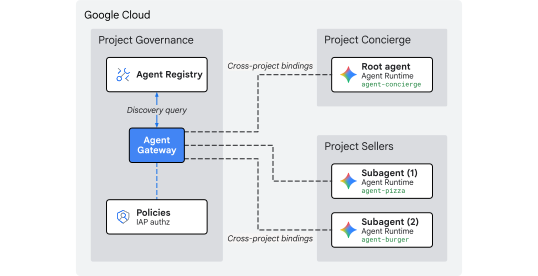
Gambar 1. Arsitektur tata kelola terpusat multi-project
Mengapa Tata Kelola Terpusat Lintas Project?
Dalam organisasi perusahaan besar, tim produk dan grup data science membangun agen AI di puluhan project Google Cloud independen. Memberikan kontrol langsung kepada setiap tim atas pendaftaran alat, rute jaringan egress, dan guardrail keamanan akan menciptakan proliferasi alat yang tidak diperiksa, kebijakan DLP yang tidak konsisten, egress VPC yang tidak terpantau, dan log audit yang terfragmentasi.
Tata kelola terpusat lintas project memisahkan penulisan kebijakan dari eksekusi agen:
- IT & SecOps Pusat membuat kebijakan keamanan, memeriksa alat, dan memantau egress dalam satu Project Tata Kelola Terpusat.
- Tim Produk & Aplikasi berfokus sepenuhnya pada logika bisnis dalam Project Runtime Agen independen mereka, yang terikat langsung ke gateway pusat tanpa overhead operasional dalam mengelola VPC lokal, interkoneksi, atau mesin kebijakan yang terfragmentasi.
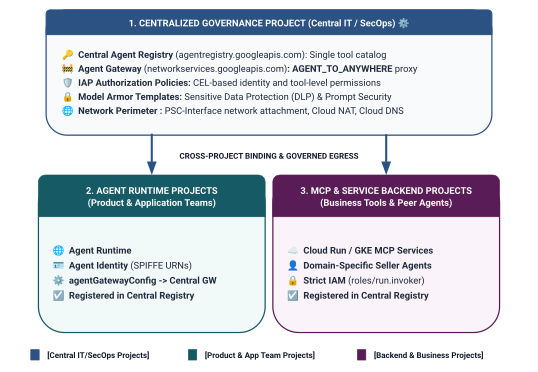
Gbr 2. Arsitektur dan batasan tata kelola lintas project tiga tingkat
Model Pencakupan Identitas Dua Tingkat di Unified Access Policies
Saat agen berkomunikasi melalui Central Agent Gateway, Identity-Aware Proxy (IAP v2) mengevaluasi akses berdasarkan Identitas Agen pemanggil—identitas berbasis SPIFFE yang dibuktikan secara kriptografis dan dikeluarkan secara otomatis ke container runtime—terhadap Kebijakan Akses IAM global:
- Tingkat 1: API Google Cloud Dasar Pengukuran (Coarse-Grained melalui
principalSet://di Aturan 1): Otorisasi egress di seluruh project yang memungkinkan semua runtime agen di seluruh project spoke menjangkau Google API standar (aiplatform,iamcredentials,telemetry,agentregistry) untuk penemuan, pembuatan token, dan inferensi. - Tingkat 2: Alat Bisnis & Layanan A2A (Terperinci melalui
principal://di Aturan 2 & 3): Akses hak istimewa terendah yang ketat yang terikat ke instance mesin penalaran individual, diterapkan dengan kondisi Common Expression Language (CEL) yang menargetkan layanan Agent Registry terdaftar tertentu (destination.agent_registry.agent.name).
Yang Anda bangun
- Agent Gateway Terpusat (
centralized-agw) diPROJECT_GOVERNANCE - Ekstensi Layanan Otorisasi IAP v2 dan Kebijakan Authz dalam mode ENFORCE ketat (
failOpen: false) - Kebijakan Akses Terpadu IAM (
uap-rules.json) dasar dan Binding Kebijakan project - Izin IAM agen layanan lintas project (
ar_agw_cross_project_sa) - Bucket staging Google Cloud Storage (GCS) pusat bersama
- Agen Penjual Burger dan Pizza Terisolasi di
PROJECT_SELLERS - Agen Concierge Pembelian dengan penemuan otomatis REST dinamis di
PROJECT_CONCIERGE - Pendaftaran layanan di Central Agent Registry dengan URL mTLS lintas project
- Pembaruan kebijakan egress IAP v2 dinamis dengan verifikasi langsung dan audit Cloud Logging
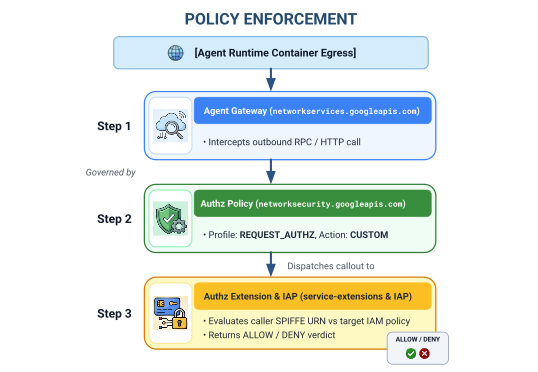
Gambar 3. Urutan penerapan langkah demi langkah
Yang Anda pelajari
- Cara mengonfigurasi izin IAM agen layanan lintas project untuk gateway terpusat
- Cara merutekan egress Agent Runtime melalui Agent Gateway pusat di seluruh lingkungan multi-project
- Cara mendelegasikan otorisasi Agent Gateway ke Identity-Aware Proxy (IAP v2) menggunakan Service Extensions (
iapPolicyVersion: "V2") - Cara menulis dan mengikat Kebijakan Akses Terpadu (UAP) IAM dengan aturan Common Expression Language (CEL) yang mengatur tujuan Agent Registry terdaftar (
destination.agent_registry.*) - Cara menghilangkan ID dan URL agen hardcode menggunakan penemuan otomatis runtime terhadap Agent Registry
- Cara menguji pemblokiran zero-trust perimeter nyata (
HTTP 403 Forbidden) dan memverifikasi update kebijakan langsung di Cloud Logging
Yang Anda perlukan
- 3 project Google Cloud dengan penagihan diaktifkan:
PROJECT_GOVERNANCE: Tata kelola pusat, gateway, registry, dan kebijakan akses IAMPROJECT_CONCIERGE: Agen orkestrator concierge pembelianPROJECT_SELLERS: Agen penjual spesialis burger dan pizza
- Akun pengguna atau akun layanan IAM dengan izin
roles/owneratau administratif di ketiga project - Organisasi Google Cloud (untuk pemetaan domain kepercayaan SPIFFE)
- Google Cloud Shell atau mesin lokal yang telah menginstal
gcloudCLI,python(3.11+), danuv
Ini mengakhiri bagian pengantar... selanjutnya ke bagian Penyiapan & Lingkungan.
2. Penyiapan
Meskipun arsitektur ini mencakup 3 project Google Cloud yang berbeda, Anda dapat menjalankan 100% perintah deployment terminal, download repositori, dan operasi staging dari satu terminal Cloud Shell yang ditetapkan ke PROJECT_GOVERNANCE. Setiap skrip deployment dan perintah gcloud secara eksplisit menargetkan project tujuan yang sesuai melalui flag CLI (--project).
Mulailah dengan mengakses command line project Google Cloud Anda:
- Cloud Shell di
shell.cloud.google.com, atau - Terminal lokal dengan
gcloudCLI terinstal
Menetapkan konteks project Anda
# set terminal project context to Central Governance Project
gcloud config set project SET_YOUR_GOVERNANCE_PROJECT_ID_HERE
# login to gcloud cli
gcloud auth login
# login for application default credentials
gcloud auth application-default login
Mengupdate gcloud CLI (direkomendasikan)
# update gcloud components
gcloud components update --quiet
Menetapkan variabel lingkungan shell
Masukkan ID khusus project Anda.
# 1. Project Identifiers
export PROJECT_GOVERNANCE="SET_YOUR_GOVERNANCE_PROJECT_ID_HERE"
export PROJECT_CONCIERGE="SET_YOUR_CONCIERGE_PROJECT_ID_HERE"
export PROJECT_SELLERS="SET_YOUR_SELLERS_PROJECT_ID_HERE"
Variabel shell ini akan diperoleh secara otomatis.
# 2. Regional & Gateway Settings
export REGION="us-central1"
export AGW_NAME="centralized-agw"
export UAP_POLICY_NAME="uap-policy-${AGW_NAME}"
export UAP_BINDING_NAME="uap-binding-${AGW_NAME}"

# 3. Retrieve Project Numbers
export PROJECT_NUMBER_GOVERNANCE=$(gcloud projects describe ${PROJECT_GOVERNANCE} --format="value(projectNumber)")
export PROJECT_NUMBER_CONCIERGE=$(gcloud projects describe ${PROJECT_CONCIERGE} --format="value(projectNumber)")
export PROJECT_NUMBER_SELLERS=$(gcloud projects describe ${PROJECT_SELLERS} --format="value(projectNumber)")

# 4. Obtain Organization ID
export ORG_ID=$(gcloud projects get-ancestors ${PROJECT_GOVERNANCE} --format="value(id, type)" | grep organization | awk '{print $1}')

# 5. Set Application Default Credentials (ADC) Quota Project
gcloud auth application-default set-quota-project ${PROJECT_GOVERNANCE}

echo "Governance Project: ${PROJECT_GOVERNANCE} (${PROJECT_NUMBER_GOVERNANCE})"
echo "Concierge Project:  ${PROJECT_CONCIERGE} (${PROJECT_NUMBER_CONCIERGE})"
echo "Sellers Project:    ${PROJECT_SELLERS} (${PROJECT_NUMBER_SELLERS})"
echo "Organization ID:    ${ORG_ID}"
echo "UAP Policy Name:    ${UAP_POLICY_NAME}"
echo "UAP Binding Name:   ${UAP_BINDING_NAME}"
Membuat direktori lokal untuk file konfigurasi
# create config folder
mkdir -p cfg
Menetapkan Peran Admin Kebijakan Akses untuk Unified Access Policies
# grant Access Policy Admin and Project IAM Admin to current user in Governance Project
for ROLE in "roles/iam.accessPolicyAdmin" "roles/resourcemanager.projectIamAdmin"; do
  gcloud projects add-iam-policy-binding ${PROJECT_GOVERNANCE} \
    --member="user:$(gcloud config get-value account)" \
    --role="${ROLE}" \
    --condition=None
done
Mengaktifkan Log Audit Akses Data Cloud untuk IAP v2
Secara default, Google Cloud menonaktifkan log audit Akses Data untuk mencegah biaya penyimpanan yang tidak diinginkan. Karena IAP v2 memunculkan keputusan otorisasi (granted=true dan granted=false) sebagai log audit Akses Data, aktifkan logging ADMIN_READ, DATA_READ, dan DATA_WRITE untuk iap.googleapis.com di PROJECT_GOVERNANCE:
# 1. export current IAM policy for PROJECT_GOVERNANCE
gcloud projects get-iam-policy ${PROJECT_GOVERNANCE} \
  --format=json > cfg/gov_iam_policy.json
# 2. append auditConfigs for iap.googleapis.com
python3 -c "
import json
with open('cfg/gov_iam_policy.json') as f:
    policy = json.load(f)
audit_configs = [c for c in policy.get('auditConfigs', []) if c.get('service') != 'iap.googleapis.com']
audit_configs.append({
    'service': 'iap.googleapis.com',
    'auditLogConfigs': [
        {'logType': 'ADMIN_READ'},
        {'logType': 'DATA_READ'},
        {'logType': 'DATA_WRITE'}
    ]
})
policy['auditConfigs'] = audit_configs
with open('cfg/gov_iam_policy.json', 'w') as f:
    json.dump(policy, f, indent=2)
"
# 3. apply updated policy
gcloud projects set-iam-policy ${PROJECT_GOVERNANCE} cfg/gov_iam_policy.json
# 4. verify auditConfigs applied
gcloud projects get-iam-policy ${PROJECT_GOVERNANCE} --format="yaml(auditConfigs)"
Mengaktifkan Google Cloud API yang diperlukan
# enable google apis (agent platform & security bundle, part 1)
for PROJ in ${PROJECT_GOVERNANCE} ${PROJECT_CONCIERGE} ${PROJECT_SELLERS}; do
  gcloud services enable \
    agentregistry.googleapis.com \
    aiplatform.googleapis.com \
    apphub.googleapis.com \
    apptopology.googleapis.com \
    cloudapiregistry.googleapis.com \
    cloudtrace.googleapis.com \
    compute.googleapis.com \
    dataform.googleapis.com \
    iam.googleapis.com \
    agentidentity.googleapis.com \
    iap.googleapis.com \
    logging.googleapis.com \
    modelarmor.googleapis.com \
    monitoring.googleapis.com \
    networksecurity.googleapis.com \
    networkservices.googleapis.com \
    notebooks.googleapis.com \
    observability.googleapis.com \
    --project=${PROJ}
done
# enable google apis (agent platform bundle, part 2)
for PROJ in ${PROJECT_GOVERNANCE} ${PROJECT_CONCIERGE} ${PROJECT_SELLERS}; do
  gcloud services enable \
    securitycenter.googleapis.com \
    saasservicemgmt.googleapis.com \
    storage.googleapis.com \
    telemetry.googleapis.com \
    texttospeech.googleapis.com \
    --project=${PROJ}
done
# enable google apis (foundational & agent runtime build bundle, part 3)
for PROJ in ${PROJECT_GOVERNANCE} ${PROJECT_CONCIERGE} ${PROJECT_SELLERS}; do
  gcloud services enable \
    artifactregistry.googleapis.com \
    cloudbuild.googleapis.com \
    cloudresourcemanager.googleapis.com \
    iamcredentials.googleapis.com \
    serviceusage.googleapis.com \
    run.googleapis.com \
    orgpolicy.googleapis.com \
    --project=${PROJ}
done
Memvalidasi Pengaktifan API di Semua Project
Memastikan ketiga project (PROJECT_GOVERNANCE, PROJECT_CONCIERGE, dan PROJECT_SELLERS) mengaktifkan API yang sama persis akan menciptakan konsistensi operasional dan mencegah kegagalan pembuatan token runtime, error pembuatan katalog skema, atau hilangnya telemetri.
Jalankan skrip validasi berikut di Cloud Shell untuk memverifikasi paritas API di ketiga project:
# validate that all required APIs are enabled across all 3 projects
python3 - << 'EOF'
import subprocess
import os
import sys

REQUIRED_APIS = [
    "agentregistry.googleapis.com",
    "aiplatform.googleapis.com",
    "apphub.googleapis.com",
    "apptopology.googleapis.com",
    "cloudapiregistry.googleapis.com",
    "cloudtrace.googleapis.com",
    "compute.googleapis.com",
    "dataform.googleapis.com",
    "iam.googleapis.com",
    "agentidentity.googleapis.com",
    "iap.googleapis.com",
    "logging.googleapis.com",
    "modelarmor.googleapis.com",
    "monitoring.googleapis.com",
    "networksecurity.googleapis.com",
    "networkservices.googleapis.com",
    "notebooks.googleapis.com",
    "observability.googleapis.com",
    "securitycenter.googleapis.com",
    "saasservicemgmt.googleapis.com",
    "storage.googleapis.com",
    "telemetry.googleapis.com",
    "texttospeech.googleapis.com",
    "artifactregistry.googleapis.com",
    "cloudbuild.googleapis.com",
    "cloudresourcemanager.googleapis.com",
    "iamcredentials.googleapis.com",
    "serviceusage.googleapis.com",
    "run.googleapis.com",
    "orgpolicy.googleapis.com"
]

projects = {
    "GOVERNANCE": os.environ.get("PROJECT_GOVERNANCE", ""),
    "CONCIERGE": os.environ.get("PROJECT_CONCIERGE", ""),
    "SELLERS": os.environ.get("PROJECT_SELLERS", "")
}

enabled = {}
for role, proj in projects.items():
    if not proj:
        print(f"Error: Environment variable for {role} is not set.")
        sys.exit(1)
    res = subprocess.run(
        ["gcloud", "services", "list", "--enabled", f"--project={proj}", "--format=value(config.name)"],
        capture_output=True, text=True, check=True
    )
    enabled[role] = set(res.stdout.strip().splitlines())

print(f"\n{'API Name':<36} | {'GOVERNANCE':<12} | {'CONCIERGE':<12} | {'SELLERS':<12}")
print("-" * 78)

all_synced = True
for api in REQUIRED_APIS:
    g_status = "ENABLED" if api in enabled["GOVERNANCE"] else "MISSING"
    c_status = "ENABLED" if api in enabled["CONCIERGE"] else "MISSING"
    s_status = "ENABLED" if api in enabled["SELLERS"] else "MISSING"
    if "MISSING" in (g_status, c_status, s_status):
        all_synced = False
    print(f"{api:<36} | {g_status:<12} | {c_status:<12} | {s_status:<12}")

print("-" * 78)
if all_synced:
    print("✅ All 29 required APIs are ENABLED and synchronized across all three projects.\n")
else:
    print("❌ Discrepancies detected. Please re-run the enablement commands for missing services.\n")
    sys.exit(1)
EOF
Contoh Output Validasi:
Anda akan melihat semua API diaktifkan.
✅ All 30 required APIs are ENABLED and synchronized across all three projects.
Mengonfigurasi Kebijakan Organisasi
Kebijakan organisasi Google Cloud default menerapkan batasan yang membatasi binding kebijakan akses IAM v3 ke resource (constraints/iam.managed.disableAccessPolicyBinding).
Ganti batasan kebijakan organisasi yang diwarisi di level project dengan menetapkan enforce: false secara eksplisit ke allow.
# disable iam v3 constraint (allow v3 access policies)
gcloud org-policies set-policy /dev/stdin << EOF
name: projects/${PROJECT_NUMBER_GOVERNANCE}/policies/iam.managed.disableAccessPolicyBinding
spec:
  rules:
  - enforce: false
EOF
# verify org policy constraints on project
gcloud org-policies describe iam.managed.disableAccessPolicyBinding \
  --project=${PROJECT_GOVERNANCE} --effective
Ini mengakhiri bagian penyiapan... selanjutnya ke bagian Register Core Google APIs.
3. Agent Registry
Mendaftarkan Layanan Endpoint Google API Inti
Agent Gateway memerlukan URL Google API untuk didaftarkan di Central Agent Registry agar agen yang dikonfigurasi dengan agent_gateway_config dapat merutekan traffic egress dengan aman ke layanan backend inti Google Cloud (seperti aiplatform, IAM Credentials, dan Telemetry).
Membuat core-gapi-services di Agent Registry
# register core google api endpoints in agent registry with standard and :443 port variants
gcloud agent-registry services create core-gapi-services \
  --project=${PROJECT_GOVERNANCE} \
  --location=${REGION} \
  --display-name="gapi.core.services" \
  --description="Core Google Cloud APIs and Service Endpoints" \
  --endpoint-spec-type=no-spec \
  --interfaces=protocolBinding=JSONRPC,url=https://telemetry.googleapis.com \
  --interfaces=protocolBinding=JSONRPC,url=https://telemetry.mtls.googleapis.com \
  --interfaces=protocolBinding=JSONRPC,url=https://${REGION}-aiplatform.googleapis.com \
  --interfaces=protocolBinding=JSONRPC,url=https://${REGION}-aiplatform.googleapis.com:443 \
  --interfaces=protocolBinding=JSONRPC,url=https://${REGION}-aiplatform.mtls.googleapis.com \
  --interfaces=protocolBinding=JSONRPC,url=https://${REGION}-aiplatform.mtls.googleapis.com:443 \
  --interfaces=protocolBinding=JSONRPC,url=https://aiplatform.googleapis.com \
  --interfaces=protocolBinding=JSONRPC,url=https://aiplatform.googleapis.com:443 \
  --interfaces=protocolBinding=JSONRPC,url=https://aiplatform.mtls.googleapis.com \
  --interfaces=protocolBinding=JSONRPC,url=https://aiplatform.mtls.googleapis.com:443 \
  --interfaces=protocolBinding=JSONRPC,url=https://cloudresourcemanager.googleapis.com \
  --interfaces=protocolBinding=JSONRPC,url=https://cloudresourcemanager.googleapis.com:443 \
  --interfaces=protocolBinding=JSONRPC,url=https://cloudresourcemanager.mtls.googleapis.com \
  --interfaces=protocolBinding=JSONRPC,url=https://cloudresourcemanager.mtls.googleapis.com:443 \
  --interfaces=protocolBinding=JSONRPC,url=https://iamcredentials.googleapis.com \
  --interfaces=protocolBinding=JSONRPC,url=https://iamcredentials.googleapis.com:443 \
  --interfaces=protocolBinding=JSONRPC,url=https://iamcredentials.mtls.googleapis.com \
  --interfaces=protocolBinding=JSONRPC,url=https://iamcredentials.mtls.googleapis.com:443 \
  --interfaces=protocolBinding=JSONRPC,url=https://agentregistry.googleapis.com \
  --interfaces=protocolBinding=JSONRPC,url=https://agentregistry.mtls.googleapis.com \
  --interfaces=protocolBinding=JSONRPC,url=https://agentregistry.googleapis.com:443 \
  --interfaces=protocolBinding=JSONRPC,url=https://agentregistry.mtls.googleapis.com:443
Mendapatkan ID Resource Endpoint API Core
# capture the underlying Agent Registry endpoint ID
export ENDPOINT_ID=$(gcloud agent-registry services describe core-gapi-services \
  --project=${PROJECT_GOVERNANCE} \
  --location=${REGION} \
  --format="value(registryResource)" | awk -F'/' '{print $NF}')
echo "Core APIs Endpoint ID: ${ENDPOINT_ID}"
Memahami principalSet versus principal di Identitas Agen
Di Google Cloud IAM dan Gemini Enterprise Agent Platform, identitas mesin yang dikeluarkan untuk container agen yang dieksekusi menggunakan URN SPIFFE yang dibuktikan secara kriptografis yang dievaluasi oleh Identity-Aware Proxy (IAP v2). Saat mengonfigurasi Unified Access Policies IAM, Anda dapat menargetkan principal tunggal tertentu atau principalSet berbasis atribut:
Dimensi |
|
|
Sintaksis IAM |
|
|
Perincian | Terperinci (Tingkat instance): Mengidentifikasi satu instance container mesin penalaran tertentu. | Coarse-Grained (Level project): Mengidentifikasi semua mesin penalaran yang memiliki atribut project yang sama. |
Pola URN |
|
|
Kasus Penggunaan di Agent Platform | Tingkat 2 (Alat Bisnis & A2A): Memberikan otorisasi kepada agen orchestrator tertentu untuk memanggil alat domain target (misalnya, Concierge Pembelian $\rightarrow$ Penjual Burger). | Tingkat 1 (Infrastruktur Dasar): Memberikan akses egress ke Google Cloud API ( |
Dampak Siklus Proses | Jika agen dihapus dan dibuat ulang, ID Engine barunya memerlukan binding kebijakan IAM yang diperbarui. | Otomatis berlaku untuk agen yang baru di-deploy di project tersebut tanpa update IAM tambahan. |
Tata Kelola Deklaratif dengan Unified Access Policies (UAP/IAP v2)
Di IAP v1 lama, kebijakan egress dilampirkan langsung ke setiap resource Agent Registry menggunakan gcloud beta iap web add-iam-policy-binding. Di bagian IAP v2 dan Unified Access Policies, binding per resource dihilangkan dan digantikan dengan satu Kebijakan Akses IAM terpusat (cfg/uap-rules.json).
Otorisasi egress dasar untuk core-gapi-services akan dikonfigurasi sebagai Aturan 1 dalam Unified Access Policy di Bagian 5, yang memastikan bahwa semua container agen memiliki rute egress dasar yang ditetapkan sebelum deployment.
Untuk mengetahui detail teknis yang lebih mendalam tentang ID utama dan mekanisme workload identity, lihat:
- Google Cloud IAM: ID Akun Utama & Set Akun Utama
- Cara kerja Identitas Agen
- Mengonfigurasi Unified Access Policies IAM untuk Agent Gateway
Ini mengakhiri pendaftaran endpoint API inti... selanjutnya ke bagian Men-deploy Gateway Agen Terpusat.
4. Agent Gateway
Men-deploy Gateway Agen Terpusat
Deploy Agent Gateway terpusat (centralized-agw) dalam mode egress AGENT_TO_ANYWHERE di dalam project $PROJECT_GOVERNANCE.
Menentukan Manifes Konfigurasi Gateway
Buat cfg/${AGW_NAME}.yaml untuk tata kelola traffic egress:
# generate agent gateway config yaml
cat > cfg/${AGW_NAME}.yaml << EOF
name: ${AGW_NAME}
protocols:
  - MCP
googleManaged:
  governedAccessPath: AGENT_TO_ANYWHERE
registries:
  - "//agentregistry.googleapis.com/projects/${PROJECT_GOVERNANCE}/locations/${REGION}"
EOF
Mengimpor Konfigurasi Agent Gateway
# import and create agent gateway
gcloud network-services agent-gateways import ${AGW_NAME} \
  --source="cfg/${AGW_NAME}.yaml" \
  --location=${REGION} \
  --project=${PROJECT_GOVERNANCE}
Memverifikasi Detail Gateway Agen
# show agent gateway status
gcloud network-services agent-gateways describe ${AGW_NAME} \
  --location=${REGION} \
  --project=${PROJECT_GOVERNANCE}
Contoh Output:
agentGatewayCard:
  mtlsEndpoint: projects/${AGW_TP_ID}/regions/us-central1/serviceAttachments/unitkind1-swp-mtls-psc-sa
  rootCertificates:
  - |
    -----BEGIN CERTIFICATE-----
    MIIDwzCCAqugAwIBAgITNQuWGopdOZaHdcK7r7AYFhonqDANBgkqhkiG9w0BAQsF
    ...
    -----END CERTIFICATE-----
  serviceExtensionsServiceAccount: service-${PROJ_NO}@gcp-sa-dep.iam.gserviceaccount.com
createTime: 'YYYY-MM-DDT12:34:56.789098765Z'
googleManaged:
  governedAccessPath: AGENT_TO_ANYWHERE
name: projects/${PROJECT_GOVERNANCE}/locations/us-central1/agentGateways/centralized-agw
protocols:
- MCP
registries:
- //agentregistry.googleapis.com/projects/${PROJECT_GOVERNANCE}/locations/us-central1
updateTime: 'YYYY-MM-DDT12:34:56.789098765Z'
Ini mengakhiri deployment gateway... selanjutnya ke bagian Mengonfigurasi Otorisasi.
5. Otorisasi
Mengonfigurasi Otorisasi Gateway Agen & UAP Dasar
Agent Gateway mengamankan dan mengatur traffic alat dan agen keluar menggunakan Authorization Policies (networksecurity.authzPolicies) yang terintegrasi dengan Unified Access Policies (UAP) Identity-Aware Proxy (IAP v2).
Ringkasan Arsitektur Otorisasi
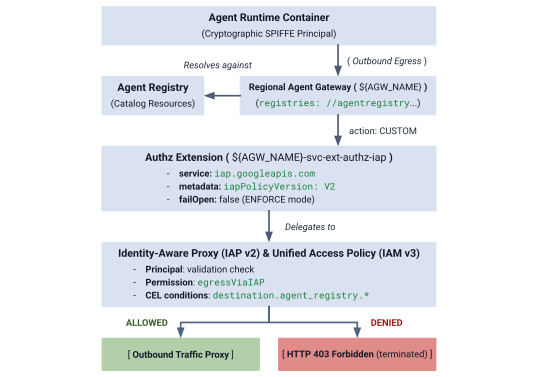
Gbr 4. Ringkasan Arsitektur Otorisasi
Arsitektur otorisasi terdiri dari tiga lapisan yang saling terhubung:
- IAP Service Extension (
authzExtension): Resource regional yang dikonfigurasi denganservice: iap.googleapis.com,metadata: iapPolicyVersion: "V2", danfailOpen: falseuntuk penerapan zero-trust perimeter yang ketat. - Gateway Authorization Policy (
authzPolicy): Resource regional yang menargetkan Agent Gateway Anda denganpolicyProfile: REQUEST_AUTHZdanaction: CUSTOM, yang mengarahkan pemeriksaan otorisasi ke Ekstensi Authz IAP. - IAM Unified Access Policy & Binding (
accessPolicy&policyBinding): Resource IAM v3 global yang dievaluasi oleh IAP. Proxy ini memverifikasi izin universaliap.googleapis.com/resources.egressViaIAPterhadap identitas SPIFFE pemanggil dan kondisi katalog CEL.
Langkah 1: Buat dan Impor Ekstensi Authz IAP v2
Buat manifes Ekstensi Layanan dengan iapPolicyVersion: "V2" dan failOpen: false dalam mode ENFORCE yang ketat:
# create authz extension config file in ENFORCE mode
cat > cfg/${AGW_NAME}-svc-ext-authz-iap.yaml << EOF
name: ${AGW_NAME}-svc-ext-authz-iap
service: iap.googleapis.com
failOpen: false
timeout: 1s
metadata:
  iapPolicyVersion: "V2"
EOF
Impor Ekstensi Authz:
# import IAP v2 authz extension
gcloud service-extensions authz-extensions import ${AGW_NAME}-svc-ext-authz-iap \
  --source=cfg/${AGW_NAME}-svc-ext-authz-iap.yaml \
  --location=${REGION} \
  --project=${PROJECT_GOVERNANCE}
Pastikan Authz Extension aktif:
# describe authz extension
gcloud service-extensions authz-extensions describe ${AGW_NAME}-svc-ext-authz-iap \
  --location=${REGION} \
  --project=${PROJECT_GOVERNANCE}
Contoh Output:
createTime: 'YYYY-MM-DDT12:34:56.789098765Z'
failOpen: false
metadata:
  iapPolicyVersion: V2
name: projects/${PROJECT_GOVERNANCE}/locations/us-central1/authzExtensions/centralized-agw-svc-ext-authz-iap
service: iap.googleapis.com
timeout: 1s
Langkah 2: Buat dan Impor Kebijakan Otorisasi Gateway
Buat konfigurasi Kebijakan Otorisasi yang terhubung ke Agent Gateway dan mendelegasikan verifikasi permintaan ke Ekstensi Authz IAP:
# create authz policy manifest
cat > cfg/${AGW_NAME}-authz-policy-profile-iap.yaml << EOF
name: ${AGW_NAME}-authz-policy-profile-iap
target:
  resources:
    - "projects/${PROJECT_GOVERNANCE}/locations/${REGION}/agentGateways/${AGW_NAME}"
policyProfile: REQUEST_AUTHZ
action: CUSTOM
customProvider:
  authzExtension:
    resources:
      - "projects/${PROJECT_GOVERNANCE}/locations/${REGION}/authzExtensions/${AGW_NAME}-svc-ext-authz-iap"
EOF
Impor Kebijakan Otorisasi:
# import authz policy
gcloud beta network-security authz-policies import ${AGW_NAME}-authz-policy-profile-iap \
  --source=cfg/${AGW_NAME}-authz-policy-profile-iap.yaml \
  --location=${REGION} \
  --project=${PROJECT_GOVERNANCE}
Verifikasi Kebijakan Otorisasi yang aktif:
# describe authz policy
gcloud beta network-security authz-policies describe ${AGW_NAME}-authz-policy-profile-iap \
  --location=${REGION} \
  --project=${PROJECT_GOVERNANCE}
Langkah 3: Buat Kebijakan Akses Terpadu Awal (Aturan 1: Google API Inti)
Buat cfg/uap-rules.json dengan Aturan 1 yang mengizinkan tiga principalSet project untuk menjangkau core-gapi-services:
# create initial unified access policy rules manifest
cat > cfg/uap-rules.json << EOF
[
  {
    "description": "Rule 1: Allow agent runtimes across all 3 projects to reach Core Google APIs",
    "effect": "ALLOW",
    "principals": [
      "principalSet://agents.global.org-${ORG_ID}.system.id.goog/attribute.platformContainer/aiplatform/projects/${PROJECT_NUMBER_GOVERNANCE}",
      "principalSet://agents.global.org-${ORG_ID}.system.id.goog/attribute.platformContainer/aiplatform/projects/${PROJECT_NUMBER_CONCIERGE}",
      "principalSet://agents.global.org-${ORG_ID}.system.id.goog/attribute.platformContainer/aiplatform/projects/${PROJECT_NUMBER_SELLERS}"
    ],
    "operation": {
      "permissions": [
        "iap.googleapis.com/resources.egressViaIAP"
      ]
    },
    "conditions": {
      "iap.googleapis.com": {
        "expression": \
        "destination.is_registered == true && \
         destination.agent_registry.resource_type == 'ENDPOINT' && ( \
         destination.agent_registry.endpoint.name == 'projects/${PROJECT_GOVERNANCE}/locations/${REGION}/endpoints/core-gapi-services' || \
         destination.agent_registry.endpoint.name == 'projects/${PROJECT_GOVERNANCE}/locations/${REGION}/endpoints/${ENDPOINT_ID}' || \
         destination.agent_registry.endpoint.name == 'projects/${PROJECT_NUMBER_GOVERNANCE}/locations/${REGION}/endpoints/${ENDPOINT_ID}')"
      }
    }
  }
]
EOF
Langkah 4: Buat dan Ikat Kebijakan Akses IAM
Buat Kebijakan Akses IAM global:
# create global IAM access policy
gcloud iam access-policies create ${UAP_POLICY_NAME} \
  --details-rules=cfg/uap-rules.json \
  --project=${PROJECT_GOVERNANCE} \
  --location=global
Ikat Kebijakan Akses ke PROJECT_GOVERNANCE:
# bind access policy to governance project
gcloud iam policy-bindings create ${UAP_BINDING_NAME} \
  --policy="projects/${PROJECT_GOVERNANCE}/locations/global/accessPolicies/${UAP_POLICY_NAME}" \
  --target-resource="//cloudresourcemanager.googleapis.com/projects/${PROJECT_GOVERNANCE}" \
  --project=${PROJECT_GOVERNANCE} \
  --location=global
Pastikan Binding Kebijakan aktif:
# verify policy binding
gcloud iam policy-bindings describe ${UAP_BINDING_NAME} \
  --project=${PROJECT_GOVERNANCE} \
  --location=global
Contoh Output:
name: projects/${PROJECT_GOVERNANCE}/locations/global/policyBindings/uap-binding-centralized-agw
policy: projects/${PROJECT_GOVERNANCE}/locations/global/accessPolicies/uap-policy-centralized-agw
policyKind: ACCESS_POLICY
target:
  resource: //cloudresourcemanager.googleapis.com/projects/${PROJECT_GOVERNANCE}
Egress Google Cloud API dasar kini diizinkan dengan aman di ketiga project dalam mode ENFORCE yang ketat.
Ini mengakhiri penyiapan otorisasi gateway... selanjutnya ke bagian Mengonfigurasi Izin IAM Lintas Project.
6. IAM lintas project
Mengonfigurasi Izin IAM Lintas Project
Dalam topologi multi-project ini, Agent Runtime berada di project spoke (PROJECT_CONCIERGE dan PROJECT_SELLERS), sedangkan Central Agent Gateway dan Agent Registry berada di PROJECT_GOVERNANCE.
Karena project Google Cloud adalah perimeter keamanan yang terisolasi, akses lintas project harus diberikan secara eksplisit di dua lapisan operasional:
- Bidang Kontrol (Waktu Deployment): Saat men-deploy container agen yang dikonfigurasi dengan
--agent-gateway-config, Agen Layanan Runtime Agen (service-) project spoke harus memasang container ke gateway pusat. Kami membuat peran khusus minimal (@gcp-sa-aiplatform.iam.gserviceaccount.com ar_agw_cross_project_sa) yang memberikannetworkservices.agentGateways.use,get, danoperations.getdiPROJECT_GOVERNANCE. - Data Plane (Eksekusi Runtime):
- Penemuan Katalog: Identitas spoke memerlukan
roles/agentregistry.viewerdiPROJECT_GOVERNANCEuntuk me-resolve endpoint agen target secara dinamis. - Target Invocation: Agen Concierge memerlukan
roles/aiplatform.userdiPROJECT_SELLERSuntuk menjalankan kueri terhadap mesin penalaran penjual.
- Penemuan Katalog: Identitas spoke memerlukan
Membuat Peran IAM Khusus di PROJECT_GOVERNANCE
# create custom role in central governance project
gcloud iam roles create ar_agw_cross_project_sa \
  --project=${PROJECT_GOVERNANCE} \
  --title="Runtime Agent Gateway Cross-Project SA" \
  --description="Custom role for cross-project service agents to access Central Agent Gateway" \
  --permissions="networkservices.agentGateways.get,networkservices.agentGateways.use,networkservices.operations.get" \
  --stage="GA"
Menetapkan Peran Khusus ke Agen Layanan Agent Runtime
# 1. ensure aiplatform service identities are provisioned across all projects
for PROJ in ${PROJECT_GOVERNANCE} ${PROJECT_CONCIERGE} ${PROJECT_SELLERS}; do
  gcloud beta services identity create --service=aiplatform.googleapis.com --project=${PROJ}
done
# 2. derive aiplatform service agent emails
export CONCIERGE_AI_SA="service-${PROJECT_NUMBER_CONCIERGE}@gcp-sa-aiplatform.iam.gserviceaccount.com"
export CONCIERGE_RE_SA="service-${PROJECT_NUMBER_CONCIERGE}@gcp-sa-aiplatform-re.iam.gserviceaccount.com"
export CONCIERGE_COMPUTE_SA="${PROJECT_NUMBER_CONCIERGE}-compute@developer.gserviceaccount.com"

export SELLERS_AI_SA="service-${PROJECT_NUMBER_SELLERS}@gcp-sa-aiplatform.iam.gserviceaccount.com"
export SELLERS_RE_SA="service-${PROJECT_NUMBER_SELLERS}@gcp-sa-aiplatform-re.iam.gserviceaccount.com"
export SELLERS_COMPUTE_SA="${PROJECT_NUMBER_SELLERS}-compute@developer.gserviceaccount.com"
# 3. grant custom role & network viewer to Concierge and Sellers Service Agents
for SA in ${CONCIERGE_AI_SA} ${SELLERS_AI_SA}; do
  gcloud projects add-iam-policy-binding ${PROJECT_GOVERNANCE} \
    --member="serviceAccount:${SA}" \
    --role="projects/${PROJECT_GOVERNANCE}/roles/ar_agw_cross_project_sa" \
    --condition=None

  gcloud projects add-iam-policy-binding ${PROJECT_GOVERNANCE} \
    --member="serviceAccount:${SA}" \
    --role="roles/networkservices.viewer" \
    --condition=None
done
# 4. grant agent registry viewer on Governance Project for dynamic autodiscovery
for MEMBER in "serviceAccount:${CONCIERGE_AI_SA}" "serviceAccount:${CONCIERGE_RE_SA}" "serviceAccount:${CONCIERGE_COMPUTE_SA}" "serviceAccount:${SELLERS_AI_SA}" "serviceAccount:${SELLERS_RE_SA}" "serviceAccount:${SELLERS_COMPUTE_SA}" "principalSet://agents.global.org-${ORG_ID}.system.id.goog/attribute.platformContainer/aiplatform/projects/${PROJECT_NUMBER_CONCIERGE}" "principalSet://agents.global.org-${ORG_ID}.system.id.goog/attribute.platformContainer/aiplatform/projects/${PROJECT_NUMBER_SELLERS}"; do
  gcloud projects add-iam-policy-binding ${PROJECT_GOVERNANCE} \
    --member="${MEMBER}" \
    --role="roles/agentregistry.viewer" \
    --condition=None
done
# 5. grant agent project viewer on Governance Project for dynamic autodiscovery
for SA in ${CONCIERGE_COMPUTE_SA} ${CONCIERGE_AI_SA}; do
  gcloud projects add-iam-policy-binding ${PROJECT_GOVERNANCE} \
    --member="serviceAccount:${SA}" \
    --role="roles/viewer" \
    --condition=None
done
# 6. grant aitplatform user on Sellers project to Concierge for cross-project A2A invocation
for MEMBER in "serviceAccount:${CONCIERGE_AI_SA}" "serviceAccount:${CONCIERGE_RE_SA}" "serviceAccount:${CONCIERGE_COMPUTE_SA}" "principalSet://agents.global.org-${ORG_ID}.system.id.goog/attribute.platformContainer/aiplatform/projects/${PROJECT_NUMBER_CONCIERGE}"; do
  gcloud projects add-iam-policy-binding ${PROJECT_SELLERS} \
    --member="${MEMBER}" \
    --role="roles/aiplatform.user" \
    --condition=None
done
Ini mengakhiri penyiapan IAM lintas project... selanjutnya ke bagian Deploy Seller & Concierge Agents.
7. Agent Runtime
Men-deploy Agen Penjual & Concierge
Codebase aplikasi multi-agen dan skrip deployment yang digunakan untuk Codelab ini dikelola di repositori GitHub Google Cloud jarak jauh. Langkah-langkah berikut akan meng-clone repositori secara lokal, menyalin file yang diperlukan ke struktur direktori kerja saat ini, membersihkan file sementara, dan menginstal dependensi dengan uv.
Mengambil artefak jarak jauh
# clone remote repository to temp local dir
git clone https://github.com/GoogleCloudPlatform/cloud-networking-solutions.git ./temp_agw_multiproject
# copy multi-agent application files to current working directory
cp -r temp_agw_multiproject/codelabs/agw-multiproject ./cross-project-multiagent
# remove temporary directory
rm -rf temp_agw_multiproject
# install dependencies
uv sync --directory ./cross-project-multiagent
Membuat Bucket Staging Pusat Bersama
# create shared central staging bucket
gcloud storage buckets create gs://${PROJECT_GOVERNANCE}-shared-staging \
  --project=${PROJECT_GOVERNANCE} \
  --location=${REGION}
# grant cross-project read/write access to runtime service agents
gcloud storage buckets add-iam-policy-binding gs://${PROJECT_GOVERNANCE}-shared-staging \
  --member="serviceAccount:service-${PROJECT_NUMBER_CONCIERGE}@gcp-sa-aiplatform.iam.gserviceaccount.com" \
  --role="roles/storage.objectAdmin"

gcloud storage buckets add-iam-policy-binding gs://${PROJECT_GOVERNANCE}-shared-staging \
  --member="serviceAccount:service-${PROJECT_NUMBER_SELLERS}@gcp-sa-aiplatform.iam.gserviceaccount.com" \
  --role="roles/storage.objectAdmin"
Cara Kerja Binding Agent Gateway Lintas Project
Pada langkah ini, Anda akan men-deploy Agen Penjual ke project spoke (PROJECT_SELLERS) sekaligus mengonfigurasinya untuk merutekan egress melalui Agent Gateway Pusat di PROJECT_GOVERNANCE:
# !-- for example purposes -- NOT a command to execute --!
# snippet from deploy_burger.py
burger_config = {
    "staging_bucket": staging_bucket_uri,
    "gcs_dir_name": "burger_agent",
    "display_name": "burger-seller-agent-adk",
    "identity_type": "AGENT_IDENTITY",
    "agent_gateway_config": {
        "agent_to_anywhere_config": {
            "agent_gateway": f"projects/{args.governance_project}/locations/{args.region}/agentGateways/{args.gateway}"
        }
    },
}
deployed_burger = client.agent_engines.create(agent=burger_playground, config=burger_config)
Karena Aturan 1 ditetapkan lebih awal dalam Unified Access Policy, permintaan inisialisasi container ke Google Cloud API diizinkan melalui gateway tanpa gangguan.
Men-deploy Agen Penjual Burger & Pizza ke PROJECT_SELLERS
# 1. deploy Burger Seller Agent to PROJECT_SELLERS
uv run --directory ./cross-project-multiagent python deploy_burger.py \
  --project=${PROJECT_SELLERS} \
  --region=${REGION} \
  --governance-project=${PROJECT_GOVERNANCE} \
  --gateway=projects/${PROJECT_GOVERNANCE}/locations/${REGION}/agentGateways/${AGW_NAME}
# 2. deploy Pizza Seller Agent to PROJECT_SELLERS
uv run --directory ./cross-project-multiagent python deploy_pizza.py \
  --project=${PROJECT_SELLERS} \
  --region=${REGION} \
  --governance-project=${PROJECT_GOVERNANCE} \
  --gateway=projects/${PROJECT_GOVERNANCE}/locations/${REGION}/agentGateways/${AGW_NAME}
Memvalidasi Pemilihan Rute Gateway Penjual
# retrieve deployed seller reasoning engine IDs
export BURGER_ENGINE_ID=$(grep BURGER_SELLER_AGENT_ID cross-project-multiagent/burger_agent.env | awk -F'/' '{print $NF}')
export PIZZA_ENGINE_ID=$(grep PIZZA_SELLER_AGENT_ID cross-project-multiagent/pizza_agent.env | awk -F'/' '{print $NF}')

echo "Burger Engine ID: ${BURGER_ENGINE_ID}"
echo "Pizza Engine ID:  ${PIZZA_ENGINE_ID}"
# inspect runtime configuration for both Seller Agents
for ENGINE_ID in ${BURGER_ENGINE_ID} ${PIZZA_ENGINE_ID}; do
  curl -s -X GET "https://${REGION}-aiplatform.googleapis.com/v1beta1/projects/${PROJECT_SELLERS}/locations/${REGION}/reasoningEngines/${ENGINE_ID}" \
    -H "Authorization: Bearer $(gcloud auth application-default print-access-token)" \
    -H "Content-Type: application/json" \
    | jq '{displayName: .displayName, identityType: .spec.identityType, effectiveIdentity: .spec.effectiveIdentity, agentGatewayConfig: .spec.deploymentSpec.agentGatewayConfig}'
done
Men-deploy Agen Purchasing Concierge ke PROJECT_CONCIERGE
# deploy Purchasing Concierge to PROJECT_CONCIERGE
uv run --directory ./cross-project-multiagent python deploy_concierge_adk.py \
  --project=${PROJECT_CONCIERGE} \
  --region=${REGION} \
  --staging-bucket=gs://${PROJECT_GOVERNANCE}-shared-staging \
  --gateway-name=${AGW_NAME} \
  --gateway-project=${PROJECT_GOVERNANCE}
Memvalidasi Pemilihan Rute Gateway Pembelian
# retrieve Concierge engine ID
export CONCIERGE_ENGINE_ID=$(grep CONCIERGE_AGENT_ID cross-project-multiagent/concierge_agent.env | awk -F'/' '{print $NF}')
echo "Concierge Engine ID: ${CONCIERGE_ENGINE_ID}"
# inspect runtime configuration for Purchasing Concierge
curl -s -X GET "https://${REGION}-aiplatform.googleapis.com/v1beta1/projects/${PROJECT_CONCIERGE}/locations/${REGION}/reasoningEngines/${CONCIERGE_ENGINE_ID}" \
  -H "Authorization: Bearer $(gcloud auth application-default print-access-token)" \
  -H "Content-Type: application/json" \
  | jq '{displayName: .displayName, identityType: .spec.identityType, effectiveIdentity: .spec.effectiveIdentity, agentGatewayConfig: .spec.deploymentSpec.agentGatewayConfig}'
Output akan menampilkan identitas dan project runtime agen Concierge serta binding ke Agent Gateway project Governance.
{
  "displayName": "purchasing-concierge-adk",
  "identityType": "AGENT_IDENTITY",
  "effectiveIdentity": "agents.global.org-${ORG_ID}.system.id.goog/resources/aiplatform/projects/${PROJECT_CONCIERGE}/locations/us-central1/reasoningEngines/${CONCIERGE_ENGINE_ID}",
  "agentGatewayConfig": {
    "agentToAnywhereConfig": {
      "agentGateway": "projects/${PROJECT_GOVERNANCE}/locations/us-central1/agentGateways/centralized-agw"
    }
  }
}
Ini mengakhiri deployment agen... selanjutnya ke bagian Mendaftarkan Agen di Central Agent Registry.
8. Registry lintas project
Mendaftarkan Agen di Central Agent Registry
Daftarkan ketiga agen di Central Agent Registry di PROJECT_GOVERNANCE menggunakan endpoint mTLS regional lintas project dan nomor project numerik.
Mendaftarkan Layanan sebagai Agen Non-A2A di Agent Registry
# 1. register Burger Seller Agent
gcloud agent-registry services create burger-seller-agent \
  --project=${PROJECT_GOVERNANCE} \
  --location=${REGION} \
  --display-name="Burger Seller Agent" \
  --description="Specialist agent that sells burgers and fries" \
  --agent-spec-type=no-spec \
  --interfaces=protocolBinding=JSONRPC,url=https://${REGION}-aiplatform.googleapis.com/v1/projects/${PROJECT_NUMBER_SELLERS}/locations/${REGION}/reasoningEngines/${BURGER_ENGINE_ID}:query \
  --interfaces=protocolBinding=JSONRPC,url=https://${REGION}-aiplatform.googleapis.com/v1beta1/projects/${PROJECT_NUMBER_SELLERS}/locations/${REGION}/reasoningEngines/${BURGER_ENGINE_ID}:query \
  --interfaces=protocolBinding=JSONRPC,url=https://${REGION}-aiplatform.googleapis.com:443/v1/projects/${PROJECT_NUMBER_SELLERS}/locations/${REGION}/reasoningEngines/${BURGER_ENGINE_ID}:query \
  --interfaces=protocolBinding=JSONRPC,url=https://${REGION}-aiplatform.googleapis.com:443/v1beta1/projects/${PROJECT_NUMBER_SELLERS}/locations/${REGION}/reasoningEngines/${BURGER_ENGINE_ID}:query \
  --interfaces=protocolBinding=JSONRPC,url=https://${REGION}-aiplatform.mtls.googleapis.com/v1/projects/${PROJECT_NUMBER_SELLERS}/locations/${REGION}/reasoningEngines/${BURGER_ENGINE_ID}:query \
  --interfaces=protocolBinding=JSONRPC,url=https://${REGION}-aiplatform.mtls.googleapis.com/v1beta1/projects/${PROJECT_NUMBER_SELLERS}/locations/${REGION}/reasoningEngines/${BURGER_ENGINE_ID}:query \
  --interfaces=protocolBinding=JSONRPC,url=https://${REGION}-aiplatform.mtls.googleapis.com:443/v1/projects/${PROJECT_NUMBER_SELLERS}/locations/${REGION}/reasoningEngines/${BURGER_ENGINE_ID}:query \
  --interfaces=protocolBinding=JSONRPC,url=https://${REGION}-aiplatform.mtls.googleapis.com:443/v1beta1/projects/${PROJECT_NUMBER_SELLERS}/locations/${REGION}/reasoningEngines/${BURGER_ENGINE_ID}:query
# 2. register Pizza Seller Agent
gcloud agent-registry services create pizza-seller-agent \
  --project=${PROJECT_GOVERNANCE} \
  --location=${REGION} \
  --display-name="Pizza Seller Agent" \
  --description="Specialist agent that sells pizzas and pasta" \
  --agent-spec-type=no-spec \
  --interfaces=protocolBinding=JSONRPC,url=https://${REGION}-aiplatform.googleapis.com/v1/projects/${PROJECT_NUMBER_SELLERS}/locations/${REGION}/reasoningEngines/${PIZZA_ENGINE_ID}:query \
  --interfaces=protocolBinding=JSONRPC,url=https://${REGION}-aiplatform.googleapis.com/v1beta1/projects/${PROJECT_NUMBER_SELLERS}/locations/${REGION}/reasoningEngines/${PIZZA_ENGINE_ID}:query \
  --interfaces=protocolBinding=JSONRPC,url=https://${REGION}-aiplatform.googleapis.com:443/v1/projects/${PROJECT_NUMBER_SELLERS}/locations/${REGION}/reasoningEngines/${PIZZA_ENGINE_ID}:query \
  --interfaces=protocolBinding=JSONRPC,url=https://${REGION}-aiplatform.googleapis.com:443/v1beta1/projects/${PROJECT_NUMBER_SELLERS}/locations/${REGION}/reasoningEngines/${PIZZA_ENGINE_ID}:query \
  --interfaces=protocolBinding=JSONRPC,url=https://${REGION}-aiplatform.mtls.googleapis.com/v1/projects/${PROJECT_NUMBER_SELLERS}/locations/${REGION}/reasoningEngines/${PIZZA_ENGINE_ID}:query \
  --interfaces=protocolBinding=JSONRPC,url=https://${REGION}-aiplatform.mtls.googleapis.com/v1beta1/projects/${PROJECT_NUMBER_SELLERS}/locations/${REGION}/reasoningEngines/${PIZZA_ENGINE_ID}:query \
  --interfaces=protocolBinding=JSONRPC,url=https://${REGION}-aiplatform.mtls.googleapis.com:443/v1/projects/${PROJECT_NUMBER_SELLERS}/locations/${REGION}/reasoningEngines/${PIZZA_ENGINE_ID}:query \
  --interfaces=protocolBinding=JSONRPC,url=https://${REGION}-aiplatform.mtls.googleapis.com:443/v1beta1/projects/${PROJECT_NUMBER_SELLERS}/locations/${REGION}/reasoningEngines/${PIZZA_ENGINE_ID}:query
# 3. register Purchasing Concierge Agent
gcloud agent-registry services create purchasing-concierge-adk \
  --project=${PROJECT_GOVERNANCE} \
  --location=${REGION} \
  --display-name="Purchasing Concierge Agent" \
  --description="Orchestrator concierge agent that routes purchasing requests" \
  --agent-spec-type=no-spec \
  --interfaces=protocolBinding=JSONRPC,url=https://${REGION}-aiplatform.googleapis.com/v1/projects/${PROJECT_NUMBER_CONCIERGE}/locations/${REGION}/reasoningEngines/${CONCIERGE_ENGINE_ID}:query \
  --interfaces=protocolBinding=JSONRPC,url=https://${REGION}-aiplatform.googleapis.com/v1beta1/projects/${PROJECT_NUMBER_CONCIERGE}/locations/${REGION}/reasoningEngines/${CONCIERGE_ENGINE_ID}:query \
  --interfaces=protocolBinding=JSONRPC,url=https://${REGION}-aiplatform.googleapis.com:443/v1/projects/${PROJECT_NUMBER_CONCIERGE}/locations/${REGION}/reasoningEngines/${CONCIERGE_ENGINE_ID}:query \
  --interfaces=protocolBinding=JSONRPC,url=https://${REGION}-aiplatform.googleapis.com:443/v1beta1/projects/${PROJECT_NUMBER_CONCIERGE}/locations/${REGION}/reasoningEngines/${CONCIERGE_ENGINE_ID}:query \
  --interfaces=protocolBinding=JSONRPC,url=https://${REGION}-aiplatform.mtls.googleapis.com/v1/projects/${PROJECT_NUMBER_CONCIERGE}/locations/${REGION}/reasoningEngines/${CONCIERGE_ENGINE_ID}:query \
  --interfaces=protocolBinding=JSONRPC,url=https://${REGION}-aiplatform.mtls.googleapis.com/v1beta1/projects/${PROJECT_NUMBER_CONCIERGE}/locations/${REGION}/reasoningEngines/${CONCIERGE_ENGINE_ID}:query \
  --interfaces=protocolBinding=JSONRPC,url=https://${REGION}-aiplatform.mtls.googleapis.com:443/v1/projects/${PROJECT_NUMBER_CONCIERGE}/locations/${REGION}/reasoningEngines/${CONCIERGE_ENGINE_ID}:query \
  --interfaces=protocolBinding=JSONRPC,url=https://${REGION}-aiplatform.mtls.googleapis.com:443/v1beta1/projects/${PROJECT_NUMBER_CONCIERGE}/locations/${REGION}/reasoningEngines/${CONCIERGE_ENGINE_ID}:query
Merekam ID Registry Agen yang Mendasarinya
# capture underlying Agent Registry Agent UUIDs
export BURGER_AGENT_ID=$(gcloud agent-registry services describe burger-seller-agent --project=${PROJECT_GOVERNANCE} --location=${REGION} --format="value(registryResource)" | awk -F'/' '{print $NF}')
export PIZZA_AGENT_ID=$(gcloud agent-registry services describe pizza-seller-agent --project=${PROJECT_GOVERNANCE} --location=${REGION} --format="value(registryResource)" | awk -F'/' '{print $NF}')
export CONCIERGE_AGENT_ID=$(gcloud agent-registry services describe purchasing-concierge-adk --project=${PROJECT_GOVERNANCE} --location=${REGION} --format="value(registryResource)" | awk -F'/' '{print $NF}')

echo "Burger Agent ID:    ${BURGER_AGENT_ID}"
echo "Pizza Agent ID:     ${PIZZA_AGENT_ID}"
echo "Concierge Agent ID: ${CONCIERGE_AGENT_ID}"
Ini adalah akhir dari konfigurasi registry... selanjutnya, lanjutkan ke bagian Mengonfigurasi Kebijakan Egress A2A.
9. Kebijakan UAP
Mengonfigurasi Kebijakan Egress A2A di Unified Access Policy
Dalam arsitektur Default Deny Agent Gateway dalam mode ENFORCE yang ketat:
- Aturan 1 (API Google Cloud Dasar Pengukuran): Memungkinkan container agen di ketiga project menjangkau
core-gapi-services. - Aturan 2 (Burger Seller Agent: ALLOW): Mengizinkan instance Purchasing Concierge Agent secara khusus untuk memanggil Burger Seller Agent.
- Agen Penjual Pizza (DITOLAK secara Default): Sengaja tidak disertakan dalam aturan kebijakan. Dalam mode
ENFORCE(failOpen: false), setiap upaya Concierge untuk memanggil Pizza Seller akan segera dihentikan di perimeter gateway denganHTTP 403 Forbidden.
Merumuskan Identitas Agen Concierge
# formulate the exact SPIFFE machine identity for the Concierge Agent
export CONCIERGE_SPIFFE_PRINCIPAL="principal://agents.global.org-${ORG_ID}.system.id.goog/resources/aiplatform/projects/${PROJECT_NUMBER_CONCIERGE}/locations/${REGION}/reasoningEngines/${CONCIERGE_ENGINE_ID}"
echo "Concierge SPIFFE Principal: ${CONCIERGE_SPIFFE_PRINCIPAL}"
Memperbarui Manifes dengan Aturan 1 dan 2
Untuk memperbarui kebijakan akses dengan aman tanpa mengganggu aturan yang ada, tentukan manifes gabungan lengkap yang berisi Aturan 1 (Google API Inti) dan Aturan 2 (Agen Burger Seller):
# create consolidated policy manifest with Rule 1 and Rule 2
cat > cfg/uap-rules-consolidated.json << EOF
[
  {
    "description": "Rule 1: Allow agent runtimes across all 3 projects to reach Core Google APIs",
    "effect": "ALLOW",
    "principals": [
      "principalSet://agents.global.org-${ORG_ID}.system.id.goog/attribute.platformContainer/aiplatform/projects/${PROJECT_NUMBER_GOVERNANCE}",
      "principalSet://agents.global.org-${ORG_ID}.system.id.goog/attribute.platformContainer/aiplatform/projects/${PROJECT_NUMBER_CONCIERGE}",
      "principalSet://agents.global.org-${ORG_ID}.system.id.goog/attribute.platformContainer/aiplatform/projects/${PROJECT_NUMBER_SELLERS}"
    ],
    "operation": {
      "permissions": [
        "iap.googleapis.com/resources.egressViaIAP"
      ]
    },
    "conditions": {
      "iap.googleapis.com": {
        "expression": \
        "destination.is_registered == true && \
         destination.agent_registry.resource_type == 'ENDPOINT' && ( \
         destination.agent_registry.endpoint.name == 'projects/${PROJECT_GOVERNANCE}/locations/${REGION}/endpoints/core-gapi-services' || \
         destination.agent_registry.endpoint.name == 'projects/${PROJECT_GOVERNANCE}/locations/${REGION}/endpoints/${ENDPOINT_ID}' || \
         destination.agent_registry.endpoint.name == 'projects/${PROJECT_NUMBER_GOVERNANCE}/locations/${REGION}/endpoints/${ENDPOINT_ID}')"
      }
    }
  },
  {
    "description": "Rule 2: Allow Purchasing Concierge to invoke Burger Seller Agent via Central Gateway",
    "effect": "ALLOW",
    "principals": [
      "${CONCIERGE_SPIFFE_PRINCIPAL}",
      "principal://agents.global.org-${ORG_ID}.system.id.goog/attribute.agentIdentity/projects/${PROJECT_NUMBER_CONCIERGE}/locations/${REGION}/reasoningEngines/${CONCIERGE_ENGINE_ID}",
      "principalSet://agents.global.org-${ORG_ID}.system.id.goog/attribute.agentIdentity/projects/${PROJECT_NUMBER_CONCIERGE}/locations/${REGION}/reasoningEngines/${CONCIERGE_ENGINE_ID}"
    ],
    "operation": {
      "permissions": [
        "iap.googleapis.com/resources.egressViaIAP"
      ]
    },
    "conditions": {
      "iap.googleapis.com": {
        "expression": \
        "destination.is_registered == true && \
         destination.agent_registry.resource_type == 'AGENT' && ( \
         destination.agent_registry.agent.name == 'projects/${PROJECT_GOVERNANCE}/locations/${REGION}/agents/burger-seller-agent' || \
         destination.agent_registry.agent.name == 'projects/${PROJECT_GOVERNANCE}/locations/${REGION}/agents/${BURGER_AGENT_ID}' || \
         destination.agent_registry.agent.name == 'projects/${PROJECT_NUMBER_GOVERNANCE}/locations/${REGION}/agents/${BURGER_AGENT_ID}')"
      }
    }
  }
]
EOF
Menerapkan Kebijakan Akses yang Diperbarui
Terapkan manifes aturan gabungan secara deklaratif menggunakan --details-rules:
# update IAM access policy with consolidated manifest (Rule 1 + Rule 2)
gcloud iam access-policies update ${UAP_POLICY_NAME} \
  --details-rules=cfg/uap-rules-consolidated.json \
  --project=${PROJECT_GOVERNANCE} \
  --location=global
Memverifikasi Detail Kebijakan Akses IAM
# inspect updated access policy
gcloud iam access-policies describe ${UAP_POLICY_NAME} \
  --project=${PROJECT_GOVERNANCE} \
  --location=global
Contoh Output:
details:
  rules:
  - conditions:
      iap.googleapis.com:
        expression: destination.is_registered == true && destination.agent_registry.resource_type
          == 'ENDPOINT' && (destination.agent_registry.endpoint.name == 'projects/${PROJECT_GOVERNANCE}/locations/us-central1/endpoints/core-gapi-services'
          || destination.agent_registry.endpoint.name == 'projects/${PROJECT_NUMBER_GOVERNANCE}/locations/us-central1/endpoints/${ENDPOINT_ID}')
    description: 'Rule 1: Allow agent runtimes across all 3 projects to reach Core
      Google APIs'
    effect: ALLOW
    operation:
      permissions:
      - iap.googleapis.com/resources.egressViaIAP
    principals:
    - principalSet://agents.global.org-${ORG_ID}.system.id.goog/attribute.platformContainer/aiplatform/projects/${PROJECT_NUMBER_GOVERNANCE}
    - principalSet://agents.global.org-${ORG_ID}.system.id.goog/attribute.platformContainer/aiplatform/projects/${PROJECT_NUMBER_CONCIERGE}
    - principalSet://agents.global.org-${ORG_ID}.system.id.goog/attribute.platformContainer/aiplatform/projects/${PROJECT_NUMBER_SELLERS}
  - conditions:
      iap.googleapis.com:
        expression: (destination.is_registered == true) && (destination.agent_registry.resource_type
          == 'AGENT') && (destination.agent_registry.agent.name == 'projects/${PROJECT_GOVERNANCE}/locations/us-central1/agents/burger-seller-agent'
          || destination.agent_registry.agent.name == 'projects/${PROJECT_NUMBER_GOVERNANCE}/locations/us-central1/agents/${BURGER_AGENT_ID}')
    description: 'Rule 2: Allow Purchasing Concierge to invoke Burger Seller Agent
      via Central Gateway'
    effect: ALLOW
    operation:
      permissions:
      - iap.googleapis.com/resources.egressViaIAP
    principals:
    - principal://agents.global.org-${ORG_ID}.system.id.goog/resources/aiplatform/projects/${PROJECT_NUMBER_CONCIERGE}/locations/us-central1/reasoningEngines/${CONCIERGE_ENGINE_ID}
name: projects/${PROJECT_GOVERNANCE}/locations/global/accessPolicies/uap-policy-centralized-agw
Ini mengakhiri penyiapan kebijakan... selanjutnya ke bagian Menguji dan Memverifikasi Kebijakan Tata Kelola.
10. Memverifikasi kebijakan
Menguji dan Memverifikasi Kebijakan Tata Kelola melalui Cloud Logging
Di bagian ini, Anda akan menguji interaksi Agent-to-Agent (A2A) lintas project di Agent Runtime Arena Kreasi AI, mengamati pemblokiran HTTP 403 Forbidden perimeter yang sebenarnya dalam mode ENFORCE ketat, mengubah Unified Access Policies secara langsung, dan memvalidasi persetujuan pesanan langsung.
Langkah 1: Buka Agent Runtime Arena Kreasi AI di PROJECT_CONCIERGE
- Buka Konsol Google Cloud.
- Di panel pemilih project atas, beralihlah ke
PROJECT_CONCIERGE. - Di menu navigasi, buka Agent Platform > Agents > Deployments.
- Klik
purchasing-concierge-adk. - Pilih Playground untuk membuka antarmuka percakapan interaktif di sisi kanan layar.
Langkah 2: Uji Pemesanan Burger (Aturan 2 Cocok -> 200 OK)
Di jendela chat Playground, kirimkan perintah pesanan berikut:
I would like 10 Classic Cheeseburgers. Place this order now.
And if a confirmation response is needed, submit the following reply:
Confirmed, please place the order.
Atau, uji secara terprogram dari Cloud Shell/terminal:
uv run --directory ./cross-project-multiagent python -c "
import vertexai
from vertexai.preview import reasoning_engines
vertexai.init(project='${PROJECT_CONCIERGE}', location='${REGION}')
agent = reasoning_engines.ReasoningEngine('projects/${PROJECT_CONCIERGE}/locations/${REGION}/reasoningEngines/${CONCIERGE_ENGINE_ID}')
response = agent.query(input={'message': 'I would like 22 Spicy Cajun Burgers please. Place this order now.'})
print(response)
"
Dan jika respons konfirmasi diperlukan, gunakan perintah ini:
uv run --directory ./cross-project-multiagent python -c "
import vertexai
from vertexai.preview import reasoning_engines
vertexai.init(project='${PROJECT_CONCIERGE}', location='${REGION}')
agent = reasoning_engines.ReasoningEngine('projects/${PROJECT_CONCIERGE}/locations/${REGION}/reasoningEngines/${CONCIERGE_ENGINE_ID}')
response = agent.query(input='Yes please place the order now.')
print(response['text'])
"
Yang terjadi di balik layar:
- Penemuan Dinamis: Selama memulai sesi, Purchasing Concierge mengkueri Central Agent Registry di
PROJECT_GOVERNANCE(melaluicore-gapi-servicesmelalui Agent Gateway yang diizinkan oleh Aturan 1) untuk menemukan endpoint mTLS regional untukburger-seller-agent. - Intent Resolution & A2A Invocation: Gemini di dalam Purchasing Concierge mengurai intent pesanan makanan dan memanggil Burger Seller Agent melalui RPC keluar ke
https://${REGION}-aiplatform.mtls.googleapis.com/.../reasoningEngines/${BURGER_ENGINE_ID}. - Intersepsi Gateway & Penyebaran SPIFFE: Traffic egress ditangkap oleh
agent_gateway_configdan diarahkan ke Central Agent Gateway diPROJECT_GOVERNANCE, yang membawa identitas SPIFFE kriptografis Concierge (principal://...). - Evaluasi Kebijakan IAP v2: Central Agent Gateway memanggil ekstensi otorisasi IAP (
authzExtension). IAP v2 mengevaluasi Aturan 2 dalam Unified Access Policy IAM. Karena pemanggil cocok dengan${CONCIERGE_SPIFFE_PRINCIPAL}dan target cocok denganburger-seller-agent, IAP menampilkanALLOW(granted: true). - Eksekusi Lintas Project: Agent Gateway mem-proxy permintaan yang diotorisasi lintas project ke
PROJECT_SELLERS, tempat Burger Seller Reasoning Engine memproses pesanan dan menampilkan konfirmasi.
Respons yang seharusnya:
Your order for 10 Classic Cheeseburger(s) has been placed!
Here is a summary of your order:
- 10x Classic Cheeseburger @ IDR 85,000/each = IDR 850,000

Total: IDR 850,000
Your Order ID is: e8f9c732-f347-4cc4-acff-cfe09ccbeddd
Langkah 3: Periksa Log Audit Agent Gateway & IAP v2 (HTTP 200 / ALLOWED)
Buat kueri log permintaan Agent Gateway di PROJECT_GOVERNANCE:
# query Agent Gateway logs for successful 200 OK requests
gcloud logging read "
  logName=\"projects/${PROJECT_GOVERNANCE}/logs/networkservices.googleapis.com%2Fgateway_requests\"
  AND jsonPayload.authzPolicyInfo.result=\"ALLOWED\"
" \
  --project="${PROJECT_GOVERNANCE}" \
  --limit=10 \
  --format="table(
    timestamp.date('%H:%M:%S'):label=TIME,
    httpRequest.requestMethod:label=METHOD,
    httpRequest.status:label=STATUS,
    jsonPayload.authzPolicyInfo.result:label=AUTHZ,
    httpRequest.requestUrl:label=URL
  )"
Log harus menangkap traffic keluar yang berasal dari kedua project spoke (PROJECT_CONCIERGE dan PROJECT_SELLERS) dengan kolom egress untuk panggilan penalaran Gemini (generateContent), telemetri Cloud Trace (/v1/traces), dan pencarian kredensial IAM—yang dicegat dan diizinkan secara transparan oleh Aturan 1 (core-gapi-services).
Buat kueri log Akses Data Cloud Audit IAP v2 untuk memverifikasi versi kebijakan POLICY_VERSION_V2:
# query IAP v2 audit logs with shortened principal and resource fields
gcloud logging read "
  logName=\"projects/${PROJECT_GOVERNANCE}/logs/cloudaudit.googleapis.com%2Fdata_access\"
  AND protoPayload.serviceName=\"iap.googleapis.com\"
" \
  --project="${PROJECT_GOVERNANCE}" \
  --limit=5 \
  --format="table(
    timestamp.date('%H:%M:%S'):label=TIME,
    protoPayload.authenticationInfo.principalSubject.sub('\.global\..*\/reasoningEngines\/', '.[...]/reasoningEngines/'):label=CALLER,
    protoPayload.authorizationInfo[0].granted:label=GRANTED,
    protoPayload.metadata.destination.agent_registry.resource_type.basename():label=TYPE,
    protoPayload.metadata.destination.agent_registry.resource_id.basename():label=RESOURCE_ID,
    protoPayload.authorizationInfo[0].permission.basename():label=PERMISSION
  )"
Contoh output:
TIME      CALLER                                                            GRANTED  TYPE      RESOURCE_ID     PERMISSION
HH:MM:SS  principal://agents.[...]/reasoningEngines/${CONCIERGE_ENGINE_ID}  True     Endpoint  ${ENDPOINT_ID}  resources.egressViaIAP
HH:MM:SS  principal://agents.[...]/reasoningEngines/${BURGER_ENGINE_ID}     True     Endpoint  ${ENDPOINT_ID}  resources.egressViaIAP
HH:MM:SS  principal://agents.[...]/reasoningEngines/${CONCIERGE_ENGINE_ID}  True     Endpoint  ${ENDPOINT_ID}  resources.egressViaIAP
HH:MM:SS  principal://agents.[...]/reasoningEngines/${BURGER_ENGINE_ID}     True     Endpoint  ${ENDPOINT_ID}  resources.egressViaIAP
Langkah 4: Uji Pemesanan Pizza (Tolak Default -> HTTP 403 Forbidden DITERAPKAN)
Di jendela percakapan Playground yang sama, kirimkan perintah pesanan pizza berikut:
I would like 10 BBQ Chicken Pizzas. Place this order now.
And if a confirmation response is needed, submit the following reply:
Confirmed, please place the order.
Atau, uji secara terprogram dari Cloud Shell/terminal:
uv run --directory ./cross-project-multiagent python -c "
import vertexai
from vertexai.preview import reasoning_engines
vertexai.init(project='${PROJECT_CONCIERGE}', location='${REGION}')
agent = reasoning_engines.ReasoningEngine('projects/${PROJECT_CONCIERGE}/locations/${REGION}/reasoningEngines/${CONCIERGE_ENGINE_ID}')
response = agent.query(input='I would like 8 Hawaiian pizzas, please. Place this order now.')
print(response)
"
Dan jika respons konfirmasi diperlukan, gunakan perintah ini:
uv run --directory ./cross-project-multiagent python -c "
import vertexai
from vertexai.preview import reasoning_engines
vertexai.init(project='${PROJECT_CONCIERGE}', location='${REGION}')
agent = reasoning_engines.ReasoningEngine('projects/${PROJECT_CONCIERGE}/locations/${REGION}/reasoningEngines/${CONCIERGE_ENGINE_ID}')
response = agent.query(input='Yes please place the order now.')
print(response['text'])
"
Respons yang seharusnya:
I apologize, but I am unable to process that request at the moment. It seems
there was an issue connecting to the pizza seller agent. Please try again later.
Yang terjadi di balik layar:
- Penemuan Dinamis: Concierge Pembelian me-resolve endpoint
pizza-seller-agentdari Central Agent Registry selama startup. - Penyelesaian Intent & Pemanggilan A2A: Gemini di dalam Purchasing Concierge mencoba mengirimkan permintaan pesanan pizza ke endpoint Pizza Seller di
PROJECT_SELLERS. - Intersepsi Gateway: RPC keluar ditangkap oleh
agent_gateway_configdan diarahkan ke Central Agent Gateway. - Evaluasi Kebijakan IAP v2 (Penolakan Default): Agent Gateway Pusat memanggil IAP v2. Karena tidak ada aturan dalam Kebijakan Akses Terpadu yang cocok dengan
pizza-seller-agent, IAP akan menampilkanDENY(granted: false). - Pemblokiran Perimeter Ketat: Karena Authz Extension berada dalam mode ENFORCE (
failOpen: false), Central Agent Gateway segera menghentikan koneksi keluar dan menampilkanHTTP 403 Forbidden. Traffic tidak pernah keluar dari gateway dan tidak pernah mencapaiPROJECT_SELLERS.
Langkah 5: Periksa Log Agent Gateway untuk Permintaan yang Diblokir (HTTP 403/DENIED)
# query Agent Gateway logs for blocked 403 requests
gcloud logging read "
  logName=\"projects/${PROJECT_GOVERNANCE}/logs/networkservices.googleapis.com%2Fgateway_requests\"
  AND httpRequest.status=403
" \
  --project="${PROJECT_GOVERNANCE}" \
  --limit=5 \
  --format="table(
    timestamp.date('%H:%M:%S'):label=TIME,
    httpRequest.requestMethod:label=METHOD,
    httpRequest.status:label=STATUS,
    jsonPayload.authzPolicyInfo.result:label=AUTHZ,
    httpRequest.requestUrl:label=URL
  )"
Contoh Output Log yang Ditolak:
TIME      METHOD  STATUS  AUTHZ   URL
HH:MM:SS  POST    403     DENIED  https://us-central1-aiplatform.mtls.googleapis.com/v1beta1/projects/${PROJECT_SELLERS}/locations/us-central1/reasoningEngines/${PIZZA_ENGINE_ID}:query
Buat kueri log audit Akses Data IAP v2 untuk keputusan penolakan:
# query IAP v2 audit logs with shortened principal and resource fields
gcloud logging read "
  logName=\"projects/${PROJECT_GOVERNANCE}/logs/cloudaudit.googleapis.com%2Fdata_access\"
  AND protoPayload.serviceName=\"iap.googleapis.com\"
" \
  --project="${PROJECT_GOVERNANCE}" \
  --limit=5 \
  --format="table(
    timestamp.date('%H:%M:%S'):label=TIME,
    protoPayload.authenticationInfo.principalSubject.sub('\.global\..*\/reasoningEngines\/', '.[...]/reasoningEngines/'):label=CALLER,
    protoPayload.authorizationInfo[0].granted:label=GRANTED,
    protoPayload.metadata.destination.agent_registry.resource_type.basename():label=TYPE,
    protoPayload.metadata.destination.agent_registry.resource_id.basename():label=RESOURCE_ID,
    protoPayload.authorizationInfo[0].permission.basename():label=PERMISSION
  )"
Contoh Output Log Audit yang Ditolak:
TIME      CALLER                                                            GRANTED  TYPE      RESOURCE_ID     PERMISSION
HH:MM:SS  principal://agents.[...]/reasoningEngines/${PIZZA_ENGINE_ID}      True     Endpoint  ${REGISTRY_ID}  resources.egressViaIAP
HH:MM:SS  principal://agents.[...]/reasoningEngines/${PIZZA_ENGINE_ID}      True     Endpoint  ${REGISTRY_ID}  resources.egressViaIAP
HH:MM:SS  principal://agents.[...]/reasoningEngines/${CONCIERGE_ENGINE_ID}  False    Agent     ${REGISTRY_ID}  resources.egressViaIAP
HH:MM:SS  principal://agents.[...]/reasoningEngines/${PIZZA_ENGINE_ID}      True     Endpoint  ${REGISTRY_ID}  resources.egressViaIAP
Langkah 6: Memberikan Akses Egress secara Dinamis ke Agen Pizza
Buat cfg/uap-rules-update-3.json baru untuk menyertakan Rule 1 (Core API), Rule 2 (Burger Seller Agent), dan sekarang Rule 3 (Pizza Seller Agent)
# create addendum to update policy manifest with Rule 3 for Pizza Agent
cat > cfg/uap-rules-update-3.json << EOF
[
  {
    "description": "Rule 3: Allow Purchasing Concierge to invoke Pizza Seller Agent via Central Gateway",
    "effect": "ALLOW",
    "principals": [
      "${CONCIERGE_SPIFFE_PRINCIPAL}"
    ],
    "operation": {
      "permissions": [
        "iap.googleapis.com/resources.egressViaIAP"
      ]
    },
    "conditions": {
      "iap.googleapis.com": {
        "expression": \
        "destination.is_registered == true && \
         destination.agent_registry.resource_type == 'AGENT' && ( \
         destination.agent_registry.agent.name == 'projects/${PROJECT_GOVERNANCE}/locations/${REGION}/agents/pizza-seller-agent' || \
         destination.agent_registry.agent.name == 'projects/${PROJECT_GOVERNANCE}/locations/${REGION}/agents/${PIZZA_AGENT_ID}' || \
         destination.agent_registry.agent.name == 'projects/${PROJECT_NUMBER_GOVERNANCE}/locations/${REGION}/agents/${PIZZA_AGENT_ID}')"
      }
    }
  }
]
EOF
Terapkan pembaruan kebijakan secara langsung:
# update IAM access policy with Pizza rule
gcloud iam access-policies update ${UAP_POLICY_NAME} \
  --add-details-rules=cfg/uap-rules-update-3.json \
  --project=${PROJECT_GOVERNANCE} \
  --location=global
Langkah 7: Buat Kueri Agen Pizza Lagi (Berhasil dengan Status 200 OK Langsung)
Di jendela chat Playground, kirim ulang perintah pesanan pizza:
I would like 10 BBQ Chicken Pizzas. Place this order now.
And if a confirmation response is needed, submit the following reply:
Confirmed, please place the order.
Atau, uji secara terprogram dari Cloud Shell/terminal:
uv run --directory ./cross-project-multiagent python -c "
import vertexai
from vertexai.preview import reasoning_engines
vertexai.init(project='${PROJECT_CONCIERGE}', location='${REGION}')
agent = reasoning_engines.ReasoningEngine('projects/${PROJECT_CONCIERGE}/locations/${REGION}/reasoningEngines/${CONCIERGE_ENGINE_ID}')
response = agent.query(input='I would like 11 Veggie pizzas, please. Place this order now.')
print(response)
"
Dan jika respons konfirmasi diperlukan, gunakan perintah ini:
uv run --directory ./cross-project-multiagent python -c "
import vertexai
from vertexai.preview import reasoning_engines
vertexai.init(project='${PROJECT_CONCIERGE}', location='${REGION}')
agent = reasoning_engines.ReasoningEngine('projects/${PROJECT_CONCIERGE}/locations/${REGION}/reasoningEngines/${CONCIERGE_ENGINE_ID}')
response = agent.query(input='Yes please place the order now.')
print(response['text'])
"
Respons yang seharusnya:
Your order has been placed!

**Order ID:** 8d6c13d7-31dc-4d80-b6a7-80d1e50b6411

**Order Details:**
*   10 x BBQ Chicken Pizza @ IDR 130,000 each = IDR 1,300,000

**Total: IDR 1,300,000**
Yang terjadi di balik layar:
- Pembaruan Kebijakan Dinamis: Memperbarui Kebijakan Akses Terpadu IAM akan langsung diterapkan di mesin evaluasi IAP tanpa periode nonaktif dan tanpa men-deploy ulang container apa pun.
- Pemanggilan A2A: Concierge mengirimkan permintaan melalui Central Agent Gateway.
- Evaluasi Kebijakan IAP v2 (Persetujuan): IAP v2 cocok dengan Aturan 3, memverifikasi identitas pemanggil dan ekspresi CEL target, serta menampilkan
ALLOW(granted: true). - Eksekusi Lintas Project: Central Agent Gateway mem-proxy traffic yang diizinkan ke
PROJECT_SELLERS, tempat Penjual Pizza memproses pesanan.
Langkah 8: Memeriksa Log Agent Gateway untuk Permintaan Pizza yang Diberikan
# query Agent Gateway logs for successful 200 OK requests
gcloud logging read "
  logName=\"projects/${PROJECT_GOVERNANCE}/logs/networkservices.googleapis.com%2Fgateway_requests\"
  AND jsonPayload.authzPolicyInfo.result=\"ALLOWED\"
" \
  --project="${PROJECT_GOVERNANCE}" \
  --limit=10 \
  --format="table(
    timestamp.date('%H:%M:%S'):label=TIME,
    httpRequest.requestMethod:label=METHOD,
    httpRequest.status:label=STATUS,
    jsonPayload.authzPolicyInfo.result:label=AUTHZ,
    httpRequest.requestUrl:label=URL
  )"
Contoh Output Log yang Diberikan:
TIME      METHOD  STATUS  AUTHZ    URL
HH:MM:SS  POST    200     ALLOWED  https://aiplatform.mtls.googleapis.com/v1beta1/projects/${PROJECT_SELLERS}/locations/global/publishers/google/models/gemini-3.5-flash:generateContent
HH:MM:SS  POST    200     ALLOWED  https://us-central1-aiplatform.mtls.googleapis.com/v1beta1/projects/${PROJECT_SELLERS}/locations/us-central1/reasoningEngines/${PIZZA_ENGINE_ID}:query
Ini mengakhiri pengujian dan verifikasi... selanjutnya ke bagian Pembersihan.
11. Pembersihan
Agar tidak menimbulkan biaya pada akun Google Cloud Anda untuk resource yang digunakan dalam Codelab ini, jalankan langkah-langkah penghapusan dalam urutan dependensi terbalik yang ketat:
1. Membersihkan Deployment Mesin Penalaran
Jalankan skrip cleanup_old_deployments.py yang disertakan di kedua project runtime untuk menghapus mesin penalaran dan menunggu operasi yang berjalan lama:
# delete all Reasoning Engines deployed in Concierge and Sellers projects
uv run --directory ./cross-project-multiagent python cleanup_old_deployments.py --project=${PROJECT_CONCIERGE} --region=${REGION}
uv run --directory ./cross-project-multiagent python cleanup_old_deployments.py --project=${PROJECT_SELLERS} --region=${REGION}
Atau, Anda dapat mencantumkan dan menghapus mesin penalaran secara inline:
uv run --directory ./cross-project-multiagent python -c '
import vertexai
import os
from vertexai.preview import reasoning_engines

region = os.environ.get("REGION", "us-central1")
for proj in [os.environ.get("PROJECT_CONCIERGE"), os.environ.get("PROJECT_SELLERS")]:
    if not proj:
        continue
    print(f"Cleaning reasoning engines in {proj}...")
    vertexai.init(project=proj, location=region)
    for eng in reasoning_engines.ReasoningEngine.list():
        print(f"  Deleting {eng.resource_name} ({eng.display_name})...")
        eng.delete()
'
2. Menghapus Layanan Registry Agen
# delete agent registry services in Central Governance Project
for SERVICE in burger-seller-agent pizza-seller-agent purchasing-concierge-adk core-gapi-services; do
  gcloud agent-registry services delete ${SERVICE} \
    --project=${PROJECT_GOVERNANCE} \
    --location=${REGION} \
    --quiet || true
done
3. Menghapus Binding Kebijakan Akses Terpadu dan Kebijakan Akses IAM
# 1. delete IAM policy binding
gcloud -q iam policy-bindings delete ${UAP_BINDING_NAME} \
  --project=${PROJECT_GOVERNANCE} \
  --location=global || true

# 2. delete IAM access policy
gcloud -q iam access-policies delete ${UAP_POLICY_NAME} \
  --project=${PROJECT_GOVERNANCE} \
  --location=global || true
4. Menghapus Agent Gateway dan Kebijakan Keamanan
# 1. delete authorization policy
gcloud beta network-security authz-policies delete ${AGW_NAME}-authz-policy-profile-iap \
  --location=${REGION} \
  --project=${PROJECT_GOVERNANCE} --quiet || true

# 2. delete authorization extension
gcloud service-extensions authz-extensions delete ${AGW_NAME}-svc-ext-authz-iap \
  --location=${REGION} \
  --project=${PROJECT_GOVERNANCE} --quiet || true
# 3. delete agent gateway
gcloud network-services agent-gateways delete ${AGW_NAME} \
  --project=${PROJECT_GOVERNANCE} \
  --location=${REGION} --quiet || true
5. Menghapus Binding IAM Lintas Project & Peran Khusus
# 1. remove custom role and network viewer bindings for spoke service agents
for NUM in "${PROJECT_NUMBER_CONCIERGE}" "${PROJECT_NUMBER_SELLERS}"; do
  SA="service-${NUM}@gcp-sa-aiplatform.iam.gserviceaccount.com"

  gcloud projects remove-iam-policy-binding ${PROJECT_GOVERNANCE} \
    --member="serviceAccount:${SA}" \
    --role="projects/${PROJECT_GOVERNANCE}/roles/ar_agw_cross_project_sa" --quiet || true

  gcloud projects remove-iam-policy-binding ${PROJECT_GOVERNANCE} \
    --member="serviceAccount:${SA}" \
    --role="roles/networkservices.viewer" --quiet || true
done
# 2. remove registry viewer permissions across both spoke projects
for NUM in "${PROJECT_NUMBER_CONCIERGE}" "${PROJECT_NUMBER_SELLERS}"; do
  for MEMBER in \
    "serviceAccount:service-${NUM}@gcp-sa-aiplatform.iam.gserviceaccount.com" \
    "serviceAccount:service-${NUM}@gcp-sa-aiplatform-re.iam.gserviceaccount.com" \
    "serviceAccount:${NUM}-compute@developer.gserviceaccount.com" \
    "principalSet://agents.global.org-${ORG_ID}.system.id.goog/attribute.platformContainer/aiplatform/projects/${NUM}"; do
      gcloud projects remove-iam-policy-binding ${PROJECT_GOVERNANCE} \
        --member="${MEMBER}" \
        --role="roles/agentregistry.viewer" --quiet || true
  done
done
# 3. remove project viewer permissions
for MEMBER in \
  "serviceAccount:${PROJECT_NUMBER_CONCIERGE}-compute@developer.gserviceaccount.com" \
  "serviceAccount:service-${PROJECT_NUMBER_CONCIERGE}@gcp-sa-aiplatform.iam.gserviceaccount.com"; do
    gcloud projects remove-iam-policy-binding ${PROJECT_GOVERNANCE} \
      --member="${MEMBER}" \
      --role="roles/viewer" --quiet || true
done
# 4. remove spoke-to-spoke delegation in Sellers project
for MEMBER in \
  "serviceAccount:service-${PROJECT_NUMBER_CONCIERGE}@gcp-sa-aiplatform.iam.gserviceaccount.com" \
  "serviceAccount:service-${PROJECT_NUMBER_CONCIERGE}@gcp-sa-aiplatform-re.iam.gserviceaccount.com" \
  "serviceAccount:${PROJECT_NUMBER_CONCIERGE}-compute@developer.gserviceaccount.com" \
  "principalSet://agents.global.org-${ORG_ID}.system.id.goog/attribute.platformContainer/aiplatform/projects/${PROJECT_NUMBER_CONCIERGE}"; do
    gcloud projects remove-iam-policy-binding ${PROJECT_SELLERS} \
      --member="${MEMBER}" \
      --role="roles/aiplatform.user" --quiet || true
done
# 5. delete custom IAM role after all bindings have been unlinked
gcloud iam roles delete ar_agw_cross_project_sa \
  --project=${PROJECT_GOVERNANCE} --quiet || true
Jika Anda menetapkan roles/iam.accessPolicyAdmin dan roles/resourcemanager.projectIamAdmin selama fase Penyiapan, hapus peran tersebut dari akun pengguna aktif Anda untuk memulihkan hak istimewa terendah:
# 6. remove Access Policy Admin and Project IAM Admin roles from user
for ROLE in "roles/iam.accessPolicyAdmin" "roles/resourcemanager.projectIamAdmin"; do
  gcloud projects remove-iam-policy-binding ${PROJECT_GOVERNANCE} \
    --member="user:$(gcloud config get-value account)" \
    --role="${ROLE}" \
    --condition=None --quiet || true
done
6. Mengembalikan logging Data Audit & batasan Kebijakan Organisasi
# 1. Export current Central Governance IAM policy
gcloud projects get-iam-policy ${PROJECT_GOVERNANCE} --format=json > cfg/gov_iam_policy.json
# 2. Filter out iap.googleapis.com from auditConfigs
python3 -c "
import json
with open('cfg/gov_iam_policy.json') as f:
    policy = json.load(f)

if 'auditConfigs' in policy:
    # Remove iap.googleapis.com; if nothing else remains, clear the list
    policy['auditConfigs'] = [
        ac for ac in policy['auditConfigs'] if ac.get('service') != 'iap.googleapis.com'
    ]

with open('cfg/gov_iam_policy.json', 'w') as f:
    json.dump(policy, f, indent=2)
"
# 3. Apply the updated policy to revert audit logging to default
gcloud projects set-iam-policy ${PROJECT_GOVERNANCE} cfg/gov_iam_policy.json
7. Mengembalikan batasan Kebijakan Organisasi
# revert iam v3 access policy binding org policy on project to org level setting
gcloud org-policies delete iam.managed.disableAccessPolicyBinding --project=${PROJECT_GOVERNANCE}
8. Menghapus Bucket Staging GCS Bersama & Artefak Lokal
# delete central staging bucket
gcloud storage rm -r gs://${PROJECT_GOVERNANCE}-shared-staging
# remove local configuration manifests, environment files, and application
rm -rf cfg/ cross-project-multiagent/ *.env
Ini mengakhiri bagian pembersihan... selanjutnya ke Kesimpulan.
12. Kesimpulan
Selamat! Anda telah men-deploy dan mengatur arsitektur agen AI Agent-to-Agent (A2A) multi-project di Google Cloud menggunakan Vertex AI Agent Runtime, Central Agent Gateway, Agent Registry, dan Unified Access Policies (UAP) IAM.
Ringkasan Konsep Utama
- Perimeter Egress Terpusat: Merutekan container runtime spoke (
PROJECT_CONCIERGE,PROJECT_SELLERS) melalui Agent Gateway pusat diPROJECT_GOVERNANCEmenggunakanagentGatewayConfig. - Tata Kelola Deklaratif (UAP): Mengganti binding per resource yang terfragmentasi dengan satu Kebijakan Akses IAM yang dapat diaudit dan dievaluasi di gateway oleh IAP v2.
- Identitas Kriptografis: Menerapkan egress dengan hak istimewa terendah menggunakan identitas SPIFFE container (
principal://...), bukan kunci yang berumur panjang. - Penemuan Layanan Dinamis: Menyelesaikan endpoint agen peer saat runtime melalui Central Agent Registry, sehingga menghilangkan URL dan project ID hardcode.
- Agility Kebijakan Runtime: Mentransisikan
pizza-seller-agentdari Tolak Default (403 Forbidden) ke Diizinkan (200 OK) secara real time melalui update kebijakan, tanpa memulai ulang container.

Cosmopup berkata: "Agen sangat hebat—mereka melakukan semua pekerjaan lintas project sementara saya fokus pada tujuan utama saya: tidur siang!"
Langkah Berikutnya & Dokumentasi
- Ringkasan Gemini Enterprise Agent Platform
- Mengonfigurasi dan Men-deploy Agent Gateway
- Pembahasan Mendalam tentang Identitas Agen & Pengesahan SPIFFE
- IAM Unified Access Policies & Atribut CEL
- Ringkasan Katalog Layanan Agent Registry
- Guardrail Model Armor & Sensitive Data Protection
- Private Service Connect Interfaces (PSC-I) dengan Agent Gateway