

1. 소개
기업에서 생성형 AI를 도입함에 따라 아키텍처는 독립형 모놀리식 챗봇에서 분산형 멀티 에이전트 시스템 (에이전트 간/A2A)으로 빠르게 진화하고 있습니다. 이러한 최신 토폴로지에서는 상위 수준의 조정자 에이전트가 독립적인 Google Cloud 프로젝트 전반에서 전문 도메인 작업자 에이전트, 모델 컨텍스트 프로토콜 (MCP) 도구 서버, 백엔드 엔터프라이즈 데이터베이스에 작업을 위임하여 복잡한 비즈니스 워크플로를 조정합니다.
하지만 멀티 에이전트 시스템을 대규모로 운영하면 보안, 거버넌스, 운영 측면에서 다음과 같은 중대한 과제가 발생합니다.
- 섀도 에이전트 및 도구 무분별한 확산: 개발팀이 중앙 집중식 카탈로그 없이 고립된 프로젝트에 에이전트를 배포하면 조직은 어떤 도구와 하위 에이전트가 존재하는지 파악할 수 없게 됩니다.
- 모니터링되지 않는 프로젝트 간 이그레스: 에이전트에게 검사되지 않은 직접 네트워크 경로를 허용하면 데이터 무단 반출 위험이 발생하고 보안 경계가 우회됩니다.
- 취약한 하드코딩 통합: 다운스트림 에이전트 URL과 추론 엔진 ID를 하드코딩하면 업그레이드 또는 재배포 중에 취약한 종속 항목이 손상될 수 있습니다.
- 최소 권한 ID 부족: 공유 서비스 계정은 개별 에이전트 인스턴스 수준에서 암호화 부인 방지를 제공하지 못합니다.
이러한 과제를 해결하기 위해 Gemini Enterprise Agent Platform은 네 가지 핵심 요소로 구성된 통합 거버넌스 및 연결 컨트롤 플레인을 제공합니다.
- Agent Gateway (
networkservices.googleapis.com): 관리형 리전 네트워크 및 정책 시행 프록시입니다.AGENT_TO_ANYWHERE이그레스 모드에서 작동하며 아웃바운드 에이전트 트래픽을 가로채고, 승인 평가를 보안 확장 프로그램에 위임하고, 프로젝트 경계 전반에서 요청을 라우팅합니다. - Agent Registry (
agentregistry.googleapis.com): 단일 엔터프라이즈 서비스 카탈로그입니다. 조직 전반에서 사용 가능한 모든 도구, MCP 서버, 피어 에이전트의 중앙 집중식 검증 디렉터리를 제공하여 하드코딩된 엔드포인트 없이 동적 런타임 자동 검색을 지원합니다. - 에이전트 ID 및 IAP v2 거버넌스 (
iap.googleapis.com및iam.googleapis.com): 암호화 ID 및 액세스 프레임워크입니다. 실행 중인 에이전트는 고유하고 증명된 SPIFFE 머신 URN (principal://...)을 수신합니다. 아웃바운드 이그레스는 중앙 집중식 IAM 통합 액세스 정책 (UAP/IAP v2)에 따라 평가되며, 풍부한 Common Expression Language (CEL) 카탈로그 조건 (destination.agent_registry.*)을 사용하여 범용 권한iap.googleapis.com/resources.egressViaIAP을 확인합니다. - Agent Runtime (추론 엔진): Python 기반 에이전트형 애플리케이션을 위한 완전 관리형 서버리스 실행 플랫폼으로, 중앙 게이트웨이에 대한 네이티브 구성 바인딩 (
agent_gateway_config)을 제공합니다.
Codelab 비즈니스 시나리오: 멀티 프로젝트 식음료 구매
이 Codelab에서는 세 가지 Google Cloud 프로젝트에 걸쳐 실제 멀티 프로젝트 구매 생태계를 빌드하고 관리합니다.
- 중앙 거버넌스 프로젝트 (
PROJECT_GOVERNANCE): 중앙 IT 및 SecOps가 소유하며 중앙 Agent Gateway, 중앙 Agent Registry, IAM 통합 액세스 정책을 호스팅합니다. - 소비자 조정자 프로젝트 (
PROJECT_CONCIERGE): 조달팀이 소유하며, 공급업체를 동적으로 검색하고 고객 주문을 라우팅하는 구매 컨시어지 에이전트를 호스팅합니다. - 도메인 공급업체 프로젝트 (
PROJECT_SELLERS): 외부 또는 부서 공급업체가 소유하며 Burger Seller Agent 및 Pizza Seller Agent를 호스팅합니다.
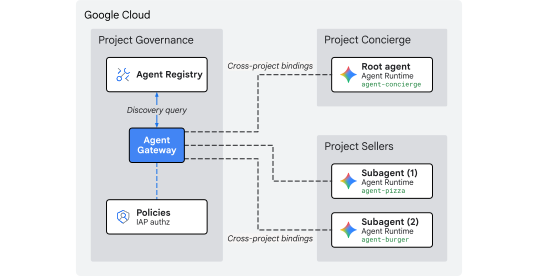
그림 1. 다중 프로젝트 중앙 집중식 거버넌스 아키텍처
교차 프로젝트 중앙 집중식 거버넌스가 필요한 이유
대기업에서는 제품팀과 데이터 과학 그룹이 수십 개의 독립적인 Google Cloud 프로젝트에서 AI 에이전트를 빌드합니다. 각 팀에 도구 등록, 이그레스 네트워크 경로, 보안 가드레일에 대한 직접 제어 권한을 부여하면 검증되지 않은 도구의 무분별한 사용, 일관되지 않은 DLP 정책, 모니터링되지 않는 VPC 이그레스, 단편화된 감사 로그가 발생합니다.
교차 프로젝트 중앙 집중식 거버넌스는 정책 작성과 에이전트 실행을 분리합니다.
- 중앙 IT 및 SecOps는 단일 중앙 집중식 거버넌스 프로젝트 내에서 보안 정책을 작성하고, 도구를 검토하고, 이그레스를 모니터링합니다.
- 제품 및 애플리케이션팀은 독립적인 Agent Runtime 프로젝트에서 비즈니스 로직에만 집중하며, 로컬 VPC, 상호 연결 또는 단편화된 정책 엔진을 관리하는 운영 오버헤드 없이 중앙 게이트웨이에 직접 바인딩합니다.
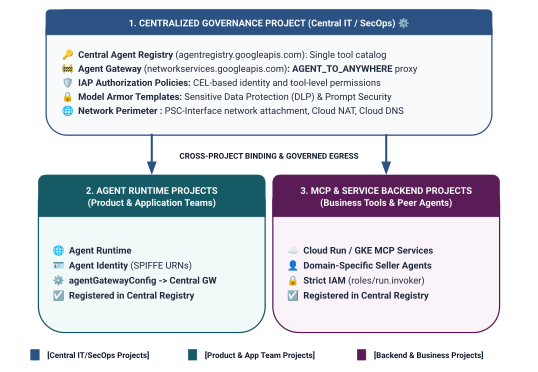
그림 2. 3계층 프로젝트 간 거버넌스 아키텍처 및 경계
통합 액세스 정책의 2단계 ID 범위 지정 모델
에이전트가 Central Agent Gateway를 통해 통신할 때 IAP(Identity-Aware Proxy) v2는 호출자의 에이전트 ID(런타임 컨테이너에 자동으로 발급되는 암호화 방식으로 증명된 SPIFFE 기반 ID)를 기반으로 전역 IAM 액세스 정책에 따라 액세스를 평가합니다.
- Tier 1: Baseline Google Cloud APIs (Coarse-Grained via
principalSet://in Rule 1): Project-wide egress authorization allowing all agent runtimes across spoke projects to reach standard Google APIs (aiplatform,iamcredentials,telemetry,agentregistry) for discovery, token generation, and inference. - Tier 2: 비즈니스 도구 및 A2A 서비스 (규칙 2 및 3의
principal://를 통한 세분화): 개별 추론 엔진 인스턴스에 바인딩된 엄격한 최소 권한 액세스로, 특정 등록된 Agent Registry 서비스(destination.agent_registry.agent.name)를 타겟팅하는 Common Expression Language(CEL) 조건을 통해 적용됩니다.
빌드할 항목
PROJECT_GOVERNANCE의 중앙 집중식 Agent Gateway (centralized-agw)- 엄격한 시행 모드의 IAP v2 승인 서비스 확장 프로그램 및 승인 정책(
failOpen: false) - 기본 IAM 통합 액세스 정책 (
uap-rules.json) 및 프로젝트 정책 바인딩 - 프로젝트 간 서비스 에이전트 IAM 권한 (
ar_agw_cross_project_sa) - 공유 중앙 Google Cloud Storage (GCS) 스테이징 버킷
PROJECT_SELLERS의 독립된 버거 및 피자 판매 대리점PROJECT_CONCIERGE에서 동적 REST 자동 검색을 사용하는 구매 컨시어지 에이전트- 프로젝트 간 mTLS URL을 사용하는 중앙 에이전트 레지스트리의 서비스 등록
- 실시간 인증 및 Cloud Logging 감사를 통한 동적 IAP v2 이그레스 정책 업데이트
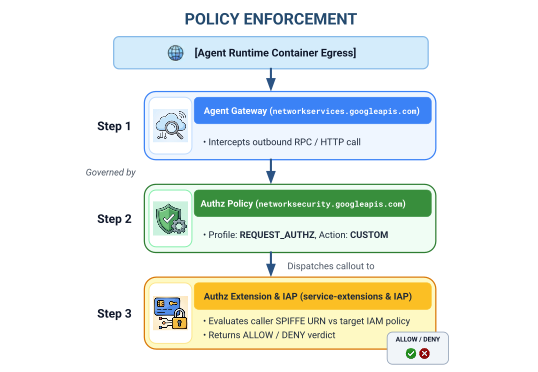
그림 3. 단계별 구현 순서
학습 내용
- 중앙 집중식 게이트웨이에 대한 프로젝트 간 서비스 에이전트 IAM 권한을 구성하는 방법
- 멀티 프로젝트 환경에서 중앙 Agent Gateway를 통해 Agent Runtime 이그레스를 라우팅하는 방법
- 서비스 확장 프로그램(
iapPolicyVersion: "V2")을 사용하여 IAP(Identity-Aware Proxy)(IAP v2)에 Agent Gateway 승인을 위임하는 방법 - 등록된 에이전트 레지스트리 대상(
destination.agent_registry.*)을 제어하는 Common Expression Language (CEL) 규칙을 사용하여 IAM 통합 액세스 정책(UAP)을 작성하고 바인딩하는 방법 - Agent Registry에 대한 런타임 자동 검색을 사용하여 하드코딩된 에이전트 ID 및 URL을 제거하는 방법
- 실제 경계 제로 트러스트 차단 (
HTTP 403 Forbidden)을 테스트하고 Cloud Logging에서 실시간 정책 업데이트를 확인하는 방법
필요한 항목
- 결제가 사용 설정된 Google Cloud 프로젝트 3개:
PROJECT_GOVERNANCE: 중앙 거버넌스, 게이트웨이, 레지스트리, IAM 액세스 정책PROJECT_CONCIERGE: 구매 컨시어지 조정자 에이전트PROJECT_SELLERS: 버거 및 피자 전문 판매자 대리점
- 3개 프로젝트 모두에 대한
roles/owner또는 관리 권한이 있는 IAM 사용자 또는 서비스 계정 - Google Cloud 조직 (SPIFFE 트러스트 도메인 매핑용)
- Google Cloud Shell 또는
gcloudCLI,python(3.11 이상),uv가 설치된 로컬 머신
이것으로 소개 부분을 마치겠습니다. 다음은 설정 및 환경 섹션입니다.
2. 설정
이 아키텍처는 3개의 개별 Google Cloud 프로젝트에 걸쳐 있지만 PROJECT_GOVERNANCE로 설정된 단일 Cloud Shell 터미널에서 터미널 배포 명령어, 저장소 다운로드, 스테이징 작업을 100% 실행할 수 있습니다. 모든 배포 스크립트와 gcloud 명령어는 CLI 플래그 (--project)를 통해 적절한 대상 프로젝트를 명시적으로 타겟팅합니다.
Google Cloud 프로젝트 명령줄에 액세스하여 시작합니다.
shell.cloud.google.com의 Cloud Shell 또는gcloudCLI가 설치된 로컬 터미널
프로젝트 컨텍스트 설정
# set terminal project context to Central Governance Project
gcloud config set project SET_YOUR_GOVERNANCE_PROJECT_ID_HERE
# login to gcloud cli
gcloud auth login
# login for application default credentials
gcloud auth application-default login
gcloud CLI 업데이트 (권장)
# update gcloud components
gcloud components update --quiet
셸 환경 변수 설정
프로젝트별 식별자를 입력합니다.
# 1. Project Identifiers
export PROJECT_GOVERNANCE="SET_YOUR_GOVERNANCE_PROJECT_ID_HERE"
export PROJECT_CONCIERGE="SET_YOUR_CONCIERGE_PROJECT_ID_HERE"
export PROJECT_SELLERS="SET_YOUR_SELLERS_PROJECT_ID_HERE"
이러한 셸 변수는 자동으로 파생됩니다.
# 2. Regional & Gateway Settings
export REGION="us-central1"
export AGW_NAME="centralized-agw"
export UAP_POLICY_NAME="uap-policy-${AGW_NAME}"
export UAP_BINDING_NAME="uap-binding-${AGW_NAME}"

# 3. Retrieve Project Numbers
export PROJECT_NUMBER_GOVERNANCE=$(gcloud projects describe ${PROJECT_GOVERNANCE} --format="value(projectNumber)")
export PROJECT_NUMBER_CONCIERGE=$(gcloud projects describe ${PROJECT_CONCIERGE} --format="value(projectNumber)")
export PROJECT_NUMBER_SELLERS=$(gcloud projects describe ${PROJECT_SELLERS} --format="value(projectNumber)")

# 4. Obtain Organization ID
export ORG_ID=$(gcloud projects get-ancestors ${PROJECT_GOVERNANCE} --format="value(id, type)" | grep organization | awk '{print $1}')

# 5. Set Application Default Credentials (ADC) Quota Project
gcloud auth application-default set-quota-project ${PROJECT_GOVERNANCE}

echo "Governance Project: ${PROJECT_GOVERNANCE} (${PROJECT_NUMBER_GOVERNANCE})"
echo "Concierge Project:  ${PROJECT_CONCIERGE} (${PROJECT_NUMBER_CONCIERGE})"
echo "Sellers Project:    ${PROJECT_SELLERS} (${PROJECT_NUMBER_SELLERS})"
echo "Organization ID:    ${ORG_ID}"
echo "UAP Policy Name:    ${UAP_POLICY_NAME}"
echo "UAP Binding Name:   ${UAP_BINDING_NAME}"
구성 파일의 로컬 디렉터리 만들기
# create config folder
mkdir -p cfg
통합 액세스 정책에 액세스 정책 관리자 역할 할당
# grant Access Policy Admin and Project IAM Admin to current user in Governance Project
for ROLE in "roles/iam.accessPolicyAdmin" "roles/resourcemanager.projectIamAdmin"; do
  gcloud projects add-iam-policy-binding ${PROJECT_GOVERNANCE} \
    --member="user:$(gcloud config get-value account)" \
    --role="${ROLE}" \
    --condition=None
done
IAP v2에 Cloud 감사 데이터 액세스 로그 사용 설정
기본적으로 Google Cloud는 의도하지 않은 스토리지 비용을 방지하기 위해 데이터 액세스 감사 로그를 사용 중지합니다. IAP v2는 승인 결정 (granted=true 및 granted=false)을 데이터 액세스 분석 감사 로그로 내보내므로 PROJECT_GOVERNANCE에서 iap.googleapis.com에 대해 ADMIN_READ, DATA_READ, DATA_WRITE 로깅을 사용 설정합니다.
# 1. export current IAM policy for PROJECT_GOVERNANCE
gcloud projects get-iam-policy ${PROJECT_GOVERNANCE} \
  --format=json > cfg/gov_iam_policy.json
# 2. append auditConfigs for iap.googleapis.com
python3 -c "
import json
with open('cfg/gov_iam_policy.json') as f:
    policy = json.load(f)
audit_configs = [c for c in policy.get('auditConfigs', []) if c.get('service') != 'iap.googleapis.com']
audit_configs.append({
    'service': 'iap.googleapis.com',
    'auditLogConfigs': [
        {'logType': 'ADMIN_READ'},
        {'logType': 'DATA_READ'},
        {'logType': 'DATA_WRITE'}
    ]
})
policy['auditConfigs'] = audit_configs
with open('cfg/gov_iam_policy.json', 'w') as f:
    json.dump(policy, f, indent=2)
"
# 3. apply updated policy
gcloud projects set-iam-policy ${PROJECT_GOVERNANCE} cfg/gov_iam_policy.json
# 4. verify auditConfigs applied
gcloud projects get-iam-policy ${PROJECT_GOVERNANCE} --format="yaml(auditConfigs)"
필수 Google Cloud API 사용 설정
# enable google apis (agent platform & security bundle, part 1)
for PROJ in ${PROJECT_GOVERNANCE} ${PROJECT_CONCIERGE} ${PROJECT_SELLERS}; do
  gcloud services enable \
    agentregistry.googleapis.com \
    aiplatform.googleapis.com \
    apphub.googleapis.com \
    apptopology.googleapis.com \
    cloudapiregistry.googleapis.com \
    cloudtrace.googleapis.com \
    compute.googleapis.com \
    dataform.googleapis.com \
    iam.googleapis.com \
    agentidentity.googleapis.com \
    iap.googleapis.com \
    logging.googleapis.com \
    modelarmor.googleapis.com \
    monitoring.googleapis.com \
    networksecurity.googleapis.com \
    networkservices.googleapis.com \
    notebooks.googleapis.com \
    observability.googleapis.com \
    --project=${PROJ}
done
# enable google apis (agent platform bundle, part 2)
for PROJ in ${PROJECT_GOVERNANCE} ${PROJECT_CONCIERGE} ${PROJECT_SELLERS}; do
  gcloud services enable \
    securitycenter.googleapis.com \
    saasservicemgmt.googleapis.com \
    storage.googleapis.com \
    telemetry.googleapis.com \
    texttospeech.googleapis.com \
    --project=${PROJ}
done
# enable google apis (foundational & agent runtime build bundle, part 3)
for PROJ in ${PROJECT_GOVERNANCE} ${PROJECT_CONCIERGE} ${PROJECT_SELLERS}; do
  gcloud services enable \
    artifactregistry.googleapis.com \
    cloudbuild.googleapis.com \
    cloudresourcemanager.googleapis.com \
    iamcredentials.googleapis.com \
    serviceusage.googleapis.com \
    run.googleapis.com \
    orgpolicy.googleapis.com \
    --project=${PROJ}
done
모든 프로젝트에서 API 사용 설정 확인
세 프로젝트 (PROJECT_GOVERNANCE, PROJECT_CONCIERGE, PROJECT_SELLERS) 모두에 정확히 동일한 API를 사용 설정하면 운영 일관성이 확보되고 런타임 토큰 생성 실패, 스키마 카탈로그 오류 또는 원격 분석 중단이 방지됩니다.
Cloud Shell에서 다음 검증 스크립트를 실행하여 세 프로젝트 모두에서 API 패리티를 확인합니다.
# validate that all required APIs are enabled across all 3 projects
python3 - << 'EOF'
import subprocess
import os
import sys

REQUIRED_APIS = [
    "agentregistry.googleapis.com",
    "aiplatform.googleapis.com",
    "apphub.googleapis.com",
    "apptopology.googleapis.com",
    "cloudapiregistry.googleapis.com",
    "cloudtrace.googleapis.com",
    "compute.googleapis.com",
    "dataform.googleapis.com",
    "iam.googleapis.com",
    "agentidentity.googleapis.com",
    "iap.googleapis.com",
    "logging.googleapis.com",
    "modelarmor.googleapis.com",
    "monitoring.googleapis.com",
    "networksecurity.googleapis.com",
    "networkservices.googleapis.com",
    "notebooks.googleapis.com",
    "observability.googleapis.com",
    "securitycenter.googleapis.com",
    "saasservicemgmt.googleapis.com",
    "storage.googleapis.com",
    "telemetry.googleapis.com",
    "texttospeech.googleapis.com",
    "artifactregistry.googleapis.com",
    "cloudbuild.googleapis.com",
    "cloudresourcemanager.googleapis.com",
    "iamcredentials.googleapis.com",
    "serviceusage.googleapis.com",
    "run.googleapis.com",
    "orgpolicy.googleapis.com"
]

projects = {
    "GOVERNANCE": os.environ.get("PROJECT_GOVERNANCE", ""),
    "CONCIERGE": os.environ.get("PROJECT_CONCIERGE", ""),
    "SELLERS": os.environ.get("PROJECT_SELLERS", "")
}

enabled = {}
for role, proj in projects.items():
    if not proj:
        print(f"Error: Environment variable for {role} is not set.")
        sys.exit(1)
    res = subprocess.run(
        ["gcloud", "services", "list", "--enabled", f"--project={proj}", "--format=value(config.name)"],
        capture_output=True, text=True, check=True
    )
    enabled[role] = set(res.stdout.strip().splitlines())

print(f"\n{'API Name':<36} | {'GOVERNANCE':<12} | {'CONCIERGE':<12} | {'SELLERS':<12}")
print("-" * 78)

all_synced = True
for api in REQUIRED_APIS:
    g_status = "ENABLED" if api in enabled["GOVERNANCE"] else "MISSING"
    c_status = "ENABLED" if api in enabled["CONCIERGE"] else "MISSING"
    s_status = "ENABLED" if api in enabled["SELLERS"] else "MISSING"
    if "MISSING" in (g_status, c_status, s_status):
        all_synced = False
    print(f"{api:<36} | {g_status:<12} | {c_status:<12} | {s_status:<12}")

print("-" * 78)
if all_synced:
    print("✅ All 29 required APIs are ENABLED and synchronized across all three projects.\n")
else:
    print("❌ Discrepancies detected. Please re-run the enablement commands for missing services.\n")
    sys.exit(1)
EOF
샘플 검증 출력:
모든 API가 사용 설정되어 있는지 확인합니다.
✅ All 30 required APIs are ENABLED and synchronized across all three projects.
조직 정책 구성
기본 Google Cloud 조직 정책은 IAM v3 액세스 정책 바인딩을 리소스로 제한하는 제약 조건을 적용합니다 (constraints/iam.managed.disableAccessPolicyBinding).
enforce: false을 허용으로 명시적으로 설정하여 프로젝트 수준에서 상속된 조직 정책 제한을 재정의합니다.
# disable iam v3 constraint (allow v3 access policies)
gcloud org-policies set-policy /dev/stdin << EOF
name: projects/${PROJECT_NUMBER_GOVERNANCE}/policies/iam.managed.disableAccessPolicyBinding
spec:
  rules:
  - enforce: false
EOF
# verify org policy constraints on project
gcloud org-policies describe iam.managed.disableAccessPolicyBinding \
  --project=${PROJECT_GOVERNANCE} --effective
이로써 설정 부분이 완료되었습니다. 다음은 핵심 Google API 등록 섹션입니다.
3. 에이전트 레지스트리
핵심 Google API 엔드포인트 서비스 등록
Agent Gateway를 사용하려면 agent_gateway_config로 구성된 에이전트가 이그레스 트래픽을 핵심 Google Cloud 백엔드 서비스 (예: aiplatform, IAM 사용자 인증 정보, 원격 분석)로 안전하게 라우팅할 수 있도록 Google API URL을 Central Agent Registry에 등록해야 합니다.
Agent Registry에서 core-gapi-services 만들기
# register core google api endpoints in agent registry with standard and :443 port variants
gcloud agent-registry services create core-gapi-services \
  --project=${PROJECT_GOVERNANCE} \
  --location=${REGION} \
  --display-name="gapi.core.services" \
  --description="Core Google Cloud APIs and Service Endpoints" \
  --endpoint-spec-type=no-spec \
  --interfaces=protocolBinding=JSONRPC,url=https://telemetry.googleapis.com \
  --interfaces=protocolBinding=JSONRPC,url=https://telemetry.mtls.googleapis.com \
  --interfaces=protocolBinding=JSONRPC,url=https://${REGION}-aiplatform.googleapis.com \
  --interfaces=protocolBinding=JSONRPC,url=https://${REGION}-aiplatform.googleapis.com:443 \
  --interfaces=protocolBinding=JSONRPC,url=https://${REGION}-aiplatform.mtls.googleapis.com \
  --interfaces=protocolBinding=JSONRPC,url=https://${REGION}-aiplatform.mtls.googleapis.com:443 \
  --interfaces=protocolBinding=JSONRPC,url=https://aiplatform.googleapis.com \
  --interfaces=protocolBinding=JSONRPC,url=https://aiplatform.googleapis.com:443 \
  --interfaces=protocolBinding=JSONRPC,url=https://aiplatform.mtls.googleapis.com \
  --interfaces=protocolBinding=JSONRPC,url=https://aiplatform.mtls.googleapis.com:443 \
  --interfaces=protocolBinding=JSONRPC,url=https://cloudresourcemanager.googleapis.com \
  --interfaces=protocolBinding=JSONRPC,url=https://cloudresourcemanager.googleapis.com:443 \
  --interfaces=protocolBinding=JSONRPC,url=https://cloudresourcemanager.mtls.googleapis.com \
  --interfaces=protocolBinding=JSONRPC,url=https://cloudresourcemanager.mtls.googleapis.com:443 \
  --interfaces=protocolBinding=JSONRPC,url=https://iamcredentials.googleapis.com \
  --interfaces=protocolBinding=JSONRPC,url=https://iamcredentials.googleapis.com:443 \
  --interfaces=protocolBinding=JSONRPC,url=https://iamcredentials.mtls.googleapis.com \
  --interfaces=protocolBinding=JSONRPC,url=https://iamcredentials.mtls.googleapis.com:443 \
  --interfaces=protocolBinding=JSONRPC,url=https://agentregistry.googleapis.com \
  --interfaces=protocolBinding=JSONRPC,url=https://agentregistry.mtls.googleapis.com \
  --interfaces=protocolBinding=JSONRPC,url=https://agentregistry.googleapis.com:443 \
  --interfaces=protocolBinding=JSONRPC,url=https://agentregistry.mtls.googleapis.com:443
Capture Core API 엔드포인트 리소스 ID
# capture the underlying Agent Registry endpoint ID
export ENDPOINT_ID=$(gcloud agent-registry services describe core-gapi-services \
  --project=${PROJECT_GOVERNANCE} \
  --location=${REGION} \
  --format="value(registryResource)" | awk -F'/' '{print $NF}')
echo "Core APIs Endpoint ID: ${ENDPOINT_ID}"
에이전트 ID의 principalSet와 principal의 차이점 이해하기
Google Cloud IAM 및 Gemini Enterprise Agent Platform에서 실행 중인 에이전트 컨테이너에 발급된 머신 ID는 IAP (Identity-Aware Proxy) v2에서 평가하는 암호화 증명 SPIFFE URN을 사용합니다. IAM 통합 액세스 정책을 구성할 때 특정 단일 principal 또는 속성 기반 principalSet를 타겟팅할 수 있습니다.
측정기준 |
|
|
IAM 문법 |
|
|
세부사항 | 세분화 (인스턴스 수준): 단일 특정 추론 엔진 컨테이너 인스턴스를 식별합니다. | 성긴 (프로젝트 수준): 공통 프로젝트 속성을 공유하는 모든 추론 엔진을 식별합니다. |
URN 패턴 |
|
|
Agent Platform의 사용 사례 | Tier 2 (비즈니스 도구 및 A2A): 특정 조정자 에이전트가 대상 도메인 도구를 호출하도록 승인합니다 (예: 구매 컨시어지 $\rightarrow$ 버거 판매자). | Tier 1 (기본 인프라): 프로젝트의 모든 에이전트에게 Google Cloud API ( |
수명 주기 영향 | 에이전트가 삭제되고 다시 생성되면 새 엔진 ID에 업데이트된 IAM 정책 바인딩이 필요합니다. | 추가 IAM 업데이트 없이 해당 프로젝트에 새로 배포된 에이전트에 자동으로 적용됩니다. |
통합 액세스 정책 (UAP/IAP v2)을 사용한 선언적 거버넌스
기존 IAP v1에서는 이그레스 정책이 gcloud beta iap web add-iam-policy-binding를 사용하여 개별 Agent Registry 리소스에 직접 연결되었습니다. IAP v2 및 통합 액세스 정책에서는 리소스별 바인딩이 삭제되고 단일 중앙 집중식 IAM 액세스 정책 (cfg/uap-rules.json)이 사용됩니다.
core-gapi-services의 기본 이그레스 승인은 섹션 5의 통합 액세스 정책에서 규칙 1로 구성되어 배포 전에 모든 에이전트 컨테이너에 기본 이그레스 경로가 설정되도록 합니다.
주 구성원 식별자 및 워크로드 아이덴티티 메커니즘에 대한 자세한 기술적 내용은 다음을 참조하세요.
이로써 핵심 API 엔드포인트 등록이 완료되었습니다. 다음은 중앙 집중식 Agent Gateway 배포 섹션입니다.
4. Agent Gateway
중앙 집중식 Agent Gateway 배포
$PROJECT_GOVERNANCE 프로젝트 내에서 AGENT_TO_ANYWHERE 이그레스 모드로 중앙 집중식 Agent Gateway (centralized-agw)를 배포합니다.
게이트웨이 구성 매니페스트 정의
이그레스 트래픽 거버넌스를 위한 cfg/${AGW_NAME}.yaml를 만듭니다.
# generate agent gateway config yaml
cat > cfg/${AGW_NAME}.yaml << EOF
name: ${AGW_NAME}
protocols:
  - MCP
googleManaged:
  governedAccessPath: AGENT_TO_ANYWHERE
registries:
  - "//agentregistry.googleapis.com/projects/${PROJECT_GOVERNANCE}/locations/${REGION}"
EOF
Agent Gateway 구성 가져오기
# import and create agent gateway
gcloud network-services agent-gateways import ${AGW_NAME} \
  --source="cfg/${AGW_NAME}.yaml" \
  --location=${REGION} \
  --project=${PROJECT_GOVERNANCE}
Agent Gateway 세부정보 확인
# show agent gateway status
gcloud network-services agent-gateways describe ${AGW_NAME} \
  --location=${REGION} \
  --project=${PROJECT_GOVERNANCE}
결과 예시:
agentGatewayCard:
  mtlsEndpoint: projects/${AGW_TP_ID}/regions/us-central1/serviceAttachments/unitkind1-swp-mtls-psc-sa
  rootCertificates:
  - |
    -----BEGIN CERTIFICATE-----
    MIIDwzCCAqugAwIBAgITNQuWGopdOZaHdcK7r7AYFhonqDANBgkqhkiG9w0BAQsF
    ...
    -----END CERTIFICATE-----
  serviceExtensionsServiceAccount: service-${PROJ_NO}@gcp-sa-dep.iam.gserviceaccount.com
createTime: 'YYYY-MM-DDT12:34:56.789098765Z'
googleManaged:
  governedAccessPath: AGENT_TO_ANYWHERE
name: projects/${PROJECT_GOVERNANCE}/locations/us-central1/agentGateways/centralized-agw
protocols:
- MCP
registries:
- //agentregistry.googleapis.com/projects/${PROJECT_GOVERNANCE}/locations/us-central1
updateTime: 'YYYY-MM-DDT12:34:56.789098765Z'
이로써 게이트웨이 배포가 완료되었습니다. 다음은 승인 구성 섹션입니다.
5. 승인
Agent Gateway 승인 및 기본 UAP 구성
Agent Gateway는 IAP(Identity-Aware Proxy v2) 통합 액세스 정책 (UAP)과 통합된 승인 정책(networksecurity.authzPolicies)을 사용하여 아웃바운드 도구 및 에이전트 트래픽을 보호하고 제어합니다.
승인 아키텍처 개요
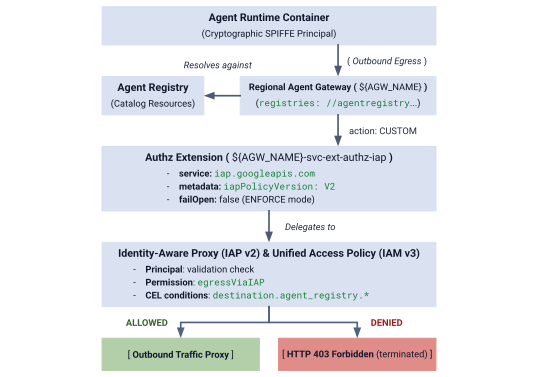
그림 4. 승인 아키텍처 개요
승인 아키텍처는 상호 연결된 세 가지 레이어로 구성됩니다.
- IAP 서비스 확장 프로그램 (
authzExtension): 엄격한 경계 제로 트러스트 시행을 위해service: iap.googleapis.com,metadata: iapPolicyVersion: "V2",failOpen: false로 구성된 리전 리소스입니다. - 게이트웨이 승인 정책 (
authzPolicy):policyProfile: REQUEST_AUTHZ및action: CUSTOM를 사용하여 Agent Gateway를 타겟팅하는 리전 리소스로, 승인 검사를 IAP 승인 확장 프로그램으로 라우팅합니다. - IAM 통합 액세스 정책 및 바인딩 (
accessPolicy및policyBinding): IAP에서 평가하는 전역 IAM v3 리소스입니다. 호출자 SPIFFE ID 및 CEL 카탈로그 조건에 대해 범용 권한iap.googleapis.com/resources.egressViaIAP을 확인합니다.
1단계: IAP v2 승인 확장 프로그램 만들기 및 가져오기
엄격한 ENFORCE 모드에서 iapPolicyVersion: "V2" 및 failOpen: false를 사용하여 서비스 확장 프로그램 매니페스트를 만듭니다.
# create authz extension config file in ENFORCE mode
cat > cfg/${AGW_NAME}-svc-ext-authz-iap.yaml << EOF
name: ${AGW_NAME}-svc-ext-authz-iap
service: iap.googleapis.com
failOpen: false
timeout: 1s
metadata:
  iapPolicyVersion: "V2"
EOF
승인 확장 프로그램을 가져옵니다.
# import IAP v2 authz extension
gcloud service-extensions authz-extensions import ${AGW_NAME}-svc-ext-authz-iap \
  --source=cfg/${AGW_NAME}-svc-ext-authz-iap.yaml \
  --location=${REGION} \
  --project=${PROJECT_GOVERNANCE}
승인 확장 프로그램이 활성 상태인지 확인합니다.
# describe authz extension
gcloud service-extensions authz-extensions describe ${AGW_NAME}-svc-ext-authz-iap \
  --location=${REGION} \
  --project=${PROJECT_GOVERNANCE}
결과 예시:
createTime: 'YYYY-MM-DDT12:34:56.789098765Z'
failOpen: false
metadata:
  iapPolicyVersion: V2
name: projects/${PROJECT_GOVERNANCE}/locations/us-central1/authzExtensions/centralized-agw-svc-ext-authz-iap
service: iap.googleapis.com
timeout: 1s
2단계: 게이트웨이 승인 정책 만들기 및 가져오기
Agent Gateway에 연결하고 요청 확인을 IAP Authz 확장 프로그램에 위임하는 승인 정책 구성을 만듭니다.
# create authz policy manifest
cat > cfg/${AGW_NAME}-authz-policy-profile-iap.yaml << EOF
name: ${AGW_NAME}-authz-policy-profile-iap
target:
  resources:
    - "projects/${PROJECT_GOVERNANCE}/locations/${REGION}/agentGateways/${AGW_NAME}"
policyProfile: REQUEST_AUTHZ
action: CUSTOM
customProvider:
  authzExtension:
    resources:
      - "projects/${PROJECT_GOVERNANCE}/locations/${REGION}/authzExtensions/${AGW_NAME}-svc-ext-authz-iap"
EOF
승인 정책을 가져옵니다.
# import authz policy
gcloud beta network-security authz-policies import ${AGW_NAME}-authz-policy-profile-iap \
  --source=cfg/${AGW_NAME}-authz-policy-profile-iap.yaml \
  --location=${REGION} \
  --project=${PROJECT_GOVERNANCE}
활성 승인 정책을 확인합니다.
# describe authz policy
gcloud beta network-security authz-policies describe ${AGW_NAME}-authz-policy-profile-iap \
  --location=${REGION} \
  --project=${PROJECT_GOVERNANCE}
3단계: 초기 통합 액세스 정책 작성 (규칙 1: 핵심 Google API)
3개의 프로젝트 principalSet가 core-gapi-services에 도달하도록 승인하는 규칙 1을 사용하여 cfg/uap-rules.json를 만듭니다.
# create initial unified access policy rules manifest
cat > cfg/uap-rules.json << EOF
[
  {
    "description": "Rule 1: Allow agent runtimes across all 3 projects to reach Core Google APIs",
    "effect": "ALLOW",
    "principals": [
      "principalSet://agents.global.org-${ORG_ID}.system.id.goog/attribute.platformContainer/aiplatform/projects/${PROJECT_NUMBER_GOVERNANCE}",
      "principalSet://agents.global.org-${ORG_ID}.system.id.goog/attribute.platformContainer/aiplatform/projects/${PROJECT_NUMBER_CONCIERGE}",
      "principalSet://agents.global.org-${ORG_ID}.system.id.goog/attribute.platformContainer/aiplatform/projects/${PROJECT_NUMBER_SELLERS}"
    ],
    "operation": {
      "permissions": [
        "iap.googleapis.com/resources.egressViaIAP"
      ]
    },
    "conditions": {
      "iap.googleapis.com": {
        "expression": \
        "destination.is_registered == true && \
         destination.agent_registry.resource_type == 'ENDPOINT' && ( \
         destination.agent_registry.endpoint.name == 'projects/${PROJECT_GOVERNANCE}/locations/${REGION}/endpoints/core-gapi-services' || \
         destination.agent_registry.endpoint.name == 'projects/${PROJECT_GOVERNANCE}/locations/${REGION}/endpoints/${ENDPOINT_ID}' || \
         destination.agent_registry.endpoint.name == 'projects/${PROJECT_NUMBER_GOVERNANCE}/locations/${REGION}/endpoints/${ENDPOINT_ID}')"
      }
    }
  }
]
EOF
4단계: IAM 액세스 정책 만들기 및 바인딩
전역 IAM 액세스 정책을 만듭니다.
# create global IAM access policy
gcloud iam access-policies create ${UAP_POLICY_NAME} \
  --details-rules=cfg/uap-rules.json \
  --project=${PROJECT_GOVERNANCE} \
  --location=global
액세스 정책을 PROJECT_GOVERNANCE에 바인딩합니다.
# bind access policy to governance project
gcloud iam policy-bindings create ${UAP_BINDING_NAME} \
  --policy="projects/${PROJECT_GOVERNANCE}/locations/global/accessPolicies/${UAP_POLICY_NAME}" \
  --target-resource="//cloudresourcemanager.googleapis.com/projects/${PROJECT_GOVERNANCE}" \
  --project=${PROJECT_GOVERNANCE} \
  --location=global
정책 바인딩이 활성 상태인지 확인합니다.
# verify policy binding
gcloud iam policy-bindings describe ${UAP_BINDING_NAME} \
  --project=${PROJECT_GOVERNANCE} \
  --location=global
결과 예시:
name: projects/${PROJECT_GOVERNANCE}/locations/global/policyBindings/uap-binding-centralized-agw
policy: projects/${PROJECT_GOVERNANCE}/locations/global/accessPolicies/uap-policy-centralized-agw
policyKind: ACCESS_POLICY
target:
  resource: //cloudresourcemanager.googleapis.com/projects/${PROJECT_GOVERNANCE}
이제 기본 Google Cloud API 이그레스가 엄격한 ENFORCE 모드로 세 프로젝트 모두에서 안전하게 승인됩니다.
게이트웨이 승인 설정이 완료되었습니다. 다음으로 프로젝트 간 IAM 권한 구성 섹션으로 이동합니다.
6. 프로젝트 간 IAM
프로젝트 간 IAM 권한 구성
이 멀티 프로젝트 토폴로지에서 Agent Runtime은 스포크 프로젝트 (PROJECT_CONCIERGE 및 PROJECT_SELLERS)에 상주하고 중앙 Agent Gateway 및 Agent Registry는 PROJECT_GOVERNANCE에 상주합니다.
Google Cloud 프로젝트는 격리된 보안 경계이므로 프로젝트 간 액세스는 두 운영 레이어에서 명시적으로 부여되어야 합니다.
- 컨트롤 플레인 (배포 시):
--agent-gateway-config로 구성된 에이전트 컨테이너를 배포할 때 스포크 프로젝트의 Agent Runtime 서비스 에이전트 (service-)가 컨테이너를 중앙 게이트웨이에 연결해야 합니다.@gcp-sa-aiplatform.iam.gserviceaccount.com PROJECT_GOVERNANCE에서networkservices.agentGateways.use,get,operations.get를 부여하는 최소 커스텀 역할 (ar_agw_cross_project_sa)을 만듭니다. - 데이터 영역 (런타임 실행):
- 카탈로그 검색: 대상 Agent Endpoint를 동적으로 확인하려면
PROJECT_GOVERNANCE의roles/agentregistry.viewer에 스포크 ID가 필요합니다. - 대상 호출: 컨시어지 에이전트가 판매자 추론 엔진에 대해 쿼리를 실행하려면
PROJECT_SELLERS의roles/aiplatform.user이 필요합니다.
- 카탈로그 검색: 대상 Agent Endpoint를 동적으로 확인하려면
PROJECT_GOVERNANCE에 커스텀 IAM 역할 만들기
# create custom role in central governance project
gcloud iam roles create ar_agw_cross_project_sa \
  --project=${PROJECT_GOVERNANCE} \
  --title="Runtime Agent Gateway Cross-Project SA" \
  --description="Custom role for cross-project service agents to access Central Agent Gateway" \
  --permissions="networkservices.agentGateways.get,networkservices.agentGateways.use,networkservices.operations.get" \
  --stage="GA"
Agent Runtime 서비스 에이전트에 커스텀 역할 할당
# 1. ensure aiplatform service identities are provisioned across all projects
for PROJ in ${PROJECT_GOVERNANCE} ${PROJECT_CONCIERGE} ${PROJECT_SELLERS}; do
  gcloud beta services identity create --service=aiplatform.googleapis.com --project=${PROJ}
done
# 2. derive aiplatform service agent emails
export CONCIERGE_AI_SA="service-${PROJECT_NUMBER_CONCIERGE}@gcp-sa-aiplatform.iam.gserviceaccount.com"
export CONCIERGE_RE_SA="service-${PROJECT_NUMBER_CONCIERGE}@gcp-sa-aiplatform-re.iam.gserviceaccount.com"
export CONCIERGE_COMPUTE_SA="${PROJECT_NUMBER_CONCIERGE}-compute@developer.gserviceaccount.com"

export SELLERS_AI_SA="service-${PROJECT_NUMBER_SELLERS}@gcp-sa-aiplatform.iam.gserviceaccount.com"
export SELLERS_RE_SA="service-${PROJECT_NUMBER_SELLERS}@gcp-sa-aiplatform-re.iam.gserviceaccount.com"
export SELLERS_COMPUTE_SA="${PROJECT_NUMBER_SELLERS}-compute@developer.gserviceaccount.com"
# 3. grant custom role & network viewer to Concierge and Sellers Service Agents
for SA in ${CONCIERGE_AI_SA} ${SELLERS_AI_SA}; do
  gcloud projects add-iam-policy-binding ${PROJECT_GOVERNANCE} \
    --member="serviceAccount:${SA}" \
    --role="projects/${PROJECT_GOVERNANCE}/roles/ar_agw_cross_project_sa" \
    --condition=None

  gcloud projects add-iam-policy-binding ${PROJECT_GOVERNANCE} \
    --member="serviceAccount:${SA}" \
    --role="roles/networkservices.viewer" \
    --condition=None
done
# 4. grant agent registry viewer on Governance Project for dynamic autodiscovery
for MEMBER in "serviceAccount:${CONCIERGE_AI_SA}" "serviceAccount:${CONCIERGE_RE_SA}" "serviceAccount:${CONCIERGE_COMPUTE_SA}" "serviceAccount:${SELLERS_AI_SA}" "serviceAccount:${SELLERS_RE_SA}" "serviceAccount:${SELLERS_COMPUTE_SA}" "principalSet://agents.global.org-${ORG_ID}.system.id.goog/attribute.platformContainer/aiplatform/projects/${PROJECT_NUMBER_CONCIERGE}" "principalSet://agents.global.org-${ORG_ID}.system.id.goog/attribute.platformContainer/aiplatform/projects/${PROJECT_NUMBER_SELLERS}"; do
  gcloud projects add-iam-policy-binding ${PROJECT_GOVERNANCE} \
    --member="${MEMBER}" \
    --role="roles/agentregistry.viewer" \
    --condition=None
done
# 5. grant agent project viewer on Governance Project for dynamic autodiscovery
for SA in ${CONCIERGE_COMPUTE_SA} ${CONCIERGE_AI_SA}; do
  gcloud projects add-iam-policy-binding ${PROJECT_GOVERNANCE} \
    --member="serviceAccount:${SA}" \
    --role="roles/viewer" \
    --condition=None
done
# 6. grant aitplatform user on Sellers project to Concierge for cross-project A2A invocation
for MEMBER in "serviceAccount:${CONCIERGE_AI_SA}" "serviceAccount:${CONCIERGE_RE_SA}" "serviceAccount:${CONCIERGE_COMPUTE_SA}" "principalSet://agents.global.org-${ORG_ID}.system.id.goog/attribute.platformContainer/aiplatform/projects/${PROJECT_NUMBER_CONCIERGE}"; do
  gcloud projects add-iam-policy-binding ${PROJECT_SELLERS} \
    --member="${MEMBER}" \
    --role="roles/aiplatform.user" \
    --condition=None
done
이것으로 프로젝트 간 IAM 설정이 완료되었습니다. 다음은 판매자 및 컨시어지 에이전트 배포 섹션입니다.
7. Agent Runtime
영업 및 컨시어지 에이전트 배포
이 Codelab에 사용되는 멀티 에이전트 애플리케이션 코드베이스와 배포 스크립트는 원격 Google Cloud GitHub 저장소에서 유지관리됩니다. 다음 단계에서는 저장소를 로컬로 클론하고, 필요한 파일을 현재 작업 디렉터리 구조에 복사하고, 임시 파일을 정리하고, uv를 사용하여 종속 항목을 설치합니다.
원격 아티팩트 가져오기
# clone remote repository to temp local dir
git clone https://github.com/GoogleCloudPlatform/cloud-networking-solutions.git ./temp_agw_multiproject
# copy multi-agent application files to current working directory
cp -r temp_agw_multiproject/codelabs/agw-multiproject ./cross-project-multiagent
# remove temporary directory
rm -rf temp_agw_multiproject
# install dependencies
uv sync --directory ./cross-project-multiagent
공유 중앙 스테이징 버킷 만들기
# create shared central staging bucket
gcloud storage buckets create gs://${PROJECT_GOVERNANCE}-shared-staging \
  --project=${PROJECT_GOVERNANCE} \
  --location=${REGION}
# grant cross-project read/write access to runtime service agents
gcloud storage buckets add-iam-policy-binding gs://${PROJECT_GOVERNANCE}-shared-staging \
  --member="serviceAccount:service-${PROJECT_NUMBER_CONCIERGE}@gcp-sa-aiplatform.iam.gserviceaccount.com" \
  --role="roles/storage.objectAdmin"

gcloud storage buckets add-iam-policy-binding gs://${PROJECT_GOVERNANCE}-shared-staging \
  --member="serviceAccount:service-${PROJECT_NUMBER_SELLERS}@gcp-sa-aiplatform.iam.gserviceaccount.com" \
  --role="roles/storage.objectAdmin"
프로젝트 간 Agent Gateway 바인딩 작동 방식
이 단계에서는 판매자 에이전트를 스포크 프로젝트 (PROJECT_SELLERS)에 배포하고 PROJECT_GOVERNANCE의 중앙 Agent Gateway를 통해 이그레스를 라우팅하도록 구성합니다.
# !-- for example purposes -- NOT a command to execute --!
# snippet from deploy_burger.py
burger_config = {
    "staging_bucket": staging_bucket_uri,
    "gcs_dir_name": "burger_agent",
    "display_name": "burger-seller-agent-adk",
    "identity_type": "AGENT_IDENTITY",
    "agent_gateway_config": {
        "agent_to_anywhere_config": {
            "agent_gateway": f"projects/{args.governance_project}/locations/{args.region}/agentGateways/{args.gateway}"
        }
    },
}
deployed_burger = client.agent_engines.create(agent=burger_playground, config=burger_config)
규칙 1이 통합 액세스 정책에서 더 일찍 설정되었으므로 Google Cloud API에 대한 컨테이너 초기화 요청은 중단 없이 게이트웨이를 통해 허용됩니다.
PROJECT_SELLERS에 버거 및 피자 판매 에이전트 배포
# 1. deploy Burger Seller Agent to PROJECT_SELLERS
uv run --directory ./cross-project-multiagent python deploy_burger.py \
  --project=${PROJECT_SELLERS} \
  --region=${REGION} \
  --governance-project=${PROJECT_GOVERNANCE} \
  --gateway=projects/${PROJECT_GOVERNANCE}/locations/${REGION}/agentGateways/${AGW_NAME}
# 2. deploy Pizza Seller Agent to PROJECT_SELLERS
uv run --directory ./cross-project-multiagent python deploy_pizza.py \
  --project=${PROJECT_SELLERS} \
  --region=${REGION} \
  --governance-project=${PROJECT_GOVERNANCE} \
  --gateway=projects/${PROJECT_GOVERNANCE}/locations/${REGION}/agentGateways/${AGW_NAME}
판매자 게이트웨이 라우팅 검증
# retrieve deployed seller reasoning engine IDs
export BURGER_ENGINE_ID=$(grep BURGER_SELLER_AGENT_ID cross-project-multiagent/burger_agent.env | awk -F'/' '{print $NF}')
export PIZZA_ENGINE_ID=$(grep PIZZA_SELLER_AGENT_ID cross-project-multiagent/pizza_agent.env | awk -F'/' '{print $NF}')

echo "Burger Engine ID: ${BURGER_ENGINE_ID}"
echo "Pizza Engine ID:  ${PIZZA_ENGINE_ID}"
# inspect runtime configuration for both Seller Agents
for ENGINE_ID in ${BURGER_ENGINE_ID} ${PIZZA_ENGINE_ID}; do
  curl -s -X GET "https://${REGION}-aiplatform.googleapis.com/v1beta1/projects/${PROJECT_SELLERS}/locations/${REGION}/reasoningEngines/${ENGINE_ID}" \
    -H "Authorization: Bearer $(gcloud auth application-default print-access-token)" \
    -H "Content-Type: application/json" \
    | jq '{displayName: .displayName, identityType: .spec.identityType, effectiveIdentity: .spec.effectiveIdentity, agentGatewayConfig: .spec.deploymentSpec.agentGatewayConfig}'
done
PROJECT_CONCIERGE에 구매 컨시어지 에이전트 배포
# deploy Purchasing Concierge to PROJECT_CONCIERGE
uv run --directory ./cross-project-multiagent python deploy_concierge_adk.py \
  --project=${PROJECT_CONCIERGE} \
  --region=${REGION} \
  --staging-bucket=gs://${PROJECT_GOVERNANCE}-shared-staging \
  --gateway-name=${AGW_NAME} \
  --gateway-project=${PROJECT_GOVERNANCE}
구매 게이트웨이 라우팅 검증
# retrieve Concierge engine ID
export CONCIERGE_ENGINE_ID=$(grep CONCIERGE_AGENT_ID cross-project-multiagent/concierge_agent.env | awk -F'/' '{print $NF}')
echo "Concierge Engine ID: ${CONCIERGE_ENGINE_ID}"
# inspect runtime configuration for Purchasing Concierge
curl -s -X GET "https://${REGION}-aiplatform.googleapis.com/v1beta1/projects/${PROJECT_CONCIERGE}/locations/${REGION}/reasoningEngines/${CONCIERGE_ENGINE_ID}" \
  -H "Authorization: Bearer $(gcloud auth application-default print-access-token)" \
  -H "Content-Type: application/json" \
  | jq '{displayName: .displayName, identityType: .spec.identityType, effectiveIdentity: .spec.effectiveIdentity, agentGatewayConfig: .spec.deploymentSpec.agentGatewayConfig}'
출력에 컨시어지 Agent Runtime ID 및 프로젝트와 거버넌스 프로젝트 Agent Gateway에 대한 바인딩이 표시됩니다.
{
  "displayName": "purchasing-concierge-adk",
  "identityType": "AGENT_IDENTITY",
  "effectiveIdentity": "agents.global.org-${ORG_ID}.system.id.goog/resources/aiplatform/projects/${PROJECT_CONCIERGE}/locations/us-central1/reasoningEngines/${CONCIERGE_ENGINE_ID}",
  "agentGatewayConfig": {
    "agentToAnywhereConfig": {
      "agentGateway": "projects/${PROJECT_GOVERNANCE}/locations/us-central1/agentGateways/centralized-agw"
    }
  }
}
에이전트 배포가 완료되었습니다. 다음은 중앙 Agent Registry에 에이전트 등록 섹션입니다.
8. 프로젝트 간 레지스트리
중앙 에이전트 레지스트리에 에이전트 등록
교차 프로젝트 리전 mTLS 엔드포인트와 숫자 프로젝트 번호를 사용하여 PROJECT_GOVERNANCE의 중앙 에이전트 레지스트리에 세 에이전트를 모두 등록합니다.
Agent Registry에 서비스를 비A2A 에이전트로 등록
# 1. register Burger Seller Agent
gcloud agent-registry services create burger-seller-agent \
  --project=${PROJECT_GOVERNANCE} \
  --location=${REGION} \
  --display-name="Burger Seller Agent" \
  --description="Specialist agent that sells burgers and fries" \
  --agent-spec-type=no-spec \
  --interfaces=protocolBinding=JSONRPC,url=https://${REGION}-aiplatform.googleapis.com/v1/projects/${PROJECT_NUMBER_SELLERS}/locations/${REGION}/reasoningEngines/${BURGER_ENGINE_ID}:query \
  --interfaces=protocolBinding=JSONRPC,url=https://${REGION}-aiplatform.googleapis.com/v1beta1/projects/${PROJECT_NUMBER_SELLERS}/locations/${REGION}/reasoningEngines/${BURGER_ENGINE_ID}:query \
  --interfaces=protocolBinding=JSONRPC,url=https://${REGION}-aiplatform.googleapis.com:443/v1/projects/${PROJECT_NUMBER_SELLERS}/locations/${REGION}/reasoningEngines/${BURGER_ENGINE_ID}:query \
  --interfaces=protocolBinding=JSONRPC,url=https://${REGION}-aiplatform.googleapis.com:443/v1beta1/projects/${PROJECT_NUMBER_SELLERS}/locations/${REGION}/reasoningEngines/${BURGER_ENGINE_ID}:query \
  --interfaces=protocolBinding=JSONRPC,url=https://${REGION}-aiplatform.mtls.googleapis.com/v1/projects/${PROJECT_NUMBER_SELLERS}/locations/${REGION}/reasoningEngines/${BURGER_ENGINE_ID}:query \
  --interfaces=protocolBinding=JSONRPC,url=https://${REGION}-aiplatform.mtls.googleapis.com/v1beta1/projects/${PROJECT_NUMBER_SELLERS}/locations/${REGION}/reasoningEngines/${BURGER_ENGINE_ID}:query \
  --interfaces=protocolBinding=JSONRPC,url=https://${REGION}-aiplatform.mtls.googleapis.com:443/v1/projects/${PROJECT_NUMBER_SELLERS}/locations/${REGION}/reasoningEngines/${BURGER_ENGINE_ID}:query \
  --interfaces=protocolBinding=JSONRPC,url=https://${REGION}-aiplatform.mtls.googleapis.com:443/v1beta1/projects/${PROJECT_NUMBER_SELLERS}/locations/${REGION}/reasoningEngines/${BURGER_ENGINE_ID}:query
# 2. register Pizza Seller Agent
gcloud agent-registry services create pizza-seller-agent \
  --project=${PROJECT_GOVERNANCE} \
  --location=${REGION} \
  --display-name="Pizza Seller Agent" \
  --description="Specialist agent that sells pizzas and pasta" \
  --agent-spec-type=no-spec \
  --interfaces=protocolBinding=JSONRPC,url=https://${REGION}-aiplatform.googleapis.com/v1/projects/${PROJECT_NUMBER_SELLERS}/locations/${REGION}/reasoningEngines/${PIZZA_ENGINE_ID}:query \
  --interfaces=protocolBinding=JSONRPC,url=https://${REGION}-aiplatform.googleapis.com/v1beta1/projects/${PROJECT_NUMBER_SELLERS}/locations/${REGION}/reasoningEngines/${PIZZA_ENGINE_ID}:query \
  --interfaces=protocolBinding=JSONRPC,url=https://${REGION}-aiplatform.googleapis.com:443/v1/projects/${PROJECT_NUMBER_SELLERS}/locations/${REGION}/reasoningEngines/${PIZZA_ENGINE_ID}:query \
  --interfaces=protocolBinding=JSONRPC,url=https://${REGION}-aiplatform.googleapis.com:443/v1beta1/projects/${PROJECT_NUMBER_SELLERS}/locations/${REGION}/reasoningEngines/${PIZZA_ENGINE_ID}:query \
  --interfaces=protocolBinding=JSONRPC,url=https://${REGION}-aiplatform.mtls.googleapis.com/v1/projects/${PROJECT_NUMBER_SELLERS}/locations/${REGION}/reasoningEngines/${PIZZA_ENGINE_ID}:query \
  --interfaces=protocolBinding=JSONRPC,url=https://${REGION}-aiplatform.mtls.googleapis.com/v1beta1/projects/${PROJECT_NUMBER_SELLERS}/locations/${REGION}/reasoningEngines/${PIZZA_ENGINE_ID}:query \
  --interfaces=protocolBinding=JSONRPC,url=https://${REGION}-aiplatform.mtls.googleapis.com:443/v1/projects/${PROJECT_NUMBER_SELLERS}/locations/${REGION}/reasoningEngines/${PIZZA_ENGINE_ID}:query \
  --interfaces=protocolBinding=JSONRPC,url=https://${REGION}-aiplatform.mtls.googleapis.com:443/v1beta1/projects/${PROJECT_NUMBER_SELLERS}/locations/${REGION}/reasoningEngines/${PIZZA_ENGINE_ID}:query
# 3. register Purchasing Concierge Agent
gcloud agent-registry services create purchasing-concierge-adk \
  --project=${PROJECT_GOVERNANCE} \
  --location=${REGION} \
  --display-name="Purchasing Concierge Agent" \
  --description="Orchestrator concierge agent that routes purchasing requests" \
  --agent-spec-type=no-spec \
  --interfaces=protocolBinding=JSONRPC,url=https://${REGION}-aiplatform.googleapis.com/v1/projects/${PROJECT_NUMBER_CONCIERGE}/locations/${REGION}/reasoningEngines/${CONCIERGE_ENGINE_ID}:query \
  --interfaces=protocolBinding=JSONRPC,url=https://${REGION}-aiplatform.googleapis.com/v1beta1/projects/${PROJECT_NUMBER_CONCIERGE}/locations/${REGION}/reasoningEngines/${CONCIERGE_ENGINE_ID}:query \
  --interfaces=protocolBinding=JSONRPC,url=https://${REGION}-aiplatform.googleapis.com:443/v1/projects/${PROJECT_NUMBER_CONCIERGE}/locations/${REGION}/reasoningEngines/${CONCIERGE_ENGINE_ID}:query \
  --interfaces=protocolBinding=JSONRPC,url=https://${REGION}-aiplatform.googleapis.com:443/v1beta1/projects/${PROJECT_NUMBER_CONCIERGE}/locations/${REGION}/reasoningEngines/${CONCIERGE_ENGINE_ID}:query \
  --interfaces=protocolBinding=JSONRPC,url=https://${REGION}-aiplatform.mtls.googleapis.com/v1/projects/${PROJECT_NUMBER_CONCIERGE}/locations/${REGION}/reasoningEngines/${CONCIERGE_ENGINE_ID}:query \
  --interfaces=protocolBinding=JSONRPC,url=https://${REGION}-aiplatform.mtls.googleapis.com/v1beta1/projects/${PROJECT_NUMBER_CONCIERGE}/locations/${REGION}/reasoningEngines/${CONCIERGE_ENGINE_ID}:query \
  --interfaces=protocolBinding=JSONRPC,url=https://${REGION}-aiplatform.mtls.googleapis.com:443/v1/projects/${PROJECT_NUMBER_CONCIERGE}/locations/${REGION}/reasoningEngines/${CONCIERGE_ENGINE_ID}:query \
  --interfaces=protocolBinding=JSONRPC,url=https://${REGION}-aiplatform.mtls.googleapis.com:443/v1beta1/projects/${PROJECT_NUMBER_CONCIERGE}/locations/${REGION}/reasoningEngines/${CONCIERGE_ENGINE_ID}:query
기본 에이전트 레지스트리 ID 캡처
# capture underlying Agent Registry Agent UUIDs
export BURGER_AGENT_ID=$(gcloud agent-registry services describe burger-seller-agent --project=${PROJECT_GOVERNANCE} --location=${REGION} --format="value(registryResource)" | awk -F'/' '{print $NF}')
export PIZZA_AGENT_ID=$(gcloud agent-registry services describe pizza-seller-agent --project=${PROJECT_GOVERNANCE} --location=${REGION} --format="value(registryResource)" | awk -F'/' '{print $NF}')
export CONCIERGE_AGENT_ID=$(gcloud agent-registry services describe purchasing-concierge-adk --project=${PROJECT_GOVERNANCE} --location=${REGION} --format="value(registryResource)" | awk -F'/' '{print $NF}')

echo "Burger Agent ID:    ${BURGER_AGENT_ID}"
echo "Pizza Agent ID:     ${PIZZA_AGENT_ID}"
echo "Concierge Agent ID: ${CONCIERGE_AGENT_ID}"
이것으로 레지스트리 구성이 완료되었습니다. 다음은 A2A 이그레스 정책 구성 섹션입니다.
9. UAP 정책
통합 액세스 정책에서 A2A 이그레스 정책 구성
엄격한 ENFORCE 모드의 Agent Gateway 기본 거부 아키텍처에서 다음이 적용됩니다.
- 규칙 1 (기본 Google Cloud API): 3개 프로젝트 모두에서 에이전트 컨테이너가
core-gapi-services에 도달하도록 허용합니다. - 규칙 2 (Burger Seller Agent: 허용): 구매 컨시어지 에이전트 인스턴스가 특히 Burger Seller Agent를 호출하도록 허용합니다.
- 피자 판매자 에이전트 (기본적으로 거부됨): 정책 규칙에서 의도적으로 제외되었습니다.
ENFORCE모드 (failOpen: false)에서 컨시어지가 피자 판매자를 호출하려고 시도하면 게이트웨이 경계에서HTTP 403 Forbidden로 즉시 종료됩니다.
컨시어지 에이전트 ID 구성
# formulate the exact SPIFFE machine identity for the Concierge Agent
export CONCIERGE_SPIFFE_PRINCIPAL="principal://agents.global.org-${ORG_ID}.system.id.goog/resources/aiplatform/projects/${PROJECT_NUMBER_CONCIERGE}/locations/${REGION}/reasoningEngines/${CONCIERGE_ENGINE_ID}"
echo "Concierge SPIFFE Principal: ${CONCIERGE_SPIFFE_PRINCIPAL}"
규칙 1 및 2로 업데이트 매니페스트 업데이트
기존 규칙을 덮어쓰지 않고 액세스 정책을 안전하게 업데이트하려면 규칙 1 (핵심 Google API) 및 규칙 2 (Burger Seller 에이전트)가 포함된 전체 통합 매니페스트를 정의합니다.
# create consolidated policy manifest with Rule 1 and Rule 2
cat > cfg/uap-rules-consolidated.json << EOF
[
  {
    "description": "Rule 1: Allow agent runtimes across all 3 projects to reach Core Google APIs",
    "effect": "ALLOW",
    "principals": [
      "principalSet://agents.global.org-${ORG_ID}.system.id.goog/attribute.platformContainer/aiplatform/projects/${PROJECT_NUMBER_GOVERNANCE}",
      "principalSet://agents.global.org-${ORG_ID}.system.id.goog/attribute.platformContainer/aiplatform/projects/${PROJECT_NUMBER_CONCIERGE}",
      "principalSet://agents.global.org-${ORG_ID}.system.id.goog/attribute.platformContainer/aiplatform/projects/${PROJECT_NUMBER_SELLERS}"
    ],
    "operation": {
      "permissions": [
        "iap.googleapis.com/resources.egressViaIAP"
      ]
    },
    "conditions": {
      "iap.googleapis.com": {
        "expression": \
        "destination.is_registered == true && \
         destination.agent_registry.resource_type == 'ENDPOINT' && ( \
         destination.agent_registry.endpoint.name == 'projects/${PROJECT_GOVERNANCE}/locations/${REGION}/endpoints/core-gapi-services' || \
         destination.agent_registry.endpoint.name == 'projects/${PROJECT_GOVERNANCE}/locations/${REGION}/endpoints/${ENDPOINT_ID}' || \
         destination.agent_registry.endpoint.name == 'projects/${PROJECT_NUMBER_GOVERNANCE}/locations/${REGION}/endpoints/${ENDPOINT_ID}')"
      }
    }
  },
  {
    "description": "Rule 2: Allow Purchasing Concierge to invoke Burger Seller Agent via Central Gateway",
    "effect": "ALLOW",
    "principals": [
      "${CONCIERGE_SPIFFE_PRINCIPAL}",
      "principal://agents.global.org-${ORG_ID}.system.id.goog/attribute.agentIdentity/projects/${PROJECT_NUMBER_CONCIERGE}/locations/${REGION}/reasoningEngines/${CONCIERGE_ENGINE_ID}",
      "principalSet://agents.global.org-${ORG_ID}.system.id.goog/attribute.agentIdentity/projects/${PROJECT_NUMBER_CONCIERGE}/locations/${REGION}/reasoningEngines/${CONCIERGE_ENGINE_ID}"
    ],
    "operation": {
      "permissions": [
        "iap.googleapis.com/resources.egressViaIAP"
      ]
    },
    "conditions": {
      "iap.googleapis.com": {
        "expression": \
        "destination.is_registered == true && \
         destination.agent_registry.resource_type == 'AGENT' && ( \
         destination.agent_registry.agent.name == 'projects/${PROJECT_GOVERNANCE}/locations/${REGION}/agents/burger-seller-agent' || \
         destination.agent_registry.agent.name == 'projects/${PROJECT_GOVERNANCE}/locations/${REGION}/agents/${BURGER_AGENT_ID}' || \
         destination.agent_registry.agent.name == 'projects/${PROJECT_NUMBER_GOVERNANCE}/locations/${REGION}/agents/${BURGER_AGENT_ID}')"
      }
    }
  }
]
EOF
업데이트된 액세스 정책 적용
--details-rules을 사용하여 통합 규칙 매니페스트를 선언적으로 적용합니다.
# update IAM access policy with consolidated manifest (Rule 1 + Rule 2)
gcloud iam access-policies update ${UAP_POLICY_NAME} \
  --details-rules=cfg/uap-rules-consolidated.json \
  --project=${PROJECT_GOVERNANCE} \
  --location=global
IAM 액세스 정책 세부정보 확인
# inspect updated access policy
gcloud iam access-policies describe ${UAP_POLICY_NAME} \
  --project=${PROJECT_GOVERNANCE} \
  --location=global
결과 예시:
details:
  rules:
  - conditions:
      iap.googleapis.com:
        expression: destination.is_registered == true && destination.agent_registry.resource_type
          == 'ENDPOINT' && (destination.agent_registry.endpoint.name == 'projects/${PROJECT_GOVERNANCE}/locations/us-central1/endpoints/core-gapi-services'
          || destination.agent_registry.endpoint.name == 'projects/${PROJECT_NUMBER_GOVERNANCE}/locations/us-central1/endpoints/${ENDPOINT_ID}')
    description: 'Rule 1: Allow agent runtimes across all 3 projects to reach Core
      Google APIs'
    effect: ALLOW
    operation:
      permissions:
      - iap.googleapis.com/resources.egressViaIAP
    principals:
    - principalSet://agents.global.org-${ORG_ID}.system.id.goog/attribute.platformContainer/aiplatform/projects/${PROJECT_NUMBER_GOVERNANCE}
    - principalSet://agents.global.org-${ORG_ID}.system.id.goog/attribute.platformContainer/aiplatform/projects/${PROJECT_NUMBER_CONCIERGE}
    - principalSet://agents.global.org-${ORG_ID}.system.id.goog/attribute.platformContainer/aiplatform/projects/${PROJECT_NUMBER_SELLERS}
  - conditions:
      iap.googleapis.com:
        expression: (destination.is_registered == true) && (destination.agent_registry.resource_type
          == 'AGENT') && (destination.agent_registry.agent.name == 'projects/${PROJECT_GOVERNANCE}/locations/us-central1/agents/burger-seller-agent'
          || destination.agent_registry.agent.name == 'projects/${PROJECT_NUMBER_GOVERNANCE}/locations/us-central1/agents/${BURGER_AGENT_ID}')
    description: 'Rule 2: Allow Purchasing Concierge to invoke Burger Seller Agent
      via Central Gateway'
    effect: ALLOW
    operation:
      permissions:
      - iap.googleapis.com/resources.egressViaIAP
    principals:
    - principal://agents.global.org-${ORG_ID}.system.id.goog/resources/aiplatform/projects/${PROJECT_NUMBER_CONCIERGE}/locations/us-central1/reasoningEngines/${CONCIERGE_ENGINE_ID}
name: projects/${PROJECT_GOVERNANCE}/locations/global/accessPolicies/uap-policy-centralized-agw
이것으로 정책 설정이 완료되었습니다. 다음은 거버넌스 정책 테스트 및 확인 섹션입니다.
10. 정책 확인
Cloud Logging을 통해 거버넌스 정책 테스트 및 확인
이 섹션에서는 Agent Runtime AI 플레이그라운드에서 프로젝트 간 에이전트 간 (A2A) 상호작용을 테스트하고, 엄격한 ENFORCE 모드에서 실제 경계 HTTP 403 Forbidden 차단을 관찰하고, 통합 액세스 정책을 실시간으로 수정하고, 즉각적인 주문 승인을 검증합니다.
1단계: PROJECT_CONCIERGE에서 Agent Runtime AI 플레이그라운드 열기
- Google Cloud 콘솔을 엽니다.
- 상단 프로젝트 선택기 표시줄에서
PROJECT_CONCIERGE로 전환합니다. - 탐색 메뉴에서 Agent Platform > 에이전트 > 배포로 이동합니다.
purchasing-concierge-adk를 클릭합니다.- 플레이그라운드를 선택하여 화면 오른쪽에 대화형 채팅 인터페이스를 엽니다.
2단계: 버거 주문 테스트 (규칙 2 일치 -> 200 OK)
Playground 채팅 창에서 다음 주문 프롬프트를 제출합니다.
I would like 10 Classic Cheeseburgers. Place this order now.
확인 응답이 필요한 경우 다음 답장을 제출합니다.
Confirmed, please place the order.
또는 Cloud Shell/터미널에서 프로그래매틱 방식으로 테스트합니다.
uv run --directory ./cross-project-multiagent python -c "
import vertexai
from vertexai.preview import reasoning_engines
vertexai.init(project='${PROJECT_CONCIERGE}', location='${REGION}')
agent = reasoning_engines.ReasoningEngine('projects/${PROJECT_CONCIERGE}/locations/${REGION}/reasoningEngines/${CONCIERGE_ENGINE_ID}')
response = agent.query(input={'message': 'I would like 22 Spicy Cajun Burgers please. Place this order now.'})
print(response)
"
확인 응답이 필요한 경우 다음 명령어를 사용합니다.
uv run --directory ./cross-project-multiagent python -c "
import vertexai
from vertexai.preview import reasoning_engines
vertexai.init(project='${PROJECT_CONCIERGE}', location='${REGION}')
agent = reasoning_engines.ReasoningEngine('projects/${PROJECT_CONCIERGE}/locations/${REGION}/reasoningEngines/${CONCIERGE_ENGINE_ID}')
response = agent.query(input='Yes please place the order now.')
print(response['text'])
"
가입 방법:
- 동적 검색: 세션 시작 중에 구매 컨시어지가
PROJECT_GOVERNANCE의 중앙 에이전트 레지스트리에 쿼리하여(규칙 1에 의해 승인된 Agent Gateway를 통해core-gapi-services를 통해)burger-seller-agent의 리전 mTLS 엔드포인트를 검색했습니다. - 의도 해결 및 A2A 호출: 구매 컨시어지 내의 Gemini가 음식 주문 의도를 파싱하고
https://${REGION}-aiplatform.mtls.googleapis.com/.../reasoningEngines/${BURGER_ENGINE_ID}에 대한 아웃바운드 RPC를 통해 버거 판매 에이전트를 호출합니다. - 게이트웨이 가로채기 및 SPIFFE 전파: 이그레스 트래픽은
agent_gateway_config에 의해 캡처되고PROJECT_GOVERNANCE의 중앙 Agent Gateway로 전달되며, 컨시어지의 암호화 SPIFFE ID (principal://...)를 전달합니다. - IAP v2 정책 평가: 중앙 Agent Gateway가 IAP 승인 확장 프로그램 (
authzExtension)을 호출합니다. IAP v2가 IAM 통합 액세스 정책의 규칙 2를 평가합니다. 호출자가${CONCIERGE_SPIFFE_PRINCIPAL}와 일치하고 대상이burger-seller-agent와 일치하므로 IAP는ALLOW(granted: true)를 반환합니다. - 프로젝트 간 실행: Agent Gateway는 승인된 요청을 프로젝트 간에
PROJECT_SELLERS로 프록시 처리하고, 여기서 Burger Seller 추론 엔진이 주문을 처리하고 확인을 반환합니다.
예상 대답:
Your order for 10 Classic Cheeseburger(s) has been placed!
Here is a summary of your order:
- 10x Classic Cheeseburger @ IDR 85,000/each = IDR 850,000

Total: IDR 850,000
Your Order ID is: e8f9c732-f347-4cc4-acff-cfe09ccbeddd
3단계: Agent Gateway 및 IAP v2 감사 로그 검사 (HTTP 200 / ALLOWED)
PROJECT_GOVERNANCE에서 Agent Gateway 요청 로그를 쿼리합니다.
# query Agent Gateway logs for successful 200 OK requests
gcloud logging read "
  logName=\"projects/${PROJECT_GOVERNANCE}/logs/networkservices.googleapis.com%2Fgateway_requests\"
  AND jsonPayload.authzPolicyInfo.result=\"ALLOWED\"
" \
  --project="${PROJECT_GOVERNANCE}" \
  --limit=10 \
  --format="table(
    timestamp.date('%H:%M:%S'):label=TIME,
    httpRequest.requestMethod:label=METHOD,
    httpRequest.status:label=STATUS,
    jsonPayload.authzPolicyInfo.result:label=AUTHZ,
    httpRequest.requestUrl:label=URL
  )"
로그에는 두 스포크 프로젝트 (PROJECT_CONCIERGE 및 PROJECT_SELLERS)에서 발생하는 아웃바운드 트래픽이 캡처되어야 하며, Gemini 추론 호출 (generateContent), Cloud Trace 원격 분석 (/v1/traces), IAM 사용자 인증 정보 조회와 같은 이그레스 필드가 규칙 1 (core-gapi-services)에 의해 투명하게 가로채기되고 승인되어야 합니다.
IAP v2 Cloud 감사 데이터 액세스 로그를 쿼리하여 정책 버전 POLICY_VERSION_V2을 확인합니다.
# query IAP v2 audit logs with shortened principal and resource fields
gcloud logging read "
  logName=\"projects/${PROJECT_GOVERNANCE}/logs/cloudaudit.googleapis.com%2Fdata_access\"
  AND protoPayload.serviceName=\"iap.googleapis.com\"
" \
  --project="${PROJECT_GOVERNANCE}" \
  --limit=5 \
  --format="table(
    timestamp.date('%H:%M:%S'):label=TIME,
    protoPayload.authenticationInfo.principalSubject.sub('\.global\..*\/reasoningEngines\/', '.[...]/reasoningEngines/'):label=CALLER,
    protoPayload.authorizationInfo[0].granted:label=GRANTED,
    protoPayload.metadata.destination.agent_registry.resource_type.basename():label=TYPE,
    protoPayload.metadata.destination.agent_registry.resource_id.basename():label=RESOURCE_ID,
    protoPayload.authorizationInfo[0].permission.basename():label=PERMISSION
  )"
샘플 출력:
TIME      CALLER                                                            GRANTED  TYPE      RESOURCE_ID     PERMISSION
HH:MM:SS  principal://agents.[...]/reasoningEngines/${CONCIERGE_ENGINE_ID}  True     Endpoint  ${ENDPOINT_ID}  resources.egressViaIAP
HH:MM:SS  principal://agents.[...]/reasoningEngines/${BURGER_ENGINE_ID}     True     Endpoint  ${ENDPOINT_ID}  resources.egressViaIAP
HH:MM:SS  principal://agents.[...]/reasoningEngines/${CONCIERGE_ENGINE_ID}  True     Endpoint  ${ENDPOINT_ID}  resources.egressViaIAP
HH:MM:SS  principal://agents.[...]/reasoningEngines/${BURGER_ENGINE_ID}     True     Endpoint  ${ENDPOINT_ID}  resources.egressViaIAP
4단계: 피자 주문 테스트 (기본 거부 -> HTTP 403 금지됨 시행)
동일한 플레이그라운드 채팅 창에서 다음 피자 주문 프롬프트를 제출합니다.
I would like 10 BBQ Chicken Pizzas. Place this order now.
확인 응답이 필요한 경우 다음 답장을 제출합니다.
Confirmed, please place the order.
또는 Cloud Shell/터미널에서 프로그래매틱 방식으로 테스트합니다.
uv run --directory ./cross-project-multiagent python -c "
import vertexai
from vertexai.preview import reasoning_engines
vertexai.init(project='${PROJECT_CONCIERGE}', location='${REGION}')
agent = reasoning_engines.ReasoningEngine('projects/${PROJECT_CONCIERGE}/locations/${REGION}/reasoningEngines/${CONCIERGE_ENGINE_ID}')
response = agent.query(input='I would like 8 Hawaiian pizzas, please. Place this order now.')
print(response)
"
확인 응답이 필요한 경우 다음 명령어를 사용합니다.
uv run --directory ./cross-project-multiagent python -c "
import vertexai
from vertexai.preview import reasoning_engines
vertexai.init(project='${PROJECT_CONCIERGE}', location='${REGION}')
agent = reasoning_engines.ReasoningEngine('projects/${PROJECT_CONCIERGE}/locations/${REGION}/reasoningEngines/${CONCIERGE_ENGINE_ID}')
response = agent.query(input='Yes please place the order now.')
print(response['text'])
"
예상 대답:
I apologize, but I am unable to process that request at the moment. It seems
there was an issue connecting to the pizza seller agent. Please try again later.
가입 방법:
- 동적 검색: 구매 컨시어지가 시작 중에 중앙 에이전트 레지스트리에서
pizza-seller-agent엔드포인트를 확인했습니다. - 의도 해결 및 A2A 호출: 구매 컨시어지 내의 Gemini가 피자 주문 요청을
PROJECT_SELLERS의 피자 판매자 엔드포인트로 디스패치하려고 시도합니다. - 게이트웨이 가로채기: 아웃바운드 RPC가
agent_gateway_config에 의해 캡처되어 중앙 Agent Gateway로 전달됩니다. - IAP v2 정책 평가 (기본 거부): 중앙 Agent Gateway가 IAP v2를 호출합니다.
pizza-seller-agent와 일치하는 통합 액세스 정책에 규칙이 없으므로 IAP는DENY(granted: false)를 반환합니다. - 엄격한 경계 차단: 승인 확장 프로그램이 시행 모드 (
failOpen: false)이므로 중앙 Agent Gateway가 즉시 아웃바운드 연결을 종료하고HTTP 403 Forbidden를 반환합니다. 트래픽은 게이트웨이를 벗어나지 않으며PROJECT_SELLERS에 도달하지 않습니다.
5단계: Agent Gateway 로그에서 차단된 요청 (HTTP 403/DENIED) 검사하기
# query Agent Gateway logs for blocked 403 requests
gcloud logging read "
  logName=\"projects/${PROJECT_GOVERNANCE}/logs/networkservices.googleapis.com%2Fgateway_requests\"
  AND httpRequest.status=403
" \
  --project="${PROJECT_GOVERNANCE}" \
  --limit=5 \
  --format="table(
    timestamp.date('%H:%M:%S'):label=TIME,
    httpRequest.requestMethod:label=METHOD,
    httpRequest.status:label=STATUS,
    jsonPayload.authzPolicyInfo.result:label=AUTHZ,
    httpRequest.requestUrl:label=URL
  )"
샘플 거부 로그 출력:
TIME      METHOD  STATUS  AUTHZ   URL
HH:MM:SS  POST    403     DENIED  https://us-central1-aiplatform.mtls.googleapis.com/v1beta1/projects/${PROJECT_SELLERS}/locations/us-central1/reasoningEngines/${PIZZA_ENGINE_ID}:query
거부된 결정에 대한 IAP v2 데이터 액세스 분석 감사 로그를 쿼리합니다.
# query IAP v2 audit logs with shortened principal and resource fields
gcloud logging read "
  logName=\"projects/${PROJECT_GOVERNANCE}/logs/cloudaudit.googleapis.com%2Fdata_access\"
  AND protoPayload.serviceName=\"iap.googleapis.com\"
" \
  --project="${PROJECT_GOVERNANCE}" \
  --limit=5 \
  --format="table(
    timestamp.date('%H:%M:%S'):label=TIME,
    protoPayload.authenticationInfo.principalSubject.sub('\.global\..*\/reasoningEngines\/', '.[...]/reasoningEngines/'):label=CALLER,
    protoPayload.authorizationInfo[0].granted:label=GRANTED,
    protoPayload.metadata.destination.agent_registry.resource_type.basename():label=TYPE,
    protoPayload.metadata.destination.agent_registry.resource_id.basename():label=RESOURCE_ID,
    protoPayload.authorizationInfo[0].permission.basename():label=PERMISSION
  )"
거부된 감사 로그 출력 샘플:
TIME      CALLER                                                            GRANTED  TYPE      RESOURCE_ID     PERMISSION
HH:MM:SS  principal://agents.[...]/reasoningEngines/${PIZZA_ENGINE_ID}      True     Endpoint  ${REGISTRY_ID}  resources.egressViaIAP
HH:MM:SS  principal://agents.[...]/reasoningEngines/${PIZZA_ENGINE_ID}      True     Endpoint  ${REGISTRY_ID}  resources.egressViaIAP
HH:MM:SS  principal://agents.[...]/reasoningEngines/${CONCIERGE_ENGINE_ID}  False    Agent     ${REGISTRY_ID}  resources.egressViaIAP
HH:MM:SS  principal://agents.[...]/reasoningEngines/${PIZZA_ENGINE_ID}      True     Endpoint  ${REGISTRY_ID}  resources.egressViaIAP
6단계: 피자 에이전트에 이그레스 액세스 권한을 동적으로 부여하기
규칙 1 (핵심 API), 규칙 2 (버거 판매 에이전트), 규칙 3 (피자 판매 에이전트)을 포함하는 새 cfg/uap-rules-update-3.json를 만듭니다.
# create addendum to update policy manifest with Rule 3 for Pizza Agent
cat > cfg/uap-rules-update-3.json << EOF
[
  {
    "description": "Rule 3: Allow Purchasing Concierge to invoke Pizza Seller Agent via Central Gateway",
    "effect": "ALLOW",
    "principals": [
      "${CONCIERGE_SPIFFE_PRINCIPAL}"
    ],
    "operation": {
      "permissions": [
        "iap.googleapis.com/resources.egressViaIAP"
      ]
    },
    "conditions": {
      "iap.googleapis.com": {
        "expression": \
        "destination.is_registered == true && \
         destination.agent_registry.resource_type == 'AGENT' && ( \
         destination.agent_registry.agent.name == 'projects/${PROJECT_GOVERNANCE}/locations/${REGION}/agents/pizza-seller-agent' || \
         destination.agent_registry.agent.name == 'projects/${PROJECT_GOVERNANCE}/locations/${REGION}/agents/${PIZZA_AGENT_ID}' || \
         destination.agent_registry.agent.name == 'projects/${PROJECT_NUMBER_GOVERNANCE}/locations/${REGION}/agents/${PIZZA_AGENT_ID}')"
      }
    }
  }
]
EOF
정책 업데이트를 실시간으로 적용합니다.
# update IAM access policy with Pizza rule
gcloud iam access-policies update ${UAP_POLICY_NAME} \
  --add-details-rules=cfg/uap-rules-update-3.json \
  --project=${PROJECT_GOVERNANCE} \
  --location=global
7단계: 피자 에이전트 다시 쿼리 (즉시 200 OK 성공)
Playground 채팅 창에서 피자 주문 프롬프트를 다시 제출합니다.
I would like 10 BBQ Chicken Pizzas. Place this order now.
확인 응답이 필요한 경우 다음 답장을 제출합니다.
Confirmed, please place the order.
또는 Cloud Shell/터미널에서 프로그래매틱 방식으로 테스트합니다.
uv run --directory ./cross-project-multiagent python -c "
import vertexai
from vertexai.preview import reasoning_engines
vertexai.init(project='${PROJECT_CONCIERGE}', location='${REGION}')
agent = reasoning_engines.ReasoningEngine('projects/${PROJECT_CONCIERGE}/locations/${REGION}/reasoningEngines/${CONCIERGE_ENGINE_ID}')
response = agent.query(input='I would like 11 Veggie pizzas, please. Place this order now.')
print(response)
"
확인 응답이 필요한 경우 다음 명령어를 사용합니다.
uv run --directory ./cross-project-multiagent python -c "
import vertexai
from vertexai.preview import reasoning_engines
vertexai.init(project='${PROJECT_CONCIERGE}', location='${REGION}')
agent = reasoning_engines.ReasoningEngine('projects/${PROJECT_CONCIERGE}/locations/${REGION}/reasoningEngines/${CONCIERGE_ENGINE_ID}')
response = agent.query(input='Yes please place the order now.')
print(response['text'])
"
예상 대답:
Your order has been placed!

**Order ID:** 8d6c13d7-31dc-4d80-b6a7-80d1e50b6411

**Order Details:**
*   10 x BBQ Chicken Pizza @ IDR 130,000 each = IDR 1,300,000

**Total: IDR 1,300,000**
가입 방법:
- 동적 정책 새로고침: IAM 통합 액세스 정책을 업데이트하면 다운타임 없이, 컨테이너를 재배포하지 않고도 IAP 평가 엔진에 즉시 적용됩니다.
- A2A 호출: 컨시어지가 중앙 Agent Gateway를 통해 요청을 전달합니다.
- IAP v2 정책 평가 (승인): IAP v2가 규칙 3과 일치하고 호출자 ID와 대상 CEL 표현식을 확인한 후
ALLOW(granted: true)를 반환합니다. - 프로젝트 간 실행: Central Agent Gateway가 승인된 트래픽을
PROJECT_SELLERS로 프록시하고, 여기에서 피자 판매자가 주문을 처리합니다.
8단계: Granted Pizza 요청에 대한 Agent Gateway 로그 검사
# query Agent Gateway logs for successful 200 OK requests
gcloud logging read "
  logName=\"projects/${PROJECT_GOVERNANCE}/logs/networkservices.googleapis.com%2Fgateway_requests\"
  AND jsonPayload.authzPolicyInfo.result=\"ALLOWED\"
" \
  --project="${PROJECT_GOVERNANCE}" \
  --limit=10 \
  --format="table(
    timestamp.date('%H:%M:%S'):label=TIME,
    httpRequest.requestMethod:label=METHOD,
    httpRequest.status:label=STATUS,
    jsonPayload.authzPolicyInfo.result:label=AUTHZ,
    httpRequest.requestUrl:label=URL
  )"
샘플 부여 로그 출력:
TIME      METHOD  STATUS  AUTHZ    URL
HH:MM:SS  POST    200     ALLOWED  https://aiplatform.mtls.googleapis.com/v1beta1/projects/${PROJECT_SELLERS}/locations/global/publishers/google/models/gemini-3.5-flash:generateContent
HH:MM:SS  POST    200     ALLOWED  https://us-central1-aiplatform.mtls.googleapis.com/v1beta1/projects/${PROJECT_SELLERS}/locations/us-central1/reasoningEngines/${PIZZA_ENGINE_ID}:query
이것으로 테스트 및 검증이 완료되었습니다. 다음은 정리 섹션입니다.
11. 삭제
이 Codelab에서 사용한 리소스 비용이 Google Cloud 계정에 청구되지 않도록 하려면 종속 항목의 역순으로 해체 단계를 실행하세요.
1. 추론 엔진 배포 정리
두 런타임 프로젝트에서 포함된 cleanup_old_deployments.py 스크립트를 실행하여 추론 엔진을 삭제하고 장기 실행 작업이 완료될 때까지 기다립니다.
# delete all Reasoning Engines deployed in Concierge and Sellers projects
uv run --directory ./cross-project-multiagent python cleanup_old_deployments.py --project=${PROJECT_CONCIERGE} --region=${REGION}
uv run --directory ./cross-project-multiagent python cleanup_old_deployments.py --project=${PROJECT_SELLERS} --region=${REGION}
또는 추론 엔진을 인라인으로 나열하고 삭제할 수 있습니다.
uv run --directory ./cross-project-multiagent python -c '
import vertexai
import os
from vertexai.preview import reasoning_engines

region = os.environ.get("REGION", "us-central1")
for proj in [os.environ.get("PROJECT_CONCIERGE"), os.environ.get("PROJECT_SELLERS")]:
    if not proj:
        continue
    print(f"Cleaning reasoning engines in {proj}...")
    vertexai.init(project=proj, location=region)
    for eng in reasoning_engines.ReasoningEngine.list():
        print(f"  Deleting {eng.resource_name} ({eng.display_name})...")
        eng.delete()
'
2. 에이전트 레지스트리 서비스 삭제
# delete agent registry services in Central Governance Project
for SERVICE in burger-seller-agent pizza-seller-agent purchasing-concierge-adk core-gapi-services; do
  gcloud agent-registry services delete ${SERVICE} \
    --project=${PROJECT_GOVERNANCE} \
    --location=${REGION} \
    --quiet || true
done
3. IAM 통합 액세스 정책 바인딩 및 액세스 정책 삭제
# 1. delete IAM policy binding
gcloud -q iam policy-bindings delete ${UAP_BINDING_NAME} \
  --project=${PROJECT_GOVERNANCE} \
  --location=global || true

# 2. delete IAM access policy
gcloud -q iam access-policies delete ${UAP_POLICY_NAME} \
  --project=${PROJECT_GOVERNANCE} \
  --location=global || true
4. Agent Gateway 및 보안 정책 삭제
# 1. delete authorization policy
gcloud beta network-security authz-policies delete ${AGW_NAME}-authz-policy-profile-iap \
  --location=${REGION} \
  --project=${PROJECT_GOVERNANCE} --quiet || true

# 2. delete authorization extension
gcloud service-extensions authz-extensions delete ${AGW_NAME}-svc-ext-authz-iap \
  --location=${REGION} \
  --project=${PROJECT_GOVERNANCE} --quiet || true
# 3. delete agent gateway
gcloud network-services agent-gateways delete ${AGW_NAME} \
  --project=${PROJECT_GOVERNANCE} \
  --location=${REGION} --quiet || true
5. 프로젝트 간 IAM 바인딩 및 커스텀 역할 삭제
# 1. remove custom role and network viewer bindings for spoke service agents
for NUM in "${PROJECT_NUMBER_CONCIERGE}" "${PROJECT_NUMBER_SELLERS}"; do
  SA="service-${NUM}@gcp-sa-aiplatform.iam.gserviceaccount.com"

  gcloud projects remove-iam-policy-binding ${PROJECT_GOVERNANCE} \
    --member="serviceAccount:${SA}" \
    --role="projects/${PROJECT_GOVERNANCE}/roles/ar_agw_cross_project_sa" --quiet || true

  gcloud projects remove-iam-policy-binding ${PROJECT_GOVERNANCE} \
    --member="serviceAccount:${SA}" \
    --role="roles/networkservices.viewer" --quiet || true
done
# 2. remove registry viewer permissions across both spoke projects
for NUM in "${PROJECT_NUMBER_CONCIERGE}" "${PROJECT_NUMBER_SELLERS}"; do
  for MEMBER in \
    "serviceAccount:service-${NUM}@gcp-sa-aiplatform.iam.gserviceaccount.com" \
    "serviceAccount:service-${NUM}@gcp-sa-aiplatform-re.iam.gserviceaccount.com" \
    "serviceAccount:${NUM}-compute@developer.gserviceaccount.com" \
    "principalSet://agents.global.org-${ORG_ID}.system.id.goog/attribute.platformContainer/aiplatform/projects/${NUM}"; do
      gcloud projects remove-iam-policy-binding ${PROJECT_GOVERNANCE} \
        --member="${MEMBER}" \
        --role="roles/agentregistry.viewer" --quiet || true
  done
done
# 3. remove project viewer permissions
for MEMBER in \
  "serviceAccount:${PROJECT_NUMBER_CONCIERGE}-compute@developer.gserviceaccount.com" \
  "serviceAccount:service-${PROJECT_NUMBER_CONCIERGE}@gcp-sa-aiplatform.iam.gserviceaccount.com"; do
    gcloud projects remove-iam-policy-binding ${PROJECT_GOVERNANCE} \
      --member="${MEMBER}" \
      --role="roles/viewer" --quiet || true
done
# 4. remove spoke-to-spoke delegation in Sellers project
for MEMBER in \
  "serviceAccount:service-${PROJECT_NUMBER_CONCIERGE}@gcp-sa-aiplatform.iam.gserviceaccount.com" \
  "serviceAccount:service-${PROJECT_NUMBER_CONCIERGE}@gcp-sa-aiplatform-re.iam.gserviceaccount.com" \
  "serviceAccount:${PROJECT_NUMBER_CONCIERGE}-compute@developer.gserviceaccount.com" \
  "principalSet://agents.global.org-${ORG_ID}.system.id.goog/attribute.platformContainer/aiplatform/projects/${PROJECT_NUMBER_CONCIERGE}"; do
    gcloud projects remove-iam-policy-binding ${PROJECT_SELLERS} \
      --member="${MEMBER}" \
      --role="roles/aiplatform.user" --quiet || true
done
# 5. delete custom IAM role after all bindings have been unlinked
gcloud iam roles delete ar_agw_cross_project_sa \
  --project=${PROJECT_GOVERNANCE} --quiet || true
설정 단계에서 roles/iam.accessPolicyAdmin 및 roles/resourcemanager.projectIamAdmin를 할당한 경우 활성 사용자 계정에서 삭제하여 최소 권한을 복원합니다.
# 6. remove Access Policy Admin and Project IAM Admin roles from user
for ROLE in "roles/iam.accessPolicyAdmin" "roles/resourcemanager.projectIamAdmin"; do
  gcloud projects remove-iam-policy-binding ${PROJECT_GOVERNANCE} \
    --member="user:$(gcloud config get-value account)" \
    --role="${ROLE}" \
    --condition=None --quiet || true
done
6. 감사 데이터 로깅 및 조직 정책 제약 조건 되돌리기
# 1. Export current Central Governance IAM policy
gcloud projects get-iam-policy ${PROJECT_GOVERNANCE} --format=json > cfg/gov_iam_policy.json
# 2. Filter out iap.googleapis.com from auditConfigs
python3 -c "
import json
with open('cfg/gov_iam_policy.json') as f:
    policy = json.load(f)

if 'auditConfigs' in policy:
    # Remove iap.googleapis.com; if nothing else remains, clear the list
    policy['auditConfigs'] = [
        ac for ac in policy['auditConfigs'] if ac.get('service') != 'iap.googleapis.com'
    ]

with open('cfg/gov_iam_policy.json', 'w') as f:
    json.dump(policy, f, indent=2)
"
# 3. Apply the updated policy to revert audit logging to default
gcloud projects set-iam-policy ${PROJECT_GOVERNANCE} cfg/gov_iam_policy.json
7. 조직 정책 제약 조건 되돌리기
# revert iam v3 access policy binding org policy on project to org level setting
gcloud org-policies delete iam.managed.disableAccessPolicyBinding --project=${PROJECT_GOVERNANCE}
8. 공유 GCS 스테이징 버킷 및 로컬 아티팩트 삭제
# delete central staging bucket
gcloud storage rm -r gs://${PROJECT_GOVERNANCE}-shared-staging
# remove local configuration manifests, environment files, and application
rm -rf cfg/ cross-project-multiagent/ *.env
이것으로 정리 부분이 마무리되었습니다. 다음은 결론입니다.
12. 결론
수고하셨습니다 Vertex AI Agent Runtime, Central Agent Gateway, Agent Registry, IAM 통합 액세스 정책 (UAP)을 사용하여 Google Cloud에서 멀티 프로젝트 에이전트 간 (A2A) 아키텍처를 배포하고 관리했습니다.
주요 개념 요약
- 중앙 집중식 이그레스 경계:
agentGatewayConfig를 사용하여PROJECT_GOVERNANCE의 중앙 Agent Gateway를 통해 스포크 런타임 컨테이너 (PROJECT_CONCIERGE,PROJECT_SELLERS)를 라우팅했습니다. - 선언적 거버넌스 (UAP): 분산된 리소스별 바인딩을 IAP v2를 통해 게이트웨이에서 평가되는 단일 감사 가능 IAM 액세스 정책으로 대체했습니다.
- 암호화 ID: 장기 키 대신 컨테이너 SPIFFE ID (
principal://...)를 사용하여 최소 권한 이그레스를 적용했습니다. - 동적 서비스 검색: 런타임에 중앙 Agent Registry를 통해 피어 Agent Endpoint를 확인하여 하드코딩된 URL과 프로젝트 ID를 제거했습니다.
- 런타임 정책 민첩성: 컨테이너를 다시 시작하지 않고 정책 업데이트를 통해 실시간으로
pizza-seller-agent를 기본 거부 (403 Forbidden)에서 허용 (200 OK)으로 전환했습니다.

Cosmopup: "에이전트는 정말 훌륭해요. 제가 가장 중요한 목표인 낮잠에 집중하는 동안 모든 프로젝트 간 작업을 처리해 주거든요."