

1. 简介
随着企业组织采用生成式 AI,架构正在迅速从独立的单体式聊天机器人演变为分布式多智能体系统(智能体到智能体/A2A)。在这些现代拓扑中,高级编排器智能体通过将任务委托给跨独立 Google Cloud 云项目的专用领域工作器智能体、Model Context Protocol (MCP) 工具服务器和后端企业数据库,来协调复杂的业务工作流。
然而,大规模运行多智能体系统会带来重大的安全、治理和运营挑战:
- 影子智能体和工具泛滥:如果开发团队在孤立的项目中部署智能体,而没有集中式目录,组织就无法了解存在哪些工具和子智能体。
- 未受监控的跨项目出站流量:允许智能体使用未经检查的直接网络路由,会带来数据外泄风险,并绕过安全边界。
- 硬编码集成不稳定:对下游智能体网址和推理引擎 ID 进行硬编码会造成不稳定的依赖关系,在升级或重新部署期间容易中断。
- 缺乏最小权限身份:共享服务账号无法在单个代理实例级别提供加密不可否认性。
为解决这些挑战,Gemini Enterprise Agent Platform 提供了一个统一的治理和连接控制平面,由四大核心支柱组成:
- Agent Gateway (
networkservices.googleapis.com):一种托管式区域网络和政策执行代理。它在AGENT_TO_ANYWHERE出站流量模式下运行,可拦截智能体的出站流量,将授权评估委托给安全扩展程序,并跨项目边界路由请求。 - Agent Registry (
agentregistry.googleapis.com):单一 Service Catalog。它提供了一个集中式、经过审核的目录,其中包含整个组织中所有可用的工具、MCP 服务器和对等智能体,从而实现动态运行时自动发现,无需硬编码端点。 - 智能体身份和 IAP v2 治理(
iap.googleapis.com和iam.googleapis.com):一种加密身份和访问框架。执行代理会收到经过认证的唯一 SPIFFE 机器 URN (principal://...)。系统会根据集中式 IAM 统一访问权限政策(UAP/IAP v2)评估出站流量,并使用丰富的通用表达式语言 (CEL) 目录条件 (destination.agent_registry.*) 验证通用权限iap.googleapis.com/resources.egressViaIAP。 - Agent Runtime(推理引擎):一个全托管式无服务器执行平台,专为基于 Python 的智能体应用而设计,具有与中央网关的原生配置绑定 (
agent_gateway_config)。
Codelab 业务场景:多项目餐饮采购
在此 Codelab 中,您将构建并管理一个跨越三个不同 Google Cloud 项目的真实多项目采购生态系统:
- 中央治理项目 (
PROJECT_GOVERNANCE):由中央 IT 和 SecOps 团队所有,托管中央 Agent Gateway、中央 Agent Registry 和 IAM Unified Access Policies。 - 消费者编排器项目 (
PROJECT_CONCIERGE):由采购团队所有,托管采购礼宾智能体,该智能体可动态发现供应商并路由客户订单。 - 网域供应商项目 (
PROJECT_SELLERS):由外部或部门供应商所有,托管汉堡销售智能体和披萨销售智能体。
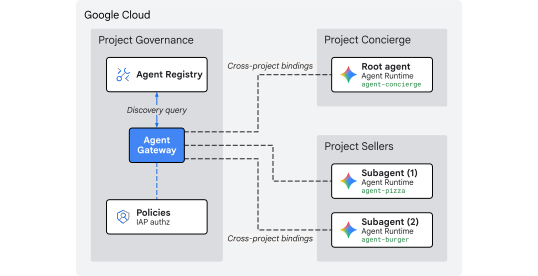
图 1. 多项目集中式治理架构
为何要采用跨项目集中式治理?
在大型企业组织中,产品团队和数据科学团队会在数十个独立的 Google Cloud 项目中构建 AI 智能体。如果让每个团队直接控制工具注册、出站流量网络路由和安全防护措施,会导致未经审核的工具泛滥、DLP 政策不一致、VPC 出站流量不受监控以及审核日志碎片化。
跨项目集中治理将政策制定与智能体执行分开:
- 中央 IT 和 SecOps 团队在单个集中式治理项目中制定安全政策、审查工具并监控出站流量。
- 产品和应用团队专注于其独立 Agent Runtime 项目中的业务逻辑,直接绑定到中央网关,而无需承担管理本地 VPC、互连或碎片化政策引擎的运营开销。
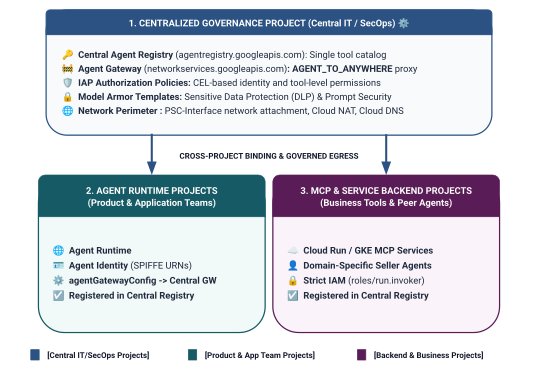
图 2. 三层式跨项目治理架构和边界
Unified Access Policies 中的两层级身份范围界定模型
当智能体通过 Central Agent Gateway 进行通信时,Identity-Aware Proxy (IAP v2) 会根据调用方的智能体身份(一种通过加密方式证明、基于 SPIFFE 的身份,会自动颁发给运行时容器),对照全局 IAM 访问权限政策来评估访问权限:
- 第 1 层:基准 Google Cloud API(通过规则 1 中的
principalSet://进行粗粒度控制):项目级出站流量授权,允许辐射项目中的所有 Agent Runtime 访问标准 Google API(aiplatform、iamcredentials、telemetry、agentregistry),以进行发现、令牌生成和推理。 - 第 2 层:业务工具和 A2A 服务(通过规则 2 和 3 中的
principal://进行精细控制):绑定到单个推理引擎实例的严格最小权限访问,通过针对特定已注册 Agent Registry 服务 (destination.agent_registry.agent.name) 的通用表达式语言 (CEL) 条件强制执行。
构建内容
PROJECT_GOVERNANCE中的集中式 Agent Gateway (centralized-agw)- 处于严格实施模式的 IAP v2 授权服务扩展程序和授权政策 (
failOpen: false) - 基础 IAM Unified Access Policies (
uap-rules.json) 和项目政策绑定 - 跨项目服务代理 IAM 权限 (
ar_agw_cross_project_sa) - 共享的中央 Google Cloud Storage (GCS) 暂存存储桶
PROJECT_SELLERS中的孤立汉堡和披萨卖家代理PROJECT_CONCIERGE中具有动态 REST 自动发现功能的采购 Concierge 智能体- 在 Central Agent Registry 中使用跨项目 mTLS 网址进行服务注册
- 动态 IAP v2 出站流量政策更新,支持实时验证和 Cloud Logging 审核
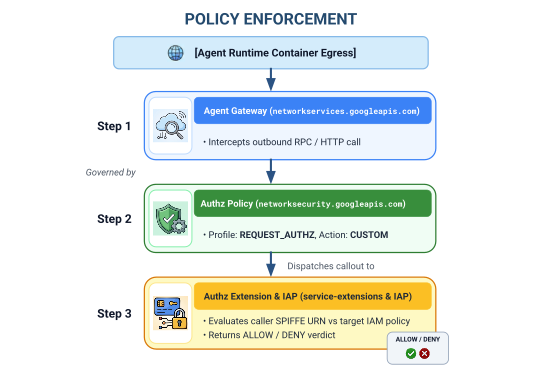
图 3. 分步实施顺序
学习内容
- 如何为集中式网关配置跨项目服务代理 IAM 权限
- 如何在多项目环境中通过中央 Agent Gateway 路由 Agent Runtime 出站流量
- 如何使用 Service Extensions (
iapPolicyVersion: "V2") 将 Agent Gateway 授权委托给 Identity-Aware Proxy (IAP v2) - 如何编写 IAM Unified Access Policies (UAP) 并将其与通用表达式语言 (CEL) 规则绑定,以管理已注册的 Agent Registry 目标 (
destination.agent_registry.*) - 如何通过针对 Agent Registry 的运行时自动发现功能消除硬编码的智能体 ID 和网址
- 如何在 Cloud Logging 中测试实际边界零信任屏蔽 (
HTTP 403 Forbidden) 并验证实时政策更新
所需条件
- 3 个启用了结算功能的 Google Cloud 项目:
PROJECT_GOVERNANCE:中央治理、网关、注册表和 IAM 访问权限政策PROJECT_CONCIERGE:采购礼宾编排智能体PROJECT_SELLERS:汉堡和披萨专卖店卖家代理
- 在所有 3 个项目中拥有
roles/owner或管理权限的 IAM 用户或服务账号 - Google Cloud 组织(用于 SPIFFE 信任域映射)
- Google Cloud Shell 或安装了
gcloudCLI、python(3.11+) 和uv的本地机器
简介部分到此结束…接下来是设置和环境部分。
2. 设置
虽然此架构跨越 3 个不同的 Google Cloud 云项目,但您可以在设置为 PROJECT_GOVERNANCE 的单个 Cloud Shell 终端中执行 100% 的终端部署命令、代码库下载和暂存操作。每个部署脚本和 gcloud 命令都会通过 CLI 标志 (--project) 明确指定适当的目标项目。
首先,访问您的 Google Cloud 云项目命令行:
- Cloud Shell(网址为
shell.cloud.google.com),或 - 安装了
gcloudCLI 的本地终端
设置项目上下文
# set terminal project context to Central Governance Project
gcloud config set project SET_YOUR_GOVERNANCE_PROJECT_ID_HERE
# login to gcloud cli
gcloud auth login
# login for application default credentials
gcloud auth application-default login
更新 gcloud CLI(推荐)
# update gcloud components
gcloud components update --quiet
设置 shell 环境变量
输入您的项目专属标识符。
# 1. Project Identifiers
export PROJECT_GOVERNANCE="SET_YOUR_GOVERNANCE_PROJECT_ID_HERE"
export PROJECT_CONCIERGE="SET_YOUR_CONCIERGE_PROJECT_ID_HERE"
export PROJECT_SELLERS="SET_YOUR_SELLERS_PROJECT_ID_HERE"
这些 shell 变量将自动派生。
# 2. Regional & Gateway Settings
export REGION="us-central1"
export AGW_NAME="centralized-agw"
export UAP_POLICY_NAME="uap-policy-${AGW_NAME}"
export UAP_BINDING_NAME="uap-binding-${AGW_NAME}"

# 3. Retrieve Project Numbers
export PROJECT_NUMBER_GOVERNANCE=$(gcloud projects describe ${PROJECT_GOVERNANCE} --format="value(projectNumber)")
export PROJECT_NUMBER_CONCIERGE=$(gcloud projects describe ${PROJECT_CONCIERGE} --format="value(projectNumber)")
export PROJECT_NUMBER_SELLERS=$(gcloud projects describe ${PROJECT_SELLERS} --format="value(projectNumber)")

# 4. Obtain Organization ID
export ORG_ID=$(gcloud projects get-ancestors ${PROJECT_GOVERNANCE} --format="value(id, type)" | grep organization | awk '{print $1}')

# 5. Set Application Default Credentials (ADC) Quota Project
gcloud auth application-default set-quota-project ${PROJECT_GOVERNANCE}

echo "Governance Project: ${PROJECT_GOVERNANCE} (${PROJECT_NUMBER_GOVERNANCE})"
echo "Concierge Project:  ${PROJECT_CONCIERGE} (${PROJECT_NUMBER_CONCIERGE})"
echo "Sellers Project:    ${PROJECT_SELLERS} (${PROJECT_NUMBER_SELLERS})"
echo "Organization ID:    ${ORG_ID}"
echo "UAP Policy Name:    ${UAP_POLICY_NAME}"
echo "UAP Binding Name:   ${UAP_BINDING_NAME}"
为配置文件创建本地目录
# create config folder
mkdir -p cfg
为 Unified Access Policies 分配 Access Policy Admin 角色
# grant Access Policy Admin and Project IAM Admin to current user in Governance Project
for ROLE in "roles/iam.accessPolicyAdmin" "roles/resourcemanager.projectIamAdmin"; do
  gcloud projects add-iam-policy-binding ${PROJECT_GOVERNANCE} \
    --member="user:$(gcloud config get-value account)" \
    --role="${ROLE}" \
    --condition=None
done
为 IAP v2 启用 Cloud Audit Data Access Logs
默认情况下,Google Cloud 会停用数据访问审核日志,以防止产生不必要的存储费用。由于 IAP v2 会以数据访问审核日志的形式发出授权决策(granted=true 和 granted=false),因此请在 PROJECT_GOVERNANCE 中为 iap.googleapis.com 启用 ADMIN_READ、DATA_READ 和 DATA_WRITE 日志记录:
# 1. export current IAM policy for PROJECT_GOVERNANCE
gcloud projects get-iam-policy ${PROJECT_GOVERNANCE} \
  --format=json > cfg/gov_iam_policy.json
# 2. append auditConfigs for iap.googleapis.com
python3 -c "
import json
with open('cfg/gov_iam_policy.json') as f:
    policy = json.load(f)
audit_configs = [c for c in policy.get('auditConfigs', []) if c.get('service') != 'iap.googleapis.com']
audit_configs.append({
    'service': 'iap.googleapis.com',
    'auditLogConfigs': [
        {'logType': 'ADMIN_READ'},
        {'logType': 'DATA_READ'},
        {'logType': 'DATA_WRITE'}
    ]
})
policy['auditConfigs'] = audit_configs
with open('cfg/gov_iam_policy.json', 'w') as f:
    json.dump(policy, f, indent=2)
"
# 3. apply updated policy
gcloud projects set-iam-policy ${PROJECT_GOVERNANCE} cfg/gov_iam_policy.json
# 4. verify auditConfigs applied
gcloud projects get-iam-policy ${PROJECT_GOVERNANCE} --format="yaml(auditConfigs)"
启用必需的 Google Cloud API
# enable google apis (agent platform & security bundle, part 1)
for PROJ in ${PROJECT_GOVERNANCE} ${PROJECT_CONCIERGE} ${PROJECT_SELLERS}; do
  gcloud services enable \
    agentregistry.googleapis.com \
    aiplatform.googleapis.com \
    apphub.googleapis.com \
    apptopology.googleapis.com \
    cloudapiregistry.googleapis.com \
    cloudtrace.googleapis.com \
    compute.googleapis.com \
    dataform.googleapis.com \
    iam.googleapis.com \
    agentidentity.googleapis.com \
    iap.googleapis.com \
    logging.googleapis.com \
    modelarmor.googleapis.com \
    monitoring.googleapis.com \
    networksecurity.googleapis.com \
    networkservices.googleapis.com \
    notebooks.googleapis.com \
    observability.googleapis.com \
    --project=${PROJ}
done
# enable google apis (agent platform bundle, part 2)
for PROJ in ${PROJECT_GOVERNANCE} ${PROJECT_CONCIERGE} ${PROJECT_SELLERS}; do
  gcloud services enable \
    securitycenter.googleapis.com \
    saasservicemgmt.googleapis.com \
    storage.googleapis.com \
    telemetry.googleapis.com \
    texttospeech.googleapis.com \
    --project=${PROJ}
done
# enable google apis (foundational & agent runtime build bundle, part 3)
for PROJ in ${PROJECT_GOVERNANCE} ${PROJECT_CONCIERGE} ${PROJECT_SELLERS}; do
  gcloud services enable \
    artifactregistry.googleapis.com \
    cloudbuild.googleapis.com \
    cloudresourcemanager.googleapis.com \
    iamcredentials.googleapis.com \
    serviceusage.googleapis.com \
    run.googleapis.com \
    orgpolicy.googleapis.com \
    --project=${PROJ}
done
验证所有项目是否已启用 API
确保所有三个项目(PROJECT_GOVERNANCE、PROJECT_CONCIERGE 和 PROJECT_SELLERS)都启用了完全相同的 API,可确保操作一致性,并防止运行时令牌生成失败、架构编目错误或遥测中断。
在 Cloud Shell 中运行以下验证脚本,以验证所有三个项目中的 API 是否一致:
# validate that all required APIs are enabled across all 3 projects
python3 - << 'EOF'
import subprocess
import os
import sys

REQUIRED_APIS = [
    "agentregistry.googleapis.com",
    "aiplatform.googleapis.com",
    "apphub.googleapis.com",
    "apptopology.googleapis.com",
    "cloudapiregistry.googleapis.com",
    "cloudtrace.googleapis.com",
    "compute.googleapis.com",
    "dataform.googleapis.com",
    "iam.googleapis.com",
    "agentidentity.googleapis.com",
    "iap.googleapis.com",
    "logging.googleapis.com",
    "modelarmor.googleapis.com",
    "monitoring.googleapis.com",
    "networksecurity.googleapis.com",
    "networkservices.googleapis.com",
    "notebooks.googleapis.com",
    "observability.googleapis.com",
    "securitycenter.googleapis.com",
    "saasservicemgmt.googleapis.com",
    "storage.googleapis.com",
    "telemetry.googleapis.com",
    "texttospeech.googleapis.com",
    "artifactregistry.googleapis.com",
    "cloudbuild.googleapis.com",
    "cloudresourcemanager.googleapis.com",
    "iamcredentials.googleapis.com",
    "serviceusage.googleapis.com",
    "run.googleapis.com",
    "orgpolicy.googleapis.com"
]

projects = {
    "GOVERNANCE": os.environ.get("PROJECT_GOVERNANCE", ""),
    "CONCIERGE": os.environ.get("PROJECT_CONCIERGE", ""),
    "SELLERS": os.environ.get("PROJECT_SELLERS", "")
}

enabled = {}
for role, proj in projects.items():
    if not proj:
        print(f"Error: Environment variable for {role} is not set.")
        sys.exit(1)
    res = subprocess.run(
        ["gcloud", "services", "list", "--enabled", f"--project={proj}", "--format=value(config.name)"],
        capture_output=True, text=True, check=True
    )
    enabled[role] = set(res.stdout.strip().splitlines())

print(f"\n{'API Name':<36} | {'GOVERNANCE':<12} | {'CONCIERGE':<12} | {'SELLERS':<12}")
print("-" * 78)

all_synced = True
for api in REQUIRED_APIS:
    g_status = "ENABLED" if api in enabled["GOVERNANCE"] else "MISSING"
    c_status = "ENABLED" if api in enabled["CONCIERGE"] else "MISSING"
    s_status = "ENABLED" if api in enabled["SELLERS"] else "MISSING"
    if "MISSING" in (g_status, c_status, s_status):
        all_synced = False
    print(f"{api:<36} | {g_status:<12} | {c_status:<12} | {s_status:<12}")

print("-" * 78)
if all_synced:
    print("✅ All 29 required APIs are ENABLED and synchronized across all three projects.\n")
else:
    print("❌ Discrepancies detected. Please re-run the enablement commands for missing services.\n")
    sys.exit(1)
EOF
验证输出示例:
您应该会看到所有 API 均已启用。
✅ All 30 required APIs are ENABLED and synchronized across all three projects.
配置组织政策
默认 Google Cloud 组织政策会强制执行限制条件,以限制 IAM v3 访问权限政策与资源 (constraints/iam.managed.disableAccessPolicyBinding) 的绑定。
通过将 enforce: false 明确设置为允许,替换项目级层的所有继承的组织政策限制。
# disable iam v3 constraint (allow v3 access policies)
gcloud org-policies set-policy /dev/stdin << EOF
name: projects/${PROJECT_NUMBER_GOVERNANCE}/policies/iam.managed.disableAccessPolicyBinding
spec:
  rules:
  - enforce: false
EOF
# verify org policy constraints on project
gcloud org-policies describe iam.managed.disableAccessPolicyBinding \
  --project=${PROJECT_GOVERNANCE} --effective
设置部分到此结束…接下来是注册核心 Google API 部分。
3. Agent Registry
注册核心 Google API 端点服务
Agent Gateway 要求在 Central Agent Registry 中注册 Google API 网址,以便配置了 agent_gateway_config 的智能体能够安全地将出站流量路由到核心 Google Cloud 后端服务(例如 aiplatform、IAM 凭证和 Telemetry)。
在 Agent Registry 中创建 core-gapi-services
# register core google api endpoints in agent registry with standard and :443 port variants
gcloud agent-registry services create core-gapi-services \
  --project=${PROJECT_GOVERNANCE} \
  --location=${REGION} \
  --display-name="gapi.core.services" \
  --description="Core Google Cloud APIs and Service Endpoints" \
  --endpoint-spec-type=no-spec \
  --interfaces=protocolBinding=JSONRPC,url=https://telemetry.googleapis.com \
  --interfaces=protocolBinding=JSONRPC,url=https://telemetry.mtls.googleapis.com \
  --interfaces=protocolBinding=JSONRPC,url=https://${REGION}-aiplatform.googleapis.com \
  --interfaces=protocolBinding=JSONRPC,url=https://${REGION}-aiplatform.googleapis.com:443 \
  --interfaces=protocolBinding=JSONRPC,url=https://${REGION}-aiplatform.mtls.googleapis.com \
  --interfaces=protocolBinding=JSONRPC,url=https://${REGION}-aiplatform.mtls.googleapis.com:443 \
  --interfaces=protocolBinding=JSONRPC,url=https://aiplatform.googleapis.com \
  --interfaces=protocolBinding=JSONRPC,url=https://aiplatform.googleapis.com:443 \
  --interfaces=protocolBinding=JSONRPC,url=https://aiplatform.mtls.googleapis.com \
  --interfaces=protocolBinding=JSONRPC,url=https://aiplatform.mtls.googleapis.com:443 \
  --interfaces=protocolBinding=JSONRPC,url=https://cloudresourcemanager.googleapis.com \
  --interfaces=protocolBinding=JSONRPC,url=https://cloudresourcemanager.googleapis.com:443 \
  --interfaces=protocolBinding=JSONRPC,url=https://cloudresourcemanager.mtls.googleapis.com \
  --interfaces=protocolBinding=JSONRPC,url=https://cloudresourcemanager.mtls.googleapis.com:443 \
  --interfaces=protocolBinding=JSONRPC,url=https://iamcredentials.googleapis.com \
  --interfaces=protocolBinding=JSONRPC,url=https://iamcredentials.googleapis.com:443 \
  --interfaces=protocolBinding=JSONRPC,url=https://iamcredentials.mtls.googleapis.com \
  --interfaces=protocolBinding=JSONRPC,url=https://iamcredentials.mtls.googleapis.com:443 \
  --interfaces=protocolBinding=JSONRPC,url=https://agentregistry.googleapis.com \
  --interfaces=protocolBinding=JSONRPC,url=https://agentregistry.mtls.googleapis.com \
  --interfaces=protocolBinding=JSONRPC,url=https://agentregistry.googleapis.com:443 \
  --interfaces=protocolBinding=JSONRPC,url=https://agentregistry.mtls.googleapis.com:443
捕获核心 API 端点资源 ID
# capture the underlying Agent Registry endpoint ID
export ENDPOINT_ID=$(gcloud agent-registry services describe core-gapi-services \
  --project=${PROJECT_GOVERNANCE} \
  --location=${REGION} \
  --format="value(registryResource)" | awk -F'/' '{print $NF}')
echo "Core APIs Endpoint ID: ${ENDPOINT_ID}"
了解智能体身份中的 principalSet 与 principal
在 Google Cloud IAM 和 Gemini Enterprise Agent Platform 中,系统会为执行代理容器颁发机器身份,这些身份使用经过加密证明的 SPIFFE URN,并由 Identity-Aware Proxy (IAP v2) 进行评估。配置 IAM Unified Access Policies 时,您可以定位到特定的单个 principal 或基于属性的 principalSet:
维度 |
|
|
IAM 语法 |
|
|
粒度 | 细粒度(实例级):标识单个特定的推理引擎容器实例。 | 粗粒度(项目级):标识共享共同项目属性的所有推理引擎。 |
URN 格式 |
|
|
Agent Platform 中的应用场景 | 第 2 层(业务工具和 A2A):授权特定编排器智能体调用目标网域工具(例如,采购 Concierge $ ightarrow$ 汉堡卖家)。 | 第 1 层级(基础基础架构):向项目中的所有代理授予对 Google Cloud API ( |
生命周期影响 | 如果代理被删除并重新创建,其新引擎 ID 需要更新 IAM 政策绑定。 | 自动应用于该项目中新部署的代理,无需额外的 IAM 更新。 |
使用 Unified Access Policies(UAP/IAP v2)进行声明式治理
在旧版 IAP v1 中,出站流量政策是使用 gcloud beta iap web add-iam-policy-binding 直接附加到各个 Agent Registry 资源的。在 IAP v2 和 Unified Access Policies 下,每个资源的绑定都会被消除,取而代之的是单一、集中的 IAM 访问权限政策 (cfg/uap-rules.json)。
core-gapi-services 的基础出站授权将在第 5 部分的 Unified Access Policy 中配置为规则 1,以确保所有代理容器在部署之前都已建立基础出站路由。
如需详细了解主账号标识符和 Workload Identity 机制的技术细节,请参阅:
核心 API 端点注册到此结束…接下来请参阅部署集中式 Agent Gateway 部分。
4. Agent Gateway
部署集中式 Agent Gateway
在 $PROJECT_GOVERNANCE 项目中以 AGENT_TO_ANYWHERE 出站流量模式部署集中式 Agent Gateway (centralized-agw)。
定义网关配置清单
创建 cfg/${AGW_NAME}.yaml 以治理出站流量:
# generate agent gateway config yaml
cat > cfg/${AGW_NAME}.yaml << EOF
name: ${AGW_NAME}
protocols:
  - MCP
googleManaged:
  governedAccessPath: AGENT_TO_ANYWHERE
registries:
  - "//agentregistry.googleapis.com/projects/${PROJECT_GOVERNANCE}/locations/${REGION}"
EOF
导入 Agent Gateway 配置
# import and create agent gateway
gcloud network-services agent-gateways import ${AGW_NAME} \
  --source="cfg/${AGW_NAME}.yaml" \
  --location=${REGION} \
  --project=${PROJECT_GOVERNANCE}
验证 Agent Gateway 详细信息
# show agent gateway status
gcloud network-services agent-gateways describe ${AGW_NAME} \
  --location=${REGION} \
  --project=${PROJECT_GOVERNANCE}
示例输出:
agentGatewayCard:
  mtlsEndpoint: projects/${AGW_TP_ID}/regions/us-central1/serviceAttachments/unitkind1-swp-mtls-psc-sa
  rootCertificates:
  - |
    -----BEGIN CERTIFICATE-----
    MIIDwzCCAqugAwIBAgITNQuWGopdOZaHdcK7r7AYFhonqDANBgkqhkiG9w0BAQsF
    ...
    -----END CERTIFICATE-----
  serviceExtensionsServiceAccount: service-${PROJ_NO}@gcp-sa-dep.iam.gserviceaccount.com
createTime: 'YYYY-MM-DDT12:34:56.789098765Z'
googleManaged:
  governedAccessPath: AGENT_TO_ANYWHERE
name: projects/${PROJECT_GOVERNANCE}/locations/us-central1/agentGateways/centralized-agw
protocols:
- MCP
registries:
- //agentregistry.googleapis.com/projects/${PROJECT_GOVERNANCE}/locations/us-central1
updateTime: 'YYYY-MM-DDT12:34:56.789098765Z'
网关部署到此结束…接下来请参阅配置授权部分。
5. 授权
配置 Agent Gateway 授权和基础 UAP
Agent Gateway 使用与 Identity-Aware Proxy (IAP v2) 统一访问权限政策 (UAP) 集成的授权政策 (networksecurity.authzPolicies) 来保护和管理出站工具和智能体流量。
授权架构概览
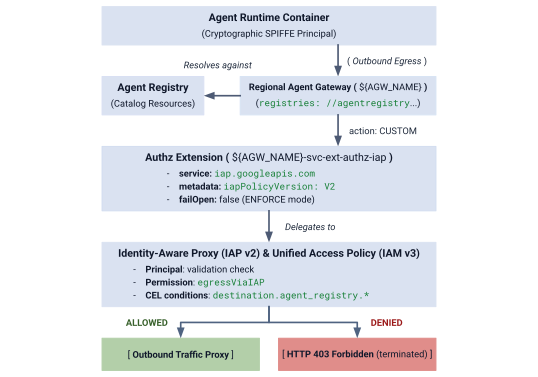
图 4. 授权架构概览
授权架构由三个互连层组成:
- IAP Service Extension (
authzExtension):配置了service: iap.googleapis.com、metadata: iapPolicyVersion: "V2"和failOpen: false的区域级资源,用于严格执行边界零信任。 - 网关授权政策 (
authzPolicy):区域级资源,通过policyProfile: REQUEST_AUTHZ和action: CUSTOM定位到您的 Agent Gateway,将授权检查路由到 IAP 授权扩展程序。 - IAM Unified Access Policies 和绑定 (
accessPolicy&policyBinding):由 IAP 评估的全球 IAM v3 资源。它会根据调用方 SPIFFE 身份和 CEL 目录条件验证通用权限iap.googleapis.com/resources.egressViaIAP。
第 1 步:创建并导入 IAP v2 Authz 扩展程序
在严格的 ENFORCE 模式下,使用 iapPolicyVersion: "V2" 和 failOpen: false 创建 Service Extension 清单:
# create authz extension config file in ENFORCE mode
cat > cfg/${AGW_NAME}-svc-ext-authz-iap.yaml << EOF
name: ${AGW_NAME}-svc-ext-authz-iap
service: iap.googleapis.com
failOpen: false
timeout: 1s
metadata:
  iapPolicyVersion: "V2"
EOF
导入授权扩展程序:
# import IAP v2 authz extension
gcloud service-extensions authz-extensions import ${AGW_NAME}-svc-ext-authz-iap \
  --source=cfg/${AGW_NAME}-svc-ext-authz-iap.yaml \
  --location=${REGION} \
  --project=${PROJECT_GOVERNANCE}
验证 Authz 扩展程序是否处于活跃状态:
# describe authz extension
gcloud service-extensions authz-extensions describe ${AGW_NAME}-svc-ext-authz-iap \
  --location=${REGION} \
  --project=${PROJECT_GOVERNANCE}
示例输出:
createTime: 'YYYY-MM-DDT12:34:56.789098765Z'
failOpen: false
metadata:
  iapPolicyVersion: V2
name: projects/${PROJECT_GOVERNANCE}/locations/us-central1/authzExtensions/centralized-agw-svc-ext-authz-iap
service: iap.googleapis.com
timeout: 1s
第 2 步:创建并导入网关授权政策
创建附加到 Agent Gateway 并将请求验证委托给 IAP Authz 扩展程序的授权政策配置:
# create authz policy manifest
cat > cfg/${AGW_NAME}-authz-policy-profile-iap.yaml << EOF
name: ${AGW_NAME}-authz-policy-profile-iap
target:
  resources:
    - "projects/${PROJECT_GOVERNANCE}/locations/${REGION}/agentGateways/${AGW_NAME}"
policyProfile: REQUEST_AUTHZ
action: CUSTOM
customProvider:
  authzExtension:
    resources:
      - "projects/${PROJECT_GOVERNANCE}/locations/${REGION}/authzExtensions/${AGW_NAME}-svc-ext-authz-iap"
EOF
导入授权政策:
# import authz policy
gcloud beta network-security authz-policies import ${AGW_NAME}-authz-policy-profile-iap \
  --source=cfg/${AGW_NAME}-authz-policy-profile-iap.yaml \
  --location=${REGION} \
  --project=${PROJECT_GOVERNANCE}
验证有效的授权政策:
# describe authz policy
gcloud beta network-security authz-policies describe ${AGW_NAME}-authz-policy-profile-iap \
  --location=${REGION} \
  --project=${PROJECT_GOVERNANCE}
第 3 步:编写初始统一访问权限政策(规则 1:核心 Google API)
创建 cfg/uap-rules.json,其中规则 1 授权三个项目 principalSet 访问 core-gapi-services:
# create initial unified access policy rules manifest
cat > cfg/uap-rules.json << EOF
[
  {
    "description": "Rule 1: Allow agent runtimes across all 3 projects to reach Core Google APIs",
    "effect": "ALLOW",
    "principals": [
      "principalSet://agents.global.org-${ORG_ID}.system.id.goog/attribute.platformContainer/aiplatform/projects/${PROJECT_NUMBER_GOVERNANCE}",
      "principalSet://agents.global.org-${ORG_ID}.system.id.goog/attribute.platformContainer/aiplatform/projects/${PROJECT_NUMBER_CONCIERGE}",
      "principalSet://agents.global.org-${ORG_ID}.system.id.goog/attribute.platformContainer/aiplatform/projects/${PROJECT_NUMBER_SELLERS}"
    ],
    "operation": {
      "permissions": [
        "iap.googleapis.com/resources.egressViaIAP"
      ]
    },
    "conditions": {
      "iap.googleapis.com": {
        "expression": \
        "destination.is_registered == true && \
         destination.agent_registry.resource_type == 'ENDPOINT' && ( \
         destination.agent_registry.endpoint.name == 'projects/${PROJECT_GOVERNANCE}/locations/${REGION}/endpoints/core-gapi-services' || \
         destination.agent_registry.endpoint.name == 'projects/${PROJECT_GOVERNANCE}/locations/${REGION}/endpoints/${ENDPOINT_ID}' || \
         destination.agent_registry.endpoint.name == 'projects/${PROJECT_NUMBER_GOVERNANCE}/locations/${REGION}/endpoints/${ENDPOINT_ID}')"
      }
    }
  }
]
EOF
第 4 步:创建并绑定 IAM 访问权限政策
创建全局 IAM 访问权限政策:
# create global IAM access policy
gcloud iam access-policies create ${UAP_POLICY_NAME} \
  --details-rules=cfg/uap-rules.json \
  --project=${PROJECT_GOVERNANCE} \
  --location=global
将访问权限政策绑定到 PROJECT_GOVERNANCE:
# bind access policy to governance project
gcloud iam policy-bindings create ${UAP_BINDING_NAME} \
  --policy="projects/${PROJECT_GOVERNANCE}/locations/global/accessPolicies/${UAP_POLICY_NAME}" \
  --target-resource="//cloudresourcemanager.googleapis.com/projects/${PROJECT_GOVERNANCE}" \
  --project=${PROJECT_GOVERNANCE} \
  --location=global
验证政策绑定是否有效:
# verify policy binding
gcloud iam policy-bindings describe ${UAP_BINDING_NAME} \
  --project=${PROJECT_GOVERNANCE} \
  --location=global
示例输出:
name: projects/${PROJECT_GOVERNANCE}/locations/global/policyBindings/uap-binding-centralized-agw
policy: projects/${PROJECT_GOVERNANCE}/locations/global/accessPolicies/uap-policy-centralized-agw
policyKind: ACCESS_POLICY
target:
  resource: //cloudresourcemanager.googleapis.com/projects/${PROJECT_GOVERNANCE}
现在,所有三个项目中的基础 Google Cloud API 出站流量都已在严格 ENFORCE 模式下获得安全授权。
网关授权设置到此结束…接下来请参阅配置跨项目 IAM 权限部分。
6. 跨项目 IAM
配置跨项目 IAM 权限
在此多项目拓扑中,Agent Runtime 位于 spoke 项目(PROJECT_CONCIERGE 和 PROJECT_SELLERS)中,而中央 Agent Gateway 和 Agent Registry 位于 PROJECT_GOVERNANCE 中。
由于 Google Cloud 云项目是隔离的安全边界,因此必须在两个操作层中明确授予跨项目访问权限:
- 控制平面(部署时):部署配置了
--agent-gateway-config的代理容器时,spoke 项目的 Agent Runtime 服务代理 (service-) 必须将该容器挂接到中央网关。我们创建了一个最小自定义角色 (@gcp-sa-aiplatform.iam.gserviceaccount.com ar_agw_cross_project_sa),用于在PROJECT_GOVERNANCE中授予networkservices.agentGateways.use、get和operations.get权限。 - 数据平面(运行时执行):
- 目录发现:Spoke 身份需要
PROJECT_GOVERNANCE中的roles/agentregistry.viewer权限,才能动态解析目标 Agent Endpoint。 - 目标调用:Concierge 智能体需要
PROJECT_SELLERS中的roles/aiplatform.user角色,才能对卖家推理引擎执行查询。
- 目录发现:Spoke 身份需要
在 PROJECT_GOVERNANCE 中创建自定义 IAM 角色
# create custom role in central governance project
gcloud iam roles create ar_agw_cross_project_sa \
  --project=${PROJECT_GOVERNANCE} \
  --title="Runtime Agent Gateway Cross-Project SA" \
  --description="Custom role for cross-project service agents to access Central Agent Gateway" \
  --permissions="networkservices.agentGateways.get,networkservices.agentGateways.use,networkservices.operations.get" \
  --stage="GA"
为 Agent Runtime 服务代理分配自定义角色
# 1. ensure aiplatform service identities are provisioned across all projects
for PROJ in ${PROJECT_GOVERNANCE} ${PROJECT_CONCIERGE} ${PROJECT_SELLERS}; do
  gcloud beta services identity create --service=aiplatform.googleapis.com --project=${PROJ}
done
# 2. derive aiplatform service agent emails
export CONCIERGE_AI_SA="service-${PROJECT_NUMBER_CONCIERGE}@gcp-sa-aiplatform.iam.gserviceaccount.com"
export CONCIERGE_RE_SA="service-${PROJECT_NUMBER_CONCIERGE}@gcp-sa-aiplatform-re.iam.gserviceaccount.com"
export CONCIERGE_COMPUTE_SA="${PROJECT_NUMBER_CONCIERGE}-compute@developer.gserviceaccount.com"

export SELLERS_AI_SA="service-${PROJECT_NUMBER_SELLERS}@gcp-sa-aiplatform.iam.gserviceaccount.com"
export SELLERS_RE_SA="service-${PROJECT_NUMBER_SELLERS}@gcp-sa-aiplatform-re.iam.gserviceaccount.com"
export SELLERS_COMPUTE_SA="${PROJECT_NUMBER_SELLERS}-compute@developer.gserviceaccount.com"
# 3. grant custom role & network viewer to Concierge and Sellers Service Agents
for SA in ${CONCIERGE_AI_SA} ${SELLERS_AI_SA}; do
  gcloud projects add-iam-policy-binding ${PROJECT_GOVERNANCE} \
    --member="serviceAccount:${SA}" \
    --role="projects/${PROJECT_GOVERNANCE}/roles/ar_agw_cross_project_sa" \
    --condition=None

  gcloud projects add-iam-policy-binding ${PROJECT_GOVERNANCE} \
    --member="serviceAccount:${SA}" \
    --role="roles/networkservices.viewer" \
    --condition=None
done
# 4. grant agent registry viewer on Governance Project for dynamic autodiscovery
for MEMBER in "serviceAccount:${CONCIERGE_AI_SA}" "serviceAccount:${CONCIERGE_RE_SA}" "serviceAccount:${CONCIERGE_COMPUTE_SA}" "serviceAccount:${SELLERS_AI_SA}" "serviceAccount:${SELLERS_RE_SA}" "serviceAccount:${SELLERS_COMPUTE_SA}" "principalSet://agents.global.org-${ORG_ID}.system.id.goog/attribute.platformContainer/aiplatform/projects/${PROJECT_NUMBER_CONCIERGE}" "principalSet://agents.global.org-${ORG_ID}.system.id.goog/attribute.platformContainer/aiplatform/projects/${PROJECT_NUMBER_SELLERS}"; do
  gcloud projects add-iam-policy-binding ${PROJECT_GOVERNANCE} \
    --member="${MEMBER}" \
    --role="roles/agentregistry.viewer" \
    --condition=None
done
# 5. grant agent project viewer on Governance Project for dynamic autodiscovery
for SA in ${CONCIERGE_COMPUTE_SA} ${CONCIERGE_AI_SA}; do
  gcloud projects add-iam-policy-binding ${PROJECT_GOVERNANCE} \
    --member="serviceAccount:${SA}" \
    --role="roles/viewer" \
    --condition=None
done
# 6. grant aitplatform user on Sellers project to Concierge for cross-project A2A invocation
for MEMBER in "serviceAccount:${CONCIERGE_AI_SA}" "serviceAccount:${CONCIERGE_RE_SA}" "serviceAccount:${CONCIERGE_COMPUTE_SA}" "principalSet://agents.global.org-${ORG_ID}.system.id.goog/attribute.platformContainer/aiplatform/projects/${PROJECT_NUMBER_CONCIERGE}"; do
  gcloud projects add-iam-policy-binding ${PROJECT_SELLERS} \
    --member="${MEMBER}" \
    --role="roles/aiplatform.user" \
    --condition=None
done
跨项目 IAM 设置到此结束…接下来进入部署卖家和 Concierge 智能体部分。
7. Agent Runtime
部署销售员和礼宾智能体
此 Codelab 使用的多智能体应用代码库和部署脚本在远程 Google Cloud GitHub 代码库中维护。以下步骤会将代码库克隆到本地,将必要的文件复制到当前工作目录结构,清理临时文件,并使用 uv 安装依赖项。
提取远程制品
# clone remote repository to temp local dir
git clone https://github.com/GoogleCloudPlatform/cloud-networking-solutions.git ./temp_agw_multiproject
# copy multi-agent application files to current working directory
cp -r temp_agw_multiproject/codelabs/agw-multiproject ./cross-project-multiagent
# remove temporary directory
rm -rf temp_agw_multiproject
# install dependencies
uv sync --directory ./cross-project-multiagent
创建共享的中央暂存存储桶
# create shared central staging bucket
gcloud storage buckets create gs://${PROJECT_GOVERNANCE}-shared-staging \
  --project=${PROJECT_GOVERNANCE} \
  --location=${REGION}
# grant cross-project read/write access to runtime service agents
gcloud storage buckets add-iam-policy-binding gs://${PROJECT_GOVERNANCE}-shared-staging \
  --member="serviceAccount:service-${PROJECT_NUMBER_CONCIERGE}@gcp-sa-aiplatform.iam.gserviceaccount.com" \
  --role="roles/storage.objectAdmin"

gcloud storage buckets add-iam-policy-binding gs://${PROJECT_GOVERNANCE}-shared-staging \
  --member="serviceAccount:service-${PROJECT_NUMBER_SELLERS}@gcp-sa-aiplatform.iam.gserviceaccount.com" \
  --role="roles/storage.objectAdmin"
跨项目 Agent Gateway 绑定的工作原理
在此步骤中,您会将卖家智能体部署到 spoke 项目 (PROJECT_SELLERS) 中,同时将其配置为通过 PROJECT_GOVERNANCE 中的中央 Agent Gateway 路由出站流量:
# !-- for example purposes -- NOT a command to execute --!
# snippet from deploy_burger.py
burger_config = {
    "staging_bucket": staging_bucket_uri,
    "gcs_dir_name": "burger_agent",
    "display_name": "burger-seller-agent-adk",
    "identity_type": "AGENT_IDENTITY",
    "agent_gateway_config": {
        "agent_to_anywhere_config": {
            "agent_gateway": f"projects/{args.governance_project}/locations/{args.region}/agentGateways/{args.gateway}"
        }
    },
}
deployed_burger = client.agent_engines.create(agent=burger_playground, config=burger_config)
由于规则 1 在我们的 Unified Access Policy 中建立得更早,因此向 Google Cloud API 发出的容器初始化请求可以通过网关顺利通过,不会受到干扰。
将汉堡和披萨卖家智能体部署到 PROJECT_SELLERS
# 1. deploy Burger Seller Agent to PROJECT_SELLERS
uv run --directory ./cross-project-multiagent python deploy_burger.py \
  --project=${PROJECT_SELLERS} \
  --region=${REGION} \
  --governance-project=${PROJECT_GOVERNANCE} \
  --gateway=projects/${PROJECT_GOVERNANCE}/locations/${REGION}/agentGateways/${AGW_NAME}
# 2. deploy Pizza Seller Agent to PROJECT_SELLERS
uv run --directory ./cross-project-multiagent python deploy_pizza.py \
  --project=${PROJECT_SELLERS} \
  --region=${REGION} \
  --governance-project=${PROJECT_GOVERNANCE} \
  --gateway=projects/${PROJECT_GOVERNANCE}/locations/${REGION}/agentGateways/${AGW_NAME}
验证卖家网关路由
# retrieve deployed seller reasoning engine IDs
export BURGER_ENGINE_ID=$(grep BURGER_SELLER_AGENT_ID cross-project-multiagent/burger_agent.env | awk -F'/' '{print $NF}')
export PIZZA_ENGINE_ID=$(grep PIZZA_SELLER_AGENT_ID cross-project-multiagent/pizza_agent.env | awk -F'/' '{print $NF}')

echo "Burger Engine ID: ${BURGER_ENGINE_ID}"
echo "Pizza Engine ID:  ${PIZZA_ENGINE_ID}"
# inspect runtime configuration for both Seller Agents
for ENGINE_ID in ${BURGER_ENGINE_ID} ${PIZZA_ENGINE_ID}; do
  curl -s -X GET "https://${REGION}-aiplatform.googleapis.com/v1beta1/projects/${PROJECT_SELLERS}/locations/${REGION}/reasoningEngines/${ENGINE_ID}" \
    -H "Authorization: Bearer $(gcloud auth application-default print-access-token)" \
    -H "Content-Type: application/json" \
    | jq '{displayName: .displayName, identityType: .spec.identityType, effectiveIdentity: .spec.effectiveIdentity, agentGatewayConfig: .spec.deploymentSpec.agentGatewayConfig}'
done
将采购 Concierge 智能体部署到 PROJECT_CONCIERGE
# deploy Purchasing Concierge to PROJECT_CONCIERGE
uv run --directory ./cross-project-multiagent python deploy_concierge_adk.py \
  --project=${PROJECT_CONCIERGE} \
  --region=${REGION} \
  --staging-bucket=gs://${PROJECT_GOVERNANCE}-shared-staging \
  --gateway-name=${AGW_NAME} \
  --gateway-project=${PROJECT_GOVERNANCE}
验证 Purchasing Gateway 路由
# retrieve Concierge engine ID
export CONCIERGE_ENGINE_ID=$(grep CONCIERGE_AGENT_ID cross-project-multiagent/concierge_agent.env | awk -F'/' '{print $NF}')
echo "Concierge Engine ID: ${CONCIERGE_ENGINE_ID}"
# inspect runtime configuration for Purchasing Concierge
curl -s -X GET "https://${REGION}-aiplatform.googleapis.com/v1beta1/projects/${PROJECT_CONCIERGE}/locations/${REGION}/reasoningEngines/${CONCIERGE_ENGINE_ID}" \
  -H "Authorization: Bearer $(gcloud auth application-default print-access-token)" \
  -H "Content-Type: application/json" \
  | jq '{displayName: .displayName, identityType: .spec.identityType, effectiveIdentity: .spec.effectiveIdentity, agentGatewayConfig: .spec.deploymentSpec.agentGatewayConfig}'
输出应显示 Concierge Agent Runtime 身份和项目,以及与治理项目 Agent Gateway 的绑定。
{
  "displayName": "purchasing-concierge-adk",
  "identityType": "AGENT_IDENTITY",
  "effectiveIdentity": "agents.global.org-${ORG_ID}.system.id.goog/resources/aiplatform/projects/${PROJECT_CONCIERGE}/locations/us-central1/reasoningEngines/${CONCIERGE_ENGINE_ID}",
  "agentGatewayConfig": {
    "agentToAnywhereConfig": {
      "agentGateway": "projects/${PROJECT_GOVERNANCE}/locations/us-central1/agentGateways/centralized-agw"
    }
  }
}
智能体部署到此结束…接下来请参阅在中央 Agent Registry 中注册智能体部分。
8. 跨项目注册表
在中央 Agent Registry 中注册代理
使用跨项目区域级 mTLS 端点和数字项目编号,在 PROJECT_GOVERNANCE 的中央代理注册表中注册所有三个代理。
在 Agent Registry 中将服务注册为非 A2A 智能体
# 1. register Burger Seller Agent
gcloud agent-registry services create burger-seller-agent \
  --project=${PROJECT_GOVERNANCE} \
  --location=${REGION} \
  --display-name="Burger Seller Agent" \
  --description="Specialist agent that sells burgers and fries" \
  --agent-spec-type=no-spec \
  --interfaces=protocolBinding=JSONRPC,url=https://${REGION}-aiplatform.googleapis.com/v1/projects/${PROJECT_NUMBER_SELLERS}/locations/${REGION}/reasoningEngines/${BURGER_ENGINE_ID}:query \
  --interfaces=protocolBinding=JSONRPC,url=https://${REGION}-aiplatform.googleapis.com/v1beta1/projects/${PROJECT_NUMBER_SELLERS}/locations/${REGION}/reasoningEngines/${BURGER_ENGINE_ID}:query \
  --interfaces=protocolBinding=JSONRPC,url=https://${REGION}-aiplatform.googleapis.com:443/v1/projects/${PROJECT_NUMBER_SELLERS}/locations/${REGION}/reasoningEngines/${BURGER_ENGINE_ID}:query \
  --interfaces=protocolBinding=JSONRPC,url=https://${REGION}-aiplatform.googleapis.com:443/v1beta1/projects/${PROJECT_NUMBER_SELLERS}/locations/${REGION}/reasoningEngines/${BURGER_ENGINE_ID}:query \
  --interfaces=protocolBinding=JSONRPC,url=https://${REGION}-aiplatform.mtls.googleapis.com/v1/projects/${PROJECT_NUMBER_SELLERS}/locations/${REGION}/reasoningEngines/${BURGER_ENGINE_ID}:query \
  --interfaces=protocolBinding=JSONRPC,url=https://${REGION}-aiplatform.mtls.googleapis.com/v1beta1/projects/${PROJECT_NUMBER_SELLERS}/locations/${REGION}/reasoningEngines/${BURGER_ENGINE_ID}:query \
  --interfaces=protocolBinding=JSONRPC,url=https://${REGION}-aiplatform.mtls.googleapis.com:443/v1/projects/${PROJECT_NUMBER_SELLERS}/locations/${REGION}/reasoningEngines/${BURGER_ENGINE_ID}:query \
  --interfaces=protocolBinding=JSONRPC,url=https://${REGION}-aiplatform.mtls.googleapis.com:443/v1beta1/projects/${PROJECT_NUMBER_SELLERS}/locations/${REGION}/reasoningEngines/${BURGER_ENGINE_ID}:query
# 2. register Pizza Seller Agent
gcloud agent-registry services create pizza-seller-agent \
  --project=${PROJECT_GOVERNANCE} \
  --location=${REGION} \
  --display-name="Pizza Seller Agent" \
  --description="Specialist agent that sells pizzas and pasta" \
  --agent-spec-type=no-spec \
  --interfaces=protocolBinding=JSONRPC,url=https://${REGION}-aiplatform.googleapis.com/v1/projects/${PROJECT_NUMBER_SELLERS}/locations/${REGION}/reasoningEngines/${PIZZA_ENGINE_ID}:query \
  --interfaces=protocolBinding=JSONRPC,url=https://${REGION}-aiplatform.googleapis.com/v1beta1/projects/${PROJECT_NUMBER_SELLERS}/locations/${REGION}/reasoningEngines/${PIZZA_ENGINE_ID}:query \
  --interfaces=protocolBinding=JSONRPC,url=https://${REGION}-aiplatform.googleapis.com:443/v1/projects/${PROJECT_NUMBER_SELLERS}/locations/${REGION}/reasoningEngines/${PIZZA_ENGINE_ID}:query \
  --interfaces=protocolBinding=JSONRPC,url=https://${REGION}-aiplatform.googleapis.com:443/v1beta1/projects/${PROJECT_NUMBER_SELLERS}/locations/${REGION}/reasoningEngines/${PIZZA_ENGINE_ID}:query \
  --interfaces=protocolBinding=JSONRPC,url=https://${REGION}-aiplatform.mtls.googleapis.com/v1/projects/${PROJECT_NUMBER_SELLERS}/locations/${REGION}/reasoningEngines/${PIZZA_ENGINE_ID}:query \
  --interfaces=protocolBinding=JSONRPC,url=https://${REGION}-aiplatform.mtls.googleapis.com/v1beta1/projects/${PROJECT_NUMBER_SELLERS}/locations/${REGION}/reasoningEngines/${PIZZA_ENGINE_ID}:query \
  --interfaces=protocolBinding=JSONRPC,url=https://${REGION}-aiplatform.mtls.googleapis.com:443/v1/projects/${PROJECT_NUMBER_SELLERS}/locations/${REGION}/reasoningEngines/${PIZZA_ENGINE_ID}:query \
  --interfaces=protocolBinding=JSONRPC,url=https://${REGION}-aiplatform.mtls.googleapis.com:443/v1beta1/projects/${PROJECT_NUMBER_SELLERS}/locations/${REGION}/reasoningEngines/${PIZZA_ENGINE_ID}:query
# 3. register Purchasing Concierge Agent
gcloud agent-registry services create purchasing-concierge-adk \
  --project=${PROJECT_GOVERNANCE} \
  --location=${REGION} \
  --display-name="Purchasing Concierge Agent" \
  --description="Orchestrator concierge agent that routes purchasing requests" \
  --agent-spec-type=no-spec \
  --interfaces=protocolBinding=JSONRPC,url=https://${REGION}-aiplatform.googleapis.com/v1/projects/${PROJECT_NUMBER_CONCIERGE}/locations/${REGION}/reasoningEngines/${CONCIERGE_ENGINE_ID}:query \
  --interfaces=protocolBinding=JSONRPC,url=https://${REGION}-aiplatform.googleapis.com/v1beta1/projects/${PROJECT_NUMBER_CONCIERGE}/locations/${REGION}/reasoningEngines/${CONCIERGE_ENGINE_ID}:query \
  --interfaces=protocolBinding=JSONRPC,url=https://${REGION}-aiplatform.googleapis.com:443/v1/projects/${PROJECT_NUMBER_CONCIERGE}/locations/${REGION}/reasoningEngines/${CONCIERGE_ENGINE_ID}:query \
  --interfaces=protocolBinding=JSONRPC,url=https://${REGION}-aiplatform.googleapis.com:443/v1beta1/projects/${PROJECT_NUMBER_CONCIERGE}/locations/${REGION}/reasoningEngines/${CONCIERGE_ENGINE_ID}:query \
  --interfaces=protocolBinding=JSONRPC,url=https://${REGION}-aiplatform.mtls.googleapis.com/v1/projects/${PROJECT_NUMBER_CONCIERGE}/locations/${REGION}/reasoningEngines/${CONCIERGE_ENGINE_ID}:query \
  --interfaces=protocolBinding=JSONRPC,url=https://${REGION}-aiplatform.mtls.googleapis.com/v1beta1/projects/${PROJECT_NUMBER_CONCIERGE}/locations/${REGION}/reasoningEngines/${CONCIERGE_ENGINE_ID}:query \
  --interfaces=protocolBinding=JSONRPC,url=https://${REGION}-aiplatform.mtls.googleapis.com:443/v1/projects/${PROJECT_NUMBER_CONCIERGE}/locations/${REGION}/reasoningEngines/${CONCIERGE_ENGINE_ID}:query \
  --interfaces=protocolBinding=JSONRPC,url=https://${REGION}-aiplatform.mtls.googleapis.com:443/v1beta1/projects/${PROJECT_NUMBER_CONCIERGE}/locations/${REGION}/reasoningEngines/${CONCIERGE_ENGINE_ID}:query
捕获底层 Agent Registry ID
# capture underlying Agent Registry Agent UUIDs
export BURGER_AGENT_ID=$(gcloud agent-registry services describe burger-seller-agent --project=${PROJECT_GOVERNANCE} --location=${REGION} --format="value(registryResource)" | awk -F'/' '{print $NF}')
export PIZZA_AGENT_ID=$(gcloud agent-registry services describe pizza-seller-agent --project=${PROJECT_GOVERNANCE} --location=${REGION} --format="value(registryResource)" | awk -F'/' '{print $NF}')
export CONCIERGE_AGENT_ID=$(gcloud agent-registry services describe purchasing-concierge-adk --project=${PROJECT_GOVERNANCE} --location=${REGION} --format="value(registryResource)" | awk -F'/' '{print $NF}')

echo "Burger Agent ID:    ${BURGER_AGENT_ID}"
echo "Pizza Agent ID:     ${PIZZA_AGENT_ID}"
echo "Concierge Agent ID: ${CONCIERGE_AGENT_ID}"
Registry 配置到此结束…接下来请参阅配置 A2A 出站流量政策部分。
9. UAP 政策
在 Unified Access Policy 中配置 A2A 出站流量政策
在 Agent Gateway 的默认拒绝架构下,采用严格的强制执行模式:
- 规则 1(基准 Google Cloud API):允许所有 3 个项目中的代理容器访问
core-gapi-services。 - 规则 2(汉堡卖家智能体:允许):专门允许采购礼宾智能体实例调用汉堡卖家智能体。
- Pizza Seller Agent(默认拒绝):有意将其排除在政策规则之外。在
ENFORCE模式 (failOpen: false) 下,Concierge 尝试调用 Pizza Seller 的任何操作都会在网关边界立即终止,并返回HTTP 403 Forbidden。
制定 Concierge 智能体身份
# formulate the exact SPIFFE machine identity for the Concierge Agent
export CONCIERGE_SPIFFE_PRINCIPAL="principal://agents.global.org-${ORG_ID}.system.id.goog/resources/aiplatform/projects/${PROJECT_NUMBER_CONCIERGE}/locations/${REGION}/reasoningEngines/${CONCIERGE_ENGINE_ID}"
echo "Concierge SPIFFE Principal: ${CONCIERGE_SPIFFE_PRINCIPAL}"
使用规则 1 和 2 更新清单
如需安全地更新访问权限政策而不覆盖现有规则,请定义包含规则 1(核心 Google API)和规则 2(Burger Seller Agent)的完整合并清单:
# create consolidated policy manifest with Rule 1 and Rule 2
cat > cfg/uap-rules-consolidated.json << EOF
[
  {
    "description": "Rule 1: Allow agent runtimes across all 3 projects to reach Core Google APIs",
    "effect": "ALLOW",
    "principals": [
      "principalSet://agents.global.org-${ORG_ID}.system.id.goog/attribute.platformContainer/aiplatform/projects/${PROJECT_NUMBER_GOVERNANCE}",
      "principalSet://agents.global.org-${ORG_ID}.system.id.goog/attribute.platformContainer/aiplatform/projects/${PROJECT_NUMBER_CONCIERGE}",
      "principalSet://agents.global.org-${ORG_ID}.system.id.goog/attribute.platformContainer/aiplatform/projects/${PROJECT_NUMBER_SELLERS}"
    ],
    "operation": {
      "permissions": [
        "iap.googleapis.com/resources.egressViaIAP"
      ]
    },
    "conditions": {
      "iap.googleapis.com": {
        "expression": \
        "destination.is_registered == true && \
         destination.agent_registry.resource_type == 'ENDPOINT' && ( \
         destination.agent_registry.endpoint.name == 'projects/${PROJECT_GOVERNANCE}/locations/${REGION}/endpoints/core-gapi-services' || \
         destination.agent_registry.endpoint.name == 'projects/${PROJECT_GOVERNANCE}/locations/${REGION}/endpoints/${ENDPOINT_ID}' || \
         destination.agent_registry.endpoint.name == 'projects/${PROJECT_NUMBER_GOVERNANCE}/locations/${REGION}/endpoints/${ENDPOINT_ID}')"
      }
    }
  },
  {
    "description": "Rule 2: Allow Purchasing Concierge to invoke Burger Seller Agent via Central Gateway",
    "effect": "ALLOW",
    "principals": [
      "${CONCIERGE_SPIFFE_PRINCIPAL}",
      "principal://agents.global.org-${ORG_ID}.system.id.goog/attribute.agentIdentity/projects/${PROJECT_NUMBER_CONCIERGE}/locations/${REGION}/reasoningEngines/${CONCIERGE_ENGINE_ID}",
      "principalSet://agents.global.org-${ORG_ID}.system.id.goog/attribute.agentIdentity/projects/${PROJECT_NUMBER_CONCIERGE}/locations/${REGION}/reasoningEngines/${CONCIERGE_ENGINE_ID}"
    ],
    "operation": {
      "permissions": [
        "iap.googleapis.com/resources.egressViaIAP"
      ]
    },
    "conditions": {
      "iap.googleapis.com": {
        "expression": \
        "destination.is_registered == true && \
         destination.agent_registry.resource_type == 'AGENT' && ( \
         destination.agent_registry.agent.name == 'projects/${PROJECT_GOVERNANCE}/locations/${REGION}/agents/burger-seller-agent' || \
         destination.agent_registry.agent.name == 'projects/${PROJECT_GOVERNANCE}/locations/${REGION}/agents/${BURGER_AGENT_ID}' || \
         destination.agent_registry.agent.name == 'projects/${PROJECT_NUMBER_GOVERNANCE}/locations/${REGION}/agents/${BURGER_AGENT_ID}')"
      }
    }
  }
]
EOF
应用更新后的访问权限政策
使用 --details-rules 以声明方式应用合并规则清单:
# update IAM access policy with consolidated manifest (Rule 1 + Rule 2)
gcloud iam access-policies update ${UAP_POLICY_NAME} \
  --details-rules=cfg/uap-rules-consolidated.json \
  --project=${PROJECT_GOVERNANCE} \
  --location=global
验证 IAM 访问权限政策详情
# inspect updated access policy
gcloud iam access-policies describe ${UAP_POLICY_NAME} \
  --project=${PROJECT_GOVERNANCE} \
  --location=global
示例输出:
details:
  rules:
  - conditions:
      iap.googleapis.com:
        expression: destination.is_registered == true && destination.agent_registry.resource_type
          == 'ENDPOINT' && (destination.agent_registry.endpoint.name == 'projects/${PROJECT_GOVERNANCE}/locations/us-central1/endpoints/core-gapi-services'
          || destination.agent_registry.endpoint.name == 'projects/${PROJECT_NUMBER_GOVERNANCE}/locations/us-central1/endpoints/${ENDPOINT_ID}')
    description: 'Rule 1: Allow agent runtimes across all 3 projects to reach Core
      Google APIs'
    effect: ALLOW
    operation:
      permissions:
      - iap.googleapis.com/resources.egressViaIAP
    principals:
    - principalSet://agents.global.org-${ORG_ID}.system.id.goog/attribute.platformContainer/aiplatform/projects/${PROJECT_NUMBER_GOVERNANCE}
    - principalSet://agents.global.org-${ORG_ID}.system.id.goog/attribute.platformContainer/aiplatform/projects/${PROJECT_NUMBER_CONCIERGE}
    - principalSet://agents.global.org-${ORG_ID}.system.id.goog/attribute.platformContainer/aiplatform/projects/${PROJECT_NUMBER_SELLERS}
  - conditions:
      iap.googleapis.com:
        expression: (destination.is_registered == true) && (destination.agent_registry.resource_type
          == 'AGENT') && (destination.agent_registry.agent.name == 'projects/${PROJECT_GOVERNANCE}/locations/us-central1/agents/burger-seller-agent'
          || destination.agent_registry.agent.name == 'projects/${PROJECT_NUMBER_GOVERNANCE}/locations/us-central1/agents/${BURGER_AGENT_ID}')
    description: 'Rule 2: Allow Purchasing Concierge to invoke Burger Seller Agent
      via Central Gateway'
    effect: ALLOW
    operation:
      permissions:
      - iap.googleapis.com/resources.egressViaIAP
    principals:
    - principal://agents.global.org-${ORG_ID}.system.id.goog/resources/aiplatform/projects/${PROJECT_NUMBER_CONCIERGE}/locations/us-central1/reasoningEngines/${CONCIERGE_ENGINE_ID}
name: projects/${PROJECT_GOVERNANCE}/locations/global/accessPolicies/uap-policy-centralized-agw
政策设置到此结束…接下来进入测试和验证治理政策部分。
10. 验证政策
通过 Cloud Logging 测试和验证治理政策
在本部分中,您将在 Agent Runtime AI 工坊中测试跨项目智能体间 (A2A) 互动,观察在严格 ENFORCE 模式下实际边界 HTTP 403 Forbidden 屏蔽情况,实时修改 Unified Access Policies,并验证订单是否立即获得批准。
第 1 步:在 PROJECT_CONCIERGE 中打开 Agent Runtime AI 工坊
- 打开 Google Cloud 控制台。
- 在顶部的项目选择器栏中,切换到
PROJECT_CONCIERGE。 - 在导航菜单中,依次前往 Agent Platform > 代理 > 部署。
- 点击
purchasing-concierge-adk。 - 选择测试场,在屏幕右侧打开互动式对话界面。
第 2 步:测试汉堡订单(规则 2 匹配 -> 200 OK)
在 Playground 对话窗口中,提交以下订单提示:
I would like 10 Classic Cheeseburgers. Place this order now.
如果需要确认回复,请提交以下回复:
Confirmed, please place the order.
或者,您也可以通过 Cloud Shell/终端以编程方式进行测试:
uv run --directory ./cross-project-multiagent python -c "
import vertexai
from vertexai.preview import reasoning_engines
vertexai.init(project='${PROJECT_CONCIERGE}', location='${REGION}')
agent = reasoning_engines.ReasoningEngine('projects/${PROJECT_CONCIERGE}/locations/${REGION}/reasoningEngines/${CONCIERGE_ENGINE_ID}')
response = agent.query(input={'message': 'I would like 22 Spicy Cajun Burgers please. Place this order now.'})
print(response)
"
如果需要确认响应,请使用以下命令:
uv run --directory ./cross-project-multiagent python -c "
import vertexai
from vertexai.preview import reasoning_engines
vertexai.init(project='${PROJECT_CONCIERGE}', location='${REGION}')
agent = reasoning_engines.ReasoningEngine('projects/${PROJECT_CONCIERGE}/locations/${REGION}/reasoningEngines/${CONCIERGE_ENGINE_ID}')
response = agent.query(input='Yes please place the order now.')
print(response['text'])
"
幕后会发生些什么:
- 动态发现:在会话启动期间,Purchasing Concierge 查询了
PROJECT_GOVERNANCE中的 Central Agent Registry(通过core-gapi-services,经由规则 1 授权的 Agent Gateway),以发现burger-seller-agent的区域 mTLS 端点。 - 意图解析和 A2A 调用:Purchasing Concierge 中的 Gemini 解析订餐意图,并通过向
https://${REGION}-aiplatform.mtls.googleapis.com/.../reasoningEngines/${BURGER_ENGINE_ID}发送出站 RPC 来调用 Burger Seller Agent。 - 网关拦截和 SPIFFE 传播:出站流量由
agent_gateway_config捕获并定向到PROJECT_GOVERNANCE中的中央 Agent Gateway,并携带 Concierge 的加密 SPIFFE 身份 (principal://...)。 - IAP v2 政策评估:Central Agent Gateway 调用 IAP 授权扩展程序 (
authzExtension)。IAP v2 评估 IAM Unified Access Policy 中的规则 2。由于调用方与${CONCIERGE_SPIFFE_PRINCIPAL}匹配,目标与burger-seller-agent匹配,因此 IAP 会返回ALLOW(granted: true)。 - 跨项目执行:Agent Gateway 将已获授权的请求跨项目代理到
PROJECT_SELLERS,由 Burger Seller 推理引擎处理订单并返回确认信息。
预期响应:
Your order for 10 Classic Cheeseburger(s) has been placed!
Here is a summary of your order:
- 10x Classic Cheeseburger @ IDR 85,000/each = IDR 850,000

Total: IDR 850,000
Your Order ID is: e8f9c732-f347-4cc4-acff-cfe09ccbeddd
第 3 步:检查 Agent Gateway 和 IAP v2 审核日志(HTTP 200/ALLOWED)
在 PROJECT_GOVERNANCE 中查询 Agent Gateway 请求日志:
# query Agent Gateway logs for successful 200 OK requests
gcloud logging read "
  logName=\"projects/${PROJECT_GOVERNANCE}/logs/networkservices.googleapis.com%2Fgateway_requests\"
  AND jsonPayload.authzPolicyInfo.result=\"ALLOWED\"
" \
  --project="${PROJECT_GOVERNANCE}" \
  --limit=10 \
  --format="table(
    timestamp.date('%H:%M:%S'):label=TIME,
    httpRequest.requestMethod:label=METHOD,
    httpRequest.status:label=STATUS,
    jsonPayload.authzPolicyInfo.result:label=AUTHZ,
    httpRequest.requestUrl:label=URL
  )"
日志应捕获来自两个 spoke 项目(PROJECT_CONCIERGE 和 PROJECT_SELLERS)的出站流量,其中包含 Gemini 推理调用 (generateContent)、Cloud Trace 遥测 (/v1/traces) 和 IAM 凭证查找的出站字段,这些流量会被规则 1 (core-gapi-services) 透明地拦截和授权。
查询 IAP v2 Cloud Audit 数据访问日志,以验证政策版本 POLICY_VERSION_V2:
# query IAP v2 audit logs with shortened principal and resource fields
gcloud logging read "
  logName=\"projects/${PROJECT_GOVERNANCE}/logs/cloudaudit.googleapis.com%2Fdata_access\"
  AND protoPayload.serviceName=\"iap.googleapis.com\"
" \
  --project="${PROJECT_GOVERNANCE}" \
  --limit=5 \
  --format="table(
    timestamp.date('%H:%M:%S'):label=TIME,
    protoPayload.authenticationInfo.principalSubject.sub('\.global\..*\/reasoningEngines\/', '.[...]/reasoningEngines/'):label=CALLER,
    protoPayload.authorizationInfo[0].granted:label=GRANTED,
    protoPayload.metadata.destination.agent_registry.resource_type.basename():label=TYPE,
    protoPayload.metadata.destination.agent_registry.resource_id.basename():label=RESOURCE_ID,
    protoPayload.authorizationInfo[0].permission.basename():label=PERMISSION
  )"
示例输出:
TIME      CALLER                                                            GRANTED  TYPE      RESOURCE_ID     PERMISSION
HH:MM:SS  principal://agents.[...]/reasoningEngines/${CONCIERGE_ENGINE_ID}  True     Endpoint  ${ENDPOINT_ID}  resources.egressViaIAP
HH:MM:SS  principal://agents.[...]/reasoningEngines/${BURGER_ENGINE_ID}     True     Endpoint  ${ENDPOINT_ID}  resources.egressViaIAP
HH:MM:SS  principal://agents.[...]/reasoningEngines/${CONCIERGE_ENGINE_ID}  True     Endpoint  ${ENDPOINT_ID}  resources.egressViaIAP
HH:MM:SS  principal://agents.[...]/reasoningEngines/${BURGER_ENGINE_ID}     True     Endpoint  ${ENDPOINT_ID}  resources.egressViaIAP
第 4 步:测试披萨订单(默认拒绝 -> HTTP 403 Forbidden 强制执行)
在同一个 Playground 对话窗口中,提交以下披萨订单提示:
I would like 10 BBQ Chicken Pizzas. Place this order now.
如果需要确认回复,请提交以下回复:
Confirmed, please place the order.
或者,您也可以通过 Cloud Shell/终端以编程方式进行测试:
uv run --directory ./cross-project-multiagent python -c "
import vertexai
from vertexai.preview import reasoning_engines
vertexai.init(project='${PROJECT_CONCIERGE}', location='${REGION}')
agent = reasoning_engines.ReasoningEngine('projects/${PROJECT_CONCIERGE}/locations/${REGION}/reasoningEngines/${CONCIERGE_ENGINE_ID}')
response = agent.query(input='I would like 8 Hawaiian pizzas, please. Place this order now.')
print(response)
"
如果需要确认响应,请使用以下命令:
uv run --directory ./cross-project-multiagent python -c "
import vertexai
from vertexai.preview import reasoning_engines
vertexai.init(project='${PROJECT_CONCIERGE}', location='${REGION}')
agent = reasoning_engines.ReasoningEngine('projects/${PROJECT_CONCIERGE}/locations/${REGION}/reasoningEngines/${CONCIERGE_ENGINE_ID}')
response = agent.query(input='Yes please place the order now.')
print(response['text'])
"
预期响应:
I apologize, but I am unable to process that request at the moment. It seems
there was an issue connecting to the pizza seller agent. Please try again later.
幕后会发生些什么:
- 动态发现:Purchasing Concierge 在启动期间从 Central Agent Registry 解析了
pizza-seller-agent端点。 - 意图解析和 A2A 调用:采购 Concierge 中的 Gemini 尝试将披萨订单请求分派到
PROJECT_SELLERS中的披萨卖家端点。 - 网关拦截:出站 RPC 被
agent_gateway_config捕获并定向到 Central Agent Gateway。 - IAP v2 政策评估(默认拒绝):中央 Agent Gateway 调用 IAP v2。由于 Unified Access Policies 中没有规则与
pizza-seller-agent匹配,因此 IAP 会返回DENY(granted: false)。 - 严格边界屏蔽:由于授权扩展程序处于强制执行模式 (
failOpen: false),中央代理网关会立即终止出站连接并返回HTTP 403 Forbidden。流量永远不会离开网关,也不会到达PROJECT_SELLERS。
第 5 步:检查 Agent Gateway 日志中是否有被屏蔽的请求(HTTP 403/DENIED)
# query Agent Gateway logs for blocked 403 requests
gcloud logging read "
  logName=\"projects/${PROJECT_GOVERNANCE}/logs/networkservices.googleapis.com%2Fgateway_requests\"
  AND httpRequest.status=403
" \
  --project="${PROJECT_GOVERNANCE}" \
  --limit=5 \
  --format="table(
    timestamp.date('%H:%M:%S'):label=TIME,
    httpRequest.requestMethod:label=METHOD,
    httpRequest.status:label=STATUS,
    jsonPayload.authzPolicyInfo.result:label=AUTHZ,
    httpRequest.requestUrl:label=URL
  )"
示例拒绝日志输出:
TIME      METHOD  STATUS  AUTHZ   URL
HH:MM:SS  POST    403     DENIED  https://us-central1-aiplatform.mtls.googleapis.com/v1beta1/projects/${PROJECT_SELLERS}/locations/us-central1/reasoningEngines/${PIZZA_ENGINE_ID}:query
查询 IAP v2 数据访问审核日志,查找拒绝决策:
# query IAP v2 audit logs with shortened principal and resource fields
gcloud logging read "
  logName=\"projects/${PROJECT_GOVERNANCE}/logs/cloudaudit.googleapis.com%2Fdata_access\"
  AND protoPayload.serviceName=\"iap.googleapis.com\"
" \
  --project="${PROJECT_GOVERNANCE}" \
  --limit=5 \
  --format="table(
    timestamp.date('%H:%M:%S'):label=TIME,
    protoPayload.authenticationInfo.principalSubject.sub('\.global\..*\/reasoningEngines\/', '.[...]/reasoningEngines/'):label=CALLER,
    protoPayload.authorizationInfo[0].granted:label=GRANTED,
    protoPayload.metadata.destination.agent_registry.resource_type.basename():label=TYPE,
    protoPayload.metadata.destination.agent_registry.resource_id.basename():label=RESOURCE_ID,
    protoPayload.authorizationInfo[0].permission.basename():label=PERMISSION
  )"
拒绝审核日志输出示例:
TIME      CALLER                                                            GRANTED  TYPE      RESOURCE_ID     PERMISSION
HH:MM:SS  principal://agents.[...]/reasoningEngines/${PIZZA_ENGINE_ID}      True     Endpoint  ${REGISTRY_ID}  resources.egressViaIAP
HH:MM:SS  principal://agents.[...]/reasoningEngines/${PIZZA_ENGINE_ID}      True     Endpoint  ${REGISTRY_ID}  resources.egressViaIAP
HH:MM:SS  principal://agents.[...]/reasoningEngines/${CONCIERGE_ENGINE_ID}  False    Agent     ${REGISTRY_ID}  resources.egressViaIAP
HH:MM:SS  principal://agents.[...]/reasoningEngines/${PIZZA_ENGINE_ID}      True     Endpoint  ${REGISTRY_ID}  resources.egressViaIAP
第 6 步:动态授予 Pizza Agent 出站流量访问权限
创建新的 cfg/uap-rules-update-3.json,以包含规则 1(核心 API)、规则 2(汉堡卖家代理),以及现在的规则 3(披萨卖家代理)
# create addendum to update policy manifest with Rule 3 for Pizza Agent
cat > cfg/uap-rules-update-3.json << EOF
[
  {
    "description": "Rule 3: Allow Purchasing Concierge to invoke Pizza Seller Agent via Central Gateway",
    "effect": "ALLOW",
    "principals": [
      "${CONCIERGE_SPIFFE_PRINCIPAL}"
    ],
    "operation": {
      "permissions": [
        "iap.googleapis.com/resources.egressViaIAP"
      ]
    },
    "conditions": {
      "iap.googleapis.com": {
        "expression": \
        "destination.is_registered == true && \
         destination.agent_registry.resource_type == 'AGENT' && ( \
         destination.agent_registry.agent.name == 'projects/${PROJECT_GOVERNANCE}/locations/${REGION}/agents/pizza-seller-agent' || \
         destination.agent_registry.agent.name == 'projects/${PROJECT_GOVERNANCE}/locations/${REGION}/agents/${PIZZA_AGENT_ID}' || \
         destination.agent_registry.agent.name == 'projects/${PROJECT_NUMBER_GOVERNANCE}/locations/${REGION}/agents/${PIZZA_AGENT_ID}')"
      }
    }
  }
]
EOF
实时应用政策更新:
# update IAM access policy with Pizza rule
gcloud iam access-policies update ${UAP_POLICY_NAME} \
  --add-details-rules=cfg/uap-rules-update-3.json \
  --project=${PROJECT_GOVERNANCE} \
  --location=global
第 7 步:再次查询 Pizza Agent(立即返回 200 OK 成功响应)
在 Playground 对话窗口中,重新提交披萨订单提示:
I would like 10 BBQ Chicken Pizzas. Place this order now.
如果需要确认回复,请提交以下回复:
Confirmed, please place the order.
或者,您也可以通过 Cloud Shell/终端以编程方式进行测试:
uv run --directory ./cross-project-multiagent python -c "
import vertexai
from vertexai.preview import reasoning_engines
vertexai.init(project='${PROJECT_CONCIERGE}', location='${REGION}')
agent = reasoning_engines.ReasoningEngine('projects/${PROJECT_CONCIERGE}/locations/${REGION}/reasoningEngines/${CONCIERGE_ENGINE_ID}')
response = agent.query(input='I would like 11 Veggie pizzas, please. Place this order now.')
print(response)
"
如果需要确认响应,请使用以下命令:
uv run --directory ./cross-project-multiagent python -c "
import vertexai
from vertexai.preview import reasoning_engines
vertexai.init(project='${PROJECT_CONCIERGE}', location='${REGION}')
agent = reasoning_engines.ReasoningEngine('projects/${PROJECT_CONCIERGE}/locations/${REGION}/reasoningEngines/${CONCIERGE_ENGINE_ID}')
response = agent.query(input='Yes please place the order now.')
print(response['text'])
"
预期响应:
Your order has been placed!

**Order ID:** 8d6c13d7-31dc-4d80-b6a7-80d1e50b6411

**Order Details:**
*   10 x BBQ Chicken Pizza @ IDR 130,000 each = IDR 1,300,000

**Total: IDR 1,300,000**
幕后会发生些什么:
- 动态政策刷新:更新 IAM Unified Access Policies 后,更改会立即在 IAP 评估引擎中生效,无需停机,也无需重新部署任何容器。
- A2A 调用:Concierge 通过中央 Agent Gateway 分派请求。
- IAP v2 政策评估(批准):IAP v2 匹配规则 3,验证调用方身份和目标 CEL 表达式,并返回
ALLOW(granted: true)。 - 跨项目执行:Central Agent Gateway 将已获授权的流量代理到
PROJECT_SELLERS,由 Pizza Seller 处理订单。
第 8 步:检查 Agent Gateway 日志,查看已获准的披萨请求
# query Agent Gateway logs for successful 200 OK requests
gcloud logging read "
  logName=\"projects/${PROJECT_GOVERNANCE}/logs/networkservices.googleapis.com%2Fgateway_requests\"
  AND jsonPayload.authzPolicyInfo.result=\"ALLOWED\"
" \
  --project="${PROJECT_GOVERNANCE}" \
  --limit=10 \
  --format="table(
    timestamp.date('%H:%M:%S'):label=TIME,
    httpRequest.requestMethod:label=METHOD,
    httpRequest.status:label=STATUS,
    jsonPayload.authzPolicyInfo.result:label=AUTHZ,
    httpRequest.requestUrl:label=URL
  )"
授权日志输出示例:
TIME      METHOD  STATUS  AUTHZ    URL
HH:MM:SS  POST    200     ALLOWED  https://aiplatform.mtls.googleapis.com/v1beta1/projects/${PROJECT_SELLERS}/locations/global/publishers/google/models/gemini-3.5-flash:generateContent
HH:MM:SS  POST    200     ALLOWED  https://us-central1-aiplatform.mtls.googleapis.com/v1beta1/projects/${PROJECT_SELLERS}/locations/us-central1/reasoningEngines/${PIZZA_ENGINE_ID}:query
测试和验证到此结束…接下来请参阅清理部分。
11. 清理
为避免系统因本 Codelab 中使用的资源向您的 Google Cloud 账号收取费用,请严格按照依赖项的逆序执行以下拆解步骤:
1. 清理推理引擎部署
在两个运行时项目中执行包含的 cleanup_old_deployments.py 脚本,以删除推理引擎并等待其长时间运行的操作完成:
# delete all Reasoning Engines deployed in Concierge and Sellers projects
uv run --directory ./cross-project-multiagent python cleanup_old_deployments.py --project=${PROJECT_CONCIERGE} --region=${REGION}
uv run --directory ./cross-project-multiagent python cleanup_old_deployments.py --project=${PROJECT_SELLERS} --region=${REGION}
或者,您也可以以内嵌方式列出和删除推理引擎:
uv run --directory ./cross-project-multiagent python -c '
import vertexai
import os
from vertexai.preview import reasoning_engines

region = os.environ.get("REGION", "us-central1")
for proj in [os.environ.get("PROJECT_CONCIERGE"), os.environ.get("PROJECT_SELLERS")]:
    if not proj:
        continue
    print(f"Cleaning reasoning engines in {proj}...")
    vertexai.init(project=proj, location=region)
    for eng in reasoning_engines.ReasoningEngine.list():
        print(f"  Deleting {eng.resource_name} ({eng.display_name})...")
        eng.delete()
'
2. 删除 Agent Registry 服务
# delete agent registry services in Central Governance Project
for SERVICE in burger-seller-agent pizza-seller-agent purchasing-concierge-adk core-gapi-services; do
  gcloud agent-registry services delete ${SERVICE} \
    --project=${PROJECT_GOVERNANCE} \
    --location=${REGION} \
    --quiet || true
done
3. 删除 IAM Unified Access Policies 绑定和访问权限政策
# 1. delete IAM policy binding
gcloud -q iam policy-bindings delete ${UAP_BINDING_NAME} \
  --project=${PROJECT_GOVERNANCE} \
  --location=global || true

# 2. delete IAM access policy
gcloud -q iam access-policies delete ${UAP_POLICY_NAME} \
  --project=${PROJECT_GOVERNANCE} \
  --location=global || true
4. 删除 Agent Gateway 和安全政策
# 1. delete authorization policy
gcloud beta network-security authz-policies delete ${AGW_NAME}-authz-policy-profile-iap \
  --location=${REGION} \
  --project=${PROJECT_GOVERNANCE} --quiet || true

# 2. delete authorization extension
gcloud service-extensions authz-extensions delete ${AGW_NAME}-svc-ext-authz-iap \
  --location=${REGION} \
  --project=${PROJECT_GOVERNANCE} --quiet || true
# 3. delete agent gateway
gcloud network-services agent-gateways delete ${AGW_NAME} \
  --project=${PROJECT_GOVERNANCE} \
  --location=${REGION} --quiet || true
5. 移除跨项目 IAM 绑定和自定义角色
# 1. remove custom role and network viewer bindings for spoke service agents
for NUM in "${PROJECT_NUMBER_CONCIERGE}" "${PROJECT_NUMBER_SELLERS}"; do
  SA="service-${NUM}@gcp-sa-aiplatform.iam.gserviceaccount.com"

  gcloud projects remove-iam-policy-binding ${PROJECT_GOVERNANCE} \
    --member="serviceAccount:${SA}" \
    --role="projects/${PROJECT_GOVERNANCE}/roles/ar_agw_cross_project_sa" --quiet || true

  gcloud projects remove-iam-policy-binding ${PROJECT_GOVERNANCE} \
    --member="serviceAccount:${SA}" \
    --role="roles/networkservices.viewer" --quiet || true
done
# 2. remove registry viewer permissions across both spoke projects
for NUM in "${PROJECT_NUMBER_CONCIERGE}" "${PROJECT_NUMBER_SELLERS}"; do
  for MEMBER in \
    "serviceAccount:service-${NUM}@gcp-sa-aiplatform.iam.gserviceaccount.com" \
    "serviceAccount:service-${NUM}@gcp-sa-aiplatform-re.iam.gserviceaccount.com" \
    "serviceAccount:${NUM}-compute@developer.gserviceaccount.com" \
    "principalSet://agents.global.org-${ORG_ID}.system.id.goog/attribute.platformContainer/aiplatform/projects/${NUM}"; do
      gcloud projects remove-iam-policy-binding ${PROJECT_GOVERNANCE} \
        --member="${MEMBER}" \
        --role="roles/agentregistry.viewer" --quiet || true
  done
done
# 3. remove project viewer permissions
for MEMBER in \
  "serviceAccount:${PROJECT_NUMBER_CONCIERGE}-compute@developer.gserviceaccount.com" \
  "serviceAccount:service-${PROJECT_NUMBER_CONCIERGE}@gcp-sa-aiplatform.iam.gserviceaccount.com"; do
    gcloud projects remove-iam-policy-binding ${PROJECT_GOVERNANCE} \
      --member="${MEMBER}" \
      --role="roles/viewer" --quiet || true
done
# 4. remove spoke-to-spoke delegation in Sellers project
for MEMBER in \
  "serviceAccount:service-${PROJECT_NUMBER_CONCIERGE}@gcp-sa-aiplatform.iam.gserviceaccount.com" \
  "serviceAccount:service-${PROJECT_NUMBER_CONCIERGE}@gcp-sa-aiplatform-re.iam.gserviceaccount.com" \
  "serviceAccount:${PROJECT_NUMBER_CONCIERGE}-compute@developer.gserviceaccount.com" \
  "principalSet://agents.global.org-${ORG_ID}.system.id.goog/attribute.platformContainer/aiplatform/projects/${PROJECT_NUMBER_CONCIERGE}"; do
    gcloud projects remove-iam-policy-binding ${PROJECT_SELLERS} \
      --member="${MEMBER}" \
      --role="roles/aiplatform.user" --quiet || true
done
# 5. delete custom IAM role after all bindings have been unlinked
gcloud iam roles delete ar_agw_cross_project_sa \
  --project=${PROJECT_GOVERNANCE} --quiet || true
如果您在设置阶段分配了 roles/iam.accessPolicyAdmin 和 roles/resourcemanager.projectIamAdmin,请从您的活跃用户账号中移除这些角色,以恢复最小权限:
# 6. remove Access Policy Admin and Project IAM Admin roles from user
for ROLE in "roles/iam.accessPolicyAdmin" "roles/resourcemanager.projectIamAdmin"; do
  gcloud projects remove-iam-policy-binding ${PROJECT_GOVERNANCE} \
    --member="user:$(gcloud config get-value account)" \
    --role="${ROLE}" \
    --condition=None --quiet || true
done
6. 还原审核数据日志记录和组织政策限制条件
# 1. Export current Central Governance IAM policy
gcloud projects get-iam-policy ${PROJECT_GOVERNANCE} --format=json > cfg/gov_iam_policy.json
# 2. Filter out iap.googleapis.com from auditConfigs
python3 -c "
import json
with open('cfg/gov_iam_policy.json') as f:
    policy = json.load(f)

if 'auditConfigs' in policy:
    # Remove iap.googleapis.com; if nothing else remains, clear the list
    policy['auditConfigs'] = [
        ac for ac in policy['auditConfigs'] if ac.get('service') != 'iap.googleapis.com'
    ]

with open('cfg/gov_iam_policy.json', 'w') as f:
    json.dump(policy, f, indent=2)
"
# 3. Apply the updated policy to revert audit logging to default
gcloud projects set-iam-policy ${PROJECT_GOVERNANCE} cfg/gov_iam_policy.json
7. 还原组织政策限制条件
# revert iam v3 access policy binding org policy on project to org level setting
gcloud org-policies delete iam.managed.disableAccessPolicyBinding --project=${PROJECT_GOVERNANCE}
8. 删除共享的 GCS 暂存存储桶和本地制品
# delete central staging bucket
gcloud storage rm -r gs://${PROJECT_GOVERNANCE}-shared-staging
# remove local configuration manifests, environment files, and application
rm -rf cfg/ cross-project-multiagent/ *.env
清理部分到此结束…接下来是总结!
12. 总结
恭喜!您已使用 Vertex AI Agent Runtime、Central Agent Gateway、Agent Registry 和 IAM Unified Access Policies (UAP),在 Google Cloud 上部署并治理了一个多项目 AI 智能体到 AI 智能体 (A2A) 架构。
关键概念总结
- 集中式出站流量边界:使用
agentGatewayConfig通过PROJECT_GOVERNANCE中的中央 Agent Gateway 路由 spoke 运行时容器(PROJECT_CONCIERGE、PROJECT_SELLERS)。 - 声明式治理 (UAP):将分散的每个资源绑定替换为单个可审核的 IAM 访问权限政策,该政策由 IAP v2 在网关处进行评估。
- 加密身份:使用容器 SPIFFE 身份 (
principal://...) 而非长期有效的密钥,强制执行最小权限出站流量。 - 动态服务发现:在运行时通过 Central Agent Registry 解析 Agent Endpoint,从而消除硬编码网址和项目 ID。
- 运行时政策敏捷性:通过政策更新,实时将
pizza-seller-agent从“默认拒绝”(403 Forbidden) 转换为“允许”(200 OK),无需重启容器。

Cosmopup 说:“智能体太棒了!它们负责处理所有跨项目工作,而我只需专注于我的主要目标:打盹!”