

1. 簡介
隨著企業組織採用生成式 AI,架構也迅速從獨立、單一的聊天機器人,演變為分散式多代理系統 (代理對代理/A2A)。在這些現代拓撲中,高階自動調度管理工具代理會將工作委派給專門的領域 worker 代理、Model Context Protocol (MCP) 工具伺服器,以及獨立 Google Cloud 雲端專案中的後端企業資料庫,藉此協調複雜的業務工作流程。
然而,大規模運作多代理系統會帶來重大的安全、治理和營運挑戰:
- 影子代理和工具氾濫:如果開發團隊在獨立專案中部署代理,而沒有集中式目錄,組織就無法掌握現有的工具和子代理。
- 未監控的跨專案輸出:如果允許代理直接使用未經檢查的網路路徑,可能會導致資料竊取風險,並繞過安全 perimeter。
- 脆弱的硬式編碼整合:將下游代理網址和推論引擎 ID 硬式編碼,會造成脆弱的依附元件,在升級或重新部署時中斷。
- 缺乏最小權限身分:共用服務帳戶無法在個別代理執行個體層級,提供加密編譯不可否認性。
為解決這些難題,Gemini Enterprise Agent Platform 提供統合式管理與連線控制層,由四大核心支柱組成:
- Agent Gateway (
networkservices.googleapis.com):代管的區域網路和政策強制執行 Proxy。在AGENT_TO_ANYWHERE輸出模式下運作時,會攔截傳出代理流量、將授權評估作業委派給安全擴充功能,並在專案 perimeter 之間轉送要求。 - Agent Registry (
agentregistry.googleapis.com):單一企業服務目錄。這個目錄集中列出組織內所有可用的工具、MCP 伺服器和對等代理,並經過審查,可動態自動探索執行階段,不需硬式編碼端點。 - 代理身分和 IAP 第 2 版管理 (
iap.googleapis.com和iam.googleapis.com):加密編譯身分和存取權架構。執行代理程式會收到經過認證的專屬 SPIFFE 機器 URN (principal://...)。系統會根據集中式 IAM 統一存取政策 (UAP/IAP v2) 評估傳出流量,並使用豐富的一般運算語言 (CEL) 目錄條件 (destination.agent_registry.*) 驗證通用權限iap.googleapis.com/resources.egressViaIAP。 - Agent Runtime (推論引擎):全代管的無伺服器執行平台,適用於 Python 型代理應用程式,具備原生設定繫結 (
agent_gateway_config) 至中央閘道。
程式碼實驗室業務情境:多專案餐飲採購
在本程式碼實驗室中,您將建構及管理實際的多專案採購生態系統,涵蓋三個不同的 Google Cloud 雲端專案:
- 中央管理專案 (
PROJECT_GOVERNANCE):由中央 IT 和 SecOps 團隊擁有,託管中央 Agent Gateway、中央 Agent Registry 和 IAM 統一存取政策。 - 消費者 Orchestrator 專案 (
PROJECT_CONCIERGE):由採購團隊擁有,託管採購 Concierge 代理程式,可動態探索供應商並轉送客戶訂單。 - 網域供應商專案 (
PROJECT_SELLERS):由外部或部門供應商擁有,託管漢堡賣家代理和披薩賣家代理。
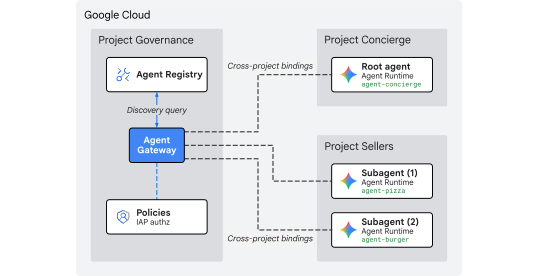
圖 1. 多專案集中管理架構
為何要跨專案集中管理?
在大型企業組織中,產品團隊和資料科學團隊會在數十個獨立的 Google Cloud 專案中建構 AI 代理。如果讓各團隊直接控管工具註冊、輸出網路路由和安全防護機制,會導致未經審查的工具氾濫、DLP 政策不一致、虛擬私有雲輸出未受監控,以及稽核記錄零散。
跨專案集中管理:將政策編寫與代理執行作業分開:
- 中央 IT 和 SecOps 團隊在單一集中管理專案中,制定安全性政策、審查工具,並監控輸出。
- 產品與應用程式團隊則專注於獨立 Agent Runtime 專案中的商業邏輯,直接繫結至中央閘道,不需管理本機虛擬私有雲、互連網路或分散的政策引擎,因此不會產生作業負擔。
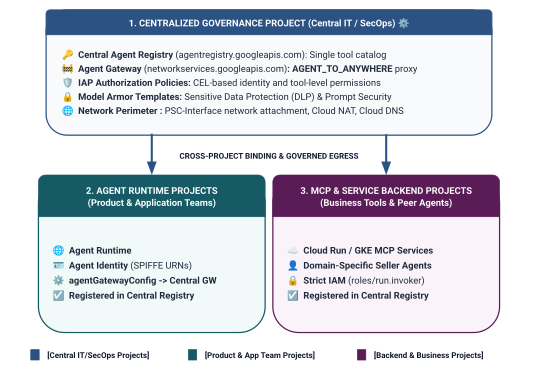
圖 2. 三層式跨專案治理架構和邊界
統一存取政策中的雙層身分範圍模型
代理透過中央 Agent Gateway 通訊時,Identity-Aware Proxy (IAP v2) 會根據呼叫端的代理身分 (以加密方式驗證、以 SPIFFE 為基礎的身分,會自動核發給執行階段容器),評估存取權是否符合全域 IAM 存取政策:
- 第 1 層:基準 Google Cloud API (透過規則 1 中的
principalSet://粗略定義):專案層級的輸出授權,允許輪輻專案中的所有 Agent Runtime 存取標準 Google API (aiplatform、iamcredentials、telemetry、agentregistry),以便執行探索、權杖產生和推論作業。 - 第 2 層:業務工具和 A2A 服務 (透過規則 2 和 3 中的
principal://進行精細控管):嚴格的最小權限存取權,繫結至個別推論引擎執行個體,並透過一般運算語言 (CEL) 條件強制執行,指定特定已註冊的 Agent Registry 服務 (destination.agent_registry.agent.name)。
建構內容
PROJECT_GOVERNANCE中的集中式 Agent Gateway (centralized-agw)- IAP 第 2 版授權服務擴充功能和授權政策,採用嚴格強制執行模式 (
failOpen: false) - 基礎 IAM 統一存取政策 (
uap-rules.json) 和專案政策繫結 - 跨專案服務代理 IAM 權限 (
ar_agw_cross_project_sa) - 共用中央 Google Cloud Storage (GCS) 暫存 bucket
PROJECT_SELLERS中獨立的漢堡和披薩賣家代理- 在
PROJECT_CONCIERGE購買 Concierge 代理,並啟用動態 REST 自動探索功能 - 在 Central Agent Registry 中註冊服務,並使用跨專案 mTLS 網址
- 動態 IAP v2 輸出政策更新,搭配即時驗證和 Cloud Logging 稽核
圖 3. 逐步導入順序
課程內容
- 如何為集中式閘道設定跨專案服務代理 IAM 權限
- 如何在多專案環境中,透過中央 Agent Gateway 轉送 Agent Runtime 輸出流量
- 如何使用 Service Extensions (
iapPolicyVersion: "V2"),將 Agent Gateway 授權委派給 Identity-Aware Proxy (IAP v2) - 如何編寫及繫結 IAM 統一存取政策 (UAP),並使用一般運算語言 (CEL) 規則管理已註冊的 Agent Registry 目的地 (
destination.agent_registry.*) - 如何使用執行階段自動探索功能,針對 Agent Registry 消除硬式編碼的代理 ID 和網址
- 如何測試實際的 perimeter 零信任封鎖機制 (
HTTP 403 Forbidden),並在 Cloud Logging 中驗證即時政策更新
需求條件
- 3 個已啟用計費功能的 Google Cloud 專案:
PROJECT_GOVERNANCE:集中管理、閘道、註冊資料庫和 IAM 存取政策PROJECT_CONCIERGE:採購禮賓服務自動調度管理工具代理PROJECT_SELLERS:漢堡和披薩專賣店賣家代理
- 具備
roles/owner或所有 3 項專案管理權限的 IAM 使用者或服務帳戶 - Google Cloud 組織 (用於 SPIFFE 信任網域對應)
- Google Cloud Shell 或已安裝
gcloudCLI、python(3.11 以上版本) 和uv的本機電腦
簡介部分到此結束,接下來請前往「設定和環境」一節。
2. 設定
雖然這個架構橫跨 3 個不同的 Google Cloud 雲端專案,但您可以在設為 PROJECT_GOVERNANCE 的單一 Cloud Shell 終端機中,執行所有終端機部署指令、存放區下載和測試作業。每個部署指令碼和 gcloud 指令都會透過 CLI 旗標 (--project),明確指定適當的目的地專案。
首先,請存取 Google Cloud 雲端專案指令列:
- Cloud Shell (
shell.cloud.google.com) - 已安裝
gcloudCLI 的本機終端機
設定專案背景資訊
# set terminal project context to Central Governance Project
gcloud config set project SET_YOUR_GOVERNANCE_PROJECT_ID_HERE
# login to gcloud cli
gcloud auth login
# login for application default credentials
gcloud auth application-default login
更新 gcloud CLI (建議)
# update gcloud components
gcloud components update --quiet
設定殼層環境變數
輸入專案專屬 ID。
# 1. Project Identifiers
export PROJECT_GOVERNANCE="SET_YOUR_GOVERNANCE_PROJECT_ID_HERE"
export PROJECT_CONCIERGE="SET_YOUR_CONCIERGE_PROJECT_ID_HERE"
export PROJECT_SELLERS="SET_YOUR_SELLERS_PROJECT_ID_HERE"
系統會自動衍生這些殼層變數。
# 2. Regional & Gateway Settings
export REGION="us-central1"
export AGW_NAME="centralized-agw"
export UAP_POLICY_NAME="uap-policy-${AGW_NAME}"
export UAP_BINDING_NAME="uap-binding-${AGW_NAME}"

# 3. Retrieve Project Numbers
export PROJECT_NUMBER_GOVERNANCE=$(gcloud projects describe ${PROJECT_GOVERNANCE} --format="value(projectNumber)")
export PROJECT_NUMBER_CONCIERGE=$(gcloud projects describe ${PROJECT_CONCIERGE} --format="value(projectNumber)")
export PROJECT_NUMBER_SELLERS=$(gcloud projects describe ${PROJECT_SELLERS} --format="value(projectNumber)")

# 4. Obtain Organization ID
export ORG_ID=$(gcloud projects get-ancestors ${PROJECT_GOVERNANCE} --format="value(id, type)" | grep organization | awk '{print $1}')

# 5. Set Application Default Credentials (ADC) Quota Project
gcloud auth application-default set-quota-project ${PROJECT_GOVERNANCE}

echo "Governance Project: ${PROJECT_GOVERNANCE} (${PROJECT_NUMBER_GOVERNANCE})"
echo "Concierge Project:  ${PROJECT_CONCIERGE} (${PROJECT_NUMBER_CONCIERGE})"
echo "Sellers Project:    ${PROJECT_SELLERS} (${PROJECT_NUMBER_SELLERS})"
echo "Organization ID:    ${ORG_ID}"
echo "UAP Policy Name:    ${UAP_POLICY_NAME}"
echo "UAP Binding Name:   ${UAP_BINDING_NAME}"
建立設定檔的本機目錄
# create config folder
mkdir -p cfg
指派統一存取政策的存取政策管理員角色
# grant Access Policy Admin and Project IAM Admin to current user in Governance Project
for ROLE in "roles/iam.accessPolicyAdmin" "roles/resourcemanager.projectIamAdmin"; do
  gcloud projects add-iam-policy-binding ${PROJECT_GOVERNANCE} \
    --member="user:$(gcloud config get-value account)" \
    --role="${ROLE}" \
    --condition=None
done
啟用 IAP v2 的 Cloud 稽核資料存取記錄
根據預設,Google Cloud 會停用資料存取稽核記錄,以免產生非預期的儲存費用。IAP 第 2 版會將授權決策 (granted=true 和 granted=false) 記錄為資料存取稽核記錄,因此請在 PROJECT_GOVERNANCE 中為 iap.googleapis.com 啟用 ADMIN_READ、DATA_READ 和 DATA_WRITE 記錄功能:
# 1. export current IAM policy for PROJECT_GOVERNANCE
gcloud projects get-iam-policy ${PROJECT_GOVERNANCE} \
  --format=json > cfg/gov_iam_policy.json
# 2. append auditConfigs for iap.googleapis.com
python3 -c "
import json
with open('cfg/gov_iam_policy.json') as f:
    policy = json.load(f)
audit_configs = [c for c in policy.get('auditConfigs', []) if c.get('service') != 'iap.googleapis.com']
audit_configs.append({
    'service': 'iap.googleapis.com',
    'auditLogConfigs': [
        {'logType': 'ADMIN_READ'},
        {'logType': 'DATA_READ'},
        {'logType': 'DATA_WRITE'}
    ]
})
policy['auditConfigs'] = audit_configs
with open('cfg/gov_iam_policy.json', 'w') as f:
    json.dump(policy, f, indent=2)
"
# 3. apply updated policy
gcloud projects set-iam-policy ${PROJECT_GOVERNANCE} cfg/gov_iam_policy.json
# 4. verify auditConfigs applied
gcloud projects get-iam-policy ${PROJECT_GOVERNANCE} --format="yaml(auditConfigs)"
啟用必要的 Google Cloud API
# enable google apis (agent platform & security bundle, part 1)
for PROJ in ${PROJECT_GOVERNANCE} ${PROJECT_CONCIERGE} ${PROJECT_SELLERS}; do
  gcloud services enable \
    agentregistry.googleapis.com \
    aiplatform.googleapis.com \
    apphub.googleapis.com \
    apptopology.googleapis.com \
    cloudapiregistry.googleapis.com \
    cloudtrace.googleapis.com \
    compute.googleapis.com \
    dataform.googleapis.com \
    iam.googleapis.com \
    agentidentity.googleapis.com \
    iap.googleapis.com \
    logging.googleapis.com \
    modelarmor.googleapis.com \
    monitoring.googleapis.com \
    networksecurity.googleapis.com \
    networkservices.googleapis.com \
    notebooks.googleapis.com \
    observability.googleapis.com \
    --project=${PROJ}
done
# enable google apis (agent platform bundle, part 2)
for PROJ in ${PROJECT_GOVERNANCE} ${PROJECT_CONCIERGE} ${PROJECT_SELLERS}; do
  gcloud services enable \
    securitycenter.googleapis.com \
    saasservicemgmt.googleapis.com \
    storage.googleapis.com \
    telemetry.googleapis.com \
    texttospeech.googleapis.com \
    --project=${PROJ}
done
# enable google apis (foundational & agent runtime build bundle, part 3)
for PROJ in ${PROJECT_GOVERNANCE} ${PROJECT_CONCIERGE} ${PROJECT_SELLERS}; do
  gcloud services enable \
    artifactregistry.googleapis.com \
    cloudbuild.googleapis.com \
    cloudresourcemanager.googleapis.com \
    iamcredentials.googleapis.com \
    serviceusage.googleapis.com \
    run.googleapis.com \
    orgpolicy.googleapis.com \
    --project=${PROJ}
done
驗證所有專案的 API 啟用狀態
確保這三個專案 (PROJECT_GOVERNANCE、PROJECT_CONCIERGE 和 PROJECT_SELLERS) 啟用的 API 完全相同,可確保作業一致,並防止執行階段權杖建立失敗、結構定義目錄錯誤或遙測資料遺失。
在 Cloud Shell 執行下列驗證指令碼,確認這三項專案的 API 相同:
# validate that all required APIs are enabled across all 3 projects
python3 - << 'EOF'
import subprocess
import os
import sys

REQUIRED_APIS = [
    "agentregistry.googleapis.com",
    "aiplatform.googleapis.com",
    "apphub.googleapis.com",
    "apptopology.googleapis.com",
    "cloudapiregistry.googleapis.com",
    "cloudtrace.googleapis.com",
    "compute.googleapis.com",
    "dataform.googleapis.com",
    "iam.googleapis.com",
    "agentidentity.googleapis.com",
    "iap.googleapis.com",
    "logging.googleapis.com",
    "modelarmor.googleapis.com",
    "monitoring.googleapis.com",
    "networksecurity.googleapis.com",
    "networkservices.googleapis.com",
    "notebooks.googleapis.com",
    "observability.googleapis.com",
    "securitycenter.googleapis.com",
    "saasservicemgmt.googleapis.com",
    "storage.googleapis.com",
    "telemetry.googleapis.com",
    "texttospeech.googleapis.com",
    "artifactregistry.googleapis.com",
    "cloudbuild.googleapis.com",
    "cloudresourcemanager.googleapis.com",
    "iamcredentials.googleapis.com",
    "serviceusage.googleapis.com",
    "run.googleapis.com",
    "orgpolicy.googleapis.com"
]

projects = {
    "GOVERNANCE": os.environ.get("PROJECT_GOVERNANCE", ""),
    "CONCIERGE": os.environ.get("PROJECT_CONCIERGE", ""),
    "SELLERS": os.environ.get("PROJECT_SELLERS", "")
}

enabled = {}
for role, proj in projects.items():
    if not proj:
        print(f"Error: Environment variable for {role} is not set.")
        sys.exit(1)
    res = subprocess.run(
        ["gcloud", "services", "list", "--enabled", f"--project={proj}", "--format=value(config.name)"],
        capture_output=True, text=True, check=True
    )
    enabled[role] = set(res.stdout.strip().splitlines())

print(f"\n{'API Name':<36} | {'GOVERNANCE':<12} | {'CONCIERGE':<12} | {'SELLERS':<12}")
print("-" * 78)

all_synced = True
for api in REQUIRED_APIS:
    g_status = "ENABLED" if api in enabled["GOVERNANCE"] else "MISSING"
    c_status = "ENABLED" if api in enabled["CONCIERGE"] else "MISSING"
    s_status = "ENABLED" if api in enabled["SELLERS"] else "MISSING"
    if "MISSING" in (g_status, c_status, s_status):
        all_synced = False
    print(f"{api:<36} | {g_status:<12} | {c_status:<12} | {s_status:<12}")

print("-" * 78)
if all_synced:
    print("✅ All 29 required APIs are ENABLED and synchronized across all three projects.\n")
else:
    print("❌ Discrepancies detected. Please re-run the enablement commands for missing services.\n")
    sys.exit(1)
EOF
驗證輸出內容範例:
您應該會看到所有 API 都已啟用。
✅ All 30 required APIs are ENABLED and synchronized across all three projects.
設定組織政策
預設 Google Cloud 組織政策會強制執行限制,限制 IAM v3 存取政策與資源 (constraints/iam.managed.disableAccessPolicyBinding) 的繫結。
明確將 enforce: false 設為允許,覆寫專案層級繼承的所有組織政策限制。
# disable iam v3 constraint (allow v3 access policies)
gcloud org-policies set-policy /dev/stdin << EOF
name: projects/${PROJECT_NUMBER_GOVERNANCE}/policies/iam.managed.disableAccessPolicyBinding
spec:
  rules:
  - enforce: false
EOF
# verify org policy constraints on project
gcloud org-policies describe iam.managed.disableAccessPolicyBinding \
  --project=${PROJECT_GOVERNANCE} --effective
設定部分到此結束,接下來請前往「註冊核心 Google API」一節。
3. Agent Registry
註冊核心 Google API 端點服務
Agent Gateway 必須在 Central Agent Registry 註冊 Google API 網址,這樣一來,設定 agent_gateway_config 的代理就能安全地將輸出流量轉送至核心 Google Cloud 後端服務 (例如 aiplatform、IAM 憑證和遙測)。
在 Agent Registry 建立 core-gapi-services
# register core google api endpoints in agent registry with standard and :443 port variants
gcloud agent-registry services create core-gapi-services \
  --project=${PROJECT_GOVERNANCE} \
  --location=${REGION} \
  --display-name="gapi.core.services" \
  --description="Core Google Cloud APIs and Service Endpoints" \
  --endpoint-spec-type=no-spec \
  --interfaces=protocolBinding=JSONRPC,url=https://telemetry.googleapis.com \
  --interfaces=protocolBinding=JSONRPC,url=https://telemetry.mtls.googleapis.com \
  --interfaces=protocolBinding=JSONRPC,url=https://${REGION}-aiplatform.googleapis.com \
  --interfaces=protocolBinding=JSONRPC,url=https://${REGION}-aiplatform.googleapis.com:443 \
  --interfaces=protocolBinding=JSONRPC,url=https://${REGION}-aiplatform.mtls.googleapis.com \
  --interfaces=protocolBinding=JSONRPC,url=https://${REGION}-aiplatform.mtls.googleapis.com:443 \
  --interfaces=protocolBinding=JSONRPC,url=https://aiplatform.googleapis.com \
  --interfaces=protocolBinding=JSONRPC,url=https://aiplatform.googleapis.com:443 \
  --interfaces=protocolBinding=JSONRPC,url=https://aiplatform.mtls.googleapis.com \
  --interfaces=protocolBinding=JSONRPC,url=https://aiplatform.mtls.googleapis.com:443 \
  --interfaces=protocolBinding=JSONRPC,url=https://cloudresourcemanager.googleapis.com \
  --interfaces=protocolBinding=JSONRPC,url=https://cloudresourcemanager.googleapis.com:443 \
  --interfaces=protocolBinding=JSONRPC,url=https://cloudresourcemanager.mtls.googleapis.com \
  --interfaces=protocolBinding=JSONRPC,url=https://cloudresourcemanager.mtls.googleapis.com:443 \
  --interfaces=protocolBinding=JSONRPC,url=https://iamcredentials.googleapis.com \
  --interfaces=protocolBinding=JSONRPC,url=https://iamcredentials.googleapis.com:443 \
  --interfaces=protocolBinding=JSONRPC,url=https://iamcredentials.mtls.googleapis.com \
  --interfaces=protocolBinding=JSONRPC,url=https://iamcredentials.mtls.googleapis.com:443 \
  --interfaces=protocolBinding=JSONRPC,url=https://agentregistry.googleapis.com \
  --interfaces=protocolBinding=JSONRPC,url=https://agentregistry.mtls.googleapis.com \
  --interfaces=protocolBinding=JSONRPC,url=https://agentregistry.googleapis.com:443 \
  --interfaces=protocolBinding=JSONRPC,url=https://agentregistry.mtls.googleapis.com:443
Capture Core API 端點資源 ID
# capture the underlying Agent Registry endpoint ID
export ENDPOINT_ID=$(gcloud agent-registry services describe core-gapi-services \
  --project=${PROJECT_GOVERNANCE} \
  --location=${REGION} \
  --format="value(registryResource)" | awk -F'/' '{print $NF}')
echo "Core APIs Endpoint ID: ${ENDPOINT_ID}"
瞭解 Agent Identity 中的 principalSet 與 principal
在 Google Cloud IAM 和 Gemini Enterprise Agent Platform 中,核發給執行中代理容器的機器身分,會使用經 Identity-Aware Proxy (IAP v2) 評估的加密認證 SPIFFE URN。設定 IAM 統一存取政策時,您可以指定單一 principal 或以屬性為基礎的 principalSet:
維度 |
|
|
IAM 語法 |
|
|
精細程度 | 精細 (執行個體層級):識別單一特定的推論引擎容器執行個體。 | 粗略 (專案層級):找出所有共用專案屬性的推論引擎。 |
URN 模式 |
|
|
Agent Platform 的用途 | 第 2 層 (業務工具和 A2A):授權特定自動化調度管理工具代理叫用目標網域工具 (例如 Purchasing Concierge $\rightarrow$ Burger Seller)。 | 第 1 級 (基礎架構):授予專案中所有代理輸出存取權,可存取 Google Cloud API ( |
生命週期影響 | 如果刪除並重新建立代理,新的引擎 ID 需要更新 IAM 政策繫結。 | 自動套用至該專案中新部署的代理,不需額外更新 IAM。 |
使用統一存取政策 (UAP/IAP v2) 進行宣告式管理
在舊版 IAP v1 中,輸出政策是使用 gcloud beta iap web add-iam-policy-binding 直接附加至個別 Agent Registry 資源。在 IAP 第 2 版和統一存取政策中,系統會移除個別資源繫結,改用單一集中式 IAM 存取政策 (cfg/uap-rules.json)。
core-gapi-services 的基礎輸出授權將設為第 5 節統一存取政策中的規則 1,確保所有代理容器在部署前都已建立基礎輸出路由。
如要進一步瞭解主體 ID 和 Workload Identity 機制的技術細節,請參閱:
核心 API 端點註冊到此結束,接下來請前往「部署集中式 Agent Gateway」一節。
4. Agent Gateway
部署集中式 Agent Gateway
在 $PROJECT_GOVERNANCE 專案中,以 AGENT_TO_ANYWHERE 輸出模式部署集中式 Agent Gateway (centralized-agw)。
定義閘道設定資訊清單
建立 cfg/${AGW_NAME}.yaml 來管理輸出流量:
# generate agent gateway config yaml
cat > cfg/${AGW_NAME}.yaml << EOF
name: ${AGW_NAME}
protocols:
  - MCP
googleManaged:
  governedAccessPath: AGENT_TO_ANYWHERE
registries:
  - "//agentregistry.googleapis.com/projects/${PROJECT_GOVERNANCE}/locations/${REGION}"
EOF
匯入 Agent Gateway 設定
# import and create agent gateway
gcloud network-services agent-gateways import ${AGW_NAME} \
  --source="cfg/${AGW_NAME}.yaml" \
  --location=${REGION} \
  --project=${PROJECT_GOVERNANCE}
驗證 Agent Gateway 詳細資料
# show agent gateway status
gcloud network-services agent-gateways describe ${AGW_NAME} \
  --location=${REGION} \
  --project=${PROJECT_GOVERNANCE}
輸出範例:
agentGatewayCard:
  mtlsEndpoint: projects/${AGW_TP_ID}/regions/us-central1/serviceAttachments/unitkind1-swp-mtls-psc-sa
  rootCertificates:
  - |
    -----BEGIN CERTIFICATE-----
    MIIDwzCCAqugAwIBAgITNQuWGopdOZaHdcK7r7AYFhonqDANBgkqhkiG9w0BAQsF
    ...
    -----END CERTIFICATE-----
  serviceExtensionsServiceAccount: service-${PROJ_NO}@gcp-sa-dep.iam.gserviceaccount.com
createTime: 'YYYY-MM-DDT12:34:56.789098765Z'
googleManaged:
  governedAccessPath: AGENT_TO_ANYWHERE
name: projects/${PROJECT_GOVERNANCE}/locations/us-central1/agentGateways/centralized-agw
protocols:
- MCP
registries:
- //agentregistry.googleapis.com/projects/${PROJECT_GOVERNANCE}/locations/us-central1
updateTime: 'YYYY-MM-DDT12:34:56.789098765Z'
閘道部署作業到此結束,接下來請前往「設定授權」一節。
5. 授權
設定 Agent Gateway 授權和基礎 UAP
Agent Gateway 會使用授權政策 (networksecurity.authzPolicies),並整合 Identity-Aware Proxy (IAP v2) 統一存取政策 (UAP),保護及控管傳出的工具和代理流量。
授權架構總覽
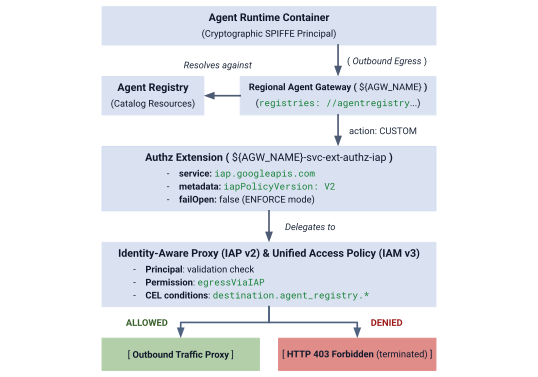
圖 4:授權架構總覽
授權架構由三個相互連結的層組成:
- IAP 服務擴充功能 (
authzExtension):設定service: iap.googleapis.com、metadata: iapPolicyVersion: "V2"和failOpen: false的區域資源,嚴格執行周邊零信任機制。 - 閘道授權政策 (
authzPolicy):區域資源,使用policyProfile: REQUEST_AUTHZ和action: CUSTOM指定 Agent Gateway,將授權檢查轉送至 IAP 授權擴充功能。 - IAM 統一存取政策和繫結 (
accessPolicy和policyBinding):由 IAP 評估的全域 IAM v3 資源。系統會根據呼叫端 SPIFFE 身分和 CEL 目錄條件,驗證通用權限iap.googleapis.com/resources.egressViaIAP。
步驟 1:建立及匯入 IAP v2 Authz 擴充功能
使用 iapPolicyVersion: "V2" 和 failOpen: false 建立服務擴充功能資訊清單,並設為嚴格的 ENFORCE 模式:
# create authz extension config file in ENFORCE mode
cat > cfg/${AGW_NAME}-svc-ext-authz-iap.yaml << EOF
name: ${AGW_NAME}-svc-ext-authz-iap
service: iap.googleapis.com
failOpen: false
timeout: 1s
metadata:
  iapPolicyVersion: "V2"
EOF
匯入授權擴充功能:
# import IAP v2 authz extension
gcloud service-extensions authz-extensions import ${AGW_NAME}-svc-ext-authz-iap \
  --source=cfg/${AGW_NAME}-svc-ext-authz-iap.yaml \
  --location=${REGION} \
  --project=${PROJECT_GOVERNANCE}
確認 Authz 擴充功能已啟用:
# describe authz extension
gcloud service-extensions authz-extensions describe ${AGW_NAME}-svc-ext-authz-iap \
  --location=${REGION} \
  --project=${PROJECT_GOVERNANCE}
輸出範例:
createTime: 'YYYY-MM-DDT12:34:56.789098765Z'
failOpen: false
metadata:
  iapPolicyVersion: V2
name: projects/${PROJECT_GOVERNANCE}/locations/us-central1/authzExtensions/centralized-agw-svc-ext-authz-iap
service: iap.googleapis.com
timeout: 1s
步驟 2:建立及匯入閘道授權政策
建立授權政策設定,附加至 Agent Gateway,並將要求驗證作業委派給 IAP Authz 擴充功能:
# create authz policy manifest
cat > cfg/${AGW_NAME}-authz-policy-profile-iap.yaml << EOF
name: ${AGW_NAME}-authz-policy-profile-iap
target:
  resources:
    - "projects/${PROJECT_GOVERNANCE}/locations/${REGION}/agentGateways/${AGW_NAME}"
policyProfile: REQUEST_AUTHZ
action: CUSTOM
customProvider:
  authzExtension:
    resources:
      - "projects/${PROJECT_GOVERNANCE}/locations/${REGION}/authzExtensions/${AGW_NAME}-svc-ext-authz-iap"
EOF
匯入授權政策:
# import authz policy
gcloud beta network-security authz-policies import ${AGW_NAME}-authz-policy-profile-iap \
  --source=cfg/${AGW_NAME}-authz-policy-profile-iap.yaml \
  --location=${REGION} \
  --project=${PROJECT_GOVERNANCE}
驗證有效的授權政策:
# describe authz policy
gcloud beta network-security authz-policies describe ${AGW_NAME}-authz-policy-profile-iap \
  --location=${REGION} \
  --project=${PROJECT_GOVERNANCE}
步驟 3:建立初始統一存取政策 (規則 1:核心 Google API)
建立 cfg/uap-rules.json,並使用規則 1 授權三個專案 principalSet 存取 core-gapi-services:
# create initial unified access policy rules manifest
cat > cfg/uap-rules.json << EOF
[
  {
    "description": "Rule 1: Allow agent runtimes across all 3 projects to reach Core Google APIs",
    "effect": "ALLOW",
    "principals": [
      "principalSet://agents.global.org-${ORG_ID}.system.id.goog/attribute.platformContainer/aiplatform/projects/${PROJECT_NUMBER_GOVERNANCE}",
      "principalSet://agents.global.org-${ORG_ID}.system.id.goog/attribute.platformContainer/aiplatform/projects/${PROJECT_NUMBER_CONCIERGE}",
      "principalSet://agents.global.org-${ORG_ID}.system.id.goog/attribute.platformContainer/aiplatform/projects/${PROJECT_NUMBER_SELLERS}"
    ],
    "operation": {
      "permissions": [
        "iap.googleapis.com/resources.egressViaIAP"
      ]
    },
    "conditions": {
      "iap.googleapis.com": {
        "expression": \
        "destination.is_registered == true && \
         destination.agent_registry.resource_type == 'ENDPOINT' && ( \
         destination.agent_registry.endpoint.name == 'projects/${PROJECT_GOVERNANCE}/locations/${REGION}/endpoints/core-gapi-services' || \
         destination.agent_registry.endpoint.name == 'projects/${PROJECT_GOVERNANCE}/locations/${REGION}/endpoints/${ENDPOINT_ID}' || \
         destination.agent_registry.endpoint.name == 'projects/${PROJECT_NUMBER_GOVERNANCE}/locations/${REGION}/endpoints/${ENDPOINT_ID}')"
      }
    }
  }
]
EOF
步驟 4:建立並繫結 IAM 存取權政策
建立全域 IAM 存取權政策:
# create global IAM access policy
gcloud iam access-policies create ${UAP_POLICY_NAME} \
  --details-rules=cfg/uap-rules.json \
  --project=${PROJECT_GOVERNANCE} \
  --location=global
將存取權政策繫結至 PROJECT_GOVERNANCE:
# bind access policy to governance project
gcloud iam policy-bindings create ${UAP_BINDING_NAME} \
  --policy="projects/${PROJECT_GOVERNANCE}/locations/global/accessPolicies/${UAP_POLICY_NAME}" \
  --target-resource="//cloudresourcemanager.googleapis.com/projects/${PROJECT_GOVERNANCE}" \
  --project=${PROJECT_GOVERNANCE} \
  --location=global
確認政策繫結已啟用:
# verify policy binding
gcloud iam policy-bindings describe ${UAP_BINDING_NAME} \
  --project=${PROJECT_GOVERNANCE} \
  --location=global
輸出範例:
name: projects/${PROJECT_GOVERNANCE}/locations/global/policyBindings/uap-binding-centralized-agw
policy: projects/${PROJECT_GOVERNANCE}/locations/global/accessPolicies/uap-policy-centralized-agw
policyKind: ACCESS_POLICY
target:
  resource: //cloudresourcemanager.googleapis.com/projects/${PROJECT_GOVERNANCE}
基礎 Google Cloud API 輸出作業現在已在所有三個專案中,以嚴格的 ENFORCE 模式安全授權。
閘道授權設定到此結束,接下來請前往「設定跨專案 IAM 權限」一節。
6. 跨專案 IAM
設定跨專案 IAM 權限
在這個多專案拓撲中,Agent Runtime 位於輪輻專案 (PROJECT_CONCIERGE 和 PROJECT_SELLERS),而中央 Agent Gateway 和 Agent Registry 則位於 PROJECT_GOVERNANCE。
Google Cloud 雲端專案是獨立的安全範圍,因此必須在兩個作業層明確授予跨專案存取權:
- 控制層 (部署時):部署設有
--agent-gateway-config的代理容器時,輪輻專案的 Agent Runtime 服務代理 (service-) 必須將容器附加至中央閘道。我們會建立最低權限自訂角色 (@gcp-sa-aiplatform.iam.gserviceaccount.com ar_agw_cross_project_sa),在PROJECT_GOVERNANCE中授予networkservices.agentGateways.use、get和operations.get。 - 資料層 (執行階段執行):
- 目錄探索:輪輻身分需要
PROJECT_GOVERNANCE中的roles/agentregistry.viewer,才能動態解析目標代理端點。 - 目標叫用:Concierge 代理需要
PROJECT_SELLERS中的roles/aiplatform.user,才能對賣家推論引擎執行查詢。
- 目錄探索:輪輻身分需要
在「PROJECT_GOVERNANCE」中建立自訂 IAM 角色
# create custom role in central governance project
gcloud iam roles create ar_agw_cross_project_sa \
  --project=${PROJECT_GOVERNANCE} \
  --title="Runtime Agent Gateway Cross-Project SA" \
  --description="Custom role for cross-project service agents to access Central Agent Gateway" \
  --permissions="networkservices.agentGateways.get,networkservices.agentGateways.use,networkservices.operations.get" \
  --stage="GA"
將自訂角色指派給 Agent Runtime 服務代理
# 1. ensure aiplatform service identities are provisioned across all projects
for PROJ in ${PROJECT_GOVERNANCE} ${PROJECT_CONCIERGE} ${PROJECT_SELLERS}; do
  gcloud beta services identity create --service=aiplatform.googleapis.com --project=${PROJ}
done
# 2. derive aiplatform service agent emails
export CONCIERGE_AI_SA="service-${PROJECT_NUMBER_CONCIERGE}@gcp-sa-aiplatform.iam.gserviceaccount.com"
export CONCIERGE_RE_SA="service-${PROJECT_NUMBER_CONCIERGE}@gcp-sa-aiplatform-re.iam.gserviceaccount.com"
export CONCIERGE_COMPUTE_SA="${PROJECT_NUMBER_CONCIERGE}-compute@developer.gserviceaccount.com"

export SELLERS_AI_SA="service-${PROJECT_NUMBER_SELLERS}@gcp-sa-aiplatform.iam.gserviceaccount.com"
export SELLERS_RE_SA="service-${PROJECT_NUMBER_SELLERS}@gcp-sa-aiplatform-re.iam.gserviceaccount.com"
export SELLERS_COMPUTE_SA="${PROJECT_NUMBER_SELLERS}-compute@developer.gserviceaccount.com"
# 3. grant custom role & network viewer to Concierge and Sellers Service Agents
for SA in ${CONCIERGE_AI_SA} ${SELLERS_AI_SA}; do
  gcloud projects add-iam-policy-binding ${PROJECT_GOVERNANCE} \
    --member="serviceAccount:${SA}" \
    --role="projects/${PROJECT_GOVERNANCE}/roles/ar_agw_cross_project_sa" \
    --condition=None

  gcloud projects add-iam-policy-binding ${PROJECT_GOVERNANCE} \
    --member="serviceAccount:${SA}" \
    --role="roles/networkservices.viewer" \
    --condition=None
done
# 4. grant agent registry viewer on Governance Project for dynamic autodiscovery
for MEMBER in "serviceAccount:${CONCIERGE_AI_SA}" "serviceAccount:${CONCIERGE_RE_SA}" "serviceAccount:${CONCIERGE_COMPUTE_SA}" "serviceAccount:${SELLERS_AI_SA}" "serviceAccount:${SELLERS_RE_SA}" "serviceAccount:${SELLERS_COMPUTE_SA}" "principalSet://agents.global.org-${ORG_ID}.system.id.goog/attribute.platformContainer/aiplatform/projects/${PROJECT_NUMBER_CONCIERGE}" "principalSet://agents.global.org-${ORG_ID}.system.id.goog/attribute.platformContainer/aiplatform/projects/${PROJECT_NUMBER_SELLERS}"; do
  gcloud projects add-iam-policy-binding ${PROJECT_GOVERNANCE} \
    --member="${MEMBER}" \
    --role="roles/agentregistry.viewer" \
    --condition=None
done
# 5. grant agent project viewer on Governance Project for dynamic autodiscovery
for SA in ${CONCIERGE_COMPUTE_SA} ${CONCIERGE_AI_SA}; do
  gcloud projects add-iam-policy-binding ${PROJECT_GOVERNANCE} \
    --member="serviceAccount:${SA}" \
    --role="roles/viewer" \
    --condition=None
done
# 6. grant aitplatform user on Sellers project to Concierge for cross-project A2A invocation
for MEMBER in "serviceAccount:${CONCIERGE_AI_SA}" "serviceAccount:${CONCIERGE_RE_SA}" "serviceAccount:${CONCIERGE_COMPUTE_SA}" "principalSet://agents.global.org-${ORG_ID}.system.id.goog/attribute.platformContainer/aiplatform/projects/${PROJECT_NUMBER_CONCIERGE}"; do
  gcloud projects add-iam-policy-binding ${PROJECT_SELLERS} \
    --member="${MEMBER}" \
    --role="roles/aiplatform.user" \
    --condition=None
done
跨專案 IAM 設定到此結束,接下來請前往「部署賣家和 Concierge 代理」部分。
7. Agent Runtime
部署賣家和 Concierge 代理
本程式碼實驗室使用的多代理應用程式程式碼集和部署指令碼,都存放在遠端 Google Cloud GitHub 存放區。接下來,您會在本機複製存放區、將必要檔案複製到目前使用的目錄結構、清除暫存檔案,並使用 uv 安裝依附元件。
擷取遠端構件
# clone remote repository to temp local dir
git clone https://github.com/GoogleCloudPlatform/cloud-networking-solutions.git ./temp_agw_multiproject
# copy multi-agent application files to current working directory
cp -r temp_agw_multiproject/codelabs/agw-multiproject ./cross-project-multiagent
# remove temporary directory
rm -rf temp_agw_multiproject
# install dependencies
uv sync --directory ./cross-project-multiagent
建立共用中央暫存值區
# create shared central staging bucket
gcloud storage buckets create gs://${PROJECT_GOVERNANCE}-shared-staging \
  --project=${PROJECT_GOVERNANCE} \
  --location=${REGION}
# grant cross-project read/write access to runtime service agents
gcloud storage buckets add-iam-policy-binding gs://${PROJECT_GOVERNANCE}-shared-staging \
  --member="serviceAccount:service-${PROJECT_NUMBER_CONCIERGE}@gcp-sa-aiplatform.iam.gserviceaccount.com" \
  --role="roles/storage.objectAdmin"

gcloud storage buckets add-iam-policy-binding gs://${PROJECT_GOVERNANCE}-shared-staging \
  --member="serviceAccount:service-${PROJECT_NUMBER_SELLERS}@gcp-sa-aiplatform.iam.gserviceaccount.com" \
  --role="roles/storage.objectAdmin"
跨專案 Agent Gateway 繫結的運作方式
在這個步驟中,您會將賣家代理部署至輪輻專案 (PROJECT_SELLERS),並設定透過 PROJECT_GOVERNANCE 的中央 Agent Gateway 轉送輸出流量:
# !-- for example purposes -- NOT a command to execute --!
# snippet from deploy_burger.py
burger_config = {
    "staging_bucket": staging_bucket_uri,
    "gcs_dir_name": "burger_agent",
    "display_name": "burger-seller-agent-adk",
    "identity_type": "AGENT_IDENTITY",
    "agent_gateway_config": {
        "agent_to_anywhere_config": {
            "agent_gateway": f"projects/{args.governance_project}/locations/{args.region}/agentGateways/{args.gateway}"
        }
    },
}
deployed_burger = client.agent_engines.create(agent=burger_playground, config=burger_config)
由於規則 1 是在統一存取政策中較早建立,因此容器初始化要求可透過閘道傳送至 Google Cloud API,不會中斷。
將 Burger & Pizza Seller 代理部署至 PROJECT_SELLERS
# 1. deploy Burger Seller Agent to PROJECT_SELLERS
uv run --directory ./cross-project-multiagent python deploy_burger.py \
  --project=${PROJECT_SELLERS} \
  --region=${REGION} \
  --governance-project=${PROJECT_GOVERNANCE} \
  --gateway=projects/${PROJECT_GOVERNANCE}/locations/${REGION}/agentGateways/${AGW_NAME}
# 2. deploy Pizza Seller Agent to PROJECT_SELLERS
uv run --directory ./cross-project-multiagent python deploy_pizza.py \
  --project=${PROJECT_SELLERS} \
  --region=${REGION} \
  --governance-project=${PROJECT_GOVERNANCE} \
  --gateway=projects/${PROJECT_GOVERNANCE}/locations/${REGION}/agentGateways/${AGW_NAME}
驗證賣家閘道路由
# retrieve deployed seller reasoning engine IDs
export BURGER_ENGINE_ID=$(grep BURGER_SELLER_AGENT_ID cross-project-multiagent/burger_agent.env | awk -F'/' '{print $NF}')
export PIZZA_ENGINE_ID=$(grep PIZZA_SELLER_AGENT_ID cross-project-multiagent/pizza_agent.env | awk -F'/' '{print $NF}')

echo "Burger Engine ID: ${BURGER_ENGINE_ID}"
echo "Pizza Engine ID:  ${PIZZA_ENGINE_ID}"
# inspect runtime configuration for both Seller Agents
for ENGINE_ID in ${BURGER_ENGINE_ID} ${PIZZA_ENGINE_ID}; do
  curl -s -X GET "https://${REGION}-aiplatform.googleapis.com/v1beta1/projects/${PROJECT_SELLERS}/locations/${REGION}/reasoningEngines/${ENGINE_ID}" \
    -H "Authorization: Bearer $(gcloud auth application-default print-access-token)" \
    -H "Content-Type: application/json" \
    | jq '{displayName: .displayName, identityType: .spec.identityType, effectiveIdentity: .spec.effectiveIdentity, agentGatewayConfig: .spec.deploymentSpec.agentGatewayConfig}'
done
將採購禮賓代理部署至 PROJECT_CONCIERGE
# deploy Purchasing Concierge to PROJECT_CONCIERGE
uv run --directory ./cross-project-multiagent python deploy_concierge_adk.py \
  --project=${PROJECT_CONCIERGE} \
  --region=${REGION} \
  --staging-bucket=gs://${PROJECT_GOVERNANCE}-shared-staging \
  --gateway-name=${AGW_NAME} \
  --gateway-project=${PROJECT_GOVERNANCE}
驗證購買閘道路由
# retrieve Concierge engine ID
export CONCIERGE_ENGINE_ID=$(grep CONCIERGE_AGENT_ID cross-project-multiagent/concierge_agent.env | awk -F'/' '{print $NF}')
echo "Concierge Engine ID: ${CONCIERGE_ENGINE_ID}"
# inspect runtime configuration for Purchasing Concierge
curl -s -X GET "https://${REGION}-aiplatform.googleapis.com/v1beta1/projects/${PROJECT_CONCIERGE}/locations/${REGION}/reasoningEngines/${CONCIERGE_ENGINE_ID}" \
  -H "Authorization: Bearer $(gcloud auth application-default print-access-token)" \
  -H "Content-Type: application/json" \
  | jq '{displayName: .displayName, identityType: .spec.identityType, effectiveIdentity: .spec.effectiveIdentity, agentGatewayConfig: .spec.deploymentSpec.agentGatewayConfig}'
輸出內容應顯示 Concierge Agent Runtime 身分和專案,以及與治理專案 Agent Gateway 的繫結。
{
  "displayName": "purchasing-concierge-adk",
  "identityType": "AGENT_IDENTITY",
  "effectiveIdentity": "agents.global.org-${ORG_ID}.system.id.goog/resources/aiplatform/projects/${PROJECT_CONCIERGE}/locations/us-central1/reasoningEngines/${CONCIERGE_ENGINE_ID}",
  "agentGatewayConfig": {
    "agentToAnywhereConfig": {
      "agentGateway": "projects/${PROJECT_GOVERNANCE}/locations/us-central1/agentGateways/centralized-agw"
    }
  }
}
代理部署作業到此結束,接下來請前往「在中央 Agent Registry 註冊代理」一節。
8. 跨專案儲存庫
在中央代理儲存庫註冊代理
使用跨專案區域 mTLS 端點和數字專案編號,在 PROJECT_GOVERNANCE 的中央代理程式登錄檔中註冊所有三個代理程式。
在 Agent Registry 將服務註冊為非 A2A 代理
# 1. register Burger Seller Agent
gcloud agent-registry services create burger-seller-agent \
  --project=${PROJECT_GOVERNANCE} \
  --location=${REGION} \
  --display-name="Burger Seller Agent" \
  --description="Specialist agent that sells burgers and fries" \
  --agent-spec-type=no-spec \
  --interfaces=protocolBinding=JSONRPC,url=https://${REGION}-aiplatform.googleapis.com/v1/projects/${PROJECT_NUMBER_SELLERS}/locations/${REGION}/reasoningEngines/${BURGER_ENGINE_ID}:query \
  --interfaces=protocolBinding=JSONRPC,url=https://${REGION}-aiplatform.googleapis.com/v1beta1/projects/${PROJECT_NUMBER_SELLERS}/locations/${REGION}/reasoningEngines/${BURGER_ENGINE_ID}:query \
  --interfaces=protocolBinding=JSONRPC,url=https://${REGION}-aiplatform.googleapis.com:443/v1/projects/${PROJECT_NUMBER_SELLERS}/locations/${REGION}/reasoningEngines/${BURGER_ENGINE_ID}:query \
  --interfaces=protocolBinding=JSONRPC,url=https://${REGION}-aiplatform.googleapis.com:443/v1beta1/projects/${PROJECT_NUMBER_SELLERS}/locations/${REGION}/reasoningEngines/${BURGER_ENGINE_ID}:query \
  --interfaces=protocolBinding=JSONRPC,url=https://${REGION}-aiplatform.mtls.googleapis.com/v1/projects/${PROJECT_NUMBER_SELLERS}/locations/${REGION}/reasoningEngines/${BURGER_ENGINE_ID}:query \
  --interfaces=protocolBinding=JSONRPC,url=https://${REGION}-aiplatform.mtls.googleapis.com/v1beta1/projects/${PROJECT_NUMBER_SELLERS}/locations/${REGION}/reasoningEngines/${BURGER_ENGINE_ID}:query \
  --interfaces=protocolBinding=JSONRPC,url=https://${REGION}-aiplatform.mtls.googleapis.com:443/v1/projects/${PROJECT_NUMBER_SELLERS}/locations/${REGION}/reasoningEngines/${BURGER_ENGINE_ID}:query \
  --interfaces=protocolBinding=JSONRPC,url=https://${REGION}-aiplatform.mtls.googleapis.com:443/v1beta1/projects/${PROJECT_NUMBER_SELLERS}/locations/${REGION}/reasoningEngines/${BURGER_ENGINE_ID}:query
# 2. register Pizza Seller Agent
gcloud agent-registry services create pizza-seller-agent \
  --project=${PROJECT_GOVERNANCE} \
  --location=${REGION} \
  --display-name="Pizza Seller Agent" \
  --description="Specialist agent that sells pizzas and pasta" \
  --agent-spec-type=no-spec \
  --interfaces=protocolBinding=JSONRPC,url=https://${REGION}-aiplatform.googleapis.com/v1/projects/${PROJECT_NUMBER_SELLERS}/locations/${REGION}/reasoningEngines/${PIZZA_ENGINE_ID}:query \
  --interfaces=protocolBinding=JSONRPC,url=https://${REGION}-aiplatform.googleapis.com/v1beta1/projects/${PROJECT_NUMBER_SELLERS}/locations/${REGION}/reasoningEngines/${PIZZA_ENGINE_ID}:query \
  --interfaces=protocolBinding=JSONRPC,url=https://${REGION}-aiplatform.googleapis.com:443/v1/projects/${PROJECT_NUMBER_SELLERS}/locations/${REGION}/reasoningEngines/${PIZZA_ENGINE_ID}:query \
  --interfaces=protocolBinding=JSONRPC,url=https://${REGION}-aiplatform.googleapis.com:443/v1beta1/projects/${PROJECT_NUMBER_SELLERS}/locations/${REGION}/reasoningEngines/${PIZZA_ENGINE_ID}:query \
  --interfaces=protocolBinding=JSONRPC,url=https://${REGION}-aiplatform.mtls.googleapis.com/v1/projects/${PROJECT_NUMBER_SELLERS}/locations/${REGION}/reasoningEngines/${PIZZA_ENGINE_ID}:query \
  --interfaces=protocolBinding=JSONRPC,url=https://${REGION}-aiplatform.mtls.googleapis.com/v1beta1/projects/${PROJECT_NUMBER_SELLERS}/locations/${REGION}/reasoningEngines/${PIZZA_ENGINE_ID}:query \
  --interfaces=protocolBinding=JSONRPC,url=https://${REGION}-aiplatform.mtls.googleapis.com:443/v1/projects/${PROJECT_NUMBER_SELLERS}/locations/${REGION}/reasoningEngines/${PIZZA_ENGINE_ID}:query \
  --interfaces=protocolBinding=JSONRPC,url=https://${REGION}-aiplatform.mtls.googleapis.com:443/v1beta1/projects/${PROJECT_NUMBER_SELLERS}/locations/${REGION}/reasoningEngines/${PIZZA_ENGINE_ID}:query
# 3. register Purchasing Concierge Agent
gcloud agent-registry services create purchasing-concierge-adk \
  --project=${PROJECT_GOVERNANCE} \
  --location=${REGION} \
  --display-name="Purchasing Concierge Agent" \
  --description="Orchestrator concierge agent that routes purchasing requests" \
  --agent-spec-type=no-spec \
  --interfaces=protocolBinding=JSONRPC,url=https://${REGION}-aiplatform.googleapis.com/v1/projects/${PROJECT_NUMBER_CONCIERGE}/locations/${REGION}/reasoningEngines/${CONCIERGE_ENGINE_ID}:query \
  --interfaces=protocolBinding=JSONRPC,url=https://${REGION}-aiplatform.googleapis.com/v1beta1/projects/${PROJECT_NUMBER_CONCIERGE}/locations/${REGION}/reasoningEngines/${CONCIERGE_ENGINE_ID}:query \
  --interfaces=protocolBinding=JSONRPC,url=https://${REGION}-aiplatform.googleapis.com:443/v1/projects/${PROJECT_NUMBER_CONCIERGE}/locations/${REGION}/reasoningEngines/${CONCIERGE_ENGINE_ID}:query \
  --interfaces=protocolBinding=JSONRPC,url=https://${REGION}-aiplatform.googleapis.com:443/v1beta1/projects/${PROJECT_NUMBER_CONCIERGE}/locations/${REGION}/reasoningEngines/${CONCIERGE_ENGINE_ID}:query \
  --interfaces=protocolBinding=JSONRPC,url=https://${REGION}-aiplatform.mtls.googleapis.com/v1/projects/${PROJECT_NUMBER_CONCIERGE}/locations/${REGION}/reasoningEngines/${CONCIERGE_ENGINE_ID}:query \
  --interfaces=protocolBinding=JSONRPC,url=https://${REGION}-aiplatform.mtls.googleapis.com/v1beta1/projects/${PROJECT_NUMBER_CONCIERGE}/locations/${REGION}/reasoningEngines/${CONCIERGE_ENGINE_ID}:query \
  --interfaces=protocolBinding=JSONRPC,url=https://${REGION}-aiplatform.mtls.googleapis.com:443/v1/projects/${PROJECT_NUMBER_CONCIERGE}/locations/${REGION}/reasoningEngines/${CONCIERGE_ENGINE_ID}:query \
  --interfaces=protocolBinding=JSONRPC,url=https://${REGION}-aiplatform.mtls.googleapis.com:443/v1beta1/projects/${PROJECT_NUMBER_CONCIERGE}/locations/${REGION}/reasoningEngines/${CONCIERGE_ENGINE_ID}:query
擷取基礎代理註冊 ID
# capture underlying Agent Registry Agent UUIDs
export BURGER_AGENT_ID=$(gcloud agent-registry services describe burger-seller-agent --project=${PROJECT_GOVERNANCE} --location=${REGION} --format="value(registryResource)" | awk -F'/' '{print $NF}')
export PIZZA_AGENT_ID=$(gcloud agent-registry services describe pizza-seller-agent --project=${PROJECT_GOVERNANCE} --location=${REGION} --format="value(registryResource)" | awk -F'/' '{print $NF}')
export CONCIERGE_AGENT_ID=$(gcloud agent-registry services describe purchasing-concierge-adk --project=${PROJECT_GOVERNANCE} --location=${REGION} --format="value(registryResource)" | awk -F'/' '{print $NF}')

echo "Burger Agent ID:    ${BURGER_AGENT_ID}"
echo "Pizza Agent ID:     ${PIZZA_AGENT_ID}"
echo "Concierge Agent ID: ${CONCIERGE_AGENT_ID}"
登錄檔設定到此結束,接下來請前往「設定 A2A egress 政策」一節。
9. UAP 政策
在統一存取政策中設定 A2A 輸出政策
在 Agent Gateway 的「預設拒絕」架構中,採用嚴格的「強制執行」模式:
- 規則 1 (基準 Google Cloud API):允許 3 項專案中的代理容器連至
core-gapi-services。 - 規則 2 (漢堡賣家代理:允許):允許採購服務專員代理執行個體叫用漢堡賣家代理。
- Pizza Seller Agent (DENIED by Default):刻意不納入政策規則。在
ENFORCE模式 (failOpen: false) 下,Concierge 嘗試叫用 Pizza Seller 時,會立即在閘道周邊終止,並顯示HTTP 403 Forbidden。
制定 Concierge 代理身分
# formulate the exact SPIFFE machine identity for the Concierge Agent
export CONCIERGE_SPIFFE_PRINCIPAL="principal://agents.global.org-${ORG_ID}.system.id.goog/resources/aiplatform/projects/${PROJECT_NUMBER_CONCIERGE}/locations/${REGION}/reasoningEngines/${CONCIERGE_ENGINE_ID}"
echo "Concierge SPIFFE Principal: ${CONCIERGE_SPIFFE_PRINCIPAL}"
使用規則 1 和 2 更新資訊清單
如要安全更新存取權政策,而不覆寫現有規則,請定義完整的合併資訊清單,其中包含規則 1 (核心 Google API) 和規則 2 (Burger Seller 代理):
# create consolidated policy manifest with Rule 1 and Rule 2
cat > cfg/uap-rules-consolidated.json << EOF
[
  {
    "description": "Rule 1: Allow agent runtimes across all 3 projects to reach Core Google APIs",
    "effect": "ALLOW",
    "principals": [
      "principalSet://agents.global.org-${ORG_ID}.system.id.goog/attribute.platformContainer/aiplatform/projects/${PROJECT_NUMBER_GOVERNANCE}",
      "principalSet://agents.global.org-${ORG_ID}.system.id.goog/attribute.platformContainer/aiplatform/projects/${PROJECT_NUMBER_CONCIERGE}",
      "principalSet://agents.global.org-${ORG_ID}.system.id.goog/attribute.platformContainer/aiplatform/projects/${PROJECT_NUMBER_SELLERS}"
    ],
    "operation": {
      "permissions": [
        "iap.googleapis.com/resources.egressViaIAP"
      ]
    },
    "conditions": {
      "iap.googleapis.com": {
        "expression": \
        "destination.is_registered == true && \
         destination.agent_registry.resource_type == 'ENDPOINT' && ( \
         destination.agent_registry.endpoint.name == 'projects/${PROJECT_GOVERNANCE}/locations/${REGION}/endpoints/core-gapi-services' || \
         destination.agent_registry.endpoint.name == 'projects/${PROJECT_GOVERNANCE}/locations/${REGION}/endpoints/${ENDPOINT_ID}' || \
         destination.agent_registry.endpoint.name == 'projects/${PROJECT_NUMBER_GOVERNANCE}/locations/${REGION}/endpoints/${ENDPOINT_ID}')"
      }
    }
  },
  {
    "description": "Rule 2: Allow Purchasing Concierge to invoke Burger Seller Agent via Central Gateway",
    "effect": "ALLOW",
    "principals": [
      "${CONCIERGE_SPIFFE_PRINCIPAL}",
      "principal://agents.global.org-${ORG_ID}.system.id.goog/attribute.agentIdentity/projects/${PROJECT_NUMBER_CONCIERGE}/locations/${REGION}/reasoningEngines/${CONCIERGE_ENGINE_ID}",
      "principalSet://agents.global.org-${ORG_ID}.system.id.goog/attribute.agentIdentity/projects/${PROJECT_NUMBER_CONCIERGE}/locations/${REGION}/reasoningEngines/${CONCIERGE_ENGINE_ID}"
    ],
    "operation": {
      "permissions": [
        "iap.googleapis.com/resources.egressViaIAP"
      ]
    },
    "conditions": {
      "iap.googleapis.com": {
        "expression": \
        "destination.is_registered == true && \
         destination.agent_registry.resource_type == 'AGENT' && ( \
         destination.agent_registry.agent.name == 'projects/${PROJECT_GOVERNANCE}/locations/${REGION}/agents/burger-seller-agent' || \
         destination.agent_registry.agent.name == 'projects/${PROJECT_GOVERNANCE}/locations/${REGION}/agents/${BURGER_AGENT_ID}' || \
         destination.agent_registry.agent.name == 'projects/${PROJECT_NUMBER_GOVERNANCE}/locations/${REGION}/agents/${BURGER_AGENT_ID}')"
      }
    }
  }
]
EOF
套用更新後的存取權政策
使用 --details-rules,以宣告方式套用整合規則資訊清單:
# update IAM access policy with consolidated manifest (Rule 1 + Rule 2)
gcloud iam access-policies update ${UAP_POLICY_NAME} \
  --details-rules=cfg/uap-rules-consolidated.json \
  --project=${PROJECT_GOVERNANCE} \
  --location=global
驗證 IAM 存取權政策詳細資料
# inspect updated access policy
gcloud iam access-policies describe ${UAP_POLICY_NAME} \
  --project=${PROJECT_GOVERNANCE} \
  --location=global
輸出範例:
details:
  rules:
  - conditions:
      iap.googleapis.com:
        expression: destination.is_registered == true && destination.agent_registry.resource_type
          == 'ENDPOINT' && (destination.agent_registry.endpoint.name == 'projects/${PROJECT_GOVERNANCE}/locations/us-central1/endpoints/core-gapi-services'
          || destination.agent_registry.endpoint.name == 'projects/${PROJECT_NUMBER_GOVERNANCE}/locations/us-central1/endpoints/${ENDPOINT_ID}')
    description: 'Rule 1: Allow agent runtimes across all 3 projects to reach Core
      Google APIs'
    effect: ALLOW
    operation:
      permissions:
      - iap.googleapis.com/resources.egressViaIAP
    principals:
    - principalSet://agents.global.org-${ORG_ID}.system.id.goog/attribute.platformContainer/aiplatform/projects/${PROJECT_NUMBER_GOVERNANCE}
    - principalSet://agents.global.org-${ORG_ID}.system.id.goog/attribute.platformContainer/aiplatform/projects/${PROJECT_NUMBER_CONCIERGE}
    - principalSet://agents.global.org-${ORG_ID}.system.id.goog/attribute.platformContainer/aiplatform/projects/${PROJECT_NUMBER_SELLERS}
  - conditions:
      iap.googleapis.com:
        expression: (destination.is_registered == true) && (destination.agent_registry.resource_type
          == 'AGENT') && (destination.agent_registry.agent.name == 'projects/${PROJECT_GOVERNANCE}/locations/us-central1/agents/burger-seller-agent'
          || destination.agent_registry.agent.name == 'projects/${PROJECT_NUMBER_GOVERNANCE}/locations/us-central1/agents/${BURGER_AGENT_ID}')
    description: 'Rule 2: Allow Purchasing Concierge to invoke Burger Seller Agent
      via Central Gateway'
    effect: ALLOW
    operation:
      permissions:
      - iap.googleapis.com/resources.egressViaIAP
    principals:
    - principal://agents.global.org-${ORG_ID}.system.id.goog/resources/aiplatform/projects/${PROJECT_NUMBER_CONCIERGE}/locations/us-central1/reasoningEngines/${CONCIERGE_ENGINE_ID}
name: projects/${PROJECT_GOVERNANCE}/locations/global/accessPolicies/uap-policy-centralized-agw
政策設定到此結束,接下來請前往「測試及驗證管理政策」一節。
10. 驗證政策
透過 Cloud Logging 測試及驗證管理政策
在本節中,您將在 Agent Runtime AI 工作室測試跨專案的代理對代理 (A2A) 互動、觀察嚴格 ENFORCE 模式下的實際 perimeter HTTP 403 Forbidden 封鎖情形、即時修改統一存取政策,並驗證即時訂單核准。
步驟 1:在 PROJECT_CONCIERGE 開啟 Agent Runtime AI 工作室
- 開啟 Google Cloud 控制台。
- 在頂端的專案選取器列中,切換至
PROJECT_CONCIERGE。 - 在導覽選單中,依序前往「Agent Platform」>「代理」>「部署作業」。
- 按一下
purchasing-concierge-adk。 - 選取「Playground」,在畫面右側開啟互動式對話介面。
步驟 2:測試漢堡訂單 (符合規則 2 -> 200 OK)
在 Playground 對話視窗中,提交下列訂單提示詞:
I would like 10 Classic Cheeseburgers. Place this order now.
如果需要確認回覆,請提交下列回覆:
Confirmed, please place the order.
或者,您也可以透過 Cloud Shell/終端機,以程式輔助方式進行測試:
uv run --directory ./cross-project-multiagent python -c "
import vertexai
from vertexai.preview import reasoning_engines
vertexai.init(project='${PROJECT_CONCIERGE}', location='${REGION}')
agent = reasoning_engines.ReasoningEngine('projects/${PROJECT_CONCIERGE}/locations/${REGION}/reasoningEngines/${CONCIERGE_ENGINE_ID}')
response = agent.query(input={'message': 'I would like 22 Spicy Cajun Burgers please. Place this order now.'})
print(response)
"
如需確認回覆,請使用下列指令:
uv run --directory ./cross-project-multiagent python -c "
import vertexai
from vertexai.preview import reasoning_engines
vertexai.init(project='${PROJECT_CONCIERGE}', location='${REGION}')
agent = reasoning_engines.ReasoningEngine('projects/${PROJECT_CONCIERGE}/locations/${REGION}/reasoningEngines/${CONCIERGE_ENGINE_ID}')
response = agent.query(input='Yes please place the order now.')
print(response['text'])
"
幕後到底發生了什麼事?
- 動態探索:工作階段啟動期間,Purchasing Concierge 查詢了
PROJECT_GOVERNANCE中的中央代理登錄檔 (透過core-gapi-services經由規則 1 授權的 Agent Gateway),探索burger-seller-agent的區域 mTLS 端點。 - 意圖解析和 A2A 叫用:採購 Concierge 中的 Gemini 會剖析訂餐意圖,並透過傳出 RPC 叫用漢堡賣家代理,傳送至
https://${REGION}-aiplatform.mtls.googleapis.com/.../reasoningEngines/${BURGER_ENGINE_ID}。 - 閘道攔截與 SPIFFE 傳播:
agent_gateway_config會擷取輸出流量,並導向PROJECT_GOVERNANCE中的中央 Agent Gateway,同時攜帶 Concierge 的加密 SPIFFE 身分 (principal://...)。 - IAP v2 政策評估:中央 Agent Gateway 叫用 IAP 授權擴充功能 (
authzExtension)。IAP v2 評估 IAM 統一存取政策中的規則 2。由於呼叫端與${CONCIERGE_SPIFFE_PRINCIPAL}相符,且目標與burger-seller-agent相符,因此 IAP 會傳回ALLOW(granted: true)。 - 跨專案執行:Agent Gateway 將授權要求跨專案代理至
PROJECT_SELLERS,由 Burger Seller 推論引擎處理訂單並傳回確認。
預期的回覆:
Your order for 10 Classic Cheeseburger(s) has been placed!
Here is a summary of your order:
- 10x Classic Cheeseburger @ IDR 85,000/each = IDR 850,000

Total: IDR 850,000
Your Order ID is: e8f9c732-f347-4cc4-acff-cfe09ccbeddd
步驟 3:檢查 Agent Gateway 和 IAP v2 稽核記錄 (HTTP 200/ALLOWED)
在 PROJECT_GOVERNANCE 查詢 Agent Gateway 要求記錄:
# query Agent Gateway logs for successful 200 OK requests
gcloud logging read "
  logName=\"projects/${PROJECT_GOVERNANCE}/logs/networkservices.googleapis.com%2Fgateway_requests\"
  AND jsonPayload.authzPolicyInfo.result=\"ALLOWED\"
" \
  --project="${PROJECT_GOVERNANCE}" \
  --limit=10 \
  --format="table(
    timestamp.date('%H:%M:%S'):label=TIME,
    httpRequest.requestMethod:label=METHOD,
    httpRequest.status:label=STATUS,
    jsonPayload.authzPolicyInfo.result:label=AUTHZ,
    httpRequest.requestUrl:label=URL
  )"
記錄應擷取來自兩個輪輻專案 (PROJECT_CONCIERGE 和 PROJECT_SELLERS) 的傳出流量,並包含 Gemini 推論呼叫 (generateContent)、Cloud Trace 遙測 (/v1/traces) 和 IAM 憑證查詢等 egress 欄位,這些流量會由規則 1 (core-gapi-services) 透明攔截並授權。
查詢 IAP 第 2 版 Cloud 稽核資料存取記錄,驗證政策版本 POLICY_VERSION_V2:
# query IAP v2 audit logs with shortened principal and resource fields
gcloud logging read "
  logName=\"projects/${PROJECT_GOVERNANCE}/logs/cloudaudit.googleapis.com%2Fdata_access\"
  AND protoPayload.serviceName=\"iap.googleapis.com\"
" \
  --project="${PROJECT_GOVERNANCE}" \
  --limit=5 \
  --format="table(
    timestamp.date('%H:%M:%S'):label=TIME,
    protoPayload.authenticationInfo.principalSubject.sub('\.global\..*\/reasoningEngines\/', '.[...]/reasoningEngines/'):label=CALLER,
    protoPayload.authorizationInfo[0].granted:label=GRANTED,
    protoPayload.metadata.destination.agent_registry.resource_type.basename():label=TYPE,
    protoPayload.metadata.destination.agent_registry.resource_id.basename():label=RESOURCE_ID,
    protoPayload.authorizationInfo[0].permission.basename():label=PERMISSION
  )"
輸出內容範例:
TIME      CALLER                                                            GRANTED  TYPE      RESOURCE_ID     PERMISSION
HH:MM:SS  principal://agents.[...]/reasoningEngines/${CONCIERGE_ENGINE_ID}  True     Endpoint  ${ENDPOINT_ID}  resources.egressViaIAP
HH:MM:SS  principal://agents.[...]/reasoningEngines/${BURGER_ENGINE_ID}     True     Endpoint  ${ENDPOINT_ID}  resources.egressViaIAP
HH:MM:SS  principal://agents.[...]/reasoningEngines/${CONCIERGE_ENGINE_ID}  True     Endpoint  ${ENDPOINT_ID}  resources.egressViaIAP
HH:MM:SS  principal://agents.[...]/reasoningEngines/${BURGER_ENGINE_ID}     True     Endpoint  ${ENDPOINT_ID}  resources.egressViaIAP
步驟 4:測試 Pizza Order (預設拒絕 -> HTTP 403 禁止強制執行)
在同一個 Playground 對話視窗中,提交下列披薩訂單提示詞:
I would like 10 BBQ Chicken Pizzas. Place this order now.
如果需要確認回覆,請提交下列回覆:
Confirmed, please place the order.
或者,您也可以透過 Cloud Shell/終端機,以程式輔助方式進行測試:
uv run --directory ./cross-project-multiagent python -c "
import vertexai
from vertexai.preview import reasoning_engines
vertexai.init(project='${PROJECT_CONCIERGE}', location='${REGION}')
agent = reasoning_engines.ReasoningEngine('projects/${PROJECT_CONCIERGE}/locations/${REGION}/reasoningEngines/${CONCIERGE_ENGINE_ID}')
response = agent.query(input='I would like 8 Hawaiian pizzas, please. Place this order now.')
print(response)
"
如需確認回覆,請使用下列指令:
uv run --directory ./cross-project-multiagent python -c "
import vertexai
from vertexai.preview import reasoning_engines
vertexai.init(project='${PROJECT_CONCIERGE}', location='${REGION}')
agent = reasoning_engines.ReasoningEngine('projects/${PROJECT_CONCIERGE}/locations/${REGION}/reasoningEngines/${CONCIERGE_ENGINE_ID}')
response = agent.query(input='Yes please place the order now.')
print(response['text'])
"
預期的回覆:
I apologize, but I am unable to process that request at the moment. It seems
there was an issue connecting to the pizza seller agent. Please try again later.
幕後到底發生了什麼事?
- 動態探索:Purchasing Concierge 在啟動期間,從 Central Agent Registry 解析
pizza-seller-agent端點。 - 意圖解析和 A2A 叫用:Purchasing Concierge 中的 Gemini 嘗試將披薩訂單要求,調度至
PROJECT_SELLERS中的 Pizza Seller 端點。 - 閘道攔截:
agent_gateway_config會擷取傳出 RPC,並導向中央 Agent Gateway。 - IAP 第 2 版政策評估 (預設拒絕):Central Agent Gateway 會叫用 IAP 第 2 版。由於統一存取政策中沒有規則與
pizza-seller-agent相符,IAP 會傳回DENY(granted: false)。 - 嚴格周邊封鎖:由於授權擴充功能處於強制執行模式 (
failOpen: false),中央 Agent Gateway 會立即終止傳出連線,並傳回HTTP 403 Forbidden。流量不會離開閘道,也不會到達PROJECT_SELLERS。
步驟 5:檢查 Agent Gateway 記錄,找出遭封鎖的要求 (HTTP 403/DENIED)
# query Agent Gateway logs for blocked 403 requests
gcloud logging read "
  logName=\"projects/${PROJECT_GOVERNANCE}/logs/networkservices.googleapis.com%2Fgateway_requests\"
  AND httpRequest.status=403
" \
  --project="${PROJECT_GOVERNANCE}" \
  --limit=5 \
  --format="table(
    timestamp.date('%H:%M:%S'):label=TIME,
    httpRequest.requestMethod:label=METHOD,
    httpRequest.status:label=STATUS,
    jsonPayload.authzPolicyInfo.result:label=AUTHZ,
    httpRequest.requestUrl:label=URL
  )"
拒絕記錄輸出內容範例:
TIME      METHOD  STATUS  AUTHZ   URL
HH:MM:SS  POST    403     DENIED  https://us-central1-aiplatform.mtls.googleapis.com/v1beta1/projects/${PROJECT_SELLERS}/locations/us-central1/reasoningEngines/${PIZZA_ENGINE_ID}:query
查詢 IAP 第 2 版資料存取稽核記錄,找出遭拒的決策:
# query IAP v2 audit logs with shortened principal and resource fields
gcloud logging read "
  logName=\"projects/${PROJECT_GOVERNANCE}/logs/cloudaudit.googleapis.com%2Fdata_access\"
  AND protoPayload.serviceName=\"iap.googleapis.com\"
" \
  --project="${PROJECT_GOVERNANCE}" \
  --limit=5 \
  --format="table(
    timestamp.date('%H:%M:%S'):label=TIME,
    protoPayload.authenticationInfo.principalSubject.sub('\.global\..*\/reasoningEngines\/', '.[...]/reasoningEngines/'):label=CALLER,
    protoPayload.authorizationInfo[0].granted:label=GRANTED,
    protoPayload.metadata.destination.agent_registry.resource_type.basename():label=TYPE,
    protoPayload.metadata.destination.agent_registry.resource_id.basename():label=RESOURCE_ID,
    protoPayload.authorizationInfo[0].permission.basename():label=PERMISSION
  )"
遭拒稽核記錄輸出內容範例:
TIME      CALLER                                                            GRANTED  TYPE      RESOURCE_ID     PERMISSION
HH:MM:SS  principal://agents.[...]/reasoningEngines/${PIZZA_ENGINE_ID}      True     Endpoint  ${REGISTRY_ID}  resources.egressViaIAP
HH:MM:SS  principal://agents.[...]/reasoningEngines/${PIZZA_ENGINE_ID}      True     Endpoint  ${REGISTRY_ID}  resources.egressViaIAP
HH:MM:SS  principal://agents.[...]/reasoningEngines/${CONCIERGE_ENGINE_ID}  False    Agent     ${REGISTRY_ID}  resources.egressViaIAP
HH:MM:SS  principal://agents.[...]/reasoningEngines/${PIZZA_ENGINE_ID}      True     Endpoint  ${REGISTRY_ID}  resources.egressViaIAP
步驟 6:動態授予 Pizza 代理輸出存取權
建立新的 cfg/uap-rules-update-3.json,納入規則 1 (核心 API)、規則 2 (漢堡賣家代理),以及規則 3 (披薩賣家代理)
# create addendum to update policy manifest with Rule 3 for Pizza Agent
cat > cfg/uap-rules-update-3.json << EOF
[
  {
    "description": "Rule 3: Allow Purchasing Concierge to invoke Pizza Seller Agent via Central Gateway",
    "effect": "ALLOW",
    "principals": [
      "${CONCIERGE_SPIFFE_PRINCIPAL}"
    ],
    "operation": {
      "permissions": [
        "iap.googleapis.com/resources.egressViaIAP"
      ]
    },
    "conditions": {
      "iap.googleapis.com": {
        "expression": \
        "destination.is_registered == true && \
         destination.agent_registry.resource_type == 'AGENT' && ( \
         destination.agent_registry.agent.name == 'projects/${PROJECT_GOVERNANCE}/locations/${REGION}/agents/pizza-seller-agent' || \
         destination.agent_registry.agent.name == 'projects/${PROJECT_GOVERNANCE}/locations/${REGION}/agents/${PIZZA_AGENT_ID}' || \
         destination.agent_registry.agent.name == 'projects/${PROJECT_NUMBER_GOVERNANCE}/locations/${REGION}/agents/${PIZZA_AGENT_ID}')"
      }
    }
  }
]
EOF
即時套用政策更新:
# update IAM access policy with Pizza rule
gcloud iam access-policies update ${UAP_POLICY_NAME} \
  --add-details-rules=cfg/uap-rules-update-3.json \
  --project=${PROJECT_GOVERNANCE} \
  --location=global
步驟 7:再次查詢 Pizza Agent (立即成功,傳回 200 OK)
在 Playground 對話視窗中,重新提交披薩訂單提示詞:
I would like 10 BBQ Chicken Pizzas. Place this order now.
如果需要確認回覆,請提交下列回覆:
Confirmed, please place the order.
或者,您也可以透過 Cloud Shell/終端機,以程式輔助方式進行測試:
uv run --directory ./cross-project-multiagent python -c "
import vertexai
from vertexai.preview import reasoning_engines
vertexai.init(project='${PROJECT_CONCIERGE}', location='${REGION}')
agent = reasoning_engines.ReasoningEngine('projects/${PROJECT_CONCIERGE}/locations/${REGION}/reasoningEngines/${CONCIERGE_ENGINE_ID}')
response = agent.query(input='I would like 11 Veggie pizzas, please. Place this order now.')
print(response)
"
如需確認回覆,請使用下列指令:
uv run --directory ./cross-project-multiagent python -c "
import vertexai
from vertexai.preview import reasoning_engines
vertexai.init(project='${PROJECT_CONCIERGE}', location='${REGION}')
agent = reasoning_engines.ReasoningEngine('projects/${PROJECT_CONCIERGE}/locations/${REGION}/reasoningEngines/${CONCIERGE_ENGINE_ID}')
response = agent.query(input='Yes please place the order now.')
print(response['text'])
"
預期的回覆:
Your order has been placed!

**Order ID:** 8d6c13d7-31dc-4d80-b6a7-80d1e50b6411

**Order Details:**
*   10 x BBQ Chicken Pizza @ IDR 130,000 each = IDR 1,300,000

**Total: IDR 1,300,000**
幕後到底發生了什麼事?
- 動態政策重新整理:更新 IAM 統一存取政策後,IAP 評估引擎會立即生效,不會造成停機時間,也無須重新部署任何容器。
- A2A 叫用:Concierge 透過中央 Agent Gateway 派送要求。
- IAP 第 2 版政策評估 (核准):IAP 第 2 版比對規則 3,驗證呼叫端身分和目標 CEL 運算式,並傳回
ALLOW(granted: true)。 - 跨專案執行:Central Agent Gateway 將授權流量代理至
PROJECT_SELLERS,由 Pizza Seller 處理訂單。
步驟 8:檢查 Agent Gateway 記錄,查看已授予的披薩要求
# query Agent Gateway logs for successful 200 OK requests
gcloud logging read "
  logName=\"projects/${PROJECT_GOVERNANCE}/logs/networkservices.googleapis.com%2Fgateway_requests\"
  AND jsonPayload.authzPolicyInfo.result=\"ALLOWED\"
" \
  --project="${PROJECT_GOVERNANCE}" \
  --limit=10 \
  --format="table(
    timestamp.date('%H:%M:%S'):label=TIME,
    httpRequest.requestMethod:label=METHOD,
    httpRequest.status:label=STATUS,
    jsonPayload.authzPolicyInfo.result:label=AUTHZ,
    httpRequest.requestUrl:label=URL
  )"
授予記錄輸出範例:
TIME      METHOD  STATUS  AUTHZ    URL
HH:MM:SS  POST    200     ALLOWED  https://aiplatform.mtls.googleapis.com/v1beta1/projects/${PROJECT_SELLERS}/locations/global/publishers/google/models/gemini-3.5-flash:generateContent
HH:MM:SS  POST    200     ALLOWED  https://us-central1-aiplatform.mtls.googleapis.com/v1beta1/projects/${PROJECT_SELLERS}/locations/us-central1/reasoningEngines/${PIZZA_ENGINE_ID}:query
測試和驗證到此結束,接下來請前往「清除所用資源」一節。
11. 清除所用資源
如要避免系統向您的 Google Cloud 帳戶收取這個程式碼實驗室所用資源的費用,請按照嚴格的反向依附元件順序執行拆除步驟:
1. 清除推論引擎部署作業
在兩個執行階段專案中執行內含的 cleanup_old_deployments.py 指令碼,刪除推論引擎並等待長時間執行的作業完成:
# delete all Reasoning Engines deployed in Concierge and Sellers projects
uv run --directory ./cross-project-multiagent python cleanup_old_deployments.py --project=${PROJECT_CONCIERGE} --region=${REGION}
uv run --directory ./cross-project-multiagent python cleanup_old_deployments.py --project=${PROJECT_SELLERS} --region=${REGION}
或者,您也可以直接列出及刪除推論引擎:
uv run --directory ./cross-project-multiagent python -c '
import vertexai
import os
from vertexai.preview import reasoning_engines

region = os.environ.get("REGION", "us-central1")
for proj in [os.environ.get("PROJECT_CONCIERGE"), os.environ.get("PROJECT_SELLERS")]:
    if not proj:
        continue
    print(f"Cleaning reasoning engines in {proj}...")
    vertexai.init(project=proj, location=region)
    for eng in reasoning_engines.ReasoningEngine.list():
        print(f"  Deleting {eng.resource_name} ({eng.display_name})...")
        eng.delete()
'
2. 刪除 Agent Registry 服務
# delete agent registry services in Central Governance Project
for SERVICE in burger-seller-agent pizza-seller-agent purchasing-concierge-adk core-gapi-services; do
  gcloud agent-registry services delete ${SERVICE} \
    --project=${PROJECT_GOVERNANCE} \
    --location=${REGION} \
    --quiet || true
done
3. 刪除 IAM 統一存取政策繫結和存取政策
# 1. delete IAM policy binding
gcloud -q iam policy-bindings delete ${UAP_BINDING_NAME} \
  --project=${PROJECT_GOVERNANCE} \
  --location=global || true

# 2. delete IAM access policy
gcloud -q iam access-policies delete ${UAP_POLICY_NAME} \
  --project=${PROJECT_GOVERNANCE} \
  --location=global || true
4. 刪除 Agent Gateway 和安全性政策
# 1. delete authorization policy
gcloud beta network-security authz-policies delete ${AGW_NAME}-authz-policy-profile-iap \
  --location=${REGION} \
  --project=${PROJECT_GOVERNANCE} --quiet || true

# 2. delete authorization extension
gcloud service-extensions authz-extensions delete ${AGW_NAME}-svc-ext-authz-iap \
  --location=${REGION} \
  --project=${PROJECT_GOVERNANCE} --quiet || true
# 3. delete agent gateway
gcloud network-services agent-gateways delete ${AGW_NAME} \
  --project=${PROJECT_GOVERNANCE} \
  --location=${REGION} --quiet || true
5. 移除跨專案 IAM 繫結和自訂角色
# 1. remove custom role and network viewer bindings for spoke service agents
for NUM in "${PROJECT_NUMBER_CONCIERGE}" "${PROJECT_NUMBER_SELLERS}"; do
  SA="service-${NUM}@gcp-sa-aiplatform.iam.gserviceaccount.com"

  gcloud projects remove-iam-policy-binding ${PROJECT_GOVERNANCE} \
    --member="serviceAccount:${SA}" \
    --role="projects/${PROJECT_GOVERNANCE}/roles/ar_agw_cross_project_sa" --quiet || true

  gcloud projects remove-iam-policy-binding ${PROJECT_GOVERNANCE} \
    --member="serviceAccount:${SA}" \
    --role="roles/networkservices.viewer" --quiet || true
done
# 2. remove registry viewer permissions across both spoke projects
for NUM in "${PROJECT_NUMBER_CONCIERGE}" "${PROJECT_NUMBER_SELLERS}"; do
  for MEMBER in \
    "serviceAccount:service-${NUM}@gcp-sa-aiplatform.iam.gserviceaccount.com" \
    "serviceAccount:service-${NUM}@gcp-sa-aiplatform-re.iam.gserviceaccount.com" \
    "serviceAccount:${NUM}-compute@developer.gserviceaccount.com" \
    "principalSet://agents.global.org-${ORG_ID}.system.id.goog/attribute.platformContainer/aiplatform/projects/${NUM}"; do
      gcloud projects remove-iam-policy-binding ${PROJECT_GOVERNANCE} \
        --member="${MEMBER}" \
        --role="roles/agentregistry.viewer" --quiet || true
  done
done
# 3. remove project viewer permissions
for MEMBER in \
  "serviceAccount:${PROJECT_NUMBER_CONCIERGE}-compute@developer.gserviceaccount.com" \
  "serviceAccount:service-${PROJECT_NUMBER_CONCIERGE}@gcp-sa-aiplatform.iam.gserviceaccount.com"; do
    gcloud projects remove-iam-policy-binding ${PROJECT_GOVERNANCE} \
      --member="${MEMBER}" \
      --role="roles/viewer" --quiet || true
done
# 4. remove spoke-to-spoke delegation in Sellers project
for MEMBER in \
  "serviceAccount:service-${PROJECT_NUMBER_CONCIERGE}@gcp-sa-aiplatform.iam.gserviceaccount.com" \
  "serviceAccount:service-${PROJECT_NUMBER_CONCIERGE}@gcp-sa-aiplatform-re.iam.gserviceaccount.com" \
  "serviceAccount:${PROJECT_NUMBER_CONCIERGE}-compute@developer.gserviceaccount.com" \
  "principalSet://agents.global.org-${ORG_ID}.system.id.goog/attribute.platformContainer/aiplatform/projects/${PROJECT_NUMBER_CONCIERGE}"; do
    gcloud projects remove-iam-policy-binding ${PROJECT_SELLERS} \
      --member="${MEMBER}" \
      --role="roles/aiplatform.user" --quiet || true
done
# 5. delete custom IAM role after all bindings have been unlinked
gcloud iam roles delete ar_agw_cross_project_sa \
  --project=${PROJECT_GOVERNANCE} --quiet || true
如果您在設定階段指派了 roles/iam.accessPolicyAdmin 和 roles/resourcemanager.projectIamAdmin,請從使用中的使用者帳戶移除這些角色,以還原最小權限:
# 6. remove Access Policy Admin and Project IAM Admin roles from user
for ROLE in "roles/iam.accessPolicyAdmin" "roles/resourcemanager.projectIamAdmin"; do
  gcloud projects remove-iam-policy-binding ${PROJECT_GOVERNANCE} \
    --member="user:$(gcloud config get-value account)" \
    --role="${ROLE}" \
    --condition=None --quiet || true
done
6. 還原稽核資料記錄和機構政策限制
# 1. Export current Central Governance IAM policy
gcloud projects get-iam-policy ${PROJECT_GOVERNANCE} --format=json > cfg/gov_iam_policy.json
# 2. Filter out iap.googleapis.com from auditConfigs
python3 -c "
import json
with open('cfg/gov_iam_policy.json') as f:
    policy = json.load(f)

if 'auditConfigs' in policy:
    # Remove iap.googleapis.com; if nothing else remains, clear the list
    policy['auditConfigs'] = [
        ac for ac in policy['auditConfigs'] if ac.get('service') != 'iap.googleapis.com'
    ]

with open('cfg/gov_iam_policy.json', 'w') as f:
    json.dump(policy, f, indent=2)
"
# 3. Apply the updated policy to revert audit logging to default
gcloud projects set-iam-policy ${PROJECT_GOVERNANCE} cfg/gov_iam_policy.json
7. 還原機構政策限制
# revert iam v3 access policy binding org policy on project to org level setting
gcloud org-policies delete iam.managed.disableAccessPolicyBinding --project=${PROJECT_GOVERNANCE}
8. 刪除共用的 GCS 暫存值區和本機構件
# delete central staging bucket
gcloud storage rm -r gs://${PROJECT_GOVERNANCE}-shared-staging
# remove local configuration manifests, environment files, and application
rm -rf cfg/ cross-project-multiagent/ *.env
清理作業到此結束,接下來請參閱「結論」一節!
12. 結語
恭喜!您已在 Google Cloud 部署及管理多專案 AI 代理對 AI 代理 (A2A) 架構,並使用 Vertex AI Agent Runtime、Central Agent Gateway、Agent Registry 和 IAM 統一存取政策 (UAP)。
重要概念摘要
- 集中式輸出 perimeter:使用
agentGatewayConfig,透過PROJECT_GOVERNANCE中的中央 Agent Gateway 轉送輪輻執行階段容器 (PROJECT_CONCIERGE、PROJECT_SELLERS)。 - 宣告式管理 (UAP):以單一可稽核的 IAM 存取政策,取代分散的個別資源繫結,並由 IAP v2 在閘道評估。
- 密碼編譯身分:使用容器 SPIFFE 身分 (
principal://...) 而非長期金鑰,強制執行最小權限輸出。 - 動態服務探索:在執行階段透過 Central Agent Registry 解析對等 Agent Endpoint,不需使用硬式編碼網址和專案 ID。
- 執行階段政策靈活度:透過政策更新,即時將
pizza-seller-agent從預設拒絕 (403 Forbidden) 轉換為允許 (200 OK),完全不需重新啟動容器。

Cosmopup 說:「代理太棒了,他們會處理所有跨專案工作,我只要專心做我的主要目標:睡午覺!」