
1. Introduction
Vibe coding — using AI agents to write code from natural language prompts — shifts the developer's role from author to orchestrator and reviewer. We rely on preparing the perfect context and trust the AI agents to do all the things for us, might start from crafting the specification documents until ensuring the code satisfies all the requirements. The risk: in fast iteration cycles, functional code gets approved without thorough security review. Modern agents often produce secure code by default, but "often" is not "always," and accumulated vulnerabilities slip through manual review.
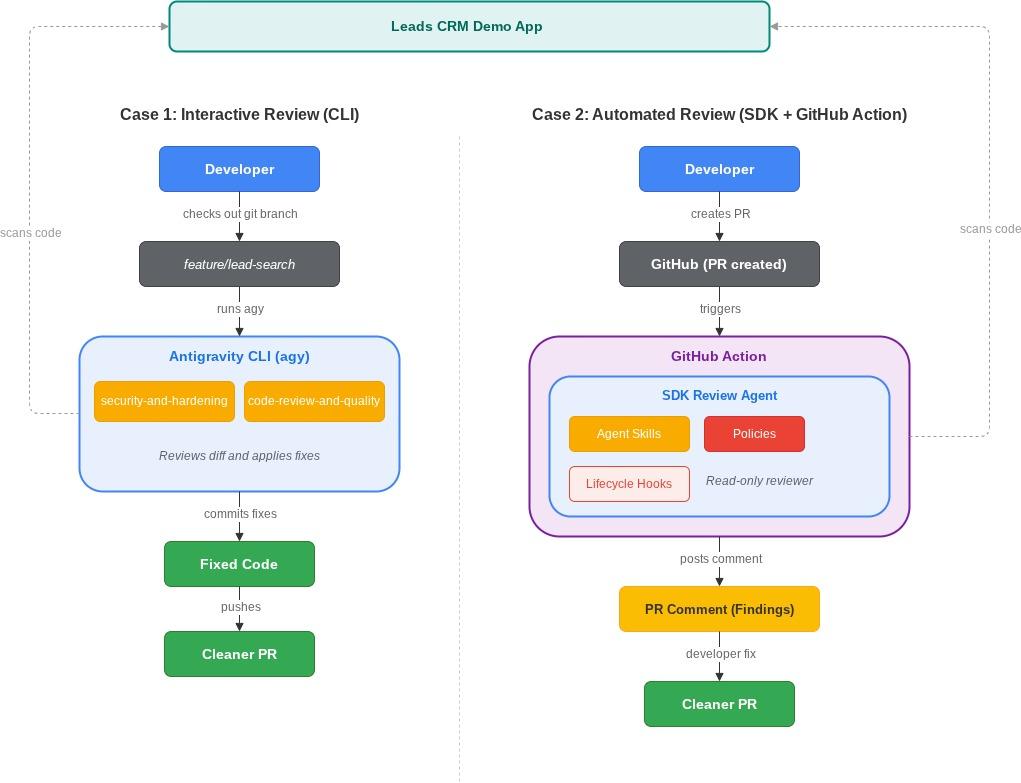
This codelab addresses those issues by teaching two approaches to using Antigravity as the reviewer: interactively during development with the CLI (you review, fix, then PR), and automatically in Continuous Integration with the SDK (the agent reviews every Pull Request and post the results as the comment)
What you'll explore
You vibe-coded a Leads CRM app — an AI agent built the full stack for you: Express backend, SQLite database, React frontend. It works. Then you asked the agent to add two new features: a lead search function and bulk import/export with admin stats. The agent delivered both fast. The code runs, the features function, and the PRs are ready.
But here is the problem: you didn't write this code. You approved it. How do you know the search endpoint isn't vulnerable to SQL injection? How do you know the admin route doesn't have a hardcoded password? You don't — and reading every line of AI-generated code defeats the speed advantage that made you vibe-code in the first place.
This codelab gives you two ways to solve this:
- Case 1 – Interactive review: Check out a feature branch with vulnerabilities, use Antigravity CLI enhanced with agent skills to review the diff, fix the issues, and create a clean PR.
- Case 2 – Automated review: Set up a GitHub Action powered by the Antigravity SDK that automatically reviews PRs, posts structured findings as comments, and responds when developers ask follow-up questions on the review.
What you'll learn
- How vibe coding might creates security risks and why automated review catches what manual review misses
- How to install and use community-maintained agent skills to give the Antigravity CLI deep security and code review expertise
- How to use the CLI interactively to review a feature branch diff, fix vulnerabilities, and create a clean PR
- How to use the Antigravity SDK to build a read-only code review agent with declarative safety policies and lifecycle hooks
- How to deploy the review agent as a GitHub Action that reviews PRs and post the result as PR comment
Prerequisites
- A Google Cloud account
- A GitHub account
- Basic familiarity with Terminal, Version Control, and CI/CD
2. Environment Setup
This step forks the Leads CRM app repo, clones it in Cloud Shell, setup Antigravity CLI, and authenticates.
Fork the repository
You need your own copy of the repo because you will push commits and create PRs with GitHub Actions.
Go to the following repository
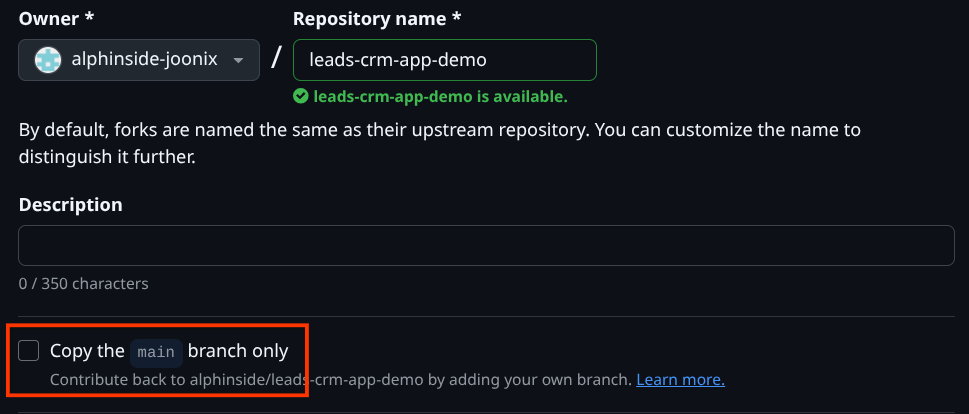
Then, click Fork. On the fork creation page, uncheck the "Copy the main branch only" checkbox — you need the other feature branches (feature/lead-search and feature/bulk-operations) included in your fork.

Open Cloud Shell
Open Cloud Shell in your browser. Cloud Shell provides a pre-configured environment with all the tools you need for this codelab. Click Authorize when prompted to
Then click "View" -> "Terminal" to open the terminal.Your interface should look similar to this
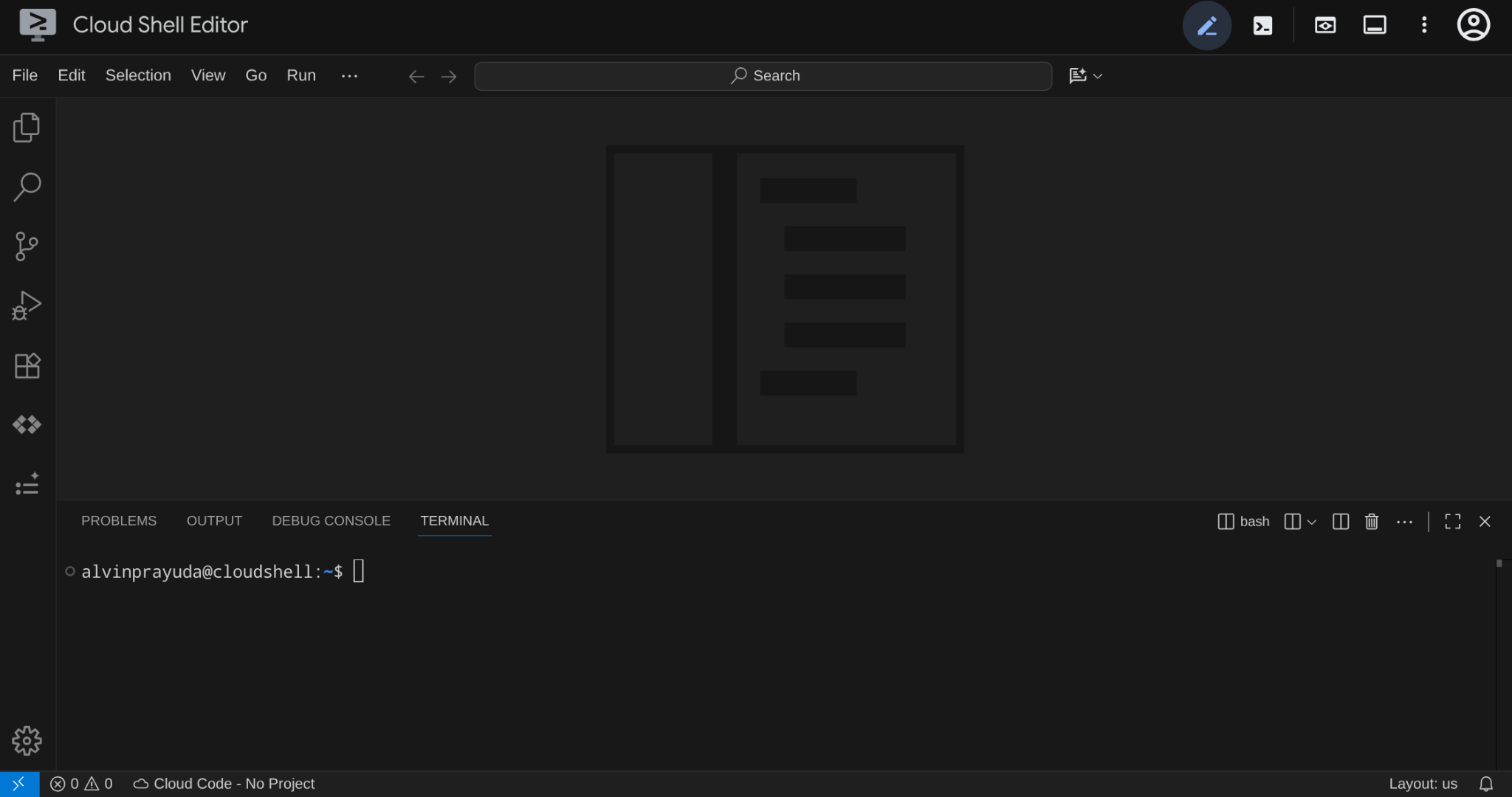
This will be our main interface, IDE on top, terminal on the bottom
Authenticate with GitHub
By default, Cloud Shell does not have GitHub credentials configured by default, however it already has gh CLI installed. Set up authentication so you can push commits and create PRs later:
gh auth login

Select Github.com
 Select
 HTTPS ( or if you already familiar with other mechanism feel free to choose it )

Then, choose Y

Then, choose Login with a web browser
**,**You'll be asked to copy the one-time code and enter it when you open the login page in the browser, you can Ctrl + Click on the URL in the terminal to open the https://github.com/login/device URL. You will be asked to select the account you want to login and enter the code.
After that, go back to the Cloud Shell console page and you will see the terminal output like this
✓ Authentication complete.
- gh config set -h github.com git_protocol https
✓ Configured git protocol
! Authentication credentials saved in plain text
✓ Logged in as alphinside-joonix
This means you've successfully set up your Github account authentication on Cloud Shell.
Clone your forked repository
Next, let's clone your forked repository. Replace <YOUR_GITHUB_USERNAME> with your GitHub username:
git clone https://github.com/<YOUR_GITHUB_USERNAME>/leads-crm-app-demo.git
cloudshell workspace leads-crm-app-demo && cd leads-crm-app-demo
Verify feature branches
After that, verify that both feature branches with pre-built vulnerabilities should be available in the remote:
git branch -a | grep feature/
You should see the following output
remotes/origin/feature/bulk-operations
remotes/origin/feature/bulk-operations-solution
remotes/origin/feature/email-composer
remotes/origin/feature/lead-search
Verify the Antigravity CLI
Next, let's verify that Antigravity CLI is pre-installed in Cloud Shell. Verify it is available:
agy --version
You should see the version of installed Antigravity CLI, E.g. 1.0.13
Now, if you haven't authenticated the Antigravity CLI yet, you can go to this codelab to see the authentication process in more detail.
At this point you should have the following:
- the forked repo cloned
- both feature branches visible
agycommand available and authenticated
3. The Problem – Vulnerabilities Hiding in Vibe-Coded Features
Here is the scenario: a teammate used an AI agent to add two features to the Leads CRM app — a lead search function and bulk import/export operations. Both features work. Both were shipped fast without security review. You are going to review both branches before they merge — one interactively with the CLI, one automatically with a GitHub Action.
Examine the first feature branch
Review the diff on feature/lead-search:
git diff main...origin/feature/lead-search
This branch adds a search endpoint. Scan the diff — you should spot issues like string concatenation in SQL queries, missing input validation, debug logging that leaks query details, and raw error messages exposed to the client.
+  app.get("/api/leads/search", (req, res) => {
+    const query = req.query.q as string;
+
+    if (!query) {
+      return res.status(400).json({ error: "Search query is required" });
+    }
...
Examine the second feature branch
git diff main...origin/feature/bulk-operations
This branch adds bulk import/export endpoints and an admin statistics dashboard. The vulnerabilities here include hard coded admin credentials, unauthenticated admin endpoints, no input validation on bulk import, and path traversal risk in export filename handling.
...
+  const ADMIN_PASSWORD = "admin123";
+
+  app.post("/api/admin/import", (req, res) => {
+    const { password, leads } = req.body;
+
+    if (password !== ADMIN_PASSWORD) {
+      return res.status(401).json({ error: "Invalid admin password" });
+    }
...
Both branches add functional features. Both have security issues. The question is how to catch them — manually with the CLI (Case 1) or automatically with a GitHub Action (Case 2).
4. Case 1 : Interactive Review with Antigravity CLI
Interactive CLI review is most valuable right after a vibe-coding session, reviewing the code you've just written, or reviewing your teammates pull request. If we are talking about vibe-coding, an AI agent generated your feature code fast — but you may not fully understand every line it produced, and the agent might be optimized for functionality, and not necessarily security, depending on the context configuration while you develop the feature.
In this scenario, we have those codes with security vulnerabilities and we will utilize Antigravity CLI with code review skills to review the code interactively. This agent-reviews-agent pattern catches vulnerabilities that slip through when the developer's role shifts from writing code to approving AI-generated code. It also applies when reviewing your own manually written code or a teammate's branch before it goes through CI. You control the conversation: ask the agent to focus on specific files, dig deeper into a finding, or apply fixes immediately.
Without agent skills, Antigravity CLI can still review code — but it relies on its general training knowledge, which may miss domain-specific patterns or apply inconsistent review criteria across sessions. Agent skills give the agent a structured playbook: five-axis review for quality, severity labeling for prioritization. The review becomes repeatable and thorough regardless of how you phrase your prompt.
This step uses the Antigravity CLI with agent skills to review the feature/lead-search branch, fix the vulnerabilities, and create a clean PR.
Check out the feature branch
First, let's change our branch to the Case 1 branch:
git checkout feature/lead-search
Next, let's upgrade our Antigravity CLI with the agent skills to do review
What are agent skills
Skills are declarative markdown files that give the agent specialized expertise. Once installed, they become slash commands (e.g., /code-review-and-quality). Think of them as giving a general-purpose agent a senior engineer's security playbook.
Skills are portable across agents (Antigravity, Claude Code, Cursor, etc.) and shareable via Git. For Antigravity CLI, workspace (project/local) skills live in .agents/skills/ at the project root. While, global skills live in ~/.gemini/config/skills/. See more in this documentation
To demonstrate agent skills capabilities, this codelab will use code review skill from addyosmani/agent-skills:
code-review-and-quality– Five-axis review (correctness, readability, architecture, security, performance) with severity labeling.
Install the code review agent skill
Using the command below, the skill will be installed into .agents/skills/ by default in the current working directory — a workspace-level installation. This means they become part of the repository and can be committed alongside your code, so every developer (and CI pipeline) on the project gets the same review skills automatically.
npx skills add addyosmani/agent-skills --skill code-review-and-quality -y
Here is what the detailed skill that can be inspected on the .agents/skills/code-review-and-quality/SKILL.md file:
name: code-review-and-quality
description: Conducts multi-axis code review. Use before merging any change. Use when reviewing code written by yourself, another agent, or a human. Use when you need to assess code quality across multiple dimensions before it enters the main branch.
Key capabilities:
- Reviews across five axes: correctness, readability, architecture, security, and performance
- Labels findings by severity so you fix critical issues first
- Applies the approval standard: "approve when it definitely improves overall code health, even if it isn't perfect"
Now we're ready to do some execution. Let's verify the skill in the Antigravity CLI
Launch AGY and verify skills
Let's run Antigravity CLI
agy --dangerously-skip-permissions
Then run the following command
/skills
You should see the 2 skills displayed like this under Workspace skills

Run the code review of the feature diff
Invoke the security skill and ask it to review your branch. Type this prompt:
Review the git diff between main and my current branch. Find any issues based on the agent skills that are appropriate for this. Write the findings and plan to fix them to code_review.md in the current working directory. Do not apply fixes yet.
The agent detects the code-review-and-quality skill that is relevant and activates it automatically. It reads the diff, identifies vulnerabilities, and writes the findings with a proposed fix plan to code_review.md.

After it finished scanning, you should see code_review.md file created in your working directory and can inspect it in the editor
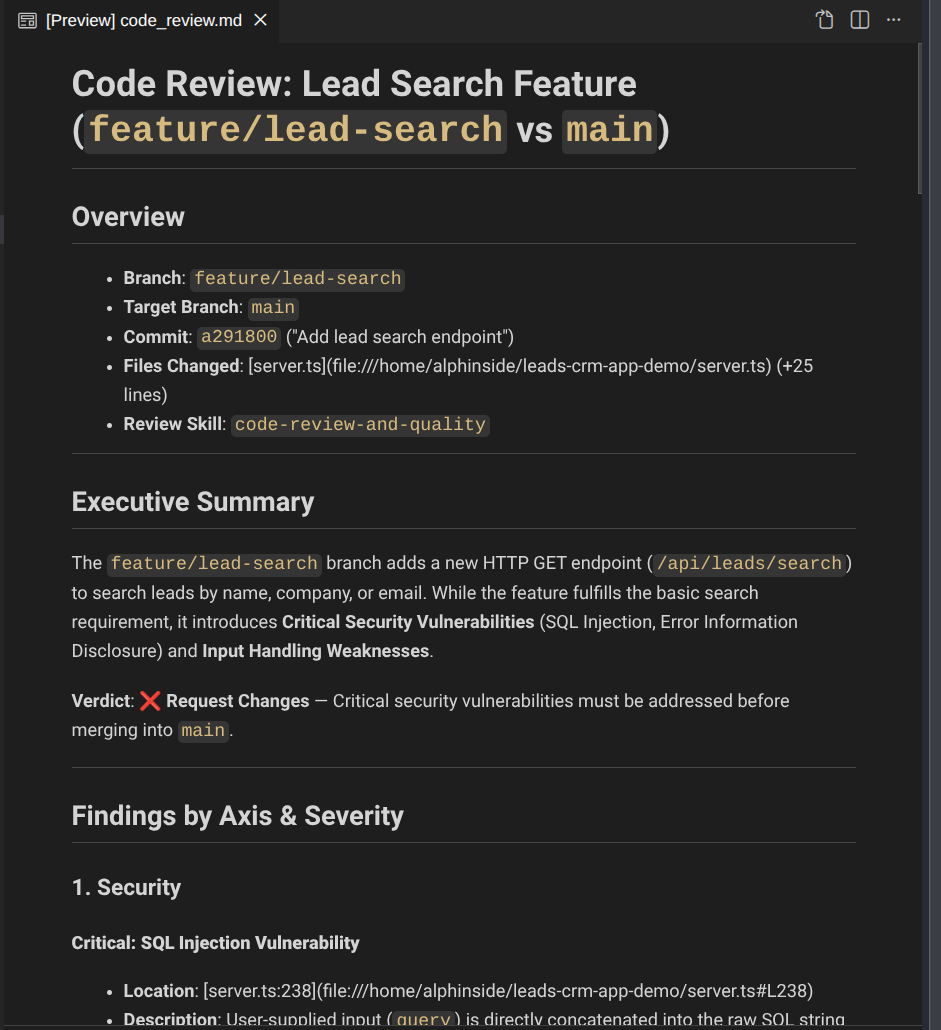
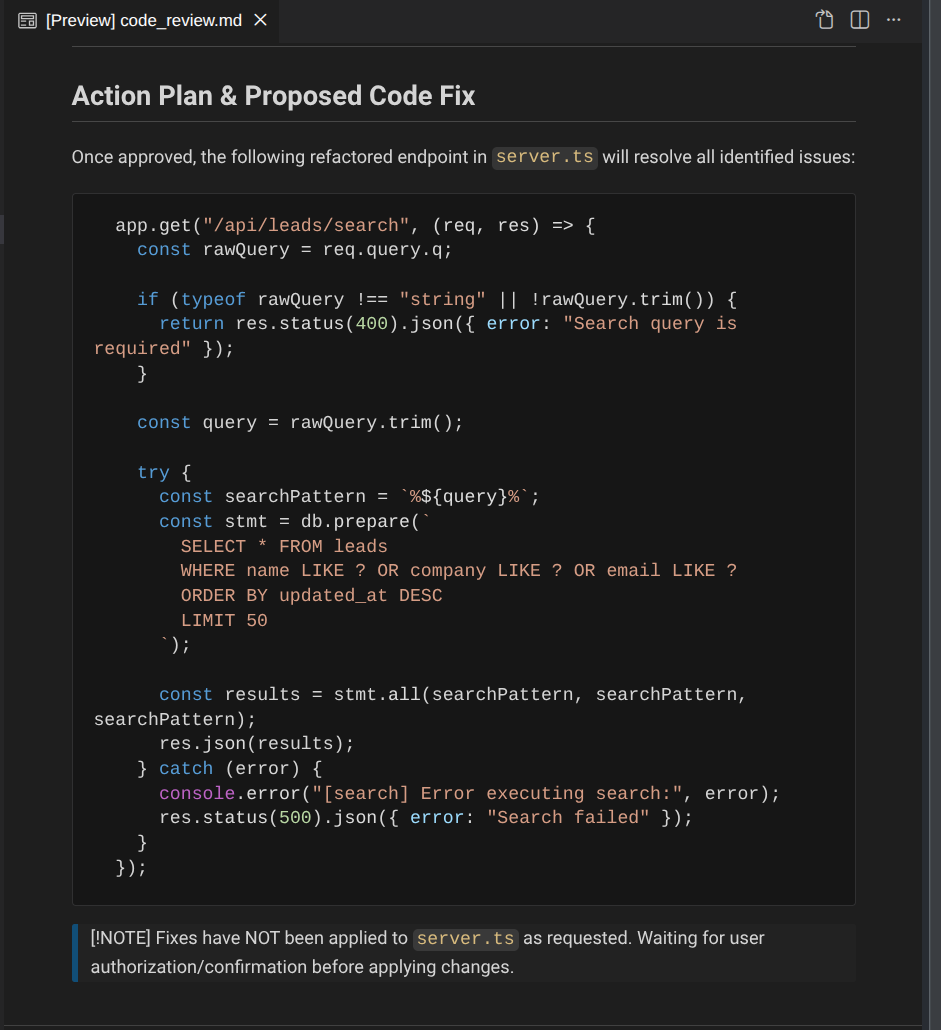
Review each finding and the proposed fix. Once you are satisfied with the plan, ask the agent to apply it:
Apply the proposed fixes from code_review.md
The agent reads the plan and applies each planned fix to the source files.
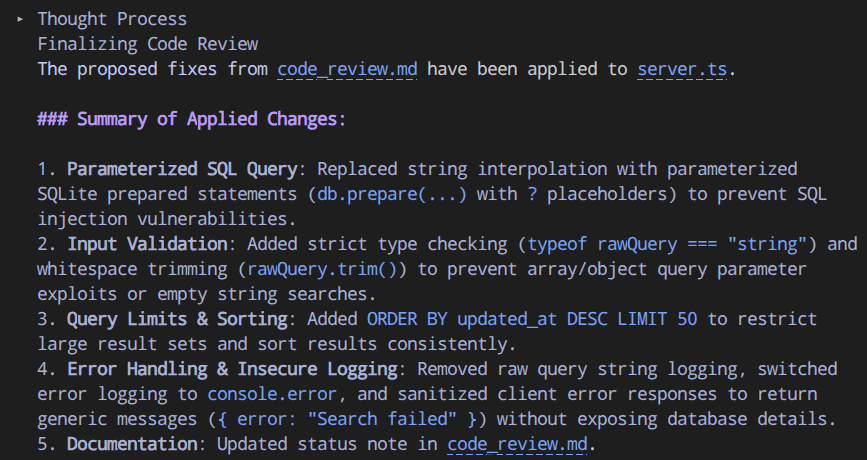
Now, if you want, you can check whether the app running correctly or not after the fix by installing the dependencies and run it
npm install
npm run dev
The application should run properly. If not, you can iterate and ask Antigravity CLI to fix it
Commit and create a PR
Now, you can push the changes into your own repository if you want. Before going to the next case, let's commit the changes into the current branch first.
First we need to configure your Git identity (replace with your own name and email) if you haven't do so:
git config --global user.email "you@example.com"
git config --global user.name "Your Name"
Then commit the changes
git add .
git commit -m "fix: address security vulnerabilities in lead search feature"
Now, you've already used Antigravity CLI as an interactive reviewer. The skills gave it structured methodology — five-axis code review. This works when you are the developer reviewing the AI-generated code, your own, or a teammate's contribution. On the next section, we will automate all of this flow to make it as a scalable automated process in your code repository by using Github as example
5. Case 2 : Automated Review with Antigravity SDK - Part 1 ( Creating the Agent )
This step builds an automated review agent using the Antigravity SDK, deploys it as a GitHub Action, and tests it against the second feature branch. The agent reviews PRs on demand and posts findings as PR comments.
Why automated review
Interactive CLI review (Case 1) works when a developer actively reviews. Teams need a review that runs automatically on every PR — catching issues from any contributor, any tool, any time. The Antigravity SDK (google-antigravity) provides the same agent runtime as the CLI, as a Python library. Policies and hooks are configured in code.
GitHub Actions is GitHub's built-in Continuous Integration/Continuous Development (CI/CD) platform. It runs workflows — automated scripts defined in YAML — in response to repository events like opening a PR, pushing a commit, or posting a comment. Workflows run on GitHub-hosted virtual machines and have access to the repository code. In this case, you use a GitHub Action to run a security review agent every time a PR is created.
Here is how the automated review flow works:
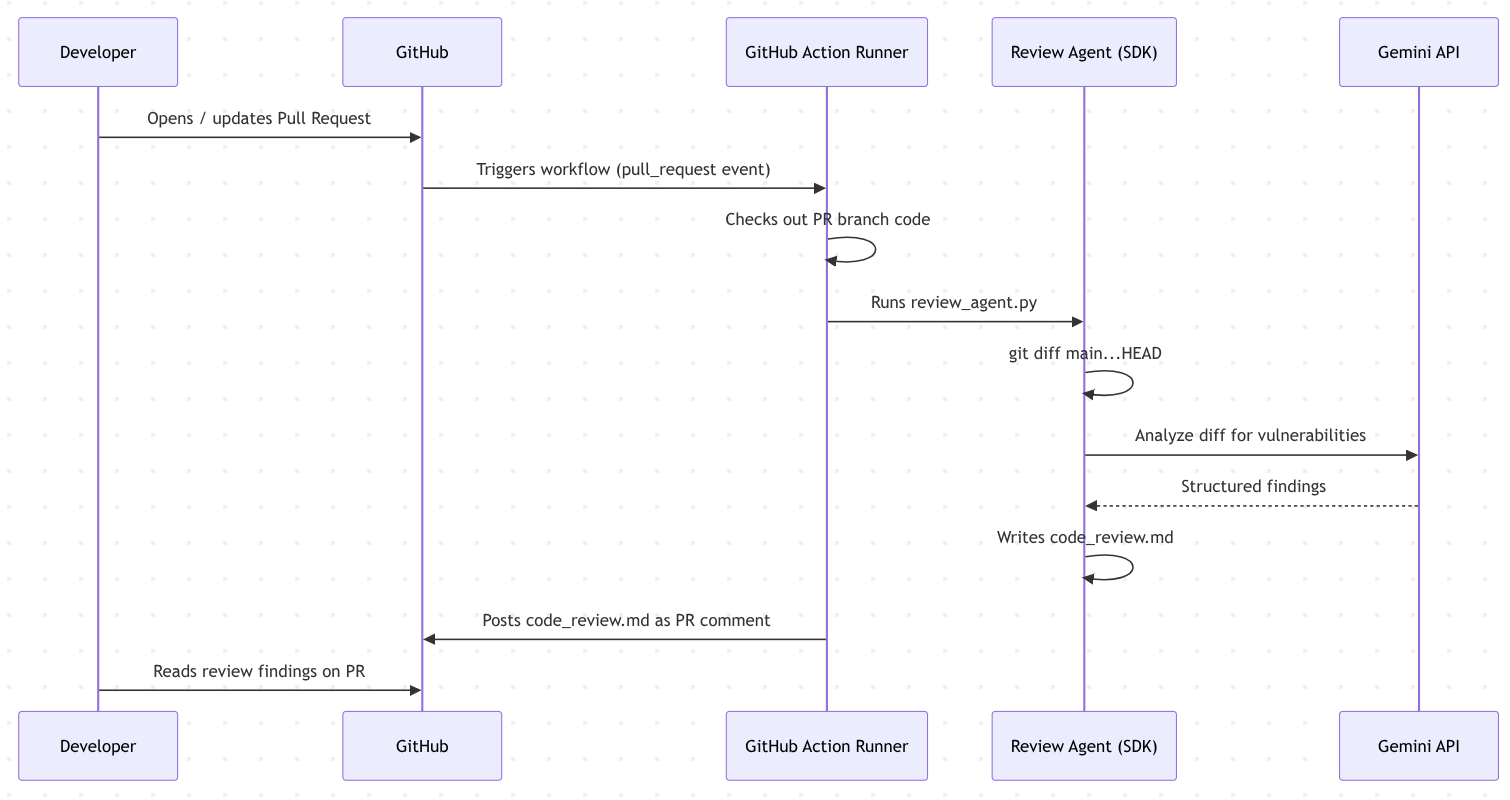
The Antigravity SDK ( google-antigravity) provides the same agent runtime as the CLI, as a Python library. You write a Python script that configures the agent with policies and hooks, run it inside a GitHub Action, and post the results as a PR comment.
Get a Gemini API key
Before we start, we will need the Gemini API Key to be consumed by the Antigravity SDK. Go to Google AI Studio API Key and create an API key and whenever needed you can copy the API Key
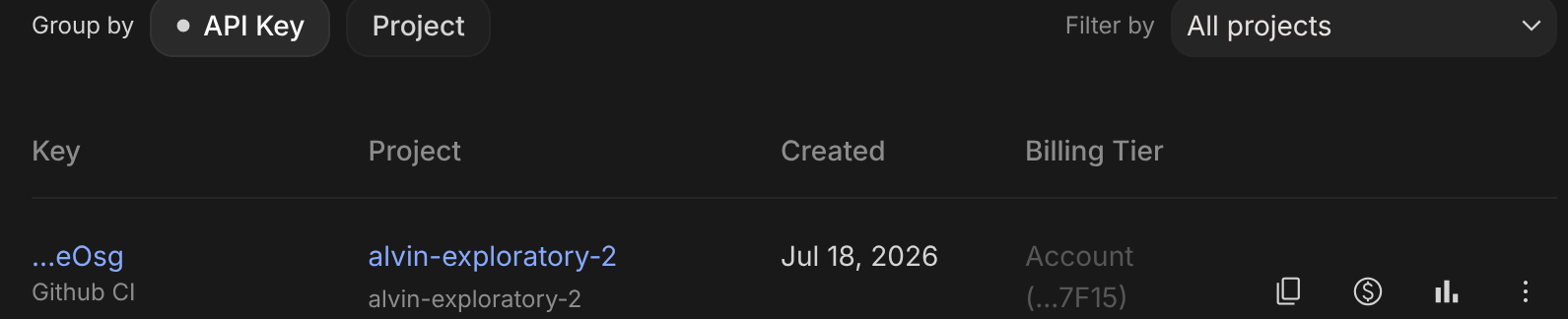
This key will be used when running the review agent locally and as a GitHub Actions secret later on
Part A: Build the review agent
Now, for Case 2, let's switch your current working directory to the feature/bulk-operations branch:
git checkout feature/bulk-operations
This is the second feature branch from the scenario — it adds bulk import/export endpoints and an admin statistics dashboard to the CRM app.
Set up the Python project
The Antigravity SDK is currently only available in Python, hence we will need a Python environment to develop it. We will use uv for our Python project manager. uv is a fast Python package and project manager written in Rust ( docs). This codelab uses it for speed and simplicity. If you utilize cloudshell for this tutorial, it is already pre-installed in the instance. See this tutorial if you wish to install it for your local
Initialize a Python project for the review agent using uv:
uv init code_review_agent
uv add --project code_review_agent google-antigravity==0.1.7
It will create a new directory code_review_agent which will contain our necessary code review agent files.
Install the review skills
The review agent needs the same security and code review skills used in Case 1. Install them into code_review_agent/skills/ so the SDK agent loads them at runtime:
npx skills add addyosmani/agent-skills --skill code-review-and-quality -y
cp -r .agents/skills code_review_agent/skills
Create the review agent
Now, let's create code_review_agent/review_agent.py . Run the following command
cloudshell edit code_review_agent/review_agent.py
Then, copy the following content to the file
#!/usr/bin/env python3
import asyncio
import json
import os
import sys

import pydantic

from google.antigravity import Agent, LocalAgentConfig, CapabilitiesConfig
from google.antigravity.hooks import hooks, policy
from google.antigravity import types


class Finding(pydantic.BaseModel):
    file: str
    line: int
    severity: str
    category: str
    description: str
    proposed_fix: str = ""


class ReviewResult(pydantic.BaseModel):
    findings: list[Finding]


SCRIPT_DIR = os.path.dirname(os.path.abspath(__file__))
OUTPUT_FILE = "code_review.md"
SKILLS_PATHS = [
    os.path.join(SCRIPT_DIR, "skills", "code-review-and-quality"),
]

review_policies = [
    policy.deny_all(),
    policy.allow("view_file"),
    policy.allow("list_directory"),
    policy.allow("search_directory"),
    policy.allow("find_file"),
    policy.allow("run_command"),
    policy.allow("finish"),
]

@hooks.post_tool_call
async def log_tool_results(data: types.ToolResult):
    result_str = str(data.result) if data.result else ""
    preview = result_str[:200] + "..." if len(result_str) > 200 else result_str
    print(f"[audit] tool={data.name} result_len={len(result_str)} error={data.error} preview={preview}", flush=True)

@hooks.pre_tool_call_decide
async def enforce_safe_tools(data: types.ToolCall) -> types.HookResult:
    print(f"[audit] calling tool={data.name} args_keys={list(data.args.keys())}", flush=True)

    if data.name == "run_command":
        cmd = str(data.args.get("CommandLine", ""))
        if not cmd.startswith("git "):
            return types.HookResult(
                allow=False,
                message=f"Only git commands are allowed. Blocked: {cmd}"
            )
    return types.HookResult(allow=True)

async def review_code(target_dir: str) -> dict:
    prompt = f"""Run `git diff main...HEAD -- ':!.github' ':!code_review_agent'` in {target_dir} to get the changes on this branch.
Review ONLY the changed code for security vulnerabilities and code quality issues.
"""

    config_kwargs = dict(
        system_instructions=(
            "You are a code review agent. "
            "You review code diffs for vulnerabilities and quality issues using the loaded skills. "
            "You can run git commands to inspect the diff. "
            "You NEVER modify files."
        ),
        response_schema=ReviewResult,
        skills_paths=SKILLS_PATHS,
        policies=review_policies,
        hooks=[log_tool_results, enforce_safe_tools],
    )

    if os.environ.get("GEMINI_API_KEY"):
        config_kwargs["api_key"] = os.environ["GEMINI_API_KEY"]
    else:
        config_kwargs["vertex"] = True
        config_kwargs["project"] = os.environ.get("GOOGLE_CLOUD_PROJECT")
        config_kwargs["location"] = os.environ.get("GOOGLE_CLOUD_LOCATION", "global")

    config = LocalAgentConfig(**config_kwargs)

    async with Agent(config) as agent:
        response = await agent.chat(prompt)

        last_step = -1
        final_text_chunks = []
        async for chunk in response.chunks:
            if isinstance(chunk, types.ToolCall):
                final_text_chunks.clear()
            if hasattr(chunk, "text") and hasattr(chunk, "step_index"):
                if chunk.step_index != last_step:
                    final_text_chunks.clear()
                    last_step = chunk.step_index
                final_text_chunks.append(chunk.text)

        final_text = "".join(final_text_chunks)
        if final_text:
            print(final_text)

        data = await response.structured_output()

        if data and "findings" in data:
            return {"findings": data["findings"]}

        try:
            parsed = json.loads(final_text)
            if isinstance(parsed, list):
                return {"findings": parsed}
            if isinstance(parsed, dict) and "findings" in parsed:
                return {"findings": parsed["findings"]}
        except json.JSONDecodeError:
            pass

    return {"findings": final_text}


SEVERITY_EMOJI = {"critical": "🔴", "high": "🟠", "medium": "🟡", "low": "🔵"}

def format_markdown(result: dict) -> str:
    findings = result.get("findings", [])
    if isinstance(findings, str):
        return f"## AI Security Review\n\n{findings}\n"
    if not findings:
        return "## AI Security Review\n\nNo security issues found.\n"
    lines = ["## AI Security Review\n"]
    for f in findings:
        emoji = SEVERITY_EMOJI.get(f.get("severity", "").lower(), "⚪")
        lines.append(f"### {emoji} [{f.get('severity', 'unknown').upper()}] {f.get('category', '')}\n")
        lines.append(f"**{f.get('file', '')}:{f.get('line', '')}**\n")
        lines.append(f"{f.get('description', '')}\n")
        proposed_fix = f.get('proposed_fix', '')
        if proposed_fix:
            lines.append(f"**Proposed fix:** {proposed_fix}\n")
    lines.append("---\n*Powered by Antigravity SDK*")
    return "\n".join(lines)


if __name__ == "__main__":
    target = sys.argv[1] if len(sys.argv) > 1 else "."
    result = asyncio.run(review_code(target))
    markdown = format_markdown(result)
    with open(OUTPUT_FILE, "w") as f:
        f.write(markdown)
    print(f"Review written to {OUTPUT_FILE}")
    print(json.dumps(result, indent=2))
Walk through the key design decisions in this agent:
- Deny-by-default policies:
policy.deny_all()blocks everything, then specifically allows open only file reading tools andrun_command(for git). - Enforcement at two layers: policies restrict at the framework level, and the
enforce_safe_toolshook provides a second layer — allowing onlygitcommands throughrun_command. - Git diff scoping: the agent runs
git diff main...HEADto review only changed code, not the entire codebase. - Structured output with fallback:
response_schema=ReviewResultenforces JSON structure via the SDK's finish tool. If parsing fails, the fallback chain tries parsingtext()as JSON, then returns raw text. - Auth fallback: uses
GEMINI_API_KEYif available, otherwise falls back to Vertex AI via Application Default Credentials. - File output: writes formatted markdown findings to
code_review.md— the GitHub Action reads this file and posts it as a PR comment later on
Test the review agent
Test from the project root. The SDK will read GEMINI_API_KEY from the environment, hence let's put the key in the environment
export GEMINI_API_KEY=YOUR_API_KEY
Then run the following command to run it locally
uv run --project code_review_agent code_review_agent/review_agent.py .
While running it will show some console output explaining what tools it currently use. And you can notice it accessing the security-and-hardening and code-review-and-quality agent skills
[audit] calling tool=view_file args_keys=['AbsolutePath', 'IsSkillFile']
[audit] tool=view_file result_len=47 error=None preview=Read security and hardening skill documentation
[audit] calling tool=view_file args_keys=['AbsolutePath', 'IsSkillFile']
[audit] tool=view_file result_len=48 error=None preview=Read code review and quality skill documentation
[audit] calling tool=run_command args_keys=['CommandLine', 'Cwd', 'WaitMsBeforeAsync']
...
The agent runs git diff main...HEAD, reviews only the changed code, writes formatted findings to code_review.md, and prints structured JSON to the console. You can inspect the written code_review.md in the editor like shown below
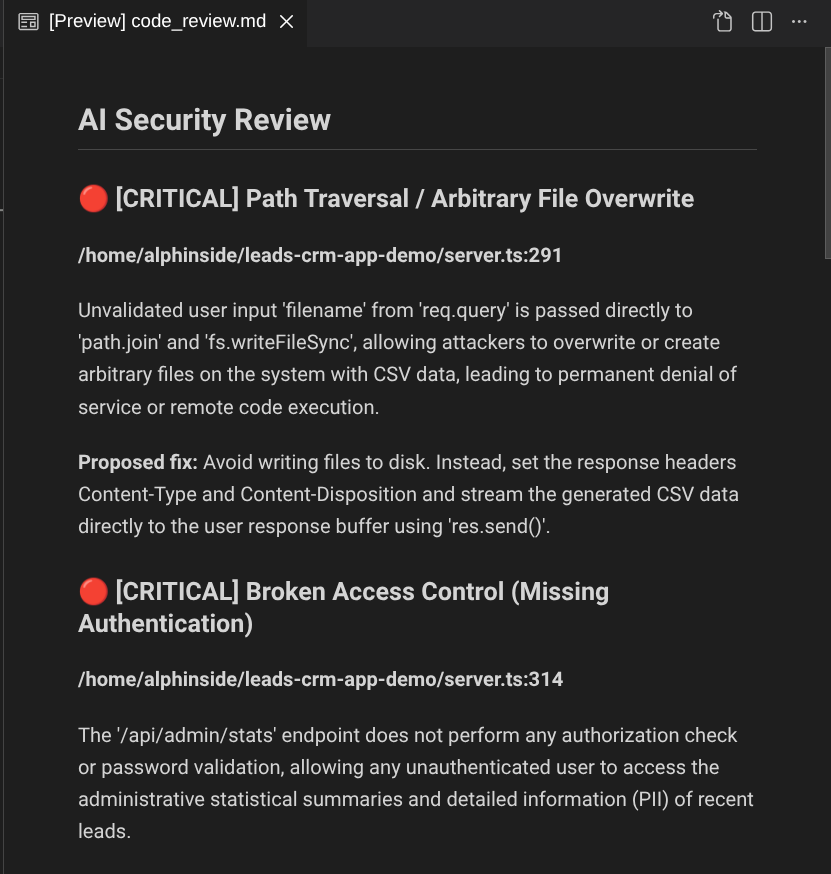
Locally it's already working, now let's move on to the next part. Creating the Github Action configuration
6. Case 2 : Automated Review with Antigravity SDK - Part 2 ( Configuring Github Actions)
Before we start, let's delete the previously produced code_review.md file if it exists.
rm -f code_review.md
Now, we will need to create the Github Action YAML config file.
mkdir -p .github/workflows
cloudshell edit .github/workflows/code_review.yml
Then add the following content to the file
name: AI Code Security and Quality Review

on:
  pull_request:
    types: [opened, synchronize]

jobs:
  review:
    runs-on: ubuntu-latest
    permissions:
      contents: read
      pull-requests: write

    container:
      image: ghcr.io/astral-sh/uv:python3.12-bookworm

    steps:
      - name: Install git
        run: apt-get update && apt-get install -y git
      - uses: actions/checkout@v4
        with:
          fetch-depth: 0
      - name: Run security review
        env:
          GEMINI_API_KEY: ${{ secrets.GEMINI_API_KEY }}
        run: |
          git config --global --add safe.directory $GITHUB_WORKSPACE
          uv run --project code_review_agent code_review_agent/review_agent.py .
      - name: Post findings as PR comment
        if: always()
        uses: actions/github-script@v7
        with:
          script: |
            const fs = require('fs');
            const body = fs.readFileSync('code_review.md', 'utf8');
            await github.rest.issues.createComment({
              owner: context.repo.owner,
              repo: context.repo.repo,
              issue_number: context.payload.pull_request.number,
              body: body
            });
The workflow will trigger automatically when a PR is opened or updated. It checks out the PR branch with full git history (needed for git diff main...HEAD), runs the review agent which writes findings to code_review.md, and posts the file contents as a PR comment.
Now let's commit all the changes and push it to Github remote, we're ready to test this integration
git add .
git commit -m "Add AI code security-quality review agent and GitHub Action"
git push origin feature/bulk-operations
7. Case 2 : Automated Review with Antigravity SDK - Part 3 (Testing Automated Code Review)
Now, we go to your forked repository https://github.com/<YOUR_GITHUB_USERNAME>/leads-crm-app-demo web page and click Settings
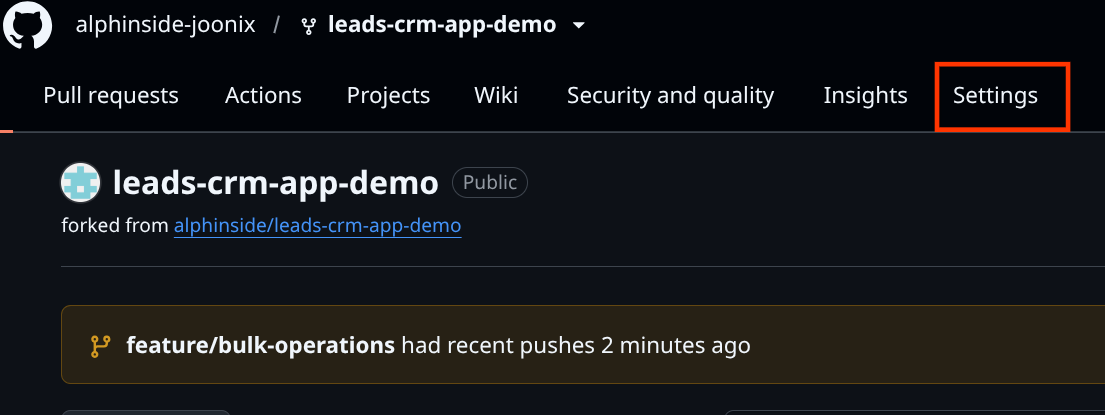
Then, on the left panel, find Secrets and variables and click and select Actions
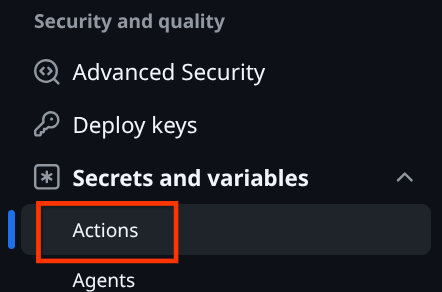
After that click the New repository secret to configure GEMINI_API_KEY secret
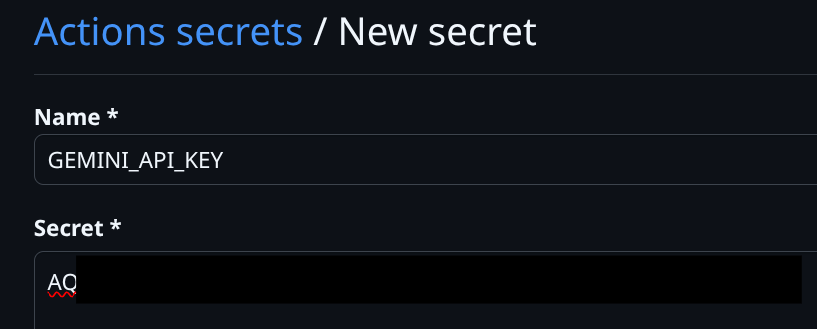
After that select Pull Request and create new Pull Request from the branch feature/bulk_operations to main branch of your own repo


After the pull request is created, it will run the Github Actions which you can inspect in Checks menu or near the Merge pull request button

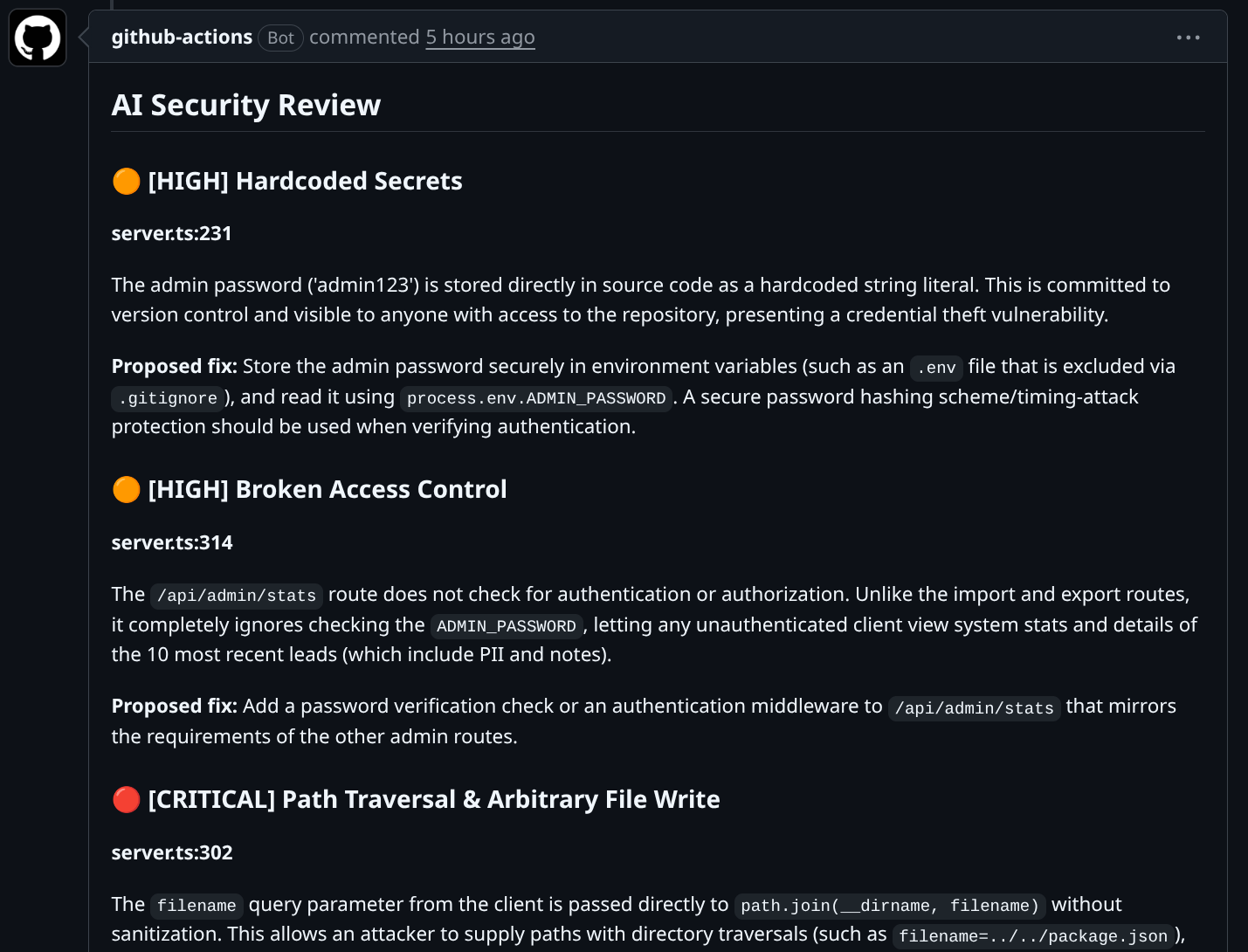
You can click the running Actions to see the details and when finished it will post the review results as Pull Request comment like shown below
8. Wrap Up
Congratulations!
You built two complete code review workflows for catching security vulnerabilities in vibe-coded features:
- Case 1 (Interactive): Antigravity CLI with agent skills reviewed a feature branch diff, identified SQL injection and other vulnerabilities, fixed them following OWASP patterns, and produced a clean PR.
- Case 2 (Automated): Antigravity SDK powered a GitHub Action that automatically reviews every PR, posting structured security findings as PR comments.
What you've learned
- How vibe coding creates security risks and why automated review catches what manual review misses
- How to install and use agent skills to give the Antigravity CLI structured security expertise
- How to interactively review a feature branch diff, fix issues, and create a clean PR
- How to build a read-only review agent with the Antigravity SDK using deny-by-default policies and lifecycle hooks
- How to deploy an automated review pipeline as a GitHub Action with interactive follow-up support
Clean up
Close the PRs
Go to each PR on your fork in GitHub and click Close pull request. Do not merge the feature/bulk-operations PR — it still contains the unpatched vulnerable code.
Delete the forked repository (optional)
If you no longer need the fork, go to your fork on GitHub: Settings -> scroll to Danger Zone -> Delete this repository.
What's next
- Antigravity CLI Plugins & Skills – create custom skills and plugins
- Antigravity CLI Permissions & Sandbox – fine-grained tool policies and OS-level sandboxing
- Antigravity SDK Hooks & Policies – advanced patterns (rate limiting, error recovery, middleware)
- Antigravity SDK Examples –
agent_middleware.pyfor production patterns