

1. 概览
在此 Codelab 中,您将构建 AI 创意工作室,这是一个分布式多智能体系统,可将单个提示转换为完整的 Instagram 广告系列。
输入一句话。获取观众研究、字幕、视觉概念、经过质量审核的文案以及完整的项目时间表 - 所有这些都由一组协作式 AI 智能体生成。
您将构建的代理
代理 | 角色 |
品牌策略顾问 | 在网络上搜索受众群体分析、竞争对手分析和当前趋势 |
文案撰写者 | 撰写包含主题标签和行动号召的 Instagram 字幕 - 由 ADK 技能提供支持,可按需加载平台指南和字幕公式 |
设计师 | 通过 Gemini 创建视觉概念并生成真实图片,存储在 GCS 中 |
影评人 | 评价文案和图片 - 返回 |
项目经理 | 构建项目时间表和任务分解,可以选择通过 MCP 同步到 Notion |
Creative Director | 按顺序编排所有五位专家 - 您只需提供一个提示,它会协调其余工作 |
这 5 个智能体以独立的 Cloud Run 微服务的形式部署。它们通过 A2A protocol进行通信,这是一种与语言无关的开放标准,因此任何智能体都可以调用任何其他智能体,而无需考虑框架。创意总监在 Agent Runtime 上运行,并远程连接到每位专家。
架构

学习内容
- 使用 Google ADK 构建 LLM 智能体 -
Agent、系统指令和内置工具。 - 使用 ADK 技能 (
SkillToolset) 将可重复使用的智能体知识封装到模块化文件中。 - 通过
FunctionTool将文本代理连接到图片模型,从而生成真实图片。 - 使用 Model Context Protocol (MCP) 集成外部 API,无需自定义粘合代码。
- 通过 HTTPS 使用 Agent to Agent Protocol (A2A) 将任何代理转换为可通过网络调用的服务。
- 使用
RemoteA2aAgent和AgentTool编排分布式智能体。 - 将独立智能体打包并部署为 Cloud Run 微服务。
- 在 Agent Runtime 上托管有状态的编排器。
- 使用上下文压缩功能,确保较长的多智能体工作流不超过上下文限制。
- 构建质量控制循环:影评人评论输出 → 根据需要自动修订。
所需条件
- 已启用结算功能的 Google Cloud 项目
- Owner 或 Editor IAM 角色
- Python 基础知识
2. 设置环境
在此 Codelab 中,我们将使用 Cloud Shell。
Cloud Shell 是什么?
Cloud Shell 是一款基于浏览器的免费 Linux 环境,其中预安装了所有工具:gcloud、git、Python、Docker 等。您无需在本地安装任何内容。
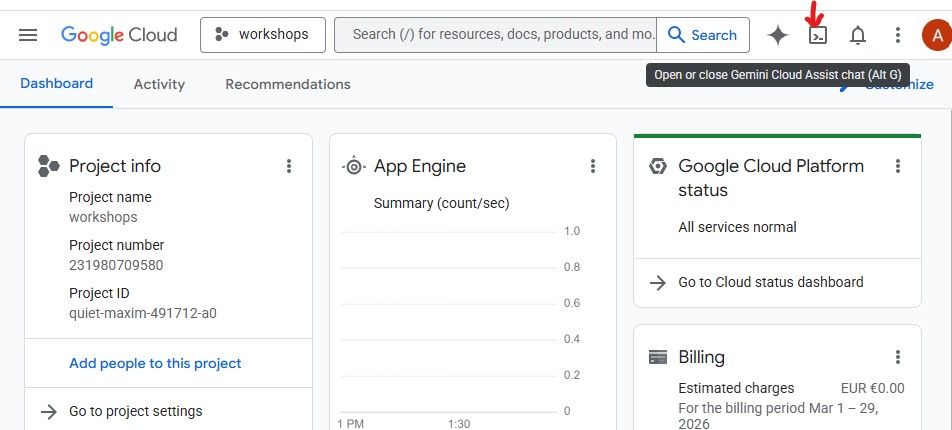
如需打开 Cloud Shell,请点击 GCP 控制台右上角工具栏中的终端图标:
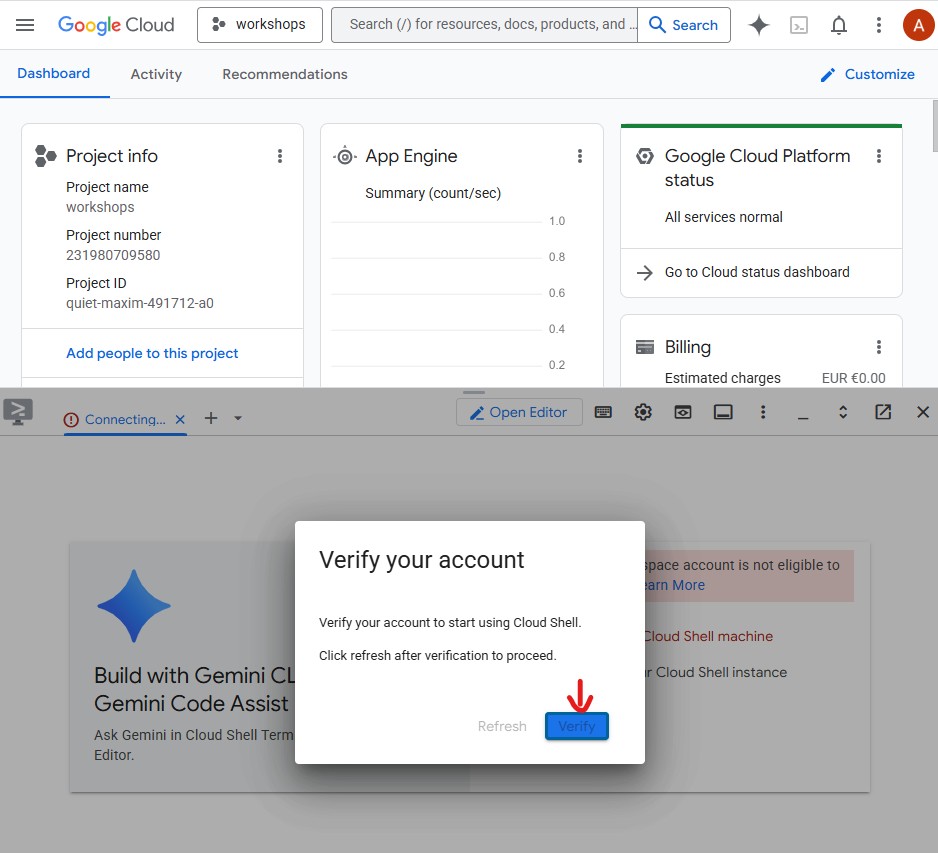
首次打开 Cloud Shell 时,系统会提示您验证账号 - 点击验证:
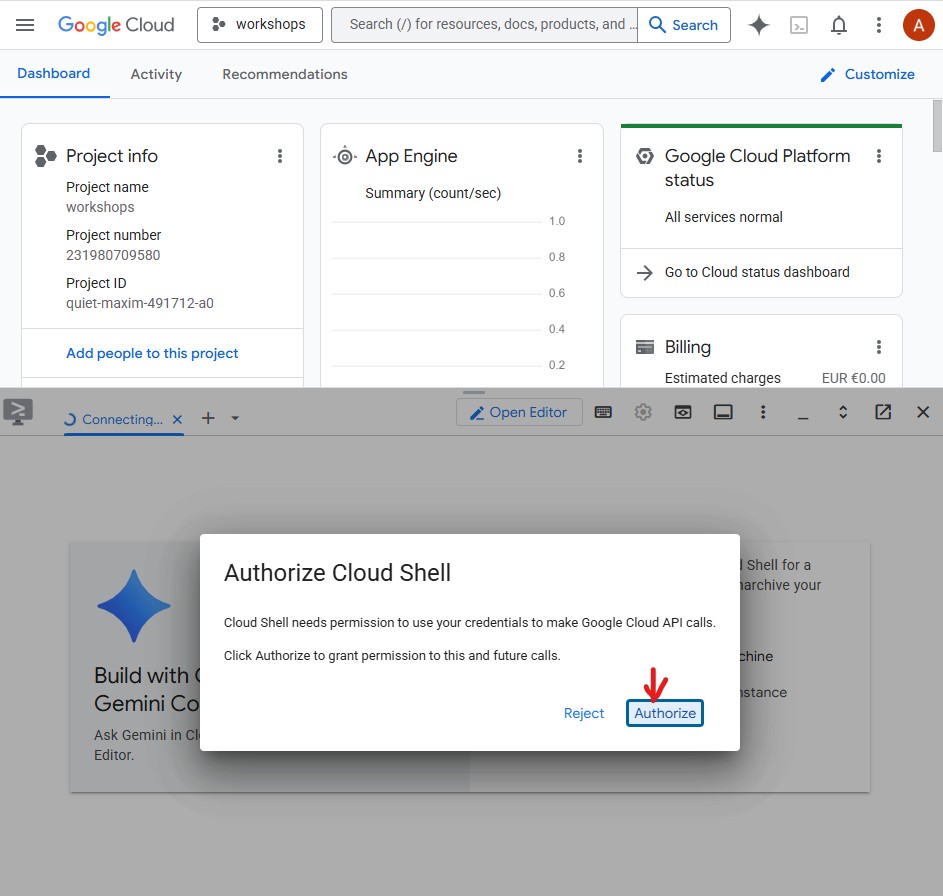
然后,点击授权,以允许 Cloud Shell 进行 Google Cloud API 调用:
Cloud Shell 现已准备就绪。您会在终端中看到欢迎消息: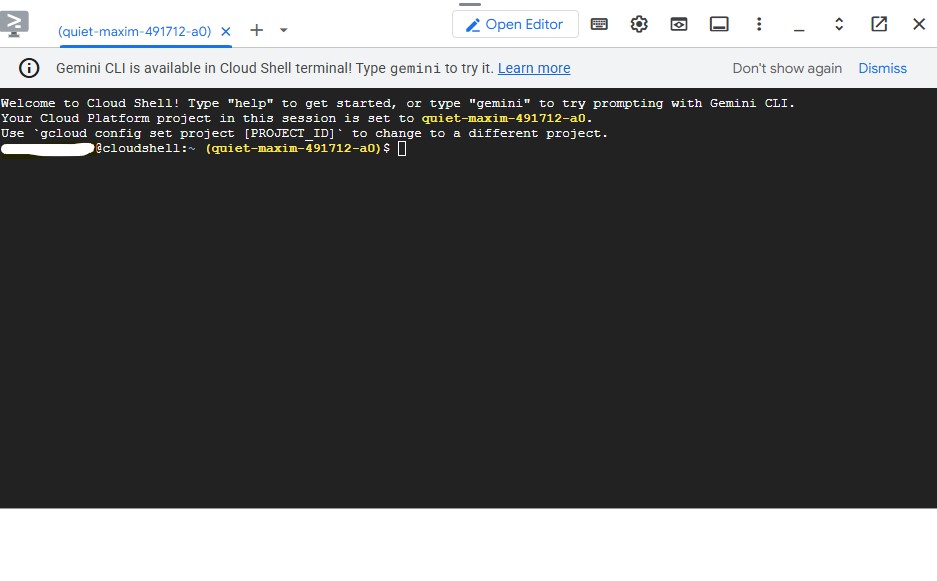
进行身份验证并配置项目
Cloud Shell 已通过您的 Google 账号完成身份验证。确认您的有效账号并查找您的项目 ID:
gcloud config list
您还可以在 GCP 控制台信息中心左侧的侧边栏中看到项目 ID。复制该路径,您将在下一个命令中用到它:
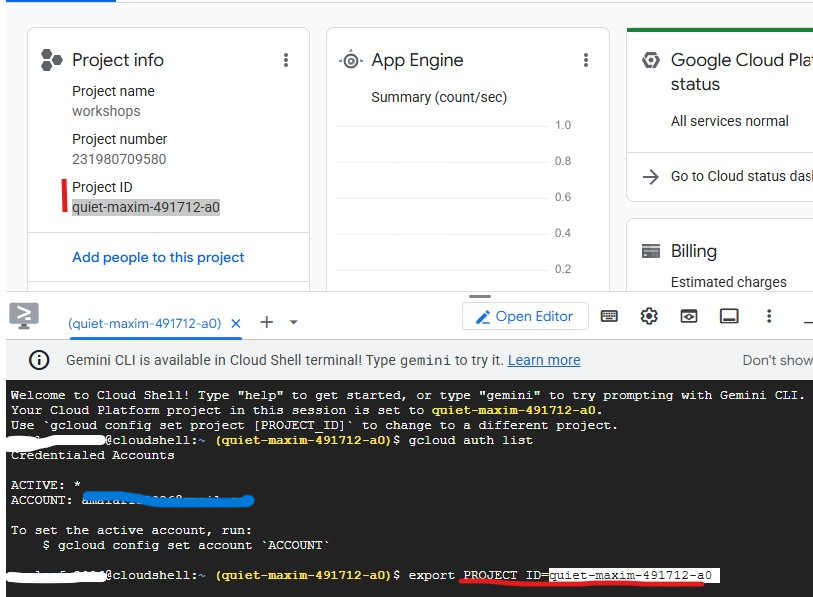
现在,设置您的项目:
export PROJECT_ID=$(gcloud config get-value project)
export REGION="us-central1"        # Cloud Run deployment region
echo "Project: $PROJECT_ID"
预期输出:
Project: my-project-123
启用必需的 API
gcloud services enable \
    aiplatform.googleapis.com \
    apphub.googleapis.com \
    run.googleapis.com \
    cloudbuild.googleapis.com \
    artifactregistry.googleapis.com \
    generativelanguage.googleapis.com \
    iam.googleapis.com \
    cloudresourcemanager.googleapis.com \
    storage.googleapis.com \
    secretmanager.googleapis.com
此过程大约需要 2 分钟。完成后,您会看到 Operation finished successfully。
设置应用默认凭据 (ADC)
智能体将使用 Google Auth 库调用 Gemini Enterprise Agent Platform,这需要应用默认凭证,与 gcloud CLI 身份验证分开。
运行此代码一次:
gcloud auth application-default login
系统会打开一个浏览器标签页,要求您进行确认。点击允许。您会看到:
Credentials saved to file: ~/.config/gcloud/application_default_credentials.json
克隆初始代码库
此 Codelab 使用初始代码库,这是一个框架项目,其中包含所有基础架构(Dockerfile、pyproject.toml、部署脚本),但代理逻辑需要您自行编写。
git clone https://github.com/Saoussen-CH/mas-a2a-gcp.git ~/ai-creative-studio
cd ~/ai-creative-studio/workshop/starter
每个 agent.py 都包含 # TODO 占位符,您将在其中编写代理逻辑。Dockerfile、pyproject.toml 和部署脚本已完成。
配置环境变量
复制提供的示例,并一步注入您的项目 ID:
cp .env.example .env
sed -i "s|GOOGLE_CLOUD_PROJECT=your-project-id|GOOGLE_CLOUD_PROJECT=$(gcloud config get-value project)|" .env
然后,创建 GCS 存储桶,供设计器存储生成的图片,并使用其名称更新 .env:
export PROJECT_ID=$(gcloud config get-value project)
export BUCKET_NAME="${PROJECT_ID}-campaign-images"

gcloud storage buckets create gs://${BUCKET_NAME} \
    --location=us-central1 \
    --project=${PROJECT_ID}

sed -i "s|GCS_IMAGES_BUCKET=your-project-id-campaign-images|GCS_IMAGES_BUCKET=${BUCKET_NAME}|" .env
然后设置签名图片网址支持。创意总监会为最终广告系列摘要中的每张图片生成可点击的 HTTPS 链接。这需要服务账号对网址进行签名。运行以下命令进行配置:
export PROJECT_NUMBER=$(gcloud projects describe $(gcloud config get-value project) --format="value(projectNumber)")
export SA_EMAIL="${PROJECT_NUMBER}-compute@developer.gserviceaccount.com"
export AGENT_RUNTIME_SA="service-${PROJECT_NUMBER}@gcp-sa-aiplatform-re.iam.gserviceaccount.com"

# Allow your user account to sign URLs locally (adk web)
gcloud iam service-accounts add-iam-policy-binding ${SA_EMAIL} \
  --member="user:$(gcloud config get-value account)" \
  --role="roles/iam.serviceAccountTokenCreator"

# Allow Agent Runtime to sign URLs when deployed
gcloud beta services identity create --service=aiplatform.googleapis.com
gcloud projects add-iam-policy-binding $(gcloud config get-value project) \
  --member="serviceAccount:${AGENT_RUNTIME_SA}" \
  --role="roles/iam.serviceAccountTokenCreator"

# Save SA email and project number to .env
grep -q "^SIGNING_SERVICE_ACCOUNT" .env \
  && sed -i "s|^SIGNING_SERVICE_ACCOUNT=.*|SIGNING_SERVICE_ACCOUNT=${SA_EMAIL}|" .env \
  || echo "SIGNING_SERVICE_ACCOUNT=${SA_EMAIL}" >> .env

grep -q "^GOOGLE_CLOUD_PROJECT_NUMBER" .env \
  && sed -i "s|^GOOGLE_CLOUD_PROJECT_NUMBER=.*|GOOGLE_CLOUD_PROJECT_NUMBER=${PROJECT_NUMBER}|" .env \
  || echo "GOOGLE_CLOUD_PROJECT_NUMBER=${PROJECT_NUMBER}" >> .env
在编辑器中打开 .env 以查看所有设置:
cloudshell edit .env
这会在 Cloud Shell 编辑器中以标签页的形式打开 .env - 如果编辑器面板不可见,请点击工具栏中的打开编辑器按钮:

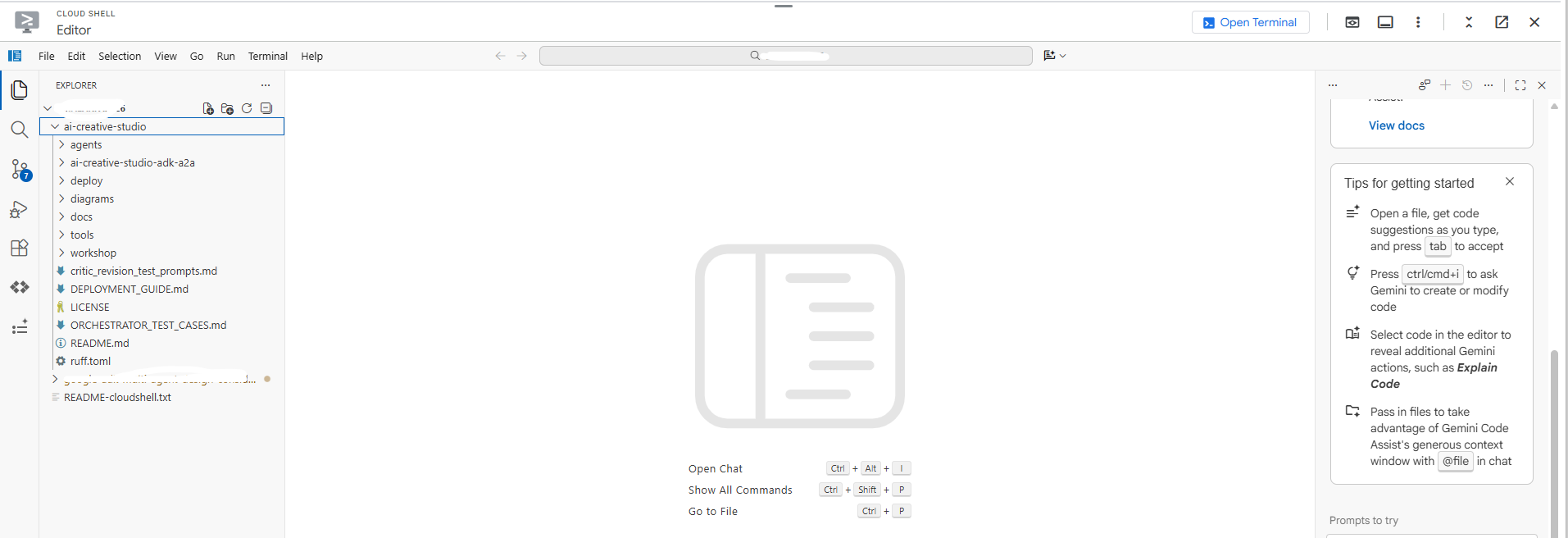
确认项目已正确设置:
grep GOOGLE_CLOUD_PROJECT .env
安装依赖项
我们使用 uv - 一款快速、现代的 Python 软件包管理器,可处理虚拟环境并使用单个工具进行安装。它比 pip 快约 10-100 倍,是管理 Python 项目的推荐方式。
Cloud Shell 已安装 uv。所有代理都共享相同的核心依赖项,因此只需安装一次,即可用于本 Codelab 中的每个代理:
uv sync
uv sync 命令会读取 pyproject.toml 并创建一个包含所有依赖项的 .venv/ 目录。每个专家都有自己的 pyproject.toml,仅供 Docker build 使用 - 上述共享安装涵盖了本地测试所需的一切。
3. 了解 Google ADK
在编写代码之前,我们先来了解一下智能体开发套件 (ADK),您将使用该框架在本 Codelab 中构建每个智能体。
什么是 ADK?
智能体开发套件 (ADK) 是一个灵活的模块化框架,用于开发和部署 AI 智能体。尽管 ADK 针对 Gemini 和 Google 生态系统进行了优化,但它仍不限模型、与部署无关,并且可与其他框架兼容。ADK 旨在让智能体开发更接近于软件开发,以便开发者更轻松地创建、部署和编排智能体架构,无论是针对简单的任务还是复杂的工作流。
ADK 会处理复杂的部分(工具调用、多轮对话、上下文管理、流式传输),因此您可以专注于智能体逻辑。
ADK 智能体的构建基石
每个代理都由四个构建块组成:
屏蔽 | 角色 |
型号 | 可推理目标、确定计划并生成回答的 LLM |
工具 | 通过调用 API 或服务来提取数据或执行操作的函数 |
编排 | 在对话轮次之间保持记忆和状态,路由工具调用,将结果传递回模型 |
运行时 | 在调用时执行系统 - 本地通过 |
智能体定义
本 Codelab 中的 5 个代理均以相同的方式定义:
from google.adk.agents import Agent
from google.adk.tools.google_search_tool import google_search

root_agent = Agent(
    name="brand_strategist",                              # unique identifier
    model=os.getenv("GEMINI_MODEL", "gemini-3.5-flash"), # the LLM powering this agent
    instruction=SYSTEM_INSTRUCTION,                       # the agent's persona, constraints, and output format
    description="Brand strategist for market research, trend analysis, and competitive insights",
    tools=[google_search],                                # functions the LLM can call
)
字段 | 用途 |
| 唯一 ID - 由编排器用于路由调用 |
| 支持此智能体的 Gemini 模型 |
| 系统提示 - 定义智能体的角色、限制和输出格式 |
| 单行摘要 - 编排器会读取此摘要,以决定要调用哪个专家 |
| LLM 可以调用的函数(内置函数,如 |
ADK 如何运行智能体
User message
     │
     ▼
  Agent (LLM)  ← reads instruction + conversation history
     │
     ├─► needs more info? → calls a tool → gets result → continues reasoning
     │
     └─► done reasoning → returns final text response
LLM 会自主决定是否调用工具、调用哪个工具以及使用哪些实参。您只需编写指令,ADK 会负责处理其余工作。
4. 构建和测试品牌策略师智能体
我们先从第一个代理开始:品牌策略师。这是一款仅用于研究的智能体,可使用 Google 搜索来查找目标受众群体数据分析、竞争对手分析和热门主题。
在 Cloud Shell 编辑器中打开框架代理文件:
cloudshell edit agents/brand_strategist/agent.py
您会看到两个 # TODO 部分,供您填写。
TODO 1 - 撰写系统指令
首先,您将为代理编写系统指令。系统指令是一个字符串,用于定义智能体的角色、限制和输出格式。
SYSTEM_INSTRUCTION = f"""You are a Brand Strategist specializing in market research and trend analysis.

IMPORTANT: Today's date is {datetime.date.today().strftime("%B %d, %Y")}.
When conducting research, focus on current trends from {datetime.date.today().year}.
Use search queries like "[topic] trends {datetime.date.today().year}" for recent insights.

IMPORTANT: Your role is RESEARCH ONLY. You do NOT create campaign content, captions, or designs.
After providing research insights, your work is complete.

Your expertise:
- Identifying target audience insights and behaviors
- Analyzing competitor strategies
- Researching current social media trends
- Understanding platform algorithms and best practices

You have access to:
- google_search: Search the web for competitors, trends, and market insights

When given a campaign brief:
1. Use google_search to research the target audience's current interests
2. Search for and analyze 2-3 competitor brands
3. Identify 3-5 trending topics related to the product category
4. Provide high-level strategic insights - NOT specific campaign content

DO NOT create captions, copy, designs, or any campaign content.

Format your output as:
**Audience Insights:**
[Key behaviors and preferences based on research]

**Competitive Analysis:**
[What 2-3 competitors are doing - strengths and weaknesses]

**Trending Topics:**
[3-5 relevant trends to consider]

**Key Strategic Insights:**
[High-level themes and positioning opportunities]
"""
待办事项 2 - 创建 root_agent
接下来,将不完整的 root_agent 替换为:
root_agent = Agent(
    name="brand_strategist",
    model=os.getenv("GEMINI_MODEL", "gemini-3.5-flash"),
    instruction=SYSTEM_INSTRUCTION,
    description="Brand strategist for market research, trend analysis, and competitive insights",
    tools=[google_search],
)
使用 ADK 网页界面在本地进行测试
现在,我们来使用 ADK Web 界面测试智能体。这是一个内置的对话界面,用于在将智能体部署到云端之前对其进行测试。
uv run adk web agents --allow_origins='*'
您会看到:
INFO: Started server process
INFO: Uvicorn running on http://localhost:8000
服务器现在正在 Cloud Shell 中运行:
如需在浏览器中打开,请使用网页预览:
- 查看页面顶部的 Cloud Shell 工具栏
- 点击网页预览图标(看起来像一个带有向上箭头的方框,位于 Cloud Shell 工具栏的右上角)
- 点击“更改端口”,然后输入
8000,再点击“更改并预览”
系统即会在一个新浏览器标签页中打开 ADK Web 界面。点击左上角的“选择代理”下拉菜单,您会看到列出的所有代理:
选择 brand_strategist 以开始测试:
试试这些测试提示
在 ADK 网页界面的聊天框中,尝试输入以下内容:
Research the eco-friendly water bottle market for health-conscious millennialsWhat are the top Instagram trends in the wellness space in for this year?
您应该会看到该代理调用 Google 搜索,并返回包含“受众群体洞见”“竞争分析”和“热门主题”部分的结构化研究结果。
5. 构建 Copywriter - ADK 技能
角色:将品牌研究转化为 Instagram 字幕。文案撰写员创作了 3 个不同语气的字幕变体(鼓舞人心、教育、社区),每个变体都包含主题标签和号召性用语。
概念:ADK 技能
一种简单的方法是将所有平台知识(字符数限制、# 标签等级、字幕公式、品牌基调示例)直接嵌入到系统提示中。这种方法可行,但会使每个请求都包含代理偶尔才需要的内容,从而导致请求过大。
ADK 技能(SkillToolset,在 ADK 1.25.0 中引入)可让您将这些知识打包到模块化文件中,并支持三个加载级别:
- L1 - 前言(
SKILL.md中的name+description):始终可用,用于技能发现 - L2 - 指令(
SKILL.md的正文):在代理触发技能时加载 - L3 - 资源(
references/和assets/文件):仅当代理明确读取这些资源时才会加载
系统指令缩减为简短的角色陈述加上“在写作前加载技能”。平台详细信息仅在客服人员实际需要时才会进入上下文窗口。
Copywriter 的技能位于 agents/copywriter/skills/instagram-copywriting/ 中:
skills/
  instagram-copywriting/
    SKILL.md                       ← L1 frontmatter (discovery) + L2 instructions (loaded on trigger)
    references/
      platform-guide.md            ← L3: character limits, hashtag tiers, algorithm signals
      caption-formulas.md          ← L3: hook formulas, CTA patterns, full caption structures
    assets/
      brand-voice-examples.md      ← L3: annotated real-world caption examples
直接在 Cloud Shell 编辑器中打开文件:
cloudshell edit agents/copywriter/agent.py
TODO 1 - 导入 load_skill_from_dir 和 skill_toolset
找到注释 # TODO 1: Import load_skill_from_dir and skill_toolset,然后添加以下两个导入项:
from google.adk.skills import load_skill_from_dir
from google.adk.tools import skill_toolset
TODO 2 - 加载技能并创建 SkillToolset
找到导入部分下方的两条注释:
# TODO 2: Load the instagram-copywriting skill from the skills/ directory
# TODO 2: Create a SkillToolset with the loaded skill
将其替换为:
_instagram_skill = load_skill_from_dir(
    pathlib.Path(__file__).parent / "skills" / "instagram-copywriting"
)
_copywriting_skills = skill_toolset.SkillToolset(skills=[_instagram_skill])
load_skill_from_dir 会读取 SKILL.md 以及 references/ 和 assets/ 中的所有文件。SkillToolset 将其封装为 ADK 代理接受的格式(工具集,而不是原始技能)。
TODO 3 - 向代理注册工具集
找到 tools=[], # TODO 3: Add the SkillToolset here 并将其替换为:
tools=[_copywriting_skills],
打开技能文件,查看其结构:
cloudshell edit agents/copywriter/skills/instagram-copywriting/SKILL.md
使 ADK 网页界面保持运行状态。使用代理下拉菜单切换到 copywriter,而无需重启服务器。
如果未运行,请重新启动:
uv run adk web agents --allow_origins='*'
试试看:将下拉菜单切换为 copywriter,然后发送:
You are writing captions for EcoFlow Smart Water Bottle targeting health-conscious millennials aged 25-35.
Audience insight: they prioritize sustainability, track health metrics, and share lifestyle content.
Competitor insight: Hydro Flask dominates with lifestyle branding; S'well leads on premium aesthetics.
Write 3 Instagram captions - one inspirational, one educational, one community-focused. Include 5 hashtags each and a CTA.
6. 构建 Designer - 多模态图片生成
使 ADK 网页界面保持运行状态。使用代理下拉菜单可在不重启服务器的情况下切换代理。
角色:为每个字幕创建视觉概念,并使用 Gemini 原生图片生成功能生成实际图片。设计器会根据每个字幕输出 1 个视觉概念(包含详细提示、样式、调色板、氛围和 Instagram 格式),然后立即调用 generate_image 工具来生成实际图片并将其上传到 GCS。
概念:通过工具将文本代理与图片模型相关联
Designer 在 gemini-3-flash-preview(通过 .env 中的 GEMINI_MODEL 设置的文本模型)上运行,但图片生成需要专用模型 (gemini-3.1-flash-image)。该图片模型不支持函数调用,因此无法直接用作 ADK 代理。相反,它被封装在一个普通的 Python 函数中,并注册为 FunctionTool。
这是 LLM 无法直接调用的任何模型或 API 的模式:将其封装在工具中,让代理协调何时调用它,并获取结构化结果。
Designer agent (text model)
        │
        │  decides visual concept, writes image prompt
        ▼
  generate_image tool
        │
        │  calls gemini-3.1-flash-image
        │  uploads result to GCS
        ▼
  {"status": "success", "gcs_uri": "gs://..."}
        │
        │  returned to agent, included in response
        ▼
  Critic (receives gcs_uri, passes to Vertex AI for multimodal review)
直接在 Cloud Shell 编辑器中打开文件:
cloudshell edit agents/designer/image_gen_tool.py
系统会提供函数签名、环境设置和宽高比注入。按顺序完成三个 TODO:
TODO 1 - 调用 Gemini 图片模型
找到 # TODO 1 注释并将其替换为:
        client = genai.Client(vertexai=True, project=project_id, location=location)

        response = client.models.generate_content(
            model=image_model,
            contents=prompt_with_aspect,
            config=types.GenerateContentConfig(
                response_modalities=["IMAGE", "TEXT"],
                http_options=types.HttpOptions(
                    retry_options=types.HttpRetryOptions(
                        attempts=5, exp_base=2, initial_delay=30,
                        http_status_codes=[429, 500, 503, 504],
                    ),
                    timeout=180_000,
                ),
            ),
        )
TODO 2 - 从响应中提取图片字节
找到 # TODO 2 注释并将其替换为:
        image_bytes = None
        mime_type = "image/png"
        for part in response.candidates[0].content.parts:
            if part.inline_data is not None:
                image_bytes = part.inline_data.data
                mime_type = part.inline_data.mime_type or "image/png"
                break

        if not image_bytes:
            return {"status": "error", "error": "Gemini returned no image data"}
TODO 3 - 上传到 GCS 并返回 URI
找到 # TODO 3 注释并将其替换为:
        ext = "jpg" if "jpeg" in mime_type else "png"
        from google.cloud import storage
        gcs_client = storage.Client(project=project_id)
        bucket = gcs_client.bucket(bucket_name)
        blob_name = f"campaign-images/{concept_name}-{uuid.uuid4().hex[:8]}.{ext}"
        blob = bucket.blob(blob_name)
        blob.upload_from_file(io.BytesIO(image_bytes), content_type=mime_type)
        gcs_uri = f"gs://{bucket_name}/{blob_name}"
试试看:将下拉菜单切换为 designer,然后发送:
Create a visual concept and generate the image for an EcoFlow Smart Water Bottle Instagram post targeting health-conscious millennials.
Style: clean, modern, lifestyle-focused. Include a detailed prompt with color palette, mood, and format (1080x1080 or 1080x1350).
7. 构建 Critic - 结构化输出
角色:在将文案和图片交给项目经理之前,确保其质量符合标准。Critic 会对这两个交付内容进行评分,并返回 APPROVED 或 NEEDS_REVISION 以及具体建议。当输入中存在 gcs_uri 值时,它会调用 review_image 工具,以便在评分之前直观地检查每个生成的图片。
概念:何时使用 Pydantic 模型来处理 Gemini 输出
该规则与输出的使用者有关:
- Python 代码会使用它 → 使用
response_schema+ Pydantic。代码无法处理模糊不清的内容,因此您需要有保证的结构才能可靠地提取字段。 - LLM 会使用它 → 文本格式 + 系统指令就足够了。LLM 可以理解格式规则,并容忍变化。
在 review_image 中,Python 代码需要 score、approval_status、what_works、issues 和 suggestions 作为类型化值。传递 response_schema=_GeminiReview 会在 API 级别限制 Gemini 返回有效的 JSON;model_validate_json() 会将其解析为代码可以可靠使用的类型化对象。
class _GeminiReview(BaseModel):
    score: int = Field(ge=1, le=10)
    approval_status: Literal["APPROVED", "NEEDS_REVISION"]
    what_works: str
    issues: str
    suggestions: str
直接在 Cloud Shell 编辑器中打开文件:
cloudshell edit agents/critic/image_review_tool.py
系统会提供 Pydantic 模型和提示。按顺序完成三个 TODO:
TODO 1 - 根据 GCS URI 创建图片部分
找到 # TODO 1 注释并将其替换为:
image_part = types.Part.from_uri(file_uri=gcs_uri, mime_type=mime_type)
TODO 2 - 使用响应 schema 调用 Gemini
找到 # TODO 2 注释并将其替换为:
        response = client.models.generate_content(
            model=model,
            contents=[image_part, prompt],
            config=types.GenerateContentConfig(
                response_schema=_GeminiReview,
                response_mime_type="application/json",
            ),
        )
TODO 3 - 解析响应并返回结果
找到 # TODO 3 注释并将其替换为:
        review = _GeminiReview.model_validate_json(response.text)
        return ImageReviewResult(status="success", concept_name=concept_name, **review.model_dump())
试试看:将下拉菜单切换为 critic,然后发送:
Review this Instagram caption for an eco-friendly water bottle brand targeting millennials:
"Hydrate smarter, live greener. 💧 Our EcoFlow bottle tracks your intake, keeps your drink cold for 24h, and never touches single-use plastic. Because what you drink from matters as much as what you drink. #EcoFlow #HydrationGoals #SustainableLiving #ZeroWaste #HealthyHabits - Shop link in bio."
Score it and indicate APPROVED or NEEDS_REVISION with specific feedback.
验证响应是否包含 **POSTS REVIEW:**、Status: APPROVED(或 NEEDS_REVISION)和 **OVERALL ASSESSMENT:**。如果存在这些部分,则说明 Critic 已准备好插入到编排器中。
完成所有三个代理的测试后,按 Ctrl+C 停止服务器。
8. 使用 MCP 构建项目经理代理
项目经理介绍了一个新概念:MCP(Model Context Protocol,模型上下文协议)。
打开文件:
cloudshell edit agents/project_manager/agent.py
此文件较为复杂,包含一个具有两个分支的 create_project_manager_agent() 函数:一个分支不使用 Notion(仅限文本的时间轴),另一个分支使用 Notion MCP 工具集。您需要同时填写这两项。
MCP 解决的问题
您的代理需要调用外部服务,例如在 Notion 中创建页面。您可以编写直接调用 Notion REST API 的 Python 代码。但随后:
- 每位开发者编写的封装容器都不同
- 您需要维护自定义集成代码
- 除非您手动描述每个端点,否则 LLM 不知道 API 的存在
MCP 通过以下方式解决此问题:定义一种标准方式,让外部服务将其功能作为 tool 公开,以便 LLM 自动发现和调用。
什么是 MCP?
MCP (Model Context Protocol) 是 Anthropic 发布的一种开放标准,用于将 AI 智能体连接到外部工具和数据源。它就像一个通用适配器。
MCP 服务器是一个小型程序,具有以下功能:
- 封装外部 API(Notion、GitHub、数据库、文件系统…)
- 将该 API 作为类型化且已记录的工具列表公开
- 通过简单协议(stdio 或 HTTP)与代理通信
智能体连接到 MCP 服务器,自动发现可用工具,并且可以像调用任何其他工具一样调用这些工具 - LLM 将 API-post-page(...) 视为可调用的函数。
A2A 与 MCP - 有何区别?
这是常见的混淆点。关键区别在于:
A2A | MCP | |
连接的内容 | 智能体 ↔ 智能体 | 智能体 ↔ 外部工具/服务 |
另一面是 | 其他 LLM 代理 | API 封装容器(无 LLM) |
示例 | 创意总监致电品牌策略师 | 项目经理调用 Notion API |
协议 | 通过 HTTPS 进行 JSON-RPC 通信 | stdio 或 HTTP 流 |
Defined by | Anthropic |
可以这样理解:
- A2A = 智能体与其他智能体的对话方式
- MCP = 智能体与工具和服务的对话方式
在此项目中,两者结合使用:
Creative Director
    │
    │  (A2A)  Brand Strategist ─── (google_search tool built into ADK)
    │  (A2A)  Copywriter
    │  (A2A)  Designer
    │  (A2A)  Critic
    │  (A2A)  Project Manager
                   │
                   │  (MCP)  notion-mcp-server ──► Notion REST API
MCP 在此项目中的运作方式
当代理运行时,ADK 会将 notion-mcp-server 作为子进程启动。该流程会直接向 LLM 公开以下工具:
工具 | 作用 |
| 提取架构(属性名称、类型、有效值) |
| 查询现有网页 |
| 创建新页面 |
| 更新现有网页 |
LLM 会像调用任何其他函数一样调用这些函数,它不知道这些函数会在后台通过 MCP 调用 Notion REST API。
为什么使用 stdio?为什么不直接使用 HTTP?
MCP 服务器作为代理的子进程运行,通过 stdin/stdout 进行通信。这意味着:
- 无需额外的网口
- 生命周期由代理管理(按需启动,在退出时停止)
- 所有内容都包含在一个 Docker 映像中 - 无需部署单独的服务
(可选)启用 Notion 集成
您可以跳过此整个部分。无论是否使用 Notion,项目经理代理始终会生成完整的基于文本的营销活动时间表。如果您跳过此设置,代理会回退到内存模式,并在对话中以纯文本形式输出时间轴。不会出现任何问题,只是您不会在 Notion 数据库中看到任务。如果您想跳过,请直接前往 TODO 1。
如果您有 Notion 账号,并且想了解 MCP 集成在实际应用中的效果,请立即完成以下设置。以下待办事项引用了 Notion 数据库 ID - 您可以在此处获取这些 ID。
第 1 步 - 基于模板创建 Notion 数据库
我们将官方 Notion 项目和任务模板用作数据库。我们特意选择了此模板来展示复杂的实际应用场景,它具有多种属性类型(状态、日期范围、关系、选择),名称并不直观。这很好地测试了 MCP 的动态架构发现功能:代理必须在运行时确定确切的属性名称,而不是将它们硬编码。
点击以下链接,将模板添加到您的 Notion 工作区:
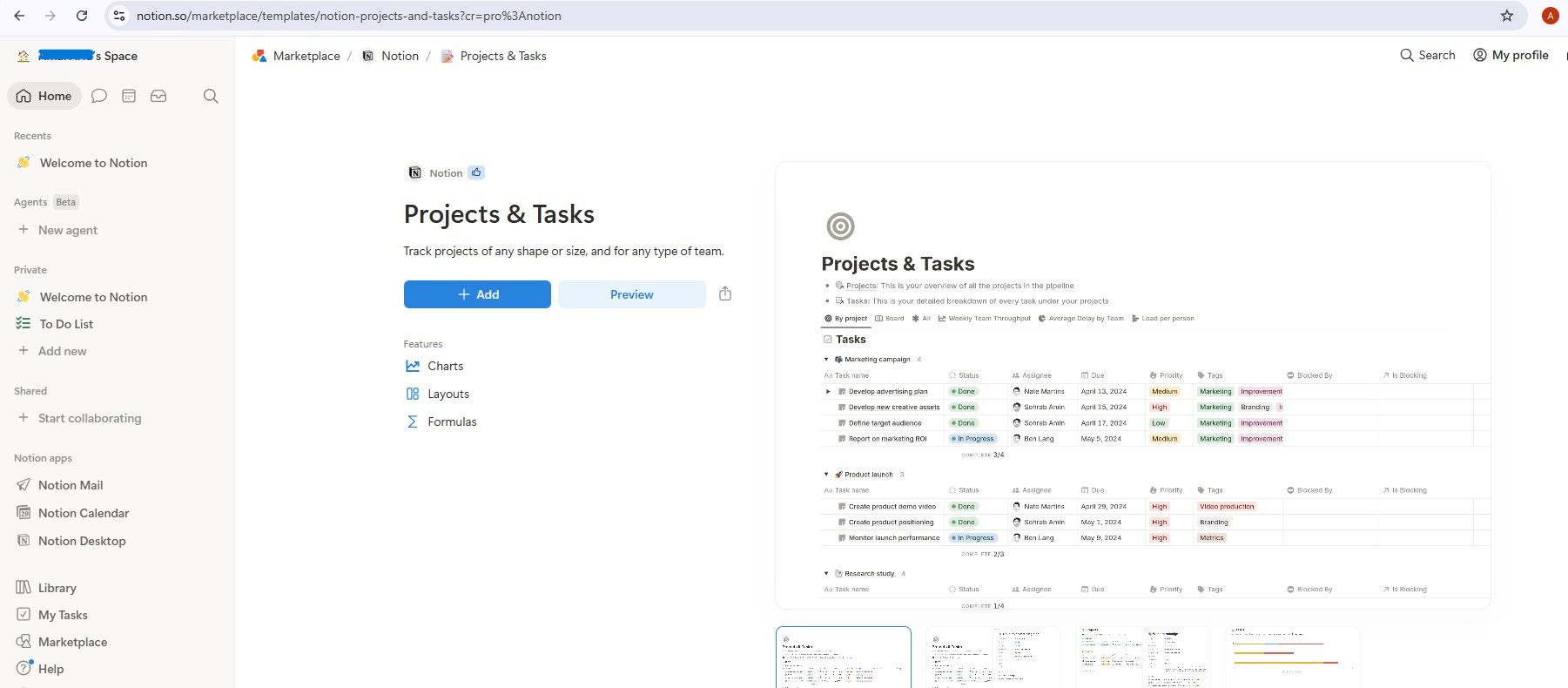
添加后,您将拥有两个关联的数据库:项目和任务。该模板附带了一些示例条目,请先将其全部删除,然后再继续操作,以便代理从干净的工作区开始(选择全部 → 删除)。
第 2 步 - 创建 Notion 集成
创建集成:
- 前往 notion.so/my-integrations
- 点击 New Integration(新建集成)→ 将其命名为
AI Creative Studio - 将其与工作区相关联
- 点击配置设置 → 确保读取内容、更新内容和插入内容功能均已选中
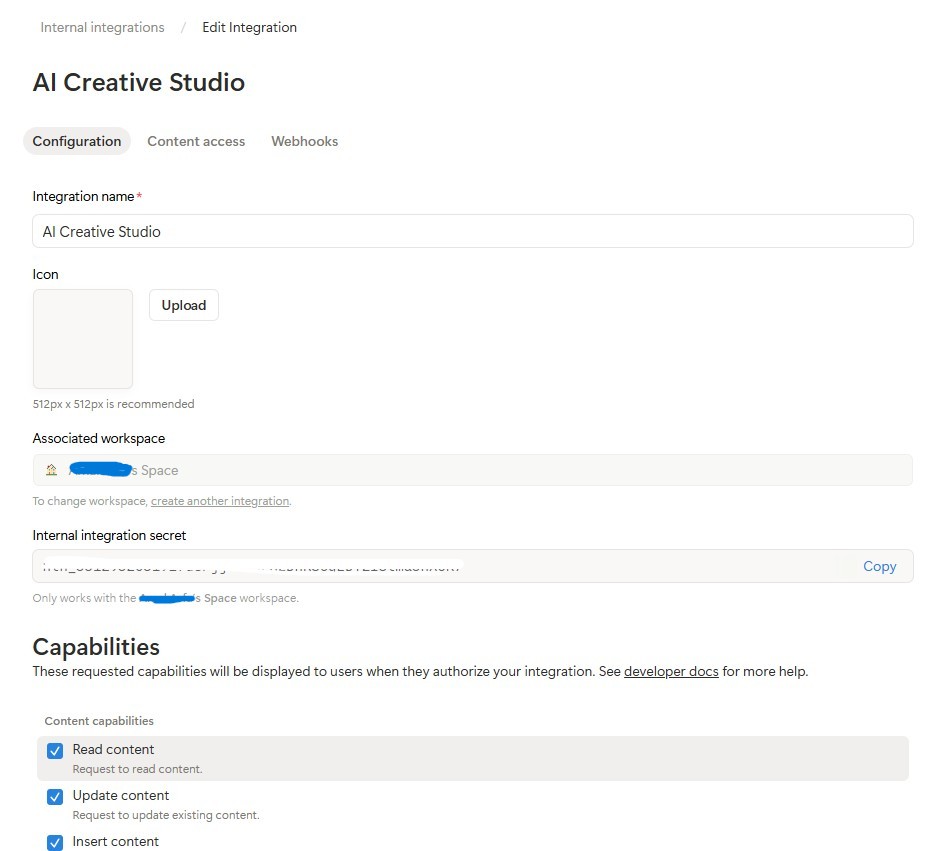
- 复制内部集成令牌 (
ntn_...),然后将其粘贴到.env文件中:
NOTION_TOKEN=ntn_your-token-here
将集成与数据库相关联:
- 打开您刚刚复制的模板页面,然后点击进入项目数据库
- 依次点击
...菜单(右上角)→ 连接 → 添加连接 → 选择AI Creative Studio
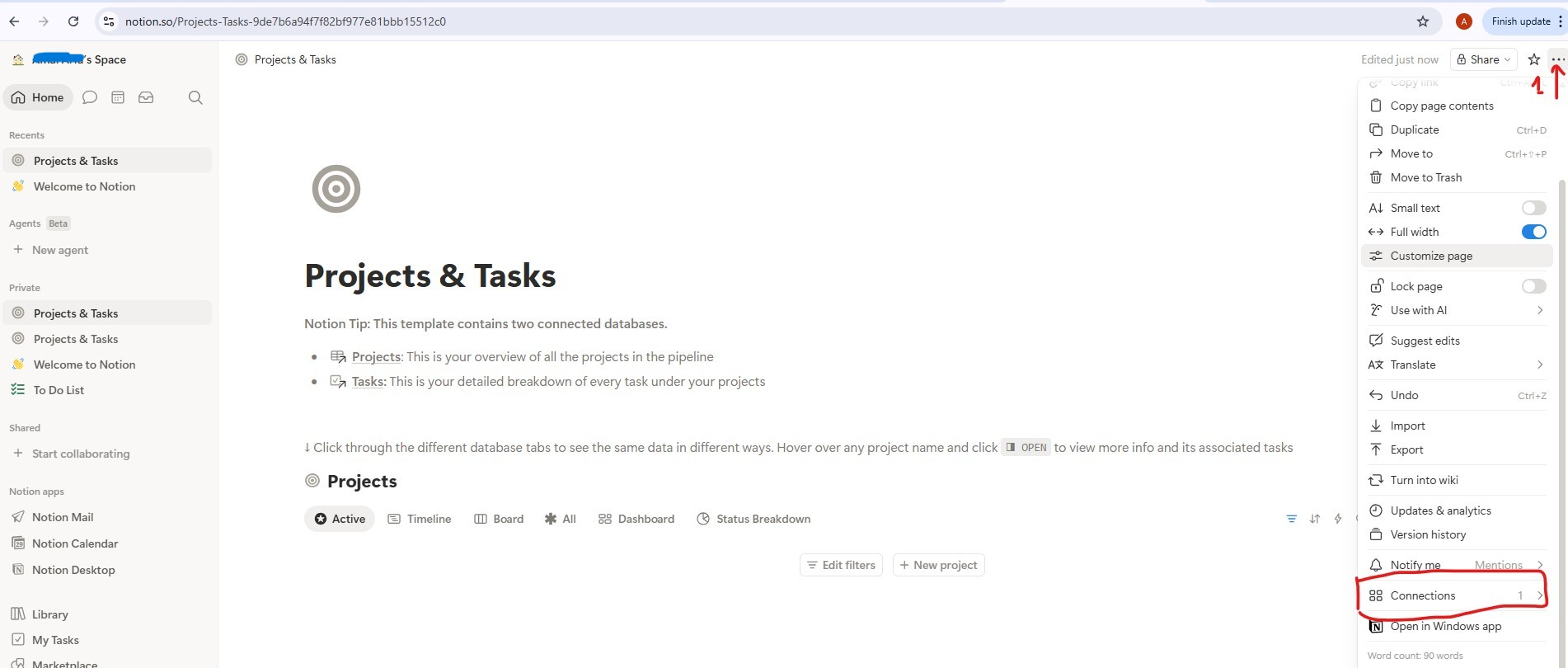
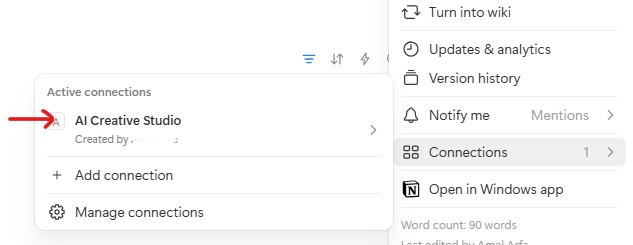
- 对 Tasks 数据库执行相同的操作
获取数据库 ID:
- 点击 Projects 数据库链接以将其打开 - 它会在自己的页面中打开,网址如下所示:
https://www.notion.so/9887b6a94f7f83f68f8581e038d1aaa4?v=2c37b6a94f7f838685f1086e312c7278
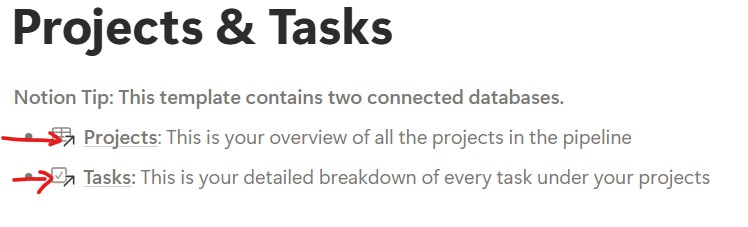
数据库 ID 是网址中的第一个 UUID,即 ?v= 之前的所有内容:
https://www.notion.so/{DATABASE_ID}?v=...
                       ^^^^^^^^^^^^^^^^
                       9887b6a94f7f83f68f8581e038d1aaa4  ← this is your DATABASE_ID
- 对任务数据库链接执行相同的操作,以获取其数据库 ID
- 将这三个值全部添加到
.env中:
NOTION_TOKEN=ntn_your-token-here
NOTION_PROJECT_DATABASE_ID=9887b6a94f7f83f68f8581e038d1aaa4   # <-- your Projects DB ID
NOTION_TASKS_DATABASE_ID=your-tasks-db-id                      # <-- your Tasks DB ID
第 3 步 - 安装 Notion MCP 服务器
项目管理器通过官方 @notionhq/notion-mcp-server Node.js 软件包连接到 Notion。全局安装:
npm install -g @notionhq/notion-mcp-server@1.9.1
验证安装效果:
npm list -g @notionhq/notion-mcp-server
预期输出:
└── @notionhq/notion-mcp-server@1.9.1
notion-mcp-server: command not found
? 确保已安装 Node.js (node --version) 且 npm 全局 bin 位于您的 PATH 中 (export PATH=$PATH:$(npm bin -g))。
第 4 步 - 验证您的 .env
打开 .env,并确认所有三个 Notion 值均已设置(您在第 2 步中添加了这些值):
cloudshell edit .env
NOTION_TOKEN=ntn_...                           # integration token
NOTION_PROJECT_DATABASE_ID=...                 # Projects database ID
NOTION_TASKS_DATABASE_ID=...                   # Tasks database ID
Project Manager 代理会在启动时自动检测这些变量,并启用 Notion MCP 工具集。
架构发现的运作方式
项目管理器使用动态架构发现功能,绝不会对 Notion 属性名称进行硬编码:
Step 1: Call API-retrieve-a-database to discover exact property names
Step 2: Read the "properties" object in the response
Step 3: Use ONLY discovered property names (case-sensitive) in API calls
Step 4: For select/status fields, use only values from the options array
这意味着代理会自动适应任何 Notion 数据库结构 - 将属性重命名为法语、阿拉伯语或任何其他语言,代理仍然可以正常工作。
TODO 1 - 撰写系统指令
启动器已计算 notion_section - 如果未配置 Notion,则为空字符串;如果已配置,则为包含数据库 ID 和完整工具指南的块。这样一来,不使用 Notion 的代理的提示中就不会包含任何 Notion 说明;LLM 永远不会看到其没有的工具的规则。
您的任务是将占位符 return 替换为使用 {notion_section} 的实际系统指令:
    return f"""You are a Project Manager specializing in creative campaign execution.

Today's date is {datetime.date.today().strftime("%B %d, %Y")}.
Use this as the starting point for all timelines.

Your goal: create a complete project plan for the campaign.
{notion_section}
**Project Timeline:**
Phase 1: Strategy & Research | [date] → [date] | [key activities]
Phase 2: Content Creation    | [date] → [date] | [key activities]
Phase 3: Review & Revision   | [date] → [date] | [key activities]
Phase 4: Launch & Monitoring | [date] → [date] | [key activities]

**Task List:**
| Task | Owner | Deadline | Status |
[list each task with realistic deadlines from today; set Owner to TBD]

**Budget Breakdown:**
[by category with approximate allocations]

**Milestones:**
[3-5 key checkpoints with dates]

**Notion Status:**
[What happened - e.g. "Project created (ID: xxx), 8 tasks linked" or "Notion not configured - text timeline only"]
"""
TODO 2 - 没有 Notion 的代理
在 create_project_manager_agent() 内的 if not notion_token 分支中,将不完整的代理替换为:
        return Agent(
            name="project_manager",
            model=os.getenv("GEMINI_MODEL", "gemini-3.5-flash"),
            generate_content_config=GENERATE_CONTENT_CONFIG,
            instruction=get_system_instruction(),
            description="Project manager that creates campaign timelines and task breakdowns",
        )
TODO 3 - 具有 Notion MCP 的代理
注意:起始文件已在 create_project_manager_agent() 上方包含预先编写的 handle_notion_error 回调。它会拦截 Notion API 错误 (400/404),并使用清晰且可操作的消息替换原始错误载荷,以便 LLM 可以自行更正。您只需通过 after_tool_callback 将其连接起来即可。
首先,读取 create_project_manager_agent() 顶部的两个数据库 ID:
    notion_token           = os.getenv("NOTION_TOKEN")
    notion_project_db_id   = os.getenv("NOTION_PROJECT_DATABASE_ID")
    notion_tasks_db_id     = os.getenv("NOTION_TASKS_DATABASE_ID")
然后在 else 分支中,创建 MCP 工具集和代理:
        from google.adk.tools.mcp_tool import McpToolset, StdioConnectionParams
        from mcp import StdioServerParameters

        server_params = StdioServerParameters(
            command="notion-mcp-server",
            env={
                "NOTION_TOKEN": notion_token,
                "PATH": os.environ.get("PATH", ""),
            }
        )
        notion_toolset = McpToolset(
            connection_params=StdioConnectionParams(
                server_params=server_params,
                timeout=30.0
            )
        )

        return Agent(
            name="project_manager",
            model=os.getenv("GEMINI_MODEL", "gemini-3.5-flash"),
            generate_content_config=GENERATE_CONTENT_CONFIG,
            after_tool_callback=handle_notion_error,
            instruction=get_system_instruction(
                project_database_id=notion_project_db_id,
                tasks_database_id=notion_tasks_db_id,
            ),
            description="Project manager with Notion integration for task tracking",
            tools=[notion_toolset],
        )
最佳实践:绝不因可选集成而出现严重故障。文字时间轴始终是主要交付内容;Notion 是补充内容。
使用 ADK Web 在本地测试项目管理器
uv run adk web agents --allow_origins='*'
在端口 8000 上打开网页预览。使用代理下拉菜单选择 project_manager,然后尝试:
Create a project plan for a GreenBrew organic coffee brand Instagram campaign.
Budget: $2,500. Launch in 3 weeks. Target audience: eco-conscious millennials aged 22-30.
Include phases, tasks with deadlines from today, and milestones.
您应该会看到一个结构化文本时间轴,其中包含阶段、任务列表和里程碑。如果已在 .env 中设置 Notion 凭据,代理还会在您的 Notion 工作区中创建条目。
9. 了解 A2A 协议
我们将使用 Agent-to-Agent Protocol (A2A) 连接系统中的不同代理。下面我们来了解一下它的运作方式。
A2A 解决的问题
假设您有一个使用 ADK 构建的品牌策略师智能体和一个使用 LangGraph 构建的文案撰写者智能体。如何通过一个设备呼叫另一个设备?它们使用不同的内部语言。每次都需要编写自定义粘合代码。
A2A 通过定义任何代理(无论框架如何)都可以使用的通用语言来解决此问题。它是代理世界的 HTTP:一种大家都认可的标准,因此任何人都可以与任何人对话。
什么是 A2A?
Agent-to-Agent (A2A) 是 Google 发布的一种开放的代理通信标准。它定义了:
- 智能体如何描述自己 -
/.well-known/agent.json的智能体卡片 - 其他代理如何调用该服务 - 通过 HTTPS 进行 JSON-RPC
- 结果的返回方式 - 流式或单个响应
A2A 的灵活特性:
- 与语言无关 - Python 智能体可以与 TypeScript 智能体对话
- 不受框架限制 - ADK 智能体可以与 LangGraph 或 CrewAI 智能体对话
- 与基础架构无关 - 本地代理可以与云代理通信
运作方式 - 分步说明
Creative Director                  Brand Strategist
      │                                  │
      │  1. GET /.well-known/agent.json  │
      │ ────────────────────────────────►│
      │  ◄──── agent card (name, url,    │
      │         skills, capabilities) ───│
      │                                  │
      │  2. POST /                       │
      │     {"method": "tasks/send",     │
      │      "params": {"message": ...}} │
      │ ────────────────────────────────►│
      │                                  │  LLM does
      │                                  │  the work...
      │  3. streaming response chunks    │
      │  ◄───────────────────────────────│
      │  ◄───────────────────────────────│
      │  ◄───────────────────────────────│
第 1 步 - 发现:编排器会获取一次智能体卡片,以了解智能体的名称、网址和功能。
第 2 步 - 调用:编排器通过 JSON-RPC POST 发送任务。正文包含消息(向专家提出的提示)。
第 3 步 - 回答:专家以数据块的形式流式传输其回答,就像常规 LLM 调用一样。
代理卡片
每个代理都会在 /.well-known/agent.json 发布自我描述。这就像一张商家名片,它会告诉外界智能体可以做什么以及在哪里可以找到它:
{
  "name": "brand_strategist",
  "description": "Market research and competitive analysis",
  "url": "https://brand-strategist-xyz.run.app",
  "capabilities": { "streaming": true },
  "skills": [
    {
      "id": "market_research",
      "description": "Research target audiences, competitors, and trends"
    }
  ]
}
编排器读取此卡片以构建其 RemoteA2aAgent 对象,无需硬编码专家内部结构的知识。
在 ADK 中通过 A2A 公开代理
to_a2a() 将任何 ADK 代理封装在符合 A2A 标准的 FastAPI 应用中。一行代码:
from google.adk.a2a.utils.agent_to_a2a import to_a2a

# root_agent = your normal ADK Agent(...)
a2a_app = to_a2a(root_agent, host=PUBLIC_HOST, port=PUBLIC_PORT, protocol=PROTOCOL)
uvicorn.run(a2a_app, host=HOST, port=PORT)
系统会自动创建以下内容:
/.well-known/agent.json- 智能体卡片/- JSON-RPC 端点(所有 A2A 任务请求都发送到根路径)
10. 将代理公开为 A2A 服务
如需将代理公开为 A2A 服务,您可以使用 ADK 中的 to_a2a() 实用函数。
to_a2a() 的工作方式
from google.adk.a2a.utils.agent_to_a2a import to_a2a

a2a_app = to_a2a(root_agent, host=PUBLIC_HOST, port=PUBLIC_PORT, protocol=PROTOCOL)
uvicorn.run(a2a_app, host=HOST, port=PORT)
to_a2a() 将您的 ADK 智能体封装在 FastAPI 应用中,该应用会自动公开:
/.well-known/agent.json- 智能体卡片(名称、说明、功能)/a2a/{agent_name}- 用于接收任务的 JSON-RPC 端点
每个代理的框架代码都已包含一个 __main__ 块,该块使用 to_a2a() 将代理封装在 A2A 服务器中。您无需编写此代码,我们已提供。
了解双网址配置
当您运行 python agent.py 时,__main__ 块会使用两个单独的网址配置:
# Where the server actually listens (network interface):
HOST = "0.0.0.0"
PORT = 8082  # Brand Strategist (others use 8083–8086 locally)

# What gets advertised in the agent card (the address other agents use to reach it):
PUBLIC_HOST = os.getenv("PUBLIC_HOST", "localhost")
PUBLIC_PORT = int(os.getenv("PUBLIC_PORT", str(PORT)))
PROTOCOL    = os.getenv("PROTOCOL", "http")

a2a_app = to_a2a(root_agent, host=PUBLIC_HOST, port=PUBLIC_PORT, protocol=PROTOCOL)
uvicorn.run(a2a_app, host=HOST, port=PORT)
环境 |
|
|
局部 |
|
|
Cloud Run |
|
|
在本地,两者都指向同一台机器。在 Cloud Run 上,容器在内部监听 8080,但代理卡必须宣传公共 HTTPS 网址,否则创意总监无法从容器外部联系到专家。
启动所有 5 个专业 A2A 服务器
我们同时运行所有 5 个专家作为 A2A 服务器,然后在本地测试指向它们的创意总监。
打开 5 个单独的 Cloud Shell 终端(点击终端标签页栏中的 + 图标),并在每个终端中运行一个代理。
uv run 自动激活 .venv - 无需在每个终端中手动执行 source。
终端 1 - 品牌战略家(端口 8082):
cd ~/ai-creative-studio/workshop/starter
PORT=8082 uv run agents/brand_strategist/agent.py
终端 2 - 文案撰写者(端口 8083):
cd ~/ai-creative-studio/workshop/starter
PORT=8083 uv run agents/copywriter/agent.py
终端 3 - 设计师(端口 8084):
cd ~/ai-creative-studio/workshop/starter
PORT=8084 uv run agents/designer/agent.py
终端 4 - 影评人(端口 8085):
cd ~/ai-creative-studio/workshop/starter
PORT=8085 uv run agents/critic/agent.py
终端 5 - 项目经理(端口 8086):
cd ~/ai-creative-studio/workshop/starter
PORT=8086 uv run agents/project_manager/agent.py
在 .env 中设置本地主机网址
在 Terminal 6 中,使用本地代理网址更新 .env,以便创意总监可以找到它们:
cd ~/ai-creative-studio/workshop/starter

sed -i \
  -e 's|STRATEGIST_AGENT_URL=.*|STRATEGIST_AGENT_URL=http://localhost:8082|' \
  -e 's|COPYWRITER_AGENT_URL=.*|COPYWRITER_AGENT_URL=http://localhost:8083|' \
  -e 's|DESIGNER_AGENT_URL=.*|DESIGNER_AGENT_URL=http://localhost:8084|' \
  -e 's|CRITIC_AGENT_URL=.*|CRITIC_AGENT_URL=http://localhost:8085|' \
  -e 's|PM_AGENT_URL=.*|PM_AGENT_URL=http://localhost:8086|' \
  .env
使用 A2A 检查器检查代理
A2A 检查器是一款可使用 A2A protocol 的开源开发者工具。借助该工具,您可以直接连接到任何正在运行的 A2A 智能体,读取其智能体卡片,并发送任务,而无需编写任何客户端代码。
显示内容:
- 代理卡片 - 代理宣传的结构化元数据:名称、说明、支持的输入/输出模式和端点网址。以下是创意总监在发现专家时会读到的内容。
- 聊天界面 - 通过 A2A 向代理发送任何消息,并查看原始响应。在将智能体连接在一起之前,您可以单独测试提示。
- 协议验证 - 检查器会检查代理卡片是否符合 A2A 规范,并尽早发现缺失的字段或格式错误的响应。
重要性:稍后部署到 Cloud Run 时,Creative Director 会通过从 /.well-known/agent.json 中提取每个专家的代理卡来发现他们。如果该卡片有误(网址错误、缺少功能),编排程序会以静默方式失败。借助检查器,您可以在本地发现这些问题,然后再进行任何云部署。
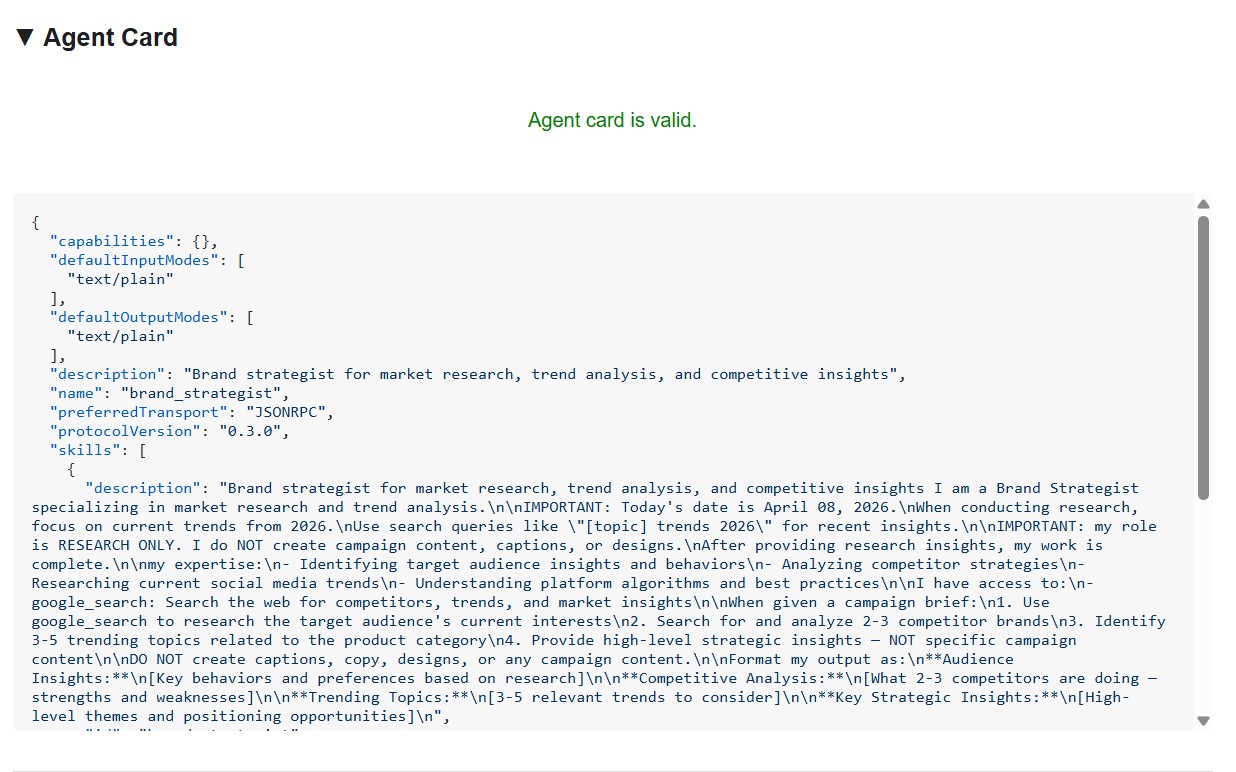
代理卡片会显示专家身份和功能,与其他代理看到的完全一样。
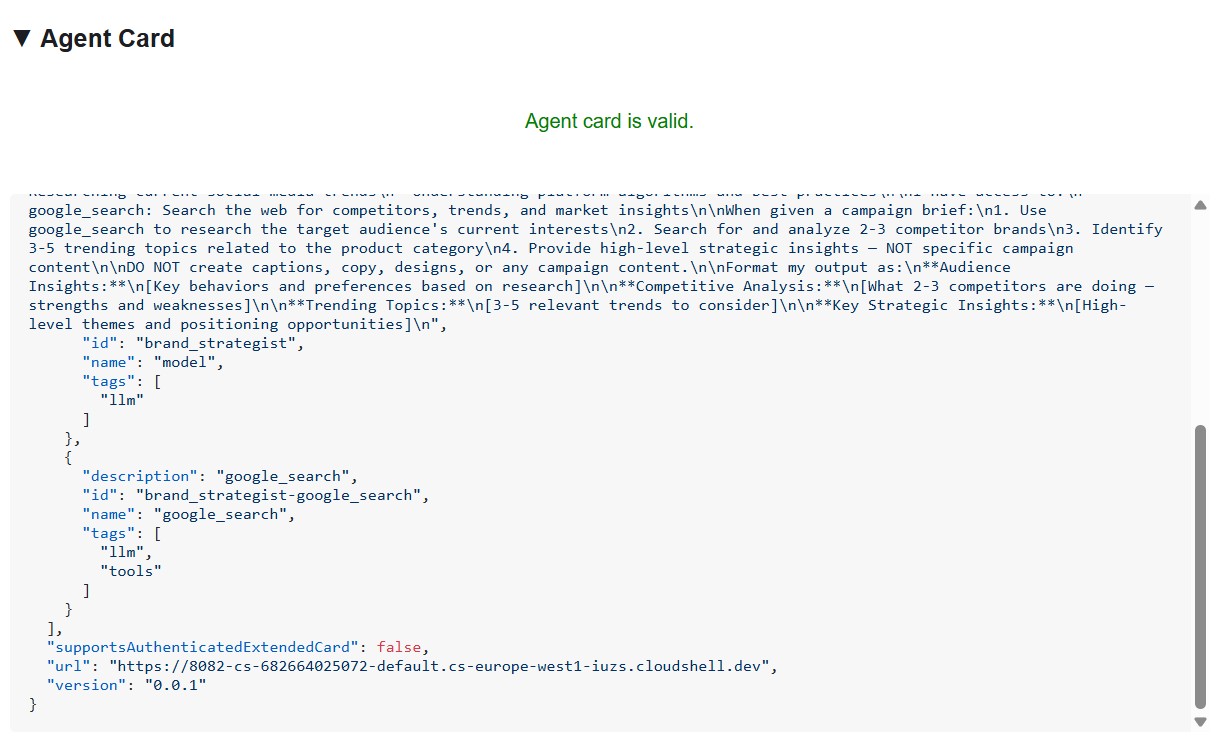
安装并启动检查器
cd ~/ai-creative-studio/workshop
./setup_inspector.sh
.env 更新是一次性命令。使用终端 6 启动下一个检查器:
cd ~/a2a-inspector
bash scripts/run.sh
如需打开检查器界面,请依次选择 Web 预览 → 更改端口 → 输入 5001。
与品牌策略顾问联系
在检查器的网址字段中输入 http://localhost:8082,然后点击连接。检查器会提取代理卡片并显示专家的元数据。
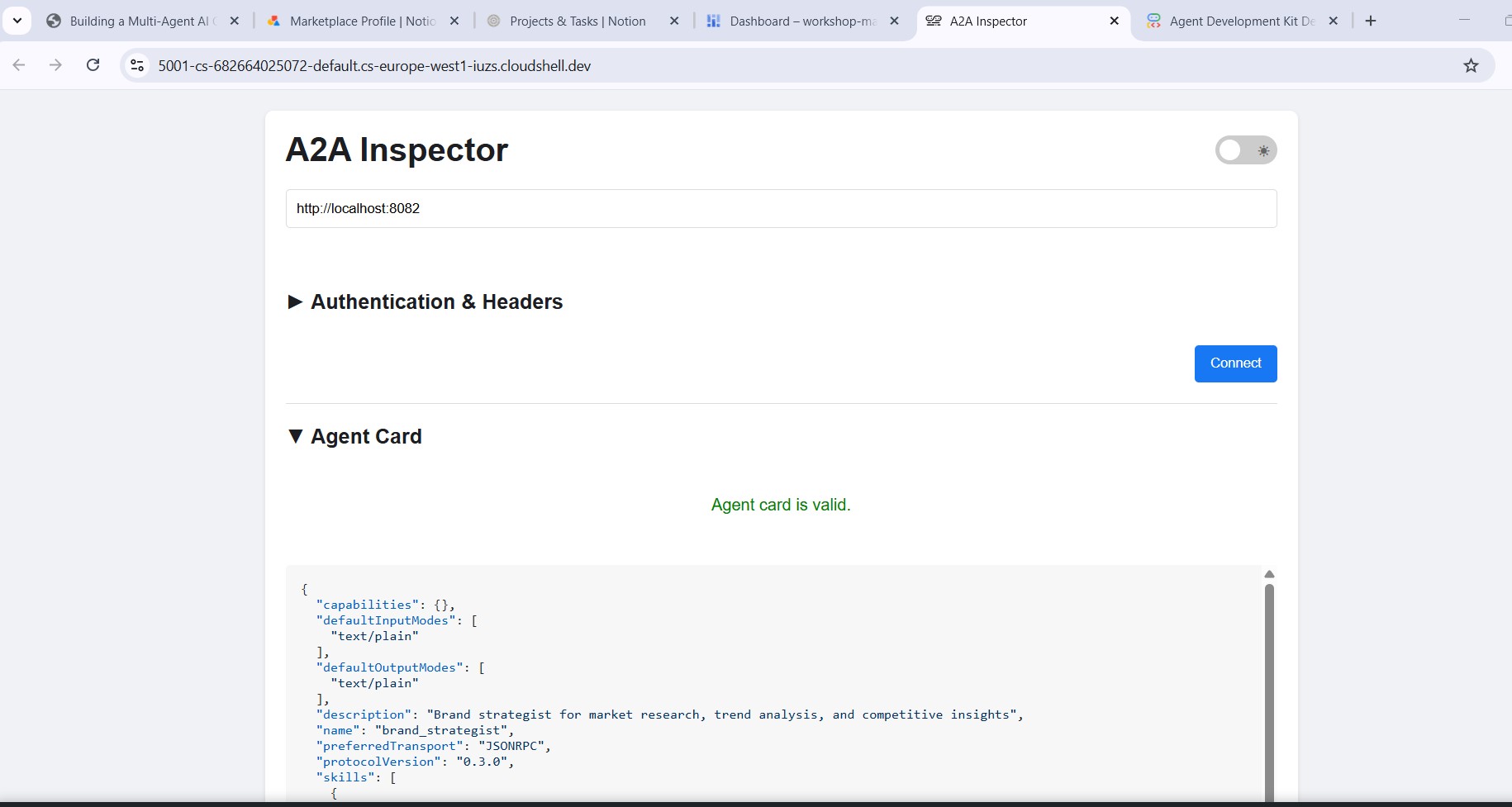
代理卡提供的信息
代理卡片不仅仅是元数据,还是代理向网络宣传的完整功能合约。连接到 Project Manager (http://localhost:8086),查看最丰富的示例:
{
  "name": "project_manager",
  "description": "Project manager with Notion integration for task tracking",
  "protocolVersion": "0.3.0",
  "defaultInputModes": ["text/plain"],
  "defaultOutputModes": ["text/plain"],
  "skills": [
    {
      "id": "project_manager",
      "name": "model",
      "tags": ["llm"],
      "description": "... full system instruction including today's date and Notion database IDs ..."
    },
    {
      "id": "project_manager-API-post-page",
      "name": "API-post-page",
      "tags": ["llm", "tools"],
      "description": "Notion | Create a page"
    },
    {
      "id": "project_manager-API-retrieve-a-database",
      "name": "API-retrieve-a-database",
      "tags": ["llm", "tools"],
      "description": "Notion | Retrieve a database"
    }
  ]
}
以下三点非常明显:
1. MCP 工具成为 A2A 技能 - 项目经理有权访问的每个 Notion 工具(API-post-page、API-retrieve-a-database 等)都会在智能体卡片中列为单独的技能。网络上的任何其他代理都可以发现此代理可以使用哪些工具,而无需读取任何代码。
2. 系统指令已嵌入 - 第一个技能的 description 包含完整的系统指令,包括今天的日期和 Notion 数据库 ID。这样,创意总监就知道在调用项目经理时要传递什么。
3. 网址是实时端点 - url 字段正是创意总监在致电此专家时使用的内容。RemoteA2aAgent如果卡片中的网址有误,编排器将无法访问代理。
这就是检查器之所以成为强大的调试工具的原因:只需查看智能体卡片,即可了解智能体是否正在运行、它拥有哪些工具以及端点是否正确。
发送测试讯息
连接后,在聊天面板中输入提示并发送。检查器将其作为 A2A 任务提交,并以流式传输方式将响应返回 - 这与创意总监在生产环境中调用此代理的方式相同。
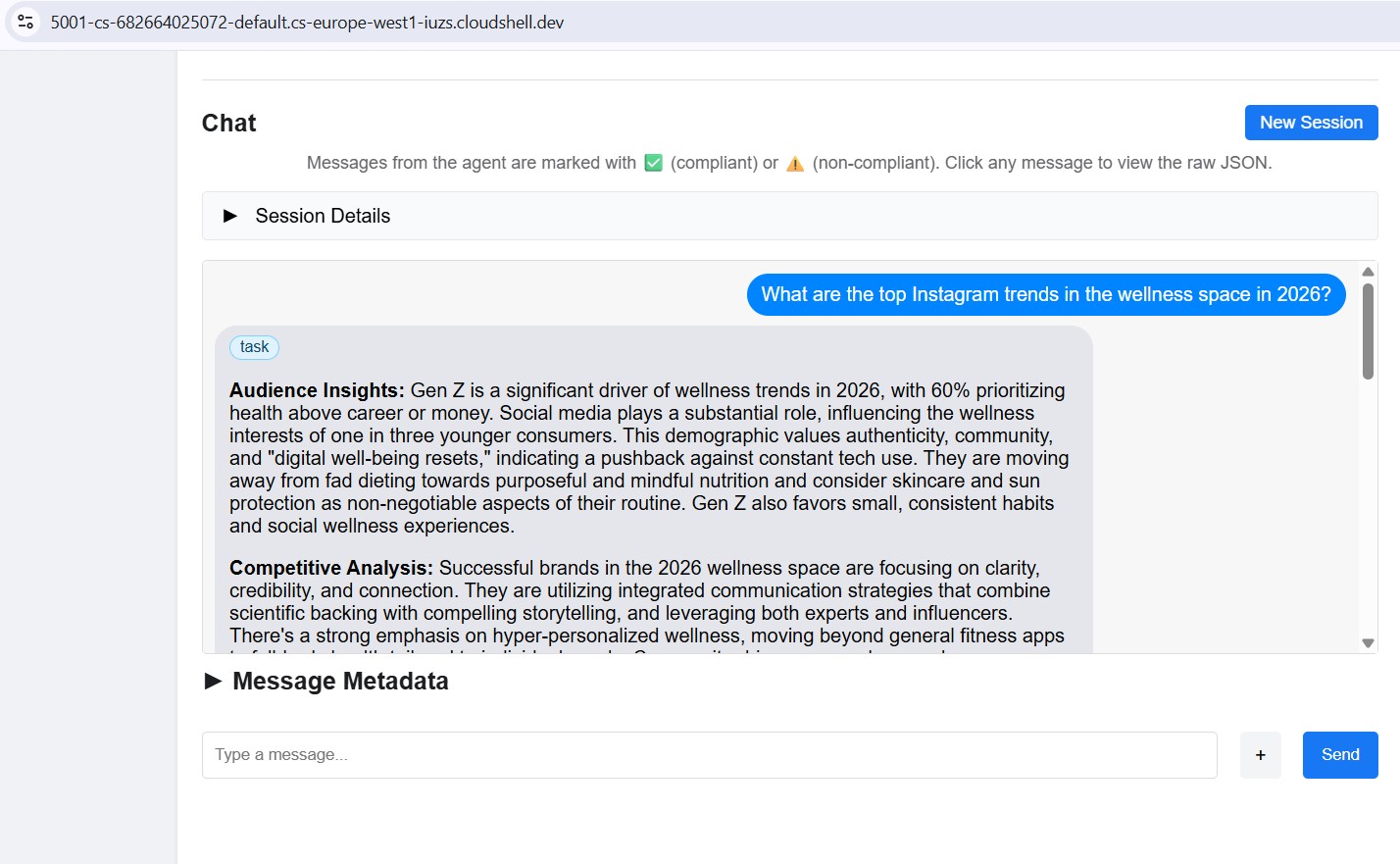
将检查器指向任何本地端口 (8082–8086),即可单独测试每个专家。
11. 构建创意总监编排器
创意总监是总协调人。它从环境变量中读取专家网址,将每个网址封装为 RemoteA2aAgent,并将其作为 LLM 可调用的 AgentTool 公开。
确保 5 个专家代理仍在运行(第 10 步中的终端 1-5)。
在终端 6(A2A 检查器终端)中,使用 Ctrl+C 停止检查器。
打开文件:
cd ~/ai-creative-studio/workshop/starter
cloudshell edit agents/creative_director/agent.py
此文件有 3 个 TODO。请按顺序完成这些步骤。
TODO 1 - 查看已编写的系统指令
系统指令位于同一目录中的 prompt.py 中,系统会自动导入该指令:
from .prompt import SYSTEM_INSTRUCTION_TEMPLATE
打开 prompt.py 以阅读相关信息,然后再继续操作:
cloudshell edit agents/creative_director/prompt.py
了解它非常重要,因为它可以控制整个编排行为。
为何编排器提示能控制一切
打开本部分旁边的 prompt.py - 下面的示例引用了其中的特定部分。
prompt.py 中的提示不仅仅是文档,还是整个系统的控制平面。结构不合理的编排器提示会导致以下问题:智能体调用顺序错误、内容由编排器而非专家生成、工作流在失败后继续运行,以及智能体之间的上下文被静默丢弃。以下九个要素可防止最常见的故障:
要素 0 - 先规划,后执行
这是最关键的要素。在调用任何专家之前,编排器会按照指示输出一个编号的计划:
I'll create your campaign by coordinating the specialist agents in sequence:
1. Brand Strategist - develop positioning and audience insights
2. Copywriter - write captions using those insights
3. Visual Designer - create image prompts aligned with the copy
4. Critic - review and score the full package
5. Project Manager - build the timeline and task breakdown
如果没有这一步,LLM 会直接进入工具调用,并迷失在工作流中,尤其是在收到专家发来的长篇回答后。先列出计划有助于锚定编排器:编排器可以知道自己处于哪个步骤、下一步是什么,以及完整运行的流程。跳过此步骤会导致编排器在工作流中途停滞或重复执行步骤。
元素 1 - 明确的角色定义
❌ "You are a helpful creative assistant."
✅ "You orchestrate specialists. You do NOT write captions, designs, or timelines yourself."
如果没有明确禁止,LLM 有时会跳过调用专家,直接生成内容 - 这样更快,而且它“知道”该怎么做。指令必须使此结果错误。
元素 2 - 列出了错误模式的工具调用语法
仅显示正确的语法是不够的。大语言模型可以生成看似合理的调用,但会静默失败。提示明确列出了正确的模式以及绝不能使用的模式:
✅ copywriter(request="...")          ← correct
❌ print(copywriter(...))             ← breaks silently
❌ default_api.copywriter(...)        ← breaks silently
❌ copywriter.run(...)                ← breaks silently
❌ agents.copywriter(...)             ← breaks silently
明确列出错误模式后,生产环境中的格式错误工具调用减少了约 95%。
元素 3 - 逐步说明顺序执行
a) Call the tool
b) Wait for tool_output
c) Verify the output is not an error
d) Confirm to the user: "✓ Brand Strategist complete"
e) Then move to the next agent
如果没有步骤 (b) 和 (c),LLM 有时会同时调用两个代理,或者在收到响应之前就假设成功并继续执行。
元素 4 - 错误指令:停止、报告、不继续
在早期版本中,编排器会收到一位专家的错误,为其编造一个合理的输出,然后继续与下一个代理互动。用户获得了一个基于虚构基础构建的看似完整的广告系列。修复非常明确:立即停止。报告确切的错误。永不继续。
元素 5 - 上下文传递规则
远程智能体没有对话记录。当编排器通过 A2A 调用 Copywriter 时,Copywriter 只能看到该单个请求中的消息,而不知道 Brand Strategist 说了什么。编排器必须明确将之前的输出捆绑到每个后续调用中:
copywriter(request="Create 3 posts for EcoFlow water bottle targeting millennials.
Use these insights from the Brand Strategist: [paste full strategist output here].
Create engaging captions with hashtags.")
该指令明确指出:“远程代理没有共享内存 - 您必须明确传递先前的输出。”如果没有这些信息,每个代理都会盲目工作。
元素 6 - 请求分类:简单与复杂
并非每项请求都需要所有 5 个智能体。该提示指示编排器在规划之前对请求进行分类:
SIMPLE  → one agent needed
  "Research the eco-friendly water bottle market" → brand_strategist only
  "Write 3 Instagram captions"                    → copywriter only

COMPLEX → all agents sequentially
  "Create a complete campaign with timeline"      → all 5 agents
如果没有这种分类,编排器会针对每个请求(包括“给我 3 个帖子创意”)运行所有 5 个代理,从而增加不必要的延迟和费用。
元素 7 - 通信规则:显示完整输出,不进行过滤
提示明确指出,编排器不得总结或修改专家返回的内容:
- DO NOT summarize unless the output exceeds 2000 words
- DO NOT filter or edit agent responses
- Show the user exactly what each specialist produced
- NEVER say results are ready unless you received them in tool_output
如果没有这些信息,编排器会用自己的语言重写专家输出的内容,从而丢失细节、引入错误,并使专家毫无用处。
元素 8 - 工作流完成:绝不提前停止
一种细微但关键的故障模式:编排程序宣布了一个 5 步计划,完成了 3 步,然后显示结果,就好像已完成一样。该提示通过明确的核对清单来防止这种情况,只有通过该核对清单,编排器才能完成操作:
✓ Did I announce a plan with N agents?
✓ Have I called ALL N agents from my plan?
✓ Did each agent respond successfully?
✓ Am I presenting complete results from ALL agents?

If any answer is NO → continue executing the remaining agents.
这样可防止编排器将部分运行视为完成。
质量控制循环
修订工作流程是 prompt.py 中最复杂的部分。打开 ## REVISION WORKFLOW 部分,然后按照说明操作。
运作方式
在评论者做出回应后,创意总监不会盲目地继续向项目经理提出要求。它会读取 Critic 的输出并进行分支:
Critic output
      │
      ├── "All Approved: YES"
      │         └──► proceed to Project Manager
      │
      └── "Status: NEEDS_REVISION"
                │
                ├── posts fail   → call copywriter again with feedback
                ├── visuals fail → call designer again with feedback
                └── both fail    → call copywriter, then designer
                          │
                          └──► revised output → Project Manager
                               (1 revision max per deliverable)
这是由 LLM 驱动的,而不是由代码驱动的
在前面的 Codelab 中,我们提到过编排器会“解析”Critic 的响应。没有 Python 代码执行此解析 - 没有正则表达式,也没有字符串匹配。创意总监是一个读取自身指令的 LLM。该说明指出:
Look for "Status: NEEDS_REVISION" in the critic's response.
Posts need revision  → call copywriter
Visuals need revision → call designer
LLM 会读取 Critic 输出中的这些确切字符串,并遵循相应分支。这就是为什么“评论家”格式不可协商:如果评论家写的是“需要做一些工作”,而不是 NEEDS_REVISION,LLM 就无法在指令中找到匹配项,并会默默跳过修订步骤。
在修订调用中转发上下文的方式
修订版调用遵循与元素 5 相同的上下文传递规则 - 编排器必须明确包含所有内容,因为撰稿人无法记住其第一个版本:
"I need you to revise the Instagram posts based on critic feedback.

ORIGINAL BRIEF:
[the original user request]

YOUR FIRST VERSION:
[the posts the copywriter created]

CRITIC FEEDBACK (Score: 6/10 - NEEDS_REVISION):
[the critic's specific suggestions]

Please revise the posts addressing this feedback while maintaining
the strengths the critic identified."
如果没有“您的第一个版本”部分,文案撰写工具会从头开始撰写,而不是改进已生成的内容。
1 次修改限制及其重要性
经过一轮修订后,无论得分如何,编排器都会继续执行项目经理。指令会在脑海中跟踪此信息:
After calling copywriter for revision once:
→ mark "copywriter_revised = true" in context
→ even if the critic still suggests changes, proceed to PM
如果没有此限制,循环可能会无限期运行:评论者标记问题 → 文案撰写者修订 → 评论者再次标记 → 文案撰写者再次修订。每轮游戏都需要消耗 token 和时间。一次修订足以提高质量,而不会有失控循环的风险。
传递给项目经理的内容
项目经理始终会收到最终获批的版本,而不是原始版本。如果发生了修订,编排器会传递修订后的副本和视觉元素。如果所有内容在第一次审核时都获得批准,则直接通过。PM 永远不会看到被拒的草稿。
TODO 2 - 将每位专家注册为 RemoteA2aAgent + AgentTool
找到 # TODO 2: For each specialist URL... 注释并将其替换为:
    if strategist_url:
        available_agents_list.append(
            "- **brand_strategist**: Market research, competitor analysis, trend identification"
        )
        strategist_agent = RemoteA2aAgent(
            name="brand_strategist",
            description="Researches markets, competitors, and trends using Google Search",
            agent_card=f"{strategist_url}/.well-known/agent.json",
        )
        agent_tools.append(AgentTool(agent=strategist_agent))

    if copywriter_url:
        available_agents_list.append(
            "- **copywriter**: Instagram captions, hashtags, and CTAs"
        )
        copywriter_agent = RemoteA2aAgent(
            name="copywriter",
            description="Creates Instagram captions with hashtags and CTAs",
            agent_card=f"{copywriter_url}/.well-known/agent.json",
        )
        agent_tools.append(AgentTool(agent=copywriter_agent))

    if designer_url:
        available_agents_list.append(
            "- **designer**: Visual concepts and real images generated via Gemini (GCS URIs returned)"
        )
        designer_agent = RemoteA2aAgent(
            name="designer",
            description="Creates visual concepts and generates real images via Gemini, stored in GCS",
            agent_card=f"{designer_url}/.well-known/agent.json",
        )
        agent_tools.append(AgentTool(agent=designer_agent))

    if critic_url:
        available_agents_list.append(
            "- **critic**: Quality review with APPROVED/NEEDS_REVISION scoring"
        )
        critic_agent = RemoteA2aAgent(
            name="critic",
            description="Reviews campaign materials and returns structured quality feedback",
            agent_card=f"{critic_url}/.well-known/agent.json",
        )
        agent_tools.append(AgentTool(agent=critic_agent))

    if pm_url:
        available_agents_list.append(
            "- **project_manager**: Project timelines, task breakdowns, Notion integration"
        )
        pm_agent = RemoteA2aAgent(
            name="project_manager",
            description="Creates project timelines and task breakdowns, optionally in Notion",
            agent_card=f"{pm_url}/.well-known/agent.json",
        )
        agent_tools.append(AgentTool(agent=pm_agent))
TODO 3 - 使用上下文压缩功能封装在应用中
为何需要压缩
对话中的每条消息(用户提示、每次工具调用、每次工具响应)都会附加到 LLM 在下一轮中读取的上下文窗口中。在 5 个智能体的工作流中,这种情况会迅速累积:
Turn 1:  user prompt                           ~200 tokens
Turn 2:  orchestrator plan                     ~300 tokens
Turn 3:  brand_strategist tool_call            ~150 tokens
Turn 4:  brand_strategist tool_output          ~1,500 tokens  ← full research report
Turn 5:  copywriter tool_call                  ~300 tokens    ← must include strategist output
Turn 6:  copywriter tool_output                ~2,000 tokens  ← 3 captions
Turn 7:  designer tool_call                    ~500 tokens
Turn 8:  designer tool_output                  ~1,500 tokens
...
到了 Agent 4(批评者),上下文窗口包含前三个代理的完整输出内容 - 仅工具响应就通常有 8,000 到 12,000 个 token。即使 Gemini 具有较大的上下文窗口,随着编排器必须处理的对话历史记录不断增加,其推理质量也会下降。如果不进行压缩,长时间运行的工作流在达到 Agent 4 附近时会遇到实际限制。
压缩功能的作用
ADK 不会完整保留每个事件,而是会定期调用 LLM,将较旧的事件总结为紧凑的表示形式。系统只会将过往事件的摘要和最近一次代理运行的完整输出内容保留在上下文信息中。
Without compaction:
  [full strategist output] + [full copywriter output] + [full designer output] + → Critic

With compaction (interval=3, overlap=1):
  [summary of strategist + copywriter] + [full designer output] + → Critic
摘要会保留基本事实(关键数据分析、获批的字幕、视觉概念),同时舍弃冗长的格式、传递给每个代理的重复背景信息和中间推理。Critic 仍然具备评估所需的一切条件,只是读取的是摘要,而不是三份完整报告。
代码
找到 # TODO 3: Wrap the agent in an App... 注释,并将占位符 App(...) 替换为:
    from google.adk.apps import App
    from google.adk.apps.app import EventsCompactionConfig
    from google.adk.apps.llm_event_summarizer import LlmEventSummarizer
    from google.adk.models import Gemini

    compaction_config = EventsCompactionConfig(
        summarizer=LlmEventSummarizer(llm=Gemini(model_id=os.getenv("GEMINI_MODEL", "gemini-3.5-flash"))),
        compaction_interval=3,   # Summarize after every 3 agent completions
        overlap_size=1,          # Keep the most recent agent's output in full
    )

    app = App(
        name="creative_director",
        root_agent=agent,
        events_compaction_config=compaction_config,
        plugins=[LoggingPlugin()],
    )
    return agent, app
compaction_interval=3 - 每当 3 个代理完成任务后,就会触发压缩。对于 5 个代理的流水线,这意味着它会触发一次(在代理 1-3 之后),然后评估者和 PM 会看到代理 1-3 的摘要以及上一个代理的完整输出。
overlap_size=1 - 始终按原样保留代理的最新完整输出,绝不会进行总结。这一点很重要,因为评论家需要设计者的完整输出(包括 gcs_uri 值)才能加载和查看实际图片。摘要会丢失这些 URI。
在完整广告系列投放期间的实际效果:
Agent 1 (Strategist)  → full context
Agent 2 (Copywriter)  → full context
Agent 3 (Designer)    → full context
                        ↓ compaction fires: summarizes agents 1-2, keeps 3 in full
Agent 4 (Critic)      → sees [summary of 1-2] + [full output of 3]
Agent 5 (PM)          → sees [summary of 1-3] + [full output of 4]
了解 RemoteA2aAgent 和 AgentTool
RemoteA2aAgent("brand_strategist", agent_card=url)
     │
     │  wraps the remote service so ADK can call it
     ▼
AgentTool(agent=strategist_agent)
     │
     │  exposes it as a callable tool to the LLM
     ▼
Agent(tools=[...])
     │
     │  LLM calls tool("brand_strategist", message=...) when needed
     ▼
brand-strategist-xxxx.run.app  ← actual HTTP A2A call happens here
LLM 会根据系统指令和用户请求,决定何时调用每种工具。编排器从不在代码中直接调用代理,所有操作都由 LLM 的推理驱动。
在本地测试 Creative Director
uv run adk web agents --allow_origins='*'
在端口 8000 上打开网页预览。使用代理下拉菜单选择 creative_director,然后尝试:
Research the eco-friendly water bottle market for health-conscious millennials
您会看到,创意总监只会将此问题转给品牌策略师,而您会收到品牌策略师的回答。
如需查看完整广告系列,请尝试以下操作:
Create a complete Instagram campaign for SolarPack portable solar charger targeting
outdoor enthusiasts and digital nomads aged 22-35.
Budget $2,000, launch in 2 weeks.
您会看到创意总监依次协调所有 5 位专家,每位代理的输出都会流入下一位代理。
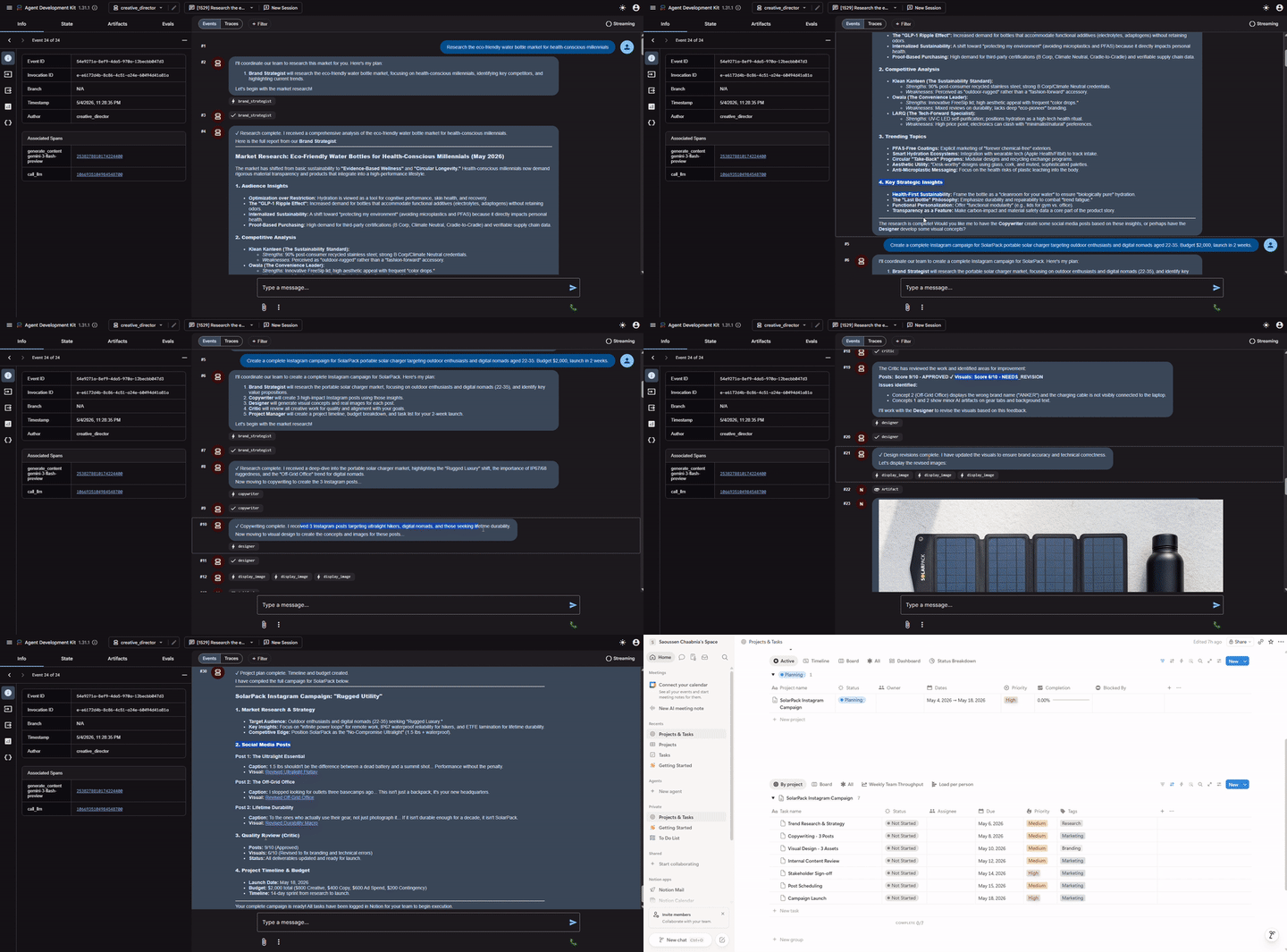
在继续操作之前,请停止 Creative Director (Ctrl+C) - A2A 检查器也使用端口 8000。
完成本地测试后,停止 5 个专家服务器(每个终端中的 Ctrl+C)。
12. 部署和测试专业智能体
现在,我们已准备好将代理部署到 Google Cloud。Cloud Run 是一项非常适合部署代理的服务。它采用无服务器架构,可伸缩且易于使用。每个专业智能体都作为独立的 Cloud Run 服务进行部署。
部署配置
每位专家的 Dockerfile 遵循以下模式:
FROM python:3.12-slim
WORKDIR /app
RUN apt-get update && apt-get install -y --no-install-recommends gcc curl

# Fast dependency install with uv
COPY --from=ghcr.io/astral-sh/uv:latest /uv /usr/local/bin/uv
COPY pyproject.toml .
RUN uv sync --no-install-project --no-dev

COPY . .
RUN useradd -m -u 1000 appuser && chown -R appuser:appuser /app
USER appuser

ENV PYTHONUNBUFFERED=1 PORT=8080 HOST=0.0.0.0
EXPOSE 8080
CMD ["uv", "run", "python", "agent.py"]
依次部署所有 5 位专家
cd ~/ai-creative-studio/workshop/starter
source .env

uv run deploy/deploy_all_specialists.py
此脚本会一次部署所有 5 个代理(总共需要 10-12 分钟)。顺序部署可避免 Cloud Build 轮询配额(每分钟 60 个请求)。完成后,它会将每个代理的 Cloud Run 网址写回 .env。
部署 Designer 后,脚本会自动向其 Cloud Run 服务账号授予对 GCS 存储桶的 roles/storage.objectCreator 权限,以便其上传生成的图片。
如果您在 .env 中配置了 Notion 凭据,该脚本还会将这些凭据安全地存储在 Secret Manager 中(以 notion-token、notion-project-db-id、notion-tasks-db-id 的形式),并通过 --set-secrets 将它们注入到 Project Manager 服务中,而不是以纯环境变量的形式注入。这意味着,令牌永远不会显示在 Cloud Run 的“环境”标签页中,也不会显示在 gcloud 命令历史记录中。
验证部署
部署完成后,脚本会自动将 Cloud Run 网址写回 .env,替换上一步中的本地主机网址:
source .env

echo "Deployed URLs:"
echo "  Brand Strategist: $STRATEGIST_AGENT_URL"
echo "  Copywriter:       $COPYWRITER_AGENT_URL"
echo "  Designer:         $DESIGNER_AGENT_URL"
echo "  Critic:           $CRITIC_AGENT_URL"
echo "  Project Manager:  $PM_AGENT_URL"
在下一步中部署到 Agent Runtime 时,Creative Director 会自动使用这些 Cloud Run 网址。
验证智能体卡片
每个已部署的代理都会在 /.well-known/agent.json 中显示一个代理卡片。提取这些更改,以确认一切都已生效:
source .env

for agent_url in $STRATEGIST_AGENT_URL $COPYWRITER_AGENT_URL $DESIGNER_AGENT_URL $CRITIC_AGENT_URL $PM_AGENT_URL; do
    echo "=== Agent Card: $agent_url ==="
    curl -s "${agent_url}/.well-known/agent.json" | python3 -m json.tool | grep -E '"name"|"url"|"description"'
    echo ""
done
每个代理的预期输出:
"name": "brand_strategist",
"url": "https://brand-strategist-xxxx.run.app",
"description": "Brand strategist for market research and competitive insights"
使用 A2A 检查器 (Cloud Run) 进行测试
A2A 检查器已在第 10 步中安装。启动它:
cd ~/a2a-inspector
bash scripts/run.sh
打开“网页预览”→ 更改端口 → 5001。在连接字段中输入您的 Cloud Run 网址:
https://brand-strategist-xxxx.us-central1.run.app
点击 Connect - 由于服务是使用 --allow-unauthenticated 部署的,因此无需身份验证令牌。
检查器会连接、验证智能体卡片,并让您通过 A2A 进行交互式对话。
检查部署到 Cloud Run 的代理
部署到 Cloud Run 后,将检查器指向公共 HTTPS 网址,以验证云部署是否正常运行:
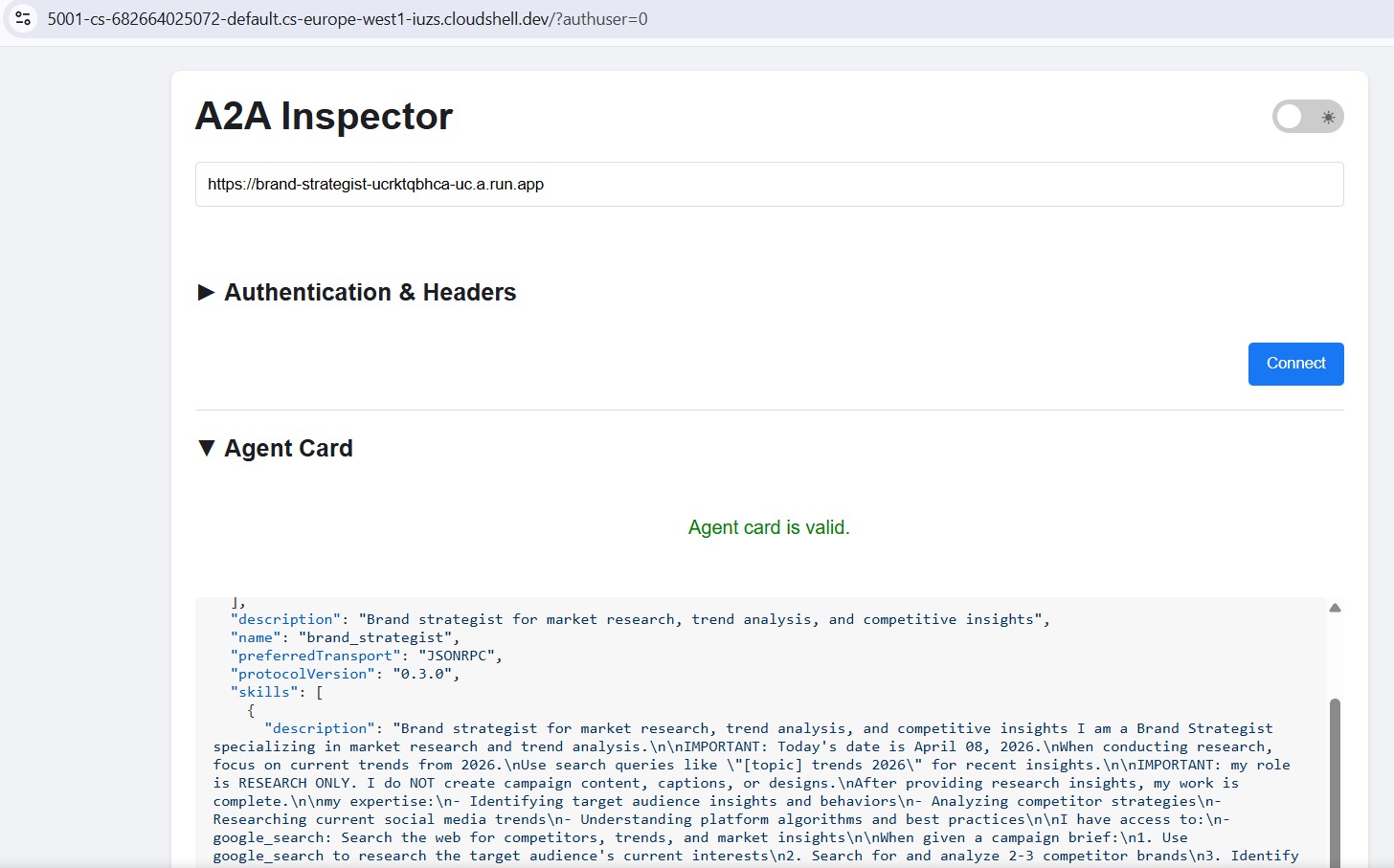
工作流程完全相同 - 粘贴 Cloud Run 网址、连接并发送测试消息。如果代理卡片加载完毕且聊天响应,则表示专家已正确部署且可联系。
13. 将 Creative Director 部署到 Agent Runtime
编排器部署到 Agent Runtime,后者提供托管式会话状态、自动扩缩和内置跟踪功能。
为什么编排器要使用 Agent Runtime?
这 5 位专家部署到 Cloud Run,它们是轻量级、无状态的,每位专家负责一项任务。广告素材总监有不同的要求:
要求 | 重要意义 |
会话状态 | 多步工作流需要 45 秒以上。代理运行时会维护编排器的工具调用之间的对话状态,因此在流水线中不会丢失任何内容。 |
可变负载 | 有时每小时一个,有时并行运行多个。Agent Runtime 在空闲时会缩减至零,并会自动横向扩容 - 您无需为空闲容量付费。 |
可观测性 | Cloud Logging、Cloud Monitoring 和 Cloud Trace 均内置在其中。您无需添加任何插桩,即可查看每次 A2A 调用、使用的每个令牌以及每次延迟时间峰值。 |
长时间运行的工作流 | Cloud Run 的请求超时时间为 3,600 秒。Agent Runtime 专为可能需要数分钟才能完成的工作流而设计,支持受管理的重试和状态持久性。 |
Cloud Run 是一个功能强大且可扩缩的平台,能够处理各种架构模式,包括我们的无状态专业代理。虽然您可以在 Cloud Run 上运行有状态的编排器,但需要您设计和集成用于状态管理、持久性和会话处理的解决方案。
相比之下,Agent Runtime 专为应对这一难题而打造。它提供了一个“开箱即用”的生态系统,可原生管理 AI 编排器的复杂有状态生命周期,让您无需从头构建底层基础架构。
部署编排程序
cd ~/ai-creative-studio/workshop/starter
source .env

uv run deploy/deploy_orchestrator.py --action deploy
此过程需要大约 5-10 分钟。完成后,AGENT_ENGINE_ID 和 AGENT_ENGINE_RESOURCE_NAME 会保存到 .env。
source .env
echo "Agent Engine ID: $AGENT_ENGINE_ID"
echo "Resource: $AGENT_ENGINE_RESOURCE_NAME"
部署的运作方式
client.agent_engines.create() 会打包您的 App 对象,将其与依赖项一起上传,并将其部署到受管理的基础架构。各参数的作用如下:
import vertexai
from vertexai import Client, agent_engines

vertexai.init(project=PROJECT_ID, location=LOCATION, staging_bucket=STAGING_BUCKET)

# Wrap the App in an AdkApp adapter - enables tracing in Cloud Trace
adk_app = agent_engines.AdkApp(app=root_app, enable_tracing=True)

# Initialize client and deploy
client = Client(project=PROJECT_ID, location=LOCATION)

agent_engine_resource = client.agent_engines.create(
    agent=adk_app,
    config={
        "staging_bucket": STAGING_BUCKET,   # GCS bucket for packaging artifacts
        "display_name": "Creative Director",
        # Python packages installed in the managed runtime - pin for reproducibility
        "requirements": [
            "google-cloud-aiplatform[agent_engines]>=1.132.0,<2.0.0",
            "google-adk[a2a]==1.31.1",
            "google-genai>=1.70.0",
            "google-cloud-storage>=2.10.0",
            "python-dotenv>=1.0.0",
            "pydantic>=2.0.0",
            "cloudpickle>=3.0.0",
        ],
        # Specialist URLs passed as env vars - the orchestrator reads these at runtime
        "env_vars": {
            "COPYWRITER_AGENT_URL": COPYWRITER_URL,
            "DESIGNER_AGENT_URL":   DESIGNER_URL,
            "STRATEGIST_AGENT_URL": STRATEGIST_URL,
            "CRITIC_AGENT_URL":     CRITIC_URL,
            "PM_AGENT_URL":         PM_URL,
        },
    },
)

resource_name = agent_engine_resource.api_resource.name
agent_engine_id = resource_name.split("/")[-1]
幕后运作机制:
1. Agent Engine packages your App + requirements into a container
2. Uploads it to the staging bucket in your project
3. Deploys to managed compute (you never see or manage the VM)
4. Returns a resource name: projects/.../locations/.../reasoningEngines/<id>
5. That ID is saved to .env as AGENT_ENGINE_ID
部署后,编排器会通过其环境变量中的网址连接到五位 Cloud Run 专家
- 这些变量在部署脚本运行之前通过
.env传递。
14. 投放端到端广告系列
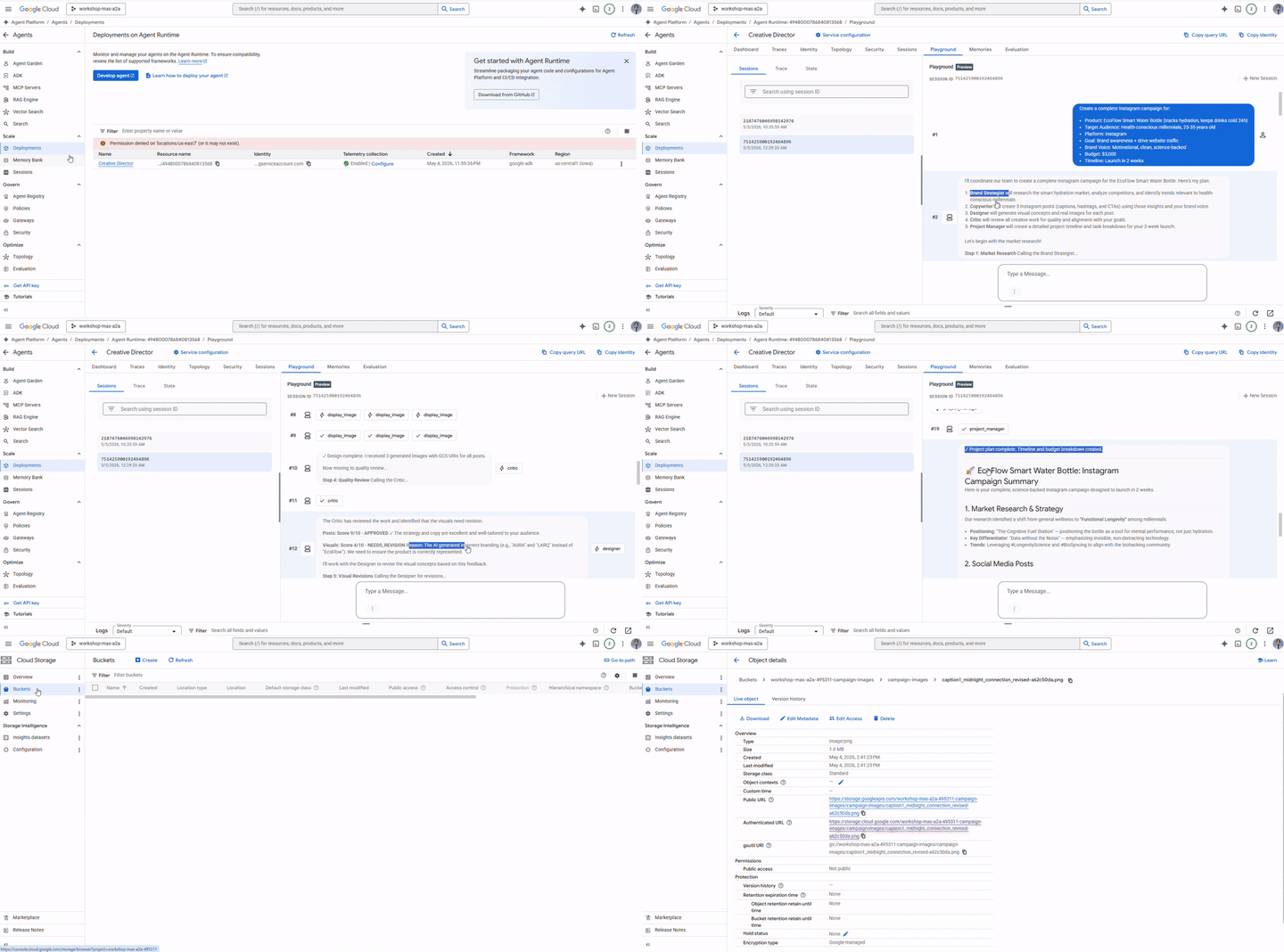
整个系统已部署。在 Agent Runtime Playground 中运行完整的广告系列。
打开 Agent Runtime Playground
- 前往 https://console.cloud.google.com/agent-platform/runtimes。您还可以依次前往 Agent Platform > 智能体 > 部署,导航到 Agent Runtime。
- 选择已部署的 Agent Runtime (
creative-director) - 点击左侧边栏中的 Playground
- 点击新会话即可开始新的对话
投放完整广告系列
将此简报粘贴到对话中,然后发送:
Create a complete Instagram campaign for:
- Product: EcoFlow Smart Water Bottle (tracks hydration, keeps drinks cold 24h)
- Target Audience: Health-conscious millennials, 25-35 years old
- Platform: Instagram
- Goal: Brand awareness + drive website traffic
- Brand Voice: Motivational, clean, science-backed
- Budget: $3,000
- Timeline: Launch in 2 weeks
创意总监将按顺序执行所有 5 个代理:
- 品牌策略师 → 市场调研、竞争对手分析、受众群体数据分析
- 文案撰写者 → 3 篇带有说明、# 标签和行动号召的 Instagram 帖子
- Designer → 每篇帖子都包含视觉概念 + 通过 Gemini 生成的真实图片 (GCS URI)
- Critic → 质量审核,并提供 APPROVED / NEEDS_REVISION 得分
- (如有需要,进行修订)→ 再次致电文案撰写人员或设计师,提供反馈
- 项目经理 → 2 周时间表、任务细分、预算分配
测试单智能体路由
在新会话中发送以下较短的请求:
Research the luxury skincare market - top brands and trends for this year.
请注意,创意总监会将此问题仅路由给品牌策略师,而不会调用其他代理。这是系统指令正常运行时的请求分类逻辑。
检查执行轨迹
仍在控制台中:
- 点击左侧边栏中的 Traces(在 Playground 旁边)
- 在轨迹视图下,选择您刚刚运行的会话的轨迹
- 展开轨迹树,查看每次代理调用、其输入/输出、延迟时间和 token 用量
每次向专家发起的 A2A 调用都会显示为单独的 span。您可以确切了解创意总监向每个代理传递了哪些上下文,以及收到了哪些回复。
可选:从终端运行
您还可以使用启动器中已包含的 run_campaign.py 脚本以编程方式运行广告系列。
cd ~/ai-creative-studio/workshop/starter
uv run run_campaign.py
15. 清理
清理 Google Cloud 资源,以免产生持续费用。
运行收尾清理脚本 - 该脚本会读取您的 .env 并删除在本 Codelab 中创建的所有内容:
bash deploy/teardown_gcp.sh
脚本会准确显示将要删除的内容,并在执行任何操作之前提示您进行确认:
资源 | 哪些内容会被删除 |
Cloud Run 服务 | 品牌策略顾问、文案撰写员、设计师、评论家、项目经理 |
Agent Runtime | 创意总监推理引擎 + 所有会话 |
Artifact Registry |
|
GCS 存储桶 |
|
Secret Manager |
|
验证所有内容是否已移除
gcloud run services list --region=us-central1
gcloud storage buckets list --project=$GCP_PROJECT_ID
预期输出:空列表或仅包含您自己预先存在的资源。
16. 总结
恭喜!您已在 Google Cloud 上构建并部署了可用于生产用途的多智能体 AI 系统。
您构建的内容
代理 | 能力 | 部署 |
品牌策略顾问 | 通过 Google 搜索进行市场调研 | Cloud Run |
文案撰写者 | Instagram 字幕创作 | Cloud Run |
设计师 | 通过 Gemini 生成图片并上传到 GCS | Cloud Run |
判别器 | 带有评分的质量审核 | Cloud Run |
项目经理 | 时间轴 + Notion MCP | Cloud Run |
创意总监 | 通过 A2A 实现完整编排 | Agent Runtime |
您学到的关键模式
- ADK
Agent- 定义具有指令和可选工具的 LLM 智能体 adk web- 使用内置的对话界面在本地运行并测试任何 ADK 智能体SkillToolset- 将可重复使用的知识打包到按需加载的模块化文件中FunctionTool- 将任何 Python 函数(或外部模型)封装为可调用的智能体工具to_a2a()- 将任何 ADK 智能体公开为符合 A2A 标准的 HTTPS 服务RemoteA2aAgent+AgentTool- 将远程代理编排为可调用的工具McpToolset- 通过 MCP stdio 服务器连接到外部服务EventsCompactionConfig- 处理长时间运行的多智能体工作流中的 token 限制- 结构化专家输出 - 通过自动修订实现机器可读的质量控制
- Cloud Run - 大规模部署容器化智能体
- Agent Runtime - 具有受管理的会话和跟踪功能的主机编排器
后续步骤
- 使用
gemini-3.1-flash-image的编辑功能,向 Designer 添加多轮图片修改功能 - 向 Cloud Run 服务添加 IAM 身份验证(移除
--allow-unauthenticated) - 用 LangGraph 或 CrewAI 智能体替换一位专家 - A2A 不受框架限制
- 添加用户反馈作为一种工具,以便参与者可以对输出进行评分和迭代
- 在 Cloud 控制台中探索 Agent Runtime 跟踪