1. 简介
您好!您对智能体的概念很感兴趣,对吧?智能体是一种小助手,无需您动手即可帮您处理各种事务。太棒了!但实际上,一个智能体并不总是能满足需求,尤其是在处理更大、更复杂的项目时。您可能需要整个团队的他们!这正是多智能体系统的用武之地。
与旧式的硬编码相比,由 LLM 提供支持的智能体可为您提供出色的灵活性。不过,总会有一些“不过”,这些模型也面临着一系列棘手的挑战。这正是我们将在本次研讨会中深入探讨的内容!
您将学习到以下内容,可将此视为提升代理技能:
使用 LangGraph 构建您的第一个代理:我们将使用热门框架 LangGraph 亲手构建您自己的代理。您将学习如何创建可连接到数据库的工具,如何利用最新的 Gemini 2 API 进行一些互联网搜索,以及如何优化提示和回答,以便智能体不仅可以与 LLM 互动,还可以与现有服务互动。我们还将向您展示函数调用的运作方式。
以您的方式编排智能体:我们将探索编排智能体的不同方式,从简单的直线路径到更复杂的多路径场景。您可以将其视为指导代理团队的运作流程。
多智能体系统:您将了解如何设置一个智能体可以协作并共同完成任务的系统,而这一切都归功于事件驱动型架构。
LLM 自由:选择最适合的 LLM:我们不只局限于一个 LLM!您将了解如何使用多个 LLM,为它们分配不同的角色,以利用出色的“思维模型”来提升问题解决能力。
动态内容?没问题!:想象一下,您的代理可以实时创建专门为每位用户量身定制的动态内容。我们将向您展示如何操作!
使用 Google Cloud 将数据科学带入云端:不要再仅仅在笔记本中玩耍了。我们将向您展示如何在 Google Cloud 上设计和部署多智能体系统,以便该系统能够投入实际应用!
此项目将很好地展示如何使用我们讨论的所有技巧。
2. 架构
当老师或从事教育工作非常有意义,但我们必须承认,工作量(尤其是所有准备工作)可能非常具有挑战性!此外,学校往往没有足够的教职工,辅导费用也可能很高。因此,我们建议使用 AI 赋能的教学助理。此工具可减轻教育工作者的负担,并帮助弥合因人员短缺和缺乏经济实惠的辅导服务而造成的差距。
我们的 AI 教学助理可以快速生成详细的课程计划、有趣的测验、易于理解的音频回顾和个性化作业。这样,教师就可以专注于自己最擅长的事情:与学生建立联系,帮助他们爱上学习。
该系统包含两个网站:一个供教师创建未来几周的课程计划,
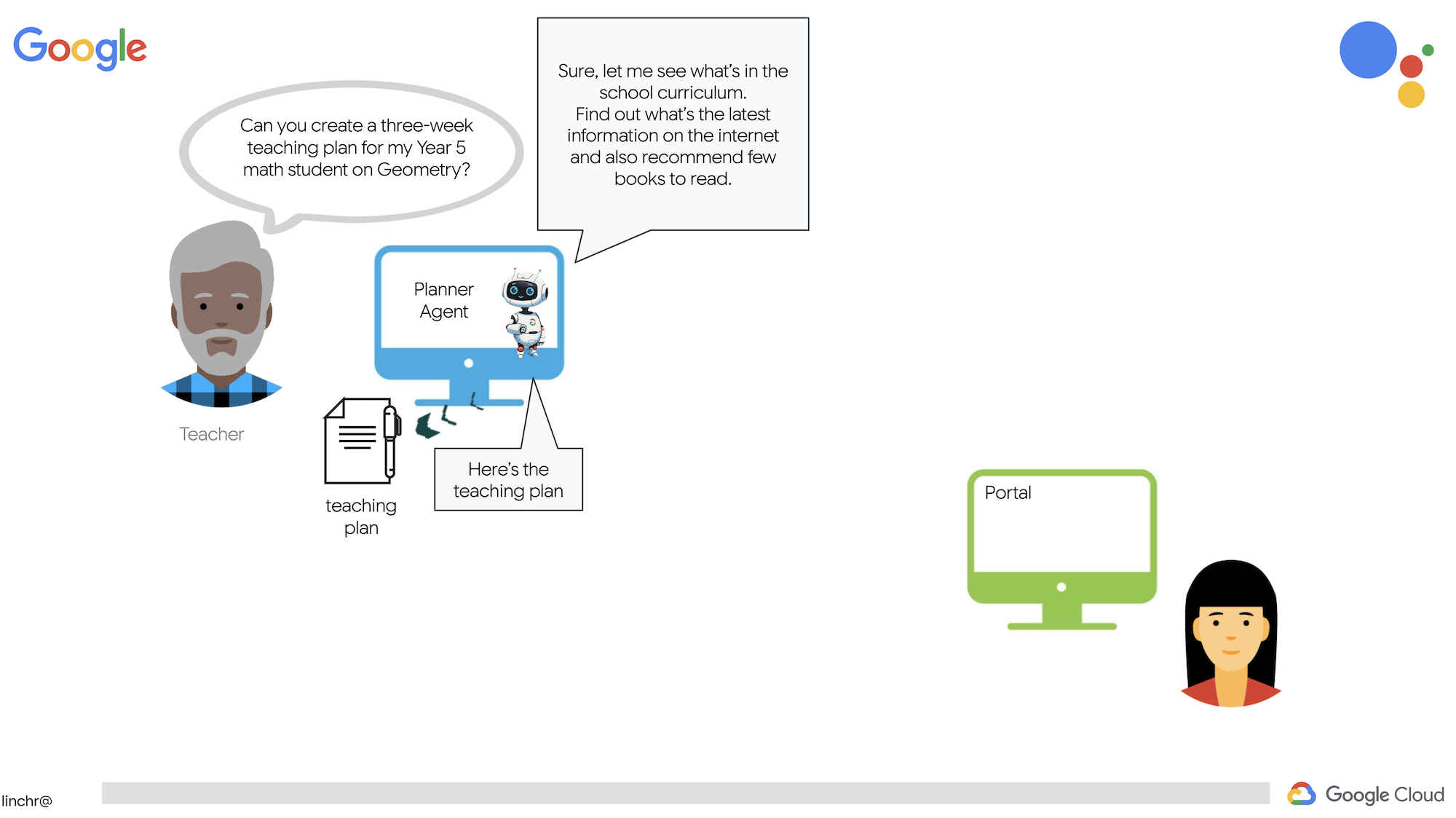
另一个供学生访问测验、音频总结和作业。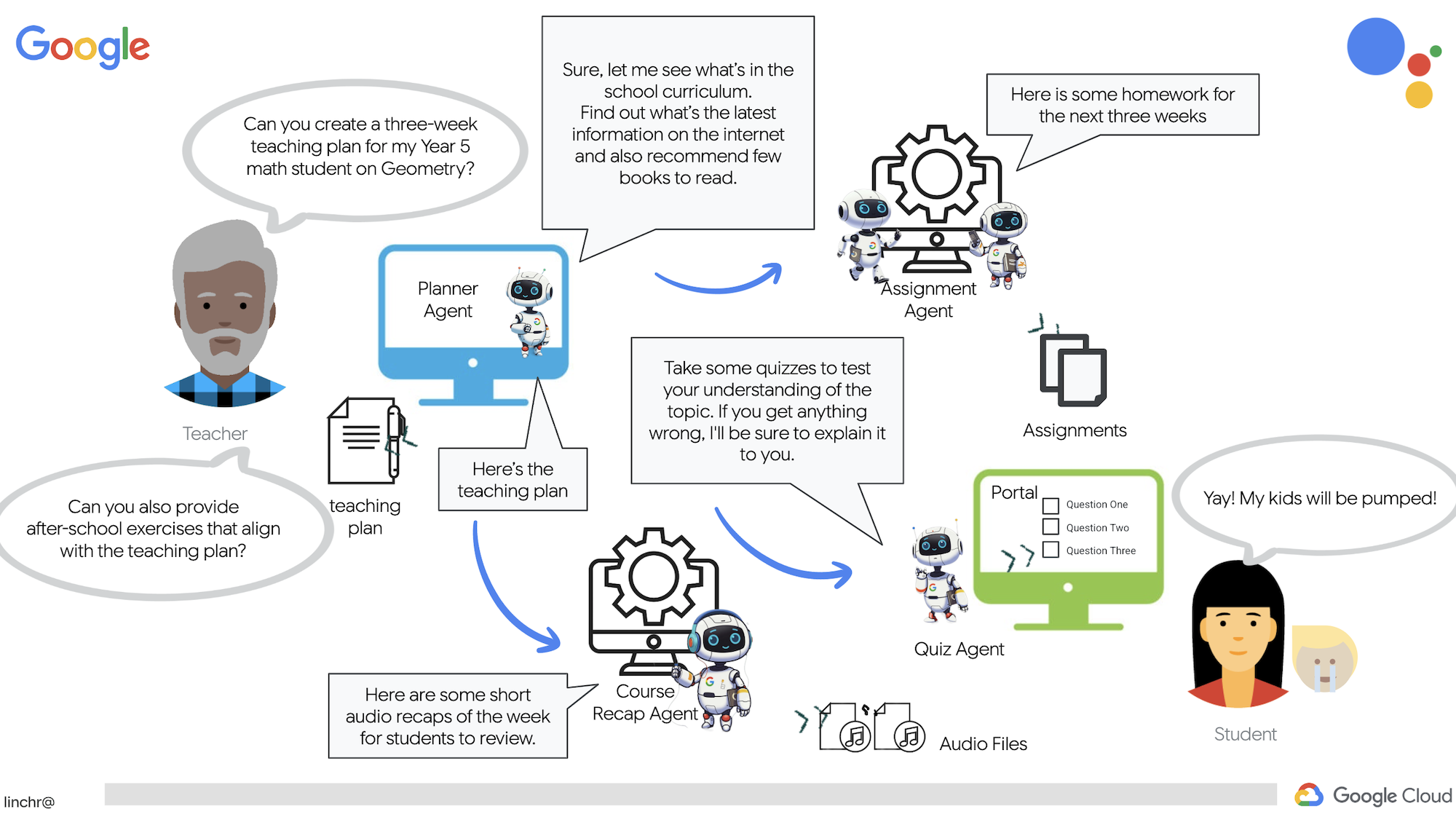
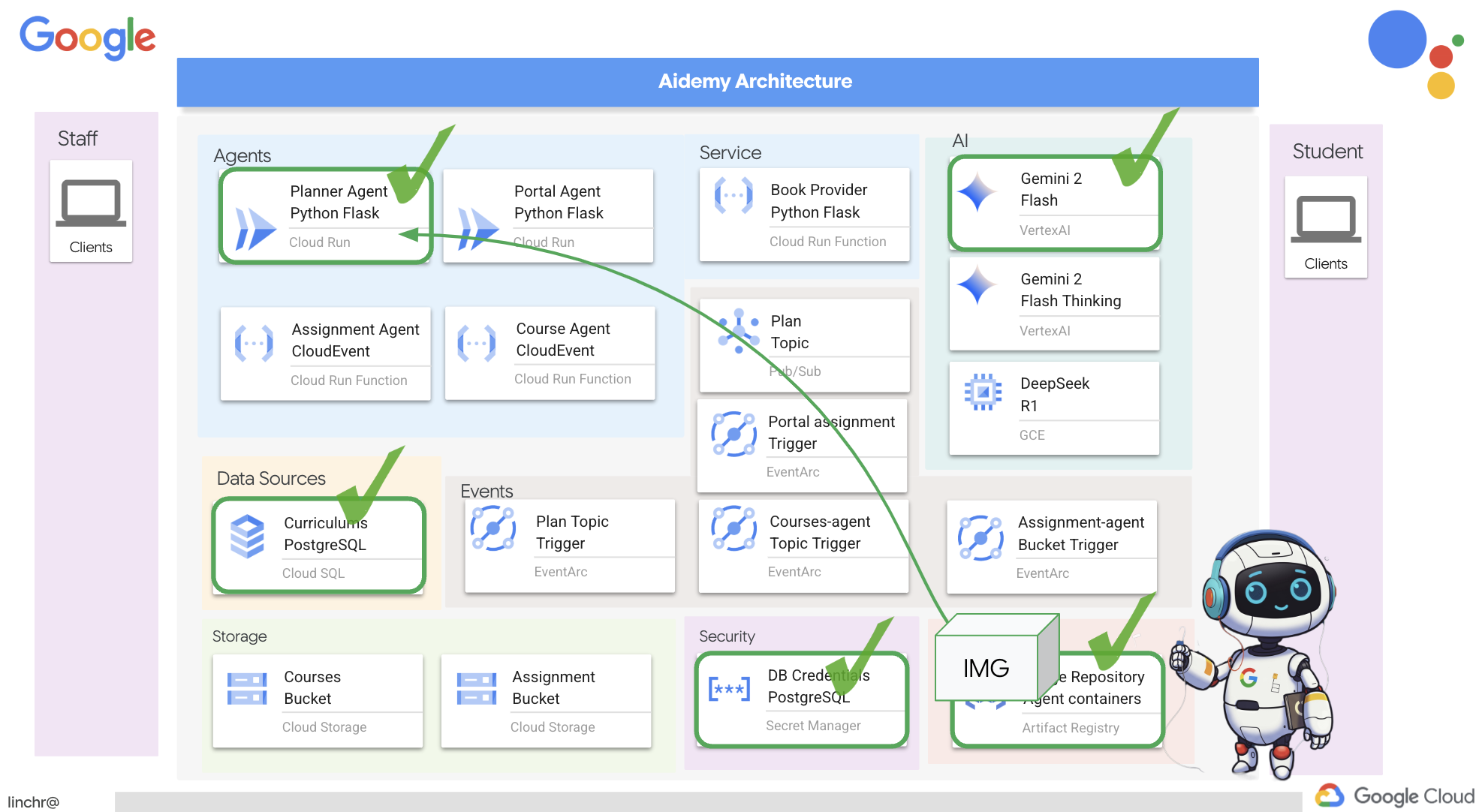
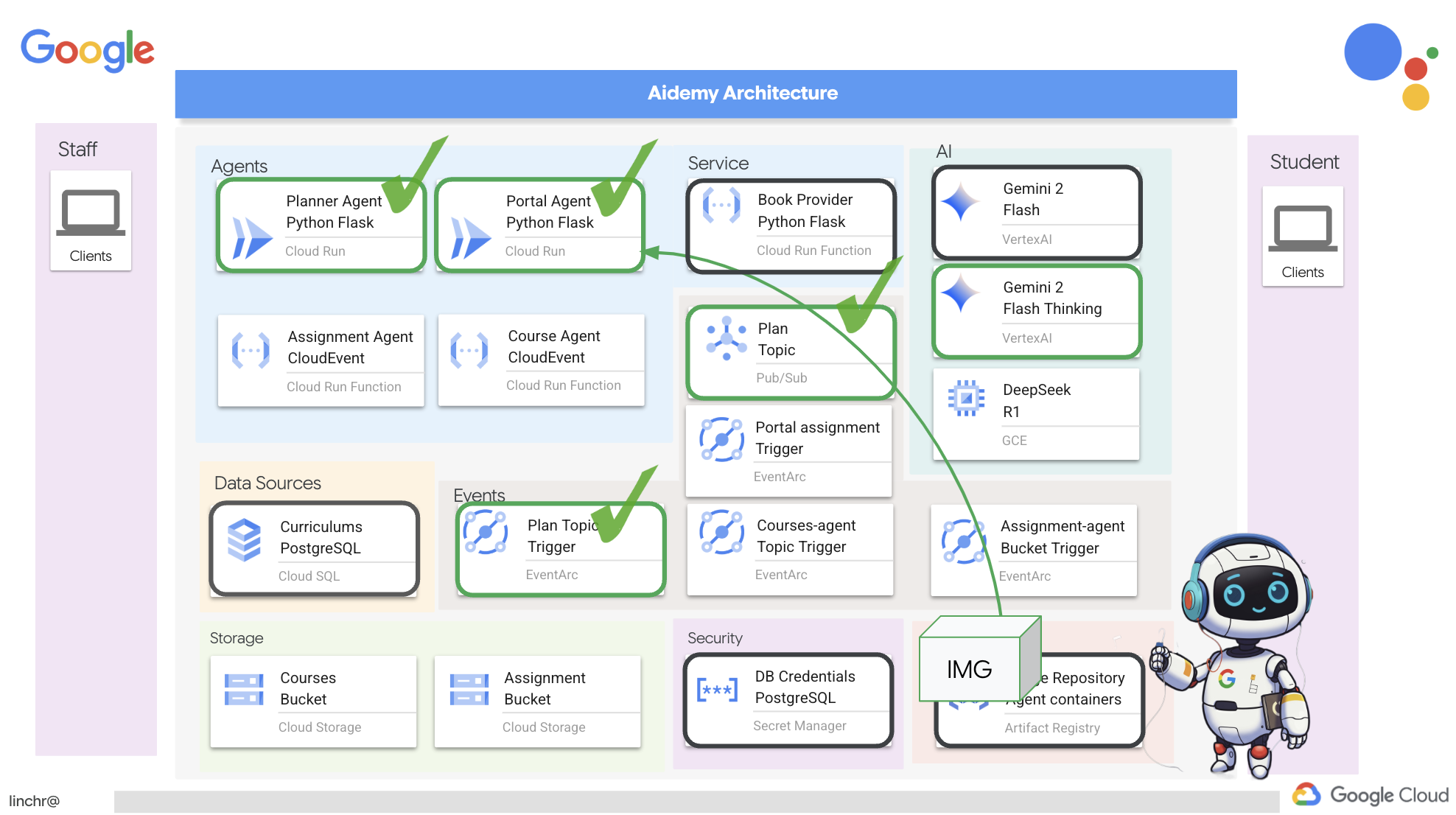
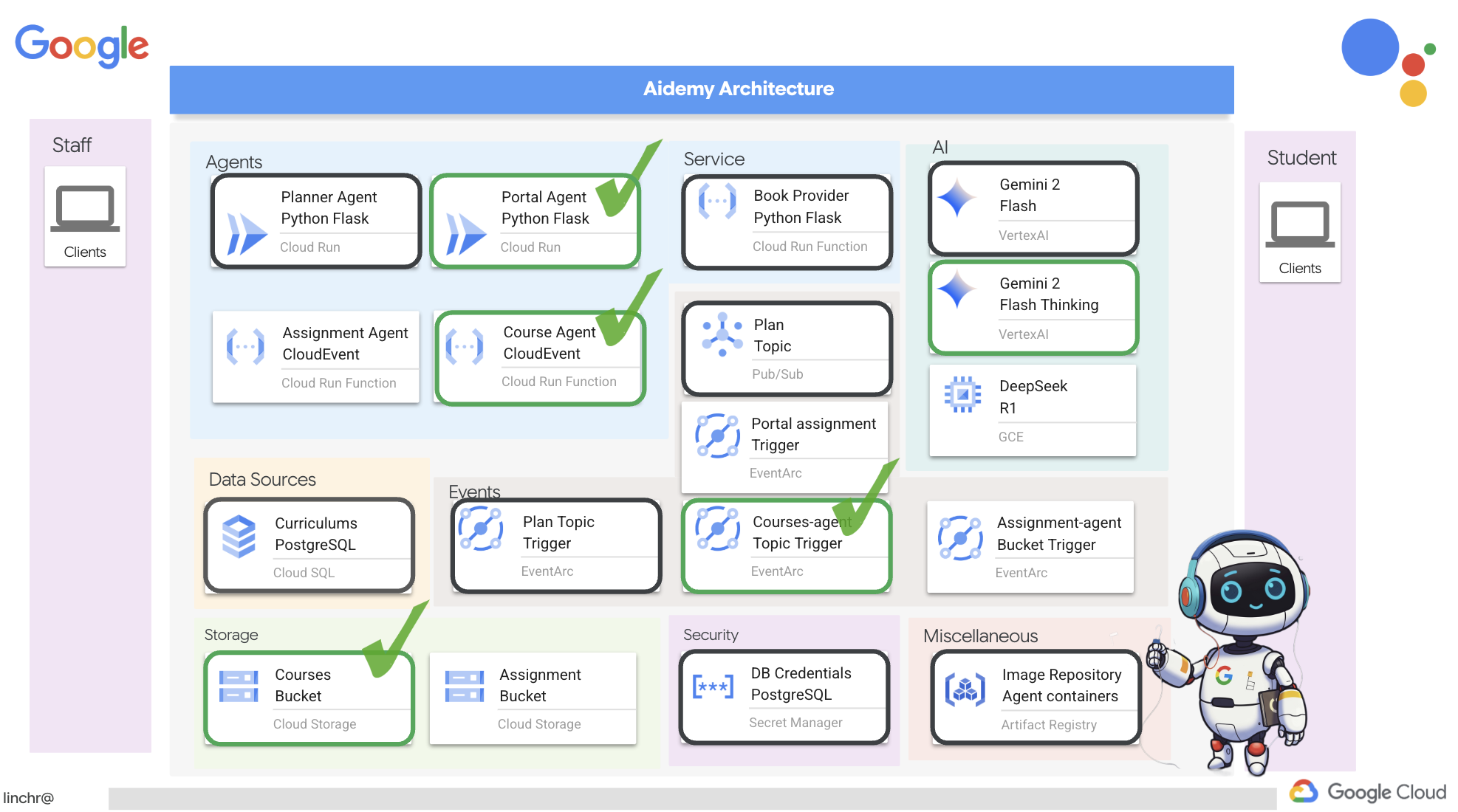
好的,我们来了解一下为教学助理 Aidemy 提供支持的架构。如您所见,我们已将其分解为几个关键组成部分,所有这些部分协同工作才能实现这一目标。
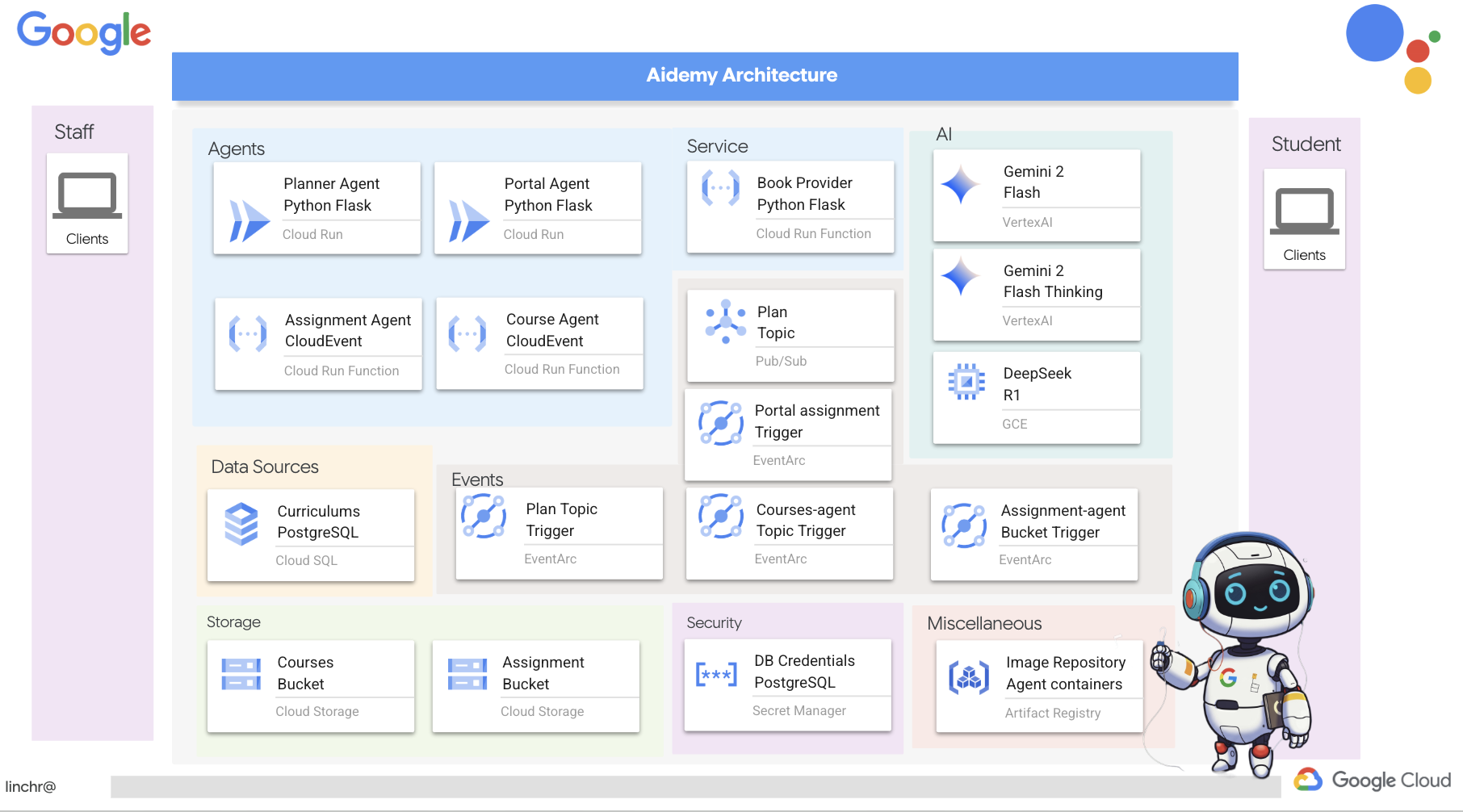
关键架构元素和技术:
Google Cloud Platform (GCP):整个系统的核心:
- Vertex AI:访问 Google 的 Gemini LLM。
- Cloud Run:用于部署容器化代理和函数的无服务器平台。
- Cloud SQL:用于存储课程数据的 PostgreSQL 数据库。
- Pub/Sub 和 Eventarc:事件驱动型架构的基础,可实现组件之间的异步通信。
- Cloud Storage:存储音频总结和作业文件。
- Secret Manager:安全地管理数据库凭据。
- Artifact Registry:存储代理的 Docker 映像。
- Compute Engine:部署自托管 LLM,而不是依赖于供应商解决方案
LLM:系统的“大脑”:
- Google 的 Gemini 模型:(Gemini x Pro、Gemini x Flash、Gemini x Flash 思考)用于课程规划、内容生成、动态 HTML 创建、测验解释和作业合并。
- DeepSeek:用于生成自学作业的专业化任务
LangChain 和 LangGraph:用于开发 LLM 应用的框架
- 有助于创建复杂的多智能体工作流。
- 支持对工具(API 调用、数据库查询、网页搜索)进行智能编排。
- 实现事件驱动型架构,以提高系统可伸缩性和灵活性。
从本质上讲,我们的架构将 LLM 的强大功能与结构化数据和事件驱动型通信相结合,所有这些都在 Google Cloud 上运行。这使我们能够打造可扩缩、可靠且有效的教学助理。
3. 准备工作
在 Google Cloud 控制台的项目选择器页面上,选择或创建一个 Google Cloud 项目。确保您的 Cloud 项目已启用结算功能。了解如何检查项目是否已启用结算功能。
在 Cloud Shell IDE 中启用 Gemini Code Assist
👉 在 Google Cloud 控制台中,前往 Gemini Code Assist 工具,同意相关条款及条件,免费启用 Gemini Code Assist。
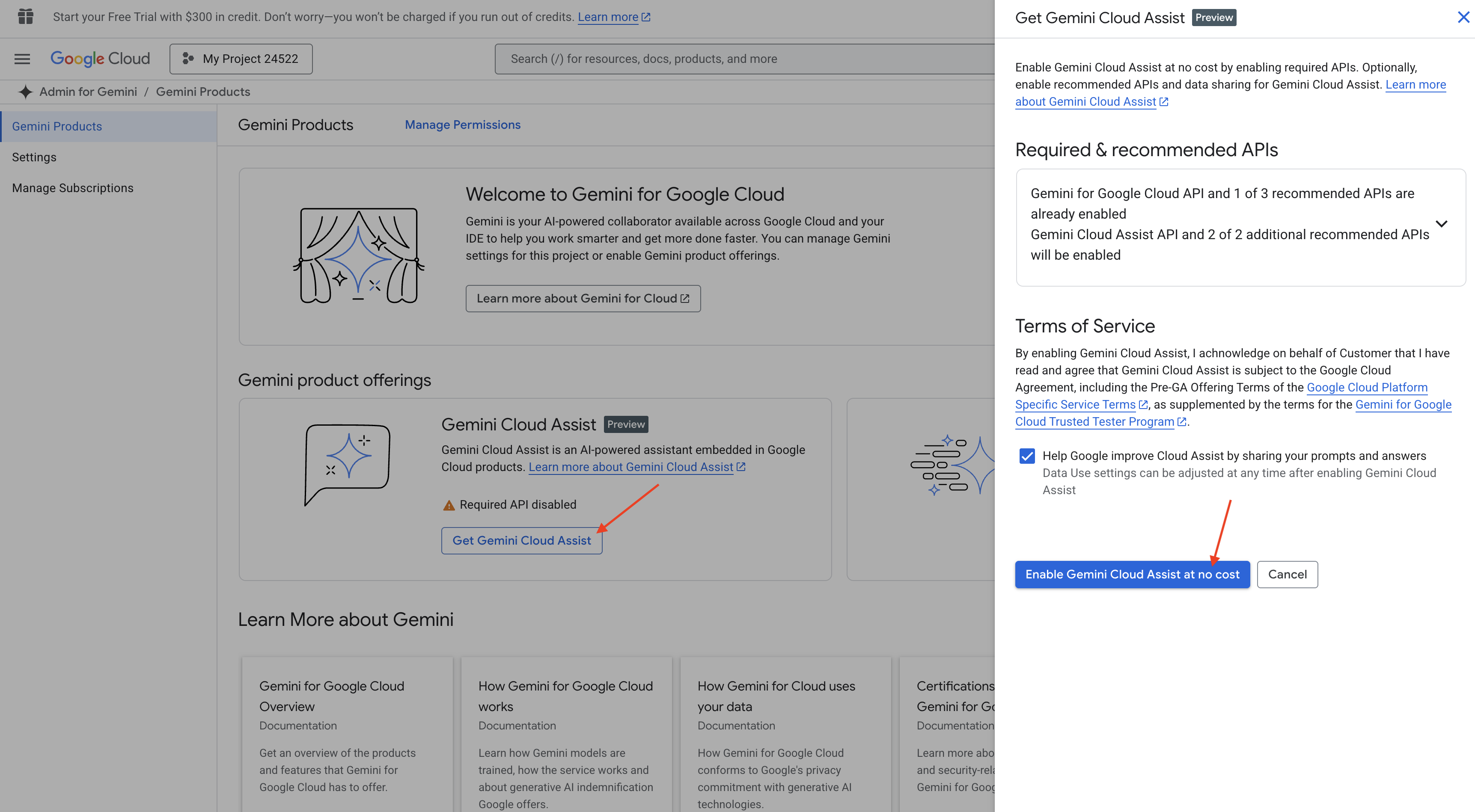
忽略权限设置,离开此页面。
在 Cloud Shell 编辑器中工作
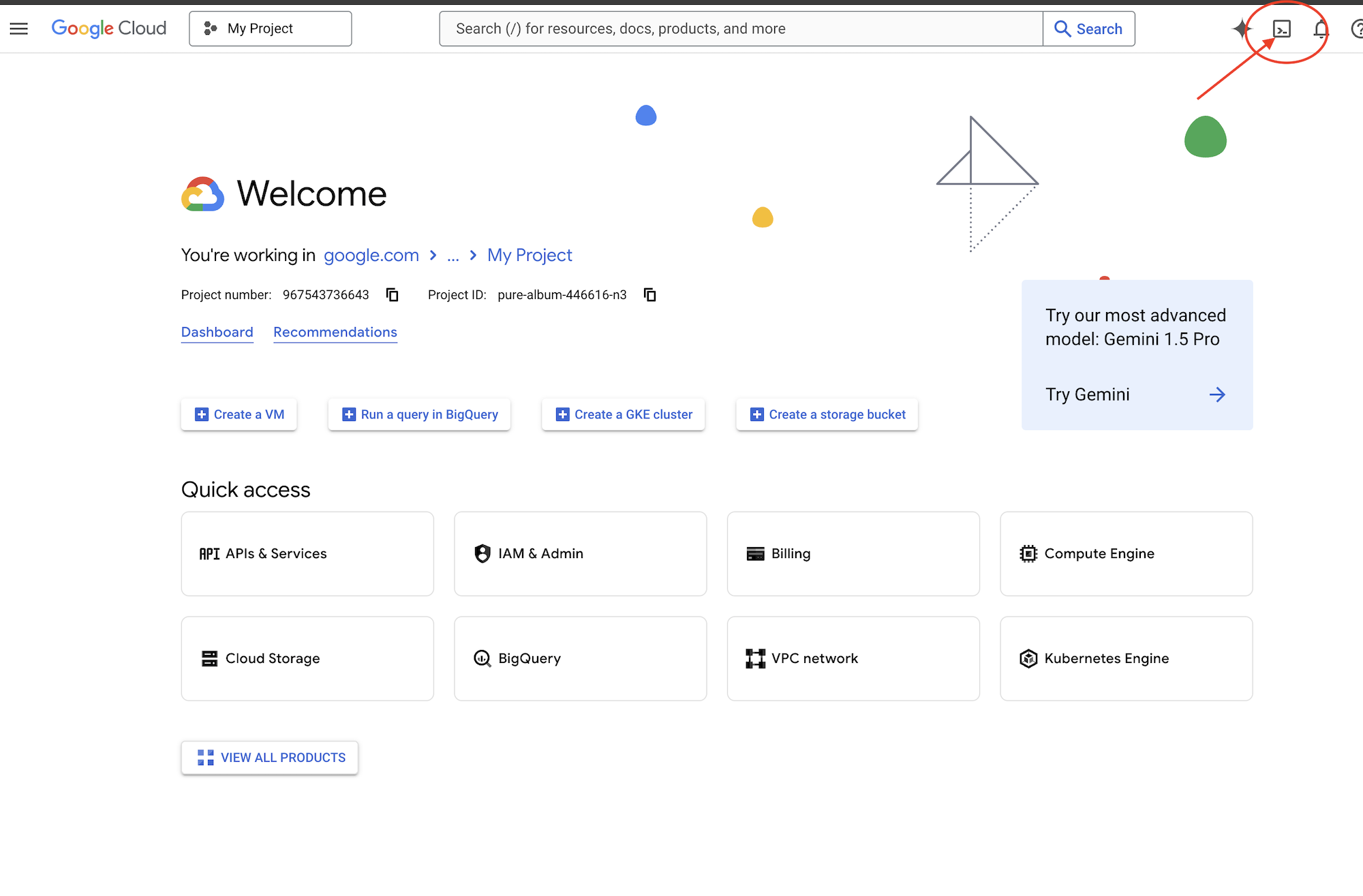
👉点击 Google Cloud 控制台顶部的激活 Cloud Shell(这是 Cloud Shell 窗格顶部的终端形状图标),然后点击“打开编辑器”按钮(看起来像一个带有铅笔的打开的文件夹)。此操作会在窗口中打开 Cloud Shell 代码编辑器。您会在左侧看到文件资源管理器。
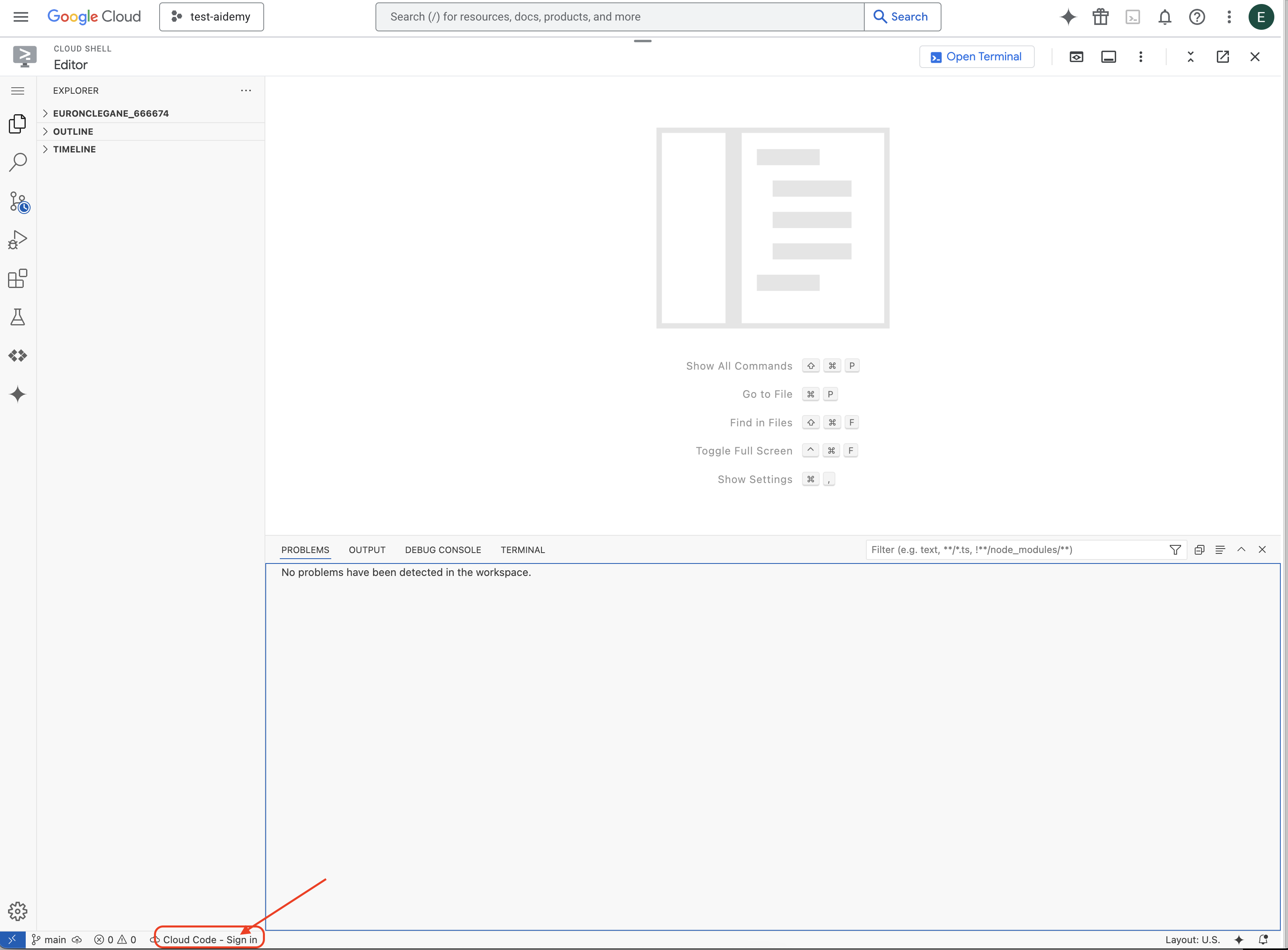
👉如图所示,点击底部状态栏中的 Cloud Code 登录按钮。按照说明对插件进行授权。如果您在状态栏中看到 Cloud Code - no project,请选择该选项,然后在下拉菜单“选择 Google Cloud 项目”中从您创建的项目列表中选择特定的 Google Cloud 项目。
👉在云 IDE 中打开终端,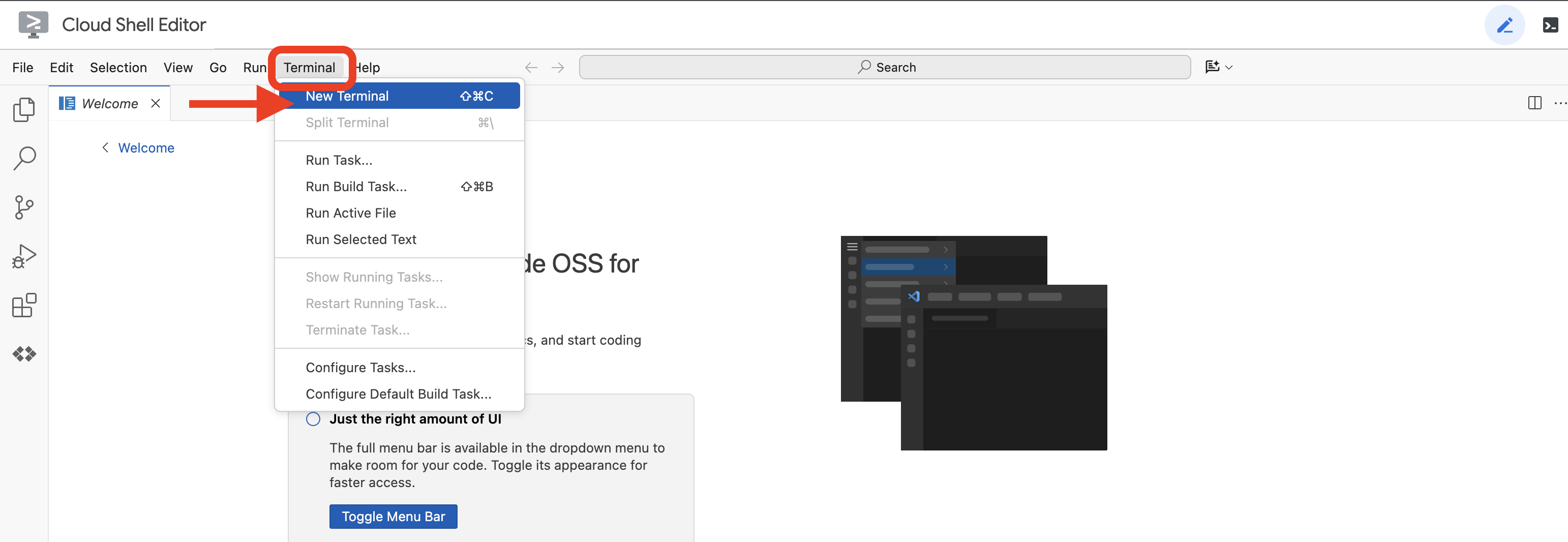 或
或 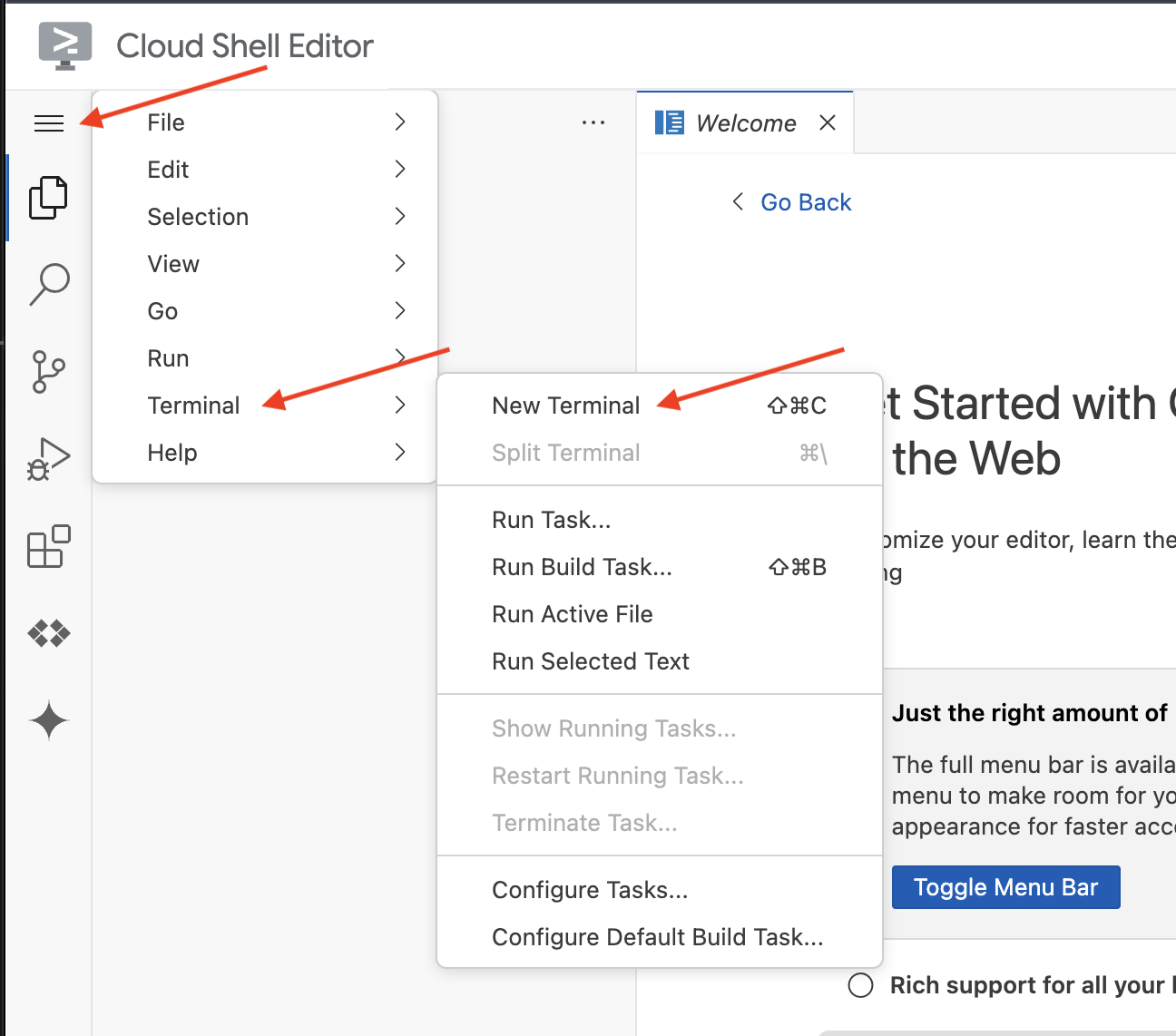
👉在终端中,使用以下命令验证您是否已通过身份验证,以及项目是否已设置为您的项目 ID:
gcloud auth list
👉并运行,确保将 <YOUR_PROJECT_ID> 替换为您的项目 ID:
echo <YOUR_PROJECT_ID> > ~/project_id.txt
gcloud config set project $(cat ~/project_id.txt)
👉运行以下命令以启用必要的 Google Cloud API:
gcloud services enable compute.googleapis.com  \
                        storage.googleapis.com  \
                        run.googleapis.com  \
                        artifactregistry.googleapis.com  \
                        aiplatform.googleapis.com \
                        eventarc.googleapis.com \
                        sqladmin.googleapis.com \
                        secretmanager.googleapis.com \
                        cloudbuild.googleapis.com \
                        cloudresourcemanager.googleapis.com \
                        cloudfunctions.googleapis.com \
                        cloudaicompanion.googleapis.com
这可能需要几分钟的时间。
设置权限
👉设置服务账号权限。在终端中,运行以下命令:
gcloud config set project $(cat ~/project_id.txt)
export PROJECT_ID=$(gcloud config get project)
export SERVICE_ACCOUNT_NAME=$(gcloud compute project-info describe --format="value(defaultServiceAccount)")

echo "Here's your SERVICE_ACCOUNT_NAME $SERVICE_ACCOUNT_NAME"
👉 授予权限。在终端中,运行以下命令:
#Cloud Storage (Read/Write):
gcloud projects add-iam-policy-binding $PROJECT_ID \
  --member="serviceAccount:$SERVICE_ACCOUNT_NAME" \
  --role="roles/storage.objectAdmin"

#Pub/Sub (Publish/Receive):
gcloud projects add-iam-policy-binding $PROJECT_ID \
  --member="serviceAccount:$SERVICE_ACCOUNT_NAME" \
  --role="roles/pubsub.publisher"

gcloud projects add-iam-policy-binding $PROJECT_ID \
  --member="serviceAccount:$SERVICE_ACCOUNT_NAME" \
  --role="roles/pubsub.subscriber"


#Cloud SQL (Read/Write):
gcloud projects add-iam-policy-binding $PROJECT_ID \
  --member="serviceAccount:$SERVICE_ACCOUNT_NAME" \
  --role="roles/cloudsql.editor"


#Eventarc (Receive Events):
gcloud projects add-iam-policy-binding $PROJECT_ID \
  --member="serviceAccount:$SERVICE_ACCOUNT_NAME" \
  --role="roles/iam.serviceAccountTokenCreator"

gcloud projects add-iam-policy-binding $PROJECT_ID \
  --member="serviceAccount:$SERVICE_ACCOUNT_NAME" \
  --role="roles/eventarc.eventReceiver"

#Vertex AI (User):
gcloud projects add-iam-policy-binding $PROJECT_ID \
  --member="serviceAccount:$SERVICE_ACCOUNT_NAME" \
  --role="roles/aiplatform.user"

#Secret Manager (Read):
gcloud projects add-iam-policy-binding $PROJECT_ID \
  --member="serviceAccount:$SERVICE_ACCOUNT_NAME" \
  --role="roles/secretmanager.secretAccessor"
👉在 IAM 控制台中验证结果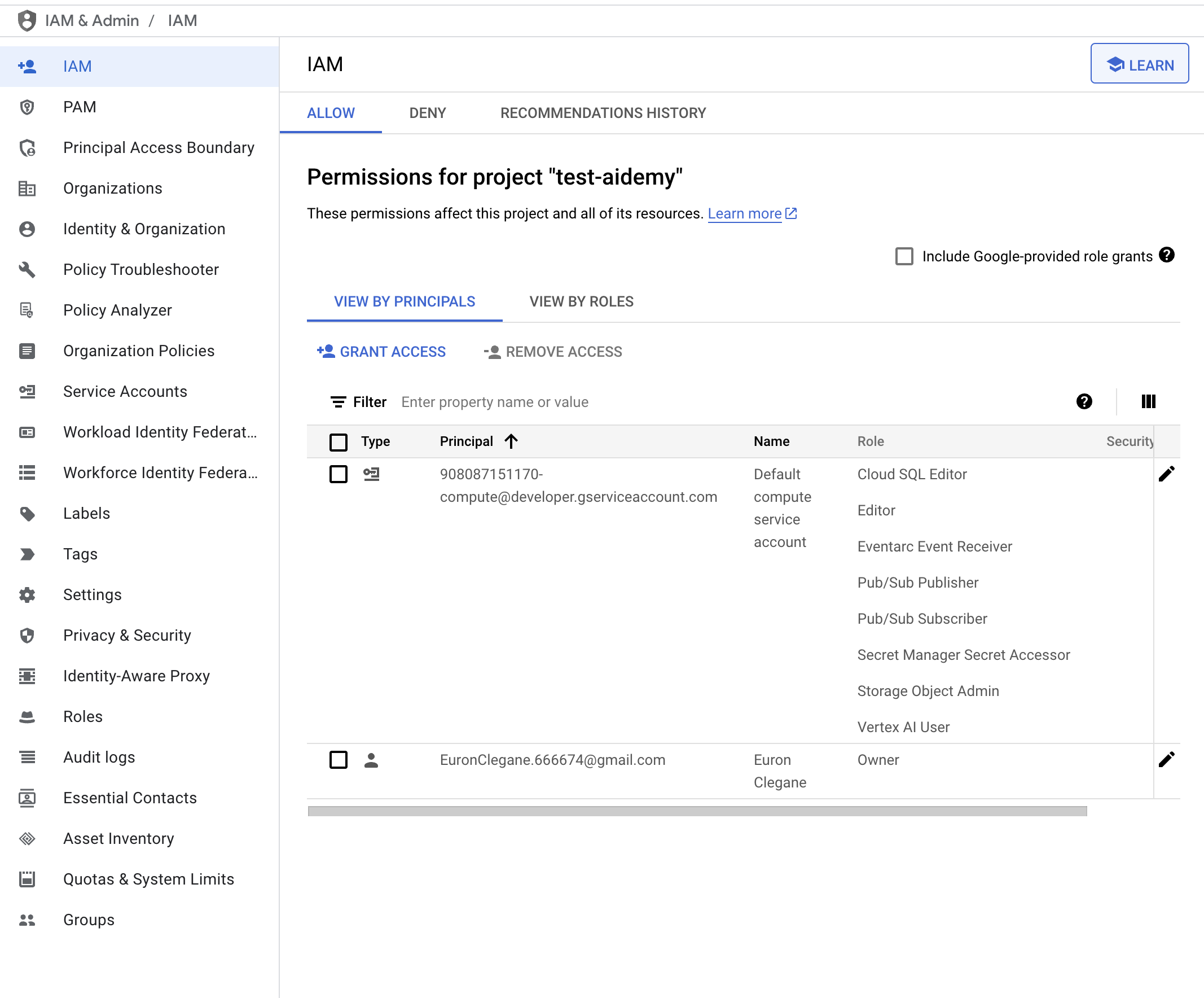
👉在终端中运行以下命令,以创建名为 aidemy 的 Cloud SQL 实例。我们稍后会用到此功能,但由于此过程可能需要一些时间,因此我们现在就来完成。
gcloud sql instances create aidemy \
    --database-version=POSTGRES_14 \
    --cpu=2 \
    --memory=4GB \
    --region=us-central1 \
    --root-password=1234qwer \
    --storage-size=10GB \
    --storage-auto-increase
4. 构建第一个代理
在深入探讨复杂的多智能体系统之前,我们需要先建立一个基本智能模块:单个功能性智能体。在本部分中,我们将迈出第一步,创建一个简单的“图书提供商”代理。图书提供商代理会接受一个类别作为输入,并使用 Gemini LLM 生成该类别中的图书的 JSON 表示形式。然后,它会以 REST API 端点的形式提供这些图书推荐。
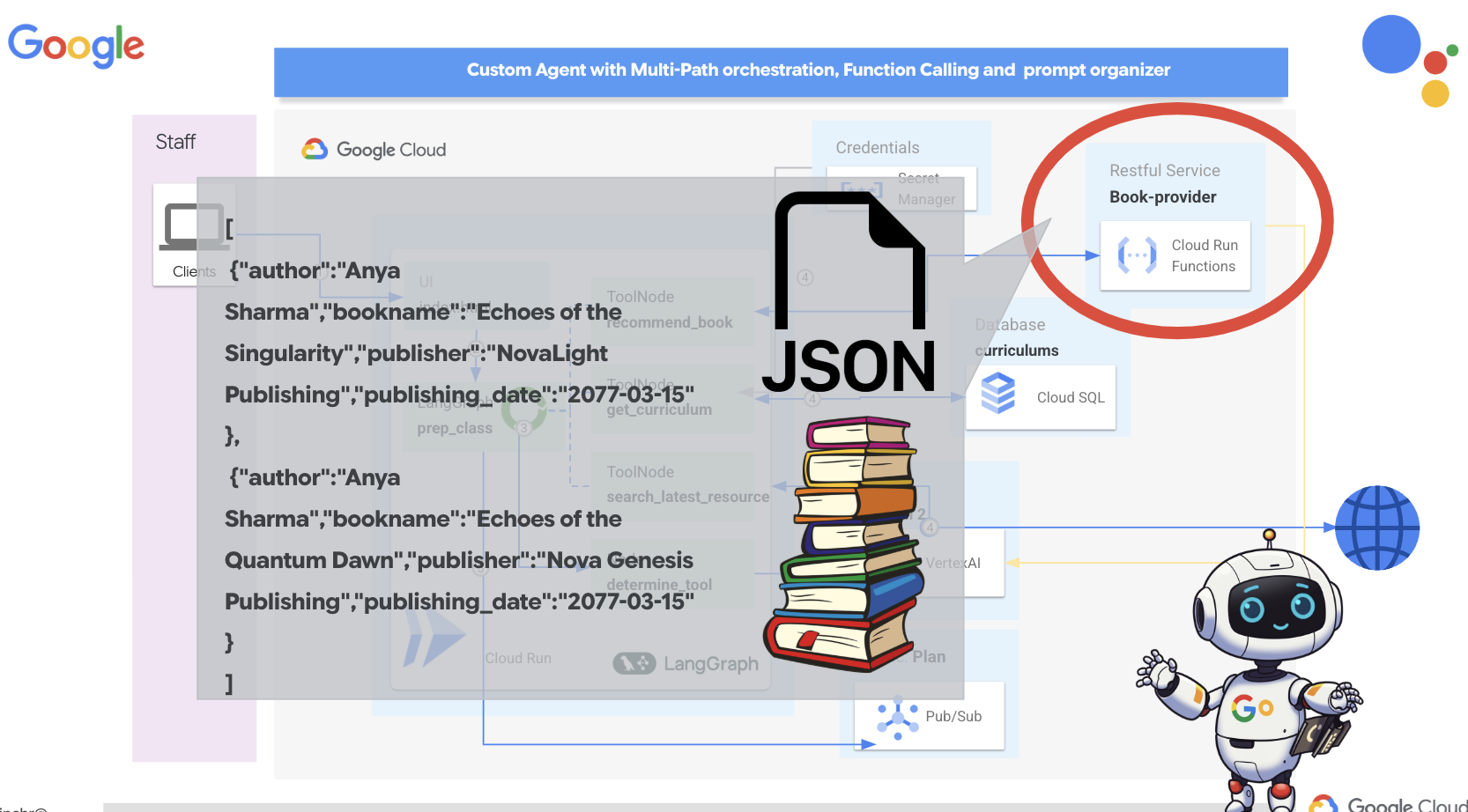
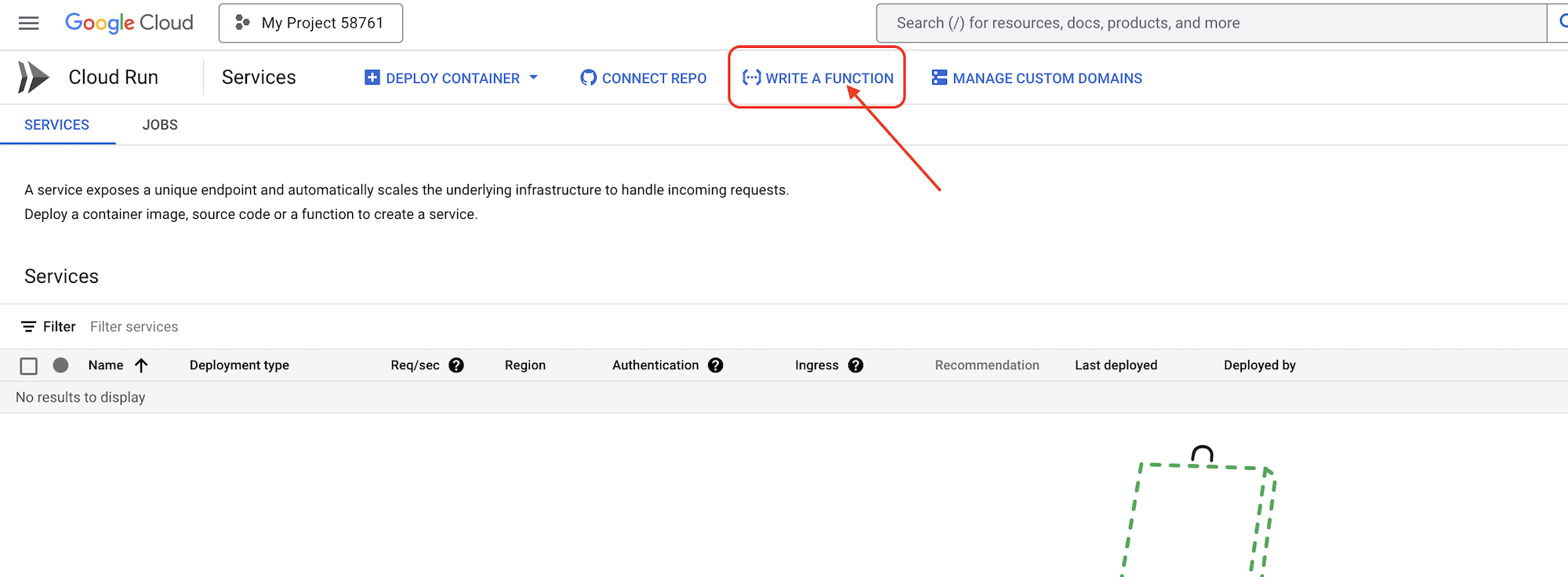
👉在另一个浏览器标签页中,在网络浏览器中打开 Google Cloud 控制台。在导航菜单 (☰) 中,前往“Cloud Run”。点击“+ … 编写函数”按钮。
👉接下来,我们将配置 Cloud Run 函数的基本设置:
- 服务名称:
book-provider - 区域:
us-central1 - 运行时:
Python 3.12 - 身份验证:从
Allow unauthenticated invocations更改为“已启用”。
👉将其他设置保留为默认值,然后点击创建。系统会将您转到源代码编辑器。
您会看到预先填充的 main.py 和 requirements.txt 文件。
main.py 将包含函数的业务逻辑,requirements.txt 将包含所需的软件包。
👉现在,我们准备好编写一些代码了!不过,在深入了解之前,我们先看看 Gemini Code Assist 能否帮助我们抢占先机。返回到 Cloud Shell 编辑器,点击顶部的 Gemini Code Assist 图标,系统应会打开 Gemini Code Assist 对话。
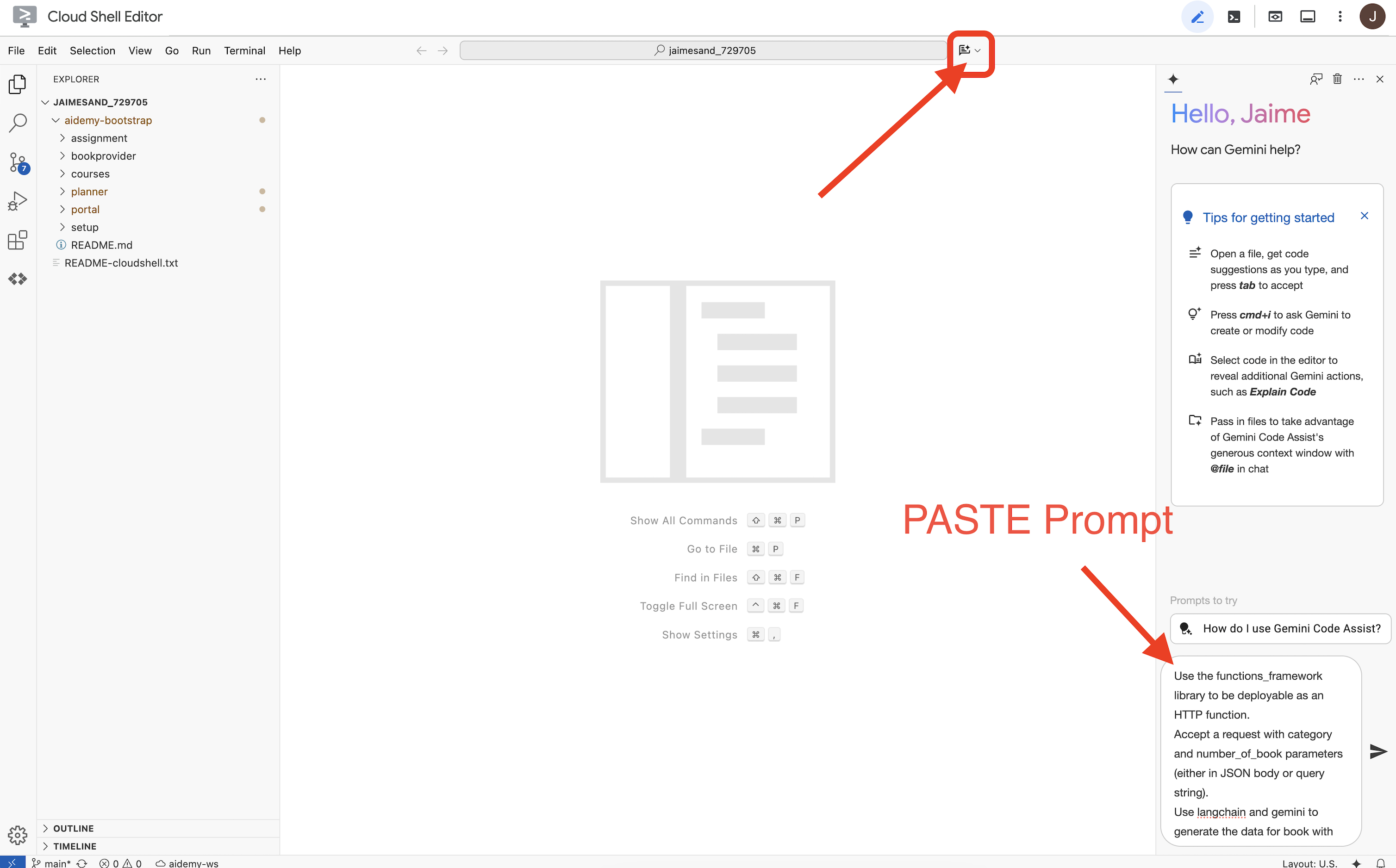
👉 将以下请求粘贴到提示框中:
Use the functions_framework library to be deployable as an HTTP function.
Accept a request with category and number_of_book parameters (either in JSON body or query string).
Use langchain and gemini to generate the data for book with fields bookname, author, publisher, publishing_date.
Use pydantic to define a Book model with the fields: bookname (string, description: "Name of the book"), author (string, description: "Name of the author"), publisher (string, description: "Name of the publisher"), and publishing_date (string, description: "Date of publishing").
Use langchain and gemini model to generate book data. the output should follow the format defined in Book model.

The logic should use JsonOutputParser from langchain to enforce output format defined in Book Model.
Have a function get_recommended_books(category) that internally uses langchain and gemini to return a single book object.
The main function, exposed as the Cloud Function, should call get_recommended_books() multiple times (based on number_of_book) and return a JSON list of the generated book objects.
Handle the case where category or number_of_book are missing by returning an error JSON response with a 400 status code.
return a JSON string representing the recommended books. use os library to retrieve GOOGLE_CLOUD_PROJECT env var. Use ChatVertexAI from langchain for the LLM call
然后,Code Assist 会生成一个可能的解决方案,同时提供源代码和 requirements.txt 依赖项文件。(请勿使用此代码)
建议您将 Code Assist 生成的代码与下面提供的经过测试的正确解决方案进行比较。这样,您就可以评估该工具的效果并发现任何潜在的差异。虽然不应盲目信任 LLM,但 Code Assist 是一款出色的工具,可用于快速原型设计和生成初始代码结构,应使用它来获得良好的开端。
由于这是一个研讨会,我们将继续使用下方提供的已验证代码。不过,您可以自行尝试使用 Code Assist 生成的代码,以便更深入地了解其功能和局限性。
👉返回到 Cloud Run 函数的源代码编辑器(在另一个浏览器标签页中)。请仔细将 main.py 的现有内容替换为以下代码:
import functions_framework
import json
from flask import Flask, jsonify, request
from langchain_google_vertexai import ChatVertexAI
from langchain_core.output_parsers import JsonOutputParser
from langchain_core.prompts import PromptTemplate
from pydantic import BaseModel, Field
import os

class Book(BaseModel):
    bookname: str = Field(description="Name of the book")
    author: str = Field(description="Name of the author")
    publisher: str = Field(description="Name of the publisher")
    publishing_date: str = Field(description="Date of publishing")


project_id = os.environ.get("GOOGLE_CLOUD_PROJECT")

llm = ChatVertexAI(model_name="gemini-2.0-flash-lite-001")

def get_recommended_books(category):
    """
    A simple book recommendation function.

    Args:
        category (str): category

    Returns:
        str: A JSON string representing the recommended books.
    """
    parser = JsonOutputParser(pydantic_object=Book)
    question = f"Generate a random made up book on {category} with bookname, author and publisher and publishing_date"

    prompt = PromptTemplate(
        template="Answer the user query.\n{format_instructions}\n{query}\n",
        input_variables=["query"],
        partial_variables={"format_instructions": parser.get_format_instructions()},
    )

    chain = prompt | llm | parser
    response = chain.invoke({"query": question})

    return  json.dumps(response)


@functions_framework.http
def recommended(request):
    request_json = request.get_json(silent=True) # Get JSON data
    if request_json and 'category' in request_json and 'number_of_book' in request_json:
        category = request_json['category']
        number_of_book = int(request_json['number_of_book'])
    elif request.args and 'category' in request.args and 'number_of_book' in request.args:
        category = request.args.get('category')
        number_of_book = int(request.args.get('number_of_book'))

    else:
        return jsonify({'error': 'Missing category or number_of_book parameters'}), 400


    recommendations_list = []
    for i in range(number_of_book):
        book_dict = json.loads(get_recommended_books(category))
        print(f"book_dict=======>{book_dict}")

        recommendations_list.append(book_dict)


    return jsonify(recommendations_list)
👉将 requirements.txt 的内容替换为以下内容:
functions-framework==3.*
google-genai==1.0.0
flask==3.1.0
jsonify==0.5
langchain_google_vertexai==2.0.13
langchain_core==0.3.34
pydantic==2.10.5
👉我们将函数入口点设置为:recommended
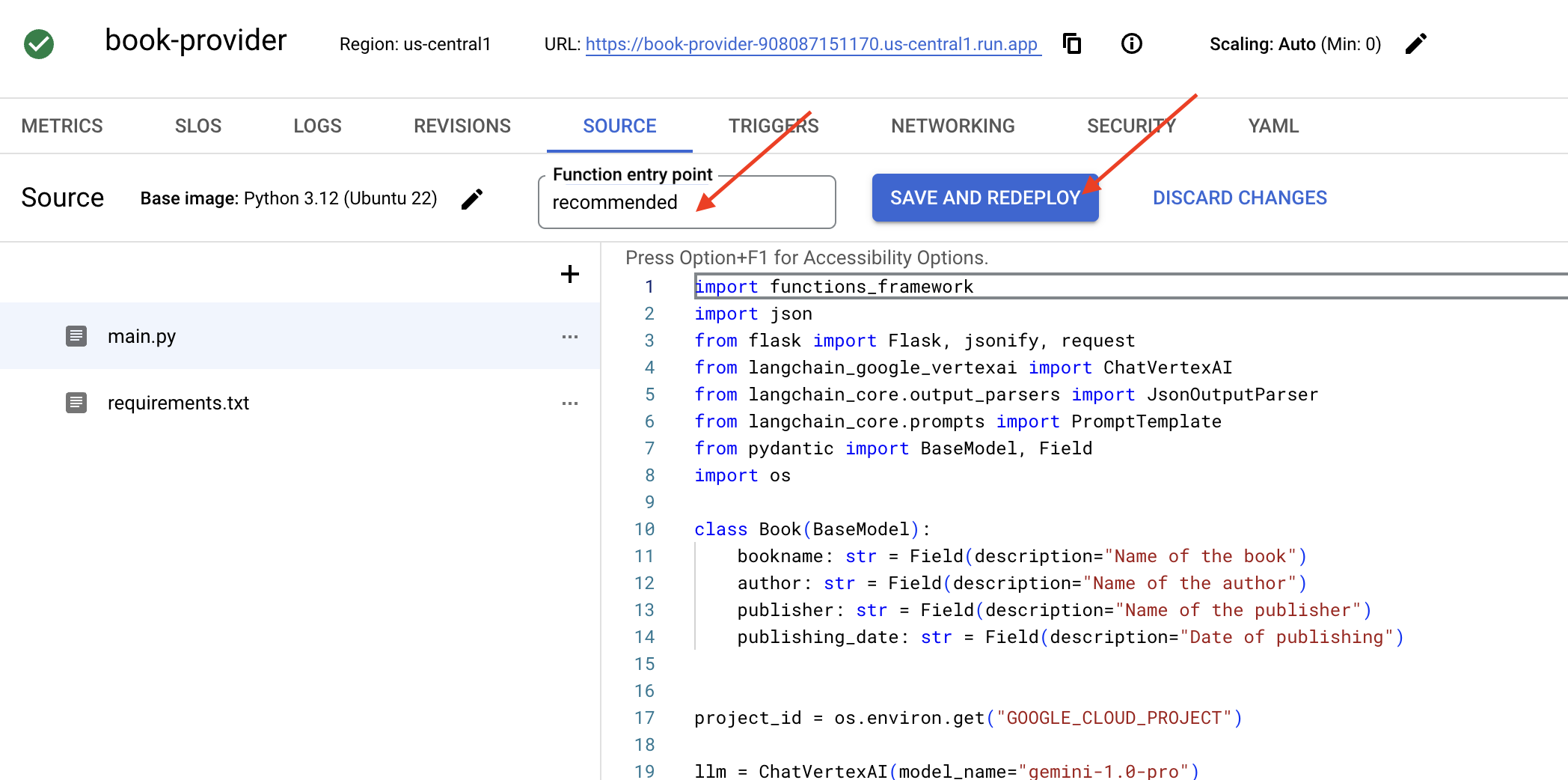
👉点击保存并部署(或保存并重新部署)以部署函数。等待部署过程完成。Cloud 控制台将显示状态。这可能需要几分钟。
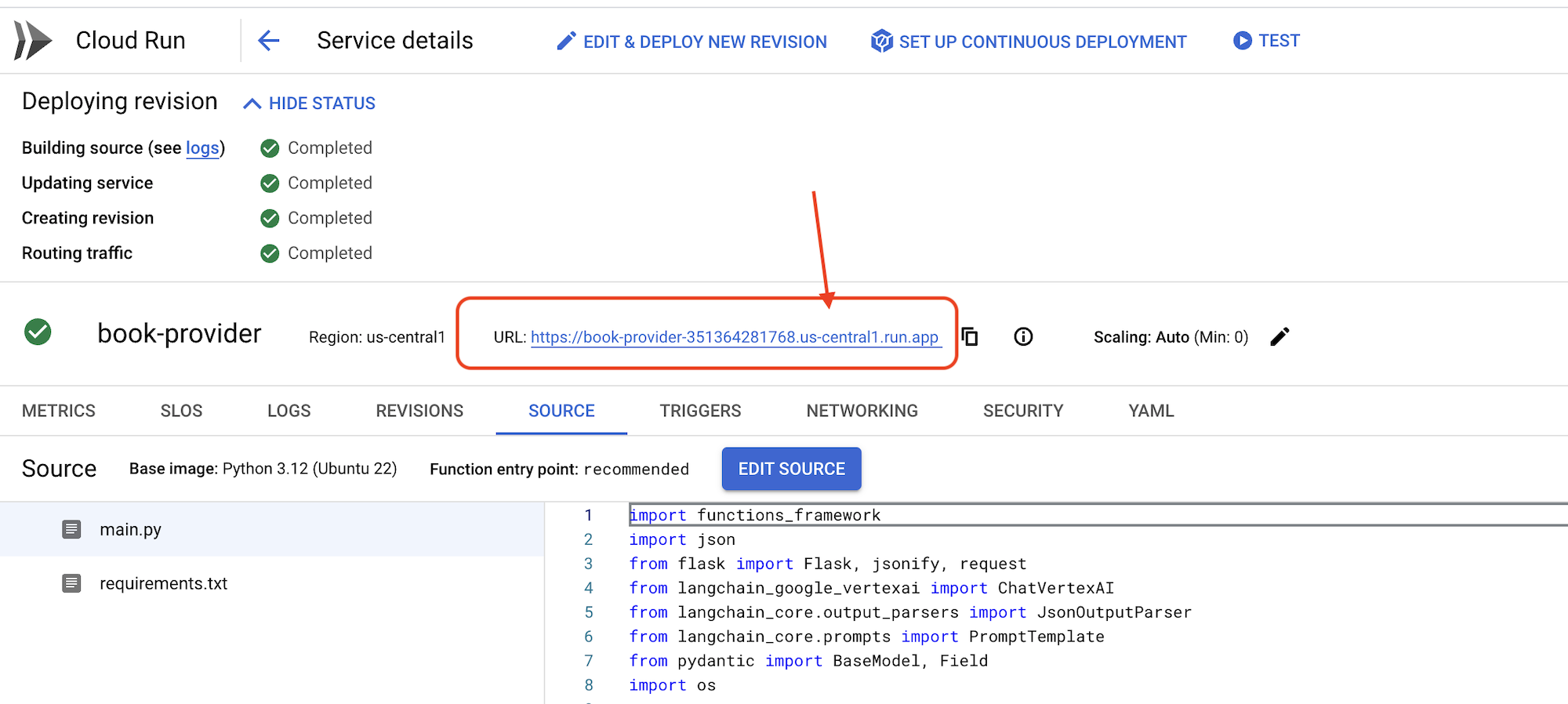 👉部署完成后,返回到 Cloud Shell 编辑器,在终端中运行:
gcloud config set project $(cat ~/project_id.txt)
export PROJECT_ID=$(gcloud config get project)
export BOOK_PROVIDER_URL=$(gcloud run services describe book-provider --region=us-central1 --project=$PROJECT_ID --format="value(status.url)")

curl -X POST -H "Content-Type: application/json" -d '{"category": "Science Fiction", "number_of_book": 2}' $BOOK_PROVIDER_URL
它应以 JSON 格式显示一些图书数据。
[
  {"author":"Anya Sharma","bookname":"Echoes of the Singularity","publisher":"NovaLight Publishing","publishing_date":"2077-03-15"},
  {"author":"Anya Sharma","bookname":"Echoes of the Quantum Dawn","publisher":"Nova Genesis Publishing","publishing_date":"2077-03-15"}
]
恭喜!您已成功部署 Cloud Run 函数。这是我们在开发 Aidemy 代理时将集成的一项服务。
5. 构建工具:将智能体连接到 RESTFUL 服务和数据
接下来,我们下载 Bootstrap 框架项目,确保您位于 Cloud Shell 编辑器中。在终端中运行以下命令:
git clone https://github.com/weimeilin79/aidemy-bootstrap.git
运行此命令后,您的 Cloud Shell 环境中会创建一个名为 aidemy-bootstrap 的新文件夹。
在 Cloud Shell 编辑器的“资源管理器”窗格(通常位于左侧)中,您现在应该会看到克隆 Git 代码库时创建的文件夹 aidemy-bootstrap。在资源管理器中打开项目的根文件夹。您会在其中看到一个 planner 子文件夹,也请打开该文件夹。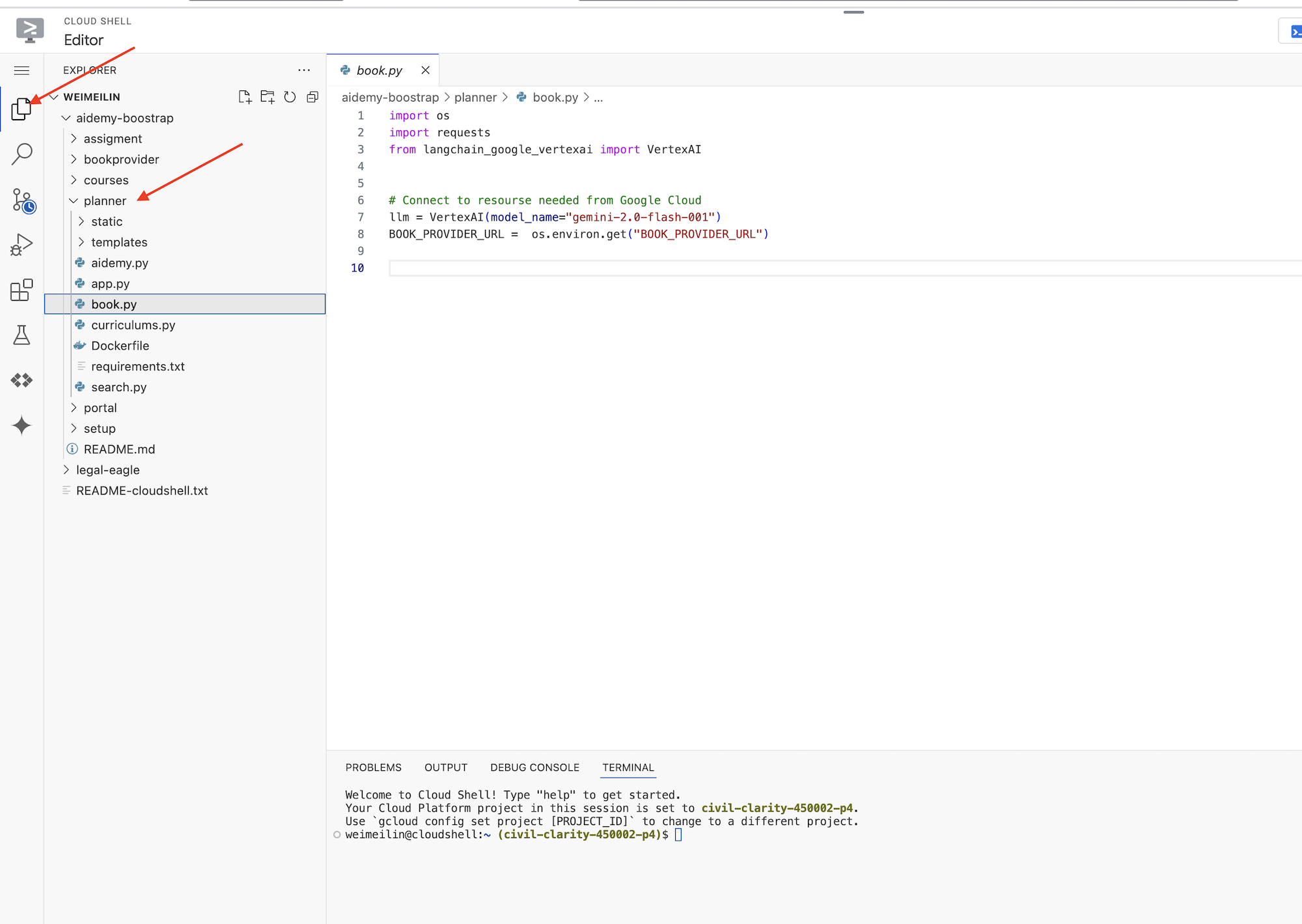
让我们开始构建智能体将要使用的工具,让它们真正发挥作用。如您所知,LLM 在推理和生成文本方面表现出色,但需要访问外部资源才能执行实际任务并提供准确的最新信息。可以将这些工具视为智能体的“瑞士军刀”,让智能体能够与世界互动。
构建代理时,很容易陷入对大量细节进行硬编码的境地。这会创建一个不灵活的代理。相反,通过创建和使用工具,代理可以访问外部逻辑或系统,从而兼具 LLM 和传统编程的优势。
在本部分中,我们将为规划器代理创建基础,教师将使用该代理生成课程计划。在代理开始生成计划之前,我们希望通过提供有关主题和主题的更多详细信息来设置边界。我们将构建三种工具:
- RESTful API 调用:与预先存在的 API 进行交互以检索数据。
- 数据库查询:从 Cloud SQL 数据库中提取结构化数据。
- Google 搜索:访问网络上的实时信息。
从 API 获取图书推荐
首先,我们来创建一个工具,用于从上一部分中部署的 book-provider API 检索图书推荐。此示例演示了代理如何利用现有服务。
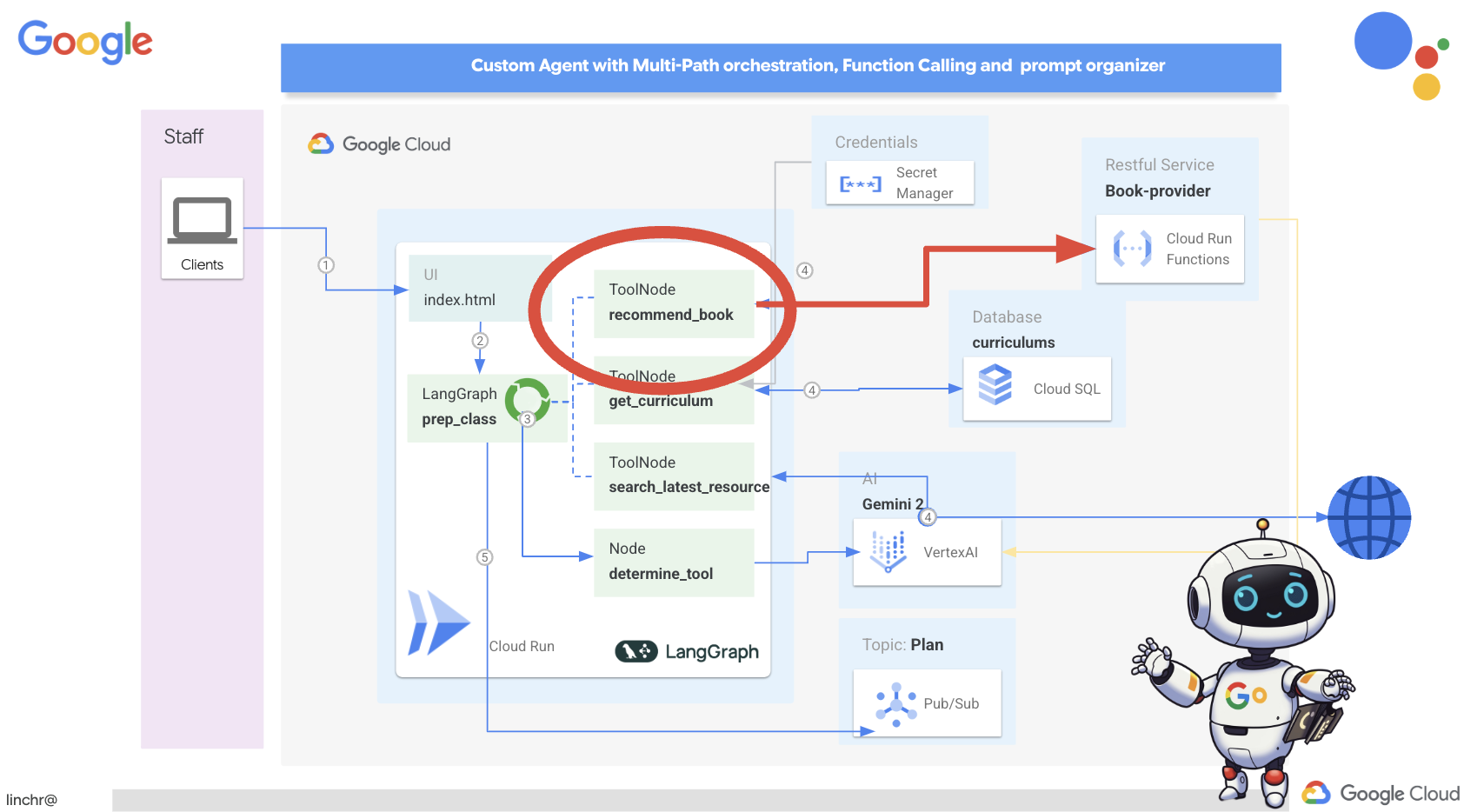
在 Cloud Shell 编辑器中,打开您在上一个部分中克隆的 aidemy-bootstrap 项目。
👉修改 planner 文件夹中的 book.py,并将以下代码粘贴到文件末尾:
def recommend_book(query: str):
    """
    Get a list of recommended book from an API endpoint

    Args:
        query: User's request string
    """

    region = get_next_region();
    llm = VertexAI(model_name="gemini-1.5-pro", location=region)

    query = f"""The user is trying to plan a education course, you are the teaching assistant. Help define the category of what the user requested to teach, respond the categroy with no more than two word.

    user request:   {query}
    """
    print(f"-------->{query}")
    response = llm.invoke(query)
    print(f"CATEGORY RESPONSE------------>: {response}")

    # call this using python and parse the json back to dict
    category = response.strip()

    headers = {"Content-Type": "application/json"}
    data = {"category": category, "number_of_book": 2}

    books = requests.post(BOOK_PROVIDER_URL, headers=headers, json=data)

    return books.text

if __name__ == "__main__":
    print(recommend_book("I'm doing a course for my 5th grade student on Math Geometry, I'll need to recommend few books come up with a teach plan, few quizes and also a homework assignment."))
说明:
- recommend_book(query: str):此函数将用户的查询作为输入。
- LLM 互动:使用 LLM 从查询中提取类别。此示例演示了如何使用 LLM 帮助创建工具的参数。
- API 调用:它向 book-provider API 发出 POST 请求,传递类别和所需的图书数量。
👉如需测试此新功能,请设置环境变量,然后运行:
gcloud config set project $(cat ~/project_id.txt)
export PROJECT_ID=$(gcloud config get project)
cd ~/aidemy-bootstrap/planner/
export BOOK_PROVIDER_URL=$(gcloud run services describe book-provider --region=us-central1 --project=$PROJECT_ID --format="value(status.url)")
👉安装依赖项并运行代码以确保其正常运行,请运行:
cd ~/aidemy-bootstrap/planner/
python -m venv env
source env/bin/activate
gcloud config set project $(cat ~/project_id.txt)
export PROJECT_ID=$(gcloud config get project)
pip install -r requirements.txt
python book.py
您应该会看到一个 JSON 字符串,其中包含从 book-provider API 检索到的图书推荐。结果是随机生成的。您的图书可能与示例不同,但您应该会收到两本 JSON 格式的图书推荐。
[{"author":"Anya Sharma","bookname":"Echoes of the Singularity","publisher":"NovaLight Publishing","publishing_date":"2077-03-15"},{"author":"Anya Sharma","bookname":"Echoes of the Quantum Dawn","publisher":"Nova Genesis Publishing","publishing_date":"2077-03-15"}]
如果您看到此消息,则表示第一个工具运行正常!
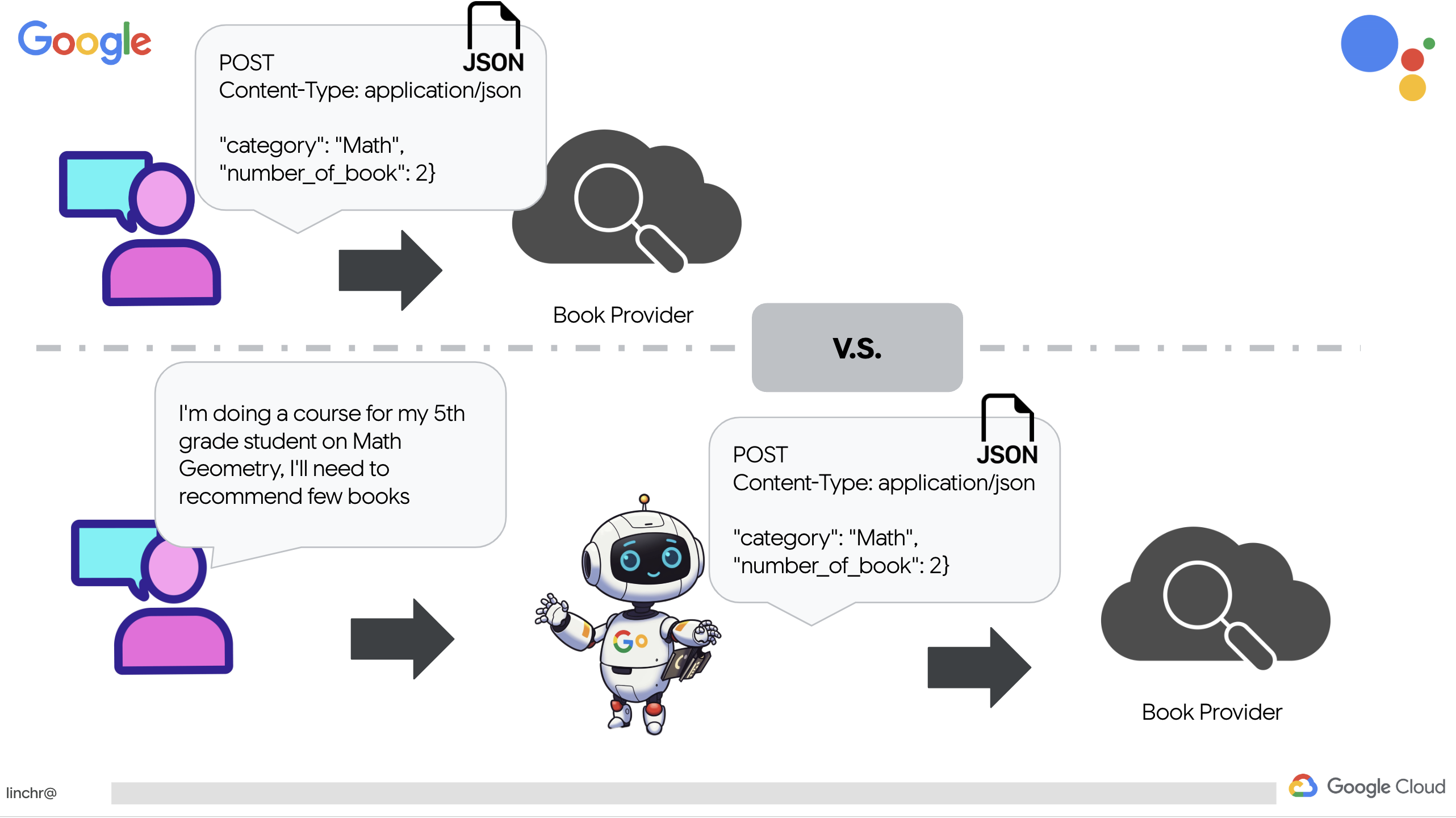
我们没有使用特定参数显式编写 RESTful API 调用,而是使用了自然语言(“我正在学习一门课程…”)。然后,代理会使用 NLP 智能提取必要的参数(例如类别),从而突出显示代理如何利用自然语言理解技术与 API 进行交互。
👉从 book.py 中移除以下测试代码
if __name__ == "__main__":
    print(recommend_book("I'm doing a course for my 5th grade student on Math Geometry, I'll need to recommend few books come up with a teach plan, few quizes and also a homework assignment."))
从数据库中获取课程数据
接下来,我们将构建一个工具,用于从 Cloud SQL PostgreSQL 数据库中提取结构化课程数据。这样,代理就可以访问可靠的课程规划信息来源。
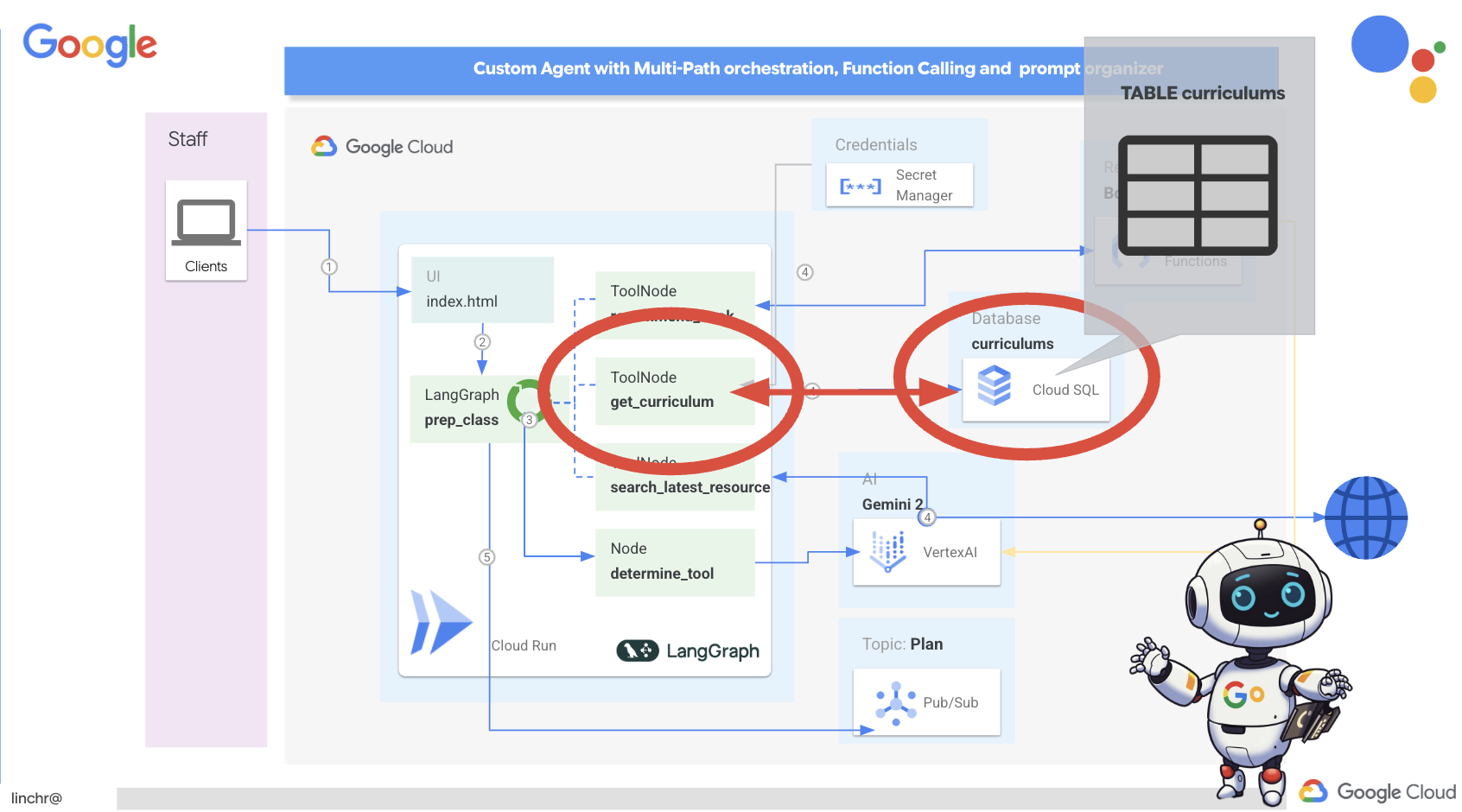
还记得您在上一步中创建的 aidemy Cloud SQL 实例吗?以下是使用位置。
👉 在终端中,运行以下命令,在新实例中创建名为 aidemy-db 的数据库。
gcloud sql databases create aidemy-db \
    --instance=aidemy
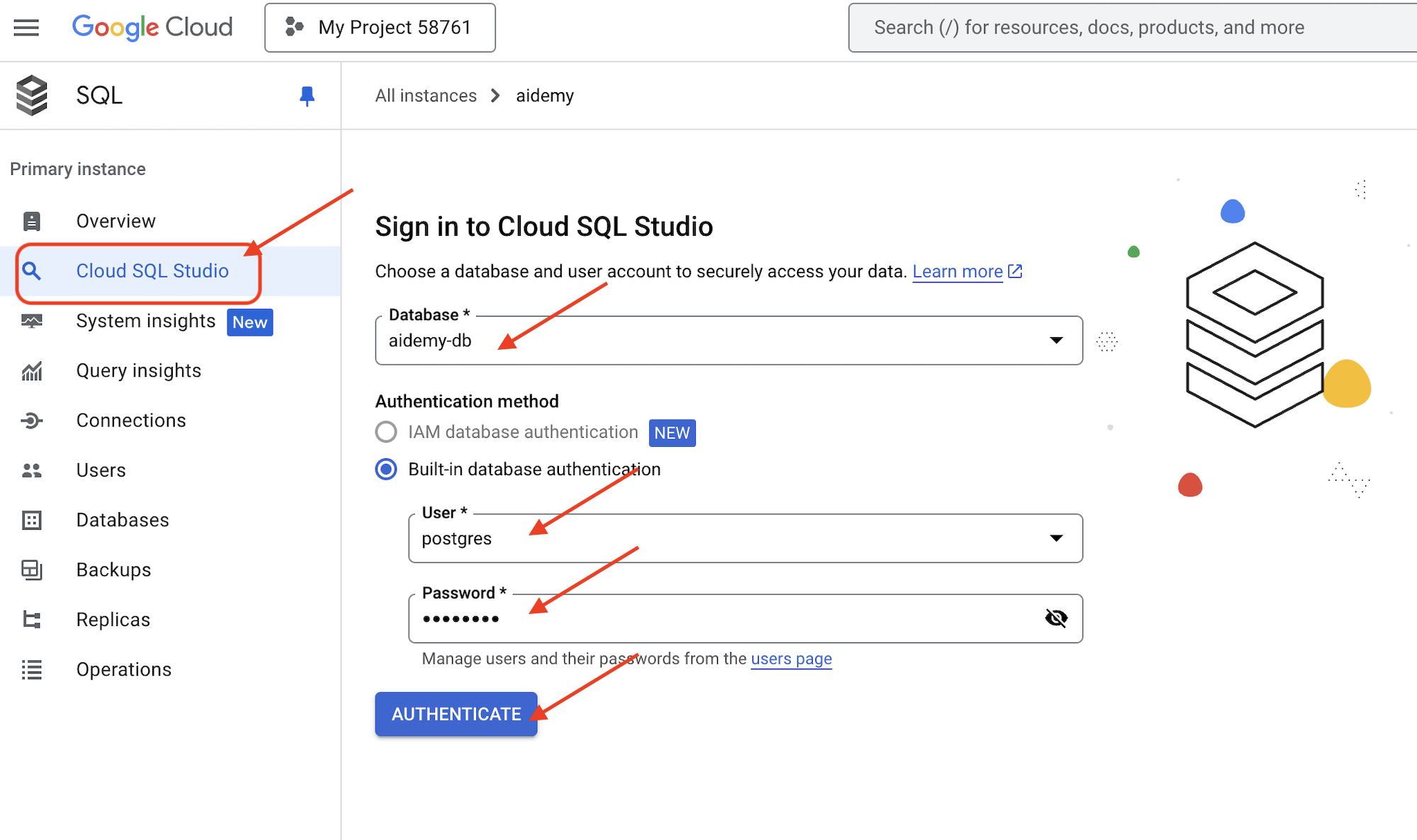
我们来验证 Google Cloud 控制台中的 Cloud SQL 实例,您应该会看到一个名为 aidemy 的 Cloud SQL 实例。
👉 点击实例名称可查看其详细信息。👉 在 Cloud SQL 实例详情页面中,点击左侧导航菜单中的 Cloud SQL Studio。系统会打开一个新标签页。
选择 aidemy-db 作为数据库,输入 postgres 作为用户,并输入 1234qwer 作为密码。
点击身份验证
👉在 SQL Studio 查询编辑器中,前往标签页 Editor 1,粘贴以下 SQL 代码:
CREATE TABLE curriculums (
    id SERIAL PRIMARY KEY,
    year INT,
    subject VARCHAR(255),
    description TEXT
);

-- Inserting detailed curriculum data for different school years and subjects
INSERT INTO curriculums (year, subject, description) VALUES
-- Year 5
(5, 'Mathematics', 'Introduction to fractions, decimals, and percentages, along with foundational geometry and problem-solving techniques.'),
(5, 'English', 'Developing reading comprehension, creative writing, and basic grammar, with a focus on storytelling and poetry.'),
(5, 'Science', 'Exploring basic physics, chemistry, and biology concepts, including forces, materials, and ecosystems.'),
(5, 'Computer Science', 'Basic coding concepts using block-based programming and an introduction to digital literacy.'),

-- Year 6
(6, 'Mathematics', 'Expanding on fractions, ratios, algebraic thinking, and problem-solving strategies.'),
(6, 'English', 'Introduction to persuasive writing, character analysis, and deeper comprehension of literary texts.'),
(6, 'Science', 'Forces and motion, the human body, and introductory chemical reactions with hands-on experiments.'),
(6, 'Computer Science', 'Introduction to algorithms, logical reasoning, and basic text-based programming (Python, Scratch).'),

-- Year 7
(7, 'Mathematics', 'Algebraic expressions, geometry, and introduction to statistics and probability.'),
(7, 'English', 'Analytical reading of classic and modern literature, essay writing, and advanced grammar skills.'),
(7, 'Science', 'Introduction to cells and organisms, chemical reactions, and energy transfer in physics.'),
(7, 'Computer Science', 'Building on programming skills with Python, introduction to web development, and cyber safety.');
此 SQL 代码会创建一个名为 curriculums 的表并插入一些示例数据。
👉 点击运行以执行 SQL 代码。您应该会看到一条确认消息,指示语句已成功执行。
👉 展开探索器,找到新创建的表 curriculums,然后点击查询。系统应会打开一个新的编辑器标签页,其中包含为您生成的 SQL,
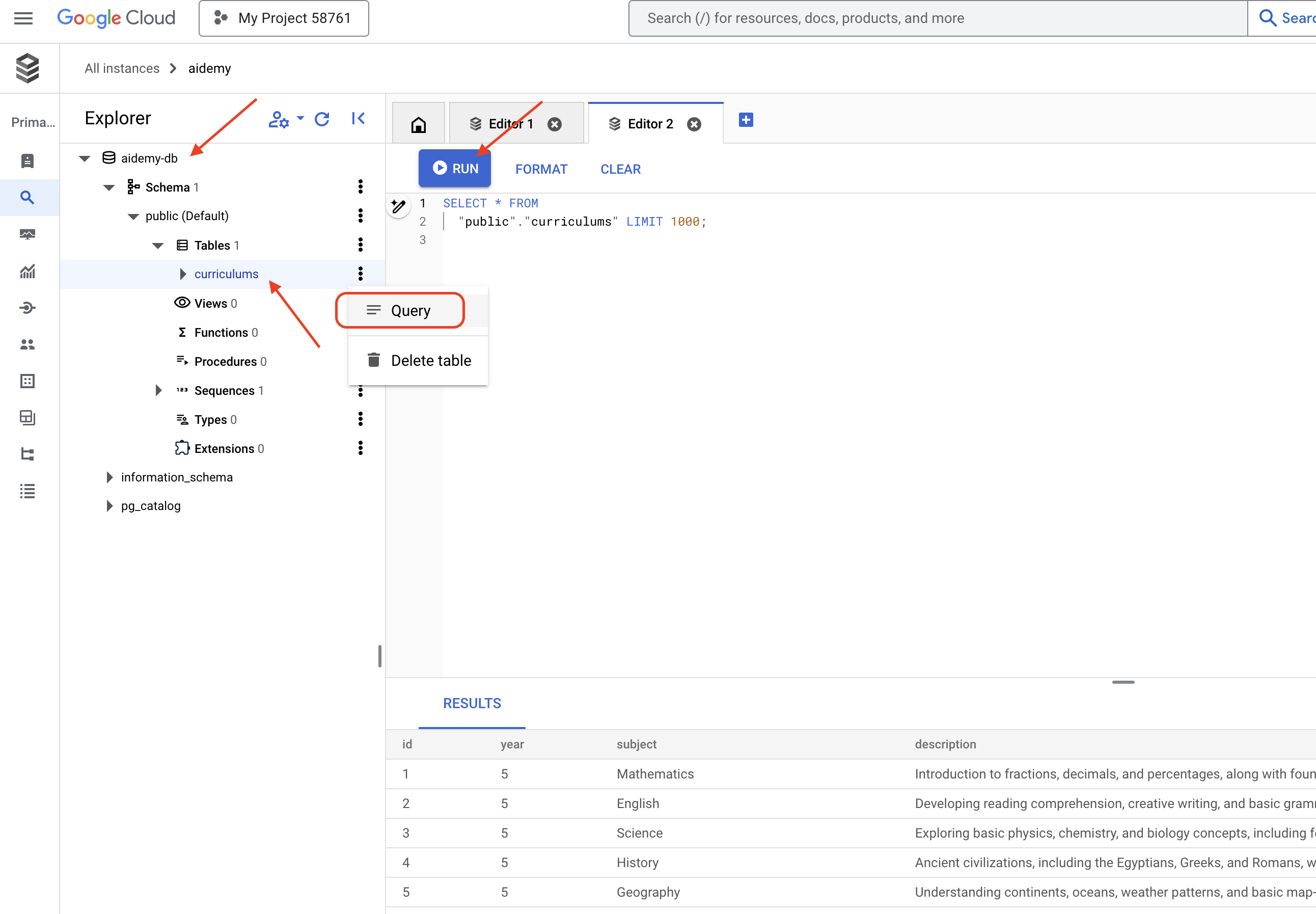
SELECT * FROM
  "public"."curriculums" LIMIT 1000;
👉点击运行。
结果表应显示您在上一步中插入的数据行,以确认表和数据已正确创建。
现在,您已成功创建了一个包含填充的课程示例数据的数据库,接下来我们将构建一个用于检索该数据的工具。
👉在 Cloud Code 编辑器中,修改 aidemy-bootstrap 文件夹中的文件 curriculums.py,然后将以下代码粘贴到文件末尾:
def connect_with_connector() -> sqlalchemy.engine.base.Engine:

    db_user = os.environ["DB_USER"]
    db_pass = os.environ["DB_PASS"]
    db_name = os.environ["DB_NAME"]

    print(f"--------------------------->db_user: {db_user!r}")
    print(f"--------------------------->db_pass: {db_pass!r}")
    print(f"--------------------------->db_name: {db_name!r}")

    connector = Connector()

    pool = sqlalchemy.create_engine(
        "postgresql+pg8000://",
        creator=lambda: connector.connect(
            instance_connection_name,
            "pg8000",
            user=db_user,
            password=db_pass,
            db=db_name,
        ),
        pool_size=2,
        max_overflow=2,
        pool_timeout=30,  # 30 seconds
        pool_recycle=1800,  # 30 minutes
    )
    return pool

def get_curriculum(year: int, subject: str):
    """
    Get school curriculum

    Args:
        subject: User's request subject string
        year: User's request year int
    """
    try:
        stmt = sqlalchemy.text(
            "SELECT description FROM curriculums WHERE year = :year AND subject = :subject"
        )

        with db.connect() as conn:
            result = conn.execute(stmt, parameters={"year": year, "subject": subject})
            row = result.fetchone()
        if row:
            return row[0]
        else:
            return None

    except Exception as e:
        print(e)
        return None

db = connect_with_connector()
说明:
- 环境变量:代码从环境变量中检索数据库凭据和连接信息(详见下文)。
- connect_with_connector():此函数使用 Cloud SQL 连接器来建立与数据库的安全连接。
- get_curriculum(year: int, subject: str):此函数以年份和科目作为输入,查询课程表,并返回相应的课程说明。
👉在运行代码之前,我们必须设置一些环境变量,在终端中运行:
gcloud config set project $(cat ~/project_id.txt)
export PROJECT_ID=$(gcloud config get project)
export INSTANCE_NAME="aidemy"
export REGION="us-central1"
export DB_USER="postgres"
export DB_PASS="1234qwer"
export DB_NAME="aidemy-db"
👉如需测试,请将以下代码添加到 curriculums.py 的末尾:
if __name__ == "__main__":
    print(get_curriculum(6, "Mathematics"))
👉运行代码:
cd ~/aidemy-bootstrap/planner/
source env/bin/activate
python curriculums.py
您应该会在控制台中看到 6 年级数学课程说明。
Expanding on fractions, ratios, algebraic thinking, and problem-solving strategies.
如果您看到课程说明,则表示数据库工具正常运行!如果脚本仍在运行,请按 Ctrl+C 将其停止。
👉从 curriculums.py 中移除以下测试代码
if __name__ == "__main__":
    print(get_curriculum(6, "Mathematics"))
👉退出虚拟环境,在终端中运行:
deactivate
6. 构建工具:访问网络中的实时信息
最后,我们将构建一个使用 Gemini 2 和 Google 搜索集成功能的工具,以访问网络上的实时信息。这有助于代理保持最新状态并提供相关结果。
Gemini 2 与 Google 搜索 API 的集成通过提供更准确、更具情境关联的搜索结果来增强代理的功能。这样,智能体就能访问最新信息,并根据真实世界的数据提供回答,从而最大限度地减少幻觉。改进后的 API 集成还支持更自然的语言查询,使客服人员能够制定复杂而细致的搜索请求。
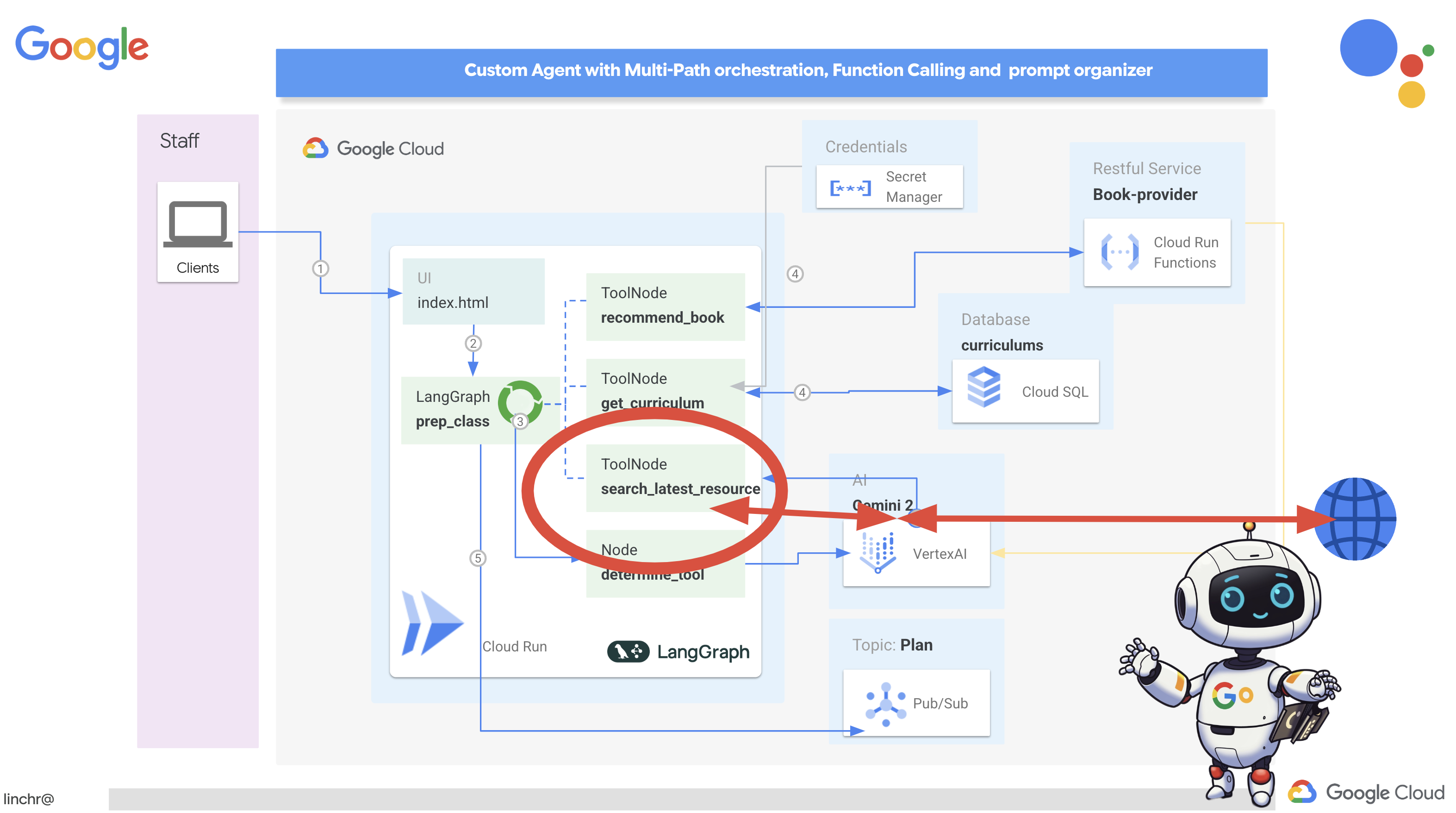
此函数以搜索查询、课程、科目和年份作为输入,并使用 Gemini API 和 Google 搜索工具从互联网检索相关信息。仔细观察一下,您会发现它使用 Google 生成式 AI SDK 来执行函数调用,而没有使用任何其他框架。
👉修改 aidemy-bootstrap 文件夹中的 search.py,然后将以下代码粘贴到文件末尾:
model_id = "gemini-2.0-flash-001"

google_search_tool = Tool(
    google_search = GoogleSearch()
)

def search_latest_resource(search_text: str, curriculum: str, subject: str, year: int):
    """
    Get latest information from the internet

    Args:
        search_text: User's request category   string
        subject: "User's request subject" string
        year: "User's request year"  integer
    """
    search_text = "%s in the context of year %d and subject %s with following curriculum detail %s " % (search_text, year, subject, curriculum)
    region = get_next_region()
    client = genai.Client(vertexai=True, project=PROJECT_ID, location=region)
    print(f"search_latest_resource text-----> {search_text}")
    response = client.models.generate_content(
        model=model_id,
        contents=search_text,
        config=GenerateContentConfig(
            tools=[google_search_tool],
            response_modalities=["TEXT"],
        )
    )
    print(f"search_latest_resource response-----> {response}")
    return response

if __name__ == "__main__":
  response = search_latest_resource("What are the syllabus for Year 6 Mathematics?", "Expanding on fractions, ratios, algebraic thinking, and problem-solving strategies.", "Mathematics", 6)
  for each in response.candidates[0].content.parts:
    print(each.text)
说明:
- 定义工具 - google_search_tool:将 GoogleSearch 对象封装在工具中
- search_latest_resource(search_text: str, subject: str, year: int):此函数接受搜索查询、主题和年份作为输入,并使用 Gemini API 执行 Google 搜索。
- GenerateContentConfig:定义其有权访问 GoogleSearch 工具
Gemini 模型会在内部分析 search_text,并确定是直接回答问题,还是需要使用 GoogleSearch 工具。这是 LLM 推理过程中的关键一步。模型经过训练,能够识别需要使用外部工具的情况。如果模型决定使用 GoogleSearch 工具,Google 生成式 AI SDK 会处理实际的调用。SDK 会获取模型做出的决策及其生成的参数,并将这些内容发送到 Google 搜索 API。此部分在代码中对用户隐藏。
然后,Gemini 模型会将搜索结果整合到回答中。它可以利用这些信息回答用户的问题、生成摘要或执行其他任务。
👉如需进行测试,请运行以下代码:
cd ~/aidemy-bootstrap/planner/
gcloud config set project $(cat ~/project_id.txt)
export PROJECT_ID=$(gcloud config get project)
source env/bin/activate
python search.py
您应该会看到 Gemini Search API 响应,其中包含与“五年级数学课程大纲”相关的搜索结果。确切的输出结果将取决于搜索结果,但它将是一个包含搜索信息的 JSON 对象。
如果您看到搜索结果,则表示 Google 搜索工具正常运行!如果脚本仍在运行,请按 Ctrl+C 停止该脚本。
👉并移除代码中的最后一部分。
if __name__ == "__main__":
  response = search_latest_resource("What are the syllabus for Year 6 Mathematics?", "Expanding on fractions, ratios, algebraic thinking, and problem-solving strategies.", "Mathematics", 6)
  for each in response.candidates[0].content.parts:
    print(each.text)
👉退出虚拟环境,在终端中运行:
deactivate
恭喜!您现在已为规划助理智能体构建了三个强大的工具:API 连接器、数据库连接器和 Google 搜索工具。这些工具将使智能体能够访问创建有效教学计划所需的信息和功能。
7. 使用 LangGraph 进行编排
现在我们已经构建了各个工具,接下来可以使用 LangGraph 来编排这些工具。这样一来,我们就可以创建一个更复杂的“规划”智能体,该智能体能够根据用户的请求智能地决定使用哪些工具以及何时使用。
LangGraph 是一个 Python 库,旨在让您更轻松地使用大语言模型 (LLM) 构建有状态的多角色应用。您可以将其视为一个框架,用于编排涉及 LLM、工具和其他代理的复杂对话和工作流。
主要概念:
- 图结构:LangGraph 将应用的逻辑表示为有向图。图中的每个节点都表示流程中的一个步骤(例如,对 LLM 的调用、工具调用、条件检查)。边定义了节点之间的执行流程。
- 状态:LangGraph 会在应用遍历图的过程中管理应用的状态。此状态可以包括用户的输入、工具调用的结果、LLM 的中间输出,以及需要在步骤之间保留的任何其他信息等变量。
- 节点:每个节点代表一次计算或互动。它们可以是:
- 工具节点:使用工具(例如执行网页搜索、查询数据库)
- 函数节点:执行 Python 函数。
- 边:连接节点,定义执行流程。它们可以是:
- 直接边:从一个节点到另一个节点的简单无条件流。
- 条件边:流程取决于条件节点的输出。
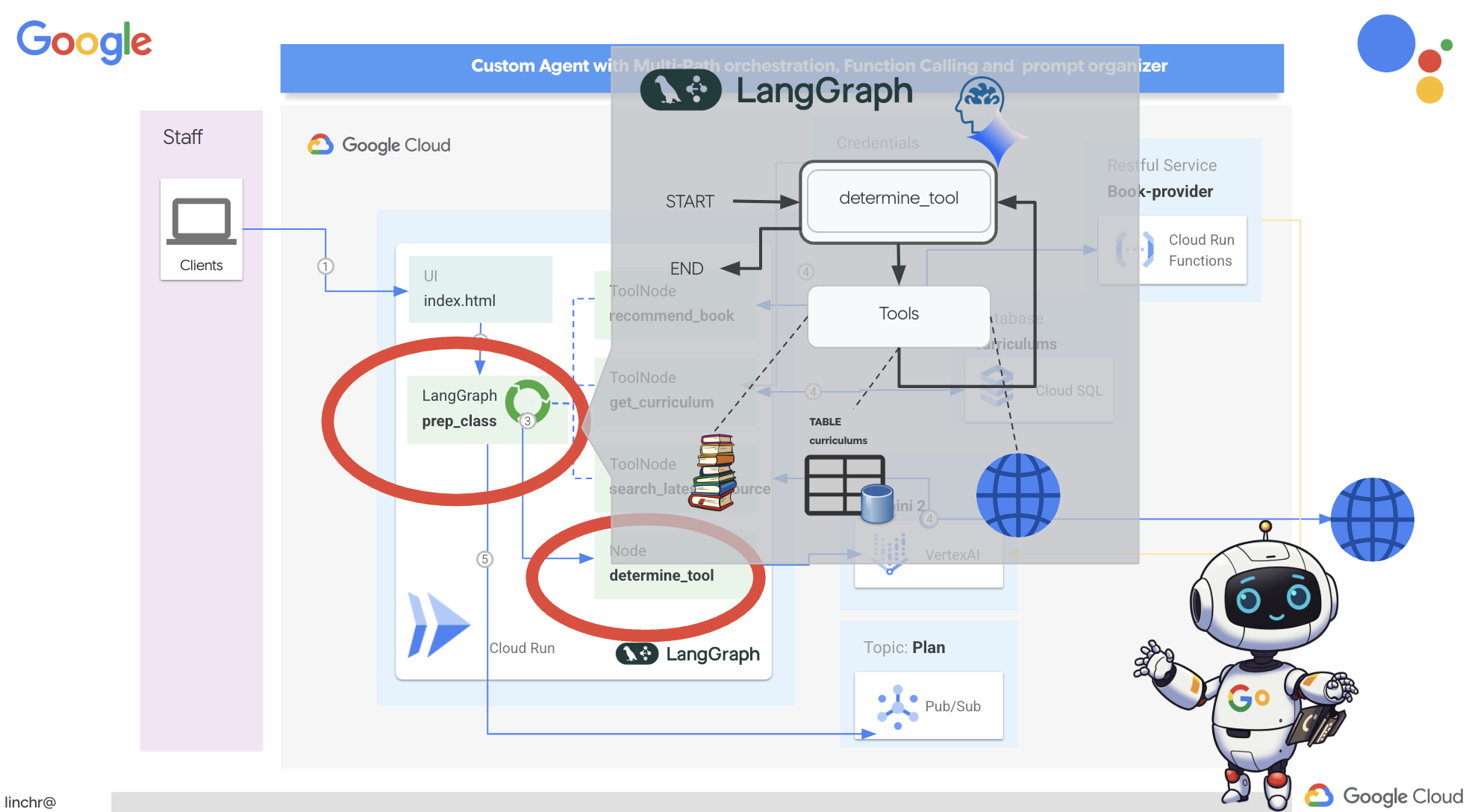
我们将使用 LangGraph 来实现编排。让我们修改 aidemy-bootstrap 文件夹下的 aidemy.py 文件,以定义 LangGraph 逻辑。
👉 将以下代码附加到 的末尾
aidemy.py:
tools = [get_curriculum, search_latest_resource, recommend_book]

def determine_tool(state: MessagesState):
    llm = ChatVertexAI(model_name="gemini-2.0-flash-001", location=get_next_region())
    sys_msg = SystemMessage(
                    content=(
                        f"""You are a helpful teaching assistant that helps gather all needed information.
                            Your ultimate goal is to create a detailed 3-week teaching plan.
                            You have access to tools that help you gather information.
                            Based on the user request, decide which tool(s) are needed.

                        """
                    )
                )

    llm_with_tools = llm.bind_tools(tools)
    return {"messages": llm_with_tools.invoke([sys_msg] + state["messages"])}
此函数负责获取对话的当前状态,为 LLM 提供系统消息,然后要求 LLM 生成回答。LLM 可以直接回答用户,也可以选择使用其中一种可用工具。
tools:此列表表示智能体可使用的工具集。它包含我们在之前的步骤中定义的三种工具函数:get_curriculum、search_latest_resource 和 recommend_book。llm.bind_tools(tools):它将工具列表“绑定”到 llm 对象。绑定工具会告知 LLM 这些工具可用,并向 LLM 提供有关如何使用这些工具的信息(例如工具的名称、它们接受的参数以及它们的功能)。
我们将使用 LangGraph 来实现编排。
👉 将以下代码附加到 的末尾
aidemy.py:
def prep_class(prep_needs):

    builder = StateGraph(MessagesState)
    builder.add_node("determine_tool", determine_tool)
    builder.add_node("tools", ToolNode(tools))

    builder.add_edge(START, "determine_tool")
    builder.add_conditional_edges("determine_tool",tools_condition)
    builder.add_edge("tools", "determine_tool")


    memory = MemorySaver()
    graph = builder.compile(checkpointer=memory)

    config = {"configurable": {"thread_id": "1"}}
    messages = graph.invoke({"messages": prep_needs},config)
    print(messages)
    for m in messages['messages']:
        m.pretty_print()
    teaching_plan_result = messages["messages"][-1].content


    return teaching_plan_result

if __name__ == "__main__":
  prep_class("I'm doing a course for  year 5 on subject Mathematics in Geometry, , get school curriculum, and come up with few books recommendation plus  search latest resources on the internet base on the curriculum outcome. And come up with a 3 week teaching plan")
说明:
StateGraph(MessagesState):创建StateGraph对象。StateGraph是 LangGraph 中的一个核心概念。它以图表的形式表示代理的工作流程,其中图表中的每个节点都表示流程中的一个步骤。您可以将其视为定义智能体如何推理和行动的蓝图。- 条件边:从
"determine_tool"节点出发,tools_condition实参可能是一个函数,用于根据determine_tool函数的输出确定要遵循哪条边。条件边允许图根据 LLM 关于使用哪个工具(或是否直接回复用户)的决策进行分支。这正是智能体“智能”之处的体现 - 它可以根据情况动态调整自己的行为。 - 环路:向图添加一条边,将
"tools"节点连接回"determine_tool"节点。这会在图中创建一个循环,使代理能够反复使用工具,直到收集到足够的信息来完成任务并提供令人满意的答案。对于需要多个推理和信息收集步骤的复杂任务,此循环至关重要。
现在,我们来测试一下规划器代理,看看它如何协调不同的工具。
此代码将使用特定用户输入运行 prep_class 函数,模拟请求创建一份教学计划,该计划针对五年级几何数学,使用课程、图书推荐和最新的互联网资源。
👉 在终端中,如果您已关闭终端或环境变量不再设置,请重新运行以下命令
export BOOK_PROVIDER_URL=$(gcloud run services describe book-provider --region=us-central1 --project=$PROJECT_ID --format="value(status.url)")
gcloud config set project $(cat ~/project_id.txt)
export PROJECT_ID=$(gcloud config get project)
export INSTANCE_NAME="aidemy"
export REGION="us-central1"
export DB_USER="postgres"
export DB_PASS="1234qwer"
export DB_NAME="aidemy-db"
👉运行代码:
cd ~/aidemy-bootstrap/planner/
source env/bin/activate
pip install -r requirements.txt
python aidemy.py
在终端中查看日志。您应该看到证据表明,在提供最终教学计划之前,该代理正在调用所有这三个工具(获取学校课程、获取图书推荐和搜索最新资源)。这表明 LangGraph 编排正常运行,并且代理正在智能地使用所有可用工具来满足用户的请求。
================================ Human Message =================================

I'm doing a course for  year 5 on subject Mathematics in Geometry, , get school curriculum, and come up with few books recommendation plus  search latest resources on the internet base on the curriculum outcome. And come up with a 3 week teaching plan
================================== Ai Message ==================================
Tool Calls:
  get_curriculum (xxx)
 Call ID: xxx
  Args:
    year: 5.0
    subject: Mathematics
================================= Tool Message =================================
Name: get_curriculum

Introduction to fractions, decimals, and percentages, along with foundational geometry and problem-solving techniques.
================================== Ai Message ==================================
Tool Calls:
  search_latest_resource (xxxx)
 Call ID: xxxx
  Args:
    year: 5.0
    search_text: Geometry
    curriculum: {"content": "Introduction to fractions, decimals, and percentages, along with foundational geometry and problem-solving techniques."}
    subject: Mathematics
================================= Tool Message =================================
Name: search_latest_resource

candidates=[Candidate(content=Content(parts=[Part(.....) automatic_function_calling_history=[] parsed=None
================================== Ai Message ==================================
Tool Calls:
  recommend_book (93b48189-4d69-4c09-a3bd-4e60cdc5f1c6)
 Call ID: 93b48189-4d69-4c09-a3bd-4e60cdc5f1c6
  Args:
    query: Mathematics Geometry Year 5
================================= Tool Message =================================
Name: recommend_book

[{.....}]

================================== Ai Message ==================================

Based on the curriculum outcome, here is a 3-week teaching plan for year 5 Mathematics Geometry:

**Week 1: Introduction to Shapes and Properties**
.........
如果脚本仍在运行,请按 Ctrl+C 停止该脚本。
👉 (此步骤为可选步骤)将测试代码替换为需要调用不同工具的不同提示。
if __name__ == "__main__":
  prep_class("I'm doing a course for year 5 on subject Mathematics in Geometry, search latest resources on the internet base on the subject. And come up with a 3 week teaching plan")
👉 如果您已关闭终端或环境变量不再设置,请重新运行以下命令
gcloud config set project $(cat ~/project_id.txt)
export BOOK_PROVIDER_URL=$(gcloud run services describe book-provider --region=us-central1 --project=$PROJECT_ID --format="value(status.url)")
export PROJECT_ID=$(gcloud config get project)
export INSTANCE_NAME="aidemy"
export REGION="us-central1"
export DB_USER="postgres"
export DB_PASS="1234qwer"
export DB_NAME="aidemy-db"
👉 (此步骤为可选步骤,仅当您运行了上一步时才执行此步骤)再次运行代码:
cd ~/aidemy-bootstrap/planner/
source env/bin/activate
python aidemy.py
这次您注意到了什么?代理调用了哪些工具?您应该会看到,智能体这次仅调用了 search_latest_resource 工具。这是因为提示未指定需要其他两个工具,而我们的 LLM 非常智能,不会调用其他工具。
================================ Human Message =================================

I'm doing a course for  year 5 on subject Mathematics in Geometry, search latest resources on the internet base on the subject. And come up with a 3 week teaching plan
================================== Ai Message ==================================
Tool Calls:
  get_curriculum (xxx)
 Call ID: xxx
  Args:
    year: 5.0
    subject: Mathematics
================================= Tool Message =================================
Name: get_curriculum

Introduction to fractions, decimals, and percentages, along with foundational geometry and problem-solving techniques.
================================== Ai Message ==================================
Tool Calls:
  search_latest_resource (xxx)
 Call ID: xxxx
  Args:
    year: 5.0
    subject: Mathematics
    curriculum: {"content": "Introduction to fractions, decimals, and percentages, along with foundational geometry and problem-solving techniques."}
    search_text: Geometry
================================= Tool Message =================================
Name: search_latest_resource

candidates=[Candidate(content=Content(parts=[Part(.......token_count=40, total_token_count=772) automatic_function_calling_history=[] parsed=None
================================== Ai Message ==================================

Based on the information provided, a 3-week teaching plan for Year 5 Mathematics focusing on Geometry could look like this:

**Week 1:  Introducing 2D Shapes**
........
* Use visuals, manipulatives, and real-world examples to make the learning experience engaging and relevant.
按 Ctrl+C 停止该脚本。
👉 (请勿跳过此步骤!)移除测试代码,以保持 aidemy.py 文件的整洁:
if __name__ == "__main__":
  prep_class("I'm doing a course for  year 5 on subject Mathematics in Geometry, search latest resources on the internet base on the subject. And come up with a 3 week teaching plan")
现在,我们已经定义了代理逻辑,接下来启动 Flask Web 应用。这样一来,教师就可以通过熟悉的基于表单的界面与智能体互动。虽然聊天机器人互动是 LLM 的常见应用场景,但我们选择使用传统的表单提交界面,因为对于许多教育工作者来说,这种界面可能更直观。
👉 如果您已关闭终端或环境变量不再设置,请重新运行以下命令
export BOOK_PROVIDER_URL=$(gcloud run services describe book-provider --region=us-central1 --project=$PROJECT_ID --format="value(status.url)")
gcloud config set project $(cat ~/project_id.txt)
export PROJECT_ID=$(gcloud config get project)
export INSTANCE_NAME="aidemy"
export REGION="us-central1"
export DB_USER="postgres"
export DB_PASS="1234qwer"
export DB_NAME="aidemy-db"
👉 现在,启动 Web 界面。
cd ~/aidemy-bootstrap/planner/
source env/bin/activate
python app.py
在 Cloud Shell 终端输出中查找启动消息。Flask 通常会打印消息,指明它正在运行以及运行在哪个端口上。
Running on http://127.0.0.1:8080
Running on http://127.0.0.1:8080
The application needs to keep running to serve requests.
👉 从右上角的“网页预览”菜单中选择在端口 8080 上预览。Cloud Shell 会打开一个新的浏览器标签页或窗口,其中包含应用的 Web 预览。
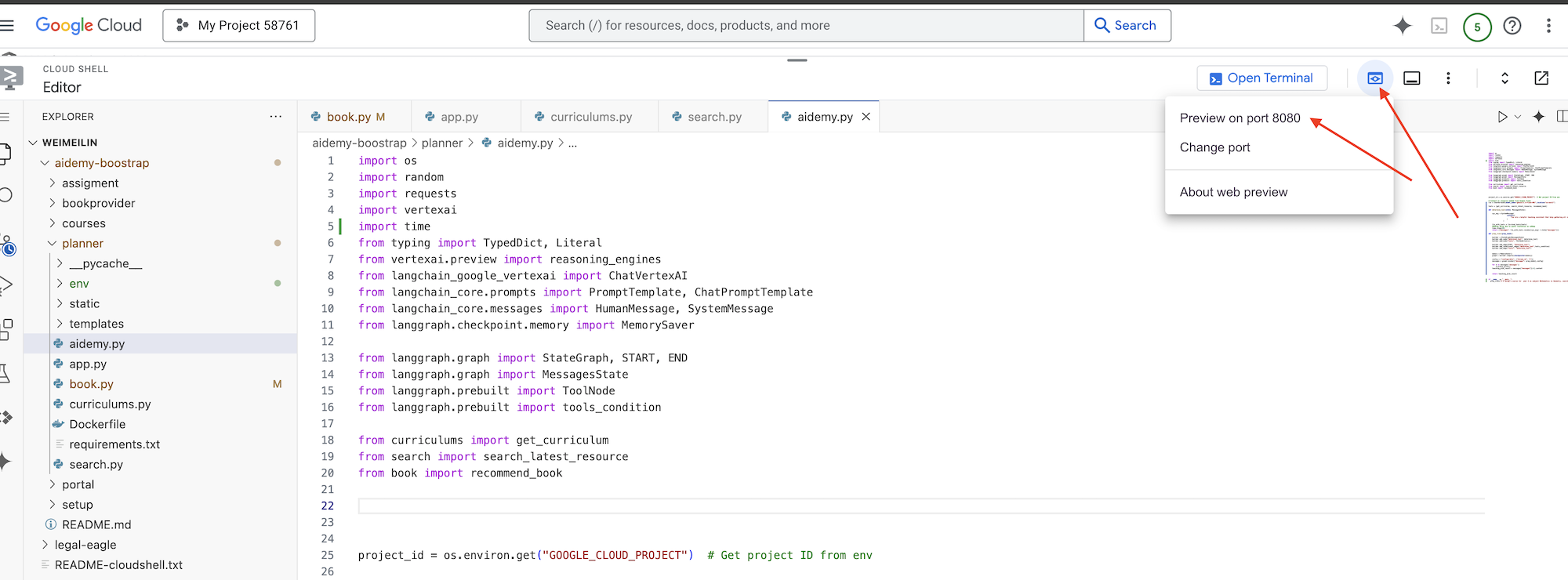
在应用界面中,选择年份 5,选择科目 Mathematics,然后在“Add-on Request”(附加服务请求)中输入 Geometry
👉 如果您已离开应用界面,请返回,您应该会看到生成的输出。
👉 在终端中,按 Ctrl+C 停止该脚本。
👉 在终端中,退出虚拟环境:
deactivate
8. 将规划器代理部署到云端
构建映像并将其推送到注册表
是时候将此模型部署到云端了。
👉 在终端中,创建一个制品库来存储我们将要构建的 Docker 映像。
gcloud artifacts repositories create agent-repository \
    --repository-format=docker \
    --location=us-central1 \
    --description="My agent repository"
您应该会看到“已创建代码库 [agent-repository]”。
👉 运行以下命令以构建 Docker 映像。
cd ~/aidemy-bootstrap/planner/
gcloud config set project $(cat ~/project_id.txt)
export PROJECT_ID=$(gcloud config get project)
docker build -t gcr.io/${PROJECT_ID}/aidemy-planner .
👉 我们需要重新标记映像,以便将其托管在 Artifact Registry 中而不是 GCR 中,并将标记的映像推送到 Artifact Registry:
gcloud config set project $(cat ~/project_id.txt)
export PROJECT_ID=$(gcloud config get project)
docker tag gcr.io/${PROJECT_ID}/aidemy-planner us-central1-docker.pkg.dev/${PROJECT_ID}/agent-repository/aidemy-planner
docker push us-central1-docker.pkg.dev/${PROJECT_ID}/agent-repository/aidemy-planner
推送完成后,您可以验证映像是否已成功存储在 Artifact Registry 中。
👉 在 Google Cloud 控制台中前往 Artifact Registry。您应该会在 agent-repository 代码库中找到 aidemy-planner 映像。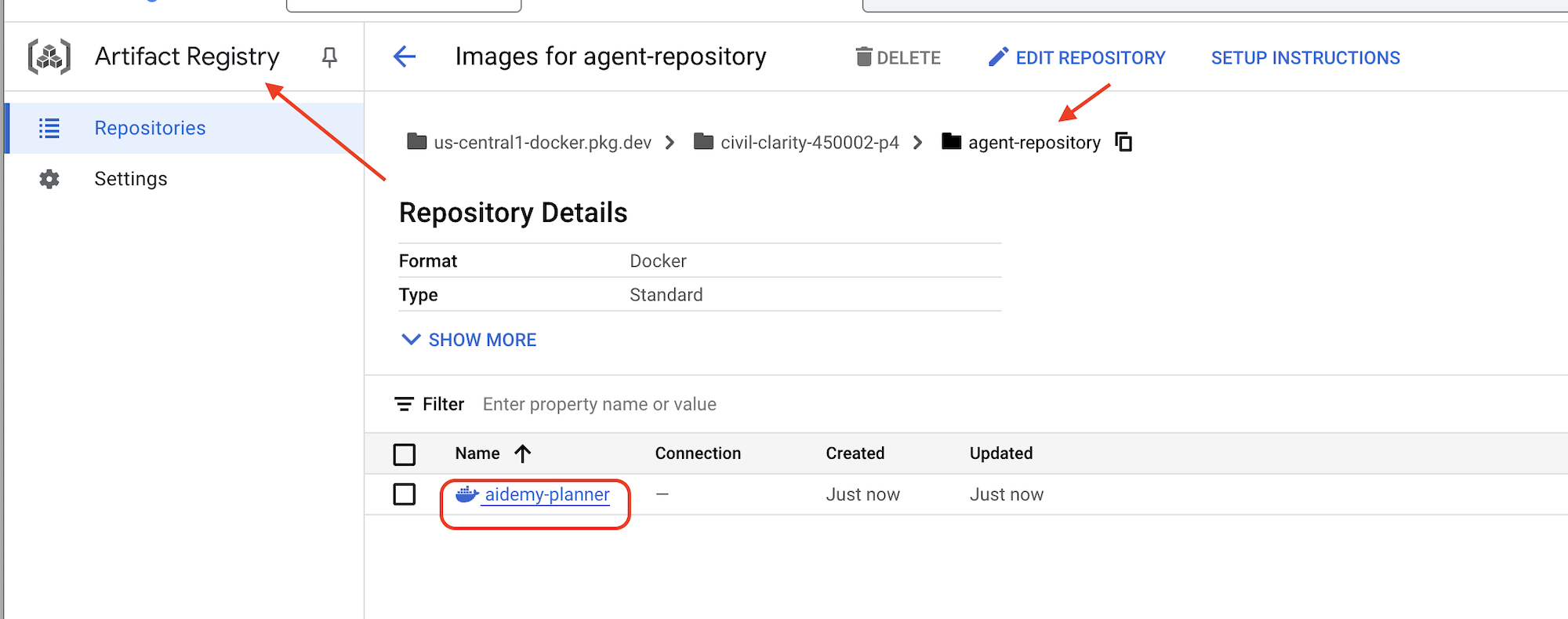
使用 Secret Manager 保护数据库凭据
为了安全地管理和访问数据库凭据,我们将使用 Google Cloud Secret Manager。这样可以防止在应用代码中硬编码敏感信息,从而提高安全性。
我们将为数据库用户名、密码和数据库名称分别创建 Secret。这种方法使我们能够单独管理每项凭据。
👉 在终端中运行以下命令:
gcloud secrets create db-user
printf "postgres" | gcloud secrets versions add db-user --data-file=-

gcloud secrets create db-pass
printf "1234qwer" | gcloud secrets versions add db-pass --data-file=-

gcloud secrets create db-name
printf "aidemy-db" | gcloud secrets versions add db-name --data-file=-
使用 Secret Manager 是保护应用安全和防止敏感凭据意外泄露的重要一步。它遵循云部署的安全最佳实践。
部署到 Cloud Run
Cloud Run 是一种全托管式无服务器平台,可让您快速轻松地部署容器化应用。它无需进行基础设施管理,让您可以专注于编写和部署代码。我们将以 Cloud Run 服务的形式部署规划器。
👉在 Google Cloud 控制台中,前往“Cloud Run”。点击部署容器,然后选择SERVICE。配置 Cloud Run 服务:
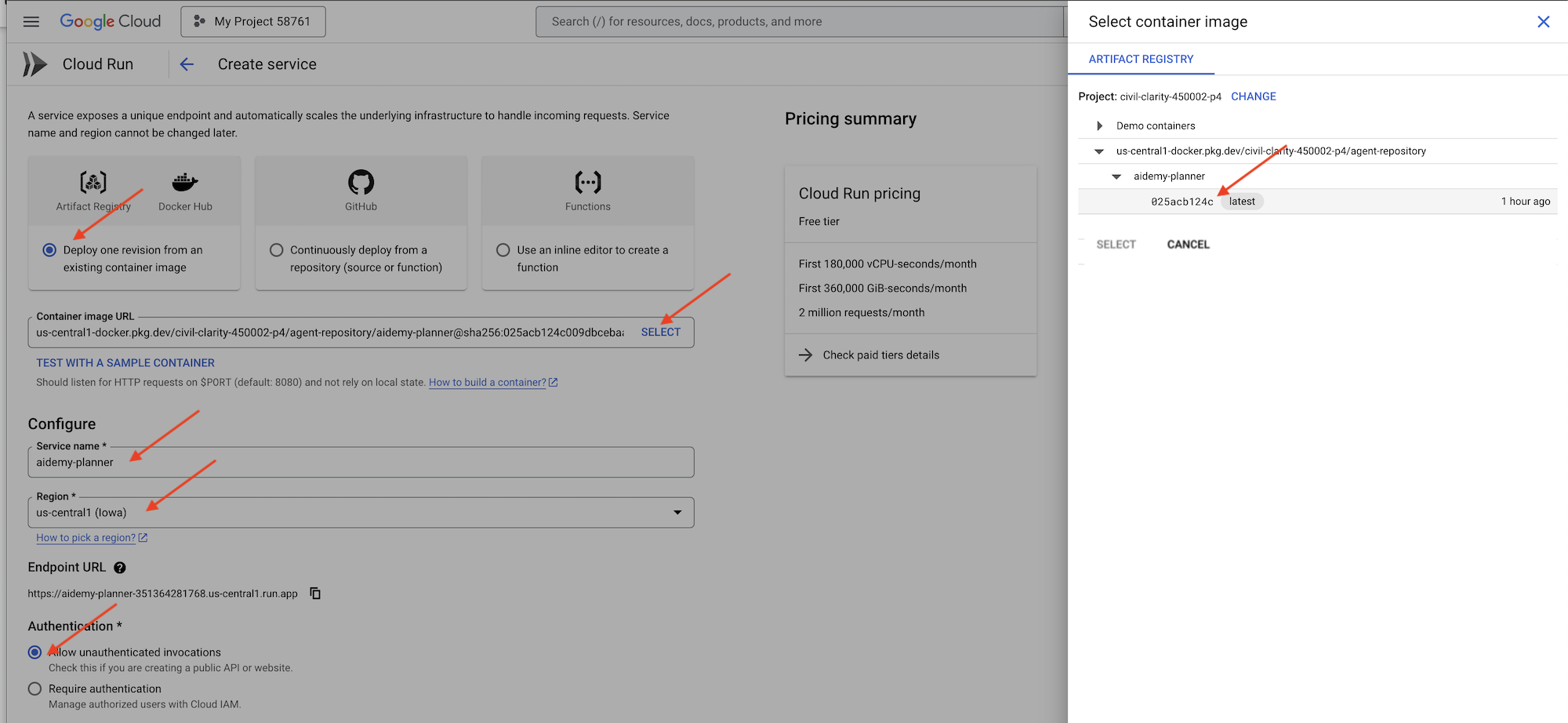
- 容器映像:点击网址字段中的“选择”。找到您推送到 Artifact Registry 的映像网址(例如 us-central1-docker.pkg.dev/YOUR_PROJECT_ID/agent-repository/aidemy-planner/YOUR_IMG)。
- 服务名称:
aidemy-planner - 区域:选择
us-central1区域。 - 身份验证:在本研讨会中,您可以选择“允许未经身份验证的调用”。在生产环境中,您可能需要限制访问权限。
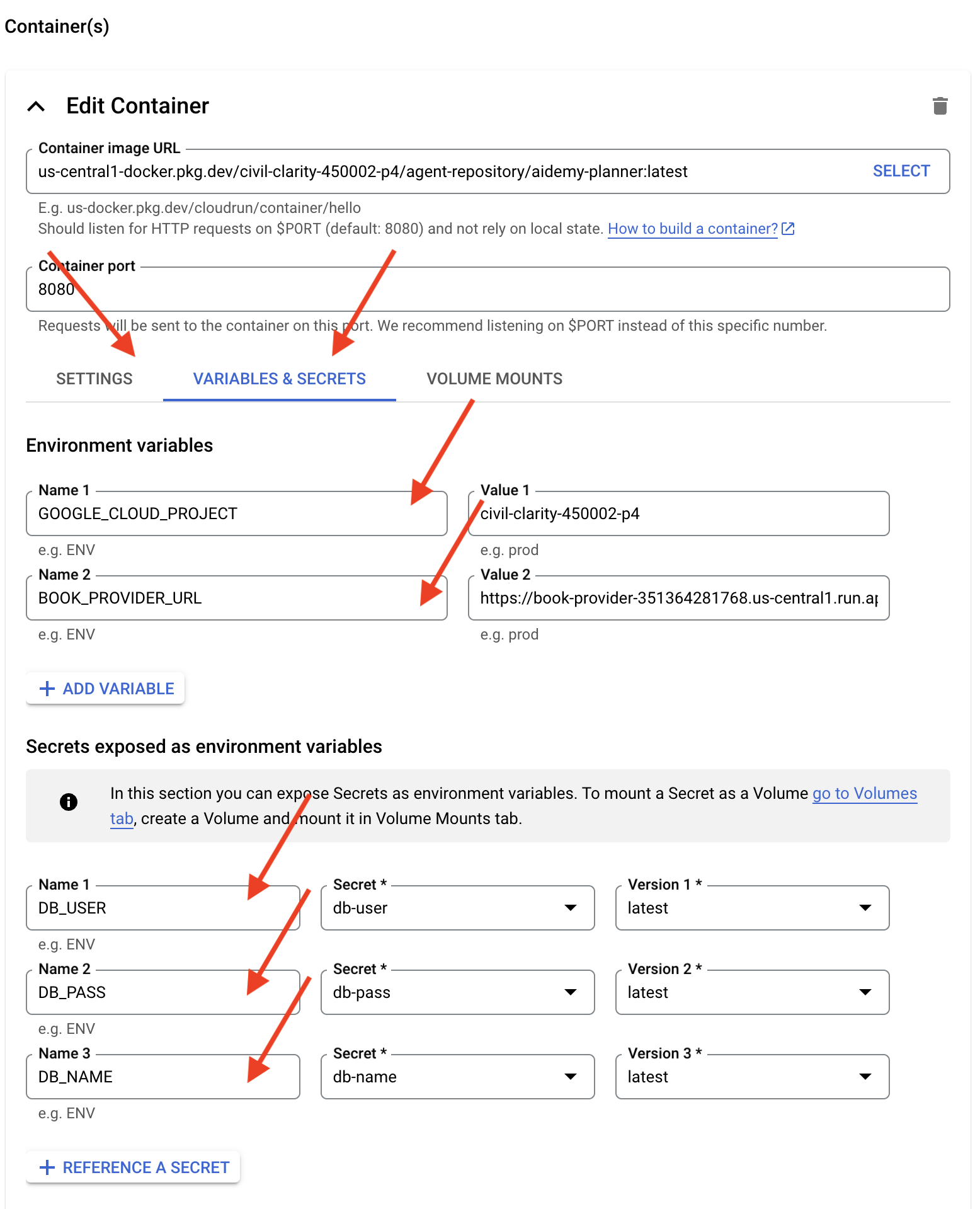
- 展开“容器、卷、网络、安全性”部分,然后在容器标签页中设置以下内容:
- “设置”标签页:
- 资源
- 内存:2GiB
- 资源
- “变量和密钥”标签页:
- 环境变量,点击 + 添加变量按钮,添加以下变量:
- 添加名称:
GOOGLE_CLOUD_PROJECT和值:<YOUR_PROJECT_ID> - 添加名称:
BOOK_PROVIDER_URL,并将值设置为您的 book-provider 函数网址,您可以使用终端中的以下命令确定该网址:gcloud config set project $(cat ~/project_id.txt) gcloud run services describe book-provider \ --region=us-central1 \ --project=$PROJECT_ID \ --format="value(status.url)"
- 添加名称:
- 在作为环境变量公开的 Secret 部分下,点击 + 作为 Secret 引用按钮,添加以下 Secret:
- 添加名称:
DB_USER,密文:选择db-user,版本:latest - 添加名称:
DB_PASS,密文:选择db-pass,版本:latest - 添加名称:
DB_NAME,密文:选择db-name,版本:latest
- 添加名称:
- 环境变量,点击 + 添加变量按钮,添加以下变量:
- “设置”标签页:
将其他值保留为默认值。
👉 点击创建。
Cloud Run 将部署您的服务。
部署完成后,如果您尚未位于详情页面,请点击服务名称以前往其详情页面。您可以在顶部找到已部署的网址。
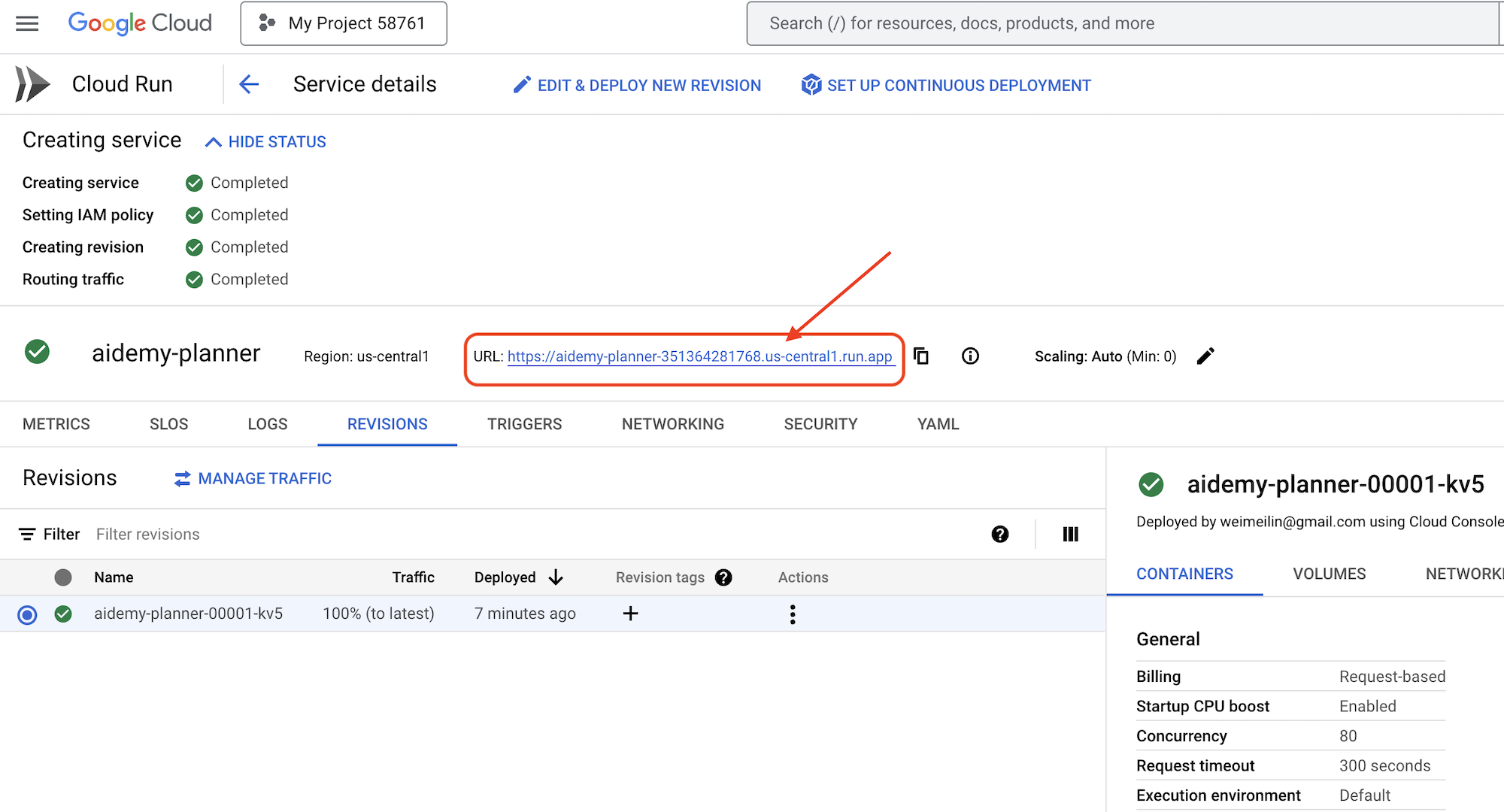
👉 在申请界面中,选择 7 作为年份,选择 Mathematics 作为主题,然后在“加购项申请”字段中输入 Algebra。
👉 点击生成方案。这样一来,智能体就能获得必要的背景信息,从而生成量身定制的课程计划。
恭喜!您已成功使用我们强大的 AI 智能体创建了教学方案。这表明,智能体有潜力大幅减少工作量并简化任务,最终提高效率并让教育工作者的生活更轻松。
9. 多智能体系统
现在,我们已成功实现教学计划创建工具,接下来将重点放在构建学生门户上。通过此门户,学生可以访问与课程相关的测验、音频总结和作业。鉴于此功能的范围,我们将利用多智能体系统的强大功能来创建模块化且可扩缩的解决方案。
正如我们之前讨论的那样,多智能体系统不是依赖单个智能体来处理所有事情,而是将工作负载分解为更小、更专业的任务,每个任务都由专门的智能体处理。这种方法具有以下几项关键优势:
模块化和可维护性:不要创建可执行所有任务的单个代理,而是构建职责明确的较小专用代理。这种模块化设计使系统更易于理解、维护和调试。出现问题时,您可以将其归结到特定代理,而不必过滤庞大的代码库。
可伸缩性:扩展单个复杂代理可能会成为瓶颈。借助多智能体系统,您可以根据各个代理的具体需求来扩缩它们。例如,如果某个代理正在处理大量请求,您可以轻松启动该代理的更多实例,而不会影响系统的其余部分。
团队专业化:您可以这样想,您不会要求一位工程师从头开始构建整个应用。相反,您需要组建一个专家团队,每位专家都擅长特定领域。同样,多智能体系统可让您充分利用不同 LLM 和工具的优势,将它们分配给最适合特定任务的智能体。
并行开发:不同的团队可以同时开发不同的代理,从而加快开发流程。由于各代理是独立的,因此对一个代理所做的更改不太可能影响其他代理。
事件驱动型架构
为了实现这些代理之间的有效通信和协调,我们将采用事件驱动型架构。这意味着代理会响应系统内发生的“事件”。
智能体订阅特定事件类型(例如“教学计划已生成”“作业已创建”)。当有活动发生时,相关代理会收到通知,并可据此采取相应行动。这种解耦可提高灵活性、可伸缩性和实时响应能力。
现在,为了开始,我们需要一种广播这些事件的方式。为此,我们将设置一个 Pub/Sub 主题。我们先来创建一个名为 plan 的主题。
👉 前往 Google Cloud 控制台 Pub/Sub。
👉 点击创建主题按钮。
👉 配置 ID/名称为 plan 的主题,取消选中Add a default subscription,其余设置保留为默认值,然后点击创建。
Pub/Sub 页面将刷新,您现在应该会在表格中看到新创建的主题。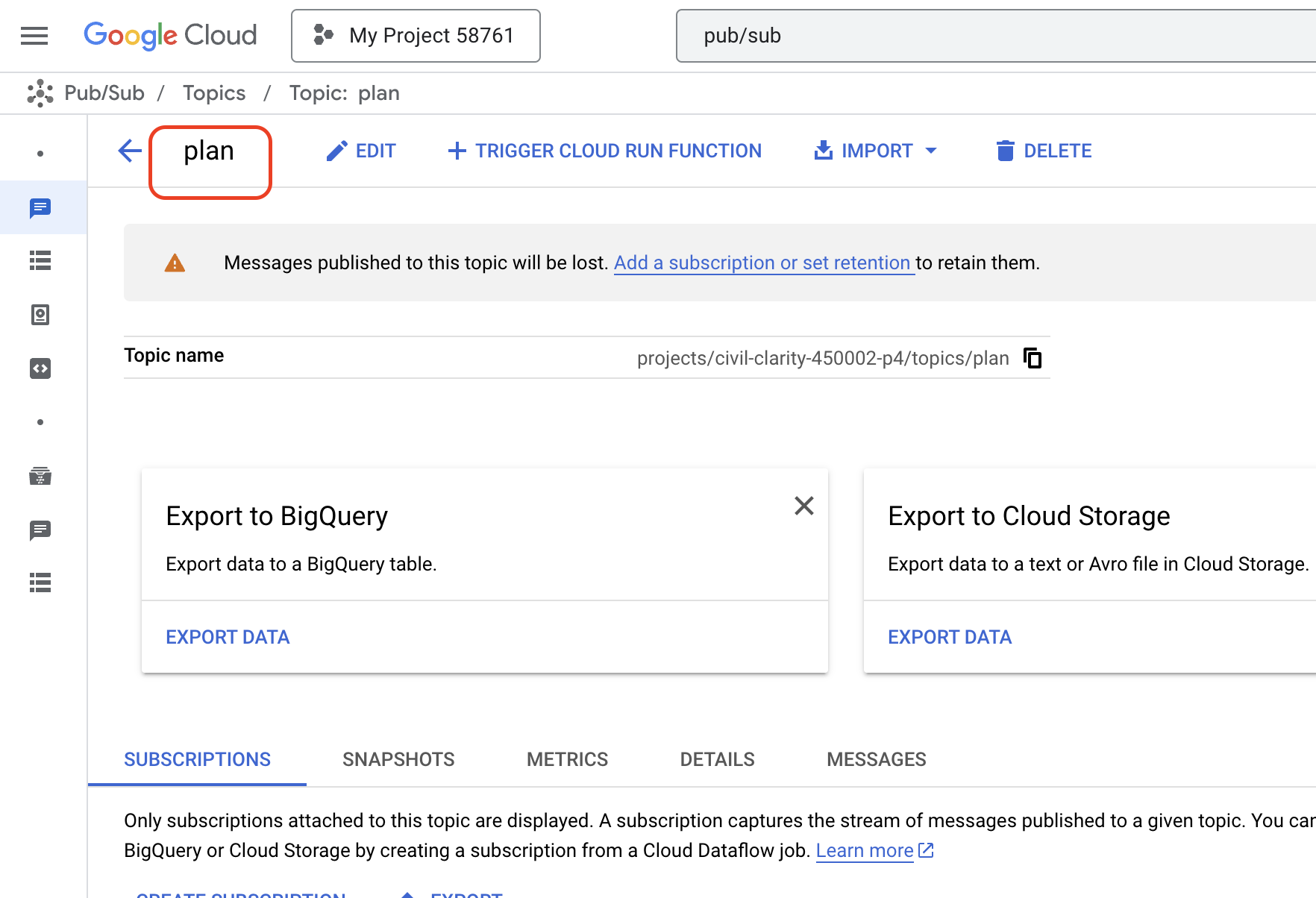
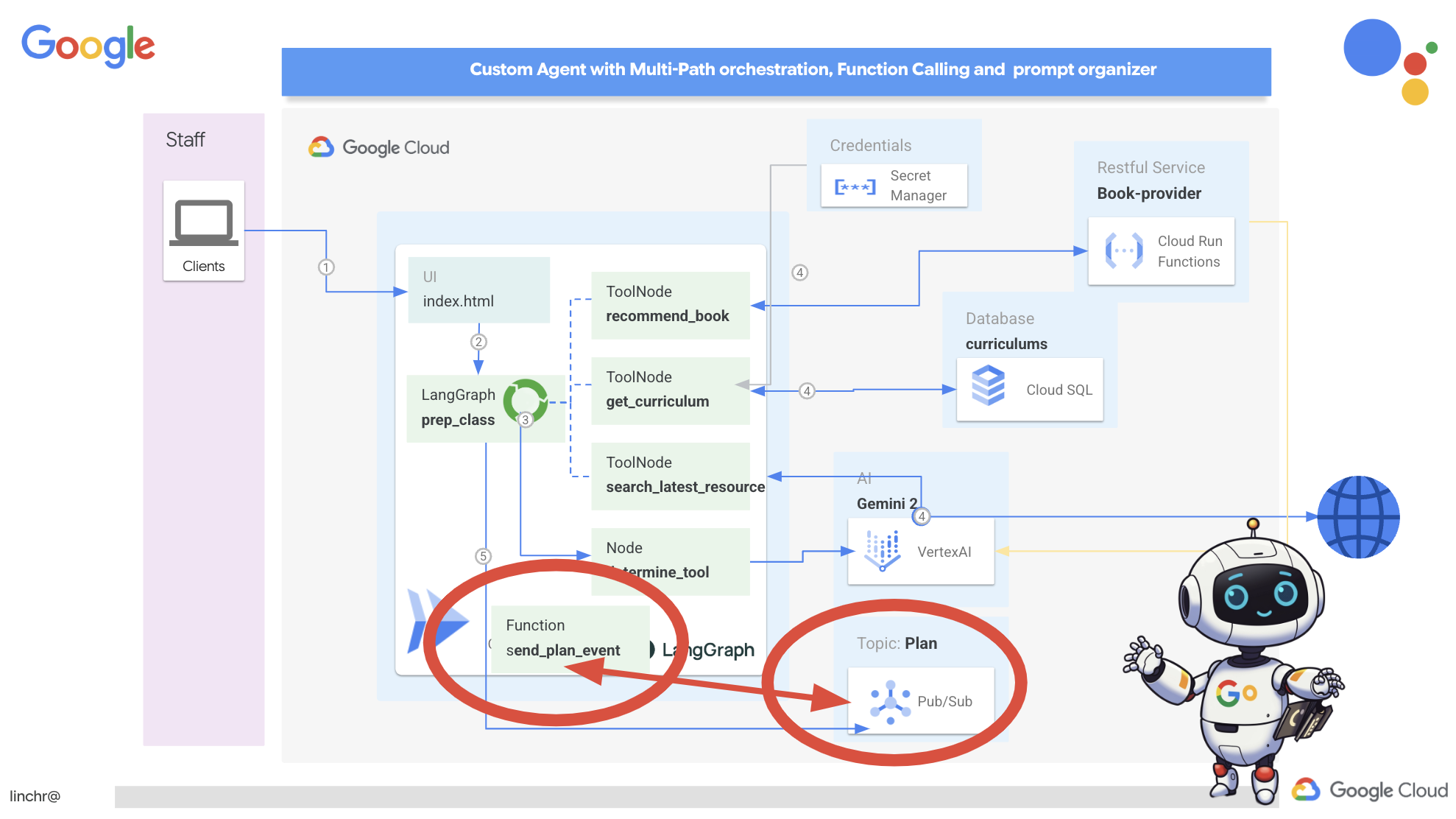
现在,我们将 Pub/Sub 事件发布功能集成到规划器代理中。我们将添加一个新工具,用于向我们刚刚创建的 Pub/Sub 主题发送“计划”事件。此事件将向系统中的其他代理(例如学生门户中的代理)发出信号,表明有新的教学计划可用。
👉返回到 Cloud Code 编辑器,然后打开位于 planner 文件夹中的 app.py 文件。我们将添加一个发布事件的函数。替换:
##ADD SEND PLAN EVENT FUNCTION HERE
替换为以下代码
def send_plan_event(teaching_plan:str):
    """
    Send the teaching event to the topic called plan

    Args:
        teaching_plan: teaching plan
    """
    publisher = pubsub_v1.PublisherClient()
    print(f"-------------> Sending event to topic plan: {teaching_plan}")
    topic_path = publisher.topic_path(PROJECT_ID, "plan")

    message_data = {"teaching_plan": teaching_plan}
    data = json.dumps(message_data).encode("utf-8")

    future = publisher.publish(topic_path, data)

    return f"Published message ID: {future.result()}"
- send_plan_event:此函数将生成的教学计划作为输入,创建 Pub/Sub 发布者客户端,构建主题路径,将教学计划转换为 JSON 字符串,并将消息发布到主题。
在同一 app.py 文件中
👉更新提示,指示代理在生成教学计划后将教学计划事件发送到 Pub/Sub 主题。*替换
### ADD send_plan_event CALL
,并具有以下:
send_plan_event(teaching_plan)
通过添加 send_plan_event 工具和修改提示,我们已使规划者智能体能够将事件发布到 Pub/Sub,从而使系统的其他组件能够对新教学计划的创建做出反应。在接下来的部分中,我们将拥有一个功能齐全的多智能体系统。
10. 通过按需测验为学生赋能
想象一下,在一个学习环境中,学生可以访问根据其特定学习计划量身定制的无限量测验。这些测验会提供即时反馈,包括答案和说明,从而加深学生对学习材料的理解。这正是我们希望通过 AI 赋能的测验门户网站发掘的潜力。
为了实现这一愿景,我们将构建一个测验生成组件,该组件可以根据教学计划的内容创建选择题。
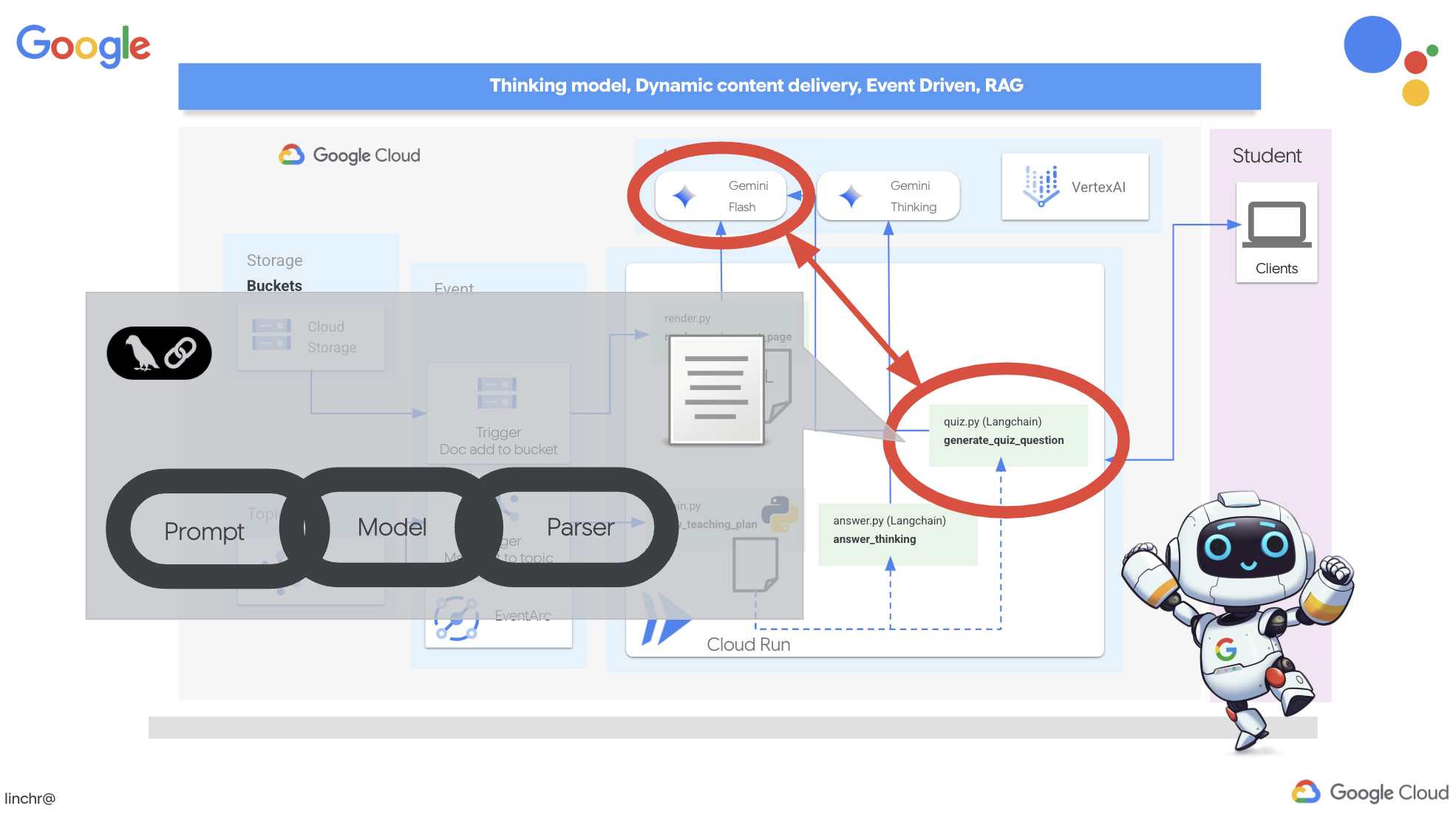
👉 在 Cloud Code 编辑器的“资源管理器”窗格中,找到 portal 文件夹。打开 quiz.py 文件,然后将以下代码复制并粘贴到文件末尾。
def generate_quiz_question(file_name: str, difficulty: str, region:str ):
    """Generates a single multiple-choice quiz question using the LLM.

    ```json
    {
      "question": "The question itself",
      "options": ["Option A", "Option B", "Option C", "Option D"],
      "answer": "The correct answer letter (A, B, C, or D)"
    }
    ```
    """

    print(f"region: {region}")
    # Connect to resourse needed from Google Cloud
    llm = VertexAI(model_name="gemini-2.5-flash-preview-04-17", location=region)


    plan=None
    #load the file using file_name and read content into string call plan
    with open(file_name, 'r') as f:
        plan = f.read()

    parser = JsonOutputParser(pydantic_object=QuizQuestion)


    instruction = f"You'll provide one question with difficulty level of {difficulty}, 4 options as multiple choices and provide the anwsers, the quiz needs to be related to the teaching plan {plan}"

    prompt = PromptTemplate(
        template="Generates a single multiple-choice quiz question\n {format_instructions}\n  {instruction}\n",
        input_variables=["instruction"],
        partial_variables={"format_instructions": parser.get_format_instructions()},
    )

    chain = prompt | llm | parser
    response = chain.invoke({"instruction": instruction})

    print(f"{response}")
    return  response
在代理中,它会创建一个专门用于理解和构建 LLM 输出的 JSON 输出解析器。它使用我们之前定义的 QuizQuestion 模型来确保解析后的输出符合正确的格式(问题、选项和答案)。
👉 在终端中,执行以下命令以设置虚拟环境、安装依赖项并启动代理:
gcloud config set project $(cat ~/project_id.txt)
cd ~/aidemy-bootstrap/portal/
python -m venv env
source env/bin/activate
pip install -r requirements.txt
python app.py
👉 从右上角的“网页预览”菜单中选择在端口 8080 上预览。Cloud Shell 会打开一个新的浏览器标签页或窗口,其中包含应用的 Web 预览。
👉 在 Web 应用中,点击“测验”链接,该链接位于顶部导航栏中或首页上的卡片中。您应该会看到系统为学生随机生成了三道测验题。这些测验基于教学计划,展示了我们基于 AI 的测验生成系统的强大功能。
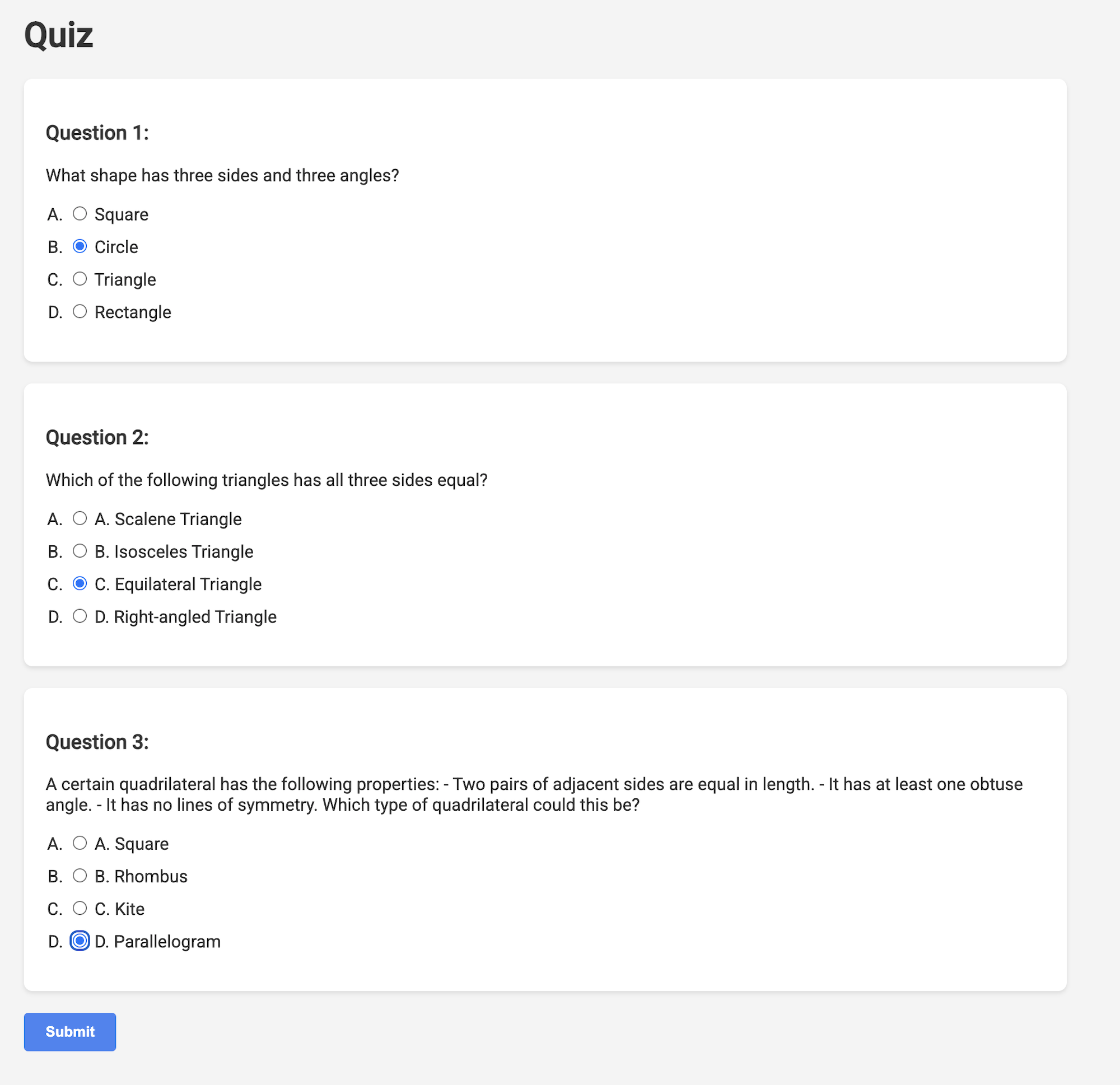
👉如需停止本地运行的进程,请在终端中按 Ctrl+C。
Gemini 2 Thinking(用于解释)
好的,我们已经有测验了,这是一个很好的开始!但如果学生答错了,会怎么样?这才是真正学习的地方,对吧?如果我们能解释他们答案错误的原因以及如何得出正确答案,他们就更有可能记住。此外,这还有助于消除任何困惑并增强他们的信心。
因此,我们将使用 Gemini 2 的“思考”模型这一“重型武器”!这就像给 AI 额外的时间来仔细思考,然后再进行解释。这样一来,它就可以提供更详细、更优质的反馈。
我们想看看它是否能通过详细的辅助、回答和解释来帮助学生。为了测试效果,我们先从一个出了名的棘手科目——微积分开始。
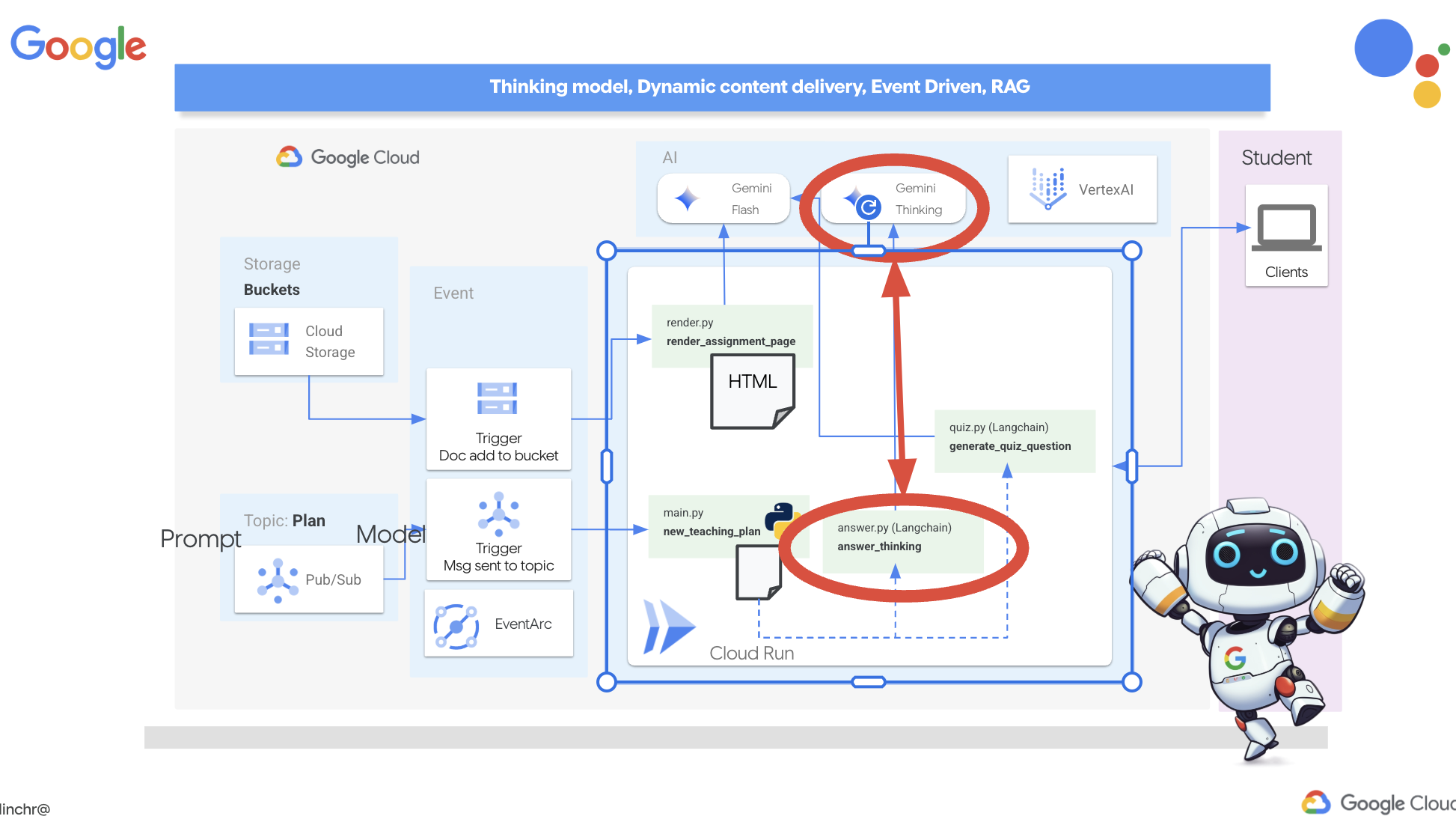
👉首先,前往 Cloud Code 编辑器,在 portal 文件夹中找到 answer.py。替换以下函数代码
def answer_thinking(question, options, user_response, answer, region):
    return ""
使用以下代码段:
def answer_thinking(question, options, user_response, answer, region):
    try:
        llm = VertexAI(model_name="gemini-2.0-flash-001",location=region)

        input_msg = HumanMessage(content=[f"Here the question{question}, here are the available options {options}, this student's answer {user_response}, whereas the correct answer is {answer}"])
        prompt_template = ChatPromptTemplate.from_messages(
            [
                SystemMessage(
                    content=(
                        "You are a helpful teacher trying to teach the student on question, you were given the question and a set of multiple choices "
                        "what's the correct answer. use friendly tone"
                    )
                ),
                input_msg,
            ]
        )

        prompt = prompt_template.format()

        response = llm.invoke(prompt)
        print(f"response: {response}")

        return response
    except Exception as e:
        print(f"Error sending message to chatbot: {e}") # Log this error too!
        return f"Unable to process your request at this time. Due to the following reason: {str(e)}"


if __name__ == "__main__":
    question = "Evaluate the limit: lim (x→0) [(sin(5x) - 5x) / x^3]"
    options = ["A) -125/6", "B) -5/3 ", "C) -25/3", "D) -5/6"]
    user_response = "B"
    answer = "A"
    region = "us-central1"
    result = answer_thinking(question, options, user_response, answer, region)
这是一个非常简单的 Langchain 应用,它会初始化 Gemini 2 Flash 模型,并指示该模型充当有用的老师并提供说明
👉在终端中执行以下命令:
gcloud config set project $(cat ~/project_id.txt)
cd ~/aidemy-bootstrap/portal/
source env/bin/activate
python answer.py
您应该会看到类似于原始说明中提供的示例的输出。当前模型可能无法提供详尽的解释。
Okay, I see the question and the choices. The question is to evaluate the limit:

lim (x→0) [(sin(5x) - 5x) / x^3]

You chose option B, which is -5/3, but the correct answer is A, which is -125/6.

It looks like you might have missed a step or made a small error in your calculations. This type of limit often involves using L'Hôpital's Rule or Taylor series expansion. Since we have the form 0/0, L'Hôpital's Rule is a good way to go! You need to apply it multiple times. Alternatively, you can use the Taylor series expansion of sin(x) which is:
sin(x) = x - x^3/3! + x^5/5! - ...
So, sin(5x) = 5x - (5x)^3/3! + (5x)^5/5! - ...
Then,  (sin(5x) - 5x) = - (5x)^3/3! + (5x)^5/5! - ...
Finally, (sin(5x) - 5x) / x^3 = - 5^3/3! + (5^5 * x^2)/5! - ...
Taking the limit as x approaches 0, we get -125/6.

Keep practicing, you'll get there!
👉 在 answer.py 文件中,将
在 answer_thinking 函数中,将 gemini-2.0-flash-001 中的 model_name 更改为 gemini-2.0-flash-thinking-exp-01-21。
此更改会将 LLM 更改为推理能力更强的其他 LLM。这有助于模型生成更好的说明。
👉 再次运行 answer.py 脚本,以测试新的思考模型:
gcloud config set project $(cat ~/project_id.txt)
cd ~/aidemy-bootstrap/portal/
source env/bin/activate
python answer.py
以下是思考模型给出的回答示例,该回答更加全面和详细,提供了微积分问题的分步解题说明。这突显了“思考”模型在生成高质量解释方面的强大能力。您会看到如下所示的输出:
Hey there! Let's take a look at this limit problem together. You were asked to evaluate:

lim (x→0) [(sin(5x) - 5x) / x^3]

and you picked option B, -5/3, but the correct answer is actually A, -125/6. Let's figure out why!

It's a tricky one because if we directly substitute x=0, we get (sin(0) - 0) / 0^3 = (0 - 0) / 0 = 0/0, which is an indeterminate form. This tells us we need to use a more advanced technique like L'Hopital's Rule or Taylor series expansion.

Let's use the Taylor series expansion for sin(y) around y=0. Do you remember it?  It looks like this:

sin(y) = y - y^3/3! + y^5/5! - ...
where 3! (3 factorial) is 3 × 2 × 1 = 6, 5! is 5 × 4 × 3 × 2 × 1 = 120, and so on.

In our problem, we have sin(5x), so we can substitute y = 5x into the Taylor series:

sin(5x) = (5x) - (5x)^3/3! + (5x)^5/5! - ...
sin(5x) = 5x - (125x^3)/6 + (3125x^5)/120 - ...

Now let's plug this back into our limit expression:

[(sin(5x) - 5x) / x^3] =  [ (5x - (125x^3)/6 + (3125x^5)/120 - ...) - 5x ] / x^3
Notice that the '5x' and '-5x' cancel out!  So we are left with:
= [ - (125x^3)/6 + (3125x^5)/120 - ... ] / x^3
Now, we can divide every term in the numerator by x^3:
= -125/6 + (3125x^2)/120 - ...

Finally, let's take the limit as x approaches 0.  As x gets closer and closer to zero, terms with x^2 and higher powers will become very, very small and approach zero.  So, we are left with:
lim (x→0) [ -125/6 + (3125x^2)/120 - ... ] = -125/6

Therefore, the correct answer is indeed **A) -125/6**.

It seems like your answer B, -5/3, might have come from perhaps missing a factor somewhere during calculation or maybe using an incorrect simplification. Double-check your steps when you were trying to solve it!

Don't worry, these limit problems can be a bit tricky sometimes! Keep practicing and you'll get the hang of it.  Let me know if you want to go through another similar example or if you have any more questions! 😊


Now that we have confirmed it works, let's use the portal.
👉从 answer.py 中移除以下测试代码:
if __name__ == "__main__":
    question = "Evaluate the limit: lim (x→0) [(sin(5x) - 5x) / x^3]"
    options = ["A) -125/6", "B) -5/3 ", "C) -25/3", "D) -5/6"]
    user_response = "B"
    answer = "A"
    region = "us-central1"
    result = answer_thinking(question, options, user_response, answer, region)
👉在终端中执行以下命令,以设置虚拟环境、安装依赖项并启动代理:
gcloud config set project $(cat ~/project_id.txt)
cd ~/aidemy-bootstrap/portal/
source env/bin/activate
python app.py
👉 从右上角的“网页预览”菜单中选择在端口 8080 上预览。Cloud Shell 会打开一个新的浏览器标签页或窗口,其中包含应用的 Web 预览。
👉 在 Web 应用中,点击“测验”链接,该链接位于顶部导航栏中或首页上的卡片中。
👉 回答所有测验问题,确保至少答错一个问题,然后点击提交。
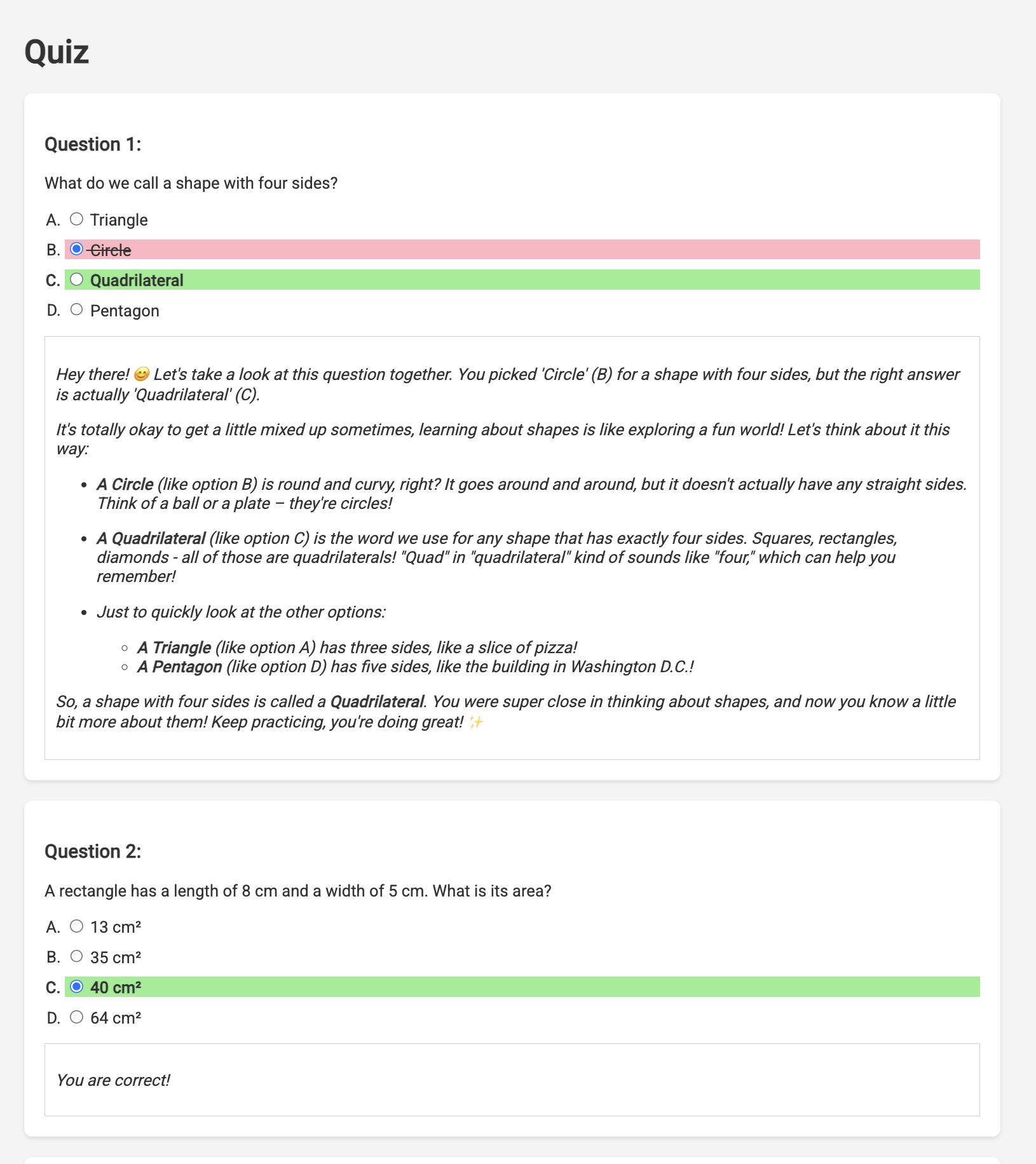
与其在等待响应时茫然地盯着屏幕,不如切换到 Cloud Editor 的终端。您可以在模拟器的终端中查看函数的进度以及生成的任何输出或错误消息。😁
👉 在终端中,按 Ctrl+C 停止本地运行的进程。
11. 可选:使用 Eventarc 编排代理
到目前为止,学生门户网站一直根据一组默认的教学计划生成测验。这很有帮助,但也意味着我们的规划代理和门户网站的测验代理实际上并没有相互通信。还记得我们添加的那个功能吗?规划器代理会将其新生成的教学计划发布到 Pub/Sub 主题。现在,我们需要将该代理与门户代理相关联!
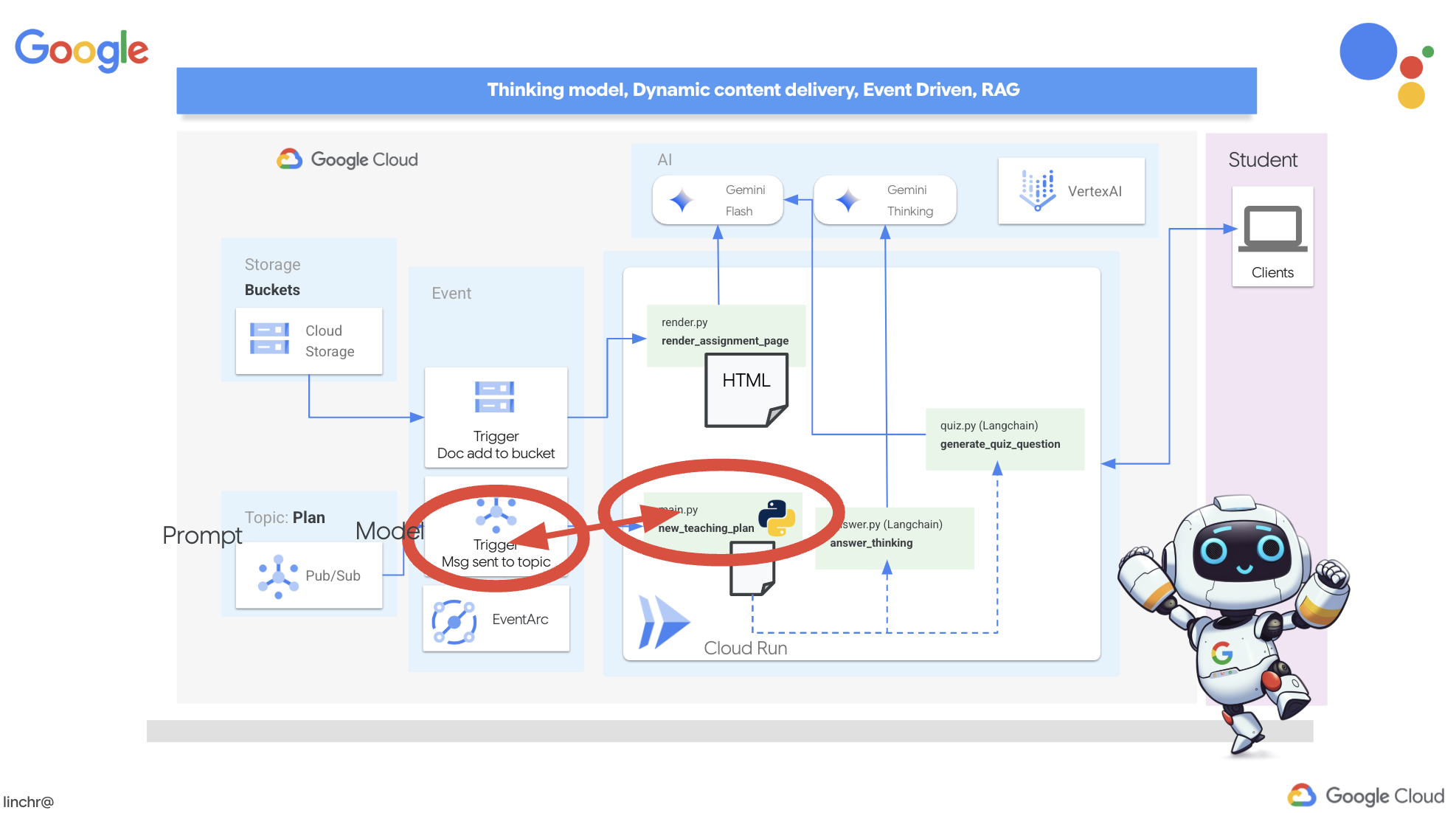
我们希望门户在每次生成新的教学计划时自动更新其测验内容。为此,我们将在门户中创建一个可以接收这些新方案的端点。
👉 在 Cloud Code 编辑器的“资源管理器”窗格中,找到 portal 文件夹。
👉 打开 app.py 文件进行修改。将 ## REPLACE ME! NEW TEACHING PLAN 行替换为以下代码:
@app.route('/new_teaching_plan', methods=['POST'])
def new_teaching_plan():
    try:

        # Get data from Pub/Sub message delivered via Eventarc
        envelope = request.get_json()
        if not envelope:
            return jsonify({'error': 'No Pub/Sub message received'}), 400

        if not isinstance(envelope, dict) or 'message' not in envelope:
            return jsonify({'error': 'Invalid Pub/Sub message format'}), 400

        pubsub_message = envelope['message']
        print(f"data: {pubsub_message['data']}")

        data = pubsub_message['data']
        data_str = base64.b64decode(data).decode('utf-8')
        data = json.loads(data_str)

        teaching_plan = data['teaching_plan']

        print(f"File content: {teaching_plan}")

        with open("teaching_plan.txt", "w") as f:
            f.write(teaching_plan)

        print(f"Teaching plan saved to local file: teaching_plan.txt")

        return jsonify({'message': 'File processed successfully'})


    except Exception as e:
        print(f"Error processing file: {e}")
        return jsonify({'error': 'Error processing file'}), 500
重新构建并部署到 Cloud Run
您需要更新规划器代理和门户代理,并将它们重新部署到 Cloud Run。这可确保它们拥有最新代码,并且已配置为通过事件进行通信。
👉首先,我们将重新构建并推送 planner 代理映像,在终端中运行:
cd ~/aidemy-bootstrap/planner/
gcloud config set project $(cat ~/project_id.txt)
export PROJECT_ID=$(gcloud config get project)
docker build -t gcr.io/${PROJECT_ID}/aidemy-planner .
export PROJECT_ID=$(gcloud config get project)
docker tag gcr.io/${PROJECT_ID}/aidemy-planner us-central1-docker.pkg.dev/${PROJECT_ID}/agent-repository/aidemy-planner
docker push us-central1-docker.pkg.dev/${PROJECT_ID}/agent-repository/aidemy-planner
👉我们将执行相同的操作,构建并推送 portal 代理映像:
cd ~/aidemy-bootstrap/portal/
gcloud config set project $(cat ~/project_id.txt)
export PROJECT_ID=$(gcloud config get project)
docker build -t gcr.io/${PROJECT_ID}/aidemy-portal .
export PROJECT_ID=$(gcloud config get project)
docker tag gcr.io/${PROJECT_ID}/aidemy-portal us-central1-docker.pkg.dev/${PROJECT_ID}/agent-repository/aidemy-portal
docker push us-central1-docker.pkg.dev/${PROJECT_ID}/agent-repository/aidemy-portal
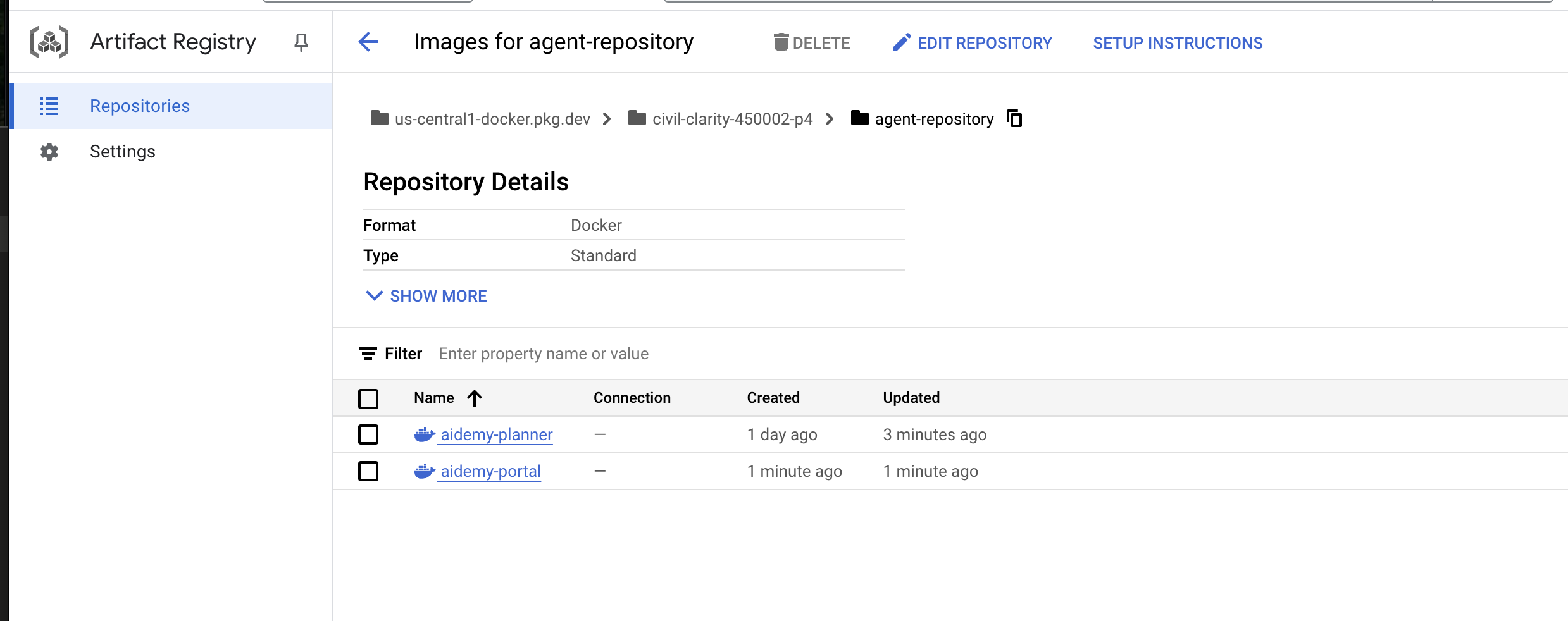
👉 前往 Artifact Registry,您应该会在 agent-repository 下看到 aidemy-planner 和 aidemy-portal 容器映像。
👉返回终端,运行以下命令以更新规划器代理的 Cloud Run 映像:
gcloud config set project $(cat ~/project_id.txt)
export PROJECT_ID=$(gcloud config get project)
gcloud run services update aidemy-planner \
    --region=us-central1 \
    --image=us-central1-docker.pkg.dev/${PROJECT_ID}/agent-repository/aidemy-planner:latest
您会看到如下所示的输出:
OK Deploying... Done.
  OK Creating Revision...
  OK Routing traffic...
Done.
Service [aidemy-planner] revision [aidemy-planner-xxxxx] has been deployed and is serving 100 percent of traffic.
Service URL: https://aidemy-planner-xxx.us-central1.run.app
记下服务网址;这是指向已部署的规划器代理的链接。如果您日后需要确定规划器代理服务网址,请使用以下命令:
gcloud config set project $(cat ~/project_id.txt)
export PROJECT_ID=$(gcloud config get project)
gcloud run services describe aidemy-planner \
    --region=us-central1 \
    --format 'value(status.url)'
👉运行此命令可为门户代理创建 Cloud Run 实例
gcloud config set project $(cat ~/project_id.txt)
export PROJECT_ID=$(gcloud config get project)
gcloud run deploy aidemy-portal \
  --image=us-central1-docker.pkg.dev/${PROJECT_ID}/agent-repository/aidemy-portal:latest \
  --region=us-central1 \
  --platform=managed \
  --allow-unauthenticated \
  --memory=2Gi \
  --cpu=2 \
  --set-env-vars=GOOGLE_CLOUD_PROJECT=${PROJECT_ID}
您会看到如下所示的输出:
Deploying container to Cloud Run service [aidemy-portal] in project [xxxx] region [us-central1]
OK Deploying new service... Done.
  OK Creating Revision...
  OK Routing traffic...
  OK Setting IAM Policy...
Done.
Service [aidemy-portal] revision [aidemy-portal-xxxx] has been deployed and is serving 100 percent of traffic.
Service URL: https://aidemy-portal-xxxx.us-central1.run.app
记下服务网址;这是指向已部署的学生门户的链接。如果您日后需要确定学生门户网站服务网址,请使用以下命令:
gcloud config set project $(cat ~/project_id.txt)
export PROJECT_ID=$(gcloud config get project)
gcloud run services describe aidemy-portal \
    --region=us-central1 \
    --format 'value(status.url)'
创建 Eventarc 触发器
不过,这里有一个大问题:当 Pub/Sub 主题中有新的方案等待处理时,此端点如何收到通知?这时,Eventarc 就会及时出现,拯救局面!
Eventarc 充当桥梁,监听特定事件(例如 Pub/Sub 主题中收到新消息),并自动触发相应操作。在本例中,它会检测到何时发布了新的教学计划,然后向门户的端点发送信号,告知门户是时候进行更新了。
借助 Eventarc 处理事件驱动型通信,我们可以无缝连接规划器代理和门户代理,从而打造出真正动态且响应迅速的学习系统。这就像拥有一个智能信使,可自动将最新的课程计划发送到正确的位置!
👉在控制台中,前往 Eventarc。
👉点击“+ 创建触发器”按钮。
配置触发器(基本信息):
- 触发器名称:
plan-topic-trigger - 触发器类型:Google 来源
- 事件提供方:Cloud Pub/Sub
- 活动类型:
google.cloud.pubsub.topic.v1.messagePublished - Cloud Pub/Sub 主题:选择
projects/PROJECT_ID/topics/plan - 地区:
us-central1。 - 服务账号:
- 向服务账号授予角色
roles/iam.serviceAccountTokenCreator - 使用默认值:默认计算服务账号
- 向服务账号授予角色
- 事件目标位置:Cloud Run
- Cloud Run 服务:
aidemy-portal - 忽略错误消息:对“locations/me-central2”的权限遭拒(或者该位置可能不存在)。
- 服务网址路径:
/new_teaching_plan
👉 点击“创建”。
Eventarc 触发器页面会刷新,您现在应该会在表格中看到新创建的触发器。
现在,使用规划工具代理的服务网址访问该代理,以请求新的教学计划。
👉 在终端中运行此命令,以确定规划器代理服务网址:
gcloud config set project $(cat ~/project_id.txt)
export PROJECT_ID=$(gcloud config get project)
gcloud run services list --platform=managed --region=us-central1 --format='value(URL)' | grep planner
👉 前往输出的网址,这次尝试使用“年份”5、“科目”Science 和“附加请求”atoms。
然后,等待一两分钟,再次强调,此延迟是由于本实验的结算限制而引入的,在正常情况下,不应有延迟。
最后,使用学生门户网站的服务网址访问该门户网站。
在终端中运行此命令,以确定学生门户代理服务网址:
gcloud config set project $(cat ~/project_id.txt)
export PROJECT_ID=$(gcloud config get project)
gcloud run services list --platform=managed --region=us-central1 --format='value(URL)' | grep portal
您应该会看到,测验已更新,现在与您刚刚生成的新教学计划保持一致!这表明 Eventarc 已成功集成到 Aidemy 系统中!

恭喜!您已成功在 Google Cloud 上构建多智能体系统,利用事件驱动型架构来增强可伸缩性和灵活性!您已经打下了坚实的基础,但还有更多内容值得探索。如需深入了解此架构的实际优势,探索 Gemini 2 多模态 Live API 的强大功能,并了解如何使用 LangGraph 实现单路径编排,欢迎继续阅读接下来的两章。
12. 可选:使用 Gemini 生成音频回忆集锦
Gemini 可以理解和处理来自各种来源的信息,例如文本、图片,甚至音频,从而为学习和内容创作开辟全新的可能性。Gemini 能够“看”“听”“读”,真正实现了富有创意且引人入胜的用户体验。
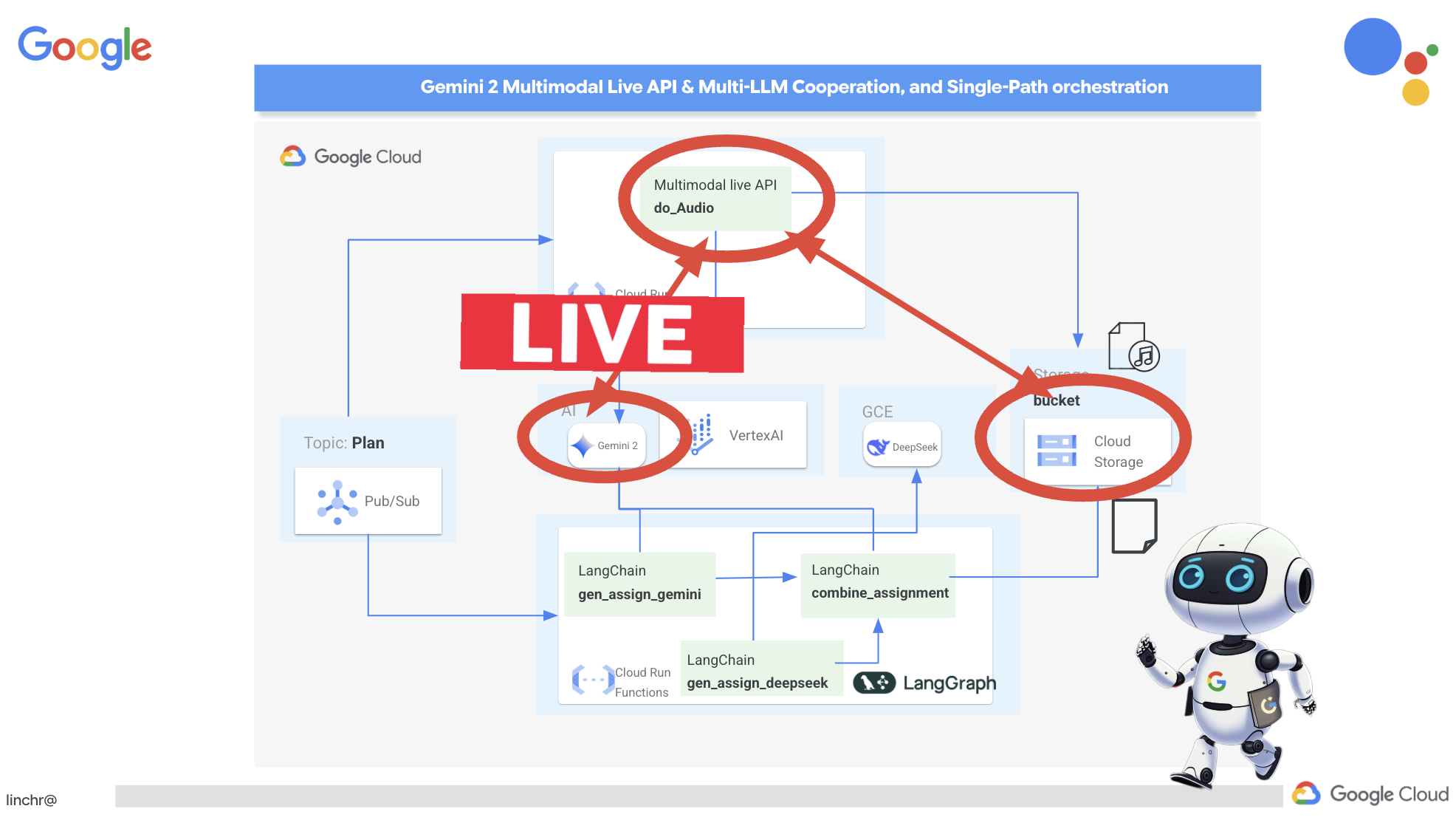
除了创建视觉内容或文本内容之外,学习的另一个重要步骤是有效地总结和回顾。不妨想一想:您是不是更容易记住一首朗朗上口的歌的歌词,而不是教科书中的内容?声音可以令人印象深刻!因此,我们将利用 Gemini 的多模态功能生成教学计划的音频总结。这样一来,学生就可以通过便捷且富有吸引力的方式复习教材,从而通过听觉学习的力量提高记忆力和理解力。
我们需要一个位置来存储生成的音频文件。Cloud Storage 提供可扩缩且可靠的解决方案。
👉前往控制台中的存储。点击左侧菜单中的“分桶”。点击顶部的“+ 创建”按钮。
👉配置新存储分区:
- 存储分区名称:
aidemy-recap-UNIQUE_NAME。- 重要提示:请务必定义一个以
aidemy-recap-开头的唯一存储分区名称。此唯一前缀对于避免在创建 Cloud Storage 存储分区时出现命名冲突至关重要。
- 重要提示:请务必定义一个以
- 地区:
us-central1。 - 存储类别:“标准”。Standard 适合频繁访问的数据。
- 访问权限控制:保留默认的“统一”访问权限控制。这样可提供一致的存储分区级访问权限控制。
- 高级选项:对于本次研讨会,默认设置通常足以满足各种要求。
点击创建按钮以创建存储分区。
- 您可能会看到有关禁止公开访问的弹出式窗口。保持“禁止公开访问此存储分区”复选框处于选中状态,然后点击
Confirm。
您现在会在“存储分区”列表中看到新创建的存储分区。请记住您的存储分区名称,稍后会用到。
👉在 Cloud Code 编辑器的终端中,运行以下命令以向服务账号授予对相应存储分区的访问权限:
gcloud config set project $(cat ~/project_id.txt)
export PROJECT_ID=$(gcloud config get project)
export COURSE_BUCKET_NAME=$(gcloud storage buckets list --format="value(name)" | grep aidemy-recap)
export SERVICE_ACCOUNT_NAME=$(gcloud compute project-info describe --format="value(defaultServiceAccount)")
gcloud storage buckets add-iam-policy-binding gs://$COURSE_BUCKET_NAME \
    --member "serviceAccount:$SERVICE_ACCOUNT_NAME" \
    --role "roles/storage.objectViewer"

gcloud storage buckets add-iam-policy-binding gs://$COURSE_BUCKET_NAME \
    --member "serviceAccount:$SERVICE_ACCOUNT_NAME" \
    --role "roles/storage.objectCreator"
👉在 Cloud Code 编辑器中,打开 courses 文件夹中的 audio.py。将以下代码粘贴到文件末尾:
config = LiveConnectConfig(
    response_modalities=["AUDIO"],
    speech_config=SpeechConfig(
        voice_config=VoiceConfig(
            prebuilt_voice_config=PrebuiltVoiceConfig(
                voice_name="Charon",
            )
        )
    ),
)

async def process_weeks(teaching_plan: str):
    region = "us-east5" #To workaround onRamp quota limits
    client = genai.Client(vertexai=True, project=PROJECT_ID, location=region)

    clientAudio = genai.Client(vertexai=True, project=PROJECT_ID, location="us-central1")
    async with clientAudio.aio.live.connect(
        model=MODEL_ID,
        config=config,
    ) as session:
        for week in range(1, 4):
            response = client.models.generate_content(
                model="gemini-2.0-flash-001",
                contents=f"Given the following teaching plan: {teaching_plan}, Extrace content plan for week {week}. And return just the plan, nothingh else  " # Clarified prompt
            )

            prompt = f"""
                Assume you are the instructor.
                Prepare a concise and engaging recap of the key concepts and topics covered.
                This recap should be suitable for generating a short audio summary for students.
                Focus on the most important learnings and takeaways, and frame it as a direct address to the students.
                Avoid overly formal language and aim for a conversational tone, tell a few jokes.

                Teaching plan: {response.text} """
            print(f"prompt --->{prompt}")

            await session.send(input=prompt, end_of_turn=True)
            with open(f"temp_audio_week_{week}.raw", "wb") as temp_file:
                async for message in session.receive():
                    if message.server_content.model_turn:
                        for part in message.server_content.model_turn.parts:
                            if part.inline_data:
                                temp_file.write(part.inline_data.data)

            data, samplerate = sf.read(f"temp_audio_week_{week}.raw", channels=1, samplerate=24000, subtype='PCM_16', format='RAW')
            sf.write(f"course-week-{week}.wav", data, samplerate)

            storage_client = storage.Client()
            bucket = storage_client.bucket(BUCKET_NAME)
            blob = bucket.blob(f"course-week-{week}.wav")  # Or give it a more descriptive name
            blob.upload_from_filename(f"course-week-{week}.wav")
            print(f"Audio saved to GCS: gs://{BUCKET_NAME}/course-week-{week}.wav")
    await session.close()


def breakup_sessions(teaching_plan: str):
    asyncio.run(process_weeks(teaching_plan))
- 流式连接:首先,与 Live API 端点建立持久连接。与发送请求并获取响应的标准 API 调用不同,此连接会保持打开状态,以便持续交换数据。
- 配置多模态:使用配置来指定所需的输出类型(在本例中为音频),甚至可以指定要使用的参数(例如语音选择、音频编码)
- 异步处理:此 API 以异步方式运行,这意味着在等待音频生成完成时,它不会阻塞主线程。通过实时处理数据并分块发送输出,它可提供近乎即时的体验。
现在,关键问题是:此音频生成流程应在何时运行?理想情况下,我们希望在创建新的教学计划后立即提供音频总结。由于我们已通过将教学计划发布到 Pub/Sub 主题来实现事件驱动型架构,因此只需订阅该主题即可。
不过,我们不会经常生成新的教学计划。让代理持续运行并等待新方案并不是一种高效的做法。因此,将此音频生成逻辑部署为 Cloud Run 函数是完全合理的。
通过将其部署为函数,它会保持休眠状态,直到有新消息发布到 Pub/Sub 主题。发生这种情况时,系统会自动触发该函数,生成音频摘要并将其存储在我们的存储分区中。
👉在 main.py 文件中的 courses 文件夹下,此文件定义了在有新的教学计划可用时将触发的 Cloud Run 函数。它会接收该方案,并开始生成音频总结。将以下代码段添加到文件末尾。
@functions_framework.cloud_event
def process_teaching_plan(cloud_event):
    print(f"CloudEvent received: {cloud_event.data}")
    time.sleep(60)
    try:
        if isinstance(cloud_event.data.get('message', {}).get('data'), str):  # Check for base64 encoding
            data = json.loads(base64.b64decode(cloud_event.data['message']['data']).decode('utf-8'))
            teaching_plan = data.get('teaching_plan') # Get the teaching plan
        elif 'teaching_plan' in cloud_event.data: # No base64
            teaching_plan = cloud_event.data["teaching_plan"]
        else:
            raise KeyError("teaching_plan not found") # Handle error explicitly

        #Load the teaching_plan as string and from cloud event, call audio breakup_sessions
        breakup_sessions(teaching_plan)

        return "Teaching plan processed successfully", 200

    except (json.JSONDecodeError, AttributeError, KeyError) as e:
        print(f"Error decoding CloudEvent data: {e} - Data: {cloud_event.data}")
        return "Error processing event", 500

    except Exception as e:
        print(f"Error processing teaching plan: {e}")
        return "Error processing teaching plan", 500
@functions_framework.cloud_event:此装饰器将函数标记为 Cloud Run 函数,该函数将由 CloudEvents 触发。
在本地测试
👉我们将在虚拟环境中运行此命令,并为 Cloud Run 函数安装必要的 Python 库。
cd ~/aidemy-bootstrap/courses
gcloud config set project $(cat ~/project_id.txt)
export PROJECT_ID=$(gcloud config get project)
export COURSE_BUCKET_NAME=$(gcloud storage buckets list --format="value(name)" | grep aidemy-recap)
python -m venv env
source env/bin/activate
pip install -r requirements.txt
👉借助 Cloud Run Function 模拟器,我们可以在将函数部署到 Google Cloud 之前先在本地对其进行测试。运行以下命令来启动本地模拟器:
functions-framework --target process_teaching_plan --signature-type=cloudevent --source main.py
👉在模拟器运行时,您可以向模拟器发送测试 CloudEvent,以模拟发布新的教学计划。在新终端中:

👉运行:
  curl -X POST \
  http://localhost:8080/ \
  -H "Content-Type: application/json" \
  -H "ce-id: event-id-01" \
  -H "ce-source: planner-agent" \
  -H "ce-specversion: 1.0" \
  -H "ce-type: google.cloud.pubsub.topic.v1.messagePublished" \
  -d '{
    "message": {
      "data": "eyJ0ZWFjaGluZ19wbGFuIjogIldlZWsgMTogMkQgU2hhcGVzIGFuZCBBbmdsZXMgLSBEYXkgMTogUmV2aWV3IG9mIGJhc2ljIDJEIHNoYXBlcyAoc3F1YXJlcywgcmVjdGFuZ2xlcywgdHJpYW5nbGVzLCBjaXJjbGVzKS4gRGF5IDI6IEV4cGxvcmluZyBkaWZmZXJlbnQgdHlwZXMgb2YgdHJpYW5nbGVzIChlcXVpbGF0ZXJhbCwgaXNvc2NlbGVzLCBzY2FsZW5lLCByaWdodC1hbmdsZWQpLiBEYXkgMzogRXhwbG9yaW5nIHF1YWRyaWxhdGVyYWxzIChzcXVhcmUsIHJlY3RhbmdsZSwgcGFyYWxsZWxvZ3JhbSwgcmhvbWJ1cywgdHJhcGV6aXVtKS4gRGF5IDQ6IEludHJvZHVjdGlvbiB0byBhbmdsZXM6IHJpZ2h0IGFuZ2xlcywgYWN1dGUgYW5nbGVzLCBhbmQgb2J0dXNlIGFuZ2xlcy4gRGF5IDU6IE1lYXN1cmluZyBhbmdsZXMgdXNpbmcgYSBwcm90cmFjdG9yLiBXZWVrIDI6IDNEIFNoYXBlcyBhbmQgU3ltbWV0cnkgLSBEYXkgNjogSW50cm9kdWN0aW9uIHRvIDNEIHNoYXBlczogY3ViZXMsIGN1Ym9pZHMsIHNwaGVyZXMsIGN5bGluZGVycywgY29uZXMsIGFuZCBweXJhbWlkcy4gRGF5IDc6IERlc2NyaWJpbmcgM0Qgc2hhcGVzIHVzaW5nIGZhY2VzLCBlZGdlcywgYW5kIHZlcnRpY2VzLiBEYXkgODogUmVsYXRpbmcgMkQgc2hhcGVzIHRvIDNEIHNoYXBlcy4gRGF5IDk6IElkZW50aWZ5aW5nIGxpbmVzIG9mIHN5bW1ldHJ5IGluIDJEIHNoYXBlcy4gRGF5IDEwOiBDb21wbGV0aW5nIHN5bW1ldHJpY2FsIGZpZ3VyZXMuIFdlZWsgMzogUG9zaXRpb24sIERpcmVjdGlvbiwgYW5kIFByb2JsZW0gU29sdmluZyAtIERheSAxMTogRGVzY3JpYmluZyBwb3NpdGlvbiB1c2luZyBjb29yZGluYXRlcyBpbiB0aGUgZmlyc3QgcXVhZHJhbnQuIERheSAxMjogUGxvdHRpbmcgY29vcmRpbmF0ZXMgdG8gZHJhdyBzaGFwZXMuIERheSAxMzogVW5kZXJzdGFuZGluZyB0cmFuc2xhdGlvbiAoc2xpZGluZyBhIHNoYXBlKS4gRGF5IDE0OiBVbmRlcnN0YW5kaW5nIHJlZmxlY3Rpb24gKGZsaXBwaW5nIGEgc2hhcGUpLiBEYXkgMTU6IFByb2JsZW0tc29sdmluZyBhY3Rpdml0aWVzIGludm9sdmluZyBwZXJpbWV0ZXIsIGFyZWEsIGFuZCBtaXNzaW5nIGFuZ2xlcy4ifQ=="
    }
  }'
与其在等待响应时茫然地盯着屏幕,不如切换到另一个 Cloud Shell 终端。您可以在模拟器的终端中查看函数的进度以及生成的任何输出或错误消息。😁
返回到第二个终端,您应该会看到它返回了 OK。
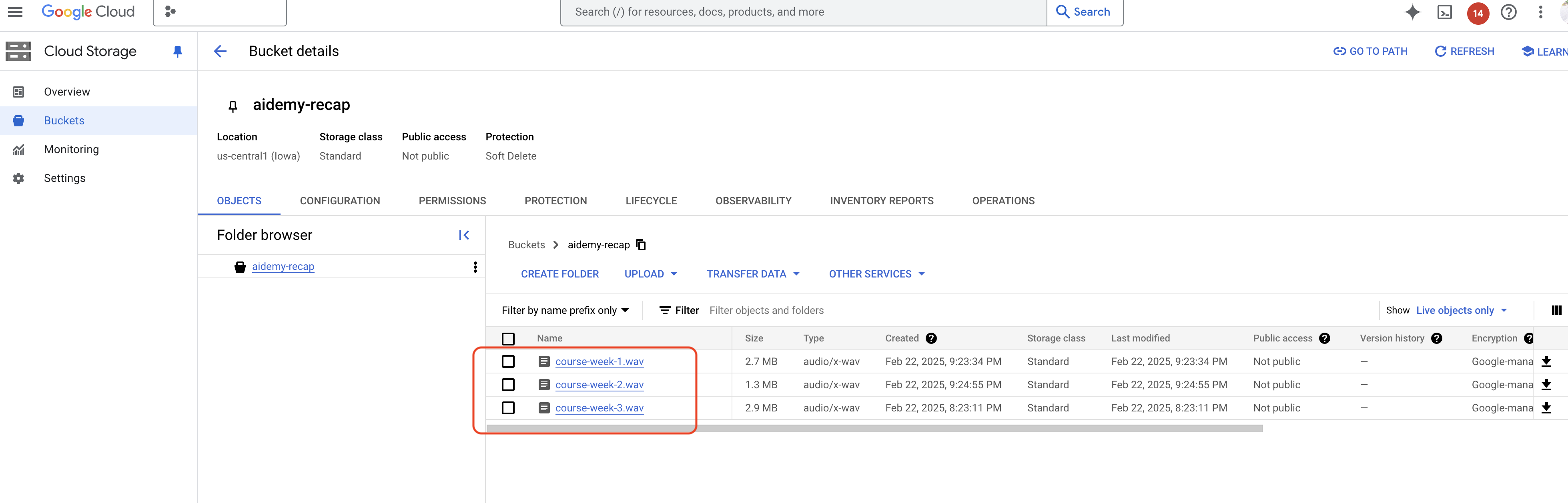
👉您将验证存储分区中的数据,前往 Cloud Storage,选择“存储分区”标签页,然后选择 aidemy-recap-UNIQUE_NAME
👉在运行模拟器的终端中,输入 ctrl+c 以退出。然后关闭第二个终端。然后关闭第二个终端,并运行 deactivate 以退出虚拟环境。
deactivate
部署到 Google Cloud
 👉在本地测试完成后,就可以将课程代理部署到 Google Cloud 了。在终端中,运行以下命令:
cd ~/aidemy-bootstrap/courses
gcloud config set project $(cat ~/project_id.txt)
export PROJECT_ID=$(gcloud config get project)
export COURSE_BUCKET_NAME=$(gcloud storage buckets list --format="value(name)" | grep aidemy-recap)
gcloud functions deploy courses-agent \
  --region=us-central1 \
  --gen2 \
  --source=. \
  --runtime=python312 \
  --trigger-topic=plan \
  --entry-point=process_teaching_plan \
  --set-env-vars=GOOGLE_CLOUD_PROJECT=${PROJECT_ID},COURSE_BUCKET_NAME=$COURSE_BUCKET_NAME
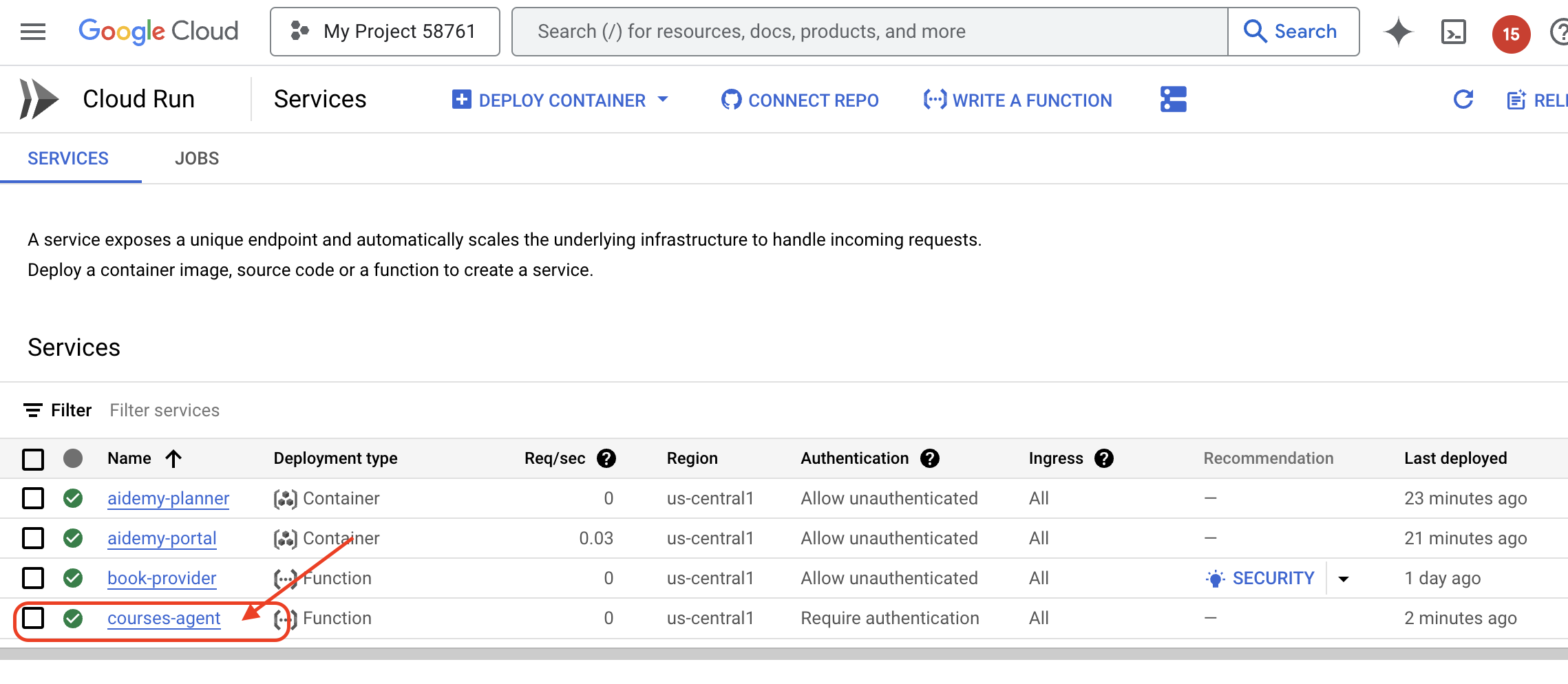
在 Google Cloud 控制台中前往 Cloud Run,验证部署。您应该会看到列出了一个名为 courses-agent 的新服务。
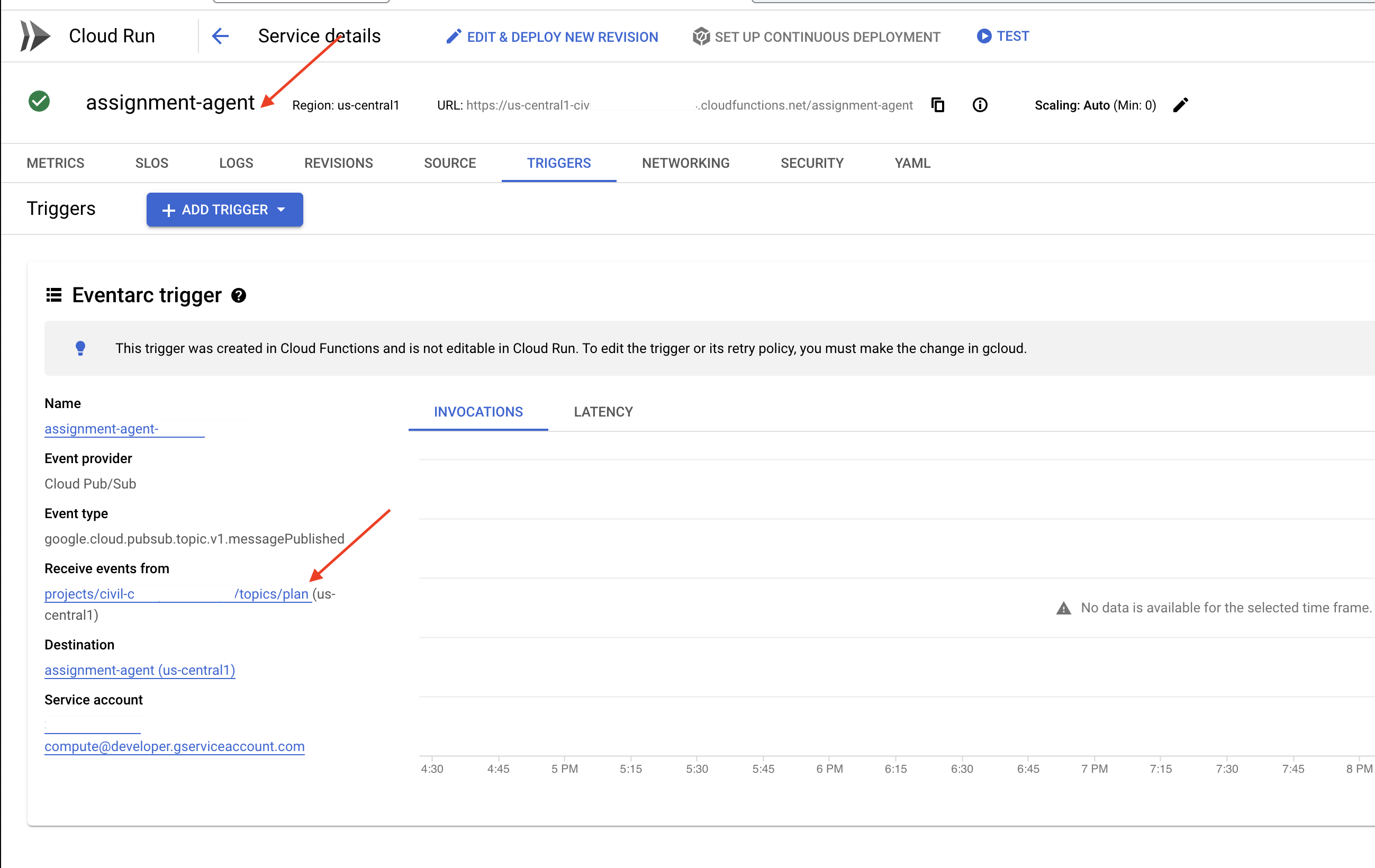
如需检查触发器配置,请点击 courses-agent 服务以查看其详细信息。前往“触发器”标签页。
您应该会看到一个触发器,该触发器配置为监听发布到计划主题的消息。
最后,我们来看看它的端到端运行情况。
👉我们需要配置门户代理,以便它知道在何处查找生成的音频文件。在终端中,运行以下命令:
export COURSE_BUCKET_NAME=$(gcloud storage buckets list --format="value(name)" | grep aidemy-recap)
gcloud config set project $(cat ~/project_id.txt)
export PROJECT_ID=$(gcloud config get project)
gcloud run services update aidemy-portal \
    --region=us-central1 \
    --set-env-vars=GOOGLE_CLOUD_PROJECT=${PROJECT_ID},COURSE_BUCKET_NAME=$COURSE_BUCKET_NAME
👉尝试使用规划工具代理网页生成新的教学计划。启动可能需要几分钟时间,请不要惊慌,这是一项无服务器服务。
如需访问规划器代理,请在终端中运行以下命令来获取其服务网址:
gcloud run services list \
    --platform=managed \
    --region=us-central1 \
    --format='value(URL)' | grep planner
生成新方案后,请等待 2-3 分钟,以便系统生成音频。由于此实验账号存在结算限制,因此这会再花费几分钟时间。
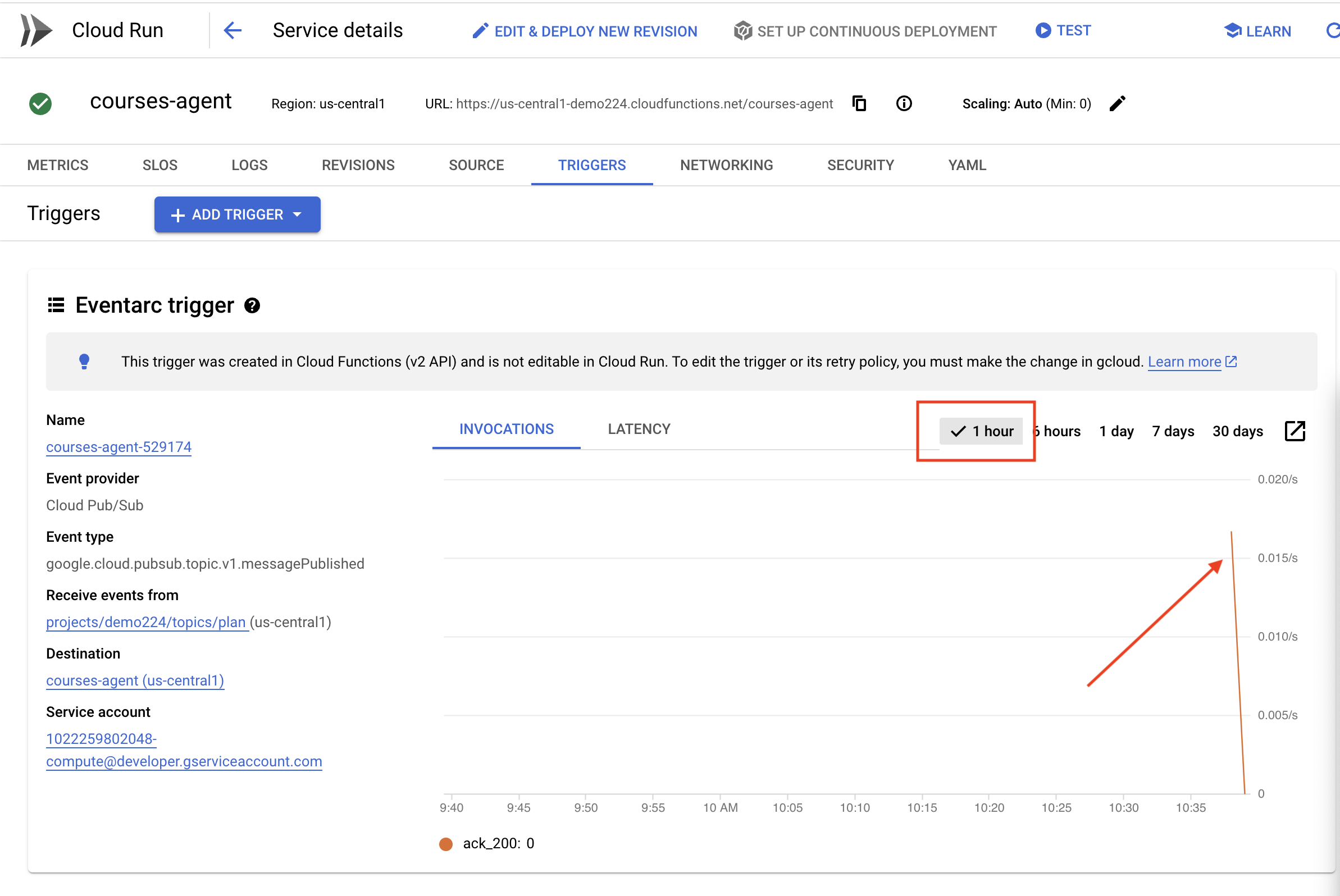
您可以查看函数的“触发器”标签页,监控 courses-agent 函数是否已收到教学计划。定期刷新页面;您最终应该会看到该函数已被调用。如果 2 分钟后仍未调用该函数,您可以尝试重新生成教学计划。不过,请避免连续快速生成多个方案,因为代理会按顺序使用和处理每个生成的方案,这可能会导致积压。
👉访问该门户网站,然后点击“课程”。您应该会看到三张卡片,每张卡片上都显示了音频摘要。如需查找门户代理的网址,请执行以下操作:
gcloud run services list \
    --platform=managed \
    --region=us-central1 \
    --format='value(URL)' | grep portal
点击每门课程的“播放”,确保音频总结与您刚刚生成的教学计划一致!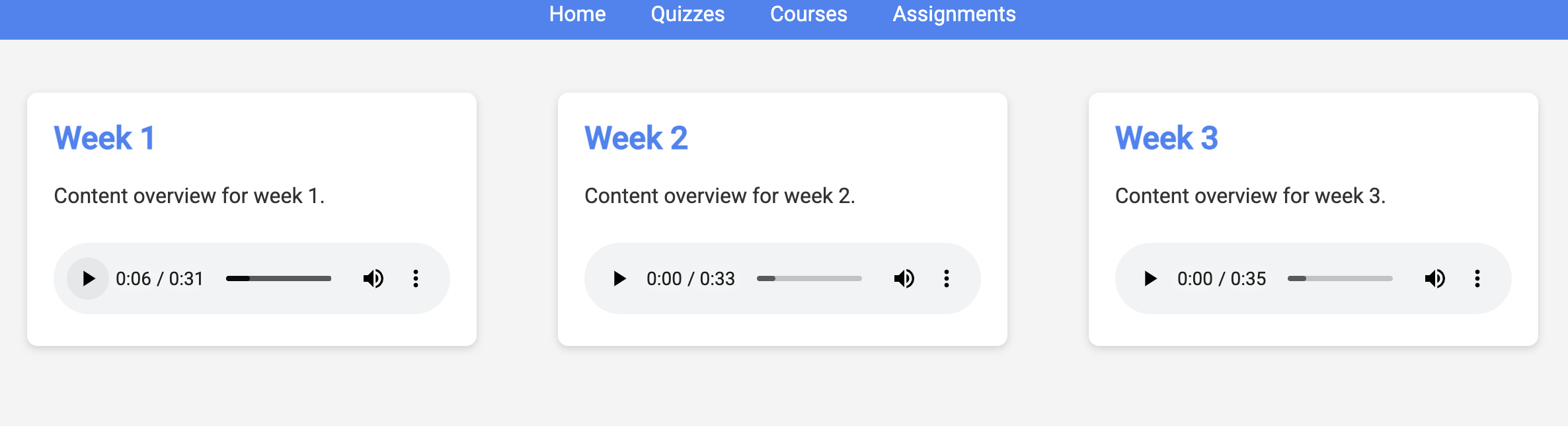
退出虚拟环境。
deactivate
13. 可选:使用 Gemini 和 DeepSeek 进行基于角色的协作
拥有多种视角非常宝贵,尤其是在布置富有吸引力且深思熟虑的作业时。现在,我们将构建一个多智能体系统,该系统利用两个具有不同角色的不同模型来生成作业:一个促进协作,另一个鼓励自学。我们将使用“单次触发”架构,即工作流遵循固定路线。
Gemini 作业生成器
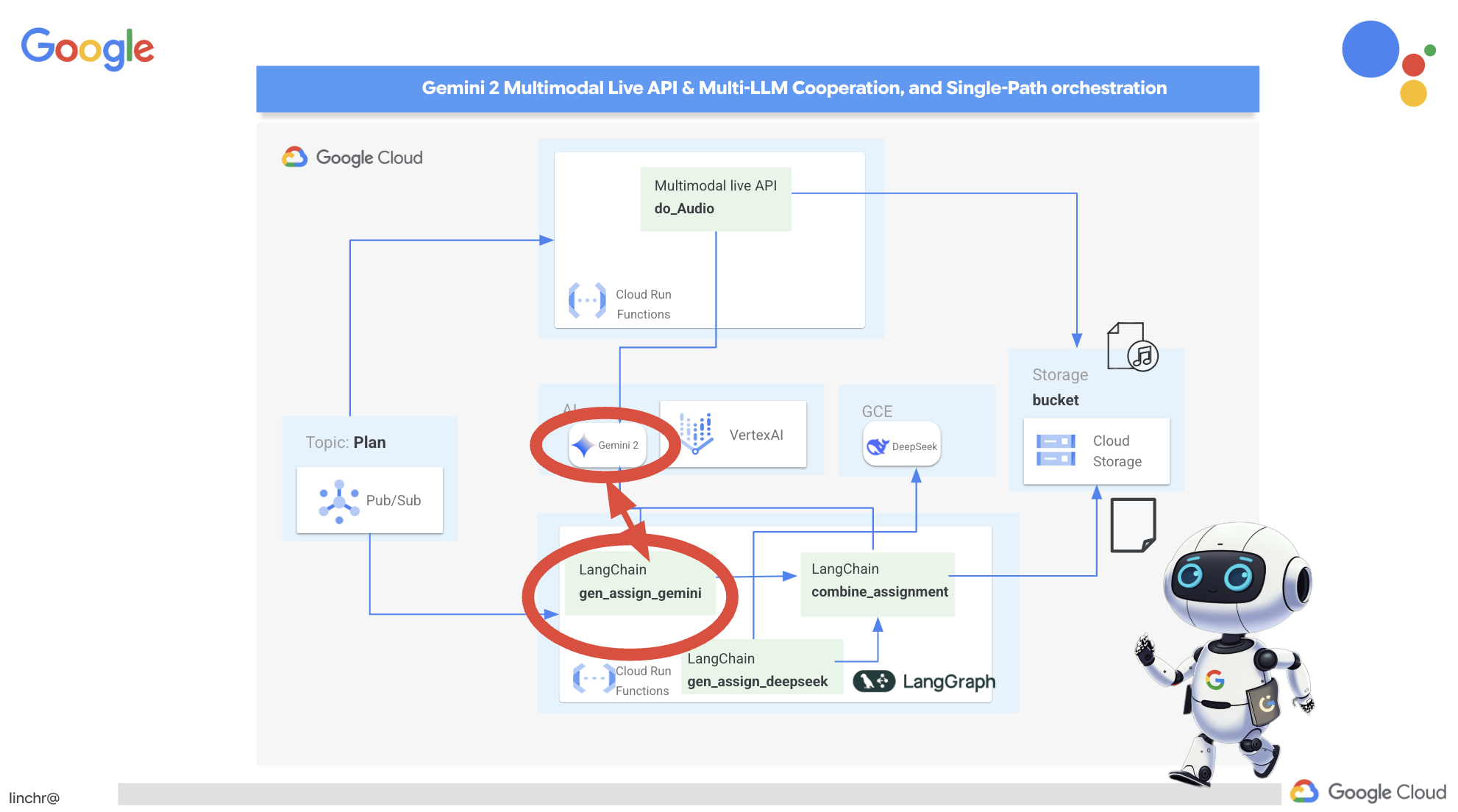 我们先来设置 Gemini 函数,以生成侧重于协作的作业。修改
 assignment 文件夹中的 gemini.py 文件。
👉将以下代码粘贴到 gemini.py 文件的末尾:
def gen_assignment_gemini(state):
    region=get_next_region()
    client = genai.Client(vertexai=True, project=PROJECT_ID, location=region)
    print(f"---------------gen_assignment_gemini")
    response = client.models.generate_content(
        model=MODEL_ID, contents=f"""
        You are an instructor

        Develop engaging and practical assignments for each week, ensuring they align with the teaching plan's objectives and progressively build upon each other.

        For each week, provide the following:

        * **Week [Number]:** A descriptive title for the assignment (e.g., "Data Exploration Project," "Model Building Exercise").
        * **Learning Objectives Assessed:** List the specific learning objectives from the teaching plan that this assignment assesses.
        * **Description:** A detailed description of the task, including any specific requirements or constraints.  Provide examples or scenarios if applicable.
        * **Deliverables:** Specify what students need to submit (e.g., code, report, presentation).
        * **Estimated Time Commitment:**  The approximate time students should dedicate to completing the assignment.
        * **Assessment Criteria:** Briefly outline how the assignment will be graded (e.g., correctness, completeness, clarity, creativity).

        The assignments should be a mix of individual and collaborative work where appropriate.  Consider different learning styles and provide opportunities for students to apply their knowledge creatively.

        Based on this teaching plan: {state["teaching_plan"]}
        """
    )

    print(f"---------------gen_assignment_gemini answer {response.text}")

    state["model_one_assignment"] = response.text

    return state


import unittest

class TestGenAssignmentGemini(unittest.TestCase):
    def test_gen_assignment_gemini(self):
        test_teaching_plan = "Week 1: 2D Shapes and Angles - Day 1: Review of basic 2D shapes (squares, rectangles, triangles, circles). Day 2: Exploring different types of triangles (equilateral, isosceles, scalene, right-angled). Day 3: Exploring quadrilaterals (square, rectangle, parallelogram, rhombus, trapezium). Day 4: Introduction to angles: right angles, acute angles, and obtuse angles. Day 5: Measuring angles using a protractor. Week 2: 3D Shapes and Symmetry - Day 6: Introduction to 3D shapes: cubes, cuboids, spheres, cylinders, cones, and pyramids. Day 7: Describing 3D shapes using faces, edges, and vertices. Day 8: Relating 2D shapes to 3D shapes. Day 9: Identifying lines of symmetry in 2D shapes. Day 10: Completing symmetrical figures. Week 3: Position, Direction, and Problem Solving - Day 11: Describing position using coordinates in the first quadrant. Day 12: Plotting coordinates to draw shapes. Day 13: Understanding translation (sliding a shape). Day 14: Understanding reflection (flipping a shape). Day 15: Problem-solving activities involving perimeter, area, and missing angles."

        initial_state = {"teaching_plan": test_teaching_plan, "model_one_assignment": "", "model_two_assigmodel_one_assignmentnment": "", "final_assignment": ""}

        updated_state = gen_assignment_gemini(initial_state)

        self.assertIn("model_one_assignment", updated_state)
        self.assertIsNotNone(updated_state["model_one_assignment"])
        self.assertIsInstance(updated_state["model_one_assignment"], str)
        self.assertGreater(len(updated_state["model_one_assignment"]), 0)
        print(updated_state["model_one_assignment"])


if __name__ == '__main__':
    unittest.main()
它使用 Gemini 模型生成作业。
我们已准备好测试 Gemini Agent。
👉在终端中运行以下命令以设置环境:
cd ~/aidemy-bootstrap/assignment
gcloud config set project $(cat ~/project_id.txt)
export PROJECT_ID=$(gcloud config get project)
python -m venv env
source env/bin/activate
pip install -r requirements.txt
👉您可以运行以下命令进行测试:
python gemini.py
您应该会在输出中看到包含更多小组作业的布置。最后的断言测试也会输出结果。
Here are some engaging and practical assignments for each week, designed to build progressively upon the teaching plan's objectives:

**Week 1: Exploring the World of 2D Shapes**

* **Learning Objectives Assessed:**
    * Identify and name basic 2D shapes (squares, rectangles, triangles, circles).
    * .....

* **Description:**
    * **Shape Scavenger Hunt:** Students will go on a scavenger hunt in their homes or neighborhoods, taking pictures of objects that represent different 2D shapes. They will then create a presentation or poster showcasing their findings, classifying each shape and labeling its properties (e.g., number of sides, angles, etc.).
    * **Triangle Trivia:** Students will research and create a short quiz or presentation about different types of triangles, focusing on their properties and real-world examples.
    * **Angle Exploration:** Students will use a protractor to measure various angles in their surroundings, such as corners of furniture, windows, or doors. They will record their measurements and create a chart categorizing the angles as right, acute, or obtuse.
....

**Week 2: Delving into the World of 3D Shapes and Symmetry**

* **Learning Objectives Assessed:**
    * Identify and name basic 3D shapes.
    * ....

* **Description:**
    * **3D Shape Construction:** Students will work in groups to build 3D shapes using construction paper, cardboard, or other materials. They will then create a presentation showcasing their creations, describing the number of faces, edges, and vertices for each shape.
    * **Symmetry Exploration:** Students will investigate the concept of symmetry by creating a visual representation of various symmetrical objects (e.g., butterflies, leaves, snowflakes) using drawing or digital tools. They will identify the lines of symmetry and explain their findings.
    * **Symmetry Puzzles:** Students will be given a half-image of a symmetrical figure and will be asked to complete the other half, demonstrating their understanding of symmetry. This can be done through drawing, cut-out activities, or digital tools.

**Week 3: Navigating Position, Direction, and Problem Solving**

* **Learning Objectives Assessed:**
    * Describe position using coordinates in the first quadrant.
    * ....

* **Description:**
    * **Coordinate Maze:** Students will create a maze using coordinates on a grid paper. They will then provide directions for navigating the maze using a combination of coordinate movements and translation/reflection instructions.
    * **Shape Transformations:** Students will draw shapes on a grid paper and then apply transformations such as translation and reflection, recording the new coordinates of the transformed shapes.
    * **Geometry Challenge:** Students will solve real-world problems involving perimeter, area, and angles. For example, they could be asked to calculate the perimeter of a room, the area of a garden, or the missing angle in a triangle.
....
停止,并使用 ctl+c 清理测试代码。从 gemini.py 中移除以下代码
import unittest

class TestGenAssignmentGemini(unittest.TestCase):
    def test_gen_assignment_gemini(self):
        test_teaching_plan = "Week 1: 2D Shapes and Angles - Day 1: Review of basic 2D shapes (squares, rectangles, triangles, circles). Day 2: Exploring different types of triangles (equilateral, isosceles, scalene, right-angled). Day 3: Exploring quadrilaterals (square, rectangle, parallelogram, rhombus, trapezium). Day 4: Introduction to angles: right angles, acute angles, and obtuse angles. Day 5: Measuring angles using a protractor. Week 2: 3D Shapes and Symmetry - Day 6: Introduction to 3D shapes: cubes, cuboids, spheres, cylinders, cones, and pyramids. Day 7: Describing 3D shapes using faces, edges, and vertices. Day 8: Relating 2D shapes to 3D shapes. Day 9: Identifying lines of symmetry in 2D shapes. Day 10: Completing symmetrical figures. Week 3: Position, Direction, and Problem Solving - Day 11: Describing position using coordinates in the first quadrant. Day 12: Plotting coordinates to draw shapes. Day 13: Understanding translation (sliding a shape). Day 14: Understanding reflection (flipping a shape). Day 15: Problem-solving activities involving perimeter, area, and missing angles."

        initial_state = {"teaching_plan": test_teaching_plan, "model_one_assignment": "", "model_two_assigmodel_one_assignmentnment": "", "final_assignment": ""}

        updated_state = gen_assignment_gemini(initial_state)

        self.assertIn("model_one_assignment", updated_state)
        self.assertIsNotNone(updated_state["model_one_assignment"])
        self.assertIsInstance(updated_state["model_one_assignment"], str)
        self.assertGreater(len(updated_state["model_one_assignment"]), 0)
        print(updated_state["model_one_assignment"])


if __name__ == '__main__':
    unittest.main()
配置 DeepSeek 作业生成器
虽然基于云的 AI 平台很方便,但自行托管 LLM 对于保护数据隐私权和确保数据主权至关重要。我们将在 Cloud Compute Engine 实例上部署最小的 DeepSeek 模型(15 亿个参数)。还有其他方法,例如将其托管在 Google 的 Vertex AI 平台上或托管在您的 GKE 实例上,但由于这只是一个关于 AI 代理的研讨会,我不想让您在这里待太久,因此我们只使用最简单的方法。不过,如果您感兴趣并想深入了解其他选项,请查看作业文件夹下的 deepseek-vertexai.py 文件,其中提供了有关如何与部署在 VertexAI 上的模型互动的示例代码。
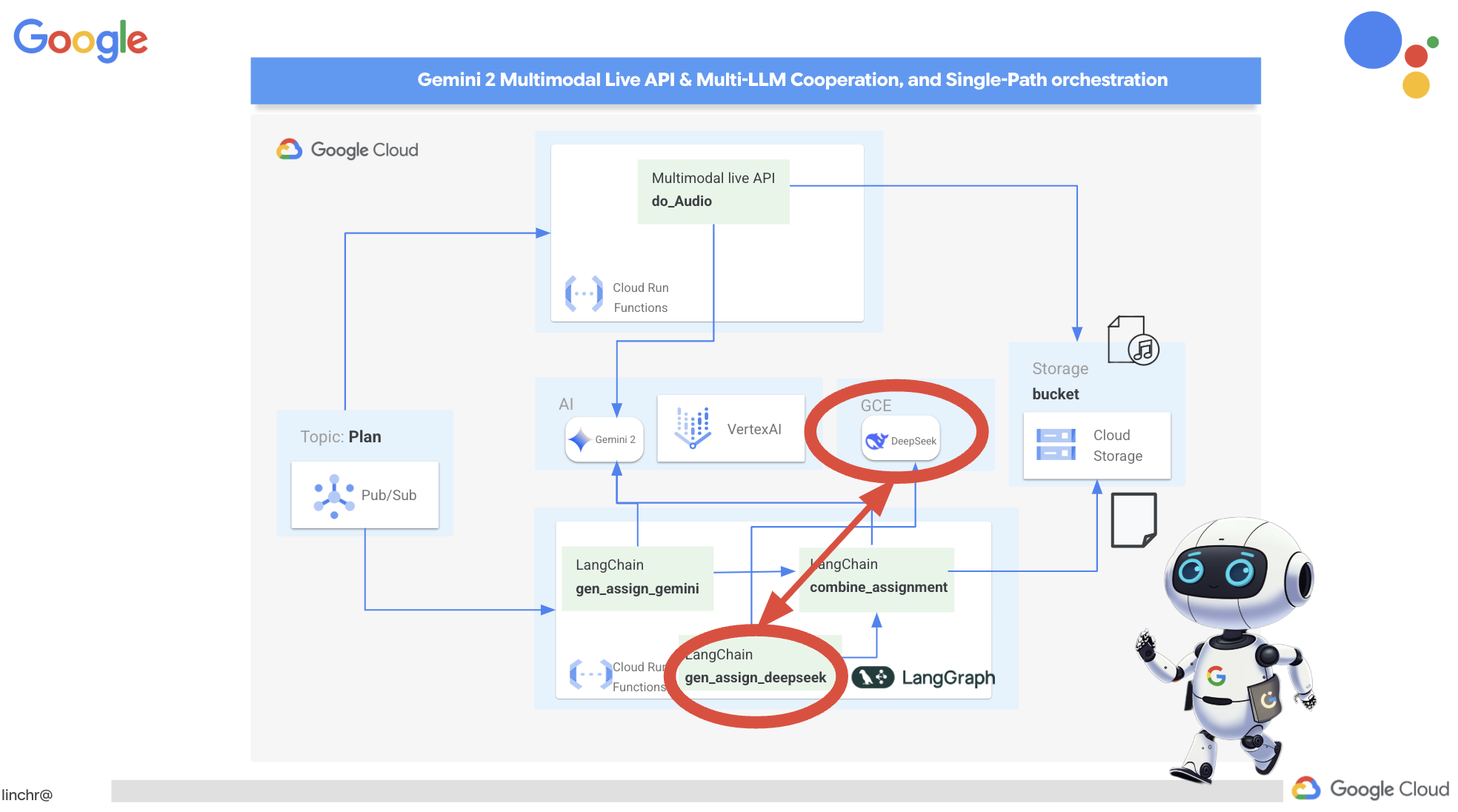
👉在终端中运行以下命令,以创建自托管 LLM 平台 Ollama:
cd ~/aidemy-bootstrap/assignment
gcloud config set project $(cat ~/project_id.txt)
gcloud compute instances create ollama-instance \
    --image-family=ubuntu-2204-lts \
    --image-project=ubuntu-os-cloud \
    --machine-type=e2-standard-4 \
    --zone=us-central1-a \
    --metadata-from-file startup-script=startup.sh \
    --boot-disk-size=50GB \
    --tags=ollama \
    --scopes=https://www.googleapis.com/auth/cloud-platform
如需验证 Compute Engine 实例是否正在运行,请执行以下操作:
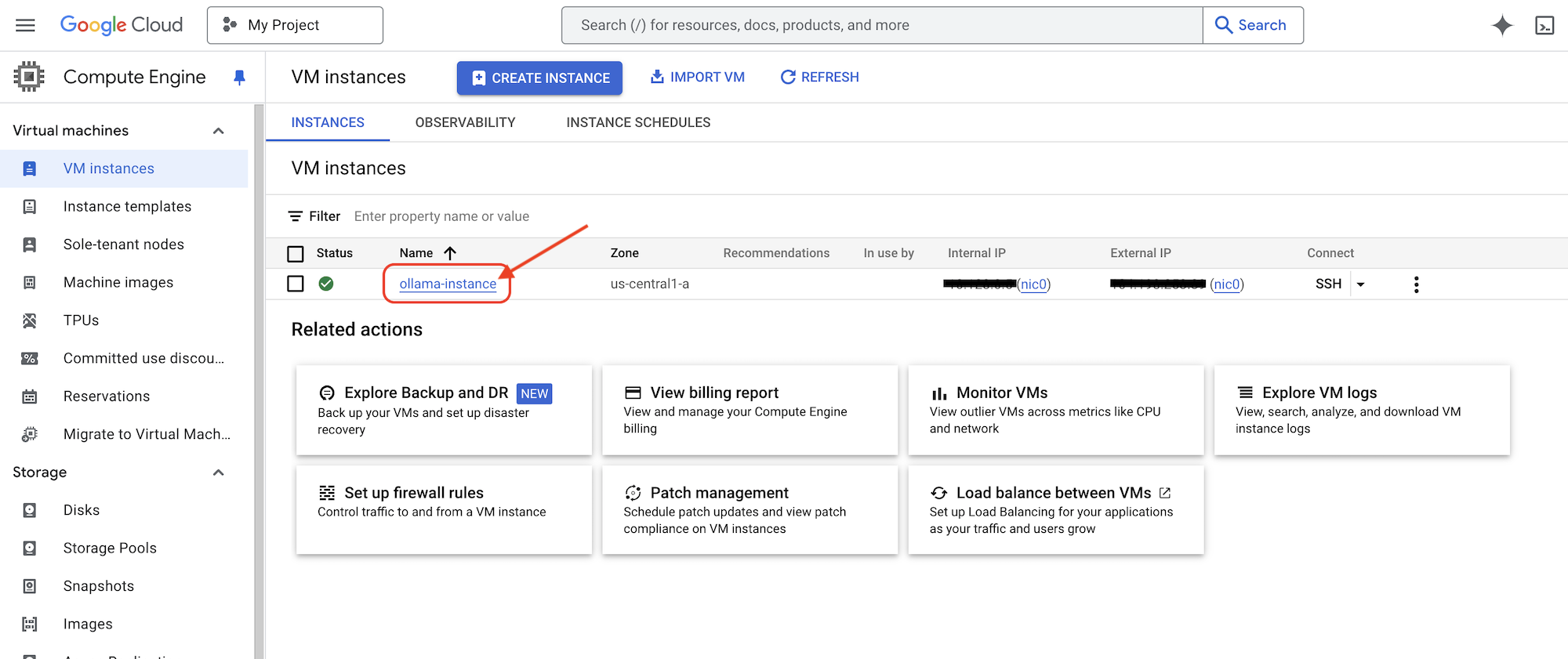
在 Google Cloud 控制台中,依次前往 Compute Engine >“虚拟机实例”。您应该会看到 ollama-instance 列出,并带有绿色对勾标记,表明它正在运行。如果您看不到该选项,请确保地区为 us-central1。如果不是,您可能需要搜索该应用。
👉我们将安装最小的 DeepSeek 模型并对其进行测试。返回 Cloud Shell 编辑器,在新终端中运行以下命令,以通过 SSH 连接到 GCE 实例。
gcloud compute ssh ollama-instance --zone=us-central1-a
建立 SSH 连接后,系统可能会提示您执行以下操作:
“Do you want to continue (Y/n)?”
只需输入 Y(不区分大小写),然后按 Enter 键即可继续。
接下来,系统可能会要求您为 SSH 密钥创建口令。如果您不想使用口令,只需按两次 Enter 键即可接受默认设置(不使用口令)。
👉现在,您已进入虚拟机,请拉取最小的 DeepSeek R1 模型,并测试它是否正常运行。
ollama pull deepseek-r1:1.5b
ollama run deepseek-r1:1.5b "who are you?"
👉退出 GCE 实例,在 SSH 终端中输入以下内容:
exit
👉接下来,设置网络政策,以便其他服务可以访问 LLM。如果您想在生产环境中执行此操作,请限制对实例的访问权限,或者为服务实现安全登录或限制 IP 访问权限。运行以下命令:
gcloud compute firewall-rules create allow-ollama-11434 \
    --allow=tcp:11434 \
    --target-tags=ollama \
    --description="Allow access to Ollama on port 11434"
👉如需验证防火墙政策是否正常运行,请尝试运行以下命令:
export OLLAMA_HOST=http://$(gcloud compute instances describe ollama-instance --zone=us-central1-a --format='value(networkInterfaces[0].accessConfigs[0].natIP)'):11434
curl -X POST "${OLLAMA_HOST}/api/generate" \
     -H "Content-Type: application/json" \
     -d '{
          "prompt": "Hello, what are you?",
          "model": "deepseek-r1:1.5b",
          "stream": false
        }'
接下来,我们将处理作业代理中的 Deepseek 函数,以生成侧重于个人工作的作业。
👉修改 assignment 文件夹下的 deepseek.py,在末尾添加以下代码段:
def gen_assignment_deepseek(state):
    print(f"---------------gen_assignment_deepseek")

    template = """
        You are an instructor who favor student to focus on individual work.

        Develop engaging and practical assignments for each week, ensuring they align with the teaching plan's objectives and progressively build upon each other.

        For each week, provide the following:

        * **Week [Number]:** A descriptive title for the assignment (e.g., "Data Exploration Project," "Model Building Exercise").
        * **Learning Objectives Assessed:** List the specific learning objectives from the teaching plan that this assignment assesses.
        * **Description:** A detailed description of the task, including any specific requirements or constraints.  Provide examples or scenarios if applicable.
        * **Deliverables:** Specify what students need to submit (e.g., code, report, presentation).
        * **Estimated Time Commitment:**  The approximate time students should dedicate to completing the assignment.
        * **Assessment Criteria:** Briefly outline how the assignment will be graded (e.g., correctness, completeness, clarity, creativity).

        The assignments should be a mix of individual and collaborative work where appropriate.  Consider different learning styles and provide opportunities for students to apply their knowledge creatively.

        Based on this teaching plan: {teaching_plan}
        """


    prompt = ChatPromptTemplate.from_template(template)

    model = OllamaLLM(model="deepseek-r1:1.5b",
                   base_url=OLLAMA_HOST)

    chain = prompt | model


    response = chain.invoke({"teaching_plan":state["teaching_plan"]})
    state["model_two_assignment"] = response

    return state

import unittest

class TestGenAssignmentDeepseek(unittest.TestCase):
    def test_gen_assignment_deepseek(self):
        test_teaching_plan = "Week 1: 2D Shapes and Angles - Day 1: Review of basic 2D shapes (squares, rectangles, triangles, circles). Day 2: Exploring different types of triangles (equilateral, isosceles, scalene, right-angled). Day 3: Exploring quadrilaterals (square, rectangle, parallelogram, rhombus, trapezium). Day 4: Introduction to angles: right angles, acute angles, and obtuse angles. Day 5: Measuring angles using a protractor. Week 2: 3D Shapes and Symmetry - Day 6: Introduction to 3D shapes: cubes, cuboids, spheres, cylinders, cones, and pyramids. Day 7: Describing 3D shapes using faces, edges, and vertices. Day 8: Relating 2D shapes to 3D shapes. Day 9: Identifying lines of symmetry in 2D shapes. Day 10: Completing symmetrical figures. Week 3: Position, Direction, and Problem Solving - Day 11: Describing position using coordinates in the first quadrant. Day 12: Plotting coordinates to draw shapes. Day 13: Understanding translation (sliding a shape). Day 14: Understanding reflection (flipping a shape). Day 15: Problem-solving activities involving perimeter, area, and missing angles."

        initial_state = {"teaching_plan": test_teaching_plan, "model_one_assignment": "", "model_two_assignment": "", "final_assignment": ""}

        updated_state = gen_assignment_deepseek(initial_state)

        self.assertIn("model_two_assignment", updated_state)
        self.assertIsNotNone(updated_state["model_two_assignment"])
        self.assertIsInstance(updated_state["model_two_assignment"], str)
        self.assertGreater(len(updated_state["model_two_assignment"]), 0)
        print(updated_state["model_two_assignment"])


if __name__ == '__main__':
    unittest.main()
👉我们来运行以下命令进行测试:
cd ~/aidemy-bootstrap/assignment
source env/bin/activate
gcloud config set project $(cat ~/project_id.txt)
export PROJECT_ID=$(gcloud config get project)
export OLLAMA_HOST=http://$(gcloud compute instances describe ollama-instance --zone=us-central1-a --format='value(networkInterfaces[0].accessConfigs[0].natIP)'):11434
python deepseek.py
您应该会看到一个包含更多自学作业的布置。
**Assignment Plan for Each Week**

---

### **Week 1: 2D Shapes and Angles**
- **Week Title:** "Exploring 2D Shapes"
Assign students to research and present on various 2D shapes. Include a project where they create models using straws and tape for triangles, draw quadrilaterals with specific measurements, and compare their properties.

### **Week 2: 3D Shapes and Symmetry**
Assign students to create models or nets for cubes and cuboids. They will also predict how folding these nets form the 3D shapes. Include a project where they identify symmetrical properties using mirrors or folding techniques.

### **Week 3: Position, Direction, and Problem Solving**

Assign students to use mirrors or folding techniques for reflections. Include activities where they measure angles, use a protractor, solve problems involving perimeter/area, and create symmetrical designs.
....
👉停止 ctl+c,并清理测试代码。从 deepseek.py 中移除以下代码
import unittest

class TestGenAssignmentDeepseek(unittest.TestCase):
    def test_gen_assignment_deepseek(self):
        test_teaching_plan = "Week 1: 2D Shapes and Angles - Day 1: Review of basic 2D shapes (squares, rectangles, triangles, circles). Day 2: Exploring different types of triangles (equilateral, isosceles, scalene, right-angled). Day 3: Exploring quadrilaterals (square, rectangle, parallelogram, rhombus, trapezium). Day 4: Introduction to angles: right angles, acute angles, and obtuse angles. Day 5: Measuring angles using a protractor. Week 2: 3D Shapes and Symmetry - Day 6: Introduction to 3D shapes: cubes, cuboids, spheres, cylinders, cones, and pyramids. Day 7: Describing 3D shapes using faces, edges, and vertices. Day 8: Relating 2D shapes to 3D shapes. Day 9: Identifying lines of symmetry in 2D shapes. Day 10: Completing symmetrical figures. Week 3: Position, Direction, and Problem Solving - Day 11: Describing position using coordinates in the first quadrant. Day 12: Plotting coordinates to draw shapes. Day 13: Understanding translation (sliding a shape). Day 14: Understanding reflection (flipping a shape). Day 15: Problem-solving activities involving perimeter, area, and missing angles."

        initial_state = {"teaching_plan": test_teaching_plan, "model_one_assignment": "", "model_two_assignment": "", "final_assignment": ""}

        updated_state = gen_assignment_deepseek(initial_state)

        self.assertIn("model_two_assignment", updated_state)
        self.assertIsNotNone(updated_state["model_two_assignment"])
        self.assertIsInstance(updated_state["model_two_assignment"], str)
        self.assertGreater(len(updated_state["model_two_assignment"]), 0)
        print(updated_state["model_two_assignment"])


if __name__ == '__main__':
    unittest.main()
现在,我们将使用同一 Gemini 模型将这两个作业合并为一个新作业。修改 assignment 文件夹中的 gemini.py 文件。
👉将以下代码粘贴到 gemini.py 文件的末尾:
def combine_assignments(state):
    print(f"---------------combine_assignments ")
    region=get_next_region()
    client = genai.Client(vertexai=True, project=PROJECT_ID, location=region)
    response = client.models.generate_content(
        model=MODEL_ID, contents=f"""
        Look at all the proposed assignment so far {state["model_one_assignment"]} and {state["model_two_assignment"]}, combine them and come up with a final assignment for student.
        """
    )

    state["final_assignment"] = response.text

    return state
为了结合这两个模型的优势,我们将使用 LangGraph 来编排定义的工作流。此工作流包含三个步骤:首先,Gemini 模型生成侧重于协作的作业;其次,DeepSeek 模型生成侧重于个人作业的作业;最后,Gemini 将这两个作业合成为一个全面的作业。由于我们预先定义了步骤序列,而没有 LLM 决策,因此这构成了单路径、用户定义的编排。
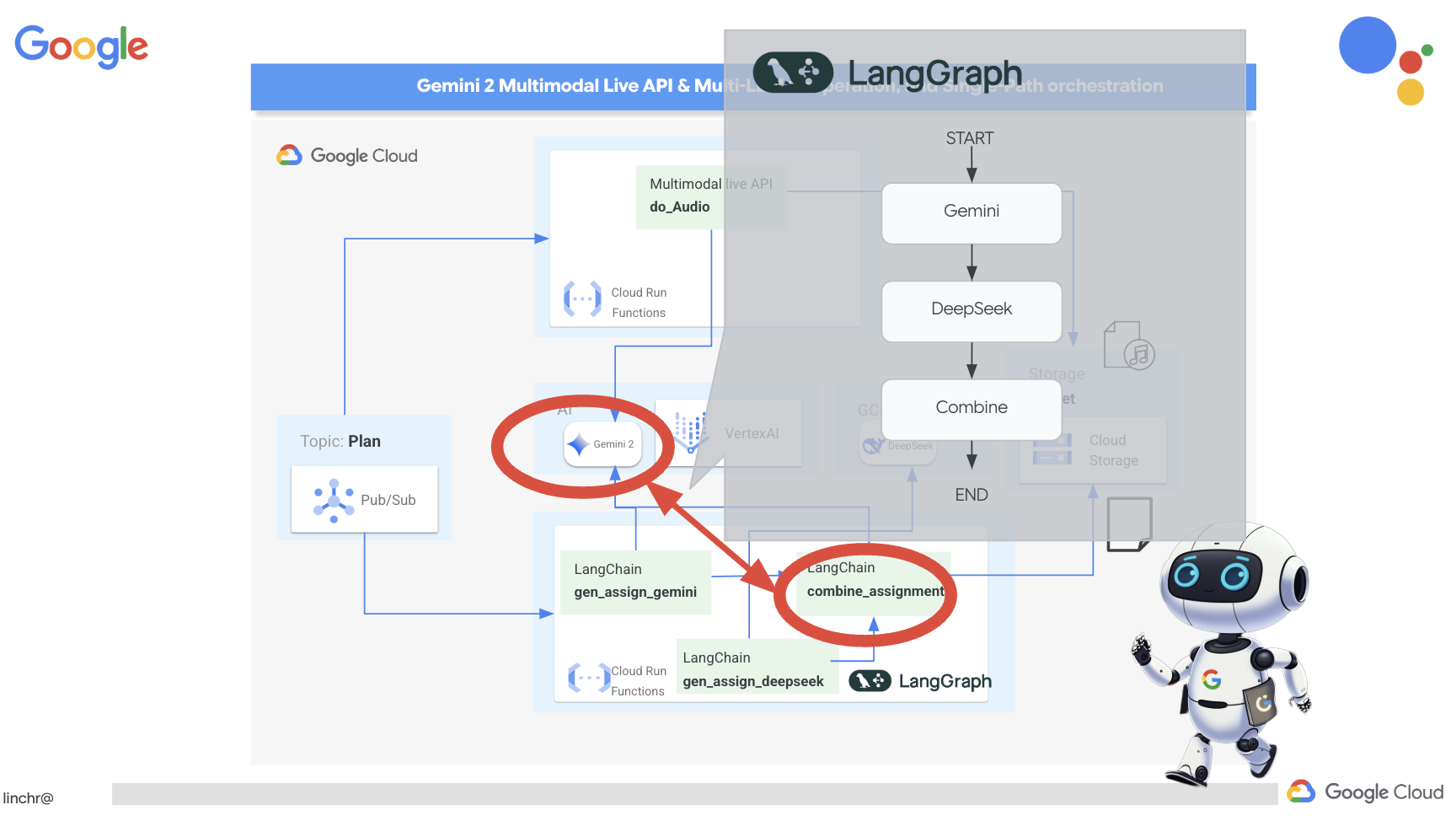
👉将以下代码粘贴到 assignment 文件夹下的 main.py 文件末尾:
def create_assignment(teaching_plan: str):
    print(f"create_assignment---->{teaching_plan}")
    builder = StateGraph(State)
    builder.add_node("gen_assignment_gemini", gen_assignment_gemini)
    builder.add_node("gen_assignment_deepseek", gen_assignment_deepseek)
    builder.add_node("combine_assignments", combine_assignments)

    builder.add_edge(START, "gen_assignment_gemini")
    builder.add_edge("gen_assignment_gemini", "gen_assignment_deepseek")
    builder.add_edge("gen_assignment_deepseek", "combine_assignments")
    builder.add_edge("combine_assignments", END)

    graph = builder.compile()
    state = graph.invoke({"teaching_plan": teaching_plan})

    return state["final_assignment"]


import unittest

class TestCreateAssignment(unittest.TestCase):
    def test_create_assignment(self):
        test_teaching_plan = "Week 1: 2D Shapes and Angles - Day 1: Review of basic 2D shapes (squares, rectangles, triangles, circles). Day 2: Exploring different types of triangles (equilateral, isosceles, scalene, right-angled). Day 3: Exploring quadrilaterals (square, rectangle, parallelogram, rhombus, trapezium). Day 4: Introduction to angles: right angles, acute angles, and obtuse angles. Day 5: Measuring angles using a protractor. Week 2: 3D Shapes and Symmetry - Day 6: Introduction to 3D shapes: cubes, cuboids, spheres, cylinders, cones, and pyramids. Day 7: Describing 3D shapes using faces, edges, and vertices. Day 8: Relating 2D shapes to 3D shapes. Day 9: Identifying lines of symmetry in 2D shapes. Day 10: Completing symmetrical figures. Week 3: Position, Direction, and Problem Solving - Day 11: Describing position using coordinates in the first quadrant. Day 12: Plotting coordinates to draw shapes. Day 13: Understanding translation (sliding a shape). Day 14: Understanding reflection (flipping a shape). Day 15: Problem-solving activities involving perimeter, area, and missing angles."
        initial_state = {"teaching_plan": test_teaching_plan, "model_one_assignment": "", "model_two_assignment": "", "final_assignment": ""}
        updated_state = create_assignment(initial_state)

        print(updated_state)


if __name__ == '__main__':
    unittest.main()
👉如需初步测试 create_assignment 函数并确认将 Gemini 和 DeepSeek 相结合的工作流是否正常运行,请运行以下命令:
cd ~/aidemy-bootstrap/assignment
source env/bin/activate
pip install -r requirements.txt
python main.py
您应该会看到一个将这两种模式结合起来的模式,既能满足学生个人学习需求,也能满足学生群组作业需求。
**Tasks:**

1. **Clue Collection:** Gather all the clues left by the thieves. These clues will include:
    * Descriptions of shapes and their properties (angles, sides, etc.)
    * Coordinate grids with hidden messages
    * Geometric puzzles requiring transformation (translation, reflection, rotation)
    * Challenges involving area, perimeter, and angle calculations

2. **Clue Analysis:** Decipher each clue using your geometric knowledge. This will involve:
    * Identifying the shape and its properties
    * Plotting coordinates and interpreting patterns on the grid
    * Solving geometric puzzles by applying transformations
    * Calculating area, perimeter, and missing angles

3. **Case Report:** Create a comprehensive case report outlining your findings. This report should include:
    * A detailed explanation of each clue and its solution
    * Sketches and diagrams to support your explanations
    * A step-by-step account of how you followed the clues to locate the artifact
    * A final conclusion about the thieves and their motives
👉停止 ctl+c,并清理测试代码。从 main.py 中移除以下代码
import unittest

class TestCreateAssignment(unittest.TestCase):
    def test_create_assignment(self):
        test_teaching_plan = "Week 1: 2D Shapes and Angles - Day 1: Review of basic 2D shapes (squares, rectangles, triangles, circles). Day 2: Exploring different types of triangles (equilateral, isosceles, scalene, right-angled). Day 3: Exploring quadrilaterals (square, rectangle, parallelogram, rhombus, trapezium). Day 4: Introduction to angles: right angles, acute angles, and obtuse angles. Day 5: Measuring angles using a protractor. Week 2: 3D Shapes and Symmetry - Day 6: Introduction to 3D shapes: cubes, cuboids, spheres, cylinders, cones, and pyramids. Day 7: Describing 3D shapes using faces, edges, and vertices. Day 8: Relating 2D shapes to 3D shapes. Day 9: Identifying lines of symmetry in 2D shapes. Day 10: Completing symmetrical figures. Week 3: Position, Direction, and Problem Solving - Day 11: Describing position using coordinates in the first quadrant. Day 12: Plotting coordinates to draw shapes. Day 13: Understanding translation (sliding a shape). Day 14: Understanding reflection (flipping a shape). Day 15: Problem-solving activities involving perimeter, area, and missing angles."
        initial_state = {"teaching_plan": test_teaching_plan, "model_one_assignment": "", "model_two_assignment": "", "final_assignment": ""}
        updated_state = create_assignment(initial_state)

        print(updated_state)


if __name__ == '__main__':
    unittest.main()
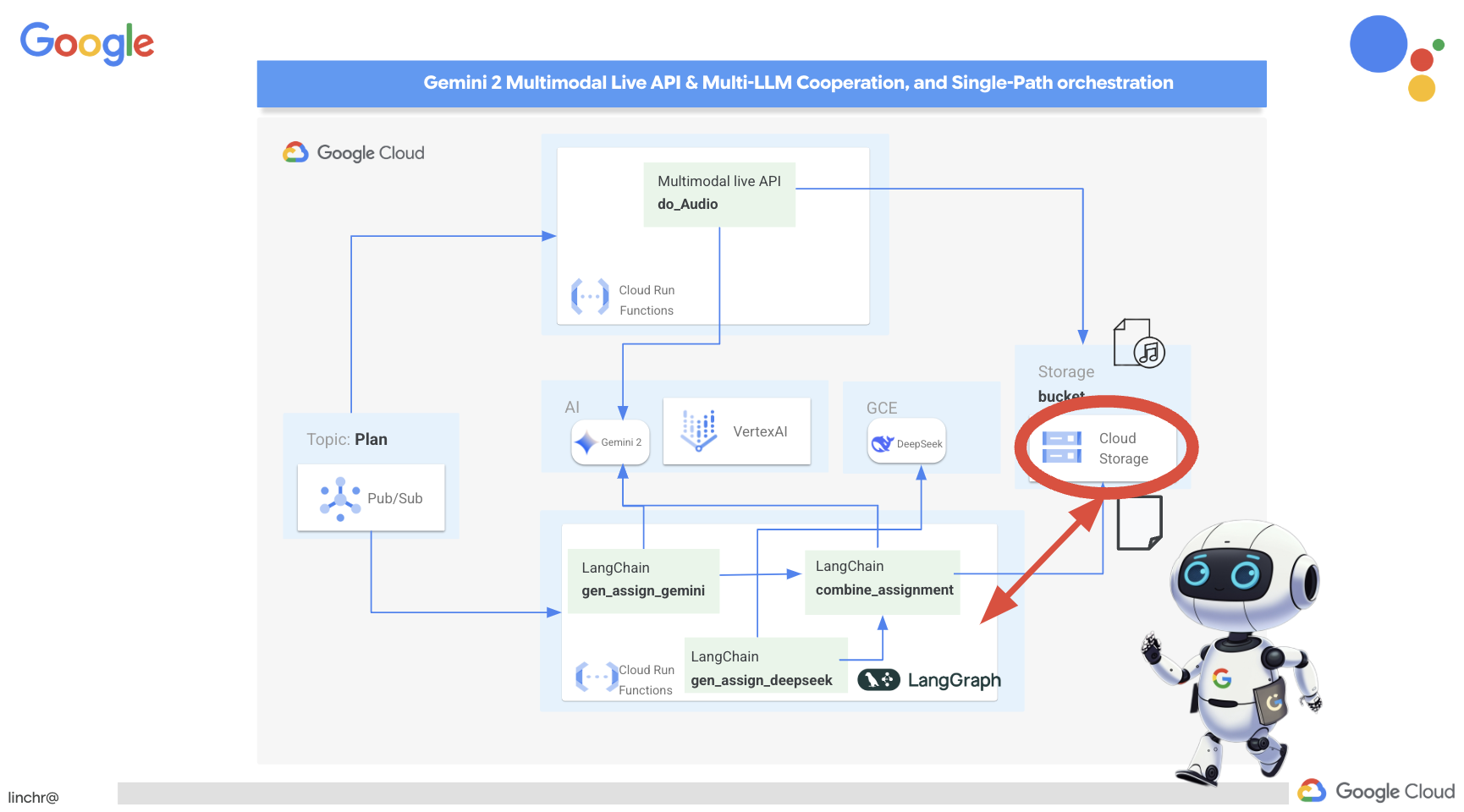
为了使作业生成过程自动化并能响应新的教学计划,我们将利用现有的事件驱动型架构。以下代码定义了一个 Cloud Run 函数 (generate_assignment),每当有新的教学计划发布到 Pub/Sub 主题“plan”时,该函数就会被触发。
👉将以下代码添加到 assignment 文件夹中 main.py 的末尾:
@functions_framework.cloud_event
def generate_assignment(cloud_event):
    print(f"CloudEvent received: {cloud_event.data}")

    try:
        if isinstance(cloud_event.data.get('message', {}).get('data'), str):
            data = json.loads(base64.b64decode(cloud_event.data['message']['data']).decode('utf-8'))
            teaching_plan = data.get('teaching_plan')
        elif 'teaching_plan' in cloud_event.data:
            teaching_plan = cloud_event.data["teaching_plan"]
        else:
            raise KeyError("teaching_plan not found")

        assignment = create_assignment(teaching_plan)

        print(f"Assignment---->{assignment}")

        #Store the return assignment into bucket as a text file
        storage_client = storage.Client()
        bucket = storage_client.bucket(ASSIGNMENT_BUCKET)
        file_name = f"assignment-{random.randint(1, 1000)}.txt"
        blob = bucket.blob(file_name)
        blob.upload_from_string(assignment)

        return f"Assignment generated and stored in {ASSIGNMENT_BUCKET}/{file_name}", 200

    except (json.JSONDecodeError, AttributeError, KeyError) as e:
        print(f"Error decoding CloudEvent data: {e} - Data: {cloud_event.data}")
        return "Error processing event", 500

    except Exception as e:
        print(f"Error generate assignment: {e}")
        return "Error generate assignment", 500
在本地测试
在部署到 Google Cloud 之前,最好先在本地测试 Cloud Run 函数。这样一来,您就可以更快地进行迭代并更轻松地进行调试。
首先,创建一个 Cloud Storage 存储分区来存储生成的作业文件,并向服务账号授予对该存储分区的访问权限。在终端中运行以下命令:
👉重要提示:请务必定义一个以“aidemy-assignment-”开头的唯一 ASSIGNMENT_BUCKET 名称。此唯一名称对于避免在创建 Cloud Storage 存储分区时发生命名冲突至关重要。(将 <YOUR_NAME> 替换为任意随机字词)
export ASSIGNMENT_BUCKET=aidemy-assignment-<YOUR_NAME> #Name must be unqiue
👉然后运行:
gcloud config set project $(cat ~/project_id.txt)
export PROJECT_ID=$(gcloud config get project)
export SERVICE_ACCOUNT_NAME=$(gcloud compute project-info describe --format="value(defaultServiceAccount)")
gsutil mb -p $PROJECT_ID -l us-central1 gs://$ASSIGNMENT_BUCKET

gcloud storage buckets add-iam-policy-binding gs://$ASSIGNMENT_BUCKET \
    --member "serviceAccount:$SERVICE_ACCOUNT_NAME" \
    --role "roles/storage.objectViewer"

gcloud storage buckets add-iam-policy-binding gs://$ASSIGNMENT_BUCKET \
    --member "serviceAccount:$SERVICE_ACCOUNT_NAME" \
    --role "roles/storage.objectCreator"
👉现在,启动 Cloud Run 函数模拟器:
cd ~/aidemy-bootstrap/assignment
functions-framework \
    --target generate_assignment \
    --signature-type=cloudevent \
    --source main.py
👉当模拟器在一个终端中运行时,在 Cloud Shell 中打开第二个终端。在此第二个终端中,向模拟器发送测试 CloudEvent,以模拟发布新的教学计划:
  curl -X POST \
  http://localhost:8080/ \
  -H "Content-Type: application/json" \
  -H "ce-id: event-id-01" \
  -H "ce-source: planner-agent" \
  -H "ce-specversion: 1.0" \
  -H "ce-type: google.cloud.pubsub.topic.v1.messagePublished" \
  -d '{
    "message": {
      "data": "eyJ0ZWFjaGluZ19wbGFuIjogIldlZWsgMTogMkQgU2hhcGVzIGFuZCBBbmdsZXMgLSBEYXkgMTogUmV2aWV3IG9mIGJhc2ljIDJEIHNoYXBlcyAoc3F1YXJlcywgcmVjdGFuZ2xlcywgdHJpYW5nbGVzLCBjaXJjbGVzKS4gRGF5IDI6IEV4cGxvcmluZyBkaWZmZXJlbnQgdHlwZXMgb2YgdHJpYW5nbGVzIChlcXVpbGF0ZXJhbCwgaXNvc2NlbGVzLCBzY2FsZW5lLCByaWdodC1hbmdsZWQpLiBEYXkgMzogRXhwbG9yaW5nIHF1YWRyaWxhdGVyYWxzIChzcXVhcmUsIHJlY3RhbmdsZSwgcGFyYWxsZWxvZ3JhbSwgcmhvbWJ1cywgdHJhcGV6aXVtKS4gRGF5IDQ6IEludHJvZHVjdGlvbiB0byBhbmdsZXM6IHJpZ2h0IGFuZ2xlcywgYWN1dGUgYW5nbGVzLCBhbmQgb2J0dXNlIGFuZ2xlcy4gRGF5IDU6IE1lYXN1cmluZyBhbmdsZXMgdXNpbmcgYSBwcm90cmFjdG9yLiBXZWVrIDI6IDNEIFNoYXBlcyBhbmQgU3ltbWV0cnkgLSBEYXkgNjogSW50cm9kdWN0aW9uIHRvIDNEIHNoYXBlczogY3ViZXMsIGN1Ym9pZHMsIHNwaGVyZXMsIGN5bGluZGVycywgY29uZXMsIGFuZCBweXJhbWlkcy4gRGF5IDc6IERlc2NyaWJpbmcgM0Qgc2hhcGVzIHVzaW5nIGZhY2VzLCBlZGdlcywgYW5kIHZlcnRpY2VzLiBEYXkgODogUmVsYXRpbmcgMkQgc2hhcGVzIHRvIDNEIHNoYXBlcy4gRGF5IDk6IElkZW50aWZ5aW5nIGxpbmVzIG9mIHN5bW1ldHJ5IGluIDJEIHNoYXBlcy4gRGF5IDEwOiBDb21wbGV0aW5nIHN5bW1ldHJpY2FsIGZpZ3VyZXMuIFdlZWsgMzogUG9zaXRpb24sIERpcmVjdGlvbiwgYW5kIFByb2JsZW0gU29sdmluZyAtIERheSAxMTogRGVzY3JpYmluZyBwb3NpdGlvbiB1c2luZyBjb29yZGluYXRlcyBpbiB0aGUgZmlyc3QgcXVhZHJhbnQuIERheSAxMjogUGxvdHRpbmcgY29vcmRpbmF0ZXMgdG8gZHJhdyBzaGFwZXMuIERheSAxMzogVW5kZXJzdGFuZGluZyB0cmFuc2xhdGlvbiAoc2xpZGluZyBhIHNoYXBlKS4gRGF5IDE0OiBVbmRlcnN0YW5kaW5nIHJlZmxlY3Rpb24gKGZsaXBwaW5nIGEgc2hhcGUpLiBEYXkgMTU6IFByb2JsZW0tc29sdmluZyBhY3Rpdml0aWVzIGludm9sdmluZyBwZXJpbWV0ZXIsIGFyZWEsIGFuZCBtaXNzaW5nIGFuZ2xlcy4ifQ=="
    }
  }'
与其在等待响应时茫然地盯着屏幕,不如切换到另一个 Cloud Shell 终端。您可以在模拟器的终端中查看函数的进度以及生成的任何输出或错误消息。😁
curl 命令应输出“OK”(不换行,因此“OK”可能会显示在终端 shell 提示符所在的同一行)。
如需确认作业已成功生成并存储,请前往 Google Cloud 控制台,然后依次前往存储 >“Cloud Storage”。选择您创建的 aidemy-assignment 存储分区。您应该会在存储分区中看到一个名为 assignment-{random number}.txt 的文本文件。点击该文件即可下载并验证其内容。这会验证新文件是否包含刚刚生成的新作业。
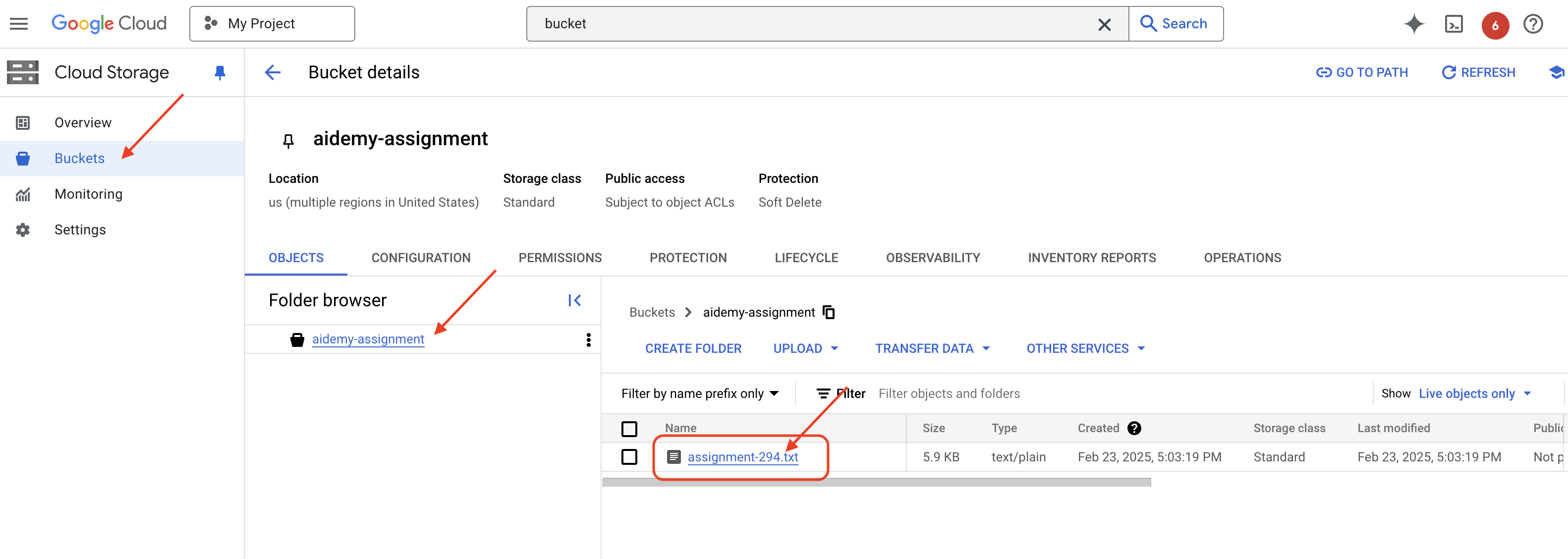
👉在运行模拟器的终端中,输入 ctrl+c 以退出。然后关闭第二个终端。👉此外,在运行模拟器的终端中,退出虚拟环境。
deactivate
👉接下来,我们将分配代理部署到云端
cd ~/aidemy-bootstrap/assignment
export ASSIGNMENT_BUCKET=$(gcloud storage buckets list --format="value(name)" | grep aidemy-assignment)
export OLLAMA_HOST=http://$(gcloud compute instances describe ollama-instance --zone=us-central1-a --format='value(networkInterfaces[0].accessConfigs[0].natIP)'):11434
gcloud config set project $(cat ~/project_id.txt)
export PROJECT_ID=$(gcloud config get project)
gcloud functions deploy assignment-agent \
 --gen2 \
 --timeout=540 \
 --memory=2Gi \
 --cpu=1 \
 --set-env-vars="ASSIGNMENT_BUCKET=${ASSIGNMENT_BUCKET}" \
 --set-env-vars=GOOGLE_CLOUD_PROJECT=${GOOGLE_CLOUD_PROJECT} \
 --set-env-vars=OLLAMA_HOST=${OLLAMA_HOST} \
 --region=us-central1 \
 --runtime=python312 \
 --source=. \
 --entry-point=generate_assignment \
 --trigger-topic=plan
前往 Google Cloud 控制台,然后前往 Cloud Run,验证部署。您应该会看到列出了一项名为 courses-agent 的新服务。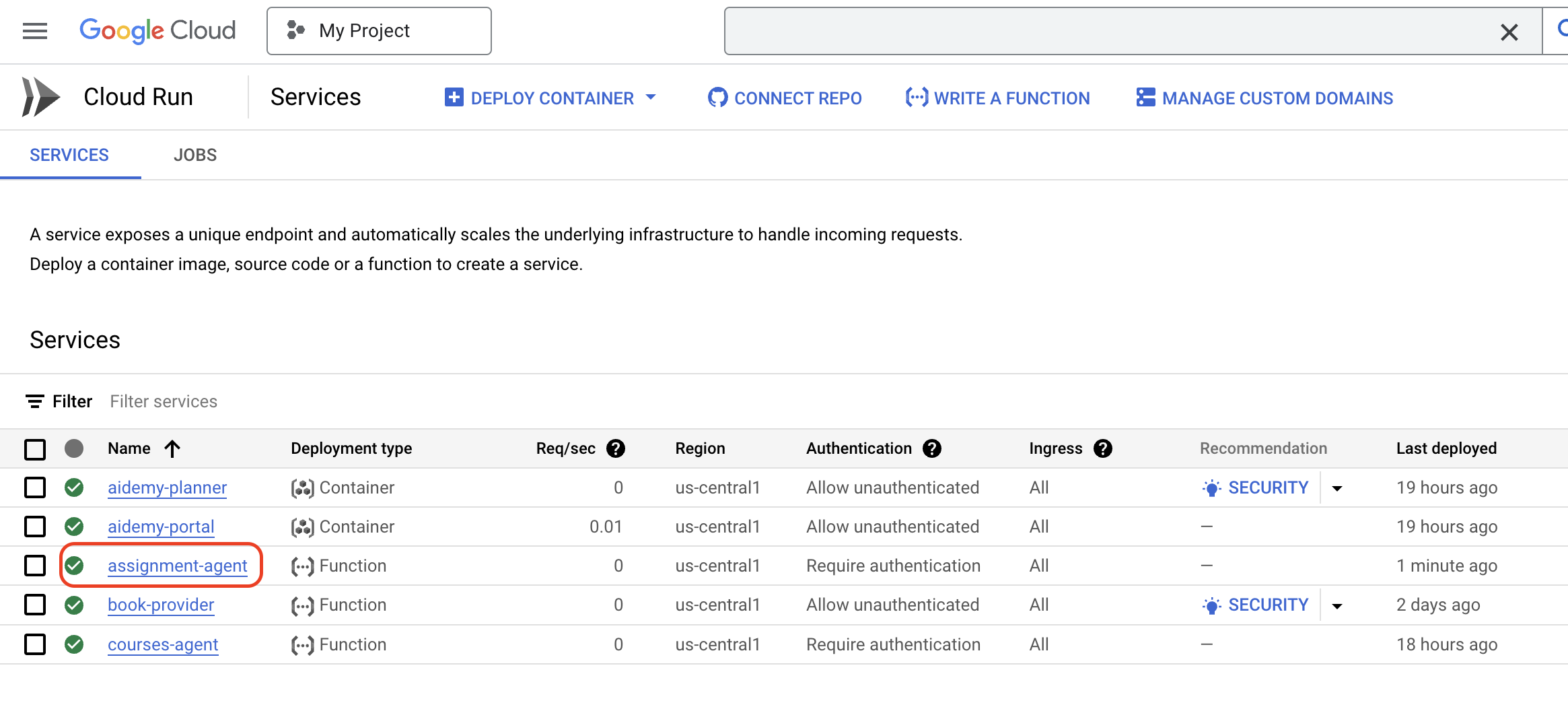
现在,作业生成工作流程已实现、测试并部署完毕,我们可以继续执行下一步:在学生门户中提供这些作业。
14. 可选:基于角色的 Gemini 和 DeepSeek 协作 - 续
动态网站生成
为了增强学生门户并使其更具吸引力,我们将为作业页面实现动态 HTML 生成。目标是每当生成新作业时,自动使用新颖且富有视觉吸引力的设计更新门户。这利用了 LLM 的编码功能,可打造更具活力和趣味性的用户体验。
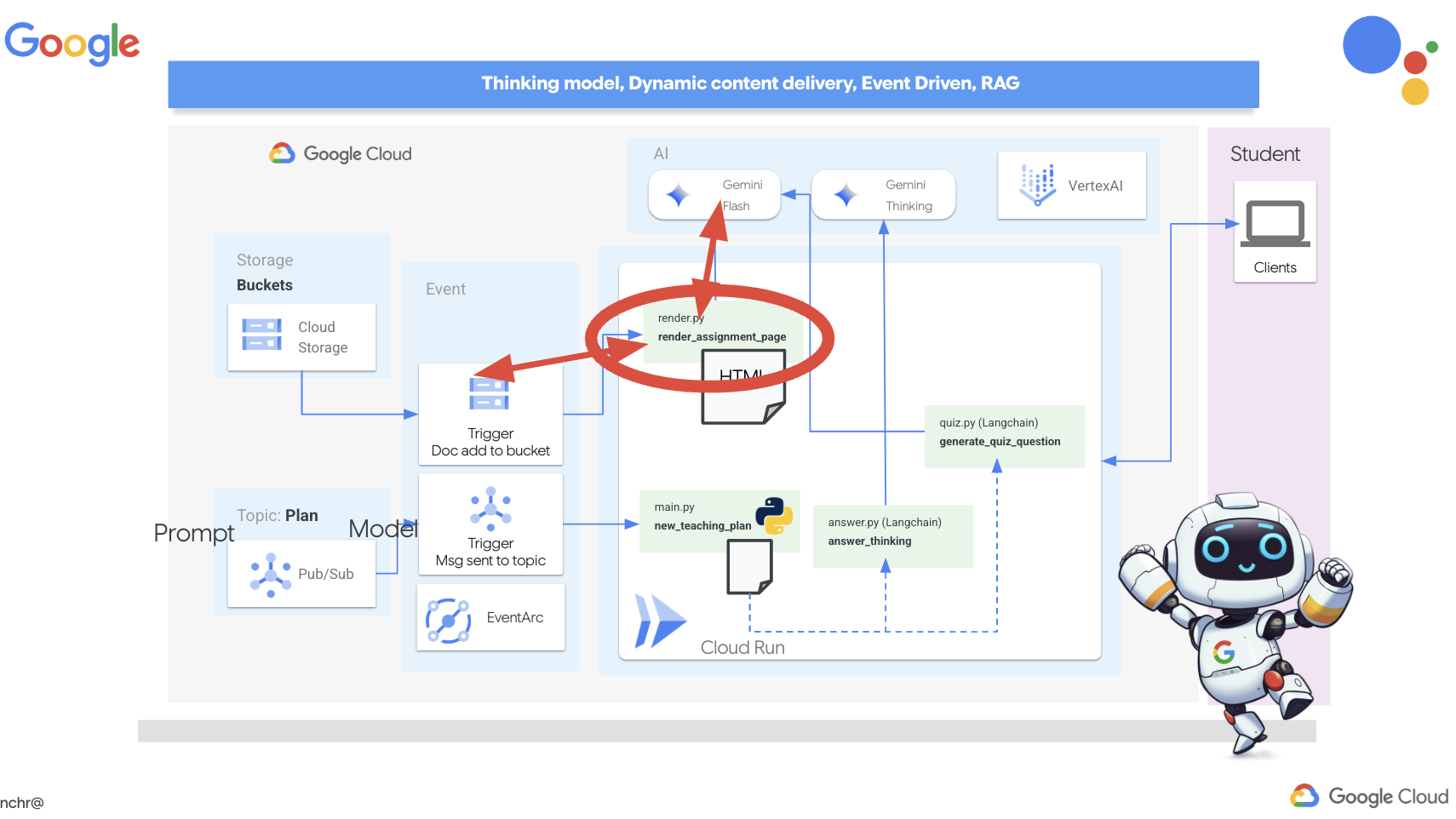
👉在 Cloud Shell 编辑器中,修改 portal 文件夹中的 render.py 文件,将
def render_assignment_page():
    return ""
替换为以下代码段:
def render_assignment_page(assignment: str):
    try:
        region=get_next_region()
        llm = VertexAI(model_name="gemini-2.0-flash-001", location=region)
        input_msg = HumanMessage(content=[f"Here the assignment {assignment}"])
        prompt_template = ChatPromptTemplate.from_messages(
            [
                SystemMessage(
                    content=(
                        """
                        As a frontend developer, create HTML to display a student assignment with a creative look and feel. Include the following navigation bar at the top:
                        ```
                        <nav>
                            <a href="/">Home</a>
                            <a href="/quiz">Quizzes</a>
                            <a href="/courses">Courses</a>
                            <a href="/assignment">Assignments</a>
                        </nav>
                        ```
                        Also include these links in the <head> section:
                        ```
                        <link rel="stylesheet" href="{{ url_for('static', filename='style.css') }}">
                        <link rel="preconnect" href="https://fonts.googleapis.com">
                        <link rel="preconnect" href="https://fonts.gstatic.com" crossorigin>
                        <link href="https://fonts.googleapis.com/css2?family=Roboto:wght@400;500&display=swap" rel="stylesheet">

                        ```
                        Do not apply inline styles to the navigation bar.
                        The HTML should display the full assignment content. In its CSS, be creative with the rainbow colors and aesthetic.
                        Make it creative and pretty
                        The assignment content should be well-structured and easy to read.
                        respond with JUST the html file
                        """
                    )
                ),
                input_msg,
            ]
        )

        prompt = prompt_template.format()

        response = llm.invoke(prompt)

        response = response.replace("```html", "")
        response = response.replace("```", "")
        with open("templates/assignment.html", "w") as f:
            f.write(response)


        print(f"response: {response}")

        return response
    except Exception as e:
        print(f"Error sending message to chatbot: {e}") # Log this error too!
        return f"Unable to process your request at this time. Due to the following reason: {str(e)}"
它使用 Gemini 模型动态生成作业的 HTML。它将作业内容作为输入,并使用提示指示 Gemini 创建具有创意风格且视觉效果出色的 HTML 网页。
接下来,我们将创建一个端点,每当向作业存储分区添加新文档时,系统都会触发该端点:
👉在门户文件夹中,修改 app.py 文件,并将 ## REPLACE ME! RENDER ASSIGNMENT 行替换为以下代码:
@app.route('/render_assignment', methods=['POST'])
def render_assignment():
    try:
        data = request.get_json()
        file_name = data.get('name')
        bucket_name = data.get('bucket')

        if not file_name or not bucket_name:
            return jsonify({'error': 'Missing file name or bucket name'}), 400

        storage_client = storage.Client()
        bucket = storage_client.bucket(bucket_name)
        blob = bucket.blob(file_name)
        content = blob.download_as_text()

        print(f"File content: {content}")

        render_assignment_page(content)

        return jsonify({'message': 'Assignment rendered successfully'})

    except Exception as e:
        print(f"Error processing file: {e}")
        return jsonify({'error': 'Error processing file'}), 500
当此函数被触发时,它会从请求数据中检索文件名和存储分区名称,从 Cloud Storage 下载作业内容,并调用 render_assignment_page 函数来生成 HTML。
👉接下来,我们将在本地运行该应用:
cd ~/aidemy-bootstrap/portal
source env/bin/activate
python app.py
👉在 Cloud Shell 窗口顶部的“网页预览”菜单中,选择“在端口 8080 上预览”。系统随即会在新的浏览器标签页中打开您的应用。前往导航栏中的作业链接。此时,您应该会看到一个空白页面,这是预期行为,因为我们尚未在作业代理与门户之间建立通信桥梁来动态填充内容。
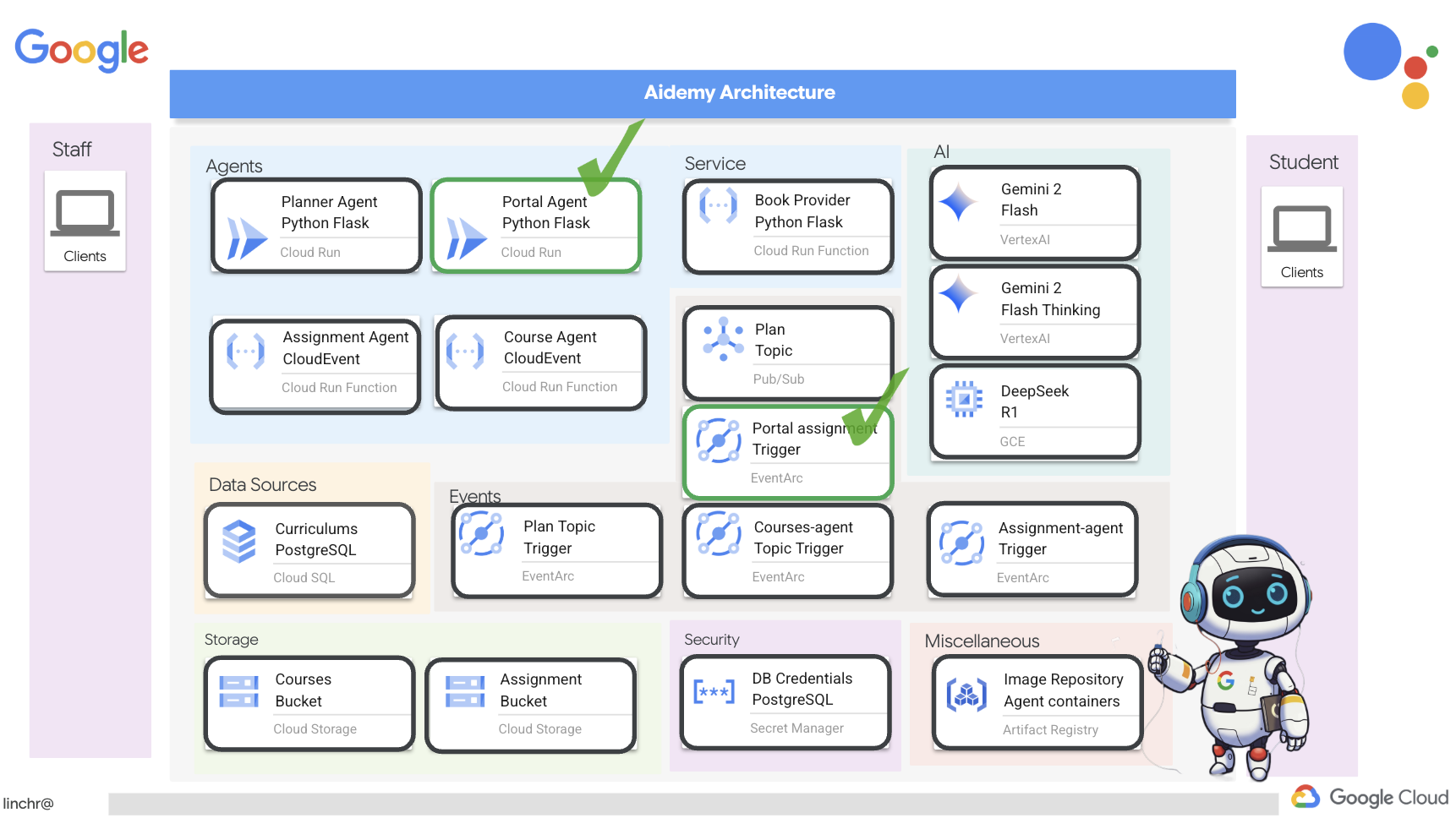
按 Ctrl+C 停止该脚本。
👉如需纳入这些更改并部署更新后的代码,请重新构建并推送门户代理映像:
cd ~/aidemy-bootstrap/portal/
gcloud config set project $(cat ~/project_id.txt)
export PROJECT_ID=$(gcloud config get project)
docker build -t gcr.io/${PROJECT_ID}/aidemy-portal .
docker tag gcr.io/${PROJECT_ID}/aidemy-portal us-central1-docker.pkg.dev/${PROJECT_ID}/agent-repository/aidemy-portal
docker push us-central1-docker.pkg.dev/${PROJECT_ID}/agent-repository/aidemy-portal
👉推送新映像后,重新部署 Cloud Run 服务。运行以下脚本以强制执行 Cloud Run 更新:
gcloud config set project $(cat ~/project_id.txt)
export PROJECT_ID=$(gcloud config get project)
export COURSE_BUCKET_NAME=$(gcloud storage buckets list --format="value(name)" | grep aidemy-recap)
gcloud run services update aidemy-portal \
    --region=us-central1 \
    --set-env-vars=GOOGLE_CLOUD_PROJECT=${PROJECT_ID},COURSE_BUCKET_NAME=$COURSE_BUCKET_NAME
👉现在,我们将部署一个 Eventarc 触发器,用于监听作业存储分区中创建(最终确定)的任何新对象。当创建新的作业文件时,此触发器将自动调用门户服务上的 /render_assignment 端点。
gcloud config set project $(cat ~/project_id.txt)
export PROJECT_ID=$(gcloud config get project)
gcloud projects add-iam-policy-binding $PROJECT_ID \
  --member="serviceAccount:$(gcloud storage service-agent --project $PROJECT_ID)" \
  --role="roles/pubsub.publisher"
export SERVICE_ACCOUNT_NAME=$(gcloud compute project-info describe --format="value(defaultServiceAccount)")
gcloud eventarc triggers create portal-assignment-trigger \
--location=us-central1 \
--service-account=$SERVICE_ACCOUNT_NAME \
--destination-run-service=aidemy-portal \
--destination-run-region=us-central1 \
--destination-run-path="/render_assignment" \
--event-filters="bucket=$ASSIGNMENT_BUCKET" \
--event-filters="type=google.cloud.storage.object.v1.finalized"
如需验证触发器是否已成功创建,请前往 Google Cloud 控制台中的 Eventarc 触发器页面。您应该会在表格中看到 portal-assignment-trigger。点击触发器名称可查看其详细信息。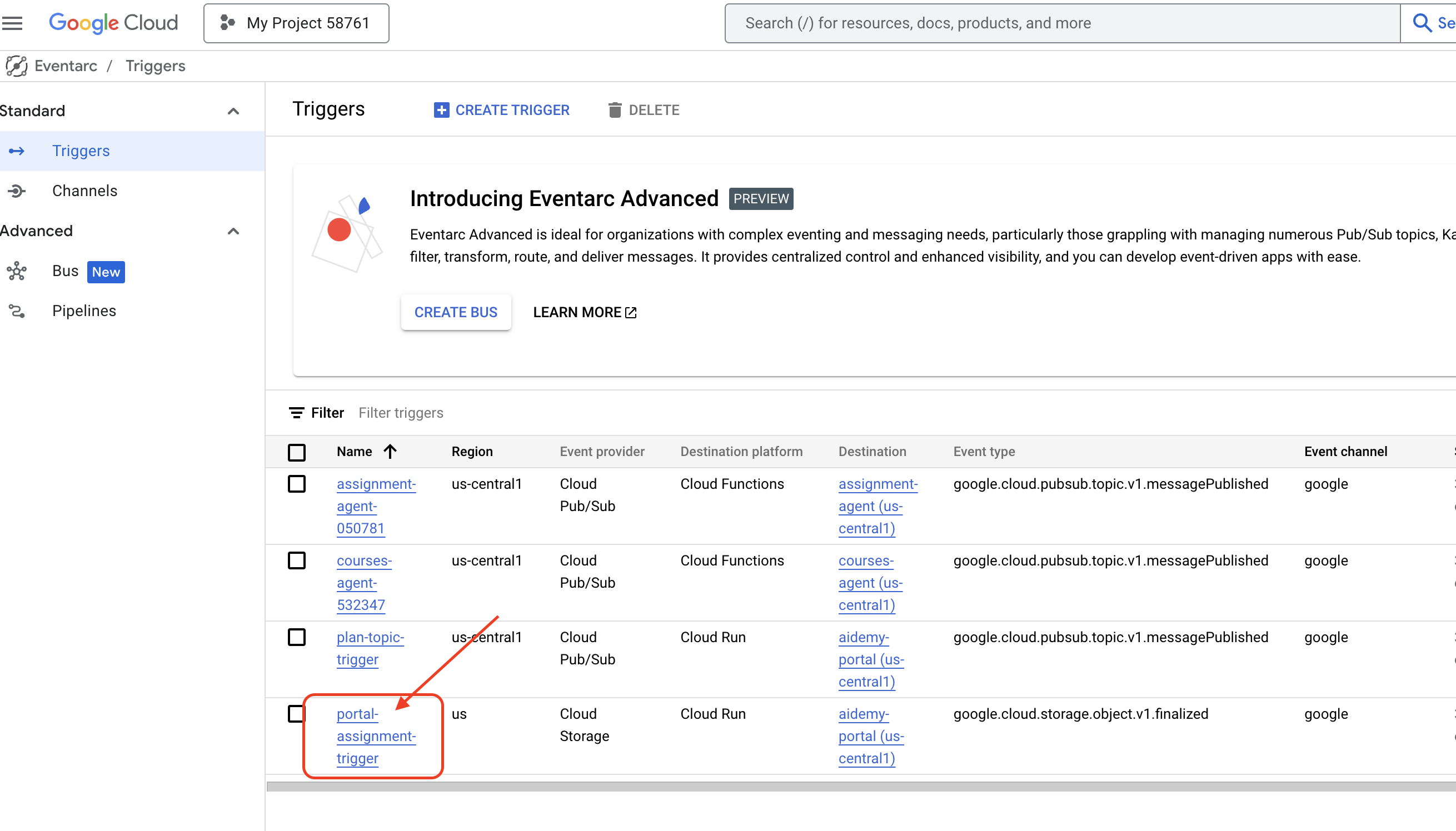
新触发器可能需要 2-3 分钟才能生效。
如需查看动态分配生成功能的实际效果,请运行以下命令来查找规划器代理的网址(如果您手头没有该网址):
gcloud run services list --platform=managed --region=us-central1 --format='value(URL)' | grep planner
查找门户代理的网址:
gcloud run services list --platform=managed --region=us-central1 --format='value(URL)' | grep portal
在规划器代理中,生成新的教学计划。
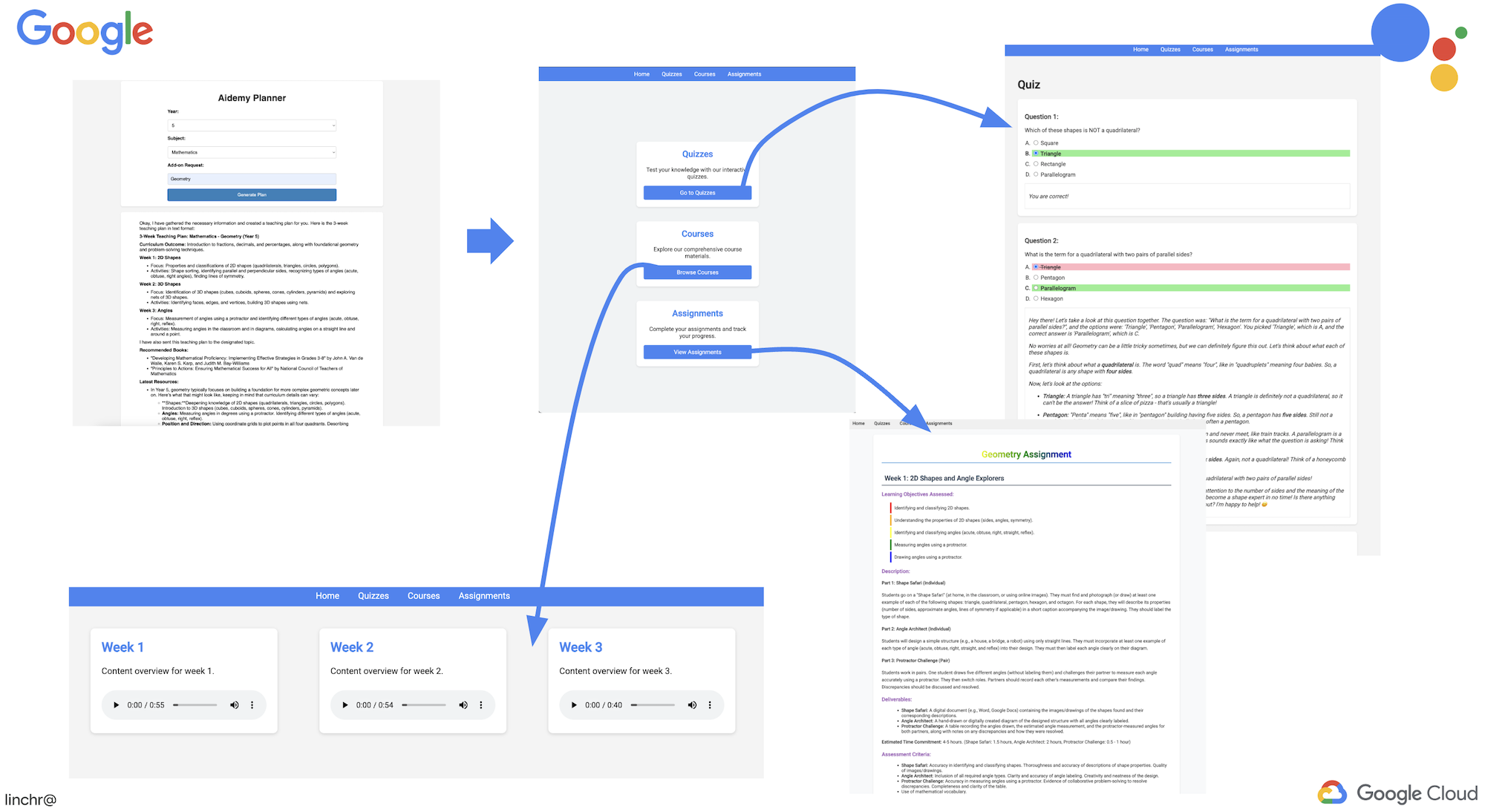
等待几分钟(让系统完成音频生成、作业生成和 HTML 渲染),然后前往学生门户。
👉点击导航栏中的“作业”链接。您应该会看到新创建的作业,其中包含动态生成的 HTML。每次生成教学计划时,都应动态分配。
恭喜您完成了 Aidemy 多智能体系统!您已获得有关以下方面的实践经验和宝贵的数据分析:
- 多智能体系统的优势,包括模块化、可扩缩性、专业化和简化维护。
- 事件驱动型架构对于构建响应迅速且松散耦合的应用的重要性。
- 战略性地使用 LLM,为任务匹配合适的模型,并将其与工具集成,以产生实际影响。
- 使用 Google Cloud 服务创建可扩缩且可靠的解决方案的云原生开发实践。
- 考虑数据隐私权和自托管模型作为供应商解决方案的替代方案的重要性。
现在,您已具备在 Google Cloud 上构建复杂的 AI 赋能型应用的坚实基础!
15. 挑战和后续步骤
恭喜您构建了 Aidemy 多智能体系统!您已为 AI 赋能的教育奠定了坚实的基础。现在,我们来考虑一些挑战以及未来可能进行的增强,以进一步扩展其功能并满足现实世界的需求:
通过问答直播进行互动式学习:
- 挑战:您能否利用 Gemini 2 的 Live API 为学生打造实时问答功能?想象一下,在一个虚拟教室中,学生可以提出问题,并立即获得由 AI 提供的回答。
自动提交和评分作业:
- 挑战:设计并实现一个系统,让学生能够以数字方式提交作业,并让 AI 自动为作业评分,同时提供检测和防止抄袭的机制。这一挑战为探索检索增强生成 (RAG) 提供了一个绝佳机会,可借此提高评分和剽窃检测流程的准确性和可靠性。

16. 清理
现在,我们已经构建并探索了 Aidemy 多智能体系统,接下来需要清理 Google Cloud 环境。
👉删除 Cloud Run 服务
gcloud run services delete aidemy-planner --region=us-central1 --quiet
gcloud run services delete aidemy-portal --region=us-central1 --quiet
gcloud run services delete courses-agent --region=us-central1 --quiet
gcloud run services delete book-provider --region=us-central1 --quiet
gcloud run services delete assignment-agent --region=us-central1 --quiet
👉删除 Eventarc 触发器
gcloud eventarc triggers delete portal-assignment-trigger --location=us --quiet
gcloud eventarc triggers delete plan-topic-trigger --location=us-central1 --quiet
gcloud eventarc triggers delete portal-assignment-trigger --location=us-central1 --quiet
ASSIGNMENT_AGENT_TRIGGER=$(gcloud eventarc triggers list --project="$PROJECT_ID" --location=us-central1 --filter="name:assignment-agent" --format="value(name)")
COURSES_AGENT_TRIGGER=$(gcloud eventarc triggers list --project="$PROJECT_ID" --location=us-central1 --filter="name:courses-agent" --format="value(name)")
gcloud eventarc triggers delete $ASSIGNMENT_AGENT_TRIGGER --location=us-central1 --quiet
gcloud eventarc triggers delete $COURSES_AGENT_TRIGGER --location=us-central1 --quiet
👉删除 Pub/Sub 主题
gcloud pubsub topics delete plan --project="$PROJECT_ID" --quiet
👉删除 Cloud SQL 实例
gcloud sql instances delete aidemy --quiet
👉删除 Artifact Registry 代码库
gcloud artifacts repositories delete agent-repository --location=us-central1 --quiet
👉删除 Secret Manager Secret
gcloud secrets delete db-user --quiet
gcloud secrets delete db-pass --quiet
gcloud secrets delete db-name --quiet
👉删除 Compute Engine 实例(如果它是为 Deepseek 创建的)
gcloud compute instances delete ollama-instance --zone=us-central1-a --quiet
👉删除 Deepseek 实例的防火墙规则
gcloud compute firewall-rules delete allow-ollama-11434 --quiet
👉删除 Cloud Storage 存储分区
export COURSE_BUCKET_NAME=$(gcloud storage buckets list --format="value(name)" | grep aidemy-recap)
export ASSIGNMENT_BUCKET=$(gcloud storage buckets list --format="value(name)" | grep aidemy-assignment)
gsutil rm -r gs://$COURSE_BUCKET_NAME
gsutil rm -r gs://$ASSIGNMENT_BUCKET