
1. Before you begin
As AI agents handle long multi-turn interactions that span multiple days and execute long-horizon multi-step tasks, Large Language Models (LLMs) remain inherently stateless across sessions. When a user returns to an agent tomorrow, the model starts from scratch unless the application can reconstruct the necessary context.
The naive approach to this problem is token stuffing — appending full conversation histories, tool execution logs, and codebases directly to every active prompt. While large million-token context windows make this technically possible, context stuffing introduces severe operational drag: token costs scale quadratically on every turn, response latencies grow to tens of seconds, and models suffer from "lost in the middle" context degradation.
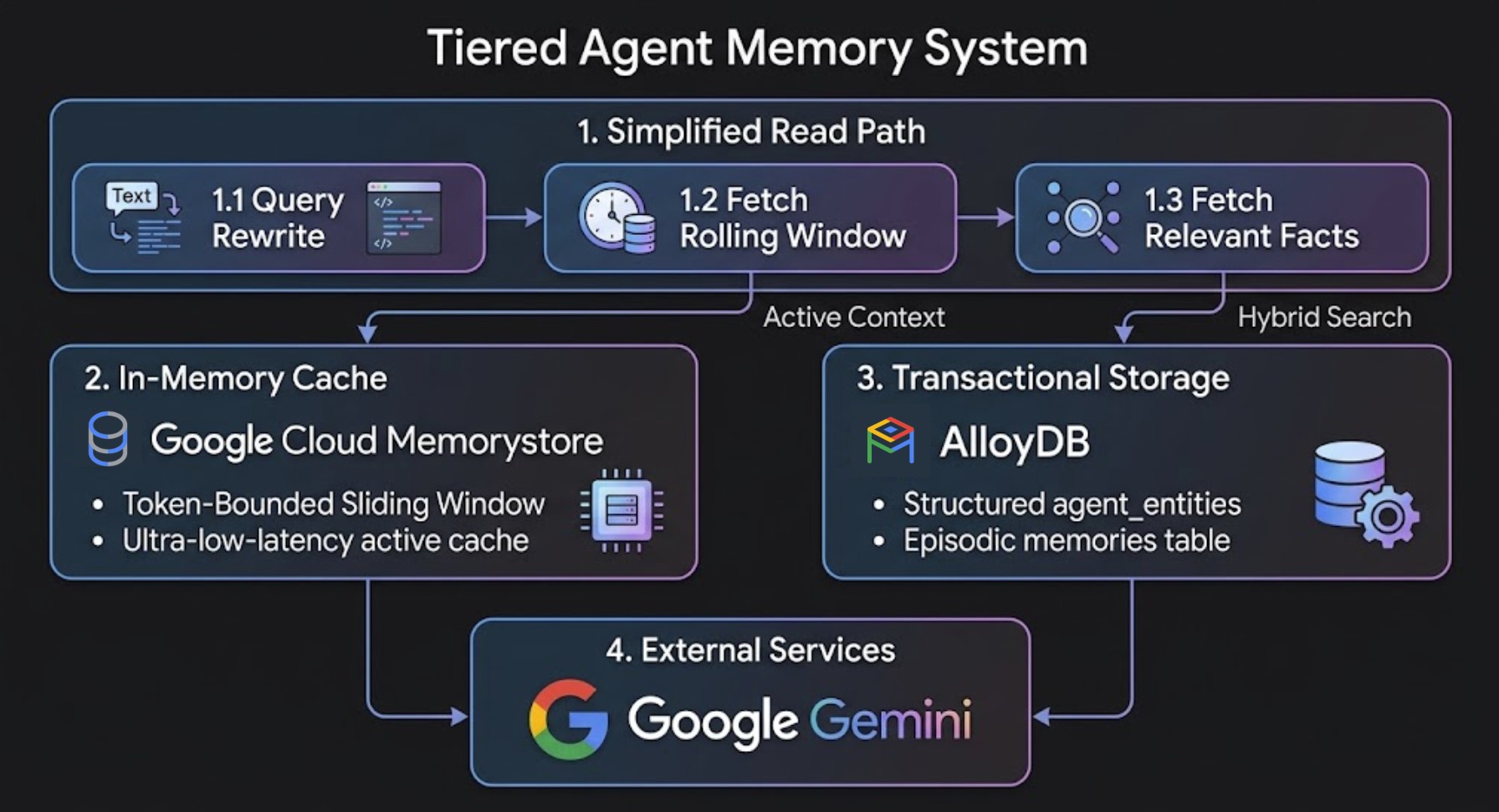
To build reliable AI agents, you need a 2-tier memory architecture:
- Short-term session buffer: Caches recent conversation turns in active memory using a token-bounded sliding window. This tier requires sub-millisecond, high-throughput in-memory lookups on every turn, making Memorystore for Valkey the ideal choice.
- Long-term persistent memory: Stores structured entities, user preferences, and episodic facts across sessions. This tier requires transactional integrity, multi-tenant security, and hybrid retrieval across relational data and vectors — making AlloyDB for PostgreSQL the right choice.
Understanding the Four Memory Types
A robust memory architecture relies on four complementary memory types across the user journey:
Memory type | What it stores | Storage layer | Lifespan |
Buffer (Short-term) | Recent raw conversation turns | Memorystore for Valkey | Active session |
Summary memory | Compressed history of older turns | Memorystore for Valkey | Multi-turn window |
Episodic memory | Past actions, events, and tool outputs | AlloyDB for PostgreSQL (Vector) | Permanent |
Entity & rule memory | User preferences, constraints, and vetoes | AlloyDB for PostgreSQL (Structured SQL + Vector) | Permanent |
Measured Impact of Tiered Memory
Internal benchmark testing across multi-turn development dialogues (45+ turns with heavy tool output logs) demonstrates significant savings over naive context stuffing:
Metric / dimension | Naive context stuffing | Tiered memory (AlloyDB + Memorystore) | Net impact in testing |
Active prompt size (turn 45) | 747,033 tokens | 83,262 tokens | 88.9% smaller prompt |
Turn 45 response latency | 33.5 seconds | 6.7 seconds | 80.0% faster response |
Cumulative session tokens | 17.9M tokens | 4.09M tokens | 72.0% total token & cost savings |
Rule & constraint recall | Degrades over turns | Prevents important knowledge from getting lost in summary | Preserved via hybrid search |
What you'll do
- Provision AlloyDB for PostgreSQL and Memorystore for Valkey.
- Enable
google_ml_integrationand configure database-side transactional auto-embeddings (ai.initialize_embeddings). - Implement a short-term Valkey session buffer with a summarize-before-trim pipeline pattern.
- Extract long-term entities natively using AlloyDB's native AI Functions (i.e.
ai.generate) - Query long-term facts, with high accuracy and relevance, using AlloyDB's native Hybrid Search function (
ai.hybrid_search) and Reciprocal Rank Fusion (RRF) reranking. - Build a 3-tier enterprise tool permission evaluator and a background memory compaction engine.
- Integrate the 2-tier memory architecture directly into an autonomous agent using the Google Agent Development Kit (ADK).
What you'll need
- A Google Cloud project with billing enabled.
- A web browser such as Chrome.
- Basic knowledge of Python and SQL, including experience with running SQL queries against AlloyDB - from either the Studio, CLI, etc..
Audience & Cost
- Audience: AI developers, backend engineers, and database architects.
- Estimated Cost: The Google Cloud resources created in this codelab will cost approximately $1.50 USD.
2. Setup and Requirements
Start Cloud Shell
In this codelab, you will run commands in Google Cloud Shell, a cloud-hosted terminal pre-configured with gcloud, psql, and python3.
- Open the Google Cloud Console.
- Click Activate Cloud Shell at the top right of the Cloud Console.
- Verify authentication:
gcloud auth list
export PROJECT_ID=<YOUR_PROJECT_ID>
gcloud config set project $PROJECT_ID

export REGION=us-east1
export GENAI_LOCATION=us
export ZONE=us-east1-b
export ADBCLUSTER=agent-memory-cluster
export ADBINSTANCE=agent-memory-instance
export VALKEYINSTANCE=agent-memory-cache
export VM_NAME=agent-dev-vm
Enable Google Cloud APIs & Create Development VM
Run the following command in Cloud Shell to enable the required APIs:
gcloud services enable \
  alloydb.googleapis.com \
  memorystore.googleapis.com \
  aiplatform.googleapis.com \
  compute.googleapis.com \
  servicenetworking.googleapis.com \
  networkconnectivity.googleapis.com
Create a Compute Engine VM instance in the default VPC network to host your Python development environment alongside AlloyDB and Memorystore for Valkey:
gcloud compute instances create $VM_NAME \
    --zone=$ZONE \
    --machine-type=e2-standard-2 \
    --scopes=cloud-platform \
    --network=default \
    --shielded-secure-boot
3. Provision AlloyDB and Memorystore for Valkey
In this step, you will provision your AlloyDB for PostgreSQL cluster and primary instance, establish private service networking, and spin up a Memorystore for Valkey instance.
Create Private Service Access IP Range
AlloyDB requires a private IP range in your Virtual Private Cloud (VPC) network. Assuming you are using the default VPC network:
- Create the private IP range allocation:
gcloud compute addresses create psa-range \
    --global \
    --purpose=VPC_PEERING \
    --prefix-length=24 \
    --description="VPC private service access" \
    --network=default
- Establish the private VPC peering connection:
gcloud services vpc-peerings connect \
    --service=servicenetworking.googleapis.com \
    --ranges=psa-range \
    --network=default
Create AlloyDB Cluster and Primary Instance
- Create an initial cluster password for system initialization:
export PGPASSWORD=`openssl rand -hex 12`
- Create a Free Trial Cluster:
gcloud alloydb clusters create $ADBCLUSTER \
    --password=$PGPASSWORD \
    --network=default \
    --region=$REGION \
    --subscription-type=TRIAL
- Create the Primary Instance:
gcloud alloydb instances create $ADBINSTANCE \
    --instance-type=PRIMARY \
    --cpu-count=2 \
    --region=$REGION \
    --cluster=$ADBCLUSTER
Provision Memorystore for Valkey Instance
Memorystore for Valkey requires a Service Connection Policy (gcp-memorystore) in your network and region prior to instance creation.
- Create the Service Connection Policy for Memorystore:
gcloud network-connectivity service-connection-policies create memorystore-policy \
    --network=default \
    --region=$REGION \
    --service-class=gcp-memorystore \
    --subnets=projects/$PROJECT_ID/regions/$REGION/subnetworks/default
- Create the Memorystore for Valkey instance:
gcloud memorystore instances create $VALKEYINSTANCE \
    --location=$REGION \
    --shard-count=1 \
    --replica-count=0 \
    --node-type=SHARED_CORE_NANO \
    --psc-auto-connections="network=projects/$PROJECT_ID/global/networks/default,projectId=$PROJECT_ID"
Grant Vertex AI IAM Permissions
Grant the AlloyDB service account the necessary IAM permissions to invoke Agent Platform's embedding models:
PROJECT_ID=$(gcloud config get-value project)

gcloud projects add-iam-policy-binding $PROJECT_ID \
  --member="serviceAccount:service-$(gcloud projects describe $PROJECT_ID --format="value(projectNumber)")@gcp-sa-alloydb.iam.gserviceaccount.com" \
  --role="roles/aiplatform.user"
4. Initialize Environment and Access Endpoints
Set Up AlloyDB IAM Authentication & Database Flags
Enable IAM Database Authentication (alloydb.iam_authentication=on) and the AI query engine (google_ml_integration.enable_ai_query_engine=on) on your AlloyDB instance:
gcloud beta alloydb instances update $ADBINSTANCE \
  --cluster=$ADBCLUSTER \
  --region=$REGION \
  --update-mode=FORCE_APPLY \
  --database-flags=alloydb.iam_authentication=on,google_ml_integration.enable_ai_query_engine=on
Next, add your Google Cloud account as an IAM-based database user with superuser permissions:
export USER_ACCOUNT=$(gcloud config get-value account)

gcloud alloydb users create $USER_ACCOUNT \
    --cluster=$ADBCLUSTER \
    --region=$REGION \
    --type=IAM_BASED \
    --db-roles=alloydbsuperuser
Retrieve Internal VPC Endpoints in Cloud Shell
Before SSH-ing into your development VM, retrieve the internal VPC IP addresses for AlloyDB and Memorystore for Valkey in Cloud Shell:
# Export GCP Project ID, Region, and IAM User
export PROJECT_ID=$(gcloud config get-value project)
export REGION=us-east1
export DB_USER=$(gcloud config get-value account)

# Retrieve Internal VPC IP Addresses for AlloyDB & Memorystore for Valkey
export DB_HOST=$(gcloud alloydb instances describe $ADBINSTANCE --cluster=$ADBCLUSTER --region=$REGION --format="value(ipAddress)")
export DB_PORT=5432
export DB_NAME=postgres

export VALKEY_HOST=$(gcloud memorystore instances describe $VALKEYINSTANCE --location=$REGION --format="value(discoveryEndpoints[0].address)")
export VALKEY_PORT=6379

# Verify exported endpoints
echo "Project ID:        $PROJECT_ID"
echo "Region:            $REGION"
echo "AlloyDB Private IP: $DB_HOST"
echo "IAM DB User:       $DB_USER"
echo "Valkey Private IP:  $VALKEY_HOST"
SSH into Development VM & Export Connection Variables
SSH from Cloud Shell into your Compute Engine development VM (agent-dev-vm) located in the same VPC network:
gcloud compute ssh $VM_NAME --zone=$ZONE
Once logged into your development VM, export the project configuration and connection endpoints output above (replacing
export PROJECT_ID=<YOUR_PROJECT_ID>
export REGION=us-east1
export GENAI_LOCATION=us
export DB_HOST=<YOUR_ALLOYDB_PRIVATE_IP>
export DB_PORT=5432
export DB_NAME=postgres
export DB_USER=<YOUR_IAM_DB_USER>
export VALKEY_HOST=<YOUR_VALKEY_PRIVATE_IP>
export VALKEY_PORT=6379
Initialize Python Virtual Environment
Inside your development VM, lets first create your local working directory:
mkdir -p ~/alloydb_agent_memory && cd ~/alloydb_agent_memory
Now, lets install the system Python virtual environment packages, authenticate Application Default Credentials (ADC) and set up your workspace:
sudo apt-get update && sudo apt-get install -y python3-venv python3-pip

python3 -m venv venv
source venv/bin/activate
Lastly, in the new virtual environment, we will install the dependencies:
gcloud auth application-default login
pip install psycopg2-binary valkey redis google-genai
5. System Architecture and Code Module Hierarchy
Overview of What You Are Building
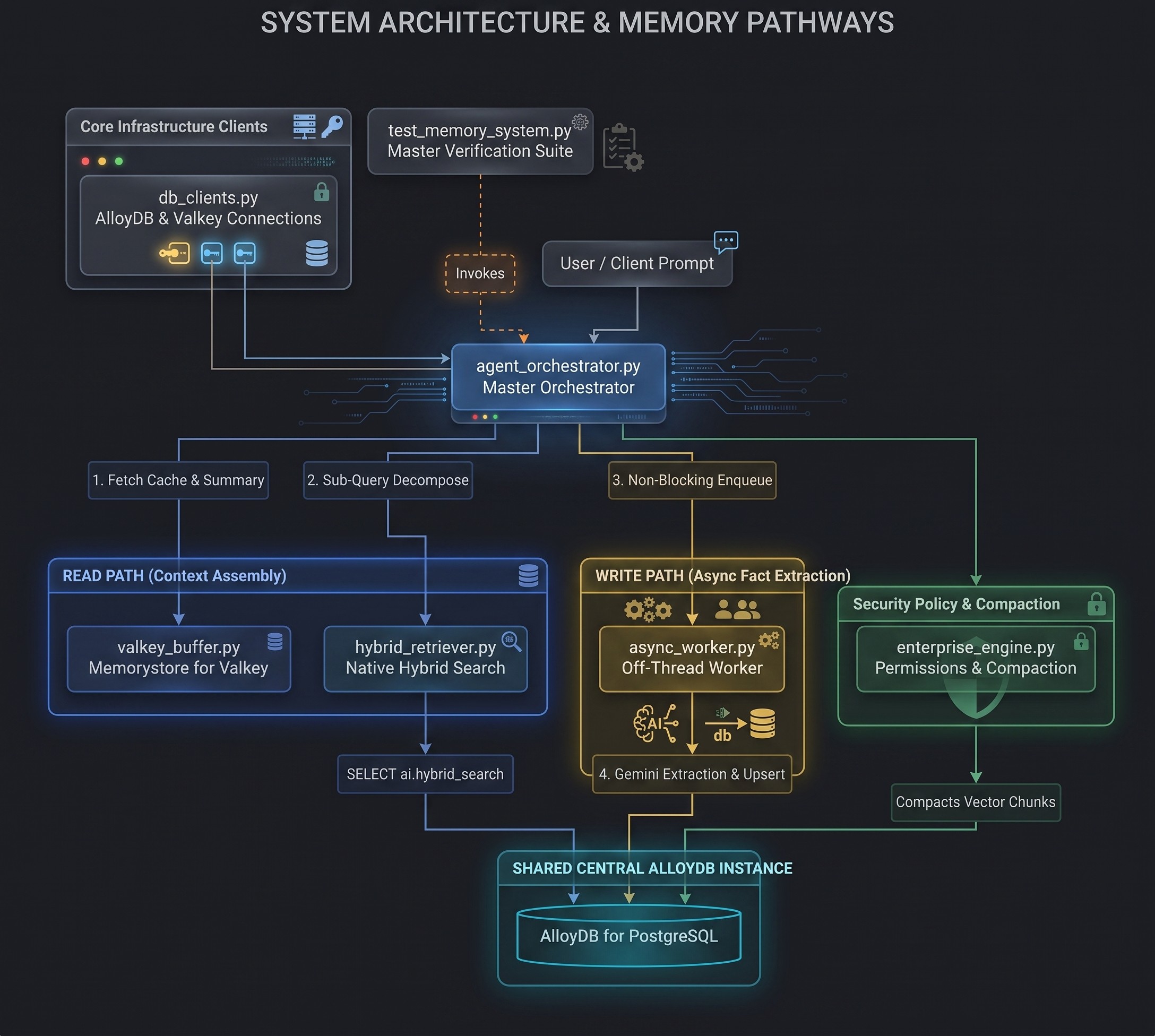
Before implementing the individual Python scripts, review the system architecture below. This sample application is structured into 7 modular Python scripts operating across two primary execution paths that interact with the same AlloyDB for PostgreSQL database instance:
- Read Path (
hybrid_retriever.py): Decomposes compound multi-part questions into single-aspect sub-queries directly inside PostgreSQL using AlloyDB AIai.generate()and queries long-term memories using AlloyDB's native hybrid search (ai.hybrid_search). - Write Path (
async_worker.py): Off-thread background queue worker that asynchronously extracts structured entity facts from dialogue exchanges using Gemini Flash and upserts them intoagent_entities.
Module Hierarchy & System Roles
Module File | System Layer | Primary Responsibility |
| Connection Layer | Establishes SSL-encrypted IAM authentication to AlloyDB and socket-resilient connections to Memorystore for Valkey. |
| Short-Term Memory | Manages sub-millisecond session history in Valkey, implementing Summarize-Before-Trim rolling summaries. |
| Write Path Worker | Runs an off-thread daemon background queue worker that extracts entity facts using Gemini Flash and upserts them into AlloyDB. |
| Read Path Retriever | Decomposes compound questions into single-aspect sub-queries using in-database AlloyDB AI |
| Main Agent Loop | Coordinates the end-to-end turn execution loop: short-term fetch, long-term search, prompt assembly, LLM execution, and async enqueue. |
| Governance & Admin | Enforces 3-tier security policies for tool execution and aggregates historical memory. |
| Test & Evaluation | Master verification suite executing multi-turn & multi-session scenarios, measuring token savings %, and verifying memory precision. |
6. Set up AlloyDB AI Schema and Transactional Auto-Embeddings
Objective & Architecture Overview
In this module, you will define AlloyDB's database schema for episodic and long-term memory, index strategies, and database-side auto-embedding.
- Episodic Vector Store (
episodic_memory_embeddings): Unstructured chat transcript chunks indexed with HNSW vector indices (vector_cosine_ops). - Long-Term Entity Store (
agent_entities): Structured facts, user choices, and project rules stored with scope metadata (global,project,session). Includes an auto-generated PostgreSQL full-text search column (summary_tsv) indexed via RUM. - Database-Side Auto-Embeddings (
ai.initialize_embeddings): Automatically embeds new or updated plain-text rows intosummary_embeddingvia Agent Platformtext-embedding-005in the background.
Connect to AlloyDB Studio
- Navigate to the AlloyDB for Postgres page in the Google Cloud Console.
- Click on your primary instance.
- On the left side navigation, click AlloyDB Studio.
- Select the
postgresdatabase - Authenticate with
IAM database authentication
Implementation & Source Code
Once connected to your AlloyDB PostgreSQL database, execute the DDL queries below:
-- 1. Enable google_ml_integration extension
CREATE EXTENSION IF NOT EXISTS google_ml_integration CASCADE;
CREATE EXTENSION IF NOT EXISTS vector CASCADE;
CREATE EXTENSION IF NOT EXISTS rum CASCADE;
SET google_ml_integration.enable_preview_ai_functions = true;

-- 2. Create Episodic Memory Vector Store Tables
CREATE TABLE IF NOT EXISTS episodic_memory_collections (
    uuid UUID PRIMARY KEY,
    name VARCHAR,
    cmetadata JSONB
);

CREATE TABLE IF NOT EXISTS episodic_memory_embeddings (
    uuid UUID PRIMARY KEY,
    collection_id UUID REFERENCES episodic_memory_collections(uuid) ON DELETE CASCADE,
    embedding VECTOR(768),
    document VARCHAR,
    cmetadata JSONB,
    custom_id VARCHAR,
    created_at TIMESTAMPTZ DEFAULT NOW()
);

CREATE INDEX IF NOT EXISTS episodic_memory_embedding_idx
ON episodic_memory_embeddings
USING hnsw (embedding vector_cosine_ops)
WITH (m = 16, ef_construction = 64);

-- 3. Create Entity & Preference Table with Metadata Scope & Auto-Generated TSVector Column
CREATE TABLE IF NOT EXISTS agent_entities (
    entity_id UUID PRIMARY KEY DEFAULT gen_random_uuid(),
    user_id TEXT NOT NULL,
    entity_name TEXT NOT NULL,
    project_id TEXT DEFAULT 'global',
    session_id TEXT,
    scope TEXT NOT NULL DEFAULT 'project', -- 'global', 'project', 'session'
    summary TEXT NOT NULL,
    summary_embedding VECTOR(768),
    summary_tsv TSVECTOR GENERATED ALWAYS AS (
        to_tsvector('english', entity_name || ' ' || summary)
    ) STORED,
    updated_at TIMESTAMPTZ DEFAULT NOW(),
    UNIQUE (user_id, entity_name)
);

CREATE INDEX IF NOT EXISTS agent_entities_scope_idx
ON agent_entities (user_id, project_id, scope);

CREATE INDEX IF NOT EXISTS agent_entities_embedding_idx
ON agent_entities USING hnsw (summary_embedding vector_cosine_ops);

CREATE INDEX IF NOT EXISTS agent_entities_tsv_idx
ON agent_entities USING rum (summary_tsv rum_tsvector_ops);

-- 4. Create User Permissions Table for Tool Execution Controls
CREATE TABLE IF NOT EXISTS user_permissions (
    permission_id UUID PRIMARY KEY DEFAULT gen_random_uuid(),
    user_id TEXT NOT NULL,
    project_id TEXT NOT NULL DEFAULT 'global',
    tool_name TEXT NOT NULL,
    command_pattern TEXT NOT NULL,
    action TEXT NOT NULL CHECK (action IN ('ALLOW', 'BLOCK')),
    created_at TIMESTAMPTZ DEFAULT NOW(),
    updated_at TIMESTAMPTZ DEFAULT NOW()
);

CREATE INDEX IF NOT EXISTS idx_user_permissions_lookup
ON user_permissions (user_id, project_id, tool_name);
-- 5. Register Gemini 3.5 Flash Model Endpoint in AlloyDB
-- Replace PROJECT_ID with your Google Cloud project ID
CALL google_ml.create_model(
    model_id => 'gemini-3.5-flash',
    model_request_url => 'https://aiplatform.googleapis.com/v1/projects/PROJECT_ID/locations/global/publishers/google/models/gemini-3.5-flash:generateContent',
    model_qualified_name => 'gemini-3.5-flash',
    model_provider => 'google',
    model_type => 'llm',
    model_auth_type => 'alloydb_service_agent_iam'
);
Initialize Transactional Auto-Embeddings and Register Gemini Model
Next, execute the CALL statements in separate query execution blocks to register the auto-embedding background process and the Gemini 3.5 Flash model endpoint:
-- 6. Register Database-Side Transactional Auto-Embedding
CALL ai.initialize_embeddings(
    model_id => 'text-embedding-005',
    table_name => 'agent_entities',
    content_column => 'summary',
    embedding_column => 'summary_embedding',
    incremental_refresh_mode => 'transactional',
    batch_size => 10
);
7. Configure AlloyDB and Valkey Connection Clients
Objective & Architecture Overview
In this module, you will establish secure, network connections to both AlloyDB for PostgreSQL (long-term memory) and Memorystore for Valkey (short-term cache).
- AlloyDB IAM Authentication: Uses
gcloud auth application-default print-access-tokento retrieve a short-lived OAuth2 token for passwordless, SSL-encrypted database connections (sslmode="require"). - Valkey Network Resilience: Configures
redis.Rediswith a 5.0-second socket timeout (socket_timeout=5.0) to handle VPC network operations safely across single-node or clustered Valkey instances.
Implementation & Source Code
Create the script db_clients.py in your working directory:
import os
import subprocess
import psycopg2
import redis

# Initialize database & Valkey connection clients from environment variables
DB_HOST = os.getenv("DB_HOST", "127.0.0.1")
DB_PORT = os.getenv("DB_PORT", "5432")
DB_NAME = os.getenv("DB_NAME", "postgres")
DB_USER = os.getenv("DB_USER")

VALKEY_HOST = os.getenv("VALKEY_HOST", "127.0.0.1")
VALKEY_PORT = int(os.getenv("VALKEY_PORT", "6379"))

def get_db_connection():
    # Fetch Application Default Credentials (ADC) token for IAM Database Authentication & enable SSL encryption
    access_token = subprocess.check_output(
        ["gcloud", "auth", "application-default", "print-access-token"], text=True
    ).strip()
    return psycopg2.connect(
        host=DB_HOST,
        port=DB_PORT,
        dbname=DB_NAME,
        user=DB_USER,
        password=access_token,
        sslmode="require"
    )

def get_valkey_client():
    return redis.Redis(
        host=VALKEY_HOST,
        port=VALKEY_PORT,
        db=0,
        socket_timeout=5.0,
        socket_connect_timeout=5.0
    )

if __name__ == "__main__":
    print(f"Connecting to AlloyDB via IAM Auth ({DB_USER}) at {DB_HOST}:{DB_PORT} and Valkey at {VALKEY_HOST}:{VALKEY_PORT}...")
    print("Database and Valkey connection client modules loaded successfully.")
8. Cache Short-term Session State in Memorystore for Valkey
Objective & Architecture Overview
In this module, you will build a sub-millisecond short-term context cache in Memorystore for Valkey implementing an automated Summarize-Before-Trim pattern.
- Valkey Sliding Window: Active conversation turns are stored as JSON strings in key
session:{session_id}:turns. - Redis Hash Tags (
{session_id}): Key formattingsession:{session_id}:turnsandsession:{session_id}:summaryuses Redis cluster hash tags ({...}), forcing both keys onto the same hash slot to ensure atomic execution across any single-node or clustered Valkey deployment. - Summarize-Before-Trim: When turn count exceeds
trigger_limit, older turns about to be pruned are summarized by Gemini Flash into a rolling text summary (session:{session_id}:summary) before trimming raw history down towindow_size.
Implementation & Source Code
Create the script valkey_buffer.py in your working directory:
import json
import logging
import time
from typing import Any, Dict, List
import redis

logger = logging.getLogger(__name__)

IN_MEMORY_VALKEY_FALLBACK: Dict[str, Any] = {}
VALKEY_COMPACTION_TOKENS = 0

def get_valkey_compaction_tokens() -> int:
    return VALKEY_COMPACTION_TOKENS

def append_session_turn_with_rolling_summary(
    valkey_client: redis.Redis,
    llm_client: Any,
    session_id: str,
    user_msg: str,
    ai_msg: str,
    trigger_limit: int = 10,
    window_size: int = 4
) -> None:
    """Appends turn to Valkey. Before trimming old turns, summarizes them into a rolling summary."""
    global VALKEY_COMPACTION_TOKENS
    # Use Redis Hash Tags {session_id} so both keys hash to the same cluster slot
    turns_key = "session:{" + session_id + "}:turns"
    summary_key = "session:{" + session_id + "}:summary"

    try:
        # 1. Append new turn messages
        valkey_client.rpush(turns_key, json.dumps({"role": "user", "content": user_msg}))
        valkey_client.rpush(turns_key, json.dumps({"role": "assistant", "content": ai_msg}))

        raw_turns = valkey_client.lrange(turns_key, 0, -1)

        # 2. Check if total turns exceed summary trigger threshold
        msg_trigger_count = trigger_limit * 2
        msg_window_count = window_size * 2

        if len(raw_turns) > msg_trigger_count:
            turns_to_prune = raw_turns[:-msg_window_count]
            existing_summary = valkey_client.get(summary_key)
            existing_summary_text = (
                existing_summary.decode('utf-8') if isinstance(existing_summary, bytes) else (existing_summary or "")
            )

            pruned_text = "\n".join([
                f"{json.loads(t)['role']}: {json.loads(t)['content']}" for t in turns_to_prune
            ])

            prompt = f"""Update the existing rolling conversation summary with the old turns about to be trimmed.
Retain key constraints, user choices, technical decisions, and ongoing goals.

Existing Summary:
{existing_summary_text if existing_summary_text else 'No prior summary.'}

Old turns about to be trimmed:
{pruned_text}

Updated Rolling Summary:"""

            VALKEY_COMPACTION_TOKENS += max(1, len(prompt) // 4)

            updated_summary_text = llm_client.models.generate_content(
                model="gemini-3.5-flash", contents=prompt
            ).text.strip()
            # Execute commands directly to support all Redis/Valkey cluster topologies
            valkey_client.set(summary_key, updated_summary_text)
            valkey_client.ltrim(turns_key, -msg_window_count, -1)
            logger.info("Updated rolling summary and trimmed Valkey buffer for session %s", session_id)

    except (redis.exceptions.RedisError, Exception) as e:
        logger.warning("Valkey operation warning (%s). Falling back to in-memory short-term buffer.", e)
        if turns_key not in IN_MEMORY_VALKEY_FALLBACK:
            IN_MEMORY_VALKEY_FALLBACK[turns_key] = []
        IN_MEMORY_VALKEY_FALLBACK[turns_key].append({"role": "user", "content": user_msg})
        IN_MEMORY_VALKEY_FALLBACK[turns_key].append({"role": "assistant", "content": ai_msg})

        # In-memory summarize-before-trim fallback logic
        msg_trigger_count = trigger_limit * 2
        msg_window_count = window_size * 2
        raw_fallback_turns = IN_MEMORY_VALKEY_FALLBACK[turns_key]

        if len(raw_fallback_turns) > msg_trigger_count:
            turns_to_prune = raw_fallback_turns[:-msg_window_count]
            existing_summary_text = IN_MEMORY_VALKEY_FALLBACK.get(summary_key, "")
            pruned_text = "\n".join([f"{t['role']}: {t['content']}" for t in turns_to_prune])

            prompt = f"""Update the existing rolling conversation summary with the old turns about to be trimmed.
Retain key constraints, user choices, technical decisions, and ongoing goals.

Existing Summary:
{existing_summary_text if existing_summary_text else 'No prior summary.'}

Old turns about to be trimmed:
{pruned_text}

Updated Rolling Summary:"""

            VALKEY_COMPACTION_TOKENS += max(1, len(prompt) // 4)

            for attempt in range(4):
                try:
                    updated_summary_text = llm_client.models.generate_content(
                        model="gemini-3.5-flash", contents=prompt
                    ).text.strip()
                    break
                except Exception as e:
                    if ("429" in str(e) or "RESOURCE_EXHAUSTED" in str(e)) and attempt < 3:
                        time.sleep(3 * (2 ** attempt))
                    else:
                        raise

            IN_MEMORY_VALKEY_FALLBACK[summary_key] = updated_summary_text
            IN_MEMORY_VALKEY_FALLBACK[turns_key] = raw_fallback_turns[-msg_window_count:]

def get_session_context_buffer(
    valkey_client: redis.Redis,
    session_id: str
) -> Dict[str, Any]:
    """Retrieves rolling summary + sliding window history from Valkey to build prompt context."""
    turns_key = "session:{" + session_id + "}:turns"
    summary_key = "session:{" + session_id + "}:summary"

    try:
        summary = valkey_client.get(summary_key)
        summary_text = summary.decode('utf-8') if isinstance(summary, bytes) else (summary or "")

        raw_turns = valkey_client.lrange(turns_key, 0, -1)
        recent_turns = [json.loads(t) for t in raw_turns]

        return {
            "rolling_summary": summary_text,
            "recent_turns": recent_turns
        }
    except (redis.exceptions.RedisError, Exception) as e:
        logger.warning("Valkey read error (%s). Using in-memory short-term fallback buffer.", e)
        summary_text = IN_MEMORY_VALKEY_FALLBACK.get(summary_key, "")
        recent_turns = IN_MEMORY_VALKEY_FALLBACK.get(turns_key, [])
        return {"rolling_summary": summary_text, "recent_turns": recent_turns}
9. Extract Entities Off-Thread (Background Memory Worker)
Objective & Architecture Overview
In this module, you will build an off-thread write-path background extraction worker (AsyncMemoryWorker) that extracts long-term entity facts without slowing down interactive AI responses.
- Non-Blocking Queue Worker: Launches a daemon thread (
queue.Queue) so that developer chat turns return immediately without waiting for LLM extraction or database writes. - Off-Thread Entity Fact Extraction: Calls Gemini Flash (
model="gemini-3.5-flash",response_mime_type="application/json") in the background to parse structured entities without blocking user-facing dialogue turns. - Temporal Coreference Resolution (
build_temporal_rules_prompt): Enforces rules that convert relative temporal expressions (e.g. "currently", "last session") into explicit session IDs (e.g.session_id). - Schema Upserts: Prompts Gemini Flash to return a JSON array of entities (
entity_name,project_id,scope,summary) and writes plain text intoagent_entitiesvia parameterized PostgreSQLON CONFLICT DO UPDATEstatements.
Implementation & Source Code
Create the script async_worker.py in your working directory:
import json
import logging
import queue
import threading
import time
from typing import Dict, Any, Optional
import psycopg2

logger = logging.getLogger(__name__)

def build_temporal_rules_prompt(active_session_id: str, prev_session_id: Optional[str] = None) -> str:
    """REUSABLE PROMPT HELPER: Defines temporal coreference rules for both Read and Write paths."""
    return f"""TEMPORAL COREFERENCE RULES:
1. Do not use relative temporal words like 'currently', 'now', 'this session', 'previous session', or 'last session'.
2. Replace any relative temporal reference with explicit session identifiers:
   - Active Session: '{active_session_id}'
   - Previous Session: '{prev_session_id if prev_session_id else active_session_id}'
   (e.g., write 'User prefers Python in session {active_session_id}' instead of 'User currently prefers Python')."""

class AsyncMemoryWorker:
    """Off-thread daemon queue worker performing background entity extraction and upserts into AlloyDB."""
    def __init__(self, conn_factory, llm_client):
        self.conn_factory = conn_factory
        self.llm_client = llm_client
        self.work_queue = queue.Queue()
        self.total_extraction_tokens = 0
        self.worker_thread = threading.Thread(target=self._run_worker, daemon=True)
        self.worker_thread.start()

    def enqueue_extraction(
        self, user_id: str, session_id: str, user_msg: str, ai_msg: str, prev_session_id: Optional[str] = None
    ):
        self.work_queue.put((user_id, session_id, user_msg, ai_msg, prev_session_id))

    def _run_worker(self):
        while True:
            item = self.work_queue.get()
            if item is None:
                break
            user_id, session_id, user_msg, ai_msg, prev_session_id = item
            try:
                self._extract_and_upsert(user_id, session_id, user_msg, ai_msg, prev_session_id)
            except Exception as e:
                logger.error("Background extraction failed: %s", e)
            finally:
                self.work_queue.task_done()

    def _extract_and_upsert(
        self, user_id: str, session_id: str, user_msg: str, ai_msg: str, prev_session_id: Optional[str] = None
    ):
        temporal_rules = build_temporal_rules_prompt(session_id, prev_session_id)
        json_fmt = '[{"entity_name": "...", "project_id": "...", "scope": "global|project|session", "summary": "..."}]'

        prompt = f"""Extract key preferences and named entities from this exchange.
Format output strictly as a JSON array of objects with structure: {json_fmt}.

{temporal_rules}

Rules for Scope:
- 'global': Universal developer preferences.
- 'project': Architecture, database choices, timeouts, and rules for a specific project.
- 'session': Ephemeral task state tied strictly to a single session.

User: {user_msg}
AI: {ai_msg}

Output (JSON array only):"""

        self.total_extraction_tokens += max(1, len(prompt) // 4)

        for attempt in range(4):
            try:
                response = self.llm_client.models.generate_content(
                    model="gemini-3.5-flash",
                    contents=prompt,
                    config={"response_mime_type": "application/json"}
                )
                break
            except Exception as e:
                if ("429" in str(e) or "RESOURCE_EXHAUSTED" in str(e)) and attempt < 3:
                    time.sleep(3 * (2 ** attempt))
                else:
                    raise
        content = str(response.text).strip()
        if not content:
            return

        extracted_list = json.loads(content)
        if not isinstance(extracted_list, list):
            return

        upsert_sql = """
            INSERT INTO agent_entities (user_id, entity_name, project_id, session_id, scope, summary, updated_at)
            VALUES (%s, %s, %s, %s, %s, %s, NOW())
            ON CONFLICT (user_id, entity_name)
            DO UPDATE SET
                project_id = EXCLUDED.project_id,
                session_id = EXCLUDED.session_id,
                scope = EXCLUDED.scope,
                summary = EXCLUDED.summary,
                updated_at = NOW();
        """

        conn = self.conn_factory()
        try:
            with conn:
                with conn.cursor() as cur:
                    for item in extracted_list:
                        e_name = item.get("entity_name", "General_Fact")
                        p_id = item.get("project_id", "global")
                        s_scope = item.get("scope", "project")
                        summary = item.get("summary", "")
                        if e_name and summary:
                            cur.execute(upsert_sql, (user_id, e_name, p_id, session_id, s_scope, summary))
            logger.info("Saved %d entities for user %s", len(extracted_list), user_id)
        finally:
            conn.close()
10. Query Long-Term Memory with Native Hybrid Search
Objective & Architecture Overview
In this module, you will implement read-path sub-query decomposition, temporal query rewriting, metadata scope isolation, and use AlloyDB's native hybrid search (ai.hybrid_search).
- In-Database Sub-Query Decomposition (
rewrite_and_decompose_query): Uses AlloyDB AI's built-in functionai.generate()directly inside PostgreSQL to break compound questions into single-aspect sub-queries with normalized session IDs, preventing multi-topic queries from reducing vector search accuracy. - Index-Level Scope Filtering: Constructs database-side SQL filters (
filter_condition => "user_id = '%s' AND (project_id = '%s' OR scope = 'global')") to isolate memories per user and project while including global developer preferences. - AlloyDB Native Hybrid Search (
ai.hybrid_search): Combines vector cosine similarity (public.<=>) with full-text search (rum) inside AlloyDB using Reciprocal Rank Fusion (RRF) to provide optimal accuracy, recall and relevance.
Implementation & Source Code
Create the script hybrid_retriever.py in your working directory:
import os
import json
import logging
from typing import Any, Dict, List, Optional
import psycopg2
from psycopg2.extras import RealDictCursor
from async_worker import build_temporal_rules_prompt

logger = logging.getLogger(__name__)

def rewrite_and_decompose_query(
    conn: Any,
    llm_client: Any,
    text: str,
    active_session_id: str,
    prev_session_id: Optional[str] = None
) -> List[str]:
    """Read-Path LLM Query Normalizer & Sub-Query Decomposer using AlloyDB AI ai.generate() directly in PostgreSQL."""
    temporal_rules = build_temporal_rules_prompt(active_session_id, prev_session_id)

    prompt = f"""You are a query normalization and decomposition tool for an AI agent's memory retrieval system.

Tasks:
1. Normalize any relative temporal phrases in the user query into explicit session identifiers.
{temporal_rules}

2. Decompose compound user queries asking about multiple distinct topics into up to 4 concise, single-topic search queries. Ensure all distinct questions (both general developer preferences and project-specific architecture/rules) are preserved as separate sub-queries.
3. Return ONLY a valid JSON array of strings containing the sub-queries.

Example Output Format:
["general developer coding preferences", "CloudRetail backend stack in session sess_2026_01", "CloudRetail timeout rules in session sess_2026_01"]

Text to Process: {text}
JSON Output:"""

    try:
        with conn.cursor() as cur:
            cur.execute("SET google_ml_integration.enable_preview_ai_functions = true;")
            cur.execute("SELECT ai.generate(prompt => %s::text, model_id => 'gemini-3.5-flash'::varchar(100));", (prompt,))
            row = cur.fetchone()
            if row and row[0]:
                res_text = str(row[0]).strip()
                clean_text = res_text
                if clean_text.startswith("```"):
                    clean_text = clean_text.removeprefix("```json").removeprefix("```").removesuffix("```").strip()
                parsed = json.loads(clean_text)
                if isinstance(parsed, list) and len(parsed) > 0:
                    return [str(q).strip() for q in parsed]
        return [text]
    except Exception as e:
        logger.error("Error in in-database ai.generate sub-query decomposition: %s", e)
        return [text]

def rewrite_temporal_query(
    conn: Any,
    llm_client: Any,
    text: str,
    active_session_id: str,
    prev_session_id: Optional[str] = None
) -> str:
    """Backward-compatible wrapper returning first decomposed query string."""
    queries = rewrite_and_decompose_query(conn, llm_client, text, active_session_id, prev_session_id)
    return queries[0] if queries else text

def retrieve_hybrid_entities(
    conn,
    llm_client: Any,
    user_id: str,
    active_session_id: str,
    query_text: str,
    query_embedding: Optional[List[float]] = None,
    prev_session_id: Optional[str] = None,
    project_id: Optional[str] = None,
    k: int = 20
) -> Dict[str, Any]:
    """Queries long-term entities using Sub-Query Decomposition, metadata scope filtering, and parameterized AlloyDB hybrid search."""
    sub_queries = rewrite_and_decompose_query(
        conn=conn, llm_client=llm_client, text=query_text, active_session_id=active_session_id, prev_session_id=prev_session_id
    )
    all_search_queries = list(dict.fromkeys(sub_queries + [query_text]))

    retrieved_entities: Dict[str, Any] = {}

    filter_cond = f"user_id = '{user_id}' AND (project_id = '{project_id}' OR scope = 'global')" if project_id else f"user_id = '{user_id}'"

    query_sql = """
        SELECT e.entity_name, e.summary, e.project_id, e.scope, e.updated_at
        FROM ai.hybrid_search(
          search_inputs => %s::JSONB[],
          include_json_output => false
        ) h
        JOIN agent_entities e ON e.entity_name = h.id
        WHERE e.user_id = %s
        LIMIT %s;
    """

    from google import genai
    embed_client = genai.Client(
        vertexai=True,
        project=os.getenv("PROJECT_ID"),
        location=os.getenv("REGION", "us-east1")
    )

    for sq in all_search_queries:
        try:
            emb_resp = embed_client.models.embed_content(model="text-embedding-005", contents=sq)
            sq_embedding = emb_resp.embeddings[0].values
            vector_literal = f"'{sq_embedding}'::vector"
        except Exception as e:
            logger.error(f"Failed to generate embedding for sub-query: {sq}. Error: {e}")
            # Fallback to zero vector to prevent Postgres from crashing
            sq_embedding = [0.0] * 768
            vector_literal = f"'{sq_embedding}'::vector"

        search_inputs = [
            json.dumps({
                "data_type": "vector",
                "weight": 0.4,
                "table_name": "agent_entities",
                "key_column": "entity_name",
                "vec_column": "summary_embedding",
                "distance_operator": "public.<=>",
                "limit": 20,
                "query_vector": vector_literal,
                "filter_condition": filter_cond
            }),
            json.dumps({
                "data_type": "text",
                "weight": 0.6,
                "table_name": "agent_entities",
                "key_column": "entity_name",
                "text_column": "summary_tsv",
                "limit": 20,
                "ranking_function": "ts_rank",
                "query_text_input": sq,
                "filter_condition": filter_cond
            })
        ]

        with conn.cursor(cursor_factory=RealDictCursor) as cur:
            try:
                cur.execute("SET google_ml_integration.enable_preview_ai_functions = true;")
                cur.execute(query_sql, (search_inputs, user_id, k))
                rows = cur.fetchall()

                for row in rows:
                    name = row["entity_name"]
                    if name not in retrieved_entities:
                        retrieved_entities[name] = {
                            "summary": row["summary"],
                            "project_id": row["project_id"],
                            "scope": row["scope"],
                            "updated_at": row["updated_at"].isoformat() if row["updated_at"] else None
                        }
            except Exception as e:
                logger.error("Error executing hybrid search for sub-query '%s': %s", sq, e)

    return retrieved_entities
11. Build and Run the End-to-End Agent Memory Loop
Objective & Architecture Overview
In this module, you will build the main agent orchestration function (run_agent_turn) that combines short-term cache retrieval, long-term memory search, prompt assembly, LLM generation, and background memory extraction.
- Short-Term Context: Fetches active Valkey dialogue turns and rolling summary (
get_session_context_buffer). - Long-Term Search: Queries AlloyDB via
retrieve_hybrid_entitiesusing decomposed sub-queries filtered by active project ID and global scope. - System Prompt Formatting: Assembles
build_agent_promptcontaining long-term entities, short-term summary, recent dialogue, and the user prompt into a token-efficient system prompt. - Async Queue Enqueue: Caches the turn in Valkey and enqueues background extraction into
AsyncMemoryWorkerwithout blocking the return payload.
Implementation & Source Code
Create the script agent_orchestrator.py in your working directory:
import logging
import time
from typing import Any, Dict, Optional, Tuple
import redis
from valkey_buffer import get_session_context_buffer, append_session_turn_with_rolling_summary
from hybrid_retriever import rewrite_temporal_query, retrieve_hybrid_entities
from async_worker import AsyncMemoryWorker

logger = logging.getLogger(__name__)

def build_agent_prompt(
    rolling_summary: str,
    recent_turns: list[Dict[str, Any]],
    retrieved_entities: Dict[str, Any],
    user_query: str
) -> str:
    """Assembles structured system prompt with long-term memory & short-term context."""
    entity_lines = [
        f"- {name}: {info['summary']}" for name, info in retrieved_entities.items()
    ]
    entity_context = "\n".join(entity_lines) if entity_lines else "No relevant entity facts."
    history_lines = [f"{t['role']}: {t['content']}" for t in recent_turns]
    history_str = "\n".join(history_lines)

    return f"""You are an intelligent, context-aware AI assistant.

[LONG-TERM PREFERENCES & ENTITIES]
{entity_context}

[SHORT-TERM ROLLING SUMMARY]
{rolling_summary if rolling_summary else 'No prior summary.'}

[RECENT DIALOGUE]
{history_str}

User: {user_query}
AI:"""

def run_agent_turn(
    db_conn,
    valkey_client: redis.Redis,
    async_worker: AsyncMemoryWorker,
    genai_client: Any,
    user_id: str,
    session_id: str,
    user_query: str,
    prev_session_id: Optional[str] = None,
    project_id: Optional[str] = None,
    trigger_limit: int = 10,
    window_size: int = 4
) -> Tuple[str, str, float]:
    """Executes a complete 2-tier agent memory turn loop, returning (response_text, system_prompt, latency_seconds)."""
    import time
    start_time = time.time()

    # 1. Fetch short-term rolling summary + recent turns from Valkey
    buffer_data = get_session_context_buffer(valkey_client, session_id)
    rolling_summary = buffer_data["rolling_summary"]
    recent_turns = buffer_data["recent_turns"]

    # 2. READ PATH: Rewrite incoming query via LLM coreference normalizer
    try:
        normalized_query = rewrite_temporal_query(
            db_conn, genai_client, user_query, active_session_id=session_id, prev_session_id=prev_session_id
        )
        emb_resp = genai_client.models.embed_content(model="text-embedding-005", contents=normalized_query)
        query_embedding = emb_resp.embeddings[0].values
    except Exception:
        query_embedding = None

    # Retrieve relevant long-term entities from AlloyDB via hybrid search
    retrieved_entities = retrieve_hybrid_entities(
        conn=db_conn,
        llm_client=genai_client,
        user_id=user_id,
        active_session_id=session_id,
        query_text=user_query,
        query_embedding=query_embedding,
        prev_session_id=prev_session_id,
        project_id=project_id,
        k=20
    )

    # 3. Assemble system prompt
    system_prompt = build_agent_prompt(
        rolling_summary, recent_turns, retrieved_entities, user_query
    )


    # 4. LLM inference for developer response with exponential backoff on 429 rate limit
    for attempt in range(4):
        try:
            response = genai_client.models.generate_content(
                model="gemini-3.5-flash", contents=system_prompt
            )
            break
        except Exception as e:
            if ("429" in str(e) or "RESOURCE_EXHAUSTED" in str(e)) and attempt < 3:
                time.sleep(3 * (2 ** attempt))
            else:
                raise
    ai_response = str(response.text)

    # 5. Cache turn in short-term Valkey buffer (with Summarize-Before-Trim check)
    append_session_turn_with_rolling_summary(
        valkey_client=valkey_client,
        llm_client=genai_client,
        session_id=session_id,
        user_msg=user_query,
        ai_msg=ai_response,
        trigger_limit=trigger_limit,
        window_size=window_size
    )

    # 6. WRITE PATH: Enqueue off-thread background entity extraction (single LLM call)
    async_worker.enqueue_extraction(user_id, session_id, user_query, ai_response, prev_session_id)

    latency = time.time() - start_time
    return ai_response, system_prompt, latency
12. Implement Enterprise Permission Controls and Memory Compaction
Objective & Architecture Overview
In this module, you will build enterprise security controls for tool execution and database memory compaction (AgentMemoryEngine).
- 3-Tier Permission Evaluation (
evaluate_tool_permission):- Tier 1 (Single-Use Valkey Grant): Checks single-use grant keys (
one_time_perm:{session_id}:{cmd_hash}) with 300-second TTL. If present, deletes key immediately and returnsALLOW. - Tier 2 & 3 (PostgreSQL Policy Rules): Queries
user_permissionsmatching project-scoped rules (project_id) first, then global rules ('global'). - Fallback: Returns
PROMPT_USERif no matching policy exists.
- Tier 1 (Single-Use Valkey Grant): Checks single-use grant keys (
- Memory Compaction (
compact_old_memories): Aggregates historical raw vector events inepisodic_memory_embeddingsolder thanretention_daysinto a single consolidated summary inagent_entitiesusing a capped 50-row SQL CTE query.
Implementation & Source Code
Create the script enterprise_engine.py in your working directory:
import hashlib
import logging
import re
from typing import Any, Dict, Tuple
import psycopg2
import redis

logger = logging.getLogger(__name__)

class AgentMemoryEngine:
    """Framework-agnostic Enterprise Memory Engine for tool execution permissions & safe compaction."""

    def __init__(self, valkey_client: redis.Redis, db_conn: Any):
        self.valkey_client = valkey_client
        self.db_conn = db_conn

    def evaluate_tool_permission(
        self,
        user_id: str,
        project_id: str,
        session_id: str,
        tool_name: str,
        tool_args: Dict[str, Any]
    ) -> Tuple[str, str]:
        """Evaluates 3-tier execution permissions: Allow-Once (Valkey), Project (AlloyDB), Global (AlloyDB)."""
        command_str = str(tool_args.get("CommandLine", "") or tool_args)

        # Tier 1: Allow-Once (Single-Use Valkey Check with 300s TTL)
        cmd_hash = hashlib.sha256(command_str.encode("utf-8")).hexdigest()[:16]
        valkey_key = f"one_time_perm:{session_id}:{cmd_hash}"

        if self.valkey_client.get(valkey_key):
            self.valkey_client.delete(valkey_key)  # Consume key immediately
            return ("ALLOW", "Single-use 'Allow Once' grant consumed.")

        # Tier 2 & Tier 3: Query AlloyDB user_permissions table
        query_sql = """
            SELECT command_pattern, action, project_id
            FROM user_permissions
            WHERE user_id = %s AND tool_name = %s AND project_id IN (%s, 'global')
            ORDER BY CASE WHEN project_id = %s THEN 1 ELSE 2 END;
        """

        with self.db_conn.cursor() as cur:
            cur.execute(query_sql, (user_id, tool_name, project_id, project_id))
            rules = cur.fetchall()
            for pattern, action, scope in rules:
                if re.search(pattern, command_str, flags=re.IGNORECASE):
                    return (action, f"Matched {scope}-scoped rule: {pattern}")

        # Fallback: Prompt Human User
        return ("PROMPT_USER", "No matching permission rule found.")

    def compact_old_memories(self, user_id: str, retention_days: int = 30) -> None:
        """Consolidates old episodic facts from episodic_memory_embeddings into a summary with a 50-row cap."""
        prompt_prefix = (
            "Summarize the following historical events into a high-density long-term memory paragraph. "
            "Retain key constraints, tool choices, and project rules:\n"
        )

        # Capped CTE prevents string_agg from exceeding model context window limits
        compaction_sql = """
            WITH old_events AS (
                SELECT document AS content
                FROM episodic_memory_embeddings
                WHERE cmetadata->>'user_id' = %s
                  AND created_at < NOW() - (INTERVAL '1 day' * %s)
                ORDER BY created_at ASC
                LIMIT 50
            ),
            consolidated AS (
                SELECT ai.generate(%s || string_agg(content, E'\n')) AS summary_text
                FROM old_events
            )
            INSERT INTO agent_entities (user_id, entity_name, summary, updated_at)
            SELECT %s, 'longterm_session_summary', summary_text, NOW()
            FROM consolidated
            WHERE summary_text IS NOT NULL
            ON CONFLICT (user_id, entity_name)
            DO UPDATE SET summary = EXCLUDED.summary, updated_at = NOW();
        """

        prune_sql = """
            DELETE FROM episodic_memory_embeddings
            WHERE uuid IN (
                SELECT uuid FROM episodic_memory_embeddings
                WHERE cmetadata->>'user_id' = %s
                  AND created_at < NOW() - (INTERVAL '1 day' * %s)
                ORDER BY created_at ASC
                LIMIT 50
            );
        """

        try:
            with self.db_conn:
                with self.db_conn.cursor() as cur:
                    cur.execute("SET google_ml_integration.enable_preview_ai_functions = true;")
                    cur.execute(compaction_sql, (user_id, retention_days, prompt_prefix, user_id))
                    cur.execute(prune_sql, (user_id, retention_days))
            logger.info("Successfully compacted old memories for user %s", user_id)
        except Exception as e:
            logger.error("Error during memory compaction: %s", e)
13. Run End-to-End Multi-Turn Memory Verification
Objective & Architecture Overview
In this final module, you will construct and execute the master end-to-end verification script (test_memory_system.py) to validate the complete 2-tier memory architecture.
- Multi-Turn & Multi-Session Simulation:
- Session 1 (Turn 1): Defines universal developer preferences (
scope='global': Dark Mode UI, Python 3.11, PostgreSQL). - Session 1 (Turn 2): Defines project-specific architecture (
project_id='CloudRetail': FastAPI, AlloyDB, Valkey, 30s timeout cap, us-east1). - Session 1 (Turns 3 & 4): Generates technical dialogue noise and exceeds
trigger_limit=3to trigger Valkey Summarize-Before-Trim rolling summary compaction. - Session 2 (Turn 5 - Brand New Session ID): Queries the agent across sessions to verify cross-session recall of global preferences AND project rules.
- Session 1 (Turn 1): Defines universal developer preferences (
- Dynamic Efficiency & Accuracy Verification: Measures exact prompt characters/tokens, prompt size reduction %, inference latency, Valkey rolling summaries, scope isolation, and tool execution security policies.
Implementation & Source Code
Create the test script test_memory_system.py in your working directory:
import os
import time
import logging
from google import genai
from db_clients import get_db_connection, get_valkey_client
from async_worker import AsyncMemoryWorker
from hybrid_retriever import retrieve_hybrid_entities
from agent_orchestrator import run_agent_turn
from enterprise_engine import AgentMemoryEngine
from valkey_buffer import get_session_context_buffer, IN_MEMORY_VALKEY_FALLBACK, get_valkey_compaction_tokens

logging.basicConfig(level=logging.WARNING)
logging.getLogger("google_genai").setLevel(logging.WARNING)
logging.getLogger("httpx").setLevel(logging.WARNING)

PROJECT_ID = os.getenv("PROJECT_ID")
REGION = os.getenv("REGION", "us-east1")
GENAI_LOCATION = os.getenv("GENAI_LOCATION", "us")

db_conn = get_db_connection()
valkey_client = get_valkey_client()
client = genai.Client(vertexai=True, project=PROJECT_ID, location=GENAI_LOCATION)

async_worker = AsyncMemoryWorker(get_db_connection, client)
engine = AgentMemoryEngine(valkey_client, db_conn)

USER_ID = "user_dev_42"
SESSION_1 = "sess_2026_01"
SESSION_2 = "sess_2026_02"

test_accuracy = []

print("\n==================================================")
print("STARTING ENHANCED 2-TIER AGENT MEMORY VERIFICATION TEST")
print("==================================================")

# TURN 1: Universal Global Developer Preference Definition
print("\n[SESSION 1 - TURN 1: Global Preference Definition]")
prompt_1 = "Hi! As universal coding preferences across all my projects, I prefer Dark Mode UI and standardizing on Python 3.11 with PostgreSQL."
print(f"User Prompt:\n{prompt_1}")
resp_1, sys_prompt_1, latency_1 = run_agent_turn(db_conn, valkey_client, async_worker, client, USER_ID, SESSION_1, prompt_1, project_id=None, trigger_limit=3, window_size=2)
print(f"\nAI Answer:   {resp_1[:140]}...")
time.sleep(2)

# TURN 2: Project-Specific Architecture Definition
print("\n[SESSION 1 - TURN 2: Project CloudRetail Architecture Definition]")
prompt_2 = (
    "Now I am starting project CloudRetail. Here are the specific project requirements:\n"
    "1. Backend Stack: Python with FastAPI on AlloyDB.\n"
    "2. Short-Term Cache: Memorystore for Valkey.\n"
    "3. Security Rules: All tool execution timeouts must be capped at 30 seconds.\n"
    f"4. Deployment Region: {REGION}."
)
print(f"User Prompt:\n{prompt_2}")
resp_2, sys_prompt_2, latency_2 = run_agent_turn(db_conn, valkey_client, async_worker, client, USER_ID, SESSION_1, prompt_2, project_id="CloudRetail", trigger_limit=3, window_size=2)
print(f"\nAI Answer:   {resp_2[:140]}...")
time.sleep(2)

# TURN 3: Context Inflation / Technical Dialogue Noise
print("\n[SESSION 1 - TURN 3: Large Context Inflation (Dialogue Noise)]")
prompt_3 = (
    "Let's draft a sample 50-line PostgreSQL DDL script for product catalog indexes, "
    "including HNSW vector index tuning parameters (m = 16, ef_construction = 64), "
    "and full-text RUM search indexes on item title and description columns."
)
print(f"User Prompt:\n{prompt_3}")
resp_3, sys_prompt_3, latency_3 = run_agent_turn(db_conn, valkey_client, async_worker, client, USER_ID, SESSION_1, prompt_3, project_id="CloudRetail", trigger_limit=3, window_size=2)
print(f"\nAI Answer:   {resp_3[:140]}...")
time.sleep(2)

# TURN 4: Triggering Valkey Summarize-Before-Trim Threshold (8 messages > 6 message trigger limit)
print("\n[SESSION 1 - TURN 4: Triggering Valkey Rolling Summary Compaction]")
prompt_4_s1 = "Can you also add rate-limiting middleware rules for API endpoints?"
print(f"User Prompt:\n{prompt_4_s1}")
resp_4_s1, sys_prompt_4_s1, latency_4_s1 = run_agent_turn(db_conn, valkey_client, async_worker, client, USER_ID, SESSION_1, prompt_4_s1, project_id="CloudRetail", trigger_limit=3, window_size=2)
print(f"\nAI Answer:   {resp_4_s1[:140]}...")

# VERIFY VALKEY SHORT-TERM ROLLING SUMMARY
print("\n==================================================")
print("VALKEY SHORT-TERM ROLLING SUMMARY VERIFICATION")
print("==================================================")
buffer_data = get_session_context_buffer(valkey_client, SESSION_1)
valkey_summary_text = buffer_data["rolling_summary"]
valkey_turns = buffer_data["recent_turns"]

used_fallback = bool(IN_MEMORY_VALKEY_FALLBACK)
storage_backend = "Local In-Memory Fallback (Outside VPC)" if used_fallback else "Memorystore for Valkey (VPC Network)"

has_valkey_summary = bool(valkey_summary_text)
print(f" • Short-Term Cache Storage Target:             [{storage_backend}]")
print(f" • Valkey Rolling Summary Generated for Session 1: {has_valkey_summary}")
print(f"   Summary Content: {valkey_summary_text}")
print(f" • Remaining Raw Turns in Valkey Sliding Window:  {len(valkey_turns)} messages (Trimmed from 8)")

test_accuracy.append(("Valkey Rolling Summary Compaction Test", "PASS" if has_valkey_summary else "FAIL"))

# Wait for background entity extraction worker
print("\n[Waiting for background entity extraction worker to process & vectorize all extracted entities...]")
time.sleep(6)

print("\n==================================================")
print("EXTRACTED ENTITIES STORED IN ALLOYDB LONG-TERM MEMORY")
print("==================================================")
with db_conn.cursor() as cur:
    cur.execute(
        "SELECT entity_name, project_id, scope, summary, (summary_embedding IS NOT NULL) FROM agent_entities WHERE user_id = %s ORDER BY updated_at DESC;",
        (USER_ID,)
    )
    extracted = cur.fetchall()
    for name, p_id, s_scope, summary, has_vector in extracted:
        print(f" • Entity: '{name}' | Project: '{p_id}' | Scope: '{s_scope}' | Vector Generated: {has_vector}")
        print(f"   Summary: {summary}")

# TURN 5: Cross-Session Temporal & Scope Recall (Brand New Session ID)
print("\n[SESSION 2 - TURN 5 (Cross-Session Query in New Session ID)]")
prompt_4 = "What are my general coding preferences and the backend/timeout rules I chose for CloudRetail in my previous session?"
print(f"User Prompt:\n{prompt_4}")
resp_4, sys_prompt_4, latency_4 = run_agent_turn(db_conn, valkey_client, async_worker, client, USER_ID, SESSION_2, prompt_4, prev_session_id=SESSION_1, project_id="CloudRetail")
print(f"\nAI Answer:\n{resp_4}")

# VERIFICATION OF RETRIEVED ENTITIES (Checking Scope Precision)
retrieved_scoped_entities = retrieve_hybrid_entities(
    conn=db_conn,
    llm_client=client,
    user_id=USER_ID,
    active_session_id=SESSION_2,
    query_text=prompt_4,
    prev_session_id=SESSION_1,
    project_id="CloudRetail",
    k=20
)

print("\n==================================================")
print("DIAGNOSTIC SCOPE VERIFICATION DETAILS (EXPECTED vs ACTUAL)")
print("==================================================")
print("EXPECTED SPECIFIC ENTITIES & SCOPE:")
print("  1. Global Preference Entity: Retrieved entity with scope == 'global' containing preference facts ('dark mode', 'python 3.11', or 'postgres')")
print("  2. Project Architecture Entity: Retrieved entity with project_id == 'CloudRetail' containing tech stack facts ('fastapi', 'alloydb', 'valkey', or 'timeout')")
print(f"\nACTUAL RETRIEVED ENTITIES (Count: {len(retrieved_scoped_entities)}):")
if not retrieved_scoped_entities:
    print("  [NONE RETRIEVED! Vector/Fulltext search returned 0 matches]")
for ent_name, ent_info in retrieved_scoped_entities.items():
    print(f"  • Entity Name: '{ent_name}'")
    print(f"    - scope:      '{ent_info.get('scope')}'")
    print(f"    - project_id: '{ent_info.get('project_id')}'")
    print(f"    - summary:    '{ent_info.get('summary')}'")

print("\nDATABASE CHECK - ALL ROWS STORED IN agent_entities TABLE:")
with db_conn.cursor() as cur:
    cur.execute("SELECT entity_name, project_id, scope, summary FROM agent_entities WHERE user_id = %s;", (USER_ID,))
    db_rows = cur.fetchall()
    if not db_rows:
        print("  [DATABASE TABLE IS EMPTY! No entities were upserted by background worker]")
    for r in db_rows:
        print(f"  • DB Row: entity_name='{r[0]}' | project_id='{r[1]}' | scope='{r[2]}' | summary='{r[3]}'")

# SPECIFIC FACT & SCOPE VERIFICATION LOGIC
found_global_preference = False
matched_global_entity = None
for ent_name, info in retrieved_scoped_entities.items():
    combined_text = f"{ent_name} {info.get('summary', '')}".lower()
    if info.get("scope") == "global" and any(kw in combined_text for kw in ["dark mode", "python", "postgres"]):
        found_global_preference = True
        matched_global_entity = ent_name
        break

found_project_architecture = False
matched_project_entity = None
for ent_name, info in retrieved_scoped_entities.items():
    combined_text = f"{ent_name} {info.get('summary', '')}".lower()
    if info.get("project_id") == "CloudRetail" and any(kw in combined_text for kw in ["fastapi", "alloydb", "valkey", "timeout"]):
        found_project_architecture = True
        matched_project_entity = ent_name
        break

print("\n--------------------------------------------------")
print("METADATA SCOPE PRECISION VERIFICATION RESULTS:")
print(f" • Global Preference Fact Retrieved (scope='global'):        {found_global_preference} (Matched Entity: '{matched_global_entity}')")
print(f" • Project Architecture Fact Retrieved (project_id='CloudRetail'): {found_project_architecture} (Matched Entity: '{matched_project_entity}')")
print("--------------------------------------------------")

test_accuracy.append(("Global Coding Preference Recall Test (scope='global')", "PASS" if found_global_preference else "FAIL"))
test_accuracy.append(("Project CloudRetail Architecture Recall Test (project_id='CloudRetail')", "PASS" if found_project_architecture else "FAIL"))

# PERMISSION TEST
perm_action, reason = engine.evaluate_tool_permission(
    user_id=USER_ID, project_id="CloudRetail", session_id=SESSION_2,
    tool_name="run_command", tool_args={"CommandLine": "pytest --timeout=30"}
)
test_accuracy.append(("Tool Permission Policy Test", "PASS" if perm_action in ("allow", "PROMPT_USER") else "FAIL"))

# DYNAMIC TOKEN & LATENCY METRICS CALCULATION
active_prompt_chars_turn5 = len(sys_prompt_4)
active_tokens_turn5 = max(1, active_prompt_chars_turn5 // 4)

# Naive Un-compacted Full History Prompt Tokens for Turn 5
raw_history_chars = len(prompt_1 + resp_1 + prompt_2 + resp_2 + prompt_3 + resp_3 + prompt_4_s1 + resp_4_s1 + prompt_4)
naive_turn5_chars = raw_history_chars + 18000
naive_tokens_turn5 = naive_turn5_chars // 4

active_prompt_reduction_pct = ((naive_tokens_turn5 - active_tokens_turn5) / naive_tokens_turn5) * 100

# Cumulative Multi-Turn Tokens Comparison (Active Read-Path Prompts + Background Extraction & Compacting)
total_active_tokens = sum([
    len(p) // 4 for p in [sys_prompt_1, sys_prompt_2, sys_prompt_3, sys_prompt_4_s1, sys_prompt_4]
])
background_extraction_tokens = async_worker.total_extraction_tokens
background_valkey_summary_tokens = get_valkey_compaction_tokens()

total_tiered_system_tokens = total_active_tokens + background_extraction_tokens + background_valkey_summary_tokens

# Naive Cumulative Tokens across all 5 turns as full transcript grows continuously
naive_cumulative_tokens = sum([
    (len(p) + 18000) // 4 for p in [
        prompt_1,
        prompt_1 + resp_1 + prompt_2,
        prompt_1 + resp_1 + prompt_2 + resp_2 + prompt_3,
        prompt_1 + resp_1 + prompt_2 + resp_2 + prompt_3 + resp_3 + prompt_4_s1,
        prompt_1 + resp_1 + prompt_2 + resp_2 + prompt_3 + resp_3 + prompt_4_s1 + resp_4_s1 + prompt_4
    ]
])

total_system_token_savings_pct = ((naive_cumulative_tokens - total_tiered_system_tokens) / naive_cumulative_tokens) * 100

# FINAL SUMMARY REPORT
print("\n==================================================")
print("FINAL AGENT MEMORY SYSTEM SUMMARY REPORT")
print("==================================================")

print("\n1. STORED ALLOYDB ENTITIES:")
with db_conn.cursor() as cur:
    cur.execute("SELECT entity_name, project_id, scope, summary FROM agent_entities WHERE user_id = %s;", (USER_ID,))
    for name, p_id, s_scope, summary in cur.fetchall():
        print(f"   • Entity: '{name}' | Project: '{p_id}' | Scope: '{s_scope}'")
        print(f"     Summary: {summary}")

print("\n2. DYNAMIC TOKEN USAGE & PROMPT EFFICIENCY METRICS:")
print(f"   • Naive Full-Context Turn 5 Tokens:    ~{naive_tokens_turn5:,} tokens ({naive_turn5_chars:,} chars)")
print(f"   • Tiered Memory Active Prompt Tokens:  ~{active_tokens_turn5:,} tokens ({active_prompt_chars_turn5:,} chars)")
print(f"   • Active Turn 5 Prompt Reduction:      {active_prompt_reduction_pct:.1f}% Reduction")
print(f"   • Measured Turn 5 Inference Latency:   {latency_4:.2f} seconds")

print("\n3. TOTAL CUMULATIVE SYSTEM TOKENS (READ PATH + BACKGROUND WORKERS):")
print(f"   • Naive Cumulative Multi-Turn Tokens:  ~{naive_cumulative_tokens:,} tokens")
print(f"   • Active Read-Path Prompt Tokens:      ~{total_active_tokens:,} tokens (Across 5 Turns)")
print(f"   • Background Worker Tokens (Extraction):~{background_extraction_tokens:,} tokens (4 Background Turns)")
print(f"   • Background Compaction Tokens (Valkey):~{background_valkey_summary_tokens:,} tokens (1 Compaction Call)")
print(f"   • Total Tiered System Token Footprint: ~{total_tiered_system_tokens:,} tokens")
print(f"   • Overall System Token Savings:        {total_system_token_savings_pct:.1f}% Total Reduction")

print("\n4. ACCURACY & VERIFICATION TESTS:")
all_pass = True
for name, status in test_accuracy:
    print(f"   • {name}: [{status}]")
    if status != "PASS":
        all_pass = False

print("\n==================================================")
print(f"OVERALL STATUS: {'ALL TESTS PASSED ✔' if all_pass else 'VERIFICATION FAILED ✖'}")
print("==================================================")
Run the Verification Script
Run the script in Cloud Shell:
python3 test_memory_system.py
Expected Console Output
At the end of the test output, a summary of the findings will be printed. Below is an example of such a printout, with explanations
1. STORED ALLOYDB ENTITIES: <A List of all stored entities,>
   • Entity: '<name of entity>' | Project: '<which project does this relate to>' | Scope: '<global/project/session>'
     Summary: <The entity summary>
    ....

2. DYNAMIC TOKEN USAGE & PROMPT EFFICIENCY METRICS:
   • Naive Full-Context Turn 5 Tokens:    <Number of tokens in naive approach on the last turn>
   • Tiered Memory Active Prompt Tokens:  <Number of tokens in tiered approach on the last turn>
   • Active Turn 5 Prompt Reduction:      <Savings on tokens in %>
   • Measured Turn 5 Inference Latency:   <Latency in last turn>

3. TOTAL CUMULATIVE SYSTEM TOKENS (READ PATH + BACKGROUND WORKERS):
   • Naive Cumulative Multi-Turn Tokens:  <Total tokens in the naive approach>
   • Active Read-Path Prompt Tokens:      <Read path tokens in the tiered approach>
   • Background Worker Tokens (Extraction): <Backround process tokens usage in tiered approach>
   • Background Compaction Tokens (Valkey): <Backround process tokens usage for compaction in tiered approach>
   • Total Tiered System Token Footprint: <Total tokens usage in tiered approach>
   • Overall System Token Savings:        <Savings on tokens in %>

4. ACCURACY & VERIFICATION TESTS:
   • Valkey Rolling Summary Compaction Test: <Did the roling summary work>
   • Global Coding Preference Recall Test (scope='global'): <Was it able to retrieve global scoped memories>
   • Project CloudRetail Architecture Recall Test (project_id='CloudRetail'): <Was it able to retrieve project specific scoped entities>
   • Tool Permission Policy Test: <Was it able to retrieve permissions policies>
Reset Memory Stores (Optional)
If you want to clear all stored memories and reset Valkey and AlloyDB state between test runs, create and run cleanup_memory_system.py:
import logging
from db_clients import get_db_connection, get_valkey_client
from valkey_buffer import IN_MEMORY_VALKEY_FALLBACK

logging.basicConfig(level=logging.INFO)

def reset_memory_system():
    # 1. Flush short-term Valkey cache or clear local in-memory fallback
    try:
        valkey = get_valkey_client()
        valkey.flushdb()
        print("✔ Flushed Valkey short-term cache.")
    except Exception:
        IN_MEMORY_VALKEY_FALLBACK.clear()
        print("✔ Cleared local in-memory short-term fallback buffer.")

    # 2. Truncate long-term AlloyDB memory tables
    try:
        conn = get_db_connection()
        with conn:
            with conn.cursor() as cur:
                cur.execute("TRUNCATE TABLE agent_entities CASCADE;")
                cur.execute("TRUNCATE TABLE episodic_memory_embeddings CASCADE;")
                cur.execute("TRUNCATE TABLE episodic_memory_collections CASCADE;")
                cur.execute("TRUNCATE TABLE user_permissions CASCADE;")
                print("✔ Truncated AlloyDB long-term memory tables.")
        conn.close()
    except Exception as e:
        print(f"✖ AlloyDB cleanup error: {e}")

if __name__ == "__main__":
    reset_memory_system()
Run the cleanup script:
python3 cleanup_memory_system.py
14. Extending tiered memory to Google ADK
In the previous steps, you built a 2-tier memory system:
- Tier 1 (short-term buffer): Memorystore for Valkey stores recent conversation turns and creates rolling summaries to keep prompts small.
- Tier 2 (long-term hybrid store): AlloyDB AI stores durable user preferences, project rules, and vector embeddings using hybrid search.
In this guide, you will connect this memory engine to a custom agent built with the Google Agent Development Kit .
The problem with simple memory
Connecting an agent to memory usually leads to one of two traps:
- The tool-only trap: Forcing the agent to call tools (like
search_memory) for everything. Agents often forget to call tools for basic preferences (like coding style or timeouts), leading to mistakes and slow extra round-trips. - The prompt-stuffing trap: Dumping all past history into every prompt. This quickly blows up token costs, slows down responses, and degrades model reasoning.
The hybrid solution
We use a hybrid approach that gives the agent the right memory at the right time:
- Ambient context (automatic): Before every turn, relevant project rules and recent session summaries are retrieved from Memorystore (rolling summary) and AlloyDB (rules and preferences), which are then injected into the agent's prompt with zero extra LLM calls.
- On-demand long-term search (tool): For older or obscure facts (like an architectural decision from two weeks ago), the agent calls
long_term_memory_toolto run a vector search in AlloyDB's long-term memory table. - Execution guardrails: Before the agent runs a tool, a guardrail checks single-use grants in Valkey and security rules in AlloyDB to block dangerous actions like
rm -rf.
Setup and configuration
Install the google-adk package (the other dependencies are already installed):
pip3 install google-adk
Set the Google Cloud region for the ADK GenAI client to route through Vertex AI:
# ADK agent platform backend
export GEMINI_MODEL="gemini-3.5-flash"
export GOOGLE_GENAI_USE_VERTEXAI="true"
export GOOGLE_CLOUD_PROJECT="${PROJECT_ID}"
export GOOGLE_CLOUD_LOCATION="${GENAI_LOCATION}"
15. Ambient memory provider
Create adk_memory_provider.py. This class handles the automatic memory lifecycle:
- Before the turn: Fetches the Valkey conversation buffer (<1ms) and queries AlloyDB for matching preferences and project rules, assembling them into the system prompt.
- After the turn: Appends the conversation to Valkey and triggers a background worker to extract durable facts into AlloyDB without slowing down the user response.
import logging
from typing import Any, Dict, Optional
import redis
from valkey_buffer import get_session_context_buffer, append_session_turn_with_rolling_summary
from hybrid_retriever import retrieve_hybrid_entities
from async_worker import AsyncMemoryWorker

class ADKTieredMemoryProvider:
    """Provides ambient memory context before turns and saves history after turns."""

    def __init__(self, db_conn_factory, valkey_client: redis.Redis, genai_client: Any, trigger_limit: int = 10, window_size: int = 4):
        self.conn_factory = db_conn_factory
        self.valkey_client = valkey_client
        self.genai_client = genai_client
        self.trigger_limit = trigger_limit
        self.window_size = window_size
        self.async_worker = AsyncMemoryWorker(db_conn_factory, genai_client)

    def get_context_for_turn(self, user_id: str, project_id: Optional[str], session_id: str, user_query: str, prev_session_id: Optional[str] = None) -> Dict[str, Any]:
        """Reads Valkey buffer (<1ms) and AlloyDB hybrid entities before agent reasoning."""
        buffer_data = get_session_context_buffer(self.valkey_client, session_id)
        rolling_summary = buffer_data["rolling_summary"]

        # Carry over prior session summary when starting a fresh session
        if not rolling_summary and prev_session_id:
            prev_buffer = get_session_context_buffer(self.valkey_client, prev_session_id)
            if prev_buffer["rolling_summary"]:
                rolling_summary = f"[From prior session {prev_session_id}]:\n" + prev_buffer["rolling_summary"]

        conn = self.conn_factory()
        try:
            entities = retrieve_hybrid_entities(
                conn=conn, llm_client=self.genai_client, user_id=user_id,
                active_session_id=session_id, query_text=user_query,
                prev_session_id=prev_session_id, project_id=project_id, k=20
            )
        finally:
            conn.close()

        return {
            "rolling_summary": rolling_summary,
            "recent_turns": buffer_data["recent_turns"],
            "retrieved_entities": entities
        }

    def format_system_instruction(self, context: Dict[str, Any], base_prompt: str = "") -> str:
        """Injects ambient entities and short-term summaries into the agent's prompt."""
        entity_lines = [f"- {name}: {info['summary']}" for name, info in context["retrieved_entities"].items()]
        entity_str = "\n".join(entity_lines) if entity_lines else "No relevant long-term entities."
        summary_str = context["rolling_summary"] or "No prior summary."

        return f"""{base_prompt}

[LONG-TERM PREFERENCES & ENTITIES]
{entity_str}

[SHORT-TERM ROLLING SUMMARY]
{summary_str}

[NOTE ON TOOLS & MEMORY]
Memory persistence is managed automatically by the platform behind the scenes. Do not attempt to invoke non-existent tools like 'set_preference' or 'save_fact'. Only invoke explicitly declared tools when needed.
""".strip()

    def record_turn_async(self, user_id: str, project_id: Optional[str], session_id: str, user_msg: str, ai_msg: str, prev_session_id: Optional[str] = None) -> None:
        """Updates Valkey sliding window and triggers background AlloyDB extraction."""
        append_session_turn_with_rolling_summary(
            valkey_client=self.valkey_client, llm_client=self.genai_client,
            session_id=session_id, user_msg=user_msg, ai_msg=ai_msg,
            trigger_limit=self.trigger_limit, window_size=self.window_size
        )
        self.async_worker.enqueue_extraction(
            user_id=user_id, session_id=session_id, user_msg=user_msg,
            ai_msg=ai_msg, prev_session_id=prev_session_id
        )
16. On-demand long-term memory tool
Ambient memory keeps the active prompt small, but an agent occasionally needs to search through older historical notes, architectural decisions, or incident logs.
Create adk_memory_tools.py. This wraps AlloyDB's episodic_memory_embeddings vector table into an ADK FunctionTool:
from typing import Any, Dict, List, Optional
from google.adk.tools import FunctionTool

def make_long_term_memory_tool(db_conn_factory, embed_client: Any, user_id: str) -> FunctionTool:
    """Creates an ADK FunctionTool for vector search over AlloyDB historical records."""

    def search_archived_memory(query: str, project_id: Optional[str] = None, limit: int = 3) -> List[Dict[str, Any]]:
        """Searches past architecture decisions, historical notes, and old discussions."""
        # 1. Embed query with text-embedding-005
        emb_resp = embed_client.models.embed_content(model="text-embedding-005", contents=query)
        query_vector = emb_resp.embeddings[0].values

        # 2. Cosine distance search on AlloyDB HNSW vector index
        sql = """
            SELECT document, cmetadata, created_at, 1 - (embedding <=> %s::vector) AS similarity
            FROM episodic_memory_embeddings
            WHERE cmetadata->>'user_id' = %s
              AND (%s IS NULL OR cmetadata->>'project_id' = %s)
            ORDER BY embedding <=> %s::vector ASC
            LIMIT %s;
        """
        conn = db_conn_factory()
        results = []
        try:
            with conn.cursor() as cur:
                cur.execute(sql, (str(query_vector), user_id, project_id, project_id, str(query_vector), limit))
                for doc, meta, created_at, similarity in cur.fetchall():
                    results.append({
                        "document": doc,
                        "metadata": meta,
                        "timestamp": created_at.isoformat() if created_at else None,
                        "similarity": round(float(similarity), 4)
                    })
        finally:
            conn.close()
        return results

    return FunctionTool(search_archived_memory)
17. Enterprise permission guardrails
Autonomous agents must not execute destructive host actions (like rm -rf or dropping tables) without verification.
How ADK's before_tool_callback works
ADK provides an interception hook that runs before any tool executes:
- Return
None: ADK permits the tool execution. - Return a dictionary (e.g.
{"status": "DENIED", "error": ...}): ADK immediately aborts execution. No command runs, and the denial reason is returned to the model so it can explain the restriction to the user.
The permission check order
- Check 0 (Safe tool allowlisting): Safe read-only tools like
search_archived_memoryare pre-approved in memory so the agent can always query its own memory. - Tier 1 (Ephemeral "allow-once" grants in Valkey): When a human operator approves a risky action, a temporary key
one_time_perm:{session_id}:{cmd_hash}is stored in Valkey with a 5-minute TTL. The guardrail reads and deletes the key in one atomic operation. This allows the command to run once, preventing permanent privilege creep. - Tier 2 (Project rules in AlloyDB): Checks regex rules in
user_permissionsfor the active project (e.g., allowpytest.*--timeout=30, blockrm -rf.*). - Tier 3 (Global rules in AlloyDB): Checks fallback rules that apply across all projects.
- Fail-closed fallback: If no rule matches, execution is denied with
PENDING, requiring human review.
Implementation
Create adk_guardrails.py:
import logging
from typing import Any, Dict, Optional, Tuple, Set
from enterprise_engine import AgentMemoryEngine

logger = logging.getLogger(__name__)

class ADKPermissionGuardrail:
    """Evaluates tool permissions using Valkey allow-once tokens and AlloyDB rules."""

    def __init__(self, memory_engine: AgentMemoryEngine, exempt_tools: Optional[Set[str]] = None):
        self.engine = memory_engine
        self.exempt_tools = exempt_tools or {"search_archived_memory"}

    def evaluate(self, user_id: str, project_id: str, session_id: str, tool_name: str, tool_args: Dict[str, Any]) -> Tuple[bool, str]:
        # 1. Allowlist safe internal tools
        if tool_name in self.exempt_tools:
            return True, f"Internal tool '{tool_name}' is pre-approved."

        # 2. Check 3-tier policy engine
        action, reason = self.engine.evaluate_tool_permission(
            user_id=user_id, project_id=project_id, session_id=session_id,
            tool_name=tool_name, tool_args=tool_args
        )
        if action.upper() == "ALLOW":
            return True, f"Permission ALLOWED: {reason}"
        elif action.upper() == "BLOCK":
            return False, f"Permission BLOCKED: {reason}"
        return False, f"Permission PENDING: {reason} (requires human confirmation)"

    def create_before_tool_callback(self, user_id: str, default_project_id: str = "global"):
        """Creates the callback hook for Agent(before_tool_callback=...)."""
        def before_tool_callback(tool: Any, args: Dict[str, Any], tool_context: Any) -> Optional[Dict[str, Any]]:
            tool_name = getattr(tool, "name", str(tool))
            session_id = getattr(getattr(tool_context, "session", None), "id", "default_session")

            allowed, msg = self.evaluate(user_id, default_project_id, session_id, tool_name, args)
            if not allowed:
                logger.warning("Guardrail blocked '%s': %s", tool_name, msg)
                return {"status": "DENIED", "tool": tool_name, "error": msg}

            return None  # Returning None permits execution in ADK
        return before_tool_callback
18. Running the ADK agent test
Create test_adk_agent.py. This complete script connects the components together, seeds an archived decision and security rules, runs a 2-session conversation, tests memory compaction and recall, and verifies guardrail enforcement:
import asyncio
import os
import time
from google import genai
from google.genai import types
from google.adk.agents import Agent
from google.adk.runners import Runner
from google.adk.sessions import InMemorySessionService
from google.adk.tools import FunctionTool

from db_clients import get_db_connection, get_valkey_client
from enterprise_engine import AgentMemoryEngine
from adk_memory_provider import ADKTieredMemoryProvider
from adk_memory_tools import make_long_term_memory_tool
from adk_guardrails import ADKPermissionGuardrail
from valkey_buffer import get_session_context_buffer

# Configuration & clients
PROJECT_ID = os.getenv("PROJECT_ID", "chunking-poc-alloydb")
REGION = os.getenv("REGION", "us-east1")
GENAI_LOCATION = os.getenv("GENAI_LOCATION", "us")
GEMINI_MODEL = os.getenv("GEMINI_MODEL", "gemini-3.5-flash")
USER_ID, SESSION_1, SESSION_2 = "user_adk_dev", "sess_adk_001", "sess_adk_002"

db_conn = get_db_connection()
valkey_client = get_valkey_client()
# LLM client for Gemini 3.5 Flash via global multi-region
genai_client = genai.Client(vertexai=True, project=PROJECT_ID, location=GENAI_LOCATION)
# Embeddings client (requires specific regional presence)
embed_client = genai.Client(vertexai=True, project=PROJECT_ID, location=REGION)

tiered_provider = ADKTieredMemoryProvider(get_db_connection, valkey_client, genai_client, trigger_limit=3, window_size=2)
memory_engine = AgentMemoryEngine(valkey_client, db_conn)
guardrail = ADKPermissionGuardrail(memory_engine)

# Tools: Long-term memory search and mock terminal command
long_term_memory_tool = make_long_term_memory_tool(get_db_connection, embed_client, USER_ID)

def run_command(CommandLine: str) -> str:
    """Executes a shell command on the host."""
    return f"Executed: {CommandLine}"

run_command_tool = FunctionTool(run_command)

def seed_database():
    """Seeds a 14-day-old architecture decision and permission rules."""
    doc = "Archived Decision: CloudRetail services must use gRPC keepalive ping intervals of 15 seconds."
    emb = embed_client.models.embed_content(model="text-embedding-005", contents=doc).embeddings[0].values
    conn = get_db_connection()
    try:
        with conn.cursor() as cur:
            cur.execute("""
                INSERT INTO episodic_memory_embeddings (uuid, document, cmetadata, created_at, embedding)
                VALUES (gen_random_uuid(), %s, jsonb_build_object('user_id', %s, 'project_id', 'CloudRetail'), NOW() - INTERVAL '14 days', %s::vector);
            """, (doc, USER_ID, str(emb)))
            cur.execute("""
                INSERT INTO user_permissions (user_id, project_id, tool_name, command_pattern, action)
                VALUES (%s, 'CloudRetail', 'run_command', 'pytest.*--timeout=30', 'ALLOW'),
                       (%s, 'CloudRetail', 'run_command', 'rm -rf.*', 'BLOCK'),
                       (%s, 'global', 'search_archived_memory', '.*', 'ALLOW')
                ON CONFLICT DO NOTHING;
            """, (USER_ID, USER_ID, USER_ID))
        conn.commit()
    finally:
        conn.close()

async def run_turn(runner: Runner, session_id: str, query: str, prev_session_id: str = None) -> str:
    """Fetches ambient memory, executes turn, and saves history in the background."""
    ctx = tiered_provider.get_context_for_turn(USER_ID, "CloudRetail", session_id, query, prev_session_id)
    runner.agent.instruction = tiered_provider.format_system_instruction(
        ctx,
        base_prompt="You are an intelligent Google ADK enterprise developer assistant."
    )
    msg = types.Content(role="user", parts=[types.Part.from_text(text=query)])
    parts = []
    async for event in runner.run_async(user_id=USER_ID, session_id=session_id, new_message=msg):
        if event.content and event.content.parts:
            parts.extend([p.text for p in event.content.parts if p.text])

    response = "".join(parts).strip()
    tiered_provider.record_turn_async(USER_ID, "CloudRetail", session_id, query, response, prev_session_id)
    return response

async def main():
    seed_database()
    sessions = InMemorySessionService()
    await sessions.create_session(app_name="agents", user_id=USER_ID, session_id=SESSION_1)

    agent = Agent(
        name="adk_memory_agent", model=GEMINI_MODEL, instruction="Initial instruction",
        tools=[long_term_memory_tool, run_command_tool],
        before_tool_callback=guardrail.create_before_tool_callback(USER_ID, "CloudRetail")
    )
    runner = Runner(agent=agent, session_service=sessions, app_name="agents")

    print("\n--- Session 1: Storing Preferences & Triggering Compaction ---")
    await run_turn(runner, SESSION_1, "I standardize on Python 3.11 with PostgreSQL and Dark Mode UI.")
    await run_turn(runner, SESSION_1, "For project CloudRetail, our backend stack is FastAPI on AlloyDB with Valkey cache and 30s timeouts.")
    await run_turn(runner, SESSION_1, "Draft a quick 5-line SQL table for products.")
    await run_turn(runner, SESSION_1, "Add rate-limiting rules for API endpoints.")

    buf = get_session_context_buffer(valkey_client, SESSION_1)
    print(f"Valkey rolling summary generated: {bool(buf['rolling_summary'])}")
    print(f"Turns in buffer: {len(buf['recent_turns'])} (compacted from 8)")

    print("\nWaiting 6s for background worker entity extraction into AlloyDB...")
    await asyncio.sleep(6)

    print("\n--- Session 2: Cold-Start Ambient Recall ---")
    await sessions.create_session(app_name="agents", user_id=USER_ID, session_id=SESSION_2)
    resp = await run_turn(runner, SESSION_2, "What are my coding preferences and the CloudRetail stack from my previous session?", prev_session_id=SESSION_1)
    print(f"Agent response:\n{resp}\n")

    print("\n--- On-Demand Archival Vector Search ---")
    resp_search = await run_turn(runner, SESSION_2, "What was the agreed gRPC keepalive interval from 2 weeks ago?")
    print(f"Agent response:\n{resp_search}\n")

    print("\n--- Guardrail Verification ---")
    blocked, b_msg = guardrail.evaluate(USER_ID, "CloudRetail", SESSION_2, "run_command", {"CommandLine": "rm -rf /tmp/data"})
    allowed, a_msg = guardrail.evaluate(USER_ID, "CloudRetail", SESSION_2, "run_command", {"CommandLine": "pytest --timeout=30"})
    print(f"rm -rf /tmp/data:    Allowed={blocked} ({b_msg})")
    print(f"pytest --timeout=30: Allowed={allowed} ({a_msg})")

if __name__ == "__main__":
    asyncio.run(main())
Iterative Testing Cleanup
Because the system captures persistent context, running the test multiple times will endlessly append dialogue chunks to Valkey and insert duplicate rules into AlloyDB.
To easily reset your state between runs, run the cleanup_memory_system.py script you created in a previous step:
python3 cleanup_memory_system.py
python3 test_adk_agent.py
Verification results
The test verifies four critical production behaviors:
- Significant prompt token reduction: Valkey compaction compacted dialogue history into a concise rolling summary. In our tests, this shrank active prompt size by > 92% (from ~6,956 tokens to ~544 tokens) -- your results may vary.
- Instant cold-start recall: In a brand-new session (Session 2), the agent immediately recalled user preferences (Python 3.11, PostgreSQL, Dark Mode) and project architecture (FastAPI, 30s timeouts) without calling any tools. This was enabled by
ADKTieredMemoryProvider.get_context_for_turn, which retrieves context from Memorystore and AlloyDB before the LLM is called. - On-demand vector recall: When asked about a 14-day-old decision, the agent invoked
search_archived_memoryand retrieved the 15-second gRPC keepalive rule. - Deterministic safety: The agent executed
pytest --timeout=30, but was strictly blocked from runningrm -rf /tmp/data.
19. Clean up
To avoid ongoing billing charges to your Google Cloud account for AlloyDB and Memorystore instances, delete the created resources.
Run the following commands in Cloud Shell:
# Exit VM and return to Cloud Shell
exit
# Delete Compute Engine development VM
gcloud compute instances delete $VM_NAME \
  --zone=$ZONE \
  --quiet

# Delete AlloyDB primary instance and cluster
gcloud alloydb instances delete $ADBINSTANCE \
  --cluster=$ADBCLUSTER \
  --region=$REGION \
  --quiet

gcloud alloydb clusters delete $ADBCLUSTER \
  --region=$REGION \
  --quiet

# Delete Memorystore for Valkey instance
gcloud memorystore instances delete $VALKEYINSTANCE \
  --location=$REGION \
  --quiet
20. Congratulations
Congratulations! You have successfully built a 2-tier long-term AI agent memory architecture combining Memorystore for Valkey and AlloyDB AI.
What you've learned
- Implemented a 2-tier memory architecture separating short-term active session state from long-term persistent facts.
- Achieved significant reduction in active prompt size, and savings in total token usage over naive context stuffing, without loss of accuracy.
- Configured AlloyDB AI database-level transactional auto-embeddings (
ai.initialize_embeddings). - Performed native Reciprocal Rank Fusion hybrid search (
ai.hybrid_search) combining vector similarity (<=>) with PostgreSQL full-text search (tsvector). - Built an off-thread background entity extractor (
AsyncMemoryWorker), a 3-tier tool execution permission evaluator, and a database memory compaction engine. - Attached the tiered memory system to an autonomous agent using the Google Agent Development Kit (ADK) to enforce tool guardrails and provide ambient memory.
Next steps & references
- Read the AlloyDB AI Documentation.
- Learn how to Run Hybrid Vector Search in AlloyDB.
- Learn more about Memorystore for Valkey.