

1. Prima di iniziare
Poiché gli agenti AI gestiscono interazioni lunghe e multi-turn che si estendono su più giorni ed eseguono attività multi-step a lungo termine, i modelli linguistici di grandi dimensioni (LLM) rimangono intrinsecamente stateless tra le sessioni. Quando un utente torna a un agente il giorno successivo, il modello ricomincia da zero, a meno che l'applicazione non possa ricostruire il contesto necessario.
L'approccio ingenuo a questo problema è il token stuffing, ovvero l'aggiunta di cronologie delle conversazioni complete, log di esecuzione degli strumenti e codebase direttamente a ogni prompt attivo. Sebbene le grandi finestre contestuali da un milione di token lo rendano tecnicamente possibile, il riempimento del contesto introduce un grave rallentamento operativo: i costi dei token aumentano in modo quadratico a ogni turno, le latenze di risposta crescono fino a decine di secondi e i modelli soffrono di un degrado del contesto "perso nel mezzo".
Per creare agenti AI affidabili, hai bisogno di un'architettura di memoria a due livelli:
- Buffer di sessione a breve termine: memorizza nella cache i turni di conversazione recenti nella memoria attiva utilizzando una finestra scorrevole delimitata da token. Questo livello richiede ricerche in memoria ad alta velocità e con una precisione al di sotto del millisecondo a ogni turno, il che rende Memorystore for Valkey la scelta ideale.
- Memoria persistente a lungo termine: memorizza entità strutturate, preferenze utente e fatti episodici nelle varie sessioni. Questo livello richiede integrità transazionale, sicurezza multi-tenant e recupero ibrido tra dati relazionali e vettori, il che rende AlloyDB per PostgreSQL la scelta giusta.
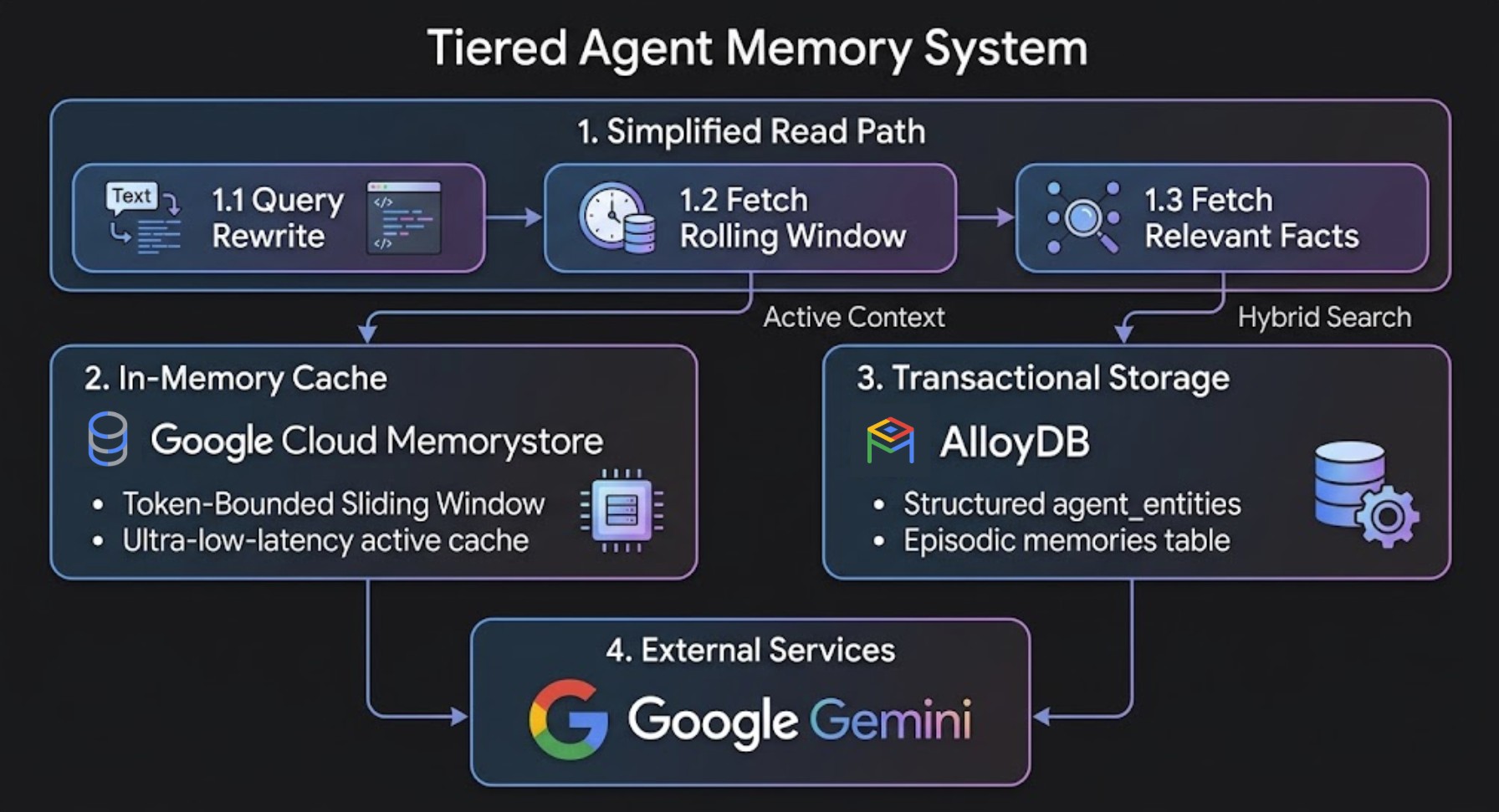
Informazioni sui quattro tipi di ricordi
Un'architettura di memoria solida si basa su quattro tipi di memoria complementari nel percorso dell'utente:
Tipo di memoria | Cosa memorizza | Livello di archiviazione | Longevità |
Buffer (breve termine) | Turni di conversazione non elaborati recenti | Memorystore for Valkey | Sessione attiva |
Memoria di riepilogo | Cronologia compressa dei turni precedenti | Memorystore for Valkey | Finestra multi-turno |
Memoria episodica | Azioni, eventi e output degli strumenti precedenti | AlloyDB per PostgreSQL (vettoriale) | Permanente |
Memoria di entità e regole | Preferenze, vincoli e veti dell'utente | AlloyDB per PostgreSQL (SQL strutturato + vettoriale) | Permanente |
Impatto misurato della memoria a livelli
I test di benchmark interni su dialoghi di sviluppo multi-turn (oltre 45 turni con log di output degli strumenti pesanti) dimostrano un risparmio significativo rispetto al riempimento ingenuo del contesto:
Metrica / dimensione | Inserimento ingenuo del contesto | Memoria a livelli (AlloyDB + Memorystore) | Impatto netto nei test |
Dimensioni del prompt attivo (rotazione di 45°) | 747.033 token | 83.262 token | Prompt più piccolo dell'88,9% |
Turn 45 response latency | 33,5 secondi | 6,7 secondi | Risposta all'80% più veloce |
Token di sessione cumulativi | 17,9 milioni di token | 4,09 milioni di token | 72,0% di risparmio totale di token e costi |
Recupero di regole e vincoli | Si deteriora con le curve | Evita che le informazioni importanti vadano perse nel riepilogo | Preservato tramite la ricerca ibrida |
In questo lab proverai a:
- Esegui il provisioning di AlloyDB per PostgreSQL e Memorystore per Valkey.
- Attiva
google_ml_integratione configura gli incorporamenti automatici transazionali lato database (ai.initialize_embeddings). - Implementa un buffer di sessione Valkey a breve termine con un pattern di pipeline di riepilogo prima del taglio.
- Estrai entità a lungo termine in modo nativo utilizzando le funzioni AI native di AlloyDB (ad es.
ai.generate) - Esegui query su fatti a lungo termine, con elevata accuratezza e pertinenza, utilizzando la funzione di ricerca ibrida nativa di AlloyDB (
ai.hybrid_search) e il nuovo ranking Reciprocal Rank Fusion (RRF). - Crea un valutatore di autorizzazioni per strumenti aziendali a tre livelli e un motore di compattazione della memoria in background.
- Integra l'architettura di memoria a due livelli direttamente in un agente autonomo utilizzando Google Agent Development Kit (ADK).
Che cosa ti serve
- Un progetto Google Cloud con la fatturazione abilitata.
- Un browser web come Chrome.
- Conoscenza di base di Python e SQL, inclusa l'esperienza di esecuzione di query SQL su AlloyDB, da Studio, CLI e così via.
Pubblico e costo
- Pubblico: sviluppatori di AI, backend engineer e architetti di database.
- Costo stimato: le risorse Google Cloud create in questo codelab costeranno circa 1,50$.
2. Configurazione e requisiti
Avvia Cloud Shell
In questo codelab, eseguirai i comandi in Google Cloud Shell, un terminale ospitato sul cloud preconfigurato con gcloud, psql e python3.
- Apri la console Google Cloud.
- Fai clic su Attiva Cloud Shell in alto a destra nella console Google Cloud.
- Verifica l'autenticazione:
gcloud auth list
export PROJECT_ID=<YOUR_PROJECT_ID>
gcloud config set project $PROJECT_ID

export REGION=us-east1
export GENAI_LOCATION=us
export ZONE=us-east1-b
export ADBCLUSTER=agent-memory-cluster
export ADBINSTANCE=agent-memory-instance
export VALKEYINSTANCE=agent-memory-cache
export VM_NAME=agent-dev-vm
Abilita le API Google Cloud e crea la VM di sviluppo
Esegui questo comando in Cloud Shell per abilitare le API richieste:
gcloud services enable \
  alloydb.googleapis.com \
  memorystore.googleapis.com \
  aiplatform.googleapis.com \
  compute.googleapis.com \
  servicenetworking.googleapis.com \
  networkconnectivity.googleapis.com
Crea un'istanza VM di Compute Engine nella rete VPC default per ospitare l'ambiente di sviluppo Python insieme ad AlloyDB e Memorystore for Valkey:
gcloud compute instances create $VM_NAME \
    --zone=$ZONE \
    --machine-type=e2-standard-2 \
    --scopes=cloud-platform \
    --network=default \
    --shielded-secure-boot
3. Esegui il provisioning di AlloyDB e Memorystore for Valkey
In questo passaggio, eseguirai il provisioning del cluster e dell'istanza principale di AlloyDB per PostgreSQL, stabilirai il networking privato dei servizi e avvierai un'istanza Memorystore for Valkey.
Crea un intervallo IP di accesso privato ai servizi
AlloyDB richiede un intervallo di IP privati nella rete Virtual Private Cloud (VPC). Supponendo che tu stia utilizzando la rete VPC default:
- Crea l'allocazione dell'intervallo IP privato:
gcloud compute addresses create psa-range \
    --global \
    --purpose=VPC_PEERING \
    --prefix-length=24 \
    --description="VPC private service access" \
    --network=default
- Stabilisci la connessione di peering VPC privata:
gcloud services vpc-peerings connect \
    --service=servicenetworking.googleapis.com \
    --ranges=psa-range \
    --network=default
Crea il cluster AlloyDB e l'istanza principale
- Crea una password iniziale del cluster per l'inizializzazione del sistema:
export PGPASSWORD=`openssl rand -hex 12`
- Creare un cluster di prova senza costi:
gcloud alloydb clusters create $ADBCLUSTER \
    --password=$PGPASSWORD \
    --network=default \
    --region=$REGION \
    --subscription-type=TRIAL
- Crea l'istanza principale:
gcloud alloydb instances create $ADBINSTANCE \
    --instance-type=PRIMARY \
    --cpu-count=2 \
    --region=$REGION \
    --cluster=$ADBCLUSTER
Provisioning dell'istanza Memorystore for Valkey
Memorystore for Valkey richiede una policy di connessione al servizio (gcp-memorystore) nella rete e nella regione prima della creazione dell'istanza.
- Crea la policy di connessione al servizio per Memorystore:
gcloud network-connectivity service-connection-policies create memorystore-policy \
    --network=default \
    --region=$REGION \
    --service-class=gcp-memorystore \
    --subnets=projects/$PROJECT_ID/regions/$REGION/subnetworks/default
- Crea l'istanza Memorystore for Valkey:
gcloud memorystore instances create $VALKEYINSTANCE \
    --location=$REGION \
    --shard-count=1 \
    --replica-count=0 \
    --node-type=SHARED_CORE_NANO \
    --psc-auto-connections="network=projects/$PROJECT_ID/global/networks/default,projectId=$PROJECT_ID"
Concedi autorizzazioni IAM per Vertex AI
Concedi al service account AlloyDB le autorizzazioni IAM necessarie per richiamare i modelli di incorporamento di Agent Platform:
PROJECT_ID=$(gcloud config get-value project)

gcloud projects add-iam-policy-binding $PROJECT_ID \
  --member="serviceAccount:service-$(gcloud projects describe $PROJECT_ID --format="value(projectNumber)")@gcp-sa-alloydb.iam.gserviceaccount.com" \
  --role="roles/aiplatform.user"
4. Inizializza gli endpoint di ambiente e accesso
Configurare l'autenticazione IAM e i flag di database di AlloyDB
Abilita l'autenticazione database IAM (alloydb.iam_authentication=on) e il motore di query AI (google_ml_integration.enable_ai_query_engine=on) sull'istanza AlloyDB:
gcloud beta alloydb instances update $ADBINSTANCE \
  --cluster=$ADBCLUSTER \
  --region=$REGION \
  --update-mode=FORCE_APPLY \
  --database-flags=alloydb.iam_authentication=on,google_ml_integration.enable_ai_query_engine=on
Successivamente, aggiungi il tuo account Google Cloud come utente del database basato su IAM con autorizzazioni di superutente:
export USER_ACCOUNT=$(gcloud config get-value account)

gcloud alloydb users create $USER_ACCOUNT \
    --cluster=$ADBCLUSTER \
    --region=$REGION \
    --type=IAM_BASED \
    --db-roles=alloydbsuperuser
Recuperare gli endpoint VPC interni in Cloud Shell
Prima di eseguire SSH nella VM di sviluppo, recupera gli indirizzi IP VPC interni per AlloyDB e Memorystore for Valkey in Cloud Shell:
# Export GCP Project ID, Region, and IAM User
export PROJECT_ID=$(gcloud config get-value project)
export REGION=us-east1
export DB_USER=$(gcloud config get-value account)

# Retrieve Internal VPC IP Addresses for AlloyDB & Memorystore for Valkey
export DB_HOST=$(gcloud alloydb instances describe $ADBINSTANCE --cluster=$ADBCLUSTER --region=$REGION --format="value(ipAddress)")
export DB_PORT=5432
export DB_NAME=postgres

export VALKEY_HOST=$(gcloud memorystore instances describe $VALKEYINSTANCE --location=$REGION --format="value(discoveryEndpoints[0].address)")
export VALKEY_PORT=6379

# Verify exported endpoints
echo "Project ID:        $PROJECT_ID"
echo "Region:            $REGION"
echo "AlloyDB Private IP: $DB_HOST"
echo "IAM DB User:       $DB_USER"
echo "Valkey Private IP:  $VALKEY_HOST"
Accedere tramite SSH alla VM di sviluppo ed esportare le variabili di connessione
Accedi tramite SSH da Cloud Shell alla tua VM di sviluppo Compute Engine (agent-dev-vm) che si trova nella stessa rete VPC:
gcloud compute ssh $VM_NAME --zone=$ZONE
Una volta eseguito l'accesso alla VM di sviluppo, esporta la configurazione del progetto e l'output degli endpoint di connessione riportati sopra (sostituendo
export PROJECT_ID=<YOUR_PROJECT_ID>
export REGION=us-east1
export GENAI_LOCATION=us
export DB_HOST=<YOUR_ALLOYDB_PRIVATE_IP>
export DB_PORT=5432
export DB_NAME=postgres
export DB_USER=<YOUR_IAM_DB_USER>
export VALKEY_HOST=<YOUR_VALKEY_PRIVATE_IP>
export VALKEY_PORT=6379
Inizializza l'ambiente virtuale Python
All'interno della VM di sviluppo, creiamo prima la directory di lavoro locale:
mkdir -p ~/alloydb_agent_memory && cd ~/alloydb_agent_memory
Ora installiamo i pacchetti dell'ambiente virtuale Python di sistema, autentichiamo le Credenziali predefinite dell'applicazione (ADC) e configuriamo il workspace:
sudo apt-get update && sudo apt-get install -y python3-venv python3-pip

python3 -m venv venv
source venv/bin/activate
Infine, nel nuovo ambiente virtuale, installeremo le dipendenze:
gcloud auth application-default login
pip install psycopg2-binary valkey redis google-genai
5. Architettura del sistema e gerarchia dei moduli di codice
Panoramica di ciò che stai creando
Prima di implementare i singoli script Python, esamina l'architettura di sistema riportata di seguito. Questa applicazione di esempio è strutturata in sette script Python modulari che operano su due percorsi di esecuzione principali che interagiscono con la stessa istanza di database AlloyDB per PostgreSQL:
- Read Path (
hybrid_retriever.py): scompone le domande complesse in sottoquery a un solo aspetto direttamente in PostgreSQL utilizzando AlloyDB AIai.generate()ed esegue query sulle memorie a lungo termine utilizzando la ricerca ibrida nativa di AlloyDB (ai.hybrid_search). - Write Path (
async_worker.py): worker della coda in background off-thread che estrae in modo asincrono fatti di entità strutturati dagli scambi di dialoghi utilizzando Gemini Flash e li inserisce inagent_entities.
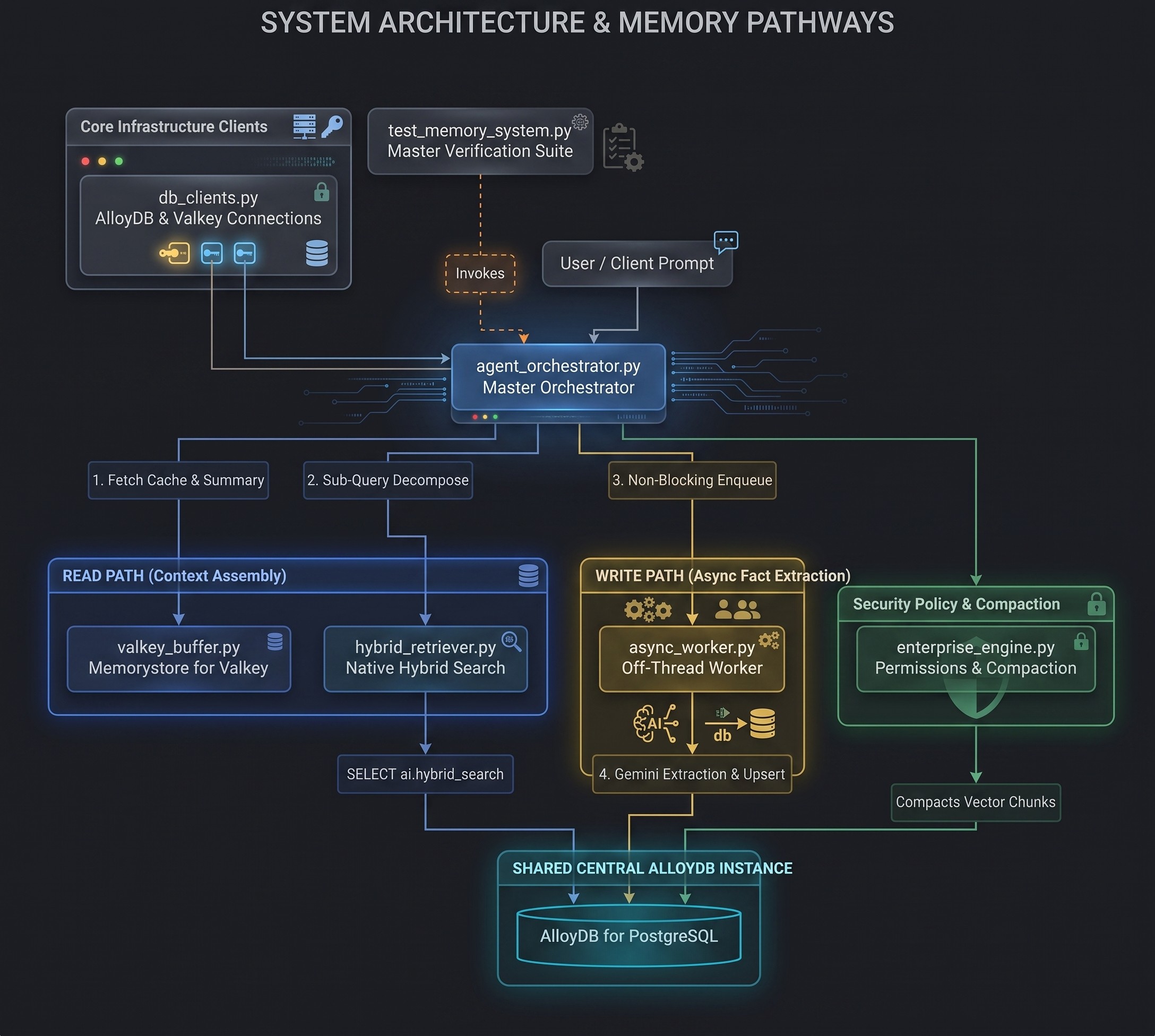
Gerarchia dei moduli e ruoli di sistema
File del modulo | Livello di sistema | Responsabilità principale |
| Livello di connessione | Stabilisce l'autenticazione IAM criptata con SSL su AlloyDB e connessioni resilienti ai socket a Memorystore for Valkey. |
| Memoria a breve termine | Gestisce la cronologia delle sessioni in millisecondi in Valkey, implementando riepiloghi cumulativi Summarize-Before-Trim. |
| Write Path Worker | Esegue un worker della coda in background del daemon off-thread che estrae i fatti delle entità utilizzando Gemini Flash e li inserisce in AlloyDB. |
| Read Path Retriever | Decompone le domande composte in sottoquery a un solo aspetto utilizzando l'AI di AlloyDB |
| Main Agent Loop | Coordina il ciclo di esecuzione end-to-end del turno: recupero a breve termine, ricerca a lungo termine, assemblaggio del prompt, esecuzione LLM e accodamento asincrono. |
| Governance e amministrazione | Applica policy di sicurezza a tre livelli per l'esecuzione degli strumenti e aggrega la memoria storica. |
| Test e valutazione | Suite di verifica principale che esegue scenari multi-turno e multi-sessione, misurando la percentuale di risparmio di token e verificando la precisione della memoria. |
6. Configura lo schema AlloyDB AI e gli incorporamenti automatici transazionali
Panoramica dell'obiettivo e dell'architettura
In questo modulo definirai lo schema del database di AlloyDB per la memoria episodica e a lungo termine, le strategie di indicizzazione e l'incorporamento automatico lato database.
- Episodic Vector Store (
episodic_memory_embeddings): blocchi di trascrizione della chat non strutturati indicizzati con indici vettoriali HNSW (vector_cosine_ops). - Archivio entità a lungo termine (
agent_entities): fatti strutturati, scelte dell'utente e regole del progetto archiviati con metadati di ambito (global,project,session). Include una colonna di ricerca full-text PostgreSQL generata automaticamente (summary_tsv) indicizzata tramite RUM. - Incorporamenti automatici lato database (
ai.initialize_embeddings): incorpora automaticamente le righe di testo normale nuove o aggiornate insummary_embeddingtramite Agent Platformtext-embedding-005in background.
Connettersi ad AlloyDB Studio
- Vai alla pagina AlloyDB per PostgreSQL nella console Google Cloud.
- Fai clic sull'istanza principale.
- Nel riquadro di navigazione a sinistra, fai clic su AlloyDB Studio.
- Seleziona il database
postgres - Autentica con
IAM database authentication
Implementazione e codice sorgente
Una volta connesso al database AlloyDB PostgreSQL, esegui le query DDL riportate di seguito:
-- 1. Enable google_ml_integration extension
CREATE EXTENSION IF NOT EXISTS google_ml_integration CASCADE;
CREATE EXTENSION IF NOT EXISTS vector CASCADE;
CREATE EXTENSION IF NOT EXISTS rum CASCADE;
SET google_ml_integration.enable_preview_ai_functions = true;

-- 2. Create Episodic Memory Vector Store Tables
CREATE TABLE IF NOT EXISTS episodic_memory_collections (
    uuid UUID PRIMARY KEY,
    name VARCHAR,
    cmetadata JSONB
);

CREATE TABLE IF NOT EXISTS episodic_memory_embeddings (
    uuid UUID PRIMARY KEY,
    collection_id UUID REFERENCES episodic_memory_collections(uuid) ON DELETE CASCADE,
    embedding VECTOR(768),
    document VARCHAR,
    cmetadata JSONB,
    custom_id VARCHAR,
    created_at TIMESTAMPTZ DEFAULT NOW()
);

CREATE INDEX IF NOT EXISTS episodic_memory_embedding_idx
ON episodic_memory_embeddings
USING hnsw (embedding vector_cosine_ops)
WITH (m = 16, ef_construction = 64);

-- 3. Create Entity & Preference Table with Metadata Scope & Auto-Generated TSVector Column
CREATE TABLE IF NOT EXISTS agent_entities (
    entity_id UUID PRIMARY KEY DEFAULT gen_random_uuid(),
    user_id TEXT NOT NULL,
    entity_name TEXT NOT NULL,
    project_id TEXT DEFAULT 'global',
    session_id TEXT,
    scope TEXT NOT NULL DEFAULT 'project', -- 'global', 'project', 'session'
    summary TEXT NOT NULL,
    summary_embedding VECTOR(768),
    summary_tsv TSVECTOR GENERATED ALWAYS AS (
        to_tsvector('english', entity_name || ' ' || summary)
    ) STORED,
    updated_at TIMESTAMPTZ DEFAULT NOW(),
    UNIQUE (user_id, entity_name)
);

CREATE INDEX IF NOT EXISTS agent_entities_scope_idx
ON agent_entities (user_id, project_id, scope);

CREATE INDEX IF NOT EXISTS agent_entities_embedding_idx
ON agent_entities USING hnsw (summary_embedding vector_cosine_ops);

CREATE INDEX IF NOT EXISTS agent_entities_tsv_idx
ON agent_entities USING rum (summary_tsv rum_tsvector_ops);

-- 4. Create User Permissions Table for Tool Execution Controls
CREATE TABLE IF NOT EXISTS user_permissions (
    permission_id UUID PRIMARY KEY DEFAULT gen_random_uuid(),
    user_id TEXT NOT NULL,
    project_id TEXT NOT NULL DEFAULT 'global',
    tool_name TEXT NOT NULL,
    command_pattern TEXT NOT NULL,
    action TEXT NOT NULL CHECK (action IN ('ALLOW', 'BLOCK')),
    created_at TIMESTAMPTZ DEFAULT NOW(),
    updated_at TIMESTAMPTZ DEFAULT NOW()
);

CREATE INDEX IF NOT EXISTS idx_user_permissions_lookup
ON user_permissions (user_id, project_id, tool_name);
-- 5. Register Gemini 3.5 Flash Model Endpoint in AlloyDB
-- Replace PROJECT_ID with your Google Cloud project ID
CALL google_ml.create_model(
    model_id => 'gemini-3.5-flash',
    model_request_url => 'https://aiplatform.googleapis.com/v1/projects/PROJECT_ID/locations/global/publishers/google/models/gemini-3.5-flash:generateContent',
    model_qualified_name => 'gemini-3.5-flash',
    model_provider => 'google',
    model_type => 'llm',
    model_auth_type => 'alloydb_service_agent_iam'
);
Inizializza gli incorporamenti automatici transazionali e registra il modello Gemini
Successivamente, esegui le istruzioni CALL in blocchi di esecuzione delle query separati per registrare il processo in background di incorporamento automatico e l'endpoint del modello Gemini 3.5 Flash:
-- 6. Register Database-Side Transactional Auto-Embedding
CALL ai.initialize_embeddings(
    model_id => 'text-embedding-005',
    table_name => 'agent_entities',
    content_column => 'summary',
    embedding_column => 'summary_embedding',
    incremental_refresh_mode => 'transactional',
    batch_size => 10
);
7. Configura i client di connessione AlloyDB e Valkey
Panoramica dell'obiettivo e dell'architettura
In questo modulo, stabilirai connessioni di rete sicure sia ad AlloyDB per PostgreSQL (memoria a lungo termine) sia a Memorystore per Valkey (cache a breve termine).
- Autenticazione IAM di AlloyDB: utilizza
gcloud auth application-default print-access-tokenper recuperare un token OAuth2 di breve durata per connessioni al database senza password e criptate con SSL (sslmode="require"). - Resilienza di rete Valkey: configura
redis.Rediscon un timeout del socket di 5 secondi (socket_timeout=5.0) per gestire in modo sicuro le operazioni di rete VPC su istanze Valkey a nodo singolo o in cluster.
Implementazione e codice sorgente
Crea lo script db_clients.py nella tua directory di lavoro:
import os
import subprocess
import psycopg2
import redis

# Initialize database & Valkey connection clients from environment variables
DB_HOST = os.getenv("DB_HOST", "127.0.0.1")
DB_PORT = os.getenv("DB_PORT", "5432")
DB_NAME = os.getenv("DB_NAME", "postgres")
DB_USER = os.getenv("DB_USER")

VALKEY_HOST = os.getenv("VALKEY_HOST", "127.0.0.1")
VALKEY_PORT = int(os.getenv("VALKEY_PORT", "6379"))

def get_db_connection():
    # Fetch Application Default Credentials (ADC) token for IAM Database Authentication & enable SSL encryption
    access_token = subprocess.check_output(
        ["gcloud", "auth", "application-default", "print-access-token"], text=True
    ).strip()
    return psycopg2.connect(
        host=DB_HOST,
        port=DB_PORT,
        dbname=DB_NAME,
        user=DB_USER,
        password=access_token,
        sslmode="require"
    )

def get_valkey_client():
    return redis.Redis(
        host=VALKEY_HOST,
        port=VALKEY_PORT,
        db=0,
        socket_timeout=5.0,
        socket_connect_timeout=5.0
    )

if __name__ == "__main__":
    print(f"Connecting to AlloyDB via IAM Auth ({DB_USER}) at {DB_HOST}:{DB_PORT} and Valkey at {VALKEY_HOST}:{VALKEY_PORT}...")
    print("Database and Valkey connection client modules loaded successfully.")
8. Memorizzare nella cache lo stato della sessione a breve termine in Memorystore for Valkey
Panoramica dell'obiettivo e dell'architettura
In questo modulo creerai una memorizzazione nella cache del contesto a breve termine di millisecondi in Memorystore for Valkey implementando un pattern Summarize-Before-Trim automatizzato.
- Valkey Sliding Window: i turni di conversazione attivi vengono archiviati come stringhe JSON nella chiave
session:{session_id}:turns. - Tag hash Redis (
{session_id}): la formattazione delle chiavisession:{session_id}:turnsesession:{session_id}:summaryutilizza i tag hash del cluster Redis ({...}), forzando entrambe le chiavi nello stesso slot hash per garantire l'esecuzione atomica in qualsiasi deployment Valkey a nodo singolo o in cluster. - Riassumi prima di tagliare: quando il numero di turni supera
trigger_limit, i turni più vecchi che stanno per essere eliminati vengono riassunti da Gemini Flash in un riepilogo di testo scorrevole (session:{session_id}:summary) prima di ridurre la cronologia non elaborata awindow_size.
Implementazione e codice sorgente
Crea lo script valkey_buffer.py nella tua directory di lavoro:
import json
import logging
import time
from typing import Any, Dict, List
import redis

logger = logging.getLogger(__name__)

IN_MEMORY_VALKEY_FALLBACK: Dict[str, Any] = {}
VALKEY_COMPACTION_TOKENS = 0

def get_valkey_compaction_tokens() -> int:
    return VALKEY_COMPACTION_TOKENS

def append_session_turn_with_rolling_summary(
    valkey_client: redis.Redis,
    llm_client: Any,
    session_id: str,
    user_msg: str,
    ai_msg: str,
    trigger_limit: int = 10,
    window_size: int = 4
) -> None:
    """Appends turn to Valkey. Before trimming old turns, summarizes them into a rolling summary."""
    global VALKEY_COMPACTION_TOKENS
    # Use Redis Hash Tags {session_id} so both keys hash to the same cluster slot
    turns_key = "session:{" + session_id + "}:turns"
    summary_key = "session:{" + session_id + "}:summary"

    try:
        # 1. Append new turn messages
        valkey_client.rpush(turns_key, json.dumps({"role": "user", "content": user_msg}))
        valkey_client.rpush(turns_key, json.dumps({"role": "assistant", "content": ai_msg}))

        raw_turns = valkey_client.lrange(turns_key, 0, -1)

        # 2. Check if total turns exceed summary trigger threshold
        msg_trigger_count = trigger_limit * 2
        msg_window_count = window_size * 2

        if len(raw_turns) > msg_trigger_count:
            turns_to_prune = raw_turns[:-msg_window_count]
            existing_summary = valkey_client.get(summary_key)
            existing_summary_text = (
                existing_summary.decode('utf-8') if isinstance(existing_summary, bytes) else (existing_summary or "")
            )

            pruned_text = "\n".join([
                f"{json.loads(t)['role']}: {json.loads(t)['content']}" for t in turns_to_prune
            ])

            prompt = f"""Update the existing rolling conversation summary with the old turns about to be trimmed.
Retain key constraints, user choices, technical decisions, and ongoing goals.

Existing Summary:
{existing_summary_text if existing_summary_text else 'No prior summary.'}

Old turns about to be trimmed:
{pruned_text}

Updated Rolling Summary:"""

            VALKEY_COMPACTION_TOKENS += max(1, len(prompt) // 4)

            updated_summary_text = llm_client.models.generate_content(
                model="gemini-3.5-flash", contents=prompt
            ).text.strip()
            # Execute commands directly to support all Redis/Valkey cluster topologies
            valkey_client.set(summary_key, updated_summary_text)
            valkey_client.ltrim(turns_key, -msg_window_count, -1)
            logger.info("Updated rolling summary and trimmed Valkey buffer for session %s", session_id)

    except (redis.exceptions.RedisError, Exception) as e:
        logger.warning("Valkey operation warning (%s). Falling back to in-memory short-term buffer.", e)
        if turns_key not in IN_MEMORY_VALKEY_FALLBACK:
            IN_MEMORY_VALKEY_FALLBACK[turns_key] = []
        IN_MEMORY_VALKEY_FALLBACK[turns_key].append({"role": "user", "content": user_msg})
        IN_MEMORY_VALKEY_FALLBACK[turns_key].append({"role": "assistant", "content": ai_msg})

        # In-memory summarize-before-trim fallback logic
        msg_trigger_count = trigger_limit * 2
        msg_window_count = window_size * 2
        raw_fallback_turns = IN_MEMORY_VALKEY_FALLBACK[turns_key]

        if len(raw_fallback_turns) > msg_trigger_count:
            turns_to_prune = raw_fallback_turns[:-msg_window_count]
            existing_summary_text = IN_MEMORY_VALKEY_FALLBACK.get(summary_key, "")
            pruned_text = "\n".join([f"{t['role']}: {t['content']}" for t in turns_to_prune])

            prompt = f"""Update the existing rolling conversation summary with the old turns about to be trimmed.
Retain key constraints, user choices, technical decisions, and ongoing goals.

Existing Summary:
{existing_summary_text if existing_summary_text else 'No prior summary.'}

Old turns about to be trimmed:
{pruned_text}

Updated Rolling Summary:"""

            VALKEY_COMPACTION_TOKENS += max(1, len(prompt) // 4)

            for attempt in range(4):
                try:
                    updated_summary_text = llm_client.models.generate_content(
                        model="gemini-3.5-flash", contents=prompt
                    ).text.strip()
                    break
                except Exception as e:
                    if ("429" in str(e) or "RESOURCE_EXHAUSTED" in str(e)) and attempt < 3:
                        time.sleep(3 * (2 ** attempt))
                    else:
                        raise

            IN_MEMORY_VALKEY_FALLBACK[summary_key] = updated_summary_text
            IN_MEMORY_VALKEY_FALLBACK[turns_key] = raw_fallback_turns[-msg_window_count:]

def get_session_context_buffer(
    valkey_client: redis.Redis,
    session_id: str
) -> Dict[str, Any]:
    """Retrieves rolling summary + sliding window history from Valkey to build prompt context."""
    turns_key = "session:{" + session_id + "}:turns"
    summary_key = "session:{" + session_id + "}:summary"

    try:
        summary = valkey_client.get(summary_key)
        summary_text = summary.decode('utf-8') if isinstance(summary, bytes) else (summary or "")

        raw_turns = valkey_client.lrange(turns_key, 0, -1)
        recent_turns = [json.loads(t) for t in raw_turns]

        return {
            "rolling_summary": summary_text,
            "recent_turns": recent_turns
        }
    except (redis.exceptions.RedisError, Exception) as e:
        logger.warning("Valkey read error (%s). Using in-memory short-term fallback buffer.", e)
        summary_text = IN_MEMORY_VALKEY_FALLBACK.get(summary_key, "")
        recent_turns = IN_MEMORY_VALKEY_FALLBACK.get(turns_key, [])
        return {"rolling_summary": summary_text, "recent_turns": recent_turns}
9. Estrai entità off-thread (worker di memoria in background)
Panoramica dell'obiettivo e dell'architettura
In questo modulo, creerai un worker di estrazione in background del percorso di scrittura off-thread (AsyncMemoryWorker) che estrae i fatti delle entità a lungo termine senza rallentare le risposte interattive dell'AI.
- Worker della coda non bloccante: avvia un thread daemon (
queue.Queue) in modo che le risposte della chat per sviluppatori vengano restituite immediatamente senza attendere l'estrazione dell'LLM o le scritture nel database. - Estrazione di fatti relativi alle entità off-thread: chiama Gemini Flash (
model="gemini-3.5-flash",response_mime_type="application/json") in background per analizzare le entità strutturate senza bloccare i turni di dialogo rivolti all'utente. - Risoluzione della coreferenza temporale (
build_temporal_rules_prompt): applica regole che convertono le espressioni temporali relative (ad es. "attualmente", "ultima sessione") in ID sessione espliciti (ad es.session_id). - Upsert dello schema: chiede a Gemini Flash di restituire un array JSON di entità (
entity_name,project_id,scope,summary) e scrive testo normale inagent_entitiestramite istruzioni PostgreSQLON CONFLICT DO UPDATEparametrizzate.
Implementazione e codice sorgente
Crea lo script async_worker.py nella tua directory di lavoro:
import json
import logging
import queue
import threading
import time
from typing import Dict, Any, Optional
import psycopg2

logger = logging.getLogger(__name__)

def build_temporal_rules_prompt(active_session_id: str, prev_session_id: Optional[str] = None) -> str:
    """REUSABLE PROMPT HELPER: Defines temporal coreference rules for both Read and Write paths."""
    return f"""TEMPORAL COREFERENCE RULES:
1. Do not use relative temporal words like 'currently', 'now', 'this session', 'previous session', or 'last session'.
2. Replace any relative temporal reference with explicit session identifiers:
   - Active Session: '{active_session_id}'
   - Previous Session: '{prev_session_id if prev_session_id else active_session_id}'
   (e.g., write 'User prefers Python in session {active_session_id}' instead of 'User currently prefers Python')."""

class AsyncMemoryWorker:
    """Off-thread daemon queue worker performing background entity extraction and upserts into AlloyDB."""
    def __init__(self, conn_factory, llm_client):
        self.conn_factory = conn_factory
        self.llm_client = llm_client
        self.work_queue = queue.Queue()
        self.total_extraction_tokens = 0
        self.worker_thread = threading.Thread(target=self._run_worker, daemon=True)
        self.worker_thread.start()

    def enqueue_extraction(
        self, user_id: str, session_id: str, user_msg: str, ai_msg: str, prev_session_id: Optional[str] = None
    ):
        self.work_queue.put((user_id, session_id, user_msg, ai_msg, prev_session_id))

    def _run_worker(self):
        while True:
            item = self.work_queue.get()
            if item is None:
                break
            user_id, session_id, user_msg, ai_msg, prev_session_id = item
            try:
                self._extract_and_upsert(user_id, session_id, user_msg, ai_msg, prev_session_id)
            except Exception as e:
                logger.error("Background extraction failed: %s", e)
            finally:
                self.work_queue.task_done()

    def _extract_and_upsert(
        self, user_id: str, session_id: str, user_msg: str, ai_msg: str, prev_session_id: Optional[str] = None
    ):
        temporal_rules = build_temporal_rules_prompt(session_id, prev_session_id)
        json_fmt = '[{"entity_name": "...", "project_id": "...", "scope": "global|project|session", "summary": "..."}]'

        prompt = f"""Extract key preferences and named entities from this exchange.
Format output strictly as a JSON array of objects with structure: {json_fmt}.

{temporal_rules}

Rules for Scope:
- 'global': Universal developer preferences.
- 'project': Architecture, database choices, timeouts, and rules for a specific project.
- 'session': Ephemeral task state tied strictly to a single session.

User: {user_msg}
AI: {ai_msg}

Output (JSON array only):"""

        self.total_extraction_tokens += max(1, len(prompt) // 4)

        for attempt in range(4):
            try:
                response = self.llm_client.models.generate_content(
                    model="gemini-3.5-flash",
                    contents=prompt,
                    config={"response_mime_type": "application/json"}
                )
                break
            except Exception as e:
                if ("429" in str(e) or "RESOURCE_EXHAUSTED" in str(e)) and attempt < 3:
                    time.sleep(3 * (2 ** attempt))
                else:
                    raise
        content = str(response.text).strip()
        if not content:
            return

        extracted_list = json.loads(content)
        if not isinstance(extracted_list, list):
            return

        upsert_sql = """
            INSERT INTO agent_entities (user_id, entity_name, project_id, session_id, scope, summary, updated_at)
            VALUES (%s, %s, %s, %s, %s, %s, NOW())
            ON CONFLICT (user_id, entity_name)
            DO UPDATE SET
                project_id = EXCLUDED.project_id,
                session_id = EXCLUDED.session_id,
                scope = EXCLUDED.scope,
                summary = EXCLUDED.summary,
                updated_at = NOW();
        """

        conn = self.conn_factory()
        try:
            with conn:
                with conn.cursor() as cur:
                    for item in extracted_list:
                        e_name = item.get("entity_name", "General_Fact")
                        p_id = item.get("project_id", "global")
                        s_scope = item.get("scope", "project")
                        summary = item.get("summary", "")
                        if e_name and summary:
                            cur.execute(upsert_sql, (user_id, e_name, p_id, session_id, s_scope, summary))
            logger.info("Saved %d entities for user %s", len(extracted_list), user_id)
        finally:
            conn.close()
10. Eseguire query sulla memoria a lungo termine con la ricerca ibrida nativa
Panoramica dell'obiettivo e dell'architettura
In questo modulo implementerai la scomposizione delle sottoquery del percorso di lettura, la riscrittura delle query temporali, l'isolamento dell'ambito dei metadati e utilizzerai la ricerca ibrida nativa di AlloyDB (ai.hybrid_search).
- Decomposizione delle sottoquery nel database (
rewrite_and_decompose_query): utilizza la funzione integrataai.generate()di AlloyDB AI direttamente in PostgreSQL per suddividere le domande composte in sottoquery a un solo aspetto con ID sessione normalizzati, impedendo alle query multi-argomento di ridurre l'accuratezza della ricerca vettoriale. - Filtro a livello di indice: crea filtri SQL lato database (
filter_condition => "user_id = '%s' AND (project_id = '%s' OR scope = 'global')") per isolare i ricordi per utente e progetto, includendo le preferenze globali degli sviluppatori. - AlloyDB Native Hybrid Search (
ai.hybrid_search): combina la similarità del coseno vettoriale (public.<=>) con la ricerca full-text (rum) all'interno di AlloyDB utilizzando Reciprocal Rank Fusion (RRF) per fornire accuratezza, richiamo e pertinenza ottimali.
Implementazione e codice sorgente
Crea lo script hybrid_retriever.py nella tua directory di lavoro:
import os
import json
import logging
from typing import Any, Dict, List, Optional
import psycopg2
from psycopg2.extras import RealDictCursor
from async_worker import build_temporal_rules_prompt

logger = logging.getLogger(__name__)

def rewrite_and_decompose_query(
    conn: Any,
    llm_client: Any,
    text: str,
    active_session_id: str,
    prev_session_id: Optional[str] = None
) -> List[str]:
    """Read-Path LLM Query Normalizer & Sub-Query Decomposer using AlloyDB AI ai.generate() directly in PostgreSQL."""
    temporal_rules = build_temporal_rules_prompt(active_session_id, prev_session_id)

    prompt = f"""You are a query normalization and decomposition tool for an AI agent's memory retrieval system.

Tasks:
1. Normalize any relative temporal phrases in the user query into explicit session identifiers.
{temporal_rules}

2. Decompose compound user queries asking about multiple distinct topics into up to 4 concise, single-topic search queries. Ensure all distinct questions (both general developer preferences and project-specific architecture/rules) are preserved as separate sub-queries.
3. Return ONLY a valid JSON array of strings containing the sub-queries.

Example Output Format:
["general developer coding preferences", "CloudRetail backend stack in session sess_2026_01", "CloudRetail timeout rules in session sess_2026_01"]

Text to Process: {text}
JSON Output:"""

    try:
        with conn.cursor() as cur:
            cur.execute("SET google_ml_integration.enable_preview_ai_functions = true;")
            cur.execute("SELECT ai.generate(prompt => %s::text, model_id => 'gemini-3.5-flash'::varchar(100));", (prompt,))
            row = cur.fetchone()
            if row and row[0]:
                res_text = str(row[0]).strip()
                clean_text = res_text
                if clean_text.startswith("```"):
                    clean_text = clean_text.removeprefix("```json").removeprefix("```").removesuffix("```").strip()
                parsed = json.loads(clean_text)
                if isinstance(parsed, list) and len(parsed) > 0:
                    return [str(q).strip() for q in parsed]
        return [text]
    except Exception as e:
        logger.error("Error in in-database ai.generate sub-query decomposition: %s", e)
        return [text]

def rewrite_temporal_query(
    conn: Any,
    llm_client: Any,
    text: str,
    active_session_id: str,
    prev_session_id: Optional[str] = None
) -> str:
    """Backward-compatible wrapper returning first decomposed query string."""
    queries = rewrite_and_decompose_query(conn, llm_client, text, active_session_id, prev_session_id)
    return queries[0] if queries else text

def retrieve_hybrid_entities(
    conn,
    llm_client: Any,
    user_id: str,
    active_session_id: str,
    query_text: str,
    query_embedding: Optional[List[float]] = None,
    prev_session_id: Optional[str] = None,
    project_id: Optional[str] = None,
    k: int = 20
) -> Dict[str, Any]:
    """Queries long-term entities using Sub-Query Decomposition, metadata scope filtering, and parameterized AlloyDB hybrid search."""
    sub_queries = rewrite_and_decompose_query(
        conn=conn, llm_client=llm_client, text=query_text, active_session_id=active_session_id, prev_session_id=prev_session_id
    )
    all_search_queries = list(dict.fromkeys(sub_queries + [query_text]))

    retrieved_entities: Dict[str, Any] = {}

    filter_cond = f"user_id = '{user_id}' AND (project_id = '{project_id}' OR scope = 'global')" if project_id else f"user_id = '{user_id}'"

    query_sql = """
        SELECT e.entity_name, e.summary, e.project_id, e.scope, e.updated_at
        FROM ai.hybrid_search(
          search_inputs => %s::JSONB[],
          include_json_output => false
        ) h
        JOIN agent_entities e ON e.entity_name = h.id
        WHERE e.user_id = %s
        LIMIT %s;
    """

    from google import genai
    embed_client = genai.Client(
        vertexai=True,
        project=os.getenv("PROJECT_ID"),
        location=os.getenv("REGION", "us-east1")
    )

    for sq in all_search_queries:
        try:
            emb_resp = embed_client.models.embed_content(model="text-embedding-005", contents=sq)
            sq_embedding = emb_resp.embeddings[0].values
            vector_literal = f"'{sq_embedding}'::vector"
        except Exception as e:
            logger.error(f"Failed to generate embedding for sub-query: {sq}. Error: {e}")
            # Fallback to zero vector to prevent Postgres from crashing
            sq_embedding = [0.0] * 768
            vector_literal = f"'{sq_embedding}'::vector"

        search_inputs = [
            json.dumps({
                "data_type": "vector",
                "weight": 0.4,
                "table_name": "agent_entities",
                "key_column": "entity_name",
                "vec_column": "summary_embedding",
                "distance_operator": "public.<=>",
                "limit": 20,
                "query_vector": vector_literal,
                "filter_condition": filter_cond
            }),
            json.dumps({
                "data_type": "text",
                "weight": 0.6,
                "table_name": "agent_entities",
                "key_column": "entity_name",
                "text_column": "summary_tsv",
                "limit": 20,
                "ranking_function": "ts_rank",
                "query_text_input": sq,
                "filter_condition": filter_cond
            })
        ]

        with conn.cursor(cursor_factory=RealDictCursor) as cur:
            try:
                cur.execute("SET google_ml_integration.enable_preview_ai_functions = true;")
                cur.execute(query_sql, (search_inputs, user_id, k))
                rows = cur.fetchall()

                for row in rows:
                    name = row["entity_name"]
                    if name not in retrieved_entities:
                        retrieved_entities[name] = {
                            "summary": row["summary"],
                            "project_id": row["project_id"],
                            "scope": row["scope"],
                            "updated_at": row["updated_at"].isoformat() if row["updated_at"] else None
                        }
            except Exception as e:
                logger.error("Error executing hybrid search for sub-query '%s': %s", sq, e)

    return retrieved_entities
11. Crea ed esegui il ciclo di memoria dell'agente end-to-end
Panoramica dell'obiettivo e dell'architettura
In questo modulo, creerai la funzione principale di orchestrazione degli agenti (run_agent_turn) che combina il recupero della cache a breve termine, la ricerca nella memoria a lungo termine, l'assemblaggio dei prompt, la generazione di LLM e l'estrazione della memoria in background.
- Contesto a breve termine: recupera i turni di dialogo attivi di Valkey e il riepilogo cumulativo (
get_session_context_buffer). - Ricerca a lungo termine: esegue query su AlloyDB tramite
retrieve_hybrid_entitiesutilizzando sottoquery decomposte filtrate in base all'ID progetto attivo e all'ambito globale. - Formattazione del prompt di sistema: assembla
build_agent_promptcontenente entità a lungo termine, riepilogo a breve termine, dialogo recente e il prompt dell'utente in un prompt di sistema efficiente in termini di token. - Async Queue Enqueue: memorizza nella cache l'invio in Valkey e mette in coda l'estrazione in background in
AsyncMemoryWorkersenza bloccare il payload di ritorno.
Implementazione e codice sorgente
Crea lo script agent_orchestrator.py nella tua directory di lavoro:
import logging
import time
from typing import Any, Dict, Optional, Tuple
import redis
from valkey_buffer import get_session_context_buffer, append_session_turn_with_rolling_summary
from hybrid_retriever import rewrite_temporal_query, retrieve_hybrid_entities
from async_worker import AsyncMemoryWorker

logger = logging.getLogger(__name__)

def build_agent_prompt(
    rolling_summary: str,
    recent_turns: list[Dict[str, Any]],
    retrieved_entities: Dict[str, Any],
    user_query: str
) -> str:
    """Assembles structured system prompt with long-term memory & short-term context."""
    entity_lines = [
        f"- {name}: {info['summary']}" for name, info in retrieved_entities.items()
    ]
    entity_context = "\n".join(entity_lines) if entity_lines else "No relevant entity facts."
    history_lines = [f"{t['role']}: {t['content']}" for t in recent_turns]
    history_str = "\n".join(history_lines)

    return f"""You are an intelligent, context-aware AI assistant.

[LONG-TERM PREFERENCES & ENTITIES]
{entity_context}

[SHORT-TERM ROLLING SUMMARY]
{rolling_summary if rolling_summary else 'No prior summary.'}

[RECENT DIALOGUE]
{history_str}

User: {user_query}
AI:"""

def run_agent_turn(
    db_conn,
    valkey_client: redis.Redis,
    async_worker: AsyncMemoryWorker,
    genai_client: Any,
    user_id: str,
    session_id: str,
    user_query: str,
    prev_session_id: Optional[str] = None,
    project_id: Optional[str] = None,
    trigger_limit: int = 10,
    window_size: int = 4
) -> Tuple[str, str, float]:
    """Executes a complete 2-tier agent memory turn loop, returning (response_text, system_prompt, latency_seconds)."""
    import time
    start_time = time.time()

    # 1. Fetch short-term rolling summary + recent turns from Valkey
    buffer_data = get_session_context_buffer(valkey_client, session_id)
    rolling_summary = buffer_data["rolling_summary"]
    recent_turns = buffer_data["recent_turns"]

    # 2. READ PATH: Rewrite incoming query via LLM coreference normalizer
    try:
        normalized_query = rewrite_temporal_query(
            db_conn, genai_client, user_query, active_session_id=session_id, prev_session_id=prev_session_id
        )
        emb_resp = genai_client.models.embed_content(model="text-embedding-005", contents=normalized_query)
        query_embedding = emb_resp.embeddings[0].values
    except Exception:
        query_embedding = None

    # Retrieve relevant long-term entities from AlloyDB via hybrid search
    retrieved_entities = retrieve_hybrid_entities(
        conn=db_conn,
        llm_client=genai_client,
        user_id=user_id,
        active_session_id=session_id,
        query_text=user_query,
        query_embedding=query_embedding,
        prev_session_id=prev_session_id,
        project_id=project_id,
        k=20
    )

    # 3. Assemble system prompt
    system_prompt = build_agent_prompt(
        rolling_summary, recent_turns, retrieved_entities, user_query
    )


    # 4. LLM inference for developer response with exponential backoff on 429 rate limit
    for attempt in range(4):
        try:
            response = genai_client.models.generate_content(
                model="gemini-3.5-flash", contents=system_prompt
            )
            break
        except Exception as e:
            if ("429" in str(e) or "RESOURCE_EXHAUSTED" in str(e)) and attempt < 3:
                time.sleep(3 * (2 ** attempt))
            else:
                raise
    ai_response = str(response.text)

    # 5. Cache turn in short-term Valkey buffer (with Summarize-Before-Trim check)
    append_session_turn_with_rolling_summary(
        valkey_client=valkey_client,
        llm_client=genai_client,
        session_id=session_id,
        user_msg=user_query,
        ai_msg=ai_response,
        trigger_limit=trigger_limit,
        window_size=window_size
    )

    # 6. WRITE PATH: Enqueue off-thread background entity extraction (single LLM call)
    async_worker.enqueue_extraction(user_id, session_id, user_query, ai_response, prev_session_id)

    latency = time.time() - start_time
    return ai_response, system_prompt, latency
12. Implementare i controlli delle autorizzazioni aziendali e la compattazione della memoria
Panoramica dell'obiettivo e dell'architettura
In questo modulo, creerai controlli di sicurezza aziendali per l'esecuzione degli strumenti e la compattazione della memoria del database (AgentMemoryEngine).
- Valutazione delle autorizzazioni a tre livelli (
evaluate_tool_permission):- Livello 1 (concessione Valkey monouso): controlla le chiavi di concessione monouso (
one_time_perm:{session_id}:{cmd_hash}) con TTL di 300 secondi. Se presente, elimina immediatamente la chiave e restituisceALLOW. - Livello 2 e 3 (regole dei criteri PostgreSQL): le query
user_permissionscorrispondono prima alle regole con ambito di progetto (project_id) e poi alle regole globali ('global'). - Fallback: restituisce
PROMPT_USERse non esiste una policy corrispondente.
- Livello 1 (concessione Valkey monouso): controlla le chiavi di concessione monouso (
- Compattazione della memoria (
compact_old_memories): aggrega gli eventi vettoriali non elaborati storici inepisodic_memory_embeddingsprecedenti aretention_daysin un unico riepilogo consolidato inagent_entitiesutilizzando una query CTE SQL limitata a 50 righe.
Implementazione e codice sorgente
Crea lo script enterprise_engine.py nella tua directory di lavoro:
import hashlib
import logging
import re
from typing import Any, Dict, Tuple
import psycopg2
import redis

logger = logging.getLogger(__name__)

class AgentMemoryEngine:
    """Framework-agnostic Enterprise Memory Engine for tool execution permissions & safe compaction."""

    def __init__(self, valkey_client: redis.Redis, db_conn: Any):
        self.valkey_client = valkey_client
        self.db_conn = db_conn

    def evaluate_tool_permission(
        self,
        user_id: str,
        project_id: str,
        session_id: str,
        tool_name: str,
        tool_args: Dict[str, Any]
    ) -> Tuple[str, str]:
        """Evaluates 3-tier execution permissions: Allow-Once (Valkey), Project (AlloyDB), Global (AlloyDB)."""
        command_str = str(tool_args.get("CommandLine", "") or tool_args)

        # Tier 1: Allow-Once (Single-Use Valkey Check with 300s TTL)
        cmd_hash = hashlib.sha256(command_str.encode("utf-8")).hexdigest()[:16]
        valkey_key = f"one_time_perm:{session_id}:{cmd_hash}"

        if self.valkey_client.get(valkey_key):
            self.valkey_client.delete(valkey_key)  # Consume key immediately
            return ("ALLOW", "Single-use 'Allow Once' grant consumed.")

        # Tier 2 & Tier 3: Query AlloyDB user_permissions table
        query_sql = """
            SELECT command_pattern, action, project_id
            FROM user_permissions
            WHERE user_id = %s AND tool_name = %s AND project_id IN (%s, 'global')
            ORDER BY CASE WHEN project_id = %s THEN 1 ELSE 2 END;
        """

        with self.db_conn.cursor() as cur:
            cur.execute(query_sql, (user_id, tool_name, project_id, project_id))
            rules = cur.fetchall()
            for pattern, action, scope in rules:
                if re.search(pattern, command_str, flags=re.IGNORECASE):
                    return (action, f"Matched {scope}-scoped rule: {pattern}")

        # Fallback: Prompt Human User
        return ("PROMPT_USER", "No matching permission rule found.")

    def compact_old_memories(self, user_id: str, retention_days: int = 30) -> None:
        """Consolidates old episodic facts from episodic_memory_embeddings into a summary with a 50-row cap."""
        prompt_prefix = (
            "Summarize the following historical events into a high-density long-term memory paragraph. "
            "Retain key constraints, tool choices, and project rules:\n"
        )

        # Capped CTE prevents string_agg from exceeding model context window limits
        compaction_sql = """
            WITH old_events AS (
                SELECT document AS content
                FROM episodic_memory_embeddings
                WHERE cmetadata->>'user_id' = %s
                  AND created_at < NOW() - (INTERVAL '1 day' * %s)
                ORDER BY created_at ASC
                LIMIT 50
            ),
            consolidated AS (
                SELECT ai.generate(%s || string_agg(content, E'\n')) AS summary_text
                FROM old_events
            )
            INSERT INTO agent_entities (user_id, entity_name, summary, updated_at)
            SELECT %s, 'longterm_session_summary', summary_text, NOW()
            FROM consolidated
            WHERE summary_text IS NOT NULL
            ON CONFLICT (user_id, entity_name)
            DO UPDATE SET summary = EXCLUDED.summary, updated_at = NOW();
        """

        prune_sql = """
            DELETE FROM episodic_memory_embeddings
            WHERE uuid IN (
                SELECT uuid FROM episodic_memory_embeddings
                WHERE cmetadata->>'user_id' = %s
                  AND created_at < NOW() - (INTERVAL '1 day' * %s)
                ORDER BY created_at ASC
                LIMIT 50
            );
        """

        try:
            with self.db_conn:
                with self.db_conn.cursor() as cur:
                    cur.execute("SET google_ml_integration.enable_preview_ai_functions = true;")
                    cur.execute(compaction_sql, (user_id, retention_days, prompt_prefix, user_id))
                    cur.execute(prune_sql, (user_id, retention_days))
            logger.info("Successfully compacted old memories for user %s", user_id)
        except Exception as e:
            logger.error("Error during memory compaction: %s", e)
13. Esegui la verifica della memoria multi-turn end-to-end
Panoramica dell'obiettivo e dell'architettura
In questo modulo finale, creerai ed eseguirai lo script di verifica end-to-end principale (test_memory_system.py) per convalidare l'architettura di memoria a due livelli completa.
- Simulazione multi-turn e multi-sessione:
- Sessione 1 (Turno 1): definisce le preferenze universali degli sviluppatori (
scope='global': UI in modalità Buio, Python 3.11, PostgreSQL). - Sessione 1 (Turno 2): definisce l'architettura specifica del progetto (
project_id='CloudRetail': FastAPI, AlloyDB, Valkey, limite di timeout di 30 secondi, us-east1). - Sessione 1 (Turni 3 e 4): genera rumore di dialogo tecnico e supera
trigger_limit=3per attivare la compressione del riepilogo Riepiloga prima di tagliare di Valkey. - Sessione 2 (turno 5 - ID sessione nuovo di zecca): esegue query sull'agente in tutte le sessioni per verificare il richiamo tra sessioni delle preferenze globali E delle regole del progetto.
- Sessione 1 (Turno 1): definisce le preferenze universali degli sviluppatori (
- Verifica dinamica di efficienza e accuratezza: misura i caratteri/token esatti del prompt, la percentuale di riduzione delle dimensioni del prompt, la latenza di inferenza, i riepiloghi rolling di Valkey, l'isolamento dell'ambito e le norme di sicurezza per l'esecuzione degli strumenti.
Implementazione e codice sorgente
Crea lo script per il test test_memory_system.py nella tua directory di lavoro:
import os
import time
import logging
from google import genai
from db_clients import get_db_connection, get_valkey_client
from async_worker import AsyncMemoryWorker
from hybrid_retriever import retrieve_hybrid_entities
from agent_orchestrator import run_agent_turn
from enterprise_engine import AgentMemoryEngine
from valkey_buffer import get_session_context_buffer, IN_MEMORY_VALKEY_FALLBACK, get_valkey_compaction_tokens

logging.basicConfig(level=logging.WARNING)
logging.getLogger("google_genai").setLevel(logging.WARNING)
logging.getLogger("httpx").setLevel(logging.WARNING)

PROJECT_ID = os.getenv("PROJECT_ID")
REGION = os.getenv("REGION", "us-east1")
GENAI_LOCATION = os.getenv("GENAI_LOCATION", "us")

db_conn = get_db_connection()
valkey_client = get_valkey_client()
client = genai.Client(vertexai=True, project=PROJECT_ID, location=GENAI_LOCATION)

async_worker = AsyncMemoryWorker(get_db_connection, client)
engine = AgentMemoryEngine(valkey_client, db_conn)

USER_ID = "user_dev_42"
SESSION_1 = "sess_2026_01"
SESSION_2 = "sess_2026_02"

test_accuracy = []

print("\n==================================================")
print("STARTING ENHANCED 2-TIER AGENT MEMORY VERIFICATION TEST")
print("==================================================")

# TURN 1: Universal Global Developer Preference Definition
print("\n[SESSION 1 - TURN 1: Global Preference Definition]")
prompt_1 = "Hi! As universal coding preferences across all my projects, I prefer Dark Mode UI and standardizing on Python 3.11 with PostgreSQL."
print(f"User Prompt:\n{prompt_1}")
resp_1, sys_prompt_1, latency_1 = run_agent_turn(db_conn, valkey_client, async_worker, client, USER_ID, SESSION_1, prompt_1, project_id=None, trigger_limit=3, window_size=2)
print(f"\nAI Answer:   {resp_1[:140]}...")
time.sleep(2)

# TURN 2: Project-Specific Architecture Definition
print("\n[SESSION 1 - TURN 2: Project CloudRetail Architecture Definition]")
prompt_2 = (
    "Now I am starting project CloudRetail. Here are the specific project requirements:\n"
    "1. Backend Stack: Python with FastAPI on AlloyDB.\n"
    "2. Short-Term Cache: Memorystore for Valkey.\n"
    "3. Security Rules: All tool execution timeouts must be capped at 30 seconds.\n"
    f"4. Deployment Region: {REGION}."
)
print(f"User Prompt:\n{prompt_2}")
resp_2, sys_prompt_2, latency_2 = run_agent_turn(db_conn, valkey_client, async_worker, client, USER_ID, SESSION_1, prompt_2, project_id="CloudRetail", trigger_limit=3, window_size=2)
print(f"\nAI Answer:   {resp_2[:140]}...")
time.sleep(2)

# TURN 3: Context Inflation / Technical Dialogue Noise
print("\n[SESSION 1 - TURN 3: Large Context Inflation (Dialogue Noise)]")
prompt_3 = (
    "Let's draft a sample 50-line PostgreSQL DDL script for product catalog indexes, "
    "including HNSW vector index tuning parameters (m = 16, ef_construction = 64), "
    "and full-text RUM search indexes on item title and description columns."
)
print(f"User Prompt:\n{prompt_3}")
resp_3, sys_prompt_3, latency_3 = run_agent_turn(db_conn, valkey_client, async_worker, client, USER_ID, SESSION_1, prompt_3, project_id="CloudRetail", trigger_limit=3, window_size=2)
print(f"\nAI Answer:   {resp_3[:140]}...")
time.sleep(2)

# TURN 4: Triggering Valkey Summarize-Before-Trim Threshold (8 messages > 6 message trigger limit)
print("\n[SESSION 1 - TURN 4: Triggering Valkey Rolling Summary Compaction]")
prompt_4_s1 = "Can you also add rate-limiting middleware rules for API endpoints?"
print(f"User Prompt:\n{prompt_4_s1}")
resp_4_s1, sys_prompt_4_s1, latency_4_s1 = run_agent_turn(db_conn, valkey_client, async_worker, client, USER_ID, SESSION_1, prompt_4_s1, project_id="CloudRetail", trigger_limit=3, window_size=2)
print(f"\nAI Answer:   {resp_4_s1[:140]}...")

# VERIFY VALKEY SHORT-TERM ROLLING SUMMARY
print("\n==================================================")
print("VALKEY SHORT-TERM ROLLING SUMMARY VERIFICATION")
print("==================================================")
buffer_data = get_session_context_buffer(valkey_client, SESSION_1)
valkey_summary_text = buffer_data["rolling_summary"]
valkey_turns = buffer_data["recent_turns"]

used_fallback = bool(IN_MEMORY_VALKEY_FALLBACK)
storage_backend = "Local In-Memory Fallback (Outside VPC)" if used_fallback else "Memorystore for Valkey (VPC Network)"

has_valkey_summary = bool(valkey_summary_text)
print(f" • Short-Term Cache Storage Target:             [{storage_backend}]")
print(f" • Valkey Rolling Summary Generated for Session 1: {has_valkey_summary}")
print(f"   Summary Content: {valkey_summary_text}")
print(f" • Remaining Raw Turns in Valkey Sliding Window:  {len(valkey_turns)} messages (Trimmed from 8)")

test_accuracy.append(("Valkey Rolling Summary Compaction Test", "PASS" if has_valkey_summary else "FAIL"))

# Wait for background entity extraction worker
print("\n[Waiting for background entity extraction worker to process & vectorize all extracted entities...]")
time.sleep(6)

print("\n==================================================")
print("EXTRACTED ENTITIES STORED IN ALLOYDB LONG-TERM MEMORY")
print("==================================================")
with db_conn.cursor() as cur:
    cur.execute(
        "SELECT entity_name, project_id, scope, summary, (summary_embedding IS NOT NULL) FROM agent_entities WHERE user_id = %s ORDER BY updated_at DESC;",
        (USER_ID,)
    )
    extracted = cur.fetchall()
    for name, p_id, s_scope, summary, has_vector in extracted:
        print(f" • Entity: '{name}' | Project: '{p_id}' | Scope: '{s_scope}' | Vector Generated: {has_vector}")
        print(f"   Summary: {summary}")

# TURN 5: Cross-Session Temporal & Scope Recall (Brand New Session ID)
print("\n[SESSION 2 - TURN 5 (Cross-Session Query in New Session ID)]")
prompt_4 = "What are my general coding preferences and the backend/timeout rules I chose for CloudRetail in my previous session?"
print(f"User Prompt:\n{prompt_4}")
resp_4, sys_prompt_4, latency_4 = run_agent_turn(db_conn, valkey_client, async_worker, client, USER_ID, SESSION_2, prompt_4, prev_session_id=SESSION_1, project_id="CloudRetail")
print(f"\nAI Answer:\n{resp_4}")

# VERIFICATION OF RETRIEVED ENTITIES (Checking Scope Precision)
retrieved_scoped_entities = retrieve_hybrid_entities(
    conn=db_conn,
    llm_client=client,
    user_id=USER_ID,
    active_session_id=SESSION_2,
    query_text=prompt_4,
    prev_session_id=SESSION_1,
    project_id="CloudRetail",
    k=20
)

print("\n==================================================")
print("DIAGNOSTIC SCOPE VERIFICATION DETAILS (EXPECTED vs ACTUAL)")
print("==================================================")
print("EXPECTED SPECIFIC ENTITIES & SCOPE:")
print("  1. Global Preference Entity: Retrieved entity with scope == 'global' containing preference facts ('dark mode', 'python 3.11', or 'postgres')")
print("  2. Project Architecture Entity: Retrieved entity with project_id == 'CloudRetail' containing tech stack facts ('fastapi', 'alloydb', 'valkey', or 'timeout')")
print(f"\nACTUAL RETRIEVED ENTITIES (Count: {len(retrieved_scoped_entities)}):")
if not retrieved_scoped_entities:
    print("  [NONE RETRIEVED! Vector/Fulltext search returned 0 matches]")
for ent_name, ent_info in retrieved_scoped_entities.items():
    print(f"  • Entity Name: '{ent_name}'")
    print(f"    - scope:      '{ent_info.get('scope')}'")
    print(f"    - project_id: '{ent_info.get('project_id')}'")
    print(f"    - summary:    '{ent_info.get('summary')}'")

print("\nDATABASE CHECK - ALL ROWS STORED IN agent_entities TABLE:")
with db_conn.cursor() as cur:
    cur.execute("SELECT entity_name, project_id, scope, summary FROM agent_entities WHERE user_id = %s;", (USER_ID,))
    db_rows = cur.fetchall()
    if not db_rows:
        print("  [DATABASE TABLE IS EMPTY! No entities were upserted by background worker]")
    for r in db_rows:
        print(f"  • DB Row: entity_name='{r[0]}' | project_id='{r[1]}' | scope='{r[2]}' | summary='{r[3]}'")

# SPECIFIC FACT & SCOPE VERIFICATION LOGIC
found_global_preference = False
matched_global_entity = None
for ent_name, info in retrieved_scoped_entities.items():
    combined_text = f"{ent_name} {info.get('summary', '')}".lower()
    if info.get("scope") == "global" and any(kw in combined_text for kw in ["dark mode", "python", "postgres"]):
        found_global_preference = True
        matched_global_entity = ent_name
        break

found_project_architecture = False
matched_project_entity = None
for ent_name, info in retrieved_scoped_entities.items():
    combined_text = f"{ent_name} {info.get('summary', '')}".lower()
    if info.get("project_id") == "CloudRetail" and any(kw in combined_text for kw in ["fastapi", "alloydb", "valkey", "timeout"]):
        found_project_architecture = True
        matched_project_entity = ent_name
        break

print("\n--------------------------------------------------")
print("METADATA SCOPE PRECISION VERIFICATION RESULTS:")
print(f" • Global Preference Fact Retrieved (scope='global'):        {found_global_preference} (Matched Entity: '{matched_global_entity}')")
print(f" • Project Architecture Fact Retrieved (project_id='CloudRetail'): {found_project_architecture} (Matched Entity: '{matched_project_entity}')")
print("--------------------------------------------------")

test_accuracy.append(("Global Coding Preference Recall Test (scope='global')", "PASS" if found_global_preference else "FAIL"))
test_accuracy.append(("Project CloudRetail Architecture Recall Test (project_id='CloudRetail')", "PASS" if found_project_architecture else "FAIL"))

# PERMISSION TEST
perm_action, reason = engine.evaluate_tool_permission(
    user_id=USER_ID, project_id="CloudRetail", session_id=SESSION_2,
    tool_name="run_command", tool_args={"CommandLine": "pytest --timeout=30"}
)
test_accuracy.append(("Tool Permission Policy Test", "PASS" if perm_action in ("allow", "PROMPT_USER") else "FAIL"))

# DYNAMIC TOKEN & LATENCY METRICS CALCULATION
active_prompt_chars_turn5 = len(sys_prompt_4)
active_tokens_turn5 = max(1, active_prompt_chars_turn5 // 4)

# Naive Un-compacted Full History Prompt Tokens for Turn 5
raw_history_chars = len(prompt_1 + resp_1 + prompt_2 + resp_2 + prompt_3 + resp_3 + prompt_4_s1 + resp_4_s1 + prompt_4)
naive_turn5_chars = raw_history_chars + 18000
naive_tokens_turn5 = naive_turn5_chars // 4

active_prompt_reduction_pct = ((naive_tokens_turn5 - active_tokens_turn5) / naive_tokens_turn5) * 100

# Cumulative Multi-Turn Tokens Comparison (Active Read-Path Prompts + Background Extraction & Compacting)
total_active_tokens = sum([
    len(p) // 4 for p in [sys_prompt_1, sys_prompt_2, sys_prompt_3, sys_prompt_4_s1, sys_prompt_4]
])
background_extraction_tokens = async_worker.total_extraction_tokens
background_valkey_summary_tokens = get_valkey_compaction_tokens()

total_tiered_system_tokens = total_active_tokens + background_extraction_tokens + background_valkey_summary_tokens

# Naive Cumulative Tokens across all 5 turns as full transcript grows continuously
naive_cumulative_tokens = sum([
    (len(p) + 18000) // 4 for p in [
        prompt_1,
        prompt_1 + resp_1 + prompt_2,
        prompt_1 + resp_1 + prompt_2 + resp_2 + prompt_3,
        prompt_1 + resp_1 + prompt_2 + resp_2 + prompt_3 + resp_3 + prompt_4_s1,
        prompt_1 + resp_1 + prompt_2 + resp_2 + prompt_3 + resp_3 + prompt_4_s1 + resp_4_s1 + prompt_4
    ]
])

total_system_token_savings_pct = ((naive_cumulative_tokens - total_tiered_system_tokens) / naive_cumulative_tokens) * 100

# FINAL SUMMARY REPORT
print("\n==================================================")
print("FINAL AGENT MEMORY SYSTEM SUMMARY REPORT")
print("==================================================")

print("\n1. STORED ALLOYDB ENTITIES:")
with db_conn.cursor() as cur:
    cur.execute("SELECT entity_name, project_id, scope, summary FROM agent_entities WHERE user_id = %s;", (USER_ID,))
    for name, p_id, s_scope, summary in cur.fetchall():
        print(f"   • Entity: '{name}' | Project: '{p_id}' | Scope: '{s_scope}'")
        print(f"     Summary: {summary}")

print("\n2. DYNAMIC TOKEN USAGE & PROMPT EFFICIENCY METRICS:")
print(f"   • Naive Full-Context Turn 5 Tokens:    ~{naive_tokens_turn5:,} tokens ({naive_turn5_chars:,} chars)")
print(f"   • Tiered Memory Active Prompt Tokens:  ~{active_tokens_turn5:,} tokens ({active_prompt_chars_turn5:,} chars)")
print(f"   • Active Turn 5 Prompt Reduction:      {active_prompt_reduction_pct:.1f}% Reduction")
print(f"   • Measured Turn 5 Inference Latency:   {latency_4:.2f} seconds")

print("\n3. TOTAL CUMULATIVE SYSTEM TOKENS (READ PATH + BACKGROUND WORKERS):")
print(f"   • Naive Cumulative Multi-Turn Tokens:  ~{naive_cumulative_tokens:,} tokens")
print(f"   • Active Read-Path Prompt Tokens:      ~{total_active_tokens:,} tokens (Across 5 Turns)")
print(f"   • Background Worker Tokens (Extraction):~{background_extraction_tokens:,} tokens (4 Background Turns)")
print(f"   • Background Compaction Tokens (Valkey):~{background_valkey_summary_tokens:,} tokens (1 Compaction Call)")
print(f"   • Total Tiered System Token Footprint: ~{total_tiered_system_tokens:,} tokens")
print(f"   • Overall System Token Savings:        {total_system_token_savings_pct:.1f}% Total Reduction")

print("\n4. ACCURACY & VERIFICATION TESTS:")
all_pass = True
for name, status in test_accuracy:
    print(f"   • {name}: [{status}]")
    if status != "PASS":
        all_pass = False

print("\n==================================================")
print(f"OVERALL STATUS: {'ALL TESTS PASSED ✔' if all_pass else 'VERIFICATION FAILED ✖'}")
print("==================================================")
Esegui lo script di verifica
Esegui lo script in Cloud Shell:
python3 test_memory_system.py
Output console previsto
Alla fine dell'output del test, verrà stampato un riepilogo dei risultati. Di seguito è riportato un esempio di stampa con spiegazioni
1. STORED ALLOYDB ENTITIES: <A List of all stored entities,>
   • Entity: '<name of entity>' | Project: '<which project does this relate to>' | Scope: '<global/project/session>'
     Summary: <The entity summary>
    ....

2. DYNAMIC TOKEN USAGE & PROMPT EFFICIENCY METRICS:
   • Naive Full-Context Turn 5 Tokens:    <Number of tokens in naive approach on the last turn>
   • Tiered Memory Active Prompt Tokens:  <Number of tokens in tiered approach on the last turn>
   • Active Turn 5 Prompt Reduction:      <Savings on tokens in %>
   • Measured Turn 5 Inference Latency:   <Latency in last turn>

3. TOTAL CUMULATIVE SYSTEM TOKENS (READ PATH + BACKGROUND WORKERS):
   • Naive Cumulative Multi-Turn Tokens:  <Total tokens in the naive approach>
   • Active Read-Path Prompt Tokens:      <Read path tokens in the tiered approach>
   • Background Worker Tokens (Extraction): <Backround process tokens usage in tiered approach>
   • Background Compaction Tokens (Valkey): <Backround process tokens usage for compaction in tiered approach>
   • Total Tiered System Token Footprint: <Total tokens usage in tiered approach>
   • Overall System Token Savings:        <Savings on tokens in %>

4. ACCURACY & VERIFICATION TESTS:
   • Valkey Rolling Summary Compaction Test: <Did the roling summary work>
   • Global Coding Preference Recall Test (scope='global'): <Was it able to retrieve global scoped memories>
   • Project CloudRetail Architecture Recall Test (project_id='CloudRetail'): <Was it able to retrieve project specific scoped entities>
   • Tool Permission Policy Test: <Was it able to retrieve permissions policies>
(Facoltativo) Reimposta i negozi di memoria
Se vuoi cancellare tutte le memorie archiviate e reimpostare lo stato di Valkey e AlloyDB tra le esecuzioni dei test, crea ed esegui cleanup_memory_system.py:
import logging
from db_clients import get_db_connection, get_valkey_client
from valkey_buffer import IN_MEMORY_VALKEY_FALLBACK

logging.basicConfig(level=logging.INFO)

def reset_memory_system():
    # 1. Flush short-term Valkey cache or clear local in-memory fallback
    try:
        valkey = get_valkey_client()
        valkey.flushdb()
        print("✔ Flushed Valkey short-term cache.")
    except Exception:
        IN_MEMORY_VALKEY_FALLBACK.clear()
        print("✔ Cleared local in-memory short-term fallback buffer.")

    # 2. Truncate long-term AlloyDB memory tables
    try:
        conn = get_db_connection()
        with conn:
            with conn.cursor() as cur:
                cur.execute("TRUNCATE TABLE agent_entities CASCADE;")
                cur.execute("TRUNCATE TABLE episodic_memory_embeddings CASCADE;")
                cur.execute("TRUNCATE TABLE episodic_memory_collections CASCADE;")
                cur.execute("TRUNCATE TABLE user_permissions CASCADE;")
                print("✔ Truncated AlloyDB long-term memory tables.")
        conn.close()
    except Exception as e:
        print(f"✖ AlloyDB cleanup error: {e}")

if __name__ == "__main__":
    reset_memory_system()
Esegui lo script di pulizia:
python3 cleanup_memory_system.py
14. Estensione della memoria a livelli a Google ADK
Nei passaggi precedenti hai creato un sistema di memoria a due livelli:
- Livello 1 (buffer a breve termine): Memorystore for Valkey memorizza i turni di conversazione recenti e crea riepiloghi continui per mantenere i prompt di dimensioni ridotte.
- Livello 2 (archivio ibrido a lungo termine): AlloyDB AI archivia le preferenze utente durevoli, le regole del progetto e i vector embedding utilizzando la ricerca ibrida.
In questa guida, collegherai questo motore di memoria a un agente personalizzato creato con Google Agent Development Kit .
Il problema con la memoria semplice
Il collegamento di un agente alla memoria di solito porta a una delle due trappole seguenti:
- La trappola degli strumenti: costringere l'agente a chiamare strumenti (come
search_memory) per qualsiasi cosa. Gli agenti spesso dimenticano di chiamare gli strumenti per le preferenze di base (come lo stile di codifica o i timeout), il che porta a errori e round trip aggiuntivi lenti. - La trappola del riempimento dei prompt: inserire tutta la cronologia passata in ogni prompt. Ciò aumenta rapidamente i costi dei token, rallenta le risposte e peggiora il ragionamento del modello.
La soluzione ibrida
Utilizziamo un approccio ibrido che fornisce all'agente la memoria giusta al momento giusto:
- Contesto ambientale (automatico): prima di ogni turno, le regole del progetto pertinenti e i riepiloghi delle sessioni recenti vengono recuperati da Memorystore (riepilogo cumulativo) e AlloyDB (regole e preferenze), che vengono poi inseriti nel prompt dell'agente senza chiamate LLM aggiuntive.
- Ricerca a lungo termine on demand (strumento): per fatti più vecchi o oscuri (come una decisione architettonica di due settimane fa), l'agente chiama
long_term_memory_toolper eseguire una ricerca vettoriale nella tabella della memoria a lungo termine di AlloyDB. - Barriere di protezione dell'esecuzione: prima che l'agente esegua uno strumento, una barriera di protezione controlla le concessioni monouso in Valkey e le regole di sicurezza in AlloyDB per bloccare azioni pericolose come
rm -rf.
Impostazione e configurazione
Installa il pacchetto google-adk (le altre dipendenze sono già installate):
pip3 install google-adk
Imposta la regione Google Cloud per il client ADK GenAI in modo che venga instradato tramite Vertex AI:
# ADK agent platform backend
export GEMINI_MODEL="gemini-3.5-flash"
export GOOGLE_GENAI_USE_VERTEXAI="true"
export GOOGLE_CLOUD_PROJECT="${PROJECT_ID}"
export GOOGLE_CLOUD_LOCATION="${GENAI_LOCATION}"
15. Fornitore di ricordi ambientali
Crea adk_memory_provider.py. Questa classe gestisce il ciclo di vita automatico della memoria:
- Prima del turno: recupera il buffer della conversazione di Valkey (<1 ms) ed esegue query su AlloyDB per trovare le preferenze e le regole del progetto corrispondenti, assembla il tutto nel prompt di sistema.
- Dopo il turno: aggiunge la conversazione a Valkey e attiva un worker in background per estrarre fatti permanenti in AlloyDB senza rallentare la risposta dell'utente.
import logging
from typing import Any, Dict, Optional
import redis
from valkey_buffer import get_session_context_buffer, append_session_turn_with_rolling_summary
from hybrid_retriever import retrieve_hybrid_entities
from async_worker import AsyncMemoryWorker

class ADKTieredMemoryProvider:
    """Provides ambient memory context before turns and saves history after turns."""

    def __init__(self, db_conn_factory, valkey_client: redis.Redis, genai_client: Any, trigger_limit: int = 10, window_size: int = 4):
        self.conn_factory = db_conn_factory
        self.valkey_client = valkey_client
        self.genai_client = genai_client
        self.trigger_limit = trigger_limit
        self.window_size = window_size
        self.async_worker = AsyncMemoryWorker(db_conn_factory, genai_client)

    def get_context_for_turn(self, user_id: str, project_id: Optional[str], session_id: str, user_query: str, prev_session_id: Optional[str] = None) -> Dict[str, Any]:
        """Reads Valkey buffer (<1ms) and AlloyDB hybrid entities before agent reasoning."""
        buffer_data = get_session_context_buffer(self.valkey_client, session_id)
        rolling_summary = buffer_data["rolling_summary"]

        # Carry over prior session summary when starting a fresh session
        if not rolling_summary and prev_session_id:
            prev_buffer = get_session_context_buffer(self.valkey_client, prev_session_id)
            if prev_buffer["rolling_summary"]:
                rolling_summary = f"[From prior session {prev_session_id}]:\n" + prev_buffer["rolling_summary"]

        conn = self.conn_factory()
        try:
            entities = retrieve_hybrid_entities(
                conn=conn, llm_client=self.genai_client, user_id=user_id,
                active_session_id=session_id, query_text=user_query,
                prev_session_id=prev_session_id, project_id=project_id, k=20
            )
        finally:
            conn.close()

        return {
            "rolling_summary": rolling_summary,
            "recent_turns": buffer_data["recent_turns"],
            "retrieved_entities": entities
        }

    def format_system_instruction(self, context: Dict[str, Any], base_prompt: str = "") -> str:
        """Injects ambient entities and short-term summaries into the agent's prompt."""
        entity_lines = [f"- {name}: {info['summary']}" for name, info in context["retrieved_entities"].items()]
        entity_str = "\n".join(entity_lines) if entity_lines else "No relevant long-term entities."
        summary_str = context["rolling_summary"] or "No prior summary."

        return f"""{base_prompt}

[LONG-TERM PREFERENCES & ENTITIES]
{entity_str}

[SHORT-TERM ROLLING SUMMARY]
{summary_str}

[NOTE ON TOOLS & MEMORY]
Memory persistence is managed automatically by the platform behind the scenes. Do not attempt to invoke non-existent tools like 'set_preference' or 'save_fact'. Only invoke explicitly declared tools when needed.
""".strip()

    def record_turn_async(self, user_id: str, project_id: Optional[str], session_id: str, user_msg: str, ai_msg: str, prev_session_id: Optional[str] = None) -> None:
        """Updates Valkey sliding window and triggers background AlloyDB extraction."""
        append_session_turn_with_rolling_summary(
            valkey_client=self.valkey_client, llm_client=self.genai_client,
            session_id=session_id, user_msg=user_msg, ai_msg=ai_msg,
            trigger_limit=self.trigger_limit, window_size=self.window_size
        )
        self.async_worker.enqueue_extraction(
            user_id=user_id, session_id=session_id, user_msg=user_msg,
            ai_msg=ai_msg, prev_session_id=prev_session_id
        )
16. Strumento di memoria a lungo termine on demand
La memoria ambientale mantiene piccolo il prompt attivo, ma a volte un agente deve cercare note storiche precedenti, decisioni architetturali o log degli incidenti.
Crea adk_memory_tools.py. Questo wrapper inserisce la tabella vettoriale episodic_memory_embeddings di AlloyDB in un FunctionTool ADK:
from typing import Any, Dict, List, Optional
from google.adk.tools import FunctionTool

def make_long_term_memory_tool(db_conn_factory, embed_client: Any, user_id: str) -> FunctionTool:
    """Creates an ADK FunctionTool for vector search over AlloyDB historical records."""

    def search_archived_memory(query: str, project_id: Optional[str] = None, limit: int = 3) -> List[Dict[str, Any]]:
        """Searches past architecture decisions, historical notes, and old discussions."""
        # 1. Embed query with text-embedding-005
        emb_resp = embed_client.models.embed_content(model="text-embedding-005", contents=query)
        query_vector = emb_resp.embeddings[0].values

        # 2. Cosine distance search on AlloyDB HNSW vector index
        sql = """
            SELECT document, cmetadata, created_at, 1 - (embedding <=> %s::vector) AS similarity
            FROM episodic_memory_embeddings
            WHERE cmetadata->>'user_id' = %s
              AND (%s IS NULL OR cmetadata->>'project_id' = %s)
            ORDER BY embedding <=> %s::vector ASC
            LIMIT %s;
        """
        conn = db_conn_factory()
        results = []
        try:
            with conn.cursor() as cur:
                cur.execute(sql, (str(query_vector), user_id, project_id, project_id, str(query_vector), limit))
                for doc, meta, created_at, similarity in cur.fetchall():
                    results.append({
                        "document": doc,
                        "metadata": meta,
                        "timestamp": created_at.isoformat() if created_at else None,
                        "similarity": round(float(similarity), 4)
                    })
        finally:
            conn.close()
        return results

    return FunctionTool(search_archived_memory)
17. Sistemi di protezione delle autorizzazioni aziendali
Gli agenti autonomi non devono eseguire azioni distruttive sull'host (come rm -rf o l'eliminazione di tabelle) senza verifica.
Come funziona before_tool_callback dell'ADK
L'ADK fornisce un hook di intercettazione che viene eseguito prima dell'esecuzione di qualsiasi strumento:
- Restituisci
None: ADK consente l'esecuzione dello strumento. - Restituisci un dizionario (ad es.
{"status": "DENIED", "error": ...}): l'ADK interrompe immediatamente l'esecuzione. Nessun comando viene eseguito e il motivo del rifiuto viene restituito al modello, in modo che possa spiegare la limitazione all'utente.
L'ordine di controllo delle autorizzazioni
- Controllo 0 (elenco consentito di strumenti sicuri): gli strumenti sicuri di sola lettura come
search_archived_memorysono pre-approvati in memoria, quindi l'agente può sempre eseguire query sulla propria memoria. - Livello 1 (concessioni "consenti una volta" temporanee in Valkey): quando un operatore umano approva un'azione rischiosa, una chiave temporanea
one_time_perm:{session_id}:{cmd_hash}viene archiviata in Valkey con un TTL di 5 minuti. La barriera protettiva legge ed elimina la chiave in un'unica operazione atomica. In questo modo, il comando viene eseguito una sola volta, evitando l'aumento permanente dei privilegi. - Livello 2 (regole del progetto in AlloyDB): controlla le regole regex in
user_permissionsper il progetto attivo (ad es. consentipytest.*--timeout=30, bloccarm -rf.*). - Livello 3 (regole globali in AlloyDB): controlla le regole di fallback che si applicano a tutti i progetti.
- Fallback fail-closed: se nessuna regola corrisponde, l'esecuzione viene negata con
PENDING, richiedendo una revisione umana.
Implementazione
Crea adk_guardrails.py:
import logging
from typing import Any, Dict, Optional, Tuple, Set
from enterprise_engine import AgentMemoryEngine

logger = logging.getLogger(__name__)

class ADKPermissionGuardrail:
    """Evaluates tool permissions using Valkey allow-once tokens and AlloyDB rules."""

    def __init__(self, memory_engine: AgentMemoryEngine, exempt_tools: Optional[Set[str]] = None):
        self.engine = memory_engine
        self.exempt_tools = exempt_tools or {"search_archived_memory"}

    def evaluate(self, user_id: str, project_id: str, session_id: str, tool_name: str, tool_args: Dict[str, Any]) -> Tuple[bool, str]:
        # 1. Allowlist safe internal tools
        if tool_name in self.exempt_tools:
            return True, f"Internal tool '{tool_name}' is pre-approved."

        # 2. Check 3-tier policy engine
        action, reason = self.engine.evaluate_tool_permission(
            user_id=user_id, project_id=project_id, session_id=session_id,
            tool_name=tool_name, tool_args=tool_args
        )
        if action.upper() == "ALLOW":
            return True, f"Permission ALLOWED: {reason}"
        elif action.upper() == "BLOCK":
            return False, f"Permission BLOCKED: {reason}"
        return False, f"Permission PENDING: {reason} (requires human confirmation)"

    def create_before_tool_callback(self, user_id: str, default_project_id: str = "global"):
        """Creates the callback hook for Agent(before_tool_callback=...)."""
        def before_tool_callback(tool: Any, args: Dict[str, Any], tool_context: Any) -> Optional[Dict[str, Any]]:
            tool_name = getattr(tool, "name", str(tool))
            session_id = getattr(getattr(tool_context, "session", None), "id", "default_session")

            allowed, msg = self.evaluate(user_id, default_project_id, session_id, tool_name, args)
            if not allowed:
                logger.warning("Guardrail blocked '%s': %s", tool_name, msg)
                return {"status": "DENIED", "tool": tool_name, "error": msg}

            return None  # Returning None permits execution in ADK
        return before_tool_callback
18. Esecuzione del test dell'agente ADK
Crea test_adk_agent.py. Questo script completo collega i componenti, inserisce una decisione archiviata e regole di sicurezza, esegue una conversazione di due sessioni, testa la compattazione e il recupero della memoria e verifica l'applicazione delle barriere protettive:
import asyncio
import os
import time
from google import genai
from google.genai import types
from google.adk.agents import Agent
from google.adk.runners import Runner
from google.adk.sessions import InMemorySessionService
from google.adk.tools import FunctionTool

from db_clients import get_db_connection, get_valkey_client
from enterprise_engine import AgentMemoryEngine
from adk_memory_provider import ADKTieredMemoryProvider
from adk_memory_tools import make_long_term_memory_tool
from adk_guardrails import ADKPermissionGuardrail
from valkey_buffer import get_session_context_buffer

# Configuration & clients
PROJECT_ID = os.getenv("PROJECT_ID", "chunking-poc-alloydb")
REGION = os.getenv("REGION", "us-east1")
GENAI_LOCATION = os.getenv("GENAI_LOCATION", "us")
GEMINI_MODEL = os.getenv("GEMINI_MODEL", "gemini-3.5-flash")
USER_ID, SESSION_1, SESSION_2 = "user_adk_dev", "sess_adk_001", "sess_adk_002"

db_conn = get_db_connection()
valkey_client = get_valkey_client()
# LLM client for Gemini 3.5 Flash via global multi-region
genai_client = genai.Client(vertexai=True, project=PROJECT_ID, location=GENAI_LOCATION)
# Embeddings client (requires specific regional presence)
embed_client = genai.Client(vertexai=True, project=PROJECT_ID, location=REGION)

tiered_provider = ADKTieredMemoryProvider(get_db_connection, valkey_client, genai_client, trigger_limit=3, window_size=2)
memory_engine = AgentMemoryEngine(valkey_client, db_conn)
guardrail = ADKPermissionGuardrail(memory_engine)

# Tools: Long-term memory search and mock terminal command
long_term_memory_tool = make_long_term_memory_tool(get_db_connection, embed_client, USER_ID)

def run_command(CommandLine: str) -> str:
    """Executes a shell command on the host."""
    return f"Executed: {CommandLine}"

run_command_tool = FunctionTool(run_command)

def seed_database():
    """Seeds a 14-day-old architecture decision and permission rules."""
    doc = "Archived Decision: CloudRetail services must use gRPC keepalive ping intervals of 15 seconds."
    emb = embed_client.models.embed_content(model="text-embedding-005", contents=doc).embeddings[0].values
    conn = get_db_connection()
    try:
        with conn.cursor() as cur:
            cur.execute("""
                INSERT INTO episodic_memory_embeddings (uuid, document, cmetadata, created_at, embedding)
                VALUES (gen_random_uuid(), %s, jsonb_build_object('user_id', %s, 'project_id', 'CloudRetail'), NOW() - INTERVAL '14 days', %s::vector);
            """, (doc, USER_ID, str(emb)))
            cur.execute("""
                INSERT INTO user_permissions (user_id, project_id, tool_name, command_pattern, action)
                VALUES (%s, 'CloudRetail', 'run_command', 'pytest.*--timeout=30', 'ALLOW'),
                       (%s, 'CloudRetail', 'run_command', 'rm -rf.*', 'BLOCK'),
                       (%s, 'global', 'search_archived_memory', '.*', 'ALLOW')
                ON CONFLICT DO NOTHING;
            """, (USER_ID, USER_ID, USER_ID))
        conn.commit()
    finally:
        conn.close()

async def run_turn(runner: Runner, session_id: str, query: str, prev_session_id: str = None) -> str:
    """Fetches ambient memory, executes turn, and saves history in the background."""
    ctx = tiered_provider.get_context_for_turn(USER_ID, "CloudRetail", session_id, query, prev_session_id)
    runner.agent.instruction = tiered_provider.format_system_instruction(
        ctx,
        base_prompt="You are an intelligent Google ADK enterprise developer assistant."
    )
    msg = types.Content(role="user", parts=[types.Part.from_text(text=query)])
    parts = []
    async for event in runner.run_async(user_id=USER_ID, session_id=session_id, new_message=msg):
        if event.content and event.content.parts:
            parts.extend([p.text for p in event.content.parts if p.text])

    response = "".join(parts).strip()
    tiered_provider.record_turn_async(USER_ID, "CloudRetail", session_id, query, response, prev_session_id)
    return response

async def main():
    seed_database()
    sessions = InMemorySessionService()
    await sessions.create_session(app_name="agents", user_id=USER_ID, session_id=SESSION_1)

    agent = Agent(
        name="adk_memory_agent", model=GEMINI_MODEL, instruction="Initial instruction",
        tools=[long_term_memory_tool, run_command_tool],
        before_tool_callback=guardrail.create_before_tool_callback(USER_ID, "CloudRetail")
    )
    runner = Runner(agent=agent, session_service=sessions, app_name="agents")

    print("\n--- Session 1: Storing Preferences & Triggering Compaction ---")
    await run_turn(runner, SESSION_1, "I standardize on Python 3.11 with PostgreSQL and Dark Mode UI.")
    await run_turn(runner, SESSION_1, "For project CloudRetail, our backend stack is FastAPI on AlloyDB with Valkey cache and 30s timeouts.")
    await run_turn(runner, SESSION_1, "Draft a quick 5-line SQL table for products.")
    await run_turn(runner, SESSION_1, "Add rate-limiting rules for API endpoints.")

    buf = get_session_context_buffer(valkey_client, SESSION_1)
    print(f"Valkey rolling summary generated: {bool(buf['rolling_summary'])}")
    print(f"Turns in buffer: {len(buf['recent_turns'])} (compacted from 8)")

    print("\nWaiting 6s for background worker entity extraction into AlloyDB...")
    await asyncio.sleep(6)

    print("\n--- Session 2: Cold-Start Ambient Recall ---")
    await sessions.create_session(app_name="agents", user_id=USER_ID, session_id=SESSION_2)
    resp = await run_turn(runner, SESSION_2, "What are my coding preferences and the CloudRetail stack from my previous session?", prev_session_id=SESSION_1)
    print(f"Agent response:\n{resp}\n")

    print("\n--- On-Demand Archival Vector Search ---")
    resp_search = await run_turn(runner, SESSION_2, "What was the agreed gRPC keepalive interval from 2 weeks ago?")
    print(f"Agent response:\n{resp_search}\n")

    print("\n--- Guardrail Verification ---")
    blocked, b_msg = guardrail.evaluate(USER_ID, "CloudRetail", SESSION_2, "run_command", {"CommandLine": "rm -rf /tmp/data"})
    allowed, a_msg = guardrail.evaluate(USER_ID, "CloudRetail", SESSION_2, "run_command", {"CommandLine": "pytest --timeout=30"})
    print(f"rm -rf /tmp/data:    Allowed={blocked} ({b_msg})")
    print(f"pytest --timeout=30: Allowed={allowed} ({a_msg})")

if __name__ == "__main__":
    asyncio.run(main())
Pulizia dei test iterativi
Poiché il sistema acquisisce il contesto persistente, l'esecuzione del test più volte aggiungerà continuamente blocchi di dialogo a Valkey e inserirà regole duplicate in AlloyDB.
Per reimpostare facilmente lo stato tra le esecuzioni, esegui lo script cleanup_memory_system.py che hai creato in un passaggio precedente:
python3 cleanup_memory_system.py
python3 test_adk_agent.py
Risultati della verifica
Il test verifica quattro comportamenti di produzione critici:
- Riduzione significativa dei token del prompt: la compattazione di Valkey ha compattato la cronologia del dialogo in un riepilogo conciso e scorrevole. Nei nostri test, questa operazione ha ridotto le dimensioni del prompt attivo di oltre il 92% (da circa 6956 token a circa 544 token). I risultati possono variare.
- Richiamo immediato dell'avvio a freddo: in una sessione nuova di zecca (sessione 2), l'agente ha richiamato immediatamente le preferenze dell'utente (Python 3.11, PostgreSQL, modalità Buio) e l'architettura del progetto (FastAPI, timeout di 30 secondi) senza chiamare alcun strumento. Questa funzionalità è stata abilitata da
ADKTieredMemoryProvider.get_context_for_turn, che recupera il contesto da Memorystore e AlloyDB prima di chiamare il LLM. - Richiamo di vettori on demand: quando gli è stato chiesto di una decisione presa 14 giorni prima, l'agente ha richiamato
search_archived_memorye ha recuperato la regola keepalive gRPC di 15 secondi. - Sicurezza deterministica: l'agente ha eseguito
pytest --timeout=30, ma è stato bloccato rigorosamente dall'esecuzione dirm -rf /tmp/data.
19. Esegui la pulizia
Per evitare addebiti di fatturazione continui al tuo account Google Cloud per le istanze AlloyDB e Memorystore, elimina le risorse create.
Esegui questi comandi in Cloud Shell:
# Exit VM and return to Cloud Shell
exit
# Delete Compute Engine development VM
gcloud compute instances delete $VM_NAME \
  --zone=$ZONE \
  --quiet

# Delete AlloyDB primary instance and cluster
gcloud alloydb instances delete $ADBINSTANCE \
  --cluster=$ADBCLUSTER \
  --region=$REGION \
  --quiet

gcloud alloydb clusters delete $ADBCLUSTER \
  --region=$REGION \
  --quiet

# Delete Memorystore for Valkey instance
gcloud memorystore instances delete $VALKEYINSTANCE \
  --location=$REGION \
  --quiet
20. Complimenti
Complimenti! Hai creato correttamente un'architettura di memoria dell'agente AI a lungo termine a due livelli che combina Memorystore for Valkey e AlloyDB AI.
Cosa hai imparato
- È stata implementata un'architettura di memoria a due livelli che separa lo stato della sessione attiva a breve termine dai fatti persistenti a lungo termine.
- Ha ottenuto una riduzione significativa delle dimensioni del prompt attivo e un risparmio nell'utilizzo totale dei token rispetto al riempimento ingenuo del contesto, senza perdita di accuratezza.
- Incorporamenti automatici transazionali (
ai.initialize_embeddings) a livello di database AlloyDB AI configurati. - Eseguita la ricerca ibrida Reciprocal Rank Fusion nativa (
ai.hybrid_search) che combina la similarità vettoriale (<=>) con la ricerca a testo intero di PostgreSQL (tsvector). - È stato creato un estrattore di entità in background off-thread (
AsyncMemoryWorker), un valutatore delle autorizzazioni di esecuzione degli strumenti a tre livelli e un motore di compattazione della memoria del database. - Ha collegato il sistema di memoria a più livelli a un agente autonomo utilizzando Google Agent Development Kit (ADK) per applicare le misure di protezione degli strumenti e fornire memoria ambientale.
Passaggi successivi e riferimenti
- Leggi la documentazione di AlloyDB AI.
- Scopri come eseguire la ricerca vettoriale ibrida in AlloyDB.
- Scopri di più su Memorystore for Valkey.