

1. 簡介
在本程式碼研究室中,您將瞭解如何使用 QueryData API 取得最佳結果。瞭解如何以自然語言向資料庫提出要求,並產生準確且可重複的結果。為協助您達成這個目標,本指南將在多個章節中逐步介紹六種做法,探討自然語言轉 SQL (NL2SQL) 的不同層面,以及實際應用。
必要條件
- 對 Google Cloud 和 Google Cloud 控制台有基本瞭解
- 熟悉指令列介面和 Cloud Shell 的基本操作
課程內容
- 如何部署 AlloyDB 叢集和主要執行個體
- 如何啟用 QueryData、AI 函式和參數化安全檢視區塊
- 如何建立 QueryData 脈絡資料集
- 如何在 QueryData API 中使用不同範本和脈絡資料
- 如何使用 Facet 讓 QueryData 範本更有彈性
- 如何透過值搜尋和三元索引解決資料模糊不清的問題
- 如何使用範本的 AI 函式進行語意搜尋
- 如何搭配 QueryData API 使用參數化安全檢視區塊
軟硬體需求
- Google Cloud 帳戶和 Google Cloud 專案
- 支援 Google Cloud 控制台和 Cloud Shell 的網路瀏覽器,例如 Chrome
2. 設定和需求條件
專案設定
- 登入 Google Cloud 控制台。如果沒有 Gmail 或 Google Workspace 帳戶,請先建立帳戶。
請改用個人帳戶,而非公司或學校帳戶。
- 建立新專案或重複使用現有專案。如要在 Google Cloud 控制台中建立新專案,請在標題中按一下「選取專案」按鈕,開啟彈出式視窗。

在「選取專案」視窗中,按一下「新增專案」,開啟新專案的對話方塊。

在對話方塊中輸入專案名稱,然後選擇位置。
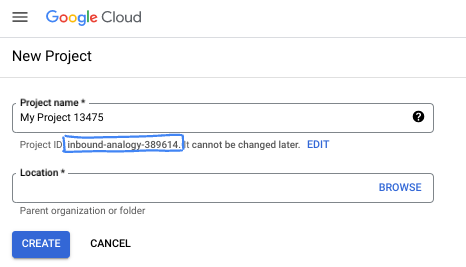
- 專案名稱是這個專案參與者的顯示名稱。Google API 不會使用專案名稱,且專案名稱可隨時變更。
- 專案 ID 在所有 Google Cloud 專案中不得重複,且設定後即無法變更。Google Cloud 控制台會自動產生專屬 ID,但您可以自訂 ID。如果不喜歡系統產生的 ID,可以產生另一個隨機 ID,或提供自己的 ID 並檢查是否可用。在大多數程式碼研究室中,您需要參照專案 ID,通常會以 PROJECT_ID 預留位置識別。
- 請注意,部分 API 會使用第三個值,也就是「專案編號」。如要進一步瞭解這三種值,請參閱說明文件。
啟用計費功能
設定個人帳單帳戶
如果使用 Google Cloud 抵免額設定計費,則可略過此步驟。
如要設定個人帳單帳戶,請前往這裡在 Cloud 控制台中啟用帳單功能。
注意事項:
- 完成本實驗室的 Cloud 資源費用應不到 $5 美元。
- 您可以按照本實驗室結尾的步驟刪除資源,以免產生後續費用。
- 新使用者可獲得價值 $300 美元的免費試用期。
啟動 Cloud Shell
雖然您可以透過筆電遠端操作 Google Cloud,但在本程式碼研究室中,您將使用 Google Cloud Shell,這是可在雲端執行的指令列環境。
在 Google Cloud 控制台中,點選右上角工具列的 Cloud Shell 圖示:

你也可以依序按下 G 和 S 鍵。如果您位於 Google Cloud 控制台,或使用這個連結,這個序列會啟用 Cloud Shell。
佈建並連線至環境的作業需要一些時間才能完成。完成後,您應該會看到如下的內容:

這部虛擬機器已預先安裝所有必要的開發工具,並提供永久的 5 GB 主目錄,而且可在 Google Cloud 運作,大幅提升網路效能並強化驗證功能。您可以在瀏覽器中完成本程式碼研究室的所有作業。您不需要安裝任何軟體。
3. 事前準備
啟用 API
如要使用 AlloyDB、Compute Engine、網路服務和 Agent Platform,請在 Google Cloud 雲端專案中啟用各自的 API。
在 Cloud Shell 終端機中,確認專案 ID 已設定完畢:
gcloud config get-value project
指令應會傳回 Google Cloud 專案 ID。
設定 PROJECT_ID 環境變數:
PROJECT_ID=$(gcloud config get-value project)
啟用必要的 API:
gcloud services enable alloydb.googleapis.com \
                       compute.googleapis.com \
                       cloudresourcemanager.googleapis.com \
                       servicenetworking.googleapis.com \
                       geminidataanalytics.googleapis.com \
                       cloudaicompanion.googleapis.com \
                       aiplatform.googleapis.com \
                       dataplex.googleapis.com
預期輸出內容:
student@cloudshell:~ (test-project-001-402417)$ gcloud config set project test-project-001-402417
Updated property [core/project].
student@cloudshell:~ (test-project-001-402417)$ PROJECT_ID=$(gcloud config get-value project)
Your active configuration is: [cloudshell-14650]
student@cloudshell:~ (test-project-001-402417)$
student@cloudshell:~ (test-project-001-402417)$ gcloud services enable alloydb.googleapis.com \
                       compute.googleapis.com \
                       cloudresourcemanager.googleapis.com \
                       servicenetworking.googleapis.com \
                       geminidataanalytics.googleapis.com \
                       cloudaicompanion.googleapis.com \
                       aiplatform.googleapis.com \
                       dataplex.googleapis.com
Operation "operations/acat.p2-4470404856-1f44ebd8-894e-4356-bea7-b84165a57442" finished successfully.
如要瞭解各項已啟用的 API,請參閱說明文件。
4. 部署 AlloyDB
建立 AlloyDB 叢集和主要執行個體。您可以透過預先準備的指令碼部署,該指令碼會部署所有必要資源,也可以按照 AlloyDB 說明文件逐步部署。
使用自動化指令碼部署 AlloyDB
這個方法會使用自動化指令碼部署 AlloyDB 叢集,並提供必要的設定詳細資料,以便開始使用已部署的資源。
在 Cloud Shell 終端機執行指令,從存放區複製部署指令碼:
REPO_NAME="codelabs"
REPO_URL="https://github.com/GoogleCloudPlatform/$REPO_NAME"
SOURCE_DIR="alloydb-ai-nla"

git clone --no-checkout --filter=blob:none --depth=1 $REPO_URL

cd $REPO_NAME
git sparse-checkout set $SOURCE_DIR
git checkout
cd $SOURCE_DIR
執行部署指令碼:
./deploy_alloydb.sh
指令碼需要五到七分鐘才能執行完畢。輸出內容會顯示叢集部署詳細資料。請注意,密碼會有所不同,請記下密碼以供日後使用。
...
<redacted>
...
Creating primary instance: alloydb-aip-01-pr (8 vCPUs for TRIAL cluster)
Operation ID: operation-1765988049916-646282264938a-bddce198-9f248715
Creating instance...done.
----------------------------------------
Deployment Process Completed
Cluster:  alloydb-aip-01 (TRIAL)
Instance: alloydb-aip-01-pr
Region:   us-central1
Initial Password: JBBoDTgixzYwYpkF (if new cluster)
----------------------------------------
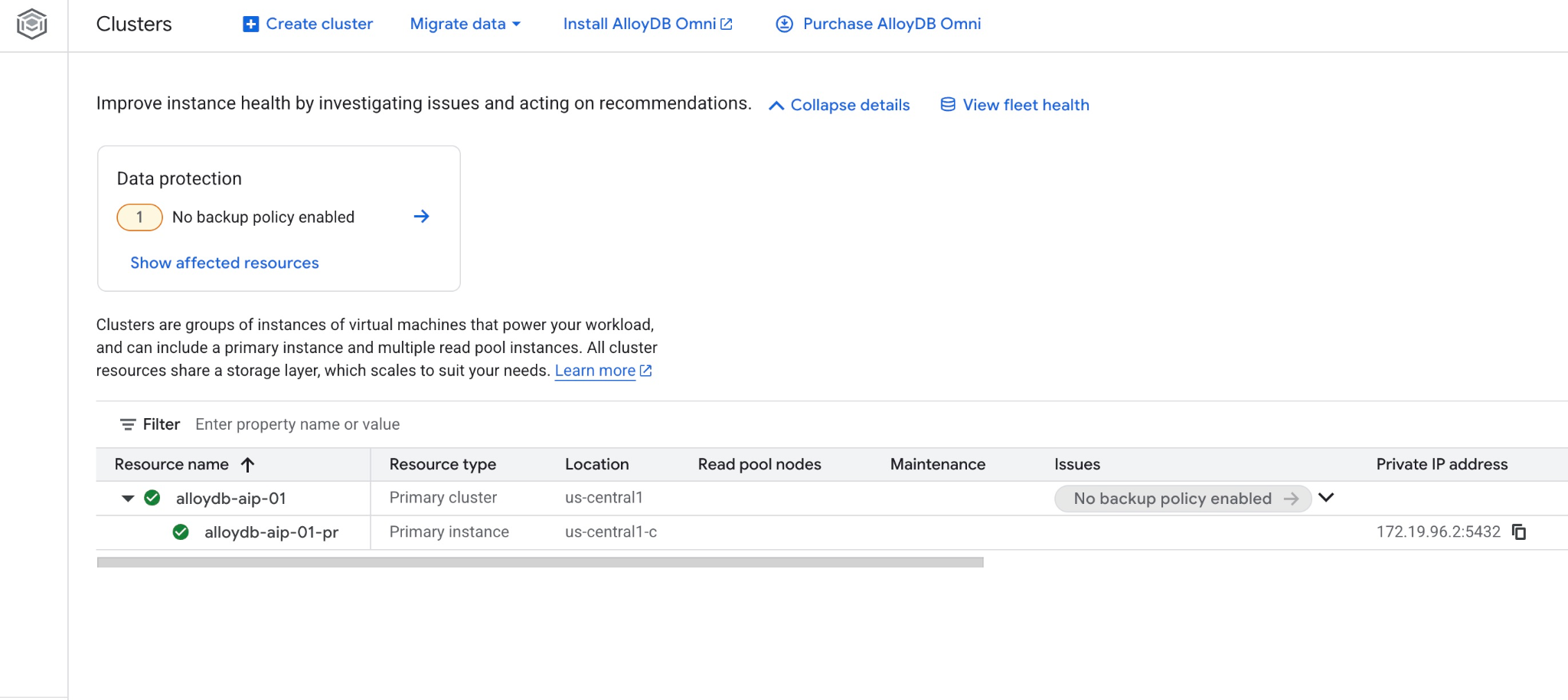
在 Google Cloud 控制台的 AlloyDB 叢集頁面中,查看新叢集和執行個體。
5. 準備資料庫
建立資料庫、啟用 Gemini Enterprise Agent Platform 整合功能、建構資料庫物件,以及新增範例資料。
授予 AlloyDB 必要權限
將必要的 IAM 角色授予 AlloyDB 服務代理:
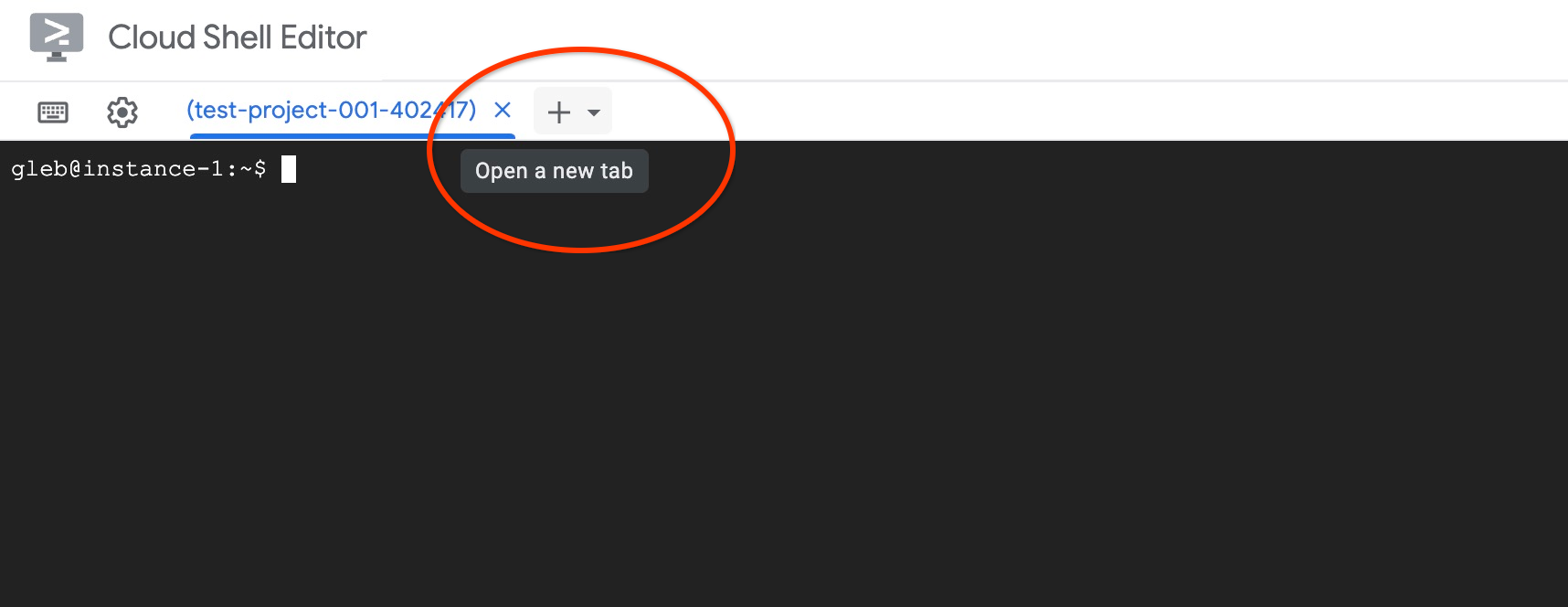
點選「新增」圖示 (+),開啟新的 Cloud Shell 分頁。
在新分頁中執行下列指令:
PROJECT_ID=$(gcloud config get-value project)
gcloud projects add-iam-policy-binding $PROJECT_ID \
  --member="serviceAccount:service-$(gcloud projects describe $PROJECT_ID --format="value(projectNumber)")@gcp-sa-alloydb.iam.gserviceaccount.com" \
  --role="roles/aiplatform.user"
預期的控制台輸出內容:
student@cloudshell:~ (test-project-001-402417)$ PROJECT_ID=$(gcloud config get-value project)
Your active configuration is: [cloudshell-11039]
student@cloudshell:~ (test-project-001-402417)$ gcloud projects add-iam-policy-binding $PROJECT_ID \
  --member="serviceAccount:service-$(gcloud projects describe $PROJECT_ID --format="value(projectNumber)")@gcp-sa-alloydb.iam.gserviceaccount.com" \
  --role="roles/aiplatform.user"
Updated IAM policy for project [test-project-001-402417].
bindings:
- members:
  - serviceAccount:service-4470404856@gcp-sa-alloydb.iam.gserviceaccount.com
  role: roles/aiplatform.user
- members:
...
etag: BwYIEbe_Z3U=
version: 1
啟用 Data Access API
在 AlloyDB 叢集上啟用 Data Access API。
在同一個終端機分頁中執行下列指令:
PROJECT_ID=$(gcloud config get-value project)
REGION=us-central1
ADBCLUSTER=alloydb-aip-01
curl -X PATCH \
 -H "Authorization: Bearer $(gcloud auth print-access-token)" \
 -H "Content-Type: application/json" \
 https://alloydb.googleapis.com/v1alpha/projects/$PROJECT_ID/locations/$REGION/clusters/$ADBCLUSTER/instances/$ADBCLUSTER-pr?updateMask=dataApiAccess \
 -d '{
   "dataApiAccess": "ENABLED",
 }'
更新資料庫旗標
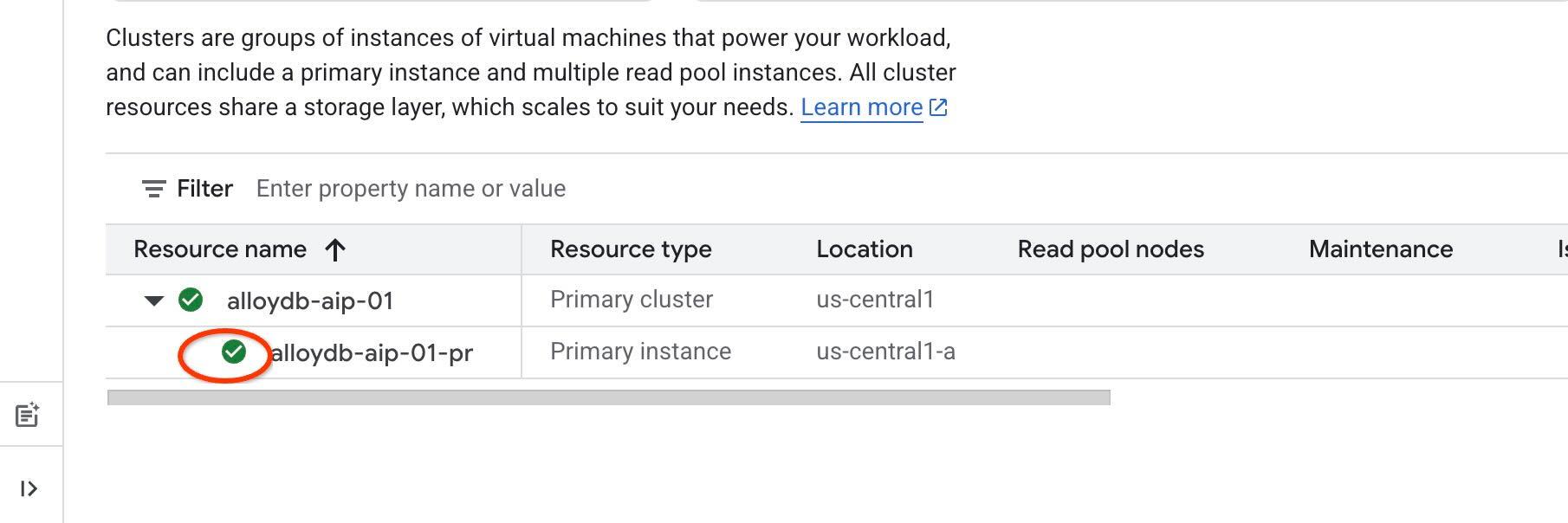
在執行個體層級啟用標記前,請先等待資料存取 API 步驟完成。確認執行個體狀態顯示綠色勾號,如下圖所示。
如要使用 AI 擴充功能和 IAM 驗證功能來存取代理程式工具,您必須在執行個體上啟用特定資料庫旗標,並將自己新增為資料庫使用者。啟用下列旗標:
- alloydb.iam_authentication
- password.enforce_complexity
- google_ml_integration.enable_ai_query_engine
- parameterized_views
在同一個終端機分頁中執行下列指令:
PROJECT_ID=$(gcloud config get-value project)
REGION=us-central1
ADBCLUSTER=alloydb-aip-01
gcloud beta alloydb instances update $ADBCLUSTER-pr \
   --database-flags password.enforce_complexity=on,alloydb.iam_authentication=on,google_ml_integration.enable_ai_query_engine=on,parameterized_views.enabled=on \
   --region=$REGION \
   --cluster=$ADBCLUSTER \
   --project=$PROJECT_ID \
   --update-mode=FORCE_APPLY
為帳戶建立 AlloyDB IAM 使用者:
REGION=us-central1
ADBCLUSTER=alloydb-aip-01
gcloud alloydb users create $(gcloud config get-value account) \
--cluster=$ADBCLUSTER \
--superuser=true \
--region=$REGION \
--type=IAM_BASED
在終端機中執行 exit 指令,關閉分頁:
exit
連線至 AlloyDB Studio
在後續章節中,您可以在 AlloyDB Studio 中執行所有需要資料庫連線的 SQL 指令。
如要開啟 AlloyDB Studio,請執行下列步驟:
- 前往 Google Cloud 控制台的 AlloyDB for PostgreSQL 叢集頁面。
- 選取主要執行個體,開啟其網頁介面。
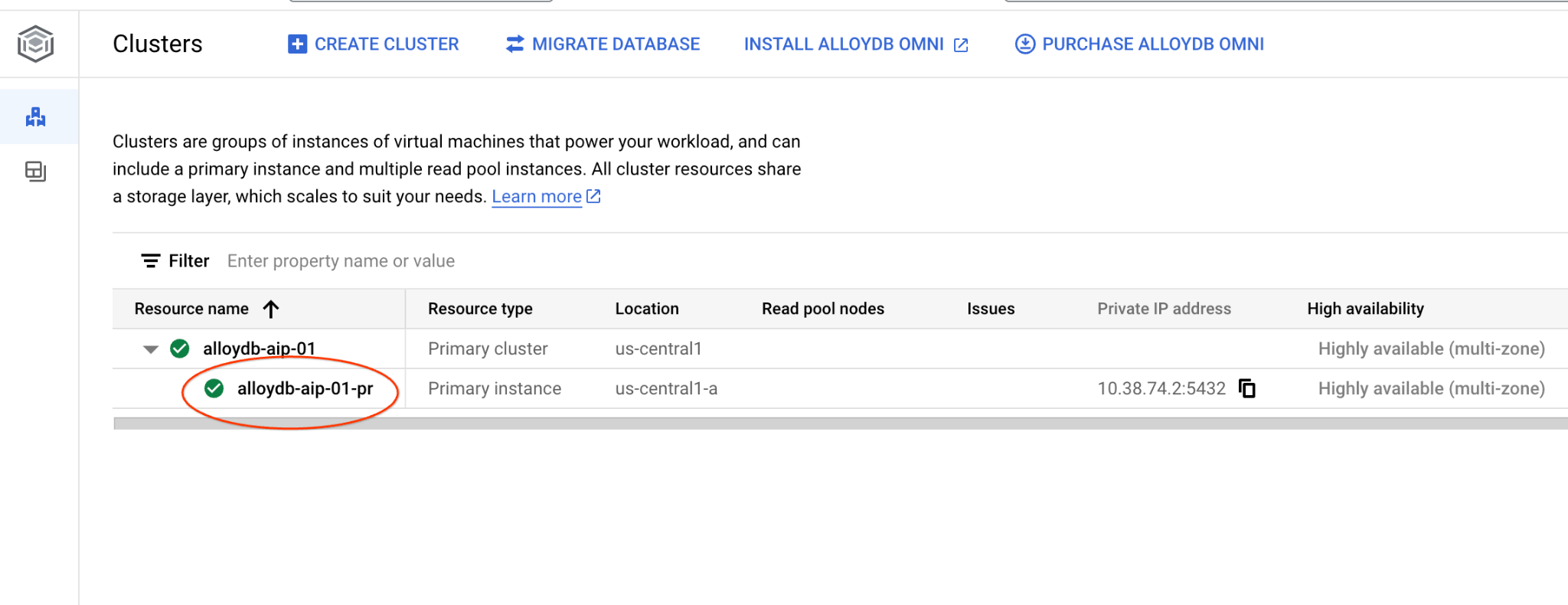
- 然後點選左側的 AlloyDB Studio:
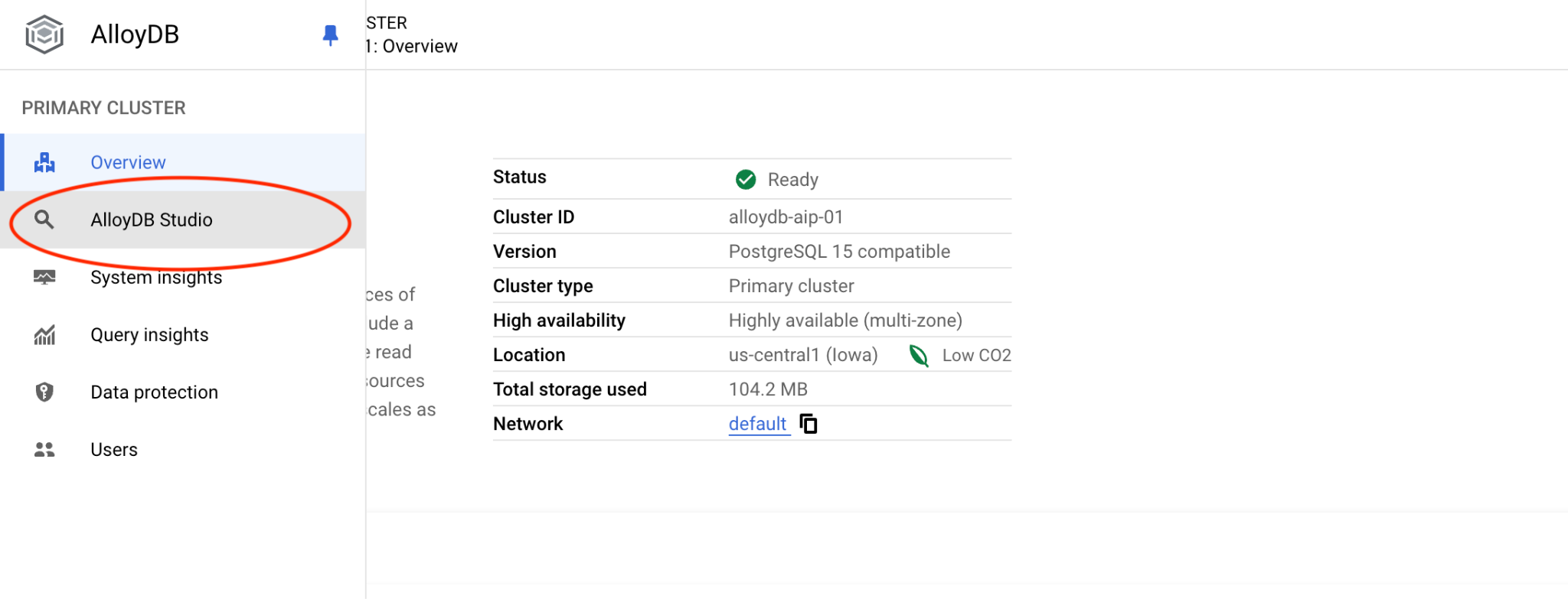
- 選取
postgres資料庫,選擇 IAM 驗證,然後按一下「驗證」。
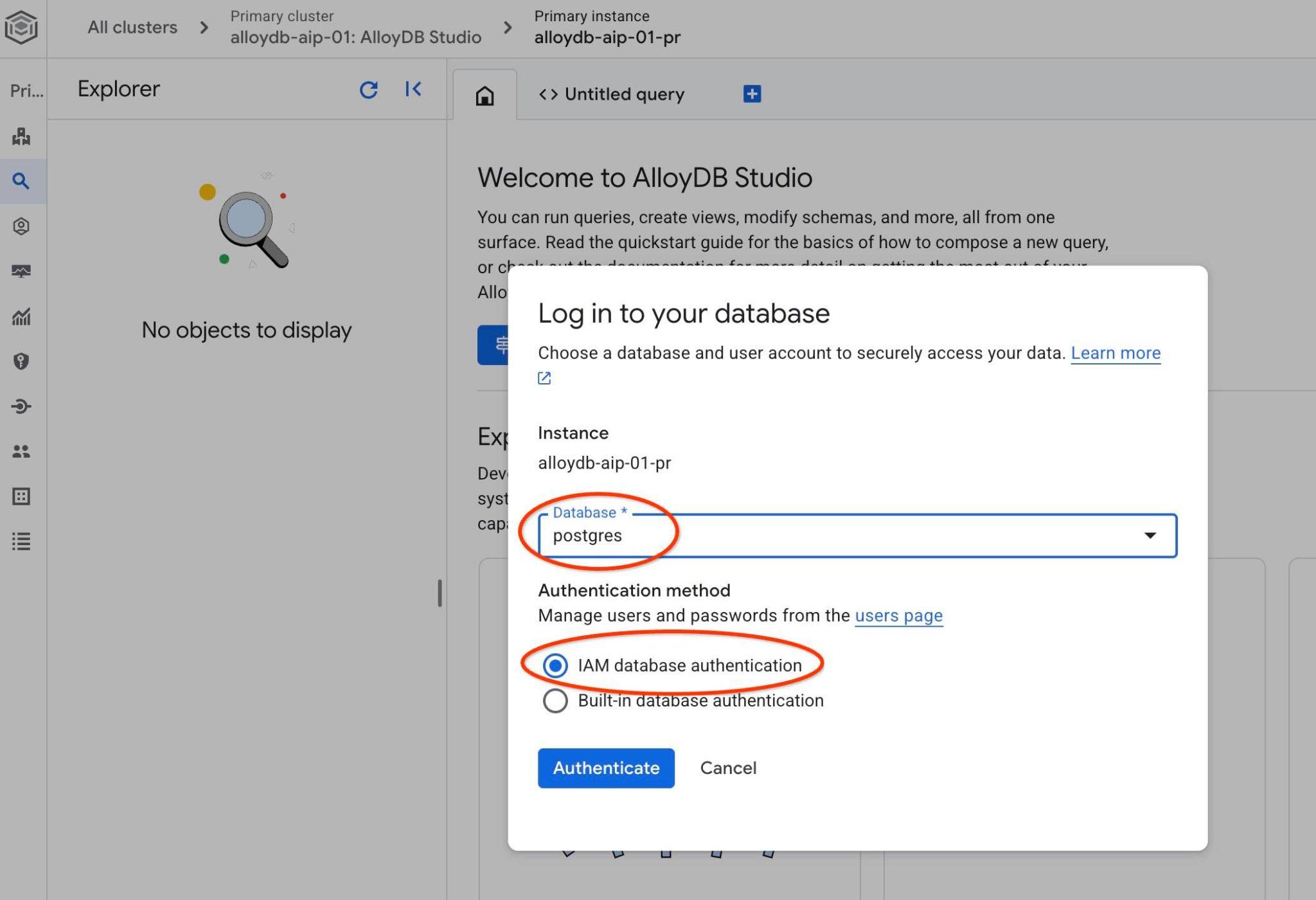
這個動作會開啟 AlloyDB Studio 介面。
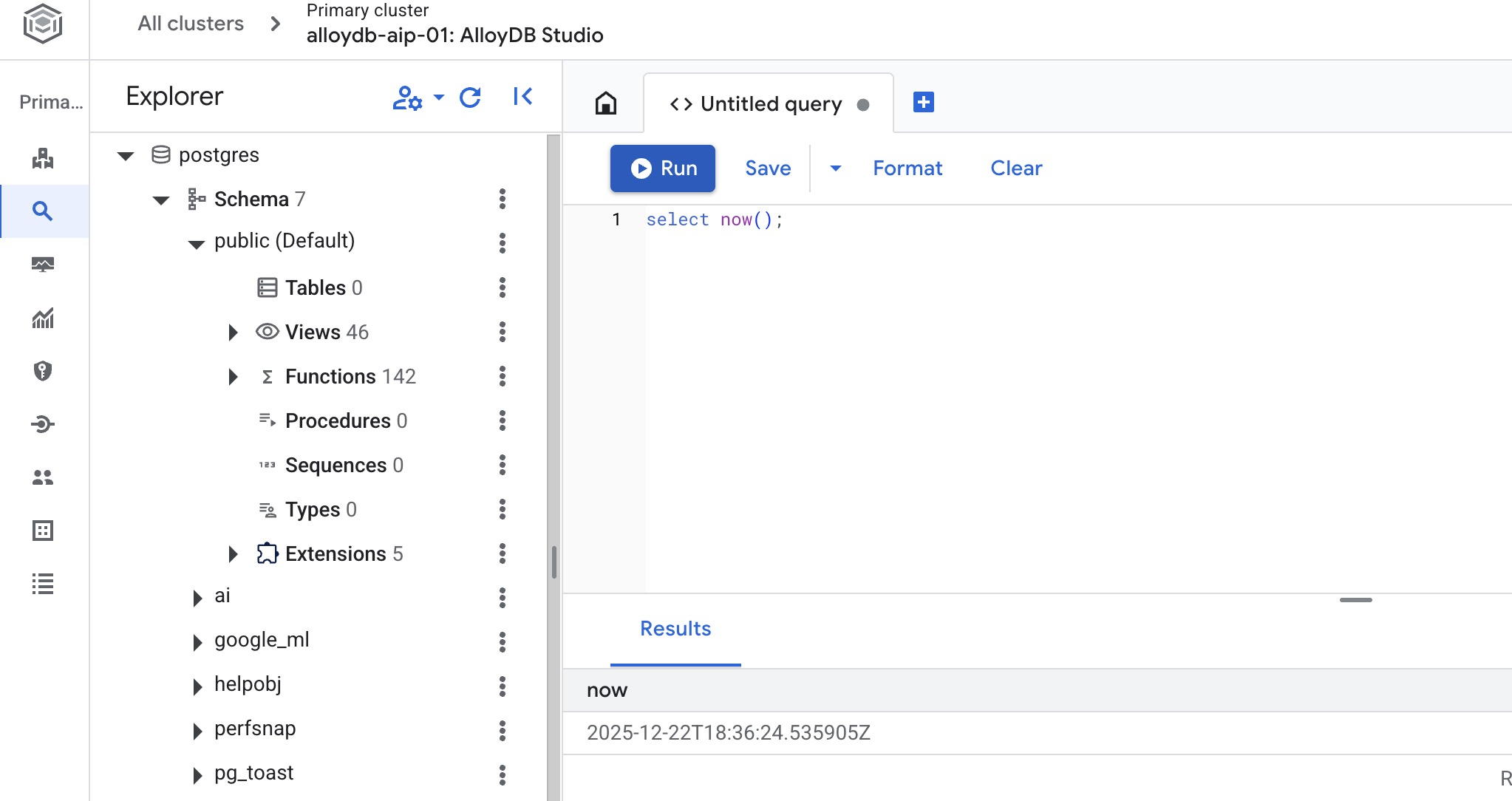
- 選取「未命名的查詢」分頁,開啟 SQL 編輯器。
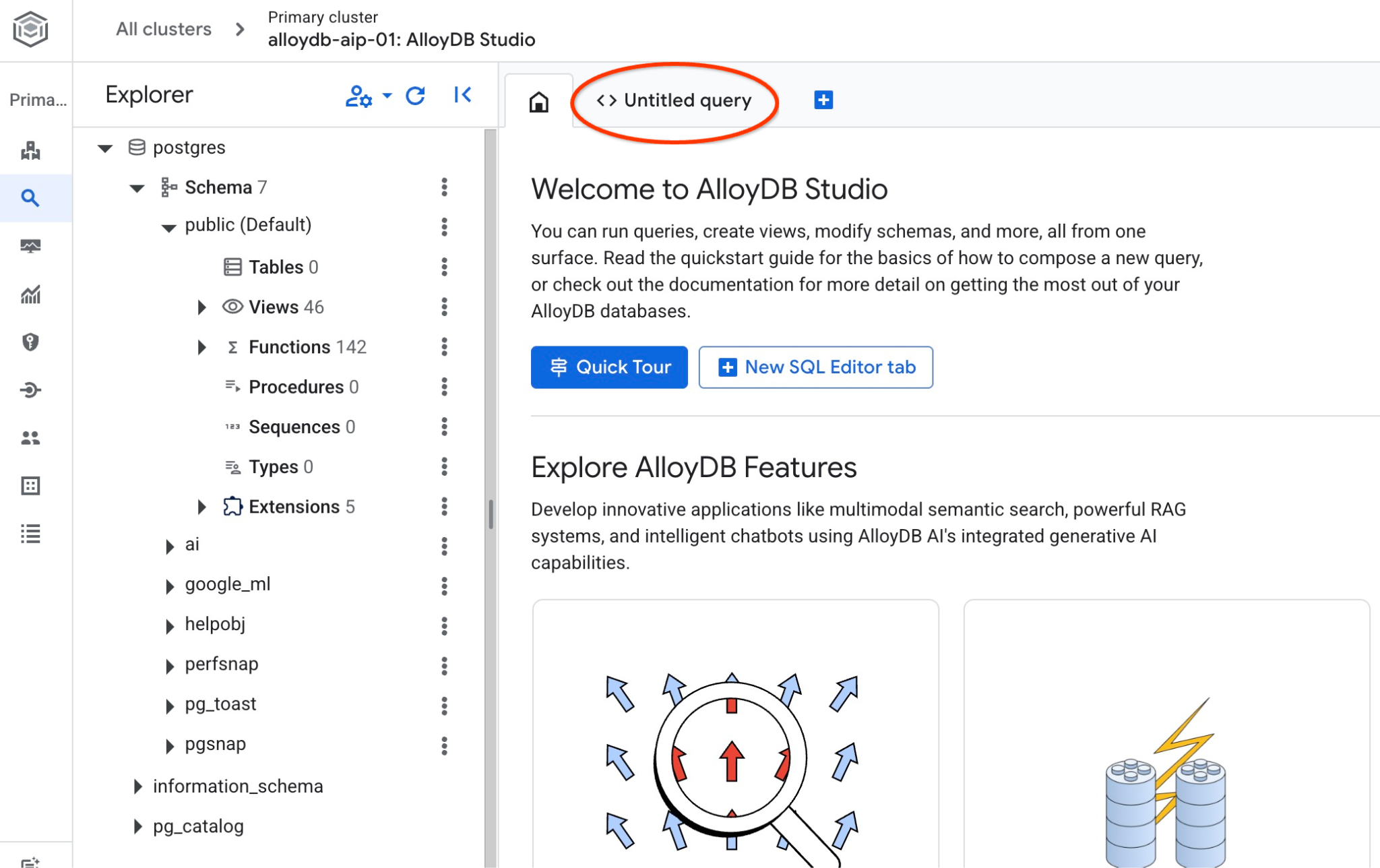
系統會開啟編輯器,讓您執行 SQL 指令,如下圖所示:
建立資料庫
建立快速入門資料庫
在 AlloyDB Studio 編輯器中,執行下列指令來建立資料庫:
CREATE DATABASE quickstart_db
預期輸出內容:
Statement executed successfully
連線至 quickstart_db
在 AlloyDB Studio 中,按一下「變更資料庫/使用者」。
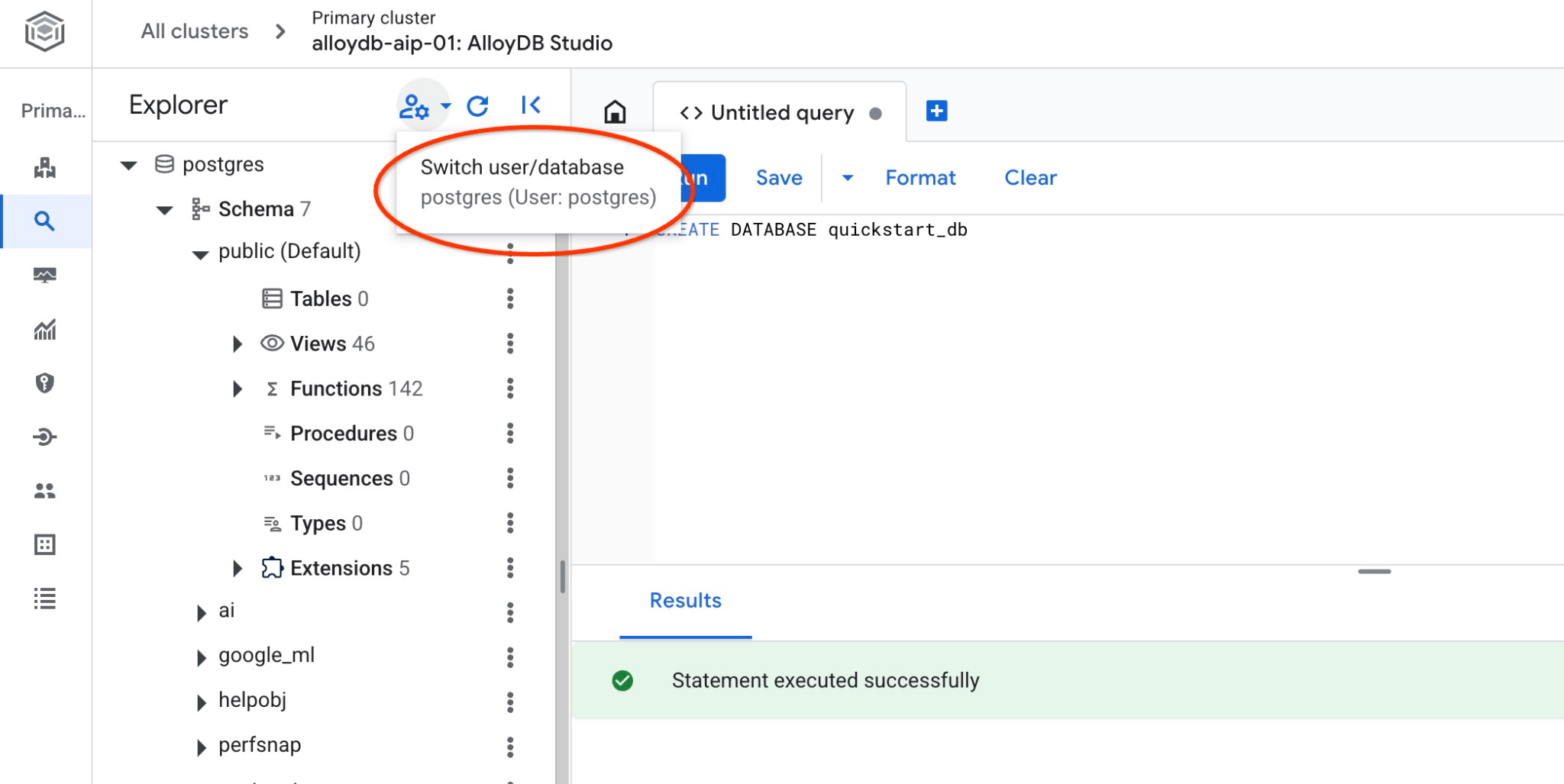
從資料庫清單中選取 quickstart_db,然後選取 IAM 驗證並進行驗證。
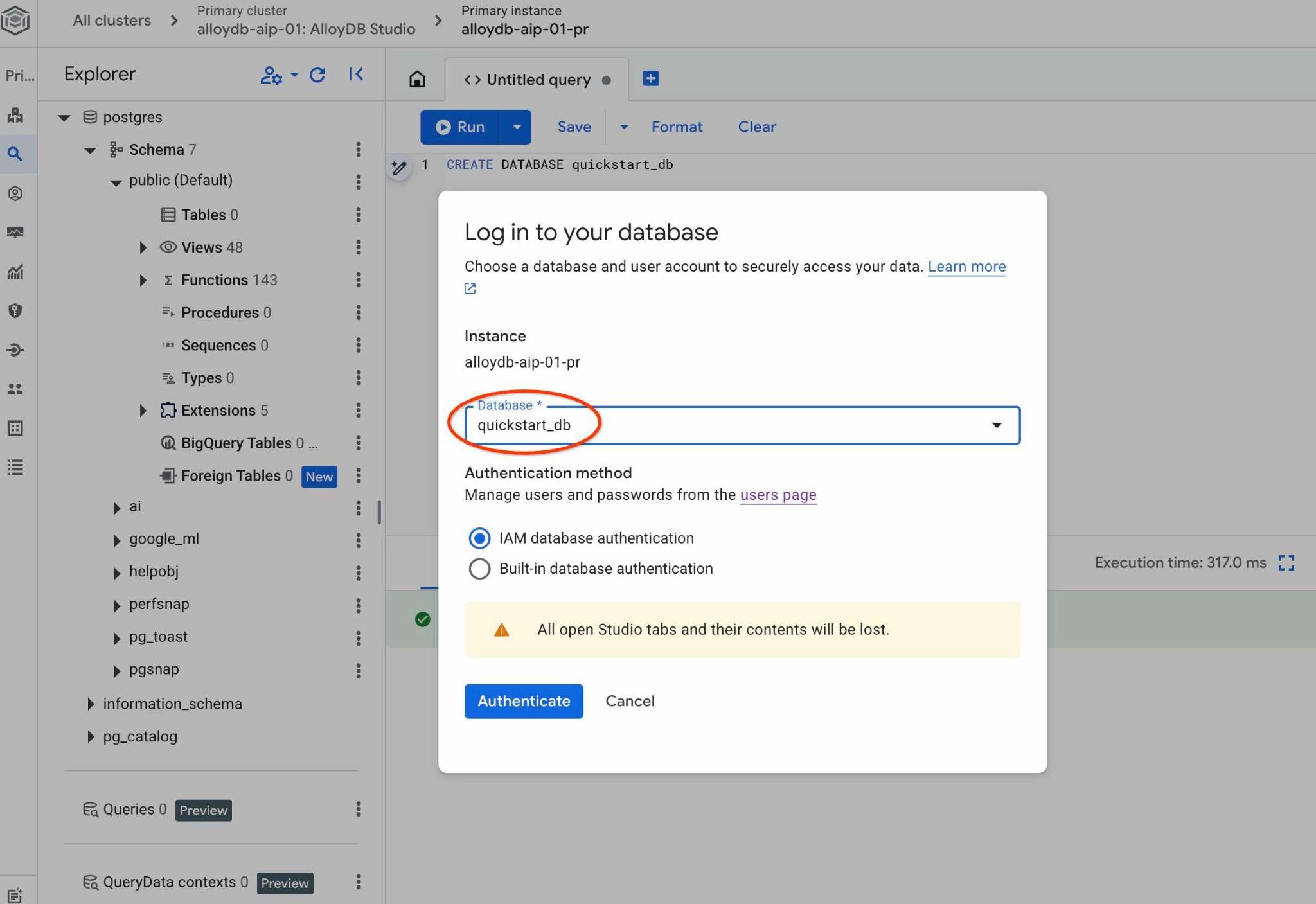
系統會開啟新連線,您可以在其中使用 quickstart_db 資料庫中的物件。
啟用擴充功能
檢查所有必要擴充功能,確認已在資料庫中啟用,且版本符合最低要求。
確認資料庫中存在所有必要擴充功能:
SELECT extname, extversion FROM pg_extension WHERE extname IN ('vector', 'google_ml_integration', 'parameterized_views');
預期輸出內容:
        extname        |   extversion
-----------------------+----------------
 google_ml_integration | 1.5.9
 parameterized_views   | 1.0
 vector                | 0.8.2.google-1
如果沒有傳回上述所有資料列,表示部分擴充功能未啟用。
啟用擴充功能前,請務必先在執行個體上啟用所有資料庫標記 、「google_ml_integration.enable_ai_query_engine」和「parameterized_views.enabled」。
在 AlloyDB Studio 中連線至 quickstart_db 時,請執行下列指令:
show google_ml_integration.enable_ai_query_engine;
show parameterized_views.enabled;
如果其中任何一個顯示「off」,請嘗試重複「更新資料庫標記」步驟,然後再次使用「show...」指令檢查狀態。
啟用必要的擴充功能。
在 AlloyDB Studio 中連線至 quickstart_db 時,請執行下列指令:
CREATE EXTENSION IF NOT EXISTS vector;
CREATE EXTENSION IF NOT EXISTS parameterized_views;
檢查 parameterized_views 和 google_ml 的擴充功能版本。
在 AlloyDB Studio 中連線至 quickstart_db 時,請執行下列指令:
SELECT extname, extversion FROM pg_extension WHERE extname IN ('vector', 'google_ml_integration', 'parameterized_views');
預期輸出內容:
        extname        |   extversion
-----------------------+----------------
 google_ml_integration | 1.5.9
 parameterized_views   | 1.0
 vector                | 0.8.2.google-1
如果版本低於必要版本,請嘗試更新 parameterized_views 擴充功能。
如果是 parameterized_views,請嘗試:
ALTER EXTENSION parameterized_views UPDATE;
再次確認版本。
在 AlloyDB Studio 中連線至 quickstart_db 時,請執行下列指令:
SELECT extname, extversion FROM pg_extension WHERE extname IN ('vector', 'google_ml_integration', 'parameterized_views');
預期輸出內容:
        extname        |   extversion
-----------------------+----------------
 google_ml_integration | 1.5.9
 parameterized_views   | 1.0
 vector                | 0.8.2.google-1
6. 範例資料
現在您需要在資料庫中建立物件並載入資料。您將使用虛構的房地產公司資料集。其中包含房地產銷售和仲介的虛構資料。資料已在複製存放區的 SQL 指令碼 real_estate_data.sql 中提供。
建立儲存空間 bucket
使用 Google SDK (gcloud) 將資料從複製的存放區匯入 AlloyDB 資料庫。您需要為此建立 Cloud Storage 值區,並授予 AlloyDB 服務帳戶存取權。或者,您也可以按照說明文件中的指示,使用網頁控制台執行這項操作。
在 Google Cloud Shell 終端機執行下列指令:
PROJECT_ID=$(gcloud config get-value project)
REGION=us-central1
gcloud storage buckets create gs://$PROJECT_ID-import --project=$PROJECT_ID --location=$REGION
gcloud storage buckets add-iam-policy-binding gs://$PROJECT_ID-import --member="serviceAccount:service-$(gcloud projects describe $PROJECT_ID --format="value(projectNumber)")@gcp-sa-alloydb.iam.gserviceaccount.com" --role=roles/storage.objectViewer
載入資料
資料庫 SQL 傾印位於複製的存放區資料夾中。下列指令假設您在建立 AlloyDB 叢集時,已使用主目錄做為起點,複製上一個步驟中的存放區。
將資料庫傾印檔案複製到 Cloud Storage bucket:
REPO_NAME="codelabs"
SOURCE_DIR="alloydb-ai-nla"
cd ~/$REPO_NAME/$SOURCE_DIR
gcloud storage cp ~/$REPO_NAME/$SOURCE_DIR/real_estate_data.sql  gs://$PROJECT_ID-import
將資料集匯入 quickstart_db:
PROJECT_ID=$(gcloud config get-value project)
CLUSTER_NAME=alloydb-aip-01
REGION=us-central1
IAM_USER=$(gcloud config get-value account)
gcloud alloydb clusters import $CLUSTER_NAME  --region=us-central1 --database=quickstart_db --gcs-uri=gs://$PROJECT_ID-import/real_estate_data.sql --project=$PROJECT_ID --sql --user=$IAM_USER
這項指令會將範例資料集載入 quickstart_db 資料庫。
使用 AlloyDB Studio 計算 real_estate.agents 資料表中的記錄,驗證匯入作業:
SELECT COUNT(*) FROM real_estate.agents;
7. 準備結構定義本體
設定 QueryData 脈絡資料集、提供結構定義中繼資料,然後執行 ADK 代理程式。
建立中繼資料
中繼資料包含套用至資料庫資料表和資料欄的 SQL 註解。這些註解會在選取資料庫物件時,引導 QueryData 引擎。
如果您已使用提供的 SQL 傾印匯入資料結構定義,則所有中繼資料都已在結構定義中建立。
以下是套用至 real_estate 結構定義的中繼資料程式碼片段範例:
COMMENT ON TABLE real_estate.agents IS 'Stores profile, contact, brokerage affiliation, and active status for individual real estate agents.';

COMMENT ON COLUMN real_estate.agents.agent_id IS 'Primary key uniquely identifying each real estate agent in the database.';

...
如果您使用自己的資料集,可以按照這份指南的說明,為結構定義新增中繼資料。
建立結構定義本體背景資訊
內容集包含查詢範本、層面和值搜尋,可協助 AI 模型生成查詢。如果沒有設定背景資訊,AI 代理只會使用public結構定義中的可用資訊 (主要依據資料表名稱、資料欄和中繼資料),嘗試生成查詢,並推斷正確的物件來回答自然查詢要求。
QueryData 內容集是 JSON 檔案,內含查詢範本、構面和值搜尋。如需不同範例,請參閱說明文件。
在網頁控制台中載入 QueryData 脈絡資料集
如要載入內容集,請開啟 AlloyDB Studio,並在左側面板底部看到 Context sets 和三個點。
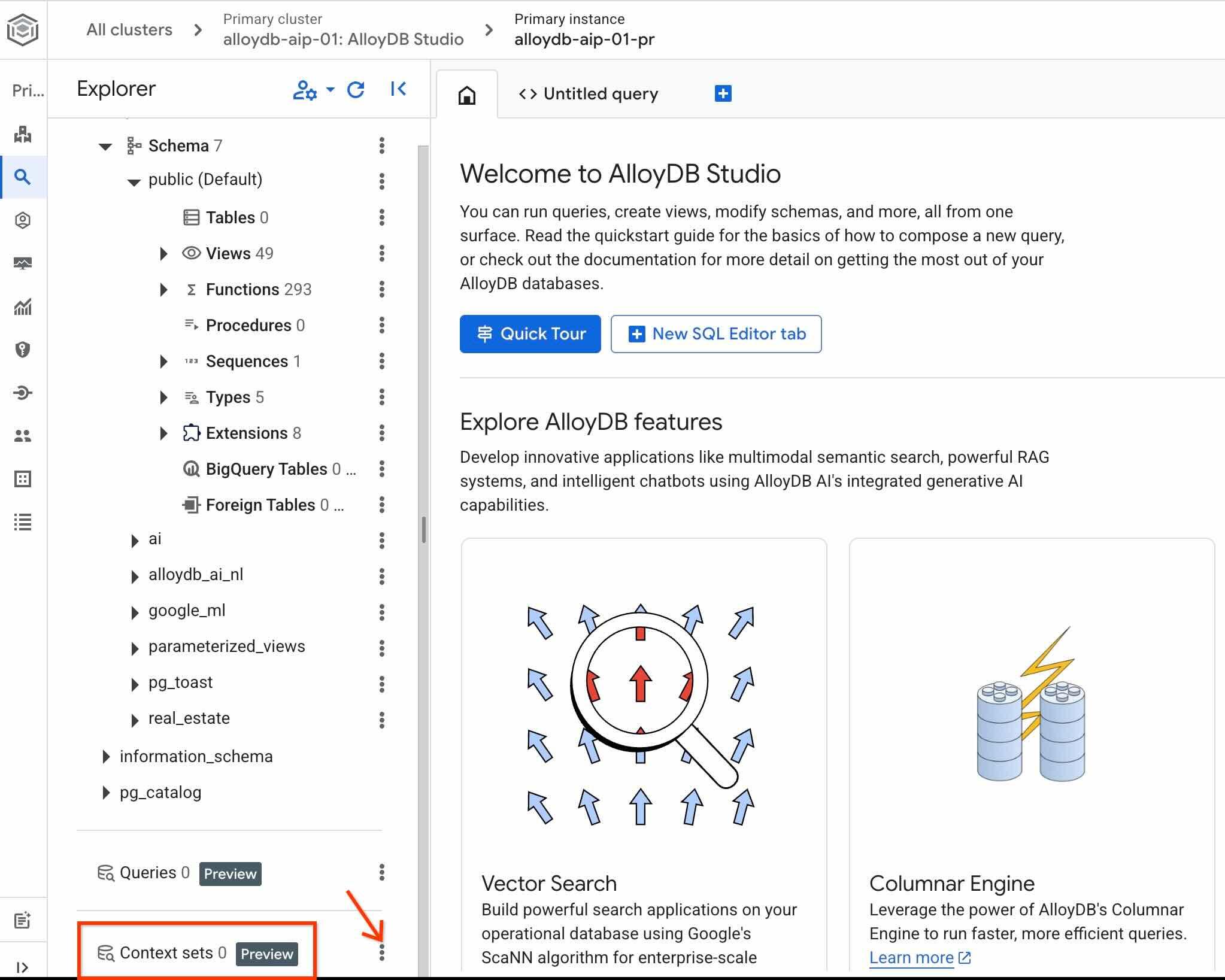
點選這三個點,然後選擇 Create context set。
在開啟的對話方塊中輸入下列值:
- 名稱:
sixrecipes - 說明:
Real Estate Query Data - 上傳結構定義檔案:保持空白
第一次按下 Create 按鈕時,可能需要一段時間才能初始化內容儲存空間。
再次點選內容集名稱右側的三點圖示,然後選擇 Edit context set,即可查看 QueryData 內容集 ID。
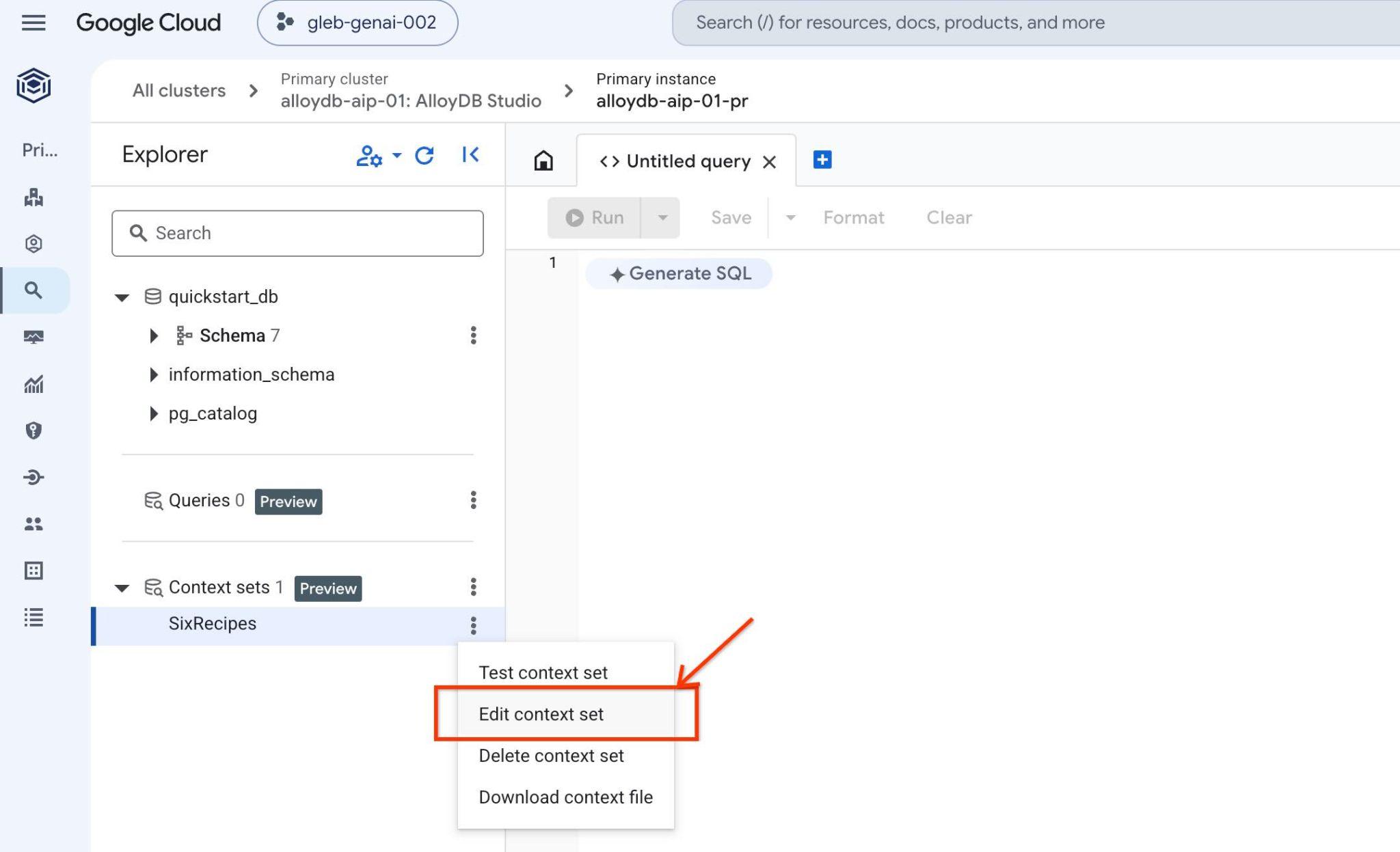
開啟的分頁標籤右上方會顯示內容集 ID
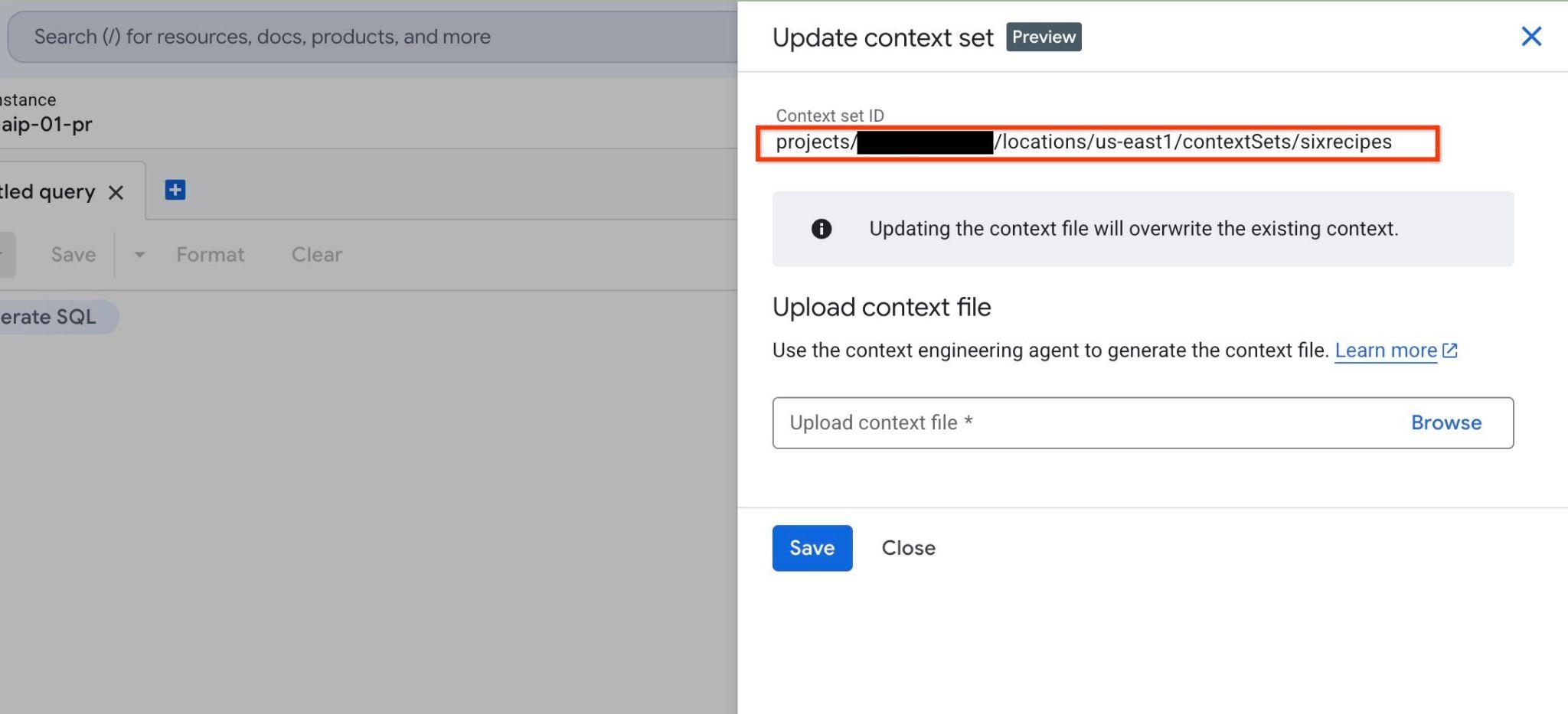
請儲存這組 ID,以供後續步驟使用。
啟動 AI 代理
如要與 QueryData 後端互動,產生及執行查詢,可以使用 AlloyDB Studio 介面,詳情請參閱說明文件。但在本實驗室中,您會使用 AI 代理做為與資料庫通訊的主要工具。AI 代理程式是未來工作負載的更實際情境,而 Google ADK 架構提供絕佳的網頁介面,您可以在其中查看模型、API 和應用程式之間的所有步驟和互動。
在 Cloud Shell 中查看代理程式來源設定:
REPO_NAME="codelabs"
SOURCE_DIR="alloydb-ai-nla"
cd ~/$REPO_NAME/$SOURCE_DIR/data_agent
edit agent.py
您可以在檔案中查看我們在結構定義中定義的表格清單。我們會在後續步驟中回到這個部分。
# List of database tables included in QueryData API requests
TABLE_IDS = [
    "real_estate.municipalities",
    "real_estate.cities",
    "real_estate.agents",
    "real_estate.properties",
    "real_estate.schools",
    "real_estate.school_to_property",
    "real_estate.property_transactions",
    "real_estate.secure_offers",
]
此外,還有使用 QueryData API 的程序 call_querydata_api,以及使用 QueryData API 技能的工具集。
def call_querydata_api(
    prompt: str,
    target_project_id: str = project_id,
    target_location: str = location,
    target_cluster_id: str = cluster_name,
    target_instance_id: str = instance_name,
    target_database_id: str = database_name,
    target_context_set_id: str = context_set_id,
    target_table_ids: list[str] = TABLE_IDS,
) -> dict:
    """Calls the Gemini Data Analytics QueryData API to translate natural ...
<Redacted>
...

# ADK File-Based Skill

database_query_skill = load_skill_from_dir(
    pathlib.Path(__file__).parent / "skills" / "database-query-skill"
)

skill_toolset = SkillToolset(
    skills=[database_query_skill]
)
這是根代理程式本身,包含提示和可用工具。
# Agent configuration

root_agent = Agent(
    model=MODEL_ID,
    name='root_agent',
    description='A helpful assistant for analyst requests.',
    instruction=f"""
    Answer user questions to the best of your knowledge using provided tools.
    Do not try to generate non-existent data but use the grounded data from the database.
    When you answer questions about database contents, real estate properties, or sales activity:
    1. Refer to database-query-skill for instructions on querying data using QueryData API.
    2. Use `call_querydata_api` to submit the natural language prompt to the QueryData API.
       CRITICAL: Call `call_querydata_api` EXACTLY ONCE per user request. Do NOT make retries, follow-up calls, or rephrased calls to `call_querydata_api`, even if the result contains zero rows or empty data.
    3. Immediately parse the JSON response from that first `call_querydata_api` call.
    4. Format your final response to the user containing:
       - The generated SQL query (formatted in a Markdown SQL code block).
       - The query results formatted as a Markdown table (constructed from `queryResult.columns` and `queryResult.rows`).
       - The natural language answer (`naturalLanguageAnswer`).
    """,
    tools=[call_querydata_api, skill_toolset],
)
查看 data_agent/SKILL.md,瞭解代理程式的系統指令:
REPO_NAME="codelabs"
SOURCE_DIR="alloydb-ai-nla"
cd ~/$REPO_NAME/$SOURCE_DIR/data_agent
edit SKILL.md
啟動代理程式前,請先準備 .env 檔案,其中包含 Agent 和 QueryData API 要求的參數。
將內容集 ID 匯出至環境變數:
export QUERYDATA_CONTEXTSET=<context set id from the Create Context Set chapter>
在 data_agent 目錄中建立執行階段環境設定檔 (.env):
PROJECT_ID=$(gcloud config get-value project)
REGION=us-central1
REPO_NAME="codelabs"
SOURCE_DIR="alloydb-ai-nla"
cd ~/$REPO_NAME/$SOURCE_DIR/data_agent
echo "GOOGLE_GENAI_USE_ENTERPRISE=true" > .env
echo "GOOGLE_CLOUD_PROJECT=$(gcloud config get-value project -q)" >> .env
echo "GOOGLE_CLOUD_LOCATION=global" >> .env
echo "QUERYDATA_CONTEXTSET=$QUERYDATA_CONTEXTSET" >> .env
echo "ALLOYDB_CLUSTER=alloydb-aip-01" >> .env
echo "ALLOYDB_INSTANCE=alloydb-aip-01-pr" >> .env
echo "ALLOYDB_DATABASE=quickstart_db" >> .env
echo "ALLOYDB_LOCATION=$REGION" >> .env
安裝依附元件並啟動代理程式網路服務:
cd ~/$REPO_NAME/$SOURCE_DIR/
uv sync
啟動代理程式:
uv run adk web --allow_origins 'regex:https://.*\.cloudshell\.dev'
您應該會看到如下所示的輸出內容,其中端點為 http://127.0.0.1:8000。
INFO:     Started server process [83608]
INFO:     Waiting for application startup.

+-----------------------------------------------------------------------------+
| ADK Web Server started                                                      |
|                                                                             |
| For local testing, access at http://127.0.0.1:8000.                         |
+-----------------------------------------------------------------------------+

INFO:     Application startup complete.
INFO:     Uvicorn running on http://127.0.0.1:8000 (Press CTRL+C to quit)
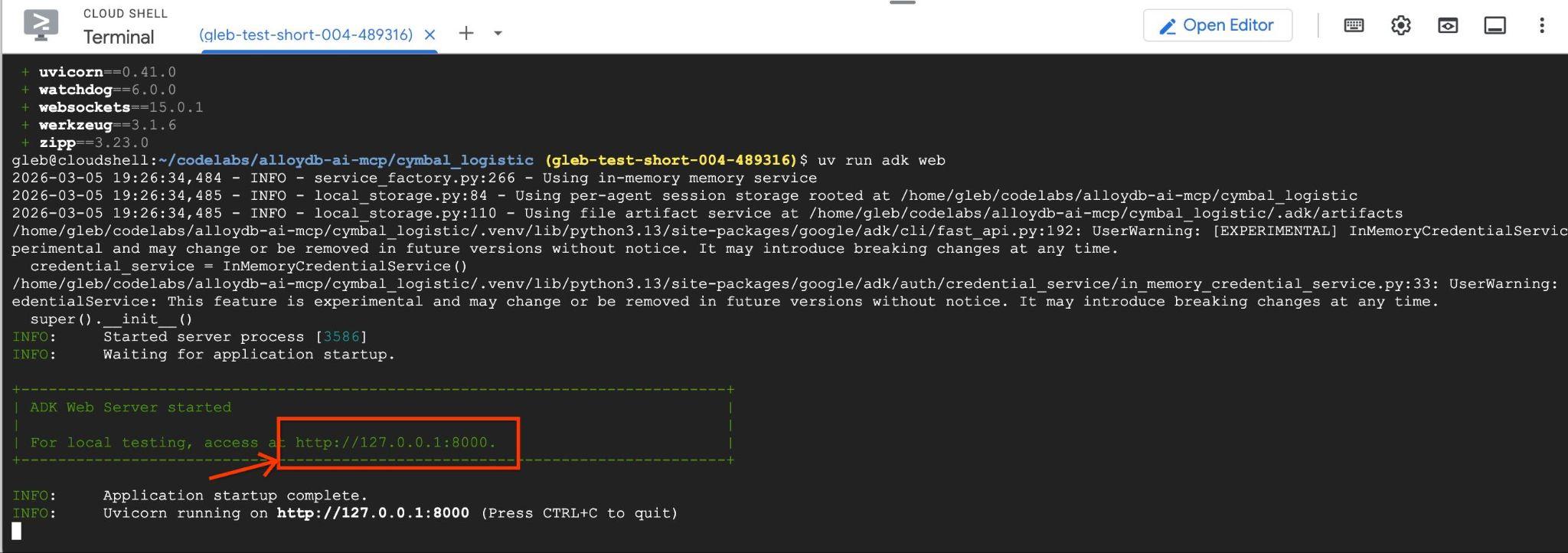
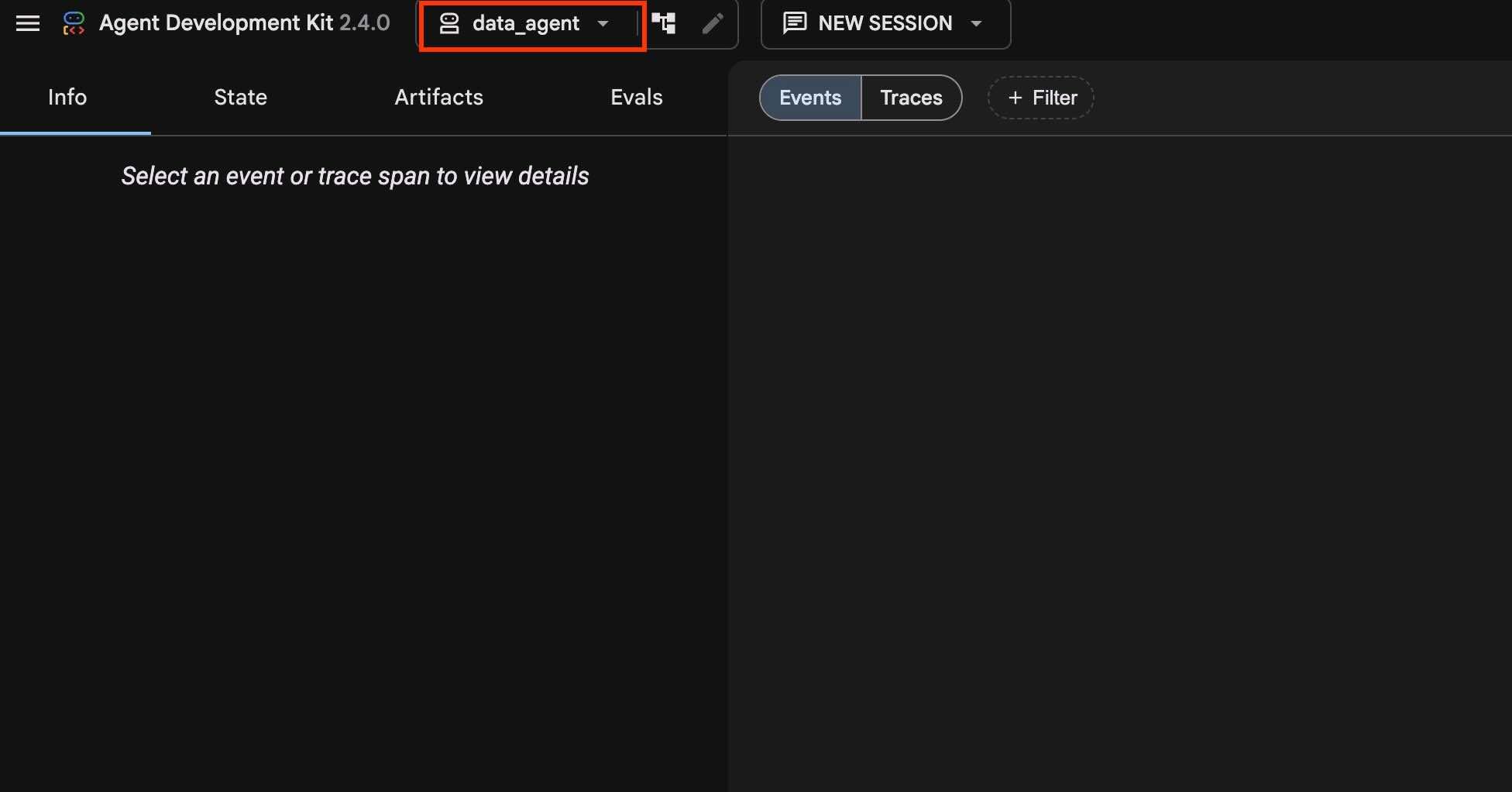
在 Cloud Shell 中點選產生的網路伺服器網址 (例如 http://127.0.0.1:8000),啟動代理程式介面。如果無法運作,請在 Cloud Shell 中依序點選「網頁預覽」->「透過以下通訊埠預覽:8000」,開啟代理程式介面。
確認左上方的下拉式選單中已選取 data_agent。
生成及執行查詢
讓我們執行查詢 Q1
在代理程式對話介面中執行這項自然語言提示,評估基礎 QueryData 效能,不使用自訂範本或層面:
How many properties are currently for sale in San Diego?
然後按下箭頭按鈕。
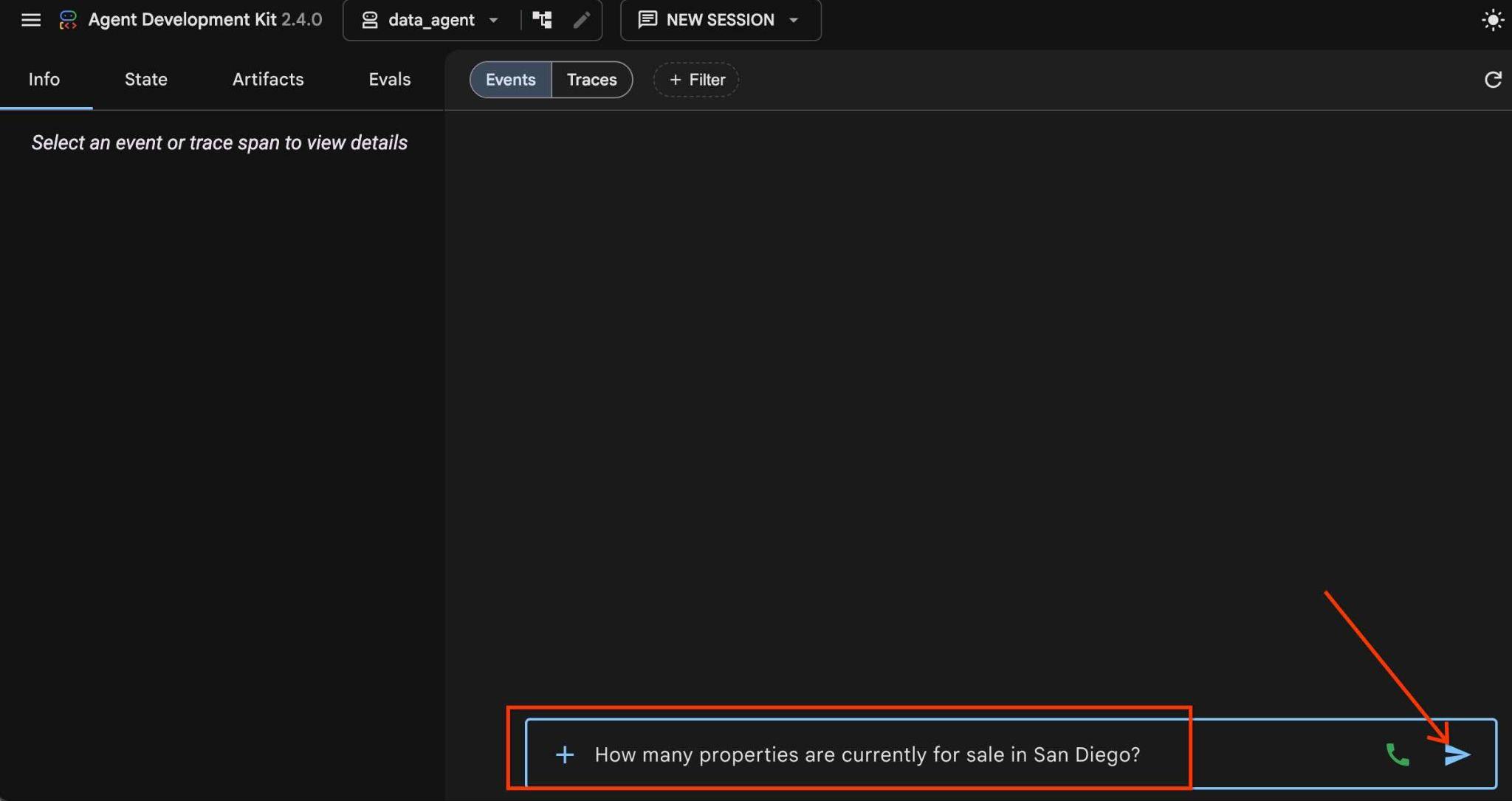
當系統選取適當的技能時,就會啟動代理工作流程,並使用該技能和函式將要求傳送至 API 端點,然後取得產生的查詢和結果。
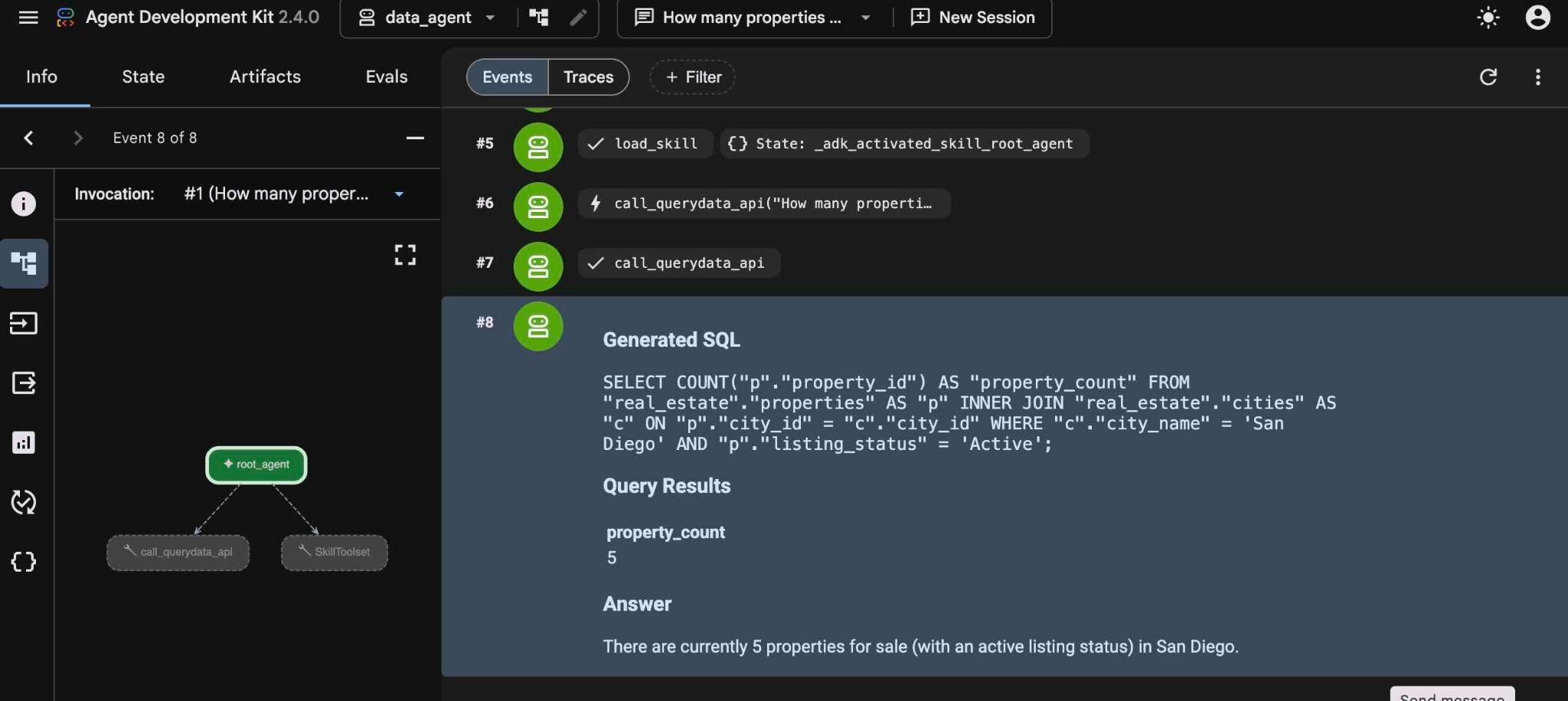
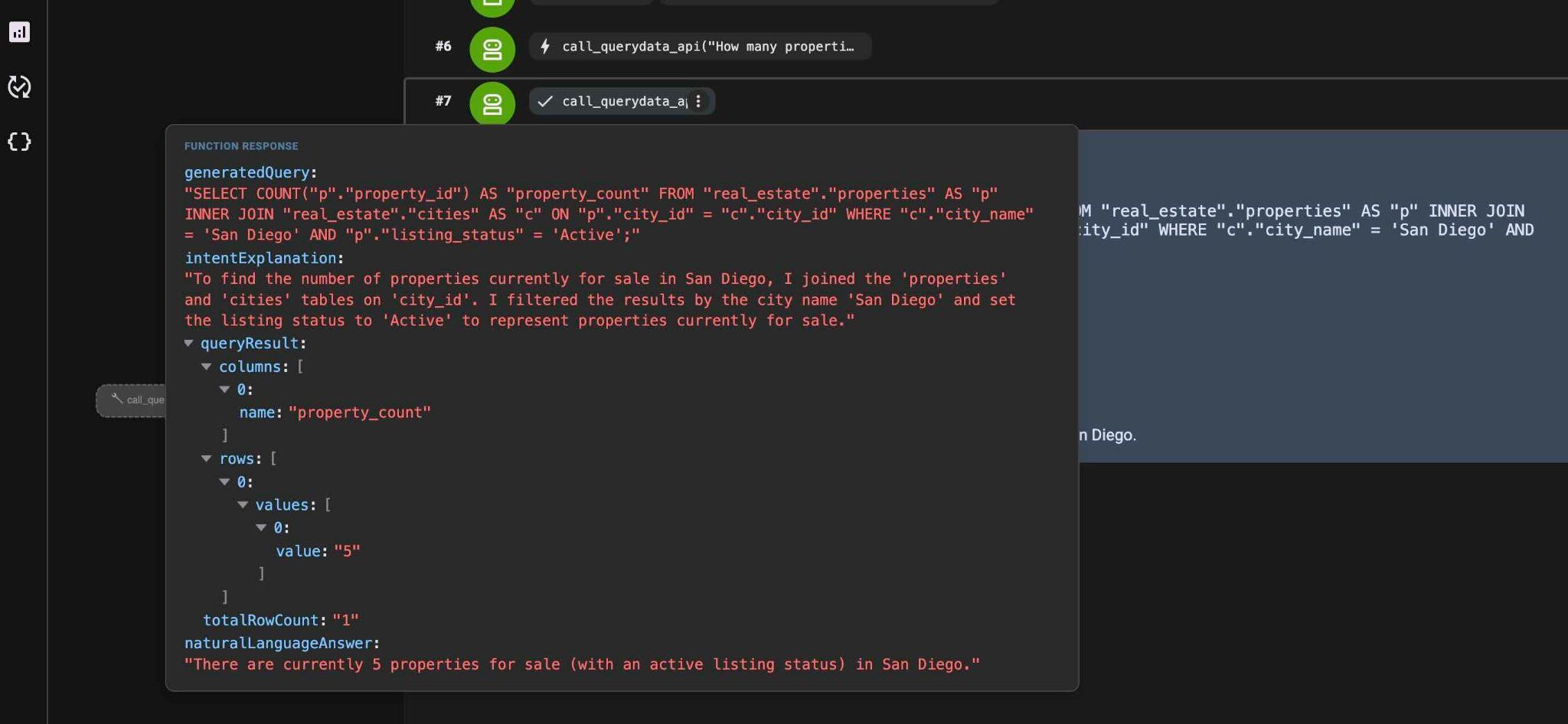
將滑鼠游標懸停在步驟上,即可查看這些步驟的具體作用。此外,選擇一個或另一個步驟時,您可以在左側面板中查看更多資訊。有助於瞭解代理如何搭配技能和 API 運作。
提交後續查詢 (Q2):
List agents who sold a property for over $1000000.
你會發現,由於代理程式已將可用技能寫入記憶體,因此會直接前往 QueryData API 技能,不必再次經歷探索階段。
生成的 SQL 查詢類似於以下陳述式:
SELECT DISTINCT "a"."agent_id", "a"."firstname", "a"."lastname", "a"."email", "a"."brokerage"
FROM "real_estate"."agents" AS "a"
INNER JOIN "real_estate"."property_transactions" AS "t" ON "a"."agent_id" = "t"."seller_agent_id"
WHERE "t"."sale_price" > 1000000 AND "a"."agent_id" IS NOT NULL
ORDER BY "a"."lastname" ASC NULLS LAST;
請嘗試其他查詢 (Q3):
What is the average price of a single-family home with a garage in San Diego?
QueryData 會產生具有空白內容集的標準查詢,但業務工作通常需要特定的商業邏輯和確定性行為。
8. 插入解讀資訊,提高準確率和業務關聯性
在提示中加入解讀內容,可確保生成的查詢符合特定商業邏輯。
您會嘗試這類範例,顧客要求在德爾馬尋找單層住宅。這個問題有兩個重要指標,代表常見的選取模式。
在代理中嘗試下列自然語言提示 (第 4 季)。
Single level Del Mar houses
引擎會傳回一般查詢,但可能包含一些額外條件,例如 is_single_family = TRUE:
SELECT p."property_id", p."address_street", p."price", p."bedrooms", p."bathrooms", p."listing_status", p."is_single_family", p."num_stories", c."city_name"
FROM "real_estate"."properties" AS p
JOIN "real_estate"."cities" AS c ON p."city_id" = c."city_id"
WHERE c."city_name" ILIKE 'Del Mar' AND p."num_stories" = 1 AND p."is_single_family" = TRUE
ORDER BY p."property_id" ASC NULLS LAST;
我們取得一個傳回的資料列做為結果:
Natural Language Answer
The database contains one single-level, single-family house in Del Mar:

Address: 999 Main Ave (Postal Code: 90024)
Price: $3,800,000.00
Bedrooms: 4
Bathrooms: 3.5
Listing Status: Active
Features: Single-family home (1 story), has a garage, and no condo fees.
測試其他提示 (Q5):
Del Mar houses close to good schools
它會使用 proximity_miles 和 school_ranking 欄排序屬性,但不會評估各項指標的權重和重要性。
SELECT "p"."property_id", "p"."address_street", "p"."price", "p"."bedrooms", "p"."bathrooms", "s"."school_name", "s"."school_ranking", "sp"."proximity_miles"
FROM "real_estate"."properties" AS "p"
INNER JOIN "real_estate"."cities" AS "c" ON "p"."city_id" = "c"."city_id"
INNER JOIN "real_estate"."school_to_property" AS "sp" ON "p"."property_id" = "sp"."property_id"
INNER JOIN "real_estate"."schools" AS "s" ON "sp"."school_id" = "s"."school_id"
WHERE "c"."city_name" = 'Del Mar' AND "sp"."proximity_miles" IS NOT NULL AND "s"."school_ranking" IS NOT NULL
ORDER BY "sp"."proximity_miles" ASC NULLS LAST, "s"."school_ranking" ASC NULLS LAST;
將查詢範例製作成範本
商業邏輯需要:
- 2 英里內
- 學校排名 5 以下
- 加權排序:80% 學校排名 + 20% 鄰近程度 (分數 = 0.8 * school_ranking + 0.2 * proximity_miles)
加權排名公式如下:
Score = 0.8 * school_ranking + 0.2 * proximity_miles
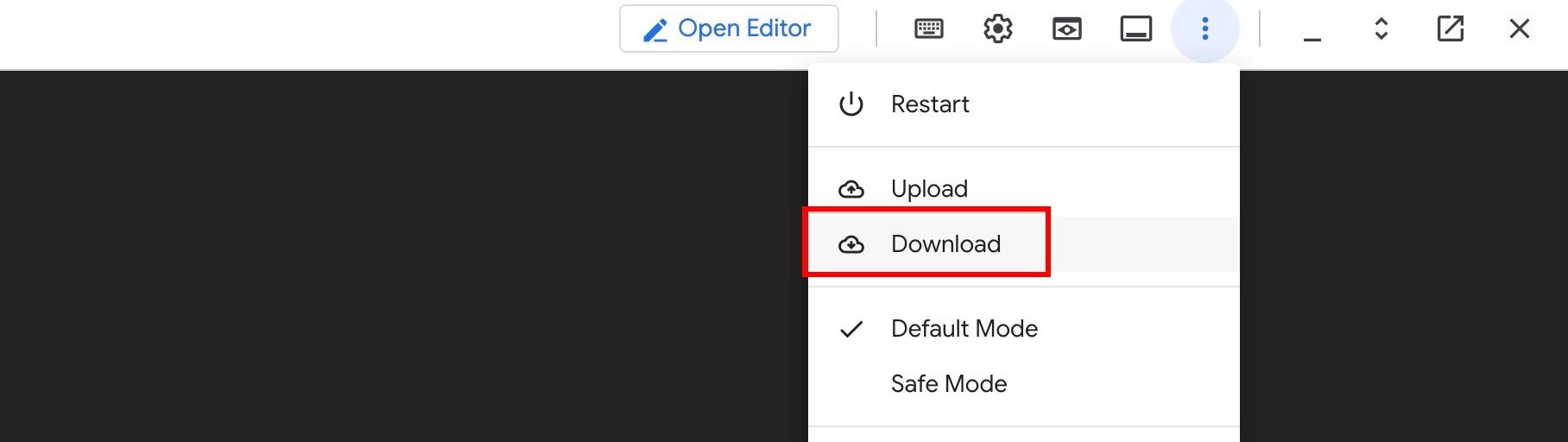
使用 Cloud Shell 的指令列介面,從 Cloud Shell 下載 sixrecipe_context1_1.json 結構定義檔案:
cloudshell download ~/codelabs/alloydb-ai-nla/sixrecipe_context1_1.json
或者,也可以使用 Cloud Shell 選單中的 Download 選單項目:
使用 AlloyDB Studio 將 sixrecipe_context1_1.json 上傳至 sixrecipe 環境設定,定義這個標準結構。點按 sixrecipes 內容右側的三點圖示,然後使用「編輯內容集」上傳新檔案。這會有效取代舊的空白內容。
範本會為好學校鄰近規則定義明確的 SQL 範本規則:
{
  "facets": [],
  "templates": [
    {
      "nl_query": "Riverside houses close to good schools.",
      "sql": "SELECT \"p\".\"address_street\", \"p\".\"address_postal_code\", \"s\".\"school_name\", \"stp\".\"proximity_miles\" FROM \"real_estate\".\"properties\" AS \"p\" JOIN \"real_estate\".\"cities\" AS \"c\" ON \"p\".\"city_id\" = \"c\".\"city_id\" JOIN \"real_estate\".\"school_to_property\" AS \"stp\" ON \"p\".\"property_id\" = \"stp\".\"property_id\" JOIN \"real_estate\".\"schools\" AS \"s\" ON \"stp\".\"school_id\" = \"s\".\"school_id\" WHERE \"c\".\"city_name\" = 'Riverside' AND \"s\".\"school_ranking\" <= 5 AND \"stp\".\"proximity_miles\" <= 2 ORDER BY 0.8 * \"s\".\"school_ranking\" + 0.2 * \"stp\".\"proximity_miles\"",
      "intent": "Houses in Riverside close to good schools (within 2 miles of schools with a rank of at least 5).",
      "manifest": "A given city houses close to good schools.",
      "parameterized": {
        "parameterized_intent": "Houses in $1 close to good schools (within 2 miles of schools with a rank of at least 5).",
        "parameterized_sql": "SELECT \"p\".\"address_street\", \"p\".\"address_postal_code\", \"s\".\"school_name\", \"stp\".\"proximity_miles\" FROM \"real_estate\".\"properties\" AS \"p\" JOIN \"real_estate\".\"cities\" AS \"c\" ON \"p\".\"city_id\" = \"c\".\"city_id\" JOIN \"real_estate\".\"school_to_property\" AS \"stp\" ON \"p\".\"property_id\" = \"stp\".\"property_id\" JOIN \"real_estate\".\"schools\" AS \"s\" ON \"stp\".\"school_id\" = \"s\".\"school_id\" WHERE \"c\".\"city_name\" = $1 AND \"s\".\"school_ranking\" <= 5 AND \"stp\".\"proximity_miles\" <= 2 ORDER BY 0.8 * \"s\".\"school_ranking\" + 0.2 * \"stp\".\"proximity_miles\""
      }
    }
  ]
}
重新執行提示:
Del Mar houses close to good schools
現在,查詢結果會符合範本中定義的商業邏輯:
SELECT "p"."address_street", "p"."address_postal_code", "s"."school_name", "stp"."proximity_miles"
FROM "real_estate"."properties" AS "p"
JOIN "real_estate"."cities" AS "c" ON "p"."city_id" = "c"."city_id"
JOIN "real_estate"."school_to_property" AS "stp" ON "p"."property_id" = "stp"."property_id"
JOIN "real_estate"."schools" AS "s" ON "stp"."school_id" = "s"."school_id"
WHERE "c"."city_name" = 'Del Mar' AND "s"."school_ranking" <= 5 AND "stp"."proximity_miles" <= 2
ORDER BY 0.8 * "s"."school_ranking" + 0.2 * "stp"."proximity_miles"
除了產生的 SQL 陳述式,還會產生下列意圖:
intentExplanation: "Houses in Del Mar close to good schools (within 2 miles of schools with a rank of at least 5)."
您可以在 ADK 網頁介面的左側窗格中查看意圖,如下所示:
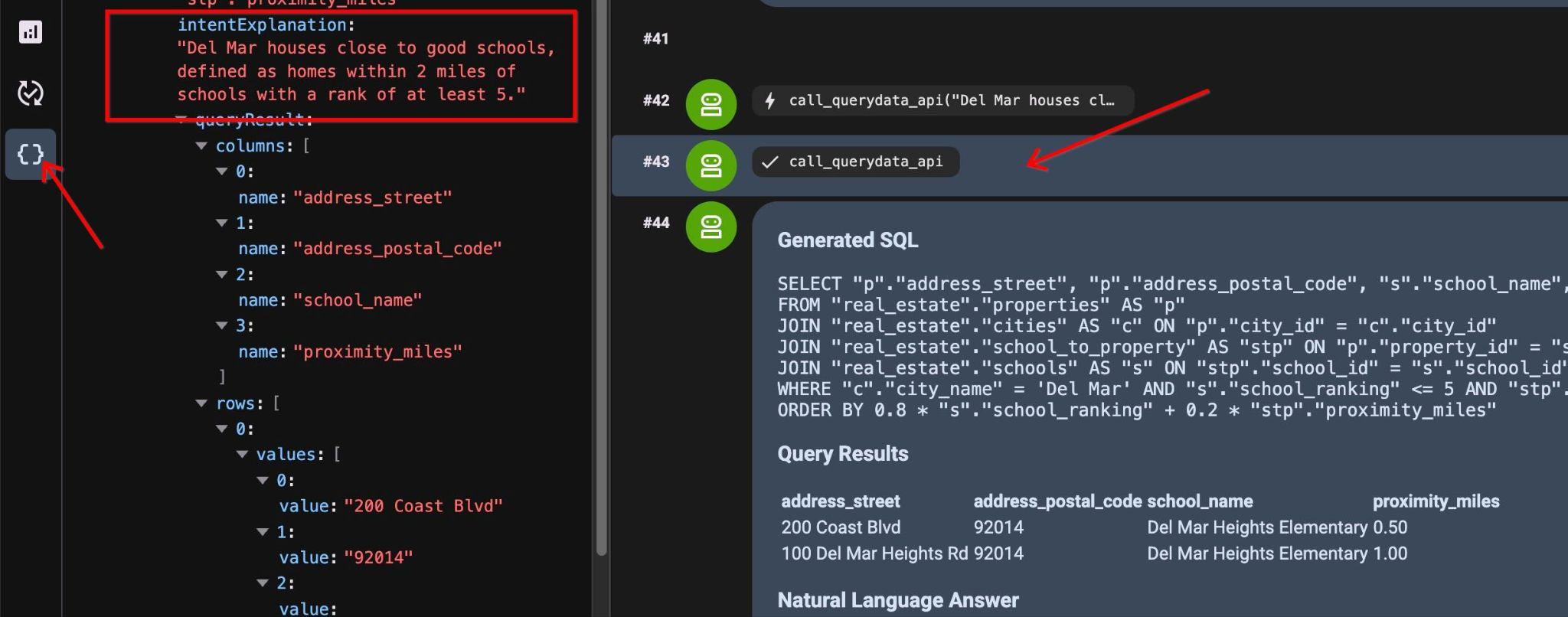
結果會顯示依分數排序的兩個屬性:
Query Results
address_street        address_postal_code        school_name        proximity_miles
200 Coast Blvd        92014        Del Mar Heights Elementary        0.50
100 Del Mar Heights Rd        92014        Del Mar Heights Elementary        1.00
Answer
Based on the data, here are the properties in Del Mar located within 2 miles of a top-rated school (ranking of 5 or better):

200 Coast Blvd (92014)

School: Del Mar Heights Elementary
Proximity: 0.50 miles
100 Del Mar Heights Rd (92014)

School: Del Mar Heights Elementary
Proximity: 1.00 miles
在下一章中,您將擴大範本的範圍。
擷取並解讀多個問題,然後插入解讀資訊
您可以擴大範本的適用範圍,不僅用於「靠近好學校的住宅」,還可將其他條件加入資訊清單,例如「適合育兒家庭的住宅」。
下載更新後的結構定義檔案:
cloudshell download ~/codelabs/alloydb-ai-nla/sixrecipe_context1_2.json
將更新後的 sixrecipe_context1_2.json 檔案上傳至脈絡資料集。
在新內容集檔案中,我們將資訊清單從 "manifest": "A given city houses close to good schools." 替換為 "manifest": "A given city houses close to good schools, or are great for families with kids."。這樣一來,這個範本就不只能用於單一用途,而是能擴大應用範圍。
提交這項查詢 (Q6):
Houses in Waterloo great for families with kids.
代理程式會使用更新後的範本資訊清單,套用標準化查詢邏輯,傳回與上述相同的查詢,目的是:
intentExplanation
:
"Houses in Waterloo close to good schools (within 2 miles of schools with a rank of at least 5)."
9. 使用多面向範本維持高準確率與彈性
構面是模組化 SQL 條件,可與範本動態合併,處理限定條件 (例如「入門家庭」、「海景」),不必為每個排列組合建立個別範本。
我們不必為每個查詢或條件建立範本,而是準備可套用至現有範本的片段,為查詢新增更多維度。
為具有下列屬性的屬性定義側邊:
- 獨棟住宅
- 有效刊登狀態
- 三到四間臥室,至少兩間浴室
- 位於每 10 萬居民犯罪率低於 500 的市鎮
下載分層結構定義檔案:
cloudshell download ~/codelabs/alloydb-ai-nla/sixrecipe_context2_1.json
將 sixrecipe_context2_1.json 上傳至 AlloyDB Studio 中的 sixrecipes 內容集,設定側邊欄。
  "facets": [
    {
      "sql_snippet": "real_estate.properties.is_single_family = TRUE AND real_estate.properties.listing_status = 'Active' AND real_estate.properties.bedrooms BETWEEN 3 AND 4 AND real_estate.properties.bathrooms >= 2.0 AND 500 > (SELECT m.crime_rate_per_100k FROM real_estate.cities c JOIN real_estate.municipalities m ON c.municipality_id = m.municipality_id AND c.city_id = real_estate.properties.city_id)",
      "intent": "for a starter family (active single-family home listings with 3 to 4 bedrooms, 2+ bathrooms, and a crime rate under 500 per 100,000 residents)",
      "manifest": "for a starter family",
      "parameterized": {
        "parameterized_intent": "for a starter family (active single-family home listings with 3 to 4 bedrooms, 2+ bathrooms, and a crime rate under 500 per 100,000 residents)",
        "parameterized_sql_snippet": "real_estate.properties.is_single_family = TRUE AND real_estate.properties.listing_status = 'Active' AND real_estate.properties.bedrooms BETWEEN 3 AND 4 AND real_estate.properties.bathrooms >= 2.0 AND 500 > (SELECT m.crime_rate_per_100k FROM real_estate.cities c JOIN real_estate.municipalities m ON c.municipality_id = m.municipality_id AND c.city_id = real_estate.properties.city_id)"
      }
    }
  ]
使用多面向搜尋查詢
執行這項自然語言查詢 (Q7):
Del Mar houses close to good schools for a starter family.
引擎會將層面條件直接附加至基本查詢:
SELECT "p"."address_street", "p"."address_postal_code", "s"."school_name", "stp"."proximity_miles"
FROM "real_estate"."properties" AS "p"
JOIN "real_estate"."cities" AS "c" ON "p"."city_id" = "c"."city_id"
JOIN "real_estate"."school_to_property" AS "stp" ON "p"."property_id" = "stp"."property_id"
JOIN "real_estate"."schools" AS "s" ON "stp"."school_id" = "s"."school_id"
WHERE "c"."city_name" = 'Del Mar'
  AND "s"."school_ranking" <= 5
  AND "stp"."proximity_miles" <= 2
  AND "p"."is_single_family" = TRUE
  AND "p"."listing_status" = 'Active'
  AND "p"."bedrooms" BETWEEN 3 AND 4
  AND "p"."bathrooms" >= 2.0
  AND 500 > (
    SELECT m.crime_rate_per_100k
    FROM real_estate.cities c
    JOIN real_estate.municipalities m ON c.municipality_id = m.municipality_id
    AND c.city_id = p.city_id
  )
ORDER BY 0.8 * "s"."school_ranking" + 0.2 * "stp"."proximity_miles"
結果如下:
Query Results
address_street        address_postal_code        school_name        proximity_miles
200 Coast Blvd        92014        Del Mar Heights Elementary        0.50
Natural Language Answer
Based on your criteria, there is an active listing for a single-family house in Del Mar that fits your needs:

Address: 200 Coast Blvd, Del Mar, 92014
Nearby School: Del Mar Heights Elementary (ranked within the top 5)
Proximity to School: 0.50 miles
新增更多 facet
如果我們想根據新興模式 (例如屬性的視窗檢視) 新增一個維度,該怎麼做?
在構面定義中新增海景語意比對。
    {
      "sql_snippet": "((real_estate.properties.description_embedding <=> google_ml.embedding('gemini-embedding-001', 'unobstructed, panoramic, ocean vista, vast Pacific, breathtaking, commanding view, deep blue horizon, massive, sweeping view')::vector) < 0.4)",
      "intent": "with ocean view",
      "manifest": "with ocean view",
      "parameterized": {
        "parameterized_intent": "with ocean view",
        "parameterized_sql_snippet": "((real_estate.properties.description_embedding <=> google_ml.embedding('gemini-embedding-001', 'unobstructed, panoramic, ocean vista, vast Pacific, breathtaking, commanding view, deep blue horizon, massive, sweeping view')::vector) < 0.4)"
      }
上述層面定義中的值 0.4 是經過實驗校準的門檻。下載多面向脈絡資料檔案:
cloudshell download ~/codelabs/alloydb-ai-nla/sixrecipe_context2_2.json
將 sixrecipe_context2_2.json 上傳至內容集,然後執行下列提示 (Q8):
Ocean view Del Mar homes near good schools.
輸出內容包含標準條件,以及透過 google_ml.embedding 結合的向量相似度比對:
SELECT "p"."address_street", "p"."address_postal_code", "s"."school_name", "stp"."proximity_miles"
FROM "real_estate"."properties" AS "p"
JOIN "real_estate"."cities" AS "c" ON "p"."city_id" = "c"."city_id"
JOIN "real_estate"."school_to_property" AS "stp" ON "p"."property_id" = "stp"."property_id"
JOIN "real_estate"."schools" AS "s" ON "stp"."school_id" = "s"."school_id"
WHERE "c"."city_name" = 'Del Mar' AND "s"."school_ranking" <= 5 AND "stp"."proximity_miles" <= 2
AND (((p.description_embedding <=> google_ml.embedding('gemini-embedding-001', 'unobstructed, panoramic, ocean vista, vast Pacific, breathtaking, commanding view, deep blue horizon, massive, sweeping view')::vector) <= 0.4))
ORDER BY 0.8 * "s"."school_ranking" + 0.2 * "stp"."proximity_miles";
查詢會傳回一個屬性:
Query Results
address_street        address_postal_code        school_name        proximity_miles
100 Del Mar Heights Rd        92014        Del Mar Heights Elementary        1.00
Answer
The ocean-view home in Del Mar near a top-ranked school is located at 100 Del Mar Heights Rd (92014).

It is situated just 1.00 mile away from Del Mar Heights Elementary, which is one of the area's highly-ranked schools (ranking of 5 or better).
在 AlloyDB Studio 中檢查屬性的說明,並執行下列查詢,驗證結果:
select description from real_estate.properties where address_postal_code='92014' and description is not null;
系統會顯示「壯觀的海洋奇景」說明。
Well-located 2-bedroom condo with excellent proximity to coastal shopping and dining. The balcony provides a magnificent marine spectacle against an azure backdrop. Under contract, high monthly HOA fee.
10. 使用值搜尋釐清私人資料的含意
模糊不清的要求可能會比對到多個實體,例如將地點名稱與商家名稱混淆。值搜尋會將字詞對應至資料庫概念,協助解決這些參照。
值搜尋功能會建立資料欄名稱、資料欄中的值與概念類型之間的關聯,例如城市、國家/地區或名稱。此外,由於系統不僅會為中繼資料建立索引,也會為資料欄中的代表性資料樣本建立索引,因此可將自然語言要求中使用的值與潛在概念類型建立關聯,並判斷結果 SQL 中可使用的資料表和資料欄。
查詢中的模糊不清
在現實生活中,由於不同名稱和地點的拼字錯誤,這項作業可能更加困難。執行這個提示 (Q9),其中包含錯別字和模稜兩可的字詞:
Westwod's sold properties in the last 1 month.
這裡有兩個問題:名稱拼錯了,而且我們不清楚是指在名稱相似的地點販售的房地產,還是指房地產仲介公司。執行查詢時,系統會傳回類似下列內容的查詢。
SELECT "p"."property_id", "p"."address_street", "p"."address_postal_code", "p"."price" AS "listing_price", "p"."bedrooms", "p"."bathrooms", "p"."listing_status", "pt"."sale_date", "pt"."sale_price", "c"."city_name" FROM "real_estate"."properties" AS "p" INNER JOIN "real_estate"."property_transactions" AS "pt" ON "p"."property_id" = "pt"."property_id" INNER JOIN "real_estate"."cities" AS "c" ON "p"."city_id" = "c"."city_id" WHERE ("c"."city_name" ILIKE '%Westwood%' OR "c"."city_name" ILIKE '%Westwod%') AND "pt"."sale_date" >= '2025-09-01'::date AND "pt"."sale_date" <= '2025-09-30'::date ORDER BY "pt"."sale_date" DESC NULLS LAST, "pt"."sale_price" DESC NULLS LAST
系統已修正名稱,並假設問題是關於房源位置,嘗試比對韋斯特伍德市的房源。
在 AlloyDB Studio 中啟用 pg_trgm 擴充功能,支援模糊字串比較:
CREATE EXTENSION IF NOT EXISTS pg_trgm;
接著,我們可以使用擴充功能,將值搜尋新增至 QueryData 環境集。
以下是我們要使用的值搜尋清單:
"value_searches": [
    {
      "conceptType": "Municipality name",
      "query": "/* Requires extension: pg_trgm */ WITH TrigramMetrics AS (SELECT T.municipality_name AS original_value, (T.municipality_name % $value::text) AS normalized_dist FROM real_estate.municipalities T WHERE T.municipality_name % $value::text) SELECT original_value AS value, 'real_estate.municipalities.municipality_name' AS columns, 'Name of the municipality' AS concept_type, normalized_dist AS distance, ''::text AS context FROM TrigramMetrics",
      "description": "Trigram match for municipality name"
    },
    {
      "conceptType": "City name",
      "query": "/* Requires extension: pg_trgm */ WITH TrigramMetrics AS (SELECT T.city_name AS original_value, (T.city_name % $value::text) AS normalized_dist FROM real_estate.cities T WHERE T.city_name % $value::text) SELECT original_value AS value, 'real_estate.cities.city_name' AS columns, 'Name of the city' AS concept_type, normalized_dist AS distance, ''::text AS context FROM TrigramMetrics",
      "description": "Trigram match for city name"
    },
    {
      "conceptType": "Brokerage name",
      "query": "/* Requires extension: pg_trgm */ WITH TrigramMetrics AS (SELECT T.brokerage AS original_value, (T.brokerage % $value::text) AS normalized_dist FROM real_estate.agents T WHERE T.brokerage % $value::text) SELECT original_value AS value, 'real_estate.agents.brokerage' AS columns, 'Name of the brokerage' AS concept_type, normalized_dist AS distance, ''::text AS context FROM TrigramMetrics",
      "description": "Trigram match for brokerage name"
    }
  ]
下載值搜尋結構定義檔案:
cloudshell download ~/codelabs/alloydb-ai-nla/sixrecipe_context3_1.json
將 sixrecipe_context3_1.json 上傳至 QueryData sixrecipes 脈絡資料集,然後儲存。
重新執行提示 (Q9):
Westwod's sold properties in the last 1 month.
由於值搜尋結果顯示 3 個不同的實體具有類似的值,因此系統傳回了釐清問題的回應:
The database requires some clarification to provide the exact information you need:

The search term 'Westwod' (Westwood) is ambiguous because it can refer to:

A municipality name (e.g., the municipality of Westwood)
A city name (e.g., the city of Westwood)
A brokerage name (e.g., properties sold by agents affiliated with the Westwood brokerage)
Could you please clarify which of these you are referring to?
追蹤記錄會提供線索,說明為何選擇該特定路徑
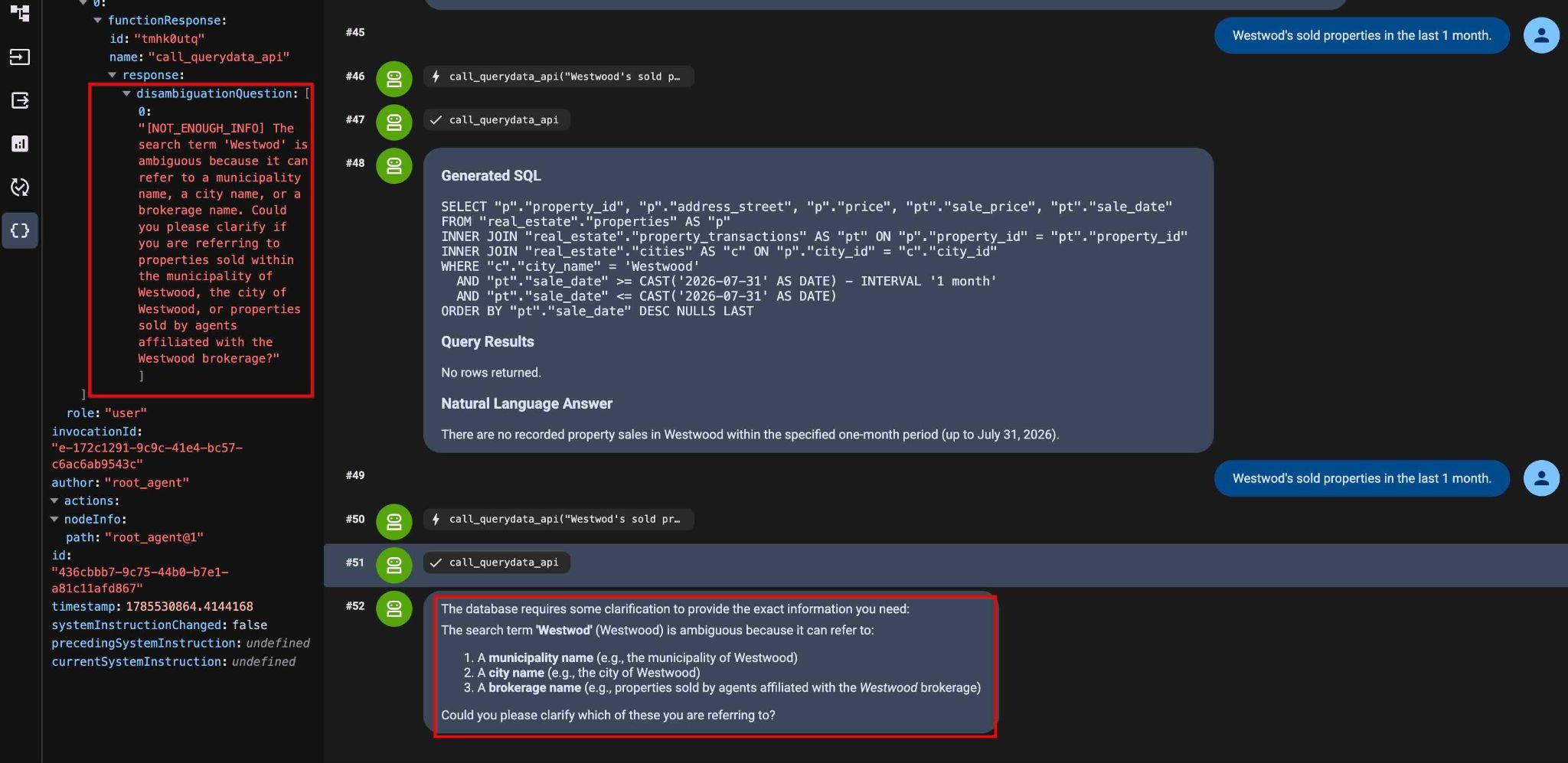
以下是全文:
"[NOT_ENOUGH_INFO] The search term 'Westwod' is ambiguous because it can refer to a municipality name, a city name, or a brokerage name. Could you please clarify if you are referring to properties sold within the municipality of Westwood, the city of Westwood, or properties sold by agents affiliated with the Westwood brokerage?"
消除查詢中的模稜兩可
修正輸入提示 (第 10 題):
Westwood city location properties sold in September 2025.
現在我們有了查詢和結果:
Generated SQL
SELECT "p"."property_id", "p"."address_street", "p"."address_postal_code", "p"."price", "pt"."sale_date", "pt"."sale_price"
FROM "real_estate"."properties" AS "p"
INNER JOIN "real_estate"."cities" AS "c" ON "p"."city_id" = "c"."city_id"
INNER JOIN "real_estate"."property_transactions" AS "pt" ON "p"."property_id" = "pt"."property_id"
WHERE "c"."city_name" = 'Westwood'
  AND "pt"."sale_date" >= '2025-09-01'::date
  AND "pt"."sale_date" <= '2025-09-30'::date
ORDER BY "pt"."sale_date" ASC NULLS LAST

Query Results
property_id        address_street        address_postal_code        price        sale_date        sale_price
32        999 Main St        99999        3800000.00        2025-09-12        1000000.00
11. 語意搜尋和 AI 函式
AlloyDB AI 函式可對非結構化資料執行語意篩選。在 SQL 查詢中,直接搭配標準資料庫運算子使用 ai.if 和 google_ml.embedding 等函式。
使用 ILIKE 運算子的範本
第一步是上傳含有 ILIKE 運算子的新結構定義檔案。
下載 ILIKE 結構定義檔案:
cloudshell download ~/codelabs/alloydb-ai-nla/sixrecipe_context4_1.json
將 sixrecipe_context4_1.json 上傳至內容集,評估「可入住」房屋的標準 ILIKE 模式比對。
    {
      "nl_query": "Move-in ready houses",
      "sql": "SELECT \"p\".\"address_street\", \"p\".\"address_postal_code\" FROM \"real_estate\".\"properties\" AS \"p\" WHERE \"p\".listing_status = 'Active' AND \"p\".\"description\" IS NOT NULL AND (\"p\".description ILIKE '%turnkey%' OR \"p\".description ILIKE '%move-in%')",
      "intent": "Move-in ready houses",
      "manifest": "Move-in ready houses",
      "parameterized": {
        "parameterized_intent": "Move-in ready houses",
        "parameterized_sql": "SELECT \"p\".\"address_street\", \"p\".\"address_postal_code\" FROM \"real_estate\".\"properties\" AS \"p\" WHERE \"p\".listing_status = 'Active' AND \"p\".\"description\" IS NOT NULL AND (\"p\".description ILIKE '%turnkey%' OR \"p\".description ILIKE '%move-in%')"
      }
    }
提交這項查詢 (Q11):
List move-in ready houses.
產生的查詢:
SELECT "p"."address_street", "p"."address_postal_code"
FROM "real_estate"."properties" AS "p"
WHERE "p".listing_status = 'Active'
  AND "p"."description" IS NOT NULL
  AND ("p".description ILIKE '%turnkey%' OR "p".description ILIKE '%move-in%')
並傳回一筆相符記錄。
Query Results
address_street        address_postal_code
40 Main St, Unit 8        N2H 2G8
含有 AI.IF 函式的範本
下載 AI.IF 結構定義檔案:
cloudshell download ~/codelabs/alloydb-ai-nla/sixrecipe_context4_2.json
將 sixrecipe_context4_2.json 上傳至內容集,評估 ai.if 語意篩選函式。
    {
      "nl_query": "List Move-in ready houses",
      "sql": "SELECT \"p\".\"address_street\", \"p\".\"address_postal_code\" FROM \"real_estate\".\"properties\" AS \"p\" WHERE \"p\".listing_status = 'Active' AND \"p\".\"description\" IS NOT NULL AND ai.if('Does this description represent a move-in ready house? Description: ' || \"p\".\"description\")",
      "intent": "List Move-in ready houses",
      "manifest": "List Move-in ready houses",
      "parameterized": {
        "parameterized_intent": "List Move-in ready houses",
        "parameterized_sql": "SELECT \"p\".\"address_street\", \"p\".\"address_postal_code\" FROM \"real_estate\".\"properties\" AS \"p\" WHERE \"p\".listing_status = 'Active' AND \"p\".\"description\" IS NOT NULL AND ai.if('Does this description represent a move-in ready house? Description: ' || \"p\".\"description\")"
      }
    }
重複提示 (Q12):
List move-in ready houses.
生成的 SQL:
SELECT "p"."address_street", "p"."address_postal_code"
FROM "real_estate"."properties" AS "p"
WHERE "p".listing_status = 'Active'
  AND "p"."description" IS NOT NULL
  AND ai.if('Does this description represent a move-in ready house? Description: ' || "p"."description")
這樣一來,結果中就會出現相同的屬性:
Query Results
Address Street        Address Postal Code
40 Main St, Unit 8        N2H 2G8
Natural Language Answer
The move-in ready home currently available is located at:

Address: 40 Main St, Unit 8
Postal Code: N2H 2G8
使用向量搜尋進行多面向搜尋
下載嵌入搜尋結構定義檔案:
cloudshell download ~/codelabs/alloydb-ai-nla/sixrecipe_context4_3.json
將 sixrecipe_context4_3.json 上傳至內容集,使用 google_ml.embedding 評估語意向量搜尋,並搜尋配備新廚房用具的房屋。
使用 sixrecipe_context4_3.json 檔案更新內容集,並透過 AlloyDB 向量搜尋新增其他層面。
    {
      "sql_snippet": "((real_estate.properties.description_embedding <=> google_ml.embedding('gemini-embedding-001', 'Upgraded kitchen appliances')::vector) < 0.4)",
      "intent": "with upgraded kitchen appliances",
      "manifest": "with upgraded kitchen appliances",
      "parameterized": {
        "parameterized_intent": "with upgraded kitchen appliances",
        "parameterized_sql_snippet": "((real_estate.properties.description_embedding <=> google_ml.embedding('gemini-embedding-001', 'Upgraded kitchen appliances')::vector) < 0.4)"
      }
    }
上述層面定義中的值 0.4 是經過實驗校準的門檻。
執行這項查詢 (Q13):
List move-in ready houses with upgraded kitchen appliances.
生成的 SQL:
SELECT "p"."address_street", "p"."address_postal_code" FROM "real_estate"."properties" AS "p" WHERE "p"."listing_status" = 'Active' AND "p"."description" IS NOT NULL AND ai.if('Does this description represent a Move-in ready house? Description: ' || "p"."description") AND ((("p"."description_embedding" <=> google_ml.embedding('gemini-embedding-001', 'Upgraded kitchen appliances')::vector) < 0.4))
查詢結果和自然語言建議如下:
Query Results
Address        Postal Code
40 Main St, Unit 8        N2H 2G8
Natural Language Answer
The move-in ready house with upgraded kitchen appliances is located at:

Address: 40 Main St, Unit 8
Postal Code: N2H 2G8
12. 安全性和隱私權
QueryData API 生成的每一項查詢都有安全風險,因為這些查詢可能會向其他使用者揭露資料。參數化安全檢視區塊 (PSV) 會在生成 NL2SQL 時,強制執行資料列層級的安全邊界。
建立參數化安全檢視區塊
我們有一個 real_estate.offers 資料表,其中包含所有房地產交易的相關資訊。我們希望代理商只能看到自己的交易,但不能看到其他代理商的交易。我們建立 PSV,可根據 agent_id 篩選資料列。
在 AlloyDB Studio 中,為優惠資料表建立參數化安全檢視區塊:
CREATE VIEW real_estate.secure_offers
  WITH (security_barrier) AS
SELECT offer_id, property_id, buyer_agent_id,
    seller_agent_id, offer_amount, offer_date,
    offer_status, offer_expiration_date,
    contingencies
FROM real_estate.offers
WHERE buyer_agent_id = $@agent_id;
驗證參數化安全檢視區塊定義:
SELECT definition
FROM parameterized_views.all_parameterized_views
WHERE schemaname = 'real_estate' AND viewname = 'secure_offers';
real_estate.offers 資料表呢?
使用 AlloyDB 參數化安全檢視區塊限制 QueryData 資料存取權
在 agent.py 中,參數化安全檢視區塊 real_estate.secure_offers 會在 TABLE_IDS 中註冊,而不是 real_estate.offers:
agent.py 原始碼:
 List of database tables included in QueryData API requests
TABLE_IDS = [
    "real_estate.municipalities",
    "real_estate.cities",
    "real_estate.agents",
    "real_estate.properties",
    "real_estate.schools",
    "real_estate.school_to_property",
    "real_estate.property_transactions",
    "real_estate.secure_offers",
]
並為 agent_id=1 的代理傳遞工作階段執行階段脈絡:
            "parameterized_secure_view_parameters": {
                "parameters": {
                    "key": "agent_id",
                    "value": "1"
                }
            }
        },
因此,每個 QueryData API 要求都會傳遞該參數,且當要求中包含安全檢視時,系統會套用篩選條件,只傳回該特定代理程式的結果。
執行這項查詢 (Q14):
List the offer id and listing price in 2025 where the offer was within 5% of the final selling price.
生成的 SQL:
SELECT "o"."offer_id", "p"."price" AS "listing_price"
FROM "real_estate"."secure_offers" AS "o"
INNER JOIN "real_estate"."properties" AS "p" ON "o"."property_id" = "p"."property_id"
INNER JOIN "real_estate"."property_transactions" AS "t" ON "o"."property_id" = "t"."property_id"
WHERE "o"."offer_date" >= '2025-01-01'
  AND "o"."offer_date" <= '2025-12-31'
  AND "o"."offer_amount" IS NOT NULL
  AND "t"."sale_price" IS NOT NULL
  AND "p"."price" IS NOT NULL
  AND ABS("o"."offer_amount" - "t"."sale_price") <= (0.05 * "t"."sale_price")
ORDER BY "o"."offer_id" ASC NULLS LAST
查詢檢視區塊時,系統會依據有效代理程式工作階段參數篩選結果,保護未經授權的記錄資料,並只傳回兩筆記錄。
Query Results
Offer ID        Listing Price
7        $750,000.00
8        $510,000.00
Natural Language Answer
Here are the offers from 2025 where the offer amount was within 5% of the final selling price:

Offer ID 7: Listing Price of $750,000.00
Offer ID 8: Listing Price of $510,000.00
如果您在 AlloyDB Studio 中對基礎 real_estate.offers 資料表執行下列查詢:
SELECT "o"."offer_id", "p"."price" AS "listing_price"
FROM "real_estate"."offers" AS "o"
INNER JOIN "real_estate"."properties" AS "p" ON "o"."property_id" = "p"."property_id"
INNER JOIN "real_estate"."property_transactions" AS "t" ON "o"."property_id" = "t"."property_id"
WHERE "o"."offer_date" >= '2025-01-01'
  AND "o"."offer_date" <= '2025-12-31'
  AND "o"."offer_amount" IS NOT NULL
  AND "t"."sale_price" IS NOT NULL
  AND "p"."price" IS NOT NULL
  AND ABS("o"."offer_amount" - "t"."sale_price") <= (0.05 * "t"."sale_price")
ORDER BY "o"."offer_id" ASC NULLS LAST
傳回超過兩筆記錄,顯示所有代理程式的資料。
實驗室到此結束!您已學會如何使用 QueryData API、AI 函式和 AlloyDB 參數化安全檢視區塊。
13. 清理環境
完成實驗室後,請終止 AlloyDB 執行個體和叢集。
刪除 AlloyDB 叢集和所有執行個體
使用 force 選項終止叢集,這也會刪除叢集中的所有執行個體。
如果終端機已中斷連線,請重新連線,並在 Cloud Shell 中定義專案和環境變數:
gcloud config set project <YOUR_PROJECT_ID>
export REGION=us-central1
export ADBCLUSTER=alloydb-aip-01
export PROJECT_ID=$(gcloud config get-value project)
刪除叢集:
gcloud alloydb clusters delete $ADBCLUSTER --region=$REGION --force
預期的控制台輸出內容:
student@cloudshell:~ (test-project-001-402417)$ gcloud alloydb clusters delete $ADBCLUSTER --region=$REGION --force
All of the cluster data will be lost when the cluster is deleted.

Do you want to continue (Y/n)?  Y

Operation ID: operation-1697820178429-6082890a0b570-4a72f7e4-4c5df36f
Deleting cluster...done.
刪除 AlloyDB 備份
刪除叢集的所有 AlloyDB 備份:
for i in $(gcloud alloydb backups list \
  --filter="CLUSTER_NAME: projects/$PROJECT_ID/locations/$REGION/clusters/$ADBCLUSTER" \
  --format="value(name)" \
  --sort-by=~createTime) ; do \
  gcloud alloydb backups delete $(basename $i) --region $REGION --quiet; done
預期的控制台輸出內容:
student@cloudshell:~ (test-project-001-402417)$ for i in $(gcloud alloydb backups list --filter="CLUSTER_NAME: projects/$PROJECT_ID/locations/$REGION/clusters/$ADBCLUSTER" --format="value(name)" --sort-by=~createTime) ; do gcloud alloydb backups delete $(basename $i) --region $REGION --quiet; done
Operation ID: operation-1697826266108-60829fb7b5258-7f99dc0b-99f3c35f
Deleting backup...done.
刪除 Cloud Storage 值區
刪除 Cloud Storage 匯入 bucket,以免持續產生儲存空間費用:
gcloud storage rm -r gs://${PROJECT_ID}-import
14. 恭喜
恭喜您完成本程式碼研究室!
涵蓋內容
- 如何部署 AlloyDB 叢集和主要執行個體
- 如何為 AlloyDB 啟用 QueryData、AI 函式和參數化安全檢視區塊
- 如何建立 QueryData 脈絡資料集
- 如何在 QueryData API 中使用不同範本和脈絡資料
- 如何使用 Facet 讓 QueryData 範本更有彈性
- 如何透過值搜尋和三元索引解決資料模糊不清的問題
- 如何使用範本的 AI 函式進行語意搜尋
- 如何搭配 QueryData API 使用參數化安全檢視區塊
問卷調查
輸出內容: