
1. はじめに
この Codelab では、AI 演算子を使用して AlloyDB をデプロイし、セマンティック検索、結合、結果のランキングなどのタスクに利用する方法について説明します。
前提条件
- Google Cloud とコンソールの基本的な知識
- コマンドライン インターフェースと Cloud Shell の基本的なスキル
学習内容
- AlloyDB クラスタとプライマリ インスタンスをデプロイする方法
- AlloyDB AI 演算子を有効にする方法
- さまざまな AlloyDB AI 演算子を使用する方法
- AlloyDB AI 演算子で再ランキングを使用して結果の出力を改善する方法
必要なもの
- Google Cloud アカウントと Google Cloud プロジェクト
- Google Cloud コンソールと Cloud Shell をサポートするウェブブラウザ(Chrome など)
2. 設定と要件
プロジェクトのセットアップ
- Google Cloud コンソールにログインします。Gmail アカウントも Google Workspace アカウントもまだお持ちでない場合は、アカウントを作成してください。
仕事用または学校用アカウントではなく、個人アカウントを使用します。
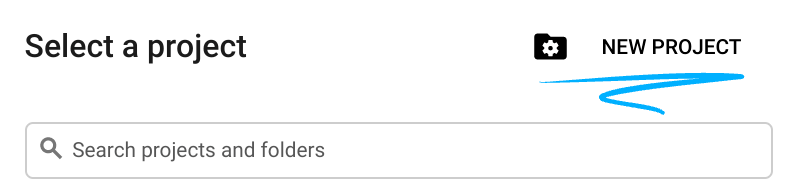
- 新しいプロジェクトを作成するか、既存のプロジェクトを再利用します。Google Cloud コンソールで新しいプロジェクトを作成するには、ヘッダーで [プロジェクトを選択] ボタンをクリックします。ポップアップ ウィンドウが開きます。

[プロジェクトを選択] ウィンドウで [新しいプロジェクト] ボタンを押すと、新しいプロジェクトのダイアログ ボックスが開きます。
ダイアログ ボックスで、任意のプロジェクト名を入力し、ロケーションを選択します。
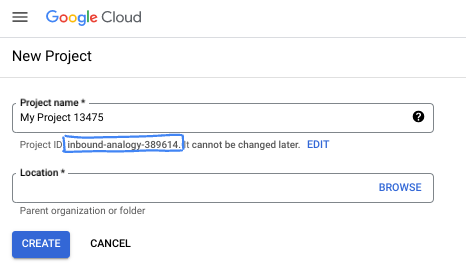
- プロジェクト名は、このプロジェクトの参加者に表示される名称です。プロジェクト名は Google API では使用されず、いつでも変更できます。
- プロジェクト ID は、すべての Google Cloud プロジェクトにおいて一意でなければならず、不変です(設定後は変更できません)。Google Cloud コンソールでは一意の ID が自動的に生成されますが、カスタマイズすることもできます。生成された ID が気に入らない場合は、別のランダムな ID を生成するか、独自の ID を指定して使用可能かどうかを確認できます。ほとんどの Codelab では、プロジェクト ID を参照する必要があります。通常、プロジェクト ID はプレースホルダ PROJECT_ID で識別されます。
- なお、3 つ目の値として、一部の API が使用するプロジェクト番号があります。これら 3 つの値について詳しくは、こちらのドキュメントをご覧ください。
課金を有効にする
課金を有効にするには、次の 2 つの方法があります。個人用の請求先アカウントを使用するか、次の手順でクレジットを利用できます。
5 ドル分の Google Cloud クレジットを利用する(省略可)
このワークショップを実施するには、クレジットが設定された請求先アカウントが必要です。独自の請求を使用する予定の場合は、この手順をスキップできます。
- こちらのリンクをクリックし、個人の Google アカウントでログインします。
- 次のような出力が表示されます。
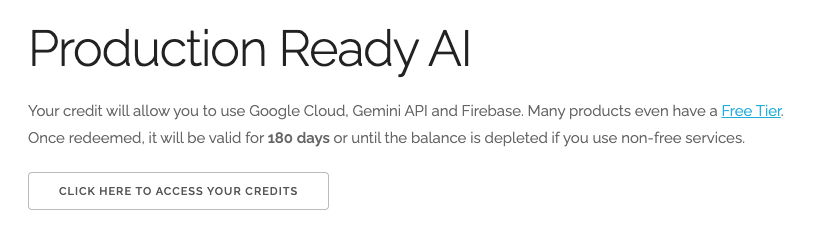
- [クレジットにアクセスするにはこちらをクリック] ボタンをクリックします。お支払い情報を設定するページが表示されます。無料トライアルの登録画面が表示された場合は、[キャンセル] をクリックして、お支払い情報のリンクに進みます。
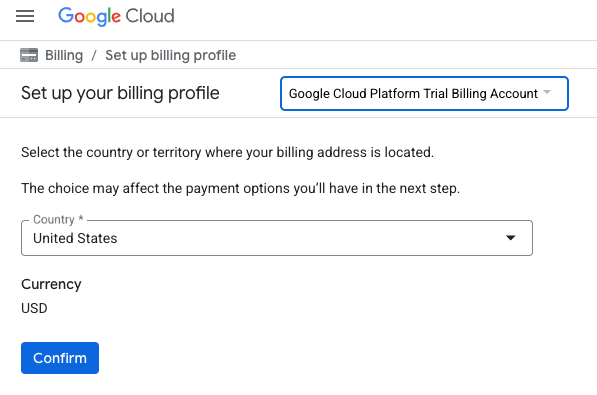
- [確認] をクリックします。これで、Google Cloud Platform 無料トライアルの請求先アカウントに接続されました。
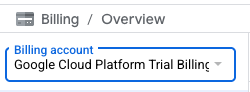
個人用の請求先アカウントを設定する
Google Cloud クレジットを使用して課金を設定した場合は、この手順をスキップできます。
個人用の請求先アカウントを設定するには、Cloud コンソールでこちらに移動して課金を有効にします。
注意事項:
- このラボを完了するのにかかる Cloud リソースの費用は 3 米ドル未満です。
- このラボの最後の手順に沿ってリソースを削除すると、それ以上の料金は発生しません。
- 新規ユーザーは、300 米ドル分の無料トライアルをご利用いただけます。
Cloud Shell の起動
Google Cloud はノートパソコンからリモートで操作できますが、この Codelab では、Google Cloud Shell(Cloud 上で動作するコマンドライン環境)を使用します。
Google Cloud Console で、右上のツールバーにある Cloud Shell アイコンをクリックします。

または、G キーを押してから S キーを押します。このシーケンスは、Google Cloud コンソール内からアクセスした場合、またはこのリンクを使用した場合に Cloud Shell をアクティブにします。
プロビジョニングと環境への接続にはそれほど時間はかかりません。完了すると、次のように表示されます。

この仮想マシンには、必要な開発ツールがすべて用意されています。永続的なホーム ディレクトリが 5 GB 用意されており、Google Cloud で稼働します。そのため、ネットワークのパフォーマンスと認証機能が大幅に向上しています。この Codelab での作業はすべて、ブラウザ内から実行できます。インストールは不要です。
3. はじめに
API を有効にする
AlloyDB、Compute Engine、ネットワーキング サービス、Vertex AI を使用するには、Google Cloud プロジェクトでそれぞれの API を有効にする必要があります。
Cloud Shell ターミナルで、プロジェクト ID が設定されていることを確認します。
gcloud config set project [YOUR-PROJECT-ID]
環境変数 PROJECT_ID を設定します。
PROJECT_ID=$(gcloud config get-value project)
必要なサービスをすべて有効にします。
gcloud services enable alloydb.googleapis.com \
                       compute.googleapis.com \
                       cloudresourcemanager.googleapis.com \
                       servicenetworking.googleapis.com \
                       aiplatform.googleapis.com \
                       discoveryengine.googleapis.com
想定される出力
student@cloudshell:~ (test-project-001-402417)$ gcloud config set project test-project-001-402417
Updated property [core/project].
student@cloudshell:~ (test-project-001-402417)$ PROJECT_ID=$(gcloud config get-value project)
Your active configuration is: [cloudshell-14650]
student@cloudshell:~ (test-project-001-402417)$
student@cloudshell:~ (test-project-001-402417)$ gcloud services enable alloydb.googleapis.com \
                       compute.googleapis.com \
                       cloudresourcemanager.googleapis.com \
                       servicenetworking.googleapis.com \
                       aiplatform.googleapis.com \
                       discoveryengine.googleapis.com
Operation "operations/acat.p2-4470404856-1f44ebd8-894e-4356-bea7-b84165a57442" finished successfully.
API の概要
- AlloyDB API(
alloydb.googleapis.com)を使用すると、AlloyDB for PostgreSQL クラスタの作成、管理、スケーリングを行うことができます。要求の厳しいエンタープライズ トランザクション ワークロードと分析ワークロード用に設計された、PostgreSQL 互換のフルマネージド データベース サービスを提供します。 - Compute Engine API(
compute.googleapis.com)を使用すると、仮想マシン(VM)、永続ディスク、ネットワーク設定を作成して管理できます。これは、ワークロードの実行と、多くのマネージド サービスの基盤となるインフラストラクチャのホストに必要な、Infrastructure-as-a-Service(IaaS)の基盤となるものです。 - Cloud Resource Manager API(
cloudresourcemanager.googleapis.com)を使用すると、Google Cloud プロジェクトのメタデータと構成をプログラムで管理できます。これにより、リソースの整理、Identity and Access Management(IAM)ポリシーの処理、プロジェクト階層全体での権限の検証が可能になります。 - Service Networking API(
servicenetworking.googleapis.com)を使用すると、Virtual Private Cloud(VPC)ネットワークと Google のマネージド サービス間のプライベート接続の設定を自動化できます。これは、AlloyDB などのサービスが他のリソースと安全に通信できるように、プライベート IP アクセスを確立するために特に必要です。 - Vertex AI API(
aiplatform.googleapis.com)を使用すると、アプリケーションで ML モデルを構築、デプロイ、スケーリングできます。これは、生成 AI モデル(Gemini など)へのアクセスやカスタムモデルのトレーニングなど、Google Cloud のすべての AI サービスに統合インターフェースを提供します。
4. AlloyDB をデプロイする
AlloyDB クラスタとプライマリ インスタンスを作成します。必要なリソースをすべてデプロイする準備済みのスクリプトを使用してデプロイすることも、ステップごとに自分でデプロイすることもできます。
自動化スクリプトを使用して AlloyDB をデプロイする
このアプローチでは、自動化されたスクリプトを使用して AlloyDB クラスタをデプロイし、デプロイされたリソースの操作を開始するために必要な情報を提供します。
Cloud Shell で、デプロイ スクリプトをクローンするコマンドを実行します。
REPO_NAME="codelabs"
REPO_URL="https://github.com/GoogleCloudPlatform/$REPO_NAME"
SOURCE_DIR="alloydb-ai-operators"

git clone --no-checkout --filter=blob:none --depth=1 $REPO_URL

cd $REPO_NAME
git sparse-checkout set $SOURCE_DIR
git checkout
cd $SOURCE_DIR
デプロイ スクリプトを実行します。
./deploy_alloydb.sh
スクリプトの実行には時間がかかります(通常は 5 ~ 7 分ほど)。デプロイされた AlloyDB クラスタに関する情報が表示されます。パスワードは異なるものになりますので、後で使用できるようにどこかに記録しておいてください。
...
<redacted>
...
Creating primary instance: alloydb-aip-01-pr (8 vCPUs for TRIAL cluster)
Operation ID: operation-1765988049916-646282264938a-bddce198-9f248715
Creating instance...done.
----------------------------------------
Deployment Process Completed
Cluster:  alloydb-aip-01 (TRIAL)
Instance: alloydb-aip-01-pr
Region:   us-central1
Initial Password: JBBoDTgixzYwYpkF (if new cluster)
----------------------------------------
ウェブのコンソールでも確認できます。
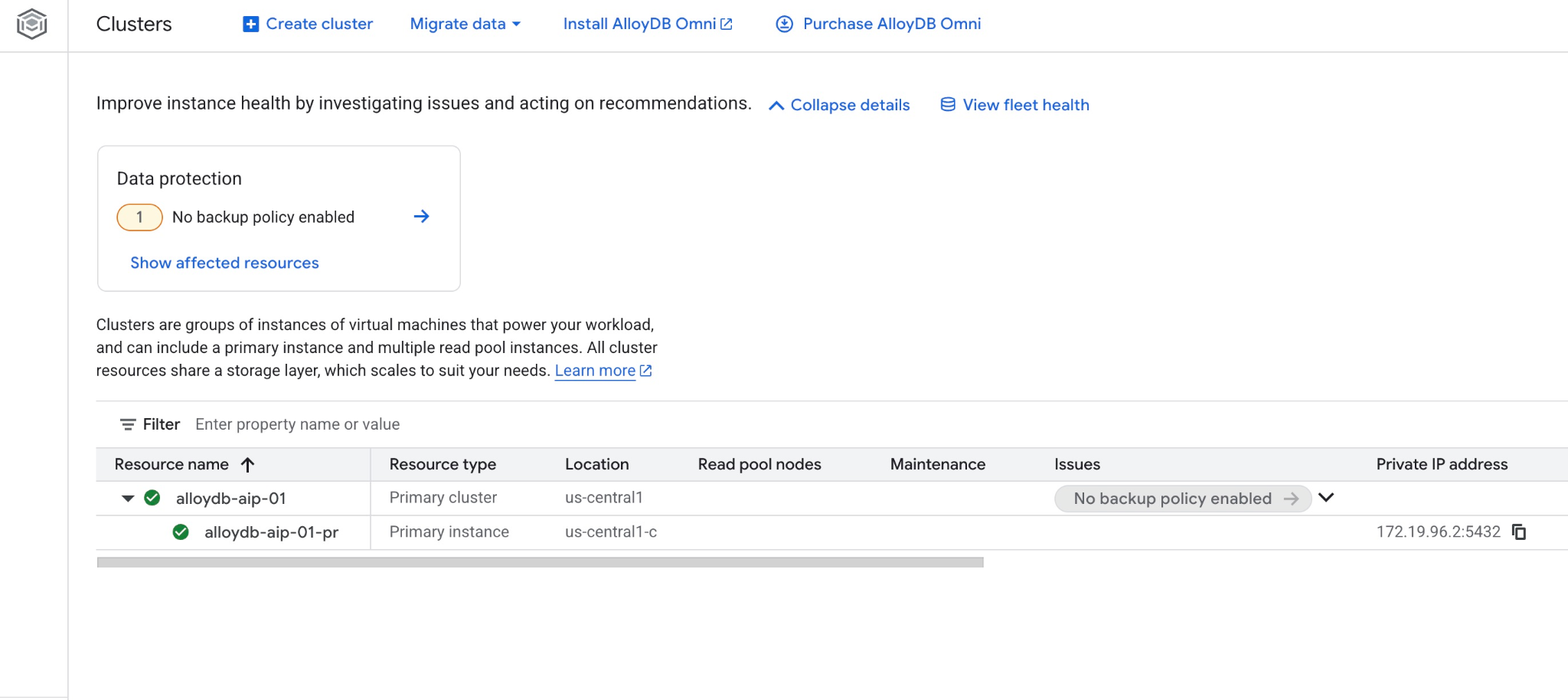
Google Cloud SDK を使用して AlloyDB を段階的にデプロイする
次の手順では、Google Cloud SDK を使用して AlloyDB クラスタとインスタンスを作成する方法について説明します。前のステップのスクリプトでデプロイ済みの場合はスキップして、「データベースを準備する」に直接進みます。
ウェブ GUI コンソールを使用する場合は、こちらのドキュメントをご覧ください。
AlloyDB クラスタを作成する前に、将来の AlloyDB インスタンスで使用する VPC で使用可能なプライベート IP 範囲が必要です。ない場合は、作成して内部の Google サービスで使用されるように割り当てる必要があります。その後、クラスタとインスタンスを作成できます。
プライベート IP 範囲を作成する
AlloyDB の VPC でプライベート サービス アクセス構成を構成する必要があります。ここでは、プロジェクトに「デフォルト」の VPC ネットワークがあり、すべてのアクションで使用されることを前提としています。
プライベート IP 範囲を作成します。
gcloud compute addresses create psa-range \
    --global \
    --purpose=VPC_PEERING \
    --prefix-length=24 \
    --description="VPC private service access" \
    --network=default
割り振られた IP 範囲を使用してプライベート接続を作成します。
gcloud services vpc-peerings connect \
    --service=servicenetworking.googleapis.com \
    --ranges=psa-range \
    --network=default
想定されるコンソール出力:
student@cloudshell:~ (test-project-402417)$ gcloud compute addresses create psa-range \
    --global \
    --purpose=VPC_PEERING \
    --prefix-length=24 \
    --description="VPC private service access" \
    --network=default
Created [https://www.googleapis.com/compute/v1/projects/test-project-402417/global/addresses/psa-range].

student@cloudshell:~ (test-project-402417)$ gcloud services vpc-peerings connect \
    --service=servicenetworking.googleapis.com \
    --ranges=psa-range \
    --network=default
Operation "operations/pssn.p24-4470404856-595e209f-19b7-4669-8a71-cbd45de8ba66" finished successfully.

student@cloudshell:~ (test-project-402417)$
AlloyDB クラスタを作成する
このセクションでは、us-central1 リージョンに AlloyDB クラスタを作成します。
postgres ユーザーのパスワードを定義します。独自のパスワードを定義することも、ランダム関数を使用してパスワードを生成することもできます。
export PGPASSWORD=`openssl rand -hex 12`
想定されるコンソール出力:
student@cloudshell:~ (test-project-402417)$ export PGPASSWORD=`openssl rand -hex 12`
後で使用できるように PostgreSQL のパスワードをメモしておきます。
echo $PGPASSWORD
このパスワードは、後で postgres ユーザーとしてインスタンスに接続するために必要になります。後で使用できるように、書き留めるかどこかにコピーしておくことをおすすめします。
想定されるコンソール出力:
student@cloudshell:~ (test-project-402417)$ echo $PGPASSWORD
bbefbfde7601985b0dee5723 (Note: Yours will be different!)
無料トライアル クラスタを作成する
AlloyDB を使用したことがない場合は、無料のトライアル クラスタを作成できます。
リージョンと AlloyDB クラスタ名を定義します。ここでは、us-central1 リージョンと alloydb-aip-01 をクラスタ名として使用します。
export REGION=us-central1
export ADBCLUSTER=alloydb-aip-01
コマンドを実行してクラスタを作成します。
gcloud alloydb clusters create $ADBCLUSTER \
    --password=$PGPASSWORD \
    --network=default \
    --region=$REGION \
    --subscription-type=TRIAL
想定されるコンソール出力:
export REGION=us-central1
export ADBCLUSTER=alloydb-aip-01
gcloud alloydb clusters create $ADBCLUSTER \
    --password=$PGPASSWORD \
    --network=default \
    --region=$REGION \
    --subscription-type=TRIAL
Operation ID: operation-1697655441138-6080235852277-9e7f04f5-2012fce4
Creating cluster...done.
同じ Cloud Shell セッションで、クラスタの AlloyDB プライマリ インスタンスを作成します。切断された場合は、リージョンとクラスタ名の環境変数を再度定義する必要があります。
gcloud alloydb instances create $ADBCLUSTER-pr \
    --instance-type=PRIMARY \
    --cpu-count=8 \
    --region=$REGION \
    --cluster=$ADBCLUSTER
想定されるコンソール出力:
student@cloudshell:~ (test-project-402417)$ gcloud alloydb instances create $ADBCLUSTER-pr \
    --instance-type=PRIMARY \
    --cpu-count=8 \
    --region=$REGION \
    --availability-type ZONAL \
    --cluster=$ADBCLUSTER
Operation ID: operation-1697659203545-6080315c6e8ee-391805db-25852721
Creating instance...done.
AlloyDB Standard クラスタを作成する
プロジェクトで最初の AlloyDB クラスタでない場合は、標準クラスタの作成に進みます。前のステップで無料トライアル クラスタをすでに作成している場合は、このステップをスキップしてください。
リージョンと AlloyDB クラスタ名を定義します。ここでは、us-central1 リージョンと alloydb-aip-01 をクラスタ名として使用します。
export REGION=us-central1
export ADBCLUSTER=alloydb-aip-01
コマンドを実行してクラスタを作成します。
gcloud alloydb clusters create $ADBCLUSTER \
    --password=$PGPASSWORD \
    --network=default \
    --region=$REGION
想定されるコンソール出力:
export REGION=us-central1
export ADBCLUSTER=alloydb-aip-01
gcloud alloydb clusters create $ADBCLUSTER \
    --password=$PGPASSWORD \
    --network=default \
    --region=$REGION
Operation ID: operation-1697655441138-6080235852277-9e7f04f5-2012fce4
Creating cluster...done.
同じ Cloud Shell セッションで、クラスタの AlloyDB プライマリ インスタンスを作成します。切断された場合は、リージョンとクラスタ名の環境変数を再度定義する必要があります。
gcloud alloydb instances create $ADBCLUSTER-pr \
    --instance-type=PRIMARY \
    --cpu-count=2 \
    --region=$REGION \
    --cluster=$ADBCLUSTER
想定されるコンソール出力:
student@cloudshell:~ (test-project-402417)$ gcloud alloydb instances create $ADBCLUSTER-pr \
    --instance-type=PRIMARY \
    --cpu-count=2 \
    --region=$REGION \
    --availability-type ZONAL \
    --cluster=$ADBCLUSTER
Operation ID: operation-1697659203545-6080315c6e8ee-391805db-25852721
Creating instance...done.
5. データベースを準備する
データベースを作成し、Vertex AI インテグレーションを有効にして、データベース オブジェクトを作成し、データをインポートする必要があります。
AlloyDB に必要な権限を付与する
AlloyDB サービス エージェントに Vertex AI 権限を追加します。
上部の「+」記号を選択して、別の Cloud Shell タブを開きます。
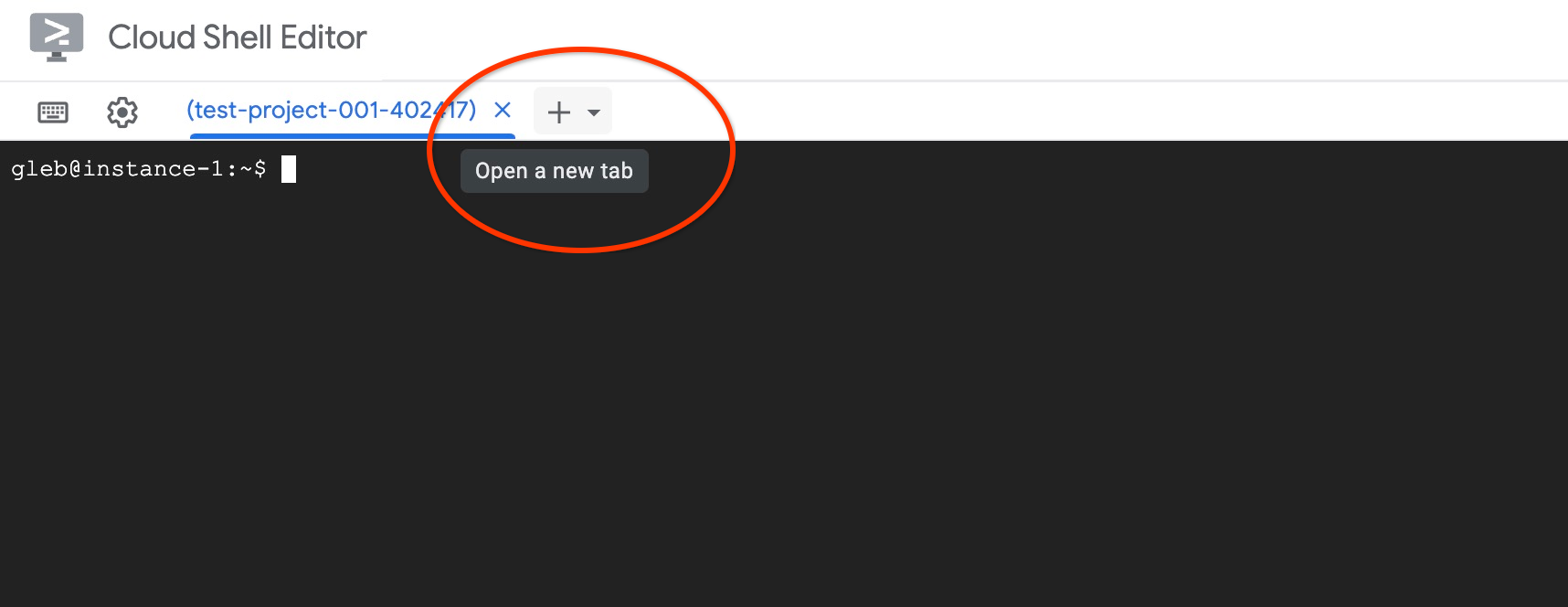
新しい Cloud Shell タブで、次のコマンドを実行します。
PROJECT_ID=$(gcloud config get-value project)
gcloud projects add-iam-policy-binding $PROJECT_ID \
  --member="serviceAccount:service-$(gcloud projects describe $PROJECT_ID --format="value(projectNumber)")@gcp-sa-alloydb.iam.gserviceaccount.com" \
  --role="roles/aiplatform.user"

gcloud projects add-iam-policy-binding $PROJECT_ID \
  --member="serviceAccount:service-$(gcloud projects describe $PROJECT_ID --format="value(projectNumber)")@gcp-sa-alloydb.iam.gserviceaccount.com" \
  --role="roles/discoveryengine.viewer"
想定されるコンソール出力:
student@cloudshell:~ (test-project-001-402417)$ PROJECT_ID=$(gcloud config get-value project)
Your active configuration is: [cloudshell-11039]
student@cloudshell:~ (test-project-001-402417)$ gcloud projects add-iam-policy-binding $PROJECT_ID \
  --member="serviceAccount:service-$(gcloud projects describe $PROJECT_ID --format="value(projectNumber)")@gcp-sa-alloydb.iam.gserviceaccount.com" \
  --role="roles/aiplatform.user"
Updated IAM policy for project [test-project-001-402417].
bindings:
- members:
  - serviceAccount:service-4470404856@gcp-sa-alloydb.iam.gserviceaccount.com
  role: roles/aiplatform.user
- members:
...
etag: BwYIEbe_Z3U=
version: 1
タブに実行コマンド「exit」を入力して、タブを閉じます。
exit
AlloyDB Studio に接続する
以降の章では、データベースへの接続を必要とするすべての SQL コマンドを AlloyDB Studio で実行できます。T
AlloyDB for Postgres の [クラスタ] ページに移動します。
プライマリ インスタンスをクリックして、AlloyDB クラスタのウェブ コンソール インターフェースを開きます。
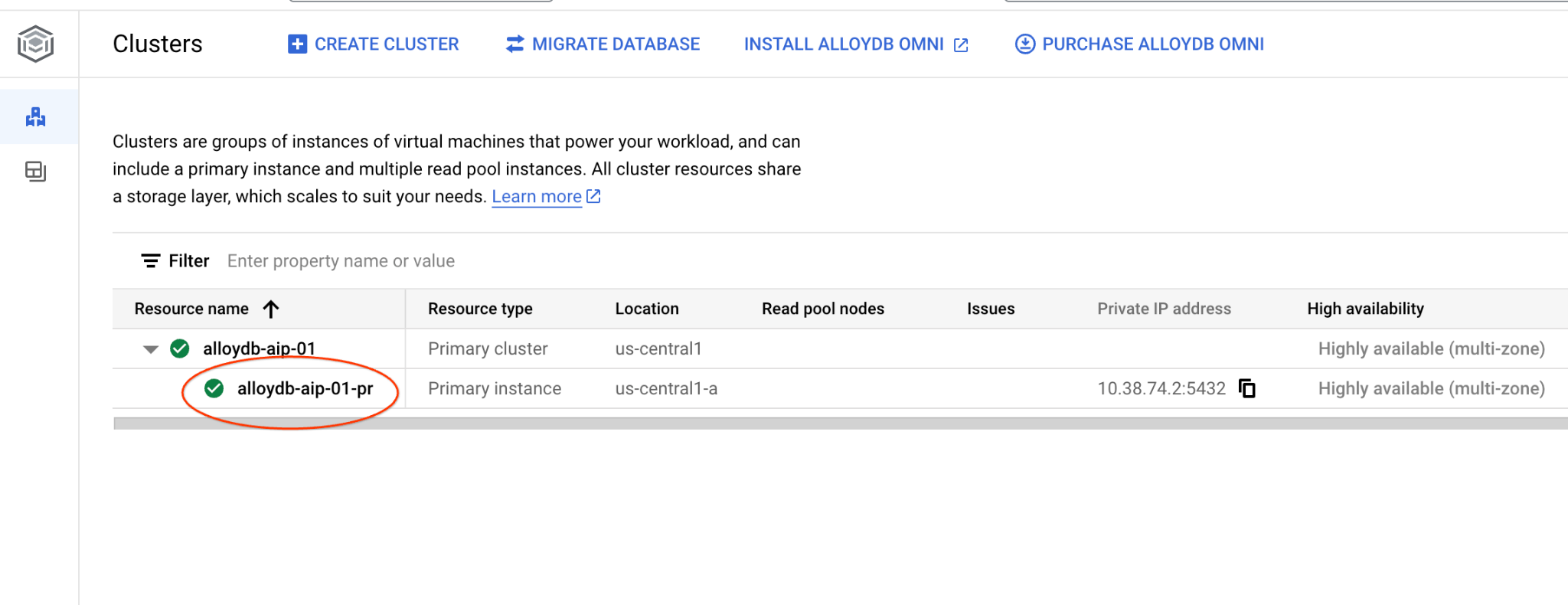
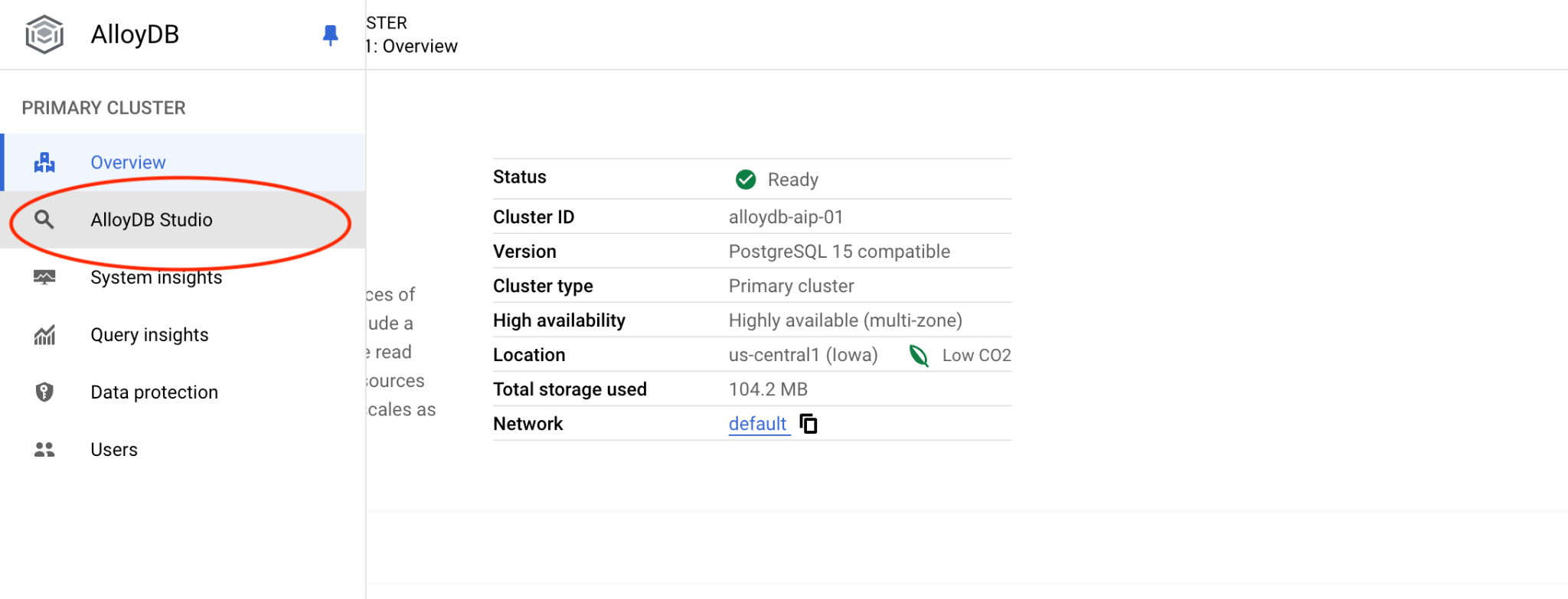
左側の [AlloyDB Studio] をクリックします。
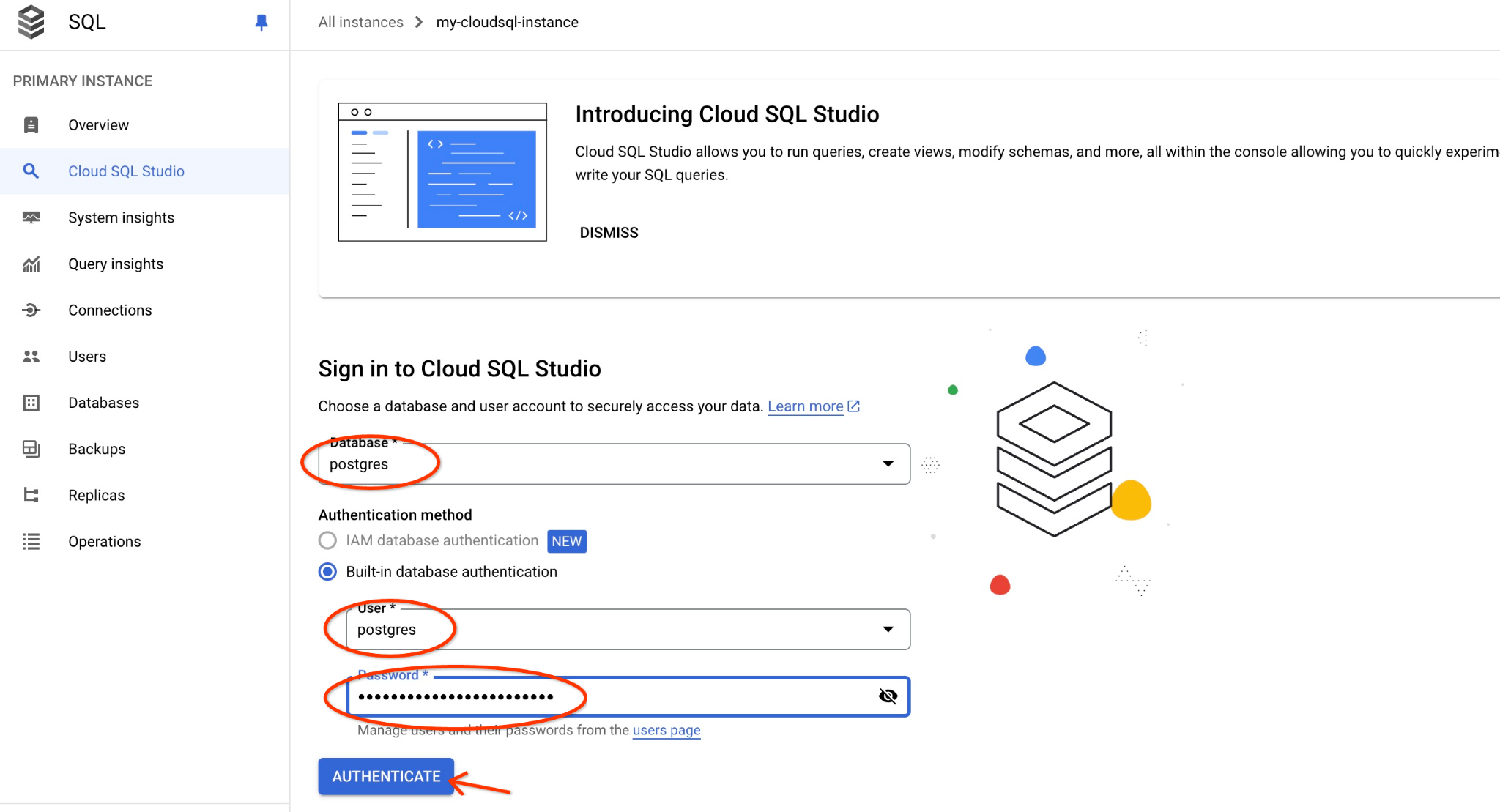
postgres データベースとユーザー postgres を選択し、クラスタの作成時にメモしたパスワードを入力します。[認証] ボタンをクリックします。
パスワードが機能しない場合や、パスワードをメモし忘れた場合は、パスワードを変更できます。方法については、ドキュメントをご覧ください。
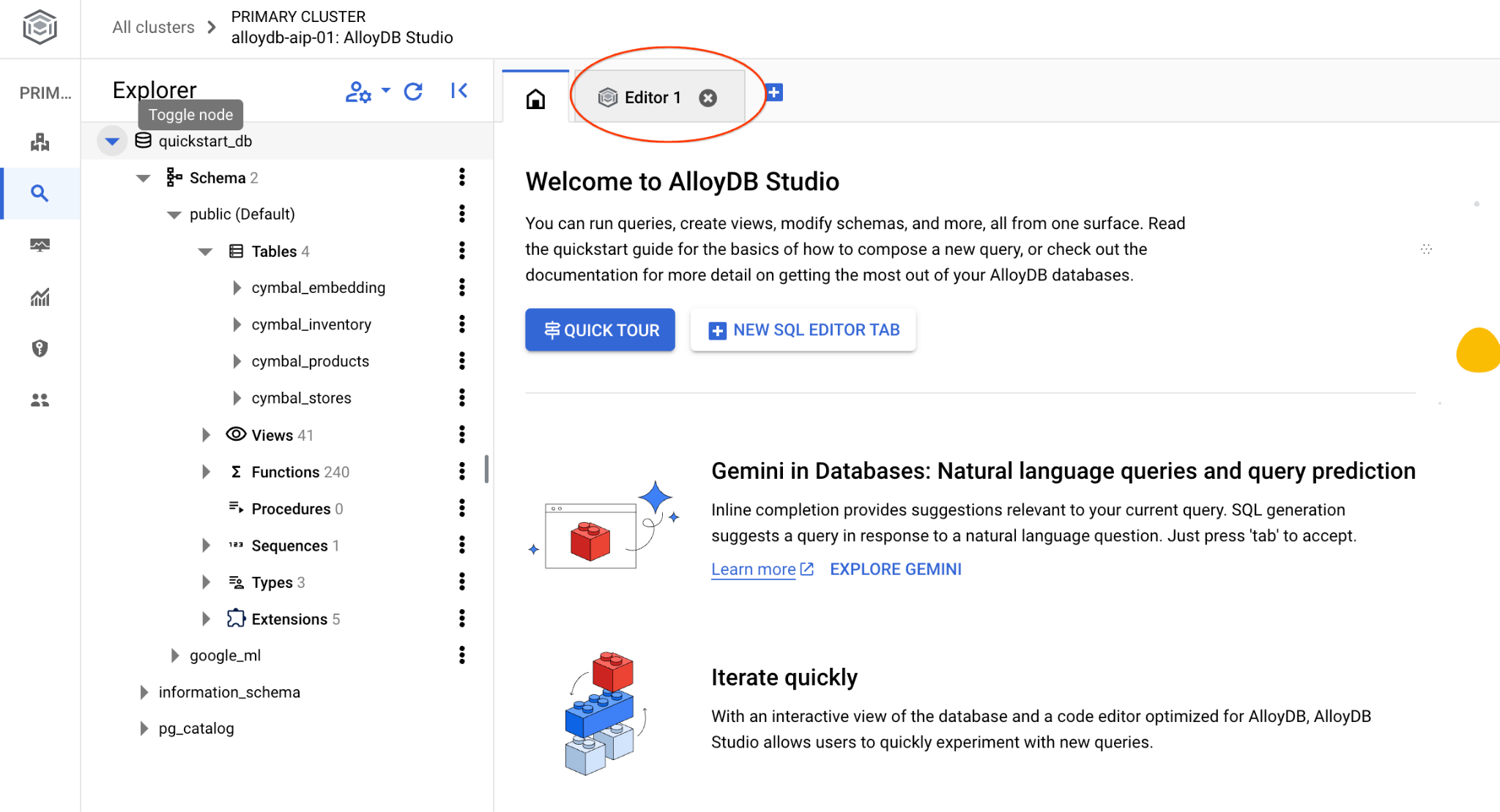
AlloyDB Studio インターフェースが開きます。データベースでコマンドを実行するには、右側の [無題のクエリ] タブをクリックします。
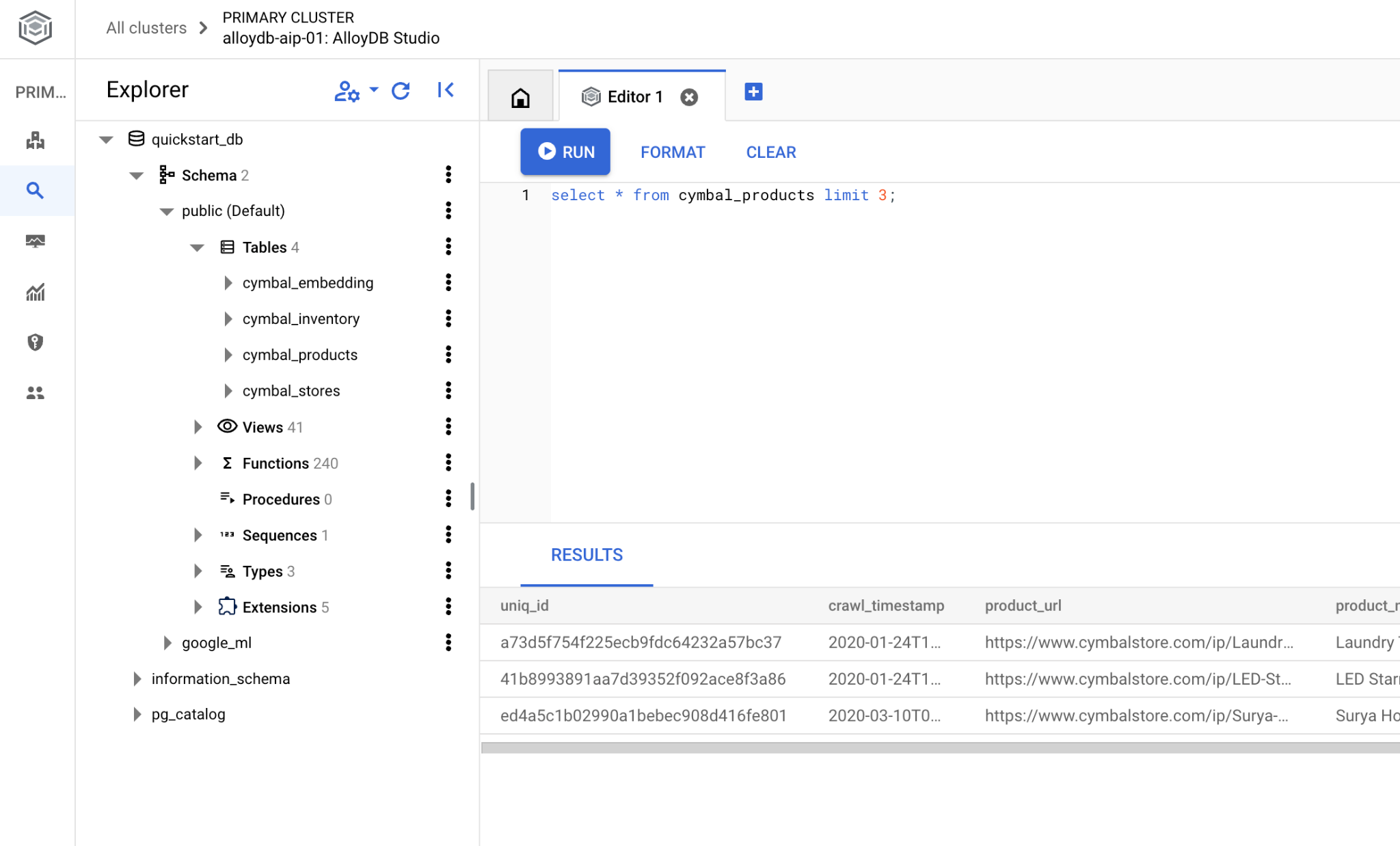
SQL コマンドを実行できるインターフェースが開きます。
データベースを作成する
データベース作成のクイックスタート。
AlloyDB Studio エディタで、次のコマンドを実行します。
データベースを作成します。
CREATE DATABASE quickstart_db
予想される出力:
Statement executed successfully
quickstart_db に接続する
ユーザー/データベースを切り替えるボタンを使用して、スタジオに再接続します。
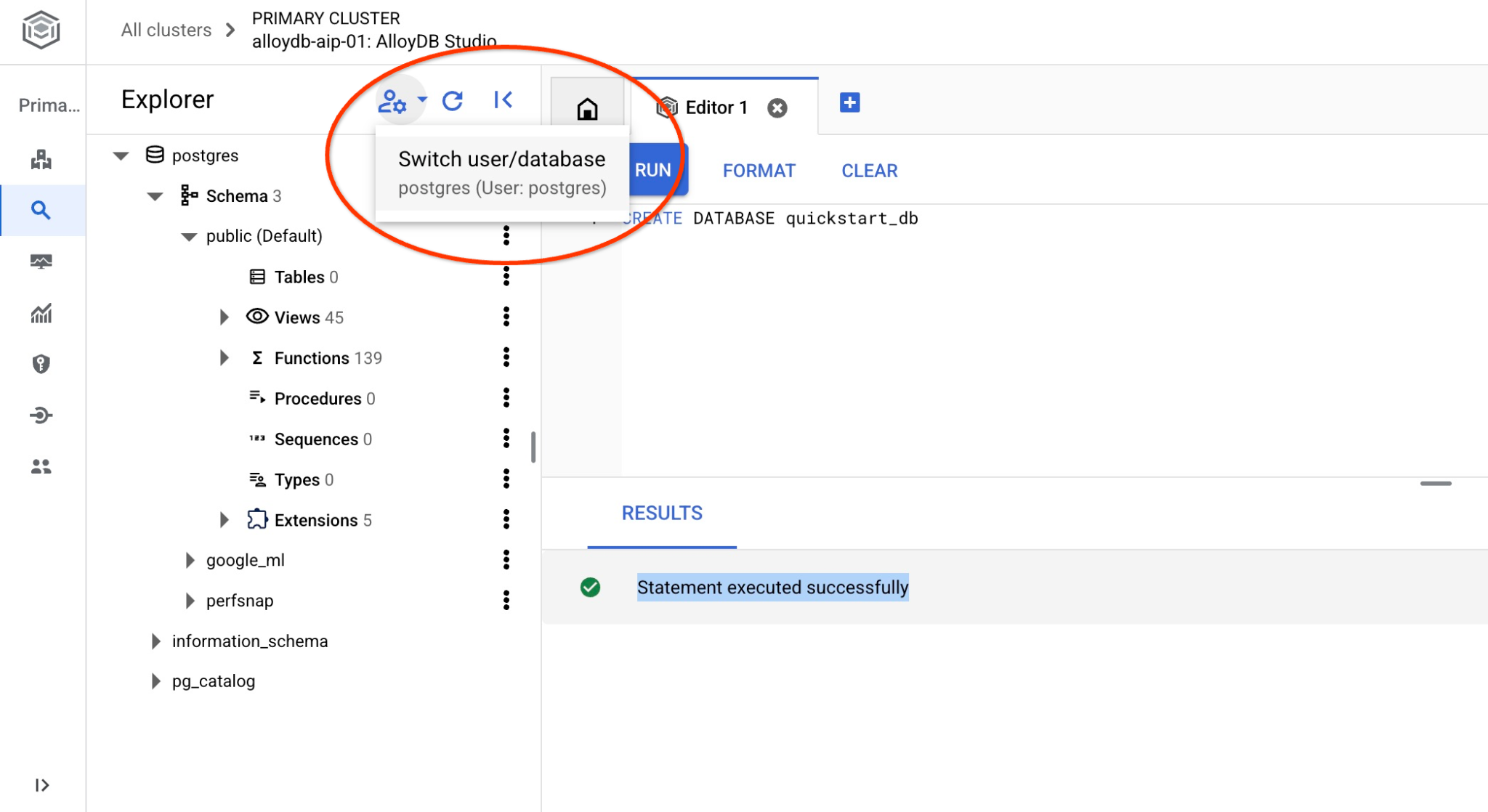
プルダウン リストから新しい quickstart_db データベースを選択し、以前と同じユーザーとパスワードを使用します。
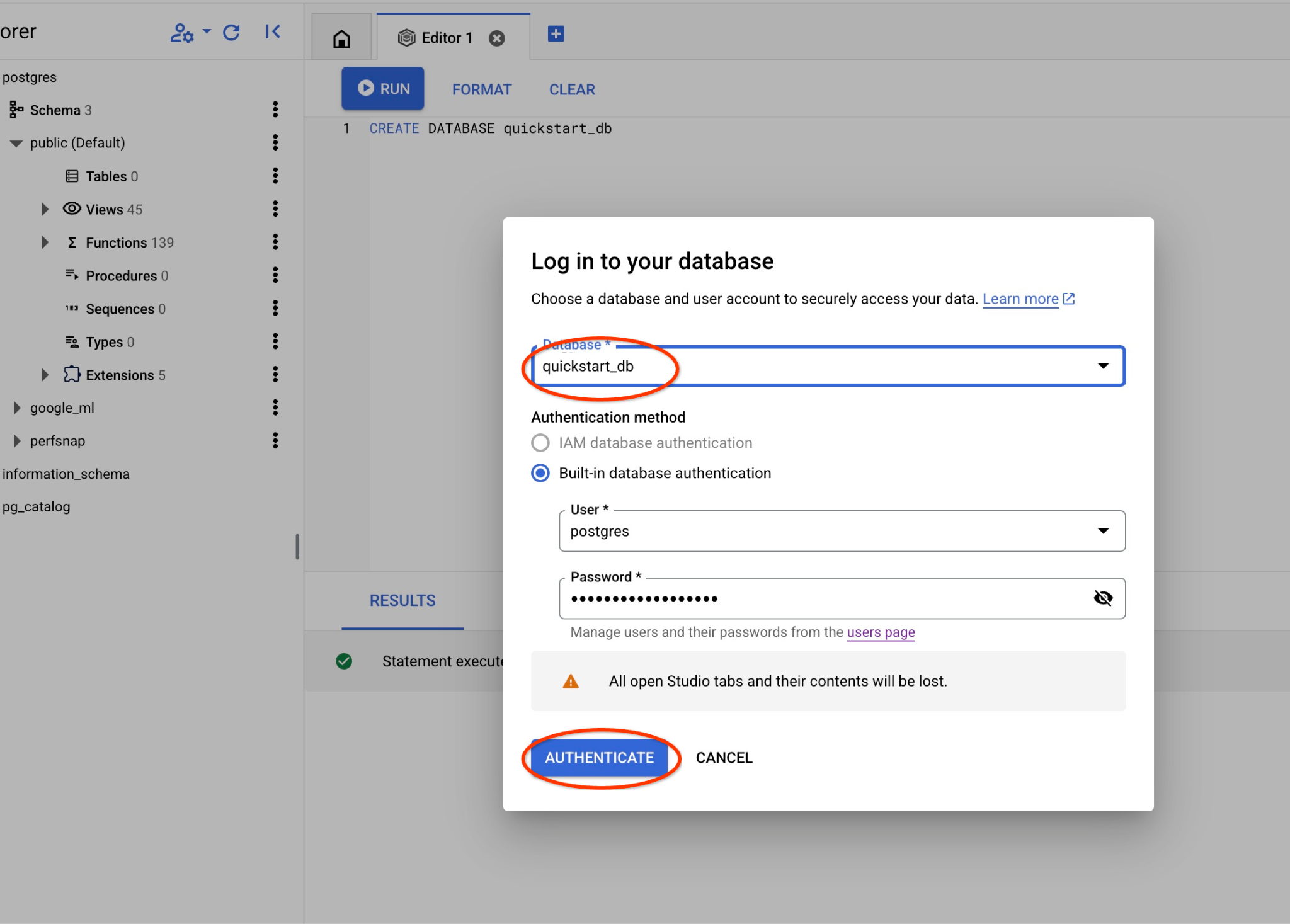
新しい接続が開き、quickstart_db データベースのオブジェクトを操作できます。
google_ml 拡張機能を確認する
AI クエリエンジンを使用するには、google_ml 拡張機能のバージョンが 1.5.2 以降であることを確認します。
quickstart_db に接続している AlloyDB Studio で、次のコマンドを実行します。
SELECT extversion FROM pg_extension WHERE extname = 'google_ml_integration';
予想される出力:
1.5.2
バージョンが要件を満たしていない場合は、拡張機能を更新します。
quickstart_db に接続している AlloyDB Studio で、次のコマンドを実行します。
CALL google_ml.upgrade_to_preview_version();
予想される出力:
Statement executed successfully
実行が成功したら、バージョンを再度確認します。
quickstart_db に接続している AlloyDB Studio で、次のコマンドを実行します。
SELECT extversion FROM pg_extension WHERE extname = 'google_ml_integration';
予想される出力:
1.5.2
また、データベースで AI クエリ エンジン機能を有効にする必要があります。これは、インスタンス上のすべてのデータベースのインスタンス フラグを更新するか、データベースに対してのみ有効にすることで実行できます。AlloyDB Studio で次のコマンドを実行して、quickstart_db データベースで有効にします。
ALTER DATABASE quickstart_db SET google_ml_integration.enable_ai_query_engine = 'on';
6. サンプルデータ
次に、データベースにオブジェクトを作成してデータを読み込む必要があります。ここでは、数行の架空の映画データセットを使用します。
次のステートメントを AlloyDB Studio エディタにコピーし、[実行] ボタンを押します。
-- Drop tables if they exist to prevent errors on re-running the script
DROP TABLE IF EXISTS movie_reviews;
DROP TABLE IF EXISTS movies;

-- Create the 'movies' table
-- This table stores information about each movie.
CREATE TABLE movies (
    id BIGINT PRIMARY KEY,              -- Unique identifier for the movie
    title TEXT NOT NULL,               -- Title of the movie
    description TEXT,                  -- A brief description or synopsis of the movie
    genres TEXT,                       -- Comma-separated list of genres (e.g., "Action, Adventure, Sci-Fi")
    actors TEXT                        -- Comma-separated list of main actors
);

-- Create the 'movie_reviews' table
-- This table stores reviews for the movies.
CREATE TABLE movie_reviews (
    review_id BIGINT PRIMARY KEY,      -- Unique identifier for the review
    movie_id BIGINT NOT NULL,          -- Foreign key referencing the movie being reviewed
    reviewer_name TEXT,                -- Name of the person who wrote the review
    rating INT CHECK (rating >= 1 AND rating <= 5), -- Rating from 1 to 5 stars
    review_text TEXT,                  -- The content of the review
    review_date DATE DEFAULT CURRENT_DATE, -- Date when the review was submitted
    FOREIGN KEY (movie_id) REFERENCES movies(id) ON DELETE CASCADE -- Ensures referential integrity; if a movie is deleted, its reviews are also deleted.
);

-- Insert sample data into the 'movies' table (20 rows)
INSERT INTO movies (id, title, description, genres, actors) VALUES
(1, 'Inception', 'A thief who steals information by entering people''s dreams.', 'Sci-Fi, Thriller, Action', 'Leonardo DiCaprio, Joseph Gordon-Levitt, Elliot Page'),
(2, 'The Matrix', 'A computer hacker learns about the true nature of his reality.', 'Sci-Fi, Action', 'Keanu Reeves, Laurence Fishburne, Carrie-Anne Moss'),
(3, 'Interstellar', 'A team of explorers journey through a cosmic passage beyond our world in an attempt to ensure humanity''s survival.', 'Sci-Fi, Drama, Adventure', 'Matthew McConaughey, Anne Hathaway, Jessica Chastain'), -- Updated description
(4, 'The Dark Knight', 'When the menace known as the Joker wreaks havoc and chaos on the people of Gotham, Batman must accept one of the greatest psychological and physical tests of his ability to fight injustice.', 'Action, Crime, Drama', 'Christian Bale, Heath Ledger, Aaron Eckhart'),
(5, 'Pulp Fiction', 'The lives of two mob hitmen, a boxer, a gangster and his wife, and a pair of diner bandits intertwine in four tales of violence and redemption.', 'Crime, Drama', 'John Travolta, Uma Thurman, Samuel L. Jackson'),
(6, 'Forrest Gump', 'The presidencies of Kennedy and Johnson, the Vietnam War, the Watergate scandal and other historical events unfold from the perspective of an Alabama man with an IQ of 75.', 'Drama, Romance', 'Tom Hanks, Robin Wright, Gary Sinise'),
(7, 'The Shawshank Redemption', 'Two imprisoned men bond over a number of years, finding solace and eventual redemption through acts of common decency.', 'Drama', 'Tim Robbins, Morgan Freeman, Bob Gunton'),
(8, 'Gladiator', 'A former Roman General sets out to exact vengeance against the corrupt emperor who murdered his family and sent him into slavery.', 'Action, Adventure, Drama', 'Russell Crowe, Joaquin Phoenix, Connie Nielsen'),
(9, 'Fight Club', 'An insomniac office worker looking for a way to change his life crosses paths with a devil-may-care soap maker and they form an underground fight club that evolves into something much, much more.', 'Drama', 'Brad Pitt, Edward Norton, Meat Loaf'),
(10, 'The Lord of the Rings: The Return of the King', 'Gandalf and Aragorn lead the World of Men against Sauron''s army to draw his gaze from Frodo and Sam as they approach Mount Doom with the One Ring.', 'Action, Adventure, Drama', 'Elijah Wood, Viggo Mortensen, Ian McKellen'),
(11, 'Spirited Away', 'During her family''s move to the suburbs, a sullen 10-year-old girl wanders into a world ruled by gods, witches, and spirits, and where humans are changed into beasts.', 'Animation, Adventure, Family', 'Daveigh Chase, Suzanne Pleshette, Miyu Irino'),
(12, 'Parasite', 'Greed and class discrimination threaten the newly formed symbiotic relationship between the wealthy Park family and the destitute Kim clan.', 'Comedy, Drama, Thriller', 'Song Kang-ho, Lee Sun-kyun, Cho Yeo-jeong'),
(13, 'The Godfather', 'The aging patriarch of an organized crime dynasty transfers control of his clandestine empire to his reluctant son.', 'Crime, Drama', 'Marlon Brando, Al Pacino, James Caan'),
(14, 'Avengers: Endgame', 'After the devastating events of Avengers: Infinity War, the universe is in ruins. With the help of remaining allies, the Avengers assemble once more in order to reverse Thanos'' actions and restore balance to the universe.', 'Action, Adventure, Drama', 'Robert Downey Jr., Chris Evans, Mark Ruffalo'),
(15, 'Joker', 'In Gotham City, mentally troubled comedian Arthur Fleck is disregarded and mistreated by society. He then embarks on a downward spiral of revolution and bloody crime.', 'Crime, Drama, Thriller', 'Joaquin Phoenix, Robert De Niro, Zazie Beetz'),
(16, 'Mad Max: Fury Road', 'In a post-apocalyptic wasteland, a woman rebels against a tyrannical ruler in search for her homeland with the help of a group of female prisoners, a psychotic worshiper, and a drifter named Max.', 'Action, Adventure, Sci-Fi', 'Tom Hardy, Charlize Theron, Nicholas Hoult'),
(17, 'Coco', 'Aspiring musician Miguel, confronted with his family''s ancestral ban on music, enters the Land of the Dead to find his great-great-grandfather, a legendary singer.', 'Animation, Adventure, Family', 'Anthony Gonzalez, Gael García Bernal, Benjamin Bratt'),
(18, 'Whiplash', 'A promising young drummer enrolls at a cut-throat music conservatory where his dreams of greatness are mentored by an instructor who will stop at nothing to realize a student''s potential.', 'Drama, Music', 'Miles Teller, J.K. Simmons, Paul Reiser'),
(19, 'The Grand Budapest Hotel', 'The adventures of Gustave H, a legendary concierge at a famous hotel from the fictional Republic of Zubrowka between the first and second World Wars, and Zero Moustafa, the lobby boy who becomes his most trusted friend.', 'Adventure, Comedy, Drama', 'Ralph Fiennes, F. Murray Abraham, Mathieu Amalric'),
(20, 'Blade Runner 2049', 'Young Blade Runner K''s discovery of a long-buried secret leads him to track down former Blade Runner Rick Deckard, who''s been missing for thirty years.', 'Action, Drama, Mystery', 'Ryan Gosling, Harrison Ford, Ana de Armas');

-- Insert sample data into the 'movie_reviews' table (30 rows)
-- Reviews are linked to movies via movie_id. Includes a mix of positive and negative reviews.
-- Movie title is prepended to the review text.
INSERT INTO movie_reviews (review_id, movie_id, reviewer_name, rating, review_text) VALUES
(1, 1, 'Alice Wonderland', 5, 'Inception: Absolutely mind-bending! A masterpiece of sci-fi.'),
(2, 1, 'Bob The Critic', 2, 'Inception: Too confusing and pretentious. Didn''t enjoy it.'),
(3, 2, 'Charlie Reviewer', 5, 'The Matrix: Revolutionary visuals and a compelling story.'),
(4, 3, 'Diana Prince', 5, 'Interstellar: Visually stunning and emotionally powerful. A must-see.'),
(5, 3, 'Edward Nigma', 4, 'Interstellar: Long, but worth it for the spectacle and ideas.'),
(6, 4, 'Fiona Glenanne', 5, 'The Dark Knight: Heath Ledger''s Joker is iconic. Dark and thrilling.'),
(7, 5, 'George Costanza', 5, 'Pulp Fiction: Quirky, violent, and endlessly quotable.'),
(8, 5, 'Hannah Montana', 1, 'Pulp Fiction: Way too violent and the timeline was confusing. Hated it.'),
(9, 6, 'Ian Malcolm', 4, 'Forrest Gump: A heartwarming story with a great performance by Hanks.'),
(10, 7, 'Jane Doe', 5, 'The Shawshank Redemption: An uplifting story of hope and friendship. Perfect.'),
(11, 7, 'John Smith', 5, 'The Shawshank Redemption: Morgan Freeman is amazing. Truly a classic.'),
(12, 8, 'Kyle Broflovski', 2, 'Gladiator: Generic plot and boring action scenes. Overrated.'),
(13, 9, 'Laura Palmer', 5, 'Fight Club: Provocative and thought-provoking. Norton and Pitt are fantastic.'),
(14, 10, 'Michael Scott', 5, 'The Lord of the Rings: The Return of the King: A fitting and epic conclusion to a legendary trilogy.'),
(15, 11, 'Nancy Drew', 5, 'Spirited Away: Beautiful animation and a magical story for all ages.'),
(16, 12, 'Oscar Martinez', 5, 'Parasite: A brilliant satire with unexpected twists. Loved it!'),
(17, 12, 'Pam Beesly', 4, 'Parasite: Very intense, but incredibly well-directed and acted.'),
(18, 13, 'Quentin Coldwater', 5, 'The Godfather: A cinematic masterpiece. Brando is unforgettable.'),
(19, 14, 'Rachel Green', 3, 'Avengers: Endgame: It was okay, but felt bloated and had too many characters.'),
(20, 14, 'Steve Rogers', 5, 'Avengers: Endgame: The culmination of a decade of storytelling. Perfect ending.'),
(21, 15, 'Tony Stark', 4, 'Joker: A dark and disturbing character study. Phoenix is mesmerizing.'),
(22, 16, 'Uma Thurman', 5, 'Mad Max: Fury Road: Non-stop action and incredible practical effects. What a ride!'),
(23, 17, 'Victor Frankenstein', 5, 'Coco: A heartwarming and visually stunning celebration of family and culture.'),
(24, 18, 'Walter White', 5, 'Whiplash: Intense and gripping. J.K. Simmons is terrifyingly good.'),
(25, 19, 'Xena Warrior', 2, 'The Grand Budapest Hotel: Too quirky for its own good. Style over substance.'),
(26, 20, 'Ygritte Snow', 5, 'Blade Runner 2049: A worthy sequel that expands on the original in meaningful ways. Visually breathtaking.'),
(27, 1, 'Zack Morris', 4, 'Inception: Kept me on the edge of my seat. Very clever.'),
(28, 4, 'Buffy Summers', 5, 'The Dark Knight: The best superhero movie ever made. Ledger is a legend.'),
(29, 8, 'Clark Kent', 3, 'Gladiator: Decent action, but the story felt predictable and dragged a bit.'),
(30, 15, 'Diana Troy', 3, 'Joker: Hard to watch at times, but a powerful performance. Felt it was a bit one-note though.');
独自のサンプルデータと、Cloud コンソールから利用できる Cloud SQL インポート ツールと互換性のある CSV ファイルがある場合は、ここで説明した方法の代わりにそれらを使用できます。
7. IF 演算子を使用する
まず、標準の PostgreSQL アプローチを使用した従来の検索を試してみましょう。
宇宙冒険映画を検索する場合は、次のクエリを試すことができます。
SELECT title,description AS movies_about_space
    FROM movies
    WHERE description like '%space%' OR title like '%space%';
結果は返されませんでした。しかし、少なくとも 1 つの映画がそのカテゴリに該当するはずです。全文検索アプローチを試すことができます。
SELECT title,description
FROM movies
WHERE to_tsvector('english', description) @@ to_tsquery('english', 'space');
結果がまったく得られない可能性もあります。そのため、PostgreSQL 検索の「クラシック」な手法を活用するには、いくつかのキーワードやフレーズを知っておく必要があります。
次に、google_ml.if 関数を使用して、AI 駆動のセマンティック フィルタリングを試してみます。このツールは、バックグラウンドで AI を使用して、自然言語のリクエストに基づいてセマンティック フィルタリングを実行します。
SELECT title,description AS movies_about_space
    FROM movies
    WHERE
      google_ml.if(
        prompt => 'Here are descriptions of movies, can you return the ones about space adventures:  '||description);
リクエストのセマンティックな意味に基づいて、タイトルにも説明にも「宇宙」という単語が含まれていない場合でも、映画「インターステラー」を取得しています。お気づきのように、事前に何も構築せず、自動化された組み込み関数のみに依存しています。
8. IF 演算子で JOIN を使用する
AI を活用したセマンティック フィルタリングを使用して 2 つのテーブルを結合したい場合はどうすればよいですか?たとえば、レビューで映画が言及されている場合、ユーザーのレビューに基づいてユーザーのレビューを映画に照合できます。
新しい AlloyDB Studio エディタタブで実行します。
SELECT title, rating, movie_reviews
    FROM movies
    JOIN
    movie_reviews ON
      google_ml.if(
        prompt => 'Does the following reviews talk about a movie mentioned? The review: ' || review_text||' and the movie title is: '||title)
    AND
    title='Interstellar';
タイトルに記載されている映画の名前に基づいて、リクエストに一致する 2 件のレビューが返されました。リクエストをさらに簡素化することもできます。
SELECT title, rating, movie_reviews
    FROM movies
    JOIN
    movie_reviews ON
      google_ml.if(
        prompt => 'Do we have the movie in the review?: ' || review_text||' and the movie title is: '||title)
    AND
    title='Interstellar';
9. コンテンツに基づいて結果をスコアリングする
テーブル movie_reviews には映画の評価が含まれていますが、独自の評価を実装する場合は、google_ml.rank 関数を使用できます。自然言語で定義された条件に基づいてレビューをスコアリングし、たとえば映画の上位 5 件のレビューを取得して、比較のために元の評価を表示できます。
SELECT rating,review_text AS top_five
    FROM movie_reviews
    ORDER BY google_ml.rank('Score of 7 to 10 if the review says the movie was really good, 3 to 6 if the review says it''s alright is and 1 to 2 if the review says it was not worth of time. Review: ' || review_text) DESC
    LIMIT 5;
新しい評価を元の評価の横に表示する場合は、列のリストに追加します。
SELECT rating,
    google_ml.rank('Score of 7 to 10 if the review says the movie was really good, 3 to 6 if the review says it''s alright is and 1 to 2 if the review says it was not worth of time. Review: ' || review_text) AS ml_rank,
    review_text AS top_five
    FROM movie_reviews
    ORDER BY ml_rank DESC
    LIMIT 5;
上位 5 件のレビューは次のとおりです。
 rating | ml_rank |                               top_five
--------+---------+-----------------------------------------------------------------------
      5 |       9 | The Dark Knight: Heath Ledger's Joker is iconic. Dark and thrilling.
      5 |       9 | The Matrix: Revolutionary visuals and a compelling story.
      5 |       9 | Interstellar: Visually stunning and emotionally powerful. A must-see.
      5 |       9 | Inception: Absolutely mind-bending! A masterpiece of sci-fi.
      5 |       9 | Pulp Fiction: Quirky, violent, and endlessly quotable.
(5 rows)
5 rows in set (0.13 sec)
上位のレビューでは 10 点中 9 点の評価が選択されました。
AlloyDB AI 演算子の詳細については、ドキュメントをご覧ください。
10. ランキングを使用してセマンティック検索を改善する
セマンティック検索とランキングを組み合わせることで、より正確な結果を得ることができます。
Reranking Model へのアクセス
ランキング モデルを使用するには、Discovery Engine API を有効にして、AlloyDB サービス アカウントに「discoveryengine.viewer」ロールを付与する必要があります。API とロールは、ラボの最初の手順で有効になっています。ai.rank 関数は、Vertex AI で最新のランキング モデルを自動的に検索して使用します。
クエリで再ランキング モデルを使用する
これで、クエリで再ランキング モデルを使用して、セマンティック検索結果を改善し、より具体的な結果を表示して、最適なオプションを選択できるようになりました。
「コンピュータと未来」を条件としてアクション映画を検索し、ランク付けしてみましょう。
WITH
  action_movies AS (
    SELECT
      title,
      description,
      ROW_NUMBER() OVER (ORDER BY title, description) AS ref_number
    FROM
      movies
    WHERE
      google_ml.if(
        prompt => 'The following movies are action movies. The movie title: ' || title || ' and the description is: ' || description
      )
  ),
  ranked_documents_array AS (
    SELECT
      ARRAY_AGG(description ORDER BY ref_number) AS docs
    FROM
      action_movies
  ),
  reranked_results AS (
    SELECT
      r.index,
      r.score
    FROM
      ranked_documents_array,
      ai.rank(
        model_id => 'semantic-ranker-default',
        search_string => 'Computers and future',
        documents => ranked_documents_array.docs
      ) AS r
  )
SELECT
  am.title,
  left(am.description,80) as description,
  rr.score
FROM
  action_movies am
JOIN
  reranked_results rr ON am.ref_number = rr.index
ORDER BY
  rr.score DESC;
結果にはアクション映画がリストされ、未来やコンピュータをテーマにした映画が上位に表示されることが期待されます。
                     title                     |                                   description                                    | score
-----------------------------------------------+----------------------------------------------------------------------------------+--------
 The Matrix                                    | A computer hacker learns about the true nature of his reality.                   | 0.1197
 Inception                                     | A thief who steals information by entering people's dreams.                      | 0.0646
 Blade Runner 2049                             | Young Blade Runner K's discovery of a long-buried secret leads him to track down |  0.022
 Mad Max: Fury Road                            | In a post-apocalyptic wasteland, a woman rebels against a tyrannical ruler in se | 0.0206
 Gladiator                                     | A former Roman General sets out to exact vengeance against the corrupt emperor w | 0.0189
 Avengers: Endgame                             | After the devastating events of Avengers: Infinity War, the universe is in ruins | 0.0175
 Fight Club                                    | An insomniac office worker looking for a way to change his life crosses paths wi | 0.0162
 The Dark Knight                               | When the menace known as the Joker wreaks havoc and chaos on the people of Gotha | 0.0095
 The Lord of the Rings: The Return of the King | Gandalf and Aragorn lead the World of Men against Sauron's army to draw his gaze | 0.0056
(9 rows)
さまざまな条件で試して、ランキングが出力順序にどのように影響するかを確認してください。
オプションと再ランキングの詳細については、ドキュメントをご覧ください。
11. 環境をクリーンアップする
ラボの終了時に AlloyDB インスタンスとクラスタを破棄します。
AlloyDB クラスタとすべてのインスタンスを削除する
AlloyDB の試用版を使用した場合。トライアル クラスタを使用して他のラボやリソースをテストする予定がある場合は、トライアル クラスタを削除しないでください。同じプロジェクトに別のトライアル クラスタを作成することはできません。
クラスタは force オプションで破棄され、クラスタに属するすべてのインスタンスも削除されます。
接続が切断され、以前の設定がすべて失われた場合は、Cloud Shell でプロジェクトと環境変数を定義します。
gcloud config set project <your project id>
export REGION=us-central1
export ADBCLUSTER=alloydb-aip-01
export PROJECT_ID=$(gcloud config get-value project)
クラスタを削除します。
gcloud alloydb clusters delete $ADBCLUSTER --region=$REGION --force
想定されるコンソール出力:
student@cloudshell:~ (test-project-001-402417)$ gcloud alloydb clusters delete $ADBCLUSTER --region=$REGION --force
All of the cluster data will be lost when the cluster is deleted.

Do you want to continue (Y/n)?  Y

Operation ID: operation-1697820178429-6082890a0b570-4a72f7e4-4c5df36f
Deleting cluster...done.
AlloyDB バックアップを削除する
クラスタの AlloyDB バックアップをすべて削除します。
for i in $(gcloud alloydb backups list --filter="CLUSTER_NAME: projects/$PROJECT_ID/locations/$REGION/clusters/$ADBCLUSTER" --format="value(name)" --sort-by=~createTime) ; do gcloud alloydb backups delete $(basename $i) --region $REGION --quiet; done
想定されるコンソール出力:
student@cloudshell:~ (test-project-001-402417)$ for i in $(gcloud alloydb backups list --filter="CLUSTER_NAME: projects/$PROJECT_ID/locations/$REGION/clusters/$ADBCLUSTER" --format="value(name)" --sort-by=~createTime) ; do gcloud alloydb backups delete $(basename $i) --region $REGION --quiet; done
Operation ID: operation-1697826266108-60829fb7b5258-7f99dc0b-99f3c35f
Deleting backup...done.
12. 完了
以上で、この Codelab は完了です。
Google Cloud 学習プログラム
このラボは、「Google Cloud でのプロダクション レディな AI の開発」学習プログラムの一部です。
- カリキュラム全体を確認して、プロトタイプから本番環境への移行をスムーズに進めましょう。
- ハッシュタグ
#ProductionReadyAIを使用して進捗状況を共有しましょう。
学習した内容
13. アンケート
出力: