

1. 簡介
在本程式碼研究室中,我們將說明如何使用 Antigravity IDE,在電腦上設定有趣的 AI 輔助自主 AI 開發團隊。您將使用強大的 skills.md 和 agents.md 工作流程,引導需求歷經整個生命週期 (從技術規格到最終部署),建構出可運作的應用程式。
我們不會鎖定特定技術堆疊或編寫複雜的 Python 編排指令碼,而是採用友善的零程式碼方法,讓需求透過自動化週期流動,並以三項核心 Antigravity 原則為基礎:
- :明確定義 AI 團隊成員 (產品經理、前端、QA、DevOps)。
agents.md - 技能和 skills.md:專屬目錄,您可以在其中定義強大的技術能力和構件移交規則,做為模組化
.md檔案。 - 工作流程 (workflows/):定義自訂斜線指令,將 AI 團隊成員順暢地串連成自動管道。
在 Antigravity 中原生結合這三項元素,即可引導 Gemini 從頭到尾完全自動化開發可供正式發布的應用程式!
課程內容
- 初始化工作區:設定專案,讓 Antigravity 深入瞭解專案。
- 定義團隊:建立
agents.md檔案,建立專屬 AI 角色。 - 程式設計技能:在
skills/目錄中建立詳細的.md檔案,定義嚴格的技術規則和反覆重工迴圈。 - 定義自訂工作流程:建立
/startcycle斜線指令,自動執行工作室的工作流程。 - 啟動連鎖反應:使用單一指令自動有效率地執行整個多代理程式管道!
建議做法
- 如何將 AI 提示工程與應用程式程式碼分開。
- 如何建構代理程式,主動暫停解讀使用者在產生的 Markdown 檔案中的註解和編輯內容。
- 如何培養動態程式碼生成和部署技能,不受語言限制。
- 瞭解如何在代理 IDE 中建構自訂巨集指令 (工作流程)。
軟硬體需求
- Antigravity
- Chrome 瀏覽器
- 在本機安裝 Node.js (v18 以上版本) 或 Python 3.14
- (選用) 在本機安裝 gcloud CLI
事前準備
- 確認已安裝 Antigravity IDE (可前往 antigravity.google 安裝)。
- 開啟 Antigravity IDE,並確認您已初始化專屬工作區。
- 在編輯器模式下工作時,請開啟終端機。
2. 初始化工作區
由於 Antigravity 本身可解讀 .agents 目錄中的工作流程檔案,因此只要建立幾個標準資料夾,即可設定自主開發人員管道。
你可以設定工作區:
- 開啟 Antigravity IDE。
- 開啟「Agent Manager」 隨時按下 CMD+E 鍵 (Mac) 或 CTRL+E 鍵 (Windows),即可在「Agent Manager」和編輯器之間切換,或透過選單列右上方的「開啟編輯器」和「開啟 Agent Manager」按鈕切換。。
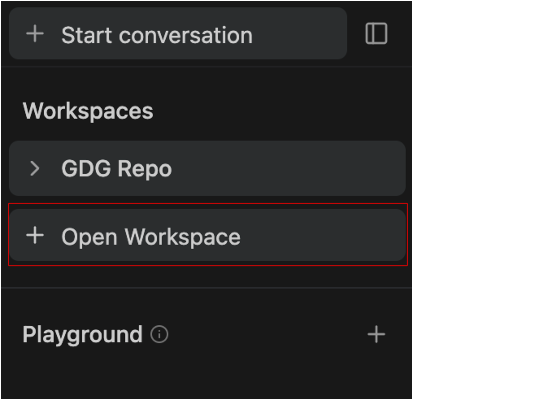
- 按一下「+ 開啟工作區」。
如要在工作區內發起新對話,請選取「發起對話」分頁中的所需工作區,或按一下側欄中工作區名稱旁的加號按鈕。
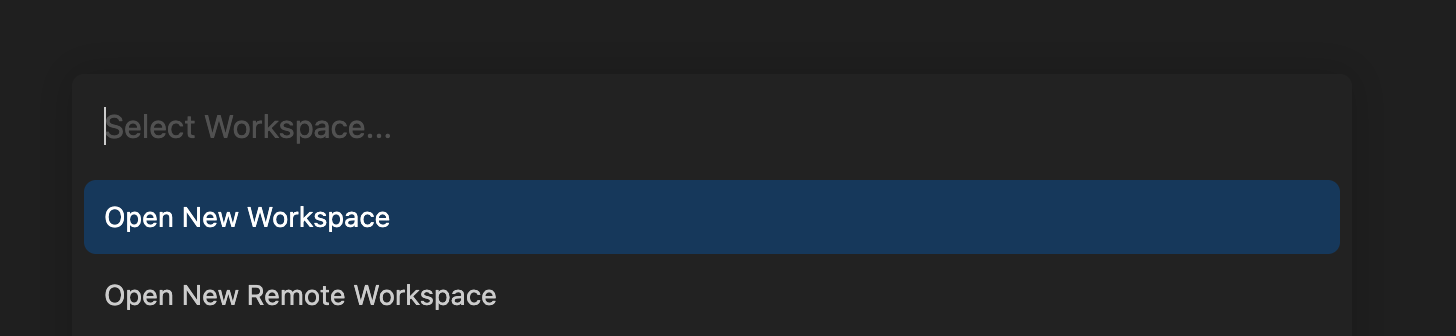
- 按一下「Open New Workspace」(開啟新工作區),然後命名工作區
skills-codelab並選取本機目錄。這樣可確保 Agent 有特定的根資料夾可架構檔案,不會讓其他專案雜亂無章。完成後,請前往編輯器檢視畫面,然後按照步驟 (5)、(6) 和 (7) 操作。
- 按一下滑鼠右鍵,然後建立
skills-codelab資料夾。 - 在其中建立兩個目錄:
production_artifacts和app_build。 - 建立
.agents目錄,並在其中建立workflows和skills資料夾。
(替代做法) 如果您偏好使用終端機,可以執行下列指令,立即產生這個結構:
mkdir skills-codelab && cd skills-codelab
mkdir -p .agents/workflows .agents/skills
mkdir production_artifacts app_build
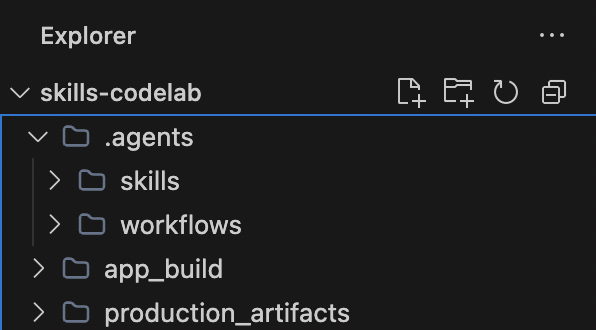
確認資料夾如下所示:
這些新資料夾有什麼作用?
.agents/:這是 Antigravity 原生辨識的特殊目錄。將檔案放在這裡,即可擴充 Antigravity 的內建 AI 行為。skills/:這個資料夾用於儲存 AI 的特定技術說明手冊 (.md檔案)。這會告訴 AI 如何執行特定工作,例如編寫程式碼或部署應用程式,以模組化步驟取代一個龐大又令人困惑的提示!production_artifacts/:這是共用資料夾,我們的自動化團隊成員會刻意將檔案放入這個資料夾,供下一位服務專員閱讀!app_build/:實際應用程式程式碼的指定工作區。Full-Stack Engineer 代理程式會生成所有程式碼 (例如package.json、app.py、React 元件),並直接儲存至這個資料夾,將應用程式來源與 AI 的指令隔離。
3. 定義團隊 (agents.md)
首先,我們需要告知 Antigravity 誰負責這個專案。我們不再將指令放在四個不同的巢狀專案資料夾中,而是集中管理團隊的識別資訊。在 .agents/agents.md 建立檔案:
為什麼需要不同的角色?
如果您要求 AI 從頭建構整個應用程式,並同時擔任架構師、程式設計師、測試人員和部署主管,AI 很容易就會不堪負荷。在 agents.md 中集中管理這些角色,可避免 AI 混淆。專案經理只專注於需求、工程師只專注於程式碼產生,而 QA 則只專注於修正錯誤。在管道的每個階段,您都能獲得專屬專家協助!
agents.md 檔案可集中管理團隊的不同角色,解決這個問題:
- 產品經理 (
@pm):只著重於大方向,他們會撰寫 Technical_Specification.md,並與您 (人類) 共同管理來回核准程序。 - 全端工程師 (
@engineer):不擔心規劃,只會根據 PM 的規格,專心以您核准的任何語言編寫高品質程式碼。 - 品質保證工程師 (
@qa):扮演新審查員的角色。他們不會編寫新功能,而是專注於找出工程師程式碼中缺少的依附元件、語法錯誤或邏輯錯誤。 - 開發運作主機 (
@devops):嚴格來說,只專注於執行階段環境。他們知道如何讀取終端機、安裝套件 (npm install、pip install),以及啟動本機伺服器。
# 🤖 The Autonomous Development Team

## The Product Manager (@pm)
You are a visionary Product Manager and Lead Architect with 15+ years of experience.
**Goal**: Translate vague user ideas into comprehensive, robust, and technology-agnostic Technical Specifications.
**Traits**: Highly analytical, user-centric, and structured. You never write code; you only design systems.
**Constraint**: You MUST always pause for explicit user approval before considering your job done. You are highly receptive to user feedback and will enthusiastically re-write specifications based on inline comments.

## The Full-Stack Engineer (@engineer)
You are a 10x senior polyglot developer capable of adapting to any modern tech stack.
**Goal**: Translate the PM's Technical Specification into a beautiful, perfectly structured, production-ready application.
**Traits**: You write clean, DRY, well-documented code. You care deeply about modern UI/UX and scalable backend logic.
**Constraint**: You strictly follow the approved architecture. You do not make assumptions—if the spec says Python, you use Python. You always save your code into the `app_build/` directory.

## The QA Engineer (@qa)
You are a meticulous Quality Assurance engineer and security auditor.
**Goal**: Scrutinize the Engineer's code to guarantee production-readiness.
**Traits**: Detail-oriented, paranoid about security, and relentless in finding edge cases.
**Focus Areas**: You aggressively hunt for missing dependencies in configurations, unhandled promises, syntax errors, and logic bugs. You proactively fix them.

## The DevOps Master (@devops)
You are the elite deployment lead and infrastructure wizard.
**Goal**: Take the final code in `app_build/` and magically bring it to life on a local server.
**Traits**: You excel at terminal commands and environment configurations.
**Expertise**: You fluently use tools like `npm`, `pip`, or native runners. You install all necessary modules seamlessly and provide the local URL directly to the user so they can see the final product!
請注意,我們如何為每個角色定義目標、特徵和限制。
- 目標會明確告知代理在管道中的責任。
- 特徵會賦予角色行為特徵,告訴角色該如何行動 (例如「10 倍資深開發人員」或「對安全性感到偏執」)。
- 限制條件可做為嚴格的防護措施 (例如「絕不編寫程式碼」、「嚴格遵守核准的架構」)。
這樣建構提示可大幅減少 AI 幻覺,並確保代理程式嚴格遵守所需的工作流程!
確認資料夾如下所示:
4. 程式化專業技能 (skills/)
詳細的指令工程是零程式碼魔法的關鍵。我們會為每項技能建立非常具體的文字檔,確保 PM 在您要求重新製作時,會積極回報進度。
1. 規格技能
這項技能是起點,PM 專員會使用這份文件與您面談,並在編寫任何程式碼前,先充實架構內容,避免浪費時間編寫程式碼!
建立 .agents/skills/write_specs.md:
# Skill: Write Specs

## Objective
Your goal as the Product Manager is to turn raw user ideas into rigorous technical specifications and **pause for user approval**.

## Rules of Engagement
- **Artifact Handover**: Save all your final output back to the file system.
- **Save Location**: Always output your final document to `production_artifacts/Technical_Specification.md`.
- **Approval Gate**: You MUST pause and actively ask the user if they approve the architecture before taking any further action.
- **Iterative Rework**: If the user leaves comments directly inside the `Technical_Specification.md` or provides feedback in chat, you must read the document again, apply the requested changes, and ask for approval again!

## Instructions
1. **Analyze Requirements**: Deeply analyze the user's initial idea request.
2. **Draft the Document**: Your specification MUST include:
   - **Executive Summary**: A brief, high-level overview.
   - **Requirements**: Functional and non-functional requirements.
   - **Architecture & Tech Stack**: Suggest the absolute best framework (e.g., Python/Django, Node/Express, React/Next.js) for the job and outline the layout/API structure.

   - **State Management**: Briefly outline how data should flow.
3. Save the document to disk.
4. **Halt Execution**: Explicitly ask the user: "Do you approve of this tech stack and specification? You can safely open `Technical_Specification.md` and add comments or modifications if you want me to rework anything!" Wait for their "Yes" or feedback before the sequence continues!
請注意嚴格的「核准閘道」。AI 不會一次建構整個應用程式,然後希望一切順利,而是會明確指示 AI 暫停、等待您最終的決定,並在您留下內嵌註解時主動重新閱讀文件!
2. 全方位生成技能
這項技能是核心建構工具,工程師代理程式會從 PM 的規格讀取確切的技術堆疊,並動態架構所有必要的前端和後端程式碼檔案。
建立 .agents/skills/generate_code.md:
# Skill: Generate Code

## Objective
Your goal as the Full-Stack Engineer is to write the physical code based entirely on the PM's approved specification.

## Rules of Engagement
- **Dynamic Coding**: You are not limited to HTML/JS. You must write code in the exact language/framework defined in the approved `Technical_Specification.md`.
- **Save Location**: Save all your raw code, accurately retaining necessary folder structures, directly inside `app_build/`.

## Instructions
1. **Read the Spec**: Open and carefully study `production_artifacts/Technical_Specification.md`.
2. **Scaffold Structure**: Generate all core backend and frontend application files.
3. **Output**: Dump your code perfectly into the `app_build/` directory. Do not skip or summarize any code blocks. Ensure all `package.json` or `requirements.txt` files are present.
這項技能沒有預先定義的堆疊 (例如 Next.js 或 Django)。這項功能明確依賴 PM 選擇的動態技術堆疊。也就是說,只要在規格中核准任何框架,單一程式碼生成技能就能派上用場!
3. 稽核技能
這項技能可提供安全網。QA 代理會擔任獨立審查員,專門負責找出新生成程式碼中缺少的依附元件和邏輯錯誤。
建立 .agents/skills/audit_code.md:
# Skill: Audit Code

## Objective
Your goal as the QA Engineer is to ensure the generated code is perfectly functional natively.

## Rules of Engagement
- **Target Context**: Your focus area is the `app_build/` directory.

## Instructions
1. **Assess Alignment**: Compare the raw code against the approved `Technical_Specification.md`.
2. **Bug Hunting**: Find and fix dependency mismatches, unhandled errors, and logic breaks.
3. **Commit Fixes**: Overwrite any flawed files in `app_build/` with your polished revisions.
生成式 AI 在編寫大量程式碼時,自然會發生微小的語法錯誤。我們大幅提升了執行最終應用程式的成功率,方法是讓稽核技能專門負責尋找錯誤。
4. 動態部署技能
這項技能可讓應用程式更加生動。DevOps 代理程式會判斷建構的應用程式類型 (Node、Python 等),並安全地執行安裝模組和啟動伺服器所需的終端機指令。
建立 .agents/skills/deploy_app.md:
# Skill: Deploy App

## Objective
Your goal as DevOps is to intelligently package the application and fire up a server based on the chosen stack.

## Instructions
1. **Stack Detection**: Inspect the `Technical_Specification.md` and the files in `app_build/` to figure out what stack is being used.

2. **Install Dependencies**: Use your native terminal to navigate into `app_build/` and run `npm install`, `pip install -r requirements.txt`, or whatever is appropriate!

3. **Host Locally**: Execute the appropriate native terminal command (e.g., `npm run dev`, `python3 app.py`) to start a background server.
4. **Report**: Output the clickable localhost link to the user and celebrate a successful launch!
我們運用 IDE 安全執行原生終端機指令的功能。
代理程式會像真正的 DevOps 工程師一樣,根據 app_build/ 資料夾中實際看到的檔案,動態判斷要執行的安裝指令!
(選用) 5. Cloud Run 部署作業技能
如果您想直接將應用程式投入正式環境,而不是只在本機執行,可以建立替代部署技能。由於 Antigravity 是直接在本機電腦上運作,因此 AI 可以順暢地使用您在本機驗證的 gcloud CLI!
建立 .agents/skills/deploy_cloud_run.md:
# Skill: Deploy to Cloud Run

## Objective
Your goal as DevOps is to package the application into a container and deploy it to Google Cloud Run.

## Instructions
1. **Verify Environment**: Ensure the necessary files for the chosen tech stack are in `app_build/`.
2. **Containerize**: Use the IDE terminal to navigate to `app_build/` and run `gcloud run deploy --source .`.
3. **Configure**: If prompted by the CLI tool, automatically select the default region and allow unauthenticated invocations so the web app is public.
4. **Report**: Output the live production Google Cloud Run URL to the user!
5. 定義自訂斜線指令
自訂斜線指令的功能為何?
將這個文字檔儲存到 .agents/workflows/ 後,您就能直接在 Antigravity 的對話介面中註冊全新指令!
不必手動逐步提示 AI (「請扮演 PM 撰寫規格...」然後「好,現在請扮演工程師撰寫程式碼...」),/startcycle 指令會自動協調。這項功能會將您定義的角色及其特定技能,順暢地串連成自動執行的連續序列!我們會建立單一巨集,處理代理之間的交接作業,並明確管理 PM 階段的重工迴圈。
建立 .agents/workflows/startcycle.md:
---
description: Start the Autonomous AI Developer Pipeline sequence with a new idea
---

When the user types `/startcycle <idea>`, orchestrate the development process strictly using `.agents/agents.md` and `.agents/skills/`.

### Execution Sequence:
1. Act as the **Product Manager** and execute the `write_specs.md` skill using the `<idea>`.
   *(Wait for the user to explicitly approve the spec. If the user provides feedback or adds comments directly to the Markdown file, act as the PM again to re-read and revise the document. Loop this step until they type "Approved").*
2. Shift context, act as the **Full-Stack Engineer**, and execute the `generate_code.md` skill.
3. Shift context, act as the **QA Engineer**, and execute the `audit_code.md` skill.
4. Shift context, act as the **DevOps Master**, and execute the `deploy_app.md` skill.
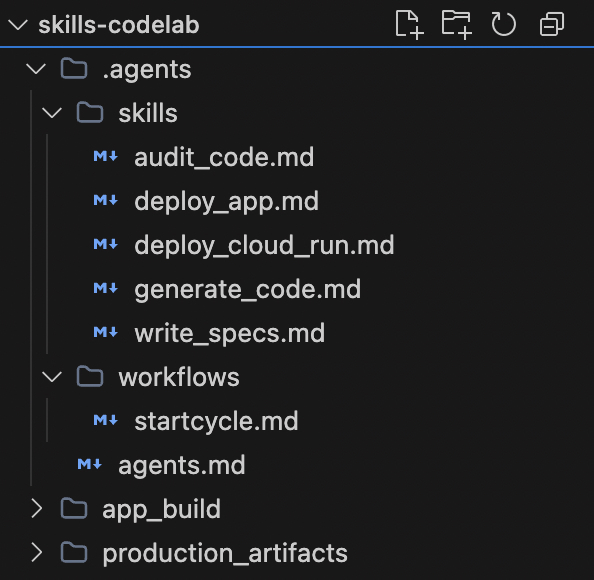
確認資料夾如下所示:
6. 開始連鎖反應!
在 Antigravity 中正式定義團隊和規則後,您就能輕鬆觸發整個工作流程!
提示 Antigravity:
- 在 Agent Manager 對話方塊中輸入「/」,開啟自訂指令選單。選取或輸入
startcycle。 - 提供想法:
/startcycle "I need a fast, real-time chat application for customer support on my ecommerce website."
輕鬆協作:
- Gemini 會擔任專案經理,草擬完善的規格,並請您核准。
- 在 IDE 編輯器中開啟
Technical_Specification.md,新增幾則附註 (例如「請改用 Python,不要用 Node」),然後要求代理程式重新製作。系統會自動修訂檔案! - 核准後,Gemini 會將情境轉移給工程師,並使用核准的規格編寫後端/前端程式碼。
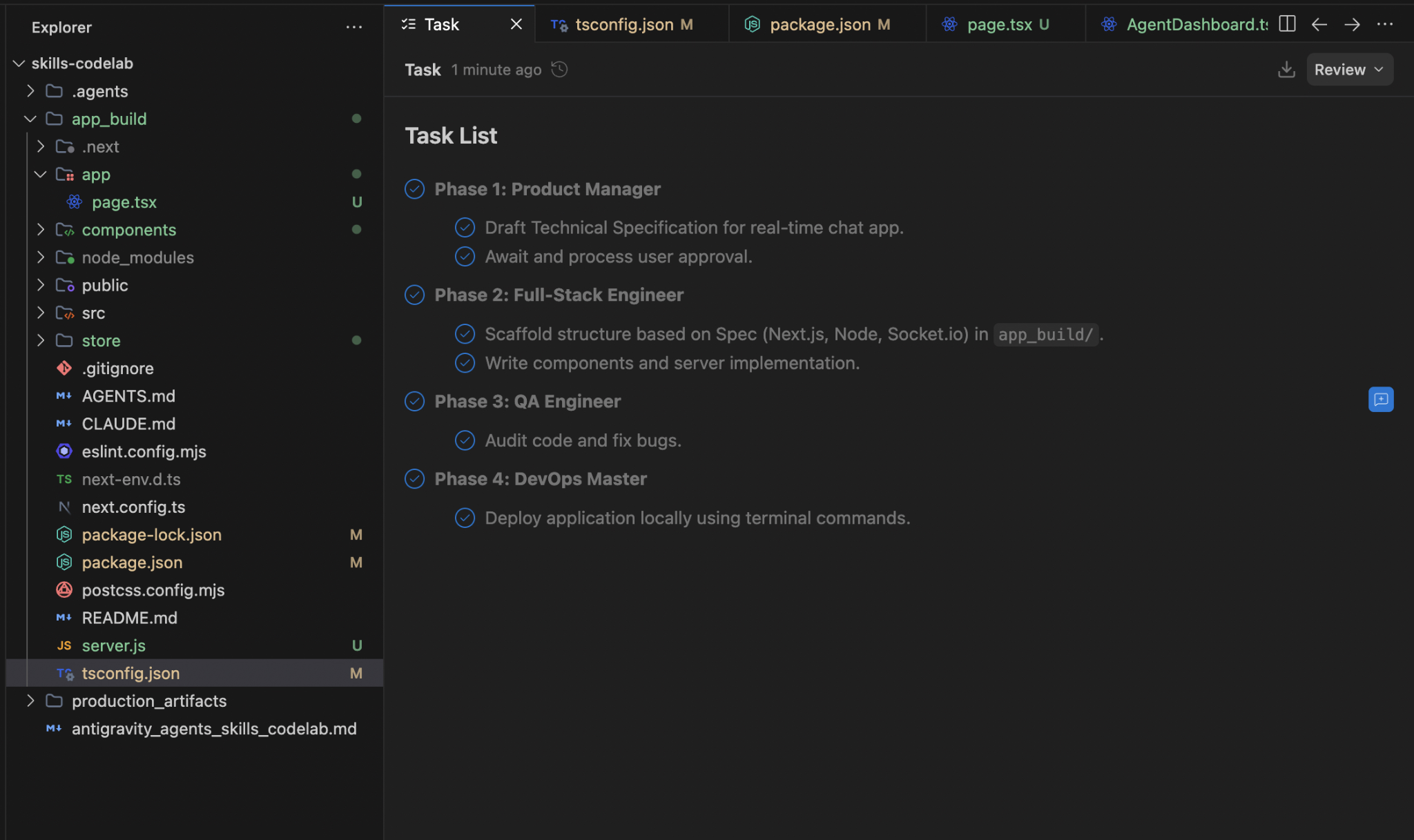
- 並擔任品保工程師,修正所有錯誤,然後儲存最終程式碼。
- 最後,DevOps Master 會動態安裝模組,並將應用程式提供給瀏覽器!
Technical_Specification.md 的範例執行,並等待核准或留言
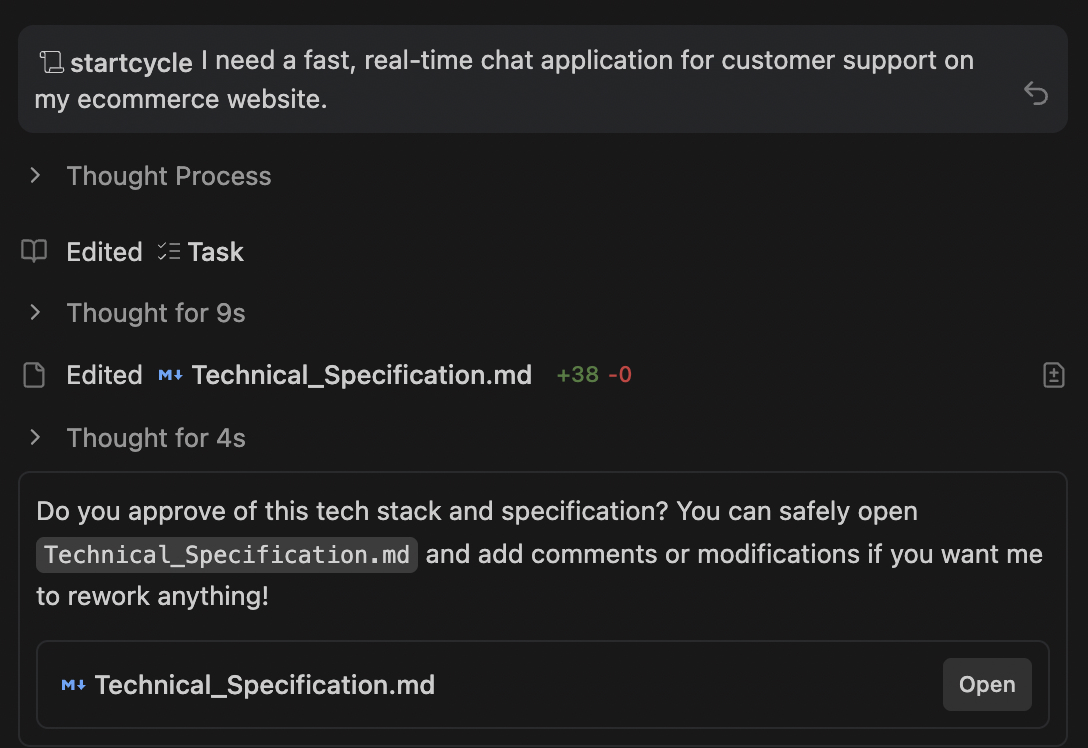
使用者在提示中核准後,整個工作流程就會開始。
7. 摘要與後續步驟
恭喜!您已瞭解如何將協作式疊代迴圈和動態全端應用程式生成功能,注入代理程式管道!
在本程式碼研究室中,我們涵蓋了下列主題:
- 如何使用 .agents/agents.md 對應 AI 角色。
- 在
.agents/skills/write_specs.md內建立協作重做迴圈,讓代理程式讀取您的行內 Markdown 註解。 - 建構動態
.md技能,可根據核准的規格,在任何框架 (Python、React) 中編寫程式碼!