

1. 簡介
BigQuery 的生成式 AI 函式可讓您使用 SQL,透過大型語言模型 (LLM) 推論資料。您無須移動資料,就能分析情緒、生成摘要,以及為數百萬列資料中的圖片加上說明。
但如果提示需要大量脈絡 (例如政策、手冊或影片),才能獲得準確可靠的結果,該怎麼辦?
Gemini 脈絡快取會將大量脈絡儲存在快取中,後續提示會參照快取,而非每次都處理完整內容,因此延遲時間較短,輸入權杖最多可享 90% 折扣。
在本程式碼研究室中,您將建構「細則」退貨政策檢查工具,使用明確的內容快取,根據 BigQuery 中龐大的靜態退貨政策文件,分析顧客退貨要求。

學習內容
- 建立 BigQuery 資料集,並填入顧客退貨要求範例。
- 在 Gemini Enterprise Agent Platform (舊稱 Vertex AI) 中建立內容快取,指向儲存在 Cloud Storage 中的退貨政策文件。
- 使用
AI.GENERATE執行查詢,參照快取,有效率地逐列評估要求。
軟硬體需求
- 網路瀏覽器,例如 Chrome
- 已啟用計費功能的 Google Cloud 雲端專案
- 存取 Google Cloud Shell
本程式碼研究室適合各種程度的開發人員 (包括初學者)。
本程式碼研究室建立的資源費用應低於 $2 美元。
預計時間:完成本程式碼研究室約需 30 分鐘。
2. 事前準備
建立 Google Cloud 專案
- 在 Google Cloud 控制台的專案選取器頁面中,選取或建立 Google Cloud 專案。
- 確認 Cloud 專案已啟用計費功能。瞭解如何檢查專案是否已啟用計費功能。
啟動 Cloud Shell
Cloud Shell 是在 Google Cloud 中運作的指令列環境,已預先載入必要工具。
- 在 Google Cloud 控制台的上方,按一下「啟用 Cloud Shell」圖示
 。
。 - 連至 Cloud Shell 後,請驗證您的驗證:
gcloud auth list - 確認專案已設定完成:
gcloud config get project - 如果專案未如預期設定,請設定專案:
gcloud config set project <YOUR_PROJECT_ID>
設定專案 ID 和位置
執行下列指令,擷取有效的 Google Cloud 專案 ID,並將預設位置設為環境變數,以便在本程式碼研究室中使用:
export PROJECT_ID=$(gcloud config get-value project)
export PROJECT_NUMBER=$(gcloud projects describe $PROJECT_ID --format="value(projectNumber)")
export LOCATION="us-central1"
啟用 API
執行下列指令,啟用必要的 API:
gcloud services enable \
 bigquery.googleapis.com \
 aiplatform.googleapis.com
3. 準備 BigQuery 資料
我們需要資料集和填入客戶退貨要求範例的表格,才能測試內容快取。
1. 建立資料集
在 Cloud Shell 中執行下列指令,建立名為 caching_demo 的 BigQuery 資料集:
bq mk --dataset $PROJECT_ID:caching_demo
2. 建立並填入資料表
執行下列指令,建立名為 return_requests 的資料表,並插入客戶退貨要求範例:
bq query \
  --use_legacy_sql=false \
  "CREATE OR REPLACE TABLE \`caching_demo.return_requests\` AS
SELECT
  10001 AS return_id,
  'P-1001' AS purchase_id,
  'I bought this jacket on Black Friday but it was too small.' AS return_comment,
  DATE('2025-11-28') AS purchase_date,
  DATE('2025-12-05') AS return_date,
  'ApexWear' AS product_brand,
  'Gold' AS customer_tier
UNION ALL
  SELECT
  10002 AS return_id,
  'P-1002' AS purchase_id,
  'The item arrived broken, I want a refund. I don\'t have photos because I threw it away.' AS return_comment,
  DATE('2026-04-01') AS purchase_date,
  DATE('2026-04-02') AS return_date,
  'GenericBrand' AS product_brand,
  'Standard' AS customer_tier
UNION ALL
  SELECT
  10003 AS return_id,
  'P-1003' AS purchase_id,
  'I bought this ApexWear jacket, took the tags off to wear it once, but it doesn\'t fit well.' AS return_comment,
  DATE('2026-02-15') AS purchase_date,
  DATE('2026-02-20') AS return_date,
  'ApexWear' AS product_brand,
  'Standard' AS customer_tier
UNION ALL
  SELECT
  10004 AS return_id,
  'P-1004' AS purchase_id,
  'This was a holiday gift but doesn\'t fit.' AS return_comment,
  DATE('2025-12-20') AS purchase_date,
  DATE('2026-01-28') AS return_date,
  'StyleCorp' AS product_brand,
  'Standard' AS customer_tier
UNION ALL
  SELECT
  10005 AS return_id,
  'P-1005' AS purchase_id,
  'I realized this doesn\'t fit' AS return_comment,
  DATE('2026-02-01') AS purchase_date,
  DATE('2026-03-15') AS return_date,
  'ApexWear' AS product_brand,
  'Gold' AS customer_tier;"
畫面上應會顯示成功訊息:
Created your-project-id.caching_demo.return_requests
現在可以建立快取了!
4. 建立脈絡快取
您將使用 curl,透過 REST 呼叫 Gemini Enterprise Agent Platform (舊稱 Vertex AI) 模型端點來建立快取。
在 Cloud Shell 中執行下列指令,建立新的儲存空間 bucket。這個目錄將用於儲存要快取的檔案:
gcloud storage buckets create gs://${PROJECT_ID}-caching-demo --location=${LOCATION}
接著,將範本政策文件複製到新建立的 bucket:
gcloud storage cp gs://sample-data-and-media/context_caching_demo/return_policy.md gs://${PROJECT_ID}-caching-demo/
現在,請執行下列指令建立快取,並參照您新暫存的政策文件 (這項作業可能需要一分鐘左右才能完成):
curl -X POST \
  -H "Authorization: Bearer $(gcloud auth print-access-token)" \
  -H "Content-Type: application/json" \
  "https://${LOCATION}-aiplatform.googleapis.com/v1/projects/${PROJECT_ID}/locations/${LOCATION}/cachedContents" \
  -d '{
    "model": "projects/'"${PROJECT_ID}"'/locations/'"${LOCATION}"'/publishers/google/models/gemini-2.5-flash",
    "contents": [
      {
        "role": "user",
        "parts": [
          {
            "fileData": {
              "mimeType": "text/markdown",
              "fileUri": "gs://'"${PROJECT_ID}"'-caching-demo/return_policy.md"
            }
          }
        ]
      }
    ],
    "ttl": "3600s"
  }'
請記下 JSON 回應中傳回的 name,看起來會像這樣:projects/PROJECT_NUMBER/locations/LOCATION/cachedContents/CACHE_ID。下一個步驟會用到該 CACHE_ID。
{
  "name": "projects/123456789012/locations/us-central1/cachedContents/123456789012345"
}
在 Cloud Shell 中將 CACHE_ID 儲存為環境變數:
export CACHE_ID="<YOUR_CACHE_ID>"
5. 使用快取內容執行 AI.GENERATE
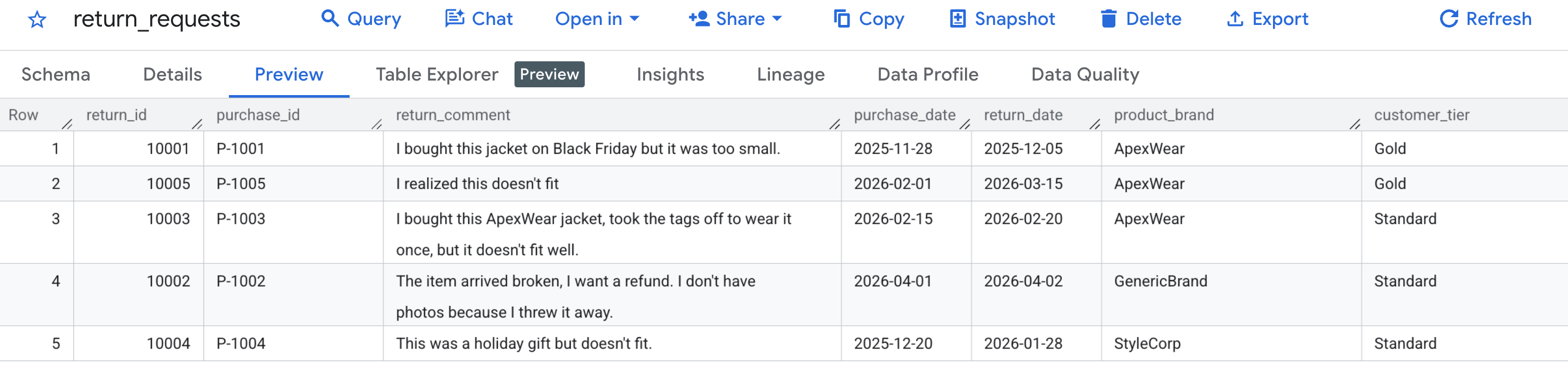
首先,請確認範例資料是否正確產生。前往 BigQuery 控制台,找到 caching_demo 資料集,然後點選 return_requests 資料表。
在「預覽」分頁下方,您應該會看到先前產生的顧客退貨要求:
現在快取已建立並填入資料,您可以使用 AI.GENERATE 查詢,只要參照該快取 ID 即可評估退款要求。
為避免手動尋找及取代變數,請在 Cloud Shell 中執行下列指令。這會使用現有環境變數動態建構 SQL 查詢,並將查詢列印到畫面上,方便您輕鬆複製。
cat << EOF > query.sql
WITH generated_returns AS (
  SELECT
    *,
    -- Call AI.GENERATE with the prompt, schema, and cache ID
    AI.GENERATE(
      -- Construct the prompt referencing the cached policy
      prompt => CONCAT(
        'Analyze this return request using the cached Return Policy. ',
        'Return Comment: "', return_comment, '". ',
        'Purchase Date: ', purchase_date, '. ',
        'Brand: ', product_brand, '. ',
        'Customer Tier: ', customer_tier, '. '
      ),
      -- Define the structured output schema
      output_schema => """
        eligible_for_refund STRING OPTIONS(description = 'True/False whether the request is eligible for a refund based on the policy'),
        refund_type STRING OPTIONS(description = 'Classify as Full, Store Credit, or None'),
        reason_citation STRING OPTIONS(description = 'Quote the specific rule from the policy applied to this decision')
      """,
      -- Construct the endpoint string dynamically using variables
      endpoint => 'gemini-2.5-flash',

      -- Pass the cached content ID using bash interpolation for the literal
      model_params => JSON '{"cachedContent": "projects/$PROJECT_NUMBER/locations/$LOCATION/cachedContents/$CACHE_ID"}'
    ) AS results
  FROM \`caching_demo.return_requests\`
)
SELECT
  *,
  -- Extract token usage metrics from the raw JSON response
  CAST(JSON_EXTRACT_SCALAR(results.full_response, '$.usage_metadata.prompt_token_count') AS INT64) AS prompt_token_count,
  CAST(JSON_EXTRACT_SCALAR(results.full_response, '$.usage_metadata.cached_content_token_count') AS INT64) AS cached_content_token_count,
  CAST(JSON_EXTRACT_SCALAR(results.full_response, '$.usage_metadata.candidates_token_count') AS INT64) AS output_token_count,
  CAST(JSON_EXTRACT_SCALAR(results.full_response, '$.usage_metadata.total_token_count') AS INT64) AS total_token_count,
  CAST(JSON_EXTRACT_SCALAR(results.full_response, '$.usage_metadata.thoughts_token_count') AS INT64) AS thoughts_token_count,
  CAST(JSON_EXTRACT_SCALAR(results.full_response, '$.usage_metadata.billable_prompt_usage.text_count') AS INT64) AS billable_prompt_text_count,
  CAST(JSON_EXTRACT_SCALAR(results.full_response, '$.usage_metadata.billable_cached_content_usage.text_count') AS INT64) AS billable_cached_text_count

FROM generated_returns;
EOF

cat query.sql
現在,複製終端機中的 SQL,在瀏覽器中前往 BigQuery 控制台,然後在查詢編輯器分頁中執行查詢。
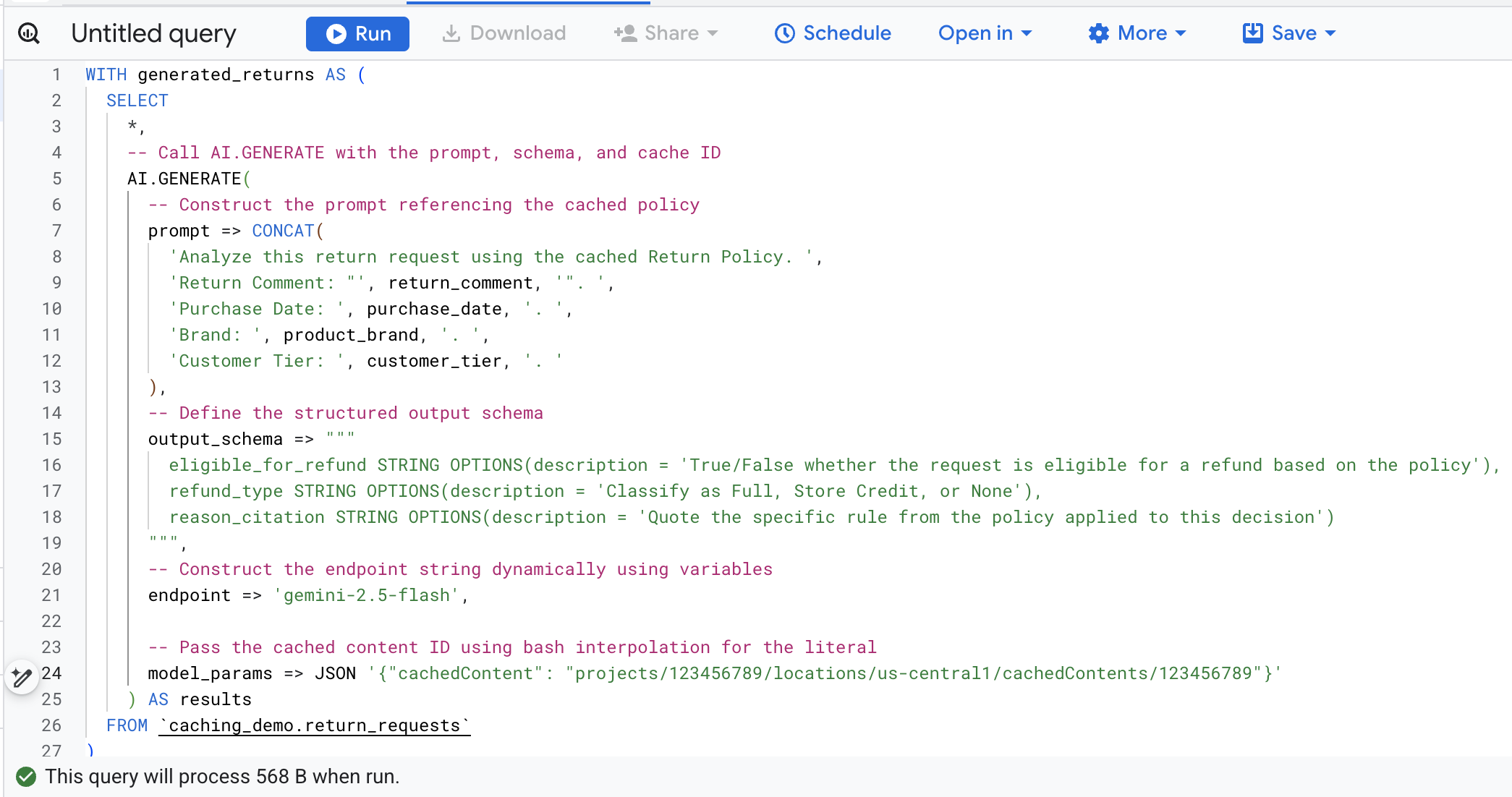
以下詳細說明這個函式呼叫中的重要引數:
prompt:包含每個客戶資料列的具體資訊。這段文字會附加至快取中已有的退貨政策文件。output_schema:定義模型回覆的預期 JSON 結構。endpoint:指定用於生成的 Agent Platform AI 模型端點 (在本例中為 Gemini 2.5 Flash)。model_params:重要參數,會使用cachedContent欄位傳遞產生的快取 ID。
畫面上應會顯示生成的結果,分析每項退貨要求是否符合儲存的政策。向右捲動即可查看擷取的權杖指標。
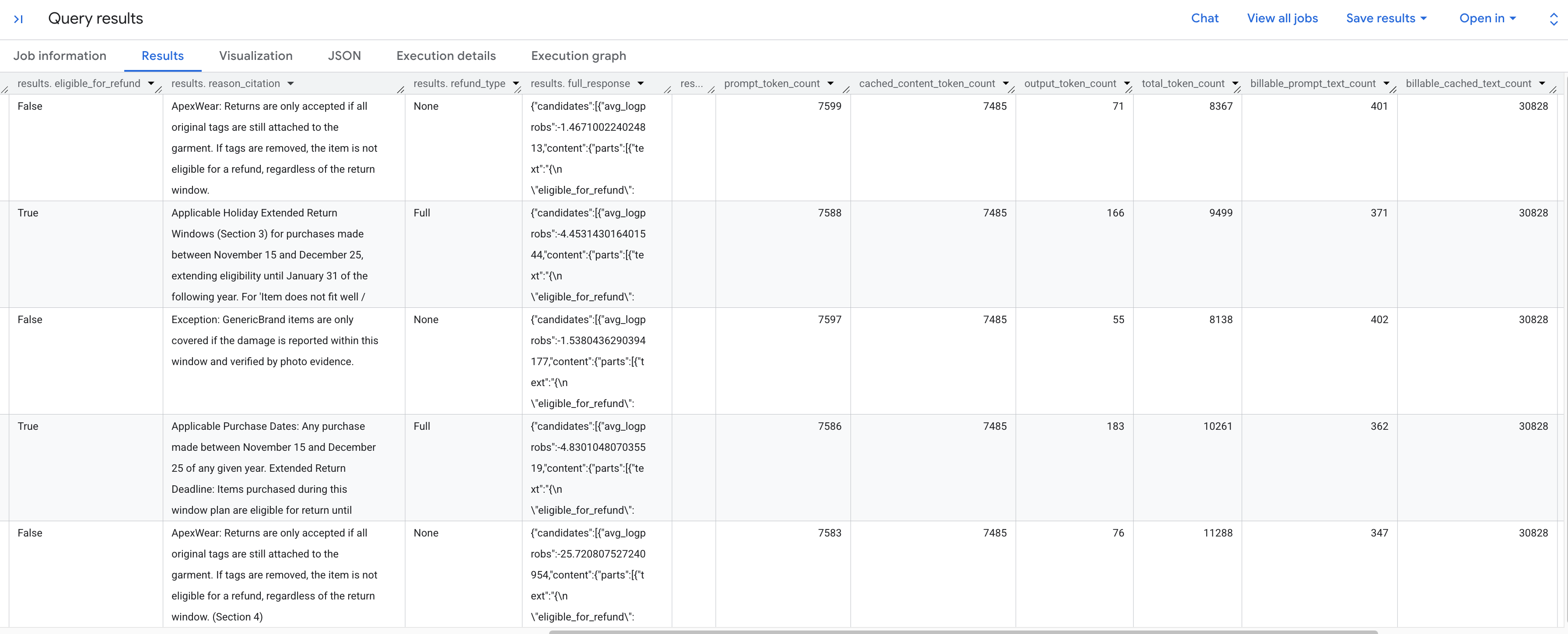
以下是您會看到的權杖指標細目:
prompt_token_count:輸入提示中處理的權杖總數 (包括快取內容)。cached_content_token_count:從快取提供的權杖數量 (代表靜態退貨政策文件)。output_token_count:模型在回覆中生成的權杖數量。total_token_count:提示和輸出內容的權杖總數。billable_prompt_text_count:提示中非快取部分的計費字元數。billable_cached_text_count:快取內容中可計費的字元數。
查看 billable_prompt_text_count 欄,每列只顯示幾百個字元,這只是顧客的具體要求。相較之下,完整退貨政策的字元數超過 30,000 個,billable_cached_text_count 如果沒有內容快取,您就必須為每個資料列支付處理完整政策文件的費用。快取後,您只需支付大型文件的費用,後續資料列只會針對變更的小型提示文字收費。
這可大幅節省批次工作的費用!
6. 清理
如要避免系統持續向您的 Google Cloud 帳戶收取費用,請刪除本程式碼研究室建立的資源。
在 Cloud Shell 中執行下列指令,刪除 BigQuery 資料集和資料表:
bq rm -r -f -d caching_demo
刪除為政策文件建立的暫存 bucket:
gcloud storage rm --recursive gs://${PROJECT_ID}-caching-demo
最後,刪除內容快取,以免持續產生儲存空間費用 (使用您先前儲存的變數):
curl -X DELETE \
  -H "Authorization: Bearer $(gcloud auth print-access-token)" \
  "https://${LOCATION}-aiplatform.googleapis.com/v1/projects/${PROJECT_ID}/locations/${LOCATION}/cachedContents/${CACHE_ID}"
7. 恭喜
恭喜!您已在 Agent Platform 中成功建立內容快取,並在 BigQuery AI 函式中參照該快取,加快分析速度,同時降低輸入權杖處理成本。
目前所學內容
- 如何設定退貨要求分析的環境資料表。
- 如何使用
curl呼叫 Agent Platform (Vertex AI) API,明確建立靜態文件內容快取。 - 如何在
AI.GENERATESQL 查詢中使用產生的快取 ID,以消除有效提示中多餘的輸入權杖。