
1. Welcome
In this codelab, you will learn how to use the suite of BigQuery managed AI functions to perform sophisticated semantic analysis, categorical classification, multimodal filtering, semantic joins, and multi-row summarization directly within BigQuery Studio using SQL.
Using the public dataset bigquery-public-data.cymbal_pets, you will step into the shoes of a data analyst at Cymbal Pets, an ecommerce retailer for pet supplies and accessories.
Semantic analysis directly inside SQL queries
Traditionally, applying machine learning or large language models (LLMs) to enterprise datasets required moving data out of the data warehouse into external Python notebook environments. This required dedicated data engineering pipelines and ML expertise.
BigQuery's managed AI functions—including AI.SCORE, AI.CLASSIFY, AI.IF, and AI.AGG—bring foundation model intelligence directly to your data. BigQuery automatically optimizes model selection and applies internal prompt-rewriting strategies to deliver high-accuracy results from simple natural-language prompts.
For high-volume datasets, BigQuery provides optimized mode, using on-the-fly model distillation and lightweight proxy models to deliver up to 100x faster and cheaper queries.
What you'll do
- Explore multimodal retail data in BigQuery Studio using SQL.
- Perform semantic ranking using
AI.SCOREto evaluate subjective product attributes like "giftability". - Categorize unstructured data using
AI.CLASSIFYto map products to target animal species. - Filter multimodal image assets using
AI.IFwithinWHEREclauses. - Execute semantic joins across tables using
AI.IFinJOIN ... ONclauses to match text product records with external image files. - Synthesize multi-row insights using the
AI.AGGaggregate function. - Optimize query latency and cost on large datasets using
AI.IFwith optimized mode (optimization_mode => 'MINIMIZE_COST') and proxy model distillation.
What you'll need
- A Google Cloud project with billing enabled.
- A web browser such as Chrome.
2. Setup and requirements
Before querying data with managed AI functions, you must configure your Google Cloud project and enable the required APIs.
Create a Google Cloud project and enable APIs
- In the Google Cloud Console, on the project selector page, select or create a Google Cloud project.
- Make sure that billing is enabled for your Cloud project. Learn how to check if billing is enabled on a project.
- Enable the BigQuery, BigQuery Connection, and Agent Platform APIs.
Open BigQuery Studio
- In the Google Cloud Console navigation menu, click BigQuery to open BigQuery Studio.
- In the BigQuery Studio editor toolbar, click + SQL query to open a new SQL query tab. You will write and run all SQL queries in these SQL tabs throughout this codelab.
Create a Cloud Resource Connection in SQL
BigQuery operates within a secure data perimeter. When inspecting external multimodal files (such as images stored in Google Cloud Storage), BigQuery uses a Cloud Resource Connection to securely access object references without exposing credentials.
Execute the following statement in your SQL tab to create a connection named us.conn:
CREATE CONNECTION IF NOT EXISTS `us.conn`
OPTIONS (
  connection_type = "CLOUD_RESOURCE"
);
3. Explore the Cymbal Pets dataset
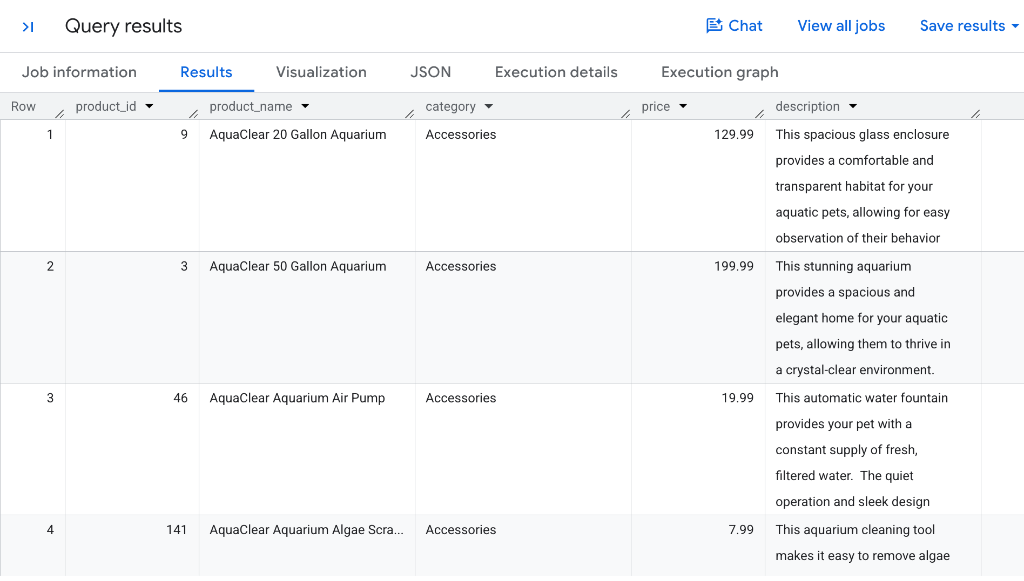
Cymbal Pets maintains a rich product catalog in the public dataset inside the table named bigquery-public-data.cymbal_pets.products. Each product record contains structured attributes such as product ID, title, retail category, price, and descriptive text.
Query the product catalog
Open a SQL tab in BigQuery Studio and run the following query to inspect the products table:
SELECT
  product_id,
  product_name,
  category,
  price,
  description
FROM
  `bigquery-public-data.cymbal_pets.products`;
Your results will look similar to the following:
Inspect product images
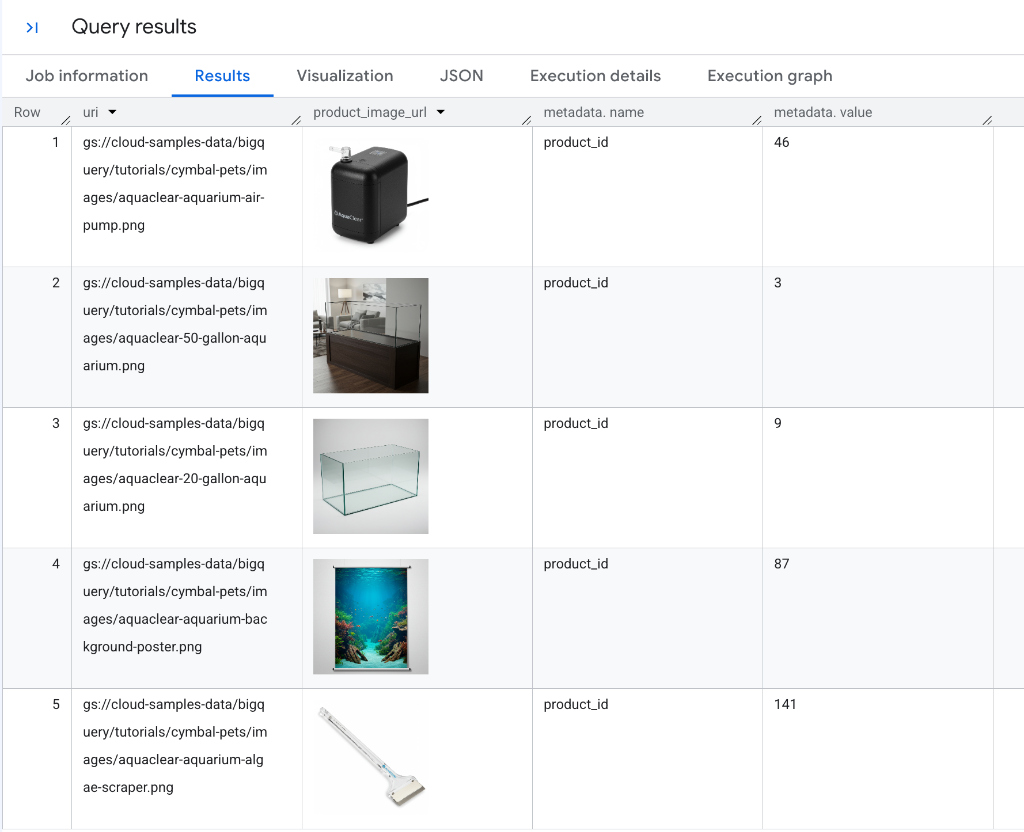
Cymbal Pets also stores product image references in bigquery-public-data.cymbal_pets.product_images. Run the following query to view the image records:
SELECT
  uri,
  OBJ.GET_READ_URL(OBJ.MAKE_REF(uri, 'us.conn')).url AS product_image_url,
  metadata
FROM
  `bigquery-public-data.cymbal_pets.product_images`;
Your results will look similar to the following:
Next, you'll use BigQuery managed functions to analyze both text and image data from the Cymbal Pets data warehouse.
4. Rank products by semantic criteria with AI.SCORE
The AI.SCORE function accepts text inputs and uses a Gemini model to rate them based on a natural-language scoring rubric, returning a numeric FLOAT64 score.
If you don't provide an explicit scoring rubric, BigQuery automatically applies prompt-rewriting strategies to generate an optimal rubric for the model.
Score products for "giftability"
Suppose the Cymbal Pets marketing team wants to build a holiday gift guide. They want to rank every item in the catalog based on how suitable it is as a gift for a pet owner on a scale of 1 to 10.
Run the following query in your SQL tab:
SELECT
  product_name,
  description,
  AI.SCORE(
    ('How "giftable" is this product for a pet owner? ', description,
    'Use a scale from 1-10.')
  ) AS giftability_score
FROM
  `bigquery-public-data.cymbal_pets.products`
ORDER BY
  giftability_score DESC;
Understand the results
Your results will look similar to the following:
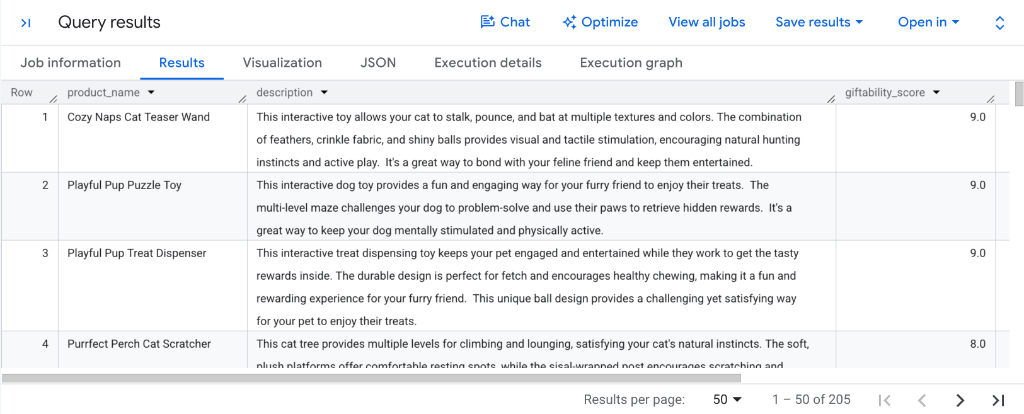
Examine the giftability_score column in the query results:
- High-appeal interactive toys: Engaging items like the
Cozy Naps Cat Teaser Wand,Playful Pup Puzzle Toy, andPlayful Pup Treat Dispenserreceive top ratings (9.0). - Specialty comfort and scratching items: Popular essentials like the
Purrfect Perch Cat Scratcherscore strongly at8.0. - Actionable downstream ranking: Because
AI.SCOREproduces normalizedFLOAT64scores, you can immediately sort results withORDER BY giftability_score DESCor filter candidates withWHERE AI.SCORE(...) >= 8.0to generate automated gift guides.
5. Categorize catalog items with AI.CLASSIFY
The AI.CLASSIFY function uses Gemini to classify input records into a discrete list of target categories provided as a SQL array.
AI.CLASSIFY supports multimodal inputs (text, images, audio, video) and eliminates the need to build, train, or deploy bespoke classification models for taxonomy management.
Classify toys by target animal species (single-label)
Suppose some products in the Cymbal Pets catalog are tagged generically as "Toys" without specifying the target animal. You can use AI.CLASSIFY to categorize each toy based on its name and description.
Run the following query in BigQuery Studio:
SELECT
  product_name,
  description,
  AI.CLASSIFY(
    ('What animal is this product for?', product_name, ' ', description),
    categories => ["Dog", "Cat", "Bird", "Fish", "Small Animal", "All Pets"]
  ) AS animal_type
FROM
  `bigquery-public-data.cymbal_pets.products`
WHERE
  category = "Toys"
LIMIT 20;
View the results
Your results will look similar to the following:
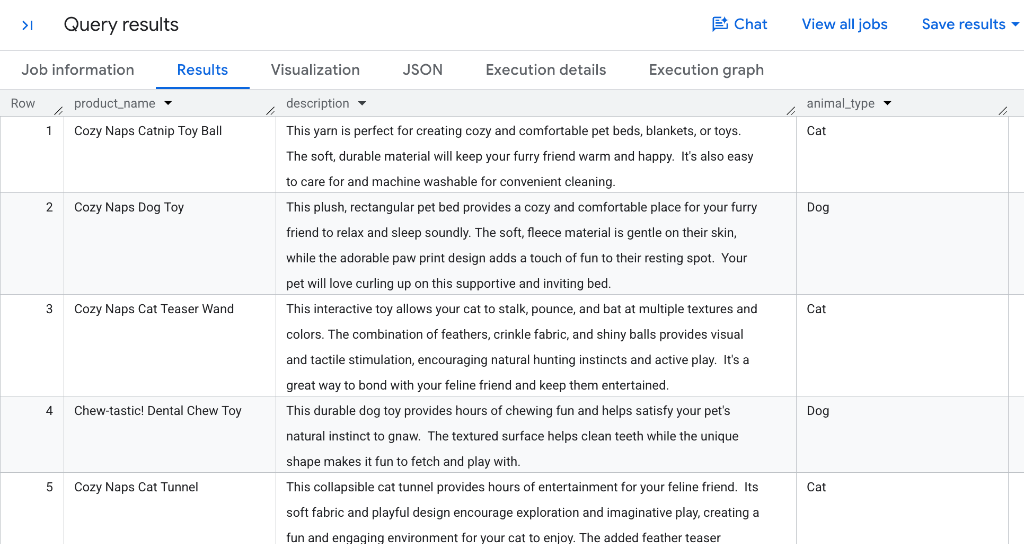
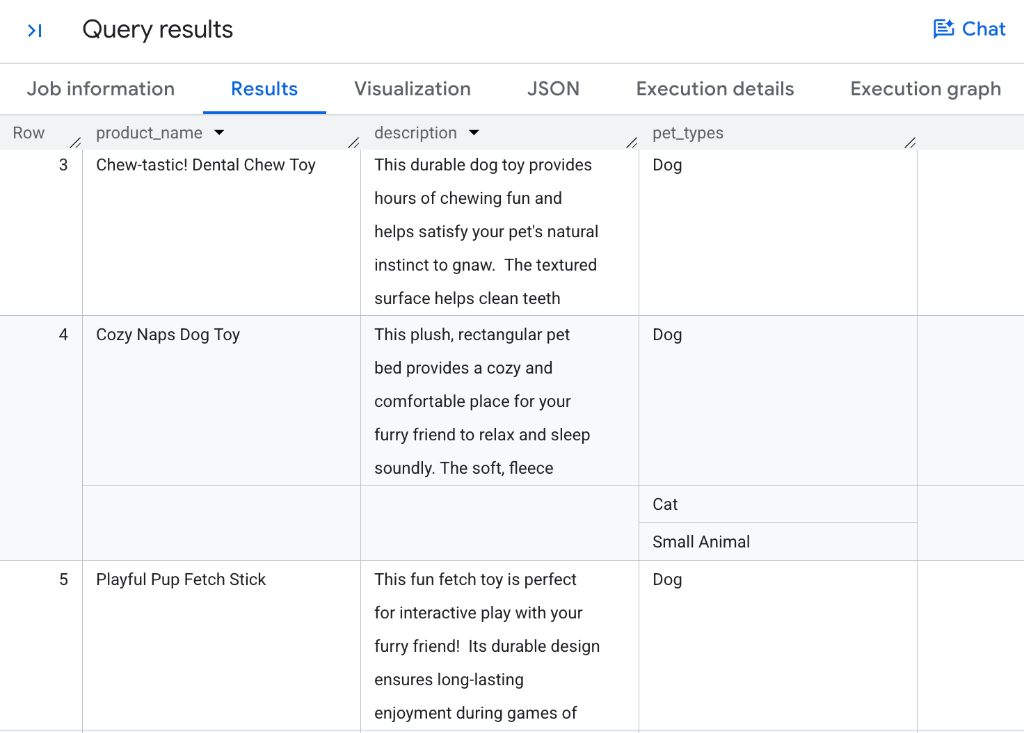
By default, AI.CLASSIFY performs single-label classification and returns a STRING containing the single most relevant category from your candidate array. Notice how Gemini maps catnip balls and feather teasers to Cat, while chew toys and fetch sticks map to Dog.
Assign multiple tags with multi-label classification
Many products in a retail catalog apply to multiple pet types simultaneously (for example, a plush bed or tunnel suitable for both cats and small animals).
To assign multiple categories to a single record, set the optional parameter output_mode => 'multi'. In multi-label mode, AI.CLASSIFY returns an ARRAY containing all matching categories.
Run the following query in your SQL tab:
SELECT
  product_name,
  description,
  AI.CLASSIFY(
    ('Identify all pet types that this product is suitable for: ', product_name, ' ', description),
    categories => ["Dog", "Cat", "Bird", "Fish", "Small Animal", "Reptile"],
    output_mode => 'multi'
  ) AS pet_types
FROM
  `bigquery-public-data.cymbal_pets.products`
WHERE
  category = "Toys";
Your results will look similar to the following:
Review classification mechanics
- Single-label vs. multi-label: Without
output_mode,AI.CLASSIFYreturns a scalarSTRING. Settingoutput_mode => 'multi'returns anARRAYcontaining zero, one, or multiple matching labels. - Multi-category assignment: Notice how dedicated items like
Chew-tastic! Dental Chew ToyandPlayful Pup Fetch Stickreceive[Dog], while versatile comfort items likeCozy Naps Dog Toy(a plush rectangular bed) correctly receive multiple tags:[Dog, Cat, Small Animal]. - Zero-shot matching: The model evaluates the combined text and prompt against the supplied
categoriesarray without requiring pre-trained custom ML models. - Downstream SQL array operations: You can use standard BigQuery SQL array functions like
WHERE 'Cat' IN UNNEST(pet_types)orCROSS JOIN UNNEST(pet_types)to filter, explode, and aggregate multi-labeled records.
6. Filter multimodal product images with AI.IF
The AI.IF function uses Gemini to evaluate a natural-language condition and returns a boolean (TRUE or FALSE).
Because AI.IF accepts multimodal inputs, you can use it directly within a SQL WHERE clause to filter unstructured image files stored in Cloud Storage.
Filter images containing specific objects
Suppose the merchandising team wants to find all product images in the catalog that visually contain pet food or snacks.
Run the following query in your SQL tab:
SELECT
  uri,
  OBJ.GET_READ_URL(OBJ.MAKE_REF(uri, 'us.conn')).url AS product_image_url,
  metadata
FROM
  `bigquery-public-data.cymbal_pets.product_images`
WHERE
  AI.IF(
    ('Does this product image contain pet food or snacks? ', OBJ.MAKE_REF(uri, 'us.conn'))
  );
Your results will look similar to the following:
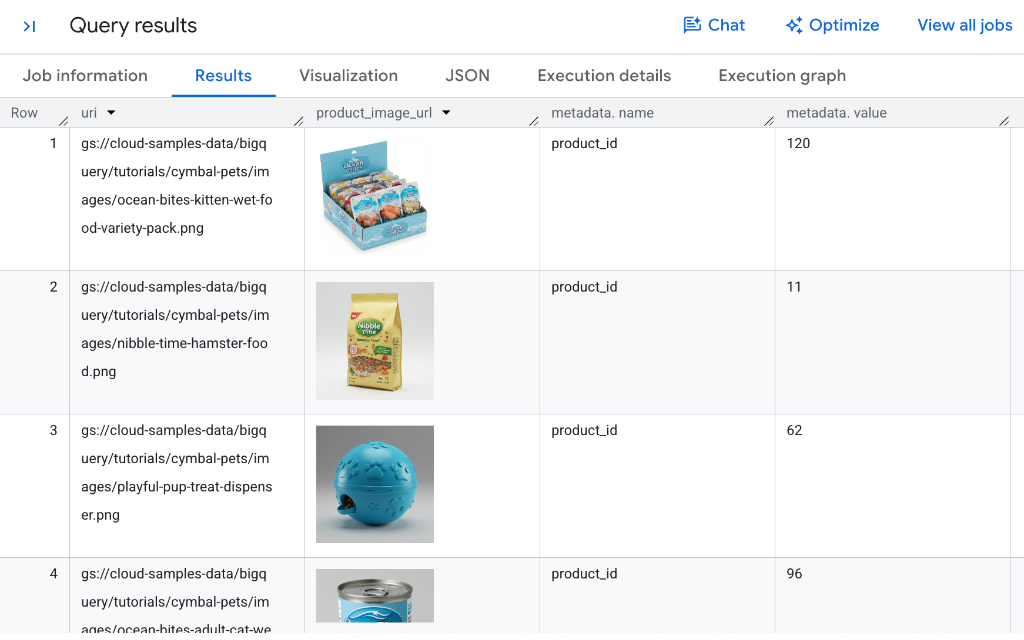
How multimodal filtering works
- On-the-fly Object References: While we create object references on the fly here using
OBJ.MAKE_REF(uri, 'us.conn'), you can also create and storeObjectRefcolumns directly in your BigQuery tables so they are immediately ready to use in analysis without needing theOBJ.MAKE_REFfunction in every query. - Deep visual object recognition: Notice how Gemini accurately identifies diverse packaging formats (such as the wet food variety pack box, dry hamster food bag, and canned cat food) while also recognizing edible snacks loaded inside toys like the blue treat dispenser.
- Row-level predicate evaluation: BigQuery evaluates the natural-language condition against each Cloud Storage image reference directly within the
WHEREclause. - Boolean filtering: Only records where Gemini evaluates the condition as
TRUEare returned in the result set.
7. Perform semantic joins across tables with AI.IF
Traditional relational database joins require exact key equality (such as products.product_id = images.product_id). However, real-world enterprise datasets often contain unstructured assets that lack explicit foreign keys.
Because AI.IF returns a boolean value, you can place it directly inside a SQL INNER JOIN ... ON clause to perform semantic joins.
Semantically join product descriptions with image assets
Suppose you want to match product descriptions from the products table with unlinked image files in product_images for products made by the brand Fluffy Buns.
Run the following query in your BigQuery Studio SQL tab (note that it takes a few minutes to complete):
SELECT
  products.product_id,
  products.product_name,
  products.description,
  products.brand,
  images.uri AS image_uri,
  OBJ.GET_READ_URL(OBJ.MAKE_REF(images.uri, 'us.conn')).url AS product_image_url
FROM
  `bigquery-public-data.cymbal_pets.products` AS products
INNER JOIN
  `bigquery-public-data.cymbal_pets.product_images` AS images
ON
  AI.IF(
    ('You will be provided an image of a pet product. ',
    'Determine if the image is of the following pet toy: ',
    products.product_name,
    products.description,
    OBJ.MAKE_REF(images.uri, 'us.conn')
    )
  )
WHERE
  products.category = "Toys" AND
  products.brand = "Fluffy Buns";
Your results will look similar to the following:
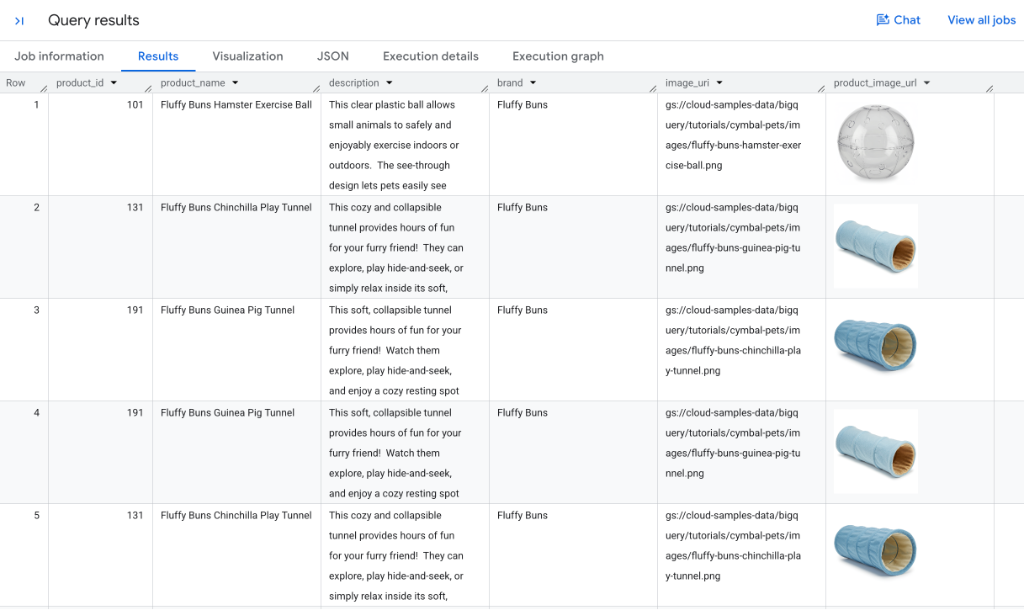
Understand semantic joins in SQL
- Cross-modal condition evaluation: For candidate record pairs, BigQuery sends both the textual metadata from
productsand the image reference (OBJ.MAKE_REF(...)) to Gemini. - Accurate visual matching: As shown in the results, the
Fluffy Buns Hamster Exercise Ballis matched with the clear plastic ball image, while theFluffy Buns Chinchilla Play TunnelandGuinea Pig Tunnelare matched with the blue plush tunnel photos. Because of standard SQLINNER JOINsemantics, a product can produce multiple rows in the output if it matches more than one image asset in the catalog (such as multiple photo angles or similar shots). - Inline image rendering: BigQuery Studio automatically renders the authorized read URLs in the
product_image_urlcolumn directly within your results grid for instant visual verification. - Unstructured entity resolution: This unlocks powerful entity resolution workflows across legacy catalogs, scraped datasets, and media archives without manual labeling or explicit foreign keys.
8. Synthesize insights across rows with AI.AGG
While functions like AI.SCORE, AI.CLASSIFY, and AI.IF evaluate individual rows (scalar operations), analyzing enterprise data often requires synthesizing patterns across multiple records.
The AI.AGG function is an aggregate function that uses natural-language instructions to summarize, cluster, or synthesize insights across thousands or millions of unstructured rows into a unified response.
Synthesize category summaries alongside traditional SQL metrics
AI.AGG integrates seamlessly with traditional SQL GROUP BY and aggregate functions. For example, you can calculate traditional metrics (such as item counts) right alongside a generative AI summary describing what the products in each category have in common.
Run the following query in BigQuery Studio:
SELECT
  category,
  COUNT(*) AS item_count,
  AI.AGG(
    ('Product: ', product_name, ' - Description: ', description),
    'Write a concise, one-sentence summary describing the common characteristics or purpose of the products in this category.'
  ) AS category_summary
FROM
  `bigquery-public-data.cymbal_pets.products`
GROUP BY
  category
ORDER BY
  item_count DESC;
Your results will look similar to the following:
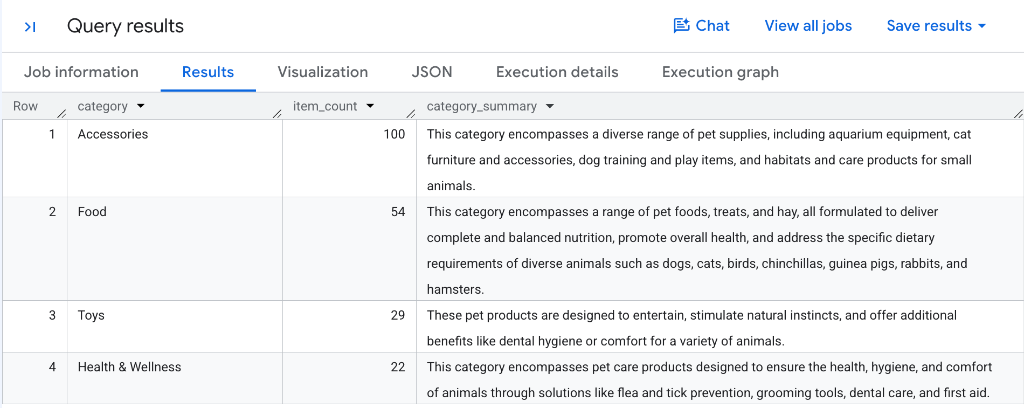
How AI.AGG aggregates unstructured data
- Hierarchical aggregation: BigQuery groups row data per category partition, constructs structured context windows, and uses Gemini to synthesize the entire collection of product records.
- Automated catalog synthesis: Notice how each category receives a distinct, accurate summary, such as
Accessoriescapturing habitats and training gear, orFoodhighlighting balanced nutrition across multiple animal species. - Hybrid quantitative and qualitative reporting: Combining standard aggregations like
COUNT(*)withAI.AGGproduces comprehensive catalog overviews in a single query without custom ETL pipelines. - Flexible partitioning: You can apply
AI.AGGacross any grouping dimension (such asGROUP BY brand,GROUP BY category, or across your entire table) to generate executive-level insights in seconds.
9. Accelerate queries with optimized mode and proxy models
When processing large datasets containing thousands or millions of rows, invoking a remote LLM for every single row can introduce latency and cost.
To solve this, BigQuery provides optimized mode for AI.IF and AI.CLASSIFY. Optimized mode utilizes proxy models and on-the-fly model distillation to deliver over 100x faster execution at reduced LLM token cost.
How optimized mode works
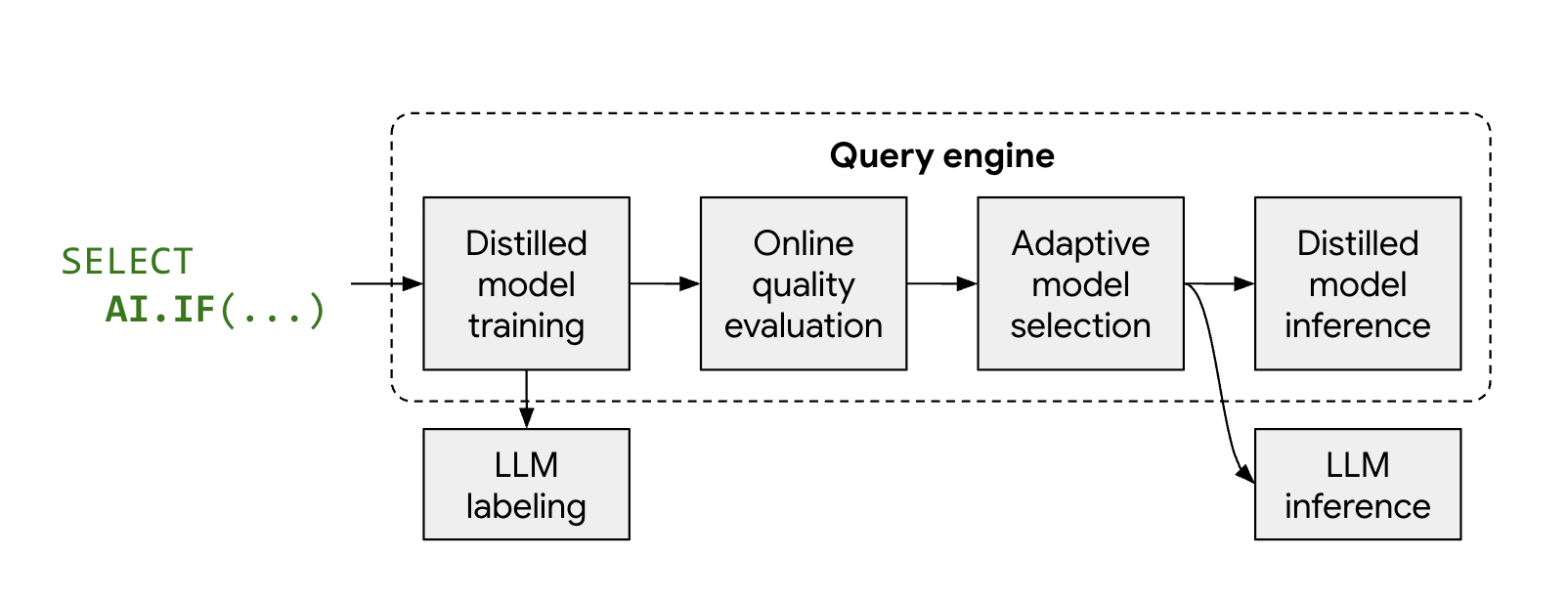
- Representative sampling and labeling: BigQuery automatically selects a representative sample of rows and obtains labels from Gemini.
- Distilled model training: BigQuery trains an ultra-lightweight proxy model (such as logistic regression) just-in-time on CPU using text embeddings as features.
- Quality verification: BigQuery evaluates the distilled model's accuracy against Gemini. If it meets quality thresholds, BigQuery promotes it to process the remainder of the dataset.
- Local high-speed inference: The proxy model evaluates the remaining rows locally with zero remote LLM token cost and ultra-low latency.
Run a baseline query without optimization
Because the sample bigquery-public-data.cymbal_pets.products catalog contains too few rows to trigger proxy model distillation, we will use the larger public dataset bigquery-public-data.bbc_news.fulltext (which contains over 2,200 news articles).
First, run the standard query without optimization to identify news articles about natural disasters:
SELECT
  title,
  body
FROM
  `bigquery-public-data.bbc_news.fulltext`
WHERE
  AI.IF(
    ('The following news story is about a natural disaster: ', body)
  );
Inspect baseline job details and token usage
After the baseline query completes, inspect the execution metrics:
- In the bottom results pane of BigQuery Studio, select the Job information tab.
- Scroll down to the Input token count and Output token count sections.
Your results will look similar to the following:
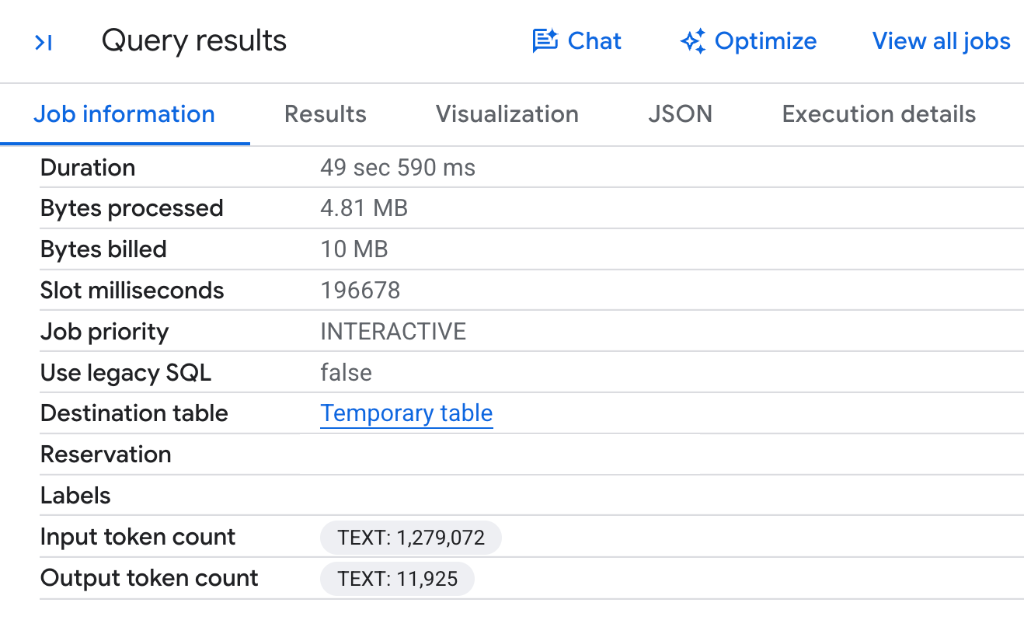
- Full dataset token consumption: Because BigQuery invokes the remote Gemini model for each row across all 2,225 news articles without proxy optimization, the query consumes 1,279,072 input tokens and 11,925 output tokens .
- No optimization section: Notice that there is no
Gen AI Function Optimizationsentry because standard execution evaluates every individual row against the remote LLM endpoint.
Execute the query with optimized mode
To reduce token consumption and leverage proxy model distillation, enable optimized mode by passing embeddings => AI.EMBED(...) and setting optimization_mode => 'MINIMIZE_COST':
SELECT
  title,
  body
FROM
  `bigquery-public-data.bbc_news.fulltext`
WHERE
  AI.IF(
    ('The following news story is about a natural disaster: ', body),
    embeddings => AI.EMBED(body, endpoint => 'text-embedding-005', task_type => 'CLASSIFICATION').result,
    optimization_mode => 'MINIMIZE_COST'
  );
Verify optimization and observe reduced token usage
After running the optimized query, switch to the BigQuery Studio Job information tab to observe how token usage and execution metrics compare:
- In the bottom results pane of BigQuery Studio, select the Job information tab.
- Scroll to the Gen AI Function Optimizations section, as well as the token counts.
Your results will look similar to the following:
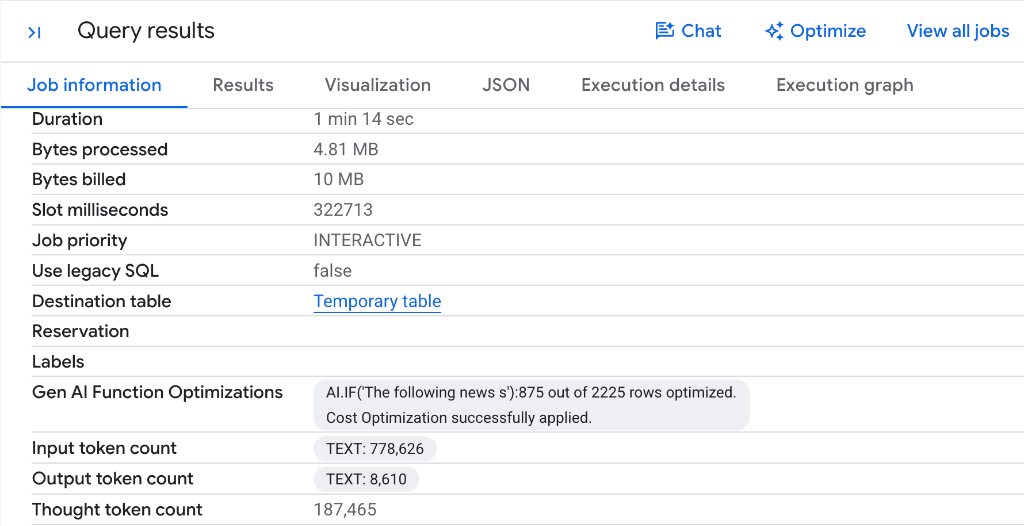
- Significant token reduction: Notice how the Input token count dropped from 1,279,072 tokens down to 778,626 tokens—saving 500,446 input tokens (nearly a 40% reduction) on a single query run! Similarly, there was a decrease in output tokens.
- Automatic proxy distillation: Notice the label
AI.IF('The following news s'): 875 out of 2225 rows optimized. Cost Optimization successfully applied.BigQuery sampled the dataset, labeled representative articles with Gemini, distilled a fast lightweight proxy classifier, and processed 875 out of 2,225 rows locally on CPU without calling remote LLM endpoints. - Direct cost savings: Because BigQuery managed AI functions are billed based on the volume of model tokens processed, reducing token consumption directly translates to lower query execution costs.
- Quality validation: BigQuery automatically verified the proxy model's accuracy against Gemini before promoting it to evaluate the remaining rows, ensuring classification quality is maintained.
Even greater token reduction and latency scaling on larger tables
While saving over 500,000 tokens on 2,225 rows is substantial, token reduction and performance gains are even higher on larger tables:
- Why token reduction scales with dataset size: For queries executed in BigQuery, proxy models are trained on-the-fly using an initial sample of about 1,000 rows labeled by the LLM. Once trained and validated, the proxy model replaces direct LLM calls across the remaining rows. For larger queries (such as typical 1-million-row datasets), this eliminates LLM invocations for the bulk of the data, consuming up to 400x fewer tokens and drastically cutting costs.
- Substantial latency acceleration: By shifting inference from specialized LLM hardware to ultra-lightweight proxy models running directly on standard database worker CPUs (leveraging precomputed Gemini embeddings), BigQuery reduces overall query runtimes by 30x to 100x.
10. Clean up resources
To clean up resources created during this codelab, run the following statement in a BigQuery Studio SQL tab to remove the Cloud Resource Connection:
DROP CONNECTION IF EXISTS `us.conn`;
Alternatively, if you created a temporary Google Cloud project exclusively for this tutorial, you can shut down the entire project in the Cloud Resource Manager.
11. Congratulations
Congratulations! You have successfully completed the codelab on Semantic Analysis in BigQuery with managed AI functions and SQL.
You mastered BigQuery's managed generative AI functions:
AI.SCORE: Ranked products by subjective criteria like giftability on a 1-10 scale using automatic prompt rewriting.AI.CLASSIFY: Categorized unstructured catalog items into target animal classifications.AI.IF(Multimodal Filtering): Filtered Cloud Storage image assets in SQLWHEREclauses based on visual content.AI.IF(Semantic Joins): Performed cross-modal joins in SQLONclauses to link textual product descriptions with image files.AI.AGG: Synthesized multi-row unstructured catalog text into a concise executive summary.- Optimized Mode & Proxy Models: Accelerated queries and minimized token costs using
optimization_mode => 'MINIMIZE_COST'with on-the-fly model distillation andAI.EMBED.
Learn more
- BigQuery Generative AI Overview
- BigQuery Managed AI Functions Guide
AI.SCORESQL Syntax DocumentationAI.CLASSIFYSQL Syntax DocumentationAI.IFSQL Syntax DocumentationAI.AGGSQL Syntax Documentation- Optimize AI functions with model distillation
- Google Cloud Blog: More than 100x faster and cheaper LLM-powered SQL queries with proxy models
- Google Cloud Blog: Deep dive into BigQuery AI.AGG function