
1. Introduction
BigQuery Graph, BigQuery Conversational Analytics, and the BigQuery Agent Analytics SDK are currently in Preview on Google Cloud. The BigQuery Agent Analytics Plugin is Generally Available (GA). Examples in this codelab use synthetic data.
As autonomous AI agents take on more operational responsibilities (evaluating loan applications, managing marketing budgets, approving access requests), organizations must be able to audit and explain their decisions. Reconstructing the exact context, alternatives considered, and final rationale of an agent's decision is essential for compliance, risk management, and operational trust.
This codelab uses the BigQuery Agent Analytics SDK to transform raw agent event logs into an Agent Context Graph — a queryable graph in BigQuery Graph of agent decisions — on a schedule, without any external graph database or ETL pipeline.
Key terms
- Agent Decision Trace — the decision-level evidence pulled from an agent's own runs: the options it weighed, the data it touched, and the outcome it committed.
- Agent Context Graph — the typed, queryable graph in BigQuery Graph that those traces are materialized into. It is the agent-scoped instance of the industry context graph concept (the durable, time-linked layer of decision context that agents both produce and consume); the "Agent" qualifier scopes it to your own agents' runs rather than an enterprise-wide context layer.
In this codelab, bqaa context-graph extracts the agent's decision traces from your agent_events and materializes them into an Agent Context Graph you can query with GQL — following the industry pattern where context graphs are built from decision traces.
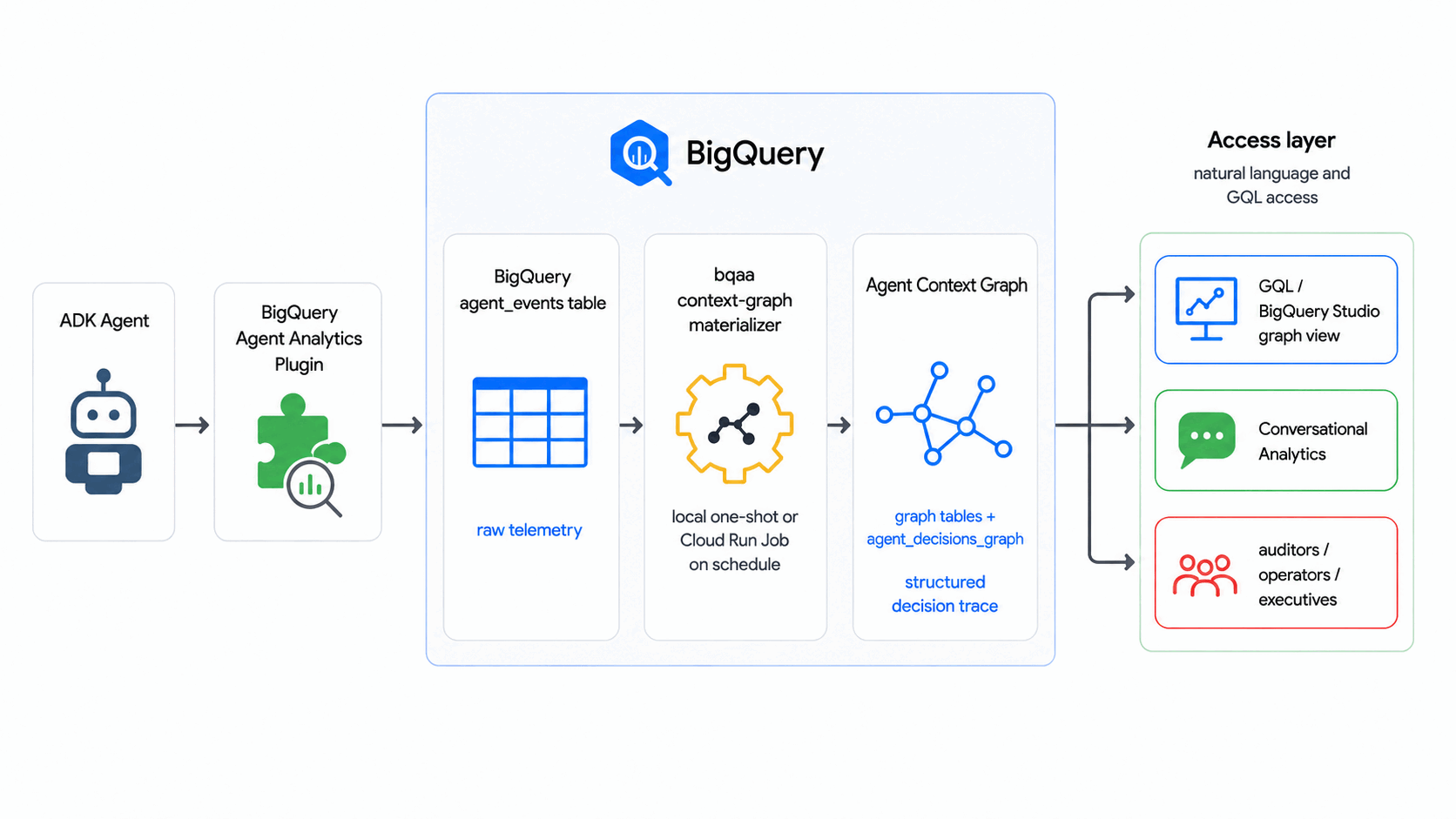
What you'll build
- An Agent Context Graph (with BigQuery Graph) that models a generic agent decision flow: a request comes in, the agent weighs options, an outcome is committed.
- A populated
agent_eventstable with a synthetic event corpus. - A working
bqaa context-graphrun that fills the graph from those events. - An audit-style GQL query that traces a single decision end-to-end.
What you'll learn
- How the BigQuery Agent Analytics Plugin writes to
agent_events. - How a context graph is defined by just two declarative artifacts — a table DDL and a
CREATE PROPERTY GRAPHschema. - How to run
bqaa context-graphagainst a BigQuery Graph. - How to query a graph using GQL.
- The production-grade capabilities the SDK supports for enterprise deployments.
What you'll need
- A Google Cloud project with billing enabled.
- Owner or Editor role on that project. You will create a BigQuery dataset and grant IAM.
- The
gcloudCLI installed and authenticated, or access to Cloud Shell. - Python 3.10 or newer.
- Familiarity with BigQuery SQL. GQL knowledge is not required.
This codelab is for developers of all levels, including those new to BigQuery Graph.
The resources created in this codelab cost very little, and the final step tears everything down so you are not billed for an idle dataset.
Estimated duration: This codelab takes approximately 35 minutes to complete.
2. Before you begin
Pick a project and region
Open Cloud Shell or a local terminal:
export PROJECT_ID="your-project-id"
export REGION="us-central1"
export DATASET="agent_analytics_demo"
gcloud config set project "$PROJECT_ID"
The single DATASET variable holds both the raw agent_events table and the materialized graph tables. Using one dataset keeps the codelab simple. Production deployments often split events and graph into separate datasets so IAM can be granted narrowly per dataset.
Enable the required APIs
Run the following command to enable the APIs this codelab uses:
gcloud services enable \
    bigquery.googleapis.com \
    aiplatform.googleapis.com \
    --project="$PROJECT_ID"
The aiplatform.googleapis.com API is required because the SDK's default extraction path calls BigQuery's AI.GENERATE function. If you later switch to deterministic extraction with --extraction-mode=compiled-only, this API is no longer needed.
Create the BigQuery dataset
Create the dataset that will hold both the raw agent_events table and the materialized graph tables:
bq --location=US mk --dataset "$PROJECT_ID:$DATASET"
You should see a success message:
Dataset 'your-project-id:agent_analytics_demo' successfully created.
If the dataset already exists, the command errors harmlessly. Leave it in place.
3. Install the SDK
Set up a Python virtual environment and install the SDK from PyPI:
python3 -m venv .venv
source .venv/bin/activate
pip install --upgrade pip
pip install bigquery-agent-analytics
The bigquery-agent-analytics package pulls in the BigQuery client library, so this is the only install you need for the whole codelab.
Verify the install:
bqaa context-graph --help | head -8
You should see the CLI banner.
Authenticate
If you are on a workstation:
gcloud auth login
gcloud auth application-default login
Cloud Shell users can skip this step; credentials are already configured.
4. Get the codelab artifacts
The codelab needs just two ready-to-use artifacts: the table DDL (the physical graph tables) and the property-graph schema (CREATE PROPERTY GRAPH). You do not author either yourself; the codelab uses them as-is, and the README in the artifacts folder explains how to adapt them for your own decision domain.
The property-graph schema is the single source of truth for what the graph contains. You apply it to BigQuery once; from then on the deployed graph itself is the contract. When you materialize, bqaa context-graph reads the graph's definition back from BigQuery's INFORMATION_SCHEMA.PROPERTY_GRAPHS (together with the schemas of the tables it references) to work out which entities and relationships to extract and where to write them — so no SQL file is ever passed to the materializer.
This codelab is self-contained, so there is nothing to download. The command below writes the context graph DDL into a working directory. Its contents are identical to the artifacts shipped in examples/context_graph/codelab/.
Create the working directory:
mkdir -p ~/context-graph-codelab
cd ~/context-graph-codelab
Write the context graph DDL (context_graph_ddl.sql). The ${PROJECT_ID} / ${DATASET} markers are filled in when you apply the file in the next step.
cat > context_graph_ddl.sql <<'SQL'

-- Node and edge table DDL for the context-graph codelab.
--
-- `bqaa context-graph` writes into these tables on every run.
-- `session_id` and `extracted_at` are SDK metadata columns that
-- `bqaa context-graph` fills automatically; they are required on
-- every table behind the graph.
CREATE TABLE IF NOT EXISTS `${PROJECT_ID}.${DATASET}.decision_request` (
  request_id STRING, request_text STRING, requested_at TIMESTAMP,
  session_id STRING, extracted_at TIMESTAMP
);
CREATE TABLE IF NOT EXISTS `${PROJECT_ID}.${DATASET}.decision_option` (
  option_id STRING, option_label STRING, confidence FLOAT64,
  session_id STRING, extracted_at TIMESTAMP
);
CREATE TABLE IF NOT EXISTS `${PROJECT_ID}.${DATASET}.decision_outcome` (
  outcome_id STRING, status STRING, rationale STRING, decided_at TIMESTAMP,
  session_id STRING, extracted_at TIMESTAMP
);
CREATE TABLE IF NOT EXISTS `${PROJECT_ID}.${DATASET}.evaluates_option` (
  request_id STRING, option_id STRING,
  session_id STRING, extracted_at TIMESTAMP
);
CREATE TABLE IF NOT EXISTS `${PROJECT_ID}.${DATASET}.resulted_in` (
  request_id STRING, outcome_id STRING,
  session_id STRING, extracted_at TIMESTAMP
);

-- Graph DDL for the context-graph codelab.
--
-- Models a generic agent decision flow:
--   DecisionRequest -> evaluatesOption -> DecisionOption
--   DecisionRequest -> resultedIn       -> DecisionOutcome
CREATE OR REPLACE PROPERTY GRAPH `${PROJECT_ID}.${DATASET}.agent_decisions_graph`
  NODE TABLES (
    `${PROJECT_ID}.${DATASET}.decision_request` AS decision_request
      KEY (request_id)
      LABEL DecisionRequest PROPERTIES (request_id, request_text, requested_at),
    `${PROJECT_ID}.${DATASET}.decision_option` AS decision_option
      KEY (option_id)
      LABEL DecisionOption PROPERTIES (option_id, option_label, confidence),
    `${PROJECT_ID}.${DATASET}.decision_outcome` AS decision_outcome
      KEY (outcome_id)
      LABEL DecisionOutcome PROPERTIES (outcome_id, status, rationale, decided_at)
  )
  EDGE TABLES (
    `${PROJECT_ID}.${DATASET}.evaluates_option` AS evaluates_option
      KEY (request_id, option_id)
      SOURCE KEY (request_id) REFERENCES decision_request (request_id)
      DESTINATION KEY (option_id) REFERENCES decision_option (option_id)
      LABEL evaluatesOption,
    `${PROJECT_ID}.${DATASET}.resulted_in` AS resulted_in
      KEY (request_id, outcome_id)
      SOURCE KEY (request_id) REFERENCES decision_request (request_id)
      DESTINATION KEY (outcome_id) REFERENCES decision_outcome (outcome_id)
      LABEL resultedIn
  );
SQL
Confirm the file is in place:
ls
You should see one file:
context_graph_ddl.sql
The decision flow they describe has three node types and two heterogeneous edges:
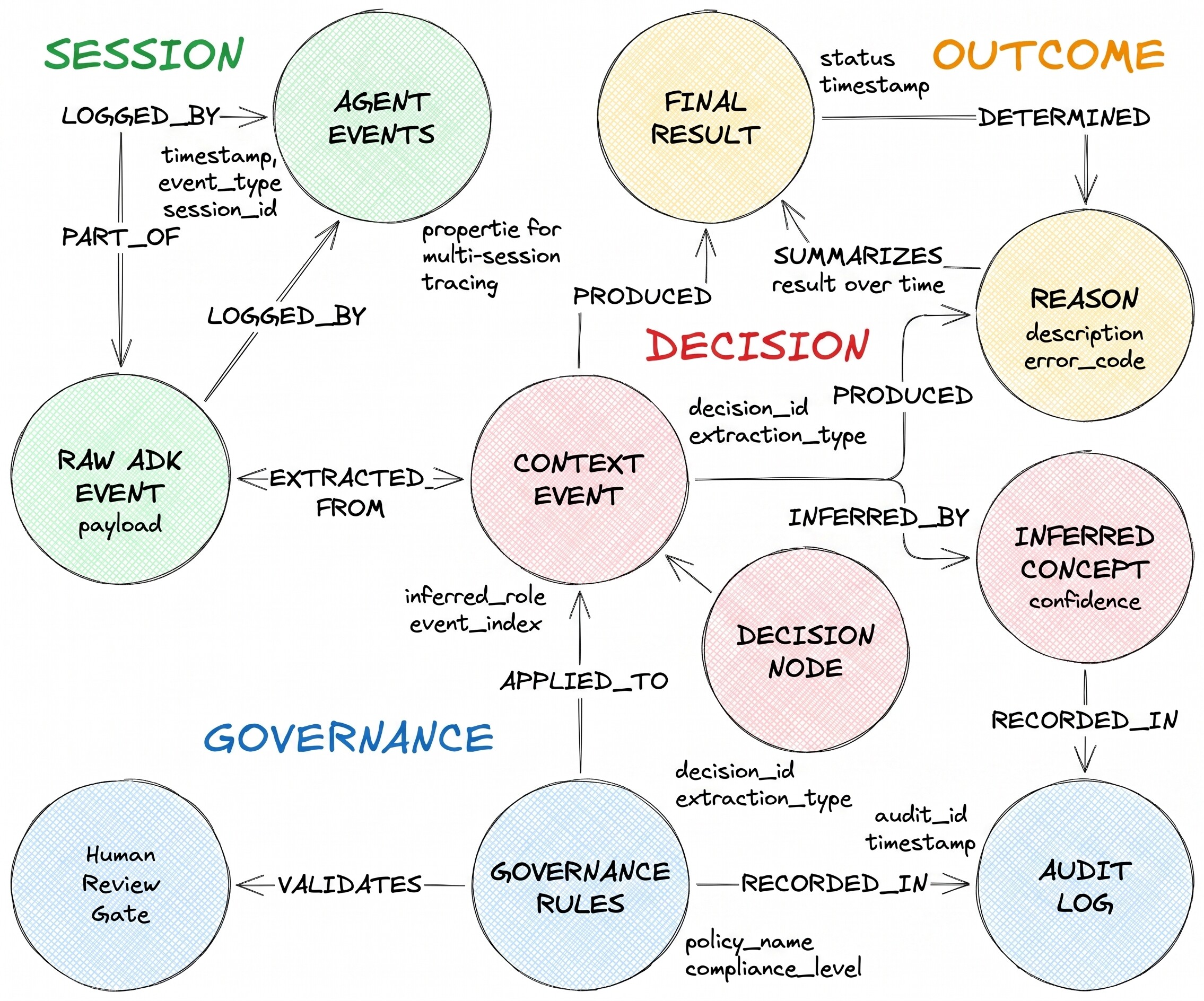
DecisionRequest is the question the agent received. DecisionOption is one alternative the agent considered. DecisionOutcome records the committed choice and the rationale.
5. Apply the property graph schema
bqaa context-graph writes into BigQuery tables, so they must exist before the first run. context_graph_ddl.sql creates the five tables first and then the property graph that references them (BigQuery rejects a CREATE PROPERTY GRAPH that points at tables that do not yet exist), so a single apply sets up everything:
envsubst < context_graph_ddl.sql | bq query --use_legacy_sql=false
You should see five CREATE TABLE results and one CREATE PROPERTY GRAPH result. The DDL is idempotent; you can re-run it safely.
That is the only schema work you do — and the only time these SQL files are used. BigQuery now records your graph's definition, and bqaa context-graph reads it back from INFORMATION_SCHEMA.PROPERTY_GRAPHS by name. There is no separate file to pass to the materializer, and what you query with GQL and what gets materialized can never drift apart: they are the same deployed graph.
6. Generate sample agent events
In production, the BigQuery Agent Analytics Plugin captures events automatically as your ADK agent runs. This snippet is for reference only — you do not run it in this codelab:
from google.adk.plugins import BigQueryAgentAnalyticsPlugin

plugin = BigQueryAgentAnalyticsPlugin(
    project_id="your-project-id",
    dataset_id="agent_analytics_demo",
)
runner = Runner(agent=root_agent, plugins=[plugin])
For this codelab you use a small synthetic event generator that writes the same shape of rows directly to agent_events. Run it:
bqaa seed-events \
    --project-id "$PROJECT_ID" \
    --dataset-id "$DATASET" \
    --sessions 5
The command prints a JSON report. For 5 sessions you should see "events_generated": 30, "events_inserted": 30, and "ok": true.
Preview the corpus at a glance — how many sessions, how many events, and the time range they span — in one row:
bq query --use_legacy_sql=false \
    "SELECT COUNT(DISTINCT session_id) AS sessions, COUNT(*) AS events, MIN(timestamp) AS earliest_event, MAX(timestamp) AS latest_event FROM \`$PROJECT_ID.$DATASET.agent_events\`"
For the default 5-session run this shows 5 sessions and 30 events spanning a few minutes. (Seed the realistic scenario below and the same query reports ~100 sessions across roughly three days.)
Verify the events landed:
bq query --use_legacy_sql=false \
    "SELECT event_type, COUNT(*) AS n FROM \`$PROJECT_ID.$DATASET.agent_events\` GROUP BY event_type ORDER BY n DESC"
You should see 25 TOOL_COMPLETED rows and 5 AGENT_COMPLETED rows (each session emits one submit_request, three evaluate_option, one commit_outcome, and one closing AGENT_COMPLETED — five tool events plus one agent terminator per session). The AGENT_COMPLETED rows are the session terminators that bqaa context-graph keys on for terminal-event detection.
Optional: realistic-scale data
The 5-session corpus above is intentionally tiny so the first run is fast and cheap. When you want production-shaped data — multiple agents and users spread over several days, with failed, orphaned, and truncated sessions — use the decision-realistic scenario. It defaults to 100 sessions over a 72-hour window; the first-run path above is unchanged.
bqaa seed-events \
    --project-id "$PROJECT_ID" \
    --dataset-id "$DATASET" \
    --scenario decision-realistic \
    --sessions 100 \
    --seed 42
The JSON report's session_outcome_counts shows the mix — roughly {"success": 70, "failed": 10, "orphaned": 10, "truncated": 10}.
Confirm the outcome distribution by classifying each session from its rows (orphaned = no AGENT_COMPLETED; failed = AGENT_COMPLETED with status = 'error'; truncated = any row with is_truncated = true; otherwise success). A first pass classifies each session, then a second aggregates per outcome:
bq query --use_legacy_sql=false \
    "WITH per_session AS (SELECT session_id, CASE WHEN COUNTIF(event_type = 'AGENT_COMPLETED') = 0 THEN 'orphaned' WHEN COUNTIF(event_type = 'AGENT_COMPLETED' AND status = 'error') > 0 THEN 'failed' WHEN COUNTIF(is_truncated) > 0 THEN 'truncated' ELSE 'success' END AS outcome FROM \`$PROJECT_ID.$DATASET.agent_events\` GROUP BY session_id) SELECT outcome, COUNT(*) AS sessions FROM per_session GROUP BY outcome ORDER BY outcome"
You should see roughly 70 success, 10 failed, 10 orphaned, and 10 truncated (plus the 5 successful sessions from the first-run corpus if you seeded that earlier in the same dataset).
The 10 orphaned sessions never emitted AGENT_COMPLETED, so the default bqaa context-graph run skips them (it materializes only terminal-event-closed sessions). To surface them as session_orphaned instead of silently retrying forever, add --max-session-age-hours when you run it — see --max-session-age-hours in Take it to production.
7. Materialize the context graph
bqaa context-graph reads the raw agent_events, then derives what to extract directly from your deployed graph: it reads the CREATE PROPERTY GRAPH definition you applied in Apply the property graph schema back from BigQuery's INFORMATION_SCHEMA.PROPERTY_GRAPHS, joins it with the schemas of the tables it references, works out the entities, relationships, and column types, and populates the graph tables. You point it at the deployed graph by name with --graph agent_decisions_graph — there is no SQL file to pass.
Run
bqaa context-graph locally:
bqaa context-graph \
    --project-id "$PROJECT_ID" \
    --dataset-id "$DATASET" \
    --graph agent_decisions_graph \
    --lookback-hours 24 \
    --format json
You should see a structured JSON report:
{
  "run_id": "...",
  "sessions_discovered": 5,
  "sessions_materialized": 5,
  "sessions_failed": 0,
  "rows_materialized": {
    "DecisionRequest": 5,
    "DecisionOption": 15,
    "DecisionOutcome": 5
  },
  "ok": true
}
ok: true indicates bqaa context-graph found five completed sessions, extracted the decision flow from each via AI.GENERATE, and wrote the corresponding rows into the graph tables. Deterministic extraction (--extraction-mode=compiled-only, covered below) returns the same report shape — same fields, same ok: true — it just skips the AI.GENERATE calls.
Troubleshooting: empty extraction
If you see ok: false with error_code = "empty_extraction", the most common cause is that the aiplatform.googleapis.com API has not propagated yet, or your account is missing roles/aiplatform.user. Wait a minute and retry, or grant the role:
USER_EMAIL=$(gcloud auth list --filter=status:ACTIVE --format="value(account)")
gcloud projects add-iam-policy-binding "$PROJECT_ID" \
    --member="user:$USER_EMAIL" --role="roles/aiplatform.user"
Then re-run the bqaa context-graph command above.
Verify the graph has rows:
bq query --use_legacy_sql=false \
    "SELECT COUNT(*) AS n FROM \`$PROJECT_ID.$DATASET.decision_request\`"
You should see five rows. Across the five sessions that is 25 graph nodes in all — 5 DecisionRequest, 15 DecisionOption, and 5 DecisionOutcome — joined by 15 evaluatesOption edges and 5 resultedIn edges (one decision web per session).
Two ways to extract decisions from events
bqaa context-graph offers two extraction paths. Pick the one that matches your workload:
- Default extraction. The easiest path. Uses BigQuery's
AI.GENERATEto read event content and infer entities and relationships. Works against any event shape with no extra code. This is what the codelab uses. - Deterministic extraction (
--extraction-mode=compiled-only). The lower-cost, audit-friendly path. Uses a small Python reference extractor you write once for your domain. No Vertex AI calls, no per-token charges, fully reproducible output. Production deployments choose this when cost predictability or strict reproducibility matters.
The context graph deployment guide is the reference for both paths, including the IAM details and how to author a reference extractor.
8. Query the decision trace
With the graph populated, you can answer the audit question directly. Take a concrete one: "For each request, what options did the agent weigh, and how did it resolve?" In GQL that is a single traversal across the request, its options, and its outcome.
Write the query to a file (traversal.sql). The ${DATASET} marker is filled in when you run it in the next step:
cat > traversal.sql <<'SQL'
SELECT *
FROM GRAPH_TABLE (
  ${DATASET}.agent_decisions_graph
  MATCH
    (req:DecisionRequest) -[eo:evaluatesOption]-> (opt:DecisionOption),
    (req)                 -[ri:resultedIn]->      (out:DecisionOutcome)
  COLUMNS (
    req.request_id   AS request,
    req.request_text AS question,
    opt.option_label AS considered,
    opt.confidence   AS score,
    out.status       AS outcome,
    out.rationale    AS rationale
  )
);
SQL
Run it:
envsubst < traversal.sql | bq query --use_legacy_sql=false --max_rows=20
You should see fifteen rows: three options per request, five requests. Each row shows the request, the option the agent considered, its confidence score, the final outcome, and the rationale.
For a single decision's full picture, filter by request_id to get the row set an audit team needs: the question that came in, the options that were weighed (with scores), and the rationale that was committed.
Visualize the graph in BigQuery Studio
BigQuery Studio can also render the graph visually. Open BigQuery Studio in the BigQuery console, run the path query below, then switch the results pane to the Graph tab to see the decision web. With the realistic-scale corpus this gives you a visual map of requests, options, and outcomes:
GRAPH agent_analytics_demo.agent_decisions_graph
MATCH p = (a)-[e]->(b)
RETURN TO_JSON(p) AS path_json
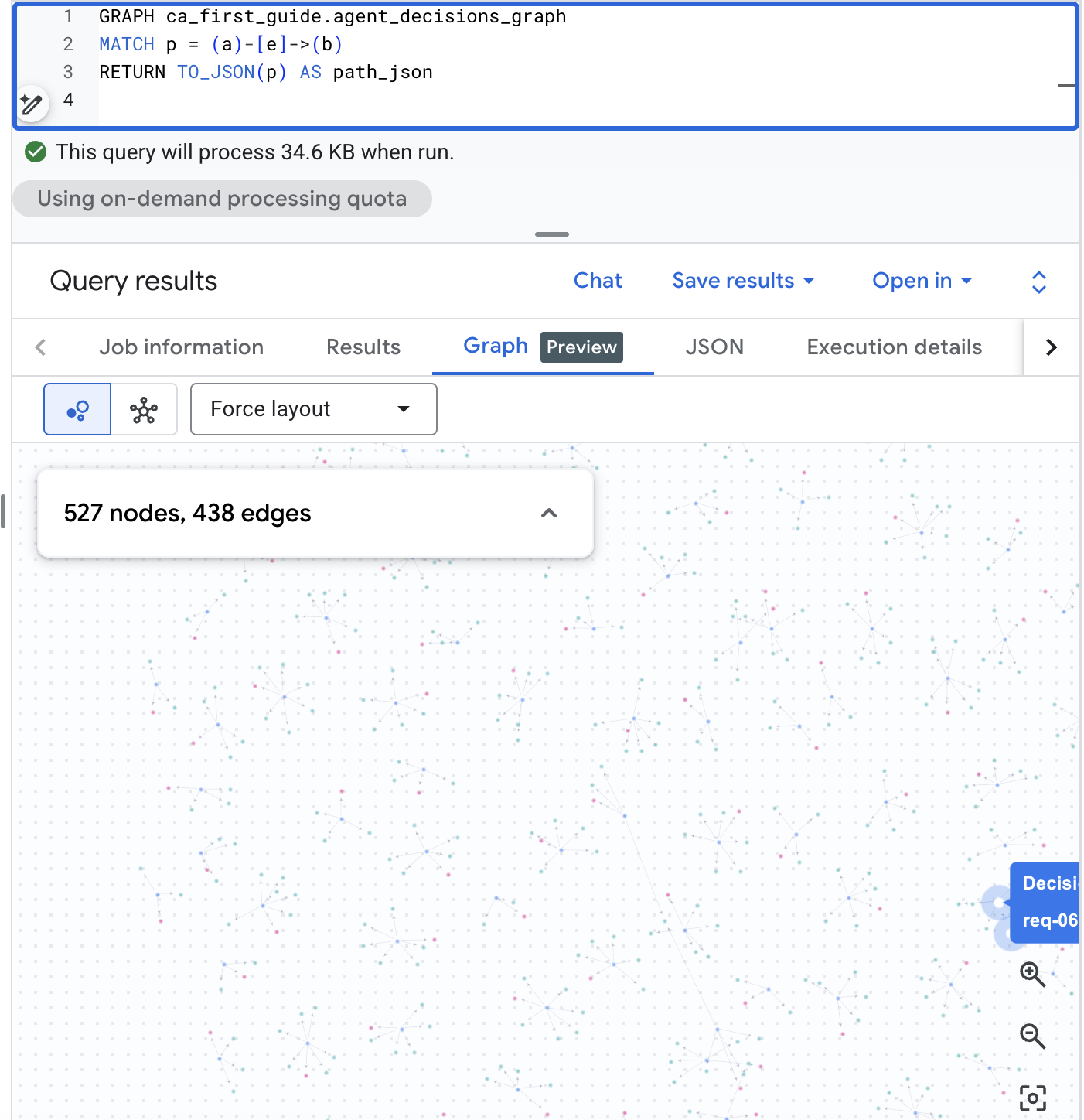
Ask the same question in plain English
Not every audit reader writes GQL. With BigQuery Conversational Analytics (Preview), your compliance team can ask the same kind of question in natural language and get back a structured answer card — no query syntax, no joins to learn.
Register the agent_decisions_graph (along with the agent_events and decision tables) as a Conversational Analytics data source, then ask the audit question directly:
Audit question (plain English): "Which requests never reached a committed outcome?"
Conversational Analytics reasons over the graph, writes the SQL for you, and replies in plain English with a supporting table — here, that every recorded request reached a committed outcome:
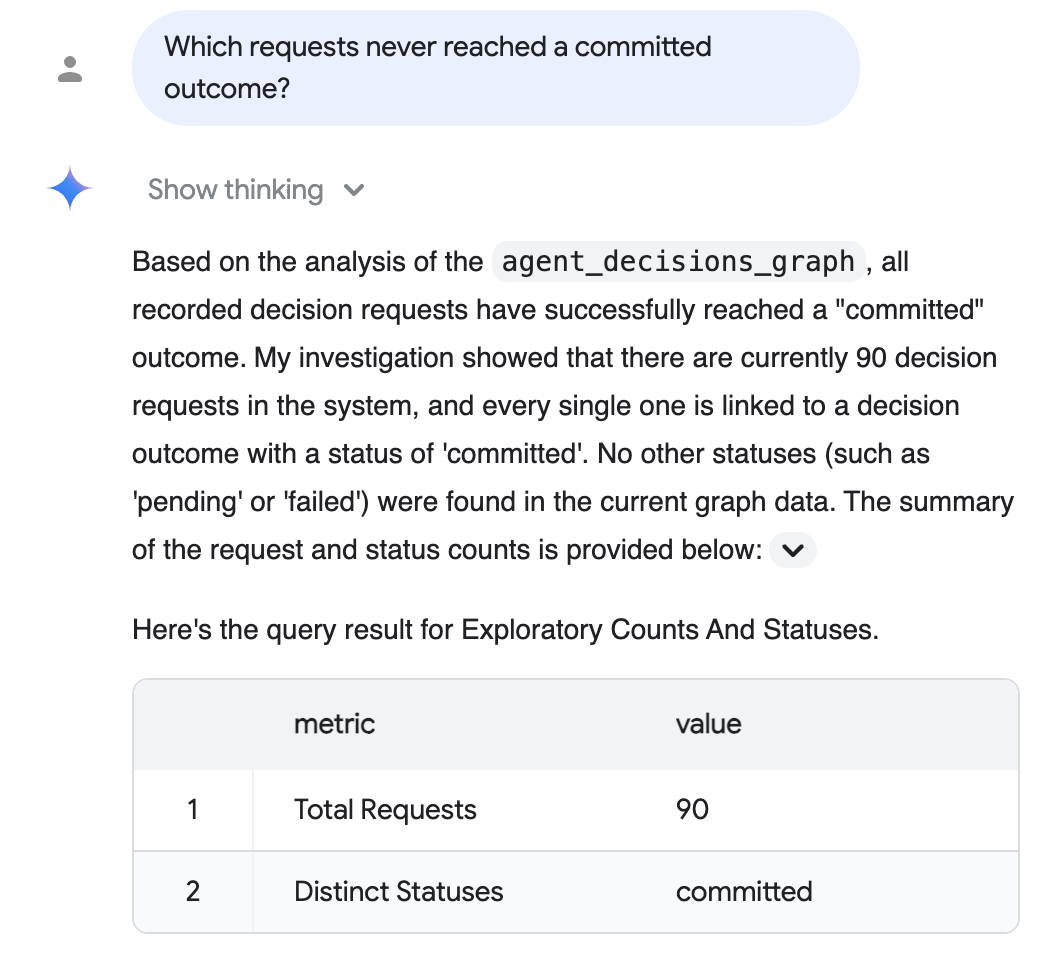
The reply above reflects the realistic-scale corpus from the optional realistic-scale data step (90 materialized requests, all committed); your exact numbers depend on which corpus you seeded, and the default 5-session run shows five.
See the Conversational Analytics documentation for setup.
9. Take it to production
The local run above uses default behavior, which already covers the basics for real deployments: every run leaves an audit trail (structured Cloud Logging plus a per-run row in a state table in your dataset), transient failures retry automatically, and progress only advances on fully-succeeded sessions, so there is no double-counting.
Production controls — deterministic extraction (--extraction-mode=compiled-only), stuck-session detection (--max-session-age-hours), one-shot replay of a past window (--backfill --from / --to, tracked separately from the regular refresh so it cannot disturb the live schedule), and per-run batch bounding (--max-sessions) — are opt-in flags you reach for when you need them. The context graph deployment guide documents each one with the full IAM matrix and recommended schedules.
10. Clean up
Tear down what you created so you do not get billed for an idle dataset:
bq rm -r -f --dataset "$PROJECT_ID:$DATASET"
That single command removes the dataset, the agent events, the graph tables, and the state table together.
11. Congratulations
Congratulations! You've turned raw agent event logs into a queryable Agent Context Graph and traced a single decision end-to-end, with no external graph database or ETL pipeline.
The same pattern applies wherever an agent makes consequential decisions: credit underwriting, prior authorization, marketing budget moves, procurement, customer service, and internal IT. To build your own Agent Context Graph, copy the codelab artifacts as a starting point, adapt the two declarative files (table DDL + the CREATE PROPERTY GRAPH schema) to your domain, and apply them to BigQuery — bqaa context-graph --graph reads the deployed graph back from INFORMATION_SCHEMA and derives the rest.
What you've learned
- How to create a BigQuery dataset and apply a property-graph schema describing an agent decision domain.
- How to populate
agent_eventswith a synthetic event corpus. - How to run
bqaa context-graphto extract the agent's decision traces into an Agent Context Graph from those events, reading the graph definition back fromINFORMATION_SCHEMA. - How to query the resulting graph in GQL and read the audit-style answer.
Reference docs
- BigQuery Agent Analytics SDK repository
- Codelab artifacts and adaptation guide
- Context graph deployment guide: required APIs, IAM matrix, recommended schedules, Cloud Monitoring alert queries, and the Terraform module.
- BigQuery Graph documentation (Preview).
- BigQuery Conversational Analytics documentation (Preview).