

1. 소개
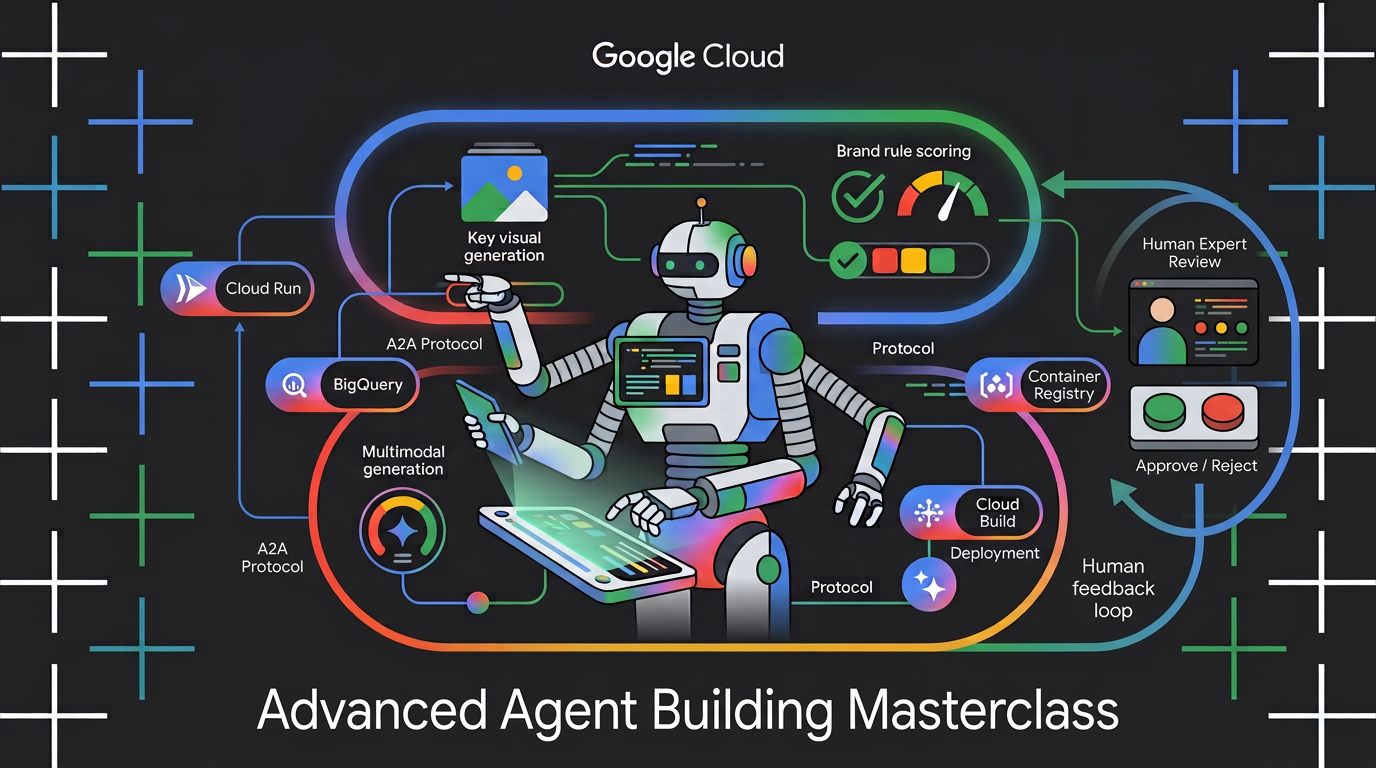
원시 주제 개요를 가져와 참여도가 높은 소셜 저작물 생성을 오케스트레이션하는 멀티모달 멀티 에이전트 엔진을 빌드하는 방법을 알아보세요. Google의 에이전트 개발 키트 (ADK)와 Agent2Agent (A2A) 프로토콜을 사용하여 자율 마이크로 에이전트를 구성하고, 브랜드 규칙을 재사용 가능한 에이전트 기술로 패키징하고, 에이전트 서비스를 Cloud Run에 배포하고, BigQuery AI 함수를 사용하여 생성된 주요 시각적 요소의 브랜드 규정 준수 점수를 매깁니다.
실습할 내용
이 Codelab에서는 다음 작업을 수행하는 방법을 알아봅니다.
- 결정론적 그래프 워크플로를 사용하여 여러 ADK 에이전트를 조정합니다.
- 필요할 때만 로드되는 상담사 기술로 브랜드 가이드라인을 패키징합니다.
- 출력을 아티팩트로 저장하는 이미지 생성 도구를 에이전트에 장착합니다.
- 에이전트를 A2A 서비스로 노출하고 다른 에이전트에서 원격 노드로 호출합니다.
- Visual Director를 Cloud Run에 배포하고 A2A를 통해 워크플로를 호출합니다.
- AI 함수를 사용하여 BigQuery에서 생성된 주요 시각적 요소의 브랜드 적합성을 평가합니다.
필요한 항목
- 웹브라우저 (예: Chrome)
- 결제가 사용 설정된 Google Cloud 계정 및 Google Cloud 프로젝트
2. 시작하기 전에
Google Cloud 프로젝트 만들기
- Google Cloud 콘솔의 프로젝트 선택기 페이지에서 Google Cloud 프로젝트를 선택하거나 만듭니다.
- Cloud 프로젝트에 결제가 사용 설정되어 있는지 확인합니다. 프로젝트에 결제가 사용 설정되어 있는지 확인하는 방법을 알아보세요.
Cloud Shell 시작
Google Cloud Shell을 사용하여 코드를 다운로드하고, 설정 스크립트를 실행하고, 애플리케이션을 배포합니다.
- 브라우저에서 Google Cloud Shell을 엽니다 (또는 Google Cloud 콘솔 상단에서 Cloud Shell 활성화를 클릭).
https://shell.cloud.google.com/ - 터미널에 다음을 붙여넣어 환경에서 Google Cloud 프로젝트 ID 및 리전 (예:
us-central1)을 구성합니다 (export PROJECT_ID="<YOUR_PROJECT_ID>" export REGION="<YOUR_REGION>" gcloud config set project $PROJECT_ID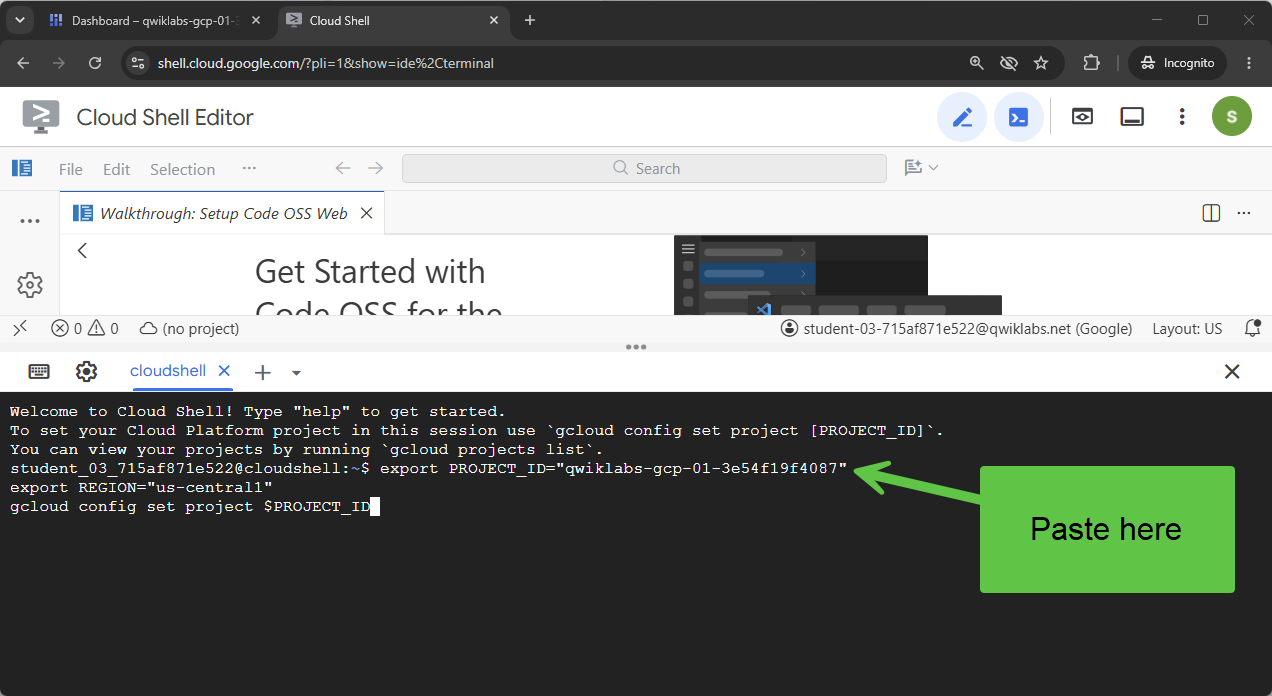 다음과 유사한 메시지가 표시됩니다.
Your active configuration is: [cloudshell-####] Updated property [core/project] - 프로젝트에 필요한 Google Cloud API를 사용 설정합니다.
gcloud services enable \
  compute.googleapis.com \
  cloudresourcemanager.googleapis.com \
  aiplatform.googleapis.com \
  storage.googleapis.com \
  storage-component.googleapis.com \
  bigqueryconnection.googleapis.com \
  bigquery.googleapis.com \
  run.googleapis.com \
  secretmanager.googleapis.com \
  cloudbuild.googleapis.com \
  artifactregistry.googleapis.com \
  iap.googleapis.com \
  iam.googleapis.com
저장소 클론
Codelab을 시작할 수 있는 코드 템플릿이 있습니다. 비교적 작지만 이 파일이 있는 GitHub 저장소는 상당히 큽니다. 클론 속도를 높이고 디스크 공간을 절약하기 위해 일반적으로 --filter=blob:none 옵션과 git sparse-checkout 및 기타 명령어를 사용하여 git clone를 사용합니다.
매우 복잡해 보이지만 Antigravity가 모든 작업을 대신해 줄 수 있습니다.
먼저 Antigravity CLI가 문제를 바로 해결할 수 있도록 구성하고 실행해 보겠습니다.
Cloud Shell에서 다음 명령어를 실행합니다.
source <(curl -fsSL https://github.com/GoogleCloudPlatform/devrel-demos/raw/refs/heads/vladkol/cloud-shell-configure-agy/codelabs/labs-scripts/bwg-multi-agent-pitch-generator/cloud_shell_configure_agy.sh)
이 명령어는 Antigravity CLI를 구성하고 동일한 터미널에서 실행합니다. Antigravity CLI를 종료하면 Cloud Shell 프롬프트로 돌아갑니다.

저장소에는 codelabs/bwg-multi-agent-pitch-generator 폴더만 있으면 됩니다. Antigravity에 해당 폴더만 다운로드하여 ~/devrel-demos/codelabs/bwg-multi-agent-pitch-generator/에 로컬로 저장해 달라고 요청해 보겠습니다.
Antigravity CLI에 다음 작업을 요청합니다.
Download files from under `https://github.com/GoogleCloudPlatform/devrel-demos/tree/main/codelabs/bwg-multi-agent-pitch-generator`
to folder `~/devrel-demos/codelabs/bwg-multi-agent-pitch-generator/`.
If `devrel-demos` folder already exists, rename it with a `.backup` suffix.

Antigravity가 작업을 실행합니다. 몇 가지 명령어를 실행할 권한을 요청합니다. 코드가 다운로드되면 /exit 명령어를 실행하여 Antigravity CLI를 종료합니다.
/exit
저장소 작업공간 열기
이제 Cloud Shell에서 코드 작업공간을 열어 보겠습니다. Cloud Shell 터미널에서 다음 명령어를 실행합니다.
cd ~/devrel-demos/codelabs/bwg-multi-agent-pitch-generator/
cloudshell workspace .
설정 스크립트 실행
이 환경을 더 원활하게 만들려면 저장소에서 설정 스크립트를 실행하세요. 환경 변수를 구성하고, agents-cli를 설치하고, 아티팩트용 Cloud Storage 버킷을 만들고, BigQuery Cloud 리소스 연결을 만들고, 자동 재시도로 서비스 계정에 필요한 IAM 권한을 부여합니다.
설정 스크립트는 또한 두 에이전트 모두에 필요한 변수(GOOGLE_CLOUD_PROJECT, GOOGLE_CLOUD_REGION, GOOGLE_CLOUD_LOCATION, GOOGLE_GENAI_USE_VERTEXAI)를 위에서 내보낸 PROJECT_ID 및 REGION에서 파생하는 작은 도우미인 setenv.sh를 호출합니다. 또한 나중에 복구할 수 있도록 홈 디렉터리의 .env 파일에 두 값을 저장합니다.
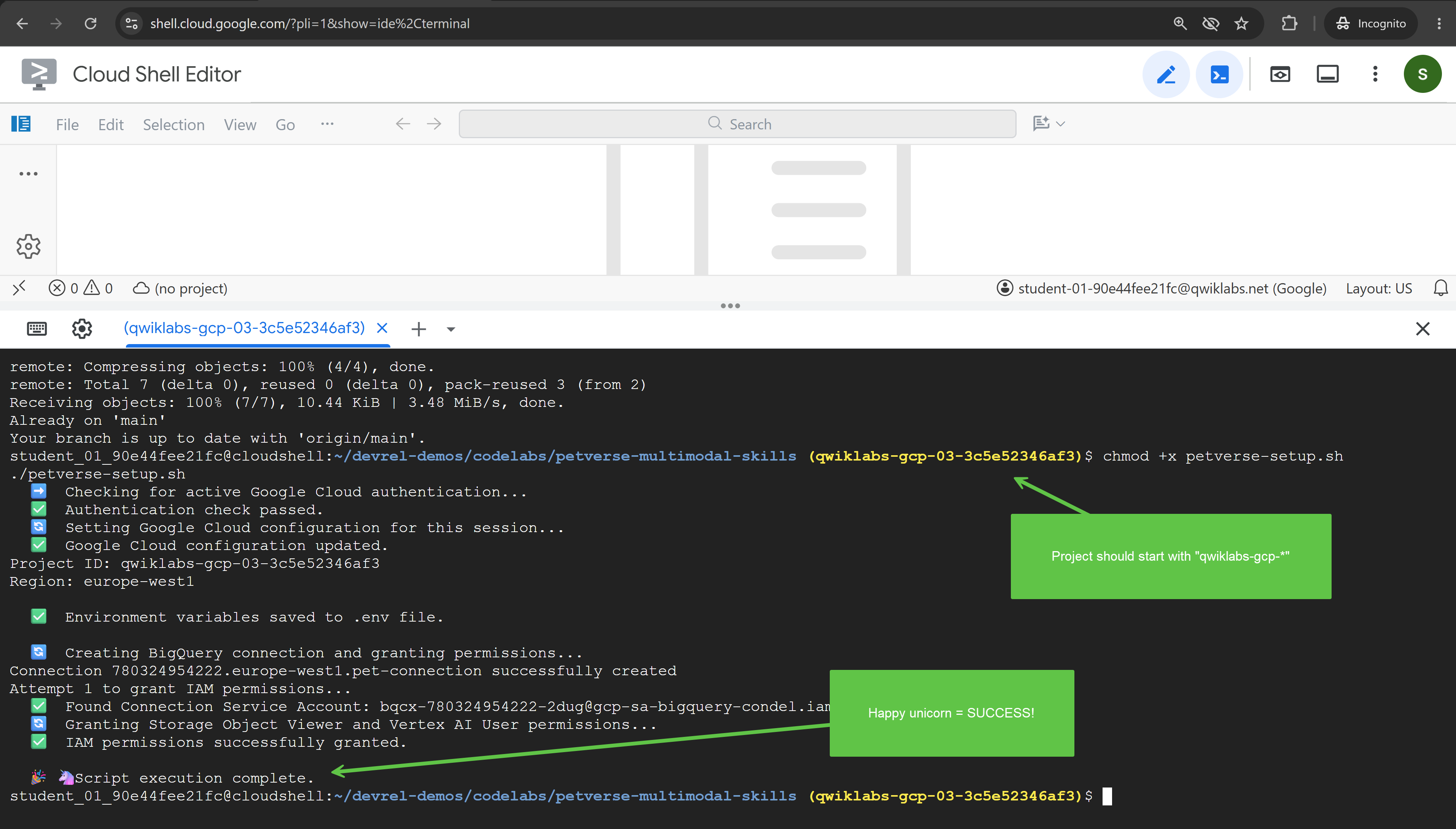
- Cloud Shell에서 설정 스크립트를 실행 가능하게 만들고 실행합니다.
chmod +x codelab-setup.sh setenv.sh ./codelab-setup.sh - 실행하는 데 1분 정도 걸립니다. 성공을 나타내는 다음 메시지가 표시됩니다. '🎉 🦄 스크립트 실행이 완료되었습니다.'
- 설정 스크립트가 자체 셸에서 실행되었으므로 변수가 터미널에 도달하지 않았습니다. 세션에 로드합니다.
source ./setenv.sh
3. 그래프 워크플로로 에이전트 조정
이 작업에서는 추천곡 생성기 프로젝트를 만들고 두 에이전트를 실행하고 출력을 결합하는 그래프 워크플로를 빌드합니다.
추천곡에는 콘셉트, 즉 해당 콘셉트를 판매하는 아이디어와 애셋이 필요합니다. 이 사용 사례에서는 작업 범위 내에서 서로 다른 책임을 갖는 에이전트를 설계하여 복잡한 작업을 분리하고 서로 다른 책임을 갖는 여러 에이전트에게 위임하여 관리하기 쉽게 만드는 방법을 보여줍니다.
이러한 작업을 전문가 간에 분담하려면 각 에이전트가 실행될 때 조정할 수 있는 요소가 필요합니다. 에이전트가 각 하위 에이전트를 호출할 시점을 결정하도록 하거나 더 결정론적인 접근 방식을 적용할 수 있습니다. 이 Codelab에서는 그래프 워크플로를 사용하여 결정론적 접근 방식을 사용합니다.
첫 번째 에이전트 프로젝트 스캐폴딩
- Cloud Shell에서 터미널에 다음을 붙여넣어 프로젝트를 만듭니다.
cd ~/devrel-demos/codelabs/bwg-multi-agent-pitch-generator agents-cli create pitch-generator \ --agent adk \ --agent-directory pitch_generator \ --deployment-target cloud_run \ --session-type in_memory \ --cicd-runner skip \ --region <YOUR_REGION> \ --auto-approveDockerfile, 테스트, 나중에 사용할 Terraform,.env.example템플릿이 있는.env파일)가 작성됩니다. 이 Codelab에서는 다음 두 부분이 중요합니다.pitch_generator/agent.py은 에이전트와 다시 작성할 파일입니다.pitch_generator/은--agent-directory에 의해 설정된 패키지 이름입니다.
setenv.sh로 내보낸 환경에서 프로젝트와 리전을 읽으므로 여기에서 구성할 사항은 없습니다. - 종속 항목을 설치합니다.
cd pitch-generator
agents-cli update -y && agents-cli install && uv sync --upgrade-package google-adk
그래프 이해하기
ADK v2.x는 그래프 워크플로를 지원합니다. 그래프는 작업 단위인 노드와 이를 연결하는 에지로 구성됩니다. 노드는 일반적으로 에이전트이지만 일반 Python 함수도 작동합니다. 한 노드가 완료되면 다른 노드가 다음에 실행된다고 합니다.
가장자리는 목록으로 작성되며 ADK가 순서를 파악합니다.
edges=[
    ("START", creative_director),        ## the graph begins here
    (creative_director, copywriter),     ## then this
]
중첩은 가장자리에 의미를 부여합니다.
에지 | 의미 |
| 체인. a, b, c가 차례로 이어집니다. |
| 팬아웃. a, b, c가 동시에 |
| 팬인. c는 a와 b를 모두 기다립니다. |
팬인의 경우 모든 선행 작업을 기다리고 출력을 함께 전달하는 JoinNode를 사용합니다.
이 작업에서는 다음 워크플로를 빌드합니다.
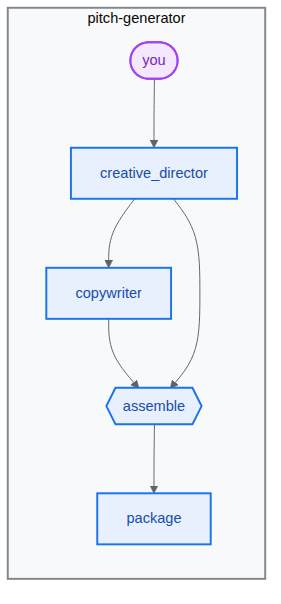
파이프라인 빌드
- 터미널에 다음을 붙여넣어 에이전트 파일을 엽니다.
cd ~/devrel-demos/codelabs/bwg-multi-agent-pitch-generator/pitch-generator cloudshell edit pitch_generator/agent.pyagent.py이 Cloud Shell 편집기에 표시됩니다.💡 도움말: 언제든지 코드를 선택하고 전구 아이콘을 사용하여 Gemini에게 설명을 요청할 수 있습니다. Antigravity CLI에 요청할 수도 있습니다.
pitch_generator/agent.py의 전체 파일을 편집기에서 다음으로 바꿉니다.import mimetypes import os from dotenv import load_dotenv from google.adk.agents import Agent from google.adk.agents.context import Context from google.adk.agents.remote_a2a_agent import ( AGENT_CARD_WELL_KNOWN_PATH, RemoteA2aAgent, ) from google.adk.apps import App from google.adk.events.event import Event from google.adk.models import Gemini from google.adk.workflow import JoinNode, Workflow from google.genai import types load_dotenv() MODEL = "gemini-3.8-flash" def _model() -> Gemini: return Gemini( model=MODEL, client_kwargs={"location": "global"}, retry_options=types.HttpRetryOptions(attempts=3), ) """ ⬇️ Configure visual-director RemoteA2aAgent agent below this comment """ creative_director = Agent( name="creative_director", model=_model(), description="Turns a raw idea into a campaign concept.", instruction=( "You are the Creative Director. Turn the idea you are given into ONE " "punchy campaign concept line with the rationale explanation behind it." ), output_key="creative_director", ) copywriter = Agent( name="copywriter", model=Gemini(model=MODEL, retry_options=types.HttpRetryOptions(attempts=3)), description="Writes social copy for a campaign concept.", instruction=( "You are the Copywriter. Write ONE short social caption for the " "campaign concept you are given. Under 25 words." ), ) """ Waits for every node wired into it, then hands their outputs on together.""" assemble = JoinNode(name="assemble") def package(node_input: dict): """Render the joined branches as the finished pitch. """ pitch = "\n\n".join( [ f"CONCEPT\n{node_input['creative_director']}", f"COPY\n{node_input['copywriter']}", ] ) """ The first event is what the user sees. The second is the node's output, which any downstream node would receive.""" yield Event(content=types.Content(role="model", parts=[types.Part(text=pitch)])) yield Event(output=pitch) """ we put creative_director before `assemble` so that we can gather the `Concept` output at assemble""" root_agent = Workflow( name="pitch_generator", edges=[ ("START", creative_director), (creative_director, copywriter), ((creative_director, copywriter), assemble), (assemble, package), ], ) app = App( root_agent=root_agent, name="pitch_generator", )agents-cli에는 ADK와 마찬가지로 검사를 위한playground라는 기본 제공 웹 개발 UI가 포함되어 있습니다. 플레이그라운드를 시작하려면 다음 단계를 따르세요.agents-cli playground --port 8080n를 입력하고 Enter 키를 누릅니다.- 터미널 오른쪽 상단에 있는 눈 아이콘인 웹 미리보기를 클릭하고 포트 8080에서 미리보기를 선택합니다.

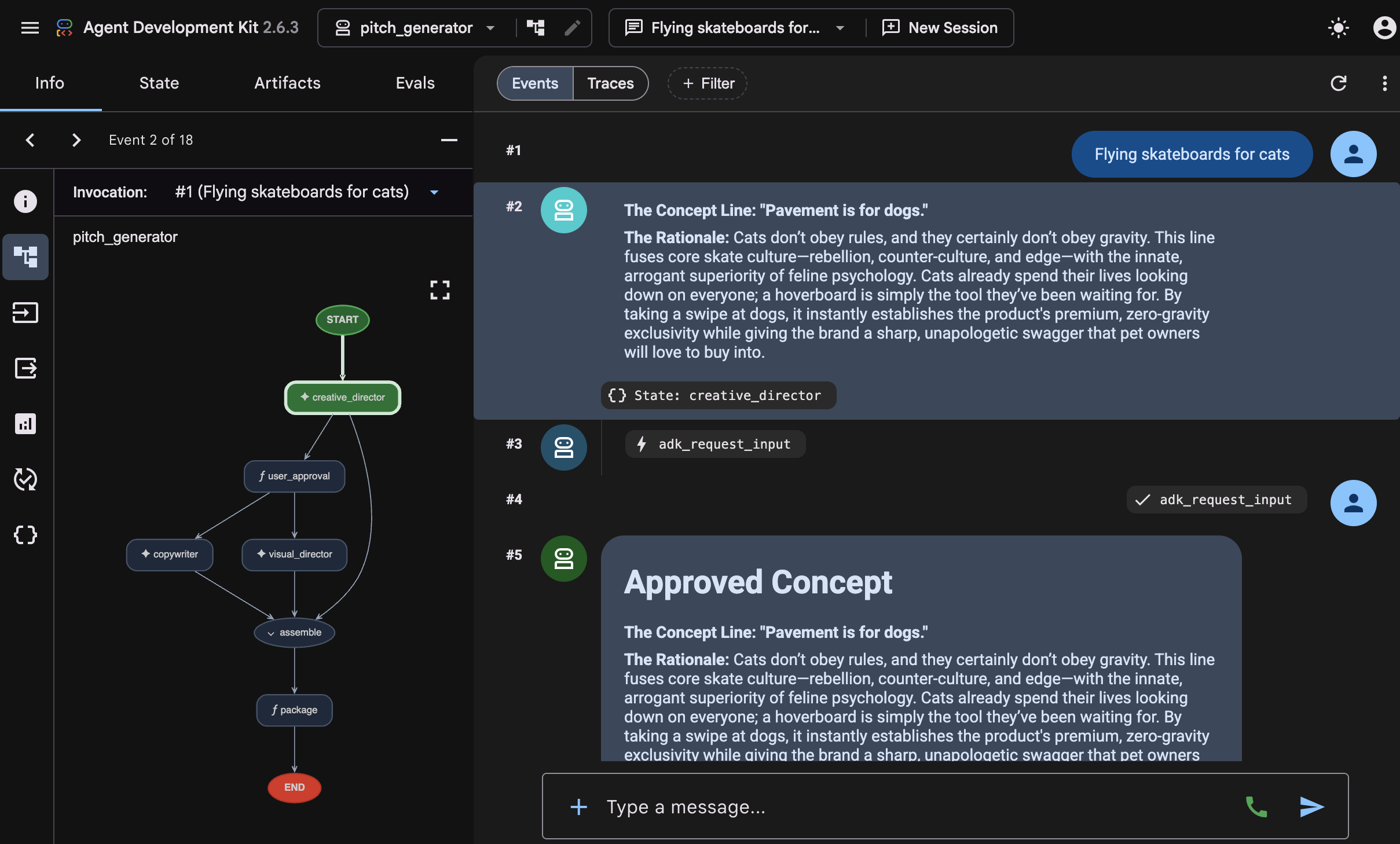
- 에이전트와 채팅할 수 있는 다음 인터페이스가 표시됩니다. '고양이를 위한 하늘을 나는 스케이트보드'라는 프롬프트를 보내 보세요. 아래와 같은 대답이 표시되며 전체 워크플로 그래프도 검사할 수 있습니다.
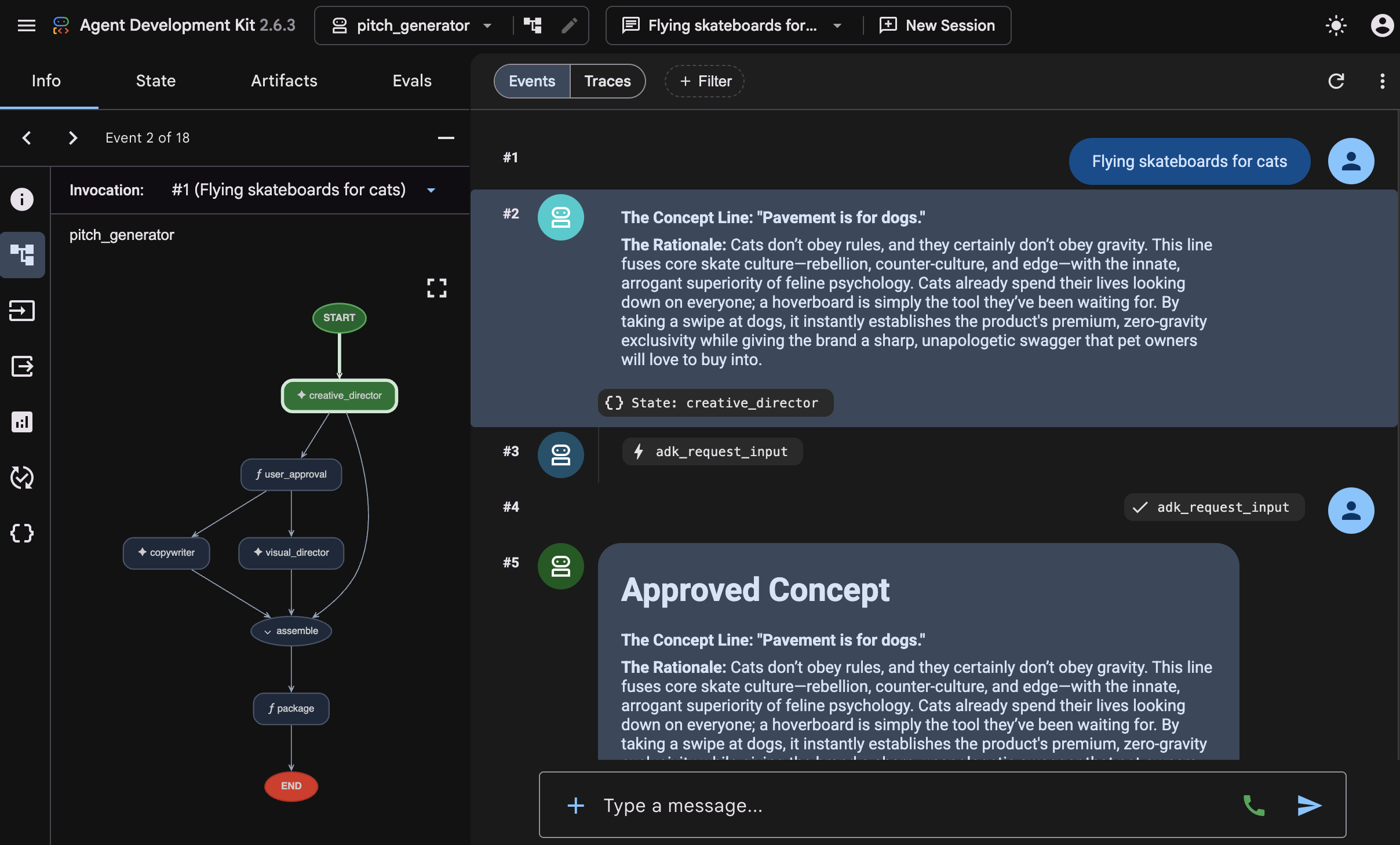 이 대답이 생성된 방식을 검사합니다. 플레이그라운드에는 그래프가 거친 각 단계가 순서대로 표시됩니다.
 creative_director,copywriter,assemble,package. 이 시퀀스가 연결한 그래프이며, 이 방법을 사용하면 방금 빌드한 그래프를 빠르게 확인할 수 있습니다. - 터미널로 돌아가서 Ctrl+C를 두 번 눌러 실행 중인
agents-cli playground프로세스를 중지합니다.
4. 에이전트에게 스킬 부여
이 작업에서는 두 번째 에이전트를 만들고 스킬로 패키징된 브랜드 가이드라인을 제공합니다.
파이프라인이 단어를 씁니다. 사진에는 하우스 스타일이 필요합니다. 팔레트, 조명 방식, 사용하는 구성과 사용하지 않는 구성이 필요합니다. 규칙 페이지이므로 규칙 페이지를 관리할 더 나은 메커니즘이 필요합니다. 한 가지 방법은 '상담사 스킬'로 패키징하는 것입니다.
스킬은 SKILL.md 파일을 포함하는 폴더입니다. 기술 디렉터리의 구조는 다음 예와 같습니다 (visual_director 사용, 다음 에이전트 빌드).
visual_director/
   ...
   agent.py
   skills/
      brand-guidelines/
         SKILL.md          ## required: frontmatter + instructions
         references/       ## optional: longer supporting documents
         assets/           ## optional: templates, images, data
         scripts/          ## optional: executable helpers
   ...
에이전트 스킬의 진입점은 SKILL.md 파일이며, 여기에는 아래와 같은 YAML 프런트매터 섹션이 포함됩니다.
---
name: brand-guidelines
description: The house brand rules for a key visual. Load this before writing art direction, so the visual looks like it came from this brand.
---

## Brand guidelines

Deep indigo and slate as the ground. One warm accent, amber or terracotta...
프런트매터가 라벨입니다. 이것이 에이전트가 처음에 보는 전부이므로 스킬을 로드할 가치가 있는 시기를 설명에 명시해야 합니다. 본문은 콘텐츠이며 에이전트가 load_skill를 호출할 때까지 컨텍스트에서 벗어납니다.
이 분할이 핵심입니다. 프롬프트는 짧게 유지되고, 에이전트는 필요할 때만 규칙을 가져오며, 스타일을 변경한다는 것은 명령어 문자열을 뒤지는 대신 하나의 파일을 수정한다는 의미입니다.
아래 다이어그램에 표시된 대로 에이전트 스킬을 활용하여 두 번째 에이전트 visual-director를 빌드합니다.
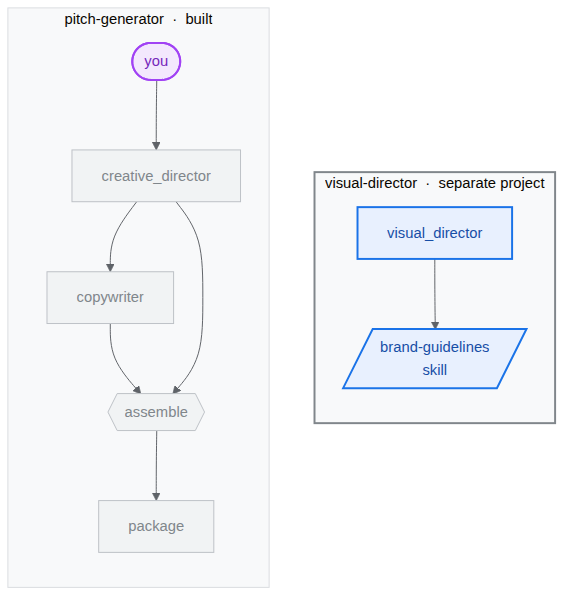
시각적 디렉터 스캐폴드
시각적 구성요소(visual-director)를 처리하는 전문 에이전트를 빌드합니다. 이 프로젝트는 나중에 여러 에이전트가 A2A 프로토콜을 사용하여 서로 통신하는 방법을 보여주는 자체 서비스가 되므로 별도의 프로젝트입니다. 결과적으로 두 프로젝트가 나란히 표시됩니다.
bwg-multi-agent-pitch-generator/
├── pitch-generator/              ## built in the last task
│   ├── pitch_generator/
│   │   ├── agent.py              ## the graph you wrote
│   │   ├── app_utils/            ## generated, A2A wiring
│   │   └── fast_api_app.py       ## generated, serves the agent
│   └── pyproject.toml
└── visual-director/              ## created below
    └── ...                       ## the same shape again
- 터미널에 다음을 붙여넣어 프로젝트를 만들고 종속 항목을 설치합니다.
cd ~/devrel-demos/codelabs/bwg-multi-agent-pitch-generator
agents-cli create visual-director \
  --agent adk \
  --agent-directory visual_director \
  --deployment-target cloud_run \
  --session-type in_memory \
  --cicd-runner skip \
  --region <YOUR_REGION> \
  --auto-approve
cd visual-director
agents-cli update -y && agents-cli install && uv sync --upgrade-package google-adk
브랜드 가이드라인 작성
- 스킬 폴더를 만들고 파일을 엽니다.
mkdir -p visual_director/skills/brand-guidelines cloudshell edit visual_director/skills/brand-guidelines/SKILL.md - 열려 있는
SKILL.md파일에 편집기에서 다음 콘텐츠를 붙여넣고 저장합니다.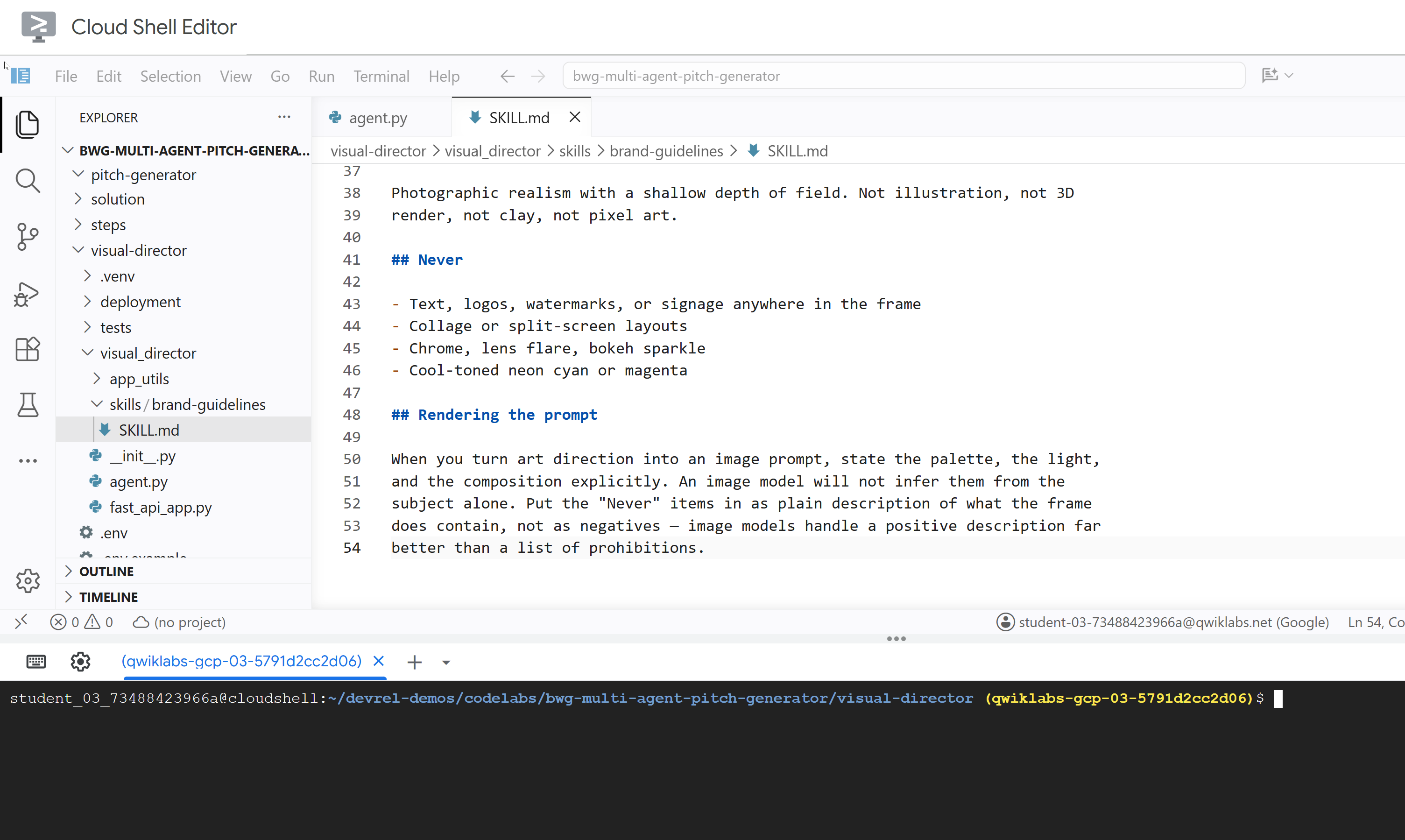
---
name: brand-guidelines
description: The house brand rules for a key visual — palette, light, composition, subject treatment, and what never appears. Load this before writing art direction or rendering an image, so the visual looks like it came from this brand rather than from a generic image model.
---

## Brand guidelines

House style for campaign key visuals. Every rule here beats a preference in the
brief. If the brief asks for something forbidden below, follow the brief for the
subject and the guidelines for the treatment.

## Palette

Deep indigo and slate as the ground. One warm accent — amber or terracotta —
carrying the eye to the subject. Nothing neon, nothing fluorescent.

At most three colors with any weight. A fourth reads as clutter.

## Light

One dominant source, low and raking. Long shadows are wanted. Golden hour or a
single hard studio key, never flat overhead light and never a ring light.

Rim light is allowed on the subject only, and only to separate it from the
ground.

## Composition

Subject off-center, roughly a third in. Generous negative space on the opposite
side — copy lands there later, so leave it genuinely empty.

Eye level or slightly below. No top-down flat lays. No fisheye, no Dutch tilt.

## Subject

One subject. If the idea implies a crowd, pick the one that carries it.

Photographic realism with a shallow depth of field. Not illustration, not 3D
render, not clay, not pixel art.

## Never

- Text, logos, watermarks, or signage anywhere in the frame
- Collage or split-screen layouts
- Chrome, lens flare, bokeh sparkle
- Cool-toned neon cyan or magenta

## Rendering the prompt

When you turn art direction into an image prompt, state the palette, the light,
and the composition explicitly. An image model will not infer them from the
subject alone. Put the "Never" items in as plain description of what the frame
does contain, not as negatives — image models handle a positive description far
better than a list of prohibitions.
visual_director/agent.py 업데이트
agent.py 파일을 업데이트하고 이전에 정의된 스킬이 장착되도록 구성합니다.
- 에이전트 파일을 엽니다.
cloudshell edit ~/devrel-demos/codelabs/bwg-multi-agent-pitch-generator/visual-director/visual_director/agent.py visual_director/agent.py파일의 전체 콘텐츠를 다음 코드로 바꿉니다.import mimetypes from pathlib import Path from google import genai from google.adk.agents import Agent from google.adk.apps import App from google.adk.models import Gemini from google.adk.skills import load_skill_from_dir from google.adk.tools import ToolContext from google.adk.tools.skill_toolset import SkillToolset from google.genai import types MODEL = "gemini-3.8-flash" ## Configure the `brand-guidelines` skill for the agent BRAND_SKILL = load_skill_from_dir(Path(__file__).parent / "skills" / "brand-guidelines") ## Add definition of `generate_key_visual` tool below this comment root_agent = Agent( name="visual_director", model=Gemini( model=MODEL, client_kwargs={"location": "global"}, retry_options=types.HttpRetryOptions(attempts=3), ), description="Turns a campaign concept into art direction and a key visual.", instruction="""You are the Visual Director on a campaign pitch team. Call `load_skill` for `brand-guidelines` before you write anything. The house style is not optional and it is not in this prompt. You are given a campaign concept. Then, in order: 1. Write art direction for ONE key visual that sells it, obeying the brand guidelines: subject, composition, lighting, color, mood. Three or four sentences. 2. Call `generate_key_visual` with exactly that art direction. Your final reply is the art direction itself and nothing else. No preamble, no alternatives, no questions back. Do not mention the skill, the tool, or the image file — the image travels on its own.""", tools=[ SkillToolset(skills=[BRAND_SKILL]), ## Supply the `generate_key_visual` tool below this comment ], ) app = App( root_agent=root_agent, name="visual_director", )visual-director에이전트가 에이전트 스킬로 올바르게 구성됩니다. 테스트하기 전에 이 에이전트에 이미지 애셋을 생성하는 도구를 주요 기능 중 하나로 장착합니다.
5. 에이전트에 이미지 생성 도구 장착
이 작업에서는 비주얼 디렉터에게 아트 디렉션을 이미지로 렌더링하고 아티팩트로 저장하는 도구를 제공합니다. 아티팩트는 AI 에이전트가 작업 중에 생성, 수정 또는 사용하는 이름이 지정되고 버전이 지정된 바이너리 데이터 또는 파일 콘텐츠입니다.
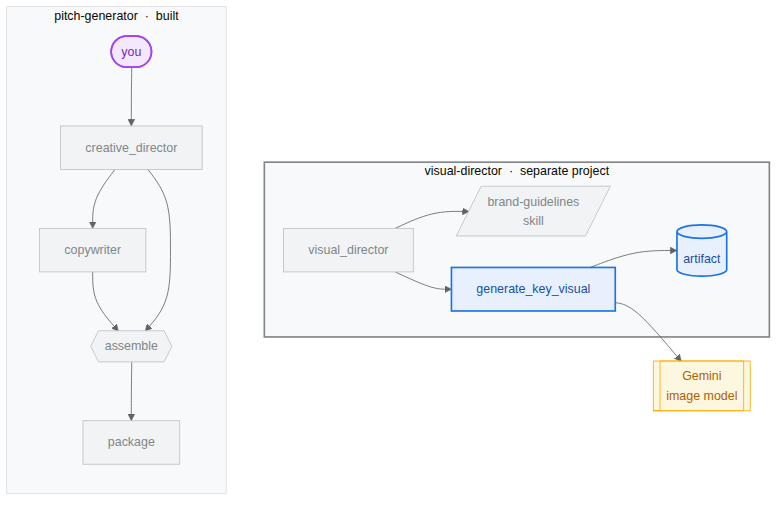
도구를 구현하고 에이전트에 추가
- 에이전트 파일을 엽니다.
cloudshell edit ~/devrel-demos/codelabs/bwg-multi-agent-pitch-generator/visual-director/visual_director/agent.py root_agent정의 앞에 다음generate_key_visual도구를 복사합니다.async def generate_key_visual(art_direction: str, tool_context: ToolContext) -> dict: """Render the art direction as the campaign's key visual. Args: art_direction: The art direction to render, in full. Returns: The saved artifact's filename, version, size and media type. """ IMAGE_MODEL = "gemini-3.1-flash-lite-image" response = await genai.Client(location="global").aio.models.generate_content( model=IMAGE_MODEL, contents=art_direction ) ## The image arrives as inline bytes on one of the response parts. image = next( ( part.inline_data for part in response.candidates[0].content.parts or [] if part.inline_data ), None, ) if image is None: raise ValueError(f"{IMAGE_MODEL} returned no image for: {art_direction[:120]}") filename = "key_visual" + ( mimetypes.guess_extension(image.mime_type or "") or ".bin" ) version = await tool_context.save_artifact(filename, types.Part(inline_data=image)) ## Return the artifact filename and version return { "filename": filename, "version": version, "bytes": len(image.data), "mime_type": image.mime_type, }SkillToolset아래에generate_key_visual을 추가하여 에이전트에 도구를 장착합니다.tools=[ SkillToolset(skills=[BRAND_SKILL]), ## Supply the `generate_key_visual` tool below this comment generate_key_visual, ],agents-cli에는 ADK와 마찬가지로 검사를 위한playground라는 기본 제공 웹 개발 UI가 포함되어 있습니다. 플레이그라운드를 시작하려면 다음 단계를 따르세요.agents-cli playground --port 8080- 터미널 오른쪽 상단에 있는 눈 아이콘인 웹 미리보기를 클릭하고 포트 8080에서 미리보기를 선택합니다.
- 에이전트와 채팅할 수 있는 다음 인터페이스가 표시됩니다. '고양이는 아홉 개의 목숨을 가지고 있어. 무중력'이라고 말합니다.
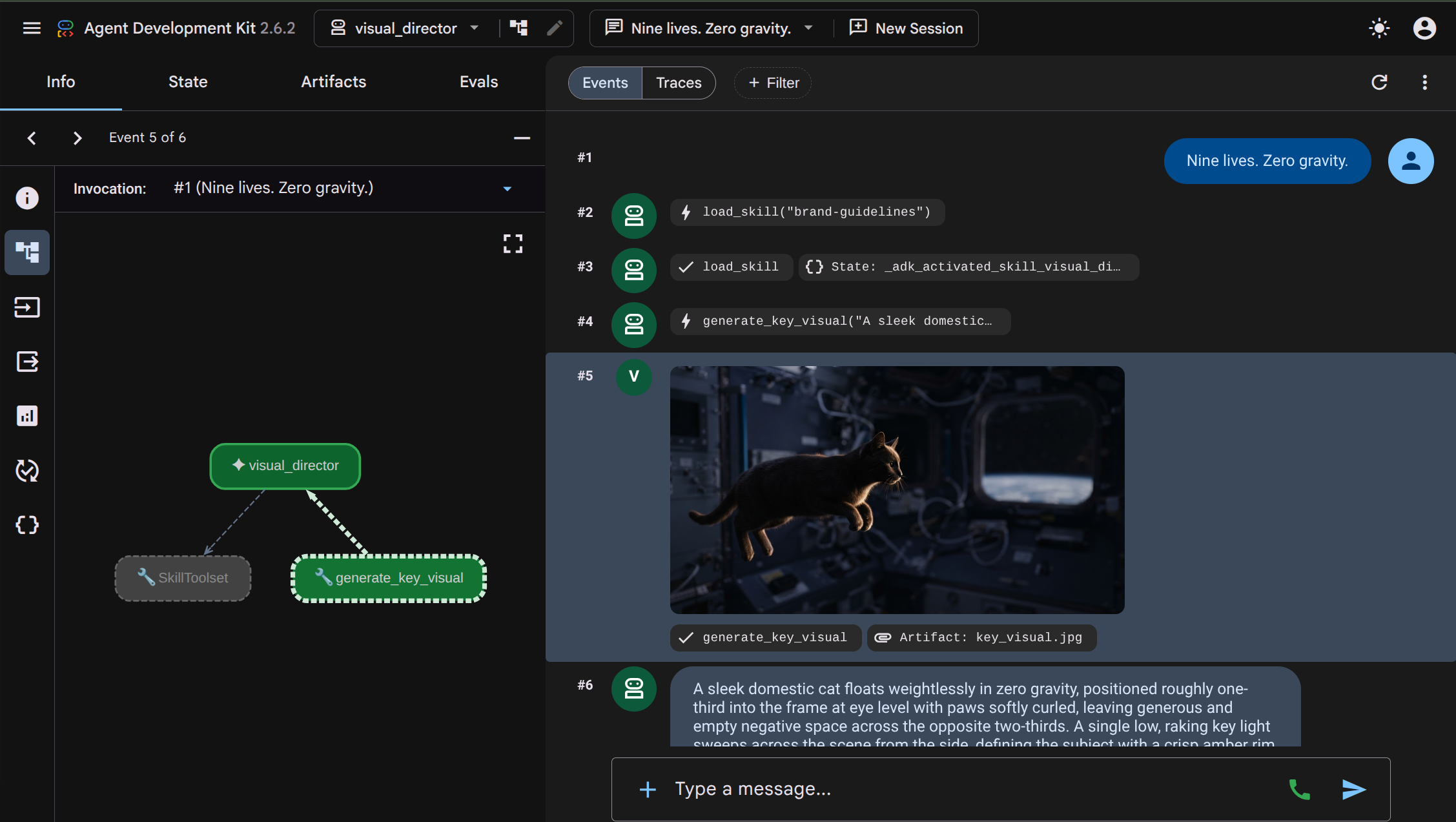 상호작용에서
 visual_director에이전트가load_skill("brand-guidelines")을 실행하여 브랜드 가이드라인 기술을 읽은 다음generate_key_visual을 실행하여 이미지 생성을 시작하는 방법을 검사할 수 있습니다. 결과 이미지는 아티팩트로 저장되며 UI에도 표시되므로 쉽게 검사할 수 있습니다. - 터미널로 돌아가서 Ctrl+C를 두 번 눌러 실행 중인
agents-cli playground프로세스를 중지합니다.
6. A2A 프로토콜을 사용한 멀티 에이전트 아키텍처
이 작업에서는 다른 에이전트가 호출할 수 있는 서비스로 시각적 디렉터를 노출하고 생성된 이미지로 응답하도록 구성합니다.
Agent2Agent (A2A)는 한 에이전트가 네트워크를 통해 다른 에이전트를 호출하는 개방형 프로토콜입니다. 중심이 되는 부분은 에이전트 카드입니다. 에이전트가 잘 알려진 URL을 통해 자신에 관해 게시하는 JSON 문서로, 이름, 설명, 기능을 제공합니다. 호출자는 카드를 가져오고 공유된 소스 코드, 종속 항목 또는 언어 없이 카드 뒤에 있는 에이전트와 대화하는 방법을 알고 있습니다.

agents-cli는 이미 기본적으로 이를 연결했습니다. 에이전트에서 카드를 빌드하고 경로를 마운트하는 visual_director/app_utils/a2a.py와 이를 제공하는 visual_director/fast_api_app.py이 생성됩니다. 아티팩트를 클라이언트로 다시 전송할 수 있도록 약간만 수정하면 됩니다.
아키텍처는 아래와 같이 표시됩니다. 에이전트가 아직 초기 워크플로에 통합되지 않았습니다.
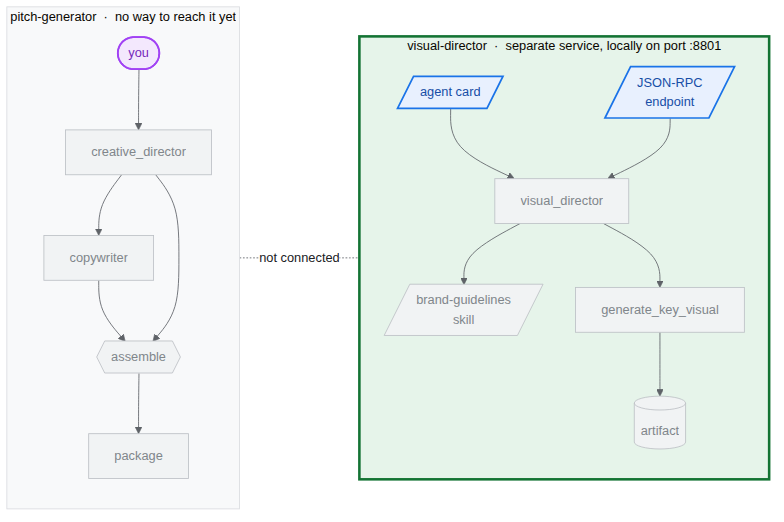
agents-cli A2A 서버 스캐폴드
agents-cli를 사용하여 visual-director 에이전트를 초기화할 때 다음 코드와 모듈이 이미 제공됩니다. 터미널에 다음 명령어를 붙여넣어 파일을 엽니다.
cloudshell edit visual_director/fast_api_app.py
cloudshell edit visual_director/app_utils/a2a.py
visual_director/fast_api_app.py는 에이전트를 시작하고 앱 이름에서 빌드된 경로 아래에 A2A 경로를 마운트합니다.
await attach_a2a_routes(
    app,
    agent=root_agent,
    runner=runner,
    rpc_path=f"/a2a/{adk_app.name}",   ## becomes /a2a/visual_director
)
나머지는 visual_director/app_utils/a2a.py가 세 번의 이동으로 처리합니다.
먼저 에이전트 자체에서 에이전트 카드를 빌드합니다. 이름, 설명, 모든 도구가 호출자가 읽을 수 있는 항목이 됩니다.
agent_card = await AgentCardBuilder(
    agent=agent,
    rpc_url=f"{resolved_app_url}{rpc_path}",
).build()
두 번째로 프로토콜과 에이전트 사이에 실행기가 배치됩니다. 수신되는 A2A 요청은 ADK 실행으로 변환되고 결과는 다시 변환됩니다.
request_handler = DefaultRequestHandler(
    agent_executor=A2aAgentExecutor(runner=runner, force_new_version=True),
    task_store=task_store,
    agent_card=agent_card,
)
세 번째로, 카드를 제공하는 경로와 통화를 수락하는 경로 두 개를 마운트합니다.
경로 | 목적 |
| 카드 상담사가 할 수 있는 작업을 알기 위해 발신자가 먼저 읽습니다. |
| JSON-RPC 엔드포인트입니다. 실제 요청이 전송되는 위치 |
아티팩트가 경계를 넘도록 허용
기본적으로 A2A 응답은 텍스트를 전달합니다. 이미지는 아티팩트이며 포함되도록 구성하지 않으면 아티팩트는 서빙 에이전트의 스토어에 유지됩니다.
- 생성된 A2A 파일을 엽니다.
cd ~/devrel-demos/codelabs/bwg-multi-agent-pitch-generator/visual-director cloudshell edit visual_director/app_utils/a2a.py AgentCardBuilder가져오기를 찾아 그 아래에A2aAgentExecutorConfig및include_artifacts_in_a2a_event_interceptor가져오기를 추가합니다.## ... ## from google.adk.a2a.utils.agent_card_builder import AgentCardBuilder ## Add the following two below `AgentCardBuilder` import from google.adk.a2a.executor.config import A2aAgentExecutorConfig from google.adk.a2a.executor.interceptors.include_artifacts_in_a2a_event import ( include_artifacts_in_a2a_event_interceptor, )agent_executor=A2aAgentExecutor(runner=runner),줄을 찾아 다음으로 바꿉니다 (A2aAgentExecutorConfig추가).agent_executor=A2aAgentExecutor( runner=runner, force_new_version=True, config=A2aAgentExecutorConfig( execute_interceptors=[include_artifacts_in_a2a_event_interceptor] ), ),
서비스를 시작하고 게시된 A2A 카드를 읽습니다.
- 백그라운드에서 서버를 시작합니다.
APP_URL를 선언해야 합니다. 카드가 자체 주소로 광고하는 주소이기 때문입니다. 터미널에 다음을 붙여넣습니다.APP_URL=http://localhost:8801 nohup uv run uvicorn visual_director.fast_api_app:app --port 8801 > /tmp/visual-director.log 2>&1 & - 시작하는 데 몇 초 정도 걸리므로 서비스가 제공되는지 확인합니다.
sleep 10 tail -2 /tmp/visual-director.logINFO: Application startup complete. INFO: Uvicorn running on http://127.0.0.1:8801 (Press CTRL+C to quit) - 이제 에이전트가 게시하는 카드를 읽습니다.
curl -s http://localhost:8801/a2a/visual_director/.well-known/agent-card.json | python3 -m json.toolgenerate_key_visual를 비롯한 에이전트의 이름, 설명, URL, 기술이 나열됩니다. 코드의 에이전트 정의에서 직접 생성됩니다.{ "name": "visual_director", "description": "Turns a campaign concept into art direction and a key visual.", "skills": [ { "id": "visual_director", "name": "model", "tags": [ "llm" ] }, { "id": "visual_director-generate_key_visual", "name": "generate_key_visual", "description": "Render the art direction as the campaign's key visual.\n\nArgs:\n art_direction: The art direction to render, in full.\n\nReturns:\n The saved artifact's filename, version, size and media type.", "tags": [ "llm", "tools" ] } ], "preferredTransport": "JSONRPC", "protocolVersion": "0.3", "url": "http://localhost:8801/a2a/visual_director" }visual-director에이전트를 기본pitch-generator워크플로에 삽입할 수 있습니다.
7. 워크플로에 A2A 원격 에이전트 삽입
이 작업에서는 원격 에이전트를 그래프에 세 번째 브랜치로 추가합니다.
원격 에이전트는 RemoteA2aAgent로 래핑되고 다른 노드와 마찬가지로 그래프에 배치됩니다. 가장자리는 동일한 모양을 유지하고 코디네이터는 어떤 노드가 로컬인지 알지 못합니다.
코디네이터를 서비스로 지정하고 그래프 워크플로 업데이트
- 에이전트 파일을 엽니다.
cd ~/devrel-demos/codelabs/bwg-multi-agent-pitch-generator/pitch-generator cloudshell edit pitch_generator/agent.py - 파일 상단에 기존 가져오기와 함께 다음 가져오기를 추가합니다.
import asyncio import subprocess import google.auth.transport.requests import google.oauth2.id_token import httpx from google.adk.a2a.converters.part_converter import convert_genai_part_to_a2a_part creative_director선언 위에 다음RemoteA2aAgent정의를 추가합니다.VISUAL_DIRECTOR_URL = os.getenv("VISUAL_DIRECTOR_URL", "http://localhost:8801") ## For deployment on Cloud Run def _cloud_run_client() -> httpx.AsyncClient | None: """An httpx client that signs each request with a Cloud Run ID token. Cloud Run deploys private, so both the agent-card fetch and the A2A calls need one. """ if not VISUAL_DIRECTOR_URL.startswith("https://"): return None async def sign(request: httpx.Request) -> None: token = None try: token = await asyncio.to_thread( google.oauth2.id_token.fetch_id_token, google.auth.transport.requests.Request(), VISUAL_DIRECTOR_URL, ) except Exception: token = subprocess.check_output( ["gcloud", "auth", "print-identity-token", "-q"], stderr=subprocess.PIPE ).decode().strip() if not token: raise Exception("Failed to fetch ID token") request.headers["Authorization"] = f"Bearer {token}" return httpx.AsyncClient(event_hooks={"request": [sign]}, timeout=600) ## Keep the approval's tool traffic out of the A2A request def _pitch_parts_only(part: types.Part): """Sends the Visual Director text and media only. RemoteA2aAgent replays the session on every call, and the Visual Director runs downstream of the human approval, so the approval's function_response would travel alongside the concept text. An ADK server reads a function response as "resume the paused invocation" and rejects a message that also carries text, so drop the tool parts here. """ if part.function_call or part.function_response: return None return convert_genai_part_to_a2a_part(part) visual_director = RemoteA2aAgent( name="visual_director", description="Turns a campaign concept into art direction for one key visual.", agent_card=( f"{VISUAL_DIRECTOR_URL}/a2a/visual_director{AGENT_CARD_WELL_KNOWN_PATH}" ), httpx_client=_cloud_run_client(), genai_part_converter=_pitch_parts_only, )package노드 Python 함수를 다음 정의로 덮어쓰거나 바꿉니다.async def package(ctx: Context, node_input: dict): """Render the joined branches as the finished pitch.""" empty = [name for name, value in node_input.items() if not value] if empty: raise ValueError(f"nothing reached the join from: {', '.join(empty)}") def _key_visual(ctx: Context) -> types.Blob | None: """The image the Visual Director sent back, or None if it sent none.""" for event in reversed(ctx.session.events): if event.author != "visual_director" or not event.content: continue for part in event.content.parts or []: if part.inline_data and part.inline_data.data: return part.inline_data return None image = _key_visual(ctx) if image is None: raise ValueError("the Visual Director returned art direction but no image") suffix = mimetypes.guess_extension(image.mime_type or "") or ".bin" filename = f"key_visual{suffix}" await ctx.save_artifact(filename, types.Part(inline_data=image)) pitch = "\n\n".join( [ f"CONCEPT\n{node_input['creative_director']}", f"COPY\n{node_input['copywriter']}", f"ART DIRECTION\n{node_input['visual_director']}", f"KEY VISUAL\n{filename}, {len(image.data)} bytes, {image.mime_type}", ] ) yield Event( content=types.Content( role="model", parts=[types.Part(text=pitch), types.Part(inline_data=image)], ) ) yield Event(output=pitch)- 다운스트림 생성이 진행되기 전에 사람 승인 게이트를 추가합니다.
pitch_generator/agent.py에서root_agent위에 승인 노드를 정의합니다.@node(rerun_on_resume=False) async def approve_concept(ctx: Context): yield RequestInput( message="Please approve the campaign concept (yes/no).", response_schema=str ) @node(rerun_on_resume=True) async def user_approval(ctx: Context): user_response = await ctx.run_node(approve_concept) if str(user_response).lower() in ("yes", "y"): approved_concept = f"## Approved Concept\n\n{ctx.session.state['creative_director']}" yield Event( content=types.Content( role="model", parts=[types.Part(text=approved_concept)] ) ) else: raise ValueError("User rejected the concept") - 마지막으로 상단의 가져오기를 업데이트하여
google.adk.events및google.adk.workflow에서RequestInput및node를 포함합니다.from google.adk.events import Event, RequestInput from google.adk.workflow import JoinNode, Workflow, nodeuser_approval을 통해 라우팅되도록root_agent워크플로edges를 수정합니다.edges=[ ("START", creative_director), (creative_director, user_approval, (copywriter, visual_director)), ((creative_director, copywriter, visual_director), assemble), (assemble, package), ],- 인간 참여형 (HITL) 승인:
approve_concept는RequestInput를 생성합니다. 워크플로가 이 노드에 도달하면 실행이 일시중지되고 호출자에게 인터럽트가 전송됩니다. 다운스트림 브랜치 (copywriter및visual_director)는 사용자 승인이 확인될 때까지 실행되지 않습니다. visual_director는copywriter와 마찬가지로 가장자리에 표시되지만 하나는 함수 호출이고 다른 하나는 네트워크를 통해 이루어집니다.- 현재 텍스트만 노드의 출력으로 승격되므로 반환된 이미지는
node_input에서가 아닌 세션 이벤트에서 읽어옵니다. 이미지는 A2A 인터셉터를 통해 경계를 넘었지만 원격 에이전트의 이벤트에 첨부되어 도착하므로_key_visual도우미 함수가 거기에서 이미지를 가져옵니다.
- 인간 참여형 (HITL) 승인:
통합 테스트
이제 백그라운드에서 실행되는 시각적 디렉터와 추천곡 생성기가 A2A 프로토콜을 통해 통신할 수 있는지 테스트합니다.
- 시각적 디렉터가 백그라운드에서 계속 실행되고 있는지 확인합니다.
curl -s -o /dev/null -w "visual director: %{http_code}\n" http://localhost:8801/a2a/visual_director/.well-known/agent-card.jsonvisual director: 200결과가 표시되어야 합니다. 다른 상태가 표시되는 경우 다음 명령어를 실행하여 다시 시작합니다.fuser -k 8801/tcp 2>/dev/null || true cd ~/devrel-demos/codelabs/bwg-multi-agent-pitch-generator/visual-director APP_URL=http://localhost:8801 nohup uv run uvicorn visual_director.fast_api_app:app --port 8801 > /tmp/visual-director.log 2>&1 & cd ~/devrel-demos/codelabs/bwg-multi-agent-pitch-generator/pitch-generator sleep 10 curl -s -o /dev/null -w "visual director: %{http_code}\n" http://localhost:8801/a2a/visual_director/.well-known/agent-card.json - 미리보기를 시작합니다.
cd ~/devrel-demos/codelabs/bwg-multi-agent-pitch-generator/pitch-generator/pitch_generator agents-cli playground --port 8080 - 터미널 오른쪽 상단에 있는 눈 아이콘인 웹 미리보기를 클릭하고 포트 8080에서 미리보기를 선택합니다.
- 에이전트와 채팅할 수 있는 인터페이스가 표시됩니다. '고양이를 위한 플라잉 스케이트보드'라는 프롬프트를 보내 보세요.
 워크플로가 시작되고 각 에이전트가 실행되는 전체 상호작용이 표시됩니다.
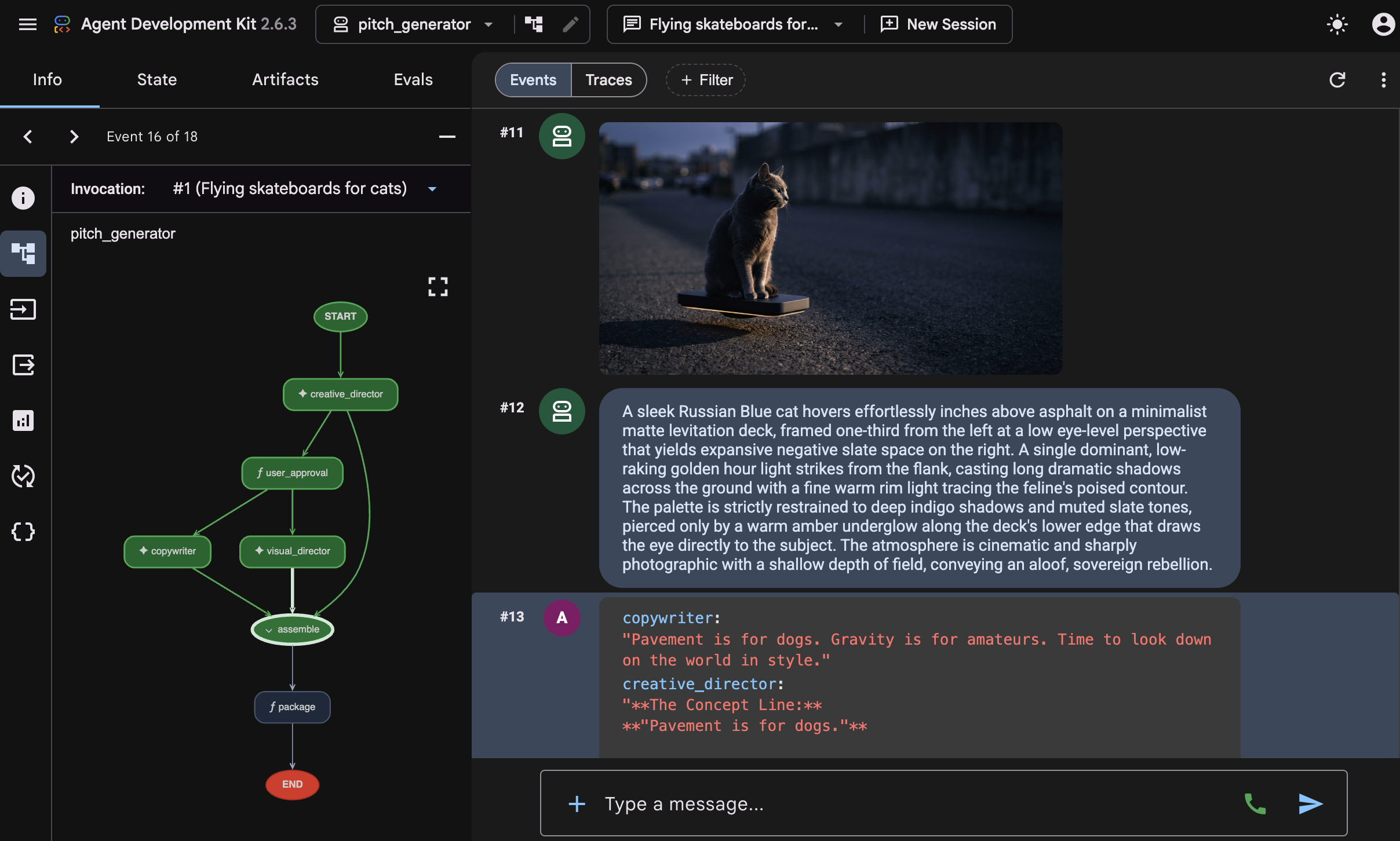
 creative_director에서 컨셉을 초안으로 작성하면 워크플로가 승인 게이트에서 일시중지되고 '캠페인 컨셉을 승인하세요 (예/아니요).'라는 메시지가 표시됩니다. 입력 필드에 'yes'를 입력하여 계속합니다. 승인이 완료되면 그래프가 펼쳐집니다.visual-director에이전트가 스킬 로드를 시작하는 시점과 이미지 생성 중간에copywriter에이전트가 소셜 미디어 캡션 생성을 완료하는 시점을 확인할 수 있습니다. 이는 두 에이전트가 서로 기다리지 않고 병렬로 실행됨을 보여줍니다. 두 작업이 모두 완료되면assemble노드가creative_director에서 생성된 승인된 개념과 함께 결과를 결합하여package함수에서 추천 콘텐츠 제공을 완료합니다.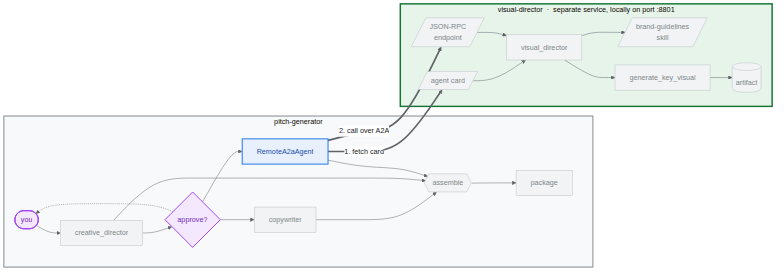
8. Cloud Storage에 주요 시각적 요소 유지
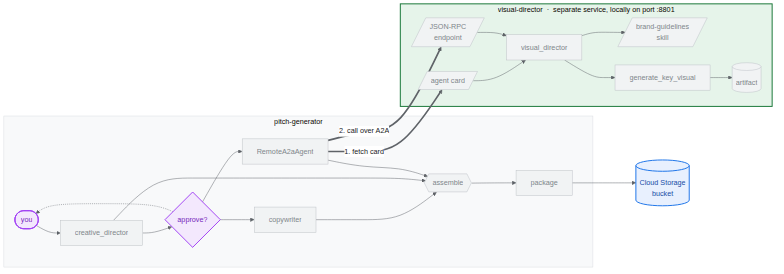
지금까지 모든 주요 시각적 요소는 메모리에 있었습니다. 프로세스가 중지되는 순간 이미지가 사라지므로, 이는 테스트 환경에서는 괜찮지만 캠페인에서는 쓸모가 없습니다. 이 작업에서는 워크플로에 쓸 버킷을 제공하고 마지막 작업에서 사용할 BigQuery 데이터 세트를 만듭니다.
ADK는 시작 시 아티팩트가 어디로 이동하는지 결정합니다. 생성된 app_utils/services.py는 단일 환경 변수를 읽습니다.
def get_artifact_service():
    """Process-wide artifact service: GCS when a bucket is set, else in-memory."""
    if bucket := os.environ.get("LOGS_BUCKET_NAME"):
        return GcsArtifactService(bucket_name=bucket)
    return InMemoryArtifactService()
LOGS_BUCKET_NAME를 설정하면 모든 save_artifact 호출이 Cloud Storage에 저장됩니다.
BigQuery 데이터 세트 만들기
- Cloud Shell에서 다음 명령어를 실행하여 BigQuery 데이터 세트를 만듭니다.
bq mk --dataset --location=<YOUR_REGION> --project_id=<YOUR_PROJECT_ID> bwg - 코디네이터의 아티팩트 저장소를 버킷으로 지정합니다.
export LOGS_BUCKET_NAME="<YOUR_PROJECT_ID>-bwg"GcsArtifactService는gs://프리픽스 없이 일반 버킷 이름을 사용합니다. 다른 변수와 마찬가지로 이 변수는 셸에 있으며 배포 작업에서 Cloud Run에 전달합니다. - 버킷의 콘텐츠를 확인합니다. 새 브라우저 탭에서 다음 URL을 엽니다.
https://console.cloud.google.com/storage/browser?project=<YOUR_PROJECT_ID>
9. Cloud Run에 시각적 디렉터 에이전트 배포
지금까지 모든 것이 하나의 머신에서 실행되었으며, Visual Director는 localhost:8801에서 연결할 수 있습니다. 이 작업에서는 비주얼 디렉터 에이전트를 자체 Cloud Run 서비스로 배포하고, Agent2Agent (A2A) 프로토콜을 사용하여 네트워크를 통해 피치 생성기가 비주얼 디렉터 에이전트와 통신하도록 합니다.
시각적 디렉터는 실제 https:// URL을 가져오므로 이전에 작성한 _cloud_run_client가 None를 반환하는 대신 요청에 서명하기 시작합니다. 또한 Cloud Run은 기본적으로 비공개로 배포됩니다.
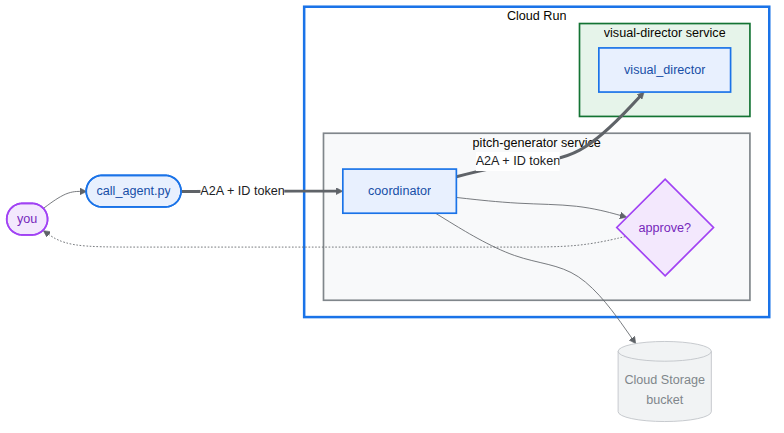
Visual Director 배포
- 로컬 백그라운드 서비스와 Playground가 아직 실행 중인 경우 중지합니다.
fuser -k 8801/tcp 2>/dev/null || true fuser -k 8000/tcp 2>/dev/null || true - 에이전트를 배포합니다. 이렇게 하면 컨테이너가 빌드되고 푸시됩니다.⏰ 몇 분 정도 걸릴 수 있습니다.
cd ~/devrel-demos/codelabs/bwg-multi-agent-pitch-generator/visual-director
source .env
agents-cli deploy \
  --service-name visual-director \
  --project <YOUR_PROJECT_ID> \
  --region <YOUR_REGION> \
  --no-confirm-project \
  --labels dev-tutorial=bwg001-devlab-1 \
  --update-env-vars "LOGS_BUCKET_NAME=$LOGS_BUCKET_NAME,GOOGLE_GENAI_USE_VERTEXAI=true,GOOGLE_CLOUD_PROJECT=$GOOGLE_CLOUD_PROJECT,GOOGLE_CLOUD_LOCATION=$GOOGLE_CLOUD_LOCATION,GOOGLE_CLOUD_REGION=$GOOGLE_CLOUD_REGION"
Cloud Run에 배포된 시각적 디렉터를 사용하는 추천곡 생성기 실행
- Visual Director의 URL을 읽고 이를 사용하는 추천곡 생성기를 실행합니다.
cd ~/devrel-demos/codelabs/bwg-multi-agent-pitch-generator/pitch-generator
source .env
export VISUAL_DIRECTOR_URL=$(gcloud run services list \
  --project <YOUR_PROJECT_ID> \
  --region <YOUR_REGION> \
  --flatten='spec.template.spec.containers[0].env' \
  --filter='metadata.name=visual-director AND spec.template.spec.containers[0].env.name=APP_URL' \
  --format='value(spec.template.spec.containers[0].env.value)')
echo "Visual Director is at $VISUAL_DIRECTOR_URL"
APP_URL=http://localhost:8000 nohup uv run uvicorn pitch_generator.fast_api_app:app --port 8000 > /tmp/visual-pitch_generator.log 2>&1 &
배포된 워크플로 호출
두 에이전트 모두 A2A 프로토콜을 지원합니다. 이 저장소는 A2A를 통해 추천 생성기를 호출하는 작은 클라이언트를 제공합니다.
PITCH_GENERATOR_URL이 로컬에서 실행되는 추천곡 생성기 URL로 설정되어야 합니다. 한편 Visual Director는 Cloud Run에서 실행되고 Pitch Generator는 A2A를 통해 Visual Director와 통신합니다.
- 클라이언트를 프로젝트에 복사하고 실행합니다.
cd ~/devrel-demos/codelabs/bwg-multi-agent-pitch-generator/pitch-generator cp ../solution/pitch-generator/call_agent.py . PITCH_GENERATOR_URL=http://localhost:8000 uv run python call_agent.py "Flying skateboards for cats" --save-image ./key_visual.png=== HUMAN APPROVAL REQUIRED === [DRAFT CONCEPT] Concept Line: "Gravity is a Suggestion." ... Please approve the campaign concept (yes/no):yes를 입력하고 Enter 키를 눌러 워크플로를 승인하고 계속합니다. (-y또는--auto-approve를 전달하여 자동으로 승인할 수도 있습니다.) call_agent.py를 열고a2a-sdk를 사용하여 에이전트와 상호작용하는 방식을 확인합니다.ClientFactory는https://SERVICE_URL/a2a/pitch_generator를 타겟팅하는 공식 A2AClient를 빌드합니다.generate_pitch_async가 초기SendMessageRequest을 전송합니다.TaskState.TASK_STATE_INPUT_REQUIRED와 함께 응답이 반환되면adk_request_input부분을 감지하고, 초안 개념을 표시하고, 승인을 수집하고, 대답을 포함한 재개 요청을 작업에 다시 전송합니다.- 파싱 루프는 완료된 작업의 아티팩트에서
CONCEPT,COPY,ART DIRECTION섹션을 읽고 바이너리 이미지를key_visual.png에 저장합니다.
key_visual.png에 저장됩니다.- BigQuery가 가리킬 수 있는 접두사 아래 버킷에 주요 시각적 요소를 업로드합니다.
gcloud storage cp ./key_visual.png gs://<YOUR_PROJECT_ID>-bwg/key-visuals/cats.png - 비교할 수 있도록 두 번째 피치를 생성하고 업로드합니다.
PITCH_GENERATOR_URL=http://localhost:8000 uv run python call_agent.py "A commuter bike built for rainy cities" --save-image ./bike.png
gcloud storage cp ./bike.png gs://<YOUR_PROJECT_ID>-bwg/key-visuals/bike.png
10. BigQuery에서 브랜드 적합성에 대한 주요 시각적 요소 점수 매기기
이제 버킷에 이미지가 있고 이미지를 형성하는 브랜드 가이드라인이 있습니다. 이 작업에서는 BigQuery의 이미지를 참조한 다음 Cloud Storage에서 단일 바이트도 이동하지 않고 Gemini 모델에 가이드라인에 따라 각 이미지를 평가하도록 요청합니다.
다음 두 가지 BigQuery 기능이 이 작업을 수행합니다.
ObjectRef은 Cloud Storage 객체를 가리키는 값입니다.OBJ.MAKE_REF는 URI와 BigQuery에 버킷에 대한 위임된 액세스 권한을 부여하는 연결에서 하나를 빌드합니다. 설정 스크립트로 생성된pitch-connection가 해당 연결이며 이미 스토리지 객체 뷰어와 Agent Platform 사용자를 보유하고 있습니다.AI.SCORE는 프롬프트를 가져와FLOAT64를 반환합니다. 프롬프트는 문자열과ObjectRef값을 혼합할 수 있으므로 모델은 기준표와 이미지를 함께 볼 수 있습니다.
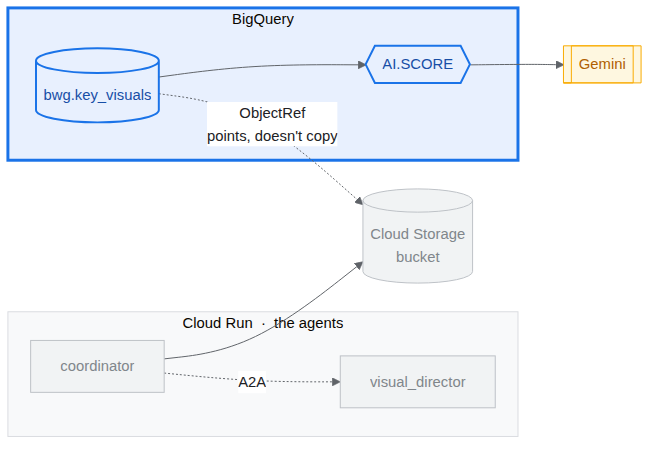
주요 시각적 요소 표 만들기
- 새 브라우저 탭에서 BigQuery Studio를 엽니다.
https://console.cloud.google.com/bigquery?project=<YOUR_PROJECT_ID> - 새 쿼리 만들기 (+ 아이콘)를 클릭한 다음 다음을 붙여넣고 실행합니다 (
SET @@location = '<YOUR_REGION>';

CREATE OR REPLACE TABLE bwg.key_visuals AS
SELECT
  campaign,
  concept,
  OBJ.FETCH_METADATA(
    OBJ.MAKE_REF(uri, '<YOUR_REGION>.pitch-connection')
  ) AS key_visual
FROM UNNEST([
  STRUCT(
    'cats' AS campaign,
    'Flying skateboards for cats' AS concept,
    'gs://<YOUR_PROJECT_ID>-bwg/key-visuals/cats.png' AS uri
  ),
  STRUCT(
    'bike',
    'A commuter bike built for rainy cities',
    'gs://<YOUR_PROJECT_ID>-bwg/key-visuals/bike.png'
  )
]);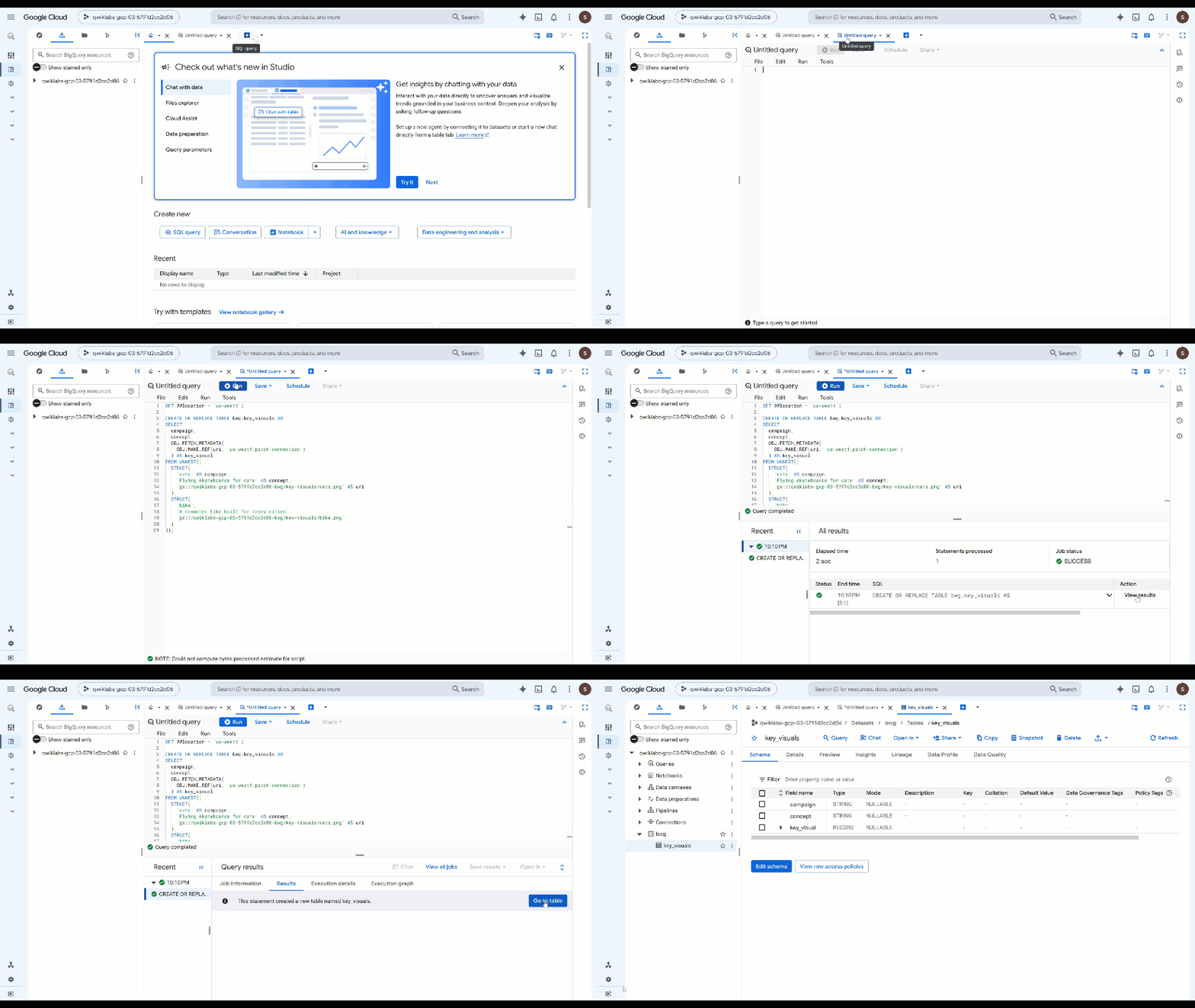
OBJ.MAKE_REF는 URI와 연결에서 참조를 빌드합니다. 그런 다음OBJ.FETCH_METADATA가 Cloud Storage에 연락하여 객체의 크기, 콘텐츠 유형, 생성 정보를 입력합니다. 두 번째 호출은 연결이 작동하는지 증명하는 가장 빠른 방법이기도 합니다. 권한이 잘못되면details필드에 메타데이터 대신 오류가 반환됩니다. - 저장한 항목을 검사합니다. 이전 쿼리를 다음으로 바꾸고 실행합니다.
SELECT campaign, concept, key_visual.uri, key_visual.details
FROM bwg.key_visuals;
브랜드 가이드라인에 따라 각 이미지의 등급을 지정합니다.
시각적 디렉터는 팔레트, 조명 규칙, 구도 규칙을 준수하라는 지시를 받았습니다. 실제로 그랬는지는 판단의 문제이며, 이것이 AI.SCORE의 용도입니다.
- 다음 쿼리를 실행합니다 (
ObjectRef로 구성됩니다.SELECT campaign, concept, AI.SCORE( ('''You are the brand guardian reviewing a campaign key visual. Score the attached image from 1 to 10 on how closely it follows these house rules: - Palette: deep indigo and slate, with one warm accent of amber or terracotta. Nothing neon. - Light: one dominant low, raking source with long shadows. No flat overhead light. - Composition: subject off-center with generous empty negative space on the opposite side. - Subject: one subject only, photographic realism, shallow depth of field. - Never: text, logos, or watermarks anywhere in the frame. A 10 obeys every rule. A 1 ignores them. The campaign concept is: ''', concept, key_visual), connection_id => '<YOUR_REGION>.pitch-connection', endpoint => 'gemini-3.5-flash' ) AS brand_fit FROM bwg.key_visuals ORDER BY brand_fit DESC; - 점수를 팀에서 조치를 취할 수 있는 결과로 변환합니다.
CREATE OR REPLACE TABLE bwg.brand_review AS SELECT campaign, concept, brand_fit, IF(brand_fit >= 7, 'on brand', 'needs another pass') AS verdict FROM ( SELECT campaign, concept, AI.SCORE( ('''Score this campaign key visual from 1 to 10 on how closely it follows the house brand rules: deep indigo and slate palette with a single warm accent and nothing neon; one low raking light source with long shadows; the subject off-center with empty negative space opposite; a single photographic subject; and no text, logos, or watermarks in the frame. The campaign concept is: ''', concept, key_visual), connection_id => '<YOUR_REGION>.pitch-connection', endpoint => 'gemini-3.5-flash' ) AS brand_fit FROM bwg.key_visuals ); SELECT * FROM bwg.brand_review ORDER BY brand_fit DESC;AI.SCORE는FLOAT64만 반환하므로 프롬프트를 수정하지 않고 조정할 수 있는 일반 SQL에 기준점이 있습니다. 점수는 행별로 부여되므로 여기에서 생성한 두 개의 확장 소재뿐만 아니라 캠페인에서 생성하는 모든 확장 소재에 동일한 평가 기준이 적용됩니다.
11. 다음 단계
평가 만들기
에이전트 평가 또는 '평가'는 자율적인 AI 에이전트가 추론, 계획, 도구 사용, 다단계 워크플로 완료를 얼마나 잘하는지 측정하는 데 사용되는 자동화된 테스트입니다. 에이전트의 단위 테스트와 유사하지만 비결정적 특성을 고려합니다.
에이전트 중 하나에는 Human in the loop이 포함되어 있으며, 이는 입력이 대기 중임을 의미합니다. 이 동작이 자동 평가를 방해하지 않도록 Antigravity가 현재 코드를 수정하도록 허용해야 합니다.
시작하는 가장 좋은 방법 중 하나는 Antigravity CLI에 요청하는 것입니다.
Cloud Shell에 다음을 입력하여 CLI를 시작합니다.
cd ~/devrel-demos/codelabs/bwg-multi-agent-pitch-generator/
agy
시작 프롬프트는 다음과 같습니다.
Explore this repository (`pitch-generator` and `visual-director`), including their agent instructions, tools, and `SKILL.md` files. Design and implement a creative `agents-cli eval` evaluation suite under `tests/eval/` that stress-tests the agent's behavior.
클론된 저장소에서 평가 예시와 평가 실행 안내를 확인할 수도 있습니다.
12. 삭제
이 Codelab에서 사용된 리소스 비용이 Google Cloud 계정에 청구되지 않도록 하려면 프로젝트를 삭제하거나 (권장) Codelab 중에 생성된 개별 리소스를 삭제하세요.
gcloud run services delete visual-director --region=<YOUR_REGION> --project=<YOUR_PROJECT_ID> --quiet
bq rm -r -f -d <YOUR_PROJECT_ID>:bwg
bq rm --connection --location=<YOUR_REGION> --project_id=<YOUR_PROJECT_ID> pitch-connection
gcloud storage rm -r gs://<YOUR_PROJECT_ID>-bwg
13. 수고하셨습니다
이 Codelab에서는 에이전트 개발 키트를 사용하여 멀티 에이전트 캠페인 추천 생성기를 빌드했습니다. 결정론적 그래프 워크플로에 세 개의 에이전트를 연결하고, 브랜드 가이드라인을 온디맨드로 로드되는 에이전트 기술로 패키징하고, 출력을 아티팩트로 저장하는 이미지 생성 도구를 에이전트에 제공했습니다. 그런 다음 Visual Director를 자체 A2A 서비스로 분할하고, 원격 노드로 그래프에 다시 삽입하고, Cloud Run에 배포하고, 로컬에서 실행되는 코디네이터에서 A2A를 통해 전체 워크플로를 호출했습니다. 마지막으로 BigQuery에서 생성된 주요 시각적 요소를 ObjectRef로 참조하고 AI.SCORE를 사용하여 자체 브랜드 가이드라인에 따라 평가했습니다.