

1. 简介

了解如何构建一个多模态多智能体引擎,该引擎可接收原始主题简报,并协调创建极具吸引力的社交媒体资源。您将使用 Google 的智能体开发套件 (ADK) 和 Agent2Agent (A2A) 协议,编写自主微智能体,将品牌规则打包为可重复使用的智能体技能,将智能体服务部署到 Cloud Run,并使用 BigQuery AI 函数对生成的关键视觉元素进行评分,以评估其是否符合品牌规范。
您将执行的操作
在此 Codelab 中,您将学习如何执行以下任务:
- 使用确定性图工作流编排多个 ADK 智能体。
- 将品牌推广指南打包为仅在需要时加载的代理技能。
- 为代理配备图片生成工具,该工具可将其输出保存为制品。
- 将一个智能体公开为 A2A 服务,并从另一个智能体中将其作为远程节点进行调用。
- 将 Visual Director 部署到 Cloud Run,并通过 A2A 调用工作流。
- 使用 AI 函数在 BigQuery 中对生成的关键视觉元素进行品牌契合度评分。
所需条件
- 网络浏览器(例如 Chrome)。
- Google Cloud 账号和启用了结算功能的 Google Cloud 项目。
2. 准备工作
创建 Google Cloud 项目
- 在 Google Cloud 控制台的项目选择器页面上,选择或创建一个 Google Cloud 项目。
- 确保您的 Cloud 项目已启用结算功能。了解如何检查项目是否已启用结算功能。
启动 Cloud Shell
您将使用 Google Cloud Shell 下载代码、运行设置脚本和部署应用。
- 在浏览器中打开 Google Cloud Shell(或点击 Google Cloud 控制台顶部的激活 Cloud Shell):
https://shell.cloud.google.com/ - 通过在终端中粘贴以下内容,在环境中配置您的 Google Cloud 项目 ID 和区域(例如
us-central1)(将export PROJECT_ID="<YOUR_PROJECT_ID>" export REGION="<YOUR_REGION>" gcloud config set project $PROJECT_ID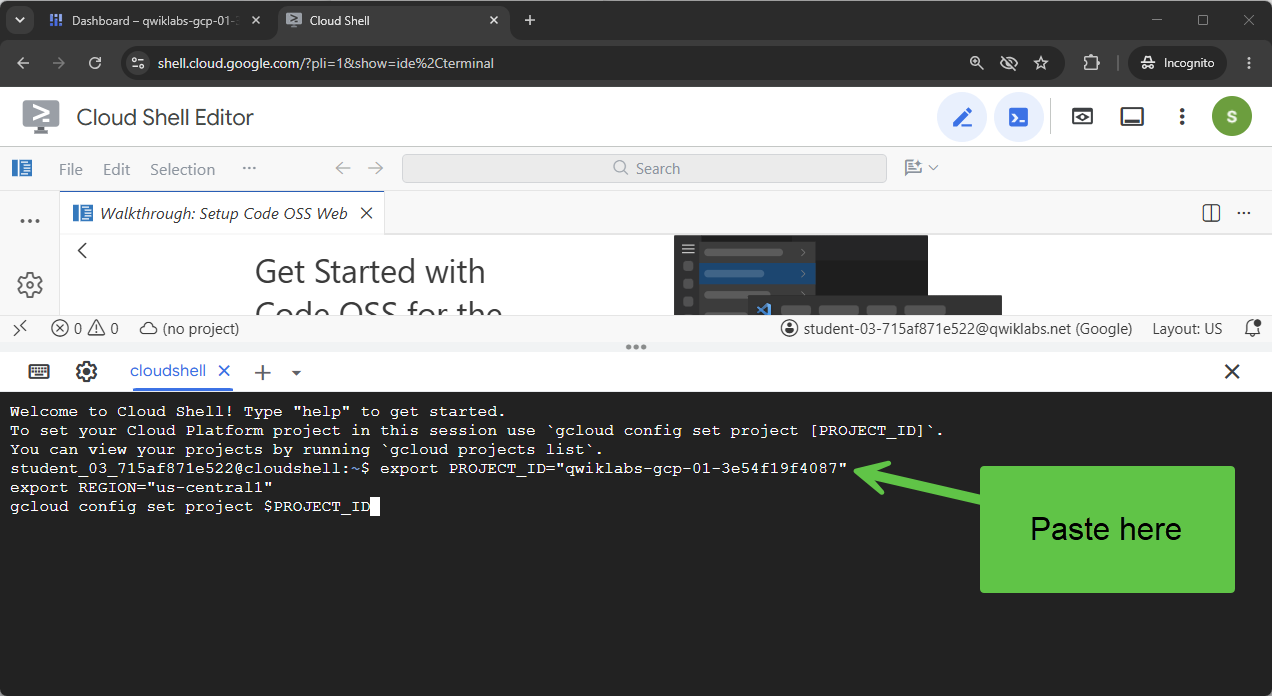 您应该会看到类似如下内容的消息:
Your active configuration is: [cloudshell-####] Updated property [core/project] - 为您的项目启用所需的 Google Cloud API:
gcloud services enable \
  compute.googleapis.com \
  cloudresourcemanager.googleapis.com \
  aiplatform.googleapis.com \
  storage.googleapis.com \
  storage-component.googleapis.com \
  bigqueryconnection.googleapis.com \
  bigquery.googleapis.com \
  run.googleapis.com \
  secretmanager.googleapis.com \
  cloudbuild.googleapis.com \
  artifactregistry.googleapis.com \
  iap.googleapis.com \
  iam.googleapis.com
克隆代码库
我们提供了一个代码模板,可帮助您开始学习此 Codelab。它相对较小,但其所在的 GitHub 代码库却相当大。为了加快克隆速度并节省磁盘空间,我们通常会使用 git clone 和 --filter=blob:none 选项以及 git sparse-checkout 和其他一些命令。
这听起来非常复杂,但 Antigravity 可以帮我们完成所有这些工作!
首先,我们来配置 Antigravity CLI,以便它能直接解决我们的问题,然后启动它。
在 Cloud Shell 中,运行以下命令:
source <(curl -fsSL https://github.com/GoogleCloudPlatform/devrel-demos/raw/refs/heads/vladkol/cloud-shell-configure-agy/codelabs/labs-scripts/bwg-multi-agent-pitch-generator/cloud_shell_configure_agy.sh)
该命令会配置 Antigravity CLI,并在同一终端中启动它。退出 Antigravity CLI 后,您会返回到 Cloud Shell 提示符。

我们只需要代码库中的 codelabs/bwg-multi-agent-pitch-generator 文件夹。我们让 Antigravity 只下载该文件夹,并将其保存在本地的 ~/devrel-demos/codelabs/bwg-multi-agent-pitch-generator/ 中。
向 Antigravity CLI 提供以下任务:
Download files from under `https://github.com/GoogleCloudPlatform/devrel-demos/tree/main/codelabs/bwg-multi-agent-pitch-generator`
to folder `~/devrel-demos/codelabs/bwg-multi-agent-pitch-generator/`.
If `devrel-demos` folder already exists, rename it with a `.backup` suffix.

Antigravity 将执行该任务。它会要求您授予运行一些命令的权限。下载代码后,执行 /exit 命令退出 Antigravity CLI:
/exit

打开代码库工作区
现在,我们来在 Cloud Shell 中打开代码工作区。在 Cloud Shell 终端中运行以下命令:
cd ~/devrel-demos/codelabs/bwg-multi-agent-pitch-generator/
cloudshell workspace .
运行设置脚本
为了让此体验更顺畅,请从代码库运行设置脚本。它会配置环境变量、安装 agents-cli、创建用于存放制品的 Cloud Storage 存储桶、创建 BigQuery Cloud 资源连接,并向其服务账号授予所需的 IAM 权限(自动重试)。
设置脚本还会调用 setenv.sh,这是一个小型辅助程序,可从您上面导出的 PROJECT_ID 和 REGION 中派生出两个代理都需要使用的变量:GOOGLE_CLOUD_PROJECT、GOOGLE_CLOUD_REGION、GOOGLE_CLOUD_LOCATION 和 GOOGLE_GENAI_USE_VERTEXAI。它还会将这两个值保存到主目录中的 .env 文件,以便您日后恢复它们。
- 在 Cloud Shell 中,将设置脚本设为可执行并运行该脚本:
chmod +x codelab-setup.sh setenv.sh ./codelab-setup.sh - 此过程大约需要 1 分钟才能完成。您应该会看到以下成功消息:“🎉 🦄 脚本执行完成。”

- 设置脚本在自己的 shell 中运行,因此其变量未到达您的终端。将它们加载到您的会话中:
source ./setenv.sh
3. 使用图工作流编排智能体
在此任务中,您将创建推介生成器项目,并构建一个运行两个智能体并合并其输出的图工作流。
推介需要一个概念,即推介该概念的创意和素材资源。在此使用情形中,我们将设计在工作范围内承担不同职责的代理,演示如何将复杂的任务解耦并将其委托给承担不同职责的不同代理,从而更轻松地管理这些任务。
在专家之间分摊此类工作需要某种机制来协调每个代理的运行时间。您可以选择让代理决定何时调用每个子代理,也可以采用更具确定性的方法。在此 Codelab 中,您将使用基于图的确定性工作流。
搭建第一个智能体项目的框架
- 在 Cloud Shell 中,通过将以下内容粘贴到终端中来创建项目:
cd ~/devrel-demos/codelabs/bwg-multi-agent-pitch-generator agents-cli create pitch-generator \ --agent adk \ --agent-directory pitch_generator \ --deployment-target cloud_run \ --session-type in_memory \ --cicd-runner skip \ --region <YOUR_REGION> \ --auto-approveDockerfile、测试、供日后使用的 Terraform,以及一个包含.env.example模板的.env文件。在此 Codelab 中,以下两个部分非常重要:pitch_generator/agent.py是代理,也是您要重写的文件。pitch_generator/是由--agent-directory设置的软件包名称。
setenv.sh导出的环境中读取项目和区域,因此无需在此处进行配置。 - 安装依赖项:
cd pitch-generator
agents-cli update -y && agents-cli install && uv sync --upgrade-package google-adk
了解图表
ADK v2.x 支持图表工作流。图表由作为工作单元的节点和连接这些节点的边构成。节点通常是代理,但也可以是普通的 Python 函数。边表示当一个节点完成时,另一个节点接下来运行。
边以列表的形式写入,ADK 会确定顺序:
edges=[
    ("START", creative_director),        ## the graph begins here
    (creative_director, copywriter),     ## then this
]
嵌套赋予了边缘意义:
Edge | 含义 |
| 链式。先是 a,然后是 b,然后是 c,一个接一个 |
| 扇出。先是 a,然后是 b 和 c 同时 |
| 扇入。c 同时等待 a 和 b |
对于扇入,您可以使用 JoinNode,它会等待每个前置任务,并将它们的输出一起传递。
在此任务中,我们将构建以下工作流:

构建流水线
- 通过在终端中粘贴以下内容来打开代理文件:
cd ~/devrel-demos/codelabs/bwg-multi-agent-pitch-generator/pitch-generator cloudshell edit pitch_generator/agent.pyagent.py。💡提示:您可以随时选择代码,然后使用灯泡图标让 Gemini 解释代码。您还可以咨询 Antigravity CLI。
- 在编辑器中,将
pitch_generator/agent.py中的整个文件替换为以下内容:import mimetypes import os from dotenv import load_dotenv from google.adk.agents import Agent from google.adk.agents.context import Context from google.adk.agents.remote_a2a_agent import ( AGENT_CARD_WELL_KNOWN_PATH, RemoteA2aAgent, ) from google.adk.apps import App from google.adk.events.event import Event from google.adk.models import Gemini from google.adk.workflow import JoinNode, Workflow from google.genai import types load_dotenv() MODEL = "gemini-3.8-flash" def _model() -> Gemini: return Gemini( model=MODEL, client_kwargs={"location": "global"}, retry_options=types.HttpRetryOptions(attempts=3), ) """ ⬇️ Configure visual-director RemoteA2aAgent agent below this comment """ creative_director = Agent( name="creative_director", model=_model(), description="Turns a raw idea into a campaign concept.", instruction=( "You are the Creative Director. Turn the idea you are given into ONE " "punchy campaign concept line with the rationale explanation behind it." ), output_key="creative_director", ) copywriter = Agent( name="copywriter", model=Gemini(model=MODEL, retry_options=types.HttpRetryOptions(attempts=3)), description="Writes social copy for a campaign concept.", instruction=( "You are the Copywriter. Write ONE short social caption for the " "campaign concept you are given. Under 25 words." ), ) """ Waits for every node wired into it, then hands their outputs on together.""" assemble = JoinNode(name="assemble") def package(node_input: dict): """Render the joined branches as the finished pitch. """ pitch = "\n\n".join( [ f"CONCEPT\n{node_input['creative_director']}", f"COPY\n{node_input['copywriter']}", ] ) """ The first event is what the user sees. The second is the node's output, which any downstream node would receive.""" yield Event(content=types.Content(role="model", parts=[types.Part(text=pitch)])) yield Event(output=pitch) """ we put creative_director before `assemble` so that we can gather the `Concept` output at assemble""" root_agent = Workflow( name="pitch_generator", edges=[ ("START", creative_director), (creative_director, copywriter), ((creative_director, copywriter), assemble), (assemble, package), ], ) app = App( root_agent=root_agent, name="pitch_generator", ) agents-cli包含一个名为playground的内置 Web 开发界面,用于检查,类似于 ADK。如需启动 Playground,请执行以下操作:agents-cli playground --port 8080n,然后按 Enter 键。- 点击终端右上角的眼睛图标网页预览,然后选择在端口 8080 上预览。

- 您将看到以下界面,以便与客服人员聊天。不妨尝试发送提示“猫咪专用飞行滑板”。您将看到如下所示的回答,还可以在其中检查完整的工作流图。
 检查该回答的生成方式。操场按顺序显示了图表的每个步骤:
creative_director、copywriter、assemble、package。该序列就是您连接的图表,这样您就可以快速确认刚刚构建的图表。 - 返回终端,然后按两次 Ctrl+C 停止正在运行的
agents-cli playground进程。
4. 为智能体赋予技能
在此任务中,您将创建第二个智能体,并为其提供一组打包为技能的品牌推广指南。
流水线会写入字词。照片需要有自己的风格:调色板、照明方式、您使用的构图以及您从不使用的构图。这是一个规则页面,需要更好的机制来管理。一种方法是将该功能打包为“智能体技能”。
技能是指包含 SKILL.md 文件的文件夹。技能目录的结构如下例所示(使用您将构建的下一个代理 visual_director):
visual_director/
   ...
   agent.py
   skills/
      brand-guidelines/
         SKILL.md          ## required: frontmatter + instructions
         references/       ## optional: longer supporting documents
         assets/           ## optional: templates, images, data
         scripts/          ## optional: executable helpers
   ...
智能体技能的入口点是 SKILL.md 文件,该文件包含一个 YAML 前置元数据部分,如下所示:
---
name: brand-guidelines
description: The house brand rules for a key visual. Load this before writing art direction, so the visual looks like it came from this brand.
---

## Brand guidelines

Deep indigo and slate as the ground. One warm accent, amber or terracotta...
前置元数据是标签。这是智能体预先看到的所有内容,因此说明必须说明技能何时值得加载。正文是内容,在智能体调用 load_skill 之前,它不会进入上下文。
这种拆分正是重点。提示保持简短,代理仅在需要时才提取规则,并且更改样式意味着只需编辑一个文件,而无需在指令字符串中搜索。
我们将开始构建第二个代理 visual-director,并利用代理技能,如下图所示:

搭建 Visual Director 的框架
您将构建一个专门用于处理视觉组件的智能体 visual-director。之所以将其设为单独的项目,是因为它后来会成为自己的服务,以展示多个代理如何使用 A2A protocol 相互通信。最终,您将获得两个并排的项目:
bwg-multi-agent-pitch-generator/
├── pitch-generator/              ## built in the last task
│   ├── pitch_generator/
│   │   ├── agent.py              ## the graph you wrote
│   │   ├── app_utils/            ## generated, A2A wiring
│   │   └── fast_api_app.py       ## generated, serves the agent
│   └── pyproject.toml
└── visual-director/              ## created below
    └── ...                       ## the same shape again
- 通过将此命令粘贴到终端中来创建项目并安装其依赖项:
cd ~/devrel-demos/codelabs/bwg-multi-agent-pitch-generator
agents-cli create visual-director \
  --agent adk \
  --agent-directory visual_director \
  --deployment-target cloud_run \
  --session-type in_memory \
  --cicd-runner skip \
  --region <YOUR_REGION> \
  --auto-approve
cd visual-director
agents-cli update -y && agents-cli install && uv sync --upgrade-package google-adk
撰写品牌推广指南
- 创建技能文件夹并打开文件:
mkdir -p visual_director/skills/brand-guidelines cloudshell edit visual_director/skills/brand-guidelines/SKILL.md - 将以下内容粘贴到编辑器中打开的
SKILL.md文件中,然后保存该文件: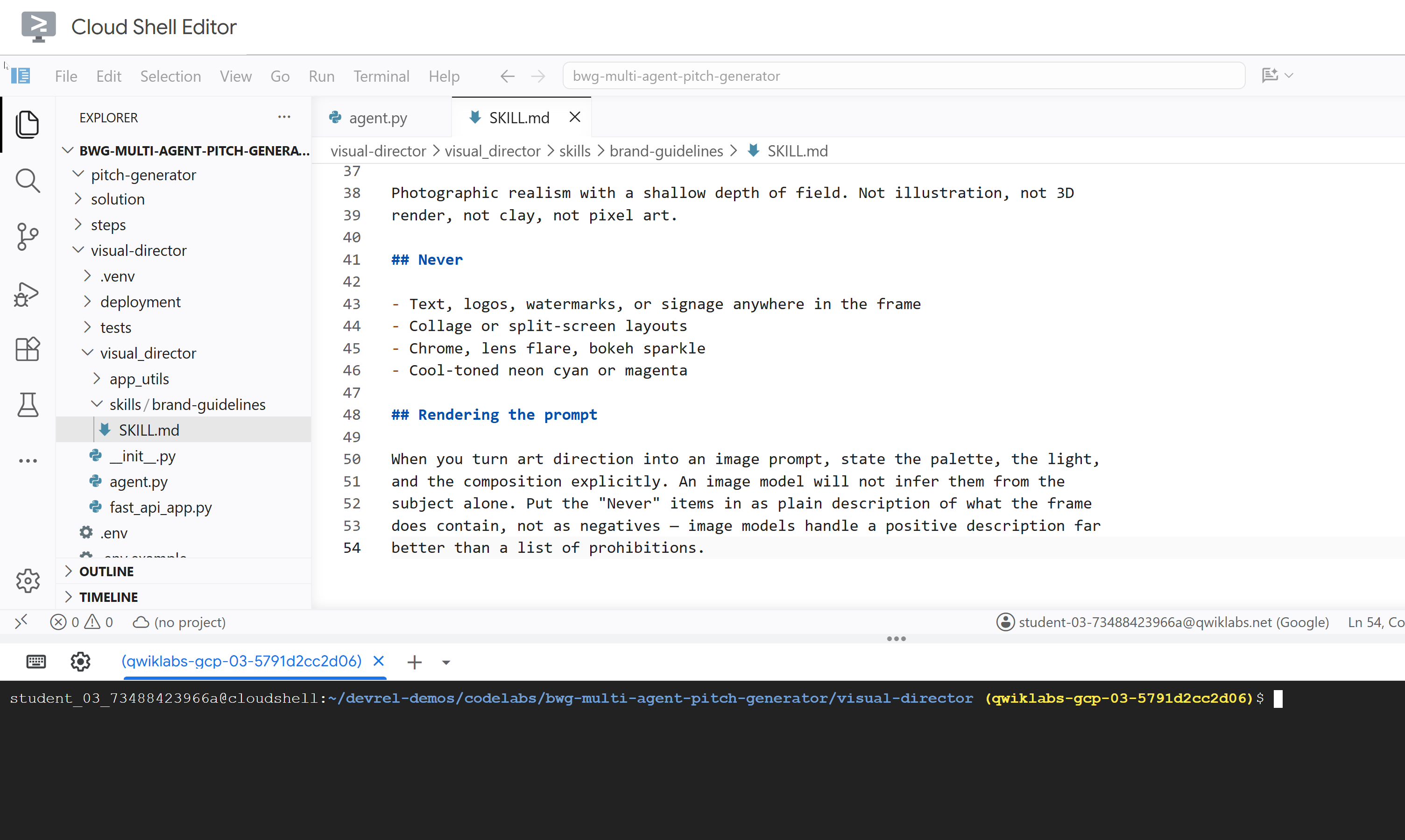
---
name: brand-guidelines
description: The house brand rules for a key visual — palette, light, composition, subject treatment, and what never appears. Load this before writing art direction or rendering an image, so the visual looks like it came from this brand rather than from a generic image model.
---

## Brand guidelines

House style for campaign key visuals. Every rule here beats a preference in the
brief. If the brief asks for something forbidden below, follow the brief for the
subject and the guidelines for the treatment.

## Palette

Deep indigo and slate as the ground. One warm accent — amber or terracotta —
carrying the eye to the subject. Nothing neon, nothing fluorescent.

At most three colors with any weight. A fourth reads as clutter.

## Light

One dominant source, low and raking. Long shadows are wanted. Golden hour or a
single hard studio key, never flat overhead light and never a ring light.

Rim light is allowed on the subject only, and only to separate it from the
ground.

## Composition

Subject off-center, roughly a third in. Generous negative space on the opposite
side — copy lands there later, so leave it genuinely empty.

Eye level or slightly below. No top-down flat lays. No fisheye, no Dutch tilt.

## Subject

One subject. If the idea implies a crowd, pick the one that carries it.

Photographic realism with a shallow depth of field. Not illustration, not 3D
render, not clay, not pixel art.

## Never

- Text, logos, watermarks, or signage anywhere in the frame
- Collage or split-screen layouts
- Chrome, lens flare, bokeh sparkle
- Cool-toned neon cyan or magenta

## Rendering the prompt

When you turn art direction into an image prompt, state the palette, the light,
and the composition explicitly. An image model will not infer them from the
subject alone. Put the "Never" items in as plain description of what the frame
does contain, not as negatives — image models handle a positive description far
better than a list of prohibitions.
更新 visual_director/agent.py
更新 agent.py 文件并进行配置,使其具备之前定义的技能。
- 打开代理文件:
cloudshell edit ~/devrel-demos/codelabs/bwg-multi-agent-pitch-generator/visual-director/visual_director/agent.py - 将整个
visual_director/agent.py文件内容替换为以下代码:import mimetypes from pathlib import Path from google import genai from google.adk.agents import Agent from google.adk.apps import App from google.adk.models import Gemini from google.adk.skills import load_skill_from_dir from google.adk.tools import ToolContext from google.adk.tools.skill_toolset import SkillToolset from google.genai import types MODEL = "gemini-3.8-flash" ## Configure the `brand-guidelines` skill for the agent BRAND_SKILL = load_skill_from_dir(Path(__file__).parent / "skills" / "brand-guidelines") ## Add definition of `generate_key_visual` tool below this comment root_agent = Agent( name="visual_director", model=Gemini( model=MODEL, client_kwargs={"location": "global"}, retry_options=types.HttpRetryOptions(attempts=3), ), description="Turns a campaign concept into art direction and a key visual.", instruction="""You are the Visual Director on a campaign pitch team. Call `load_skill` for `brand-guidelines` before you write anything. The house style is not optional and it is not in this prompt. You are given a campaign concept. Then, in order: 1. Write art direction for ONE key visual that sells it, obeying the brand guidelines: subject, composition, lighting, color, mood. Three or four sentences. 2. Call `generate_key_visual` with exactly that art direction. Your final reply is the art direction itself and nothing else. No preamble, no alternatives, no questions back. Do not mention the skill, the tool, or the image file — the image travels on its own.""", tools=[ SkillToolset(skills=[BRAND_SKILL]), ## Supply the `generate_key_visual` tool below this comment ], ) app = App( root_agent=root_agent, name="visual_director", )visual-director代理现已正确配置代理技能。在测试之前,您将为该智能体配备一个工具,使其能够生成图片素材资源,作为其关键功能之一。
5. 为智能体配备图片生成工具
在此任务中,您将为视觉总监提供一个工具,该工具可将艺术指导渲染为图片并将其保存为制品。制品是指 AI 智能体在任务期间创建、修改或使用的已命名且已纳入版本控制的二进制数据或文件内容。

实现工具并将其添加到代理
- 打开代理文件:
cloudshell edit ~/devrel-demos/codelabs/bwg-multi-agent-pitch-generator/visual-director/visual_director/agent.py - 将以下
generate_key_visual工具复制到root_agent定义之前:async def generate_key_visual(art_direction: str, tool_context: ToolContext) -> dict: """Render the art direction as the campaign's key visual. Args: art_direction: The art direction to render, in full. Returns: The saved artifact's filename, version, size and media type. """ IMAGE_MODEL = "gemini-3.1-flash-lite-image" response = await genai.Client(location="global").aio.models.generate_content( model=IMAGE_MODEL, contents=art_direction ) ## The image arrives as inline bytes on one of the response parts. image = next( ( part.inline_data for part in response.candidates[0].content.parts or [] if part.inline_data ), None, ) if image is None: raise ValueError(f"{IMAGE_MODEL} returned no image for: {art_direction[:120]}") filename = "key_visual" + ( mimetypes.guess_extension(image.mime_type or "") or ".bin" ) version = await tool_context.save_artifact(filename, types.Part(inline_data=image)) ## Return the artifact filename and version return { "filename": filename, "version": version, "bytes": len(image.data), "mime_type": image.mime_type, } - 在
SkillToolset下方添加generate_key_visual,以便为智能体配备该工具:tools=[ SkillToolset(skills=[BRAND_SKILL]), ## Supply the `generate_key_visual` tool below this comment generate_key_visual, ], agents-cli包含一个名为playground的内置 Web 开发界面,用于检查,类似于 ADK。如需启动 Playground,请执行以下操作:agents-cli playground --port 8080- 点击终端右上角的眼睛图标网页预览,然后选择在端口 8080 上预览。
- 您将看到以下界面,以便与客服人员聊天。尝试发送提示 “九条命。零重力。”
 从互动中,您可以检查
 visual_director代理如何执行load_skill("brand-guidelines")来读取品牌推广指南技能,然后执行generate_key_visual来开始生成图片。生成的图片会存储为制品,也会显示在界面中,方便您轻松检查。 - 返回终端,然后按两次 Ctrl+C 停止正在运行的
agents-cli playground进程。
6. 采用 A2A Protocol 的多智能体架构
在此任务中,您将公开视觉总监,使其成为其他智能体可以调用的服务,并将其配置为使用生成的图片进行响应。
Agent2Agent (A2A) 是一种开放协议,用于让一个代理通过网络调用另一个代理。核心部分是智能体卡片,即智能体通过已知网址发布的关于自身的 JSON 文档,其中包含智能体的名称、说明和功能。调用方获取卡片,并知道如何与卡片后面的代理进行通信,而无需共享源代码、依赖项或语言。

agents-cli 已经默认连接了此功能。生成的框架 visual_director/app_utils/a2a.py,用于从代理构建卡片并装载路由,以及 visual_director/fast_api_app.py,用于提供这些路由。您只需稍作修改,即可让它也能将制品发送回客户端。
架构将如下所示。请注意,该代理尚未集成到我们的初始工作流程中:

agents-cli A2A 服务器框架
使用 agents-cli 初始化 visual-director 代理时,系统已提供以下代码和模块。在终端中粘贴以下命令,打开这些文件:
cloudshell edit visual_director/fast_api_app.py
cloudshell edit visual_director/app_utils/a2a.py
visual_director/fast_api_app.py 启动代理,并在根据应用名称构建的路径下装载 A2A 路由:
await attach_a2a_routes(
    app,
    agent=root_agent,
    runner=runner,
    rpc_path=f"/a2a/{adk_app.name}",   ## becomes /a2a/visual_director
)
visual_director/app_utils/a2a.py 会在三步内完成其余操作。
首先,它从智能体本身构建智能体卡片。名称、说明和每个工具都会成为调用方可以读取的条目:
agent_card = await AgentCardBuilder(
    agent=agent,
    rpc_url=f"{resolved_app_url}{rpc_path}",
).build()
其次,它在协议和代理之间放置了一个执行器。传入的 A2A 请求会转换为 ADK 运行,结果会转换回来:
request_handler = DefaultRequestHandler(
    agent_executor=A2aAgentExecutor(runner=runner, force_new_version=True),
    task_store=task_store,
    agent_card=agent_card,
)
第三,它会挂载两条路由:一条用于提供卡片,一条用于接受调用。
路由 | 用途 |
| 卡片。来电者首先会看到此内容,了解智能体可以做什么 |
| JSON-RPC 端点。实际请求的去向 |
允许制品跨越边界
默认情况下,A2A 响应会携带文本。映像是一种制品,除非您配置为包含制品,否则制品会保留在服务代理的存储区中。
- 打开生成的 A2A 文件:
cd ~/devrel-demos/codelabs/bwg-multi-agent-pitch-generator/visual-director cloudshell edit visual_director/app_utils/a2a.py - 找到
AgentCardBuilder导入,并在其下方添加A2aAgentExecutorConfig和include_artifacts_in_a2a_event_interceptor导入:## ... ## from google.adk.a2a.utils.agent_card_builder import AgentCardBuilder ## Add the following two below `AgentCardBuilder` import from google.adk.a2a.executor.config import A2aAgentExecutorConfig from google.adk.a2a.executor.interceptors.include_artifacts_in_a2a_event import ( include_artifacts_in_a2a_event_interceptor, ) - 找到
agent_executor=A2aAgentExecutor(runner=runner),代码行,并将其替换为以下代码(添加了A2aAgentExecutorConfig):agent_executor=A2aAgentExecutor( runner=runner, force_new_version=True, config=A2aAgentExecutorConfig( execute_interceptors=[include_artifacts_in_a2a_event_interceptor] ), ),
启动服务并读取已发布的 A2A 卡
- 在后台启动服务器。您需要声明
APP_URL,因为这是卡片宣传的自有地址。将此内容粘贴到终端中:APP_URL=http://localhost:8801 nohup uv run uvicorn visual_director.fast_api_app:app --port 8801 > /tmp/visual-director.log 2>&1 & - 等待几秒钟以启动,然后确认它是否正在提供服务:
sleep 10 tail -2 /tmp/visual-director.logINFO: Application startup complete. INFO: Uvicorn running on http://127.0.0.1:8801 (Press CTRL+C to quit) - 读取智能体现在发布的卡片:
curl -s http://localhost:8801/a2a/visual_director/.well-known/agent-card.json | python3 -m json.toolgenerate_key_visual。它直接从代码中的代理定义生成。{ "name": "visual_director", "description": "Turns a campaign concept into art direction and a key visual.", "skills": [ { "id": "visual_director", "name": "model", "tags": [ "llm" ] }, { "id": "visual_director-generate_key_visual", "name": "generate_key_visual", "description": "Render the art direction as the campaign's key visual.\n\nArgs:\n art_direction: The art direction to render, in full.\n\nReturns:\n The saved artifact's filename, version, size and media type.", "tags": [ "llm", "tools" ] } ], "preferredTransport": "JSONRPC", "protocolVersion": "0.3", "url": "http://localhost:8801/a2a/visual_director" }visual-director代理嵌入到主pitch-generator工作流中。
7. 将 A2A 远程代理嵌入到工作流中
在此任务中,您将远程代理添加到图表中,作为第三个分支。
远程代理封装在 RemoteA2aAgent 中,并像任何其他节点一样放置在图中。边缘保持相同的形状,并且协调器不知道哪些节点是本地节点。
将协调器指向服务并更新图表工作流
- 打开代理文件:
cd ~/devrel-demos/codelabs/bwg-multi-agent-pitch-generator/pitch-generator cloudshell edit pitch_generator/agent.py - 在文件顶部添加以下导入内容,与现有导入内容并列:
import asyncio import subprocess import google.auth.transport.requests import google.oauth2.id_token import httpx from google.adk.a2a.converters.part_converter import convert_genai_part_to_a2a_part - 在
creative_director声明上方添加以下RemoteA2aAgent定义:VISUAL_DIRECTOR_URL = os.getenv("VISUAL_DIRECTOR_URL", "http://localhost:8801") ## For deployment on Cloud Run def _cloud_run_client() -> httpx.AsyncClient | None: """An httpx client that signs each request with a Cloud Run ID token. Cloud Run deploys private, so both the agent-card fetch and the A2A calls need one. """ if not VISUAL_DIRECTOR_URL.startswith("https://"): return None async def sign(request: httpx.Request) -> None: token = None try: token = await asyncio.to_thread( google.oauth2.id_token.fetch_id_token, google.auth.transport.requests.Request(), VISUAL_DIRECTOR_URL, ) except Exception: token = subprocess.check_output( ["gcloud", "auth", "print-identity-token", "-q"], stderr=subprocess.PIPE ).decode().strip() if not token: raise Exception("Failed to fetch ID token") request.headers["Authorization"] = f"Bearer {token}" return httpx.AsyncClient(event_hooks={"request": [sign]}, timeout=600) ## Keep the approval's tool traffic out of the A2A request def _pitch_parts_only(part: types.Part): """Sends the Visual Director text and media only. RemoteA2aAgent replays the session on every call, and the Visual Director runs downstream of the human approval, so the approval's function_response would travel alongside the concept text. An ADK server reads a function response as "resume the paused invocation" and rejects a message that also carries text, so drop the tool parts here. """ if part.function_call or part.function_response: return None return convert_genai_part_to_a2a_part(part) visual_director = RemoteA2aAgent( name="visual_director", description="Turns a campaign concept into art direction for one key visual.", agent_card=( f"{VISUAL_DIRECTOR_URL}/a2a/visual_director{AGENT_CARD_WELL_KNOWN_PATH}" ), httpx_client=_cloud_run_client(), genai_part_converter=_pitch_parts_only, ) - 使用以下定义覆盖或替换
package节点 Python 函数:async def package(ctx: Context, node_input: dict): """Render the joined branches as the finished pitch.""" empty = [name for name, value in node_input.items() if not value] if empty: raise ValueError(f"nothing reached the join from: {', '.join(empty)}") def _key_visual(ctx: Context) -> types.Blob | None: """The image the Visual Director sent back, or None if it sent none.""" for event in reversed(ctx.session.events): if event.author != "visual_director" or not event.content: continue for part in event.content.parts or []: if part.inline_data and part.inline_data.data: return part.inline_data return None image = _key_visual(ctx) if image is None: raise ValueError("the Visual Director returned art direction but no image") suffix = mimetypes.guess_extension(image.mime_type or "") or ".bin" filename = f"key_visual{suffix}" await ctx.save_artifact(filename, types.Part(inline_data=image)) pitch = "\n\n".join( [ f"CONCEPT\n{node_input['creative_director']}", f"COPY\n{node_input['copywriter']}", f"ART DIRECTION\n{node_input['visual_director']}", f"KEY VISUAL\n{filename}, {len(image.data)} bytes, {image.mime_type}", ] ) yield Event( content=types.Content( role="model", parts=[types.Part(text=pitch), types.Part(inline_data=image)], ) ) yield Event(output=pitch) - 在下游生成继续进行之前,添加了人工审批关卡。在
pitch_generator/agent.py中,定义root_agent上方的审批节点:@node(rerun_on_resume=False) async def approve_concept(ctx: Context): yield RequestInput( message="Please approve the campaign concept (yes/no).", response_schema=str ) @node(rerun_on_resume=True) async def user_approval(ctx: Context): user_response = await ctx.run_node(approve_concept) if str(user_response).lower() in ("yes", "y"): approved_concept = f"## Approved Concept\n\n{ctx.session.state['creative_director']}" yield Event( content=types.Content( role="model", parts=[types.Part(text=approved_concept)] ) ) else: raise ValueError("User rejected the concept") - 最后,更新顶部的导入,以包含
google.adk.events和google.adk.workflow中的RequestInput和node:from google.adk.events import Event, RequestInput from google.adk.workflow import JoinNode, Workflow, noderoot_agent工作流edges以通过user_approval进行路由:edges=[ ("START", creative_director), (creative_director, user_approval, (copywriter, visual_director)), ((creative_director, copywriter, visual_director), assemble), (assemble, package), ],- 人机协同 (HITL) 审批:
approve_concept会产生RequestInput。当工作流到达此节点时,执行会暂停并向调用者发出中断信号。在确认用户批准之前,下游分支(copywriter和visual_director)不会运行。 visual_director在边缘的显示方式与copywriter完全相同,尽管前者需要通过函数调用,而后者需要通过网络。- 返回的图片是从会话事件中读取的,而不是从
node_input中读取的,因为目前只有文本会被提升为节点的输出。图片通过 A2A 拦截器跨越边界,但到达时附加到远程代理的事件,因此_key_visual辅助函数会从那里检索图片。
- 人机协同 (HITL) 审批:
测试集成
现在,您将测试 Visual Director(在后台运行)和 Pitch Generator 是否可以通过 A2A protocol 进行通信。
- 确认 Visual Director 仍在后台运行:
curl -s -o /dev/null -w "visual director: %{http_code}\n" http://localhost:8801/a2a/visual_director/.well-known/agent-card.jsonvisual director: 200结果。如果您看到任何其他状态,请运行以下命令以重启该服务:fuser -k 8801/tcp 2>/dev/null || true cd ~/devrel-demos/codelabs/bwg-multi-agent-pitch-generator/visual-director APP_URL=http://localhost:8801 nohup uv run uvicorn visual_director.fast_api_app:app --port 8801 > /tmp/visual-director.log 2>&1 & cd ~/devrel-demos/codelabs/bwg-multi-agent-pitch-generator/pitch-generator sleep 10 curl -s -o /dev/null -w "visual director: %{http_code}\n" http://localhost:8801/a2a/visual_director/.well-known/agent-card.json - 开始预览:
cd ~/devrel-demos/codelabs/bwg-multi-agent-pitch-generator/pitch-generator/pitch_generator agents-cli playground --port 8080 - 点击终端右上角的眼睛图标网页预览,然后选择在端口 8080 上预览。
- 您将看到与客服人员聊天的界面。尝试发送提示“Flying skateboards for cats”(猫用飞行滑板)。

 您将看到工作流启动和每个代理运行的完整互动过程。
creative_director起草概念后,工作流会在审批门处暂停,并要求您确认:请审批广告系列概念(是/否)。在输入字段中输入 yes 以继续操作。获得批准后,图表会展开:您可以看到visual-director代理何时开始加载技能,以及在图片生成过程中,copywriter代理何时完成社交媒体说明的生成,这表明两个代理并行运行,无需等待彼此。两者都完成后,assemble节点会将结果与creative_director生成的已获批概念合并,最终在package函数中完成推介内容交付。
8. 将关键视觉元素持久保留在 Cloud Storage 中
到目前为止,所有关键视觉元素都存储在内存中。一旦流程停止,图片就会消失,这对于游乐场来说没问题,但对于广告系列来说毫无用处。在此任务中,您将为工作流指定一个写入目标存储桶,并创建一个将在最后一个任务中使用的 BigQuery 数据集。
ADK 会在启动时决定工件的放置位置。生成的 app_utils/services.py 会读取单个环境变量:
def get_artifact_service():
    """Process-wide artifact service: GCS when a bucket is set, else in-memory."""
    if bucket := os.environ.get("LOGS_BUCKET_NAME"):
        return GcsArtifactService(bucket_name=bucket)
    return InMemoryArtifactService()
如果您设置了 LOGS_BUCKET_NAME,则每次 save_artifact 调用都会转到 Cloud Storage。

创建 BigQuery 数据集
- 在 Cloud Shell 中,运行以下命令以创建 BigQuery 数据集:
bq mk --dataset --location=<YOUR_REGION> --project_id=<YOUR_PROJECT_ID> bwg - 将协调器的制品存储区指向相应存储桶:
export LOGS_BUCKET_NAME="<YOUR_PROJECT_ID>-bwg"GcsArtifactService采用不带gs://前缀的裸存储桶名称。与其他变量一样,此变量位于您的 shell 中,并且部署任务会将其传递给 Cloud Run。 - 检查存储桶的内容。在新浏览器标签页中,打开以下网址:
https://console.cloud.google.com/storage/browser?project=<YOUR_PROJECT_ID>
9. 将 Visual Director 智能体部署到 Cloud Run
到目前为止,所有内容都在一台机器上运行,Visual Director 可通过 localhost:8801 访问。在此任务中,您将部署视觉导演智能体,使其成为自己的 Cloud Run 服务,并让推介生成器通过 Agent2Agent (A2A) protocol 在网络中与其通信。
视觉效果总监会获得真实的 https:// 网址,因此您之前编写的 _cloud_run_client 会开始对请求进行签名,而不是返回 None。此外,Cloud Run 默认以私密方式部署。

部署 Visual Director
- 停止本地后台服务和 Playground(如果它们仍在运行):
fuser -k 8801/tcp 2>/dev/null || true fuser -k 8000/tcp 2>/dev/null || true - 部署代理。这会构建容器并推送它。⏰ 这需要几分钟时间。
cd ~/devrel-demos/codelabs/bwg-multi-agent-pitch-generator/visual-director
source .env
agents-cli deploy \
  --service-name visual-director \
  --project <YOUR_PROJECT_ID> \
  --region <YOUR_REGION> \
  --no-confirm-project \
  --labels dev-tutorial=bwg001-devlab-1 \
  --update-env-vars "LOGS_BUCKET_NAME=$LOGS_BUCKET_NAME,GOOGLE_GENAI_USE_VERTEXAI=true,GOOGLE_CLOUD_PROJECT=$GOOGLE_CLOUD_PROJECT,GOOGLE_CLOUD_LOCATION=$GOOGLE_CLOUD_LOCATION,GOOGLE_CLOUD_REGION=$GOOGLE_CLOUD_REGION"
运行使用部署到 Cloud Run 的 Visual Director 的 Pitch Generator
- 读取视觉总监的网址,然后运行使用该网址的推介生成器:
cd ~/devrel-demos/codelabs/bwg-multi-agent-pitch-generator/pitch-generator
source .env
export VISUAL_DIRECTOR_URL=$(gcloud run services list \
  --project <YOUR_PROJECT_ID> \
  --region <YOUR_REGION> \
  --flatten='spec.template.spec.containers[0].env' \
  --filter='metadata.name=visual-director AND spec.template.spec.containers[0].env.name=APP_URL' \
  --format='value(spec.template.spec.containers[0].env.value)')
echo "Visual Director is at $VISUAL_DIRECTOR_URL"
APP_URL=http://localhost:8000 nohup uv run uvicorn pitch_generator.fast_api_app:app --port 8000 > /tmp/visual-pitch_generator.log 2>&1 &
调用已部署的工作流
两个智能体都支持 A2A protocol。该代码库提供了一个小型客户端,用于通过 A2A 调用推介生成器。
需要将 PITCH_GENERATOR_URL 设置为在本地运行的推介生成器网址。与此同时,Visual Director 在 Cloud Run 中运行,Pitch Generator 通过 A2A 与其通信。
- 将客户端复制到您的项目中并高效运转:
cd ~/devrel-demos/codelabs/bwg-multi-agent-pitch-generator/pitch-generator cp ../solution/pitch-generator/call_agent.py . PITCH_GENERATOR_URL=http://localhost:8000 uv run python call_agent.py "Flying skateboards for cats" --save-image ./key_visual.png=== HUMAN APPROVAL REQUIRED === [DRAFT CONCEPT] Concept Line: "Gravity is a Suggestion." ... Please approve the campaign concept (yes/no):yes,然后按 Enter 键以批准并继续工作流。(您也可以传递-y或--auto-approve以自动批准)。 - 打开
call_agent.py并检查它如何使用a2a-sdk与代理互动:ClientFactory构建了面向https://SERVICE_URL/a2a/pitch_generator的官方 A2AClient。generate_pitch_async发送初始SendMessageRequest。当响应返回TaskState.TASK_STATE_INPUT_REQUIRED时,它会检测到adk_request_input部分,显示草稿概念,收集您的批准,并发送包含您的响应的恢复请求返回到任务。- 解析循环从已完成任务的制品中读取
CONCEPT、COPY和ART DIRECTION部分,并将二进制映像保存到key_visual.png。
key_visual.png的图片。 - 将关键视觉元素上传到存储桶中,放在您可以让 BigQuery 指向的前缀下:
gcloud storage cp ./key_visual.png gs://<YOUR_PROJECT_ID>-bwg/key-visuals/cats.png - 生成第二个推介,以便进行比较,并将其上传:
PITCH_GENERATOR_URL=http://localhost:8000 uv run python call_agent.py "A commuter bike built for rainy cities" --save-image ./bike.png
gcloud storage cp ./bike.png gs://<YOUR_PROJECT_ID>-bwg/key-visuals/bike.png
10. 在 BigQuery 中对关键视觉元素进行品牌契合度评分
现在,您已在存储桶中存储了图片,并且拥有了本应用于指导这些图片制作的品牌推广指南。在此任务中,您将把这两者结合起来:引用 BigQuery 中的图片,然后让 Gemini 模型根据指南对每张图片进行评分,而无需将任何字节移出 Cloud Storage。
以下两项 BigQuery 功能可实现此目的:
ObjectRef是指向 Cloud Storage 对象的值。OBJ.MAKE_REF会根据 URI 和授予 BigQuery 对相应存储桶的委托访问权限的连接来构建一个。设置脚本创建的pitch-connection就是该连接,并且它已包含 Storage Object Viewer 和 Agent Platform User。AI.SCORE接受提示并返回FLOAT64。提示可以将字符串与ObjectRef值混合使用,这样模型就可以同时看到您的评分准则和图片。

制作关键视觉元素表格
- 在新浏览器标签页中打开 BigQuery Studio:
https://console.cloud.google.com/bigquery?project=<YOUR_PROJECT_ID> - 点击创建新查询(+ 图标),然后粘贴并运行以下查询(将
SET @@location = '<YOUR_REGION>';

CREATE OR REPLACE TABLE bwg.key_visuals AS
SELECT
  campaign,
  concept,
  OBJ.FETCH_METADATA(
    OBJ.MAKE_REF(uri, '<YOUR_REGION>.pitch-connection')
  ) AS key_visual
FROM UNNEST([
  STRUCT(
    'cats' AS campaign,
    'Flying skateboards for cats' AS concept,
    'gs://<YOUR_PROJECT_ID>-bwg/key-visuals/cats.png' AS uri
  ),
  STRUCT(
    'bike',
    'A commuter bike built for rainy cities',
    'gs://<YOUR_PROJECT_ID>-bwg/key-visuals/bike.png'
  )
]);
OBJ.MAKE_REF根据 URI 和连接构建引用。然后,OBJ.FETCH_METADATA会联系 Cloud Storage 并填充对象的大小、内容类型和世代。第二次调用也是证明连接有效的最快方式:如果权限有误,details字段会返回错误,而不是元数据。 - 检查您存储的内容。将之前的查询替换为以下查询,然后运行该查询:
SELECT campaign, concept, key_visual.uri, key_visual.details
FROM bwg.key_visuals;
根据品牌推广指南对每张图片进行评分
视觉总监被告知要遵守调色板、照明规则和构图规则。是否确实如此则需要判断,而这正是 AI.SCORE 的用途。
- 运行以下查询(将
ObjectRef:SELECT campaign, concept, AI.SCORE( ('''You are the brand guardian reviewing a campaign key visual. Score the attached image from 1 to 10 on how closely it follows these house rules: - Palette: deep indigo and slate, with one warm accent of amber or terracotta. Nothing neon. - Light: one dominant low, raking source with long shadows. No flat overhead light. - Composition: subject off-center with generous empty negative space on the opposite side. - Subject: one subject only, photographic realism, shallow depth of field. - Never: text, logos, or watermarks anywhere in the frame. A 10 obeys every rule. A 1 ignores them. The campaign concept is: ''', concept, key_visual), connection_id => '<YOUR_REGION>.pitch-connection', endpoint => 'gemini-3.5-flash' ) AS brand_fit FROM bwg.key_visuals ORDER BY brand_fit DESC; - 将得分转化为团队可采取行动的判决:
CREATE OR REPLACE TABLE bwg.brand_review AS SELECT campaign, concept, brand_fit, IF(brand_fit >= 7, 'on brand', 'needs another pass') AS verdict FROM ( SELECT campaign, concept, AI.SCORE( ('''Score this campaign key visual from 1 to 10 on how closely it follows the house brand rules: deep indigo and slate palette with a single warm accent and nothing neon; one low raking light source with long shadows; the subject off-center with empty negative space opposite; a single photographic subject; and no text, logos, or watermarks in the frame. The campaign concept is: ''', concept, key_visual), connection_id => '<YOUR_REGION>.pitch-connection', endpoint => 'gemini-3.5-flash' ) AS brand_fit FROM bwg.key_visuals ); SELECT * FROM bwg.brand_review ORDER BY brand_fit DESC;AI.SCORE只返回FLOAT64,因此阈值位于纯 SQL 中,您可以在不修改提示的情况下调整它。评分是按行进行的,这意味着系统会针对广告系列生成的所有素材资源(而不仅仅是您在此处生成的两个素材资源)应用相同的评分准则。
11. 后续步骤
创建评估
智能体评估(简称“eval”)是一种自动化测试,用于衡量自主 AI 智能体在推理、规划、使用工具和完成多步骤工作流方面的表现。它们类似于代理的单元测试,但考虑到了代理的不确定性。
其中一个代理包含 Human in the loop,这意味着它会等待输入。您需要允许 Antigravity 修改当前代码,以免此行为妨碍自动评估。
开始使用 Antigravity CLI 的最佳方式之一是向其提问。
在 Cloud Shell 中输入以下内容以启动 CLI:
cd ~/devrel-demos/codelabs/bwg-multi-agent-pitch-generator/
agy
以下是一个初始提示:
Explore this repository (`pitch-generator` and `visual-director`), including their agent instructions, tools, and `SKILL.md` files. Design and implement a creative `agents-cli eval` evaluation suite under `tests/eval/` that stress-tests the agent's behavior.
您还可以在克隆的代码库中找到评估示例以及运行评估的说明。
12. 清理
为避免因本 Codelab 中使用的资源导致您的 Google Cloud 账号产生费用,请删除项目(推荐)或删除在 Codelab 期间创建的各个资源:
gcloud run services delete visual-director --region=<YOUR_REGION> --project=<YOUR_PROJECT_ID> --quiet
bq rm -r -f -d <YOUR_PROJECT_ID>:bwg
bq rm --connection --location=<YOUR_REGION> --project_id=<YOUR_PROJECT_ID> pitch-connection
gcloud storage rm -r gs://<YOUR_PROJECT_ID>-bwg
13. 恭喜!
在此 Codelab 中,您使用智能体开发套件构建了一个多智能体营销活动推介生成器。您将三个智能体连接到确定性图工作流中,将品牌推广指南打包为按需加载的智能体技能,并为智能体提供了一个可将其输出保存为制品映像的生成工具。然后,您将 Visual Director 拆分为自己的 A2A 服务,将其作为远程节点重新嵌入到图中,将其部署到 Cloud Run,并通过 A2A 从本地运行的协调器调用整个工作流。最后,您使用 ObjectRef 引用了 BigQuery 生成的关键视觉元素,并使用 AI.SCORE 根据自己的品牌推广指南对其进行了评估。