

1. 簡介

瞭解如何建構多模態多代理引擎,根據原始主題簡報協調製作高參與度的社群媒體資產。您將使用 Google 的 Agent Development Kit (ADK) 和 Agent2Agent (A2A) 通訊協定,撰寫自主微代理、將品牌規則封裝為可重複使用的代理技能、將代理服務部署至 Cloud Run,並使用 BigQuery AI 函式,評估生成的關鍵視覺元素是否符合品牌規範。
學習內容
在本程式碼研究室中,您將瞭解如何執行下列工作:
- 使用確定性圖形工作流程,自動調度管理多個 ADK 代理。
- 將品牌宣傳指南封裝為代理程式技能,只在需要時載入。
- 為代理提供圖像生成工具,將輸出內容儲存為構件。
- 將代理公開為 A2A 服務,並從另一個代理呼叫該代理做為遠端節點。
- 將 Visual Director 部署至 Cloud Run,並透過 A2A 呼叫工作流程。
- 在 BigQuery 中使用 AI 函式,評估生成的關鍵視覺元素是否符合品牌形象。
軟硬體需求
- 網路瀏覽器 (例如 Chrome)。
- Google Cloud 帳戶和已啟用計費功能的 Google Cloud 專案。
2. 事前準備
建立 Google Cloud 專案
- 在 Google Cloud 控制台的專案選取器頁面中,選取或建立 Google Cloud 專案。
- 確認 Cloud 專案已啟用計費功能。瞭解如何檢查專案是否已啟用計費功能。
啟動 Cloud Shell
您將使用 Google Cloud Shell 下載程式碼、執行設定指令碼,以及部署應用程式。
- 在瀏覽器中開啟 Google Cloud Shell (或點選 Google Cloud 控制台頂端的「啟用 Cloud Shell」):
https://shell.cloud.google.com/ - 在環境中設定 Google Cloud 專案 ID 和區域 (例如
us-central1),方法是在終端機中貼上下列指令 (將export PROJECT_ID="<YOUR_PROJECT_ID>" export REGION="<YOUR_REGION>" gcloud config set project $PROJECT_ID 您應該會看到類似下列的訊息:
Your active configuration is: [cloudshell-####] Updated property [core/project] - 為專案啟用必要的 Google Cloud API:
gcloud services enable \
  compute.googleapis.com \
  cloudresourcemanager.googleapis.com \
  aiplatform.googleapis.com \
  storage.googleapis.com \
  storage-component.googleapis.com \
  bigqueryconnection.googleapis.com \
  bigquery.googleapis.com \
  run.googleapis.com \
  secretmanager.googleapis.com \
  cloudbuild.googleapis.com \
  artifactregistry.googleapis.com \
  iap.googleapis.com \
  iam.googleapis.com
複製存放區
我們提供程式碼範本,協助您開始進行程式碼研究室。雖然相對較小,但其所在的 GitHub 存放區相當龐大。為加快複製速度並節省磁碟空間,我們通常會搭配 --filter=blob:none 選項使用 git clone 和 git sparse-checkout,以及其他一些指令。
這聽起來很複雜,但 Antigravity 可以為我們完成所有工作!
首先,請設定 Antigravity CLI,以便直接解決問題並啟動。
在 Cloud Shell 中執行下列指令:
source <(curl -fsSL https://github.com/GoogleCloudPlatform/devrel-demos/raw/refs/heads/vladkol/cloud-shell-configure-agy/codelabs/labs-scripts/bwg-multi-agent-pitch-generator/cloud_shell_configure_agy.sh)
這項指令會設定 Antigravity CLI,並在同一個終端機中啟動。退出 Antigravity CLI 後,系統會返回 Cloud Shell 提示。

我們只需要存放區中的 codelabs/bwg-multi-agent-pitch-generator 資料夾。我們請 Antigravity 只下載該資料夾,並將其放在本機的 ~/devrel-demos/codelabs/bwg-multi-agent-pitch-generator/ 中。
將這項工作交給 Antigravity CLI:
Download files from under `https://github.com/GoogleCloudPlatform/devrel-demos/tree/main/codelabs/bwg-multi-agent-pitch-generator`
to folder `~/devrel-demos/codelabs/bwg-multi-agent-pitch-generator/`.
If `devrel-demos` folder already exists, rename it with a `.backup` suffix.

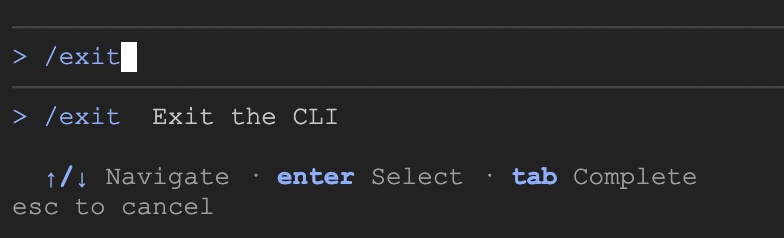
Antigravity 會執行這項工作。系統會要求您授權執行幾項指令。程式碼下載完成後,請執行 /exit 指令,結束 Antigravity CLI:
/exit
開啟存放區工作區
接著,在 Cloud Shell 中開啟程式碼工作區。在 Cloud Shell 終端機中執行下列指令:
cd ~/devrel-demos/codelabs/bwg-multi-agent-pitch-generator/
cloudshell workspace .
執行設定指令碼
如要讓這個體驗更順暢,請從存放區執行設定指令碼。這項指令會設定環境變數、安裝 agents-cli、建立構件的 Cloud Storage bucket、建立 BigQuery Cloud 資源連結,並授予服務帳戶所需的 IAM 權限 (自動重試)。
設定指令碼也會呼叫 setenv.sh,這個小型輔助程式會從您在上方匯出的 PROJECT_ID 和 REGION 衍生出兩個代理程式都需要使用的變數,也就是 GOOGLE_CLOUD_PROJECT、GOOGLE_CLOUD_REGION、GOOGLE_CLOUD_LOCATION 和 GOOGLE_GENAI_USE_VERTEXAI。此外,這項指令也會將這兩個值儲存至主目錄中的 .env 檔案,方便您日後復原。
- 在 Cloud Shell 中,將設定指令碼設為可執行並運作執行:
chmod +x codelab-setup.sh setenv.sh ./codelab-setup.sh - 這項作業約需一分鐘。您應該會看到以下訊息,表示指令碼執行成功:「🎉 🦄 Script execution complete.」

- 設定指令碼是在自己的殼層中執行,因此變數不會傳送到終端機。將這些檔案載入工作階段:
source ./setenv.sh
3. 透過圖表工作流程自動調度管理代理
在這項工作中,您會建立提案生成器專案,並建構圖形工作流程,執行兩個代理程式並合併輸出內容。
提案需要概念,也就是銷售該概念的想法和資產。在本使用案例中,我們將設計在工作範圍內具有不同職責的代理程式,示範如何將複雜工作分離,並委派給具有不同職責的代理程式,方便管理。
如果這類工作由多位專員分工,就必須在每個代理執行時進行協調。您可以選擇讓代理決定何時呼叫每個子代理,也可以採用更具決定性的方法。在本程式碼研究室中,您將使用圖形工作流程的決定性方法。
架構第一個代理專案
- 在 Cloud Shell 中,將下列指令貼到終端機,然後建立專案:
cd ~/devrel-demos/codelabs/bwg-multi-agent-pitch-generator agents-cli create pitch-generator \ --agent adk \ --agent-directory pitch_generator \ --deployment-target cloud_run \ --session-type in_memory \ --cicd-runner skip \ --region <YOUR_REGION> \ --auto-approveDockerfile、測試、稍後使用的 Terraform,以及含有.env.example範本的.env檔案。本程式碼研究室會用到兩個部分:pitch_generator/agent.py是代理程式,而您要重寫的檔案。pitch_generator/是由--agent-directory設定的套件名稱。
setenv.sh匯出的環境讀取專案和區域,因此這裡不需要設定任何項目。 - 安裝依附元件:
cd pitch-generator
agents-cli update -y && agents-cli install && uv sync --upgrade-package google-adk
瞭解圖表
ADK v2.x 支援圖形工作流程。圖表是由節點 (工作單元) 和邊緣 (連接節點) 所建構。節點通常是代理,但也可以是純 Python 函式。邊緣表示一個節點完成後,下一個節點會執行。
邊緣會寫成清單,ADK 會計算順序:
edges=[
    ("START", creative_director),        ## the graph begins here
    (creative_director, copywriter),     ## then this
]
巢狀結構會賦予邊緣意義:
邊緣 | 意義 |
| 鏈結。先是 a,然後是 b,接著是 c,依序執行 |
| 擴散傳遞功能:先是 a,然後同時是 b 和 c |
| 風扇輸入。c 會等待 a 和 b |
如要進行扇入作業,請使用 JoinNode,等待每個前置作業完成,然後一併傳遞輸出內容。
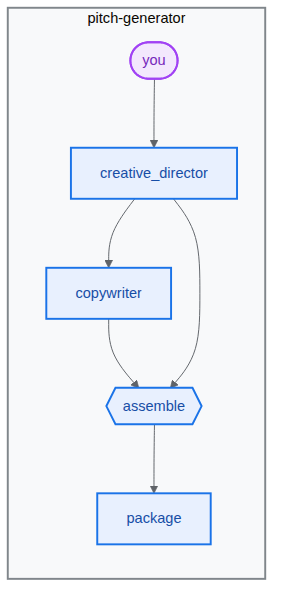
在這項工作中,我們將建構下列工作流程:
建構管道
- 在終端機中貼上下列內容,開啟代理程式檔案:
cd ~/devrel-demos/codelabs/bwg-multi-agent-pitch-generator/pitch-generator cloudshell edit pitch_generator/agent.pyagent.py。💡 提示:您可以隨時選取程式碼,然後使用燈泡圖示要求 Gemini 解釋。你也可以詢問 Antigravity CLI。
- 在
pitch_generator/agent.py編輯器中,將整個檔案替換為下列內容:import mimetypes import os from dotenv import load_dotenv from google.adk.agents import Agent from google.adk.agents.context import Context from google.adk.agents.remote_a2a_agent import ( AGENT_CARD_WELL_KNOWN_PATH, RemoteA2aAgent, ) from google.adk.apps import App from google.adk.events.event import Event from google.adk.models import Gemini from google.adk.workflow import JoinNode, Workflow from google.genai import types load_dotenv() MODEL = "gemini-3.8-flash" def _model() -> Gemini: return Gemini( model=MODEL, client_kwargs={"location": "global"}, retry_options=types.HttpRetryOptions(attempts=3), ) """ ⬇️ Configure visual-director RemoteA2aAgent agent below this comment """ creative_director = Agent( name="creative_director", model=_model(), description="Turns a raw idea into a campaign concept.", instruction=( "You are the Creative Director. Turn the idea you are given into ONE " "punchy campaign concept line with the rationale explanation behind it." ), output_key="creative_director", ) copywriter = Agent( name="copywriter", model=Gemini(model=MODEL, retry_options=types.HttpRetryOptions(attempts=3)), description="Writes social copy for a campaign concept.", instruction=( "You are the Copywriter. Write ONE short social caption for the " "campaign concept you are given. Under 25 words." ), ) """ Waits for every node wired into it, then hands their outputs on together.""" assemble = JoinNode(name="assemble") def package(node_input: dict): """Render the joined branches as the finished pitch. """ pitch = "\n\n".join( [ f"CONCEPT\n{node_input['creative_director']}", f"COPY\n{node_input['copywriter']}", ] ) """ The first event is what the user sees. The second is the node's output, which any downstream node would receive.""" yield Event(content=types.Content(role="model", parts=[types.Part(text=pitch)])) yield Event(output=pitch) """ we put creative_director before `assemble` so that we can gather the `Concept` output at assemble""" root_agent = Workflow( name="pitch_generator", edges=[ ("START", creative_director), (creative_director, copywriter), ((creative_director, copywriter), assemble), (assemble, package), ], ) app = App( root_agent=root_agent, name="pitch_generator", ) agents-cli內建名為playground的網頁開發 UI,可供檢查,與 ADK 類似。如要啟動測試區:agents-cli playground --port 8080n,然後按下 Enter 鍵。- 按一下終端機右上方的「Web Preview」(網頁預覽) 眼睛圖示,然後選擇「Preview on port 8080」(透過以下通訊埠預覽:8080)。

- 您會看到下列介面,可與代理進行即時通訊。試著輸入「貓咪專用的飛行滑板」。您會看到如下所示的回覆,也可以檢查完整的工作流程圖。
 檢查該答案的生成方式。遊樂區會依序顯示圖表執行的每個步驟:
creative_director、copywriter、assemble和package。這個序列就是您連線的圖表,方便您快速確認剛建構的圖表。 - 返回終端機,按兩次 Ctrl+C 鍵,停止執行
agents-cli playground程序。
4. 賦予代理技能
在這項工作中,您會建立第二個代理,並提供封裝為技能的一組品牌宣傳指南。
管道會寫入字詞。圖片需要有房屋風格:調色盤、照明方式、您使用和從未使用過的構圖。這是規則頁面,而規則頁面需要更完善的管理機制。其中一種做法是將其封裝為「代理程式技能」。
技能是包含 SKILL.md 檔案的資料夾。技能目錄的結構如下列範例所示 (使用 visual_director,這是您要建構的下一個代理程式):
visual_director/
   ...
   agent.py
   skills/
      brand-guidelines/
         SKILL.md          ## required: frontmatter + instructions
         references/       ## optional: longer supporting documents
         assets/           ## optional: templates, images, data
         scripts/          ## optional: executable helpers
   ...
代理程式技能的進入點是 SKILL.md 檔案,其中包含 YAML frontmatter 區段,如下所示:
---
name: brand-guidelines
description: The house brand rules for a key visual. Load this before writing art direction, so the visual looks like it came from this brand.
---

## Brand guidelines

Deep indigo and slate as the ground. One warm accent, amber or terracotta...
前置內容是標籤。這是代理程式一開始會看到的內容,因此說明必須指出何時值得載入技能。主體是內容,在代理程式呼叫 load_skill 之前,主體會保留在情境之外。
這就是重點。提示會保持簡短,代理程式只會在需要時提取規則,而變更樣式則表示編輯一個檔案,而不是在指令字串中搜尋。
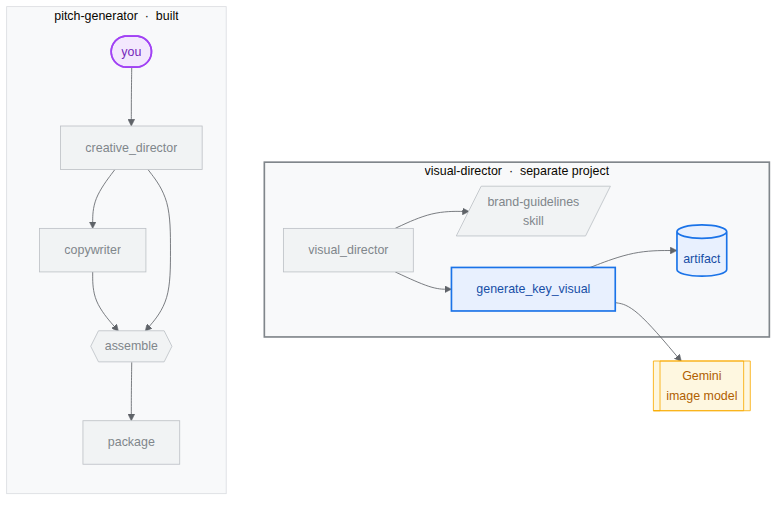
我們將開始建構第二個代理 visual-director,並運用代理技能,如下圖所示:

架構 Visual Director
您將建構專用代理,處理視覺化元件 visual-director。這是一個獨立專案,因為稍後會成為自己的服務,用來示範多個代理如何使用 A2A 通訊協定相互通訊。最後會並排顯示兩個專案:
bwg-multi-agent-pitch-generator/
├── pitch-generator/              ## built in the last task
│   ├── pitch_generator/
│   │   ├── agent.py              ## the graph you wrote
│   │   ├── app_utils/            ## generated, A2A wiring
│   │   └── fast_api_app.py       ## generated, serves the agent
│   └── pyproject.toml
└── visual-director/              ## created below
    └── ...                       ## the same shape again
- 在終端機中貼上下列指令,建立專案並安裝依附元件:
cd ~/devrel-demos/codelabs/bwg-multi-agent-pitch-generator
agents-cli create visual-director \
  --agent adk \
  --agent-directory visual_director \
  --deployment-target cloud_run \
  --session-type in_memory \
  --cicd-runner skip \
  --region <YOUR_REGION> \
  --auto-approve
cd visual-director
agents-cli update -y && agents-cli install && uv sync --upgrade-package google-adk
撰寫品牌宣傳指南
- 建立技能資料夾並開啟檔案:
mkdir -p visual_director/skills/brand-guidelines cloudshell edit visual_director/skills/brand-guidelines/SKILL.md - 在「編輯器」中,將下列內容貼到開啟的
SKILL.md檔案,然後儲存: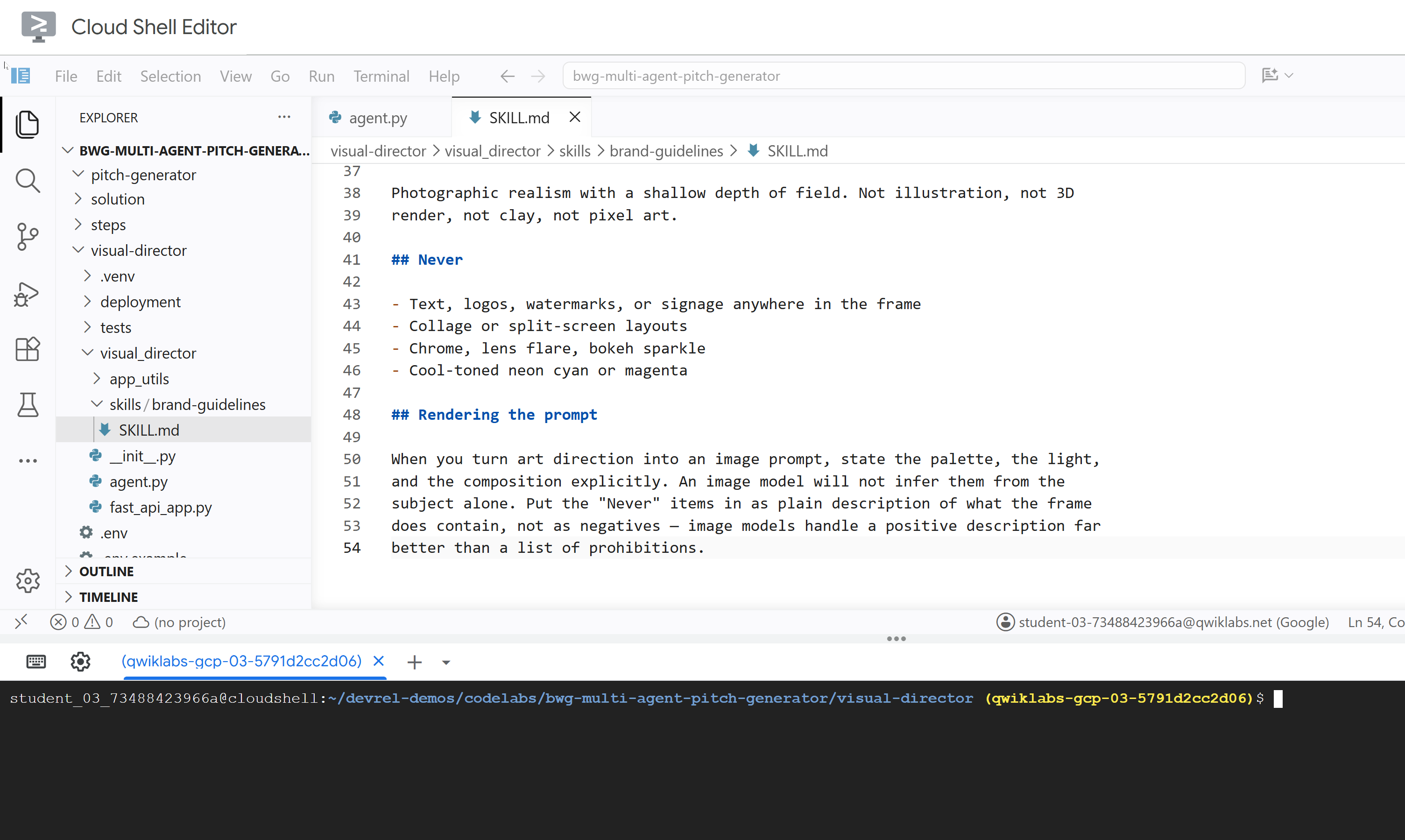
---
name: brand-guidelines
description: The house brand rules for a key visual — palette, light, composition, subject treatment, and what never appears. Load this before writing art direction or rendering an image, so the visual looks like it came from this brand rather than from a generic image model.
---

## Brand guidelines

House style for campaign key visuals. Every rule here beats a preference in the
brief. If the brief asks for something forbidden below, follow the brief for the
subject and the guidelines for the treatment.

## Palette

Deep indigo and slate as the ground. One warm accent — amber or terracotta —
carrying the eye to the subject. Nothing neon, nothing fluorescent.

At most three colors with any weight. A fourth reads as clutter.

## Light

One dominant source, low and raking. Long shadows are wanted. Golden hour or a
single hard studio key, never flat overhead light and never a ring light.

Rim light is allowed on the subject only, and only to separate it from the
ground.

## Composition

Subject off-center, roughly a third in. Generous negative space on the opposite
side — copy lands there later, so leave it genuinely empty.

Eye level or slightly below. No top-down flat lays. No fisheye, no Dutch tilt.

## Subject

One subject. If the idea implies a crowd, pick the one that carries it.

Photographic realism with a shallow depth of field. Not illustration, not 3D
render, not clay, not pixel art.

## Never

- Text, logos, watermarks, or signage anywhere in the frame
- Collage or split-screen layouts
- Chrome, lens flare, bokeh sparkle
- Cool-toned neon cyan or magenta

## Rendering the prompt

When you turn art direction into an image prompt, state the palette, the light,
and the composition explicitly. An image model will not infer them from the
subject alone. Put the "Never" items in as plain description of what the frame
does contain, not as negatives — image models handle a positive description far
better than a list of prohibitions.
更新 visual_director/agent.py
更新 agent.py 檔案並進行設定,使其具備先前定義的技能。
- 開啟代理程式檔案:
cloudshell edit ~/devrel-demos/codelabs/bwg-multi-agent-pitch-generator/visual-director/visual_director/agent.py - 取代整個
visual_director/agent.py檔案內容,改用下列程式碼:import mimetypes from pathlib import Path from google import genai from google.adk.agents import Agent from google.adk.apps import App from google.adk.models import Gemini from google.adk.skills import load_skill_from_dir from google.adk.tools import ToolContext from google.adk.tools.skill_toolset import SkillToolset from google.genai import types MODEL = "gemini-3.8-flash" ## Configure the `brand-guidelines` skill for the agent BRAND_SKILL = load_skill_from_dir(Path(__file__).parent / "skills" / "brand-guidelines") ## Add definition of `generate_key_visual` tool below this comment root_agent = Agent( name="visual_director", model=Gemini( model=MODEL, client_kwargs={"location": "global"}, retry_options=types.HttpRetryOptions(attempts=3), ), description="Turns a campaign concept into art direction and a key visual.", instruction="""You are the Visual Director on a campaign pitch team. Call `load_skill` for `brand-guidelines` before you write anything. The house style is not optional and it is not in this prompt. You are given a campaign concept. Then, in order: 1. Write art direction for ONE key visual that sells it, obeying the brand guidelines: subject, composition, lighting, color, mood. Three or four sentences. 2. Call `generate_key_visual` with exactly that art direction. Your final reply is the art direction itself and nothing else. No preamble, no alternatives, no questions back. Do not mention the skill, the tool, or the image file — the image travels on its own.""", tools=[ SkillToolset(skills=[BRAND_SKILL]), ## Supply the `generate_key_visual` tool below this comment ], ) app = App( root_agent=root_agent, name="visual_director", )visual-director現在已透過代理程式技能正確設定。測試前,您需要為這個代理配備工具,將生成圖片素材資源做為主要功能之一。
5. 為代理提供圖像生成工具
在這項工作中,您要提供工具給視覺總監,將藝術指導渲染為圖片,並儲存為構件。構件是 AI 代理程式在執行工作期間建立、修改或使用的具名版本二進位資料或檔案內容。
實作工具並新增至代理
- 開啟代理程式檔案:
cloudshell edit ~/devrel-demos/codelabs/bwg-multi-agent-pitch-generator/visual-director/visual_director/agent.py - 將下列
generate_key_visual工具複製到root_agent定義之前:async def generate_key_visual(art_direction: str, tool_context: ToolContext) -> dict: """Render the art direction as the campaign's key visual. Args: art_direction: The art direction to render, in full. Returns: The saved artifact's filename, version, size and media type. """ IMAGE_MODEL = "gemini-3.1-flash-lite-image" response = await genai.Client(location="global").aio.models.generate_content( model=IMAGE_MODEL, contents=art_direction ) ## The image arrives as inline bytes on one of the response parts. image = next( ( part.inline_data for part in response.candidates[0].content.parts or [] if part.inline_data ), None, ) if image is None: raise ValueError(f"{IMAGE_MODEL} returned no image for: {art_direction[:120]}") filename = "key_visual" + ( mimetypes.guess_extension(image.mime_type or "") or ".bin" ) version = await tool_context.save_artifact(filename, types.Part(inline_data=image)) ## Return the artifact filename and version return { "filename": filename, "version": version, "bytes": len(image.data), "mime_type": image.mime_type, } - 在
SkillToolset下方新增generate_key_visual,為代理提供工具:tools=[ SkillToolset(skills=[BRAND_SKILL]), ## Supply the `generate_key_visual` tool below this comment generate_key_visual, ], agents-cli內建名為playground的網頁開發 UI,可供檢查,與 ADK 類似。如要啟動測試區:agents-cli playground --port 8080- 按一下終端機右上方的「Web Preview」(網頁預覽) 眼睛圖示,然後選擇「Preview on port 8080」(透過以下通訊埠預覽:8080)。
- 您會看到下列介面,可與代理進行即時通訊。請嘗試傳送提示「九條命。零重力。」
 你可以從互動中檢查
 visual_director代理程式如何執行load_skill("brand-guidelines")來讀取品牌宣傳指南技能,然後執行generate_key_visual開始生成圖片。產生的圖片會儲存為構件,也會顯示在 UI 中,方便檢查。 - 返回終端機,按兩次 Ctrl+C 鍵,停止執行中的
agents-cli playground程序。
6. 採用 A2A 通訊協定的多代理架構
在這項工作中,您會將 Visual Director 設為其他代理可呼叫的服務,並設定該服務以生成圖像做為回應。
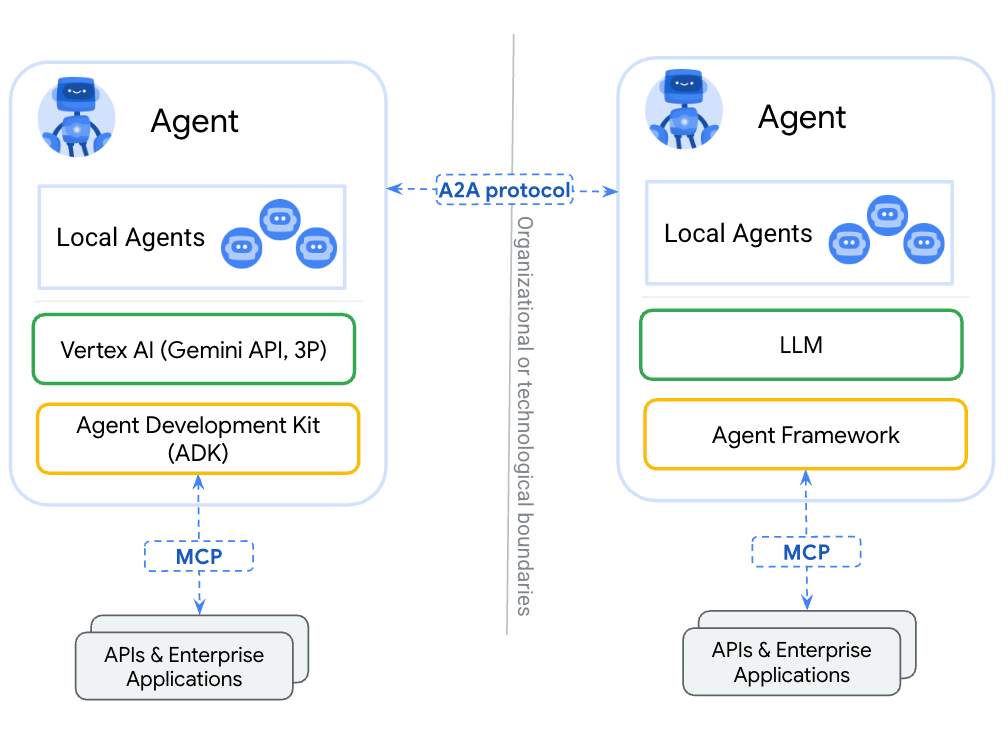
Agent2Agent (A2A) 是一種開放通訊協定,可讓一個代理透過網路呼叫另一個代理。核心是代理資訊卡,這是代理透過已知網址發布的 JSON 文件,其中包含代理的名稱、說明和功能。呼叫端會擷取該資訊卡,並瞭解如何與背後的代理程式通訊,不必共用原始碼、依附元件或語言。
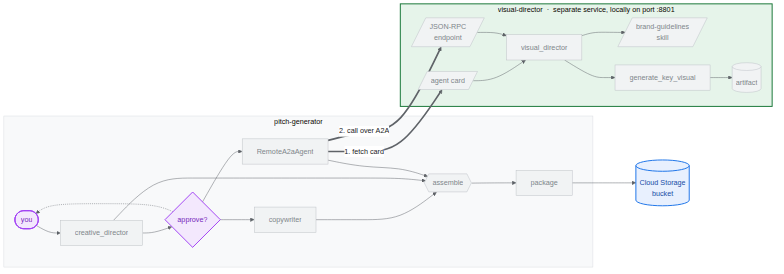
agents-cli 預設已完成這項設定。系統會產生架構 visual_director/app_utils/a2a.py,從代理程式建構資訊卡並裝載路徑,以及 visual_director/fast_api_app.py,用於提供這些路徑。您只需要稍微修改,就能讓它將構件傳回用戶端。
架構如下所示。請注意,代理程式尚未整合至初始工作流程:

agents-cli A2A 伺服器架構
使用 agents-cli 初始化 visual-director 代理程式時,系統已提供下列程式碼和模組。在終端機中貼上下列指令,即可開啟這些檔案:
cloudshell edit visual_director/fast_api_app.py
cloudshell edit visual_director/app_utils/a2a.py
visual_director/fast_api_app.py 會啟動代理程式,並在根據應用程式名稱建構的路徑下掛接 A2A 路由:
await attach_a2a_routes(
    app,
    agent=root_agent,
    runner=runner,
    rpc_path=f"/a2a/{adk_app.name}",   ## becomes /a2a/visual_director
)
visual_director/app_utils/a2a.py 會在三步內完成其餘動作。
首先,它會從代理本身建構代理資訊卡。名稱、說明和每個工具都會成為來電者可朗讀的項目:
agent_card = await AgentCardBuilder(
    agent=agent,
    rpc_url=f"{resolved_app_url}{rpc_path}",
).build()
其次,它會在通訊協定和代理之間放置執行器。系統會將傳入的 A2A 要求轉換為 ADK 執行作業,並將結果轉換回來:
request_handler = DefaultRequestHandler(
    agent_executor=A2aAgentExecutor(runner=runner, force_new_version=True),
    task_store=task_store,
    agent_card=agent_card,
)
第三,它會掛載兩條路由:一條用於提供資訊卡,另一條用於接受呼叫。
路線 | 目的 |
| 資訊卡。通話者會先閱讀這段文字,瞭解代理程式的功能 |
| JSON-RPC 端點。實際要求傳送至何處 |
允許構件跨越邊界
根據預設,A2A 回覆會包含文字。圖片是構件,除非您設定要納入圖片,否則構件會留在服務代理程式的儲存庫中。
- 開啟產生的 A2A 檔案:
cd ~/devrel-demos/codelabs/bwg-multi-agent-pitch-generator/visual-director cloudshell edit visual_director/app_utils/a2a.py - 找出
AgentCardBuilder匯入內容,並在下方新增A2aAgentExecutorConfig和include_artifacts_in_a2a_event_interceptor匯入內容:## ... ## from google.adk.a2a.utils.agent_card_builder import AgentCardBuilder ## Add the following two below `AgentCardBuilder` import from google.adk.a2a.executor.config import A2aAgentExecutorConfig from google.adk.a2a.executor.interceptors.include_artifacts_in_a2a_event import ( include_artifacts_in_a2a_event_interceptor, ) - 找出
agent_executor=A2aAgentExecutor(runner=runner),行,並替換為下列內容 (加入A2aAgentExecutorConfig):agent_executor=A2aAgentExecutor( runner=runner, force_new_version=True, config=A2aAgentExecutorConfig( execute_interceptors=[include_artifacts_in_a2a_event_interceptor] ), ),
啟動服務並讀取發布的 A2A 卡片
- 在背景啟動伺服器。您必須宣告
APP_URL,因為這是資訊卡宣傳的位址。將這段文字貼到終端機:APP_URL=http://localhost:8801 nohup uv run uvicorn visual_director.fast_api_app:app --port 8801 > /tmp/visual-director.log 2>&1 & - 等待幾秒鐘啟動服務,然後確認服務是否正常運作:
sleep 10 tail -2 /tmp/visual-director.logINFO: Application startup complete. INFO: Uvicorn running on http://127.0.0.1:8801 (Press CTRL+C to quit) - 讀取代理程式現在發布的資訊卡:
curl -s http://localhost:8801/a2a/visual_director/.well-known/agent-card.json | python3 -m json.toolgenerate_key_visual。這項資訊直接從程式碼中的代理程式定義產生。{ "name": "visual_director", "description": "Turns a campaign concept into art direction and a key visual.", "skills": [ { "id": "visual_director", "name": "model", "tags": [ "llm" ] }, { "id": "visual_director-generate_key_visual", "name": "generate_key_visual", "description": "Render the art direction as the campaign's key visual.\n\nArgs:\n art_direction: The art direction to render, in full.\n\nReturns:\n The saved artifact's filename, version, size and media type.", "tags": [ "llm", "tools" ] } ], "preferredTransport": "JSONRPC", "protocolVersion": "0.3", "url": "http://localhost:8801/a2a/visual_director" }visual-director代理程式嵌入主要pitch-generator工作流程。
7. 將 A2A 遠端代理程式嵌入工作流程
在這項工作中,您會將遠端代理新增至圖表,做為第三個分支。
遠端代理程式會包裝在 RemoteA2aAgent 中,並放置在圖表中,就像其他節點一樣。邊緣會維持相同形狀,且協調器不知道哪些節點是本機節點。
將協調器指向服務,並更新圖表工作流程
- 開啟代理程式檔案:
cd ~/devrel-demos/codelabs/bwg-multi-agent-pitch-generator/pitch-generator cloudshell edit pitch_generator/agent.py - 在檔案頂端新增這些匯入項目,與現有項目並列:
import asyncio import subprocess import google.auth.transport.requests import google.oauth2.id_token import httpx from google.adk.a2a.converters.part_converter import convert_genai_part_to_a2a_part - 在
creative_director宣告上方新增下列RemoteA2aAgent定義:VISUAL_DIRECTOR_URL = os.getenv("VISUAL_DIRECTOR_URL", "http://localhost:8801") ## For deployment on Cloud Run def _cloud_run_client() -> httpx.AsyncClient | None: """An httpx client that signs each request with a Cloud Run ID token. Cloud Run deploys private, so both the agent-card fetch and the A2A calls need one. """ if not VISUAL_DIRECTOR_URL.startswith("https://"): return None async def sign(request: httpx.Request) -> None: token = None try: token = await asyncio.to_thread( google.oauth2.id_token.fetch_id_token, google.auth.transport.requests.Request(), VISUAL_DIRECTOR_URL, ) except Exception: token = subprocess.check_output( ["gcloud", "auth", "print-identity-token", "-q"], stderr=subprocess.PIPE ).decode().strip() if not token: raise Exception("Failed to fetch ID token") request.headers["Authorization"] = f"Bearer {token}" return httpx.AsyncClient(event_hooks={"request": [sign]}, timeout=600) ## Keep the approval's tool traffic out of the A2A request def _pitch_parts_only(part: types.Part): """Sends the Visual Director text and media only. RemoteA2aAgent replays the session on every call, and the Visual Director runs downstream of the human approval, so the approval's function_response would travel alongside the concept text. An ADK server reads a function response as "resume the paused invocation" and rejects a message that also carries text, so drop the tool parts here. """ if part.function_call or part.function_response: return None return convert_genai_part_to_a2a_part(part) visual_director = RemoteA2aAgent( name="visual_director", description="Turns a campaign concept into art direction for one key visual.", agent_card=( f"{VISUAL_DIRECTOR_URL}/a2a/visual_director{AGENT_CARD_WELL_KNOWN_PATH}" ), httpx_client=_cloud_run_client(), genai_part_converter=_pitch_parts_only, ) - 以以下定義覆寫或取代
package節點 Python 函式:async def package(ctx: Context, node_input: dict): """Render the joined branches as the finished pitch.""" empty = [name for name, value in node_input.items() if not value] if empty: raise ValueError(f"nothing reached the join from: {', '.join(empty)}") def _key_visual(ctx: Context) -> types.Blob | None: """The image the Visual Director sent back, or None if it sent none.""" for event in reversed(ctx.session.events): if event.author != "visual_director" or not event.content: continue for part in event.content.parts or []: if part.inline_data and part.inline_data.data: return part.inline_data return None image = _key_visual(ctx) if image is None: raise ValueError("the Visual Director returned art direction but no image") suffix = mimetypes.guess_extension(image.mime_type or "") or ".bin" filename = f"key_visual{suffix}" await ctx.save_artifact(filename, types.Part(inline_data=image)) pitch = "\n\n".join( [ f"CONCEPT\n{node_input['creative_director']}", f"COPY\n{node_input['copywriter']}", f"ART DIRECTION\n{node_input['visual_director']}", f"KEY VISUAL\n{filename}, {len(image.data)} bytes, {image.mime_type}", ] ) yield Event( content=types.Content( role="model", parts=[types.Part(text=pitch), types.Part(inline_data=image)], ) ) yield Event(output=pitch) - 在下游生成程序繼續進行前,新增「人工核准關卡」。在
pitch_generator/agent.py中,於root_agent上方定義核准節點:@node(rerun_on_resume=False) async def approve_concept(ctx: Context): yield RequestInput( message="Please approve the campaign concept (yes/no).", response_schema=str ) @node(rerun_on_resume=True) async def user_approval(ctx: Context): user_response = await ctx.run_node(approve_concept) if str(user_response).lower() in ("yes", "y"): approved_concept = f"## Approved Concept\n\n{ctx.session.state['creative_director']}" yield Event( content=types.Content( role="model", parts=[types.Part(text=approved_concept)] ) ) else: raise ValueError("User rejected the concept") - 最後,更新頂端的匯入項目,加入
google.adk.events和google.adk.workflow中的RequestInput和node:from google.adk.events import Event, RequestInput from google.adk.workflow import JoinNode, Workflow, noderoot_agent工作流程edges,透過user_approval路由傳送:edges=[ ("START", creative_director), (creative_director, user_approval, (copywriter, visual_director)), ((creative_director, copywriter, visual_director), assemble), (assemble, package), ],- 人機迴圈 (HITL) 核准:
approve_concept會產生RequestInput。工作流程到達這個節點時,執行作業會暫停,並向呼叫端發出中斷訊號。確認使用者核准後,下游分支 (copywriter和visual_director) 才會執行。 visual_director會出現在邊緣,與copywriter完全相同,但前者是函式呼叫,後者則跨越網路。- 傳回的圖片是從工作階段事件讀取,而非從
node_input讀取,因為目前只有文字會升級為節點的輸出內容。圖片透過 A2A 攔截器跨越邊界,但會附加至遠端代理的事件,因此_key_visual輔助函式會從該處擷取圖片。
- 人機迴圈 (HITL) 核准:
測試整合項目
現在,請測試 Visual Director (在背景執行) 和 Pitch Generator 是否能透過 A2A 通訊協定通訊。
- 確認 Visual Director 仍在背景執行:
curl -s -o /dev/null -w "visual director: %{http_code}\n" http://localhost:8801/a2a/visual_director/.well-known/agent-card.jsonvisual director: 200結果。如果顯示任何其他狀態,請執行下列指令來重新啟動:fuser -k 8801/tcp 2>/dev/null || true cd ~/devrel-demos/codelabs/bwg-multi-agent-pitch-generator/visual-director APP_URL=http://localhost:8801 nohup uv run uvicorn visual_director.fast_api_app:app --port 8801 > /tmp/visual-director.log 2>&1 & cd ~/devrel-demos/codelabs/bwg-multi-agent-pitch-generator/pitch-generator sleep 10 curl -s -o /dev/null -w "visual director: %{http_code}\n" http://localhost:8801/a2a/visual_director/.well-known/agent-card.json - 開始預覽:
cd ~/devrel-demos/codelabs/bwg-multi-agent-pitch-generator/pitch-generator/pitch_generator agents-cli playground --port 8080 - 按一下終端機右上方的「Web Preview」(網頁預覽) 眼睛圖示,然後選擇「Preview on port 8080」(透過以下通訊埠預覽:8080)。
- 畫面上會顯示與服務專員即時通訊的介面。請嘗試傳送「Flying skateboards for cats」提示。

 您會看到完整互動,包括工作流程啟動和每個代理程式的執行情況。
creative_director草擬概念後,工作流程會在核准關卡暫停,並要求您確認:「請核准廣告活動概念 (是/否)」。在輸入欄位中輸入「yes」即可繼續。核准後,圖表會展開:您可以看到visual-director代理程式何時開始載入技能,以及在圖像生成期間,copywriter代理程式何時完成生成社群媒體說明文字,這表示兩個代理程式會平行執行,不必互相等待。兩者完成後,assemble節點會將結果與creative_director產生的核准概念合併,在package函式中完成提案內容的傳送。
8. 將主要圖像保留在 Cloud Storage 中
到目前為止,每個重要視覺元素都存在於記憶體中。程序停止時,圖片就會消失,這在遊樂場中沒問題,但對廣告活動來說就沒用了。在這項工作中,您會為工作流程提供要寫入的 bucket,並建立最後一項工作要使用的 BigQuery 資料集。
ADK 會在啟動時決定構件的放置位置。產生的 app_utils/services.py 會讀取單一環境變數:
def get_artifact_service():
    """Process-wide artifact service: GCS when a bucket is set, else in-memory."""
    if bucket := os.environ.get("LOGS_BUCKET_NAME"):
        return GcsArtifactService(bucket_name=bucket)
    return InMemoryArtifactService()
如果設定 LOGS_BUCKET_NAME,每個 save_artifact 呼叫都會改為傳送至 Cloud Storage。
建立 BigQuery 資料集
- 在 Cloud Shell 執行下列指令,建立 BigQuery 資料集:
bq mk --dataset --location=<YOUR_REGION> --project_id=<YOUR_PROJECT_ID> bwg - 將協調器的構件存放區指向 bucket:
export LOGS_BUCKET_NAME="<YOUR_PROJECT_ID>-bwg"GcsArtifactService採用不含gs://前置字元的 bucket 名稱。與其他變數一樣,這個變數位於殼層中,部署工作會將其傳遞至 Cloud Run。 - 檢查值區內容。在新瀏覽器分頁中開啟下列網址:
https://console.cloud.google.com/storage/browser?project=<YOUR_PROJECT_ID>
9. 將 Visual Director 代理部署至 Cloud Run
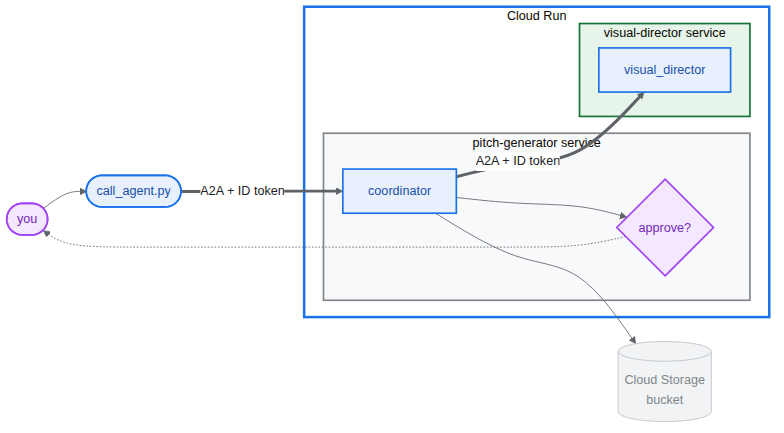
目前為止,所有項目都在一部機器上執行,而 Visual Director 可在 localhost:8801 存取。在這項工作中,您將 Visual Director 代理部署為專屬的 Cloud Run 服務,並讓宣傳內容產生器透過 Agent2Agent (A2A) 通訊協定,在網路上與該服務通訊。
視覺導演會取得實際的 https:// 網址,因此您先前編寫的 _cloud_run_client 會開始簽署要求,而不是傳回 None。此外,Cloud Run 預設會部署私人服務。
部署 Visual Director
- 如果本機背景服務和 Playground 仍在執行,請停止:
fuser -k 8801/tcp 2>/dev/null || true fuser -k 8000/tcp 2>/dev/null || true - 部署代理。這會建構容器並推送。⏰ 這項作業需要幾分鐘才能完成。
cd ~/devrel-demos/codelabs/bwg-multi-agent-pitch-generator/visual-director
source .env
agents-cli deploy \
  --service-name visual-director \
  --project <YOUR_PROJECT_ID> \
  --region <YOUR_REGION> \
  --no-confirm-project \
  --labels dev-tutorial=bwg001-devlab-1 \
  --update-env-vars "LOGS_BUCKET_NAME=$LOGS_BUCKET_NAME,GOOGLE_GENAI_USE_VERTEXAI=true,GOOGLE_CLOUD_PROJECT=$GOOGLE_CLOUD_PROJECT,GOOGLE_CLOUD_LOCATION=$GOOGLE_CLOUD_LOCATION,GOOGLE_CLOUD_REGION=$GOOGLE_CLOUD_REGION"
執行 Pitch Generator,使用部署至 Cloud Run 的 Visual Director
- 讀取 Visual Director 的網址,然後執行使用該網址的 Pitch Generator:
cd ~/devrel-demos/codelabs/bwg-multi-agent-pitch-generator/pitch-generator
source .env
export VISUAL_DIRECTOR_URL=$(gcloud run services list \
  --project <YOUR_PROJECT_ID> \
  --region <YOUR_REGION> \
  --flatten='spec.template.spec.containers[0].env' \
  --filter='metadata.name=visual-director AND spec.template.spec.containers[0].env.name=APP_URL' \
  --format='value(spec.template.spec.containers[0].env.value)')
echo "Visual Director is at $VISUAL_DIRECTOR_URL"
APP_URL=http://localhost:8000 nohup uv run uvicorn pitch_generator.fast_api_app:app --port 8000 > /tmp/visual-pitch_generator.log 2>&1 &
呼叫已部署的工作流程
兩個代理都支援 A2A 通訊協定。這個存放區會提供小型用戶端,透過 A2A 呼叫 Pitch Generator。
PITCH_GENERATOR_URL必須設為在本機執行的 Pitch Generator 網址。同時,Visual Director 會在 Cloud Run 中執行,而 Pitch Generator 則會透過 A2A 與其通訊。
- 將用戶端複製到專案中並運作執行:
cd ~/devrel-demos/codelabs/bwg-multi-agent-pitch-generator/pitch-generator cp ../solution/pitch-generator/call_agent.py . PITCH_GENERATOR_URL=http://localhost:8000 uv run python call_agent.py "Flying skateboards for cats" --save-image ./key_visual.png=== HUMAN APPROVAL REQUIRED === [DRAFT CONCEPT] Concept Line: "Gravity is a Suggestion." ... Please approve the campaign concept (yes/no):yes並按下 Enter 鍵,即可核准並繼續工作流程。(您也可以傳遞-y或--auto-approve來自動核准)。 - 開啟
call_agent.py,並使用a2a-sdk檢查與代理的互動方式:ClientFactory建構官方 A2AClient指定目標https://SERVICE_URL/a2a/pitch_generator。generate_pitch_async會傳送初始SendMessageRequest。當回覆傳回TaskState.TASK_STATE_INPUT_REQUIRED時,系統會偵測adk_request_input部分、顯示草稿概念、收集您的核准,並將攜帶您回覆的繼續要求傳回工作。- 剖析迴圈會從已完成工作的構件讀取
CONCEPT、COPY和ART DIRECTION區段,並將二進位圖片儲存至key_visual.png。
key_visual.png的圖片。 - 將主視覺上傳至值區,並放在可供 BigQuery 指向的前置字元下:
gcloud storage cp ./key_visual.png gs://<YOUR_PROJECT_ID>-bwg/key-visuals/cats.png - 生成第二個推薦歌曲,以便比較,並上傳:
PITCH_GENERATOR_URL=http://localhost:8000 uv run python call_agent.py "A commuter bike built for rainy cities" --save-image ./bike.png
gcloud storage cp ./bike.png gs://<YOUR_PROJECT_ID>-bwg/key-visuals/bike.png
10. 在 BigQuery 中評估主要圖像是否符合品牌形象
現在 bucket 中有圖片,以及應該用來塑造圖片的品牌宣傳指南。在這項工作中,您會將兩者結合:從 BigQuery 參照圖片,然後要求 Gemini 模型根據指南評估每張圖片,不必將任何位元組移出 Cloud Storage。
這項工作由兩項 BigQuery 功能負責:
ObjectRef是指向 Cloud Storage 物件的值。OBJ.MAKE_REF會根據 URI 和連結建立一個,並授予 BigQuery 該值區的委派存取權。設定指令碼建立的pitch-connection就是該連線,且已持有「儲存空間物件檢視者」和「Agent Platform 使用者」。AI.SCORE會採用提示並傳回FLOAT64。提示詞可以混合字串和ObjectRef值,因此模型會同時看到評分量表和圖片。

建立主要圖像表格
- 在新瀏覽器分頁中開啟 BigQuery Studio:
https://console.cloud.google.com/bigquery?project=<YOUR_PROJECT_ID> - 點選「建立新查詢」(「+」圖示),然後貼上下列內容並執行 (將
SET @@location = '<YOUR_REGION>';

CREATE OR REPLACE TABLE bwg.key_visuals AS
SELECT
  campaign,
  concept,
  OBJ.FETCH_METADATA(
    OBJ.MAKE_REF(uri, '<YOUR_REGION>.pitch-connection')
  ) AS key_visual
FROM UNNEST([
  STRUCT(
    'cats' AS campaign,
    'Flying skateboards for cats' AS concept,
    'gs://<YOUR_PROJECT_ID>-bwg/key-visuals/cats.png' AS uri
  ),
  STRUCT(
    'bike',
    'A commuter bike built for rainy cities',
    'gs://<YOUR_PROJECT_ID>-bwg/key-visuals/bike.png'
  )
]);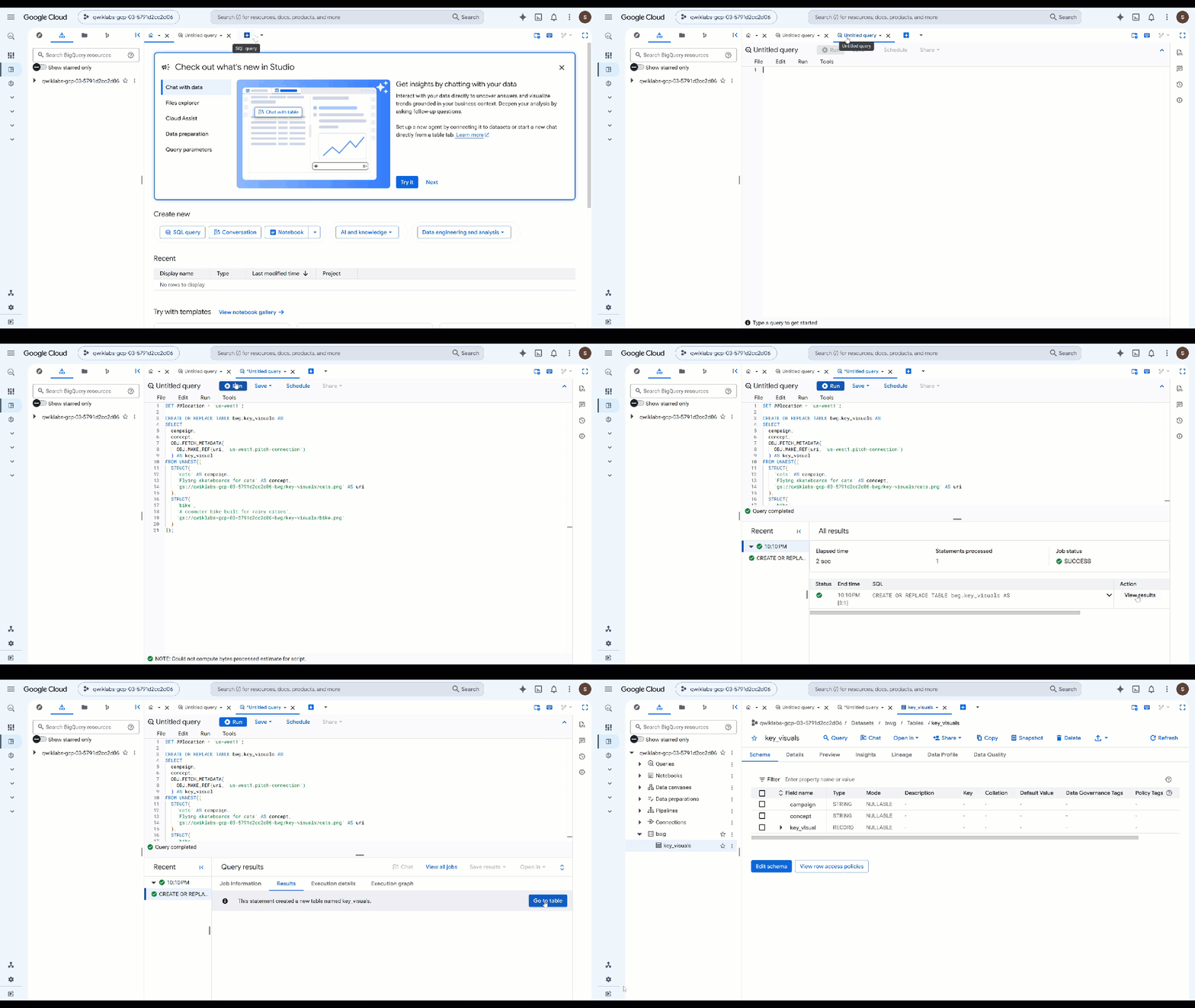
OBJ.MAKE_REF會根據 URI 和連線建立參照。OBJ.FETCH_METADATA接著會聯絡 Cloud Storage,並填入物件的大小、內容類型和產生時間。第二次呼叫也是證明連線正常運作的最快方式:如果權限有誤,details欄位會傳回錯誤,而不是中繼資料。 - 檢查儲存的內容。將先前的查詢換成下列內容,然後執行:
SELECT campaign, concept, key_visual.uri, key_visual.details
FROM bwg.key_visuals;
根據品牌宣傳指南評估每張圖片
視覺導演必須遵守調色盤、光線規則和構圖規則。實際是否如此則需要判斷,這就是 AI.SCORE 的用途。
- 執行下列查詢 (將
ObjectRef圖片:SELECT campaign, concept, AI.SCORE( ('''You are the brand guardian reviewing a campaign key visual. Score the attached image from 1 to 10 on how closely it follows these house rules: - Palette: deep indigo and slate, with one warm accent of amber or terracotta. Nothing neon. - Light: one dominant low, raking source with long shadows. No flat overhead light. - Composition: subject off-center with generous empty negative space on the opposite side. - Subject: one subject only, photographic realism, shallow depth of field. - Never: text, logos, or watermarks anywhere in the frame. A 10 obeys every rule. A 1 ignores them. The campaign concept is: ''', concept, key_visual), connection_id => '<YOUR_REGION>.pitch-connection', endpoint => 'gemini-3.5-flash' ) AS brand_fit FROM bwg.key_visuals ORDER BY brand_fit DESC; - 將分數轉換為團隊可據以採取行動的判決:
CREATE OR REPLACE TABLE bwg.brand_review AS SELECT campaign, concept, brand_fit, IF(brand_fit >= 7, 'on brand', 'needs another pass') AS verdict FROM ( SELECT campaign, concept, AI.SCORE( ('''Score this campaign key visual from 1 to 10 on how closely it follows the house brand rules: deep indigo and slate palette with a single warm accent and nothing neon; one low raking light source with long shadows; the subject off-center with empty negative space opposite; a single photographic subject; and no text, logos, or watermarks in the frame. The campaign concept is: ''', concept, key_visual), connection_id => '<YOUR_REGION>.pitch-connection', endpoint => 'gemini-3.5-flash' ) AS brand_fit FROM bwg.key_visuals ); SELECT * FROM bwg.brand_review ORDER BY brand_fit DESC;AI.SCORE只會傳回FLOAT64,因此門檻會以純 SQL 形式存在,您可以在其中調整門檻,而不必修改提示。系統會針對每一列執行評分,也就是說,廣告活動產生的每項素材資源都會套用相同的評分標準,而不只是您在這裡生成的兩項素材資源。
11. 後續步驟
建立評估作業
代理式評估或「評估」是自動化測試,用於評估自主 AI 代理的推論、規劃、工具使用和多步驟工作流程完成能力。這類測試與代理程式的單元測試類似,但會考量代理程式的不確定性。
其中一個代理程式包含 Human in the loop,表示會等待輸入內容。您必須允許 Antigravity 修改目前的程式碼,以免這項行為妨礙自動評估。
如要開始使用,最簡單的方式就是詢問 Antigravity CLI。
在 Cloud Shell 輸入下列指令,啟動 CLI:
cd ~/devrel-demos/codelabs/bwg-multi-agent-pitch-generator/
agy
以下是起始提示:
Explore this repository (`pitch-generator` and `visual-director`), including their agent instructions, tools, and `SKILL.md` files. Design and implement a creative `agents-cli eval` evaluation suite under `tests/eval/` that stress-tests the agent's behavior.
您也可以在複製的存放區中找到評估範例和執行評估的操作說明。
12. 清理
如要避免系統向您的 Google Cloud 帳戶收取本程式碼研究室所用資源的費用,請刪除專案 (建議),或刪除在本程式碼研究室中建立的個別資源:
gcloud run services delete visual-director --region=<YOUR_REGION> --project=<YOUR_PROJECT_ID> --quiet
bq rm -r -f -d <YOUR_PROJECT_ID>:bwg
bq rm --connection --location=<YOUR_REGION> --project_id=<YOUR_PROJECT_ID> pitch-connection
gcloud storage rm -r gs://<YOUR_PROJECT_ID>-bwg
13. 恭喜!
在本程式碼研究室中,您使用 Agent Development Kit 建構了多代理廣告活動宣傳內容產生器。您將三個代理連線至確定性圖表工作流程,將品牌宣傳指南封裝為代理技能 (可依需求載入),並為代理提供圖片生成工具,將輸出內容儲存為構件。接著,您將 Visual Director 分割為自己的 A2A 服務,將其嵌入圖表做為遠端節點,部署至 Cloud Run,並從在本機執行的協調器透過 A2A 呼叫整個工作流程。最後,您使用 ObjectRef 參照 BigQuery 產生的主要視覺元素,並使用 AI.SCORE 根據自己的品牌宣傳指南評估這些元素。