

1. บทนำ
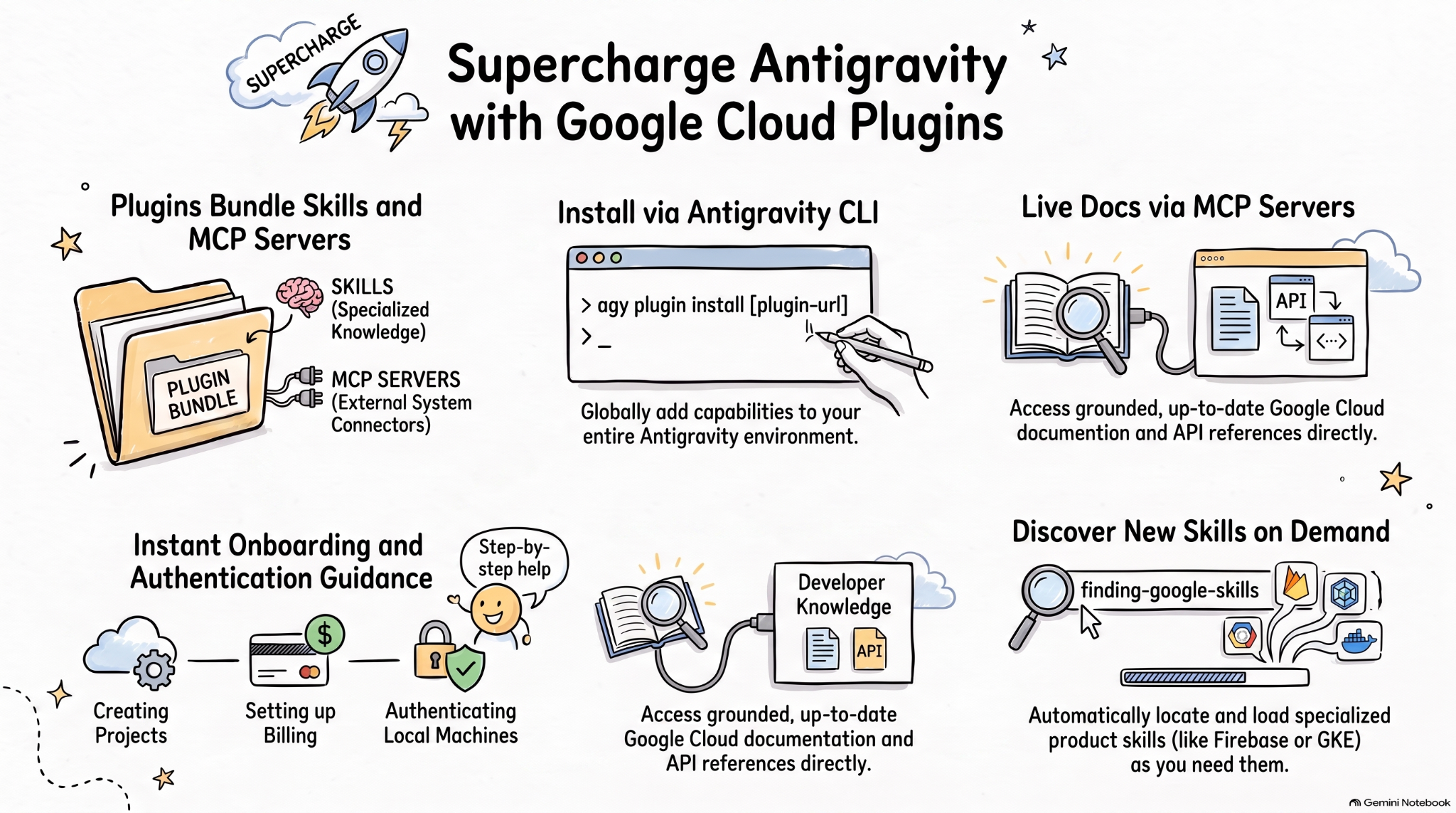
ทักษะของ Agent เป็นรูปแบบโอเพนซอร์สแบบ Lightweight สำหรับขยายความสามารถของ AI Agent ด้วยความรู้และเวิร์กโฟลว์เฉพาะทาง MCP เป็นมาตรฐานสำหรับการเชื่อมต่อแอปพลิเคชัน AI กับระบบภายนอก
ข้อกำหนดของปลั๊กอิน Agent เป็นข้อกำหนดโอเพนซอร์สที่ไม่ขึ้นกับผู้ให้บริการสำหรับการแพ็กเกจทักษะของ Agent และเซิร์ฟเวอร์ MCP เป็นปลั๊กอินแบบพกพา
ปลั๊กอิน Google Cloud สำหรับ Agent AI ในการเขียนโค้ด จะแพ็กเกจทักษะ Google Cloud ที่เกี่ยวข้องและเซิร์ฟเวอร์ MCP เป็นชุดที่ติดตั้งได้เพื่อให้ Agent AI ใน Google Cloud มีประสิทธิภาพมากขึ้น
ใน Codelab นี้ คุณจะได้เรียนรู้เกี่ยวกับปลั๊กอินตัวหนึ่งที่ชื่อว่า Google Cloud Developer plugin รวมถึงวิธีติดตั้งและใช้ปลั๊กอินนี้ใน Antigravity
สิ่งที่คุณจะได้ทำ
- ทำความเข้าใจปลั๊กอิน Agent
- ติดตั้งและสำรวจ Google Cloud Developer plugin ใน Antigravity
- ทดสอบทักษะและเซิร์ฟเวอร์ MCP ที่ติดตั้งโดย Google Cloud Developer plugin ด้วยพรอมต์ 2-3 รายการ
สิ่งที่คุณต้องมี
- เว็บเบราว์เซอร์ เช่น Chrome
- โปรเจ็กต์ Google Cloud
- Antigravity และ Antigravity CLI ที่ติดตั้งในเครื่องของคุณ
2. สำรวจปลั๊กอิน Agent
ปลั๊กอิน Agent เป็นรูปแบบแพ็กเกจแบบพกพาสำหรับรวมทักษะของ Agent และเซิร์ฟเวอร์ MCP ไว้ในไดเรกทอรีที่มีลักษณะดังนี้
my-plugin/
├── plugin.json
├── skills/
│   └── my-skill/
│       ├── SKILL.md
│       ├── scripts/
│       └── references/
├── mcp.json
└── com.example.client/
plugin.jsonระบุปลั๊กอินskills/มีทักษะของ Agentmcp.jsonอธิบายเซิร์ฟเวอร์ MCP- เนมสเปซส่วนขยายโดเมนย้อนกลับช่วยให้ไคลเอ็นต์แต่ละรายเพิ่มลักษณะการทำงานที่กำหนดเองได้
ที่เก็บทักษะของ Google Agent มีทักษะของ Agent สำหรับผลิตภัณฑ์และเทคโนโลยีของ Google ซึ่งรวมถึง Google Cloud นอกจากนี้ยังมี ปลั๊กอิน ที่รวมทักษะของ Agent และเซิร์ฟเวอร์ MCP ไว้ในชุดที่ติดตั้งได้ เช่น Google Cloud Developer plugin
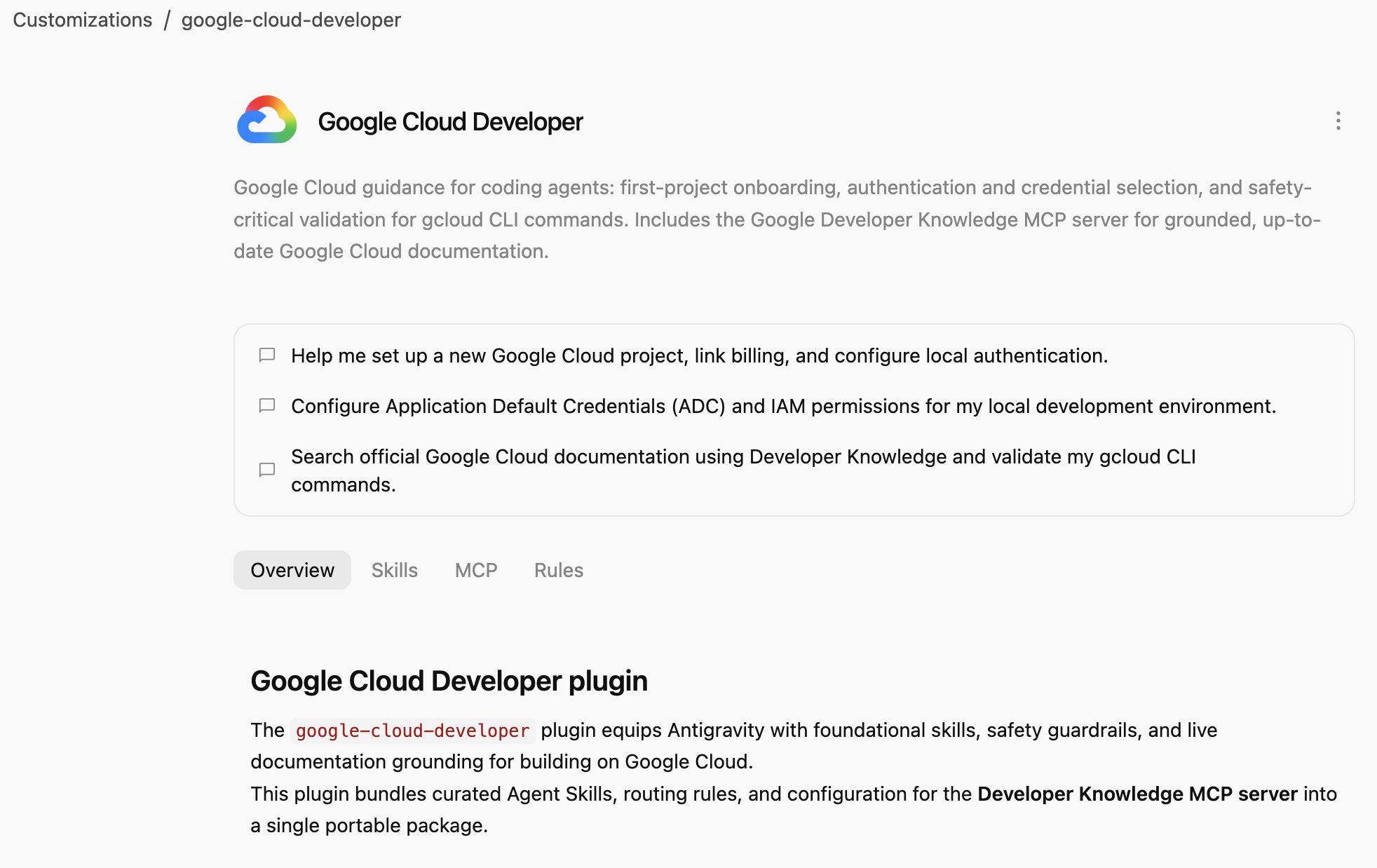
ปลั๊กอิน Google Cloud Developer ให้คำแนะนำเกี่ยวกับ Google Cloud สำหรับ Agent AI ในการเขียนโค้ด ได้แก่ การเริ่มต้นใช้งานโปรเจ็กต์แรก การตรวจสอบสิทธิ์และการเลือกข้อมูลเข้าสู่ระบบ รวมถึงการตรวจสอบที่สำคัญต่อความปลอดภัยสำหรับคำสั่ง gcloud CLI ซึ่งรวมถึง Google Developer Knowledge MCP server สำหรับเอกสารประกอบ Google Cloud ที่อิงตามข้อมูลจริงและเป็นปัจจุบัน
3. ติดตั้ง Google Cloud Developer plugin
Antigravity CLI เป็นวิธีที่ง่ายที่สุดในการติดตั้งปลั๊กอิน Agent สำหรับทั้งระบบนิเวศ Antigravity (Antigravity, Antigravity CLI, Antigravity IDE)
มาติดตั้ง Google Cloud Developer plugin ใน Antigravity CLI โดยชี้ไปที่เส้นทางของปลั๊กอินกัน
agy plugin install google-cloud-developer
คุณควรเห็นปลั๊กอินที่ติดตั้งจาก Antigravity Marketplace ดังนี้
Installed plugin "google-cloud-developer" from antigravity-plugins-official
4. สำรวจ Google Cloud Developer plugin
ตอนนี้มาสำรวจ Google Cloud Developer plugin กัน
ก่อนอื่น ให้ตรวจสอบว่าปลั๊กอินแสดงอยู่ใน Antigravity CLI ดังนี้
agy plugin list
คุณควรเห็นปลั๊กอินที่มีทักษะ กฎ และเซิร์ฟเวอร์ MCP ดังนี้
...
- google-cloud-developer (enabled, 1.1.10)
    Source:     antigravity-plugins-official
    Components: 5 skills, 1 rule, 1 MCP server
...
Antigravity CLI จะติดตั้งปลั๊กอินทั่วโลกในโฟลเดอร์ .gemini/config/plugins/ ซึ่งหมายความว่าปลั๊กอินพร้อมใช้งานสำหรับ Antigravity, Antigravity CLI และ Antigravity IDE
ในโฟลเดอร์ .gemini/config/plugins/google-cloud-developer คุณจะเห็น Google Cloud Developer plugin พร้อมไฟล์ Manifest ของปลั๊กอิน ทักษะ และเซิร์ฟเวอร์ MCP ดังนี้
google-cloud-developer/
├── ...
├── skills/
│   ├── finding-google-skills/
│   ├── gcloud/
│   ├── google-cloud-recipe-auth/
│   ├── google-cloud-recipe-onboarding/
│   └── retrieving-developer-knowledge/
├── mcp.json
└── plugin.json
คุณจะเห็นทักษะในการเตรียมความพร้อมผู้ใช้งานใหม่สำหรับโปรเจ็กต์แรก การตรวจสอบสิทธิ์และการเลือกข้อมูลเข้าสู่ระบบ รวมถึงการตรวจสอบที่สำคัญต่อความปลอดภัยสำหรับคำสั่ง gcloud CLI นอกจากนี้ยังมี Google Developer Knowledge MCP server สำหรับเอกสารประกอบ Google Cloud ที่อิงตามข้อมูลจริงและเป็นปัจจุบัน
นอกจากนี้ คุณยังเปลี่ยนไปใช้ Antigravity (แอปแบบสแตนด์อโลน) แล้วถามในแชทว่ามีการติดตั้งทักษะใดไว้บ้างได้ด้วย
Which Google Cloud skills are available?
ระบบควรแสดงทักษะ Antigravity ในตัว รวมถึงทักษะจาก Google Cloud Developer plugin ดังนี้
  ### Bundled Google Cloud Skills

  • **`finding-google-skills`**: Guides Google Cloud architectural choices, service trade-offs, and dynamically retrieves specialized skills on demand from the
  official Google skill catalog.
  • **`gcloud`**: Provides validation, safety guardrails, syntax checks, and data reduction for executing or planning gcloud CLI commands.
  • **`google-cloud-recipe-auth`**: Guidance on IAM, authentication, authorization, service accounts, and Application Default Credentials (ADC).
  • **`google-cloud-recipe-onboarding`**: Guides initial Google Cloud project creation, billing configuration, and deploying a first resource.
  • **`retrieving-developer-knowledge`**: Searches and synthesizes official Google Cloud, Firebase, and developer platform documentation.
  ──────
  ### On-Demand Catalog Skills

  Through finding-google-skills, additional specialized skills from the Google Cloud skills catalog https://github.com/google/skills/tree/main/skills/cloud can
  be fetched on demand during our session without requiring permanent installation:

  • Product Basics: <product>-basics (e.g., Cloud Run, Cloud SQL, BigQuery, Spanner, Firestore, Storage)
  • GKE: gke-* (networking, storage, autoscaling, troubleshooting, AI inference)
  • AI & Agent Platforms: agent-platform-*, gemini-*, genkit-*
  • Architecture & Frameworks: google-cloud-solution-*, google-cloud-waf-* (Well-Architected Framework)
  • Observability: cloud-logging-*, cloud-monitoring-*
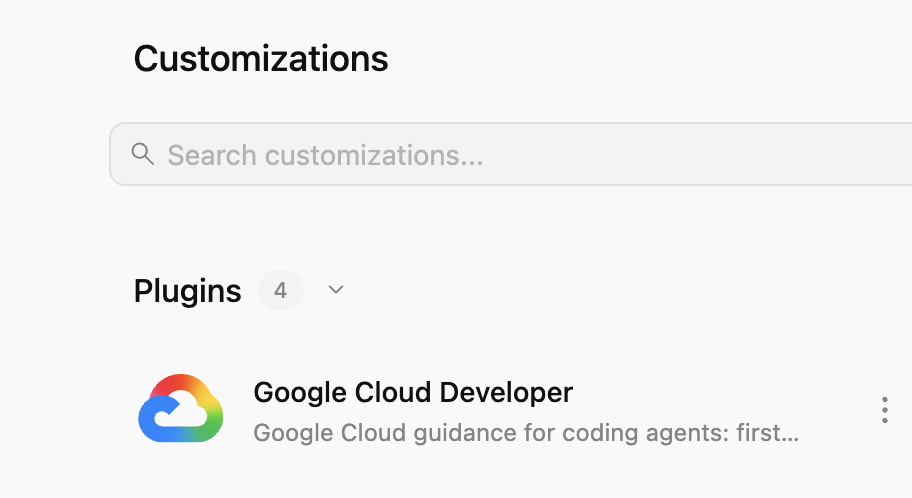
นอกจากนี้ ให้ไปที่แท็บการปรับแต่ง ทางด้านซ้าย ในส่วนติดตั้งแล้ว คุณควรเห็นปลั๊กอิน Google Cloud Developer ดังนี้
หากคลิกปลั๊กอิน คุณจะเห็นรายการทักษะ เซิร์ฟเวอร์ MCP และกฎที่ติดตั้งไว้ ดังนี้
5. ลองใช้ Google Cloud Developer plugin
เปิดใช้ Developer Knowledge API
ก่อนอื่น ให้ตรวจสอบว่าได้เปิดใช้ Developer Knowledge API ในโปรเจ็กต์ที่อยู่ในระบบคลาวด์ของ Google ซึ่งจำเป็นสำหรับ Developer Knowledge MCP server
- ในคอนโซล Google Cloud ให้ค้นหา Developer Knowledge API
- ในหน้า Developer Knowledge API ให้คลิก Enable API
ตอนนี้มาลองใช้พรอมต์บางรายการเพื่อดูว่า Google Cloud Developer plugin ช่วยในสถานการณ์ต่างๆ ได้อย่างไร
คุณลองใช้พรอมต์เหล่านี้ใน Antigravity หรือ Antigravity CLI ได้ เนื่องจากปลั๊กอินพร้อมใช้งานทั่วโลก
การเตรียมความพร้อมผู้ใช้งานใหม่
หากเพิ่งเริ่มใช้ Google Cloud คุณสามารถเริ่มต้นด้วยการถามคำถามพื้นฐานเกี่ยวกับการเตรียมความพร้อมผู้ใช้งานใหม่ได้ดังนี้
I'm new to Google Cloud. How can I create a new project with billing enabled?
คุณควรเห็นทักษะ google-cloud-recipe-onboarding เปิดใช้งานอยู่
Worked for 1m ˅

Explored 1 file ˅

> Analyzed google-cloud-recipe-onboarding/SKILL.md
คุณควรได้รับคำตอบพร้อมวิธีการทีละขั้นตอนดังนี้
To get started with Google Cloud, you will need an active Google Cloud account and an authorized terminal session:

Google Cloud Account & Console: If you haven't already, sign up and access the Google Cloud Console where you can manage accounts, projects, and set up a Cloud Billing account (new accounts are eligible for the $300 Free Trial).
...
การตรวจสอบสิทธิ์
ลองถามคำถามเกี่ยวกับการตรวจสอบสิทธิ์ดังนี้
How can I authenticate my local machine with Google Cloud?
คุณควรเห็นทักษะ google-cloud-recipe-auth เปิดใช้งานอยู่
Worked for 1m ˅

Explored 1 file ˅

> Analyzed google-cloud-recipe-auth/SKILL.md
คุณควรได้รับคำสั่งในการตรวจสอบสิทธิ์ดังนี้
To authenticate your local machine with Google Cloud, there are two primary methods depending on whether you want to use the CLI or run code/client libraries locally:

1. Authenticate the CLI (gcloud)
Use this to run gcloud, bq, and gsutil management commands in your terminal:

bash


gcloud auth login
This opens a web browser asking you to log in with your Google Account and grant permissions.
If you are on a remote server without a web browser, use:
bash

...
Developer Knowledge
นอกจากนี้ คุณยังถามคำถามเพื่อให้ระบบตอบจากเอกสารประกอบอย่างเป็นทางการได้ด้วย
เช่น
What's the difference between Cloud Run and GKE according to the official docs?
คุณจะเห็นทักษะที่เกี่ยวข้องเปิดใช้งานอยู่ ซึ่งจะใช้ MCP server developer-knowledge
Exploring 2 files ˅

* Analyzed retrieving-developer-knowledge/SKILL.md
* Analyzed answer_query.json

MCP Tool: developer-knowledge / answer_query ˅

Tool arguments
```json
{
  "query": "What is the difference between Cloud Run and Google Kubernetes Engine (GKE) according to official Google Cloud documentation?"
}
ค้นหาทักษะอื่นๆ ของ Google
สุดท้ายแต่ไม่ท้ายสุด Google Cloud Developer plugin สามารถค้นหาและโหลดทักษะตามความต้องการได้
เช่น คุณสามารถถามได้ดังนี้
Explain what steps are needed to start working with Firebase.
คุณควรเห็นทักษะ finding-google-skills เปิดใช้งานอยู่ และระบบจะค้นหาและติดตั้งทักษะ Firebase ที่เกี่ยวข้อง
Explored 1 file ˅

* Analyzed finding-google-skills/SKILL.md

Ran `curl -sS https://raw.githubusercontent.com/google/skills/main/index.json | jq -r '.skills[ >`

Exploring 3 files, 2 searches ˅

* Reading skills catalog
* Searched firebase
* Fetching Firebase skill
6. ล้างข้อมูล
ปิดใช้ Developer Knowledge API โดยทำดังนี้
- ในคอนโซล Google Cloud ให้ค้นหา Developer Knowledge API
- ในหน้า Developer Knowledge API ให้คลิก Manage แล้วคลิก Disable API
ถอนการติดตั้ง Google Cloud Developer plugin ด้วย Antigravity CLI โดยทำดังนี้
agy plugin uninstall google-cloud-developer
Uninstalled plugin "google-cloud-developer"
7. ขอแสดงความยินดี
ขอแสดงความยินดี คุณติดตั้งและใช้ Google Cloud Developer plugin ใน Antigravity สำเร็จแล้ว ดูข้อมูลเพิ่มเติมได้ที่แหล่งข้อมูลต่อไปนี้