
1. Introduction
Gemini Enterprise Agent Platform is an open platform for building, scaling, governing, and optimizing enterprise-grade AI agents grounded in your data.
Agent Runtime provides the managed execution environment for running agents, such as those built with the open-source Agent Development Kit (ADK), securely within Google Cloud.
This codelab explores how to use these core building blocks to govern an agent initiated by a user in Gemini Enterprise as it securely reaches out to internal tools.
About Agent Gateway
Agent Gateway is the networking component of the platform's Agent Governance suite. It acts as the network entry and exit point for all agent interactions, allowing security administrators to enforce centralized governance without requiring developers to manage complex networking primitives.
It facilitates two primary governed access paths:
- Client-to-Agent (ingress): Secures communications between external clients (like Cursor or the Gemini CLI) and your agents.
- Agent-to-Anywhere (egress): Secures communications between agents running on Google Cloud and servers, tools, or APIs running anywhere.
In this codelab, you will focus on the Agent-to-Anywhere (egress) mode.
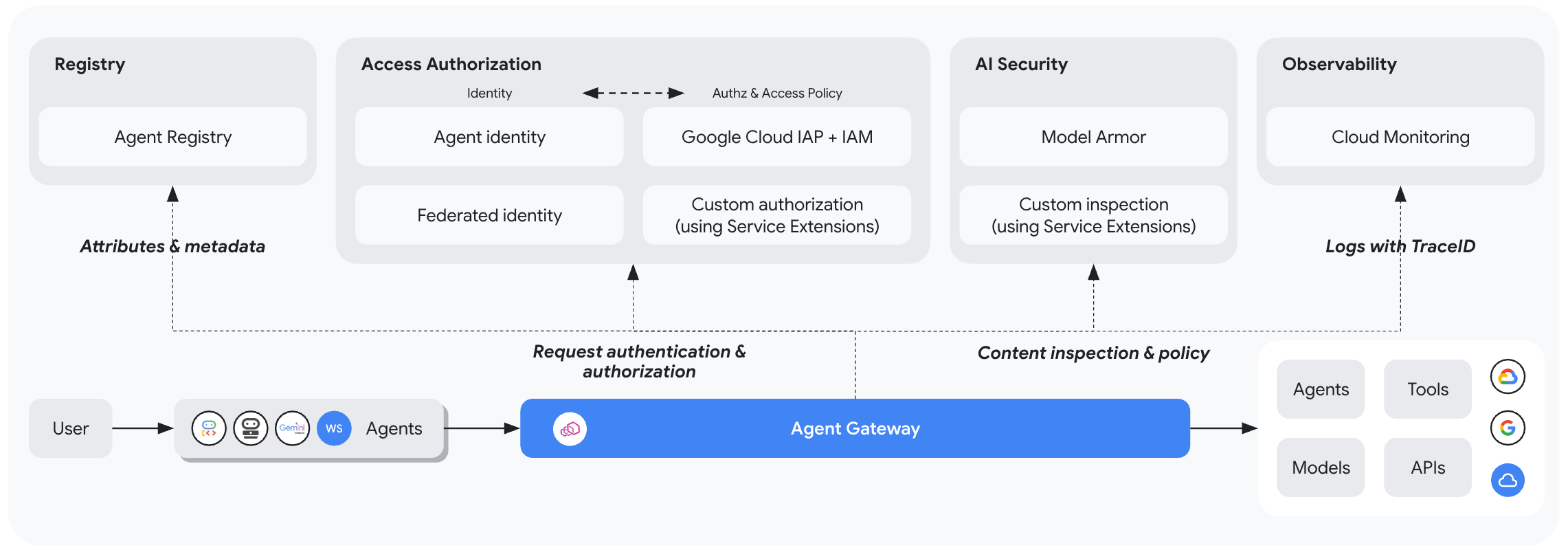
To enforce security policies, Agent Gateway integrates tightly with the rest of the ecosystem:
- Agent Registry: A central library of approved agents and tools (including third-party MCP servers).
- Agent Identity: A unique, trackable persona for every agent, secured automatically with end-to-end mTLS.
- Identity-Aware Proxy (IAP) & IAM: The default enforcement layer that validates the agent's identity against fine-grained IAM permissions before allowing calls to specific tools.
- Model Armor: An AI security guardrail integrated via Service Extensions to sanitize content and protect against prompt injection attacks or data leakage.
Deployment modes (Public vs. Private networking for Cloud Run)
To make this codelab accessible, you can choose between two networking paths for your internal tools (MCP servers) deployed on Cloud Run:
- Default (Public Ingress): The MCP servers are deployed to Cloud Run with public hostnames (
ingress=all). Traffic routes from the agent to the tools via standard*.run.appURLs. This requires no custom DNS domains and is the fastest way to learn the governance concepts. - Secure (Private Networking): An optional, fully private architecture. The MCP servers are restricted (
ingress=internal-and-cloud-load-balancing) and exposed via an Internal Application Load Balancer with a Serverless NEG. This requires you to own a public DNS domain to provision a Google-managed certificate.
You will select your preferred path when configuring Terraform.
To learn more about network endpoint ingress for Cloud Run, please read our docs.
What you'll do
- Provision the core infrastructure stack using Terraform
- Build and deploy internal tools as MCP servers on Cloud Run
- Deploy an ADK agent to Agent Runtime using PSC Interface egress
- Configure Agent Gateway service extensions for identity-based access (IAM) and content screening (Model Armor)
- Trace and validate the secure end-to-end execution of the agent
What you'll need
- A web browser such as Chrome
- A Google Cloud project with billing enabled and Owner access
- Organization-level IAM permissions (the codelab grants org-scoped roles)
- A domain you control delegated to Cloud DNS (for the public managed certificate)
- Familiarity with Terraform,
gcloud, and basic Google Cloud networking
Codelab topology
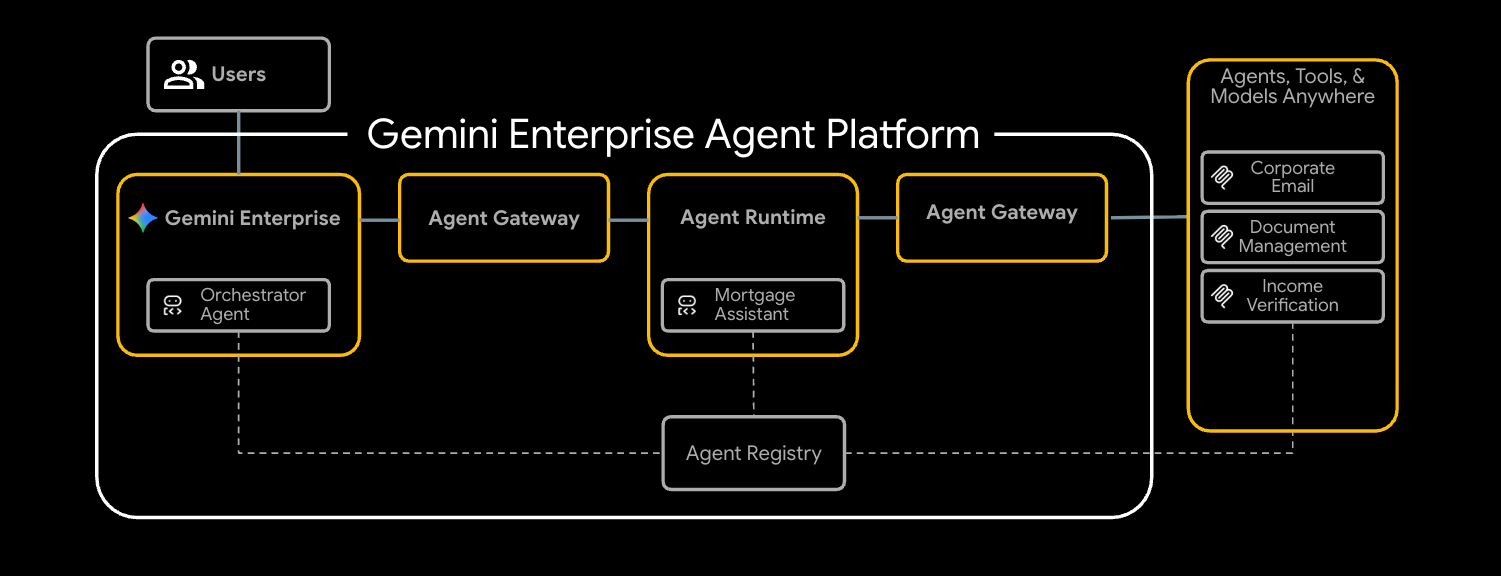
In this codelab, you will deploy an end-to-end mortgage underwriting agent that securely communicates with three internal tools.
You'll start by provisioning the foundational networking, including a VPC and an internal Application Load Balancer configured as your Agent Gateway. Next, you'll deploy three Model Context Protocol (MCP) servers to Cloud Run. These act as your internal proprietary tools:
- Document Management (
legacy-dms) - Corporate Email (
corporate-email) - Income Verification (
income-verification)
With the tools in place, you will deploy a Mortgage Assistant (mortgage-agent) built with the ADK to Agent Runtime. You will configure this agent to use a PSC Interface for private egress and enable runtime tool discovery via the Agent Registry.
To secure the flow, you will configure your Agent Gateway with two service extensions. First, a REQUEST_AUTHZ extension will verify the Agent Identity against per-tool IAM policies, ensuring the agent only accesses authorized tools. Second, a CONTENT_AUTHZ extension using Model Armor will screen the agent's prompts and responses.
Finally, you'll register the agent in Gemini Enterprise, trigger a mortgage-underwriting task as an end user, and verify the secure, governed execution using Cloud Trace.
This codelab is for platform and security engineers of all levels. Expect to spend roughly 100 minutes completing it.
2. Before you begin
Create a project and authenticate
Create a new GCP project (or reuse one) with billing enabled, then authenticate Cloud Shell or your local machine:
gcloud auth login
gcloud auth application-default login
gcloud config set project <your-project-id>
Enable bootstrap APIs
Terraform's foundation module enables ~30 APIs on its first apply, but a small bootstrap set is required for terraform init and the GCS state bucket:
gcloud services enable \
  compute.googleapis.com \
  serviceusage.googleapis.com \
  cloudresourcemanager.googleapis.com \
  iam.googleapis.com \
  storage.googleapis.com \
  dns.googleapis.com
Install required tools
Install the toolchain. On Cloud Shell most of these are already present; on a workstation:
# uv (Python package manager)
curl -LsSf https://astral.sh/uv/install.sh | sh

# skaffold
curl -Lo skaffold https://storage.googleapis.com/skaffold/releases/latest/skaffold-linux-amd64 && \
  sudo install skaffold /usr/local/bin/

# envsubst (gettext)
sudo apt-get install -y gettext-base
You also need Terraform >= 1.12.2, Python 3.12+, and the Google Cloud SDK (gcloud).
Set environment variables
The rest of the codelab assumes these are exported in your shell.
export PROJECT_ID=$(gcloud config get-value project)
export PROJECT_NUMBER=$(gcloud projects describe $PROJECT_ID --format='value(projectNumber)')
export ORG_ID=$(gcloud projects get-ancestors $PROJECT_ID | awk '$2 == "organization" {print $1}')
export REGION="us-central1"

# Only required if using the secure private networking path
export DOMAIN_NAME="agw.example.com"
Validate that all of your variables populated correctly, you should three values returned.
echo $PROJECT_ID
echo $PROJECT_NUMBER
echo $ORG_ID
If your Organization ID doesn't populate you can find it and set it manually.
gcloud organizations list
export ORG_ID=ID_FROM_OUTPUT
3. Clone the repository
git clone https://github.com/GoogleCloudPlatform/cloud-networking-solutions.git
cd cloud-networking-solutions
cd demos/agent-gateway
A quick tour of what's in the demo directory:
src/                MCP servers (legacy-dms, corporate-email, income-verification-api) + mortgage-agent
terraform/          Root Terraform config + modules (foundation, networking, agent-gateway, model-armor, ...)
cloudrun/           Cloud Run service definitions (rendered from .yaml.tmpl via envsubst)
scripts/            grant_agent_mcp_egress.sh — per-MCP IAP egressor binding
skaffold.yaml.tmpl  Skaffold pipeline that builds + deploys all three MCP services to Cloud Run
4. Create the Terraform state bucket and backend config
Create a GCS bucket to hold remote state, then copy the backend template:
gcloud storage buckets create gs://${PROJECT_ID}-tfstate \
  --location=${REGION} \
  --uniform-bucket-level-access

cp terraform/example.backend.conf terraform/backend.conf
Edit terraform/backend.conf with your values:
bucket = "<your-project-id>-tfstate"
prefix = "agent-gateway"
5. (Optional) Create a public Cloud DNS zone
By default for this lab Cloud Run has its ingress configuration set to all and the Agent Registry registers each MCP server at its public *.run.app URL — no additional DNS, certificates, or load balancer required. If you'd like to switch to private networking (Cloud Run with ingress = internal-and-cloud-load-balancing behind an internal Application LB), you also need a public Cloud DNS zone so Certificate Manager can validate the LB cert.
High level flow of private networking
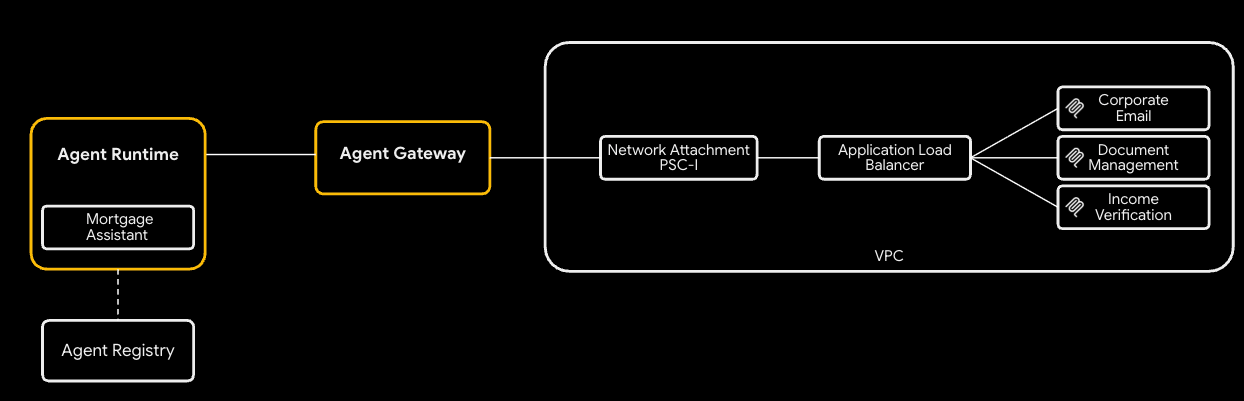
To use the private networking approach:
- Create the public Cloud DNS zone — Certificate Manager validates the regional managed certificate by writing CNAMEs into it:
gcloud dns managed-zones create agw-example-com \
  --dns-name="${DOMAIN_NAME}." \
  --description="Public zone for ${DOMAIN_NAME}" \
  --visibility=public
The corresponding private zone for mcp.${DOMAIN_NAME} (used by the MCP internal LB and DNS peering from Agent Runtime) is created automatically by Terraform — you don't need to create it by hand. With private networking off, neither the public nor the private zone is provisioned.
6. Configure Terraform variables
Copy the example tfvars and edit it:
cp terraform/example.tfvars terraform/terraform.tfvars
There are two demo paths, gated by enable_cloud_run_private_networking.
Default path: Cloud Run with public ingress
The simplest setup: For the default path you only need to edit three values in terraform.tfvars, Every other variable in the file already has a demo-friendly default.
# GCP project ID where all resources will be created.
project_id = "my-gcp-project-id"

# GCP organization ID (numeric).
organization_id = "123456789012"

# Members granted demo-wide roles
platform_admin_members = ["user:admin@example.com"]

# IAP Enforcement Mode ("DRY_RUN" or null)
agent_gateway_iap_iam_enforcement_mode = "DRY_RUN"
Private networking (optional)
Set enable_cloud_run_private_networking = true and add the variables below to provision the full secure stack:
- Internal Application LB
- Google-managed cert
- Cloud Run with
ingress = internal-and-cloud-load-balancing - Agent Gateway DNS peering.
enable_cloud_run_private_networking = true

# DNS — must end with a trailing dot, must match a Cloud DNS zone you own
dns_zone_domain            = "agw.example.com."
enable_certificate_manager = true

# mcp_internal_dns_zone.domain MUST be a real subdomain of dns_zone_domain so
# Certificate Manager can issue a Google-managed cert.
mcp_internal_dns_zone = {
  name   = "mcp-server-internal"
  domain = "mcp.agw.example.com."
}

# Must match mcp_internal_dns_zone.domain so Agent Engine resolves MCP
# hostnames over the PSC interface peering.
psc_interface_dns_zone = {
  name   = "mcp-server-internal"
  domain = "mcp.agw.example.com."
}

mcp_lb_protocol = "HTTPS"
7. Deploy infrastructure with Terraform
Initialize, review, and apply:
cd terraform
terraform init -backend-config=backend.conf
terraform plan -out=tfplan
terraform apply tfplan
terraform apply provisions ~40 resources on the default path and takes 8–10 minutes on a fresh project (~60 resources / 15–20 minutes when enable_cloud_run_private_networking = true). It creates:
- Project foundation (APIs, service identities, quotas)
- VPC, subnets (primary, proxy-only, PSC, PSC-Interface, Agent Gateway co-location), Cloud NAT, firewall rules
- Artifact Registry repo for Cloud Run images
- Three Cloud Run services + per-service runtime SAs (ingress =
allby default;internal-and-cloud-load-balancingwhen private networking is on) - Model Armor template + IAM
- Agent Gateway, PSC-I network attachment, IAP and Model Armor extensions, both authorization policies, and the project-level
roles/iap.egressorgrant - Agent Registry endpoints (Vertex AI, IAP, Discovery Engine, ...) plus the three MCP servers (registered at
*.run.app/mcpby default; at. /mcp
Only when enable_cloud_run_private_networking = true:
- Internal regional Application LB with serverless NEG (URL-mask routing) + private DNS A records
- MCP private DNS zone (
mcp.) attached to the VPC. - Public DNS zone module (Certificate Manager DNS authorizations) + Regional Google-managed certificate
- PSC Interface DNS zone (orphan when there are no private hostnames to resolve, so it's also gated on the master flag)
- Agent Gateway DNS peering for
mcp.(auto-prepended).
8. Inspect the Agent Registry endpoints
The Agent Registry is a per-project catalog of services (Google APIs and your own MCP servers) that an agent discovers at runtime. The mortgage-agent reads it on startup and binds tools dynamically — no MCP URLs are baked into the agent code or its deploy command.
Endpoints
What Terraform ran on your behalf — for each Google API in agent_registry_google_apis, it registered five variants (global, mTLS global, regional, regional mTLS, regional REP). For example, for aiplatform:
gcloud alpha agent-registry services create aiplatform \
  --project=${PROJECT_ID} --location=${REGION} \
  --display-name="Vertex AI Platform" \
  --endpoint-spec-type=no-spec \
  --interfaces="url=https://aiplatform.googleapis.com,protocolBinding=JSONRPC"

gcloud alpha agent-registry services create aiplatform-mtls \
  --project=${PROJECT_ID} --location=${REGION} \
  --display-name="Vertex AI Platform mTLS" \
  --endpoint-spec-type=no-spec \
  --interfaces="url=https://aiplatform.mtls.googleapis.com,protocolBinding=JSONRPC"

gcloud alpha agent-registry services create ${REGION}-aiplatform \
  --project=${PROJECT_ID} --location=${REGION} \
  --display-name="Vertex AI Platform Locational" \
  --endpoint-spec-type=no-spec \
  --interfaces="url=https://${REGION}-aiplatform.googleapis.com,protocolBinding=JSONRPC"

gcloud alpha agent-registry services create aiplatform-${REGION}-rep \
  --project=${PROJECT_ID} --location=${REGION} \
  --display-name="Vertex AI Platform Regional (REP)" \
  --endpoint-spec-type=no-spec \
  --interfaces="url=https://aiplatform.${REGION}.rep.googleapis.com,protocolBinding=JSONRPC"
MCP Servers
The Terraform also registers the 3 MCP Servers for you, to register other MCP servers you can follow the steps in the documentation.
gcloud alpha agent-registry services create legacy-dms \
--project=${PROJECT_ID} \
--location=${REGION} \
--display-name="Legacy DMS" \
--mcp-server-spec-type=tool-spec \
--mcp-server-spec-content=src/legacy-dms/toolspec.json \
--interfaces=url=https://dms.${DOMAIN_NAME}/mcp,protocolBinding=JSONRPC
Verify the registered Endpoints and MCP Servers.
gcloud alpha agent-registry services list \
  --project=${PROJECT_ID} --location=${REGION} \
  --format="value(displayName,name)"

gcloud alpha agent-registry mcp-servers list \
  --project=${PROJECT_ID} --location=${REGION} \
  --format="value(displayName,name)"
Source: terraform/modules/agent-registry-endpoints/scripts/register_endpoints.sh.tpl.
9. Review the Agent Gateway configuration
The Agent Gateway is a Google-managed governance plane between Agent Runtime and your tools. In AGENT_TO_ANYWHERE mode it's bound to the project's Agent Registry and egresses through a customer-owned PSC Interface so it can reach private MCP servers in your VPC.
If you were importing this gateway by hand, the YAML would look like this:
# agent-gateway.yaml — for reference only, Terraform already created this
name: agent-gateway
protocols: [MCP]
googleManaged:
  governedAccessPath: AGENT_TO_ANYWHERE
registries:
  - "//agentregistry.googleapis.com/projects/${PROJECT_ID}/locations/${REGION}"
networkConfig:
  egress:
    networkAttachment: projects/${PROJECT_ID}/regions/${REGION}/networkAttachments/agent-gateway-na
  dnsPeeringConfig:
    domains:
      - mcp.${DOMAIN_NAME}.
    targetProject: ${PROJECT_ID}
    targetNetwork: projects/${PROJECT_ID}/global/networks/gateway-vpc
gcloud alpha network-services agent-gateways import agent-gateway \
  --source=agent-gateway.yaml \
  --location=${REGION}
Verify the gateway Terraform created:
gcloud alpha network-services agent-gateways describe agent-gateway \
  --location=${REGION}
10. Examine IAP and Model Armor authorization
Agent Gateway delegates authorization to service extensions. Two policy profiles cover the demo:
- REQUEST_AUTHZ — evaluated once per request at the headers stage. Used here to call IAP, which checks whether the calling agent identity has
roles/iap.egressoron the target MCP server. - CONTENT_AUTHZ — streams body events to the extension for content sanitization. Used here to call Model Armor, which screens for prompt injection, jailbreaks, RAI violations, and (optionally) PII via Sensitive Data Protection (SDP).
IAP REQUEST_AUTHZ extension
cat > iap-authz-extension.yaml <<EOF
name: agent-gateway-iap-authz
service: iap.googleapis.com
failOpen: true
timeout: 1s
EOF

gcloud beta service-extensions authz-extensions import agent-gateway-iap-authz \
  --source=iap-authz-extension.yaml \
  --location=${REGION} \
  --project=${PROJECT_ID}
Bind it to the Agent Gateway with a REQUEST_AUTHZ policy:
curl -fsS -H "Authorization: Bearer $(gcloud auth print-access-token)" \
  -H "Content-Type: application/json" \
  -X POST "https://networksecurity.googleapis.com/v1alpha1/projects/${PROJECT_ID}/locations/${REGION}/authzPolicies?authz_policy_id=agent-gateway-iap-policy" \
  -d '{
    "name": "agent-gateway-iap-policy",
    "policyProfile": "REQUEST_AUTHZ",
    "action": "CUSTOM",
    "target": {
      "resources": [
        "projects/'"${PROJECT_ID}"'/locations/'"${REGION}"'/agentGateways/agent-gateway"
      ]
    },
    "customProvider": {
      "authzExtension": {
        "resources": [
          "projects/'"${PROJECT_ID}"'/locations/'"${REGION}"'/authzExtensions/agent-gateway-iap-authz"
        ]
      }
    }
  }'
Model Armor CONTENT_AUTHZ extension
The extension's metadata.model_armor_settings carries the request and response template IDs Model Armor uses to evaluate each callout:
cat > ma-extension.yaml <<EOF
name: agent-gateway-ma-authz
service: modelarmor.${REGION}.rep.googleapis.com
failOpen: true
timeout: 1s
metadata:
  model_armor_settings: '[
    {
      "request_template_id":  "projects/${PROJECT_ID}/locations/${REGION}/templates/agw-request-template",
      "response_template_id": "projects/${PROJECT_ID}/locations/${REGION}/templates/agw-response-template"
    }
  ]'
EOF

gcloud beta service-extensions authz-extensions import agent-gateway-ma-authz \
  --source=ma-extension.yaml \
  --location=${REGION} \
  --project=${PROJECT_ID}
curl -fsS -H "Authorization: Bearer $(gcloud auth print-access-token)" \
  -H "Content-Type: application/json" \
  -X POST "https://networksecurity.googleapis.com/v1alpha1/projects/${PROJECT_ID}/locations/${REGION}/authzPolicies?authz_policy_id=agent-gateway-ma-policy" \
  -d '{
    "name": "agent-gateway-ma-policy",
    "policyProfile": "CONTENT_AUTHZ",
    "action": "CUSTOM",
    "target": {
      "resources": [
        "projects/'"${PROJECT_ID}"'/locations/'"${REGION}"'/agentGateways/agent-gateway"
      ]
    },
    "customProvider": {
      "authzExtension": {
        "resources": [
          "projects/'"${PROJECT_ID}"'/locations/'"${REGION}"'/authzExtensions/agent-gateway-ma-authz"
        ]
      }
    }
  }'
Custom DLP templates
Model Armor's sdpSettings.basicConfig uses a built-in info-type list. For finer control (custom info-types, partial masking, surrogate replacement, redaction by likelihood) point Model Armor at your own Cloud DLP inspect and de-identify templates via sdpSettings.advancedConfig.
Create an inspect template that flags US Social Security Numbers at POSSIBLE likelihood or above:
curl -fsS -X POST \
  -H "Authorization: Bearer $(gcloud auth print-access-token)" \
  -H "Content-Type: application/json" \
  -H "x-goog-user-project: ${PROJECT_ID}" \
  "https://dlp.googleapis.com/v2/projects/${PROJECT_ID}/locations/${REGION}/inspectTemplates" \
  -d '{
    "templateId": "agw-ssn-inspect-template",
    "inspectTemplate": {
      "displayName": "SSN Inspect Template",
      "inspectConfig": {
        "infoTypes": [
          { "name": "US_SOCIAL_SECURITY_NUMBER" }
        ],
        "minLikelihood": "POSSIBLE"
      }
    }
  }'
Create a de-identify template that replaces each finding with its info-type token (e.g. [US_SOCIAL_SECURITY_NUMBER]):
curl -fsS -X POST \
  -H "Authorization: Bearer $(gcloud auth print-access-token)" \
  -H "Content-Type: application/json" \
  -H "x-goog-user-project: ${PROJECT_ID}" \
  "https://dlp.googleapis.com/v2/projects/${PROJECT_ID}/locations/${REGION}/deidentifyTemplates" \
  -d '{
    "templateId": "agw-ssn-redaction-template",
    "deidentifyTemplate": {
      "displayName": "SSN Redaction Template",
      "deidentifyConfig": {
        "infoTypeTransformations": {
          "transformations": [{
            "primitiveTransformation": { "replaceWithInfoTypeConfig": {} }
          }]
        }
      }
    }
  }'
Then point a Model Armor template's response config at the pair via sdpSettings.advancedConfig (this is where Terraform's model_armor module would set advanced_config if you wired it up):
{
  "filterConfig": {
    "sdpSettings": {
      "advancedConfig": {
        "inspectTemplate":    "projects/${PROJECT_ID}/locations/${REGION}/inspectTemplates/agw-ssn-inspect-template",
        "deidentifyTemplate": "projects/${PROJECT_ID}/locations/${REGION}/deidentifyTemplates/agw-ssn-redaction-template"
      }
    }
  }
}
IAP egressor IAM (per-MCP-server only)
Terraform does not create a project-wide roles/iap.egressor binding on the implicit IAP agent registry. The binding IAP REQUEST_AUTHZ actually evaluates is per-MCP-server and per-reasoning-engine, granted after the agent is deployed and you know the Agent ID. The "Grant the agent per-MCP-server egress" step runs scripts/grant_agent_mcp_egress.sh for that.
11. Build and deploy the MCP servers to Cloud Run
The cloudrun/*.yaml.tmpl and skaffold.yaml.tmpl files reference ${PROJECT_ID}, ${REGION}, and ${MCP_INGRESS} (the Cloud Run ingress annotation). Source MCP_INGRESS from a Terraform output so the rendered manifests stay in sync with enable_cloud_run_private_networking, then render with envsubst:
Export your Cloud Run ingress configuration.
allinternal-and-cloud-load-balancing(When using the Private Networking approach)
export MCP_INGRESS=all
Go back to the root demo directory:
cd ..
Substitute the template values:
envsubst '${PROJECT_ID} ${REGION} ${MCP_INGRESS}' < skaffold.yaml.tmpl > skaffold.yaml
for f in cloudrun/*.yaml.tmpl; do
  envsubst '${PROJECT_ID} ${REGION} ${MCP_INGRESS}' < "$f" > "${f%.tmpl}"
done
Each Cloud Run service runs as a per-service runtime SA Terraform created (e.g. mcp-legacy-dms@${PROJECT_ID}.iam.gserviceaccount.com). To deploy as those SAs you need roles/iam.serviceAccountUser on yourself:
gcloud projects add-iam-policy-binding $PROJECT_ID \
  --member="user:$(gcloud config get-value account)" \
  --role="roles/iam.serviceAccountUser"
Build with Cloud Build and deploy with Skaffold:
skaffold run
Skaffold builds three images (legacy-dms, corporate-email, income-verification-api) into your Artifact Registry repo and updates each Cloud Run service to point at the new digest.
Verify:
gcloud run services list --region=${REGION}
You should see all three services with an ACTIVE status.
12. Deploy the mortgage agent to Agent Runtime
Grant all Agents the IAP Egressor role on all endpoints we have registered to the registry. The agent needs access to these endpoints because, when it's being deployed, it needs to reach github.com for packages and then reach the various Google APIs needed to deploy.
./scripts/grant_agent_mcp_egress.sh --bind-all-agents --endpoints
Install the agent's deps and deploy:
cd src/mortgage-agent
uv sync

uv run python deploy_agent.py \
  --project=${PROJECT_ID} \
  --region=${REGION} \
  --enable-agent-identity \
  --agent-name=mortgage-agent \
  --agent-gateway=projects/${PROJECT_ID}/locations/${REGION}/agentGateways/agent-gateway \
  --mcp-invoker-sa=$(terraform -chdir=../../terraform output -raw agent_mcp_invoker_email) \
  --model-endpoint-location=global
When the script completes, copy the printed reasoningEngines/ into your shell (e.g. 4262292559201566720):
export AGENT_ID=<numeric-id-from-output>
cd ../..
13. Grant the agent per-MCP-server egress
The IAP REQUEST_AUTHZ extension authorizes each tool call by checking the agent's roles/iap.egressor on the specific MCP server or endpoint it's calling. See Create an agent-to-MCP server egress policy.
The script (scripts/grant_agent_mcp_egress.sh) enumerates the MCP servers in the Agent Registry under projects/${PROJECT_ID}/locations/${REGION} and merges a roles/iap.egressor binding for the agent principal into each server's IAM policy (mirroring gcloud add-iam-policy-binding semantics).
Use case 1 — Unconditional grant scoped to specific MCP servers
./scripts/grant_agent_mcp_egress.sh \
  --mcp \
  --agent-id ${AGENT_ID} \
  --mcp-filter "legacy-dms income-verification"
Use case 2 — Conditional grant (CEL) scoped to a specific MCP server
To restrict the agent to a subset of tools on a single MCP server, attach an IAM condition. The Agent Gateway publishes per-tool attributes that IAP REQUEST_AUTHZ exposes to CEL including:
iap.googleapis.com/mcp.toolNameiap.googleapis.com/mcp.tool.isReadOnlyiap.googleapis.com/request.auth.type.
Restrict the agent to read-only tools only on corporate-email:
./scripts/grant_agent_mcp_egress.sh \
  --mcp \
  --agent-id ${AGENT_ID} \
  --mcp-filter "corporate-email" \
  --condition-expression "api.getAttribute('iap.googleapis.com/mcp.tool.isReadOnly', false) == true || api.getAttribute('iap.googleapis.com/mcp.toolName', '') == ''" \
  --condition-title "ReadOnlyToolsOnly" \
  --condition-description "Restrict ${AGENT_ID} to read-only tools on corporate-email"
After this runs, write tools on corporate-email return 403 PermissionDenied from IAP REQUEST_AUTHZ; read-only tools continue to work.
Verify the bindings
Navigate to Policies tab and you'll see the list of Policies created against the Endpoints and Mcp Servers.
Additional Use Cases:
Unconditional grant on every MCP server, scoped to one agent
Run this after every agent redeploy. With no filter and no condition, the named agent gets roles/iap.egressor on every MCP server in the registry:
./scripts/grant_agent_mcp_egress.sh \
  --mcp \
  --agent-id ${AGENT_ID}
14. Test the agent in the Agent Platform console
The Agent Platform console ships with a Playground that lets you chat with the deployed agent directly. It's the fastest way to smoke-test tool calls and inspect traces before wiring the agent into Gemini Enterprise.
- Open the Agent Platform Deployments page in the Google Cloud console.
- Use the Filter field if you need to narrow the runtime list, then click your
mortgage-agentruntime. - Open the Playground tab.
- Type a prompt to chat with the agent:
I am reviewing the Sterling familys current application. Can you summarize their 2024 and 2025 tax returns and verify if their total household income meets our 2026 debt-to-income requirements?
This should return a response from the Document Management tool and Income Verification tool, SSN's should also be redacted in this response. 5. Type a follow up prompt:
Can you send a summary of this to my email jane@example.com
The agent will be able to successfully send the email, as the conditional policy is not being enforced due to the IAP extension being in Dry Run mode.
Because the agent was deployed with OpenTelemetry instrumentation, the Playground exposes four side-panel views you can flip between as the agent responds:
- Trace — full traces of the conversation, including the Agent Gateway, IAP REQUEST_AUTHZ, and Model Armor CONTENT_AUTHZ spans
- Event — a graph of invoked tools and event details for the current turn
- State — the agent's session state and tool inputs/outputs
- Sessions — every session you've started against this runtime
15. Enforce IAP Authorization
Now that we have validated the deployment, we can update the IAP Enforcement mode to null to enforce the policies. Open up terraform.tfvars and update the mode from DRY_RUN to null
# IAP Enforcement Mode ("DRY_RUN" or null)
agent_gateway_iap_iam_enforcement_mode = null
Apply the change.
terraform apply
Navigate back to the Playground and try the conversation again.
- Open the Agent Platform Deployments page in the Google Cloud console.
- Use the Filter field if you need to narrow the runtime list, then click your
mortgage-agentruntime. - Open the Playground tab.
- Type a prompt to chat with the agent:
I am reviewing the Sterling familys current application. Can you summarize their 2024 and 2025 tax returns and verify if their total household income meets our 2026 debt-to-income requirements?
This should return a response from the Document Management tool and Income Verification tool, SSN's should also be redacted in this response. 5. Type a follow up prompt:
Can you send a summary of this to my email jane@example.com
If everything has been setup correctly the agent should respond that it cannot send the email due to the authorization policy.
16. Gemini Enterprise Setup & Testing
Setup Gemini Enterprise
Follow the getting started with Gemini Enterprise guide.
Register our ADK Agent with Gemini Enterprise
Follow the steps to register our agent in Gemini Enterprise, you can follow the steps here.
- In the Google Cloud console, navigate to the Gemini Enterprise page.
- Select the Gemini Enterprise App where the agent is registered.
- Open the URL shown in the Your Gemini Enterprise webapp is ready section.
- Select the Agent tab from the left menu to open the Agent Gallery.
- Select Mortgage Assistant Agent and start chatting.
Try the same prompts from the Agent Runtime Playground:
Initial prompt:
I am reviewing the Sterling familys current application. Can you summarize their 2024 and 2025 tax returns and verify if their total household income meets our 2026 debt-to-income requirements?
Follow up prompt:
Can you send a summary of this to my email jane@example.com
If you navigate back to the Agent Deployment section in the console, select our agent deployment and go to the traces tab, you'll now see the Gemini Assistant agent in the span showing the call originated from Gemini Enterprise.
17. Observability Dashboard
The Authorization Debugging dashboard provides a single view into the egress traffic of Agent Runtime Agents.
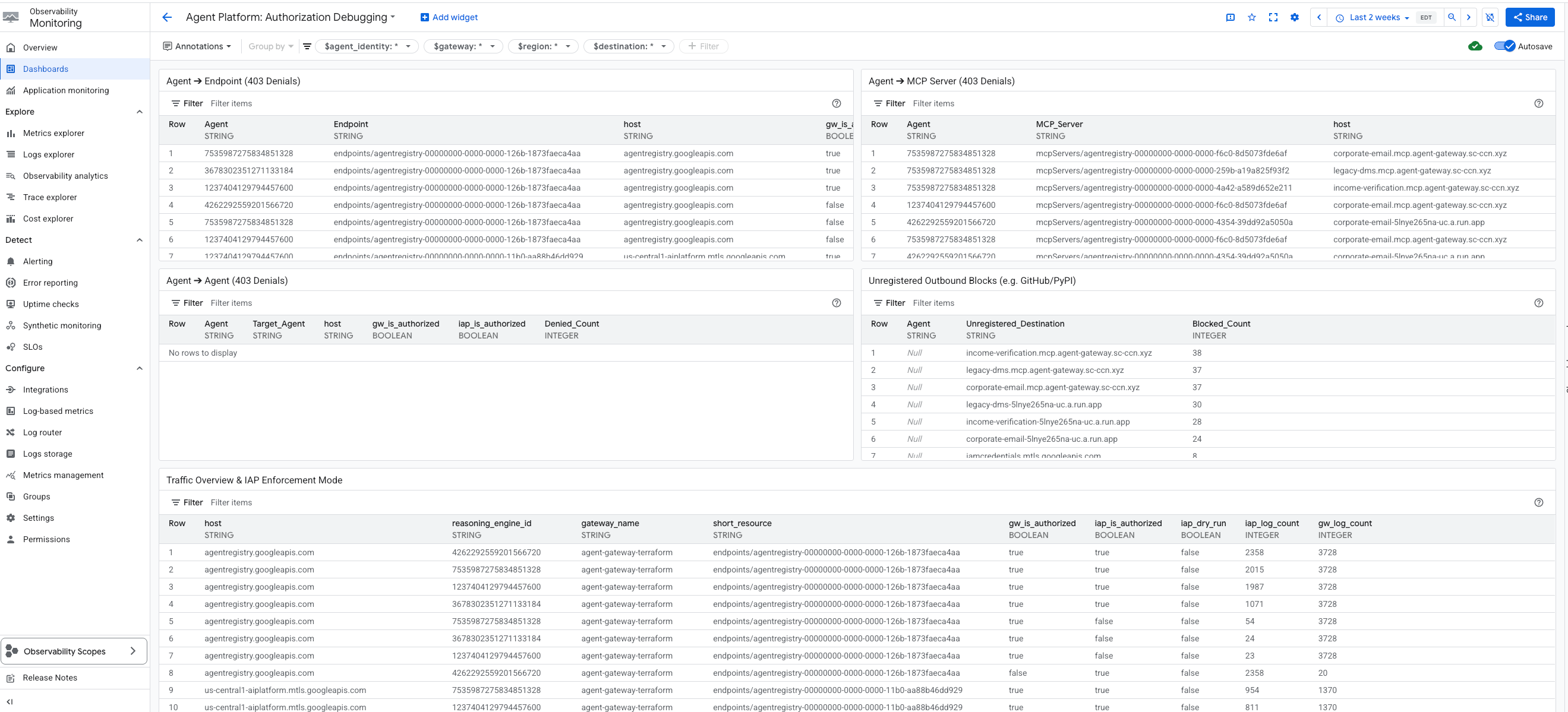
The dashboard displays the following:
- Agent ➔ Endpoint (403 Denials)
- Agent ➔ MCP Server (403 Denials)
- Agent ➔ Agent (403 Denials)
- Unregistered Outbound Blocks
- Traffic Overview & IAP Enforcement Mode
- GCP API IAM Denials
Each widget displays the agent ID, the requested host, the registered resource path, and whether the Gateway and IAP authorized the request.
- Unregistered Outbound Blocks — This widget specifically isolates traffic that the Agent Gateway blocked because the destination hostname does not exist in the Agent Registry. Because the gateway proxy blocks these requests before they ever reach IAP, there are no IAP audit logs for these entries.
- Traffic Overview & IAP Enforcement Mode — This widget provides a table showing all traffic patterns. Crucially, it includes the IAP Dry Run status, allowing users to see if IAP policies are actively blocking traffic or just observing.
- GCP API IAM Denials — This widget searches standard Cloud Audit Logs (
cloudaudit.googleapis.com) to catch underlying Google Cloud API permission errors for Agents.
This dashboard can be found in the Observability Tab under the Agent Gateway instance: Agent Platform > Agents > Gateways > Specific Instance > Observability
18. Troubleshooting & common fixes
AI-Assisted Debugging with Gemini CLI
You can use the agent-platform-debugger skill within Gemini CLI to troubleshoot issues. The skill packages specialized knowledge for AI-assisted debugging. Since Gemini CLI treats .agents/skills/ as a first-class alias for .gemini/skills/ at the workspace scope, you can use the skills directly. To use this skill from within the Codelab Repo:
Navigate to the repository directory and start Gemini CLI:
cd /path/to/cloud-networking-solutions/demos/agent-gateway
gemini
Trust the workspace when prompted (workspace-scope skills only load from trusted folders). Confirm the skill loaded:
/skills list
You should see agent-platform-debugger in the list. If it's missing, reload skills:
/skills reload
Troubleshooting Tips
terraform applyfails on the Agent Gateway with "resource is being created and therefore can not be updated" — the gateway's tenant project takes ~30 seconds to settle before authz policies can attach. The module'stime_sleep.wait_for_gatewayhandles this; just rerunterraform apply.- Agent reports "no MCP servers found" or boots with utility tools only — confirm
enable_agent_registry_endpoints = trueinterraform.tfvars, then:gcloud alpha agent-registry mcp-servers list \ --project=${PROJECT_ID} --location=${REGION} - Tool calls return 403 PermissionDenied — re-run
scripts/grant_agent_mcp_egress.sh. The most common cause is forgetting to re-grant after redeploying the agent (thereasoningEngines/changes each deploy). skaffold runfails with "permission denied on service account" — you're missingroles/iam.serviceAccountUser. Re-run the self-grant in the previous step.- DNS peering errors from Agent Gateway to MCP LB — check that
agent_gateway_dns_peering_config.target_networkmatchesprojects/${PROJECT_ID}/global/networks/${VPC_NAME}exactly, and that everydomainsentry ends with a trailing dot. terraform plankeeps wanting to update Cloud Run image tags — this should not happen because of thelifecycle { ignore_changes }rule. If it does, confirm you didn't editmcp_services[*].imageinterraform.tfvarsafterskaffold run.
19. Clean up
The reasoning engine is not managed by Terraform (the ADK SDK creates it). Delete it manually:
gcloud beta ai reasoning-engines delete ${AGENT_ID} \
  --region=${REGION} --project=${PROJECT_ID}
Tear down everything Terraform created:
cd terraform
terraform destroy
cd ..
If you created the public DNS zone just for this codelab:
gcloud dns managed-zones delete agw-example-com
Finally, delete the Terraform state bucket:
gcloud storage rm -r gs://${PROJECT_ID}-tfstate
20. Congratulations
Congratulations! You have successfully implemented comprehensive agent governance for a multi-tool ADK agent using Agent Gateway. By acting as the centralized network control plane, Agent Gateway allowed you to establish a secure egress path to private tools, enforce fine-grained identity-based IAM policies via Identity-Aware Proxy, and sanitize content interactions using integrated Model Armor guardrails.
What you've learned
- How to deploy and configure Agent Gateway as the central governance layer for Agent-to-Anywhere egress traffic.
- How to integrate the Agent Registry for governed, dynamic runtime tool discovery.
- How to write and enforce per-tool and condition-based IAM policies to strictly control agent execution paths.
- How to leverage Agent Gateway service extensions to apply Model Armor policies, automatically intercepting and redacting sensitive agent traffic.