

۱. مقدمه
پلتفرم Gemini Enterprise Agent یک پلتفرم باز برای ساخت، مقیاسبندی، مدیریت و بهینهسازی عاملهای هوش مصنوعی در سطح سازمانی است که مبتنی بر دادههای شما میباشند.
Agent Runtime محیط اجرای مدیریتشدهای را برای اجرای عاملها، مانند آنهایی که با کیت توسعه عامل متنباز (ADK) ساخته شدهاند، به صورت ایمن در Google Cloud فراهم میکند.
این آزمایشگاه کد، نحوه استفاده از این بلوکهای سازنده اصلی را برای مدیریت عاملی که توسط یک کاربر در Gemini Enterprise آغاز شده است، بررسی میکند، زیرا این عامل به طور ایمن به ابزارهای داخلی دسترسی پیدا میکند.
درباره دروازه عامل
Agent Gateway جزء شبکهای مجموعه مدیریت عامل (Agent Governance) این پلتفرم است. این بخش به عنوان نقطه ورود و خروج شبکه برای همه تعاملات عامل عمل میکند و به مدیران امنیتی اجازه میدهد تا مدیریت متمرکز را بدون نیاز به توسعهدهندگان برای مدیریت اولیههای پیچیده شبکه، اعمال کنند.
این دو مسیر دسترسی اصلی تحت کنترل را تسهیل میکند:
- کلاینت به عامل (ورودی): ارتباطات بین کلاینتهای خارجی (مانند Cursor یا Gemini CLI) و عاملهای شما را ایمن میکند.
- عامل به هر کجا (خروجی): ارتباطات بین عاملهای در حال اجرا در Google Cloud و سرورها، ابزارها یا APIهای در حال اجرا در هر کجا را ایمن میکند.
در این آزمایشگاه کد، شما بر روی حالت Agent-to-Anywhere (خروج) تمرکز خواهید کرد.

برای اجرای سیاستهای امنیتی ، Agent Gateway به طور کامل با بقیه اکوسیستم ادغام میشود:
- رجیستری عامل : یک کتابخانه مرکزی از عاملها و ابزارهای تأیید شده (از جمله سرورهای MCP شخص ثالث).
- هویت عامل : یک شخصیت منحصر به فرد و قابل ردیابی برای هر عامل، که به طور خودکار با mTLS سرتاسری ایمن میشود.
- پروکسی آگاه از هویت (IAP) و IAM : لایه اجرایی پیشفرض که هویت عامل را در برابر مجوزهای دقیق IAM قبل از اجازه دادن به فراخوانی ابزارهای خاص، اعتبارسنجی میکند.
- Model Armor : یک محافظ امنیتی هوش مصنوعی که از طریق Service Extensions یکپارچه شده است تا محتوا را پاکسازی کرده و در برابر حملات تزریق سریع یا نشت دادهها محافظت کند.
حالتهای استقرار (شبکه عمومی در مقابل شبکه خصوصی برای Cloud Run)
برای دسترسیپذیر کردن این آزمایشگاه کد، میتوانید از بین دو مسیر شبکه برای ابزارهای داخلی خود (سرورهای MCP) که در Cloud Run مستقر شدهاند، یکی را انتخاب کنید:
- پیشفرض (ورود عمومی): سرورهای MCP با نامهای میزبان عمومی (
ingress=all) در Cloud Run مستقر میشوند. مسیرهای ترافیک از عامل به ابزارها از طریق URL های استاندارد*.run.appهدایت میشوند. این روش نیازی به دامنههای DNS سفارشی ندارد و سریعترین راه برای یادگیری مفاهیم مدیریت است. - امن (شبکه خصوصی): یک معماری کاملاً خصوصی و اختیاری. سرورهای MCP محدود شدهاند (
ingress=internal-and-cloud-load-balancing) و از طریق یک متعادلکننده بار برنامه داخلی با یک NEG بدون سرور در معرض دید قرار میگیرند. این امر مستلزم آن است که شما یک دامنه DNS عمومی داشته باشید تا بتوانید یک گواهی مدیریتشده توسط گوگل را ارائه دهید.
هنگام پیکربندی Terraform، مسیر دلخواه خود را انتخاب خواهید کرد.
برای کسب اطلاعات بیشتر در مورد ورود به نقاط انتهایی شبکه برای Cloud Run، لطفاً اسناد ما را مطالعه کنید .
کاری که انجام خواهید داد
- آمادهسازی پشته زیرساخت اصلی با استفاده از Terraform
- ساخت و استقرار ابزارهای داخلی به عنوان سرورهای MCP در Cloud Run
- با استفاده از خروجی رابط PSC، یک عامل ADK را در Agent Runtime مستقر کنید
- پیکربندی افزونههای سرویس Agent Gateway برای دسترسی مبتنی بر هویت (IAM) و غربالگری محتوا (Model Armor)
- ردیابی و اعتبارسنجی اجرای امن سرتاسری عامل
آنچه نیاز دارید
- یک مرورگر وب مانند کروم
- یک پروژه گوگل کلود با قابلیت پرداخت و دسترسی مالک
- مجوزهای IAM در سطح سازمان (کدلب نقشهای سازمانی را اعطا میکند)
- دامنهای که کنترل آن به Cloud DNS واگذار شده است (برای گواهی مدیریتشده عمومی)
- آشنایی با Terraform،
gcloudو شبکهسازی پایه Google Cloud
توپولوژی Codelab
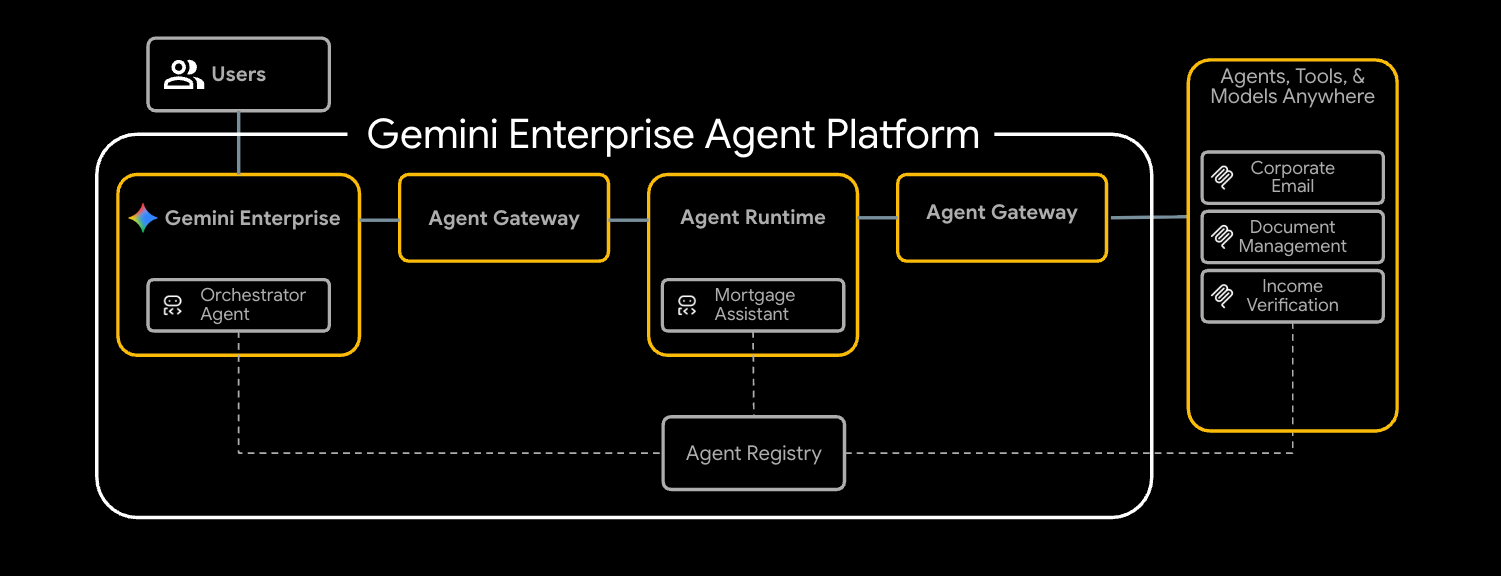
در این آزمایشگاه کد، شما یک نمایندهی پذیرهنویسی وام مسکن سرتاسری را مستقر خواهید کرد که به طور ایمن با سه ابزار داخلی ارتباط برقرار میکند.
شما با تأمین زیرساختهای شبکه، شامل یک VPC و یک Application Load Balancer داخلی که به عنوان Agent Gateway شما پیکربندی شده است، شروع خواهید کرد. در مرحله بعد، سه سرور Model Context Protocol (MCP) را در Cloud Run مستقر خواهید کرد. این سرورها به عنوان ابزارهای اختصاصی داخلی شما عمل میکنند:
- مدیریت اسناد (
legacy-dms) - ایمیل شرکتی (
corporate-email) - تأیید درآمد (
income-verification)
با ابزارهای موجود، شما یک Mortgage Assistant ( mortgage-agent ) ساخته شده با ADK را برای Agent Runtime مستقر خواهید کرد. شما این agent را طوری پیکربندی خواهید کرد که از یک رابط PSC برای خروج خصوصی استفاده کند و کشف ابزار runtime را از طریق Agent Registry فعال کند.
برای ایمنسازی جریان، شما Agent Gateway خود را با دو افزونه سرویس پیکربندی خواهید کرد. اول، افزونه REQUEST_AUTHZ هویت Agent را در برابر سیاستهای IAM هر ابزار تأیید میکند و تضمین میکند که Agent فقط به ابزارهای مجاز دسترسی دارد. دوم، افزونه CONTENT_AUTHZ با استفاده از Model Armor، اعلانها و پاسخهای Agent را بررسی میکند.
در نهایت، شما نماینده را در Gemini Enterprise ثبت خواهید کرد، یک وظیفه ضمانت وام مسکن را به عنوان کاربر نهایی آغاز خواهید کرد و اجرای امن و تحت نظارت را با استفاده از Cloud Trace تأیید خواهید کرد.
این آزمایشگاه کد برای مهندسان پلتفرم و امنیت در تمام سطوح است. انتظار میرود تقریباً ۱۰۰ دقیقه برای تکمیل آن وقت صرف کنید.
۲. قبل از شروع
ایجاد پروژه و احراز هویت
یک پروژه GCP جدید (یا یک پروژه قابل استفاده مجدد) با قابلیت پرداخت فعال ایجاد کنید، سپس Cloud Shell یا دستگاه محلی خود را احراز هویت کنید:
gcloud auth login
gcloud auth application-default login
gcloud config set project <your-project-id>
فعال کردن API های بوت استرپ
ماژول پایه Terraform در اولین اجرای خود حدود 30 API را فعال میکند، اما برای terraform init و سطل وضعیت GCS به یک مجموعه کوچک bootstrap نیاز است:
gcloud services enable \
  compute.googleapis.com \
  serviceusage.googleapis.com \
  cloudresourcemanager.googleapis.com \
  iam.googleapis.com \
  storage.googleapis.com \
  dns.googleapis.com
نصب ابزارهای مورد نیاز
زنجیره ابزار را نصب کنید. در Cloud Shell اکثر این موارد از قبل موجود هستند؛ در یک ایستگاه کاری:
# uv (Python package manager)
curl -LsSf https://astral.sh/uv/install.sh | sh

# skaffold
curl -Lo skaffold https://storage.googleapis.com/skaffold/releases/latest/skaffold-linux-amd64 && \
  sudo install skaffold /usr/local/bin/

# envsubst (gettext)
sudo apt-get install -y gettext-base
همچنین به Terraform >= 1.12.2 ، پایتون 3.12+ و کیت توسعه نرمافزار گوگل کلود ( gcloud ) نیاز دارید.
تنظیم متغیرهای محیطی
بقیهی بخش کد فرض میکند که اینها در پوستهی شما اکسپورت شدهاند.
export PROJECT_ID=$(gcloud config get-value project)
export PROJECT_NUMBER=$(gcloud projects describe $PROJECT_ID --format='value(projectNumber)')
export ORG_ID=$(gcloud projects get-ancestors $PROJECT_ID | awk '$2 == "organization" {print $1}')
export REGION="us-central1"

# Only required if using the secure private networking path
export DOMAIN_NAME="agw.example.com"
تأیید کنید که تمام متغیرهای شما به درستی پر شدهاند، باید سه مقدار برگردانده شود.
echo $PROJECT_ID
echo $PROJECT_NUMBER
echo $ORG_ID
اگر شناسه سازمان شما وارد نشده است، میتوانید آن را پیدا کرده و به صورت دستی تنظیم کنید.
gcloud organizations list
export ORG_ID=ID_FROM_OUTPUT
۳. مخزن را کلون کنید
git clone https://github.com/GoogleCloudPlatform/cloud-networking-solutions.git
cd cloud-networking-solutions
cd demos/agent-gateway
نگاهی سریع به آنچه در فهرست نسخههای نمایشی وجود دارد:
src/                MCP servers (legacy-dms, corporate-email, income-verification-api) + mortgage-agent
terraform/          Root Terraform config + modules (foundation, networking, agent-gateway, model-armor, ...)
cloudrun/           Cloud Run service definitions (rendered from .yaml.tmpl via envsubst)
scripts/            grant_agent_mcp_egress.sh — per-MCP IAP egressor binding
skaffold.yaml.tmpl  Skaffold pipeline that builds + deploys all three MCP services to Cloud Run
۴. ایجاد سطل وضعیت Terraform و پیکربندی backend
یک سطل GCS برای نگهداری وضعیت از راه دور ایجاد کنید، سپس الگوی backend را کپی کنید:
gcloud storage buckets create gs://${PROJECT_ID}-tfstate \
  --location=${REGION} \
  --uniform-bucket-level-access

cp terraform/example.backend.conf terraform/backend.conf
terraform/backend.conf را با مقادیر دلخواه خود ویرایش کنید:
bucket = "<your-project-id>-tfstate"
prefix = "agent-gateway"
۵. (اختیاری) یک منطقه عمومی DNS ابری ایجاد کنید
به طور پیشفرض برای این آزمایشگاه، Cloud Run پیکربندی ورودی خود را روی all تنظیم کرده است و Agent Registry هر سرور MCP را در URL عمومی *.run.app خود ثبت میکند - هیچ DNS، گواهی یا متعادلکننده بار اضافی مورد نیاز نیست. اگر میخواهید به شبکه خصوصی (Cloud Run با ingress = internal-and-cloud-load-balancing پشت یک Application LB داخلی) تغییر دهید، به یک منطقه Cloud DNS عمومی نیز نیاز دارید تا Certificate Manager بتواند گواهی LB را تأیید کند.
جریان سطح بالای شبکه خصوصی
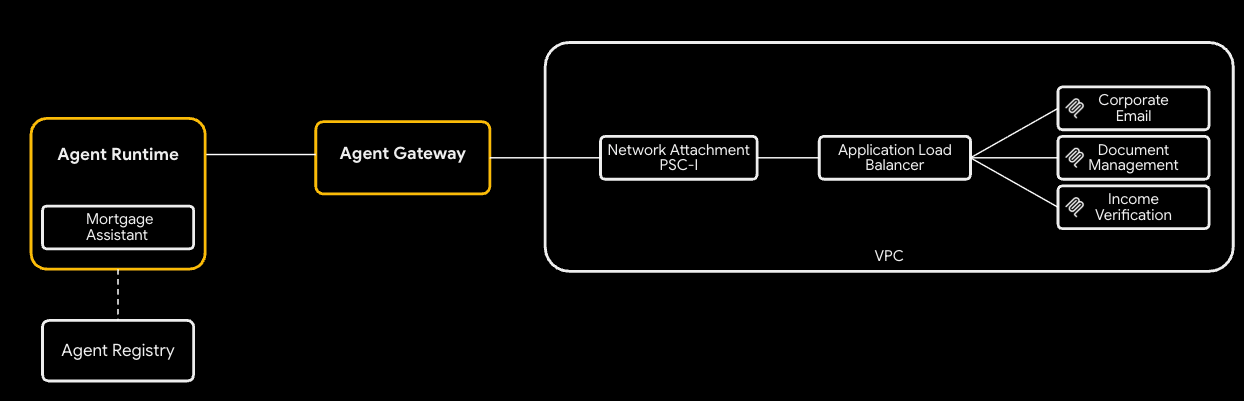
برای استفاده از رویکرد شبکه خصوصی:
- ایجاد منطقه عمومی DNS ابری — مدیر گواهینامه، گواهینامه مدیریتشده منطقهای را با نوشتن CNAMEها در آن تأیید میکند:
gcloud dns managed-zones create agw-example-com \
  --dns-name="${DOMAIN_NAME}." \
  --description="Public zone for ${DOMAIN_NAME}" \
  --visibility=public
ناحیه خصوصی مربوطه برای mcp.${DOMAIN_NAME} (که توسط LB داخلی MCP و DNS peering از Agent Runtime استفاده میشود) به طور خودکار توسط Terraform ایجاد میشود - نیازی نیست آن را به صورت دستی ایجاد کنید. با خاموش بودن شبکه خصوصی، نه ناحیه عمومی و نه ناحیه خصوصی فراهم نمیشوند.
۶. پیکربندی متغیرهای Terraform
tfvar های مثال را کپی کرده و ویرایش کنید:
cp terraform/example.tfvars terraform/terraform.tfvars
دو مسیر آزمایشی وجود دارد که توسط enable_cloud_run_private_networking محدود شدهاند.
مسیر پیشفرض: Cloud Run با دسترسی عمومی
سادهترین تنظیم: برای مسیر پیشفرض، فقط باید سه مقدار را در terraform.tfvars ویرایش کنید، هر متغیر دیگری در فایل از قبل یک پیشفرض قابل استفاده دارد.
# GCP project ID where all resources will be created.
project_id = "my-gcp-project-id"

# GCP organization ID (numeric).
organization_id = "123456789012"

# Members granted demo-wide roles
platform_admin_members = ["user:admin@example.com"]

# IAP Enforcement Mode ("DRY_RUN" or null)
agent_gateway_iap_iam_enforcement_mode = "DRY_RUN"
شبکه خصوصی (اختیاری)
enable_cloud_run_private_networking = true قرار دهید و متغیرهای زیر را برای تأمین پشته امن کامل اضافه کنید:
- برنامه داخلی LB
- گواهینامه تحت مدیریت گوگل
- اجرای ابری با
ingress = internal-and-cloud-load-balancing - جفتسازی DNS توسط Agent Gateway.
enable_cloud_run_private_networking = true

# DNS — must end with a trailing dot, must match a Cloud DNS zone you own
dns_zone_domain            = "agw.example.com."
enable_certificate_manager = true

# mcp_internal_dns_zone.domain MUST be a real subdomain of dns_zone_domain so
# Certificate Manager can issue a Google-managed cert.
mcp_internal_dns_zone = {
  name   = "mcp-server-internal"
  domain = "mcp.agw.example.com."
}

# Must match mcp_internal_dns_zone.domain so Agent Engine resolves MCP
# hostnames over the PSC interface peering.
psc_interface_dns_zone = {
  name   = "mcp-server-internal"
  domain = "mcp.agw.example.com."
}

mcp_lb_protocol = "HTTPS"
۷. استقرار زیرساخت با Terraform
مقداردهی اولیه، بررسی و اعمال:
cd terraform
terraform init -backend-config=backend.conf
terraform plan -out=tfplan
terraform apply tfplan
terraform apply و در یک پروژه جدید ۸ تا ۱۰ دقیقه طول میکشد (حدود ۶۰ منبع / ۱۵ تا ۲۰ دقیقه وقتی enable_cloud_run_private_networking = true ). این فرآیند موارد زیر را ایجاد میکند:
- پایه و اساس پروژه (APIها، هویت سرویسها، سهمیهها)
- VPC، زیرشبکهها (اولیه، فقط پروکسی، PSC، رابط PSC، هممکانی دروازه عامل)، Cloud NAT، قوانین فایروال
- مخزن رجیستری مصنوعات برای تصاویر Cloud Run
- سه سرویس Cloud Run + SA های زمان اجرای هر سرویس (ورودی =
allبه صورت پیشفرض؛internal-and-cloud-load-balancingهنگام روشن بودن شبکه خصوصی) - الگوی زره مدل + IAM
- دروازه عامل، اتصال شبکه PSC-I، افزونههای IAP و Model Armor، هر دو سیاستهای مجوز، و اعطای
roles/iap.egressorدر سطح پروژه - نقاط پایانی رجیستری عامل (Vertex AI، IAP، Discovery Engine، ...) به علاوه سه سرور MCP (که به طور پیشفرض در
*.run.app/mcpثبت شدهاند؛ در. /mcp
فقط زمانی که enable_cloud_run_private_networking = true :
- برنامه منطقهای داخلی LB با NEG بدون سرور (مسیریابی URL-mask) + رکوردهای DNS A خصوصی
- منطقه DNS خصوصی MCP (
mcp.) متصل به VPC. - ماژول منطقه DNS عمومی (مجوزهای DNS مدیریت گواهینامه) + گواهی منطقهای تحت مدیریت گوگل
- منطقه DNS رابط PSC (یتیم زمانی که هیچ نام میزبان خصوصی برای حل و فصل وجود ندارد، بنابراین روی پرچم اصلی نیز قفل شده است)
- جفتسازی DNS توسط Agent Gateway برای
mcp.(به صورت خودکار اضافه میشود).
۸. نقاط پایانی رجیستری Agent را بررسی کنید
رجیستری نماینده (Agent Registry) یک کاتالوگ از خدمات مربوط به هر پروژه (APIهای گوگل و سرورهای MCP خودتان) است که یک نماینده در زمان اجرا آن را کشف میکند. نماینده وام مسکن آن را در هنگام راهاندازی میخواند و ابزارها را به صورت پویا متصل میکند - هیچ URL MCP در کد نماینده یا دستور استقرار آن گنجانده نشده است.
نقاط پایانی
آنچه Terraform از طرف شما اجرا کرد - برای هر API گوگل در agent_registry_google_apis ، پنج نوع (جهانی، mTLS جهانی، منطقهای، mTLS منطقهای، REP منطقهای) را ثبت کرد. به عنوان مثال، برای aiplatform :
gcloud alpha agent-registry services create aiplatform \
  --project=${PROJECT_ID} --location=${REGION} \
  --display-name="Vertex AI Platform" \
  --endpoint-spec-type=no-spec \
  --interfaces="url=https://aiplatform.googleapis.com,protocolBinding=JSONRPC"

gcloud alpha agent-registry services create aiplatform-mtls \
  --project=${PROJECT_ID} --location=${REGION} \
  --display-name="Vertex AI Platform mTLS" \
  --endpoint-spec-type=no-spec \
  --interfaces="url=https://aiplatform.mtls.googleapis.com,protocolBinding=JSONRPC"

gcloud alpha agent-registry services create ${REGION}-aiplatform \
  --project=${PROJECT_ID} --location=${REGION} \
  --display-name="Vertex AI Platform Locational" \
  --endpoint-spec-type=no-spec \
  --interfaces="url=https://${REGION}-aiplatform.googleapis.com,protocolBinding=JSONRPC"

gcloud alpha agent-registry services create aiplatform-${REGION}-rep \
  --project=${PROJECT_ID} --location=${REGION} \
  --display-name="Vertex AI Platform Regional (REP)" \
  --endpoint-spec-type=no-spec \
  --interfaces="url=https://aiplatform.${REGION}.rep.googleapis.com,protocolBinding=JSONRPC"
سرورهای MCP
Terraform همچنین 3 سرور MCP را برای شما ثبت میکند، برای ثبت سایر سرورهای MCP میتوانید مراحل موجود در مستندات را دنبال کنید.
gcloud alpha agent-registry services create legacy-dms \
--project=${PROJECT_ID} \
--location=${REGION} \
--display-name="Legacy DMS" \
--mcp-server-spec-type=tool-spec \
--mcp-server-spec-content=src/legacy-dms/toolspec.json \
--interfaces=url=https://dms.${DOMAIN_NAME}/mcp,protocolBinding=JSONRPC
نقاط پایانی و سرورهای MCP ثبت شده را تأیید کنید.
gcloud alpha agent-registry services list \
  --project=${PROJECT_ID} --location=${REGION} \
  --format="value(displayName,name)"

gcloud alpha agent-registry mcp-servers list \
  --project=${PROJECT_ID} --location=${REGION} \
  --format="value(displayName,name)"
منبع: terraform/modules/agent-registry-endpoints/scripts/register_endpoints.sh.tpl .
۹. پیکربندی Agent Gateway را بررسی کنید
دروازه عامل (Agent Gateway) یک صفحه مدیریتی تحت مدیریت گوگل بین Agent Runtime و ابزارهای شما است. در حالت AGENT_TO_ANYWHERE این دروازه به رجیستری عامل پروژه متصل میشود و از طریق رابط PSC متعلق به مشتری خارج میشود تا بتواند به سرورهای MCP خصوصی در VPC شما دسترسی پیدا کند.
اگر این دروازه را به صورت دستی وارد میکردید، YAML به این شکل میشد:
# agent-gateway.yaml — for reference only, Terraform already created this
name: agent-gateway
protocols: [MCP]
googleManaged:
  governedAccessPath: AGENT_TO_ANYWHERE
registries:
  - "//agentregistry.googleapis.com/projects/${PROJECT_ID}/locations/${REGION}"
networkConfig:
  egress:
    networkAttachment: projects/${PROJECT_ID}/regions/${REGION}/networkAttachments/agent-gateway-na
  dnsPeeringConfig:
    domains:
      - mcp.${DOMAIN_NAME}.
    targetProject: ${PROJECT_ID}
    targetNetwork: projects/${PROJECT_ID}/global/networks/gateway-vpc
gcloud alpha network-services agent-gateways import agent-gateway \
  --source=agent-gateway.yaml \
  --location=${REGION}
تأیید کنید که دروازه Terraform ایجاد شده است:
gcloud alpha network-services agent-gateways describe agent-gateway \
  --location=${REGION}
۱۰. بررسی مجوز IAP و Model Armor
Agent Gateway مجوز را به افزونههای سرویس واگذار میکند. دو پروفایل سیاست، نسخه آزمایشی را پوشش میدهند:
- REQUEST_AUTHZ — یک بار در هر درخواست در مرحله هدرها ارزیابی میشود. در اینجا برای فراخوانی IAP استفاده میشود، که بررسی میکند آیا هویت عامل فراخوانی کننده دارای
roles/iap.egressorدر سرور MCP هدف است یا خیر. - CONTENT_AUTHZ — رویدادهای بدنه را برای پاکسازی محتوا به افزونه ارسال میکند. در اینجا برای فراخوانی Model Armor استفاده میشود که تزریق سریع، جیلبریک، نقض RAI و (اختیاری) PII را از طریق حفاظت از دادههای حساس (SDP) بررسی میکند.
افزونهی درخواست مجوز استفاده از خدمات در ازای دریافت (IAP REQUEST_AUTHZ)
cat > iap-authz-extension.yaml <<EOF
name: agent-gateway-iap-authz
service: iap.googleapis.com
failOpen: true
timeout: 1s
EOF

gcloud beta service-extensions authz-extensions import agent-gateway-iap-authz \
  --source=iap-authz-extension.yaml \
  --location=${REGION} \
  --project=${PROJECT_ID}
آن را با استفاده از پالیسی REQUEST_AUTHZ به Agent Gateway متصل کنید:
curl -fsS -H "Authorization: Bearer $(gcloud auth print-access-token)" \
  -H "Content-Type: application/json" \
  -X POST "https://networksecurity.googleapis.com/v1alpha1/projects/${PROJECT_ID}/locations/${REGION}/authzPolicies?authz_policy_id=agent-gateway-iap-policy" \
  -d '{
    "name": "agent-gateway-iap-policy",
    "policyProfile": "REQUEST_AUTHZ",
    "action": "CUSTOM",
    "target": {
      "resources": [
        "projects/'"${PROJECT_ID}"'/locations/'"${REGION}"'/agentGateways/agent-gateway"
      ]
    },
    "customProvider": {
      "authzExtension": {
        "resources": [
          "projects/'"${PROJECT_ID}"'/locations/'"${REGION}"'/authzExtensions/agent-gateway-iap-authz"
        ]
      }
    }
  }'
افزونه CONTENT_AUTHZ مدل زره
فایل metadata.model_armor_settings این افزونه، شناسههای قالب درخواست و پاسخی را که Model Armor برای ارزیابی هر فراخوانی استفاده میکند، در خود جای داده است:
cat > ma-extension.yaml <<EOF
name: agent-gateway-ma-authz
service: modelarmor.${REGION}.rep.googleapis.com
failOpen: true
timeout: 1s
metadata:
  model_armor_settings: '[
    {
      "request_template_id":  "projects/${PROJECT_ID}/locations/${REGION}/templates/agw-request-template",
      "response_template_id": "projects/${PROJECT_ID}/locations/${REGION}/templates/agw-response-template"
    }
  ]'
EOF

gcloud beta service-extensions authz-extensions import agent-gateway-ma-authz \
  --source=ma-extension.yaml \
  --location=${REGION} \
  --project=${PROJECT_ID}
curl -fsS -H "Authorization: Bearer $(gcloud auth print-access-token)" \
  -H "Content-Type: application/json" \
  -X POST "https://networksecurity.googleapis.com/v1alpha1/projects/${PROJECT_ID}/locations/${REGION}/authzPolicies?authz_policy_id=agent-gateway-ma-policy" \
  -d '{
    "name": "agent-gateway-ma-policy",
    "policyProfile": "CONTENT_AUTHZ",
    "action": "CUSTOM",
    "target": {
      "resources": [
        "projects/'"${PROJECT_ID}"'/locations/'"${REGION}"'/agentGateways/agent-gateway"
      ]
    },
    "customProvider": {
      "authzExtension": {
        "resources": [
          "projects/'"${PROJECT_ID}"'/locations/'"${REGION}"'/authzExtensions/agent-gateway-ma-authz"
        ]
      }
    }
  }'
قالبهای DLP سفارشی
sdpSettings.basicConfig مدل آرمور از یک لیست نوع اطلاعات داخلی استفاده میکند. برای کنترل دقیقتر (انواع اطلاعات سفارشی، پوشش جزئی، جایگزینی جایگزین، ویرایش بر اساس احتمال)، مدل آرمور را به Cloud DLP خود ارجاع دهید و از طریق sdpSettings.advancedConfig ، الگوها را شناسایی و حذف کنید .
یک الگوی بازرسی ایجاد کنید که شمارههای تأمین اجتماعی ایالات متحده را با احتمال POSSIBLE یا بالاتر علامتگذاری کند:
curl -fsS -X POST \
  -H "Authorization: Bearer $(gcloud auth print-access-token)" \
  -H "Content-Type: application/json" \
  -H "x-goog-user-project: ${PROJECT_ID}" \
  "https://dlp.googleapis.com/v2/projects/${PROJECT_ID}/locations/${REGION}/inspectTemplates" \
  -d '{
    "templateId": "agw-ssn-inspect-template",
    "inspectTemplate": {
      "displayName": "SSN Inspect Template",
      "inspectConfig": {
        "infoTypes": [
          { "name": "US_SOCIAL_SECURITY_NUMBER" }
        ],
        "minLikelihood": "POSSIBLE"
      }
    }
  }'
یک الگوی حذف هویت ایجاد کنید که هر یافته را با توکن نوع اطلاعات آن جایگزین کند (مثلاً [US_SOCIAL_SECURITY_NUMBER] ):
curl -fsS -X POST \
  -H "Authorization: Bearer $(gcloud auth print-access-token)" \
  -H "Content-Type: application/json" \
  -H "x-goog-user-project: ${PROJECT_ID}" \
  "https://dlp.googleapis.com/v2/projects/${PROJECT_ID}/locations/${REGION}/deidentifyTemplates" \
  -d '{
    "templateId": "agw-ssn-redaction-template",
    "deidentifyTemplate": {
      "displayName": "SSN Redaction Template",
      "deidentifyConfig": {
        "infoTypeTransformations": {
          "transformations": [{
            "primitiveTransformation": { "replaceWithInfoTypeConfig": {} }
          }]
        }
      }
    }
  }'
سپس پیکربندی پاسخ یک الگوی Model Armor را از طریق sdpSettings.advancedConfig به آن جفت ارسال کنید (این جایی است که ماژول model_armor در Terraform در صورت اتصال، advanced_config تنظیم میکند):
{
  "filterConfig": {
    "sdpSettings": {
      "advancedConfig": {
        "inspectTemplate":    "projects/${PROJECT_ID}/locations/${REGION}/inspectTemplates/agw-ssn-inspect-template",
        "deidentifyTemplate": "projects/${PROJECT_ID}/locations/${REGION}/deidentifyTemplates/agw-ssn-redaction-template"
      }
    }
  }
}
IAM خروجی IAP (فقط برای هر سرور MCP)
Terraform یک اتصال roles/iap.egressor در سطح پروژه روی رجیستری ضمنی عامل IAP ایجاد نمیکند . اتصال IAP REQUEST_AUTHZ در واقع به ازای هر MCP-server و هر Reasoning-engine ارزیابی میشود و پس از استقرار عامل و دانستن شناسه عامل اعطا میشود. مرحله "اعطای مجوز خروج عامل به ازای هر MCP-server" scripts/grant_agent_mcp_egress.sh را برای آن اجرا میکند.
۱۱. سرورهای MCP را روی Cloud Run بسازید و مستقر کنید
فایلهای cloudrun/*.yaml.tmpl و skaffold.yaml.tmpl به ${PROJECT_ID} ، ${REGION} و ${MCP_INGRESS} (حاشیهنویسی ورودی Cloud Run) ارجاع میدهند. MCP_INGRESS از خروجی Terraform منبعیابی کنید تا مانیفستهای رندر شده با enable_cloud_run_private_networking همگام بمانند، سپس با envsubst رندر کنید:
پیکربندی ورودی Cloud Run خود را صادر کنید.
-
all -
internal-and-cloud-load-balancing(هنگام استفاده از رویکرد شبکه خصوصی)
export MCP_INGRESS=all
به دایرکتوری ریشه نسخه آزمایشی برگردید:
cd ..
مقادیر الگو را جایگزین کنید:
envsubst '${PROJECT_ID} ${REGION} ${MCP_INGRESS}' < skaffold.yaml.tmpl > skaffold.yaml
for f in cloudrun/*.yaml.tmpl; do
  envsubst '${PROJECT_ID} ${REGION} ${MCP_INGRESS}' < "$f" > "${f%.tmpl}"
done
هر سرویس Cloud Run به عنوان یک SA زمان اجرای هر سرویس که Terraform ایجاد کرده است، اجرا میشود (مثلاً mcp-legacy-dms@${PROJECT_ID}.iam.gserviceaccount.com ). برای استقرار به عنوان آن SAها، به roles/iam.serviceAccountUser روی خودتان نیاز دارید:
gcloud projects add-iam-policy-binding $PROJECT_ID \
  --member="user:$(gcloud config get-value account)" \
  --role="roles/iam.serviceAccountUser"
ساخت با ابر ساخت و استقرار با Skaffold:
skaffold run
Skaffold سه تصویر ( legacy-dms ، corporate-email ، income-verification-api ) را در مخزن Artifact Registry شما ایجاد میکند و هر سرویس Cloud Run را بهروزرسانی میکند تا به خلاصه جدید اشاره کند.
تأیید کنید:
gcloud run services list --region=${REGION}
شما باید هر سه سرویس را با وضعیت ACTIVE ) ببینید.
۱۲. مشاور وام مسکن را به Agent Runtime منتقل کنید
به همه Agentها نقش IAP Egressor را در تمام Endpointهایی که در رجیستری ثبت کردهایم، اعطا کنید. Agent به دسترسی به این Endpointها نیاز دارد زیرا هنگام استقرار، باید برای بستهها به github.com و سپس به APIهای مختلف Google مورد نیاز برای استقرار دسترسی پیدا کند.
./scripts/grant_agent_mcp_egress.sh --bind-all-agents --endpoints
بخشهای مربوط به agent را نصب و پیادهسازی کنید:
cd src/mortgage-agent
uv sync

uv run python deploy_agent.py \
  --project=${PROJECT_ID} \
  --region=${REGION} \
  --enable-agent-identity \
  --agent-name=mortgage-agent \
  --agent-gateway=projects/${PROJECT_ID}/locations/${REGION}/agentGateways/agent-gateway \
  --mcp-invoker-sa=$(terraform -chdir=../../terraform output -raw agent_mcp_invoker_email) \
  --model-endpoint-location=global
وقتی اسکریپت کامل شد، فایل چاپ شده reasoningEngines/ را کپی کنید. reasoningEngines/ به پوسته خود (مثلاً ۴۲۶۲۲۹۲۵۵۹۲۰۱۵۶۶۷۲۰):
export AGENT_ID=<numeric-id-from-output>
cd ../..
۱۳. به عامل، به ازای هر سرور MCP، مجوز خروج اعطا کنید
افزونهی IAP REQUEST_AUTHZ با بررسی roles/iap.egressor عامل روی سرور MCP یا نقطهی پایانی خاصی که آن را فراخوانی میکند، هر فراخوانی ابزار را مجاز میکند. به بخش «ایجاد یک سیاست خروج عامل به سرور MCP» مراجعه کنید.
اسکریپت ( scripts/grant_agent_mcp_egress.sh ) سرورهای MCP را در رجیستری Agent در مسیر projects/${PROJECT_ID}/locations/${REGION} فهرست میکند و یک اتصال roles/iap.egressor برای agent principal را در سیاست IAM هر سرور ادغام میکند (که منعکسکنندهی معنای gcloud add-iam-policy-binding ).
مورد استفاده ۱ - اعطای بدون قید و شرط محدود به سرورهای خاص MCP
./scripts/grant_agent_mcp_egress.sh \
  --mcp \
  --agent-id ${AGENT_ID} \
  --mcp-filter "legacy-dms income-verification"
مورد استفاده ۲ - اعطای مشروط (CEL) محدود به یک سرور MCP خاص
برای محدود کردن عامل به زیرمجموعهای از ابزارها در یک سرور MCP واحد، یک شرط IAM ضمیمه کنید. دروازه عامل، ویژگیهای هر ابزار را که IAP REQUEST_AUTHZ در اختیار CEL قرار میدهد، منتشر میکند، از جمله:
-
iap.googleapis.com/mcp.toolName -
iap.googleapis.com/mcp.tool.isReadOnly -
iap.googleapis.com/request.auth.type.
محدود کردن عامل به ابزارهای فقط خواندنی فقط در corporate-email :
./scripts/grant_agent_mcp_egress.sh \
  --mcp \
  --agent-id ${AGENT_ID} \
  --mcp-filter "corporate-email" \
  --condition-expression "api.getAttribute('iap.googleapis.com/mcp.tool.isReadOnly', false) == true || api.getAttribute('iap.googleapis.com/mcp.toolName', '') == ''" \
  --condition-title "ReadOnlyToolsOnly" \
  --condition-description "Restrict ${AGENT_ID} to read-only tools on corporate-email"
پس از اجرا، ابزارهایی را روی corporate-email بنویسید که خطای 403 PermissionDenied from IAP REQUEST_AUTHZ را برمیگرداند؛ ابزارهای فقط خواندنی به کار خود ادامه میدهند.
تأیید صحت اتصالات
به برگه «سیاستها» بروید تا فهرستی از سیاستهای ایجاد شده علیه Endpointها و سرورهای Mcp را مشاهده کنید.
موارد استفاده اضافی:
اعطای بدون قید و شرط به هر سرور MCP، محدود به یک عامل
این دستور را بعد از هر بار استقرار مجدد عامل اجرا کنید. بدون فیلتر و بدون شرط، عامل نامگذاری شده در هر سرور MCP در رجیستری، roles/iap.egressor را دریافت میکند:
./scripts/grant_agent_mcp_egress.sh \
  --mcp \
  --agent-id ${AGENT_ID}
۱۴. تست عامل در کنسول پلتفرم عامل
کنسول Agent Platform با یک Playground ارائه میشود که به شما امکان میدهد مستقیماً با Agent مستقر شده چت کنید. این سریعترین راه برای تست دودی فراخوانیهای ابزار و بررسی ردپاها قبل از اتصال Agent به Gemini Enterprise است.
- صفحه استقرار پلتفرم عامل (Agent Platform Deployments) را در کنسول گوگل کلود (Google Cloud) باز کنید.
- اگر نیاز به محدود کردن لیست زمانهای اجرا دارید، از فیلد فیلتر استفاده کنید، سپس روی زمان اجرای
mortgage-agentخود کلیک کنید. - برگه «زمین بازی» را باز کنید.
- برای گفتگو با نماینده، یک درخواست تایپ کنید:
I am reviewing the Sterling familys current application. Can you summarize their 2024 and 2025 tax returns and verify if their total household income meets our 2026 debt-to-income requirements?
این باید پاسخی از ابزار مدیریت اسناد و ابزار تأیید درآمد برگرداند، شماره تأمین اجتماعی نیز باید در این پاسخ حذف شود. ۵. یک پیام پیگیری تایپ کنید:
Can you send a summary of this to my email jane@example.com
اپراتور قادر خواهد بود ایمیل را با موفقیت ارسال کند ، زیرا به دلیل فعال بودن افزونه IAP در حالت Dry Run، سیاست شرطی اجرا نمیشود.
از آنجا که این عامل با ابزار OpenTelemetry مستقر شده است، Playground چهار نمای پنل کناری را نشان میدهد که میتوانید هنگام پاسخ عامل بین آنها جابجا شوید:
- ردیابی — ردپای کامل مکالمه، شامل Agent Gateway، IAP REQUEST_AUTHZ و Model Armor CONTENT_AUTHZ spans
- رویداد - نموداری از ابزارهای فراخوانی شده و جزئیات رویداد برای نوبت فعلی
- وضعیت - وضعیت جلسه عامل و ورودیها/خروجیهای ابزار
- جلسات - هر جلسهای که در این زمان اجرا شروع کردهاید
۱۵. اعمال مجوز IAP
حالا که استقرار را اعتبارسنجی کردیم، میتوانیم حالت اجرای IAP را به null بهروزرسانی کنیم تا سیاستها اعمال شوند. terraform.tfvars را باز کنید و حالت را از DRY_RUN به null بهروزرسانی کنید.
# IAP Enforcement Mode ("DRY_RUN" or null)
agent_gateway_iap_iam_enforcement_mode = null
تغییر را اعمال کنید.
terraform apply
به زمین بازی برگردید و دوباره مکالمه را امتحان کنید.
- صفحه استقرار پلتفرم عامل (Agent Platform Deployments) را در کنسول گوگل کلود (Google Cloud) باز کنید.
- اگر نیاز به محدود کردن لیست زمانهای اجرا دارید، از فیلد فیلتر استفاده کنید، سپس روی زمان اجرای
mortgage-agentخود کلیک کنید. - برگه «زمین بازی» را باز کنید.
- برای گفتگو با نماینده، یک درخواست تایپ کنید:
I am reviewing the Sterling familys current application. Can you summarize their 2024 and 2025 tax returns and verify if their total household income meets our 2026 debt-to-income requirements?
این باید پاسخی از ابزار مدیریت اسناد و ابزار تأیید درآمد برگرداند، شماره تأمین اجتماعی نیز باید در این پاسخ حذف شود. ۵. یک پیام پیگیری تایپ کنید:
Can you send a summary of this to my email jane@example.com
اگر همه چیز به درستی تنظیم شده باشد، اپراتور باید پاسخ دهد که به دلیل سیاست مجوز، نمیتواند ایمیل ارسال کند.
۱۶. راهاندازی و آزمایش Gemini Enterprise
راهاندازی شرکت جمینی
راهنمای شروع به کار با Gemini Enterprise را دنبال کنید.
نماینده ADK ما را در Gemini Enterprise ثبت کنید
مراحل ثبت نماینده ما در Gemini Enterprise را دنبال کنید، میتوانید مراحل را اینجا دنبال کنید.
- در کنسول Google Cloud، به صفحه Gemini Enterprise بروید.
- برنامه Gemini Enterprise را که نماینده در آن ثبت شده است، انتخاب کنید.
- URL نشان داده شده در بخش «برنامه وب Gemini Enterprise شما آماده است» را باز کنید.
- برای باز کردن گالری نمایندگان، از منوی سمت چپ، برگه نمایندگان را انتخاب کنید.
- گزینه «دستیار مشاور وام مسکن» را انتخاب کنید و چت را شروع کنید.
همان دستورالعملهای Agent Runtime Playground را امتحان کنید:
درخواست اولیه:
I am reviewing the Sterling familys current application. Can you summarize their 2024 and 2025 tax returns and verify if their total household income meets our 2026 debt-to-income requirements?
پیگیری سریع:
Can you send a summary of this to my email jane@example.com
اگر به بخش استقرار عامل (Agent Deployment) در کنسول برگردید، استقرار عامل ما را انتخاب کنید و به تب ردیابیها (traces ) بروید، اکنون عامل دستیار جمینی (Gemini Assistant) را در محدودهای مشاهده خواهید کرد که تماس از جمینی انترپرایز (Gemini Enterprise) آغاز شده است.
۱۷. داشبورد مشاهدهپذیری
داشبورد اشکالزدایی مجوز، یک نمای واحد از ترافیک خروجی Agent Runtime Agentها ارائه میدهد.
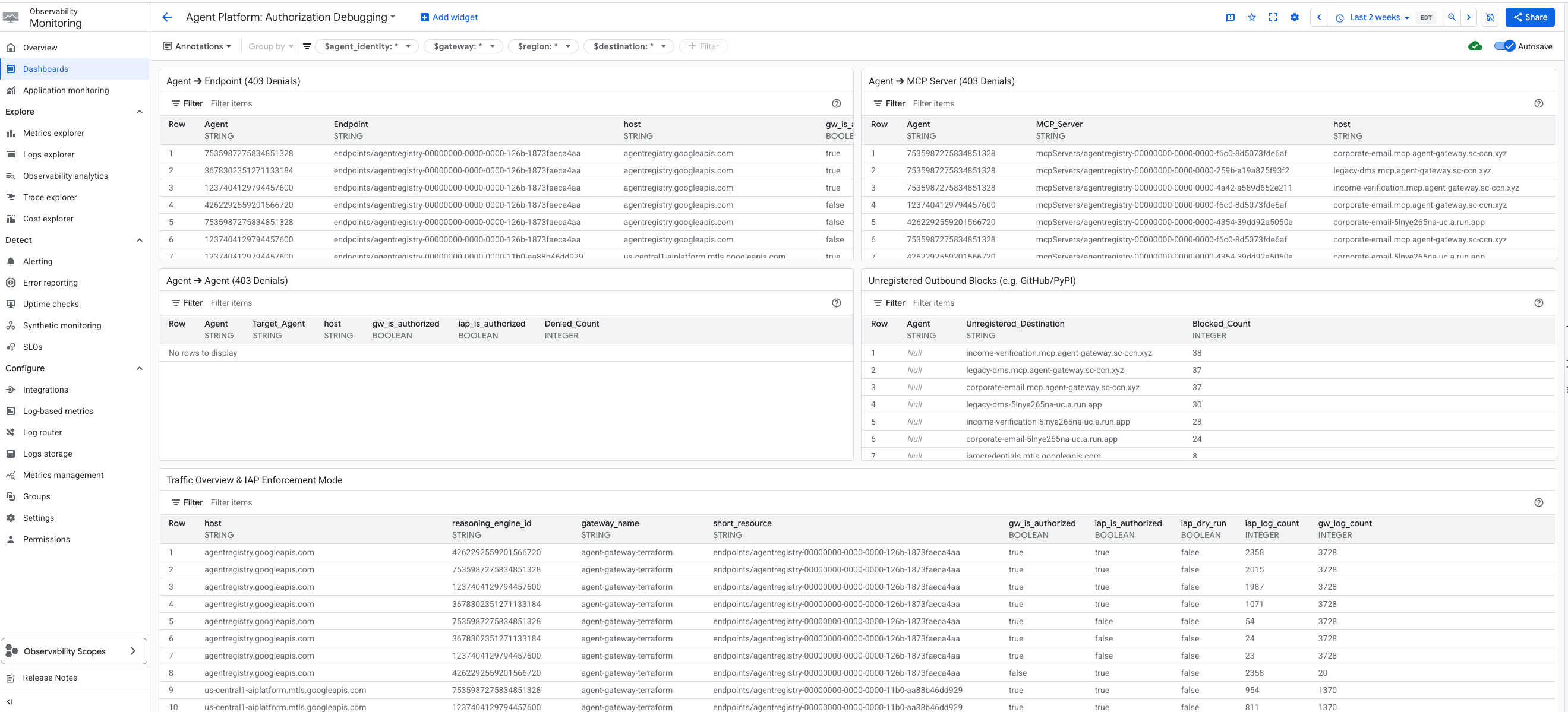
داشبورد موارد زیر را نمایش میدهد:
- عامل ➔ نقطه پایانی (403 Denials)
- عامل ➔ سرور MCP (403 Denials)
- نماینده ➔ نماینده (403 رد درخواست)
- بلوکهای خروجی ثبت نشده
- مرور کلی ترافیک و حالت اجرای IAP
- انکارهای IAM در GCP API
هر ویجت، شناسه عامل، میزبان درخواستی، مسیر منبع ثبتشده و اینکه آیا دروازه و برنامهی کاربردی داخلی (IAP) درخواست را تأیید کردهاند یا خیر را نمایش میدهد.
- بلوکهای خروجی ثبت نشده - این ویجت به طور خاص ترافیکی را که Agent Gateway مسدود کرده است، جدا میکند زیرا نام میزبان مقصد در Agent Registry وجود ندارد. از آنجا که Gateway proxy این درخواستها را قبل از رسیدن به IAP مسدود میکند، هیچ گزارش حسابرسی IAP برای این ورودیها وجود ندارد.
- نمای کلی ترافیک و حالت اجرای IAP - این ویجت جدولی را ارائه میدهد که تمام الگوهای ترافیکی را نشان میدهد. نکته مهم این است که وضعیت اجرای آزمایشی IAP را نیز شامل میشود و به کاربران این امکان را میدهد که ببینند آیا سیاستهای IAP به طور فعال ترافیک را مسدود میکنند یا فقط مشاهده میکنند.
- رد درخواستهای IAM از API GCP — این ابزارک، گزارشهای استاندارد حسابرسی ابری (
cloudaudit.googleapis.com) را جستجو میکند تا خطاهای اساسی مجوز API گوگل کلود را برای نمایندگان (Agents) پیدا کند.
این داشبورد را میتوانید در تب Observability در زیر نمونه Agent Gateway پیدا کنید: Agent Platform > Agents > Gateways > Specific Instance > Observability
۱۸. عیبیابی و رفع مشکلات رایج
اشکالزدایی با کمک هوش مصنوعی با رابط خط فرمان Gemini
شما میتوانید از مهارت agent-platform-debugger در Gemini CLI برای عیبیابی مشکلات استفاده کنید. این مهارت، دانش تخصصی برای اشکالزدایی با کمک هوش مصنوعی را در خود جای داده است. از آنجایی که Gemini CLI با .agents/skills/ به عنوان یک نام مستعار درجه یک برای .gemini/skills/ در محدوده فضای کاری رفتار میکند، میتوانید مستقیماً از این مهارتها استفاده کنید. برای استفاده از این مهارت از داخل Codelab Repo:
به دایرکتوری مخزن بروید و Gemini CLI را اجرا کنید:
cd /path/to/cloud-networking-solutions/demos/agent-gateway
gemini
وقتی از شما خواسته شد، به فضای کاری اعتماد کنید (مهارتهای محدوده فضای کاری فقط از پوشههای قابل اعتماد بارگیری میشوند). مهارت بارگیری شده را تأیید کنید:
/skills list
شما باید agent-platform-debugger در لیست ببینید. اگر وجود ندارد، مهارتها را دوباره بارگذاری کنید:
/skills reload
نکات عیبیابی
-
terraform applyدر Agent Gateway با عبارت "منبع در حال ایجاد است و بنابراین نمیتوان آن را بهروزرسانی کرد" با شکست مواجه میشود - پروژه مستاجر Gateway حدود 30 ثانیه طول میکشد تا قبل از اینکه سیاستهای authz بتوانند پیوست شوند، مستقر شود.time_sleep.wait_for_gatewayماژول این مشکل را مدیریت میکند؛ کافیستterraform applyدوباره اجرا کنید. - عامل گزارش میدهد که «هیچ سرور MCP یافت نشد» یا فقط با ابزارهای کمکی بوت میشود —
enable_agent_registry_endpoints = trueدرterraform.tfvarsتأیید کنید، سپس:gcloud alpha agent-registry mcp-servers list \ --project=${PROJECT_ID} --location=${REGION} - فراخوانیهای ابزار، خطای ۴۰۳ PermissionDenied را برمیگردانند —
scripts/grant_agent_mcp_egress.shرا دوباره اجرا کنید. شایعترین علت، فراموش کردن اعطای مجدد مجوز پس از استقرار مجدد عامل است (thereasoningEngines/هر بار که مستقر میشوید، تغییر میکند). -
skaffold runبا خطای "permission denied on service account" مواجه میشود — شماroles/iam.serviceAccountUserرا از دست دادهاید. self-grant مرحله قبل را دوباره اجرا کنید. - خطاهای DNS peering از Agent Gateway به MCP LB — بررسی کنید که
agent_gateway_dns_peering_config.target_networkدقیقاً باprojects/${PROJECT_ID}/global/networks/${VPC_NAME}مطابقت داشته باشد، و اینکه هر ورودیdomainsبا یک نقطه انتهایی به پایان برسد. -
terraform planمدام میخواهد تگهای تصویر Cloud Run را بهروزرسانی کند - این اتفاق نباید به دلیل قانونlifecycle { ignore_changes }رخ دهد. اگر این اتفاق افتاد، تأیید کنید کهmcp_services[*].imageدرterraform.tfvarsپس ازskaffold runویرایش نکردهاید.
۱۹. تمیز کردن
موتور استدلال توسط Terraform مدیریت نمیشود (SDK مربوط به ADK آن را ایجاد میکند). آن را به صورت دستی حذف کنید:
gcloud beta ai reasoning-engines delete ${AGENT_ID} \
--region=${REGION} --project=${PROJECT_ID}
هر چیزی که Terraform ساخته را خراب کنید:
cd terraform
terraform destroy
cd ..
اگر منطقه DNS عمومی را فقط برای این codelab ایجاد کردهاید:
gcloud dns managed-zones delete agw-example-com
در نهایت، سطل وضعیت Terraform را حذف کنید:
gcloud storage rm -r gs://${PROJECT_ID}-tfstate
۲۰. تبریک
تبریک! شما با موفقیت مدیریت جامع عامل را برای یک عامل ADK چند ابزاری با استفاده از Agent Gateway پیادهسازی کردهاید. Agent Gateway با ایفای نقش به عنوان صفحه کنترل شبکه متمرکز، به شما این امکان را میدهد که یک مسیر خروجی امن به ابزارهای خصوصی ایجاد کنید، سیاستهای IAM مبتنی بر هویت دقیق را از طریق Identity-Aware Proxy اجرا کنید و تعاملات محتوا را با استفاده از گاردریلهای یکپارچه Model Armor پاکسازی کنید.
آنچه آموختهاید
- نحوه استقرار و پیکربندی Agent Gateway به عنوان لایه مدیریت مرکزی برای ترافیک خروجی Agent-to-Anywhere.
- نحوه ادغام رجیستری عامل برای کشف ابزار زمان اجرا به صورت پویا و کنترلشده.
- نحوه نوشتن و اجرای سیاستهای IAM مبتنی بر ابزار و شرایط برای کنترل دقیق مسیرهای اجرای عامل.
- نحوه استفاده از افزونههای سرویس Agent Gateway برای اعمال سیاستهای Model Armor، که به طور خودکار ترافیک حساس Agent را رهگیری و ویرایش میکند.
اسناد مرجع
۱. مقدمه
پلتفرم Gemini Enterprise Agent یک پلتفرم باز برای ساخت، مقیاسبندی، مدیریت و بهینهسازی عاملهای هوش مصنوعی در سطح سازمانی است که مبتنی بر دادههای شما میباشند.
Agent Runtime محیط اجرای مدیریتشدهای را برای اجرای عاملها، مانند آنهایی که با کیت توسعه عامل متنباز (ADK) ساخته شدهاند، به صورت ایمن در Google Cloud فراهم میکند.
این آزمایشگاه کد، نحوه استفاده از این بلوکهای سازنده اصلی را برای مدیریت عاملی که توسط یک کاربر در Gemini Enterprise آغاز شده است، بررسی میکند، زیرا این عامل به طور ایمن به ابزارهای داخلی دسترسی پیدا میکند.
درباره دروازه عامل
Agent Gateway جزء شبکهای مجموعه مدیریت عامل (Agent Governance) این پلتفرم است. این بخش به عنوان نقطه ورود و خروج شبکه برای همه تعاملات عامل عمل میکند و به مدیران امنیتی اجازه میدهد تا مدیریت متمرکز را بدون نیاز به توسعهدهندگان برای مدیریت اولیههای پیچیده شبکه، اعمال کنند.
این دو مسیر دسترسی اصلی تحت کنترل را تسهیل میکند:
- کلاینت به عامل (ورودی): ارتباطات بین کلاینتهای خارجی (مانند Cursor یا Gemini CLI) و عاملهای شما را ایمن میکند.
- عامل به هر کجا (خروجی): ارتباطات بین عاملهای در حال اجرا در Google Cloud و سرورها، ابزارها یا APIهای در حال اجرا در هر کجا را ایمن میکند.
در این آزمایشگاه کد، شما بر روی حالت Agent-to-Anywhere (خروج) تمرکز خواهید کرد.
برای اجرای سیاستهای امنیتی ، Agent Gateway به طور کامل با بقیه اکوسیستم ادغام میشود:
- رجیستری عامل : یک کتابخانه مرکزی از عاملها و ابزارهای تأیید شده (از جمله سرورهای MCP شخص ثالث).
- هویت عامل : یک شخصیت منحصر به فرد و قابل ردیابی برای هر عامل، که به طور خودکار با mTLS سرتاسری ایمن میشود.
- پروکسی آگاه از هویت (IAP) و IAM : لایه اجرایی پیشفرض که هویت عامل را در برابر مجوزهای دقیق IAM قبل از اجازه دادن به فراخوانی ابزارهای خاص، اعتبارسنجی میکند.
- Model Armor : یک محافظ امنیتی هوش مصنوعی که از طریق Service Extensions یکپارچه شده است تا محتوا را پاکسازی کرده و در برابر حملات تزریق سریع یا نشت دادهها محافظت کند.
حالتهای استقرار (شبکه عمومی در مقابل شبکه خصوصی برای Cloud Run)
برای دسترسیپذیر کردن این آزمایشگاه کد، میتوانید از بین دو مسیر شبکه برای ابزارهای داخلی خود (سرورهای MCP) که در Cloud Run مستقر شدهاند، یکی را انتخاب کنید:
- پیشفرض (ورود عمومی): سرورهای MCP با نامهای میزبان عمومی (
ingress=all) در Cloud Run مستقر میشوند. مسیرهای ترافیک از عامل به ابزارها از طریق URL های استاندارد*.run.appهدایت میشوند. این روش نیازی به دامنههای DNS سفارشی ندارد و سریعترین راه برای یادگیری مفاهیم مدیریت است. - امن (شبکه خصوصی): یک معماری کاملاً خصوصی و اختیاری. سرورهای MCP محدود شدهاند (
ingress=internal-and-cloud-load-balancing) و از طریق یک متعادلکننده بار برنامه داخلی با یک NEG بدون سرور در معرض دید قرار میگیرند. این امر مستلزم آن است که شما یک دامنه DNS عمومی داشته باشید تا بتوانید یک گواهی مدیریتشده توسط گوگل را ارائه دهید.
هنگام پیکربندی Terraform، مسیر دلخواه خود را انتخاب خواهید کرد.
برای کسب اطلاعات بیشتر در مورد ورود به نقاط انتهایی شبکه برای Cloud Run، لطفاً اسناد ما را مطالعه کنید .
کاری که انجام خواهید داد
- آمادهسازی پشته زیرساخت اصلی با استفاده از Terraform
- ساخت و استقرار ابزارهای داخلی به عنوان سرورهای MCP در Cloud Run
- Deploy an ADK agent to Agent Runtime using PSC Interface egress
- Configure Agent Gateway service extensions for identity-based access (IAM) and content screening (Model Armor)
- Trace and validate the secure end-to-end execution of the agent
What you'll need
- A web browser such as Chrome
- A Google Cloud project with billing enabled and Owner access
- Organization-level IAM permissions (the codelab grants org-scoped roles)
- A domain you control delegated to Cloud DNS (for the public managed certificate)
- Familiarity with Terraform,
gcloud, and basic Google Cloud networking
Codelab topology
In this codelab, you will deploy an end-to-end mortgage underwriting agent that securely communicates with three internal tools.
You'll start by provisioning the foundational networking, including a VPC and an internal Application Load Balancer configured as your Agent Gateway. Next, you'll deploy three Model Context Protocol (MCP) servers to Cloud Run. These act as your internal proprietary tools:
- Document Management (
legacy-dms) - Corporate Email (
corporate-email) - Income Verification (
income-verification)
With the tools in place, you will deploy a Mortgage Assistant ( mortgage-agent ) built with the ADK to Agent Runtime. You will configure this agent to use a PSC Interface for private egress and enable runtime tool discovery via the Agent Registry.
To secure the flow, you will configure your Agent Gateway with two service extensions. First, a REQUEST_AUTHZ extension will verify the Agent Identity against per-tool IAM policies, ensuring the agent only accesses authorized tools. Second, a CONTENT_AUTHZ extension using Model Armor will screen the agent's prompts and responses.
Finally, you'll register the agent in Gemini Enterprise, trigger a mortgage-underwriting task as an end user, and verify the secure, governed execution using Cloud Trace.
This codelab is for platform and security engineers of all levels. Expect to spend roughly 100 minutes completing it.
2. Before you begin
Create a project and authenticate
Create a new GCP project (or reuse one) with billing enabled, then authenticate Cloud Shell or your local machine:
gcloud auth login
gcloud auth application-default login
gcloud config set project <your-project-id>
Enable bootstrap APIs
Terraform's foundation module enables ~30 APIs on its first apply, but a small bootstrap set is required for terraform init and the GCS state bucket:
gcloud services enable \
compute.googleapis.com \
serviceusage.googleapis.com \
cloudresourcemanager.googleapis.com \
iam.googleapis.com \
storage.googleapis.com \
dns.googleapis.com
Install required tools
Install the toolchain. On Cloud Shell most of these are already present; on a workstation:
# uv (Python package manager)
curl -LsSf https://astral.sh/uv/install.sh | sh
# skaffold
curl -Lo skaffold https://storage.googleapis.com/skaffold/releases/latest/skaffold-linux-amd64 && \
sudo install skaffold /usr/local/bin/
# envsubst (gettext)
sudo apt-get install -y gettext-base
You also need Terraform >= 1.12.2 , Python 3.12+ , and the Google Cloud SDK ( gcloud ).
Set environment variables
The rest of the codelab assumes these are exported in your shell.
export PROJECT_ID=$(gcloud config get-value project)
export PROJECT_NUMBER=$(gcloud projects describe $PROJECT_ID --format='value(projectNumber)')
export ORG_ID=$(gcloud projects get-ancestors $PROJECT_ID | awk '$2 == "organization" {print $1}')
export REGION="us-central1"
# Only required if using the secure private networking path
export DOMAIN_NAME="agw.example.com"
Validate that all of your variables populated correctly, you should three values returned.
echo $PROJECT_ID
echo $PROJECT_NUMBER
echo $ORG_ID
If your Organization ID doesn't populate you can find it and set it manually.
gcloud organizations list
export ORG_ID=ID_FROM_OUTPUT
3. Clone the repository
git clone https://github.com/GoogleCloudPlatform/cloud-networking-solutions.git
cd cloud-networking-solutions
cd demos/agent-gateway
A quick tour of what's in the demo directory:
src/ MCP servers (legacy-dms, corporate-email, income-verification-api) + mortgage-agent
terraform/ Root Terraform config + modules (foundation, networking, agent-gateway, model-armor, ...)
cloudrun/ Cloud Run service definitions (rendered from .yaml.tmpl via envsubst)
scripts/ grant_agent_mcp_egress.sh — per-MCP IAP egressor binding
skaffold.yaml.tmpl Skaffold pipeline that builds + deploys all three MCP services to Cloud Run
4. Create the Terraform state bucket and backend config
Create a GCS bucket to hold remote state, then copy the backend template:
gcloud storage buckets create gs://${PROJECT_ID}-tfstate \
--location=${REGION} \
--uniform-bucket-level-access
cp terraform/example.backend.conf terraform/backend.conf
Edit terraform/backend.conf with your values:
bucket = "<your-project-id>-tfstate"
prefix = "agent-gateway"
5. (Optional) Create a public Cloud DNS zone
By default for this lab Cloud Run has its ingress configuration set to all and the Agent Registry registers each MCP server at its public *.run.app URL — no additional DNS, certificates, or load balancer required. If you'd like to switch to private networking (Cloud Run with ingress = internal-and-cloud-load-balancing behind an internal Application LB), you also need a public Cloud DNS zone so Certificate Manager can validate the LB cert.
High level flow of private networking
To use the private networking approach:
- Create the public Cloud DNS zone — Certificate Manager validates the regional managed certificate by writing CNAMEs into it:
gcloud dns managed-zones create agw-example-com \
--dns-name="${DOMAIN_NAME}." \
--description="Public zone for ${DOMAIN_NAME}" \
--visibility=public
The corresponding private zone for mcp.${DOMAIN_NAME} (used by the MCP internal LB and DNS peering from Agent Runtime) is created automatically by Terraform — you don't need to create it by hand. With private networking off, neither the public nor the private zone is provisioned.
6. Configure Terraform variables
Copy the example tfvars and edit it:
cp terraform/example.tfvars terraform/terraform.tfvars
There are two demo paths, gated by enable_cloud_run_private_networking .
Default path: Cloud Run with public ingress
The simplest setup: For the default path you only need to edit three values in terraform.tfvars , Every other variable in the file already has a demo-friendly default.
# GCP project ID where all resources will be created.
project_id = "my-gcp-project-id"
# GCP organization ID (numeric).
organization_id = "123456789012"
# Members granted demo-wide roles
platform_admin_members = ["user:admin@example.com"]
# IAP Enforcement Mode ("DRY_RUN" or null)
agent_gateway_iap_iam_enforcement_mode = "DRY_RUN"
Private networking (optional)
Set enable_cloud_run_private_networking = true and add the variables below to provision the full secure stack:
- Internal Application LB
- Google-managed cert
- Cloud Run with
ingress = internal-and-cloud-load-balancing - Agent Gateway DNS peering.
enable_cloud_run_private_networking = true
# DNS — must end with a trailing dot, must match a Cloud DNS zone you own
dns_zone_domain = "agw.example.com."
enable_certificate_manager = true
# mcp_internal_dns_zone.domain MUST be a real subdomain of dns_zone_domain so
# Certificate Manager can issue a Google-managed cert.
mcp_internal_dns_zone = {
name = "mcp-server-internal"
domain = "mcp.agw.example.com."
}
# Must match mcp_internal_dns_zone.domain so Agent Engine resolves MCP
# hostnames over the PSC interface peering.
psc_interface_dns_zone = {
name = "mcp-server-internal"
domain = "mcp.agw.example.com."
}
mcp_lb_protocol = "HTTPS"
7. Deploy infrastructure with Terraform
Initialize, review, and apply:
cd terraform
terraform init -backend-config=backend.conf
terraform plan -out=tfplan
terraform apply tfplan
terraform apply provisions ~40 resources on the default path and takes 8–10 minutes on a fresh project (~60 resources / 15–20 minutes when enable_cloud_run_private_networking = true ). It creates:
- Project foundation (APIs, service identities, quotas)
- VPC, subnets (primary, proxy-only, PSC, PSC-Interface, Agent Gateway co-location), Cloud NAT, firewall rules
- Artifact Registry repo for Cloud Run images
- Three Cloud Run services + per-service runtime SAs (ingress =
allby default;internal-and-cloud-load-balancingwhen private networking is on) - Model Armor template + IAM
- Agent Gateway, PSC-I network attachment, IAP and Model Armor extensions, both authorization policies, and the project-level
roles/iap.egressorgrant - Agent Registry endpoints (Vertex AI, IAP, Discovery Engine, ...) plus the three MCP servers (registered at
*.run.app/mcpby default; at. /mcp
Only when enable_cloud_run_private_networking = true :
- Internal regional Application LB with serverless NEG (URL-mask routing) + private DNS A records
- MCP private DNS zone (
mcp.) attached to the VPC. - Public DNS zone module (Certificate Manager DNS authorizations) + Regional Google-managed certificate
- PSC Interface DNS zone (orphan when there are no private hostnames to resolve, so it's also gated on the master flag)
- Agent Gateway DNS peering for
mcp.(auto-prepended).
8. Inspect the Agent Registry endpoints
The Agent Registry is a per-project catalog of services (Google APIs and your own MCP servers) that an agent discovers at runtime. The mortgage-agent reads it on startup and binds tools dynamically — no MCP URLs are baked into the agent code or its deploy command.
Endpoints
What Terraform ran on your behalf — for each Google API in agent_registry_google_apis , it registered five variants (global, mTLS global, regional, regional mTLS, regional REP). For example, for aiplatform :
gcloud alpha agent-registry services create aiplatform \
--project=${PROJECT_ID} --location=${REGION} \
--display-name="Vertex AI Platform" \
--endpoint-spec-type=no-spec \
--interfaces="url=https://aiplatform.googleapis.com,protocolBinding=JSONRPC"
gcloud alpha agent-registry services create aiplatform-mtls \
--project=${PROJECT_ID} --location=${REGION} \
--display-name="Vertex AI Platform mTLS" \
--endpoint-spec-type=no-spec \
--interfaces="url=https://aiplatform.mtls.googleapis.com,protocolBinding=JSONRPC"
gcloud alpha agent-registry services create ${REGION}-aiplatform \
--project=${PROJECT_ID} --location=${REGION} \
--display-name="Vertex AI Platform Locational" \
--endpoint-spec-type=no-spec \
--interfaces="url=https://${REGION}-aiplatform.googleapis.com,protocolBinding=JSONRPC"
gcloud alpha agent-registry services create aiplatform-${REGION}-rep \
--project=${PROJECT_ID} --location=${REGION} \
--display-name="Vertex AI Platform Regional (REP)" \
--endpoint-spec-type=no-spec \
--interfaces="url=https://aiplatform.${REGION}.rep.googleapis.com,protocolBinding=JSONRPC"
MCP Servers
The Terraform also registers the 3 MCP Servers for you, to register other MCP servers you can follow the steps in the documentation .
gcloud alpha agent-registry services create legacy-dms \
--project=${PROJECT_ID} \
--location=${REGION} \
--display-name="Legacy DMS" \
--mcp-server-spec-type=tool-spec \
--mcp-server-spec-content=src/legacy-dms/toolspec.json \
--interfaces=url=https://dms.${DOMAIN_NAME}/mcp,protocolBinding=JSONRPC
Verify the registered Endpoints and MCP Servers.
gcloud alpha agent-registry services list \
--project=${PROJECT_ID} --location=${REGION} \
--format="value(displayName,name)"
gcloud alpha agent-registry mcp-servers list \
--project=${PROJECT_ID} --location=${REGION} \
--format="value(displayName,name)"
Source: terraform/modules/agent-registry-endpoints/scripts/register_endpoints.sh.tpl .
9. Review the Agent Gateway configuration
The Agent Gateway is a Google-managed governance plane between Agent Runtime and your tools. In AGENT_TO_ANYWHERE mode it's bound to the project's Agent Registry and egresses through a customer-owned PSC Interface so it can reach private MCP servers in your VPC.
If you were importing this gateway by hand, the YAML would look like this:
# agent-gateway.yaml — for reference only, Terraform already created this
name: agent-gateway
protocols: [MCP]
googleManaged:
governedAccessPath: AGENT_TO_ANYWHERE
registries:
- "//agentregistry.googleapis.com/projects/${PROJECT_ID}/locations/${REGION}"
networkConfig:
egress:
networkAttachment: projects/${PROJECT_ID}/regions/${REGION}/networkAttachments/agent-gateway-na
dnsPeeringConfig:
domains:
- mcp.${DOMAIN_NAME}.
targetProject: ${PROJECT_ID}
targetNetwork: projects/${PROJECT_ID}/global/networks/gateway-vpc
gcloud alpha network-services agent-gateways import agent-gateway \
--source=agent-gateway.yaml \
--location=${REGION}
Verify the gateway Terraform created:
gcloud alpha network-services agent-gateways describe agent-gateway \
--location=${REGION}
10. Examine IAP and Model Armor authorization
Agent Gateway delegates authorization to service extensions . Two policy profiles cover the demo:
- REQUEST_AUTHZ — evaluated once per request at the headers stage. Used here to call IAP , which checks whether the calling agent identity has
roles/iap.egressoron the target MCP server. - CONTENT_AUTHZ — streams body events to the extension for content sanitization. Used here to call Model Armor , which screens for prompt injection, jailbreaks, RAI violations, and (optionally) PII via Sensitive Data Protection (SDP).
IAP REQUEST_AUTHZ extension
cat > iap-authz-extension.yaml <<EOF
name: agent-gateway-iap-authz
service: iap.googleapis.com
failOpen: true
timeout: 1s
EOF
gcloud beta service-extensions authz-extensions import agent-gateway-iap-authz \
--source=iap-authz-extension.yaml \
--location=${REGION} \
--project=${PROJECT_ID}
Bind it to the Agent Gateway with a REQUEST_AUTHZ policy:
curl -fsS -H "Authorization: Bearer $(gcloud auth print-access-token)" \
-H "Content-Type: application/json" \
-X POST "https://networksecurity.googleapis.com/v1alpha1/projects/${PROJECT_ID}/locations/${REGION}/authzPolicies?authz_policy_id=agent-gateway-iap-policy" \
-d '{
"name": "agent-gateway-iap-policy",
"policyProfile": "REQUEST_AUTHZ",
"action": "CUSTOM",
"target": {
"resources": [
"projects/'"${PROJECT_ID}"'/locations/'"${REGION}"'/agentGateways/agent-gateway"
]
},
"customProvider": {
"authzExtension": {
"resources": [
"projects/'"${PROJECT_ID}"'/locations/'"${REGION}"'/authzExtensions/agent-gateway-iap-authz"
]
}
}
}'
Model Armor CONTENT_AUTHZ extension
The extension's metadata.model_armor_settings carries the request and response template IDs Model Armor uses to evaluate each callout:
cat > ma-extension.yaml <<EOF
name: agent-gateway-ma-authz
service: modelarmor.${REGION}.rep.googleapis.com
failOpen: true
timeout: 1s
metadata:
model_armor_settings: '[
{
"request_template_id": "projects/${PROJECT_ID}/locations/${REGION}/templates/agw-request-template",
"response_template_id": "projects/${PROJECT_ID}/locations/${REGION}/templates/agw-response-template"
}
]'
EOF
gcloud beta service-extensions authz-extensions import agent-gateway-ma-authz \
--source=ma-extension.yaml \
--location=${REGION} \
--project=${PROJECT_ID}
curl -fsS -H "Authorization: Bearer $(gcloud auth print-access-token)" \
-H "Content-Type: application/json" \
-X POST "https://networksecurity.googleapis.com/v1alpha1/projects/${PROJECT_ID}/locations/${REGION}/authzPolicies?authz_policy_id=agent-gateway-ma-policy" \
-d '{
"name": "agent-gateway-ma-policy",
"policyProfile": "CONTENT_AUTHZ",
"action": "CUSTOM",
"target": {
"resources": [
"projects/'"${PROJECT_ID}"'/locations/'"${REGION}"'/agentGateways/agent-gateway"
]
},
"customProvider": {
"authzExtension": {
"resources": [
"projects/'"${PROJECT_ID}"'/locations/'"${REGION}"'/authzExtensions/agent-gateway-ma-authz"
]
}
}
}'
Custom DLP templates
Model Armor's sdpSettings.basicConfig uses a built-in info-type list. For finer control (custom info-types, partial masking, surrogate replacement, redaction by likelihood) point Model Armor at your own Cloud DLP inspect and de-identify templates via sdpSettings.advancedConfig .
Create an inspect template that flags US Social Security Numbers at POSSIBLE likelihood or above:
curl -fsS -X POST \
-H "Authorization: Bearer $(gcloud auth print-access-token)" \
-H "Content-Type: application/json" \
-H "x-goog-user-project: ${PROJECT_ID}" \
"https://dlp.googleapis.com/v2/projects/${PROJECT_ID}/locations/${REGION}/inspectTemplates" \
-d '{
"templateId": "agw-ssn-inspect-template",
"inspectTemplate": {
"displayName": "SSN Inspect Template",
"inspectConfig": {
"infoTypes": [
{ "name": "US_SOCIAL_SECURITY_NUMBER" }
],
"minLikelihood": "POSSIBLE"
}
}
}'
Create a de-identify template that replaces each finding with its info-type token (eg [US_SOCIAL_SECURITY_NUMBER] ):
curl -fsS -X POST \
-H "Authorization: Bearer $(gcloud auth print-access-token)" \
-H "Content-Type: application/json" \
-H "x-goog-user-project: ${PROJECT_ID}" \
"https://dlp.googleapis.com/v2/projects/${PROJECT_ID}/locations/${REGION}/deidentifyTemplates" \
-d '{
"templateId": "agw-ssn-redaction-template",
"deidentifyTemplate": {
"displayName": "SSN Redaction Template",
"deidentifyConfig": {
"infoTypeTransformations": {
"transformations": [{
"primitiveTransformation": { "replaceWithInfoTypeConfig": {} }
}]
}
}
}
}'
Then point a Model Armor template's response config at the pair via sdpSettings.advancedConfig (this is where Terraform's model_armor module would set advanced_config if you wired it up):
{
"filterConfig": {
"sdpSettings": {
"advancedConfig": {
"inspectTemplate": "projects/${PROJECT_ID}/locations/${REGION}/inspectTemplates/agw-ssn-inspect-template",
"deidentifyTemplate": "projects/${PROJECT_ID}/locations/${REGION}/deidentifyTemplates/agw-ssn-redaction-template"
}
}
}
}
IAP egressor IAM (per-MCP-server only)
Terraform does not create a project-wide roles/iap.egressor binding on the implicit IAP agent registry. The binding IAP REQUEST_AUTHZ actually evaluates is per-MCP-server and per-reasoning-engine, granted after the agent is deployed and you know the Agent ID. The "Grant the agent per-MCP-server egress" step runs scripts/grant_agent_mcp_egress.sh for that.
11. Build and deploy the MCP servers to Cloud Run
The cloudrun/*.yaml.tmpl and skaffold.yaml.tmpl files reference ${PROJECT_ID} , ${REGION} , and ${MCP_INGRESS} (the Cloud Run ingress annotation). Source MCP_INGRESS from a Terraform output so the rendered manifests stay in sync with enable_cloud_run_private_networking , then render with envsubst :
Export your Cloud Run ingress configuration.
-
all -
internal-and-cloud-load-balancing(When using the Private Networking approach)
export MCP_INGRESS=all
Go back to the root demo directory:
cd ..
Substitute the template values:
envsubst '${PROJECT_ID} ${REGION} ${MCP_INGRESS}' < skaffold.yaml.tmpl > skaffold.yaml
for f in cloudrun/*.yaml.tmpl; do
envsubst '${PROJECT_ID} ${REGION} ${MCP_INGRESS}' < "$f" > "${f%.tmpl}"
done
Each Cloud Run service runs as a per-service runtime SA Terraform created (eg mcp-legacy-dms@${PROJECT_ID}.iam.gserviceaccount.com ). To deploy as those SAs you need roles/iam.serviceAccountUser on yourself:
gcloud projects add-iam-policy-binding $PROJECT_ID \
--member="user:$(gcloud config get-value account)" \
--role="roles/iam.serviceAccountUser"
Build with Cloud Build and deploy with Skaffold:
skaffold run
Skaffold builds three images ( legacy-dms , corporate-email , income-verification-api ) into your Artifact Registry repo and updates each Cloud Run service to point at the new digest.
Verify:
gcloud run services list --region=${REGION}
You should see all three services with an ACTIVE status.
12. Deploy the mortgage agent to Agent Runtime
Grant all Agents the IAP Egressor role on all endpoints we have registered to the registry. The agent needs access to these endpoints because, when it's being deployed, it needs to reach github.com for packages and then reach the various Google APIs needed to deploy.
./scripts/grant_agent_mcp_egress.sh --bind-all-agents --endpoints
Install the agent's deps and deploy:
cd src/mortgage-agent
uv sync
uv run python deploy_agent.py \
--project=${PROJECT_ID} \
--region=${REGION} \
--enable-agent-identity \
--agent-name=mortgage-agent \
--agent-gateway=projects/${PROJECT_ID}/locations/${REGION}/agentGateways/agent-gateway \
--mcp-invoker-sa=$(terraform -chdir=../../terraform output -raw agent_mcp_invoker_email) \
--model-endpoint-location=global
When the script completes, copy the printed reasoningEngines/ into your shell (eg 4262292559201566720):
export AGENT_ID=<numeric-id-from-output>
cd ../..
13. Grant the agent per-MCP-server egress
The IAP REQUEST_AUTHZ extension authorizes each tool call by checking the agent's roles/iap.egressor on the specific MCP server or endpoint it's calling. See Create an agent-to-MCP server egress policy .
The script ( scripts/grant_agent_mcp_egress.sh ) enumerates the MCP servers in the Agent Registry under projects/${PROJECT_ID}/locations/${REGION} and merges a roles/iap.egressor binding for the agent principal into each server's IAM policy (mirroring gcloud add-iam-policy-binding semantics).
Use case 1 — Unconditional grant scoped to specific MCP servers
./scripts/grant_agent_mcp_egress.sh \
--mcp \
--agent-id ${AGENT_ID} \
--mcp-filter "legacy-dms income-verification"
Use case 2 — Conditional grant (CEL) scoped to a specific MCP server
To restrict the agent to a subset of tools on a single MCP server, attach an IAM condition. The Agent Gateway publishes per-tool attributes that IAP REQUEST_AUTHZ exposes to CEL including:
-
iap.googleapis.com/mcp.toolName -
iap.googleapis.com/mcp.tool.isReadOnly -
iap.googleapis.com/request.auth.type.
Restrict the agent to read-only tools only on corporate-email :
./scripts/grant_agent_mcp_egress.sh \
--mcp \
--agent-id ${AGENT_ID} \
--mcp-filter "corporate-email" \
--condition-expression "api.getAttribute('iap.googleapis.com/mcp.tool.isReadOnly', false) == true || api.getAttribute('iap.googleapis.com/mcp.toolName', '') == ''" \
--condition-title "ReadOnlyToolsOnly" \
--condition-description "Restrict ${AGENT_ID} to read-only tools on corporate-email"
After this runs, write tools on corporate-email return 403 PermissionDenied from IAP REQUEST_AUTHZ; read-only tools continue to work.
Verify the bindings
Navigate to Policies tab and you'll see the list of Policies created against the Endpoints and Mcp Servers.
Additional Use Cases:
Unconditional grant on every MCP server, scoped to one agent
Run this after every agent redeploy. With no filter and no condition, the named agent gets roles/iap.egressor on every MCP server in the registry:
./scripts/grant_agent_mcp_egress.sh \
--mcp \
--agent-id ${AGENT_ID}
14. Test the agent in the Agent Platform console
The Agent Platform console ships with a Playground that lets you chat with the deployed agent directly. It's the fastest way to smoke-test tool calls and inspect traces before wiring the agent into Gemini Enterprise.
- Open the Agent Platform Deployments page in the Google Cloud console.
- Use the Filter field if you need to narrow the runtime list, then click your
mortgage-agentruntime. - Open the Playground tab.
- Type a prompt to chat with the agent:
I am reviewing the Sterling familys current application. Can you summarize their 2024 and 2025 tax returns and verify if their total household income meets our 2026 debt-to-income requirements?
This should return a response from the Document Management tool and Income Verification tool, SSN's should also be redacted in this response. 5. Type a follow up prompt:
Can you send a summary of this to my email jane@example.com
The agent will be able to successfully send the email , as the conditional policy is not being enforced due to the IAP extension being in Dry Run mode.
Because the agent was deployed with OpenTelemetry instrumentation, the Playground exposes four side-panel views you can flip between as the agent responds:
- Trace — full traces of the conversation, including the Agent Gateway, IAP REQUEST_AUTHZ, and Model Armor CONTENT_AUTHZ spans
- Event — a graph of invoked tools and event details for the current turn
- State — the agent's session state and tool inputs/outputs
- Sessions — every session you've started against this runtime
15. Enforce IAP Authorization
Now that we have validated the deployment, we can update the IAP Enforcement mode to null to enforce the policies. Open up terraform.tfvars and update the mode from DRY_RUN to null
# IAP Enforcement Mode ("DRY_RUN" or null)
agent_gateway_iap_iam_enforcement_mode = null
Apply the change.
terraform apply
Navigate back to the Playground and try the conversation again.
- Open the Agent Platform Deployments page in the Google Cloud console.
- Use the Filter field if you need to narrow the runtime list, then click your
mortgage-agentruntime. - Open the Playground tab.
- Type a prompt to chat with the agent:
I am reviewing the Sterling familys current application. Can you summarize their 2024 and 2025 tax returns and verify if their total household income meets our 2026 debt-to-income requirements?
This should return a response from the Document Management tool and Income Verification tool, SSN's should also be redacted in this response. 5. Type a follow up prompt:
Can you send a summary of this to my email jane@example.com
If everything has been setup correctly the agent should respond that it cannot send the email due to the authorization policy.
16. Gemini Enterprise Setup & Testing
Setup Gemini Enterprise
Follow the getting started with Gemini Enterprise guide .
Register our ADK Agent with Gemini Enterprise
Follow the steps to register our agent in Gemini Enterprise, you can follow the steps here .
- In the Google Cloud console, navigate to the Gemini Enterprise page.
- Select the Gemini Enterprise App where the agent is registered.
- Open the URL shown in the Your Gemini Enterprise webapp is ready section.
- Select the Agent tab from the left menu to open the Agent Gallery .
- Select Mortgage Assistant Agent and start chatting.
Try the same prompts from the Agent Runtime Playground:
Initial prompt:
I am reviewing the Sterling familys current application. Can you summarize their 2024 and 2025 tax returns and verify if their total household income meets our 2026 debt-to-income requirements?
Follow up prompt:
Can you send a summary of this to my email jane@example.com
If you navigate back to the Agent Deployment section in the console, select our agent deployment and go to the traces tab , you'll now see the Gemini Assistant agent in the span showing the call originated from Gemini Enterprise.
17. Observability Dashboard
The Authorization Debugging dashboard provides a single view into the egress traffic of Agent Runtime Agents.
The dashboard displays the following:
- Agent ➔ Endpoint (403 Denials)
- Agent ➔ MCP Server (403 Denials)
- Agent ➔ Agent (403 Denials)
- Unregistered Outbound Blocks
- Traffic Overview & IAP Enforcement Mode
- GCP API IAM Denials
Each widget displays the agent ID, the requested host, the registered resource path, and whether the Gateway and IAP authorized the request.
- Unregistered Outbound Blocks — This widget specifically isolates traffic that the Agent Gateway blocked because the destination hostname does not exist in the Agent Registry. Because the gateway proxy blocks these requests before they ever reach IAP, there are no IAP audit logs for these entries.
- Traffic Overview & IAP Enforcement Mode — This widget provides a table showing all traffic patterns. Crucially, it includes the IAP Dry Run status, allowing users to see if IAP policies are actively blocking traffic or just observing.
- GCP API IAM Denials — This widget searches standard Cloud Audit Logs (
cloudaudit.googleapis.com) to catch underlying Google Cloud API permission errors for Agents.
This dashboard can be found in the Observability Tab under the Agent Gateway instance: Agent Platform > Agents > Gateways > Specific Instance > Observability
18. Troubleshooting & common fixes
AI-Assisted Debugging with Gemini CLI
You can use the agent-platform-debugger skill within Gemini CLI to troubleshoot issues. The skill packages specialized knowledge for AI-assisted debugging. Since Gemini CLI treats .agents/skills/ as a first-class alias for .gemini/skills/ at the workspace scope, you can use the skills directly. To use this skill from within the Codelab Repo:
Navigate to the repository directory and start Gemini CLI:
cd /path/to/cloud-networking-solutions/demos/agent-gateway
gemini
Trust the workspace when prompted (workspace-scope skills only load from trusted folders). Confirm the skill loaded:
/skills list
You should see agent-platform-debugger in the list. If it's missing, reload skills:
/skills reload
نکات عیبیابی
-
terraform applyfails on the Agent Gateway with "resource is being created and therefore can not be updated" — the gateway's tenant project takes ~30 seconds to settle before authz policies can attach. The module'stime_sleep.wait_for_gatewayhandles this; just rerunterraform apply. - Agent reports "no MCP servers found" or boots with utility tools only — confirm
enable_agent_registry_endpoints = trueinterraform.tfvars, then:gcloud alpha agent-registry mcp-servers list \ --project=${PROJECT_ID} --location=${REGION} - Tool calls return 403 PermissionDenied — re-run
scripts/grant_agent_mcp_egress.sh. The most common cause is forgetting to re-grant after redeploying the agent (thereasoningEngines/changes each deploy). -
skaffold runfails with "permission denied on service account" — you're missingroles/iam.serviceAccountUser. Re-run the self-grant in the previous step. - DNS peering errors from Agent Gateway to MCP LB — check that
agent_gateway_dns_peering_config.target_networkmatchesprojects/${PROJECT_ID}/global/networks/${VPC_NAME}exactly, and that everydomainsentry ends with a trailing dot. -
terraform plankeeps wanting to update Cloud Run image tags — this should not happen because of thelifecycle { ignore_changes }rule. If it does, confirm you didn't editmcp_services[*].imageinterraform.tfvarsafterskaffold run.
19. Clean up
The reasoning engine is not managed by Terraform (the ADK SDK creates it). Delete it manually:
gcloud beta ai reasoning-engines delete ${AGENT_ID} \
  --region=${REGION} --project=${PROJECT_ID}
Tear down everything Terraform created:
cd terraform
terraform destroy
cd ..
If you created the public DNS zone just for this codelab:
gcloud dns managed-zones delete agw-example-com
Finally, delete the Terraform state bucket:
gcloud storage rm -r gs://${PROJECT_ID}-tfstate
20. Congratulations
Congratulations! You have successfully implemented comprehensive agent governance for a multi-tool ADK agent using Agent Gateway. By acting as the centralized network control plane, Agent Gateway allowed you to establish a secure egress path to private tools, enforce fine-grained identity-based IAM policies via Identity-Aware Proxy, and sanitize content interactions using integrated Model Armor guardrails.
What you've learned
- How to deploy and configure Agent Gateway as the central governance layer for Agent-to-Anywhere egress traffic.
- How to integrate the Agent Registry for governed, dynamic runtime tool discovery.
- How to write and enforce per-tool and condition-based IAM policies to strictly control agent execution paths.
- How to leverage Agent Gateway service extensions to apply Model Armor policies, automatically intercepting and redacting sensitive agent traffic.
Reference docs
۱. مقدمه
Gemini Enterprise Agent Platform is an open platform for building, scaling, governing, and optimizing enterprise-grade AI agents grounded in your data.
Agent Runtime provides the managed execution environment for running agents, such as those built with the open-source Agent Development Kit (ADK) , securely within Google Cloud.
This codelab explores how to use these core building blocks to govern an agent initiated by a user in Gemini Enterprise as it securely reaches out to internal tools.
About Agent Gateway
Agent Gateway is the networking component of the platform's Agent Governance suite. It acts as the network entry and exit point for all agent interactions, allowing security administrators to enforce centralized governance without requiring developers to manage complex networking primitives.
It facilitates two primary governed access paths:
- Client-to-Agent (ingress): Secures communications between external clients (like Cursor or the Gemini CLI) and your agents.
- Agent-to-Anywhere (egress): Secures communications between agents running on Google Cloud and servers, tools, or APIs running anywhere.
In this codelab, you will focus on the Agent-to-Anywhere (egress) mode.
To enforce security policies , Agent Gateway integrates tightly with the rest of the ecosystem:
- Agent Registry : A central library of approved agents and tools (including third-party MCP servers).
- Agent Identity : A unique, trackable persona for every agent, secured automatically with end-to-end mTLS.
- Identity-Aware Proxy (IAP) & IAM : The default enforcement layer that validates the agent's identity against fine-grained IAM permissions before allowing calls to specific tools.
- Model Armor : An AI security guardrail integrated via Service Extensions to sanitize content and protect against prompt injection attacks or data leakage.
Deployment modes (Public vs. Private networking for Cloud Run)
To make this codelab accessible, you can choose between two networking paths for your internal tools (MCP servers) deployed on Cloud Run :
- Default (Public Ingress): The MCP servers are deployed to Cloud Run with public hostnames (
ingress=all). Traffic routes from the agent to the tools via standard*.run.appURLs. This requires no custom DNS domains and is the fastest way to learn the governance concepts. - Secure (Private Networking): An optional, fully private architecture. The MCP servers are restricted (
ingress=internal-and-cloud-load-balancing) and exposed via an Internal Application Load Balancer with a Serverless NEG. This requires you to own a public DNS domain to provision a Google-managed certificate.
You will select your preferred path when configuring Terraform.
To learn more about network endpoint ingress for Cloud Run, please read our docs .
What you'll do
- Provision the core infrastructure stack using Terraform
- Build and deploy internal tools as MCP servers on Cloud Run
- Deploy an ADK agent to Agent Runtime using PSC Interface egress
- Configure Agent Gateway service extensions for identity-based access (IAM) and content screening (Model Armor)
- Trace and validate the secure end-to-end execution of the agent
What you'll need
- A web browser such as Chrome
- A Google Cloud project with billing enabled and Owner access
- Organization-level IAM permissions (the codelab grants org-scoped roles)
- A domain you control delegated to Cloud DNS (for the public managed certificate)
- Familiarity with Terraform,
gcloud, and basic Google Cloud networking
Codelab topology
In this codelab, you will deploy an end-to-end mortgage underwriting agent that securely communicates with three internal tools.
You'll start by provisioning the foundational networking, including a VPC and an internal Application Load Balancer configured as your Agent Gateway. Next, you'll deploy three Model Context Protocol (MCP) servers to Cloud Run. These act as your internal proprietary tools:
- Document Management (
legacy-dms) - Corporate Email (
corporate-email) - Income Verification (
income-verification)
With the tools in place, you will deploy a Mortgage Assistant ( mortgage-agent ) built with the ADK to Agent Runtime. You will configure this agent to use a PSC Interface for private egress and enable runtime tool discovery via the Agent Registry.
To secure the flow, you will configure your Agent Gateway with two service extensions. First, a REQUEST_AUTHZ extension will verify the Agent Identity against per-tool IAM policies, ensuring the agent only accesses authorized tools. Second, a CONTENT_AUTHZ extension using Model Armor will screen the agent's prompts and responses.
Finally, you'll register the agent in Gemini Enterprise, trigger a mortgage-underwriting task as an end user, and verify the secure, governed execution using Cloud Trace.
This codelab is for platform and security engineers of all levels. Expect to spend roughly 100 minutes completing it.
2. Before you begin
Create a project and authenticate
Create a new GCP project (or reuse one) with billing enabled, then authenticate Cloud Shell or your local machine:
gcloud auth login
gcloud auth application-default login
gcloud config set project <your-project-id>
Enable bootstrap APIs
Terraform's foundation module enables ~30 APIs on its first apply, but a small bootstrap set is required for terraform init and the GCS state bucket:
gcloud services enable \
  compute.googleapis.com \
  serviceusage.googleapis.com \
  cloudresourcemanager.googleapis.com \
  iam.googleapis.com \
  storage.googleapis.com \
  dns.googleapis.com
Install required tools
Install the toolchain. On Cloud Shell most of these are already present; on a workstation:
# uv (Python package manager)
curl -LsSf https://astral.sh/uv/install.sh | sh

# skaffold
curl -Lo skaffold https://storage.googleapis.com/skaffold/releases/latest/skaffold-linux-amd64 && \
  sudo install skaffold /usr/local/bin/

# envsubst (gettext)
sudo apt-get install -y gettext-base
You also need Terraform >= 1.12.2 , Python 3.12+ , and the Google Cloud SDK ( gcloud ).
Set environment variables
The rest of the codelab assumes these are exported in your shell.
export PROJECT_ID=$(gcloud config get-value project)
export PROJECT_NUMBER=$(gcloud projects describe $PROJECT_ID --format='value(projectNumber)')
export ORG_ID=$(gcloud projects get-ancestors $PROJECT_ID | awk '$2 == "organization" {print $1}')
export REGION="us-central1"

# Only required if using the secure private networking path
export DOMAIN_NAME="agw.example.com"
Validate that all of your variables populated correctly, you should three values returned.
echo $PROJECT_ID
echo $PROJECT_NUMBER
echo $ORG_ID
If your Organization ID doesn't populate you can find it and set it manually.
gcloud organizations list
export ORG_ID=ID_FROM_OUTPUT
3. Clone the repository
git clone https://github.com/GoogleCloudPlatform/cloud-networking-solutions.git
cd cloud-networking-solutions
cd demos/agent-gateway
A quick tour of what's in the demo directory:
src/                MCP servers (legacy-dms, corporate-email, income-verification-api) + mortgage-agent
terraform/          Root Terraform config + modules (foundation, networking, agent-gateway, model-armor, ...)
cloudrun/           Cloud Run service definitions (rendered from .yaml.tmpl via envsubst)
scripts/            grant_agent_mcp_egress.sh — per-MCP IAP egressor binding
skaffold.yaml.tmpl  Skaffold pipeline that builds + deploys all three MCP services to Cloud Run
4. Create the Terraform state bucket and backend config
Create a GCS bucket to hold remote state, then copy the backend template:
gcloud storage buckets create gs://${PROJECT_ID}-tfstate \
  --location=${REGION} \
  --uniform-bucket-level-access

cp terraform/example.backend.conf terraform/backend.conf
Edit terraform/backend.conf with your values:
bucket = "<your-project-id>-tfstate"
prefix = "agent-gateway"
5. (Optional) Create a public Cloud DNS zone
By default for this lab Cloud Run has its ingress configuration set to all and the Agent Registry registers each MCP server at its public *.run.app URL — no additional DNS, certificates, or load balancer required. If you'd like to switch to private networking (Cloud Run with ingress = internal-and-cloud-load-balancing behind an internal Application LB), you also need a public Cloud DNS zone so Certificate Manager can validate the LB cert.
High level flow of private networking
To use the private networking approach:
- Create the public Cloud DNS zone — Certificate Manager validates the regional managed certificate by writing CNAMEs into it:
gcloud dns managed-zones create agw-example-com \
  --dns-name="${DOMAIN_NAME}." \
  --description="Public zone for ${DOMAIN_NAME}" \
  --visibility=public
The corresponding private zone for mcp.${DOMAIN_NAME} (used by the MCP internal LB and DNS peering from Agent Runtime) is created automatically by Terraform — you don't need to create it by hand. With private networking off, neither the public nor the private zone is provisioned.
6. Configure Terraform variables
Copy the example tfvars and edit it:
cp terraform/example.tfvars terraform/terraform.tfvars
There are two demo paths, gated by enable_cloud_run_private_networking .
Default path: Cloud Run with public ingress
The simplest setup: For the default path you only need to edit three values in terraform.tfvars , Every other variable in the file already has a demo-friendly default.
# GCP project ID where all resources will be created.
project_id = "my-gcp-project-id"

# GCP organization ID (numeric).
organization_id = "123456789012"

# Members granted demo-wide roles
platform_admin_members = ["user:admin@example.com"]

# IAP Enforcement Mode ("DRY_RUN" or null)
agent_gateway_iap_iam_enforcement_mode = "DRY_RUN"
Private networking (optional)
Set enable_cloud_run_private_networking = true and add the variables below to provision the full secure stack:
- Internal Application LB
- Google-managed cert
- Cloud Run with
ingress = internal-and-cloud-load-balancing - Agent Gateway DNS peering.
enable_cloud_run_private_networking = true

# DNS — must end with a trailing dot, must match a Cloud DNS zone you own
dns_zone_domain            = "agw.example.com."
enable_certificate_manager = true

# mcp_internal_dns_zone.domain MUST be a real subdomain of dns_zone_domain so
# Certificate Manager can issue a Google-managed cert.
mcp_internal_dns_zone = {
  name   = "mcp-server-internal"
  domain = "mcp.agw.example.com."
}

# Must match mcp_internal_dns_zone.domain so Agent Engine resolves MCP
# hostnames over the PSC interface peering.
psc_interface_dns_zone = {
  name   = "mcp-server-internal"
  domain = "mcp.agw.example.com."
}

mcp_lb_protocol = "HTTPS"
7. Deploy infrastructure with Terraform
Initialize, review, and apply:
cd terraform
terraform init -backend-config=backend.conf
terraform plan -out=tfplan
terraform apply tfplan
terraform apply provisions ~40 resources on the default path and takes 8–10 minutes on a fresh project (~60 resources / 15–20 minutes when enable_cloud_run_private_networking = true ). It creates:
- Project foundation (APIs, service identities, quotas)
- VPC, subnets (primary, proxy-only, PSC, PSC-Interface, Agent Gateway co-location), Cloud NAT, firewall rules
- Artifact Registry repo for Cloud Run images
- Three Cloud Run services + per-service runtime SAs (ingress =
allby default;internal-and-cloud-load-balancingwhen private networking is on) - Model Armor template + IAM
- Agent Gateway, PSC-I network attachment, IAP and Model Armor extensions, both authorization policies, and the project-level
roles/iap.egressorgrant - Agent Registry endpoints (Vertex AI, IAP, Discovery Engine, ...) plus the three MCP servers (registered at
*.run.app/mcpby default; at. /mcp
Only when enable_cloud_run_private_networking = true :
- Internal regional Application LB with serverless NEG (URL-mask routing) + private DNS A records
- MCP private DNS zone (
mcp.) attached to the VPC. - Public DNS zone module (Certificate Manager DNS authorizations) + Regional Google-managed certificate
- PSC Interface DNS zone (orphan when there are no private hostnames to resolve, so it's also gated on the master flag)
- Agent Gateway DNS peering for
mcp.(auto-prepended).
8. Inspect the Agent Registry endpoints
The Agent Registry is a per-project catalog of services (Google APIs and your own MCP servers) that an agent discovers at runtime. The mortgage-agent reads it on startup and binds tools dynamically — no MCP URLs are baked into the agent code or its deploy command.
Endpoints
What Terraform ran on your behalf — for each Google API in agent_registry_google_apis , it registered five variants (global, mTLS global, regional, regional mTLS, regional REP). For example, for aiplatform :
gcloud alpha agent-registry services create aiplatform \
  --project=${PROJECT_ID} --location=${REGION} \
  --display-name="Vertex AI Platform" \
  --endpoint-spec-type=no-spec \
  --interfaces="url=https://aiplatform.googleapis.com,protocolBinding=JSONRPC"

gcloud alpha agent-registry services create aiplatform-mtls \
  --project=${PROJECT_ID} --location=${REGION} \
  --display-name="Vertex AI Platform mTLS" \
  --endpoint-spec-type=no-spec \
  --interfaces="url=https://aiplatform.mtls.googleapis.com,protocolBinding=JSONRPC"

gcloud alpha agent-registry services create ${REGION}-aiplatform \
  --project=${PROJECT_ID} --location=${REGION} \
  --display-name="Vertex AI Platform Locational" \
  --endpoint-spec-type=no-spec \
  --interfaces="url=https://${REGION}-aiplatform.googleapis.com,protocolBinding=JSONRPC"

gcloud alpha agent-registry services create aiplatform-${REGION}-rep \
  --project=${PROJECT_ID} --location=${REGION} \
  --display-name="Vertex AI Platform Regional (REP)" \
  --endpoint-spec-type=no-spec \
  --interfaces="url=https://aiplatform.${REGION}.rep.googleapis.com,protocolBinding=JSONRPC"
MCP Servers
The Terraform also registers the 3 MCP Servers for you, to register other MCP servers you can follow the steps in the documentation .
gcloud alpha agent-registry services create legacy-dms \
--project=${PROJECT_ID} \
--location=${REGION} \
--display-name="Legacy DMS" \
--mcp-server-spec-type=tool-spec \
--mcp-server-spec-content=src/legacy-dms/toolspec.json \
--interfaces=url=https://dms.${DOMAIN_NAME}/mcp,protocolBinding=JSONRPC
Verify the registered Endpoints and MCP Servers.
gcloud alpha agent-registry services list \
  --project=${PROJECT_ID} --location=${REGION} \
  --format="value(displayName,name)"

gcloud alpha agent-registry mcp-servers list \
  --project=${PROJECT_ID} --location=${REGION} \
  --format="value(displayName,name)"
Source: terraform/modules/agent-registry-endpoints/scripts/register_endpoints.sh.tpl .
9. Review the Agent Gateway configuration
The Agent Gateway is a Google-managed governance plane between Agent Runtime and your tools. In AGENT_TO_ANYWHERE mode it's bound to the project's Agent Registry and egresses through a customer-owned PSC Interface so it can reach private MCP servers in your VPC.
If you were importing this gateway by hand, the YAML would look like this:
# agent-gateway.yaml — for reference only, Terraform already created this
name: agent-gateway
protocols: [MCP]
googleManaged:
  governedAccessPath: AGENT_TO_ANYWHERE
registries:
  - "//agentregistry.googleapis.com/projects/${PROJECT_ID}/locations/${REGION}"
networkConfig:
  egress:
    networkAttachment: projects/${PROJECT_ID}/regions/${REGION}/networkAttachments/agent-gateway-na
  dnsPeeringConfig:
    domains:
      - mcp.${DOMAIN_NAME}.
    targetProject: ${PROJECT_ID}
    targetNetwork: projects/${PROJECT_ID}/global/networks/gateway-vpc
gcloud alpha network-services agent-gateways import agent-gateway \
  --source=agent-gateway.yaml \
  --location=${REGION}
Verify the gateway Terraform created:
gcloud alpha network-services agent-gateways describe agent-gateway \
  --location=${REGION}
10. Examine IAP and Model Armor authorization
Agent Gateway delegates authorization to service extensions . Two policy profiles cover the demo:
- REQUEST_AUTHZ — evaluated once per request at the headers stage. Used here to call IAP , which checks whether the calling agent identity has
roles/iap.egressoron the target MCP server. - CONTENT_AUTHZ — streams body events to the extension for content sanitization. Used here to call Model Armor , which screens for prompt injection, jailbreaks, RAI violations, and (optionally) PII via Sensitive Data Protection (SDP).
IAP REQUEST_AUTHZ extension
cat > iap-authz-extension.yaml <<EOF
name: agent-gateway-iap-authz
service: iap.googleapis.com
failOpen: true
timeout: 1s
EOF

gcloud beta service-extensions authz-extensions import agent-gateway-iap-authz \
  --source=iap-authz-extension.yaml \
  --location=${REGION} \
  --project=${PROJECT_ID}
Bind it to the Agent Gateway with a REQUEST_AUTHZ policy:
curl -fsS -H "Authorization: Bearer $(gcloud auth print-access-token)" \
  -H "Content-Type: application/json" \
  -X POST "https://networksecurity.googleapis.com/v1alpha1/projects/${PROJECT_ID}/locations/${REGION}/authzPolicies?authz_policy_id=agent-gateway-iap-policy" \
  -d '{
    "name": "agent-gateway-iap-policy",
    "policyProfile": "REQUEST_AUTHZ",
    "action": "CUSTOM",
    "target": {
      "resources": [
        "projects/'"${PROJECT_ID}"'/locations/'"${REGION}"'/agentGateways/agent-gateway"
      ]
    },
    "customProvider": {
      "authzExtension": {
        "resources": [
          "projects/'"${PROJECT_ID}"'/locations/'"${REGION}"'/authzExtensions/agent-gateway-iap-authz"
        ]
      }
    }
  }'
Model Armor CONTENT_AUTHZ extension
The extension's metadata.model_armor_settings carries the request and response template IDs Model Armor uses to evaluate each callout:
cat > ma-extension.yaml <<EOF
name: agent-gateway-ma-authz
service: modelarmor.${REGION}.rep.googleapis.com
failOpen: true
timeout: 1s
metadata:
  model_armor_settings: '[
    {
      "request_template_id":  "projects/${PROJECT_ID}/locations/${REGION}/templates/agw-request-template",
      "response_template_id": "projects/${PROJECT_ID}/locations/${REGION}/templates/agw-response-template"
    }
  ]'
EOF

gcloud beta service-extensions authz-extensions import agent-gateway-ma-authz \
  --source=ma-extension.yaml \
  --location=${REGION} \
  --project=${PROJECT_ID}
curl -fsS -H "Authorization: Bearer $(gcloud auth print-access-token)" \
  -H "Content-Type: application/json" \
  -X POST "https://networksecurity.googleapis.com/v1alpha1/projects/${PROJECT_ID}/locations/${REGION}/authzPolicies?authz_policy_id=agent-gateway-ma-policy" \
  -d '{
    "name": "agent-gateway-ma-policy",
    "policyProfile": "CONTENT_AUTHZ",
    "action": "CUSTOM",
    "target": {
      "resources": [
        "projects/'"${PROJECT_ID}"'/locations/'"${REGION}"'/agentGateways/agent-gateway"
      ]
    },
    "customProvider": {
      "authzExtension": {
        "resources": [
          "projects/'"${PROJECT_ID}"'/locations/'"${REGION}"'/authzExtensions/agent-gateway-ma-authz"
        ]
      }
    }
  }'
Custom DLP templates
Model Armor's sdpSettings.basicConfig uses a built-in info-type list. For finer control (custom info-types, partial masking, surrogate replacement, redaction by likelihood) point Model Armor at your own Cloud DLP inspect and de-identify templates via sdpSettings.advancedConfig .
Create an inspect template that flags US Social Security Numbers at POSSIBLE likelihood or above:
curl -fsS -X POST \
  -H "Authorization: Bearer $(gcloud auth print-access-token)" \
  -H "Content-Type: application/json" \
  -H "x-goog-user-project: ${PROJECT_ID}" \
  "https://dlp.googleapis.com/v2/projects/${PROJECT_ID}/locations/${REGION}/inspectTemplates" \
  -d '{
    "templateId": "agw-ssn-inspect-template",
    "inspectTemplate": {
      "displayName": "SSN Inspect Template",
      "inspectConfig": {
        "infoTypes": [
          { "name": "US_SOCIAL_SECURITY_NUMBER" }
        ],
        "minLikelihood": "POSSIBLE"
      }
    }
  }'
Create a de-identify template that replaces each finding with its info-type token (eg [US_SOCIAL_SECURITY_NUMBER] ):
curl -fsS -X POST \
  -H "Authorization: Bearer $(gcloud auth print-access-token)" \
  -H "Content-Type: application/json" \
  -H "x-goog-user-project: ${PROJECT_ID}" \
  "https://dlp.googleapis.com/v2/projects/${PROJECT_ID}/locations/${REGION}/deidentifyTemplates" \
  -d '{
    "templateId": "agw-ssn-redaction-template",
    "deidentifyTemplate": {
      "displayName": "SSN Redaction Template",
      "deidentifyConfig": {
        "infoTypeTransformations": {
          "transformations": [{
            "primitiveTransformation": { "replaceWithInfoTypeConfig": {} }
          }]
        }
      }
    }
  }'
Then point a Model Armor template's response config at the pair via sdpSettings.advancedConfig (this is where Terraform's model_armor module would set advanced_config if you wired it up):
{
  "filterConfig": {
    "sdpSettings": {
      "advancedConfig": {
        "inspectTemplate":    "projects/${PROJECT_ID}/locations/${REGION}/inspectTemplates/agw-ssn-inspect-template",
        "deidentifyTemplate": "projects/${PROJECT_ID}/locations/${REGION}/deidentifyTemplates/agw-ssn-redaction-template"
      }
    }
  }
}
IAP egressor IAM (per-MCP-server only)
Terraform does not create a project-wide roles/iap.egressor binding on the implicit IAP agent registry. The binding IAP REQUEST_AUTHZ actually evaluates is per-MCP-server and per-reasoning-engine, granted after the agent is deployed and you know the Agent ID. The "Grant the agent per-MCP-server egress" step runs scripts/grant_agent_mcp_egress.sh for that.
11. Build and deploy the MCP servers to Cloud Run
The cloudrun/*.yaml.tmpl and skaffold.yaml.tmpl files reference ${PROJECT_ID} , ${REGION} , and ${MCP_INGRESS} (the Cloud Run ingress annotation). Source MCP_INGRESS from a Terraform output so the rendered manifests stay in sync with enable_cloud_run_private_networking , then render with envsubst :
Export your Cloud Run ingress configuration.
-
all -
internal-and-cloud-load-balancing(When using the Private Networking approach)
export MCP_INGRESS=all
Go back to the root demo directory:
cd ..
Substitute the template values:
envsubst '${PROJECT_ID} ${REGION} ${MCP_INGRESS}' < skaffold.yaml.tmpl > skaffold.yaml
for f in cloudrun/*.yaml.tmpl; do
  envsubst '${PROJECT_ID} ${REGION} ${MCP_INGRESS}' < "$f" > "${f%.tmpl}"
done
Each Cloud Run service runs as a per-service runtime SA Terraform created (eg mcp-legacy-dms@${PROJECT_ID}.iam.gserviceaccount.com ). To deploy as those SAs you need roles/iam.serviceAccountUser on yourself:
gcloud projects add-iam-policy-binding $PROJECT_ID \
  --member="user:$(gcloud config get-value account)" \
  --role="roles/iam.serviceAccountUser"
Build with Cloud Build and deploy with Skaffold:
skaffold run
Skaffold builds three images ( legacy-dms , corporate-email , income-verification-api ) into your Artifact Registry repo and updates each Cloud Run service to point at the new digest.
Verify:
gcloud run services list --region=${REGION}
You should see all three services with an ACTIVE status.
12. Deploy the mortgage agent to Agent Runtime
Grant all Agents the IAP Egressor role on all endpoints we have registered to the registry. The agent needs access to these endpoints because, when it's being deployed, it needs to reach github.com for packages and then reach the various Google APIs needed to deploy.
./scripts/grant_agent_mcp_egress.sh --bind-all-agents --endpoints
Install the agent's deps and deploy:
cd src/mortgage-agent
uv sync

uv run python deploy_agent.py \
  --project=${PROJECT_ID} \
  --region=${REGION} \
  --enable-agent-identity \
  --agent-name=mortgage-agent \
  --agent-gateway=projects/${PROJECT_ID}/locations/${REGION}/agentGateways/agent-gateway \
  --mcp-invoker-sa=$(terraform -chdir=../../terraform output -raw agent_mcp_invoker_email) \
  --model-endpoint-location=global
When the script completes, copy the printed reasoningEngines/ into your shell (eg 4262292559201566720):
export AGENT_ID=<numeric-id-from-output>
cd ../..
13. Grant the agent per-MCP-server egress
The IAP REQUEST_AUTHZ extension authorizes each tool call by checking the agent's roles/iap.egressor on the specific MCP server or endpoint it's calling. See Create an agent-to-MCP server egress policy .
The script ( scripts/grant_agent_mcp_egress.sh ) enumerates the MCP servers in the Agent Registry under projects/${PROJECT_ID}/locations/${REGION} and merges a roles/iap.egressor binding for the agent principal into each server's IAM policy (mirroring gcloud add-iam-policy-binding semantics).
Use case 1 — Unconditional grant scoped to specific MCP servers
./scripts/grant_agent_mcp_egress.sh \
  --mcp \
  --agent-id ${AGENT_ID} \
  --mcp-filter "legacy-dms income-verification"
Use case 2 — Conditional grant (CEL) scoped to a specific MCP server
To restrict the agent to a subset of tools on a single MCP server, attach an IAM condition. The Agent Gateway publishes per-tool attributes that IAP REQUEST_AUTHZ exposes to CEL including:
-
iap.googleapis.com/mcp.toolName -
iap.googleapis.com/mcp.tool.isReadOnly -
iap.googleapis.com/request.auth.type.
Restrict the agent to read-only tools only on corporate-email :
./scripts/grant_agent_mcp_egress.sh \
  --mcp \
  --agent-id ${AGENT_ID} \
  --mcp-filter "corporate-email" \
  --condition-expression "api.getAttribute('iap.googleapis.com/mcp.tool.isReadOnly', false) == true || api.getAttribute('iap.googleapis.com/mcp.toolName', '') == ''" \
  --condition-title "ReadOnlyToolsOnly" \
  --condition-description "Restrict ${AGENT_ID} to read-only tools on corporate-email"
After this runs, write tools on corporate-email return 403 PermissionDenied from IAP REQUEST_AUTHZ; read-only tools continue to work.
Verify the bindings
Navigate to Policies tab and you'll see the list of Policies created against the Endpoints and Mcp Servers.
Additional Use Cases:
Unconditional grant on every MCP server, scoped to one agent
Run this after every agent redeploy. With no filter and no condition, the named agent gets roles/iap.egressor on every MCP server in the registry:
./scripts/grant_agent_mcp_egress.sh \
  --mcp \
  --agent-id ${AGENT_ID}
14. Test the agent in the Agent Platform console
The Agent Platform console ships with a Playground that lets you chat with the deployed agent directly. It's the fastest way to smoke-test tool calls and inspect traces before wiring the agent into Gemini Enterprise.
- Open the Agent Platform Deployments page in the Google Cloud console.
- Use the Filter field if you need to narrow the runtime list, then click your
mortgage-agentruntime. - Open the Playground tab.
- Type a prompt to chat with the agent:
I am reviewing the Sterling familys current application. Can you summarize their 2024 and 2025 tax returns and verify if their total household income meets our 2026 debt-to-income requirements?
This should return a response from the Document Management tool and Income Verification tool, SSN's should also be redacted in this response. 5. Type a follow up prompt:
Can you send a summary of this to my email jane@example.com
The agent will be able to successfully send the email , as the conditional policy is not being enforced due to the IAP extension being in Dry Run mode.
Because the agent was deployed with OpenTelemetry instrumentation, the Playground exposes four side-panel views you can flip between as the agent responds:
- Trace — full traces of the conversation, including the Agent Gateway, IAP REQUEST_AUTHZ, and Model Armor CONTENT_AUTHZ spans
- Event — a graph of invoked tools and event details for the current turn
- State — the agent's session state and tool inputs/outputs
- Sessions — every session you've started against this runtime
15. Enforce IAP Authorization
Now that we have validated the deployment, we can update the IAP Enforcement mode to null to enforce the policies. Open up terraform.tfvars and update the mode from DRY_RUN to null
# IAP Enforcement Mode ("DRY_RUN" or null)
agent_gateway_iap_iam_enforcement_mode = null
Apply the change.
terraform apply
Navigate back to the Playground and try the conversation again.
- Open the Agent Platform Deployments page in the Google Cloud console.
- Use the Filter field if you need to narrow the runtime list, then click your
mortgage-agentruntime. - Open the Playground tab.
- Type a prompt to chat with the agent:
I am reviewing the Sterling familys current application. Can you summarize their 2024 and 2025 tax returns and verify if their total household income meets our 2026 debt-to-income requirements?
This should return a response from the Document Management tool and Income Verification tool, SSN's should also be redacted in this response. 5. Type a follow up prompt:
Can you send a summary of this to my email jane@example.com
If everything has been setup correctly the agent should respond that it cannot send the email due to the authorization policy.
16. Gemini Enterprise Setup & Testing
Setup Gemini Enterprise
Follow the getting started with Gemini Enterprise guide .
Register our ADK Agent with Gemini Enterprise
Follow the steps to register our agent in Gemini Enterprise, you can follow the steps here .
- In the Google Cloud console, navigate to the Gemini Enterprise page.
- Select the Gemini Enterprise App where the agent is registered.
- Open the URL shown in the Your Gemini Enterprise webapp is ready section.
- Select the Agent tab from the left menu to open the Agent Gallery .
- Select Mortgage Assistant Agent and start chatting.
Try the same prompts from the Agent Runtime Playground:
Initial prompt:
I am reviewing the Sterling familys current application. Can you summarize their 2024 and 2025 tax returns and verify if their total household income meets our 2026 debt-to-income requirements?
Follow up prompt:
Can you send a summary of this to my email jane@example.com
If you navigate back to the Agent Deployment section in the console, select our agent deployment and go to the traces tab , you'll now see the Gemini Assistant agent in the span showing the call originated from Gemini Enterprise.
17. Observability Dashboard
The Authorization Debugging dashboard provides a single view into the egress traffic of Agent Runtime Agents.
The dashboard displays the following:
- Agent ➔ Endpoint (403 Denials)
- Agent ➔ MCP Server (403 Denials)
- Agent ➔ Agent (403 Denials)
- Unregistered Outbound Blocks
- Traffic Overview & IAP Enforcement Mode
- GCP API IAM Denials
Each widget displays the agent ID, the requested host, the registered resource path, and whether the Gateway and IAP authorized the request.
- Unregistered Outbound Blocks — This widget specifically isolates traffic that the Agent Gateway blocked because the destination hostname does not exist in the Agent Registry. Because the gateway proxy blocks these requests before they ever reach IAP, there are no IAP audit logs for these entries.
- Traffic Overview & IAP Enforcement Mode — This widget provides a table showing all traffic patterns. Crucially, it includes the IAP Dry Run status, allowing users to see if IAP policies are actively blocking traffic or just observing.
- GCP API IAM Denials — This widget searches standard Cloud Audit Logs (
cloudaudit.googleapis.com) to catch underlying Google Cloud API permission errors for Agents.
This dashboard can be found in the Observability Tab under the Agent Gateway instance: Agent Platform > Agents > Gateways > Specific Instance > Observability
18. Troubleshooting & common fixes
AI-Assisted Debugging with Gemini CLI
You can use the agent-platform-debugger skill within Gemini CLI to troubleshoot issues. The skill packages specialized knowledge for AI-assisted debugging. Since Gemini CLI treats .agents/skills/ as a first-class alias for .gemini/skills/ at the workspace scope, you can use the skills directly. To use this skill from within the Codelab Repo:
Navigate to the repository directory and start Gemini CLI:
cd /path/to/cloud-networking-solutions/demos/agent-gateway
gemini
Trust the workspace when prompted (workspace-scope skills only load from trusted folders). Confirm the skill loaded:
/skills list
You should see agent-platform-debugger in the list. If it's missing, reload skills:
/skills reload
نکات عیبیابی
-
terraform applyfails on the Agent Gateway with "resource is being created and therefore can not be updated" — the gateway's tenant project takes ~30 seconds to settle before authz policies can attach. The module'stime_sleep.wait_for_gatewayhandles this; just rerunterraform apply. - Agent reports "no MCP servers found" or boots with utility tools only — confirm
enable_agent_registry_endpoints = trueinterraform.tfvars, then:gcloud alpha agent-registry mcp-servers list \ --project=${PROJECT_ID} --location=${REGION} - Tool calls return 403 PermissionDenied — re-run
scripts/grant_agent_mcp_egress.sh. The most common cause is forgetting to re-grant after redeploying the agent (thereasoningEngines/changes each deploy). -
skaffold runfails with "permission denied on service account" — you're missingroles/iam.serviceAccountUser. Re-run the self-grant in the previous step. - DNS peering errors from Agent Gateway to MCP LB — check that
agent_gateway_dns_peering_config.target_networkmatchesprojects/${PROJECT_ID}/global/networks/${VPC_NAME}exactly, and that everydomainsentry ends with a trailing dot. -
terraform plankeeps wanting to update Cloud Run image tags — this should not happen because of thelifecycle { ignore_changes }rule. If it does, confirm you didn't editmcp_services[*].imageinterraform.tfvarsafterskaffold run.
19. Clean up
The reasoning engine is not managed by Terraform (the ADK SDK creates it). Delete it manually:
gcloud beta ai reasoning-engines delete ${AGENT_ID} \
  --region=${REGION} --project=${PROJECT_ID}
Tear down everything Terraform created:
cd terraform
terraform destroy
cd ..
If you created the public DNS zone just for this codelab:
gcloud dns managed-zones delete agw-example-com
Finally, delete the Terraform state bucket:
gcloud storage rm -r gs://${PROJECT_ID}-tfstate
20. Congratulations
Congratulations! You have successfully implemented comprehensive agent governance for a multi-tool ADK agent using Agent Gateway. By acting as the centralized network control plane, Agent Gateway allowed you to establish a secure egress path to private tools, enforce fine-grained identity-based IAM policies via Identity-Aware Proxy, and sanitize content interactions using integrated Model Armor guardrails.
What you've learned
- How to deploy and configure Agent Gateway as the central governance layer for Agent-to-Anywhere egress traffic.
- How to integrate the Agent Registry for governed, dynamic runtime tool discovery.
- How to write and enforce per-tool and condition-based IAM policies to strictly control agent execution paths.
- How to leverage Agent Gateway service extensions to apply Model Armor policies, automatically intercepting and redacting sensitive agent traffic.