

1. 简介
Gemini Enterprise Agent Platform 是一个开放平台,可用于构建、扩缩、治理和优化依托您数据的企业级 AI 智能体。
Agent Runtime 提供了一个受管理的执行环境,用于在 Google Cloud 中安全地运行智能体,例如使用开源 智能体开发套件 (ADK) 构建的智能体。
此 Codelab 探讨了如何使用这些核心构建块来管理 Gemini Enterprise 中由用户启动的智能体,使其能够安全地访问内部工具。
Agent Gateway 简介
Agent Gateway 是平台智能体治理套件的网络组件。它充当所有代理互动的网络入口点和出口点,使安全管理员能够强制执行集中式治理,而无需开发者管理复杂的网络原语。
它可实现两种主要的受监管访问路径:
- 客户端到智能体(入站):保护外部客户端(如 Cursor 或 Gemini CLI)与智能体之间的通信。
- 代理到任意位置(出站流量):确保在 Google Cloud 上运行的代理与在任何位置运行的服务器、工具或 API 之间的通信安全。
在此 Codelab 中,您将重点了解 Agent-to-Anywhere(出站)模式。

为了强制执行安全政策,Agent Gateway 与生态系统的其余部分紧密集成:
- Agent Registry:已获批准的智能体和工具(包括第三方 MCP 服务器)的中央库。
- 智能体身份:每个智能体的唯一可追踪身份,通过端到端 mTLS 自动保护。
- Identity-Aware Proxy (IAP) 和 IAM:默认的强制执行层,可在允许调用特定工具之前根据精细的 IAM 权限验证代理的身份。
- Model Armor:通过 Service Extensions 集成的 AI 安全防护栏,用于清理内容并防范提示注入攻击或数据泄露。
部署模式(Cloud Run 的公共网络与专用网络)
为了让此 Codelab 易于理解,您可以为部署在 Cloud Run 上的内部工具(MCP 服务器)选择以下两种网络路径:
- 默认(公共入站流量):MCP 服务器部署到 Cloud Run,并具有公共主机名 (
ingress=all)。流量通过标准*.run.app网址从代理路由到工具。此方法不需要自定义 DNS 网域,是学习治理概念的最快方式。 - 安全(专用网络):可选的完全专用架构。MCP 服务器受到限制 (
ingress=internal-and-cloud-load-balancing),并通过具有无服务器 NEG 的内部应用负载平衡器公开。这要求您拥有一个公共 DNS 网域,才能预配 Google 管理的证书。
您将在配置 Terraform 时选择首选路径。
如需详细了解 Cloud Run 的网络端点入站流量,请参阅我们的文档。
您将执行的操作
- 使用 Terraform 预配核心基础架构堆栈
- 在 Cloud Run 上构建和部署内部工具作为 MCP 服务器
- 使用 PSC 接口出站流量将 ADK 智能体部署到 Agent Runtime
- 为基于身份的访问 (IAM) 和内容筛查 (Model Armor) 配置 Agent Gateway Service Extensions
- 跟踪并验证代理的安全端到端执行
所需条件
- 网络浏览器,例如 Chrome
- 启用了结算功能且具有所有者访问权限的 Google Cloud 项目
- 组织级 IAM 权限(实验会授予组织级角色)
- 您控制的已委托给 Cloud DNS 的网域(适用于公开代管式证书)
- 熟悉 Terraform、
gcloud和基本的 Google Cloud 网络知识
Codelab 拓扑
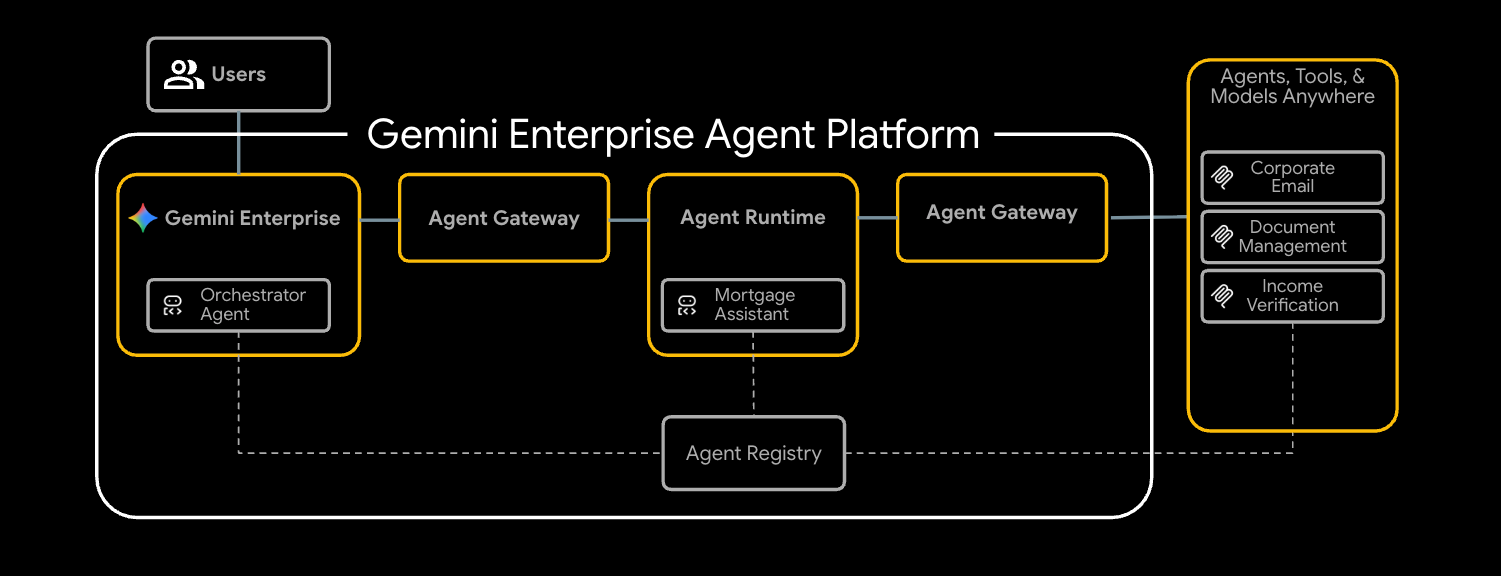
在此 Codelab 中,您将部署一个端到端房贷审批代理,该代理可与三个内部工具安全地通信。
您将首先预配基础网络,包括 VPC 和配置为 Agent Gateway 的内部应用负载平衡器。接下来,您需要将三个 Model Context Protocol (MCP) 服务器部署到 Cloud Run。这些工具可作为您的内部专有工具:
- 文档管理 (
legacy-dms) - 公司电子邮件地址 (
corporate-email) - 收入验证(
income-verification)
准备好工具后,您将把使用 ADK 构建的 Mortgage Assistant (mortgage-agent) 部署到 Agent Runtime。您将配置此代理以使用 PSC 接口进行私密出站,并通过代理注册表启用运行时工具发现。
为了确保流程安全,您将使用两个 Service Extensions 配置 Agent Gateway。首先,REQUEST_AUTHZ 扩展程序将根据各个工具的 IAM 政策验证代理身份,确保代理仅访问已获授权的工具。其次,使用 Model Armor 的 CONTENT_AUTHZ 扩展程序将过滤代理的提示和回答。
最后,您将在 Gemini Enterprise 中注册代理,以最终用户身份触发抵押贷款审批任务,并使用 Cloud Trace 验证安全受控的执行。
此 Codelab 适用于各种技能水平的平台工程师和安全工程师。预计完成该课程需要大约 100 分钟。
2. 准备工作
创建项目并进行身份验证
创建一个已启用结算功能的新 GCP 项目(或重复使用一个现有项目),然后对 Cloud Shell 或本地机器进行身份验证:
gcloud auth login
gcloud auth application-default login
gcloud config set project <your-project-id>
启用引导加载程序 API
Terraform 的基础模块在首次应用时会启用约 30 个 API,但 terraform init 和 GCS 状态存储分区需要一小部分引导加载程序集:
gcloud services enable \
  compute.googleapis.com \
  serviceusage.googleapis.com \
  cloudresourcemanager.googleapis.com \
  iam.googleapis.com \
  storage.googleapis.com \
  dns.googleapis.com
安装所需的工具
安装工具链。在 Cloud Shell 上,这些工具大多已存在;在工作站上:
# uv (Python package manager)
curl -LsSf https://astral.sh/uv/install.sh | sh

# skaffold
curl -Lo skaffold https://storage.googleapis.com/skaffold/releases/latest/skaffold-linux-amd64 && \
  sudo install skaffold /usr/local/bin/

# envsubst (gettext)
sudo apt-get install -y gettext-base
您还需要 Terraform >= 1.12.2、Python 3.12+ 和 Google Cloud SDK (gcloud)。
设置环境变量
此 Codelab 的其余部分假定这些变量已导出到您的 shell 中。
export PROJECT_ID=$(gcloud config get-value project)
export PROJECT_NUMBER=$(gcloud projects describe $PROJECT_ID --format='value(projectNumber)')
export ORG_ID=$(gcloud projects get-ancestors $PROJECT_ID | awk '$2 == "organization" {print $1}')
export REGION="us-central1"

# Only required if using the secure private networking path
export DOMAIN_NAME="agw.example.com"
验证所有变量是否已正确填充,您应该会看到返回了三个值。
echo $PROJECT_ID
echo $PROJECT_NUMBER
echo $ORG_ID
如果系统未自动填充组织 ID,您可以手动查找并设置该 ID。
gcloud organizations list
export ORG_ID=ID_FROM_OUTPUT
3. 克隆代码库
git clone https://github.com/GoogleCloudPlatform/cloud-networking-solutions.git
cd cloud-networking-solutions
cd demos/agent-gateway
快速浏览一下演示目录中的内容:
src/                MCP servers (legacy-dms, corporate-email, income-verification-api) + mortgage-agent
terraform/          Root Terraform config + modules (foundation, networking, agent-gateway, model-armor, ...)
cloudrun/           Cloud Run service definitions (rendered from .yaml.tmpl via envsubst)
scripts/            grant_agent_mcp_egress.sh — per-MCP IAP egressor binding
skaffold.yaml.tmpl  Skaffold pipeline that builds + deploys all three MCP services to Cloud Run
4. 创建 Terraform 状态存储分区和后端配置
创建一个用于保存远程状态的 GCS 存储分区,然后复制后端模板:
gcloud storage buckets create gs://${PROJECT_ID}-tfstate \
  --location=${REGION} \
  --uniform-bucket-level-access

cp terraform/example.backend.conf terraform/backend.conf
使用您的值修改 terraform/backend.conf:
bucket = "<your-project-id>-tfstate"
prefix = "agent-gateway"
5. (可选)创建公共 Cloud DNS 区域
在此实验中,Cloud Run 的入站配置默认设置为 all,并且 Agent Registry 会在每个 MCP 服务器的公共 *.run.app 网址注册该服务器,无需额外的 DNS、证书或负载平衡器。如果您想改用专用网络(Cloud Run 与内部应用负载平衡器后面的 ingress = internal-and-cloud-load-balancing),还需要一个公共 Cloud DNS 区域,以便 Certificate Manager 可以验证负载平衡器证书。
专用网络的高级流程
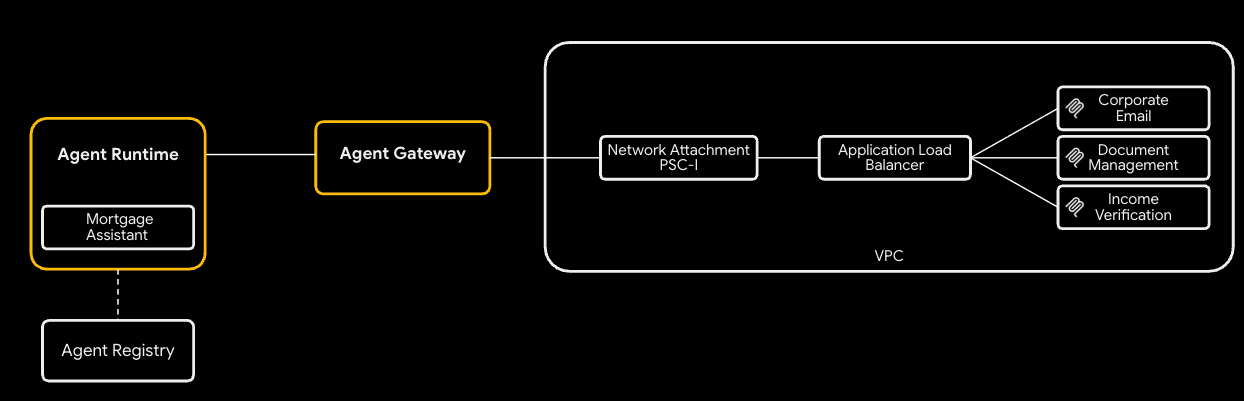
如需使用专用网络方法,请执行以下操作:
- 创建公开 Cloud DNS 区域 - Certificate Manager 通过将 CNAME 写入该区域来验证区域级托管式证书:
gcloud dns managed-zones create agw-example-com \
  --dns-name="${DOMAIN_NAME}." \
  --description="Public zone for ${DOMAIN_NAME}" \
  --visibility=public
mcp.${DOMAIN_NAME} 的相应专用区域(由 MCP 内部负载平衡器和来自 Agent Runtime 的 DNS 对等互连使用)由 Terraform 自动创建,您无需手动创建。如果专用网络处于关闭状态,则不会预配公共地区和专用地区。
6. 配置 Terraform 变量
复制示例 tfvars 并对其进行修改:
cp terraform/example.tfvars terraform/terraform.tfvars
有两个演示路径,由 enable_cloud_run_private_networking 控制。
默认路径:具有公共入站流量的 Cloud Run
最简单的设置:对于默认路径,您只需在 terraform.tfvars 中修改三个值,文件中的所有其他变量都已具有适合演示的默认值。
# GCP project ID where all resources will be created.
project_id = "my-gcp-project-id"

# GCP organization ID (numeric).
organization_id = "123456789012"

# Members granted demo-wide roles
platform_admin_members = ["user:admin@example.com"]

# IAP Enforcement Mode ("DRY_RUN" or null)
agent_gateway_iap_iam_enforcement_mode = "DRY_RUN"
专用网络(可选)
设置 enable_cloud_run_private_networking = true 并添加以下变量以配置完整的安全堆栈:
- 内部应用负载平衡器
- Google 管理的证书
- Cloud Run(含
ingress = internal-and-cloud-load-balancing) - Agent Gateway DNS 对等互连。
enable_cloud_run_private_networking = true

# DNS — must end with a trailing dot, must match a Cloud DNS zone you own
dns_zone_domain            = "agw.example.com."
enable_certificate_manager = true

# mcp_internal_dns_zone.domain MUST be a real subdomain of dns_zone_domain so
# Certificate Manager can issue a Google-managed cert.
mcp_internal_dns_zone = {
  name   = "mcp-server-internal"
  domain = "mcp.agw.example.com."
}

# Must match mcp_internal_dns_zone.domain so Agent Engine resolves MCP
# hostnames over the PSC interface peering.
psc_interface_dns_zone = {
  name   = "mcp-server-internal"
  domain = "mcp.agw.example.com."
}

mcp_lb_protocol = "HTTPS"
7. 使用 Terraform 部署基础设施
初始化、检查和应用:
cd terraform
terraform init -backend-config=backend.conf
terraform plan -out=tfplan
terraform apply tfplan
terraform apply 在默认路径上预配约 40 个资源,在新项目中需要 8-10 分钟(如果 enable_cloud_run_private_networking = true,则需要约 60 个资源 / 15-20 分钟)。它会创建:
- 项目基础(API、服务身份、配额)
- VPC、子网(主子网、代理专用子网、PSC 子网、PSC 接口子网、Agent Gateway 共置子网)、Cloud NAT、防火墙规则
- Cloud Run 映像的 Artifact Registry 代码库
- 3 项 Cloud Run 服务 + 每项服务的运行时 SA(默认情况下,入站流量 =
all;启用专用网络时,入站流量 =internal-and-cloud-load-balancing) - Model Armor 模板 + IAM
- 代理网关、PSC-I 网络连接、IAP 和 Model Armor 扩展程序、两个授权政策以及项目级
roles/iap.egressor授权 - Agent Registry 端点(Vertex AI、IAP、Discovery Engine 等)以及三个 MCP 服务器(默认在
*.run.app/mcp注册;在专用网络开启时在. /mcp
仅当 enable_cloud_run_private_networking = true 时:
- 具有无服务器 NEG(网址掩码路由)的内部区域级应用负载平衡器 + 专用 DNS A 记录
- 附加到 VPC 的 MCP 专用 DNS 区域 (
mcp.). - 公共 DNS 区域模块(Certificate Manager DNS 授权)+ Google 管理的区域级证书
- PSC 接口 DNS 区域(在没有要解析的专用主机名时为孤立状态,因此也受主标志的限制)
mcp.的代理网关 DNS 对等互连(自动预先添加).
8. 检查代理注册表端点
Agent Registry 是一个按项目划分的服务目录(Google API 和您自己的 MCP 服务器),代理会在运行时发现这些服务。抵押贷款代理在启动时读取该文件并动态绑定工具,因此代理代码或其部署命令中不会包含任何 MCP 网址。
端点
Terraform 代表您运行的操作 - 对于 agent_registry_google_apis 中的每个 Google API,它注册了五种变体(全球、mTLS 全球、区域、区域 mTLS、区域 REP)。例如,对于 aiplatform:
gcloud alpha agent-registry services create aiplatform \
  --project=${PROJECT_ID} --location=${REGION} \
  --display-name="Vertex AI Platform" \
  --endpoint-spec-type=no-spec \
  --interfaces="url=https://aiplatform.googleapis.com,protocolBinding=JSONRPC"

gcloud alpha agent-registry services create aiplatform-mtls \
  --project=${PROJECT_ID} --location=${REGION} \
  --display-name="Vertex AI Platform mTLS" \
  --endpoint-spec-type=no-spec \
  --interfaces="url=https://aiplatform.mtls.googleapis.com,protocolBinding=JSONRPC"

gcloud alpha agent-registry services create ${REGION}-aiplatform \
  --project=${PROJECT_ID} --location=${REGION} \
  --display-name="Vertex AI Platform Locational" \
  --endpoint-spec-type=no-spec \
  --interfaces="url=https://${REGION}-aiplatform.googleapis.com,protocolBinding=JSONRPC"

gcloud alpha agent-registry services create aiplatform-${REGION}-rep \
  --project=${PROJECT_ID} --location=${REGION} \
  --display-name="Vertex AI Platform Regional (REP)" \
  --endpoint-spec-type=no-spec \
  --interfaces="url=https://aiplatform.${REGION}.rep.googleapis.com,protocolBinding=JSONRPC"
MCP 服务器
Terraform 还会为您注册 3 个 MCP 服务器,如需注册其他 MCP 服务器,您可以按照文档中的步骤操作。
gcloud alpha agent-registry services create legacy-dms \
--project=${PROJECT_ID} \
--location=${REGION} \
--display-name="Legacy DMS" \
--mcp-server-spec-type=tool-spec \
--mcp-server-spec-content=src/legacy-dms/toolspec.json \
--interfaces=url=https://dms.${DOMAIN_NAME}/mcp,protocolBinding=JSONRPC
验证已注册的端点和 MCP 服务器。
gcloud alpha agent-registry services list \
  --project=${PROJECT_ID} --location=${REGION} \
  --format="value(displayName,name)"

gcloud alpha agent-registry mcp-servers list \
  --project=${PROJECT_ID} --location=${REGION} \
  --format="value(displayName,name)"
来源:terraform/modules/agent-registry-endpoints/scripts/register_endpoints.sh.tpl。
9. 查看 Agent Gateway 配置
Agent Gateway 是 Google 托管的治理平面,位于 Agent Runtime 和您的工具之间。在 AGENT_TO_ANYWHERE 模式下,它会绑定到项目的代理注册表,并通过客户拥有的 PSC 接口出站,因此可以访问 VPC 中的专用 MCP 服务器。
如果您要手动导入此网关,则 YAML 如下所示:
# agent-gateway.yaml — for reference only, Terraform already created this
name: agent-gateway
protocols: [MCP]
googleManaged:
  governedAccessPath: AGENT_TO_ANYWHERE
registries:
  - "//agentregistry.googleapis.com/projects/${PROJECT_ID}/locations/${REGION}"
networkConfig:
  egress:
    networkAttachment: projects/${PROJECT_ID}/regions/${REGION}/networkAttachments/agent-gateway-na
  dnsPeeringConfig:
    domains:
      - mcp.${DOMAIN_NAME}.
    targetProject: ${PROJECT_ID}
    targetNetwork: projects/${PROJECT_ID}/global/networks/gateway-vpc
gcloud alpha network-services agent-gateways import agent-gateway \
  --source=agent-gateway.yaml \
  --location=${REGION}
验证网关是否已由 Terraform 创建:
gcloud alpha network-services agent-gateways describe agent-gateway \
  --location=${REGION}
10. 检查 IAP 和 Model Armor 授权
Agent Gateway 将授权委托给Service Extensions。以下两个政策配置文件涵盖了演示:
- REQUEST_AUTHZ - 在标头阶段针对每个请求评估一次。此处用于调用 IAP,以检查调用代理身份是否对目标 MCP 服务器具有
roles/iap.egressor。 - CONTENT_AUTHZ - 将正文事件流式传输到扩展程序以进行内容清理。此处用于调用 Model Armor,该服务会通过 Sensitive Data Protection (SDP) 筛查提示注入、越狱、RAI 违规行为和(可选)个人身份信息 (PII)。
IAP REQUEST_AUTHZ 扩展服务
cat > iap-authz-extension.yaml <<EOF
name: agent-gateway-iap-authz
service: iap.googleapis.com
failOpen: true
timeout: 1s
EOF

gcloud beta service-extensions authz-extensions import agent-gateway-iap-authz \
  --source=iap-authz-extension.yaml \
  --location=${REGION} \
  --project=${PROJECT_ID}
使用 REQUEST_AUTHZ 政策将其绑定到 Agent Gateway:
curl -fsS -H "Authorization: Bearer $(gcloud auth print-access-token)" \
  -H "Content-Type: application/json" \
  -X POST "https://networksecurity.googleapis.com/v1alpha1/projects/${PROJECT_ID}/locations/${REGION}/authzPolicies?authz_policy_id=agent-gateway-iap-policy" \
  -d '{
    "name": "agent-gateway-iap-policy",
    "policyProfile": "REQUEST_AUTHZ",
    "action": "CUSTOM",
    "target": {
      "resources": [
        "projects/'"${PROJECT_ID}"'/locations/'"${REGION}"'/agentGateways/agent-gateway"
      ]
    },
    "customProvider": {
      "authzExtension": {
        "resources": [
          "projects/'"${PROJECT_ID}"'/locations/'"${REGION}"'/authzExtensions/agent-gateway-iap-authz"
        ]
      }
    }
  }'
Model Armor CONTENT_AUTHZ 扩展程序
扩展程序的 metadata.model_armor_settings 包含 Model Armor 用于评估每次标注的请求和响应模板 ID:
cat > ma-extension.yaml <<EOF
name: agent-gateway-ma-authz
service: modelarmor.${REGION}.rep.googleapis.com
failOpen: true
timeout: 1s
metadata:
  model_armor_settings: '[
    {
      "request_template_id":  "projects/${PROJECT_ID}/locations/${REGION}/templates/agw-request-template",
      "response_template_id": "projects/${PROJECT_ID}/locations/${REGION}/templates/agw-response-template"
    }
  ]'
EOF

gcloud beta service-extensions authz-extensions import agent-gateway-ma-authz \
  --source=ma-extension.yaml \
  --location=${REGION} \
  --project=${PROJECT_ID}
curl -fsS -H "Authorization: Bearer $(gcloud auth print-access-token)" \
  -H "Content-Type: application/json" \
  -X POST "https://networksecurity.googleapis.com/v1alpha1/projects/${PROJECT_ID}/locations/${REGION}/authzPolicies?authz_policy_id=agent-gateway-ma-policy" \
  -d '{
    "name": "agent-gateway-ma-policy",
    "policyProfile": "CONTENT_AUTHZ",
    "action": "CUSTOM",
    "target": {
      "resources": [
        "projects/'"${PROJECT_ID}"'/locations/'"${REGION}"'/agentGateways/agent-gateway"
      ]
    },
    "customProvider": {
      "authzExtension": {
        "resources": [
          "projects/'"${PROJECT_ID}"'/locations/'"${REGION}"'/authzExtensions/agent-gateway-ma-authz"
        ]
      }
    }
  }'
自定义 DLP 模板
Model Armor 的 sdpSettings.basicConfig 使用内置的 infoType 列表。如需进行更精细的控制(自定义信息类型、部分遮盖、替代变量替换、按可能性遮盖),请通过 sdpSettings.advancedConfig 将 Model Armor 指向您自己的 Cloud DLP inspect 和 de-identify 模板。
创建一个检查模板,用于标记可能性为 POSSIBLE 或更高的美国社会保障号:
curl -fsS -X POST \
  -H "Authorization: Bearer $(gcloud auth print-access-token)" \
  -H "Content-Type: application/json" \
  -H "x-goog-user-project: ${PROJECT_ID}" \
  "https://dlp.googleapis.com/v2/projects/${PROJECT_ID}/locations/${REGION}/inspectTemplates" \
  -d '{
    "templateId": "agw-ssn-inspect-template",
    "inspectTemplate": {
      "displayName": "SSN Inspect Template",
      "inspectConfig": {
        "infoTypes": [
          { "name": "US_SOCIAL_SECURITY_NUMBER" }
        ],
        "minLikelihood": "POSSIBLE"
      }
    }
  }'
创建一个去标识化模板,用于将每个发现结果替换为其信息类型令牌(例如 [US_SOCIAL_SECURITY_NUMBER]):
curl -fsS -X POST \
  -H "Authorization: Bearer $(gcloud auth print-access-token)" \
  -H "Content-Type: application/json" \
  -H "x-goog-user-project: ${PROJECT_ID}" \
  "https://dlp.googleapis.com/v2/projects/${PROJECT_ID}/locations/${REGION}/deidentifyTemplates" \
  -d '{
    "templateId": "agw-ssn-redaction-template",
    "deidentifyTemplate": {
      "displayName": "SSN Redaction Template",
      "deidentifyConfig": {
        "infoTypeTransformations": {
          "transformations": [{
            "primitiveTransformation": { "replaceWithInfoTypeConfig": {} }
          }]
        }
      }
    }
  }'
然后,通过 sdpSettings.advancedConfig 将 Model Armor 模板的回答配置指向该密钥对(如果您已连接 Terraform 的 model_armor 模块,则该模块会在此处设置 advanced_config):
{
  "filterConfig": {
    "sdpSettings": {
      "advancedConfig": {
        "inspectTemplate":    "projects/${PROJECT_ID}/locations/${REGION}/inspectTemplates/agw-ssn-inspect-template",
        "deidentifyTemplate": "projects/${PROJECT_ID}/locations/${REGION}/deidentifyTemplates/agw-ssn-redaction-template"
      }
    }
  }
}
IAP egressor IAM(仅限每个 MCP 服务器)
Terraform 不会在隐式 IAP 代理注册表中创建项目范围的 roles/iap.egressor 绑定。IAP REQUEST_AUTHZ 实际评估的绑定是按 MCP 服务器和推理引擎进行的,在部署代理并知道代理 ID 后授予。“授予每个 MCP 服务器的出站权限”这一步会运行 scripts/grant_agent_mcp_egress.sh 来实现此目的。
11. 构建 MCP 服务器并将其部署到 Cloud Run
cloudrun/*.yaml.tmpl 和 skaffold.yaml.tmpl 文件引用了 ${PROJECT_ID}、${REGION} 和 ${MCP_INGRESS}(Cloud Run 入站流量注释)。从 Terraform 输出中获取 MCP_INGRESS,以便渲染的清单与 enable_cloud_run_private_networking 保持同步,然后使用 envsubst 进行渲染:
导出 Cloud Run 入站流量配置。
allinternal-and-cloud-load-balancing(使用专用网络方法时)
export MCP_INGRESS=all
返回到根演示目录:
cd ..
替换模板值:
envsubst '${PROJECT_ID} ${REGION} ${MCP_INGRESS}' < skaffold.yaml.tmpl > skaffold.yaml
for f in cloudrun/*.yaml.tmpl; do
  envsubst '${PROJECT_ID} ${REGION} ${MCP_INGRESS}' < "$f" > "${f%.tmpl}"
done
每个 Cloud Run 服务都以 Terraform 创建的每个服务的运行时 SA(例如 mcp-legacy-dms@${PROJECT_ID}.iam.gserviceaccount.com)运行。如需以这些 SA 的身份进行部署,您需要拥有 roles/iam.serviceAccountUser 权限:
gcloud projects add-iam-policy-binding $PROJECT_ID \
  --member="user:$(gcloud config get-value account)" \
  --role="roles/iam.serviceAccountUser"
使用 Cloud Build 进行构建,并使用 Skaffold 进行部署:
skaffold run
Skaffold 会将三个映像(legacy-dms、corporate-email、income-verification-api)构建到您的 Artifact Registry 代码库中,并更新每个 Cloud Run 服务以指向新的摘要。
验证:
gcloud run services list --region=${REGION}
您应该会看到所有三项服务都处于 ACTIVE 状态。
12. 将抵押贷款代理部署到 Agent Runtime
向所有代理授予我们已注册到注册表的所有端点的 IAP Egressor 角色。代理需要访问这些端点,因为在部署时,它需要访问 github.com 以获取软件包,然后访问部署所需的各种 Google API。
./scripts/grant_agent_mcp_egress.sh --bind-all-agents --endpoints
安装代理的依赖项并进行部署:
cd src/mortgage-agent
uv sync

uv run python deploy_agent.py \
  --project=${PROJECT_ID} \
  --region=${REGION} \
  --enable-agent-identity \
  --agent-name=mortgage-agent \
  --agent-gateway=projects/${PROJECT_ID}/locations/${REGION}/agentGateways/agent-gateway \
  --mcp-invoker-sa=$(terraform -chdir=../../terraform output -raw agent_mcp_invoker_email) \
  --model-endpoint-location=global
脚本完成后,将输出的 reasoningEngines/ 复制到 shell 中(例如 4262292559201566720):
export AGENT_ID=<numeric-id-from-output>
cd ../..
13. 授予代理每个 MCP 服务器的出站权限
IAP REQUEST_AUTHZ 扩展程序通过检查代理在所调用的特定 MCP 服务器或端点上的 roles/iap.egressor 来授权每次工具调用。请参阅创建从代理到 MCP 服务器的出站政策。
该脚本 (scripts/grant_agent_mcp_egress.sh) 会枚举代理注册表中 projects/${PROJECT_ID}/locations/${REGION} 下的 MCP 服务器,并将代理主账号的 roles/iap.egressor 绑定合并到每个服务器的 IAM 政策中(镜像 gcloud add-iam-policy-binding 语义)。
使用情形 1 - 无条件授予对特定 MCP 服务器的访问权限
./scripts/grant_agent_mcp_egress.sh \
  --mcp \
  --agent-id ${AGENT_ID} \
  --mcp-filter "legacy-dms income-verification"
使用情形 2 - 范围限定为特定 MCP 服务器的有条件授权 (CEL)
如需将代理限制为只能使用单个 MCP 服务器上的一部分工具,请附加 IAM 条件。Agent Gateway 会发布 IAP REQUEST_AUTHZ 向 CEL 公开的每个工具属性,包括:
iap.googleapis.com/mcp.toolNameiap.googleapis.com/mcp.tool.isReadOnlyiap.googleapis.com/request.auth.type。
将代理限制为仅在 corporate-email 上使用只读工具:
./scripts/grant_agent_mcp_egress.sh \
  --mcp \
  --agent-id ${AGENT_ID} \
  --mcp-filter "corporate-email" \
  --condition-expression "api.getAttribute('iap.googleapis.com/mcp.tool.isReadOnly', false) == true || api.getAttribute('iap.googleapis.com/mcp.toolName', '') == ''" \
  --condition-title "ReadOnlyToolsOnly" \
  --condition-description "Restrict ${AGENT_ID} to read-only tools on corporate-email"
运行此命令后,corporate-email 上的写入工具会从 IAP REQUEST_AUTHZ 返回 403 PermissionDenied;只读工具会继续正常运行。
验证绑定
前往“政策”标签页,您会看到针对端点和 Mcp 服务器创建的政策列表。
其他使用情形:
在每个 MCP 服务器上无条件授予,范围限定为一个代理
每次重新部署代理后运行此命令。在没有过滤器和条件的情况下,命名代理会从注册表中的每个 MCP 服务器获取 roles/iap.egressor:
./scripts/grant_agent_mcp_egress.sh \
  --mcp \
  --agent-id ${AGENT_ID}
14. 在 Agent Platform 控制台中测试代理
Agent Platform 控制台附带一个 Playground,可让您直接与已部署的代理聊天。这是在将代理连接到 Gemini Enterprise 之前对工具调用进行冒烟测试和检查轨迹的最快方式。
- 在 Google Cloud 控制台中打开 Agent Platform 部署页面。
- 如果您需要缩小运行时列表范围,请使用过滤条件字段,然后点击您的
mortgage-agent运行时。 - 打开 Playground 标签页。
- 输入提示,与智能体聊天:
I am reviewing the Sterling familys current application. Can you summarize their 2024 and 2025 tax returns and verify if their total household income meets our 2026 debt-to-income requirements?
这应该会返回来自“证件管理”工具和“收入验证”工具的响应,并且此响应中的社会保障号码也应被遮盖。5. 输入后续提示:
Can you send a summary of this to my email jane@example.com
由于 IAP 扩展程序处于试运行模式,因此不会强制执行条件政策,因此代理将能够成功发送电子邮件。
由于代理是使用 OpenTelemetry 插桩部署的,因此 Playground 会显示四个侧边栏视图,您可以在代理响应时在这些视图之间切换:
- 轨迹 - 对话的完整轨迹,包括代理网关、IAP REQUEST_AUTHZ 和 Model Armor CONTENT_AUTHZ span
- 事件 - 当前对话轮次中调用的工具和事件详情的图表
- 状态 - 智能体的会话状态和工具输入/输出
- 会话 - 您针对此运行时启动的每个会话
15. 强制执行 IAP 授权
现在,我们已验证部署,可以将 IAP 强制执行模式更新为 null 以强制执行政策。打开 terraform.tfvars,并将模式从 DRY_RUN 更新为 null
# IAP Enforcement Mode ("DRY_RUN" or null)
agent_gateway_iap_iam_enforcement_mode = null
应用更改。
terraform apply
返回到 Playground,然后再次尝试对话。
- 在 Google Cloud 控制台中打开 Agent Platform 部署页面。
- 如果您需要缩小运行时列表范围,请使用过滤条件字段,然后点击您的
mortgage-agent运行时。 - 打开 Playground 标签页。
- 输入提示,与智能体聊天:
I am reviewing the Sterling familys current application. Can you summarize their 2024 and 2025 tax returns and verify if their total household income meets our 2026 debt-to-income requirements?
这应该会返回来自“证件管理”工具和“收入验证”工具的响应,并且此响应中的社会保障号码也应被遮盖。5. 输入后续提示:
Can you send a summary of this to my email jane@example.com
如果一切设置正确,代理应会回复说,由于授权政策,它无法发送电子邮件。
16. Gemini Enterprise 设置和测试
设置 Gemini Enterprise
请按照 Gemini Enterprise 使用入门指南操作。
向 Gemini Enterprise 注册 ADK 代理
如需按照步骤在 Gemini Enterprise 中注册我们的代理,请按照此处的步骤操作。
- 在 Google Cloud 控制台中,前往 Gemini Enterprise 页面。
- 选择注册了相应代理的 Gemini Enterprise 应用。
- 打开您的 Gemini Enterprise Web 应用已准备就绪部分中显示的网址。
- 从左侧菜单中选择智能体标签页,打开Agent Gallery。
- 选择 Mortgage Assistant Agent,然后开始对话。
尝试使用 Agent Runtime Playground 中的相同提示:
初始提示:
I am reviewing the Sterling familys current application. Can you summarize their 2024 and 2025 tax returns and verify if their total household income meets our 2026 debt-to-income requirements?
跟进搜索提示:
Can you send a summary of this to my email jane@example.com
如果您返回到控制台中的“代理部署”部分,选择我们的代理部署并前往轨迹标签页,您现在会在显示调用源自 Gemini Enterprise 的 span 中看到 Gemini Assistant 代理。
17. 可观测性信息中心
授权调试信息中心可提供 Agent Runtime 代理的出站流量的单一视图。
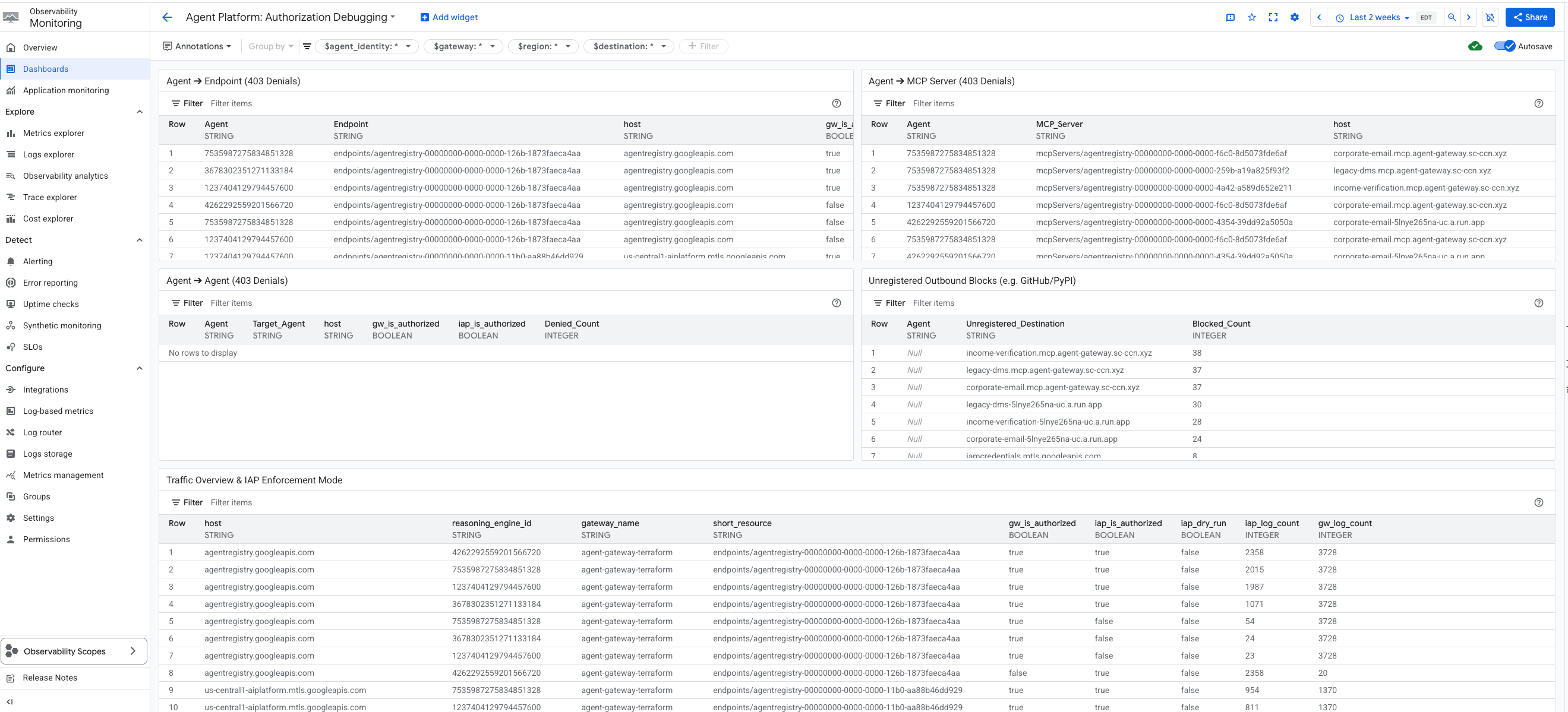
信息中心会显示以下内容:
- 代理 ➔ 端点(403 拒绝)
- 代理 ➔ MCP 服务器(403 拒绝)
- 代理 ➔ 代理(403 拒绝)
- 未注册的出站块
- 流量概览和 IAP 强制执行模式
- GCP API IAM 拒绝次数
每个 widget 都会显示代理 ID、所请求的主机、注册的资源路径,以及网关和 IAP 是否已授权该请求。
- 未注册的出站流量屏蔽 - 此 widget 专门用于隔离代理网关因目标主机名不存在于代理注册表中而屏蔽的流量。由于网关代理会在这些请求到达 IAP 之前将其屏蔽,因此这些条目没有 IAP 审核日志。
- 流量概览和 IAP 强制执行模式 - 此 widget 提供了一个表格,其中显示了所有流量模式。最重要的是,它包含 IAP 干运行状态,可让用户了解 IAP 政策是主动阻止流量还是仅进行观察。
- GCP API IAM 拒绝 - 此 widget 会搜索标准 Cloud Audit Logs (
cloudaudit.googleapis.com),以捕获代理的底层 Google Cloud API 权限错误。
您可以在 Agent Gateway 实例下的“可观测性”标签页中找到此信息中心:Agent Platform > Agents > Gateways > Specific Instance > Observability
18. 问题排查和常见修复
使用 Gemini CLI 进行 AI 辅助调试
您可以使用 Gemini CLI 中的 agent-platform-debugger 技能来排查问题。该技能包可为 AI 辅助调试提供专业知识。由于 Gemini CLI 将 .agents/skills/ 视为工作区范围内的 .gemini/skills/ 的第一类别名,因此您可以直接使用技能。如需在 Codelab 代码库中使用此技能,请执行以下操作:
前往代码库目录并启动 Gemini CLI:
cd /path/to/cloud-networking-solutions/demos/agent-gateway
gemini
在系统提示时信任工作区(工作区范围的技能仅从受信任的文件夹加载)。确认技能已加载:
/skills list
您应该会在列表中看到 agent-platform-debugger。如果缺少该规则,请重新加载技能:
/skills reload
问题排查提示
terraform apply在 Agent Gateway 上失败,并显示“资源正在创建,因此无法更新” - 网关的租户项目需要大约 30 秒才能稳定,然后才能附加授权政策。模块的time_sleep.wait_for_gateway会处理此问题;只需重新运行terraform apply即可。- 代理报告“未找到 MCP 服务器”或仅使用实用程序工具启动 - 确认
terraform.tfvars中的enable_agent_registry_endpoints = true,然后:gcloud alpha agent-registry mcp-servers list \ --project=${PROJECT_ID} --location=${REGION} - 工具调用返回 403 PermissionDenied - 重新运行
scripts/grant_agent_mcp_egress.sh。最常见的原因是在重新部署代理后忘记重新授予权限(reasoningEngines/每次部署都会发生变化)。 skaffold run失败,并显示“服务账号的权限被拒绝” - 您缺少roles/iam.serviceAccountUser。重新运行上一步中的自我授权。- 从 Agent Gateway 到 MCP LB 的 DNS 对等互连错误 - 检查
agent_gateway_dns_peering_config.target_network是否与projects/${PROJECT_ID}/global/networks/${VPC_NAME}完全一致,以及每个domains条目是否以尾随点结尾。 terraform plan一直想要更新 Cloud Run 映像标记 - 这不应发生,因为有lifecycle { ignore_changes }规则。如果确实如此,请确认您未在skaffold run之后修改terraform.tfvars中的mcp_services[*].image。
19. 清理
推理引擎不由 Terraform 管理(由 ADK SDK 创建)。手动删除:
gcloud beta ai reasoning-engines delete ${AGENT_ID} \
  --region=${REGION} --project=${PROJECT_ID}
拆除 Terraform 创建的所有内容:
cd terraform
terraform destroy
cd ..
如果您创建公共 DNS 区域只是为了完成本 Codelab,请执行以下操作:
gcloud dns managed-zones delete agw-example-com
最后,删除 Terraform 状态存储分区:
gcloud storage rm -r gs://${PROJECT_ID}-tfstate
20. 恭喜
恭喜!您已成功使用 Agent Gateway 为多工具 ADK 智能体实现了全面的智能体治理。作为集中式网络控制平面,Agent Gateway 可让您建立通往专用工具的安全出站流量路径,通过 Identity-Aware Proxy 强制执行精细的基于身份的 IAM 政策,并使用集成的 Model Armor 护栏清理内容互动。
您学到的内容
- 如何部署和配置 Agent Gateway,以作为智能体到任意位置的出站流量的中央治理层。
- 如何集成 Agent Registry 以实现受管控的动态运行时工具发现。
- 如何编写和强制执行基于工具和条件的 IAM 政策,以严格控制代理执行路径。
- 如何利用 Agent Gateway 服务扩展程序应用 Model Armor 政策,自动拦截和隐去敏感的智能体流量。