

1. 簡介
虛擬私有雲對接是供應商向使用者提供服務的常見方法。不過,使用虛擬私有雲對接會帶來許多轉送複雜性,例如不具遞移性的虛擬私有雲對接、大量 IP 位址消耗,以及對接虛擬私有雲中的資源過度曝光。
Private Service Connect (PSC) 是一種連線方法,可讓供應商透過單一端點公開服務,而消費者則可在工作負載虛擬私有雲中佈建該端點。這可解決使用者在虛擬私有雲對等互連時遇到的許多問題。雖然許多新服務都是透過 PSC 建立,但仍有許多服務是以虛擬私有雲對接服務的形式存在。
Google Cloud 很高興推出服務遷移路徑,讓您將透過虛擬私有雲對接建立的服務,遷移至以 PSC 為基礎的架構。使用這個遷移方法時,透過虛擬私有雲對接公開的生產者服務 IP 位址會保留至 PSC 架構,因此消費者只需進行極少變更。請按照本程式碼實驗室的說明,瞭解執行這項遷移作業的技術步驟。
注意:這項遷移路徑僅適用於生產者和消費者位於相同 Google Cloud 組織的服務。任何使用虛擬私有雲對接的 Google Cloud 服務或第三方服務,都會採用類似的遷移方法,但會根據服務本身進行自訂。請洽詢相關單位,瞭解這類服務的遷移路徑。
課程內容
- 如何設定以虛擬私有雲對接為基礎的服務
- 如何設定以 PSC 為基礎的服務
- 使用 Internal-Ranges API,透過虛擬私有雲對接執行子網路遷移,將虛擬私有雲對接遷移至 PSC 服務。
- 瞭解何時需要停機進行服務遷移
- 遷移清除步驟
軟硬體需求
- 具備擁有者權限的 Google Cloud 專案
2. 程式碼實驗室拓撲
為求簡化,本程式碼實驗室會將所有資源集中在單一專案中。如果生產端和取用端位於不同專案,程式碼實驗室會註明生產端和取用端分別需要執行哪些動作。
本程式碼實驗室會有 4 種狀態。
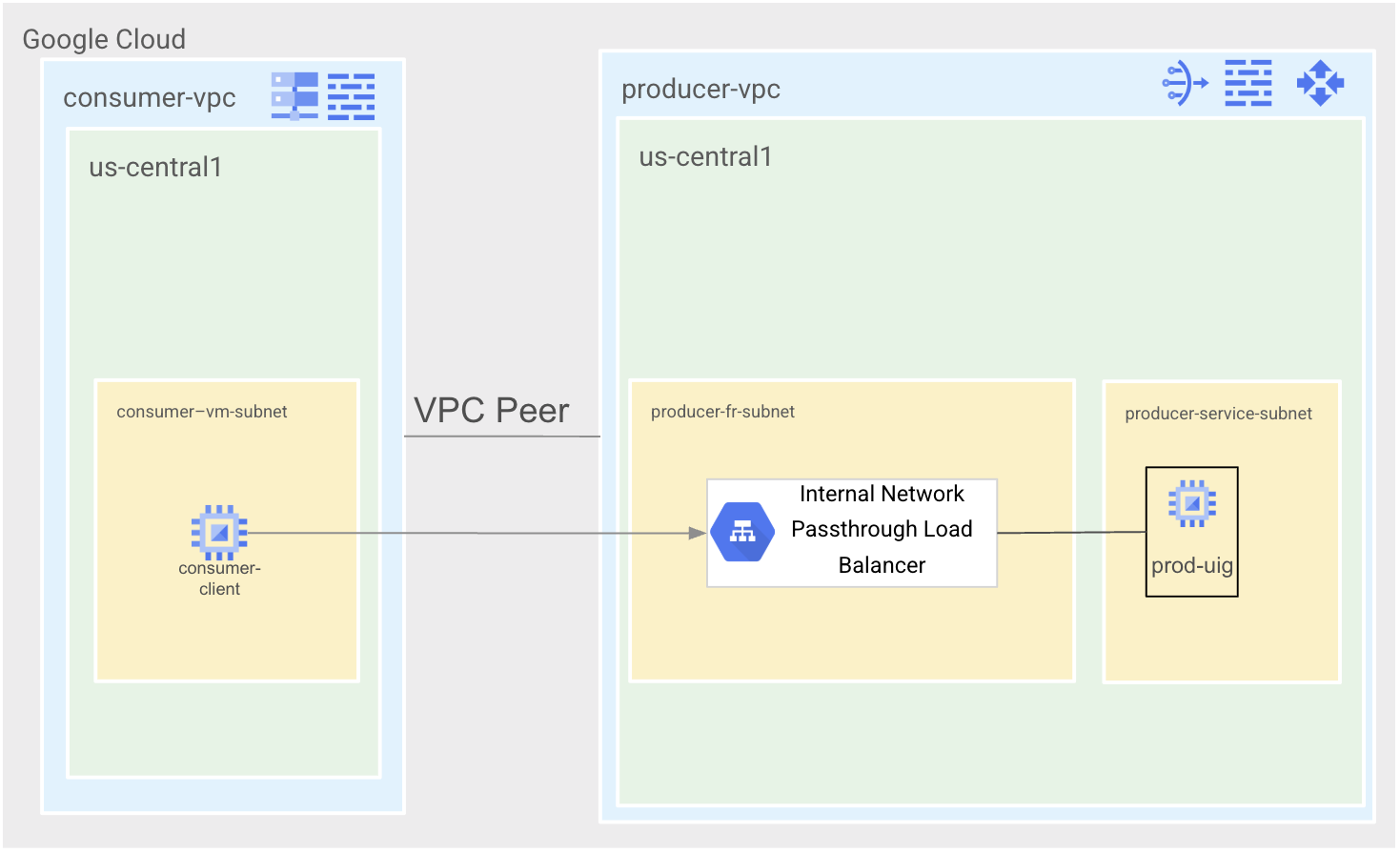
狀態 1 是虛擬私有雲對接狀態。您會建立兩個虛擬私有雲 (consumer-vpc 和 producer-vpc),並將兩者對接。Producer-vpc 會透過內部網路直通式負載平衡器,公開簡易的 Apache 服務。consumer-vpc 會有一個 consumer-vm,用於測試。
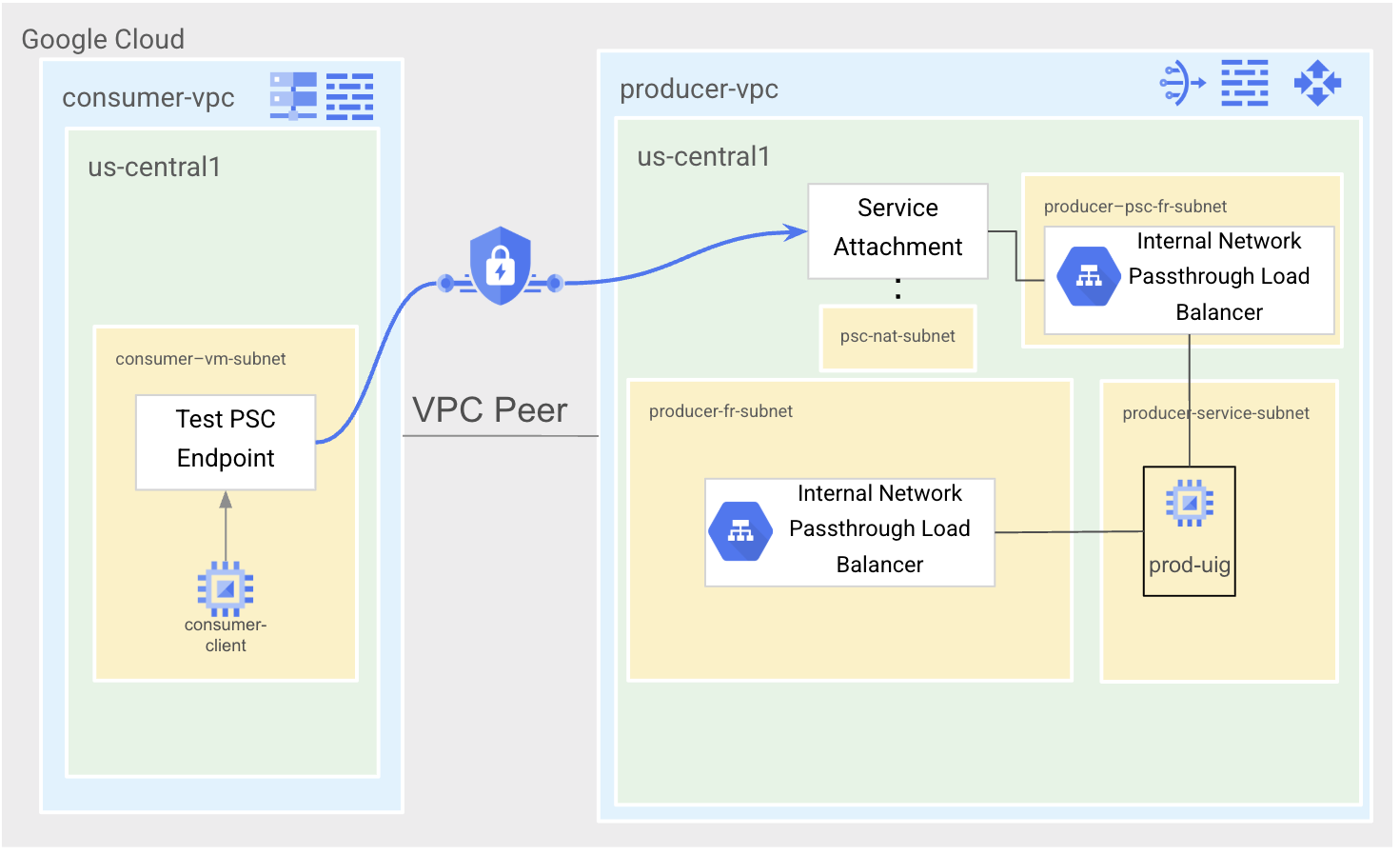
狀態 2 是 PSC 測試狀態。我們會建立新的轉送規則,並使用這項規則與服務連結建立關聯。接著,我們會在 consumer-vpc 建立測試 PSC 端點,確認 PSC 服務運作正常。
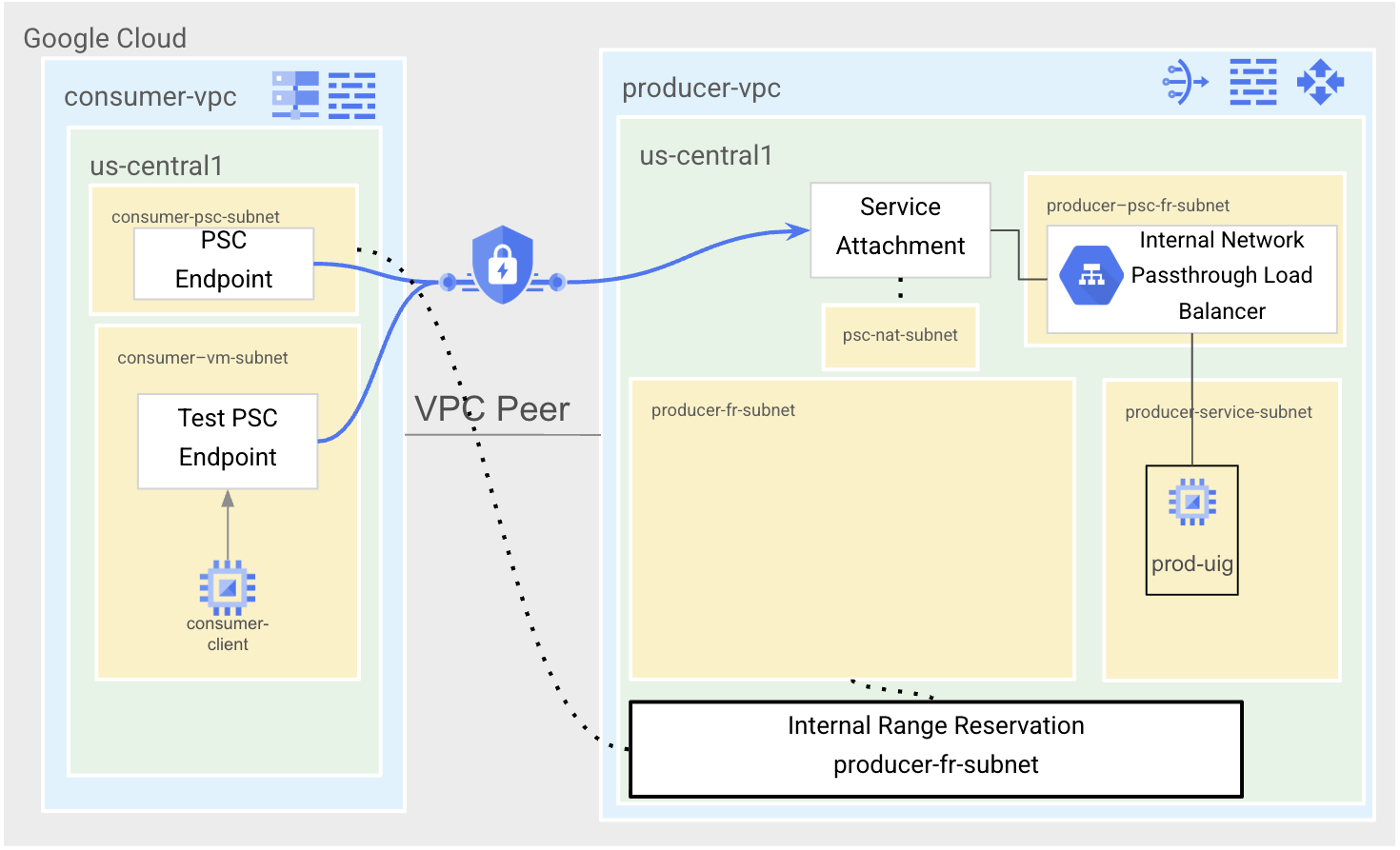
狀態 3 是遷移狀態。我們會保留 producer-vpc 中部署了虛擬私有雲對接服務的子網路範圍,以便在 consumer-vpc 中使用。接著,我們會建立新的 PSC 端點,其 IP 位址與 producer-vpc 中預先存在的轉送規則相同。
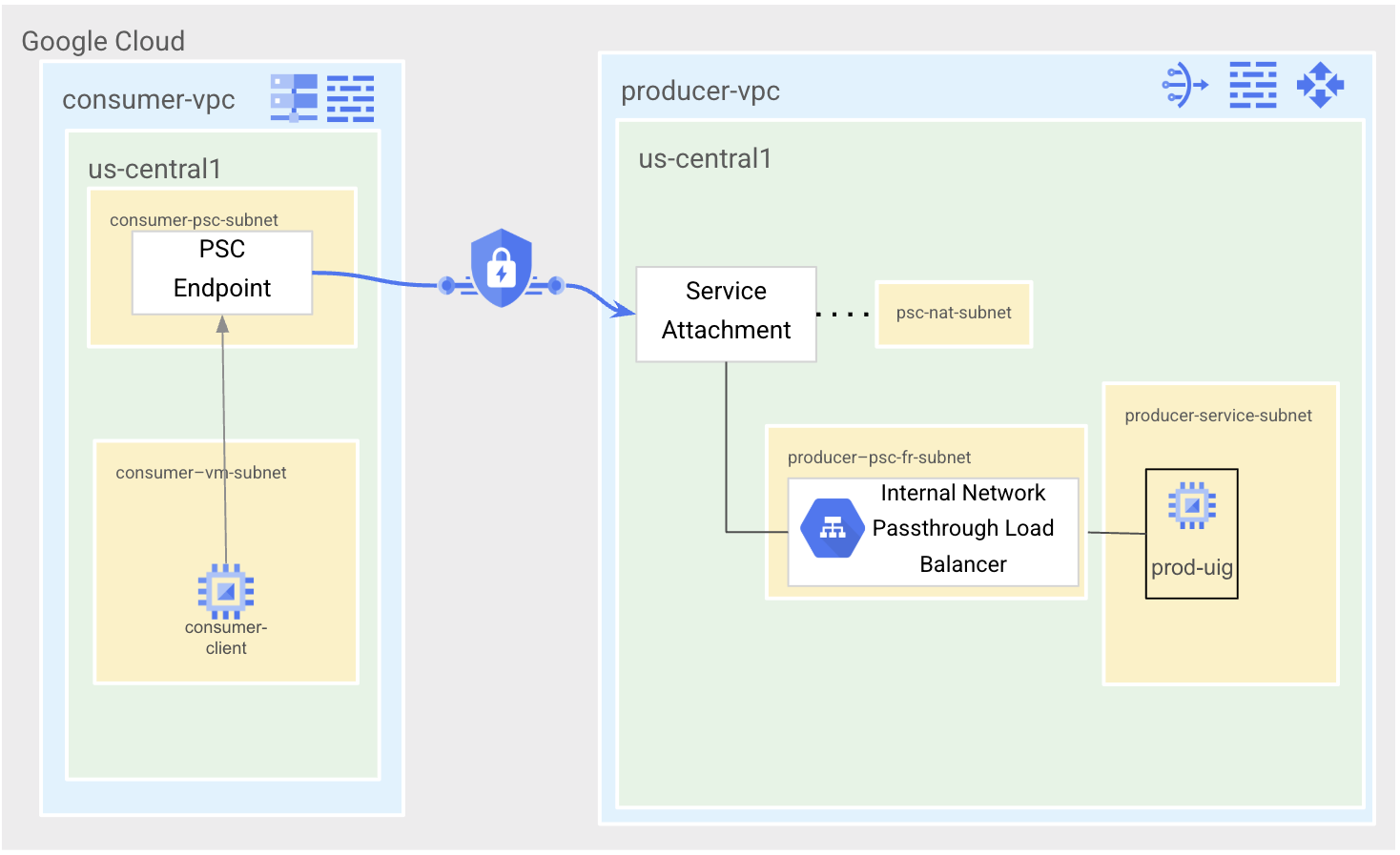
狀態 4 是最終 PSC 狀態。我們會清除測試 PSC 端點,並刪除 consumer-vpc 和 producer-vpc 之間的虛擬私有雲對接。
3. 設定和需求
自修實驗室環境設定
- 登入 Google Cloud 控制台,建立新專案或重複使用現有專案。如果您沒有 Gmail 或 Google Workspace 帳戶,請建立帳戶。

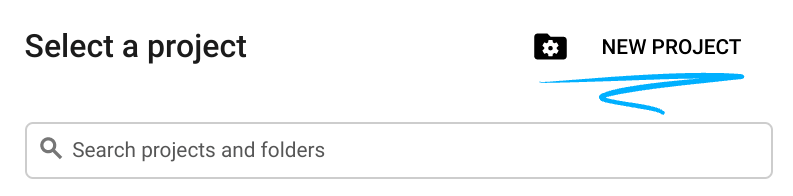
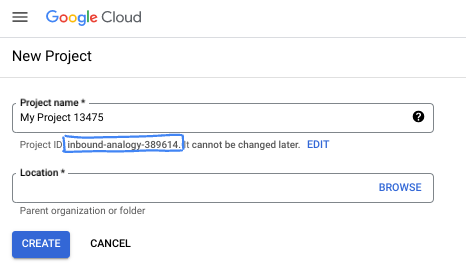
- 「專案名稱」是專案參與者的顯示名稱。這是一串 Google API 無法識別的字元。你隨時可以更新。
- 專案 ID 在所有 Google Cloud 專案中都是不重複的,且設定後即無法變更。Cloud 控制台會自動產生一組不重複的字串,通常您不需要知道這組字串。在大多數程式碼實驗室中,您必須參照專案 ID (通常會標示為
PROJECT_ID)。如果您不喜歡系統產生的 ID,可以再產生一組隨機 ID。或者,您也可以嘗試使用自己的名稱,看看是否可用。這個步驟完成後即無法變更,且在專案期間會保持不變。 - 此外,還有第三個值,也就是「專案編號」,某些 API 會使用這個值。如要進一步瞭解這三個值,請參閱說明文件。
- 接著,您必須在 Cloud 控制台中啟用計費功能,才能使用 Cloud 資源/API。執行這個程式碼實驗室的費用極低,甚至可能完全免費。如要關閉資源,避免產生本教學課程以外的費用,可以刪除建立的資源或刪除專案。新註冊 Google Cloud 的使用者可獲得價值 $300 美元的免費試用。
啟動 Cloud Shell
雖然您可以透過筆電遠端操作 Google Cloud,但在本程式碼實驗室中,您將使用 Google Cloud Shell,這是在雲端執行的指令列環境。
在 Google Cloud 控制台中,點選右上角工具列的「Cloud Shell」圖示:

佈建並連線至環境的作業需要一些時間才能完成。完成後,您應該會看到類似下方的內容:

這個虛擬機器已預先安裝所有必要的開發人員工具,提供永久的 5 GB 主目錄,而且在 Google Cloud 中運作,大幅提升網路效能並強化驗證功能。本程式碼實驗室的所有工作都可以在瀏覽器中完成。您不需要安裝任何項目。
4. 事前準備
啟用 API
在 Cloud Shell 中,確認專案已設定完成,並設定變數。
gcloud auth login
gcloud config list project
gcloud config set project [YOUR-PROJECT-ID]
export projectid=[YOUR-PROJECT-ID]
export region=us-central1
export zone=$region-a
echo $projectid
echo $region
echo $zone
啟用所有必要服務
gcloud services enable compute.googleapis.com
gcloud services enable networkconnectivity.googleapis.com
gcloud services enable dns.googleapis.com
5. 建立供應商虛擬私有雲網路 (供應商活動)
虛擬私有雲網路
在 Cloud Shell 執行下列指令:
gcloud compute networks create producer-vpc \
    --subnet-mode=custom
建立子網路
在 Cloud Shell 執行下列指令:
gcloud compute networks subnets create producer-service-subnet \
    --network=producer-vpc \
    --range=10.0.0.0/28 \
    --region=$region

gcloud compute networks subnets create producer-fr-subnet \
        --network=producer-vpc \
        --range=192.168.0.0/28 \
        --region=$region
建立生產端 Cloud Router 和 Cloud NAT
在 Cloud Shell 執行下列指令:
gcloud compute routers create $region-cr \
   --network=producer-vpc \
   --region=$region

gcloud compute routers nats create $region-nat \
    --router=$region-cr \
    --region=$region \
    --nat-all-subnet-ip-ranges \
    --auto-allocate-nat-external-ips
建立供應商網路防火牆政策和防火牆規則
在 Cloud Shell 執行下列指令:
gcloud compute network-firewall-policies create producer-vpc-policy --global

gcloud compute network-firewall-policies associations create \
    --firewall-policy producer-vpc-policy \
    --network producer-vpc \
    --name network-producer-vpc \
    --global-firewall-policy
如要允許 IAP 連線至您的 VM 執行個體,請根據以下條件建立防火牆規則:
- 套用至所有您希望能透過 IAP 存取的 VM 執行個體。
- 允許來自 IP 範圍 35.235.240.0/20 的輸入流量。這個範圍包含 IAP 用於 TCP 轉送的所有 IP 位址。
在 Cloud Shell 執行下列指令:
gcloud compute network-firewall-policies rules create 1000 \
    --action ALLOW \
    --firewall-policy producer-vpc-policy \
    --description "SSH with IAP" \
    --direction INGRESS \
    --src-ip-ranges 35.235.240.0/20 \
    --layer4-configs tcp:22  \
    --global-firewall-policy
我們也會再建立兩項規則,允許負載平衡器對服務執行健康狀態檢查,以及允許來自 VM 的網路流量,這些 VM 將從 consumer-vpc 連線。
在 Cloud Shell 執行下列指令:
gcloud compute network-firewall-policies rules create 2000 \
    --action ALLOW \
    --firewall-policy producer-vpc-policy \
    --description "LB healthchecks" \
    --direction INGRESS \
    --src-ip-ranges 130.211.0.0/22,35.191.0.0/16 \
    --layer4-configs tcp:80  \
    --global-firewall-policy


gcloud compute network-firewall-policies rules create 3000 \
    --action ALLOW \
    --firewall-policy producer-vpc-policy \
    --description "allow access from consumer-vpc" \
    --direction INGRESS \
    --src-ip-ranges 10.0.1.0/28 \
    --layer4-configs tcp:80  \
    --global-firewall-policy
6. 設定供應商服務 (供應商活動)
我們會建立一個生產者服務,其中包含一個執行 Apache 網路伺服器的 VM,並將其新增至非代管執行個體群組,前端則為區域性內部網路直通式負載平衡器。
建立 VM 和非代管執行個體群組
在 Cloud Shell 執行下列指令:
gcloud compute instances create producer-service-vm \
    --network producer-vpc \
    --subnet producer-service-subnet \
    --zone $zone \
    --no-address \
    --metadata startup-script='#! /bin/bash
    sudo apt-get update
    sudo apt-get install apache2 -y
    a2enmod ssl
    sudo a2ensite default-ssl
    echo "I am a Producer Service." | \
    tee /var/www/html/index.html
    systemctl restart apache2'
在 Cloud Shell 執行下列指令:
gcloud compute instance-groups unmanaged create prod-uig \
  --zone=$zone

gcloud compute instance-groups unmanaged add-instances prod-uig \
  --zone=$zone \
  --instances=producer-service-vm
建立區域性內部網路直通式負載平衡器
在 Cloud Shell 執行下列指令:
gcloud compute health-checks create http producer-hc \
        --region=$region

gcloud compute backend-services create producer-bes \
  --load-balancing-scheme=internal \
  --protocol=tcp \
  --region=$region \
  --health-checks=producer-hc \
  --health-checks-region=$region

gcloud compute backend-services add-backend producer-bes \
  --region=$region \
  --instance-group=prod-uig \
  --instance-group-zone=$zone

gcloud compute addresses create producer-fr-ip\
  --region $region \
  --subnet producer-fr-subnet \
  --addresses 192.168.0.2

gcloud compute forwarding-rules create producer-fr \
  --region=$region \
  --load-balancing-scheme=internal \
  --network=producer-vpc \
  --subnet=producer-fr-subnet \
  --address=producer-fr-ip \
  --ip-protocol=TCP \
  --ports=80 \
  --backend-service=producer-bes \
  --backend-service-region=$region
7. 建立用戶虛擬私有雲網路 (用戶活動)
虛擬私有雲網路
在 Cloud Shell 執行下列指令:
gcloud compute networks create consumer-vpc \
    --subnet-mode=custom
建立子網路
在 Cloud Shell 執行下列指令:
gcloud compute networks subnets create consumer-vm-subnet \
    --network=consumer-vpc \
    --range=10.0.1.0/28 \
    --region=$region
建立用戶網路防火牆政策和防火牆規則
我們會為 consumer-vpc 建立另一個網路防火牆政策。
在 Cloud Shell 執行下列指令:
gcloud compute network-firewall-policies create consumer-vpc-policy --global

gcloud compute network-firewall-policies associations create \
    --firewall-policy consumer-vpc-policy \
    --network consumer-vpc \
    --name network-consumer-vpc \
    --global-firewall-policy

gcloud compute network-firewall-policies rules create 1000 \
    --action ALLOW \
    --firewall-policy consumer-vpc-policy \
    --description "SSH with IAP" \
    --direction INGRESS \
    --src-ip-ranges 35.235.240.0/20 \
    --layer4-configs tcp:22  \
    --global-firewall-policy
8. 建立虛擬私有雲對等互連
製作人活動
在 Cloud Shell 執行下列指令:
gcloud compute networks peerings create producer-vpc-peering \
    --network=producer-vpc \
    --peer-project=$projectid \
    --peer-network=consumer-vpc
消費者活動
在 Cloud Shell 執行下列指令:
gcloud compute networks peerings create consumer-vpc-peering \
    --network=consumer-vpc \
    --peer-project=$projectid \
    --peer-network=producer-vpc
查看 consumer-vpc 中的路由清單,確認已建立對接。您應該會看到 consumer-vpc 和 producer-vpc 的路由。
消費者活動
在 Cloud Shell 執行下列指令:
gcloud compute routes list --filter="network=consumer-vpc"
預期輸出內容
NAME: default-route-49dda7094977e231
NETWORK: consumer-vpc
DEST_RANGE: 0.0.0.0/0
NEXT_HOP: default-internet-gateway
PRIORITY: 1000

NAME: default-route-r-10d65e16cc6278b2
NETWORK: consumer-vpc
DEST_RANGE: 10.0.1.0/28
NEXT_HOP: consumer-vpc
PRIORITY: 0

NAME: peering-route-496d0732b4f11cea
NETWORK: consumer-vpc
DEST_RANGE: 192.168.0.0/28
NEXT_HOP: consumer-vpc-peering
PRIORITY: 0

NAME: peering-route-b4f9d3acc4c08d55
NETWORK: consumer-vpc
DEST_RANGE: 10.0.0.0/28
NEXT_HOP: consumer-vpc-peering
PRIORITY: 0
9. 建立 DNS 區域 (消費者活動)
我們會建立 Cloud DNS 私人區域,透過 DNS 呼叫供應商服務,而非透過私人 IP 位址,以展示更貼近實際情況的範例。
我們會在 example.com 網域中新增 A 記錄,將 service.example.com 指向先前建立的網路直通式負載平衡器轉送規則 IP 位址。該轉送規則 IP 位址為 192.168.0.2。
在 Cloud Shell 執行下列指令:
gcloud dns managed-zones create "producer-service" \
   --dns-name=example.com \
   --description="producer service dns" \
   --visibility=private \
   --networks=consumer-vpc

gcloud dns record-sets transaction start \
   --zone="producer-service"

gcloud dns record-sets transaction add 192.168.0.2 \
   --name=service.example.com \
   --ttl=300 \
   --type=A \
   --zone="producer-service"

gcloud dns record-sets transaction execute \
   --zone="producer-service"
10. 透過虛擬私有雲對接測試供應商服務 (用戶活動)
此時,狀態 1 架構已建立完成。
建立 consumer-client VM
在 Cloud Shell 執行下列指令:
gcloud compute instances create consumer-client \
   --zone=$zone \
   --subnet=consumer-vm-subnet \
   --no-address
測試連線能力
在 Cloud Shell 執行下列指令:
gcloud compute ssh \
    --zone "$zone" "consumer-client" \
    --tunnel-through-iap \
    --project $projectid
從消費者用戶端 VM
curl service.example.com
預期輸出
I am a Producer Service.
從消費者用戶端 VM
exit
11. 為 Private Service Connect 準備服務 (供應商活動)
完成所有初始設定步驟後,現在要開始準備將虛擬私有雲對接服務遷移至 Private Service Connect。在本節中,我們會變更 producer-vpc,將服務設為透過服務連結公開。我們需要建立新的子網路,並在該子網路中建立新的轉送規則,以便將現有子網路遷移至 consumer-vpc,保持服務的現有 IP 位址不變。
建立子網路,用於託管新的負載平衡器轉送規則 IP。
在 Cloud Shell 執行下列指令:
gcloud compute networks subnets create producer-psc-fr-subnet \
    --network=producer-vpc \
    --range=10.0.2.64/28 \
    --region=$region
建立負載平衡器轉送規則內部 IP 位址。
在 Cloud Shell 執行下列指令:
gcloud compute addresses create producer-psc-ip \
  --region $region \
  --subnet producer-psc-fr-subnet \
  --addresses 10.0.2.66
建立新的負載平衡器轉送規則。這項規則會使用我們先前設定的後端服務和健康狀態檢查。
在 Cloud Shell 執行下列指令:
gcloud compute forwarding-rules create psc-service-fr \
  --region=$region \
  --load-balancing-scheme=internal \
  --network=producer-vpc \
  --subnet=producer-psc-fr-subnet \
  --address=producer-psc-ip \
  --ip-protocol=TCP \
  --ports=80 \
  --backend-service=producer-bes \
  --backend-service-region=$region
psc-nat-subnet 會與 PSC 服務連結建立關聯,以便進行網路位址轉譯。在實際工作環境中,這個子網路的大小必須適當,才能支援連接的端點數量。詳情請參閱 PSC 網路位址轉譯子網路大小說明文件。
在 Cloud Shell 執行下列指令:
gcloud compute networks subnets create psc-nat-subnet \
    --network=producer-vpc \
    --range=10.100.100.0/28 \
    --region=$region \
    --purpose=PRIVATE_SERVICE_CONNECT
我們必須在網路防火牆政策中新增防火牆規則,允許來自 psc-nat-subnet 的流量。透過 PSC 存取服務時,流量會來自 psc-nat-subnet。
在 Cloud Shell 執行下列指令:
gcloud compute network-firewall-policies rules create 2001 \
    --action ALLOW \
    --firewall-policy producer-vpc-policy \
    --description "allow PSC NAT subnet" \
    --direction INGRESS \
    --src-ip-ranges 10.100.100.0/28 \
    --layer4-configs tcp:80  \
    --global-firewall-policy
建立服務連結,並記下服務連結 URI,以便在下一節設定 PSC 端點。
在 Cloud Shell 執行下列指令:
gcloud compute service-attachments create producer-sa \
    --region=$region \
    --producer-forwarding-rule=psc-service-fr  \
    --connection-preference=ACCEPT_MANUAL \
    --consumer-accept-list=$projectid=5 \
    --nat-subnets=psc-nat-subnet
在 Cloud Shell 執行下列指令:
gcloud compute service-attachments describe producer-sa --region=$region
輸出內容範例
connectionPreference: ACCEPT_MANUAL
consumerAcceptLists:
- connectionLimit: 5
  projectIdOrNum: $projectid
creationTimestamp: '2025-04-24T11:23:09.886-07:00'
description: ''
enableProxyProtocol: false
fingerprint: xxx
id: 'xxx'
kind: compute#serviceAttachment
name: producer-sa
natSubnets:
- https://www.googleapis.com/compute/v1/projects/$projectid/regions/$region/subnetworks/psc-nat-subnet
pscServiceAttachmentId:
  high: 'xxx'
  low: 'xxx'
reconcileConnections: false
region: https://www.googleapis.com/compute/v1/projects/$projectid/regions/$region
selfLink: https://www.googleapis.com/compute/v1/projects/$projectid/regions/$region/serviceAttachments/producer-sa
targetService: https://www.googleapis.com/compute/v1/projects/$projectid/regions/$region/forwardingRules/psc-service-fr
12. 將「測試」消費者 PSC 端點連線至供應商服務和測試 (消費者活動)
架構現在處於狀態 2。
此時,透過虛擬私有雲對接公開的現有供應商服務仍會正常運作,並在實際工作環境中正常運作。我們會建立「測試」PSC 端點,確保公開的服務連結正常運作,然後再啟動停機時間,將目前的虛擬私有雲對接子網路遷移至用戶端虛擬私有雲。最終狀態連線能力會是 PSC 端點,其 IP 位址與虛擬私有雲對接服務目前的轉送規則相同。
建立 PSC 端點
在 Cloud Shell 執行下列指令:
gcloud compute addresses create test-psc-endpoint-ip \
    --region=$region \
    --subnet=consumer-vm-subnet \
    --addresses 10.0.1.3
下方的目標服務將是您在上一步記下的服務連結 URI。
在 Cloud Shell 執行下列指令:
gcloud compute forwarding-rules create test-psc-endpoint \
  --region=$region \
  --network=consumer-vpc \
  --address=test-psc-endpoint-ip \
  --target-service-attachment=projects/$projectid/regions/$region/serviceAttachments/producer-sa
測試「test」PSC 端點
在 Cloud Shell 執行下列指令:
gcloud compute ssh \
    --zone "$zone" "consumer-client" \
    --tunnel-through-iap \
    --project $projectid
從消費者用戶端
curl 10.0.1.3
預期輸出
I am a Producer Service.
從消費者用戶端
exit
13. 遷移現有的供應端轉送規則子網路
執行這些步驟後,以虛擬私有雲對等互連為基礎的供應商服務會中斷。現在,我們要使用 Internal Ranges API,將轉送規則子網路從 producer-vpc 遷移至 consumer-vpc。這樣一來,在我們刪除 producer-vpc 中的子網路,並指定該子網路僅用於在 consumer-vpc 中建立子網路的過渡期間,子網路就會鎖定,無法使用。
內部範圍 API 要求您保留現有的虛擬私有雲對接轉送規則子網路 (producer-fr-subnet,192.168.0.0/28),並在 consumer-vpc (consumer-psc-subnet) 中指定目標子網路名稱。只要幾個步驟,我們就能在 consumer-vpc 中建立這個名稱的新子網路。
預留 producer-fr-subnet 供遷移使用
製作人活動
在 Cloud Shell 執行下列指令:
gcloud network-connectivity internal-ranges create producer-peering-internal-range \
    --ip-cidr-range=192.168.0.0/28 \
    --network=producer-vpc \
    --usage=FOR_MIGRATION \
    --migration-source=projects/$projectid/regions/$region/subnetworks/producer-fr-subnet \
    --migration-target=projects/$projectid/regions/$region/subnetworks/consumer-psc-subnet
對我們建立的內部範圍執行 describe 指令,查看子網路的狀態。
製作人活動
在 Cloud Shell 執行下列指令:
gcloud network-connectivity internal-ranges describe producer-peering-internal-range
輸出內容範例
createTime: '2025-04-24T19:26:10.589343291Z'
ipCidrRange: 192.168.0.0/28
migration:
  source: projects/$projectid/regions/$region/subnetworks/producer-fr-subnet
  target: projects/$projectid/regions/$region/subnetworks/consumer-psc-subnet
name: projects/$projectid/locations/global/internalRanges/producer-peering-internal-range
network: https://www.googleapis.com/compute/v1/projects/$project/global/networks/producer-vpc
peering: FOR_SELF
updateTime: '2025-04-24T19:26:11.521960016Z'
usage: FOR_MIGRATION
刪除以虛擬私有雲對等互連為基礎的轉送規則和子網路
製作人活動
在 Cloud Shell 執行下列指令:
gcloud compute forwarding-rules delete producer-fr --region=$region

gcloud compute addresses delete producer-fr-ip --region=$region

gcloud compute networks subnets delete producer-fr-subnet --region=$region
遷移子網路
使用先前建立的內部範圍建立新的子網路,將子網路遷移至 consumer-vpc。這個子網路的名稱必須與先前指定的名稱相同 (consumer-psc-subnet)。PEER_MIGRATION 的特定用途,是指出子網路保留用於對接虛擬私有雲之間的子網路遷移。設定這個用途旗標後,這個子網路只能包含預留的靜態 IP 位址和 PSC 端點。
消費者活動
在 Cloud Shell 執行下列指令:
gcloud compute networks subnets create consumer-psc-subnet \
  --purpose=PEER_MIGRATION \
  --network=consumer-vpc \
  --range=192.168.0.0/28 \
  --region=$region
14. 建立最終狀態 PSC 端點 (消費者活動)
此時,Producer 服務仍處於停機狀態。我們剛建立的子網路仍處於鎖定狀態,只能用於遷移。您可以嘗試在這個子網路中建立 VM,藉此測試這項功能。VM 建立作業會失敗。
在 Cloud Shell 執行下列指令:
gcloud compute instances create test-consumer-vm \
    --zone=$zone \
    --subnet=consumer-psc-subnet \
    --no-address
預期輸出
ERROR: (gcloud.compute.instances.create) Could not fetch resource:
 - Subnetwork must have purpose=PRIVATE.
我們只能使用這個子網路建立 PSC 端點。請注意,我們建立的 IP 位址與供應商服務透過虛擬私有雲對等互連使用的轉送規則相同。
在 Cloud Shell 執行下列指令:
gcloud compute addresses create psc-endpoint-ip \
    --region=$region \
    --subnet=consumer-psc-subnet \
    --addresses 192.168.0.2
請務必使用先前記下的 Service Attachment URI,也就是用來建立「測試」PSC 端點的 URI。
在 Cloud Shell 執行下列指令:
gcloud compute forwarding-rules create psc-endpoint \
    --region=$region \
    --network=consumer-vpc \
    --address=psc-endpoint-ip \
    --target-service-attachment=projects/$projectid/regions/$region/serviceAttachments/producer-sa
15. 測試最終狀態 PSC 端點 (消費者活動)
此時,您已達到狀態 3 架構。
在 Cloud Shell 執行下列指令:
gcloud compute ssh \
    --zone "$zone" "consumer-client" \
    --tunnel-through-iap \
    --project $projectid
從消費者用戶端 VM
curl service.example.com
預期輸出
I am a Producer Service.
從消費者用戶端 VM
exit
此時,服務中斷問題已解決,服務也已恢復運作。請注意,我們不必對現有 DNS 進行任何變更。消費者端用戶端不需要進行任何變更。應用程式只要繼續對遷移後的服務執行作業即可。
16. 遷移清理
為完成遷移作業,我們需要執行幾個清理步驟。我們必須刪除並解鎖資源。
解鎖內部範圍子網路
這會解鎖已遷移的子網路,以便將用途從「PEER_MIGRATION」變更為「PRIVATE」。
製作人活動
在 Cloud Shell 執行下列指令:
gcloud network-connectivity internal-ranges delete producer-peering-internal-range
消費者活動
在 Cloud Shell 執行下列指令:
gcloud compute networks subnets update consumer-psc-subnet \
    --region=$region \
    --purpose=PRIVATE

gcloud compute networks subnets describe consumer-psc-subnet --region=$region
輸出內容範例
creationTimestamp: '2025-04-24T12:29:33.883-07:00'
fingerprint: xxx
gatewayAddress: 192.168.0.1
id: 'xxx'
ipCidrRange: 192.168.0.0/28
kind: compute#subnetwork
name: consumer-psc-subnet
network: https://www.googleapis.com/compute/v1/projects/$projectid/global/networks/consumer-vpc
privateIpGoogleAccess: false
privateIpv6GoogleAccess: DISABLE_GOOGLE_ACCESS
purpose: PRIVATE
region: https://www.googleapis.com/compute/v1/projects/$projectid/regions/$region
selfLink: https://www.googleapis.com/compute/v1/projects/$projectid/regions/$region/subnetworks/consumer-psc-subnet
刪除虛擬私有雲對等互連
製作人活動
在 Cloud Shell 執行下列指令:
gcloud compute networks peerings delete producer-vpc-peering \
    --network=producer-vpc
消費者活動
在 Cloud Shell 執行下列指令:
gcloud compute networks peerings delete consumer-vpc-peering \
        --network=consumer-vpc
刪除「測試」PSC 端點
Consumer-Activity
在 Cloud Shell 執行下列指令:
gcloud compute forwarding-rules delete test-psc-endpoint --region=$region
gcloud compute addresses delete test-psc-endpoint-ip --region=$region
17. 遷移清除作業後的最終測試 (消費者活動)
此時,您已達到狀態 4 架構 (最終狀態)。
再次測試 PSC 端點連線能力,確認遷移清理作業不會造成不良影響。
在 Cloud Shell 執行下列指令:
gcloud compute ssh \
    --zone "$zone" "consumer-client" \
    --tunnel-through-iap \
    --project $projectid
從消費者用戶端 VM
curl service.example.com
預期輸出
I am a Producer Service.
從消費者用戶端 VM
exit
成功!
18. 清除步驟
在 Cloud Shell 執行下列指令:
gcloud compute forwarding-rules delete psc-endpoint --region=$region -q

gcloud compute addresses delete psc-endpoint-ip --region=$region -q

gcloud compute instances delete consumer-client --zone=$zone --project=$projectid -q

gcloud dns record-sets delete service.example.com --zone="producer-service" --type=A -q

gcloud dns managed-zones delete "producer-service" -q

gcloud compute network-firewall-policies rules delete 1000 --firewall-policy consumer-vpc-policy --global-firewall-policy -q

gcloud compute network-firewall-policies associations delete --firewall-policy=consumer-vpc-policy  --name=network-consumer-vpc --global-firewall-policy -q

gcloud compute network-firewall-policies delete consumer-vpc-policy --global -q

gcloud compute networks subnets delete consumer-psc-subnet --region=$region -q

gcloud compute networks subnets delete consumer-vm-subnet --region=$region -q

gcloud compute networks delete consumer-vpc -q

gcloud compute service-attachments delete producer-sa --region=$region -q

gcloud compute forwarding-rules delete psc-service-fr --region=$region -q

gcloud compute addresses delete producer-psc-ip --region=$region -q

gcloud compute backend-services delete producer-bes --region=$region -q

gcloud compute health-checks delete producer-hc --region=$region -q

gcloud compute instance-groups unmanaged delete prod-uig --zone=$zone -q

gcloud compute instances delete producer-service-vm --zone=$zone --project=$projectid -q

gcloud compute network-firewall-policies rules delete 3000 --firewall-policy producer-vpc-policy --global-firewall-policy -q

gcloud compute network-firewall-policies rules delete 2001 --firewall-policy producer-vpc-policy --global-firewall-policy -q

gcloud compute network-firewall-policies rules delete 2000 --firewall-policy producer-vpc-policy --global-firewall-policy -q

gcloud compute network-firewall-policies rules delete 1000 --firewall-policy producer-vpc-policy --global-firewall-policy -q

gcloud compute network-firewall-policies associations delete --firewall-policy=producer-vpc-policy  --name=network-producer-vpc --global-firewall-policy -q

gcloud compute network-firewall-policies delete producer-vpc-policy --global -q

gcloud compute routers nats delete $region-nat --router=$region-cr --region=$region -q

gcloud compute routers delete $region-cr --region=$region -q

gcloud compute networks subnets delete psc-nat-subnet --region=$region -q

gcloud compute networks subnets delete producer-psc-fr-subnet --region=$region -q

gcloud compute networks subnets delete producer-service-subnet --region=$region -q

gcloud compute networks delete producer-vpc -q
19. 恭喜!
恭喜您完成程式碼實驗室。
涵蓋內容
- 如何設定以虛擬私有雲對接為基礎的服務
- 如何設定以 PSC 為基礎的服務
- 使用 Internal-Ranges API,透過虛擬私有雲對接執行子網路遷移,將虛擬私有雲對接遷移至 PSC 服務。
- 瞭解何時需要停機進行服務遷移
- 遷移清除步驟