

1. 簡介
Private Service Connect
Private Service Connect 是 Google Cloud 網路功能,可讓消費者從虛擬私有雲網路內部,以私密方式存取代管服務。同樣地,代管服務生產端也能在各自的虛擬私有雲網路中代管這些服務,並為消費者提供私人連線。
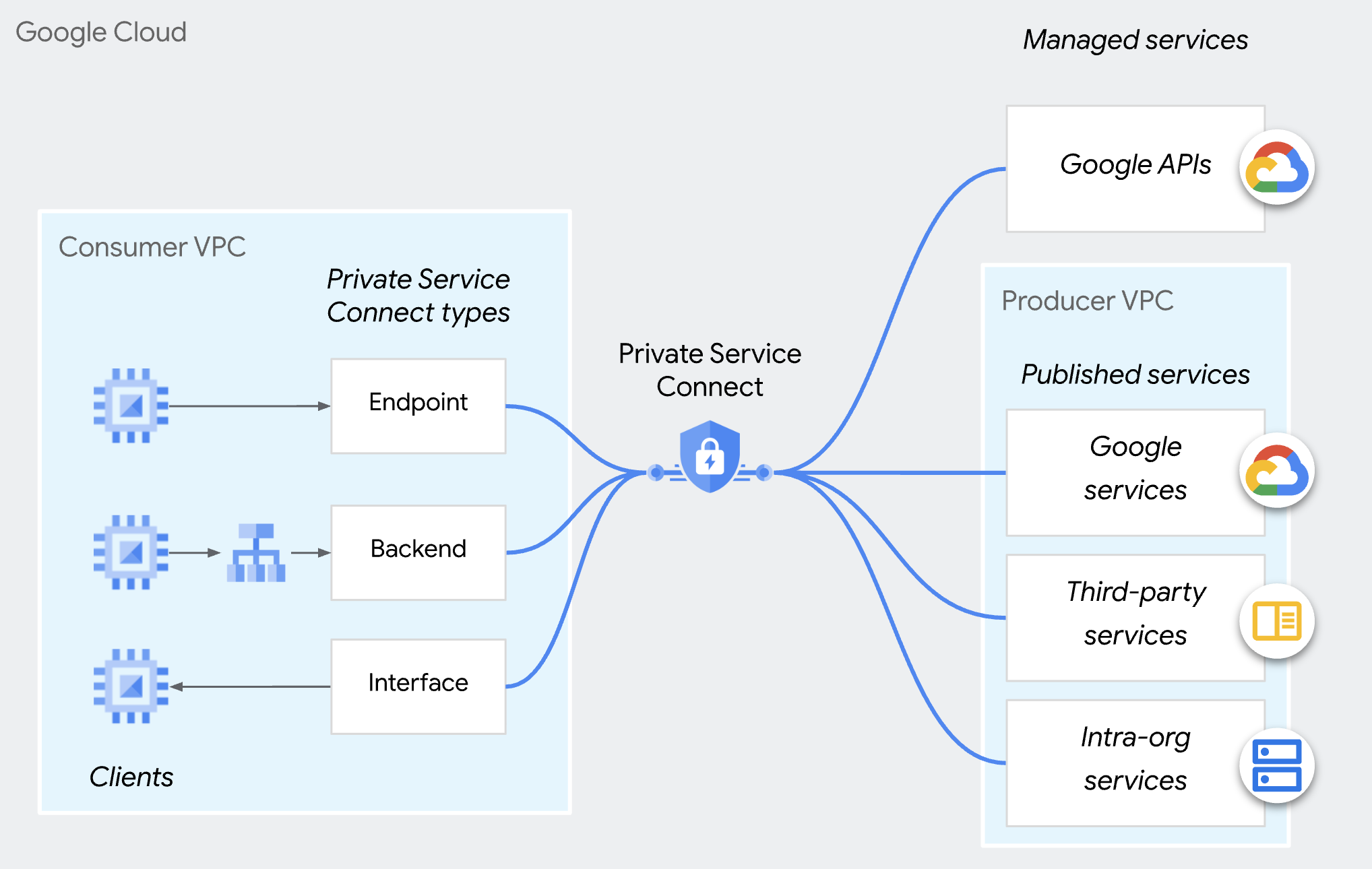
Private Service Connect 供應商存取控制
供應商不會自動接受來自任何消費者的所有連線,只有消費者位於消費者接受清單中,供應商才會接受連入連線要求。您可以依專案、虛擬私有雲網路或個別 PSC 端點指定消費者。您無法在同一個消費者接受或拒絕清單中加入不同類型的消費者。
無論連線偏好設定為何,組織政策 (compute.restrictPrivateServiceConnectConsumer) 都可以封鎖連入連線,藉此覆寫並拒絕接受的連線。
請注意,組織政策 (compute.restrictPrivateServiceConnectConsumer) 適用於組織、資料夾或專案。如要對 PSC 端點進行精細的存取控管,可以使用個別 PSC 端點的消費者接受清單。
以端點為準的存取控管
服務供應商可透過服務連結政策中的個別 PSC 端點,授權服務使用者存取 PSC 端點,這就是 PSC 端點存取控管。
建議多租戶服務採用這種方法,以最精細的方式控管連線。
本程式碼研究室的重點是瞭解如何設定這項功能。
請注意,這個方法不適用於 Private Service Connect 後端。
2. 學習內容
- 以供應商身分,如何使用 PSC 發布服務。
- 身為生產者,如何建立以 PSC 端點為基礎的存取控管機制。
- 身為消費者,如何存取 PSC 服務。
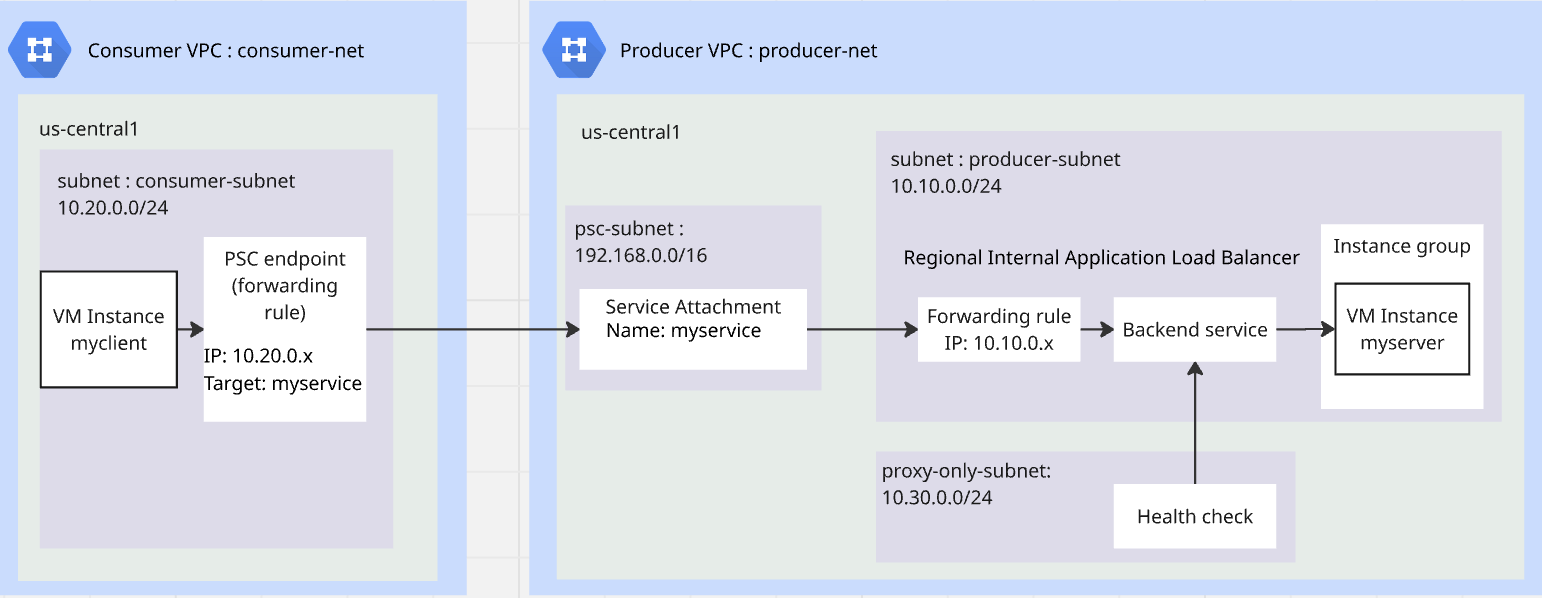
3. 實驗室整體架構
4. 準備步驟
實驗室作業所需的 IAM 角色
首先,您要在專案層級將必要的 IAM 角色指派給 GCP 帳戶。
- Compute 網路管理員 (
roles/compute.networkAdmin):這個角色可讓您完全控管 Compute Engine 網路資源。 - 記錄管理員 (
roles/logging.admin):這個角色可授予所有記錄權限和相關權限的存取權。 - 服務使用情形管理員 (
roles/serviceusage.serviceUsageAdmin):這個角色可讓您啟用、停用及檢查服務狀態、檢查作業,以及使用消費者專案的配額和帳單。 - Compute 執行個體管理員 (
roles/compute.instanceAdmin.v1):這個角色可讓您完全控管 Compute Engine 執行個體、執行個體群組、磁碟、快照和映像檔。以及 Compute Engine 網路資源的讀取存取權。 - Compute 安全管理員 (
roles/compute.securityAdmin):具備這個角色的使用者可以建立、修改及刪除防火牆規則和 SSL 憑證,以及設定 Shielded VM 設定。
啟用 API
在 Cloud Shell 中,確認專案設定正確,並設定環境變數。
在 Cloud Shell 中執行下列操作:
gcloud auth login
gcloud config set project <your project id>
export project_id=$(gcloud config get-value project)
export region=us-central1
export zone=$region-a
echo $project_id
echo $region
echo $zone
在專案中啟用所有必要的 Google API。在 Cloud Shell 中執行下列操作:
gcloud services enable \
  compute.googleapis.com
建立供應商虛擬私有雲
在專案中,建立採用自訂子網路模式的虛擬私有雲網路。在 Cloud Shell 中執行下列操作:
gcloud compute networks create producer-net \
    --subnet-mode=custom
在供應商虛擬私有雲中建立子網路
您需要三個子網路:服務的生產端子網路;負載平衡器發布服務的僅限 Proxy 子網路;PSC 發布服務的 PSC 子網路。
在 Cloud Shell 中執行下列操作,建立 IPv4 子網路:
gcloud compute networks subnets create producer-subnet \
    --network=producer-net \
    --range=10.10.0.0/24 \
    --region=$region
gcloud compute networks subnets create proxy-only-subnet \
    --purpose=REGIONAL_MANAGED_PROXY \
    --role=ACTIVE \
    --region=$region \
    --network=producer-net \
    --range=10.30.0.0/24
gcloud compute networks subnets create psc-subnet \
    --network=producer-net \
    --region=$region \
    --range=192.168.0.0/16 \
    --purpose=PRIVATE_SERVICE_CONNECT
為供應商虛擬私有雲建立 Cloud NAT 和 Cloud Router
Cloud NAT 可讓 VM 下載及安裝應用程式。
gcloud compute routers create $region-cr \
   --network=producer-net \
   --region=$region
gcloud compute routers nats create $region-nat \
    --router=$region-cr \
    --region=$region \
    --nat-all-subnet-ip-ranges \
    --auto-allocate-nat-external-ips
建立消費者虛擬私有雲
在專案中,建立採用自訂子網路模式的虛擬私有雲網路。在 Cloud Shell 中執行下列操作:
gcloud compute networks create consumer-net \
    --subnet-mode=custom
在消費者虛擬私有雲中建立子網路
在 Cloud Shell 中執行下列操作,建立 IPv4 子網路:
gcloud compute networks subnets create consumer-subnet \
    --network=consumer-net \
    --range=10.20.0.0/24 \
    --region=$region
為供應商虛擬私有雲和消費者虛擬私有雲建立全域防火牆政策
您將建立全域網路防火牆政策,並將其與生產端 VPC 和用戶端 VPC 建立關聯。
gcloud compute network-firewall-policies create global-fw-policy \
--global
gcloud compute network-firewall-policies associations create \
    --firewall-policy=global-fw-policy \
    --name=producer-fw-policy \
    --network=producer-net \
    --global-firewall-policy
gcloud compute network-firewall-policies associations create \
    --firewall-policy=global-fw-policy \
    --name=consumer-fw-policy \
    --network=consumer-net \
    --global-firewall-policy
允許 SSH
如要允許 Identity-Aware Proxy (IAP) 連線至您的 VM 執行個體,請根據以下條件建立防火牆規則:
- 套用至所有您希望能透過 IAP 存取的 VM 執行個體。
- 允許來自 IP 範圍 35.235.240.0/20 的輸入流量。這個範圍包含 IAP 用於 TCP 轉送的所有 IP 位址。
gcloud compute network-firewall-policies rules create 100 \
    --action=ALLOW \
    --firewall-policy=global-fw-policy \
    --description="producer-allow-iap" \
    --direction=INGRESS \
    --src-ip-ranges=35.235.240.0/20 \
    --layer4-configs=tcp:22  \
    --global-firewall-policy
為服務新增輸入防火牆規則
您將使用區域內部應用程式負載平衡器發布服務。輸入防火牆規則 y 必須允許 proxy-only-subnet 存取服務。詳情請參閱這份文件。
gcloud compute network-firewall-policies rules create 200 \
    --action=ALLOW \
    --firewall-policy=global-fw-policy \
    --description="producer-allow-access-service" \
    --direction=INGRESS \
    --src-ip-ranges=10.30.0.0/24 \
    --layer4-configs=tcp:80  \
    --global-firewall-policy
允許負載平衡器對服務執行健康狀態檢查
區域內部應用程式負載平衡器的健康狀態檢查探測會使用 35.191.0.0/16 和 130.211.0.0/22 範圍。您將建立 ingress 防火牆規則,允許探測器進行健康狀態檢查。詳情請參閱這份文件。
gcloud compute network-firewall-policies rules create 300 \
    --action=ALLOW \
    --firewall-policy=global-fw-policy \
    --description="producer-allow-health-check" \
    --direction=INGRESS \
    --src-ip-ranges=35.191.0.0/16,130.211.0.0/22\
    --layer4-configs=tcp:80  \
    --global-firewall-policy
在消費者虛擬私有雲中建立 VM 做為 HTTP 用戶端
在 Cloud Shell 中執行下列操作,建立 VM 執行個體做為測試用戶端:
gcloud compute instances create myclient \
    --zone=$zone \
    --subnet=consumer-subnet \
    --shielded-secure-boot \
    --no-address
在生產端虛擬私有雲中建立 VM 做為 HTTP 伺服器
在 Cloud Shell 中執行下列指令,建立做為 HTTP 伺服器的 VM 執行個體:
gcloud compute instances create myserver \
    --subnet=producer-subnet \
    --zone=$zone \
    --no-address \
    --shielded-secure-boot \
    --metadata startup-script='#! /bin/bash
    sudo apt-get update
    sudo apt-get install apache2 -y
    a2enmod ssl
    sudo a2ensite default-ssl
    echo "I am a Http Server." | \
    tee /var/www/html/index.html
    systemctl restart apache2'
5. 生產者發布 PSC 服務
建立區域性內部應用程式負載平衡器
您將建立地區性內部應用程式負載平衡器做為服務的前端,後端則是端點為先前建立的 HTTP 伺服器的非代管執行個體群組。
保留負載平衡器的 IP 位址
gcloud compute addresses create l7-ilb-ip-address \
    --region=$region \
    --subnet=producer-subnet
建立執行個體群組
您將建立非代管執行個體群組,並在該群組中新增 VM 執行個體 myserver。
gcloud compute instance-groups unmanaged create my-service-ig \
    --zone=$zone
gcloud compute instance-groups unmanaged add-instances my-service-ig \
    --zone=$zone \
    --instances=myserver
建立 HTTP 健康狀態檢查
gcloud compute health-checks create http l7-ilb-basic-check \
     --region=$region \
     --use-serving-port
建立後端服務
gcloud compute backend-services create l7-ilb-backend-service \
    --load-balancing-scheme=INTERNAL_MANAGED \
    --protocol=HTTP \
    --health-checks=l7-ilb-basic-check \
    --health-checks-region=$region \
    --region=$region
將後端新增至後端服務
gcloud compute backend-services add-backend l7-ilb-backend-service \
    --balancing-mode=UTILIZATION \
    --instance-group=my-service-ig \
    --instance-group-zone=$zone \
    --region=$region
建立網址對應
gcloud compute url-maps create l7-ilb-map \
    --default-service=l7-ilb-backend-service \
    --region=$region
建立目標 Proxy
gcloud compute target-http-proxies create l7-ilb-proxy \
    --url-map=l7-ilb-map \
    --url-map-region=$region \
    --region=$region
建立轉送規則
gcloud compute forwarding-rules create l7-ilb-forwarding-rule \
    --load-balancing-scheme=INTERNAL_MANAGED \
    --network=producer-net \
    --subnet=producer-subnet \
    --address=l7-ilb-ip-address \
    --ports=80 \
    --region=$region \
    --target-http-proxy=l7-ilb-proxy \
    --target-http-proxy-region=$region
PSC 供應商發布服務
您將使用 PSC 發布服務,並將連線偏好設定為 ACCEPT_MANUAL,且消費者清單為空白。
gcloud compute service-attachments create my-psc-service \
    --region=$region \
 --target-service=projects/$project_id/regions/$region/forwardingRules/l7-ilb-forwarding-rule \
    --connection-preference=ACCEPT_MANUAL \
    --nat-subnets=psc-subnet
export myserver_service_attachment=$(gcloud compute service-attachments describe my-psc-service --region=$region --format="value(selfLink.scope(v1))")

echo $myserver_service_attachment
6. 消費者建立 PSC 端點
為 PSC 端點預留 IP
gcloud compute addresses create myserver-psc-endpoint-ip \
    --region=$region \
    --subnet=consumer-subnet \
    --ip-version=IPV4
建立 PSC 端點
建立 PSC 端點,並在下一個步驟中取得 PSC 端點的 IP 以進行測試。
gcloud compute forwarding-rules create myserver-psc-endpoint \
    --region=$region \
    --network=consumer-net \
    --address=myserver-psc-endpoint-ip \
    --target-service-attachment=$myserver_service_attachment
psc_endpoint_ip=$(gcloud compute forwarding-rules describe myserver-psc-endpoint \
    --region=$region --format="value(IPAddress)")

echo $psc_endpoint_ip
消費者檢查 PSC 端點狀態
在生產者將 PSC 端點新增至消費者清單之前,連線會顯示在消費者端的「已連線端點」中,狀態為「待處理」。
gcloud compute forwarding-rules describe myserver-psc-endpoint \
    --region=$region
您會看到類似下方的結果。
IPAddress: 10.20.0.3
allowPscGlobalAccess: false
creationTimestamp: '2026-02-23T16:27:27.920-08:00'
fingerprint: yh_UiYqjHCc=
id: '934193159895862912'
kind: compute#forwardingRule
labelFingerprint: 42WmSpB8rSM=
name: myserver-psc-endpoint
network: https://www.googleapis.com/compute/v1/projects/<project_id>/global/networks/consumer-net
networkTier: PREMIUM
pscConnectionId: '160443618817212419'
pscConnectionStatus: PENDING
region: https://www.googleapis.com/compute/v1/projects/<project_id>/regions/us-central1
selfLink: https://www.googleapis.com/compute/v1/projects/<project_id>/regions/us-central1/forwardingRules/myserver-psc-endpoint
selfLinkWithId: https://www.googleapis.com/compute/v1/projects/<project_id>/regions/us-central1/forwardingRules/934193159895862912
serviceDirectoryRegistrations:
- namespace: goog-psc-default
target: https://www.googleapis.com/compute/v1/projects/<project_id>/regions/us-central1/serviceAttachments/my-psc-service
7. 測試從消費者 VM 存取生產者 VM
檢查 PSC 端點 IP。
echo $psc_endpoint_ip
透過 SSH 連線至名為 myclient 的 VM,並測試是否能透過 HTTP 80 連接埠存取 myserver。
在 Cloud Shell 中執行下列操作:
gcloud compute ssh \
    --zone=$zone "myclient" \
    --tunnel-through-iap
使用 curl 存取您建立的 PSC 端點。
curl -m 10 <psc_endpoint_ip>
您會看到 curl 指令逾時。用戶端虛擬私有雲的測試用戶端無法存取供應商虛擬私有雲中的 HTTP 伺服器。
curl: (28) Connection timed out after 10001 milliseconds
結束 SSH 工作階段,返回 Cloud Shell。
exit
8. 生產者核准 PSC 端點
生產者檢查 PSC 端點狀態
在生產者將 PSC 端點新增至消費者清單之前,連線會顯示在服務連結中,狀態為「待處理」。
gcloud compute service-attachments describe my-psc-service --region=$region
您會看到類似下方的結果。
connectedEndpoints:
- consumerNetwork: https://www.googleapis.com/compute/projects/<project_id>/global/networks/consumer-net
  endpoint: https://www.googleapis.com/compute/projects/<project_id>/regions/us-central1/forwardingRules/myserver-psc-endpoint
  endpointWithId: https://www.googleapis.com/compute/projects/<project_id>/regions/us-central1/forwardingRules/934193159895862912
  pscConnectionId: '160443618817212419'
  status: PENDING
connectionPreference: ACCEPT_MANUAL
creationTimestamp: '2026-02-23T13:27:33.886-08:00'
description: ''
enableProxyProtocol: false
fingerprint: -9EI8FCALrA=
id: '2578692595155826858'
kind: compute#serviceAttachment
name: my-psc-service
natSubnets:
- https://www.googleapis.com/compute/projects/<project_id>/regions/us-central1/subnetworks/psc-subnet
pscServiceAttachmentId:
  high: '149466704441770984'
  low: '2578692595155826858'
reconcileConnections: false
region: https://www.googleapis.com/compute/projects/<project_id>/regions/us-central1
selfLink: https://www.googleapis.com/compute/projects/<project_id>/regions/us-central1/serviceAttachments/my-psc-service
targetService: https://www.googleapis.com/compute/projects/<project_id>/regions/us-central1/forwardingRules/l7-ilb-forwarding-rule
取得 PSC 端點的 ID 型 URI
PSC 端點的 ID 型 URI 是消費者剛建立的轉送規則 ID。在上述範例中,「endpointWithId」是消費者建立的 PSC 端點 URI。製作人需要這個 URI,才能建立以端點為準的存取控管機制。
( 請注意,我們需要的不是 PSC 連線 ID,)
export psc_endpoint_uri=$(gcloud compute service-attachments describe my-psc-service --region=$region --format="value(connectedEndpoints.endpointWithId)")

echo $psc_endpoint_uri
在消費者接受清單中新增以 PSC 端點 ID 為基礎的 URI
gcloud compute service-attachments update my-psc-service \
    --region=$region \
    --consumer-accept-list=$psc_endpoint_uri
生產者檢查 PSC 端點狀態
gcloud compute service-attachments describe my-psc-service --region=$region --format="value(connectedEndpoints)"
您會看到類似下方的結果。狀態已變更為「已接受」。
{'consumerNetwork': 'https://www.googleapis.com/compute/projects/<project_id>/global/networks/consumer-net', 'endpoint': 'https://www.googleapis.com/compute/projects/<project_id>/regions/us-central1/forwardingRules/myserver-psc-endpoint', 'endpointWithId': 'https://www.googleapis.com/compute/projects/<project_id>/regions/us-central1/forwardingRules/47564871796017232', 'pscConnectionId': '54547416268144643', 'status': 'ACCEPTED'}
9. 測試從消費者 VM 存取生產者 VM
檢查 PSC 端點 IP。
echo $psc_endpoint_ip
透過 SSH 連線至名為 myclient 的 VM,並測試是否能透過 HTTP 80 連接埠存取 myserver。
在 Cloud Shell 中執行下列操作:
gcloud compute ssh \
    --zone=$zone "myclient" \
    --tunnel-through-iap
使用 curl 存取您建立的 PSC 端點。
curl <psc_endpoint_ip>
您會看到 curl 指令成功從 myserver 傳回回應。用戶虛擬私有雲的測試用戶端已存取供應商虛擬私有雲中的 HTTP 伺服器。
I am a Http Server.
結束 SSH 工作階段,返回 Cloud Shell。
exit
10. 清理
清理 VM
在 Cloud Shell 中執行下列操作:
gcloud compute instances delete myserver --zone $zone --quiet
gcloud compute instances delete myclient --zone $zone --quiet
清理 PSC 用戶元件
gcloud compute forwarding-rules delete myserver-psc-endpoint \
    --region=$region --quiet
gcloud compute addresses delete myserver-psc-endpoint-ip \
    --region=$region --quiet
清理 PSC 製作工具元件
gcloud compute service-attachments delete my-psc-service \
    --region=$region --quiet
gcloud compute forwarding-rules delete l7-ilb-forwarding-rule \
    --region=$region --quiet
gcloud compute target-http-proxies delete l7-ilb-proxy \
    --region=$region --quiet
gcloud compute url-maps delete l7-ilb-map \
    --region=$region --quiet
gcloud compute backend-services remove-backend l7-ilb-backend-service \
    --instance-group=my-service-ig \
    --instance-group-zone=$zone \
    --region=$region --quiet
gcloud compute backend-services delete l7-ilb-backend-service \
    --region=$region --quiet
gcloud compute health-checks delete l7-ilb-basic-check \
     --region=$region --quiet
gcloud compute instance-groups unmanaged delete my-service-ig \
    --zone=$zone --quiet
gcloud compute addresses delete l7-ilb-ip-address \
    --region=$region --quiet
清理防火牆、Cloud NAT、Cloud Router 和 VPC
gcloud compute network-firewall-policies rules delete 100 \
    --firewall-policy=global-fw-policy \
    --global-firewall-policy --quiet
gcloud compute network-firewall-policies rules delete 200 \
    --firewall-policy=global-fw-policy \
    --global-firewall-policy --quiet
gcloud compute network-firewall-policies rules delete 300 \
    --firewall-policy=global-fw-policy \
    --global-firewall-policy --quiet
gcloud compute network-firewall-policies associations delete \
    --firewall-policy=global-fw-policy \
    --name=producer-fw-policy \
    --global-firewall-policy --quiet
gcloud compute network-firewall-policies associations delete \
    --firewall-policy=global-fw-policy \
    --name=consumer-fw-policy \
    --global-firewall-policy --quiet
gcloud compute network-firewall-policies delete global-fw-policy \
    --global --quiet
gcloud compute routers nats delete $region-nat \
    --router=$region-cr \
    --region=$region --quiet
gcloud compute routers delete $region-cr \
    --region=$region --quiet
gcloud compute networks subnets delete producer-subnet \
    --region=$region --quiet
gcloud compute networks subnets delete proxy-only-subnet \
    --region=$region --quiet
gcloud compute networks subnets delete psc-subnet \
    --region=$region --quiet
gcloud compute networks delete producer-net --quiet
gcloud compute networks subnets delete consumer-subnet \
    --region=$region --quiet
gcloud compute networks delete consumer-net --quiet
11. 恭喜
您已成功測試以 Private Service Connect 供應商端點為準的存取控管。