

1. نظرة عامة
بيئة تشغيل الوكيل (Agent Runtime) (المعروفة سابقًا باسم Agent Engine) توفّر بيئة تشغيل مُدارة مصمّمة لنشر وكلاء الذكاء الاصطناعي وتشغيلهم وتوسيع نطاقهم بفعالية. تلقائيًا، تجمِّع المنصة رمز المصدر والتبعيات تلقائيًا أثناء عملية النشر.
ومع ذلك، غالبًا ما تتطلّب أحمال العمل في المؤسسات ملكية كاملة لبيئة التشغيل. لدعم ذلك، توفّر بيئة تشغيل الوكيل إمكانية إحضار الحاوية الخاصة بك(BYOC)، ما يسمح لك بنشر صور حاويات مخصّصة تم إنشاؤها مسبقًا.
يحدّد هذا الدرس التطبيقي حول الترميز العملية الشاملة لشحن وكيل تم إنشاؤه باستخدام حزمة تطوير الوكلاء (ADK) من Google في حاوية، وضبط أذونات Google Cloud اللازمة، ونشره في بيئة تشغيل الوكيل باستخدام حزمة Python SDK أو Terraform.
يوجّهك هذا الدرس التطبيقي حول الترميز خلال ما يلي:
- إنشاء وكيل Python باستخدام حزمة تطوير الوكلاء (ADK) من Google.
- تضمين الوكيل في تطبيق FastAPI
- شحن التطبيق في حاوية باستخدام Docker
- ضبط أذونات Google Cloud
- نشر الوكيل المشحون في حاوية واختباره على بيئة تشغيل الوكيل
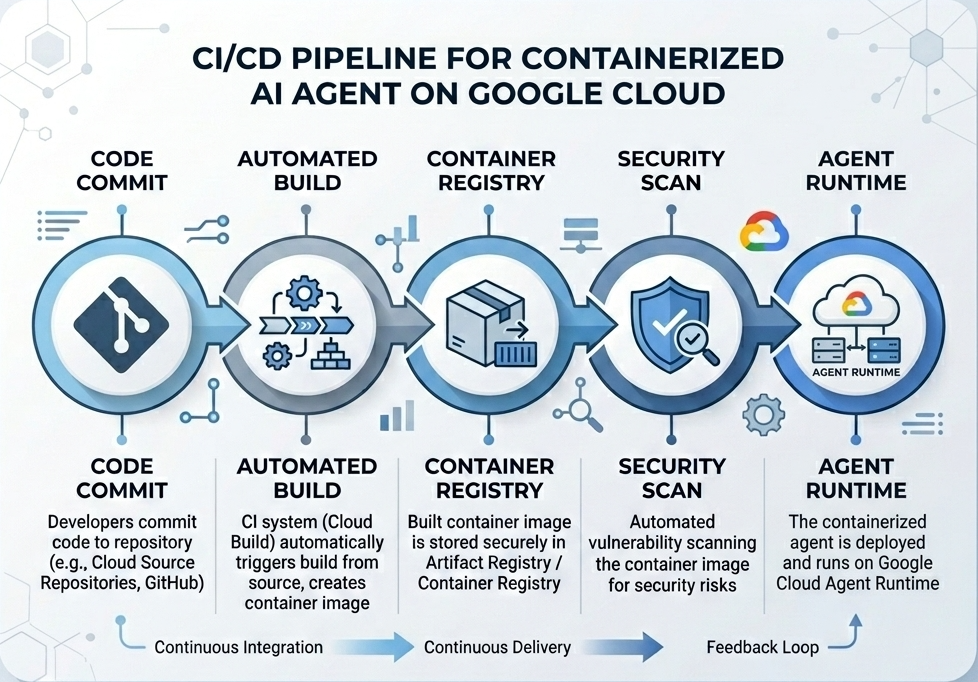
سير عمل الإنشاء والنشر
يوضّح الرسم البياني التالي سير عمل خطوات الإنشاء والنشر التي ستنفّذها يدويًا في هذا الدرس التطبيقي حول الترميز:
المتطلبات
- مشروع على Google Cloud تم تفعيل الفوترة فيه
- الوصول إلى Cloud Shell (ننصح بذلك) أو بيئة تطوير محلية مثبَّت عليها
gcloudوdocker - معرفة أساسية بلغتَي Python وDocker
2. إعداد البيئة
قبل البدء، عليك تفعيل واجهات برمجة التطبيقات اللازمة وضبط بيئتك.
الخطوة 1: فتح Cloud Shell
انقر على الزر تفعيل Cloud Shell في أعلى يسار Google Cloud Console.
الخطوة 2: ضبط متغيّرات البيئة
في Cloud Shell، اضبط رقم تعريف مشروعك وحدِّد متغيّرات البيئة الرئيسية المستخدَمة في هذا الدرس التطبيقي حول الترميز. استبدِل "YOUR_PROJECT_ID" برقم تعريف مشروعك الفعلي على Google Cloud:
gcloud config set project "YOUR_PROJECT_ID"
export PROJECT_ID=$(gcloud config get-value project)
export LOCATION="us-central1"
export MODEL="gemini-3.1-flash-lite"
export MODEL_REGION="global"
تضبط هذه المتغيّرات إعدادات النشر المستهدَفة:
PROJECT_ID: المعرّف الفريد لمشروعك على Google Cloud الذي ستتوفّر فيه جميع موارد منصة وكيل Gemini Enterprise وArtifact RegistryLOCATION: المنطقة الجغرافية (مثلus-central1) التي تستضيف المستودعات وأحمال عمل وقت التشغيلMODEL: إصدار نموذج Gemini (مثلgemini-3.1-flash-lite) الذي يحمّله سياق الوكيلMODEL_REGION: منطقة نقطة نهاية النموذج اضبط هنا على"global"لاستدعاء نموذج Gemini من نقاط النهاية العالمية.
الخطوة 3: تفعيل واجهات برمجة التطبيقات
فعِّل Google Cloud APIs المطلوبة:
gcloud services enable \
    aiplatform.googleapis.com \
    cloudbuild.googleapis.com \
    compute.googleapis.com \
    artifactregistry.googleapis.com \
    storage.googleapis.com
الخطوة 4: تثبيت حزمة SDK
ثبِّت حزمة Vertex AI SDK مع دعم Agent Engine وADK:
pip install --upgrade "google-cloud-aiplatform[agent_engines,adk]>=1.144"
3. إعداد ملفات المصدر
في هذه الخطوة، ستنشئ بنية ورمز وكيلك.
نظرة عامة على بنية الدليل
بحلول نهاية هذا الدرس التطبيقي حول الترميز، سيتم تنظيم ملفاتك ضمن التسلسل الهرمي التالي لمساحة العمل:
weather-agent-byoc/
├── Dockerfile                  # Container definition
├── deploy_byoc.py              # Python SDK deployment script
├── main.py                     # FastAPI server wrapper
├── query_agent.py              # Verify / query script
├── requirements.txt            # Python dependencies
│
├── weather_agent/              # Agent source module
│   ├── __init__.py             # Package declaration
│   ├── agent.py                # Agent & mock tools logic
│   └── config.json             # Environment config variables
│
└── terraform/                  # Terraform configuration files
    ├── main.tf
    ├── outputs.tf
    ├── providers.tf
    ├── terraform.tfvars
    └── variables.tf
الخطوة 1: إنشاء الأدلة
ابدأ في دليلك الرئيسي وأنشئ بنية مساحة العمل:
cd ~
mkdir -p weather-agent-byoc/weather_agent
cd weather-agent-byoc
الخطوة 2: إنشاء ملف الإعداد
نفِّذ الأمر التالي في Cloud Shell لكتابة مَعلمات الإعداد مباشرةً في weather_agent/config.json. يستبدل هذا الأمر المتغيّرات تلقائيًا بقيم بيئتك:
cat <<EOF > weather_agent/config.json
{
    "PROJECT_ID": "${PROJECT_ID}",
    "LOCATION": "${LOCATION}",
    "MODEL": "${MODEL}",
    "MODEL_REGION": "${MODEL_REGION}"
}
EOF
الخطوة 3: تحديد الوكيل
نفِّذ النص البرمجي التالي لكتابة إعدادات الوكيل ومنطق الأداة الوهمية في weather_agent/agent.py:
cat << 'EOF' > weather_agent/agent.py
import json
import random
from google.adk.agents import Agent
from google.adk.models.google_llm import Gemini
from functools import cached_property
from google.genai import Client

# Load config
llm_config = json.load(open("weather_agent/config.json"))
PROJECT_ID = llm_config["PROJECT_ID"]
MODEL = llm_config["MODEL"]
MODEL_REGION = llm_config["MODEL_REGION"]

# Override Gemini class for global endpoint compatibility
class GlobalGemini(Gemini):
  @cached_property
  def api_client(self) -> Client:
    return Client(vertexai=True, location="global")

# Define Tool
def get_temperature(place: str) -> str:
    '''Returns the current temperature of a given place.

    Args:
        place: The name of the city or location.

    Returns:
        str: A string describing the temperature.
    '''
    temp = random.randint(-10, 40)
    return f"The current temperature in {place} is {temp}°C."

# Initialize LLM
llm_model = GlobalGemini(model=MODEL) if MODEL_REGION == "global" else Gemini(model=MODEL)

# Initialize Agent
root_agent = Agent(
    model=llm_model,
    name='weather_agent',
    description='An agent that provides temperature information for locations.',
    instruction='You are a helpful assistant that can provide the current temperature for any given place using the get_temperature tool.',
    tools=[get_temperature],
)
EOF
أنشِئ ملف __init__.py فارغًا لجعل weather_agent حزمة Python:
touch weather_agent/__init__.py
الخطوة 4: إنشاء برنامج تضمين FastAPI
نفِّذ النص البرمجي التالي لكتابة إعدادات نقطة دخول خادم FastAPI في main.py:
cat << 'EOF' > main.py
import inspect
import json
import logging
import os
from typing import Any, Dict, Optional
import uvicorn
import vertexai
from weather_agent.agent import root_agent
from fastapi import FastAPI, encoders, responses, Request
from vertexai import agent_engines

app = FastAPI()

config_json = json.load(open("weather_agent/config.json"))
PROJECT_ID = config_json["PROJECT_ID"]
LOCATION = config_json["LOCATION"]
MODEL_REGION = config_json["MODEL_REGION"]

vertexai.init(project=PROJECT_ID, location=MODEL_REGION)
adk_app = agent_engines.AdkApp(agent=root_agent)

def _encode_chunk_to_json(chunk):
  try:
    json_chunk = encoders.jsonable_encoder(chunk)
    return json.dumps(json_chunk) + "\n"
  except Exception:
    logging.exception("Failed to encode chunk")
    return None

async def json_generator(output):
  async for chunk in output:
    encoded_chunk = _encode_chunk_to_json(chunk)
    if encoded_chunk is None:
      break
    yield encoded_chunk

async def _invoke_callable_or_raise(invocation_callable, invocation_payload):
  if inspect.iscoroutinefunction(invocation_callable):
    return await invocation_callable(**invocation_payload)
  else:
    return invocation_callable(**invocation_payload)

@app.post("/api/reasoning_engine")
async def query(request: Request) -> responses.JSONResponse:
    request_json = await request.json()
    class_method = request_json.get("class_method")
    input_val = request_json.get("input")
    method = getattr(adk_app, class_method)
    output = await _invoke_callable_or_raise(method, input_val or {})
    try:
      json_serialized_content = encoders.jsonable_encoder({"output": output})
    except ValueError as encoding_error:
      logging.exception("Failed to encode response")
      raise encoding_error
    return responses.JSONResponse(content=json_serialized_content)

@app.post("/api/stream_reasoning_engine")
async def stream_query(request: Request) -> responses.StreamingResponse:
    request_json = await request.json()
    class_method = request_json.get("class_method")
    input_val = request_json.get("input")
    method = getattr(adk_app, class_method)
    output = await _invoke_callable_or_raise(method, input_val or {})
    return responses.StreamingResponse(
        content=json_generator(output),
        media_type="application/json",
    )

if __name__ == "__main__":
    uvicorn.run(app, host="0.0.0.0", port=int(os.environ.get("PORT", 8080)))
EOF
الخطوة 5: تحديد التبعيات
اكتب تبعيات Python المطلوبة في requirements.txt:
cat << 'EOF' > requirements.txt
fastapi
uvicorn
vertexai
google-cloud-aiplatform[agent_engines,adk]>=1.144
pydantic
EOF
4. شحن بالحاويات
الآن، حدِّد كيفية تجميع وكيلك في حاوية.
الخطوة 1: إنشاء ملف Dockerfile
أنشِئ Dockerfile في جذر دليل مشروعك لتحديد كيفية إنشاء تطبيق FastAPI:
cat << 'EOF' > Dockerfile
FROM python:3.11-slim

WORKDIR /app

COPY weather_agent/ /app/weather_agent/
COPY main.py .
COPY requirements.txt .
RUN pip install -r requirements.txt

CMD ["sh", "-c", "uvicorn main:app --host 0.0.0.0 --port $PORT"]
EOF
5. إعداد Artifact Registry وCloud Build
تحتاج إلى مستودع لتخزين صورة الحاوية وأذونات لنشرها.
الخطوة 1: إنشاء مستودع
حدِّد اسم المستودع وأنشِئ مستودع Docker داخل Artifact Registry باستخدام متغيّرات البيئة التي تم تحديدها أثناء الإعداد:
export REPOSITORY_NAME="agents-repo"

gcloud artifacts repositories create $REPOSITORY_NAME \
    --project=$PROJECT_ID \
    --repository-format=docker \
    --location=$LOCATION \
    --description="Docker repository for Agents"
الخطوة 2: ضبط أذونات حساب الخدمة
امنح حساب خدمة Compute التلقائي إذن نشر الصور في Artifact Registry.
أولاً، احصل على رقم مشروعك:
export PROJECT_NUMBER=$(gcloud projects describe $PROJECT_ID --format="value(projectNumber)")
امنح الأدوار:
# Allow pushing to Artifact Registry
gcloud projects add-iam-policy-binding $PROJECT_ID \
    --member="serviceAccount:$PROJECT_NUMBER-compute@developer.gserviceaccount.com" \
    --role="roles/artifactregistry.writer" \
    --condition=None

# Allow Cloud Build to read storage objects
gcloud projects add-iam-policy-binding $PROJECT_NUMBER \
    --member="serviceAccount:$PROJECT_NUMBER-compute@developer.gserviceaccount.com" \
    --role="roles/storage.objectViewer" \
    --condition=None
الخطوة 3: منح الأذونات لوكلاء الخدمة
امنح وكلاء خدمة AI Platform وReasoning Engine إذن الوصول للقراءة إلى Artifact Registry:
gcloud projects add-iam-policy-binding $PROJECT_NUMBER \
    --member="serviceAccount:service-$PROJECT_NUMBER@gcp-sa-aiplatform-re.iam.gserviceaccount.com" \
    --role="roles/artifactregistry.reader"  --condition=None

gcloud projects add-iam-policy-binding $PROJECT_NUMBER \
    --member="serviceAccount:service-$PROJECT_NUMBER@gcp-sa-aiplatform.iam.gserviceaccount.com" \
    --role="roles/artifactregistry.reader"  --condition=None
الخطوة 4: إنشاء الصورة ونشرها
استخدِم Cloud Build لإنشاء صورة الحاوية ونشرها:
gcloud builds submit \
    --project=$PROJECT_ID \
    --region=$LOCATION \
    --tag $LOCATION-docker.pkg.dev/$PROJECT_ID/$REPOSITORY_NAME/weather-agent-image:latest \
    .
6. نشر الوكيل باستخدام حزمة SDK
بعد ضبط الأذونات، يمكنك نشر الحاوية المخصّصة.
الخطوة 1: نشر وكيل BYOC
أنشِئ ملف Python باسم deploy_byoc.py داخل جذر دليل مشروعك لنشر الحاوية المستضافة في السجلّ إلى بيئة تشغيل الوكيل:
cat << 'EOF' > deploy_byoc.py
import json
import os
import vertexai
from google.cloud import aiplatform

config = json.load(open("weather_agent/config.json"))
PROJECT_ID = config["PROJECT_ID"]
LOCATION = config["LOCATION"]
REPOSITORY_NAME = "agents-repo"

vertexai.init(project=PROJECT_ID, location=LOCATION)
client = vertexai.Client(project=PROJECT_ID, location=LOCATION)

image_uri = f"{LOCATION}-docker.pkg.dev/{PROJECT_ID}/{REPOSITORY_NAME}/weather-agent-image:latest"

print(f"Deploying custom container agent from {image_uri}...")
remote_agent = client.agent_engines.create(
    config={
        "display_name": "byoc_weather_agent",
        "description": "BYOC weather agent from custom container",
        "container_spec": {
            "image_uri": image_uri
        },
        "class_methods": [
            # For convenience to interact with the agent through the Python SDK
            # https://docs.cloud.google.com/gemini-enterprise-agent-platform/scale/runtime/use-an-adk-agent#supported-operations
            {"api_mode": "", "name": "get_session"},
            {"api_mode": "", "name": "list_sessions"},
            {"api_mode": "", "name": "create_session"},
            {"api_mode": "", "name": "delete_session"},
            {"api_mode": "async", "name": "async_get_session"},
            {"api_mode": "async", "name": "async_list_sessions"},
            {"api_mode": "async", "name": "async_create_session"},
            {"api_mode": "async", "name": "async_delete_session"},
            {"api_mode": "async", "name": "async_add_session_to_memory"},
            {"api_mode": "async", "name": "async_search_memory"},
            {"api_mode": "stream", "name": "stream_query"},
            {"api_mode": "async_stream", "name": "async_stream_query"},
            {"api_mode": "async_stream", "name": "streaming_agent_run_with_events"},
        ],
        "agent_framework": "google-adk",
    },
)

print(f"Agent successfully deployed!")
print(f"Resource Name: {remote_agent.api_resource.name}")

# Save resource name for testing
with open("agent_resource_name.txt", "w") as f:
    f.write(remote_agent.api_resource.name)
EOF
نفِّذ النص البرمجي للنشر لنشر الوكيل على بيئة تشغيل الوكيل:
python3 deploy_byoc.py
7. نشر الوكيل باستخدام Terraform
بدلاً من ذلك، يمكنك نشر الوكيل نفسه المشحون في حاوية باستخدام Terraform. ننصح بذلك لبيئات الإنتاج لإدارة البنية الأساسية كرمز.
الخطوة 1: الانتقال إلى دليل Terraform
أنشِئ دليلاً باسم terraform في جذر مشروعك وانتقِل إليه:
mkdir -p terraform
cd terraform
الخطوة 2: إنشاء إعدادات موفِّري الخدمات
نفِّذ النص البرمجي التالي لكتابة عملية ربط موفِّري الخدمات في providers.tf:
cat << 'EOF' > providers.tf
terraform {
  required_providers {
    google = {
      source  = "hashicorp/google"
      version = ">= 5.28.0"
    }
  }
}

provider "google" {
  project = var.project_id
  region  = var.location
}
EOF
الخطوة 3: إنشاء تعريف المتغيّرات
اكتب كتلة وصف الإدخالات في variables.tf:
cat << 'EOF' > variables.tf
variable "project_id" {
  type        = string
  description = "The Google Cloud Project ID"
}

variable "location" {
  type        = string
  description = "The region to deploy the reasoning engine"
  default     = "us-central1"
}

variable "repository_name" {
  type        = string
  description = "The Artifact Registry repository name"
  default     = "agents-repo"
}

variable "image_tag" {
  type        = string
  description = "The tag of the container image to deploy"
  default     = "latest"
}
EOF
الخطوة 4: إنشاء الإعدادات الرئيسية
اكتب مَعلمات تعريف الموارد الرئيسية في main.tf:
cat << 'EOF' > main.tf
locals {
  class_methods = [
    {"api_mode" = "", "name" = "get_session"},
    {"api_mode" = "", "name" = "list_sessions"},
    {"api_mode" = "", "name" = "create_session"},
    {"api_mode" = "", "name" = "delete_session"},
    {"api_mode" = "async", "name" = "async_get_session"},
    {"api_mode" = "async", "name" = "async_list_sessions"},
    {"api_mode" = "async", "name" = "async_create_session"},
    {"api_mode" = "async", "name" = "async_delete_session"},
    {"api_mode" = "async", "name" = "async_add_session_to_memory"},
    {"api_mode" = "async", "name" = "async_search_memory"},
    {"api_mode" = "stream", "name" = "stream_query"},
    {"api_mode" = "async_stream", "name" = "async_stream_query"},
    {"api_mode" = "async_stream", "name" = "streaming_agent_run_with_events"}
  ]
}

# define the resource with the BYOC configuration, set agent_framework to "google-adk" to enable interactive features on the console.
resource "google_vertex_ai_reasoning_engine" "byoc_weather_agent" {
  display_name = "byoc_weather_agent_tf"
  description  = "BYOC weather agent deployed via Terraform"
  project      = var.project_id
  region       = var.location

  spec {
    class_methods = jsonencode(local.class_methods)
    agent_framework = "google-adk"
    container_spec {
      image_uri = "${var.location}-docker.pkg.dev/${var.project_id}/${var.repository_name}/weather-agent-image:${var.image_tag}"
    }
  }
}
EOF
الخطوة 5: إنشاء تعريف النتائج
اكتب كتلة النتائج في outputs.tf:
cat << 'EOF' > outputs.tf
output "reasoning_engine_id" {
  value       = google_vertex_ai_reasoning_engine.byoc_weather_agent.id
  description = "The ID of the deployed reasoning engine"
}

output "reasoning_engine_resource_name" {
  value       = google_vertex_ai_reasoning_engine.byoc_weather_agent.id
  description = "The resource name of the deployed reasoning engine"
}
EOF
الخطوة 6: إنشاء ملف قيم المتغيّرات (tfvars)
يمكنك النشر بشكل ديناميكي بدون تعديل العناصر النائبة عن طريق إدخال متغيّرات البيئة مباشرةً في terraform.tfvars:
cat <<EOF > terraform.tfvars
project_id      = "${PROJECT_ID}"
location        = "${LOCATION}"
repository_name = "agents-repo"
image_tag       = "latest"
EOF
الخطوة 7: التهيئة والتطبيق
هيِّئ Terraform وطبِّق الإعدادات:
terraform init
terraform apply
أكِّد عملية التطبيق عن طريق كتابة yes عندما يُطلب منك ذلك.
بعد اكتمال العملية، يعرض Terraform اسم المورد. يمكنك التقاطه آليًا في agent_resource_name.txt والرجوع إلى المجلد الجذر:
terraform output -raw reasoning_engine_resource_name > ../agent_resource_name.txt
cd ..
8. الاستعلام من الوكيل
تأكَّد من أنّ وكيلك قيد التشغيل ويستجيب.
الخطوة 1: إنشاء نص برمجي للاستعلام
اكتب النص البرمجي للتحقّق في query_agent.py باستخدام عملية تحقّق من إعدادات الإعداد الديناميكي لجلب إحداثيات الموقع الجغرافي:
cat << 'EOF' > query_agent.py
import json
import os
import requests
from google import auth as google_auth
from google.auth.transport import requests as google_requests

# Load config coordinates directly
config_json = json.load(open("weather_agent/config.json"))
LOCATION = config_json["LOCATION"]
PROJECT_ID = config_json["PROJECT_ID"]

# Load agent resource name
with open("agent_resource_name.txt", "r") as f:
    agent_resource_name = f.read().strip()

def get_identity_token():
    credentials, _ = google_auth.default()
    auth_request = google_requests.Request()
    credentials.refresh(auth_request)
    return credentials.token

# Access the agent at the fastapi endpoint that was specified in main.py
url = f"https://{LOCATION}-aiplatform.googleapis.com/reasoningEngines/v1/{agent_resource_name}/api/api/stream_reasoning_engine"

payload = {
    "class_method": "async_stream_query",
    "input": {
        "user_id": "codelab_test_user",
        "message": "What is the temperature in Tokyo?",
    },
}

print(f"Sending query to {url}...")
response = requests.post(
    url,
    headers={
        "Content-Type": "application/json",
        "Authorization": f"Bearer {get_identity_token()}",
    },
    data=json.dumps(payload),
    stream=True,
)

for chunk in response.iter_content(chunk_size=8192):
    if chunk:
        print(chunk.decode('utf-8'))
EOF
نفِّذ النص البرمجي للاستعلام:
python3 query_agent.py
من المفترَض أن تظهر لك بيانات يتم بثها من الوكيل، بما في ذلك درجة الحرارة المحاكاة لطوكيو.
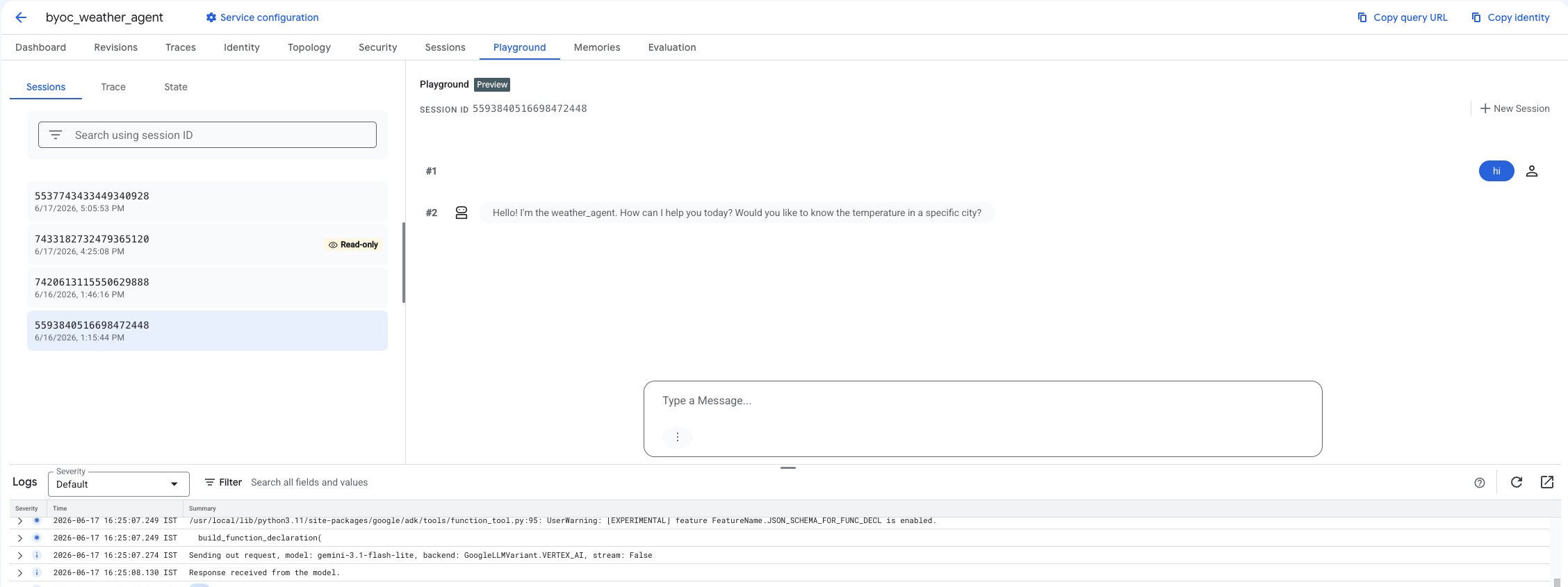
الخطوة 2: استخدام وحدة التحكّم
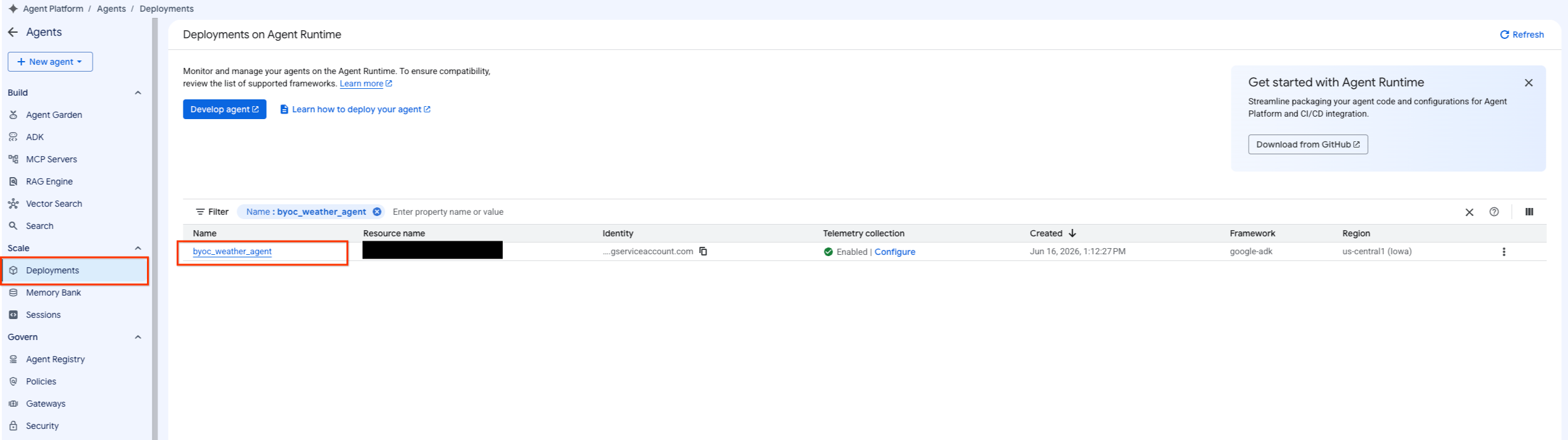
- انتقِل إلى الوكيل الذي تم نشره عن طريق اختيار منصة الوكيل > الوكلاء > عمليات النشر لفلترة قائمة الوكلاء.
- اختَر ساحة اللعب من لوحة بيانات الوكيل.
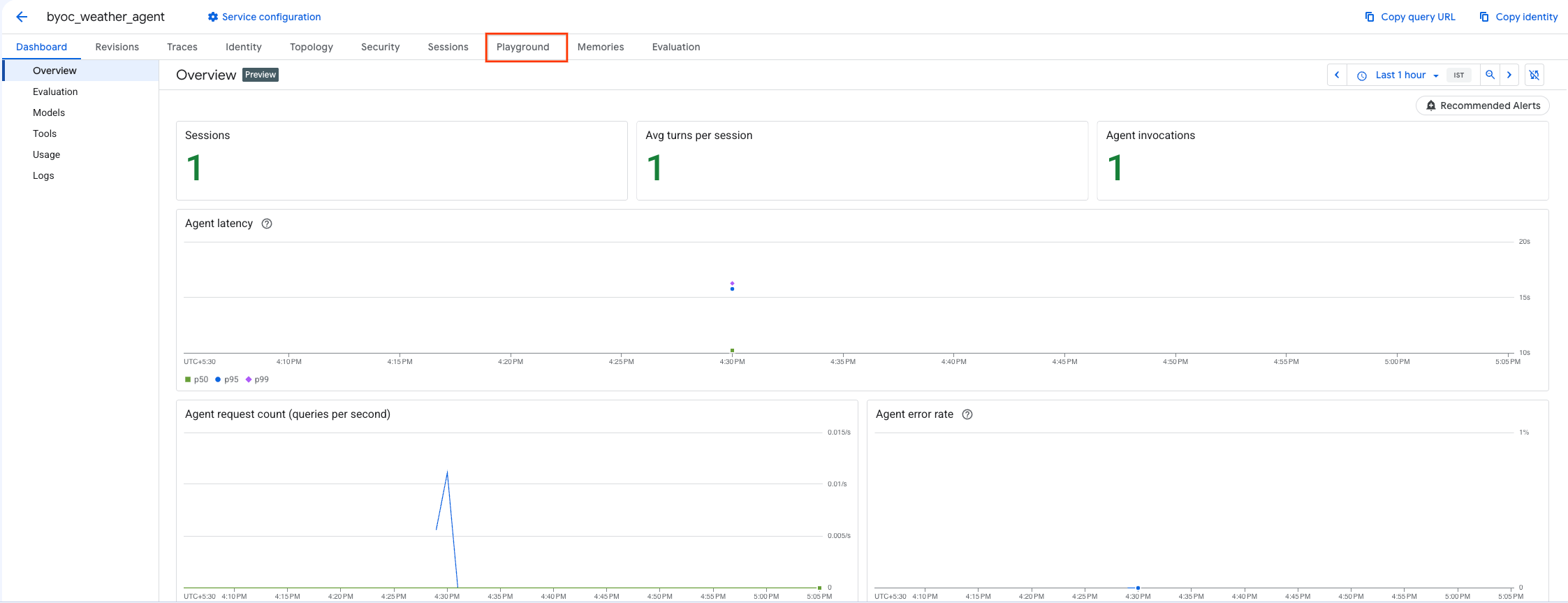
- أنشِئ جلسة جديدة واكتب طلب البحث للتحقّق مما إذا كان الوكيل يستجيب للطلبات كما هو موضّح.
9. تنظيف
لتجنُّب تحصيل رسوم منك، عليك تنظيف الموارد التي أنشأتها.
إذا نشرت باستخدام Terraform، انتقِل إلى دليل terraform ونفِّذ إجراء الإتلاف:
cd ~/weather-agent-byoc/terraform
terraform destroy
cd ..
إذا نشرت باستخدام حزمة SDK، أنشِئ النص البرمجي لحذف الوكيل الذي تم نشره:
cat << 'EOF' > delete_agent.py
import json
import os
import vertexai
from google.cloud import aiplatform

config = json.load(open("weather_agent/config.json"))
PROJECT_ID = config["PROJECT_ID"]
LOCATION = config["LOCATION"]

vertexai.init(project=PROJECT_ID, location=LOCATION)
client = vertexai.Client(project=PROJECT_ID, location=LOCATION)

with open("agent_resource_name.txt", "r") as f:
    agent_resource_name = f.read().strip()

# 1. Delete the Agent
# Note: We retrieve the list first to ensure we delete the ones created in this session
try:
    page_size = 100
    reasoning_engines = client.agent_engines.list()
    for engine in reasoning_engines:
        if agent_resource_name in engine.api_resource.name:
            print(f"Deleting Reasoning Engine: {engine.api_resource.name}")
            engine.delete(force=True)
except Exception as e:
    print(f"Error deleting reasoning engines: {e}")
EOF
نفِّذ النص البرمجي لحذف الوكيل:
python3 delete_agent.py
لتنظيف بقية الموارد، انتقِل مرة أخرى إلى دليلك الرئيسي ونفِّذ الأوامر التالية في Cloud Shell:
cd ~

# 1. Delete the Artifact Registry Repository
gcloud artifacts repositories delete $REPOSITORY_NAME --location=$LOCATION --quiet

# 2. Clean up files (Optional)
rm -rf ~/weather-agent-byoc
10. الخاتمة
تهانينا! لقد نجحت في شحن وكيل ذكاء اصطناعي في حاوية ونشره على بيئة تشغيل الوكيل باستخدام BYOC.
لقد تعلّمت كيفية تنفيذ ما يلي:
- استخدام حزمة ADK لتحديد وكيل وتضمينه باستخدام FastAPI
- إنشاء ملف Dockerfile وإنشاء الصور باستخدام Cloud Build
- إدارة أذونات إدارة الهوية والوصول (IAM) لبيئة تشغيل الوكيل
- تفعيل الحاوية المخصّصة باستخدام حزمة Python SDK وTerraform
- اختبار الوكيل الذي تم نشره والاستعلام منه