
1. Introduction
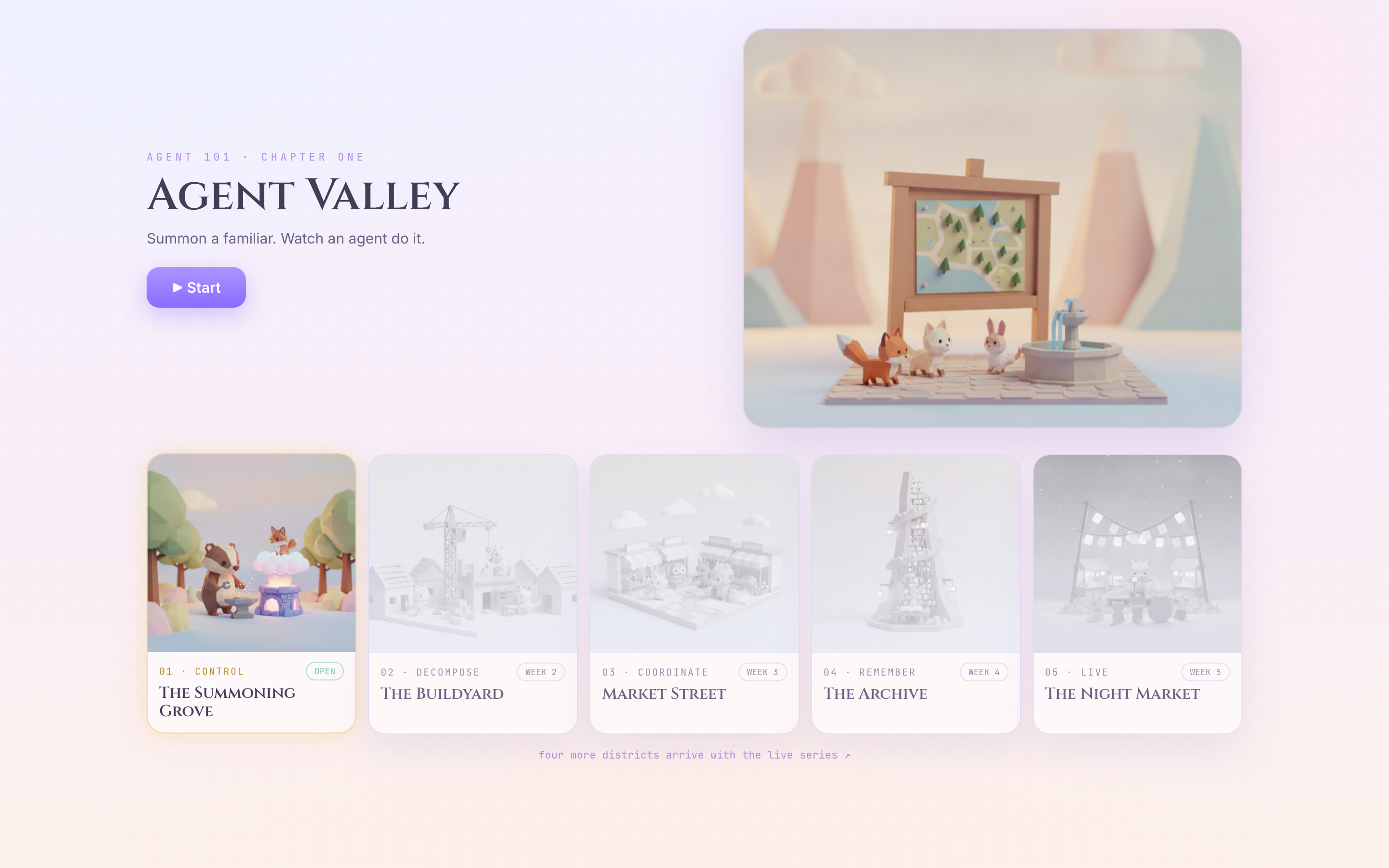
You have arrived in Agent Valley. One district is open: the Summoning Grove. By the end of this lab a creature of your own design lives there, and you will know exactly which part of the machine made it.
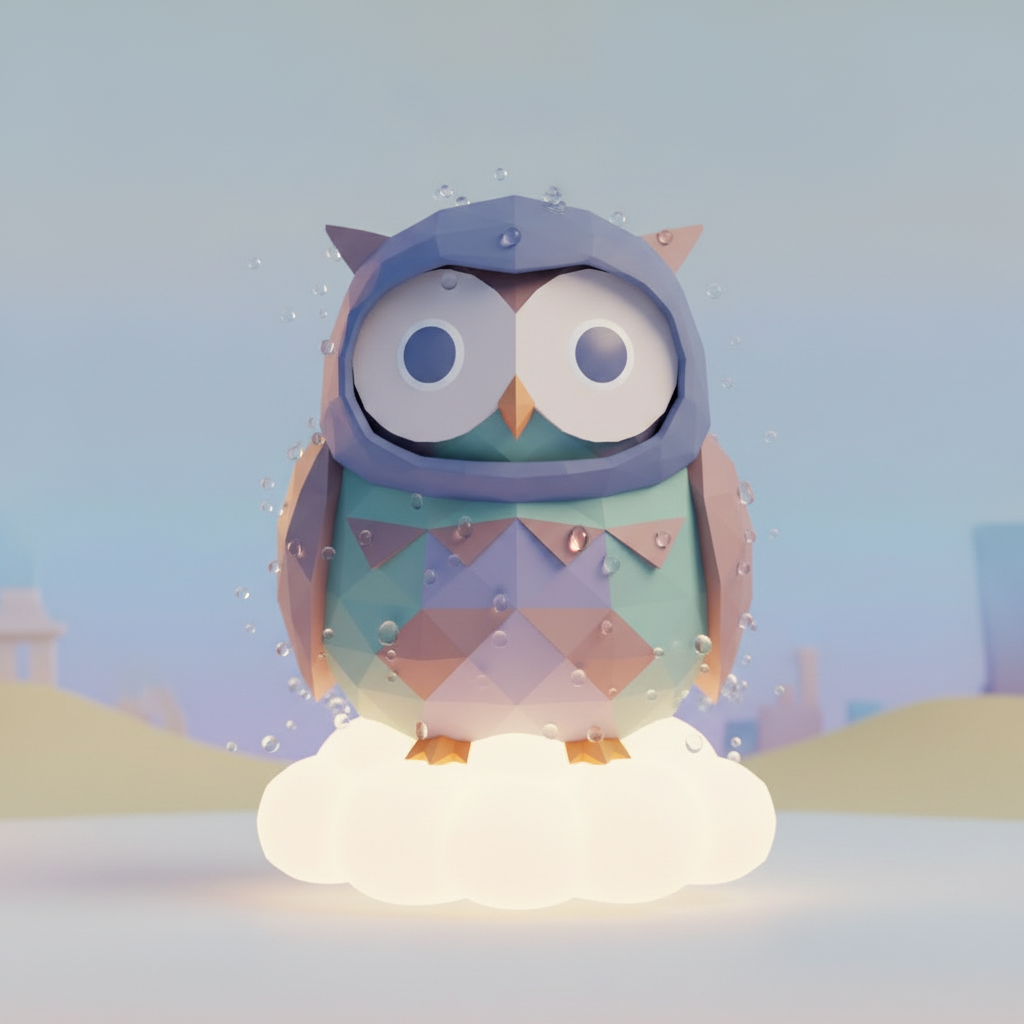
This is Mochi. Four words made it — "something cozy that likes rain."
An agent is a few small pieces, plus the wiring between them. Every chapter here adds one piece, and then shows you the wire.
chapter | the piece you add | the wire |
1 | a model with an instruction | none yet — it can only talk |
2 | a tool | model → tool |
4 | a second tool | tool → agent · a shared dictionary |
5 | a callback | you → the wire · reach in and change it |
The hard part of any agent framework is not "what is an agent". It is where does the data live, and how does it get to the next thing. This lab asks that three times, and answers it three times.
Chapter 3 is not in that table on purpose. As soon as your first tool works you put the code down and go play in the finished valley for five minutes. You will come back with two questions, and chapters 4 and 5 are the answers.
You will make two edits. Both are one line. That is all the typing in this lab — everything else you read, run, and watch.
Everything here is ADK 2.
What you need: a Google account with billing available, and a browser. You do not need a Google Cloud project up front — Setup creates one. Everything runs in Cloud Shell — Python, uv and gcloud are already installed there, and Gemini is reached through Vertex AI with your own credentials. There is no API key anywhere in this lab.
2. Setup
Everything in this lab runs in Cloud Shell — Python, uv and gcloud are already installed there, and Gemini is reached through Vertex AI using your own credentials. There is no API key anywhere in this lab, and nothing to install on your laptop.
There is one thing this lab cannot hand you: a Google Cloud project with billing on it. Step 1 gets you an account that can pay for it; step 4 turns that account into a project. Do them in that order — every step after 4 reads the project that step 4 creates.
1 · Get an account with billing (~1 min)
🌐 Do this before anything else. Sign in with a Google account that has billing enabled. Any such account works. If yours does not, start a free trial; it gives you a billing account, which is all step 4 needs.
2 · Open Cloud Shell (~1 min)
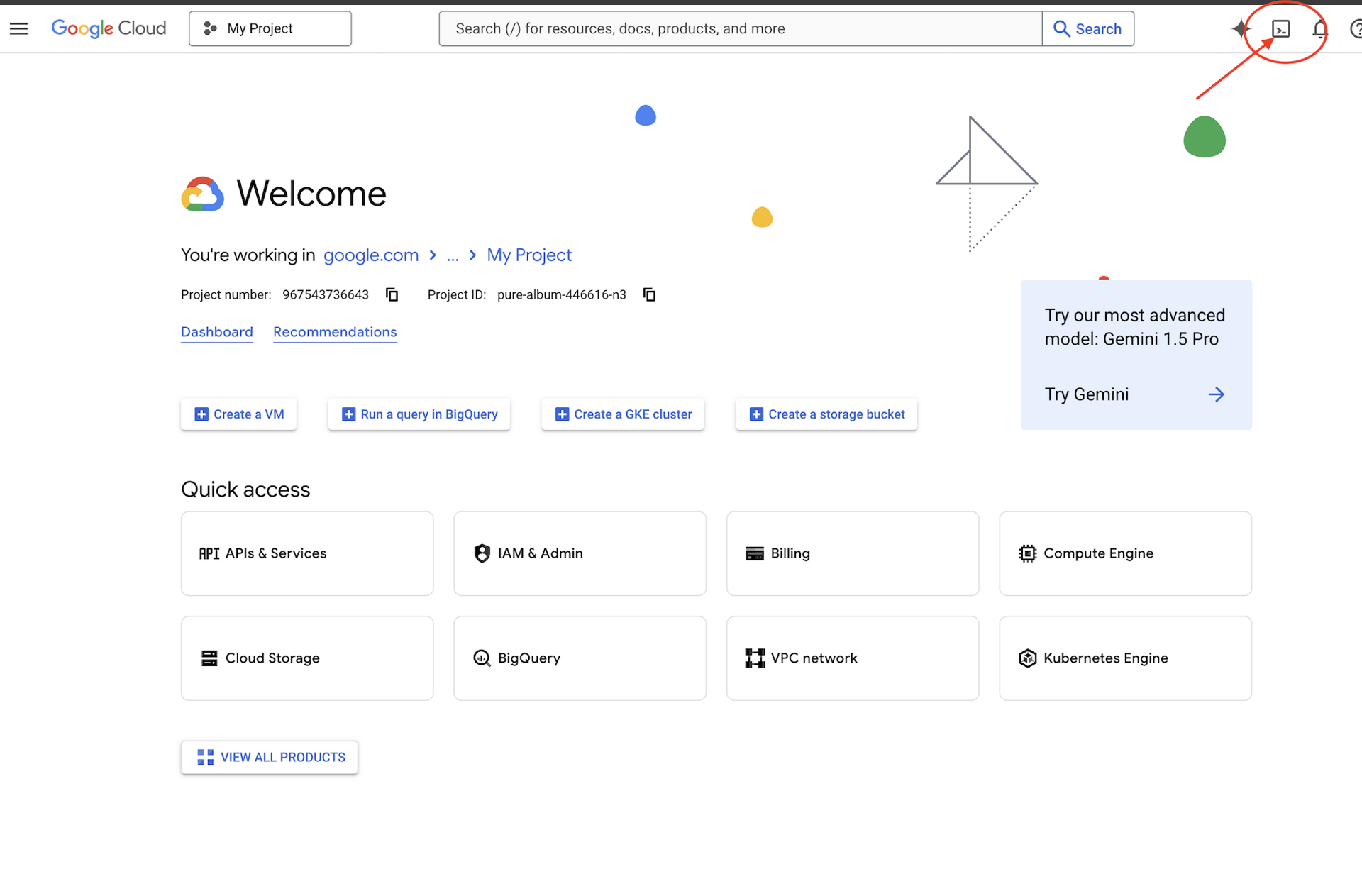
🌐 Click Activate Cloud Shell at the top of the Google Cloud console — it is the terminal-shaped icon in the header.
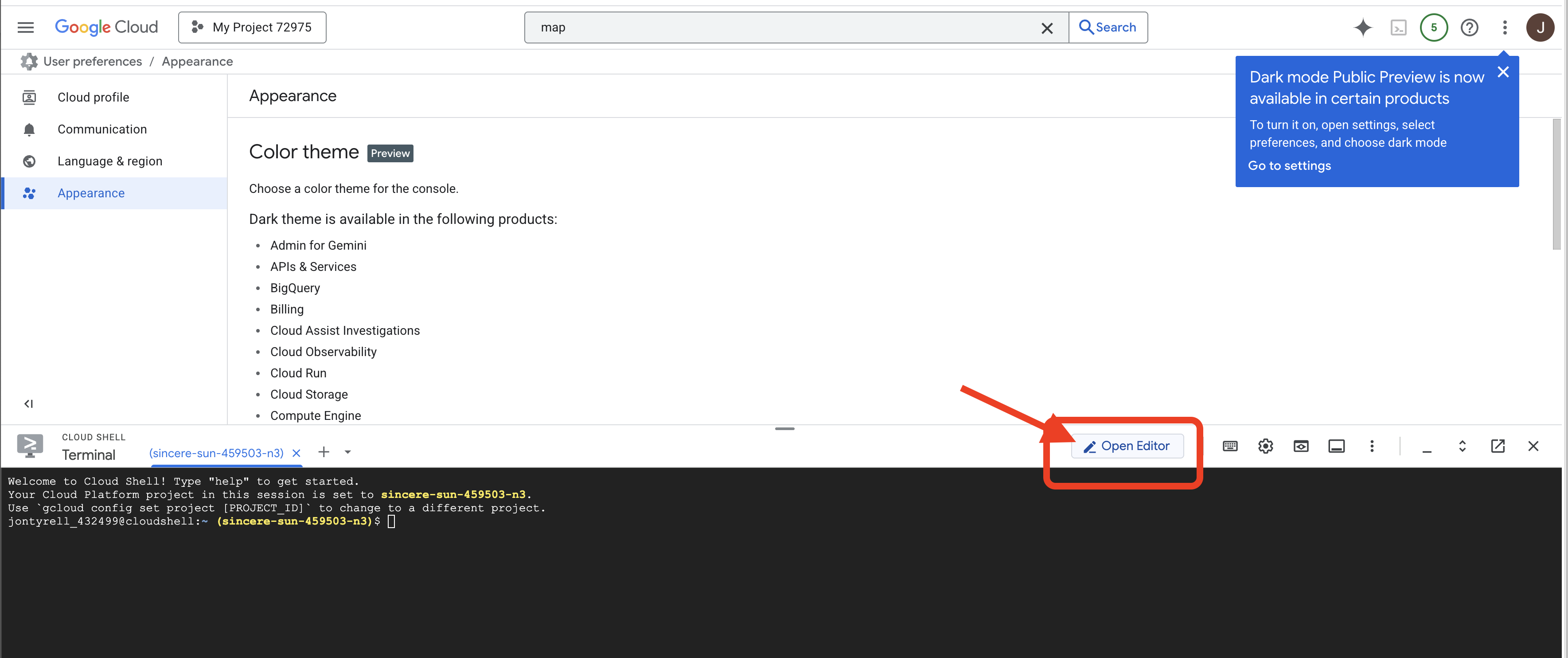
🌐 Click Open Editor (the open-folder-with-a-pencil icon). This brings up the Cloud Shell Editor with a file explorer on the left — that is where you work whenever a step is marked ✏️.
🌐 If you are prompted to authorize at any point today, click Authorize to continue.
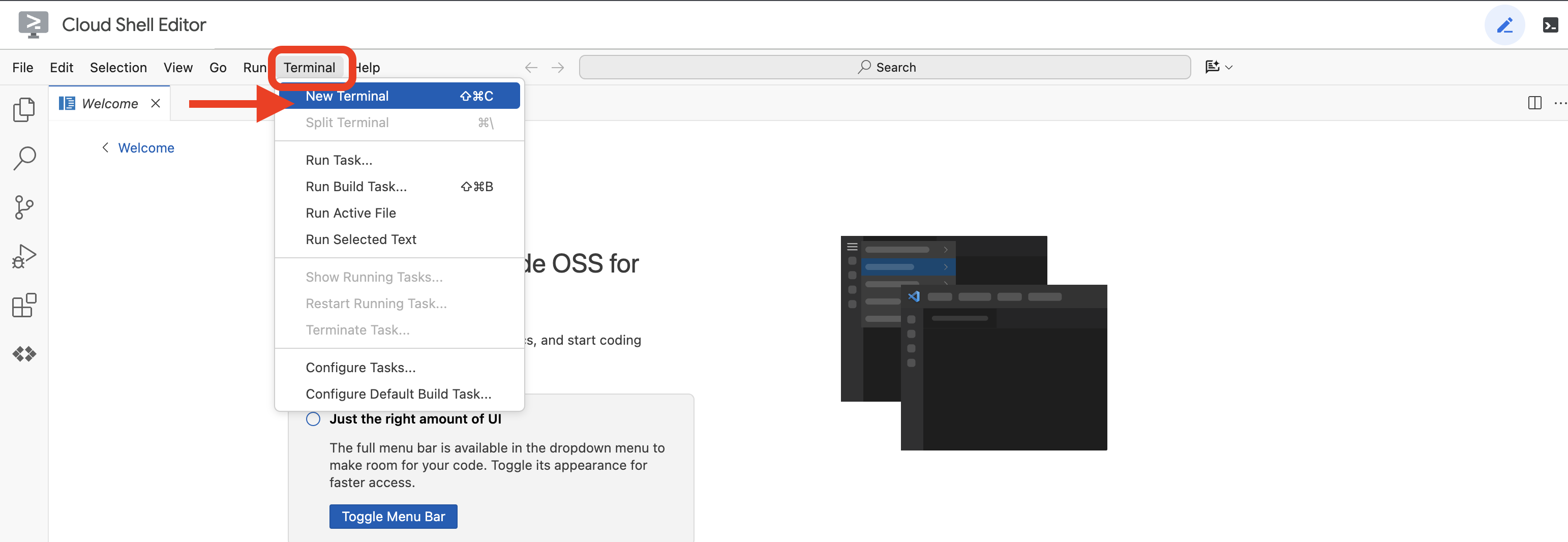
🌐 Open a terminal inside the editor — that is tab 1, where every 💻 step runs. If it is not already along the bottom of the screen, open it with View → Terminal:
💻 Check which account Cloud Shell is signed in as:
gcloud auth list
👀 Expect your own account marked with a *, and it must be the same account you signed in with in step 1.
3 · Get the lab (~1 min)
💻 Clone the repo:
cd ~
git clone https://github.com/cuppibla/agent-valley-lab.git
cd ~/agent-valley-lab
4 · Create your project (~2 min)
💻 One script finds your billing account, creates a project on it, and points Cloud Shell at that project:
cd ~/agent-valley-lab
./setup_project.sh
👀 Expect a ✓ for the billing account it picked, a ✓ for the project it created, and an ending like:
Project ready: agent-valley-4271
  Next:  ./setup_codelab.sh
agent-valley-4271 is your project ID — yours will have different digits. Four things happen in there:
billing | takes the newest | |
project | creates | |
selects | writes the ID to | |
waits | polls until the brand new project is actually allowed to serve, for up to two minutes | |
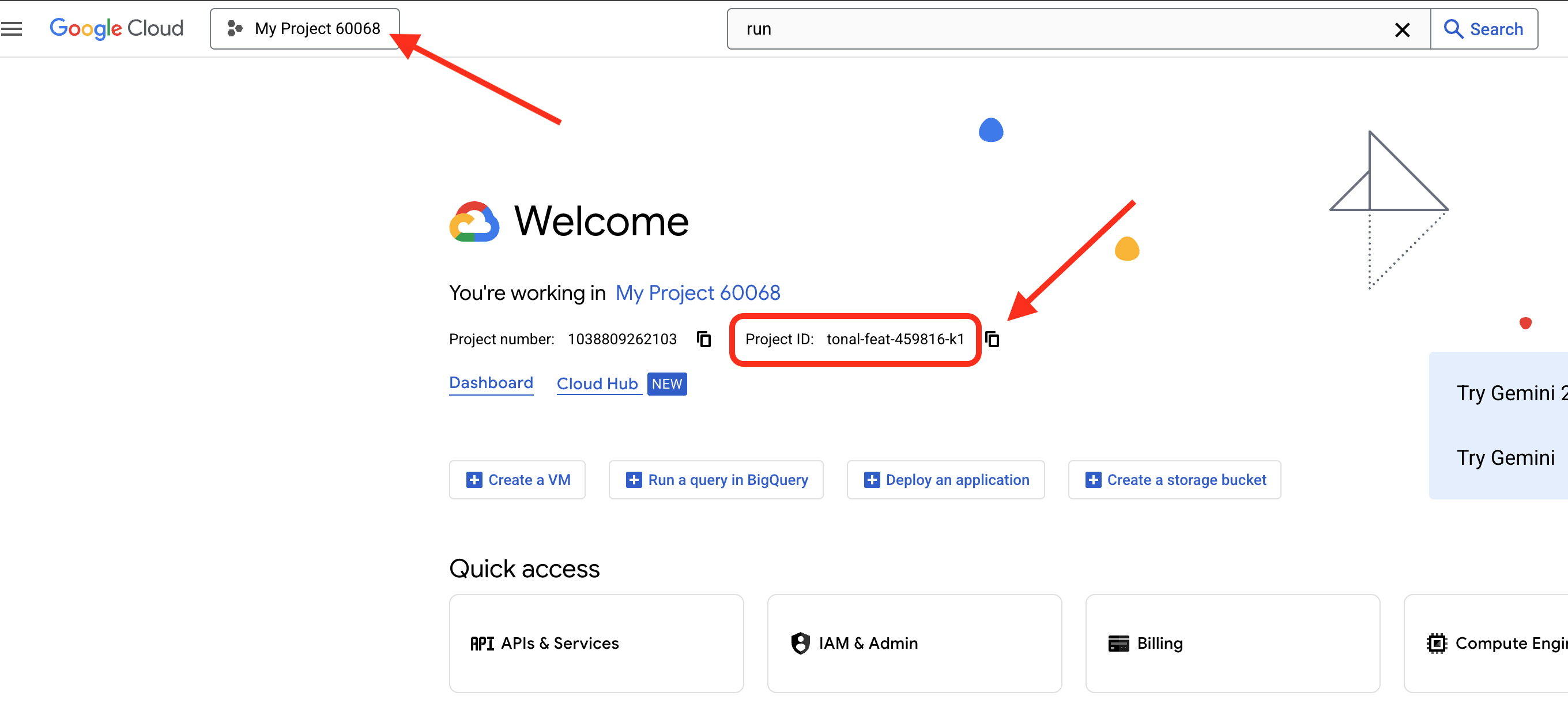
🌐 The same project is now in the console — its ID sits in the Project info card on the Dashboard:
5 · Install and point at Vertex AI (~3 min)
💻 Install uv, export the three variables that send ADK to Vertex AI, and run setup:
cd ~/agent-valley-lab
curl -LsSf https://astral.sh/uv/install.sh | sh
source ~/.local/bin/env
export GOOGLE_GENAI_USE_VERTEXAI=True
export GOOGLE_CLOUD_PROJECT=$(gcloud config get project)
export GOOGLE_CLOUD_LOCATION=global
./setup_codelab.sh
$(gcloud config get project) has something to return because step 4 set it. That is the whole reason step 4 comes first.
setup_codelab.sh is idempotent — safe to re-run any number of times. It does four things, in order:
api | reads the project step 4 selected and enables the Vertex AI API on it | |
uv env |
| |
.env | writes the three variables the lab reads — no API key anywhere | |
model check | makes one real call to Gemini, so a bad project fails here at setup time, not later inside a chapter | |
6 · Prove it is green (~1 min)
💻 Run the preflight — every tick is a real probe, not a guess:
cd ~/agent-valley-lab
uv run python scripts/preflight.py
👀 Expect every line to tick — including Vertex AI · project — ending in PREFLIGHT GREEN. One line will say grove · 0 tools ← no edits yet; that is correct. That missing tool is the entire point of chapter 2.
Read more (optional)
3. 1 · Your first agent
The piece: a model with an instruction. The wire: none yet — and that is exactly the point.
- What — meet the smallest agent that exists, and read all of it.
- Why — everything later in this lab is this file plus one more thing.
- How — one command, one file, two sentences typed.
👉💻 In tab 1, start ADK's dev UI:
cd ~/agent-valley-lab
uv run adk web . --allow_origins="*"
👉🔬 Open the dev UI via Web Preview → Change port → 8000. Click Select an app. Two are listed: grove and grove_locked. Pick grove. The locked one is the finished agent — you run the same request against it in chapter 5.
Read the whole agent
👉📖 Open grove/agent.py. Ignore the comments — four lines matter:
cloudshell edit ~/agent-valley-lab/grove/agent.py
root_agent = LlmAgent(
    name="grove",
    model="gemini-3-flash-preview",
    instruction=INSTRUCTION,
)
That is an agent. All of it.
name— what the dev UI lists it as.model— which brain. Here, Gemini 3 Flash.instruction— its standing brief. 👉📖 Scroll up and readINSTRUCTION: seven plain sentences telling it that it keeps a forge, that whatever a traveler describes always comes out as a cute animal, and that summoning is the only thing the forge can do.
👀 No tools. No memory. Just a model and a job description.
Talk to it
👉🔬 Type this:
Summon a fox familiar for me.
You should see something lovely. Here is a real answer from this exact agent:
The forge glows a soft, misty blue as a plump mossy frog in a tiny cable-knit sweater emerges, cradling a steaming acorn cap of tea.
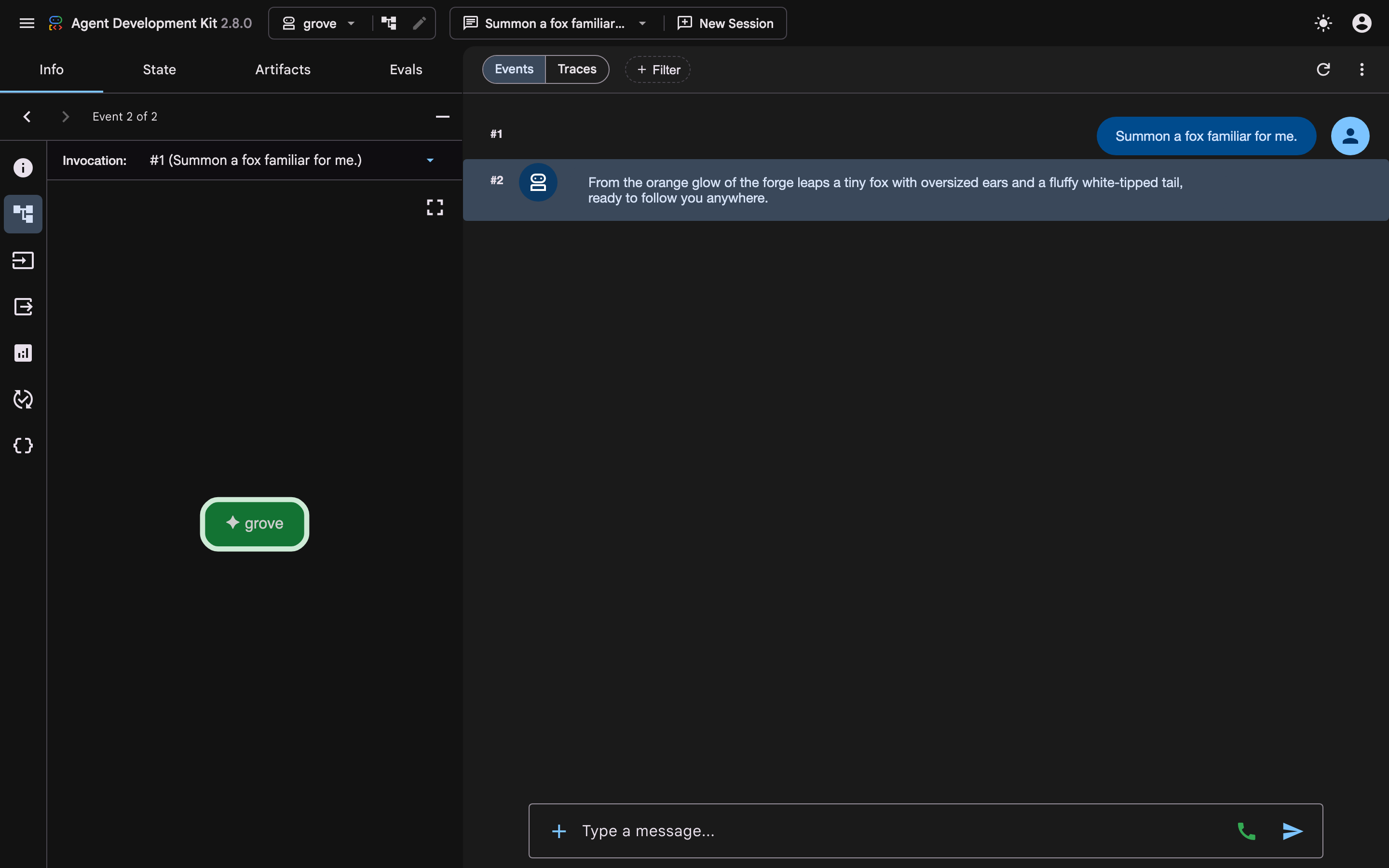
👉🔬 Ask the obvious follow-up:
Show me it.
You should see more beautiful words — and that is all there is. No image. No file. No frog.
👉🔬 Click the State tab. It is empty.
👀 That is not a bug and not a bad model. A model's only output channel is text. So a claim about acting and an actual act look identical coming out of it.
An agent with no tools is a very well-briefed conversation.
Read more (optional)
4. 2 · Your first tool
The piece: a function. The wire: model → tool.
- What — give the agent one function, then follow what happens when it uses it.
- Why — this is the difference between describing a frog and making one.
- How — delete two characters, restart, and read the trail.
Edit one
👉📖 Open grove/agent.py again. The tools are already imported at the top — they have been sitting there the whole time. The agent just was not holding one.
cloudshell edit ~/agent-valley-lab/grove/agent.py
👉✏️ EDIT ONE — delete the # at the start of the tools= line, then save:
root_agent = LlmAgent(
    name="grove",
    model="gemini-3-flash-preview",
    instruction=INSTRUCTION,

    # 👉 EDIT ONE — delete the "# " at the start of the next line, then save.
    tools=[cast_candidates],
)
One tool. One name, one thing this agent can now do. Chapter 4 adds the second one, and that is the entire lab.
👉💻 The dev UI loaded the agent when it started, so give it the new one. In tab 1, press Ctrl+C, then start it again:
cd ~/agent-valley-lab
uv run adk web . --allow_origins="*"
👉🔬 New session in grove. Ask for the same thing you asked before:
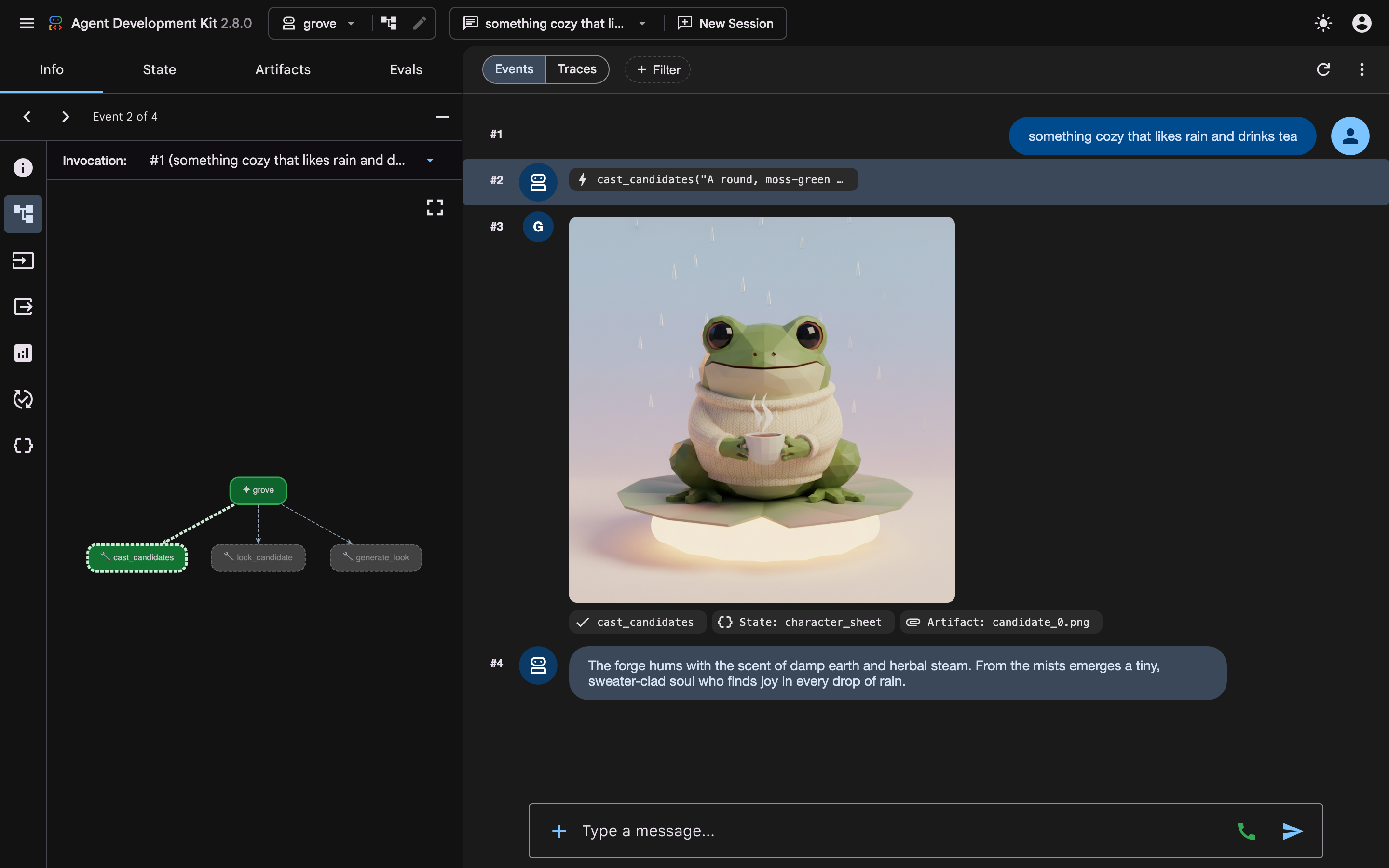
something cozy that likes rain and drinks tea
You should see it stop talking and start working: a cast_candidates chip, a pause of about twelve seconds, then a real portrait of a creature that did not exist when you pressed Enter.
What a tool call is
👉🔬 Click the cast_candidates chip open.
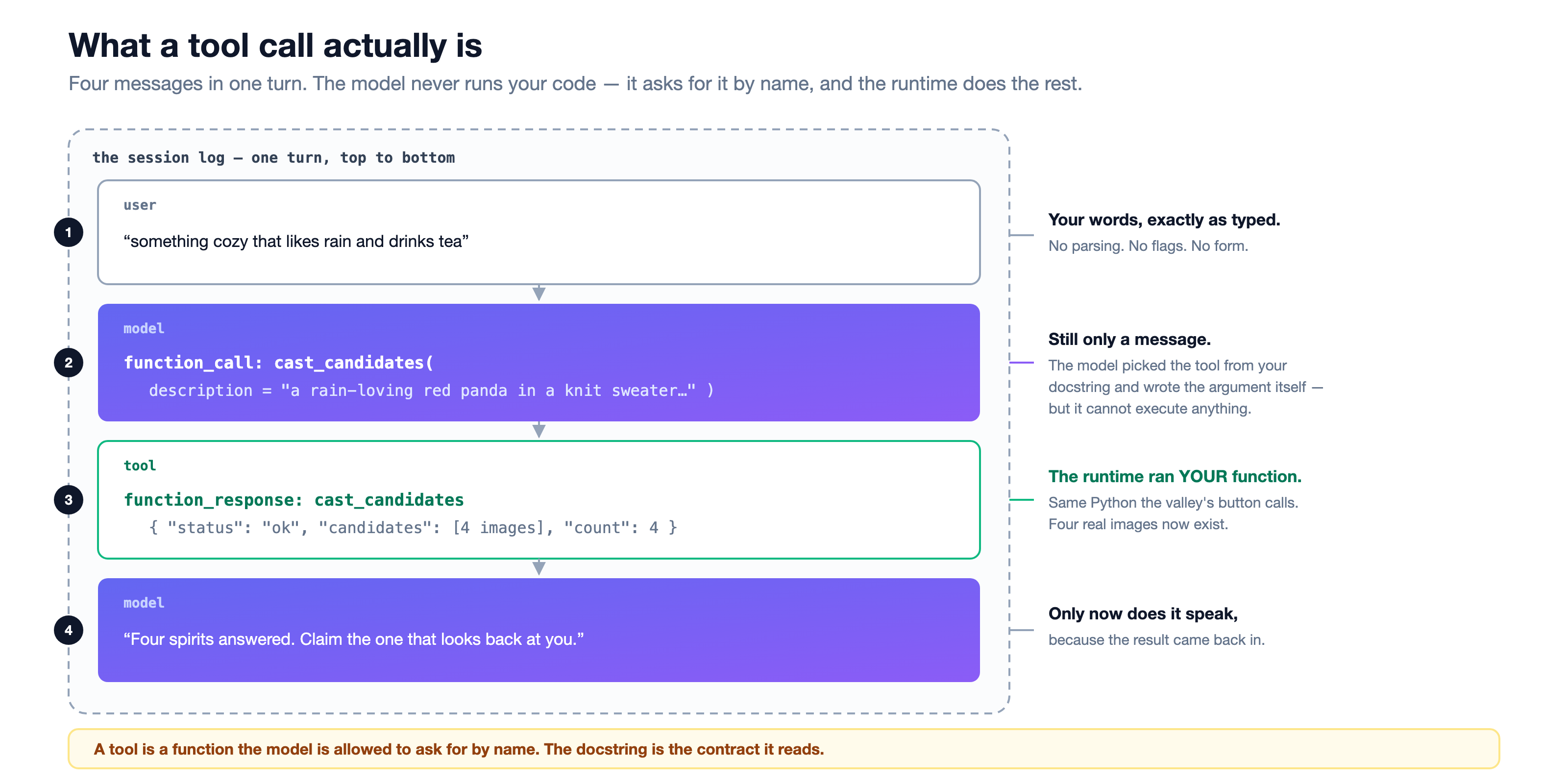
👀 Four messages. Notice step two: the model's output is still just a message. It named your function and wrote the argument — you said "cozy, rain, tea" and it composed a full visual description on your behalf — but it did not run anything. The runtime did.
The contract
👉📖 Open forge/agent/tools.py and find cast_candidates:
cloudshell edit ~/agent-valley-lab/forge/agent/tools.py
async def cast_candidates(description: str, tool_context: ToolContext) -> dict:
    """Draw the familiar a traveler described.

    Args:
        description: What the creature looks like — species, colours, mood, era.
    """
👀 The name, the signature, and that docstring are the entire description of this function the model will ever see. That is why it is written in plain English. Write it for a reader, not for a compiler.
Where the picture actually came from
Now follow the whole chain. This is the part most tutorials skip.
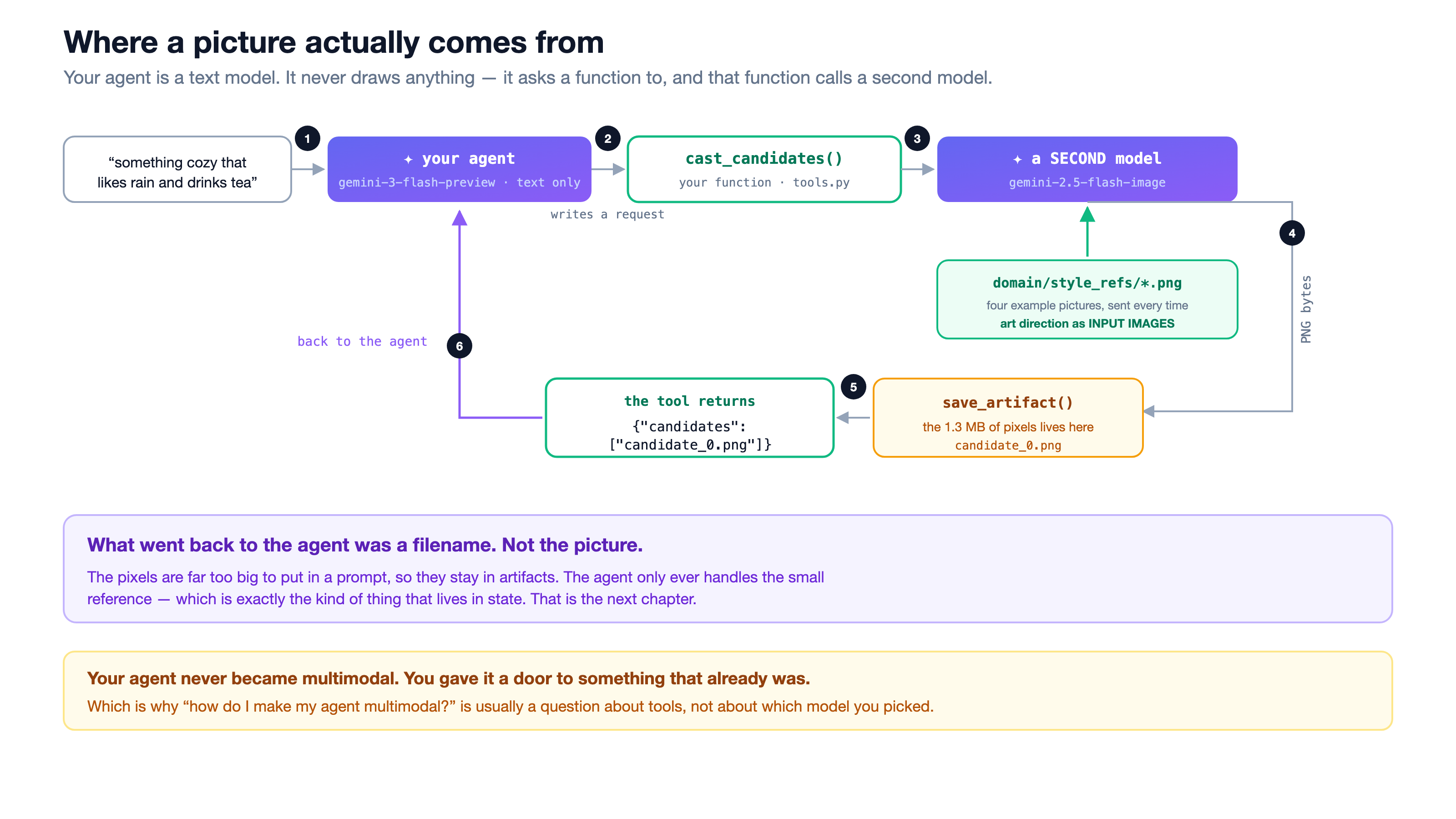
👀 Three things worth stopping on:
- Your agent never drew anything.
groveis a text model — text in, text out. The picture came from a second model,gemini-2.5-flash-image, called from inside your function. - The art style is fed in as pictures. 👉📖 Open
forge/agent/backends.pyand find_style_refs(). Four example images go in with every single request. That is art direction you could not have written as a prompt.cloudshell edit ~/agent-valley-lab/forge/agent/backends.py - The model never sees the picture. The pixels are saved with
save_artifact(). What comes back to the model is the string"candidate_0.png"— small enough to fit in a prompt.
Your agent did not become multimodal. You gave it a door to something that already was.
You have given it one hand. Before the second one — go and see what the finished thing feels like.
Read more (optional)
5. 3 · The valley
No edit in this chapter. No new idea. You have made one picture in a developer tool — now go and use the finished thing for five minutes.
👉💻 Leave adk web running. Open a second terminal tab (tab 2) with the + in the terminal panel's toolbar:
cd ~/agent-valley-lab
bash valley.sh
👉🔬 Open the valley via Web Preview → Change port → 3200, press ▶ Start, then The Summoning Grove.
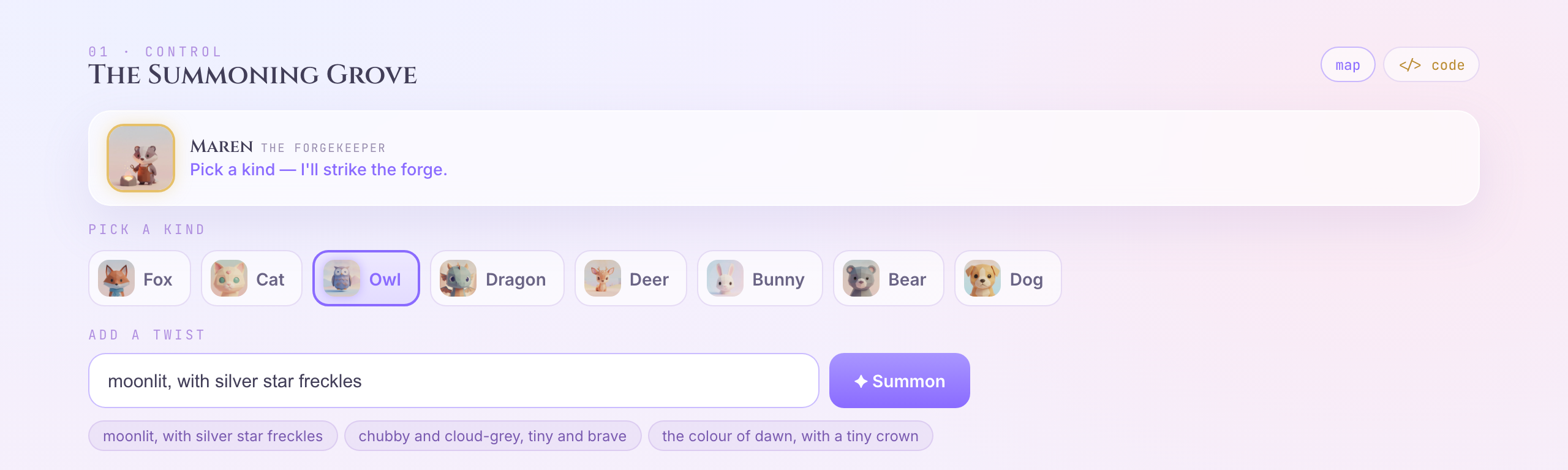
👉🔬 Pick a kind, type a twist, and summon. Name it. Claim it.
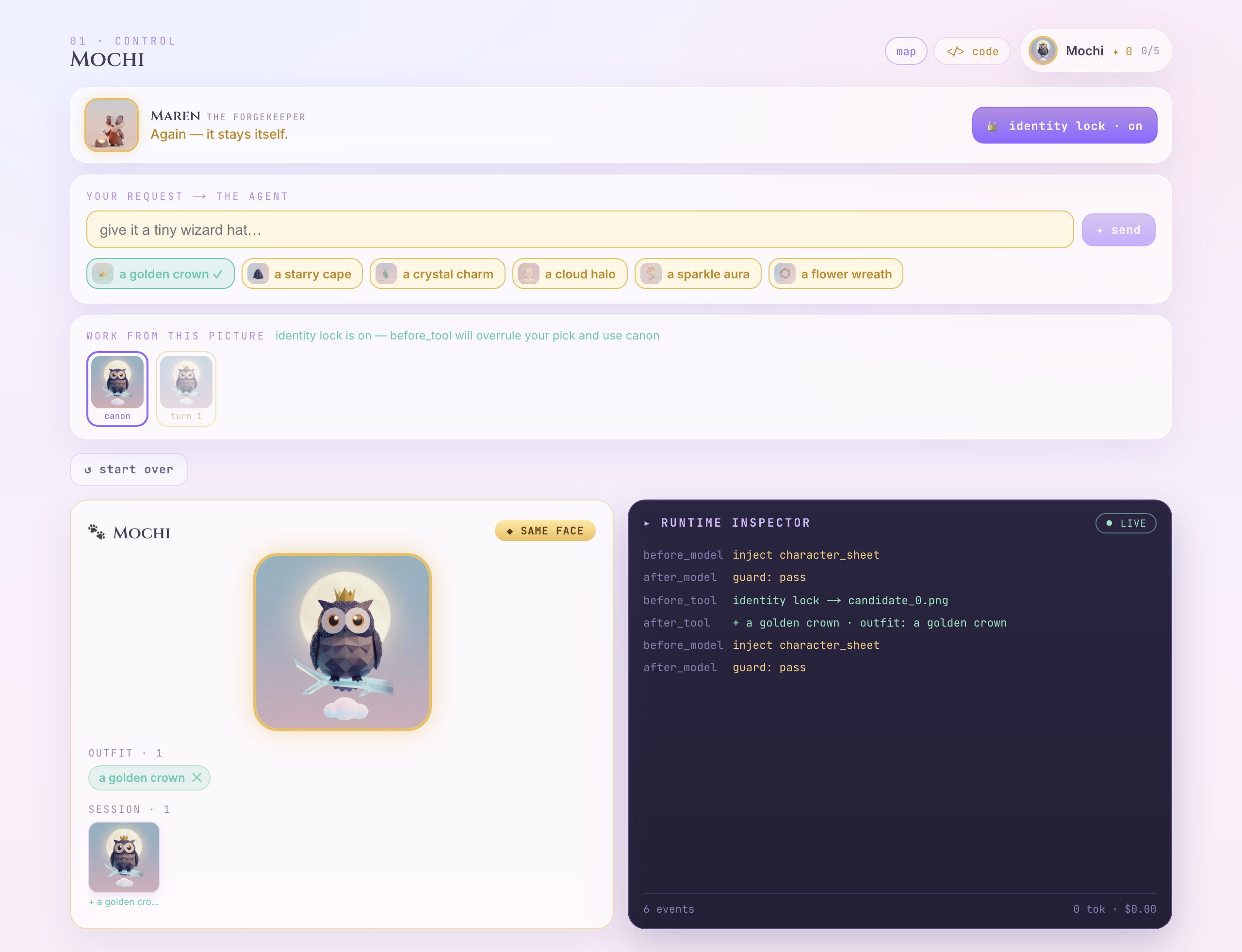
👉🔬 Then dress it: tap a suggestion like a golden crown and watch it land in the request box as a sentence. Change the words if you like. Press ✦ send. Do that three or four times. Take your time; this is the part of the lab that is just fun.
Three things while you play
- You have already read the code behind this. Your sentence goes to an agent, the agent calls
cast_candidatesorgenerate_look— the same functions whose docstrings you read five minutes ago. - A suggestion writes words, it does not press a button. That is on purpose. A button carries no intent, so there is nothing for a model to read. A sentence carries intent — which is the only reason an agent can be in this loop at all.
- Nothing here needed your edit. The valley runs its own agents (
forge/agent/lanes.py). It worked before you touched anything.
Two things you cannot explain yet
Both are real. Both have answers. Neither answer is in this chapter.
👉🔬 Watch the panel on the right while you send a request.
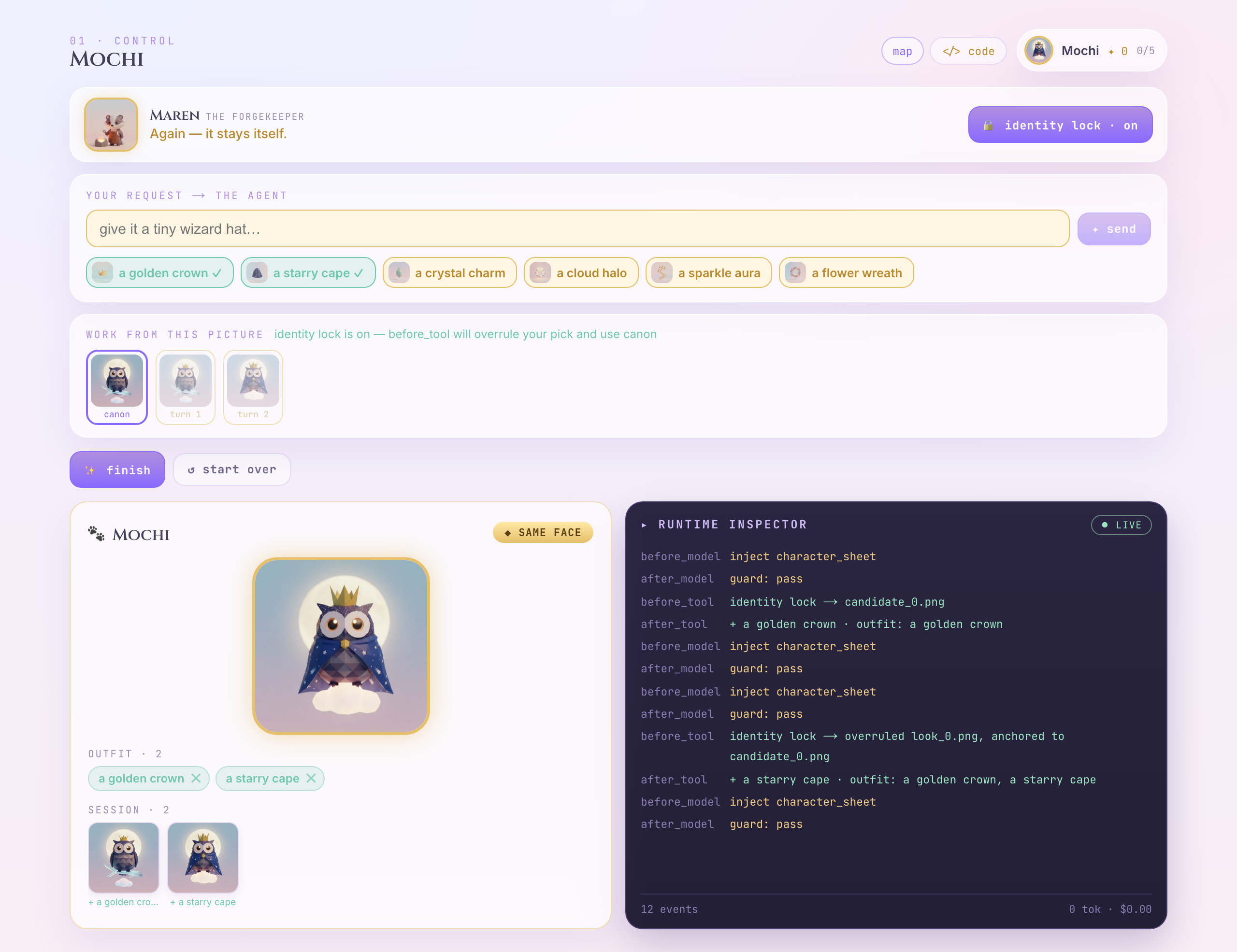
before_model   inject character_sheet
after_model    guard: pass
before_tool    identity lock → candidate_0.png
after_tool     + a golden crown  ·  outfit: a golden crown
👀 Six lines for one sentence. Something is being written down somewhere, and something is choosing a picture on your behalf. What, and where does it go?
👉🔬 Now look at the strip under "work from this picture", and add a fifth thing. And a sixth.
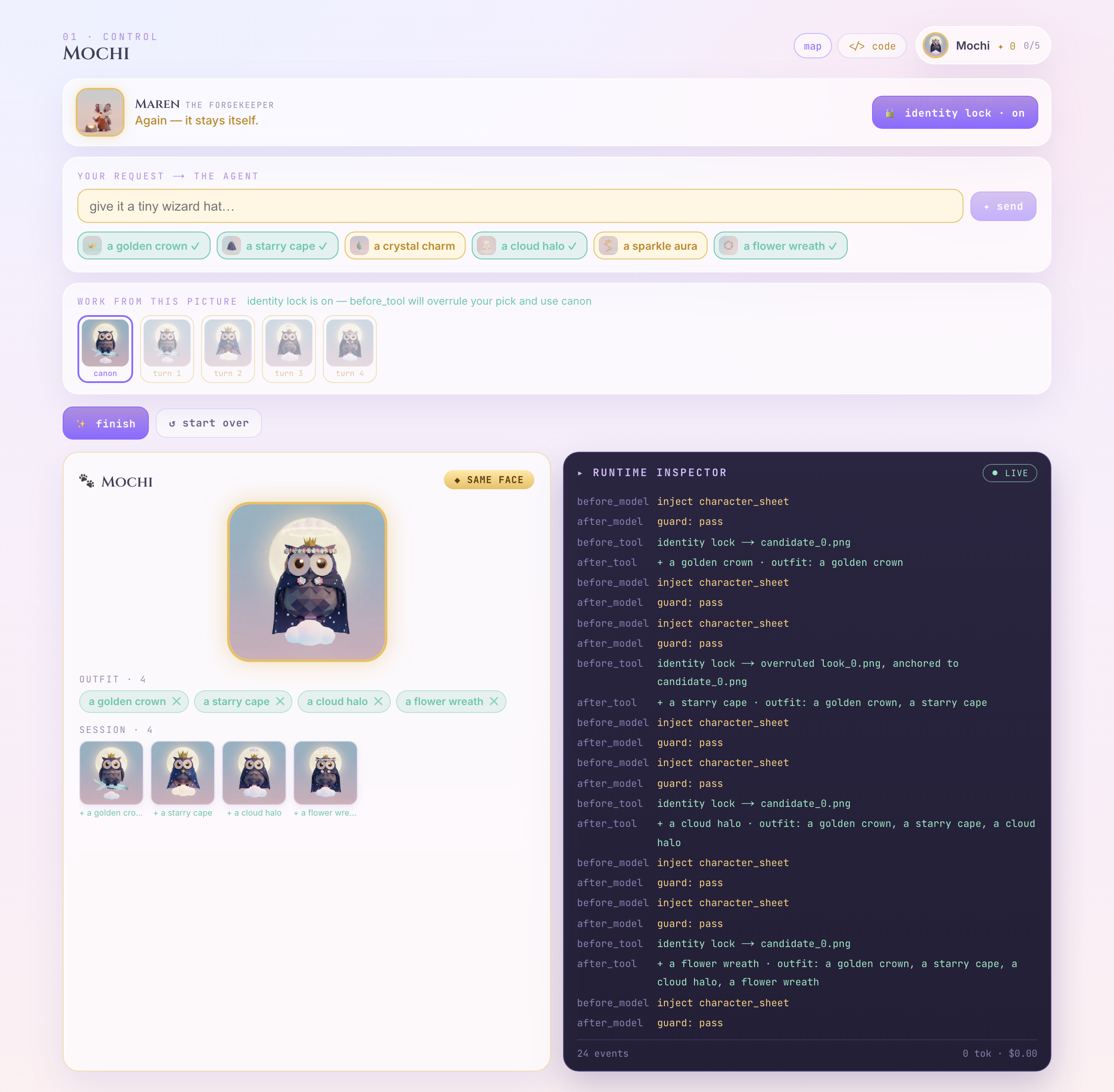
👀 Nothing replaced anything. OUTFIT · 4, and the trace on the right shows the list growing one item at a time — a golden crown → a golden crown, a starry cape → and on. Every render is built from the whole list, which is why the crown is still there four turns after you asked for it.
👀 Two details in that shot. A suggestion you are already wearing is ticked (✓) — the chips are just a view of the same list. And every item carries an ✕: taking something off is a button, not a sentence. There is nothing to interpret, so there is nothing for a model to do — the exact mirror of "a suggestion writes words, it does not press a button" above.
👀 It is still your creature. You never re-described it — you typed four words about a hat. Something is holding on to the original picture for you. What is doing that, and can you turn it off?
Hold both questions. The first one is the next chapter. The second one is the last one.
👀 Leave the valley running — chapter 5 comes back to it.
Read more (optional)
6. 4 · A second tool — and how the two talk
Remember that line in the valley's right-hand panel — after_tool · + Crown · outfit: Crown? This is where it came from.
The piece: one more function. The wire: tool → agent. This is the chapter that saves people weeks.
- What — add a second tool, and find out how it knows what the first one did.
- Why — the two functions never call each other. Something else carries the data.
- How — one more name, one sentence, and the State tab.
Edit two
cloudshell edit ~/agent-valley-lab/grove/agent.py
👉✏️ EDIT TWO — back in grove/agent.py, add one more name inside the brackets, then save:
tools=[cast_candidates, lock_candidate],
That is the last edit in this lab. Adding a tool really is just adding a name to a list.
👉📖 Read what you just handed over — lock_candidate in forge/agent/tools.py:
async def lock_candidate(index: int, name: str, tool_context: ToolContext) -> dict:
    """Lock one candidate as the canonical character. Spends no model — a pure state write."""
    candidates = tool_context.state.get("temp:candidates", [])
    ref = candidates[index]
    tool_context.state["character_ref"] = ref
👀 Notice what is not in its signature: no filename, no image, no list. All the model can give it is a number and a name.
👉💻 Back in tab 1, restart the dev UI so it picks the new agent up — Ctrl+C, then start it again:
cd ~/agent-valley-lab
uv run adk web . --allow_origins="*"
One sentence, two tools
👉🔬 New session in grove. Ask for both things at once:
summon something cozy that likes rain, and call it Mochi
You should see two chips this time, in order — cast_candidates, then lock_candidate — and then your familiar, named.
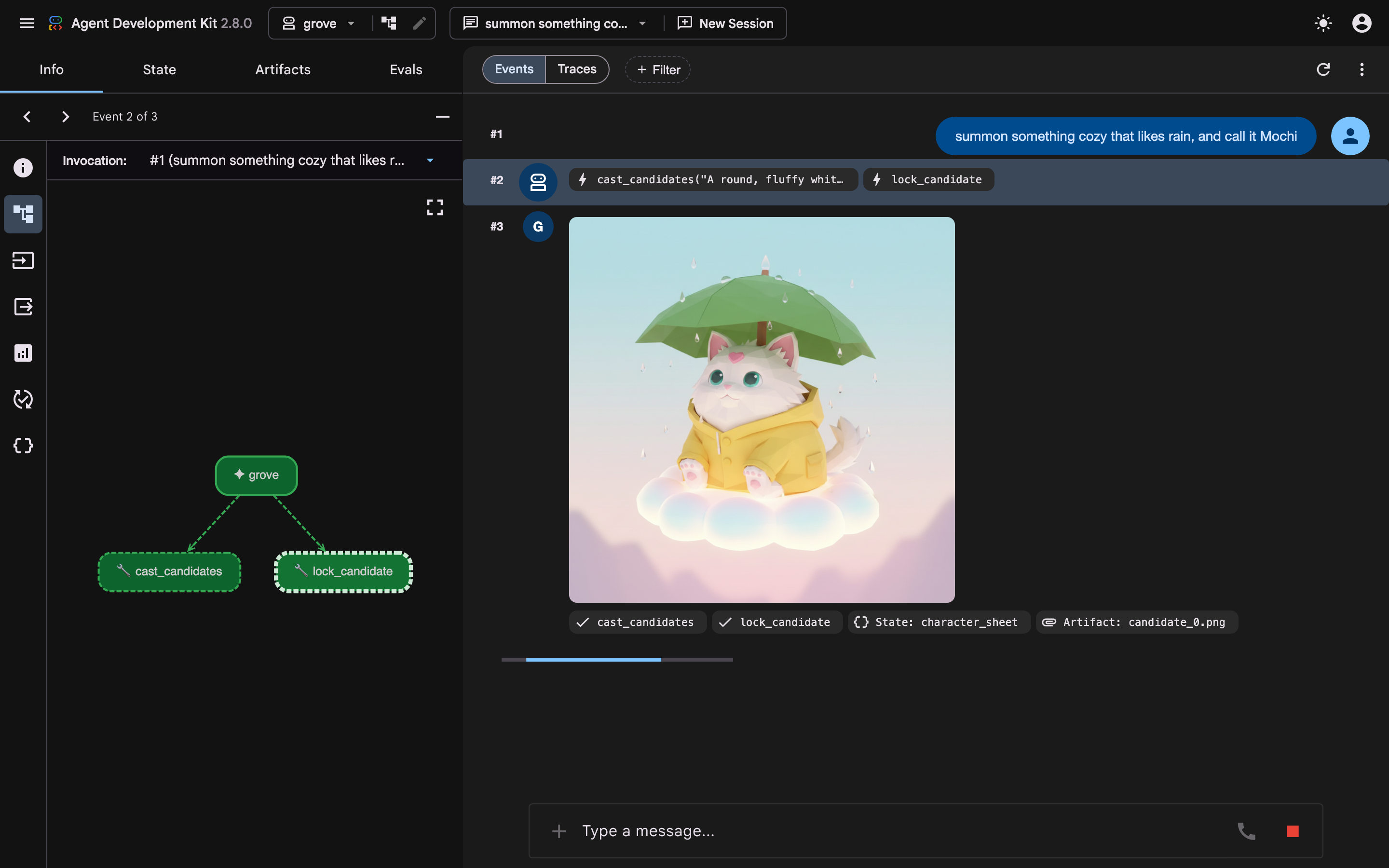
The question
👉🔬 Open the lock_candidate chip. The model called it with exactly this:
lock_candidate(index=0, name="Mochi")
👀 So — where did it get the file it locked?
Not from the model. The model passed a number. The filename came from temp:candidates, which cast_candidates had written a few seconds earlier.
The model did not carry the data from one tool to the next. A dictionary did.
The dictionary
👉📖 Look at the last lines of cast_candidates, in the same file:
tool_context.state["temp:candidates"] = filenames
tool_context.state["character_sheet"] = {"name": "", "description": description}
tool_context.state["provisional_ref"] = filenames[0]
tool_context.state["temp:provisional_ref_png"] = pngs[0][0]
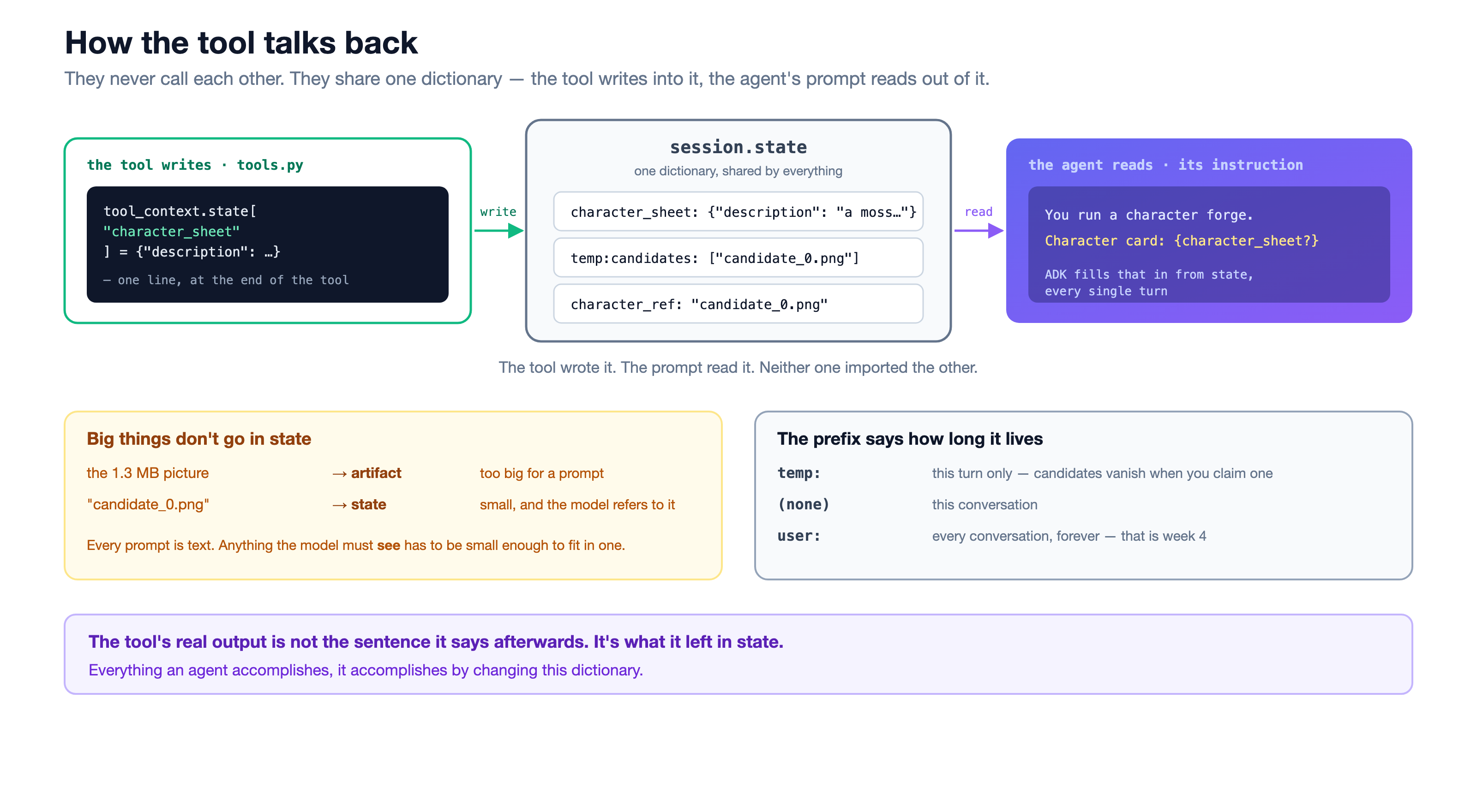
👀 tool_context.state is one dictionary, shared by everything in the session. One tool writes into it, the next one reads out of it. No message passing, no return channel between them. A shared room.
👀 The first of those four writes is the handoff you just watched — lock_candidate reads temp:candidates and pulls index 0 out of it. The last two are a provisional pin: a portrait exists now, so there is already something a later drawing could be anchored to, even though nobody has claimed it and it has no name yet. Nothing is canon until the next tool says so.
And the agent reads it too
👉📖 Now the third party. Open forge/agent/character_forge.py and look at its instruction:
cloudshell edit ~/agent-valley-lab/forge/agent/character_forge.py
Character card: {character_sheet?}
👀 Those curly braces are not decoration. ADK fills them in from state before every model call. The tool wrote character_sheet; the prompt reads it back. Round trip complete, and none of these three files imports another.
See it
👉🔬 Click the State tab. Both tools have run, so this is the whole record:
__session_metadata__   {...}
character_sheet        {"name": "Mochi", "description": "A cozy red panda...", "style_notes": ""}
provisional_ref        ""
character_ref          "candidate_0.png"
look_history           []
👀 __session_metadata__ is the dev UI's own bookkeeping. The other four are yours. cast_candidates wrote character_sheet with the name still empty and pinned its portrait as provisional_ref; lock_candidate filled the name in, wrote character_ref, and blanked the provisional pin back to "". That blank line is the chapter in miniature: after cast_candidates there is a reference, a picture something could be anchored to. Only after lock_candidate is there a character — named, canonical, character_ref. Same portrait both times; lock_candidate is the step that crosses between the two, and the empty string is its receipt. One anchor in the record, not two.
👀 Both tools also wrote bytes, and neither set is on this list: temp:provisional_ref_png and temp:character_ref_png. Chapter 5 is about why those keys exist, and the next rule is why you cannot see them.
👀 Two rules worth memorising:
- Big things do not go in state. The 1.3 MB image went to artifacts; the short string that names it went to state. Every prompt is text, so anything the model must see has to fit inside one.
- The prefix is a lifetime.
temp:lasts one turn. No prefix lasts the conversation.user:lasts forever — that is week 4.
A tool's real output is not the sentence it says afterwards. It is what it left in state.
Read more (optional)
7. 5 · Callback — reaching into the wire
Back at the start you dressed your familiar four times and its face never changed — even though you never once re-described it. This is the chapter where that stops being a mystery.
The piece: your code, at a named moment. The wire: you → the wire.
- What — put your own code between the model asking and your tool running.
- Why — an instruction is a request. This is how you make a rule.
- How — one file to read, one sentence sent to two agents, and one toggle in the valley.
The five moments
👉📖 Open forge/agent/callbacks.py. Five functions, five named moments:
cloudshell edit ~/agent-valley-lab/forge/agent/callbacks.py
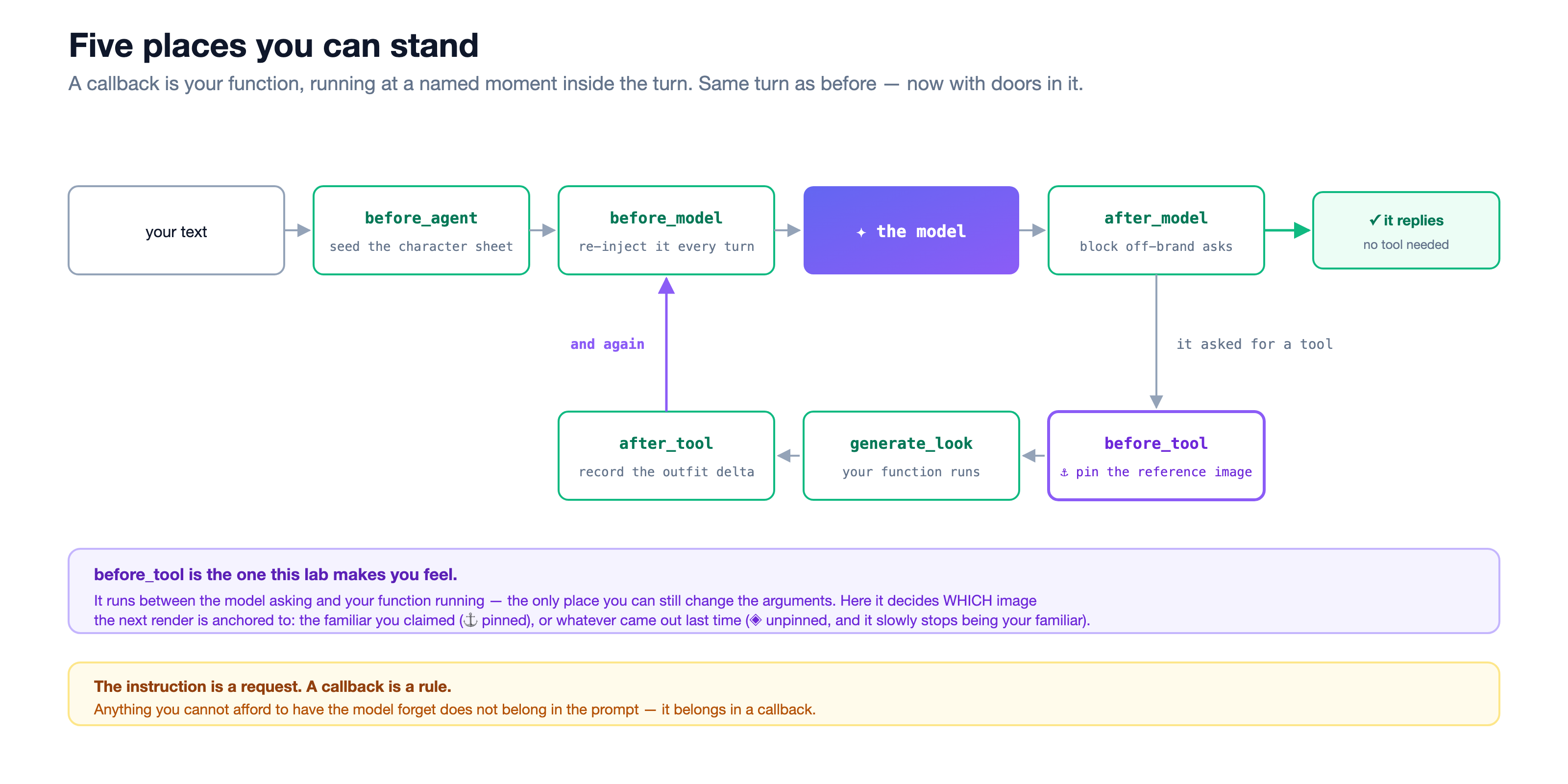
👀 A callback is just your own code, running at a moment ADK names for you. It runs whether the model wants it to or not.
👉📖 Read before_tool. It fires after the model asked and before your function runs — the last moment you can change what the tool is about to receive. Here it decides which image the next drawing is anchored to:
png = (state.get("temp:_last_output_png") if mode == "latest"
       else state.get("temp:character_ref_png")
            or state.get("temp:provisional_ref_png"))
if png is None:                       # a later turn: the temp tier is gone
    png = await artifact_png(tool_context, seed)
state["temp:active_reference_png"] = png
👀 Look at what it is touching: state. The dictionary from chapter 4. A callback is where you reach into that wire. That or is the order the two pins resolve in — the locked reference first, the provisional one from cast_candidates behind it — so there is always a face to send.
👉📖 Read the function right above it, _apply_identity_lock. This is the one the valley uses:
picked = state.get("requested_reference") or canon
if state.get("identity_lock", True):
    return canon, canon_png, f"identity lock → overruled {picked}, anchored to {canon}"
return picked, picked_png, f"lock off → honoured {picked}"
👀 Read that first line again. picked is the picture you clicked in the valley. And the next line can throw it away.
What that one line actually decides
Every drawing after the first is a payload of exactly two things: one image, and one sentence. That line above picks the image.
👀 There are only two ways to fill that envelope. Same model, same prompt template, three turns each:
- ⚓ pinned sends
P0, the portrait you claimed, on every turn. The sentence carries the whole outfit so far — "now wearing Crown, Scarf, Lantern". Nothing accumulates except words. - ◈ unpinned sends last turn's output —
P0, thenP1, thenP2— and the sentence carries only the newest item. A photocopy of a photocopy.
👀 That is why the drift is gradual rather than obvious. On turn 2 the model is not looking at your creature; it is looking at its own best guess of your creature. Any small thing it got wrong is now the ground truth for turn 3.
Watch it hold
grove is a model and two tools. grove_locked is that plus the third tool and the five callbacks you just read — same file, wired up. Send both the same sentence.
👉💻 This part is back in the dev UI, not the valley. If tab 1 is still serving it, leave it running; if you stopped it, start it again:
cd ~/agent-valley-lab
uv run adk web . --allow_origins="*"
👉🔬 In grove, ask for a change of outfit. If Mochi is already claimed in this session, send it straight away; if the session is fresh or empty, claim a familiar first: summon something cozy that likes rain, and call it Mochi. Then send:
give it a golden crown
You should see a different creature wearing a crown. grove has no generate_look. The only tool it owns that draws is cast_candidates, and that starts a new familiar every time it runs — so it summons a fresh one. You get the crown and you lose Mochi. Nothing here was ever asked to hold that face.
👉🔬 Now Select an app →
grove_locked. It is a new app, so it gets a new session — claim a familiar here too: summon something cozy that likes rain, and call it Mochi. Then send the same sentence:
give it a golden crown
👀 Same face, new outfit. Open the chip: the tool that ran was generate_look.
Here is one real run of this exact pair, with a different familiar: a seal in a yellow raincoat, then a red scarf. The same seal came back wearing the scarf — same muzzle, same eyes, same hood.
👉🔬 Open the State tab:
current_look {"form": "a golden crown", "artifact": "look_0.png", "anchored_to": "canon", "identity_hue": null}
👀 anchored_to: "canon" is before_tool leaving a receipt. Between the model asking and your function running, it went and got the portrait you claimed and put that picture's bytes — about a megabyte of PNG, not the filename — in front of the image model. That is the entire reason the face survived. You did not write it in the prompt, and the model never had a say.
Now turn it off
👉🔬 Back in the valley, press the lock so it reads 🔓 identity lock · off. Send three or four more requests, letting the strip follow you forward each time.
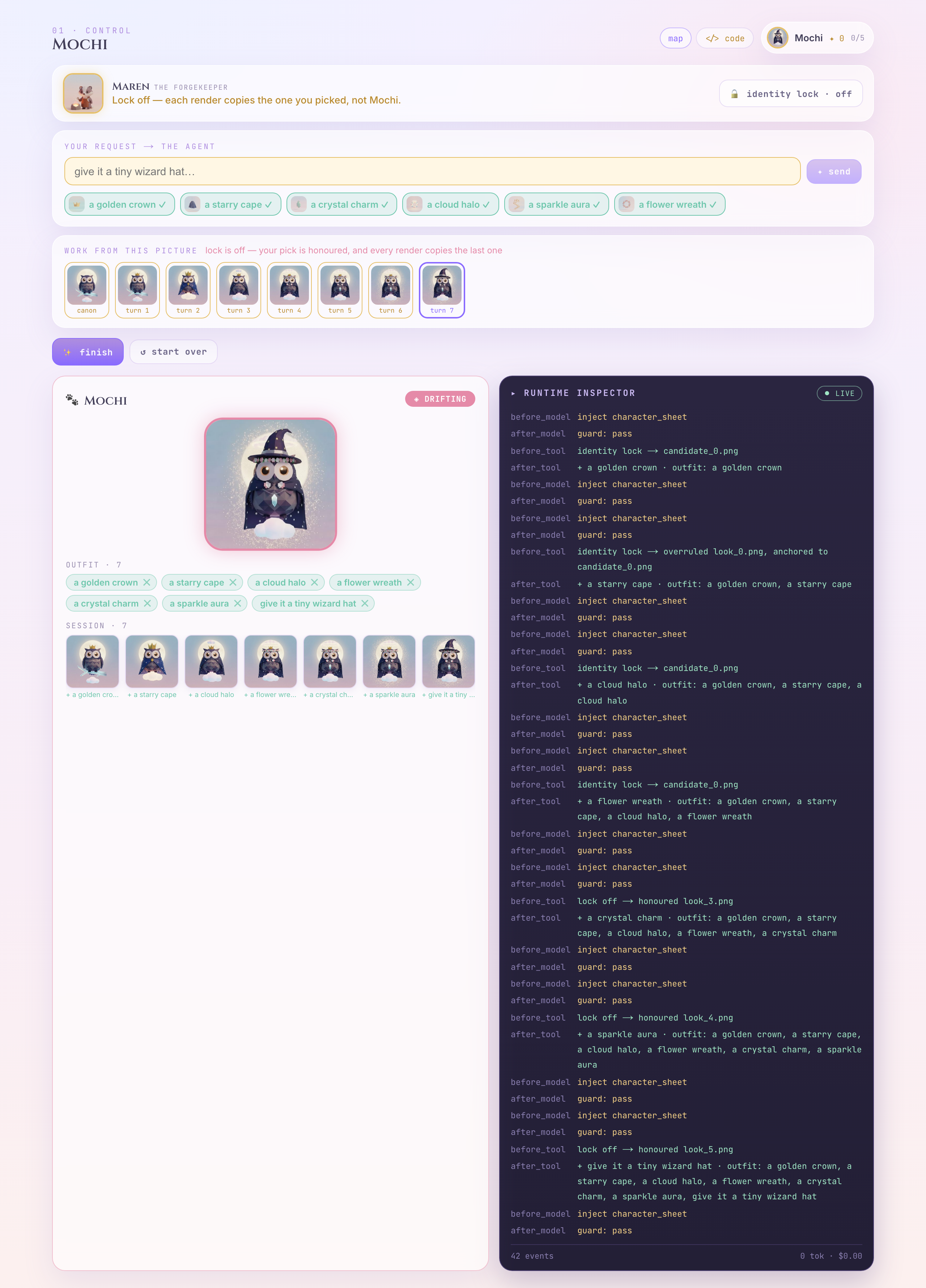
before_tool lock off → honoured look_3.png
👀 Now your pick is honoured, and every render is copying the render before it. Look along the strip — a rounder eye, a different muzzle, an ear that moved. Nothing that makes you say "wrong animal". That is what makes it dangerous: each turn copies the last, so the small shifts stack.
👀 P0 → P1 → P2 → P3 — the photocopy chain from earlier, running on your own familiar.
👉🔬 Press the lock back on and send once more. It snaps back — canon was never lost. It was written down in state, waiting for someone to point at it again.
Three rungs, not two
👀 You have now used all three ways to control this thing, and they are not equal:
who guarantees it | |
an instruction — "always a cute animal" | the model, if it feels like it |
your pick — clicking a reference | nobody. it is a request, and it can be overruled |
a callback — the identity lock | your code. every turn. no exceptions. |
An instruction is a request. A callback is a rule.
Anything you cannot afford to lose does not belong in a prompt, and it does not belong in a click either. It belongs in a callback.
8. Close
One more test
👉🔬 Hard-reload the app (Cmd/Ctrl + Shift + R).
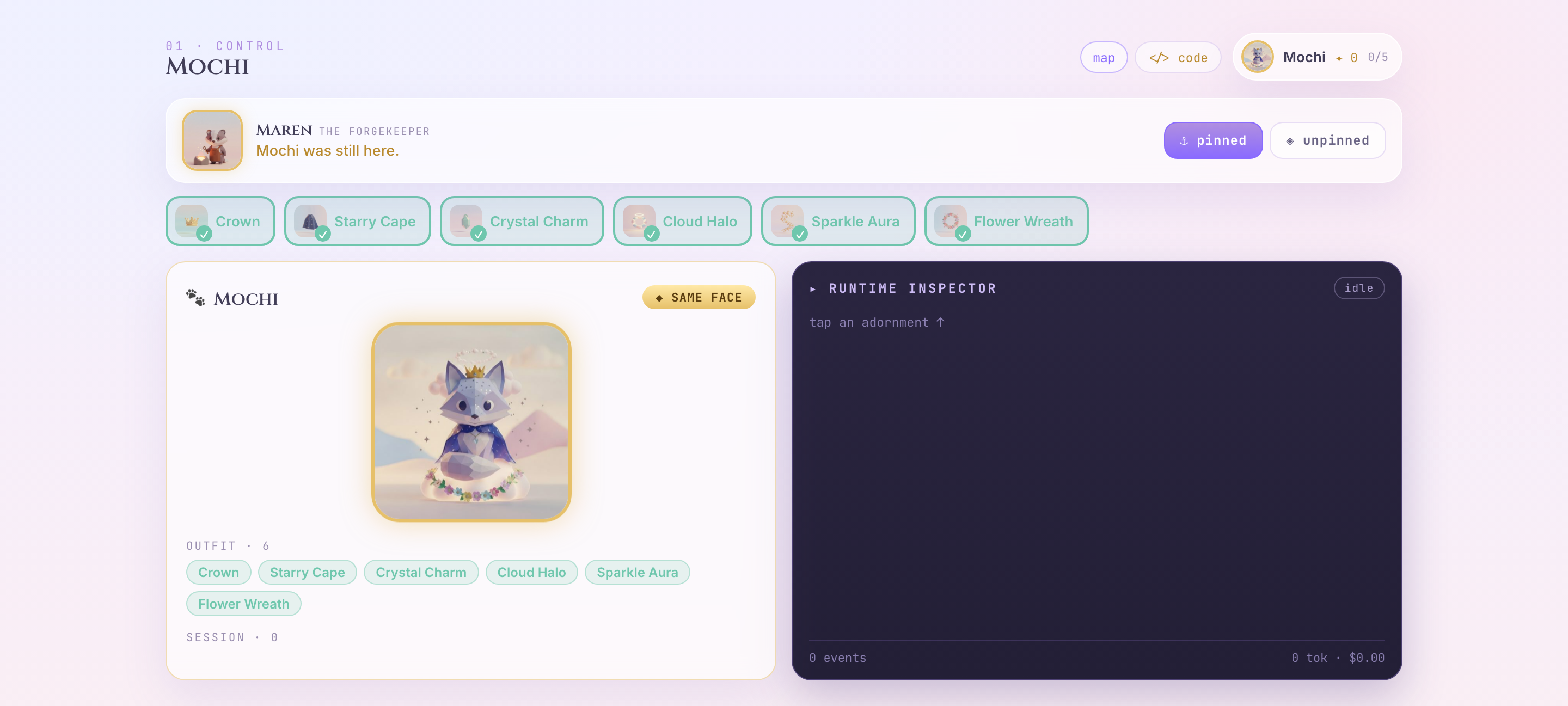
👀 Your familiar is still there, still named, still dressed — but the Inspector tape came back empty. Both were "in the app" a second ago. One was written down; the other wasn't. Knowing which of your data is which is most of the job.
👉🔬 Press ✨ finish, then ⤓ save passport.
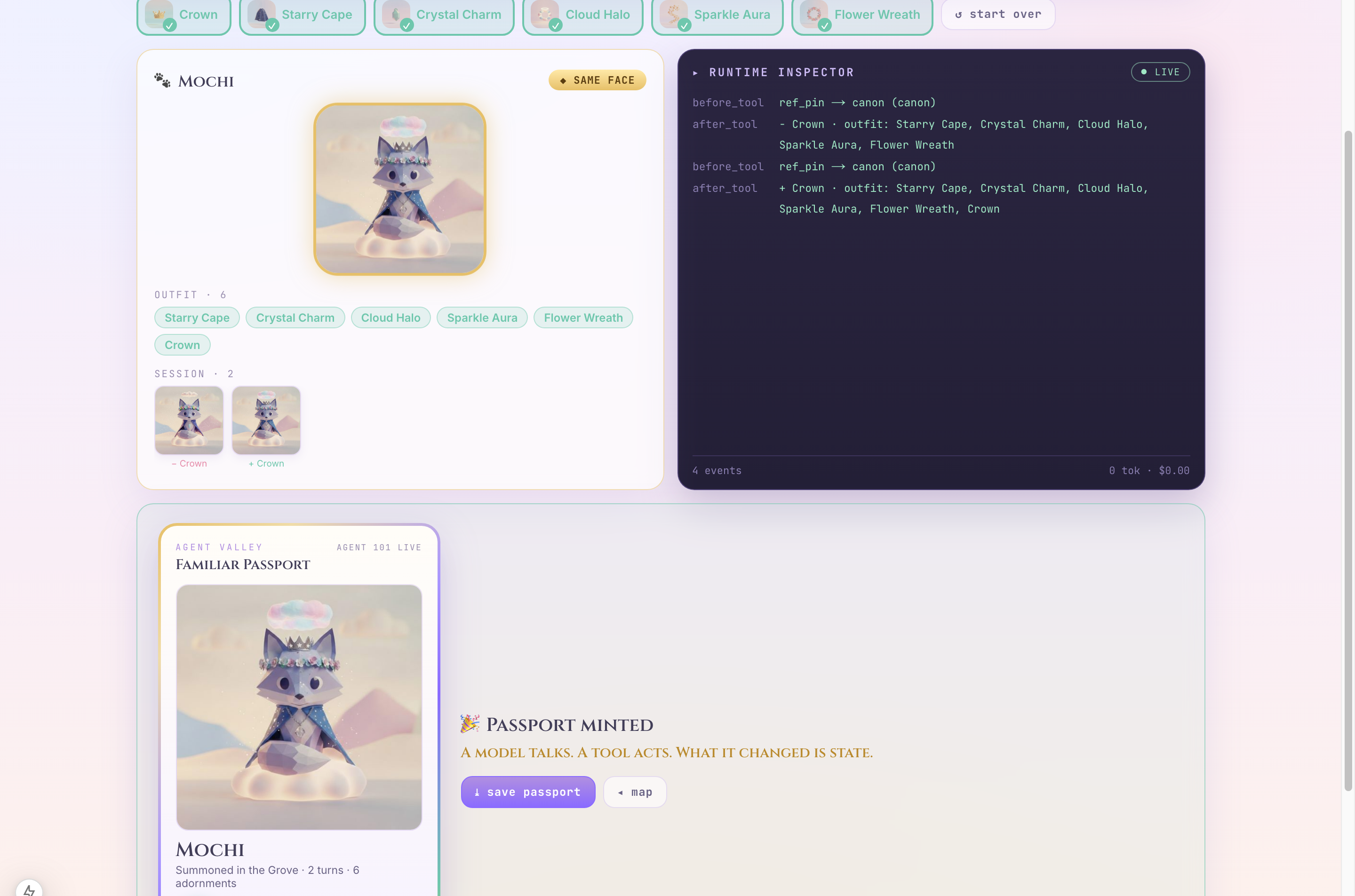
What you actually learned
An agent is pieces, plus the wiring between them:
the piece | the wire |
a model with an instruction | it can only talk |
a tool | the model asks, the runtime runs |
a second tool | one tool writes state, the next one reads it |
a callback | your code, reaching into that wire |
And the loop they add up to: listen → decide → act → state changes. Then listen again. Claude Code edits your files with it. Deep Research browses with it. Gemini CLI runs your shell with it. Same loop — different tools behind the door.
A model can only talk. A program can only follow its script. An agent is the marriage — and what the tool changed is state.
Where to go next
- Week 2 opens the Buildyard. Everything tonight was one agent. Next week the problem is that one agent can't hold a whole job — and the answer is more of them, not bigger prompts. All five weeks: goo.gle/agent101
- Diff the two agents.
forge/agent/character_forge.pyisgrove/agent.pyplus a third tool and the five callbacks you just watched fire. Everything added is control. - The third tool.
generate_look(form)is the one you never wired intogrove— it only keeps the same face because a callback pins the reference for it. That is why it lives where the callbacks do.