

1. Giriş
Bu codelab'de, kurgusal bir perakende şirketi olan Cymbal Pets için kapsamlı müşteri görünümü ve öneri motoru oluşturmak üzere BigQuery Graph'i nasıl kullanacağınızı öğreneceksiniz. Grafik verilerini doğrudan BigQuery'de oluşturmak, sorgulamak ve analiz etmek için SQL'in gücünden yararlanacak, gelişmiş ürün önerileri için vektör aramasıyla birleştireceksiniz.
BigQuery Graph, veri varlıklarınız (ör. müşteriler, ürünler ve siparişler) arasındaki ilişkileri grafik olarak modellemenize olanak tanır. Böylece müşteri davranışı ve ürün yakınlıkları hakkında karmaşık soruları kolayca yanıtlayabilirsiniz.

Yapacaklarınız
- Cymbal Pets grafiği için BigQuery veri kümesi ve şeması oluşturma
- Cloud Storage'dan örnek verileri (Müşteriler, Ürünler, Siparişler, Mağazalar) yükleme
- Bu öğeleri bağlayan bir BigQuery mülk grafiği oluşturun.
- Grafik sorgularını kullanarak müşterilerin satın alma geçmişini görselleştirme
- Vector Search'ü kullanarak ürün önerisi sistemi oluşturma
- "Birlikte satın alınanlar" grafik ilişkilerini ve Jaccard benzerliğini kullanarak önerileri geliştirme
İhtiyacınız olanlar
- Chrome gibi bir web tarayıcısı
- Faturalandırmanın etkin olduğu bir Google Cloud projesi
Bu codelab, başlangıç seviyesindekiler de dahil olmak üzere her seviyeden geliştiriciye yöneliktir.
2. Başlamadan önce
Google Cloud projesi oluşturma
- Google Cloud Console'da bir Google Cloud projesi seçin veya oluşturun.
- Cloud projeniz için faturalandırmanın etkinleştirildiğinden emin olun.
Cloud Shell'i Başlatma
- Google Cloud Console'un üst kısmında Activate Cloud Shell'i (Cloud Shell'i Etkinleştir) tıklayın.
- Kimlik doğrulamayı doğrulayın:
gcloud auth list
- Projenizi onaylayın:
gcloud config get project
- Gerekirse ayarlayın:
export PROJECT_ID=<YOUR_PROJECT_ID>
gcloud config set project $PROJECT_ID
API'leri etkinleştir
Gerekli BigQuery API'yi etkinleştirmek için şu komutu çalıştırın:
gcloud services enable bigquery.googleapis.com
3. Şemayı tanımlama
İlk olarak, grafikle ilgili tablolarınızı depolamak için bir veri kümesi oluşturmanız ve düğümleriniz ile kenarlarınızın şemasını tanımlamanız gerekir.
- Bu codelab'de SQL komutlarını yürüteceğiz. Bu komutları BigQuery Studio > SQL Düzenleyici'de çalıştırabilir veya Cloud Shell'de
bq querykomutunu kullanabilirsiniz.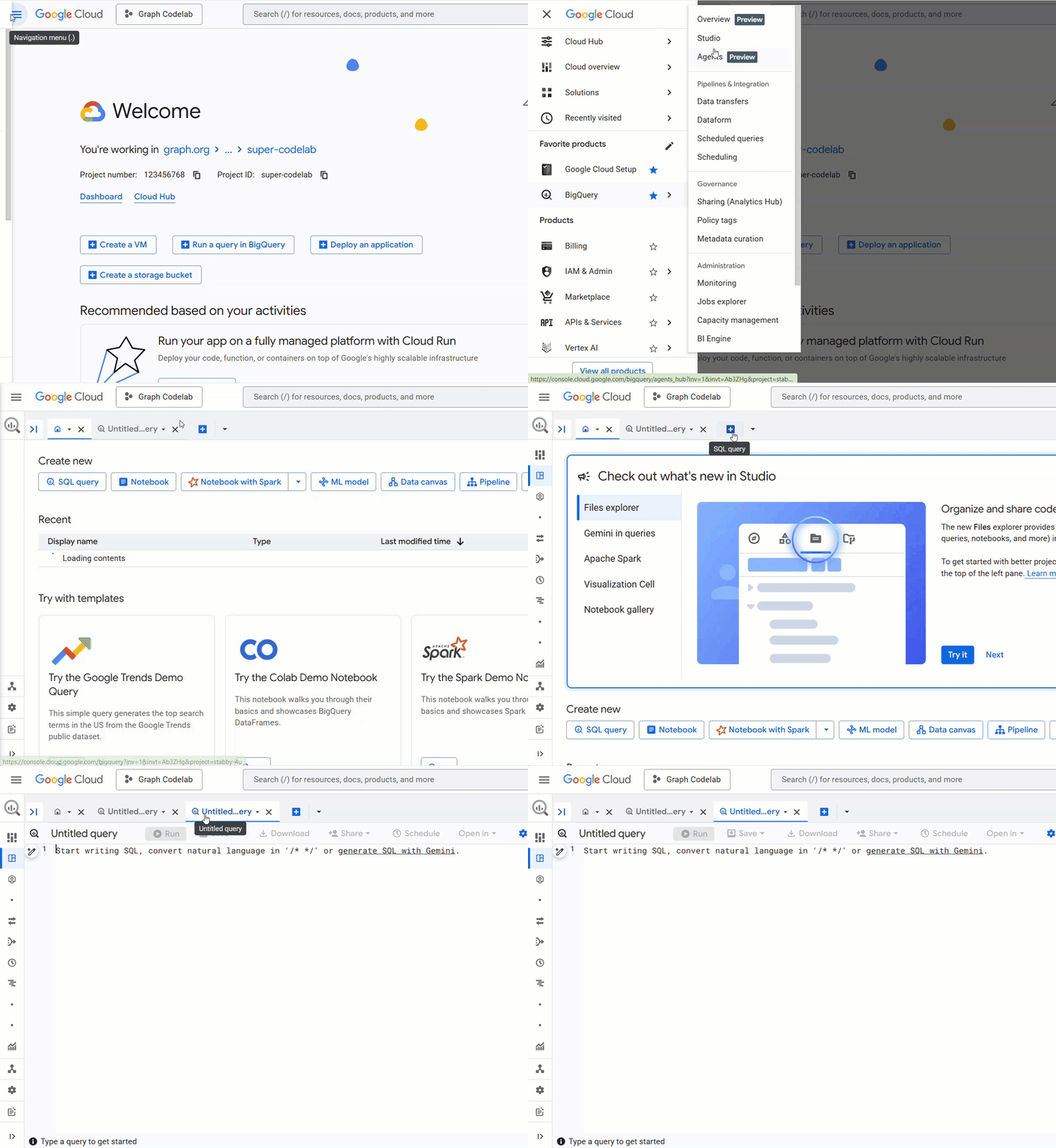 Çok satırlı oluşturma ifadeleriyle daha iyi bir deneyim için BigQuery SQL Düzenleyici'yi kullandığınızı varsayacağız.
 cymbal_pets_demoveri kümesini oluşturun:
CREATE SCHEMA IF NOT EXISTS cymbal_pets_demo;
order_items,products,orders,stores,customersveco_related_products_for_angelicaiçin tablolar oluşturun. Bu tablolar, grafiğimizin kaynak verileri olarak kullanılır.
CREATE TABLE IF NOT EXISTS cymbal_pets_demo.order_items
(
  order_id INT64,
  product_id INT64,
  order_item_id INT64,
  quantity INT64,
  price FLOAT64,
  PRIMARY KEY (order_id, product_id, order_item_id) NOT ENFORCED
)
CLUSTER BY order_item_id;

CREATE TABLE IF NOT EXISTS cymbal_pets_demo.products
(
  product_id INT64,
  product_name STRING,
  brand STRING,
  category STRING,
  subcategory INT64,
  animal_type INT64,
  search_keywords INT64,
  price FLOAT64,
  description STRING,
  inventory_level INT64,
  supplier_id INT64,
  average_rating FLOAT64,
  uri STRING,
  embedding ARRAY<FLOAT64>,
  PRIMARY KEY (product_id) NOT ENFORCED
)
CLUSTER BY product_id;

CREATE TABLE IF NOT EXISTS cymbal_pets_demo.orders
(
  customer_id INT64,
  order_id INT64,
  shipping_address_city STRING,
  store_id INT64,
  order_date STRING,
  order_type STRING,
  payment_method STRING,
  PRIMARY KEY (order_id) NOT ENFORCED
);

CREATE TABLE IF NOT EXISTS cymbal_pets_demo.stores
(
  store_id INT64,
  store_name STRING,
  address_state STRING,
  address_city STRING,
  latitude FLOAT64,
  longitude FLOAT64,
  opening_hours STRUCT<Monday STRING, Tuesday STRING, Wednesday STRING, Thursday STRING, Friday STRING, Saturday STRING, Sunday STRING>,
  manager_id INT64,
  PRIMARY KEY (store_id) NOT ENFORCED
)
CLUSTER BY store_id;

CREATE TABLE IF NOT EXISTS cymbal_pets_demo.customers
(
  customer_id INT64,
  first_name STRING,
  last_name STRING,
  email STRING,
  gender STRING,
  address_city STRING,
  address_state STRING,
  loyalty_member BOOL,
  PRIMARY KEY (customer_id) NOT ENFORCED
)
CLUSTER BY customer_id;

CREATE TABLE IF NOT EXISTS cymbal_pets_demo.co_related_products_for_angelica
(
  angelica_product_id INT64,
  other_product_id INT64,
  co_purchase_count INT64,
  jaccard_similarity FLOAT64
);
Artık grafik verilerinizin yapısını tanımladınız.
4. Verileri Yükleme
Şimdi tabloları Cloud Storage'daki örnek verilerle doldurun.
BigQuery SQL düzenleyicisinde aşağıdaki LOAD DATA ifadelerini çalıştırın:
LOAD DATA INTO `cymbal_pets_demo.customers`
FROM FILES (
    format = 'AVRO',
    uris = ['gs://sample-data-and-media/cymbal-pets/tables/customers/*.avro'],
    enable_logical_types = true
);

LOAD DATA INTO `cymbal_pets_demo.order_items`
FROM FILES (
    format = 'AVRO',
    uris = ['gs://sample-data-and-media/cymbal-pets/tables/order_items/*.avro'],
    enable_logical_types = true
);

LOAD DATA INTO `cymbal_pets_demo.orders`
FROM FILES (
    format = 'AVRO',
    uris = ['gs://sample-data-and-media/cymbal-pets/tables/orders/*.avro'],
    enable_logical_types = true
);

-- 1. Create a new partitioned and clustered table from your current data
CREATE TABLE cymbal_pets_demo.orders_temp
PARTITION BY order_date
CLUSTER BY order_id
AS
SELECT
  customer_id,
  order_id,
  shipping_address_city,
  store_id,
  -- Parse the string to a DATE type. Adjust format string ('%Y-%m-%d') if necessary.
  PARSE_DATE('%Y-%m-%d', order_date) AS order_date,
  order_type,
  payment_method
FROM
  cymbal_pets_demo.orders;

-- 2. Drop the original, non-partitioned table
DROP TABLE cymbal_pets_demo.orders;

-- 3. Rename the temporary table to the original table name
ALTER TABLE cymbal_pets_demo.orders_temp RENAME TO orders;

LOAD DATA INTO `cymbal_pets_demo.products`
FROM FILES (
    format = 'AVRO',
    uris = ['gs://sample-data-and-media/cymbal-pets/tables/products/*.avro'],
    enable_logical_types = true
);

LOAD DATA INTO `cymbal_pets_demo.stores`
FROM FILES (
    format = 'AVRO',
    uris = ['gs://sample-data-and-media/cymbal-pets/tables/stores/*.avro'],
    enable_logical_types = true
);
Satırların her tabloya yüklendiğine dair bir onay mesajı görürsünüz.
5. Mülk grafiğini oluşturma
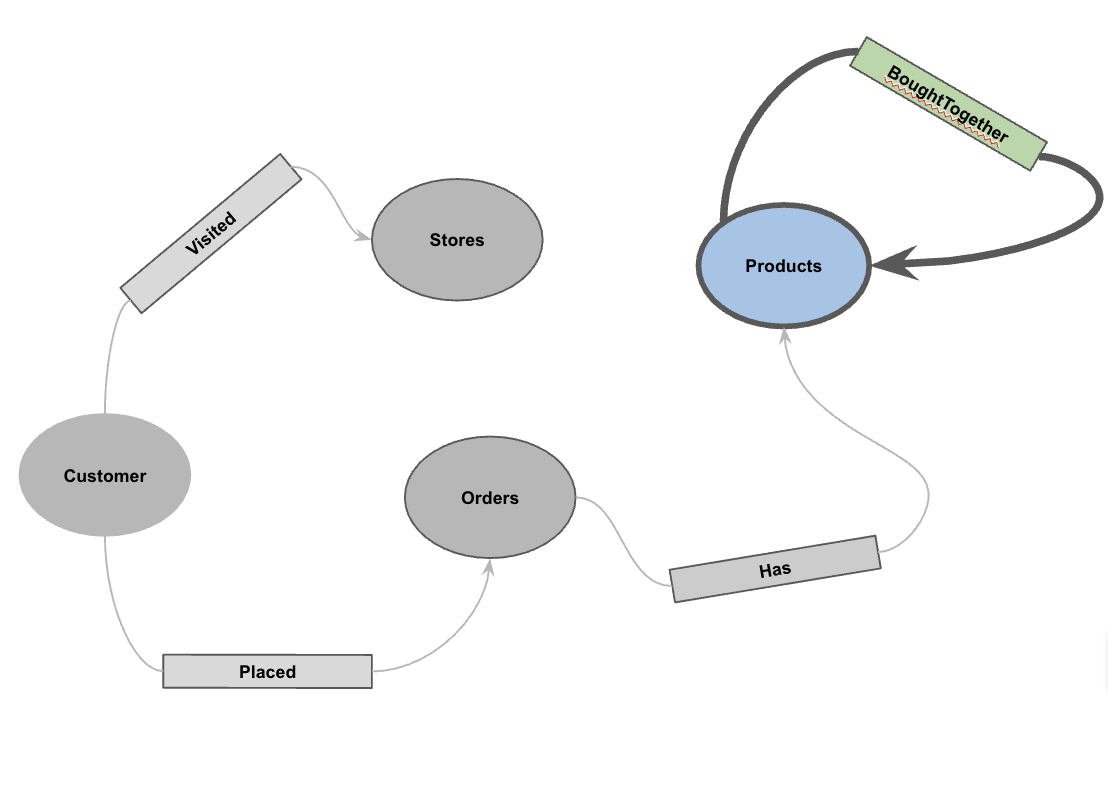
Veriler yüklendikten sonra özellik grafiğini tanımlayabilirsiniz. Bu, BigQuery'ye hangi tabloların düğümleri (Müşteriler, Ürünler gibi öğeler) ve hangi tabloların kenarları (Ziyaret etti, Yerleştirdi, Sahip gibi ilişkiler) temsil ettiğini söyler.
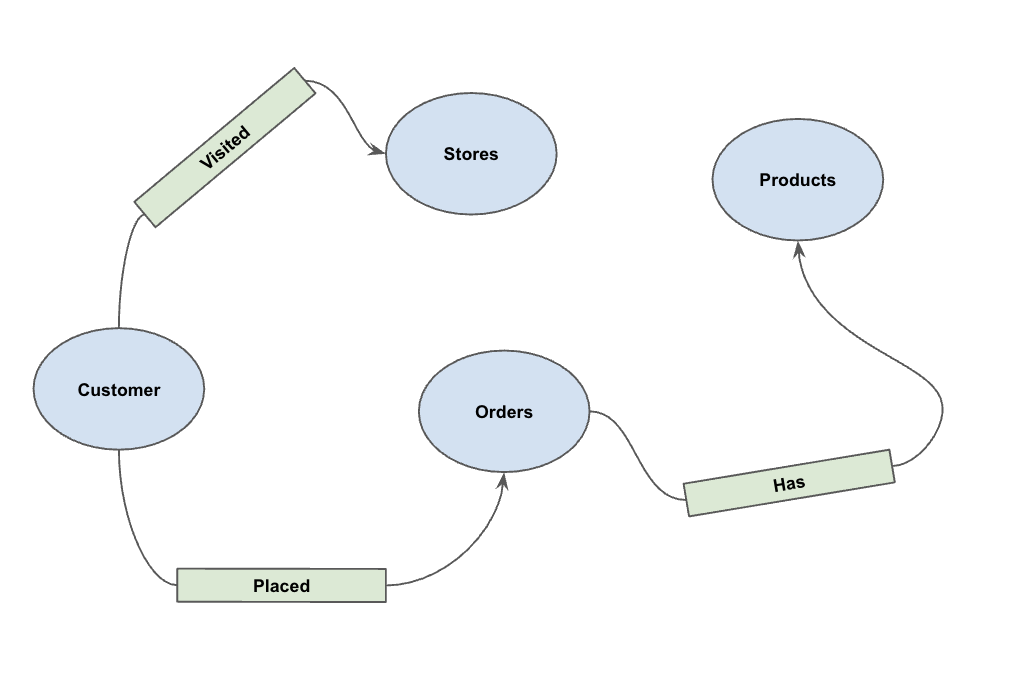
Aşağıdaki DDL ifadesini çalıştırın:
CREATE OR REPLACE PROPERTY GRAPH cymbal_pets_demo.PetsOrderGraph
NODE TABLES (
  cymbal_pets_demo.customers KEY(customer_id) LABEL Customer,
  cymbal_pets_demo.products KEY(product_id) LABEL Products,
  cymbal_pets_demo.stores KEY(store_id) LABEL Stores,
  cymbal_pets_demo.orders KEY(order_id) LABEL Orders
)
EDGE TABLES (
  cymbal_pets_demo.orders as customer_to_store_edge
    KEY (order_id)
    SOURCE KEY (customer_id) references customers(customer_id)
    DESTINATION KEY (store_id) references stores(store_id)
    LABEL Visited
    PROPERTIES ALL COLUMNS,

  cymbal_pets_demo.order_items
    KEY (order_item_id)
    SOURCE KEY (order_id) references orders(order_id)
    DESTINATION KEY (product_id) references products(product_id)
    LABEL Has
    PROPERTIES ALL COLUMNS,

  cymbal_pets_demo.orders as customer_to_orders_edge
    KEY (order_id)
    SOURCE KEY (customer_id) references customers(customer_id)
    DESTINATION KEY (order_id) references orders(order_id)
    LABEL Placed
    PROPERTIES ALL COLUMNS,

  cymbal_pets_demo.co_related_products_for_angelica
    KEY (angelica_product_id)
    SOURCE KEY (angelica_product_id) references products(product_id)
    DESTINATION KEY (other_product_id) references products(product_id)
    LABEL BoughtTogether
    PROPERTIES ALL COLUMNS
);
Bu işlem, GRAPH_TABLE operatörünü kullanarak grafik geçişleri yapmamıza olanak tanıyan PetsOrderGraph grafiğini oluşturur.
6. Tüm müşterilerin satın alma geçmişini görselleştirme
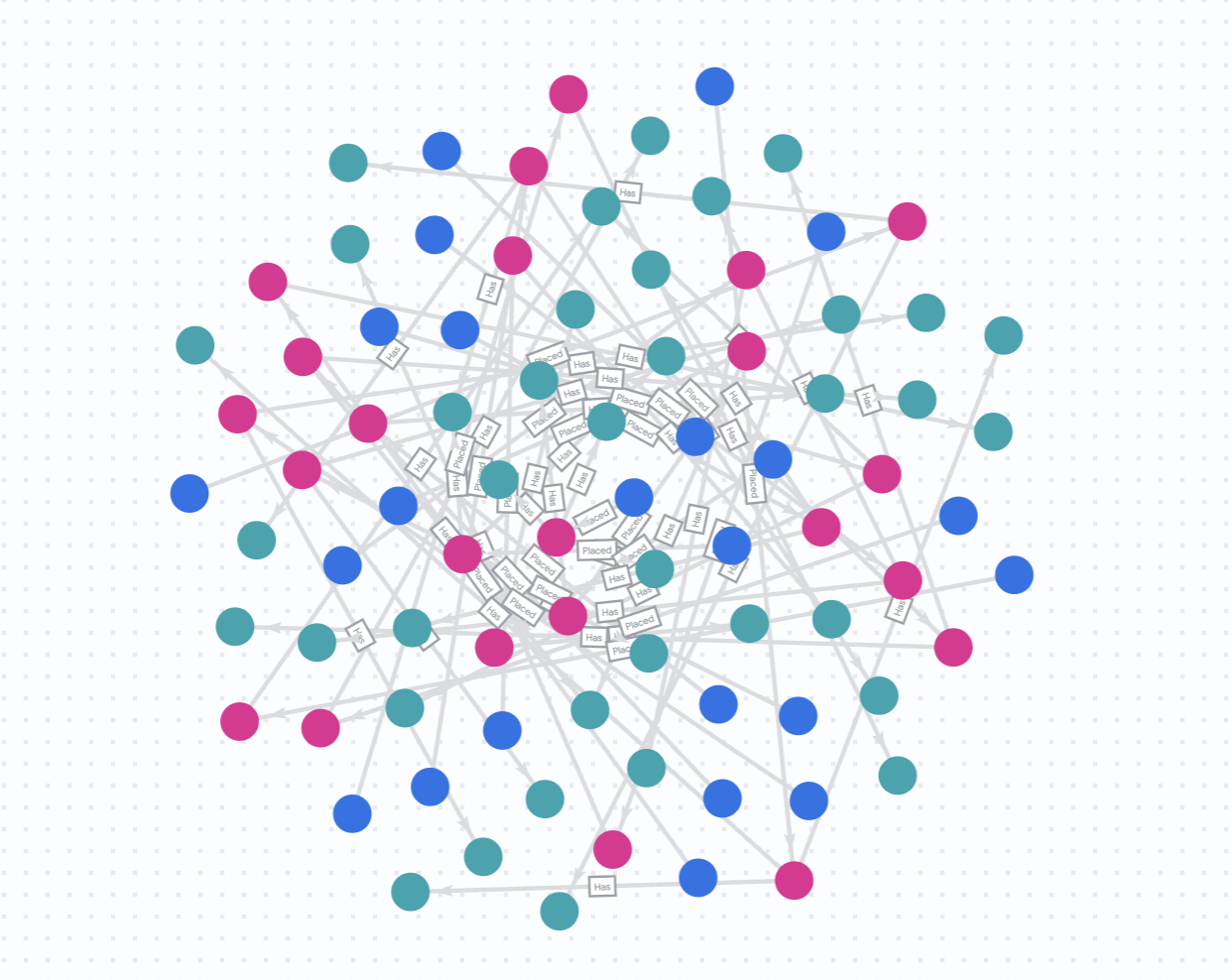
Bu codelab'in görselleştirme ve öneri bölümlerinde BigQuery Studio'daki yerel grafik görselleştirmeyi kullanacağız. Bu sayede grafik sonuçlarını kolayca görselleştirebiliriz.
Alternatif olarak, IPython Magics'i kullanarak BigQuery Graph Notebook'ta görselleştirebilirsiniz. %%bigquery sihirli komutunu TO_JSON işleviyle birlikte ekleyerek sonuçları aşağıdaki bölümlerde gösterildiği gibi görselleştirebilirsiniz.
Cymbal Pets'in, belirli bir zaman aralığında tüm müşterilerin ve yaptıkları satın alma işlemlerinin 360 derece görselleştirmesini istediğini varsayalım.
Yeni bir BigQuery Studio sekmesinde aşağıdakileri çalıştırın:
GRAPH cymbal_pets_demo.PetsOrderGraph
  # finds the customer node and then finds all
  # the Orders nodes that are connected to that customer through the
  # Placed relationship
  MATCH (customer:Customer)-[placed:Placed]->(ordr:Orders)-[has:Has]->(product:Products)
  # filters the Orders nodes to only include those where the
  # order_date is within the last 3 months.
  WHERE ordr.order_date >= date('2024-11-27')
  # # This line finds all the Products nodes that are connected to the
  # # filtered Orders nodes through the Has relationship.
  MATCH p=(customer:Customer)-[placed:Placed]->(ordr:Orders)-[has:Has]->(product:Products)
  LIMIT 40
  RETURN
    TO_JSON(p) as paths
Sonuçlarınızı görselleştirmek için Sorgu sonuçları bölmesinde Grafik'i tıklayın.
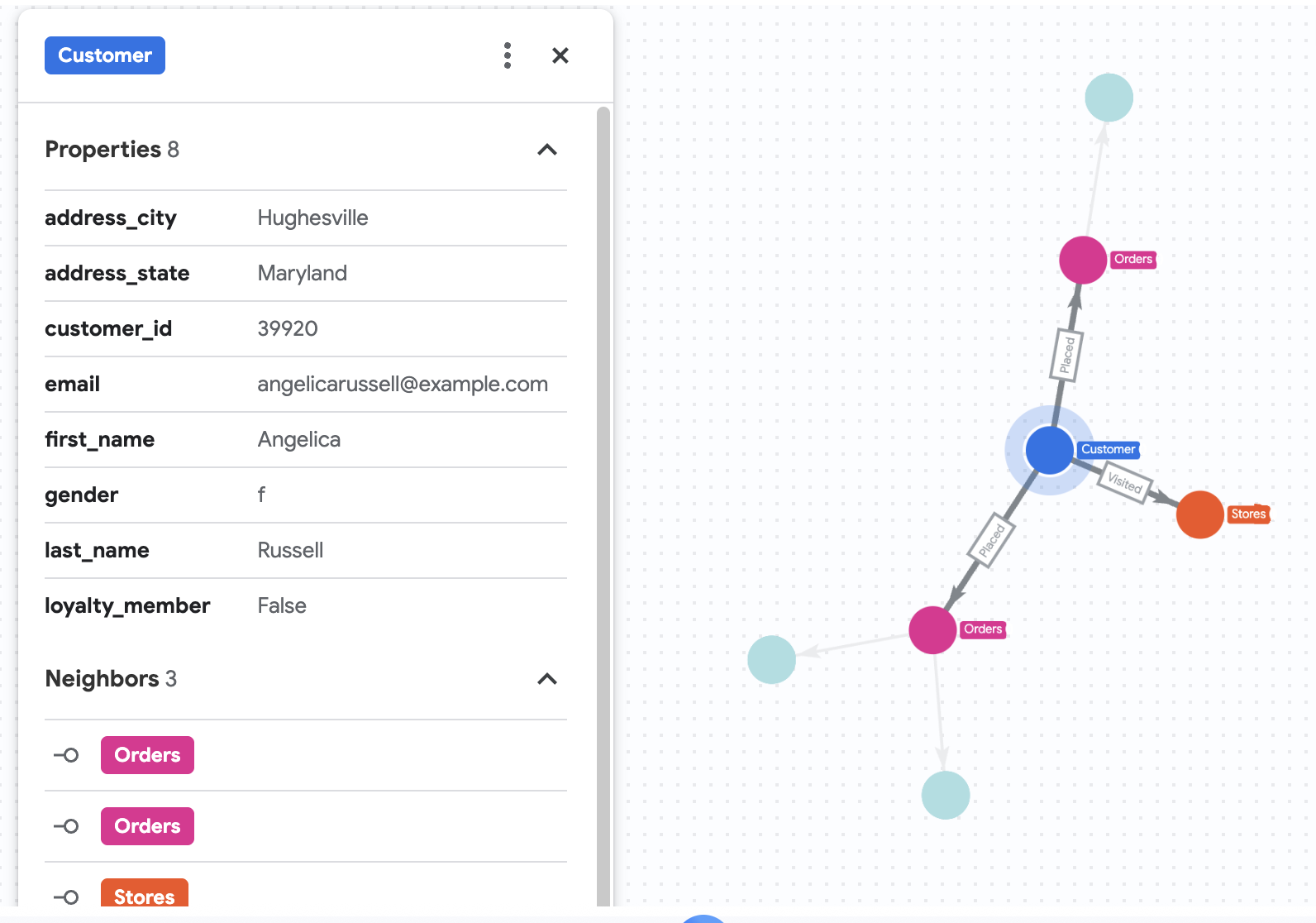
7. Angelica'nın işlem geçmişini görselleştir
Cymbal Pets'in Angelica Russell adlı bir müşteriyi ayrıntılı olarak incelemek istediğini varsayalım. Angelica'nın son 3 ayda satın aldığı ürünleri ve ziyaret ettiği mağazaları analiz etmek istiyorlar.
GRAPH cymbal_pets_demo.PetsOrderGraph
  # finds the customer node with the name "Angelica Russell" and then finds all
  # the Orders nodes that are connected to that customer through the
  # Placed relationship and all the Products nodes that are connected to the
  # filtered Orders nodes through the Has relationship.
   MATCH p=(customer:Customer {first_name: 'Angelica', last_name: 'Russell'})-[placed:Placed]->(ordr:Orders)-[has:Has]->(product:Products)
  # filters the Orders nodes to only include those where the
  # order_date is within the last 3 months.
  WHERE ordr.order_date >= date('2024-11-27')
  # finds the Stores nodes where Angelica placed order from
  MATCH p2=(customer)-[visited:Visited]->(store:Stores)
  RETURN
    TO_JSON(p) as path, TO_JSON(p2) as path2
8. Vektör araması kullanarak ürün önerisi
Cymbal Pets, Angelica'ya yakın zamanda satın aldığı ürünlere göre ürün önermek istiyor. Geçmiş satın alma işlemlerine benzer yerleştirmelere sahip ürünleri bulmak için vektör arama özelliğini kullanabiliriz.
Yeni bir Colab hücresinde aşağıdaki SQL komut dosyasını çalıştırın. Bu komut dosyası:
- Angelica'nın yakın zamanda satın aldığı ürünleri tanımlar.
VECTOR_SEARCHtablosundaki en benzer 4 ürünü bulmak içinproductskullanılır.
Not: Bu adımda, ürünler tablosunda bir yerleştirme sütunu oluşturmak için AI.GENERATE_EMBEDDINGS işlevini daha önce çalıştırdığınız varsayılır.
DECLARE products_bought_by_angelica ARRAY<INT64>;

-- 1. Get IDs of products bought by Angelica
SET products_bought_by_angelica = (
  SELECT ARRAY_AGG(product_id) FROM
   GRAPH_TABLE(
    cymbal_pets_demo.PetsOrderGraph
      MATCH (c:Customer {first_name: 'Angelica', last_name: 'Russell'})-[placed:Placed]->(o:Orders)
      WHERE o.order_date >= date('2024-11-27')
      MATCH (o)-[has_edge:Has]->(p:Products)
      RETURN DISTINCT p.product_id as product_id
  ));

-- 2. Find similar products using vector search
SELECT
  query.product_name as AngelicaBought,
  base.product_name as RecommendedProducts,
  base.category
FROM
  VECTOR_SEARCH(
    TABLE cymbal_pets_demo.products,
    'embedding',
    (SELECT * FROM cymbal_pets_demo.products
     WHERE product_id IN UNNEST(products_bought_by_angelica)),
    'embedding',
    top_k => 4)
WHERE query.product_name <> base.product_name;
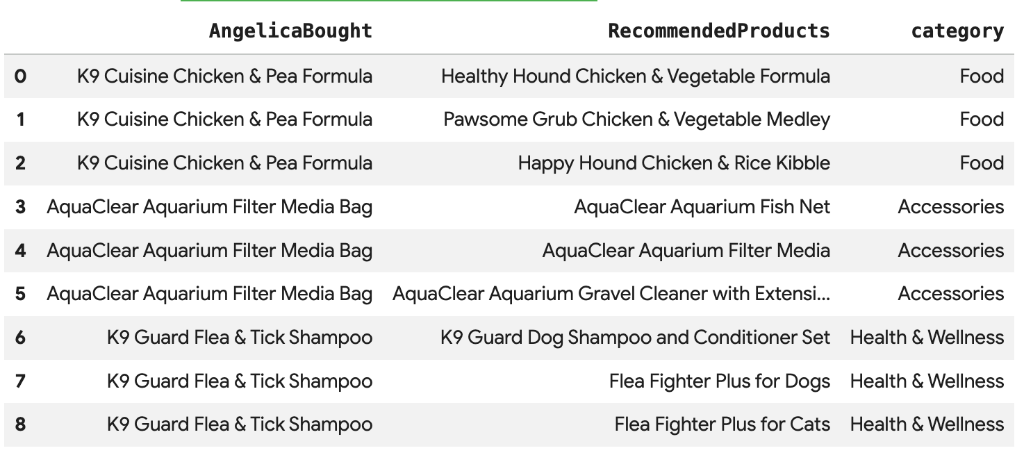
Angelica'nın satın aldığı ürünlere anlamsal olarak benzeyen önerilen ürünlerin listesini görürsünüz.
9. "Birlikte satın alınanlar" ve Jaccard benzerliği kullanılarak yapılan öneri
Bir diğer etkili öneri tekniği de "işbirlikçi filtreleme"dir. Bu teknikte, diğer kullanıcılar tarafından sıklıkla birlikte satın alınan ürünler önerilir.
Bu ürünleri, bir müşteriden satın aldığı ürünlere, ardından bu ürünleri satın alan diğer müşterilere ve son olarak bu müşterilerin satın aldığı diğer ürünlere doğru grafikte ilerleyerek bulabiliriz.
Jaccard benzerliği ile popülerlik önyargısının üstesinden gelme
Birlikte satın alma sayılarının ham verileri faydalı olsa da popüler ürünlere yönelik bir önyargı olabilir. Çok popüler bir ürün, şans eseri birçok şeyle birlikte satın alınabilir.
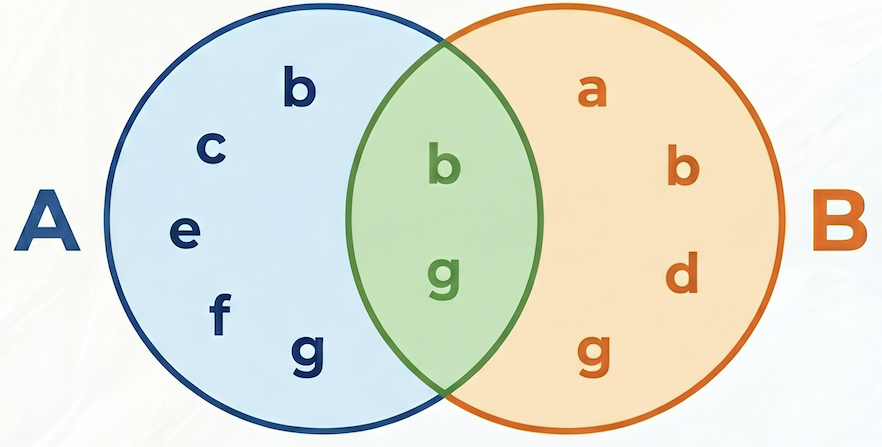
Jaccard benzerliği, birlikte satın alma sayısını normalleştirerek önerileri bir adım öteye taşır. İki küme arasındaki benzerliği ölçer (bu örnekte, her ürünü içeren sipariş kümeleri).
Jaccard benzerliği formülü şöyledir:

Nerede:
- A kesişim B, hem A ürününü hem de B ürününü içeren siparişlerin sayısıdır (birlikte satın alma sayısı).
- A, A ürününü içeren toplam sipariş sayısıdır.
- B, B ürününü içeren toplam sipariş sayısıdır.
Aşağıdaki örnekte, A = {b,c,e,f,g}, B = {a,d,b,g}, kesişimleri A⋂B = {b,g}, birleşimleri A⋃B = {a,b,c,d,e,f,g} olduğundan A ile B arasındaki Jaccard benzerliği 2 / 7 = 0,285714'tür.
Aday Oluşturma ve Yeniden Sıralama
Büyük veri kümeleri üzerinde çalışan gerçek dünya öneri sistemlerinde, olası tüm ürün çiftleri için karmaşık benzerlik puanlarını (ör. Jaccard) hesaplamak genellikle pratik değildir. Bunun yerine, iki aşamalı bir yaklaşım kullanmak yaygın bir yöntemdir:
- Aday oluşturma: Arama alanını filtrelemek ve yönetilebilir sayıda aday (ör.ilk 10) bulmak için basit ve hızlı bir metrik (ör. birlikte satın alma sayısı) kullanın.
- Yeniden sıralama: Bu küçük aday grubunu sıralamak ve son olarak en iyi önerileri seçmek için daha hassas ancak hesaplama açısından daha ağır bir metrik (ör. Jaccard benzerliği) uygulayın.
Bu codelab'de şu kalıbı izleyeceğiz:
- 1. aşama: Her ürün için birlikte satın alınan ilk 10 ürünü bulmak üzere ham birlikte satın alma sayısına göre bir sorgu çalıştırın ve bunları bir tabloda saklayın.
- 2. aşama: Bu adayları almak, Jaccard benzerliğine göre sıralamak ve ilk 3'ü döndürmek için bir grafik sorgusu kullanın.
[!WARNING] Dezavantaj: 1. aşamada ham sayıya göre filtreleme yaptığımızda, çok spesifik ancak düşük sıklıkta olan birlikte satın alma işlemlerinin "geri çağırmasını" kaybedebiliriz. Bir ürün başka bir ürüne çok benziyorsa ancak her ikisi de nadiren satın alınıyorsa bu ürün ilk 10 aday arasına giremeyebilir ve gözden kaçabilir.
Hem ham birlikte satın alma sayısını hem de Jaccard benzerliğini hesaplamak ve ham sayıya göre ilk 10 adayı depolamak için aşağıdaki sorguyu çalıştırın:
CREATE OR REPLACE TABLE cymbal_pets_demo.co_related_products_for_angelica AS
-- Calculate the total number of orders for each product
WITH ProductOrderCounts AS (
    SELECT product_id, COUNT(DISTINCT order_id) as total_count
    FROM cymbal_pets_demo.order_items
    GROUP BY product_id
),
-- Calculate the intersection of each product pairs
CoPurchases AS (
    SELECT
        angelicaProduct.product_id AS angelica_product_id,
        otherProduct.product_id AS other_product_id,
        count(DISTINCT otherOrder.order_id) AS co_purchase_count
    FROM
        GRAPH_TABLE (cymbal_pets_demo.PetsOrderGraph
          MATCH (angelica:Customer {first_name: 'Angelica', last_name: 'Russell'})-[:Placed]->(o:Orders)-[:Has]->(angelicaProduct:Products)
          WHERE o.order_date >= date('2024-11-27')
          WITH angelica, angelicaProduct
          MATCH (otherCustomer:Customer)-[:Placed]->(otherOrder:Orders)-[:Has]->(angelicaProduct)
          WHERE otherCustomer <> angelica
          WITH angelicaProduct, otherOrder
          MATCH (otherOrder)-[:HAS]->(otherProduct:Products)
          WHERE angelicaProduct <> otherProduct
          RETURN angelicaProduct, otherProduct, otherOrder
        )
    GROUP BY
        angelicaProduct.product_id, otherProduct.product_id
)
SELECT * FROM (
    SELECT
        cp.angelica_product_id,
        cp.other_product_id,
        cp.co_purchase_count,
        -- The Jaccard calculation, which is the intersection of A and B divided by (A + B - intersection)
        SAFE_DIVIDE(cp.co_purchase_count, (poc1.total_count + poc2.total_count - cp.co_purchase_count)) AS jaccard_similarity,
        ROW_NUMBER() OVER (PARTITION BY cp.angelica_product_id ORDER BY cp.co_purchase_count DESC) AS rn
    FROM CoPurchases cp
    JOIN ProductOrderCounts poc1 ON cp.angelica_product_id = poc1.product_id
    JOIN ProductOrderCounts poc2 ON cp.other_product_id = poc2.product_id
)
WHERE rn <= 10;
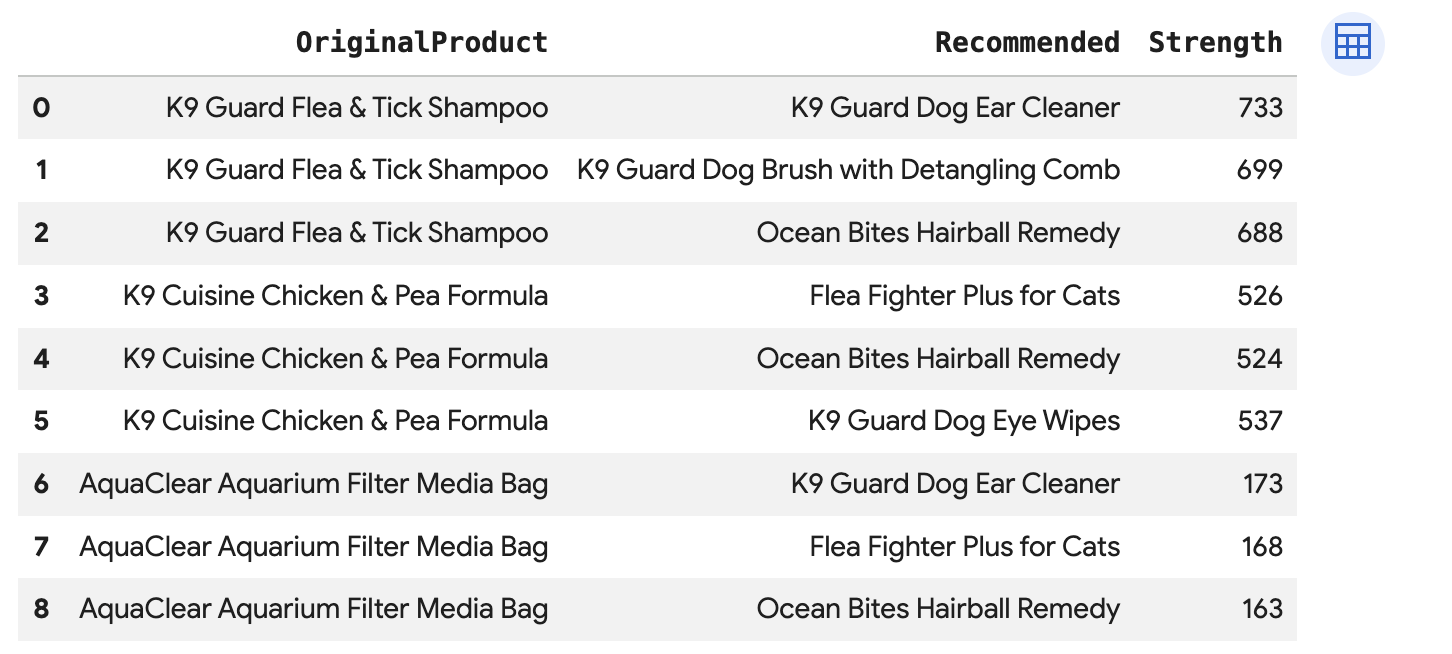
Angelica'nın her satın alma işlemi için doğrudan BoughtTogether kenarı üzerinden bağlı olan en popüler 3 ürünü önermek, hem birlikte satın alma sayısını hem de Jaccard benzerliğini göstermek için bu sorguyu çalıştırın:
SELECT * FROM GRAPH_TABLE(
  cymbal_pets_demo.PetsOrderGraph
  MATCH (customer:Customer {first_name: 'Angelica', last_name: 'Russell'})-[placed:Placed]->(ordr:Orders)
  WHERE ordr.order_date >= date('2024-11-27')
  MATCH (ordr)-[has:Has]->(product:Products)
  MATCH (product)-[bought_together:BoughtTogether]->(recommended_product:Products)
  RETURN
    product.product_name AS OriginalProduct,
    recommended_product.product_name AS Recommended,
    bought_together.co_purchase_count AS Strength,
    bought_together.jaccard_similarity AS JaccardSimilarity
)
-- Rank product recommendations by Jaccard Similarity
QUALIFY ROW_NUMBER() OVER (PARTITION BY OriginalProduct ORDER BY JaccardSimilarity DESC) <= 3
ORDER BY OriginalProduct;
Bu sorgu, Müşteri -> Sipariş -> Ürün -> (BirlikteAlınan) -> Önerilen Ürün şeklinde ilerleyerek toplu satın alma davranışına dayalı öneriler gösterir ve benzerlik puanlarını alır.
10. Temizleme
Google Cloud hesabınızın sürekli olarak ücretlendirilmesini önlemek için bu codelab sırasında oluşturulan kaynakları silin.
Veri kümesini ve tüm tabloları silme:
DROP SCHEMA IF EXISTS cymbal_pets_demo CASCADE;
Bu codelab için yeni bir proje oluşturduysanız projeyi de silebilirsiniz:
gcloud projects delete $PROJECT_ID
11. Tebrikler
Tebrikler! BigQuery Graph'i kullanarak kapsamlı müşteri görünümü ve öneri motoru oluşturma işlemini başarıyla tamamladınız.
Öğrendikleriniz
- BigQuery'de özellik grafiği oluşturma
- Verileri grafik düğümlerine ve kenarlarına yükleme
GRAPH_TABLEveMATCHkullanarak grafik desenlerini sorgulama- Karma öneriler için grafik sorgularını Vector Search ile birleştirme
Sonraki adımlar
- BigQuery Graph belgelerini inceleyin.
- BigQuery'de Vector Search hakkında daha fazla bilgi edinin.