

1. 소개
CEL이란 무엇인가요?
CEL은 빠르고 이식 가능하며 안전하게 실행되도록 설계된 비튜링 완전 표현식 언어입니다. CEL은 단독으로 사용하거나 더 큰 제품에 삽입할 수 있습니다.
CEL은 사용자 코드를 안전하게 실행할 수 있는 언어로 설계되었습니다. 사용자의 Python 코드에서 eval()를 무작정 호출하는 것은 위험하지만 사용자의 CEL 코드는 안전하게 실행할 수 있습니다. 또한 CEL은 성능을 저하시키는 동작을 방지하므로 나노초에서 마이크로초 단위로 안전하게 평가됩니다. 성능이 중요한 애플리케이션에 적합합니다.
CEL은 한 줄 함수 또는 람다 표현식과 유사한 표현식을 평가합니다. CEL은 일반적으로 불리언 결정을 내리는 데 사용되지만 JSON 또는 protobuf 메시지와 같은 더 복잡한 객체를 구성하는 데도 사용할 수 있습니다.
CEL이 프로젝트에 적합한가요?
CEL은 나노초에서 마이크로초 단위로 AST에서 표현식을 평가하므로 CEL의 이상적인 사용 사례는 성능이 중요한 경로가 있는 애플리케이션입니다. CEL 코드를 AST로 컴파일하는 작업은 중요한 경로에서 실행하면 안 됩니다. 구성이 자주 실행되고 비교적 드물게 수정되는 애플리케이션이 이상적입니다.
예를 들어 서비스에 대한 각 HTTP 요청으로 보안 정책을 실행하는 것은 보안 정책이 거의 변경되지 않고 CEL이 응답 시간에 미치는 영향이 미미하므로 CEL의 이상적인 사용 사례입니다. 이 경우 CEL은 요청이 허용되어야 하는지 여부를 나타내는 불리언을 반환하지만 더 복잡한 메시지를 반환할 수도 있습니다.
이 Codelab에서 다루는 내용은 무엇인가요?
이 Codelab의 첫 번째 단계에서는 CEL 사용의 동기와 핵심 개념을 살펴봅니다. 나머지는 일반적인 사용 사례를 다루는 코딩 연습에 전념합니다. 언어, 시맨틱스, 기능에 대한 자세한 내용은 GitHub의 CEL 언어 정의 및 CEL Go 문서를 참고하세요.
이 Codelab은 이미 CEL을 지원하는 서비스를 사용하기 위해 CEL을 배우려는 개발자를 대상으로 합니다. 이 Codelab에서는 CEL을 자체 프로젝트에 통합하는 방법을 다루지 않습니다.
학습할 내용
- CEL의 핵심 개념
- Hello, World: CEL을 사용하여 문자열 평가
- 변수 만들기
- 논리적 AND/OR 작업에서 CEL의 단락 이해하기
- CEL을 사용하여 JSON을 빌드하는 방법
- CEL을 사용하여 Protobuffer를 빌드하는 방법
- 매크로 만들기
- CEL 표현식을 조정하는 방법
필요한 항목
기본 요건
이 Codelab은 프로토콜 버퍼 및 Go 언어에 대한 기본적인 이해를 바탕으로 합니다.
프로토콜 버퍼에 익숙하지 않은 경우 첫 번째 연습을 통해 CEL의 작동 방식을 파악할 수 있지만, 고급 예에서는 프로토콜 버퍼를 CEL의 입력으로 사용하므로 이해하기 어려울 수 있습니다. 먼저 다음 튜토리얼 중 하나를 살펴보세요. CEL을 사용하는 데 프로토콜 버퍼가 필요한 것은 아니지만 이 Codelab에서는 프로토콜 버퍼가 광범위하게 사용됩니다.
다음을 실행하여 Go가 설치되었는지 테스트할 수 있습니다.
go --help
2. 주요 개념
애플리케이션
CEL은 범용이며 RPC 라우팅부터 보안 정책 정의까지 다양한 애플리케이션에 사용되었습니다. CEL은 확장 가능하고 애플리케이션에 구애받지 않으며 한 번 컴파일하고 여러 번 평가하는 워크플로에 최적화되어 있습니다.
많은 서비스와 애플리케이션이 선언적 구성을 평가합니다. 예를 들어 역할 기반 액세스 제어 (RBAC)는 역할과 사용자 집합이 주어지면 액세스 결정을 생성하는 선언적 구성입니다. 선언적 구성이 80% 사용 사례라면 사용자가 더 많은 표현력이 필요할 때 CEL은 나머지 20% 를 보완하는 데 유용한 도구입니다.
컴파일
표현식은 환경에 대해 컴파일됩니다. 컴파일 단계에서는 protobuf 형식의 추상 구문 트리 (AST)가 생성됩니다. 컴파일된 표현식은 일반적으로 평가를 최대한 빠르게 유지하기 위해 향후 사용을 위해 저장됩니다. 컴파일된 단일 표현식은 다양한 입력으로 평가할 수 있습니다.
표현식
사용자는 표현식을 정의하고 서비스와 애플리케이션은 표현식이 실행되는 환경을 정의합니다. 함수 서명은 입력을 선언하며 CEL 표현식 외부에 작성됩니다. CEL에서 사용할 수 있는 함수 라이브러리는 자동 가져오기됩니다.
다음 예에서 표현식은 요청 객체를 가져오고 요청에는 클레임 토큰이 포함됩니다. 표현식은 클레임 토큰이 아직 유효한지 여부를 나타내는 불리언을 반환합니다.
// Check whether a JSON Web Token has expired by inspecting the 'exp' claim.
//
// Args:
//   claims - authentication claims.
//   now    - timestamp indicating the current system time.
// Returns: true if the token has expired.
//
timestamp(claims["exp"]) < now
환경
환경은 서비스에 의해 정의됩니다. CEL을 삽입하는 서비스와 애플리케이션은 표현식 환경을 선언합니다. 환경은 표현식에서 사용할 수 있는 변수와 함수의 모음입니다.
프로토 기반 선언은 CEL 유형 검사기에서 표현식 내의 모든 식별자와 함수 참조가 올바르게 선언되고 사용되었는지 확인하는 데 사용됩니다.
표현식 파싱의 세 단계
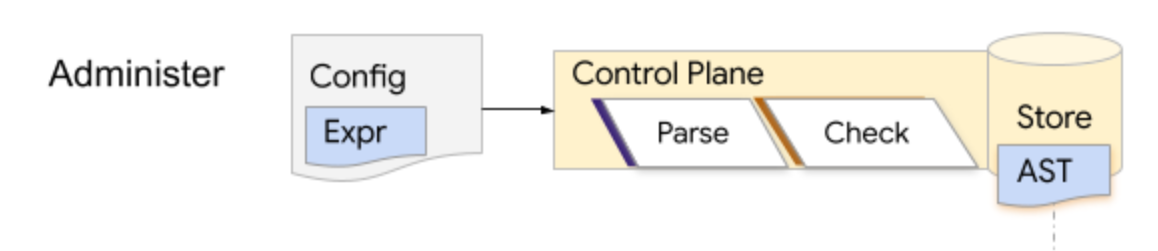
표현식을 처리하는 데는 파싱, 확인, 평가의 세 단계가 있습니다. CEL의 가장 일반적인 패턴은 제어 영역이 구성 시간에 표현식을 파싱하고 확인하여 AST를 저장하는 것입니다.
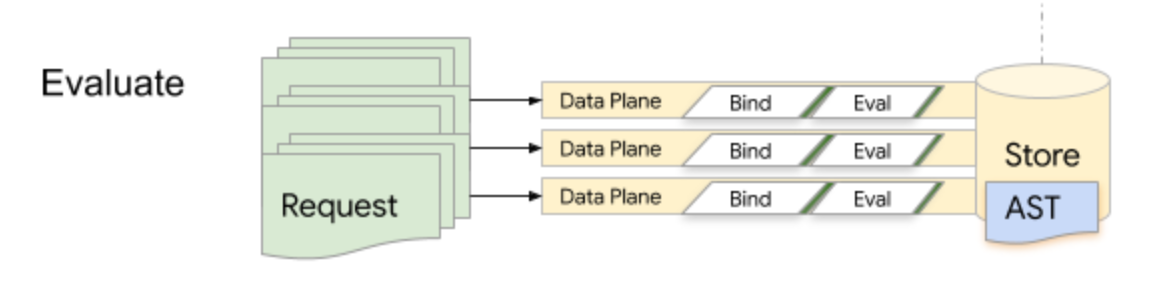
런타임에 데이터 영역은 AST를 반복적으로 가져오고 평가합니다. CEL은 런타임 효율성을 위해 최적화되어 있지만 지연 시간에 민감한 코드 경로에서는 파싱 및 확인을 실행하면 안 됩니다.
CEL은 사람이 읽을 수 있는 표현식에서 ANTLR 렉서 / 파서 문법을 사용하여 추상 구문 트리로 파싱됩니다. 파싱 단계에서는 AST의 각 Expr 노드에 파싱 및 검사 중에 생성된 메타데이터를 색인화하는 데 사용되는 정수 ID가 포함된 프로토 기반 추상 구문 트리를 내보냅니다. 파싱 중에 생성된 syntax.proto는 표현식의 문자열 형식으로 입력된 내용의 추상적 표현을 충실하게 나타냅니다.
표현식이 파싱되면 환경에 대해 검사하여 표현식의 모든 변수 및 함수 식별자가 선언되었으며 올바르게 사용되고 있는지 확인할 수 있습니다. 타입 검사기는 평가 효율성을 크게 개선할 수 있는 타입, 변수, 함수 해결 메타데이터가 포함된 checked.proto를 생성합니다.
CEL 평가자에게는 다음 3가지가 필요합니다.
- 맞춤 확장 프로그램의 함수 바인딩
- 변수 바인딩
- 평가할 AST
함수 및 변수 바인딩은 AST를 컴파일하는 데 사용된 것과 일치해야 합니다. 이러한 입력은 여러 평가에서 재사용할 수 있습니다. 예를 들어 여러 변수 바인딩 집합에서 평가되는 AST, 여러 AST에 대해 사용되는 동일한 변수, 프로세스 수명 동안 사용되는 함수 바인딩 (일반적인 사례) 등이 있습니다.
3. 설정
이 Codelab의 코드는 cel-go 저장소의 codelab 폴더에 있습니다. 솔루션은 동일한 저장소의 codelab/solution 폴더에서 확인할 수 있습니다.
저장소를 클론하고 해당 저장소로 이동합니다.
git clone https://github.com/google/cel-go.git
cd cel-go/codelab
go run을 사용하여 코드를 실행합니다.
go run .
다음과 같은 출력이 표시됩니다.
=== Exercise 1: Hello World ===

=== Exercise 2: Variables ===

=== Exercise 3: Logical AND/OR ===

=== Exercise 4: Customization ===

=== Exercise 5: Building JSON ===

=== Exercise 6: Building Protos ===

=== Exercise 7: Macros ===

=== Exercise 8: Tuning ===
CEL 패키지는 어디에 있나요?
편집기에서 codelab/codelab.go을 엽니다. 이 Codelab의 연습 실행을 주도하는 main 함수와 세 개의 도우미 함수 블록이 표시됩니다. 첫 번째 헬퍼 세트는 CEL 평가 단계를 지원합니다.
Compile함수: 환경에 대해 입력 표현식을 파싱하고 검사합니다.Eval함수: 컴파일된 프로그램을 입력에 대해 평가합니다.Report함수: 평가 결과를 보기 좋게 출력합니다.
또한 다양한 연습의 입력 구성을 지원하기 위해 request 및 auth 도우미가 제공되었습니다.
연습에서는 짧은 패키지 이름으로 패키지를 참조합니다. google/cel-go 저장소 내 패키지에서 소스 위치로의 매핑은 아래에 나와 있습니다.
패키지 | 소스 위치 | 설명 |
cel | 최상위 인터페이스 | |
ref | 참조 인터페이스 | |
유형 | 런타임 유형 값 |
4. 여러분, 안녕하세요?
모든 프로그래밍 언어의 전통에 따라 'Hello World!'를 만들고 평가하는 것으로 시작합니다.
환경 구성
편집기에서 exercise1 선언을 찾아 다음을 입력하여 환경을 설정합니다.
// exercise1 evaluates a simple literal expression: "Hello, World!"
//
// Compile, eval, profit!
func exercise1() {
    fmt.Println("=== Exercise 1: Hello World ===\n")
    // Create the standard environment.
    env, err := cel.NewEnv()
    if err != nil {
        glog.Exitf("env error: %v", err)
    }
    // Will add the parse and check steps here
}
CEL 애플리케이션은 환경에 대해 표현식을 평가합니다. env, err := cel.NewEnv()는 표준 환경을 구성합니다.
cel.EnvOption 옵션을 호출에 제공하여 환경을 맞춤설정할 수 있습니다. 이러한 옵션을 사용하면 매크로를 사용 중지하고, 맞춤 변수와 함수를 선언하는 등의 작업을 할 수 있습니다.
표준 CEL 환경은 언어 사양 내에 정의된 모든 유형, 연산자, 함수, 매크로를 지원합니다.
표현식 파싱 및 확인
환경이 구성되면 표현식을 파싱하고 확인할 수 있습니다. 함수에 다음을 추가합니다.
// exercise1 evaluates a simple literal expression: "Hello, World!"
//
// Compile, eval, profit!
func exercise1() {
    fmt.Println("=== Exercise 1: Hello World ===\n")
    // Create the standard environment.
    env, err := cel.NewEnv()
    if err != nil {
        glog.Exitf("env error: %v", err)
    }
    // Check that the expression compiles and returns a String.
    ast, iss := env.Parse(`"Hello, World!"`)
    // Report syntactic errors, if present.
    if iss.Err() != nil {
        glog.Exit(iss.Err())
    }
    // Type-check the expression for correctness.
    checked, iss := env.Check(ast)
    // Report semantic errors, if present.
    if iss.Err() != nil {
        glog.Exit(iss.Err())
    }
    // Check the output type is a string.
    if !reflect.DeepEqual(checked.OutputType(), cel.StringType) {
        glog.Exitf(
            "Got %v, wanted %v output type",
            checked.OutputType(), cel.StringType,
        )
    }
    // Will add the planning step here
}
Parse 및 Check 호출에서 반환되는 iss 값은 오류일 수 있는 문제 목록입니다. iss.Err()가 nil이 아닌 경우 구문이나 시맨틱스에 오류가 있어 프로그램이 더 이상 진행될 수 없습니다. 표현식이 올바르게 구성된 경우 이러한 호출의 결과는 실행 가능한 cel.Ast입니다.
표현식 평가
표현식이 파싱되고 cel.Ast으로 확인되면 함수 바인딩과 평가 모드를 기능 옵션으로 맞춤설정할 수 있는 평가 가능한 프로그램으로 변환할 수 있습니다. cel.CheckedExprToAst 또는 cel.ParsedExprToAst 함수를 사용하여 프로토에서 cel.Ast를 읽을 수도 있습니다.
cel.Program가 계획되면 Eval를 호출하여 입력에 대해 평가할 수 있습니다. Eval의 결과에는 결과, 평가 세부정보, 오류 상태가 포함됩니다.
계획을 추가하고 eval를 호출합니다.
// exercise1 evaluates a simple literal expression: "Hello, World!"
//
// Compile, eval, profit!
func exercise1() {
    fmt.Println("=== Exercise 1: Hello World ===\n")
    // Create the standard environment.
    env, err := cel.NewEnv()
    if err != nil {
        glog.Exitf("env error: %v", err)
    }
    // Check that the expression compiles and returns a String.
    ast, iss := env.Parse(`"Hello, World!"`)
    // Report syntactic errors, if present.
    if iss.Err() != nil {
        glog.Exit(iss.Err())
    }
    // Type-check the expression for correctness.
    checked, iss := env.Check(ast)
    // Report semantic errors, if present.
    if iss.Err() != nil {
        glog.Exit(iss.Err())
    }
    // Check the output type is a string.
    if !reflect.DeepEqual(checked.OutputType(), cel.StringType) {
        glog.Exitf(
            "Got %v, wanted %v output type",
            checked.OutputType(), cel.StringType)
    }
    // Plan the program.
    program, err := env.Program(checked)
    if err != nil {
        glog.Exitf("program error: %v", err)
    }
    // Evaluate the program without any additional arguments.
    eval(program, cel.NoVars())
    fmt.Println()
}
간결성을 위해 위의 오류 사례는 향후 연습에서 생략합니다.
코드 실행
명령줄에서 코드를 다시 실행합니다.
go run .
다음과 같은 출력과 향후 연습을 위한 자리표시자가 표시됩니다.
=== Exercise 1: Hello World ===

------ input ------
(interpreter.emptyActivation)

------ result ------
value: Hello, World! (types.String)
5. 함수에서 변수 사용
대부분의 CEL 애플리케이션은 표현식 내에서 참조할 수 있는 변수를 선언합니다. 변수 선언은 이름과 유형을 지정합니다. 변수의 유형은 CEL 내장 유형, 프로토콜 버퍼 잘 알려진 유형 또는 설명자가 CEL에 제공되는 한 모든 protobuf 메시지 유형일 수 있습니다.
함수 추가
편집기에서 exercise2 선언을 찾아 다음을 추가합니다.
// exercise2 shows how to declare and use variables in expressions.
//
// Given a request of type google.rpc.context.AttributeContext.Request
// determine whether a specific auth claim is set.
func exercise2() {
  fmt.Println("=== Exercise 2: Variables ===\n")
   env, err := cel.NewEnv(
    // Add cel.EnvOptions values here.
  )
  if err != nil {
    glog.Exit(err)
  }
  ast := compile(env, `request.auth.claims.group == 'admin'`, cel.BoolType)
  program, _ := env.Program(ast)

  // Evaluate a request object that sets the proper group claim.
  claims := map[string]string{"group": "admin"}
  eval(program, request(auth("user:me@acme.co", claims), time.Now()))
  fmt.Println()
}
다시 실행하고 오류 이해하기
프로그램을 다시 실행합니다.
go run .
다음과 같은 출력이 표시됩니다.
ERROR: <input>:1:1: undeclared reference to 'request' (in container '')
 | request.auth.claims.group == 'admin'
 | ^
타입 검사기는 오류가 발생한 소스 스니펫을 편리하게 포함하는 요청 객체에 대한 오류를 생성합니다.
6. 변수 선언
EnvOptions 추가
편집기에서 다음과 같이 google.rpc.context.AttributeContext.Request 유형의 메시지로 요청 객체의 선언을 제공하여 결과 오류를 수정합니다.
// exercise2 shows how to declare and use variables in expressions.
//
// Given a `request` of type `google.rpc.context.AttributeContext.Request`
// determine whether a specific auth claim is set.
func exercise2() {
  fmt.Println("=== Exercise 2: Variables ===\n")
  env, err := cel.NewEnv(
    cel.Variable("request",
      cel.ObjectType("google.rpc.context.AttributeContext.Request"),
    ),
  )
  if err != nil {
    glog.Exit(err)
  }
  ast := compile(env, `request.auth.claims.group == 'admin'`, cel.BoolType)
  program, _ := env.Program(ast)

  // Evaluate a request object that sets the proper group claim.
  claims := map[string]string{"group": "admin"}
  eval(program, request(auth("user:me@acme.co", claims), time.Now()))
  fmt.Println()
}
다시 실행하고 오류 이해하기
프로그램을 다시 실행합니다.
go run .
여기에 다음과 같은 오류가 표시되어 있습니다.
ERROR: <input>:1:8: [internal] unexpected failed resolution of 'google.rpc.context.AttributeContext.Request'
 | request.auth.claims.group == 'admin'
 | .......^
protobuf 메시지를 참조하는 변수를 사용하려면 유형 검사기도 유형 설명자를 알아야 합니다.
cel.Types을 사용하여 함수에서 요청의 설명자를 확인합니다.
// exercise2 shows how to declare and use variables in expressions.
//
// Given a `request` of type `google.rpc.context.AttributeContext.Request`
// determine whether a specific auth claim is set.
func exercise2() {
  fmt.Println("=== Exercise 2: Variables ===\n")
   env, err := cel.NewEnv(
    cel.Types(&rpcpb.AttributeContext_Request{}),
    cel.Variable("request",
      cel.ObjectType("google.rpc.context.AttributeContext.Request"),
    ),
  )

  if err != nil {
    glog.Exit(err)
  }
  ast := compile(env, `request.auth.claims.group == 'admin'`, cel.BoolType)
  program, _ := env.Program(ast)

  // Evaluate a request object that sets the proper group claim.
  claims := map[string]string{"group": "admin"}
  eval(program, request(auth("user:me@acme.co", claims), time.Now()))
  fmt.Println()
}
다시 실행이 완료되었습니다.
프로그램을 다시 실행합니다.
go run .
아래와 같이 표시됩니다.
=== Exercise 2: Variables ===

request.auth.claims.group == 'admin'

------ input ------
request = time: <
  seconds: 1569255569
>
auth: <
  principal: "user:me@acme.co"
  claims: <
    fields: <
      key: "group"
      value: <
        string_value: "admin"
      >
    >
  >
>

------ result ------
value: true (types.Bool)
요약하자면 오류 변수를 선언하고, 유형 설명자를 할당한 다음, 표현식 평가에서 변수를 참조했습니다.
7. 논리곱/논리합
CEL의 고유한 기능 중 하나는 교환 가능한 논리 연산자를 사용한다는 것입니다. 오류나 부분 입력이 있는 경우에도 조건부 분기의 한쪽에서 평가를 단락할 수 있습니다.
즉, CEL은 가능한 경우 결과를 제공하는 평가 순서를 찾고 다른 평가 순서에서 발생할 수 있는 오류나 누락된 데이터를 무시합니다. 애플리케이션은 이 속성을 사용하여 평가 비용을 최소화할 수 있습니다. 결과에 도달하는 데 필요하지 않은 경우 비용이 많이 드는 입력의 수집을 지연할 수 있습니다.
AND/OR 예시를 추가한 다음 다양한 입력으로 시도하여 CEL이 평가를 단락시키는 방법을 알아봅니다.
함수 만들기
편집기에서 연습 3에 다음 콘텐츠를 추가합니다.
// exercise3 demonstrates how CEL's commutative logical operators work.
//
// Construct an expression which checks if the `request.auth.claims.group`
// value is equal to admin or the `request.auth.principal` is
// `user:me@acme.co`. Issue two requests, one that specifies the proper
// user, and one that specifies an unexpected user.
func exercise3() {
  fmt.Println("=== Exercise 3: Logical AND/OR ===\n")
  env, _ := cel.NewEnv(
    cel.Types(&rpcpb.AttributeContext_Request{}),
    cel.Variable("request",
      cel.ObjectType("google.rpc.context.AttributeContext.Request"),
    ),
  )
}
다음으로, 사용자가 admin 그룹의 구성원이거나 특정 이메일 식별자가 있는 경우 true를 반환하는 OR 문을 포함합니다.
// exercise3 demonstrates how CEL's commutative logical operators work.
//
// Construct an expression which checks if the `request.auth.claims.group`
// value is equal to admin or the `request.auth.principal` is
// `user:me@acme.co`. Issue two requests, one that specifies the proper
// user, and one that specifies an unexpected user.
func exercise3() {
  fmt.Println("=== Exercise 3: Logical AND/OR ===\n")
  env, _ := cel.NewEnv(
    cel.Types(&rpcpb.AttributeContext_Request{}),
    cel.Variable("request",
      cel.ObjectType("google.rpc.context.AttributeContext.Request"),
    ),
  )

  ast := compile(env,
    `request.auth.claims.group == 'admin'
        || request.auth.principal == 'user:me@acme.co'`,
    cel.BoolType)
  program, _ := env.Program(ast)
}
마지막으로 빈 클레임 세트로 사용자를 평가하는 eval 사례를 추가합니다.
// exercise3 demonstrates how CEL's commutative logical operators work.
//
// Construct an expression which checks whether the request.auth.claims.group
// value is equal to admin or the request.auth.principal is
// user:me@acme.co. Issue two requests, one that specifies the proper user,
// and one that specifies an unexpected user.
func exercise3() {
  fmt.Println("=== Exercise 3: Logical AND/OR ===\n")
  env, _ := cel.NewEnv(
    cel.Types(&rpcpb.AttributeContext_Request{}),
    cel.Variable("request",
      cel.ObjectType("google.rpc.context.AttributeContext.Request"),
    ),
  )

  ast := compile(env,
    `request.auth.claims.group == 'admin'
        || request.auth.principal == 'user:me@acme.co'`,
    cel.BoolType)
  program, _ := env.Program(ast)

  emptyClaims := map[string]string{}
  eval(program, request(auth("user:me@acme.co", emptyClaims), time.Now()))
}
빈 클레임 세트로 코드를 실행합니다.
프로그램을 다시 실행하면 다음과 같은 새로운 출력이 표시됩니다.
=== Exercise 3: Logical AND/OR ===

request.auth.claims.group == 'admin'
    || request.auth.principal == 'user:me@acme.co'

------ input ------
request = time: <
  seconds: 1569302377
>
auth: <
  principal: "user:me@acme.co"
  claims: <
  >
>

------ result ------
value: true (types.Bool)
평가 케이스 업데이트
그런 다음 평가 케이스를 업데이트하여 빈 클레임 세트가 있는 다른 주 구성원을 전달합니다.
// exercise3 demonstrates how CEL's commutative logical operators work.
//
// Construct an expression which checks whether the request.auth.claims.group
// value is equal to admin or the request.auth.principal is
// user:me@acme.co. Issue two requests, one that specifies the proper user,
// and one that specifies an unexpected user.
func exercise3() {
  fmt.Println("=== Exercise 3: Logical AND/OR ===\n")
  env, _ := cel.NewEnv(
    cel.Types(&rpcpb.AttributeContext_Request{}),
    cel.Variable("request",
      cel.ObjectType("google.rpc.context.AttributeContext.Request"),
    ),
  )

  ast := compile(env,
    `request.auth.claims.group == 'admin'
        || request.auth.principal == 'user:me@acme.co'`,
    cel.BoolType)
  program, _ := env.Program(ast)

  emptyClaims := map[string]string{}
  eval(program, request(auth("other:me@acme.co", emptyClaims), time.Now()))
}
시간을 지정하여 코드 실행
프로그램을 다시 실행하면
go run .
다음과 같은 오류가 표시됩니다.
=== Exercise 3: Logical AND/OR ===

request.auth.claims.group == 'admin'
    || request.auth.principal == 'user:me@acme.co'

------ input ------
request = time: <
  seconds: 1588989833
>
auth: <
  principal: "user:me@acme.co"
  claims: <
  >
>

------ result ------
value: true (types.Bool)

------ input ------
request = time: <
  seconds: 1588989833
>
auth: <
  principal: "other:me@acme.co"
  claims: <
  >
>

------ result ------
error: no such key: group
protobuf에서는 예상되는 필드와 유형을 알 수 있습니다. 맵 및 JSON 값에서는 키가 있는지 알 수 없습니다. 누락된 키에 대한 안전한 기본값이 없으므로 CEL은 기본적으로 오류를 반환합니다.
8. 맞춤 함수
CEL에는 많은 기본 제공 함수가 포함되어 있지만 맞춤 함수가 유용한 경우도 있습니다. 예를 들어 맞춤 함수를 사용하여 일반적인 조건의 사용자 환경을 개선하거나 컨텍스트에 민감한 상태를 노출할 수 있습니다.
이 연습에서는 일반적으로 사용되는 검사를 함께 패키징하는 함수를 노출하는 방법을 살펴봅니다.
맞춤 함수 호출
먼저 키가 맵에 있고 특정 값이 있는지 확인하는 contains라는 재정의를 설정하는 코드를 만듭니다. 함수 정의 및 함수 바인딩의 자리표시자를 그대로 둡니다.
// exercise4 demonstrates how to extend CEL with custom functions.
// Declare a `contains` member function on map types that returns a boolean
// indicating whether the map contains the key-value pair.
func exercise4() {
  fmt.Println("=== Exercise 4: Customization ===\n")
  // Determine whether an optional claim is set to the proper value. The
  // custom map.contains(key, value) function is used as an alternative to:
  //   key in map && map[key] == value
  env, _ := cel.NewEnv(
    cel.Types(&rpcpb.AttributeContext_Request{}),
    // Declare the request.
    cel.Variable("request",
      cel.ObjectType("google.rpc.context.AttributeContext.Request"),
    ),
    // Add the custom function declaration and binding here with cel.Function()
  )
  ast := compile(env,
    `request.auth.claims.contains('group', 'admin')`,
    cel.BoolType)

  // Construct the program plan and provide the 'contains' function impl.
  // Output: false
  program, _ := env.Program(ast)
  emptyClaims := map[string]string{}
  eval(
    program,
    request(auth("user:me@acme.co", emptyClaims), time.Now()),
  )
  fmt.Println()
}
코드를 실행하고 오류 이해하기
코드를 다시 실행하면 다음과 같은 오류가 표시됩니다.
ERROR: <input>:1:29: found no matching overload for 'contains' applied to 'map(string, dyn).(string, string)'
 | request.auth.claims.contains('group', 'admin')
 | ............................^
오류를 해결하려면 현재 요청 변수를 선언하는 선언 목록에 contains 함수를 추가해야 합니다.
다음 세 줄을 추가하여 매개변수화된 유형을 선언합니다. (이는 CEL의 함수 오버로드만큼 복잡합니다.)
// exercise4 demonstrates how to extend CEL with custom functions.
// Declare a `contains` member function on map types that returns a boolean
// indicating whether the map contains the key-value pair.
func exercise4() {
  fmt.Println("=== Exercise 4: Customization ===\n")
  // Determine whether an optional claim is set to the proper value. The custom
  // map.contains(key, value) function is used as an alternative to:
  //   key in map && map[key] == value

  // Useful components of the type-signature for 'contains'.
  typeParamA := cel.TypeParamType("A")
  typeParamB := cel.TypeParamType("B")
  mapAB := cel.MapType(typeParamA, typeParamB)

  env, _ := cel.NewEnv(
    cel.Types(&rpcpb.AttributeContext_Request{}),
    // Declare the request.
    cel.Variable("request",
      cel.ObjectType("google.rpc.context.AttributeContext.Request"),
    ),
    // Add the custom function declaration and binding here with cel.Function()
  )
  ast := compile(env,
    `request.auth.claims.contains('group', 'admin')`,
    cel.BoolType)

  // Construct the program plan.
  // Output: false
  program, _ := env.Program(ast)
  emptyClaims := map[string]string{}
  eval(program, request(auth("user:me@acme.co", emptyClaims), time.Now()))
  fmt.Println()
}
맞춤 함수 추가
다음으로 매개변수화된 유형을 사용하는 새로운 contains 함수를 추가합니다.
// exercise4 demonstrates how to extend CEL with custom functions.
// Declare a `contains` member function on map types that returns a boolean
// indicating whether the map contains the key-value pair.
func exercise4() {
  fmt.Println("=== Exercise 4: Customization ===\n")
  // Determine whether an optional claim is set to the proper value. The custom
  // map.contains(key, value) function is used as an alternative to:
  //   key in map && map[key] == value

  // Useful components of the type-signature for 'contains'.
  typeParamA := cel.TypeParamType("A")
  typeParamB := cel.TypeParamType("B")
  mapAB := cel.MapType(typeParamA, typeParamB)

  // Env declaration.
  env, _ := cel.NewEnv(
    cel.Types(&rpcpb.AttributeContext_Request{}),
    // Declare the request.
    cel.Variable("request",
      cel.ObjectType("google.rpc.context.AttributeContext.Request"),
    ),
    // Declare the custom contains function and its implementation.
    cel.Function("contains",
      cel.MemberOverload(
        "map_contains_key_value",
        []*cel.Type{mapAB, typeParamA, typeParamB},
        cel.BoolType,
        // Provide the implementation using cel.FunctionBinding()
      ),
    ),
  )
  ast := compile(env,
    `request.auth.claims.contains('group', 'admin')`,
    cel.BoolType)

  // Construct the program plan and provide the 'contains' function impl.
  // Output: false
  program, _ := env.Program(ast)
  emptyClaims := map[string]string{}
  eval(program, request(auth("user:me@acme.co", emptyClaims), time.Now()))
  fmt.Println()
}
프로그램을 실행하여 오류 이해하기
운동을 실행합니다. 누락된 런타임 함수에 관한 다음 오류가 표시됩니다.
------ result ------
error: no such overload: contains
cel.FunctionBinding() 함수를 사용하여 NewEnv 선언에 함수 구현을 제공합니다.
// exercise4 demonstrates how to extend CEL with custom functions.
//
// Declare a contains member function on map types that returns a boolean
// indicating whether the map contains the key-value pair.
func exercise4() {
  fmt.Println("=== Exercise 4: Customization ===\n")
  // Determine whether an optional claim is set to the proper value. The custom
  // map.contains(key, value) function is used as an alternative to:
  //   key in map && map[key] == value

  // Useful components of the type-signature for 'contains'.
  typeParamA := cel.TypeParamType("A")
  typeParamB := cel.TypeParamType("B")
  mapAB := cel.MapType(typeParamA, typeParamB)

  // Env declaration.
  env, _ := cel.NewEnv(
    cel.Types(&rpcpb.AttributeContext_Request{}),
    // Declare the request.
    cel.Variable("request",
      cel.ObjectType("google.rpc.context.AttributeContext.Request"),
    ),
    // Declare the custom contains function and its implementation.
    cel.Function("contains",
      cel.MemberOverload(
        "map_contains_key_value",
        []*cel.Type{mapAB, typeParamA, typeParamB},
        cel.BoolType,
        cel.FunctionBinding(mapContainsKeyValue)),
    ),
  )
  ast := compile(env,
    `request.auth.claims.contains('group', 'admin')`,
    cel.BoolType)

  // Construct the program plan.
  // Output: false
  program, err := env.Program(ast)
  if err != nil {
    glog.Exit(err)
  }

  eval(program, request(auth("user:me@acme.co", emptyClaims), time.Now()))
  claims := map[string]string{"group": "admin"}
  eval(program, request(auth("user:me@acme.co", claims), time.Now()))
  fmt.Println()
}
이제 프로그램이 성공적으로 실행됩니다.
=== Exercise 4: Custom Functions ===

request.auth.claims.contains('group', 'admin')

------ input ------
request = time: <
  seconds: 1569302377
>
auth: <
  principal: "user:me@acme.co"
  claims: <
  >
>

------ result ------
value: false (types.Bool)
소유권 주장이 있는 경우 어떻게 되나요?
추가 점수를 받으려면 입력에 관리자 클레임을 설정하여 클레임이 있을 때 contains 오버로드도 true를 반환하는지 확인하세요. 다음과 같은 출력이 표시됩니다.
=== Exercise 4: Customization ===

request.auth.claims.contains('group','admin')

------ input ------
request = time: <
  seconds: 1588991010
>
auth: <
  principal: "user:me@acme.co"
  claims: <
  >
>

------ result ------
value: false (types.Bool)

------ input ------
request = time: <
  seconds: 1588991010
>
auth: <
  principal: "user:me@acme.co"
  claims: <
    fields: <
      key: "group"
      value: <
        string_value: "admin"
      >
    >
  >
>

------ result ------
value: true (types.Bool)
계속 진행하기 전에 mapContainsKeyValue 함수 자체를 검사하는 것이 좋습니다.
// mapContainsKeyValue implements the custom function:
//   map.contains(key, value) -> bool.
func mapContainsKeyValue(args ...ref.Val) ref.Val {
  // The declaration of the function ensures that only arguments which match
  // the mapContainsKey signature will be provided to the function.
  m := args[0].(traits.Mapper)

  // CEL has many interfaces for dealing with different type abstractions.
  // The traits.Mapper interface unifies field presence testing on proto
  // messages and maps.
  key := args[1]
  v, found := m.Find(key)

  // If not found and the value was non-nil, the value is an error per the
  // `Find` contract. Propagate it accordingly. Such an error might occur with
  // a map whose key-type is listed as 'dyn'.
  if !found {
    if v != nil {
      return types.ValOrErr(v, "unsupported key type")
    }
    // Return CEL False if the key was not found.
    return types.False
  }
  // Otherwise whether the value at the key equals the value provided.
  return v.Equal(args[2])
}
확장성을 최대한 높이기 위해 맞춤 함수의 서명은 ref.Val 유형의 인수를 예상합니다. 여기서의 절충안은 확장 용이성이 모든 값 유형이 올바르게 처리되도록 구현자에게 부담을 준다는 것입니다. 입력 인수 유형 또는 개수가 함수 선언과 일치하지 않으면 no such overload 오류가 반환되어야 합니다.
cel.FunctionBinding()는 런타임 계약이 환경의 유형 검사 선언과 일치하도록 런타임 유형 가드를 추가합니다.
9. JSON 빌드
CEL은 JSON과 같은 비불리언 출력을 생성할 수도 있습니다. 함수에 다음을 추가합니다.
// exercise5 covers how to build complex objects as CEL literals.
//
// Given the input now, construct a JWT with an expiry of 5 minutes.
func exercise5() {
    fmt.Println("=== Exercise 5: Building JSON ===\n")
    env, _ := cel.NewEnv(
      // Declare the 'now' variable as a Timestamp.
      // cel.Variable("now", cel.TimestampType),
    )
    // Note the quoted keys in the CEL map literal. For proto messages the
    // field names are unquoted as they represent well-defined identifiers.
    ast := compile(env, `
        {'sub': 'serviceAccount:delegate@acme.co',
         'aud': 'my-project',
         'iss': 'auth.acme.com:12350',
         'iat': now,
         'nbf': now,
         'exp': now + duration('300s'),
         'extra_claims': {
             'group': 'admin'
         }}`,
        cel.MapType(cel.StringType, cel.DynType))

    program, _ := env.Program(ast)
    out, _, _ := eval(
        program,
        map[string]interface{}{
            "now": &tpb.Timestamp{Seconds: time.Now().Unix()},
        },
    )
    fmt.Printf("------ type conversion ------\n%v\n", out)
    fmt.Println()
}
코드 실행
코드를 다시 실행하면 다음과 같은 오류가 표시됩니다.
ERROR: <input>:5:11: undeclared reference to 'now' (in container '')
 |    'iat': now,
 | ..........^
... and more ...
cel.TimestampType 유형의 now 변수 선언을 cel.NewEnv()에 추가하고 다시 실행합니다.
// exercise5 covers how to build complex objects as CEL literals.
//
// Given the input now, construct a JWT with an expiry of 5 minutes.
func exercise5() {
    fmt.Println("=== Exercise 5: Building JSON ===\n")
    env, _ := cel.NewEnv(
      cel.Variable("now", cel.TimestampType),
    )
    // Note the quoted keys in the CEL map literal. For proto messages the
    // field names are unquoted as they represent well-defined identifiers.
    ast := compile(env, `
        {'sub': 'serviceAccount:delegate@acme.co',
         'aud': 'my-project',
         'iss': 'auth.acme.com:12350',
         'iat': now,
         'nbf': now,
         'exp': now + duration('300s'),
         'extra_claims': {
             'group': 'admin'
         }}`,
        cel.MapType(cel.StringType, cel.DynType))

     // Hint:
     // Convert `out` to JSON using the valueToJSON() helper method.
     // The valueToJSON() function calls ConvertToNative(&structpb.Value{})
     // to adapt the CEL value to a protobuf JSON representation and then
     // uses the jsonpb.Marshaler utilities on the output to render the JSON
     // string.
    program, _ := env.Program(ast)
    out, _, _ := eval(
        program,
        map[string]interface{}{
            "now": time.Now(),
        },
    )
    fmt.Printf("------ type conversion ------\n%v\n", out)
    fmt.Println()
}
코드를 다시 실행하면 성공합니다.
=== Exercise 5: Building JSON ===

  {'aud': 'my-project',
   'exp': now + duration('300s'),
   'extra_claims': {
    'group': 'admin'
   },
   'iat': now,
   'iss': 'auth.acme.com:12350',
   'nbf': now,
   'sub': 'serviceAccount:delegate@acme.co'
   }

------ input ------
now = seconds: 1569302377

------ result ------
value: &{0xc0002eaf00 map[aud:my-project exp:{0xc0000973c0} extra_claims:0xc000097400 iat:{0xc000097300} iss:auth.acme.com:12350 nbf:{0xc000097300} sub:serviceAccount:delegate@acme.co] {0x8c8f60 0xc00040a6c0 21}} (*types.baseMap)

------ type conversion ------
&{0xc000313510 map[aud:my-project exp:{0xc000442510} extra_claims:0xc0004acdc0 iat:{0xc000442450} iss:auth.acme.com:12350 nbf:{0xc000442450} sub:serviceAccount:delegate@acme.co] {0x9d0ce0 0xc0004424b0 21}}
프로그램은 실행되지만 출력 값 out을 JSON으로 명시적으로 변환해야 합니다. 이 경우 내부 CEL 표현은 JSON에서 지원하거나 잘 알려진 Proto to JSON 매핑이 있는 유형만 참조하므로 JSON으로 변환할 수 있습니다.
// exercise5 covers how to build complex objects as CEL literals.
//
// Given the input now, construct a JWT with an expiry of 5 minutes.
func exercise5() {
    fmt.Println("=== Exercise 5: Building JSON ===\n")
...
    fmt.Printf("------ type conversion ------\n%v\n", valueToJSON(out))
    fmt.Println()
}
codelab.go 파일 내에서 valueToJSON 도우미 함수를 사용하여 유형을 변환하면 다음과 같은 추가 출력이 표시됩니다.
------ type conversion ------
  {
   "aud": "my-project",
   "exp": "2019-10-13T05:54:29Z",
   "extra_claims": {
      "group": "admin"
     },
   "iat": "2019-10-13T05:49:29Z",
   "iss": "auth.acme.com:12350",
   "nbf": "2019-10-13T05:49:29Z",
   "sub": "serviceAccount:delegate@acme.co"
  }
10. 프로토 빌드
CEL은 애플리케이션으로 컴파일된 모든 메시지 유형의 protobuf 메시지를 빌드할 수 있습니다. 입력 jwt에서 google.rpc.context.AttributeContext.Request를 빌드하는 함수 추가
// exercise6 describes how to build proto message types within CEL.
//
// Given an input jwt and time now construct a
// google.rpc.context.AttributeContext.Request with the time and auth
// fields populated according to the go/api-attributes specification.
func exercise6() {
  fmt.Println("=== Exercise 6: Building Protos ===\n")

  // Construct an environment and indicate that the container for all references
  // within the expression is `google.rpc.context.AttributeContext`.
  requestType := &rpcpb.AttributeContext_Request{}
  env, _ := cel.NewEnv(
      // Add cel.Container() option for 'google.rpc.context.AttributeContext'
      cel.Types(requestType),
      // Add cel.Variable() option for 'jwt' as a map(string, Dyn) type
      // and for 'now' as a timestamp.
  )

  // Compile the Request message construction expression and validate that
  // the resulting expression type matches the fully qualified message name.
  //
  // Note: the field names within the proto message types are not quoted as they
  // are well-defined names composed of valid identifier characters. Also, note
  // that when building nested proto objects, the message name needs to prefix
  // the object construction.
  ast := compile(env, `
    Request{
        auth: Auth{
            principal: jwt.iss + '/' + jwt.sub,
            audiences: [jwt.aud],
            presenter: 'azp' in jwt ? jwt.azp : "",
            claims: jwt
        },
        time: now
    }`,
    cel.ObjectType("google.rpc.context.AttributeContext.Request"),
  )
  program, _ := env.Program(ast)

  // Construct the message. The result is a ref.Val that returns a dynamic
  // proto message.
  out, _, _ := eval(
      program,
      map[string]interface{}{
          "jwt": map[string]interface{}{
              "sub": "serviceAccount:delegate@acme.co",
              "aud": "my-project",
              "iss": "auth.acme.com:12350",
              "extra_claims": map[string]string{
                  "group": "admin",
              },
          },
          "now": time.Now(),
      },
  )

  // Hint: Unwrap the CEL value to a proto. Make sure to use the
  // `ConvertToNative(reflect.TypeOf(requestType))` to convert the dynamic proto
  // message to the concrete proto message type expected.
  fmt.Printf("------ type unwrap ------\n%v\n", out)
  fmt.Println()
}
코드 실행
코드를 다시 실행하면 다음과 같은 오류가 표시됩니다.
ERROR: <input>:2:10: undeclared reference to 'Request' (in container '')
 |   Request{
 | .........^
컨테이너는 기본적으로 네임스페이스 또는 패키지와 동일하지만 protobuf 메시지 이름만큼 세분화될 수도 있습니다. CEL 컨테이너는 지정된 변수, 함수 또는 유형 이름이 선언된 위치를 결정할 때 Protobuf 및 C++와 동일한 네임스페이스 확인 규칙을 사용합니다.
컨테이너 google.rpc.context.AttributeContext가 주어지면 유형 검사기와 평가자는 모든 변수, 유형, 함수에 대해 다음 식별자 이름을 시도합니다.
google.rpc.context.AttributeContext.<id>google.rpc.context.<id>google.rpc.<id>google.<id><id>
절대 이름의 경우 변수, 유형 또는 함수 참조에 선행 점을 접두사로 추가합니다. 이 예에서 .<id> 표현식은 먼저 컨테이너 내에서 확인하지 않고 최상위 <id> 식별자만 검색합니다.
cel.Container("google.rpc.context.AttributeContext") 옵션을 CEL 환경에 지정하고 다시 실행해 보세요.
// exercise6 describes how to build proto message types within CEL.
//
// Given an input jwt and time now construct a
// google.rpc.context.AttributeContext.Request with the time and auth
// fields populated according to the go/api-attributes specification.
func exercise6() {
  fmt.Println("=== Exercise 6: Building Protos ===\n")
  // Construct an environment and indicate that the container for all references
  // within the expression is `google.rpc.context.AttributeContext`.
  requestType := &rpcpb.AttributeContext_Request{}
  env, _ := cel.NewEnv(
    // Add cel.Container() option for 'google.rpc.context.AttributeContext'
    cel.Container("google.rpc.context.AttributeContext.Request"),
    cel.Types(requestType),
    // Later, add cel.Variable() options for 'jwt' as a map(string, Dyn) type
    // and for 'now' as a timestamp.
    // cel.Variable("now", cel.TimestampType),
    // cel.Variable("jwt", cel.MapType(cel.StringType, cel.DynType)),
  )

 ...
}
다음과 같은 결과가 출력됩니다.
ERROR: <input>:4:16: undeclared reference to 'jwt' (in container 'google.rpc.context.AttributeContext')
 |     principal: jwt.iss + '/' + jwt.sub,
 | ...............^
... 그 외 오류 다수
다음으로 jwt 및 now 변수를 선언하면 프로그램이 예상대로 실행됩니다.
=== Exercise 6: Building Protos ===

  Request{
   auth: Auth{
    principal: jwt.iss + '/' + jwt.sub,
    audiences: [jwt.aud],
    presenter: 'azp' in jwt ? jwt.azp : "",
    claims: jwt
   },
   time: now
  }

------ input ------
jwt = {
  "aud": "my-project",
  "extra_claims": {
    "group": "admin"
  },
  "iss": "auth.acme.com:12350",
  "sub": "serviceAccount:delegate@acme.co"
}
now = seconds: 1588993027

------ result ------
value: &{0xc000485270 0xc000274180 {0xa6ee80 0xc000274180 22} 0xc0004be140 0xc0002bf700 false} (*types.protoObj)

----- type unwrap ----
&{0xc000485270 0xc000274180 {0xa6ee80 0xc000274180 22} 0xc0004be140 0xc0002bf700 false}
추가 점수를 받으려면 메시지에서 out.Value()를 호출하여 결과를 변경하는 방법도 확인해야 합니다.
11. 매크로
매크로는 파싱 시간에 CEL 프로그램을 조작하는 데 사용할 수 있습니다. 매크로는 호출 서명과 일치하고 새 하위 표현식 AST를 생성하기 위해 입력 호출과 인수를 조작합니다.
매크로를 사용하면 CEL로 직접 작성할 수 없는 복잡한 로직을 AST에서 구현할 수 있습니다. 예를 들어 has 매크로를 사용하면 필드 존재 테스트가 사용 설정됩니다. exists 및 all과 같은 이해 매크로는 입력 목록 또는 맵에 대한 바운드 반복으로 함수 호출을 대체합니다. 두 개념 모두 구문 수준에서는 불가능하지만 매크로 확장을 통해 가능합니다.
다음 연습을 추가하고 실행합니다.
// exercise7 introduces macros for dealing with repeated fields and maps.
//
// Determine whether the jwt.extra_claims has at least one key that starts
// with the group prefix, and ensure that all group-like keys have list
// values containing only strings that end with '@acme.co`.
func exercise7() {
    fmt.Println("=== Exercise 7: Macros ===\n")
    env, _ := cel.NewEnv(
      cel.ClearMacros(),
      cel.Variable("jwt", cel.MapType(cel.StringType, cel.DynType)),
    )
    ast := compile(env,
        `jwt.extra_claims.exists(c, c.startsWith('group'))
                && jwt.extra_claims
                      .filter(c, c.startsWith('group'))
                      .all(c, jwt.extra_claims[c]
                                 .all(g, g.endsWith('@acme.co')))`,
        cel.BoolType)
    program, _ := env.Program(ast)

    // Evaluate a complex-ish JWT with two groups that satisfy the criteria.
    // Output: true.
    eval(program,
        map[string]interface{}{
            "jwt": map[string]interface{}{
                "sub": "serviceAccount:delegate@acme.co",
                "aud": "my-project",
                "iss": "auth.acme.com:12350",
                "extra_claims": map[string][]string{
                    "group1": {"admin@acme.co", "analyst@acme.co"},
                    "labels": {"metadata", "prod", "pii"},
                    "groupN": {"forever@acme.co"},
                },
            },
        })

    fmt.Println()
}
다음과 같은 오류가 표시됩니다.
ERROR: <input>:1:25: undeclared reference to 'c' (in container '')
 | jwt.extra_claims.exists(c, c.startsWith('group'))
 | ........................^
... 등 다양한 기능을 제공합니다.
이 오류는 매크로가 아직 사용 설정되지 않았기 때문에 발생합니다. 매크로를 사용 설정하려면 cel.ClearMacros()를 삭제하고 다시 실행하세요.
=== Exercise 7: Macros ===

jwt.extra_claims.exists(c, c.startsWith('group'))
    && jwt.extra_claims
       .filter(c, c.startsWith('group'))
       .all(c, jwt.extra_claims[c]
              .all(g, g.endsWith('@acme.co')))

------ input ------
jwt = {
  "aud": "my-project",
  "extra_claims": {
    "group1": [
      "admin@acme.co",
      "analyst@acme.co"
    ],
    "groupN": [
      "forever@acme.co"
    ],
    "labels": [
      "metadata",
      "prod",
      "pii"
    ]
  },
  "iss": "auth.acme.com:12350",
  "sub": "serviceAccount:delegate@acme.co"
}

------ result ------
value: true (types.Bool)
현재 지원되는 매크로는 다음과 같습니다.
Macro | 서명 | 설명 |
모두 | r.all(var, cond) | 범위 r의 모든 var에 대해 cond가 true로 평가되는지 테스트합니다. |
존재함 | r.exists(var, cond) | 범위 r의 모든 var에 대해 cond가 true로 평가되는지 테스트합니다. |
exists_one | r.exists_one(var, cond) | 범위 r의 변수 하나 에 대해서만 cond가 true로 평가되는지 테스트합니다. |
filter | r.filter(var, cond) | 목록의 경우 범위 r의 각 요소 변수가 조건 cond를 충족하는 새 목록을 만듭니다. 지도에서 범위 r의 각 키 변수가 조건 cond를 충족하는 새 목록을 만듭니다. |
지도 | r.map(var, expr) | 범위 r의 각 변수가 expr에 의해 변환되는 새 목록을 만듭니다. |
r.map(var, cond, expr) | 값이 변환되기 전에 조건부 cond 필터가 있는 2개 인수 맵과 동일합니다. | |
보유 | has(a.b) | 값 a에 대한 b의 존재 테스트 : 지도, json 테스트 정의 프로토콜의 경우 기본값이 아닌 기본 값 또는 설정된 메시지 필드를 테스트합니다. |
범위 r 인수가 map 유형인 경우 var은 맵 키가 되고 list 유형 값의 경우 var은 목록 요소 값이 됩니다. all, exists, exists_one, filter, map 매크로는 입력 크기에 의해 제한되는 for-each 반복을 실행하는 AST 재작성을 실행합니다.
바운드된 컴프리헨션은 CEL 프로그램이 튜링 완전이 되지 않도록 하지만 입력에 대해 초선형 시간으로 평가됩니다. 이러한 매크로는 가급적 사용하지 마세요. 컴프리헨션을 많이 사용하면 맞춤 함수가 더 나은 사용자 환경과 성능을 제공할 수 있다는 좋은 지표가 됩니다.
12. 조정
현재 CEL-Go 전용이지만 다른 CEL 구현의 향후 계획을 나타내는 기능이 몇 가지 있습니다. 다음 연습에서는 동일한 AST에 대한 다양한 프로그램 계획을 보여줍니다.
// exercise8 covers features of CEL-Go which can be used to improve
// performance and debug evaluation behavior.
//
// Turn on the optimization, exhaustive eval, and state tracking
// ProgramOption flags to see the impact on evaluation behavior.
func exercise8() {
    fmt.Println("=== Exercise 8: Tuning ===\n")
    // Declare the x and 'y' variables as input into the expression.
    env, _ := cel.NewEnv(
        cel.Variable("x", cel.IntType),
        cel.Variable("y", cel.UintType),
    )
    ast := compile(env,
        `x in [1, 2, 3, 4, 5] && type(y) == uint`,
        cel.BoolType)

    // Try the different cel.EvalOptions flags when evaluating this AST for
    // the following use cases:
    // - cel.OptOptimize: optimize the expression performance.
    // - cel.OptExhaustiveEval: turn off short-circuiting.
    // - cel.OptTrackState: track state and compute a residual using the
    //   interpreter.PruneAst function.
    program, _ := env.Program(ast)
    eval(program, cel.NoVars())

    fmt.Println()
}
최적화 도구
최적화 플래그가 사용 설정되면 CEL은 미리 목록과 맵 리터럴을 빌드하는 데 추가 시간을 사용하고 in 연산자와 같은 특정 호출을 실제 집합 멤버십 테스트로 최적화합니다.
    // Turn on optimization.
    trueVars := map[string]interface{}{"x": int64(4), "y": uint64(2)}
    program, _ := env.Program(ast, cel.EvalOptions(cel.OptOptimize))
    // Try benchmarking with the optimization flag on and off.
    eval(program, trueVars)
동일한 프로그램을 여러 입력에 대해 여러 번 평가하는 경우 최적화하는 것이 좋습니다. 하지만 프로그램이 한 번만 평가되는 경우에는 최적화로 인해 오버헤드만 추가됩니다.
포괄적 평가
전체 평가를 사용하면 표현식 평가의 각 단계에서 관찰된 값을 파악할 수 있으므로 표현식 평가 동작을 디버깅하는 데 유용합니다.
    // Turn on exhaustive eval to see what the evaluation state looks like.
    // The input is structure to show a false on the first branch, and true
    // on the second.
    falseVars := map[string]interface{}{"x": int64(6), "y": uint64(2)}
    program, _ = env.Program(ast, cel.EvalOptions(cel.OptExhaustiveEval))
    eval(program, falseVars)
각 표현식 ID의 표현식 평가 상태 목록이 표시됩니다.
------ eval states ------
1: 6 (types.Int)
2: false (types.Bool)
3: &{0xc0000336b0 [1 2 3 4 5] {0x89f020 0xc000434760 151}} (*types.baseList)
4: 1 (types.Int)
5: 2 (types.Int)
6: 3 (types.Int)
7: 4 (types.Int)
8: 5 (types.Int)
9: uint (*types.Type)
10: 2 (types.Uint)
11: true (types.Bool)
12: uint (*types.Type)
13: false (types.Bool)
표현식 ID 2는 첫 번째 분기의 in 연산자 결과에 해당하고 표현식 ID 11은 두 번째 분기의 == 연산자에 해당합니다. 일반적인 평가에서는 2가 계산된 후 표현식이 단락됩니다. y가 uint가 아니었다면 상태에 표현식이 실패한 이유가 하나가 아닌 두 개 표시되었을 것입니다.
13. 어떤 내용을 다루었나요?
표현식 엔진이 필요한 경우 CEL을 사용하는 것이 좋습니다. CEL은 성능이 중요한 사용자 구성을 실행해야 하는 프로젝트에 적합합니다.
이전 연습을 통해 데이터를 CEL에 전달하고 출력 또는 결정을 다시 가져오는 데 익숙해지셨기를 바랍니다.
불리언 결정부터 JSON 및 Protobuffer 메시지 생성에 이르기까지 다양한 작업을 수행할 수 있습니다.
이제 표현식을 사용하는 방법과 표현식이 하는 역할을 파악하셨을 것입니다. 또한 확장하는 일반적인 방법도 이해합니다.