

1. บทนำ
CEL คืออะไร
CEL เป็นภาษาการแสดงออกที่ไม่ใช่ทัวริงสมบูรณ์ซึ่งออกแบบมาให้ทำงานได้รวดเร็ว พกพาสะดวก และปลอดภัยในการดำเนินการ CEL สามารถใช้ได้ด้วยตัวเองหรือฝังไว้ในผลิตภัณฑ์ที่ใหญ่กว่า
CEL ได้รับการออกแบบให้เป็นภาษาที่เรียกใช้โค้ดของผู้ใช้ได้อย่างปลอดภัย แม้ว่าการเรียกใช้ eval() ในโค้ด Python ของผู้ใช้โดยไม่พิจารณาอาจเป็นอันตราย แต่คุณก็สามารถเรียกใช้โค้ด CEL ของผู้ใช้ได้อย่างปลอดภัย และเนื่องจาก CEL ป้องกันพฤติกรรมที่จะทำให้ประสิทธิภาพลดลง จึงประเมินได้อย่างปลอดภัยในระดับนาโนวินาทีถึงไมโครวินาที ซึ่งเหมาะอย่างยิ่งสำหรับแอปพลิเคชันที่ต้องมีประสิทธิภาพสูง
CEL ประเมินนิพจน์ซึ่งคล้ายกับฟังก์ชันบรรทัดเดียวหรือนิพจน์ Lambda แม้ว่าโดยทั่วไปแล้ว CEL จะใช้สำหรับการตัดสินใจแบบบูลีน แต่ก็ยังใช้เพื่อสร้างออบเจ็กต์ที่ซับซ้อนมากขึ้น เช่น ข้อความ JSON หรือ Protobuf ได้ด้วย
CEL เหมาะกับโปรเจ็กต์ของคุณไหม
เนื่องจาก CEL ประเมินนิพจน์จาก AST ในหน่วยนาโนวินาทีเป็นไมโครวินาที กรณีการใช้งานที่เหมาะสมที่สุดสำหรับ CEL คือแอปพลิเคชันที่มีเส้นทางที่สำคัญต่อประสิทธิภาพ ไม่ควรทำการคอมไพล์โค้ด CEL เป็น AST ในเส้นทางที่สําคัญ การใช้งานที่เหมาะสมคือการใช้งานที่การกําหนดค่ามักจะดำเนินการและแก้ไขไม่บ่อยนัก
ตัวอย่างเช่น การใช้นโยบายความปลอดภัยกับคำขอ HTTP แต่ละรายการไปยังบริการเป็นกรณีการใช้งานที่เหมาะสำหรับ CEL เนื่องจากนโยบายความปลอดภัยมีการเปลี่ยนแปลงน้อยมาก และ CEL จะส่งผลต่อเวลาในการตอบสนองเพียงเล็กน้อย ในกรณีนี้ CEL จะแสดงผลบูลีนว่าควรอนุญาตคำขอหรือไม่ แต่ก็อาจแสดงผลข้อความที่ซับซ้อนกว่านี้ได้
Codelab นี้ครอบคลุมเรื่องใดบ้าง
ขั้นตอนแรกของ Codelab นี้จะอธิบายถึงแรงจูงใจในการใช้ CEL และแนวคิดหลัก ส่วนที่เหลือจะอุทิศให้กับการเขียนโค้ดแบบฝึกหัดที่ครอบคลุม Use Case ทั่วไป ดูรายละเอียดเพิ่มเติมเกี่ยวกับภาษา ความหมาย และฟีเจอร์ได้ที่คำจำกัดความของภาษา CEL ใน GitHub และเอกสาร CEL Go
Codelab นี้มีไว้สำหรับนักพัฒนาแอปที่ต้องการเรียนรู้ CEL เพื่อใช้บริการที่รองรับ CEL อยู่แล้ว Codelab นี้ไม่ได้ครอบคลุมวิธีผสานรวม CEL เข้ากับโปรเจ็กต์ของคุณเอง
สิ่งที่คุณจะได้เรียนรู้
- แนวคิดหลักจาก CEL
- Hello, World: การใช้ CEL เพื่อประเมินสตริง
- การสร้างตัวแปร
- ทำความเข้าใจการลัดวงจรของ CEL ในการดำเนินการ AND/OR เชิงตรรกะ
- วิธีใช้ CEL เพื่อสร้าง JSON
- วิธีใช้ CEL เพื่อสร้าง Protobuffers
- การสร้างมาโคร
- วิธีปรับแต่งนิพจน์ CEL
สิ่งที่คุณต้องมี
ข้อกำหนดเบื้องต้น
Codelab นี้สร้างขึ้นจากความเข้าใจพื้นฐานเกี่ยวกับ Protocol Buffers และ Go Lang
หากคุณไม่คุ้นเคยกับ Protocol Buffers แบบฝึกหัดแรกจะช่วยให้คุณทราบวิธีการทำงานของ CEL แต่เนื่องจากตัวอย่างขั้นสูงจะใช้ Protocol Buffers เป็นอินพุตใน CEL คุณจึงอาจเข้าใจได้ยากขึ้น โปรดดูบทแนะนำเหล่านี้ก่อน โปรดทราบว่าคุณไม่จำเป็นต้องใช้ Protocol Buffers เพื่อใช้ CEL แต่จะมีการใช้ Protocol Buffers อย่างกว้างขวางใน Codelab นี้
คุณทดสอบว่าติดตั้ง Go แล้วได้โดยเรียกใช้คำสั่งต่อไปนี้
go --help
2. หัวข้อสำคัญ
แอปพลิเคชัน
CEL เป็นภาษาอเนกประสงค์และใช้กับแอปพลิเคชันต่างๆ ตั้งแต่การกำหนดเส้นทาง RPC ไปจนถึงการกำหนดนโยบายความปลอดภัย CEL ขยายได้ ไม่ขึ้นอยู่กับแอปพลิเคชัน และได้รับการเพิ่มประสิทธิภาพสำหรับเวิร์กโฟลว์คอมไพล์ครั้งเดียว ประเมินหลายครั้ง
บริการและแอปพลิเคชันจำนวนมากประเมินการกำหนดค่าแบบประกาศ ตัวอย่างเช่น การควบคุมการเข้าถึงตามบทบาท (RBAC) คือการกำหนดค่าแบบประกาศที่สร้างการตัดสินใจเกี่ยวกับการเข้าถึงเมื่อกำหนดบทบาทและชุดผู้ใช้ หากการกำหนดค่าแบบประกาศเป็นกรณีการใช้งาน 80% CEL ก็จะเป็นเครื่องมือที่มีประโยชน์ในการเติมเต็มอีก 20% ที่เหลือเมื่อผู้ใช้ต้องการความสามารถในการแสดงออกมากขึ้น
การรวบรวม
ระบบจะคอมไพล์นิพจน์กับสภาพแวดล้อม ขั้นตอนการคอมไพล์จะสร้าง Abstract Syntax Tree (AST) ในรูปแบบ protobuf โดยทั่วไปแล้ว ระบบจะจัดเก็บนิพจน์ที่คอมไพล์แล้วไว้ใช้ในอนาคตเพื่อให้การประเมินรวดเร็วที่สุด นิพจน์ที่คอมไพล์แล้วรายการเดียวสามารถประเมินด้วยอินพุตที่แตกต่างกันได้หลายรายการ
นิพจน์
ผู้ใช้กำหนดนิพจน์ ส่วนบริการและแอปพลิเคชันกำหนดสภาพแวดล้อมที่นิพจน์ทำงาน ลายเซ็นฟังก์ชันจะประกาศอินพุตและเขียนไว้นอกนิพจน์ CEL ระบบจะนำเข้าไลบรารีฟังก์ชันที่พร้อมใช้งานสำหรับ CEL โดยอัตโนมัติ
ในตัวอย่างต่อไปนี้ นิพจน์จะใช้ออบเจ็กต์คำขอ และคำขอจะมีโทเค็นการอ้างสิทธิ์ นิพจน์จะแสดงผลบูลีนที่ระบุว่าโทเค็นการอ้างสิทธิ์ยังคงถูกต้องหรือไม่
// Check whether a JSON Web Token has expired by inspecting the 'exp' claim.
//
// Args:
//   claims - authentication claims.
//   now    - timestamp indicating the current system time.
// Returns: true if the token has expired.
//
timestamp(claims["exp"]) < now
สภาพแวดล้อม
สภาพแวดล้อมกำหนดโดยบริการ บริการและแอปพลิเคชันที่ฝัง CEL จะประกาศสภาพแวดล้อมของนิพจน์ สภาพแวดล้อมคือชุดตัวแปรและฟังก์ชันที่ใช้ในนิพจน์ได้
การประกาศที่อิงตาม Proto จะใช้โดยเครื่องมือตรวจสอบประเภท CEL เพื่อให้แน่ใจว่าตัวระบุและการอ้างอิงฟังก์ชันทั้งหมดภายในนิพจน์ได้รับการประกาศและใช้อย่างถูกต้อง
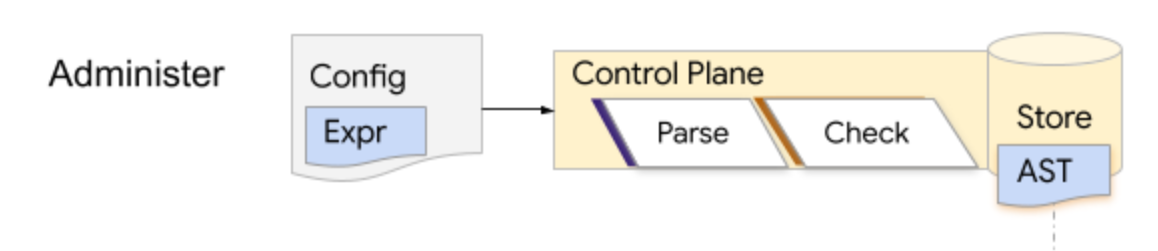
การแยกวิเคราะห์นิพจน์มี 3 เฟส
การประมวลผลนิพจน์มี 3 ขั้นตอน ได้แก่ แยกวิเคราะห์ ตรวจสอบ และประเมิน รูปแบบที่พบบ่อยที่สุดสำหรับ CEL คือการที่ Control Plane จะแยกวิเคราะห์และตรวจสอบนิพจน์ในเวลาที่กำหนดค่า และจัดเก็บ AST
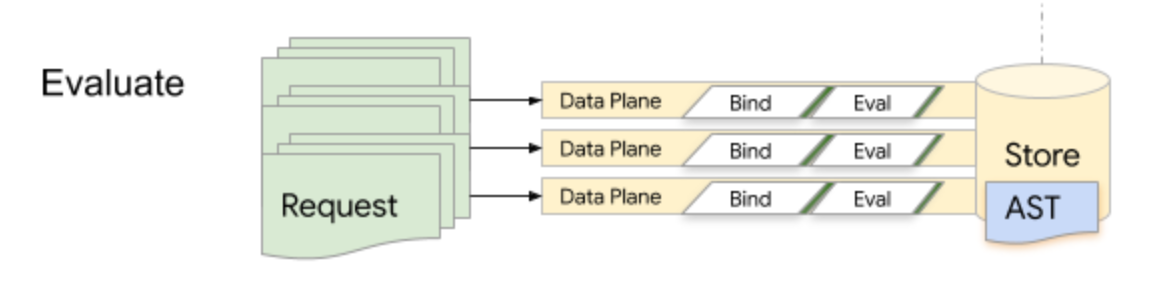
ในเวลาที่รันไทม์ Data Plane จะดึงและประเมิน AST ซ้ำๆ CEL ได้รับการเพิ่มประสิทธิภาพเพื่อประสิทธิภาพรันไทม์ แต่ไม่ควรทำการแยกวิเคราะห์และตรวจสอบในเส้นทางโค้ดที่สำคัญต่อเวลาในการตอบสนอง
CEL จะได้รับการแยกวิเคราะห์จากนิพจน์ที่มนุษย์อ่านได้เป็น Abstract Syntax Tree โดยใช้ไวยากรณ์ Lexer / Parser ของ ANTLR ระยะการแยกวิเคราะห์จะสร้าง Abstract Syntax Tree ที่อิงตาม Proto ซึ่งแต่ละโหนด Expr ใน AST จะมีรหัสจำนวนเต็มที่ใช้ในการจัดทำดัชนีลงในข้อมูลเมตาที่สร้างขึ้นระหว่างการแยกวิเคราะห์และการตรวจสอบ syntax.proto ที่สร้างขึ้นระหว่างการแยกวิเคราะห์จะแสดงการแทนค่าแบบนามธรรมของสิ่งที่พิมพ์ในรูปแบบสตริงของนิพจน์อย่างถูกต้อง
เมื่อแยกวิเคราะห์นิพจน์แล้ว ระบบอาจตรวจสอบนิพจน์กับสภาพแวดล้อมเพื่อให้แน่ใจว่าตัวระบุตัวแปรและฟังก์ชันทั้งหมดในนิพจน์ได้รับการประกาศและใช้งานอย่างถูกต้อง Type-checker จะสร้าง checked.proto ซึ่งมีข้อมูลเมตาประเภท ตัวแปร และฟังก์ชันที่แก้ไขแล้ว ซึ่งจะช่วยปรับปรุงประสิทธิภาพการประเมินได้อย่างมาก
ผู้ประเมิน CEL ต้องมีสิ่งต่อไปนี้
- การเชื่อมโยงฟังก์ชันสำหรับส่วนขยายที่กำหนดเอง
- การเชื่อมโยงตัวแปร
- AST ที่จะประเมิน
การเชื่อมโยงฟังก์ชันและตัวแปรควรตรงกับที่ใช้ในการคอมไพล์ AST คุณสามารถนำอินพุตเหล่านี้ไปใช้ซ้ำในการประเมินหลายครั้งได้ เช่น การประเมิน AST ในชุดการเชื่อมโยงตัวแปรหลายชุด หรือการใช้ตัวแปรเดียวกันกับ AST หลายรายการ หรือการเชื่อมโยงฟังก์ชันที่ใช้ตลอดอายุการใช้งานของกระบวนการ (กรณีทั่วไป)
3. ตั้งค่า
โค้ดสำหรับ Codelab นี้อยู่ในcodelab โฟลเดอร์ของที่เก็บ cel-go โซลูชันนี้อยู่ในcodelab/solution โฟลเดอร์ของที่เก็บเดียวกัน
โคลนและ cd ลงในที่เก็บ
git clone https://github.com/google/cel-go.git
cd cel-go/codelab
เรียกใช้โค้ดโดยใช้ go run
go run .
คุณควรเห็นเอาต์พุตต่อไปนี้
=== Exercise 1: Hello World ===

=== Exercise 2: Variables ===

=== Exercise 3: Logical AND/OR ===

=== Exercise 4: Customization ===

=== Exercise 5: Building JSON ===

=== Exercise 6: Building Protos ===

=== Exercise 7: Macros ===

=== Exercise 8: Tuning ===
แพ็กเกจ CEL อยู่ที่ไหน
เปิด codelab/codelab.go ในเครื่องมือแก้ไข คุณควรเห็นฟังก์ชันหลักที่ขับเคลื่อนการดำเนินการของแบบฝึกหัดในโค้ดแล็บนี้ ตามด้วยบล็อกฟังก์ชันตัวช่วย 3 บล็อก ผู้ช่วยกลุ่มแรกจะช่วยในขั้นตอนการประเมิน CEL ดังนี้
Compilefunction: แยกวิเคราะห์ ตรวจสอบ และป้อนนิพจน์เทียบกับสภาพแวดล้อมEvalฟังก์ชัน: ประเมินโปรแกรมที่คอมไพล์แล้วเทียบกับอินพุตReportฟังก์ชัน: แสดงผลการประเมินในรูปแบบที่อ่านง่าย
นอกจากนี้ เรายังได้จัดเตรียมตัวช่วย request และ auth ไว้เพื่อช่วยในการสร้างอินพุตสำหรับแบบฝึกหัดต่างๆ
แบบฝึกหัดจะอ้างอิงถึงแพ็กเกจโดยใช้ชื่อแพ็กเกจแบบย่อ การแมปจากแพ็กเกจไปยังตำแหน่งแหล่งที่มาภายในgoogle/cel-go repo อยู่ด้านล่างนี้ หากต้องการดูรายละเอียด
แพ็กเกจ | ตำแหน่งของแหล่งที่มา | คำอธิบาย |
cel | อินเทอร์เฟซระดับบนสุด | |
ref | อินเทอร์เฟซอ้างอิง | |
ประเภท | ค่าประเภทรันไทม์ |
4. สวัสดี
เราจะเริ่มต้นด้วยการสร้างและประเมิน "Hello World!" ตามธรรมเนียมของภาษาโปรแกรมทั้งหมด
กำหนดค่าสภาพแวดล้อม
ในเครื่องมือแก้ไข ให้ค้นหาการประกาศของ exercise1 แล้วกรอกข้อมูลต่อไปนี้เพื่อตั้งค่าสภาพแวดล้อม
// exercise1 evaluates a simple literal expression: "Hello, World!"
//
// Compile, eval, profit!
func exercise1() {
    fmt.Println("=== Exercise 1: Hello World ===\n")
    // Create the standard environment.
    env, err := cel.NewEnv()
    if err != nil {
        glog.Exitf("env error: %v", err)
    }
    // Will add the parse and check steps here
}
แอปพลิเคชัน CEL จะประเมินนิพจน์เทียบกับสภาพแวดล้อม env, err := cel.NewEnv() กำหนดค่าสภาพแวดล้อมมาตรฐาน
คุณปรับแต่งสภาพแวดล้อมได้โดยระบุตัวเลือก cel.EnvOption ในการเรียก ตัวเลือกเหล่านั้นสามารถปิดใช้มาโคร ประกาศตัวแปรและฟังก์ชันที่กำหนดเอง และอื่นๆ
สภาพแวดล้อม CEL มาตรฐานรองรับประเภท ตัวดำเนินการ ฟังก์ชัน และมาโครทั้งหมดที่กำหนดไว้ภายในข้อกำหนดของภาษา
แยกวิเคราะห์และตรวจสอบนิพจน์
เมื่อกำหนดค่าสภาพแวดล้อมแล้ว คุณจะแยกวิเคราะห์และตรวจสอบนิพจน์ได้ เพิ่มโค้ดต่อไปนี้ลงในฟังก์ชัน
// exercise1 evaluates a simple literal expression: "Hello, World!"
//
// Compile, eval, profit!
func exercise1() {
    fmt.Println("=== Exercise 1: Hello World ===\n")
    // Create the standard environment.
    env, err := cel.NewEnv()
    if err != nil {
        glog.Exitf("env error: %v", err)
    }
    // Check that the expression compiles and returns a String.
    ast, iss := env.Parse(`"Hello, World!"`)
    // Report syntactic errors, if present.
    if iss.Err() != nil {
        glog.Exit(iss.Err())
    }
    // Type-check the expression for correctness.
    checked, iss := env.Check(ast)
    // Report semantic errors, if present.
    if iss.Err() != nil {
        glog.Exit(iss.Err())
    }
    // Check the output type is a string.
    if !reflect.DeepEqual(checked.OutputType(), cel.StringType) {
        glog.Exitf(
            "Got %v, wanted %v output type",
            checked.OutputType(), cel.StringType,
        )
    }
    // Will add the planning step here
}
iss ค่าที่แสดงผลโดยการเรียก Parse และ Check คือรายการปัญหาซึ่งอาจเป็นข้อผิดพลาด หาก iss.Err() ไม่ใช่ nil แสดงว่ามีข้อผิดพลาดในไวยากรณ์หรือความหมาย และโปรแกรมจะดำเนินการต่อไม่ได้ เมื่อนิพจน์มีรูปแบบที่ถูกต้อง ผลลัพธ์ของการเรียกเหล่านี้จะเป็น cel.Ast ที่เรียกใช้ได้
หาค่านิพจน์
เมื่อแยกวิเคราะห์และตรวจสอบนิพจน์ใน cel.Ast แล้ว ก็จะแปลงเป็นโปรแกรมที่ประเมินได้ ซึ่งสามารถปรับแต่งการเชื่อมโยงฟังก์ชันและโหมดการประเมินได้ด้วยตัวเลือกฟังก์ชัน โปรดทราบว่าคุณยังอ่าน cel.Ast จาก Proto ได้โดยใช้ฟังก์ชัน cel.CheckedExprToAst หรือ cel.ParsedExprToAst
เมื่อวางแผน cel.Program แล้ว คุณจะประเมินเทียบกับอินพุตได้โดยการเรียก Eval ผลลัพธ์ของ Eval จะมีผลลัพธ์ รายละเอียดการประเมิน และสถานะข้อผิดพลาด
เพิ่มการวางแผนและโทรหา eval
// exercise1 evaluates a simple literal expression: "Hello, World!"
//
// Compile, eval, profit!
func exercise1() {
    fmt.Println("=== Exercise 1: Hello World ===\n")
    // Create the standard environment.
    env, err := cel.NewEnv()
    if err != nil {
        glog.Exitf("env error: %v", err)
    }
    // Check that the expression compiles and returns a String.
    ast, iss := env.Parse(`"Hello, World!"`)
    // Report syntactic errors, if present.
    if iss.Err() != nil {
        glog.Exit(iss.Err())
    }
    // Type-check the expression for correctness.
    checked, iss := env.Check(ast)
    // Report semantic errors, if present.
    if iss.Err() != nil {
        glog.Exit(iss.Err())
    }
    // Check the output type is a string.
    if !reflect.DeepEqual(checked.OutputType(), cel.StringType) {
        glog.Exitf(
            "Got %v, wanted %v output type",
            checked.OutputType(), cel.StringType)
    }
    // Plan the program.
    program, err := env.Program(checked)
    if err != nil {
        glog.Exitf("program error: %v", err)
    }
    // Evaluate the program without any additional arguments.
    eval(program, cel.NoVars())
    fmt.Println()
}
เราจะละเว้นกรณีข้อผิดพลาดที่รวมไว้ข้างต้นจากการฝึกในอนาคตเพื่อความกระชับ
เรียกใช้โค้ด
ในบรรทัดคำสั่ง ให้เรียกใช้โค้ดอีกครั้ง
go run .
คุณควรเห็นเอาต์พุตต่อไปนี้พร้อมกับตัวยึดตำแหน่งสำหรับการออกกำลังกายในอนาคต
=== Exercise 1: Hello World ===

------ input ------
(interpreter.emptyActivation)

------ result ------
value: Hello, World! (types.String)
5. ใช้ตัวแปรในฟังก์ชัน
แอปพลิเคชัน CEL ส่วนใหญ่จะประกาศตัวแปรที่อ้างอิงได้ภายในนิพจน์ การประกาศตัวแปรจะระบุชื่อและประเภท ประเภทของตัวแปรอาจเป็นประเภทในตัวของ CEL, ประเภทที่รู้จักกันดีของ Protocol Buffer หรือประเภทข้อความ Protobuf ใดก็ได้ ตราบใดที่มีการระบุตัวอธิบายให้กับ CEL ด้วย
เพิ่มฟังก์ชัน
ในเครื่องมือแก้ไข ให้ค้นหาการประกาศของ exercise2 แล้วเพิ่มข้อมูลต่อไปนี้
// exercise2 shows how to declare and use variables in expressions.
//
// Given a request of type google.rpc.context.AttributeContext.Request
// determine whether a specific auth claim is set.
func exercise2() {
  fmt.Println("=== Exercise 2: Variables ===\n")
   env, err := cel.NewEnv(
    // Add cel.EnvOptions values here.
  )
  if err != nil {
    glog.Exit(err)
  }
  ast := compile(env, `request.auth.claims.group == 'admin'`, cel.BoolType)
  program, _ := env.Program(ast)

  // Evaluate a request object that sets the proper group claim.
  claims := map[string]string{"group": "admin"}
  eval(program, request(auth("user:me@acme.co", claims), time.Now()))
  fmt.Println()
}
เรียกใช้ซ้ำและทำความเข้าใจข้อผิดพลาด
เรียกใช้โปรแกรมอีกครั้ง
go run .
คุณควรเห็นเอาต์พุตต่อไปนี้
ERROR: <input>:1:1: undeclared reference to 'request' (in container '')
 | request.auth.claims.group == 'admin'
 | ^
เครื่องมือตรวจสอบประเภทจะสร้างข้อผิดพลาดสำหรับออบเจ็กต์คำขอ ซึ่งมีข้อมูลโค้ดต้นทางที่เกิดข้อผิดพลาด
6. ประกาศตัวแปร
เพิ่ม EnvOptions
ในเอดิเตอร์ เรามาแก้ไขข้อผิดพลาดที่เกิดขึ้นโดยการประกาศออบเจ็กต์คำขอเป็นข้อความประเภท google.rpc.context.AttributeContext.Request ดังนี้
// exercise2 shows how to declare and use variables in expressions.
//
// Given a `request` of type `google.rpc.context.AttributeContext.Request`
// determine whether a specific auth claim is set.
func exercise2() {
  fmt.Println("=== Exercise 2: Variables ===\n")
  env, err := cel.NewEnv(
    cel.Variable("request",
      cel.ObjectType("google.rpc.context.AttributeContext.Request"),
    ),
  )
  if err != nil {
    glog.Exit(err)
  }
  ast := compile(env, `request.auth.claims.group == 'admin'`, cel.BoolType)
  program, _ := env.Program(ast)

  // Evaluate a request object that sets the proper group claim.
  claims := map[string]string{"group": "admin"}
  eval(program, request(auth("user:me@acme.co", claims), time.Now()))
  fmt.Println()
}
เรียกใช้ซ้ำและทำความเข้าใจข้อผิดพลาด
การเรียกใช้โปรแกรมอีกครั้ง
go run .
คุณควรเห็นข้อผิดพลาดต่อไปนี้
ERROR: <input>:1:8: [internal] unexpected failed resolution of 'google.rpc.context.AttributeContext.Request'
 | request.auth.claims.group == 'admin'
 | .......^
หากต้องการใช้ตัวแปรที่อ้างอิงถึงข้อความ Protobuf ตัวตรวจสอบประเภทจะต้องทราบตัวอธิบายประเภทด้วย
ใช้ cel.Types เพื่อกำหนดตัวอธิบายสำหรับคำขอในฟังก์ชันของคุณ
// exercise2 shows how to declare and use variables in expressions.
//
// Given a `request` of type `google.rpc.context.AttributeContext.Request`
// determine whether a specific auth claim is set.
func exercise2() {
  fmt.Println("=== Exercise 2: Variables ===\n")
   env, err := cel.NewEnv(
    cel.Types(&rpcpb.AttributeContext_Request{}),
    cel.Variable("request",
      cel.ObjectType("google.rpc.context.AttributeContext.Request"),
    ),
  )

  if err != nil {
    glog.Exit(err)
  }
  ast := compile(env, `request.auth.claims.group == 'admin'`, cel.BoolType)
  program, _ := env.Program(ast)

  // Evaluate a request object that sets the proper group claim.
  claims := map[string]string{"group": "admin"}
  eval(program, request(auth("user:me@acme.co", claims), time.Now()))
  fmt.Println()
}
เรียกใช้ซ้ำสำเร็จ
เรียกใช้โปรแกรมอีกครั้ง
go run .
คุณควรเห็นสิ่งต่อไปนี้
=== Exercise 2: Variables ===

request.auth.claims.group == 'admin'

------ input ------
request = time: <
  seconds: 1569255569
>
auth: <
  principal: "user:me@acme.co"
  claims: <
    fields: <
      key: "group"
      value: <
        string_value: "admin"
      >
    >
  >
>

------ result ------
value: true (types.Bool)
ในการตรวจสอบ เราเพิ่งประกาศตัวแปรสำหรับข้อผิดพลาด กำหนดตัวอธิบายประเภทให้ตัวแปร แล้วอ้างอิงตัวแปรในการประเมินนิพจน์
7. ตัวดำเนินการ AND/OR
ฟีเจอร์ที่โดดเด่นอย่างหนึ่งของ CEL คือการใช้ตัวดำเนินการเชิงตรรกะแบบสลับที่ ทั้ง 2 ด้านของกิ่งก้านแบบมีเงื่อนไขสามารถข้ามการประเมินได้ แม้จะเกิดข้อผิดพลาดหรือมีการป้อนข้อมูลบางส่วนก็ตาม
กล่าวคือ CEL จะค้นหาลำดับการประเมินที่ให้ผลลัพธ์ได้ทุกเมื่อที่เป็นไปได้ โดยไม่สนใจข้อผิดพลาดหรือแม้แต่ข้อมูลที่ขาดหายไปซึ่งอาจเกิดขึ้นในลำดับการประเมินอื่นๆ แอปพลิเคชันสามารถใช้พร็อพเพอร์ตี้นี้เพื่อลดต้นทุนในการประเมิน โดยเลื่อนการรวบรวมอินพุตที่มีราคาแพงออกไปเมื่อได้ผลลัพธ์โดยไม่ต้องใช้อินพุตเหล่านั้น
เราจะเพิ่มตัวอย่าง AND/OR แล้วลองใช้กับอินพุตต่างๆ เพื่อทำความเข้าใจว่า CEL จะข้ามการประเมินได้อย่างไร
สร้างฟังก์ชัน
ในโปรแกรมแก้ไข ให้เพิ่มเนื้อหาต่อไปนี้ลงในแบบฝึกหัดที่ 3
// exercise3 demonstrates how CEL's commutative logical operators work.
//
// Construct an expression which checks if the `request.auth.claims.group`
// value is equal to admin or the `request.auth.principal` is
// `user:me@acme.co`. Issue two requests, one that specifies the proper
// user, and one that specifies an unexpected user.
func exercise3() {
  fmt.Println("=== Exercise 3: Logical AND/OR ===\n")
  env, _ := cel.NewEnv(
    cel.Types(&rpcpb.AttributeContext_Request{}),
    cel.Variable("request",
      cel.ObjectType("google.rpc.context.AttributeContext.Request"),
    ),
  )
}
จากนั้นใส่คำสั่ง OR นี้ซึ่งจะแสดงผลเป็นจริงหากผู้ใช้เป็นสมาชิกของกลุ่ม admin หรือมีตัวระบุอีเมลที่เฉพาะเจาะจง
// exercise3 demonstrates how CEL's commutative logical operators work.
//
// Construct an expression which checks if the `request.auth.claims.group`
// value is equal to admin or the `request.auth.principal` is
// `user:me@acme.co`. Issue two requests, one that specifies the proper
// user, and one that specifies an unexpected user.
func exercise3() {
  fmt.Println("=== Exercise 3: Logical AND/OR ===\n")
  env, _ := cel.NewEnv(
    cel.Types(&rpcpb.AttributeContext_Request{}),
    cel.Variable("request",
      cel.ObjectType("google.rpc.context.AttributeContext.Request"),
    ),
  )

  ast := compile(env,
    `request.auth.claims.group == 'admin'
        || request.auth.principal == 'user:me@acme.co'`,
    cel.BoolType)
  program, _ := env.Program(ast)
}
และสุดท้าย ให้เพิ่มevalกรณีที่ประเมินผู้ใช้ด้วยชุดการอ้างสิทธิ์ที่ว่างเปล่า
// exercise3 demonstrates how CEL's commutative logical operators work.
//
// Construct an expression which checks whether the request.auth.claims.group
// value is equal to admin or the request.auth.principal is
// user:me@acme.co. Issue two requests, one that specifies the proper user,
// and one that specifies an unexpected user.
func exercise3() {
  fmt.Println("=== Exercise 3: Logical AND/OR ===\n")
  env, _ := cel.NewEnv(
    cel.Types(&rpcpb.AttributeContext_Request{}),
    cel.Variable("request",
      cel.ObjectType("google.rpc.context.AttributeContext.Request"),
    ),
  )

  ast := compile(env,
    `request.auth.claims.group == 'admin'
        || request.auth.principal == 'user:me@acme.co'`,
    cel.BoolType)
  program, _ := env.Program(ast)

  emptyClaims := map[string]string{}
  eval(program, request(auth("user:me@acme.co", emptyClaims), time.Now()))
}
เรียกใช้โค้ดด้วยชุดการอ้างสิทธิ์ที่ว่างเปล่า
เมื่อเรียกใช้โปรแกรมอีกครั้ง คุณควรเห็นเอาต์พุตใหม่ต่อไปนี้
=== Exercise 3: Logical AND/OR ===

request.auth.claims.group == 'admin'
    || request.auth.principal == 'user:me@acme.co'

------ input ------
request = time: <
  seconds: 1569302377
>
auth: <
  principal: "user:me@acme.co"
  claims: <
  >
>

------ result ------
value: true (types.Bool)
อัปเดตเคสการประเมิน
จากนั้น ให้อัปเดตกรณีการประเมินเพื่อส่งผ่านในหลักการอื่นที่มีชุดการอ้างสิทธิ์ว่างเปล่า
// exercise3 demonstrates how CEL's commutative logical operators work.
//
// Construct an expression which checks whether the request.auth.claims.group
// value is equal to admin or the request.auth.principal is
// user:me@acme.co. Issue two requests, one that specifies the proper user,
// and one that specifies an unexpected user.
func exercise3() {
  fmt.Println("=== Exercise 3: Logical AND/OR ===\n")
  env, _ := cel.NewEnv(
    cel.Types(&rpcpb.AttributeContext_Request{}),
    cel.Variable("request",
      cel.ObjectType("google.rpc.context.AttributeContext.Request"),
    ),
  )

  ast := compile(env,
    `request.auth.claims.group == 'admin'
        || request.auth.principal == 'user:me@acme.co'`,
    cel.BoolType)
  program, _ := env.Program(ast)

  emptyClaims := map[string]string{}
  eval(program, request(auth("other:me@acme.co", emptyClaims), time.Now()))
}
เรียกใช้โค้ดพร้อมเวลา
เรียกใช้โปรแกรมอีกครั้ง
go run .
คุณควรเห็นข้อผิดพลาดต่อไปนี้
=== Exercise 3: Logical AND/OR ===

request.auth.claims.group == 'admin'
    || request.auth.principal == 'user:me@acme.co'

------ input ------
request = time: <
  seconds: 1588989833
>
auth: <
  principal: "user:me@acme.co"
  claims: <
  >
>

------ result ------
value: true (types.Bool)

------ input ------
request = time: <
  seconds: 1588989833
>
auth: <
  principal: "other:me@acme.co"
  claims: <
  >
>

------ result ------
error: no such key: group
ใน Protobuf เราทราบว่าควรคาดหวังฟิลด์และประเภทใด ในค่าแผนที่และค่า JSON เราไม่ทราบว่าจะมีคีย์อยู่หรือไม่ เนื่องจากไม่มีค่าเริ่มต้นที่ปลอดภัยสำหรับคีย์ที่ขาดหายไป CEL จึงใช้ค่าเริ่มต้นเป็นข้อผิดพลาด
8. ฟังก์ชันที่กำหนดเอง
แม้ว่า CEL จะมีฟังก์ชันในตัวมากมาย แต่ก็มีบางครั้งที่ฟังก์ชันที่กำหนดเองมีประโยชน์ ตัวอย่างเช่น คุณสามารถใช้ฟังก์ชันที่กำหนดเองเพื่อปรับปรุงประสบการณ์ของผู้ใช้สำหรับเงื่อนไขทั่วไปหรือแสดงสถานะที่คำนึงถึงบริบท
ในแบบฝึกหัดนี้ เราจะมาดูวิธีเปิดเผยฟังก์ชันเพื่อรวมการตรวจสอบที่ใช้กันทั่วไปไว้ด้วยกัน
เรียกใช้ฟังก์ชันที่กำหนดเอง
ก่อนอื่น ให้สร้างโค้ดเพื่อตั้งค่าการลบล้างที่ชื่อ contains ซึ่งจะกำหนดว่ามีคีย์อยู่ในแผนที่และมีค่าใดค่าหนึ่งหรือไม่ เว้นตัวยึดตำแหน่งไว้สำหรับคำจำกัดความฟังก์ชันและการเชื่อมโยงฟังก์ชัน
// exercise4 demonstrates how to extend CEL with custom functions.
// Declare a `contains` member function on map types that returns a boolean
// indicating whether the map contains the key-value pair.
func exercise4() {
  fmt.Println("=== Exercise 4: Customization ===\n")
  // Determine whether an optional claim is set to the proper value. The
  // custom map.contains(key, value) function is used as an alternative to:
  //   key in map && map[key] == value
  env, _ := cel.NewEnv(
    cel.Types(&rpcpb.AttributeContext_Request{}),
    // Declare the request.
    cel.Variable("request",
      cel.ObjectType("google.rpc.context.AttributeContext.Request"),
    ),
    // Add the custom function declaration and binding here with cel.Function()
  )
  ast := compile(env,
    `request.auth.claims.contains('group', 'admin')`,
    cel.BoolType)

  // Construct the program plan and provide the 'contains' function impl.
  // Output: false
  program, _ := env.Program(ast)
  emptyClaims := map[string]string{}
  eval(
    program,
    request(auth("user:me@acme.co", emptyClaims), time.Now()),
  )
  fmt.Println()
}
เรียกใช้โค้ดและทำความเข้าใจข้อผิดพลาด
เมื่อเรียกใช้โค้ดอีกครั้ง คุณควรเห็นข้อผิดพลาดต่อไปนี้
ERROR: <input>:1:29: found no matching overload for 'contains' applied to 'map(string, dyn).(string, string)'
 | request.auth.claims.contains('group', 'admin')
 | ............................^
หากต้องการแก้ไขข้อผิดพลาด เราต้องเพิ่มฟังก์ชัน contains ลงในรายการประกาศที่ประกาศตัวแปรคำขอในปัจจุบัน
ประกาศประเภทที่กำหนดพารามิเตอร์โดยเพิ่ม 3 บรรทัดต่อไปนี้ (ซึ่งมีความซับซ้อนเช่นเดียวกับการโอเวอร์โหลดฟังก์ชันสำหรับ CEL)
// exercise4 demonstrates how to extend CEL with custom functions.
// Declare a `contains` member function on map types that returns a boolean
// indicating whether the map contains the key-value pair.
func exercise4() {
  fmt.Println("=== Exercise 4: Customization ===\n")
  // Determine whether an optional claim is set to the proper value. The custom
  // map.contains(key, value) function is used as an alternative to:
  //   key in map && map[key] == value

  // Useful components of the type-signature for 'contains'.
  typeParamA := cel.TypeParamType("A")
  typeParamB := cel.TypeParamType("B")
  mapAB := cel.MapType(typeParamA, typeParamB)

  env, _ := cel.NewEnv(
    cel.Types(&rpcpb.AttributeContext_Request{}),
    // Declare the request.
    cel.Variable("request",
      cel.ObjectType("google.rpc.context.AttributeContext.Request"),
    ),
    // Add the custom function declaration and binding here with cel.Function()
  )
  ast := compile(env,
    `request.auth.claims.contains('group', 'admin')`,
    cel.BoolType)

  // Construct the program plan.
  // Output: false
  program, _ := env.Program(ast)
  emptyClaims := map[string]string{}
  eval(program, request(auth("user:me@acme.co", emptyClaims), time.Now()))
  fmt.Println()
}
เพิ่มฟังก์ชันที่กำหนดเอง
จากนั้นเราจะเพิ่มฟังก์ชัน "มี" ใหม่ที่จะใช้ประเภทที่กำหนดพารามิเตอร์
// exercise4 demonstrates how to extend CEL with custom functions.
// Declare a `contains` member function on map types that returns a boolean
// indicating whether the map contains the key-value pair.
func exercise4() {
  fmt.Println("=== Exercise 4: Customization ===\n")
  // Determine whether an optional claim is set to the proper value. The custom
  // map.contains(key, value) function is used as an alternative to:
  //   key in map && map[key] == value

  // Useful components of the type-signature for 'contains'.
  typeParamA := cel.TypeParamType("A")
  typeParamB := cel.TypeParamType("B")
  mapAB := cel.MapType(typeParamA, typeParamB)

  // Env declaration.
  env, _ := cel.NewEnv(
    cel.Types(&rpcpb.AttributeContext_Request{}),
    // Declare the request.
    cel.Variable("request",
      cel.ObjectType("google.rpc.context.AttributeContext.Request"),
    ),
    // Declare the custom contains function and its implementation.
    cel.Function("contains",
      cel.MemberOverload(
        "map_contains_key_value",
        []*cel.Type{mapAB, typeParamA, typeParamB},
        cel.BoolType,
        // Provide the implementation using cel.FunctionBinding()
      ),
    ),
  )
  ast := compile(env,
    `request.auth.claims.contains('group', 'admin')`,
    cel.BoolType)

  // Construct the program plan and provide the 'contains' function impl.
  // Output: false
  program, _ := env.Program(ast)
  emptyClaims := map[string]string{}
  eval(program, request(auth("user:me@acme.co", emptyClaims), time.Now()))
  fmt.Println()
}
เรียกใช้โปรแกรมเพื่อทำความเข้าใจข้อผิดพลาด
เรียกใช้แบบฝึกหัด คุณควรเห็นข้อผิดพลาดต่อไปนี้เกี่ยวกับฟังก์ชันรันไทม์ที่ขาดหายไป
------ result ------
error: no such overload: contains
ระบุการติดตั้งใช้งานฟังก์ชันในการประกาศ NewEnv โดยใช้ฟังก์ชัน cel.FunctionBinding() ดังนี้
// exercise4 demonstrates how to extend CEL with custom functions.
//
// Declare a contains member function on map types that returns a boolean
// indicating whether the map contains the key-value pair.
func exercise4() {
  fmt.Println("=== Exercise 4: Customization ===\n")
  // Determine whether an optional claim is set to the proper value. The custom
  // map.contains(key, value) function is used as an alternative to:
  //   key in map && map[key] == value

  // Useful components of the type-signature for 'contains'.
  typeParamA := cel.TypeParamType("A")
  typeParamB := cel.TypeParamType("B")
  mapAB := cel.MapType(typeParamA, typeParamB)

  // Env declaration.
  env, _ := cel.NewEnv(
    cel.Types(&rpcpb.AttributeContext_Request{}),
    // Declare the request.
    cel.Variable("request",
      cel.ObjectType("google.rpc.context.AttributeContext.Request"),
    ),
    // Declare the custom contains function and its implementation.
    cel.Function("contains",
      cel.MemberOverload(
        "map_contains_key_value",
        []*cel.Type{mapAB, typeParamA, typeParamB},
        cel.BoolType,
        cel.FunctionBinding(mapContainsKeyValue)),
    ),
  )
  ast := compile(env,
    `request.auth.claims.contains('group', 'admin')`,
    cel.BoolType)

  // Construct the program plan.
  // Output: false
  program, err := env.Program(ast)
  if err != nil {
    glog.Exit(err)
  }

  eval(program, request(auth("user:me@acme.co", emptyClaims), time.Now()))
  claims := map[string]string{"group": "admin"}
  eval(program, request(auth("user:me@acme.co", claims), time.Now()))
  fmt.Println()
}
ตอนนี้โปรแกรมควรจะทำงานได้สำเร็จแล้ว
=== Exercise 4: Custom Functions ===

request.auth.claims.contains('group', 'admin')

------ input ------
request = time: <
  seconds: 1569302377
>
auth: <
  principal: "user:me@acme.co"
  claims: <
  >
>

------ result ------
value: false (types.Bool)
จะเกิดอะไรขึ้นเมื่อมีการอ้างสิทธิ์
หากต้องการคะแนนพิเศษ ให้ลองตั้งค่าการอ้างสิทธิ์ของผู้ดูแลระบบในอินพุตเพื่อยืนยันว่าการโอเวอร์โหลด contains จะแสดงผลเป็นจริงด้วยเมื่อมีการอ้างสิทธิ์ คุณควรเห็นเอาต์พุตต่อไปนี้
=== Exercise 4: Customization ===

request.auth.claims.contains('group','admin')

------ input ------
request = time: <
  seconds: 1588991010
>
auth: <
  principal: "user:me@acme.co"
  claims: <
  >
>

------ result ------
value: false (types.Bool)

------ input ------
request = time: <
  seconds: 1588991010
>
auth: <
  principal: "user:me@acme.co"
  claims: <
    fields: <
      key: "group"
      value: <
        string_value: "admin"
      >
    >
  >
>

------ result ------
value: true (types.Bool)
ก่อนดำเนินการต่อ คุณควรตรวจสอบmapContainsKeyValueฟังก์ชันเอง
// mapContainsKeyValue implements the custom function:
//   map.contains(key, value) -> bool.
func mapContainsKeyValue(args ...ref.Val) ref.Val {
  // The declaration of the function ensures that only arguments which match
  // the mapContainsKey signature will be provided to the function.
  m := args[0].(traits.Mapper)

  // CEL has many interfaces for dealing with different type abstractions.
  // The traits.Mapper interface unifies field presence testing on proto
  // messages and maps.
  key := args[1]
  v, found := m.Find(key)

  // If not found and the value was non-nil, the value is an error per the
  // `Find` contract. Propagate it accordingly. Such an error might occur with
  // a map whose key-type is listed as 'dyn'.
  if !found {
    if v != nil {
      return types.ValOrErr(v, "unsupported key type")
    }
    // Return CEL False if the key was not found.
    return types.False
  }
  // Otherwise whether the value at the key equals the value provided.
  return v.Equal(args[2])
}
ลายเซ็นสำหรับฟังก์ชันที่กำหนดเองคาดหวังอาร์กิวเมนต์ของref.Valประเภทเพื่อให้ขยายได้ง่ายที่สุด ข้อแลกเปลี่ยนในที่นี้คือความง่ายในการขยายจะเพิ่มภาระให้กับผู้ใช้ในการตรวจสอบว่าระบบจัดการค่าทุกประเภทอย่างถูกต้อง เมื่อประเภทหรือจำนวนอาร์กิวเมนต์อินพุตไม่ตรงกับการประกาศฟังก์ชัน ควรแสดงข้อผิดพลาด no such overload
cel.FunctionBinding() จะเพิ่มการ์ดประเภทรันไทม์เพื่อให้แน่ใจว่าสัญญาของรันไทม์ตรงกับการประกาศที่ตรวจสอบประเภทในสภาพแวดล้อม
9. สร้าง JSON
นอกจากนี้ CEL ยังสร้างเอาต์พุตที่ไม่ใช่บูลีนได้ด้วย เช่น JSON เพิ่มโค้ดต่อไปนี้ลงในฟังก์ชัน
// exercise5 covers how to build complex objects as CEL literals.
//
// Given the input now, construct a JWT with an expiry of 5 minutes.
func exercise5() {
    fmt.Println("=== Exercise 5: Building JSON ===\n")
    env, _ := cel.NewEnv(
      // Declare the 'now' variable as a Timestamp.
      // cel.Variable("now", cel.TimestampType),
    )
    // Note the quoted keys in the CEL map literal. For proto messages the
    // field names are unquoted as they represent well-defined identifiers.
    ast := compile(env, `
        {'sub': 'serviceAccount:delegate@acme.co',
         'aud': 'my-project',
         'iss': 'auth.acme.com:12350',
         'iat': now,
         'nbf': now,
         'exp': now + duration('300s'),
         'extra_claims': {
             'group': 'admin'
         }}`,
        cel.MapType(cel.StringType, cel.DynType))

    program, _ := env.Program(ast)
    out, _, _ := eval(
        program,
        map[string]interface{}{
            "now": &tpb.Timestamp{Seconds: time.Now().Unix()},
        },
    )
    fmt.Printf("------ type conversion ------\n%v\n", out)
    fmt.Println()
}
เรียกใช้โค้ด
เมื่อเรียกใช้โค้ดอีกครั้ง คุณควรเห็นข้อผิดพลาดต่อไปนี้
ERROR: <input>:5:11: undeclared reference to 'now' (in container '')
 |    'iat': now,
 | ..........^
... and more ...
เพิ่มการประกาศสำหรับตัวแปร now ประเภท cel.TimestampType ไปยัง cel.NewEnv() แล้วเรียกใช้อีกครั้ง
// exercise5 covers how to build complex objects as CEL literals.
//
// Given the input now, construct a JWT with an expiry of 5 minutes.
func exercise5() {
    fmt.Println("=== Exercise 5: Building JSON ===\n")
    env, _ := cel.NewEnv(
      cel.Variable("now", cel.TimestampType),
    )
    // Note the quoted keys in the CEL map literal. For proto messages the
    // field names are unquoted as they represent well-defined identifiers.
    ast := compile(env, `
        {'sub': 'serviceAccount:delegate@acme.co',
         'aud': 'my-project',
         'iss': 'auth.acme.com:12350',
         'iat': now,
         'nbf': now,
         'exp': now + duration('300s'),
         'extra_claims': {
             'group': 'admin'
         }}`,
        cel.MapType(cel.StringType, cel.DynType))

     // Hint:
     // Convert `out` to JSON using the valueToJSON() helper method.
     // The valueToJSON() function calls ConvertToNative(&structpb.Value{})
     // to adapt the CEL value to a protobuf JSON representation and then
     // uses the jsonpb.Marshaler utilities on the output to render the JSON
     // string.
    program, _ := env.Program(ast)
    out, _, _ := eval(
        program,
        map[string]interface{}{
            "now": time.Now(),
        },
    )
    fmt.Printf("------ type conversion ------\n%v\n", out)
    fmt.Println()
}
เรียกใช้โค้ดอีกครั้ง แล้วโค้ดควรจะทำงานได้สำเร็จ
=== Exercise 5: Building JSON ===

  {'aud': 'my-project',
   'exp': now + duration('300s'),
   'extra_claims': {
    'group': 'admin'
   },
   'iat': now,
   'iss': 'auth.acme.com:12350',
   'nbf': now,
   'sub': 'serviceAccount:delegate@acme.co'
   }

------ input ------
now = seconds: 1569302377

------ result ------
value: &{0xc0002eaf00 map[aud:my-project exp:{0xc0000973c0} extra_claims:0xc000097400 iat:{0xc000097300} iss:auth.acme.com:12350 nbf:{0xc000097300} sub:serviceAccount:delegate@acme.co] {0x8c8f60 0xc00040a6c0 21}} (*types.baseMap)

------ type conversion ------
&{0xc000313510 map[aud:my-project exp:{0xc000442510} extra_claims:0xc0004acdc0 iat:{0xc000442450} iss:auth.acme.com:12350 nbf:{0xc000442450} sub:serviceAccount:delegate@acme.co] {0x9d0ce0 0xc0004424b0 21}}
โปรแกรมจะทำงาน แต่ต้องแปลงค่าเอาต์พุต out เป็น JSON อย่างชัดเจน การแสดง CEL ภายในในกรณีนี้จะแปลงเป็น JSON ได้เนื่องจากอ้างอิงเฉพาะประเภทที่ JSON รองรับหรือประเภทที่มีการแมประหว่าง Proto กับ JSON ที่รู้จักกันดี
// exercise5 covers how to build complex objects as CEL literals.
//
// Given the input now, construct a JWT with an expiry of 5 minutes.
func exercise5() {
    fmt.Println("=== Exercise 5: Building JSON ===\n")
...
    fmt.Printf("------ type conversion ------\n%v\n", valueToJSON(out))
    fmt.Println()
}
เมื่อแปลงประเภทโดยใช้ฟังก์ชันตัวช่วย valueToJSON ภายในไฟล์ codelab.go แล้ว คุณควรเห็นเอาต์พุตเพิ่มเติมต่อไปนี้
------ type conversion ------
  {
   "aud": "my-project",
   "exp": "2019-10-13T05:54:29Z",
   "extra_claims": {
      "group": "admin"
     },
   "iat": "2019-10-13T05:49:29Z",
   "iss": "auth.acme.com:12350",
   "nbf": "2019-10-13T05:49:29Z",
   "sub": "serviceAccount:delegate@acme.co"
  }
10. สร้าง Proto
CEL สามารถสร้างข้อความ Protobuf สำหรับข้อความประเภทใดก็ได้ที่คอมไพล์ลงในแอปพลิเคชัน เพิ่มฟังก์ชันเพื่อสร้าง google.rpc.context.AttributeContext.Request จากอินพุต jwt
// exercise6 describes how to build proto message types within CEL.
//
// Given an input jwt and time now construct a
// google.rpc.context.AttributeContext.Request with the time and auth
// fields populated according to the go/api-attributes specification.
func exercise6() {
  fmt.Println("=== Exercise 6: Building Protos ===\n")

  // Construct an environment and indicate that the container for all references
  // within the expression is `google.rpc.context.AttributeContext`.
  requestType := &rpcpb.AttributeContext_Request{}
  env, _ := cel.NewEnv(
      // Add cel.Container() option for 'google.rpc.context.AttributeContext'
      cel.Types(requestType),
      // Add cel.Variable() option for 'jwt' as a map(string, Dyn) type
      // and for 'now' as a timestamp.
  )

  // Compile the Request message construction expression and validate that
  // the resulting expression type matches the fully qualified message name.
  //
  // Note: the field names within the proto message types are not quoted as they
  // are well-defined names composed of valid identifier characters. Also, note
  // that when building nested proto objects, the message name needs to prefix
  // the object construction.
  ast := compile(env, `
    Request{
        auth: Auth{
            principal: jwt.iss + '/' + jwt.sub,
            audiences: [jwt.aud],
            presenter: 'azp' in jwt ? jwt.azp : "",
            claims: jwt
        },
        time: now
    }`,
    cel.ObjectType("google.rpc.context.AttributeContext.Request"),
  )
  program, _ := env.Program(ast)

  // Construct the message. The result is a ref.Val that returns a dynamic
  // proto message.
  out, _, _ := eval(
      program,
      map[string]interface{}{
          "jwt": map[string]interface{}{
              "sub": "serviceAccount:delegate@acme.co",
              "aud": "my-project",
              "iss": "auth.acme.com:12350",
              "extra_claims": map[string]string{
                  "group": "admin",
              },
          },
          "now": time.Now(),
      },
  )

  // Hint: Unwrap the CEL value to a proto. Make sure to use the
  // `ConvertToNative(reflect.TypeOf(requestType))` to convert the dynamic proto
  // message to the concrete proto message type expected.
  fmt.Printf("------ type unwrap ------\n%v\n", out)
  fmt.Println()
}
เรียกใช้โค้ด
เมื่อเรียกใช้โค้ดอีกครั้ง คุณควรเห็นข้อผิดพลาดต่อไปนี้
ERROR: <input>:2:10: undeclared reference to 'Request' (in container '')
 |   Request{
 | .........^
โดยพื้นฐานแล้ว คอนเทนเนอร์จะเทียบเท่ากับเนมสเปซหรือแพ็กเกจ แต่ยังสามารถละเอียดได้ถึงระดับชื่อข้อความ Protobuf คอนเทนเนอร์ CEL ใช้กฎการแก้ปัญหาเนมสเปซเดียวกันกับ Protobuf และ C++ เพื่อกำหนดตำแหน่งที่ประกาศตัวแปร ฟังก์ชัน หรือชื่อประเภทที่กำหนด
เมื่อพิจารณาคอนเทนเนอร์ google.rpc.context.AttributeContext ตัวตรวจสอบประเภทและตัวประเมินจะลองใช้ชื่อตัวระบุต่อไปนี้สำหรับตัวแปร ประเภท และฟังก์ชันทั้งหมด
google.rpc.context.AttributeContext.<id>google.rpc.context.<id>google.rpc.<id>google.<id><id>
สำหรับชื่อแบบสัมบูรณ์ ให้เติมจุดนำหน้าตัวแปร ประเภท หรือการอ้างอิงฟังก์ชัน ในตัวอย่างนี้ นิพจน์ .<id> จะค้นหาเฉพาะตัวระบุ <id> ระดับบนสุดโดยไม่ต้องตรวจสอบภายในคอนเทนเนอร์ก่อน
ลองระบุตัวเลือก cel.Container("google.rpc.context.AttributeContext") ให้กับสภาพแวดล้อม CEL แล้วเรียกใช้อีกครั้ง
// exercise6 describes how to build proto message types within CEL.
//
// Given an input jwt and time now construct a
// google.rpc.context.AttributeContext.Request with the time and auth
// fields populated according to the go/api-attributes specification.
func exercise6() {
  fmt.Println("=== Exercise 6: Building Protos ===\n")
  // Construct an environment and indicate that the container for all references
  // within the expression is `google.rpc.context.AttributeContext`.
  requestType := &rpcpb.AttributeContext_Request{}
  env, _ := cel.NewEnv(
    // Add cel.Container() option for 'google.rpc.context.AttributeContext'
    cel.Container("google.rpc.context.AttributeContext.Request"),
    cel.Types(requestType),
    // Later, add cel.Variable() options for 'jwt' as a map(string, Dyn) type
    // and for 'now' as a timestamp.
    // cel.Variable("now", cel.TimestampType),
    // cel.Variable("jwt", cel.MapType(cel.StringType, cel.DynType)),
  )

 ...
}
คุณควรได้รับเอาต์พุตต่อไปนี้
ERROR: <input>:4:16: undeclared reference to 'jwt' (in container 'google.rpc.context.AttributeContext')
 |     principal: jwt.iss + '/' + jwt.sub,
 | ...............^
และข้อผิดพลาดอื่นๆ อีกมากมาย...
จากนั้นประกาศตัวแปร jwt และ now แล้วโปรแกรมควรจะทำงานได้ตามที่คาดไว้
=== Exercise 6: Building Protos ===

  Request{
   auth: Auth{
    principal: jwt.iss + '/' + jwt.sub,
    audiences: [jwt.aud],
    presenter: 'azp' in jwt ? jwt.azp : "",
    claims: jwt
   },
   time: now
  }

------ input ------
jwt = {
  "aud": "my-project",
  "extra_claims": {
    "group": "admin"
  },
  "iss": "auth.acme.com:12350",
  "sub": "serviceAccount:delegate@acme.co"
}
now = seconds: 1588993027

------ result ------
value: &{0xc000485270 0xc000274180 {0xa6ee80 0xc000274180 22} 0xc0004be140 0xc0002bf700 false} (*types.protoObj)

----- type unwrap ----
&{0xc000485270 0xc000274180 {0xa6ee80 0xc000274180 22} 0xc0004be140 0xc0002bf700 false}
หากต้องการคะแนนพิเศษ คุณควรแกะประเภทโดยเรียกใช้ out.Value() ในข้อความเพื่อดูว่าผลลัพธ์เปลี่ยนแปลงไปอย่างไร
11. มาโคร
มาโครใช้เพื่อจัดการโปรแกรม CEL ในเวลาแยกวิเคราะห์ได้ มาโครจะจับคู่ลายเซ็นการเรียกและจัดการการเรียกอินพุตและอาร์กิวเมนต์ของการเรียกนั้นเพื่อสร้าง AST นิพจน์ย่อยใหม่
มาโครใช้เพื่อใช้ตรรกะที่ซับซ้อนใน AST ซึ่งเขียนใน CEL โดยตรงไม่ได้ เช่น แมโคร has ช่วยให้ทดสอบการมีอยู่ของฟิลด์ได้ มาโครความเข้าใจ เช่น exists และ all จะแทนที่การเรียกฟังก์ชันด้วยการวนซ้ำแบบมีขอบเขตในรายการหรือแผนที่อินพุต ทั้ง 2 แนวคิดนี้ไม่สามารถทำได้ในระดับไวยากรณ์ แต่สามารถทำได้ผ่านการขยายมาโคร
เพิ่มและเรียกใช้แบบฝึกหัดถัดไป
// exercise7 introduces macros for dealing with repeated fields and maps.
//
// Determine whether the jwt.extra_claims has at least one key that starts
// with the group prefix, and ensure that all group-like keys have list
// values containing only strings that end with '@acme.co`.
func exercise7() {
    fmt.Println("=== Exercise 7: Macros ===\n")
    env, _ := cel.NewEnv(
      cel.ClearMacros(),
      cel.Variable("jwt", cel.MapType(cel.StringType, cel.DynType)),
    )
    ast := compile(env,
        `jwt.extra_claims.exists(c, c.startsWith('group'))
                && jwt.extra_claims
                      .filter(c, c.startsWith('group'))
                      .all(c, jwt.extra_claims[c]
                                 .all(g, g.endsWith('@acme.co')))`,
        cel.BoolType)
    program, _ := env.Program(ast)

    // Evaluate a complex-ish JWT with two groups that satisfy the criteria.
    // Output: true.
    eval(program,
        map[string]interface{}{
            "jwt": map[string]interface{}{
                "sub": "serviceAccount:delegate@acme.co",
                "aud": "my-project",
                "iss": "auth.acme.com:12350",
                "extra_claims": map[string][]string{
                    "group1": {"admin@acme.co", "analyst@acme.co"},
                    "labels": {"metadata", "prod", "pii"},
                    "groupN": {"forever@acme.co"},
                },
            },
        })

    fmt.Println()
}
คุณควรเห็นข้อผิดพลาดต่อไปนี้
ERROR: <input>:1:25: undeclared reference to 'c' (in container '')
 | jwt.extra_claims.exists(c, c.startsWith('group'))
 | ........................^
... และอีกมากมาย ...
ข้อผิดพลาดเหล่านี้เกิดขึ้นเนื่องจากยังไม่ได้เปิดใช้มาโคร หากต้องการเปิดใช้มาโคร ให้นำ cel.ClearMacros() ออก แล้วเรียกใช้ใหม่
=== Exercise 7: Macros ===

jwt.extra_claims.exists(c, c.startsWith('group'))
    && jwt.extra_claims
       .filter(c, c.startsWith('group'))
       .all(c, jwt.extra_claims[c]
              .all(g, g.endsWith('@acme.co')))

------ input ------
jwt = {
  "aud": "my-project",
  "extra_claims": {
    "group1": [
      "admin@acme.co",
      "analyst@acme.co"
    ],
    "groupN": [
      "forever@acme.co"
    ],
    "labels": [
      "metadata",
      "prod",
      "pii"
    ]
  },
  "iss": "auth.acme.com:12350",
  "sub": "serviceAccount:delegate@acme.co"
}

------ result ------
value: true (types.Bool)
มาโครที่รองรับในปัจจุบันมีดังนี้
มาโคร | ลายเซ็น | คำอธิบาย |
ทั้งหมด | r.all(var, cond) | ทดสอบว่า cond ประเมินเป็นจริงสำหรับ var ทั้งหมด ในขอบเขต r หรือไม่ |
exists | r.exists(var, cond) | ทดสอบว่า cond ประเมินเป็นจริงสำหรับตัวแปร any ในช่วง r หรือไม่ |
exists_one | r.exists_one(var, cond) | ทดสอบว่า cond ประเมินเป็นจริงสำหรับตัวแปรเพียงตัวเดียว ในช่วง r หรือไม่ |
ตัวกรอง | r.filter(var, cond) | สำหรับรายการ ให้สร้างรายการใหม่ที่องค์ประกอบแต่ละรายการ var ในช่วง r เป็นไปตามเงื่อนไข cond สำหรับแมป ให้สร้างรายการใหม่ที่ตัวแปรคีย์แต่ละตัวในขอบเขต r เป็นไปตามเงื่อนไข cond |
แผนที่ | r.map(var, expr) | สร้างรายการใหม่ซึ่งจะแปลงแต่ละตัวแปรในขอบเขต r ด้วยนิพจน์ expr |
r.map(var, cond, expr) | เหมือนกับฟังก์ชัน map แบบ 2 อาร์กิวเมนต์ แต่มีตัวกรองแบบมีเงื่อนไข cond ก่อนที่จะแปลงค่า | |
มี | has(a.b) | การทดสอบการมีอยู่ของ b ในค่า a : สำหรับแผนที่ คำจำกัดความของการทดสอบ JSON สำหรับ Proto ให้ทดสอบค่าดั้งเดิมที่ไม่ใช่ค่าเริ่มต้นหรือฟิลด์ข้อความที่ตั้งค่าไว้ |
เมื่ออาร์กิวเมนต์ช่วง r เป็นประเภท map var จะเป็นคีย์ของแผนที่ และสำหรับค่าประเภท list var จะเป็นค่าขององค์ประกอบรายการ มาโคร all, exists, exists_one, filter และ map จะทำการเขียน AST ใหม่ซึ่งจะทำการวนซ้ำ for-each ที่มีขอบเขตตามขนาดของอินพุต
การจำกัดความเข้าใจช่วยให้มั่นใจได้ว่าโปรแกรม CEL จะไม่สมบูรณ์แบบทัวริง แต่จะประเมินในเวลาที่เหนือกว่าเชิงเส้นเมื่อเทียบกับอินพุต โปรดใช้มาโครเหล่านี้เท่าที่จำเป็นหรือไม่ใช้เลยก็ได้ การใช้ความเข้าใจอย่างหนักมักเป็นตัวบ่งชี้ที่ดีว่าฟังก์ชันที่กำหนดเองจะมอบประสบการณ์ของผู้ใช้และประสิทธิภาพที่ดีกว่า
12. การจูนเครื่องยนต์
ปัจจุบันมีฟีเจอร์บางอย่างที่ใช้ได้เฉพาะใน CEL-Go แต่ฟีเจอร์เหล่านี้บ่งบอกถึงแผนในอนาคตสำหรับการใช้งาน CEL อื่นๆ แบบฝึกหัดต่อไปนี้แสดงแผนโปรแกรมต่างๆ สำหรับ AST เดียวกัน
// exercise8 covers features of CEL-Go which can be used to improve
// performance and debug evaluation behavior.
//
// Turn on the optimization, exhaustive eval, and state tracking
// ProgramOption flags to see the impact on evaluation behavior.
func exercise8() {
    fmt.Println("=== Exercise 8: Tuning ===\n")
    // Declare the x and 'y' variables as input into the expression.
    env, _ := cel.NewEnv(
        cel.Variable("x", cel.IntType),
        cel.Variable("y", cel.UintType),
    )
    ast := compile(env,
        `x in [1, 2, 3, 4, 5] && type(y) == uint`,
        cel.BoolType)

    // Try the different cel.EvalOptions flags when evaluating this AST for
    // the following use cases:
    // - cel.OptOptimize: optimize the expression performance.
    // - cel.OptExhaustiveEval: turn off short-circuiting.
    // - cel.OptTrackState: track state and compute a residual using the
    //   interpreter.PruneAst function.
    program, _ := env.Program(ast)
    eval(program, cel.NoVars())

    fmt.Println()
}
Optimize
เมื่อเปิดค่าสถานะการเพิ่มประสิทธิภาพแล้ว CEL จะใช้เวลาเพิ่มเติมในการสร้างรายการและแมปค่าคงที่ล่วงหน้า รวมถึงเพิ่มประสิทธิภาพการเรียกใช้บางอย่าง เช่น ตัวดำเนินการ in เพื่อให้เป็นการทดสอบการเป็นสมาชิกของชุดที่แท้จริง
    // Turn on optimization.
    trueVars := map[string]interface{}{"x": int64(4), "y": uint64(2)}
    program, _ := env.Program(ast, cel.EvalOptions(cel.OptOptimize))
    // Try benchmarking with the optimization flag on and off.
    eval(program, trueVars)
การเพิ่มประสิทธิภาพเป็นตัวเลือกที่ดีเมื่อมีการประเมินโปรแกรมเดียวกันหลายครั้งเทียบกับอินพุตที่แตกต่างกัน อย่างไรก็ตาม เมื่อโปรแกรมจะได้รับการประเมินเพียงครั้งเดียว การเพิ่มประสิทธิภาพจะเพิ่มค่าใช้จ่ายเท่านั้น
การประเมินแบบละเอียด
Exhaustive Eval มีประโยชน์ในการแก้ไขข้อบกพร่องของลักษณะการประเมินนิพจน์ เนื่องจากจะให้ข้อมูลเชิงลึกเกี่ยวกับค่าที่สังเกตได้ในแต่ละขั้นตอนของการประเมินนิพจน์
    // Turn on exhaustive eval to see what the evaluation state looks like.
    // The input is structure to show a false on the first branch, and true
    // on the second.
    falseVars := map[string]interface{}{"x": int64(6), "y": uint64(2)}
    program, _ = env.Program(ast, cel.EvalOptions(cel.OptExhaustiveEval))
    eval(program, falseVars)
คุณควรเห็นรายการสถานะการประเมินนิพจน์สำหรับรหัสนิพจน์แต่ละรายการ ดังนี้
------ eval states ------
1: 6 (types.Int)
2: false (types.Bool)
3: &{0xc0000336b0 [1 2 3 4 5] {0x89f020 0xc000434760 151}} (*types.baseList)
4: 1 (types.Int)
5: 2 (types.Int)
6: 3 (types.Int)
7: 4 (types.Int)
8: 5 (types.Int)
9: uint (*types.Type)
10: 2 (types.Uint)
11: true (types.Bool)
12: uint (*types.Type)
13: false (types.Bool)
รหัสนิพจน์ 2 สอดคล้องกับผลลัพธ์ของโอเปอเรเตอร์ in ในกิ่งแรก และรหัสนิพจน์ 11 สอดคล้องกับโอเปอเรเตอร์ == ในกิ่งที่สอง ภายใต้การประเมินตามปกติ นิพจน์จะหยุดทำงานหลังจากคำนวณ 2 แล้ว หาก y ไม่ใช่ uint สถานะจะแสดงเหตุผล 2 ประการที่ทำให้นิพจน์ล้มเหลว ไม่ใช่เพียงเหตุผลเดียว
13. ครอบคลุมสิ่งใดบ้าง
หากต้องการเครื่องมือแสดงผล ให้พิจารณาใช้ CEL CEL เหมาะสำหรับโปรเจ็กต์ที่ต้องดำเนินการกำหนดค่าผู้ใช้ซึ่งประสิทธิภาพเป็นสิ่งสำคัญ
ในแบบฝึกหัดก่อนหน้านี้ เราหวังว่าคุณจะคุ้นเคยกับการส่งข้อมูลไปยัง CEL และรับเอาต์พุตหรือการตัดสินใจกลับมา
เราหวังว่าคุณจะเข้าใจถึงการดำเนินการที่คุณทำได้ ไม่ว่าจะเป็นการตัดสินแบบบูลีนไปจนถึงการสร้างข้อความ JSON และ Protobuffer
เราหวังว่าคุณจะเข้าใจวิธีใช้การแสดงออกและสิ่งที่การแสดงออกทำ และเราเข้าใจวิธีทั่วไปในการขยายเวลา